pax_global_header00006660000000000000000000000064151733524450014523gustar00rootroot0000000000000052 comment=6fefe025461b168eac2546ccba3403b70eb5da16
junegunn-fzf-4215c7f/000077500000000000000000000000001517335244500144745ustar00rootroot00000000000000junegunn-fzf-4215c7f/.editorconfig000066400000000000000000000007301517335244500171510ustar00rootroot00000000000000root = true
[*.{sh,bash,fish}]
indent_style = space
indent_size = 2
simplify = true
binary_next_line = false
switch_case_indent = true
space_redirects = true
function_next_line = false
# also bash scripts.
[{install,uninstall,bin/fzf-preview.sh,bin/fzf-tmux}]
indent_style = space
indent_size = 2
simplify = true
binary_next_line = false
switch_case_indent = true
space_redirects = true
function_next_line = false
junegunn-fzf-4215c7f/.github/000077500000000000000000000000001517335244500160345ustar00rootroot00000000000000junegunn-fzf-4215c7f/.github/CODEOWNERS000066400000000000000000000000141517335244500174220ustar00rootroot00000000000000* @junegunn
junegunn-fzf-4215c7f/.github/FUNDING.yml000066400000000000000000000000211517335244500176420ustar00rootroot00000000000000github: junegunn
junegunn-fzf-4215c7f/.github/ISSUE_TEMPLATE/000077500000000000000000000000001517335244500202175ustar00rootroot00000000000000junegunn-fzf-4215c7f/.github/ISSUE_TEMPLATE/issue_template.yml000066400000000000000000000022121517335244500237620ustar00rootroot00000000000000---
name: Issue Template
description: Report a problem or bug related to fzf to help us improve
body:
- type: markdown
attributes:
value: ISSUES NOT FOLLOWING THIS TEMPLATE WILL BE CLOSED AND DELETED
- type: checkboxes
attributes:
label: Checklist
options:
- label: I have read through the manual page (`man fzf`)
required: true
- label: I have searched through the existing issues
required: true
- label: For bug reports, I have checked if the bug is reproducible in the latest version of fzf
required: false
- type: input
attributes:
label: Output of `fzf --version`
placeholder: e.g. 0.48.1 (d579e33)
validations:
required: true
- type: checkboxes
attributes:
label: OS
options:
- label: Linux
- label: macOS
- label: Windows
- label: Etc.
- type: checkboxes
attributes:
label: Shell
options:
- label: bash
- label: zsh
- label: fish
- type: textarea
attributes:
label: Problem / Steps to reproduce
validations:
required: true
junegunn-fzf-4215c7f/.github/PULL_REQUEST_TEMPLATE.md000066400000000000000000000012221517335244500216320ustar00rootroot00000000000000## Contribution Policy
We do not accept pull requests generated primarily by AI without genuine understanding or real-world usage context.
All contributions are expected to demonstrate:
- A clear understanding of the codebase
- Alignment with product direction
- Thoughtful reasoning behind changes
- Evidence of real-world usage or hands-on experience with the problem
If these expectations are not met, we would prefer to implement the changes ourselves rather than spend time reviewing low-effort submissions.
---
## Acknowledgement
- [ ] I confirm that this PR meets the above expectations and reflects my own understanding and real-world context.
junegunn-fzf-4215c7f/.github/dependabot.yml000066400000000000000000000003211517335244500206600ustar00rootroot00000000000000version: 2
updates:
- package-ecosystem: "gomod"
directory: "/"
schedule:
interval: "weekly"
- package-ecosystem: "github-actions"
directory: "/"
schedule:
interval: "weekly"
junegunn-fzf-4215c7f/.github/labeler.yml000066400000000000000000000020741517335244500201700ustar00rootroot00000000000000go:
- changed-files:
- any-glob-to-any-file:
- src/**
- main.go
- go.mod
- go.sum
shell:
- changed-files:
- any-glob-to-any-file:
- shell/**
bash:
- changed-files:
- any-glob-to-any-file:
- shell/**/*.bash
zsh:
- changed-files:
- any-glob-to-any-file:
- shell/**/*.zsh
fish:
- changed-files:
- any-glob-to-any-file:
- shell/**/*.fish
vim:
- changed-files:
- any-glob-to-any-file:
- plugin/**
docs:
- changed-files:
- any-glob-to-any-file:
- '*.md'
- doc/**
- man/**
ci:
- changed-files:
- any-glob-to-any-file:
- .github/**
build:
- changed-files:
- any-glob-to-any-file:
- Makefile
- .goreleaser.yml
- Dockerfile
test:
- changed-files:
- any-glob-to-any-file:
- test/**
- src/**/*_test.go
install:
- changed-files:
- any-glob-to-any-file:
- install
- install.ps1
- uninstall
junegunn-fzf-4215c7f/.github/workflows/000077500000000000000000000000001517335244500200715ustar00rootroot00000000000000junegunn-fzf-4215c7f/.github/workflows/codeql-analysis.yml000066400000000000000000000021271517335244500237060ustar00rootroot00000000000000# https://docs.github.com/en/free-pro-team@latest/github/finding-security-vulnerabilities-and-errors-in-your-code/configuring-code-scanning
name: CodeQL
on:
push:
branches: [ master, devel ]
pull_request:
branches: [ master ]
workflow_dispatch:
permissions:
contents: read
jobs:
analyze:
permissions:
actions: read # for github/codeql-action/init to get workflow details
contents: read # for actions/checkout to fetch code
security-events: write # for github/codeql-action/autobuild to send a status report
name: Analyze
runs-on: ubuntu-latest
strategy:
fail-fast: false
matrix:
language: ['go']
steps:
- name: Checkout repository
uses: actions/checkout@v5
with:
fetch-depth: 0
# Initializes the CodeQL tools for scanning.
- name: Initialize CodeQL
uses: github/codeql-action/init@v4
with:
languages: ${{ matrix.language }}
- name: Autobuild
uses: github/codeql-action/autobuild@v4
- name: Perform CodeQL Analysis
uses: github/codeql-action/analyze@v4
junegunn-fzf-4215c7f/.github/workflows/depsreview.yaml000066400000000000000000000004501517335244500231310ustar00rootroot00000000000000name: 'Dependency Review'
on: [pull_request]
permissions:
contents: read
jobs:
dependency-review:
runs-on: ubuntu-latest
steps:
- name: 'Checkout Repository'
uses: actions/checkout@v5
- name: 'Dependency Review'
uses: actions/dependency-review-action@v4
junegunn-fzf-4215c7f/.github/workflows/labeler.yml000066400000000000000000000004441517335244500222240ustar00rootroot00000000000000name: Label PRs
on:
pull_request_target:
types: [opened, synchronize, reopened]
permissions:
contents: read
pull-requests: write
jobs:
label:
runs-on: ubuntu-latest
steps:
- uses: actions/labeler@v6
with:
configuration-path: .github/labeler.yml
junegunn-fzf-4215c7f/.github/workflows/linux.yml000066400000000000000000000020471517335244500217560ustar00rootroot00000000000000---
name: build
on:
push:
branches: [ master, devel ]
pull_request:
branches: [ master, devel ]
workflow_dispatch:
permissions:
contents: read
env:
LANG: C.UTF-8
jobs:
build:
runs-on: ubuntu-24.04
steps:
- uses: actions/checkout@v5
with:
fetch-depth: 0
- name: Set up Go
uses: actions/setup-go@v6
with:
go-version: "1.23"
- name: Setup Ruby
uses: ruby/setup-ruby@3ff19f5e2baf30647122352b96108b1fbe250c64 # v1
with:
ruby-version: 3.4.6
- name: Install packages
run: sudo apt-get install --yes zsh fish tmux shfmt
- name: Install Ruby gems
run: bundle install
- name: Rubocop
run: make lint
- name: Unit test
run: make test
- name: Fuzz test
run: |
go test ./src/algo/ -fuzz=FuzzIndexByteTwo -fuzztime=5s
go test ./src/algo/ -fuzz=FuzzLastIndexByteTwo -fuzztime=5s
- name: Integration test
run: make install && ./install --all && tmux new-session -d && ruby test/runner.rb --verbose
junegunn-fzf-4215c7f/.github/workflows/macos.yml000066400000000000000000000020321517335244500217130ustar00rootroot00000000000000---
name: Test fzf on macOS
on:
push:
branches: [ master, devel ]
pull_request:
branches: [ master ]
workflow_dispatch:
permissions:
contents: read
jobs:
build:
runs-on: macos-latest
steps:
- uses: actions/checkout@v5
with:
fetch-depth: 0
- name: Set up Go
uses: actions/setup-go@v6
with:
go-version: "1.23"
- name: Setup Ruby
uses: ruby/setup-ruby@3ff19f5e2baf30647122352b96108b1fbe250c64 # v1
with:
ruby-version: 3.0.0
- name: Install packages
run: HOMEBREW_NO_INSTALL_CLEANUP=1 brew install fish zsh tmux shfmt
- name: Install Ruby gems
run: gem install --no-document minitest:5.14.2 rubocop:1.0.0 rubocop-minitest:0.10.1 rubocop-performance:1.8.1
- name: Rubocop
run: rubocop --require rubocop-minitest --require rubocop-performance
- name: Unit test
run: make test
- name: Integration test
run: make install && ./install --all && LC_ALL=C tmux new-session -d && ruby test/test_go.rb --verbose
junegunn-fzf-4215c7f/.github/workflows/typos.yml000066400000000000000000000003541517335244500217740ustar00rootroot00000000000000name: "Spell Check"
on: [pull_request]
jobs:
typos:
name: Spell Check with Typos
runs-on: ubuntu-latest
steps:
- uses: actions/checkout@v5
- uses: crate-ci/typos@685eb3d55be2f85191e8c84acb9f44d7756f84ab # v1.29.4
junegunn-fzf-4215c7f/.github/workflows/winget.yml000066400000000000000000000005611517335244500221130ustar00rootroot00000000000000name: Publish to Winget
on:
release:
types: [released]
jobs:
publish:
runs-on: ubuntu-latest
steps:
- uses: vedantmgoyal2009/winget-releaser@4ffc7888bffd451b357355dc214d43bb9f23917e # v2
with:
identifier: junegunn.fzf
installers-regex: '-windows_(armv7|arm64|amd64)\.zip$'
token: ${{ secrets.WINGET_TOKEN }}
junegunn-fzf-4215c7f/.gitignore000066400000000000000000000001411517335244500164600ustar00rootroot00000000000000bin/fzf
bin/fzf.exe
dist
target
pkg
.DS_Store
doc/tags
vendor
gopath
*.zwc
fzf
tmp
*.patch
.idea
junegunn-fzf-4215c7f/.goreleaser.yml000066400000000000000000000046701517335244500174340ustar00rootroot00000000000000---
version: 2
project_name: fzf
before:
hooks:
- go mod download
builds:
- id: fzf
goos:
- darwin
- linux
- windows
- freebsd
- openbsd
- android
goarch:
- amd64
- arm
- arm64
- loong64
- ppc64le
- s390x
- riscv64
goarm:
- "5"
- "6"
- "7"
flags:
- -trimpath
ldflags:
- "-s -w -X main.version={{ .Version }} -X main.revision={{ .ShortCommit }}"
ignore:
- goos: freebsd
goarch: arm
- goos: openbsd
goarch: arm
- goos: freebsd
goarch: arm64
- goos: openbsd
goarch: arm64
- goos: openbsd
goarch: riscv64
- goos: android
goarch: amd64
- goos: android
goarch: arm
# .goreleaser.yaml
notarize:
macos:
- # Whether this configuration is enabled or not.
#
# Default: false.
# Templates: allowed.
enabled: "{{ not .IsSnapshot }}"
# Before notarizing, we need to sign the binary.
# This blocks defines the configuration for doing so.
sign:
# The .p12 certificate file path or its base64'd contents.
certificate: "{{.Env.MACOS_SIGN_P12}}"
# The password to be used to open the certificate.
password: "{{.Env.MACOS_SIGN_PASSWORD}}"
# Then, we notarize the binaries.
notarize:
# The issuer ID.
# Its the UUID you see when creating the App Store Connect key.
issuer_id: "{{.Env.MACOS_NOTARY_ISSUER_ID}}"
# Key ID.
# You can see it in the list of App Store Connect Keys.
# It will also be in the ApiKey filename.
key_id: "{{.Env.MACOS_NOTARY_KEY_ID}}"
# The .p8 key file path or its base64'd contents.
key: "{{.Env.MACOS_NOTARY_KEY}}"
# Whether to wait for the notarization to finish.
# Not recommended, as it could take a really long time.
wait: true
archives:
- name_template: "{{ .ProjectName }}-{{ .Version }}-{{ .Os }}_{{ .Arch }}{{ if .Arm }}v{{ .Arm }}{{ end }}"
ids:
- fzf
formats:
- tar.gz
format_overrides:
- goos: windows
formats:
- zip
files:
- non-existent*
release:
github:
owner: junegunn
name: fzf
prerelease: auto
name_template: '{{ .Version }}'
snapshot:
version_template: "{{ .Version }}-devel"
changelog:
sort: asc
filters:
exclude:
- README
- test
junegunn-fzf-4215c7f/.rubocop.yml000066400000000000000000000014321517335244500167460ustar00rootroot00000000000000AllCops:
NewCops: enable
Layout/LineLength:
Enabled: false
Metrics:
Enabled: false
Lint/ShadowingOuterLocalVariable:
Enabled: false
Lint/NestedMethodDefinition:
Enabled: false
Style/MethodCallWithArgsParentheses:
Enabled: true
AllowedMethods:
- assert
- exit
- paste
- puts
- raise
- refute
- require
- send_keys
AllowedPatterns:
- ^assert_
- ^refute_
Style/NumericPredicate:
Enabled: false
Style/StringConcatenation:
Enabled: false
Style/OptionalBooleanParameter:
Enabled: false
Style/WordArray:
MinSize: 1
Minitest/AssertEqual:
Enabled: false
Minitest/EmptyLineBeforeAssertionMethods:
Enabled: false
Naming/VariableNumber:
Enabled: false
Lint/EmptyBlock:
Enabled: false
Style/SafeNavigationChainLength:
Enabled: false
junegunn-fzf-4215c7f/.tool-versions000066400000000000000000000000401517335244500173120ustar00rootroot00000000000000golang 1.23
ruby 3.4
shfmt 3.12
junegunn-fzf-4215c7f/ADVANCED.md000066400000000000000000000706751517335244500162020ustar00rootroot00000000000000Advanced fzf examples
======================
* *Last update: 2025/02/02*
* *Requires fzf 0.59.0 or later*
---
* [Introduction](#introduction)
* [Display modes](#display-modes)
* [`--height`](#--height)
* [`--tmux`](#--tmux)
* [Dynamic reloading of the list](#dynamic-reloading-of-the-list)
* [Updating the list of processes by pressing CTRL-R](#updating-the-list-of-processes-by-pressing-ctrl-r)
* [Toggling between data sources](#toggling-between-data-sources)
* [Toggling with a single key binding](#toggling-with-a-single-key-binding)
* [Ripgrep integration](#ripgrep-integration)
* [Using fzf as the secondary filter](#using-fzf-as-the-secondary-filter)
* [Using fzf as interactive Ripgrep launcher](#using-fzf-as-interactive-ripgrep-launcher)
* [Switching to fzf-only search mode](#switching-to-fzf-only-search-mode)
* [Switching between Ripgrep mode and fzf mode](#switching-between-ripgrep-mode-and-fzf-mode)
* [Switching between Ripgrep mode and fzf mode using a single key binding](#switching-between-ripgrep-mode-and-fzf-mode-using-a-single-key-binding)
* [Controlling Ripgrep search and fzf search simultaneously](#controlling-ripgrep-search-and-fzf-search-simultaneously)
* [Log tailing](#log-tailing)
* [Key bindings for git objects](#key-bindings-for-git-objects)
* [Files listed in `git status`](#files-listed-in-git-status)
* [Branches](#branches)
* [Commit hashes](#commit-hashes)
* [Color themes](#color-themes)
* [fzf Theme Playground](#fzf-theme-playground)
* [Generating fzf color theme from Vim color schemes](#generating-fzf-color-theme-from-vim-color-schemes)
Introduction
------------
fzf is an interactive [Unix filter][filter] program that is designed to be
used with other Unix tools. It reads a list of items from the standard input,
allows you to select a subset of the items, and prints the selected ones to
the standard output. You can think of it as an interactive version of *grep*,
and it's already useful even if you don't know any of its options.
```sh
# 1. ps: Feed the list of processes to fzf
# 2. fzf: Interactively select a process using fuzzy matching algorithm
# 3. awk: Take the PID from the selected line
# 3. kill: Kill the process with the PID
ps -ef | fzf | awk '{print $2}' | xargs kill -9
```
[filter]: https://en.wikipedia.org/wiki/Filter_(software)
While the above example succinctly summarizes the fundamental concept of fzf,
you can build much more sophisticated interactive workflows using fzf once you
learn its wide variety of features.
- To see the full list of options and features, see `man fzf`
- To see the latest additions, see [CHANGELOG.md](CHANGELOG.md)
This document will guide you through some examples that will familiarize you
with the advanced features of fzf.
Display modes
-------------
### `--height`
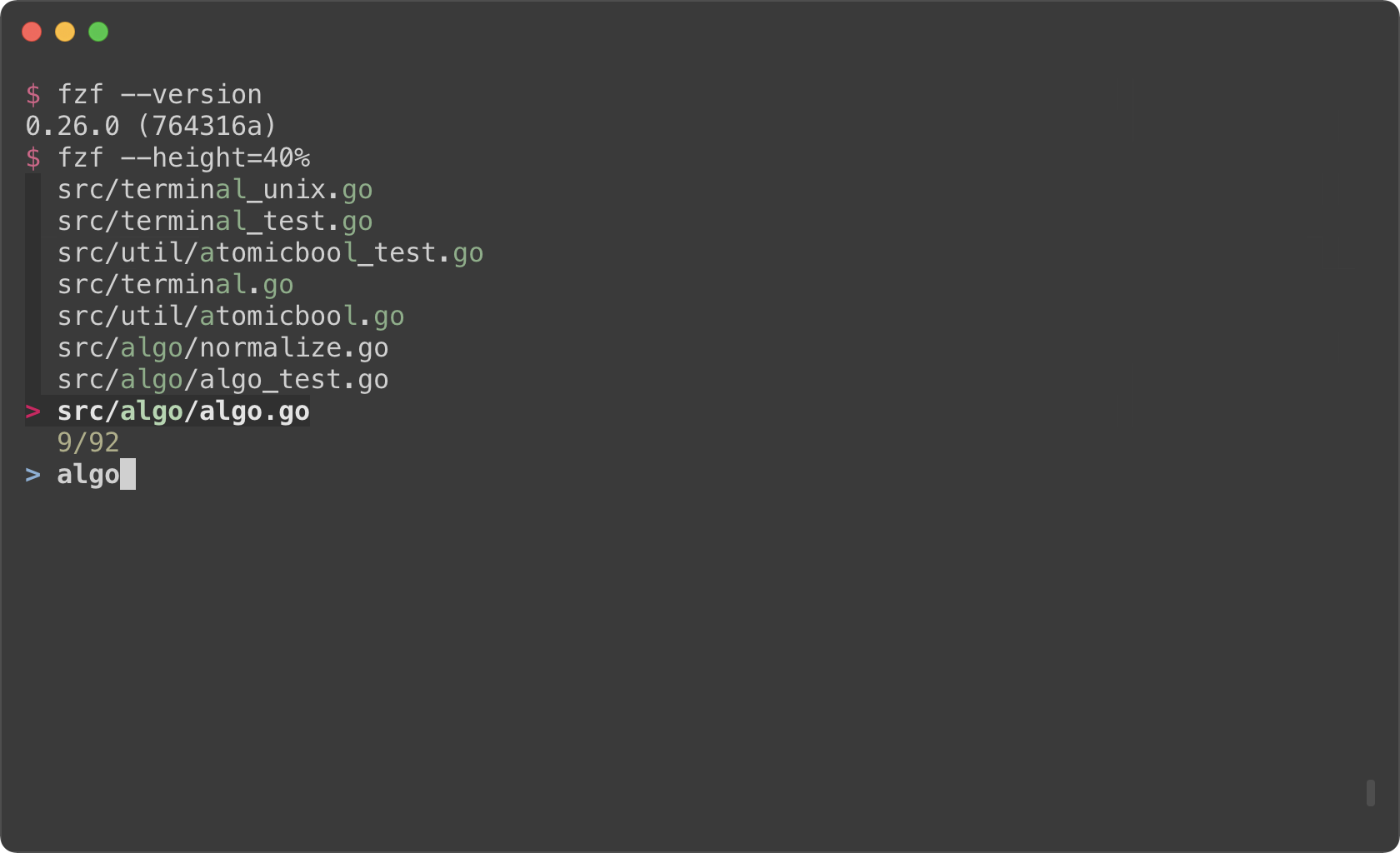
fzf by default opens in fullscreen mode, but it's not always desirable.
Oftentimes, you want to see the current context of the terminal while using
fzf. `--height` is an option for opening fzf below the cursor in
non-fullscreen mode so you can still see the previous commands and their
results above it.
```sh
fzf --height=40%
```
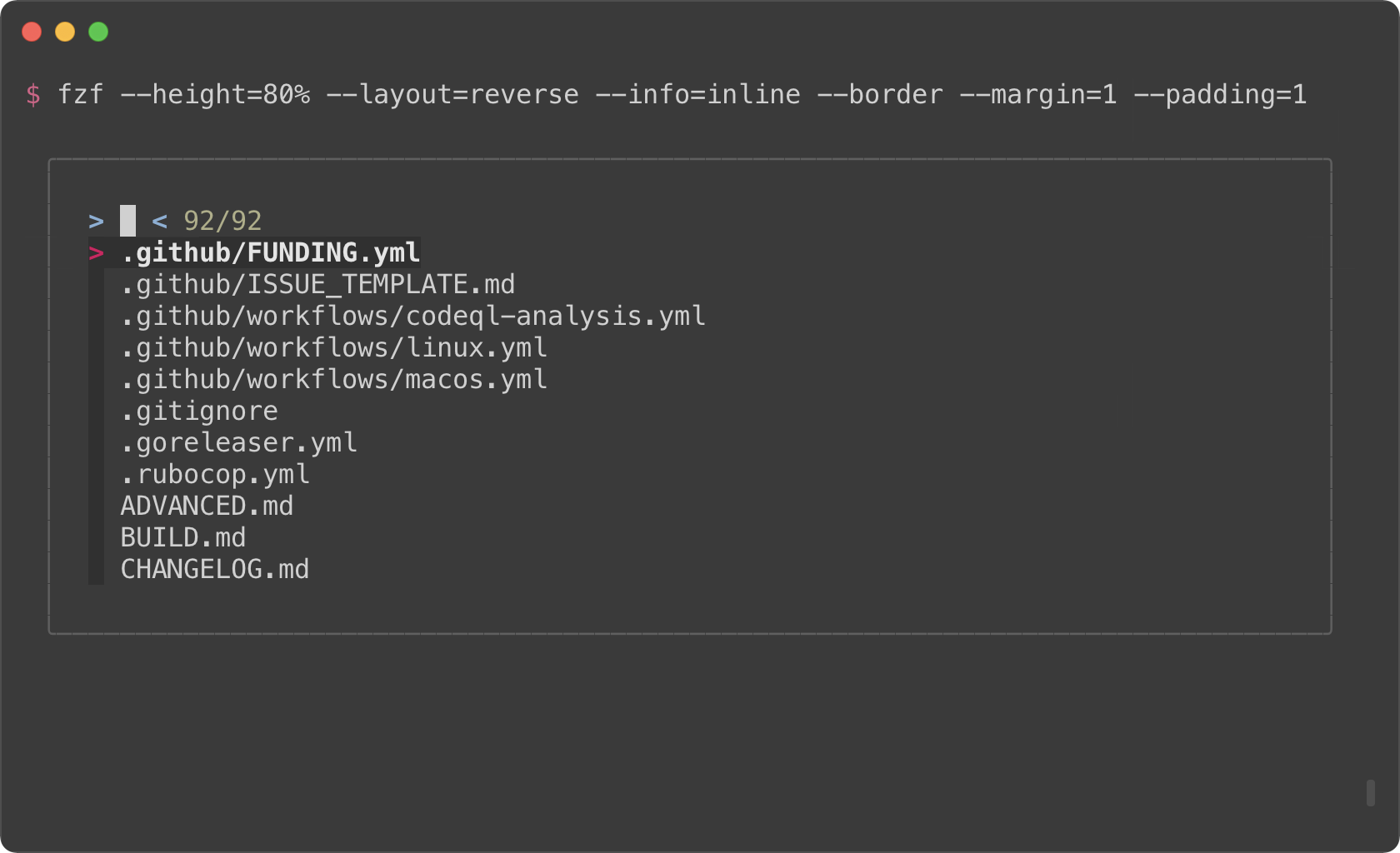
You might also want to experiment with other layout options such as
`--layout=reverse`, `--info=inline`, `--border`, `--margin`, etc.
```sh
fzf --height=40% --layout=reverse
fzf --height=40% --layout=reverse --info=inline
fzf --height=40% --layout=reverse --info=inline --border
fzf --height=40% --layout=reverse --info=inline --border --margin=1
fzf --height=40% --layout=reverse --info=inline --border --margin=1 --padding=1
```
*(See man page to see the full list of options)*
But you definitely don't want to repeat `--height=40% --layout=reverse
--info=inline --border --margin=1 --padding=1` every time you use fzf. You
could write a wrapper script or shell alias, but there is an easier option.
Define `$FZF_DEFAULT_OPTS` like so:
```sh
export FZF_DEFAULT_OPTS="--height=40% --layout=reverse --info=inline --border --margin=1 --padding=1"
```
### `--tmux`
(Requires tmux 3.3 or later)
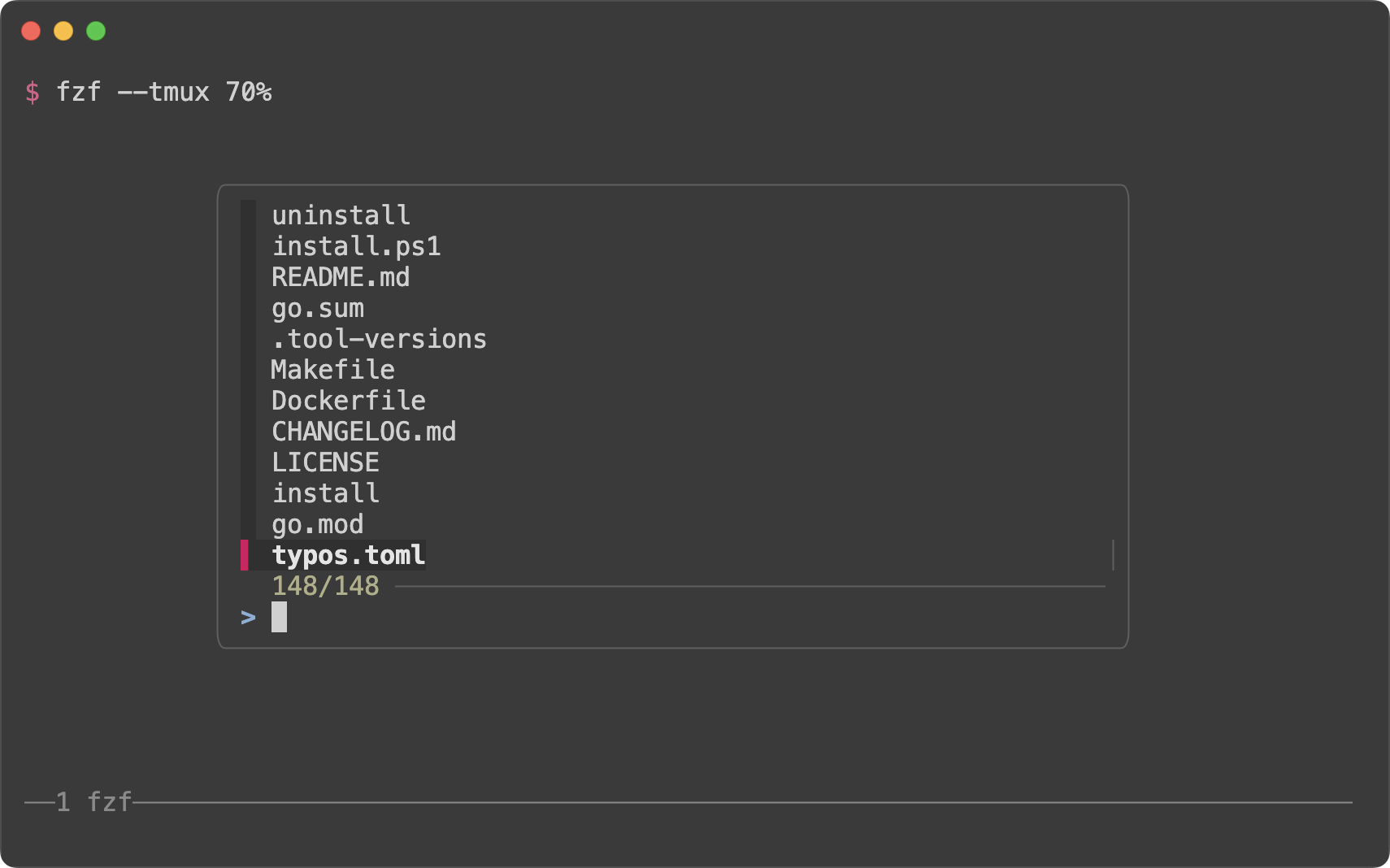
If you're using tmux, you can open fzf in a tmux popup using `--tmux` option.
```sh
# Open fzf in a tmux popup at the center of the screen with 70% width and height
fzf --tmux 70%
```
`--tmux` option is silently ignored if you're not on tmux. So if you're trying
to avoid opening fzf in fullscreen, try specifying both `--height` and `--tmux`.
```sh
# --tmux is specified later so it takes precedence over --height when on tmux.
# If you're not on tmux, --tmux is ignored and --height is used instead.
fzf --height 70% --tmux 70%
```
You can also specify the position, width, and height of the popup window in
the following format:
* `[center|top|bottom|left|right][,SIZE[%]][,SIZE[%][,border-native]]`
```sh
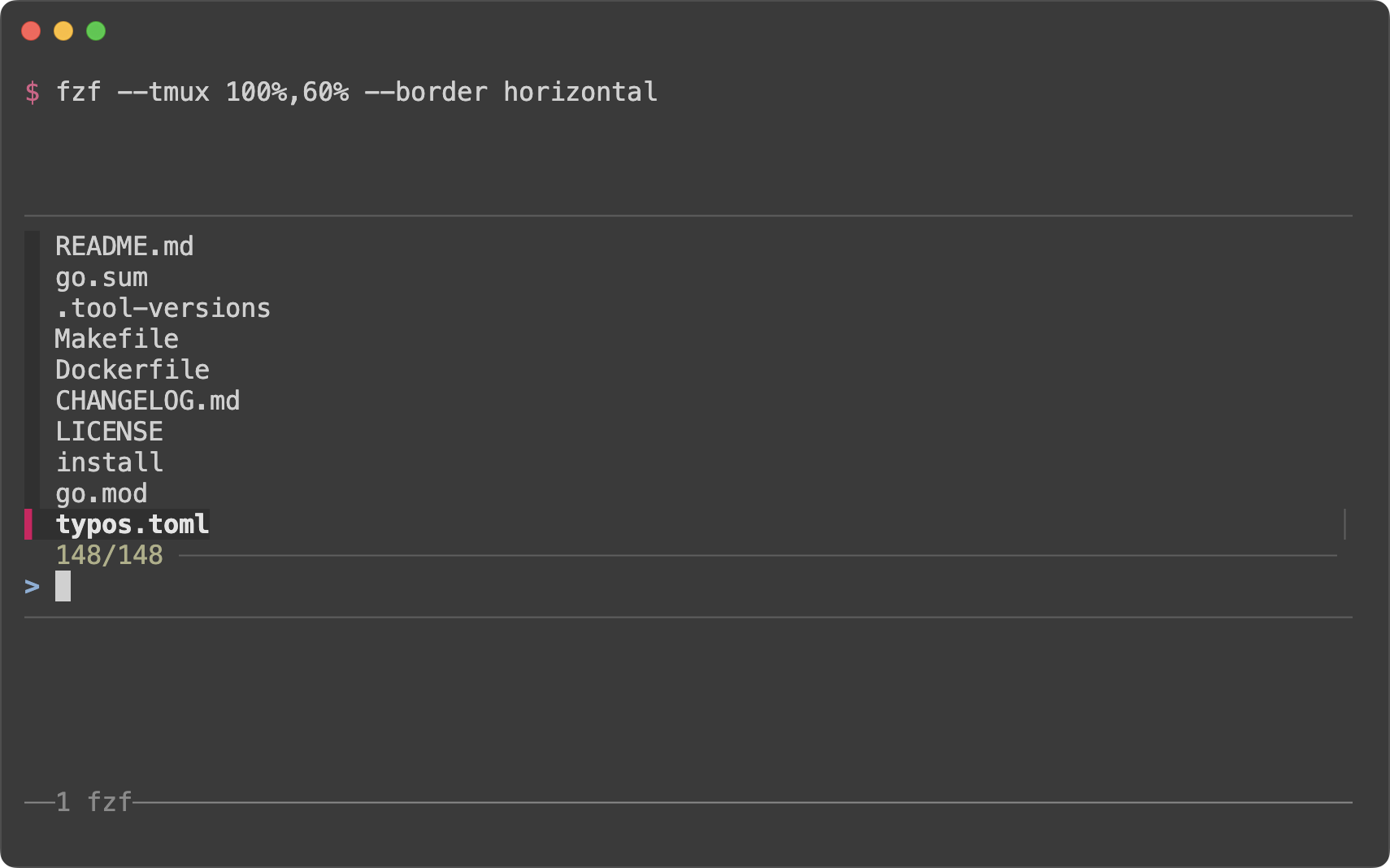
# 100% width and 60% height
fzf --tmux 100%,60% --border horizontal
```
```sh
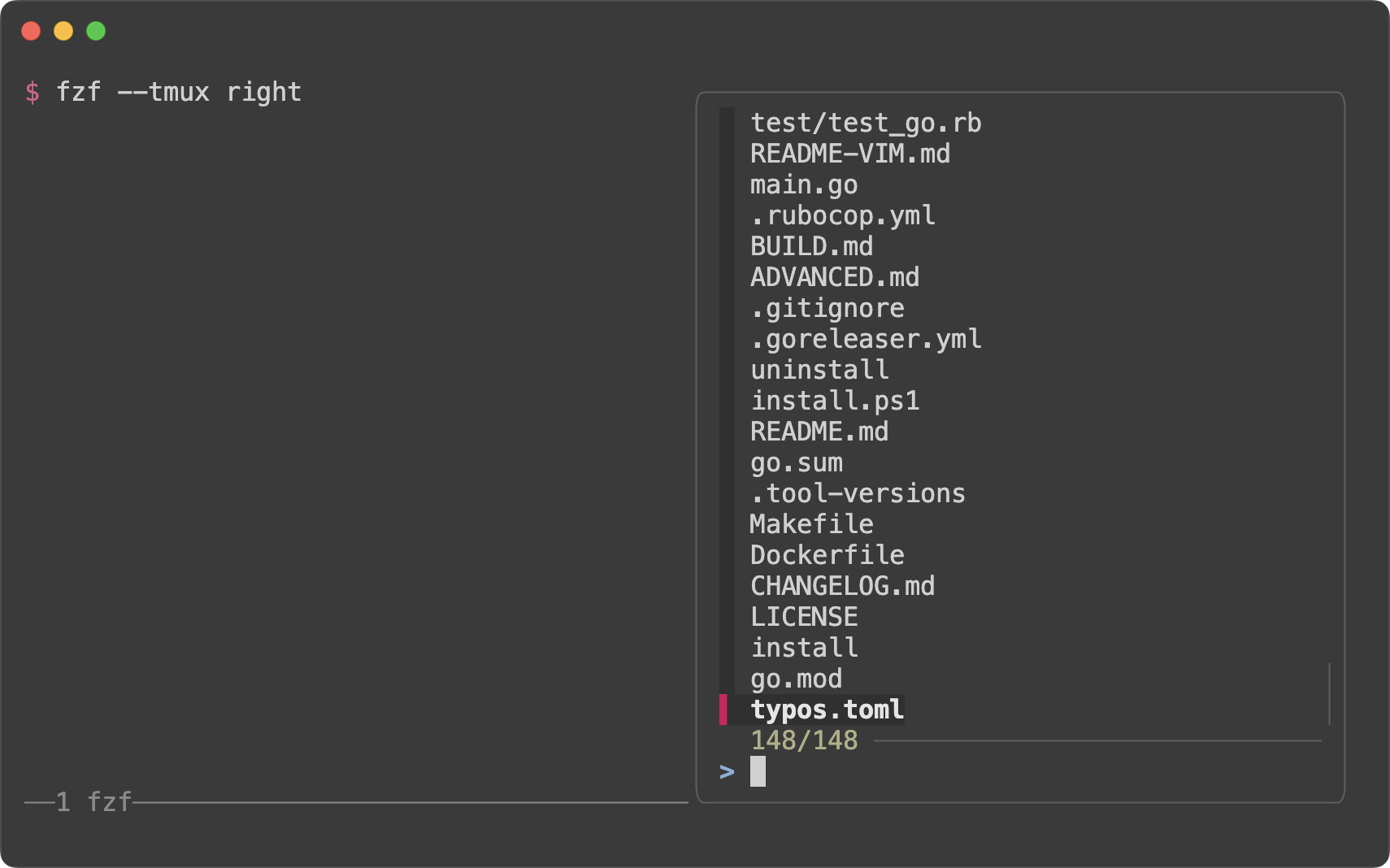
# On the right (50% width)
fzf --tmux right
```
```sh
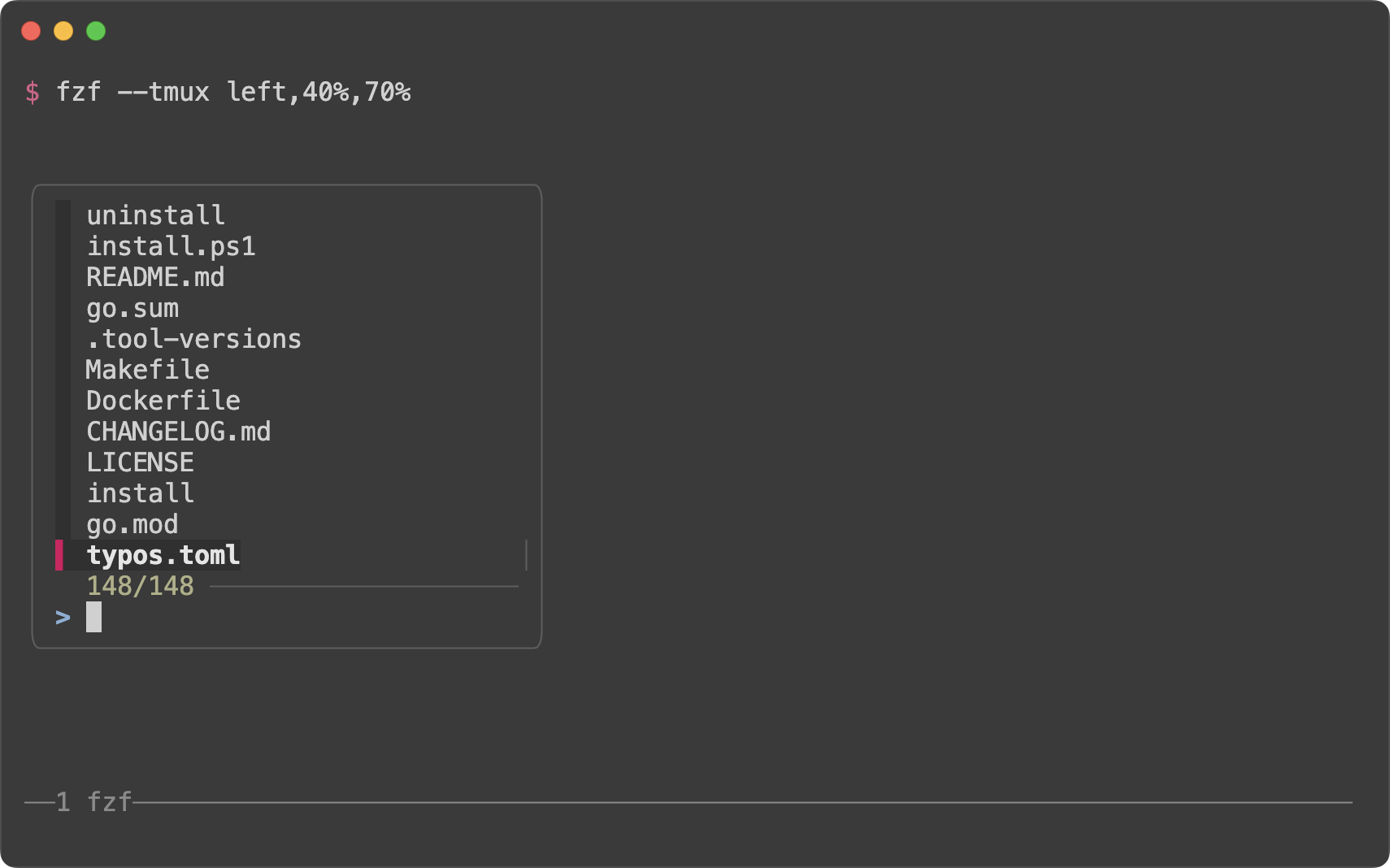
# On the left (40% width and 70% height)
fzf --tmux left,40%,70%
```
> [!TIP]
> You might also want to check out my tmux plugins which support this popup
> window layout.
>
> - https://github.com/junegunn/tmux-fzf-url
> - https://github.com/junegunn/tmux-fzf-maccy
Dynamic reloading of the list
-----------------------------
fzf can dynamically update the candidate list using an arbitrary program with
`reload` bindings (The design document for `reload` can be found
[here][reload]).
[reload]: https://github.com/junegunn/fzf/issues/1750
### Updating the list of processes by pressing CTRL-R
This example shows how you can set up a binding for dynamically updating the
list without restarting fzf.
```sh
(date; ps -ef) |
fzf --bind='ctrl-r:reload(date; ps -ef)' \
--header=$'Press CTRL-R to reload\n\n' --header-lines=2 \
--preview='echo {}' --preview-window=down,3,wrap \
--layout=reverse --height=80% | awk '{print $2}' | xargs kill -9
```
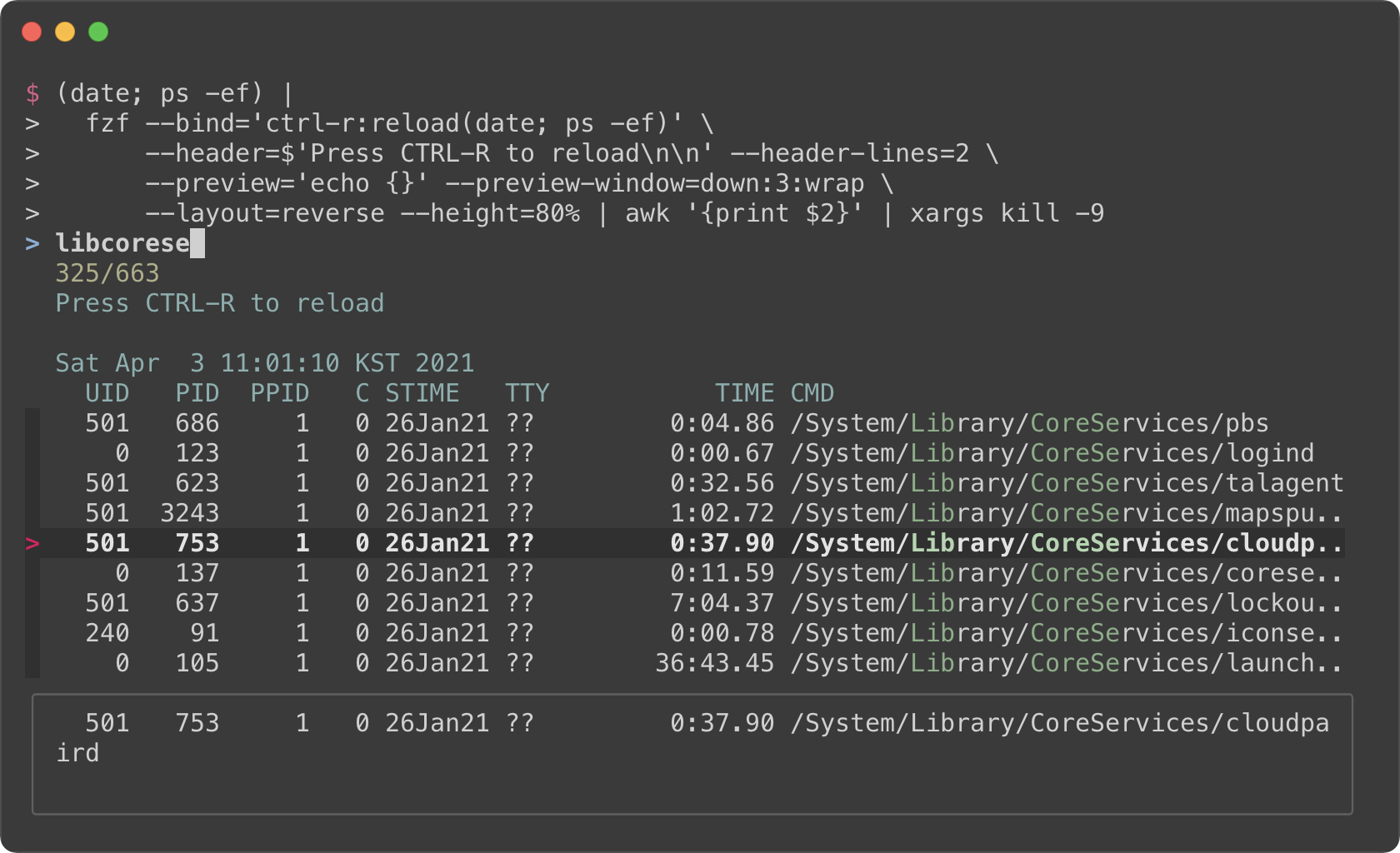
- The initial command is `(date; ps -ef)`. It prints the current date and
time, and the list of the processes.
- With `--header` option, you can show any message as the fixed header.
- To disallow selecting the first two lines (`date` and `ps` header), we use
`--header-lines=2` option.
- `--bind='ctrl-r:reload(date; ps -ef)'` binds CTRL-R to `reload` action that
runs `date; ps -ef`, so we can update the list of the processes by pressing
CTRL-R.
- We use simple `echo {}` preview option, so we can see the entire line on the
preview window below even if it's too long
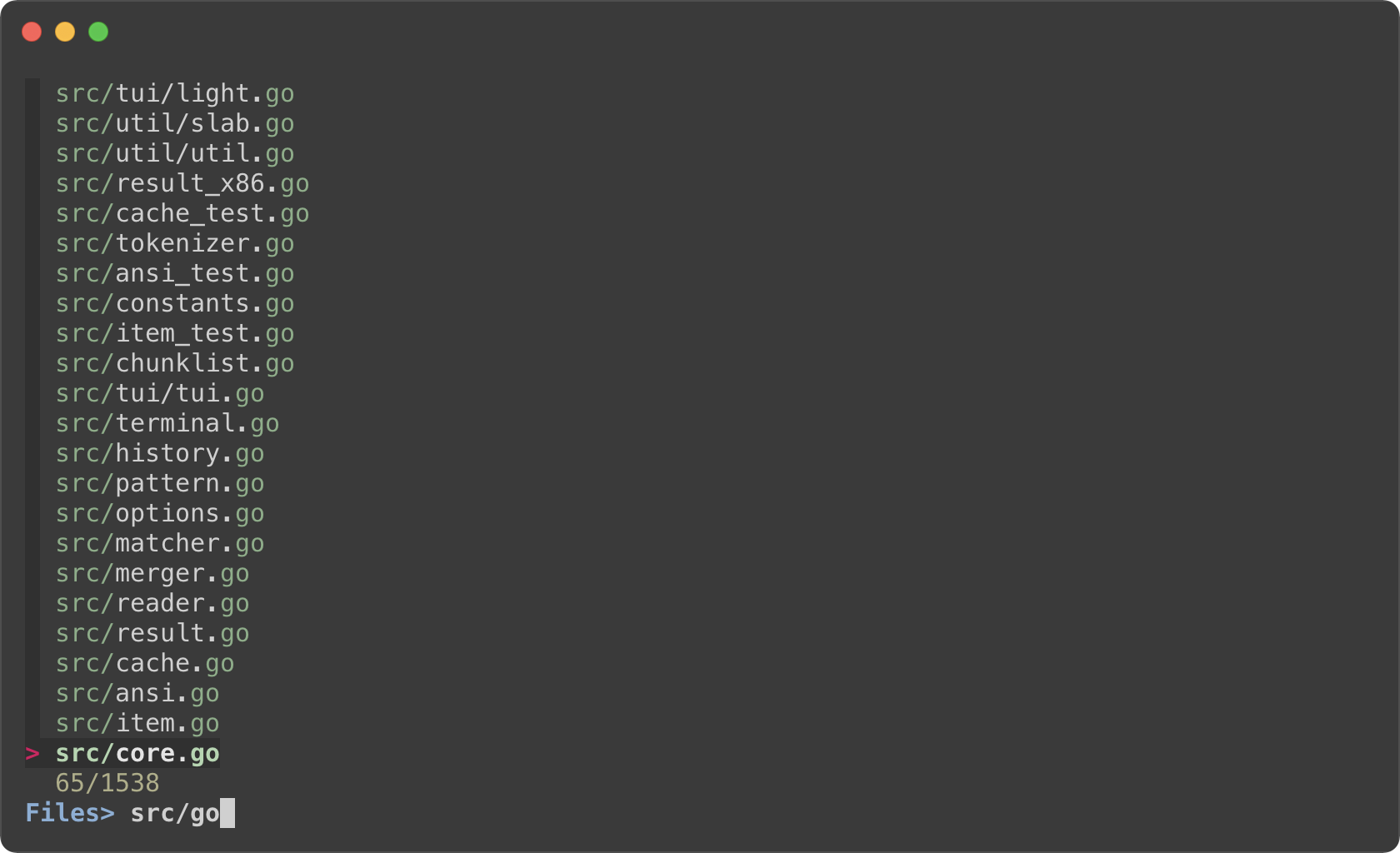
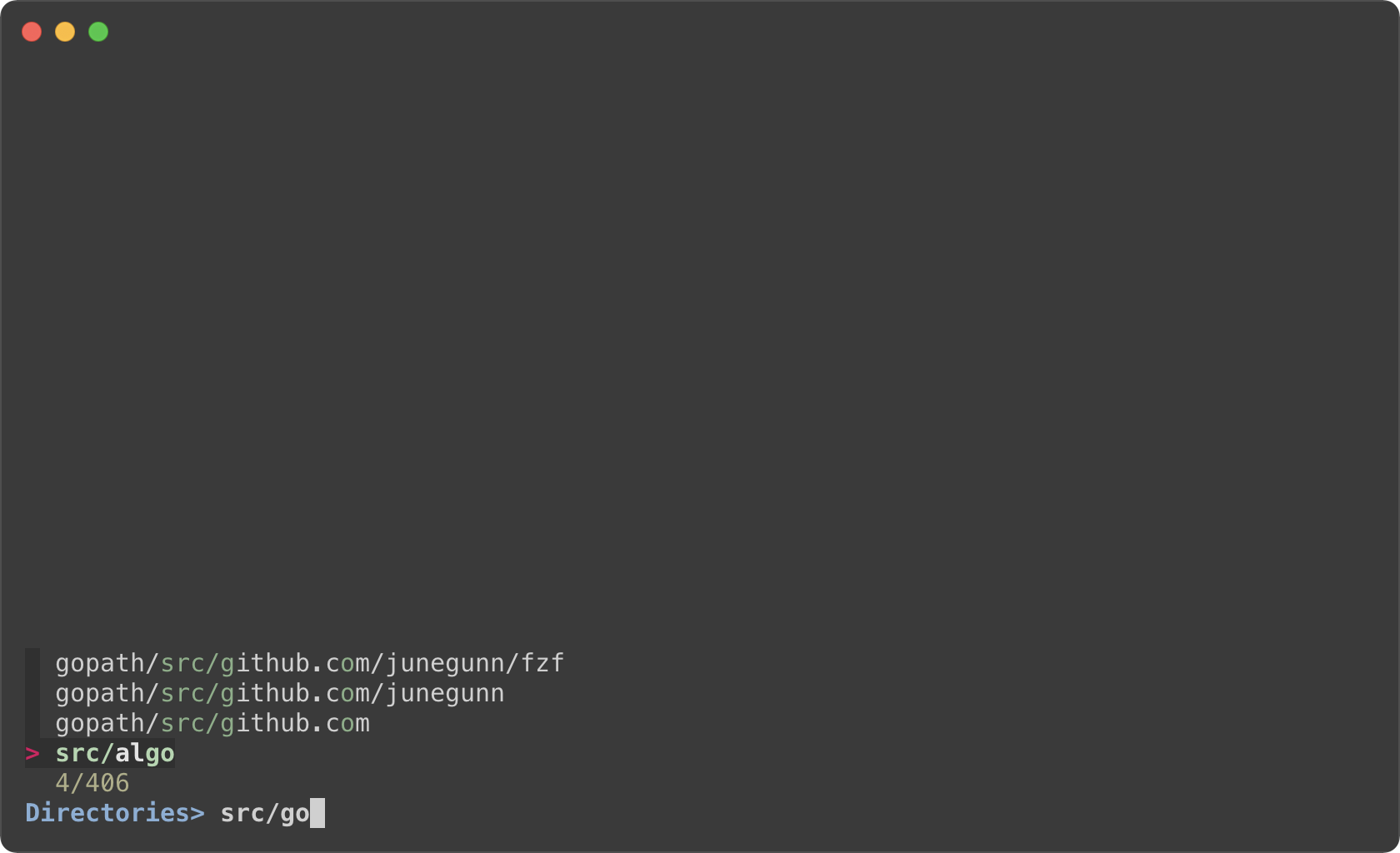
### Toggling between data sources
You're not limited to just one reload binding. Set up multiple bindings so
you can switch between data sources.
```sh
find * | fzf --prompt 'All> ' \
--header 'CTRL-D: Directories / CTRL-F: Files' \
--bind 'ctrl-d:change-prompt(Directories> )+reload(find * -type d)' \
--bind 'ctrl-f:change-prompt(Files> )+reload(find * -type f)'
```
### Toggling with a single key binding
The above example uses two different key bindings to toggle between two modes,
but can we just use a single key binding?
To make a key binding behave differently each time it is pressed, we need:
1. a way to store the current state. i.e. "which mode are we in?"
2. and a way to dynamically perform different actions depending on the state.
The following example shows how to 1. store the current mode in the prompt
string, 2. and use this information (`$FZF_PROMPT`) to determine which
actions to perform using the `transform` action.
```sh
fd --type file |
fzf --prompt 'Files> ' \
--header 'CTRL-T: Switch between Files/Directories' \
--bind 'ctrl-t:transform:[[ ! $FZF_PROMPT =~ Files ]] &&
echo "change-prompt(Files> )+reload(fd --type file)" ||
echo "change-prompt(Directories> )+reload(fd --type directory)"' \
--preview '[[ $FZF_PROMPT =~ Files ]] && bat --color=always {} || tree -C {}'
```
Ripgrep integration
-------------------
### Using fzf as the secondary filter
* Requires [bat][bat]
* Requires [Ripgrep][rg]
[bat]: https://github.com/sharkdp/bat
[rg]: https://github.com/BurntSushi/ripgrep
fzf is pretty fast for filtering a list that you will rarely have to think
about its performance. But it is not the right tool for searching for text
inside many large files, and in that case you should definitely use something
like [Ripgrep][rg].
In the next example, Ripgrep is the primary filter that searches for the given
text in files, and fzf is used as the secondary fuzzy filter that adds
interactivity to the workflow. And we use [bat][bat] to show the matching line in
the preview window.
This is a bash script and it will not run as expected on other non-compliant
shells. To avoid the compatibility issue, let's save this snippet as a script
file called `rfv`.
```bash
#!/usr/bin/env bash
# 1. Search for text in files using Ripgrep
# 2. Interactively narrow down the list using fzf
# 3. Open the file in Vim
rg --color=always --line-number --no-heading --smart-case "${*:-}" |
fzf --ansi \
--color "hl:-1:underline,hl+:-1:underline:reverse" \
--delimiter : \
--preview 'bat --color=always {1} --highlight-line {2}' \
--preview-window 'up,60%,border-bottom,+{2}+3/3,~3' \
--bind 'enter:become(vim {1} +{2})'
```
And run it with an initial query string.
```sh
# Make the script executable
chmod +x rfv
# Run it with the initial query "algo"
./rfv algo
```
> Ripgrep will perform the initial search and list all the lines that contain
`algo`. Then we further narrow down the list on fzf.
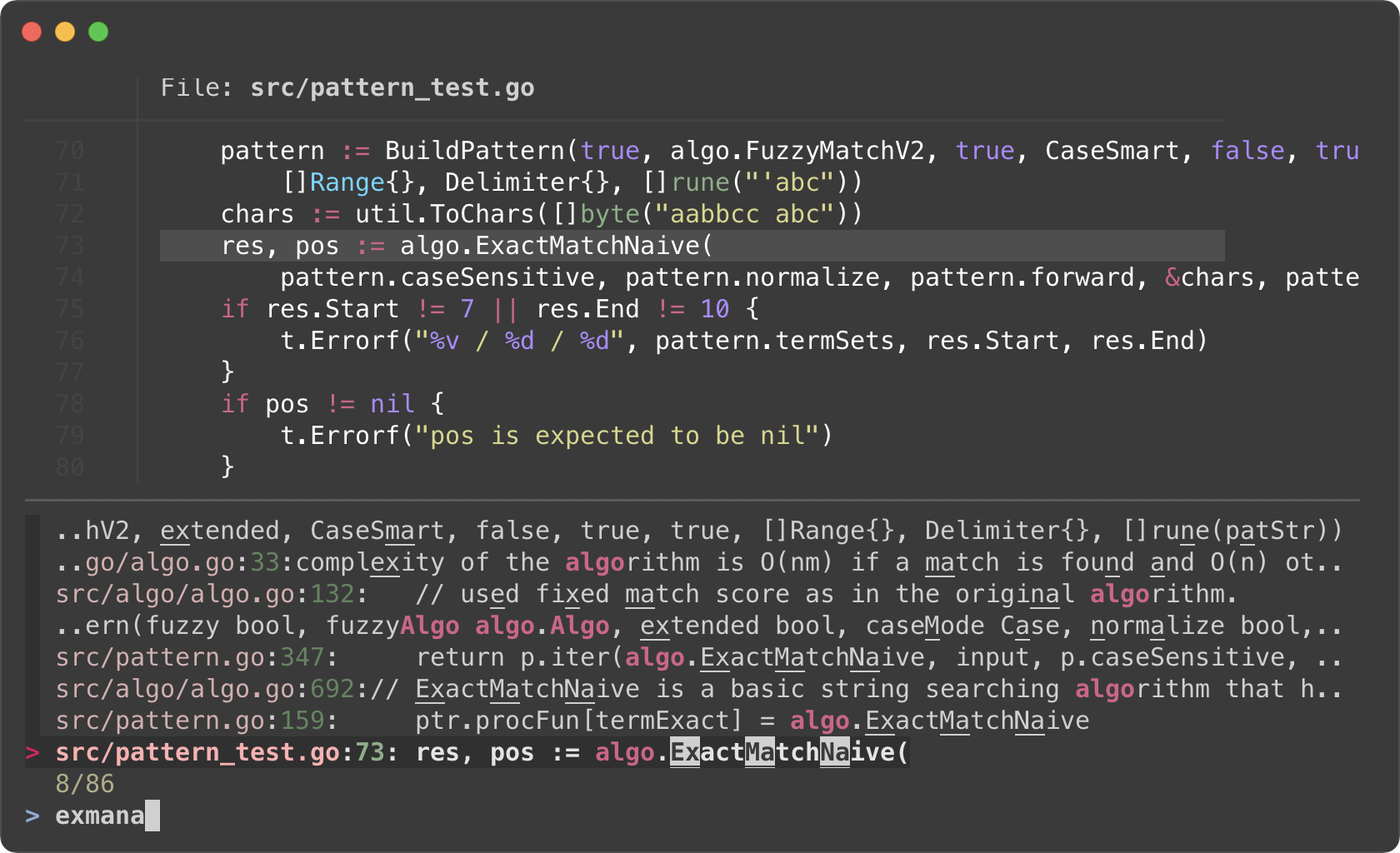
I know it's a lot to digest, let's try to break down the code.
- Ripgrep prints the matching lines in the following format
```
man/man1/fzf.1:54:.BI "--algo=" TYPE
man/man1/fzf.1:55:Fuzzy matching algorithm (default: v2)
man/man1/fzf.1:58:.BR v2 " Optimal scoring algorithm (quality)"
src/pattern_test.go:7: "github.com/junegunn/fzf/src/algo"
```
The first token delimited by `:` is the file path, and the second token is
the line number of the matching line. They respectively correspond to `{1}`
and `{2}` in the preview command.
- `--preview 'bat --color=always {1} --highlight-line {2}'`
- As we run `rg` with `--color=always` option, we should tell fzf to parse
ANSI color codes in the input by setting `--ansi`.
- We customize how fzf colors various text elements using `--color` option.
`-1` tells fzf to keep the original color from the input. See `man fzf` for
available color options.
- The value of `--preview-window` option consists of 5 components delimited
by `,`
1. `up` -- Position of the preview window
1. `60%` -- Size of the preview window
1. `border-bottom` -- Preview window border only on the bottom side
1. `+{2}+3/3` -- Scroll offset of the preview contents
1. `~3` -- Fixed header
- Let's break down the latter two. We want to display the bat output in the
preview window with a certain scroll offset so that the matching line is
positioned near the center of the preview window.
- `+{2}` -- The base offset is extracted from the second token
- `+3` -- We add 3 lines to the base offset to compensate for the header
part of `bat` output
- ```
───────┬──────────────────────────────────────────────────────────
│ File: CHANGELOG.md
───────┼──────────────────────────────────────────────────────────
1 │ CHANGELOG
2 │ =========
3 │
4 │ 0.26.0
5 │ ------
```
- `/3` adjusts the offset so that the matching line is shown at a third
position in the window
- `~3` makes the top three lines fixed header so that they are always
visible regardless of the scroll offset
- Instead of using shell script to process the final output of fzf, we use
`become(...)` action which was added in [fzf 0.38.0][0.38.0] to turn fzf
into a new process that opens the file with `vim` (`vim {1}`) and move the
cursor to the line (`+{2}`).
[0.38.0]: https://github.com/junegunn/fzf/blob/master/CHANGELOG.md#0380
### Using fzf as interactive Ripgrep launcher
We have learned that we can bind `reload` action to a key (e.g.
`--bind=ctrl-r:execute(ps -ef)`). In the next example, we are going to **bind
`reload` action to `change` event** so that whenever the user *changes* the
query string on fzf, `reload` action is triggered.
Here is a variation of the above `rfv` script. fzf will restart Ripgrep every
time the user updates the query string on fzf. Searching and filtering is
completely done by Ripgrep, and fzf merely provides the interactive interface.
So we lose the "fuzziness", but the performance will be better on larger
projects, and it will free up memory as you narrow down the results.
```bash
#!/usr/bin/env bash
# 1. Search for text in files using Ripgrep
# 2. Interactively restart Ripgrep with reload action
# 3. Open the file in Vim
RG_PREFIX="rg --column --line-number --no-heading --color=always --smart-case "
INITIAL_QUERY="${*:-}"
fzf --ansi --disabled --query "$INITIAL_QUERY" \
--bind "start:reload:$RG_PREFIX {q} || true" \
--bind "change:reload:sleep 0.1; $RG_PREFIX {q} || true" \
--delimiter : \
--preview 'bat --color=always {1} --highlight-line {2}' \
--preview-window 'up,60%,border-bottom,+{2}+3/3,~3' \
--bind 'enter:become(vim {1} +{2})'
```
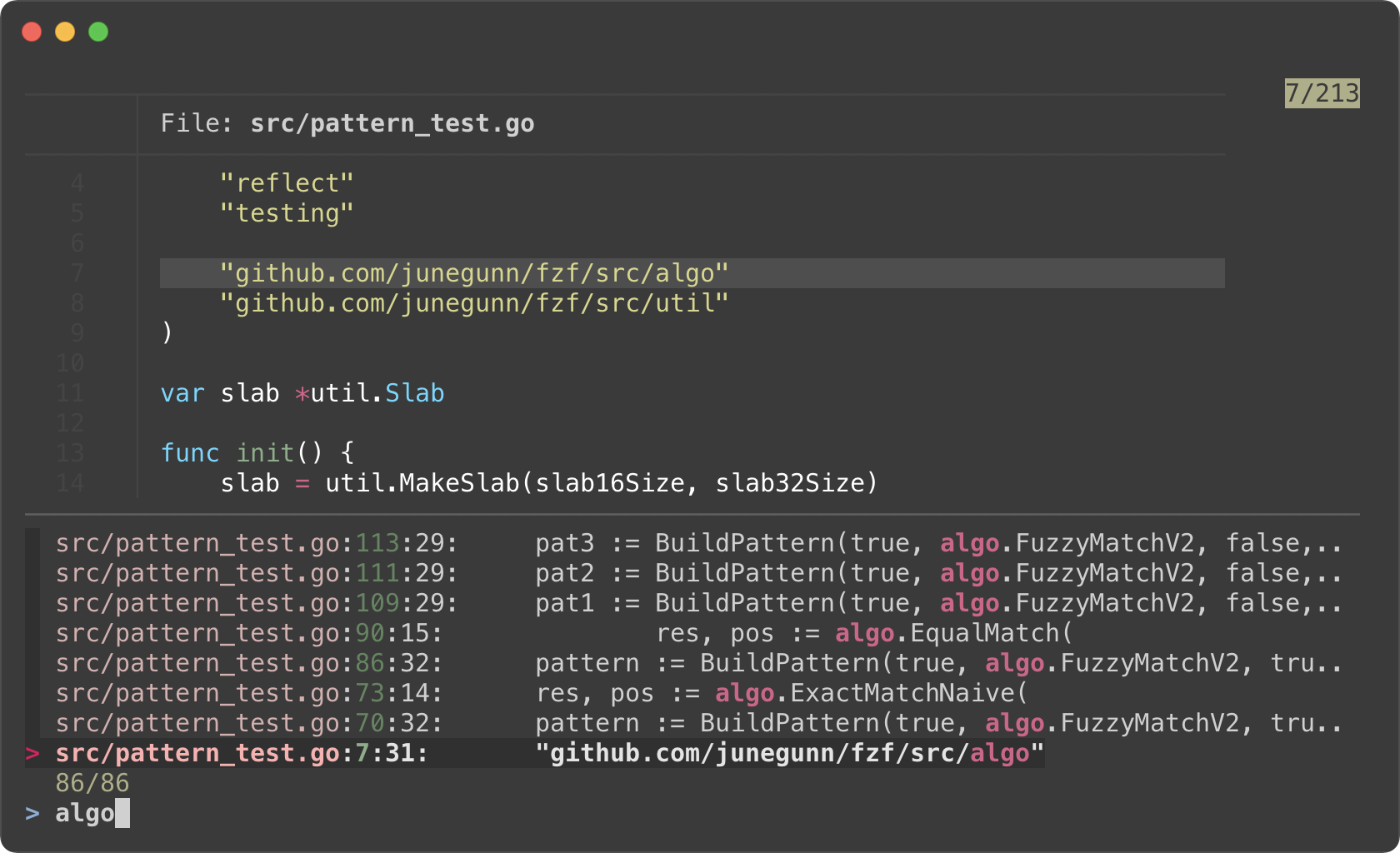
- Instead of starting fzf in the usual `rg ... | fzf` form, we make it start
the initial Ripgrep process immediately via `start:reload` binding for the
consistency of the code.
- Filtering is no longer a responsibility of fzf; hence `--disabled`
- `{q}` in the reload command evaluates to the query string on fzf prompt.
- `sleep 0.1` in the reload command is for "debouncing". This small delay will
reduce the number of intermediate Ripgrep processes while we're typing in
a query.
### Switching to fzf-only search mode
In the previous example, we lost fuzzy matching capability as we completely
delegated search functionality to Ripgrep. But we can dynamically switch to
fzf-only search mode by *"unbinding"* `reload` action from `change` event.
```sh
#!/usr/bin/env bash
# Two-phase filtering with Ripgrep and fzf
#
# 1. Search for text in files using Ripgrep
# 2. Interactively restart Ripgrep with reload action
# * Press alt-enter to switch to fzf-only filtering
# 3. Open the file in Vim
RG_PREFIX="rg --column --line-number --no-heading --color=always --smart-case "
INITIAL_QUERY="${*:-}"
fzf --ansi --disabled --query "$INITIAL_QUERY" \
--bind "start:reload:$RG_PREFIX {q}" \
--bind "change:reload:sleep 0.1; $RG_PREFIX {q} || true" \
--bind "alt-enter:unbind(change,alt-enter)+change-prompt(2. fzf> )+enable-search+clear-query" \
--color "hl:-1:underline,hl+:-1:underline:reverse" \
--prompt '1. ripgrep> ' \
--delimiter : \
--preview 'bat --color=always {1} --highlight-line {2}' \
--preview-window 'up,60%,border-bottom,+{2}+3/3,~3' \
--bind 'enter:become(vim {1} +{2})'
```
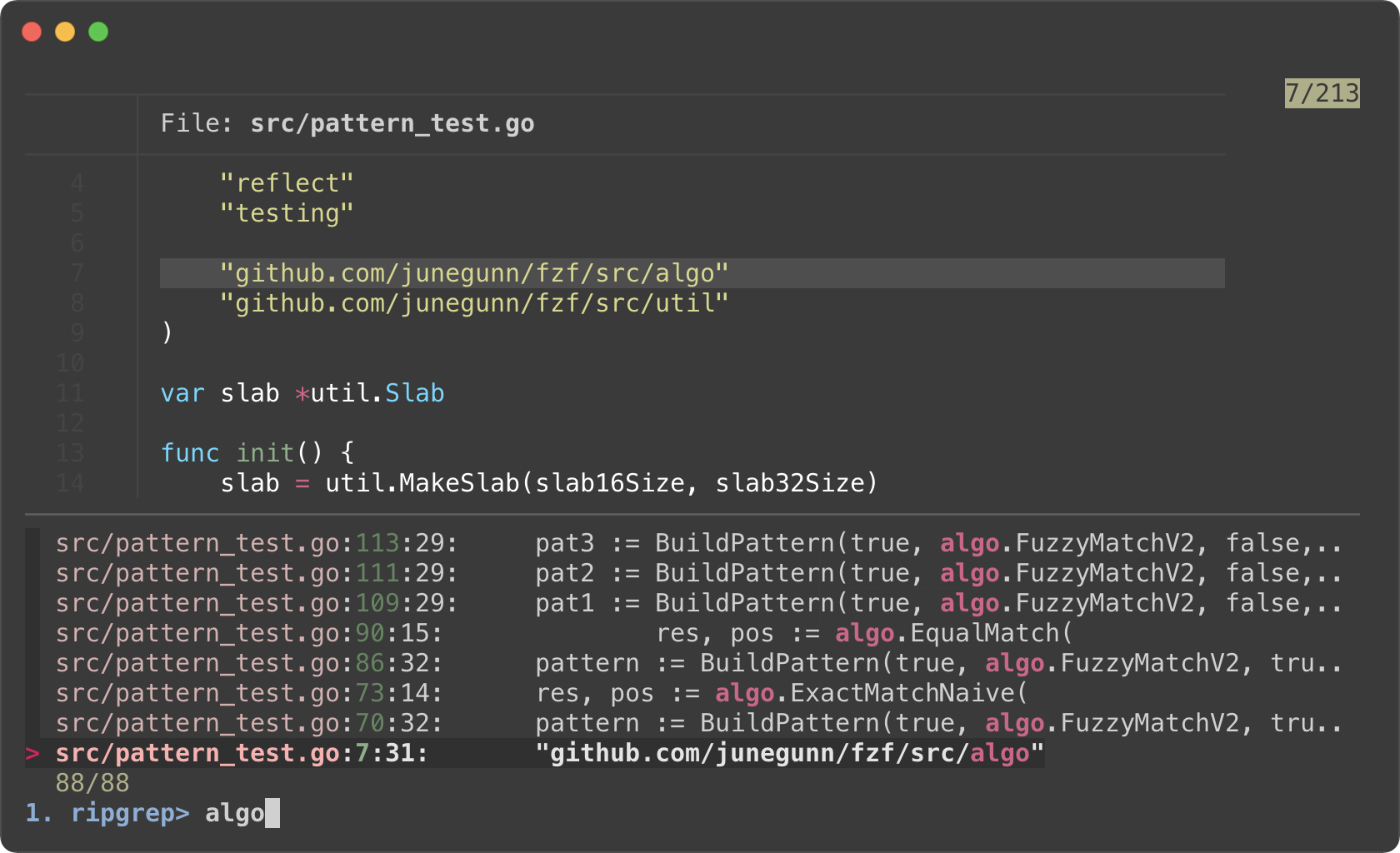
* Phase 1. Filtering with Ripgrep
* Phase 2. Filtering with fzf
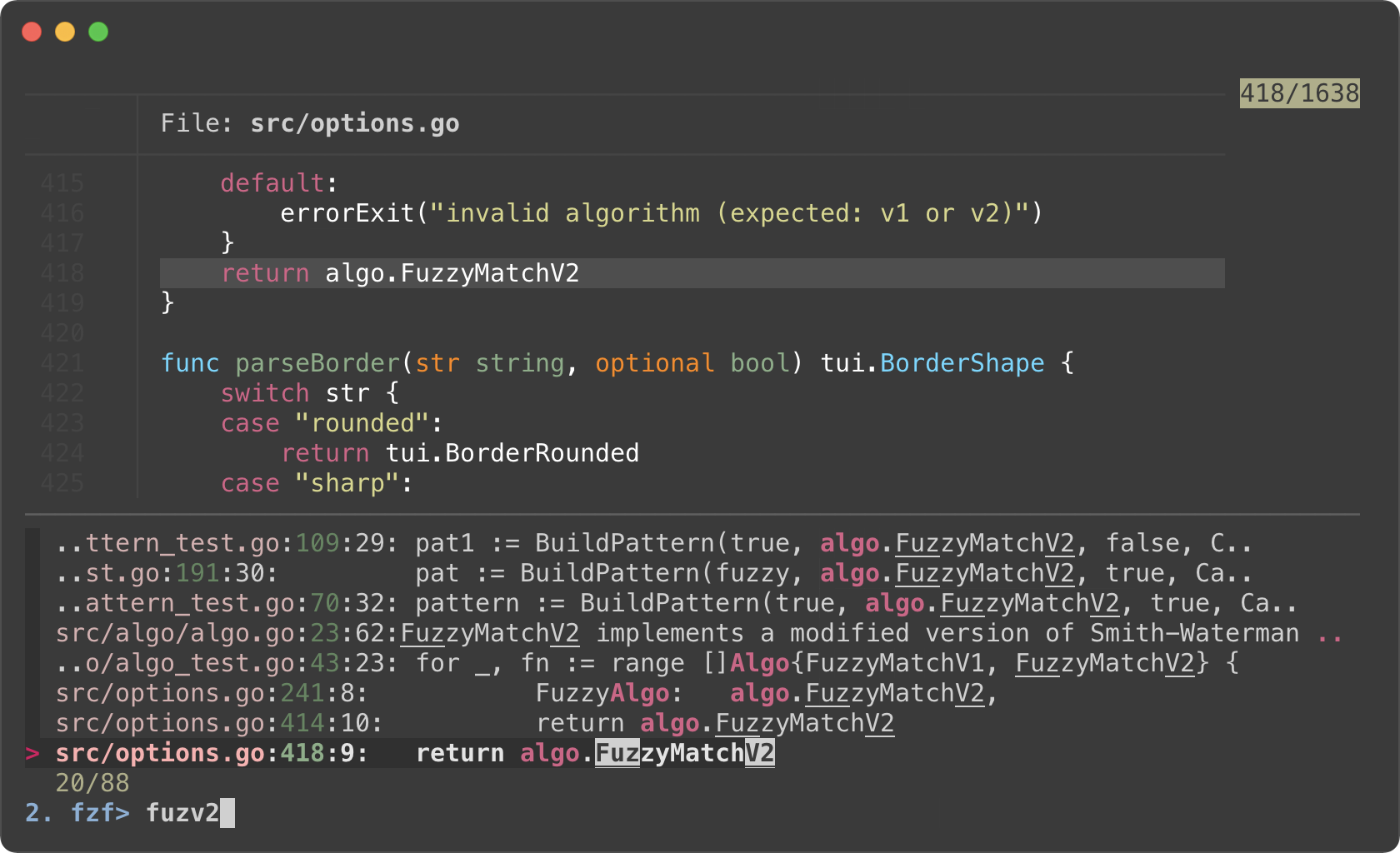
- We added `--prompt` option to show that fzf is initially running in "Ripgrep
launcher mode".
- We added `alt-enter` binding that
1. unbinds `change` event, so Ripgrep is no longer restarted on key press
2. changes the prompt to `2. fzf>`
3. enables search functionality of fzf
4. clears the current query string that was used to start Ripgrep process
5. and unbinds `alt-enter` itself as this is a one-off event
- We reverted `--color` option for customizing how the matching chunks are
displayed in the second phase
### Switching between Ripgrep mode and fzf mode
[fzf 0.30.0][0.30.0] added `rebind` action so we can "rebind" the bindings
that were previously "unbound" via `unbind`.
This is an improved version of the previous example that allows us to switch
between Ripgrep launcher mode and fzf-only filtering mode via CTRL-R and
CTRL-F.
```sh
#!/usr/bin/env bash
# Switch between Ripgrep launcher mode (CTRL-R) and fzf filtering mode (CTRL-F)
rm -f /tmp/rg-fzf-{r,f}
RG_PREFIX="rg --column --line-number --no-heading --color=always --smart-case "
INITIAL_QUERY="${*:-}"
fzf --ansi --disabled --query "$INITIAL_QUERY" \
--bind "start:reload($RG_PREFIX {q})+unbind(ctrl-r)" \
--bind "change:reload:sleep 0.1; $RG_PREFIX {q} || true" \
--bind "ctrl-f:unbind(change,ctrl-f)+change-prompt(2. fzf> )+enable-search+rebind(ctrl-r)+transform-query(echo {q} > /tmp/rg-fzf-r; cat /tmp/rg-fzf-f)" \
--bind "ctrl-r:unbind(ctrl-r)+change-prompt(1. ripgrep> )+disable-search+reload($RG_PREFIX {q} || true)+rebind(change,ctrl-f)+transform-query(echo {q} > /tmp/rg-fzf-f; cat /tmp/rg-fzf-r)" \
--color "hl:-1:underline,hl+:-1:underline:reverse" \
--prompt '1. ripgrep> ' \
--delimiter : \
--header '╱ CTRL-R (ripgrep mode) ╱ CTRL-F (fzf mode) ╱' \
--preview 'bat --color=always {1} --highlight-line {2}' \
--preview-window 'up,60%,border-bottom,+{2}+3/3,~3' \
--bind 'enter:become(vim {1} +{2})'
```
- To restore the query string when switching between modes, we store the
current query in `/tmp/rg-fzf-{r,f}` files and restore the query using
`transform-query` action which was added in [fzf 0.36.0][0.36.0].
- Also note that we unbind `ctrl-r` binding on `start` event which is
triggered once when fzf starts.
[0.30.0]: https://github.com/junegunn/fzf/blob/master/CHANGELOG.md#0300
[0.36.0]: https://github.com/junegunn/fzf/blob/master/CHANGELOG.md#0360
### Switching between Ripgrep mode and fzf mode using a single key binding
In contrast to the previous version, we use just one hotkey to toggle between
ripgrep and fzf mode. This is achieved by using the `$FZF_PROMPT` as a state
within the `transform` action, a feature introduced in [fzf 0.45.0][0.45.0]. A
more detailed explanation of this feature can be found in a previous section -
[Toggling with a single keybinding](#toggling-with-a-single-key-binding).
[0.45.0]: https://github.com/junegunn/fzf/blob/master/CHANGELOG.md#0450
When using the `transform` action, the placeholder (`\{q}`) should be escaped to
prevent immediate evaluation.
```sh
#!/usr/bin/env bash
# Switch between Ripgrep mode and fzf filtering mode (CTRL-T)
rm -f /tmp/rg-fzf-{r,f}
RG_PREFIX="rg --column --line-number --no-heading --color=always --smart-case "
INITIAL_QUERY="${*:-}"
fzf --ansi --disabled --query "$INITIAL_QUERY" \
--bind "start:reload:$RG_PREFIX {q}" \
--bind "change:reload:sleep 0.1; $RG_PREFIX {q} || true" \
--bind 'ctrl-t:transform:[[ ! $FZF_PROMPT =~ ripgrep ]] &&
echo "rebind(change)+change-prompt(1. ripgrep> )+disable-search+transform-query:echo \{q} > /tmp/rg-fzf-f; cat /tmp/rg-fzf-r" ||
echo "unbind(change)+change-prompt(2. fzf> )+enable-search+transform-query:echo \{q} > /tmp/rg-fzf-r; cat /tmp/rg-fzf-f"' \
--color "hl:-1:underline,hl+:-1:underline:reverse" \
--prompt '1. ripgrep> ' \
--delimiter : \
--header 'CTRL-T: Switch between ripgrep/fzf' \
--preview 'bat --color=always {1} --highlight-line {2}' \
--preview-window 'up,60%,border-bottom,+{2}+3/3,~3' \
--bind 'enter:become(vim {1} +{2})'
```
### Controlling Ripgrep search and fzf search simultaneously
`search` and `transform-search` action allow you to trigger an fzf search with
an arbitrary query string. This frees fzf from strictly following the prompt
input, enabling custom search syntax.
In the example below, `transform` action is used to conditionally trigger
`reload` for ripgrep, followed by `search` for fzf. The first word of the
query initiates the Ripgrep process to generate the initial results, while the
remainder of the query is passed to fzf for secondary filtering.
```sh
#!/usr/bin/env bash
export TEMP=$(mktemp -u)
trap 'rm -f "$TEMP"' EXIT
INITIAL_QUERY="${*:-}"
TRANSFORMER='
rg_pat={q:1} # The first word is passed to ripgrep
fzf_pat={q:2..} # The rest are passed to fzf
if ! [[ -r "$TEMP" ]] || [[ $rg_pat != $(cat "$TEMP") ]]; then
echo "$rg_pat" > "$TEMP"
printf "reload:sleep 0.1; rg --column --line-number --no-heading --color=always --smart-case %q || true" "$rg_pat"
fi
echo "+search:$fzf_pat"
'
fzf --ansi --disabled --query "$INITIAL_QUERY" \
--with-shell 'bash -c' \
--bind "start,change:transform:$TRANSFORMER" \
--color "hl:-1:underline,hl+:-1:underline:reverse" \
--delimiter : \
--preview 'bat --color=always {1} --highlight-line {2}' \
--preview-window 'up,60%,border-line,+{2}+3/3,~3' \
--bind 'enter:become(vim {1} +{2})'
```
Log tailing
-----------
fzf can run long-running preview commands and render partial results before
completion. And when you specify `follow` flag in `--preview-window` option,
fzf will "`tail -f`" the result, automatically scrolling to the bottom.
```bash
# With "follow", preview window will automatically scroll to the bottom.
# "\033[2J" is an ANSI escape sequence for clearing the screen.
# When fzf reads this code it clears the previous preview contents.
fzf --preview-window follow --preview 'for i in $(seq 100000); do
echo "$i"
sleep 0.01
(( i % 300 == 0 )) && printf "\033[2J"
done'
```
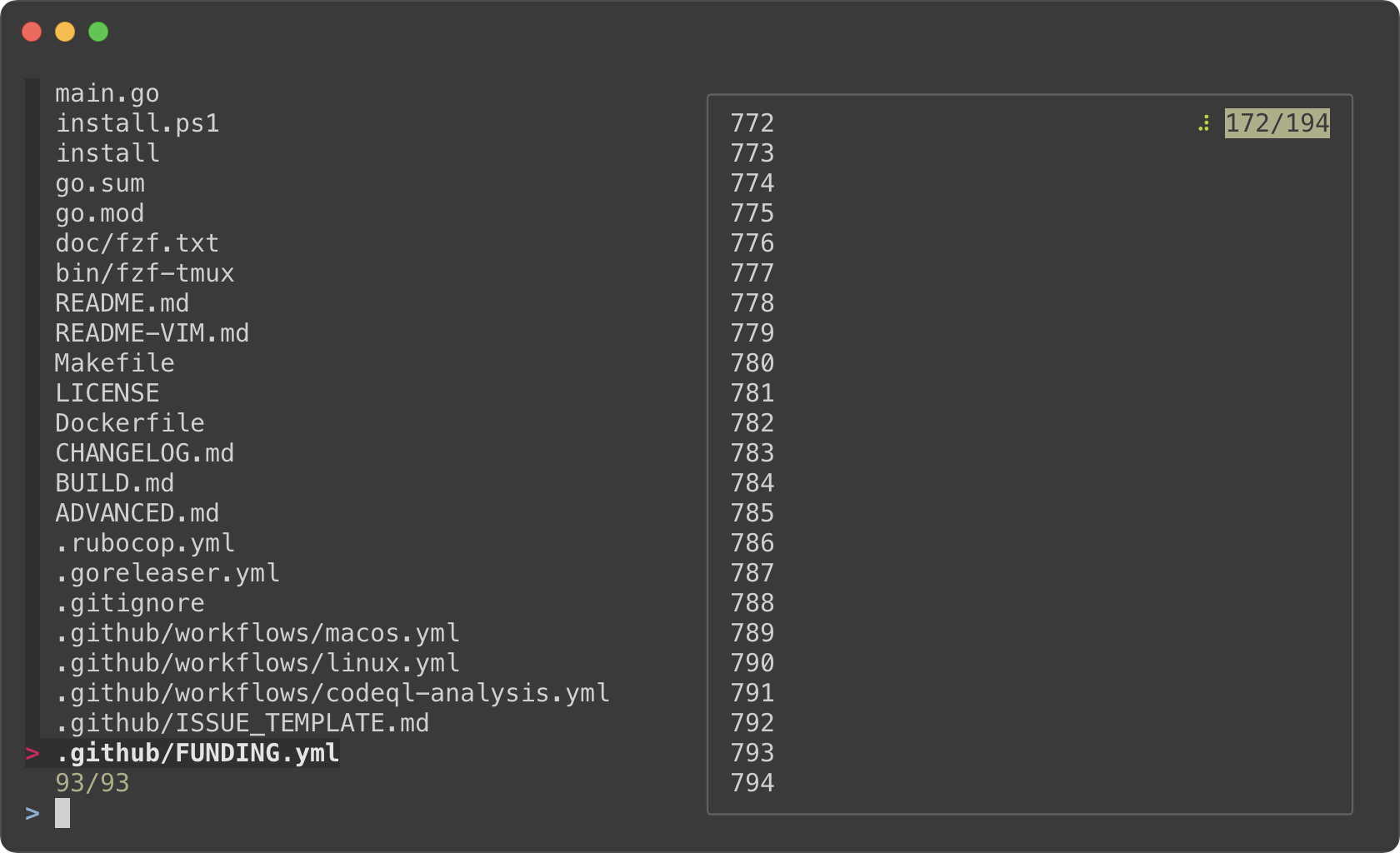
Admittedly, that was a silly example. Here's a practical one for browsing
Kubernetes pods.
```bash
pods() {
command='kubectl get pods --all-namespaces' fzf \
--info=inline --layout=reverse --header-lines=1 \
--prompt "$(kubectl config current-context | sed 's/-context$//')> " \
--header $'╱ Enter (kubectl exec) ╱ CTRL-O (open log in editor) ╱ CTRL-R (reload) ╱\n\n' \
--bind 'start,ctrl-r:reload:$command' \
--bind 'ctrl-/:change-preview-window(80%,border-bottom|hidden|)' \
--bind 'enter:execute:kubectl exec -it --namespace {1} {2} -- bash' \
--bind 'ctrl-o:execute:${EDITOR:-vim} <(kubectl logs --all-containers --namespace {1} {2})' \
--preview-window up:follow \
--preview 'kubectl logs --follow --all-containers --tail=10000 --namespace {1} {2}' "$@"
}
```
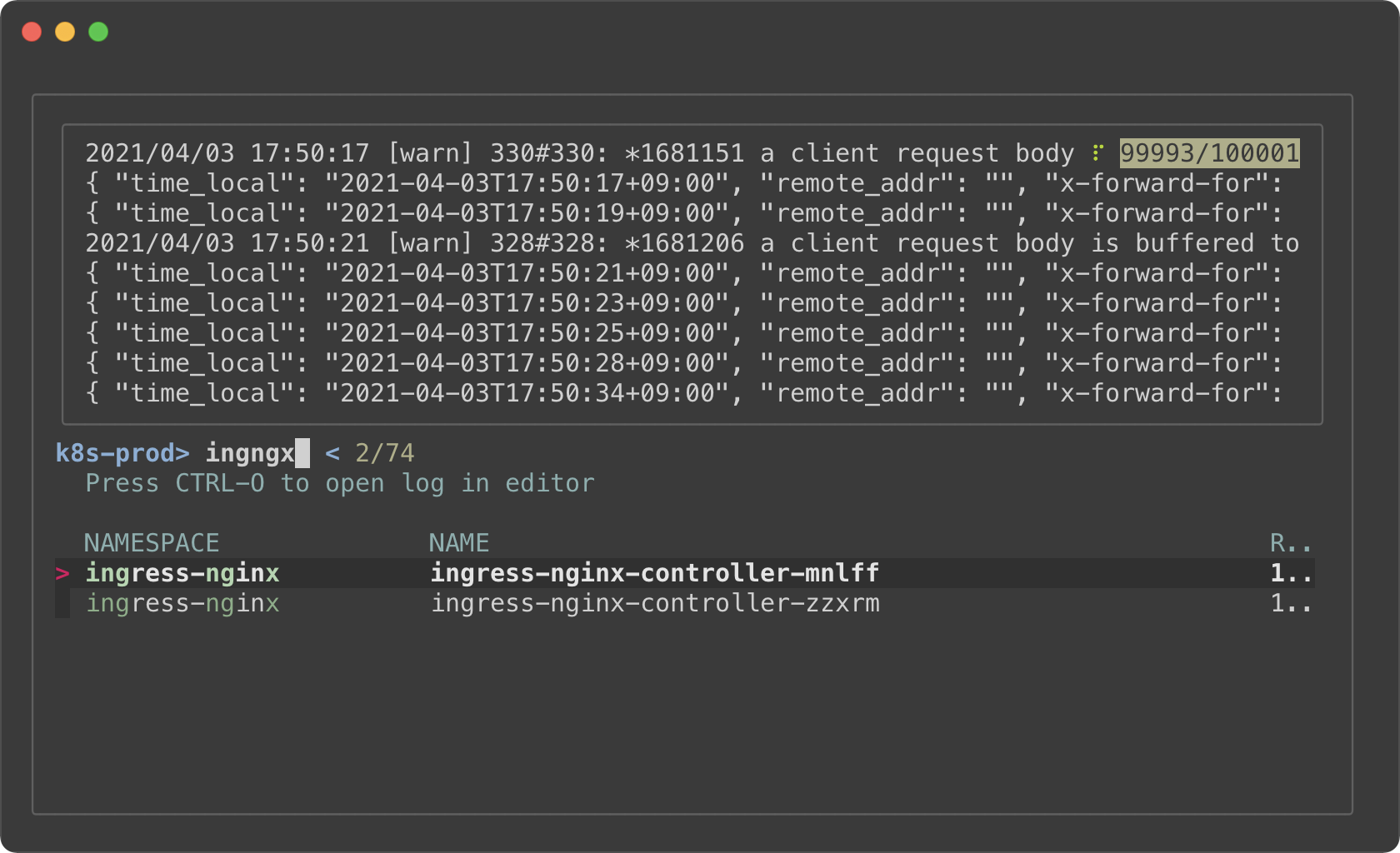
- The preview window will *"log tail"* the pod
- Holding on to a large amount of log will consume a lot of memory. So we
limited the initial log amount with `--tail=10000`.
- `execute` bindings allow you to run any command without leaving fzf
- Press enter key on a pod to `kubectl exec` into it
- Press CTRL-O to open the log in your editor
- Press CTRL-R to reload the pod list
- Press CTRL-/ repeatedly to rotate through a different sets of preview
window options
1. `80%,border-bottom`
1. `hidden`
1. Empty string after `|` translates to the default options from `--preview-window`
Key bindings for git objects
----------------------------
Oftentimes, you want to put the identifiers of various Git object to the
command-line. For example, it is common to write commands like these:
```sh
git checkout [SOME_COMMIT_HASH or BRANCH or TAG]
git diff [SOME_COMMIT_HASH or BRANCH or TAG] [SOME_COMMIT_HASH or BRANCH or TAG]
```
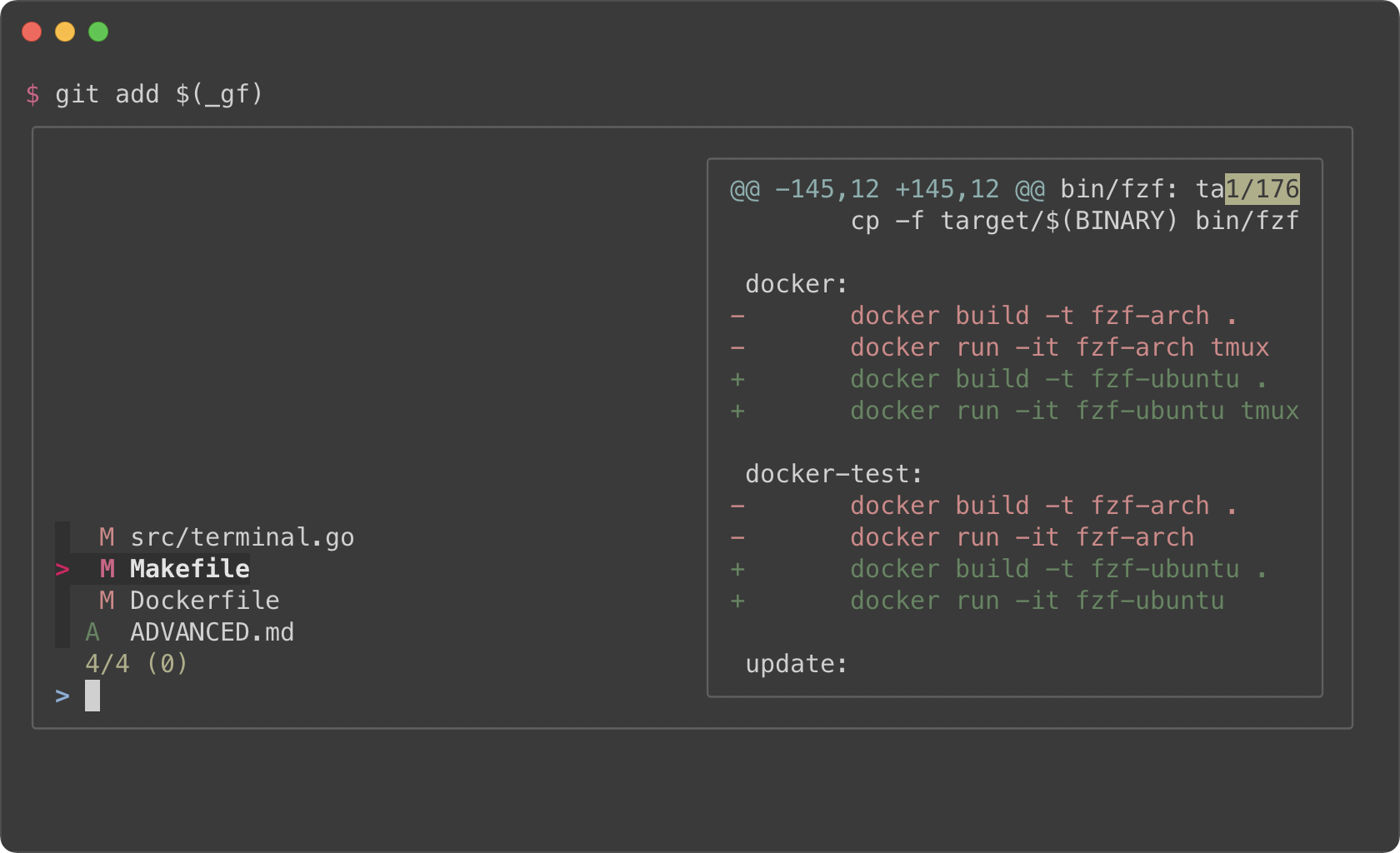
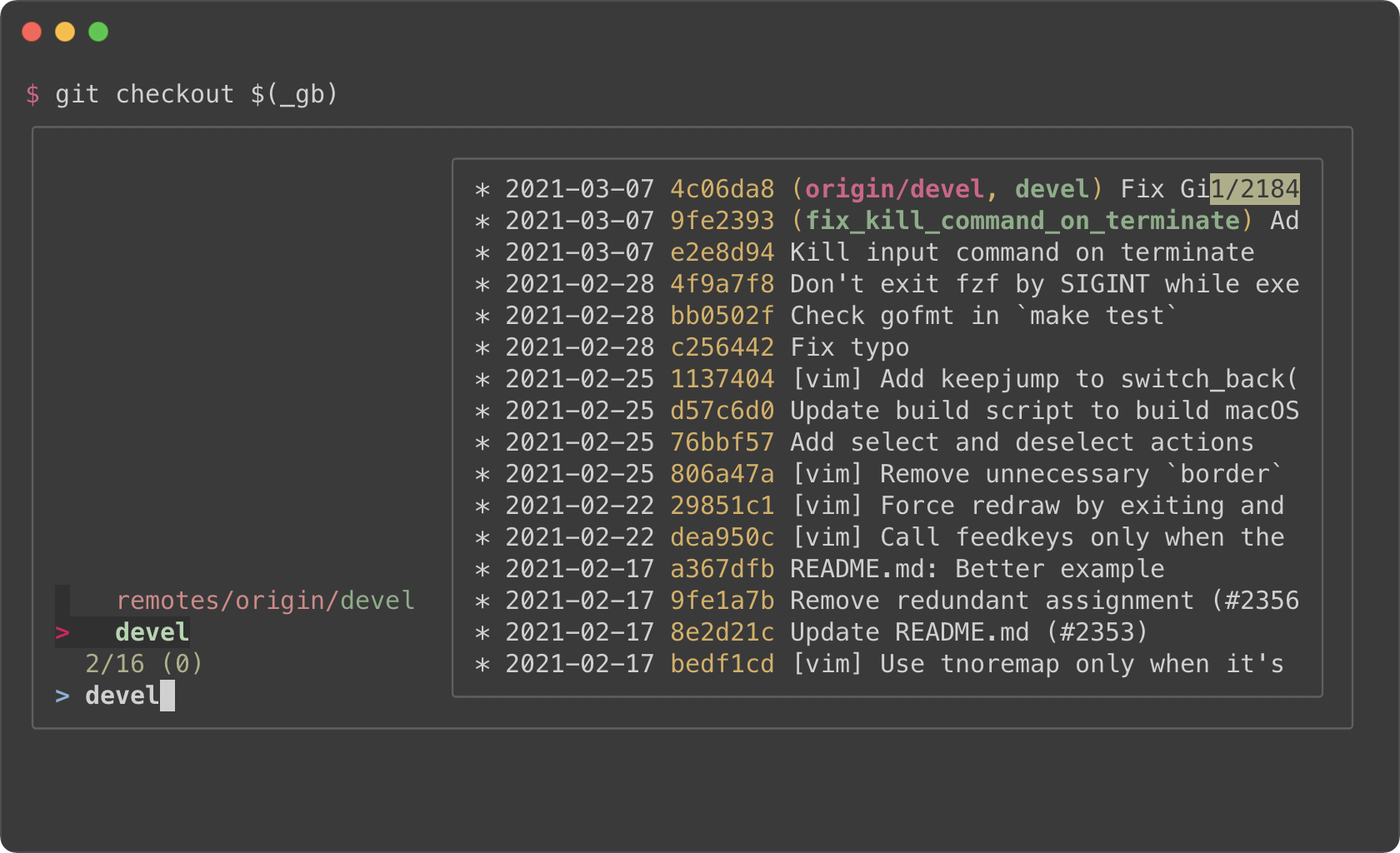
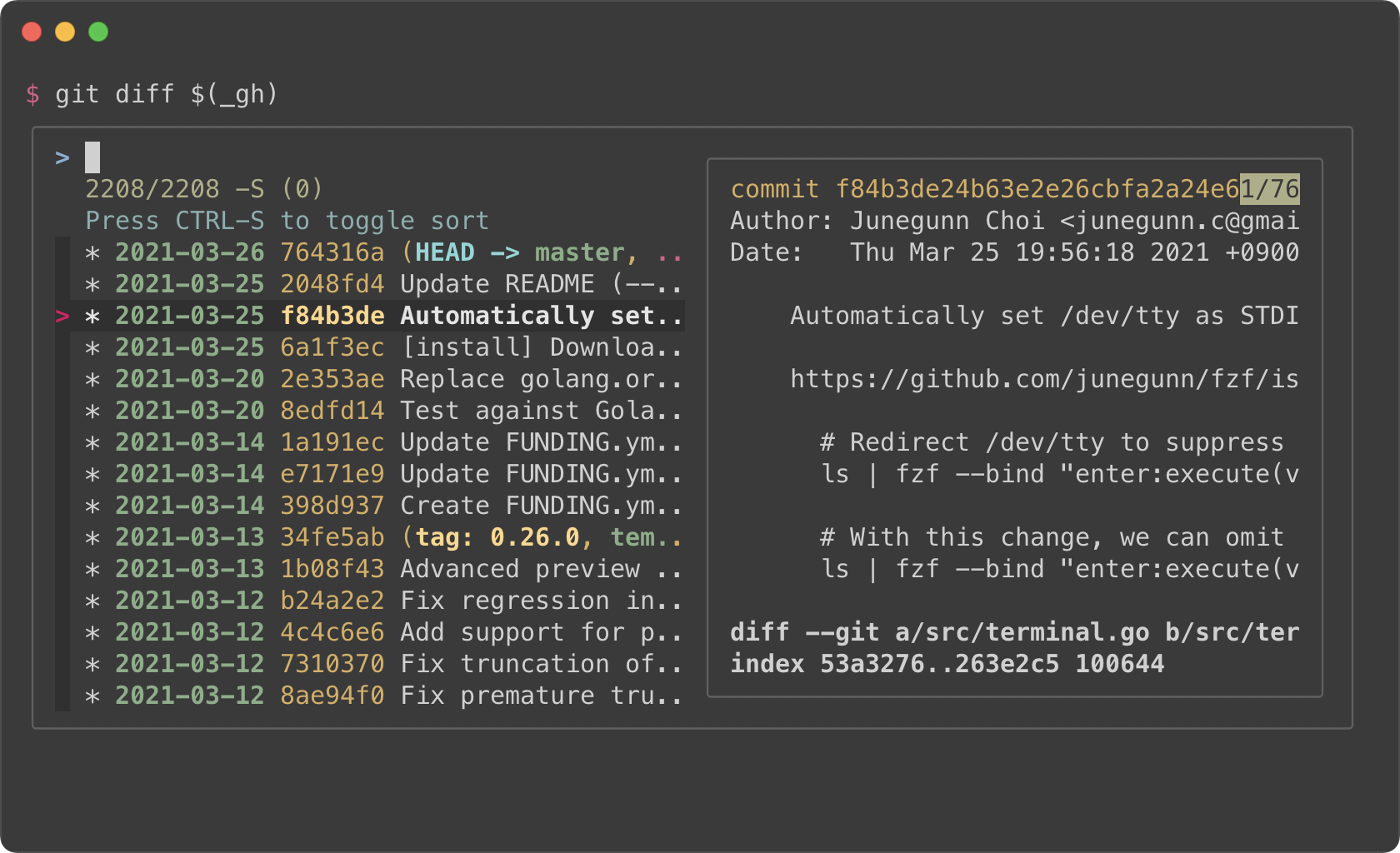
[fzf-git.sh](https://github.com/junegunn/fzf-git.sh) project defines a set of
fzf-based key bindings for Git objects. I strongly recommend that you check
them out because they are seriously useful.
### Files listed in `git status`
CTRL-GCTRL-F
### Branches
CTRL-GCTRL-B
### Commit hashes
CTRL-GCTRL-H
Color themes
------------
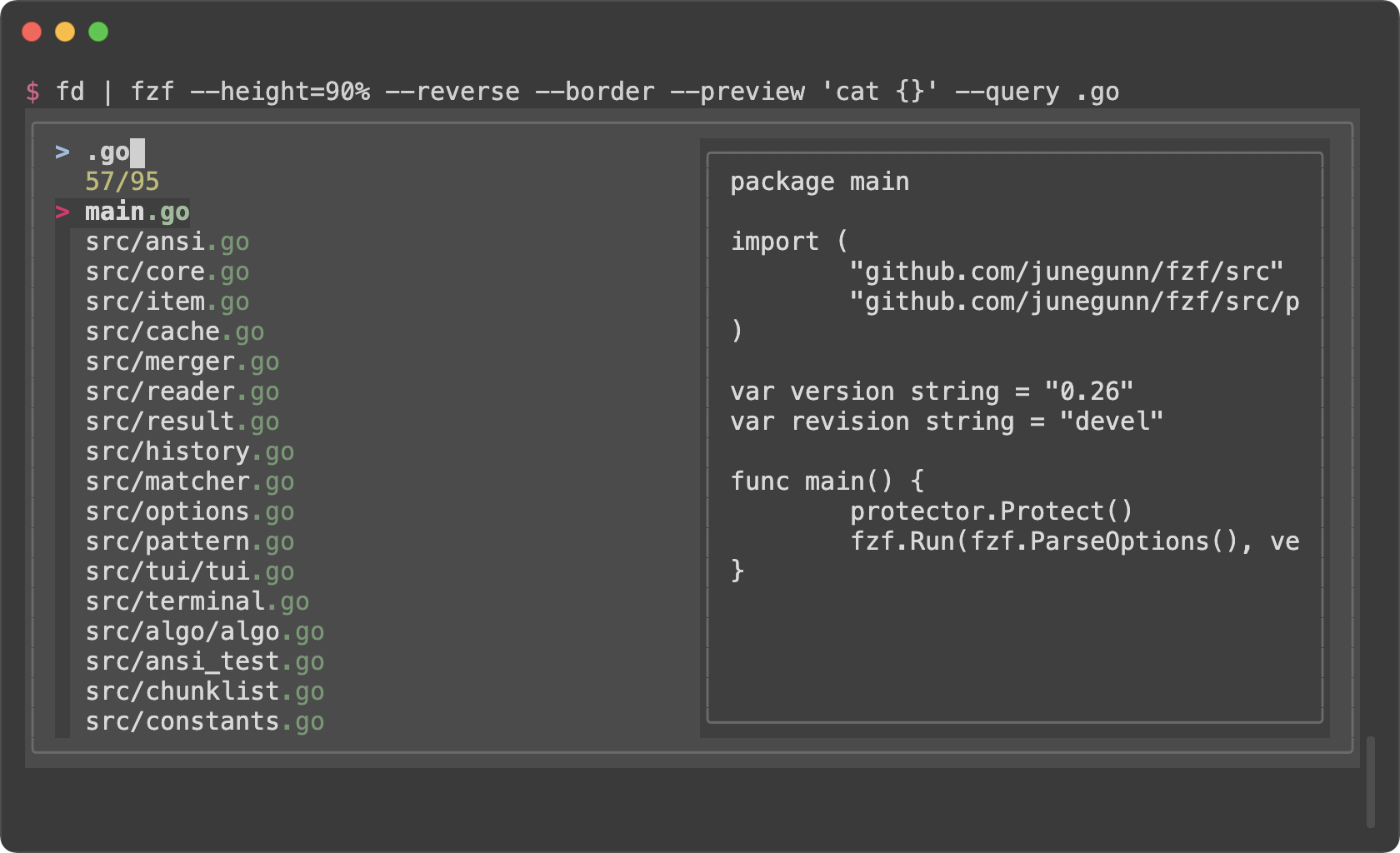
You can customize how fzf colors the text elements with `--color` option. Here
are a few color themes. Note that you need a terminal emulator that can
display 24-bit colors.
```sh
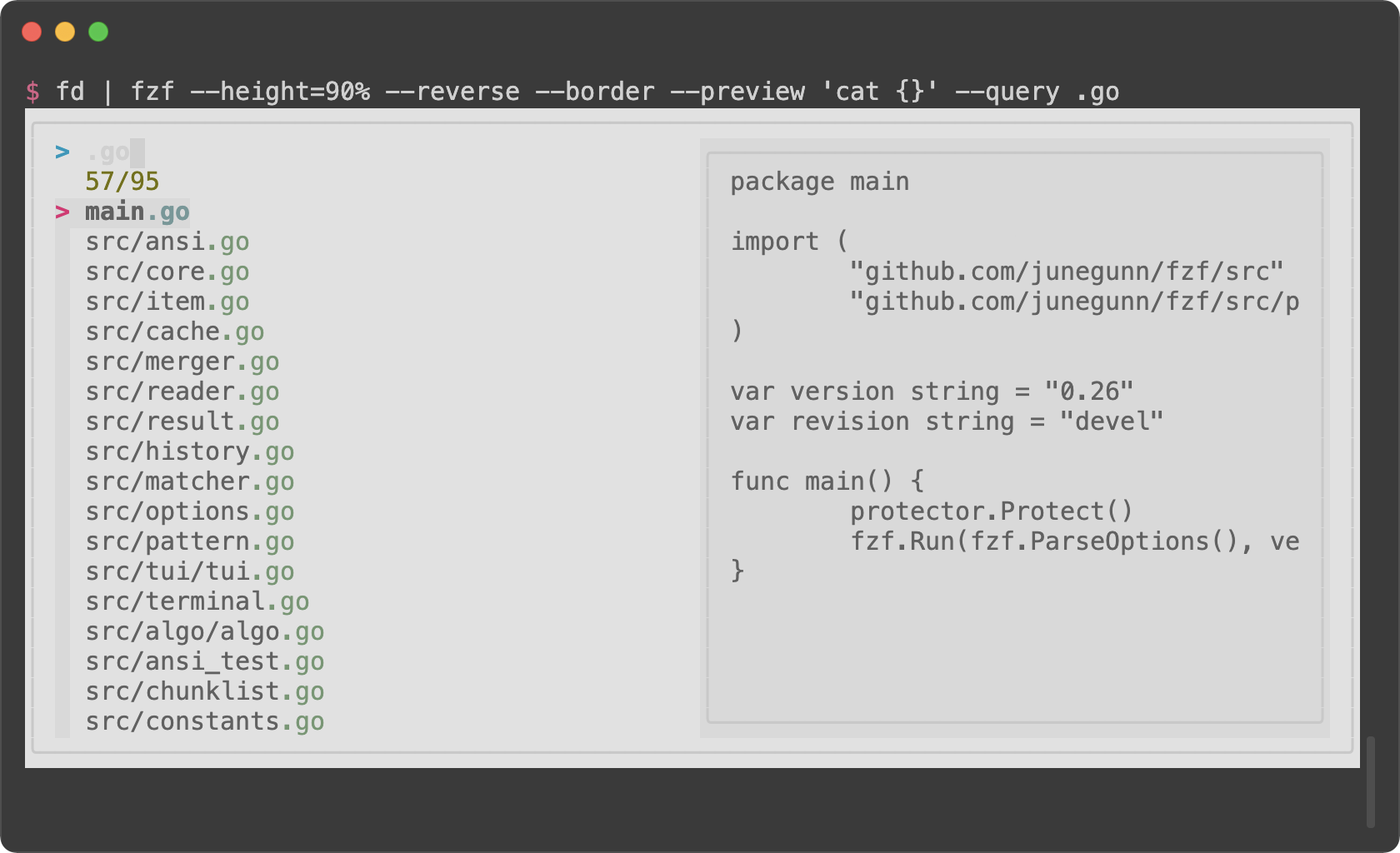
# junegunn/seoul256.vim (dark)
export FZF_DEFAULT_OPTS='--color=bg+:#3F3F3F,bg:#4B4B4B,border:#6B6B6B,spinner:#98BC99,hl:#719872,fg:#D9D9D9,header:#719872,info:#BDBB72,pointer:#E12672,marker:#E17899,fg+:#D9D9D9,preview-bg:#3F3F3F,prompt:#98BEDE,hl+:#98BC99'
```
```sh
# junegunn/seoul256.vim (light)
export FZF_DEFAULT_OPTS='--color=bg+:#D9D9D9,bg:#E1E1E1,border:#C8C8C8,spinner:#719899,hl:#719872,fg:#616161,header:#719872,info:#727100,pointer:#E12672,marker:#E17899,fg+:#616161,preview-bg:#D9D9D9,prompt:#0099BD,hl+:#719899'
```
```sh
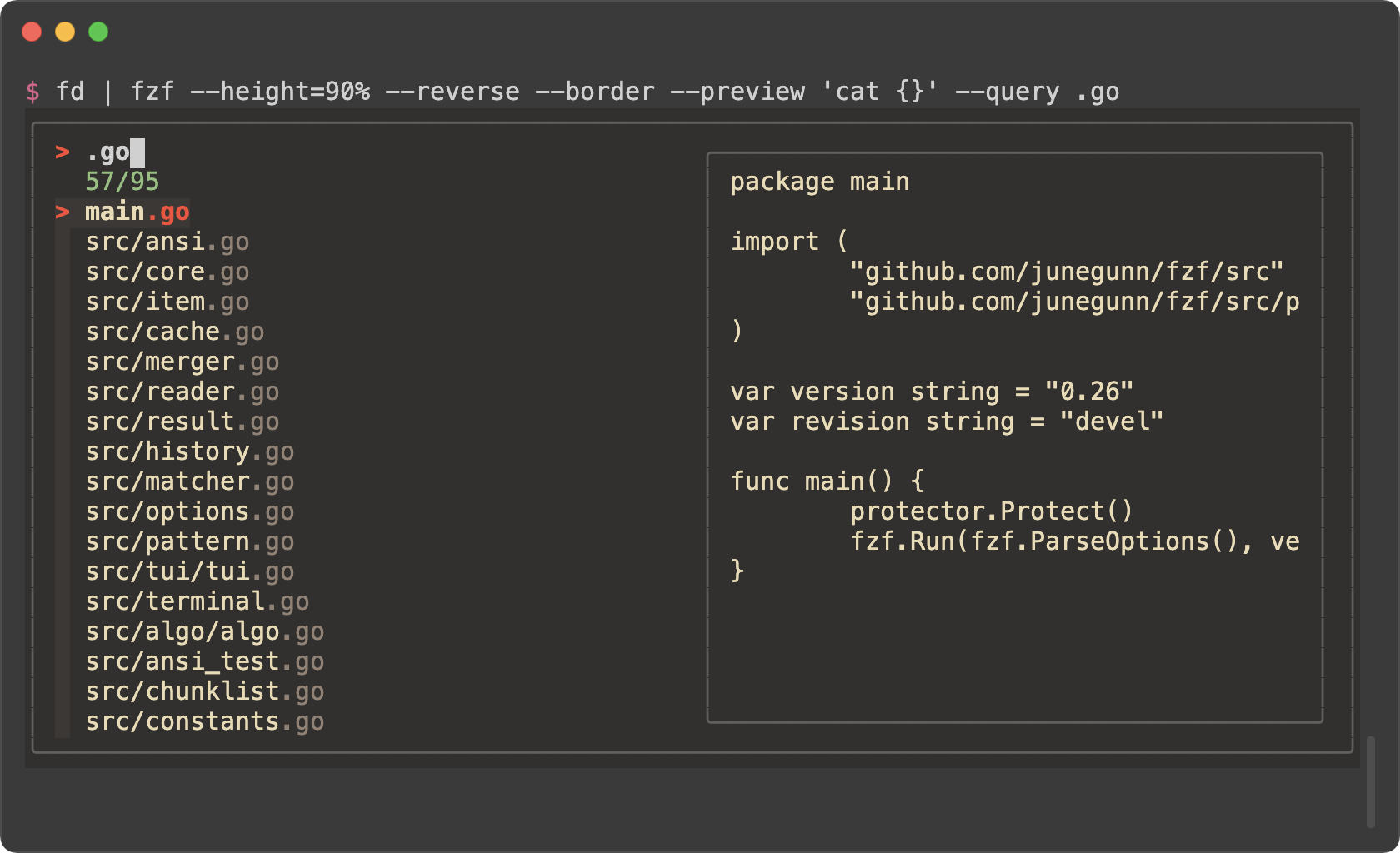
# morhetz/gruvbox
export FZF_DEFAULT_OPTS='--color=bg+:#3c3836,bg:#32302f,spinner:#fb4934,hl:#928374,fg:#ebdbb2,header:#928374,info:#8ec07c,pointer:#fb4934,marker:#fb4934,fg+:#ebdbb2,prompt:#fb4934,hl+:#fb4934'
```
```sh
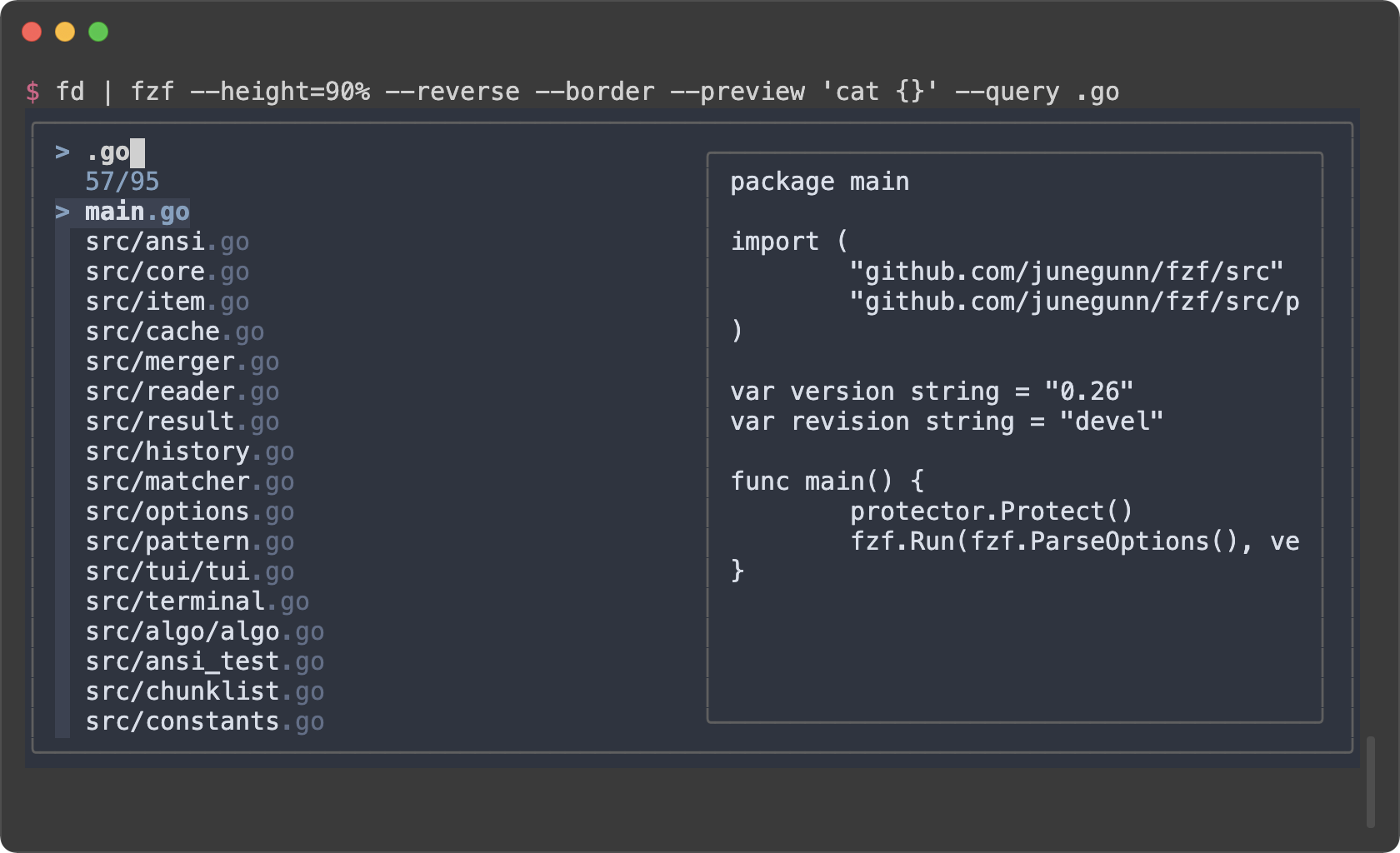
# arcticicestudio/nord-vim
export FZF_DEFAULT_OPTS='--color=bg+:#3B4252,bg:#2E3440,spinner:#81A1C1,hl:#616E88,fg:#D8DEE9,header:#616E88,info:#81A1C1,pointer:#81A1C1,marker:#81A1C1,fg+:#D8DEE9,prompt:#81A1C1,hl+:#81A1C1'
```
```sh
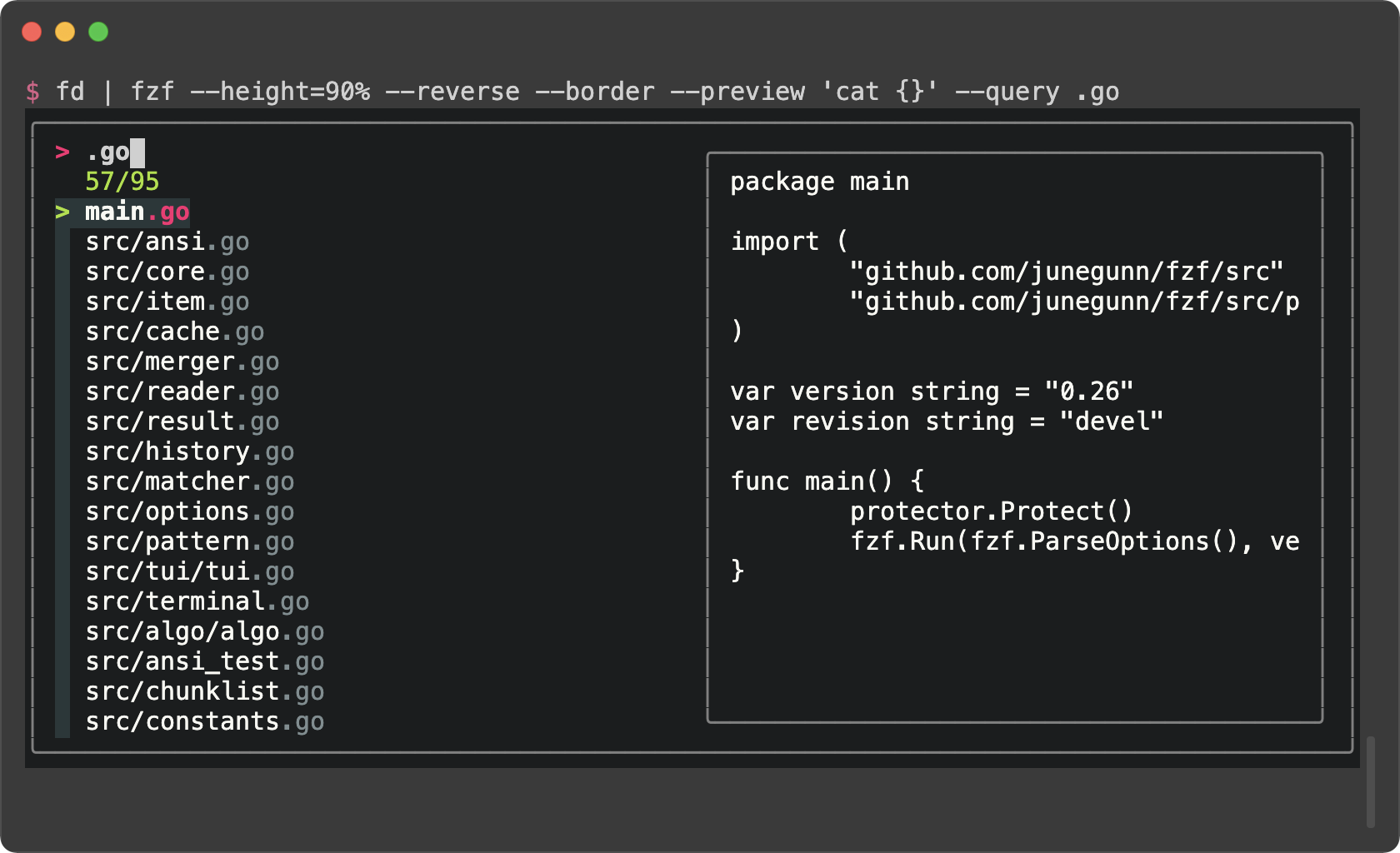
# tomasr/molokai
export FZF_DEFAULT_OPTS='--color=bg+:#293739,bg:#1B1D1E,border:#808080,spinner:#E6DB74,hl:#7E8E91,fg:#F8F8F2,header:#7E8E91,info:#A6E22E,pointer:#A6E22E,marker:#F92672,fg+:#F8F8F2,prompt:#F92672,hl+:#F92672'
```
### fzf Theme Playground
[fzf Theme Playground](https://vitormv.github.io/fzf-themes/) created by
[Vitor Mello](https://github.com/vitormv) is a webpage where you can
interactively create fzf themes.
### Generating fzf color theme from Vim color schemes
The Vim plugin of fzf can generate `--color` option from the current color
scheme according to `g:fzf_colors` variable. You can find the detailed
explanation [here](https://github.com/junegunn/fzf/blob/master/README-VIM.md#explanation-of-gfzf_colors).
Here is an example. Add this to your Vim configuration file.
```vim
let g:fzf_colors =
\ { 'fg': ['fg', 'Normal'],
\ 'bg': ['bg', 'Normal'],
\ 'preview-bg': ['bg', 'NormalFloat'],
\ 'hl': ['fg', 'Comment'],
\ 'fg+': ['fg', 'CursorLine', 'CursorColumn', 'Normal'],
\ 'bg+': ['bg', 'CursorLine', 'CursorColumn'],
\ 'hl+': ['fg', 'Statement'],
\ 'info': ['fg', 'PreProc'],
\ 'border': ['fg', 'Ignore'],
\ 'prompt': ['fg', 'Conditional'],
\ 'pointer': ['fg', 'Exception'],
\ 'marker': ['fg', 'Keyword'],
\ 'spinner': ['fg', 'Label'],
\ 'header': ['fg', 'Comment'] }
```
Then you can see how the `--color` option is generated by printing the result
of `fzf#wrap()`.
```vim
:echo fzf#wrap()
```
Use this command to append `export FZF_DEFAULT_OPTS="..."` line to the end of
the current file.
```vim
:call append('$', printf('export FZF_DEFAULT_OPTS="%s"', matchstr(fzf#wrap().options, "--color[^']*")))
```
junegunn-fzf-4215c7f/BUILD.md000066400000000000000000000035751517335244500156670ustar00rootroot00000000000000Building fzf
============
Build instructions
------------------
### Prerequisites
- Go 1.23 or above
### Using Makefile
```sh
# Build fzf binary for your platform in target
make
# Build fzf binary and copy it to bin directory
make install
# Build fzf binaries and archives for all platforms using goreleaser
make build
# Publish GitHub release
make release
```
> [!WARNING]
> Makefile uses git commands to determine the version and the revision
> information for `fzf --version`. So if you're building fzf from an
> environment where its git information is not available, you have to manually
> set `$FZF_VERSION` and `$FZF_REVISION`.
>
> e.g. `FZF_VERSION=0.24.0 FZF_REVISION=tarball make`
> [!TIP]
> To build fzf with profiling options enabled, set `TAGS=pprof`
>
> ```sh
> TAGS=pprof make clean install
> fzf --profile-cpu /tmp/cpu.pprof --profile-mem /tmp/mem.pprof \
> --profile-block /tmp/block.pprof --profile-mutex /tmp/mutex.pprof
> ```
Running tests
-------------
```sh
# Run go unit tests
make test
# Run integration tests (requires to be on tmux)
make itest
# Run a single test case
ruby test/runner.rb --name test_something
```
Third-party libraries used
--------------------------
- [rivo/uniseg](https://github.com/rivo/uniseg)
- Licensed under [MIT](https://raw.githubusercontent.com/rivo/uniseg/master/LICENSE.txt)
- [mattn/go-shellwords](https://github.com/mattn/go-shellwords)
- Licensed under [MIT](http://mattn.mit-license.org)
- [mattn/go-isatty](https://github.com/mattn/go-isatty)
- Licensed under [MIT](http://mattn.mit-license.org)
- [tcell](https://github.com/gdamore/tcell)
- Licensed under [Apache License 2.0](https://github.com/gdamore/tcell/blob/master/LICENSE)
- [fastwalk](https://github.com/charlievieth/fastwalk)
- Licensed under [MIT](https://raw.githubusercontent.com/charlievieth/fastwalk/master/LICENSE)
License
-------
[MIT](LICENSE)
junegunn-fzf-4215c7f/CHANGELOG.md000066400000000000000000004040401517335244500163070ustar00rootroot00000000000000CHANGELOG
=========
0.72.0
------
_Release highlights: https://junegunn.github.io/fzf/releases/0.72.0/_
- `--header-border`, `--header-lines-border`, and `--footer-border` now accept a new `inline` style that embeds the section inside the list frame, separated from the list content by a horizontal line. When the list border has side segments, the separator joins them as T-junctions.
- Requires a `--list-border` shape that has both top and bottom segments (`rounded`, `sharp`, `bold`, `double`, `block`, `thinblock`, or `horizontal`); falls back to `line` otherwise. `horizontal` has no side borders, so the separator is drawn without T-junction endpoints.
- Sections stack. Example combining all three:
```sh
ps -ef | fzf --reverse --style full \
--header 'Select a process' --header-lines 1 \
--bind 'load:transform-footer:echo $FZF_TOTAL_COUNT processes' \
--header-border dashed --header-first \
--header-lines-border inline --footer-border inline
```
- `--header-label` and `--footer-label` render on their respective separator row.
- The separator inherits `--color list-border` when the section's own border color is not explicitly set.
- `inline` takes precedence over `--header-first`: the inline section stays inside the list frame. `--header-border=inline` requires `--header-lines-border` to be `inline` or unset.
- New `dashed` border style with dashed edges (`╶` / `┆`) and rounded corners.
- `--border=dashed`, `--list-border=dashed`, etc.
- Works with inline sections (T-junctions render correctly).
- [vim] Move and resize popup window when detecting `VimResized` event (#4778) (@Vulcalien)
- Bug fixes
- Fixed gutter display in `--style=minimal`
- Fixed arrow keys / Home / End without modifiers being ignored under the kitty keyboard protocol (#4776) (@TymekDev)
- bash: Persist history deletion when `histappend` is on (#4764)
0.71.0
------
_Release highlights: https://junegunn.github.io/fzf/releases/0.71.0/_
- Added `--popup` as a new name for `--tmux` with Zellij support
- `--popup` starts fzf in a tmux popup or a Zellij floating pane
- `--tmux` is now an alias for `--popup`
- Requires tmux 3.3+ or Zellij 0.44+
- Cross-reload item identity with `--id-nth`
- Added `--id-nth=NTH` to define item identity fields for cross-reload operations
- When a `reload` is triggered with tracking enabled, fzf searches for the tracked item by its identity fields in the new list.
- `--track --id-nth ..` tracks by the entire line
- `--track --id-nth 1` tracks by the first field
- `--track` without `--id-nth` retains the existing index-based tracking behavior
- The UI is temporarily blocked (prompt dimmed, input disabled) until the item is found or loading completes.
- Press `Escape` or `Ctrl-C` to cancel the blocked state without quitting
- Info line shows `+T*` / `+t*` while searching
- With `--multi`, selected items are preserved across `reload-sync` by matching their identity fields
- Performance improvements
- The search performance now scales linearly with the number of CPU cores, as we dropped static partitioning to allow better load balancing across threads.
```
=== query: 'linux' ===
[all] baseline: 21.95ms current: 17.47ms (1.26x) matches: 179966 (12.79%)
[1T] baseline: 179.63ms current: 180.53ms (1.00x) matches: 179966 (12.79%)
[2T] baseline: 97.38ms current: 90.05ms (1.08x) matches: 179966 (12.79%)
[4T] baseline: 53.83ms current: 44.77ms (1.20x) matches: 179966 (12.79%)
[8T] baseline: 41.66ms current: 22.58ms (1.84x) matches: 179966 (12.79%)
```
- Improved the cache structure, reducing memory footprint per entry by 86x.
- With the reduced per-entry cost, the cache now has broader coverage.
- Shell integration improvements
- bash: CTRL-R now supports multi-select and `shift-delete` to delete history entries (#4715)
- fish:
- Improved command history (CTRL-R) (#4703) (@bitraid)
- Rewrite completion script (SHIFT-TAB) (#4731) (@bitraid)
- Increase minimum fish version requirement to 3.4.0 (#4731) (@bitraid)
- `GET /` HTTP endpoint now includes `positions` field in each match entry, providing the indices of matched characters for external highlighting (#4726)
- Allow adaptive height with negative value (`--height=~-HEIGHT`) (#4682)
- Bug fixes
- `--walker=follow` no longer follows symlinks whose target is an ancestor of the walker root, avoiding severe resource exhaustion when a symlink points outside the tree (e.g. Wine's `z:` → `/`) (#4710)
- Fixed AWK tokenizer not treating a new line character as whitespace
- Fixed `--{accept,with}-nth` removing trailing whitespaces with a non-default `--delimiter`
- Fixed OSC8 hyperlinks being mangled when the URL contains unicode characters (#4707)
- Fixed `--with-shell` not handling quoted arguments correctly (#4709)
- Fixed child processes not being terminated on Windows (#4723) (@pjeby)
- Fixed preview scrollbar not rendered after `toggle-preview`
- Fixed preview follow/scroll with long wrapped lines
- Fixed tab width when `--frozen-left` is used
- Fixed preview mouse events being processed when no preview window exists
- zsh: Fixed history widget when `sh_glob` option is on (#4714) (@EvanHahn)
0.70.0
------
- Added `change-with-nth` action for dynamically changing the `--with-nth` option.
- Requires `--with-nth` to be set initially.
- Multiple options separated by `|` can be given to cycle through.
```sh
echo -e "a b c\nd e f\ng h i" | fzf --with-nth .. \
--bind 'space:change-with-nth(1|2|3|1,3|2,3|)'
```
- Added `change-header-lines` action for dynamically changing the `--header-lines` option
- Performance improvements (1.3x to 1.9x faster filtering depending on query)
```
=== query: 'l' ===
[all] baseline: 168.87ms current: 95.21ms (1.77x) matches: 5069891 (94.78%)
[1T] baseline: 1652.22ms current: 841.40ms (1.96x) matches: 5069891 (94.78%)
=== query: 'lin' ===
[all] baseline: 343.27ms current: 252.59ms (1.36x) matches: 3516507 (65.74%)
[1T] baseline: 3199.89ms current: 2230.64ms (1.43x) matches: 3516507 (65.74%)
=== query: 'linux' ===
[all] baseline: 85.47ms current: 63.72ms (1.34x) matches: 307229 (5.74%)
[1T] baseline: 774.64ms current: 589.32ms (1.31x) matches: 307229 (5.74%)
=== query: 'linuxlinux' ===
[all] baseline: 55.13ms current: 35.67ms (1.55x) matches: 12230 (0.23%)
[1T] baseline: 461.99ms current: 332.38ms (1.39x) matches: 12230 (0.23%)
=== query: 'linuxlinuxlinux' ===
[all] baseline: 51.77ms current: 32.53ms (1.59x) matches: 865 (0.02%)
[1T] baseline: 409.99ms current: 296.33ms (1.38x) matches: 865 (0.02%)
```
- Fixed `nth` attribute merge order to respect precedence hierarchy (#4697)
- bash: Replaced `printf` with builtin `printf` to bypass local indirections (#4684) (@DarrenBishop)
0.68.0
------
- Implemented word wrapping in the list section
- Added `--wrap=word` (or `--wrap-word`) option and `toggle-wrap-word` action for word-level line wrapping in the list section
- Changed default binding of `ctrl-/` and `alt-/` from `toggle-wrap` to `toggle-wrap-word`
```sh
fzf --wrap=word
```
- Implemented word wrapping in the preview window
- Added `wrap-word` flag for `--preview-window` to enable word-level wrapping
- Added `toggle-preview-wrap-word` action
```sh
fzf --preview 'bat --style=plain --color=always {}' \
--preview-window wrap-word \
--bind space:toggle-preview-wrap-word
```
- Added support for underline style variants in `--color`: `underline-double`, `underline-curly`, `underline-dotted`, `underline-dashed`
```sh
fzf --color 'fg:underline-curly,current-fg:underline-dashed'
```
- Added support for underline styles (`4:N`) and underline colors (SGR 58/59)
```sh
# In the list section
printf '\e[4:3;58;2;255;0;0mRed curly underline\e[0m\n' | fzf --ansi
# In the preview window
fzf --preview "printf '\e[4:3;58;2;255;0;0mRed curly underline\e[0m\n'"
```
- Added `--preview-wrap-sign` to set a different wrap indicator for the preview window
- Added `alt-gutter` color option (#4602) (@hedgieinsocks)
- Added `$FZF_WRAP` environment variable to child processes (`char` or `word` when wrapping is enabled) (#4672) (@bitraid)
- fish: Improved command history (CTRL-R) (#4672) (@bitraid)
- Enabled syntax highlighting in the list on fish 4.3.3+
- Added syntax-highlighted preview window that auto-shows for long or multi-line commands
- Added `ALT-ENTER` to reformat and insert selected commands
- Improved handling of bulk deletion of selected history entries (`SHIFT-DELETE`)
- Added fish completion support (#4605) (@lalvarezt)
- zsh: Handle multi-line history selection (#4595) (@LangLangBart)
- Bug fixes
- Fixed `_fzf_compgen_{path,dir}` to respect `FZF_COMPLETION_{PATH,DIR}_OPTS` (#4592) (@shtse8, @LangLangBart)
- Fixed `--preview-window follow` not working correctly with wrapping (#3243, #4258)
- Fixed symlinks to directories being returned as files (#4676) (@skk64)
- Fixed SIGHUP signal handling (#4668) (@LangLangBart)
- Fixed preview process not killed on exit (#4667)
- Fixed coloring of items with zero-width characters (#4620)
- Fixed `track-current` unset after a combined movement action (#4649)
- Fixed `--accept-nth` being ignored in filter mode (#4636) (@charemma)
- Fixed display width calculation with `maxWidth` (#4596) (@LangLangBart)
- Fixed clearing of the rest of the current line on start (#4652)
- Fixed `x-api-key` header not required for GET requests (#4627)
- Fixed key reading not cancelled when `execute` triggered via a server request (#4653)
- Fixed rebind of readline command `redraw-current-line` (#4635) (@jameslazo)
- Fixed `fzf-tmux` `TERM` quoting and added `mktemp` usage (#4664) (@Goofygiraffe06)
- Do not allow very long queries in `FuzzyMatchV2` (#4608)
0.67.0
------
- Added `--freeze-left=N` option to keep the leftmost N columns always visible.
```sh
# Keep the file name column fixed and always visible
git grep --line-number --color=always -- '' |
fzf --ansi --delimiter : --freeze-left 1
# Can be used with --keep-right
git grep --line-number --color=always -- '' |
fzf --ansi --delimiter : --freeze-left 1 --keep-right
```
- Also added `--freeze-right=N` option to keep the rightmost N columns always visible.
```sh
# Stronger version of --keep-right that always keeps the right-end visible
fd | fzf --freeze-right 1
# Keep the base name always visible
fd | fzf --freeze-right 1 --delimiter /
# Keep both leftmost and rightmost components visible
fd | fzf --freeze-left 1 --freeze-right 1 --delimiter /
```
- Updated `--info=inline` to print the spinner (load indicator).
- Bug fixes
0.66.1
------
- Bug fixes
- Fixed a bug preventing 'ctrl-h' from being bound to an action (#4556)
- Fixed `--no-color` / `NO_COLOR` theme (#4561)
0.66.0
------
### Quick summary
This version introduces many new features centered around the new "raw" mode.
| Type | Class | Name | Description |
| :-- | :-- | :-- | :-- |
| New | Option | `--raw` | Enable raw mode by default |
| New | Option | `--gutter CHAR` | Set the gutter column character |
| New | Option | `--gutter-raw CHAR` | Set the gutter column character in raw mode |
| Enhancement | Option | `--listen SOCKET` | Added support for Unix domain sockets |
| New | Action | `toggle-raw` | Toggle raw mode |
| New | Action | `enable-raw` | Enable raw mode |
| New | Action | `disable-raw` | Disable raw mode |
| New | Action | `up-match` | Move up to the matching item |
| New | Action | `down-match` | Move down to the matching item |
| New | Action | `best` | Move to the matching item with the best score |
| New | Color | `nomatch` | Color for non-matching items in raw mode |
| New | Env Var | `FZF_RAW` | Matching status in raw mode (0, 1, or undefined) |
| New | Env Var | `FZF_DIRECTION` | `up` or `down` depending on the layout |
| New | Env Var | `FZF_SOCK` | Path to the Unix domain socket fzf is listening on |
| Enhancement | Key | `CTRL-N` | `down` -> `down-match` |
| Enhancement | Key | `CTRL-P` | `up` -> `up-match` |
| Enhancement | Shell | `CTRL-R` binding | Toggle raw mode with `ALT-R` |
| Enhancement | Shell | `CTRL-R` binding | Opt-out with an empty `FZF_CTRL_R_COMMAND` |
### 1. Introducing "raw" mode

This version introduces a new "raw" mode (named so because it shows the list
"unfiltered"). In raw mode, non-matching items stay in their original positions,
but appear dimmed. This allows you to see the surrounding items of a match and
better understand the context of it. You can enable raw mode by default with
`--raw`, but it's often more useful when toggled dynamically with the
`toggle-raw` action.
```sh
tree | fzf --reverse --bind alt-r:toggle-raw
```
While non-matching items are displayed in a dimmed color, they are treated just
like matching items, so you place the cursor on them and perform any action. If
you prefer to navigate only through matching items, use the `down-match` and
`up-match` actions, which are from now on bound to `CTRL-N` and `CTRL-P`
respectively, and also to `ALT-DOWN` and `ALT-UP`.
| Key | Action | With `--history` |
| :-- | :-- | :-- |
| `down` | `down` | |
| `up` | `up` | |
| `ctrl-j` | `down` | |
| `ctrl-k` | `up` | |
| `ctrl-n` | `down-match` | `next-history` |
| `ctrl-p` | `up-match` | `prev-history` |
| `alt-down` | `down-match` | |
| `alt-up` | `up-match` | |
> [!NOTE]
> `CTRL-N` and `CTRL-P` are bound to `next-history` and `prev-history` when
> `--history` option is enabled, so in that case, you'll need to manually bind
> them, or use `ALT-DOWN` and `ALT-UP` instead.
> [!TIP]
> `up-match` and `down-match` are equivalent to `up` and `down` when not in
> raw mode, so you can safely bind them to `up` and `arrow` keys if you prefer.
> ```sh
> fzf --bind up:up-match,down:down-match
> ```
#### Customizing the behavior
In raw mode, the input list is presented in its original order, unfiltered, and
your cursor will not move to the matching item automatically. Here are ways to
customize the behavior.
```sh
# When the result list is updated, move the cursor to the item with the best score
# (assuming sorting is not disabled)
fzf --raw --bind result:best
# Move to the first matching item in the original list
# - $FZF_RAW is set to 0 when raw mode is enabled and the current item is a non-match
# - $FZF_DIRECTION is set to either 'up' or 'down' depending on the layout direction
fzf --raw --bind 'result:first+transform:[[ $FZF_RAW = 0 ]] && echo $FZF_DIRECTION-match'
```
#### Customizing the look
##### Gutter
To make the mode visually distinct, the gutter column is rendered in a dashed
line using `▖` character. But you can customize it with the `--gutter-raw CHAR`
option.
```sh
# Use a thinner gutter instead of the default dashed line
fzf --bind alt-r:toggle-raw --gutter-raw ▎
```
##### Color and style of non-matching items
Non-matching items are displayed in a dimmed color by default, but you can
change it with the `--color nomatch:...` option.
```sh
fzf --raw --color nomatch:red
fzf --raw --color nomatch:red:dim
fzf --raw --color nomatch:red:dim:strikethrough
fzf --raw --color nomatch:red:dim:strikethrough:italic
```
For colored input, dimming alone may not be enough, and you may prefer to remove
colors entirely. For that case, a new special style attribute `strip` has been
added.
```sh
fd --color always | fzf --ansi --raw --color nomatch:dim:strip:strikethrough
```
#### Conditional actions for raw mode
You may want to perform different actions depending on whether the current item
is a match or not. For that, fzf now exports `$FZF_RAW` environment variable.
It's:
- Undefined if raw mode is disabled
- `1` if the current item is a match
- `0` otherwise
```sh
# Do not allow selecting non-matching items
fzf --raw --bind 'enter:transform:[[ ${FZF_RAW-1} = 1 ]] && echo accept || echo bell'
```
#### Leveraging raw mode in shell integration
The `CTRL-R` binding (command history) now lets you toggle raw mode with `ALT-R`.
### 2. Style changes
The screenshot on the right shows the updated gutter style:

This version includes a few minor updates to fzf's classic visual style:
- The gutter column is now narrower, rendered with the left-half block character (`▌`).
- Markers no longer use background colors.
- The `--color base16` theme (alias: `16`) has been updated for better compatibility with both dark and light themes.
### 3. `--listen` now supports Unix domain sockets
If an argument to `--listen` ends with `.sock`, fzf will listen on a Unix
domain socket at the specified path.
```sh
fzf --listen /tmp/fzf.sock --no-tmux
# GET
curl --unix-socket /tmp/fzf.sock http
# POST
curl --unix-socket /tmp/fzf.sock http -d up
```
Note that any existing file at the given path will be removed before creating
the socket, so avoid using an important file path.
### 4. Added options
#### `--gutter CHAR`
The gutter column can now be customized using `--gutter CHAR` and styled with
`--color gutter:...`. Examples:
```sh
# Right-aligned gutter
fzf --gutter '▐'
# Even thinner gutter
fzf --gutter '▎'
# Yellow checker pattern
fzf --gutter '▚' --color gutter:yellow
# Classic style
fzf --gutter ' ' --color gutter:reverse
```
#### `--gutter-raw CHAR`
As noted above, the `--gutter-raw CHAR` option was also added for customizing the gutter column in raw mode.
### 5. Added actions
The following actions were introduced to support working with raw mode:
| Action | Description |
| :-- | :-- |
| `toggle-raw` | Toggle raw mode |
| `enable-raw` | Enable raw mode |
| `disable-raw` | Disable raw mode |
| `up-match` | Move up to the matching item; identical to `up` if raw mode is disabled |
| `down-match` | Move down to the matching item; identical to `down` if raw mode is disabled |
| `best` | Move to the matching item with the best score; identical to `first` if raw mode is disabled |
### 6. Added environment variables
#### `$FZF_DIRECTION`
`$FZF_DIRECTION` is now exported to child processes, indicating the list direction of the current layout:
- `up` for the default layout
- `down` for `reverse` or `reverse-list`
This simplifies writing transform actions involving layout-dependent actions
like `{up,down}-match`, `{up,down}-selected`, and `toggle+{up,down}`.
```sh
fzf --raw --bind 'result:first+transform:[[ $FZF_RAW = 0 ]] && echo $FZF_DIRECTION-match'
```
#### `$FZF_SOCK`
When fzf is listening on a Unix domain socket using `--listen`, the path to the
socket is exported as `$FZF_SOCK`, analogous to `$FZF_PORT` for TCP sockets.
#### `$FZF_RAW`
As described above, `$FZF_RAW` is now exported to child processes in raw mode,
indicating whether the current item is a match (`1`) or not (`0`). It is not
defined when not in raw mode.
#### `$FZF_CTRL_R_COMMAND`
You can opt-out `CTRL-R` binding from the shell integration by setting
`FZF_CTRL_R_COMMAND` to an empty string. Setting it to any other value is not
supported and will result in a warning.
```sh
# Disable the CTRL-R binding from the shell integration
FZF_CTRL_R_COMMAND= eval "$(fzf --bash)"
```
### 7. Added key support for `--bind`
Pull request [#3996](https://github.com/junegunn/fzf/pull/3996) added support
for many additional keys for `--bind` option, such as `ctrl-backspace`.
### 8. Breaking changes
#### Hiding the gutter column
In the previous versions, the recommended way to hide the gutter column was to
set `--color gutter:-1`. That's because the gutter column was just a space
character, reversed. But now that it's using a visible character (`▌`), applying
the default color is no longer enough to hide it. Instead, you can set it to
a space character.
```sh
# Hide the gutter column
fzf --gutter ' '
# Classic style
fzf --gutter ' ' --color gutter:reverse
```
#### `--color` option
In the previous versions, some elements had default style attributes applied and
you would have to explicitly unset them with `regular` attribute if you wanted
to reset them. This is no longer needed now, as the default style attributes
are applied only when you do not specify any color or style for that element.
```sh
# No 'dim', just red and italic.
fzf --ghost 'Type to search' --color ghost:red:italic
```
#### Compatibility changes
Starting with this release, fzf is built with Go 1.23. Support for some old OS versions has been dropped.
See https://go.dev/wiki/MinimumRequirements.
0.65.2
------
- Bug fixes and improvements
- Fix incorrect truncation of `--info-command` with `--info=inline-right` (#4479)
- [install] Support old uname in macOS (#4492)
- [bash 3] Fix `CTRL-T` and `ALT-C` to preserve the last yank (#4496)
- Do not unset `FZF_DEFAULT_*` variables when using winpty (#4497) (#4400)
- Fix rendering of items with tabs when using a non-default ellipsis (#4505)
- **This is the final release to support Windows 7.**
- Future versions will be built with the latest Go toolchain, which has dropped support for Windows 7.
0.65.1
------
- Fixed incorrect `$FZF_CLICK_HEADER_WORD` and `$FZF_CLICK_FOOTER_WORD` when the header or footer contains ANSI escape sequences and tab characters.
- Fixed a bug where you cannot unset the default `--nth` using `change-nth` action.
- Fixed a highlighting bug when using `--color fg:dim,nth:regular` pattern over ANSI-colored items.
0.65.0
------
- Added `click-footer` event that is triggered when the footer section is clicked. When the event is triggered, the following environment variables are set:
- `$FZF_CLICK_FOOTER_COLUMN` - clicked column (1-based)
- `$FZF_CLICK_FOOTER_LINE` - clicked line (1-based)
- `$FZF_CLICK_FOOTER_WORD` - the word under the cursor
```sh
fzf --footer $'[Edit] [View]\n[Copy to clipboard]' \
--with-shell 'bash -c' \
--bind 'click-footer:transform:
[[ $FZF_CLICK_FOOTER_WORD =~ Edit ]] && echo "execute:vim \{}"
[[ $FZF_CLICK_FOOTER_WORD =~ View ]] && echo "execute:view \{}"
(( FZF_CLICK_FOOTER_LINE == 2 )) && (( FZF_CLICK_FOOTER_COLUMN < 20 )) &&
echo "execute-silent(echo -n \{} | pbcopy)+bell"
'
```
- Added `trigger(...)` action that triggers events bound to another key or event.
```sh
# You can click on each key name to trigger the actions bound to that key
fzf --footer 'Ctrl-E: Edit / Ctrl-V: View / Ctrl-Y: Copy to clipboard' \
--with-shell 'bash -c' \
--bind 'ctrl-e:execute:vim {}' \
--bind 'ctrl-v:execute:view {}' \
--bind 'ctrl-y:execute-silent(echo -n {} | pbcopy)+bell' \
--bind 'click-footer:transform:
[[ $FZF_CLICK_FOOTER_WORD =~ Ctrl ]] && echo "trigger(${FZF_CLICK_FOOTER_WORD%:})"
'
```
- You can specify a series of keys and events
```sh
fzf --bind 'a:up,b:trigger(a,a,a)'
```
- Added support for `{*n}` and `{*nf}` placeholder.
- `{*n}` evaluates to the zero-based ordinal index of all matched items.
- `{*nf}` evaluates to the temporary file containing that.
- Bug fixes and improvements
- [neovim] Fixed margin background color when `&winborder` is used (#4453)
- Fixed rendering error when hiding a preview window without border (#4465)
- fix(shell): check for mawk existence before version check (#4468)
- Thanks to @LangLangBart and @akinomyoga
- Fixed `--no-header-lines-border` behavior (08027e7a)
0.64.0
------
- Added `multi` event that is triggered when the multi-selection has changed.
```sh
fzf --multi \
--bind 'ctrl-a:select-all,ctrl-d:deselect-all' \
--bind 'multi:transform-footer:(( FZF_SELECT_COUNT )) && echo "Selected $FZF_SELECT_COUNT item(s)"'
```
- [Halfwidth and fullwidth alphanumeric and punctuation characters](https://en.wikipedia.org/wiki/Halfwidth_and_Fullwidth_Forms_(Unicode_block)) are now internally normalized to their ASCII equivalents to allow matching with ASCII queries.
```sh
echo ABC| fzf -q abc
```
- Renamed `clear-selection` action to `clear-multi` for consistency.
- `clear-selection` remains supported as an alias for backward compatibility.
- Bug fixes
- Fixed a bug that could cause fzf to abort due to incorrect update ordering.
- Fixed a bug where some multi-selections were lost when using `exclude` or `change-nth`.
0.63.0
------
_Release highlights: https://junegunn.github.io/fzf/releases/0.63.0/_
- Added footer. The default border style for footer is `line`, which draws a single separator line.
```sh
fzf --reverse --footer "fzf: friend zone forever"
```
- Options
- `--footer[=STRING]`
- `--footer-border[=STYLE]`
- `--footer-label=LABEL`
- `--footer-label-pos=COL[:bottom]`
- Colors
- `footer`
- `footer-bg`
- `footer-border`
- `footer-label`
- Actions
- `change-footer`
- `transform-footer`
- `bg-transform-footer`
- `change-footer-label`
- `transform-footer-label`
- `bg-transform-footer-label`
- `line` border style is now allowed for all types of border except for `--list-border`.
```sh
fzf --height 50% --style full:line --preview 'cat {}' \
--bind 'focus:bg-transform-header(file {})+bg-transform-footer(wc {})'
```
- Added `{*}` placeholder flag that evaluates to all matched items.
```bash
seq 10000 | fzf --preview "awk '{sum += \$1} END {print sum}' {*f}"
```
- Use this with caution, as it can make fzf sluggish for large lists.
- Added asynchronous transform actions with `bg-` prefix that run asynchronously in the background, along with `bg-cancel` action to cancel currently running `bg-transform` actions.
```sh
# Implement popup that disappears after 1 second
# * Use footer as the popup
# * Use `bell` to ring the terminal bell
# * Use `bg-transform-footer` to clear the footer after 1 second
# * Use `bg-cancel` to cancel currently running background transform actions
fzf --multi --list-border \
--bind 'enter:execute-silent(echo -n {+} | pbcopy)+bell' \
--bind 'enter:+transform-footer(echo Copied {} to clipboard)' \
--bind 'enter:+bg-cancel+bg-transform-footer(sleep 1)'
# It's okay for the commands to take a little while because they run in the background
GETTER='curl -s http://metaphorpsum.com/sentences/1'
fzf --style full --border --preview : \
--bind "focus:bg-transform-header:$GETTER" \
--bind "focus:+bg-transform-footer:$GETTER" \
--bind "focus:+bg-transform-border-label:$GETTER" \
--bind "focus:+bg-transform-preview-label:$GETTER" \
--bind "focus:+bg-transform-input-label:$GETTER" \
--bind "focus:+bg-transform-list-label:$GETTER" \
--bind "focus:+bg-transform-header-label:$GETTER" \
--bind "focus:+bg-transform-footer-label:$GETTER" \
--bind "focus:+bg-transform-ghost:$GETTER" \
--bind "focus:+bg-transform-prompt:$GETTER"
```
- Added support for full-line background color in the list section
```sh
for i in $(seq 16 255); do
echo -e "\x1b[48;5;${i}m\x1b[0Khello"
done | fzf --ansi
```
- SSH completion enhancements by @akinomyoga
- Bug fixes and improvements
0.62.0
------
- Relaxed the `--color` option syntax to allow whitespace-separated entries (in addition to commas), making multi-line definitions easier to write and read
```sh
# seoul256-light
fzf --style full --color='
fg:#616161 fg+:#616161
bg:#ffffff bg+:#e9e9e9 alt-bg:#f1f1f1
hl:#719872 hl+:#719899
pointer:#e12672 marker:#e17899
header:#719872
spinner:#719899 info:#727100
prompt:#0099bd query:#616161
border:#e1e1e1
'
```
- Added `alt-bg` color to create striped lines to visually separate rows
```sh
fzf --color bg:237,alt-bg:238,current-bg:236 --highlight-line
declare -f | perl -0777 -pe 's/^}\n/}\0/gm' |
bat --plain --language bash --color always |
fzf --read0 --ansi --reverse --multi \
--color bg:237,alt-bg:238,current-bg:236 --highlight-line
```
- [fish] Improvements in CTRL-R binding (@bitraid)
- You can trigger CTRL-R in the middle of a command to insert the selected item
- You can delete history items with SHIFT-DEL
- Bug fixes and improvements
- Fixed unnecessary 100ms delay after `reload` (#4364)
- Fixed `selected-bg` not applied to colored items (#4372)
0.61.3
------
- Reverted #4351 as it caused `tmux run-shell 'fzf --tmux'` to fail (#4559 #4560)
- More environment variables for child processes (#4356)
0.61.2
------
- Fixed panic when using header border without pointer/marker (@phanen)
- Fixed `--tmux` option when already inside a tmux popup (@peikk0)
- Bug fixes and improvements in CTRL-T binding of fish (#4334) (@bitraid)
- Added `--no-tty-default` option to make fzf search for the current TTY device instead of defaulting to `/dev/tty` (#4242)
0.61.1
------
- Disable bracketed-paste mode on exit. This fixes issue where pasting breaks after running fzf on old bash versions that don't support the mode.
0.61.0
------
- Added `--ghost=TEXT` to display a ghost text when the input is empty
```sh
# Display "Type to search" when the input is empty
fzf --ghost "Type to search"
```
- Added `change-ghost` and `transform-ghost` actions for dynamically changing the ghost text
- Added `change-pointer` and `transform-pointer` actions for dynamically changing the pointer sign
- Added `r` flag for placeholder expression (raw mode) for unquoted output
- Bug fixes and improvements
0.60.3
------
- Bug fixes and improvements
- [fish] Enable multiple history commands insertion (#4280) (@bitraid)
- [walker] Append '/' to directory entries on MSYS2 (#4281)
- Trim trailing whitespaces after processing ANSI sequences (#4282)
- Remove temp files before `become` when using `--tmux` option (#4283)
- Fix condition for using item numlines cache (#4285) (@alex-huff)
- Make `--accept-nth` compatible with `--select-1` (#4287)
- Increase the query length limit from 300 to 1000 (#4292)
- [windows] Prevent fzf from consuming user input while paused (#4260)
0.60.2
------
- Template for `--with-nth` and `--accept-nth` now supports `{n}` which evaluates to the zero-based ordinal index of the item
- Fixed a regression that caused the last field in the "nth" expression to be trimmed when a regular expression delimiter is used
- Thanks to @phanen for the fix
- Fixed 'jump' action when the pointer is an empty string
0.60.1
------
- Bug fixes and minor improvements
- Built-in walker now prints directory entries with a trailing slash
- Fixed a bug causing unexpected behavior with [fzf-tab](https://github.com/Aloxaf/fzf-tab). Please upgrade if you use it.
- Thanks to @alexeisersun, @bitraid, @Lompik, and @fsc0 for the contributions
0.60.0
------
_Release highlights: https://junegunn.github.io/fzf/releases/0.60.0/_
- Added `--accept-nth` for choosing output fields
```sh
ps -ef | fzf --multi --header-lines 1 | awk '{print $2}'
# Becomes
ps -ef | fzf --multi --header-lines 1 --accept-nth 2
git branch | fzf | cut -c3-
# Can be rewritten as
git branch | fzf --accept-nth -1
```
- `--accept-nth` and `--with-nth` now support a template that includes multiple field index expressions in curly braces
```sh
echo foo,bar,baz | fzf --delimiter , --accept-nth '{1}, {3}, {2}'
# foo, baz, bar
echo foo,bar,baz | fzf --delimiter , --with-nth '{1},{3},{2},{1..2}'
# foo,baz,bar,foo,bar
```
- Added `exclude` and `exclude-multi` actions for dynamically excluding items
```sh
seq 100 | fzf --bind 'ctrl-x:exclude'
# 'exclude-multi' will exclude the selected items or the current item
seq 100 | fzf --multi --bind 'ctrl-x:exclude-multi'
```
- Preview window now prints wrap indicator when wrapping is enabled
```sh
seq 100 | xargs | fzf --wrap --preview 'echo {}' --preview-window wrap
```
- Bug fixes and improvements
0.59.0
------
_Release highlights: https://junegunn.github.io/fzf/releases/0.59.0/_
- Prioritizing file name matches (#4192)
- Added a new tiebreak option `pathname` for prioritizing file name matches
- `--scheme=path` now sets `--tiebreak=pathname,length`
- fzf will automatically choose `path` scheme
* when the input is a TTY device, where fzf would start its built-in walker or run `$FZF_DEFAULT_COMMAND` which is usually a command for listing files,
* but not when `reload` or `transform` action is bound to `start` event, because in that case, fzf can't be sure of the input type.
- Added `--header-lines-border` to display header from `--header-lines` with a separate border
```sh
# Use --header-lines-border to separate two headers
ps -ef | fzf --style full --layout reverse --header-lines 1 \
--bind 'ctrl-r:reload(ps -ef)' --header 'Press CTRL-R to reload' \
--header-lines-border bottom --no-list-border
```
- `click-header` event now sets `$FZF_CLICK_HEADER_WORD` and `$FZF_CLICK_HEADER_NTH`. You can use them to implement a clickable header for changing the search scope using the new `transform-nth` action.
```sh
# Click on the header line to limit search scope
ps -ef | fzf --style full --layout reverse --header-lines 1 \
--header-lines-border bottom --no-list-border \
--color fg:dim,nth:regular \
--bind 'click-header:transform-nth(
echo $FZF_CLICK_HEADER_NTH
)+transform-prompt(
echo "$FZF_CLICK_HEADER_WORD> "
)'
```
- `$FZF_KEY` was updated to expose the type of the click. e.g. `click`, `ctrl-click`, etc. You can use it to implement a more sophisticated behavior.
- `kill` completion for bash and zsh were updated to use this feature
- Added `--no-input` option to completely disable and hide the input section
```sh
# Click header to trigger search
fzf --header '[src] [test]' --no-input --layout reverse \
--header-border bottom --input-border \
--bind 'click-header:transform-search:echo ${FZF_CLICK_HEADER_WORD:1:-1}'
# Vim-like mode switch
fzf --layout reverse-list --no-input \
--bind 'j:down,k:up,/:show-input+unbind(j,k,/)' \
--bind 'enter,esc,ctrl-c:transform:
if [[ $FZF_INPUT_STATE = enabled ]]; then
echo "rebind(j,k,/)+hide-input"
elif [[ $FZF_KEY = enter ]]; then
echo accept
else
echo abort
fi
'
```
- You can later show the input section using `show-input` or `toggle-input` action, and hide it again using `hide-input`, or `toggle-input`.
- Extended `{q}` placeholder to support ranges. e.g. `{q:1}`, `{q:2..}`, etc.
- Added `search(...)` and `transform-search(...)` action to trigger an fzf search with an arbitrary query string. This can be used to extend the search syntax of fzf. In the following example, fzf will use the first word of the query to trigger ripgrep search, and use the rest of the query to perform fzf search within the result.
```sh
export TEMP=$(mktemp -u)
trap 'rm -f "$TEMP"' EXIT
TRANSFORMER='
rg_pat={q:1} # The first word is passed to ripgrep
fzf_pat={q:2..} # The rest are passed to fzf
if ! [[ -r "$TEMP" ]] || [[ $rg_pat != $(cat "$TEMP") ]]; then
echo "$rg_pat" > "$TEMP"
printf "reload:sleep 0.1; rg --column --line-number --no-heading --color=always --smart-case %q || true" "$rg_pat"
fi
echo "+search:$fzf_pat"
'
fzf --ansi --disabled \
--with-shell 'bash -c' \
--bind "start,change:transform:$TRANSFORMER"
```
- You can now bind actions to multiple keys and events at once by writing a comma-separated list of keys and events before the colon
```sh
# Load 'ps -ef' output on start and reload it on CTRL-R
fzf --bind 'start,ctrl-r:reload:ps -ef'
```
- `--min-height` option now takes a number followed by `+`, which tells fzf to show at least that many items in the list section. The default value is now changed to `10+`.
```sh
# You will only see the input section which takes 3 lines
fzf --style=full --height 1% --min-height 3
# You will see 3 items in the list section
fzf --style full --height 1% --min-height 3+
```
- Shell integration scripts were updated to use `--min-height 20+` by default
- `--header-lines` will be displayed at the top in `reverse-list` layout
- Added `bell` action to ring the terminal bell
```sh
# Press CTRL-Y to copy the current line to the clipboard and ring the bell
fzf --bind 'ctrl-y:execute-silent(echo -n {} | pbcopy)+bell'
```
- Added `toggle-bind` action
- Bug fixes and improvements
- Fixed fish script to support fish 3.1.2 or later (@bitraid)
0.58.0
------
_Release highlights: https://junegunn.github.io/fzf/releases/0.58.0/_
This version introduces three new border types, `--list-border`, `--input-border`, and `--header-border`, offering much greater flexibility for customizing the user interface.
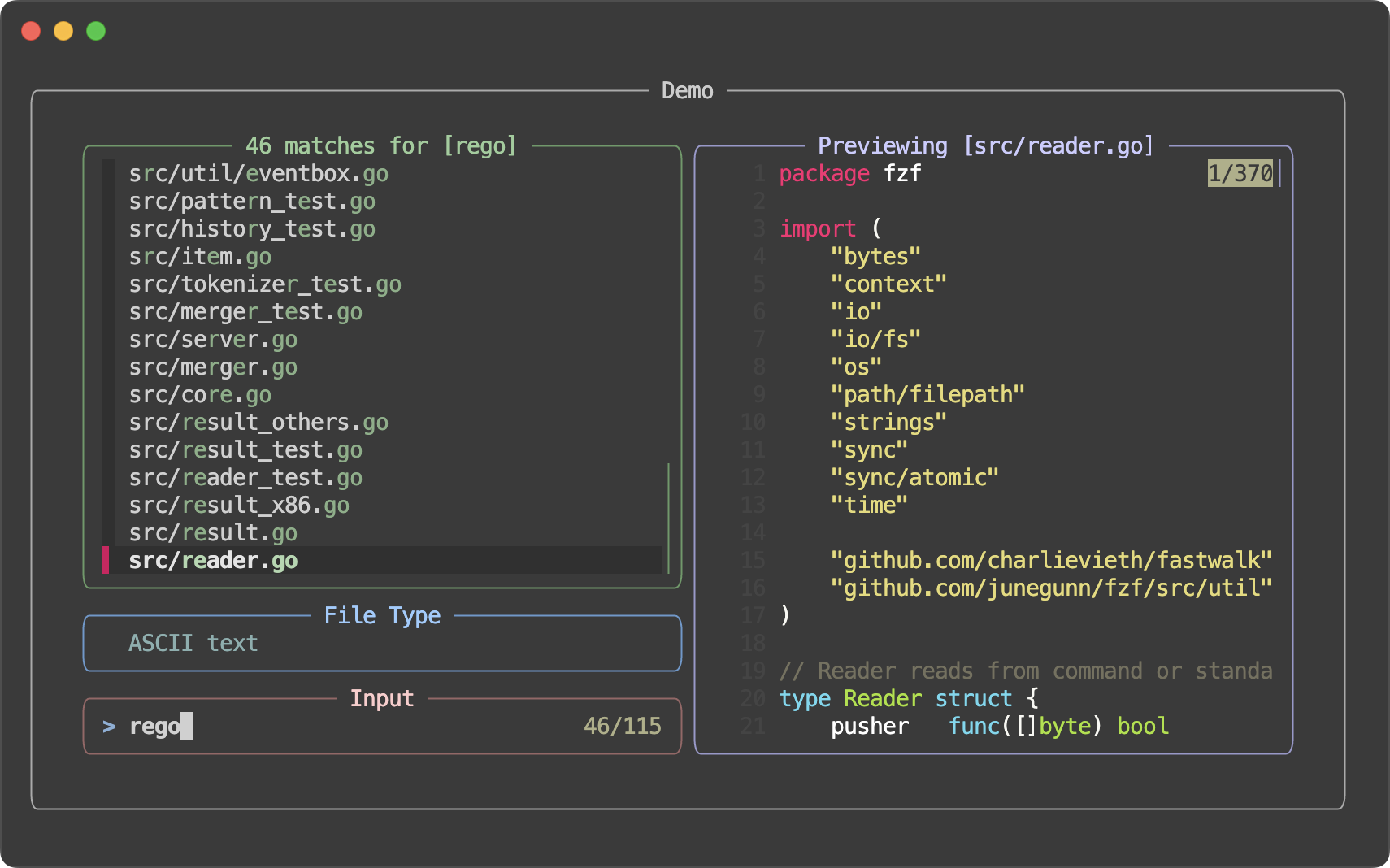 Also, fzf now offers "style presets" for quick customization, which can be activated using the `--style` option.
| Preset | Screenshot |
| :--- | :--- |
| `default` |
Also, fzf now offers "style presets" for quick customization, which can be activated using the `--style` option.
| Preset | Screenshot |
| :--- | :--- |
| `default` | 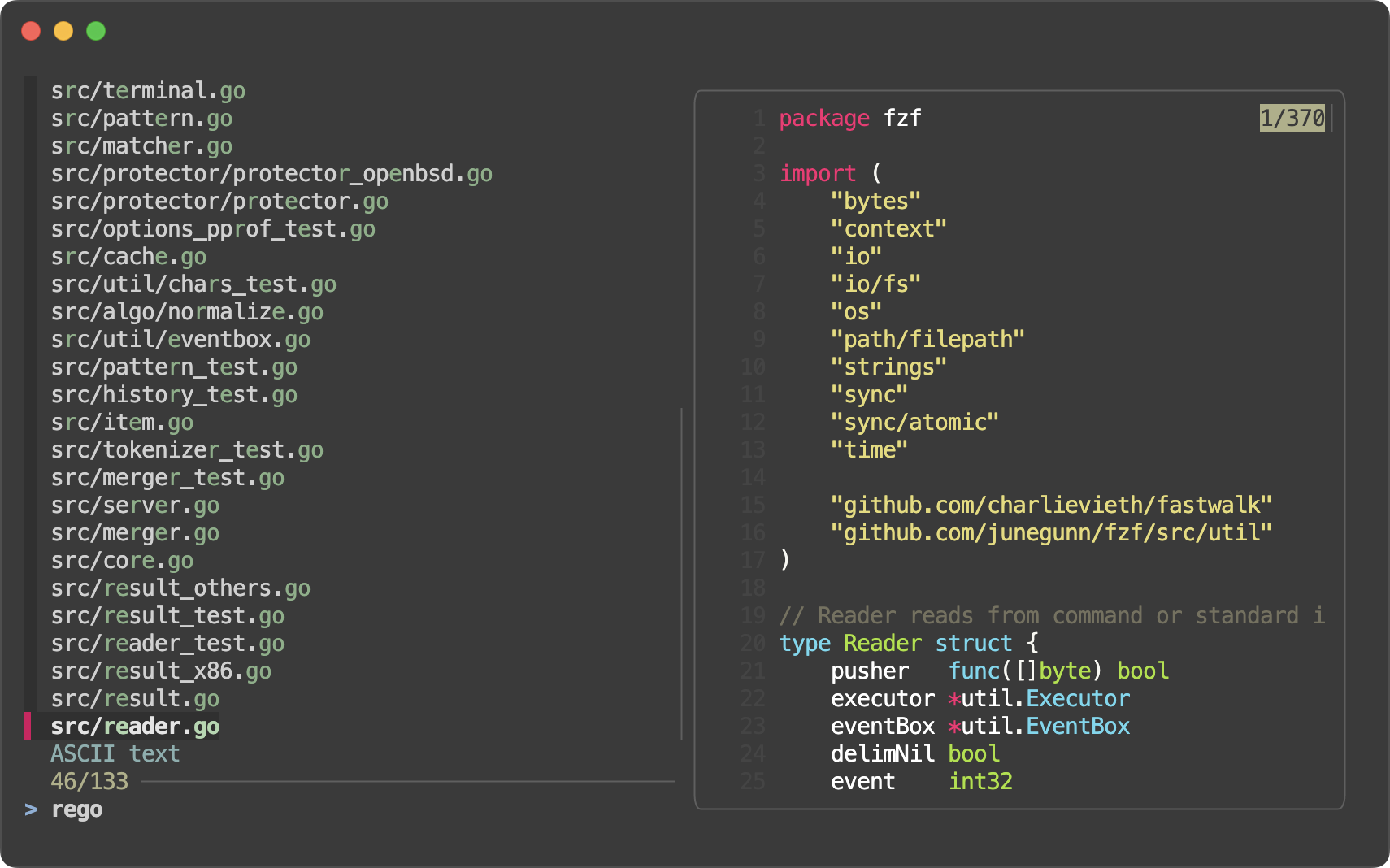 |
| `full` |
|
| `full` | 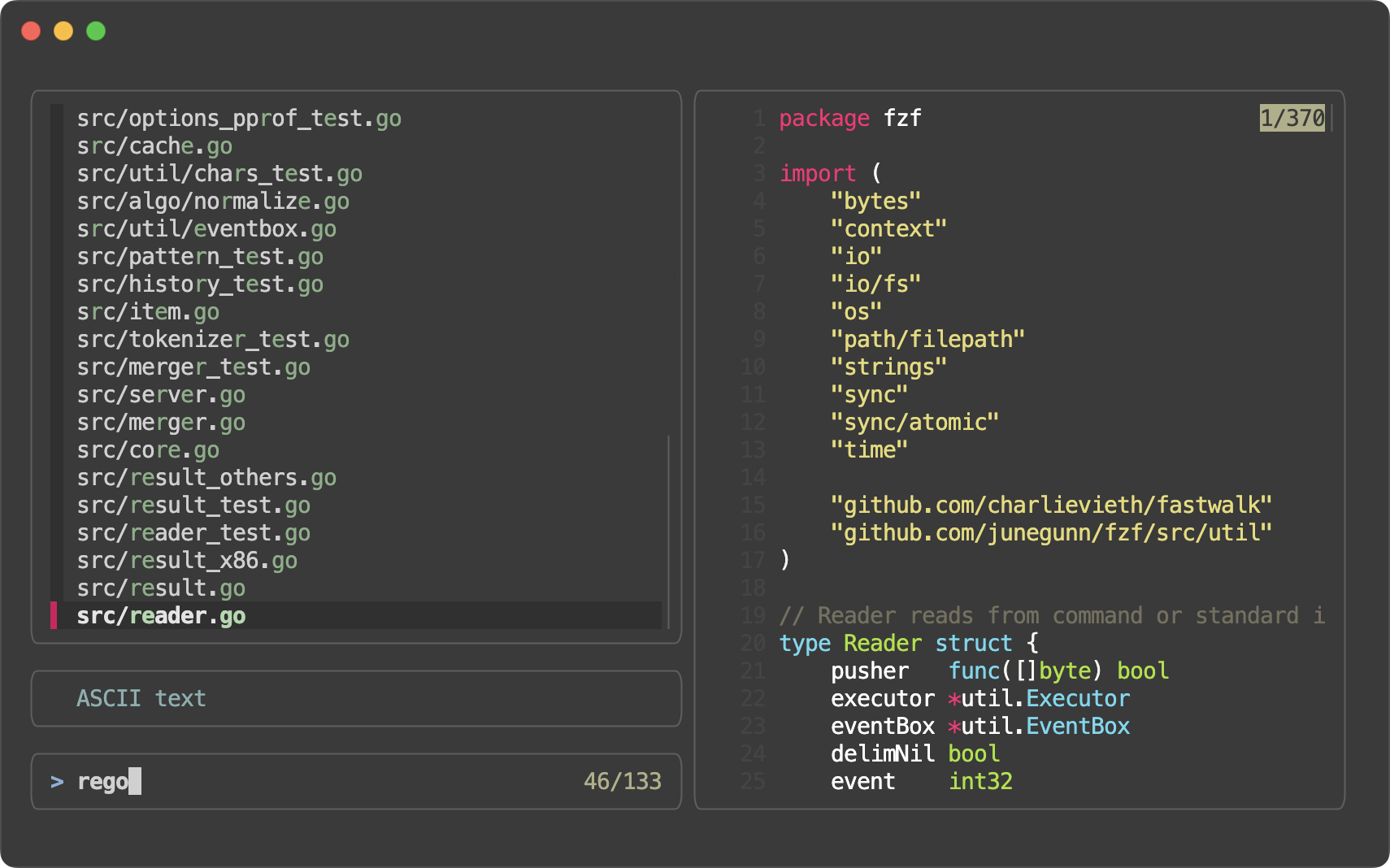 |
| `minimal` |
|
| `minimal` | 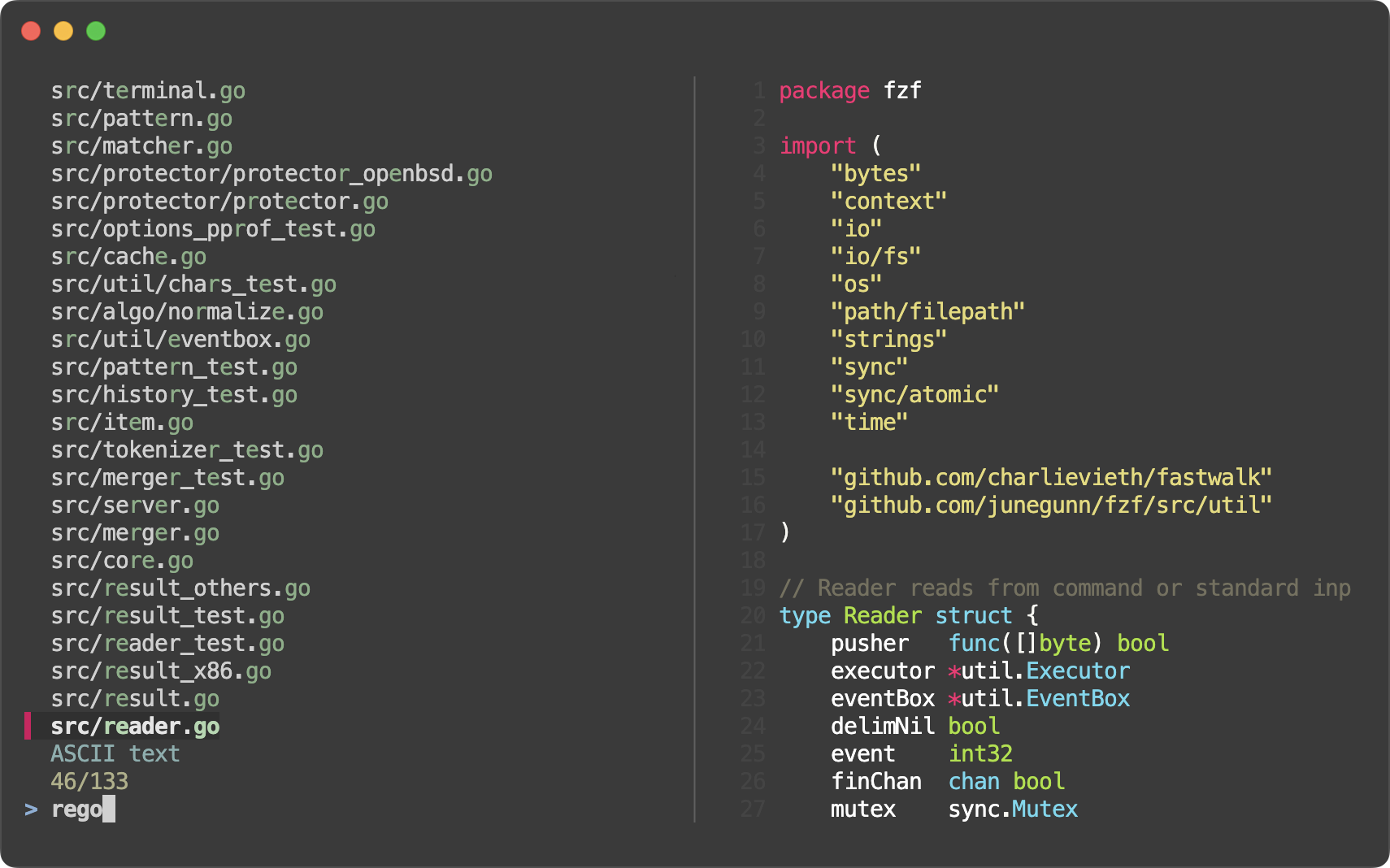 |
- Style presets (#4160)
- `--style=full[:BORDER_STYLE]`
- `--style=default`
- `--style=minimal`
- Border and label for the list section (#4148)
- Options
- `--list-border[=STYLE]`
- `--list-label=LABEL`
- `--list-label-pos=COL[:bottom]`
- Colors
- `list-fg`
- `list-bg`
- `list-border`
- `list-label`
- Actions
- `change-list-label`
- `transform-list-label`
- Border and label for the input section (prompt line and info line) (#4154)
- Options
- `--input-border[=STYLE]`
- `--input-label=LABEL`
- `--input-label-pos=COL[:bottom]`
- Colors
- `input-fg` (`query`)
- `input-bg`
- `input-border`
- `input-label`
- Actions
- `change-input-label`
- `transform-input-label`
- Border and label for the header section (#4159)
- Options
- `--header-border[=STYLE]`
- `--header-label=LABEL`
- `--header-label-pos=COL[:bottom]`
- Colors
- `header-fg` (`header`)
- `header-bg`
- `header-border`
- `header-label`
- Actions
- `change-header-label`
- `transform-header-label`
- Added `--preview-border[=STYLE]` as short for `--preview-window=border[-STYLE]`
- Added new preview border style `line` which draws a single separator line between the preview window and the rest of the interface
- fzf will now render a dashed line (`┈┈`) in each `--gap` for better visual separation.
```sh
# All bash/zsh functions, highlighted
declare -f |
perl -0 -pe 's/^}\n/}\0/gm' |
bat --plain --language bash --color always |
fzf --read0 --ansi --layout reverse --multi --highlight-line --gap
```
* You can customize the line using `--gap-line[=STR]`.
- You can specify `border-native` to `--tmux` so that native tmux border is used instead of `--border`. This can be useful if you start a different program from inside the popup.
```sh
fzf --tmux border-native --bind 'enter:execute:less {}'
```
- Added `toggle-multi-line` action
- Added `toggle-hscroll` action
- Added `change-nth` action for dynamically changing the value of the `--nth` option
```sh
# Start with --nth 1, then 2, then 3, then back to the default, 1
echo 'foo foobar foobarbaz' | fzf --bind 'space:change-nth(2|3|)' --nth 1 -q foo
```
- `--nth` parts of each line can now be rendered in a different text style
```sh
# nth in a different style
ls -al | fzf --nth -1 --color nth:italic
ls -al | fzf --nth -1 --color nth:reverse
ls -al | fzf --nth -1 --color nth:reverse:bold
# Dim the other parts
ls -al | fzf --nth -1 --color nth:regular,fg:dim
# With 'change-nth'. The current nth option is exported as $FZF_NTH.
ps -ef | fzf --reverse --header-lines 1 --header-border bottom --input-border \
--color nth:regular,fg:dim \
--bind 'ctrl-n:change-nth(8..|1|2|3|4|5|6|7|)' \
--bind 'result:transform-prompt:echo "${FZF_NTH}> "'
```
- A single-character delimiter is now treated as a plain string delimiter rather than a regular expression delimiter, even if it's a regular expression meta-character.
- This means you can just write `--delimiter '|'` instead of escaping it as `--delimiter '\|'`
- Bug fixes
- Bug fixes and improvements in fish scripts (thanks to @bitraid)
0.57.0
------
- You can now resize the preview window by dragging the border
- Built-in walker improvements
- `--walker-root` can take multiple directory arguments. e.g. `--walker-root include src lib`
- `--walker-skip` can handle multi-component patterns. e.g. `--walker-skip target/build`
- Removed long processing delay when displaying images in the preview window
- `FZF_PREVIEW_*` environment variables are exported to all child processes (#4098)
- Bug fixes in fish scripts
0.56.3
------
- Bug fixes in zsh scripts
- fix(zsh): handle backtick trigger edge case (#4090)
- revert(zsh): remove 'fc -RI' call in the history widget (#4093)
- Thanks to @LangLangBart for the contributions
0.56.2
------
- Bug fixes
- Fixed abnormal scrolling behavior when `--wrap` is set (#4083)
- [zsh] Fixed warning message when `ksh_arrays` is set (#4084)
0.56.1
------
- Bug fixes and improvements
- Fixed a race condition which would cause fzf to present stale results after `reload` (#4070)
- `page-up` and `page-down` actions now work correctly with multi-line items (#4069)
- `{n}` is allowed in `SCROLL` expression in `--preview-window` (#4079)
- [zsh] Fixed regression in history loading with shared option (#4071)
- [zsh] Better command extraction in zsh completion (#4082)
- Thanks to @LangLangBart, @jaydee-coder, @alex-huff, and @vejkse for the contributions
0.56.0
------
- Added `--gap[=N]` option to display empty lines between items.
- This can be useful to visually separate adjacent multi-line items.
```sh
# All bash functions, highlighted
declare -f | perl -0777 -pe 's/^}\n/}\0/gm' |
bat --plain --language bash --color always |
fzf --read0 --ansi --reverse --multi --highlight-line --gap
```
- Or just to make the list easier to read. For single-line items, you probably want to set `--color gutter:-1` as well to hide the gutter.
```sh
fzf --info inline-right --gap --color gutter:-1
```
- Added `noinfo` option to `--preview-window` to hide the scroll indicator in the preview window
- Bug fixes
- Thanks to @LangLangBart, @akinomyoga, and @charlievieth for fixing the bugs
0.55.0
------
_Release highlights: https://junegunn.github.io/fzf/releases/0.55.0/_
- Added `exact-boundary-match` type to the search syntax. When a search term is single-quoted, fzf will search for the exact occurrences of the string with both ends at word boundaries.
```sh
fzf --query "'here'" << EOF
come here
not there
EOF
```
- [bash] Fuzzy path completion is enabled for all commands
- 1. If the default completion is not already set
- 2. And if the current bash supports `complete -D` option
- However, fuzzy completion for some commands can be "dynamically" disabled by the dynamic completion loader
- See the comment in `__fzf_default_completion` function for more information
- Comments are now allowed in `$FZF_DEFAULT_OPTS` and `$FZF_DEFAULT_OPTS_FILE`
```sh
export FZF_DEFAULT_OPTS='
# Layout options
--layout=reverse
--info=inline-right # Show info on the right side of the prompt line
# ...
'
```
- Hyperlinks (OSC 8) are now supported in the preview window and in the main window
```sh
printf '<< \e]8;;http://github.com/junegunn/fzf\e\\Link to \e[32mfz\e[0mf\e]8;;\e\\ >>' | fzf --ansi
fzf --preview "printf '<< \e]8;;http://github.com/junegunn/fzf\e\\Link to \e[32mfz\e[0mf\e]8;;\e\\ >>'"
```
- The default `--ellipsis` is now `··` instead of `..`.
- [vim] A spec can have `exit` callback that is called with the exit status of fzf
- This can be used to clean up temporary resources or restore the original state when fzf is closed without a selection
- Fixed `--tmux bottom` when the status line is not at the bottom
- Fixed extra scroll offset in multi-line mode (`--read0` or `--wrap`)
- Added fallback `ps` command for `kill` completion on Cygwin
0.54.3
------
- Fixed incompatibility of adaptive height specification and 'start:reload'
```sh
# A regression in 0.54.0 would cause this to fail
fzf --height '~100%' --bind 'start:reload:seq 10'
```
- Environment variables are now available to `$FZF_DEFAULT_COMMAND`
```sh
FZF_DEFAULT_COMMAND='echo $FZF_QUERY' fzf --query foo
```
0.54.2
------
- Fixed incorrect syntax highlighting of truncated multi-line entries
- Updated GoReleaser to 2.1.0 to simplify notarization of macOS binaries
- macOS archives will be in `tar.gz` format instead of `zip` format since we no longer notarize the zip files but binaries
- (Windows) Reverted a mintty fix in 0.54.0
- As a result, mouse may not work on mintty in fullscreen mode. However, fzf will correctly read non-ASCII input in fullscreen mode (`--no-height`).
- fzf unfortunately cannot read non-ASCII input when not in fullscreen mode on Windows. So if you need to input non-ASCII characters, add `--no-height` to your `$FZF_DEFAULT_OPTS`.
- Any help in fixing this issue will be appreciated (#3799, #3847).
0.54.1
------
- Updated [fastwalk](https://github.com/charlievieth/fastwalk) dependency for built-in directory walker
- [fastwalk: add optional sorting and improve documentation](https://github.com/charlievieth/fastwalk/pull/27)
- [fastwalk: only check if MSYSTEM is set during MSYS/MSYS2](https://github.com/charlievieth/fastwalk/pull/28)
- Thanks to @charlievieth
- Reverted ALT-C binding of fish to use `cd` instead of `builtin cd`
- `builtin cd` was introduced to work around a bug of `cd` coming from `zoxide init --cmd cd fish` where it cannot handle `--` argument.
- However, the default `cd` of fish is actually a wrapper function for supporting `cd -`, so we want to use it instead.
- See [#3928](https://github.com/junegunn/fzf/pull/3928) for more information and consider helping zoxide fix the bug.
0.54.0
------
_Release highlights: https://junegunn.github.io/fzf/releases/0.54.0/_
- Implemented line wrap of long items
- `--wrap` option enables line wrap
- `--wrap-sign` customizes the sign for wrapped lines (default: `↳ `)
- `toggle-wrap` action toggles line wrap
```sh
history | fzf --tac --wrap --bind 'ctrl-/:toggle-wrap' --wrap-sign $'\t↳ '
```
- fzf by default binds `CTRL-/` and `ALT-/` to `toggle-wrap`
- Updated shell integration scripts to leverage line wrap
- CTRL-R binding includes `--wrap-sign $'\t↳ '` to indent wrapped lines
- `kill **` completion uses `--wrap` to show the whole line by default
instead of showing it in the preview window
- Added `--info-command` option for customizing the info line
```sh
# Prepend the current cursor position in yellow
fzf --info-command='echo -e "\x1b[33;1m$FZF_POS\x1b[m/$FZF_INFO 💛"'
```
- `$FZF_INFO` is set to the original info text
- ANSI color codes are supported
- Pointer and marker signs can be set to empty strings
```sh
# Minimal style
fzf --pointer '' --marker '' --prompt '' --info hidden
```
- Better cache management and improved rendering for `--tail`
- Improved `--sync` behavior
- When `--sync` is provided, fzf will not render the interface until the initial filtering and the associated actions (bound to any of `start`, `load`, `result`, or `focus`) are complete.
```sh
# fzf will not render intermediate states
(sleep 1; seq 1000000; sleep 1) |
fzf --sync --query 5 --listen --bind start:up,load:up,result:up,focus:change-header:Ready
```
- GET endpoint is now available from `execute` and `transform` actions (it used to timeout due to lock conflict)
```sh
fzf --listen --sync --bind 'focus:transform-header:curl -s localhost:$FZF_PORT?limit=0 | jq .'
```
- Added `offset-middle` action to place the current item is in the middle of the screen
- fzf will not start the initial reader when `reload` or `reload-sync` is bound to `start` event. `fzf < /dev/null` or `: | fzf` are no longer required and extraneous `load` event will not fire due to the empty list.
```sh
# Now this will work as expected. Previously, this would print an invalid header line.
# `fzf < /dev/null` or `: | fzf` would fix the problem, but then an extraneous
# `load` event would fire and the header would be prematurely updated.
fzf --header 'Loading ...' --header-lines 1 \
--bind 'start:reload:sleep 1; ps -ef' \
--bind 'load:change-header:Loaded!'
```
- Fixed mouse support on Windows
- Fixed crash when using `--tiebreak=end` with very long items
- zsh 5.0 compatibility (thanks to @LangLangBart)
- Fixed `--walker-skip` to also skip symlinks to directories
- Fixed `result` event not fired when input stream is not complete
- New tags will have `v` prefix so that they are available on https://proxy.golang.org/
0.53.0
------
_Release highlights: https://junegunn.github.io/fzf/releases/0.53.0/_
- Multi-line display
- See [Processing multi-line items](https://junegunn.github.io/fzf/tips/processing-multi-line-items/)
- fzf can now display multi-line items
```sh
# All bash functions, highlighted
declare -f | perl -0777 -pe 's/^}\n/}\0/gm' |
bat --plain --language bash --color always |
fzf --read0 --ansi --reverse --multi --highlight-line
# Ripgrep multi-line output
rg --pretty bash | perl -0777 -pe 's/\n\n/\n\0/gm' |
fzf --read0 --ansi --multi --highlight-line --reverse --tmux 70%
```
- To disable multi-line display, use `--no-multi-line`
- CTRL-R bindings of bash, zsh, and fish have been updated to leverage multi-line display
- The default `--pointer` and `--marker` have been changed from `>` to Unicode bar characters as they look better with multi-line items
- Added `--marker-multi-line` to customize the select marker for multi-line entries with the default set to `╻┃╹`
```
╻First line
┃...
╹Last line
```
- Native tmux integration
- Added `--tmux` option to replace fzf-tmux script and simplify distribution
```sh
# --tmux [center|top|bottom|left|right][,SIZE[%]][,SIZE[%]]
# Center, 100% width and 70% height
fzf --tmux 100%,70% --border horizontal --padding 1,2
# Left, 30% width
fzf --tmux left,30%
# Bottom, 50% height
fzf --tmux bottom,50%
```
- To keep the implementation simple, it only uses popups. You need tmux 3.3 or later.
- To use `--tmux` in Vim plugin:
```vim
let g:fzf_layout = { 'tmux': '100%,70%' }
```
- Added support for endless input streams
- See [Browsing log stream with fzf](https://junegunn.github.io/fzf/tips/browsing-log-streams/)
- Added `--tail=NUM` option to limit the number of items to keep in memory. This is useful when you want to browse an endless stream of data (e.g. log stream) with fzf while limiting memory usage.
```sh
# Interactive filtering of a log stream
tail -f *.log | fzf --tail 100000 --tac --no-sort --exact
```
- Better Windows Support
- fzf now works on Git bash (mintty) out of the box via winpty integration
- Many fixes and improvements for Windows
- man page is now embedded in the binary; `fzf --man` to see it
- Changed the default `--scroll-off` to 3, as we think it's a better default
- Process started by `execute` action now directly writes to and reads from `/dev/tty`. Manual `/dev/tty` redirection for interactive programs is no longer required.
```sh
# Vim will work fine without /dev/tty redirection
ls | fzf --bind 'space:execute:vim {}' > selected
```
- Added `print(...)` action to queue an arbitrary string to be printed on exit. This was mainly added to work around the limitation of `--expect` where it's not compatible with `--bind` on the same key and it would ignore other actions bound to it.
```sh
# This doesn't work as expected because --expect is not compatible with --bind
fzf --multi --expect ctrl-y --bind 'ctrl-y:select-all'
# This is something you can do instead
fzf --multi --bind 'enter:print()+accept,ctrl-y:select-all+print(ctrl-y)+accept'
```
- We also considered making them compatible, but realized that some users may have been relying on the current behavior.
- [`NO_COLOR`](https://no-color.org/) environment variable is now respected. If the variable is set, fzf defaults to `--no-color` unless otherwise specified.
0.52.1
------
- Fixed a critical bug in the Windows version
- Windows users are strongly encouraged to upgrade to this version
0.52.0
------
- Added `--highlight-line` to highlight the whole current line (à la `set cursorline` of Vim)
- Added color names for selected lines: `selected-fg`, `selected-bg`, and `selected-hl`
```sh
fzf --border --multi --info inline-right --layout reverse --marker ▏ --pointer ▌ --prompt '▌ ' \
--highlight-line --color gutter:-1,selected-bg:238,selected-fg:146,current-fg:189
```
- Added `click-header` event that is triggered when the header section is clicked. When the event is triggered, `$FZF_CLICK_HEADER_COLUMN` and `$FZF_CLICK_HEADER_LINE` are set.
```sh
fd --type f |
fzf --header $'[Files] [Directories]' --header-first \
--bind 'click-header:transform:
(( FZF_CLICK_HEADER_COLUMN <= 7 )) && echo "reload(fd --type f)"
(( FZF_CLICK_HEADER_COLUMN >= 9 )) && echo "reload(fd --type d)"
'
```
- Add `$FZF_COMPLETION_{DIR,PATH}_OPTS` for separately customizing the behavior of fuzzy completion
```sh
# Set --walker options without 'follow' not to follow symbolic links
FZF_COMPLETION_PATH_OPTS="--walker=file,dir,hidden"
FZF_COMPLETION_DIR_OPTS="--walker=dir,hidden"
```
- Fixed Windows argument escaping
- Bug fixes and improvements
- The code was heavily refactored to allow using fzf as a library in Go programs. The API is still experimental and subject to change.
- https://gist.github.com/junegunn/193990b65be48a38aac6ac49d5669170
0.51.0
------
- Added a new environment variable `$FZF_POS` exported to the child processes. It's the vertical position of the cursor in the list starting from 1.
```sh
# Toggle selection to the top or to the bottom
seq 30 | fzf --multi --bind 'load:pos(10)' \
--bind 'shift-up:transform:for _ in $(seq $FZF_POS $FZF_MATCH_COUNT); do echo -n +toggle+up; done' \
--bind 'shift-down:transform:for _ in $(seq 1 $FZF_POS); do echo -n +toggle+down; done'
```
- Added `--with-shell` option to start child processes with a custom shell command and flags
```sh
gem list | fzf --with-shell 'ruby -e' \
--preview 'pp Gem::Specification.find_by_name({1})' \
--bind 'ctrl-o:execute-silent:
spec = Gem::Specification.find_by_name({1})
[spec.homepage, *spec.metadata.filter { _1.end_with?("uri") }.values].uniq.each do
system "open", _1
end
'
```
- Added `change-multi` action for dynamically changing `--multi` option
- `change-multi` - enable multi-select mode with no limit
- `change-multi(NUM)` - enable multi-select mode with a limit
- `change-multi(0)` - disable multi-select mode
- Windows improvements
- `become` action is now supported on Windows
- Unlike in *nix, this does not use `execve(2)`. Instead it spawns a new process and waits for it to finish, so the exact behavior may differ.
- Fixed argument escaping for Windows cmd.exe. No redundant escaping of backslashes.
- Bug fixes and improvements
0.50.0
------
- Search performance optimization. You can observe 50%+ improvement in some scenarios.
```
$ rg --line-number --no-heading --smart-case . > $DATA
$ wc < $DATA
5520118 26862362 897487793
$ hyperfine -w 1 -L bin fzf-0.49.0,fzf-7ce6452,fzf-a5447b8,fzf '{bin} --filter "///" < $DATA | head -30'
Summary
fzf --filter "///" < $DATA | head -30 ran
1.16 ± 0.03 times faster than fzf-a5447b8 --filter "///" < $DATA | head -30
1.23 ± 0.03 times faster than fzf-7ce6452 --filter "///" < $DATA | head -30
1.52 ± 0.03 times faster than fzf-0.49.0 --filter "///" < $DATA | head -30
```
- Added `jump` and `jump-cancel` events that are triggered when leaving `jump` mode
```sh
# Default behavior
fzf --bind space:jump
# Same as jump-accept action
fzf --bind space:jump,jump:accept
# Accept on jump, abort on cancel
fzf --bind space:jump,jump:accept,jump-cancel:abort
# Change header on jump-cancel
fzf --bind 'space:change-header(Type jump label)+jump,jump-cancel:change-header:Jump cancelled'
```
- Added a new environment variable `$FZF_KEY` exported to the child processes. It's the name of the last key pressed.
```sh
fzf --bind 'space:jump,jump:accept,jump-cancel:transform:[[ $FZF_KEY =~ ctrl-c ]] && echo abort'
```
- fzf can be built with profiling options. See [BUILD.md](BUILD.md) for more information.
- Bug fixes
0.49.0
------
- Ingestion performance improved by around 40% (more or less depending on options)
- `--info=hidden` and `--info=inline-right` will no longer hide the horizontal separator by default. This gives you more flexibility in customizing the layout.
```sh
fzf --border --info=inline-right
fzf --border --info=inline-right --separator ═
fzf --border --info=inline-right --no-separator
fzf --border --info=hidden
fzf --border --info=hidden --separator ━
fzf --border --info=hidden --no-separator
```
- Added two environment variables exported to the child processes
- `FZF_PREVIEW_LABEL`
- `FZF_BORDER_LABEL`
```sh
# Use the current value of $FZF_PREVIEW_LABEL to determine which actions to perform
git ls-files |
fzf --header 'Press CTRL-P to change preview mode' \
--bind='ctrl-p:transform:[[ $FZF_PREVIEW_LABEL =~ cat ]] \
&& echo "change-preview(git log --color=always \{})+change-preview-label([[ log ]])" \
|| echo "change-preview(bat --color=always \{})+change-preview-label([[ cat ]])"'
```
- Renamed `track` action to `track-current` to highlight the difference between the global tracking state set by `--track` and a one-off tracking action
- `track` is still available as an alias
- Added `untrack-current` and `toggle-track-current` actions
- `*-current` actions are no-op when the global tracking state is set
- Bug fixes and minor improvements
0.48.1
------
- CTRL-T and ALT-C bindings can be disabled by setting `FZF_CTRL_T_COMMAND` and `FZF_ALT_C_COMMAND` to empty strings respectively when sourcing the script
```sh
# bash
FZF_CTRL_T_COMMAND= FZF_ALT_C_COMMAND= eval "$(fzf --bash)"
# zsh
FZF_CTRL_T_COMMAND= FZF_ALT_C_COMMAND= eval "$(fzf --zsh)"
# fish
fzf --fish | FZF_CTRL_T_COMMAND= FZF_ALT_C_COMMAND= source
```
- Setting the variables after sourcing the script will have no effect
- Bug fixes
0.48.0
------
- Shell integration scripts are now embedded in the fzf binary. This simplifies the distribution, and the users are less likely to have problems caused by using incompatible scripts and binaries.
- bash
```sh
# Set up fzf key bindings and fuzzy completion
eval "$(fzf --bash)"
```
- zsh
```sh
# Set up fzf key bindings and fuzzy completion
eval "$(fzf --zsh)"
```
- fish
```fish
# Set up fzf key bindings
fzf --fish | source
```
- Added options for customizing the behavior of the built-in walker
| Option | Description | Default |
| --- | --- | --- |
| `--walker=OPTS` | Walker options (`[file][,dir][,follow][,hidden]`) | `file,follow,hidden` |
| `--walker-root=DIR` | Root directory from which to start walker | `.` |
| `--walker-skip=DIRS` | Comma-separated list of directory names to skip | `.git,node_modules` |
- Examples
```sh
# Built-in walker is only used by standalone fzf when $FZF_DEFAULT_COMMAND is not set
unset FZF_DEFAULT_COMMAND
fzf # default: --walker=file,follow,hidden --walker-root=. --walker-skip=.git,node_modules
fzf --walker=file,dir,hidden,follow --walker-skip=.git,node_modules,target
# Walker options in $FZF_DEFAULT_OPTS
export FZF_DEFAULT_OPTS="--walker=file,dir,hidden,follow --walker-skip=.git,node_modules,target"
fzf
# Reading from STDIN; --walker is ignored
seq 100 | fzf --walker=dir
# Reading from $FZF_DEFAULT_COMMAND; --walker is ignored
export FZF_DEFAULT_COMMAND='seq 100'
fzf --walker=dir
```
- Shell integration scripts have been updated to use the built-in walker with these new options and they are now much faster out of the box.
0.47.0
------
- Replaced ["the default find command"][find] with a built-in directory walker to simplify the code and to achieve better performance and consistent behavior across platforms.
This doesn't affect you if you have `$FZF_DEFAULT_COMMAND` set.
- Breaking changes:
- Unlike [the previous "find" command][find], the new traversal code will list hidden files, but hidden directories will still be ignored
- No filtering of `devtmpfs` or `proc` types
- Traversal is parallelized, so the order of the entries will be different each time
- You may wonder why fzf implements directory walker anyway when it's a filter program following the [Unix philosophy][unix].
But fzf has had [the walker code for years][walker] to tackle the performance problem on Windows. And I decided to use the same approach on different platforms as well for the benefits listed above.
- Built-in walker is using the excellent [charlievieth/fastwalk][fastwalk] library, which easily outperforms its competitors and supports safely following symlinks.
- Added `$FZF_DEFAULT_OPTS_FILE` to allow managing default options in a file
- See [#3618](https://github.com/junegunn/fzf/pull/3618)
- Option precedence from lower to higher
1. Options read from `$FZF_DEFAULT_OPTS_FILE`
1. Options from `$FZF_DEFAULT_OPTS`
1. Options from command-line arguments
- Bug fixes and improvements
[find]: https://github.com/junegunn/fzf/blob/0.46.1/src/constants.go#L60-L64
[walker]: https://github.com/junegunn/fzf/pull/1847
[fastwalk]: https://github.com/charlievieth/fastwalk
[unix]: https://en.wikipedia.org/wiki/Unix_philosophy
0.46.1
------
- Bug fixes and improvements
- Fixed Windows binaries
- Downgraded Go version to 1.20 to support older versions of Windows
- https://tip.golang.org/doc/go1.21#windows
- Updated [rivo/uniseg](https://github.com/rivo/uniseg) dependency to v0.4.6
0.46.0
------
- Added two new events
- `result` - triggered when the filtering for the current query is complete and the result list is ready
- `resize` - triggered when the terminal size is changed
- fzf now exports the following environment variables to the child processes
| Variable | Description |
| --- | --- |
| `FZF_LINES` | Number of lines fzf takes up excluding padding and margin |
| `FZF_COLUMNS` | Number of columns fzf takes up excluding padding and margin |
| `FZF_TOTAL_COUNT` | Total number of items |
| `FZF_MATCH_COUNT` | Number of matched items |
| `FZF_SELECT_COUNT` | Number of selected items |
| `FZF_QUERY` | Current query string |
| `FZF_PROMPT` | Prompt string |
| `FZF_ACTION` | The name of the last action performed |
- This allows you to write sophisticated transformations like so
```sh
# Script to dynamically resize the preview window
transformer='
# 1 line for info, another for prompt, and 2 more lines for preview window border
lines=$(( FZF_LINES - FZF_MATCH_COUNT - 4 ))
if [[ $FZF_MATCH_COUNT -eq 0 ]]; then
echo "change-preview-window:hidden"
elif [[ $lines -gt 3 ]]; then
echo "change-preview-window:$lines"
elif [[ $FZF_PREVIEW_LINES -ne 3 ]]; then
echo "change-preview-window:3"
fi
'
seq 10000 | fzf --preview 'seq {} 10000' --preview-window up \
--bind "result:transform:$transformer" \
--bind "resize:transform:$transformer"
```
- And we're phasing out `{fzf:prompt}` and `{fzf:action}`
- Changed [mattn/go-runewidth](https://github.com/mattn/go-runewidth) dependency to [rivo/uniseg](https://github.com/rivo/uniseg) for accurate results
- Set `--ambidouble` if your terminal displays ambiguous width characters (e.g. box-drawing characters for borders) as 2 columns
- `RUNEWIDTH_EASTASIAN=1` is still respected for backward compatibility, but it's recommended that you use this new option instead
- Bug fixes
0.45.0
------
- Added `transform` action to conditionally perform a series of actions
```sh
# Disallow selecting an empty line
echo -e "1. Hello\n2. Goodbye\n\n3. Exit" |
fzf --height '~100%' --reverse --header 'Select one' \
--bind 'enter:transform:[[ -n {} ]] && echo accept || echo "change-header:Invalid selection"'
# Move cursor past the empty line
echo -e "1. Hello\n2. Goodbye\n\n3. Exit" |
fzf --height '~100%' --reverse --header 'Select one' \
--bind 'enter:transform:[[ -n {} ]] && echo accept || echo "change-header:Invalid selection"' \
--bind 'focus:transform:[[ -n {} ]] && exit; [[ {fzf:action} =~ up$ ]] && echo up || echo down'
# A single key binding to toggle between modes
fd --type file |
fzf --prompt 'Files> ' \
--header 'CTRL-T: Switch between Files/Directories' \
--bind 'ctrl-t:transform:[[ ! {fzf:prompt} =~ Files ]] &&
echo "change-prompt(Files> )+reload(fd --type file)" ||
echo "change-prompt(Directories> )+reload(fd --type directory)"'
```
- Added placeholder expressions
- `{fzf:action}` - The name of the last action performed
- `{fzf:prompt}` - Prompt string (including ANSI color codes)
- `{fzf:query}` - Synonym for `{q}`
- Added support for negative height
```sh
# Terminal height minus 1, so you can still see the command line
fzf --height=-1
```
- This handles a terminal resize better than `--height=$(($(tput lines) - 1))`
- Added `accept-or-print-query` action that acts like `accept` but prints the
current query when there's no match for the query
```sh
# You can make CTRL-R paste the current query when there's no match
export FZF_CTRL_R_OPTS='--bind enter:accept-or-print-query'
```
- Note that there are alternative ways to implement the same strategy
```sh
# 'become' is apparently more versatile but it's not available on Windows.
export FZF_CTRL_R_OPTS='--bind "enter:become:if [ -z {} ]; then echo {q}; else echo {}; fi"'
# Using the new 'transform' action
export FZF_CTRL_R_OPTS='--bind "enter:transform:[ -z {} ] && echo print-query || echo accept"'
```
- Added `show-header` and `hide-header` actions
- Bug fixes
0.44.1
------
- Fixed crash when preview window is hidden on `focus` event
0.44.0
------
- (Experimental) Sixel image support in preview window (not available on Windows)
- [bin/fzf-preview.sh](bin/fzf-preview.sh) is added to demonstrate how to
display an image using Kitty image protocol or Sixel. You can use it
like so:
```sh
fzf --preview='fzf-preview.sh {}'
```
- (Experimental) iTerm2 inline image protocol support in preview window (not available on Windows)
```sh
# Using https://iterm2.com/utilities/imgcat
fzf --preview 'imgcat -W $FZF_PREVIEW_COLUMNS -H $FZF_PREVIEW_LINES {}'
```
- HTTP server can be configured to accept remote connections
```sh
# FZF_API_KEY is required for a non-localhost listen address
export FZF_API_KEY="$(head -c 32 /dev/urandom | base64)"
fzf --listen 0.0.0.0:6266
```
- To allow remote process execution, use `--listen-unsafe` instead
(`execute*`, `reload*`, `become`, `preview`, `change-preview`, `transform-*`)
```sh
fzf --listen-unsafe 0.0.0.0:6266
```
- Bug fixes
0.43.0
------
- (Experimental) Added support for Kitty image protocol in the preview window
(not available on Windows)
```sh
fzf --preview='
if file --mime-type {} | grep -qF image/; then
# --transfer-mode=memory is the fastest option but if you want fzf to be able
# to redraw the image on terminal resize or on 'change-preview-window',
# you need to use --transfer-mode=stream.
kitty icat --clear --transfer-mode=memory --unicode-placeholder --stdin=no --place=${FZF_PREVIEW_COLUMNS}x${FZF_PREVIEW_LINES}@0x0 {} | sed \$d
else
bat --color=always {}
fi
'
```
- (Experimental) `--listen` server can report program state in JSON format (`GET /`)
```sh
# fzf server started in "headless" mode
fzf --listen 6266 2> /dev/null
# Get program state
curl localhost:6266 | jq .
# Increase the number of items returned (default: 100)
curl localhost:6266?limit=1000 | jq .
```
- `--listen` server can be secured by setting `$FZF_API_KEY` environment
variable.
```sh
export FZF_API_KEY="$(head -c 32 /dev/urandom | base64)"
# Server
fzf --listen 6266
# Client
curl localhost:6266 -H "x-api-key: $FZF_API_KEY" -d 'change-query(yo)'
```
- Added `toggle-header` action
- Added mouse events for `--bind`
- `scroll-up` (bound to `up`)
- `scroll-down` (bound to `down`)
- `shift-scroll-up` (bound to `toggle+up`)
- `shift-scroll-down` (bound to `toggle+down`)
- `shift-left-click` (bound to `toggle`)
- `shift-right-click` (bound to `toggle`)
- `preview-scroll-up` (bound to `preview-up`)
- `preview-scroll-down` (bound to `preview-down`)
```sh
# Twice faster scrolling both in the main window and the preview window
fzf --bind 'scroll-up:up+up,scroll-down:down+down' \
--bind 'preview-scroll-up:preview-up+preview-up' \
--bind 'preview-scroll-down:preview-down+preview-down' \
--preview 'cat {}'
```
- Added `offset-up` and `offset-down` actions
```sh
# Scrolling will behave similarly to CTRL-E and CTRL-Y of vim
fzf --bind scroll-up:offset-up,scroll-down:offset-down \
--bind ctrl-y:offset-up,ctrl-e:offset-down \
--scroll-off=5
```
- Shell extensions
- Updated bash completion for fzf options
- bash key bindings no longer requires perl; it will use awk or mawk
instead if perl is not found
- Basic context-aware completion for ssh command
- Applied `--scheme=path` for better ordering of the result
- Bug fixes and improvements
0.42.0
------
- Added new info style: `--info=right`
- Added new info style: `--info=inline-right`
- Added new border style `thinblock` which uses symbols for legacy computing
[one eighth block elements](https://en.wikipedia.org/wiki/Symbols_for_Legacy_Computing)
- Similarly to `block`, this style is suitable when using a different
background color because the window is completely contained within the border.
```sh
BAT_THEME=GitHub fzf --info=right --border=thinblock --preview-window=border-thinblock \
--margin=3 --scrollbar=▏▕ --preview='bat --color=always --style=numbers {}' \
--color=light,query:238,fg:238,bg:251,bg+:249,gutter:251,border:248,preview-bg:253
```
- This style may not render correctly depending on the font and the
terminal emulator.
0.41.1
------
- Fixed a bug where preview window is not updated when `--disabled` is set and
a reload is triggered by `change:reload` binding
0.41.0
------
- Added color name `preview-border` and `preview-scrollbar`
- Added new border style `block` which uses [block elements](https://en.wikipedia.org/wiki/Block_Elements)
- `--scrollbar` can take two characters, one for the main window, the other
for the preview window
- Putting it altogether:
```sh
fzf-tmux -p 80% --padding 1,2 --preview 'bat --style=plain --color=always {}' \
--color 'bg:237,bg+:235,gutter:237,border:238,scrollbar:236' \
--color 'preview-bg:235,preview-border:236,preview-scrollbar:234' \
--preview-window 'border-block' --border block --scrollbar '▌▐'
```
- Bug fixes and improvements
0.40.0
------
- Added `zero` event that is triggered when there's no match
```sh
# Reload the candidate list when there's no match
echo $RANDOM | fzf --bind 'zero:reload(echo $RANDOM)+clear-query' --height 3
```
- New actions
- Added `track` action which makes fzf track the current item when the
search result is updated. If the user manually moves the cursor, or the
item is not in the updated search result, tracking is automatically
disabled. Tracking is useful when you want to see the surrounding items
by deleting the query string.
```sh
# Narrow down the list with a query, point to a command,
# and hit CTRL-T to see its surrounding commands.
export FZF_CTRL_R_OPTS="
--preview 'echo {}' --preview-window up:3:hidden:wrap
--bind 'ctrl-/:toggle-preview'
--bind 'ctrl-t:track+clear-query'
--bind 'ctrl-y:execute-silent(echo -n {2..} | pbcopy)+abort'
--color header:italic
--header 'Press CTRL-Y to copy command into clipboard'"
```
- Added `change-header(...)`
- Added `transform-header(...)`
- Added `toggle-track` action
- Fixed `--track` behavior when used with `--tac`
- However, using `--track` with `--tac` is not recommended. The resulting
behavior can be very confusing.
- Bug fixes and improvements
0.39.0
------
- Added `one` event that is triggered when there's only one match
```sh
# Automatically select the only match
seq 10 | fzf --bind one:accept
```
- Added `--track` option that makes fzf track the current selection when the
result list is updated. This can be useful when browsing logs using fzf with
sorting disabled.
```sh
git log --oneline --graph --color=always | nl |
fzf --ansi --track --no-sort --layout=reverse-list
```
- If you use `--listen` option without a port number fzf will automatically
allocate an available port and export it as `$FZF_PORT` environment
variable.
```sh
# Automatic port assignment
fzf --listen --bind 'start:execute-silent:echo $FZF_PORT > /tmp/fzf-port'
# Say hello
curl "localhost:$(cat /tmp/fzf-port)" -d 'preview:echo Hello, fzf is listening on $FZF_PORT.'
```
- A carriage return and a line feed character will be rendered as dim ␍ and
␊ respectively.
```sh
printf "foo\rbar\nbaz" | fzf --read0 --preview 'echo {}'
```
- fzf will stop rendering a non-displayable characters as a space. This will
likely cause less glitches in the preview window.
```sh
fzf --preview 'head -1000 /dev/random'
```
- Bug fixes and improvements
0.38.0
------
- New actions
- `become(...)` - Replace the current fzf process with the specified
command using `execve(2)` system call.
See https://github.com/junegunn/fzf#turning-into-a-different-process for
more information.
```sh
# Open selected files in Vim
fzf --multi --bind 'enter:become(vim {+})'
# Open the file in Vim and go to the line
git grep --line-number . |
fzf --delimiter : --nth 3.. --bind 'enter:become(vim {1} +{2})'
```
- This action is not supported on Windows
- `show-preview`
- `hide-preview`
- Bug fixes
- `--preview-window 0,hidden` should not execute the preview command until
`toggle-preview` action is triggered
0.37.0
------
- Added a way to customize the separator of inline info
```sh
fzf --info 'inline: ╱ ' --prompt '╱ ' --color prompt:bright-yellow
```
- New event
- `focus` - Triggered when the focus changes due to a vertical cursor
movement or a search result update
```sh
fzf --bind 'focus:transform-preview-label:echo [ {} ]' --preview 'cat {}'
# Any action bound to the event runs synchronously and thus can make the interface sluggish
# e.g. lolcat isn't one of the fastest programs, and every cursor movement in
# fzf will be noticeably affected by its execution time
fzf --bind 'focus:transform-preview-label:echo [ {} ] | lolcat -f' --preview 'cat {}'
# Beware not to introduce an infinite loop
seq 10 | fzf --bind 'focus:up' --cycle
```
- New actions
- `change-border-label`
- `change-preview-label`
- `transform-border-label`
- `transform-preview-label`
- Bug fixes and improvements
0.36.0
------
- Added `--listen=HTTP_PORT` option to start HTTP server. It allows external
processes to send actions to perform via POST method.
```sh
# Start HTTP server on port 6266
fzf --listen 6266
# Send actions to the server
curl -XPOST localhost:6266 -d 'reload(seq 100)+change-prompt(hundred> )'
```
- Added draggable scrollbar to the main search window and the preview window
```sh
# Hide scrollbar
fzf --no-scrollbar
# Customize scrollbar
fzf --scrollbar ┆ --color scrollbar:blue
```
- New event
- Added `load` event that is triggered when the input stream is complete
and the initial processing of the list is complete.
```sh
# Change the prompt to "loaded" when the input stream is complete
(seq 10; sleep 1; seq 11 20) | fzf --prompt 'Loading> ' --bind 'load:change-prompt:Loaded> '
# You can use it instead of 'start' event without `--sync` if asynchronous
# trigger is not an issue.
(seq 10; sleep 1; seq 11 20) | fzf --bind 'load:last'
```
- New actions
- Added `pos(...)` action to move the cursor to the numeric position
- `first` and `last` are equivalent to `pos(1)` and `pos(-1)` respectively
```sh
# Put the cursor on the 10th item
seq 100 | fzf --sync --bind 'start:pos(10)'
# Put the cursor on the 10th to last item
seq 100 | fzf --sync --bind 'start:pos(-10)'
```
- Added `reload-sync(...)` action which replaces the current list only after
the reload process is complete. This is useful when the command takes
a while to produce the initial output and you don't want fzf to run against
an empty list while the command is running.
```sh
# You can still filter and select entries from the initial list for 3 seconds
seq 100 | fzf --bind 'load:reload-sync(sleep 3; seq 1000)+unbind(load)'
```
- Added `next-selected` and `prev-selected` actions to move between selected
items
```sh
# `next-selected` will move the pointer to the next selected item below the current line
# `prev-selected` will move the pointer to the previous selected item above the current line
seq 10 | fzf --multi --bind ctrl-n:next-selected,ctrl-p:prev-selected
# Both actions respect --layout option
seq 10 | fzf --multi --bind ctrl-n:next-selected,ctrl-p:prev-selected --layout reverse
```
- Added `change-query(...)` action that simply changes the query string to the
given static string. This can be useful when used with `--listen`.
```sh
curl localhost:6266 -d "change-query:$(date)"
```
- Added `transform-prompt(...)` action for transforming the prompt string
using an external command
```sh
# Press space to change the prompt string using an external command
# (only the first line of the output is taken)
fzf --bind 'space:reload(ls),load:transform-prompt(printf "%s> " "$(date)")'
```
- Added `transform-query(...)` action for transforming the query string using
an external command
```sh
# Press space to convert the query to uppercase letters
fzf --bind 'space:transform-query(tr "[:lower:]" "[:upper:]" <<< {q})'
# Bind it to 'change' event for automatic conversion
fzf --bind 'change:transform-query(tr "[:lower:]" "[:upper:]" <<< {q})'
# Can only type numbers
fzf --bind 'change:transform-query(sed "s/[^0-9]//g" <<< {q})'
```
- `put` action can optionally take an argument string
```sh
# a will put 'alpha' on the prompt, ctrl-b will put 'bravo'
fzf --bind 'a:put+put(lpha),ctrl-b:put(bravo)'
```
- Added color name `preview-label` for `--preview-label` (defaults to `label`
for `--border-label`)
- Better support for (Windows) terminals where each box-drawing character
takes 2 columns. Set `RUNEWIDTH_EASTASIAN` environment variable to `0` or `1`.
- On Vim, the variable will be automatically set if `&ambiwidth` is `double`
- Behavior changes
- fzf will always execute the preview command if the command template
contains `{q}` even when it's empty. If you prefer the old behavior,
you'll have to check if `{q}` is empty in your command.
```sh
# This will show // even when the query is empty
: | fzf --preview 'echo /{q}/'
# But if you don't want it,
: | fzf --preview '[ -n {q} ] || exit; echo /{q}/'
```
- `double-click` will behave the same as `enter` unless otherwise specified,
so you don't have to repeat the same action twice in `--bind` in most cases.
```sh
# No need to bind 'double-click' to the same action
fzf --bind 'enter:execute:less {}' # --bind 'double-click:execute:less {}'
```
- If the color for `separator` is not specified, it will default to the
color for `border`. Same holds true for `scrollbar`. This is to reduce
the number of configuration items required to achieve a consistent color
scheme.
- If `follow` flag is specified in `--preview-window` option, fzf will
automatically scroll to the bottom of the streaming preview output. But
when the user manually scrolls the window, the following stops. With
this version, fzf will resume following if the user scrolls the window
to the bottom.
- Default border style on Windows is changed to `sharp` because some
Windows terminals are not capable of displaying `rounded` border
characters correctly.
- Minor bug fixes and improvements
0.35.1
------
- Fixed a bug where fzf with `--tiebreak=chunk` crashes on inverse match query
- Fixed a bug where clicking above fzf would paste escape sequences
0.35.0
------
- Added `start` event that is triggered only once when fzf finder starts.
Since fzf consumes the input stream asynchronously, the input list is not
available unless you use `--sync`.
```sh
seq 100 | fzf --multi --sync --bind 'start:last+select-all+preview(echo welcome)'
```
- Added `--border-label` and `--border-label-pos` for putting label on the border
```sh
# ANSI color codes are supported
# (with https://github.com/busyloop/lolcat)
label=$(curl -s http://metaphorpsum.com/sentences/1 | lolcat -f)
# Border label at the center
fzf --height=10 --border --border-label="╢ $label ╟" --color=label:italic:black
# Left-aligned (positive integer)
fzf --height=10 --border --border-label="╢ $label ╟" --border-label-pos=3 --color=label:italic:black
# Right-aligned (negative integer) on the bottom line (:bottom)
fzf --height=10 --border --border-label="╢ $label ╟" --border-label-pos=-3:bottom --color=label:italic:black
```
- Also added `--preview-label` and `--preview-label-pos` for the border of the
preview window
```sh
fzf --preview 'cat {}' --border --preview-label=' Preview ' --preview-label-pos=2
```
- Info panel (match counter) will be followed by a horizontal separator by
default
- Use `--no-separator` or `--separator=''` to hide the separator
- You can specify an arbitrary string that is repeated to form the
horizontal separator. e.g. `--separator=╸`
- The color of the separator can be customized via `--color=separator:...`
- ANSI color codes are also supported
```sh
fzf --separator=╸ --color=separator:green
fzf --separator=$(lolcat -f -F 1.4 <<< ▁▁▂▃▄▅▆▆▅▄▃▂▁▁) --info=inline
```
- Added `--border=bold` and `--border=double` along with
`--preview-window=border-bold` and `--preview-window=border-double`
0.34.0
------
- Added support for adaptive `--height`. If the `--height` value is prefixed
with `~`, fzf will automatically determine the height in the range according
to the input size.
```sh
seq 1 | fzf --height ~70% --border --padding 1 --margin 1
seq 10 | fzf --height ~70% --border --padding 1 --margin 1
seq 100 | fzf --height ~70% --border --padding 1 --margin 1
```
- There are a few limitations
- Not compatible with percent top/bottom margin/padding
```sh
# This is not allowed (top/bottom margin in percent value)
fzf --height ~50% --border --margin 5%,10%
# This is allowed (top/bottom margin in fixed value)
fzf --height ~50% --border --margin 2,10%
```
- fzf will not start until it can determine the right height for the input
```sh
# fzf will open immediately
(sleep 2; seq 10) | fzf --height 50%
# fzf will open after 2 seconds
(sleep 2; seq 10) | fzf --height ~50%
(sleep 2; seq 1000) | fzf --height ~50%
```
- Fixed tcell renderer used to render full-screen fzf on Windows
- ~~`--no-clear` is deprecated. Use `reload` action instead.~~
0.33.0
------
- Added `--scheme=[default|path|history]` option to choose scoring scheme
- (Experimental)
- We updated the scoring algorithm in 0.32.0, however we have learned that
this new scheme (`default`) is not always giving the optimal result
- `path`: Additional bonus point is only given to the characters after
path separator. You might want to choose this scheme if you have many
files with spaces in their paths.
- `history`: No additional bonus points are given so that we give more
weight to the chronological ordering. This is equivalent to the scoring
scheme before 0.32.0. This also sets `--tiebreak=index`.
- ANSI color sequences with colon delimiters are now supported.
```sh
printf "\e[38;5;208mOption 1\e[m\nOption 2" | fzf --ansi
printf "\e[38:5:208mOption 1\e[m\nOption 2" | fzf --ansi
```
- Support `border-{up,down}` as the synonyms for `border-{top,bottom}` in
`--preview-window`
- Added support for ANSI `strikethrough`
```sh
printf "\e[9mdeleted" | fzf --ansi
fzf --color fg+:strikethrough
```
0.32.1
------
- Fixed incorrect ordering of `--tiebreak=chunk`
- fzf-tmux will show fzf border instead of tmux popup border (requires tmux 3.3)
```sh
fzf-tmux -p70%
fzf-tmux -p70% --color=border:bright-red
fzf-tmux -p100%,60% --color=border:bright-yellow --border=horizontal --padding 1,5 --margin 1,0
fzf-tmux -p70%,100% --color=border:bright-green --border=vertical
# Key bindings (CTRL-T, CTRL-R, ALT-C) will use these options
export FZF_TMUX_OPTS='-p100%,60% --color=border:green --border=horizontal --padding 1,5 --margin 1,0'
```
0.32.0
------
- Updated the scoring algorithm
- Different bonus points to different categories of word boundaries
(listed higher to lower bonus point)
- Word after whitespace characters or beginning of the string
- Word after common delimiter characters (`/,:;|`)
- Word after other non-word characters
```sh
# foo/bar.sh` is preferred over `foo-bar.sh` on `bar`
fzf --query=bar --height=4 << EOF
foo-bar.sh
foo/bar.sh
EOF
```
- Added a new tiebreak `chunk`
- Favors the line with shorter matched chunk. A chunk is a set of
consecutive non-whitespace characters.
- Unlike the default `length`, this scheme works well with tabular input
```sh
# length prefers item #1, because the whole line is shorter,
# chunk prefers item #2, because the matched chunk ("foo") is shorter
fzf --height=6 --header-lines=2 --tiebreak=chunk --reverse --query=fo << "EOF"
N | Field1 | Field2 | Field3
- | ------ | ------ | ------
1 | hello | foobar | baz
2 | world | foo | bazbaz
EOF
```
- If the input does not contain any spaces, `chunk` is equivalent to
`length`. But we're not going to set it as the default because it is
computationally more expensive.
- Bug fixes and improvements
0.31.0
------
- Added support for an alternative preview window layout that is activated
when the size of the preview window is smaller than a certain threshold.
```sh
# If the width of the preview window is smaller than 50 columns,
# it will be displayed above the search window.
fzf --preview 'cat {}' --preview-window 'right,50%,border-left,<50(up,30%,border-bottom)'
# Or you can just hide it like so
fzf --preview 'cat {}' --preview-window '<50(hidden)'
```
- fzf now uses SGR mouse mode to properly support mouse on larger terminals
- You can now use characters that do not satisfy `unicode.IsGraphic` constraint
for `--marker`, `--pointer`, and `--ellipsis`. Allows Nerd Fonts and stuff.
Use at your own risk.
- Bug fixes and improvements
- Shell extension
- `kill` completion now requires trigger sequence (`**`) for consistency
0.30.0
------
- Fixed cursor flickering over the screen by hiding it during rendering
- Added `--ellipsis` option. You can take advantage of it to make fzf
effectively search non-visible parts of the item.
```sh
# Search against hidden line numbers on the far right
nl /usr/share/dict/words |
awk '{printf "%s%1000s\n", $2, $1}' |
fzf --nth=-1 --no-hscroll --ellipsis='' |
awk '{print $2}'
```
- Added `rebind` action for restoring bindings after `unbind`
- Bug fixes and improvements
0.29.0
------
- Added `change-preview(...)` action to change the `--preview` command
- cf. `preview(...)` is a one-off action that doesn't change the default
preview command
- Added `change-preview-window(...)` action
- You can rotate through the different options separated by `|`
```sh
fzf --preview 'cat {}' --preview-window right:40% \
--bind 'ctrl-/:change-preview-window(right,70%|down,40%,border-top|hidden|)'
```
- Fixed rendering of the prompt line when overflow occurs with `--info=inline`
0.28.0
------
- Added `--header-first` option to print header before the prompt line
```sh
fzf --header $'Welcome to fzf\n▔▔▔▔▔▔▔▔▔▔▔▔▔▔' --reverse --height 30% --border --header-first
```
- Added `--scroll-off=LINES` option (similar to `scrolloff` option of Vim)
- You can set it to a very large number so that the cursor stays in the
middle of the screen while scrolling
```sh
fzf --scroll-off=5
fzf --scroll-off=999
```
- Fixed bug where preview window is not updated on `reload` (#2644)
- fzf on Windows will also use `$SHELL` to execute external programs
- See #2638 and #2647
- Thanks to @rashil2000, @vovcacik, and @janlazo
0.27.3
------
- Preview window is `hidden` by default when there are `preview` bindings but
`--preview` command is not given
- Fixed bug where `{n}` is not properly reset on `reload`
- Fixed bug where spinner is not displayed on `reload`
- Enhancements in tcell renderer for Windows (#2616)
- Vim plugin
- `sinklist` is added as a synonym to `sink*` so that it's easier to add
a function to a spec dictionary
```vim
let spec = { 'source': 'ls', 'options': ['--multi', '--preview', 'cat {}'] }
function spec.sinklist(matches)
echom string(a:matches)
endfunction
call fzf#run(fzf#wrap(spec))
```
- Vim 7 compatibility
0.27.2
------
- 16 base ANSI colors can be specified by their names
```sh
fzf --color fg:3,fg+:11
fzf --color fg:yellow,fg+:bright-yellow
```
- Fix bug where `--read0` not properly displaying long lines
0.27.1
------
- Added `unbind` action. In the following Ripgrep launcher example, you can
use `unbind(reload)` to switch to fzf-only filtering mode.
- See https://github.com/junegunn/fzf/blob/master/ADVANCED.md#switching-to-fzf-only-search-mode
- Vim plugin
- Vim plugin will stop immediately even when the source command hasn't finished
```vim
" fzf will read the stream file while allowing other processes to append to it
call fzf#run({'source': 'cat /dev/null > /tmp/stream; tail -f /tmp/stream'})
```
- It is now possible to open popup window relative to the current window
```vim
let g:fzf_layout = { 'window': { 'width': 0.9, 'height': 0.6, 'relative': v:true, 'yoffset': 1.0 } }
```
0.27.0
------
- More border options for `--preview-window`
```sh
fzf --preview 'cat {}' --preview-window border-left
fzf --preview 'cat {}' --preview-window border-left --border horizontal
fzf --preview 'cat {}' --preview-window top:border-bottom
fzf --preview 'cat {}' --preview-window top:border-horizontal
```
- Automatically set `/dev/tty` as STDIN on execute action
```sh
# Redirect /dev/tty to suppress "Vim: Warning: Input is not from a terminal"
# ls | fzf --bind "enter:execute(vim {} < /dev/tty)"
# "< /dev/tty" part is no longer needed
ls | fzf --bind "enter:execute(vim {})"
```
- Bug fixes and improvements
- Signed and notarized macOS binaries
(Huge thanks to [BACKERS.md](https://github.com/junegunn/junegunn/blob/main/BACKERS.md)!)
0.26.0
------
- Added support for fixed header in preview window
```sh
# Display top 3 lines as the fixed header
fzf --preview 'bat --style=header,grid --color=always {}' --preview-window '~3'
```
- More advanced preview offset expression to better support the fixed header
```sh
# Preview with bat, matching line in the middle of the window below
# the fixed header of the top 3 lines
#
# ~3 Top 3 lines as the fixed header
# +{2} Base scroll offset extracted from the second field
# +3 Extra offset to compensate for the 3-line header
# /2 Put in the middle of the preview area
#
git grep --line-number '' |
fzf --delimiter : \
--preview 'bat --style=full --color=always --highlight-line {2} {1}' \
--preview-window '~3:+{2}+3/2'
```
- Added `select` and `deselect` action for unconditionally selecting or
deselecting a single item in `--multi` mode. Complements `toggle` action.
- Significant performance improvement in ANSI code processing
- Bug fixes and improvements
- Built with Go 1.16
0.25.1
------
- Added `close` action
- Close preview window if open, abort fzf otherwise
- Bug fixes and improvements
0.25.0
------
- Text attributes set in `--color` are not reset when fzf sees another
`--color` option for the same element. This allows you to put custom text
attributes in your `$FZF_DEFAULT_OPTS` and still have those attributes
even when you override the colors.
```sh
# Default colors and attributes
fzf
# Apply custom text attributes
export FZF_DEFAULT_OPTS='--color fg+:italic,hl:-1:underline,hl+:-1:reverse:underline'
fzf
# Different colors but you still have the attributes
fzf --color hl:176,hl+:177
# Write "regular" if you want to clear the attributes
fzf --color hl:176:regular,hl+:177:regular
```
- Renamed `--phony` to `--disabled`
- You can dynamically enable and disable the search functionality using the
new `enable-search`, `disable-search`, and `toggle-search` actions
- You can assign a different color to the query string for when search is disabled
```sh
fzf --color query:#ffffff,disabled:#999999 --bind space:toggle-search
```
- Added `last` action to move the cursor to the last match
- The opposite action `top` is renamed to `first`, but `top` is still
recognized as a synonym for backward compatibility
- Added `preview-top` and `preview-bottom` actions
- Extended support for alt key chords: alt with any case-sensitive single character
```sh
fzf --bind alt-,:first,alt-.:last
```
0.24.4
------
- Added `--preview-window` option `follow`
```sh
# Preview window will automatically scroll to the bottom
fzf --preview-window follow --preview 'for i in $(seq 100000); do
echo "$i"
sleep 0.01
(( i % 300 == 0 )) && printf "\033[2J"
done'
```
- Added `change-prompt` action
```sh
fzf --prompt 'foo> ' --bind $'a:change-prompt:\x1b[31mbar> '
```
- Bug fixes and improvements
0.24.3
------
- Added `--padding` option
```sh
fzf --margin 5% --padding 5% --border --preview 'cat {}' \
--color bg:#222222,preview-bg:#333333
```
0.24.2
------
- Bug fixes and improvements
0.24.1
------
- Fixed broken `--color=[bw|no]` option
0.24.0
------
- Real-time rendering of preview window
```sh
# fzf can render preview window before the command completes
fzf --preview 'sleep 1; for i in $(seq 100); do echo $i; sleep 0.01; done'
# Preview window can process ANSI escape sequence (CSI 2 J) for clearing the display
fzf --preview 'for i in $(seq 100000); do
(( i % 200 == 0 )) && printf "\033[2J"
echo "$i"
sleep 0.01
done'
```
- Updated `--color` option to support text styles
- `regular` / `bold` / `dim` / `underline` / `italic` / `reverse` / `blink`
```sh
# * Set -1 to keep the original color
# * Multiple style attributes can be combined
# * Italic style may not be supported by some terminals
rg --line-number --no-heading --color=always "" |
fzf --ansi --prompt "Rg: " \
--color fg+:italic,hl:underline:-1,hl+:italic:underline:reverse:-1 \
--color pointer:reverse,prompt:reverse,input:159 \
--pointer ' '
```
- More `--border` options
- `vertical`, `top`, `bottom`, `left`, `right`
- Updated Vim plugin to use these new `--border` options
```vim
" Floating popup window in the center of the screen
let g:fzf_layout = { 'window': { 'width': 0.9, 'height': 0.6 } }
" Popup with 100% width
let g:fzf_layout = { 'window': { 'width': 1.0, 'height': 0.5, 'border': 'horizontal' } }
" Popup with 100% height
let g:fzf_layout = { 'window': { 'width': 0.5, 'height': 1.0, 'border': 'vertical' } }
" Similar to 'down' layout, but it uses a popup window and doesn't affect the window layout
let g:fzf_layout = { 'window': { 'width': 1.0, 'height': 0.5, 'yoffset': 1.0, 'border': 'top' } }
" Opens on the right;
" 'highlight' option is still supported but it will only take the foreground color of the group
let g:fzf_layout = { 'window': { 'width': 0.5, 'height': 1.0, 'xoffset': 1.0, 'border': 'left', 'highlight': 'Comment' } }
```
- To indicate if `--multi` mode is enabled, fzf will print the number of
selected items even when no item is selected
```sh
seq 100 | fzf
# 100/100
seq 100 | fzf --multi
# 100/100 (0)
seq 100 | fzf --multi 5
# 100/100 (0/5)
```
- Since 0.24.0, release binaries will be uploaded to https://github.com/junegunn/fzf/releases
0.23.1
------
- Added `--preview-window` options for disabling flags
- `nocycle`
- `nohidden`
- `nowrap`
- `default`
- Built with Go 1.14.9 due to performance regression
- https://github.com/golang/go/issues/40727
0.23.0
------
- Support preview scroll offset relative to window height
```sh
git grep --line-number '' |
fzf --delimiter : \
--preview 'bat --style=numbers --color=always --highlight-line {2} {1}' \
--preview-window +{2}-/2
```
- Added `--preview-window` option for sharp edges (`--preview-window sharp`)
- Added `--preview-window` option for cyclic scrolling (`--preview-window cycle`)
- Reduced vertical padding around the preview window when `--preview-window
noborder` is used
- Added actions for preview window
- `preview-half-page-up`
- `preview-half-page-down`
- Vim
- Popup width and height can be given in absolute integer values
- Added `fzf#exec()` function for getting the path of fzf executable
- It also downloads the latest binary if it's not available by running
`./install --bin`
- Built with Go 1.15.2
- We no longer provide 32-bit binaries
0.22.0
------
- Added more options for `--bind`
- `backward-eof` event
```sh
# Aborts when you delete backward when the query prompt is already empty
fzf --bind backward-eof:abort
```
- `refresh-preview` action
```sh
# Rerun preview command when you hit '?'
fzf --preview 'echo $RANDOM' --bind '?:refresh-preview'
```
- `preview` action
```sh
# Default preview command with an extra preview binding
fzf --preview 'file {}' --bind '?:preview:cat {}'
# A preview binding with no default preview command
# (Preview window is initially empty)
fzf --bind '?:preview:cat {}'
# Preview window hidden by default, it appears when you first hit '?'
fzf --bind '?:preview:cat {}' --preview-window hidden
```
- Added preview window option for setting the initial scroll offset
```sh
# Initial scroll offset is set to the line number of each line of
# git grep output *minus* 5 lines
git grep --line-number '' |
fzf --delimiter : --preview 'nl {1}' --preview-window +{2}-5
```
- Added support for ANSI colors in `--prompt` string
- Smart match of accented characters
- An unaccented character in the query string will match both accented and
unaccented characters, while an accented character will only match
accented characters. This is similar to how "smart-case" match works.
- Vim plugin
- `tmux` layout option for using fzf-tmux
```vim
let g:fzf_layout = { 'tmux': '-p90%,60%' }
```
0.21.1
------
- Shell extension
- CTRL-R will remove duplicate commands
- fzf-tmux
- Supports tmux popup window (require tmux 3.2 or above)
- ```sh
# 50% width and height
fzf-tmux -p
# 80% width and height
fzf-tmux -p 80%
# 80% width and 40% height
fzf-tmux -p 80%,40%
fzf-tmux -w 80% -h 40%
# Window position
fzf-tmux -w 80% -h 40% -x 0 -y 0
fzf-tmux -w 80% -h 40% -y 1000
# Write ordinary fzf options after --
fzf-tmux -p -- --reverse --info=inline --margin 2,4 --border
```
- On macOS, you can build the latest tmux from the source with
`brew install tmux --HEAD`
- Bug fixes
- Fixed Windows file traversal not to include directories
- Fixed ANSI colors with `--keep-right`
- Fixed _fzf_complete for zsh
- Built with Go 1.14.1
0.21.0
------
- `--height` option is now available on Windows as well (@kelleyma49)
- Added `--pointer` and `--marker` options
- Added `--keep-right` option that keeps the right end of the line visible
when it's too long
- Style changes
- `--border` will now print border with rounded corners around the
finder instead of printing horizontal lines above and below it.
The previous style is available via `--border=horizontal`
- Unicode spinner
- More keys and actions for `--bind`
- Added PowerShell script for downloading Windows binary
- Vim plugin: Built-in floating windows support
```vim
let g:fzf_layout = { 'window': { 'width': 0.9, 'height': 0.6 } }
```
- bash: Various improvements in key bindings (CTRL-T, CTRL-R, ALT-C)
- CTRL-R will start with the current command-line as the initial query
- CTRL-R properly supports multi-line commands
- Fuzzy completion API changed
```sh
# Previous: fzf arguments given as a single string argument
# - This style is still supported, but it's deprecated
_fzf_complete "--multi --reverse --prompt=\"doge> \"" "$@" < <(
echo foo
)
# New API: multiple fzf arguments before "--"
# - Easier to write multiple options
_fzf_complete --multi --reverse --prompt="doge> " -- "$@" < <(
echo foo
)
```
- Bug fixes and improvements
0.20.0
------
- Customizable preview window color (`preview-fg` and `preview-bg` for `--color`)
```sh
fzf --preview 'cat {}' \
--color 'fg:#bbccdd,fg+:#ddeeff,bg:#334455,preview-bg:#223344,border:#778899' \
--border --height 20 --layout reverse --info inline
```
- Removed the immediate flicking of the screen on `reload` action.
```sh
: | fzf --bind 'change:reload:seq {q}' --phony
```
- Added `clear-query` and `clear-selection` actions for `--bind`
- It is now possible to split a composite bind action over multiple `--bind`
expressions by prefixing the later ones with `+`.
```sh
fzf --bind 'ctrl-a:up+up'
# Can be now written as
fzf --bind 'ctrl-a:up' --bind 'ctrl-a:+up'
# This is useful when you need to write special execute/reload form (i.e. `execute:...`)
# to avoid parse errors and add more actions to the same key
fzf --multi --bind 'ctrl-l:select-all+execute:less {+f}' --bind 'ctrl-l:+deselect-all'
```
- Fixed parse error of `--bind` expression where concatenated execute/reload
action contains `+` character.
```sh
fzf --multi --bind 'ctrl-l:select-all+execute(less {+f})+deselect-all'
```
- Fixed bugs of reload action
- Not triggered when there's no match even when the command doesn't have
any placeholder expressions
- Screen not properly cleared when `--header-lines` not filled on reload
0.19.0
------
- Added `--phony` option which completely disables search functionality.
Useful when you want to use fzf only as a selector interface. See below.
- Added "reload" action for dynamically updating the input list without
restarting fzf. See https://github.com/junegunn/fzf/issues/1750 to learn
more about it.
```sh
# Using fzf as the selector interface for ripgrep
RG_PREFIX="rg --column --line-number --no-heading --color=always --smart-case "
INITIAL_QUERY="foo"
FZF_DEFAULT_COMMAND="$RG_PREFIX '$INITIAL_QUERY' || true" \
fzf --bind "change:reload:$RG_PREFIX {q} || true" \
--ansi --phony --query "$INITIAL_QUERY"
```
- `--multi` now takes an optional integer argument which indicates the maximum
number of items that can be selected
```sh
seq 100 | fzf --multi 3 --reverse --height 50%
```
- If a placeholder expression for `--preview` and `execute` action (and the
new `reload` action) contains `f` flag, it is replaced to the
path of a temporary file that holds the evaluated list. This is useful
when you multi-select a large number of items and the length of the
evaluated string may exceed [`ARG_MAX`][argmax].
```sh
# Press CTRL-A to select 100K items and see the sum of all the numbers
seq 100000 | fzf --multi --bind ctrl-a:select-all \
--preview "awk '{sum+=\$1} END {print sum}' {+f}"
```
- `deselect-all` no longer deselects unmatched items. It is now consistent
with `select-all` and `toggle-all` in that it only affects matched items.
- Due to the limitation of bash, fuzzy completion is enabled by default for
a fixed set of commands. A helper function for easily setting up fuzzy
completion for any command is now provided.
```sh
# usage: _fzf_setup_completion path|dir COMMANDS...
_fzf_setup_completion path git kubectl
```
- Info line style can be changed by `--info=STYLE`
- `--info=default`
- `--info=inline` (same as old `--inline-info`)
- `--info=hidden`
- Preview window border can be disabled by adding `noborder` to
`--preview-window`.
- When you transform the input with `--with-nth`, the trailing white spaces
are removed.
- `ctrl-\`, `ctrl-]`, `ctrl-^`, and `ctrl-/` can now be used with `--bind`
- See https://github.com/junegunn/fzf/milestone/15?closed=1 for more details
[argmax]: https://unix.stackexchange.com/questions/120642/what-defines-the-maximum-size-for-a-command-single-argument
0.18.0
------
- Added placeholder expression for zero-based item index: `{n}` and `{+n}`
- `fzf --preview 'echo {n}: {}'`
- Added color option for the gutter: `--color gutter:-1`
- Added `--no-unicode` option for drawing borders in non-Unicode, ASCII
characters
- `FZF_PREVIEW_LINES` and `FZF_PREVIEW_COLUMNS` are exported to preview process
- fzf still overrides `LINES` and `COLUMNS` as before, but they may be
reset by the default shell.
- Bug fixes and improvements
- See https://github.com/junegunn/fzf/milestone/14?closed=1
- Built with Go 1.12.1
0.17.5
------
- Bug fixes and improvements
- See https://github.com/junegunn/fzf/milestone/13?closed=1
- Search query longer than the screen width is allowed (up to 300 chars)
- Built with Go 1.11.1
0.17.4
------
- Added `--layout` option with a new layout called `reverse-list`.
- `--layout=reverse` is a synonym for `--reverse`
- `--layout=default` is a synonym for `--no-reverse`
- Preview window will be updated even when there is no match for the query
if any of the placeholder expressions (e.g. `{q}`, `{+}`) evaluates to
a non-empty string.
- More keys for binding: `shift-{up,down}`, `alt-{up,down,left,right}`
- fzf can now start even when `/dev/tty` is not available by making an
educated guess.
- Updated the default command for Windows.
- Fixes and improvements on bash/zsh completion
- install and uninstall scripts now supports generating files under
`XDG_CONFIG_HOME` on `--xdg` flag.
See https://github.com/junegunn/fzf/milestone/12?closed=1 for the full list of
changes.
0.17.3
------
- `$LINES` and `$COLUMNS` are exported to preview command so that the command
knows the exact size of the preview window.
- Better error messages when the default command or `$FZF_DEFAULT_COMMAND`
fails.
- Reverted #1061 to avoid having duplicate entries in the list when find
command detected a file system loop (#1120). The default command now
requires that find supports `-fstype` option.
- fzf now distinguishes mouse left click and right click (#1130)
- Right click is now bound to `toggle` action by default
- `--bind` understands `left-click` and `right-click`
- Added `replace-query` action (#1137)
- Replaces query string with the current selection
- Added `accept-non-empty` action (#1162)
- Same as accept, except that it prevents fzf from exiting without any
selection
0.17.1
------
- Fixed custom background color of preview window (#1046)
- Fixed background color issues of Windows binary
- Fixed Windows binary to execute command using cmd.exe with no parsing and
escaping (#1072)
- Added support for `window` layout on Vim 8 using Vim 8 terminal (#1055)
0.17.0-2
--------
A maintenance release for auxiliary scripts. fzf binaries are not updated.
- Experimental support for the builtin terminal of Vim 8
- fzf can now run inside GVim
- Updated Vim plugin to better handle `&shell` issue on fish
- Fixed a bug of fzf-tmux where invalid output is generated
- Fixed fzf-tmux to work even when `tput` does not work
0.17.0
------
- Performance optimization
- One can match literal spaces in extended-search mode with a space prepended
by a backslash.
- `--expect` is now additive and can be specified multiple times.
0.16.11
-------
- Performance optimization
- Fixed missing preview update
0.16.10
-------
- Fixed invalid handling of ANSI colors in preview window
- Further improved `--ansi` performance
0.16.9
------
- Memory and performance optimization
- Around 20% performance improvement for general use cases
- Up to 5x faster processing of `--ansi`
- Up to 50% reduction of memory usage
- Bug fixes and usability improvements
- Fixed handling of bracketed paste mode
- [ERROR] on info line when the default command failed
- More efficient rendering of preview window
- `--no-clear` updated for repetitive relaunching scenarios
0.16.8
------
- New `change` event and `top` action for `--bind`
- `fzf --bind change:top`
- Move cursor to the top result whenever the query string is changed
- `fzf --bind 'ctrl-w:unix-word-rubout+top,ctrl-u:unix-line-discard+top'`
- `top` combined with `unix-word-rubout` and `unix-line-discard`
- Fixed inconsistent tiebreak scores when `--nth` is used
- Proper display of tab characters in `--prompt`
- Fixed not to `--cycle` on page-up/page-down to prevent overshoot
- Git revision in `--version` output
- Basic support for Cygwin environment
- Many fixes in Vim plugin on Windows/Cygwin (thanks to @janlazo)
0.16.7
------
- Added support for `ctrl-alt-[a-z]` key chords
- CTRL-Z (SIGSTOP) now works with fzf
- fzf will export `$FZF_PREVIEW_WINDOW` so that the scripts can use it
- Bug fixes and improvements in Vim plugin and shell extensions
0.16.6
------
- Minor bug fixes and improvements
- Added `--no-clear` option for scripting purposes
0.16.5
------
- Minor bug fixes
- Added `toggle-preview-wrap` action
- Built with Go 1.8
0.16.4
------
- Added `--border` option to draw border above and below the finder
- Bug fixes and improvements
0.16.3
------
- Fixed a bug where fzf incorrectly display the lines when straddling tab
characters are trimmed
- Placeholder expression used in `--preview` and `execute` action can
optionally take `+` flag to be used with multiple selections
- e.g. `git log --oneline | fzf --multi --preview 'git show {+1}'`
- Added `execute-silent` action for executing a command silently without
switching to the alternate screen. This is useful when the process is
short-lived and you're not interested in its output.
- e.g. `fzf --bind 'ctrl-y:execute!(echo -n {} | pbcopy)'`
- `ctrl-space` is allowed in `--bind`
0.16.2
------
- Dropped ncurses dependency
- Binaries for freebsd, openbsd, arm5, arm6, arm7, and arm8
- Official 24-bit color support
- Added support for composite actions in `--bind`. Multiple actions can be
chained using `+` separator.
- e.g. `fzf --bind 'ctrl-y:execute(echo -n {} | pbcopy)+abort'`
- `--preview-window` with size 0 is allowed. This is used to make fzf execute
preview command in the background without displaying the result.
- Minor bug fixes and improvements
0.16.1
------
- Fixed `--height` option to properly fill the window with the background
color
- Added `half-page-up` and `half-page-down` actions
- Added `-L` flag to the default find command
0.16.0
------
- *Added `--height HEIGHT[%]` option*
- fzf can now display finder without occupying the full screen
- Preview window will truncate long lines by default. Line wrap can be enabled
by `:wrap` flag in `--preview-window`.
- Latin script letters will be normalized before matching so that it's easier
to match against accented letters. e.g. `sodanco` can match `Só Danço Samba`.
- Normalization can be disabled via `--literal`
- Added `--filepath-word` to make word-wise movements/actions (`alt-b`,
`alt-f`, `alt-bs`, `alt-d`) respect path separators
0.15.9
------
- Fixed rendering glitches introduced in 0.15.8
- The default escape delay is reduced to 50ms and is configurable via
`$ESCDELAY`
- Scroll indicator at the top-right corner of the preview window is always
displayed when there's overflow
- Can now be built with ncurses 6 or tcell to support extra features
- *ncurses 6*
- Supports more than 256 color pairs
- Supports italics
- *tcell*
- 24-bit color support
- See https://github.com/junegunn/fzf/blob/master/BUILD.md
0.15.8
------
- Updated ANSI processor to handle more VT-100 escape sequences
- Added `--no-bold` (and `--bold`) option
- Improved escape sequence processing for WSL
- Added support for `alt-[0-9]`, `f11`, and `f12` for `--bind` and `--expect`
0.15.7
------
- Fixed panic when color is disabled and header lines contain ANSI colors
0.15.6
------
- Windows binaries! (@kelleyma49)
- Fixed the bug where header lines are cleared when preview window is toggled
- Fixed not to display ^N and ^O on screen
- Fixed cursor keys (or any key sequence that starts with ESC) on WSL by
making fzf wait for additional keystrokes after ESC for up to 100ms
0.15.5
------
- Setting foreground color will no longer set background color to black
- e.g. `fzf --color fg:153`
- `--tiebreak=end` will consider relative position instead of absolute distance
- Updated `fzf#wrap` function to respect `g:fzf_colors`
0.15.4
------
- Added support for range expression in preview and execute action
- e.g. `ls -l | fzf --preview="echo user={3} when={-4..-2}; cat {-1}" --header-lines=1`
- `{q}` will be replaced to the single-quoted string of the current query
- Fixed to properly handle unicode whitespace characters
- Display scroll indicator in preview window
- Inverse search term will use exact matcher by default
- This is a breaking change, but I believe it makes much more sense. It is
almost impossible to predict which entries will be filtered out due to
a fuzzy inverse term. You can still perform inverse-fuzzy-match by
prepending `!'` to the term.
0.15.3
------
- Added support for more ANSI attributes: dim, underline, blink, and reverse
- Fixed race condition in `toggle-preview`
0.15.2
------
- Preview window is now scrollable
- With mouse scroll or with bindable actions
- `preview-up`
- `preview-down`
- `preview-page-up`
- `preview-page-down`
- Updated ANSI processor to support high intensity colors and ignore
some VT100-related escape sequences
0.15.1
------
- Fixed panic when the pattern occurs after 2^15-th column
- Fixed rendering delay when displaying extremely long lines
0.15.0
------
- Improved fuzzy search algorithm
- Added `--algo=[v1|v2]` option so one can still choose the old algorithm
which values the search performance over the quality of the result
- Advanced scoring criteria
- `--read0` to read input delimited by ASCII NUL character
- `--print0` to print output delimited by ASCII NUL character
0.13.5
------
- Memory and performance optimization
- Up to 2x performance with half the amount of memory
0.13.4
------
- Performance optimization
- Memory footprint for ascii string is reduced by 60%
- 15 to 20% improvement of query performance
- Up to 45% better performance of `--nth` with non-regex delimiters
- Fixed invalid handling of `hidden` property of `--preview-window`
0.13.3
------
- Fixed duplicate rendering of the last line in preview window
0.13.2
------
- Fixed race condition where preview window is not properly cleared
0.13.1
------
- Fixed UI issue with large `--preview` output with many ANSI codes
0.13.0
------
- Added preview feature
- `--preview CMD`
- `--preview-window POS[:SIZE][:hidden]`
- `{}` in execute action is now replaced to the single-quoted (instead of
double-quoted) string of the current line
- Fixed to ignore control characters for bracketed paste mode
0.12.2
------
- 256-color capability detection does not require `256` in `$TERM`
- Added `print-query` action
- More named keys for binding; F1 ~ F10,
ALT-/, ALT-space, and ALT-enter
- Added `jump` and `jump-accept` actions that implement [EasyMotion][em]-like
movement
![][jump]
[em]: https://github.com/easymotion/vim-easymotion
[jump]: https://cloud.githubusercontent.com/assets/700826/15367574/b3999dc4-1d64-11e6-85da-28ceeb1a9bc2.png
0.12.1
------
- Ranking algorithm introduced in 0.12.0 is now universally applied
- Fixed invalid cache reference in exact mode
- Fixes and improvements in Vim plugin and shell extensions
0.12.0
------
- Enhanced ranking algorithm
- Minor bug fixes
0.11.4
------
- Added `--hscroll-off=COL` option (default: 10) (#513)
- Some fixes in Vim plugin and shell extensions
0.11.3
------
- Graceful exit on SIGTERM (#482)
- `$SHELL` instead of `sh` for `execute` action and `$FZF_DEFAULT_COMMAND` (#481)
- Changes in fuzzy completion API
- [`_fzf_compgen_{path,dir}`](https://github.com/junegunn/fzf/commit/9617647)
- [`_fzf_complete_COMMAND_post`](https://github.com/junegunn/fzf/commit/8206746)
for post-processing
0.11.2
------
- `--tiebreak` now accepts comma-separated list of sort criteria
- Each criterion should appear only once in the list
- `index` is only allowed at the end of the list
- `index` is implicitly appended to the list when not specified
- Default is `length` (or equivalently `length,index`)
- `begin` criterion will ignore leading whitespaces when calculating the index
- Added `toggle-in` and `toggle-out` actions
- Switch direction depending on `--reverse`-ness
- `export FZF_DEFAULT_OPTS="--bind tab:toggle-out,shift-tab:toggle-in"`
- Reduced the initial delay when `--tac` is not given
- fzf defers the initial rendering of the screen up to 100ms if the input
stream is ongoing to prevent unnecessary redraw during the initial
phase. However, 100ms delay is quite noticeable and might give the
impression that fzf is not snappy enough. This commit reduces the
maximum delay down to 20ms when `--tac` is not specified, in which case
the input list quickly fills the entire screen.
0.11.1
------
- Added `--tabstop=SPACES` option
0.11.0
------
- Added OR operator for extended-search mode
- Added `--execute-multi` action
- Fixed incorrect cursor position when unicode wide characters are used in
`--prompt`
- Fixes and improvements in shell extensions
0.10.9
------
- Extended-search mode is now enabled by default
- `--extended-exact` is deprecated and instead we have `--exact` for
orthogonally controlling "exactness" of search
- Fixed not to display non-printable characters
- Added `double-click` for `--bind` option
- More robust handling of SIGWINCH
0.10.8
------
- Fixed panic when trying to set colors after colors are disabled (#370)
0.10.7
------
- Fixed unserialized interrupt handling during execute action which often
caused invalid memory access and crash
- Changed `--tiebreak=length` (default) to use trimmed length when `--nth` is
used
0.10.6
------
- Replaced `--header-file` with `--header` option
- `--header` and `--header-lines` can be used together
- Changed exit status
- 0: Okay
- 1: No match
- 2: Error
- 130: Interrupted
- 64-bit linux binary is statically-linked with ncurses to avoid
compatibility issues.
0.10.5
------
- `'`-prefix to unquote the term in `--extended-exact` mode
- Backward scan when `--tiebreak=end` is set
0.10.4
------
- Fixed to remove ANSI code from output when `--with-nth` is set
0.10.3
------
- Fixed slow performance of `--with-nth` when used with `--delimiter`
- Regular expression engine of Golang as of now is very slow, so the fixed
version will treat the given delimiter pattern as a plain string instead
of a regular expression unless it contains special characters and is
a valid regular expression.
- Simpler regular expression for delimiter for better performance
0.10.2
------
### Fixes and improvements
- Improvement in perceived response time of queries
- Eager, efficient rune array conversion
- Graceful exit when failed to initialize ncurses (invalid $TERM)
- Improved ranking algorithm when `--nth` option is set
- Changed the default command not to fail when there are files whose names
start with dash
0.10.1
------
### New features
- Added `--margin` option
- Added options for sticky header
- `--header-file`
- `--header-lines`
- Added `cancel` action which clears the input or closes the finder when the
input is already empty
- e.g. `export FZF_DEFAULT_OPTS="--bind esc:cancel"`
- Added `delete-char/eof` action to differentiate `CTRL-D` and `DEL`
### Minor improvements/fixes
- Fixed to allow binding colon and comma keys
- Fixed ANSI processor to handle color regions spanning multiple lines
0.10.0
------
### New features
- More actions for `--bind`
- `select-all`
- `deselect-all`
- `toggle-all`
- `ignore`
- `execute(...)` action for running arbitrary command without leaving fzf
- `fzf --bind "ctrl-m:execute(less {})"`
- `fzf --bind "ctrl-t:execute(tmux new-window -d 'vim {}')"`
- If the command contains parentheses, use any of the follows alternative
notations to avoid parse errors
- `execute[...]`
- `execute~...~`
- `execute!...!`
- `execute@...@`
- `execute#...#`
- `execute$...$`
- `execute%...%`
- `execute^...^`
- `execute&...&`
- `execute*...*`
- `execute;...;`
- `execute/.../`
- `execute|...|`
- `execute:...`
- This is the special form that frees you from parse errors as it
does not expect the closing character
- The catch is that it should be the last one in the
comma-separated list
- Added support for optional search history
- `--history HISTORY_FILE`
- When used, `CTRL-N` and `CTRL-P` are automatically remapped to
`next-history` and `previous-history`
- `--history-size MAX_ENTRIES` (default: 1000)
- Cyclic scrolling can be enabled with `--cycle`
- Fixed the bug where the spinner was not spinning on idle input stream
- e.g. `sleep 100 | fzf`
### Minor improvements/fixes
- Added synonyms for key names that can be specified for `--bind`,
`--toggle-sort`, and `--expect`
- Fixed the color of multi-select marker on the current line
- Fixed to allow `^pattern$` in extended-search mode
0.9.13
------
### New features
- Color customization with the extended `--color` option
### Bug fixes
- Fixed premature termination of Reader in the presence of a long line which
is longer than 64KB
0.9.12
------
### New features
- Added `--bind` option for custom key bindings
### Bug fixes
- Fixed to update "inline-info" immediately after terminal resize
- Fixed ANSI code offset calculation
0.9.11
------
### New features
- Added `--inline-info` option for saving screen estate (#202)
- Useful inside Neovim
- e.g. `let $FZF_DEFAULT_OPTS = $FZF_DEFAULT_OPTS.' --inline-info'`
### Bug fixes
- Invalid mutation of input on case conversion (#209)
- Smart-case for each term in extended-search mode (#208)
- Fixed double-click result when scroll offset is positive
0.9.10
------
### Improvements
- Performance optimization
- Less aggressive memoization to limit memory usage
### New features
- Added color scheme for light background: `--color=light`
0.9.9
-----
### New features
- Added `--tiebreak` option (#191)
- Added `--no-hscroll` option (#193)
- Visual indication of `--toggle-sort` (#194)
0.9.8
-----
### Bug fixes
- Fixed Unicode case handling (#186)
- Fixed to terminate on RuneError (#185)
0.9.7
-----
### New features
- Added `--toggle-sort` option (#173)
- `--toggle-sort=ctrl-r` is applied to `CTRL-R` shell extension
### Bug fixes
- Fixed to print empty line if `--expect` is set and fzf is completed by
`--select-1` or `--exit-0` (#172)
- Fixed to allow comma character as an argument to `--expect` option
0.9.6
-----
### New features
#### Added `--expect` option (#163)
If you provide a comma-separated list of keys with `--expect` option, fzf will
allow you to select the match and complete the finder when any of the keys is
pressed. Additionally, fzf will print the name of the key pressed as the first
line of the output so that your script can decide what to do next based on the
information.
```sh
fzf --expect=ctrl-v,ctrl-t,alt-s,f1,f2,~,@
```
The updated vim plugin uses this option to implement
[ctrlp](https://github.com/kien/ctrlp.vim)-compatible key bindings.
### Bug fixes
- Fixed to ignore ANSI escape code `\e[K` (#162)
0.9.5
-----
### New features
#### Added `--ansi` option (#150)
If you give `--ansi` option to fzf, fzf will interpret ANSI color codes from
the input, display the item with the ANSI colors (true colors are not
supported), and strips the codes from the output. This option is off by
default as it entails some overhead.
### Improvements
#### Reduced initial memory footprint (#151)
By removing unnecessary copy of pointers, fzf will use significantly smaller
amount of memory when it's started. The difference is hugely noticeable when
the input is extremely large. (e.g. `locate / | fzf`)
### Bug fixes
- Fixed panic on `--no-sort --filter ''` (#149)
0.9.4
-----
### New features
#### Added `--tac` option to reverse the order of the input.
One might argue that this option is unnecessary since we can already put `tac`
or `tail -r` in the command pipeline to achieve the same result. However, the
advantage of `--tac` is that it does not block until the input is complete.
### *Backward incompatible changes*
#### Changed behavior on `--no-sort`
`--no-sort` option will no longer reverse the display order within finder. You
may want to use the new `--tac` option with `--no-sort`.
```
history | fzf +s --tac
```
### Improvements
#### `--filter` will not block when sort is disabled
When fzf works in filtering mode (`--filter`) and sort is disabled
(`--no-sort`), there's no need to block until input is complete. The new
version of fzf will print the matches on-the-fly when the following condition
is met:
--filter TERM --no-sort [--no-tac --no-sync]
or simply:
-f TERM +s
This change removes unnecessary delay in the use cases like the following:
fzf -f xxx +s | head -5
However, in this case, fzf processes the lines sequentially, so it cannot
utilize multiple cores, and fzf will run slightly slower than the previous
mode of execution where filtering is done in parallel after the entire input
is loaded. If the user is concerned about this performance problem, one can
add `--sync` option to re-enable buffering.
0.9.3
-----
### New features
- Added `--sync` option for multi-staged filtering
### Improvements
- `--select-1` and `--exit-0` will start finder immediately when the condition
cannot be met
junegunn-fzf-4215c7f/Dockerfile000066400000000000000000000010001517335244500164550ustar00rootroot00000000000000FROM rubylang/ruby:3.4.1-noble
RUN apt-get update -y && apt install -y git make golang zsh fish tmux
RUN gem install --no-document -v 5.22.3 minitest
RUN echo '. /usr/share/bash-completion/completions/git' >> ~/.bashrc
RUN echo '. ~/.bashrc' >> ~/.bash_profile
# Do not set default PS1
RUN rm -f /etc/bash.bashrc
COPY . /fzf
RUN cd /fzf && make install && ./install --all
ENV LANG=C.UTF-8
CMD ["bash", "-ic", "tmux new 'set -o pipefail; ruby /fzf/test/runner.rb | tee out && touch ok' && cat out && [ -e ok ]"]
junegunn-fzf-4215c7f/Gemfile000066400000000000000000000002641517335244500157710ustar00rootroot00000000000000# frozen_string_literal: true
source 'https://rubygems.org'
gem 'minitest', '5.25.4'
gem 'rubocop', '1.71.0'
gem 'rubocop-minitest', '0.36.0'
gem 'rubocop-performance', '1.23.1'
junegunn-fzf-4215c7f/Gemfile.lock000066400000000000000000000021061517335244500167150ustar00rootroot00000000000000GEM
remote: https://rubygems.org/
specs:
ast (2.4.2)
json (2.9.1)
language_server-protocol (3.17.0.3)
minitest (5.25.4)
parallel (1.26.3)
parser (3.3.7.0)
ast (~> 2.4.1)
racc
racc (1.8.1)
rainbow (3.1.1)
regexp_parser (2.10.0)
rubocop (1.71.0)
json (~> 2.3)
language_server-protocol (>= 3.17.0)
parallel (~> 1.10)
parser (>= 3.3.0.2)
rainbow (>= 2.2.2, < 4.0)
regexp_parser (>= 2.9.3, < 3.0)
rubocop-ast (>= 1.36.2, < 2.0)
ruby-progressbar (~> 1.7)
unicode-display_width (>= 2.4.0, < 4.0)
rubocop-ast (1.37.0)
parser (>= 3.3.1.0)
rubocop-minitest (0.36.0)
rubocop (>= 1.61, < 2.0)
rubocop-ast (>= 1.31.1, < 2.0)
rubocop-performance (1.23.1)
rubocop (>= 1.48.1, < 2.0)
rubocop-ast (>= 1.31.1, < 2.0)
ruby-progressbar (1.13.0)
unicode-display_width (2.6.0)
PLATFORMS
arm64-darwin-23
ruby
DEPENDENCIES
minitest (= 5.25.4)
rubocop (= 1.71.0)
rubocop-minitest (= 0.36.0)
rubocop-performance (= 1.23.1)
BUNDLED WITH
2.6.2
junegunn-fzf-4215c7f/LICENSE000066400000000000000000000020751517335244500155050ustar00rootroot00000000000000The MIT License (MIT)
Copyright (c) 2013-2026 Junegunn Choi
Permission is hereby granted, free of charge, to any person obtaining a copy
of this software and associated documentation files (the "Software"), to deal
in the Software without restriction, including without limitation the rights
to use, copy, modify, merge, publish, distribute, sublicense, and/or sell
copies of the Software, and to permit persons to whom the Software is
furnished to do so, subject to the following conditions:
The above copyright notice and this permission notice shall be included in
all copies or substantial portions of the Software.
THE SOFTWARE IS PROVIDED "AS IS", WITHOUT WARRANTY OF ANY KIND, EXPRESS OR
IMPLIED, INCLUDING BUT NOT LIMITED TO THE WARRANTIES OF MERCHANTABILITY,
FITNESS FOR A PARTICULAR PURPOSE AND NONINFRINGEMENT. IN NO EVENT SHALL THE
AUTHORS OR COPYRIGHT HOLDERS BE LIABLE FOR ANY CLAIM, DAMAGES OR OTHER
LIABILITY, WHETHER IN AN ACTION OF CONTRACT, TORT OR OTHERWISE, ARISING FROM,
OUT OF OR IN CONNECTION WITH THE SOFTWARE OR THE USE OR OTHER DEALINGS IN
THE SOFTWARE.
junegunn-fzf-4215c7f/Makefile000066400000000000000000000134541517335244500161430ustar00rootroot00000000000000GO ?= go
DOCKER ?= docker
GOOS ?= $(shell $(GO) env GOOS)
MAKEFILE := $(realpath $(lastword $(MAKEFILE_LIST)))
ROOT_DIR := $(shell dirname $(MAKEFILE))
SOURCES := $(wildcard *.go src/*.go src/*/*.go shell/*sh man/man1/*.1) $(MAKEFILE)
BASH_SCRIPTS := $(ROOT_DIR)/bin/fzf-preview.sh \
$(ROOT_DIR)/bin/fzf-tmux \
$(ROOT_DIR)/install \
$(ROOT_DIR)/uninstall \
$(ROOT_DIR)/shell/common.sh \
$(ROOT_DIR)/shell/update.sh \
$(ROOT_DIR)/shell/completion.bash \
$(ROOT_DIR)/shell/key-bindings.bash
ifdef FZF_VERSION
VERSION := $(FZF_VERSION)
else
VERSION := $(shell git describe --abbrev=0 2> /dev/null | sed "s/^v//")
endif
ifeq ($(VERSION),)
$(error Not on git repository; cannot determine $$FZF_VERSION)
endif
VERSION_TRIM := $(shell echo $(VERSION) | sed "s/^v//; s/-.*//")
VERSION_REGEX := $(subst .,\.,$(VERSION_TRIM))
ifdef FZF_REVISION
REVISION := $(FZF_REVISION)
else
REVISION := $(shell git log -n 1 --pretty=format:%h --abbrev=8 -- $(SOURCES) 2> /dev/null)
endif
ifeq ($(REVISION),)
$(error Not on git repository; cannot determine $$FZF_REVISION)
endif
BUILD_FLAGS := -a -ldflags "-s -w -X main.version=$(VERSION) -X main.revision=$(REVISION)" -tags "$(TAGS)" -trimpath
BINARY32 := fzf-$(GOOS)_386
BINARY64 := fzf-$(GOOS)_amd64
BINARYS390 := fzf-$(GOOS)_s390x
BINARYARM5 := fzf-$(GOOS)_arm5
BINARYARM6 := fzf-$(GOOS)_arm6
BINARYARM7 := fzf-$(GOOS)_arm7
BINARYARM8 := fzf-$(GOOS)_arm8
BINARYPPC64LE := fzf-$(GOOS)_ppc64le
BINARYRISCV64 := fzf-$(GOOS)_riscv64
BINARYLOONG64 := fzf-$(GOOS)_loong64
# https://en.wikipedia.org/wiki/Uname
UNAME_M := $(shell uname -m)
ifeq ($(UNAME_M),x86_64)
BINARY := $(BINARY64)
else ifeq ($(UNAME_M),amd64)
BINARY := $(BINARY64)
else ifeq ($(UNAME_M),i86pc)
BINARY := $(BINARY64)
else ifeq ($(UNAME_M),s390x)
BINARY := $(BINARYS390)
else ifeq ($(UNAME_M),i686)
BINARY := $(BINARY32)
else ifeq ($(UNAME_M),i386)
BINARY := $(BINARY32)
else ifeq ($(UNAME_M),armv5l)
BINARY := $(BINARYARM5)
else ifeq ($(UNAME_M),armv6l)
BINARY := $(BINARYARM6)
else ifeq ($(UNAME_M),armv7l)
BINARY := $(BINARYARM7)
else ifeq ($(UNAME_M),armv8l)
# armv8l is always 32-bit and should implement the armv7 ISA, so
# just use the same filename as for armv7.
BINARY := $(BINARYARM7)
else ifeq ($(UNAME_M),arm64)
BINARY := $(BINARYARM8)
else ifeq ($(UNAME_M),aarch64)
BINARY := $(BINARYARM8)
else ifeq ($(UNAME_M),ppc64le)
BINARY := $(BINARYPPC64LE)
else ifeq ($(UNAME_M),riscv64)
BINARY := $(BINARYRISCV64)
else ifeq ($(UNAME_M),loongarch64)
BINARY := $(BINARYLOONG64)
else
$(error Build on $(UNAME_M) is not supported, yet.)
endif
all: target/$(BINARY)
test: $(SOURCES)
SHELL=/bin/sh GOOS= $(GO) test -v -tags "$(TAGS)" \
github.com/junegunn/fzf/src \
github.com/junegunn/fzf/src/algo \
github.com/junegunn/fzf/src/tui \
github.com/junegunn/fzf/src/util
itest:
ruby test/runner.rb
bench:
cd src && SHELL=/bin/sh GOOS= $(GO) test -v -tags "$(TAGS)" -run=Bench -bench=. -benchmem
lint: $(SOURCES) test/*.rb test/lib/*.rb ${BASH_SCRIPTS}
[ -z "$$(gofmt -s -d src)" ] || (gofmt -s -d src; exit 1)
bundle exec rubocop -a --require rubocop-minitest --require rubocop-performance
shell/update.sh --check ${BASH_SCRIPTS}
fmt: $(SOURCES) $(BASH_SCRIPTS)
gofmt -s -w src
shell/update.sh ${BASH_SCRIPTS}
install: bin/fzf
generate:
PATH=$(PATH):$(GOPATH)/bin $(GO) generate ./...
build:
goreleaser build --clean --snapshot --skip=post-hooks
release:
# Make sure that the tests pass and the build works
TAGS=tcell make test
make test build clean
ifndef GITHUB_TOKEN
$(error GITHUB_TOKEN is not defined)
endif
# Check if we are on master branch
ifneq ($(shell git symbolic-ref --short HEAD),master)
$(error Not on master branch)
endif
# Check if version numbers are properly updated
grep -q ^$(VERSION_REGEX)$$ CHANGELOG.md
grep -qF '"fzf $(VERSION_TRIM)"' man/man1/fzf.1
grep -qF '"fzf $(VERSION_TRIM)"' man/man1/fzf-tmux.1
grep -qF $(VERSION) install
grep -qF $(VERSION) install.ps1
# Make release note out of CHANGELOG.md
mkdir -p tmp
sed -n '/^$(VERSION_REGEX)$$/,/^[0-9]/p' CHANGELOG.md | tail -r | \
sed '1,/^ *$$/d' | tail -r | sed 1,2d | tee tmp/release-note
# Push to temp branch first so that install scripts always works on master branch
git checkout -B temp master
git push origin temp --follow-tags --force
# Make a GitHub release
goreleaser --clean --release-notes tmp/release-note
# Push to master
git checkout master
git push origin master
# Delete temp branch
git push origin --delete temp
clean:
$(RM) -r dist target
target/$(BINARY32): $(SOURCES)
GOARCH=386 $(GO) build $(BUILD_FLAGS) -o $@
target/$(BINARY64): $(SOURCES)
GOARCH=amd64 $(GO) build $(BUILD_FLAGS) -o $@
target/$(BINARYS390): $(SOURCES)
GOARCH=s390x $(GO) build $(BUILD_FLAGS) -o $@
# https://github.com/golang/go/wiki/GoArm
target/$(BINARYARM5): $(SOURCES)
GOARCH=arm GOARM=5 $(GO) build $(BUILD_FLAGS) -o $@
target/$(BINARYARM6): $(SOURCES)
GOARCH=arm GOARM=6 $(GO) build $(BUILD_FLAGS) -o $@
target/$(BINARYARM7): $(SOURCES)
GOARCH=arm GOARM=7 $(GO) build $(BUILD_FLAGS) -o $@
target/$(BINARYARM8): $(SOURCES)
GOARCH=arm64 $(GO) build $(BUILD_FLAGS) -o $@
target/$(BINARYPPC64LE): $(SOURCES)
GOARCH=ppc64le $(GO) build $(BUILD_FLAGS) -o $@
target/$(BINARYRISCV64): $(SOURCES)
GOARCH=riscv64 $(GO) build $(BUILD_FLAGS) -o $@
target/$(BINARYLOONG64): $(SOURCES)
GOARCH=loong64 $(GO) build $(BUILD_FLAGS) -o $@
bin/fzf: target/$(BINARY) | bin
-rm -f bin/fzf
cp -f target/$(BINARY) bin/fzf
docker:
$(DOCKER) build -t fzf-ubuntu .
$(DOCKER) run -it fzf-ubuntu tmux
docker-test:
$(DOCKER) build -t fzf-ubuntu .
$(DOCKER) run -it fzf-ubuntu
update:
$(GO) get -u
$(GO) mod tidy
.PHONY: all generate build release test itest bench lint install clean docker docker-test update fmt
junegunn-fzf-4215c7f/README-VIM.md000066400000000000000000000430151517335244500164070ustar00rootroot00000000000000FZF Vim integration
===================
Installation
------------
Once you have fzf installed, you can enable it inside Vim simply by adding the
directory to `&runtimepath` in your Vim configuration file. The path may
differ depending on the package manager.
```vim
" If installed using Homebrew
set rtp+=/usr/local/opt/fzf
" If installed using Homebrew on Apple Silicon
set rtp+=/opt/homebrew/opt/fzf
" If you have cloned fzf on ~/.fzf directory
set rtp+=~/.fzf
```
If you use [vim-plug](https://github.com/junegunn/vim-plug), the same can be
written as:
```vim
" If installed using Homebrew
Plug '/usr/local/opt/fzf'
" If installed using Homebrew on Apple Silicon
Plug '/opt/homebrew/opt/fzf'
" If you have cloned fzf on ~/.fzf directory
Plug '~/.fzf'
```
But if you want the latest Vim plugin file from GitHub rather than the one
included in the package, write:
```vim
Plug 'junegunn/fzf'
```
The Vim plugin will pick up fzf binary available on the system. If fzf is not
found on `$PATH`, it will ask you if it should download the latest binary for
you.
To make sure that you have the latest version of the binary, set up
post-update hook like so:
```vim
Plug 'junegunn/fzf', { 'do': { -> fzf#install() } }
```
Summary
-------
The Vim plugin of fzf provides two core functions, and `:FZF` command which is
the basic file selector command built on top of them.
1. **`fzf#run([spec dict])`**
- Starts fzf inside Vim with the given spec
- `:call fzf#run({'source': 'ls'})`
2. **`fzf#wrap([spec dict]) -> (dict)`**
- Takes a spec for `fzf#run` and returns an extended version of it with
additional options for addressing global preferences (`g:fzf_xxx`)
- `:echo fzf#wrap({'source': 'ls'})`
- We usually *wrap* a spec with `fzf#wrap` before passing it to `fzf#run`
- `:call fzf#run(fzf#wrap({'source': 'ls'}))`
3. **`:FZF [fzf_options string] [path string]`**
- Basic fuzzy file selector
- A reference implementation for those who don't want to write VimScript
to implement custom commands
- If you're looking for more such commands, check out [fzf.vim](https://github.com/junegunn/fzf.vim) project.
The most important of all is `fzf#run`, but it would be easier to understand
the whole if we start off with `:FZF` command.
`:FZF[!]`
---------
```vim
" Look for files under current directory
:FZF
" Look for files under your home directory
:FZF ~
" With fzf command-line options
:FZF --reverse --info=inline /tmp
" Bang version starts fzf in fullscreen mode
:FZF!
```
Similarly to [ctrlp.vim](https://github.com/kien/ctrlp.vim), use enter key,
`CTRL-T`, `CTRL-X` or `CTRL-V` to open selected files in the current window,
in new tabs, in horizontal splits, or in vertical splits respectively.
Note that the environment variables `FZF_DEFAULT_COMMAND` and
`FZF_DEFAULT_OPTS` also apply here.
### Configuration
- `g:fzf_action`
- Customizable extra key bindings for opening selected files in different ways
- `g:fzf_layout`
- Determines the size and position of fzf window
- `g:fzf_colors`
- Customizes fzf colors to match the current color scheme
- `g:fzf_history_dir`
- Enables history feature
#### Examples
```vim
" This is the default extra key bindings
let g:fzf_action = {
\ 'ctrl-t': 'tab split',
\ 'ctrl-x': 'split',
\ 'ctrl-v': 'vsplit' }
" An action can be a reference to a function that processes selected lines
function! s:build_quickfix_list(lines)
call setqflist(map(copy(a:lines), '{ "filename": v:val, "lnum": 1 }'))
copen
cc
endfunction
let g:fzf_action = {
\ 'ctrl-q': function('s:build_quickfix_list'),
\ 'ctrl-t': 'tab split',
\ 'ctrl-x': 'split',
\ 'ctrl-v': 'vsplit' }
" Default fzf layout
" - Popup window (center of the screen)
let g:fzf_layout = { 'window': { 'width': 0.9, 'height': 0.6 } }
" - Popup window (center of the current window)
let g:fzf_layout = { 'window': { 'width': 0.9, 'height': 0.6, 'relative': v:true } }
" - Popup window (anchored to the bottom of the current window)
let g:fzf_layout = { 'window': { 'width': 0.9, 'height': 0.6, 'relative': v:true, 'yoffset': 1.0 } }
" - down / up / left / right
let g:fzf_layout = { 'down': '40%' }
" - Window using a Vim command
let g:fzf_layout = { 'window': 'enew' }
let g:fzf_layout = { 'window': '-tabnew' }
let g:fzf_layout = { 'window': '10new' }
" Customize fzf colors to match your color scheme
" - fzf#wrap translates this to a set of `--color` options
let g:fzf_colors =
\ { 'fg': ['fg', 'Normal'],
\ 'bg': ['bg', 'Normal'],
\ 'query': ['fg', 'Normal'],
\ 'hl': ['fg', 'Comment'],
\ 'fg+': ['fg', 'CursorLine', 'CursorColumn', 'Normal'],
\ 'bg+': ['bg', 'CursorLine', 'CursorColumn'],
\ 'hl+': ['fg', 'Statement'],
\ 'info': ['fg', 'PreProc'],
\ 'border': ['fg', 'Ignore'],
\ 'prompt': ['fg', 'Conditional'],
\ 'pointer': ['fg', 'Exception'],
\ 'marker': ['fg', 'Keyword'],
\ 'spinner': ['fg', 'Label'],
\ 'header': ['fg', 'Comment'] }
" Enable per-command history
" - History files will be stored in the specified directory
" - When set, CTRL-N and CTRL-P will be bound to 'next-history' and
" 'previous-history' instead of 'down' and 'up'.
let g:fzf_history_dir = '~/.local/share/fzf-history'
```
##### Explanation of `g:fzf_colors`
`g:fzf_colors` is a dictionary mapping fzf elements to a color specification
list:
element: [ component, group1 [, group2, ...] ]
- `element` is an fzf element to apply a color to:
| Element | Description |
| --- | --- |
| `fg` / `bg` / `hl` | Item (foreground / background / highlight) |
| `fg+` / `bg+` / `hl+` | Current item (foreground / background / highlight) |
| `preview-fg` / `preview-bg` | Preview window text and background |
| `hl` / `hl+` | Highlighted substrings (normal / current) |
| `gutter` | Background of the gutter on the left |
| `pointer` | Pointer to the current line (`>`) |
| `marker` | Multi-select marker (`>`) |
| `border` | Border around the window (`--border` and `--preview`) |
| `header` | Header (`--header` or `--header-lines`) |
| `info` | Info line (match counters) |
| `spinner` | Streaming input indicator |
| `query` | Query string |
| `disabled` | Query string when search is disabled |
| `prompt` | Prompt before query (`> `) |
| `pointer` | Pointer to the current line (`>`) |
- `component` specifies the component (`fg` / `bg`) from which to extract the
color when considering each of the following highlight groups
- `group1 [, group2, ...]` is a list of highlight groups that are searched (in
order) for a matching color definition
For example, consider the following specification:
```vim
'prompt': ['fg', 'Conditional', 'Comment'],
```
This means we color the **prompt**
- using the `fg` attribute of the `Conditional` if it exists,
- otherwise use the `fg` attribute of the `Comment` highlight group if it exists,
- otherwise fall back to the default color settings for the **prompt**.
You can examine the color option generated according the setting by printing
the result of `fzf#wrap()` function like so:
```vim
:echo fzf#wrap()
```
`fzf#run`
---------
`fzf#run()` function is the core of Vim integration. It takes a single
dictionary argument, *a spec*, and starts fzf process accordingly. At the very
least, specify `sink` option to tell what it should do with the selected
entry.
```vim
call fzf#run({'sink': 'e'})
```
We haven't specified the `source`, so this is equivalent to starting fzf on
command line without standard input pipe; fzf will traverse the file system
under the current directory to get the list of files. (If
`$FZF_DEFAULT_COMMAND` is set, fzf will use the output of the command
instead.) When you select one, it will open it with the sink, `:e` command. If
you want to open it in a new tab, you can pass `:tabedit` command instead as
the sink.
```vim
call fzf#run({'sink': 'tabedit'})
```
You can use any shell command as the source to generate the list. The
following example will list the files managed by git. It's equivalent to
running `git ls-files | fzf` on shell.
```vim
call fzf#run({'source': 'git ls-files', 'sink': 'e'})
```
fzf options can be specified as `options` entry in spec dictionary.
```vim
call fzf#run({'sink': 'tabedit', 'options': '--multi --reverse'})
```
You can also pass a layout option if you don't want fzf window to take up the
entire screen.
```vim
" up / down / left / right / window are allowed
call fzf#run({'source': 'git ls-files', 'sink': 'e', 'left': '40%'})
call fzf#run({'source': 'git ls-files', 'sink': 'e', 'window': '30vnew'})
```
`source` doesn't have to be an external shell command, you can pass a Vim
array as the source. In the next example, we pass the names of color
schemes as the source to implement a color scheme selector.
```vim
call fzf#run({'source': map(split(globpath(&rtp, 'colors/*.vim')),
\ 'fnamemodify(v:val, ":t:r")'),
\ 'sink': 'colo', 'left': '25%'})
```
The following table summarizes the available options.
| Option name | Type | Description |
| -------------------------- | ------------- | ---------------------------------------------------------------- |
| `source` | string | External command to generate input to fzf (e.g. `find .`) |
| `source` | list | Vim list as input to fzf |
| `sink` | string | Vim command to handle the selected item (e.g. `e`, `tabe`) |
| `sink` | funcref | Function to be called with each selected item |
| `sinklist` (or `sink*`) | funcref | Similar to `sink`, but takes the list of output lines at once |
| `exit` | funcref | Function to be called with the exit status of fzf (e.g. 0, 1, 2, 130) |
| `options` | string/list | Options to fzf |
| `dir` | string | Working directory |
| `up`/`down`/`left`/`right` | number/string | (Layout) Window position and size (e.g. `20`, `50%`) |
| `tmux` | string | (Layout) `--tmux` options (e.g. `90%,70%`) |
| `window` (Vim 8 / Neovim) | string | (Layout) Command to open fzf window (e.g. `vertical aboveleft 30new`) |
| `window` (Vim 8 / Neovim) | dict | (Layout) Popup window settings (e.g. `{'width': 0.9, 'height': 0.6}`) |
`options` entry can be either a string or a list. For simple cases, string
should suffice, but prefer to use list type to avoid escaping issues.
```vim
call fzf#run({'options': '--reverse --prompt "C:\\Program Files\\"'})
call fzf#run({'options': ['--reverse', '--prompt', 'C:\Program Files\']})
```
When `window` entry is a dictionary, fzf will start in a popup window. The
following options are allowed:
- Required:
- `width` [float range [0 ~ 1]] or [integer range [8 ~ ]]
- `height` [float range [0 ~ 1]] or [integer range [4 ~ ]]
- Optional:
- `yoffset` [float default 0.5 range [0 ~ 1]]
- `xoffset` [float default 0.5 range [0 ~ 1]]
- `relative` [boolean default v:false]
- `border` [string default `rounded` (`sharp` on Windows)]: Border style
- `rounded` / `sharp` / `horizontal` / `vertical` / `top` / `bottom` / `left` / `right` / `no[ne]`
`fzf#wrap`
----------
We have seen that several aspects of `:FZF` command can be configured with
a set of global option variables; different ways to open files
(`g:fzf_action`), window position and size (`g:fzf_layout`), color palette
(`g:fzf_colors`), etc.
So how can we make our custom `fzf#run` calls also respect those variables?
Simply by *"wrapping"* the spec dictionary with `fzf#wrap` before passing it
to `fzf#run`.
- **`fzf#wrap([name string], [spec dict], [fullscreen bool]) -> (dict)`**
- All arguments are optional. Usually we only need to pass a spec dictionary.
- `name` is for managing history files. It is ignored if
`g:fzf_history_dir` is not defined.
- `fullscreen` can be either `0` or `1` (default: 0).
`fzf#wrap` takes a spec and returns an extended version of it (also
a dictionary) with additional options for addressing global preferences. You
can examine the return value of it like so:
```vim
echo fzf#wrap({'source': 'ls'})
```
After we *"wrap"* our spec, we pass it to `fzf#run`.
```vim
call fzf#run(fzf#wrap({'source': 'ls'}))
```
Now it supports `CTRL-T`, `CTRL-V`, and `CTRL-X` key bindings (configurable
via `g:fzf_action`) and it opens fzf window according to `g:fzf_layout`
setting.
To make it easier to use, let's define `LS` command.
```vim
command! LS call fzf#run(fzf#wrap({'source': 'ls'}))
```
Type `:LS` and see how it works.
We would like to make `:LS!` (bang version) open fzf in fullscreen, just like
`:FZF!`. Add `-bang` to command definition, and use `` value to set
the last `fullscreen` argument of `fzf#wrap` (see `:help `).
```vim
" On :LS!, evaluates to '!', and '!0' becomes 1
command! -bang LS call fzf#run(fzf#wrap({'source': 'ls'}, 0))
```
Our `:LS` command will be much more useful if we can pass a directory argument
to it, so that something like `:LS /tmp` is possible.
```vim
command! -bang -complete=dir -nargs=? LS
\ call fzf#run(fzf#wrap({'source': 'ls', 'dir': }, 0))
```
Lastly, if you have enabled `g:fzf_history_dir`, you might want to assign
a unique name to our command and pass it as the first argument to `fzf#wrap`.
```vim
" The query history for this command will be stored as 'ls' inside g:fzf_history_dir.
" The name is ignored if g:fzf_history_dir is not defined.
command! -bang -complete=dir -nargs=? LS
\ call fzf#run(fzf#wrap('ls', {'source': 'ls', 'dir': }, 0))
```
### Global options supported by `fzf#wrap`
- `g:fzf_layout`
- `g:fzf_action`
- **Works only when no custom `sink` (or `sinklist`) is provided**
- Having custom sink usually means that each entry is not an ordinary
file path (e.g. name of color scheme), so we can't blindly apply the
same strategy (i.e. `tabedit some-color-scheme` doesn't make sense)
- `g:fzf_colors`
- `g:fzf_history_dir`
Tips
----
### fzf inside terminal buffer
On the latest versions of Vim and Neovim, fzf will start in a terminal buffer.
If you find the default ANSI colors to be different, consider configuring the
colors using `g:terminal_ansi_colors` in regular Vim or `g:terminal_color_x`
in Neovim.
```vim
" Terminal colors for seoul256 color scheme
if has('nvim')
let g:terminal_color_0 = '#4e4e4e'
let g:terminal_color_1 = '#d68787'
let g:terminal_color_2 = '#5f865f'
let g:terminal_color_3 = '#d8af5f'
let g:terminal_color_4 = '#85add4'
let g:terminal_color_5 = '#d7afaf'
let g:terminal_color_6 = '#87afaf'
let g:terminal_color_7 = '#d0d0d0'
let g:terminal_color_8 = '#626262'
let g:terminal_color_9 = '#d75f87'
let g:terminal_color_10 = '#87af87'
let g:terminal_color_11 = '#ffd787'
let g:terminal_color_12 = '#add4fb'
let g:terminal_color_13 = '#ffafaf'
let g:terminal_color_14 = '#87d7d7'
let g:terminal_color_15 = '#e4e4e4'
else
let g:terminal_ansi_colors = [
\ '#4e4e4e', '#d68787', '#5f865f', '#d8af5f',
\ '#85add4', '#d7afaf', '#87afaf', '#d0d0d0',
\ '#626262', '#d75f87', '#87af87', '#ffd787',
\ '#add4fb', '#ffafaf', '#87d7d7', '#e4e4e4'
\ ]
endif
```
### Starting fzf in a popup window
```vim
" Required:
" - width [float range [0 ~ 1]] or [integer range [8 ~ ]]
" - height [float range [0 ~ 1]] or [integer range [4 ~ ]]
"
" Optional:
" - xoffset [float default 0.5 range [0 ~ 1]]
" - yoffset [float default 0.5 range [0 ~ 1]]
" - relative [boolean default v:false]
" - border [string default 'rounded']: Border style
" - 'rounded' / 'sharp' / 'horizontal' / 'vertical' / 'top' / 'bottom' / 'left' / 'right'
let g:fzf_layout = { 'window': { 'width': 0.9, 'height': 0.6 } }
```
Alternatively, you can make fzf open in a tmux popup window (requires tmux 3.2
or above) by putting `--tmux` option value in `tmux` key.
```vim
" See `--tmux` option in `man fzf` for available options
" [center|top|bottom|left|right][,SIZE[%]][,SIZE[%]]
if exists('$TMUX')
let g:fzf_layout = { 'tmux': '90%,70%' }
else
let g:fzf_layout = { 'window': { 'width': 0.9, 'height': 0.6 } }
endif
```
### Hide statusline
When fzf starts in a terminal buffer, the file type of the buffer is set to
`fzf`. So you can set up `FileType fzf` autocmd to customize the settings of
the window.
For example, if you open fzf on the bottom on the screen (e.g. `{'down':
'40%'}`), you might want to temporarily disable the statusline for a cleaner
look.
```vim
let g:fzf_layout = { 'down': '30%' }
autocmd! FileType fzf
autocmd FileType fzf set laststatus=0 noshowmode noruler
\| autocmd BufLeave set laststatus=2 showmode ruler
```
[License](LICENSE)
------------------
The MIT License (MIT)
Copyright (c) 2013-2026 Junegunn Choi
junegunn-fzf-4215c7f/README.md000066400000000000000000001156431517335244500157650ustar00rootroot00000000000000
---
|
- Style presets (#4160)
- `--style=full[:BORDER_STYLE]`
- `--style=default`
- `--style=minimal`
- Border and label for the list section (#4148)
- Options
- `--list-border[=STYLE]`
- `--list-label=LABEL`
- `--list-label-pos=COL[:bottom]`
- Colors
- `list-fg`
- `list-bg`
- `list-border`
- `list-label`
- Actions
- `change-list-label`
- `transform-list-label`
- Border and label for the input section (prompt line and info line) (#4154)
- Options
- `--input-border[=STYLE]`
- `--input-label=LABEL`
- `--input-label-pos=COL[:bottom]`
- Colors
- `input-fg` (`query`)
- `input-bg`
- `input-border`
- `input-label`
- Actions
- `change-input-label`
- `transform-input-label`
- Border and label for the header section (#4159)
- Options
- `--header-border[=STYLE]`
- `--header-label=LABEL`
- `--header-label-pos=COL[:bottom]`
- Colors
- `header-fg` (`header`)
- `header-bg`
- `header-border`
- `header-label`
- Actions
- `change-header-label`
- `transform-header-label`
- Added `--preview-border[=STYLE]` as short for `--preview-window=border[-STYLE]`
- Added new preview border style `line` which draws a single separator line between the preview window and the rest of the interface
- fzf will now render a dashed line (`┈┈`) in each `--gap` for better visual separation.
```sh
# All bash/zsh functions, highlighted
declare -f |
perl -0 -pe 's/^}\n/}\0/gm' |
bat --plain --language bash --color always |
fzf --read0 --ansi --layout reverse --multi --highlight-line --gap
```
* You can customize the line using `--gap-line[=STR]`.
- You can specify `border-native` to `--tmux` so that native tmux border is used instead of `--border`. This can be useful if you start a different program from inside the popup.
```sh
fzf --tmux border-native --bind 'enter:execute:less {}'
```
- Added `toggle-multi-line` action
- Added `toggle-hscroll` action
- Added `change-nth` action for dynamically changing the value of the `--nth` option
```sh
# Start with --nth 1, then 2, then 3, then back to the default, 1
echo 'foo foobar foobarbaz' | fzf --bind 'space:change-nth(2|3|)' --nth 1 -q foo
```
- `--nth` parts of each line can now be rendered in a different text style
```sh
# nth in a different style
ls -al | fzf --nth -1 --color nth:italic
ls -al | fzf --nth -1 --color nth:reverse
ls -al | fzf --nth -1 --color nth:reverse:bold
# Dim the other parts
ls -al | fzf --nth -1 --color nth:regular,fg:dim
# With 'change-nth'. The current nth option is exported as $FZF_NTH.
ps -ef | fzf --reverse --header-lines 1 --header-border bottom --input-border \
--color nth:regular,fg:dim \
--bind 'ctrl-n:change-nth(8..|1|2|3|4|5|6|7|)' \
--bind 'result:transform-prompt:echo "${FZF_NTH}> "'
```
- A single-character delimiter is now treated as a plain string delimiter rather than a regular expression delimiter, even if it's a regular expression meta-character.
- This means you can just write `--delimiter '|'` instead of escaping it as `--delimiter '\|'`
- Bug fixes
- Bug fixes and improvements in fish scripts (thanks to @bitraid)
0.57.0
------
- You can now resize the preview window by dragging the border
- Built-in walker improvements
- `--walker-root` can take multiple directory arguments. e.g. `--walker-root include src lib`
- `--walker-skip` can handle multi-component patterns. e.g. `--walker-skip target/build`
- Removed long processing delay when displaying images in the preview window
- `FZF_PREVIEW_*` environment variables are exported to all child processes (#4098)
- Bug fixes in fish scripts
0.56.3
------
- Bug fixes in zsh scripts
- fix(zsh): handle backtick trigger edge case (#4090)
- revert(zsh): remove 'fc -RI' call in the history widget (#4093)
- Thanks to @LangLangBart for the contributions
0.56.2
------
- Bug fixes
- Fixed abnormal scrolling behavior when `--wrap` is set (#4083)
- [zsh] Fixed warning message when `ksh_arrays` is set (#4084)
0.56.1
------
- Bug fixes and improvements
- Fixed a race condition which would cause fzf to present stale results after `reload` (#4070)
- `page-up` and `page-down` actions now work correctly with multi-line items (#4069)
- `{n}` is allowed in `SCROLL` expression in `--preview-window` (#4079)
- [zsh] Fixed regression in history loading with shared option (#4071)
- [zsh] Better command extraction in zsh completion (#4082)
- Thanks to @LangLangBart, @jaydee-coder, @alex-huff, and @vejkse for the contributions
0.56.0
------
- Added `--gap[=N]` option to display empty lines between items.
- This can be useful to visually separate adjacent multi-line items.
```sh
# All bash functions, highlighted
declare -f | perl -0777 -pe 's/^}\n/}\0/gm' |
bat --plain --language bash --color always |
fzf --read0 --ansi --reverse --multi --highlight-line --gap
```
- Or just to make the list easier to read. For single-line items, you probably want to set `--color gutter:-1` as well to hide the gutter.
```sh
fzf --info inline-right --gap --color gutter:-1
```
- Added `noinfo` option to `--preview-window` to hide the scroll indicator in the preview window
- Bug fixes
- Thanks to @LangLangBart, @akinomyoga, and @charlievieth for fixing the bugs
0.55.0
------
_Release highlights: https://junegunn.github.io/fzf/releases/0.55.0/_
- Added `exact-boundary-match` type to the search syntax. When a search term is single-quoted, fzf will search for the exact occurrences of the string with both ends at word boundaries.
```sh
fzf --query "'here'" << EOF
come here
not there
EOF
```
- [bash] Fuzzy path completion is enabled for all commands
- 1. If the default completion is not already set
- 2. And if the current bash supports `complete -D` option
- However, fuzzy completion for some commands can be "dynamically" disabled by the dynamic completion loader
- See the comment in `__fzf_default_completion` function for more information
- Comments are now allowed in `$FZF_DEFAULT_OPTS` and `$FZF_DEFAULT_OPTS_FILE`
```sh
export FZF_DEFAULT_OPTS='
# Layout options
--layout=reverse
--info=inline-right # Show info on the right side of the prompt line
# ...
'
```
- Hyperlinks (OSC 8) are now supported in the preview window and in the main window
```sh
printf '<< \e]8;;http://github.com/junegunn/fzf\e\\Link to \e[32mfz\e[0mf\e]8;;\e\\ >>' | fzf --ansi
fzf --preview "printf '<< \e]8;;http://github.com/junegunn/fzf\e\\Link to \e[32mfz\e[0mf\e]8;;\e\\ >>'"
```
- The default `--ellipsis` is now `··` instead of `..`.
- [vim] A spec can have `exit` callback that is called with the exit status of fzf
- This can be used to clean up temporary resources or restore the original state when fzf is closed without a selection
- Fixed `--tmux bottom` when the status line is not at the bottom
- Fixed extra scroll offset in multi-line mode (`--read0` or `--wrap`)
- Added fallback `ps` command for `kill` completion on Cygwin
0.54.3
------
- Fixed incompatibility of adaptive height specification and 'start:reload'
```sh
# A regression in 0.54.0 would cause this to fail
fzf --height '~100%' --bind 'start:reload:seq 10'
```
- Environment variables are now available to `$FZF_DEFAULT_COMMAND`
```sh
FZF_DEFAULT_COMMAND='echo $FZF_QUERY' fzf --query foo
```
0.54.2
------
- Fixed incorrect syntax highlighting of truncated multi-line entries
- Updated GoReleaser to 2.1.0 to simplify notarization of macOS binaries
- macOS archives will be in `tar.gz` format instead of `zip` format since we no longer notarize the zip files but binaries
- (Windows) Reverted a mintty fix in 0.54.0
- As a result, mouse may not work on mintty in fullscreen mode. However, fzf will correctly read non-ASCII input in fullscreen mode (`--no-height`).
- fzf unfortunately cannot read non-ASCII input when not in fullscreen mode on Windows. So if you need to input non-ASCII characters, add `--no-height` to your `$FZF_DEFAULT_OPTS`.
- Any help in fixing this issue will be appreciated (#3799, #3847).
0.54.1
------
- Updated [fastwalk](https://github.com/charlievieth/fastwalk) dependency for built-in directory walker
- [fastwalk: add optional sorting and improve documentation](https://github.com/charlievieth/fastwalk/pull/27)
- [fastwalk: only check if MSYSTEM is set during MSYS/MSYS2](https://github.com/charlievieth/fastwalk/pull/28)
- Thanks to @charlievieth
- Reverted ALT-C binding of fish to use `cd` instead of `builtin cd`
- `builtin cd` was introduced to work around a bug of `cd` coming from `zoxide init --cmd cd fish` where it cannot handle `--` argument.
- However, the default `cd` of fish is actually a wrapper function for supporting `cd -`, so we want to use it instead.
- See [#3928](https://github.com/junegunn/fzf/pull/3928) for more information and consider helping zoxide fix the bug.
0.54.0
------
_Release highlights: https://junegunn.github.io/fzf/releases/0.54.0/_
- Implemented line wrap of long items
- `--wrap` option enables line wrap
- `--wrap-sign` customizes the sign for wrapped lines (default: `↳ `)
- `toggle-wrap` action toggles line wrap
```sh
history | fzf --tac --wrap --bind 'ctrl-/:toggle-wrap' --wrap-sign $'\t↳ '
```
- fzf by default binds `CTRL-/` and `ALT-/` to `toggle-wrap`
- Updated shell integration scripts to leverage line wrap
- CTRL-R binding includes `--wrap-sign $'\t↳ '` to indent wrapped lines
- `kill **` completion uses `--wrap` to show the whole line by default
instead of showing it in the preview window
- Added `--info-command` option for customizing the info line
```sh
# Prepend the current cursor position in yellow
fzf --info-command='echo -e "\x1b[33;1m$FZF_POS\x1b[m/$FZF_INFO 💛"'
```
- `$FZF_INFO` is set to the original info text
- ANSI color codes are supported
- Pointer and marker signs can be set to empty strings
```sh
# Minimal style
fzf --pointer '' --marker '' --prompt '' --info hidden
```
- Better cache management and improved rendering for `--tail`
- Improved `--sync` behavior
- When `--sync` is provided, fzf will not render the interface until the initial filtering and the associated actions (bound to any of `start`, `load`, `result`, or `focus`) are complete.
```sh
# fzf will not render intermediate states
(sleep 1; seq 1000000; sleep 1) |
fzf --sync --query 5 --listen --bind start:up,load:up,result:up,focus:change-header:Ready
```
- GET endpoint is now available from `execute` and `transform` actions (it used to timeout due to lock conflict)
```sh
fzf --listen --sync --bind 'focus:transform-header:curl -s localhost:$FZF_PORT?limit=0 | jq .'
```
- Added `offset-middle` action to place the current item is in the middle of the screen
- fzf will not start the initial reader when `reload` or `reload-sync` is bound to `start` event. `fzf < /dev/null` or `: | fzf` are no longer required and extraneous `load` event will not fire due to the empty list.
```sh
# Now this will work as expected. Previously, this would print an invalid header line.
# `fzf < /dev/null` or `: | fzf` would fix the problem, but then an extraneous
# `load` event would fire and the header would be prematurely updated.
fzf --header 'Loading ...' --header-lines 1 \
--bind 'start:reload:sleep 1; ps -ef' \
--bind 'load:change-header:Loaded!'
```
- Fixed mouse support on Windows
- Fixed crash when using `--tiebreak=end` with very long items
- zsh 5.0 compatibility (thanks to @LangLangBart)
- Fixed `--walker-skip` to also skip symlinks to directories
- Fixed `result` event not fired when input stream is not complete
- New tags will have `v` prefix so that they are available on https://proxy.golang.org/
0.53.0
------
_Release highlights: https://junegunn.github.io/fzf/releases/0.53.0/_
- Multi-line display
- See [Processing multi-line items](https://junegunn.github.io/fzf/tips/processing-multi-line-items/)
- fzf can now display multi-line items
```sh
# All bash functions, highlighted
declare -f | perl -0777 -pe 's/^}\n/}\0/gm' |
bat --plain --language bash --color always |
fzf --read0 --ansi --reverse --multi --highlight-line
# Ripgrep multi-line output
rg --pretty bash | perl -0777 -pe 's/\n\n/\n\0/gm' |
fzf --read0 --ansi --multi --highlight-line --reverse --tmux 70%
```
- To disable multi-line display, use `--no-multi-line`
- CTRL-R bindings of bash, zsh, and fish have been updated to leverage multi-line display
- The default `--pointer` and `--marker` have been changed from `>` to Unicode bar characters as they look better with multi-line items
- Added `--marker-multi-line` to customize the select marker for multi-line entries with the default set to `╻┃╹`
```
╻First line
┃...
╹Last line
```
- Native tmux integration
- Added `--tmux` option to replace fzf-tmux script and simplify distribution
```sh
# --tmux [center|top|bottom|left|right][,SIZE[%]][,SIZE[%]]
# Center, 100% width and 70% height
fzf --tmux 100%,70% --border horizontal --padding 1,2
# Left, 30% width
fzf --tmux left,30%
# Bottom, 50% height
fzf --tmux bottom,50%
```
- To keep the implementation simple, it only uses popups. You need tmux 3.3 or later.
- To use `--tmux` in Vim plugin:
```vim
let g:fzf_layout = { 'tmux': '100%,70%' }
```
- Added support for endless input streams
- See [Browsing log stream with fzf](https://junegunn.github.io/fzf/tips/browsing-log-streams/)
- Added `--tail=NUM` option to limit the number of items to keep in memory. This is useful when you want to browse an endless stream of data (e.g. log stream) with fzf while limiting memory usage.
```sh
# Interactive filtering of a log stream
tail -f *.log | fzf --tail 100000 --tac --no-sort --exact
```
- Better Windows Support
- fzf now works on Git bash (mintty) out of the box via winpty integration
- Many fixes and improvements for Windows
- man page is now embedded in the binary; `fzf --man` to see it
- Changed the default `--scroll-off` to 3, as we think it's a better default
- Process started by `execute` action now directly writes to and reads from `/dev/tty`. Manual `/dev/tty` redirection for interactive programs is no longer required.
```sh
# Vim will work fine without /dev/tty redirection
ls | fzf --bind 'space:execute:vim {}' > selected
```
- Added `print(...)` action to queue an arbitrary string to be printed on exit. This was mainly added to work around the limitation of `--expect` where it's not compatible with `--bind` on the same key and it would ignore other actions bound to it.
```sh
# This doesn't work as expected because --expect is not compatible with --bind
fzf --multi --expect ctrl-y --bind 'ctrl-y:select-all'
# This is something you can do instead
fzf --multi --bind 'enter:print()+accept,ctrl-y:select-all+print(ctrl-y)+accept'
```
- We also considered making them compatible, but realized that some users may have been relying on the current behavior.
- [`NO_COLOR`](https://no-color.org/) environment variable is now respected. If the variable is set, fzf defaults to `--no-color` unless otherwise specified.
0.52.1
------
- Fixed a critical bug in the Windows version
- Windows users are strongly encouraged to upgrade to this version
0.52.0
------
- Added `--highlight-line` to highlight the whole current line (à la `set cursorline` of Vim)
- Added color names for selected lines: `selected-fg`, `selected-bg`, and `selected-hl`
```sh
fzf --border --multi --info inline-right --layout reverse --marker ▏ --pointer ▌ --prompt '▌ ' \
--highlight-line --color gutter:-1,selected-bg:238,selected-fg:146,current-fg:189
```
- Added `click-header` event that is triggered when the header section is clicked. When the event is triggered, `$FZF_CLICK_HEADER_COLUMN` and `$FZF_CLICK_HEADER_LINE` are set.
```sh
fd --type f |
fzf --header $'[Files] [Directories]' --header-first \
--bind 'click-header:transform:
(( FZF_CLICK_HEADER_COLUMN <= 7 )) && echo "reload(fd --type f)"
(( FZF_CLICK_HEADER_COLUMN >= 9 )) && echo "reload(fd --type d)"
'
```
- Add `$FZF_COMPLETION_{DIR,PATH}_OPTS` for separately customizing the behavior of fuzzy completion
```sh
# Set --walker options without 'follow' not to follow symbolic links
FZF_COMPLETION_PATH_OPTS="--walker=file,dir,hidden"
FZF_COMPLETION_DIR_OPTS="--walker=dir,hidden"
```
- Fixed Windows argument escaping
- Bug fixes and improvements
- The code was heavily refactored to allow using fzf as a library in Go programs. The API is still experimental and subject to change.
- https://gist.github.com/junegunn/193990b65be48a38aac6ac49d5669170
0.51.0
------
- Added a new environment variable `$FZF_POS` exported to the child processes. It's the vertical position of the cursor in the list starting from 1.
```sh
# Toggle selection to the top or to the bottom
seq 30 | fzf --multi --bind 'load:pos(10)' \
--bind 'shift-up:transform:for _ in $(seq $FZF_POS $FZF_MATCH_COUNT); do echo -n +toggle+up; done' \
--bind 'shift-down:transform:for _ in $(seq 1 $FZF_POS); do echo -n +toggle+down; done'
```
- Added `--with-shell` option to start child processes with a custom shell command and flags
```sh
gem list | fzf --with-shell 'ruby -e' \
--preview 'pp Gem::Specification.find_by_name({1})' \
--bind 'ctrl-o:execute-silent:
spec = Gem::Specification.find_by_name({1})
[spec.homepage, *spec.metadata.filter { _1.end_with?("uri") }.values].uniq.each do
system "open", _1
end
'
```
- Added `change-multi` action for dynamically changing `--multi` option
- `change-multi` - enable multi-select mode with no limit
- `change-multi(NUM)` - enable multi-select mode with a limit
- `change-multi(0)` - disable multi-select mode
- Windows improvements
- `become` action is now supported on Windows
- Unlike in *nix, this does not use `execve(2)`. Instead it spawns a new process and waits for it to finish, so the exact behavior may differ.
- Fixed argument escaping for Windows cmd.exe. No redundant escaping of backslashes.
- Bug fixes and improvements
0.50.0
------
- Search performance optimization. You can observe 50%+ improvement in some scenarios.
```
$ rg --line-number --no-heading --smart-case . > $DATA
$ wc < $DATA
5520118 26862362 897487793
$ hyperfine -w 1 -L bin fzf-0.49.0,fzf-7ce6452,fzf-a5447b8,fzf '{bin} --filter "///" < $DATA | head -30'
Summary
fzf --filter "///" < $DATA | head -30 ran
1.16 ± 0.03 times faster than fzf-a5447b8 --filter "///" < $DATA | head -30
1.23 ± 0.03 times faster than fzf-7ce6452 --filter "///" < $DATA | head -30
1.52 ± 0.03 times faster than fzf-0.49.0 --filter "///" < $DATA | head -30
```
- Added `jump` and `jump-cancel` events that are triggered when leaving `jump` mode
```sh
# Default behavior
fzf --bind space:jump
# Same as jump-accept action
fzf --bind space:jump,jump:accept
# Accept on jump, abort on cancel
fzf --bind space:jump,jump:accept,jump-cancel:abort
# Change header on jump-cancel
fzf --bind 'space:change-header(Type jump label)+jump,jump-cancel:change-header:Jump cancelled'
```
- Added a new environment variable `$FZF_KEY` exported to the child processes. It's the name of the last key pressed.
```sh
fzf --bind 'space:jump,jump:accept,jump-cancel:transform:[[ $FZF_KEY =~ ctrl-c ]] && echo abort'
```
- fzf can be built with profiling options. See [BUILD.md](BUILD.md) for more information.
- Bug fixes
0.49.0
------
- Ingestion performance improved by around 40% (more or less depending on options)
- `--info=hidden` and `--info=inline-right` will no longer hide the horizontal separator by default. This gives you more flexibility in customizing the layout.
```sh
fzf --border --info=inline-right
fzf --border --info=inline-right --separator ═
fzf --border --info=inline-right --no-separator
fzf --border --info=hidden
fzf --border --info=hidden --separator ━
fzf --border --info=hidden --no-separator
```
- Added two environment variables exported to the child processes
- `FZF_PREVIEW_LABEL`
- `FZF_BORDER_LABEL`
```sh
# Use the current value of $FZF_PREVIEW_LABEL to determine which actions to perform
git ls-files |
fzf --header 'Press CTRL-P to change preview mode' \
--bind='ctrl-p:transform:[[ $FZF_PREVIEW_LABEL =~ cat ]] \
&& echo "change-preview(git log --color=always \{})+change-preview-label([[ log ]])" \
|| echo "change-preview(bat --color=always \{})+change-preview-label([[ cat ]])"'
```
- Renamed `track` action to `track-current` to highlight the difference between the global tracking state set by `--track` and a one-off tracking action
- `track` is still available as an alias
- Added `untrack-current` and `toggle-track-current` actions
- `*-current` actions are no-op when the global tracking state is set
- Bug fixes and minor improvements
0.48.1
------
- CTRL-T and ALT-C bindings can be disabled by setting `FZF_CTRL_T_COMMAND` and `FZF_ALT_C_COMMAND` to empty strings respectively when sourcing the script
```sh
# bash
FZF_CTRL_T_COMMAND= FZF_ALT_C_COMMAND= eval "$(fzf --bash)"
# zsh
FZF_CTRL_T_COMMAND= FZF_ALT_C_COMMAND= eval "$(fzf --zsh)"
# fish
fzf --fish | FZF_CTRL_T_COMMAND= FZF_ALT_C_COMMAND= source
```
- Setting the variables after sourcing the script will have no effect
- Bug fixes
0.48.0
------
- Shell integration scripts are now embedded in the fzf binary. This simplifies the distribution, and the users are less likely to have problems caused by using incompatible scripts and binaries.
- bash
```sh
# Set up fzf key bindings and fuzzy completion
eval "$(fzf --bash)"
```
- zsh
```sh
# Set up fzf key bindings and fuzzy completion
eval "$(fzf --zsh)"
```
- fish
```fish
# Set up fzf key bindings
fzf --fish | source
```
- Added options for customizing the behavior of the built-in walker
| Option | Description | Default |
| --- | --- | --- |
| `--walker=OPTS` | Walker options (`[file][,dir][,follow][,hidden]`) | `file,follow,hidden` |
| `--walker-root=DIR` | Root directory from which to start walker | `.` |
| `--walker-skip=DIRS` | Comma-separated list of directory names to skip | `.git,node_modules` |
- Examples
```sh
# Built-in walker is only used by standalone fzf when $FZF_DEFAULT_COMMAND is not set
unset FZF_DEFAULT_COMMAND
fzf # default: --walker=file,follow,hidden --walker-root=. --walker-skip=.git,node_modules
fzf --walker=file,dir,hidden,follow --walker-skip=.git,node_modules,target
# Walker options in $FZF_DEFAULT_OPTS
export FZF_DEFAULT_OPTS="--walker=file,dir,hidden,follow --walker-skip=.git,node_modules,target"
fzf
# Reading from STDIN; --walker is ignored
seq 100 | fzf --walker=dir
# Reading from $FZF_DEFAULT_COMMAND; --walker is ignored
export FZF_DEFAULT_COMMAND='seq 100'
fzf --walker=dir
```
- Shell integration scripts have been updated to use the built-in walker with these new options and they are now much faster out of the box.
0.47.0
------
- Replaced ["the default find command"][find] with a built-in directory walker to simplify the code and to achieve better performance and consistent behavior across platforms.
This doesn't affect you if you have `$FZF_DEFAULT_COMMAND` set.
- Breaking changes:
- Unlike [the previous "find" command][find], the new traversal code will list hidden files, but hidden directories will still be ignored
- No filtering of `devtmpfs` or `proc` types
- Traversal is parallelized, so the order of the entries will be different each time
- You may wonder why fzf implements directory walker anyway when it's a filter program following the [Unix philosophy][unix].
But fzf has had [the walker code for years][walker] to tackle the performance problem on Windows. And I decided to use the same approach on different platforms as well for the benefits listed above.
- Built-in walker is using the excellent [charlievieth/fastwalk][fastwalk] library, which easily outperforms its competitors and supports safely following symlinks.
- Added `$FZF_DEFAULT_OPTS_FILE` to allow managing default options in a file
- See [#3618](https://github.com/junegunn/fzf/pull/3618)
- Option precedence from lower to higher
1. Options read from `$FZF_DEFAULT_OPTS_FILE`
1. Options from `$FZF_DEFAULT_OPTS`
1. Options from command-line arguments
- Bug fixes and improvements
[find]: https://github.com/junegunn/fzf/blob/0.46.1/src/constants.go#L60-L64
[walker]: https://github.com/junegunn/fzf/pull/1847
[fastwalk]: https://github.com/charlievieth/fastwalk
[unix]: https://en.wikipedia.org/wiki/Unix_philosophy
0.46.1
------
- Bug fixes and improvements
- Fixed Windows binaries
- Downgraded Go version to 1.20 to support older versions of Windows
- https://tip.golang.org/doc/go1.21#windows
- Updated [rivo/uniseg](https://github.com/rivo/uniseg) dependency to v0.4.6
0.46.0
------
- Added two new events
- `result` - triggered when the filtering for the current query is complete and the result list is ready
- `resize` - triggered when the terminal size is changed
- fzf now exports the following environment variables to the child processes
| Variable | Description |
| --- | --- |
| `FZF_LINES` | Number of lines fzf takes up excluding padding and margin |
| `FZF_COLUMNS` | Number of columns fzf takes up excluding padding and margin |
| `FZF_TOTAL_COUNT` | Total number of items |
| `FZF_MATCH_COUNT` | Number of matched items |
| `FZF_SELECT_COUNT` | Number of selected items |
| `FZF_QUERY` | Current query string |
| `FZF_PROMPT` | Prompt string |
| `FZF_ACTION` | The name of the last action performed |
- This allows you to write sophisticated transformations like so
```sh
# Script to dynamically resize the preview window
transformer='
# 1 line for info, another for prompt, and 2 more lines for preview window border
lines=$(( FZF_LINES - FZF_MATCH_COUNT - 4 ))
if [[ $FZF_MATCH_COUNT -eq 0 ]]; then
echo "change-preview-window:hidden"
elif [[ $lines -gt 3 ]]; then
echo "change-preview-window:$lines"
elif [[ $FZF_PREVIEW_LINES -ne 3 ]]; then
echo "change-preview-window:3"
fi
'
seq 10000 | fzf --preview 'seq {} 10000' --preview-window up \
--bind "result:transform:$transformer" \
--bind "resize:transform:$transformer"
```
- And we're phasing out `{fzf:prompt}` and `{fzf:action}`
- Changed [mattn/go-runewidth](https://github.com/mattn/go-runewidth) dependency to [rivo/uniseg](https://github.com/rivo/uniseg) for accurate results
- Set `--ambidouble` if your terminal displays ambiguous width characters (e.g. box-drawing characters for borders) as 2 columns
- `RUNEWIDTH_EASTASIAN=1` is still respected for backward compatibility, but it's recommended that you use this new option instead
- Bug fixes
0.45.0
------
- Added `transform` action to conditionally perform a series of actions
```sh
# Disallow selecting an empty line
echo -e "1. Hello\n2. Goodbye\n\n3. Exit" |
fzf --height '~100%' --reverse --header 'Select one' \
--bind 'enter:transform:[[ -n {} ]] && echo accept || echo "change-header:Invalid selection"'
# Move cursor past the empty line
echo -e "1. Hello\n2. Goodbye\n\n3. Exit" |
fzf --height '~100%' --reverse --header 'Select one' \
--bind 'enter:transform:[[ -n {} ]] && echo accept || echo "change-header:Invalid selection"' \
--bind 'focus:transform:[[ -n {} ]] && exit; [[ {fzf:action} =~ up$ ]] && echo up || echo down'
# A single key binding to toggle between modes
fd --type file |
fzf --prompt 'Files> ' \
--header 'CTRL-T: Switch between Files/Directories' \
--bind 'ctrl-t:transform:[[ ! {fzf:prompt} =~ Files ]] &&
echo "change-prompt(Files> )+reload(fd --type file)" ||
echo "change-prompt(Directories> )+reload(fd --type directory)"'
```
- Added placeholder expressions
- `{fzf:action}` - The name of the last action performed
- `{fzf:prompt}` - Prompt string (including ANSI color codes)
- `{fzf:query}` - Synonym for `{q}`
- Added support for negative height
```sh
# Terminal height minus 1, so you can still see the command line
fzf --height=-1
```
- This handles a terminal resize better than `--height=$(($(tput lines) - 1))`
- Added `accept-or-print-query` action that acts like `accept` but prints the
current query when there's no match for the query
```sh
# You can make CTRL-R paste the current query when there's no match
export FZF_CTRL_R_OPTS='--bind enter:accept-or-print-query'
```
- Note that there are alternative ways to implement the same strategy
```sh
# 'become' is apparently more versatile but it's not available on Windows.
export FZF_CTRL_R_OPTS='--bind "enter:become:if [ -z {} ]; then echo {q}; else echo {}; fi"'
# Using the new 'transform' action
export FZF_CTRL_R_OPTS='--bind "enter:transform:[ -z {} ] && echo print-query || echo accept"'
```
- Added `show-header` and `hide-header` actions
- Bug fixes
0.44.1
------
- Fixed crash when preview window is hidden on `focus` event
0.44.0
------
- (Experimental) Sixel image support in preview window (not available on Windows)
- [bin/fzf-preview.sh](bin/fzf-preview.sh) is added to demonstrate how to
display an image using Kitty image protocol or Sixel. You can use it
like so:
```sh
fzf --preview='fzf-preview.sh {}'
```
- (Experimental) iTerm2 inline image protocol support in preview window (not available on Windows)
```sh
# Using https://iterm2.com/utilities/imgcat
fzf --preview 'imgcat -W $FZF_PREVIEW_COLUMNS -H $FZF_PREVIEW_LINES {}'
```
- HTTP server can be configured to accept remote connections
```sh
# FZF_API_KEY is required for a non-localhost listen address
export FZF_API_KEY="$(head -c 32 /dev/urandom | base64)"
fzf --listen 0.0.0.0:6266
```
- To allow remote process execution, use `--listen-unsafe` instead
(`execute*`, `reload*`, `become`, `preview`, `change-preview`, `transform-*`)
```sh
fzf --listen-unsafe 0.0.0.0:6266
```
- Bug fixes
0.43.0
------
- (Experimental) Added support for Kitty image protocol in the preview window
(not available on Windows)
```sh
fzf --preview='
if file --mime-type {} | grep -qF image/; then
# --transfer-mode=memory is the fastest option but if you want fzf to be able
# to redraw the image on terminal resize or on 'change-preview-window',
# you need to use --transfer-mode=stream.
kitty icat --clear --transfer-mode=memory --unicode-placeholder --stdin=no --place=${FZF_PREVIEW_COLUMNS}x${FZF_PREVIEW_LINES}@0x0 {} | sed \$d
else
bat --color=always {}
fi
'
```
- (Experimental) `--listen` server can report program state in JSON format (`GET /`)
```sh
# fzf server started in "headless" mode
fzf --listen 6266 2> /dev/null
# Get program state
curl localhost:6266 | jq .
# Increase the number of items returned (default: 100)
curl localhost:6266?limit=1000 | jq .
```
- `--listen` server can be secured by setting `$FZF_API_KEY` environment
variable.
```sh
export FZF_API_KEY="$(head -c 32 /dev/urandom | base64)"
# Server
fzf --listen 6266
# Client
curl localhost:6266 -H "x-api-key: $FZF_API_KEY" -d 'change-query(yo)'
```
- Added `toggle-header` action
- Added mouse events for `--bind`
- `scroll-up` (bound to `up`)
- `scroll-down` (bound to `down`)
- `shift-scroll-up` (bound to `toggle+up`)
- `shift-scroll-down` (bound to `toggle+down`)
- `shift-left-click` (bound to `toggle`)
- `shift-right-click` (bound to `toggle`)
- `preview-scroll-up` (bound to `preview-up`)
- `preview-scroll-down` (bound to `preview-down`)
```sh
# Twice faster scrolling both in the main window and the preview window
fzf --bind 'scroll-up:up+up,scroll-down:down+down' \
--bind 'preview-scroll-up:preview-up+preview-up' \
--bind 'preview-scroll-down:preview-down+preview-down' \
--preview 'cat {}'
```
- Added `offset-up` and `offset-down` actions
```sh
# Scrolling will behave similarly to CTRL-E and CTRL-Y of vim
fzf --bind scroll-up:offset-up,scroll-down:offset-down \
--bind ctrl-y:offset-up,ctrl-e:offset-down \
--scroll-off=5
```
- Shell extensions
- Updated bash completion for fzf options
- bash key bindings no longer requires perl; it will use awk or mawk
instead if perl is not found
- Basic context-aware completion for ssh command
- Applied `--scheme=path` for better ordering of the result
- Bug fixes and improvements
0.42.0
------
- Added new info style: `--info=right`
- Added new info style: `--info=inline-right`
- Added new border style `thinblock` which uses symbols for legacy computing
[one eighth block elements](https://en.wikipedia.org/wiki/Symbols_for_Legacy_Computing)
- Similarly to `block`, this style is suitable when using a different
background color because the window is completely contained within the border.
```sh
BAT_THEME=GitHub fzf --info=right --border=thinblock --preview-window=border-thinblock \
--margin=3 --scrollbar=▏▕ --preview='bat --color=always --style=numbers {}' \
--color=light,query:238,fg:238,bg:251,bg+:249,gutter:251,border:248,preview-bg:253
```
- This style may not render correctly depending on the font and the
terminal emulator.
0.41.1
------
- Fixed a bug where preview window is not updated when `--disabled` is set and
a reload is triggered by `change:reload` binding
0.41.0
------
- Added color name `preview-border` and `preview-scrollbar`
- Added new border style `block` which uses [block elements](https://en.wikipedia.org/wiki/Block_Elements)
- `--scrollbar` can take two characters, one for the main window, the other
for the preview window
- Putting it altogether:
```sh
fzf-tmux -p 80% --padding 1,2 --preview 'bat --style=plain --color=always {}' \
--color 'bg:237,bg+:235,gutter:237,border:238,scrollbar:236' \
--color 'preview-bg:235,preview-border:236,preview-scrollbar:234' \
--preview-window 'border-block' --border block --scrollbar '▌▐'
```
- Bug fixes and improvements
0.40.0
------
- Added `zero` event that is triggered when there's no match
```sh
# Reload the candidate list when there's no match
echo $RANDOM | fzf --bind 'zero:reload(echo $RANDOM)+clear-query' --height 3
```
- New actions
- Added `track` action which makes fzf track the current item when the
search result is updated. If the user manually moves the cursor, or the
item is not in the updated search result, tracking is automatically
disabled. Tracking is useful when you want to see the surrounding items
by deleting the query string.
```sh
# Narrow down the list with a query, point to a command,
# and hit CTRL-T to see its surrounding commands.
export FZF_CTRL_R_OPTS="
--preview 'echo {}' --preview-window up:3:hidden:wrap
--bind 'ctrl-/:toggle-preview'
--bind 'ctrl-t:track+clear-query'
--bind 'ctrl-y:execute-silent(echo -n {2..} | pbcopy)+abort'
--color header:italic
--header 'Press CTRL-Y to copy command into clipboard'"
```
- Added `change-header(...)`
- Added `transform-header(...)`
- Added `toggle-track` action
- Fixed `--track` behavior when used with `--tac`
- However, using `--track` with `--tac` is not recommended. The resulting
behavior can be very confusing.
- Bug fixes and improvements
0.39.0
------
- Added `one` event that is triggered when there's only one match
```sh
# Automatically select the only match
seq 10 | fzf --bind one:accept
```
- Added `--track` option that makes fzf track the current selection when the
result list is updated. This can be useful when browsing logs using fzf with
sorting disabled.
```sh
git log --oneline --graph --color=always | nl |
fzf --ansi --track --no-sort --layout=reverse-list
```
- If you use `--listen` option without a port number fzf will automatically
allocate an available port and export it as `$FZF_PORT` environment
variable.
```sh
# Automatic port assignment
fzf --listen --bind 'start:execute-silent:echo $FZF_PORT > /tmp/fzf-port'
# Say hello
curl "localhost:$(cat /tmp/fzf-port)" -d 'preview:echo Hello, fzf is listening on $FZF_PORT.'
```
- A carriage return and a line feed character will be rendered as dim ␍ and
␊ respectively.
```sh
printf "foo\rbar\nbaz" | fzf --read0 --preview 'echo {}'
```
- fzf will stop rendering a non-displayable characters as a space. This will
likely cause less glitches in the preview window.
```sh
fzf --preview 'head -1000 /dev/random'
```
- Bug fixes and improvements
0.38.0
------
- New actions
- `become(...)` - Replace the current fzf process with the specified
command using `execve(2)` system call.
See https://github.com/junegunn/fzf#turning-into-a-different-process for
more information.
```sh
# Open selected files in Vim
fzf --multi --bind 'enter:become(vim {+})'
# Open the file in Vim and go to the line
git grep --line-number . |
fzf --delimiter : --nth 3.. --bind 'enter:become(vim {1} +{2})'
```
- This action is not supported on Windows
- `show-preview`
- `hide-preview`
- Bug fixes
- `--preview-window 0,hidden` should not execute the preview command until
`toggle-preview` action is triggered
0.37.0
------
- Added a way to customize the separator of inline info
```sh
fzf --info 'inline: ╱ ' --prompt '╱ ' --color prompt:bright-yellow
```
- New event
- `focus` - Triggered when the focus changes due to a vertical cursor
movement or a search result update
```sh
fzf --bind 'focus:transform-preview-label:echo [ {} ]' --preview 'cat {}'
# Any action bound to the event runs synchronously and thus can make the interface sluggish
# e.g. lolcat isn't one of the fastest programs, and every cursor movement in
# fzf will be noticeably affected by its execution time
fzf --bind 'focus:transform-preview-label:echo [ {} ] | lolcat -f' --preview 'cat {}'
# Beware not to introduce an infinite loop
seq 10 | fzf --bind 'focus:up' --cycle
```
- New actions
- `change-border-label`
- `change-preview-label`
- `transform-border-label`
- `transform-preview-label`
- Bug fixes and improvements
0.36.0
------
- Added `--listen=HTTP_PORT` option to start HTTP server. It allows external
processes to send actions to perform via POST method.
```sh
# Start HTTP server on port 6266
fzf --listen 6266
# Send actions to the server
curl -XPOST localhost:6266 -d 'reload(seq 100)+change-prompt(hundred> )'
```
- Added draggable scrollbar to the main search window and the preview window
```sh
# Hide scrollbar
fzf --no-scrollbar
# Customize scrollbar
fzf --scrollbar ┆ --color scrollbar:blue
```
- New event
- Added `load` event that is triggered when the input stream is complete
and the initial processing of the list is complete.
```sh
# Change the prompt to "loaded" when the input stream is complete
(seq 10; sleep 1; seq 11 20) | fzf --prompt 'Loading> ' --bind 'load:change-prompt:Loaded> '
# You can use it instead of 'start' event without `--sync` if asynchronous
# trigger is not an issue.
(seq 10; sleep 1; seq 11 20) | fzf --bind 'load:last'
```
- New actions
- Added `pos(...)` action to move the cursor to the numeric position
- `first` and `last` are equivalent to `pos(1)` and `pos(-1)` respectively
```sh
# Put the cursor on the 10th item
seq 100 | fzf --sync --bind 'start:pos(10)'
# Put the cursor on the 10th to last item
seq 100 | fzf --sync --bind 'start:pos(-10)'
```
- Added `reload-sync(...)` action which replaces the current list only after
the reload process is complete. This is useful when the command takes
a while to produce the initial output and you don't want fzf to run against
an empty list while the command is running.
```sh
# You can still filter and select entries from the initial list for 3 seconds
seq 100 | fzf --bind 'load:reload-sync(sleep 3; seq 1000)+unbind(load)'
```
- Added `next-selected` and `prev-selected` actions to move between selected
items
```sh
# `next-selected` will move the pointer to the next selected item below the current line
# `prev-selected` will move the pointer to the previous selected item above the current line
seq 10 | fzf --multi --bind ctrl-n:next-selected,ctrl-p:prev-selected
# Both actions respect --layout option
seq 10 | fzf --multi --bind ctrl-n:next-selected,ctrl-p:prev-selected --layout reverse
```
- Added `change-query(...)` action that simply changes the query string to the
given static string. This can be useful when used with `--listen`.
```sh
curl localhost:6266 -d "change-query:$(date)"
```
- Added `transform-prompt(...)` action for transforming the prompt string
using an external command
```sh
# Press space to change the prompt string using an external command
# (only the first line of the output is taken)
fzf --bind 'space:reload(ls),load:transform-prompt(printf "%s> " "$(date)")'
```
- Added `transform-query(...)` action for transforming the query string using
an external command
```sh
# Press space to convert the query to uppercase letters
fzf --bind 'space:transform-query(tr "[:lower:]" "[:upper:]" <<< {q})'
# Bind it to 'change' event for automatic conversion
fzf --bind 'change:transform-query(tr "[:lower:]" "[:upper:]" <<< {q})'
# Can only type numbers
fzf --bind 'change:transform-query(sed "s/[^0-9]//g" <<< {q})'
```
- `put` action can optionally take an argument string
```sh
# a will put 'alpha' on the prompt, ctrl-b will put 'bravo'
fzf --bind 'a:put+put(lpha),ctrl-b:put(bravo)'
```
- Added color name `preview-label` for `--preview-label` (defaults to `label`
for `--border-label`)
- Better support for (Windows) terminals where each box-drawing character
takes 2 columns. Set `RUNEWIDTH_EASTASIAN` environment variable to `0` or `1`.
- On Vim, the variable will be automatically set if `&ambiwidth` is `double`
- Behavior changes
- fzf will always execute the preview command if the command template
contains `{q}` even when it's empty. If you prefer the old behavior,
you'll have to check if `{q}` is empty in your command.
```sh
# This will show // even when the query is empty
: | fzf --preview 'echo /{q}/'
# But if you don't want it,
: | fzf --preview '[ -n {q} ] || exit; echo /{q}/'
```
- `double-click` will behave the same as `enter` unless otherwise specified,
so you don't have to repeat the same action twice in `--bind` in most cases.
```sh
# No need to bind 'double-click' to the same action
fzf --bind 'enter:execute:less {}' # --bind 'double-click:execute:less {}'
```
- If the color for `separator` is not specified, it will default to the
color for `border`. Same holds true for `scrollbar`. This is to reduce
the number of configuration items required to achieve a consistent color
scheme.
- If `follow` flag is specified in `--preview-window` option, fzf will
automatically scroll to the bottom of the streaming preview output. But
when the user manually scrolls the window, the following stops. With
this version, fzf will resume following if the user scrolls the window
to the bottom.
- Default border style on Windows is changed to `sharp` because some
Windows terminals are not capable of displaying `rounded` border
characters correctly.
- Minor bug fixes and improvements
0.35.1
------
- Fixed a bug where fzf with `--tiebreak=chunk` crashes on inverse match query
- Fixed a bug where clicking above fzf would paste escape sequences
0.35.0
------
- Added `start` event that is triggered only once when fzf finder starts.
Since fzf consumes the input stream asynchronously, the input list is not
available unless you use `--sync`.
```sh
seq 100 | fzf --multi --sync --bind 'start:last+select-all+preview(echo welcome)'
```
- Added `--border-label` and `--border-label-pos` for putting label on the border
```sh
# ANSI color codes are supported
# (with https://github.com/busyloop/lolcat)
label=$(curl -s http://metaphorpsum.com/sentences/1 | lolcat -f)
# Border label at the center
fzf --height=10 --border --border-label="╢ $label ╟" --color=label:italic:black
# Left-aligned (positive integer)
fzf --height=10 --border --border-label="╢ $label ╟" --border-label-pos=3 --color=label:italic:black
# Right-aligned (negative integer) on the bottom line (:bottom)
fzf --height=10 --border --border-label="╢ $label ╟" --border-label-pos=-3:bottom --color=label:italic:black
```
- Also added `--preview-label` and `--preview-label-pos` for the border of the
preview window
```sh
fzf --preview 'cat {}' --border --preview-label=' Preview ' --preview-label-pos=2
```
- Info panel (match counter) will be followed by a horizontal separator by
default
- Use `--no-separator` or `--separator=''` to hide the separator
- You can specify an arbitrary string that is repeated to form the
horizontal separator. e.g. `--separator=╸`
- The color of the separator can be customized via `--color=separator:...`
- ANSI color codes are also supported
```sh
fzf --separator=╸ --color=separator:green
fzf --separator=$(lolcat -f -F 1.4 <<< ▁▁▂▃▄▅▆▆▅▄▃▂▁▁) --info=inline
```
- Added `--border=bold` and `--border=double` along with
`--preview-window=border-bold` and `--preview-window=border-double`
0.34.0
------
- Added support for adaptive `--height`. If the `--height` value is prefixed
with `~`, fzf will automatically determine the height in the range according
to the input size.
```sh
seq 1 | fzf --height ~70% --border --padding 1 --margin 1
seq 10 | fzf --height ~70% --border --padding 1 --margin 1
seq 100 | fzf --height ~70% --border --padding 1 --margin 1
```
- There are a few limitations
- Not compatible with percent top/bottom margin/padding
```sh
# This is not allowed (top/bottom margin in percent value)
fzf --height ~50% --border --margin 5%,10%
# This is allowed (top/bottom margin in fixed value)
fzf --height ~50% --border --margin 2,10%
```
- fzf will not start until it can determine the right height for the input
```sh
# fzf will open immediately
(sleep 2; seq 10) | fzf --height 50%
# fzf will open after 2 seconds
(sleep 2; seq 10) | fzf --height ~50%
(sleep 2; seq 1000) | fzf --height ~50%
```
- Fixed tcell renderer used to render full-screen fzf on Windows
- ~~`--no-clear` is deprecated. Use `reload` action instead.~~
0.33.0
------
- Added `--scheme=[default|path|history]` option to choose scoring scheme
- (Experimental)
- We updated the scoring algorithm in 0.32.0, however we have learned that
this new scheme (`default`) is not always giving the optimal result
- `path`: Additional bonus point is only given to the characters after
path separator. You might want to choose this scheme if you have many
files with spaces in their paths.
- `history`: No additional bonus points are given so that we give more
weight to the chronological ordering. This is equivalent to the scoring
scheme before 0.32.0. This also sets `--tiebreak=index`.
- ANSI color sequences with colon delimiters are now supported.
```sh
printf "\e[38;5;208mOption 1\e[m\nOption 2" | fzf --ansi
printf "\e[38:5:208mOption 1\e[m\nOption 2" | fzf --ansi
```
- Support `border-{up,down}` as the synonyms for `border-{top,bottom}` in
`--preview-window`
- Added support for ANSI `strikethrough`
```sh
printf "\e[9mdeleted" | fzf --ansi
fzf --color fg+:strikethrough
```
0.32.1
------
- Fixed incorrect ordering of `--tiebreak=chunk`
- fzf-tmux will show fzf border instead of tmux popup border (requires tmux 3.3)
```sh
fzf-tmux -p70%
fzf-tmux -p70% --color=border:bright-red
fzf-tmux -p100%,60% --color=border:bright-yellow --border=horizontal --padding 1,5 --margin 1,0
fzf-tmux -p70%,100% --color=border:bright-green --border=vertical
# Key bindings (CTRL-T, CTRL-R, ALT-C) will use these options
export FZF_TMUX_OPTS='-p100%,60% --color=border:green --border=horizontal --padding 1,5 --margin 1,0'
```
0.32.0
------
- Updated the scoring algorithm
- Different bonus points to different categories of word boundaries
(listed higher to lower bonus point)
- Word after whitespace characters or beginning of the string
- Word after common delimiter characters (`/,:;|`)
- Word after other non-word characters
```sh
# foo/bar.sh` is preferred over `foo-bar.sh` on `bar`
fzf --query=bar --height=4 << EOF
foo-bar.sh
foo/bar.sh
EOF
```
- Added a new tiebreak `chunk`
- Favors the line with shorter matched chunk. A chunk is a set of
consecutive non-whitespace characters.
- Unlike the default `length`, this scheme works well with tabular input
```sh
# length prefers item #1, because the whole line is shorter,
# chunk prefers item #2, because the matched chunk ("foo") is shorter
fzf --height=6 --header-lines=2 --tiebreak=chunk --reverse --query=fo << "EOF"
N | Field1 | Field2 | Field3
- | ------ | ------ | ------
1 | hello | foobar | baz
2 | world | foo | bazbaz
EOF
```
- If the input does not contain any spaces, `chunk` is equivalent to
`length`. But we're not going to set it as the default because it is
computationally more expensive.
- Bug fixes and improvements
0.31.0
------
- Added support for an alternative preview window layout that is activated
when the size of the preview window is smaller than a certain threshold.
```sh
# If the width of the preview window is smaller than 50 columns,
# it will be displayed above the search window.
fzf --preview 'cat {}' --preview-window 'right,50%,border-left,<50(up,30%,border-bottom)'
# Or you can just hide it like so
fzf --preview 'cat {}' --preview-window '<50(hidden)'
```
- fzf now uses SGR mouse mode to properly support mouse on larger terminals
- You can now use characters that do not satisfy `unicode.IsGraphic` constraint
for `--marker`, `--pointer`, and `--ellipsis`. Allows Nerd Fonts and stuff.
Use at your own risk.
- Bug fixes and improvements
- Shell extension
- `kill` completion now requires trigger sequence (`**`) for consistency
0.30.0
------
- Fixed cursor flickering over the screen by hiding it during rendering
- Added `--ellipsis` option. You can take advantage of it to make fzf
effectively search non-visible parts of the item.
```sh
# Search against hidden line numbers on the far right
nl /usr/share/dict/words |
awk '{printf "%s%1000s\n", $2, $1}' |
fzf --nth=-1 --no-hscroll --ellipsis='' |
awk '{print $2}'
```
- Added `rebind` action for restoring bindings after `unbind`
- Bug fixes and improvements
0.29.0
------
- Added `change-preview(...)` action to change the `--preview` command
- cf. `preview(...)` is a one-off action that doesn't change the default
preview command
- Added `change-preview-window(...)` action
- You can rotate through the different options separated by `|`
```sh
fzf --preview 'cat {}' --preview-window right:40% \
--bind 'ctrl-/:change-preview-window(right,70%|down,40%,border-top|hidden|)'
```
- Fixed rendering of the prompt line when overflow occurs with `--info=inline`
0.28.0
------
- Added `--header-first` option to print header before the prompt line
```sh
fzf --header $'Welcome to fzf\n▔▔▔▔▔▔▔▔▔▔▔▔▔▔' --reverse --height 30% --border --header-first
```
- Added `--scroll-off=LINES` option (similar to `scrolloff` option of Vim)
- You can set it to a very large number so that the cursor stays in the
middle of the screen while scrolling
```sh
fzf --scroll-off=5
fzf --scroll-off=999
```
- Fixed bug where preview window is not updated on `reload` (#2644)
- fzf on Windows will also use `$SHELL` to execute external programs
- See #2638 and #2647
- Thanks to @rashil2000, @vovcacik, and @janlazo
0.27.3
------
- Preview window is `hidden` by default when there are `preview` bindings but
`--preview` command is not given
- Fixed bug where `{n}` is not properly reset on `reload`
- Fixed bug where spinner is not displayed on `reload`
- Enhancements in tcell renderer for Windows (#2616)
- Vim plugin
- `sinklist` is added as a synonym to `sink*` so that it's easier to add
a function to a spec dictionary
```vim
let spec = { 'source': 'ls', 'options': ['--multi', '--preview', 'cat {}'] }
function spec.sinklist(matches)
echom string(a:matches)
endfunction
call fzf#run(fzf#wrap(spec))
```
- Vim 7 compatibility
0.27.2
------
- 16 base ANSI colors can be specified by their names
```sh
fzf --color fg:3,fg+:11
fzf --color fg:yellow,fg+:bright-yellow
```
- Fix bug where `--read0` not properly displaying long lines
0.27.1
------
- Added `unbind` action. In the following Ripgrep launcher example, you can
use `unbind(reload)` to switch to fzf-only filtering mode.
- See https://github.com/junegunn/fzf/blob/master/ADVANCED.md#switching-to-fzf-only-search-mode
- Vim plugin
- Vim plugin will stop immediately even when the source command hasn't finished
```vim
" fzf will read the stream file while allowing other processes to append to it
call fzf#run({'source': 'cat /dev/null > /tmp/stream; tail -f /tmp/stream'})
```
- It is now possible to open popup window relative to the current window
```vim
let g:fzf_layout = { 'window': { 'width': 0.9, 'height': 0.6, 'relative': v:true, 'yoffset': 1.0 } }
```
0.27.0
------
- More border options for `--preview-window`
```sh
fzf --preview 'cat {}' --preview-window border-left
fzf --preview 'cat {}' --preview-window border-left --border horizontal
fzf --preview 'cat {}' --preview-window top:border-bottom
fzf --preview 'cat {}' --preview-window top:border-horizontal
```
- Automatically set `/dev/tty` as STDIN on execute action
```sh
# Redirect /dev/tty to suppress "Vim: Warning: Input is not from a terminal"
# ls | fzf --bind "enter:execute(vim {} < /dev/tty)"
# "< /dev/tty" part is no longer needed
ls | fzf --bind "enter:execute(vim {})"
```
- Bug fixes and improvements
- Signed and notarized macOS binaries
(Huge thanks to [BACKERS.md](https://github.com/junegunn/junegunn/blob/main/BACKERS.md)!)
0.26.0
------
- Added support for fixed header in preview window
```sh
# Display top 3 lines as the fixed header
fzf --preview 'bat --style=header,grid --color=always {}' --preview-window '~3'
```
- More advanced preview offset expression to better support the fixed header
```sh
# Preview with bat, matching line in the middle of the window below
# the fixed header of the top 3 lines
#
# ~3 Top 3 lines as the fixed header
# +{2} Base scroll offset extracted from the second field
# +3 Extra offset to compensate for the 3-line header
# /2 Put in the middle of the preview area
#
git grep --line-number '' |
fzf --delimiter : \
--preview 'bat --style=full --color=always --highlight-line {2} {1}' \
--preview-window '~3:+{2}+3/2'
```
- Added `select` and `deselect` action for unconditionally selecting or
deselecting a single item in `--multi` mode. Complements `toggle` action.
- Significant performance improvement in ANSI code processing
- Bug fixes and improvements
- Built with Go 1.16
0.25.1
------
- Added `close` action
- Close preview window if open, abort fzf otherwise
- Bug fixes and improvements
0.25.0
------
- Text attributes set in `--color` are not reset when fzf sees another
`--color` option for the same element. This allows you to put custom text
attributes in your `$FZF_DEFAULT_OPTS` and still have those attributes
even when you override the colors.
```sh
# Default colors and attributes
fzf
# Apply custom text attributes
export FZF_DEFAULT_OPTS='--color fg+:italic,hl:-1:underline,hl+:-1:reverse:underline'
fzf
# Different colors but you still have the attributes
fzf --color hl:176,hl+:177
# Write "regular" if you want to clear the attributes
fzf --color hl:176:regular,hl+:177:regular
```
- Renamed `--phony` to `--disabled`
- You can dynamically enable and disable the search functionality using the
new `enable-search`, `disable-search`, and `toggle-search` actions
- You can assign a different color to the query string for when search is disabled
```sh
fzf --color query:#ffffff,disabled:#999999 --bind space:toggle-search
```
- Added `last` action to move the cursor to the last match
- The opposite action `top` is renamed to `first`, but `top` is still
recognized as a synonym for backward compatibility
- Added `preview-top` and `preview-bottom` actions
- Extended support for alt key chords: alt with any case-sensitive single character
```sh
fzf --bind alt-,:first,alt-.:last
```
0.24.4
------
- Added `--preview-window` option `follow`
```sh
# Preview window will automatically scroll to the bottom
fzf --preview-window follow --preview 'for i in $(seq 100000); do
echo "$i"
sleep 0.01
(( i % 300 == 0 )) && printf "\033[2J"
done'
```
- Added `change-prompt` action
```sh
fzf --prompt 'foo> ' --bind $'a:change-prompt:\x1b[31mbar> '
```
- Bug fixes and improvements
0.24.3
------
- Added `--padding` option
```sh
fzf --margin 5% --padding 5% --border --preview 'cat {}' \
--color bg:#222222,preview-bg:#333333
```
0.24.2
------
- Bug fixes and improvements
0.24.1
------
- Fixed broken `--color=[bw|no]` option
0.24.0
------
- Real-time rendering of preview window
```sh
# fzf can render preview window before the command completes
fzf --preview 'sleep 1; for i in $(seq 100); do echo $i; sleep 0.01; done'
# Preview window can process ANSI escape sequence (CSI 2 J) for clearing the display
fzf --preview 'for i in $(seq 100000); do
(( i % 200 == 0 )) && printf "\033[2J"
echo "$i"
sleep 0.01
done'
```
- Updated `--color` option to support text styles
- `regular` / `bold` / `dim` / `underline` / `italic` / `reverse` / `blink`
```sh
# * Set -1 to keep the original color
# * Multiple style attributes can be combined
# * Italic style may not be supported by some terminals
rg --line-number --no-heading --color=always "" |
fzf --ansi --prompt "Rg: " \
--color fg+:italic,hl:underline:-1,hl+:italic:underline:reverse:-1 \
--color pointer:reverse,prompt:reverse,input:159 \
--pointer ' '
```
- More `--border` options
- `vertical`, `top`, `bottom`, `left`, `right`
- Updated Vim plugin to use these new `--border` options
```vim
" Floating popup window in the center of the screen
let g:fzf_layout = { 'window': { 'width': 0.9, 'height': 0.6 } }
" Popup with 100% width
let g:fzf_layout = { 'window': { 'width': 1.0, 'height': 0.5, 'border': 'horizontal' } }
" Popup with 100% height
let g:fzf_layout = { 'window': { 'width': 0.5, 'height': 1.0, 'border': 'vertical' } }
" Similar to 'down' layout, but it uses a popup window and doesn't affect the window layout
let g:fzf_layout = { 'window': { 'width': 1.0, 'height': 0.5, 'yoffset': 1.0, 'border': 'top' } }
" Opens on the right;
" 'highlight' option is still supported but it will only take the foreground color of the group
let g:fzf_layout = { 'window': { 'width': 0.5, 'height': 1.0, 'xoffset': 1.0, 'border': 'left', 'highlight': 'Comment' } }
```
- To indicate if `--multi` mode is enabled, fzf will print the number of
selected items even when no item is selected
```sh
seq 100 | fzf
# 100/100
seq 100 | fzf --multi
# 100/100 (0)
seq 100 | fzf --multi 5
# 100/100 (0/5)
```
- Since 0.24.0, release binaries will be uploaded to https://github.com/junegunn/fzf/releases
0.23.1
------
- Added `--preview-window` options for disabling flags
- `nocycle`
- `nohidden`
- `nowrap`
- `default`
- Built with Go 1.14.9 due to performance regression
- https://github.com/golang/go/issues/40727
0.23.0
------
- Support preview scroll offset relative to window height
```sh
git grep --line-number '' |
fzf --delimiter : \
--preview 'bat --style=numbers --color=always --highlight-line {2} {1}' \
--preview-window +{2}-/2
```
- Added `--preview-window` option for sharp edges (`--preview-window sharp`)
- Added `--preview-window` option for cyclic scrolling (`--preview-window cycle`)
- Reduced vertical padding around the preview window when `--preview-window
noborder` is used
- Added actions for preview window
- `preview-half-page-up`
- `preview-half-page-down`
- Vim
- Popup width and height can be given in absolute integer values
- Added `fzf#exec()` function for getting the path of fzf executable
- It also downloads the latest binary if it's not available by running
`./install --bin`
- Built with Go 1.15.2
- We no longer provide 32-bit binaries
0.22.0
------
- Added more options for `--bind`
- `backward-eof` event
```sh
# Aborts when you delete backward when the query prompt is already empty
fzf --bind backward-eof:abort
```
- `refresh-preview` action
```sh
# Rerun preview command when you hit '?'
fzf --preview 'echo $RANDOM' --bind '?:refresh-preview'
```
- `preview` action
```sh
# Default preview command with an extra preview binding
fzf --preview 'file {}' --bind '?:preview:cat {}'
# A preview binding with no default preview command
# (Preview window is initially empty)
fzf --bind '?:preview:cat {}'
# Preview window hidden by default, it appears when you first hit '?'
fzf --bind '?:preview:cat {}' --preview-window hidden
```
- Added preview window option for setting the initial scroll offset
```sh
# Initial scroll offset is set to the line number of each line of
# git grep output *minus* 5 lines
git grep --line-number '' |
fzf --delimiter : --preview 'nl {1}' --preview-window +{2}-5
```
- Added support for ANSI colors in `--prompt` string
- Smart match of accented characters
- An unaccented character in the query string will match both accented and
unaccented characters, while an accented character will only match
accented characters. This is similar to how "smart-case" match works.
- Vim plugin
- `tmux` layout option for using fzf-tmux
```vim
let g:fzf_layout = { 'tmux': '-p90%,60%' }
```
0.21.1
------
- Shell extension
- CTRL-R will remove duplicate commands
- fzf-tmux
- Supports tmux popup window (require tmux 3.2 or above)
- ```sh
# 50% width and height
fzf-tmux -p
# 80% width and height
fzf-tmux -p 80%
# 80% width and 40% height
fzf-tmux -p 80%,40%
fzf-tmux -w 80% -h 40%
# Window position
fzf-tmux -w 80% -h 40% -x 0 -y 0
fzf-tmux -w 80% -h 40% -y 1000
# Write ordinary fzf options after --
fzf-tmux -p -- --reverse --info=inline --margin 2,4 --border
```
- On macOS, you can build the latest tmux from the source with
`brew install tmux --HEAD`
- Bug fixes
- Fixed Windows file traversal not to include directories
- Fixed ANSI colors with `--keep-right`
- Fixed _fzf_complete for zsh
- Built with Go 1.14.1
0.21.0
------
- `--height` option is now available on Windows as well (@kelleyma49)
- Added `--pointer` and `--marker` options
- Added `--keep-right` option that keeps the right end of the line visible
when it's too long
- Style changes
- `--border` will now print border with rounded corners around the
finder instead of printing horizontal lines above and below it.
The previous style is available via `--border=horizontal`
- Unicode spinner
- More keys and actions for `--bind`
- Added PowerShell script for downloading Windows binary
- Vim plugin: Built-in floating windows support
```vim
let g:fzf_layout = { 'window': { 'width': 0.9, 'height': 0.6 } }
```
- bash: Various improvements in key bindings (CTRL-T, CTRL-R, ALT-C)
- CTRL-R will start with the current command-line as the initial query
- CTRL-R properly supports multi-line commands
- Fuzzy completion API changed
```sh
# Previous: fzf arguments given as a single string argument
# - This style is still supported, but it's deprecated
_fzf_complete "--multi --reverse --prompt=\"doge> \"" "$@" < <(
echo foo
)
# New API: multiple fzf arguments before "--"
# - Easier to write multiple options
_fzf_complete --multi --reverse --prompt="doge> " -- "$@" < <(
echo foo
)
```
- Bug fixes and improvements
0.20.0
------
- Customizable preview window color (`preview-fg` and `preview-bg` for `--color`)
```sh
fzf --preview 'cat {}' \
--color 'fg:#bbccdd,fg+:#ddeeff,bg:#334455,preview-bg:#223344,border:#778899' \
--border --height 20 --layout reverse --info inline
```
- Removed the immediate flicking of the screen on `reload` action.
```sh
: | fzf --bind 'change:reload:seq {q}' --phony
```
- Added `clear-query` and `clear-selection` actions for `--bind`
- It is now possible to split a composite bind action over multiple `--bind`
expressions by prefixing the later ones with `+`.
```sh
fzf --bind 'ctrl-a:up+up'
# Can be now written as
fzf --bind 'ctrl-a:up' --bind 'ctrl-a:+up'
# This is useful when you need to write special execute/reload form (i.e. `execute:...`)
# to avoid parse errors and add more actions to the same key
fzf --multi --bind 'ctrl-l:select-all+execute:less {+f}' --bind 'ctrl-l:+deselect-all'
```
- Fixed parse error of `--bind` expression where concatenated execute/reload
action contains `+` character.
```sh
fzf --multi --bind 'ctrl-l:select-all+execute(less {+f})+deselect-all'
```
- Fixed bugs of reload action
- Not triggered when there's no match even when the command doesn't have
any placeholder expressions
- Screen not properly cleared when `--header-lines` not filled on reload
0.19.0
------
- Added `--phony` option which completely disables search functionality.
Useful when you want to use fzf only as a selector interface. See below.
- Added "reload" action for dynamically updating the input list without
restarting fzf. See https://github.com/junegunn/fzf/issues/1750 to learn
more about it.
```sh
# Using fzf as the selector interface for ripgrep
RG_PREFIX="rg --column --line-number --no-heading --color=always --smart-case "
INITIAL_QUERY="foo"
FZF_DEFAULT_COMMAND="$RG_PREFIX '$INITIAL_QUERY' || true" \
fzf --bind "change:reload:$RG_PREFIX {q} || true" \
--ansi --phony --query "$INITIAL_QUERY"
```
- `--multi` now takes an optional integer argument which indicates the maximum
number of items that can be selected
```sh
seq 100 | fzf --multi 3 --reverse --height 50%
```
- If a placeholder expression for `--preview` and `execute` action (and the
new `reload` action) contains `f` flag, it is replaced to the
path of a temporary file that holds the evaluated list. This is useful
when you multi-select a large number of items and the length of the
evaluated string may exceed [`ARG_MAX`][argmax].
```sh
# Press CTRL-A to select 100K items and see the sum of all the numbers
seq 100000 | fzf --multi --bind ctrl-a:select-all \
--preview "awk '{sum+=\$1} END {print sum}' {+f}"
```
- `deselect-all` no longer deselects unmatched items. It is now consistent
with `select-all` and `toggle-all` in that it only affects matched items.
- Due to the limitation of bash, fuzzy completion is enabled by default for
a fixed set of commands. A helper function for easily setting up fuzzy
completion for any command is now provided.
```sh
# usage: _fzf_setup_completion path|dir COMMANDS...
_fzf_setup_completion path git kubectl
```
- Info line style can be changed by `--info=STYLE`
- `--info=default`
- `--info=inline` (same as old `--inline-info`)
- `--info=hidden`
- Preview window border can be disabled by adding `noborder` to
`--preview-window`.
- When you transform the input with `--with-nth`, the trailing white spaces
are removed.
- `ctrl-\`, `ctrl-]`, `ctrl-^`, and `ctrl-/` can now be used with `--bind`
- See https://github.com/junegunn/fzf/milestone/15?closed=1 for more details
[argmax]: https://unix.stackexchange.com/questions/120642/what-defines-the-maximum-size-for-a-command-single-argument
0.18.0
------
- Added placeholder expression for zero-based item index: `{n}` and `{+n}`
- `fzf --preview 'echo {n}: {}'`
- Added color option for the gutter: `--color gutter:-1`
- Added `--no-unicode` option for drawing borders in non-Unicode, ASCII
characters
- `FZF_PREVIEW_LINES` and `FZF_PREVIEW_COLUMNS` are exported to preview process
- fzf still overrides `LINES` and `COLUMNS` as before, but they may be
reset by the default shell.
- Bug fixes and improvements
- See https://github.com/junegunn/fzf/milestone/14?closed=1
- Built with Go 1.12.1
0.17.5
------
- Bug fixes and improvements
- See https://github.com/junegunn/fzf/milestone/13?closed=1
- Search query longer than the screen width is allowed (up to 300 chars)
- Built with Go 1.11.1
0.17.4
------
- Added `--layout` option with a new layout called `reverse-list`.
- `--layout=reverse` is a synonym for `--reverse`
- `--layout=default` is a synonym for `--no-reverse`
- Preview window will be updated even when there is no match for the query
if any of the placeholder expressions (e.g. `{q}`, `{+}`) evaluates to
a non-empty string.
- More keys for binding: `shift-{up,down}`, `alt-{up,down,left,right}`
- fzf can now start even when `/dev/tty` is not available by making an
educated guess.
- Updated the default command for Windows.
- Fixes and improvements on bash/zsh completion
- install and uninstall scripts now supports generating files under
`XDG_CONFIG_HOME` on `--xdg` flag.
See https://github.com/junegunn/fzf/milestone/12?closed=1 for the full list of
changes.
0.17.3
------
- `$LINES` and `$COLUMNS` are exported to preview command so that the command
knows the exact size of the preview window.
- Better error messages when the default command or `$FZF_DEFAULT_COMMAND`
fails.
- Reverted #1061 to avoid having duplicate entries in the list when find
command detected a file system loop (#1120). The default command now
requires that find supports `-fstype` option.
- fzf now distinguishes mouse left click and right click (#1130)
- Right click is now bound to `toggle` action by default
- `--bind` understands `left-click` and `right-click`
- Added `replace-query` action (#1137)
- Replaces query string with the current selection
- Added `accept-non-empty` action (#1162)
- Same as accept, except that it prevents fzf from exiting without any
selection
0.17.1
------
- Fixed custom background color of preview window (#1046)
- Fixed background color issues of Windows binary
- Fixed Windows binary to execute command using cmd.exe with no parsing and
escaping (#1072)
- Added support for `window` layout on Vim 8 using Vim 8 terminal (#1055)
0.17.0-2
--------
A maintenance release for auxiliary scripts. fzf binaries are not updated.
- Experimental support for the builtin terminal of Vim 8
- fzf can now run inside GVim
- Updated Vim plugin to better handle `&shell` issue on fish
- Fixed a bug of fzf-tmux where invalid output is generated
- Fixed fzf-tmux to work even when `tput` does not work
0.17.0
------
- Performance optimization
- One can match literal spaces in extended-search mode with a space prepended
by a backslash.
- `--expect` is now additive and can be specified multiple times.
0.16.11
-------
- Performance optimization
- Fixed missing preview update
0.16.10
-------
- Fixed invalid handling of ANSI colors in preview window
- Further improved `--ansi` performance
0.16.9
------
- Memory and performance optimization
- Around 20% performance improvement for general use cases
- Up to 5x faster processing of `--ansi`
- Up to 50% reduction of memory usage
- Bug fixes and usability improvements
- Fixed handling of bracketed paste mode
- [ERROR] on info line when the default command failed
- More efficient rendering of preview window
- `--no-clear` updated for repetitive relaunching scenarios
0.16.8
------
- New `change` event and `top` action for `--bind`
- `fzf --bind change:top`
- Move cursor to the top result whenever the query string is changed
- `fzf --bind 'ctrl-w:unix-word-rubout+top,ctrl-u:unix-line-discard+top'`
- `top` combined with `unix-word-rubout` and `unix-line-discard`
- Fixed inconsistent tiebreak scores when `--nth` is used
- Proper display of tab characters in `--prompt`
- Fixed not to `--cycle` on page-up/page-down to prevent overshoot
- Git revision in `--version` output
- Basic support for Cygwin environment
- Many fixes in Vim plugin on Windows/Cygwin (thanks to @janlazo)
0.16.7
------
- Added support for `ctrl-alt-[a-z]` key chords
- CTRL-Z (SIGSTOP) now works with fzf
- fzf will export `$FZF_PREVIEW_WINDOW` so that the scripts can use it
- Bug fixes and improvements in Vim plugin and shell extensions
0.16.6
------
- Minor bug fixes and improvements
- Added `--no-clear` option for scripting purposes
0.16.5
------
- Minor bug fixes
- Added `toggle-preview-wrap` action
- Built with Go 1.8
0.16.4
------
- Added `--border` option to draw border above and below the finder
- Bug fixes and improvements
0.16.3
------
- Fixed a bug where fzf incorrectly display the lines when straddling tab
characters are trimmed
- Placeholder expression used in `--preview` and `execute` action can
optionally take `+` flag to be used with multiple selections
- e.g. `git log --oneline | fzf --multi --preview 'git show {+1}'`
- Added `execute-silent` action for executing a command silently without
switching to the alternate screen. This is useful when the process is
short-lived and you're not interested in its output.
- e.g. `fzf --bind 'ctrl-y:execute!(echo -n {} | pbcopy)'`
- `ctrl-space` is allowed in `--bind`
0.16.2
------
- Dropped ncurses dependency
- Binaries for freebsd, openbsd, arm5, arm6, arm7, and arm8
- Official 24-bit color support
- Added support for composite actions in `--bind`. Multiple actions can be
chained using `+` separator.
- e.g. `fzf --bind 'ctrl-y:execute(echo -n {} | pbcopy)+abort'`
- `--preview-window` with size 0 is allowed. This is used to make fzf execute
preview command in the background without displaying the result.
- Minor bug fixes and improvements
0.16.1
------
- Fixed `--height` option to properly fill the window with the background
color
- Added `half-page-up` and `half-page-down` actions
- Added `-L` flag to the default find command
0.16.0
------
- *Added `--height HEIGHT[%]` option*
- fzf can now display finder without occupying the full screen
- Preview window will truncate long lines by default. Line wrap can be enabled
by `:wrap` flag in `--preview-window`.
- Latin script letters will be normalized before matching so that it's easier
to match against accented letters. e.g. `sodanco` can match `Só Danço Samba`.
- Normalization can be disabled via `--literal`
- Added `--filepath-word` to make word-wise movements/actions (`alt-b`,
`alt-f`, `alt-bs`, `alt-d`) respect path separators
0.15.9
------
- Fixed rendering glitches introduced in 0.15.8
- The default escape delay is reduced to 50ms and is configurable via
`$ESCDELAY`
- Scroll indicator at the top-right corner of the preview window is always
displayed when there's overflow
- Can now be built with ncurses 6 or tcell to support extra features
- *ncurses 6*
- Supports more than 256 color pairs
- Supports italics
- *tcell*
- 24-bit color support
- See https://github.com/junegunn/fzf/blob/master/BUILD.md
0.15.8
------
- Updated ANSI processor to handle more VT-100 escape sequences
- Added `--no-bold` (and `--bold`) option
- Improved escape sequence processing for WSL
- Added support for `alt-[0-9]`, `f11`, and `f12` for `--bind` and `--expect`
0.15.7
------
- Fixed panic when color is disabled and header lines contain ANSI colors
0.15.6
------
- Windows binaries! (@kelleyma49)
- Fixed the bug where header lines are cleared when preview window is toggled
- Fixed not to display ^N and ^O on screen
- Fixed cursor keys (or any key sequence that starts with ESC) on WSL by
making fzf wait for additional keystrokes after ESC for up to 100ms
0.15.5
------
- Setting foreground color will no longer set background color to black
- e.g. `fzf --color fg:153`
- `--tiebreak=end` will consider relative position instead of absolute distance
- Updated `fzf#wrap` function to respect `g:fzf_colors`
0.15.4
------
- Added support for range expression in preview and execute action
- e.g. `ls -l | fzf --preview="echo user={3} when={-4..-2}; cat {-1}" --header-lines=1`
- `{q}` will be replaced to the single-quoted string of the current query
- Fixed to properly handle unicode whitespace characters
- Display scroll indicator in preview window
- Inverse search term will use exact matcher by default
- This is a breaking change, but I believe it makes much more sense. It is
almost impossible to predict which entries will be filtered out due to
a fuzzy inverse term. You can still perform inverse-fuzzy-match by
prepending `!'` to the term.
0.15.3
------
- Added support for more ANSI attributes: dim, underline, blink, and reverse
- Fixed race condition in `toggle-preview`
0.15.2
------
- Preview window is now scrollable
- With mouse scroll or with bindable actions
- `preview-up`
- `preview-down`
- `preview-page-up`
- `preview-page-down`
- Updated ANSI processor to support high intensity colors and ignore
some VT100-related escape sequences
0.15.1
------
- Fixed panic when the pattern occurs after 2^15-th column
- Fixed rendering delay when displaying extremely long lines
0.15.0
------
- Improved fuzzy search algorithm
- Added `--algo=[v1|v2]` option so one can still choose the old algorithm
which values the search performance over the quality of the result
- Advanced scoring criteria
- `--read0` to read input delimited by ASCII NUL character
- `--print0` to print output delimited by ASCII NUL character
0.13.5
------
- Memory and performance optimization
- Up to 2x performance with half the amount of memory
0.13.4
------
- Performance optimization
- Memory footprint for ascii string is reduced by 60%
- 15 to 20% improvement of query performance
- Up to 45% better performance of `--nth` with non-regex delimiters
- Fixed invalid handling of `hidden` property of `--preview-window`
0.13.3
------
- Fixed duplicate rendering of the last line in preview window
0.13.2
------
- Fixed race condition where preview window is not properly cleared
0.13.1
------
- Fixed UI issue with large `--preview` output with many ANSI codes
0.13.0
------
- Added preview feature
- `--preview CMD`
- `--preview-window POS[:SIZE][:hidden]`
- `{}` in execute action is now replaced to the single-quoted (instead of
double-quoted) string of the current line
- Fixed to ignore control characters for bracketed paste mode
0.12.2
------
- 256-color capability detection does not require `256` in `$TERM`
- Added `print-query` action
- More named keys for binding; F1 ~ F10,
ALT-/, ALT-space, and ALT-enter
- Added `jump` and `jump-accept` actions that implement [EasyMotion][em]-like
movement
![][jump]
[em]: https://github.com/easymotion/vim-easymotion
[jump]: https://cloud.githubusercontent.com/assets/700826/15367574/b3999dc4-1d64-11e6-85da-28ceeb1a9bc2.png
0.12.1
------
- Ranking algorithm introduced in 0.12.0 is now universally applied
- Fixed invalid cache reference in exact mode
- Fixes and improvements in Vim plugin and shell extensions
0.12.0
------
- Enhanced ranking algorithm
- Minor bug fixes
0.11.4
------
- Added `--hscroll-off=COL` option (default: 10) (#513)
- Some fixes in Vim plugin and shell extensions
0.11.3
------
- Graceful exit on SIGTERM (#482)
- `$SHELL` instead of `sh` for `execute` action and `$FZF_DEFAULT_COMMAND` (#481)
- Changes in fuzzy completion API
- [`_fzf_compgen_{path,dir}`](https://github.com/junegunn/fzf/commit/9617647)
- [`_fzf_complete_COMMAND_post`](https://github.com/junegunn/fzf/commit/8206746)
for post-processing
0.11.2
------
- `--tiebreak` now accepts comma-separated list of sort criteria
- Each criterion should appear only once in the list
- `index` is only allowed at the end of the list
- `index` is implicitly appended to the list when not specified
- Default is `length` (or equivalently `length,index`)
- `begin` criterion will ignore leading whitespaces when calculating the index
- Added `toggle-in` and `toggle-out` actions
- Switch direction depending on `--reverse`-ness
- `export FZF_DEFAULT_OPTS="--bind tab:toggle-out,shift-tab:toggle-in"`
- Reduced the initial delay when `--tac` is not given
- fzf defers the initial rendering of the screen up to 100ms if the input
stream is ongoing to prevent unnecessary redraw during the initial
phase. However, 100ms delay is quite noticeable and might give the
impression that fzf is not snappy enough. This commit reduces the
maximum delay down to 20ms when `--tac` is not specified, in which case
the input list quickly fills the entire screen.
0.11.1
------
- Added `--tabstop=SPACES` option
0.11.0
------
- Added OR operator for extended-search mode
- Added `--execute-multi` action
- Fixed incorrect cursor position when unicode wide characters are used in
`--prompt`
- Fixes and improvements in shell extensions
0.10.9
------
- Extended-search mode is now enabled by default
- `--extended-exact` is deprecated and instead we have `--exact` for
orthogonally controlling "exactness" of search
- Fixed not to display non-printable characters
- Added `double-click` for `--bind` option
- More robust handling of SIGWINCH
0.10.8
------
- Fixed panic when trying to set colors after colors are disabled (#370)
0.10.7
------
- Fixed unserialized interrupt handling during execute action which often
caused invalid memory access and crash
- Changed `--tiebreak=length` (default) to use trimmed length when `--nth` is
used
0.10.6
------
- Replaced `--header-file` with `--header` option
- `--header` and `--header-lines` can be used together
- Changed exit status
- 0: Okay
- 1: No match
- 2: Error
- 130: Interrupted
- 64-bit linux binary is statically-linked with ncurses to avoid
compatibility issues.
0.10.5
------
- `'`-prefix to unquote the term in `--extended-exact` mode
- Backward scan when `--tiebreak=end` is set
0.10.4
------
- Fixed to remove ANSI code from output when `--with-nth` is set
0.10.3
------
- Fixed slow performance of `--with-nth` when used with `--delimiter`
- Regular expression engine of Golang as of now is very slow, so the fixed
version will treat the given delimiter pattern as a plain string instead
of a regular expression unless it contains special characters and is
a valid regular expression.
- Simpler regular expression for delimiter for better performance
0.10.2
------
### Fixes and improvements
- Improvement in perceived response time of queries
- Eager, efficient rune array conversion
- Graceful exit when failed to initialize ncurses (invalid $TERM)
- Improved ranking algorithm when `--nth` option is set
- Changed the default command not to fail when there are files whose names
start with dash
0.10.1
------
### New features
- Added `--margin` option
- Added options for sticky header
- `--header-file`
- `--header-lines`
- Added `cancel` action which clears the input or closes the finder when the
input is already empty
- e.g. `export FZF_DEFAULT_OPTS="--bind esc:cancel"`
- Added `delete-char/eof` action to differentiate `CTRL-D` and `DEL`
### Minor improvements/fixes
- Fixed to allow binding colon and comma keys
- Fixed ANSI processor to handle color regions spanning multiple lines
0.10.0
------
### New features
- More actions for `--bind`
- `select-all`
- `deselect-all`
- `toggle-all`
- `ignore`
- `execute(...)` action for running arbitrary command without leaving fzf
- `fzf --bind "ctrl-m:execute(less {})"`
- `fzf --bind "ctrl-t:execute(tmux new-window -d 'vim {}')"`
- If the command contains parentheses, use any of the follows alternative
notations to avoid parse errors
- `execute[...]`
- `execute~...~`
- `execute!...!`
- `execute@...@`
- `execute#...#`
- `execute$...$`
- `execute%...%`
- `execute^...^`
- `execute&...&`
- `execute*...*`
- `execute;...;`
- `execute/.../`
- `execute|...|`
- `execute:...`
- This is the special form that frees you from parse errors as it
does not expect the closing character
- The catch is that it should be the last one in the
comma-separated list
- Added support for optional search history
- `--history HISTORY_FILE`
- When used, `CTRL-N` and `CTRL-P` are automatically remapped to
`next-history` and `previous-history`
- `--history-size MAX_ENTRIES` (default: 1000)
- Cyclic scrolling can be enabled with `--cycle`
- Fixed the bug where the spinner was not spinning on idle input stream
- e.g. `sleep 100 | fzf`
### Minor improvements/fixes
- Added synonyms for key names that can be specified for `--bind`,
`--toggle-sort`, and `--expect`
- Fixed the color of multi-select marker on the current line
- Fixed to allow `^pattern$` in extended-search mode
0.9.13
------
### New features
- Color customization with the extended `--color` option
### Bug fixes
- Fixed premature termination of Reader in the presence of a long line which
is longer than 64KB
0.9.12
------
### New features
- Added `--bind` option for custom key bindings
### Bug fixes
- Fixed to update "inline-info" immediately after terminal resize
- Fixed ANSI code offset calculation
0.9.11
------
### New features
- Added `--inline-info` option for saving screen estate (#202)
- Useful inside Neovim
- e.g. `let $FZF_DEFAULT_OPTS = $FZF_DEFAULT_OPTS.' --inline-info'`
### Bug fixes
- Invalid mutation of input on case conversion (#209)
- Smart-case for each term in extended-search mode (#208)
- Fixed double-click result when scroll offset is positive
0.9.10
------
### Improvements
- Performance optimization
- Less aggressive memoization to limit memory usage
### New features
- Added color scheme for light background: `--color=light`
0.9.9
-----
### New features
- Added `--tiebreak` option (#191)
- Added `--no-hscroll` option (#193)
- Visual indication of `--toggle-sort` (#194)
0.9.8
-----
### Bug fixes
- Fixed Unicode case handling (#186)
- Fixed to terminate on RuneError (#185)
0.9.7
-----
### New features
- Added `--toggle-sort` option (#173)
- `--toggle-sort=ctrl-r` is applied to `CTRL-R` shell extension
### Bug fixes
- Fixed to print empty line if `--expect` is set and fzf is completed by
`--select-1` or `--exit-0` (#172)
- Fixed to allow comma character as an argument to `--expect` option
0.9.6
-----
### New features
#### Added `--expect` option (#163)
If you provide a comma-separated list of keys with `--expect` option, fzf will
allow you to select the match and complete the finder when any of the keys is
pressed. Additionally, fzf will print the name of the key pressed as the first
line of the output so that your script can decide what to do next based on the
information.
```sh
fzf --expect=ctrl-v,ctrl-t,alt-s,f1,f2,~,@
```
The updated vim plugin uses this option to implement
[ctrlp](https://github.com/kien/ctrlp.vim)-compatible key bindings.
### Bug fixes
- Fixed to ignore ANSI escape code `\e[K` (#162)
0.9.5
-----
### New features
#### Added `--ansi` option (#150)
If you give `--ansi` option to fzf, fzf will interpret ANSI color codes from
the input, display the item with the ANSI colors (true colors are not
supported), and strips the codes from the output. This option is off by
default as it entails some overhead.
### Improvements
#### Reduced initial memory footprint (#151)
By removing unnecessary copy of pointers, fzf will use significantly smaller
amount of memory when it's started. The difference is hugely noticeable when
the input is extremely large. (e.g. `locate / | fzf`)
### Bug fixes
- Fixed panic on `--no-sort --filter ''` (#149)
0.9.4
-----
### New features
#### Added `--tac` option to reverse the order of the input.
One might argue that this option is unnecessary since we can already put `tac`
or `tail -r` in the command pipeline to achieve the same result. However, the
advantage of `--tac` is that it does not block until the input is complete.
### *Backward incompatible changes*
#### Changed behavior on `--no-sort`
`--no-sort` option will no longer reverse the display order within finder. You
may want to use the new `--tac` option with `--no-sort`.
```
history | fzf +s --tac
```
### Improvements
#### `--filter` will not block when sort is disabled
When fzf works in filtering mode (`--filter`) and sort is disabled
(`--no-sort`), there's no need to block until input is complete. The new
version of fzf will print the matches on-the-fly when the following condition
is met:
--filter TERM --no-sort [--no-tac --no-sync]
or simply:
-f TERM +s
This change removes unnecessary delay in the use cases like the following:
fzf -f xxx +s | head -5
However, in this case, fzf processes the lines sequentially, so it cannot
utilize multiple cores, and fzf will run slightly slower than the previous
mode of execution where filtering is done in parallel after the entire input
is loaded. If the user is concerned about this performance problem, one can
add `--sync` option to re-enable buffering.
0.9.3
-----
### New features
- Added `--sync` option for multi-staged filtering
### Improvements
- `--select-1` and `--exit-0` will start finder immediately when the condition
cannot be met
junegunn-fzf-4215c7f/Dockerfile000066400000000000000000000010001517335244500164550ustar00rootroot00000000000000FROM rubylang/ruby:3.4.1-noble
RUN apt-get update -y && apt install -y git make golang zsh fish tmux
RUN gem install --no-document -v 5.22.3 minitest
RUN echo '. /usr/share/bash-completion/completions/git' >> ~/.bashrc
RUN echo '. ~/.bashrc' >> ~/.bash_profile
# Do not set default PS1
RUN rm -f /etc/bash.bashrc
COPY . /fzf
RUN cd /fzf && make install && ./install --all
ENV LANG=C.UTF-8
CMD ["bash", "-ic", "tmux new 'set -o pipefail; ruby /fzf/test/runner.rb | tee out && touch ok' && cat out && [ -e ok ]"]
junegunn-fzf-4215c7f/Gemfile000066400000000000000000000002641517335244500157710ustar00rootroot00000000000000# frozen_string_literal: true
source 'https://rubygems.org'
gem 'minitest', '5.25.4'
gem 'rubocop', '1.71.0'
gem 'rubocop-minitest', '0.36.0'
gem 'rubocop-performance', '1.23.1'
junegunn-fzf-4215c7f/Gemfile.lock000066400000000000000000000021061517335244500167150ustar00rootroot00000000000000GEM
remote: https://rubygems.org/
specs:
ast (2.4.2)
json (2.9.1)
language_server-protocol (3.17.0.3)
minitest (5.25.4)
parallel (1.26.3)
parser (3.3.7.0)
ast (~> 2.4.1)
racc
racc (1.8.1)
rainbow (3.1.1)
regexp_parser (2.10.0)
rubocop (1.71.0)
json (~> 2.3)
language_server-protocol (>= 3.17.0)
parallel (~> 1.10)
parser (>= 3.3.0.2)
rainbow (>= 2.2.2, < 4.0)
regexp_parser (>= 2.9.3, < 3.0)
rubocop-ast (>= 1.36.2, < 2.0)
ruby-progressbar (~> 1.7)
unicode-display_width (>= 2.4.0, < 4.0)
rubocop-ast (1.37.0)
parser (>= 3.3.1.0)
rubocop-minitest (0.36.0)
rubocop (>= 1.61, < 2.0)
rubocop-ast (>= 1.31.1, < 2.0)
rubocop-performance (1.23.1)
rubocop (>= 1.48.1, < 2.0)
rubocop-ast (>= 1.31.1, < 2.0)
ruby-progressbar (1.13.0)
unicode-display_width (2.6.0)
PLATFORMS
arm64-darwin-23
ruby
DEPENDENCIES
minitest (= 5.25.4)
rubocop (= 1.71.0)
rubocop-minitest (= 0.36.0)
rubocop-performance (= 1.23.1)
BUNDLED WITH
2.6.2
junegunn-fzf-4215c7f/LICENSE000066400000000000000000000020751517335244500155050ustar00rootroot00000000000000The MIT License (MIT)
Copyright (c) 2013-2026 Junegunn Choi
Permission is hereby granted, free of charge, to any person obtaining a copy
of this software and associated documentation files (the "Software"), to deal
in the Software without restriction, including without limitation the rights
to use, copy, modify, merge, publish, distribute, sublicense, and/or sell
copies of the Software, and to permit persons to whom the Software is
furnished to do so, subject to the following conditions:
The above copyright notice and this permission notice shall be included in
all copies or substantial portions of the Software.
THE SOFTWARE IS PROVIDED "AS IS", WITHOUT WARRANTY OF ANY KIND, EXPRESS OR
IMPLIED, INCLUDING BUT NOT LIMITED TO THE WARRANTIES OF MERCHANTABILITY,
FITNESS FOR A PARTICULAR PURPOSE AND NONINFRINGEMENT. IN NO EVENT SHALL THE
AUTHORS OR COPYRIGHT HOLDERS BE LIABLE FOR ANY CLAIM, DAMAGES OR OTHER
LIABILITY, WHETHER IN AN ACTION OF CONTRACT, TORT OR OTHERWISE, ARISING FROM,
OUT OF OR IN CONNECTION WITH THE SOFTWARE OR THE USE OR OTHER DEALINGS IN
THE SOFTWARE.
junegunn-fzf-4215c7f/Makefile000066400000000000000000000134541517335244500161430ustar00rootroot00000000000000GO ?= go
DOCKER ?= docker
GOOS ?= $(shell $(GO) env GOOS)
MAKEFILE := $(realpath $(lastword $(MAKEFILE_LIST)))
ROOT_DIR := $(shell dirname $(MAKEFILE))
SOURCES := $(wildcard *.go src/*.go src/*/*.go shell/*sh man/man1/*.1) $(MAKEFILE)
BASH_SCRIPTS := $(ROOT_DIR)/bin/fzf-preview.sh \
$(ROOT_DIR)/bin/fzf-tmux \
$(ROOT_DIR)/install \
$(ROOT_DIR)/uninstall \
$(ROOT_DIR)/shell/common.sh \
$(ROOT_DIR)/shell/update.sh \
$(ROOT_DIR)/shell/completion.bash \
$(ROOT_DIR)/shell/key-bindings.bash
ifdef FZF_VERSION
VERSION := $(FZF_VERSION)
else
VERSION := $(shell git describe --abbrev=0 2> /dev/null | sed "s/^v//")
endif
ifeq ($(VERSION),)
$(error Not on git repository; cannot determine $$FZF_VERSION)
endif
VERSION_TRIM := $(shell echo $(VERSION) | sed "s/^v//; s/-.*//")
VERSION_REGEX := $(subst .,\.,$(VERSION_TRIM))
ifdef FZF_REVISION
REVISION := $(FZF_REVISION)
else
REVISION := $(shell git log -n 1 --pretty=format:%h --abbrev=8 -- $(SOURCES) 2> /dev/null)
endif
ifeq ($(REVISION),)
$(error Not on git repository; cannot determine $$FZF_REVISION)
endif
BUILD_FLAGS := -a -ldflags "-s -w -X main.version=$(VERSION) -X main.revision=$(REVISION)" -tags "$(TAGS)" -trimpath
BINARY32 := fzf-$(GOOS)_386
BINARY64 := fzf-$(GOOS)_amd64
BINARYS390 := fzf-$(GOOS)_s390x
BINARYARM5 := fzf-$(GOOS)_arm5
BINARYARM6 := fzf-$(GOOS)_arm6
BINARYARM7 := fzf-$(GOOS)_arm7
BINARYARM8 := fzf-$(GOOS)_arm8
BINARYPPC64LE := fzf-$(GOOS)_ppc64le
BINARYRISCV64 := fzf-$(GOOS)_riscv64
BINARYLOONG64 := fzf-$(GOOS)_loong64
# https://en.wikipedia.org/wiki/Uname
UNAME_M := $(shell uname -m)
ifeq ($(UNAME_M),x86_64)
BINARY := $(BINARY64)
else ifeq ($(UNAME_M),amd64)
BINARY := $(BINARY64)
else ifeq ($(UNAME_M),i86pc)
BINARY := $(BINARY64)
else ifeq ($(UNAME_M),s390x)
BINARY := $(BINARYS390)
else ifeq ($(UNAME_M),i686)
BINARY := $(BINARY32)
else ifeq ($(UNAME_M),i386)
BINARY := $(BINARY32)
else ifeq ($(UNAME_M),armv5l)
BINARY := $(BINARYARM5)
else ifeq ($(UNAME_M),armv6l)
BINARY := $(BINARYARM6)
else ifeq ($(UNAME_M),armv7l)
BINARY := $(BINARYARM7)
else ifeq ($(UNAME_M),armv8l)
# armv8l is always 32-bit and should implement the armv7 ISA, so
# just use the same filename as for armv7.
BINARY := $(BINARYARM7)
else ifeq ($(UNAME_M),arm64)
BINARY := $(BINARYARM8)
else ifeq ($(UNAME_M),aarch64)
BINARY := $(BINARYARM8)
else ifeq ($(UNAME_M),ppc64le)
BINARY := $(BINARYPPC64LE)
else ifeq ($(UNAME_M),riscv64)
BINARY := $(BINARYRISCV64)
else ifeq ($(UNAME_M),loongarch64)
BINARY := $(BINARYLOONG64)
else
$(error Build on $(UNAME_M) is not supported, yet.)
endif
all: target/$(BINARY)
test: $(SOURCES)
SHELL=/bin/sh GOOS= $(GO) test -v -tags "$(TAGS)" \
github.com/junegunn/fzf/src \
github.com/junegunn/fzf/src/algo \
github.com/junegunn/fzf/src/tui \
github.com/junegunn/fzf/src/util
itest:
ruby test/runner.rb
bench:
cd src && SHELL=/bin/sh GOOS= $(GO) test -v -tags "$(TAGS)" -run=Bench -bench=. -benchmem
lint: $(SOURCES) test/*.rb test/lib/*.rb ${BASH_SCRIPTS}
[ -z "$$(gofmt -s -d src)" ] || (gofmt -s -d src; exit 1)
bundle exec rubocop -a --require rubocop-minitest --require rubocop-performance
shell/update.sh --check ${BASH_SCRIPTS}
fmt: $(SOURCES) $(BASH_SCRIPTS)
gofmt -s -w src
shell/update.sh ${BASH_SCRIPTS}
install: bin/fzf
generate:
PATH=$(PATH):$(GOPATH)/bin $(GO) generate ./...
build:
goreleaser build --clean --snapshot --skip=post-hooks
release:
# Make sure that the tests pass and the build works
TAGS=tcell make test
make test build clean
ifndef GITHUB_TOKEN
$(error GITHUB_TOKEN is not defined)
endif
# Check if we are on master branch
ifneq ($(shell git symbolic-ref --short HEAD),master)
$(error Not on master branch)
endif
# Check if version numbers are properly updated
grep -q ^$(VERSION_REGEX)$$ CHANGELOG.md
grep -qF '"fzf $(VERSION_TRIM)"' man/man1/fzf.1
grep -qF '"fzf $(VERSION_TRIM)"' man/man1/fzf-tmux.1
grep -qF $(VERSION) install
grep -qF $(VERSION) install.ps1
# Make release note out of CHANGELOG.md
mkdir -p tmp
sed -n '/^$(VERSION_REGEX)$$/,/^[0-9]/p' CHANGELOG.md | tail -r | \
sed '1,/^ *$$/d' | tail -r | sed 1,2d | tee tmp/release-note
# Push to temp branch first so that install scripts always works on master branch
git checkout -B temp master
git push origin temp --follow-tags --force
# Make a GitHub release
goreleaser --clean --release-notes tmp/release-note
# Push to master
git checkout master
git push origin master
# Delete temp branch
git push origin --delete temp
clean:
$(RM) -r dist target
target/$(BINARY32): $(SOURCES)
GOARCH=386 $(GO) build $(BUILD_FLAGS) -o $@
target/$(BINARY64): $(SOURCES)
GOARCH=amd64 $(GO) build $(BUILD_FLAGS) -o $@
target/$(BINARYS390): $(SOURCES)
GOARCH=s390x $(GO) build $(BUILD_FLAGS) -o $@
# https://github.com/golang/go/wiki/GoArm
target/$(BINARYARM5): $(SOURCES)
GOARCH=arm GOARM=5 $(GO) build $(BUILD_FLAGS) -o $@
target/$(BINARYARM6): $(SOURCES)
GOARCH=arm GOARM=6 $(GO) build $(BUILD_FLAGS) -o $@
target/$(BINARYARM7): $(SOURCES)
GOARCH=arm GOARM=7 $(GO) build $(BUILD_FLAGS) -o $@
target/$(BINARYARM8): $(SOURCES)
GOARCH=arm64 $(GO) build $(BUILD_FLAGS) -o $@
target/$(BINARYPPC64LE): $(SOURCES)
GOARCH=ppc64le $(GO) build $(BUILD_FLAGS) -o $@
target/$(BINARYRISCV64): $(SOURCES)
GOARCH=riscv64 $(GO) build $(BUILD_FLAGS) -o $@
target/$(BINARYLOONG64): $(SOURCES)
GOARCH=loong64 $(GO) build $(BUILD_FLAGS) -o $@
bin/fzf: target/$(BINARY) | bin
-rm -f bin/fzf
cp -f target/$(BINARY) bin/fzf
docker:
$(DOCKER) build -t fzf-ubuntu .
$(DOCKER) run -it fzf-ubuntu tmux
docker-test:
$(DOCKER) build -t fzf-ubuntu .
$(DOCKER) run -it fzf-ubuntu
update:
$(GO) get -u
$(GO) mod tidy
.PHONY: all generate build release test itest bench lint install clean docker docker-test update fmt
junegunn-fzf-4215c7f/README-VIM.md000066400000000000000000000430151517335244500164070ustar00rootroot00000000000000FZF Vim integration
===================
Installation
------------
Once you have fzf installed, you can enable it inside Vim simply by adding the
directory to `&runtimepath` in your Vim configuration file. The path may
differ depending on the package manager.
```vim
" If installed using Homebrew
set rtp+=/usr/local/opt/fzf
" If installed using Homebrew on Apple Silicon
set rtp+=/opt/homebrew/opt/fzf
" If you have cloned fzf on ~/.fzf directory
set rtp+=~/.fzf
```
If you use [vim-plug](https://github.com/junegunn/vim-plug), the same can be
written as:
```vim
" If installed using Homebrew
Plug '/usr/local/opt/fzf'
" If installed using Homebrew on Apple Silicon
Plug '/opt/homebrew/opt/fzf'
" If you have cloned fzf on ~/.fzf directory
Plug '~/.fzf'
```
But if you want the latest Vim plugin file from GitHub rather than the one
included in the package, write:
```vim
Plug 'junegunn/fzf'
```
The Vim plugin will pick up fzf binary available on the system. If fzf is not
found on `$PATH`, it will ask you if it should download the latest binary for
you.
To make sure that you have the latest version of the binary, set up
post-update hook like so:
```vim
Plug 'junegunn/fzf', { 'do': { -> fzf#install() } }
```
Summary
-------
The Vim plugin of fzf provides two core functions, and `:FZF` command which is
the basic file selector command built on top of them.
1. **`fzf#run([spec dict])`**
- Starts fzf inside Vim with the given spec
- `:call fzf#run({'source': 'ls'})`
2. **`fzf#wrap([spec dict]) -> (dict)`**
- Takes a spec for `fzf#run` and returns an extended version of it with
additional options for addressing global preferences (`g:fzf_xxx`)
- `:echo fzf#wrap({'source': 'ls'})`
- We usually *wrap* a spec with `fzf#wrap` before passing it to `fzf#run`
- `:call fzf#run(fzf#wrap({'source': 'ls'}))`
3. **`:FZF [fzf_options string] [path string]`**
- Basic fuzzy file selector
- A reference implementation for those who don't want to write VimScript
to implement custom commands
- If you're looking for more such commands, check out [fzf.vim](https://github.com/junegunn/fzf.vim) project.
The most important of all is `fzf#run`, but it would be easier to understand
the whole if we start off with `:FZF` command.
`:FZF[!]`
---------
```vim
" Look for files under current directory
:FZF
" Look for files under your home directory
:FZF ~
" With fzf command-line options
:FZF --reverse --info=inline /tmp
" Bang version starts fzf in fullscreen mode
:FZF!
```
Similarly to [ctrlp.vim](https://github.com/kien/ctrlp.vim), use enter key,
`CTRL-T`, `CTRL-X` or `CTRL-V` to open selected files in the current window,
in new tabs, in horizontal splits, or in vertical splits respectively.
Note that the environment variables `FZF_DEFAULT_COMMAND` and
`FZF_DEFAULT_OPTS` also apply here.
### Configuration
- `g:fzf_action`
- Customizable extra key bindings for opening selected files in different ways
- `g:fzf_layout`
- Determines the size and position of fzf window
- `g:fzf_colors`
- Customizes fzf colors to match the current color scheme
- `g:fzf_history_dir`
- Enables history feature
#### Examples
```vim
" This is the default extra key bindings
let g:fzf_action = {
\ 'ctrl-t': 'tab split',
\ 'ctrl-x': 'split',
\ 'ctrl-v': 'vsplit' }
" An action can be a reference to a function that processes selected lines
function! s:build_quickfix_list(lines)
call setqflist(map(copy(a:lines), '{ "filename": v:val, "lnum": 1 }'))
copen
cc
endfunction
let g:fzf_action = {
\ 'ctrl-q': function('s:build_quickfix_list'),
\ 'ctrl-t': 'tab split',
\ 'ctrl-x': 'split',
\ 'ctrl-v': 'vsplit' }
" Default fzf layout
" - Popup window (center of the screen)
let g:fzf_layout = { 'window': { 'width': 0.9, 'height': 0.6 } }
" - Popup window (center of the current window)
let g:fzf_layout = { 'window': { 'width': 0.9, 'height': 0.6, 'relative': v:true } }
" - Popup window (anchored to the bottom of the current window)
let g:fzf_layout = { 'window': { 'width': 0.9, 'height': 0.6, 'relative': v:true, 'yoffset': 1.0 } }
" - down / up / left / right
let g:fzf_layout = { 'down': '40%' }
" - Window using a Vim command
let g:fzf_layout = { 'window': 'enew' }
let g:fzf_layout = { 'window': '-tabnew' }
let g:fzf_layout = { 'window': '10new' }
" Customize fzf colors to match your color scheme
" - fzf#wrap translates this to a set of `--color` options
let g:fzf_colors =
\ { 'fg': ['fg', 'Normal'],
\ 'bg': ['bg', 'Normal'],
\ 'query': ['fg', 'Normal'],
\ 'hl': ['fg', 'Comment'],
\ 'fg+': ['fg', 'CursorLine', 'CursorColumn', 'Normal'],
\ 'bg+': ['bg', 'CursorLine', 'CursorColumn'],
\ 'hl+': ['fg', 'Statement'],
\ 'info': ['fg', 'PreProc'],
\ 'border': ['fg', 'Ignore'],
\ 'prompt': ['fg', 'Conditional'],
\ 'pointer': ['fg', 'Exception'],
\ 'marker': ['fg', 'Keyword'],
\ 'spinner': ['fg', 'Label'],
\ 'header': ['fg', 'Comment'] }
" Enable per-command history
" - History files will be stored in the specified directory
" - When set, CTRL-N and CTRL-P will be bound to 'next-history' and
" 'previous-history' instead of 'down' and 'up'.
let g:fzf_history_dir = '~/.local/share/fzf-history'
```
##### Explanation of `g:fzf_colors`
`g:fzf_colors` is a dictionary mapping fzf elements to a color specification
list:
element: [ component, group1 [, group2, ...] ]
- `element` is an fzf element to apply a color to:
| Element | Description |
| --- | --- |
| `fg` / `bg` / `hl` | Item (foreground / background / highlight) |
| `fg+` / `bg+` / `hl+` | Current item (foreground / background / highlight) |
| `preview-fg` / `preview-bg` | Preview window text and background |
| `hl` / `hl+` | Highlighted substrings (normal / current) |
| `gutter` | Background of the gutter on the left |
| `pointer` | Pointer to the current line (`>`) |
| `marker` | Multi-select marker (`>`) |
| `border` | Border around the window (`--border` and `--preview`) |
| `header` | Header (`--header` or `--header-lines`) |
| `info` | Info line (match counters) |
| `spinner` | Streaming input indicator |
| `query` | Query string |
| `disabled` | Query string when search is disabled |
| `prompt` | Prompt before query (`> `) |
| `pointer` | Pointer to the current line (`>`) |
- `component` specifies the component (`fg` / `bg`) from which to extract the
color when considering each of the following highlight groups
- `group1 [, group2, ...]` is a list of highlight groups that are searched (in
order) for a matching color definition
For example, consider the following specification:
```vim
'prompt': ['fg', 'Conditional', 'Comment'],
```
This means we color the **prompt**
- using the `fg` attribute of the `Conditional` if it exists,
- otherwise use the `fg` attribute of the `Comment` highlight group if it exists,
- otherwise fall back to the default color settings for the **prompt**.
You can examine the color option generated according the setting by printing
the result of `fzf#wrap()` function like so:
```vim
:echo fzf#wrap()
```
`fzf#run`
---------
`fzf#run()` function is the core of Vim integration. It takes a single
dictionary argument, *a spec*, and starts fzf process accordingly. At the very
least, specify `sink` option to tell what it should do with the selected
entry.
```vim
call fzf#run({'sink': 'e'})
```
We haven't specified the `source`, so this is equivalent to starting fzf on
command line without standard input pipe; fzf will traverse the file system
under the current directory to get the list of files. (If
`$FZF_DEFAULT_COMMAND` is set, fzf will use the output of the command
instead.) When you select one, it will open it with the sink, `:e` command. If
you want to open it in a new tab, you can pass `:tabedit` command instead as
the sink.
```vim
call fzf#run({'sink': 'tabedit'})
```
You can use any shell command as the source to generate the list. The
following example will list the files managed by git. It's equivalent to
running `git ls-files | fzf` on shell.
```vim
call fzf#run({'source': 'git ls-files', 'sink': 'e'})
```
fzf options can be specified as `options` entry in spec dictionary.
```vim
call fzf#run({'sink': 'tabedit', 'options': '--multi --reverse'})
```
You can also pass a layout option if you don't want fzf window to take up the
entire screen.
```vim
" up / down / left / right / window are allowed
call fzf#run({'source': 'git ls-files', 'sink': 'e', 'left': '40%'})
call fzf#run({'source': 'git ls-files', 'sink': 'e', 'window': '30vnew'})
```
`source` doesn't have to be an external shell command, you can pass a Vim
array as the source. In the next example, we pass the names of color
schemes as the source to implement a color scheme selector.
```vim
call fzf#run({'source': map(split(globpath(&rtp, 'colors/*.vim')),
\ 'fnamemodify(v:val, ":t:r")'),
\ 'sink': 'colo', 'left': '25%'})
```
The following table summarizes the available options.
| Option name | Type | Description |
| -------------------------- | ------------- | ---------------------------------------------------------------- |
| `source` | string | External command to generate input to fzf (e.g. `find .`) |
| `source` | list | Vim list as input to fzf |
| `sink` | string | Vim command to handle the selected item (e.g. `e`, `tabe`) |
| `sink` | funcref | Function to be called with each selected item |
| `sinklist` (or `sink*`) | funcref | Similar to `sink`, but takes the list of output lines at once |
| `exit` | funcref | Function to be called with the exit status of fzf (e.g. 0, 1, 2, 130) |
| `options` | string/list | Options to fzf |
| `dir` | string | Working directory |
| `up`/`down`/`left`/`right` | number/string | (Layout) Window position and size (e.g. `20`, `50%`) |
| `tmux` | string | (Layout) `--tmux` options (e.g. `90%,70%`) |
| `window` (Vim 8 / Neovim) | string | (Layout) Command to open fzf window (e.g. `vertical aboveleft 30new`) |
| `window` (Vim 8 / Neovim) | dict | (Layout) Popup window settings (e.g. `{'width': 0.9, 'height': 0.6}`) |
`options` entry can be either a string or a list. For simple cases, string
should suffice, but prefer to use list type to avoid escaping issues.
```vim
call fzf#run({'options': '--reverse --prompt "C:\\Program Files\\"'})
call fzf#run({'options': ['--reverse', '--prompt', 'C:\Program Files\']})
```
When `window` entry is a dictionary, fzf will start in a popup window. The
following options are allowed:
- Required:
- `width` [float range [0 ~ 1]] or [integer range [8 ~ ]]
- `height` [float range [0 ~ 1]] or [integer range [4 ~ ]]
- Optional:
- `yoffset` [float default 0.5 range [0 ~ 1]]
- `xoffset` [float default 0.5 range [0 ~ 1]]
- `relative` [boolean default v:false]
- `border` [string default `rounded` (`sharp` on Windows)]: Border style
- `rounded` / `sharp` / `horizontal` / `vertical` / `top` / `bottom` / `left` / `right` / `no[ne]`
`fzf#wrap`
----------
We have seen that several aspects of `:FZF` command can be configured with
a set of global option variables; different ways to open files
(`g:fzf_action`), window position and size (`g:fzf_layout`), color palette
(`g:fzf_colors`), etc.
So how can we make our custom `fzf#run` calls also respect those variables?
Simply by *"wrapping"* the spec dictionary with `fzf#wrap` before passing it
to `fzf#run`.
- **`fzf#wrap([name string], [spec dict], [fullscreen bool]) -> (dict)`**
- All arguments are optional. Usually we only need to pass a spec dictionary.
- `name` is for managing history files. It is ignored if
`g:fzf_history_dir` is not defined.
- `fullscreen` can be either `0` or `1` (default: 0).
`fzf#wrap` takes a spec and returns an extended version of it (also
a dictionary) with additional options for addressing global preferences. You
can examine the return value of it like so:
```vim
echo fzf#wrap({'source': 'ls'})
```
After we *"wrap"* our spec, we pass it to `fzf#run`.
```vim
call fzf#run(fzf#wrap({'source': 'ls'}))
```
Now it supports `CTRL-T`, `CTRL-V`, and `CTRL-X` key bindings (configurable
via `g:fzf_action`) and it opens fzf window according to `g:fzf_layout`
setting.
To make it easier to use, let's define `LS` command.
```vim
command! LS call fzf#run(fzf#wrap({'source': 'ls'}))
```
Type `:LS` and see how it works.
We would like to make `:LS!` (bang version) open fzf in fullscreen, just like
`:FZF!`. Add `-bang` to command definition, and use `` value to set
the last `fullscreen` argument of `fzf#wrap` (see `:help `).
```vim
" On :LS!, evaluates to '!', and '!0' becomes 1
command! -bang LS call fzf#run(fzf#wrap({'source': 'ls'}, 0))
```
Our `:LS` command will be much more useful if we can pass a directory argument
to it, so that something like `:LS /tmp` is possible.
```vim
command! -bang -complete=dir -nargs=? LS
\ call fzf#run(fzf#wrap({'source': 'ls', 'dir': }, 0))
```
Lastly, if you have enabled `g:fzf_history_dir`, you might want to assign
a unique name to our command and pass it as the first argument to `fzf#wrap`.
```vim
" The query history for this command will be stored as 'ls' inside g:fzf_history_dir.
" The name is ignored if g:fzf_history_dir is not defined.
command! -bang -complete=dir -nargs=? LS
\ call fzf#run(fzf#wrap('ls', {'source': 'ls', 'dir': }, 0))
```
### Global options supported by `fzf#wrap`
- `g:fzf_layout`
- `g:fzf_action`
- **Works only when no custom `sink` (or `sinklist`) is provided**
- Having custom sink usually means that each entry is not an ordinary
file path (e.g. name of color scheme), so we can't blindly apply the
same strategy (i.e. `tabedit some-color-scheme` doesn't make sense)
- `g:fzf_colors`
- `g:fzf_history_dir`
Tips
----
### fzf inside terminal buffer
On the latest versions of Vim and Neovim, fzf will start in a terminal buffer.
If you find the default ANSI colors to be different, consider configuring the
colors using `g:terminal_ansi_colors` in regular Vim or `g:terminal_color_x`
in Neovim.
```vim
" Terminal colors for seoul256 color scheme
if has('nvim')
let g:terminal_color_0 = '#4e4e4e'
let g:terminal_color_1 = '#d68787'
let g:terminal_color_2 = '#5f865f'
let g:terminal_color_3 = '#d8af5f'
let g:terminal_color_4 = '#85add4'
let g:terminal_color_5 = '#d7afaf'
let g:terminal_color_6 = '#87afaf'
let g:terminal_color_7 = '#d0d0d0'
let g:terminal_color_8 = '#626262'
let g:terminal_color_9 = '#d75f87'
let g:terminal_color_10 = '#87af87'
let g:terminal_color_11 = '#ffd787'
let g:terminal_color_12 = '#add4fb'
let g:terminal_color_13 = '#ffafaf'
let g:terminal_color_14 = '#87d7d7'
let g:terminal_color_15 = '#e4e4e4'
else
let g:terminal_ansi_colors = [
\ '#4e4e4e', '#d68787', '#5f865f', '#d8af5f',
\ '#85add4', '#d7afaf', '#87afaf', '#d0d0d0',
\ '#626262', '#d75f87', '#87af87', '#ffd787',
\ '#add4fb', '#ffafaf', '#87d7d7', '#e4e4e4'
\ ]
endif
```
### Starting fzf in a popup window
```vim
" Required:
" - width [float range [0 ~ 1]] or [integer range [8 ~ ]]
" - height [float range [0 ~ 1]] or [integer range [4 ~ ]]
"
" Optional:
" - xoffset [float default 0.5 range [0 ~ 1]]
" - yoffset [float default 0.5 range [0 ~ 1]]
" - relative [boolean default v:false]
" - border [string default 'rounded']: Border style
" - 'rounded' / 'sharp' / 'horizontal' / 'vertical' / 'top' / 'bottom' / 'left' / 'right'
let g:fzf_layout = { 'window': { 'width': 0.9, 'height': 0.6 } }
```
Alternatively, you can make fzf open in a tmux popup window (requires tmux 3.2
or above) by putting `--tmux` option value in `tmux` key.
```vim
" See `--tmux` option in `man fzf` for available options
" [center|top|bottom|left|right][,SIZE[%]][,SIZE[%]]
if exists('$TMUX')
let g:fzf_layout = { 'tmux': '90%,70%' }
else
let g:fzf_layout = { 'window': { 'width': 0.9, 'height': 0.6 } }
endif
```
### Hide statusline
When fzf starts in a terminal buffer, the file type of the buffer is set to
`fzf`. So you can set up `FileType fzf` autocmd to customize the settings of
the window.
For example, if you open fzf on the bottom on the screen (e.g. `{'down':
'40%'}`), you might want to temporarily disable the statusline for a cleaner
look.
```vim
let g:fzf_layout = { 'down': '30%' }
autocmd! FileType fzf
autocmd FileType fzf set laststatus=0 noshowmode noruler
\| autocmd BufLeave set laststatus=2 showmode ruler
```
[License](LICENSE)
------------------
The MIT License (MIT)
Copyright (c) 2013-2026 Junegunn Choi
junegunn-fzf-4215c7f/README.md000066400000000000000000001156431517335244500157650ustar00rootroot00000000000000
---
Show your love for fzf -- T-shirts, mugs, and stickers now available!
commitgoods.com/collections/fzf
---
fzf is a general-purpose command-line fuzzy finder.
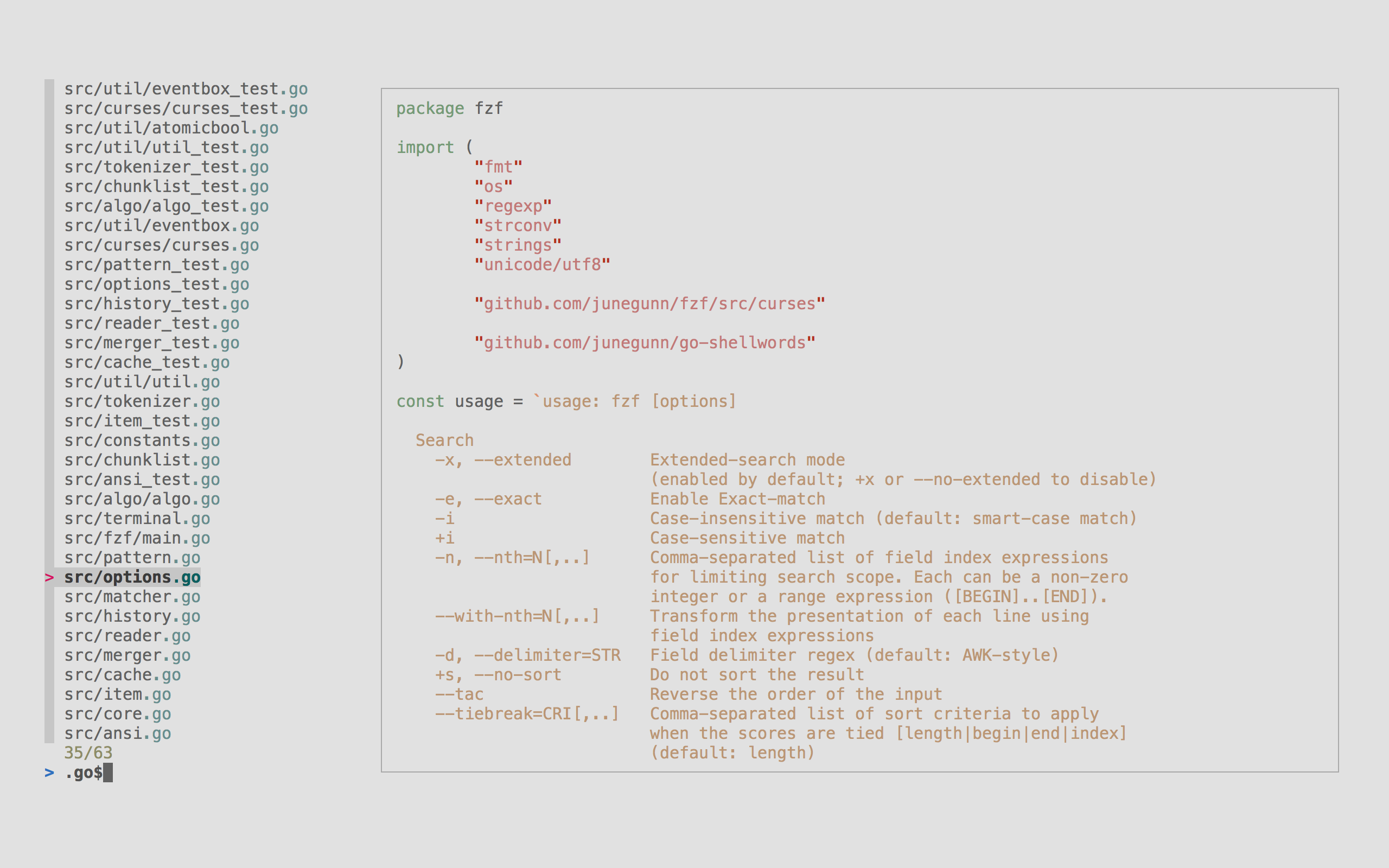 It's an interactive filter program for any kind of list; files, command
history, processes, hostnames, bookmarks, git commits, etc. It implements
a "fuzzy" matching algorithm, so you can quickly type in patterns with omitted
characters and still get the results you want.
Highlights
----------
- **Portable** -- Distributed as a single binary for easy installation
- **Fast** -- Optimized to process millions of items instantly
- **Versatile** -- Fully customizable through an event-action binding mechanism
- **All-inclusive** -- Comes with integrations for Bash, Zsh, Fish, Vim, and Neovim
Table of Contents
-----------------
* [Installation](#installation)
* [Using Homebrew](#using-homebrew)
* [Using Mise](#using-mise)
* [Linux packages](#linux-packages)
* [Windows packages](#windows-packages)
* [Using git](#using-git)
* [Binary releases](#binary-releases)
* [Setting up shell integration](#setting-up-shell-integration)
* [Vim/Neovim plugin](#vimneovim-plugin)
* [Upgrading fzf](#upgrading-fzf)
* [Building fzf](#building-fzf)
* [Usage](#usage)
* [Using the finder](#using-the-finder)
* [Display modes](#display-modes)
* [`--height` mode](#--height-mode)
* [`--popup` mode](#--popup-mode)
* [Search syntax](#search-syntax)
* [Environment variables](#environment-variables)
* [Customizing the look](#customizing-the-look)
* [Options](#options)
* [Demo](#demo)
* [Examples](#examples)
* [Key bindings for command-line](#key-bindings-for-command-line)
* [Fuzzy completion](#fuzzy-completion)
* [Files and directories](#files-and-directories)
* [Process IDs](#process-ids)
* [Host names](#host-names)
* [Environment variables / Aliases](#environment-variables--aliases)
* [Customizing fuzzy completion for bash and zsh](#customizing-fuzzy-completion-for-bash-and-zsh)
* [Customizing fzf options for completion](#customizing-fzf-options-for-completion)
* [Customizing completion source for paths and directories](#customizing-completion-source-for-paths-and-directories)
* [Supported commands (bash)](#supported-commands-bash)
* [Custom fuzzy completion](#custom-fuzzy-completion)
* [Fuzzy completion for fish](#fuzzy-completion-for-fish)
* [Vim plugin](#vim-plugin)
* [Advanced topics](#advanced-topics)
* [Customizing for different types of input](#customizing-for-different-types-of-input)
* [Performance](#performance)
* [Executing external programs](#executing-external-programs)
* [Turning into a different process](#turning-into-a-different-process)
* [Reloading the candidate list](#reloading-the-candidate-list)
* [1. Update the list of processes by pressing CTRL-R](#1-update-the-list-of-processes-by-pressing-ctrl-r)
* [2. Switch between sources by pressing CTRL-D or CTRL-F](#2-switch-between-sources-by-pressing-ctrl-d-or-ctrl-f)
* [3. Interactive ripgrep integration](#3-interactive-ripgrep-integration)
* [Preview window](#preview-window)
* [Previewing an image](#previewing-an-image)
* [Tips](#tips)
* [Respecting `.gitignore`](#respecting-gitignore)
* [Fish shell](#fish-shell)
* [fzf Theme Playground](#fzf-theme-playground)
* [Related projects](#related-projects)
* [License](#license)
* [Goods](#goods)
* [Sponsors :heart:](#sponsors-heart)
Installation
------------
### Using Homebrew
You can use [Homebrew](https://brew.sh/) (on macOS or Linux) to install fzf.
```sh
brew install fzf
```
> [!IMPORTANT]
> To set up shell integration (key bindings and fuzzy completion),
> see [the instructions below](#setting-up-shell-integration).
fzf is also available [via MacPorts][portfile]: `sudo port install fzf`
[portfile]: https://github.com/macports/macports-ports/blob/master/sysutils/fzf/Portfile
### Using Mise
You can use [mise](https://github.com/jdx/mise) to install fzf.
```sh
mise use -g fzf@latest
```
### Linux packages
| Package Manager | Linux Distribution | Command |
| --------------- | ----------------------- | ---------------------------------- |
| APK | Alpine Linux | `sudo apk add fzf` |
| APT | Debian 9+/Ubuntu 19.10+ | `sudo apt install fzf` |
| Conda | | `conda install -c conda-forge fzf` |
| DNF | Fedora | `sudo dnf install fzf` |
| Nix | NixOS, etc. | `nix-env -iA nixpkgs.fzf` |
| Pacman | Arch Linux | `sudo pacman -S fzf` |
| pkg | FreeBSD | `pkg install fzf` |
| pkgin | NetBSD | `pkgin install fzf` |
| pkg_add | OpenBSD | `pkg_add fzf` |
| Portage | Gentoo | `emerge --ask app-shells/fzf` |
| Spack | | `spack install fzf` |
| XBPS | Void Linux | `sudo xbps-install -S fzf` |
| Zypper | openSUSE | `sudo zypper install fzf` |
> [!IMPORTANT]
> To set up shell integration (key bindings and fuzzy completion),
> see [the instructions below](#setting-up-shell-integration).
[](https://repology.org/project/fzf/versions)
### Windows packages
On Windows, fzf is available via [Chocolatey][choco], [Scoop][scoop],
[Winget][winget], and [MSYS2][msys2]:
| Package manager | Command |
| --------------- | ------------------------------------- |
| Chocolatey | `choco install fzf` |
| Scoop | `scoop install fzf` |
| Winget | `winget install fzf` |
| MSYS2 (pacman) | `pacman -S $MINGW_PACKAGE_PREFIX-fzf` |
[choco]: https://chocolatey.org/packages/fzf
[scoop]: https://github.com/ScoopInstaller/Main/blob/master/bucket/fzf.json
[winget]: https://github.com/microsoft/winget-pkgs/tree/master/manifests/j/junegunn/fzf
[msys2]: https://packages.msys2.org/base/mingw-w64-fzf
### Using git
Alternatively, you can "git clone" this repository to any directory and run
[install](https://github.com/junegunn/fzf/blob/master/install) script.
```sh
git clone --depth 1 https://github.com/junegunn/fzf.git ~/.fzf
~/.fzf/install
```
The install script will add lines to your shell configuration file to modify
`$PATH` and set up shell integration.
### Binary releases
You can download the official fzf binaries from the releases page.
* https://github.com/junegunn/fzf/releases
### Setting up shell integration
Add the following line to your shell configuration file.
* bash
```sh
# Set up fzf key bindings and fuzzy completion
eval "$(fzf --bash)"
```
* zsh
```sh
# Set up fzf key bindings and fuzzy completion
source <(fzf --zsh)
```
* fish
```fish
# Set up fzf key bindings
fzf --fish | source
```
> [!NOTE]
> `--bash`, `--zsh`, and `--fish` options are only available in fzf 0.48.0 or
> later. If you have an older version of fzf, or want finer control, you can
> source individual script files in the [/shell](/shell) directory. The
> location of the files may vary depending on the package manager you use.
> Please refer to the package documentation for more information.
> (e.g. `apt show fzf`)
> [!TIP]
> You can disable CTRL-T, CTRL-R, or ALT-C bindings by setting the
> corresponding `*_COMMAND` variable to an empty string when sourcing the
> script. For example, to disable CTRL-R and ALT-C:
>
> * bash: `FZF_CTRL_R_COMMAND= FZF_ALT_C_COMMAND= eval "$(fzf --bash)"`
> * zsh: `FZF_CTRL_R_COMMAND= FZF_ALT_C_COMMAND= source <(fzf --zsh)`
> * fish: `fzf --fish | FZF_CTRL_R_COMMAND= FZF_ALT_C_COMMAND= source`
>
> Setting the variables after sourcing the script will have no effect.
### Vim/Neovim plugin
If you use [vim-plug](https://github.com/junegunn/vim-plug), add this to
your Vim configuration file:
```vim
Plug 'junegunn/fzf', { 'do': { -> fzf#install() } }
Plug 'junegunn/fzf.vim'
```
* `junegunn/fzf` provides the basic library functions
* `fzf#install()` makes sure that you have the latest binary
* `junegunn/fzf.vim` is [a separate project](https://github.com/junegunn/fzf.vim)
that provides a variety of useful commands
To learn more about the Vim integration, see [README-VIM.md](README-VIM.md).
> [!TIP]
> If you use Neovim and prefer Lua-based plugins, check out
> [fzf-lua](https://github.com/ibhagwan/fzf-lua).
Upgrading fzf
-------------
fzf is being actively developed, and you might want to upgrade it once in a
while. Please follow the instruction below depending on the installation
method used.
- git: `cd ~/.fzf && git pull && ./install`
- brew: `brew update; brew upgrade fzf`
- macports: `sudo port upgrade fzf`
- chocolatey: `choco upgrade fzf`
- vim-plug: `:PlugUpdate fzf`
Building fzf
------------
See [BUILD.md](BUILD.md).
Usage
-----
fzf will launch interactive finder, read the list from STDIN, and write the
selected item to STDOUT.
```sh
find * -type f | fzf > selected
```
Without STDIN pipe, fzf will traverse the file system under the current
directory to get the list of files.
```sh
vim $(fzf)
```
> [!NOTE]
> You can override the default behavior
> * Either by setting `$FZF_DEFAULT_COMMAND` to a command that generates the desired list
> * Or by setting `--walker`, `--walker-root`, and `--walker-skip` options in `$FZF_DEFAULT_OPTS`
> [!WARNING]
> A more robust solution would be to use `xargs` but we've presented
> the above as it's easier to grasp
> ```sh
> fzf --print0 | xargs -0 -o vim
> ```
> [!TIP]
> fzf also has the ability to turn itself into a different process.
>
> ```sh
> fzf --bind 'enter:become(vim {})'
> ```
>
> *See [Turning into a different process](#turning-into-a-different-process)
> for more information.*
### Using the finder
- `CTRL-K` / `CTRL-J` (or `CTRL-P` / `CTRL-N`) to move cursor up and down
- `Enter` key to select the item, `CTRL-C` / `CTRL-G` / `ESC` to exit
- On multi-select mode (`-m`), `TAB` and `Shift-TAB` to mark multiple items
- Emacs style key bindings
- Mouse: scroll, click, double-click; shift-click and shift-scroll on
multi-select mode
### Display modes
fzf by default runs in fullscreen mode, but there are other display modes.
#### `--height` mode
With `--height HEIGHT[%]`, fzf will start below the cursor with the given height.
```sh
fzf --height 40%
```
`reverse` layout and `--border` goes well with this option.
```sh
fzf --height 40% --layout reverse --border
```
By prepending `~` to the height, you're setting the maximum height.
```sh
# Will take as few lines as possible to display the list
seq 3 | fzf --height ~100%
seq 3000 | fzf --height ~100%
```
Height value can be a negative number.
```sh
# Screen height - 3
fzf --height -3
```
#### `--popup` mode
With `--popup` option, fzf will start in a popup window
(requires tmux 3.3+ or Zellij 0.44+).
```sh
# --popup [center|top|bottom|left|right][,SIZE[%]][,SIZE[%][,border-native]]
fzf --popup center # Center, 50% width and height
fzf --popup 80% # Center, 80% width and height
fzf --popup 100%,50% # Center, 100% width and 50% height
fzf --popup left,40% # Left, 40% width
fzf --popup left,40%,90% # Left, 40% width, 90% height
fzf --popup top,40% # Top, 40% height
fzf --popup bottom,80%,40% # Bottom, 80% width, 40% height
```
`--popup` is silently ignored when you're not on tmux or Zellij.
> [!NOTE]
> If you're stuck with an old version of tmux that doesn't support popup,
> or if you want to open fzf in a regular tmux pane, check out
> [fzf-tmux](bin/fzf-tmux) script.
> [!TIP]
> You can add these options to `$FZF_DEFAULT_OPTS` so that they're applied by
> default. For example,
>
> ```sh
> # Open in a popup if on tmux or Zellij, otherwise use --height mode
> export FZF_DEFAULT_OPTS='--height 40% --popup bottom,40% --layout reverse --border top'
> ```
### Search syntax
Unless otherwise specified, fzf starts in "extended-search mode" where you can
type in multiple search terms delimited by spaces. e.g. `^music .mp3$ sbtrkt
!fire`
| Token | Match type | Description |
| --------- | -------------------------------------- | ------------------------------------------ |
| `sbtrkt` | fuzzy-match | Items that match `sbtrkt` |
| `'wild` | exact-match (quoted) | Items that include `wild` |
| `'wild'` | exact-boundary-match (quoted both ends) | Items that include `wild` at word boundaries |
| `^music` | prefix-exact-match | Items that start with `music` |
| `.mp3$` | suffix-exact-match | Items that end with `.mp3` |
| `!fire` | inverse-exact-match | Items that do not include `fire` |
| `!^music` | inverse-prefix-exact-match | Items that do not start with `music` |
| `!.mp3$` | inverse-suffix-exact-match | Items that do not end with `.mp3` |
If you don't prefer fuzzy matching and do not wish to "quote" every word,
start fzf with `-e` or `--exact` option. Note that when `--exact` is set,
`'`-prefix "unquotes" the term.
A single bar character term acts as an OR operator. For example, the following
query matches entries that start with `core` and end with either `go`, `rb`,
or `py`.
```
^core go$ | rb$ | py$
```
### Environment variables
- `FZF_DEFAULT_COMMAND`
- Default command to use when input is tty
- e.g. `export FZF_DEFAULT_COMMAND='fd --type f'`
- `FZF_DEFAULT_OPTS`
- Default options
- e.g. `export FZF_DEFAULT_OPTS="--layout=reverse --inline-info"`
- `FZF_DEFAULT_OPTS_FILE`
- If you prefer to manage default options in a file, set this variable to
point to the location of the file
- e.g. `export FZF_DEFAULT_OPTS_FILE=~/.fzfrc`
> [!WARNING]
> `FZF_DEFAULT_COMMAND` is not used by shell integration due to the
> slight difference in requirements.
>
> * `CTRL-T` runs `$FZF_CTRL_T_COMMAND` to get a list of files and directories
> * `ALT-C` runs `$FZF_ALT_C_COMMAND` to get a list of directories
> * `vim ~/**` runs `fzf_compgen_path()` with the prefix (`~/`) as the first argument
> * `cd foo**` runs `fzf_compgen_dir()` with the prefix (`foo`) as the first argument
>
> The available options are described later in this document.
### Customizing the look
The user interface of fzf is fully customizable with a large number of
configuration options. For a quick setup, you can start with one of the style
presets -- `default`, `full`, or `minimal` -- using the `--style` option.
```sh
fzf --style full \
--preview 'fzf-preview.sh {}' --bind 'focus:transform-header:file --brief {}'
```
| Preset | Screenshot |
| :--- | :--- |
| `default` | |
| `full` | |
| `minimal` | |
Here's an example based on the `full` preset:
It's an interactive filter program for any kind of list; files, command
history, processes, hostnames, bookmarks, git commits, etc. It implements
a "fuzzy" matching algorithm, so you can quickly type in patterns with omitted
characters and still get the results you want.
Highlights
----------
- **Portable** -- Distributed as a single binary for easy installation
- **Fast** -- Optimized to process millions of items instantly
- **Versatile** -- Fully customizable through an event-action binding mechanism
- **All-inclusive** -- Comes with integrations for Bash, Zsh, Fish, Vim, and Neovim
Table of Contents
-----------------
* [Installation](#installation)
* [Using Homebrew](#using-homebrew)
* [Using Mise](#using-mise)
* [Linux packages](#linux-packages)
* [Windows packages](#windows-packages)
* [Using git](#using-git)
* [Binary releases](#binary-releases)
* [Setting up shell integration](#setting-up-shell-integration)
* [Vim/Neovim plugin](#vimneovim-plugin)
* [Upgrading fzf](#upgrading-fzf)
* [Building fzf](#building-fzf)
* [Usage](#usage)
* [Using the finder](#using-the-finder)
* [Display modes](#display-modes)
* [`--height` mode](#--height-mode)
* [`--popup` mode](#--popup-mode)
* [Search syntax](#search-syntax)
* [Environment variables](#environment-variables)
* [Customizing the look](#customizing-the-look)
* [Options](#options)
* [Demo](#demo)
* [Examples](#examples)
* [Key bindings for command-line](#key-bindings-for-command-line)
* [Fuzzy completion](#fuzzy-completion)
* [Files and directories](#files-and-directories)
* [Process IDs](#process-ids)
* [Host names](#host-names)
* [Environment variables / Aliases](#environment-variables--aliases)
* [Customizing fuzzy completion for bash and zsh](#customizing-fuzzy-completion-for-bash-and-zsh)
* [Customizing fzf options for completion](#customizing-fzf-options-for-completion)
* [Customizing completion source for paths and directories](#customizing-completion-source-for-paths-and-directories)
* [Supported commands (bash)](#supported-commands-bash)
* [Custom fuzzy completion](#custom-fuzzy-completion)
* [Fuzzy completion for fish](#fuzzy-completion-for-fish)
* [Vim plugin](#vim-plugin)
* [Advanced topics](#advanced-topics)
* [Customizing for different types of input](#customizing-for-different-types-of-input)
* [Performance](#performance)
* [Executing external programs](#executing-external-programs)
* [Turning into a different process](#turning-into-a-different-process)
* [Reloading the candidate list](#reloading-the-candidate-list)
* [1. Update the list of processes by pressing CTRL-R](#1-update-the-list-of-processes-by-pressing-ctrl-r)
* [2. Switch between sources by pressing CTRL-D or CTRL-F](#2-switch-between-sources-by-pressing-ctrl-d-or-ctrl-f)
* [3. Interactive ripgrep integration](#3-interactive-ripgrep-integration)
* [Preview window](#preview-window)
* [Previewing an image](#previewing-an-image)
* [Tips](#tips)
* [Respecting `.gitignore`](#respecting-gitignore)
* [Fish shell](#fish-shell)
* [fzf Theme Playground](#fzf-theme-playground)
* [Related projects](#related-projects)
* [License](#license)
* [Goods](#goods)
* [Sponsors :heart:](#sponsors-heart)
Installation
------------
### Using Homebrew
You can use [Homebrew](https://brew.sh/) (on macOS or Linux) to install fzf.
```sh
brew install fzf
```
> [!IMPORTANT]
> To set up shell integration (key bindings and fuzzy completion),
> see [the instructions below](#setting-up-shell-integration).
fzf is also available [via MacPorts][portfile]: `sudo port install fzf`
[portfile]: https://github.com/macports/macports-ports/blob/master/sysutils/fzf/Portfile
### Using Mise
You can use [mise](https://github.com/jdx/mise) to install fzf.
```sh
mise use -g fzf@latest
```
### Linux packages
| Package Manager | Linux Distribution | Command |
| --------------- | ----------------------- | ---------------------------------- |
| APK | Alpine Linux | `sudo apk add fzf` |
| APT | Debian 9+/Ubuntu 19.10+ | `sudo apt install fzf` |
| Conda | | `conda install -c conda-forge fzf` |
| DNF | Fedora | `sudo dnf install fzf` |
| Nix | NixOS, etc. | `nix-env -iA nixpkgs.fzf` |
| Pacman | Arch Linux | `sudo pacman -S fzf` |
| pkg | FreeBSD | `pkg install fzf` |
| pkgin | NetBSD | `pkgin install fzf` |
| pkg_add | OpenBSD | `pkg_add fzf` |
| Portage | Gentoo | `emerge --ask app-shells/fzf` |
| Spack | | `spack install fzf` |
| XBPS | Void Linux | `sudo xbps-install -S fzf` |
| Zypper | openSUSE | `sudo zypper install fzf` |
> [!IMPORTANT]
> To set up shell integration (key bindings and fuzzy completion),
> see [the instructions below](#setting-up-shell-integration).
[](https://repology.org/project/fzf/versions)
### Windows packages
On Windows, fzf is available via [Chocolatey][choco], [Scoop][scoop],
[Winget][winget], and [MSYS2][msys2]:
| Package manager | Command |
| --------------- | ------------------------------------- |
| Chocolatey | `choco install fzf` |
| Scoop | `scoop install fzf` |
| Winget | `winget install fzf` |
| MSYS2 (pacman) | `pacman -S $MINGW_PACKAGE_PREFIX-fzf` |
[choco]: https://chocolatey.org/packages/fzf
[scoop]: https://github.com/ScoopInstaller/Main/blob/master/bucket/fzf.json
[winget]: https://github.com/microsoft/winget-pkgs/tree/master/manifests/j/junegunn/fzf
[msys2]: https://packages.msys2.org/base/mingw-w64-fzf
### Using git
Alternatively, you can "git clone" this repository to any directory and run
[install](https://github.com/junegunn/fzf/blob/master/install) script.
```sh
git clone --depth 1 https://github.com/junegunn/fzf.git ~/.fzf
~/.fzf/install
```
The install script will add lines to your shell configuration file to modify
`$PATH` and set up shell integration.
### Binary releases
You can download the official fzf binaries from the releases page.
* https://github.com/junegunn/fzf/releases
### Setting up shell integration
Add the following line to your shell configuration file.
* bash
```sh
# Set up fzf key bindings and fuzzy completion
eval "$(fzf --bash)"
```
* zsh
```sh
# Set up fzf key bindings and fuzzy completion
source <(fzf --zsh)
```
* fish
```fish
# Set up fzf key bindings
fzf --fish | source
```
> [!NOTE]
> `--bash`, `--zsh`, and `--fish` options are only available in fzf 0.48.0 or
> later. If you have an older version of fzf, or want finer control, you can
> source individual script files in the [/shell](/shell) directory. The
> location of the files may vary depending on the package manager you use.
> Please refer to the package documentation for more information.
> (e.g. `apt show fzf`)
> [!TIP]
> You can disable CTRL-T, CTRL-R, or ALT-C bindings by setting the
> corresponding `*_COMMAND` variable to an empty string when sourcing the
> script. For example, to disable CTRL-R and ALT-C:
>
> * bash: `FZF_CTRL_R_COMMAND= FZF_ALT_C_COMMAND= eval "$(fzf --bash)"`
> * zsh: `FZF_CTRL_R_COMMAND= FZF_ALT_C_COMMAND= source <(fzf --zsh)`
> * fish: `fzf --fish | FZF_CTRL_R_COMMAND= FZF_ALT_C_COMMAND= source`
>
> Setting the variables after sourcing the script will have no effect.
### Vim/Neovim plugin
If you use [vim-plug](https://github.com/junegunn/vim-plug), add this to
your Vim configuration file:
```vim
Plug 'junegunn/fzf', { 'do': { -> fzf#install() } }
Plug 'junegunn/fzf.vim'
```
* `junegunn/fzf` provides the basic library functions
* `fzf#install()` makes sure that you have the latest binary
* `junegunn/fzf.vim` is [a separate project](https://github.com/junegunn/fzf.vim)
that provides a variety of useful commands
To learn more about the Vim integration, see [README-VIM.md](README-VIM.md).
> [!TIP]
> If you use Neovim and prefer Lua-based plugins, check out
> [fzf-lua](https://github.com/ibhagwan/fzf-lua).
Upgrading fzf
-------------
fzf is being actively developed, and you might want to upgrade it once in a
while. Please follow the instruction below depending on the installation
method used.
- git: `cd ~/.fzf && git pull && ./install`
- brew: `brew update; brew upgrade fzf`
- macports: `sudo port upgrade fzf`
- chocolatey: `choco upgrade fzf`
- vim-plug: `:PlugUpdate fzf`
Building fzf
------------
See [BUILD.md](BUILD.md).
Usage
-----
fzf will launch interactive finder, read the list from STDIN, and write the
selected item to STDOUT.
```sh
find * -type f | fzf > selected
```
Without STDIN pipe, fzf will traverse the file system under the current
directory to get the list of files.
```sh
vim $(fzf)
```
> [!NOTE]
> You can override the default behavior
> * Either by setting `$FZF_DEFAULT_COMMAND` to a command that generates the desired list
> * Or by setting `--walker`, `--walker-root`, and `--walker-skip` options in `$FZF_DEFAULT_OPTS`
> [!WARNING]
> A more robust solution would be to use `xargs` but we've presented
> the above as it's easier to grasp
> ```sh
> fzf --print0 | xargs -0 -o vim
> ```
> [!TIP]
> fzf also has the ability to turn itself into a different process.
>
> ```sh
> fzf --bind 'enter:become(vim {})'
> ```
>
> *See [Turning into a different process](#turning-into-a-different-process)
> for more information.*
### Using the finder
- `CTRL-K` / `CTRL-J` (or `CTRL-P` / `CTRL-N`) to move cursor up and down
- `Enter` key to select the item, `CTRL-C` / `CTRL-G` / `ESC` to exit
- On multi-select mode (`-m`), `TAB` and `Shift-TAB` to mark multiple items
- Emacs style key bindings
- Mouse: scroll, click, double-click; shift-click and shift-scroll on
multi-select mode
### Display modes
fzf by default runs in fullscreen mode, but there are other display modes.
#### `--height` mode
With `--height HEIGHT[%]`, fzf will start below the cursor with the given height.
```sh
fzf --height 40%
```
`reverse` layout and `--border` goes well with this option.
```sh
fzf --height 40% --layout reverse --border
```
By prepending `~` to the height, you're setting the maximum height.
```sh
# Will take as few lines as possible to display the list
seq 3 | fzf --height ~100%
seq 3000 | fzf --height ~100%
```
Height value can be a negative number.
```sh
# Screen height - 3
fzf --height -3
```
#### `--popup` mode
With `--popup` option, fzf will start in a popup window
(requires tmux 3.3+ or Zellij 0.44+).
```sh
# --popup [center|top|bottom|left|right][,SIZE[%]][,SIZE[%][,border-native]]
fzf --popup center # Center, 50% width and height
fzf --popup 80% # Center, 80% width and height
fzf --popup 100%,50% # Center, 100% width and 50% height
fzf --popup left,40% # Left, 40% width
fzf --popup left,40%,90% # Left, 40% width, 90% height
fzf --popup top,40% # Top, 40% height
fzf --popup bottom,80%,40% # Bottom, 80% width, 40% height
```
`--popup` is silently ignored when you're not on tmux or Zellij.
> [!NOTE]
> If you're stuck with an old version of tmux that doesn't support popup,
> or if you want to open fzf in a regular tmux pane, check out
> [fzf-tmux](bin/fzf-tmux) script.
> [!TIP]
> You can add these options to `$FZF_DEFAULT_OPTS` so that they're applied by
> default. For example,
>
> ```sh
> # Open in a popup if on tmux or Zellij, otherwise use --height mode
> export FZF_DEFAULT_OPTS='--height 40% --popup bottom,40% --layout reverse --border top'
> ```
### Search syntax
Unless otherwise specified, fzf starts in "extended-search mode" where you can
type in multiple search terms delimited by spaces. e.g. `^music .mp3$ sbtrkt
!fire`
| Token | Match type | Description |
| --------- | -------------------------------------- | ------------------------------------------ |
| `sbtrkt` | fuzzy-match | Items that match `sbtrkt` |
| `'wild` | exact-match (quoted) | Items that include `wild` |
| `'wild'` | exact-boundary-match (quoted both ends) | Items that include `wild` at word boundaries |
| `^music` | prefix-exact-match | Items that start with `music` |
| `.mp3$` | suffix-exact-match | Items that end with `.mp3` |
| `!fire` | inverse-exact-match | Items that do not include `fire` |
| `!^music` | inverse-prefix-exact-match | Items that do not start with `music` |
| `!.mp3$` | inverse-suffix-exact-match | Items that do not end with `.mp3` |
If you don't prefer fuzzy matching and do not wish to "quote" every word,
start fzf with `-e` or `--exact` option. Note that when `--exact` is set,
`'`-prefix "unquotes" the term.
A single bar character term acts as an OR operator. For example, the following
query matches entries that start with `core` and end with either `go`, `rb`,
or `py`.
```
^core go$ | rb$ | py$
```
### Environment variables
- `FZF_DEFAULT_COMMAND`
- Default command to use when input is tty
- e.g. `export FZF_DEFAULT_COMMAND='fd --type f'`
- `FZF_DEFAULT_OPTS`
- Default options
- e.g. `export FZF_DEFAULT_OPTS="--layout=reverse --inline-info"`
- `FZF_DEFAULT_OPTS_FILE`
- If you prefer to manage default options in a file, set this variable to
point to the location of the file
- e.g. `export FZF_DEFAULT_OPTS_FILE=~/.fzfrc`
> [!WARNING]
> `FZF_DEFAULT_COMMAND` is not used by shell integration due to the
> slight difference in requirements.
>
> * `CTRL-T` runs `$FZF_CTRL_T_COMMAND` to get a list of files and directories
> * `ALT-C` runs `$FZF_ALT_C_COMMAND` to get a list of directories
> * `vim ~/**` runs `fzf_compgen_path()` with the prefix (`~/`) as the first argument
> * `cd foo**` runs `fzf_compgen_dir()` with the prefix (`foo`) as the first argument
>
> The available options are described later in this document.
### Customizing the look
The user interface of fzf is fully customizable with a large number of
configuration options. For a quick setup, you can start with one of the style
presets -- `default`, `full`, or `minimal` -- using the `--style` option.
```sh
fzf --style full \
--preview 'fzf-preview.sh {}' --bind 'focus:transform-header:file --brief {}'
```
| Preset | Screenshot |
| :--- | :--- |
| `default` | |
| `full` | |
| `minimal` | |
Here's an example based on the `full` preset:
```sh
git ls-files | fzf --style full \
--border --padding 1,2 \
--border-label ' Demo ' --input-label ' Input ' --header-label ' File Type ' \
--preview 'fzf-preview.sh {}' \
--bind 'result:transform-list-label:
if [[ -z $FZF_QUERY ]]; then
echo " $FZF_MATCH_COUNT items "
else
echo " $FZF_MATCH_COUNT matches for [$FZF_QUERY] "
fi
' \
--bind 'focus:transform-preview-label:[[ -n {} ]] && printf " Previewing [%s] " {}' \
--bind 'focus:+transform-header:file --brief {} || echo "No file selected"' \
--bind 'ctrl-r:change-list-label( Reloading the list )+reload(sleep 2; git ls-files)' \
--color 'border:#aaaaaa,label:#cccccc' \
--color 'preview-border:#9999cc,preview-label:#ccccff' \
--color 'list-border:#669966,list-label:#99cc99' \
--color 'input-border:#996666,input-label:#ffcccc' \
--color 'header-border:#6699cc,header-label:#99ccff'
```
### Options
See the man page (`fzf --man` or `man fzf`) for the full list of options.
### Demo
If you learn by watching videos, check out this screencast by [@samoshkin](https://github.com/samoshkin) to explore `fzf` features.
 Examples
--------
* [Wiki page of examples](https://github.com/junegunn/fzf/wiki/examples)
* *Disclaimer: The examples on this page are maintained by the community
and are not thoroughly tested*
* [Advanced fzf examples](https://github.com/junegunn/fzf/blob/master/ADVANCED.md)
Key bindings for command-line
-----------------------------
By [setting up shell integration](#setting-up-shell-integration), you can use
the following key bindings in bash, zsh, and fish.
- `CTRL-T` - Paste the selected files and directories onto the command-line
- The list is generated using `--walker file,dir,follow,hidden` option
- You can override the behavior by setting `FZF_CTRL_T_COMMAND` to a custom command that generates the desired list
- Or you can set `--walker*` options in `FZF_CTRL_T_OPTS`
- Set `FZF_CTRL_T_OPTS` to pass additional options to fzf
```sh
# Preview file content using bat (https://github.com/sharkdp/bat)
export FZF_CTRL_T_OPTS="
--walker-skip .git,node_modules,target
--preview 'bat -n --color=always {}'
--bind 'ctrl-/:change-preview-window(down|hidden|)'"
```
- Can be disabled by setting `FZF_CTRL_T_COMMAND` to an empty string when
sourcing the script
- `CTRL-R` - Paste the selected command from history onto the command-line. With fish shell, it is possible to select multiple commands.
- If you want to see the commands in chronological order, press `CTRL-R`
again which toggles sorting by relevance
- Press `ALT-R` to toggle "raw" mode where you can see the surrounding items
of a match. In this mode, you can press `CTRL-N` and `CTRL-P` to move
between the matching items only.
- Press `CTRL-/` or `ALT-/` to toggle line wrapping
- Fish shell only:
- Press `SHIFT-DELETE` to delete the selected commands
- Press `ALT-ENTER` to reformat and insert the selected commands
- Press `ALT-T` to cycle through command prefix (timestamp, date/time, none)
- Set `FZF_CTRL_R_OPTS` to pass additional options to fzf
```sh
# CTRL-Y to copy the command into clipboard using pbcopy
export FZF_CTRL_R_OPTS="
--bind 'ctrl-y:execute-silent(echo -n {2..} | pbcopy)+abort'
--color header:italic
--header 'Press CTRL-Y to copy command into clipboard'"
```
```fish
# Fish shell: Set date/time as default prefix
set -gx FZF_CTRL_R_OPTS "--with-nth 1,3.. --bind 'alt-t:change-with-nth(2..|3..|1,3..)'"
# Or display no prefix by default
set -gx FZF_CTRL_R_OPTS "--with-nth 3.. --bind 'alt-t:change-with-nth(2..|1,3..|3..)'"
```
- Can be disabled by setting `FZF_CTRL_R_COMMAND` to an empty string when
sourcing the script
- Custom override via a non-empty `FZF_CTRL_R_COMMAND` is not yet supported and will emit a warning
- `ALT-C` - cd into the selected directory
- The list is generated using `--walker dir,follow,hidden` option
- Set `FZF_ALT_C_COMMAND` to override the default command
- Or you can set `--walker-*` options in `FZF_ALT_C_OPTS`
- Set `FZF_ALT_C_OPTS` to pass additional options to fzf
```sh
# Print tree structure in the preview window
export FZF_ALT_C_OPTS="
--walker-skip .git,node_modules,target
--preview 'tree -C {}'"
```
- Can be disabled by setting `FZF_ALT_C_COMMAND` to an empty string when
sourcing the script
Display modes for these bindings can be separately configured via
`FZF_{CTRL_T,CTRL_R,ALT_C}_OPTS` or globally via `FZF_DEFAULT_OPTS`.
(e.g. `FZF_CTRL_R_OPTS='--popup bottom,60% --height 60% --border top'`)
More tips can be found on [the wiki page](https://github.com/junegunn/fzf/wiki/Configuring-shell-key-bindings).
Fuzzy completion
----------------
Shell integration also provides fuzzy completion for bash, zsh, and fish.
### Files and directories
Fuzzy completion for files and directories can be triggered if the word before
the cursor ends with the trigger sequence, which is by default `**`.
- `COMMAND [DIRECTORY/][FUZZY_PATTERN]**`
```sh
# Files under the current directory
# - You can select multiple items with TAB key
vim **
# Files under parent directory
vim ../**
# Files under parent directory that match `fzf`
vim ../fzf**
# Files under your home directory
vim ~/**
# Directories under current directory (single-selection)
cd **
# Directories under ~/github that match `fzf`
cd ~/github/fzf**
```
### Process IDs
Fuzzy completion for PIDs is provided for kill command.
```sh
# Can select multiple processes with or keys
kill -9 **
```
### Host names
For ssh command, fuzzy completion for hostnames is provided. The names are
extracted from /etc/hosts and ~/.ssh/config.
```sh
ssh **
```
### Environment variables / Aliases
```sh
# bash and zsh
unset **
export **
unalias **
# fish
set
```
### Customizing fuzzy completion for bash and zsh
#### Customizing fzf options for completion
```sh
# Use ~~ as the trigger sequence instead of the default **
export FZF_COMPLETION_TRIGGER='~~'
# Options to fzf command
export FZF_COMPLETION_OPTS='--border --info=inline'
# Options for path completion (e.g. vim **)
export FZF_COMPLETION_PATH_OPTS='--walker file,dir,follow,hidden'
# Options for directory completion (e.g. cd **)
export FZF_COMPLETION_DIR_OPTS='--walker dir,follow'
# Advanced customization of fzf options via _fzf_comprun function
# - The first argument to the function is the name of the command.
# - You should make sure to pass the rest of the arguments ($@) to fzf.
_fzf_comprun() {
local command=$1
shift
case "$command" in
cd) fzf --preview 'tree -C {} | head -200' "$@" ;;
export|unset) fzf --preview "eval 'echo \$'{}" "$@" ;;
ssh) fzf --preview 'dig {}' "$@" ;;
*) fzf --preview 'bat -n --color=always {}' "$@" ;;
esac
}
```
#### Customizing completion source for paths and directories
```sh
# Use fd (https://github.com/sharkdp/fd) for listing path candidates.
# - The first argument to the function ($1) is the base path to start traversal
# - See the source code (completion.{bash,zsh}) for the details.
_fzf_compgen_path() {
fd --hidden --follow --exclude ".git" . "$1"
}
# Use fd to generate the list for directory completion
_fzf_compgen_dir() {
fd --type d --hidden --follow --exclude ".git" . "$1"
}
```
#### Supported commands (bash)
On bash, fuzzy completion is enabled only for a predefined set of commands
(`complete | grep _fzf` to see the list). But you can enable it for other
commands as well by using `_fzf_setup_completion` helper function.
```sh
# usage: _fzf_setup_completion path|dir|var|alias|host COMMANDS...
_fzf_setup_completion path ag git kubectl
_fzf_setup_completion dir tree
```
#### Custom fuzzy completion
_**(Custom completion API is experimental and subject to change)**_
For a command named _"COMMAND"_, define `_fzf_complete_COMMAND` function using
`_fzf_complete` helper.
```sh
# Custom fuzzy completion for "doge" command
# e.g. doge **
_fzf_complete_doge() {
_fzf_complete --multi --reverse --prompt="doge> " -- "$@" < <(
echo very
echo wow
echo such
echo doge
)
}
```
- The arguments before `--` are the options to fzf.
- After `--`, simply pass the original completion arguments unchanged (`"$@"`).
- Then, write a set of commands that generates the completion candidates and
feed its output to the function using process substitution (`< <(...)`).
zsh will automatically pick up the function using the naming convention but in
bash you have to manually associate the function with the command using the
`complete` command.
```sh
[ -n "$BASH" ] && complete -F _fzf_complete_doge -o default -o bashdefault doge
```
If you need to post-process the output from fzf, define
`_fzf_complete_COMMAND_post` as follows.
```sh
_fzf_complete_foo() {
_fzf_complete --multi --reverse --header-lines=3 -- "$@" < <(
ls -al
)
}
_fzf_complete_foo_post() {
awk '{print $NF}'
}
[ -n "$BASH" ] && complete -F _fzf_complete_foo -o default -o bashdefault foo
```
### Fuzzy completion for fish
Fuzzy completion for fish differs from bash and zsh in that:
- It doesn't require a trigger sequence like `**`. Instead, if activates
on `Shift-TAB` (replacing the native pager search mode), while `TAB` preserves
fish's native completion behavior.
- It relies on fish's native completion system to populate the candidate list,
rather than performing a recursive file system traversal. For recursive
searching, use the `CTRL-T` binding instead.
- If the current command line token is a wildcard pattern, it performs search on
the wildcard expansion path list (instead of the native behavior of inserting
all the results in command line). Because the shell is used for the expansion,
there is a limit in the number of results.
- The only supported configuration variables are `FZF_COMPLETION_OPTS` and
`FZF_EXPANSION_OPS`.
- The function that is used by custom completion functions is named
`fzf_complete`, which only accepts fzf options as arguments, and can be also
called without any redirected input, to just modify fzf options while
presenting the native completion results. For compatibility with other shells,
a function named `_fzf_complete` is provided, that can accept ` -- $argv` in
its command line arguments, after fzf options.
For commands that are not covered by fish completions, it is better to create
regular fish completion functions (which will work for both `TAB` and
`Shift-TAB`), and create fzf completion functions only when needing to modify
fzf options for a specific command or want different results for `Shift-TAB`:
```fish
# Customize git completion
function _fzf_complete_git
# Show header text with active branch for all git completions
set -lx -- FZF_COMPLETION_OPTS --header="'"(git branch --show-current 2>/dev/null)"'"
# No other changes when less than 3 arguments, or when completing options
if not set -q argv[3]; or string match -q -- '-*' $argv[-1]
fzf_complete
return
end
# Check subcommand
switch $argv[2]
case checkout diff log show
# Set preview and display all branches and commits for subcommands: checkout, diff, log, show
begin
git branch --all --format='%(refname:short)'
git log --all --oneline --color=always
end | fzf_complete --no-multi --ansi --accept-nth=1 --query=$argv[-1] --preview='git show --color=always {1}'
case add rm mv
# Only set preview for subcommands: add, rm, mv
# Special characters in fish completion lists are escaped, so the r flag must be used.
fzf_complete --preview="git diff --color=always {r1}"
case '*'
# No changes for other subcommands
fzf_complete
end
end
```
Similar to bash and zsh, the output of fzf can be processed before inserted in
command line, by defining a function named `_fzf_complete_COMMAND_post` or
`_fzf_post_complete_COMMAND`:
```fish
function _fzf_complete_foo
ls -sh --zero --color=always | fzf_complete --read0 --print0 --ansi --no-multi-line --header-lines=1
end
function _fzf_post_complete_foo
while read -lz result
string escape -n -- $result | string trim -l -c '\ ' | string split -m 1 -f 2 ' '
end
end
```
Vim plugin
----------
See [README-VIM.md](README-VIM.md).
Advanced topics
---------------
### Customizing for different types of input
Since fzf is a general-purpose text filter, its algorithm was designed to
"generally" work well with any kind of input. However, admittedly, there is no
true one-size-fits-all solution, and you may want to tweak the algorithm and
some of the settings depending on the type of the input. To make this process
easier, fzf provides a set of "scheme"s for some common input types.
| Scheme | Description |
| :--- | :--- |
| `--scheme=default` | Generic scheme designed to work well with any kind of input |
| `--scheme=path` | Suitable for file paths |
| `--scheme=history` | Suitable for command history or any input where chronological ordering is important |
(See `fzf --man` for the details)
### Performance
fzf is fast. Performance should not be a problem in most use cases. However,
you might want to be aware of the options that can affect performance.
- `--ansi` tells fzf to extract and parse ANSI color codes in the input, and it
makes the initial scanning slower. So it's not recommended that you add it
to your `$FZF_DEFAULT_OPTS`.
- `--nth` makes fzf slower because it has to tokenize each line.
- A plain string `--delimiter` should be preferred over a regular expression
delimiter.
- `--with-nth` makes fzf slower as fzf has to tokenize and reassemble each
line.
### Executing external programs
You can set up key bindings for starting external processes without leaving
fzf (`execute`, `execute-silent`).
```bash
# Press F1 to open the file with less without leaving fzf
# Press CTRL-Y to copy the line to clipboard and aborts fzf (requires pbcopy)
fzf --bind 'f1:execute(less -f {}),ctrl-y:execute-silent(echo {} | pbcopy)+abort'
```
See *KEY/EVENT BINDINGS* section of the man page for details.
### Turning into a different process
`become(...)` is similar to `execute(...)`/`execute-silent(...)` described
above, but instead of executing the command and coming back to fzf on
complete, it turns fzf into a new process for the command.
```sh
fzf --bind 'enter:become(vim {})'
```
Compared to the seemingly equivalent command substitution `vim "$(fzf)"`, this
approach has several advantages:
* Vim will not open an empty file when you terminate fzf with
CTRL-C
* Vim will not open an empty file when you press ENTER on an empty
result
* Can handle multiple selections even when they have whitespaces
```sh
fzf --multi --bind 'enter:become(vim {+})'
```
To be fair, running `fzf --print0 | xargs -0 -o vim` instead of `vim "$(fzf)"`
resolves all of the issues mentioned. Nonetheless, `become(...)` still offers
additional benefits in different scenarios.
* You can set up multiple bindings to handle the result in different ways
without any wrapping script
```sh
fzf --bind 'enter:become(vim {}),ctrl-e:become(emacs {})'
```
* Previously, you would have to use `--expect=ctrl-e` and check the first
line of the output of fzf
* You can easily build the subsequent command using the field index
expressions of fzf
```sh
# Open the file in Vim and go to the line
git grep --line-number . |
fzf --delimiter : --nth 3.. --bind 'enter:become(vim {1} +{2})'
```
### Reloading the candidate list
By binding `reload` action to a key or an event, you can make fzf dynamically
reload the candidate list. See https://github.com/junegunn/fzf/issues/1750 for
more details.
#### 1. Update the list of processes by pressing CTRL-R
```sh
ps -ef |
fzf --bind 'ctrl-r:reload(ps -ef)' \
--header 'Press CTRL-R to reload' --header-lines=1 \
--height=50% --layout=reverse
```
#### 2. Switch between sources by pressing CTRL-D or CTRL-F
```sh
FZF_DEFAULT_COMMAND='find . -type f' \
fzf --bind 'ctrl-d:reload(find . -type d),ctrl-f:reload(eval "$FZF_DEFAULT_COMMAND")' \
--height=50% --layout=reverse
```
#### 3. Interactive ripgrep integration
The following example uses fzf as the selector interface for ripgrep. We bound
`reload` action to `change` event, so every time you type on fzf, the ripgrep
process will restart with the updated query string denoted by the placeholder
expression `{q}`. Also, note that we used `--disabled` option so that fzf
doesn't perform any secondary filtering.
```sh
: | rg_prefix='rg --column --line-number --no-heading --color=always --smart-case' \
fzf --bind 'start:reload:$rg_prefix ""' \
--bind 'change:reload:$rg_prefix {q} || true' \
--bind 'enter:become(vim {1} +{2})' \
--ansi --disabled \
--height=50% --layout=reverse
```
If ripgrep doesn't find any matches, it will exit with a non-zero exit status,
and fzf will warn you about it. To suppress the warning message, we added
`|| true` to the command, so that it always exits with 0.
See ["Using fzf as interactive Ripgrep launcher"](https://github.com/junegunn/fzf/blob/master/ADVANCED.md#using-fzf-as-interactive-ripgrep-launcher)
for more sophisticated examples.
### Preview window
When the `--preview` option is set, fzf automatically starts an external process
with the current line as the argument and shows the result in the split window.
Your `$SHELL` is used to execute the command with `$SHELL -c COMMAND`.
The window can be scrolled using the mouse or custom key bindings.
```bash
# {} is replaced with the single-quoted string of the focused line
fzf --preview 'cat {}'
```
Preview window supports ANSI colors, so you can use any program that
syntax-highlights the content of a file, such as
[Bat](https://github.com/sharkdp/bat) or
[Highlight](https://gitlab.com/saalen/highlight):
```bash
fzf --preview 'bat --color=always {}' --preview-window '~3'
```
You can customize the size, position, and border of the preview window using
`--preview-window` option, and the foreground and background color of it with
`--color` option. For example,
```bash
fzf --height 40% --layout reverse --info inline --border \
--preview 'file {}' --preview-window up,1,border-horizontal \
--bind 'ctrl-/:change-preview-window(50%|hidden|)' \
--color 'fg:#bbccdd,fg+:#ddeeff,bg:#334455,preview-bg:#223344,border:#778899'
```
See the man page (`man fzf`) for the full list of options.
More advanced examples can be found [here](https://github.com/junegunn/fzf/blob/master/ADVANCED.md).
> [!WARNING]
> Since fzf is a general-purpose text filter rather than a file finder, **it is
> not a good idea to add `--preview` option to your `$FZF_DEFAULT_OPTS`**.
>
> ```sh
> # *********************
> # ** DO NOT DO THIS! **
> # *********************
> export FZF_DEFAULT_OPTS='--preview "bat --style=numbers --color=always --line-range :500 {}"'
>
> # bat doesn't work with any input other than the list of files
> ps -ef | fzf
> seq 100 | fzf
> history | fzf
> ```
### Previewing an image
fzf can display images in the preview window using one of the following protocols:
* [Kitty graphics protocol](https://sw.kovidgoyal.net/kitty/graphics-protocol/)
* [iTerm2 inline images protocol](https://iterm2.com/documentation-images.html)
* [Sixel](https://en.wikipedia.org/wiki/Sixel)
See [bin/fzf-preview.sh](bin/fzf-preview.sh) script for more information.
```sh
fzf --preview 'fzf-preview.sh {}'
```
Tips
----
### Respecting `.gitignore`
You can use [fd](https://github.com/sharkdp/fd),
[ripgrep](https://github.com/BurntSushi/ripgrep), or [the silver
searcher](https://github.com/ggreer/the_silver_searcher) to traverse the file
system while respecting `.gitignore`.
```sh
# Feed the output of fd into fzf
fd --type f --strip-cwd-prefix | fzf
# Setting fd as the default source for fzf
export FZF_DEFAULT_COMMAND='fd --type f --strip-cwd-prefix'
# Now fzf (w/o pipe) will use the fd command to generate the list
fzf
# To apply the command to CTRL-T as well
export FZF_CTRL_T_COMMAND="$FZF_DEFAULT_COMMAND"
```
If you want the command to follow symbolic links and don't want it to exclude
hidden files, use the following command:
```sh
export FZF_DEFAULT_COMMAND='fd --type f --strip-cwd-prefix --hidden --follow --exclude .git'
```
### Fish shell
`CTRL-T` key binding of fish, unlike those of bash and zsh, will use the last
token on the command-line as the root directory for the recursive search. For
instance, hitting `CTRL-T` at the end of the following command-line
```sh
ls /var/
```
will list all files and directories under `/var/`.
When using a custom `FZF_CTRL_T_COMMAND`, use the unexpanded `$dir` variable to
make use of this feature. `$dir` defaults to `.` when the last token is not a
valid directory. Example:
```sh
set -g FZF_CTRL_T_COMMAND "command find -L \$dir -type f 2> /dev/null | sed '1d; s#^\./##'"
```
### fzf Theme Playground
[fzf Theme Playground](https://vitormv.github.io/fzf-themes/) created by
[Vitor Mello](https://github.com/vitormv) is a webpage where you can
interactively create fzf themes.
Related projects
----------------
https://github.com/junegunn/fzf/wiki/Related-projects
[License](LICENSE)
------------------
The MIT License (MIT)
Copyright (c) 2013-2026 Junegunn Choi
Goods
-----
Grab fzf T-shirts, mugs, and stickers here: https://commitgoods.com/collections/fzf
Sponsors :heart:
----------------
I would like to thank all the sponsors of this project who make it possible for me to continue to improve fzf.
If you'd like to sponsor this project, please visit https://github.com/sponsors/junegunn.
junegunn-fzf-4215c7f/SECURITY.md000066400000000000000000000023721517335244500162710ustar00rootroot00000000000000# Security Reporting
If you wish to report a security vulnerability privately, we appreciate your diligence. Please follow the guidelines below to submit your report.
## Reporting
To report a security vulnerability, please provide the following information:
1. **PROJECT**
- https://github.com/junegunn/fzf
2. **PUBLIC**
- Indicate whether this vulnerability has already been publicly discussed or disclosed.
- If so, provide relevant links.
3. **DESCRIPTION**
- Provide a detailed description of the security vulnerability.
- Include as much information as possible to help us understand and address the issue.
Send this information, along with any additional relevant details, to .
## Confidentiality
We kindly ask you to keep the report confidential until a public announcement is made.
## Notes
- Vulnerabilities will be handled on a best-effort basis.
- You may request an advance copy of the patched release, but we cannot guarantee early access before the public release.
- You will be notified via email simultaneously with the public announcement.
- We will respond within a few weeks to confirm whether your report has been accepted or rejected.
Thank you for helping to improve the security of our project!
junegunn-fzf-4215c7f/bin/000077500000000000000000000000001517335244500152445ustar00rootroot00000000000000junegunn-fzf-4215c7f/bin/fzf-preview.sh000077500000000000000000000054641517335244500200600ustar00rootroot00000000000000#!/usr/bin/env bash
#
# The purpose of this script is to demonstrate how to preview a file or an
# image in the preview window of fzf.
#
# Dependencies:
# - https://github.com/sharkdp/bat
# - https://github.com/hpjansson/chafa
# - https://iterm2.com/utilities/imgcat
if [[ $# -ne 1 ]]; then
>&2 echo "usage: $0 FILENAME[:LINENO][:IGNORED]"
exit 1
fi
file=${1/#\~\//$HOME/}
center=0
if [[ ! -r $file ]]; then
if [[ $file =~ ^(.+):([0-9]+)\ *$ ]] && [[ -r ${BASH_REMATCH[1]} ]]; then
file=${BASH_REMATCH[1]}
center=${BASH_REMATCH[2]}
elif [[ $file =~ ^(.+):([0-9]+):[0-9]+\ *$ ]] && [[ -r ${BASH_REMATCH[1]} ]]; then
file=${BASH_REMATCH[1]}
center=${BASH_REMATCH[2]}
fi
fi
type=$(file --brief --dereference --mime -- "$file")
if [[ ! $type =~ image/ ]]; then
if [[ $type =~ =binary ]]; then
file "$1"
exit
fi
# Sometimes bat is installed as batcat.
if command -v batcat > /dev/null; then
batname="batcat"
elif command -v bat > /dev/null; then
batname="bat"
else
cat "$1"
exit
fi
${batname} --style="${BAT_STYLE:-numbers}" --color=always --pager=never --highlight-line="${center:-0}" -- "$file"
exit
fi
dim=${FZF_PREVIEW_COLUMNS}x${FZF_PREVIEW_LINES}
if [[ $dim == x ]]; then
dim=$(stty size < /dev/tty | awk '{print $2 "x" $1}')
elif ! [[ $KITTY_WINDOW_ID ]] && ((FZF_PREVIEW_TOP + FZF_PREVIEW_LINES == $(stty size < /dev/tty | awk '{print $1}'))); then
# Avoid scrolling issue when the Sixel image touches the bottom of the screen
# * https://github.com/junegunn/fzf/issues/2544
dim=${FZF_PREVIEW_COLUMNS}x$((FZF_PREVIEW_LINES - 1))
fi
# 1. Use icat (from Kitty) if kitten is installed
if [[ $KITTY_WINDOW_ID ]] || [[ $GHOSTTY_RESOURCES_DIR ]] && command -v kitten > /dev/null; then
# 1. 'memory' is the fastest option but if you want the image to be scrollable,
# you have to use 'stream'.
#
# 2. The last line of the output is the ANSI reset code without newline.
# This confuses fzf and makes it render scroll offset indicator.
# So we remove the last line and append the reset code to its previous line.
kitten icat --clear --transfer-mode=memory --unicode-placeholder --stdin=no --place="$dim@0x0" "$file" | sed '$d' | sed $'$s/$/\e[m/'
# 2. Use chafa with Sixel output
elif command -v chafa > /dev/null; then
chafa -s "$dim" "$file"
# Add a new line character so that fzf can display multiple images in the preview window
echo
# 3. If chafa is not found but imgcat is available, use it on iTerm2
elif command -v imgcat > /dev/null; then
# NOTE: We should use https://iterm2.com/utilities/it2check to check if the
# user is running iTerm2. But for the sake of simplicity, we just assume
# that's the case here.
imgcat -W "${dim%%x*}" -H "${dim##*x}" "$file"
# 4. Cannot find any suitable method to preview the image
else
file "$file"
fi
junegunn-fzf-4215c7f/bin/fzf-tmux000077500000000000000000000162241517335244500167570ustar00rootroot00000000000000#!/usr/bin/env bash
# fzf-tmux: starts fzf in a tmux pane
# usage: fzf-tmux [LAYOUT OPTIONS] [--] [FZF OPTIONS]
fail() {
>&2 echo "$1"
exit 2
}
fzf="$(command which fzf)" || fzf="$(dirname "$0")/fzf"
[[ -x $fzf ]] || fail 'fzf executable not found'
args=()
opt=""
skip=""
swap=""
close=""
term=""
[[ -n $LINES ]] && lines=$LINES || lines=$(tput lines) || lines=$(tmux display-message -p "#{pane_height}")
[[ -n $COLUMNS ]] && columns=$COLUMNS || columns=$(tput cols) || columns=$(tmux display-message -p "#{pane_width}")
tmux_version=$(tmux -V | sed 's/[^0-9.]//g')
tmux_32=$(awk '{print ($1 >= 3.2)}' <<< "$tmux_version" 2> /dev/null || bc -l <<< "$tmux_version >= 3.2")
help() {
>&2 echo 'usage: fzf-tmux [LAYOUT OPTIONS] [--] [FZF OPTIONS]
LAYOUT OPTIONS:
(default layout: -d 50%)
Popup window (requires tmux 3.2 or above):
-p [WIDTH[%][,HEIGHT[%]]] (default: 50%)
-w WIDTH[%]
-h HEIGHT[%]
-x COL
-y ROW
Split pane:
-u [HEIGHT[%]] Split above (up)
-d [HEIGHT[%]] Split below (down)
-l [WIDTH[%]] Split left
-r [WIDTH[%]] Split right
'
exit
}
while [[ $# -gt 0 ]]; do
arg="$1"
shift
[[ -z $skip ]] && case "$arg" in
-)
term=1
;;
--help)
help
;;
--version)
echo "fzf-tmux (with fzf $("$fzf" --version))"
exit
;;
-p* | -w* | -h* | -x* | -y* | -d* | -u* | -r* | -l*)
if [[ $arg =~ ^-[pwhxy] ]]; then
[[ $opt =~ "-E" ]] || opt="-E"
elif [[ $arg =~ ^.[lr] ]]; then
opt="-h"
if [[ $arg =~ ^.l ]]; then
opt="$opt -d"
swap="; swap-pane -D ; select-pane -L"
close="; tmux swap-pane -D"
fi
else
opt=""
if [[ $arg =~ ^.u ]]; then
opt="$opt -d"
swap="; swap-pane -D ; select-pane -U"
close="; tmux swap-pane -D"
fi
fi
if [[ ${#arg} -gt 2 ]]; then
size="${arg:2}"
else
if [[ $1 =~ ^[0-9%,]+$ ]] || [[ $1 =~ ^[A-Z]$ ]]; then
size="$1"
shift
else
continue
fi
fi
if [[ $arg =~ ^-p ]]; then
if [[ -n $size ]]; then
w=${size%%,*}
h=${size##*,}
opt="$opt -w$w -h$h"
fi
elif [[ $arg =~ ^-[whxy] ]]; then
opt="$opt ${arg:0:2}$size"
elif [[ $size =~ %$ ]]; then
size=${size:0:${#size}-1}
if [[ $tmux_32 == 1 ]]; then
if [[ -n $swap ]]; then
opt="$opt -l $((100 - size))%"
else
opt="$opt -l $size%"
fi
else
if [[ -n $swap ]]; then
opt="$opt -p $((100 - size))"
else
opt="$opt -p $size"
fi
fi
else
if [[ -n $swap ]]; then
if [[ $arg =~ ^.l ]]; then
max=$columns
else
max=$lines
fi
size=$((max - size))
[[ $size -lt 0 ]] && size=0
opt="$opt -l $size"
else
opt="$opt -l $size"
fi
fi
;;
--)
# "--" can be used to separate fzf-tmux options from fzf options to
# avoid conflicts
skip=1
continue
;;
*)
args+=("$arg")
;;
esac
[[ -n $skip ]] && args+=("$arg")
done
if [[ -z $TMUX ]]; then
"$fzf" "${args[@]}"
exit $?
fi
# * --height option is not allowed
# * CTRL-Z is also disabled
# * fzf-tmux script is not compatible with --tmux option in fzf 0.53.0 or later
args=("${args[@]}" "--no-height" "--bind=ctrl-z:ignore" "--no-tmux")
# Handle zoomed tmux pane without popup options by moving it to a temp window
if [[ ! $opt =~ "-E" ]] && tmux list-panes -F '#F' | grep -q Z; then
zoomed_without_popup=1
original_window=$(tmux display-message -p "#{window_id}")
tmp_window=$(tmux new-window -d -P -F "#{window_id}" "bash -c 'while :; do for c in \\| / - '\\;' do sleep 0.2; printf \"\\r\$c fzf-tmux is running\\r\"; done; done'")
tmux swap-pane -t $tmp_window \; select-window -t $tmp_window
fi
set -e
# Clean up named pipes on exit
tmpdir=$(mktemp -d "${TMPDIR:-/tmp}/fzf-tmux-XXXXXX")
argsf="$tmpdir/args"
fifo1="$tmpdir/fifo1"
fifo2="$tmpdir/fifo2"
fifo3="$tmpdir/fifo3"
if tmux_win_opts=$(tmux show-options -p remain-on-exit \; show-options -p synchronize-panes 2> /dev/null); then
tmux_win_opts=($(sed '/ off/d; s/synchronize-panes/set-option -p synchronize-panes/; s/remain-on-exit/set-option -p remain-on-exit/; s/$/ \\;/' <<< "$tmux_win_opts"))
tmux_off_opts='; set-option -p synchronize-panes off ; set-option -p remain-on-exit off'
else
tmux_win_opts=($(tmux show-window-options remain-on-exit \; show-window-options synchronize-panes | sed '/ off/d; s/^/set-window-option /; s/$/ \\;/'))
tmux_off_opts='; set-window-option synchronize-panes off ; set-window-option remain-on-exit off'
fi
cleanup() {
\rm -rf "$tmpdir"
# Restore tmux window options
if [[ ${#tmux_win_opts[@]} -gt 1 ]]; then
eval "tmux ${tmux_win_opts[*]}"
fi
# Remove temp window if we were zoomed without popup options
if [[ -n $zoomed_without_popup ]]; then
tmux display-message -p "#{window_id}" > /dev/null
tmux swap-pane -t $original_window \; \
select-window -t $original_window \; \
kill-window -t $tmp_window \; \
resize-pane -Z
fi
if [[ $# -gt 0 ]]; then
trap - EXIT
exit 130
fi
}
trap 'cleanup 1' SIGUSR1
trap 'cleanup' EXIT
envs="export TERM=$(printf %q "$TERM") "
if [[ $opt =~ "-E" ]]; then
if [[ $tmux_version == 3.2 ]]; then
FZF_DEFAULT_OPTS="--margin 0,1 $FZF_DEFAULT_OPTS"
elif [[ $tmux_32 == 1 ]]; then
FZF_DEFAULT_OPTS="--border $FZF_DEFAULT_OPTS"
opt="-B $opt"
else
echo "fzf-tmux: tmux 3.2 or above is required for popup mode" >&2
exit 2
fi
fi
envs="$envs FZF_DEFAULT_COMMAND=$(printf %q "$FZF_DEFAULT_COMMAND")"
envs="$envs FZF_DEFAULT_OPTS=$(printf %q "$FZF_DEFAULT_OPTS")"
envs="$envs FZF_DEFAULT_OPTS_FILE=$(printf %q "$FZF_DEFAULT_OPTS_FILE")"
[[ -n $RUNEWIDTH_EASTASIAN ]] && envs="$envs RUNEWIDTH_EASTASIAN=$(printf %q "$RUNEWIDTH_EASTASIAN")"
[[ -n $BAT_THEME ]] && envs="$envs BAT_THEME=$(printf %q "$BAT_THEME")"
echo "$envs;" > "$argsf"
# Build arguments to fzf
opts=$(printf "%q " "${args[@]}")
pppid=$$
echo -n "trap 'kill -SIGUSR1 -$pppid' EXIT SIGINT SIGTERM;" >> $argsf
close="; trap - EXIT SIGINT SIGTERM $close"
export TMUX=$(cut -d , -f 1,2 <<< "$TMUX")
mkfifo -m o+w $fifo2
if [[ $opt =~ "-E" ]]; then
cat $fifo2 &
if [[ -n $term ]] || [[ -t 0 ]]; then
cat <<< "\"$fzf\" $opts > $fifo2; out=\$? $close; exit \$out" >> $argsf
else
mkfifo $fifo1
cat <<< "\"$fzf\" $opts < $fifo1 > $fifo2; out=\$? $close; exit \$out" >> $argsf
cat <&0 > $fifo1 &
fi
tmux popup -d "$PWD" $opt "bash $argsf" > /dev/null 2>&1
exit $?
fi
mkfifo -m o+w $fifo3
if [[ -n $term ]] || [[ -t 0 ]]; then
cat <<< "\"$fzf\" $opts > $fifo2; echo \$? > $fifo3 $close" >> $argsf
else
mkfifo $fifo1
cat <<< "\"$fzf\" $opts < $fifo1 > $fifo2; echo \$? > $fifo3 $close" >> $argsf
cat <&0 > $fifo1 &
fi
tmux \
split-window -c "$PWD" $opt "bash -c 'exec -a fzf bash $argsf'" $swap \
$tmux_off_opts \
> /dev/null 2>&1 || {
"$fzf" "${args[@]}"
exit $?
}
cat $fifo2
exit "$(cat $fifo3)"
junegunn-fzf-4215c7f/doc/000077500000000000000000000000001517335244500152415ustar00rootroot00000000000000junegunn-fzf-4215c7f/doc/fzf.txt000066400000000000000000000516721517335244500166020ustar00rootroot00000000000000fzf.txt fzf Last change: February 15 2024
FZF - TABLE OF CONTENTS *fzf* *fzf-toc*
==============================================================================
FZF Vim integration |fzf-vim-integration|
Installation |fzf-installation|
Summary |fzf-summary|
:FZF[!] |:FZF|
Configuration |fzf-configuration|
Examples |fzf-examples|
Explanation of g:fzf_colors |fzf-explanation-of-gfzfcolors|
fzf#run |fzf#run|
fzf#wrap |fzf#wrap|
Global options supported by fzf#wrap |fzf-global-options-supported-by-fzf#wrap|
Tips |fzf-tips|
fzf inside terminal buffer |fzf-inside-terminal-buffer|
Starting fzf in a popup window |fzf-starting-fzf-in-a-popup-window|
Hide statusline |fzf-hide-statusline|
License |fzf-license|
FZF VIM INTEGRATION *fzf-vim-integration*
==============================================================================
INSTALLATION *fzf-installation*
==============================================================================
Once you have fzf installed, you can enable it inside Vim simply by adding the
directory to 'runtimepath' in your Vim configuration file. The path may differ
depending on the package manager.
>
" If installed using Homebrew
set rtp+=/usr/local/opt/fzf
" If installed using Homebrew on Apple Silicon
set rtp+=/opt/homebrew/opt/fzf
" If you have cloned fzf on ~/.fzf directory
set rtp+=~/.fzf
<
If you use {vim-plug}{1}, the same can be written as:
>
" If installed using Homebrew
Plug '/usr/local/opt/fzf'
" If installed using Homebrew on Apple Silicon
Plug '/opt/homebrew/opt/fzf'
" If you have cloned fzf on ~/.fzf directory
Plug '~/.fzf'
<
But if you want the latest Vim plugin file from GitHub rather than the one
included in the package, write:
>
Plug 'junegunn/fzf'
<
The Vim plugin will pick up fzf binary available on the system. If fzf is not
found on `$PATH`, it will ask you if it should download the latest binary for
you.
To make sure that you have the latest version of the binary, set up
post-update hook like so:
*fzf#install*
>
Plug 'junegunn/fzf', { 'do': { -> fzf#install() } }
<
{1} https://github.com/junegunn/vim-plug
SUMMARY *fzf-summary*
==============================================================================
The Vim plugin of fzf provides two core functions, and `:FZF` command which is
the basic file selector command built on top of them.
1. `fzf#run([spec dict])`
- Starts fzf inside Vim with the given spec
- `:call fzf#run({'source': 'ls'})`
2. `fzf#wrap([spec dict]) -> (dict)`
- Takes a spec for `fzf#run` and returns an extended version of it with
additional options for addressing global preferences (`g:fzf_xxx`)
- `:echo fzf#wrap({'source': 'ls'})`
- We usually wrap a spec with `fzf#wrap` before passing it to `fzf#run`
- `:call fzf#run(fzf#wrap({'source': 'ls'}))`
3. `:FZF [fzf_options string] [path string]`
- Basic fuzzy file selector
- A reference implementation for those who don't want to write VimScript to
implement custom commands
- If you're looking for more such commands, check out {fzf.vim}{2} project.
The most important of all is `fzf#run`, but it would be easier to understand
the whole if we start off with `:FZF` command.
{2} https://github.com/junegunn/fzf.vim
:FZF[!]
==============================================================================
*:FZF*
>
" Look for files under current directory
:FZF
" Look for files under your home directory
:FZF ~
" With fzf command-line options
:FZF --reverse --info=inline /tmp
" Bang version starts fzf in fullscreen mode
:FZF!
<
Similarly to {ctrlp.vim}{3}, use Enter key, CTRL-T, CTRL-X or CTRL-V to open
selected files in the current window, in new tabs, in horizontal splits, or in
vertical splits respectively.
Note that the environment variables `FZF_DEFAULT_COMMAND` and
`FZF_DEFAULT_OPTS` also apply here.
{3} https://github.com/kien/ctrlp.vim
< Configuration >_____________________________________________________________~
*fzf-configuration*
*g:fzf_action* *g:fzf_layout* *g:fzf_colors* *g:fzf_history_dir*
- `g:fzf_action`
- Customizable extra key bindings for opening selected files in different
ways
- `g:fzf_layout`
- Determines the size and position of fzf window
- `g:fzf_colors`
- Customizes fzf colors to match the current color scheme
- `g:fzf_history_dir`
- Enables history feature
Examples~
*fzf-examples*
>
" This is the default extra key bindings
let g:fzf_action = {
\ 'ctrl-t': 'tab split',
\ 'ctrl-x': 'split',
\ 'ctrl-v': 'vsplit' }
" An action can be a reference to a function that processes selected lines
function! s:build_quickfix_list(lines)
call setqflist(map(copy(a:lines), '{ "filename": v:val, "lnum": 1 }'))
copen
cc
endfunction
let g:fzf_action = {
\ 'ctrl-q': function('s:build_quickfix_list'),
\ 'ctrl-t': 'tab split',
\ 'ctrl-x': 'split',
\ 'ctrl-v': 'vsplit' }
" Default fzf layout
" - Popup window (center of the screen)
let g:fzf_layout = { 'window': { 'width': 0.9, 'height': 0.6 } }
" - Popup window (center of the current window)
let g:fzf_layout = { 'window': { 'width': 0.9, 'height': 0.6, 'relative': v:true } }
" - Popup window (anchored to the bottom of the current window)
let g:fzf_layout = { 'window': { 'width': 0.9, 'height': 0.6, 'relative': v:true, 'yoffset': 1.0 } }
" - down / up / left / right
let g:fzf_layout = { 'down': '40%' }
" - Window using a Vim command
let g:fzf_layout = { 'window': 'enew' }
let g:fzf_layout = { 'window': '-tabnew' }
let g:fzf_layout = { 'window': '10new' }
" Customize fzf colors to match your color scheme
" - fzf#wrap translates this to a set of `--color` options
let g:fzf_colors =
\ { 'fg': ['fg', 'Normal'],
\ 'bg': ['bg', 'Normal'],
\ 'hl': ['fg', 'Comment'],
\ 'fg+': ['fg', 'CursorLine', 'CursorColumn', 'Normal'],
\ 'bg+': ['bg', 'CursorLine', 'CursorColumn'],
\ 'hl+': ['fg', 'Statement'],
\ 'info': ['fg', 'PreProc'],
\ 'border': ['fg', 'Ignore'],
\ 'prompt': ['fg', 'Conditional'],
\ 'pointer': ['fg', 'Exception'],
\ 'marker': ['fg', 'Keyword'],
\ 'spinner': ['fg', 'Label'],
\ 'header': ['fg', 'Comment'] }
" Enable per-command history
" - History files will be stored in the specified directory
" - When set, CTRL-N and CTRL-P will be bound to 'next-history' and
" 'previous-history' instead of 'down' and 'up'.
let g:fzf_history_dir = '~/.local/share/fzf-history'
<
Explanation of g:fzf_colors~
*fzf-explanation-of-gfzfcolors*
`g:fzf_colors` is a dictionary mapping fzf elements to a color specification
list:
>
element: [ component, group1 [, group2, ...] ]
<
- `element` is an fzf element to apply a color to:
----------------------------+------------------------------------------------------
Element | Description ~
----------------------------+------------------------------------------------------
`fg` / `bg` / `hl` | Item (foreground / background / highlight)
`fg+` / `bg+` / `hl+` | Current item (foreground / background / highlight)
`preview-fg` / `preview-bg` | Preview window text and background
`gutter` | Background of the gutter on the left
`pointer` | Pointer to the current line ( `>` )
`marker` | Multi-select marker ( `>` )
`border` | Border around the window ( `--border` and `--preview` )
`header` | Header ( `--header` or `--header-lines` )
`info` | Info line (match counters)
`spinner` | Streaming input indicator
`query` | Query string
`disabled` | Query string when search is disabled
`prompt` | Prompt before query ( `> ` )
----------------------------+------------------------------------------------------
- `component` specifies the component (`fg` / `bg`) from which to extract the
color when considering each of the following highlight groups
- `group1 [, group2, ...]` is a list of highlight groups that are searched (in
order) for a matching color definition
For example, consider the following specification:
>
'prompt': ['fg', 'Conditional', 'Comment'],
<
This means we color the prompt - using the `fg` attribute of the `Conditional`
if it exists, - otherwise use the `fg` attribute of the `Comment` highlight
group if it exists, - otherwise fall back to the default color settings for
the prompt.
You can examine the color option generated according to the setting by printing
the result of `fzf#wrap()` function like so:
>
:echo fzf#wrap()
<
FZF#RUN
==============================================================================
*fzf#run*
`fzf#run()` function is the core of Vim integration. It takes a single
dictionary argument, a spec, and starts fzf process accordingly. At the very
least, specify `sink` option to tell what it should do with the selected
entry.
>
call fzf#run({'sink': 'e'})
<
We haven't specified the `source`, so this is equivalent to starting fzf on
command line without standard input pipe; fzf will traverse the file system
under the current directory to get the list of files. (If
`$FZF_DEFAULT_COMMAND` is set, fzf will use the output of the command
instead.) When you select one, it will open it with the sink, `:e` command. If
you want to open it in a new tab, you can pass `:tabedit` command instead as
the sink.
>
call fzf#run({'sink': 'tabedit'})
<
You can use any shell command as the source to generate the list. The
following example will list the files managed by git. It's equivalent to
running `git ls-files | fzf` on shell.
>
call fzf#run({'source': 'git ls-files', 'sink': 'e'})
<
fzf options can be specified as `options` entry in spec dictionary.
>
call fzf#run({'sink': 'tabedit', 'options': '--multi --reverse'})
<
You can also pass a layout option if you don't want fzf window to take up the
entire screen.
>
" up / down / left / right / window are allowed
call fzf#run({'source': 'git ls-files', 'sink': 'e', 'left': '40%'})
call fzf#run({'source': 'git ls-files', 'sink': 'e', 'window': '30vnew'})
<
`source` doesn't have to be an external shell command, you can pass a Vim
array as the source. In the next example, we pass the names of color schemes
as the source to implement a color scheme selector.
>
call fzf#run({'source': map(split(globpath(&rtp, 'colors/*.vim')),
\ 'fnamemodify(v:val, ":t:r")'),
\ 'sink': 'colo', 'left': '25%'})
<
The following table summarizes the available options.
---------------------------+---------------+----------------------------------------------------------------------
Option name | Type | Description ~
---------------------------+---------------+----------------------------------------------------------------------
`source` | string | External command to generate input to fzf (e.g. `find .` )
`source` | list | Vim list as input to fzf
`sink` | string | Vim command to handle the selected item (e.g. `e` , `tabe` )
`sink` | funcref | Function to be called with each selected item
`sinklist` (or `sink*` ) | funcref | Similar to `sink` , but takes the list of output lines at once
`exit` | funcref | Function to be called with the exit status of fzf (e.g. 0, 1, 2, 130)
`options` | string/list | Options to fzf
`dir` | string | Working directory
`up` / `down` / `left` / `right` | number/string | (Layout) Window position and size (e.g. `20` , `50%` )
`tmux` | string | (Layout) `--tmux` options (e.g. `90%,70%` )
`window` (Vim 8 / Neovim) | string | (Layout) Command to open fzf window (e.g. `vertical aboveleft 30new` )
`window` (Vim 8 / Neovim) | dict | (Layout) Popup window settings (e.g. `{'width': 0.9, 'height': 0.6}` )
---------------------------+---------------+----------------------------------------------------------------------
`options` entry can be either a string or a list. For simple cases, string
should suffice, but prefer to use list type to avoid escaping issues.
>
call fzf#run({'options': '--reverse --prompt "C:\\Program Files\\"'})
call fzf#run({'options': ['--reverse', '--prompt', 'C:\Program Files\']})
<
When `window` entry is a dictionary, fzf will start in a popup window. The
following options are allowed:
- Required:
- `width` [float range [0 ~ 1]] or [integer range [8 ~ ]]
- `height` [float range [0 ~ 1]] or [integer range [4 ~ ]]
- Optional:
- `yoffset` [float default 0.5 range [0 ~ 1]]
- `xoffset` [float default 0.5 range [0 ~ 1]]
- `relative` [boolean default v:false]
- `border` [string default `rounded` (`sharp` on Windows)]: Border style
- `rounded` / `sharp` / `horizontal` / `vertical` / `top` / `bottom` / `left` / `right` / `no[ne]`
FZF#WRAP
==============================================================================
*fzf#wrap*
We have seen that several aspects of `:FZF` command can be configured with a
set of global option variables; different ways to open files (`g:fzf_action`),
window position and size (`g:fzf_layout`), color palette (`g:fzf_colors`),
etc.
So how can we make our custom `fzf#run` calls also respect those variables?
Simply by "wrapping" the spec dictionary with `fzf#wrap` before passing it to
`fzf#run`.
- `fzf#wrap([name string], [spec dict], [fullscreen bool]) -> (dict)`
- All arguments are optional. Usually we only need to pass a spec
dictionary.
- `name` is for managing history files. It is ignored if `g:fzf_history_dir`
is not defined.
- `fullscreen` can be either `0` or `1` (default: 0).
`fzf#wrap` takes a spec and returns an extended version of it (also a
dictionary) with additional options for addressing global preferences. You can
examine the return value of it like so:
>
echo fzf#wrap({'source': 'ls'})
<
After we "wrap" our spec, we pass it to `fzf#run`.
>
call fzf#run(fzf#wrap({'source': 'ls'}))
<
Now it supports CTRL-T, CTRL-V, and CTRL-X key bindings (configurable via
`g:fzf_action`) and it opens fzf window according to `g:fzf_layout` setting.
To make it easier to use, let's define `LS` command.
>
command! LS call fzf#run(fzf#wrap({'source': 'ls'}))
<
Type `:LS` and see how it works.
We would like to make `:LS!` (bang version) open fzf in fullscreen, just like
`:FZF!`. Add `-bang` to command definition, and use value to set the
last `fullscreen` argument of `fzf#wrap` (see :help ).
>
" On :LS!, evaluates to '!', and '!0' becomes 1
command! -bang LS call fzf#run(fzf#wrap({'source': 'ls'}, 0))
<
Our `:LS` command will be much more useful if we can pass a directory argument
to it, so that something like `:LS /tmp` is possible.
>
command! -bang -complete=dir -nargs=? LS
\ call fzf#run(fzf#wrap({'source': 'ls', 'dir': }, 0))
<
Lastly, if you have enabled `g:fzf_history_dir`, you might want to assign a
unique name to our command and pass it as the first argument to `fzf#wrap`.
>
" The query history for this command will be stored as 'ls' inside g:fzf_history_dir.
" The name is ignored if g:fzf_history_dir is not defined.
command! -bang -complete=dir -nargs=? LS
\ call fzf#run(fzf#wrap('ls', {'source': 'ls', 'dir': }, 0))
<
< Global options supported by fzf#wrap >______________________________________~
*fzf-global-options-supported-by-fzf#wrap*
- `g:fzf_layout`
- `g:fzf_action`
- Works only when no custom `sink` (or `sinklist`) is provided
- Having custom sink usually means that each entry is not an ordinary
file path (e.g. name of color scheme), so we can't blindly apply the
same strategy (i.e. `tabedit some-color-scheme` doesn't make sense)
- `g:fzf_colors`
- `g:fzf_history_dir`
TIPS *fzf-tips*
==============================================================================
< fzf inside terminal buffer >________________________________________________~
*fzf-inside-terminal-buffer*
On the latest versions of Vim and Neovim, fzf will start in a terminal buffer.
If you find the default ANSI colors to be different, consider configuring the
colors using `g:terminal_ansi_colors` in regular Vim or `g:terminal_color_x`
in Neovim.
>
" Terminal colors for seoul256 color scheme
if has('nvim')
let g:terminal_color_0 = '#4e4e4e'
let g:terminal_color_1 = '#d68787'
let g:terminal_color_2 = '#5f865f'
let g:terminal_color_3 = '#d8af5f'
let g:terminal_color_4 = '#85add4'
let g:terminal_color_5 = '#d7afaf'
let g:terminal_color_6 = '#87afaf'
let g:terminal_color_7 = '#d0d0d0'
let g:terminal_color_8 = '#626262'
let g:terminal_color_9 = '#d75f87'
let g:terminal_color_10 = '#87af87'
let g:terminal_color_11 = '#ffd787'
let g:terminal_color_12 = '#add4fb'
let g:terminal_color_13 = '#ffafaf'
let g:terminal_color_14 = '#87d7d7'
let g:terminal_color_15 = '#e4e4e4'
else
let g:terminal_ansi_colors = [
\ '#4e4e4e', '#d68787', '#5f865f', '#d8af5f',
\ '#85add4', '#d7afaf', '#87afaf', '#d0d0d0',
\ '#626262', '#d75f87', '#87af87', '#ffd787',
\ '#add4fb', '#ffafaf', '#87d7d7', '#e4e4e4'
\ ]
endif
<
< Starting fzf in a popup window >____________________________________________~
*fzf-starting-fzf-in-a-popup-window*
>
" Required:
" - width [float range [0 ~ 1]] or [integer range [8 ~ ]]
" - height [float range [0 ~ 1]] or [integer range [4 ~ ]]
"
" Optional:
" - xoffset [float default 0.5 range [0 ~ 1]]
" - yoffset [float default 0.5 range [0 ~ 1]]
" - relative [boolean default v:false]
" - border [string default 'rounded']: Border style
" - 'rounded' / 'sharp' / 'horizontal' / 'vertical' / 'top' / 'bottom' / 'left' / 'right'
let g:fzf_layout = { 'window': { 'width': 0.9, 'height': 0.6 } }
<
Alternatively, you can make fzf open in a tmux popup window (requires tmux 3.2
or above) by putting `--tmux` options in `tmux` key.
>
" See `--tmux` option in `man fzf` for available options
" [center|top|bottom|left|right][,SIZE[%]][,SIZE[%]]
if exists('$TMUX')
let g:fzf_layout = { 'tmux': '90%,70%' }
else
let g:fzf_layout = { 'window': { 'width': 0.9, 'height': 0.6 } }
endif
<
< Hide statusline >___________________________________________________________~
*fzf-hide-statusline*
When fzf starts in a terminal buffer, the file type of the buffer is set to
`fzf`. So you can set up `FileType fzf` autocmd to customize the settings of
the window.
For example, if you open fzf on the bottom on the screen (e.g. `{'down':
'40%'}`), you might want to temporarily disable the statusline for a cleaner
look.
>
let g:fzf_layout = { 'down': '30%' }
autocmd! FileType fzf
autocmd FileType fzf set laststatus=0 noshowmode noruler
\| autocmd BufLeave set laststatus=2 showmode ruler
<
LICENSE *fzf-license*
==============================================================================
The MIT License (MIT)
Copyright (c) 2013-2026 Junegunn Choi
==============================================================================
vim:tw=78:sw=2:ts=2:ft=help:norl:nowrap:
junegunn-fzf-4215c7f/go.mod000066400000000000000000000010211517335244500155740ustar00rootroot00000000000000module github.com/junegunn/fzf
require (
github.com/charlievieth/fastwalk v1.0.14
github.com/gdamore/tcell/v2 v2.9.0
github.com/junegunn/go-shellwords v0.0.0-20250127100254-2aa3b3277741
github.com/mattn/go-isatty v0.0.20
github.com/rivo/uniseg v0.4.7
golang.org/x/sys v0.35.0
golang.org/x/term v0.34.0
)
require (
github.com/gdamore/encoding v1.0.1 // indirect
github.com/lucasb-eyer/go-colorful v1.2.0 // indirect
github.com/mattn/go-runewidth v0.0.16 // indirect
golang.org/x/text v0.28.0 // indirect
)
go 1.23.0
junegunn-fzf-4215c7f/go.sum000066400000000000000000000117541517335244500156370ustar00rootroot00000000000000github.com/charlievieth/fastwalk v1.0.14 h1:3Eh5uaFGwHZd8EGwTjJnSpBkfwfsak9h6ICgnWlhAyg=
github.com/charlievieth/fastwalk v1.0.14/go.mod h1:diVcUreiU1aQ4/Wu3NbxxH4/KYdKpLDojrQ1Bb2KgNY=
github.com/gdamore/encoding v1.0.1 h1:YzKZckdBL6jVt2Gc+5p82qhrGiqMdG/eNs6Wy0u3Uhw=
github.com/gdamore/encoding v1.0.1/go.mod h1:0Z0cMFinngz9kS1QfMjCP8TY7em3bZYeeklsSDPivEo=
github.com/gdamore/tcell/v2 v2.9.0 h1:N6t+eqK7/xwtRPwxzs1PXeRWnm0H9l02CrgJ7DLn1ys=
github.com/gdamore/tcell/v2 v2.9.0/go.mod h1:8/ZoqM9rxzYphT9tH/9LnunhV9oPBqwS8WHGYm5nrmo=
github.com/junegunn/go-shellwords v0.0.0-20250127100254-2aa3b3277741 h1:7dYDtfMDfKzjT+DVfIS4iqknSEKtZpEcXtu6vuaasHs=
github.com/junegunn/go-shellwords v0.0.0-20250127100254-2aa3b3277741/go.mod h1:6EILKtGpo5t+KLb85LNZLAF6P9LKp78hJI80PXMcn3c=
github.com/lucasb-eyer/go-colorful v1.2.0 h1:1nnpGOrhyZZuNyfu1QjKiUICQ74+3FNCN69Aj6K7nkY=
github.com/lucasb-eyer/go-colorful v1.2.0/go.mod h1:R4dSotOR9KMtayYi1e77YzuveK+i7ruzyGqttikkLy0=
github.com/mattn/go-isatty v0.0.20 h1:xfD0iDuEKnDkl03q4limB+vH+GxLEtL/jb4xVJSWWEY=
github.com/mattn/go-isatty v0.0.20/go.mod h1:W+V8PltTTMOvKvAeJH7IuucS94S2C6jfK/D7dTCTo3Y=
github.com/mattn/go-runewidth v0.0.16 h1:E5ScNMtiwvlvB5paMFdw9p4kSQzbXFikJ5SQO6TULQc=
github.com/mattn/go-runewidth v0.0.16/go.mod h1:Jdepj2loyihRzMpdS35Xk/zdY8IAYHsh153qUoGf23w=
github.com/rivo/uniseg v0.2.0/go.mod h1:J6wj4VEh+S6ZtnVlnTBMWIodfgj8LQOQFoIToxlJtxc=
github.com/rivo/uniseg v0.4.7 h1:WUdvkW8uEhrYfLC4ZzdpI2ztxP1I582+49Oc5Mq64VQ=
github.com/rivo/uniseg v0.4.7/go.mod h1:FN3SvrM+Zdj16jyLfmOkMNblXMcoc8DfTHruCPUcx88=
github.com/yuin/goldmark v1.4.13/go.mod h1:6yULJ656Px+3vBD8DxQVa3kxgyrAnzto9xy5taEt/CY=
golang.org/x/crypto v0.0.0-20190308221718-c2843e01d9a2/go.mod h1:djNgcEr1/C05ACkg1iLfiJU5Ep61QUkGW8qpdssI0+w=
golang.org/x/crypto v0.0.0-20210921155107-089bfa567519/go.mod h1:GvvjBRRGRdwPK5ydBHafDWAxML/pGHZbMvKqRZ5+Abc=
golang.org/x/mod v0.6.0-dev.0.20220419223038-86c51ed26bb4/go.mod h1:jJ57K6gSWd91VN4djpZkiMVwK6gcyfeH4XE8wZrZaV4=
golang.org/x/mod v0.8.0/go.mod h1:iBbtSCu2XBx23ZKBPSOrRkjjQPZFPuis4dIYUhu/chs=
golang.org/x/net v0.0.0-20190620200207-3b0461eec859/go.mod h1:z5CRVTTTmAJ677TzLLGU+0bjPO0LkuOLi4/5GtJWs/s=
golang.org/x/net v0.0.0-20210226172049-e18ecbb05110/go.mod h1:m0MpNAwzfU5UDzcl9v0D8zg8gWTRqZa9RBIspLL5mdg=
golang.org/x/net v0.0.0-20220722155237-a158d28d115b/go.mod h1:XRhObCWvk6IyKnWLug+ECip1KBveYUHfp+8e9klMJ9c=
golang.org/x/net v0.6.0/go.mod h1:2Tu9+aMcznHK/AK1HMvgo6xiTLG5rD5rZLDS+rp2Bjs=
golang.org/x/sync v0.0.0-20190423024810-112230192c58/go.mod h1:RxMgew5VJxzue5/jJTE5uejpjVlOe/izrB70Jof72aM=
golang.org/x/sync v0.0.0-20220722155255-886fb9371eb4/go.mod h1:RxMgew5VJxzue5/jJTE5uejpjVlOe/izrB70Jof72aM=
golang.org/x/sync v0.1.0/go.mod h1:RxMgew5VJxzue5/jJTE5uejpjVlOe/izrB70Jof72aM=
golang.org/x/sys v0.0.0-20190215142949-d0b11bdaac8a/go.mod h1:STP8DvDyc/dI5b8T5hshtkjS+E42TnysNCUPdjciGhY=
golang.org/x/sys v0.0.0-20201119102817-f84b799fce68/go.mod h1:h1NjWce9XRLGQEsW7wpKNCjG9DtNlClVuFLEZdDNbEs=
golang.org/x/sys v0.0.0-20210615035016-665e8c7367d1/go.mod h1:oPkhp1MJrh7nUepCBck5+mAzfO9JrbApNNgaTdGDITg=
golang.org/x/sys v0.0.0-20220520151302-bc2c85ada10a/go.mod h1:oPkhp1MJrh7nUepCBck5+mAzfO9JrbApNNgaTdGDITg=
golang.org/x/sys v0.0.0-20220722155257-8c9f86f7a55f/go.mod h1:oPkhp1MJrh7nUepCBck5+mAzfO9JrbApNNgaTdGDITg=
golang.org/x/sys v0.5.0/go.mod h1:oPkhp1MJrh7nUepCBck5+mAzfO9JrbApNNgaTdGDITg=
golang.org/x/sys v0.6.0/go.mod h1:oPkhp1MJrh7nUepCBck5+mAzfO9JrbApNNgaTdGDITg=
golang.org/x/sys v0.35.0 h1:vz1N37gP5bs89s7He8XuIYXpyY0+QlsKmzipCbUtyxI=
golang.org/x/sys v0.35.0/go.mod h1:BJP2sWEmIv4KK5OTEluFJCKSidICx8ciO85XgH3Ak8k=
golang.org/x/term v0.0.0-20201126162022-7de9c90e9dd1/go.mod h1:bj7SfCRtBDWHUb9snDiAeCFNEtKQo2Wmx5Cou7ajbmo=
golang.org/x/term v0.0.0-20210927222741-03fcf44c2211/go.mod h1:jbD1KX2456YbFQfuXm/mYQcufACuNUgVhRMnK/tPxf8=
golang.org/x/term v0.5.0/go.mod h1:jMB1sMXY+tzblOD4FWmEbocvup2/aLOaQEp7JmGp78k=
golang.org/x/term v0.34.0 h1:O/2T7POpk0ZZ7MAzMeWFSg6S5IpWd/RXDlM9hgM3DR4=
golang.org/x/term v0.34.0/go.mod h1:5jC53AEywhIVebHgPVeg0mj8OD3VO9OzclacVrqpaAw=
golang.org/x/text v0.3.0/go.mod h1:NqM8EUOU14njkJ3fqMW+pc6Ldnwhi/IjpwHt7yyuwOQ=
golang.org/x/text v0.3.3/go.mod h1:5Zoc/QRtKVWzQhOtBMvqHzDpF6irO9z98xDceosuGiQ=
golang.org/x/text v0.3.7/go.mod h1:u+2+/6zg+i71rQMx5EYifcz6MCKuco9NR6JIITiCfzQ=
golang.org/x/text v0.7.0/go.mod h1:mrYo+phRRbMaCq/xk9113O4dZlRixOauAjOtrjsXDZ8=
golang.org/x/text v0.14.0/go.mod h1:18ZOQIKpY8NJVqYksKHtTdi31H5itFRjB5/qKTNYzSU=
golang.org/x/text v0.28.0 h1:rhazDwis8INMIwQ4tpjLDzUhx6RlXqZNPEM0huQojng=
golang.org/x/text v0.28.0/go.mod h1:U8nCwOR8jO/marOQ0QbDiOngZVEBB7MAiitBuMjXiNU=
golang.org/x/tools v0.0.0-20180917221912-90fa682c2a6e/go.mod h1:n7NCudcB/nEzxVGmLbDWY5pfWTLqBcC2KZ6jyYvM4mQ=
golang.org/x/tools v0.0.0-20191119224855-298f0cb1881e/go.mod h1:b+2E5dAYhXwXZwtnZ6UAqBI28+e2cm9otk0dWdXHAEo=
golang.org/x/tools v0.1.12/go.mod h1:hNGJHUnrk76NpqgfD5Aqm5Crs+Hm0VOH/i9J2+nxYbc=
golang.org/x/tools v0.6.0/go.mod h1:Xwgl3UAJ/d3gWutnCtw505GrjyAbvKui8lOU390QaIU=
golang.org/x/xerrors v0.0.0-20190717185122-a985d3407aa7/go.mod h1:I/5z698sn9Ka8TeJc9MKroUUfqBBauWjQqLJ2OPfmY0=
junegunn-fzf-4215c7f/install000077500000000000000000000307311517335244500160740ustar00rootroot00000000000000#!/usr/bin/env bash
set -u
version=0.72.0
auto_completion=
key_bindings=
update_config=2
shells="bash zsh fish"
prefix='~/.fzf'
prefix_expand=~/.fzf
fish_dir=${XDG_CONFIG_HOME:-$HOME/.config}/fish
help() {
cat << EOF
usage: $0 [OPTIONS]
--help Show this message
--bin Download fzf binary only; Do not generate ~/.fzf.{bash,zsh}
--all Download fzf binary and update configuration files
to enable key bindings and fuzzy completion
--xdg Generate files under \$XDG_CONFIG_HOME/fzf
--[no-]key-bindings Enable/disable key bindings (CTRL-T, CTRL-R, ALT-C)
--[no-]completion Enable/disable fuzzy completion (bash & zsh)
--[no-]update-rc Whether or not to update shell configuration files
--no-bash Do not set up bash configuration
--no-zsh Do not set up zsh configuration
--no-fish Do not set up fish configuration
EOF
}
for opt in "$@"; do
case $opt in
--help)
help
exit 0
;;
--all)
auto_completion=1
key_bindings=1
update_config=1
;;
--xdg)
prefix='"${XDG_CONFIG_HOME:-$HOME/.config}"/fzf/fzf'
prefix_expand=${XDG_CONFIG_HOME:-$HOME/.config}/fzf/fzf
mkdir -p "${XDG_CONFIG_HOME:-$HOME/.config}/fzf"
;;
--key-bindings) key_bindings=1 ;;
--no-key-bindings) key_bindings=0 ;;
--completion) auto_completion=1 ;;
--no-completion) auto_completion=0 ;;
--update-rc) update_config=1 ;;
--no-update-rc) update_config=0 ;;
--bin) ;;
--no-bash) shells=${shells/bash/} ;;
--no-zsh) shells=${shells/zsh/} ;;
--no-fish) shells=${shells/fish/} ;;
*)
echo "unknown option: $opt"
help
exit 1
;;
esac
done
cd "$(dirname "${BASH_SOURCE[0]}")"
fzf_base=$(pwd)
fzf_base_esc=$(printf %q "$fzf_base")
ask() {
while true; do
read -p "$1 ([y]/n) " -r
REPLY=${REPLY:-"y"}
if [[ $REPLY =~ ^[Yy]$ ]]; then
return 1
elif [[ $REPLY =~ ^[Nn]$ ]]; then
return 0
fi
done
}
check_binary() {
echo -n " - Checking fzf executable ... "
local output
output=$(FZF_DEFAULT_OPTS= "$fzf_base"/bin/fzf --version 2>&1)
if [ $? -ne 0 ]; then
echo "Error: $output"
binary_error="Invalid binary"
else
output=${output/ */}
if [ "$version" != "$output" ]; then
echo "$output != $version"
binary_error="Invalid version"
else
echo "$output"
binary_error=""
return 0
fi
fi
rm -f "$fzf_base"/bin/fzf
return 1
}
link_fzf_in_path() {
if which_fzf="$(command -v fzf)"; then
echo ' - Found in $PATH'
echo " - Creating symlink: bin/fzf -> $which_fzf"
(cd "$fzf_base"/bin && rm -f fzf && ln -sf "$which_fzf" fzf)
check_binary && return
fi
return 1
}
tar_opts="-xzf -"
if tar --no-same-owner -tf /dev/null 2> /dev/null; then
tar_opts="--no-same-owner $tar_opts"
fi
try_curl() {
command -v curl > /dev/null &&
if [[ $1 =~ tar.gz$ ]]; then
curl -fL $1 | tar $tar_opts
else
local temp=${TMPDIR:-/tmp}/fzf.zip
curl -fLo "$temp" $1 && unzip -o "$temp" && rm -f "$temp"
fi
}
try_wget() {
command -v wget > /dev/null &&
if [[ $1 =~ tar.gz$ ]]; then
wget -O - $1 | tar $tar_opts
else
local temp=${TMPDIR:-/tmp}/fzf.zip
wget -O "$temp" $1 && unzip -o "$temp" && rm -f "$temp"
fi
}
download() {
echo "Downloading bin/fzf ..."
if [ -x "$fzf_base"/bin/fzf ]; then
echo " - Already exists"
check_binary && return
fi
link_fzf_in_path && return
mkdir -p "$fzf_base"/bin && cd "$fzf_base"/bin
if [ $? -ne 0 ]; then
binary_error="Failed to create bin directory"
return
fi
local url
url=https://github.com/junegunn/fzf/releases/download/v$version/${1}
set -o pipefail
if ! (try_curl $url || try_wget $url); then
set +o pipefail
binary_error="Failed to download with curl and wget"
return
fi
set +o pipefail
if [ ! -f fzf ]; then
binary_error="Failed to download ${1}"
return
fi
chmod +x fzf && check_binary
}
# Try to download binary executable
archi=$(uname -smo 2> /dev/null || uname -sm)
binary_available=1
binary_error=""
case "$archi" in
Darwin\ arm64*) download fzf-$version-darwin_arm64.tar.gz ;;
Darwin\ x86_64*) download fzf-$version-darwin_amd64.tar.gz ;;
Linux\ armv5*) download fzf-$version-linux_armv5.tar.gz ;;
Linux\ armv6*) download fzf-$version-linux_armv6.tar.gz ;;
Linux\ armv7*) download fzf-$version-linux_armv7.tar.gz ;;
Linux\ armv8*) download fzf-$version-linux_arm64.tar.gz ;;
Linux\ aarch64\ Android) download fzf-$version-android_arm64.tar.gz ;;
Linux\ aarch64*) download fzf-$version-linux_arm64.tar.gz ;;
Linux\ loongarch64*) download fzf-$version-linux_loong64.tar.gz ;;
Linux\ riscv64*) download fzf-$version-linux_riscv64.tar.gz ;;
Linux\ ppc64le*) download fzf-$version-linux_ppc64le.tar.gz ;;
Linux\ *64*) download fzf-$version-linux_amd64.tar.gz ;;
Linux\ s390x*) download fzf-$version-linux_s390x.tar.gz ;;
FreeBSD\ *64*) download fzf-$version-freebsd_amd64.tar.gz ;;
OpenBSD\ *64*) download fzf-$version-openbsd_amd64.tar.gz ;;
CYGWIN*\ *64*) download fzf-$version-windows_amd64.zip ;;
MINGW*\ *64*) download fzf-$version-windows_amd64.zip ;;
MSYS*\ *64*) download fzf-$version-windows_amd64.zip ;;
Windows*\ *64*) download fzf-$version-windows_amd64.zip ;;
*) binary_available=0 binary_error=1 ;;
esac
cd "$fzf_base"
if [ -n "$binary_error" ]; then
if [ $binary_available -eq 0 ]; then
echo "No prebuilt binary for $archi ..."
else
echo " - $binary_error !!!"
fi
if command -v go > /dev/null; then
echo -n "Building binary (go install github.com/junegunn/fzf) ... "
if [ -z "${GOPATH-}" ]; then
export GOPATH="${TMPDIR:-/tmp}/fzf-gopath"
mkdir -p "$GOPATH"
fi
if go install -ldflags "-s -w -X main.version=$version -X main.revision=go-install" github.com/junegunn/fzf; then
echo "OK"
cp "$GOPATH/bin/fzf" "$fzf_base/bin/"
else
echo "Failed to build binary. Installation failed."
exit 1
fi
else
echo "go executable not found. Installation failed."
exit 1
fi
fi
[[ $* =~ "--bin" ]] && exit 0
for s in $shells; do
if ! command -v "$s" > /dev/null; then
shells=${shells/$s/}
fi
done
if [[ ${#shells} -lt 3 ]]; then
echo "No shell configuration to be updated."
exit 0
fi
# Auto-completion
if [ -z "$auto_completion" ]; then
ask "Do you want to enable fuzzy auto-completion?"
auto_completion=$?
fi
# Key-bindings
if [ -z "$key_bindings" ]; then
ask "Do you want to enable key bindings?"
key_bindings=$?
fi
echo
for shell in $shells; do
fzf_completion="source \"$fzf_base/shell/completion.${shell}\""
fzf_key_bindings="source \"$fzf_base/shell/key-bindings.${shell}\""
[[ $shell == fish ]] && continue
src=${prefix_expand}.${shell}
echo -n "Generate $src ... "
if [ $auto_completion -eq 0 ]; then
fzf_completion="# $fzf_completion"
fi
if [ $key_bindings -eq 0 ]; then
fzf_key_bindings="# $fzf_key_bindings"
fi
cat > "$src" << EOF
# Setup fzf
# ---------
if [[ ! "\$PATH" == *$fzf_base_esc/bin* ]]; then
PATH="\${PATH:+\${PATH}:}$fzf_base/bin"
fi
EOF
if [[ $auto_completion -eq 1 ]] && [[ $key_bindings -eq 1 ]]; then
if [[ $shell == zsh ]]; then
echo "source <(fzf --$shell)" >> "$src"
else
echo "eval \"\$(fzf --$shell)\"" >> "$src"
fi
else
cat >> "$src" << EOF
# Auto-completion
# ---------------
$fzf_completion
# Key bindings
# ------------
$fzf_key_bindings
EOF
fi
echo "OK"
done
# fish
if [[ $shells =~ fish ]]; then
echo -n "Update fish_user_paths ... "
fish << EOF
echo \$fish_user_paths | \grep "$fzf_base"/bin > /dev/null
or set --universal fish_user_paths \$fish_user_paths "$fzf_base"/bin
EOF
[ $? -eq 0 ] && echo "OK" || echo "Failed"
fi
append_line() {
local update line file pat lines
update="$1"
line="$2"
file="$3"
pat="${4:-}"
at_lno="${5:-}"
lines=""
echo "Update $file:"
echo " - $line"
if [ -f "$file" ]; then
if [[ -n $pat ]]; then
lines=$(\grep -nF "$pat" "$file")
else
lines=$(\grep -nF "${line#"${line%%[![:space:]]*}"}" "$file")
fi
fi
if [ -n "$lines" ]; then
echo " - Already exists:"
sed 's/^/ Line /' <<< "$lines"
update=0
if ! \grep -qv "^[0-9]*:[[:space:]]*#" <<< "$lines"; then
echo " - But they all seem to be commented"
ask " - Continue modifying $file?"
update=$?
fi
fi
set -e
if [ "$update" -eq 1 ]; then
if [[ -z $at_lno ]]; then
[ -f "$file" ] && echo >> "$file"
echo "$line" >> "$file"
else
sed -i.~fzf_bak "${at_lno}a\\"$'\n'"$line" "$file" && rm "$file.~fzf_bak"
fi
echo " + Added"
else
echo " ~ Skipped"
fi
echo
set +e
}
create_file() {
local file="$1"
shift
echo "Create $file:"
for line in "$@"; do
echo " $line"
echo "$line" >> "$file"
done
echo
}
if [ $update_config -eq 2 ]; then
echo
ask "Do you want to update your shell configuration files?"
update_config=$?
fi
echo
for shell in $shells; do
[[ $shell == fish ]] && continue
[ $shell = zsh ] && dest=${ZDOTDIR:-~}/.zshrc || dest=~/.bashrc
append_line $update_config "[ -f ${prefix}.${shell} ] && source ${prefix}.${shell}" "$dest" "${prefix}.${shell}"
done
if [[ $shells =~ fish ]]; then
bind_file="${fish_dir}/functions/fish_user_key_bindings.fish"
if [ ! -e "$bind_file" ]; then
if [[ $key_bindings -eq 1 || $auto_completion -eq 1 ]]; then
mkdir -p "${fish_dir}/functions"
if [[ $key_bindings -eq 1 && $auto_completion -eq 1 ]]; then
create_file "$bind_file" \
'function fish_user_key_bindings' \
' fzf --fish | source' \
'end'
elif [[ $key_bindings -eq 1 ]]; then
create_file "$bind_file" \
'function fish_user_key_bindings' \
" $fzf_key_bindings" \
'end'
elif [[ $auto_completion -eq 1 ]]; then
create_file "$bind_file" \
'function fish_user_key_bindings' \
" $fzf_completion" \
'end'
fi
lno_func=$(\grep -nF "function fish_user_key_bindings" "$bind_file" | sed 's/:.*//' | tr '\n' ' ')
else
lno_func=0
fi
else
echo "Check $bind_file:"
lno_func=$(\grep -nF "function fish_user_key_bindings" "$bind_file" | sed 's/:.*//' | tr '\n' ' ')
if [[ -z $lno_func ]]; then
echo -e "function fish_user_key_bindings\nend" >> "$bind_file"
lno_func=$(\grep -nF "function fish_user_key_bindings" "$bind_file" | sed 's/:.*//' | tr '\n' ' ')
fi
lno_keys=$(\grep -nF "fzf_key_bindings" "$bind_file" | sed 's/:.*//' | tr '\n' ' ')
if [[ -n $lno_keys ]]; then
echo " ** Found 'fzf_key_bindings' in line #$lno_keys"
if [[ $key_bindings -eq 1 && $auto_completion -eq 1 ]]; then
echo " ** You have to replace the line to 'fzf --fish | source'"
elif [[ $key_bindings -eq 1 ]]; then
echo " ** You have to replace the line to '$fzf_key_bindings'"
else
echo " ** You have to remove the line"
fi
echo
else
echo " - Clear"
echo
if [[ $key_bindings -eq 1 && $auto_completion -eq 1 ]]; then
sed -i.~fzf_bak "\#$fzf_completion#d" "$bind_file" && rm "$bind_file.~fzf_bak"
sed -i.~fzf_bak "\#$fzf_key_bindings#d" "$bind_file" && rm "$bind_file.~fzf_bak"
append_line $update_config " fzf --fish | source" "$bind_file" "" "$lno_func"
else
sed -i.~fzf_bak '/fzf --fish \| source/d' "$bind_file" && rm "$bind_file.~fzf_bak"
if [[ $key_bindings -eq 1 ]]; then
sed -i.~fzf_bak "\#$fzf_completion#d" "$bind_file" && rm "$bind_file.~fzf_bak"
append_line $update_config " $fzf_key_bindings" "$bind_file" "" "$lno_func"
elif [[ $auto_completion -eq 1 ]]; then
sed -i.~fzf_bak "\#$fzf_key_bindings#d" "$bind_file" && rm "$bind_file.~fzf_bak"
append_line $update_config " $fzf_completion" "$bind_file" "" "$lno_func"
fi
fi
fi
fi
fi
if [ $update_config -eq 1 ]; then
echo 'Finished. Restart your shell or reload config file.'
if [[ $shells =~ bash ]]; then
echo -n ' source ~/.bashrc # bash'
[[ $archi =~ Darwin ]] && echo -n ' (.bashrc should be loaded from .bash_profile)'
echo
fi
[[ $shells =~ zsh ]] && echo " source ${ZDOTDIR:-~}/.zshrc # zsh"
[[ $shells =~ fish && $lno_func -ne 0 ]] && echo ' fish_user_key_bindings # fish'
echo
echo 'Use uninstall script to remove fzf.'
echo
fi
echo 'For more information, see: https://github.com/junegunn/fzf'
junegunn-fzf-4215c7f/install.ps1000066400000000000000000000035321517335244500165720ustar00rootroot00000000000000$version="0.72.0"
$fzf_base=Split-Path -Parent $MyInvocation.MyCommand.Definition
function check_binary () {
Write-Host " - Checking fzf executable ... " -NoNewline
$output=cmd /c $fzf_base\bin\fzf.exe --version 2>&1
if (-not $?) {
Write-Host "Error: $output"
$binary_error="Invalid binary"
} else {
$output=(-Split $output)[0]
if ($version -ne $output) {
Write-Host "$output != $version"
$binary_error="Invalid version"
} else {
Write-Host "$output"
$binary_error=""
return 1
}
}
Remove-Item "$fzf_base\bin\fzf.exe"
return 0
}
function download {
param($file)
Write-Host "Downloading bin/fzf ..."
if (Test-Path "$fzf_base\bin\fzf.exe") {
Write-Host " - Already exists"
if (check_binary) {
return
}
}
if (-not (Test-Path "$fzf_base\bin")) {
md "$fzf_base\bin"
}
if (-not $?) {
$binary_error="Failed to create bin directory"
return
}
cd "$fzf_base\bin"
$url="https://github.com/junegunn/fzf/releases/download/v$version/$file"
$temp=$env:TMP + "\fzf.zip"
[Net.ServicePointManager]::SecurityProtocol = [Net.SecurityProtocolType]::Tls12
if ($PSVersionTable.PSVersion.Major -ge 3) {
Invoke-WebRequest -Uri $url -OutFile $temp
} else {
(New-Object Net.WebClient).DownloadFile($url, $ExecutionContext.SessionState.Path.GetUnresolvedProviderPathFromPSPath("$temp"))
}
if ($?) {
(Microsoft.PowerShell.Archive\Expand-Archive -Path $temp -DestinationPath .); (Remove-Item $temp)
} else {
$binary_error="Failed to download with powershell"
}
if (-not (Test-Path fzf.exe)) {
$binary_error="Failed to download $file"
return
}
echo y | icacls $fzf_base\bin\fzf.exe /grant Administrator:F ; check_binary >$null
}
download "fzf-$version-windows_amd64.zip"
Write-Host 'For more information, see: https://github.com/junegunn/fzf'
junegunn-fzf-4215c7f/main.go000066400000000000000000000037761517335244500157640ustar00rootroot00000000000000package main
import (
_ "embed"
"fmt"
"os"
"os/exec"
"strings"
fzf "github.com/junegunn/fzf/src"
"github.com/junegunn/fzf/src/protector"
)
var version = "0.72"
var revision = "devel"
//go:embed shell/key-bindings.bash
var bashKeyBindings []byte
//go:embed shell/completion.bash
var bashCompletion []byte
//go:embed shell/key-bindings.zsh
var zshKeyBindings []byte
//go:embed shell/completion.zsh
var zshCompletion []byte
//go:embed shell/key-bindings.fish
var fishKeyBindings []byte
//go:embed shell/completion.fish
var fishCompletion []byte
//go:embed man/man1/fzf.1
var manPage []byte
func printScript(label string, content []byte) {
fmt.Println("### " + label + " ###")
fmt.Println(strings.TrimSpace(string(content)))
fmt.Println("### end: " + label + " ###")
}
func exit(code int, err error) {
if code == fzf.ExitError && err != nil {
fmt.Fprintln(os.Stderr, err.Error())
}
os.Exit(code)
}
func main() {
protector.Protect()
options, err := fzf.ParseOptions(true, os.Args[1:])
if err != nil {
exit(fzf.ExitError, err)
return
}
if options.Bash {
printScript("key-bindings.bash", bashKeyBindings)
printScript("completion.bash", bashCompletion)
return
}
if options.Zsh {
printScript("key-bindings.zsh", zshKeyBindings)
printScript("completion.zsh", zshCompletion)
return
}
if options.Fish {
printScript("key-bindings.fish", fishKeyBindings)
printScript("completion.fish", fishCompletion)
return
}
if options.Help {
fmt.Print(fzf.Usage)
return
}
if options.Version {
if len(revision) > 0 {
fmt.Printf("%s (%s)\n", version, revision)
} else {
fmt.Println(version)
}
return
}
if options.Man {
file := fzf.WriteTemporaryFile([]string{string(manPage)}, "\n")
if len(file) == 0 {
fmt.Print(string(manPage))
return
}
defer os.Remove(file)
cmd := exec.Command("man", file)
cmd.Stdin = os.Stdin
cmd.Stdout = os.Stdout
if err := cmd.Run(); err != nil {
fmt.Print(string(manPage))
}
return
}
code, err := fzf.Run(options)
exit(code, err)
}
junegunn-fzf-4215c7f/man/000077500000000000000000000000001517335244500152475ustar00rootroot00000000000000junegunn-fzf-4215c7f/man/man1/000077500000000000000000000000001517335244500161035ustar00rootroot00000000000000junegunn-fzf-4215c7f/man/man1/fzf-tmux.1000066400000000000000000000037461517335244500177570ustar00rootroot00000000000000.ig
The MIT License (MIT)
Copyright (c) 2013-2026 Junegunn Choi
Permission is hereby granted, free of charge, to any person obtaining a copy
of this software and associated documentation files (the "Software"), to deal
in the Software without restriction, including without limitation the rights
to use, copy, modify, merge, publish, distribute, sublicense, and/or sell
copies of the Software, and to permit persons to whom the Software is
furnished to do so, subject to the following conditions:
The above copyright notice and this permission notice shall be included in
all copies or substantial portions of the Software.
THE SOFTWARE IS PROVIDED "AS IS", WITHOUT WARRANTY OF ANY KIND, EXPRESS OR
IMPLIED, INCLUDING BUT NOT LIMITED TO THE WARRANTIES OF MERCHANTABILITY,
FITNESS FOR A PARTICULAR PURPOSE AND NONINFRINGEMENT. IN NO EVENT SHALL THE
AUTHORS OR COPYRIGHT HOLDERS BE LIABLE FOR ANY CLAIM, DAMAGES OR OTHER
LIABILITY, WHETHER IN AN ACTION OF CONTRACT, TORT OR OTHERWISE, ARISING FROM,
OUT OF OR IN CONNECTION WITH THE SOFTWARE OR THE USE OR OTHER DEALINGS IN
THE SOFTWARE.
..
.TH fzf\-tmux 1 "Apr 2026" "fzf 0.72.0" "fzf\-tmux - open fzf in tmux split pane"
.SH NAME
fzf\-tmux - open fzf in tmux split pane
.SH SYNOPSIS
.B fzf\-tmux [\fILAYOUT OPTIONS\fR] [\-\-] [\fIFZF OPTIONS\fR]
.SH DESCRIPTION
fzf\-tmux is a wrapper script for fzf that opens fzf in a tmux split pane or in
a tmux popup window. It is designed to work just like fzf except that it does
not take up the whole screen. You can safely use fzf\-tmux instead of fzf in
your scripts as the extra options will be silently ignored if you're not on
tmux.
.SH LAYOUT OPTIONS
(default layout: \fB\-d 50%\fR)
.SS Popup window
(requires tmux 3.2 or above)
.TP
.B "\-p [WIDTH[%][,HEIGHT[%]]]"
.TP
.B "\-w WIDTH[%]"
.TP
.B "\-h WIDTH[%]"
.TP
.B "\-x COL"
.TP
.B "\-y ROW"
.SS Split pane
.TP
.B "\-u [height[%]]"
Split above (up)
.TP
.B "\-d [height[%]]"
Split below (down)
.TP
.B "\-l [width[%]]"
Split left
.TP
.B "\-r [width[%]]"
Split right
junegunn-fzf-4215c7f/man/man1/fzf.1000066400000000000000000002342021517335244500167550ustar00rootroot00000000000000.ig
The MIT License (MIT)
Copyright (c) 2013-2026 Junegunn Choi
Permission is hereby granted, free of charge, to any person obtaining a copy
of this software and associated documentation files (the "Software"), to deal
in the Software without restriction, including without limitation the rights
to use, copy, modify, merge, publish, distribute, sublicense, and/or sell
copies of the Software, and to permit persons to whom the Software is
furnished to do so, subject to the following conditions:
The above copyright notice and this permission notice shall be included in
all copies or substantial portions of the Software.
THE SOFTWARE IS PROVIDED "AS IS", WITHOUT WARRANTY OF ANY KIND, EXPRESS OR
IMPLIED, INCLUDING BUT NOT LIMITED TO THE WARRANTIES OF MERCHANTABILITY,
FITNESS FOR A PARTICULAR PURPOSE AND NONINFRINGEMENT. IN NO EVENT SHALL THE
AUTHORS OR COPYRIGHT HOLDERS BE LIABLE FOR ANY CLAIM, DAMAGES OR OTHER
LIABILITY, WHETHER IN AN ACTION OF CONTRACT, TORT OR OTHERWISE, ARISING FROM,
OUT OF OR IN CONNECTION WITH THE SOFTWARE OR THE USE OR OTHER DEALINGS IN
THE SOFTWARE.
..
.TH fzf 1 "Apr 2026" "fzf 0.72.0" "fzf - a command-line fuzzy finder"
.SH NAME
fzf - a command-line fuzzy finder
.SH SYNOPSIS
fzf [\fIoptions\fR]
.SH DESCRIPTION
fzf is an interactive filter program for any kind of list.
It implements a "fuzzy" matching algorithm, so you can quickly type in patterns
with omitted characters and still get the results you want.
.SH OPTIONS
.SS NOTE
.TP
Most long options have the opposite version with \fB\-\-no\-\fR prefix.
.SS SEARCH
.TP
.B "\-x, \-\-extended"
Extended-search mode. Enabled by default. You can disable it with \fB+x\fR or
\fB\-\-no\-extended\fR.
.TP
.B "\-e, \-\-exact"
Enable exact-match
.TP
.B "\-i, \-\-ignore\-case"
Case-insensitive match (default: smart-case match)
.TP
.B "+i, \-\-no\-ignore\-case"
Case-sensitive match
.TP
.B "\-\-smart\-case"
Smart-case match (default). In this mode, the search is case-insensitive by
default, but it becomes case-sensitive if the query contains any uppercase
letters.
.TP
.B "\-\-literal"
Do not normalize latin script letters for matching.
.TP
.BI "\-\-scheme=" SCHEME
Choose scoring scheme tailored for different types of input.
.RS
.B default
.RS
Generic scoring scheme designed to work well with any type of input.
.RE
.RE
.RS
.B path
.RS
Additional bonus point is only given to the characters after path separator.
You might want to choose this scheme over \fBdefault\fR if you have many files
with spaces in their paths. This also sets \fB\-\-tiebreak=pathname,length\fR,
to prioritize matches occurring in the tail element of a file path.
.RE
.RE
.RS
.B history
.RS
Scoring scheme well suited for command history or any input where chronological
ordering is important. No additional bonus points are given so that we give
more weight to the chronological ordering. This also sets
\fB\-\-tiebreak=index\fR.
.RE
.RE
.RS
fzf chooses \fBpath\fR scheme when the input is a TTY device, where fzf would
start its built-in walker or run \fB$FZF_DEFAULT_COMMAND\fR, and there is no
\fBreload\fR or \fBtransform\fR action bound to \fBstart\fR event. Otherwise,
it chooses \fBdefault\fR scheme.
.RE
.TP
.BI "\-\-algo=" TYPE
Fuzzy matching algorithm (default: v2)
.br
.BR v2 " Optimal scoring algorithm (quality)"
.br
.BR v1 " Faster but not guaranteed to find the optimal result (performance)"
.br
.TP
.BI "\-n, \-\-nth=" "N[,..]"
Comma-separated list of field index expressions for limiting search scope.
See \fBFIELD INDEX EXPRESSION\fR for the details. When you use this option with
\fB\-\-with\-nth\fR, the field index expressions are calculated against the
transformed lines (unlike in \fB\-\-preview\fR where fields are extracted from
the original lines) because fzf doesn't allow searching against the hidden
fields.
.TP
.BI "\-\-with\-nth=" "N[,..] or TEMPLATE"
Transform the presentation of each line using the field index expressions.
For advanced transformation, you can provide a template containing field index
expressions in curly braces. When you use a template, the trailing delimiter is
stripped from each expression, giving you more control over the output.
\fB{n}\fR in template evaluates to the zero-based ordinal index of the line.
.RS
e.g.
# Single expression: drop the first field
echo foo bar baz | fzf --with-nth 2..
# Use template to rearrange fields
echo foo,bar,baz | fzf --delimiter , --with-nth '{n},{1},{3},{2},{1..2}'
.RE
.RS
\fBchange\-with\-nth\fR action is only available when \fB\-\-with\-nth\fR is set.
When \fB\-\-with\-nth\fR is used, fzf retains the original input lines in memory
so they can be re\-transformed on the fly (e.g. \fB\-\-with\-nth ..\fR to keep
the original presentation). This increases memory usage, so only use
\fB\-\-with\-nth\fR when you actually need field transformation.
.RE
.TP
.BI "\-\-accept\-nth=" "N[,..] or TEMPLATE"
Define which fields to print on accept. The last delimiter is stripped from the
output. For advanced transformation, you can provide a template containing
field index expressions in curly braces. When you use a template, the trailing
delimiter is stripped from each expression, giving you more control over the
output. \fB{n}\fR in template evaluates to the zero-based ordinal index of the
line.
.RS
e.g.
# Single expression
echo foo bar baz | fzf --accept-nth 2
# Template
echo foo bar baz | fzf --accept-nth 'Index: {n}, 1st: {1}, 2nd: {2}, 3rd: {3}'
.RE
.TP
.B "+s, \-\-no\-sort"
Do not sort the result
.TP
.BI "\-d, \-\-delimiter=" "STR"
Field delimiter regex for \fB\-\-nth\fR, \fB\-\-with\-nth\fR, and field index
expressions (default: AWK-style)
.TP
.B "\-\-tail=NUM"
Maximum number of items to keep in memory. This is useful when you want to
browse an endless stream of data (e.g. log stream) with fzf while limiting
memory usage.
.RS
e.g.
\fB# Interactive filtering of a log stream
tail \-f *.log | fzf \-\-tail 100000 \-\-tac \-\-no\-sort \-\-exact\fR
.RE
.TP
.BI "\-\-disabled"
Do not perform search. With this option, fzf becomes a simple selector
interface rather than a "fuzzy finder". You can later enable the search using
\fBenable\-search\fR or \fBtoggle\-search\fR action.
.TP
.BI "\-\-tiebreak=" "CRI[,..]"
Comma-separated list of sort criteria to apply when the scores are tied.
.br
.br
.BR length " Prefers line with shorter length"
.br
.BR chunk " Prefers line with shorter matched chunk (delimited by whitespaces)"
.br
.BR pathname " Prefers line with matched substring in the file name of the path"
.br
.BR begin " Prefers line with matched substring closer to the beginning"
.br
.BR end " Prefers line with matched substring closer to the end"
.br
.BR index " Prefers line that appeared earlier in the input stream"
.br
.br
- Each criterion should appear only once in the list
.br
- \fBindex\fR is only allowed at the end of the list
.br
- \fBindex\fR is implicitly appended to the list when not specified
.br
- Default is \fBlength\fR (or equivalently \fBlength\fR,index)
.br
- If \fBend\fR is found in the list, fzf will scan each line backwards
.SS INPUT/OUTPUT
.TP
.B "\-\-read0"
Read input delimited by ASCII NUL characters instead of newline characters
.TP
.B "\-\-print0"
Print output delimited by ASCII NUL characters instead of newline characters
.TP
.B "\-\-ansi"
Enable processing of ANSI color codes
.TP
.B "\-\-sync"
Synchronous search for multi-staged filtering. If specified, fzf will launch
the finder only after the input stream is complete and the initial filtering
and the associated actions (bound to any of \fBstart\fR, \fBload\fR,
\fBresult\fR, or \fBfocus\fR) are complete.
.RS
e.g. \fB# Avoid rendering both fzf instances at the same time
fzf \-\-multi | fzf \-\-sync
# fzf will not render intermediate states
(sleep 1; seq 1000000; sleep 1) |
fzf \-\-sync \-\-query 5 \-\-listen \-\-bind start:up,load:up,result:up,focus:change\-header:Ready\fR
.RE
.TP
.B "\-\-no\-tty\-default"
Make fzf search for the current TTY device via standard error instead of
defaulting to \fB/dev/tty\fR. This option avoids issues when launching
emacsclient from within fzf. Alternatively, you can change the default TTY
device by setting \fB--tty-default=DEVICE_NAME\fR.
.SS GLOBAL STYLE
.TP
.BI "\-\-style=" "PRESET"
Apply a style preset [default|minimal|full[:BORDER_STYLE]]
.TP
.BI "\-\-color=" "[BASE_SCHEME][,COLOR_NAME[:ANSI_COLOR][:ANSI_ATTRIBUTES]]..."
Color configuration. The name of the base color scheme is followed by custom
color mappings. Each entry is separated by a comma and/or whitespaces.
.RS
.B BASE SCHEME:
(default: \fBdark\fR on 256-color terminal, otherwise \fBbase16\fR; If \fBNO_COLOR\fR is set, \fBbw\fR)
\fBdark \fRColor scheme for dark terminal
\fBlight \fRColor scheme for light terminal
\fBbase16 \fRColor scheme using base 16 colors (alias: \fB16\fR)
\fBbw \fRNo colors (equivalent to \fB\-\-no\-color\fR)
.B COLOR NAMES:
\fBfg \fRText
\fBlist\-fg \fRText in the list section
\fBselected\-fg \fRSelected line text
\fBpreview\-fg \fRPreview window text
\fBbg \fRBackground
\fBlist\-bg \fRList section background
\fBselected\-bg \fRSelected line background
\fBpreview\-bg \fRPreview window background
\fBinput\-bg \fRInput window background
\fBheader\-bg \fRHeader window background
\fBfooter\-bg \fRFooter window background
\fBhl \fRHighlighted substrings
\fBselected\-hl \fRHighlighted substrings in the selected line
\fBcurrent\-fg (fg+) \fRText (current line)
\fBcurrent\-bg (bg+) \fRBackground (current line)
\fBgutter \fRGutter on the left
\fBcurrent\-hl (hl+) \fRHighlighted substrings (current line)
\fBalt\-bg \fRAlternate background color to create striped lines
\fBalt\-gutter \fRAlternate gutter color to create the striped pattern
\fBquery (input\-fg) \fRQuery string
\fBghost \fRGhost text (\fB\-\-ghost\fR, \fBdim\fR applied by default)
\fBdisabled \fRQuery string when search is disabled (\fB\-\-disabled\fR)
\fBinfo \fRInfo line (match counters)
\fBborder \fRBorder around the window (\fB\-\-border\fR and \fB\-\-preview\fR)
\fBlist\-border \fRBorder around the list section (\fB\-\-list\-border\fR)
\fBscrollbar \fRScrollbar
\fBseparator \fRHorizontal separator on info line
\fBgap\-line \fRHorizontal line on each gap
\fBpreview\-border \fRBorder around the preview window (\fB\-\-preview\fR)
\fBpreview\-scrollbar \fRScrollbar
\fBinput\-border \fRBorder around the input window (\fB\-\-input\-border\fR)
\fBheader\-border \fRBorder around the header window (\fB\-\-header\-border\fR)
\fBfooter\-border \fRBorder around the footer window (\fB\-\-footer\-border\fR)
\fBlabel \fRBorder label (\fB\-\-border\-label\fR, \fB\-\-list\-label\fR, \fB\-\-input\-label\fR, and \fB\-\-preview\-label\fR)
\fBlist\-label \fRBorder label of the list section (\fB\-\-list\-label\fR)
\fBpreview\-label \fRBorder label of the preview window (\fB\-\-preview\-label\fR)
\fBinput\-label \fRBorder label of the input window (\fB\-\-input\-label\fR)
\fBheader\-label \fRBorder label of the header window (\fB\-\-header\-label\fR)
\fBfooter\-label \fRBorder label of the footer window (\fB\-\-footer\-label\fR)
\fBprompt \fRPrompt
\fBpointer \fRPointer to the current line
\fBmarker \fRMulti\-select marker
\fBspinner \fRStreaming input indicator
\fBheader (header\-fg) \fRHeader
\fBfooter (footer\-fg) \fRFooter
\fBnth \fRParts of the line specified by \fB\-\-nth\fR (only supports attributes)
\fBnomatch \fRNon-matching items in raw mode (default: \fBdim\fR)
.B ANSI COLORS:
\fB\-1 \fRDefault terminal foreground/background color
\fB \fR(or the original color of the text)
\fB0 ~ 15 \fR16 base colors
\fBblack\fR
\fBred\fR
\fBgreen\fR
\fByellow\fR
\fBblue\fR
\fBmagenta\fR
\fBcyan\fR
\fBwhite\fR
\fBbright\-black\fR (gray | grey)
\fBbright\-red\fR
\fBbright\-green\fR
\fBbright\-yellow\fR
\fBbright\-blue\fR
\fBbright\-magenta\fR
\fBbright\-cyan\fR
\fBbright\-white\fR
\fB16 ~ 255 \fRANSI 256 colors
\fB#rrggbb \fR24-bit colors
.B ANSI ATTRIBUTES: (Only applies to foreground colors)
\fBregular \fRClear previously set attributes; should precede the other ones
\fBstrip \fRRemove colors
\fBbold\fR
\fBunderline\fR
\fBunderline-double\fR
\fBunderline-curly\fR
\fBunderline-dotted\fR
\fBunderline-dashed\fR
\fBreverse\fR
\fBdim\fR
\fBitalic\fR
\fBstrikethrough\fR
.B EXAMPLES:
\fB# Seoul256 theme with 8-bit colors
# (https://github.com/junegunn/seoul256.vim)
fzf \-\-color='bg:237,bg+:236,info:143,border:240,spinner:108' \\
\-\-color='hl:65,fg:252,header:65,fg+:252' \\
\-\-color='pointer:161,marker:168,prompt:110,hl+:108'
# Seoul256 theme with 24-bit colors
fzf \-\-color='bg:#4B4B4B,bg+:#3F3F3F,info:#BDBB72,border:#6B6B6B,spinner:#98BC99' \\
\-\-color='hl:#719872,fg:#D9D9D9,header:#719872,fg+:#D9D9D9' \\
\-\-color='pointer:#E12672,marker:#E17899,prompt:#98BEDE,hl+:#98BC99'
# Seoul256 light theme with 24-bit colors, each entry separated by whitespaces
fzf \-\-style full \-\-color='
fg:#616161 fg+:#616161
bg:#ffffff bg+:#e9e9e9 alt-bg:#f1f1f1
hl:#719872 hl+:#719899
pointer:#e12672 marker:#e17899
header:#719872
spinner:#719899 info:#727100
prompt:#0099bd query:#616161
border:#e1e1e1
'\fR
.RE
.TP
.B "\-\-no\-color"
Disable colors
.TP
.B "\-\-no\-bold"
Do not use bold text
.TP
.B "\-\-black"
Use black background
.SS DISPLAY MODE
.TP
.BI "\-\-height=" "[~][\-]HEIGHT[%]"
Display fzf window below the cursor with the given height instead of using
the full screen.
If a negative value is specified, the height is calculated as the terminal
height minus the given value.
fzf \-\-height=\-1
When prefixed with \fB~\fR, fzf will automatically determine the height in the
range according to the input size. You can combine \fB~\fR with a negative
value.
# Will not take up 100% of the screen
seq 5 | fzf \-\-height=~100%
# Adapt to input size, up to terminal height minus 1
seq 5 | fzf \-\-height=~\-1
Adaptive height has the following limitations:
.br
* Cannot be used with top/bottom margin and padding given in percent size
.br
* It will not find the right size when there are multi-line items
.TP
.BI "\-\-min\-height=" "HEIGHT[+]"
Minimum height when \fB\-\-height\fR is given as a percentage.
Add \fB+\fR to automatically increase the value according to the other
layout options so that the specified number of items are visible in the list
section (default: \fB10+\fR).
Ignored when \fB\-\-height\fR is not specified or set as an absolute value.
.TP
.BI "\-\-popup" "[=[center|top|bottom|left|right][,SIZE[%]][,SIZE[%]][,border-native]]"
Start fzf in a tmux popup or in a Zellij floating pane (default
\fBcenter,50%\fR). Requires tmux 3.3+ or Zellij 0.44+. This option is ignored if you
are not running fzf inside tmux or Zellij. \fB\-\-tmux\fR is an alias for this option.
e.g.
\fB# Popup in the center with 70% width and height
fzf \-\-popup 70%
# Popup on the left with 40% width and 100% height
fzf \-\-popup right,40%
# Popup on the bottom with 100% width and 30% height
fzf \-\-popup bottom,30%
# Popup on the top with 80% width and 40% height
fzf \-\-popup top,80%,40%
# Popup with a native tmux or Zellij border in the center with 80% width and height
fzf \-\-popup center,80%,border\-native\fR
.SS LAYOUT
.TP
.BI "\-\-layout=" "LAYOUT"
Choose the layout (default: default)
.br
.BR default " Display from the bottom of the screen"
.br
.BR reverse " Display from the top of the screen"
.br
.BR reverse\-list " Display from the top of the screen, prompt at the bottom"
.br
.TP
.B "\-\-reverse"
A synonym for \fB\-\-layout=reverse\fB
.TP
.BI "\-\-margin=" MARGIN
Comma-separated expression for margins around the finder.
.br
.br
.RS
.BR TRBL " Same margin for top, right, bottom, and left"
.br
.BR TB,RL " Vertical, horizontal margin"
.br
.BR T,RL,B " Top, horizontal, bottom margin"
.br
.BR T,R,B,L " Top, right, bottom, left margin"
.br
.br
Each part can be given in absolute number or in percentage relative to the
terminal size with \fB%\fR suffix.
.br
.br
e.g.
\fBfzf \-\-margin 10%
fzf \-\-margin 1,5%\fR
.RE
.TP
.BI "\-\-padding=" PADDING
Comma-separated expression for padding inside the border. Padding is
distinguishable from margin only when \fB\-\-border\fR option is used.
.br
.br
e.g.
\fBfzf \-\-margin 5% \-\-padding 5% \-\-border \-\-preview 'cat {}' \\
\-\-color bg:#222222,preview\-bg:#333333\fR
.br
.RS
.BR TRBL " Same padding for top, right, bottom, and left"
.br
.BR TB,RL " Vertical, horizontal padding"
.br
.BR T,RL,B " Top, horizontal, bottom padding"
.br
.BR T,R,B,L " Top, right, bottom, left padding"
.br
.RE
.TP
.BI "\-\-border" [=STYLE]
Draw border around the finder
.br
.BR rounded " Border with rounded corners (default)"
.br
.BR sharp " Border with sharp corners"
.br
.BR bold " Border with bold lines"
.br
.BR double " Border with double lines"
.br
.BR dashed " Border with dashed lines and rounded corners"
.br
.BR block " Border using block elements; suitable when using different background colors"
.br
.BR thinblock " Border using legacy computing symbols; may not be displayed on some terminals"
.br
.BR horizontal " Horizontal lines above and below the finder"
.br
.BR vertical " Vertical lines on each side of the finder"
.br
.BR line " Single line border (position automatically determined)"
.br
.BR top " (up)"
.br
.BR bottom " (down)"
.br
.BR left
.br
.BR right
.br
.BR none
.br
If you use a terminal emulator where each box-drawing character takes
2 columns, try setting \fB\-\-ambidouble\fR. If the border is still not properly
rendered, set \fB\-\-no\-unicode\fR.
\fBline\fR style draws a single separator line at the top when \fB\-\-height\fR
is used.
.TP
.BI "\-\-border\-label" [=LABEL]
Label to print on the horizontal border line. Should be used with one of the
following \fB\-\-border\fR options.
.br
.B * rounded
.br
.B * sharp
.br
.B * bold
.br
.B * double
.br
.B * horizontal
.br
.BR "* top" " (up)"
.br
.BR "* bottom" " (down)"
.br
.br
e.g.
\fB# ANSI color codes are supported
# (with https://github.com/busyloop/lolcat)
label=$(curl \-s http://metaphorpsum.com/sentences/1 | lolcat \-f)
# Border label at the center
fzf \-\-height=10 \-\-border \-\-border\-label="╢ $label ╟" \-\-color=label:italic:black
# Left-aligned (positive integer)
fzf \-\-height=10 \-\-border \-\-border\-label="╢ $label ╟" \-\-border\-label\-pos=3 \-\-color=label:italic:black
# Right-aligned (negative integer) on the bottom line (:bottom)
fzf \-\-height=10 \-\-border \-\-border\-label="╢ $label ╟" \-\-border\-label\-pos=\-3:bottom \-\-color=label:italic:black\fR
.TP
.BI "\-\-border\-label\-pos" [=N[:top|bottom]]
Position of the border label on the border line. Specify a positive integer as
the column position from the left. Specify a negative integer to right-align
the label. Label is printed on the top border line by default, add
\fB:bottom\fR to put it on the border line on the bottom. The default value
\fB0 (or \fBcenter\fR) will put the label at the center of the border line.
.SS LIST SECTION
.TP
.BI "\-m, \-\-multi" "[=MAX]"
Enable multi-select with tab/shift\-tab. It optionally takes an integer argument
which denotes the maximum number of items that can be selected.
.TP
.B "+m, \-\-no\-multi"
Disable multi-select
.TP
.B "\-\-highlight\-line"
Highlight the whole current line
.TP
.B "\-\-cycle"
Enable cyclic scroll
.TP
.BI "\-\-wrap" "[=MODE]"
Enable line wrap. \fIMODE\fR can be \fBchar\fR (default) or \fBword\fR.
\fBword\fR mode wraps lines at word boundaries (spaces and tabs) instead of
at arbitrary character positions. \fB\-\-wrap\-word\fR is a synonym for
\fB\-\-wrap=word\fR.
.TP
.BI "\-\-wrap\-sign" "=INDICATOR"
Indicator for wrapped lines. The default is '↳ ' or '> ' depending on
\fB\-\-no\-unicode\fR.
.TP
.B "\-\-no\-multi\-line"
Disable multi-line display of items when using \fB\-\-read0\fR
.TP
.B "\-\-raw"
Enable raw mode where non-matching items are also displayed in a dimmed color.
.TP
.BI "\-\-track"
Make fzf track the current selection when the result list is updated.
This can be useful when browsing logs using fzf with sorting disabled. It is
not recommended to use this option with \fB\-\-tac\fR as the resulting behavior
can be confusing.
When \fB\-\-id\-nth\fR is also set, fzf enables field\-based tracking across
\fBreload\fRs. See \fB\-\-id\-nth\fR for details.
Without \fB\-\-id\-nth\fR, \fB\-\-track\fR uses index\-based tracking that
does not persist across reloads.
.RS
e.g.
\fB# Index\-based tracking (does not persist across reloads)
git log \-\-oneline \-\-graph \-\-color=always | nl |
fzf \-\-ansi \-\-track \-\-no\-sort \-\-layout=reverse\-list\fR
\fB# Track by first field (e.g. pod name) across reloads
kubectl get pods | fzf \-\-track \-\-id\-nth 1 \-\-header\-lines=1 \\
\-\-bind 'ctrl\-r:reload:kubectl get pods'\fR
.RE
.TP
.BI "\-\-id\-nth=" "N[,..]"
Define item identity fields for cross\-reload operations. When set, fzf
uses the specified fields to identify items across \fBreload\fR and
\fBreload\-sync\fR.
With \fB\-\-track\fR, fzf extracts the tracking key from the current item
using the nth expression and searches for a matching item in the reloaded list.
While searching, the UI is blocked (query input and cursor movement are
disabled, and the prompt is dimmed). With \fBreload\fR, the blocked state
clears as soon as the match is found in the stream. With \fBreload\-sync\fR,
the blocked state persists until the entire stream is complete. Press
\fBEscape\fR or \fBCtrl\-C\fR to cancel the blocked state without quitting fzf.
The info line shows \fB+T*\fR (or \fB+t*\fR for one\-off tracking) while
the search is in progress.
With \fB\-\-multi\fR, selected items are preserved across \fBreload\-sync\fR
by matching their identity fields in the reloaded list.
.RS
e.g.
\fB# Track and preserve selections by pod name across reloads
kubectl get pods | fzf \-\-multi \-\-track \-\-id\-nth 1 \-\-header\-lines=1 \\
\-\-bind 'ctrl\-r:reload\-sync:kubectl get pods'\fR
.RE
.TP
.B "\-\-tac"
Reverse the order of the input
.RS
e.g.
\fBhistory | fzf \-\-tac \-\-no\-sort\fR
.RE
.TP
.BI "\-\-gap" "[=N]"
Render empty lines between each item
.TP
.BI "\-\-gap\-line" "[=STR]"
The given string will be repeated to draw a horizontal line on each gap
(default: '┈' or '\-' depending on \fB\-\-no\-unicode\fR).
.TP
.BI "\-\-freeze\-left=" "N"
Number of fields to freeze on the left.
.TP
.BI "\-\-freeze\-right=" "N"
Number of fields to freeze on the right.
.TP
.B "\-\-keep\-right"
Keep the right end of the line visible when it's too long. Effective only when
the query string is empty. Use \fB\-\-freeze\-right=1\fR instead if you want
the last field to be always visible even with a non-empty query.
.TP
.BI "\-\-scroll\-off=" "LINES"
Number of screen lines to keep above or below when scrolling to the top or to
the bottom (default: 3).
.TP
.B "\-\-no\-hscroll"
Disable horizontal scroll
.TP
.BI "\-\-hscroll\-off=" "COLS"
Number of screen columns to keep to the right of the highlighted substring
(default: 10). Setting it to a large value will cause the text to be positioned
on the center of the screen.
.TP
.BI "\-\-jump\-labels=" "CHARS"
Label characters for \fBjump\fR mode.
.TP
.BI "\-\-gutter=" "CHAR"
Character used for the gutter column (default: '▌' unless \fB\-\-no\-unicode\fR is given)
.TP
.BI "\-\-gutter\-raw=" "CHAR"
Character used for the gutter column in raw mode (default: '▖' unless \fB\-\-no\-unicode\fR is given)
.TP
.BI "\-\-pointer=" "STR"
Pointer to the current line (default: '▌' or '>' depending on \fB\-\-no\-unicode\fR)
.TP
.BI "\-\-marker=" "STR"
Multi-select marker (default: '┃' or '>' depending on \fB\-\-no\-unicode\fR)
.TP
.BI "\-\-marker\-multi\-line=" "STR"
Multi-select marker for multi-line entries. 3 elements for top, middle, and bottom.
(default: '╻┃╹' or '.|'' depending on \fB\-\-no\-unicode\fR)
.TP
.BI "\-\-ellipsis=" "STR"
Ellipsis to show when line is truncated (default: '··')
.TP
.BI "\-\-tabstop=" SPACES
Number of spaces for a tab character (default: 8)
.TP
.BI "\-\-scrollbar=" "CHAR1[CHAR2]"
Use the given character to render scrollbar. (default: '│' or ':' depending on
\fB\-\-no\-unicode\fR). The optional \fBCHAR2\fR is used to render scrollbar of
the preview window.
.TP
.B "\-\-no\-scrollbar"
Do not display scrollbar. A synonym for \fB\-\-scrollbar=''\fB
.TP
.BI "\-\-list\-border" [=STYLE]
Draw border around the list section. \fBline\fR style is not supported for
this border.
.TP
.BI "\-\-list\-label" [=LABEL]
Label to print on the list border
.TP
.BI "\-\-list\-label\-pos" [=N[:top|bottom]]
Position of the list label
.SS INPUT SECTION
.TP
.B "\-\-no\-input"
Disable and hide the input section. You can no longer type in queries. To
trigger a search, use \fBsearch\fR action. You can later show the input section
using \fBshow\-input\fR or \fBtoggle\-input\fR action, and hide it again using
\fBhide\-input\fR, or \fBtoggle\-input\fR.
.TP
.BI "\-\-prompt=" "STR"
Input prompt (default: '> ')
.TP
.BI "\-\-info=" "STYLE"
Determines the display style of the finder info. (e.g. match counter, loading indicator, etc.)
.BR default " On the left end of the horizontal separator"
.br
.BR right " On the right end of the horizontal separator"
.br
.BR hidden " Do not display finder info"
.br
.BR inline " After the prompt with the default prefix ' < '"
.br
.BR inline:PREFIX " After the prompt with a non-default prefix"
.br
.BR inline\-right " On the right end of the prompt line"
.br
.BR inline\-right:PREFIX " On the right end of the prompt line with a custom prefix"
.br
.TP
.BI "\-\-info\-command=" "COMMAND"
Command to generate the finder info line. The command runs synchronously and
blocks the UI until completion, so make sure that it's fast. ANSI color codes
are supported. \fB$FZF_INFO\fR variable is set to the original info text.
For additional environment variables available to the command, see the section
ENVIRONMENT VARIABLES EXPORTED TO CHILD PROCESSES.
e.g.
\fB# Prepend the current cursor position in yellow
fzf \-\-info\-command='printf "\\x1b[33;1m$FZF_POS\\x1b[m/$FZF_INFO 💛"'\fR
.TP
.B "\-\-no\-info"
A synonym for \fB\-\-info=hidden\fB
.TP
.BI "\-\-separator=" "STR"
The given string will be repeated to form the horizontal separator on the info
line (default: '─' or '\-' depending on \fB\-\-no\-unicode\fR).
ANSI color codes are supported.
.TP
.B "\-\-no\-separator"
Do not display horizontal separator on the info line. A synonym for
\fB\-\-separator=''\fB
.TP
.BI "\-\-ghost=" "TEXT"
Ghost text to display when the input is empty
.TP
.B "\-\-filepath\-word"
Make word-wise movements and actions respect path separators. The following
actions are affected:
\fBbackward\-kill\-word\fR
.br
\fBbackward\-word\fR
.br
\fBforward\-word\fR
.br
\fBkill\-word\fR
.TP
.BI "\-\-input\-border" [=STYLE]
Draw border around the input section. \fBline\fR style draws a single separator
line between the input section and the list section.
.TP
.BI "\-\-input\-label" [=LABEL]
Label to print on the input border
.TP
.BI "\-\-input\-label\-pos" [=N[:top|bottom]]
Position of the input label
.SS PREVIEW WINDOW
.TP
.BI "\-\-preview=" "COMMAND"
Execute the given command for the current line and display the result on the
preview window. \fB{}\fR in the command is the placeholder that is replaced to
the single-quoted string of the current line. To transform the replacement
string, specify field index expressions between the braces (See \fBFIELD INDEX
EXPRESSION\fR for the details).
.RS
e.g.
\fBfzf \-\-preview='head \-$LINES {}'
ls \-l | fzf \-\-preview="echo user={3} when={\-4..\-2}; cat {\-1}" \-\-header\-lines=1\fR
fzf exports \fB$FZF_PREVIEW_LINES\fR and \fB$FZF_PREVIEW_COLUMNS\fR so that
they represent the exact size of the preview window. (It also overrides
\fB$LINES\fR and \fB$COLUMNS\fR with the same values but they can be reset
by the default shell, so prefer to refer to the ones with \fBFZF_PREVIEW_\fR
prefix.)
fzf also exports \fB$FZF_PREVIEW_TOP\fR and \fB$FZF_PREVIEW_LEFT\fR so that
the preview command can determine the position of the preview window.
A placeholder expression starting with \fB+\fR flag will be replaced to the
space-separated list of the selected items (or the current item if no selection
was made) individually quoted.
e.g.
\fBfzf \-\-multi \-\-preview='head \-10 {+}'
git log \-\-oneline | fzf \-\-multi \-\-preview 'git show {+1}'\fR
Similarly, a placeholder expression starting with \fB*\fR flag will be replaced
to the space-separated list of all matched items individually quoted.
Each expression expands to a quoted string, so that it's safe to pass it as an
argument to an external command. So you should not manually add quotes around
the curly braces. But if you don't want this behavior, you can put
\fBr\fR flag (raw) in the expression (e.g. \fB{r}\fR, \fB{r1}\fR, etc).
Use it with caution as unquoted output can lead to broken commands.
When using a field index expression, leading and trailing whitespace is stripped
from the replacement string. To preserve the whitespace, use the \fBs\fR flag.
A placeholder expression with \fBf\fR flag is replaced to the path of
a temporary file that holds the evaluated list. This is useful when you
pass a large number of items and the length of the evaluated string may
exceed \fBARG_MAX\fR.
e.g.
\fB# See the sum of all the matched numbers
# This won't work properly without 'f' flag due to ARG_MAX limit.
seq 100000 | fzf \-\-preview "awk '{sum+=\\$1} END {print sum}' {*f}"\fR
\fB# Use {+f} to get the selected items as a line-separated list
seq 100 | fzf \-\-multi \-\-bind 'enter:become:cat {+f}'\fR
Also,
* \fB{q}\fR is replaced to the current query string
.br
* \fB{q}\fR can contain field index expressions. e.g. \fB{q:1}\fR, \fB{q:2..}\fR, etc.
.br
* \fB{n}\fR is replaced to the zero-based ordinal index of the current item.
Use \fB{+n}\fR if you want all index numbers when multiple lines are selected.
.br
Note that you can escape a placeholder pattern by prepending a backslash.
Preview window will be updated even when there is no match for the current
query if any of the placeholder expressions evaluates to a non-empty string
or \fB{q}\fR is in the command template.
Since 0.24.0, fzf can render partial preview content before the preview command
completes. ANSI escape sequence for clearing the display (\fBCSI 2 J\fR) is
supported, so you can use it to implement preview window that is constantly
updating.
e.g.
\fBfzf \-\-preview 'for i in $(seq 100000); do
(( i % 200 == 0 )) && printf "\\033[2J"
echo "$i"
sleep 0.01
done'\fR
fzf has experimental support for Kitty graphics protocol and Sixel graphics.
The following example uses https://github.com/junegunn/fzf/blob/master/bin/fzf\-preview.sh
script to render an image using either of the protocols inside the preview window.
e.g.
\fBfzf \-\-preview='fzf\-preview.sh {}'\fR
.RE
.TP
.BI "\-\-preview\-border" [=STYLE]
Short for \fB\-\-preview\-window=border\-STYLE\fR. \fBline\fR style draws
a single separator line between the preview window and the rest of the
interface.
.TP
.BI "\-\-preview\-label" [=LABEL]
Label to print on the horizontal border line of the preview window.
Should be used with one of the following \fB\-\-preview\-window\fR options.
.br
.B * border\-rounded (default on non-Windows platforms)
.br
.B * border\-sharp (default on Windows)
.br
.B * border\-bold
.br
.B * border\-double
.br
.B * border\-dashed
.br
.B * border\-block
.br
.B * border\-thinblock
.br
.B * border\-horizontal
.br
.B * border\-top
.br
.B * border\-bottom
.br
.TP
.BI "\-\-preview\-wrap\-sign" =INDICATOR
Indicator for wrapped lines in the preview window. If not set, the value of
\fB\-\-wrap\-sign\fR is used.
.TP
.BI "\-\-preview\-label\-pos" [=N[:top|bottom]]
Position of the border label on the border line of the preview window. Specify
a positive integer as the column position from the left. Specify a negative
integer to right-align the label. Label is printed on the top border line by
default, add \fB:bottom\fR to put it on the border line on the bottom. The
default value 0 (or \fBcenter\fR) will put the label at the center of the
border line.
.TP
.BI "\-\-preview\-window=" "[POSITION][,SIZE[%]][,border\-STYLE][,[no]wrap][,wrap\-word][,[no]follow][,[no]cycle][,[no]info][,[no]hidden][,+SCROLL[OFFSETS][/DENOM]][,~HEADER_LINES][,default][, )'
# Start HTTP server on port 6266 with remote connections allowed
# * Listening on non-localhost address requires using an API key
export FZF_API_KEY="$(head \-c 32 /dev/urandom | base64)"
fzf \-\-listen 0.0.0.0:6266
# Send an authenticated action
curl \-XPOST localhost:6266 \-H "x\-api\-key: $FZF_API_KEY" \-d 'change\-query(yo)'
# Choose port automatically and export it as $FZF_PORT to the child process
fzf \-\-listen \-\-bind 'start:execute\-silent:echo $FZF_PORT > /tmp/fzf\-port'
# Get program state in JSON format (experimental)
# - GET Parameters:
# - limit: number of items to return (default: 100)
# - offset: number of items to skip (default: 0)
curl localhost:6266
# Automatically select items with .txt extension
fzf \-\-multi \-\-sync \-\-listen \-\-bind 'load:transform:
pos=1
curl \-s localhost:$FZF_PORT?limit=1000 | jq \-r .matches[].text | while read \-r text; do
if [[ $text =~ \\.txt$ ]]; then
echo \-n "+pos($pos)+select"
fi
pos=$((pos + 1))
done
echo +first
'
\fR
Here is an example script that uses a Unix socket instead of a TCP port.
\fB
fzf --listen=/tmp/fzf.sock
# GET
curl --unix-socket /tmp/fzf.sock http
# POST
curl --unix-socket /tmp/fzf.sock http -d up
\fR
.TP
.BI "\-\-threads=" "N"
Number of matcher threads to use. The default value is
\fBmin(8 * NUM_CPU, 32)\fR.
.TP
.BI "\-\-bench=" "DURATION"
Repeatedly run \fB\-\-filter\fR for the given duration and print timing
statistics. Must be used with \fB\-\-filter\fR.
e.g.
\fBcat /usr/share/dict/words | fzf \-\-filter abc \-\-bench 10s\fR
.SS DIRECTORY TRAVERSAL
.TP
.B "\-\-walker=[file][,dir][,follow][,hidden]"
Determines the behavior of the built-in directory walker that is used when
\fB$FZF_DEFAULT_COMMAND\fR is not set. The default value is \fBfile,follow,hidden\fR.
* \fBfile\fR: Include files in the search result
.br
* \fBdir\fR: Include directories in the search result
.br
* \fBhidden\fR: Include and follow hidden directories
.br
* \fBfollow\fR: Follow symbolic links
.br
.TP
.B "\-\-walker\-root=DIR [...]"
List of directory names to start the built-in directory walker.
The default value is the current working directory.
.TP
.B "\-\-walker\-skip=DIRS"
Comma-separated list of directory names to skip during the directory walk.
The default value is \fB.git,node_modules\fR.
.SS HISTORY
.TP
.BI "\-\-history=" "HISTORY_FILE"
Load search history from the specified file and update the file on completion.
When enabled, \fBCTRL\-N\fR and \fBCTRL\-P\fR are automatically remapped to
\fBnext\-history\fR and \fBprev\-history\fR.
.TP
.BI "\-\-history\-size=" "N"
Maximum number of entries in the history file (default: 1000). The file is
automatically truncated when the number of the lines exceeds the value.
.RS
e.g. \fBgem list | fzf \-\-with\-shell 'ruby \-e' \-\-preview 'pp Gem::Specification.find_by_name({1})'\fR
.RE
.SS SHELL INTEGRATION
.TP
.B "\-\-bash"
Print script to set up Bash shell integration
e.g. \fBeval "$(fzf \-\-bash)"\fR
.TP
.B "\-\-zsh"
Print script to set up Zsh shell integration
e.g. \fBsource <(fzf \-\-zsh)\fR
.TP
.B "\-\-fish"
Print script to set up Fish shell integration
e.g. \fBfzf \-\-fish | source\fR
.SS OTHERS
.TP
.B "\-\-no\-mouse"
Disable mouse
.TP
.B "\-\-no\-unicode"
Use ASCII characters instead of Unicode drawing characters to draw borders,
the spinner and the horizontal separator.
.TP
.B "\-\-ambidouble"
Set this option if your terminal displays ambiguous width characters (e.g.
box-drawing characters for borders) as 2 columns.
.SS HELP
.TP
.B "\-\-version"
Display version information and exit
.TP
.B "\-\-help"
Show help message
.TP
.B "\-\-man"
Show man page
.SH ENVIRONMENT VARIABLES
.TP
.B FZF_DEFAULT_COMMAND
Default command to use when input is a TTY device. On *nix systems, fzf runs
the command with \fB$SHELL \-c\fR if \fBSHELL\fR is set, otherwise with \fBsh
\-c\fR, so in this case make sure that the command is POSIX-compliant.
.TP
.B FZF_DEFAULT_OPTS
Default options.
.br
e.g. \fBexport FZF_DEFAULT_OPTS="\-\-layout=reverse \-\-border \-\-cycle"\fR
.TP
.B FZF_DEFAULT_OPTS_FILE
The location of the file that contains the default options.
.br
e.g. \fBexport FZF_DEFAULT_OPTS_FILE=~/.fzfrc\fR
.TP
.B FZF_API_KEY
Can be used to require an API key when using \fB\-\-listen\fR option. If not set,
no authentication will be required by the server. You can set this value if
you need to protect against DNS rebinding and privilege escalation attacks.
.SH EXIT STATUS
.BR 0 " Normal exit"
.br
.BR 1 " No match"
.br
.BR 2 " Error"
.br
.BR 126 " Permission denied error from \fBbecome\fR action"
.br
.BR 127 " Invalid shell command for \fBbecome\fR action"
.br
.BR 130 " Interrupted with \fBCTRL\-C\fR or \fBESC\fR"
.SH FIELD INDEX EXPRESSION
A field index expression can be a non-zero integer or a range expression
([BEGIN]..[END]). \fB\-\-nth\fR and \fB\-\-with\-nth\fR take a comma-separated list
of field index expressions.
.SS Examples
.BR 1 " The 1st field"
.br
.BR 2 " The 2nd field"
.br
.BR \-1 " The last field"
.br
.BR \-2 " The 2nd to last field"
.br
.BR 3..5 " From the 3rd field to the 5th field"
.br
.BR 2.. " From the 2nd field to the last field"
.br
.BR ..\-3 " From the 1st field to the 3rd to the last field"
.br
.BR .. " All the fields"
.br
.SH ENVIRONMENT VARIABLES EXPORTED TO CHILD PROCESSES
fzf exports the following environment variables to its child processes.
.BR FZF_LINES " Number of lines fzf takes up excluding padding and margin"
.br
.BR FZF_COLUMNS " Number of columns fzf takes up excluding padding and margin"
.br
.BR FZF_DIRECTION " Direction of the list (\fBup\fR or \fBdown\fR)"
.br
.BR FZF_TOTAL_COUNT " Total number of items"
.br
.BR FZF_MATCH_COUNT " Number of matched items"
.br
.BR FZF_SELECT_COUNT " Number of selected items"
.br
.BR FZF_POS " Vertical position of the cursor in the list starting from 1"
.br
.BR FZF_WRAP " The line wrapping mode (char, word) when enabled"
.br
.BR FZF_QUERY " Current query string"
.br
.BR FZF_INPUT_STATE " Current input state (enabled, disabled, hidden)"
.br
.BR FZF_NTH " Current \-\-nth option"
.br
.BR FZF_WITH_NTH " Current \-\-with\-nth option"
.br
.BR FZF_PROMPT " Prompt string"
.br
.BR FZF_GHOST " Ghost string"
.br
.BR FZF_POINTER " Pointer string"
.br
.BR FZF_PREVIEW_LABEL " Preview label string"
.br
.BR FZF_BORDER_LABEL " Border label string"
.br
.BR FZF_LIST_LABEL " List label string"
.br
.BR FZF_INPUT_LABEL " Input label string"
.br
.BR FZF_HEADER_LABEL " Header label string"
.br
.BR FZF_ACTION " The name of the last action performed"
.br
.BR FZF_KEY " The name of the last key pressed"
.br
.BR FZF_PORT " Port number when \-\-listen option is used"
.br
.BR FZF_SOCK " Unix socket path when \-\-listen option is used"
.br
.BR FZF_PREVIEW_TOP " Top position of the preview window"
.br
.BR FZF_PREVIEW_LEFT " Left position of the preview window"
.br
.BR FZF_PREVIEW_LINES " Number of lines in the preview window"
.br
.BR FZF_PREVIEW_COLUMNS " Number of columns in the preview window"
.br
.BR FZF_RAW " Only in raw mode. 1 if the current item matches, 0 otherwise"
.SH EXTENDED SEARCH MODE
Unless specified otherwise, fzf will start in "extended\-search mode". In this
mode, you can specify multiple patterns delimited by spaces, such as: \fB'wild
^music .mp3$ sbtrkt !rmx\fR
You can prepend a backslash to a space (\fB\\ \fR) to match a literal space
character.
.SS Exact\-match (quoted)
A term that is prefixed by a single-quote character (\fB'\fR) is interpreted as
an "exact\-match" (or "non\-fuzzy") term. fzf will search for the exact
occurrences of the string.
.SS Anchored\-match
A term can be prefixed by \fB^\fR, or suffixed by \fB$\fR to become an
anchored-match term. Then fzf will search for the lines that start with or end
with the given string. An anchored-match term is also an exact-match term.
.SS Exact\-boundary\-match (quoted both ends)
A single-quoted term is interpreted as an "exact\-boundary\-match". fzf will
search for the exact occurrences of the string with both ends at the word
boundaries. Unlike in regular expressions, this also sees an underscore as
a word boundary. But the words around underscores are ranked lower and appear
later in the result than the other words around the other types of word
boundaries.
1. xxx foo xxx (highest score)
.br
2. xxx foo_xxx
.br
3. xxx_foo xxx
.br
4. xxx_foo_xxx (lowest score)
.SS Negation
If a term is prefixed by \fB!\fR, fzf will exclude the lines that satisfy the
term from the result. In this case, fzf performs exact match by default.
.SS Exact\-match by default
If you don't prefer fuzzy matching and do not wish to "quote" (prefixing with
\fB'\fR) every word, start fzf with \fB\-e\fR or \fB\-\-exact\fR option. Note that
when \fB\-\-exact\fR is set, \fB'\fR\-prefix "unquotes" the term.
.SS OR operator
A single bar character term acts as an OR operator. For example, the following
query matches entries that start with \fBcore\fR and end with either \fBgo\fR,
\fBrb\fR, or \fBpy\fR.
e.g. \fB^core go$ | rb$ | py$\fR
.SH KEY/EVENT BINDINGS
\fB\-\-bind\fR option allows you to bind \fBa key\fR or \fBan event\fR to one or
more \fBactions\fR. You can use it to customize key bindings or implement
dynamic behaviors.
\fB\-\-bind\fR takes a comma-separated list of binding expressions. Each binding
expression is \fBKEY:ACTION\fR or \fBEVENT:ACTION\fR. You can bind actions to
multiple keys and events by writing comma-separated list of keys and events
before the colon. e.g. \fBKEY1,KEY2,EVENT1,EVENT2:ACTION\fR.
e.g.
\fBfzf \-\-bind=ctrl\-j:accept,ctrl\-k:kill\-line
# Load 'ps \-ef' output on start and reload it on CTRL\-R
fzf \-\-bind 'start,ctrl\-r:reload:ps \-ef'\fR
.SS AVAILABLE KEYS: (SYNONYMS)
\fIctrl\-[a\-z]\fR
.br
\fIctrl\-space\fR
.br
\fIctrl\-delete\fR
.br
\fIctrl\-\\\fR
.br
\fIctrl\-]\fR
.br
\fIctrl\-^\fR (\fIctrl\-6\fR)
.br
\fIctrl\-/\fR (\fIctrl\-_\fR)
.br
\fIctrl\-alt\-[a\-z]\fR (\fIctrl\-alt\-h\fR is \fIctrl\-alt\-backspace\fR on non-Windows)
.br
\fIalt\-[*]\fR (Any case-sensitive single character is allowed)
.br
\fIf[1\-12]\fR
.br
\fIenter\fR (\fIreturn\fR \fIctrl\-m\fR)
.br
\fIspace\fR
.br
\fIbackspace\fR (\fIbspace\fR \fIbs\fR)
.br
\fIalt\-up\fR
.br
\fIalt\-down\fR
.br
\fIalt\-left\fR
.br
\fIalt\-right\fR
.br
\fIalt\-home\fR
.br
\fIalt\-end\fR
.br
\fIalt\-backspace\fR (\fIalt\-bspace\fR \fIalt\-bs\fR)
.br
\fIalt\-delete\fR
.br
\fIalt\-page\-up\fR
.br
\fIalt\-page\-down\fR
.br
\fIalt\-enter\fR
.br
\fIalt\-space\fR
.br
\fItab\fR
.br
\fIshift\-tab\fR (\fIbtab\fR)
.br
\fIesc\fR
.br
\fIdelete\fR (\fIdel\fR)
.br
\fIup\fR
.br
\fIdown\fR
.br
\fIleft\fR
.br
\fIright\fR
.br
\fIhome\fR
.br
\fIend\fR
.br
\fIinsert\fR
.br
\fIpage\-up\fR (\fIpgup\fR)
.br
\fIpage\-down\fR (\fIpgdn\fR)
.br
\fIctrl\-up\fR
.br
\fIctrl\-down\fR
.br
\fIctrl\-left\fR
.br
\fIctrl\-right\fR
.br
\fIctrl\-home\fR
.br
\fIctrl\-end\fR
.br
\fIctrl\-backspace\fR (\fIctrl\-bspace\fR \fIctrl\-bs\fR)
.br
\fIctrl\-delete\fR
.br
\fIctrl\-page\-up\fR
.br
\fIctrl\-page\-down\fR
.br
\fIshift\-up\fR
.br
\fIshift\-down\fR
.br
\fIshift\-left\fR
.br
\fIshift\-right\fR
.br
\fIshift\-home\fR
.br
\fIshift\-end\fR
.br
\fIshift\-delete\fR
.br
\fIshift\-page\-up\fR
.br
\fIshift\-page\-down\fR
.br
\fIalt\-shift\-up\fR
.br
\fIalt\-shift\-down\fR
.br
\fIalt\-shift\-left\fR
.br
\fIalt\-shift\-right\fR
.br
\fIalt\-shift\-home\fR
.br
\fIalt\-shift\-end\fR
.br
\fIalt\-shift\-delete\fR
.br
\fIalt\-shift\-page\-up\fR
.br
\fIalt\-shift\-page\-down\fR
.br
\fIctrl\-alt\-up\fR
.br
\fIctrl\-alt\-down\fR
.br
\fIctrl\-alt\-left\fR
.br
\fIctrl\-alt\-right\fR
.br
\fIctrl\-alt\-home\fR
.br
\fIctrl\-alt\-end\fR
.br
\fIctrl\-alt\-backspace\fR (\fIctrl\-alt\-bspace\fR \fIctrl\-alt\-bs\fR) (\fIctrl\-alt\-h\fR (non-Windows))
.br
\fIctrl\-alt\-delete\fR
.br
\fIctrl\-alt\-page\-up\fR
.br
\fIctrl\-alt\-page\-down\fR
.br
\fIctrl\-shift\-up\fR
.br
\fIctrl\-shift\-down\fR
.br
\fIctrl\-shift\-left\fR
.br
\fIctrl\-shift\-right\fR
.br
\fIctrl\-shift\-home\fR
.br
\fIctrl\-shift\-end\fR
.br
\fIctrl\-shift\-delete\fR
.br
\fIctrl\-shift\-page\-up\fR
.br
\fIctrl\-shift\-page\-down\fR
.br
\fIctrl\-alt\-shift\-up\fR
.br
\fIctrl\-alt\-shift\-down\fR
.br
\fIctrl\-alt\-shift\-left\fR
.br
\fIctrl\-alt\-shift\-right\fR
.br
\fIctrl\-alt\-shift\-home\fR
.br
\fIctrl\-alt\-shift\-end\fR
.br
\fIctrl\-alt\-shift\-delete\fR
.br
\fIctrl\-alt\-shift\-page\-up\fR
.br
\fIctrl\-alt\-shift\-page\-down\fR
.br
\fIleft\-click\fR
.br
\fIright\-click\fR
.br
\fIdouble\-click\fR
.br
\fIscroll\-up\fR
.br
\fIscroll\-down\fR
.br
\fIpreview\-scroll\-up\fR
.br
\fIpreview\-scroll\-down\fR
.br
\fIshift\-left\-click\fR
.br
\fIshift\-right\-click\fR
.br
\fIshift\-scroll\-up\fR
.br
\fIshift\-scroll\-down\fR
.br
or any single character
Note that some terminal emulators may not support \fIctrl-*\fR bindings.
.SS AVAILABLE EVENTS:
\fIstart\fR
.RS
Triggered only once when fzf finder starts. Since fzf consumes the input stream
asynchronously, the input list is not available unless you use \fI\-\-sync\fR.
e.g.
\fB# Move cursor to the last item and select all items
seq 1000 | fzf \-\-multi \-\-sync \-\-bind start:last+select\-all\fR
.RE
\fIload\fR
.RS
Triggered when the input stream is complete and the initial processing of the
list is complete.
e.g.
\fB# Change the prompt to "loaded" when the input stream is complete
(seq 10; sleep 1; seq 11 20) | fzf \-\-prompt 'Loading> ' \-\-bind 'load:change\-prompt:Loaded> '\fR
.RE
\fIresize\fR
.RS
Triggered when the terminal size is changed.
e.g.
\fBfzf \-\-bind 'resize:transform\-header:echo Resized: ${FZF_COLUMNS}x${FZF_LINES}'\fR
.RE
\fIresult\fR
.RS
Triggered when the filtering for the current query is complete and the result list is ready.
e.g.
\fB# Put the cursor on the second item when the query string is empty
# * Note that you can't use 'change' event in this case because the second position may not be available
fzf \-\-sync \-\-bind 'result:transform:[[ \-z {q} ]] && echo "pos(2)"'\fR
.RE
\fIchange\fR
.RS
Triggered whenever the query string is changed
e.g.
\fB# Move cursor to the first entry whenever the query is changed
fzf \-\-bind change:first\fR
.RE
\fIfocus\fR
.RS
Triggered when the focus changes due to a vertical cursor movement or a search
result update.
e.g.
\fBfzf \-\-bind 'focus:transform\-preview\-label:echo [ {} ]' \-\-preview 'cat {}'
# Any action bound to the event runs synchronously and thus can make the interface sluggish
# e.g. lolcat isn't one of the fastest programs, and every cursor movement in
# fzf will be noticeably affected by its execution time
fzf \-\-bind 'focus:transform\-preview\-label:echo [ {} ] | lolcat \-f' \-\-preview 'cat {}'
# Beware not to introduce an infinite loop
seq 10 | fzf \-\-bind 'focus:up' \-\-cycle\fR
.RE
\fImulti\fR
.RS
Triggered when the multi\-selection has changed.
.RE
\fIone\fR
.RS
Triggered when there's only one match. \fBone:accept\fR binding is comparable
to \fB\-\-select\-1\fR option, but the difference is that \fB\-\-select\-1\fR is only
effective before the interactive finder starts but \fBone\fR event is triggered
by the interactive finder.
e.g.
\fB# Automatically select the only match
seq 10 | fzf \-\-bind one:accept\fR
.RE
\fIzero\fR
.RS
Triggered when there's no match. \fBzero:abort\fR binding is comparable to
\fB\-\-exit\-0\fR option, but the difference is that \fB\-\-exit\-0\fR is only
effective before the interactive finder starts but \fBzero\fR event is
triggered by the interactive finder.
e.g.
\fB# Reload the candidate list when there's no match
echo $RANDOM | fzf \-\-bind 'zero:reload(echo $RANDOM)+clear\-query' \-\-height 3\fR
.RE
\fIbackward\-eof\fR
.RS
Triggered when the query string is already empty and you try to delete it
backward.
e.g.
\fBfzf \-\-bind backward\-eof:abort\fR
.RE
\fIjump\fR
.RS
Triggered when successfully jumped to the target item in \fBjump\fR mode.
e.g.
\fBfzf \-\-bind space:jump,jump:accept\fR
.RE
\fIjump\-cancel\fR
.RS
Triggered when \fBjump\fR mode is cancelled.
e.g.
\fBfzf \-\-bind space:jump,jump:accept,jump\-cancel:abort\fR
.RE
\fIclick\-header\fR
.RS
Triggered when a mouse click occurs within the header. Sets
\fBFZF_CLICK_HEADER_LINE\fR and \fBFZF_CLICK_HEADER_COLUMN\fR environment
variables starting from 1. It optionally sets \fBFZF_CLICK_HEADER_WORD\fR and
\fBFZF_CLICK_HEADER_NTH\fR if clicked on a word.
e.g.
\fB# Click on the header line to limit search scope
ps \-ef | fzf \-\-style full \-\-layout reverse \-\-header\-lines 1 \\
\-\-header\-lines\-border bottom \-\-no\-list\-border \\
\-\-color fg:dim,nth:regular \\
\-\-bind 'click\-header:transform\-nth(
echo $FZF_CLICK_HEADER_NTH
)+transform\-prompt(
echo "$FZF_CLICK_HEADER_WORD> "
)'\fR
.RE
\fIclick\-footer\fR
.RS
Triggered when a mouse click occurs within the footer. Sets
\fBFZF_CLICK_FOOTER_LINE\fR and \fBFZF_CLICK_FOOTER_COLUMN\fR environment
variables starting from 1. It optionally sets \fBFZF_CLICK_FOOTER_WORD\fR
if clicked on a word.
.RE
.SS AVAILABLE ACTIONS:
A key or an event can be bound to one or more of the following actions.
\fBACTION: DEFAULT BINDINGS (NOTES):
\fBabort\fR \fIctrl\-c ctrl\-g ctrl\-q esc\fR
\fBaccept\fR \fIenter double\-click\fR
\fBaccept\-non\-empty\fR (same as \fBaccept\fR except that it prevents fzf from exiting without selection)
\fBaccept\-or\-print\-query\fR (same as \fBaccept\fR except that it prints the query when there's no match)
\fBbackward\-char\fR \fIctrl\-b left\fR
\fBbackward\-delete\-char\fR \fIctrl\-h ctrl\-bspace bspace\fR
\fBbackward\-delete\-char/eof\fR (same as \fBbackward\-delete\-char\fR except aborts fzf if query is empty)
\fBbackward\-kill\-subword\fR
\fBbackward\-kill\-word\fR \fIalt\-bs\fR
\fBbackward\-subword\fR
\fBbackward\-word\fR \fIalt\-b shift\-left\fR
\fBbecome(...)\fR (replace fzf process with the specified command; see below for the details)
\fBbeginning\-of\-line\fR \fIctrl\-a home\fR
\fBbell\fR (ring the terminal bell)
\fBbest\fR (move to the best match; same as \fBfirst\fR if raw mode is disabled)
\fBbg\-cancel\fR (cancel background transform processes)
\fBcancel\fR (clear query string if not empty, abort fzf otherwise)
\fBchange\-border\-label(...)\fR (change \fB\-\-border\-label\fR to the given string)
\fBchange\-ghost(...)\fR (change ghost text to the given string)
\fBchange\-header(...)\fR (change header to the given string; doesn't affect \fB\-\-header\-lines\fR)
\fBchange\-header\-lines(N)\fR (change the number of \fB\-\-header\-lines\fR)
\fBchange\-header\-label(...)\fR (change \fB\-\-header\-label\fR to the given string)
\fBchange\-input\-label(...)\fR (change \fB\-\-input\-label\fR to the given string)
\fBchange\-list\-label(...)\fR (change \fB\-\-list\-label\fR to the given string)
\fBchange\-multi\fR (enable multi-select mode with no limit)
\fBchange\-multi(...)\fR (enable multi-select mode with a limit or disable it with 0)
\fBchange\-nth(...)\fR (change \fB\-\-nth\fR option; rotate through the multiple options separated by '|')
\fBchange\-with\-nth(...)\fR (change \fB\-\-with\-nth\fR option; rotate through the multiple options separated by '|')
\fBchange\-pointer(...)\fR (change \fB\-\-pointer\fR option)
\fBchange\-preview(...)\fR (change \fB\-\-preview\fR option)
\fBchange\-preview\-label(...)\fR (change \fB\-\-preview\-label\fR to the given string)
\fBchange\-preview\-window(...)\fR (change \fB\-\-preview\-window\fR option; rotate through the multiple option sets separated by '|')
\fBchange\-prompt(...)\fR (change prompt to the given string)
\fBchange\-query(...)\fR (change query string to the given string)
\fBclear\-screen\fR \fIctrl\-l\fR
\fBclear\-multi\fR (clear multi\-selection)
\fBclose\fR (close preview window if open, abort fzf otherwise)
\fBclear\-query\fR (clear query string)
\fBdelete\-char\fR \fIdel\fR
\fBdelete\-char/eof\fR \fIctrl\-d\fR (same as \fBdelete\-char\fR except aborts fzf if query is empty)
\fBdeselect\fR
\fBdeselect\-all\fR (deselect all matches; to also clear non-matching selections, use \fBclear\-multi\fR)
\fBdisable\-raw\fR (disable raw mode)
\fBdisable\-search\fR (disable search functionality)
\fBdown\fR \fIctrl\-j down\fR
\fBdown\-match\fR \fIctrl\-n\fR \fIalt\-down\fR (move to the match below the cursor)
\fBdown\-selected\fR (move to the selected item below the cursor)
\fBenable\-raw\fR (enable raw mode)
\fBenable\-search\fR (enable search functionality)
\fBend\-of\-line\fR \fIctrl\-e end\fR
\fBexclude\fR (exclude the current item from the result)
\fBexclude\-multi\fR (exclude the selected items or the current item from the result)
\fBexecute(...)\fR (see below for the details)
\fBexecute\-silent(...)\fR (see below for the details)
\fBfirst\fR (move to the first match; same as \fBpos(1)\fR)
\fBforward\-char\fR \fIctrl\-f right\fR
\fBforward\-subword\fR
\fBforward\-word\fR \fIalt\-f shift\-right\fR
\fBignore\fR
\fBjump\fR (EasyMotion-like 2-keystroke movement)
\fBkill\-line\fR
\fBkill\-subword\fR
\fBkill\-word\fR \fIalt\-d\fR
\fBlast\fR (move to the last match; same as \fBpos(\-1)\fR)
\fBnext\-history\fR (\fIctrl\-n\fR on \fB\-\-history\fR)
\fBnext\-selected\fR (synonym to \fBdown\-selected\fR)
\fBpage\-down\fR \fIpgdn\fR
\fBpage\-up\fR \fIpgup\fR
\fBhalf\-page\-down\fR
\fBhalf\-page\-up\fR
\fBhide\-header\fR
\fBhide\-input\fR
\fBhide\-preview\fR
\fBoffset\-down\fR (similar to CTRL\-E of Vim)
\fBoffset\-up\fR (similar to CTRL\-Y of Vim)
\fBoffset\-middle\fR (place the current item is in the middle of the screen)
\fBpos(...)\fR (move cursor to the numeric position; negative number to count from the end)
\fBprev\-history\fR (\fIctrl\-p\fR on \fB\-\-history\fR)
\fBprev\-selected\fR (synonym to \fBup\-selected\fR)
\fBpreview(...)\fR (see below for the details)
\fBpreview\-down\fR \fIshift\-down\fR
\fBpreview\-up\fR \fIshift\-up\fR
\fBpreview\-page\-down\fR
\fBpreview\-page\-up\fR
\fBpreview\-half\-page\-down\fR
\fBpreview\-half\-page\-up\fR
\fBpreview\-bottom\fR
\fBpreview\-top\fR
\fBprint(...)\fR (add string to the output queue and print on normal exit)
\fBput\fR (put the character to the prompt)
\fBput(...)\fR (put the given string to the prompt)
\fBrefresh\-preview\fR
\fBrebind(...)\fR (rebind bindings after \fBunbind\fR)
\fBreload(...)\fR (see below for the details)
\fBreload\-sync(...)\fR (see below for the details)
\fBreplace\-query\fR (replace query string with the current selection)
\fBsearch(...)\fR (trigger fzf search with the given string)
\fBselect\fR
\fBselect\-all\fR (select all matches)
\fBshow\-header\fR
\fBshow\-input\fR
\fBshow\-preview\fR
\fBtoggle\fR (\fIright\-click\fR)
\fBtoggle\-all\fR (toggle all matches)
\fBtoggle\-in\fR (\fB\-\-layout=reverse*\fR ? \fBtoggle+up\fR : \fBtoggle+down\fR)
\fBtoggle\-out\fR (\fB\-\-layout=reverse*\fR ? \fBtoggle+down\fR : \fBtoggle+up\fR)
\fBtoggle\-bind\fR
\fBtoggle\-header\fR
\fBtoggle\-hscroll\fR
\fBtoggle\-input\fR
\fBtoggle\-multi\-line\fR
\fBtoggle\-preview\fR
\fBtoggle\-preview\-wrap\fR
\fBtoggle\-preview\-wrap\-word\fR
\fBtoggle\-raw\fR (toggle raw mode for displaying non-matching items)
\fBtoggle\-search\fR (toggle search functionality)
\fBtoggle\-sort\fR
\fBtoggle\-track\fR (toggle global tracking option (\fB\-\-track\fR))
\fBtoggle\-track\-current\fR (toggle tracking of the current item)
\fBtoggle\-wrap\fR
\fBtoggle\-wrap\-word\fR \fIctrl\-/\fR \fIalt\-/\fR
\fBtoggle+down\fR \fIctrl\-i (tab)\fR
\fBtoggle+up\fR \fIbtab (shift\-tab)\fR
\fBtrack\-current\fR (track the current item; automatically disabled if focus changes)
\fBtransform(...)\fR (transform states using the output of an external command)
\fBtransform\-border\-label(...)\fR (transform border label using an external command)
\fBtransform\-ghost(...)\fR (transform ghost text using an external command)
\fBtransform\-header(...)\fR (transform header using an external command)
\fBtransform\-header\-lines(...)\fR (transform the number of \fB\-\-header\-lines\fR using an external command)
\fBtransform\-header\-label(...)\fR (transform header label using an external command)
\fBtransform\-input\-label(...)\fR (transform input label using an external command)
\fBtransform\-list\-label(...)\fR (transform list label using an external command)
\fBtransform\-nth(...)\fR (transform nth using an external command)
\fBtransform\-with\-nth(...)\fR (transform with-nth using an external command)
\fBtransform\-pointer(...)\fR (transform pointer using an external command)
\fBtransform\-preview\-label(...)\fR (transform preview label using an external command)
\fBtransform\-prompt(...)\fR (transform prompt string using an external command)
\fBtransform\-query(...)\fR (transform query string using an external command)
\fBtransform\-search(...)\fR (trigger fzf search with the output of an external command)
\fBtrigger(...)\fR (trigger actions bound to a comma-separated list of keys and events)
\fBunbind(...)\fR (unbind bindings)
\fBunix\-line\-discard\fR \fIctrl\-u\fR
\fBunix\-word\-rubout\fR \fIctrl\-w\fR
\fBuntrack\-current\fR (stop tracking the current item; no-op if global tracking is enabled)
\fBup\fR \fIctrl\-k up\fR
\fBup\-match\fR \fIctrl\-p\fR \fIalt\-up\fR (move to the match above the cursor)
\fBup\-selected\fR (move to the selected item above the cursor)
\fByank\fR \fIctrl\-y\fR
Each \fBtransform*\fR action has a corresponding \fBbg\-transform*\fR
variant that runs the command in the background.
.SS ACTION COMPOSITION
Multiple actions can be chained using \fB+\fR separator.
e.g.
\fBfzf \-\-multi \-\-bind 'ctrl\-a:select\-all+accept'\fR
\fBfzf \-\-multi \-\-bind 'ctrl\-a:select\-all' \-\-bind 'ctrl\-a:+accept'\fR
Any action after a terminal action that exits fzf, such as \fBaccept\fR or
\fBabort\fR, is ignored.
.SS ACTION ARGUMENT
An action denoted with \fB(...)\fR suffix takes an argument.
e.g.
\fBfzf \-\-bind 'ctrl\-a:change\-prompt(NewPrompt> )'\fR
\fBfzf \-\-bind 'ctrl\-v:preview(cat {})' \-\-preview\-window hidden\fR
If the argument contains parentheses, fzf may fail to parse the expression. In
that case, you can use any of the following alternative notations to avoid
parse errors.
\fBaction\-name[...]\fR
\fBaction\-name{...}\fR
\fBaction\-name<...>\fR
\fBaction\-name~...~\fR
\fBaction\-name!...!\fR
\fBaction\-name@...@\fR
\fBaction\-name#...#\fR
\fBaction\-name$...$\fR
\fBaction\-name%...%\fR
\fBaction\-name^...^\fR
\fBaction\-name&...&\fR
\fBaction\-name*...*\fR
\fBaction\-name;...;\fR
\fBaction\-name/.../\fR
\fBaction\-name|...|\fR
\fBaction\-name:...\fR
.RS
The last one is the special form that frees you from parse errors as it does
not expect the closing character. The catch is that it should be the last one
in the comma-separated list of key-action pairs.
.RE
.SS COMMAND EXECUTION
With \fBexecute(...)\fR action, you can execute arbitrary commands without
leaving fzf. For example, you can turn fzf into a simple file browser by
binding \fBenter\fR key to \fBless\fR command like follows.
\fBfzf \-\-bind "enter:execute(less {})"\fR
You can use the same placeholder expressions as in \fB\-\-preview\fR.
fzf switches to the alternate screen when executing a command. However, if the
command is expected to complete quickly, and you are not interested in its
output, you might want to use \fBexecute\-silent\fR instead, which silently
executes the command without the switching. Note that fzf will not be
responsive until the command is complete. For asynchronous execution, start
your command as a background process (i.e. appending \fB&\fR).
On *nix systems, fzf runs the command with \fB$SHELL \-c\fR if \fBSHELL\fR is
set, otherwise with \fBsh \-c\fR, so in this case make sure that the command is
POSIX-compliant.
\fBbecome(...)\fR action is similar to \fBexecute(...)\fR, but it replaces the
current fzf process with the specified command using \fBexecve(2)\fR system
call.
\fBfzf \-\-bind "enter:become(vim {})"\fR
.SS RELOAD INPUT
\fBreload(...)\fR action is used to dynamically update the input list
without restarting fzf. It takes the same command template with placeholder
expressions as \fBexecute(...)\fR.
See \fIhttps://github.com/junegunn/fzf/issues/1750\fR for more info.
e.g.
\fB# Update the list of processes by pressing CTRL\-R
ps \-ef | fzf \-\-bind 'ctrl\-r:reload(ps \-ef)' \-\-header 'Press CTRL\-R to reload' \\
\-\-header\-lines=1 \-\-layout=reverse
# Integration with ripgrep
RG_PREFIX="rg \-\-column \-\-line\-number \-\-no\-heading \-\-color=always \-\-smart\-case "
INITIAL_QUERY="foobar"
FZF_DEFAULT_COMMAND="$RG_PREFIX '$INITIAL_QUERY'" \\
fzf \-\-bind "change:reload:$RG_PREFIX {q} || true" \\
\-\-ansi \-\-disabled \-\-query "$INITIAL_QUERY"\fR
\fBreload\-sync(...)\fR is a synchronous version of \fBreload\fR that replaces
the list only when the command is complete. This is useful when the command
takes a while to produce the initial output and you don't want fzf to run
against an empty list while the command is running.
e.g.
\fB# You can still filter and select entries from the initial list for 3 seconds
seq 100 | fzf \-\-bind 'load:reload\-sync(sleep 3; seq 1000)+unbind(load)'\fR
.SS TRANSFORM ACTIONS
Actions with \fBtransform\-\fR prefix are used to transform the states of fzf
using the output of an external command. The output of these commands are
expected to be a single line of text.
e.g.
\fBfzf \-\-bind 'focus:transform\-header:file \-\-brief {}'\fR
\fBtransform(...)\fR action runs an external command that should print a series
of actions to be performed. The output should be in the same format as the
payload of HTTP POST request to the \fB\-\-listen\fR server.
e.g.
\fB# Disallow selecting an empty line
printf "1. Hello\\n2. Goodbye\\n\\n3. Exit" |
fzf \-\-height '~100%' \-\-reverse \-\-header 'Select one' \\
\-\-bind 'enter:transform:[[ \-n {} ]] &&
echo accept ||
echo "change\-header:Invalid selection"'
\fR
A common mistake when writing a \fBtransform\fR action is not escaping
placeholder expressions when passing them back to fzf. In the following
example, if you don't escape \fB{}\fR, fzf will immediately replace it with the
single-quoted string of the current item. This causes single quotes to appear
in the header and footer, and the script will break if any item contains
double-quote characters.
\fBfzf \-\-bind 'focus:transform:[[ $FZF_ACTION =~ up ]] &&
echo "change\-header()+transform\-footer:echo \\{}" ||
echo "change\-footer()+transform\-header:echo \\{}"'\fR
.SS TRANSFORM IN THE BACKGROUND
Transform actions are synchronous, meaning fzf becomes unresponsive while the
command runs. To avoid this, each \fBtransform*\fR action has a corresponding
\fBbg\-transform*\fR variant that runs in the background. Unless you need to
chain multiple transform actions where later ones depend on earlier results,
prefer using the \fBbg\fR variant. To cancel currently running background
transform processes, use \fBbg\-cancel\fR action.
.SS PREVIEW BINDING
With \fBpreview(...)\fR action, you can specify multiple different preview
commands in addition to the default preview command given by \fB\-\-preview\fR
option.
e.g.
# Default preview command with an extra preview binding
fzf \-\-preview 'file {}' \-\-bind '?:preview:cat {}'
# A preview binding with no default preview command
# (Preview window is initially empty)
fzf \-\-bind '?:preview:cat {}'
# Preview window hidden by default, it appears when you first hit '?'
fzf \-\-bind '?:preview:cat {}' \-\-preview\-window hidden
.SS CHANGE PREVIEW WINDOW ATTRIBUTES
\fBchange\-preview\-window\fR action can be used to change the properties of the
preview window. Unlike the \fB\-\-preview\-window\fR option, you can specify
multiple sets of options separated by '|' characters.
e.g.
# Rotate through the options using CTRL\-/
fzf \-\-preview 'cat {}' \-\-bind 'ctrl\-/:change\-preview\-window(right,70%|down,40%,border\-horizontal|hidden|right)'
# The default properties given by `\-\-preview\-window` are inherited, so an empty string in the list is interpreted as the default
fzf \-\-preview 'cat {}' \-\-preview\-window 'right,40%,border\-left' \-\-bind 'ctrl\-/:change\-preview\-window(70%|down,border\-top|hidden|)'
# This is equivalent to toggle\-preview action
fzf \-\-preview 'cat {}' \-\-bind 'ctrl\-/:change\-preview\-window(hidden|)'
.SH AUTHOR
Junegunn Choi (\fIjunegunn.c@gmail.com\fR)
.SH SEE ALSO
.B Project homepage:
.RS
.I https://github.com/junegunn/fzf
.RE
.br
.br
.B Extra Vim plugin:
.RS
.I https://github.com/junegunn/fzf.vim
.RE
.SH LICENSE
MIT
junegunn-fzf-4215c7f/plugin/000077500000000000000000000000001517335244500157725ustar00rootroot00000000000000junegunn-fzf-4215c7f/plugin/fzf.vim000066400000000000000000001023621517335244500173000ustar00rootroot00000000000000" Copyright (c) 2013-2026 Junegunn Choi
"
" MIT License
"
" Permission is hereby granted, free of charge, to any person obtaining
" a copy of this software and associated documentation files (the
" "Software"), to deal in the Software without restriction, including
" without limitation the rights to use, copy, modify, merge, publish,
" distribute, sublicense, and/or sell copies of the Software, and to
" permit persons to whom the Software is furnished to do so, subject to
" the following conditions:
"
" The above copyright notice and this permission notice shall be
" included in all copies or substantial portions of the Software.
"
" THE SOFTWARE IS PROVIDED "AS IS", WITHOUT WARRANTY OF ANY KIND,
" EXPRESS OR IMPLIED, INCLUDING BUT NOT LIMITED TO THE WARRANTIES OF
" MERCHANTABILITY, FITNESS FOR A PARTICULAR PURPOSE AND
" NONINFRINGEMENT. IN NO EVENT SHALL THE AUTHORS OR COPYRIGHT HOLDERS BE
" LIABLE FOR ANY CLAIM, DAMAGES OR OTHER LIABILITY, WHETHER IN AN ACTION
" OF CONTRACT, TORT OR OTHERWISE, ARISING FROM, OUT OF OR IN CONNECTION
" WITH THE SOFTWARE OR THE USE OR OTHER DEALINGS IN THE SOFTWARE.
if exists('g:loaded_fzf')
finish
endif
let g:loaded_fzf = 1
let s:is_win = has('win32') || has('win64')
if s:is_win && &shellslash
set noshellslash
let s:base_dir = expand(':h:h')
set shellslash
else
let s:base_dir = expand(':h:h')
endif
if s:is_win
let s:term_marker = '&::FZF'
function! s:fzf_call(fn, ...)
let shellslash = &shellslash
try
set noshellslash
return call(a:fn, a:000)
finally
let &shellslash = shellslash
endtry
endfunction
" Use utf-8 for fzf.vim commands
" Return array of shell commands for cmd.exe
function! s:enc_to_cp(str)
if !has('iconv')
return a:str
endif
if !exists('s:codepage')
let s:codepage = libcallnr('kernel32.dll', 'GetACP', 0)
endif
return iconv(a:str, &encoding, 'cp'.s:codepage)
endfunction
function! s:wrap_cmds(cmds)
return map(['@echo off']
\ + (has('gui_running') ? ['set TERM= > nul'] : [])
\ + (type(a:cmds) == type([]) ? a:cmds : [a:cmds]),
\ 'enc_to_cp(v:val."\r")')
endfunction
else
let s:term_marker = ";#FZF"
function! s:fzf_call(fn, ...)
return call(a:fn, a:000)
endfunction
function! s:wrap_cmds(cmds)
return a:cmds
endfunction
function! s:enc_to_cp(str)
return a:str
endfunction
endif
function! s:shellesc_cmd(arg)
let e = '"'
let slashes = 0
for c in split(a:arg, '\zs')
if c ==# '\'
let slashes += 1
elseif c ==# '"'
let e .= repeat('\', slashes + 1)
let slashes = 0
else
let slashes = 0
endif
let e .= c
endfor
let e .= repeat('\', slashes) .'"'
return substitute(substitute(e, '[&|<>()^!"]', '^&', 'g'), '%', '%%', 'g')
endfunction
function! fzf#shellescape(arg, ...)
let shell = get(a:000, 0, s:is_win ? 'cmd.exe' : 'sh')
if shell =~# 'cmd.exe$'
return s:shellesc_cmd(a:arg)
endif
try
let [shell, &shell] = [&shell, shell]
return s:fzf_call('shellescape', a:arg)
finally
let [shell, &shell] = [&shell, shell]
endtry
endfunction
function! s:fzf_getcwd()
return s:fzf_call('getcwd')
endfunction
function! s:fzf_fnamemodify(fname, mods)
return s:fzf_call('fnamemodify', a:fname, a:mods)
endfunction
function! s:fzf_expand(fmt)
return s:fzf_call('expand', a:fmt, 1)
endfunction
function! s:fzf_tempname()
return s:fzf_call('tempname')
endfunction
let s:layout_keys = ['window', 'tmux', 'up', 'down', 'left', 'right']
let s:fzf_go = s:base_dir.'/bin/fzf'
let s:fzf_tmux = s:base_dir.'/bin/fzf-tmux'
let s:cpo_save = &cpo
set cpo&vim
function! s:popup_support()
return has('nvim') ? has('nvim-0.4') : has('popupwin') && has('patch-8.2.191')
endfunction
function! s:default_layout()
return s:popup_support()
\ ? { 'window' : { 'width': 0.9, 'height': 0.6 } }
\ : { 'down': '~40%' }
endfunction
function! fzf#install()
if s:is_win && !has('win32unix')
let script = s:base_dir.'/install.ps1'
if !filereadable(script)
throw script.' not found'
endif
let script = 'powershell -ExecutionPolicy Bypass -file ' . shellescape(script)
else
let script = s:base_dir.'/install'
if !executable(script)
throw script.' not found'
endif
let script .= ' --bin'
endif
call s:warn('Running fzf installer ...')
call system(script)
if v:shell_error
throw 'Failed to download fzf: '.script
endif
endfunction
let s:versions = {}
function s:get_version(bin)
if has_key(s:versions, a:bin)
return s:versions[a:bin]
end
let command = (&shell =~ 'powershell\|pwsh' ? '&' : '') . s:fzf_call('shellescape', a:bin) . ' --version --no-height'
let output = systemlist(command)
if v:shell_error || empty(output)
return ''
endif
let ver = matchstr(output[-1], '[0-9.]\+')
let s:versions[a:bin] = ver
return ver
endfunction
function! s:compare_versions(a, b)
let a = split(a:a, '\.')
let b = split(a:b, '\.')
for idx in range(0, max([len(a), len(b)]) - 1)
let v1 = str2nr(get(a, idx, 0))
let v2 = str2nr(get(b, idx, 0))
if v1 < v2 | return -1
elseif v1 > v2 | return 1
endif
endfor
return 0
endfunction
function! s:compare_binary_versions(a, b)
return s:compare_versions(s:get_version(a:a), s:get_version(a:b))
endfunction
let s:min_version = '0.53.0'
let s:checked = {}
function! fzf#exec(...)
if !exists('s:exec')
let binaries = []
if executable('fzf')
call add(binaries, 'fzf')
endif
if executable(s:fzf_go)
call add(binaries, s:fzf_go)
endif
if empty(binaries)
if input('fzf executable not found. Download binary? (y/n) ') =~? '^y'
redraw
call fzf#install()
return fzf#exec()
else
redraw
throw 'fzf executable not found'
endif
elseif len(binaries) > 1
call sort(binaries, 's:compare_binary_versions')
endif
let s:exec = binaries[-1]
endif
let min_version = s:min_version
if a:0 && s:compare_versions(a:1, min_version) > 0
let min_version = a:1
endif
if !has_key(s:checked, min_version)
let fzf_version = s:get_version(s:exec)
if empty(fzf_version)
let message = printf('Failed to run "%s --version"', s:exec)
unlet s:exec
throw message
end
if s:compare_versions(fzf_version, min_version) >= 0
let s:checked[min_version] = 1
return s:exec
elseif a:0 < 2 && input(printf('You need fzf %s or above. Found: %s. Download binary? (y/n) ', min_version, fzf_version)) =~? '^y'
let s:versions = {}
unlet s:exec
redraw
call fzf#install()
return fzf#exec(min_version, 1)
else
throw printf('You need to upgrade fzf (required: %s or above)', min_version)
endif
endif
return s:exec
endfunction
function! s:tmux_enabled()
if has('gui_running') || !exists('$TMUX')
return 0
endif
if exists('s:tmux')
return s:tmux
endif
let s:tmux = 0
if !executable(s:fzf_tmux)
if executable('fzf-tmux')
let s:fzf_tmux = 'fzf-tmux'
else
return 0
endif
endif
let output = system('tmux -V')
let s:tmux = !v:shell_error && output >= 'tmux 1.7'
return s:tmux
endfunction
function! s:escape(path)
let path = fnameescape(a:path)
return s:is_win ? escape(path, '$') : path
endfunction
function! s:error(msg)
echohl ErrorMsg
echom a:msg
echohl None
endfunction
function! s:warn(msg)
echohl WarningMsg
echom a:msg
echohl None
endfunction
function! s:has_any(dict, keys)
for key in a:keys
if has_key(a:dict, key)
return 1
endif
endfor
return 0
endfunction
function! s:open(cmd, target)
if stridx('edit', a:cmd) == 0 && s:fzf_fnamemodify(a:target, ':p') ==# s:fzf_expand('%:p')
return
endif
execute a:cmd s:escape(a:target)
endfunction
function! s:common_sink(action, lines) abort
if len(a:lines) < 2
return
endif
let key = remove(a:lines, 0)
let Cmd = get(a:action, key, 'e')
if type(Cmd) == type(function('call'))
return Cmd(a:lines)
endif
if len(a:lines) > 1
augroup fzf_swap
autocmd SwapExists * let v:swapchoice='o'
\| call s:warn('fzf: E325: swap file exists: '.s:fzf_expand(''))
augroup END
endif
try
let empty = empty(s:fzf_expand('%')) && line('$') == 1 && empty(getline(1)) && !&modified
" Preserve the current working directory in case it's changed during
" the execution (e.g. `set autochdir` or `autocmd BufEnter * lcd ...`)
let cwd = exists('w:fzf_pushd') ? w:fzf_pushd.dir : expand('%:p:h')
for item in a:lines
if has('win32unix') && item !~ '/'
let item = substitute(item, '\', '/', 'g')
end
if item[0] != '~' && item !~ (s:is_win ? '^\([A-Z]:\)\?\' : '^/')
let sep = s:is_win ? '\' : '/'
let item = join([cwd, item], cwd[len(cwd)-1] == sep ? '' : sep)
endif
if empty
execute 'e' s:escape(item)
let empty = 0
else
call s:open(Cmd, item)
endif
if !has('patch-8.0.0177') && !has('nvim-0.2') && exists('#BufEnter')
\ && isdirectory(item)
doautocmd BufEnter
endif
endfor
catch /^Vim:Interrupt$/
finally
silent! autocmd! fzf_swap
endtry
endfunction
function! s:get_color(attr, ...)
" Force 24 bit colors: g:fzf_force_termguicolors (temporary workaround for https://github.com/junegunn/fzf.vim/issues/1152)
let gui = get(g:, 'fzf_force_termguicolors', 0) || (!s:is_win && !has('win32unix') && (has('gui_running') || has('termguicolors') && &termguicolors))
let fam = gui ? 'gui' : 'cterm'
let pat = gui ? '^#[a-f0-9]\+' : '^[0-9]\+$'
for group in a:000
let code = synIDattr(synIDtrans(hlID(group)), a:attr, fam)
if code =~? pat
return code
endif
endfor
return ''
endfunction
function! s:defaults()
let rules = copy(get(g:, 'fzf_colors', {}))
let colors = join(map(items(filter(map(rules, 'call("s:get_color", v:val)'), '!empty(v:val)')), 'join(v:val, ":")'), ',')
return empty(colors) ? '' : fzf#shellescape('--color='.colors)
endfunction
function! s:validate_layout(layout)
for key in keys(a:layout)
if index(s:layout_keys, key) < 0
throw printf('Invalid entry in g:fzf_layout: %s (allowed: %s)%s',
\ key, join(s:layout_keys, ', '), key == 'options' ? '. Use $FZF_DEFAULT_OPTS.' : '')
endif
endfor
return a:layout
endfunction
function! s:evaluate_opts(options)
return type(a:options) == type([]) ?
\ join(map(copy(a:options), 'fzf#shellescape(v:val)')) : a:options
endfunction
" [name string,] [opts dict,] [fullscreen boolean]
function! fzf#wrap(...)
let args = ['', {}, 0]
let expects = map(copy(args), 'type(v:val)')
let tidx = 0
for arg in copy(a:000)
let tidx = index(expects, type(arg) == 6 ? type(0) : type(arg), tidx)
if tidx < 0
throw 'Invalid arguments (expected: [name string] [opts dict] [fullscreen boolean])'
endif
let args[tidx] = arg
let tidx += 1
unlet arg
endfor
let [name, opts, bang] = args
if len(name)
let opts.name = name
end
" Layout: g:fzf_layout (and deprecated g:fzf_height)
if bang
for key in s:layout_keys
if has_key(opts, key)
call remove(opts, key)
endif
endfor
elseif !s:has_any(opts, s:layout_keys)
if !exists('g:fzf_layout') && exists('g:fzf_height')
let opts.down = g:fzf_height
else
let opts = extend(opts, s:validate_layout(get(g:, 'fzf_layout', s:default_layout())))
endif
endif
" Colors: g:fzf_colors
let opts.options = s:defaults() .' '. s:evaluate_opts(get(opts, 'options', ''))
" History: g:fzf_history_dir
if len(name) && len(get(g:, 'fzf_history_dir', ''))
let dir = s:fzf_expand(g:fzf_history_dir)
if !isdirectory(dir)
call mkdir(dir, 'p')
endif
let history = fzf#shellescape(dir.'/'.name)
let opts.options = join(['--history', history, opts.options])
endif
" Action: g:fzf_action
if !s:has_any(opts, ['sink', 'sinklist', 'sink*'])
let opts._action = get(g:, 'fzf_action', s:default_action)
let opts.options .= ' --expect='.join(keys(opts._action), ',')
function! opts.sinklist(lines) abort
return s:common_sink(self._action, a:lines)
endfunction
let opts['sink*'] = opts.sinklist " For backward compatibility
endif
return opts
endfunction
function! s:use_sh()
let [shell, shellslash, shellcmdflag, shellxquote] = [&shell, &shellslash, &shellcmdflag, &shellxquote]
if s:is_win
set shell=cmd.exe
set noshellslash
let &shellcmdflag = has('nvim') ? '/s /c' : '/c'
let &shellxquote = has('nvim') ? '"' : '('
else
set shell=sh
endif
return [shell, shellslash, shellcmdflag, shellxquote]
endfunction
function! s:writefile(...)
if call('writefile', a:000) == -1
throw 'Failed to write temporary file. Check if you can write to the path tempname() returns.'
endif
endfunction
function! s:extract_option(opts, name)
let opt = ''
let expect = 0
" There are a few cases where this function doesn't work as expected.
" Let's just assume such cases are extremely unlikely in real world.
" e.g. --query --border
for word in split(a:opts)
if expect && word !~ '^"\=-'
let opt = opt . ' ' . word
let expect = 0
elseif word == '--no-'.a:name
let opt = ''
elseif word =~ '^--'.a:name.'='
let opt = word
elseif word =~ '^--'.a:name.'$'
let opt = word
let expect = 1
elseif expect
let expect = 0
endif
endfor
return opt
endfunction
let s:need_cmd_window = has('win32unix') && $TERM_PROGRAM ==# 'mintty' && s:compare_versions($TERM_PROGRAM_VERSION, '3.4.5') < 0 && !executable('winpty')
function! fzf#run(...) abort
try
let [shell, shellslash, shellcmdflag, shellxquote] = s:use_sh()
let dict = exists('a:1') ? copy(a:1) : {}
let temps = { 'result': s:fzf_tempname() }
let optstr = s:evaluate_opts(get(dict, 'options', ''))
try
let fzf_exec = shellescape(fzf#exec())
catch
throw v:exception
endtry
if !s:present(dict, 'dir')
let dict.dir = s:fzf_getcwd()
endif
if has('win32unix') && s:present(dict, 'dir')
let dict.dir = fnamemodify(dict.dir, ':p')
endif
if has_key(dict, 'source')
let source = dict.source
let type = type(source)
if type == 1
let prefix = '('.source.')|'
elseif type == 3
let temps.input = s:fzf_tempname()
call s:writefile(source, temps.input)
let prefix = (s:is_win ? 'type ' : 'command cat ').fzf#shellescape(temps.input).'|'
else
throw 'Invalid source type'
endif
else
let prefix = ''
endif
let prefer_tmux = get(g:, 'fzf_prefer_tmux', 0) || has_key(dict, 'tmux')
let use_height = has_key(dict, 'down') && !has('gui_running') &&
\ !(has('nvim') || s:is_win || has('win32unix') || s:present(dict, 'up', 'left', 'right', 'window')) &&
\ executable('tput') && filereadable('/dev/tty')
let has_vim8_term = has('terminal') && has('patch-8.0.995')
let has_nvim_term = has('nvim-0.2.1') || has('nvim') && !s:is_win
let use_term = has_nvim_term || has_vim8_term
\ && !s:need_cmd_window
\ && (has('gui_running') || s:is_win || s:present(dict, 'down', 'up', 'left', 'right', 'window'))
let use_tmux = (has_key(dict, 'tmux') || (!use_height && !use_term || prefer_tmux) && !has('win32unix') && s:splittable(dict)) && s:tmux_enabled()
if prefer_tmux && use_tmux
let use_height = 0
let use_term = 0
endif
if use_term
let optstr .= ' --no-height --no-tmux'
elseif use_height
let height = s:calc_size(&lines, dict.down, dict)
let optstr .= ' --no-tmux --height='.height
endif
if exists('&winborder') && &winborder !=# '' && &winborder !=# 'none'
" Add 1-column horizontal margin
let optstr = join(['--margin 0,1', optstr])
else
" Respect --border option given in $FZF_DEFAULT_OPTS and 'options'
let optstr = join([s:border_opt(get(dict, 'window', 0)), s:extract_option($FZF_DEFAULT_OPTS, 'border'), optstr])
endif
let command = prefix.(use_tmux ? s:fzf_tmux(dict) : fzf_exec).' '.optstr.' > '.temps.result
if use_term
return s:execute_term(dict, command, temps)
endif
let lines = use_tmux ? s:execute_tmux(dict, command, temps)
\ : s:execute(dict, command, use_height, temps)
call s:callback(dict, lines)
return lines
finally
let [&shell, &shellslash, &shellcmdflag, &shellxquote] = [shell, shellslash, shellcmdflag, shellxquote]
endtry
endfunction
function! s:present(dict, ...)
for key in a:000
if !empty(get(a:dict, key, ''))
return 1
endif
endfor
return 0
endfunction
function! s:fzf_tmux(dict)
let size = get(a:dict, 'tmux', '')
if empty(size)
for o in ['up', 'down', 'left', 'right']
if s:present(a:dict, o)
let size = o . ',' . a:dict[o]
break
endif
endfor
endif
" Legacy fzf-tmux options
if size =~ '-'
return printf('LINES=%d COLUMNS=%d %s %s %s --',
\ &lines, &columns, fzf#shellescape(s:fzf_tmux), size, (has_key(a:dict, 'source') ? '' : '-'))
end
" Using native --tmux option
let in = (has_key(a:dict, 'source') ? '' : ' --force-tty-in')
return printf('%s --tmux %s%s', fzf#shellescape(fzf#exec()), size, in)
endfunction
function! s:splittable(dict)
return s:present(a:dict, 'up', 'down') && &lines > 15 ||
\ s:present(a:dict, 'left', 'right') && &columns > 40
endfunction
function! s:pushd(dict)
if s:present(a:dict, 'dir')
let cwd = s:fzf_getcwd()
let w:fzf_pushd = {
\ 'command': haslocaldir() ? 'lcd' : (exists(':tcd') && haslocaldir(-1) ? 'tcd' : 'cd'),
\ 'origin': cwd,
\ 'bufname': bufname('')
\ }
execute 'lcd' s:escape(a:dict.dir)
let cwd = s:fzf_getcwd()
let w:fzf_pushd.dir = cwd
let a:dict.pushd = w:fzf_pushd
return cwd
endif
return ''
endfunction
augroup fzf_popd
autocmd!
autocmd WinEnter * call s:dopopd()
augroup END
function! s:dopopd()
if !exists('w:fzf_pushd')
return
endif
" FIXME: We temporarily change the working directory to 'dir' entry
" of options dictionary (set to the current working directory if not given)
" before running fzf.
"
" e.g. call fzf#run({'dir': '/tmp', 'source': 'ls', 'sink': 'e'})
"
" After processing the sink function, we have to restore the current working
" directory. But doing so may not be desirable if the function changed the
" working directory on purpose.
"
" So how can we tell if we should do it or not? A simple heuristic we use
" here is that we change directory only if the current working directory
" matches 'dir' entry. However, it is possible that the sink function did
" change the directory to 'dir'. In that case, the user will have an
" unexpected result.
if s:fzf_getcwd() ==# w:fzf_pushd.dir && (!&autochdir || w:fzf_pushd.bufname ==# bufname(''))
execute w:fzf_pushd.command s:escape(w:fzf_pushd.origin)
endif
unlet! w:fzf_pushd
endfunction
function! s:xterm_launcher()
let fmt = 'xterm -T "[fzf]" -bg "%s" -fg "%s" -geometry %dx%d+%d+%d -e bash -ic %%s'
if has('gui_macvim')
let fmt .= '&& osascript -e "tell application \"MacVim\" to activate"'
endif
return printf(fmt,
\ escape(synIDattr(hlID("Normal"), "bg"), '#'), escape(synIDattr(hlID("Normal"), "fg"), '#'),
\ &columns, &lines/2, getwinposx(), getwinposy())
endfunction
unlet! s:launcher
if s:is_win || has('win32unix')
let s:launcher = '%s'
else
let s:launcher = function('s:xterm_launcher')
endif
function! s:exit_handler(dict, code, command, ...)
if has_key(a:dict, 'exit')
call a:dict.exit(a:code)
endif
if a:code == 2
call s:error('Error running ' . a:command)
if !empty(a:000)
sleep
endif
endif
return a:code
endfunction
function! s:execute(dict, command, use_height, temps) abort
call s:pushd(a:dict)
if has('unix') && !a:use_height
silent! !clear 2> /dev/null
endif
let escaped = (a:use_height || s:is_win) ? a:command : escape(substitute(a:command, '\n', '\\n', 'g'), '%#!')
if has('gui_running')
let Launcher = get(a:dict, 'launcher', get(g:, 'Fzf_launcher', get(g:, 'fzf_launcher', s:launcher)))
let fmt = type(Launcher) == 2 ? call(Launcher, []) : Launcher
if has('unix')
let escaped = "'".substitute(escaped, "'", "'\"'\"'", 'g')."'"
endif
let command = printf(fmt, escaped)
else
let command = escaped
endif
if s:is_win
let batchfile = s:fzf_tempname().'.bat'
call s:writefile(s:wrap_cmds(command), batchfile)
let command = batchfile
let a:temps.batchfile = batchfile
if has('nvim')
let fzf = {}
let fzf.dict = a:dict
let fzf.temps = a:temps
function! fzf.on_exit(job_id, exit_status, event) dict
call s:pushd(self.dict)
let lines = s:collect(self.temps)
call s:callback(self.dict, lines)
endfunction
let cmd = 'start /wait cmd /c '.command
call jobstart(cmd, fzf)
return []
endif
elseif s:need_cmd_window
let shellscript = s:fzf_tempname()
call s:writefile([command], shellscript)
let command = 'start //WAIT sh -c '.shellscript
let a:temps.shellscript = shellscript
endif
if a:use_height
let stdin = has_key(a:dict, 'source') ? '' : '< /dev/tty'
call system(printf('tput cup %d > /dev/tty; tput cnorm > /dev/tty; %s %s 2> /dev/tty', &lines, command, stdin))
else
execute 'silent !'.command
endif
let exit_status = v:shell_error
redraw!
let lines = s:collect(a:temps)
return s:exit_handler(a:dict, exit_status, command) < 2 ? lines : []
endfunction
function! s:execute_tmux(dict, command, temps) abort
let command = a:command
let cwd = s:pushd(a:dict)
if len(cwd)
" -c '#{pane_current_path}' is only available on tmux 1.9 or above
let command = join(['cd', fzf#shellescape(cwd), '&&', command])
endif
call system(command)
let exit_status = v:shell_error
redraw!
let lines = s:collect(a:temps)
return s:exit_handler(a:dict, exit_status, command) < 2 ? lines : []
endfunction
function! s:calc_size(max, val, dict)
let val = substitute(a:val, '^\~', '', '')
if val =~ '%$'
let size = a:max * str2nr(val[:-2]) / 100
else
let size = min([a:max, str2nr(val)])
endif
let srcsz = -1
if type(get(a:dict, 'source', 0)) == type([])
let srcsz = len(a:dict.source)
endif
let opts = $FZF_DEFAULT_OPTS.' '.s:evaluate_opts(get(a:dict, 'options', ''))
if opts =~ 'preview'
return size
endif
let margin = match(opts, '--inline-info\|--info[^-]\{-}inline') > match(opts, '--no-inline-info\|--info[^-]\{-}\(default\|hidden\)') ? 1 : 2
let margin += match(opts, '--border\([^-]\|$\)') > match(opts, '--no-border\([^-]\|$\)') ? 2 : 0
if stridx(opts, '--header') > stridx(opts, '--no-header')
let margin += len(split(opts, "\n"))
endif
return srcsz >= 0 ? min([srcsz + margin, size]) : size
endfunction
function! s:getpos()
return {'tab': tabpagenr(), 'win': winnr(), 'winid': win_getid(), 'cnt': winnr('$'), 'tcnt': tabpagenr('$')}
endfunction
function! s:border_opt(window)
if type(a:window) != type({})
return ''
endif
" Border style
let style = tolower(get(a:window, 'border', ''))
if !has_key(a:window, 'border') && has_key(a:window, 'rounded')
let style = a:window.rounded ? 'rounded' : 'sharp'
endif
if style == 'none' || style == 'no'
return ''
endif
" For --border styles, we need fzf 0.24.0 or above
call fzf#exec('0.24.0')
let opt = ' --border ' . style
if has_key(a:window, 'highlight')
let color = s:get_color('fg', a:window.highlight)
if len(color)
let opt .= ' --color=border:' . color
endif
endif
return opt
endfunction
function! s:split(dict)
let directions = {
\ 'up': ['topleft', 'resize', &lines],
\ 'down': ['botright', 'resize', &lines],
\ 'left': ['vertical topleft', 'vertical resize', &columns],
\ 'right': ['vertical botright', 'vertical resize', &columns] }
let ppos = s:getpos()
let is_popup = 0
try
if s:present(a:dict, 'window')
if type(a:dict.window) == type({})
if !s:popup_support()
throw 'Nvim 0.4+ or Vim 8.2.191+ with popupwin feature is required for pop-up window'
end
call s:popup(a:dict.window)
let is_popup = 1
else
execute 'keepalt' a:dict.window
endif
elseif !s:splittable(a:dict)
execute (tabpagenr()-1).'tabnew'
else
for [dir, triple] in items(directions)
let val = get(a:dict, dir, '')
if !empty(val)
let [cmd, resz, max] = triple
if (dir == 'up' || dir == 'down') && val[0] == '~'
let sz = s:calc_size(max, val, a:dict)
else
let sz = s:calc_size(max, val, {})
endif
execute cmd sz.'new'
execute resz sz
return [ppos, {}, is_popup]
endif
endfor
endif
return [ppos, is_popup ? {} : { '&l:wfw': &l:wfw, '&l:wfh': &l:wfh }, is_popup]
finally
if !is_popup
setlocal winfixwidth winfixheight
endif
endtry
endfunction
nnoremap (fzf-insert) i
nnoremap (fzf-normal)
if exists(':tnoremap')
tnoremap (fzf-insert) i
tnoremap (fzf-normal)
endif
let s:warned = 0
function! s:handle_ambidouble(dict)
if &ambiwidth == 'double'
let a:dict.env = { 'RUNEWIDTH_EASTASIAN': '1' }
elseif !s:warned && $RUNEWIDTH_EASTASIAN == '1' && &ambiwidth !=# 'double'
call s:warn("$RUNEWIDTH_EASTASIAN is '1' but &ambiwidth is not 'double'")
2sleep
let s:warned = 1
endif
endfunction
function! s:execute_term(dict, command, temps) abort
let winrest = winrestcmd()
let pbuf = bufnr('')
let [ppos, winopts, is_popup] = s:split(a:dict)
call s:use_sh()
let b:fzf = a:dict
let fzf = { 'buf': bufnr(''), 'pbuf': pbuf, 'ppos': ppos, 'dict': a:dict, 'temps': a:temps,
\ 'winopts': winopts, 'winrest': winrest, 'lines': &lines,
\ 'columns': &columns, 'command': a:command }
function! fzf.switch_back(inplace)
if a:inplace && bufnr('') == self.buf
if bufexists(self.pbuf)
execute 'keepalt keepjumps b' self.pbuf
endif
" No other listed buffer
if bufnr('') == self.buf
enew
endif
endif
endfunction
function! fzf.on_exit(id, code, ...)
silent! autocmd! fzf_popup_resize
if s:getpos() == self.ppos " {'window': 'enew'}
for [opt, val] in items(self.winopts)
execute 'let' opt '=' val
endfor
call self.switch_back(1)
else
if bufnr('') == self.buf
" We use close instead of bd! since Vim does not close the split when
" there's no other listed buffer (nvim +'set nobuflisted')
close
endif
silent! execute 'tabnext' self.ppos.tab
silent! execute self.ppos.win.'wincmd w'
endif
if bufexists(self.buf)
execute 'bd!' self.buf
endif
if &lines == self.lines && &columns == self.columns && s:getpos() == self.ppos
execute self.winrest
endif
let lines = s:collect(self.temps)
if s:exit_handler(self.dict, a:code, self.command, 1) >= 2
return
endif
call s:pushd(self.dict)
call s:callback(self.dict, lines)
call self.switch_back(s:getpos() == self.ppos)
if &buftype == 'terminal'
call feedkeys(&filetype == 'fzf' ? "\(fzf-insert)" : "\(fzf-normal)")
endif
endfunction
try
call s:pushd(a:dict)
if s:is_win
let fzf.temps.batchfile = s:fzf_tempname().'.bat'
call s:writefile(s:wrap_cmds(a:command), fzf.temps.batchfile)
let command = fzf.temps.batchfile
else
let command = a:command
endif
let command .= s:term_marker
if has('nvim')
call s:handle_ambidouble(fzf)
call termopen(command, fzf)
else
let term_opts = {'exit_cb': function(fzf.on_exit)}
if v:version >= 802
let term_opts.term_kill = 'term'
endif
if is_popup
let term_opts.hidden = 1
else
let term_opts.curwin = 1
endif
call s:handle_ambidouble(term_opts)
keepjumps let fzf.buf = term_start([&shell, &shellcmdflag, command], term_opts)
if is_popup && exists('#TerminalWinOpen')
doautocmd TerminalWinOpen
endif
if !has('patch-8.0.1261') && !s:is_win
call term_wait(fzf.buf, 20)
endif
endif
tnoremap
if exists('&termwinkey') && (empty(&termwinkey) || &termwinkey =~? '')
tnoremap .
endif
finally
call s:dopopd()
endtry
setlocal nospell bufhidden=wipe nobuflisted nonumber
setf fzf
startinsert
return []
endfunction
function! s:collect(temps) abort
try
return filereadable(a:temps.result) ? readfile(a:temps.result) : []
finally
for tf in values(a:temps)
silent! call delete(tf)
endfor
endtry
endfunction
function! s:callback(dict, lines) abort
let popd = has_key(a:dict, 'pushd')
if popd
let w:fzf_pushd = a:dict.pushd
endif
try
if has_key(a:dict, 'sink')
for line in a:lines
if type(a:dict.sink) == 2
call a:dict.sink(line)
else
execute a:dict.sink s:escape(line)
endif
endfor
endif
if has_key(a:dict, 'sink*')
call a:dict['sink*'](a:lines)
elseif has_key(a:dict, 'sinklist')
call a:dict['sinklist'](a:lines)
endif
catch
if stridx(v:exception, ':E325:') < 0
echoerr v:exception
endif
endtry
" We may have opened a new window or tab
if popd
let w:fzf_pushd = a:dict.pushd
call s:dopopd()
endif
endfunction
if has('nvim')
function! s:create_popup() abort
let opts = s:popup_bounds()
let opts = extend({'relative': 'editor', 'style': 'minimal'}, opts)
let buf = nvim_create_buf(v:false, v:true)
let s:popup_id = nvim_open_win(buf, v:true, opts)
call setwinvar(s:popup_id, '&colorcolumn', '')
" Colors
try
call setwinvar(s:popup_id, '&winhighlight', 'Pmenu:,Normal:Normal')
let rules = get(g:, 'fzf_colors', {})
if has_key(rules, 'bg')
let color = call('s:get_color', rules.bg)
if len(color)
let ns = nvim_create_namespace('fzf_popup')
let hl = nvim_set_hl(ns, 'Normal',
\ &termguicolors ? { 'bg': color } : { 'ctermbg': str2nr(color) })
call nvim_win_set_hl_ns(s:popup_id, ns)
endif
endif
catch
endtry
return buf
endfunction
function! s:resize_popup() abort
if !exists('s:popup_id') || !nvim_win_is_valid(s:popup_id)
return
endif
let opts = s:popup_bounds()
let opts = extend({'relative': 'editor'}, opts)
call nvim_win_set_config(s:popup_id, opts)
endfunction
else
function! s:create_popup() abort
function! s:popup_create(buf)
let s:popup_id = popup_create(a:buf, #{zindex: 1000})
call s:resize_popup()
endfunction
autocmd TerminalOpen * ++once call s:popup_create(str2nr(expand('')))
endfunction
function! s:resize_popup() abort
if !exists('s:popup_id') || empty(popup_getpos(s:popup_id))
return
endif
let opts = s:popup_bounds()
call popup_move(s:popup_id, {
\ 'line': opts.row,
\ 'col': opts.col,
\ 'minwidth': opts.width,
\ 'maxwidth': opts.width,
\ 'minheight': opts.height,
\ 'maxheight': opts.height,
\ })
endfunction
endif
function! s:popup_bounds() abort
let opts = s:popup_opts
let xoffset = get(opts, 'xoffset', 0.5)
let yoffset = get(opts, 'yoffset', 0.5)
let relative = get(opts, 'relative', 0)
" Use current window size for positioning relatively positioned popups
let columns = relative ? winwidth(0) : &columns
let lines = relative ? winheight(0) : (&lines - has('nvim'))
" Size and position
let width = min([max([8, opts.width > 1 ? opts.width : float2nr(columns * opts.width)]), columns])
let height = min([max([4, opts.height > 1 ? opts.height : float2nr(lines * opts.height)]), lines])
let row = float2nr(yoffset * (lines - height)) + (relative ? win_screenpos(0)[0] - 1 : 0)
let col = float2nr(xoffset * (columns - width)) + (relative ? win_screenpos(0)[1] - 1 : 0)
" Managing the differences
let row = min([max([0, row]), &lines - has('nvim') - height])
let col = min([max([0, col]), &columns - width])
let row += !has('nvim')
let col += !has('nvim')
return { 'row': row, 'col': col, 'width': width, 'height': height }
endfunction
function! s:popup(opts) abort
let s:popup_opts = a:opts
call s:create_popup()
augroup fzf_popup_resize
autocmd!
autocmd VimResized * call s:resize_popup()
augroup END
endfunction
let s:default_action = {
\ 'ctrl-t': 'tab split',
\ 'ctrl-x': 'split',
\ 'ctrl-v': 'vsplit' }
function! s:shortpath()
let short = fnamemodify(getcwd(), ':~:.')
if !has('win32unix')
let short = pathshorten(short)
endif
let slash = (s:is_win && !&shellslash) ? '\' : '/'
return empty(short) ? '~'.slash : short . (short =~ escape(slash, '\').'$' ? '' : slash)
endfunction
function! s:cmd(bang, ...) abort
let args = copy(a:000)
let opts = { 'options': ['--multi', '--scheme', 'path'] }
if len(args) && isdirectory(expand(args[-1]))
let opts.dir = substitute(substitute(remove(args, -1), '\\\(["'']\)', '\1', 'g'), '[/\\]*$', '/', '')
if s:is_win && !&shellslash
let opts.dir = substitute(opts.dir, '/', '\\', 'g')
endif
let prompt = opts.dir
else
let prompt = s:shortpath()
endif
let prompt = strwidth(prompt) < &columns - 20 ? prompt : '> '
call extend(opts.options, ['--prompt', prompt])
call extend(opts.options, args)
call fzf#run(fzf#wrap('FZF', opts, a:bang))
endfunction
command! -nargs=* -complete=dir -bang FZF call s:cmd(0, )
let &cpo = s:cpo_save
unlet s:cpo_save
junegunn-fzf-4215c7f/shell/000077500000000000000000000000001517335244500156035ustar00rootroot00000000000000junegunn-fzf-4215c7f/shell/common.sh000066400000000000000000000035131517335244500174310ustar00rootroot00000000000000__fzf_defaults() {
# $1: Prepend to FZF_DEFAULT_OPTS_FILE and FZF_DEFAULT_OPTS
# $2: Append to FZF_DEFAULT_OPTS_FILE and FZF_DEFAULT_OPTS
builtin printf '%s\n' "--height ${FZF_TMUX_HEIGHT:-40%} --min-height 20+ --bind=ctrl-z:ignore $1"
command cat "${FZF_DEFAULT_OPTS_FILE-}" 2> /dev/null
builtin printf '%s\n' "${FZF_DEFAULT_OPTS-} $2"
}
__fzf_exec_awk() {
# This function performs `exec awk "$@"` safely by working around awk
# compatibility issues.
#
# To reduce an extra fork, this function performs "exec" so is expected to be
# run as the last command in a subshell.
if [[ -z ${__fzf_awk-} ]]; then
__fzf_awk=awk
if [[ $OSTYPE == solaris* && -x /usr/xpg4/bin/awk ]]; then
# Note: Solaris awk at /usr/bin/awk is meant for backward compatibility
# with an ancient implementation of 1977 awk in the original UNIX. It
# lacks many features of POSIX awk, so it is essentially useless in the
# modern point of view. To use a standard-conforming version in Solaris,
# one needs to explicitly use /usr/xpg4/bin/awk.
__fzf_awk=/usr/xpg4/bin/awk
elif command -v mawk > /dev/null 2>&1; then
# choose the faster mawk if: it's installed && build date >= 20230322 &&
# version >= 1.3.4
local n x y z d
IFS=' .' read -r n x y z d <<< $(command mawk -W version 2> /dev/null)
[[ $n == mawk ]] &&
(((x * 1000 + y) * 1000 + z >= 1003004)) 2> /dev/null &&
((d >= 20230302)) 2> /dev/null &&
__fzf_awk=mawk
fi
fi
# Note: macOS awk has a quirk that it stops processing at all when it sees
# any data not following UTF-8 in the input stream when the current LC_CTYPE
# specifies the UTF-8 encoding. To work around this quirk, one needs to
# specify LC_ALL=C to change the current encoding to the plain one.
LC_ALL=C exec "$__fzf_awk" "$@"
}
junegunn-fzf-4215c7f/shell/completion.bash000066400000000000000000000522621517335244500206220ustar00rootroot00000000000000# ____ ____
# / __/___ / __/
# / /_/_ / / /_
# / __/ / /_/ __/
# /_/ /___/_/ completion.bash
#
# - $FZF_COMPLETION_TRIGGER (default: '**')
# - $FZF_COMPLETION_OPTS (default: empty)
# - $FZF_COMPLETION_PATH_OPTS (default: empty)
# - $FZF_COMPLETION_DIR_OPTS (default: empty)
if [[ $- =~ i ]]; then
# To use custom commands instead of find, override _fzf_compgen_{path,dir}
#
# _fzf_compgen_path() {
# echo "$1"
# command find -L "$1" \
# -name .git -prune -o -name .hg -prune -o -name .svn -prune -o \( -type d -o -type f -o -type l \) \
# -a -not -path "$1" -print 2> /dev/null | command sed 's@^\./@@'
# }
#
# _fzf_compgen_dir() {
# command find -L "$1" \
# -name .git -prune -o -name .hg -prune -o -name .svn -prune -o -type d \
# -a -not -path "$1" -print 2> /dev/null | command sed 's@^\./@@'
# }
###########################################################
#----BEGIN shfmt
#----BEGIN INCLUDE common.sh
# NOTE: Do not directly edit this section, which is copied from "common.sh".
# To modify it, one can edit "common.sh" and run "./update.sh" to apply
# the changes. See code comments in "common.sh" for the implementation details.
__fzf_defaults() {
builtin printf '%s\n' "--height ${FZF_TMUX_HEIGHT:-40%} --min-height 20+ --bind=ctrl-z:ignore $1"
command cat "${FZF_DEFAULT_OPTS_FILE-}" 2> /dev/null
builtin printf '%s\n' "${FZF_DEFAULT_OPTS-} $2"
}
__fzf_exec_awk() {
if [[ -z ${__fzf_awk-} ]]; then
__fzf_awk=awk
if [[ $OSTYPE == solaris* && -x /usr/xpg4/bin/awk ]]; then
__fzf_awk=/usr/xpg4/bin/awk
elif command -v mawk > /dev/null 2>&1; then
local n x y z d
IFS=' .' read -r n x y z d <<< $(command mawk -W version 2> /dev/null)
[[ $n == mawk ]] &&
(((x * 1000 + y) * 1000 + z >= 1003004)) 2> /dev/null &&
((d >= 20230302)) 2> /dev/null &&
__fzf_awk=mawk
fi
fi
LC_ALL=C exec "$__fzf_awk" "$@"
}
#----END INCLUDE
__fzf_comprun() {
if [[ "$(type -t _fzf_comprun 2>&1)" == function ]]; then
_fzf_comprun "$@"
elif [[ -n ${TMUX_PANE-} ]] && { [[ ${FZF_TMUX:-0} != 0 ]] || [[ -n ${FZF_TMUX_OPTS-} ]]; }; then
shift
fzf-tmux ${FZF_TMUX_OPTS:--d${FZF_TMUX_HEIGHT:-40%}} -- "$@"
else
shift
fzf "$@"
fi
}
__fzf_orig_completion() {
local l comp f cmd
while read -r l; do
if [[ $l =~ ^(.*\ -F)\ *([^ ]*).*\ ([^ ]*)$ ]]; then
comp="${BASH_REMATCH[1]}"
f="${BASH_REMATCH[2]}"
cmd="${BASH_REMATCH[3]}"
[[ $f == _fzf_* ]] && continue
builtin printf -v "_fzf_orig_completion_${cmd//[^A-Za-z0-9_]/_}" "%s" "${comp} %s ${cmd} #${f}"
if [[ $l == *" -o nospace "* ]] && [[ ${__fzf_nospace_commands-} != *" $cmd "* ]]; then
__fzf_nospace_commands="${__fzf_nospace_commands-} $cmd "
fi
fi
done
}
# @param $1 cmd - Command name for which the original completion is searched
# @var[out] REPLY - Original function name is returned
__fzf_orig_completion_get_orig_func() {
local cmd orig_var orig
cmd=$1
orig_var="_fzf_orig_completion_${cmd//[^A-Za-z0-9_]/_}"
orig="${!orig_var-}"
REPLY="${orig##*#}"
[[ $REPLY ]] && type "$REPLY" &> /dev/null
}
# @param $1 cmd - Command name for which the original completion is searched
# @param $2 func - Fzf's completion function to replace the original function
# @var[out] REPLY - Completion setting is returned as a string to "eval"
__fzf_orig_completion_instantiate() {
local cmd func orig_var orig
cmd=$1
func=$2
orig_var="_fzf_orig_completion_${cmd//[^A-Za-z0-9_]/_}"
orig="${!orig_var-}"
orig="${orig%#*}"
[[ $orig == *' %s '* ]] || return 1
builtin printf -v REPLY "$orig" "$func"
}
_fzf_opts_completion() {
local cur prev opts
COMPREPLY=()
cur="${COMP_WORDS[COMP_CWORD]}"
prev="${COMP_WORDS[COMP_CWORD - 1]}"
opts="
+c --no-color
+i --no-ignore-case
+s --no-sort
+x --no-extended
--accept-nth
--ansi
--bash
--bind
--border
--border-label
--border-label-pos
--color
--cycle
--disabled
--ellipsis
--expect
--filepath-word
--fish
--footer
--footer-border
--footer-label
--footer-label-pos
--freeze-left
--freeze-right
--gap
--gap-line
--ghost
--gutter
--gutter-raw
--header
--header-border
--header-first
--header-label
--header-label-pos
--header-lines
--header-lines-border
--height
--highlight-line
--history
--history-size
--hscroll-off
--id-nth
--info
--info-command
--input-border
--input-label
--input-label-pos
--jump-labels
--keep-right
--layout
--listen
--listen-unsafe
--list-border
--list-label
--list-label-pos
--literal
--man
--margin
--marker
--marker-multi-line
--min-height
--no-bold
--no-hscroll
--no-input
--no-multi-line
--no-scrollbar
--no-separator
--padding
--pointer
--preview
--preview-border
--preview-label
--preview-label-pos
--preview-window
--print-query
--print0
--prompt
--raw
--read0
--scheme
--scroll-off
--scrollbar
--separator
--smart-case
--style
--sync
--tabstop
--tac
--tail
--tiebreak
--tmux
--track
--version
--walker
--walker-root
--walker-skip
--with-nth
--with-shell
--wrap
--wrap-sign
--preview-wrap-sign
--zsh
-0 --exit-0
-1 --select-1
-d --delimiter
-e --exact
-f --filter
-h --help
-i --ignore-case
-m --multi
-n --nth
-q --query
--"
case "${prev}" in
--scheme)
COMPREPLY=($(compgen -W "default path history" -- "$cur"))
return 0
;;
--tiebreak)
COMPREPLY=($(compgen -W "length chunk pathname begin end index" -- "$cur"))
return 0
;;
--color)
COMPREPLY=($(compgen -W "dark light base16 16 bw no" -- "$cur"))
return 0
;;
--layout)
COMPREPLY=($(compgen -W "default reverse reverse-list" -- "$cur"))
return 0
;;
--info)
COMPREPLY=($(compgen -W "default right hidden inline inline-right" -- "$cur"))
return 0
;;
--wrap)
COMPREPLY=($(compgen -W "char word" -- "$cur"))
return 0
;;
--style)
COMPREPLY=($(compgen -W "default minimal full" -- "$cur"))
return 0
;;
--preview-window)
COMPREPLY=($(compgen -W "
default
hidden
nohidden
wrap
wrap-word
nowrap
cycle
nocycle
up top
down bottom
left
right
rounded border border-rounded
border-line
sharp border-sharp
border-bold
border-block
border-thinblock
border-double
noborder border-none
border-horizontal
border-vertical
border-up border-top
border-down border-bottom
border-left
border-right
follow
nofollow
info
noinfo" -- "$cur"))
return 0
;;
--border | --list-border | --header-border | --header-lines-border | --footer-border | --input-border | --preview-border)
COMPREPLY=($(compgen -W "line rounded sharp bold block thinblock double horizontal vertical top bottom left right none" -- "$cur"))
return 0
;;
--border-label-pos | --preview-label-pos | --list-label-pos | --header-label-pos | --footer-label-pos | --input-label-pos)
COMPREPLY=($(compgen -W "center bottom top" -- "$cur"))
return 0
;;
esac
if [[ $cur =~ ^-|\+ ]]; then
COMPREPLY=($(compgen -W "${opts}" -- "$cur"))
return 0
fi
return 0
}
_fzf_handle_dynamic_completion() {
local cmd ret REPLY orig_cmd orig_complete
cmd="$1"
shift
orig_cmd="$1"
if __fzf_orig_completion_get_orig_func "$cmd"; then
"$REPLY" "$@"
elif [[ -n ${_fzf_completion_loader-} ]]; then
orig_complete=$(complete -p "$orig_cmd" 2> /dev/null)
$_fzf_completion_loader "$@"
ret=$?
# _completion_loader may not have updated completion for the command
if [[ "$(complete -p "$orig_cmd" 2> /dev/null)" != "$orig_complete" ]]; then
__fzf_orig_completion < <(complete -p "$orig_cmd" 2> /dev/null)
__fzf_orig_completion_get_orig_func "$cmd" || ret=1
# Update orig_complete by _fzf_orig_completion entry
[[ $orig_complete =~ ' -F '(_fzf_[^ ]+)' ' ]] &&
__fzf_orig_completion_instantiate "$cmd" "${BASH_REMATCH[1]}" &&
orig_complete=$REPLY
if [[ ${__fzf_nospace_commands-} == *" $orig_cmd "* ]]; then
eval "${orig_complete/ -F / -o nospace -F }"
else
eval "$orig_complete"
fi
fi
[[ $ret -eq 0 ]] && return 124
return $ret
fi
}
__fzf_generic_path_completion() {
local cur base dir leftover matches trigger cmd
cmd="${COMP_WORDS[0]}"
if [[ $cmd == \\* ]]; then
cmd="${cmd:1}"
fi
COMPREPLY=()
trigger=${FZF_COMPLETION_TRIGGER-'**'}
[[ $COMP_CWORD -ge 0 ]] && cur="${COMP_WORDS[COMP_CWORD]}"
if [[ $cur == *"$trigger" ]] && [[ $cur != *'$('* ]] && [[ $cur != *':='* ]] && [[ $cur != *'`'* ]]; then
base=${cur:0:${#cur}-${#trigger}}
eval "base=$base" 2> /dev/null || return
dir=
[[ $base == *"/"* ]] && dir="$base"
while true; do
if [[ -z $dir ]] || [[ -d $dir ]]; then
leftover=${base/#"$dir"/}
leftover=${leftover/#\//}
[[ -z $dir ]] && dir='.'
[[ $dir != "/" ]] && dir="${dir/%\//}"
matches=$(
export FZF_DEFAULT_OPTS=$(__fzf_defaults "--reverse --scheme=path" "${FZF_COMPLETION_OPTS-} $2")
unset FZF_DEFAULT_COMMAND FZF_DEFAULT_OPTS_FILE
if [[ $1 =~ dir ]]; then
eval "rest=(${FZF_COMPLETION_DIR_OPTS-})"
else
eval "rest=(${FZF_COMPLETION_PATH_OPTS-})"
fi
if declare -F "$1" > /dev/null; then
eval "$1 $(builtin printf %q "$dir")" | __fzf_comprun "$4" -q "$leftover" "${rest[@]}"
else
if [[ $1 =~ dir ]]; then
walker=dir,follow
else
walker=file,dir,follow,hidden
fi
__fzf_comprun "$4" -q "$leftover" --walker "$walker" --walker-root="$dir" "${rest[@]}"
fi | while read -r item; do
builtin printf "%q " "${item%$3}$3"
done
)
matches=${matches% }
[[ -z $3 ]] && [[ ${__fzf_nospace_commands-} == *" ${COMP_WORDS[0]} "* ]] && matches="$matches "
if [[ -n $matches ]]; then
COMPREPLY=("$matches")
else
COMPREPLY=("$cur")
fi
# To redraw line after fzf closes (builtin printf '\e[5n')
bind '"\e[0n": redraw-current-line' 2> /dev/null
builtin printf '\e[5n'
return 0
fi
dir=$(command dirname "$dir")
[[ $dir =~ /$ ]] || dir="$dir"/
done
else
shift
shift
shift
_fzf_handle_dynamic_completion "$cmd" "$@"
fi
}
_fzf_complete() {
# Split arguments around --
local args rest str_arg i sep
args=("$@")
sep=
for i in "${!args[@]}"; do
if [[ ${args[$i]} == -- ]]; then
sep=$i
break
fi
done
if [[ -n $sep ]]; then
str_arg=
rest=("${args[@]:$((sep + 1)):${#args[@]}}")
args=("${args[@]:0:sep}")
else
str_arg=$1
args=()
shift
rest=("$@")
fi
local cur selected trigger cmd post
post="$(caller 0 | __fzf_exec_awk '{print $2}')_post"
type -t "$post" > /dev/null 2>&1 || post='command cat'
trigger=${FZF_COMPLETION_TRIGGER-'**'}
cmd="${COMP_WORDS[0]}"
cur="${COMP_WORDS[COMP_CWORD]}"
if [[ $cur == *"$trigger" ]] && [[ $cur != *'$('* ]] && [[ $cur != *':='* ]] && [[ $cur != *'`'* ]]; then
cur=${cur:0:${#cur}-${#trigger}}
selected=$(
FZF_DEFAULT_OPTS=$(__fzf_defaults "--reverse" "${FZF_COMPLETION_OPTS-} $str_arg") \
FZF_DEFAULT_OPTS_FILE='' \
__fzf_comprun "${rest[0]}" "${args[@]}" -q "$cur" | eval "$post" | command tr '\n' ' '
)
selected=${selected% } # Strip trailing space not to repeat "-o nospace"
if [[ -n $selected ]]; then
COMPREPLY=("$selected")
else
COMPREPLY=("$cur")
fi
bind '"\e[0n": redraw-current-line' 2> /dev/null
builtin printf '\e[5n'
return 0
else
_fzf_handle_dynamic_completion "$cmd" "${rest[@]}"
fi
}
_fzf_path_completion() {
__fzf_generic_path_completion _fzf_compgen_path "-m" "" "$@"
}
# Deprecated. No file only completion.
_fzf_file_completion() {
_fzf_path_completion "$@"
}
_fzf_dir_completion() {
__fzf_generic_path_completion _fzf_compgen_dir "" "/" "$@"
}
_fzf_complete_kill() {
_fzf_proc_completion "$@"
}
_fzf_proc_completion() {
local transformer
transformer='
if [[ $FZF_KEY =~ ctrl|alt|shift ]] && [[ -n $FZF_NTH ]]; then
nths=( ${FZF_NTH//,/ } )
new_nths=()
found=0
for nth in ${nths[@]}; do
if [[ $nth = $FZF_CLICK_HEADER_NTH ]]; then
found=1
else
new_nths+=($nth)
fi
done
[[ $found = 0 ]] && new_nths+=($FZF_CLICK_HEADER_NTH)
new_nths=${new_nths[*]}
new_nths=${new_nths// /,}
echo "change-nth($new_nths)+change-prompt($new_nths> )"
else
if [[ $FZF_NTH = $FZF_CLICK_HEADER_NTH ]]; then
echo "change-nth()+change-prompt(> )"
else
echo "change-nth($FZF_CLICK_HEADER_NTH)+change-prompt($FZF_CLICK_HEADER_WORD> )"
fi
fi
'
_fzf_complete -m --header-lines=1 --no-preview --wrap --color fg:dim,nth:regular \
--bind "click-header:transform:$transformer" -- "$@" < <(
command ps -eo user,pid,ppid,start,time,command 2> /dev/null ||
command ps -eo user,pid,ppid,time,args 2> /dev/null || # For BusyBox
command ps --everyone --full --windows # For cygwin
)
}
_fzf_proc_completion_post() {
__fzf_exec_awk '{print $2}'
}
# To use custom hostname lists, override __fzf_list_hosts.
# The function is expected to print hostnames, one per line as well as in the
# desired sorting and with any duplicates removed, to standard output.
#
# e.g.
# # Use bash-completions’s _known_hosts_real() for getting the list of hosts
# __fzf_list_hosts() {
# # Set the local attribute for any non-local variable that is set by _known_hosts_real()
# local COMPREPLY=()
# _known_hosts_real ''
# builtin printf '%s\n' "${COMPREPLY[@]}" | command sort -u --version-sort
# }
if ! declare -F __fzf_list_hosts > /dev/null; then
__fzf_list_hosts() {
command sort -u \
<(
# Note: To make the pathname expansion of "~/.ssh/config.d/*" work
# properly, we need to adjust the related shell options. We need to
# unset "set -f" and "GLOBIGNORE", which disable the pathname expansion
# totally or partially. We need to unset "dotglob" and "nocaseglob" to
# avoid matching unwanted files. We need to unset "failglob" to avoid
# outputting the error messages to the terminal when no matching is
# found. We need to set "nullglob" to avoid attempting to read the
# literal filename '~/.ssh/config.d/*' when no matching is found.
set +f
GLOBIGNORE=
shopt -u dotglob nocaseglob failglob
shopt -s nullglob
__fzf_exec_awk '
# Note: mawk <= 1.3.3-20090705 does not support the POSIX brackets of
# the form [[:blank:]], and Ubuntu 18.04 LTS still uses this
# 16-year-old mawk unfortunately. We need to use [ \t] instead.
match(tolower($0), /^[ \t]*host(name)?[ \t]*[ \t=]/) {
$0 = substr($0, RLENGTH + 1) # Remove "Host(name)?=?"
sub(/#.*/, "")
for (i = 1; i <= NF; i++)
if ($i !~ /[*?%]/)
print $i
}
' ~/.ssh/config ~/.ssh/config.d/* /etc/ssh/ssh_config 2> /dev/null
) \
<(
__fzf_exec_awk -F ',' '
match($0, /^[][a-zA-Z0-9.,:-]+/) {
$0 = substr($0, 1, RLENGTH)
gsub(/[][]|:[^,]*/, "")
for (i = 1; i <= NF; i++)
print $i
}
' ~/.ssh/known_hosts 2> /dev/null
) \
<(
__fzf_exec_awk '
{
sub(/#.*/, "")
for (i = 2; i <= NF; i++)
if ($i != "0.0.0.0")
print $i
}
' /etc/hosts 2> /dev/null
)
}
fi
_fzf_host_completion() {
_fzf_complete +m -- "$@" < <(__fzf_list_hosts)
}
# Values for $1 $2 $3 are described here
# https://www.gnu.org/software/bash/manual/html_node/Programmable-Completion.html
# > the first argument ($1) is the name of the command whose arguments are being completed,
# > the second argument ($2) is the word being completed,
# > and the third argument ($3) is the word preceding the word being completed on the current command line.
_fzf_complete_ssh() {
case $3 in
-i | -F | -E)
_fzf_path_completion "$@"
;;
*)
local user=
[[ $2 =~ '@' ]] && user="${2%%@*}@"
_fzf_complete +m -- "$@" < <(__fzf_list_hosts | __fzf_exec_awk -v user="$user" '{print user $0}')
;;
esac
}
_fzf_var_completion() {
_fzf_complete -m -- "$@" < <(
declare -xp | command sed -En 's|^declare [^ ]+ ([^=]+).*|\1|p'
)
}
_fzf_alias_completion() {
_fzf_complete -m -- "$@" < <(
alias | command sed -En 's|^alias ([^=]+).*|\1|p'
)
}
# fzf options
complete -o default -F _fzf_opts_completion fzf
# fzf-tmux is a thin fzf wrapper that has only a few more options than fzf
# itself. As a quick improvement we take fzf's completion. Adding the few extra
# fzf-tmux specific options (like `-w WIDTH`) are left as a future patch.
complete -o default -F _fzf_opts_completion fzf-tmux
# Default path completion
__fzf_default_completion() {
__fzf_generic_path_completion _fzf_compgen_path "-m" "" "$@"
# Dynamic completion loader has updated the completion for the command
if [[ $? -eq 124 ]]; then
# We trigger _fzf_setup_completion so that fuzzy completion for the command
# still works. However, loader can update the completion for multiple
# commands at once, and fuzzy completion will no longer work for those
# other commands. e.g. pytest -> py.test, pytest-2, pytest-3, etc
_fzf_setup_completion path "$1"
return 124
fi
}
# Set fuzzy path completion as the default completion for all commands.
# We can't set up default completion,
# 1. if it's already set up by another script
# 2. or if the current version of bash doesn't support -D option
complete | command grep -q __fzf_default_completion ||
complete | command grep -- '-D$' | command grep -qv _comp_complete_load ||
complete -D -F __fzf_default_completion -o default -o bashdefault 2> /dev/null
d_cmds="${FZF_COMPLETION_DIR_COMMANDS-cd pushd rmdir}"
# NOTE: $FZF_COMPLETION_PATH_COMMANDS and $FZF_COMPLETION_VAR_COMMANDS are
# undocumented and subject to change in the future.
#
# NOTE: Although we have default completion, we still need to set up completion
# for each command in case they already have completion set up by another script.
a_cmds="${FZF_COMPLETION_PATH_COMMANDS-"
awk bat cat code diff diff3
emacs emacsclient ex file ftp g++ gcc gvim head hg hx java
javac ld less more mvim nvim patch perl python ruby
sed sftp sort source tail tee uniq vi view vim wc xdg-open
basename bunzip2 bzip2 chmod chown curl cp dirname du
find git grep gunzip gzip hg jar
ln ls mv open rm rsync scp
svn tar unzip zip"}"
v_cmds="${FZF_COMPLETION_VAR_COMMANDS-export unset printenv}"
# Preserve existing completion
__fzf_orig_completion < <(complete -p $d_cmds $a_cmds $v_cmds unalias kill ssh 2> /dev/null)
if type _comp_load > /dev/null 2>&1; then
# _comp_load was added in bash-completion 2.12 to replace _completion_loader.
# We use it without -D option so that it does not use _comp_complete_minimal as the fallback.
_fzf_completion_loader=_comp_load
elif type __load_completion > /dev/null 2>&1; then
# In bash-completion 2.11, _completion_loader internally calls __load_completion
# and if it returns a non-zero status, it sets the default 'minimal' completion.
_fzf_completion_loader=__load_completion
elif type _completion_loader > /dev/null 2>&1; then
_fzf_completion_loader=_completion_loader
fi
__fzf_defc() {
local cmd func opts REPLY
cmd="$1"
func="$2"
opts="$3"
if __fzf_orig_completion_instantiate "$cmd" "$func"; then
eval "$REPLY"
else
eval "complete -F \"$func\" $opts \"$cmd\""
fi
}
# Anything
for cmd in $a_cmds; do
__fzf_defc "$cmd" _fzf_path_completion "-o default -o bashdefault"
done
# Directory
for cmd in $d_cmds; do
__fzf_defc "$cmd" _fzf_dir_completion "-o bashdefault -o nospace -o dirnames"
done
# Variables
for cmd in $v_cmds; do
__fzf_defc "$cmd" _fzf_var_completion "-o default -o nospace -v"
done
# Aliases
__fzf_defc unalias _fzf_alias_completion "-a"
# Processes
__fzf_defc kill _fzf_proc_completion "-o default -o bashdefault"
# ssh
__fzf_defc ssh _fzf_complete_ssh "-o default -o bashdefault"
unset cmd d_cmds a_cmds v_cmds
_fzf_setup_completion() {
local kind fn cmd
kind=$1
fn=_fzf_${1}_completion
if [[ $# -lt 2 ]] || ! type -t "$fn" > /dev/null; then
echo "usage: ${FUNCNAME[0]} path|dir|var|alias|host|proc COMMANDS..."
return 1
fi
shift
__fzf_orig_completion < <(complete -p "$@" 2> /dev/null)
for cmd in "$@"; do
case "$kind" in
dir) __fzf_defc "$cmd" "$fn" "-o nospace -o dirnames" ;;
var) __fzf_defc "$cmd" "$fn" "-o default -o nospace -v" ;;
alias) __fzf_defc "$cmd" "$fn" "-a" ;;
*) __fzf_defc "$cmd" "$fn" "-o default -o bashdefault" ;;
esac
done
}
#----END shfmt
fi
junegunn-fzf-4215c7f/shell/completion.fish000066400000000000000000000142761517335244500206410ustar00rootroot00000000000000# ____ ____
# / __/___ / __/
# / /_/_ / / /_
# / __/ / /_/ __/
# /_/ /___/_/ completion.fish
#
# - $FZF_COMPLETION_OPTS
# - $FZF_EXPANSION_OPTS
# The oldest supported fish version is 3.4.0. For this message being able to be
# displayed on older versions, the command substitution syntax $() should not
# be used anywhere in the script, otherwise the source command will fail.
if string match -qr -- '^[12]\\.|^3\\.[0-3]' $version
echo "fzf completion script requires fish version 3.4.0 or newer." >&2
return 1
else if not command -q fzf
echo "fzf was not found in path." >&2
return 1
end
function fzf_complete -w fzf -d 'fzf command completion and wildcard expansion search'
# Restore the default shift-tab behavior on tab completions
if commandline --paging-mode
commandline -f complete-and-search
return
end
# Remove any trailing unescaped backslash from token and update command line
set -l -- token (string replace -r -- '(?(?:\\\\[\\s\\S]|"(?:[^"\\\\]|\\\\[\\s\\S])*"|\'(?:[^\'\\\\]|\\\\[\\s\\S])*\'|[^\'"\\\\]+)*)\\K[\'"]'
# The expansion pattern is the token with any open quote closed, or is empty.
set -l -- glob_pattern (string match -r -- $r_glob $token | string collect)(string match -r -- $r_quote $token | string collect -a)
set -l -- cl_tokenize_opt '--tokens-expanded'
string match -q -- '3.*' $version
and set -- cl_tokenize_opt '--tokenize'
# Set command line tokens without any leading variable definitions or launcher
# commands (including their options, but not any option arguments).
set -l -- r_cmd '^(?:(?:builtin|command|doas|env|sudo|\\w+=\\S*|-\\S+)\\s+)*\\K[\\s\\S]+'
set -l -- cmd (commandline $cl_tokenize_opt --input=(commandline -pc | string match -r $r_cmd))
test -z "$token"
and set -a -- cmd ''
# Set fzf options
test -z "$FZF_TMUX_HEIGHT"
and set -l -- FZF_TMUX_HEIGHT 40%
set -lax -- FZF_DEFAULT_OPTS \
"--height=$FZF_TMUX_HEIGHT --min-height=20+ --bind=ctrl-z:ignore" \
(test -r "$FZF_DEFAULT_OPTS_FILE"; and string join -- ' ' <$FZF_DEFAULT_OPTS_FILE) \
$FZF_DEFAULT_OPTS '--bind=alt-r:toggle-raw --multi --wrap=word --reverse' \
(if test -n "$glob_pattern"; string collect -- $FZF_EXPANSION_OPTS; else;
string collect -- $FZF_COMPLETION_OPTS; end; string escape -n -- $argv) \
--with-shell=(status fish-path)\\ -c
set -lx FZF_DEFAULT_OPTS_FILE
set -l -- fzf_cmd fzf
test "$FZF_TMUX" = 1
and set -- fzf_cmd fzf-tmux $FZF_TMUX_OPTS -d$FZF_TMUX_HEIGHT --
set -l result
# Get the completion list from stdin when it's not a tty
if not isatty stdin
set -l -- custom_post_func _fzf_post_complete_$cmd[1]
functions -q $custom_post_func
or set -- custom_post_func _fzf_complete_$cmd[1]_post
if functions -q $custom_post_func
$fzf_cmd | $custom_post_func $cmd | while read -l r; set -a -- result $r; end
else if string match -q -- '*--print0*' "$FZF_DEFAULT_OPTS"
$fzf_cmd | while read -lz r; set -a -- result $r; end
else
$fzf_cmd | while read -l r; set -a -- result $r; end
end
# Wildcard expansion
else if test -n "$glob_pattern"
# Set the command to be run by fzf, so there is a visual indicator and an
# easy way to abort on long recursive searches.
set -lx -- FZF_DEFAULT_COMMAND "for i in $glob_pattern;" \
'test -d "$i"; and string match -qv -- "*/" $i; and set -- i $i/;' \
'string join0 -- $i; end'
set -- result (string escape -n -- ($fzf_cmd --read0 --print0 --scheme=path --no-multi-line | string split0))
# Command completion
else
# Call custom function if defined
set -l -- custom_func _fzf_complete_$cmd[1]
if functions -q $custom_func; and not set -q __fzf_no_custom_complete
set -lx __fzf_no_custom_complete
$custom_func $cmd
return
end
# Workaround for complete not having newlines in results
if string match -qr -- '\\n' $token
set -- token (string replace -ra -- '(?'/dev/null' && (( ${+options} )); then
# This is the fast branch and it gets taken on virtually all Zsh installations.
#
# ${(kv)options[@]} expands to array of keys (option names) and values ("on"
# or "off"). The subsequent expansion# with (j: :) flag joins all elements
# together separated by spaces. __fzf_completion_options ends up with a value
# like this: "options=(shwordsplit off aliases on ...)".
__fzf_completion_options="options=(${(j: :)${(kv)options[@]}})"
else
# This branch is much slower because it forks to get the names of all
# zsh options. It's possible to eliminate this fork but it's not worth the
# trouble because this branch gets taken only on very ancient or broken
# zsh installations.
() {
# That `()` above defines an anonymous function. This is essentially a scope
# for local parameters. We use it to avoid polluting global scope.
'local' '__fzf_opt'
__fzf_completion_options="setopt"
# `set -o` prints one line for every zsh option. Each line contains option
# name, some spaces, and then either "on" or "off". We just want option names.
# Expansion with (@f) flag splits a string into lines. The outer expansion
# removes spaces and everything that follow them on every line. __fzf_opt
# ends up iterating over option names: shwordsplit, aliases, etc.
for __fzf_opt in "${(@)${(@f)$(set -o)}%% *}"; do
if [[ -o "$__fzf_opt" ]]; then
# Option $__fzf_opt is currently on, so remember to set it back on.
__fzf_completion_options+=" -o $__fzf_opt"
else
# Option $__fzf_opt is currently off, so remember to set it back off.
__fzf_completion_options+=" +o $__fzf_opt"
fi
done
# The value of __fzf_completion_options here looks like this:
# "setopt +o shwordsplit -o aliases ..."
}
fi
# Enable the default zsh options (those marked with in `man zshoptions`)
# but without `aliases`. Aliases in functions are expanded when functions are
# defined, so if we disable aliases here, we'll be sure to have no pesky
# aliases in any of our functions. This way we won't need prefix every
# command with `command` or to quote every word to defend against global
# aliases. Note that `aliases` is not the only option that's important to
# control. There are several others that could wreck havoc if they are set
# to values we don't expect. With the following `emulate` command we
# sidestep this issue entirely.
'builtin' 'emulate' 'zsh' && 'builtin' 'setopt' 'no_aliases'
# This brace is the start of try-always block. The `always` part is like
# `finally` in lesser languages. We use it to *always* restore user options.
{
# The 'emulate' command should not be placed inside the interactive if check;
# placing it there fails to disable alias expansion. See #3731.
if [[ -o interactive ]]; then
# To use custom commands instead of find, override _fzf_compgen_{path,dir}
#
# _fzf_compgen_path() {
# echo "$1"
# command find -L "$1" \
# -name .git -prune -o -name .hg -prune -o -name .svn -prune -o \( -type d -o -type f -o -type l \) \
# -a -not -path "$1" -print 2> /dev/null | sed 's@^\./@@'
# }
#
# _fzf_compgen_dir() {
# command find -L "$1" \
# -name .git -prune -o -name .hg -prune -o -name .svn -prune -o -type d \
# -a -not -path "$1" -print 2> /dev/null | sed 's@^\./@@'
# }
###########################################################
#----BEGIN INCLUDE common.sh
# NOTE: Do not directly edit this section, which is copied from "common.sh".
# To modify it, one can edit "common.sh" and run "./update.sh" to apply
# the changes. See code comments in "common.sh" for the implementation details.
__fzf_defaults() {
builtin printf '%s\n' "--height ${FZF_TMUX_HEIGHT:-40%} --min-height 20+ --bind=ctrl-z:ignore $1"
command cat "${FZF_DEFAULT_OPTS_FILE-}" 2> /dev/null
builtin printf '%s\n' "${FZF_DEFAULT_OPTS-} $2"
}
__fzf_exec_awk() {
if [[ -z ${__fzf_awk-} ]]; then
__fzf_awk=awk
if [[ $OSTYPE == solaris* && -x /usr/xpg4/bin/awk ]]; then
__fzf_awk=/usr/xpg4/bin/awk
elif command -v mawk > /dev/null 2>&1; then
local n x y z d
IFS=' .' read -r n x y z d <<< $(command mawk -W version 2> /dev/null)
[[ $n == mawk ]] &&
(((x * 1000 + y) * 1000 + z >= 1003004)) 2> /dev/null &&
((d >= 20230302)) 2> /dev/null &&
__fzf_awk=mawk
fi
fi
LC_ALL=C exec "$__fzf_awk" "$@"
}
#----END INCLUDE
__fzf_comprun() {
if [[ "$(type _fzf_comprun 2>&1)" =~ function ]]; then
_fzf_comprun "$@"
elif [ -n "${TMUX_PANE-}" ] && { [ "${FZF_TMUX:-0}" != 0 ] || [ -n "${FZF_TMUX_OPTS-}" ]; }; then
shift
if [ -n "${FZF_TMUX_OPTS-}" ]; then
fzf-tmux ${(Q)${(Z+n+)FZF_TMUX_OPTS}} -- "$@"
else
fzf-tmux -d ${FZF_TMUX_HEIGHT:-40%} -- "$@"
fi
else
shift
fzf "$@"
fi
}
# Extract the name of the command. e.g. ls; foo=1 ssh **
__fzf_extract_command() {
# Control completion with the "compstate" parameter, insert and list nothing
compstate[insert]=
compstate[list]=
cmd_word="${(Q)words[1]}"
}
__fzf_generic_path_completion() {
local base lbuf compgen fzf_opts suffix tail dir leftover matches
base=$1
lbuf=$2
compgen=$3
fzf_opts=$4
suffix=$5
tail=$6
setopt localoptions nonomatch
if [[ $base = *'$('* ]] || [[ $base = *'<('* ]] || [[ $base = *'>('* ]] || [[ $base = *':='* ]] || [[ $base = *'`'* ]]; then
return
fi
eval "base=$base" 2> /dev/null || return
[[ $base = *"/"* ]] && dir="$base"
while [ 1 ]; do
if [[ -z "$dir" || -d ${dir} ]]; then
leftover=${base/#"$dir"}
leftover=${leftover/#\/}
[ -z "$dir" ] && dir='.'
[ "$dir" != "/" ] && dir="${dir/%\//}"
matches=$(
export FZF_DEFAULT_OPTS
FZF_DEFAULT_OPTS=$(__fzf_defaults "--reverse --scheme=path" "${FZF_COMPLETION_OPTS-}")
unset FZF_DEFAULT_COMMAND FZF_DEFAULT_OPTS_FILE
if [[ $compgen =~ dir ]]; then
rest=${FZF_COMPLETION_DIR_OPTS-}
else
rest=${FZF_COMPLETION_PATH_OPTS-}
fi
if declare -f "$compgen" > /dev/null; then
eval "$compgen $(printf %q "$dir")" | __fzf_comprun "$cmd_word" ${(Q)${(Z+n+)fzf_opts}} -q "$leftover" ${(Q)${(Z+n+)rest}}
else
if [[ $compgen =~ dir ]]; then
walker=dir,follow
else
walker=file,dir,follow,hidden
fi
__fzf_comprun "$cmd_word" ${(Q)${(Z+n+)fzf_opts}} -q "$leftover" --walker "$walker" --walker-root="$dir" ${(Q)${(Z+n+)rest}} < /dev/tty
fi | while read -r item; do
item="${item%$suffix}$suffix"
echo -n -E "${(q)item} "
done
)
matches=${matches% }
if [ -n "$matches" ]; then
LBUFFER="$lbuf$matches$tail"
fi
zle reset-prompt
break
fi
dir=$(dirname "$dir")
dir=${dir%/}/
done
}
_fzf_path_completion() {
__fzf_generic_path_completion "$1" "$2" _fzf_compgen_path \
"-m" "" " "
}
_fzf_dir_completion() {
__fzf_generic_path_completion "$1" "$2" _fzf_compgen_dir \
"" "/" ""
}
_fzf_feed_fifo() {
command rm -f "$1"
mkfifo "$1"
cat <&0 > "$1" &|
}
_fzf_complete() {
setopt localoptions ksh_arrays
# Split arguments around --
local args rest str_arg i sep
args=("$@")
sep=
for i in {0..${#args[@]}}; do
if [[ "${args[$i]-}" = -- ]]; then
sep=$i
break
fi
done
if [[ -n "$sep" ]]; then
str_arg=
rest=("${args[@]:$((sep + 1)):${#args[@]}}")
args=("${args[@]:0:$sep}")
else
str_arg=$1
args=()
shift
rest=("$@")
fi
local fifo lbuf matches post
fifo="${TMPDIR:-/tmp}/fzf-complete-fifo-$$"
lbuf=${rest[0]}
post="${funcstack[1]}_post"
type $post > /dev/null 2>&1 || post=cat
_fzf_feed_fifo "$fifo"
matches=$(
FZF_DEFAULT_OPTS=$(__fzf_defaults "--reverse" "${FZF_COMPLETION_OPTS-} $str_arg") \
FZF_DEFAULT_OPTS_FILE='' \
__fzf_comprun "$cmd_word" "${args[@]}" -q "${(Q)prefix}" < "$fifo" | $post | tr '\n' ' ')
if [ -n "$matches" ]; then
LBUFFER="$lbuf$matches"
fi
command rm -f "$fifo"
}
# To use custom hostname lists, override __fzf_list_hosts.
# The function is expected to print hostnames, one per line as well as in the
# desired sorting and with any duplicates removed, to standard output.
if ! declare -f __fzf_list_hosts > /dev/null; then
__fzf_list_hosts() {
command sort -u \
<(
# Note: To make the pathname expansion of "~/.ssh/config.d/*" work
# properly, we need to adjust the related shell options. We need to
# unset "NO_GLOB" (or reset "GLOB"), which disable the pathname
# expansion totally. We need to unset "DOT_GLOB" and set "CASE_GLOB"
# to avoid matching unwanted files. We need to set "NULL_GLOB" to
# avoid attempting to read the literal filename '~/.ssh/config.d/*'
# when no matching is found.
setopt GLOB NO_DOT_GLOB CASE_GLOB NO_NOMATCH NULL_GLOB
__fzf_exec_awk '
# Note: mawk <= 1.3.3-20090705 does not support the POSIX brackets of
# the form [[:blank:]], and Ubuntu 18.04 LTS still uses this
# 16-year-old mawk unfortunately. We need to use [ \t] instead.
match(tolower($0), /^[ \t]*host(name)?[ \t]*[ \t=]/) {
$0 = substr($0, RLENGTH + 1) # Remove "Host(name)?=?"
sub(/#.*/, "")
for (i = 1; i <= NF; i++)
if ($i !~ /[*?%]/)
print $i
}
' ~/.ssh/config ~/.ssh/config.d/* /etc/ssh/ssh_config 2> /dev/null
) \
<(
__fzf_exec_awk -F ',' '
match($0, /^[][a-zA-Z0-9.,:-]+/) {
$0 = substr($0, 1, RLENGTH)
gsub(/[][]|:[^,]*/, "")
for (i = 1; i <= NF; i++)
print $i
}
' ~/.ssh/known_hosts 2> /dev/null
) \
<(
__fzf_exec_awk '
{
sub(/#.*/, "")
for (i = 2; i <= NF; i++)
if ($i != "0.0.0.0")
print $i
}
' /etc/hosts 2> /dev/null
)
}
fi
_fzf_complete_telnet() {
_fzf_complete +m -- "$@" < <(__fzf_list_hosts)
}
# The first and the only argument is the LBUFFER without the current word that contains the trigger.
# The current word without the trigger is in the $prefix variable passed from the caller.
_fzf_complete_ssh() {
local -a tokens
tokens=(${(z)1})
case ${tokens[-1]} in
-i|-F|-E)
_fzf_path_completion "$prefix" "$1"
;;
*)
local user
[[ $prefix =~ @ ]] && user="${prefix%%@*}@"
_fzf_complete +m -- "$@" < <(__fzf_list_hosts | __fzf_exec_awk -v user="$user" '{print user $0}')
;;
esac
}
_fzf_complete_export() {
_fzf_complete -m -- "$@" < <(
declare -xp | sed 's/=.*//' | sed 's/.* //'
)
}
_fzf_complete_unset() {
_fzf_complete -m -- "$@" < <(
declare -xp | sed 's/=.*//' | sed 's/.* //'
)
}
_fzf_complete_unalias() {
_fzf_complete +m -- "$@" < <(
alias | sed 's/=.*//'
)
}
_fzf_complete_kill() {
local transformer
transformer='
if [[ $FZF_KEY =~ ctrl|alt|shift ]] && [[ -n $FZF_NTH ]]; then
nths=( ${FZF_NTH//,/ } )
new_nths=()
found=0
for nth in ${nths[@]}; do
if [[ $nth = $FZF_CLICK_HEADER_NTH ]]; then
found=1
else
new_nths+=($nth)
fi
done
[[ $found = 0 ]] && new_nths+=($FZF_CLICK_HEADER_NTH)
new_nths=${new_nths[*]}
new_nths=${new_nths// /,}
echo "change-nth($new_nths)+change-prompt($new_nths> )"
else
if [[ $FZF_NTH = $FZF_CLICK_HEADER_NTH ]]; then
echo "change-nth()+change-prompt(> )"
else
echo "change-nth($FZF_CLICK_HEADER_NTH)+change-prompt($FZF_CLICK_HEADER_WORD> )"
fi
fi
'
_fzf_complete -m --header-lines=1 --no-preview --wrap --color fg:dim,nth:regular \
--bind "click-header:transform:$transformer" -- "$@" < <(
command ps -eo user,pid,ppid,start,time,command 2> /dev/null ||
command ps -eo user,pid,ppid,time,args 2> /dev/null || # For BusyBox
command ps --everyone --full --windows # For cygwin
)
}
_fzf_complete_kill_post() {
__fzf_exec_awk '{print $2}'
}
fzf-completion() {
local tokens prefix trigger tail matches lbuf d_cmds cursor_pos cmd_word
setopt localoptions noshwordsplit noksh_arrays noposixbuiltins
# http://zsh.sourceforge.net/FAQ/zshfaq03.html
# http://zsh.sourceforge.net/Doc/Release/Expansion.html#Parameter-Expansion-Flags
tokens=(${(z)LBUFFER})
if [ ${#tokens} -lt 1 ]; then
zle ${fzf_default_completion:-expand-or-complete}
return
fi
# Explicitly allow for empty trigger.
trigger=${FZF_COMPLETION_TRIGGER-'**'}
[[ -z $trigger && ${LBUFFER[-1]} == ' ' ]] && tokens+=("")
# When the trigger starts with ';', it becomes a separate token
if [[ ${LBUFFER} = *"${tokens[-2]-}${tokens[-1]}" ]]; then
tokens[-2]="${tokens[-2]-}${tokens[-1]}"
tokens=(${tokens[0,-2]})
fi
lbuf=$LBUFFER
tail=${LBUFFER:$(( ${#LBUFFER} - ${#trigger} ))}
# Trigger sequence given
if [ ${#tokens} -gt 1 -a "$tail" = "$trigger" ]; then
d_cmds=(${=FZF_COMPLETION_DIR_COMMANDS-cd pushd rmdir})
{
cursor_pos=$CURSOR
# Move the cursor before the trigger to preserve word array elements when
# trigger chars like ';' or '`' would otherwise reset the 'words' array.
CURSOR=$((cursor_pos - ${#trigger} - 1))
# Check if at least one completion system (old or new) is active.
# If at least one user-defined completion widget is detected, nothing will
# be completed if neither the old nor the new completion system is enabled.
# In such cases, the 'zsh/compctl' module is loaded as a fallback.
if ! zmodload -F zsh/parameter p:functions 2>/dev/null || ! (( ${+functions[compdef]} )); then
zmodload -F zsh/compctl 2>/dev/null
fi
# Create a completion widget to access the 'words' array (man zshcompwid)
zle -C __fzf_extract_command .complete-word __fzf_extract_command
zle __fzf_extract_command
} always {
CURSOR=$cursor_pos
# Delete the completion widget
zle -D __fzf_extract_command 2>/dev/null
}
[ -z "$trigger" ] && prefix=${tokens[-1]} || prefix=${tokens[-1]:0:-${#trigger}}
if [[ $prefix = *'$('* ]] || [[ $prefix = *'<('* ]] || [[ $prefix = *'>('* ]] || [[ $prefix = *':='* ]] || [[ $prefix = *'`'* ]]; then
return
fi
[ -n "${tokens[-1]}" ] && lbuf=${lbuf:0:-${#tokens[-1]}}
if eval "noglob type _fzf_complete_${cmd_word} >/dev/null"; then
prefix="$prefix" eval _fzf_complete_${cmd_word} ${(q)lbuf}
zle reset-prompt
elif [ ${d_cmds[(i)$cmd_word]} -le ${#d_cmds} ]; then
_fzf_dir_completion "$prefix" "$lbuf"
else
_fzf_path_completion "$prefix" "$lbuf"
fi
# Fall back to default completion
else
zle ${fzf_default_completion:-expand-or-complete}
fi
}
[ -z "$fzf_default_completion" ] && {
binding=$(bindkey '^I')
[[ $binding =~ 'undefined-key' ]] || fzf_default_completion=$binding[(s: :w)2]
unset binding
}
# Normal widget
zle -N fzf-completion
bindkey '^I' fzf-completion
fi
} always {
# Restore the original options.
eval $__fzf_completion_options
'unset' '__fzf_completion_options'
}
junegunn-fzf-4215c7f/shell/key-bindings.bash000066400000000000000000000161221517335244500210270ustar00rootroot00000000000000# ____ ____
# / __/___ / __/
# / /_/_ / / /_
# / __/ / /_/ __/
# /_/ /___/_/ key-bindings.bash
#
# - $FZF_CTRL_T_COMMAND
# - $FZF_CTRL_T_OPTS
# - $FZF_CTRL_R_COMMAND
# - $FZF_CTRL_R_OPTS
# - $FZF_ALT_C_COMMAND
# - $FZF_ALT_C_OPTS
if [[ $- =~ i ]]; then
# Key bindings
# ------------
#----BEGIN shfmt
#----BEGIN INCLUDE common.sh
# NOTE: Do not directly edit this section, which is copied from "common.sh".
# To modify it, one can edit "common.sh" and run "./update.sh" to apply
# the changes. See code comments in "common.sh" for the implementation details.
__fzf_defaults() {
builtin printf '%s\n' "--height ${FZF_TMUX_HEIGHT:-40%} --min-height 20+ --bind=ctrl-z:ignore $1"
command cat "${FZF_DEFAULT_OPTS_FILE-}" 2> /dev/null
builtin printf '%s\n' "${FZF_DEFAULT_OPTS-} $2"
}
__fzf_exec_awk() {
if [[ -z ${__fzf_awk-} ]]; then
__fzf_awk=awk
if [[ $OSTYPE == solaris* && -x /usr/xpg4/bin/awk ]]; then
__fzf_awk=/usr/xpg4/bin/awk
elif command -v mawk > /dev/null 2>&1; then
local n x y z d
IFS=' .' read -r n x y z d <<< $(command mawk -W version 2> /dev/null)
[[ $n == mawk ]] &&
(((x * 1000 + y) * 1000 + z >= 1003004)) 2> /dev/null &&
((d >= 20230302)) 2> /dev/null &&
__fzf_awk=mawk
fi
fi
LC_ALL=C exec "$__fzf_awk" "$@"
}
#----END INCLUDE
__fzf_select__() {
FZF_DEFAULT_COMMAND=${FZF_CTRL_T_COMMAND:-} \
FZF_DEFAULT_OPTS=$(__fzf_defaults "--reverse --walker=file,dir,follow,hidden --scheme=path" "${FZF_CTRL_T_OPTS-} -m") \
FZF_DEFAULT_OPTS_FILE='' $(__fzfcmd) "$@" |
while read -r item; do
printf '%q ' "$item" # escape special chars
done
}
__fzfcmd() {
[[ -n ${TMUX_PANE-} ]] && { [[ ${FZF_TMUX:-0} != 0 ]] || [[ -n ${FZF_TMUX_OPTS-} ]]; } &&
echo "fzf-tmux ${FZF_TMUX_OPTS:--d${FZF_TMUX_HEIGHT:-40%}} -- " || echo "fzf"
}
fzf-file-widget() {
local selected="$(__fzf_select__ "$@")"
READLINE_LINE="${READLINE_LINE:0:READLINE_POINT}$selected${READLINE_LINE:READLINE_POINT}"
READLINE_POINT=$((READLINE_POINT + ${#selected}))
}
__fzf_cd__() {
local dir
dir=$(
FZF_DEFAULT_COMMAND=${FZF_ALT_C_COMMAND:-} \
FZF_DEFAULT_OPTS=$(__fzf_defaults "--reverse --walker=dir,follow,hidden --scheme=path" "${FZF_ALT_C_OPTS-} +m") \
FZF_DEFAULT_OPTS_FILE='' $(__fzfcmd)
) && printf 'builtin cd -- %q' "$(builtin unset CDPATH && builtin cd -- "$dir" && builtin pwd)"
}
__fzf_history_delete() {
[[ -s $1 ]] || return
local offsets
offsets=($(sort -rnu "$1"))
for offset in "${offsets[@]}"; do
builtin history -d "$offset"
done
if [[ ${#offsets[@]} -gt 0 ]] && shopt -q histappend; then
builtin history -w
fi
}
if command -v perl > /dev/null; then
__fzf_history__() {
local output script deletefile
deletefile=$(mktemp)
script='BEGIN { getc; $/ = "\n\t"; $HISTCOUNT = $ENV{last_hist} + 1 } s/^[ *]//; s/\n/\n\t/gm; print $HISTCOUNT - $. . "\t$_" if !$seen{$_}++'
output=$(
set +o pipefail
builtin fc -lnr -2147483648 |
last_hist=$(HISTTIMEFORMAT='' builtin history 1) command perl -n -l0 -e "$script" |
FZF_DEFAULT_OPTS=$(__fzf_defaults "" "-n2..,.. --scheme=history --bind=ctrl-r:toggle-sort,alt-r:toggle-raw --wrap-sign '"$'\t'"↳ ' --highlight-line --bind 'shift-delete:execute-silent(cat {+f1} >> \"$deletefile\")+exclude-multi' --multi ${FZF_CTRL_R_OPTS-} --read0") \
FZF_DEFAULT_OPTS_FILE='' $(__fzfcmd) --query "$READLINE_LINE"
)
__fzf_history_delete "$deletefile"
command rm -f "$deletefile"
[[ -n $output ]] || return
READLINE_LINE=$(command perl -pe 's/^\d*\t//' <<< "$output")
if [[ -z $READLINE_POINT ]]; then
echo "$READLINE_LINE"
else
READLINE_POINT=0x7fffffff
fi
}
else # awk - fallback for POSIX systems
__fzf_history__() {
local output script deletefile
deletefile=$(mktemp)
[[ $(HISTTIMEFORMAT='' builtin history 1) =~ [[:digit:]]+ ]] # how many history entries
script='function P(b) { ++n; sub(/^[ *]/, "", b); if (!seen[b]++) { printf "%d\t%s%c", '$((BASH_REMATCH + 1))' - n, b, 0 } }
NR==1 { b = substr($0, 2); next }
/^\t/ { P(b); b = substr($0, 2); next }
{ b = b RS $0 }
END { if (NR) P(b) }'
output=$(
set +o pipefail
builtin fc -lnr -2147483648 2> /dev/null | # ( $'\t '$'\n' )* ; ::= [^\n]* ( $'\n' )*
__fzf_exec_awk "$script" | # ( $'\t'$'\000' )*
FZF_DEFAULT_OPTS=$(__fzf_defaults "" "-n2..,.. --scheme=history --bind=ctrl-r:toggle-sort,alt-r:toggle-raw --wrap-sign '"$'\t'"↳ ' --highlight-line --bind 'shift-delete:execute-silent(cat {+f1} >> \"$deletefile\")+exclude-multi' --multi ${FZF_CTRL_R_OPTS-} --read0") \
FZF_DEFAULT_OPTS_FILE='' $(__fzfcmd) --query "$READLINE_LINE"
)
__fzf_history_delete "$deletefile"
command rm -f "$deletefile"
[[ -n $output ]] || return
READLINE_LINE=${output#*$'\t'}
if [[ -z $READLINE_POINT ]]; then
echo "$READLINE_LINE"
else
READLINE_POINT=0x7fffffff
fi
}
fi
# Required to refresh the prompt after fzf
bind -m emacs-standard '"\C-\e(": redraw-current-line'
bind -m vi-command '"\C-z": emacs-editing-mode'
bind -m vi-insert '"\C-z": emacs-editing-mode'
bind -m emacs-standard '"\C-z": vi-editing-mode'
if ((BASH_VERSINFO[0] < 4)); then
# CTRL-T - Paste the selected file path into the command line
if [[ ${FZF_CTRL_T_COMMAND-x} != "" ]]; then
bind -m emacs-standard '"\C-t": " \C-b\C-k \C-u`__fzf_select__`\e\C-e\C-\e(\C-a\C-y\C-h\C-e\e \C-y\ey\C-x\C-x\C-f\C-y\ey\C-_"'
bind -m vi-command '"\C-t": "\C-z\C-t\C-z"'
bind -m vi-insert '"\C-t": "\C-z\C-t\C-z"'
fi
# CTRL-R - Paste the selected command from history into the command line
if [[ ${FZF_CTRL_R_COMMAND-x} != "" ]]; then
if [[ -n ${FZF_CTRL_R_COMMAND-} ]]; then
echo "warning: FZF_CTRL_R_COMMAND is set to a custom command, but custom commands are not yet supported for CTRL-R" >&2
fi
bind -m emacs-standard '"\C-r": "\C-e \C-u\C-y\ey\C-u`__fzf_history__`\e\C-e\C-\e("'
bind -m vi-command '"\C-r": "\C-z\C-r\C-z"'
bind -m vi-insert '"\C-r": "\C-z\C-r\C-z"'
fi
else
# CTRL-T - Paste the selected file path into the command line
if [[ ${FZF_CTRL_T_COMMAND-x} != "" ]]; then
bind -m emacs-standard -x '"\C-t": fzf-file-widget'
bind -m vi-command -x '"\C-t": fzf-file-widget'
bind -m vi-insert -x '"\C-t": fzf-file-widget'
fi
# CTRL-R - Paste the selected command from history into the command line
if [[ ${FZF_CTRL_R_COMMAND-x} != "" ]]; then
if [[ -n ${FZF_CTRL_R_COMMAND-} ]]; then
echo "warning: FZF_CTRL_R_COMMAND is set to a custom command, but custom commands are not yet supported for CTRL-R" >&2
fi
bind -m emacs-standard -x '"\C-r": __fzf_history__'
bind -m vi-command -x '"\C-r": __fzf_history__'
bind -m vi-insert -x '"\C-r": __fzf_history__'
fi
fi
# ALT-C - cd into the selected directory
if [[ ${FZF_ALT_C_COMMAND-x} != "" ]]; then
bind -m emacs-standard '"\ec": " \C-b\C-k \C-u`__fzf_cd__`\e\C-e\C-\e(\C-m\C-y\C-h\e \C-y\ey\C-x\C-x\C-d\C-y\ey\C-_"'
bind -m vi-command '"\ec": "\C-z\ec\C-z"'
bind -m vi-insert '"\ec": "\C-z\ec\C-z"'
fi
#----END shfmt
fi
junegunn-fzf-4215c7f/shell/key-bindings.fish000066400000000000000000000214431517335244500210450ustar00rootroot00000000000000# ____ ____
# / __/___ / __/
# / /_/_ / / /_
# / __/ / /_/ __/
# /_/ /___/_/ key-bindings.fish
#
# - $FZF_CTRL_T_COMMAND
# - $FZF_CTRL_T_OPTS
# - $FZF_CTRL_R_COMMAND
# - $FZF_CTRL_R_OPTS
# - $FZF_ALT_C_COMMAND
# - $FZF_ALT_C_OPTS
# Key bindings
# ------------
function fzf_key_bindings
# The oldest supported fish version is 3.4.0. For this message being able to be
# displayed on older versions, the command substitution syntax $() should not
# be used anywhere in the script, otherwise the source command will fail.
if string match -qr -- '^[12]\\.|^3\\.[0-3]' $version
echo "fzf key bindings script requires fish version 3.4.0 or newer." >&2
return 1
else if not command -q fzf
echo "fzf was not found in path." >&2
return 1
end
function __fzf_defaults
# $argv[1]: Prepend to FZF_DEFAULT_OPTS_FILE and FZF_DEFAULT_OPTS
# $argv[2..]: Append to FZF_DEFAULT_OPTS_FILE and FZF_DEFAULT_OPTS
test -n "$FZF_TMUX_HEIGHT"; or set -l FZF_TMUX_HEIGHT 40%
string join ' ' -- \
"--height $FZF_TMUX_HEIGHT --min-height=20+ --bind=ctrl-z:ignore" $argv[1] \
(test -r "$FZF_DEFAULT_OPTS_FILE"; and string join -- ' ' <$FZF_DEFAULT_OPTS_FILE) \
$FZF_DEFAULT_OPTS $argv[2..]
end
function __fzfcmd
test -n "$FZF_TMUX_HEIGHT"; or set -l FZF_TMUX_HEIGHT 40%
if test -n "$FZF_TMUX_OPTS"
echo "fzf-tmux $FZF_TMUX_OPTS -- "
else if test "$FZF_TMUX" = "1"
echo "fzf-tmux -d$FZF_TMUX_HEIGHT -- "
else
echo "fzf"
end
end
function __fzf_parse_commandline -d 'Parse the current command line token and return split of existing filepath, fzf query, and optional -option= prefix'
set -l fzf_query ''
set -l prefix ''
set -l dir '.'
set -l -- match_regex '(?[\\s\\S]*?(?=\\n?$)$)'
set -l -- prefix_regex '^-[^\\s=]+=|^-(?!-)\\S'
# Don't use option prefix if " -- " is preceded.
string match -qv -- '* -- *' (string sub -l (commandline -Cp) -- (commandline -p))
and set -- match_regex "(?$prefix_regex)?$match_regex"
# Set $prefix and expanded $fzf_query with preserved trailing newlines.
if string match -qr -- '^\\d\\d+|^[4-9]' $version
# fish v4.0.0 and newer
string match -q -r -- $match_regex (commandline --current-token --tokens-expanded | string collect -N)
else
string match -q -r -- $match_regex (commandline --current-token --tokenize | string collect -N)
eval set -- fzf_query (string escape -n -- $fzf_query | string replace -r -a '^\\\\(?=~)|\\\\(?=\\$\\w)' '')
end
if test -n "$fzf_query"
# Normalize path in $fzf_query, set $dir to the longest existing directory.
if string match -qr -- '^\\d\\d+|^4|^3\\.[5-9]' $version
# fish v3.5.0 and newer
set -- fzf_query (path normalize -- $fzf_query)
set -- dir $fzf_query
while not path is -d $dir
set -- dir (path dirname $dir)
end
else
string match -q -r -- '(?^[\\s\\S]*?(?=\\n?$)$)' \
(string replace -r -a -- '(?<=/)/|(?[\\s\\S]*)' $fzf_query
else
string match -q -r -- '^/?(?[\\s\\S]*?(?=\\n?$)$)' \
(string replace -- "$dir" '' $fzf_query | string collect -N)
end
end
end
string escape -n -- "$dir" "$fzf_query" "$prefix"
end
# Store current token in $dir as root for the 'find' command
function fzf-file-widget -d "List files and folders"
set -l commandline (__fzf_parse_commandline)
set -lx dir $commandline[1]
set -l fzf_query $commandline[2]
set -l prefix $commandline[3]
set -lx FZF_DEFAULT_OPTS (__fzf_defaults \
"--reverse --walker=file,dir,follow,hidden --scheme=path" \
"--multi $FZF_CTRL_T_OPTS --print0")
set -lx FZF_DEFAULT_COMMAND "$FZF_CTRL_T_COMMAND"
set -lx FZF_DEFAULT_OPTS_FILE
set -l result (eval (__fzfcmd) --walker-root=$dir --query=$fzf_query | string split0)
and commandline -rt -- (string join -- ' ' $prefix(string escape -n -- $result))' '
commandline -f repaint
end
function fzf-history-widget -d "Show command history"
set -l -- command_line (commandline)
set -l -- current_line (commandline -L)
set -l -- total_lines (count $command_line)
set -l -- fzf_query (string escape -- $command_line[$current_line])
set -lx -- FZF_DEFAULT_OPTS (__fzf_defaults '' \
'--with-nth=2.. --nth=2..,.. --scheme=history --multi --no-multi-line' \
'--no-wrap --wrap-sign="\t\t\t↳ " --preview-wrap-sign="↳ " --freeze-left=1' \
'--bind="alt-enter:become(set -g fzf_temp {+sf3..}; string join0 -- (string split0 -- <$fzf_temp | fish_indent -i); unlink $fzf_temp &>/dev/null)"' \
'--bind="alt-t:change-with-nth(1,3..|3..|2..)"' \
'--bind="shift-delete:execute-silent(eval builtin history delete -Ce -- (string escape -n -- (string split0 -- <{+sf3..})))+reload(eval $FZF_DEFAULT_COMMAND)"' \
"--bind=ctrl-r:toggle-sort,alt-r:toggle-raw --highlight-line $FZF_CTRL_R_OPTS" \
'--accept-nth=3.. --delimiter="\t" --tabstop=4 --read0 --print0 --with-shell='(status fish-path)\\ -c)
# Add dynamic preview options if preview command isn't already set by user
if string match -qvr -- '--preview[= ]' "$FZF_DEFAULT_OPTS"
# Prepend the options to allow user overrides
set -p -- FZF_DEFAULT_OPTS \
'--bind="focus,multi,resize:bg-transform:if test \\"$FZF_COLUMNS\\" -gt 100 -a \\\\( \\"$FZF_SELECT_COUNT\\" -gt 0 -o \\\\( -z \\"$FZF_WRAP\\" -a (string join0 -- <{f3..} | string length) -gt (math $FZF_COLUMNS - (switch $FZF_WITH_NTH; case 2..; echo 13; case 1,3..; echo 25; case 3..; echo 1; end)) \\\\) -o (string split0 -- <{sf3..} | fish_indent | count) -gt 1 \\\\); echo show-preview; else; echo hide-preview; end"' \
'--preview="test \\"$FZF_SELECT_COUNT\\" -gt 0; and string split0 -- <{+sf3..} | fish_indent (string match -q -- 3.\\\\* $version; or echo -- --only-indent) --ansi; and echo -n \\\\n; string collect -- \\\\#\\\\ {1} (string split0 -- <{sf3..}) | fish_indent --ansi"' \
'--preview-window="right,50%,wrap-word,follow,info,hidden"'
end
set -lx FZF_DEFAULT_OPTS_FILE
set -lx -- FZF_DEFAULT_COMMAND 'builtin history -z'
# Enable syntax highlighting colors on fish v4.3.3 and newer
if string match -qr -- '^\\d\\d+|^4\\.[4-9]|^4\\.3\\.[3-9]' $version
set -a -- FZF_DEFAULT_OPTS '--ansi'
set -a -- FZF_DEFAULT_COMMAND '--color=always --show-time=(set_color $fish_color_comment)"%F %a %T%t%s%t"(set_color $fish_color_normal)'
else
set -a -- FZF_DEFAULT_COMMAND '--show-time="%F %a %T%t%s%t"'
end
# Merge history from other sessions before searching
test -z "$fish_private_mode"; and builtin history merge
if set -l result (eval $FZF_DEFAULT_COMMAND \| (__fzfcmd) --query=$fzf_query | string split0)
if test "$total_lines" -eq 1
commandline -- $result
else
set -l a (math $current_line - 1)
set -l b (math $current_line + 1)
commandline -- $command_line[1..$a] $result
commandline -a -- '' $command_line[$b..-1]
end
end
commandline -f repaint
end
function fzf-cd-widget -d "Change directory"
set -l commandline (__fzf_parse_commandline)
set -lx dir $commandline[1]
set -l fzf_query $commandline[2]
set -l prefix $commandline[3]
set -lx FZF_DEFAULT_OPTS (__fzf_defaults \
"--reverse --walker=dir,follow,hidden --scheme=path" \
"$FZF_ALT_C_OPTS --no-multi --print0")
set -lx FZF_DEFAULT_OPTS_FILE
set -lx FZF_DEFAULT_COMMAND "$FZF_ALT_C_COMMAND"
if set -l result (eval (__fzfcmd) --query=$fzf_query --walker-root=$dir | string split0)
cd -- $result
commandline -rt -- $prefix
end
commandline -f repaint
end
if not set -q FZF_CTRL_R_COMMAND; or test -n "$FZF_CTRL_R_COMMAND"
if test -n "$FZF_CTRL_R_COMMAND"
echo "warning: FZF_CTRL_R_COMMAND is set to a custom command, but custom commands are not yet supported for CTRL-R" >&2
end
bind \cr fzf-history-widget
bind -M insert \cr fzf-history-widget
end
if not set -q FZF_CTRL_T_COMMAND; or test -n "$FZF_CTRL_T_COMMAND"
bind \ct fzf-file-widget
bind -M insert \ct fzf-file-widget
end
if not set -q FZF_ALT_C_COMMAND; or test -n "$FZF_ALT_C_COMMAND"
bind \ec fzf-cd-widget
bind -M insert \ec fzf-cd-widget
end
end
# Run setup
fzf_key_bindings
junegunn-fzf-4215c7f/shell/key-bindings.zsh000066400000000000000000000160051517335244500207160ustar00rootroot00000000000000# ____ ____
# / __/___ / __/
# / /_/_ / / /_
# / __/ / /_/ __/
# /_/ /___/_/ key-bindings.zsh
#
# - $FZF_CTRL_T_COMMAND
# - $FZF_CTRL_T_OPTS
# - $FZF_CTRL_R_COMMAND
# - $FZF_CTRL_R_OPTS
# - $FZF_ALT_C_COMMAND
# - $FZF_ALT_C_OPTS
# Key bindings
# ------------
# The code at the top and the bottom of this file is the same as in completion.zsh.
# Refer to that file for explanation.
if 'zmodload' 'zsh/parameter' 2>'/dev/null' && (( ${+options} )); then
__fzf_key_bindings_options="options=(${(j: :)${(kv)options[@]}})"
else
() {
__fzf_key_bindings_options="setopt"
'local' '__fzf_opt'
for __fzf_opt in "${(@)${(@f)$(set -o)}%% *}"; do
if [[ -o "$__fzf_opt" ]]; then
__fzf_key_bindings_options+=" -o $__fzf_opt"
else
__fzf_key_bindings_options+=" +o $__fzf_opt"
fi
done
}
fi
'builtin' 'emulate' 'zsh' && 'builtin' 'setopt' 'no_aliases'
{
if [[ -o interactive ]]; then
#----BEGIN INCLUDE common.sh
# NOTE: Do not directly edit this section, which is copied from "common.sh".
# To modify it, one can edit "common.sh" and run "./update.sh" to apply
# the changes. See code comments in "common.sh" for the implementation details.
__fzf_defaults() {
builtin printf '%s\n' "--height ${FZF_TMUX_HEIGHT:-40%} --min-height 20+ --bind=ctrl-z:ignore $1"
command cat "${FZF_DEFAULT_OPTS_FILE-}" 2> /dev/null
builtin printf '%s\n' "${FZF_DEFAULT_OPTS-} $2"
}
__fzf_exec_awk() {
if [[ -z ${__fzf_awk-} ]]; then
__fzf_awk=awk
if [[ $OSTYPE == solaris* && -x /usr/xpg4/bin/awk ]]; then
__fzf_awk=/usr/xpg4/bin/awk
elif command -v mawk > /dev/null 2>&1; then
local n x y z d
IFS=' .' read -r n x y z d <<< $(command mawk -W version 2> /dev/null)
[[ $n == mawk ]] &&
(((x * 1000 + y) * 1000 + z >= 1003004)) 2> /dev/null &&
((d >= 20230302)) 2> /dev/null &&
__fzf_awk=mawk
fi
fi
LC_ALL=C exec "$__fzf_awk" "$@"
}
#----END INCLUDE
# CTRL-T - Paste the selected file path(s) into the command line
__fzf_select() {
setopt localoptions pipefail no_aliases 2> /dev/null
local item
FZF_DEFAULT_COMMAND=${FZF_CTRL_T_COMMAND:-} \
FZF_DEFAULT_OPTS=$(__fzf_defaults "--reverse --walker=file,dir,follow,hidden --scheme=path" "${FZF_CTRL_T_OPTS-} -m") \
FZF_DEFAULT_OPTS_FILE='' $(__fzfcmd) "$@" < /dev/tty | while read -r item; do
echo -n -E "${(q)item} "
done
local ret=$?
echo
return $ret
}
__fzfcmd() {
[ -n "${TMUX_PANE-}" ] && { [ "${FZF_TMUX:-0}" != 0 ] || [ -n "${FZF_TMUX_OPTS-}" ]; } &&
echo "fzf-tmux ${FZF_TMUX_OPTS:--d${FZF_TMUX_HEIGHT:-40%}} -- " || echo "fzf"
}
fzf-file-widget() {
LBUFFER="${LBUFFER}$(__fzf_select)"
local ret=$?
zle reset-prompt
return $ret
}
if [[ "${FZF_CTRL_T_COMMAND-x}" != "" ]]; then
zle -N fzf-file-widget
bindkey -M emacs '^T' fzf-file-widget
bindkey -M vicmd '^T' fzf-file-widget
bindkey -M viins '^T' fzf-file-widget
fi
# ALT-C - cd into the selected directory
fzf-cd-widget() {
setopt localoptions pipefail no_aliases 2> /dev/null
local dir="$(
FZF_DEFAULT_COMMAND=${FZF_ALT_C_COMMAND:-} \
FZF_DEFAULT_OPTS=$(__fzf_defaults "--reverse --walker=dir,follow,hidden --scheme=path" "${FZF_ALT_C_OPTS-} +m") \
FZF_DEFAULT_OPTS_FILE='' $(__fzfcmd) < /dev/tty)"
if [[ -z "$dir" ]]; then
zle redisplay
return 0
fi
zle push-line # Clear buffer. Auto-restored on next prompt.
BUFFER="builtin cd -- ${(q)dir:a}"
zle accept-line
local ret=$?
unset dir # ensure this doesn't end up appearing in prompt expansion
zle reset-prompt
return $ret
}
if [[ "${FZF_ALT_C_COMMAND-x}" != "" ]]; then
zle -N fzf-cd-widget
bindkey -M emacs '\ec' fzf-cd-widget
bindkey -M vicmd '\ec' fzf-cd-widget
bindkey -M viins '\ec' fzf-cd-widget
fi
# CTRL-R - Paste the selected command from history into the command line
fzf-history-widget() {
local selected extracted_with_perl=0
setopt localoptions noglobsubst noposixbuiltins pipefail no_aliases no_glob no_sh_glob no_ksharrays extendedglob 2> /dev/null
# Ensure the module is loaded if not already, and the required features, such
# as the associative 'history' array, which maps event numbers to full history
# lines, are set. Also, make sure Perl is installed for multi-line output.
if zmodload -F zsh/parameter p:{commands,history} 2>/dev/null && (( ${+commands[perl]} )); then
selected="$(printf '%s\t%s\000' "${(kv)history[@]}" |
perl -0 -ne 'if (!$seen{(/^\s*[0-9]+\**\t(.*)/s, $1)}++) { s/\n/\n\t/g; print; }' |
FZF_DEFAULT_OPTS=$(__fzf_defaults "" "-n2..,.. --scheme=history --bind=ctrl-r:toggle-sort,alt-r:toggle-raw --wrap-sign '\t↳ ' --highlight-line --multi ${FZF_CTRL_R_OPTS-} --query=${(qqq)LBUFFER} --read0") \
FZF_DEFAULT_OPTS_FILE='' $(__fzfcmd))"
extracted_with_perl=1
else
selected="$(fc -rl 1 | __fzf_exec_awk '{ cmd=$0; sub(/^[ \t]*[0-9]+\**[ \t]+/, "", cmd); if (!seen[cmd]++) print $0 }' |
FZF_DEFAULT_OPTS=$(__fzf_defaults "" "-n2..,.. --scheme=history --bind=ctrl-r:toggle-sort,alt-r:toggle-raw --wrap-sign '\t↳ ' --highlight-line --multi ${FZF_CTRL_R_OPTS-} --query=${(qqq)LBUFFER}") \
FZF_DEFAULT_OPTS_FILE='' $(__fzfcmd))"
fi
local ret=$?
local -a cmds
# Avoid leaking auto assigned values when using backreferences '(#b)'
local -a mbegin mend match
if [ -n "$selected" ]; then
# Heuristic to check if the selected value is from history or a custom query
if ((( extracted_with_perl )) && [[ $selected == <->$'\t'* ]]) ||
((( ! extracted_with_perl )) && [[ $selected == [[:blank:]]#<->( |\* )* ]]); then
# Split at newlines
for line in ${(ps:\n:)selected}; do
if (( extracted_with_perl )); then
if [[ $line == (#b)(<->)(#B)$'\t'* ]]; then
(( ${+history[${match[1]}]} )) && cmds+=("${history[${match[1]}]}")
fi
elif [[ $line == [[:blank:]]#(#b)(<->)(#B)( |\* )* ]]; then
# Avoid $history array: lags behind 'fc' on foreign commands (*)
# https://zsh.org/mla/users/2024/msg00692.html
# Push BUFFER onto stack; fetch and save history entry from BUFFER; restore
zle .push-line
zle vi-fetch-history -n ${match[1]}
(( ${#BUFFER} )) && cmds+=("${BUFFER}")
BUFFER=""
zle .get-line
fi
done
if (( ${#cmds[@]} )); then
# Join by newline after stripping trailing newlines from each command
BUFFER="${(pj:\n:)${(@)cmds%%$'\n'#}}"
CURSOR=${#BUFFER}
fi
else # selected is a custom query, not from history
LBUFFER="$selected"
fi
fi
zle reset-prompt
return $ret
}
if [[ ${FZF_CTRL_R_COMMAND-x} != "" ]]; then
if [[ -n ${FZF_CTRL_R_COMMAND-} ]]; then
echo "warning: FZF_CTRL_R_COMMAND is set to a custom command, but custom commands are not yet supported for CTRL-R" >&2
fi
zle -N fzf-history-widget
bindkey -M emacs '^R' fzf-history-widget
bindkey -M vicmd '^R' fzf-history-widget
bindkey -M viins '^R' fzf-history-widget
fi
fi
} always {
eval $__fzf_key_bindings_options
'unset' '__fzf_key_bindings_options'
}
junegunn-fzf-4215c7f/shell/update.sh000077500000000000000000000026761517335244500174370ustar00rootroot00000000000000#!/usr/bin/env bash
# This script applies the contents of "common.sh" to the other files.
set -e
dir=${0%"${0##*/}"}
update() {
{
sed -n '1,/^#----BEGIN INCLUDE common\.sh/p' "$1"
cat << EOF
# NOTE: Do not directly edit this section, which is copied from "common.sh".
# To modify it, one can edit "common.sh" and run "./update.sh" to apply
# the changes. See code comments in "common.sh" for the implementation details.
EOF
echo
grep -v '^[[:blank:]]*#' "$dir/common.sh" # remove code comments in common.sh
sed -n '/^#----END INCLUDE/,$p' "$1"
} > "$1.part"
mv -f "$1.part" "$1"
}
update "$dir/completion.bash"
update "$dir/completion.zsh"
update "$dir/key-bindings.bash"
update "$dir/key-bindings.zsh"
# Check if --check is in ARGV
check=0
rest=()
for arg in "$@"; do
case $arg in
--check) check=1 ;;
*) rest+=("$arg") ;;
esac
done
fmt() {
if ! grep -q "^#----BEGIN shfmt" "$1"; then
if [[ $check == 1 ]]; then
shfmt -d "$1"
return $?
else
shfmt -w "$1"
fi
else
{
sed -n '1,/^#----BEGIN shfmt/p' "$1" | sed '$d'
sed -n '/^#----BEGIN shfmt/,/^#----END shfmt/p' "$1" | shfmt --filename "$1"
sed -n '/^#----END shfmt/,$p' "$1" | sed '1d'
} > "$1.part"
if [[ $check == 1 ]]; then
diff -q "$1" "$1.part"
ret=$?
rm -f "$1.part"
return $ret
fi
mv -f "$1.part" "$1"
fi
}
for file in "${rest[@]}"; do
fmt "$file" || exit $?
done
junegunn-fzf-4215c7f/src/000077500000000000000000000000001517335244500152635ustar00rootroot00000000000000junegunn-fzf-4215c7f/src/LICENSE000066400000000000000000000020751517335244500162740ustar00rootroot00000000000000The MIT License (MIT)
Copyright (c) 2013-2026 Junegunn Choi
Permission is hereby granted, free of charge, to any person obtaining a copy
of this software and associated documentation files (the "Software"), to deal
in the Software without restriction, including without limitation the rights
to use, copy, modify, merge, publish, distribute, sublicense, and/or sell
copies of the Software, and to permit persons to whom the Software is
furnished to do so, subject to the following conditions:
The above copyright notice and this permission notice shall be included in
all copies or substantial portions of the Software.
THE SOFTWARE IS PROVIDED "AS IS", WITHOUT WARRANTY OF ANY KIND, EXPRESS OR
IMPLIED, INCLUDING BUT NOT LIMITED TO THE WARRANTIES OF MERCHANTABILITY,
FITNESS FOR A PARTICULAR PURPOSE AND NONINFRINGEMENT. IN NO EVENT SHALL THE
AUTHORS OR COPYRIGHT HOLDERS BE LIABLE FOR ANY CLAIM, DAMAGES OR OTHER
LIABILITY, WHETHER IN AN ACTION OF CONTRACT, TORT OR OTHERWISE, ARISING FROM,
OUT OF OR IN CONNECTION WITH THE SOFTWARE OR THE USE OR OTHER DEALINGS IN
THE SOFTWARE.
junegunn-fzf-4215c7f/src/actiontype_string.go000066400000000000000000000215761517335244500213720ustar00rootroot00000000000000// Code generated by "stringer -type=actionType"; DO NOT EDIT.
package fzf
import "strconv"
func _() {
// An "invalid array index" compiler error signifies that the constant values have changed.
// Re-run the stringer command to generate them again.
var x [1]struct{}
_ = x[actIgnore-0]
_ = x[actStart-1]
_ = x[actClick-2]
_ = x[actInvalid-3]
_ = x[actBracketedPasteBegin-4]
_ = x[actBracketedPasteEnd-5]
_ = x[actChar-6]
_ = x[actMouse-7]
_ = x[actBeginningOfLine-8]
_ = x[actAbort-9]
_ = x[actAccept-10]
_ = x[actAcceptNonEmpty-11]
_ = x[actAcceptOrPrintQuery-12]
_ = x[actBackwardChar-13]
_ = x[actBackwardDeleteChar-14]
_ = x[actBackwardDeleteCharEof-15]
_ = x[actBackwardWord-16]
_ = x[actBackwardSubWord-17]
_ = x[actCancel-18]
_ = x[actChangeBorderLabel-19]
_ = x[actChangeGhost-20]
_ = x[actChangeHeader-21]
_ = x[actChangeHeaderLines-22]
_ = x[actChangeFooter-23]
_ = x[actChangeHeaderLabel-24]
_ = x[actChangeFooterLabel-25]
_ = x[actChangeInputLabel-26]
_ = x[actChangeListLabel-27]
_ = x[actChangeMulti-28]
_ = x[actChangeNth-29]
_ = x[actChangeWithNth-30]
_ = x[actChangePointer-31]
_ = x[actChangePreview-32]
_ = x[actChangePreviewLabel-33]
_ = x[actChangePreviewWindow-34]
_ = x[actChangePrompt-35]
_ = x[actChangeQuery-36]
_ = x[actClearScreen-37]
_ = x[actClearQuery-38]
_ = x[actClearSelection-39]
_ = x[actClose-40]
_ = x[actDeleteChar-41]
_ = x[actDeleteCharEof-42]
_ = x[actEndOfLine-43]
_ = x[actFatal-44]
_ = x[actForwardChar-45]
_ = x[actForwardWord-46]
_ = x[actForwardSubWord-47]
_ = x[actKillLine-48]
_ = x[actKillWord-49]
_ = x[actKillSubWord-50]
_ = x[actUnixLineDiscard-51]
_ = x[actUnixWordRubout-52]
_ = x[actYank-53]
_ = x[actBackwardKillWord-54]
_ = x[actBackwardKillSubWord-55]
_ = x[actSelectAll-56]
_ = x[actDeselectAll-57]
_ = x[actToggle-58]
_ = x[actToggleSearch-59]
_ = x[actToggleAll-60]
_ = x[actToggleDown-61]
_ = x[actToggleUp-62]
_ = x[actToggleIn-63]
_ = x[actToggleOut-64]
_ = x[actToggleTrack-65]
_ = x[actToggleTrackCurrent-66]
_ = x[actToggleHeader-67]
_ = x[actToggleWrap-68]
_ = x[actToggleWrapWord-69]
_ = x[actToggleMultiLine-70]
_ = x[actToggleHscroll-71]
_ = x[actToggleRaw-72]
_ = x[actEnableRaw-73]
_ = x[actDisableRaw-74]
_ = x[actTrackCurrent-75]
_ = x[actToggleInput-76]
_ = x[actHideInput-77]
_ = x[actShowInput-78]
_ = x[actUntrackCurrent-79]
_ = x[actDown-80]
_ = x[actDownMatch-81]
_ = x[actUp-82]
_ = x[actUpMatch-83]
_ = x[actPageUp-84]
_ = x[actPageDown-85]
_ = x[actPosition-86]
_ = x[actHalfPageUp-87]
_ = x[actHalfPageDown-88]
_ = x[actOffsetUp-89]
_ = x[actOffsetDown-90]
_ = x[actOffsetMiddle-91]
_ = x[actJump-92]
_ = x[actJumpAccept-93]
_ = x[actPrintQuery-94]
_ = x[actRefreshPreview-95]
_ = x[actReplaceQuery-96]
_ = x[actToggleSort-97]
_ = x[actShowPreview-98]
_ = x[actHidePreview-99]
_ = x[actTogglePreview-100]
_ = x[actTogglePreviewWrap-101]
_ = x[actTogglePreviewWrapWord-102]
_ = x[actTransform-103]
_ = x[actTransformBorderLabel-104]
_ = x[actTransformGhost-105]
_ = x[actTransformHeader-106]
_ = x[actTransformHeaderLines-107]
_ = x[actTransformFooter-108]
_ = x[actTransformHeaderLabel-109]
_ = x[actTransformFooterLabel-110]
_ = x[actTransformInputLabel-111]
_ = x[actTransformListLabel-112]
_ = x[actTransformNth-113]
_ = x[actTransformWithNth-114]
_ = x[actTransformPointer-115]
_ = x[actTransformPreviewLabel-116]
_ = x[actTransformPrompt-117]
_ = x[actTransformQuery-118]
_ = x[actTransformSearch-119]
_ = x[actTrigger-120]
_ = x[actBgTransform-121]
_ = x[actBgTransformBorderLabel-122]
_ = x[actBgTransformGhost-123]
_ = x[actBgTransformHeader-124]
_ = x[actBgTransformHeaderLines-125]
_ = x[actBgTransformFooter-126]
_ = x[actBgTransformHeaderLabel-127]
_ = x[actBgTransformFooterLabel-128]
_ = x[actBgTransformInputLabel-129]
_ = x[actBgTransformListLabel-130]
_ = x[actBgTransformNth-131]
_ = x[actBgTransformWithNth-132]
_ = x[actBgTransformPointer-133]
_ = x[actBgTransformPreviewLabel-134]
_ = x[actBgTransformPrompt-135]
_ = x[actBgTransformQuery-136]
_ = x[actBgTransformSearch-137]
_ = x[actBgCancel-138]
_ = x[actSearch-139]
_ = x[actPreview-140]
_ = x[actPreviewTop-141]
_ = x[actPreviewBottom-142]
_ = x[actPreviewUp-143]
_ = x[actPreviewDown-144]
_ = x[actPreviewPageUp-145]
_ = x[actPreviewPageDown-146]
_ = x[actPreviewHalfPageUp-147]
_ = x[actPreviewHalfPageDown-148]
_ = x[actPrevHistory-149]
_ = x[actPrevSelected-150]
_ = x[actPrint-151]
_ = x[actPut-152]
_ = x[actNextHistory-153]
_ = x[actNextSelected-154]
_ = x[actExecute-155]
_ = x[actExecuteSilent-156]
_ = x[actExecuteMulti-157]
_ = x[actSigStop-158]
_ = x[actBest-159]
_ = x[actFirst-160]
_ = x[actLast-161]
_ = x[actReload-162]
_ = x[actReloadSync-163]
_ = x[actDisableSearch-164]
_ = x[actEnableSearch-165]
_ = x[actSelect-166]
_ = x[actDeselect-167]
_ = x[actUnbind-168]
_ = x[actRebind-169]
_ = x[actToggleBind-170]
_ = x[actBecome-171]
_ = x[actShowHeader-172]
_ = x[actHideHeader-173]
_ = x[actBell-174]
_ = x[actExclude-175]
_ = x[actExcludeMulti-176]
_ = x[actAsync-177]
}
const _actionType_name = "actIgnoreactStartactClickactInvalidactBracketedPasteBeginactBracketedPasteEndactCharactMouseactBeginningOfLineactAbortactAcceptactAcceptNonEmptyactAcceptOrPrintQueryactBackwardCharactBackwardDeleteCharactBackwardDeleteCharEofactBackwardWordactBackwardSubWordactCancelactChangeBorderLabelactChangeGhostactChangeHeaderactChangeHeaderLinesactChangeFooteractChangeHeaderLabelactChangeFooterLabelactChangeInputLabelactChangeListLabelactChangeMultiactChangeNthactChangeWithNthactChangePointeractChangePreviewactChangePreviewLabelactChangePreviewWindowactChangePromptactChangeQueryactClearScreenactClearQueryactClearSelectionactCloseactDeleteCharactDeleteCharEofactEndOfLineactFatalactForwardCharactForwardWordactForwardSubWordactKillLineactKillWordactKillSubWordactUnixLineDiscardactUnixWordRuboutactYankactBackwardKillWordactBackwardKillSubWordactSelectAllactDeselectAllactToggleactToggleSearchactToggleAllactToggleDownactToggleUpactToggleInactToggleOutactToggleTrackactToggleTrackCurrentactToggleHeaderactToggleWrapactToggleWrapWordactToggleMultiLineactToggleHscrollactToggleRawactEnableRawactDisableRawactTrackCurrentactToggleInputactHideInputactShowInputactUntrackCurrentactDownactDownMatchactUpactUpMatchactPageUpactPageDownactPositionactHalfPageUpactHalfPageDownactOffsetUpactOffsetDownactOffsetMiddleactJumpactJumpAcceptactPrintQueryactRefreshPreviewactReplaceQueryactToggleSortactShowPreviewactHidePreviewactTogglePreviewactTogglePreviewWrapactTogglePreviewWrapWordactTransformactTransformBorderLabelactTransformGhostactTransformHeaderactTransformHeaderLinesactTransformFooteractTransformHeaderLabelactTransformFooterLabelactTransformInputLabelactTransformListLabelactTransformNthactTransformWithNthactTransformPointeractTransformPreviewLabelactTransformPromptactTransformQueryactTransformSearchactTriggeractBgTransformactBgTransformBorderLabelactBgTransformGhostactBgTransformHeaderactBgTransformHeaderLinesactBgTransformFooteractBgTransformHeaderLabelactBgTransformFooterLabelactBgTransformInputLabelactBgTransformListLabelactBgTransformNthactBgTransformWithNthactBgTransformPointeractBgTransformPreviewLabelactBgTransformPromptactBgTransformQueryactBgTransformSearchactBgCancelactSearchactPreviewactPreviewTopactPreviewBottomactPreviewUpactPreviewDownactPreviewPageUpactPreviewPageDownactPreviewHalfPageUpactPreviewHalfPageDownactPrevHistoryactPrevSelectedactPrintactPutactNextHistoryactNextSelectedactExecuteactExecuteSilentactExecuteMultiactSigStopactBestactFirstactLastactReloadactReloadSyncactDisableSearchactEnableSearchactSelectactDeselectactUnbindactRebindactToggleBindactBecomeactShowHeaderactHideHeaderactBellactExcludeactExcludeMultiactAsync"
var _actionType_index = [...]uint16{0, 9, 17, 25, 35, 57, 77, 84, 92, 110, 118, 127, 144, 165, 180, 201, 225, 240, 258, 267, 287, 301, 316, 336, 351, 371, 391, 410, 428, 442, 454, 470, 486, 502, 523, 545, 560, 574, 588, 601, 618, 626, 639, 655, 667, 675, 689, 703, 720, 731, 742, 756, 774, 791, 798, 817, 839, 851, 865, 874, 889, 901, 914, 925, 936, 948, 962, 983, 998, 1011, 1028, 1046, 1062, 1074, 1086, 1099, 1114, 1128, 1140, 1152, 1169, 1176, 1188, 1193, 1203, 1212, 1223, 1234, 1247, 1262, 1273, 1286, 1301, 1308, 1321, 1334, 1351, 1366, 1379, 1393, 1407, 1423, 1443, 1467, 1479, 1502, 1519, 1537, 1560, 1578, 1601, 1624, 1646, 1667, 1682, 1701, 1720, 1744, 1762, 1779, 1797, 1807, 1821, 1846, 1865, 1885, 1910, 1930, 1955, 1980, 2004, 2027, 2044, 2065, 2086, 2112, 2132, 2151, 2171, 2182, 2191, 2201, 2214, 2230, 2242, 2256, 2272, 2290, 2310, 2332, 2346, 2361, 2369, 2375, 2389, 2404, 2414, 2430, 2445, 2455, 2462, 2470, 2477, 2486, 2499, 2515, 2530, 2539, 2550, 2559, 2568, 2581, 2590, 2603, 2616, 2623, 2633, 2648, 2656}
func (i actionType) String() string {
if i < 0 || i >= actionType(len(_actionType_index)-1) {
return "actionType(" + strconv.FormatInt(int64(i), 10) + ")"
}
return _actionType_name[_actionType_index[i]:_actionType_index[i+1]]
}
junegunn-fzf-4215c7f/src/algo/000077500000000000000000000000001517335244500162055ustar00rootroot00000000000000junegunn-fzf-4215c7f/src/algo/SIMD.md000066400000000000000000000105461517335244500172710ustar00rootroot00000000000000# SIMD byte search: `indexByteTwo` / `lastIndexByteTwo`
## What these functions do
`indexByteTwo(s []byte, b1, b2 byte) int` -- returns the index of the
**first** occurrence of `b1` or `b2` in `s`, or `-1`.
`lastIndexByteTwo(s []byte, b1, b2 byte) int` -- returns the index of the
**last** occurrence of `b1` or `b2` in `s`, or `-1`.
They are used by the fuzzy matching algorithm (`algo.go`) to skip ahead
during case-insensitive search. Instead of calling `bytes.IndexByte` twice
(once for lowercase, once for uppercase), a single SIMD pass finds both at
once.
## File layout
| File | Purpose |
| ------ | --------- |
| `indexbyte2_arm64.go` | Go declarations (`//go:noescape`) for ARM64 |
| `indexbyte2_arm64.s` | ARM64 NEON assembly (32-byte aligned blocks, syndrome extraction) |
| `indexbyte2_amd64.go` | Go declarations + AVX2 runtime detection for AMD64 |
| `indexbyte2_amd64.s` | AMD64 AVX2/SSE2 assembly with CPUID dispatch |
| `indexbyte2_other.go` | Pure Go fallback for all other architectures |
| `indexbyte2_test.go` | Unit tests, exhaustive tests, fuzz tests, and benchmarks |
## How the SIMD implementations work
**ARM64 (NEON):**
- Broadcasts both needle bytes into NEON registers (`VMOV`).
- Processes 32-byte aligned chunks. For each chunk, compares all bytes
against both needles (`VCMEQ`), ORs the results (`VORR`), and builds a
64-bit syndrome with 2 bits per byte.
- `indexByteTwo` uses `RBIT` + `CLZ` to find the lowest set bit (first match).
- `lastIndexByteTwo` scans backward and uses `CLZ` on the raw syndrome to
find the highest set bit (last match).
- Handles alignment and partial first/last blocks with bit masking.
- Adapted from Go's `internal/bytealg/indexbyte_arm64.s`.
**AMD64 (AVX2 with SSE2 fallback):**
- At init time, `cpuHasAVX2()` checks CPUID + XGETBV for AVX2 and OS YMM
support. The result is cached in `_useAVX2`.
- **AVX2 path** (inputs >= 32 bytes, when available):
- Broadcasts both needles via `VPBROADCASTB`.
- Processes 32-byte blocks: `VPCMPEQB` against both needles, `VPOR`, then
`VPMOVMSKB` to get a 32-bit mask.
- 5 instructions per loop iteration (vs 7 for SSE2) at 2x the throughput.
- `VZEROUPPER` before every return to avoid SSE/AVX transition penalties.
- **SSE2 fallback** (inputs < 32 bytes, or CPUs without AVX2):
- Broadcasts via `PUNPCKLBW` + `PSHUFL`.
- Processes 16-byte blocks: `PCMPEQB`, `POR`, `PMOVMSKB`.
- Small inputs (<16 bytes) are handled with page-boundary-safe loads.
- Both paths use `BSFL` (forward) / `BSRL` (reverse) for bit scanning.
- Adapted from Go's `internal/bytealg/indexbyte_amd64.s`.
**Fallback (other platforms):**
- `indexByteTwo` uses two `bytes.IndexByte` calls with scope-limiting
(search `b1` first, then limit the `b2` search to `s[:i1]`).
- `lastIndexByteTwo` uses a simple backward for loop.
## Running tests
```bash
# Unit + exhaustive tests
go test ./src/algo/ -run 'TestIndexByteTwo|TestLastIndexByteTwo' -v
# Fuzz tests (run for 10 seconds each)
go test ./src/algo/ -run '^$' -fuzz FuzzIndexByteTwo -fuzztime 10s
go test ./src/algo/ -run '^$' -fuzz FuzzLastIndexByteTwo -fuzztime 10s
# Cross-architecture: test amd64 on an arm64 Mac (via Rosetta)
GOARCH=amd64 go test ./src/algo/ -run 'TestIndexByteTwo|TestLastIndexByteTwo' -v
GOARCH=amd64 go test ./src/algo/ -run '^$' -fuzz FuzzIndexByteTwo -fuzztime 10s
GOARCH=amd64 go test ./src/algo/ -run '^$' -fuzz FuzzLastIndexByteTwo -fuzztime 10s
```
## Running micro-benchmarks
```bash
# All indexByteTwo / lastIndexByteTwo benchmarks
go test ./src/algo/ -bench 'IndexByteTwo' -benchmem
# Specific size
go test ./src/algo/ -bench 'IndexByteTwo_1000'
```
Each benchmark compares the SIMD `asm` implementation against reference
implementations (`2xIndexByte` using `bytes.IndexByte`, and a simple `loop`).
## Correctness verification
The assembly is verified by three layers of testing:
1. **Table-driven tests** -- known inputs with expected outputs.
2. **Exhaustive tests** -- all lengths 0–256, every match position, no-match
cases, and both-bytes-present cases, compared against a simple loop
reference.
3. **Fuzz tests** -- randomized inputs via `testing.F`, compared against the
same loop reference.
junegunn-fzf-4215c7f/src/algo/algo.go000066400000000000000000000671041517335244500174660ustar00rootroot00000000000000package algo
/*
Algorithm
---------
FuzzyMatchV1 finds the first "fuzzy" occurrence of the pattern within the given
text in O(n) time where n is the length of the text. Once the position of the
last character is located, it traverses backwards to see if there's a shorter
substring that matches the pattern.
a_____b___abc__ To find "abc"
*-----*-----*> 1. Forward scan
<*** 2. Backward scan
The algorithm is simple and fast, but as it only sees the first occurrence,
it is not guaranteed to find the occurrence with the highest score.
a_____b__c__abc
*-----*--* ***
FuzzyMatchV2 implements a modified version of Smith-Waterman algorithm to find
the optimal solution (highest score) according to the scoring criteria. Unlike
the original algorithm, omission or mismatch of a character in the pattern is
not allowed.
Performance
-----------
The new V2 algorithm is slower than V1 as it examines all occurrences of the
pattern instead of stopping immediately after finding the first one. The time
complexity of the algorithm is O(nm) if a match is found and O(n) otherwise
where n is the length of the item and m is the length of the pattern. Thus, the
performance overhead may not be noticeable for a query with high selectivity.
However, if the performance is more important than the quality of the result,
you can still choose v1 algorithm with --algo=v1.
Scoring criteria
----------------
- We prefer matches at special positions, such as the start of a word, or
uppercase character in camelCase words.
- That is, we prefer an occurrence of the pattern with more characters
matching at special positions, even if the total match length is longer.
e.g. "fuzzyfinder" vs. "fuzzy-finder" on "ff"
````````````
- Also, if the first character in the pattern appears at one of the special
positions, the bonus point for the position is multiplied by a constant
as it is extremely likely that the first character in the typed pattern
has more significance than the rest.
e.g. "fo-bar" vs. "foob-r" on "br"
``````
- But since fzf is still a fuzzy finder, not an acronym finder, we should also
consider the total length of the matched substring. This is why we have the
gap penalty. The gap penalty increases as the length of the gap (distance
between the matching characters) increases, so the effect of the bonus is
eventually cancelled at some point.
e.g. "fuzzyfinder" vs. "fuzzy-blurry-finder" on "ff"
```````````
- Consequently, it is crucial to find the right balance between the bonus
and the gap penalty. The parameters were chosen that the bonus is cancelled
when the gap size increases beyond 8 characters.
- The bonus mechanism can have the undesirable side effect where consecutive
matches are ranked lower than the ones with gaps.
e.g. "foobar" vs. "foo-bar" on "foob"
```````
- To correct this anomaly, we also give extra bonus point to each character
in a consecutive matching chunk.
e.g. "foobar" vs. "foo-bar" on "foob"
``````
- The amount of consecutive bonus is primarily determined by the bonus of the
first character in the chunk.
e.g. "foobar" vs. "out-of-bound" on "oob"
````````````
*/
import (
"bytes"
"fmt"
"os"
"strings"
"unicode"
"unicode/utf8"
"github.com/junegunn/fzf/src/util"
)
var DEBUG bool
var delimiterChars = "/,:;|"
const whiteChars = " \t\n\v\f\r\x85\xA0"
func indexAt(index int, max int, forward bool) int {
if forward {
return index
}
return max - index - 1
}
// Result contains the results of running a match function.
type Result struct {
// TODO int32 should suffice
Start int
End int
Score int
}
const (
scoreMatch = 16
scoreGapStart = -3
scoreGapExtension = -1
// We prefer matches at the beginning of a word, but the bonus should not be
// too great to prevent the longer acronym matches from always winning over
// shorter fuzzy matches. The bonus point here was specifically chosen that
// the bonus is cancelled when the gap between the acronyms grows over
// 8 characters, which is approximately the average length of the words found
// in web2 dictionary and my file system.
bonusBoundary = scoreMatch / 2
// Although bonus point for non-word characters is non-contextual, we need it
// for computing bonus points for consecutive chunks starting with a non-word
// character.
bonusNonWord = scoreMatch / 2
// Edge-triggered bonus for matches in camelCase words.
// Compared to word-boundary case, they don't accompany single-character gaps
// (e.g. FooBar vs. foo-bar), so we deduct bonus point accordingly.
bonusCamel123 = bonusBoundary + scoreGapExtension
// Minimum bonus point given to characters in consecutive chunks.
// Note that bonus points for consecutive matches shouldn't have needed if we
// used fixed match score as in the original algorithm.
bonusConsecutive = -(scoreGapStart + scoreGapExtension)
// The first character in the typed pattern usually has more significance
// than the rest so it's important that it appears at special positions where
// bonus points are given, e.g. "to-go" vs. "ongoing" on "og" or on "ogo".
// The amount of the extra bonus should be limited so that the gap penalty is
// still respected.
bonusFirstCharMultiplier = 2
)
var (
// Extra bonus for word boundary after whitespace character or beginning of the string
bonusBoundaryWhite int16 = bonusBoundary + 2
// Extra bonus for word boundary after slash, colon, semi-colon, and comma
bonusBoundaryDelimiter int16 = bonusBoundary + 1
initialCharClass = charWhite
// A minor optimization that can give 15%+ performance boost
asciiCharClasses [unicode.MaxASCII + 1]charClass
// A minor optimization that can give yet another 5% performance boost
bonusMatrix [charNumber + 1][charNumber + 1]int16
)
type charClass int
const (
charWhite charClass = iota
charNonWord
charDelimiter
charLower
charUpper
charLetter
charNumber
)
func Init(scheme string) bool {
switch scheme {
case "default":
bonusBoundaryWhite = bonusBoundary + 2
bonusBoundaryDelimiter = bonusBoundary + 1
case "path":
bonusBoundaryWhite = bonusBoundary
bonusBoundaryDelimiter = bonusBoundary + 1
if os.PathSeparator == '/' {
delimiterChars = "/"
} else {
delimiterChars = string([]rune{os.PathSeparator, '/'})
}
initialCharClass = charDelimiter
case "history":
bonusBoundaryWhite = bonusBoundary
bonusBoundaryDelimiter = bonusBoundary
default:
return false
}
for i := 0; i <= unicode.MaxASCII; i++ {
char := rune(i)
c := charNonWord
if char >= 'a' && char <= 'z' {
c = charLower
} else if char >= 'A' && char <= 'Z' {
c = charUpper
} else if char >= '0' && char <= '9' {
c = charNumber
} else if strings.ContainsRune(whiteChars, char) {
c = charWhite
} else if strings.ContainsRune(delimiterChars, char) {
c = charDelimiter
}
asciiCharClasses[i] = c
}
for i := 0; i <= int(charNumber); i++ {
for j := 0; j <= int(charNumber); j++ {
bonusMatrix[i][j] = bonusFor(charClass(i), charClass(j))
}
}
return true
}
func posArray(withPos bool, len int) *[]int {
if withPos {
pos := make([]int, 0, len)
return &pos
}
return nil
}
func alloc16(offset int, slab *util.Slab, size int) (int, []int16) {
if slab != nil && cap(slab.I16) > offset+size {
slice := slab.I16[offset : offset+size]
return offset + size, slice
}
return offset, make([]int16, size)
}
func alloc32(offset int, slab *util.Slab, size int) (int, []int32) {
if slab != nil && cap(slab.I32) > offset+size {
slice := slab.I32[offset : offset+size]
return offset + size, slice
}
return offset, make([]int32, size)
}
func charClassOfNonAscii(char rune) charClass {
if unicode.IsLower(char) {
return charLower
} else if unicode.IsUpper(char) {
return charUpper
} else if unicode.IsNumber(char) {
return charNumber
} else if unicode.IsLetter(char) {
return charLetter
} else if unicode.IsSpace(char) {
return charWhite
} else if strings.ContainsRune(delimiterChars, char) {
return charDelimiter
}
return charNonWord
}
func charClassOf(char rune) charClass {
if char <= unicode.MaxASCII {
return asciiCharClasses[char]
}
return charClassOfNonAscii(char)
}
func bonusFor(prevClass charClass, class charClass) int16 {
if class > charNonWord {
switch prevClass {
case charWhite:
// Word boundary after whitespace
return bonusBoundaryWhite
case charDelimiter:
// Word boundary after a delimiter character
return bonusBoundaryDelimiter
case charNonWord:
// Word boundary
return bonusBoundary
}
}
if prevClass == charLower && class == charUpper ||
prevClass != charNumber && class == charNumber {
// camelCase letter123
return bonusCamel123
}
switch class {
case charNonWord, charDelimiter:
return bonusNonWord
case charWhite:
return bonusBoundaryWhite
}
return 0
}
func bonusAt(input *util.Chars, idx int) int16 {
if idx == 0 {
return bonusBoundaryWhite
}
return bonusMatrix[charClassOf(input.Get(idx-1))][charClassOf(input.Get(idx))]
}
func normalizeRune(r rune) rune {
if r < 0x00C0 || r > 0xFF61 {
return r
}
n := normalized[r]
if n > 0 {
return n
}
return r
}
// Algo functions make two assumptions
// 1. "pattern" is given in lowercase if "caseSensitive" is false
// 2. "pattern" is already normalized if "normalize" is true
type Algo func(caseSensitive bool, normalize bool, forward bool, input *util.Chars, pattern []rune, withPos bool, slab *util.Slab) (Result, *[]int)
func trySkip(input *util.Chars, caseSensitive bool, b byte, from int) int {
byteArray := input.Bytes()[from:]
// For case-insensitive search of a letter, search for both cases in one pass
if !caseSensitive && b >= 'a' && b <= 'z' {
idx := IndexByteTwo(byteArray, b, b-32)
if idx < 0 {
return -1
}
return from + idx
}
idx := bytes.IndexByte(byteArray, b)
if idx < 0 {
return -1
}
return from + idx
}
func isAscii(runes []rune) bool {
for _, r := range runes {
if r >= utf8.RuneSelf {
return false
}
}
return true
}
func asciiFuzzyIndex(input *util.Chars, pattern []rune, caseSensitive bool) (int, int) {
// Can't determine
if !input.IsBytes() {
return 0, input.Length()
}
// Not possible
if !isAscii(pattern) {
return -1, -1
}
firstIdx, idx, lastIdx := 0, 0, 0
var b byte
for pidx := range pattern {
b = byte(pattern[pidx])
idx = trySkip(input, caseSensitive, b, idx)
if idx < 0 {
return -1, -1
}
if pidx == 0 && idx > 0 {
// Step back to find the right bonus point
firstIdx = idx - 1
}
lastIdx = idx
idx++
}
// Find the last appearance of the last character of the pattern to limit the search scope
scope := input.Bytes()[lastIdx:]
if len(scope) > 1 {
tail := scope[1:]
var end int
if !caseSensitive && b >= 'a' && b <= 'z' {
end = lastIndexByteTwo(tail, b, b-32)
} else {
end = bytes.LastIndexByte(tail, b)
}
if end >= 0 {
return firstIdx, lastIdx + 1 + end + 1
}
}
return firstIdx, lastIdx + 1
}
func debugV2(T []rune, pattern []rune, F []int32, lastIdx int, H []int16, C []int16) {
width := lastIdx - int(F[0]) + 1
for i, f := range F {
I := i * width
if i == 0 {
fmt.Print(" ")
for j := int(f); j <= lastIdx; j++ {
fmt.Print(" " + string(T[j]) + " ")
}
fmt.Println()
}
fmt.Print(string(pattern[i]) + " ")
for idx := int(F[0]); idx < int(f); idx++ {
fmt.Print(" 0 ")
}
for idx := int(f); idx <= lastIdx; idx++ {
fmt.Printf("%2d ", H[i*width+idx-int(F[0])])
}
fmt.Println()
fmt.Print(" ")
for idx, p := range C[I : I+width] {
if idx+int(F[0]) < int(F[i]) {
p = 0
}
if p > 0 {
fmt.Printf("%2d ", p)
} else {
fmt.Print(" ")
}
}
fmt.Println()
}
}
func FuzzyMatchV2(caseSensitive bool, normalize bool, forward bool, input *util.Chars, pattern []rune, withPos bool, slab *util.Slab) (Result, *[]int) {
// Assume that pattern is given in lowercase if case-insensitive.
// First check if there's a match and calculate bonus for each position.
// If the input string is too long, consider finding the matching chars in
// this phase as well (non-optimal alignment).
M := len(pattern)
if M == 0 {
return Result{0, 0, 0}, posArray(withPos, M)
}
N := input.Length()
if M > N {
return Result{-1, -1, 0}, nil
}
// Since O(nm) algorithm can be prohibitively expensive for large input,
// we fall back to the greedy algorithm.
// Also, we should not allow a very long pattern to avoid 16-bit integer
// overflow in the score matrix. 1000 is a safe limit.
if slab != nil && N*M > cap(slab.I16) || M > 1000 {
return FuzzyMatchV1(caseSensitive, normalize, forward, input, pattern, withPos, slab)
}
// Phase 1. Optimized search for ASCII string
minIdx, maxIdx := asciiFuzzyIndex(input, pattern, caseSensitive)
if minIdx < 0 {
return Result{-1, -1, 0}, nil
}
// fmt.Println(N, maxIdx, idx, maxIdx-idx, input.ToString())
N = maxIdx - minIdx
// Reuse pre-allocated integer slice to avoid unnecessary sweeping of garbages
offset16 := 0
offset32 := 0
offset16, H0 := alloc16(offset16, slab, N)
offset16, C0 := alloc16(offset16, slab, N)
// Bonus point for each position
offset16, B := alloc16(offset16, slab, N)
// The first occurrence of each character in the pattern
offset32, F := alloc32(offset32, slab, M)
// Rune array
_, T := alloc32(offset32, slab, N)
input.CopyRunes(T, minIdx)
// Phase 2. Calculate bonus for each point
maxScore, maxScorePos := int16(0), 0
pidx, lastIdx := 0, 0
pchar0, pchar, prevH0, prevClass, inGap := pattern[0], pattern[0], int16(0), initialCharClass, false
for off, char := range T {
var class charClass
if char <= unicode.MaxASCII {
class = asciiCharClasses[char]
if !caseSensitive && class == charUpper {
char += 32
T[off] = char
}
} else {
class = charClassOfNonAscii(char)
if !caseSensitive && class == charUpper {
char = unicode.To(unicode.LowerCase, char)
}
if normalize {
char = normalizeRune(char)
}
T[off] = char
}
bonus := bonusMatrix[prevClass][class]
B[off] = bonus
prevClass = class
if char == pchar {
if pidx < M {
F[pidx] = int32(off)
pidx++
pchar = pattern[min(pidx, M-1)]
}
lastIdx = off
}
if char == pchar0 {
score := scoreMatch + bonus*bonusFirstCharMultiplier
H0[off] = score
C0[off] = 1
if M == 1 && (forward && score > maxScore || !forward && score >= maxScore) {
maxScore, maxScorePos = score, off
if forward && bonus >= bonusBoundary {
break
}
}
inGap = false
} else {
if inGap {
H0[off] = max(prevH0+scoreGapExtension, 0)
} else {
H0[off] = max(prevH0+scoreGapStart, 0)
}
C0[off] = 0
inGap = true
}
prevH0 = H0[off]
}
if pidx != M {
return Result{-1, -1, 0}, nil
}
if M == 1 {
result := Result{minIdx + maxScorePos, minIdx + maxScorePos + 1, int(maxScore)}
if !withPos {
return result, nil
}
pos := []int{minIdx + maxScorePos}
return result, &pos
}
// Phase 3. Fill in score matrix (H)
// Unlike the original algorithm, we do not allow omission.
f0 := int(F[0])
width := lastIdx - f0 + 1
offset16, H := alloc16(offset16, slab, width*M)
copy(H, H0[f0:lastIdx+1])
// Possible length of consecutive chunk at each position.
_, C := alloc16(offset16, slab, width*M)
copy(C, C0[f0:lastIdx+1])
Fsub := F[1:]
Psub := pattern[1:][:len(Fsub)]
for off, f := range Fsub {
f := int(f)
pchar := Psub[off]
pidx := off + 1
row := pidx * width
inGap := false
Tsub := T[f : lastIdx+1]
Bsub := B[f:][:len(Tsub)]
Csub := C[row+f-f0:][:len(Tsub)]
Cdiag := C[row+f-f0-1-width:][:len(Tsub)]
Hsub := H[row+f-f0:][:len(Tsub)]
Hdiag := H[row+f-f0-1-width:][:len(Tsub)]
Hleft := H[row+f-f0-1:][:len(Tsub)]
Hleft[0] = 0
for off, char := range Tsub {
col := off + f
var s1, s2, consecutive int16
if inGap {
s2 = Hleft[off] + scoreGapExtension
} else {
s2 = Hleft[off] + scoreGapStart
}
if pchar == char {
s1 = Hdiag[off] + scoreMatch
b := Bsub[off]
consecutive = Cdiag[off] + 1
if consecutive > 1 {
fb := B[col-int(consecutive)+1]
// Break consecutive chunk
if b >= bonusBoundary && b > fb {
consecutive = 1
} else {
b = max(b, bonusConsecutive, fb)
}
}
if s1+b < s2 {
s1 += Bsub[off]
consecutive = 0
} else {
s1 += b
}
}
Csub[off] = consecutive
inGap = s1 < s2
score := max(s1, s2, 0)
if pidx == M-1 && (forward && score > maxScore || !forward && score >= maxScore) {
maxScore, maxScorePos = score, col
}
Hsub[off] = score
}
}
if DEBUG {
debugV2(T, pattern, F, lastIdx, H, C)
}
// Phase 4. (Optional) Backtrace to find character positions
pos := posArray(withPos, M)
j := f0
if withPos {
i := M - 1
j = maxScorePos
preferMatch := true
for {
I := i * width
j0 := j - f0
s := H[I+j0]
var s1, s2 int16
if i > 0 && j >= int(F[i]) {
s1 = H[I-width+j0-1]
}
if j > int(F[i]) {
s2 = H[I+j0-1]
}
if s > s1 && (s > s2 || s == s2 && preferMatch) {
*pos = append(*pos, j+minIdx)
if i == 0 {
break
}
i--
}
preferMatch = C[I+j0] > 1 || I+width+j0+1 < len(C) && C[I+width+j0+1] > 0
j--
}
}
// Start offset we return here is only relevant when begin tiebreak is used.
// However finding the accurate offset requires backtracking, and we don't
// want to pay extra cost for the option that has lost its importance.
return Result{minIdx + j, minIdx + maxScorePos + 1, int(maxScore)}, pos
}
// Implement the same sorting criteria as V2
func calculateScore(caseSensitive bool, normalize bool, text *util.Chars, pattern []rune, sidx int, eidx int, withPos bool) (int, *[]int) {
pidx, score, inGap, consecutive, firstBonus := 0, 0, false, 0, int16(0)
pos := posArray(withPos, len(pattern))
prevClass := initialCharClass
if sidx > 0 {
prevClass = charClassOf(text.Get(sidx - 1))
}
for idx := sidx; idx < eidx; idx++ {
char := text.Get(idx)
class := charClassOf(char)
if !caseSensitive {
if char >= 'A' && char <= 'Z' {
char += 32
} else if char > unicode.MaxASCII {
char = unicode.To(unicode.LowerCase, char)
}
}
// pattern is already normalized
if normalize {
char = normalizeRune(char)
}
if char == pattern[pidx] {
if withPos {
*pos = append(*pos, idx)
}
score += scoreMatch
bonus := bonusMatrix[prevClass][class]
if consecutive == 0 {
firstBonus = bonus
} else {
// Break consecutive chunk
if bonus >= bonusBoundary && bonus > firstBonus {
firstBonus = bonus
}
bonus = max(bonus, firstBonus, bonusConsecutive)
}
if pidx == 0 {
score += int(bonus * bonusFirstCharMultiplier)
} else {
score += int(bonus)
}
inGap = false
consecutive++
pidx++
} else {
if inGap {
score += scoreGapExtension
} else {
score += scoreGapStart
}
inGap = true
consecutive = 0
firstBonus = 0
}
prevClass = class
}
return score, pos
}
// FuzzyMatchV1 performs fuzzy-match
func FuzzyMatchV1(caseSensitive bool, normalize bool, forward bool, text *util.Chars, pattern []rune, withPos bool, slab *util.Slab) (Result, *[]int) {
if len(pattern) == 0 {
return Result{0, 0, 0}, nil
}
idx, _ := asciiFuzzyIndex(text, pattern, caseSensitive)
if idx < 0 {
return Result{-1, -1, 0}, nil
}
pidx := 0
sidx := -1
eidx := -1
lenRunes := text.Length()
lenPattern := len(pattern)
for index := range lenRunes {
char := text.Get(indexAt(index, lenRunes, forward))
// This is considerably faster than blindly applying strings.ToLower to the
// whole string
if !caseSensitive {
// Partially inlining `unicode.ToLower`. Ugly, but makes a noticeable
// difference in CPU cost. (Measured on Go 1.4.1. Also note that the Go
// compiler as of now does not inline non-leaf functions.)
if char >= 'A' && char <= 'Z' {
char += 32
} else if char > unicode.MaxASCII {
char = unicode.To(unicode.LowerCase, char)
}
}
if normalize {
char = normalizeRune(char)
}
pchar := pattern[indexAt(pidx, lenPattern, forward)]
if char == pchar {
if sidx < 0 {
sidx = index
}
if pidx++; pidx == lenPattern {
eidx = index + 1
break
}
}
}
if sidx >= 0 && eidx >= 0 {
pidx--
for index := eidx - 1; index >= sidx; index-- {
tidx := indexAt(index, lenRunes, forward)
char := text.Get(tidx)
if !caseSensitive {
if char >= 'A' && char <= 'Z' {
char += 32
} else if char > unicode.MaxASCII {
char = unicode.To(unicode.LowerCase, char)
}
}
if normalize {
char = normalizeRune(char)
}
pidx_ := indexAt(pidx, lenPattern, forward)
pchar := pattern[pidx_]
if char == pchar {
if pidx--; pidx < 0 {
sidx = index
break
}
}
}
if !forward {
sidx, eidx = lenRunes-eidx, lenRunes-sidx
}
score, pos := calculateScore(caseSensitive, normalize, text, pattern, sidx, eidx, withPos)
return Result{sidx, eidx, score}, pos
}
return Result{-1, -1, 0}, nil
}
// ExactMatchNaive is a basic string searching algorithm that handles case
// sensitivity. Although naive, it still performs better than the combination
// of strings.ToLower + strings.Index for typical fzf use cases where input
// strings and patterns are not very long.
//
// Since 0.15.0, this function searches for the match with the highest
// bonus point, instead of stopping immediately after finding the first match.
// The solution is much cheaper since there is only one possible alignment of
// the pattern.
func ExactMatchNaive(caseSensitive bool, normalize bool, forward bool, text *util.Chars, pattern []rune, withPos bool, slab *util.Slab) (Result, *[]int) {
return exactMatchNaive(caseSensitive, normalize, forward, false, text, pattern, withPos, slab)
}
func ExactMatchBoundary(caseSensitive bool, normalize bool, forward bool, text *util.Chars, pattern []rune, withPos bool, slab *util.Slab) (Result, *[]int) {
return exactMatchNaive(caseSensitive, normalize, forward, true, text, pattern, withPos, slab)
}
func exactMatchNaive(caseSensitive bool, normalize bool, forward bool, boundaryCheck bool, text *util.Chars, pattern []rune, withPos bool, slab *util.Slab) (Result, *[]int) {
if len(pattern) == 0 {
return Result{0, 0, 0}, nil
}
lenRunes := text.Length()
lenPattern := len(pattern)
if lenRunes < lenPattern {
return Result{-1, -1, 0}, nil
}
idx, _ := asciiFuzzyIndex(text, pattern, caseSensitive)
if idx < 0 {
return Result{-1, -1, 0}, nil
}
// For simplicity, only look at the bonus at the first character position
pidx := 0
bestPos, bonus, bbonus, bestBonus := -1, int16(0), int16(0), int16(-1)
for index := 0; index < lenRunes; index++ {
index_ := indexAt(index, lenRunes, forward)
char := text.Get(index_)
if !caseSensitive {
if char >= 'A' && char <= 'Z' {
char += 32
} else if char > unicode.MaxASCII {
char = unicode.To(unicode.LowerCase, char)
}
}
if normalize {
char = normalizeRune(char)
}
pidx_ := indexAt(pidx, lenPattern, forward)
pchar := pattern[pidx_]
ok := pchar == char
if ok {
if pidx_ == 0 {
bonus = bonusAt(text, index_)
}
if boundaryCheck {
if forward && pidx_ == 0 {
bbonus = bonus
} else if !forward && pidx_ == lenPattern-1 {
if index_ < lenRunes-1 {
bbonus = bonusAt(text, index_+1)
} else {
bbonus = bonusBoundaryWhite
}
}
ok = bbonus >= bonusBoundary
if ok && pidx_ == 0 {
ok = index_ == 0 || charClassOf(text.Get(index_-1)) <= charDelimiter
}
if ok && pidx_ == len(pattern)-1 {
ok = index_ == lenRunes-1 || charClassOf(text.Get(index_+1)) <= charDelimiter
}
}
}
if ok {
pidx++
if pidx == lenPattern {
if bonus > bestBonus {
bestPos, bestBonus = index, bonus
}
if bonus >= bonusBoundary {
break
}
index -= pidx - 1
pidx, bonus = 0, 0
}
} else {
index -= pidx
pidx, bonus = 0, 0
}
}
if bestPos >= 0 {
var sidx, eidx int
if forward {
sidx = bestPos - lenPattern + 1
eidx = bestPos + 1
} else {
sidx = lenRunes - (bestPos + 1)
eidx = lenRunes - (bestPos - lenPattern + 1)
}
var score int
if boundaryCheck {
// Underscore boundaries should be ranked lower than the other types of boundaries
score = int(bonus)
deduct := int(bonus-bonusBoundary) + 1
if sidx > 0 && text.Get(sidx-1) == '_' {
score -= deduct + 1
deduct = 1
}
if eidx < lenRunes && text.Get(eidx) == '_' {
score -= deduct
}
// Add base score so that this can compete with other match types e.g. 'foo' | bar
score += scoreMatch*lenPattern + int(bonusBoundaryWhite)*(lenPattern+1)
} else {
score, _ = calculateScore(caseSensitive, normalize, text, pattern, sidx, eidx, false)
}
return Result{sidx, eidx, score}, nil
}
return Result{-1, -1, 0}, nil
}
// PrefixMatch performs prefix-match
func PrefixMatch(caseSensitive bool, normalize bool, forward bool, text *util.Chars, pattern []rune, withPos bool, slab *util.Slab) (Result, *[]int) {
if len(pattern) == 0 {
return Result{0, 0, 0}, nil
}
trimmedLen := 0
if !unicode.IsSpace(pattern[0]) {
trimmedLen = text.LeadingWhitespaces()
}
if text.Length()-trimmedLen < len(pattern) {
return Result{-1, -1, 0}, nil
}
for index, r := range pattern {
char := text.Get(trimmedLen + index)
if !caseSensitive {
char = unicode.ToLower(char)
}
if normalize {
char = normalizeRune(char)
}
if char != r {
return Result{-1, -1, 0}, nil
}
}
lenPattern := len(pattern)
score, _ := calculateScore(caseSensitive, normalize, text, pattern, trimmedLen, trimmedLen+lenPattern, false)
return Result{trimmedLen, trimmedLen + lenPattern, score}, nil
}
// SuffixMatch performs suffix-match
func SuffixMatch(caseSensitive bool, normalize bool, forward bool, text *util.Chars, pattern []rune, withPos bool, slab *util.Slab) (Result, *[]int) {
lenRunes := text.Length()
trimmedLen := lenRunes
if len(pattern) == 0 || !unicode.IsSpace(pattern[len(pattern)-1]) {
trimmedLen -= text.TrailingWhitespaces()
}
if len(pattern) == 0 {
return Result{trimmedLen, trimmedLen, 0}, nil
}
diff := trimmedLen - len(pattern)
if diff < 0 {
return Result{-1, -1, 0}, nil
}
for index, r := range pattern {
char := text.Get(index + diff)
if !caseSensitive {
char = unicode.ToLower(char)
}
if normalize {
char = normalizeRune(char)
}
if char != r {
return Result{-1, -1, 0}, nil
}
}
lenPattern := len(pattern)
sidx := trimmedLen - lenPattern
eidx := trimmedLen
score, _ := calculateScore(caseSensitive, normalize, text, pattern, sidx, eidx, false)
return Result{sidx, eidx, score}, nil
}
// EqualMatch performs equal-match
func EqualMatch(caseSensitive bool, normalize bool, forward bool, text *util.Chars, pattern []rune, withPos bool, slab *util.Slab) (Result, *[]int) {
lenPattern := len(pattern)
if lenPattern == 0 {
return Result{-1, -1, 0}, nil
}
// Strip leading whitespaces
trimmedLen := 0
if !unicode.IsSpace(pattern[0]) {
trimmedLen = text.LeadingWhitespaces()
}
// Strip trailing whitespaces
trimmedEndLen := 0
if !unicode.IsSpace(pattern[lenPattern-1]) {
trimmedEndLen = text.TrailingWhitespaces()
}
if text.Length()-trimmedLen-trimmedEndLen != lenPattern {
return Result{-1, -1, 0}, nil
}
match := true
if normalize {
runes := text.ToRunes()
for idx, pchar := range pattern {
char := runes[trimmedLen+idx]
if !caseSensitive {
char = unicode.To(unicode.LowerCase, char)
}
if normalizeRune(pchar) != normalizeRune(char) {
match = false
break
}
}
} else {
runes := text.ToRunes()
runesStr := string(runes[trimmedLen : len(runes)-trimmedEndLen])
if !caseSensitive {
runesStr = strings.ToLower(runesStr)
}
match = runesStr == string(pattern)
}
if match {
return Result{trimmedLen, trimmedLen + lenPattern, (scoreMatch+int(bonusBoundaryWhite))*lenPattern +
(bonusFirstCharMultiplier-1)*int(bonusBoundaryWhite)}, nil
}
return Result{-1, -1, 0}, nil
}
junegunn-fzf-4215c7f/src/algo/algo_test.go000066400000000000000000000217001517335244500205150ustar00rootroot00000000000000package algo
import (
"math"
"sort"
"strings"
"testing"
"github.com/junegunn/fzf/src/util"
)
func init() {
Init("default")
}
func assertMatch(t *testing.T, fun Algo, caseSensitive, forward bool, input, pattern string, sidx int, eidx int, score int) {
assertMatch2(t, fun, caseSensitive, false, forward, input, pattern, sidx, eidx, score)
}
func assertMatch2(t *testing.T, fun Algo, caseSensitive, normalize, forward bool, input, pattern string, sidx int, eidx int, score int) {
if !caseSensitive {
pattern = strings.ToLower(pattern)
}
chars := util.ToChars([]byte(input))
res, pos := fun(caseSensitive, normalize, forward, &chars, []rune(pattern), true, nil)
var start, end int
if pos == nil || len(*pos) == 0 {
start = res.Start
end = res.End
} else {
sort.Ints(*pos)
start = (*pos)[0]
end = (*pos)[len(*pos)-1] + 1
}
if start != sidx {
t.Errorf("Invalid start index: %d (expected: %d, %s / %s)", start, sidx, input, pattern)
}
if end != eidx {
t.Errorf("Invalid end index: %d (expected: %d, %s / %s)", end, eidx, input, pattern)
}
if res.Score != score {
t.Errorf("Invalid score: %d (expected: %d, %s / %s)", res.Score, score, input, pattern)
}
}
func TestFuzzyMatch(t *testing.T) {
for _, fn := range []Algo{FuzzyMatchV1, FuzzyMatchV2} {
for _, forward := range []bool{true, false} {
assertMatch(t, fn, false, forward, "fooBarbaz1", "oBZ", 2, 9,
scoreMatch*3+bonusCamel123+scoreGapStart+scoreGapExtension*3)
assertMatch(t, fn, false, forward, "foo bar baz", "fbb", 0, 9,
scoreMatch*3+int(bonusBoundaryWhite)*bonusFirstCharMultiplier+
int(bonusBoundaryWhite)*2+2*scoreGapStart+4*scoreGapExtension)
assertMatch(t, fn, false, forward, "/AutomatorDocument.icns", "rdoc", 9, 13,
scoreMatch*4+bonusCamel123+bonusConsecutive*2)
assertMatch(t, fn, false, forward, "/man1/zshcompctl.1", "zshc", 6, 10,
scoreMatch*4+int(bonusBoundaryDelimiter)*bonusFirstCharMultiplier+int(bonusBoundaryDelimiter)*3)
assertMatch(t, fn, false, forward, "/.oh-my-zsh/cache", "zshc", 8, 13,
scoreMatch*4+bonusBoundary*bonusFirstCharMultiplier+bonusBoundary*2+scoreGapStart+int(bonusBoundaryDelimiter))
assertMatch(t, fn, false, forward, "ab0123 456", "12356", 3, 10,
scoreMatch*5+bonusConsecutive*3+scoreGapStart+scoreGapExtension)
assertMatch(t, fn, false, forward, "abc123 456", "12356", 3, 10,
scoreMatch*5+bonusCamel123*bonusFirstCharMultiplier+bonusCamel123*2+bonusConsecutive+scoreGapStart+scoreGapExtension)
assertMatch(t, fn, false, forward, "foo/bar/baz", "fbb", 0, 9,
scoreMatch*3+int(bonusBoundaryWhite)*bonusFirstCharMultiplier+
int(bonusBoundaryDelimiter)*2+2*scoreGapStart+4*scoreGapExtension)
assertMatch(t, fn, false, forward, "fooBarBaz", "fbb", 0, 7,
scoreMatch*3+int(bonusBoundaryWhite)*bonusFirstCharMultiplier+
bonusCamel123*2+2*scoreGapStart+2*scoreGapExtension)
assertMatch(t, fn, false, forward, "foo barbaz", "fbb", 0, 8,
scoreMatch*3+int(bonusBoundaryWhite)*bonusFirstCharMultiplier+int(bonusBoundaryWhite)+
scoreGapStart*2+scoreGapExtension*3)
assertMatch(t, fn, false, forward, "fooBar Baz", "foob", 0, 4,
scoreMatch*4+int(bonusBoundaryWhite)*bonusFirstCharMultiplier+int(bonusBoundaryWhite)*3)
assertMatch(t, fn, false, forward, "xFoo-Bar Baz", "foo-b", 1, 6,
scoreMatch*5+bonusCamel123*bonusFirstCharMultiplier+bonusCamel123*2+
bonusNonWord+bonusBoundary)
assertMatch(t, fn, true, forward, "fooBarbaz", "oBz", 2, 9,
scoreMatch*3+bonusCamel123+scoreGapStart+scoreGapExtension*3)
assertMatch(t, fn, true, forward, "Foo/Bar/Baz", "FBB", 0, 9,
scoreMatch*3+int(bonusBoundaryWhite)*bonusFirstCharMultiplier+int(bonusBoundaryDelimiter)*2+
scoreGapStart*2+scoreGapExtension*4)
assertMatch(t, fn, true, forward, "FooBarBaz", "FBB", 0, 7,
scoreMatch*3+int(bonusBoundaryWhite)*bonusFirstCharMultiplier+bonusCamel123*2+
scoreGapStart*2+scoreGapExtension*2)
assertMatch(t, fn, true, forward, "FooBar Baz", "FooB", 0, 4,
scoreMatch*4+int(bonusBoundaryWhite)*bonusFirstCharMultiplier+int(bonusBoundaryWhite)*2+
max(bonusCamel123, int(bonusBoundaryWhite)))
// Consecutive bonus updated
assertMatch(t, fn, true, forward, "foo-bar", "o-ba", 2, 6,
scoreMatch*4+bonusBoundary*3)
// Non-match
assertMatch(t, fn, true, forward, "fooBarbaz", "oBZ", -1, -1, 0)
assertMatch(t, fn, true, forward, "Foo Bar Baz", "fbb", -1, -1, 0)
assertMatch(t, fn, true, forward, "fooBarbaz", "fooBarbazz", -1, -1, 0)
}
}
}
func TestFuzzyMatchBackward(t *testing.T) {
assertMatch(t, FuzzyMatchV1, false, true, "foobar fb", "fb", 0, 4,
scoreMatch*2+int(bonusBoundaryWhite)*bonusFirstCharMultiplier+
scoreGapStart+scoreGapExtension)
assertMatch(t, FuzzyMatchV1, false, false, "foobar fb", "fb", 7, 9,
scoreMatch*2+int(bonusBoundaryWhite)*bonusFirstCharMultiplier+int(bonusBoundaryWhite))
}
func TestExactMatchNaive(t *testing.T) {
for _, dir := range []bool{true, false} {
assertMatch(t, ExactMatchNaive, true, dir, "fooBarbaz", "oBA", -1, -1, 0)
assertMatch(t, ExactMatchNaive, true, dir, "fooBarbaz", "fooBarbazz", -1, -1, 0)
assertMatch(t, ExactMatchNaive, false, dir, "fooBarbaz", "oBA", 2, 5,
scoreMatch*3+bonusCamel123+bonusConsecutive)
assertMatch(t, ExactMatchNaive, false, dir, "/AutomatorDocument.icns", "rdoc", 9, 13,
scoreMatch*4+bonusCamel123+bonusConsecutive*2)
assertMatch(t, ExactMatchNaive, false, dir, "/man1/zshcompctl.1", "zshc", 6, 10,
scoreMatch*4+int(bonusBoundaryDelimiter)*(bonusFirstCharMultiplier+3))
assertMatch(t, ExactMatchNaive, false, dir, "/.oh-my-zsh/cache", "zsh/c", 8, 13,
scoreMatch*5+bonusBoundary*(bonusFirstCharMultiplier+3)+int(bonusBoundaryDelimiter))
}
}
func TestExactMatchNaiveBackward(t *testing.T) {
assertMatch(t, ExactMatchNaive, false, true, "foobar foob", "oo", 1, 3,
scoreMatch*2+bonusConsecutive)
assertMatch(t, ExactMatchNaive, false, false, "foobar foob", "oo", 8, 10,
scoreMatch*2+bonusConsecutive)
}
func TestPrefixMatch(t *testing.T) {
score := scoreMatch*3 + int(bonusBoundaryWhite)*bonusFirstCharMultiplier + int(bonusBoundaryWhite)*2
for _, dir := range []bool{true, false} {
assertMatch(t, PrefixMatch, true, dir, "fooBarbaz", "Foo", -1, -1, 0)
assertMatch(t, PrefixMatch, false, dir, "fooBarBaz", "baz", -1, -1, 0)
assertMatch(t, PrefixMatch, false, dir, "fooBarbaz", "Foo", 0, 3, score)
assertMatch(t, PrefixMatch, false, dir, "foOBarBaZ", "foo", 0, 3, score)
assertMatch(t, PrefixMatch, false, dir, "f-oBarbaz", "f-o", 0, 3, score)
assertMatch(t, PrefixMatch, false, dir, " fooBar", "foo", 1, 4, score)
assertMatch(t, PrefixMatch, false, dir, " fooBar", " fo", 0, 3, score)
assertMatch(t, PrefixMatch, false, dir, " fo", "foo", -1, -1, 0)
}
}
func TestSuffixMatch(t *testing.T) {
for _, dir := range []bool{true, false} {
assertMatch(t, SuffixMatch, true, dir, "fooBarbaz", "Baz", -1, -1, 0)
assertMatch(t, SuffixMatch, false, dir, "fooBarbaz", "Foo", -1, -1, 0)
assertMatch(t, SuffixMatch, false, dir, "fooBarbaz", "baz", 6, 9,
scoreMatch*3+bonusConsecutive*2)
assertMatch(t, SuffixMatch, false, dir, "fooBarBaZ", "baz", 6, 9,
(scoreMatch+bonusCamel123)*3+bonusCamel123*(bonusFirstCharMultiplier-1))
// Strip trailing white space from the string
assertMatch(t, SuffixMatch, false, dir, "fooBarbaz ", "baz", 6, 9,
scoreMatch*3+bonusConsecutive*2)
// Only when the pattern doesn't end with a space
assertMatch(t, SuffixMatch, false, dir, "fooBarbaz ", "baz ", 6, 10,
scoreMatch*4+bonusConsecutive*2+int(bonusBoundaryWhite))
}
}
func TestEmptyPattern(t *testing.T) {
for _, dir := range []bool{true, false} {
assertMatch(t, FuzzyMatchV1, true, dir, "foobar", "", 0, 0, 0)
assertMatch(t, FuzzyMatchV2, true, dir, "foobar", "", 0, 0, 0)
assertMatch(t, ExactMatchNaive, true, dir, "foobar", "", 0, 0, 0)
assertMatch(t, PrefixMatch, true, dir, "foobar", "", 0, 0, 0)
assertMatch(t, SuffixMatch, true, dir, "foobar", "", 6, 6, 0)
}
}
func TestNormalize(t *testing.T) {
caseSensitive := false
normalize := true
forward := true
test := func(input, pattern string, sidx, eidx, score int, funs ...Algo) {
for _, fun := range funs {
assertMatch2(t, fun, caseSensitive, normalize, forward,
input, pattern, sidx, eidx, score)
}
}
test("Só Danço Samba", "So", 0, 2, 62, FuzzyMatchV1, FuzzyMatchV2, PrefixMatch, ExactMatchNaive)
test("Só Danço Samba", "sodc", 0, 7, 97, FuzzyMatchV1, FuzzyMatchV2)
test("Danço", "danco", 0, 5, 140, FuzzyMatchV1, FuzzyMatchV2, PrefixMatch, SuffixMatch, ExactMatchNaive, EqualMatch)
}
func TestLongString(t *testing.T) {
bytes := make([]byte, math.MaxUint16*2)
for i := range bytes {
bytes[i] = 'x'
}
bytes[math.MaxUint16] = 'z'
assertMatch(t, FuzzyMatchV2, true, true, string(bytes), "zx", math.MaxUint16, math.MaxUint16+2, scoreMatch*2+bonusConsecutive)
}
func TestLongStringWithNormalize(t *testing.T) {
bytes := make([]byte, 30000)
for i := range bytes {
bytes[i] = 'x'
}
unicodeString := string(bytes) + " Minímal example"
assertMatch2(t, FuzzyMatchV1, false, true, false, unicodeString, "minim", 30001, 30006, 140)
}
junegunn-fzf-4215c7f/src/algo/indexbyte2_amd64.go000066400000000000000000000010631517335244500216040ustar00rootroot00000000000000//go:build amd64
package algo
var _useAVX2 bool
func init() {
_useAVX2 = cpuHasAVX2()
}
//go:noescape
func cpuHasAVX2() bool
// indexByteTwo returns the index of the first occurrence of b1 or b2 in s,
// or -1 if neither is present. Uses AVX2 when available, SSE2 otherwise.
//
//go:noescape
func IndexByteTwo(s []byte, b1, b2 byte) int
// lastIndexByteTwo returns the index of the last occurrence of b1 or b2 in s,
// or -1 if neither is present. Uses AVX2 when available, SSE2 otherwise.
//
//go:noescape
func lastIndexByteTwo(s []byte, b1, b2 byte) int
junegunn-fzf-4215c7f/src/algo/indexbyte2_amd64.s000066400000000000000000000144321517335244500214450ustar00rootroot00000000000000#include "textflag.h"
// func cpuHasAVX2() bool
//
// Checks CPUID and XGETBV for AVX2 + OS YMM support.
TEXT ·cpuHasAVX2(SB),NOSPLIT,$0-1
MOVQ BX, R8 // save BX (callee-saved, clobbered by CPUID)
// Check max CPUID leaf >= 7
MOVL $0, AX
CPUID
CMPL AX, $7
JL cpuid_no
// Check OSXSAVE (CPUID.1:ECX bit 27)
MOVL $1, AX
CPUID
TESTL $(1<<27), CX
JZ cpuid_no
// Check AVX2 (CPUID.7.0:EBX bit 5)
MOVL $7, AX
MOVL $0, CX
CPUID
TESTL $(1<<5), BX
JZ cpuid_no
// Check OS YMM state support via XGETBV
MOVL $0, CX
BYTE $0x0F; BYTE $0x01; BYTE $0xD0 // XGETBV → EDX:EAX
ANDL $6, AX // bits 1 (XMM) and 2 (YMM)
CMPL AX, $6
JNE cpuid_no
MOVQ R8, BX // restore BX
MOVB $1, ret+0(FP)
RET
cpuid_no:
MOVQ R8, BX
MOVB $0, ret+0(FP)
RET
// func IndexByteTwo(s []byte, b1, b2 byte) int
//
// Returns the index of the first occurrence of b1 or b2 in s, or -1.
// Uses AVX2 (32 bytes/iter) when available, SSE2 (16 bytes/iter) otherwise.
TEXT ·IndexByteTwo(SB),NOSPLIT,$0-40
MOVQ s_base+0(FP), SI
MOVQ s_len+8(FP), BX
MOVBLZX b1+24(FP), AX
MOVBLZX b2+25(FP), CX
LEAQ ret+32(FP), R8
TESTQ BX, BX
JEQ fwd_failure
// Try AVX2 for inputs >= 32 bytes
CMPQ BX, $32
JLT fwd_sse2
CMPB ·_useAVX2(SB), $1
JNE fwd_sse2
// ====== AVX2 forward search ======
MOVD AX, X0
VPBROADCASTB X0, Y0 // Y0 = splat(b1)
MOVD CX, X1
VPBROADCASTB X1, Y1 // Y1 = splat(b2)
MOVQ SI, DI
LEAQ -32(SI)(BX*1), AX // AX = last valid 32-byte chunk
JMP fwd_avx2_entry
fwd_avx2_loop:
VMOVDQU (DI), Y2
VPCMPEQB Y0, Y2, Y3
VPCMPEQB Y1, Y2, Y4
VPOR Y3, Y4, Y3
VPMOVMSKB Y3, DX
BSFL DX, DX
JNZ fwd_avx2_success
ADDQ $32, DI
fwd_avx2_entry:
CMPQ DI, AX
JB fwd_avx2_loop
// Last 32-byte chunk (may overlap with previous)
MOVQ AX, DI
VMOVDQU (AX), Y2
VPCMPEQB Y0, Y2, Y3
VPCMPEQB Y1, Y2, Y4
VPOR Y3, Y4, Y3
VPMOVMSKB Y3, DX
BSFL DX, DX
JNZ fwd_avx2_success
MOVQ $-1, (R8)
VZEROUPPER
RET
fwd_avx2_success:
SUBQ SI, DI
ADDQ DX, DI
MOVQ DI, (R8)
VZEROUPPER
RET
// ====== SSE2 forward search (< 32 bytes or no AVX2) ======
fwd_sse2:
// Broadcast b1 into X0
MOVD AX, X0
PUNPCKLBW X0, X0
PUNPCKLBW X0, X0
PSHUFL $0, X0, X0
// Broadcast b2 into X4
MOVD CX, X4
PUNPCKLBW X4, X4
PUNPCKLBW X4, X4
PSHUFL $0, X4, X4
CMPQ BX, $16
JLT fwd_small
MOVQ SI, DI
LEAQ -16(SI)(BX*1), AX
JMP fwd_sseloopentry
fwd_sseloop:
MOVOU (DI), X1
MOVOU X1, X2
PCMPEQB X0, X1
PCMPEQB X4, X2
POR X2, X1
PMOVMSKB X1, DX
BSFL DX, DX
JNZ fwd_ssesuccess
ADDQ $16, DI
fwd_sseloopentry:
CMPQ DI, AX
JB fwd_sseloop
// Search the last 16-byte chunk (may overlap)
MOVQ AX, DI
MOVOU (AX), X1
MOVOU X1, X2
PCMPEQB X0, X1
PCMPEQB X4, X2
POR X2, X1
PMOVMSKB X1, DX
BSFL DX, DX
JNZ fwd_ssesuccess
fwd_failure:
MOVQ $-1, (R8)
RET
fwd_ssesuccess:
SUBQ SI, DI
ADDQ DX, DI
MOVQ DI, (R8)
RET
fwd_small:
// Check if loading 16 bytes from SI would cross a page boundary
LEAQ 16(SI), AX
TESTW $0xff0, AX
JEQ fwd_endofpage
MOVOU (SI), X1
MOVOU X1, X2
PCMPEQB X0, X1
PCMPEQB X4, X2
POR X2, X1
PMOVMSKB X1, DX
BSFL DX, DX
JZ fwd_failure
CMPL DX, BX
JAE fwd_failure
MOVQ DX, (R8)
RET
fwd_endofpage:
MOVOU -16(SI)(BX*1), X1
MOVOU X1, X2
PCMPEQB X0, X1
PCMPEQB X4, X2
POR X2, X1
PMOVMSKB X1, DX
MOVL BX, CX
SHLL CX, DX
SHRL $16, DX
BSFL DX, DX
JZ fwd_failure
MOVQ DX, (R8)
RET
// func lastIndexByteTwo(s []byte, b1, b2 byte) int
//
// Returns the index of the last occurrence of b1 or b2 in s, or -1.
// Uses AVX2 (32 bytes/iter) when available, SSE2 (16 bytes/iter) otherwise.
TEXT ·lastIndexByteTwo(SB),NOSPLIT,$0-40
MOVQ s_base+0(FP), SI
MOVQ s_len+8(FP), BX
MOVBLZX b1+24(FP), AX
MOVBLZX b2+25(FP), CX
LEAQ ret+32(FP), R8
TESTQ BX, BX
JEQ back_failure
// Try AVX2 for inputs >= 32 bytes
CMPQ BX, $32
JLT back_sse2
CMPB ·_useAVX2(SB), $1
JNE back_sse2
// ====== AVX2 backward search ======
MOVD AX, X0
VPBROADCASTB X0, Y0
MOVD CX, X1
VPBROADCASTB X1, Y1
// DI = start of last 32-byte chunk
LEAQ -32(SI)(BX*1), DI
back_avx2_loop:
CMPQ DI, SI
JBE back_avx2_first
VMOVDQU (DI), Y2
VPCMPEQB Y0, Y2, Y3
VPCMPEQB Y1, Y2, Y4
VPOR Y3, Y4, Y3
VPMOVMSKB Y3, DX
BSRL DX, DX
JNZ back_avx2_success
SUBQ $32, DI
JMP back_avx2_loop
back_avx2_first:
// First 32 bytes (DI <= SI, load from SI)
VMOVDQU (SI), Y2
VPCMPEQB Y0, Y2, Y3
VPCMPEQB Y1, Y2, Y4
VPOR Y3, Y4, Y3
VPMOVMSKB Y3, DX
BSRL DX, DX
JNZ back_avx2_firstsuccess
MOVQ $-1, (R8)
VZEROUPPER
RET
back_avx2_success:
SUBQ SI, DI
ADDQ DX, DI
MOVQ DI, (R8)
VZEROUPPER
RET
back_avx2_firstsuccess:
MOVQ DX, (R8)
VZEROUPPER
RET
// ====== SSE2 backward search (< 32 bytes or no AVX2) ======
back_sse2:
// Broadcast b1 into X0
MOVD AX, X0
PUNPCKLBW X0, X0
PUNPCKLBW X0, X0
PSHUFL $0, X0, X0
// Broadcast b2 into X4
MOVD CX, X4
PUNPCKLBW X4, X4
PUNPCKLBW X4, X4
PSHUFL $0, X4, X4
CMPQ BX, $16
JLT back_small
// DI = start of last 16-byte chunk
LEAQ -16(SI)(BX*1), DI
back_sseloop:
CMPQ DI, SI
JBE back_ssefirst
MOVOU (DI), X1
MOVOU X1, X2
PCMPEQB X0, X1
PCMPEQB X4, X2
POR X2, X1
PMOVMSKB X1, DX
BSRL DX, DX
JNZ back_ssesuccess
SUBQ $16, DI
JMP back_sseloop
back_ssefirst:
// First 16 bytes (DI <= SI, load from SI)
MOVOU (SI), X1
MOVOU X1, X2
PCMPEQB X0, X1
PCMPEQB X4, X2
POR X2, X1
PMOVMSKB X1, DX
BSRL DX, DX
JNZ back_ssefirstsuccess
back_failure:
MOVQ $-1, (R8)
RET
back_ssesuccess:
SUBQ SI, DI
ADDQ DX, DI
MOVQ DI, (R8)
RET
back_ssefirstsuccess:
// DX = byte offset from base
MOVQ DX, (R8)
RET
back_small:
// Check page boundary
LEAQ 16(SI), AX
TESTW $0xff0, AX
JEQ back_endofpage
MOVOU (SI), X1
MOVOU X1, X2
PCMPEQB X0, X1
PCMPEQB X4, X2
POR X2, X1
PMOVMSKB X1, DX
// Mask to first BX bytes: keep bits 0..BX-1
MOVL $1, AX
MOVL BX, CX
SHLL CX, AX
DECL AX
ANDL AX, DX
BSRL DX, DX
JZ back_failure
MOVQ DX, (R8)
RET
back_endofpage:
// Load 16 bytes ending at base+n
MOVOU -16(SI)(BX*1), X1
MOVOU X1, X2
PCMPEQB X0, X1
PCMPEQB X4, X2
POR X2, X1
PMOVMSKB X1, DX
// Bits correspond to bytes [base+n-16, base+n).
// We want original bytes [0, n), which are bits [16-n, 16).
// Mask: keep bits (16-n) through 15.
MOVL $16, CX
SUBL BX, CX
SHRL CX, DX
SHLL CX, DX
BSRL DX, DX
JZ back_failure
// DX is the bit position in the loaded chunk.
// Original byte index = DX - (16 - n) = DX + n - 16
ADDL BX, DX
SUBL $16, DX
MOVQ DX, (R8)
RET
junegunn-fzf-4215c7f/src/algo/indexbyte2_arm64.go000066400000000000000000000010231517335244500216160ustar00rootroot00000000000000//go:build arm64
package algo
// indexByteTwo returns the index of the first occurrence of b1 or b2 in s,
// or -1 if neither is present. Implemented in assembly using ARM64 NEON
// to search for both bytes in a single pass.
//
//go:noescape
func IndexByteTwo(s []byte, b1, b2 byte) int
// lastIndexByteTwo returns the index of the last occurrence of b1 or b2 in s,
// or -1 if neither is present. Implemented in assembly using ARM64 NEON,
// scanning backward.
//
//go:noescape
func lastIndexByteTwo(s []byte, b1, b2 byte) int
junegunn-fzf-4215c7f/src/algo/indexbyte2_arm64.s000066400000000000000000000142701517335244500214630ustar00rootroot00000000000000#include "textflag.h"
// func IndexByteTwo(s []byte, b1, b2 byte) int
//
// Returns the index of the first occurrence of b1 or b2 in s, or -1.
// Uses ARM64 NEON to search for both bytes in a single pass over the data.
// Adapted from Go's internal/bytealg/indexbyte_arm64.s (single-byte version).
TEXT ·IndexByteTwo(SB),NOSPLIT,$0-40
MOVD s_base+0(FP), R0
MOVD s_len+8(FP), R2
MOVBU b1+24(FP), R1
MOVBU b2+25(FP), R7
MOVD $ret+32(FP), R8
// Core algorithm:
// For each 32-byte chunk we calculate a 64-bit syndrome value,
// with two bits per byte. We compare against both b1 and b2,
// OR the results, then use the same syndrome extraction as
// Go's IndexByte.
CBZ R2, fail
MOVD R0, R11
// Magic constant 0x40100401 allows us to identify which lane matches.
// Each byte in the group of 4 gets a distinct bit: 1, 4, 16, 64.
MOVD $0x40100401, R5
VMOV R1, V0.B16 // V0 = splat(b1)
VMOV R7, V7.B16 // V7 = splat(b2)
// Work with aligned 32-byte chunks
BIC $0x1f, R0, R3
VMOV R5, V5.S4
ANDS $0x1f, R0, R9
AND $0x1f, R2, R10
BEQ loop
// Input string is not 32-byte aligned. Process the first
// aligned 32-byte block and mask off bytes before our start.
VLD1.P (R3), [V1.B16, V2.B16]
SUB $0x20, R9, R4
ADDS R4, R2, R2
// Compare against both needles
VCMEQ V0.B16, V1.B16, V3.B16 // b1 vs first 16 bytes
VCMEQ V7.B16, V1.B16, V8.B16 // b2 vs first 16 bytes
VORR V8.B16, V3.B16, V3.B16 // combine
VCMEQ V0.B16, V2.B16, V4.B16 // b1 vs second 16 bytes
VCMEQ V7.B16, V2.B16, V9.B16 // b2 vs second 16 bytes
VORR V9.B16, V4.B16, V4.B16 // combine
// Build syndrome
VAND V5.B16, V3.B16, V3.B16
VAND V5.B16, V4.B16, V4.B16
VADDP V4.B16, V3.B16, V6.B16
VADDP V6.B16, V6.B16, V6.B16
VMOV V6.D[0], R6
// Clear the irrelevant lower bits
LSL $1, R9, R4
LSR R4, R6, R6
LSL R4, R6, R6
// The first block can also be the last
BLS masklast
// Have we found something already?
CBNZ R6, tail
loop:
VLD1.P (R3), [V1.B16, V2.B16]
SUBS $0x20, R2, R2
// Compare against both needles, OR results
VCMEQ V0.B16, V1.B16, V3.B16
VCMEQ V7.B16, V1.B16, V8.B16
VORR V8.B16, V3.B16, V3.B16
VCMEQ V0.B16, V2.B16, V4.B16
VCMEQ V7.B16, V2.B16, V9.B16
VORR V9.B16, V4.B16, V4.B16
// If we're out of data we finish regardless of the result
BLS end
// Fast check: OR both halves and check for any match
VORR V4.B16, V3.B16, V6.B16
VADDP V6.D2, V6.D2, V6.D2
VMOV V6.D[0], R6
CBZ R6, loop
end:
// Found something or out of data, build full syndrome
VAND V5.B16, V3.B16, V3.B16
VAND V5.B16, V4.B16, V4.B16
VADDP V4.B16, V3.B16, V6.B16
VADDP V6.B16, V6.B16, V6.B16
VMOV V6.D[0], R6
// Only mask for the last block
BHS tail
masklast:
// Clear irrelevant upper bits
ADD R9, R10, R4
AND $0x1f, R4, R4
SUB $0x20, R4, R4
NEG R4<<1, R4
LSL R4, R6, R6
LSR R4, R6, R6
tail:
CBZ R6, fail
RBIT R6, R6
SUB $0x20, R3, R3
CLZ R6, R6
ADD R6>>1, R3, R0
SUB R11, R0, R0
MOVD R0, (R8)
RET
fail:
MOVD $-1, R0
MOVD R0, (R8)
RET
// func lastIndexByteTwo(s []byte, b1, b2 byte) int
//
// Returns the index of the last occurrence of b1 or b2 in s, or -1.
// Scans backward using ARM64 NEON.
TEXT ·lastIndexByteTwo(SB),NOSPLIT,$0-40
MOVD s_base+0(FP), R0
MOVD s_len+8(FP), R2
MOVBU b1+24(FP), R1
MOVBU b2+25(FP), R7
MOVD $ret+32(FP), R8
CBZ R2, lfail
MOVD R0, R11 // save base
ADD R0, R2, R12 // R12 = end = base + len
MOVD $0x40100401, R5
VMOV R1, V0.B16 // V0 = splat(b1)
VMOV R7, V7.B16 // V7 = splat(b2)
VMOV R5, V5.S4
// Align: find the aligned block containing the last byte
SUB $1, R12, R3
BIC $0x1f, R3, R3 // R3 = start of aligned block containing last byte
// --- Process tail block ---
VLD1 (R3), [V1.B16, V2.B16]
VCMEQ V0.B16, V1.B16, V3.B16
VCMEQ V7.B16, V1.B16, V8.B16
VORR V8.B16, V3.B16, V3.B16
VCMEQ V0.B16, V2.B16, V4.B16
VCMEQ V7.B16, V2.B16, V9.B16
VORR V9.B16, V4.B16, V4.B16
VAND V5.B16, V3.B16, V3.B16
VAND V5.B16, V4.B16, V4.B16
VADDP V4.B16, V3.B16, V6.B16
VADDP V6.B16, V6.B16, V6.B16
VMOV V6.D[0], R6
// Mask upper bits (bytes past end of slice)
// tail_bytes = end - R3 (1..32)
SUB R3, R12, R10 // R10 = tail_bytes
MOVD $64, R4
SUB R10<<1, R4, R4 // R4 = 64 - 2*tail_bytes
LSL R4, R6, R6
LSR R4, R6, R6
// Is this also the head block?
CMP R11, R3 // R3 - R11
BLO lmaskfirst // R3 < base: head+tail in same block
BEQ ltailonly // R3 == base: single aligned block
// R3 > base: more blocks before this one
CBNZ R6, llast
B lbacksetup
ltailonly:
// Single block, already masked upper bits
CBNZ R6, llast
B lfail
lmaskfirst:
// Mask lower bits (bytes before start of slice)
SUB R3, R11, R4 // R4 = base - R3
LSL $1, R4, R4
LSR R4, R6, R6
LSL R4, R6, R6
CBNZ R6, llast
B lfail
lbacksetup:
SUB $0x20, R3
lbackloop:
VLD1 (R3), [V1.B16, V2.B16]
VCMEQ V0.B16, V1.B16, V3.B16
VCMEQ V7.B16, V1.B16, V8.B16
VORR V8.B16, V3.B16, V3.B16
VCMEQ V0.B16, V2.B16, V4.B16
VCMEQ V7.B16, V2.B16, V9.B16
VORR V9.B16, V4.B16, V4.B16
// Quick check: any match in this block?
VORR V4.B16, V3.B16, V6.B16
VADDP V6.D2, V6.D2, V6.D2
VMOV V6.D[0], R6
// Is this a head block? (R3 < base)
CMP R11, R3
BLO lheadblock
// Full block (R3 >= base)
CBNZ R6, lbackfound
// More blocks?
BEQ lfail // R3 == base, no more
SUB $0x20, R3
B lbackloop
lbackfound:
// Build full syndrome
VAND V5.B16, V3.B16, V3.B16
VAND V5.B16, V4.B16, V4.B16
VADDP V4.B16, V3.B16, V6.B16
VADDP V6.B16, V6.B16, V6.B16
VMOV V6.D[0], R6
B llast
lheadblock:
// R3 < base. Build full syndrome if quick check had a match.
CBZ R6, lfail
VAND V5.B16, V3.B16, V3.B16
VAND V5.B16, V4.B16, V4.B16
VADDP V4.B16, V3.B16, V6.B16
VADDP V6.B16, V6.B16, V6.B16
VMOV V6.D[0], R6
// Mask lower bits
SUB R3, R11, R4 // R4 = base - R3
LSL $1, R4, R4
LSR R4, R6, R6
LSL R4, R6, R6
CBZ R6, lfail
llast:
// Find last match: highest set bit in syndrome
// Syndrome has bit 2i set for matching byte i.
// CLZ gives leading zeros; byte_offset = (63 - CLZ) / 2.
CLZ R6, R6
MOVD $63, R4
SUB R6, R4, R6 // R6 = 63 - CLZ = bit position
LSR $1, R6 // R6 = byte offset within block
ADD R3, R6, R0 // R0 = absolute address
SUB R11, R0, R0 // R0 = slice index
MOVD R0, (R8)
RET
lfail:
MOVD $-1, R0
MOVD R0, (R8)
RET
junegunn-fzf-4215c7f/src/algo/indexbyte2_other.go000066400000000000000000000012201517335244500220050ustar00rootroot00000000000000//go:build !arm64 && !amd64
package algo
import "bytes"
// indexByteTwo returns the index of the first occurrence of b1 or b2 in s,
// or -1 if neither is present.
func IndexByteTwo(s []byte, b1, b2 byte) int {
i1 := bytes.IndexByte(s, b1)
if i1 == 0 {
return 0
}
scope := s
if i1 > 0 {
scope = s[:i1]
}
if i2 := bytes.IndexByte(scope, b2); i2 >= 0 {
return i2
}
return i1
}
// lastIndexByteTwo returns the index of the last occurrence of b1 or b2 in s,
// or -1 if neither is present.
func lastIndexByteTwo(s []byte, b1, b2 byte) int {
for i := len(s) - 1; i >= 0; i-- {
if s[i] == b1 || s[i] == b2 {
return i
}
}
return -1
}
junegunn-fzf-4215c7f/src/algo/indexbyte2_test.go000066400000000000000000000156051517335244500216570ustar00rootroot00000000000000package algo
import (
"bytes"
"testing"
)
func TestIndexByteTwo(t *testing.T) {
tests := []struct {
name string
s string
b1 byte
b2 byte
want int
}{
{"empty", "", 'a', 'b', -1},
{"single_b1", "a", 'a', 'b', 0},
{"single_b2", "b", 'a', 'b', 0},
{"single_none", "c", 'a', 'b', -1},
{"b1_first", "xaxb", 'a', 'b', 1},
{"b2_first", "xbxa", 'a', 'b', 1},
{"same_byte", "xxa", 'a', 'a', 2},
{"at_end", "xxxxa", 'a', 'b', 4},
{"not_found", "xxxxxxxx", 'a', 'b', -1},
{"long_b1_at_3000", string(make([]byte, 3000)) + "a" + string(make([]byte, 1000)), 'a', 'b', 3000},
{"long_b2_at_3000", string(make([]byte, 3000)) + "b" + string(make([]byte, 1000)), 'a', 'b', 3000},
}
for _, tt := range tests {
t.Run(tt.name, func(t *testing.T) {
got := IndexByteTwo([]byte(tt.s), tt.b1, tt.b2)
if got != tt.want {
t.Errorf("IndexByteTwo(%q, %c, %c) = %d, want %d", tt.s[:min(len(tt.s), 40)], tt.b1, tt.b2, got, tt.want)
}
})
}
// Exhaustive test: compare against loop reference for various lengths,
// including sizes around SIMD block boundaries (16, 32, 64).
for n := 0; n <= 256; n++ {
data := make([]byte, n)
for i := range data {
data[i] = byte('c' + (i % 20))
}
// Test with match at every position
for pos := 0; pos < n; pos++ {
for _, b := range []byte{'A', 'B'} {
data[pos] = b
got := IndexByteTwo(data, 'A', 'B')
want := loopIndexByteTwo(data, 'A', 'B')
if got != want {
t.Fatalf("IndexByteTwo(len=%d, match=%c@%d) = %d, want %d", n, b, pos, got, want)
}
data[pos] = byte('c' + (pos % 20))
}
}
// Test with no match
got := IndexByteTwo(data, 'A', 'B')
if got != -1 {
t.Fatalf("IndexByteTwo(len=%d, no match) = %d, want -1", n, got)
}
// Test with both bytes present
if n >= 2 {
data[n/3] = 'A'
data[n*2/3] = 'B'
got := IndexByteTwo(data, 'A', 'B')
want := loopIndexByteTwo(data, 'A', 'B')
if got != want {
t.Fatalf("IndexByteTwo(len=%d, both@%d,%d) = %d, want %d", n, n/3, n*2/3, got, want)
}
data[n/3] = byte('c' + ((n / 3) % 20))
data[n*2/3] = byte('c' + ((n * 2 / 3) % 20))
}
}
}
func TestLastIndexByteTwo(t *testing.T) {
tests := []struct {
name string
s string
b1 byte
b2 byte
want int
}{
{"empty", "", 'a', 'b', -1},
{"single_b1", "a", 'a', 'b', 0},
{"single_b2", "b", 'a', 'b', 0},
{"single_none", "c", 'a', 'b', -1},
{"b1_last", "xbxa", 'a', 'b', 3},
{"b2_last", "xaxb", 'a', 'b', 3},
{"same_byte", "axx", 'a', 'a', 0},
{"at_start", "axxxx", 'a', 'b', 0},
{"both_present", "axbx", 'a', 'b', 2},
{"not_found", "xxxxxxxx", 'a', 'b', -1},
{"long_b1_at_3000", string(make([]byte, 3000)) + "a" + string(make([]byte, 1000)), 'a', 'b', 3000},
{"long_b2_at_end", string(make([]byte, 4000)) + "b", 'a', 'b', 4000},
}
for _, tt := range tests {
t.Run(tt.name, func(t *testing.T) {
got := lastIndexByteTwo([]byte(tt.s), tt.b1, tt.b2)
if got != tt.want {
t.Errorf("lastIndexByteTwo(%q, %c, %c) = %d, want %d", tt.s[:min(len(tt.s), 40)], tt.b1, tt.b2, got, tt.want)
}
})
}
// Exhaustive test against loop reference
for n := 0; n <= 256; n++ {
data := make([]byte, n)
for i := range data {
data[i] = byte('c' + (i % 20))
}
for pos := 0; pos < n; pos++ {
for _, b := range []byte{'A', 'B'} {
data[pos] = b
got := lastIndexByteTwo(data, 'A', 'B')
want := refLastIndexByteTwo(data, 'A', 'B')
if got != want {
t.Fatalf("lastIndexByteTwo(len=%d, match=%c@%d) = %d, want %d", n, b, pos, got, want)
}
data[pos] = byte('c' + (pos % 20))
}
}
// No match
got := lastIndexByteTwo(data, 'A', 'B')
if got != -1 {
t.Fatalf("lastIndexByteTwo(len=%d, no match) = %d, want -1", n, got)
}
// Both bytes present
if n >= 2 {
data[n/3] = 'A'
data[n*2/3] = 'B'
got := lastIndexByteTwo(data, 'A', 'B')
want := refLastIndexByteTwo(data, 'A', 'B')
if got != want {
t.Fatalf("lastIndexByteTwo(len=%d, both@%d,%d) = %d, want %d", n, n/3, n*2/3, got, want)
}
data[n/3] = byte('c' + ((n / 3) % 20))
data[n*2/3] = byte('c' + ((n * 2 / 3) % 20))
}
}
}
func FuzzIndexByteTwo(f *testing.F) {
f.Add([]byte("hello world"), byte('o'), byte('l'))
f.Add([]byte(""), byte('a'), byte('b'))
f.Add([]byte("aaa"), byte('a'), byte('a'))
f.Fuzz(func(t *testing.T, data []byte, b1, b2 byte) {
got := IndexByteTwo(data, b1, b2)
want := loopIndexByteTwo(data, b1, b2)
if got != want {
t.Errorf("IndexByteTwo(len=%d, b1=%d, b2=%d) = %d, want %d", len(data), b1, b2, got, want)
}
})
}
func FuzzLastIndexByteTwo(f *testing.F) {
f.Add([]byte("hello world"), byte('o'), byte('l'))
f.Add([]byte(""), byte('a'), byte('b'))
f.Add([]byte("aaa"), byte('a'), byte('a'))
f.Fuzz(func(t *testing.T, data []byte, b1, b2 byte) {
got := lastIndexByteTwo(data, b1, b2)
want := refLastIndexByteTwo(data, b1, b2)
if got != want {
t.Errorf("lastIndexByteTwo(len=%d, b1=%d, b2=%d) = %d, want %d", len(data), b1, b2, got, want)
}
})
}
// Reference implementations for correctness checking
func refIndexByteTwo(s []byte, b1, b2 byte) int {
i1 := bytes.IndexByte(s, b1)
if i1 == 0 {
return 0
}
scope := s
if i1 > 0 {
scope = s[:i1]
}
if i2 := bytes.IndexByte(scope, b2); i2 >= 0 {
return i2
}
return i1
}
func loopIndexByteTwo(s []byte, b1, b2 byte) int {
for i, b := range s {
if b == b1 || b == b2 {
return i
}
}
return -1
}
func refLastIndexByteTwo(s []byte, b1, b2 byte) int {
for i := len(s) - 1; i >= 0; i-- {
if s[i] == b1 || s[i] == b2 {
return i
}
}
return -1
}
func benchIndexByteTwo(b *testing.B, size int, pos int) {
data := make([]byte, size)
for i := range data {
data[i] = byte('a' + (i % 20))
}
data[pos] = 'Z'
type impl struct {
name string
fn func([]byte, byte, byte) int
}
impls := []impl{
{"asm", IndexByteTwo},
{"2xIndexByte", refIndexByteTwo},
{"loop", loopIndexByteTwo},
}
for _, im := range impls {
b.Run(im.name, func(b *testing.B) {
for i := 0; i < b.N; i++ {
im.fn(data, 'Z', 'z')
}
})
}
}
func benchLastIndexByteTwo(b *testing.B, size int, pos int) {
data := make([]byte, size)
for i := range data {
data[i] = byte('a' + (i % 20))
}
data[pos] = 'Z'
type impl struct {
name string
fn func([]byte, byte, byte) int
}
impls := []impl{
{"asm", lastIndexByteTwo},
{"loop", refLastIndexByteTwo},
}
for _, im := range impls {
b.Run(im.name, func(b *testing.B) {
for i := 0; i < b.N; i++ {
im.fn(data, 'Z', 'z')
}
})
}
}
func BenchmarkIndexByteTwo_10(b *testing.B) { benchIndexByteTwo(b, 10, 8) }
func BenchmarkIndexByteTwo_100(b *testing.B) { benchIndexByteTwo(b, 100, 80) }
func BenchmarkIndexByteTwo_1000(b *testing.B) { benchIndexByteTwo(b, 1000, 800) }
func BenchmarkLastIndexByteTwo_10(b *testing.B) { benchLastIndexByteTwo(b, 10, 2) }
func BenchmarkLastIndexByteTwo_100(b *testing.B) { benchLastIndexByteTwo(b, 100, 20) }
func BenchmarkLastIndexByteTwo_1000(b *testing.B) { benchLastIndexByteTwo(b, 1000, 200) }
junegunn-fzf-4215c7f/src/algo/normalize.go000066400000000000000000000566661517335244500205570ustar00rootroot00000000000000// Normalization of latin script letters
// Reference: http://www.unicode.org/Public/UCD/latest/ucd/Index.txt
package algo
var normalized = map[rune]rune{
0x00E1: 'a', // WITH ACUTE, LATIN SMALL LETTER
0x0103: 'a', // WITH BREVE, LATIN SMALL LETTER
0x01CE: 'a', // WITH CARON, LATIN SMALL LETTER
0x00E2: 'a', // WITH CIRCUMFLEX, LATIN SMALL LETTER
0x00E4: 'a', // WITH DIAERESIS, LATIN SMALL LETTER
0x0227: 'a', // WITH DOT ABOVE, LATIN SMALL LETTER
0x1EA1: 'a', // WITH DOT BELOW, LATIN SMALL LETTER
0x0201: 'a', // WITH DOUBLE GRAVE, LATIN SMALL LETTER
0x00E0: 'a', // WITH GRAVE, LATIN SMALL LETTER
0x1EA3: 'a', // WITH HOOK ABOVE, LATIN SMALL LETTER
0x0203: 'a', // WITH INVERTED BREVE, LATIN SMALL LETTER
0x0101: 'a', // WITH MACRON, LATIN SMALL LETTER
0x0105: 'a', // WITH OGONEK, LATIN SMALL LETTER
0x1E9A: 'a', // WITH RIGHT HALF RING, LATIN SMALL LETTER
0x00E5: 'a', // WITH RING ABOVE, LATIN SMALL LETTER
0x1E01: 'a', // WITH RING BELOW, LATIN SMALL LETTER
0x00E3: 'a', // WITH TILDE, LATIN SMALL LETTER
0x0363: 'a', // , COMBINING LATIN SMALL LETTER
0x0250: 'a', // , LATIN SMALL LETTER TURNED
0x1E03: 'b', // WITH DOT ABOVE, LATIN SMALL LETTER
0x1E05: 'b', // WITH DOT BELOW, LATIN SMALL LETTER
0x0253: 'b', // WITH HOOK, LATIN SMALL LETTER
0x1E07: 'b', // WITH LINE BELOW, LATIN SMALL LETTER
0x0180: 'b', // WITH STROKE, LATIN SMALL LETTER
0x0183: 'b', // WITH TOPBAR, LATIN SMALL LETTER
0x0107: 'c', // WITH ACUTE, LATIN SMALL LETTER
0x010D: 'c', // WITH CARON, LATIN SMALL LETTER
0x00E7: 'c', // WITH CEDILLA, LATIN SMALL LETTER
0x0109: 'c', // WITH CIRCUMFLEX, LATIN SMALL LETTER
0x0255: 'c', // WITH CURL, LATIN SMALL LETTER
0x010B: 'c', // WITH DOT ABOVE, LATIN SMALL LETTER
0x0188: 'c', // WITH HOOK, LATIN SMALL LETTER
0x023C: 'c', // WITH STROKE, LATIN SMALL LETTER
0x0368: 'c', // , COMBINING LATIN SMALL LETTER
0x0297: 'c', // , LATIN LETTER STRETCHED
0x2184: 'c', // , LATIN SMALL LETTER REVERSED
0x010F: 'd', // WITH CARON, LATIN SMALL LETTER
0x1E11: 'd', // WITH CEDILLA, LATIN SMALL LETTER
0x1E13: 'd', // WITH CIRCUMFLEX BELOW, LATIN SMALL LETTER
0x0221: 'd', // WITH CURL, LATIN SMALL LETTER
0x1E0B: 'd', // WITH DOT ABOVE, LATIN SMALL LETTER
0x1E0D: 'd', // WITH DOT BELOW, LATIN SMALL LETTER
0x0257: 'd', // WITH HOOK, LATIN SMALL LETTER
0x1E0F: 'd', // WITH LINE BELOW, LATIN SMALL LETTER
0x0111: 'd', // WITH STROKE, LATIN SMALL LETTER
0x0256: 'd', // WITH TAIL, LATIN SMALL LETTER
0x018C: 'd', // WITH TOPBAR, LATIN SMALL LETTER
0x0369: 'd', // , COMBINING LATIN SMALL LETTER
0x00E9: 'e', // WITH ACUTE, LATIN SMALL LETTER
0x0115: 'e', // WITH BREVE, LATIN SMALL LETTER
0x011B: 'e', // WITH CARON, LATIN SMALL LETTER
0x0229: 'e', // WITH CEDILLA, LATIN SMALL LETTER
0x1E19: 'e', // WITH CIRCUMFLEX BELOW, LATIN SMALL LETTER
0x00EA: 'e', // WITH CIRCUMFLEX, LATIN SMALL LETTER
0x00EB: 'e', // WITH DIAERESIS, LATIN SMALL LETTER
0x0117: 'e', // WITH DOT ABOVE, LATIN SMALL LETTER
0x1EB9: 'e', // WITH DOT BELOW, LATIN SMALL LETTER
0x0205: 'e', // WITH DOUBLE GRAVE, LATIN SMALL LETTER
0x00E8: 'e', // WITH GRAVE, LATIN SMALL LETTER
0x1EBB: 'e', // WITH HOOK ABOVE, LATIN SMALL LETTER
0x025D: 'e', // WITH HOOK, LATIN SMALL LETTER REVERSED OPEN
0x0207: 'e', // WITH INVERTED BREVE, LATIN SMALL LETTER
0x0113: 'e', // WITH MACRON, LATIN SMALL LETTER
0x0119: 'e', // WITH OGONEK, LATIN SMALL LETTER
0x0247: 'e', // WITH STROKE, LATIN SMALL LETTER
0x1E1B: 'e', // WITH TILDE BELOW, LATIN SMALL LETTER
0x1EBD: 'e', // WITH TILDE, LATIN SMALL LETTER
0x0364: 'e', // , COMBINING LATIN SMALL LETTER
0x029A: 'e', // , LATIN SMALL LETTER CLOSED OPEN
0x025E: 'e', // , LATIN SMALL LETTER CLOSED REVERSED OPEN
0x025B: 'e', // , LATIN SMALL LETTER OPEN
0x0258: 'e', // , LATIN SMALL LETTER REVERSED
0x025C: 'e', // , LATIN SMALL LETTER REVERSED OPEN
0x01DD: 'e', // , LATIN SMALL LETTER TURNED
0x1D08: 'e', // , LATIN SMALL LETTER TURNED OPEN
0x1E1F: 'f', // WITH DOT ABOVE, LATIN SMALL LETTER
0x0192: 'f', // WITH HOOK, LATIN SMALL LETTER
0x01F5: 'g', // WITH ACUTE, LATIN SMALL LETTER
0x011F: 'g', // WITH BREVE, LATIN SMALL LETTER
0x01E7: 'g', // WITH CARON, LATIN SMALL LETTER
0x0123: 'g', // WITH CEDILLA, LATIN SMALL LETTER
0x011D: 'g', // WITH CIRCUMFLEX, LATIN SMALL LETTER
0x0121: 'g', // WITH DOT ABOVE, LATIN SMALL LETTER
0x0260: 'g', // WITH HOOK, LATIN SMALL LETTER
0x1E21: 'g', // WITH MACRON, LATIN SMALL LETTER
0x01E5: 'g', // WITH STROKE, LATIN SMALL LETTER
0x0261: 'g', // , LATIN SMALL LETTER SCRIPT
0x1E2B: 'h', // WITH BREVE BELOW, LATIN SMALL LETTER
0x021F: 'h', // WITH CARON, LATIN SMALL LETTER
0x1E29: 'h', // WITH CEDILLA, LATIN SMALL LETTER
0x0125: 'h', // WITH CIRCUMFLEX, LATIN SMALL LETTER
0x1E27: 'h', // WITH DIAERESIS, LATIN SMALL LETTER
0x1E23: 'h', // WITH DOT ABOVE, LATIN SMALL LETTER
0x1E25: 'h', // WITH DOT BELOW, LATIN SMALL LETTER
0x02AE: 'h', // WITH FISHHOOK, LATIN SMALL LETTER TURNED
0x0266: 'h', // WITH HOOK, LATIN SMALL LETTER
0x1E96: 'h', // WITH LINE BELOW, LATIN SMALL LETTER
0x0127: 'h', // WITH STROKE, LATIN SMALL LETTER
0x036A: 'h', // , COMBINING LATIN SMALL LETTER
0x0265: 'h', // , LATIN SMALL LETTER TURNED
0x2095: 'h', // , LATIN SUBSCRIPT SMALL LETTER
0x00ED: 'i', // WITH ACUTE, LATIN SMALL LETTER
0x012D: 'i', // WITH BREVE, LATIN SMALL LETTER
0x01D0: 'i', // WITH CARON, LATIN SMALL LETTER
0x00EE: 'i', // WITH CIRCUMFLEX, LATIN SMALL LETTER
0x00EF: 'i', // WITH DIAERESIS, LATIN SMALL LETTER
0x1ECB: 'i', // WITH DOT BELOW, LATIN SMALL LETTER
0x0209: 'i', // WITH DOUBLE GRAVE, LATIN SMALL LETTER
0x00EC: 'i', // WITH GRAVE, LATIN SMALL LETTER
0x1EC9: 'i', // WITH HOOK ABOVE, LATIN SMALL LETTER
0x020B: 'i', // WITH INVERTED BREVE, LATIN SMALL LETTER
0x012B: 'i', // WITH MACRON, LATIN SMALL LETTER
0x012F: 'i', // WITH OGONEK, LATIN SMALL LETTER
0x0268: 'i', // WITH STROKE, LATIN SMALL LETTER
0x1E2D: 'i', // WITH TILDE BELOW, LATIN SMALL LETTER
0x0129: 'i', // WITH TILDE, LATIN SMALL LETTER
0x0365: 'i', // , COMBINING LATIN SMALL LETTER
0x0131: 'i', // , LATIN SMALL LETTER DOTLESS
0x1D09: 'i', // , LATIN SMALL LETTER TURNED
0x1D62: 'i', // , LATIN SUBSCRIPT SMALL LETTER
0x2071: 'i', // , SUPERSCRIPT LATIN SMALL LETTER
0x01F0: 'j', // WITH CARON, LATIN SMALL LETTER
0x0135: 'j', // WITH CIRCUMFLEX, LATIN SMALL LETTER
0x029D: 'j', // WITH CROSSED-TAIL, LATIN SMALL LETTER
0x0249: 'j', // WITH STROKE, LATIN SMALL LETTER
0x025F: 'j', // WITH STROKE, LATIN SMALL LETTER DOTLESS
0x0237: 'j', // , LATIN SMALL LETTER DOTLESS
0x1E31: 'k', // WITH ACUTE, LATIN SMALL LETTER
0x01E9: 'k', // WITH CARON, LATIN SMALL LETTER
0x0137: 'k', // WITH CEDILLA, LATIN SMALL LETTER
0x1E33: 'k', // WITH DOT BELOW, LATIN SMALL LETTER
0x0199: 'k', // WITH HOOK, LATIN SMALL LETTER
0x1E35: 'k', // WITH LINE BELOW, LATIN SMALL LETTER
0x029E: 'k', // , LATIN SMALL LETTER TURNED
0x2096: 'k', // , LATIN SUBSCRIPT SMALL LETTER
0x013A: 'l', // WITH ACUTE, LATIN SMALL LETTER
0x019A: 'l', // WITH BAR, LATIN SMALL LETTER
0x026C: 'l', // WITH BELT, LATIN SMALL LETTER
0x013E: 'l', // WITH CARON, LATIN SMALL LETTER
0x013C: 'l', // WITH CEDILLA, LATIN SMALL LETTER
0x1E3D: 'l', // WITH CIRCUMFLEX BELOW, LATIN SMALL LETTER
0x0234: 'l', // WITH CURL, LATIN SMALL LETTER
0x1E37: 'l', // WITH DOT BELOW, LATIN SMALL LETTER
0x1E3B: 'l', // WITH LINE BELOW, LATIN SMALL LETTER
0x0140: 'l', // WITH MIDDLE DOT, LATIN SMALL LETTER
0x026B: 'l', // WITH MIDDLE TILDE, LATIN SMALL LETTER
0x026D: 'l', // WITH RETROFLEX HOOK, LATIN SMALL LETTER
0x0142: 'l', // WITH STROKE, LATIN SMALL LETTER
0x2097: 'l', // , LATIN SUBSCRIPT SMALL LETTER
0x1E3F: 'm', // WITH ACUTE, LATIN SMALL LETTER
0x1E41: 'm', // WITH DOT ABOVE, LATIN SMALL LETTER
0x1E43: 'm', // WITH DOT BELOW, LATIN SMALL LETTER
0x0271: 'm', // WITH HOOK, LATIN SMALL LETTER
0x0270: 'm', // WITH LONG LEG, LATIN SMALL LETTER TURNED
0x036B: 'm', // , COMBINING LATIN SMALL LETTER
0x1D1F: 'm', // , LATIN SMALL LETTER SIDEWAYS TURNED
0x026F: 'm', // , LATIN SMALL LETTER TURNED
0x2098: 'm', // , LATIN SUBSCRIPT SMALL LETTER
0x0144: 'n', // WITH ACUTE, LATIN SMALL LETTER
0x0148: 'n', // WITH CARON, LATIN SMALL LETTER
0x0146: 'n', // WITH CEDILLA, LATIN SMALL LETTER
0x1E4B: 'n', // WITH CIRCUMFLEX BELOW, LATIN SMALL LETTER
0x0235: 'n', // WITH CURL, LATIN SMALL LETTER
0x1E45: 'n', // WITH DOT ABOVE, LATIN SMALL LETTER
0x1E47: 'n', // WITH DOT BELOW, LATIN SMALL LETTER
0x01F9: 'n', // WITH GRAVE, LATIN SMALL LETTER
0x0272: 'n', // WITH LEFT HOOK, LATIN SMALL LETTER
0x1E49: 'n', // WITH LINE BELOW, LATIN SMALL LETTER
0x019E: 'n', // WITH LONG RIGHT LEG, LATIN SMALL LETTER
0x0273: 'n', // WITH RETROFLEX HOOK, LATIN SMALL LETTER
0x00F1: 'n', // WITH TILDE, LATIN SMALL LETTER
0x2099: 'n', // , LATIN SUBSCRIPT SMALL LETTER
0x00F3: 'o', // WITH ACUTE, LATIN SMALL LETTER
0x014F: 'o', // WITH BREVE, LATIN SMALL LETTER
0x01D2: 'o', // WITH CARON, LATIN SMALL LETTER
0x00F4: 'o', // WITH CIRCUMFLEX, LATIN SMALL LETTER
0x00F6: 'o', // WITH DIAERESIS, LATIN SMALL LETTER
0x022F: 'o', // WITH DOT ABOVE, LATIN SMALL LETTER
0x1ECD: 'o', // WITH DOT BELOW, LATIN SMALL LETTER
0x0151: 'o', // WITH DOUBLE ACUTE, LATIN SMALL LETTER
0x020D: 'o', // WITH DOUBLE GRAVE, LATIN SMALL LETTER
0x00F2: 'o', // WITH GRAVE, LATIN SMALL LETTER
0x1ECF: 'o', // WITH HOOK ABOVE, LATIN SMALL LETTER
0x01A1: 'o', // WITH HORN, LATIN SMALL LETTER
0x020F: 'o', // WITH INVERTED BREVE, LATIN SMALL LETTER
0x014D: 'o', // WITH MACRON, LATIN SMALL LETTER
0x01EB: 'o', // WITH OGONEK, LATIN SMALL LETTER
0x00F8: 'o', // WITH STROKE, LATIN SMALL LETTER
0x1D13: 'o', // WITH STROKE, LATIN SMALL LETTER SIDEWAYS
0x00F5: 'o', // WITH TILDE, LATIN SMALL LETTER
0x0366: 'o', // , COMBINING LATIN SMALL LETTER
0x0275: 'o', // , LATIN SMALL LETTER BARRED
0x1D17: 'o', // , LATIN SMALL LETTER BOTTOM HALF
0x0254: 'o', // , LATIN SMALL LETTER OPEN
0x1D11: 'o', // , LATIN SMALL LETTER SIDEWAYS
0x1D12: 'o', // , LATIN SMALL LETTER SIDEWAYS OPEN
0x1D16: 'o', // , LATIN SMALL LETTER TOP HALF
0x1E55: 'p', // WITH ACUTE, LATIN SMALL LETTER
0x1E57: 'p', // WITH DOT ABOVE, LATIN SMALL LETTER
0x01A5: 'p', // WITH HOOK, LATIN SMALL LETTER
0x209A: 'p', // , LATIN SUBSCRIPT SMALL LETTER
0x024B: 'q', // WITH HOOK TAIL, LATIN SMALL LETTER
0x02A0: 'q', // WITH HOOK, LATIN SMALL LETTER
0x0155: 'r', // WITH ACUTE, LATIN SMALL LETTER
0x0159: 'r', // WITH CARON, LATIN SMALL LETTER
0x0157: 'r', // WITH CEDILLA, LATIN SMALL LETTER
0x1E59: 'r', // WITH DOT ABOVE, LATIN SMALL LETTER
0x1E5B: 'r', // WITH DOT BELOW, LATIN SMALL LETTER
0x0211: 'r', // WITH DOUBLE GRAVE, LATIN SMALL LETTER
0x027E: 'r', // WITH FISHHOOK, LATIN SMALL LETTER
0x027F: 'r', // WITH FISHHOOK, LATIN SMALL LETTER REVERSED
0x027B: 'r', // WITH HOOK, LATIN SMALL LETTER TURNED
0x0213: 'r', // WITH INVERTED BREVE, LATIN SMALL LETTER
0x1E5F: 'r', // WITH LINE BELOW, LATIN SMALL LETTER
0x027C: 'r', // WITH LONG LEG, LATIN SMALL LETTER
0x027A: 'r', // WITH LONG LEG, LATIN SMALL LETTER TURNED
0x024D: 'r', // WITH STROKE, LATIN SMALL LETTER
0x027D: 'r', // WITH TAIL, LATIN SMALL LETTER
0x036C: 'r', // , COMBINING LATIN SMALL LETTER
0x0279: 'r', // , LATIN SMALL LETTER TURNED
0x1D63: 'r', // , LATIN SUBSCRIPT SMALL LETTER
0x015B: 's', // WITH ACUTE, LATIN SMALL LETTER
0x0161: 's', // WITH CARON, LATIN SMALL LETTER
0x015F: 's', // WITH CEDILLA, LATIN SMALL LETTER
0x015D: 's', // WITH CIRCUMFLEX, LATIN SMALL LETTER
0x0219: 's', // WITH COMMA BELOW, LATIN SMALL LETTER
0x1E61: 's', // WITH DOT ABOVE, LATIN SMALL LETTER
0x1E9B: 's', // WITH DOT ABOVE, LATIN SMALL LETTER LONG
0x1E63: 's', // WITH DOT BELOW, LATIN SMALL LETTER
0x0282: 's', // WITH HOOK, LATIN SMALL LETTER
0x023F: 's', // WITH SWASH TAIL, LATIN SMALL LETTER
0x017F: 's', // , LATIN SMALL LETTER LONG
0x00DF: 's', // , LATIN SMALL LETTER SHARP
0x209B: 's', // , LATIN SUBSCRIPT SMALL LETTER
0x0165: 't', // WITH CARON, LATIN SMALL LETTER
0x0163: 't', // WITH CEDILLA, LATIN SMALL LETTER
0x1E71: 't', // WITH CIRCUMFLEX BELOW, LATIN SMALL LETTER
0x021B: 't', // WITH COMMA BELOW, LATIN SMALL LETTER
0x0236: 't', // WITH CURL, LATIN SMALL LETTER
0x1E97: 't', // WITH DIAERESIS, LATIN SMALL LETTER
0x1E6B: 't', // WITH DOT ABOVE, LATIN SMALL LETTER
0x1E6D: 't', // WITH DOT BELOW, LATIN SMALL LETTER
0x01AD: 't', // WITH HOOK, LATIN SMALL LETTER
0x1E6F: 't', // WITH LINE BELOW, LATIN SMALL LETTER
0x01AB: 't', // WITH PALATAL HOOK, LATIN SMALL LETTER
0x0288: 't', // WITH RETROFLEX HOOK, LATIN SMALL LETTER
0x0167: 't', // WITH STROKE, LATIN SMALL LETTER
0x036D: 't', // , COMBINING LATIN SMALL LETTER
0x0287: 't', // , LATIN SMALL LETTER TURNED
0x209C: 't', // , LATIN SUBSCRIPT SMALL LETTER
0x0289: 'u', // BAR, LATIN SMALL LETTER
0x00FA: 'u', // WITH ACUTE, LATIN SMALL LETTER
0x016D: 'u', // WITH BREVE, LATIN SMALL LETTER
0x01D4: 'u', // WITH CARON, LATIN SMALL LETTER
0x1E77: 'u', // WITH CIRCUMFLEX BELOW, LATIN SMALL LETTER
0x00FB: 'u', // WITH CIRCUMFLEX, LATIN SMALL LETTER
0x1E73: 'u', // WITH DIAERESIS BELOW, LATIN SMALL LETTER
0x00FC: 'u', // WITH DIAERESIS, LATIN SMALL LETTER
0x1EE5: 'u', // WITH DOT BELOW, LATIN SMALL LETTER
0x0171: 'u', // WITH DOUBLE ACUTE, LATIN SMALL LETTER
0x0215: 'u', // WITH DOUBLE GRAVE, LATIN SMALL LETTER
0x00F9: 'u', // WITH GRAVE, LATIN SMALL LETTER
0x1EE7: 'u', // WITH HOOK ABOVE, LATIN SMALL LETTER
0x01B0: 'u', // WITH HORN, LATIN SMALL LETTER
0x0217: 'u', // WITH INVERTED BREVE, LATIN SMALL LETTER
0x016B: 'u', // WITH MACRON, LATIN SMALL LETTER
0x0173: 'u', // WITH OGONEK, LATIN SMALL LETTER
0x016F: 'u', // WITH RING ABOVE, LATIN SMALL LETTER
0x1E75: 'u', // WITH TILDE BELOW, LATIN SMALL LETTER
0x0169: 'u', // WITH TILDE, LATIN SMALL LETTER
0x0367: 'u', // , COMBINING LATIN SMALL LETTER
0x1D1D: 'u', // , LATIN SMALL LETTER SIDEWAYS
0x1D1E: 'u', // , LATIN SMALL LETTER SIDEWAYS DIAERESIZED
0x1D64: 'u', // , LATIN SUBSCRIPT SMALL LETTER
0x1E7F: 'v', // WITH DOT BELOW, LATIN SMALL LETTER
0x028B: 'v', // WITH HOOK, LATIN SMALL LETTER
0x1E7D: 'v', // WITH TILDE, LATIN SMALL LETTER
0x036E: 'v', // , COMBINING LATIN SMALL LETTER
0x028C: 'v', // , LATIN SMALL LETTER TURNED
0x1D65: 'v', // , LATIN SUBSCRIPT SMALL LETTER
0x1E83: 'w', // WITH ACUTE, LATIN SMALL LETTER
0x0175: 'w', // WITH CIRCUMFLEX, LATIN SMALL LETTER
0x1E85: 'w', // WITH DIAERESIS, LATIN SMALL LETTER
0x1E87: 'w', // WITH DOT ABOVE, LATIN SMALL LETTER
0x1E89: 'w', // WITH DOT BELOW, LATIN SMALL LETTER
0x1E81: 'w', // WITH GRAVE, LATIN SMALL LETTER
0x1E98: 'w', // WITH RING ABOVE, LATIN SMALL LETTER
0x028D: 'w', // , LATIN SMALL LETTER TURNED
0x1E8D: 'x', // WITH DIAERESIS, LATIN SMALL LETTER
0x1E8B: 'x', // WITH DOT ABOVE, LATIN SMALL LETTER
0x036F: 'x', // , COMBINING LATIN SMALL LETTER
0x00FD: 'y', // WITH ACUTE, LATIN SMALL LETTER
0x0177: 'y', // WITH CIRCUMFLEX, LATIN SMALL LETTER
0x00FF: 'y', // WITH DIAERESIS, LATIN SMALL LETTER
0x1E8F: 'y', // WITH DOT ABOVE, LATIN SMALL LETTER
0x1EF5: 'y', // WITH DOT BELOW, LATIN SMALL LETTER
0x1EF3: 'y', // WITH GRAVE, LATIN SMALL LETTER
0x1EF7: 'y', // WITH HOOK ABOVE, LATIN SMALL LETTER
0x01B4: 'y', // WITH HOOK, LATIN SMALL LETTER
0x0233: 'y', // WITH MACRON, LATIN SMALL LETTER
0x1E99: 'y', // WITH RING ABOVE, LATIN SMALL LETTER
0x024F: 'y', // WITH STROKE, LATIN SMALL LETTER
0x1EF9: 'y', // WITH TILDE, LATIN SMALL LETTER
0x028E: 'y', // , LATIN SMALL LETTER TURNED
0x017A: 'z', // WITH ACUTE, LATIN SMALL LETTER
0x017E: 'z', // WITH CARON, LATIN SMALL LETTER
0x1E91: 'z', // WITH CIRCUMFLEX, LATIN SMALL LETTER
0x0291: 'z', // WITH CURL, LATIN SMALL LETTER
0x017C: 'z', // WITH DOT ABOVE, LATIN SMALL LETTER
0x1E93: 'z', // WITH DOT BELOW, LATIN SMALL LETTER
0x0225: 'z', // WITH HOOK, LATIN SMALL LETTER
0x1E95: 'z', // WITH LINE BELOW, LATIN SMALL LETTER
0x0290: 'z', // WITH RETROFLEX HOOK, LATIN SMALL LETTER
0x01B6: 'z', // WITH STROKE, LATIN SMALL LETTER
0x0240: 'z', // WITH SWASH TAIL, LATIN SMALL LETTER
0x0251: 'a', // , latin small letter script
0x00C1: 'A', // WITH ACUTE, LATIN CAPITAL LETTER
0x00C2: 'A', // WITH CIRCUMFLEX, LATIN CAPITAL LETTER
0x00C4: 'A', // WITH DIAERESIS, LATIN CAPITAL LETTER
0x00C0: 'A', // WITH GRAVE, LATIN CAPITAL LETTER
0x00C5: 'A', // WITH RING ABOVE, LATIN CAPITAL LETTER
0x023A: 'A', // WITH STROKE, LATIN CAPITAL LETTER
0x00C3: 'A', // WITH TILDE, LATIN CAPITAL LETTER
0x1D00: 'A', // , LATIN LETTER SMALL CAPITAL
0x0181: 'B', // WITH HOOK, LATIN CAPITAL LETTER
0x0243: 'B', // WITH STROKE, LATIN CAPITAL LETTER
0x0299: 'B', // , LATIN LETTER SMALL CAPITAL
0x1D03: 'B', // , LATIN LETTER SMALL CAPITAL BARRED
0x00C7: 'C', // WITH CEDILLA, LATIN CAPITAL LETTER
0x023B: 'C', // WITH STROKE, LATIN CAPITAL LETTER
0x1D04: 'C', // , LATIN LETTER SMALL CAPITAL
0x018A: 'D', // WITH HOOK, LATIN CAPITAL LETTER
0x0189: 'D', // , LATIN CAPITAL LETTER AFRICAN
0x1D05: 'D', // , LATIN LETTER SMALL CAPITAL
0x00C9: 'E', // WITH ACUTE, LATIN CAPITAL LETTER
0x00CA: 'E', // WITH CIRCUMFLEX, LATIN CAPITAL LETTER
0x00CB: 'E', // WITH DIAERESIS, LATIN CAPITAL LETTER
0x00C8: 'E', // WITH GRAVE, LATIN CAPITAL LETTER
0x0246: 'E', // WITH STROKE, LATIN CAPITAL LETTER
0x0190: 'E', // , LATIN CAPITAL LETTER OPEN
0x018E: 'E', // , LATIN CAPITAL LETTER REVERSED
0x1D07: 'E', // , LATIN LETTER SMALL CAPITAL
0x0193: 'G', // WITH HOOK, LATIN CAPITAL LETTER
0x029B: 'G', // WITH HOOK, LATIN LETTER SMALL CAPITAL
0x0262: 'G', // , LATIN LETTER SMALL CAPITAL
0x029C: 'H', // , LATIN LETTER SMALL CAPITAL
0x00CD: 'I', // WITH ACUTE, LATIN CAPITAL LETTER
0x00CE: 'I', // WITH CIRCUMFLEX, LATIN CAPITAL LETTER
0x00CF: 'I', // WITH DIAERESIS, LATIN CAPITAL LETTER
0x0130: 'I', // WITH DOT ABOVE, LATIN CAPITAL LETTER
0x00CC: 'I', // WITH GRAVE, LATIN CAPITAL LETTER
0x0197: 'I', // WITH STROKE, LATIN CAPITAL LETTER
0x026A: 'I', // , LATIN LETTER SMALL CAPITAL
0x0248: 'J', // WITH STROKE, LATIN CAPITAL LETTER
0x1D0A: 'J', // , LATIN LETTER SMALL CAPITAL
0x1D0B: 'K', // , LATIN LETTER SMALL CAPITAL
0x023D: 'L', // WITH BAR, LATIN CAPITAL LETTER
0x1D0C: 'L', // WITH STROKE, LATIN LETTER SMALL CAPITAL
0x029F: 'L', // , LATIN LETTER SMALL CAPITAL
0x019C: 'M', // , LATIN CAPITAL LETTER TURNED
0x1D0D: 'M', // , LATIN LETTER SMALL CAPITAL
0x019D: 'N', // WITH LEFT HOOK, LATIN CAPITAL LETTER
0x0220: 'N', // WITH LONG RIGHT LEG, LATIN CAPITAL LETTER
0x00D1: 'N', // WITH TILDE, LATIN CAPITAL LETTER
0x0274: 'N', // , LATIN LETTER SMALL CAPITAL
0x1D0E: 'N', // , LATIN LETTER SMALL CAPITAL REVERSED
0x00D3: 'O', // WITH ACUTE, LATIN CAPITAL LETTER
0x00D4: 'O', // WITH CIRCUMFLEX, LATIN CAPITAL LETTER
0x00D6: 'O', // WITH DIAERESIS, LATIN CAPITAL LETTER
0x00D2: 'O', // WITH GRAVE, LATIN CAPITAL LETTER
0x019F: 'O', // WITH MIDDLE TILDE, LATIN CAPITAL LETTER
0x00D8: 'O', // WITH STROKE, LATIN CAPITAL LETTER
0x00D5: 'O', // WITH TILDE, LATIN CAPITAL LETTER
0x0186: 'O', // , LATIN CAPITAL LETTER OPEN
0x1D0F: 'O', // , LATIN LETTER SMALL CAPITAL
0x1D10: 'O', // , LATIN LETTER SMALL CAPITAL OPEN
0x1D18: 'P', // , LATIN LETTER SMALL CAPITAL
0x024A: 'Q', // WITH HOOK TAIL, LATIN CAPITAL LETTER SMALL
0x024C: 'R', // WITH STROKE, LATIN CAPITAL LETTER
0x0280: 'R', // , LATIN LETTER SMALL CAPITAL
0x0281: 'R', // , LATIN LETTER SMALL CAPITAL INVERTED
0x1D19: 'R', // , LATIN LETTER SMALL CAPITAL REVERSED
0x1D1A: 'R', // , LATIN LETTER SMALL CAPITAL TURNED
0x023E: 'T', // WITH DIAGONAL STROKE, LATIN CAPITAL LETTER
0x01AE: 'T', // WITH RETROFLEX HOOK, LATIN CAPITAL LETTER
0x1D1B: 'T', // , LATIN LETTER SMALL CAPITAL
0x0244: 'U', // BAR, LATIN CAPITAL LETTER
0x00DA: 'U', // WITH ACUTE, LATIN CAPITAL LETTER
0x00DB: 'U', // WITH CIRCUMFLEX, LATIN CAPITAL LETTER
0x00DC: 'U', // WITH DIAERESIS, LATIN CAPITAL LETTER
0x00D9: 'U', // WITH GRAVE, LATIN CAPITAL LETTER
0x1D1C: 'U', // , LATIN LETTER SMALL CAPITAL
0x01B2: 'V', // WITH HOOK, LATIN CAPITAL LETTER
0x0245: 'V', // , LATIN CAPITAL LETTER TURNED
0x1D20: 'V', // , LATIN LETTER SMALL CAPITAL
0x1D21: 'W', // , LATIN LETTER SMALL CAPITAL
0x00DD: 'Y', // WITH ACUTE, LATIN CAPITAL LETTER
0x0178: 'Y', // WITH DIAERESIS, LATIN CAPITAL LETTER
0x024E: 'Y', // WITH STROKE, LATIN CAPITAL LETTER
0x028F: 'Y', // , LATIN LETTER SMALL CAPITAL
0x1D22: 'Z', // , LATIN LETTER SMALL CAPITAL
'Ắ': 'A',
'Ấ': 'A',
'Ằ': 'A',
'Ầ': 'A',
'Ẳ': 'A',
'Ẩ': 'A',
'Ẵ': 'A',
'Ẫ': 'A',
'Ặ': 'A',
'Ậ': 'A',
'ắ': 'a',
'ấ': 'a',
'ằ': 'a',
'ầ': 'a',
'ẳ': 'a',
'ẩ': 'a',
'ẵ': 'a',
'ẫ': 'a',
'ặ': 'a',
'ậ': 'a',
'Ế': 'E',
'Ề': 'E',
'Ể': 'E',
'Ễ': 'E',
'Ệ': 'E',
'ế': 'e',
'ề': 'e',
'ể': 'e',
'ễ': 'e',
'ệ': 'e',
'Ố': 'O',
'Ớ': 'O',
'Ồ': 'O',
'Ờ': 'O',
'Ổ': 'O',
'Ở': 'O',
'Ỗ': 'O',
'Ỡ': 'O',
'Ộ': 'O',
'Ợ': 'O',
'ố': 'o',
'ớ': 'o',
'ồ': 'o',
'ờ': 'o',
'ổ': 'o',
'ở': 'o',
'ỗ': 'o',
'ỡ': 'o',
'ộ': 'o',
'ợ': 'o',
'Ứ': 'U',
'Ừ': 'U',
'Ử': 'U',
'Ữ': 'U',
'Ự': 'U',
'ứ': 'u',
'ừ': 'u',
'ử': 'u',
'ữ': 'u',
'ự': 'u',
// https://en.wikipedia.org/wiki/Halfwidth_and_Fullwidth_Forms_(Unicode_block)
0xFF01: '!', // Fullwidth exclamation
0xFF02: '"', // Fullwidth quotation mark
0xFF03: '#', // Fullwidth number sign
0xFF04: '$', // Fullwidth dollar sign
0xFF05: '%', // Fullwidth percent
0xFF06: '&', // Fullwidth ampersand
0xFF07: '\'', // Fullwidth apostrophe
0xFF08: '(', // Fullwidth left parenthesis
0xFF09: ')', // Fullwidth right parenthesis
0xFF0A: '*', // Fullwidth asterisk
0xFF0B: '+', // Fullwidth plus
0xFF0C: ',', // Fullwidth comma
0xFF0D: '-', // Fullwidth hyphen-minus
0xFF0E: '.', // Fullwidth period
0xFF0F: '/', // Fullwidth slash
0xFF10: '0',
0xFF11: '1',
0xFF12: '2',
0xFF13: '3',
0xFF14: '4',
0xFF15: '5',
0xFF16: '6',
0xFF17: '7',
0xFF18: '8',
0xFF19: '9',
0xFF1A: ':', // Fullwidth colon
0xFF1B: ';', // Fullwidth semicolon
0xFF1C: '<', // Fullwidth less-than
0xFF1D: '=', // Fullwidth equal
0xFF1E: '>', // Fullwidth greater-than
0xFF1F: '?', // Fullwidth question mark
0xFF20: '@', // Fullwidth at sign
0xFF21: 'A',
0xFF22: 'B',
0xFF23: 'C',
0xFF24: 'D',
0xFF25: 'E',
0xFF26: 'F',
0xFF27: 'G',
0xFF28: 'H',
0xFF29: 'I',
0xFF2A: 'J',
0xFF2B: 'K',
0xFF2C: 'L',
0xFF2D: 'M',
0xFF2E: 'N',
0xFF2F: 'O',
0xFF30: 'P',
0xFF31: 'Q',
0xFF32: 'R',
0xFF33: 'S',
0xFF34: 'T',
0xFF35: 'U',
0xFF36: 'V',
0xFF37: 'W',
0xFF38: 'X',
0xFF39: 'Y',
0xFF3A: 'Z',
0xFF3B: '[', // Fullwidth left bracket
0xFF3C: '\\', // Fullwidth backslash
0xFF3D: ']', // Fullwidth right bracket
0xFF3E: '^', // Fullwidth circumflex
0xFF3F: '_', // Fullwidth underscore
0xFF40: '`', // Fullwidth grave accent
0xFF41: 'a',
0xFF42: 'b',
0xFF43: 'c',
0xFF44: 'd',
0xFF45: 'e',
0xFF46: 'f',
0xFF47: 'g',
0xFF48: 'h',
0xFF49: 'i',
0xFF4A: 'j',
0xFF4B: 'k',
0xFF4C: 'l',
0xFF4D: 'm',
0xFF4E: 'n',
0xFF4F: 'o',
0xFF50: 'p',
0xFF51: 'q',
0xFF52: 'r',
0xFF53: 's',
0xFF54: 't',
0xFF55: 'u',
0xFF56: 'v',
0xFF57: 'w',
0xFF58: 'x',
0xFF59: 'y',
0xFF5A: 'z',
0xFF5B: '{', // Fullwidth left brace
0xFF5C: '|', // Fullwidth vertical bar
0xFF5D: '}', // Fullwidth right brace
0xFF5E: '~', // Fullwidth tilde
0xFF61: '.', // Halfwidth ideographic full stop
}
// NormalizeRunes normalizes latin script letters
func NormalizeRunes(runes []rune) []rune {
ret := make([]rune, len(runes))
copy(ret, runes)
for idx, r := range runes {
if r < 0x00C0 || r > 0xFF61 {
continue
}
n := normalized[r]
if n > 0 {
ret[idx] = normalized[r]
}
}
return ret
}
junegunn-fzf-4215c7f/src/ansi.go000066400000000000000000000321051517335244500165450ustar00rootroot00000000000000package fzf
import (
"fmt"
"strconv"
"strings"
"unicode/utf8"
"github.com/junegunn/fzf/src/algo"
"github.com/junegunn/fzf/src/tui"
)
type ansiOffset struct {
offset [2]int32
color ansiState
}
type url struct {
uri string
params string
}
type ansiState struct {
fg tui.Color
bg tui.Color
ul tui.Color
attr tui.Attr
lbg tui.Color
url *url
}
func (s *ansiState) colored() bool {
return s.fg != -1 || s.bg != -1 || s.ul != -1 || s.attr > 0 || s.lbg >= 0 || s.url != nil
}
func (s *ansiState) equals(t *ansiState) bool {
if t == nil {
return !s.colored()
}
return s.fg == t.fg && s.bg == t.bg && s.ul == t.ul && s.attr == t.attr && s.lbg == t.lbg && s.url == t.url
}
func (s *ansiState) ToString() string {
if !s.colored() {
return ""
}
ret := ""
if s.attr&tui.Bold > 0 || s.attr&tui.BoldForce > 0 {
ret += "1;"
}
if s.attr&tui.Dim > 0 {
ret += "2;"
}
if s.attr&tui.Italic > 0 {
ret += "3;"
}
if s.attr&tui.Underline > 0 {
switch s.attr.UnderlineStyle() {
case tui.UlStyleDouble:
ret += "4:2;"
case tui.UlStyleCurly:
ret += "4:3;"
case tui.UlStyleDotted:
ret += "4:4;"
case tui.UlStyleDashed:
ret += "4:5;"
default:
ret += "4;"
}
}
if s.attr&tui.Blink > 0 {
ret += "5;"
}
if s.attr&tui.Reverse > 0 {
ret += "7;"
}
if s.attr&tui.StrikeThrough > 0 {
ret += "9;"
}
ret += toAnsiString(s.fg, 30) + toAnsiString(s.bg, 40)
if s.ul != -1 {
ret += toAnsiStringUl(s.ul)
}
ret = "\x1b[" + strings.TrimSuffix(ret, ";") + "m"
if s.url != nil {
ret = fmt.Sprintf("\x1b]8;%s;%s\x1b\\%s\x1b]8;;\x1b", s.url.params, s.url.uri, ret)
}
return ret
}
func toAnsiStringUl(color tui.Color) string {
col := int(color)
if col < 0 {
return ""
}
if col >= (1 << 24) {
r := strconv.Itoa((col >> 16) & 0xff)
g := strconv.Itoa((col >> 8) & 0xff)
b := strconv.Itoa(col & 0xff)
return "58;2;" + r + ";" + g + ";" + b + ";"
}
return "58;5;" + strconv.Itoa(col) + ";"
}
func toAnsiString(color tui.Color, offset int) string {
col := int(color)
ret := ""
if col == -1 {
ret += strconv.Itoa(offset + 9)
} else if col < 8 {
ret += strconv.Itoa(offset + col)
} else if col < 16 {
ret += strconv.Itoa(offset - 30 + 90 + col - 8)
} else if col < 256 {
ret += strconv.Itoa(offset+8) + ";5;" + strconv.Itoa(col)
} else if col >= (1 << 24) {
r := strconv.Itoa((col >> 16) & 0xff)
g := strconv.Itoa((col >> 8) & 0xff)
b := strconv.Itoa(col & 0xff)
ret += strconv.Itoa(offset+8) + ";2;" + r + ";" + g + ";" + b
}
return ret + ";"
}
func matchOperatingSystemCommand(s string, start int) int {
// `\x1b][0-9][;:][[:print:]]+(?:\x1b\\\\|\x07)`
// ^ match starting here after the first printable character
//
i := start // prefix matched in nextAnsiEscapeSequence()
// Find the terminator: BEL (\x07) or ESC (\x1b) for ST (\x1b\\)
idx := algo.IndexByteTwo(stringBytes(s[i:]), '\x07', '\x1b')
if idx < 0 {
return -1
}
i += idx
if s[i] == '\x07' {
return i + 1
}
// `\x1b]8;PARAMS;URI\x1b\\TITLE\x1b]8;;\x1b`
// ------
if i < len(s)-1 && s[i+1] == '\\' {
return i + 2
}
// `\x1b]8;PARAMS;URI\x1b\\TITLE\x1b]8;;\x1b`
// ------------
if s[:i+1] == "\x1b]8;;\x1b" {
return i + 1
}
return -1
}
func matchControlSequence(s string) int {
// `\x1b[\\[()][0-9;:?]*[a-zA-Z@]`
// ^ match starting here
//
i := 2 // prefix matched in nextAnsiEscapeSequence()
for ; i < len(s); i++ {
c := s[i]
switch c {
case '0', '1', '2', '3', '4', '5', '6', '7', '8', '9', ';', ':', '?':
// ok
default:
if 'a' <= c && c <= 'z' || 'A' <= c && c <= 'Z' || c == '@' {
return i + 1
}
return -1
}
}
return -1
}
func isCtrlSeqStart(c uint8) bool {
switch c {
case '\\', '[', '(', ')':
return true
}
return false
}
// nextAnsiEscapeSequence returns the ANSI escape sequence and is equivalent to
// calling FindStringIndex() on the below regex (which was originally used):
//
// "(?:\x1b[\\[()][0-9;:?]*[a-zA-Z@]|\x1b][0-9]+[;:][[:print:]]+(?:\x1b\\\\|\x07)|\x1b.|[\x0e\x0f]|.\x08|\n)"
func nextAnsiEscapeSequence(s string) (int, int) {
// fast check for ANSI escape sequences
i := 0
for ; i < len(s); i++ {
switch s[i] {
case '\x0e', '\x0f', '\x1b', '\x08', '\n':
// We ignore the fact that '\x08' cannot be the first char
// in the string and be an escape sequence for the sake of
// speed and simplicity.
goto Loop
}
}
return -1, -1
Loop:
for ; i < len(s); i++ {
switch s[i] {
case '\n':
// match: `\n`
return i, i + 1
case '\x08':
// backtrack to match: `.\x08`
if i > 0 && s[i-1] != '\n' {
if s[i-1] < utf8.RuneSelf {
return i - 1, i + 1
}
_, n := utf8.DecodeLastRuneInString(s[:i])
return i - n, i + 1
}
case '\x1b':
// match: `\x1b[\\[()][0-9;:?]*[a-zA-Z@]`
if i+2 < len(s) && isCtrlSeqStart(s[i+1]) {
if j := matchControlSequence(s[i:]); j != -1 {
return i, i + j
}
}
// match: `\x1b][0-9]+[;:][[:print:]]+(?:\x1b\\\\|\x07)`
if i+5 < len(s) && s[i+1] == ']' {
j := 2
// \x1b][0-9]+[;:][[:print:]]+(?:\x1b\\\\|\x07)
// ------
for ; i+j < len(s) && isNumeric(s[i+j]); j++ {
}
// \x1b][0-9]+[;:][[:print:]]+(?:\x1b\\\\|\x07)
// ---------------
if j > 2 && i+j+1 < len(s) && (s[i+j] == ';' || s[i+j] == ':') && s[i+j+1] >= '\x20' {
if k := matchOperatingSystemCommand(s[i:], j+2); k != -1 {
return i, i + k
}
}
}
// match: `\x1b.`
if i+1 < len(s) && s[i+1] != '\n' {
if s[i+1] < utf8.RuneSelf {
return i, i + 2
}
_, n := utf8.DecodeRuneInString(s[i+1:])
return i, i + n + 1
}
case '\x0e', '\x0f':
// match: `[\x0e\x0f]`
return i, i + 1
}
}
return -1, -1
}
func extractColor(str string, state *ansiState, proc func(string, *ansiState) bool) (string, *[]ansiOffset, *ansiState) {
// We append to a stack allocated variable that we'll
// later copy and return, to save on allocations.
offsets := make([]ansiOffset, 0, 32)
if state != nil {
offsets = append(offsets, ansiOffset{[2]int32{0, 0}, *state})
}
var (
pstate *ansiState // lazily allocated
output strings.Builder
prevIdx int
runeCount int
)
for idx := 0; idx < len(str); {
// Make sure that we found an ANSI code
start, end := nextAnsiEscapeSequence(str[idx:])
if start == -1 {
break
}
start += idx
idx += end
// Check if we should continue
prev := str[prevIdx:start]
if proc != nil && !proc(prev, state) {
return "", nil, nil
}
prevIdx = idx
if len(prev) != 0 {
runeCount += utf8.RuneCountInString(prev)
// Grow the buffer size to the maximum possible length (string length
// containing ansi codes) to avoid repetitive allocation
if output.Cap() == 0 {
output.Grow(len(str))
}
output.WriteString(prev)
}
code := str[start:idx]
newState := interpretCode(code, state)
if code == "\n" || !newState.equals(state) {
if state != nil {
// Update last offset
(&offsets[len(offsets)-1]).offset[1] = int32(runeCount)
}
if code == "\n" {
output.WriteRune('\n')
runeCount++
// Full-background marker
if newState.lbg >= 0 {
marker := newState
marker.attr |= tui.FullBg
offsets = append(offsets, ansiOffset{
[2]int32{int32(runeCount), int32(runeCount)},
marker,
})
// Reset the full-line background color
newState.lbg = -1
}
}
if newState.colored() {
// Append new offset
if pstate == nil {
pstate = &ansiState{}
}
*pstate = newState
state = pstate
offsets = append(offsets, ansiOffset{
[2]int32{int32(runeCount), int32(runeCount)},
newState,
})
} else {
// Discard state
state = nil
}
}
}
var rest string
var trimmed string
if prevIdx == 0 {
// No ANSI code found
rest = str
trimmed = str
} else {
rest = str[prevIdx:]
output.WriteString(rest)
trimmed = output.String()
}
if proc != nil {
proc(rest, state)
}
if len(offsets) > 0 {
if len(rest) > 0 && state != nil {
// Update last offset
runeCount += utf8.RuneCountInString(rest)
(&offsets[len(offsets)-1]).offset[1] = int32(runeCount)
}
// Return a copy of the offsets slice
a := make([]ansiOffset, len(offsets))
copy(a, offsets)
return trimmed, &a, state
}
return trimmed, nil, state
}
func parseAnsiCode(s string) (int, byte, string) {
var remaining string
var sep byte
// Find the first separator (either ; or :)
i := -1
for j := 0; j < len(s); j++ {
if s[j] == ';' || s[j] == ':' {
i = j
break
}
}
if i >= 0 {
sep = s[i]
remaining = s[i+1:]
s = s[:i]
}
if len(s) > 0 {
// Inlined version of strconv.Atoi() that only handles positive
// integers and does not allocate on error.
code := 0
for _, ch := range stringBytes(s) {
ch -= '0'
if ch > 9 {
return -1, sep, remaining
}
code = code*10 + int(ch)
}
return code, sep, remaining
}
return -1, sep, remaining
}
func interpretCode(ansiCode string, prevState *ansiState) ansiState {
if ansiCode == "\n" {
if prevState != nil {
return *prevState
}
return ansiState{-1, -1, -1, 0, -1, nil}
}
var state ansiState
if prevState == nil {
state = ansiState{-1, -1, -1, 0, -1, nil}
} else {
state = ansiState{prevState.fg, prevState.bg, prevState.ul, prevState.attr, prevState.lbg, prevState.url}
}
if ansiCode[0] != '\x1b' || ansiCode[1] != '[' || ansiCode[len(ansiCode)-1] != 'm' {
if prevState != nil && (strings.HasSuffix(ansiCode, "0K") || strings.HasSuffix(ansiCode, "[K")) {
state.lbg = prevState.bg
} else if strings.HasPrefix(ansiCode, "\x1b]8;") && (strings.HasSuffix(ansiCode, "\x1b\\") || strings.HasSuffix(ansiCode, "\a")) {
stLen := 2
if strings.HasSuffix(ansiCode, "\a") {
stLen = 1
}
// "\x1b]8;;\x1b\\" or "\x1b]8;;\a"
if len(ansiCode) == 5+stLen && ansiCode[4] == ';' {
state.url = nil
} else if paramsEnd := strings.IndexRune(ansiCode[4:], ';'); paramsEnd >= 0 {
params := ansiCode[4 : 4+paramsEnd]
uri := ansiCode[5+paramsEnd : len(ansiCode)-stLen]
state.url = &url{uri: uri, params: params}
}
}
return state
}
reset := func() {
state.fg = -1
state.bg = -1
state.ul = -1
state.attr = 0
}
if len(ansiCode) <= 3 {
reset()
return state
}
ansiCode = ansiCode[2 : len(ansiCode)-1]
state256 := 0
ptr := &state.fg
count := 0
for len(ansiCode) != 0 {
var num int
var sep byte
if num, sep, ansiCode = parseAnsiCode(ansiCode); num != -1 {
count++
switch state256 {
case 0:
switch num {
case 38:
ptr = &state.fg
state256++
case 48:
ptr = &state.bg
state256++
case 58:
ptr = &state.ul
state256++
case 39:
state.fg = -1
case 49:
state.bg = -1
case 59:
state.ul = -1
case 1:
state.attr = state.attr | tui.Bold
case 2:
state.attr = state.attr | tui.Dim
case 3:
state.attr = state.attr | tui.Italic
case 4:
if sep == ':' {
// SGR 4:N - underline style sub-parameter
var subNum int
subNum, _, ansiCode = parseAnsiCode(ansiCode)
state.attr = state.attr &^ tui.UnderlineStyleMask
switch subNum {
case 0:
state.attr = state.attr &^ tui.Underline
case 1:
state.attr = state.attr | tui.Underline
case 2:
state.attr = state.attr | tui.Underline | tui.UlStyleDouble
case 3:
state.attr = state.attr | tui.Underline | tui.UlStyleCurly
case 4:
state.attr = state.attr | tui.Underline | tui.UlStyleDotted
case 5:
state.attr = state.attr | tui.Underline | tui.UlStyleDashed
default:
state.attr = state.attr | tui.Underline
}
} else {
state.attr = state.attr | tui.Underline
}
case 5:
state.attr = state.attr | tui.Blink
case 7:
state.attr = state.attr | tui.Reverse
case 9:
state.attr = state.attr | tui.StrikeThrough
case 22:
state.attr = state.attr &^ tui.Bold
state.attr = state.attr &^ tui.Dim
case 23: // tput rmso
state.attr = state.attr &^ tui.Italic
case 24: // tput rmul
state.attr = state.attr &^ tui.Underline
state.attr = state.attr &^ tui.UnderlineStyleMask
case 25:
state.attr = state.attr &^ tui.Blink
case 27:
state.attr = state.attr &^ tui.Reverse
case 29:
state.attr = state.attr &^ tui.StrikeThrough
case 0:
reset()
state256 = 0
default:
if num >= 30 && num <= 37 {
state.fg = tui.Color(num - 30)
} else if num >= 40 && num <= 47 {
state.bg = tui.Color(num - 40)
} else if num >= 90 && num <= 97 {
state.fg = tui.Color(num - 90 + 8)
} else if num >= 100 && num <= 107 {
state.bg = tui.Color(num - 100 + 8)
}
}
case 1:
switch num {
case 2:
state256 = 10 // MAGIC
case 5:
state256++
default:
state256 = 0
}
case 2:
*ptr = tui.Color(num)
state256 = 0
case 10:
*ptr = tui.Color(1<<24) | tui.Color(num<<16)
state256++
case 11:
*ptr = *ptr | tui.Color(num<<8)
state256++
case 12:
*ptr = *ptr | tui.Color(num)
state256 = 0
}
}
}
// Empty sequence: reset
if count == 0 {
reset()
}
if state256 > 0 {
*ptr = -1
}
return state
}
junegunn-fzf-4215c7f/src/ansi_test.go000066400000000000000000000353671517335244500176210ustar00rootroot00000000000000package fzf
import (
"math/rand"
"regexp"
"strings"
"testing"
"unicode/utf8"
"github.com/junegunn/fzf/src/tui"
)
// The following regular expression will include not all but most of the
// frequently used ANSI sequences. This regex is used as a reference for
// testing nextAnsiEscapeSequence().
//
// References:
// - https://github.com/gnachman/iTerm2
// - https://web.archive.org/web/20090204053813/http://ascii-table.com/ansi-escape-sequences.php
// (archived from http://ascii-table.com/ansi-escape-sequences.php)
// - https://web.archive.org/web/20090227051140/http://ascii-table.com/ansi-escape-sequences-vt-100.php
// (archived from http://ascii-table.com/ansi-escape-sequences-vt-100.php)
// - http://tldp.org/HOWTO/Bash-Prompt-HOWTO/x405.html
// - https://invisible-island.net/xterm/ctlseqs/ctlseqs.html
var ansiRegexReference = regexp.MustCompile("(?:\x1b[\\[()][0-9;:]*[a-zA-Z@]|\x1b][0-9][;:][[:print:]]+(?:\x1b\\\\|\x07)|\x1b.|[\x0e\x0f]|.\x08|\n)")
func testParserReference(t testing.TB, str string) {
t.Helper()
toSlice := func(start, end int) []int {
if start == -1 {
return nil
}
return []int{start, end}
}
s := str
for i := 0; ; i++ {
got := toSlice(nextAnsiEscapeSequence(s))
exp := ansiRegexReference.FindStringIndex(s)
equal := len(got) == len(exp)
if equal {
for i := range got {
if got[i] != exp[i] {
equal = false
break
}
}
}
if !equal {
var exps, gots []rune
if len(got) == 2 {
gots = []rune(s[got[0]:got[1]])
}
if len(exp) == 2 {
exps = []rune(s[exp[0]:exp[1]])
}
t.Errorf("%d: %q: got: %v (%q) want: %v (%q)", i, s, got, gots, exp, exps)
return
}
if len(exp) == 0 {
return
}
s = s[exp[1]:]
}
}
func TestNextAnsiEscapeSequence(t *testing.T) {
testStrs := []string{
"\x1b[0mhello world",
"\x1b[1mhello world",
"椙\x1b[1m椙",
"椙\x1b[1椙m椙",
"\x1b[1mhello \x1b[mw\x1b7o\x1b8r\x1b(Bl\x1b[2@d",
"\x1b[1mhello \x1b[Kworld",
"hello \x1b[34;45;1mworld",
"hello \x1b[34;45;1mwor\x1b[34;45;1mld",
"hello \x1b[34;45;1mwor\x1b[0mld",
"hello \x1b[34;48;5;233;1mwo\x1b[38;5;161mr\x1b[0ml\x1b[38;5;161md",
"hello \x1b[38;5;38;48;5;48;1mwor\x1b[38;5;48;48;5;38ml\x1b[0md",
"hello \x1b[32;1mworld",
"hello world",
"hello \x1b[0;38;5;200;48;5;100mworld",
"\x1b椙",
"椙\x08",
"\n\x08",
"X\x08",
"",
"\x1b]4;3;rgb:aa/bb/cc\x07 ",
"\x1b]4;3;rgb:aa/bb/cc\x1b\\ ",
ansiBenchmarkString,
}
for _, s := range testStrs {
testParserReference(t, s)
}
}
func TestNextAnsiEscapeSequence_Fuzz_Modified(t *testing.T) {
t.Parallel()
if testing.Short() {
t.Skip("short test")
}
testStrs := []string{
"\x1b[0mhello world",
"\x1b[1mhello world",
"椙\x1b[1m椙",
"椙\x1b[1椙m椙",
"\x1b[1mhello \x1b[mw\x1b7o\x1b8r\x1b(Bl\x1b[2@d",
"\x1b[1mhello \x1b[Kworld",
"hello \x1b[34;45;1mworld",
"hello \x1b[34;45;1mwor\x1b[34;45;1mld",
"hello \x1b[34;45;1mwor\x1b[0mld",
"hello \x1b[34;48;5;233;1mwo\x1b[38;5;161mr\x1b[0ml\x1b[38;5;161md",
"hello \x1b[38;5;38;48;5;48;1mwor\x1b[38;5;48;48;5;38ml\x1b[0md",
"hello \x1b[32;1mworld",
"hello world",
"hello \x1b[0;38;5;200;48;5;100mworld",
ansiBenchmarkString,
}
replacementBytes := [...]rune{'\x0e', '\x0f', '\x1b', '\x08'}
modifyString := func(s string, rr *rand.Rand) string {
n := rr.Intn(len(s))
b := []rune(s)
for ; n >= 0 && len(b) != 0; n-- {
i := rr.Intn(len(b))
switch x := rr.Intn(4); x {
case 0:
b = append(b[:i], b[i+1:]...)
case 1:
j := rr.Intn(len(replacementBytes) - 1)
b[i] = replacementBytes[j]
case 2:
x := rune(rr.Intn(utf8.MaxRune))
for !utf8.ValidRune(x) {
x = rune(rr.Intn(utf8.MaxRune))
}
b[i] = x
case 3:
b[i] = rune(rr.Intn(utf8.MaxRune)) // potentially invalid
default:
t.Fatalf("unsupported value: %d", x)
}
}
return string(b)
}
rr := rand.New(rand.NewSource(1))
for _, s := range testStrs {
for i := 1_000; i >= 0; i-- {
testParserReference(t, modifyString(s, rr))
}
}
}
func TestNextAnsiEscapeSequence_Fuzz_Random(t *testing.T) {
t.Parallel()
if testing.Short() {
t.Skip("short test")
}
randomString := func(rr *rand.Rand) string {
numChars := rand.Intn(50)
codePoints := make([]rune, numChars)
for i := range codePoints {
var r rune
for range 1000 {
r = rune(rr.Intn(utf8.MaxRune))
// Allow 10% of runes to be invalid
if utf8.ValidRune(r) || rr.Float64() < 0.10 {
break
}
}
codePoints[i] = r
}
return string(codePoints)
}
rr := rand.New(rand.NewSource(1))
for range 100_000 {
testParserReference(t, randomString(rr))
}
}
func TestExtractColor(t *testing.T) {
assert := func(offset ansiOffset, b int32, e int32, fg tui.Color, bg tui.Color, bold bool) {
var attr tui.Attr
if bold {
attr = tui.Bold
}
if offset.offset[0] != b || offset.offset[1] != e ||
offset.color.fg != fg || offset.color.bg != bg || offset.color.attr != attr {
t.Error(offset, b, e, fg, bg, attr)
}
}
src := "hello world"
var state *ansiState
clean := "\x1b[0m"
check := func(assertion func(ansiOffsets *[]ansiOffset, state *ansiState)) {
output, ansiOffsets, newState := extractColor(src, state, nil)
state = newState
if output != "hello world" {
t.Errorf("Invalid output: %s %v", output, []rune(output))
}
t.Log(src, ansiOffsets, clean)
assertion(ansiOffsets, state)
}
check(func(offsets *[]ansiOffset, state *ansiState) {
if offsets != nil {
t.Fail()
}
})
state = nil
src = "\x1b[0mhello world"
check(func(offsets *[]ansiOffset, state *ansiState) {
if offsets != nil {
t.Fail()
}
})
state = nil
src = "\x1b[1mhello world"
check(func(offsets *[]ansiOffset, state *ansiState) {
if len(*offsets) != 1 {
t.Fail()
}
assert((*offsets)[0], 0, 11, -1, -1, true)
})
state = nil
src = "\x1b[1mhello \x1b[mw\x1b7o\x1b8r\x1b(Bl\x1b[2@d"
check(func(offsets *[]ansiOffset, state *ansiState) {
if len(*offsets) != 1 {
t.Fail()
}
assert((*offsets)[0], 0, 6, -1, -1, true)
})
state = nil
src = "\x1b[1mhello \x1b[Kworld"
check(func(offsets *[]ansiOffset, state *ansiState) {
if len(*offsets) != 1 {
t.Fail()
}
assert((*offsets)[0], 0, 11, -1, -1, true)
})
state = nil
src = "hello \x1b[34;45;1mworld"
check(func(offsets *[]ansiOffset, state *ansiState) {
if len(*offsets) != 1 {
t.Fail()
}
assert((*offsets)[0], 6, 11, 4, 5, true)
})
state = nil
src = "hello \x1b[34;45;1mwor\x1b[34;45;1mld"
check(func(offsets *[]ansiOffset, state *ansiState) {
if len(*offsets) != 1 {
t.Fail()
}
assert((*offsets)[0], 6, 11, 4, 5, true)
})
state = nil
src = "hello \x1b[34;45;1mwor\x1b[0mld"
check(func(offsets *[]ansiOffset, state *ansiState) {
if len(*offsets) != 1 {
t.Fail()
}
assert((*offsets)[0], 6, 9, 4, 5, true)
})
state = nil
src = "hello \x1b[34;48;5;233;1mwo\x1b[38;5;161mr\x1b[0ml\x1b[38;5;161md"
check(func(offsets *[]ansiOffset, state *ansiState) {
if len(*offsets) != 3 {
t.Fail()
}
assert((*offsets)[0], 6, 8, 4, 233, true)
assert((*offsets)[1], 8, 9, 161, 233, true)
assert((*offsets)[2], 10, 11, 161, -1, false)
})
// {38,48};5;{38,48}
state = nil
src = "hello \x1b[38;5;38;48;5;48;1mwor\x1b[38;5;48;48;5;38ml\x1b[0md"
check(func(offsets *[]ansiOffset, state *ansiState) {
if len(*offsets) != 2 {
t.Fail()
}
assert((*offsets)[0], 6, 9, 38, 48, true)
assert((*offsets)[1], 9, 10, 48, 38, true)
})
src = "hello \x1b[32;1mworld"
check(func(offsets *[]ansiOffset, state *ansiState) {
if len(*offsets) != 1 {
t.Fail()
}
if state.fg != 2 || state.bg != -1 || state.attr == 0 {
t.Fail()
}
assert((*offsets)[0], 6, 11, 2, -1, true)
})
src = "hello world"
check(func(offsets *[]ansiOffset, state *ansiState) {
if len(*offsets) != 1 {
t.Fail()
}
if state.fg != 2 || state.bg != -1 || state.attr == 0 {
t.Fail()
}
assert((*offsets)[0], 0, 11, 2, -1, true)
})
src = "hello \x1b[0;38;5;200;48;5;100mworld"
check(func(offsets *[]ansiOffset, state *ansiState) {
if len(*offsets) != 2 {
t.Fail()
}
if state.fg != 200 || state.bg != 100 || state.attr > 0 {
t.Fail()
}
assert((*offsets)[0], 0, 6, 2, -1, true)
assert((*offsets)[1], 6, 11, 200, 100, false)
})
state = nil
var color24 tui.Color = (1 << 24) + (180 << 16) + (190 << 8) + 254
src = "\x1b[1mhello \x1b[22;1;38:2:180:190:254mworld"
check(func(offsets *[]ansiOffset, state *ansiState) {
if len(*offsets) != 2 {
t.Fail()
}
if state.fg != color24 || state.attr != 1 {
t.Fail()
}
assert((*offsets)[0], 0, 6, -1, -1, true)
assert((*offsets)[1], 6, 11, color24, -1, true)
})
src = "\x1b]133;A\x1b\\hello \x1b]133;C\x1b\\world"
check(func(offsets *[]ansiOffset, state *ansiState) {
if len(*offsets) != 1 {
t.Fail()
}
assert((*offsets)[0], 0, 11, color24, -1, true)
})
}
func TestAnsiCodeStringConversion(t *testing.T) {
assert := func(code string, prevState *ansiState, expected string) {
state := interpretCode(code, prevState)
if expected != state.ToString() {
t.Errorf("expected: %s, actual: %s",
strings.ReplaceAll(expected, "\x1b[", "\\x1b["),
strings.ReplaceAll(state.ToString(), "\x1b[", "\\x1b["))
}
}
assert("\x1b[m", nil, "")
assert("\x1b[m", &ansiState{attr: tui.Blink, ul: -1, lbg: -1}, "")
assert("\x1b[0m", &ansiState{fg: 4, bg: 4, ul: -1, lbg: -1}, "")
assert("\x1b[;m", &ansiState{fg: 4, bg: 4, ul: -1, lbg: -1}, "")
assert("\x1b[;;m", &ansiState{fg: 4, bg: 4, ul: -1, lbg: -1}, "")
assert("\x1b[31m", nil, "\x1b[31;49m")
assert("\x1b[41m", nil, "\x1b[39;41m")
assert("\x1b[92m", nil, "\x1b[92;49m")
assert("\x1b[102m", nil, "\x1b[39;102m")
assert("\x1b[31m", &ansiState{fg: 4, bg: 4, ul: -1, lbg: -1}, "\x1b[31;44m")
assert("\x1b[1;2;31m", &ansiState{fg: 2, bg: -1, ul: -1, attr: tui.Reverse, lbg: -1}, "\x1b[1;2;7;31;49m")
assert("\x1b[38;5;100;48;5;200m", nil, "\x1b[38;5;100;48;5;200m")
assert("\x1b[38:5:100:48:5:200m", nil, "\x1b[38;5;100;48;5;200m")
assert("\x1b[48;5;100;38;5;200m", nil, "\x1b[38;5;200;48;5;100m")
assert("\x1b[48;5;100;38;2;10;20;30;1m", nil, "\x1b[1;38;2;10;20;30;48;5;100m")
assert("\x1b[48;5;100;38;2;10;20;30;7m",
&ansiState{attr: tui.Dim | tui.Italic, fg: 1, bg: 1, ul: -1},
"\x1b[2;3;7;38;2;10;20;30;48;5;100m")
// Underline styles
assert("\x1b[4:3m", nil, "\x1b[4:3;39;49m")
assert("\x1b[4:2m", nil, "\x1b[4:2;39;49m")
assert("\x1b[4:4m", nil, "\x1b[4:4;39;49m")
assert("\x1b[4:5m", nil, "\x1b[4:5;39;49m")
assert("\x1b[4:1m", nil, "\x1b[4;39;49m")
// Underline color (256-color)
assert("\x1b[4;58;5;100m", nil, "\x1b[4;39;49;58;5;100m")
// Underline color (24-bit)
assert("\x1b[4;58;2;255;0;128m", nil, "\x1b[4;39;49;58;2;255;0;128m")
// Curly underline + underline color
assert("\x1b[4:3;58;2;255;0;0m", nil, "\x1b[4:3;39;49;58;2;255;0;0m")
// SGR 59 resets underline color
assert("\x1b[59m", &ansiState{fg: 1, bg: -1, ul: 100, lbg: -1}, "\x1b[31;49m")
}
func TestParseAnsiCode(t *testing.T) {
tests := []struct {
In string
Exp string
N int
Sep byte
}{
{"123", "", 123, 0},
{"1a", "", -1, 0},
{"1a;12", "12", -1, ';'},
{"12;a", "a", 12, ';'},
{"-2", "", -1, 0},
// Colon sub-parameters: earliest separator wins (@shtse8)
{"4:3", "3", 4, ':'},
{"4:3;31", "3;31", 4, ':'},
{"38:2:255:0:0", "2:255:0:0", 38, ':'},
{"58:5:200", "5:200", 58, ':'},
// Semicolon before colon
{"4;38:2:0:0:0", "38:2:0:0:0", 4, ';'},
}
for _, x := range tests {
n, sep, s := parseAnsiCode(x.In)
if n != x.N || s != x.Exp || sep != x.Sep {
t.Fatalf("%q: got: (%d %q %q) want: (%d %q %q)", x.In, n, s, string(sep), x.N, x.Exp, string(x.Sep))
}
}
}
// Test cases adapted from @shtse8 (PR #4678)
func TestInterpretCodeUnderlineStyles(t *testing.T) {
// 4:0 = no underline
state := interpretCode("\x1b[4:0m", nil)
if state.attr&tui.Underline != 0 {
t.Error("4:0 should not set underline")
}
// 4:1 = single underline
state = interpretCode("\x1b[4:1m", nil)
if state.attr&tui.Underline == 0 {
t.Error("4:1 should set underline")
}
// 4:3 = curly underline
state = interpretCode("\x1b[4:3m", nil)
if state.attr&tui.Underline == 0 {
t.Error("4:3 should set underline")
}
if state.attr.UnderlineStyle() != tui.UlStyleCurly {
t.Error("4:3 should set curly underline style")
}
// 4:3 should NOT set italic (3 is a sub-param, not SGR 3)
if state.attr&tui.Italic != 0 {
t.Error("4:3 should not set italic")
}
// 4:2;31 = double underline + red fg
state = interpretCode("\x1b[4:2;31m", nil)
if state.attr&tui.Underline == 0 {
t.Error("4:2;31 should set underline")
}
if state.fg != 1 {
t.Errorf("4:2;31 should set fg to red (1), got %d", state.fg)
}
if state.attr&tui.Dim != 0 {
t.Error("4:2;31 should not set dim")
}
// Plain 4 still works
state = interpretCode("\x1b[4m", nil)
if state.attr&tui.Underline == 0 {
t.Error("4 should set underline")
}
// 4;2 (semicolon) = underline + dim
state = interpretCode("\x1b[4;2m", nil)
if state.attr&tui.Underline == 0 {
t.Error("4;2 should set underline")
}
if state.attr&tui.Dim == 0 {
t.Error("4;2 should set dim")
}
}
// Test cases adapted from @shtse8 (PR #4678)
func TestInterpretCodeUnderlineColor(t *testing.T) {
// 58:2:R:G:B should not affect fg or bg
state := interpretCode("\x1b[58:2:255:0:0m", nil)
if state.fg != -1 || state.bg != -1 {
t.Errorf("58:2:R:G:B should not affect fg/bg, got fg=%d bg=%d", state.fg, state.bg)
}
// 58:5:200 should not affect fg or bg
state = interpretCode("\x1b[58:5:200m", nil)
if state.fg != -1 || state.bg != -1 {
t.Errorf("58:5:N should not affect fg/bg, got fg=%d bg=%d", state.fg, state.bg)
}
// 58:2:R:G:B combined with 38:2:R:G:B should only set fg
state = interpretCode("\x1b[58:2:255:0:0;38:2:0:255:0m", nil)
expectedFg := tui.Color(1<<24 | 0<<16 | 255<<8 | 0)
if state.fg != expectedFg {
t.Errorf("expected fg=%d, got %d", expectedFg, state.fg)
}
if state.bg != -1 {
t.Errorf("bg should be -1, got %d", state.bg)
}
}
// kernel/bpf/preload/iterators/README
const ansiBenchmarkString = "\x1b[38;5;81m\x1b[01;31m\x1b[Kkernel/\x1b[0m\x1b[38:5:81mbpf/" +
"\x1b[0m\x1b[38:5:81mpreload/\x1b[0m\x1b[38;5;81miterators/" +
"\x1b[0m\x1b[38:5:149mMakefile\x1b[m\x1b[K\x1b[0m"
func BenchmarkNextAnsiEscapeSequence(b *testing.B) {
b.SetBytes(int64(len(ansiBenchmarkString)))
for i := 0; i < b.N; i++ {
s := ansiBenchmarkString
for {
_, o := nextAnsiEscapeSequence(s)
if o == -1 {
break
}
s = s[o:]
}
}
}
// Baseline test to compare the speed of nextAnsiEscapeSequence() to the
// previously used regex based implementation.
func BenchmarkNextAnsiEscapeSequence_Regex(b *testing.B) {
b.SetBytes(int64(len(ansiBenchmarkString)))
for i := 0; i < b.N; i++ {
s := ansiBenchmarkString
for {
a := ansiRegexReference.FindStringIndex(s)
if len(a) == 0 {
break
}
s = s[a[1]:]
}
}
}
func BenchmarkExtractColor(b *testing.B) {
b.SetBytes(int64(len(ansiBenchmarkString)))
for i := 0; i < b.N; i++ {
extractColor(ansiBenchmarkString, nil, nil)
}
}
junegunn-fzf-4215c7f/src/cache.go000066400000000000000000000040671517335244500166640ustar00rootroot00000000000000package fzf
import "sync"
// ChunkBitmap is a bitmap with one bit per item in a chunk.
type ChunkBitmap [chunkBitWords]uint64
// queryCache associates query strings to bitmaps of matching items
type queryCache map[string]ChunkBitmap
// ChunkCache associates Chunk and query string to bitmaps
type ChunkCache struct {
mutex sync.Mutex
cache map[*Chunk]*queryCache
}
// NewChunkCache returns a new ChunkCache
func NewChunkCache() *ChunkCache {
return &ChunkCache{sync.Mutex{}, make(map[*Chunk]*queryCache)}
}
func (cc *ChunkCache) Clear() {
cc.mutex.Lock()
cc.cache = make(map[*Chunk]*queryCache)
cc.mutex.Unlock()
}
func (cc *ChunkCache) retire(chunk ...*Chunk) {
cc.mutex.Lock()
for _, c := range chunk {
delete(cc.cache, c)
}
cc.mutex.Unlock()
}
// Add stores the bitmap for the given chunk and key
func (cc *ChunkCache) Add(chunk *Chunk, key string, bitmap ChunkBitmap, matchCount int) {
if len(key) == 0 || !chunk.IsFull() || matchCount > queryCacheMax {
return
}
cc.mutex.Lock()
defer cc.mutex.Unlock()
qc, ok := cc.cache[chunk]
if !ok {
cc.cache[chunk] = &queryCache{}
qc = cc.cache[chunk]
}
(*qc)[key] = bitmap
}
// Lookup returns the bitmap for the exact key
func (cc *ChunkCache) Lookup(chunk *Chunk, key string) *ChunkBitmap {
if len(key) == 0 || !chunk.IsFull() {
return nil
}
cc.mutex.Lock()
defer cc.mutex.Unlock()
qc, ok := cc.cache[chunk]
if ok {
if bm, ok := (*qc)[key]; ok {
return &bm
}
}
return nil
}
// Search finds the bitmap for the longest prefix or suffix of the key
func (cc *ChunkCache) Search(chunk *Chunk, key string) *ChunkBitmap {
if len(key) == 0 || !chunk.IsFull() {
return nil
}
cc.mutex.Lock()
defer cc.mutex.Unlock()
qc, ok := cc.cache[chunk]
if !ok {
return nil
}
for idx := 1; idx < len(key); idx++ {
// [---------| ] | [ |---------]
// [--------| ] | [ |--------]
// [-------| ] | [ |-------]
prefix := key[:len(key)-idx]
suffix := key[idx:]
for _, substr := range [2]string{prefix, suffix} {
if bm, found := (*qc)[substr]; found {
return &bm
}
}
}
return nil
}
junegunn-fzf-4215c7f/src/cache_test.go000066400000000000000000000015171517335244500177200ustar00rootroot00000000000000package fzf
import "testing"
func TestChunkCache(t *testing.T) {
cache := NewChunkCache()
chunk1p := &Chunk{}
chunk2p := &Chunk{count: chunkSize}
bm1 := ChunkBitmap{1}
bm2 := ChunkBitmap{1, 2}
cache.Add(chunk1p, "foo", bm1, 1)
cache.Add(chunk2p, "foo", bm1, 1)
cache.Add(chunk2p, "bar", bm2, 2)
{ // chunk1 is not full
cached := cache.Lookup(chunk1p, "foo")
if cached != nil {
t.Error("Cached disabled for non-full chunks", cached)
}
}
{
cached := cache.Lookup(chunk2p, "foo")
if cached == nil || cached[0] != 1 {
t.Error("Expected bitmap cached", cached)
}
}
{
cached := cache.Lookup(chunk2p, "bar")
if cached == nil || cached[1] != 2 {
t.Error("Expected bitmap cached", cached)
}
}
{
cached := cache.Lookup(chunk1p, "foobar")
if cached != nil {
t.Error("Expected nil cached", cached)
}
}
}
junegunn-fzf-4215c7f/src/chunklist.go000066400000000000000000000072311517335244500176210ustar00rootroot00000000000000package fzf
import "sync"
// Chunk is a list of Items whose size has the upper limit of chunkSize
type Chunk struct {
items [chunkSize]Item
count int
}
// ItemBuilder is a closure type that builds Item object from byte array
type ItemBuilder func(*Item, []byte) bool
// ChunkList is a list of Chunks
type ChunkList struct {
chunks []*Chunk
mutex sync.Mutex
trans ItemBuilder
cache *ChunkCache
}
// NewChunkList returns a new ChunkList
func NewChunkList(cache *ChunkCache, trans ItemBuilder) *ChunkList {
return &ChunkList{
chunks: []*Chunk{},
mutex: sync.Mutex{},
trans: trans,
cache: cache}
}
func (c *Chunk) push(trans ItemBuilder, data []byte) bool {
if trans(&c.items[c.count], data) {
c.count++
return true
}
return false
}
// IsFull returns true if the Chunk is full
func (c *Chunk) IsFull() bool {
return c.count == chunkSize
}
func (c *Chunk) lastIndex(minValue int32) int32 {
if c.count == 0 {
return minValue
}
return c.items[c.count-1].Index() + 1 // Exclusive
}
func (cl *ChunkList) lastChunk() *Chunk {
return cl.chunks[len(cl.chunks)-1]
}
// GetItems returns the first n items from the given chunks
func GetItems(chunks []*Chunk, n int) []Item {
items := make([]Item, 0, n)
for _, chunk := range chunks {
for i := 0; i < chunk.count && len(items) < n; i++ {
items = append(items, chunk.items[i])
}
if len(items) >= n {
break
}
}
return items
}
// CountItems returns the total number of Items
func CountItems(cs []*Chunk) int {
if len(cs) == 0 {
return 0
}
if len(cs) == 1 {
return cs[0].count
}
// First chunk might not be full due to --tail=N
return cs[0].count + chunkSize*(len(cs)-2) + cs[len(cs)-1].count
}
// Push adds the item to the list
func (cl *ChunkList) Push(data []byte) bool {
cl.mutex.Lock()
if len(cl.chunks) == 0 || cl.lastChunk().IsFull() {
cl.chunks = append(cl.chunks, &Chunk{})
}
ret := cl.lastChunk().push(cl.trans, data)
cl.mutex.Unlock()
return ret
}
// Clear clears the data
func (cl *ChunkList) Clear() {
cl.mutex.Lock()
cl.chunks = nil
cl.mutex.Unlock()
}
// ForEachItem iterates all items and applies fn to each one.
// The done callback runs under the lock to safely update shared state.
func (cl *ChunkList) ForEachItem(fn func(*Item), done func()) {
cl.mutex.Lock()
for _, chunk := range cl.chunks {
for i := 0; i < chunk.count; i++ {
fn(&chunk.items[i])
}
}
if done != nil {
done()
}
cl.mutex.Unlock()
}
// Snapshot returns immutable snapshot of the ChunkList
func (cl *ChunkList) Snapshot(tail int) ([]*Chunk, int, bool) {
cl.mutex.Lock()
changed := false
if tail > 0 && CountItems(cl.chunks) > tail {
changed = true
// Find the number of chunks to keep
numChunks := 0
for left, i := tail, len(cl.chunks)-1; left > 0 && i >= 0; i-- {
numChunks++
left -= cl.chunks[i].count
}
// Copy the chunks to keep
ret := make([]*Chunk, numChunks)
minIndex := len(cl.chunks) - numChunks
cl.cache.retire(cl.chunks[:minIndex]...)
copy(ret, cl.chunks[minIndex:])
for left, i := tail, len(ret)-1; i >= 0; i-- {
chunk := ret[i]
if chunk.count > left {
newChunk := *chunk
newChunk.count = left
oldCount := chunk.count
for i := 0; i < left; i++ {
newChunk.items[i] = chunk.items[oldCount-left+i]
}
ret[i] = &newChunk
cl.cache.retire(chunk)
break
}
left -= chunk.count
}
cl.chunks = ret
}
ret := make([]*Chunk, len(cl.chunks))
copy(ret, cl.chunks)
// Duplicate the first and the last chunk
if cnt := len(ret); cnt > 0 {
if tail > 0 && cnt > 1 {
newChunk := *ret[0]
ret[0] = &newChunk
}
newChunk := *ret[cnt-1]
ret[cnt-1] = &newChunk
}
cl.mutex.Unlock()
return ret, CountItems(ret), changed
}
junegunn-fzf-4215c7f/src/chunklist_test.go000066400000000000000000000054161517335244500206630ustar00rootroot00000000000000package fzf
import (
"fmt"
"testing"
"github.com/junegunn/fzf/src/util"
)
func TestChunkList(t *testing.T) {
// FIXME global
sortCriteria = []criterion{byScore, byLength}
cl := NewChunkList(NewChunkCache(), func(item *Item, s []byte) bool {
item.text = util.ToChars(s)
return true
})
// Snapshot
snapshot, count, _ := cl.Snapshot(0)
if len(snapshot) > 0 || count > 0 {
t.Error("Snapshot should be empty now")
}
// Add some data
cl.Push([]byte("hello"))
cl.Push([]byte("world"))
// Previously created snapshot should remain the same
if len(snapshot) > 0 {
t.Error("Snapshot should not have changed")
}
// But the new snapshot should contain the added items
snapshot, count, _ = cl.Snapshot(0)
if len(snapshot) != 1 && count != 2 {
t.Error("Snapshot should not be empty now")
}
// Check the content of the ChunkList
chunk1 := snapshot[0]
if chunk1.count != 2 {
t.Error("Snapshot should contain only two items")
}
if chunk1.items[0].text.ToString() != "hello" ||
chunk1.items[1].text.ToString() != "world" {
t.Error("Invalid data")
}
if chunk1.IsFull() {
t.Error("Chunk should not have been marked full yet")
}
// Add more data
for i := range chunkSize * 2 {
cl.Push(fmt.Appendf(nil, "item %d", i))
}
// Previous snapshot should remain the same
if len(snapshot) != 1 {
t.Error("Snapshot should stay the same")
}
// New snapshot
snapshot, count, _ = cl.Snapshot(0)
if len(snapshot) != 3 || !snapshot[0].IsFull() ||
!snapshot[1].IsFull() || snapshot[2].IsFull() || count != chunkSize*2+2 {
t.Error("Expected two full chunks and one more chunk")
}
if snapshot[2].count != 2 {
t.Error("Unexpected number of items")
}
cl.Push([]byte("hello"))
cl.Push([]byte("world"))
lastChunkCount := snapshot[len(snapshot)-1].count
if lastChunkCount != 2 {
t.Error("Unexpected number of items:", lastChunkCount)
}
}
func TestChunkListTail(t *testing.T) {
cl := NewChunkList(NewChunkCache(), func(item *Item, s []byte) bool {
item.text = util.ToChars(s)
return true
})
total := chunkSize*2 + chunkSize/2
for i := range total {
cl.Push(fmt.Appendf(nil, "item %d", i))
}
snapshot, count, changed := cl.Snapshot(0)
assertCount := func(expected int, shouldChange bool) {
if count != expected || CountItems(snapshot) != expected {
t.Errorf("Unexpected count: %d (expected: %d)", count, expected)
}
if changed != shouldChange {
t.Error("Unexpected change status")
}
}
assertCount(total, false)
tail := chunkSize + chunkSize/2
snapshot, count, changed = cl.Snapshot(tail)
assertCount(tail, true)
snapshot, count, changed = cl.Snapshot(tail)
assertCount(tail, false)
snapshot, count, changed = cl.Snapshot(0)
assertCount(tail, false)
tail = chunkSize / 2
snapshot, count, changed = cl.Snapshot(tail)
assertCount(tail, true)
}
junegunn-fzf-4215c7f/src/constants.go000066400000000000000000000033451517335244500176330ustar00rootroot00000000000000package fzf
import (
"math"
"time"
"github.com/junegunn/fzf/src/util"
)
const (
// Core
coordinatorDelayMax time.Duration = 100 * time.Millisecond
coordinatorDelayStep time.Duration = 10 * time.Millisecond
// Reader
readerBufferSize = 64 * 1024
readerSlabSize = 128 * 1024
readerPollIntervalMin = 10 * time.Millisecond
readerPollIntervalStep = 5 * time.Millisecond
readerPollIntervalMax = 50 * time.Millisecond
// Terminal
initialDelay = 20 * time.Millisecond
initialDelayTac = 100 * time.Millisecond
spinnerDuration = 100 * time.Millisecond
previewCancelWait = 500 * time.Millisecond
previewChunkDelay = 100 * time.Millisecond
previewDelayed = 500 * time.Millisecond
maxPatternLength = 1000
maxMulti = math.MaxInt32
// Background processes
maxBgProcesses = 30
maxBgProcessesPerAction = 3
// Matcher
progressMinDuration = 200 * time.Millisecond
// Capacity of each chunk
chunkSize int = 1024
chunkBitWords = (chunkSize + 63) / 64
// Pre-allocated memory slices to minimize GC
slab16Size int = 100 * 1024 // 200KB * 32 = 12.8MB
slab32Size int = 2048 // 8KB * 32 = 256KB
// Do not cache results of low selectivity queries
queryCacheMax int = chunkSize / 2
// Not to cache mergers with large lists
mergerCacheMax int = 100000
// History
defaultHistoryMax int = 1000
// Jump labels
defaultJumpLabels string = "asdfghjklqwertyuiopzxcvbnm1234567890ASDFGHJKLQWERTYUIOPZXCVBNM`~;:,<.>/?'\"!@#$%^&*()[{]}-_=+"
)
// fzf events
const (
EvtReadNew util.EventType = iota
EvtReadFin
EvtSearchNew
EvtSearchProgress
EvtSearchFin
EvtReady
EvtQuit
)
const (
ExitOk = 0
ExitNoMatch = 1
ExitError = 2
ExitBecome = 126
ExitInterrupt = 130
)
junegunn-fzf-4215c7f/src/core.go000066400000000000000000000413141517335244500165450ustar00rootroot00000000000000// Package fzf implements fzf, a command-line fuzzy finder.
package fzf
import (
"fmt"
"maps"
"os"
"sync"
"time"
"github.com/junegunn/fzf/src/tui"
"github.com/junegunn/fzf/src/util"
)
/*
Reader -> EvtReadFin
Reader -> EvtReadNew -> Matcher (restart)
Terminal -> EvtSearchNew:bool -> Matcher (restart)
Matcher -> EvtSearchProgress -> Terminal (update info)
Matcher -> EvtSearchFin -> Terminal (update list)
*/
type revision struct {
major int
minor int
}
func (r *revision) bumpMajor() {
r.major++
r.minor = 0
}
func (r *revision) bumpMinor() {
r.minor++
}
func (r revision) compatible(other revision) bool {
return r.major == other.major
}
func buildItemTransformer(opts *Options) func(*Item) string {
if opts.AcceptNth != nil {
fn := opts.AcceptNth(opts.Delimiter)
return func(item *Item) string {
return item.acceptNth(opts.Ansi, opts.Delimiter, fn)
}
}
return func(item *Item) string {
return item.AsString(opts.Ansi)
}
}
// Run starts fzf
func Run(opts *Options) (int, error) {
if opts.Filter == nil {
if opts.useTmux() {
return runTmux(os.Args, opts)
}
if opts.useZellij() {
return runZellij(os.Args, opts)
}
if needWinpty(opts) {
return runWinpty(os.Args, opts)
}
}
if err := postProcessOptions(opts); err != nil {
return ExitError, err
}
defer util.RunAtExitFuncs()
// Output channel given
if opts.Output != nil {
opts.Printer = func(str string) {
opts.Output <- str
}
}
sort := opts.Sort > 0
sortCriteria = opts.Criteria
// Event channel
eventBox := util.NewEventBox()
// ANSI code processor
ansiProcessor := func(data []byte) (util.Chars, *[]ansiOffset) {
return util.ToChars(data), nil
}
var lineAnsiState, prevLineAnsiState *ansiState
if opts.Ansi {
ansiProcessor = func(data []byte) (util.Chars, *[]ansiOffset) {
prevLineAnsiState = lineAnsiState
trimmed, offsets, newState := extractColor(byteString(data), lineAnsiState, nil)
lineAnsiState = newState
// Full line background is found. Add a special marker.
if offsets != nil && newState != nil && len(*offsets) > 0 && newState.lbg >= 0 {
marker := (*offsets)[len(*offsets)-1]
marker.offset[0] = marker.offset[1]
marker.color.bg = newState.lbg
marker.color.attr = marker.color.attr | tui.FullBg
newOffsets := append(*offsets, marker)
offsets = &newOffsets
// Reset the full-line background color
lineAnsiState.lbg = -1
}
return util.ToChars(stringBytes(trimmed)), offsets
}
}
// Chunk list
cache := NewChunkCache()
var chunkList *ChunkList
var itemIndex int32
// transformItem applies with-nth transformation to an item's raw data.
// It handles ANSI token propagation using prevLineAnsiState for cross-line continuity.
transformItem := func(item *Item, data []byte, transformer func([]Token, int32) string, index int32) {
tokens := Tokenize(byteString(data), opts.Delimiter)
if opts.Ansi && len(tokens) > 1 {
var ansiState *ansiState
if prevLineAnsiState != nil {
ansiStateDup := *prevLineAnsiState
ansiState = &ansiStateDup
}
for _, token := range tokens {
prevAnsiState := ansiState
_, _, ansiState = extractColor(token.text.ToString(), ansiState, nil)
if prevAnsiState != nil {
token.text.Prepend("\x1b[m" + prevAnsiState.ToString())
} else {
token.text.Prepend("\x1b[m")
}
}
}
transformed := transformer(tokens, index)
item.text, item.colors = ansiProcessor(stringBytes(transformed))
// We should not trim trailing whitespaces with background colors
var maxColorOffset int32
if item.colors != nil {
for _, ansi := range *item.colors {
if ansi.color.bg >= 0 {
maxColorOffset = max(maxColorOffset, ansi.offset[1])
}
}
}
item.text.TrimTrailingWhitespaces(int(maxColorOffset))
}
var nthTransformer func([]Token, int32) string
if opts.WithNth == nil {
chunkList = NewChunkList(cache, func(item *Item, data []byte) bool {
item.text, item.colors = ansiProcessor(data)
item.text.Index = itemIndex
itemIndex++
return true
})
} else {
nthTransformer = opts.WithNth(opts.Delimiter)
chunkList = NewChunkList(cache, func(item *Item, data []byte) bool {
if nthTransformer == nil {
item.text, item.colors = ansiProcessor(data)
} else {
transformItem(item, data, nthTransformer, itemIndex)
}
item.text.Index = itemIndex
item.origText = &data
itemIndex++
return true
})
}
// Process executor
executor := util.NewExecutor(opts.WithShell)
// Terminal I/O
var terminal *Terminal
var err error
var initialEnv []string
initialReload := opts.extractReloadOnStart()
if opts.Filter == nil {
terminal, err = NewTerminal(opts, eventBox, executor)
if err != nil {
return ExitError, err
}
if len(initialReload) > 0 {
var temps []string
initialReload, temps = terminal.replacePlaceholderInInitialCommand(initialReload)
initialEnv = terminal.environ()
defer removeFiles(temps)
}
}
// Reader
streamingFilter := opts.Filter != nil && !sort && !opts.Tac && !opts.Sync && opts.Bench == 0
var reader *Reader
var ingestionStart time.Time
if !streamingFilter {
reader = NewReader(func(data []byte) bool {
return chunkList.Push(data)
}, eventBox, executor, opts.ReadZero, opts.Filter == nil)
ingestionStart = time.Now()
readyChan := make(chan bool)
go reader.ReadSource(opts.Input, opts.WalkerRoot, opts.WalkerOpts, opts.WalkerSkip, initialReload, initialEnv, readyChan)
<-readyChan
}
// Matcher
forward := true
withPos := false
for idx := len(opts.Criteria) - 1; idx > 0; idx-- {
switch opts.Criteria[idx] {
case byChunk:
withPos = true
case byEnd:
forward = false
case byBegin:
forward = true
case byPathname:
withPos = true
forward = false
}
}
nth := opts.Nth
inputRevision := revision{}
snapshotRevision := revision{}
patternCache := make(map[string]*Pattern)
denyMutex := sync.Mutex{}
denylist := make(map[int32]struct{})
clearDenylist := func() {
denyMutex.Lock()
if len(denylist) > 0 {
patternCache = make(map[string]*Pattern)
}
denylist = make(map[int32]struct{})
denyMutex.Unlock()
}
headerLines := int32(opts.HeaderLines)
headerUpdated := false
patternBuilder := func(runes []rune) *Pattern {
denyMutex.Lock()
denylistCopy := maps.Clone(denylist)
denyMutex.Unlock()
return BuildPattern(cache, patternCache,
opts.Fuzzy, opts.FuzzyAlgo, opts.Extended, opts.Case, opts.Normalize, forward, withPos,
opts.Filter == nil, nth, opts.Delimiter, inputRevision, runes, denylistCopy, headerLines)
}
matcher := NewMatcher(cache, patternBuilder, sort, opts.Tac, eventBox, inputRevision, opts.Threads)
// Filtering mode
if opts.Filter != nil {
if opts.PrintQuery {
opts.Printer(*opts.Filter)
}
pattern := patternBuilder([]rune(*opts.Filter))
matcher.sort = pattern.sortable
transformer := buildItemTransformer(opts)
found := false
if streamingFilter {
slab := util.MakeSlab(slab16Size, slab32Size)
mutex := sync.Mutex{}
reader := NewReader(
func(runes []byte) bool {
item := Item{}
if chunkList.trans(&item, runes) {
if item.Index() < headerLines {
return false
}
mutex.Lock()
if result, _, _ := pattern.MatchItem(&item, false, slab); result.item != nil {
opts.Printer(transformer(&item))
found = true
}
mutex.Unlock()
}
return false
}, eventBox, executor, opts.ReadZero, false)
reader.ReadSource(opts.Input, opts.WalkerRoot, opts.WalkerOpts, opts.WalkerSkip, initialReload, initialEnv, nil)
} else {
eventBox.Unwatch(EvtReadNew)
eventBox.WaitFor(EvtReadFin)
ingestionTime := time.Since(ingestionStart)
// NOTE: Streaming filter is inherently not compatible with --tail
snapshot, _, _ := chunkList.Snapshot(opts.Tail)
if opts.Bench > 0 {
// Benchmark mode: repeat scan for the given duration
totalItems := CountItems(snapshot)
var matchCount int
var times []time.Duration
deadline := time.Now().Add(opts.Bench)
for time.Now().Before(deadline) {
cache.Clear()
start := time.Now()
result := matcher.scan(MatchRequest{
chunks: snapshot,
pattern: pattern})
times = append(times, time.Since(start))
matchCount = result.merger.Length()
}
// Print stats
var total time.Duration
minD, maxD := times[0], times[0]
for _, d := range times {
total += d
if d < minD {
minD = d
}
if d > maxD {
maxD = d
}
}
avg := total / time.Duration(len(times))
selectivity := float64(matchCount) / float64(totalItems) * 100
fmt.Printf(" %d iterations avg: %.2fms min: %.2fms max: %.2fms total: %.2fs items: %d matches: %d (%.2f%%) ingestion: %.2fms\n",
len(times),
float64(avg.Microseconds())/1000,
float64(minD.Microseconds())/1000,
float64(maxD.Microseconds())/1000,
total.Seconds(),
totalItems, matchCount, selectivity,
float64(ingestionTime.Microseconds())/1000)
return ExitOk, nil
}
result := matcher.scan(MatchRequest{
chunks: snapshot,
pattern: pattern})
for i := 0; i < result.merger.Length(); i++ {
opts.Printer(transformer(result.merger.Get(i).item))
found = true
}
}
if found {
return ExitOk, nil
}
return ExitNoMatch, nil
}
// Synchronous search
if opts.Sync {
eventBox.Unwatch(EvtReadNew)
eventBox.WaitFor(EvtReadFin)
}
// Go interactive
go matcher.Loop()
defer matcher.Stop()
// Handling adaptive height
maxFit := 0 // Maximum number of items that can fit on screen
padHeight := 0
heightUnknown := opts.Height.auto
if heightUnknown {
maxFit, padHeight = terminal.MaxFitAndPad()
}
deferred := opts.Select1 || opts.Exit0 || opts.Sync
go terminal.Loop()
if !deferred && !heightUnknown {
// Start right away
terminal.startChan <- fitpad{-1, -1}
}
// Event coordination
reading := true
ticks := 0
startTick := 0
var nextCommand *commandSpec
var nextEnviron []string
eventBox.Watch(EvtReadNew)
total := 0
query := []rune{}
determine := func(final bool) {
if heightUnknown {
items := max(0, total-int(headerLines))
if items >= maxFit || final {
deferred = false
heightUnknown = false
terminal.startChan <- fitpad{min(items, maxFit), padHeight}
}
} else if deferred {
deferred = false
terminal.startChan <- fitpad{-1, -1}
}
}
useSnapshot := false
var snapshot []*Chunk
var count int
restart := func(command commandSpec, environ []string) {
if !useSnapshot {
clearDenylist()
}
reading = true
headerUpdated = false
startTick = ticks
chunkList.Clear()
itemIndex = 0
inputRevision.bumpMajor()
readyChan := make(chan bool)
go reader.restart(command, environ, readyChan)
<-readyChan
}
exitCode := ExitOk
stop := false
for {
delay := true
ticks++
input := func() []rune {
paused, input := terminal.Input()
if !paused {
query = input
}
return query
}
eventBox.Wait(func(events *util.Events) {
if _, fin := (*events)[EvtReadFin]; fin {
delete(*events, EvtReadNew)
}
for evt, value := range *events {
switch evt {
case EvtQuit:
if reading {
reader.terminate()
}
quitSignal := value.(quitSignal)
exitCode = quitSignal.code
err = quitSignal.err
stop = true
return
case EvtReadNew, EvtReadFin:
if evt == EvtReadFin && nextCommand != nil {
restart(*nextCommand, nextEnviron)
nextCommand = nil
nextEnviron = nil
break
} else {
reading = reading && evt == EvtReadNew
}
if useSnapshot && evt == EvtReadFin { // reload-sync
clearDenylist()
useSnapshot = false
}
if !useSnapshot {
if !snapshotRevision.compatible(inputRevision) {
query = []rune{}
}
var changed bool
snapshot, count, changed = chunkList.Snapshot(opts.Tail)
if changed {
inputRevision.bumpMinor()
}
snapshotRevision = inputRevision
}
total = count
terminal.UpdateCount(max(0, total-int(headerLines)), !reading, value.(*string))
if headerLines > 0 && !headerUpdated {
terminal.UpdateHeader(GetItems(snapshot, int(headerLines)))
headerUpdated = int32(total) >= headerLines
}
if heightUnknown && !deferred {
determine(!reading)
}
if !useSnapshot || evt == EvtReadFin {
matcher.Reset(snapshot, input(), false, !reading, sort, snapshotRevision)
}
case EvtSearchNew:
var command *commandSpec
var environ []string
var changed bool
headerLinesChanged := false
withNthChanged := false
switch val := value.(type) {
case searchRequest:
sort = val.sort
command = val.command
environ = val.environ
changed = val.changed
bump := false
if len(val.denylist) > 0 && val.revision.compatible(inputRevision) {
denyMutex.Lock()
for _, itemIndex := range val.denylist {
denylist[itemIndex] = struct{}{}
}
denyMutex.Unlock()
bump = true
}
if val.nth != nil {
// Change nth and clear caches
nth = *val.nth
bump = true
}
if val.headerLines != nil {
headerLines = int32(*val.headerLines)
headerUpdated = false
headerLinesChanged = true
bump = true
}
if val.withNth != nil {
newTransformer := val.withNth.fn
// Cancel any in-flight scan and block the terminal from reading
// items before mutating them in-place. Snapshot shares middle
// chunk pointers, so the matcher and terminal can race with us.
matcher.CancelScan()
terminal.PauseRendering()
// Reset cross-line ANSI state before re-processing all items
lineAnsiState = nil
prevLineAnsiState = nil
chunkList.ForEachItem(func(item *Item) {
origBytes := *item.origText
savedIndex := item.Index()
if newTransformer != nil {
transformItem(item, origBytes, newTransformer, savedIndex)
} else {
item.text, item.colors = ansiProcessor(origBytes)
}
item.text.Index = savedIndex
item.transformed = nil
}, func() {
nthTransformer = newTransformer
})
terminal.ResumeRendering()
matcher.ResumeScan()
withNthChanged = true
bump = true
}
if bump {
patternCache = make(map[string]*Pattern)
cache.Clear()
inputRevision.bumpMinor()
}
if command != nil {
useSnapshot = val.sync
}
}
if command != nil {
if reading {
reader.terminate()
nextCommand = command
nextEnviron = environ
} else {
restart(*command, environ)
}
}
if !changed {
break
}
if !useSnapshot {
newSnapshot, newCount, changed := chunkList.Snapshot(opts.Tail)
if changed {
inputRevision.bumpMinor()
}
// We want to avoid showing empty list when reload is triggered
// and the query string is changed at the same time i.e. command != nil && changed
if command == nil || newCount > 0 {
if snapshotRevision != inputRevision {
query = []rune{}
}
snapshot = newSnapshot
snapshotRevision = inputRevision
}
}
if headerLinesChanged {
terminal.UpdateCount(max(0, total-int(headerLines)), !reading, nil)
if headerLines > 0 {
terminal.UpdateHeader(GetItems(snapshot, int(headerLines)))
} else {
terminal.UpdateHeader(nil)
}
} else if withNthChanged && headerLines > 0 {
terminal.UpdateHeader(GetItems(snapshot, int(headerLines)))
}
matcher.Reset(snapshot, input(), true, !reading, sort, snapshotRevision)
delay = false
case EvtSearchProgress:
switch val := value.(type) {
case float32:
terminal.UpdateProgress(val)
}
case EvtSearchFin:
switch val := value.(type) {
case MatchResult:
merger := val.merger
if deferred {
count := merger.Length()
if opts.Select1 && count > 1 || opts.Exit0 && !opts.Select1 && count > 0 {
determine(merger.final)
} else if merger.final {
if opts.Exit0 && count == 0 || opts.Select1 && count == 1 {
if opts.PrintQuery {
opts.Printer(opts.Query)
}
if len(opts.Expect) > 0 {
opts.Printer("")
}
transformer := buildItemTransformer(opts)
for i := range count {
opts.Printer(transformer(merger.Get(i).item))
}
if count == 0 {
exitCode = ExitNoMatch
}
stop = true
return
}
determine(merger.final)
}
}
terminal.UpdateList(val)
}
}
}
events.Clear()
})
if stop {
break
}
if delay && reading {
dur := util.Constrain(
time.Duration(ticks-startTick)*coordinatorDelayStep,
0, coordinatorDelayMax)
time.Sleep(dur)
}
}
return exitCode, err
}
junegunn-fzf-4215c7f/src/functions.go000066400000000000000000000012431517335244500176220ustar00rootroot00000000000000package fzf
import (
"os"
"strings"
"unsafe"
)
func WriteTemporaryFile(data []string, printSep string) string {
f, err := os.CreateTemp("", "fzf-temp-*")
if err != nil {
// Unable to create temporary file
// FIXME: Should we terminate the program?
return ""
}
defer f.Close()
f.WriteString(strings.Join(data, printSep))
f.WriteString(printSep)
return f.Name()
}
func removeFiles(files []string) {
for _, filename := range files {
os.Remove(filename)
}
}
func stringBytes(data string) []byte {
return unsafe.Slice(unsafe.StringData(data), len(data))
}
func byteString(data []byte) string {
return unsafe.String(unsafe.SliceData(data), len(data))
}
junegunn-fzf-4215c7f/src/history.go000066400000000000000000000040271517335244500173160ustar00rootroot00000000000000package fzf
import (
"errors"
"os"
"strings"
)
// History struct represents input history
type History struct {
path string
lines []string
modified map[int]string
maxSize int
cursor int
}
// NewHistory returns the pointer to a new History struct
func NewHistory(path string, maxSize int) (*History, error) {
fmtError := func(e error) error {
if os.IsPermission(e) {
return errors.New("permission denied: " + path)
}
return errors.New("invalid history file: " + e.Error())
}
// Read history file
data, err := os.ReadFile(path)
if err != nil {
// If it doesn't exist, check if we can create a file with the name
if os.IsNotExist(err) {
data = []byte{}
if err := os.WriteFile(path, data, 0600); err != nil {
return nil, fmtError(err)
}
} else {
return nil, fmtError(err)
}
}
// Split lines and limit the maximum number of lines
lines := strings.Split(strings.Trim(string(data), "\n"), "\n")
if len(lines[len(lines)-1]) > 0 {
lines = append(lines, "")
}
return &History{
path: path,
maxSize: maxSize,
lines: lines,
modified: make(map[int]string),
cursor: len(lines) - 1}, nil
}
func (h *History) append(line string) error {
// We don't append empty lines
if len(line) == 0 {
return nil
}
lines := append(h.lines[:len(h.lines)-1], line)
if len(lines) > h.maxSize {
lines = lines[len(lines)-h.maxSize:]
}
h.lines = append(lines, "")
return os.WriteFile(h.path, []byte(strings.Join(h.lines, "\n")), 0600)
}
func (h *History) override(str string) {
// You can update the history, but they're not written to the file
if h.cursor == len(h.lines)-1 {
h.lines[h.cursor] = str
} else if h.cursor < len(h.lines)-1 {
h.modified[h.cursor] = str
}
}
func (h *History) current() string {
if str, prs := h.modified[h.cursor]; prs {
return str
}
return h.lines[h.cursor]
}
func (h *History) previous() string {
if h.cursor > 0 {
h.cursor--
}
return h.current()
}
func (h *History) next() string {
if h.cursor < len(h.lines)-1 {
h.cursor++
}
return h.current()
}
junegunn-fzf-4215c7f/src/history_test.go000066400000000000000000000027351517335244500203610ustar00rootroot00000000000000package fzf
import (
"os"
"runtime"
"testing"
)
func TestHistory(t *testing.T) {
maxHistory := 50
// Invalid arguments
var paths []string
if runtime.GOOS == "windows" {
// GOPATH should exist, so we shouldn't be able to override it
paths = []string{os.Getenv("GOPATH")}
} else {
paths = []string{"/etc", "/proc"}
}
for _, path := range paths {
if _, e := NewHistory(path, maxHistory); e == nil {
t.Error("Error expected for: " + path)
}
}
f, _ := os.CreateTemp("", "fzf-history")
f.Close()
{ // Append lines
h, _ := NewHistory(f.Name(), maxHistory)
for i := 0; i < maxHistory+10; i++ {
h.append("foobar")
}
}
{ // Read lines
h, _ := NewHistory(f.Name(), maxHistory)
if len(h.lines) != maxHistory+1 {
t.Errorf("Expected: %d, actual: %d\n", maxHistory+1, len(h.lines))
}
for i := range maxHistory {
if h.lines[i] != "foobar" {
t.Error("Expected: foobar, actual: " + h.lines[i])
}
}
}
{ // Append lines
h, _ := NewHistory(f.Name(), maxHistory)
h.append("barfoo")
h.append("")
h.append("foobarbaz")
}
{ // Read lines again
h, _ := NewHistory(f.Name(), maxHistory)
if len(h.lines) != maxHistory+1 {
t.Errorf("Expected: %d, actual: %d\n", maxHistory+1, len(h.lines))
}
compare := func(idx int, exp string) {
if h.lines[idx] != exp {
t.Errorf("Expected: %s, actual: %s\n", exp, h.lines[idx])
}
}
compare(maxHistory-3, "foobar")
compare(maxHistory-2, "barfoo")
compare(maxHistory-1, "foobarbaz")
}
}
junegunn-fzf-4215c7f/src/item.go000066400000000000000000000026571517335244500165620ustar00rootroot00000000000000package fzf
import (
"math"
"github.com/junegunn/fzf/src/util"
)
type transformed struct {
// Because nth can be changed dynamically by change-nth action, we need to
// keep the revision number at the time of transformation.
revision revision
tokens []Token
}
// Item represents each input line. 56 bytes.
type Item struct {
text util.Chars // 32 = 24 + 1 + 1 + 2 + 4
transformed *transformed // 8
origText *[]byte // 8
colors *[]ansiOffset // 8
}
// Index returns ordinal index of the Item
func (item *Item) Index() int32 {
return item.text.Index
}
var minItem = Item{text: util.Chars{Index: math.MinInt32}}
func (item *Item) TrimLength() uint16 {
return item.text.TrimLength()
}
// Colors returns ansiOffsets of the Item
func (item *Item) Colors() []ansiOffset {
if item.colors == nil {
return []ansiOffset{}
}
return *item.colors
}
// AsString returns the original string
func (item *Item) AsString(stripAnsi bool) string {
if item.origText != nil {
if stripAnsi {
trimmed, _, _ := extractColor(string(*item.origText), nil, nil)
return trimmed
}
return string(*item.origText)
}
return item.text.ToString()
}
func (item *Item) acceptNth(stripAnsi bool, delimiter Delimiter, transformer func([]Token, int32) string) string {
tokens := Tokenize(item.AsString(stripAnsi), delimiter)
transformed := transformer(tokens, item.Index())
return StripLastDelimiter(transformed, delimiter)
}
junegunn-fzf-4215c7f/src/item_test.go000066400000000000000000000007441517335244500176140ustar00rootroot00000000000000package fzf
import (
"testing"
"github.com/junegunn/fzf/src/util"
)
func TestStringPtr(t *testing.T) {
orig := []byte("\x1b[34mfoo")
text := []byte("\x1b[34mbar")
item := Item{origText: &orig, text: util.ToChars(text)}
if item.AsString(true) != "foo" || item.AsString(false) != string(orig) {
t.Fail()
}
if item.AsString(true) != "foo" {
t.Fail()
}
item.origText = nil
if item.AsString(true) != string(text) || item.AsString(false) != string(text) {
t.Fail()
}
}
junegunn-fzf-4215c7f/src/matcher.go000066400000000000000000000144721517335244500172450ustar00rootroot00000000000000package fzf
import (
"fmt"
"runtime"
"sync"
"sync/atomic"
"time"
"github.com/junegunn/fzf/src/util"
)
// MatchRequest represents a search request
type MatchRequest struct {
chunks []*Chunk
pattern *Pattern
final bool
sort bool
revision revision
}
type MatchResult struct {
merger *Merger
passMerger *Merger
cancelled bool
}
func (mr MatchResult) cacheable() bool {
return mr.merger != nil && mr.merger.cacheable()
}
func (mr MatchResult) final() bool {
return mr.merger != nil && mr.merger.final
}
// Matcher is responsible for performing search
type Matcher struct {
cache *ChunkCache
patternBuilder func([]rune) *Pattern
sort bool
tac bool
eventBox *util.EventBox
reqBox *util.EventBox
partitions int
slab []*util.Slab
sortBuf [][]Result
mergerCache map[string]MatchResult
revision revision
scanMutex sync.Mutex
cancelScan *util.AtomicBool
}
const (
reqRetry util.EventType = iota
reqReset
)
// NewMatcher returns a new Matcher
func NewMatcher(cache *ChunkCache, patternBuilder func([]rune) *Pattern,
sort bool, tac bool, eventBox *util.EventBox, revision revision, threads int) *Matcher {
partitions := runtime.NumCPU()
if threads > 0 {
partitions = threads
}
return &Matcher{
cache: cache,
patternBuilder: patternBuilder,
sort: sort,
tac: tac,
eventBox: eventBox,
reqBox: util.NewEventBox(),
partitions: partitions,
slab: make([]*util.Slab, partitions),
sortBuf: make([][]Result, partitions),
mergerCache: make(map[string]MatchResult),
revision: revision,
cancelScan: util.NewAtomicBool(false)}
}
// Loop puts Matcher in action
func (m *Matcher) Loop() {
prevCount := 0
for {
var request MatchRequest
stop := false
m.reqBox.Wait(func(events *util.Events) {
for t, val := range *events {
if t == reqQuit {
stop = true
return
}
switch val := val.(type) {
case MatchRequest:
request = val
default:
panic(fmt.Sprintf("Unexpected type: %T", val))
}
}
events.Clear()
})
if stop {
break
}
cacheCleared := false
if request.sort != m.sort || request.revision != m.revision {
m.sort = request.sort
m.mergerCache = make(map[string]MatchResult)
if !request.revision.compatible(m.revision) {
m.cache.Clear()
}
m.revision = request.revision
cacheCleared = true
}
// Restart search
patternString := request.pattern.AsString()
var result MatchResult
count := CountItems(request.chunks)
if !cacheCleared {
if count == prevCount {
// Look up mergerCache
if cached, found := m.mergerCache[patternString]; found && cached.final() == request.final {
result = cached
}
} else {
// Invalidate mergerCache
prevCount = count
m.mergerCache = make(map[string]MatchResult)
}
}
if result.merger == nil {
m.scanMutex.Lock()
result = m.scan(request)
m.scanMutex.Unlock()
}
if !result.cancelled {
if result.cacheable() {
m.mergerCache[patternString] = result
}
result.merger.final = request.final
m.eventBox.Set(EvtSearchFin, result)
}
}
}
type partialResult struct {
index int
matches []Result
}
func (m *Matcher) scan(request MatchRequest) MatchResult {
startedAt := time.Now()
numChunks := len(request.chunks)
if numChunks == 0 {
m := EmptyMerger(request.revision)
return MatchResult{m, m, false}
}
pattern := request.pattern
passMerger := PassMerger(&request.chunks, m.tac, request.revision, pattern.startIndex)
if pattern.IsEmpty() {
return MatchResult{passMerger, passMerger, false}
}
minIndex := request.chunks[0].items[0].Index()
maxIndex := request.chunks[numChunks-1].lastIndex(minIndex)
cancelled := util.NewAtomicBool(false)
numWorkers := min(m.partitions, numChunks)
var nextChunk atomic.Int32
resultChan := make(chan partialResult, numWorkers)
countChan := make(chan int, numChunks)
waitGroup := sync.WaitGroup{}
for idx := range numWorkers {
waitGroup.Add(1)
if m.slab[idx] == nil {
m.slab[idx] = util.MakeSlab(slab16Size, slab32Size)
}
go func(idx int, slab *util.Slab) {
defer waitGroup.Done()
var matches []Result
for {
ci := int(nextChunk.Add(1)) - 1
if ci >= numChunks {
break
}
chunkMatches := request.pattern.Match(request.chunks[ci], slab)
matches = append(matches, chunkMatches...)
if cancelled.Get() {
return
}
countChan <- len(chunkMatches)
}
if m.sort && request.pattern.sortable {
m.sortBuf[idx] = radixSortResults(matches, m.tac, m.sortBuf[idx])
}
resultChan <- partialResult{idx, matches}
}(idx, m.slab[idx])
}
wait := func() bool {
cancelled.Set(true)
waitGroup.Wait()
return true
}
count := 0
matchCount := 0
for matchesInChunk := range countChan {
count++
matchCount += matchesInChunk
if count == numChunks {
break
}
if m.cancelScan.Get() || m.reqBox.Peek(reqReset) {
return MatchResult{nil, nil, wait()}
}
if time.Since(startedAt) > progressMinDuration {
m.eventBox.Set(EvtSearchProgress, float32(count)/float32(numChunks))
}
}
partialResults := make([][]Result, numWorkers)
for range numWorkers {
partialResult := <-resultChan
partialResults[partialResult.index] = partialResult.matches
}
merger := NewMerger(pattern, partialResults, m.sort && request.pattern.sortable, m.tac, request.revision, minIndex, maxIndex)
return MatchResult{merger, passMerger, false}
}
// Reset is called to interrupt/signal the ongoing search
func (m *Matcher) Reset(chunks []*Chunk, patternRunes []rune, cancel bool, final bool, sort bool, revision revision) {
pattern := m.patternBuilder(patternRunes)
var event util.EventType
if cancel {
event = reqReset
} else {
event = reqRetry
}
m.reqBox.Set(event, MatchRequest{chunks, pattern, final, sort, revision})
}
// CancelScan cancels any in-flight scan, waits for it to finish,
// and prevents new scans from starting until ResumeScan is called.
// This is used to safely mutate shared items (e.g., during with-nth changes).
func (m *Matcher) CancelScan() {
m.cancelScan.Set(true)
m.scanMutex.Lock()
m.cancelScan.Set(false)
}
// ResumeScan allows scans to proceed again after CancelScan.
func (m *Matcher) ResumeScan() {
m.scanMutex.Unlock()
}
func (m *Matcher) Stop() {
m.reqBox.Set(reqQuit, nil)
}
junegunn-fzf-4215c7f/src/merger.go000066400000000000000000000101501517335244500170700ustar00rootroot00000000000000package fzf
import "fmt"
// EmptyMerger is a Merger with no data
func EmptyMerger(revision revision) *Merger {
return NewMerger(nil, [][]Result{}, false, false, revision, 0, 0)
}
// Merger holds a set of locally sorted lists of items and provides the view of
// a single, globally-sorted list
type Merger struct {
pattern *Pattern
lists [][]Result
merged []Result
chunks *[]*Chunk
cursors []int
sorted bool
tac bool
final bool
count int
pass bool
startIndex int
revision revision
minIndex int32
maxIndex int32
}
// PassMerger returns a new Merger that simply returns the items in the
// original order. startIndex items are skipped from the beginning.
func PassMerger(chunks *[]*Chunk, tac bool, revision revision, startIndex int32) *Merger {
var minIndex, maxIndex int32
if len(*chunks) > 0 {
minIndex = (*chunks)[0].items[0].Index()
maxIndex = (*chunks)[len(*chunks)-1].lastIndex(minIndex)
}
si := int(startIndex)
mg := Merger{
pattern: nil,
chunks: chunks,
tac: tac,
count: 0,
pass: true,
startIndex: si,
revision: revision,
minIndex: minIndex + startIndex,
maxIndex: maxIndex}
for _, chunk := range *mg.chunks {
mg.count += chunk.count
}
mg.count = max(0, mg.count-si)
return &mg
}
// NewMerger returns a new Merger
func NewMerger(pattern *Pattern, lists [][]Result, sorted bool, tac bool, revision revision, minIndex int32, maxIndex int32) *Merger {
mg := Merger{
pattern: pattern,
lists: lists,
merged: []Result{},
chunks: nil,
cursors: make([]int, len(lists)),
sorted: sorted,
tac: tac,
final: false,
count: 0,
revision: revision,
minIndex: minIndex,
maxIndex: maxIndex}
for _, list := range mg.lists {
mg.count += len(list)
}
return &mg
}
// Revision returns revision number
func (mg *Merger) Revision() revision {
return mg.revision
}
// Length returns the number of items
func (mg *Merger) Length() int {
return mg.count
}
func (mg *Merger) First() Result {
if mg.tac && !mg.sorted {
return mg.Get(mg.count - 1)
}
return mg.Get(0)
}
// FindIndex returns the index of the item with the given item index
func (mg *Merger) FindIndex(itemIndex int32) int {
index := -1
if mg.pass {
index = int(itemIndex - mg.minIndex)
if mg.tac {
index = mg.count - index - 1
}
} else {
for i := 0; i < mg.count; i++ {
if mg.Get(i).item.Index() == itemIndex {
index = i
break
}
}
}
return index
}
// Get returns the pointer to the Result object indexed by the given integer
func (mg *Merger) Get(idx int) Result {
if mg.chunks != nil {
if mg.tac {
idx = mg.count - idx - 1
}
idx += mg.startIndex
firstChunk := (*mg.chunks)[0]
if firstChunk.count < chunkSize && idx >= firstChunk.count {
idx -= firstChunk.count
chunk := (*mg.chunks)[idx/chunkSize+1]
return Result{item: &chunk.items[idx%chunkSize]}
}
chunk := (*mg.chunks)[idx/chunkSize]
return Result{item: &chunk.items[idx%chunkSize]}
}
if mg.sorted {
return mg.mergedGet(idx)
}
if mg.tac {
idx = mg.count - idx - 1
}
return mg.mergedGet(idx)
}
func (mg *Merger) ToMap() map[int32]Result {
ret := make(map[int32]Result, mg.count)
for i := 0; i < mg.count; i++ {
result := mg.Get(i)
ret[result.Index()] = result
}
return ret
}
func (mg *Merger) cacheable() bool {
return mg.count < mergerCacheMax
}
func (mg *Merger) mergedGet(idx int) Result {
for i := len(mg.merged); i <= idx; i++ {
minRank := minRank()
minIdx := -1
for listIdx, list := range mg.lists {
cursor := mg.cursors[listIdx]
if cursor < 0 || cursor == len(list) {
mg.cursors[listIdx] = -1
continue
}
if cursor >= 0 {
rank := list[cursor]
if minIdx < 0 || mg.sorted && compareRanks(rank, minRank, mg.tac) || !mg.sorted && rank.item.Index() < minRank.item.Index() {
minRank = rank
minIdx = listIdx
}
}
}
if minIdx >= 0 {
chosen := mg.lists[minIdx]
mg.merged = append(mg.merged, chosen[mg.cursors[minIdx]])
mg.cursors[minIdx]++
} else {
panic(fmt.Sprintf("Index out of bounds (sorted, %d/%d)", i, mg.count))
}
}
return mg.merged[idx]
}
junegunn-fzf-4215c7f/src/merger_test.go000066400000000000000000000046761517335244500201470ustar00rootroot00000000000000package fzf
import (
"fmt"
"math/rand"
"sort"
"testing"
"github.com/junegunn/fzf/src/util"
)
func assert(t *testing.T, cond bool, msg ...string) {
if !cond {
t.Error(msg)
}
}
func randResult() Result {
str := fmt.Sprintf("%d", rand.Uint32())
chars := util.ToChars([]byte(str))
chars.Index = rand.Int31()
return Result{item: &Item{text: chars}}
}
func TestEmptyMerger(t *testing.T) {
r := revision{}
assert(t, EmptyMerger(r).Length() == 0, "Not empty")
assert(t, EmptyMerger(r).count == 0, "Invalid count")
assert(t, len(EmptyMerger(r).lists) == 0, "Invalid lists")
assert(t, len(EmptyMerger(r).merged) == 0, "Invalid merged list")
}
func buildLists(partiallySorted bool) ([][]Result, []Result) {
numLists := 4
lists := make([][]Result, numLists)
cnt := 0
for i := range numLists {
numResults := rand.Int() % 20
cnt += numResults
lists[i] = make([]Result, numResults)
for j := range numResults {
item := randResult()
lists[i][j] = item
}
if partiallySorted {
sort.Sort(ByRelevance(lists[i]))
}
}
items := []Result{}
for _, list := range lists {
items = append(items, list...)
}
return lists, items
}
func TestMergerUnsorted(t *testing.T) {
lists, _ := buildLists(false)
// Sort each list by index to simulate real worker behavior
// (workers process chunks in ascending order via nextChunk.Add(1))
for _, list := range lists {
sort.Slice(list, func(i, j int) bool {
return list[i].item.Index() < list[j].item.Index()
})
}
items := []Result{}
for _, list := range lists {
items = append(items, list...)
}
sort.Slice(items, func(i, j int) bool {
return items[i].item.Index() < items[j].item.Index()
})
cnt := len(items)
// Not sorted: items in ascending index order
mg := NewMerger(nil, lists, false, false, revision{}, 0, 0)
assert(t, cnt == mg.Length(), "Invalid Length")
for i := range cnt {
assert(t, items[i] == mg.Get(i), "Invalid Get")
}
}
func TestMergerSorted(t *testing.T) {
lists, items := buildLists(true)
cnt := len(items)
// Sorted sorted order
mg := NewMerger(nil, lists, true, false, revision{}, 0, 0)
assert(t, cnt == mg.Length(), "Invalid Length")
sort.Sort(ByRelevance(items))
for i := range cnt {
if items[i] != mg.Get(i) {
t.Error("Not sorted", items[i], mg.Get(i))
}
}
// Inverse order
mg2 := NewMerger(nil, lists, true, false, revision{}, 0, 0)
for i := cnt - 1; i >= 0; i-- {
if items[i] != mg2.Get(i) {
t.Error("Not sorted", items[i], mg2.Get(i))
}
}
}
junegunn-fzf-4215c7f/src/options.go000066400000000000000000003254221517335244500173150ustar00rootroot00000000000000package fzf
import (
"errors"
"fmt"
"maps"
"os"
"regexp"
"strconv"
"strings"
"time"
"unicode"
"github.com/junegunn/fzf/src/algo"
"github.com/junegunn/fzf/src/tui"
"github.com/junegunn/fzf/src/util"
"github.com/junegunn/go-shellwords"
"github.com/rivo/uniseg"
)
const Usage = `fzf is an interactive filter program for any kind of list.
It implements a "fuzzy" matching algorithm, so you can quickly type in patterns
with omitted characters and still get the results you want.
Project URL: https://github.com/junegunn/fzf
Author: Junegunn Choi
* See man page for more information: fzf --man
Usage: fzf [options]
SEARCH
-e, --exact Enable exact-match
+x, --no-extended Disable extended-search mode
-i, --ignore-case Case-insensitive match
+i, --no-ignore-case Case-sensitive match
--smart-case Smart-case match (default)
--scheme=SCHEME Scoring scheme [default|path|history]
-n, --nth=N[,..] Comma-separated list of field index expressions
for limiting search scope. Each can be a non-zero
integer or a range expression ([BEGIN]..[END]).
--with-nth=N[,..] Transform the presentation of each line using
field index expressions
--accept-nth=N[,..] Define which fields to print on accept
-d, --delimiter=STR Field delimiter regex (default: AWK-style)
+s, --no-sort Do not sort the result
--literal Do not normalize latin script letters
--tail=NUM Maximum number of items to keep in memory
--disabled Do not perform search
--tiebreak=CRI[,..] Comma-separated list of sort criteria to apply
when the scores are tied
[length|chunk|pathname|begin|end|index] (default: length)
INPUT/OUTPUT
--read0 Read input delimited by ASCII NUL characters
--print0 Print output delimited by ASCII NUL characters
--ansi Enable processing of ANSI color codes
--sync Synchronous search for multi-staged filtering
GLOBAL STYLE
--style=PRESET Apply a style preset [default|minimal|full[:BORDER_STYLE]
--color=COLSPEC Base scheme (dark|light|base16|bw) and/or custom colors
--no-color Disable colors
--no-bold Do not use bold text
DISPLAY MODE
--height=[~][-]HEIGHT[%] Display fzf window below the cursor with the given
height instead of using fullscreen.
A negative value is calculated as the terminal height
minus the given value.
If prefixed with '~', fzf will determine the height
according to the input size.
--min-height=HEIGHT[+] Minimum height when --height is given as a percentage.
Add '+' to automatically increase the value
according to the other layout options (default: 10+).
--popup[=OPTS] Start fzf in a popup window (requires tmux 3.3+ or Zellij 0.44+)
[center|top|bottom|left|right][,SIZE[%]][,SIZE[%]]
[,border-native] (default: center,50%)
--tmux[=OPTS] Alias for --popup
LAYOUT
--layout=LAYOUT Choose layout: [default|reverse|reverse-list]
--margin=MARGIN Screen margin (TRBL | TB,RL | T,RL,B | T,R,B,L)
--padding=PADDING Padding inside border (TRBL | TB,RL | T,RL,B | T,R,B,L)
--border[=STYLE] Draw border around the finder
[rounded|sharp|bold|block|thinblock|double|dashed|horizontal|vertical|
top|bottom|left|right|line|none] (default: rounded)
--border-label=LABEL Label to print on the border
--border-label-pos=COL Position of the border label
[POSITIVE_INTEGER: columns from left|
NEGATIVE_INTEGER: columns from right][:bottom]
(default: 0 or center)
LIST SECTION
-m, --multi[=MAX] Enable multi-select with tab/shift-tab
--highlight-line Highlight the whole current line
--cycle Enable cyclic scroll
--wrap[=MODE] Enable line wrap (char|word, default: char)
--wrap-sign=STR Indicator for wrapped lines
--no-multi-line Disable multi-line display of items when using --read0
--raw Enable raw mode (show non-matching items)
--track Track the current selection when the result is updated
--id-nth=N[,..] Define item identity fields for cross-reload operations
--tac Reverse the order of the input
--gap[=N] Render empty lines between each item
--gap-line[=STR] Draw horizontal line on each gap using the string
(default: '┈' or '-')
--freeze-left=N Number of fields to freeze on the left
--freeze-right=N Number of fields to freeze on the right
--keep-right Keep the right end of the line visible on overflow
--scroll-off=LINES Number of screen lines to keep above or below when
scrolling to the top or to the bottom (default: 0)
--no-hscroll Disable horizontal scroll
--hscroll-off=COLS Number of screen columns to keep to the right of the
highlighted substring (default: 10)
--jump-labels=CHARS Label characters for jump mode
--gutter=CHAR Character used for the gutter column (default: '▌')
--gutter-raw=CHAR Character used for the gutter column in raw mode (default: '▖')
--pointer=STR Pointer to the current line (default: '▌' or '>')
--marker=STR Multi-select marker (default: '┃' or '>')
--marker-multi-line=STR Multi-select marker for multi-line entries;
3 elements for top, middle, and bottom (default: '╻┃╹')
--ellipsis=STR Ellipsis to show when line is truncated (default: '··')
--tabstop=SPACES Number of spaces for a tab character (default: 8)
--scrollbar[=C1[C2]] Scrollbar character(s)
(each for list section and preview window)
--no-scrollbar Hide scrollbar
--list-border[=STYLE] Draw border around the list section
[rounded|sharp|bold|block|thinblock|double|dashed|horizontal|vertical|
top|bottom|left|right|none] (default: rounded)
--list-label=LABEL Label to print on the list border
--list-label-pos=COL Position of the list label
[POSITIVE_INTEGER: columns from left|
NEGATIVE_INTEGER: columns from right][:bottom]
(default: 0 or center)
INPUT SECTION
--no-input Disable and hide the input section
--prompt=STR Input prompt (default: '> ')
--info=STYLE Finder info style
[default|right|hidden|inline[-right][:PREFIX]]
--info-command=COMMAND Command to generate info line
--separator=STR Draw horizontal separator on info line using the string
(default: '─' or '-')
--no-separator Hide info line separator
--ghost=TEXT Ghost text to display when the input is empty
--filepath-word Make word-wise movements respect path separators
--input-border[=STYLE] Draw border around the input section
[rounded|sharp|bold|block|thinblock|double|dashed|horizontal|vertical|
top|bottom|left|right|line|none] (default: rounded)
--input-label=LABEL Label to print on the input border
--input-label-pos=COL Position of the input label
[POSITIVE_INTEGER: columns from left|
NEGATIVE_INTEGER: columns from right][:bottom]
(default: 0 or center)
PREVIEW WINDOW
--preview=COMMAND Command to preview highlighted line ({})
--preview-window=OPT Preview window layout (default: right:50%)
[up|down|left|right][,SIZE[%]]
[,[no]wrap[-word]][,[no]cycle][,[no]follow][,[no]info]
[,[no]hidden][,border-STYLE]
[,+SCROLL[OFFSETS][/DENOM]][,~HEADER_LINES]
[,default][, 0 || o.alternative != nil && o.alternative.size.size > 0
}
func (o *previewOpts) Toggle() {
o.hidden = !o.hidden
}
func (o *previewOpts) Border() tui.BorderShape {
shape := o.border
if shape == tui.BorderLine {
switch o.position {
case posUp:
shape = tui.BorderBottom
case posDown:
shape = tui.BorderTop
case posLeft:
shape = tui.BorderRight
case posRight:
shape = tui.BorderLeft
}
}
return shape
}
func defaultTmuxOptions(index int) *tmuxOptions {
return &tmuxOptions{
position: posCenter,
width: sizeSpec{50, true},
height: sizeSpec{50, true},
index: index}
}
func parseTmuxOptions(arg string, index int) (*tmuxOptions, error) {
var err error
opts := defaultTmuxOptions(index)
tokens := splitRegexp.Split(arg, -1)
errorToReturn := errors.New("invalid popup option: " + arg + " (expected: [center|top|bottom|left|right][,SIZE[%]][,SIZE[%][,border-native]])")
if len(tokens) == 0 || len(tokens) > 4 {
return nil, errorToReturn
}
for i, token := range tokens {
if token == "border-native" {
tokens = append(tokens[:i], tokens[i+1:]...) // cut the 'border-native' option
opts.border = true
break
}
}
// Defaults to 'center'
first := "center"
if len(tokens) > 0 {
first = tokens[0]
}
switch first {
case "top", "up":
opts.position = posUp
opts.width = sizeSpec{100, true}
case "bottom", "down":
opts.position = posDown
opts.width = sizeSpec{100, true}
case "left":
opts.position = posLeft
opts.height = sizeSpec{100, true}
case "right":
opts.position = posRight
opts.height = sizeSpec{100, true}
case "center":
default:
tokens = append([]string{"center"}, tokens...)
}
// One size given
var size1 sizeSpec
if len(tokens) > 1 {
if size1, err = parseSize(tokens[1], 100, "size"); err != nil {
return nil, errorToReturn
}
}
// Two sizes given
var size2 sizeSpec
if len(tokens) == 3 {
if size2, err = parseSize(tokens[2], 100, "size"); err != nil {
return nil, errorToReturn
}
opts.width = size1
opts.height = size2
} else if len(tokens) == 2 {
switch tokens[0] {
case "top", "up":
opts.height = size1
case "bottom", "down":
opts.height = size1
case "left":
opts.width = size1
case "right":
opts.width = size1
case "center":
opts.width = size1
opts.height = size1
}
}
return opts, nil
}
func parseLabelPosition(opts *labelOpts, arg string) error {
opts.column = 0
opts.bottom = false
var err error
for _, token := range splitRegexp.Split(strings.ToLower(arg), -1) {
switch token {
case "center":
opts.column = 0
case "bottom":
opts.bottom = true
case "top":
opts.bottom = false
default:
opts.column, err = atoi(token)
}
}
return err
}
func (a previewOpts) aboveOrBelow() bool {
return a.size.size > 0 && (a.position == posUp || a.position == posDown)
}
type previewOptsCompare int
const (
previewOptsSame previewOptsCompare = iota
previewOptsDifferentContentLayout
previewOptsDifferentLayout
)
func (o *previewOpts) compare(active *previewOpts, b *previewOpts) previewOptsCompare {
a := o
sameThreshold := o.position == b.position && o.threshold == b.threshold
// Alternative layout is being used
if o.alternative == active {
a = active
// If the other also has an alternative layout,
if b.alternative != nil {
// and if the same condition is the same, compare alt vs. alt.
if sameThreshold {
b = b.alternative
} else {
// If not, we pessimistically decide that the layouts may not be the same
return previewOptsDifferentLayout
}
}
} else if b.alternative != nil && !sameThreshold {
// We may choose the other's alternative layout, so let's be conservative.
return previewOptsDifferentLayout
}
if !(a.size == b.size && a.position == b.position && a.border == b.border && a.hidden == b.hidden) {
return previewOptsDifferentLayout
}
if a.wrap == b.wrap && a.wrapWord == b.wrapWord && a.headerLines == b.headerLines && a.info == b.info && a.scroll == b.scroll {
return previewOptsSame
}
return previewOptsDifferentContentLayout
}
func firstLine(s string) string {
return strings.SplitN(s, "\n", 2)[0]
}
type walkerOpts struct {
file bool
dir bool
hidden bool
follow bool
}
// Options stores the values of command-line options
type Options struct {
Input chan string
Output chan string
NoWinpty bool
Tmux *tmuxOptions
ForceTtyIn bool
ProxyScript string
Bash bool
Zsh bool
Fish bool
Man bool
Fuzzy bool
FuzzyAlgo algo.Algo
Scheme string
Extended bool
Phony bool
Inputless bool
Case Case
Normalize bool
Nth []Range
FreezeLeft int
FreezeRight int
WithNth func(Delimiter) func([]Token, int32) string
WithNthExpr string
AcceptNth func(Delimiter) func([]Token, int32) string
Delimiter Delimiter
Sort int
Raw bool
Track trackOption
IdNth []Range
Tac bool
Tail int
Criteria []criterion
Multi int
Ansi bool
Mouse bool
BaseTheme *tui.ColorTheme
Theme *tui.ColorTheme
Black bool
Bold bool
Height heightSpec
MinHeight int
Layout layoutType
Cycle bool
Wrap bool
WrapWord bool
WrapSign *string
PreviewWrapSign *string
MultiLine bool
CursorLine bool
KeepRight bool
Hscroll bool
HscrollOff int
ScrollOff int
FileWord bool
InfoStyle infoStyle
InfoPrefix string
InfoCommand string
Ghost string
Separator *string
JumpLabels string
Prompt string
Gutter *string
GutterRaw *string
Pointer *string
Marker *string
MarkerMulti *[3]string
Query string
Select1 bool
Exit0 bool
Filter *string
ToggleSort bool
Expect map[tui.Event]string
Keymap map[tui.Event][]*action
Preview previewOpts
PrintQuery bool
ReadZero bool
Printer func(string)
PrintSep string
Sync bool
History *History
Header []string
HeaderLines int
HeaderFirst bool
Footer []string
Gap int
GapLine *string
Ellipsis *string
Scrollbar *string
Margin [4]sizeSpec
Padding [4]sizeSpec
BorderShape tui.BorderShape
ListBorderShape tui.BorderShape
InputBorderShape tui.BorderShape
HeaderBorderShape tui.BorderShape
HeaderLinesShape tui.BorderShape
FooterBorderShape tui.BorderShape
InputLabel labelOpts
HeaderLabel labelOpts
FooterLabel labelOpts
BorderLabel labelOpts
ListLabel labelOpts
PreviewLabel labelOpts
Unicode bool
Ambidouble bool
Tabstop int
WithShell string
ListenAddr *listenAddress
Unsafe bool
ClearOnExit bool
WalkerOpts walkerOpts
WalkerRoot []string
WalkerSkip []string
Version bool
Help bool
Threads int
Bench time.Duration
CPUProfile string
MEMProfile string
BlockProfile string
MutexProfile string
TtyDefault string
}
func filterNonEmpty(input []string) []string {
output := make([]string, 0, len(input))
for _, str := range input {
if len(str) > 0 {
output = append(output, str)
}
}
return output
}
func defaultPreviewOpts(command string) previewOpts {
return previewOpts{
command: command,
position: posRight,
size: sizeSpec{50, true},
info: true,
border: defaultBorderShape,
}
}
func defaultOptions() *Options {
var theme, baseTheme *tui.ColorTheme
if os.Getenv("NO_COLOR") != "" {
theme = tui.NoColorTheme
baseTheme = tui.NoColorTheme
} else {
theme = tui.EmptyTheme
}
return &Options{
Bash: false,
Zsh: false,
Fish: false,
Man: false,
Fuzzy: true,
FuzzyAlgo: algo.FuzzyMatchV2,
Scheme: "", // Unknown
Extended: true,
Phony: false,
Inputless: false,
Case: CaseSmart,
Normalize: true,
Nth: make([]Range, 0),
Delimiter: Delimiter{},
Sort: 1000,
Track: trackDisabled,
Tac: false,
Criteria: []criterion{}, // Unknown
Multi: 0,
Ansi: false,
Mouse: true,
Theme: theme,
BaseTheme: baseTheme,
Black: false,
Bold: true,
MinHeight: -10,
Layout: layoutDefault,
Cycle: false,
Wrap: false,
WrapWord: false,
MultiLine: true,
KeepRight: false,
Hscroll: true,
HscrollOff: 10,
ScrollOff: 3,
FileWord: false,
InfoStyle: infoDefault,
Ghost: "",
Separator: nil,
JumpLabels: defaultJumpLabels,
Prompt: "> ",
Gutter: nil,
GutterRaw: nil,
Pointer: nil,
Marker: nil,
MarkerMulti: nil,
Query: "",
Select1: false,
Exit0: false,
Filter: nil,
ToggleSort: false,
Expect: make(map[tui.Event]string),
Keymap: make(map[tui.Event][]*action),
Preview: defaultPreviewOpts(""),
PrintQuery: false,
ReadZero: false,
Printer: func(str string) { fmt.Println(str) },
PrintSep: "\n",
Sync: false,
History: nil,
Header: make([]string, 0),
HeaderLines: 0,
HeaderFirst: false,
Footer: make([]string, 0),
Gap: 0,
Ellipsis: nil,
Scrollbar: nil,
Margin: defaultMargin(),
Padding: defaultMargin(),
Unicode: true,
Ambidouble: os.Getenv("RUNEWIDTH_EASTASIAN") == "1",
Tabstop: 8,
BorderLabel: labelOpts{},
PreviewLabel: labelOpts{},
Unsafe: false,
ClearOnExit: true,
WalkerOpts: walkerOpts{file: true, hidden: true, follow: true},
WalkerRoot: []string{"."},
WalkerSkip: []string{".git", "node_modules"},
TtyDefault: tui.DefaultTtyDevice,
Help: false,
Version: false}
}
func isDir(path string) bool {
stat, err := os.Stat(path)
return err == nil && stat.IsDir()
}
func atoi(str string) (int, error) {
num, err := strconv.Atoi(str)
if err != nil {
return 0, errors.New("not a valid integer: " + str)
}
return num, nil
}
func atof(str string) (float64, error) {
num, err := strconv.ParseFloat(str, 64)
if err != nil {
return 0, errors.New("not a valid number: " + str)
}
return num, nil
}
func splitNth(str string) ([]Range, error) {
if match, _ := regexp.MatchString("^[0-9,-.]+$", str); !match {
return nil, errors.New("invalid format: " + str)
}
tokens := strings.Split(str, ",")
ranges := make([]Range, len(tokens))
for idx, s := range tokens {
r, ok := ParseRange(&s)
if !ok {
return nil, errors.New("invalid format: " + str)
}
ranges[idx] = r
}
return ranges, nil
}
func nthTransformer(str string) (func(Delimiter) func([]Token, int32) string, error) {
// ^[0-9,-.]+$"
if match, _ := regexp.MatchString("^[0-9,-.]+$", str); match {
nth, err := splitNth(str)
if err != nil {
return nil, err
}
return func(Delimiter) func([]Token, int32) string {
return func(tokens []Token, index int32) string {
return JoinTokens(Transform(tokens, nth))
}
}, nil
}
// {...} {...} ...
placeholder := regexp.MustCompile("{[0-9,-.]+}|{n}")
indexes := placeholder.FindAllStringIndex(str, -1)
if indexes == nil {
return nil, errors.New("template should include at least 1 placeholder: " + str)
}
type NthParts struct {
str string
index bool
nth []Range
}
parts := make([]NthParts, 0, len(indexes))
idx := 0
for _, index := range indexes {
if idx < index[0] {
parts = append(parts, NthParts{str: str[idx:index[0]]})
}
expr := str[index[0]+1 : index[1]-1]
if expr == "n" {
parts = append(parts, NthParts{index: true})
} else if nth, err := splitNth(expr); err == nil {
parts = append(parts, NthParts{nth: nth})
}
idx = index[1]
}
if idx < len(str) {
parts = append(parts, NthParts{str: str[idx:]})
}
return func(delimiter Delimiter) func([]Token, int32) string {
return func(tokens []Token, index int32) string {
str := ""
for _, holder := range parts {
if holder.nth != nil {
str += StripLastDelimiter(JoinTokens(Transform(tokens, holder.nth)), delimiter)
} else if holder.index {
if index >= 0 {
str += strconv.Itoa(int(index))
}
} else {
str += holder.str
}
}
return str
}
}, nil
}
func delimiterRegexp(str string) Delimiter {
// Special handling of \t
str = strings.ReplaceAll(str, "\\t", "\t")
// 1. Pattern is a single character
if len([]rune(str)) == 1 {
return Delimiter{str: &str}
}
// 2. Pattern does not contain any special character
if regexp.QuoteMeta(str) == str {
return Delimiter{str: &str}
}
rx, e := regexp.Compile(str)
// 3. Pattern is not a valid regular expression
if e != nil {
return Delimiter{str: &str}
}
// 4. Pattern as regular expression. Slow.
return Delimiter{regex: rx}
}
func isAlphabet(char uint8) bool {
return char >= 'a' && char <= 'z'
}
func isNumeric(char uint8) bool {
return char >= '0' && char <= '9'
}
func parseAlgo(str string) (algo.Algo, error) {
switch str {
case "v1":
return algo.FuzzyMatchV1, nil
case "v2":
return algo.FuzzyMatchV2, nil
}
return nil, errors.New("invalid algorithm (expected: v1 or v2)")
}
func parseBorder(str string, optional bool) (tui.BorderShape, error) {
switch str {
case "line":
return tui.BorderLine, nil
case "inline":
return tui.BorderInline, nil
case "rounded":
return tui.BorderRounded, nil
case "sharp":
return tui.BorderSharp, nil
case "bold":
return tui.BorderBold, nil
case "block":
return tui.BorderBlock, nil
case "thinblock":
return tui.BorderThinBlock, nil
case "double":
return tui.BorderDouble, nil
case "dashed":
return tui.BorderDashed, nil
case "horizontal":
return tui.BorderHorizontal, nil
case "vertical":
return tui.BorderVertical, nil
case "top":
return tui.BorderTop, nil
case "bottom":
return tui.BorderBottom, nil
case "left":
return tui.BorderLeft, nil
case "right":
return tui.BorderRight, nil
case "none":
return tui.BorderNone, nil
}
if optional && str == "" {
return defaultBorderShape, nil
}
return tui.BorderNone, errors.New("invalid border style (expected: rounded|sharp|bold|block|thinblock|double|dashed|horizontal|vertical|top|bottom|left|right|line|inline|none)")
}
func parseKeyChords(str string, message string) (map[tui.Event]string, []tui.Event, error) {
if len(str) == 0 {
return nil, nil, errors.New(message)
}
list := []tui.Event{}
str = regexp.MustCompile("(?i)(alt-),").ReplaceAllString(str, "$1"+string([]rune{escapedComma}))
tokens := strings.Split(str, ",")
if str == "," || strings.HasPrefix(str, ",,") || strings.HasSuffix(str, ",,") || strings.Contains(str, ",,,") {
tokens = append(tokens, ",")
}
chords := make(map[tui.Event]string)
for _, key := range tokens {
if len(key) == 0 {
continue // ignore
}
key = strings.ReplaceAll(key, string([]rune{escapedComma}), ",")
lkey := strings.ToLower(key)
add := func(e tui.EventType) {
chords[e.AsEvent()] = key
list = append(list, e.AsEvent())
}
switch lkey {
case "up":
add(tui.Up)
case "down":
add(tui.Down)
case "left":
add(tui.Left)
case "right":
add(tui.Right)
case "enter", "return":
add(tui.Enter)
case "space":
evt := tui.Key(' ')
chords[evt] = key
list = append(list, evt)
case "backspace", "bspace", "bs":
add(tui.Backspace)
case "ctrl-space":
add(tui.CtrlSpace)
case "ctrl-^", "ctrl-6":
add(tui.CtrlCaret)
case "ctrl-/", "ctrl-_":
add(tui.CtrlSlash)
case "ctrl-\\":
add(tui.CtrlBackSlash)
case "ctrl-]":
add(tui.CtrlRightBracket)
case "change":
add(tui.Change)
case "backward-eof":
add(tui.BackwardEOF)
case "start":
add(tui.Start)
case "load":
add(tui.Load)
case "focus":
add(tui.Focus)
case "result":
add(tui.Result)
case "resize":
add(tui.Resize)
case "one":
add(tui.One)
case "zero":
add(tui.Zero)
case "jump":
add(tui.Jump)
case "jump-cancel":
add(tui.JumpCancel)
case "click-header":
add(tui.ClickHeader)
case "click-footer":
add(tui.ClickFooter)
case "multi":
add(tui.Multi)
case "alt-enter", "alt-return":
evt := tui.CtrlAltKey('m')
chords[evt] = key
list = append(list, evt)
case "alt-space":
evt := tui.AltKey(' ')
chords[evt] = key
list = append(list, evt)
case "alt-bs", "alt-bspace", "alt-backspace":
add(tui.AltBackspace)
case "ctrl-bs", "ctrl-bspace", "ctrl-backspace":
add(tui.CtrlBackspace)
case "ctrl-alt-bs", "ctrl-alt-bspace", "ctrl-alt-backspace":
add(tui.CtrlAltBackspace)
case "alt-up":
add(tui.AltUp)
case "alt-down":
add(tui.AltDown)
case "alt-left":
add(tui.AltLeft)
case "alt-right":
add(tui.AltRight)
case "alt-home":
add(tui.AltHome)
case "alt-end":
add(tui.AltEnd)
case "alt-delete":
add(tui.AltDelete)
case "alt-page-up":
add(tui.AltPageUp)
case "alt-page-down":
add(tui.AltPageDown)
case "tab":
add(tui.Tab)
case "btab", "shift-tab":
add(tui.ShiftTab)
case "esc":
add(tui.Esc)
case "delete", "del":
add(tui.Delete)
case "home":
add(tui.Home)
case "end":
add(tui.End)
case "insert":
add(tui.Insert)
case "pgup", "page-up":
add(tui.PageUp)
case "pgdn", "page-down":
add(tui.PageDown)
case "alt-shift-up", "shift-alt-up":
add(tui.AltShiftUp)
case "alt-shift-down", "shift-alt-down":
add(tui.AltShiftDown)
case "alt-shift-left", "shift-alt-left":
add(tui.AltShiftLeft)
case "alt-shift-right", "shift-alt-right":
add(tui.AltShiftRight)
case "alt-shift-home", "shift-alt-home":
add(tui.AltShiftHome)
case "alt-shift-end", "shift-alt-end":
add(tui.AltShiftEnd)
case "alt-shift-delete", "shift-alt-delete":
add(tui.AltShiftDelete)
case "alt-shift-page-up", "shift-alt-page-up":
add(tui.AltShiftPageUp)
case "alt-shift-page-down", "shift-alt-page-down":
add(tui.AltShiftPageDown)
case "ctrl-up":
add(tui.CtrlUp)
case "ctrl-down":
add(tui.CtrlDown)
case "ctrl-right":
add(tui.CtrlRight)
case "ctrl-left":
add(tui.CtrlLeft)
case "ctrl-home":
add(tui.CtrlHome)
case "ctrl-end":
add(tui.CtrlEnd)
case "ctrl-delete":
add(tui.CtrlDelete)
case "ctrl-page-up":
add(tui.CtrlPageUp)
case "ctrl-page-down":
add(tui.CtrlPageDown)
case "ctrl-alt-up", "alt-ctrl-up":
add(tui.CtrlAltUp)
case "ctrl-alt-down", "alt-ctrl-down":
add(tui.CtrlAltDown)
case "ctrl-alt-right", "alt-ctrl-right":
add(tui.CtrlAltRight)
case "ctrl-alt-left", "alt-ctrl-left":
add(tui.CtrlAltLeft)
case "ctrl-alt-home", "alt-ctrl-home":
add(tui.CtrlAltHome)
case "ctrl-alt-end", "alt-ctrl-end":
add(tui.CtrlAltEnd)
case "ctrl-alt-delete", "alt-ctrl-delete":
add(tui.CtrlAltDelete)
case "ctrl-alt-page-up", "alt-ctrl-page-up":
add(tui.CtrlAltPageUp)
case "ctrl-alt-page-down", "alt-ctrl-page-down":
add(tui.CtrlAltPageDown)
case "ctrl-shift-up", "shift-ctrl-up":
add(tui.CtrlShiftUp)
case "ctrl-shift-down", "shift-ctrl-down":
add(tui.CtrlShiftDown)
case "ctrl-shift-right", "shift-ctrl-right":
add(tui.CtrlShiftRight)
case "ctrl-shift-left", "shift-ctrl-left":
add(tui.CtrlShiftLeft)
case "ctrl-shift-home", "shift-ctrl-home":
add(tui.CtrlShiftHome)
case "ctrl-shift-end", "shift-ctrl-end":
add(tui.CtrlShiftEnd)
case "ctrl-shift-delete", "shift-ctrl-delete":
add(tui.CtrlShiftDelete)
case "ctrl-shift-page-up", "shift-ctrl-page-up":
add(tui.CtrlShiftPageUp)
case "ctrl-shift-page-down", "shift-ctrl-page-down":
add(tui.CtrlShiftPageDown)
case "ctrl-alt-shift-up":
add(tui.CtrlAltShiftUp)
case "ctrl-alt-shift-down":
add(tui.CtrlAltShiftDown)
case "ctrl-alt-shift-right":
add(tui.CtrlAltShiftRight)
case "ctrl-alt-shift-left":
add(tui.CtrlAltShiftLeft)
case "ctrl-alt-shift-home":
add(tui.CtrlAltShiftHome)
case "ctrl-alt-shift-end":
add(tui.CtrlAltShiftEnd)
case "ctrl-alt-shift-delete":
add(tui.CtrlAltShiftDelete)
case "ctrl-alt-shift-page-up":
add(tui.CtrlAltShiftPageUp)
case "ctrl-alt-shift-page-down":
add(tui.CtrlAltShiftPageDown)
case "shift-up":
add(tui.ShiftUp)
case "shift-down":
add(tui.ShiftDown)
case "shift-left":
add(tui.ShiftLeft)
case "shift-right":
add(tui.ShiftRight)
case "shift-home":
add(tui.ShiftHome)
case "shift-end":
add(tui.ShiftEnd)
case "shift-delete":
add(tui.ShiftDelete)
case "shift-page-up":
add(tui.ShiftPageUp)
case "shift-page-down":
add(tui.ShiftPageDown)
case "left-click":
add(tui.LeftClick)
case "right-click":
add(tui.RightClick)
case "shift-left-click":
add(tui.SLeftClick)
case "shift-right-click":
add(tui.SRightClick)
case "double-click":
add(tui.DoubleClick)
case "scroll-up":
add(tui.ScrollUp)
case "scroll-down":
add(tui.ScrollDown)
case "shift-scroll-up":
add(tui.SScrollUp)
case "shift-scroll-down":
add(tui.SScrollDown)
case "preview-scroll-up":
add(tui.PreviewScrollUp)
case "preview-scroll-down":
add(tui.PreviewScrollDown)
case "f10":
add(tui.F10)
case "f11":
add(tui.F11)
case "f12":
add(tui.F12)
default:
runes := []rune(key)
if len(key) == 10 && strings.HasPrefix(lkey, "ctrl-alt-") && isAlphabet(lkey[9]) {
r := rune(lkey[9])
evt := tui.CtrlAltKey(r)
if r == 'h' && !util.IsWindows() {
evt = tui.CtrlAltBackspace.AsEvent()
}
chords[evt] = key
list = append(list, evt)
} else if len(key) == 6 && strings.HasPrefix(lkey, "ctrl-") && isAlphabet(lkey[5]) {
evt := tui.EventType(tui.CtrlA.Int() + int(lkey[5]) - 'a')
r := rune(lkey[5])
if r == 'h' && !util.IsWindows() {
evt = tui.CtrlBackspace
}
add(evt)
} else if len(runes) == 5 && strings.HasPrefix(lkey, "alt-") {
r := runes[4]
switch r {
case escapedColon:
r = ':'
case escapedComma:
r = ','
case escapedPlus:
r = '+'
}
evt := tui.AltKey(r)
chords[evt] = key
list = append(list, evt)
} else if len(key) == 2 && strings.HasPrefix(lkey, "f") && key[1] >= '1' && key[1] <= '9' {
add(tui.EventType(tui.F1.Int() + int(key[1]) - '1'))
} else if len(runes) == 1 {
evt := tui.Key(runes[0])
chords[evt] = key
list = append(list, evt)
} else {
return nil, list, errors.New("unsupported key: " + key)
}
}
}
return chords, list, nil
}
func parseScheme(str string) (string, []criterion, error) {
str = strings.ToLower(str)
switch str {
case "history":
return str, []criterion{byScore}, nil
case "path":
return str, []criterion{byScore, byPathname, byLength}, nil
case "default":
return str, []criterion{byScore, byLength}, nil
}
return str, nil, errors.New("invalid scoring scheme: " + str + " (expected: default|path|history)")
}
func parseTiebreak(str string) ([]criterion, error) {
criteria := []criterion{byScore}
hasIndex := false
hasChunk := false
hasLength := false
hasBegin := false
hasEnd := false
hasPathname := false
check := func(notExpected *bool, name string) error {
if *notExpected {
return errors.New("duplicate sort criteria: " + name)
}
if hasIndex {
return errors.New("index should be the last criterion")
}
*notExpected = true
return nil
}
for _, str := range strings.Split(strings.ToLower(str), ",") {
switch str {
case "index":
if err := check(&hasIndex, "index"); err != nil {
return nil, err
}
case "chunk":
if err := check(&hasChunk, "chunk"); err != nil {
return nil, err
}
criteria = append(criteria, byChunk)
case "pathname":
if err := check(&hasPathname, "pathname"); err != nil {
return nil, err
}
criteria = append(criteria, byPathname)
case "length":
if err := check(&hasLength, "length"); err != nil {
return nil, err
}
criteria = append(criteria, byLength)
case "begin":
if err := check(&hasBegin, "begin"); err != nil {
return nil, err
}
criteria = append(criteria, byBegin)
case "end":
if err := check(&hasEnd, "end"); err != nil {
return nil, err
}
criteria = append(criteria, byEnd)
default:
return nil, errors.New("invalid sort criterion: " + str)
}
}
if len(criteria) > 4 {
return nil, errors.New("at most 3 tiebreaks are allowed: " + str)
}
return criteria, nil
}
func dupeTheme(theme *tui.ColorTheme) *tui.ColorTheme {
dupe := *theme
return &dupe
}
func parseTheme(defaultTheme *tui.ColorTheme, str string) (*tui.ColorTheme, *tui.ColorTheme, error) {
var err error
var baseTheme *tui.ColorTheme
theme := dupeTheme(defaultTheme)
rrggbb := regexp.MustCompile("^#[0-9a-fA-F]{6}$")
comma := regexp.MustCompile(`[\s,]+`)
for _, str := range comma.Split(strings.ToLower(str), -1) {
str = strings.TrimSpace(str)
if len(str) == 0 {
continue
}
switch str {
case "dark":
baseTheme = tui.Dark256
theme = dupeTheme(tui.Dark256)
case "light":
baseTheme = tui.Light256
theme = dupeTheme(tui.Light256)
case "base16", "16":
baseTheme = tui.Default16
theme = dupeTheme(tui.Default16)
case "bw", "no":
baseTheme = tui.NoColorTheme
theme = dupeTheme(tui.NoColorTheme)
default:
fail := func() {
// Let the code proceed to simplify the error handling
err = errors.New("invalid color specification: " + str)
}
// Color is disabled
if theme == nil {
continue
}
components := strings.Split(str, ":")
if len(components) < 2 {
fail()
}
mergeAttr := func(cattr *tui.ColorAttr) {
for _, component := range components[1:] {
switch component {
case "regular":
cattr.Attr = tui.AttrRegular
case "bold", "strong":
cattr.Attr |= tui.Bold
case "dim":
cattr.Attr |= tui.Dim
case "strip":
cattr.Attr |= tui.Strip
case "italic":
cattr.Attr |= tui.Italic
case "underline":
cattr.Attr |= tui.Underline
case "underline-double":
cattr.Attr |= tui.Underline | tui.UlStyleDouble
case "underline-curly":
cattr.Attr |= tui.Underline | tui.UlStyleCurly
case "underline-dotted":
cattr.Attr |= tui.Underline | tui.UlStyleDotted
case "underline-dashed":
cattr.Attr |= tui.Underline | tui.UlStyleDashed
case "blink":
cattr.Attr |= tui.Blink
case "reverse":
cattr.Attr |= tui.Reverse
case "strikethrough":
cattr.Attr |= tui.StrikeThrough
case "black":
cattr.Color = tui.Color(0)
case "red":
cattr.Color = tui.Color(1)
case "green":
cattr.Color = tui.Color(2)
case "yellow":
cattr.Color = tui.Color(3)
case "blue":
cattr.Color = tui.Color(4)
case "magenta":
cattr.Color = tui.Color(5)
case "cyan":
cattr.Color = tui.Color(6)
case "white":
cattr.Color = tui.Color(7)
case "bright-black", "gray", "grey":
cattr.Color = tui.Color(8)
case "bright-red":
cattr.Color = tui.Color(9)
case "bright-green":
cattr.Color = tui.Color(10)
case "bright-yellow":
cattr.Color = tui.Color(11)
case "bright-blue":
cattr.Color = tui.Color(12)
case "bright-magenta":
cattr.Color = tui.Color(13)
case "bright-cyan":
cattr.Color = tui.Color(14)
case "bright-white":
cattr.Color = tui.Color(15)
case "":
default:
if rrggbb.MatchString(component) {
cattr.Color = tui.HexToColor(component)
} else {
ansi32, err := strconv.Atoi(component)
if err != nil || ansi32 < -1 || ansi32 > 255 {
fail()
}
cattr.Color = tui.Color(ansi32)
}
}
}
}
switch components[0] {
case "query", "input", "input-fg":
mergeAttr(&theme.Input)
case "ghost":
mergeAttr(&theme.Ghost)
case "disabled":
mergeAttr(&theme.Disabled)
case "fg":
mergeAttr(&theme.Fg)
case "bg":
mergeAttr(&theme.Bg)
case "list-fg":
mergeAttr(&theme.ListFg)
case "list-bg":
mergeAttr(&theme.ListBg)
case "preview-fg":
mergeAttr(&theme.PreviewFg)
case "preview-bg":
mergeAttr(&theme.PreviewBg)
case "current-fg", "fg+":
mergeAttr(&theme.Current)
case "current-bg", "bg+":
mergeAttr(&theme.DarkBg)
case "alt-bg":
mergeAttr(&theme.AltBg)
case "selected-fg":
mergeAttr(&theme.SelectedFg)
case "selected-bg":
mergeAttr(&theme.SelectedBg)
case "nth":
mergeAttr(&theme.Nth)
case "nomatch":
mergeAttr(&theme.Nomatch)
case "gutter":
mergeAttr(&theme.Gutter)
case "alt-gutter":
mergeAttr(&theme.AltGutter)
case "hl":
mergeAttr(&theme.Match)
case "current-hl", "hl+":
mergeAttr(&theme.CurrentMatch)
case "selected-hl":
mergeAttr(&theme.SelectedMatch)
case "border":
mergeAttr(&theme.Border)
case "preview-border":
mergeAttr(&theme.PreviewBorder)
case "separator":
mergeAttr(&theme.Separator)
case "scrollbar":
mergeAttr(&theme.Scrollbar)
case "preview-scrollbar":
mergeAttr(&theme.PreviewScrollbar)
case "label":
mergeAttr(&theme.BorderLabel)
case "list-label":
mergeAttr(&theme.ListLabel)
case "list-border":
mergeAttr(&theme.ListBorder)
case "preview-label":
mergeAttr(&theme.PreviewLabel)
case "prompt":
mergeAttr(&theme.Prompt)
case "input-bg":
mergeAttr(&theme.InputBg)
case "input-border":
mergeAttr(&theme.InputBorder)
case "input-label":
mergeAttr(&theme.InputLabel)
case "header-border":
mergeAttr(&theme.HeaderBorder)
case "header-label":
mergeAttr(&theme.HeaderLabel)
case "footer-border":
mergeAttr(&theme.FooterBorder)
case "footer-label":
mergeAttr(&theme.FooterLabel)
case "spinner":
mergeAttr(&theme.Spinner)
case "info":
mergeAttr(&theme.Info)
case "pointer":
mergeAttr(&theme.Pointer)
case "marker":
mergeAttr(&theme.Marker)
case "header", "header-fg":
mergeAttr(&theme.Header)
case "header-bg":
mergeAttr(&theme.HeaderBg)
case "footer", "footer-fg":
mergeAttr(&theme.Footer)
case "footer-bg":
mergeAttr(&theme.FooterBg)
case "gap-line":
mergeAttr(&theme.GapLine)
default:
fail()
}
}
}
return baseTheme, theme, err
}
func parseWalkerOpts(str string) (walkerOpts, error) {
opts := walkerOpts{}
for _, str := range strings.Split(strings.ToLower(str), ",") {
switch str {
case "file":
opts.file = true
case "dir":
opts.dir = true
case "hidden":
opts.hidden = true
case "follow":
opts.follow = true
case "":
// Ignored
default:
return opts, errors.New("invalid walker option: " + str)
}
}
if !opts.file && !opts.dir {
return opts, errors.New("at least one of 'file' or 'dir' should be specified")
}
return opts, nil
}
var (
argActionRegexp *regexp.Regexp
splitRegexp *regexp.Regexp
actionNameRegexp *regexp.Regexp
)
func firstKey(keymap map[tui.Event]string) tui.Event {
for k := range keymap {
return k
}
return tui.EventType(0).AsEvent()
}
const (
escapedColon = 0
escapedComma = 1
escapedPlus = 2
)
func init() {
argActionRegexp = regexp.MustCompile(
`(?si)[:+](become|execute(?:-multi|-silent)?|reload(?:-sync)?|preview|(?:change|bg-transform|transform)-(?:query|prompt|(?:border|list|preview|input|header|footer)-label|header-lines|header|footer|search|with-nth|nth|pointer|ghost)|bg-transform|transform|change-(?:preview-window|preview|multi)|(?:re|un|toggle-)bind|pos|put|print|search|trigger)`)
splitRegexp = regexp.MustCompile("[,:]+")
actionNameRegexp = regexp.MustCompile("(?i)^[a-z-]+")
}
func maskActionContents(action string) string {
masked := ""
Loop:
for len(action) > 0 {
loc := argActionRegexp.FindStringIndex(action)
if loc == nil {
masked += action
break
}
masked += action[:loc[1]]
action = action[loc[1]:]
if len(action) == 0 {
break
}
cs := string(action[0])
var ce string
switch action[0] {
case ':':
masked += strings.Repeat(" ", len(action))
break Loop
case '(':
ce = ")"
case '{':
ce = "}"
case '[':
ce = "]"
case '<':
ce = ">"
case '~', '!', '@', '#', '$', '%', '^', '&', '*', ';', '/', '|':
ce = string(cs)
default:
continue
}
cs = regexp.QuoteMeta(cs)
ce = regexp.QuoteMeta(ce)
// @$ or @+
loc = regexp.MustCompile(fmt.Sprintf(`(?s)^%s.*?(%s[+,]|%s$)`, cs, ce, ce)).FindStringIndex(action)
if loc == nil {
masked += action
break
}
// Keep + or , at the end
lastChar := action[loc[1]-1]
if lastChar == '+' || lastChar == ',' {
loc[1]--
}
masked += strings.Repeat(" ", loc[1])
action = action[loc[1]:]
}
masked = strings.ReplaceAll(masked, ",,,", string([]rune{',', escapedComma, ','}))
masked = strings.ReplaceAll(masked, ",:,", string([]rune{',', escapedColon, ','}))
masked = strings.ReplaceAll(masked, "::", string([]rune{escapedColon, ':'}))
masked = strings.ReplaceAll(masked, ",:", string([]rune{escapedComma, ':'}))
masked = strings.ReplaceAll(masked, "+:", string([]rune{escapedPlus, ':'}))
return masked
}
func parseSingleActionList(str string) ([]*action, error) {
// We prepend a colon to satisfy argActionRegexp and remove it later
masked := maskActionContents(":" + str)[1:]
return parseActionList(masked, str, []*action{}, false)
}
func parseActionList(masked string, original string, prevActions []*action, putAllowed bool) ([]*action, error) {
maskedStrings := strings.Split(masked, "+")
originalStrings := make([]string, len(maskedStrings))
idx := 0
for i, maskedString := range maskedStrings {
originalStrings[i] = original[idx : idx+len(maskedString)]
idx += len(maskedString) + 1
}
actions := make([]*action, 0, len(maskedStrings))
appendAction := func(types ...actionType) {
actions = append(actions, toActions(types...)...)
}
prevSpec := ""
for specIndex, spec := range originalStrings {
spec = prevSpec + spec
specLower := strings.ToLower(spec)
switch specLower {
case "ignore":
appendAction(actIgnore)
case "beginning-of-line":
appendAction(actBeginningOfLine)
case "abort":
appendAction(actAbort)
case "accept":
appendAction(actAccept)
case "accept-non-empty":
appendAction(actAcceptNonEmpty)
case "accept-or-print-query":
appendAction(actAcceptOrPrintQuery)
case "print-query":
appendAction(actPrintQuery)
case "refresh-preview":
appendAction(actRefreshPreview)
case "replace-query":
appendAction(actReplaceQuery)
case "backward-char":
appendAction(actBackwardChar)
case "backward-delete-char":
appendAction(actBackwardDeleteChar)
case "backward-delete-char/eof":
appendAction(actBackwardDeleteCharEof)
case "backward-word":
appendAction(actBackwardWord)
case "backward-subword":
appendAction(actBackwardSubWord)
case "clear-screen":
appendAction(actClearScreen)
case "delete-char":
appendAction(actDeleteChar)
case "delete-char/eof":
appendAction(actDeleteCharEof)
case "deselect":
appendAction(actDeselect)
case "end-of-line":
appendAction(actEndOfLine)
case "cancel":
appendAction(actCancel)
case "clear-query":
appendAction(actClearQuery)
case "clear-multi", "clear-selection":
appendAction(actClearSelection)
case "forward-char":
appendAction(actForwardChar)
case "forward-word":
appendAction(actForwardWord)
case "forward-subword":
appendAction(actForwardSubWord)
case "jump":
appendAction(actJump)
case "jump-accept":
appendAction(actJumpAccept)
case "kill-line":
appendAction(actKillLine)
case "kill-word":
appendAction(actKillWord)
case "kill-subword":
appendAction(actKillSubWord)
case "unix-line-discard", "line-discard":
appendAction(actUnixLineDiscard)
case "unix-word-rubout", "word-rubout":
appendAction(actUnixWordRubout)
case "yank":
appendAction(actYank)
case "backward-kill-word":
appendAction(actBackwardKillWord)
case "backward-kill-subword":
appendAction(actBackwardKillSubWord)
case "toggle-down":
appendAction(actToggle, actDown)
case "toggle-up":
appendAction(actToggle, actUp)
case "toggle-in":
appendAction(actToggleIn)
case "toggle-out":
appendAction(actToggleOut)
case "toggle-all":
appendAction(actToggleAll)
case "toggle-search":
appendAction(actToggleSearch)
case "toggle-track":
appendAction(actToggleTrack)
case "toggle-track-current":
appendAction(actToggleTrackCurrent)
case "toggle-input":
appendAction(actToggleInput)
case "hide-input":
appendAction(actHideInput)
case "show-input":
appendAction(actShowInput)
case "toggle-header":
appendAction(actToggleHeader)
case "toggle-wrap":
appendAction(actToggleWrap)
case "toggle-wrap-word":
appendAction(actToggleWrapWord)
case "toggle-multi-line":
appendAction(actToggleMultiLine)
case "toggle-hscroll":
appendAction(actToggleHscroll)
case "toggle-raw":
appendAction(actToggleRaw)
case "enable-raw":
appendAction(actEnableRaw)
case "disable-raw":
appendAction(actDisableRaw)
case "show-header":
appendAction(actShowHeader)
case "hide-header":
appendAction(actHideHeader)
case "track", "track-current":
appendAction(actTrackCurrent)
case "untrack-current":
appendAction(actUntrackCurrent)
case "select":
appendAction(actSelect)
case "select-all":
appendAction(actSelectAll)
case "deselect-all":
appendAction(actDeselectAll)
case "close":
appendAction(actClose)
case "toggle":
appendAction(actToggle)
case "down":
appendAction(actDown)
case "down-match":
appendAction(actDownMatch)
case "up":
appendAction(actUp)
case "up-match":
appendAction(actUpMatch)
case "first", "top":
appendAction(actFirst)
case "last":
appendAction(actLast)
case "best":
appendAction(actBest)
case "page-up":
appendAction(actPageUp)
case "page-down":
appendAction(actPageDown)
case "half-page-up":
appendAction(actHalfPageUp)
case "half-page-down":
appendAction(actHalfPageDown)
case "prev-history", "previous-history":
appendAction(actPrevHistory)
case "next-history":
appendAction(actNextHistory)
case "up-selected", "prev-selected":
appendAction(actPrevSelected)
case "down-selected", "next-selected":
appendAction(actNextSelected)
case "show-preview":
appendAction(actShowPreview)
case "hide-preview":
appendAction(actHidePreview)
case "toggle-preview":
appendAction(actTogglePreview)
case "toggle-preview-wrap":
appendAction(actTogglePreviewWrap)
case "toggle-preview-wrap-word":
appendAction(actTogglePreviewWrapWord)
case "toggle-sort":
appendAction(actToggleSort)
case "offset-up":
appendAction(actOffsetUp)
case "offset-down":
appendAction(actOffsetDown)
case "offset-middle":
appendAction(actOffsetMiddle)
case "preview-top":
appendAction(actPreviewTop)
case "preview-bottom":
appendAction(actPreviewBottom)
case "preview-up":
appendAction(actPreviewUp)
case "preview-down":
appendAction(actPreviewDown)
case "preview-page-up":
appendAction(actPreviewPageUp)
case "preview-page-down":
appendAction(actPreviewPageDown)
case "preview-half-page-up":
appendAction(actPreviewHalfPageUp)
case "preview-half-page-down":
appendAction(actPreviewHalfPageDown)
case "enable-search":
appendAction(actEnableSearch)
case "disable-search":
appendAction(actDisableSearch)
case "put":
if putAllowed {
appendAction(actChar)
} else {
return nil, errors.New("unable to put non-printable character")
}
case "bell":
appendAction(actBell)
case "exclude":
appendAction(actExclude)
case "exclude-multi":
appendAction(actExcludeMulti)
case "bg-cancel":
appendAction(actBgCancel)
default:
t := isExecuteAction(specLower)
if t == actIgnore {
if specIndex == 0 && specLower == "" {
actions = append(prevActions, actions...)
} else if specLower == "change-multi" {
appendAction(actChangeMulti)
} else {
return nil, errors.New("unknown action: " + spec)
}
} else {
offset := len(actionNameRegexp.FindString(spec))
var actionArg string
if spec[offset] == ':' {
if specIndex == len(originalStrings)-1 {
actionArg = spec[offset+1:]
actions = append(actions, &action{t: t, a: actionArg})
} else {
prevSpec = spec + "+"
continue
}
} else {
actionArg = spec[offset+1 : len(spec)-1]
actions = append(actions, &action{t: t, a: actionArg})
}
switch t {
case actUnbind, actRebind, actToggleBind:
if _, _, err := parseKeyChords(actionArg, spec[0:offset]+" target required"); err != nil {
return nil, err
}
case actChangePreviewWindow:
opts := previewOpts{}
for _, arg := range strings.Split(actionArg, "|") {
// Make sure that each expression is valid
if err := parsePreviewWindowImpl(&opts, arg); err != nil {
return nil, err
}
}
}
}
}
prevSpec = ""
}
return actions, nil
}
func parseKeymap(keymap map[tui.Event][]*action, str string) error {
var err error
masked := maskActionContents(str)
idx := 0
keys := []string{}
for _, pairStr := range strings.Split(masked, ",") {
origPairStr := str[idx : idx+len(pairStr)]
idx += len(pairStr) + 1
pair := strings.SplitN(pairStr, ":", 2)
if len(pair[0]) == 0 {
return errors.New("key name required")
}
keys = append(keys, pair[0])
if len(pair) < 2 {
continue
}
for _, keyName := range keys {
var key tui.Event
if len(keyName) == 1 && keyName[0] == escapedColon {
key = tui.Key(':')
} else if len(keyName) == 1 && keyName[0] == escapedComma {
key = tui.Key(',')
} else if len(keyName) == 1 && keyName[0] == escapedPlus {
key = tui.Key('+')
} else {
keys, _, err := parseKeyChords(keyName, "key name required")
if err != nil {
return err
}
key = firstKey(keys)
}
putAllowed := key.Type == tui.Rune && unicode.IsGraphic(key.Char)
keymap[key], err = parseActionList(pair[1], origPairStr[len(pair[0])+1:], keymap[key], putAllowed)
if err != nil {
return err
}
}
keys = keys[:0]
}
if len(keys) > 0 {
return errors.New("bind action not specified: " + strings.Join(keys, ", "))
}
return nil
}
func isExecuteAction(str string) actionType {
masked := maskActionContents(":" + str)[1:]
if masked == str {
// Not masked
return actIgnore
}
prefix := actionNameRegexp.FindString(str)
switch prefix {
case "become":
return actBecome
case "reload":
return actReload
case "reload-sync":
return actReloadSync
case "unbind":
return actUnbind
case "rebind":
return actRebind
case "toggle-bind":
return actToggleBind
case "preview":
return actPreview
case "change-header":
return actChangeHeader
case "change-header-lines":
return actChangeHeaderLines
case "change-footer":
return actChangeFooter
case "change-list-label":
return actChangeListLabel
case "change-border-label":
return actChangeBorderLabel
case "change-preview-label":
return actChangePreviewLabel
case "change-input-label":
return actChangeInputLabel
case "change-header-label":
return actChangeHeaderLabel
case "change-footer-label":
return actChangeFooterLabel
case "change-ghost":
return actChangeGhost
case "change-pointer":
return actChangePointer
case "change-preview-window":
return actChangePreviewWindow
case "change-preview":
return actChangePreview
case "change-prompt":
return actChangePrompt
case "change-query":
return actChangeQuery
case "change-multi":
return actChangeMulti
case "change-nth":
return actChangeNth
case "change-with-nth":
return actChangeWithNth
case "pos":
return actPosition
case "execute":
return actExecute
case "execute-silent":
return actExecuteSilent
case "execute-multi":
return actExecuteMulti
case "print":
return actPrint
case "put":
return actPut
case "transform":
return actTransform
case "transform-list-label":
return actTransformListLabel
case "transform-border-label":
return actTransformBorderLabel
case "transform-preview-label":
return actTransformPreviewLabel
case "transform-input-label":
return actTransformInputLabel
case "transform-header-label":
return actTransformHeaderLabel
case "transform-footer-label":
return actTransformFooterLabel
case "transform-footer":
return actTransformFooter
case "transform-header":
return actTransformHeader
case "transform-header-lines":
return actTransformHeaderLines
case "transform-ghost":
return actTransformGhost
case "transform-nth":
return actTransformNth
case "transform-with-nth":
return actTransformWithNth
case "transform-pointer":
return actTransformPointer
case "transform-prompt":
return actTransformPrompt
case "transform-query":
return actTransformQuery
case "transform-search":
return actTransformSearch
case "bg-transform":
return actBgTransform
case "bg-transform-list-label":
return actBgTransformListLabel
case "bg-transform-border-label":
return actBgTransformBorderLabel
case "bg-transform-preview-label":
return actBgTransformPreviewLabel
case "bg-transform-input-label":
return actBgTransformInputLabel
case "bg-transform-header-label":
return actBgTransformHeaderLabel
case "bg-transform-footer-label":
return actBgTransformFooterLabel
case "bg-transform-footer":
return actBgTransformFooter
case "bg-transform-header":
return actBgTransformHeader
case "bg-transform-header-lines":
return actBgTransformHeaderLines
case "bg-transform-ghost":
return actBgTransformGhost
case "bg-transform-nth":
return actBgTransformNth
case "bg-transform-with-nth":
return actBgTransformWithNth
case "bg-transform-pointer":
return actBgTransformPointer
case "bg-transform-prompt":
return actBgTransformPrompt
case "bg-transform-query":
return actBgTransformQuery
case "bg-transform-search":
return actBgTransformSearch
case "trigger":
return actTrigger
case "search":
return actSearch
}
return actIgnore
}
func parseToggleSort(keymap map[tui.Event][]*action, str string) error {
keys, _, err := parseKeyChords(str, "key name required")
if err != nil {
return err
}
if len(keys) != 1 {
return errors.New("multiple keys specified")
}
keymap[firstKey(keys)] = toActions(actToggleSort)
return nil
}
func strLines(str string) []string {
return strings.Split(strings.TrimSuffix(str, "\n"), "\n")
}
func parseSize(str string, maxPercent float64, label string) (sizeSpec, error) {
var spec = sizeSpec{}
var val float64
var err error
percent := strings.HasSuffix(str, "%")
if percent {
if val, err = atof(str[:len(str)-1]); err != nil {
return spec, err
}
if val < 0 {
return spec, errors.New(label + " must be non-negative")
}
if val > maxPercent {
return spec, fmt.Errorf("%s too large (max: %d%%)", label, int(maxPercent))
}
} else {
if strings.Contains(str, ".") {
return spec, errors.New(label + " (without %) must be a non-negative integer")
}
i, err := atoi(str)
if err != nil {
return spec, err
}
val = float64(i)
if val < 0 {
return spec, errors.New(label + " must be non-negative")
}
}
return sizeSpec{val, percent}, nil
}
func parseHeight(str string, index int) (heightSpec, error) {
heightSpec := heightSpec{index: index}
if strings.HasPrefix(str, "~") {
heightSpec.auto = true
str = str[1:]
}
if strings.HasPrefix(str, "-") {
heightSpec.inverse = true
str = str[1:]
}
size, err := parseSize(str, 100, "height")
if err != nil {
return heightSpec, err
}
heightSpec.size = size.size
heightSpec.percent = size.percent
return heightSpec, nil
}
func parseLayout(str string) (layoutType, error) {
switch str {
case "default":
return layoutDefault, nil
case "reverse":
return layoutReverse, nil
case "reverse-list":
return layoutReverseList, nil
}
return layoutDefault, errors.New("invalid layout (expected: default / reverse / reverse-list)")
}
func parseInfoStyle(str string) (infoStyle, string, error) {
switch str {
case "default":
return infoDefault, "", nil
case "right":
return infoRight, "", nil
case "inline":
return infoInline, defaultInfoPrefix, nil
case "inline-right":
return infoInlineRight, "", nil
case "hidden":
return infoHidden, "", nil
}
type infoSpec struct {
name string
style infoStyle
}
for _, spec := range []infoSpec{
{"inline", infoInline},
{"inline-right", infoInlineRight}} {
if strings.HasPrefix(str, spec.name+":") {
return spec.style, strings.ReplaceAll(str[len(spec.name)+1:], "\n", " "), nil
}
}
return infoDefault, "", errors.New("invalid info style (expected: default|right|hidden|inline[-right][:PREFIX])")
}
func parsePreviewWindow(opts *previewOpts, input string) error {
return parsePreviewWindowImpl(opts, input)
}
func parsePreviewWindowImpl(opts *previewOpts, input string) error {
var err error
tokenRegex := regexp.MustCompile(`[:,]*(<([1-9][0-9]*)\(([^)<]+)\)|[^,:]+)`)
sizeRegex := regexp.MustCompile("^[0-9]+%?$")
offsetRegex := regexp.MustCompile(`^(\+{(-?[0-9]+|n)})?([+-][0-9]+)*(-?/[1-9][0-9]*)?$`)
headerRegex := regexp.MustCompile("^~(0|[1-9][0-9]*)$")
tokens := tokenRegex.FindAllStringSubmatch(input, -1)
var alternative string
for _, match := range tokens {
if len(match[2]) > 0 {
if opts.threshold, err = atoi(match[2]); err != nil {
return err
}
alternative = match[3]
continue
}
token := match[1]
switch token {
case "":
case "default":
*opts = defaultPreviewOpts(opts.command)
case "hidden":
opts.hidden = true
case "nohidden":
opts.hidden = false
case "wrap":
opts.wrap = true
opts.wrapWord = false
case "wrap-word":
opts.wrap = true
opts.wrapWord = true
case "nowrap":
opts.wrap = false
opts.wrapWord = false
case "cycle":
opts.cycle = true
case "nocycle":
opts.cycle = false
case "up", "top":
opts.position = posUp
case "down", "bottom":
opts.position = posDown
case "left":
opts.position = posLeft
case "right":
opts.position = posRight
case "rounded", "border", "border-rounded":
opts.border = tui.BorderRounded
case "border-line":
opts.border = tui.BorderLine
case "sharp", "border-sharp":
opts.border = tui.BorderSharp
case "border-bold":
opts.border = tui.BorderBold
case "border-block":
opts.border = tui.BorderBlock
case "border-thinblock":
opts.border = tui.BorderThinBlock
case "border-double":
opts.border = tui.BorderDouble
case "border-dashed":
opts.border = tui.BorderDashed
case "noborder", "border-none":
opts.border = tui.BorderNone
case "border-horizontal":
opts.border = tui.BorderHorizontal
case "border-vertical":
opts.border = tui.BorderVertical
case "border-up", "border-top":
opts.border = tui.BorderTop
case "border-down", "border-bottom":
opts.border = tui.BorderBottom
case "border-left":
opts.border = tui.BorderLeft
case "border-right":
opts.border = tui.BorderRight
case "follow":
opts.follow = true
case "nofollow":
opts.follow = false
case "info":
opts.info = true
case "noinfo":
opts.info = false
default:
if headerRegex.MatchString(token) {
if opts.headerLines, err = atoi(token[1:]); err != nil {
return err
}
} else if sizeRegex.MatchString(token) {
if opts.size, err = parseSize(token, 99, "window size"); err != nil {
return err
}
} else if offsetRegex.MatchString(token) {
opts.scroll = token
} else {
return errors.New("invalid preview window option: " + token)
}
}
}
if len(alternative) > 0 {
alternativeOpts := *opts
opts.alternative = &alternativeOpts
opts.alternative.hidden = false
opts.alternative.alternative = nil
err = parsePreviewWindowImpl(opts.alternative, alternative)
}
return err
}
func parseMargin(opt string, margin string) ([4]sizeSpec, error) {
margins := strings.Split(margin, ",")
checked := func(str string) (sizeSpec, error) {
return parseSize(str, 49, opt)
}
switch len(margins) {
case 1:
m, e := checked(margins[0])
return [4]sizeSpec{m, m, m, m}, e
case 2:
tb, e := checked(margins[0])
if e != nil {
return defaultMargin(), e
}
rl, e := checked(margins[1])
if e != nil {
return defaultMargin(), e
}
return [4]sizeSpec{tb, rl, tb, rl}, nil
case 3:
t, e := checked(margins[0])
if e != nil {
return defaultMargin(), e
}
rl, e := checked(margins[1])
if e != nil {
return defaultMargin(), e
}
b, e := checked(margins[2])
if e != nil {
return defaultMargin(), e
}
return [4]sizeSpec{t, rl, b, rl}, nil
case 4:
t, e := checked(margins[0])
if e != nil {
return defaultMargin(), e
}
r, e := checked(margins[1])
if e != nil {
return defaultMargin(), e
}
b, e := checked(margins[2])
if e != nil {
return defaultMargin(), e
}
l, e := checked(margins[3])
if e != nil {
return defaultMargin(), e
}
return [4]sizeSpec{t, r, b, l}, nil
}
return [4]sizeSpec{}, errors.New("invalid " + opt + ": " + margin)
}
func parseMarkerMultiLine(str string) (*[3]string, error) {
if str == "" {
return &[3]string{}, nil
}
gr := uniseg.NewGraphemes(str)
parts := []string{}
totalWidth := 0
for gr.Next() {
s := string(gr.Runes())
totalWidth += uniseg.StringWidth(s)
parts = append(parts, s)
}
result := [3]string{}
if totalWidth != 3 && totalWidth != 6 {
return &result, fmt.Errorf("invalid total marker width: %d (expected: 0, 3 or 6)", totalWidth)
}
expected := totalWidth / 3
idx := 0
for _, part := range parts {
expected -= uniseg.StringWidth(part)
result[idx] += part
if expected <= 0 {
idx++
expected = totalWidth / 3
}
if idx == 3 {
break
}
}
return &result, nil
}
func optString(arg string, prefix string) (bool, string) {
if strings.HasPrefix(arg, prefix) {
return true, arg[len(prefix):]
}
return false, ""
}
func parseOptions(index *int, opts *Options, allArgs []string) error {
var err error
var historyMax int
if opts.History == nil {
historyMax = defaultHistoryMax
} else {
historyMax = opts.History.maxSize
}
setHistory := func(path string) error {
h, e := NewHistory(path, historyMax)
if e != nil {
return e
}
opts.History = h
return nil
}
setHistoryMax := func(max int) error {
historyMax = max
if historyMax < 1 {
return errors.New("history max must be a positive integer")
}
if opts.History != nil {
opts.History.maxSize = historyMax
}
return nil
}
validateJumpLabels := false
clearExitingOpts := func() {
// Last-one-wins strategy
opts.Bash = false
opts.Zsh = false
opts.Fish = false
opts.Help = false
opts.Version = false
opts.Man = false
}
startIndex := *index
var i int
var val *string = nil
nextString := func(message string) (string, error) {
defer func() { val = nil }()
if val != nil {
return *val, nil
}
if len(allArgs) > i+1 {
i++
} else {
return "", errors.New(message)
}
return allArgs[i], nil
}
optionalNextString := func() (bool, string) {
defer func() { val = nil }()
if val != nil {
return true, *val
}
if len(allArgs) > i+1 && !strings.HasPrefix(allArgs[i+1], "-") && !strings.HasPrefix(allArgs[i+1], "+") {
i++
return true, allArgs[i]
}
return false, ""
}
nextDirs := func() ([]string, error) {
defer func() { val = nil }()
dirs := []string{}
if val != nil {
dirs = append(dirs, *val)
}
for i < len(allArgs)-1 {
arg := allArgs[i+1]
if isDir(arg) {
dirs = append(dirs, arg)
i++
} else {
break
}
}
if len(dirs) == 0 {
return nil, errors.New("no directory specified")
}
return dirs, nil
}
nextInt := func(message string) (int, error) {
defer func() { val = nil }()
var str string
if val != nil {
str = *val
} else if len(allArgs) > i+1 {
i++
str = allArgs[i]
} else {
return 0, errors.New(message)
}
n, err := atoi(str)
if err != nil {
return 0, errors.New(message)
}
return n, nil
}
optionalNumeric := func(defaultValue int) (int, error) {
defer func() { val = nil }()
var str string
if val != nil {
str = *val
} else if len(allArgs) > i+1 && strings.IndexAny(allArgs[i+1], "0123456789") == 0 {
i++
str = allArgs[i]
} else {
return defaultValue, nil
}
n, err := atoi(str)
if err != nil {
return 0, err
}
return n, nil
}
for ; i < len(allArgs); i++ {
arg := allArgs[i]
index := i + startIndex
if strings.HasPrefix(arg, "--") && strings.IndexRune(arg, '=') > 0 {
tokens := strings.SplitN(arg, "=", 2)
arg = tokens[0]
val = &tokens[1]
}
switch arg {
case "--man":
clearExitingOpts()
opts.Man = true
case "--bash":
clearExitingOpts()
opts.Bash = true
case "--zsh":
clearExitingOpts()
opts.Zsh = true
case "--fish":
clearExitingOpts()
opts.Fish = true
case "-h", "--help":
clearExitingOpts()
opts.Help = true
case "--version":
clearExitingOpts()
opts.Version = true
case "--no-winpty":
opts.NoWinpty = true
case "--tmux", "--popup":
given, str := optionalNextString()
if given {
if opts.Tmux, err = parseTmuxOptions(str, index); err != nil {
return err
}
} else {
opts.Tmux = defaultTmuxOptions(index)
}
case "--no-tmux", "--no-popup":
opts.Tmux = nil
case "--tty-default":
if opts.TtyDefault, err = nextString("tty device name required"); err != nil {
return err
}
case "--no-tty-default":
opts.TtyDefault = ""
case "--force-tty-in":
// NOTE: We need this because `system('fzf --tmux < /dev/tty')` doesn't
// work on Neovim. Same as '-' option of fzf-tmux.
opts.ForceTtyIn = true
case "--no-force-tty-in":
opts.ForceTtyIn = false
case "--proxy-script":
if opts.ProxyScript, err = nextString(""); err != nil {
return err
}
case "-x", "--extended":
opts.Extended = true
case "-e", "--exact":
opts.Fuzzy = false
case "--extended-exact":
// Note that we now don't have --no-extended-exact
opts.Fuzzy = false
opts.Extended = true
case "+x", "--no-extended":
opts.Extended = false
case "+e", "--no-exact":
opts.Fuzzy = true
case "-q", "--query":
if opts.Query, err = nextString("query string required"); err != nil {
return err
}
case "-f", "--filter":
filter, err := nextString("query string required")
if err != nil {
return err
}
opts.Filter = &filter
case "--literal":
opts.Normalize = false
case "--no-literal":
opts.Normalize = true
case "--algo":
str, err := nextString("algorithm required (v1|v2)")
if err != nil {
return err
}
if opts.FuzzyAlgo, err = parseAlgo(str); err != nil {
return err
}
case "--scheme":
str, err := nextString("scoring scheme required (default|path|history)")
if err != nil {
return err
}
if opts.Scheme, opts.Criteria, err = parseScheme(str); err != nil {
return err
}
case "--expect":
str, err := nextString("key names required")
if err != nil {
return err
}
chords, _, err := parseKeyChords(str, "key names required")
if err != nil {
return err
}
maps.Copy(opts.Expect, chords)
case "--no-expect":
opts.Expect = make(map[tui.Event]string)
case "--enabled", "--no-phony":
opts.Phony = false
case "--disabled", "--phony":
opts.Phony = true
case "--no-input":
opts.Inputless = true
case "--tiebreak":
str, err := nextString("sort criterion required")
if err != nil {
return err
}
if opts.Criteria, err = parseTiebreak(str); err != nil {
return err
}
case "--bind":
str, err := nextString("bind expression required")
if err != nil {
return err
}
if err := parseKeymap(opts.Keymap, str); err != nil {
return err
}
case "--color":
_, spec := optionalNextString()
if len(spec) == 0 {
opts.Theme = tui.EmptyTheme
} else {
var baseTheme *tui.ColorTheme
if baseTheme, opts.Theme, err = parseTheme(opts.Theme, spec); err != nil {
return err
}
if baseTheme != nil {
opts.BaseTheme = baseTheme
}
}
case "--toggle-sort":
str, err := nextString("key name required")
if err != nil {
return err
}
if err := parseToggleSort(opts.Keymap, str); err != nil {
return err
}
case "-d", "--delimiter":
str, err := nextString("delimiter required")
if err != nil {
return err
}
opts.Delimiter = delimiterRegexp(str)
case "-n", "--nth":
str, err := nextString("nth expression required")
if err != nil {
return err
}
if opts.Nth, err = splitNth(str); err != nil {
return err
}
case "--freeze-left":
if opts.FreezeLeft, err = nextInt("number of fields required"); err != nil {
return err
}
case "--freeze-right":
if opts.FreezeRight, err = nextInt("number of fields required"); err != nil {
return err
}
case "--with-nth":
str, err := nextString("nth expression required")
if err != nil {
return err
}
if opts.WithNth, err = nthTransformer(str); err != nil {
return err
}
opts.WithNthExpr = str
case "--accept-nth":
str, err := nextString("nth expression required")
if err != nil {
return err
}
if opts.AcceptNth, err = nthTransformer(str); err != nil {
return err
}
case "-s", "--sort":
if opts.Sort, err = optionalNumeric(1); err != nil {
return err
}
case "+s", "--no-sort":
opts.Sort = 0
case "--raw":
opts.Raw = true
case "--no-raw":
opts.Raw = false
case "--track":
opts.Track = trackEnabled
case "--no-track":
opts.Track = trackDisabled
case "--id-nth":
str, err := nextString("nth expression required")
if err != nil {
return err
}
if opts.IdNth, err = splitNth(str); err != nil {
return err
}
case "--no-id-nth":
opts.IdNth = nil
case "--tac":
opts.Tac = true
case "--no-tac":
opts.Tac = false
case "--tail":
if opts.Tail, err = nextInt("number of items to keep required"); err != nil {
return err
}
if opts.Tail <= 0 {
return errors.New("number of items to keep must be a positive integer")
}
case "--no-tail":
opts.Tail = 0
case "--smart-case":
opts.Case = CaseSmart
case "-i", "--ignore-case":
opts.Case = CaseIgnore
case "+i", "--no-ignore-case":
opts.Case = CaseRespect
case "-m", "--multi":
if opts.Multi, err = optionalNumeric(maxMulti); err != nil {
return err
}
case "+m", "--no-multi":
opts.Multi = 0
case "--ansi":
opts.Ansi = true
case "--no-ansi":
opts.Ansi = false
case "--no-mouse":
opts.Mouse = false
case "+c", "--no-color":
opts.BaseTheme = tui.NoColorTheme
opts.Theme = tui.NoColorTheme
case "+2", "--no-256":
opts.Theme = tui.Default16
case "--black":
opts.Black = true
case "--no-black":
opts.Black = false
case "--bold":
opts.Bold = true
case "--no-bold":
opts.Bold = false
case "--layout":
str, err := nextString("layout required (default / reverse / reverse-list)")
if err != nil {
return err
}
if opts.Layout, err = parseLayout(str); err != nil {
return err
}
case "--reverse":
opts.Layout = layoutReverse
case "--no-reverse":
opts.Layout = layoutDefault
case "--cycle":
opts.Cycle = true
case "--highlight-line":
opts.CursorLine = true
case "--no-highlight-line":
opts.CursorLine = false
case "--no-cycle":
opts.Cycle = false
case "--wrap":
given, str := optionalNextString()
if given {
switch str {
case "char":
opts.Wrap = true
opts.WrapWord = false
case "word":
opts.Wrap = true
opts.WrapWord = true
default:
return errors.New("invalid wrap mode: " + str + " (expected: char or word)")
}
} else {
opts.Wrap = true
}
case "--no-wrap":
opts.Wrap = false
opts.WrapWord = false
case "--wrap-word":
opts.Wrap = true
opts.WrapWord = true
case "--no-wrap-word":
opts.WrapWord = false
case "--wrap-sign":
str, err := nextString("wrap sign required")
if err != nil {
return err
}
opts.WrapSign = &str
case "--multi-line":
opts.MultiLine = true
case "--no-multi-line":
opts.MultiLine = false
case "--keep-right":
opts.KeepRight = true
case "--no-keep-right":
opts.KeepRight = false
case "--hscroll":
opts.Hscroll = true
case "--no-hscroll":
opts.Hscroll = false
case "--hscroll-off":
if opts.HscrollOff, err = nextInt("hscroll offset required"); err != nil {
return err
}
case "--scroll-off":
if opts.ScrollOff, err = nextInt("scroll offset required"); err != nil {
return err
}
case "--filepath-word":
opts.FileWord = true
case "--no-filepath-word":
opts.FileWord = false
case "--info":
str, err := nextString("info style required")
if err != nil {
return err
}
if opts.InfoStyle, opts.InfoPrefix, err = parseInfoStyle(str); err != nil {
return err
}
case "--info-command":
if opts.InfoCommand, err = nextString("info command required"); err != nil {
return err
}
case "--no-info-command":
opts.InfoCommand = ""
case "--no-info":
opts.InfoStyle = infoHidden
case "--inline-info":
opts.InfoStyle = infoInline
opts.InfoPrefix = defaultInfoPrefix
case "--no-inline-info":
opts.InfoStyle = infoDefault
case "--separator":
separator, err := nextString("separator character required")
if err != nil {
return err
}
opts.Separator = &separator
case "--no-separator":
nosep := ""
opts.Separator = &nosep
case "--ghost":
if opts.Ghost, err = nextString("ghost text required"); err != nil {
return err
}
case "--scrollbar":
given, bar := optionalNextString()
if given {
opts.Scrollbar = &bar
} else {
opts.Scrollbar = nil
}
case "--no-scrollbar":
noBar := ""
opts.Scrollbar = &noBar
case "--jump-labels":
if opts.JumpLabels, err = nextString("label characters required"); err != nil {
return err
}
validateJumpLabels = true
case "-1", "--select-1":
opts.Select1 = true
case "+1", "--no-select-1":
opts.Select1 = false
case "-0", "--exit-0":
opts.Exit0 = true
case "+0", "--no-exit-0":
opts.Exit0 = false
case "--read0":
opts.ReadZero = true
case "--no-read0":
opts.ReadZero = false
case "--print0":
opts.Printer = func(str string) { fmt.Print(str, "\x00") }
opts.PrintSep = "\x00"
case "--no-print0":
opts.Printer = func(str string) { fmt.Println(str) }
opts.PrintSep = "\n"
case "--print-query":
opts.PrintQuery = true
case "--no-print-query":
opts.PrintQuery = false
case "--prompt":
opts.Prompt, err = nextString("prompt string required")
if err != nil {
return err
}
case "--gutter":
str, err := nextString("gutter character required")
if err != nil {
return err
}
str = firstLine(str)
opts.Gutter = &str
case "--gutter-raw":
str, err := nextString("gutter character for raw mode required")
if err != nil {
return err
}
str = firstLine(str)
opts.GutterRaw = &str
case "--pointer":
str, err := nextString("pointer sign required")
if err != nil {
return err
}
str = firstLine(str)
opts.Pointer = &str
case "--marker":
str, err := nextString("marker sign required")
if err != nil {
return err
}
str = firstLine(str)
opts.Marker = &str
case "--marker-multi-line":
str, err := nextString("marker sign for multi-line entries required")
if err != nil {
return err
}
if opts.MarkerMulti, err = parseMarkerMultiLine(firstLine(str)); err != nil {
return err
}
case "--sync":
opts.Sync = true
case "--no-sync", "--async":
opts.Sync = false
case "--no-history":
opts.History = nil
case "--history":
str, err := nextString("history file path required")
if err != nil {
return err
}
if err := setHistory(str); err != nil {
return err
}
case "--history-size":
n, err := nextInt("history max size required")
if err != nil {
return err
}
if err := setHistoryMax(n); err != nil {
return err
}
case "--no-header":
opts.Header = []string{}
case "--no-header-lines":
opts.HeaderLines = 0
case "--header":
str, err := nextString("header string required")
if err != nil {
return err
}
opts.Header = strLines(str)
case "--header-lines":
if opts.HeaderLines, err = nextInt("number of header lines required"); err != nil {
return err
}
case "--no-footer":
opts.Footer = []string{}
case "--footer":
str, err := nextString("footer string required")
if err != nil {
return err
}
opts.Footer = strLines(str)
case "--header-first":
opts.HeaderFirst = true
case "--no-header-first":
opts.HeaderFirst = false
case "--gap":
if opts.Gap, err = optionalNumeric(1); err != nil {
return err
}
case "--no-gap":
opts.Gap = 0
case "--gap-line":
if given, bar := optionalNextString(); given {
opts.GapLine = &bar
} else {
opts.GapLine = nil
}
case "--no-gap-line":
empty := ""
opts.GapLine = &empty
case "--ellipsis":
str, err := nextString("ellipsis string required")
if err != nil {
return err
}
str = firstLine(str)
opts.Ellipsis = &str
case "--preview":
if opts.Preview.command, err = nextString("preview command required"); err != nil {
return err
}
case "--no-preview":
opts.Preview.command = ""
case "--preview-window":
str, err := nextString("preview window layout required: [up|down|left|right][,SIZE[%]][,border-STYLE][,wrap][,cycle][,hidden][,+SCROLL[OFFSETS][/DENOM]][,~HEADER_LINES][,default]")
if err != nil {
return err
}
if err := parsePreviewWindow(&opts.Preview, str); err != nil {
return err
}
case "--no-preview-border":
opts.Preview.border = tui.BorderNone
case "--preview-border":
hasArg, arg := optionalNextString()
if opts.Preview.border, err = parseBorder(arg, !hasArg); err != nil {
return err
}
case "--preview-wrap-sign":
str, err := nextString("preview wrap sign required")
if err != nil {
return err
}
opts.PreviewWrapSign = &str
case "--height":
str, err := nextString("height required: [~][-]HEIGHT[%]")
if err != nil {
return err
}
if opts.Height, err = parseHeight(str, index); err != nil {
return err
}
case "--min-height":
expr, err := nextString("minimum height required: HEIGHT[+]")
if err != nil {
return err
}
auto := false
if strings.HasSuffix(expr, "+") {
expr = expr[:len(expr)-1]
auto = true
}
num, err := atoi(expr)
if err != nil || num < 0 {
return errors.New("minimum height must be a non-negative integer")
}
if auto {
num *= -1
}
opts.MinHeight = num
case "--no-height":
opts.Height = heightSpec{}
case "--no-margin":
opts.Margin = defaultMargin()
case "--no-padding":
opts.Padding = defaultMargin()
case "--no-border":
opts.BorderShape = tui.BorderNone
case "--border":
hasArg, arg := optionalNextString()
if opts.BorderShape, err = parseBorder(arg, !hasArg); err != nil {
return err
}
case "--list-border":
hasArg, arg := optionalNextString()
if opts.ListBorderShape, err = parseBorder(arg, !hasArg); err != nil {
return err
}
if opts.ListBorderShape == tui.BorderLine {
if hasArg {
// '--list-border line' is not allowed
return errors.New("list border cannot be 'line'")
}
// This is when '--style full:line' is previously specified and
// '--list-border' is specified without an argument.
opts.ListBorderShape = tui.BorderRounded
}
case "--no-list-border":
opts.ListBorderShape = tui.BorderNone
case "--no-list-label":
opts.ListLabel.label = ""
case "--list-label":
opts.ListLabel.label, err = nextString("label required")
if err != nil {
return err
}
case "--list-label-pos":
pos, err := nextString("label position required (positive or negative integer or 'center')")
if err != nil {
return err
}
if err := parseLabelPosition(&opts.ListLabel, pos); err != nil {
return err
}
case "--no-header-border":
opts.HeaderBorderShape = tui.BorderNone
case "--header-border":
hasArg, arg := optionalNextString()
if opts.HeaderBorderShape, err = parseBorder(arg, !hasArg); err != nil {
return err
}
case "--no-header-lines-border":
opts.HeaderLinesShape = tui.BorderUndefined
case "--header-lines-border":
hasArg, arg := optionalNextString()
if opts.HeaderLinesShape, err = parseBorder(arg, !hasArg); err != nil {
return err
}
case "--no-header-label":
opts.HeaderLabel.label = ""
case "--header-label":
if opts.HeaderLabel.label, err = nextString("header label required"); err != nil {
return err
}
case "--header-label-pos":
pos, err := nextString("header label position required (positive or negative integer or 'center')")
if err != nil {
return err
}
if err := parseLabelPosition(&opts.HeaderLabel, pos); err != nil {
return err
}
case "--no-footer-border":
opts.FooterBorderShape = tui.BorderNone
case "--footer-border":
hasArg, arg := optionalNextString()
if opts.FooterBorderShape, err = parseBorder(arg, !hasArg); err != nil {
return err
}
case "--no-footer-label":
opts.FooterLabel.label = ""
case "--footer-label":
if opts.FooterLabel.label, err = nextString("footer label required"); err != nil {
return err
}
case "--footer-label-pos":
pos, err := nextString("footer label position required (positive or negative integer or 'center')")
if err != nil {
return err
}
if err := parseLabelPosition(&opts.FooterLabel, pos); err != nil {
return err
}
case "--no-input-border":
opts.InputBorderShape = tui.BorderNone
case "--input-border":
hasArg, arg := optionalNextString()
if opts.InputBorderShape, err = parseBorder(arg, !hasArg); err != nil {
return err
}
case "--no-input-label":
opts.InputLabel.label = ""
case "--input-label":
if opts.InputLabel.label, err = nextString("input label required"); err != nil {
return err
}
case "--input-label-pos":
pos, err := nextString("input label position required (positive or negative integer or 'center')")
if err != nil {
return err
}
if err := parseLabelPosition(&opts.InputLabel, pos); err != nil {
return err
}
case "--no-border-label":
opts.BorderLabel.label = ""
case "--border-label":
opts.BorderLabel.label, err = nextString("label required")
if err != nil {
return err
}
case "--border-label-pos":
pos, err := nextString("label position required (positive or negative integer or 'center')")
if err != nil {
return err
}
if err := parseLabelPosition(&opts.BorderLabel, pos); err != nil {
return err
}
case "--no-preview-label":
opts.PreviewLabel.label = ""
case "--preview-label":
if opts.PreviewLabel.label, err = nextString("preview label required"); err != nil {
return err
}
case "--preview-label-pos":
pos, err := nextString("preview label position required (positive or negative integer or 'center')")
if err != nil {
return err
}
if err := parseLabelPosition(&opts.PreviewLabel, pos); err != nil {
return err
}
case "--style":
preset, err := nextString("preset name required: [default|minimal|full[:BORDER_STYLE]]")
if err != nil {
return err
}
if err := applyPreset(opts, preset); err != nil {
return err
}
case "--no-unicode":
opts.Unicode = false
case "--unicode":
opts.Unicode = true
case "--ambidouble":
opts.Ambidouble = true
case "--no-ambidouble":
opts.Ambidouble = false
case "--margin":
str, err := nextString("margin required (TRBL / TB,RL / T,RL,B / T,R,B,L)")
if err != nil {
return err
}
if opts.Margin, err = parseMargin("margin", str); err != nil {
return err
}
case "--padding":
str, err := nextString("padding required (TRBL / TB,RL / T,RL,B / T,R,B,L)")
if err != nil {
return err
}
if opts.Padding, err = parseMargin("padding", str); err != nil {
return err
}
case "--tabstop":
if opts.Tabstop, err = nextInt("tab stop required"); err != nil {
return err
}
case "--with-shell":
if opts.WithShell, err = nextString("shell command and flags required"); err != nil {
return err
}
case "--listen", "--listen-unsafe":
given, str := optionalNextString()
addr := defaultListenAddr
if given {
var err error
addr, err = parseListenAddress(str)
if err != nil {
return err
}
}
opts.ListenAddr = &addr
opts.Unsafe = arg == "--listen-unsafe"
case "--no-listen", "--no-listen-unsafe":
opts.ListenAddr = nil
opts.Unsafe = false
case "--clear":
opts.ClearOnExit = true
case "--no-clear":
opts.ClearOnExit = false
case "--walker":
str, err := nextString("walker options required [file][,dir][,follow][,hidden]")
if err != nil {
return err
}
if opts.WalkerOpts, err = parseWalkerOpts(str); err != nil {
return err
}
case "--walker-root":
if opts.WalkerRoot, err = nextDirs(); err != nil {
return err
}
case "--walker-skip":
str, err := nextString("directory names to ignore required")
if err != nil {
return err
}
opts.WalkerSkip = filterNonEmpty(strings.Split(str, ","))
case "--threads":
if opts.Threads, err = nextInt("number of threads required"); err != nil {
return err
}
if opts.Threads < 0 {
return errors.New("--threads must be a positive integer")
}
case "--bench":
str, err := nextString("duration required (e.g. 3s, 500ms)")
if err != nil {
return err
}
dur, err := time.ParseDuration(str)
if err != nil {
return errors.New("invalid duration for --bench: " + str)
}
opts.Bench = dur
case "--profile-cpu":
if opts.CPUProfile, err = nextString("file path required: cpu"); err != nil {
return err
}
case "--profile-mem":
if opts.MEMProfile, err = nextString("file path required: mem"); err != nil {
return err
}
case "--profile-block":
if opts.BlockProfile, err = nextString("file path required: block"); err != nil {
return err
}
case "--profile-mutex":
if opts.MutexProfile, err = nextString("file path required: mutex"); err != nil {
return err
}
case "--":
// Ignored
default:
if match, value := optString(arg, "-q"); match {
opts.Query = value
} else if match, value := optString(arg, "-f"); match {
opts.Filter = &value
} else if match, value := optString(arg, "-d"); match {
opts.Delimiter = delimiterRegexp(value)
} else if match, value := optString(arg, "-n"); match {
if opts.Nth, err = splitNth(value); err != nil {
return err
}
} else if match, _ := optString(arg, "-s"); match {
opts.Sort = 1 // Don't care
} else if match, value := optString(arg, "-m"); match {
if opts.Multi, err = atoi(value); err != nil {
return err
}
} else {
return errors.New("unknown option: " + arg)
}
}
if val != nil {
return errors.New("unexpected value for " + arg + ": " + *val)
}
}
*index += len(allArgs)
if opts.HeaderLines < 0 {
return errors.New("header lines must be a non-negative integer")
}
if opts.HscrollOff < 0 {
return errors.New("hscroll offset must be a non-negative integer")
}
if opts.ScrollOff < 0 {
return errors.New("scroll offset must be a non-negative integer")
}
if opts.Tabstop < 1 {
return errors.New("tab stop must be a positive integer")
}
if len(opts.JumpLabels) == 0 {
return errors.New("empty jump labels")
}
if opts.FreezeLeft < 0 || opts.FreezeRight < 0 {
return errors.New("number of fields to freeze must be a non-negative integer")
}
if validateJumpLabels {
for _, r := range opts.JumpLabels {
if r < 32 || r > 126 {
return errors.New("non-ascii jump labels are not allowed")
}
}
}
return err
}
func applyPreset(opts *Options, preset string) error {
// Reset to the platform default
defaultBorderShape = tui.DefaultBorderShape
switch strings.ToLower(preset) {
case "default":
opts.ListBorderShape = tui.BorderUndefined
opts.InputBorderShape = tui.BorderUndefined
opts.HeaderBorderShape = tui.BorderUndefined
opts.FooterBorderShape = tui.BorderUndefined
opts.Preview.border = defaultBorderShape
opts.Preview.info = true
opts.InfoStyle = infoDefault
opts.Theme.Gutter = tui.NewColorAttr()
opts.Separator = nil
opts.Scrollbar = nil
opts.CursorLine = false
case "minimal":
opts.ListBorderShape = tui.BorderUndefined
opts.InputBorderShape = tui.BorderUndefined
opts.HeaderBorderShape = tui.BorderUndefined
opts.FooterBorderShape = tui.BorderLine
opts.Preview.border = tui.BorderLine
opts.Preview.info = false
opts.InfoStyle = infoDefault
opts.Theme.Gutter = tui.NewColorAttr()
space := " "
opts.Gutter = &space
empty := ""
opts.Separator = &empty
opts.Scrollbar = &empty
opts.CursorLine = false
default:
tokens := strings.SplitN(preset, ":", 2)
if tokens[0] != "full" {
return errors.New("unsupported style preset: " + preset)
}
if len(tokens) == 2 && len(tokens[1]) > 0 {
var err error
defaultBorderShape, err = parseBorder(tokens[1], false)
if err != nil {
return err
}
}
if defaultBorderShape != tui.BorderLine {
opts.ListBorderShape = defaultBorderShape
}
opts.InputBorderShape = defaultBorderShape
opts.HeaderBorderShape = defaultBorderShape
opts.FooterBorderShape = defaultBorderShape
opts.Preview.border = defaultBorderShape
if defaultBorderShape == tui.BorderLine {
opts.BorderShape = defaultBorderShape
}
opts.Preview.info = true
opts.InfoStyle = infoInlineRight
opts.Theme.Gutter = tui.NewColorAttr()
opts.Separator = nil
opts.Scrollbar = nil
opts.CursorLine = true
}
return nil
}
func validateSign(sign string, signOptName string, maxWidth int) error {
if uniseg.StringWidth(sign) > maxWidth {
return fmt.Errorf("%v display width should be up to %d", signOptName, maxWidth)
}
return nil
}
func validateOptions(opts *Options) error {
if opts.Pointer != nil {
if err := validateSign(*opts.Pointer, "pointer", 2); err != nil {
return err
}
}
if opts.Marker != nil {
if err := validateSign(*opts.Marker, "marker", 2); err != nil {
return err
}
}
if opts.Gutter != nil && uniseg.StringWidth(*opts.Gutter) != 1 ||
opts.GutterRaw != nil && uniseg.StringWidth(*opts.GutterRaw) != 1 {
return errors.New("gutter display width should be 1")
}
if opts.Scrollbar != nil {
runes := []rune(*opts.Scrollbar)
if len(runes) > 2 {
return errors.New("--scrollbar should be given one or two characters")
}
for _, r := range runes {
if uniseg.StringWidth(string(r)) != 1 {
return errors.New("scrollbar display width should be 1")
}
}
}
if opts.Height.auto && (opts.Tmux == nil || opts.Tmux.index < opts.Height.index) {
for _, s := range []sizeSpec{opts.Margin[0], opts.Margin[2]} {
if s.percent {
return errors.New("adaptive height is not compatible with top/bottom percent margin")
}
}
for _, s := range []sizeSpec{opts.Padding[0], opts.Padding[2]} {
if s.percent {
return errors.New("adaptive height is not compatible with top/bottom percent padding")
}
}
}
if opts.Theme.Nth.IsColorDefined() {
return errors.New("only ANSI attributes are allowed for 'nth' (regular, bold, underline, reverse, dim, italic, strikethrough)")
}
if opts.BorderShape == tui.BorderInline ||
opts.ListBorderShape == tui.BorderInline ||
opts.InputBorderShape == tui.BorderInline ||
opts.Preview.border == tui.BorderInline {
return errors.New("inline border is only supported for --header-border, --header-lines-border, and --footer-border")
}
if opts.HeaderBorderShape == tui.BorderInline &&
opts.HeaderLinesShape != tui.BorderInline &&
opts.HeaderLinesShape != tui.BorderUndefined &&
opts.HeaderLinesShape != tui.BorderNone {
return errors.New("--header-border=inline requires --header-lines-border to be inline or unset")
}
return nil
}
func noSeparatorLine(style infoStyle, separator bool) bool {
switch style {
case infoInline:
return true
case infoHidden, infoInlineRight:
return !separator
}
return false
}
func (opts *Options) useTmux() bool {
return opts.Tmux != nil && len(os.Getenv("TMUX")) > 0 && opts.Tmux.index >= opts.Height.index
}
func (opts *Options) useZellij() bool {
return opts.Tmux != nil && len(os.Getenv("ZELLIJ")) > 0 && opts.Tmux.index >= opts.Height.index
}
func (opts *Options) noSeparatorLine() bool {
if opts.Inputless {
return true
}
sep := opts.Separator == nil && !opts.InputBorderShape.Visible() || opts.Separator != nil && len(*opts.Separator) > 0
return noSeparatorLine(opts.InfoStyle, sep)
}
// This function can have side-effects and alter some global states.
// So we run it on fzf.Run and not on ParseOptions.
func postProcessOptions(opts *Options) error {
if opts.Ambidouble {
uniseg.EastAsianAmbiguousWidth = 2
}
if opts.BorderShape == tui.BorderUndefined {
opts.BorderShape = tui.BorderNone
}
if opts.ListBorderShape == tui.BorderUndefined {
opts.ListBorderShape = tui.BorderNone
}
if opts.InputBorderShape == tui.BorderUndefined {
opts.InputBorderShape = tui.BorderNone
}
if opts.HeaderBorderShape == tui.BorderUndefined {
opts.HeaderBorderShape = tui.BorderNone
}
if opts.FooterBorderShape == tui.BorderUndefined {
opts.FooterBorderShape = tui.BorderLine
}
if opts.HeaderLinesShape == tui.BorderNone {
opts.HeaderLinesShape = tui.BorderPhantom
}
if opts.Pointer == nil {
defaultPointer := "▌"
if !opts.Unicode {
defaultPointer = ">"
}
opts.Pointer = &defaultPointer
}
if opts.GapLine == nil {
defaultGapLine := "┈"
if !opts.Unicode {
defaultGapLine = "-"
}
opts.GapLine = &defaultGapLine
}
markerLen := 1
if opts.Marker == nil {
if opts.MarkerMulti != nil && opts.MarkerMulti[0] == "" {
empty := ""
opts.Marker = &empty
markerLen = 0
} else {
// "▎" looks better, but not all terminals render it correctly
defaultMarker := "┃"
if !opts.Unicode {
defaultMarker = ">"
}
opts.Marker = &defaultMarker
}
} else {
markerLen = uniseg.StringWidth(*opts.Marker)
}
markerMultiLen := 1
if opts.MarkerMulti == nil {
if *opts.Marker == "" {
opts.MarkerMulti = &[3]string{}
markerMultiLen = 0
} else if opts.Unicode {
opts.MarkerMulti = &[3]string{"╻", "┃", "╹"}
} else {
opts.MarkerMulti = &[3]string{".", "|", "'"}
}
} else {
markerMultiLen = uniseg.StringWidth(opts.MarkerMulti[0])
}
diff := markerMultiLen - markerLen
if diff > 0 {
padded := *opts.Marker + strings.Repeat(" ", diff)
opts.Marker = &padded
} else if diff < 0 {
for idx := range opts.MarkerMulti {
opts.MarkerMulti[idx] += strings.Repeat(" ", -diff)
}
}
// Default actions for CTRL-N / CTRL-P when --history is set
if opts.History != nil {
if _, prs := opts.Keymap[tui.CtrlP.AsEvent()]; !prs {
opts.Keymap[tui.CtrlP.AsEvent()] = toActions(actPrevHistory)
}
if _, prs := opts.Keymap[tui.CtrlN.AsEvent()]; !prs {
opts.Keymap[tui.CtrlN.AsEvent()] = toActions(actNextHistory)
}
}
// Extend the default key map
keymap := defaultKeymap()
for key, actions := range opts.Keymap {
reordered := []*action{}
for _, act := range actions {
switch act.t {
case actToggleSort:
// To display "+S"/"-S" on info line
opts.ToggleSort = true
case actTogglePreview, actShowPreview, actHidePreview, actChangePreviewWindow:
reordered = append(reordered, act)
}
}
// Re-organize actions so that we put actions that change the preview window first in the list.
// * change-preview-window(up,+10)+preview(sleep 3; cat {})+change-preview-window(up,+20)
// -> change-preview-window(up,+10)+change-preview-window(up,+20)+preview(sleep 3; cat {})
if len(reordered) > 0 {
for _, act := range actions {
switch act.t {
case actTogglePreview, actShowPreview, actHidePreview, actChangePreviewWindow:
default:
reordered = append(reordered, act)
}
}
actions = reordered
}
keymap[key] = actions
}
opts.Keymap = keymap
// If 'double-click' is left unbound, bind it to the action bound to 'enter'
if _, prs := opts.Keymap[tui.DoubleClick.AsEvent()]; !prs {
opts.Keymap[tui.DoubleClick.AsEvent()] = opts.Keymap[tui.Enter.AsEvent()]
}
// If we're not using extended search mode, --nth option becomes irrelevant
// if it contains the whole range
if !opts.Extended || len(opts.Nth) == 1 {
for _, r := range opts.Nth {
if r.begin == rangeEllipsis && r.end == rangeEllipsis {
opts.Nth = make([]Range, 0)
break
}
}
}
// If --height option is not supported on the platform, just ignore it
if !tui.IsLightRendererSupported() && opts.Height.size > 0 {
opts.Height = heightSpec{}
}
// Sets --min-height automatically
if opts.Height.size > 0 && opts.Height.percent && opts.MinHeight < 0 {
opts.MinHeight = -opts.MinHeight + borderLines(opts.BorderShape) + borderLines(opts.ListBorderShape)
if !opts.Inputless {
opts.MinHeight += 1 + borderLines(opts.InputBorderShape)
if !opts.noSeparatorLine() {
opts.MinHeight++
}
}
if len(opts.Header) > 0 {
opts.MinHeight += borderLines(opts.HeaderBorderShape) + len(opts.Header)
}
if opts.HeaderLines > 0 {
borderShape := opts.HeaderBorderShape
if opts.HeaderLinesShape.Visible() {
borderShape = opts.HeaderLinesShape
}
opts.MinHeight += borderLines(borderShape) + opts.HeaderLines
}
if len(opts.Preview.command) > 0 && (opts.Preview.position == posUp || opts.Preview.position == posDown) && opts.Preview.Visible() && opts.Preview.position == posUp {
borderShape := opts.Preview.border
if opts.Preview.border == tui.BorderLine {
borderShape = tui.BorderTop
}
opts.MinHeight += borderLines(borderShape) + 10
}
for _, s := range []sizeSpec{opts.Margin[0], opts.Margin[2], opts.Padding[0], opts.Padding[2]} {
if !s.percent {
opts.MinHeight += int(s.size)
}
}
}
if err := opts.initProfiling(); err != nil {
return errors.New("failed to start pprof profiles: " + err.Error())
}
algo.Init(opts.Scheme)
return nil
}
func parseShellWords(str string) ([]string, error) {
parser := shellwords.NewParser()
parser.ParseComment = true
return parser.Parse(str)
}
// ParseOptions parses command-line options
func ParseOptions(useDefaults bool, args []string) (*Options, error) {
opts := defaultOptions()
index := 0
if useDefaults {
// 1. Options from $FZF_DEFAULT_OPTS_FILE
if path := os.Getenv("FZF_DEFAULT_OPTS_FILE"); path != "" {
bytes, err := os.ReadFile(path)
if err != nil {
return nil, errors.New("$FZF_DEFAULT_OPTS_FILE: " + err.Error())
}
words, parseErr := parseShellWords(string(bytes))
if parseErr != nil {
return nil, errors.New(path + ": " + parseErr.Error())
}
if len(words) > 0 {
if err := parseOptions(&index, opts, words); err != nil {
return nil, errors.New(path + ": " + err.Error())
}
}
}
// 2. Options from $FZF_DEFAULT_OPTS string
words, parseErr := parseShellWords(os.Getenv("FZF_DEFAULT_OPTS"))
if parseErr != nil {
return nil, errors.New("$FZF_DEFAULT_OPTS: " + parseErr.Error())
}
if len(words) > 0 {
if err := parseOptions(&index, opts, words); err != nil {
return nil, errors.New("$FZF_DEFAULT_OPTS: " + err.Error())
}
}
}
// 3. Options from command-line arguments
if err := parseOptions(&index, opts, args); err != nil {
return nil, err
}
// 4. Change default scheme when built-in walker is used
if len(opts.Scheme) == 0 {
opts.Scheme = "default"
if len(opts.Criteria) == 0 {
// NOTE: Let's assume $FZF_DEFAULT_COMMAND generates a list of file paths.
// But it is possible that it is set to a command that doesn't generate
// file paths.
//
// In that case, you can either
// 1. explicitly set --scheme=default,
// 2. or replace $FZF_DEFAULT_COMMAND with an equivalent 'start:reload'
// binding, which is the new preferred way.
if !opts.hasReloadOrTransformOnStart() && util.IsTty(os.Stdin) {
opts.Scheme = "path"
}
_, opts.Criteria, _ = parseScheme(opts.Scheme)
}
}
// 5. Final validation of merged options
if err := validateOptions(opts); err != nil {
return nil, err
}
return opts, nil
}
func (opts *Options) hasReloadOrTransformOnStart() bool {
if actions, prs := opts.Keymap[tui.Start.AsEvent()]; prs {
for _, action := range actions {
if action.t == actReload || action.t == actReloadSync || action.t == actTransform {
return true
}
}
}
return false
}
func (opts *Options) extractReloadOnStart() string {
cmd := ""
if actions, prs := opts.Keymap[tui.Start.AsEvent()]; prs {
filtered := []*action{}
for _, action := range actions {
if action.t == actReload || action.t == actReloadSync {
cmd = action.a
} else {
filtered = append(filtered, action)
}
}
opts.Keymap[tui.Start.AsEvent()] = filtered
}
return cmd
}
junegunn-fzf-4215c7f/src/options_no_pprof.go000066400000000000000000000005141517335244500212070ustar00rootroot00000000000000//go:build !pprof
// +build !pprof
package fzf
import "errors"
func (o *Options) initProfiling() error {
if o.CPUProfile != "" || o.MEMProfile != "" || o.BlockProfile != "" || o.MutexProfile != "" {
return errors.New("error: profiling not supported: FZF must be built with '-tags=pprof' to enable profiling")
}
return nil
}
junegunn-fzf-4215c7f/src/options_pprof.go000066400000000000000000000031341517335244500205140ustar00rootroot00000000000000//go:build pprof
// +build pprof
package fzf
import (
"fmt"
"os"
"runtime"
"runtime/pprof"
"github.com/junegunn/fzf/src/util"
)
func (o *Options) initProfiling() error {
if o.CPUProfile != "" {
f, err := os.Create(o.CPUProfile)
if err != nil {
return fmt.Errorf("could not create CPU profile: %w", err)
}
if err := pprof.StartCPUProfile(f); err != nil {
return fmt.Errorf("could not start CPU profile: %w", err)
}
util.AtExit(func() {
pprof.StopCPUProfile()
if err := f.Close(); err != nil {
fmt.Fprintln(os.Stderr, "Error: closing cpu profile:", err)
}
})
}
stopProfile := func(name string, f *os.File) {
if err := pprof.Lookup(name).WriteTo(f, 0); err != nil {
fmt.Fprintf(os.Stderr, "Error: could not write %s profile: %v\n", name, err)
}
if err := f.Close(); err != nil {
fmt.Fprintf(os.Stderr, "Error: closing %s profile: %v\n", name, err)
}
}
if o.MEMProfile != "" {
f, err := os.Create(o.MEMProfile)
if err != nil {
return fmt.Errorf("could not create MEM profile: %w", err)
}
util.AtExit(func() {
runtime.GC()
stopProfile("allocs", f)
})
}
if o.BlockProfile != "" {
runtime.SetBlockProfileRate(1)
f, err := os.Create(o.BlockProfile)
if err != nil {
return fmt.Errorf("could not create BLOCK profile: %w", err)
}
util.AtExit(func() { stopProfile("block", f) })
}
if o.MutexProfile != "" {
runtime.SetMutexProfileFraction(1)
f, err := os.Create(o.MutexProfile)
if err != nil {
return fmt.Errorf("could not create MUTEX profile: %w", err)
}
util.AtExit(func() { stopProfile("mutex", f) })
}
return nil
}
junegunn-fzf-4215c7f/src/options_pprof_test.go000066400000000000000000000040251517335244500215530ustar00rootroot00000000000000//go:build pprof
// +build pprof
package fzf
import (
"bytes"
"flag"
"os"
"os/exec"
"path/filepath"
"testing"
"github.com/junegunn/fzf/src/util"
)
// runInitProfileTests is an internal flag used TestInitProfiling
var runInitProfileTests = flag.Bool("test-init-profile", false, "run init profile tests")
func TestInitProfiling(t *testing.T) {
if testing.Short() {
t.Skip("short test")
}
// Run this test in a separate process since it interferes with
// profiling and modifies the global atexit state. Without this
// running `go test -bench . -cpuprofile cpu.out` will fail.
if !*runInitProfileTests {
t.Parallel()
// Make sure we are not the child process.
if os.Getenv("_FZF_CHILD_PROC") != "" {
t.Fatal("already running as child process!")
}
cmd := exec.Command(os.Args[0],
"-test.timeout", "30s",
"-test.run", "^"+t.Name()+"$",
"-test-init-profile",
)
cmd.Env = append(os.Environ(), "_FZF_CHILD_PROC=1")
out, err := cmd.CombinedOutput()
out = bytes.TrimSpace(out)
if err != nil {
t.Fatalf("Child test process failed: %v:\n%s", err, out)
}
// Make sure the test actually ran
if bytes.Contains(out, []byte("no tests to run")) {
t.Fatalf("Failed to run test %q:\n%s", t.Name(), out)
}
return
}
// Child process
tempdir := t.TempDir()
t.Cleanup(util.RunAtExitFuncs)
o := Options{
CPUProfile: filepath.Join(tempdir, "cpu.prof"),
MEMProfile: filepath.Join(tempdir, "mem.prof"),
BlockProfile: filepath.Join(tempdir, "block.prof"),
MutexProfile: filepath.Join(tempdir, "mutex.prof"),
}
if err := o.initProfiling(); err != nil {
t.Fatal(err)
}
profiles := []string{
o.CPUProfile,
o.MEMProfile,
o.BlockProfile,
o.MutexProfile,
}
for _, name := range profiles {
if _, err := os.Stat(name); err != nil {
t.Errorf("Failed to create profile %s: %v", filepath.Base(name), err)
}
}
util.RunAtExitFuncs()
for _, name := range profiles {
if _, err := os.Stat(name); err != nil {
t.Errorf("Failed to write profile %s: %v", filepath.Base(name), err)
}
}
}
junegunn-fzf-4215c7f/src/options_test.go000066400000000000000000000416361517335244500203560ustar00rootroot00000000000000package fzf
import (
"fmt"
"os"
"testing"
"github.com/junegunn/fzf/src/tui"
)
func TestDelimiterRegex(t *testing.T) {
// Valid regex, but a single character -> string
delim := delimiterRegexp(".")
if delim.regex != nil || *delim.str != "." {
t.Error(delim)
}
delim = delimiterRegexp("|")
if delim.regex != nil || *delim.str != "|" {
t.Error(delim)
}
// Broken regex -> string
delim = delimiterRegexp("[0-9")
if delim.regex != nil || *delim.str != "[0-9" {
t.Error(delim)
}
// Valid regex
delim = delimiterRegexp("[0-9]")
if delim.regex.String() != "[0-9]" || delim.str != nil {
t.Error(delim)
}
// Tab character
delim = delimiterRegexp("\t")
if delim.regex != nil || *delim.str != "\t" {
t.Error(delim)
}
// Tab expression
delim = delimiterRegexp("\\t")
if delim.regex != nil || *delim.str != "\t" {
t.Error(delim)
}
// Tabs -> regex
delim = delimiterRegexp("\t+")
if delim.regex == nil || delim.str != nil {
t.Error(delim)
}
}
func TestDelimiterRegexString(t *testing.T) {
delim := delimiterRegexp("*")
tokens := Tokenize("-*--*---**---", delim)
if delim.regex != nil ||
tokens[0].text.ToString() != "-*" ||
tokens[1].text.ToString() != "--*" ||
tokens[2].text.ToString() != "---*" ||
tokens[3].text.ToString() != "*" ||
tokens[4].text.ToString() != "---" {
t.Errorf("%s %v %d", delim, tokens, len(tokens))
}
}
func TestDelimiterRegexRegex(t *testing.T) {
delim := delimiterRegexp("--\\*")
tokens := Tokenize("-*--*---**---", delim)
if delim.str != nil ||
tokens[0].text.ToString() != "-*--*" ||
tokens[1].text.ToString() != "---*" ||
tokens[2].text.ToString() != "*---" {
t.Errorf("%s %d", tokens, len(tokens))
}
}
func TestDelimiterRegexRegexCaret(t *testing.T) {
delim := delimiterRegexp(`(^\s*|\s+)`)
tokens := Tokenize("foo bar baz", delim)
if delim.str != nil ||
len(tokens) != 4 ||
tokens[0].text.ToString() != "" ||
tokens[1].text.ToString() != "foo " ||
tokens[2].text.ToString() != "bar " ||
tokens[3].text.ToString() != "baz" {
t.Errorf("%s %d", tokens, len(tokens))
}
}
func TestSplitNth(t *testing.T) {
{
ranges, _ := splitNth("..")
if len(ranges) != 1 ||
ranges[0].begin != rangeEllipsis ||
ranges[0].end != rangeEllipsis {
t.Errorf("%v", ranges)
}
}
{
ranges, _ := splitNth("..3,1..,2..3,4..-1,-3..-2,..,2,-2,2..-2,1..-1")
if len(ranges) != 10 ||
ranges[0].begin != rangeEllipsis || ranges[0].end != 3 ||
ranges[1].begin != rangeEllipsis || ranges[1].end != rangeEllipsis ||
ranges[2].begin != 2 || ranges[2].end != 3 ||
ranges[3].begin != 4 || ranges[3].end != rangeEllipsis ||
ranges[4].begin != -3 || ranges[4].end != -2 ||
ranges[5].begin != rangeEllipsis || ranges[5].end != rangeEllipsis ||
ranges[6].begin != 2 || ranges[6].end != 2 ||
ranges[7].begin != -2 || ranges[7].end != -2 ||
ranges[8].begin != 2 || ranges[8].end != -2 ||
ranges[9].begin != rangeEllipsis || ranges[9].end != rangeEllipsis {
t.Errorf("%v", ranges)
}
}
}
func TestIrrelevantNth(t *testing.T) {
index := 0
{
opts := defaultOptions()
words := []string{"--nth", "..", "-x"}
parseOptions(&index, opts, words)
postProcessOptions(opts)
if len(opts.Nth) != 0 {
t.Errorf("nth should be empty: %v", opts.Nth)
}
}
for _, words := range [][]string{{"--nth", "..,3", "+x"}, {"--nth", "3,1..", "+x"}, {"--nth", "..-1,1", "+x"}} {
{
opts := defaultOptions()
parseOptions(&index, opts, words)
postProcessOptions(opts)
if len(opts.Nth) != 0 {
t.Errorf("nth should be empty: %v", opts.Nth)
}
}
{
opts := defaultOptions()
words = append(words, "-x")
parseOptions(&index, opts, words)
postProcessOptions(opts)
if len(opts.Nth) != 2 {
t.Errorf("nth should not be empty: %v", opts.Nth)
}
}
}
}
func TestParseKeys(t *testing.T) {
pairs, _, _ := parseKeyChords("ctrl-z,alt-z,f2,@,Alt-a,!,ctrl-G,J,g,ctrl-alt-a,ALT-enter,alt-SPACE", "")
checkEvent := func(e tui.Event, s string) {
if pairs[e] != s {
t.Errorf("%s != %s", pairs[e], s)
}
}
check := func(et tui.EventType, s string) {
checkEvent(et.AsEvent(), s)
}
if len(pairs) != 12 {
t.Error(12)
}
check(tui.CtrlZ, "ctrl-z")
check(tui.F2, "f2")
check(tui.CtrlG, "ctrl-G")
checkEvent(tui.AltKey('z'), "alt-z")
checkEvent(tui.Key('@'), "@")
checkEvent(tui.AltKey('a'), "Alt-a")
checkEvent(tui.Key('!'), "!")
checkEvent(tui.Key('J'), "J")
checkEvent(tui.Key('g'), "g")
checkEvent(tui.CtrlAltKey('a'), "ctrl-alt-a")
checkEvent(tui.CtrlAltKey('m'), "ALT-enter")
checkEvent(tui.AltKey(' '), "alt-SPACE")
// Synonyms
pairs, _, _ = parseKeyChords("enter,Return,space,tab,btab,esc,up,down,left,right", "")
if len(pairs) != 9 {
t.Error(9)
}
check(tui.Enter, "Return")
checkEvent(tui.Key(' '), "space")
check(tui.Tab, "tab")
check(tui.ShiftTab, "btab")
check(tui.Esc, "esc")
check(tui.Up, "up")
check(tui.Down, "down")
check(tui.Left, "left")
check(tui.Right, "right")
pairs, _, _ = parseKeyChords("Tab,Ctrl-I,PgUp,page-up,pgdn,Page-Down,Home,End,Alt-BS,Alt-BSpace,shift-left,shift-right,btab,shift-tab,return,Enter,bspace", "")
if len(pairs) != 11 {
t.Error(11)
}
check(tui.Tab, "Ctrl-I")
check(tui.PageUp, "page-up")
check(tui.PageDown, "Page-Down")
check(tui.Home, "Home")
check(tui.End, "End")
check(tui.AltBackspace, "Alt-BSpace")
check(tui.ShiftLeft, "shift-left")
check(tui.ShiftRight, "shift-right")
check(tui.ShiftTab, "shift-tab")
check(tui.Enter, "Enter")
check(tui.Backspace, "bspace")
}
func TestParseKeysWithComma(t *testing.T) {
checkN := func(a int, b int) {
if a != b {
t.Errorf("%d != %d", a, b)
}
}
check := func(pairs map[tui.Event]string, e tui.Event, s string) {
if pairs[e] != s {
t.Errorf("%s != %s", pairs[e], s)
}
}
pairs, _, _ := parseKeyChords(",", "")
checkN(len(pairs), 1)
check(pairs, tui.Key(','), ",")
pairs, _, _ = parseKeyChords(",,a,b", "")
checkN(len(pairs), 3)
check(pairs, tui.Key('a'), "a")
check(pairs, tui.Key('b'), "b")
check(pairs, tui.Key(','), ",")
pairs, _, _ = parseKeyChords("a,b,,", "")
checkN(len(pairs), 3)
check(pairs, tui.Key('a'), "a")
check(pairs, tui.Key('b'), "b")
check(pairs, tui.Key(','), ",")
pairs, _, _ = parseKeyChords("a,,,b", "")
checkN(len(pairs), 3)
check(pairs, tui.Key('a'), "a")
check(pairs, tui.Key('b'), "b")
check(pairs, tui.Key(','), ",")
pairs, _, _ = parseKeyChords("a,,,b,c", "")
checkN(len(pairs), 4)
check(pairs, tui.Key('a'), "a")
check(pairs, tui.Key('b'), "b")
check(pairs, tui.Key('c'), "c")
check(pairs, tui.Key(','), ",")
pairs, _, _ = parseKeyChords(",,,", "")
checkN(len(pairs), 1)
check(pairs, tui.Key(','), ",")
pairs, _, _ = parseKeyChords(",ALT-,,", "")
checkN(len(pairs), 1)
check(pairs, tui.AltKey(','), "ALT-,")
}
func TestBind(t *testing.T) {
keymap := defaultKeymap()
check := func(event tui.Event, arg1 string, types ...actionType) {
if len(keymap[event]) != len(types) {
t.Errorf("invalid number of actions for %v (%d != %d)",
event, len(types), len(keymap[event]))
return
}
for idx, action := range keymap[event] {
if types[idx] != action.t {
t.Errorf("invalid action type (%d != %d)", types[idx], action.t)
}
}
if len(arg1) > 0 && keymap[event][0].a != arg1 {
t.Errorf("invalid action argument: (%s != %s)", arg1, keymap[event][0].a)
}
}
check(tui.CtrlA.AsEvent(), "", actBeginningOfLine)
parseKeymap(keymap,
"ctrl-a:kill-line,ctrl-b:toggle-sort+up+down,c:page-up,alt-z:page-down,"+
"f1:execute(ls {+})+abort+execute(echo \n{+})+select-all,f2:execute/echo {}, {}, {}/,f3:execute[echo '({})'],f4:execute;less {};,"+
"alt-a:execute-Multi@echo (,),[,],/,:,;,%,{}@,alt-b:execute;echo (,),[,],/,:,@,%,{};,"+
"x:Execute(foo+bar),X:execute/bar+baz/"+
",f1:+first,f1:+top"+
",,:abort,::accept,+:execute:++\nfoobar,Y:execute(baz)+up")
check(tui.CtrlA.AsEvent(), "", actKillLine)
check(tui.CtrlB.AsEvent(), "", actToggleSort, actUp, actDown)
check(tui.Key('c'), "", actPageUp)
check(tui.Key(','), "", actAbort)
check(tui.Key(':'), "", actAccept)
check(tui.AltKey('z'), "", actPageDown)
check(tui.F1.AsEvent(), "ls {+}", actExecute, actAbort, actExecute, actSelectAll, actFirst, actFirst)
check(tui.F2.AsEvent(), "echo {}, {}, {}", actExecute)
check(tui.F3.AsEvent(), "echo '({})'", actExecute)
check(tui.F4.AsEvent(), "less {}", actExecute)
check(tui.Key('x'), "foo+bar", actExecute)
check(tui.Key('X'), "bar+baz", actExecute)
check(tui.AltKey('a'), "echo (,),[,],/,:,;,%,{}", actExecuteMulti)
check(tui.AltKey('b'), "echo (,),[,],/,:,@,%,{}", actExecute)
check(tui.Key('+'), "++\nfoobar,Y:execute(baz)+up", actExecute)
for idx, char := range []rune{'~', '!', '@', '#', '$', '%', '^', '&', '*', '|', ';', '/'} {
parseKeymap(keymap, fmt.Sprintf("%d:execute%cfoobar%c", idx%10, char, char))
check(tui.Key([]rune(fmt.Sprintf("%d", idx%10))[0]), "foobar", actExecute)
}
parseKeymap(keymap, "f1:abort")
check(tui.F1.AsEvent(), "", actAbort)
}
func TestColorSpec(t *testing.T) {
var base *tui.ColorTheme
theme := tui.Dark256
base, dark, _ := parseTheme(theme, "dark")
if *dark != *base {
t.Errorf("incorrect base theme returned")
}
if *dark != *theme {
t.Errorf("colors should be equivalent")
}
if dark == theme {
t.Errorf("point should not be equivalent")
}
base, light, _ := parseTheme(theme, "dark,light")
if *light != *base {
t.Errorf("incorrect base theme returned")
}
if *light == *theme {
t.Errorf("should not be equivalent")
}
if *light != *tui.Light256 {
t.Errorf("colors should be equivalent")
}
if light == theme {
t.Errorf("point should not be equivalent")
}
_, customized, _ := parseTheme(theme, "fg:231,bg:232")
if customized.Fg.Color != 231 || customized.Bg.Color != 232 {
t.Errorf("color not customized")
}
if *tui.Dark256 == *customized {
t.Errorf("colors should not be equivalent")
}
customized.Fg = tui.Dark256.Fg
customized.Bg = tui.Dark256.Bg
if *tui.Dark256 != *customized {
t.Errorf("colors should now be equivalent: %v, %v", tui.Dark256, customized)
}
_, customized, _ = parseTheme(theme, "fg:231,dark bg:232")
if customized.Fg != tui.Dark256.Fg || customized.Bg == tui.Dark256.Bg {
t.Errorf("color not customized")
}
}
func TestDefaultCtrlNP(t *testing.T) {
index := 0
check := func(words []string, et tui.EventType, expected actionType) {
e := et.AsEvent()
opts := defaultOptions()
parseOptions(&index, opts, words)
postProcessOptions(opts)
if opts.Keymap[e][0].t != expected {
t.Error()
}
}
check([]string{}, tui.CtrlN, actDownMatch)
check([]string{}, tui.CtrlP, actUpMatch)
check([]string{"--bind=ctrl-n:accept"}, tui.CtrlN, actAccept)
check([]string{"--bind=ctrl-p:accept"}, tui.CtrlP, actAccept)
f, _ := os.CreateTemp("", "fzf-history")
f.Close()
hist := "--history=" + f.Name()
check([]string{hist}, tui.CtrlN, actNextHistory)
check([]string{hist}, tui.CtrlP, actPrevHistory)
check([]string{hist, "--bind=ctrl-n:accept"}, tui.CtrlN, actAccept)
check([]string{hist, "--bind=ctrl-n:accept"}, tui.CtrlP, actPrevHistory)
check([]string{hist, "--bind=ctrl-p:accept"}, tui.CtrlN, actNextHistory)
check([]string{hist, "--bind=ctrl-p:accept"}, tui.CtrlP, actAccept)
}
func optsFor(words ...string) *Options {
index := 0
opts := defaultOptions()
parseOptions(&index, opts, words)
postProcessOptions(opts)
return opts
}
func TestToggle(t *testing.T) {
opts := optsFor()
if opts.ToggleSort {
t.Error()
}
opts = optsFor("--bind=a:toggle-sort")
if !opts.ToggleSort {
t.Error()
}
opts = optsFor("--bind=a:toggle-sort", "--bind=a:up")
if opts.ToggleSort {
t.Error()
}
}
func TestPreviewOpts(t *testing.T) {
opts := optsFor()
if !(opts.Preview.command == "" &&
opts.Preview.hidden == false &&
opts.Preview.wrap == false &&
opts.Preview.position == posRight &&
opts.Preview.size.percent == true &&
opts.Preview.size.size == 50) {
t.Error()
}
opts = optsFor("--preview", "cat {}", "--preview-window=left:15,hidden,wrap:+{1}-/2")
if !(opts.Preview.command == "cat {}" &&
opts.Preview.hidden == true &&
opts.Preview.wrap == true &&
opts.Preview.position == posLeft &&
opts.Preview.scroll == "+{1}-/2" &&
opts.Preview.size.percent == false &&
opts.Preview.size.size == 15) {
t.Error(opts.Preview)
}
opts = optsFor("--preview-window=up,15,wrap,hidden,+{1}+3-1-2/2", "--preview-window=down", "--preview-window=cycle")
if !(opts.Preview.command == "" &&
opts.Preview.hidden == true &&
opts.Preview.wrap == true &&
opts.Preview.cycle == true &&
opts.Preview.position == posDown &&
opts.Preview.scroll == "+{1}+3-1-2/2" &&
opts.Preview.size.percent == false &&
opts.Preview.size.size == 15) {
t.Error(opts.Preview.size.size)
}
opts = optsFor("--preview-window=up:15:wrap:hidden")
if !(opts.Preview.command == "" &&
opts.Preview.hidden == true &&
opts.Preview.wrap == true &&
opts.Preview.position == posUp &&
opts.Preview.size.percent == false &&
opts.Preview.size.size == 15) {
t.Error(opts.Preview)
}
opts = optsFor("--preview=foo", "--preview-window=up", "--preview-window=default:70%")
if !(opts.Preview.command == "foo" &&
opts.Preview.position == posRight &&
opts.Preview.size.percent == true &&
opts.Preview.size.size == 70) {
t.Error(opts.Preview)
}
// wrap-word tests
opts = optsFor("--preview-window=wrap-word")
if !(opts.Preview.wrap == true && opts.Preview.wrapWord == true) {
t.Errorf("wrap-word: wrap=%v, wrapWord=%v", opts.Preview.wrap, opts.Preview.wrapWord)
}
opts = optsFor("--preview-window=wrap-word,nowrap")
if !(opts.Preview.wrap == false && opts.Preview.wrapWord == false) {
t.Errorf("wrap-word,nowrap: wrap=%v, wrapWord=%v", opts.Preview.wrap, opts.Preview.wrapWord)
}
opts = optsFor("--preview-window=wrap-word,wrap")
if !(opts.Preview.wrap == true && opts.Preview.wrapWord == false) {
t.Errorf("wrap-word,wrap: wrap=%v, wrapWord=%v", opts.Preview.wrap, opts.Preview.wrapWord)
}
}
func TestPreviewWrapSign(t *testing.T) {
// Default: no preview wrap sign override
opts := optsFor()
if opts.PreviewWrapSign != nil {
t.Errorf("expected nil PreviewWrapSign, got %v", *opts.PreviewWrapSign)
}
// --preview-wrap-sign sets PreviewWrapSign
opts = optsFor("--preview-wrap-sign", ">> ")
if opts.PreviewWrapSign == nil || *opts.PreviewWrapSign != ">> " {
t.Errorf("expected '>> ', got %v", opts.PreviewWrapSign)
}
// --preview-wrap-sign is independent of --wrap-sign
opts = optsFor("--wrap-sign", "| ", "--preview-wrap-sign", ">> ")
if opts.WrapSign == nil || *opts.WrapSign != "| " {
t.Errorf("expected WrapSign '| ', got %v", opts.WrapSign)
}
if opts.PreviewWrapSign == nil || *opts.PreviewWrapSign != ">> " {
t.Errorf("expected PreviewWrapSign '>> ', got %v", opts.PreviewWrapSign)
}
// --preview-wrap-sign without --wrap-sign
opts = optsFor("--preview-wrap-sign", "→ ")
if opts.WrapSign != nil {
t.Errorf("expected nil WrapSign, got %v", *opts.WrapSign)
}
if opts.PreviewWrapSign == nil || *opts.PreviewWrapSign != "→ " {
t.Errorf("expected PreviewWrapSign '→ ', got %v", opts.PreviewWrapSign)
}
// Last --preview-wrap-sign wins
opts = optsFor("--preview-wrap-sign", "A ", "--preview-wrap-sign", "B ")
if opts.PreviewWrapSign == nil || *opts.PreviewWrapSign != "B " {
t.Errorf("expected PreviewWrapSign 'B ', got %v", opts.PreviewWrapSign)
}
// Empty string is allowed
opts = optsFor("--preview-wrap-sign", "")
if opts.PreviewWrapSign == nil || *opts.PreviewWrapSign != "" {
t.Errorf("expected empty PreviewWrapSign, got %v", opts.PreviewWrapSign)
}
}
func TestAdditiveExpect(t *testing.T) {
opts := optsFor("--expect=a", "--expect", "b", "--expect=c")
if len(opts.Expect) != 3 {
t.Error(opts.Expect)
}
}
func TestValidateSign(t *testing.T) {
testCases := []struct {
inputSign string
isValid bool
}{
{"> ", true},
{"아", true},
{"😀", true},
{">>>", false},
}
for _, testCase := range testCases {
err := validateSign(testCase.inputSign, "", 2)
if testCase.isValid && err != nil {
t.Errorf("Input sign `%s` caused error", testCase.inputSign)
}
if !testCase.isValid && err == nil {
t.Errorf("Input sign `%s` did not cause error", testCase.inputSign)
}
}
}
func TestParseSingleActionList(t *testing.T) {
actions, _ := parseSingleActionList("Execute@foo+bar,baz@+up+up+reload:down+down")
if len(actions) != 4 {
t.Errorf("Invalid number of actions parsed:%d", len(actions))
}
if actions[0].t != actExecute || actions[0].a != "foo+bar,baz" {
t.Errorf("Invalid action parsed: %v", actions[0])
}
if actions[1].t != actUp || actions[2].t != actUp {
t.Errorf("Invalid action parsed: %v / %v", actions[1], actions[2])
}
if actions[3].t != actReload || actions[3].a != "down+down" {
t.Errorf("Invalid action parsed: %v", actions[3])
}
}
func TestParseSingleActionListError(t *testing.T) {
_, err := parseSingleActionList("change-query(foobar)baz")
if err == nil {
t.Errorf("Failed to detect error")
}
}
func TestMaskActionContents(t *testing.T) {
original := ":execute((f)(o)(o)(b)(a)(r))+change-query@qu@ry@+up,x:reload:hello:world"
expected := ":execute +change-query +up,x:reload "
masked := maskActionContents(original)
if masked != expected {
t.Errorf("Not masked: %s", masked)
}
}
junegunn-fzf-4215c7f/src/pattern.go000066400000000000000000000323621517335244500172750ustar00rootroot00000000000000package fzf
import (
"fmt"
"regexp"
"strings"
"github.com/junegunn/fzf/src/algo"
"github.com/junegunn/fzf/src/util"
)
// fuzzy
// 'exact
// ^prefix-exact
// suffix-exact$
// !inverse-exact
// !'inverse-fuzzy
// !^inverse-prefix-exact
// !inverse-suffix-exact$
type termType int
const (
termFuzzy termType = iota
termExact
termExactBoundary
termPrefix
termSuffix
termEqual
)
type term struct {
typ termType
inv bool
text []rune
caseSensitive bool
normalize bool
}
// String returns the string representation of a term.
func (t term) String() string {
return fmt.Sprintf("term{typ: %d, inv: %v, text: []rune(%q), caseSensitive: %v}", t.typ, t.inv, string(t.text), t.caseSensitive)
}
type termSet []term
// Pattern represents search pattern
type Pattern struct {
fuzzy bool
fuzzyAlgo algo.Algo
extended bool
caseSensitive bool
normalize bool
forward bool
withPos bool
text []rune
termSets []termSet
sortable bool
cacheable bool
cacheKey string
delimiter Delimiter
nth []Range
revision revision
procFun [6]algo.Algo
cache *ChunkCache
denylist map[int32]struct{}
startIndex int32
directAlgo algo.Algo
directTerm *term
}
var _splitRegex *regexp.Regexp
func init() {
_splitRegex = regexp.MustCompile(" +")
}
// BuildPattern builds Pattern object from the given arguments
func BuildPattern(cache *ChunkCache, patternCache map[string]*Pattern, fuzzy bool, fuzzyAlgo algo.Algo, extended bool, caseMode Case, normalize bool, forward bool,
withPos bool, cacheable bool, nth []Range, delimiter Delimiter, revision revision, runes []rune, denylist map[int32]struct{}, startIndex int32) *Pattern {
var asString string
if extended {
asString = strings.TrimLeft(string(runes), " ")
for strings.HasSuffix(asString, " ") && !strings.HasSuffix(asString, "\\ ") {
asString = asString[:len(asString)-1]
}
} else {
asString = string(runes)
}
// We can uniquely identify the pattern for a given string since
// search mode and caseMode do not change while the program is running
cached, found := patternCache[asString]
if found {
return cached
}
caseSensitive := true
sortable := true
termSets := []termSet{}
if extended {
termSets = parseTerms(fuzzy, caseMode, normalize, asString)
// We should not sort the result if there are only inverse search terms
sortable = false
Loop:
for _, termSet := range termSets {
for idx, term := range termSet {
if !term.inv {
sortable = true
}
// If the query contains inverse search terms or OR operators,
// we cannot cache the search scope
if !cacheable || idx > 0 || term.inv || fuzzy && term.typ != termFuzzy || !fuzzy && term.typ != termExact {
cacheable = false
if sortable {
// Can't break until we see at least one non-inverse term
break Loop
}
}
}
}
} else {
lowerString := strings.ToLower(asString)
normalize = normalize &&
lowerString == string(algo.NormalizeRunes([]rune(lowerString)))
caseSensitive = caseMode == CaseRespect ||
caseMode == CaseSmart && lowerString != asString
if !caseSensitive {
asString = lowerString
}
}
ptr := &Pattern{
fuzzy: fuzzy,
fuzzyAlgo: fuzzyAlgo,
extended: extended,
caseSensitive: caseSensitive,
normalize: normalize,
forward: forward,
withPos: withPos,
text: []rune(asString),
termSets: termSets,
sortable: sortable,
cacheable: cacheable,
nth: nth,
revision: revision,
delimiter: delimiter,
cache: cache,
denylist: denylist,
startIndex: startIndex,
}
ptr.cacheKey = ptr.buildCacheKey()
ptr.directAlgo, ptr.directTerm = ptr.buildDirectAlgo(fuzzyAlgo)
ptr.procFun[termFuzzy] = fuzzyAlgo
ptr.procFun[termEqual] = algo.EqualMatch
ptr.procFun[termExact] = algo.ExactMatchNaive
ptr.procFun[termExactBoundary] = algo.ExactMatchBoundary
ptr.procFun[termPrefix] = algo.PrefixMatch
ptr.procFun[termSuffix] = algo.SuffixMatch
patternCache[asString] = ptr
return ptr
}
func parseTerms(fuzzy bool, caseMode Case, normalize bool, str string) []termSet {
str = strings.ReplaceAll(str, "\\ ", "\t")
tokens := _splitRegex.Split(str, -1)
sets := []termSet{}
set := termSet{}
switchSet := false
afterBar := false
for _, token := range tokens {
typ, inv, text := termFuzzy, false, strings.ReplaceAll(token, "\t", " ")
lowerText := strings.ToLower(text)
caseSensitive := caseMode == CaseRespect ||
caseMode == CaseSmart && text != lowerText
normalizeTerm := normalize &&
lowerText == string(algo.NormalizeRunes([]rune(lowerText)))
if !caseSensitive {
text = lowerText
}
if !fuzzy {
typ = termExact
}
if len(set) > 0 && !afterBar && text == "|" {
switchSet = false
afterBar = true
continue
}
afterBar = false
if strings.HasPrefix(text, "!") {
inv = true
typ = termExact
text = text[1:]
}
if text != "$" && strings.HasSuffix(text, "$") {
typ = termSuffix
text = text[:len(text)-1]
}
if len(text) > 2 && strings.HasPrefix(text, "'") && strings.HasSuffix(text, "'") {
typ = termExactBoundary
text = text[1 : len(text)-1]
} else if strings.HasPrefix(text, "'") {
// Flip exactness
if fuzzy && !inv {
typ = termExact
} else {
typ = termFuzzy
}
text = text[1:]
} else if strings.HasPrefix(text, "^") {
if typ == termSuffix {
typ = termEqual
} else {
typ = termPrefix
}
text = text[1:]
}
if len(text) > 0 {
if switchSet {
sets = append(sets, set)
set = termSet{}
}
textRunes := []rune(text)
if normalizeTerm {
textRunes = algo.NormalizeRunes(textRunes)
}
set = append(set, term{
typ: typ,
inv: inv,
text: textRunes,
caseSensitive: caseSensitive,
normalize: normalizeTerm})
switchSet = true
}
}
if len(set) > 0 {
sets = append(sets, set)
}
return sets
}
// IsEmpty returns true if the pattern is effectively empty
func (p *Pattern) IsEmpty() bool {
if len(p.denylist) > 0 {
return false
}
if !p.extended {
return len(p.text) == 0
}
return len(p.termSets) == 0
}
// AsString returns the search query in string type
func (p *Pattern) AsString() string {
return string(p.text)
}
func (p *Pattern) buildCacheKey() string {
if !p.extended {
return p.AsString()
}
cacheableTerms := []string{}
for _, termSet := range p.termSets {
if len(termSet) == 1 && !termSet[0].inv && (p.fuzzy || termSet[0].typ == termExact) {
cacheableTerms = append(cacheableTerms, string(termSet[0].text))
}
}
return strings.Join(cacheableTerms, "\t")
}
// buildDirectAlgo returns the algo function and term for the direct fast path
// in matchChunk. Returns (nil, nil) if the pattern is not suitable.
// Requirements: extended mode, single term set with single non-inverse fuzzy term, no nth.
func (p *Pattern) buildDirectAlgo(fuzzyAlgo algo.Algo) (algo.Algo, *term) {
if !p.extended || len(p.nth) > 0 {
return nil, nil
}
if len(p.termSets) == 1 && len(p.termSets[0]) == 1 {
t := &p.termSets[0][0]
if !t.inv && t.typ == termFuzzy {
return fuzzyAlgo, t
}
}
return nil, nil
}
// CacheKey is used to build string to be used as the key of result cache
func (p *Pattern) CacheKey() string {
return p.cacheKey
}
// Match returns the list of matches Items in the given Chunk
func (p *Pattern) Match(chunk *Chunk, slab *util.Slab) []Result {
cacheKey := p.CacheKey()
// Bitmap cache: exact match or prefix/suffix
var cachedBitmap *ChunkBitmap
if p.cacheable {
cachedBitmap = p.cache.Lookup(chunk, cacheKey)
}
if cachedBitmap == nil {
cachedBitmap = p.cache.Search(chunk, cacheKey)
}
matches, bitmap := p.matchChunk(chunk, cachedBitmap, slab)
if p.cacheable {
p.cache.Add(chunk, cacheKey, bitmap, len(matches))
}
return matches
}
func (p *Pattern) matchChunk(chunk *Chunk, cachedBitmap *ChunkBitmap, slab *util.Slab) ([]Result, ChunkBitmap) {
matches := []Result{}
var bitmap ChunkBitmap
// Skip header items in chunks that contain them
startIdx := 0
if p.startIndex > 0 && chunk.count > 0 && chunk.items[0].Index() < p.startIndex {
startIdx = int(p.startIndex - chunk.items[0].Index())
if startIdx >= chunk.count {
return matches, bitmap
}
}
hasCachedBitmap := cachedBitmap != nil
// Fast path: single fuzzy term, no nth, no denylist.
// Calls the algo function directly, bypassing MatchItem/extendedMatch/iter
// and avoiding per-match []Offset heap allocation.
if p.directAlgo != nil && len(p.denylist) == 0 {
t := p.directTerm
for idx := startIdx; idx < chunk.count; idx++ {
if hasCachedBitmap && cachedBitmap[idx/64]&(uint64(1)<<(idx%64)) == 0 {
continue
}
res, _ := p.directAlgo(t.caseSensitive, t.normalize, p.forward,
&chunk.items[idx].text, t.text, p.withPos, slab)
if res.Start >= 0 {
bitmap[idx/64] |= uint64(1) << (idx % 64)
matches = append(matches, buildResultFromBounds(
&chunk.items[idx], res.Score,
int(res.Start), int(res.End), int(res.End), true))
}
}
return matches, bitmap
}
if len(p.denylist) == 0 {
for idx := startIdx; idx < chunk.count; idx++ {
if hasCachedBitmap && cachedBitmap[idx/64]&(uint64(1)<<(idx%64)) == 0 {
continue
}
if match, _, _ := p.MatchItem(&chunk.items[idx], p.withPos, slab); match.item != nil {
bitmap[idx/64] |= uint64(1) << (idx % 64)
matches = append(matches, match)
}
}
return matches, bitmap
}
for idx := startIdx; idx < chunk.count; idx++ {
if hasCachedBitmap && cachedBitmap[idx/64]&(uint64(1)<<(idx%64)) == 0 {
continue
}
if _, prs := p.denylist[chunk.items[idx].Index()]; prs {
continue
}
if match, _, _ := p.MatchItem(&chunk.items[idx], p.withPos, slab); match.item != nil {
bitmap[idx/64] |= uint64(1) << (idx % 64)
matches = append(matches, match)
}
}
return matches, bitmap
}
// MatchItem returns the match result if the Item is a match.
// A zero-value Result (with item == nil) indicates no match.
func (p *Pattern) MatchItem(item *Item, withPos bool, slab *util.Slab) (Result, []Offset, *[]int) {
if p.extended {
if offsets, bonus, pos := p.extendedMatch(item, withPos, slab); len(offsets) == len(p.termSets) {
return buildResult(item, offsets, bonus), offsets, pos
}
return Result{}, nil, nil
}
offset, bonus, pos := p.basicMatch(item, withPos, slab)
if sidx := offset[0]; sidx >= 0 {
offsets := []Offset{offset}
return buildResult(item, offsets, bonus), offsets, pos
}
return Result{}, nil, nil
}
func (p *Pattern) basicMatch(item *Item, withPos bool, slab *util.Slab) (Offset, int, *[]int) {
var input []Token
if len(p.nth) == 0 {
input = []Token{{text: &item.text, prefixLength: 0}}
} else {
input = p.transformInput(item)
}
if p.fuzzy {
return p.iter(p.fuzzyAlgo, input, p.caseSensitive, p.normalize, p.forward, p.text, withPos, slab)
}
return p.iter(algo.ExactMatchNaive, input, p.caseSensitive, p.normalize, p.forward, p.text, withPos, slab)
}
func (p *Pattern) extendedMatch(item *Item, withPos bool, slab *util.Slab) ([]Offset, int, *[]int) {
var input []Token
if len(p.nth) == 0 {
input = []Token{{text: &item.text, prefixLength: 0}}
} else {
input = p.transformInput(item)
}
offsets := []Offset{}
var totalScore int
var allPos *[]int
if withPos {
allPos = &[]int{}
}
for _, termSet := range p.termSets {
var offset Offset
var currentScore int
matched := false
for _, term := range termSet {
pfun := p.procFun[term.typ]
off, score, pos := p.iter(pfun, input, term.caseSensitive, term.normalize, p.forward, term.text, withPos, slab)
if sidx := off[0]; sidx >= 0 {
if term.inv {
continue
}
offset, currentScore = off, score
matched = true
if withPos {
if pos != nil {
*allPos = append(*allPos, *pos...)
} else {
for idx := off[0]; idx < off[1]; idx++ {
*allPos = append(*allPos, int(idx))
}
}
}
break
} else if term.inv {
offset, currentScore = Offset{0, 0}, 0
matched = true
continue
}
}
if matched {
offsets = append(offsets, offset)
totalScore += currentScore
}
}
return offsets, totalScore, allPos
}
func (p *Pattern) transformInput(item *Item) []Token {
if item.transformed != nil {
transformed := *item.transformed
if transformed.revision == p.revision {
return transformed.tokens
}
}
tokens := Tokenize(item.text.ToString(), p.delimiter)
ret := Transform(tokens, p.nth)
// Strip the last delimiter to allow suffix match
if len(ret) > 0 && !p.delimiter.IsAwk() {
chars := ret[len(ret)-1].text
stripped := StripLastDelimiter(chars.ToString(), p.delimiter)
newChars := util.ToChars(stringBytes(stripped))
ret[len(ret)-1].text = &newChars
}
item.transformed = &transformed{p.revision, ret}
return ret
}
func (p *Pattern) iter(pfun algo.Algo, tokens []Token, caseSensitive bool, normalize bool, forward bool, pattern []rune, withPos bool, slab *util.Slab) (Offset, int, *[]int) {
for _, part := range tokens {
if res, pos := pfun(caseSensitive, normalize, forward, part.text, pattern, withPos, slab); res.Start >= 0 {
sidx := int32(res.Start) + part.prefixLength
eidx := int32(res.End) + part.prefixLength
if pos != nil {
for idx := range *pos {
(*pos)[idx] += int(part.prefixLength)
}
}
return Offset{sidx, eidx}, res.Score, pos
}
}
return Offset{-1, -1}, 0, nil
}
junegunn-fzf-4215c7f/src/pattern_test.go000066400000000000000000000265001517335244500203310ustar00rootroot00000000000000package fzf
import (
"reflect"
"runtime"
"testing"
"github.com/junegunn/fzf/src/algo"
"github.com/junegunn/fzf/src/util"
)
var slab *util.Slab
func init() {
slab = util.MakeSlab(slab16Size, slab32Size)
}
func TestParseTermsExtended(t *testing.T) {
terms := parseTerms(true, CaseSmart, false,
"aaa 'bbb ^ccc ddd$ !eee !'fff !^ggg !hhh$ | ^iii$ ^xxx | 'yyy | zzz$ | !ZZZ |")
if len(terms) != 9 ||
terms[0][0].typ != termFuzzy || terms[0][0].inv ||
terms[1][0].typ != termExact || terms[1][0].inv ||
terms[2][0].typ != termPrefix || terms[2][0].inv ||
terms[3][0].typ != termSuffix || terms[3][0].inv ||
terms[4][0].typ != termExact || !terms[4][0].inv ||
terms[5][0].typ != termFuzzy || !terms[5][0].inv ||
terms[6][0].typ != termPrefix || !terms[6][0].inv ||
terms[7][0].typ != termSuffix || !terms[7][0].inv ||
terms[7][1].typ != termEqual || terms[7][1].inv ||
terms[8][0].typ != termPrefix || terms[8][0].inv ||
terms[8][1].typ != termExact || terms[8][1].inv ||
terms[8][2].typ != termSuffix || terms[8][2].inv ||
terms[8][3].typ != termExact || !terms[8][3].inv {
t.Errorf("%v", terms)
}
for _, termSet := range terms[:8] {
term := termSet[0]
if len(term.text) != 3 {
t.Errorf("%v", term)
}
}
}
func TestParseTermsExtendedExact(t *testing.T) {
terms := parseTerms(false, CaseSmart, false,
"aaa 'bbb ^ccc ddd$ !eee !'fff !^ggg !hhh$")
if len(terms) != 8 ||
terms[0][0].typ != termExact || terms[0][0].inv || len(terms[0][0].text) != 3 ||
terms[1][0].typ != termFuzzy || terms[1][0].inv || len(terms[1][0].text) != 3 ||
terms[2][0].typ != termPrefix || terms[2][0].inv || len(terms[2][0].text) != 3 ||
terms[3][0].typ != termSuffix || terms[3][0].inv || len(terms[3][0].text) != 3 ||
terms[4][0].typ != termExact || !terms[4][0].inv || len(terms[4][0].text) != 3 ||
terms[5][0].typ != termFuzzy || !terms[5][0].inv || len(terms[5][0].text) != 3 ||
terms[6][0].typ != termPrefix || !terms[6][0].inv || len(terms[6][0].text) != 3 ||
terms[7][0].typ != termSuffix || !terms[7][0].inv || len(terms[7][0].text) != 3 {
t.Errorf("%v", terms)
}
}
func TestParseTermsEmpty(t *testing.T) {
terms := parseTerms(true, CaseSmart, false, "' ^ !' !^")
if len(terms) != 0 {
t.Errorf("%v", terms)
}
}
func buildPattern(fuzzy bool, fuzzyAlgo algo.Algo, extended bool, caseMode Case, normalize bool, forward bool,
withPos bool, cacheable bool, nth []Range, delimiter Delimiter, runes []rune) *Pattern {
return BuildPattern(NewChunkCache(), make(map[string]*Pattern),
fuzzy, fuzzyAlgo, extended, caseMode, normalize, forward,
withPos, cacheable, nth, delimiter, revision{}, runes, nil, 0)
}
func TestExact(t *testing.T) {
pattern := buildPattern(true, algo.FuzzyMatchV2, true, CaseSmart, false, true, false, true,
[]Range{}, Delimiter{}, []rune("'abc"))
chars := util.ToChars([]byte("aabbcc abc"))
res, pos := algo.ExactMatchNaive(
pattern.caseSensitive, pattern.normalize, pattern.forward, &chars, pattern.termSets[0][0].text, true, nil)
if res.Start != 7 || res.End != 10 {
t.Errorf("%v / %d / %d", pattern.termSets, res.Start, res.End)
}
if pos != nil {
t.Errorf("pos is expected to be nil")
}
}
func TestEqual(t *testing.T) {
pattern := buildPattern(true, algo.FuzzyMatchV2, true, CaseSmart, false, true, false, true, []Range{}, Delimiter{}, []rune("^AbC$"))
match := func(str string, sidxExpected int, eidxExpected int) {
chars := util.ToChars([]byte(str))
res, pos := algo.EqualMatch(
pattern.caseSensitive, pattern.normalize, pattern.forward, &chars, pattern.termSets[0][0].text, true, nil)
if res.Start != sidxExpected || res.End != eidxExpected {
t.Errorf("%v / %d / %d", pattern.termSets, res.Start, res.End)
}
if pos != nil {
t.Errorf("pos is expected to be nil")
}
}
match("ABC", -1, -1)
match("AbC", 0, 3)
match("AbC ", 0, 3)
match(" AbC ", 1, 4)
match(" AbC", 2, 5)
}
func TestCaseSensitivity(t *testing.T) {
pat1 := buildPattern(true, algo.FuzzyMatchV2, false, CaseSmart, false, true, false, true, []Range{}, Delimiter{}, []rune("abc"))
pat2 := buildPattern(true, algo.FuzzyMatchV2, false, CaseSmart, false, true, false, true, []Range{}, Delimiter{}, []rune("Abc"))
pat3 := buildPattern(true, algo.FuzzyMatchV2, false, CaseIgnore, false, true, false, true, []Range{}, Delimiter{}, []rune("abc"))
pat4 := buildPattern(true, algo.FuzzyMatchV2, false, CaseIgnore, false, true, false, true, []Range{}, Delimiter{}, []rune("Abc"))
pat5 := buildPattern(true, algo.FuzzyMatchV2, false, CaseRespect, false, true, false, true, []Range{}, Delimiter{}, []rune("abc"))
pat6 := buildPattern(true, algo.FuzzyMatchV2, false, CaseRespect, false, true, false, true, []Range{}, Delimiter{}, []rune("Abc"))
if string(pat1.text) != "abc" || pat1.caseSensitive != false ||
string(pat2.text) != "Abc" || pat2.caseSensitive != true ||
string(pat3.text) != "abc" || pat3.caseSensitive != false ||
string(pat4.text) != "abc" || pat4.caseSensitive != false ||
string(pat5.text) != "abc" || pat5.caseSensitive != true ||
string(pat6.text) != "Abc" || pat6.caseSensitive != true {
t.Error("Invalid case conversion")
}
}
func TestOrigTextAndTransformed(t *testing.T) {
pattern := buildPattern(true, algo.FuzzyMatchV2, true, CaseSmart, false, true, false, true, []Range{}, Delimiter{}, []rune("jg"))
tokens := Tokenize("junegunn", Delimiter{})
trans := Transform(tokens, []Range{{1, 1}})
origBytes := []byte("junegunn.choi")
for _, extended := range []bool{false, true} {
chunk := Chunk{count: 1}
chunk.items[0] = Item{
text: util.ToChars([]byte("junegunn")),
origText: &origBytes,
transformed: &transformed{pattern.revision, trans}}
pattern.extended = extended
matches, _ := pattern.matchChunk(&chunk, nil, slab) // No cache
if !(matches[0].item.text.ToString() == "junegunn" &&
string(*matches[0].item.origText) == "junegunn.choi" &&
reflect.DeepEqual((*matches[0].item.transformed).tokens, trans)) {
t.Error("Invalid match result", matches)
}
match, offsets, pos := pattern.MatchItem(&chunk.items[0], true, slab)
if !(match.item.text.ToString() == "junegunn" &&
string(*match.item.origText) == "junegunn.choi" &&
offsets[0][0] == 0 && offsets[0][1] == 5 &&
reflect.DeepEqual((*match.item.transformed).tokens, trans)) {
t.Error("Invalid match result", match, offsets, extended)
}
if !((*pos)[0] == 4 && (*pos)[1] == 0) {
t.Error("Invalid pos array", *pos)
}
}
}
func TestCacheKey(t *testing.T) {
test := func(extended bool, patStr string, expected string, cacheable bool) {
pat := buildPattern(true, algo.FuzzyMatchV2, extended, CaseSmart, false, true, false, true, []Range{}, Delimiter{}, []rune(patStr))
if pat.CacheKey() != expected {
t.Errorf("Expected: %s, actual: %s", expected, pat.CacheKey())
}
if pat.cacheable != cacheable {
t.Errorf("Expected: %t, actual: %t (%s)", cacheable, pat.cacheable, patStr)
}
}
test(false, "foo !bar", "foo !bar", true)
test(false, "foo | bar !baz", "foo | bar !baz", true)
test(true, "foo bar baz", "foo\tbar\tbaz", true)
test(true, "foo !bar", "foo", false)
test(true, "foo !bar baz", "foo\tbaz", false)
test(true, "foo | bar baz", "baz", false)
test(true, "foo | bar | baz", "", false)
test(true, "foo | bar !baz", "", false)
test(true, "| | foo", "", false)
test(true, "| | | foo", "foo", false)
}
func TestCacheable(t *testing.T) {
test := func(fuzzy bool, str string, expected string, cacheable bool) {
pat := buildPattern(fuzzy, algo.FuzzyMatchV2, true, CaseSmart, true, true, false, true, []Range{}, Delimiter{}, []rune(str))
if pat.CacheKey() != expected {
t.Errorf("Expected: %s, actual: %s", expected, pat.CacheKey())
}
if cacheable != pat.cacheable {
t.Errorf("Invalid Pattern.cacheable for \"%s\": %v (expected: %v)", str, pat.cacheable, cacheable)
}
}
test(true, "foo bar", "foo\tbar", true)
test(true, "foo 'bar", "foo\tbar", false)
test(true, "foo !bar", "foo", false)
test(false, "foo bar", "foo\tbar", true)
test(false, "foo 'bar", "foo", false)
test(false, "foo '", "foo", true)
test(false, "foo 'bar", "foo", false)
test(false, "foo !bar", "foo", false)
}
func buildChunks(numChunks int) []*Chunk {
chunks := make([]*Chunk, numChunks)
words := []string{
"src/main/java/com/example/service/UserService.java",
"src/test/java/com/example/service/UserServiceTest.java",
"docs/api/reference/endpoints.md",
"lib/internal/utils/string_helper.go",
"pkg/server/http/handler/auth.go",
"build/output/release/app.exe",
"config/production/database.yml",
"scripts/deploy/kubernetes/setup.sh",
"vendor/github.com/junegunn/fzf/src/core.go",
"node_modules/.cache/babel/transform.js",
}
for ci := range numChunks {
chunks[ci] = &Chunk{count: chunkSize}
for i := range chunkSize {
text := words[(ci*chunkSize+i)%len(words)]
chunks[ci].items[i] = Item{text: util.ToChars([]byte(text))}
chunks[ci].items[i].text.Index = int32(ci*chunkSize + i)
}
}
return chunks
}
func buildPatternWith(cache *ChunkCache, runes []rune) *Pattern {
return BuildPattern(cache, make(map[string]*Pattern),
true, algo.FuzzyMatchV2, true, CaseSmart, false, true,
false, true, []Range{}, Delimiter{}, revision{}, runes, nil, 0)
}
func TestBitmapCacheBenefit(t *testing.T) {
numChunks := 100
chunks := buildChunks(numChunks)
queries := []string{"s", "se", "ser", "serv", "servi"}
// 1. Run all queries with shared cache (simulates incremental typing)
cache := NewChunkCache()
for _, q := range queries {
pat := buildPatternWith(cache, []rune(q))
for _, chunk := range chunks {
pat.Match(chunk, slab)
}
}
// 2. GC and measure memory with cache populated
runtime.GC()
runtime.GC()
var memWith runtime.MemStats
runtime.ReadMemStats(&memWith)
// 3. Clear cache, GC, measure again
cache.Clear()
runtime.GC()
runtime.GC()
var memWithout runtime.MemStats
runtime.ReadMemStats(&memWithout)
cacheMem := int64(memWith.Alloc) - int64(memWithout.Alloc)
t.Logf("Chunks: %d, Queries: %d", numChunks, len(queries))
t.Logf("Cache memory: %d bytes (%.1f KB)", cacheMem, float64(cacheMem)/1024)
t.Logf("Per-chunk-per-query: %.0f bytes", float64(cacheMem)/float64(numChunks*len(queries)))
// 4. Verify correctness: cached vs uncached produce same results
cache2 := NewChunkCache()
for _, q := range queries {
pat := buildPatternWith(cache2, []rune(q))
for _, chunk := range chunks {
pat.Match(chunk, slab)
}
}
for _, q := range queries {
patCached := buildPatternWith(cache2, []rune(q))
patFresh := buildPatternWith(NewChunkCache(), []rune(q))
var countCached, countFresh int
for _, chunk := range chunks {
countCached += len(patCached.Match(chunk, slab))
countFresh += len(patFresh.Match(chunk, slab))
}
if countCached != countFresh {
t.Errorf("query=%q: cached=%d, fresh=%d", q, countCached, countFresh)
}
t.Logf("query=%q: matches=%d", q, countCached)
}
}
func BenchmarkWithCache(b *testing.B) {
numChunks := 100
chunks := buildChunks(numChunks)
queries := []string{"s", "se", "ser", "serv", "servi"}
b.Run("cached", func(b *testing.B) {
for range b.N {
cache := NewChunkCache()
for _, q := range queries {
pat := buildPatternWith(cache, []rune(q))
for _, chunk := range chunks {
pat.Match(chunk, slab)
}
}
}
})
b.Run("uncached", func(b *testing.B) {
for range b.N {
for _, q := range queries {
cache := NewChunkCache()
pat := buildPatternWith(cache, []rune(q))
for _, chunk := range chunks {
pat.Match(chunk, slab)
}
}
}
})
}
junegunn-fzf-4215c7f/src/protector/000077500000000000000000000000001517335244500173045ustar00rootroot00000000000000junegunn-fzf-4215c7f/src/protector/protector.go000066400000000000000000000001721517335244500216540ustar00rootroot00000000000000//go:build !openbsd
package protector
// Protect calls OS specific protections like pledge on OpenBSD
func Protect() {}
junegunn-fzf-4215c7f/src/protector/protector_openbsd.go000066400000000000000000000003561517335244500233720ustar00rootroot00000000000000//go:build openbsd
package protector
import "golang.org/x/sys/unix"
// Protect calls OS specific protections like pledge on OpenBSD
func Protect() {
unix.PledgePromises("stdio cpath dpath wpath rpath inet fattr unix tty proc exec")
}
junegunn-fzf-4215c7f/src/proxy.go000066400000000000000000000114341517335244500167760ustar00rootroot00000000000000package fzf
import (
"bufio"
"errors"
"fmt"
"io"
"os"
"os/exec"
"os/signal"
"path/filepath"
"regexp"
"strings"
"time"
"github.com/junegunn/fzf/src/tui"
"github.com/junegunn/fzf/src/util"
)
const becomeSuffix = ".become"
func escapeSingleQuote(str string) string {
return "'" + strings.ReplaceAll(str, "'", "'\\''") + "'"
}
func popupArgStr(args []string, opts *Options) (string, string) {
fzf, rest := args[0], args[1:]
args = []string{"--bind=ctrl-z:ignore"}
if !opts.Tmux.border && (opts.BorderShape == tui.BorderUndefined || opts.BorderShape == tui.BorderLine) {
if tui.DefaultBorderShape == tui.BorderRounded {
rest = append(rest, "--border=rounded")
} else {
rest = append(rest, "--border=sharp")
}
}
if opts.Tmux.border && opts.Margin == defaultMargin() {
args = append(args, "--margin=0,1")
}
argStr := escapeSingleQuote(fzf)
for _, arg := range append(args, rest...) {
argStr += " " + escapeSingleQuote(arg)
}
argStr += ` --no-popup --no-height`
dir, err := os.Getwd()
if err != nil {
dir = "."
}
return argStr, dir
}
func fifo(name string) (string, error) {
ns := time.Now().UnixNano()
output := filepath.Join(os.TempDir(), fmt.Sprintf("fzf-%s-%d", name, ns))
output, err := mkfifo(output, 0600)
if err != nil {
return output, err
}
return output, nil
}
func runProxy(commandPrefix string, cmdBuilder func(temp string, needBash bool) (*exec.Cmd, error), opts *Options, withExports bool) (int, error) {
output, err := fifo("proxy-output")
if err != nil {
return ExitError, err
}
defer os.Remove(output)
// Take the output
go func() {
withOutputPipe(output, func(outputFile io.ReadCloser) {
if opts.Output == nil {
io.Copy(os.Stdout, outputFile)
} else {
reader := bufio.NewReader(outputFile)
sep := opts.PrintSep[0]
for {
item, err := reader.ReadString(sep)
if err != nil {
break
}
opts.Output <- item
}
}
})
}()
var command, input string
commandPrefix += ` --no-force-tty-in --proxy-script "$0"`
if opts.Input == nil && (opts.ForceTtyIn || util.IsTty(os.Stdin)) {
command = fmt.Sprintf(`%s > %q`, commandPrefix, output)
} else {
input, err = fifo("proxy-input")
if err != nil {
return ExitError, err
}
defer os.Remove(input)
go func() {
withInputPipe(input, func(inputFile io.WriteCloser) {
if opts.Input == nil {
io.Copy(inputFile, os.Stdin)
} else {
for item := range opts.Input {
fmt.Fprint(inputFile, item+opts.PrintSep)
}
}
})
}()
if withExports {
command = fmt.Sprintf(`%s < %q > %q`, commandPrefix, input, output)
} else {
// For mintty: cannot directly read named pipe from Go code
command = fmt.Sprintf(`command cat %q | %s > %q`, input, commandPrefix, output)
}
}
// Write the command to a temporary file and run it with sh to ensure POSIX compliance.
var exports []string
needBash := false
if withExports {
// Nullify FZF_DEFAULT_* variables as tmux popup may inject them even when undefined.
exports = []string{"FZF_DEFAULT_COMMAND=", "FZF_DEFAULT_OPTS=", "FZF_DEFAULT_OPTS_FILE="}
validIdentifier := regexp.MustCompile(`^[a-zA-Z_][a-zA-Z0-9_]*$`)
for _, pairStr := range os.Environ() {
pair := strings.SplitN(pairStr, "=", 2)
if validIdentifier.MatchString(pair[0]) {
exports = append(exports, fmt.Sprintf("export %s=%s", pair[0], escapeSingleQuote(pair[1])))
} else if strings.HasPrefix(pair[0], "BASH_FUNC_") && strings.HasSuffix(pair[0], "%%") {
name := pair[0][10 : len(pair[0])-2]
exports = append(exports, name+pair[1])
exports = append(exports, "export -f "+name)
needBash = true
}
}
}
temp := WriteTemporaryFile(append(exports, command), "\n")
defer os.Remove(temp)
cmd, err := cmdBuilder(temp, needBash)
if err != nil {
return ExitError, err
}
cmd.Stderr = os.Stderr
intChan := make(chan os.Signal, 1)
defer close(intChan)
go func() {
if sig, valid := <-intChan; valid {
cmd.Process.Signal(sig)
}
}()
signal.Notify(intChan, os.Interrupt)
if err := cmd.Run(); err != nil {
if exitError, ok := err.(*exec.ExitError); ok {
code := exitError.ExitCode()
if code == ExitBecome {
becomeFile := temp + becomeSuffix
data, err := os.ReadFile(becomeFile)
os.Remove(becomeFile)
if err != nil {
return ExitError, err
}
elems := strings.Split(string(data), "\x00")
if len(elems) < 1 {
return ExitError, errors.New("invalid become command")
}
command := elems[0]
env := []string{}
if len(elems) > 1 {
env = elems[1:]
}
executor := util.NewExecutor(opts.WithShell)
ttyin, err := tui.TtyIn(opts.TtyDefault)
if err != nil {
return ExitError, err
}
os.Remove(temp)
os.Remove(input)
os.Remove(output)
executor.Become(ttyin, env, command)
}
return code, err
}
}
return ExitOk, nil
}
junegunn-fzf-4215c7f/src/proxy_unix.go000066400000000000000000000012621517335244500200370ustar00rootroot00000000000000//go:build !windows
package fzf
import (
"io"
"os"
"golang.org/x/sys/unix"
)
func sh(bash bool) (string, error) {
if bash {
return "bash", nil
}
return "sh", nil
}
func mkfifo(path string, mode uint32) (string, error) {
return path, unix.Mkfifo(path, mode)
}
func withOutputPipe(output string, task func(io.ReadCloser)) error {
outputFile, err := os.OpenFile(output, os.O_RDONLY, 0)
if err != nil {
return err
}
task(outputFile)
outputFile.Close()
return nil
}
func withInputPipe(input string, task func(io.WriteCloser)) error {
inputFile, err := os.OpenFile(input, os.O_WRONLY, 0)
if err != nil {
return err
}
task(inputFile)
inputFile.Close()
return nil
}
junegunn-fzf-4215c7f/src/proxy_windows.go000066400000000000000000000030261517335244500205460ustar00rootroot00000000000000//go:build windows
package fzf
import (
"fmt"
"io"
"os/exec"
"strconv"
"strings"
"sync/atomic"
)
var shPath atomic.Value
func sh(bash bool) (string, error) {
if cached := shPath.Load(); cached != nil {
return cached.(string), nil
}
name := "sh"
if bash {
name = "bash"
}
cmd := exec.Command("cygpath", "-w", "/usr/bin/"+name)
bytes, err := cmd.Output()
if err != nil {
return "", err
}
sh := strings.TrimSpace(string(bytes))
shPath.Store(sh)
return sh, nil
}
func mkfifo(path string, mode uint32) (string, error) {
m := strconv.FormatUint(uint64(mode), 8)
sh, err := sh(false)
if err != nil {
return path, err
}
cmd := exec.Command(sh, "-c", fmt.Sprintf(`command mkfifo -m %s %q`, m, path))
if err := cmd.Run(); err != nil {
return path, err
}
return path + ".lnk", nil
}
func withOutputPipe(output string, task func(io.ReadCloser)) error {
sh, err := sh(false)
if err != nil {
return err
}
cmd := exec.Command(sh, "-c", fmt.Sprintf(`command cat %q`, output))
outputFile, err := cmd.StdoutPipe()
if err != nil {
return err
}
if err := cmd.Start(); err != nil {
return err
}
task(outputFile)
cmd.Wait()
return nil
}
func withInputPipe(input string, task func(io.WriteCloser)) error {
sh, err := sh(false)
if err != nil {
return err
}
cmd := exec.Command(sh, "-c", fmt.Sprintf(`command cat - > %q`, input))
inputFile, err := cmd.StdinPipe()
if err != nil {
return err
}
if err := cmd.Start(); err != nil {
return err
}
task(inputFile)
inputFile.Close()
cmd.Wait()
return nil
}
junegunn-fzf-4215c7f/src/reader.go000066400000000000000000000227171517335244500170650ustar00rootroot00000000000000package fzf
import (
"bytes"
"context"
"io"
"io/fs"
"os"
"path/filepath"
"slices"
"strings"
"sync"
"sync/atomic"
"time"
"github.com/charlievieth/fastwalk"
"github.com/junegunn/fzf/src/util"
)
// Reader reads from command or standard input
type Reader struct {
pusher func([]byte) bool
executor *util.Executor
eventBox *util.EventBox
delimNil bool
event int32
finChan chan bool
mutex sync.Mutex
killed bool
termFunc func()
command *string
wait bool
}
// NewReader returns new Reader object
func NewReader(pusher func([]byte) bool, eventBox *util.EventBox, executor *util.Executor, delimNil bool, wait bool) *Reader {
return &Reader{
pusher,
executor,
eventBox,
delimNil,
int32(EvtReady),
make(chan bool, 1),
sync.Mutex{},
false,
func() { os.Stdin.Close() },
nil,
wait}
}
func (r *Reader) startEventPoller() {
go func() {
ptr := &r.event
pollInterval := readerPollIntervalMin
for {
if atomic.CompareAndSwapInt32(ptr, int32(EvtReadNew), int32(EvtReady)) {
r.eventBox.Set(EvtReadNew, (*string)(nil))
pollInterval = readerPollIntervalMin
} else if atomic.LoadInt32(ptr) == int32(EvtReadFin) {
if r.wait {
r.finChan <- true
}
return
} else {
pollInterval += readerPollIntervalStep
if pollInterval > readerPollIntervalMax {
pollInterval = readerPollIntervalMax
}
}
time.Sleep(pollInterval)
}
}()
}
func (r *Reader) fin(success bool) {
atomic.StoreInt32(&r.event, int32(EvtReadFin))
if r.wait {
<-r.finChan
}
r.mutex.Lock()
ret := r.command
if success || r.killed {
ret = nil
}
r.mutex.Unlock()
r.eventBox.Set(EvtReadFin, ret)
}
func (r *Reader) terminate() {
r.mutex.Lock()
r.killed = true
if r.termFunc != nil {
r.termFunc()
r.termFunc = nil
}
r.mutex.Unlock()
}
func (r *Reader) restart(command commandSpec, environ []string, readyChan chan bool) {
r.event = int32(EvtReady)
r.startEventPoller()
success := r.readFromCommand(command.command, environ, func() {
readyChan <- true
})
r.fin(success)
removeFiles(command.tempFiles)
}
func (r *Reader) readChannel(inputChan chan string) bool {
for {
item, more := <-inputChan
if !more {
break
}
if r.pusher([]byte(item)) {
atomic.StoreInt32(&r.event, int32(EvtReadNew))
}
}
return true
}
// ReadSource reads data from the default command or from standard input
func (r *Reader) ReadSource(inputChan chan string, roots []string, opts walkerOpts, ignores []string, initCmd string, initEnv []string, readyChan chan bool) {
r.startEventPoller()
var success bool
signalReady := func() {
if readyChan != nil {
readyChan <- true
}
}
if inputChan != nil {
signalReady()
success = r.readChannel(inputChan)
} else if len(initCmd) > 0 {
success = r.readFromCommand(initCmd, initEnv, signalReady)
} else if util.IsTty(os.Stdin) {
cmd := os.Getenv("FZF_DEFAULT_COMMAND")
if len(cmd) == 0 {
signalReady()
success = r.readFiles(roots, opts, ignores)
} else {
success = r.readFromCommand(cmd, initEnv, signalReady)
}
} else {
signalReady()
success = r.readFromStdin()
}
r.fin(success)
}
func (r *Reader) feed(src io.Reader) {
/*
readerSlabSize, ae := strconv.Atoi(os.Getenv("SLAB_KB"))
if ae != nil {
readerSlabSize = 128 * 1024
} else {
readerSlabSize *= 1024
}
readerBufferSize, be := strconv.Atoi(os.Getenv("BUF_KB"))
if be != nil {
readerBufferSize = 64 * 1024
} else {
readerBufferSize *= 1024
}
*/
delim := byte('\n')
trimCR := util.IsWindows()
if r.delimNil {
delim = '\000'
trimCR = false
}
slab := make([]byte, readerSlabSize)
leftover := []byte{}
var err error
for {
n := 0
scope := slab[:min(len(slab), readerBufferSize)]
for range 100 {
n, err = src.Read(scope)
if n > 0 || err != nil {
break
}
}
// We're not making any progress after 100 tries. Stop.
if n == 0 {
break
}
buf := slab[:n]
slab = slab[n:]
for len(buf) > 0 {
if i := bytes.IndexByte(buf, delim); i >= 0 {
// Found the delimiter
slice := buf[:i+1]
buf = buf[i+1:]
if trimCR && len(slice) >= 2 && slice[len(slice)-2] == byte('\r') {
slice = slice[:len(slice)-2]
} else {
slice = slice[:len(slice)-1]
}
if len(leftover) > 0 {
slice = append(leftover, slice...)
leftover = []byte{}
}
if (err == nil || len(slice) > 0) && r.pusher(slice) {
atomic.StoreInt32(&r.event, int32(EvtReadNew))
}
} else {
// Could not find the delimiter in the buffer
// NOTE: We can further optimize this by keeping track of the cursor
// position in the slab so that a straddling item that doesn't go
// beyond the boundary of a slab doesn't need to be copied to
// another buffer. However, the performance gain is negligible in
// practice (< 0.1%) and is not
// worth the added complexity.
leftover = append(leftover, buf...)
break
}
}
if err == io.EOF {
leftover = append(leftover, buf...)
break
}
if len(slab) == 0 {
slab = make([]byte, readerSlabSize)
}
}
if len(leftover) > 0 && r.pusher(leftover) {
atomic.StoreInt32(&r.event, int32(EvtReadNew))
}
}
func (r *Reader) readFromStdin() bool {
r.feed(os.Stdin)
return true
}
func isSymlinkToDir(path string, de os.DirEntry) bool {
if de.Type()&fs.ModeSymlink == 0 {
return false
}
if s, err := os.Stat(path); err == nil {
return s.IsDir()
}
return false
}
func trimPath(path string) string {
bytes := stringBytes(path)
for len(bytes) > 1 && bytes[0] == '.' && (bytes[1] == '/' || bytes[1] == '\\') {
bytes = bytes[2:]
}
if len(bytes) == 0 {
return "."
}
return byteString(bytes)
}
func (r *Reader) readFiles(roots []string, opts walkerOpts, ignores []string) bool {
conf := fastwalk.Config{
Follow: opts.follow,
// Use forward slashes when running a Windows binary under WSL or MSYS
ToSlash: fastwalk.DefaultToSlash(),
Sort: fastwalk.SortFilesFirst,
}
// When following symlinks, precompute the absolute real paths of walker
// roots so we can skip symlinks that point to an ancestor. fastwalk's
// built-in loop detection (shouldTraverse) catches loops on the second
// pass, but a single pass through a symlink like z: -> / already
// traverses the entire root filesystem, causing severe resource
// exhaustion. Skipping ancestor symlinks prevents this entirely.
var absRoots []string
if opts.follow {
for _, root := range roots {
if real, err := filepath.EvalSymlinks(root); err == nil {
if abs, err := filepath.Abs(real); err == nil {
absRoots = append(absRoots, filepath.Clean(abs))
}
}
}
}
ignoresBase := []string{}
ignoresFull := []string{}
ignoresSuffix := []string{}
sep := string(os.PathSeparator)
if _, ok := os.LookupEnv("MSYSTEM"); ok {
sep = "/"
}
for _, ignore := range ignores {
if strings.ContainsRune(ignore, os.PathSeparator) {
if strings.HasPrefix(ignore, sep) {
ignoresSuffix = append(ignoresSuffix, ignore)
} else {
// 'foo/bar' should match
// * 'foo/bar'
// * 'baz/foo/bar'
// * but NOT 'bazfoo/bar'
ignoresFull = append(ignoresFull, ignore)
ignoresSuffix = append(ignoresSuffix, sep+ignore)
}
} else {
ignoresBase = append(ignoresBase, ignore)
}
}
fn := func(path string, de os.DirEntry, err error) error {
if err != nil {
return nil
}
path = trimPath(path)
if path != "." {
isDirSymlink := isSymlinkToDir(path, de)
if isDirSymlink && !opts.follow {
return filepath.SkipDir
}
// Skip symlinks whose target is an ancestor of (or equal to)
// any walker root. Following such symlinks would traverse a
// superset of the tree we're already walking.
if isDirSymlink && len(absRoots) > 0 {
if target, err := filepath.EvalSymlinks(path); err == nil {
if abs, err := filepath.Abs(target); err == nil {
abs = filepath.Clean(abs)
if abs == string(os.PathSeparator) {
return filepath.SkipDir
}
for _, absRoot := range absRoots {
if absRoot == abs || strings.HasPrefix(absRoot, abs+string(os.PathSeparator)) {
return filepath.SkipDir
}
}
}
}
}
isDir := de.IsDir() || isDirSymlink
if isDir {
base := filepath.Base(path)
if !opts.hidden && base[0] == '.' && base != ".." {
return filepath.SkipDir
}
if slices.Contains(ignoresBase, base) {
return filepath.SkipDir
}
if slices.Contains(ignoresFull, path) {
return filepath.SkipDir
}
for _, ignore := range ignoresSuffix {
if strings.HasSuffix(path, ignore) {
return filepath.SkipDir
}
}
if path != sep {
path += sep
}
}
if ((opts.file && !isDir) || (opts.dir && isDir)) && r.pusher(stringBytes(path)) {
atomic.StoreInt32(&r.event, int32(EvtReadNew))
}
}
r.mutex.Lock()
defer r.mutex.Unlock()
if r.killed {
return context.Canceled
}
return nil
}
noerr := true
for _, root := range roots {
noerr = noerr && (fastwalk.Walk(&conf, root, fn) == nil)
}
return noerr
}
func (r *Reader) readFromCommand(command string, environ []string, signalReady func()) bool {
r.mutex.Lock()
r.killed = false
r.termFunc = nil
r.command = &command
exec := r.executor.ExecCommand(command, true)
if environ != nil {
exec.Env = environ
}
execOut, err := exec.StdoutPipe()
if err != nil || exec.Start() != nil {
signalReady()
r.mutex.Unlock()
return false
}
// Function to call to terminate the running command
r.termFunc = func() {
execOut.Close()
util.KillCommand(exec)
}
signalReady()
r.mutex.Unlock()
r.feed(execOut)
return exec.Wait() == nil
}
junegunn-fzf-4215c7f/src/reader_test.go000066400000000000000000000026011517335244500201120ustar00rootroot00000000000000package fzf
import (
"testing"
"time"
"github.com/junegunn/fzf/src/util"
)
func TestReadFromCommand(t *testing.T) {
strs := []string{}
eb := util.NewEventBox()
exec := util.NewExecutor("")
reader := NewReader(
func(s []byte) bool { strs = append(strs, string(s)); return true },
eb, exec, false, true)
reader.startEventPoller()
// Check EventBox
if eb.Peek(EvtReadNew) {
t.Error("EvtReadNew should not be set yet")
}
// Normal command
counter := 0
ready := func() {
counter++
}
reader.fin(reader.readFromCommand(`echo abc&&echo def`, nil, ready))
if len(strs) != 2 || strs[0] != "abc" || strs[1] != "def" || counter != 1 {
t.Errorf("%s", strs)
}
// Check EventBox again
eb.WaitFor(EvtReadFin)
// Wait should return immediately
eb.Wait(func(events *util.Events) {
events.Clear()
})
// EventBox is cleared
if eb.Peek(EvtReadNew) {
t.Error("EvtReadNew should not be set yet")
}
// Make sure that event poller is finished
time.Sleep(readerPollIntervalMax)
// Restart event poller
reader.startEventPoller()
// Failing command
reader.fin(reader.readFromCommand(`no-such-command`, nil, ready))
strs = []string{}
if len(strs) > 0 || counter != 2 {
t.Errorf("%s", strs)
}
// Check EventBox again
if eb.Peek(EvtReadNew) {
t.Error("Command failed. EvtReadNew should not be set")
}
if !eb.Peek(EvtReadFin) {
t.Error("EvtReadFin should be set")
}
}
junegunn-fzf-4215c7f/src/result.go000066400000000000000000000232611517335244500171340ustar00rootroot00000000000000package fzf
import (
"math"
"slices"
"sort"
"unicode"
"github.com/junegunn/fzf/src/tui"
"github.com/junegunn/fzf/src/util"
)
// Offset holds two 32-bit integers denoting the offsets of a matched substring
type Offset [2]int32
type colorOffset struct {
offset [2]int32
color tui.ColorPair
match bool
url *url
}
func (co colorOffset) IsFullBgMarker(at int32) bool {
return at == co.offset[0] && at == co.offset[1] && co.color.Attr()&tui.FullBg > 0
}
type Result struct {
item *Item
points [4]uint16
}
func buildResult(item *Item, offsets []Offset, score int) Result {
if len(offsets) > 1 {
slices.SortFunc(offsets, compareOffsets)
}
minBegin := math.MaxUint16
minEnd := math.MaxUint16
maxEnd := 0
validOffsetFound := false
for _, offset := range offsets {
b, e := int(offset[0]), int(offset[1])
if b < e {
minBegin = min(b, minBegin)
minEnd = min(e, minEnd)
maxEnd = max(e, maxEnd)
validOffsetFound = true
}
}
return buildResultFromBounds(item, score, minBegin, minEnd, maxEnd, validOffsetFound)
}
// buildResultFromBounds builds a Result from pre-computed offset bounds.
func buildResultFromBounds(item *Item, score int, minBegin, minEnd, maxEnd int, validOffsetFound bool) Result {
result := Result{item: item}
numChars := item.text.Length()
for idx, criterion := range sortCriteria {
val := uint16(math.MaxUint16)
switch criterion {
case byScore:
// Higher is better
val = math.MaxUint16 - util.AsUint16(score)
case byChunk:
if validOffsetFound {
b := minBegin
e := maxEnd
for ; b >= 1; b-- {
if unicode.IsSpace(item.text.Get(b - 1)) {
break
}
}
for ; e < numChars; e++ {
if unicode.IsSpace(item.text.Get(e)) {
break
}
}
val = util.AsUint16(e - b)
}
case byLength:
val = item.TrimLength()
case byPathname:
if validOffsetFound {
lastDelim := -1
s := item.text.ToString()
for i := len(s) - 1; i >= 0; i-- {
if s[i] == '/' || s[i] == '\\' {
lastDelim = i
break
}
}
if lastDelim <= minBegin {
val = util.AsUint16(minBegin - lastDelim)
}
}
case byBegin, byEnd:
if validOffsetFound {
whitePrefixLen := 0
for idx := range numChars {
r := item.text.Get(idx)
whitePrefixLen = idx
if idx == minBegin || !unicode.IsSpace(r) {
break
}
}
if criterion == byBegin {
val = util.AsUint16(minEnd - whitePrefixLen)
} else {
val = util.AsUint16(math.MaxUint16 - math.MaxUint16*(maxEnd-whitePrefixLen)/(int(item.TrimLength())+1))
}
}
}
result.points[3-idx] = val
}
return result
}
// Sort criteria to use. Never changes once fzf is started.
var sortCriteria []criterion
// Index returns ordinal index of the Item
func (result *Result) Index() int32 {
return result.item.Index()
}
func minRank() Result {
return Result{item: &minItem, points: [4]uint16{math.MaxUint16, 0, 0, 0}}
}
func (result *Result) colorOffsets(matchOffsets []Offset, nthOffsets []Offset, theme *tui.ColorTheme, colBase tui.ColorPair, colMatch tui.ColorPair, attrNth tui.Attr, nthOverlay tui.Attr, hidden bool) []colorOffset {
itemColors := result.item.Colors()
// No ANSI codes
if len(itemColors) == 0 && len(nthOffsets) == 0 {
offsets := make([]colorOffset, len(matchOffsets))
for i, off := range matchOffsets {
offsets[i] = colorOffset{offset: [2]int32{off[0], off[1]}, color: colMatch, match: true}
}
return offsets
}
// Find max column
var maxCol int32
for _, off := range append(matchOffsets, nthOffsets...) {
if off[1] > maxCol {
maxCol = off[1]
}
}
for _, ansi := range itemColors {
if ansi.offset[1] > maxCol {
maxCol = ansi.offset[1]
}
}
type cellInfo struct {
index int
color bool
match bool
nth bool
fbg tui.Color
}
cols := make([]cellInfo, maxCol+1)
for idx := range cols {
cols[idx].fbg = -1
}
for colorIndex, ansi := range itemColors {
if ansi.offset[0] == ansi.offset[1] && ansi.color.attr&tui.FullBg > 0 {
cols[ansi.offset[0]].fbg = ansi.color.lbg
} else {
for i := ansi.offset[0]; i < ansi.offset[1]; i++ {
cols[i] = cellInfo{colorIndex, true, false, false, cols[i].fbg}
}
}
}
for _, off := range matchOffsets {
for i := off[0]; i < off[1]; i++ {
cols[i].match = true
}
}
for _, off := range nthOffsets {
for i := off[0]; i < off[1]; i++ {
cols[i].nth = true
}
}
// slices.SortFunc(offsets, compareOffsets)
// Merge offsets
// ------------ ---- -- ----
// ++++++++ ++++++++++
// --++++++++-- --++++++++++---
curr := cellInfo{0, false, false, false, -1}
start := 0
ansiToColorPair := func(ansi ansiOffset, base tui.ColorPair) tui.ColorPair {
if !theme.Colored {
return tui.NewColorPair(-1, -1, ansi.color.attr).MergeAttr(base)
}
// fd --color always | fzf --ansi --delimiter / --nth -1 --color fg:dim:strip,nth:regular
if base.ShouldStripColors() {
return base
}
fg := ansi.color.fg
bg := ansi.color.bg
if fg == -1 {
fg = colBase.Fg()
}
if bg == -1 {
bg = colBase.Bg()
}
return tui.NewColorPair(fg, bg, ansi.color.attr).WithUl(ansi.color.ul).MergeAttr(base)
}
fgAttr := tui.ColNormal.Attr()
nthAttrFinal := fgAttr.Merge(attrNth).Merge(nthOverlay)
nthBase := colBase.WithNewAttr(nthAttrFinal)
var colors []colorOffset
add := func(idx int) {
if curr.fbg >= 0 {
colors = append(colors, colorOffset{
offset: [2]int32{int32(start), int32(start)},
color: tui.NewColorPair(-1, curr.fbg, tui.FullBg),
match: false,
url: nil})
}
if (curr.color || curr.nth || curr.match) && idx > start {
if curr.match {
var color tui.ColorPair
if curr.nth {
color = nthBase.Merge(colMatch)
} else {
color = colBase.Merge(colMatch)
}
var url *url
if curr.color {
ansi := itemColors[curr.index]
url = ansi.color.url
origColor := ansiToColorPair(ansi, colMatch)
// hl or hl+ only sets the foreground color, so colMatch is the
// combination of either [hl and bg] or [hl+ and bg+].
//
// If the original text already has background color, and the
// foreground color of colMatch is -1, we shouldn't only apply the
// background color of colMatch.
// e.g. echo -e "\x1b[32;7mfoo\x1b[mbar" | fzf --ansi --color bg+:1,hl+:-1:underline
// echo -e "\x1b[42mfoo\x1b[mbar" | fzf --ansi --color bg+:1,hl+:-1:underline
if color.Fg().IsDefault() && origColor.HasBg() {
color = origColor
if curr.nth {
color = color.WithAttr((attrNth &^ tui.AttrRegular).Merge(nthOverlay))
}
} else {
color = origColor.MergeNonDefault(color)
}
}
colors = append(colors, colorOffset{
offset: [2]int32{int32(start), int32(idx)}, color: color, match: true, url: url})
} else if curr.color {
ansi := itemColors[curr.index]
base := colBase
if curr.nth {
base = nthBase
}
if hidden {
base = base.WithFg(theme.Nomatch)
}
color := ansiToColorPair(ansi, base)
colors = append(colors, colorOffset{
offset: [2]int32{int32(start), int32(idx)},
color: color,
match: false,
url: ansi.color.url})
} else {
color := nthBase
if hidden {
color = color.WithFg(theme.Nomatch)
}
colors = append(colors, colorOffset{
offset: [2]int32{int32(start), int32(idx)},
color: color,
match: false,
url: nil})
}
}
}
for idx, col := range cols {
if col != curr {
add(idx)
start = idx
curr = col
}
}
add(int(maxCol))
return colors
}
func compareOffsets(a, b Offset) int {
if a[0] < b[0] {
return -1
}
if a[0] > b[0] {
return 1
}
if a[1] < b[1] {
return -1
}
if a[1] > b[1] {
return 1
}
return 0
}
// ByRelevance is for sorting Items
type ByRelevance []Result
func (a ByRelevance) Len() int {
return len(a)
}
func (a ByRelevance) Swap(i, j int) {
a[i], a[j] = a[j], a[i]
}
func (a ByRelevance) Less(i, j int) bool {
return compareRanks(a[i], a[j], false)
}
// ByRelevanceTac is for sorting Items
type ByRelevanceTac []Result
func (a ByRelevanceTac) Len() int {
return len(a)
}
func (a ByRelevanceTac) Swap(i, j int) {
a[i], a[j] = a[j], a[i]
}
func (a ByRelevanceTac) Less(i, j int) bool {
return compareRanks(a[i], a[j], true)
}
// radixSortResults sorts Results by their points key using LSD radix sort.
// O(n) time complexity vs O(n log n) for comparison sort.
// The sort is stable, so equal-key items maintain original (item-index) order.
// For tac mode, runs of equal keys are reversed after sorting.
func radixSortResults(a []Result, tac bool, scratch []Result) []Result {
n := len(a)
if n < 128 {
if tac {
sort.Sort(ByRelevanceTac(a))
} else {
sort.Sort(ByRelevance(a))
}
return scratch[:0]
}
if cap(scratch) < n {
scratch = make([]Result, n)
}
buf := scratch[:n]
src, dst := a, buf
scattered := 0
for pass := range 8 {
shift := uint(pass) * 8
var count [256]int
for i := range src {
count[byte(sortKey(&src[i])>>shift)]++
}
// Skip if all items have the same byte value at this position
if count[byte(sortKey(&src[0])>>shift)] == n {
continue
}
var offset [256]int
for i := 1; i < 256; i++ {
offset[i] = offset[i-1] + count[i-1]
}
for i := range src {
b := byte(sortKey(&src[i]) >> shift)
dst[offset[b]] = src[i]
offset[b]++
}
src, dst = dst, src
scattered++
}
// If odd number of scatters, data is in buf, copy back to a
if scattered%2 == 1 {
copy(a, src)
}
// Handle tac: reverse runs of equal keys so equal-key items
// are in reverse item-index order
if tac {
i := 0
for i < n {
ki := sortKey(&a[i])
j := i + 1
for j < n && sortKey(&a[j]) == ki {
j++
}
if j-i > 1 {
for l, r := i, j-1; l < r; l, r = l+1, r-1 {
a[l], a[r] = a[r], a[l]
}
}
i = j
}
}
return scratch
}
junegunn-fzf-4215c7f/src/result_others.go000066400000000000000000000007521517335244500205200ustar00rootroot00000000000000//go:build !386 && !amd64 && !arm64
package fzf
func compareRanks(irank Result, jrank Result, tac bool) bool {
for idx := 3; idx >= 0; idx-- {
left := irank.points[idx]
right := jrank.points[idx]
if left < right {
return true
} else if left > right {
return false
}
}
return (irank.item.Index() <= jrank.item.Index()) != tac
}
func sortKey(r *Result) uint64 {
return uint64(r.points[0]) | uint64(r.points[1])<<16 | uint64(r.points[2])<<32 | uint64(r.points[3])<<48
}
junegunn-fzf-4215c7f/src/result_test.go000066400000000000000000000227201517335244500201720ustar00rootroot00000000000000package fzf
import (
"math"
"math/rand"
"slices"
"sort"
"testing"
"github.com/junegunn/fzf/src/tui"
"github.com/junegunn/fzf/src/util"
)
func withIndex(i *Item, index int) *Item {
(*i).text.Index = int32(index)
return i
}
func TestOffsetSort(t *testing.T) {
offsets := []Offset{
{3, 5}, {2, 7},
{1, 3}, {2, 9}}
slices.SortFunc(offsets, compareOffsets)
if offsets[0][0] != 1 || offsets[0][1] != 3 ||
offsets[1][0] != 2 || offsets[1][1] != 7 ||
offsets[2][0] != 2 || offsets[2][1] != 9 ||
offsets[3][0] != 3 || offsets[3][1] != 5 {
t.Error("Invalid order:", offsets)
}
}
func TestRankComparison(t *testing.T) {
rank := func(vals ...uint16) Result {
return Result{
points: [4]uint16{vals[0], vals[1], vals[2], vals[3]},
item: &Item{text: util.Chars{Index: int32(vals[4])}}}
}
if compareRanks(rank(3, 0, 0, 0, 5), rank(2, 0, 0, 0, 7), false) ||
!compareRanks(rank(3, 0, 0, 0, 5), rank(3, 0, 0, 0, 6), false) ||
!compareRanks(rank(1, 2, 0, 0, 3), rank(1, 3, 0, 0, 2), false) ||
!compareRanks(rank(0, 0, 0, 0, 0), rank(0, 0, 0, 0, 0), false) {
t.Error("Invalid order")
}
if compareRanks(rank(3, 0, 0, 0, 5), rank(2, 0, 0, 0, 7), true) ||
!compareRanks(rank(3, 0, 0, 0, 5), rank(3, 0, 0, 0, 6), false) ||
!compareRanks(rank(1, 2, 0, 0, 3), rank(1, 3, 0, 0, 2), true) ||
!compareRanks(rank(0, 0, 0, 0, 0), rank(0, 0, 0, 0, 0), false) {
t.Error("Invalid order (tac)")
}
}
// Match length, string length, index
func TestResultRank(t *testing.T) {
// FIXME global
sortCriteria = []criterion{byScore, byLength}
str := []rune("foo")
item1 := buildResult(
withIndex(&Item{text: util.RunesToChars(str)}, 1), []Offset{}, 2)
if item1.points[3] != math.MaxUint16-2 || // Bonus
item1.points[2] != 3 || // Length
item1.points[1] != 0 || // Unused
item1.points[0] != 0 || // Unused
item1.item.Index() != 1 {
t.Error(item1)
}
// Only differ in index
item2 := buildResult(&Item{text: util.RunesToChars(str)}, []Offset{}, 2)
items := []Result{item1, item2}
sort.Sort(ByRelevance(items))
if items[0] != item2 || items[1] != item1 {
t.Error(items)
}
items = []Result{item2, item1, item1, item2}
sort.Sort(ByRelevance(items))
if items[0] != item2 || items[1] != item2 ||
items[2] != item1 || items[3] != item1 {
t.Error(items, item1, item1.item.Index(), item2, item2.item.Index())
}
// Sort by relevance
item3 := buildResult(
withIndex(&Item{}, 2), []Offset{{1, 3}, {5, 7}}, 3)
item4 := buildResult(
withIndex(&Item{}, 2), []Offset{{1, 2}, {6, 7}}, 4)
item5 := buildResult(
withIndex(&Item{}, 2), []Offset{{1, 3}, {5, 7}}, 5)
item6 := buildResult(
withIndex(&Item{}, 2), []Offset{{1, 2}, {6, 7}}, 6)
items = []Result{item1, item2, item3, item4, item5, item6}
sort.Sort(ByRelevance(items))
if !(items[0] == item6 && items[1] == item5 &&
items[2] == item4 && items[3] == item3 &&
items[4] == item2 && items[5] == item1) {
t.Error(items, item1, item2, item3, item4, item5, item6)
}
}
func TestChunkTiebreak(t *testing.T) {
// FIXME global
sortCriteria = []criterion{byScore, byChunk}
score := 100
test := func(input string, offset Offset, chunk string) {
item := buildResult(withIndex(&Item{text: util.RunesToChars([]rune(input))}, 1), []Offset{offset}, score)
if !(item.points[3] == math.MaxUint16-uint16(score) && item.points[2] == uint16(len(chunk))) {
t.Error(item.points)
}
}
test("hello foobar goodbye", Offset{8, 9}, "foobar")
test("hello foobar goodbye", Offset{7, 18}, "foobar goodbye")
test("hello foobar goodbye", Offset{0, 1}, "hello")
test("hello foobar goodbye", Offset{5, 7}, "hello foobar") // TBD
}
func TestColorOffset(t *testing.T) {
// ------------ 20 ---- -- ----
// ++++++++ ++++++++++
// --++++++++-- --++++++++++---
offsets := []Offset{{5, 15}, {10, 12}, {25, 35}}
item := Result{
item: &Item{
colors: &[]ansiOffset{
{[2]int32{0, 20}, ansiState{1, 5, -1, 0, -1, nil}},
{[2]int32{22, 27}, ansiState{2, 6, -1, tui.Bold, -1, nil}},
{[2]int32{30, 32}, ansiState{3, 7, -1, 0, -1, nil}},
{[2]int32{33, 40}, ansiState{4, 8, -1, tui.Bold, -1, nil}}}}}
colBase := tui.NewColorPair(89, 189, tui.AttrUndefined)
colMatch := tui.NewColorPair(99, 199, tui.AttrUndefined)
colors := item.colorOffsets(offsets, nil, tui.Dark256, colBase, colMatch, tui.AttrUndefined, 0, false)
assert := func(idx int, b int32, e int32, c tui.ColorPair) {
o := colors[idx]
if o.offset[0] != b || o.offset[1] != e || o.color != c {
t.Error(o, b, e, c)
}
}
// [{[0 5] {1 5 0}} {[5 15] {99 199 0}} {[15 20] {1 5 0}}
// {[22 25] {2 6 1}} {[25 27] {99 199 1}} {[27 30] {99 199 0}}
// {[30 32] {99 199 0}} {[32 33] {99 199 0}} {[33 35] {99 199 1}}
// {[35 40] {4 8 1}}]
assert(0, 0, 5, tui.NewColorPair(1, 5, tui.AttrUndefined))
assert(1, 5, 15, colMatch)
assert(2, 15, 20, tui.NewColorPair(1, 5, tui.AttrUndefined))
assert(3, 22, 25, tui.NewColorPair(2, 6, tui.Bold))
assert(4, 25, 27, colMatch.WithAttr(tui.Bold))
assert(5, 27, 30, colMatch)
assert(6, 30, 32, colMatch)
assert(7, 32, 33, colMatch) // TODO: Should we merge consecutive blocks?
assert(8, 33, 35, colMatch.WithAttr(tui.Bold))
assert(9, 35, 40, tui.NewColorPair(4, 8, tui.Bold))
colRegular := tui.NewColorPair(-1, -1, tui.AttrUndefined)
colUnderline := tui.NewColorPair(-1, -1, tui.Underline)
nthOffsets := []Offset{{37, 39}, {42, 45}}
for _, attr := range []tui.Attr{tui.AttrRegular, tui.StrikeThrough} {
colors = item.colorOffsets(offsets, nthOffsets, tui.Dark256, colRegular, colUnderline, attr, 0, false)
// [{[0 5] {1 5 0}} {[5 15] {1 5 8}} {[15 20] {1 5 0}}
// {[22 25] {2 6 1}} {[25 27] {2 6 9}} {[27 30] {-1 -1 8}}
// {[30 32] {3 7 8}} {[32 33] {-1 -1 8}} {[33 35] {4 8 9}}
// {[35 37] {4 8 1}} {[37 39] {4 8 x|1}} {[39 40] {4 8 x|1}}]
assert(0, 0, 5, tui.NewColorPair(1, 5, tui.AttrUndefined))
assert(1, 5, 15, tui.NewColorPair(1, 5, tui.Underline))
assert(2, 15, 20, tui.NewColorPair(1, 5, tui.AttrUndefined))
assert(3, 22, 25, tui.NewColorPair(2, 6, tui.Bold))
assert(4, 25, 27, tui.NewColorPair(2, 6, tui.Bold|tui.Underline))
assert(5, 27, 30, colUnderline)
assert(6, 30, 32, tui.NewColorPair(3, 7, tui.Underline))
assert(7, 32, 33, colUnderline)
assert(8, 33, 35, tui.NewColorPair(4, 8, tui.Bold|tui.Underline))
assert(9, 35, 37, tui.NewColorPair(4, 8, tui.Bold))
expected := tui.Bold | attr
if attr == tui.AttrRegular {
expected = tui.Bold
}
assert(10, 37, 39, tui.NewColorPair(4, 8, expected))
assert(11, 39, 40, tui.NewColorPair(4, 8, tui.Bold))
}
// Test nthOverlay: simulates nth:regular with current-fg:underline
// The overlay (underline) should survive even though nth:regular clears attrs.
// Precedence: fg < nth < current-fg
colors = item.colorOffsets(offsets, nthOffsets, tui.Dark256, colRegular, colUnderline, tui.AttrRegular, tui.Underline, false)
// nth regions should have Underline (from overlay), not cleared by AttrRegular
// Non-nth regions keep colBase attrs (AttrUndefined)
assert(0, 0, 5, tui.NewColorPair(1, 5, tui.AttrUndefined))
assert(1, 5, 15, tui.NewColorPair(1, 5, tui.Underline))
assert(2, 15, 20, tui.NewColorPair(1, 5, tui.AttrUndefined))
assert(3, 22, 25, tui.NewColorPair(2, 6, tui.Bold))
assert(4, 25, 27, tui.NewColorPair(2, 6, tui.Bold|tui.Underline))
assert(5, 27, 30, colUnderline)
assert(6, 30, 32, tui.NewColorPair(3, 7, tui.Underline))
assert(7, 32, 33, colUnderline)
assert(8, 33, 35, tui.NewColorPair(4, 8, tui.Bold|tui.Underline))
assert(9, 35, 37, tui.NewColorPair(4, 8, tui.Bold))
// nth region within ANSI bold: AttrRegular clears, overlay adds Underline back
assert(10, 37, 39, tui.NewColorPair(4, 8, tui.Bold|tui.Underline))
assert(11, 39, 40, tui.NewColorPair(4, 8, tui.Bold))
// Test nthOverlay with additive attrs: nth:strikethrough with selected-fg:bold
colors = item.colorOffsets(offsets, nthOffsets, tui.Dark256, colRegular, colUnderline, tui.StrikeThrough, tui.Bold, false)
// Non-nth entries unchanged from overlay=0 case
assert(0, 0, 5, tui.NewColorPair(1, 5, tui.AttrUndefined))
assert(5, 27, 30, colUnderline) // match only, no nth
assert(7, 32, 33, colUnderline) // match only, no nth
// nth region within ANSI bold: StrikeThrough|Bold merged with ANSI Bold
assert(10, 37, 39, tui.NewColorPair(4, 8, tui.Bold|tui.StrikeThrough))
}
func TestRadixSortResults(t *testing.T) {
sortCriteria = []criterion{byScore, byLength}
rng := rand.New(rand.NewSource(42))
for _, n := range []int{128, 256, 500, 1000} {
for _, tac := range []bool{false, true} {
// Build items with random points and indices
items := make([]*Item, n)
for i := range items {
items[i] = &Item{text: util.Chars{Index: int32(i)}}
}
results := make([]Result, n)
for i := range results {
results[i] = Result{
item: items[i],
points: [4]uint16{
uint16(rng.Intn(256)),
uint16(rng.Intn(256)),
uint16(rng.Intn(256)),
uint16(rng.Intn(256)),
},
}
}
// Make some duplicates to test stability
for i := 0; i < n/4; i++ {
j := rng.Intn(n)
k := rng.Intn(n)
results[j].points = results[k].points
}
// Copy for reference sort
expected := make([]Result, n)
copy(expected, results)
if tac {
sort.Sort(ByRelevanceTac(expected))
} else {
sort.Sort(ByRelevance(expected))
}
// Radix sort
var scratch []Result
scratch = radixSortResults(results, tac, scratch)
for i := range results {
if results[i] != expected[i] {
t.Errorf("n=%d tac=%v: mismatch at index %d: got item %d, want item %d",
n, tac, i, results[i].item.Index(), expected[i].item.Index())
break
}
}
}
}
}
junegunn-fzf-4215c7f/src/result_x86.go000066400000000000000000000007121517335244500176350ustar00rootroot00000000000000//go:build 386 || amd64 || arm64
package fzf
import "unsafe"
func compareRanks(irank Result, jrank Result, tac bool) bool {
left := *(*uint64)(unsafe.Pointer(&irank.points[0]))
right := *(*uint64)(unsafe.Pointer(&jrank.points[0]))
if left < right {
return true
} else if left > right {
return false
}
return (irank.item.Index() <= jrank.item.Index()) != tac
}
func sortKey(r *Result) uint64 {
return *(*uint64)(unsafe.Pointer(&r.points[0]))
}
junegunn-fzf-4215c7f/src/server.go000066400000000000000000000154001517335244500171200ustar00rootroot00000000000000package fzf
import (
"bufio"
"bytes"
"crypto/subtle"
"errors"
"fmt"
"net"
"os"
"regexp"
"strconv"
"strings"
"time"
)
var getRegex *regexp.Regexp
func init() {
getRegex = regexp.MustCompile(`^GET /(?:\?([a-z0-9=&]+))? HTTP`)
}
type getParams struct {
limit int
offset int
}
const (
crlf = "\r\n"
httpOk = "HTTP/1.1 200 OK" + crlf
httpBadRequest = "HTTP/1.1 400 Bad Request" + crlf
httpUnauthorized = "HTTP/1.1 401 Unauthorized" + crlf
httpUnavailable = "HTTP/1.1 503 Service Unavailable" + crlf
httpReadTimeout = 10 * time.Second
channelTimeout = 2 * time.Second
jsonContentType = "Content-Type: application/json" + crlf
maxContentLength = 1024 * 1024
)
type httpServer struct {
apiKey []byte
actionChannel chan []*action
getHandler func(getParams) string
}
type listenAddress struct {
host string
port int
sock string
}
func (addr listenAddress) IsLocal() bool {
return addr.host == "localhost" || addr.host == "127.0.0.1" || len(addr.sock) > 0
}
var defaultListenAddr = listenAddress{"localhost", 0, ""}
func parseListenAddress(address string) (listenAddress, error) {
if strings.HasSuffix(address, ".sock") {
return listenAddress{"", 0, address}, nil
}
parts := strings.SplitN(address, ":", 3)
if len(parts) == 1 {
parts = []string{"localhost", parts[0]}
}
if len(parts) != 2 {
return defaultListenAddr, fmt.Errorf("invalid listen address: %s", address)
}
portStr := parts[len(parts)-1]
port, err := strconv.Atoi(portStr)
if err != nil || port < 0 || port > 65535 {
return defaultListenAddr, fmt.Errorf("invalid listen port: %s", portStr)
}
if len(parts[0]) == 0 {
parts[0] = "localhost"
}
return listenAddress{parts[0], port, ""}, nil
}
func startHttpServer(address listenAddress, actionChannel chan []*action, getHandler func(getParams) string) (net.Listener, int, error) {
host := address.host
port := address.port
apiKey := os.Getenv("FZF_API_KEY")
if !address.IsLocal() && len(apiKey) == 0 {
return nil, port, errors.New("FZF_API_KEY is required to allow remote access")
}
var listener net.Listener
var err error
if len(address.sock) > 0 {
if _, err := os.Stat(address.sock); err == nil {
// Check if the socket is already in use
if conn, err := net.Dial("unix", address.sock); err == nil {
conn.Close()
return nil, 0, fmt.Errorf("socket already in use: %s", address.sock)
}
os.Remove(address.sock)
}
listener, err = net.Listen("unix", address.sock)
if err != nil {
return nil, 0, fmt.Errorf("failed to listen on %s", address.sock)
}
os.Chmod(address.sock, 0600)
} else {
addrStr := fmt.Sprintf("%s:%d", host, port)
listener, err = net.Listen("tcp", addrStr)
if err != nil {
return nil, port, fmt.Errorf("failed to listen on %s", addrStr)
}
if port == 0 {
addr := listener.Addr().String()
parts := strings.Split(addr, ":")
if len(parts) < 2 {
return nil, port, fmt.Errorf("cannot extract port: %s", addr)
}
var err error
port, err = strconv.Atoi(parts[len(parts)-1])
if err != nil {
return nil, port, err
}
}
}
go func() {
server := httpServer{
apiKey: []byte(apiKey),
actionChannel: actionChannel,
getHandler: getHandler,
}
for {
conn, err := listener.Accept()
if err != nil {
if errors.Is(err, net.ErrClosed) {
return
}
continue
}
conn.Write([]byte(server.handleHttpRequest(conn)))
conn.Close()
}
}()
return listener, port, nil
}
// Here we are writing a simplistic HTTP server without using net/http
// package to reduce the size of the binary.
//
// * No --listen: 2.8MB
// * --listen with net/http: 5.7MB
// * --listen w/o net/http: 3.3MB
func (server *httpServer) handleHttpRequest(conn net.Conn) string {
contentLength := 0
apiKey := ""
body := ""
answer := func(code string, message string) string {
message += "\n"
return code + fmt.Sprintf("Content-Length: %d%s", len(message), crlf+crlf+message)
}
unauthorized := func(message string) string {
return answer(httpUnauthorized, message)
}
bad := func(message string) string {
return answer(httpBadRequest, message)
}
good := func(message string) string {
return answer(httpOk+jsonContentType, message)
}
conn.SetReadDeadline(time.Now().Add(httpReadTimeout))
scanner := bufio.NewScanner(conn)
scanner.Split(func(data []byte, atEOF bool) (int, []byte, error) {
found := bytes.Index(data, []byte(crlf))
if found >= 0 {
token := data[:found+len(crlf)]
return len(token), token, nil
}
if atEOF || len(body)+len(data) >= contentLength {
return 0, data, bufio.ErrFinalToken
}
return 0, nil, nil
})
section := 0
var getMatch []string
Loop:
for scanner.Scan() {
text := scanner.Text()
switch section {
case 0: // Request line
getMatch = getRegex.FindStringSubmatch(text)
if len(getMatch) == 0 && !strings.HasPrefix(text, "POST / HTTP") {
return bad("invalid request method")
}
section++
case 1: // Request headers
if text == crlf { // End of headers
if len(getMatch) > 0 {
break Loop
}
if contentLength == 0 {
return bad("content-length header missing")
}
section++
continue
}
pair := strings.SplitN(text, ":", 2)
if len(pair) == 2 {
switch strings.ToLower(pair[0]) {
case "content-length":
length, err := strconv.Atoi(strings.TrimSpace(pair[1]))
if err != nil || length <= 0 || length > maxContentLength {
return bad("invalid content length")
}
contentLength = length
case "x-api-key":
apiKey = strings.TrimSpace(pair[1])
}
}
case 2: // Request body
body += text
}
}
if len(server.apiKey) != 0 && subtle.ConstantTimeCompare([]byte(apiKey), server.apiKey) != 1 {
return unauthorized("invalid api key")
}
if len(getMatch) > 0 {
response := server.getHandler(parseGetParams(getMatch[1]))
if len(response) > 0 {
return good(response)
}
return answer(httpUnavailable+jsonContentType, `{"error":"timeout"}`)
}
if len(body) < contentLength {
return bad("incomplete request")
}
body = body[:contentLength]
actions, err := parseSingleActionList(strings.Trim(string(body), "\r\n"))
if err != nil {
return bad(err.Error())
}
if len(actions) == 0 {
return bad("no action specified")
}
select {
case server.actionChannel <- actions:
case <-time.After(channelTimeout):
return httpUnavailable + crlf
}
return httpOk + crlf
}
func parseGetParams(query string) getParams {
params := getParams{limit: 100, offset: 0}
for _, pair := range strings.Split(query, "&") {
parts := strings.SplitN(pair, "=", 2)
if len(parts) == 2 {
switch parts[0] {
case "limit", "offset":
if val, err := strconv.Atoi(parts[1]); err == nil {
if parts[0] == "limit" {
params.limit = val
} else {
params.offset = val
}
}
}
}
}
return params
}
junegunn-fzf-4215c7f/src/terminal.go000066400000000000000000006753351517335244500174500ustar00rootroot00000000000000package fzf
import (
"bufio"
"context"
"encoding/json"
"fmt"
"io"
"maps"
"math"
"net"
"os"
"os/exec"
"os/signal"
"regexp"
"slices"
"sort"
"strconv"
"strings"
"sync"
"sync/atomic"
"syscall"
"time"
"unicode"
"github.com/rivo/uniseg"
"github.com/junegunn/fzf/src/tui"
"github.com/junegunn/fzf/src/util"
)
// import "github.com/pkg/profile"
/*
Placeholder regex is used to extract placeholders from fzf's template
strings. Acts as input validation for parsePlaceholder function.
Describes the syntax, but it is fairly lenient.
The following pseudo regex has been reverse engineered from the
implementation. It is overly strict, but better describes what's possible.
As such it is not useful for validation, but rather to generate test
cases for example.
\\?(?: # escaped type
{\+?s?f?r?RANGE(?:,RANGE)*} # token type
{q[:s?RANGE]} # query type
|{\+?n?f?} # item type (notice no mandatory element inside brackets)
)
RANGE = (?:
(?:-?[0-9]+)?\.\.(?:-?[0-9]+)? # ellipsis syntax for token range (x..y)
|-?[0-9]+ # shorthand syntax (x..x)
)
*/
var placeholder *regexp.Regexp
var whiteSuffix *regexp.Regexp
var offsetComponentRegex *regexp.Regexp
var offsetTrimCharsRegex *regexp.Regexp
var passThroughBeginRegex *regexp.Regexp
var passThroughEndTmuxRegex *regexp.Regexp
var ttyin *os.File
const clearCode string = "\x1b[2J"
// Number of maximum focus events to process synchronously
const maxFocusEvents = 10000
// execute-silent and transform* actions will block user input for this duration.
// After this duration, users can press CTRL-C to terminate the command.
const blockDuration = 1 * time.Second
func init() {
placeholder = regexp.MustCompile(`\\?(?:{[+*sfr]*[0-9,-.]*}|{q(?::s?[0-9,-.]+)?}|{fzf:(?:query|action|prompt)}|{[+*]?f?nf?})`)
whiteSuffix = regexp.MustCompile(`\s*$`)
offsetComponentRegex = regexp.MustCompile(`([+-][0-9]+)|(-?/[1-9][0-9]*)`)
offsetTrimCharsRegex = regexp.MustCompile(`[^0-9/+-]`)
// Parts of the preview output that should be passed through to the terminal
// * https://github.com/tmux/tmux/wiki/FAQ#what-is-the-passthrough-escape-sequence-and-how-do-i-use-it
// * https://sw.kovidgoyal.net/kitty/graphics-protocol
// * https://en.wikipedia.org/wiki/Sixel
// * https://iterm2.com/documentation-images.html
/*
passThroughRegex = regexp.MustCompile(`
\x1bPtmux;\x1b\x1b .*? [^\x1b]\x1b\\
| \x1b(_G|P[0-9;]*q) .*? \x1b\\\r?
| \x1b]1337; .*? (\a|\x1b\\)
`)
*/
passThroughBeginRegex = regexp.MustCompile(`\x1bPtmux;\x1b\x1b|\x1b(_G|P[0-9;]*q)|\x1b]1337;`)
passThroughEndTmuxRegex = regexp.MustCompile(`[^\x1b]\x1b\\`)
}
type jumpMode int
const (
jumpDisabled jumpMode = iota
jumpEnabled
jumpAcceptEnabled
)
type resumableState int
const (
disabledState resumableState = iota
pausedState
enabledState
)
func (s resumableState) Enabled() bool {
return s == enabledState
}
func (s *resumableState) Force(flag bool) {
if flag {
*s = enabledState
} else {
*s = disabledState
}
}
func (s *resumableState) Set(flag bool) {
if *s == disabledState {
return
}
if flag {
*s = enabledState
} else {
*s = pausedState
}
}
type commandSpec struct {
command string
tempFiles []string
}
type quitSignal struct {
code int
err error
}
type previewer struct {
version int64
lines []string
offset int
scrollable bool
final bool
following resumableState
spinner string
bar []bool
xw [2]int
}
type previewed struct {
version int64
numLines int
offset int
filled bool
image bool
wipe bool
wireframe bool
}
type eachLine struct {
line string
err error
}
type itemLine struct {
valid bool
firstLine int
numLines int
cy int
current bool
selected bool
label string
queryLen int
width int
hasBar bool
result Result
empty bool
other bool
hidden bool
}
func (t *Terminal) inListWindow() bool {
return t.window != t.inputWindow && t.window != t.headerWindow && t.window != t.headerLinesWindow && t.window != t.footerWindow
}
func (t *Terminal) markEmptyLine(line int) {
if t.inListWindow() {
t.prevLines[line] = itemLine{valid: true, firstLine: line, empty: true}
}
}
func (t *Terminal) markOtherLine(line int) {
if t.inListWindow() {
t.prevLines[line] = itemLine{valid: true, firstLine: line, other: true}
}
}
type fitpad struct {
fit int
pad int
}
type labelPrinter func(tui.Window, int)
type markerClass int
const (
markerSingle markerClass = iota
markerTop
markerMiddle
markerBottom
)
type StatusItem struct {
Index int `json:"index"`
Text string `json:"text"`
Positions []int `json:"positions,omitempty"`
}
type Status struct {
Reading bool `json:"reading"`
Progress int `json:"progress"`
Query string `json:"query"`
Position int `json:"position"`
Sort bool `json:"sort"`
TotalCount int `json:"totalCount"`
MatchCount int `json:"matchCount"`
Current *StatusItem `json:"current"`
Matches []StatusItem `json:"matches"`
Selected []StatusItem `json:"selected"`
}
type versionedCallback struct {
version int64
callback func()
}
type runningCmd struct {
cmd *exec.Cmd
tempFiles []string
}
// Terminal represents terminal input/output
type Terminal struct {
initDelay time.Duration
infoCommand string
infoStyle infoStyle
infoPrefix string
wrap bool
wrapWord bool
wrapSign string
wrapSignWidth int
previewWrapSign string
previewWrapSignWidth int
ghost string
separator labelPrinter
separatorLen int
spinner []string
promptString string
prompt func()
promptLen int
borderLabel labelPrinter
borderLabelLen int
borderLabelOpts labelOpts
previewLabel labelPrinter
previewLabelLen int
previewLabelOpts labelOpts
inputLabel labelPrinter
inputLabelLen int
inputLabelOpts labelOpts
headerLabel labelPrinter
headerLabelLen int
headerLabelOpts labelOpts
footerLabel labelPrinter
footerLabelLen int
footerLabelOpts labelOpts
gutterReverse bool
gutterRawReverse bool
pointer string
pointerLen int
pointerEmpty string
pointerEmptyRaw string
marker string
markerLen int
markerEmpty string
markerMultiLine [3]string
queryLen [2]int
layout layoutType
fullscreen bool
keepRight bool
hscroll bool
hscrollOff int
scrollOff int
gap int
gapLine labelPrinter
gapLineLen int
wordRubout string
wordNext string
subWordRubout string
subWordNext string
cx int
cy int
offset int
xoffset int
yanked []rune
input []rune
inputOverride *[]rune
pasting *[]rune
multi int
multiLine bool
sort bool
toggleSort bool
track trackOption
idNth []Range
trackKey string
trackBlocked bool
trackSync bool
trackKeyCache map[int32]bool
pendingSelections map[string]selectedItem
targetIndex int32
delimiter Delimiter
expect map[tui.Event]string
keymap map[tui.Event][]*action
keymapOrg map[tui.Event][]*action
pressed string
printQueue []string
printQuery bool
history *History
cycle bool
highlightLine bool
headerVisible bool
headerFirst bool
headerLines int
header []Item
header0 []string
footer []string
ellipsis string
scrollbar string
previewScrollbar string
ansi bool
freezeLeft int
freezeRight int
nthAttr tui.Attr
nth []Range
nthCurrent []Range
withNthDefault string
withNthExpr string
withNthEnabled bool
acceptNth func([]Token, int32) string
tabstop int
margin [4]sizeSpec
padding [4]sizeSpec
unicode bool
listenAddr *listenAddress
listenPort *int
listener net.Listener
listenUnsafe bool
borderShape tui.BorderShape
listBorderShape tui.BorderShape
inputBorderShape tui.BorderShape
headerBorderShape tui.BorderShape
headerLinesShape tui.BorderShape
footerBorderShape tui.BorderShape
listLabel labelPrinter
listLabelLen int
listLabelOpts labelOpts
cleanExit bool
executor *util.Executor
paused bool
inputless bool
border tui.Window
window tui.Window
inputWindow tui.Window
inputBorder tui.Window
headerWindow tui.Window
headerBorder tui.Window
headerLinesWindow tui.Window
headerLinesBorder tui.Window
footerWindow tui.Window
footerBorder tui.Window
wborder tui.Window
pborder tui.Window
pwindow tui.Window
borderWidth int
count int
progress int
hasStartActions bool
hasResultActions bool
hasFocusActions bool
hasLoadActions bool
hasResizeActions bool
triggerLoad bool
pendingReqList bool
filterSelection bool
reading bool
running *util.AtomicBool
failed *string
jumping jumpMode
jumpLabels string
printer func(string)
printsep string
merger *Merger
passMerger *Merger
resultMerger *Merger
matchMap map[int32]Result
selected map[int32]selectedItem
version int64
revision revision
bgVersion int64
runningCmds *util.ConcurrentSet[*runningCmd]
reqBox *util.EventBox
initialPreviewOpts previewOpts
previewOpts previewOpts
activePreviewOpts *previewOpts
previewer previewer
previewed previewed
previewBox *util.EventBox
eventBox *util.EventBox
mutex sync.Mutex
uiMutex sync.Mutex
initFunc func() error
prevLines []itemLine
suppress bool
startChan chan fitpad
killChan chan bool
killedChan chan bool
serverInputChan chan []*action
callbackChan chan versionedCallback
bgQueue map[action][]func(bool)
bgSemaphore chan struct{}
bgSemaphores map[action]chan struct{}
keyChan chan tui.Event
eventChan chan tui.Event
slab *util.Slab
theme *tui.ColorTheme
tui tui.Renderer
ttyDefault string
ttyin *os.File
executing *util.AtomicBool
termSize tui.TermSize
lastAction actionType
lastKey string
lastFocus int32
areaLines int
areaColumns int
forcePreview bool
clickHeaderLine int
clickHeaderColumn int
clickFooterLine int
clickFooterColumn int
proxyScript string
numLinesCache map[int32]numLinesCacheValue
raw bool
}
type numLinesCacheValue struct {
atMost int
numLines int
}
type selectedItem struct {
at time.Time
item *Item
}
type byTimeOrder []selectedItem
func (a byTimeOrder) Len() int {
return len(a)
}
func (a byTimeOrder) Swap(i, j int) {
a[i], a[j] = a[j], a[i]
}
func (a byTimeOrder) Less(i, j int) bool {
return a[i].at.Before(a[j].at)
}
// EventTypes are listed in the order of their priority.
const (
reqResize util.EventType = iota
reqReinit
reqFullRedraw
reqRedraw
reqJump
reqPrompt
reqInfo
reqHeader
reqFooter
reqList
reqRedrawInputLabel
reqRedrawHeaderLabel
reqRedrawFooterLabel
reqRedrawListLabel
reqRedrawBorderLabel
reqRedrawPreviewLabel
reqPreviewReady
reqPreviewEnqueue
reqPreviewDisplay
reqPreviewRefresh
reqPreviewDelayed
reqActivate
reqClose
reqPrintQuery
reqBecome
reqQuit
reqFatal
)
func isTerminalEvent(et util.EventType) bool {
switch et {
case reqClose, reqPrintQuery, reqBecome, reqQuit, reqFatal:
return true
}
return false
}
type action struct {
t actionType
a string
}
//go:generate stringer -type=actionType
type actionType int
const (
actIgnore actionType = iota
actStart
actClick
actInvalid
actBracketedPasteBegin
actBracketedPasteEnd
actChar
actMouse
actBeginningOfLine
actAbort
actAccept
actAcceptNonEmpty
actAcceptOrPrintQuery
actBackwardChar
actBackwardDeleteChar
actBackwardDeleteCharEof
actBackwardWord
actBackwardSubWord
actCancel
actChangeBorderLabel
actChangeGhost
actChangeHeader
actChangeHeaderLines
actChangeFooter
actChangeHeaderLabel
actChangeFooterLabel
actChangeInputLabel
actChangeListLabel
actChangeMulti
actChangeNth
actChangeWithNth
actChangePointer
actChangePreview
actChangePreviewLabel
actChangePreviewWindow
actChangePrompt
actChangeQuery
actClearScreen
actClearQuery
actClearSelection
actClose
actDeleteChar
actDeleteCharEof
actEndOfLine
actFatal
actForwardChar
actForwardWord
actForwardSubWord
actKillLine
actKillWord
actKillSubWord
actUnixLineDiscard
actUnixWordRubout
actYank
actBackwardKillWord
actBackwardKillSubWord
actSelectAll
actDeselectAll
actToggle
actToggleSearch
actToggleAll
actToggleDown
actToggleUp
actToggleIn
actToggleOut
actToggleTrack
actToggleTrackCurrent
actToggleHeader
actToggleWrap
actToggleWrapWord
actToggleMultiLine
actToggleHscroll
actToggleRaw
actEnableRaw
actDisableRaw
actTrackCurrent
actToggleInput
actHideInput
actShowInput
actUntrackCurrent
actDown
actDownMatch
actUp
actUpMatch
actPageUp
actPageDown
actPosition
actHalfPageUp
actHalfPageDown
actOffsetUp
actOffsetDown
actOffsetMiddle
actJump
actJumpAccept // XXX Deprecated in favor of jump:accept binding
actPrintQuery // XXX Deprecated (not very useful, just use --print-query)
actRefreshPreview
actReplaceQuery
actToggleSort
actShowPreview
actHidePreview
actTogglePreview
actTogglePreviewWrap
actTogglePreviewWrapWord
actTransform
actTransformBorderLabel
actTransformGhost
actTransformHeader
actTransformHeaderLines
actTransformFooter
actTransformHeaderLabel
actTransformFooterLabel
actTransformInputLabel
actTransformListLabel
actTransformNth
actTransformWithNth
actTransformPointer
actTransformPreviewLabel
actTransformPrompt
actTransformQuery
actTransformSearch
actTrigger
actBgTransform
actBgTransformBorderLabel
actBgTransformGhost
actBgTransformHeader
actBgTransformHeaderLines
actBgTransformFooter
actBgTransformHeaderLabel
actBgTransformFooterLabel
actBgTransformInputLabel
actBgTransformListLabel
actBgTransformNth
actBgTransformWithNth
actBgTransformPointer
actBgTransformPreviewLabel
actBgTransformPrompt
actBgTransformQuery
actBgTransformSearch
actBgCancel
actSearch
actPreview
actPreviewTop
actPreviewBottom
actPreviewUp
actPreviewDown
actPreviewPageUp
actPreviewPageDown
actPreviewHalfPageUp
actPreviewHalfPageDown
actPrevHistory
actPrevSelected
actPrint
actPut
actNextHistory
actNextSelected
actExecute
actExecuteSilent
actExecuteMulti // Deprecated
actSigStop
actBest
actFirst
actLast
actReload
actReloadSync
actDisableSearch
actEnableSearch
actSelect
actDeselect
actUnbind
actRebind
actToggleBind
actBecome
actShowHeader
actHideHeader
actBell
actExclude
actExcludeMulti
actAsync
)
func (a actionType) Name() string {
return util.ToKebabCase(a.String()[3:])
}
func processExecution(action actionType) bool {
switch action {
case actTransform,
actTransformBorderLabel,
actTransformGhost,
actTransformHeader,
actTransformHeaderLines,
actTransformFooter,
actTransformHeaderLabel,
actTransformFooterLabel,
actTransformInputLabel,
actTransformListLabel,
actTransformNth,
actTransformWithNth,
actTransformPointer,
actTransformPreviewLabel,
actTransformPrompt,
actTransformQuery,
actTransformSearch,
actBgTransform,
actBgTransformBorderLabel,
actBgTransformGhost,
actBgTransformHeader,
actBgTransformHeaderLines,
actBgTransformFooter,
actBgTransformHeaderLabel,
actBgTransformFooterLabel,
actBgTransformInputLabel,
actBgTransformListLabel,
actBgTransformNth,
actBgTransformWithNth,
actBgTransformPointer,
actBgTransformPreviewLabel,
actBgTransformPrompt,
actBgTransformQuery,
actBgTransformSearch,
actPreview,
actChangePreview,
actRefreshPreview,
actExecute,
actExecuteSilent,
actExecuteMulti,
actReload,
actReloadSync,
actBecome:
return true
}
return false
}
type placeholderFlags struct {
plus bool
asterisk bool
preserveSpace bool
number bool
forceUpdate bool
file bool
raw bool
}
type withNthSpec struct {
fn func([]Token, int32) string // nil = clear (restore original)
}
type searchRequest struct {
sort bool
sync bool
nth *[]Range
withNth *withNthSpec
headerLines *int
command *commandSpec
environ []string
changed bool
denylist []int32
revision revision
}
type previewRequest struct {
template string
scrollOffset int
list [3][]*Item // current, select, and all matched items
env []string
query string
}
type previewResult struct {
version int64
lines []string
offset int
spinner string
}
func toActions(types ...actionType) []*action {
actions := make([]*action, len(types))
for idx, t := range types {
actions[idx] = &action{t: t, a: ""}
}
return actions
}
func defaultKeymap() map[tui.Event][]*action {
keymap := make(map[tui.Event][]*action)
add := func(e tui.EventType, a actionType) {
keymap[e.AsEvent()] = toActions(a)
}
addEvent := func(e tui.Event, a actionType) {
keymap[e] = toActions(a)
}
add(tui.Fatal, actFatal)
add(tui.Invalid, actInvalid)
add(tui.BracketedPasteBegin, actBracketedPasteBegin)
add(tui.BracketedPasteEnd, actBracketedPasteEnd)
add(tui.CtrlA, actBeginningOfLine)
add(tui.CtrlB, actBackwardChar)
add(tui.CtrlC, actAbort)
add(tui.CtrlG, actAbort)
add(tui.CtrlQ, actAbort)
add(tui.Esc, actAbort)
add(tui.CtrlD, actDeleteCharEof)
add(tui.CtrlE, actEndOfLine)
add(tui.CtrlF, actForwardChar)
add(tui.Backspace, actBackwardDeleteChar)
add(tui.CtrlBackspace, actBackwardDeleteChar)
add(tui.Tab, actToggleDown)
add(tui.ShiftTab, actToggleUp)
add(tui.CtrlJ, actDown)
add(tui.CtrlK, actUp)
add(tui.CtrlL, actClearScreen)
add(tui.Enter, actAccept)
add(tui.CtrlN, actDownMatch)
add(tui.CtrlP, actUpMatch)
add(tui.AltDown, actDownMatch)
add(tui.AltUp, actUpMatch)
add(tui.CtrlU, actUnixLineDiscard)
add(tui.CtrlW, actUnixWordRubout)
add(tui.CtrlY, actYank)
if !util.IsWindows() {
add(tui.CtrlZ, actSigStop)
}
add(tui.CtrlSlash, actToggleWrapWord)
addEvent(tui.AltKey('/'), actToggleWrapWord)
addEvent(tui.AltKey('b'), actBackwardWord)
add(tui.ShiftLeft, actBackwardWord)
addEvent(tui.AltKey('f'), actForwardWord)
add(tui.ShiftRight, actForwardWord)
addEvent(tui.AltKey('d'), actKillWord)
add(tui.AltBackspace, actBackwardKillWord)
add(tui.Up, actUp)
add(tui.Down, actDown)
add(tui.Left, actBackwardChar)
add(tui.Right, actForwardChar)
add(tui.Home, actBeginningOfLine)
add(tui.End, actEndOfLine)
add(tui.Delete, actDeleteChar)
add(tui.PageUp, actPageUp)
add(tui.PageDown, actPageDown)
add(tui.ShiftUp, actPreviewUp)
add(tui.ShiftDown, actPreviewDown)
add(tui.Mouse, actMouse)
add(tui.LeftClick, actClick)
add(tui.RightClick, actToggle)
add(tui.SLeftClick, actToggle)
add(tui.SRightClick, actToggle)
add(tui.ScrollUp, actUp)
add(tui.ScrollDown, actDown)
keymap[tui.SScrollUp.AsEvent()] = toActions(actToggle, actUp)
keymap[tui.SScrollDown.AsEvent()] = toActions(actToggle, actDown)
add(tui.PreviewScrollUp, actPreviewUp)
add(tui.PreviewScrollDown, actPreviewDown)
return keymap
}
func trimQuery(query string) []rune {
return []rune(strings.ReplaceAll(query, "\t", " "))
}
func mayTriggerPreview(opts *Options) bool {
if opts.ListenAddr != nil {
return true
}
for _, actions := range opts.Keymap {
for _, action := range actions {
switch action.t {
case actPreview, actChangePreview, actTransform, actBgTransform:
return true
}
}
}
return false
}
func makeSpinner(unicode bool) []string {
if unicode {
return []string{`⠋`, `⠙`, `⠹`, `⠸`, `⠼`, `⠴`, `⠦`, `⠧`, `⠇`, `⠏`}
}
return []string{`-`, `\`, `|`, `/`, `-`, `\`, `|`, `/`}
}
func evaluateHeight(opts *Options, termHeight int) int {
size := opts.Height.size
if opts.Height.percent {
if opts.Height.inverse {
size = 100 - size
}
return max(int(size*float64(termHeight)/100.0), opts.MinHeight)
}
if opts.Height.inverse {
size = float64(termHeight) - size
}
return int(size)
}
// NewTerminal returns new Terminal object
func NewTerminal(opts *Options, eventBox *util.EventBox, executor *util.Executor) (*Terminal, error) {
input := trimQuery(opts.Query)
var delay time.Duration
if opts.Sync {
delay = 0
} else if opts.Tac {
delay = initialDelayTac
} else {
delay = initialDelay
}
var previewBox *util.EventBox
// We need to start the previewer even when --preview option is not specified
// * if HTTP server is enabled
// * if 'preview' or 'change-preview' action is bound to a key
// * if 'transform' action is bound to a key
if len(opts.Preview.command) > 0 || mayTriggerPreview(opts) {
previewBox = util.NewEventBox()
}
var renderer tui.Renderer
fullscreen := !opts.Height.auto && (opts.Height.size == 0 || opts.Height.percent && opts.Height.size == 100)
var err error
// Reuse ttyin if available to avoid having multiple file descriptors open
// when you run fzf multiple times in your Go program. Closing it is known to
// cause problems with 'become' action and invalid terminal state after exit.
if ttyin == nil {
if ttyin, err = tui.TtyIn(opts.TtyDefault); err != nil {
return nil, err
}
}
if fullscreen {
if tui.HasFullscreenRenderer() {
renderer = tui.NewFullscreenRenderer(opts.Theme, opts.Black, opts.Mouse, opts.Tabstop)
} else {
renderer, err = tui.NewLightRenderer(opts.TtyDefault, ttyin, opts.Theme, opts.Black, opts.Mouse, opts.Tabstop, opts.ClearOnExit,
true, func(h int) int { return h })
}
} else {
maxHeightFunc := func(termHeight int) int {
// Minimum height required to render fzf excluding margin and padding
effectiveMinHeight := minHeight
if previewBox != nil && opts.Preview.aboveOrBelow() {
effectiveMinHeight += 1 + borderLines(opts.Preview.Border())
}
if opts.noSeparatorLine() {
effectiveMinHeight--
}
effectiveMinHeight += borderLines(opts.BorderShape)
return min(termHeight, max(evaluateHeight(opts, termHeight), effectiveMinHeight))
}
renderer, err = tui.NewLightRenderer(opts.TtyDefault, ttyin, opts.Theme, opts.Black, opts.Mouse, opts.Tabstop, opts.ClearOnExit, false, maxHeightFunc)
}
if err != nil {
return nil, err
}
if opts.Inputless {
renderer.HideCursor()
}
wordRubout := "[^\\pL\\pN][\\pL\\pN]"
wordNext := "[\\pL\\pN][^\\pL\\pN]|(.$)"
subWordRubout := "[a-z][A-Z]|[^\\pL\\pN][\\pL\\pN]"
subWordNext := "[a-z][A-Z]|[\\pL\\pN][^\\pL\\pN]|(.$)"
if opts.FileWord {
sep := regexp.QuoteMeta(string(os.PathSeparator))
wordRubout = fmt.Sprintf("%s[^%s]", sep, sep)
wordNext = fmt.Sprintf("[^%s]%s|(.$)", sep, sep)
}
keymapCopy := maps.Clone(opts.Keymap)
em := EmptyMerger(revision{})
t := Terminal{
initDelay: delay,
infoCommand: opts.InfoCommand,
infoStyle: opts.InfoStyle,
infoPrefix: opts.InfoPrefix,
ghost: opts.Ghost,
separator: nil,
spinner: makeSpinner(opts.Unicode),
promptString: opts.Prompt,
queryLen: [2]int{0, 0},
layout: opts.Layout,
fullscreen: fullscreen,
keepRight: opts.KeepRight,
hscroll: opts.Hscroll,
hscrollOff: opts.HscrollOff,
scrollOff: opts.ScrollOff,
pointer: *opts.Pointer,
pointerLen: uniseg.StringWidth(*opts.Pointer),
marker: *opts.Marker,
markerLen: uniseg.StringWidth(*opts.Marker),
markerMultiLine: *opts.MarkerMulti,
wordRubout: wordRubout,
wordNext: wordNext,
subWordRubout: subWordRubout,
subWordNext: subWordNext,
cx: len(input),
cy: 0,
offset: 0,
xoffset: 0,
yanked: []rune{},
input: input,
multi: opts.Multi,
multiLine: opts.ReadZero && opts.MultiLine,
wrap: opts.Wrap,
wrapWord: opts.WrapWord,
sort: opts.Sort > 0,
toggleSort: opts.ToggleSort,
track: opts.Track,
idNth: opts.IdNth,
targetIndex: minItem.Index(),
delimiter: opts.Delimiter,
expect: opts.Expect,
keymap: opts.Keymap,
keymapOrg: keymapCopy,
pressed: "",
printQuery: opts.PrintQuery,
history: opts.History,
margin: opts.Margin,
padding: opts.Padding,
unicode: opts.Unicode,
listenAddr: opts.ListenAddr,
listenUnsafe: opts.Unsafe,
borderShape: opts.BorderShape,
listBorderShape: opts.ListBorderShape,
inputBorderShape: opts.InputBorderShape,
headerBorderShape: opts.HeaderBorderShape,
headerLinesShape: opts.HeaderLinesShape,
footerBorderShape: opts.FooterBorderShape,
borderWidth: 1,
listLabel: nil,
listLabelOpts: opts.ListLabel,
borderLabel: nil,
borderLabelOpts: opts.BorderLabel,
previewLabel: nil,
previewLabelOpts: opts.PreviewLabel,
inputLabel: nil,
inputLabelOpts: opts.InputLabel,
headerLabel: nil,
headerLabelOpts: opts.HeaderLabel,
footerLabel: nil,
footerLabelOpts: opts.FooterLabel,
cleanExit: opts.ClearOnExit,
executor: executor,
paused: opts.Phony,
inputless: opts.Inputless,
cycle: opts.Cycle,
highlightLine: opts.CursorLine,
headerVisible: true,
headerFirst: opts.HeaderFirst,
headerLines: opts.HeaderLines,
gap: opts.Gap,
header: []Item{},
footer: opts.Footer,
header0: opts.Header,
ansi: opts.Ansi,
freezeLeft: opts.FreezeLeft,
freezeRight: opts.FreezeRight,
nthAttr: opts.Theme.Nth.Attr,
nth: opts.Nth,
nthCurrent: opts.Nth,
withNthDefault: opts.WithNthExpr,
withNthExpr: opts.WithNthExpr,
withNthEnabled: opts.WithNth != nil,
tabstop: opts.Tabstop,
raw: opts.Raw,
hasStartActions: false,
hasResultActions: false,
hasFocusActions: false,
hasLoadActions: false,
triggerLoad: false,
reading: true,
running: util.NewAtomicBool(true),
failed: nil,
jumping: jumpDisabled,
jumpLabels: opts.JumpLabels,
printer: opts.Printer,
printsep: opts.PrintSep,
proxyScript: opts.ProxyScript,
merger: em,
passMerger: em,
resultMerger: em,
matchMap: make(map[int32]Result),
selected: make(map[int32]selectedItem),
runningCmds: util.NewConcurrentSet[*runningCmd](),
reqBox: util.NewEventBox(),
initialPreviewOpts: opts.Preview,
previewOpts: opts.Preview,
activePreviewOpts: &opts.Preview,
previewer: previewer{0, []string{}, 0, false, true, disabledState, "", []bool{}, [2]int{0, 0}},
previewed: previewed{0, 0, 0, false, false, false, false},
previewBox: previewBox,
eventBox: eventBox,
mutex: sync.Mutex{},
uiMutex: sync.Mutex{},
suppress: true,
slab: util.MakeSlab(slab16Size, slab32Size),
theme: opts.Theme,
startChan: make(chan fitpad, 1),
killChan: make(chan bool),
killedChan: make(chan bool),
serverInputChan: make(chan []*action, 100),
callbackChan: make(chan versionedCallback, maxBgProcesses),
bgQueue: make(map[action][]func(bool)),
bgSemaphore: make(chan struct{}, maxBgProcesses),
bgSemaphores: make(map[action]chan struct{}),
keyChan: make(chan tui.Event),
eventChan: make(chan tui.Event, 6), // start | (load + result + zero|one) | (focus) | (resize)
tui: renderer,
ttyDefault: opts.TtyDefault,
ttyin: ttyin,
initFunc: func() error { return renderer.Init() },
executing: util.NewAtomicBool(false),
lastAction: actStart,
lastFocus: minItem.Index(),
numLinesCache: make(map[int32]numLinesCacheValue)}
if opts.AcceptNth != nil {
t.acceptNth = opts.AcceptNth(t.delimiter)
}
baseTheme := opts.BaseTheme
if baseTheme == nil {
baseTheme = renderer.DefaultTheme()
}
// If the list border can't host an inline separator, the runtime later coerces
// BorderInline to BorderLine. Mirror that here so theme color inheritance matches
// the final rendering rather than the user's requested shape.
inlineListSupported := opts.ListBorderShape.HasTop() && opts.ListBorderShape.HasBottom()
headerInline := inlineListSupported && (opts.HeaderBorderShape == tui.BorderInline || opts.HeaderLinesShape == tui.BorderInline)
footerInline := inlineListSupported && opts.FooterBorderShape == tui.BorderInline
hasHeader := opts.HeaderBorderShape.Visible() || opts.HeaderLinesShape.Visible()
// This should be called before accessing tui.Color*
tui.InitTheme(opts.Theme, baseTheme, opts.Bold, opts.Black, opts.InputBorderShape.Visible(), hasHeader, headerInline, footerInline)
// Gutter character
var gutterChar, gutterRawChar string
if opts.Gutter != nil {
gutterChar = *opts.Gutter
} else if t.unicode {
gutterChar = "▌"
} else {
gutterChar = " "
t.gutterReverse = true
}
if opts.GutterRaw != nil {
gutterRawChar = *opts.GutterRaw
} else if t.unicode {
gutterRawChar = "▖"
} else {
gutterRawChar = ":"
t.gutterRawReverse = false
}
t.prompt, t.promptLen = t.parsePrompt(opts.Prompt)
// Pre-calculated empty pointer and marker signs
if t.pointerLen == 0 {
t.pointerEmpty = ""
t.pointerEmptyRaw = ""
} else {
t.pointerEmpty = gutterChar + strings.Repeat(" ", max(0, t.pointerLen-1))
t.pointerEmptyRaw = gutterRawChar + strings.Repeat(" ", max(0, t.pointerLen-1))
}
t.markerEmpty = strings.Repeat(" ", t.markerLen)
// Labels
t.listLabel, t.listLabelLen = t.ansiLabelPrinter(opts.ListLabel.label, &tui.ColListLabel, false)
t.borderLabel, t.borderLabelLen = t.ansiLabelPrinter(opts.BorderLabel.label, &tui.ColBorderLabel, false)
t.previewLabel, t.previewLabelLen = t.ansiLabelPrinter(opts.PreviewLabel.label, &tui.ColPreviewLabel, false)
t.inputLabel, t.inputLabelLen = t.ansiLabelPrinter(opts.InputLabel.label, &tui.ColInputLabel, false)
t.headerLabel, t.headerLabelLen = t.ansiLabelPrinter(opts.HeaderLabel.label, &tui.ColHeaderLabel, false)
t.footerLabel, t.footerLabelLen = t.ansiLabelPrinter(opts.FooterLabel.label, &tui.ColFooterLabel, false)
// Determine border shape
if t.borderShape == tui.BorderLine {
if t.fullscreen {
t.borderShape = tui.BorderNone
} else {
t.borderShape = tui.BorderTop
}
}
// Determine input border shape
if t.inputBorderShape == tui.BorderLine {
if t.layout == layoutReverse {
t.inputBorderShape = tui.BorderBottom
} else {
t.inputBorderShape = tui.BorderTop
}
}
// Inline borders are embedded between the list's top and bottom horizontals.
// Shapes missing either one (none/phantom/line/single-sided) fall back to a plain
// horizontal separator (same as BorderLine).
inlineSupported := t.listBorderShape.HasTop() && t.listBorderShape.HasBottom()
if !inlineSupported {
if t.headerBorderShape == tui.BorderInline {
t.headerBorderShape = tui.BorderLine
}
if t.headerLinesShape == tui.BorderInline {
t.headerLinesShape = tui.BorderLine
}
if t.footerBorderShape == tui.BorderInline {
t.footerBorderShape = tui.BorderLine
}
}
// Determine header border shape
if t.headerBorderShape == tui.BorderLine {
if t.layout == layoutReverse {
t.headerBorderShape = tui.BorderBottom
} else {
t.headerBorderShape = tui.BorderTop
}
}
// Determine header lines border shape
if t.headerLinesShape == tui.BorderLine {
if t.layout == layoutDefault {
t.headerLinesShape = tui.BorderTop
} else {
t.headerLinesShape = tui.BorderBottom
}
}
// Determine footer border shape
if t.footerBorderShape == tui.BorderLine {
if t.layout == layoutReverse {
t.footerBorderShape = tui.BorderTop
} else {
t.footerBorderShape = tui.BorderBottom
}
}
// Disable separator by default if input border is set
if opts.Separator == nil && !t.inputBorderShape.Visible() || opts.Separator != nil && len(*opts.Separator) > 0 {
bar := "─"
if opts.Separator != nil {
bar = *opts.Separator
} else if !t.unicode {
bar = "-"
}
t.separator, t.separatorLen = t.ansiLabelPrinter(bar, &tui.ColSeparator, true)
}
// Gap line
if t.gap > 0 && len(*opts.GapLine) > 0 {
t.gapLine, t.gapLineLen = t.ansiLabelPrinter(*opts.GapLine, &tui.ColGapLine, true)
}
if opts.Ellipsis != nil {
t.ellipsis = *opts.Ellipsis
} else if t.unicode {
t.ellipsis = "··"
} else {
t.ellipsis = ".."
}
if t.unicode {
t.wrapSign = "↳ "
t.borderWidth = uniseg.StringWidth("│")
} else {
t.wrapSign = "> "
}
if opts.WrapSign != nil {
t.wrapSign = *opts.WrapSign
}
t.wrapSign, t.wrapSignWidth = t.processTabsStr(t.wrapSign, 0)
t.previewWrapSign = t.wrapSign
t.previewWrapSignWidth = t.wrapSignWidth
if opts.PreviewWrapSign != nil {
t.previewWrapSign, t.previewWrapSignWidth = t.processTabsStr(*opts.PreviewWrapSign, 0)
}
if opts.Scrollbar == nil {
if t.unicode && t.borderWidth == 1 {
t.scrollbar = "│"
} else {
t.scrollbar = "|"
}
t.previewScrollbar = t.scrollbar
} else {
runes := []rune(*opts.Scrollbar)
if len(runes) > 0 {
t.scrollbar = string(runes[0])
t.previewScrollbar = t.scrollbar
if len(runes) > 1 {
t.previewScrollbar = string(runes[1])
}
}
}
var resizeActions []*action
resizeActions, t.hasResizeActions = t.keymap[tui.Resize.AsEvent()]
if t.tui.ShouldEmitResizeEvent() {
t.keymap[tui.Resize.AsEvent()] = append(toActions(actClearScreen), resizeActions...)
}
_, t.hasStartActions = t.keymap[tui.Start.AsEvent()]
_, t.hasResultActions = t.keymap[tui.Result.AsEvent()]
_, t.hasFocusActions = t.keymap[tui.Focus.AsEvent()]
_, t.hasLoadActions = t.keymap[tui.Load.AsEvent()]
if t.listenAddr != nil {
listener, port, err := startHttpServer(*t.listenAddr, t.serverInputChan, t.dumpStatus)
if err != nil {
return nil, err
}
t.listener = listener
if port > 0 {
t.listenPort = &port
}
}
if t.hasStartActions {
t.eventChan <- tui.Start.AsEvent()
}
return &t, nil
}
func (t *Terminal) deferActivation() bool {
return t.initDelay == 0 && (t.hasStartActions || t.hasLoadActions || t.hasResultActions || t.hasFocusActions)
}
func (t *Terminal) environ() []string {
return t.environImpl(false)
}
func (t *Terminal) environForPreview() []string {
return t.environImpl(true)
}
func (t *Terminal) environImpl(forPreview bool) []string {
env := os.Environ()
if t.listenAddr != nil && len(t.listenAddr.sock) > 0 {
env = append(env, "FZF_SOCK="+t.listenAddr.sock)
}
if t.listenPort != nil {
env = append(env, fmt.Sprintf("FZF_PORT=%d", *t.listenPort))
}
env = append(env, "FZF_QUERY="+string(t.input))
env = append(env, "FZF_ACTION="+t.lastAction.Name())
env = append(env, "FZF_KEY="+t.lastKey)
env = append(env, "FZF_PROMPT="+string(t.promptString))
env = append(env, "FZF_GHOST="+string(t.ghost))
env = append(env, "FZF_POINTER="+string(t.pointer))
env = append(env, "FZF_PREVIEW_LABEL="+t.previewLabelOpts.label)
env = append(env, "FZF_BORDER_LABEL="+t.borderLabelOpts.label)
env = append(env, "FZF_LIST_LABEL="+t.listLabelOpts.label)
env = append(env, "FZF_INPUT_LABEL="+t.inputLabelOpts.label)
env = append(env, "FZF_HEADER_LABEL="+t.headerLabelOpts.label)
direction := "down"
if t.layout == layoutDefault {
direction = "up"
}
env = append(env, "FZF_DIRECTION="+direction)
if len(t.nthCurrent) > 0 {
env = append(env, "FZF_NTH="+RangesToString(t.nthCurrent))
}
if len(t.withNthExpr) > 0 {
env = append(env, "FZF_WITH_NTH="+t.withNthExpr)
}
if t.raw {
val := "0"
if t.isCurrentItemMatch() {
val = "1"
}
env = append(env, "FZF_RAW="+val)
}
inputState := "enabled"
if t.inputless {
inputState = "hidden"
} else if t.paused {
inputState = "disabled"
}
if t.wrap {
if t.wrapWord {
env = append(env, "FZF_WRAP=word")
} else {
env = append(env, "FZF_WRAP=char")
}
}
env = append(env, "FZF_INPUT_STATE="+inputState)
env = append(env, fmt.Sprintf("FZF_TOTAL_COUNT=%d", t.count))
env = append(env, fmt.Sprintf("FZF_MATCH_COUNT=%d", t.resultMerger.Length()))
env = append(env, fmt.Sprintf("FZF_SELECT_COUNT=%d", len(t.selected)))
env = append(env, fmt.Sprintf("FZF_LINES=%d", t.areaLines))
env = append(env, fmt.Sprintf("FZF_COLUMNS=%d", t.areaColumns))
env = append(env, fmt.Sprintf("FZF_POS=%d", min(t.merger.Length(), t.cy+1)))
env = append(env, fmt.Sprintf("FZF_CLICK_HEADER_LINE=%d", t.clickHeaderLine))
env = append(env, fmt.Sprintf("FZF_CLICK_HEADER_COLUMN=%d", t.clickHeaderColumn))
env = append(env, fmt.Sprintf("FZF_CLICK_FOOTER_LINE=%d", t.clickFooterLine))
env = append(env, fmt.Sprintf("FZF_CLICK_FOOTER_COLUMN=%d", t.clickFooterColumn))
env = t.addClickHeaderWord(env)
env = t.addClickFooterWord(env)
// Add preview environment variables if preview is enabled
pwindowSize := t.pwindowSize()
if pwindowSize.Lines > 0 {
lines := fmt.Sprintf("LINES=%d", pwindowSize.Lines)
columns := fmt.Sprintf("COLUMNS=%d", pwindowSize.Columns)
if forPreview {
env = append(env, lines)
env = append(env, columns)
}
env = append(env, "FZF_PREVIEW_"+lines)
env = append(env, "FZF_PREVIEW_"+columns)
env = append(env, fmt.Sprintf("FZF_PREVIEW_TOP=%d", t.tui.Top()+t.pwindow.Top()))
env = append(env, fmt.Sprintf("FZF_PREVIEW_LEFT=%d", t.pwindow.Left()))
}
return env
}
func borderLines(shape tui.BorderShape) int {
lines := 0
if shape.HasTop() {
lines++
}
if shape.HasBottom() {
lines++
}
return lines
}
func borderColumns(shape tui.BorderShape, borderWidth int) int {
columns := 0
if shape.HasLeft() {
columns += 1 + borderWidth
}
if shape.HasRight() {
columns += 1 + borderWidth
}
return columns
}
func (t *Terminal) visibleHeaderLines() int {
if !t.headerVisible {
return 0
}
return len(t.header0) + t.headerLines
}
func (t *Terminal) visibleHeaderLinesInList() int {
if t.headerWindow != nil || t.headerLinesWindow != nil {
return 0
}
return t.visibleHeaderLines()
}
func (t *Terminal) visibleInputLinesInList() int {
if t.inputWindow != nil || t.inputless {
return 0
}
if t.noSeparatorLine() {
return 1
}
return 2
}
// Extra number of lines needed to display fzf
func (t *Terminal) extraLines() int {
extra := 0
if !t.inputless {
extra++
if !t.noSeparatorLine() {
extra++
}
if t.inputBorderShape.Visible() {
extra += borderLines(t.inputBorderShape)
}
}
if t.listBorderShape.Visible() {
extra += borderLines(t.listBorderShape)
}
if t.headerVisible {
if t.hasHeaderWindow() {
extra += borderLines(t.headerBorderShape)
}
extra += len(t.header0)
if w, shape := t.determineHeaderLinesShape(); w {
extra += borderLines(shape)
}
extra += t.headerLines
}
if len(t.footer) > 0 {
extra += borderLines(t.footerBorderShape)
extra += len(t.footer)
}
return extra
}
func (t *Terminal) MaxFitAndPad() (int, int) {
_, screenHeight, marginInt, paddingInt := t.adjustMarginAndPadding()
padHeight := marginInt[0] + marginInt[2] + paddingInt[0] + paddingInt[2]
fit := screenHeight - padHeight - t.extraLines()
return fit, padHeight
}
func (t *Terminal) ansiLabelPrinter(str string, color *tui.ColorPair, fill bool) (labelPrinter, int) {
// Nothing to do
if len(str) == 0 {
return nil, 0
}
// Extract ANSI color codes
str = firstLine(str)
text, colors, _ := extractColor(str, nil, nil)
runes := []rune(text)
// Simpler printer for strings without ANSI colors or tab characters
if colors == nil && !strings.ContainsRune(text, '\t') {
length := util.StringWidth(text)
if length == 0 {
return nil, 0
}
printFn := func(window tui.Window, limit int) {
ellipsis := []rune{}
ellipsisWidth := 0
if !fill {
ellipsis, ellipsisWidth = util.Truncate(t.ellipsis, limit)
}
if length > limit {
trimmedRunes, _ := t.trimRight(runes, limit-ellipsisWidth)
window.CPrint(*color, string(trimmedRunes)+string(ellipsis))
} else if fill {
window.CPrint(*color, util.RepeatToFill(text, length, limit))
} else {
window.CPrint(*color, text)
}
}
return printFn, length
}
// Printer that correctly handles ANSI color codes and tab characters
item := &Item{text: util.RunesToChars(runes), colors: colors}
length := t.displayWidth(runes)
if length == 0 {
return nil, 0
}
result := Result{item: item}
var offsets []colorOffset
printFn := func(window tui.Window, limit int) {
if offsets == nil {
// tui.Col* are not initialized until renderer.Init()
offsets = result.colorOffsets(nil, nil, t.theme, *color, *color, t.nthAttr, 0, false)
}
for limit > 0 {
if length > limit {
trimmedRunes, _ := t.trimRight(runes, limit)
t.printColoredString(window, trimmedRunes, offsets, *color)
break
} else if fill {
t.printColoredString(window, runes, offsets, *color)
limit -= length
} else {
t.printColoredString(window, runes, offsets, *color)
break
}
}
}
return printFn, length
}
// Temporarily switch 'window' so that we can use the existing windows with
// a different window
func (t *Terminal) withWindow(w tui.Window, f func()) {
prevWindow := t.window
if w != nil {
t.window = w
}
f()
t.window = prevWindow
}
func (t *Terminal) parsePrompt(prompt string) (func(), int) {
var state *ansiState
prompt = firstLine(prompt)
trimmed, colors, _ := extractColor(prompt, state, nil)
item := &Item{text: util.ToChars([]byte(trimmed)), colors: colors}
// "Prompt> "
// ------- // Do not apply ANSI attributes to the trailing whitespaces
// // unless the part has a non-default ANSI state
loc := whiteSuffix.FindStringIndex(trimmed)
if loc != nil {
blankState := ansiOffset{[2]int32{int32(loc[0]), int32(loc[1])}, ansiState{tui.ColPrompt.Fg(), tui.ColPrompt.Bg(), -1, tui.AttrClear, -1, nil}}
if item.colors != nil {
lastColor := (*item.colors)[len(*item.colors)-1]
if lastColor.offset[1] < int32(loc[1]) {
blankState.offset[0] = lastColor.offset[1]
colors := append(*item.colors, blankState)
item.colors = &colors
}
} else {
colors := []ansiOffset{blankState}
item.colors = &colors
}
}
output := func() {
wrap := t.wrap
t.wrap = false
t.withWindow(t.inputWindow, func() {
line := t.promptLine()
preTask := func(markerClass) int {
return 1
}
t.printHighlighted(
Result{item: item}, tui.ColPrompt, tui.ColPrompt, false, false, false, line, line, true, preTask, nil, 0)
})
t.wrap = wrap
}
_, promptLen := t.processTabsStr(trimmed, 0)
return output, promptLen
}
func (t *Terminal) noSeparatorLine() bool {
return t.inputless || noSeparatorLine(t.infoStyle, t.separatorLen > 0)
}
func getScrollbar(perLine int, total int, height int, offset int) (int, int) {
if total == 0 || total*perLine <= height {
return 0, 0
}
barLength := max(1, height*height/(total*perLine))
var barStart int
if total == height {
barStart = 0
} else {
barStart = min(height-barLength, (height*perLine-barLength)*offset/(total*perLine-height))
}
return barLength, barStart
}
func (t *Terminal) barCol() int {
if len(t.scrollbar) == 0 && !t.listBorderShape.HasRight() && !t.borderShape.HasRight() && !t.hasPreviewWindowOnRight() {
return 0
}
return 1
}
func (t *Terminal) wrapCols() int {
if !t.wrap {
return 0 // No wrap
}
return max(t.window.Width()-(t.pointerLen+t.markerLen+t.barCol()), 1)
}
func (t *Terminal) clearNumLinesCache() {
t.numLinesCache = make(map[int32]numLinesCacheValue)
}
// Number of lines the item takes including the gap
func (t *Terminal) numItemLines(item *Item, atMost int) (int, bool) {
var numLines int
if !t.wrap && !t.multiLine {
numLines = 1 + t.gap
return numLines, numLines > atMost
}
if cached, prs := t.numLinesCache[item.Index()]; prs {
// Can we use this cache? Let's be conservative.
if cached.atMost <= atMost {
return cached.numLines, false
}
}
var overflow bool
if !t.wrap && t.multiLine {
numLines, overflow = item.text.NumLines(atMost)
} else {
var lines [][]rune
lines, overflow = item.text.Lines(t.multiLine, atMost, t.wrapCols(), t.wrapSignWidth, t.tabstop, t.wrapWord)
numLines = len(lines)
}
numLines += t.gap
if !overflow {
t.numLinesCache[item.Index()] = numLinesCacheValue{atMost, numLines}
}
return numLines, overflow || numLines > atMost
}
func (t *Terminal) itemLines(item *Item, atMost int) ([][]rune, bool) {
if !t.wrap && !t.multiLine {
text := make([]rune, item.text.Length())
copy(text, item.text.ToRunes())
return [][]rune{text}, false
}
return item.text.Lines(t.multiLine, atMost, t.wrapCols(), t.wrapSignWidth, t.tabstop, t.wrapWord)
}
// Estimate the average number of lines per item. Instead of going through all
// items, we only check a few items around the current cursor position.
func (t *Terminal) avgNumLines() int {
if !t.wrap && !t.multiLine {
return 1
}
maxItems := t.maxItems()
numLines := 0
count := 0
total := t.merger.Length()
offset := max(0, min(t.offset, total-maxItems-1))
for idx := 0; idx < maxItems && idx+offset < total; idx++ {
result := t.merger.Get(idx + offset)
lines, _ := t.numItemLines(result.item, maxItems)
numLines += lines
count++
}
if count == 0 {
return 1
}
return numLines / count
}
func (t *Terminal) getScrollbar() (int, int) {
return getScrollbar(t.avgNumLines(), t.merger.Length(), t.maxItems(), t.offset)
}
// Input returns current query string
func (t *Terminal) Input() (bool, []rune) {
t.mutex.Lock()
defer t.mutex.Unlock()
paused := t.paused
src := t.input
if t.inputOverride != nil {
paused = false
src = *t.inputOverride
}
return paused, copySlice(src)
}
// PauseRendering blocks the terminal from reading items.
// Must be paired with ResumeRendering.
func (t *Terminal) PauseRendering() {
t.mutex.Lock()
}
// ResumeRendering releases the lock acquired by PauseRendering.
func (t *Terminal) ResumeRendering() {
t.mutex.Unlock()
}
// UpdateCount updates the count information
func (t *Terminal) UpdateCount(cnt int, final bool, failedCommand *string) {
t.mutex.Lock()
t.count = cnt
if t.hasLoadActions && t.reading && final {
t.triggerLoad = true
}
t.reading = !final
t.failed = failedCommand
suppressed := t.suppress
t.mutex.Unlock()
t.reqBox.Set(reqInfo, nil)
// We want to defer activating the interface when --sync is used and any of
// start, load, or result events are bound
if suppressed && final && !t.deferActivation() {
t.reqBox.Set(reqActivate, nil)
}
}
func (t *Terminal) changeHeader(header string) bool {
var lines []string
if len(header) > 0 {
lines = strings.Split(strings.TrimSuffix(header, "\n"), "\n")
}
needFullRedraw := len(t.header0) != len(lines)
t.header0 = lines
t.clickHeaderLine = 0
t.clickHeaderColumn = 0
return needFullRedraw
}
func (t *Terminal) changeFooter(footer string) bool {
var lines []string
if len(footer) > 0 {
lines = strings.Split(strings.TrimSuffix(footer, "\n"), "\n")
}
needFullRedraw := len(t.footer) != len(lines)
t.footer = lines
t.clickFooterLine = 0
t.clickFooterColumn = 0
return needFullRedraw
}
// UpdateHeader updates the header
func (t *Terminal) UpdateHeader(header []Item) {
t.mutex.Lock()
// Pad to t.headerLines so that click coordinate mapping works correctly
if len(header) < t.headerLines {
padded := make([]Item, t.headerLines)
copy(padded, header)
header = padded
}
t.header = header
t.mutex.Unlock()
t.reqBox.Set(reqHeader, nil)
}
// UpdateProgress updates the search progress
func (t *Terminal) UpdateProgress(progress float32) {
t.mutex.Lock()
newProgress := int(progress * 100)
changed := t.progress != newProgress
t.progress = newProgress
t.mutex.Unlock()
if changed {
t.reqBox.Set(reqInfo, nil)
}
}
// UpdateList updates Merger to display the list
func (t *Terminal) UpdateList(result MatchResult) {
merger := result.merger
t.mutex.Lock()
prevIndex := minItem.Index()
newRevision := merger.Revision()
if t.revision.compatible(newRevision) && t.track != trackDisabled {
if t.merger.Length() > 0 {
prevIndex = t.currentIndex()
} else if merger.Length() > 0 {
prevIndex = merger.First().item.Index()
}
}
if t.targetIndex != minItem.Index() {
prevIndex = t.targetIndex
t.targetIndex = minItem.Index()
}
t.progress = 100
t.merger = merger
t.resultMerger = merger
t.passMerger = result.passMerger
if t.raw {
t.merger = result.passMerger
t.matchMap = t.resultMerger.ToMap()
} else {
t.merger = result.merger
t.matchMap = make(map[int32]Result)
}
if t.revision != newRevision {
if !t.revision.compatible(newRevision) {
// Reloaded: capture selection keys for restoration, then clear (reload-sync only)
if t.trackSync && len(t.idNth) > 0 && t.multi > 0 && len(t.selected) > 0 {
t.pendingSelections = make(map[string]selectedItem, len(t.selected))
for _, sel := range t.selected {
key := t.trackKeyFor(sel.item, t.idNth)
t.pendingSelections[key] = sel
}
}
t.selected = make(map[int32]selectedItem)
t.clearNumLinesCache()
} else {
// Trimmed by --tail: filter selection by index
filtered := make(map[int32]selectedItem)
minIndex := merger.minIndex
maxIndex := merger.maxIndex
for k, v := range t.selected {
var included bool
if maxIndex > minIndex {
included = k >= minIndex && k < maxIndex
} else if maxIndex < minIndex { // int32 overflow [==> <==]
included = k >= minIndex || k < maxIndex
}
if included {
filtered[k] = v
}
}
t.selected = filtered
}
t.revision = newRevision
t.version++
// Filter out selections that no longer match after with-nth change.
// Must be inside the revision check so we don't consume the flag
// on a stale EvtSearchFin from a previous search.
if t.filterSelection && t.multi > 0 && len(t.selected) > 0 {
matchMap := t.resultMerger.ToMap()
filtered := make(map[int32]selectedItem)
for k, v := range t.selected {
if _, matched := matchMap[k]; matched {
filtered[k] = v
}
}
t.selected = filtered
}
t.filterSelection = false
}
if t.triggerLoad {
t.triggerLoad = false
t.pendingReqList = true
t.eventChan <- tui.Load.AsEvent()
}
// Search for the tracked item by nth key
// - reload (async): search eagerly, unblock as soon as match is found
// - reload-sync: wait until stream is complete before searching
trackWasBlocked := t.trackBlocked
if len(t.trackKey) > 0 && (!t.trackSync || !t.reading) {
found := false
for i := 0; i < t.merger.Length(); i++ {
item := t.merger.Get(i).item
idx := item.Index()
match, ok := t.trackKeyCache[idx]
if !ok {
match = t.trackKeyFor(item, t.idNth) == t.trackKey
t.trackKeyCache[idx] = match
}
if match {
t.cy = i
if t.track.Current() {
t.track.index = idx
}
found = true
break
}
}
if found || !t.reading {
t.unblockTrack()
}
} else if prevIndex >= 0 {
pos := t.cy - t.offset
count := t.merger.Length()
i := t.merger.FindIndex(prevIndex)
if i >= 0 {
t.cy = i
t.offset = t.cy - pos
} else if t.track.Current() {
t.track = trackDisabled
t.cy = pos
t.offset = 0
} else if t.cy > count {
// Try to keep the vertical position when the list shrinks
t.cy = count - min(count, t.maxItems()) + pos
}
}
// Restore selections by id-nth key after reload completes
if !t.reading && t.pendingSelections != nil {
for i := 0; i < t.merger.Length() && len(t.pendingSelections) > 0; i++ {
item := t.merger.Get(i).item
key := t.trackKeyFor(item, t.idNth)
if sel, found := t.pendingSelections[key]; found {
t.selected[item.Index()] = selectedItem{sel.at, item}
delete(t.pendingSelections, key)
}
}
t.pendingSelections = nil
}
needActivation := false
if !t.reading {
switch t.resultMerger.Length() {
case 0:
zero := tui.Zero.AsEvent()
if _, prs := t.keymap[zero]; prs {
t.pendingReqList = true
t.eventChan <- zero
}
// --sync, only 'focus' is bound, but no items to focus
needActivation = t.suppress && !t.hasResultActions && !t.hasLoadActions && t.hasFocusActions
case 1:
one := tui.One.AsEvent()
if _, prs := t.keymap[one]; prs {
t.pendingReqList = true
t.eventChan <- one
}
}
}
if t.hasResultActions {
t.pendingReqList = true
t.eventChan <- tui.Result.AsEvent()
}
updateList := !t.trackBlocked && !t.pendingReqList
updatePrompt := trackWasBlocked && !t.trackBlocked
t.mutex.Unlock()
t.reqBox.Set(reqInfo, nil)
if updateList {
t.reqBox.Set(reqList, nil)
}
if updatePrompt {
t.reqBox.Set(reqPrompt, nil)
}
if needActivation {
t.reqBox.Set(reqActivate, nil)
}
}
func (t *Terminal) output() bool {
if t.printQuery {
t.printer(string(t.input))
}
if len(t.expect) > 0 {
t.printer(t.pressed)
}
for _, s := range t.printQueue {
t.printer(s)
}
transform := func(item *Item) string {
return item.AsString(t.ansi)
}
if t.acceptNth != nil {
transform = func(item *Item) string {
return item.acceptNth(t.ansi, t.delimiter, t.acceptNth)
}
}
found := len(t.selected) > 0
if !found {
current := t.currentItem()
if current != nil {
t.printer(transform(current))
found = true
}
} else {
for _, sel := range t.sortSelected() {
t.printer(transform(sel.item))
}
}
return found
}
func (t *Terminal) sortSelected() []selectedItem {
sels := make([]selectedItem, 0, len(t.selected))
for _, sel := range t.selected {
sels = append(sels, sel)
}
sort.Sort(byTimeOrder(sels))
return sels
}
func (t *Terminal) displayWidth(runes []rune) int {
width, _ := util.RunesWidth(runes, 0, t.tabstop, math.MaxInt32)
return width
}
func (t *Terminal) displayWidthWithPrefix(str string, prefixWidth int) int {
width, _ := util.RunesWidth([]rune(str), prefixWidth, t.tabstop, math.MaxInt32)
return width
}
const (
minWidth = 4
minHeight = 3
)
func calculateSize(base int, size sizeSpec, occupied int, minSize int) int {
max := base - occupied
if max < minSize {
max = minSize
}
if size.percent {
return util.Constrain(int(float64(base)*0.01*size.size), minSize, max)
}
return util.Constrain(int(size.size)+minSize-1, minSize, max)
}
func (t *Terminal) minPreviewSize(opts *previewOpts) (int, int) {
minPreviewWidth := 1 + borderColumns(opts.Border(), t.borderWidth)
minPreviewHeight := 1 + borderLines(opts.Border())
switch opts.position {
case posLeft, posRight:
if len(t.scrollbar) > 0 && !opts.Border().HasRight() {
// Need a column to show scrollbar
minPreviewWidth++
}
}
return minPreviewWidth, minPreviewHeight
}
func (t *Terminal) adjustMarginAndPadding() (int, int, [4]int, [4]int) {
screenWidth := t.tui.MaxX()
screenHeight := t.tui.MaxY()
marginInt := [4]int{} // TRBL
paddingInt := [4]int{} // TRBL
sizeSpecToInt := func(index int, spec sizeSpec) int {
if spec.percent {
var max float64
if index%2 == 0 {
max = float64(screenHeight)
} else {
max = float64(screenWidth)
}
return int(max * spec.size * 0.01)
}
return int(spec.size)
}
for idx, sizeSpec := range t.padding {
paddingInt[idx] = sizeSpecToInt(idx, sizeSpec)
}
bw := t.borderWidth
extraMargin := [4]int{} // TRBL
for idx, sizeSpec := range t.margin {
switch t.borderShape {
case tui.BorderHorizontal:
extraMargin[idx] += 1 - idx%2
case tui.BorderVertical:
extraMargin[idx] += (1 + bw) * (idx % 2)
case tui.BorderTop:
if idx == 0 {
extraMargin[idx]++
}
case tui.BorderRight:
if idx == 1 {
extraMargin[idx] += 1 + bw
}
case tui.BorderBottom:
if idx == 2 {
extraMargin[idx]++
}
case tui.BorderLeft:
if idx == 3 {
extraMargin[idx] += 1 + bw
}
case tui.BorderRounded, tui.BorderSharp, tui.BorderBold, tui.BorderBlock, tui.BorderThinBlock, tui.BorderDouble, tui.BorderDashed:
extraMargin[idx] += 1 + bw*(idx%2)
}
marginInt[idx] = sizeSpecToInt(idx, sizeSpec) + extraMargin[idx]
}
adjust := func(idx1 int, idx2 int, maximum int, minimum int) {
if minimum > maximum {
minimum = maximum
}
margin := marginInt[idx1] + marginInt[idx2] + paddingInt[idx1] + paddingInt[idx2]
if maximum-margin < minimum {
desired := maximum - minimum
paddingInt[idx1] = desired * paddingInt[idx1] / margin
paddingInt[idx2] = desired * paddingInt[idx2] / margin
marginInt[idx1] = max(extraMargin[idx1], desired*marginInt[idx1]/margin)
marginInt[idx2] = max(extraMargin[idx2], desired*marginInt[idx2]/margin)
}
}
minAreaWidth := minWidth
minAreaHeight := minHeight
if t.inputless {
minAreaHeight--
}
if t.noSeparatorLine() {
minAreaHeight--
}
if t.needPreviewWindow() {
minPreviewWidth, minPreviewHeight := t.minPreviewSize(t.activePreviewOpts)
switch t.activePreviewOpts.position {
case posUp, posDown:
minAreaHeight += minPreviewHeight
minAreaWidth = max(minPreviewWidth, minAreaWidth)
case posLeft, posRight:
minAreaWidth += minPreviewWidth
minAreaHeight = max(minPreviewHeight, minAreaHeight)
}
}
adjust(1, 3, screenWidth, minAreaWidth)
adjust(0, 2, screenHeight, minAreaHeight)
return screenWidth, screenHeight, marginInt, paddingInt
}
func (t *Terminal) forceRerenderList() {
t.prevLines = make([]itemLine, len(t.prevLines))
}
func (t *Terminal) hasHeaderWindow() bool {
if !t.headerVisible {
return false
}
if t.hasHeaderLinesWindow() {
return len(t.header0) > 0
}
if t.headerBorderShape.Visible() {
return len(t.header0)+t.headerLines > 0
}
return t.inputBorderShape.Visible()
}
func (t *Terminal) hasHeaderLinesWindow() bool {
w, _ := t.determineHeaderLinesShape()
return w
}
func (t *Terminal) determineHeaderLinesShape() (bool, tui.BorderShape) {
if !t.headerVisible || t.headerLines == 0 {
return false, tui.BorderNone
}
// --header-lines-border is set
if t.headerLinesShape != tui.BorderUndefined {
return true, t.headerLinesShape
}
// --header-lines-border is not set, determine if we should use
// the style of --header-border
shape := tui.BorderNone
if len(t.header0) == 0 {
shape = t.headerBorderShape
}
if shape == tui.BorderNone {
shape = tui.BorderPhantom
}
// --layout reverse-list is set
if t.layout == layoutReverseList {
return true, shape
}
// Use header window instead
if len(t.header0) == 0 {
return false, t.headerBorderShape
}
// We have both types of headers, and we want to separate the two
if t.headerFirst {
return true, shape
}
return false, tui.BorderNone
}
// Inline sections live inside wborder rather than consuming shift/shrink/availableLines.
type inlineRole int
const (
inlineRoleHeader inlineRole = iota
inlineRoleHeaderLines
inlineRoleFooter
)
type inlineSlot struct {
role inlineRole
windowType tui.WindowType
contentLines int // 0 when out of budget: a ghost placeholder is created so
// t.headerWindow / t.footerWindow stay non-nil but no frame is painted.
label labelPrinter
labelOpts labelOpts
labelLen int
}
// inlineMetaFor returns (onTop: top stack vs bottom; windowType; isInner:
// adjacent to list content) for the given inline role, derived from the layout.
// Header is outer when paired with header-lines; header-lines is always inner;
// footer is inner except in reverseList where it sits outside header-lines.
func (t *Terminal) inlineMetaFor(role inlineRole) (onTop bool, windowType tui.WindowType, isInner bool) {
switch role {
case inlineRoleHeader:
return t.layout == layoutReverse, tui.WindowHeader, false
case inlineRoleHeaderLines:
return t.layout != layoutDefault, tui.WindowHeader, true
case inlineRoleFooter:
return t.layout != layoutReverse, tui.WindowFooter, t.layout != layoutReverseList
}
return false, tui.WindowBase, false
}
func (t *Terminal) placeInlineSection(win tui.Window, role inlineRole) {
switch role {
case inlineRoleHeader:
t.headerWindow = win
case inlineRoleHeaderLines:
t.headerLinesWindow = win
case inlineRoleFooter:
t.footerWindow = win
}
}
// placeInlineStack walks `slots` in outer-to-inner order. Only the outermost
// slot (index 0) claims the adjacent wborder edge; later slots paint side-only
// frames so the T-junction separator lands between sections.
func (t *Terminal) placeInlineStack(slots []inlineSlot, startRow int, onTop bool) {
firstEdge := tui.SectionEdgeTop
if !onTop {
firstEdge = tui.SectionEdgeBottom
}
noBorder := tui.MakeBorderStyle(tui.BorderNone, t.unicode)
subLeft := t.window.Left()
subWidth := t.window.Width()
cursor := startRow
for i, s := range slots {
var windowTop, sepRow int
if onTop {
windowTop = cursor
sepRow = cursor + s.contentLines - t.wborder.Top()
} else {
windowTop = cursor - s.contentLines + 1
sepRow = windowTop - 1 - t.wborder.Top()
}
// 0-height placeholder keeps t.headerWindow / t.footerWindow non-nil.
win := t.tui.NewWindow(windowTop, subLeft, subWidth, s.contentLines, s.windowType, noBorder, true)
t.placeInlineSection(win, s.role)
if s.contentLines == 0 {
continue
}
secTop := windowTop - t.wborder.Top()
secBottom := secTop + s.contentLines - 1
edge := tui.SectionEdgeNone
if i == 0 {
edge = firstEdge
}
t.wborder.PaintSectionFrame(secTop, secBottom, s.windowType, edge)
// useBottom=onTop so the separator always hugs the list (inner side).
// Matters for thinblock/block where top != bottom char.
t.wborder.DrawHSeparator(sepRow, s.windowType, onTop)
t.printLabelAt(t.wborder, s.label, s.labelOpts, s.labelLen, sepRow)
if onTop {
cursor += s.contentLines + 1
} else {
cursor -= s.contentLines + 1
}
}
}
func (t *Terminal) resizeWindows(forcePreview bool, redrawBorder bool) {
t.clearNumLinesCache()
t.forcePreview = forcePreview
screenWidth, screenHeight, marginInt, paddingInt := t.adjustMarginAndPadding()
width := screenWidth - marginInt[1] - marginInt[3]
height := screenHeight - marginInt[0] - marginInt[2]
t.prevLines = make([]itemLine, max(1, screenHeight))
if t.border != nil && redrawBorder {
t.border = nil
}
if t.window != nil {
t.window = nil
}
if t.wborder != nil {
t.wborder = nil
}
if t.headerWindow != nil {
t.headerWindow = nil
}
if t.headerBorder != nil {
t.headerBorder = nil
}
if t.footerWindow != nil {
t.footerWindow = nil
}
if t.footerBorder != nil {
t.footerBorder = nil
}
if t.headerLinesWindow != nil {
t.headerLinesWindow = nil
}
if t.headerLinesBorder != nil {
t.headerLinesBorder = nil
}
if t.inputWindow != nil {
t.inputWindow = nil
}
if t.inputBorder != nil {
t.inputBorder = nil
}
if t.pborder != nil {
t.pborder = nil
}
hadPreviewWindow := t.hasPreviewWindow()
if hadPreviewWindow {
t.pwindow = nil
}
// Reset preview version so that full redraw occurs
t.previewed.version = 0
bw := t.borderWidth
offsets := [4]int{} // TRWH
if t.borderShape.HasTop() {
offsets[0] -= 1
offsets[3] += 1
}
if t.borderShape.HasRight() {
offsets[2] += 1 + bw
}
if t.borderShape.HasBottom() {
offsets[3] += 1
}
if t.borderShape.HasLeft() {
offsets[1] -= 1 + bw
offsets[2] += 1 + bw
}
if t.border == nil && t.borderShape.Visible() {
t.border = t.tui.NewWindow(
marginInt[0]+offsets[0], marginInt[3]+offsets[1], width+offsets[2], height+offsets[3],
tui.WindowBase, tui.MakeBorderStyle(t.borderShape, t.unicode), true)
}
// Add padding to margin
for idx, val := range paddingInt {
marginInt[idx] += val
}
width -= paddingInt[1] + paddingInt[3]
height -= paddingInt[0] + paddingInt[2]
// Adjust position and size of the list window if input border is set
inputBorderHeight := 0
availableLines := height
shift := 0
shrink := 0
hasHeaderWindow := t.hasHeaderWindow()
hasFooterWindow := len(t.footer) > 0
hasHeaderLinesWindow, headerLinesShape := t.determineHeaderLinesShape()
hasInputWindow := !t.inputless && (t.inputBorderShape.Visible() || hasHeaderWindow || hasHeaderLinesWindow)
inputWindowHeight := 2
if t.noSeparatorLine() {
inputWindowHeight--
}
if hasInputWindow {
inputBorderHeight = util.Constrain(borderLines(t.inputBorderShape)+inputWindowHeight, 0, availableLines)
if t.layout == layoutReverse {
shift = inputBorderHeight
shrink = inputBorderHeight
} else {
shrink = inputBorderHeight
}
availableLines -= inputBorderHeight
} else if !t.inputless {
availableLines -= inputWindowHeight
}
// FIXME: Needed?
if t.needPreviewWindow() {
_, minPreviewHeight := t.minPreviewSize(t.activePreviewOpts)
switch t.activePreviewOpts.position {
case posUp, posDown:
availableLines -= minPreviewHeight
}
}
// Slices are ordered outer-to-inner: index 0 touches wborder's edge.
var inlineTop []inlineSlot
var inlineBottom []inlineSlot
// Caps contentLines against remaining wborder space. Oversized requests (e.g. a
// huge --header-lines) become 0-height placeholders rather than pushing the list
// window to negative height.
addInline := func(contentLines int, role inlineRole) {
onTop, windowType, isInner := t.inlineMetaFor(role)
used := 0
for _, s := range inlineTop {
if s.contentLines > 0 {
used += s.contentLines + 1
}
}
for _, s := range inlineBottom {
if s.contentLines > 0 {
used += s.contentLines + 1
}
}
remaining := availableLines - borderLines(t.listBorderShape) - used - 1
if remaining < 2 {
contentLines = 0
} else {
contentLines = util.Constrain(contentLines, 1, remaining-1)
}
slot := inlineSlot{role: role, windowType: windowType, contentLines: contentLines}
switch role {
case inlineRoleHeader:
slot.label, slot.labelOpts, slot.labelLen = t.headerLabel, t.headerLabelOpts, t.headerLabelLen
case inlineRoleFooter:
slot.label, slot.labelOpts, slot.labelLen = t.footerLabel, t.footerLabelOpts, t.footerLabelLen
}
target := &inlineTop
if !onTop {
target = &inlineBottom
}
if isInner {
*target = append(*target, slot)
} else {
*target = append([]inlineSlot{slot}, *target...)
}
}
// Adjust position and size of the list window if header border is set
headerBorderHeight := 0
if hasHeaderWindow {
headerWindowHeight := t.visibleHeaderLines()
if hasHeaderLinesWindow {
headerWindowHeight -= t.headerLines
}
if t.headerBorderShape == tui.BorderInline {
addInline(headerWindowHeight, inlineRoleHeader)
} else {
headerBorderHeight = util.Constrain(borderLines(t.headerBorderShape)+headerWindowHeight, 0, availableLines)
if t.layout == layoutReverse {
shift += headerBorderHeight
shrink += headerBorderHeight
} else {
shrink += headerBorderHeight
}
availableLines -= headerBorderHeight
}
}
headerLinesHeight := 0
if hasHeaderLinesWindow {
if headerLinesShape == tui.BorderInline {
addInline(t.headerLines, inlineRoleHeaderLines)
} else {
headerLinesHeight = util.Constrain(borderLines(headerLinesShape)+t.headerLines, 0, availableLines)
if t.layout != layoutDefault {
shift += headerLinesHeight
shrink += headerLinesHeight
} else {
shrink += headerLinesHeight
}
availableLines -= headerLinesHeight
}
}
footerBorderHeight := 0
if hasFooterWindow {
if t.footerBorderShape == tui.BorderInline {
addInline(len(t.footer), inlineRoleFooter)
} else {
// Footer lines should not take all available lines
footerBorderHeight = util.Constrain(borderLines(t.footerBorderShape)+len(t.footer), 0, availableLines)
shrink += footerBorderHeight
if t.layout != layoutReverse {
shift += footerBorderHeight
}
availableLines -= footerBorderHeight
}
}
inlineTopLines := 0
for _, s := range inlineTop {
if s.contentLines > 0 {
inlineTopLines += s.contentLines + 1
}
}
inlineBottomLines := 0
for _, s := range inlineBottom {
if s.contentLines > 0 {
inlineBottomLines += s.contentLines + 1
}
}
// Set up list border
hasListBorder := t.listBorderShape.Visible()
innerWidth := width
innerHeight := height
innerMarginInt := marginInt
innerBorderFn := func(top int, left int, width int, height int) {
if hasListBorder {
t.wborder = t.tui.NewWindow(
top+shift, left, width, height-shrink, tui.WindowList, tui.MakeBorderStyle(t.listBorderShape, t.unicode), false)
}
}
if hasListBorder {
if t.listBorderShape.HasTop() {
innerHeight--
innerMarginInt[0]++
}
if t.listBorderShape.HasBottom() {
innerHeight--
}
if t.listBorderShape.HasLeft() {
innerWidth -= 2
innerMarginInt[3] += 2
}
if t.listBorderShape.HasRight() {
innerWidth--
}
}
t.areaLines = height
t.areaColumns = width
// If none of the inner borders has the right side, but the outer border does, increase the list width by 1 column
listStickToRight := t.borderShape.HasRight() && !t.listBorderShape.HasRight() && !t.inputBorderShape.HasRight() &&
(!t.headerVisible || !t.headerBorderShape.HasRight() || t.visibleHeaderLines() == 0)
// Set up preview window
noBorder := tui.MakeBorderStyle(tui.BorderNone, t.unicode)
if forcePreview || t.needPreviewWindow() {
var resizePreviewWindows func(previewOpts *previewOpts)
resizePreviewWindows = func(previewOpts *previewOpts) {
t.activePreviewOpts = previewOpts
if previewOpts.size.size == 0 {
return
}
hasThreshold := previewOpts.threshold > 0 && previewOpts.alternative != nil
createPreviewWindow := func(y int, x int, w int, h int) {
pwidth := w
pheight := h
shape := previewOpts.Border()
previewBorder := tui.MakeBorderStyle(shape, t.unicode)
t.pborder = t.tui.NewWindow(y, x, w, h, tui.WindowPreview, previewBorder, false)
pwidth -= borderColumns(shape, bw)
pheight -= borderLines(shape)
if shape.HasLeft() {
x += 1 + bw
}
if shape.HasTop() {
y += 1
}
if len(t.scrollbar) > 0 && !shape.HasRight() {
// Need a column to show scrollbar
pwidth -= 1
}
t.pwindow = t.tui.NewWindow(y, x, pwidth, pheight, tui.WindowPreview, noBorder, true)
t.pwindow.SetWrapSign(t.previewWrapSign, t.previewWrapSignWidth)
if !hadPreviewWindow {
t.pwindow.Erase()
}
}
minPreviewWidth, minPreviewHeight := t.minPreviewSize(previewOpts)
switch previewOpts.position {
case posUp, posDown:
minWindowHeight := minHeight
if t.inputless {
minWindowHeight--
}
if t.noSeparatorLine() {
minWindowHeight--
}
pheight := calculateSize(height, previewOpts.size, minWindowHeight, minPreviewHeight)
if hasThreshold && pheight < previewOpts.threshold {
t.activePreviewOpts = previewOpts.alternative
if forcePreview {
previewOpts.alternative.hidden = false
}
if !previewOpts.alternative.hidden {
resizePreviewWindows(previewOpts.alternative)
}
return
}
if forcePreview {
previewOpts.hidden = false
}
if previewOpts.hidden {
return
}
listStickToRight = listStickToRight && !previewOpts.Border().HasRight()
if listStickToRight {
innerWidth++
width++
}
pheight = util.Constrain(pheight, minPreviewHeight, availableLines)
if previewOpts.position == posUp {
innerBorderFn(marginInt[0]+pheight, marginInt[3], width, height-pheight)
t.window = t.tui.NewWindow(
innerMarginInt[0]+pheight+shift+inlineTopLines, innerMarginInt[3], innerWidth, innerHeight-pheight-shrink-inlineTopLines-inlineBottomLines, tui.WindowList, noBorder, true)
createPreviewWindow(marginInt[0], marginInt[3], width, pheight)
} else {
innerBorderFn(marginInt[0], marginInt[3], width, height-pheight)
t.window = t.tui.NewWindow(
innerMarginInt[0]+shift+inlineTopLines, innerMarginInt[3], innerWidth, innerHeight-pheight-shrink-inlineTopLines-inlineBottomLines, tui.WindowList, noBorder, true)
createPreviewWindow(marginInt[0]+height-pheight, marginInt[3], width, pheight)
}
case posLeft, posRight:
minListWidth := minWidth
if t.listBorderShape.HasLeft() {
minListWidth += 2
}
if t.listBorderShape.HasRight() {
minListWidth++
}
pwidth := calculateSize(width, previewOpts.size, minListWidth, minPreviewWidth)
if hasThreshold && pwidth < previewOpts.threshold {
t.activePreviewOpts = previewOpts.alternative
if forcePreview {
previewOpts.alternative.hidden = false
}
if !previewOpts.alternative.hidden {
resizePreviewWindows(previewOpts.alternative)
}
return
}
if forcePreview {
previewOpts.hidden = false
}
if previewOpts.hidden {
return
}
if previewOpts.position == posLeft {
// Put scrollbar closer to the right border for consistent look
if t.borderShape.HasRight() && !hasListBorder {
innerWidth++
}
// Add a 1-column margin between the preview window and the main window
m := 0
if !hasListBorder {
m = 1
}
t.window = t.tui.NewWindow(
innerMarginInt[0]+shift+inlineTopLines, innerMarginInt[3]+pwidth+m, innerWidth-pwidth-m, innerHeight-shrink-inlineTopLines-inlineBottomLines, tui.WindowList, noBorder, true)
// Clear characters on the margin
// fzf --bind 'space:toggle-preview' --preview ':' --preview-window left,1
if !hasListBorder {
for y := 0; y < innerHeight; y++ {
t.window.Move(y, -1)
t.window.Print(" ")
}
}
// fzf --bind 'space:toggle-preview' --preview ':' --preview-window left,1,border-none
if !previewOpts.Border().HasRight() {
for y := 0; y < innerHeight; y++ {
t.window.Move(y, -2)
t.window.Print(" ")
}
}
innerBorderFn(marginInt[0], marginInt[3]+pwidth, width-pwidth, height)
createPreviewWindow(marginInt[0], marginInt[3], pwidth, height)
} else {
// NOTE: Relaxed condition for the following cases
// fzf --preview 'seq 500' --preview-window border-left --border
// fzf --preview 'seq 500' --preview-window border-left --border --list-border
// fzf --preview 'seq 500' --preview-window border-left --border --input-border
listStickToRight = t.borderShape.HasRight() && !previewOpts.Border().HasRight()
if listStickToRight {
innerWidth++
width++
}
innerBorderFn(marginInt[0], marginInt[3], width-pwidth, height)
t.window = t.tui.NewWindow(
innerMarginInt[0]+shift+inlineTopLines, innerMarginInt[3], innerWidth-pwidth, innerHeight-shrink-inlineTopLines-inlineBottomLines, tui.WindowList, noBorder, true)
x := marginInt[3] + width - pwidth
createPreviewWindow(marginInt[0], x, pwidth, height)
}
}
}
resizePreviewWindows(&t.previewOpts)
if t.borderShape.HasRight() && !listStickToRight {
// Need to clear the extra margin between the borders
// fzf --preview 'seq 1000' --preview-window border-left --bind space:change-preview-window:border-rounded --border vertical
// fzf --preview 'seq 1000' --preview-window up,hidden --bind space:toggle-preview --border vertical
y := 0
if t.borderShape.HasTop() {
y++
}
maxY := t.border.Height()
if t.borderShape.HasBottom() {
maxY--
}
for ; y < maxY; y++ {
t.border.Move(y, t.border.Width()-2)
t.border.Print(" ")
}
}
} else {
t.activePreviewOpts = &t.previewOpts
}
// Without preview window
if t.window == nil {
if listStickToRight {
// Put scrollbar closer to the right border for consistent look
innerWidth++
width++
}
innerBorderFn(marginInt[0], marginInt[3], width, height)
t.window = t.tui.NewWindow(
innerMarginInt[0]+shift+inlineTopLines,
innerMarginInt[3],
innerWidth,
innerHeight-shrink-inlineTopLines-inlineBottomLines, tui.WindowList, noBorder, true)
}
if len(inlineTop)+len(inlineBottom) > 0 && t.wborder != nil {
t.placeInlineStack(inlineTop, t.window.Top()-inlineTopLines, true)
t.placeInlineStack(inlineBottom, t.window.Top()+t.window.Height()+inlineBottomLines-1, false)
}
if len(t.scrollbar) == 0 {
for y := 0; y < t.window.Height(); y++ {
t.window.Move(y, t.window.Width()-1)
t.window.Print(" ")
}
}
createInnerWindow := func(b tui.Window, shape tui.BorderShape, windowType tui.WindowType, shift int) tui.Window {
top := b.Top()
left := b.Left() + shift
if shape.HasTop() {
top++
}
if shape.HasLeft() {
left += t.borderWidth + 1
}
width := b.Width() - borderColumns(shape, t.borderWidth) - shift
if shape.HasRight() {
width++
}
// Make sure that the width does not exceed the list width
width = min(t.window.Width()+t.headerIndentImpl(0, shape), width)
height := b.Height() - borderLines(shape)
return t.tui.NewWindow(top, left, width, height, windowType, noBorder, true)
}
// Set up input border
w := t.wborder
if t.wborder == nil {
w = t.window
}
if hasInputWindow {
var btop int
// Inline sections live inside the list frame, so they don't participate
// in --header-first repositioning; only non-inline sections do.
hasNonInlineHeader := hasHeaderWindow && t.headerBorderShape != tui.BorderInline
hasNonInlineHeaderLines := hasHeaderLinesWindow && headerLinesShape != tui.BorderInline
if (hasNonInlineHeader || hasNonInlineHeaderLines) && t.headerFirst {
switch t.layout {
case layoutDefault:
btop = w.Top() + w.Height()
// If both headers are present, the header lines are displayed with the list
if hasHeaderWindow && hasHeaderLinesWindow {
btop += headerLinesHeight
}
case layoutReverse:
btop = w.Top() - inputBorderHeight
if hasHeaderWindow && hasHeaderLinesWindow {
btop -= headerLinesHeight
}
case layoutReverseList:
btop = w.Top() + w.Height()
}
} else {
switch t.layout {
case layoutDefault:
btop = w.Top() + w.Height() + headerBorderHeight + headerLinesHeight
case layoutReverse:
btop = w.Top() - shrink + footerBorderHeight
case layoutReverseList:
btop = w.Top() + w.Height() + headerBorderHeight
}
}
shift := 0
if !t.inputBorderShape.HasLeft() && t.listBorderShape.HasLeft() {
shift += t.borderWidth + 1
}
t.inputBorder = t.tui.NewWindow(
btop,
w.Left(),
w.Width(),
inputBorderHeight, tui.WindowInput, tui.MakeBorderStyle(t.inputBorderShape, t.unicode), true)
if shift > 0 && !t.inputBorderShape.Visible() {
// Small box on the left to erase the residue
// e.g.
// fzf --list-border --header-border --bind 'space:change-header(hello),enter:change-header()'
t.tui.NewWindow(btop, w.Left(), shift, inputBorderHeight, tui.WindowInput, noBorder, false).Erase()
}
t.inputWindow = createInnerWindow(t.inputBorder, t.inputBorderShape, tui.WindowInput, shift)
}
// Set up header border
if hasHeaderWindow && t.headerBorderShape != tui.BorderInline {
var btop int
if hasInputWindow && t.headerFirst {
if t.layout == layoutReverse {
btop = w.Top() - shrink + footerBorderHeight
} else if t.layout == layoutReverseList {
btop = w.Top() + w.Height() + inputBorderHeight
} else {
btop = w.Top() + w.Height() + inputBorderHeight + headerLinesHeight
}
} else {
if t.layout == layoutReverse {
btop = w.Top() - headerBorderHeight - headerLinesHeight
} else if t.layout == layoutReverseList {
btop = w.Top() + w.Height()
} else {
btop = w.Top() + w.Height() + headerLinesHeight
}
}
t.headerBorder = t.tui.NewWindow(
btop,
w.Left(),
w.Width(),
headerBorderHeight, tui.WindowHeader, tui.MakeBorderStyle(t.headerBorderShape, t.unicode), true)
t.headerWindow = createInnerWindow(t.headerBorder, t.headerBorderShape, tui.WindowHeader, 0)
}
// Set up header lines border
if hasHeaderLinesWindow && headerLinesShape != tui.BorderInline {
var btop int
// NOTE: We still have to handle --header-first here in case
// --header-lines-border is set. Can't we just use header window instead
// with the style? So we can display header label.
// fzf --header-lines 3 --header-label hello --header-border
// fzf --header-lines 3 --header-label hello --header-lines-border
headerFirst := t.headerFirst && len(t.header0) == 0
if headerFirst {
if t.layout == layoutDefault {
btop = w.Top() + w.Height() + inputBorderHeight
} else if t.layout == layoutReverse {
btop = w.Top() - headerLinesHeight - inputBorderHeight
} else {
btop = w.Top() - headerLinesHeight
}
} else {
if t.layout != layoutDefault {
btop = w.Top() - headerLinesHeight
} else {
btop = w.Top() + w.Height()
}
}
t.headerLinesBorder = t.tui.NewWindow(
btop,
w.Left(),
w.Width(),
headerLinesHeight, tui.WindowHeader, tui.MakeBorderStyle(headerLinesShape, t.unicode), true)
t.headerLinesWindow = createInnerWindow(t.headerLinesBorder, headerLinesShape, tui.WindowHeader, 0)
}
// Set up footer
if hasFooterWindow && t.footerBorderShape != tui.BorderInline {
var btop int
if t.layout == layoutReverse {
btop = w.Top() + w.Height()
} else if t.layout == layoutReverseList {
btop = w.Top() - footerBorderHeight - headerLinesHeight
} else {
btop = w.Top() - footerBorderHeight
}
t.footerBorder = t.tui.NewWindow(
btop,
w.Left(),
w.Width(),
footerBorderHeight, tui.WindowFooter, tui.MakeBorderStyle(t.footerBorderShape, t.unicode), true)
t.footerWindow = createInnerWindow(t.footerBorder, t.footerBorderShape, tui.WindowFooter, 0)
}
// When the list label lands on an edge owned by an inline section, swap its bg
// so the label reads as part of that section's frame. Fg stays at list-label.
listLabel, listLabelLen := t.listLabel, t.listLabelLen
var adjacentSection *inlineSlot
if t.listLabelOpts.bottom && len(inlineBottom) > 0 {
adjacentSection = &inlineBottom[0]
} else if !t.listLabelOpts.bottom && len(inlineTop) > 0 {
adjacentSection = &inlineTop[0]
}
if adjacentSection != nil {
bg := tui.BorderColor(adjacentSection.windowType).Bg()
custom := tui.ColListLabel.WithBg(tui.ColorAttr{Color: bg, Attr: tui.AttrUndefined})
listLabel, listLabelLen = t.ansiLabelPrinter(t.listLabelOpts.label, &custom, false)
}
t.printLabel(t.wborder, listLabel, t.listLabelOpts, listLabelLen, t.listBorderShape, false)
t.printLabel(t.border, t.borderLabel, t.borderLabelOpts, t.borderLabelLen, t.borderShape, false)
t.printLabel(t.pborder, t.previewLabel, t.previewLabelOpts, t.previewLabelLen, t.activePreviewOpts.Border(), false)
t.printLabel(t.inputBorder, t.inputLabel, t.inputLabelOpts, t.inputLabelLen, t.inputBorderShape, false)
t.printLabel(t.headerBorder, t.headerLabel, t.headerLabelOpts, t.headerLabelLen, t.headerBorderShape, false)
t.printLabel(t.footerBorder, t.footerLabel, t.footerLabelOpts, t.footerLabelLen, t.footerBorderShape, false)
}
// printLabelAt positions and renders a label at the given row of `window`. Shared by
// printLabel (which computes row from the border shape) and the inline-section label
// code (which uses an explicit separator row).
func (t *Terminal) printLabelAt(window tui.Window, render labelPrinter, opts labelOpts, length int, row int) {
if window == nil || render == nil || window.Height() == 0 {
return
}
var col int
if opts.column == 0 {
col = max(0, (window.Width()-length)/2)
} else if opts.column < 0 {
col = max(0, window.Width()+opts.column+1-length)
} else {
col = min(opts.column-1, window.Width()-length)
}
window.Move(row, col)
render(window, window.Width())
}
func (t *Terminal) printLabel(window tui.Window, render labelPrinter, opts labelOpts, length int, borderShape tui.BorderShape, redrawBorder bool) {
if window == nil || window.Height() == 0 {
return
}
switch borderShape {
case tui.BorderHorizontal, tui.BorderTop, tui.BorderBottom, tui.BorderRounded, tui.BorderSharp, tui.BorderBold, tui.BorderBlock, tui.BorderThinBlock, tui.BorderDouble, tui.BorderDashed:
if redrawBorder {
window.DrawHBorder()
}
row := 0
if borderShape == tui.BorderBottom || opts.bottom {
row = window.Height() - 1
}
t.printLabelAt(window, render, opts, length, row)
}
}
func (t *Terminal) move(y int, x int, clear bool) {
h := t.window.Height()
switch t.layout {
case layoutDefault:
y = h - y - 1
case layoutReverseList:
if !t.inListWindow() && t.window != t.headerLinesWindow {
// From bottom to top
y = h - y - 1
} else {
/*
* List 1
* List 2
* Header 1
* Header 2
* Input 2
* Input 1
*/
i := t.visibleInputLinesInList()
n := t.visibleHeaderLinesInList()
if i > 0 && y < i {
y = h - y - 1
} else if n > 0 && y < i+n {
y = h - y - 1
} else {
// Top to bottom
y -= n + i
}
}
}
if clear {
t.window.MoveAndClear(y, x)
} else {
t.window.Move(y, x)
}
}
func (t *Terminal) truncateQuery() {
// We're limiting the length of the query not to make fzf unresponsive when
// the user accidentally pastes a huge chunk of text. Therefore, we're not
// interested in the exact display width of the query. We just limit the
// number of runes.
t.input = t.input[:min(len(t.input), maxPatternLength)]
t.cx = util.Constrain(t.cx, 0, len(t.input))
}
func (t *Terminal) updatePromptOffset() ([]rune, []rune) {
w := t.window
if t.inputWindow != nil {
w = t.inputWindow
}
maxWidth := max(1, w.Width()-t.promptLen-1)
_, overflow := t.trimLeft(t.input[:t.cx], maxWidth, 0)
minOffset := int(overflow)
maxOffset := minOffset + (maxWidth-max(0, maxWidth-t.cx))/2
t.xoffset = util.Constrain(t.xoffset, minOffset, maxOffset)
before, _ := t.trimLeft(t.input[t.xoffset:t.cx], maxWidth, 0)
beforeLen := t.displayWidth(before)
after, _ := t.trimRight(t.input[t.cx:], maxWidth-beforeLen)
afterLen := t.displayWidth(after)
t.queryLen = [2]int{beforeLen, afterLen}
return before, after
}
func (t *Terminal) promptLine() int {
if t.inputWindow != nil {
return 0
}
if t.headerFirst {
max := t.window.Height() - 1
if max <= 0 { // Extremely short terminal
return 0
}
if !t.noSeparatorLine() {
max--
}
return min(t.visibleHeaderLinesInList(), max)
}
return 0
}
func (t *Terminal) placeCursor() {
if t.inputless {
return
}
x := t.promptLen + t.queryLen[0]
if t.inputWindow != nil {
y := t.inputWindow.Height() - 1
if t.layout == layoutReverse {
y = 0
}
x = min(x, t.inputWindow.Width()-1)
t.inputWindow.Move(y, x)
return
}
x = min(x, t.window.Width()-1)
t.move(t.promptLine(), x, false)
}
func (t *Terminal) printPrompt() {
if t.inputless {
return
}
w := t.window
if t.inputWindow != nil {
w = t.inputWindow
}
if w.Height() == 0 {
return
}
t.prompt()
before, after := t.updatePromptOffset()
if len(before) == 0 && len(after) == 0 && len(t.ghost) > 0 {
maxWidth := max(1, w.Width()-t.promptLen-1)
runes, _ := t.trimRight([]rune(t.ghost), maxWidth)
w.CPrint(tui.ColGhost, string(runes))
return
}
color := tui.ColInput
if t.paused {
color = tui.ColDisabled
} else if t.trackBlocked {
color = color.WithAttr(tui.Dim)
}
w.CPrint(color, string(before))
w.CPrint(color, string(after))
}
func (t *Terminal) trimMessage(message string, maxWidth int) string {
if len(message) <= maxWidth {
return message
}
runes, _ := t.trimRight([]rune(message), maxWidth-2)
return string(runes) + strings.Repeat(".", util.Constrain(maxWidth, 0, 2))
}
func (t *Terminal) printInfo() {
if t.inputless {
return
}
t.withWindow(t.inputWindow, func() { t.printInfoImpl() })
}
func (t *Terminal) printInfoImpl() {
if t.window.Width() <= 1 || t.window.Height() == 0 {
return
}
pos := 0
line := t.promptLine()
maxHeight := t.window.Height()
move := func(y int, x int, clear bool) bool {
if y < 0 || y >= maxHeight {
return false
}
t.move(y, x, clear)
t.markOtherLine(y)
return true
}
printSpinner := func() {
if t.reading {
duration := int64(spinnerDuration)
idx := (time.Now().UnixNano() % (duration * int64(len(t.spinner)))) / duration
t.window.CPrint(tui.ColSpinner, t.spinner[idx])
} else {
t.window.Print(" ") // Clear spinner
}
}
printInfoPrefix := func() {
str := t.infoPrefix
maxWidth := t.window.Width() - pos
width := util.StringWidth(str)
if width > maxWidth {
trimmed, _ := t.trimRight([]rune(str), maxWidth)
str = string(trimmed)
width = maxWidth
}
move(line, pos, t.separatorLen == 0)
if t.reading {
t.window.CPrint(tui.ColSpinner, str)
} else {
t.window.CPrint(tui.ColPrompt, str)
}
pos += width
}
printSeparator := func(fillLength int, pad bool) {
if t.separatorLen > 0 {
t.separator(t.window, fillLength)
t.window.Print(" ")
} else if pad {
t.window.Print(strings.Repeat(" ", fillLength+1))
}
}
if t.infoStyle == infoHidden {
if t.separatorLen > 0 {
if !move(line+1, 0, false) {
return
}
printSeparator(t.window.Width()-1, false)
}
return
}
found := t.resultMerger.Length()
total := max(found, t.count)
output := fmt.Sprintf("%d/%d", found, total)
if t.multi > 0 {
if t.multi == maxMulti {
output += fmt.Sprintf(" (%d)", len(t.selected))
} else {
output += fmt.Sprintf(" (%d/%d)", len(t.selected), t.multi)
}
}
if t.progress > 0 && t.progress < 100 {
output += fmt.Sprintf(" (%d%%)", t.progress)
}
if t.toggleSort {
if t.sort {
output += " +S"
} else {
output += " -S"
}
}
if t.track.Global() {
if t.trackBlocked {
output += " +T*"
} else {
output += " +T"
}
} else if t.track.Current() {
if t.trackBlocked {
output += " +t*"
} else {
output += " +t"
}
}
if t.failed != nil && t.count == 0 {
output = fmt.Sprintf("[Command failed: %s]", *t.failed)
}
var outputPrinter labelPrinter
outputLen := len(output)
if t.infoCommand != "" {
output = t.executeCommand(t.infoCommand, false, true, true, true, output)
outputPrinter, outputLen = t.ansiLabelPrinter(output, &tui.ColInfo, false)
}
shiftLen := t.queryLen[0] + t.queryLen[1] + 1
if shiftLen == 1 && len(t.ghost) > 0 {
shiftLen = util.StringWidth(t.ghost)
}
switch t.infoStyle {
case infoDefault:
if !move(line+1, 0, t.separatorLen == 0) {
return
}
printSpinner()
t.window.Print(" ") // Margin
pos = 2
case infoRight:
if !move(line+1, 0, false) {
return
}
case infoInlineRight:
pos = t.promptLen + shiftLen
case infoInline:
pos = t.promptLen + shiftLen
printInfoPrefix()
}
if t.infoStyle == infoRight {
maxWidth := t.window.Width() - 1
if t.reading {
// Need space for spinner and a margin column
maxWidth -= 2
}
var fillLength int
if outputPrinter == nil {
output = t.trimMessage(output, maxWidth)
fillLength = t.window.Width() - len(output) - 2
} else {
fillLength = t.window.Width() - outputLen - 2
}
if t.reading {
if fillLength >= 2 {
printSeparator(fillLength-2, true)
}
printSpinner()
t.window.Print(" ")
} else if fillLength >= 0 {
printSeparator(fillLength, true)
}
if outputPrinter == nil {
t.window.CPrint(tui.ColInfo, output)
} else {
outputPrinter(t.window, maxWidth-1)
}
if fillLength >= 0 {
t.window.Print(" ") // Margin
}
return
}
if t.infoStyle == infoInlineRight {
if len(t.infoPrefix) == 0 {
move(line, pos, false)
newPos := max(pos, t.window.Width()-outputLen-3)
t.window.Print(strings.Repeat(" ", newPos-pos))
pos = newPos
if pos < t.window.Width() {
printSpinner()
pos++
}
if pos < t.window.Width()-1 {
t.window.Print(" ")
pos++
}
} else {
pos = max(pos, t.window.Width()-outputLen-util.StringWidth(t.infoPrefix)-1)
printInfoPrefix()
}
}
maxWidth := t.window.Width() - pos - 1
if outputPrinter == nil {
output = t.trimMessage(output, maxWidth)
t.window.CPrint(tui.ColInfo, output)
} else {
outputPrinter(t.window, maxWidth)
}
if t.infoStyle == infoInline && outputLen < maxWidth-1 && t.reading {
t.window.Print(" ")
printSpinner()
outputLen += 2
}
if t.infoStyle == infoInlineRight {
if t.separatorLen > 0 {
if !move(line+1, 0, false) {
return
}
printSeparator(t.window.Width()-1, false)
}
return
}
fillLength := maxWidth - outputLen - 1
if fillLength > 0 {
t.window.CPrint(tui.ColSeparator, " ")
printSeparator(fillLength, false)
}
}
func (t *Terminal) resizeIfNeeded() bool {
// Check if input border is used and input has changed
if t.inputBorderShape.Visible() && t.inputWindow == nil && !t.inputless || t.inputWindow != nil && t.inputless {
t.printAll()
return true
}
// Inline sections are budget-capped inside wborder, so window.Height() may be
// smaller than the requested content length. Treat "capped" (height < want) as
// a no-op to avoid triggering a full redraw on every info/header/footer event
// when the user has requested more content than fits.
mismatch := func(shape tui.BorderShape, height, want int) bool {
if shape == tui.BorderInline && height < want {
return false
}
return height != want
}
// Check footer window
if len(t.footer) > 0 && (t.footerWindow == nil || mismatch(t.footerBorderShape, t.footerWindow.Height(), len(t.footer))) ||
len(t.footer) == 0 && t.footerWindow != nil {
t.printAll()
return true
}
// Check if the header borders are used and header has changed
allHeaderLines := t.visibleHeaderLines()
primaryHeaderLines := allHeaderLines
needHeaderWindow := t.hasHeaderWindow()
needHeaderLinesWindow := t.hasHeaderLinesWindow()
if needHeaderLinesWindow {
primaryHeaderLines -= t.headerLines
}
if (needHeaderWindow && t.headerWindow == nil) ||
(!needHeaderWindow && t.headerWindow != nil) ||
(needHeaderWindow && t.headerWindow != nil && mismatch(t.headerBorderShape, t.headerWindow.Height(), primaryHeaderLines)) ||
(needHeaderLinesWindow && t.headerLinesWindow == nil) ||
(!needHeaderLinesWindow && t.headerLinesWindow != nil) ||
(needHeaderLinesWindow && t.headerLinesWindow != nil && mismatch(t.headerLinesShape, t.headerLinesWindow.Height(), t.headerLines)) {
t.printAll()
return true
}
return false
}
func (t *Terminal) printHeader() {
if !t.headerVisible {
return
}
// headerWindow is nil when hasHeaderWindow() returned false at resize time,
// e.g. --header-border=inline combined with empty header content. Don't
// delegate to printHeaderImpl because its nil-window branch folds the header
// into the list window, which isn't valid for inline. A nil window is only
// legitimate when the shape is NOT inline (e.g. header combined with the
// list when --no-list-border is in effect).
if !(t.headerBorderShape == tui.BorderInline && t.headerWindow == nil) {
t.withWindow(t.headerWindow, func() {
var headerItems []Item
if !t.hasHeaderLinesWindow() {
headerItems = t.header
}
t.printHeaderImpl(t.headerWindow, t.headerBorderShape, t.header0, headerItems)
})
}
if w, shape := t.determineHeaderLinesShape(); w &&
!(shape == tui.BorderInline && t.headerLinesWindow == nil) {
t.withWindow(t.headerLinesWindow, func() {
t.printHeaderImpl(t.headerLinesWindow, shape, nil, t.header)
})
}
}
func (t *Terminal) printFooter() {
if len(t.footer) == 0 {
return
}
indentSize := t.headerIndent(t.footerBorderShape)
indent := strings.Repeat(" ", indentSize)
max := min(len(t.footer), t.footerWindow.Height())
// Wrapping is not supported for footer
wrap := t.wrap
t.wrap = false
t.withWindow(t.footerWindow, func() {
var state *ansiState
for idx, lineStr := range t.footer[:max] {
line := idx
if t.layout != layoutReverse {
line = max - idx - 1
}
trimmed, colors, newState := extractColor(lineStr, state, nil)
state = newState
item := &Item{
text: util.ToChars([]byte(trimmed)),
colors: colors}
t.printHighlighted(Result{item: item},
tui.ColFooter, tui.ColFooter, false, false, false, line, line, true,
func(markerClass) int {
t.footerWindow.Print(indent)
return indentSize
}, nil, 0)
}
})
t.wrap = wrap
}
func (t *Terminal) headerIndent(borderShape tui.BorderShape) int {
return t.headerIndentImpl(t.pointerLen+t.markerLen, borderShape)
}
func (t *Terminal) headerIndentImpl(base int, borderShape tui.BorderShape) int {
indentSize := base
if t.listBorderShape.HasLeft() {
indentSize += 1 + t.borderWidth
}
// Section borders with their own left side skip past the list border's left column.
// Inline sections also skip it, but only when the list border actually has a left,
// since otherwise the inline window starts flush with the list window.
if borderShape.HasLeft() || (borderShape == tui.BorderInline && t.listBorderShape.HasLeft()) {
indentSize -= 1 + t.borderWidth
if indentSize < 0 {
indentSize = 0
}
}
return indentSize
}
func (t *Terminal) printHeaderImpl(window tui.Window, borderShape tui.BorderShape, lines1 []string, lines2 []Item) {
max := t.window.Height()
if !t.inputless && t.inputWindow == nil && window == nil && t.headerFirst {
max--
if !t.noSeparatorLine() {
max--
}
}
var state *ansiState
needReverse := false
switch t.layout {
case layoutDefault, layoutReverseList:
needReverse = true
}
// Wrapping is not supported for header
wrap := t.wrap
// Align header with the list
// fzf --header-lines 3 --style full --no-list-border
// fzf --header-lines 3 --style full --no-header-border
// fzf --header-lines 3 --style full --no-header-border --no-input-border
indentSize := t.pointerLen + t.markerLen
if window != nil {
indentSize = t.headerIndent(borderShape)
}
indent := strings.Repeat(" ", indentSize)
t.wrap = false
totalLines := len(lines1) + len(lines2)
for idx := 0; idx < totalLines; idx++ {
line := idx
if needReverse && idx < len(lines1) {
line = len(lines1) - idx - 1
}
if !t.inputless && t.inputWindow == nil && window == nil && !t.headerFirst {
line++
if !t.noSeparatorLine() {
line++
}
}
if line >= max {
continue
}
var item *Item
if idx < len(lines1) {
trimmed, colors, newState := extractColor(lines1[idx], state, nil)
state = newState
item = &Item{
text: util.ToChars([]byte(trimmed)),
colors: colors}
} else {
headerItem := lines2[idx-len(lines1)]
item = &headerItem
}
t.printHighlighted(Result{item: item},
tui.ColHeader, tui.ColHeader, false, false, false, line, line, true,
func(markerClass) int {
t.window.Print(indent)
return indentSize
}, nil, 0)
}
t.wrap = wrap
}
func (t *Terminal) canSpanMultiLines() bool {
return (t.multiLine || t.wrap || t.gap > 0) && t.inListWindow()
}
func (t *Terminal) renderBar(line int, barRange [2]int) {
// If the screen is not filled with the list in non-multi-line mode,
// scrollbar is not visible at all. But in multi-line mode, we may need
// to redraw the scrollbar character at the end.
if t.canSpanMultiLines() {
t.prevLines[line].hasBar = t.printBar(line, true, barRange)
}
}
func (t *Terminal) renderEmptyLine(line int, barRange [2]int) {
t.move(line, 0, true)
t.markEmptyLine(line)
t.renderBar(line, barRange)
}
func (t *Terminal) gutter(current bool, alt bool) {
var color tui.ColorPair
if current {
color = tui.ColCurrentPointerEmpty
} else if !t.raw && t.gutterReverse || t.raw && t.gutterRawReverse {
if alt {
color = tui.ColAltPointerEmpty
} else {
color = tui.ColPointerEmpty
}
} else {
if alt {
color = tui.ColAltPointerEmptyChar
} else {
color = tui.ColPointerEmptyChar
}
}
gutter := t.pointerEmpty
if t.raw {
gutter = t.pointerEmptyRaw
}
t.window.CPrint(color, gutter)
}
func (t *Terminal) renderGapLine(line int, barRange [2]int, drawLine bool) {
t.move(line, 0, false)
t.gutter(false, false)
t.window.Print(t.markerEmpty)
x := t.pointerLen + t.markerLen
width := t.window.Width() - x - 1
if drawLine && t.gapLine != nil {
t.gapLine(t.window, width)
} else {
t.move(line, x, true)
}
t.markOtherLine(line)
t.renderBar(line, barRange)
t.prevLines[line].width = width
}
func (t *Terminal) printList() {
t.constrain()
barLength, barStart := t.getScrollbar()
maxy := t.maxItems() - 1
count := t.merger.Length() - t.offset
// Start line
startLine := t.promptLines() + t.visibleHeaderLinesInList()
maxy += startLine
barRange := [2]int{startLine + barStart, startLine + barStart + barLength}
for line, itemCount := startLine, 0; line <= maxy; line, itemCount = line+1, itemCount+1 {
if itemCount < count {
item := t.merger.Get(itemCount + t.offset)
current := itemCount == t.cy-t.offset
line = t.printItem(item, line, maxy, itemCount, current, barRange)
} else if !t.prevLines[line].empty {
t.renderEmptyLine(line, barRange)
}
}
}
func (t *Terminal) printBar(lineNum int, forceRedraw bool, barRange [2]int) bool {
hasBar := lineNum >= barRange[0] && lineNum < barRange[1]
if (hasBar != t.prevLines[lineNum].hasBar || forceRedraw) && t.window.Width() > 0 {
if len(t.scrollbar) > 0 {
t.move(lineNum, t.window.Width()-1, true)
if hasBar {
t.window.CPrint(tui.ColScrollbar, t.scrollbar)
}
}
}
return hasBar
}
func (t *Terminal) printItem(result Result, line int, maxLine int, index int, current bool, barRange [2]int) int {
item := result.item
matched := true
var matchResult Result
if t.raw {
if matchResult, matched = t.matchMap[item.Index()]; matched {
result = matchResult
}
}
_, selected := t.selected[item.Index()]
label := ""
extraWidth := 0
alt := false
altBg := t.theme.AltBg
selectedBg := selected && t.theme.SelectedBg != t.theme.ListBg
if t.jumping != jumpDisabled {
if index < len(t.jumpLabels) {
// Striped
if !altBg.IsColorDefined() {
altBg = t.theme.DarkBg
alt = index%2 == 0
} else {
alt = index%2 == 1
}
label = t.jumpLabels[index:index+1] + strings.Repeat(" ", max(0, t.pointerLen-1))
if t.pointerLen == 0 {
extraWidth = 1
}
}
} else {
if current {
label = t.pointer
}
alt = !selectedBg && altBg.IsColorDefined() && index%2 == 1
}
// Avoid unnecessary redraw
numLines, _ := t.numItemLines(item, maxLine-line+1)
newLine := itemLine{valid: true, firstLine: line, numLines: numLines, cy: index + t.offset, current: current, selected: selected, label: label,
result: result, queryLen: len(t.input), width: 0, hasBar: line >= barRange[0] && line < barRange[1], hidden: !matched}
prevLine := t.prevLines[line]
forceRedraw := !prevLine.valid || prevLine.other || prevLine.firstLine != newLine.firstLine
printBar := func(lineNum int, forceRedraw bool) bool {
return t.printBar(lineNum, forceRedraw, barRange)
}
if !forceRedraw &&
prevLine.hidden == newLine.hidden &&
prevLine.numLines == newLine.numLines &&
prevLine.current == newLine.current &&
prevLine.selected == newLine.selected &&
prevLine.label == newLine.label &&
prevLine.queryLen == newLine.queryLen &&
prevLine.result == newLine.result {
t.prevLines[line].hasBar = printBar(line, false)
return line + numLines - 1
}
maxWidth := t.window.Width() - (t.pointerLen + t.markerLen + t.barCol())
postTask := func(lineNum int, width int, wrapped bool, forceRedraw bool, lbg tui.ColorPair) {
width += extraWidth
if (current || selected || alt) && t.highlightLine || lbg.IsFullBgMarker() {
color := tui.ColSelected
if lbg.IsFullBgMarker() {
color = lbg
} else if current {
color = tui.ColCurrent
} else if alt {
color = color.WithBg(altBg)
}
fillSpaces := maxWidth - width
if wrapped {
fillSpaces -= t.wrapSignWidth
}
if fillSpaces > 0 {
t.window.CPrint(color, strings.Repeat(" ", fillSpaces))
}
newLine.width = maxWidth
} else {
var fillSpaces int
if forceRedraw {
fillSpaces = maxWidth - width
} else {
fillSpaces = t.prevLines[lineNum].width - width
}
if wrapped {
fillSpaces -= t.wrapSignWidth
}
if fillSpaces > 0 {
t.window.Print(strings.Repeat(" ", fillSpaces))
}
newLine.width = width
if wrapped {
newLine.width += t.wrapSignWidth
}
}
// When width is 0, line is completely cleared. We need to redraw scrollbar
newLine.hasBar = printBar(lineNum, forceRedraw || width == 0)
t.prevLines[lineNum] = newLine
}
var finalLineNum int
markerFor := func(markerClass markerClass) string {
marker := t.marker
switch markerClass {
case markerTop:
marker = t.markerMultiLine[0]
case markerMiddle:
marker = t.markerMultiLine[1]
case markerBottom:
marker = t.markerMultiLine[2]
}
return marker
}
indentSize := t.pointerLen + t.markerLen
if current {
preTask := func(marker markerClass) int {
w := t.window.Width() - t.pointerLen
if w < 0 {
return indentSize
}
if len(label) == 0 {
t.gutter(true, false)
} else {
t.window.CPrint(tui.ColCurrentPointer, label)
}
if w-t.markerLen < 0 {
return indentSize
}
if selected {
t.window.CPrint(tui.ColCurrentMarker, markerFor(marker))
} else {
t.window.CPrint(tui.ColCurrentSelectedEmpty, t.markerEmpty)
}
return indentSize
}
colCurrent := tui.ColCurrent
nthOverlay := t.theme.NthCurrentAttr
if selected {
nthOverlay = t.theme.NthSelectedAttr.Merge(t.theme.NthCurrentAttr)
baseAttr := tui.ColNormal.Attr().Merge(t.theme.NthSelectedAttr).Merge(t.theme.NthCurrentAttr)
colCurrent = colCurrent.WithNewAttr(baseAttr)
}
finalLineNum = t.printHighlighted(result, colCurrent, tui.ColCurrentMatch, true, true, !matched, line, maxLine, forceRedraw, preTask, postTask, nthOverlay)
} else {
preTask := func(marker markerClass) int {
w := t.window.Width() - t.pointerLen
if w < 0 {
return indentSize
}
if len(label) == 0 {
t.gutter(false, index%2 == 1)
} else {
t.window.CPrint(tui.ColPointer, label)
}
if w-t.markerLen < 0 {
return indentSize
}
if selected {
t.window.CPrint(tui.ColMarker, markerFor(marker))
} else {
t.window.Print(t.markerEmpty)
}
return indentSize
}
var base, match tui.ColorPair
if selected {
base = tui.ColSelected
match = tui.ColSelectedMatch
} else {
base = tui.ColNormal
match = tui.ColMatch
}
if alt {
base = base.WithBg(altBg)
match = match.WithBg(altBg)
}
var nthOverlay tui.Attr
if selected {
nthOverlay = t.theme.NthSelectedAttr
}
finalLineNum = t.printHighlighted(result, base, match, false, true, !matched, line, maxLine, forceRedraw, preTask, postTask, nthOverlay)
}
for i := 0; i < t.gap && finalLineNum < maxLine; i++ {
finalLineNum++
t.renderGapLine(finalLineNum, barRange, i == t.gap-1)
}
return finalLineNum
}
func (t *Terminal) trimRight(runes []rune, width int) ([]rune, bool) {
// We start from the beginning to handle tab characters
_, overflowIdx := util.RunesWidth(runes, 0, t.tabstop, width)
if overflowIdx >= 0 {
return runes[:overflowIdx], true
}
return runes, false
}
func (t *Terminal) displayWidthWithLimit(runes []rune, prefixWidth int, limit int) int {
width, _ := util.RunesWidth(runes, prefixWidth, t.tabstop, limit)
return width
}
func (t *Terminal) trimLeft(runes []rune, width int, ellipsisWidth int) ([]rune, int32) {
width = max(0, width)
var trimmed int32
str := string(runes)
runningSum := 0
runningSumAdjusted := 0
// We can't just subtract the width on each segment because there might be
// a tab character afterwards. For example, with the tabstop = 8:
// 1234____5678
// 234_____5678
// 34______5678
// 4_______5678
// ________5678
// 5678
// 678
// 78
// 8
// We need to look ahead, but not to the end to avoid performance hit.
type queuedSegment struct {
rs []rune
w int
}
allQueue := []queuedSegment{}
queuedWidth := 0
limit := width - ellipsisWidth
processQueue := func() {
for idx, item := range allQueue {
if runningSumAdjusted <= limit {
allQueue = allQueue[idx:]
return
}
runningSumAdjusted -= item.w
runes = runes[len(item.rs):]
trimmed += int32(len(item.rs))
}
allQueue = []queuedSegment{}
}
gr := uniseg.NewGraphemes(str)
queue := []queuedSegment{}
for gr.Next() {
s := gr.Str()
rs := gr.Runes()
var w int
if len(rs) == 1 && rs[0] == '\t' {
w = t.tabstop - runningSum%t.tabstop
} else {
w = util.StringWidth(string(rs))
}
runningSum += w
runningSumAdjusted += w
queue = append(queue, queuedSegment{rs: rs, w: w})
queuedWidth += w
if queuedWidth >= t.tabstop || s == "\t" {
queuedWidth = 0
if s == "\t" {
queue[len(queue)-1].w = t.tabstop
for idx := range queue[:len(queue)-1] {
queue[idx].w = 0
}
}
allQueue = append(allQueue, queue...)
queue = []queuedSegment{}
processQueue()
}
}
allQueue = append(allQueue, queue...)
processQueue()
return runes, trimmed
}
func (t *Terminal) overflow(runes []rune, max int) bool {
return t.displayWidthWithLimit(runes, 0, max) > max
}
func (t *Terminal) printHighlighted(result Result, colBase tui.ColorPair, colMatch tui.ColorPair, current bool, match bool, hidden bool, lineNum int, maxLineNum int, forceRedraw bool, preTask func(markerClass) int, postTask func(int, int, bool, bool, tui.ColorPair), nthOverlay tui.Attr) int {
var displayWidth int
item := result.item
matchOffsets := []Offset{}
var pos *[]int
if match && t.resultMerger.pattern != nil {
_, matchOffsets, pos = t.resultMerger.pattern.MatchItem(item, true, t.slab)
}
charOffsets := matchOffsets
if pos != nil {
runes := item.text.ToRunes()
charOffsets = make([]Offset, len(*pos))
for idx, p := range *pos {
gr := uniseg.NewGraphemes(string(runes[p:]))
w := 1
for gr.Next() {
w = len(gr.Runes())
break
}
offset := Offset{int32(p), int32(p + w)}
charOffsets[idx] = offset
}
slices.SortFunc(charOffsets, compareOffsets)
}
// When postTask is nil, we're printing header lines. No need to care about nth.
var nthOffsets []Offset
if postTask != nil {
wholeCovered := len(t.nthCurrent) == 0
for _, nth := range t.nthCurrent {
// Do we still want to apply a different style when the current nth
// covers the whole string? Probably not. And we can simplify the logic.
if nth.IsFull() {
wholeCovered = true
break
}
}
if wholeCovered && t.nthAttr&tui.AttrRegular > 0 {
// But if 'nth' is set to 'regular', it's a sign that you're applying
// a different style to the rest of the string. e.g. 'nth:regular,fg:dim'
// In this case, we still need to apply it to clear the style.
fgAttr := tui.ColNormal.Attr()
nthAttrFinal := fgAttr.Merge(t.nthAttr).Merge(nthOverlay)
colBase = colBase.WithNewAttr(nthAttrFinal)
}
if !wholeCovered && t.nthAttr > 0 {
var tokens []Token
if item.transformed != nil && item.transformed.revision == t.resultMerger.revision {
tokens = item.transformed.tokens
} else {
tokens = Transform(Tokenize(item.text.ToString(), t.delimiter), t.nthCurrent)
}
nthOffsets = make([]Offset, len(tokens))
for i, token := range tokens {
start := token.prefixLength
length := token.text.Length() - token.text.TrailingWhitespaces()
end := start + int32(length)
nthOffsets[i] = Offset{int32(start), int32(end)}
}
slices.SortFunc(nthOffsets, compareOffsets)
}
}
allOffsets := result.colorOffsets(charOffsets, nthOffsets, t.theme, colBase, colMatch, t.nthAttr, nthOverlay, hidden)
// Determine split offset for horizontal scrolling with freeze
splitOffset1 := -1
splitOffset2 := -1
if t.hscroll && !t.wrap {
var tokens []Token
if t.freezeLeft > 0 || t.freezeRight > 0 {
tokens = Tokenize(item.text.ToString(), t.delimiter)
}
// 0 | 1 | 2 | 3 | 4 | 5
// ------> <------
if t.freezeLeft > 0 {
if len(tokens) > 0 {
token := tokens[min(t.freezeLeft, len(tokens))-1]
splitOffset1 = int(token.prefixLength) + token.text.Length() - token.text.TrailingWhitespaces()
}
}
if t.freezeRight > 0 {
index := max(t.freezeLeft-1, len(tokens)-t.freezeRight-1)
if index < 0 {
splitOffset2 = 0
} else if index >= t.freezeLeft {
token := tokens[index]
delimiter := strings.TrimLeftFunc(GetLastDelimiter(token.text.ToString(), t.delimiter), unicode.IsSpace)
splitOffset2 = int(token.prefixLength) + token.text.Length() - len([]rune(delimiter))
}
splitOffset2 = max(splitOffset2, splitOffset1)
}
}
maxLines := 1
if t.canSpanMultiLines() {
maxLines = maxLineNum - lineNum + 1
}
lines, overflow := t.itemLines(item, maxLines)
numItemLines := len(lines)
finalLineNum := lineNum
topCutoff := false
skipLines := 0
wrapped := false
if t.canSpanMultiLines() {
// Cut off the upper lines in the 'default' layout
if t.layout == layoutDefault && !current && maxLines == numItemLines && overflow {
lines, _ = t.itemLines(item, math.MaxInt)
// To see if the first visible line is wrapped, we need to check the last cut-off line
prevLine := lines[len(lines)-maxLines-1]
if len(prevLine) == 0 || prevLine[len(prevLine)-1] != '\n' {
wrapped = true
}
skipLines = len(lines) - maxLines
topCutoff = true
}
}
from := 0
for lineOffset := 0; lineOffset < len(lines) && (lineNum <= maxLineNum || maxLineNum == 0); lineOffset++ {
line := lines[lineOffset]
finalLineNum = lineNum
offsets := []colorOffset{}
lbg := tui.NoColorPair()
for idx, offset := range allOffsets {
lineEnd := int32(from + len(line))
if offset.offset[0] >= lineEnd {
if offset.IsFullBgMarker(lineEnd) {
lbg = offset.color
}
allOffsets = allOffsets[idx:]
break
}
if offset.offset[0] < int32(from) {
continue
}
if offset.offset[1] < lineEnd {
offset.offset[0] -= int32(from)
offset.offset[1] -= int32(from)
offsets = append(offsets, offset)
} else {
if idx < len(allOffsets)-1 {
next := allOffsets[idx+1]
if next.IsFullBgMarker(lineEnd) {
lbg = next.color
idx++
}
}
dupe := offset
dupe.offset[0] = lineEnd
offset.offset[0] -= int32(from)
offset.offset[1] = lineEnd
offsets = append(offsets, offset)
allOffsets = append([]colorOffset{dupe}, allOffsets[idx+1:]...)
break
}
}
splitOffsetLeft := 0
if splitOffset1 >= 0 && splitOffset1 > from && splitOffset1 < from+len(line) {
splitOffsetLeft = splitOffset1 - from
}
splitOffsetRight := -1
if splitOffset2 >= 0 && splitOffset2 >= from && splitOffset2 < from+len(line) {
splitOffsetRight = splitOffset2 - from
}
from += len(line)
if lineOffset < skipLines {
continue
}
actualLineOffset := lineOffset - skipLines
var maxEnd int
for _, offset := range offsets {
if offset.match {
maxEnd = max(maxEnd, int(offset.offset[1]))
}
}
actualLineNum := lineNum
if t.layout == layoutDefault {
actualLineNum = (lineNum - actualLineOffset) + (numItemLines - actualLineOffset) - 1
}
t.move(actualLineNum, 0, forceRedraw && postTask == nil)
indentSize := t.pointerLen + t.markerLen
if preTask != nil {
var marker markerClass
if numItemLines == 1 {
if !overflow {
marker = markerSingle
} else if topCutoff {
marker = markerBottom
} else {
marker = markerTop
}
} else {
if actualLineOffset == 0 { // First line
if topCutoff {
marker = markerMiddle
} else {
marker = markerTop
}
} else if actualLineOffset == numItemLines-1 { // Last line
if topCutoff || !overflow {
marker = markerBottom
} else {
marker = markerMiddle
}
} else {
marker = markerMiddle
}
}
indentSize = preTask(marker)
}
maxWidth := t.window.Width() - (indentSize + t.barCol())
wasWrapped := false
if wrapped {
wrapSign := t.wrapSign
if maxWidth < t.wrapSignWidth {
runes, _ := util.Truncate(wrapSign, maxWidth)
wrapSign = string(runes)
maxWidth = 0
} else {
maxWidth -= t.wrapSignWidth
}
t.window.CPrint(colBase.WithAttr(tui.Dim), wrapSign)
wrapped = false
wasWrapped = true
}
if len(line) > 0 && line[len(line)-1] == '\n' && lineOffset < len(lines)-1 {
line = line[:len(line)-1]
} else {
wrapped = true
}
frozenLeft := line[:splitOffsetLeft]
middle := line[splitOffsetLeft:]
frozenRight := []rune{}
if splitOffsetRight >= splitOffsetLeft {
middle = line[splitOffsetLeft:splitOffsetRight]
frozenRight = line[splitOffsetRight:]
}
displayWidthSum := 0
displayWidthLeft := 0
todo := [3]func(){}
for fidx, runes := range [][]rune{frozenLeft, frozenRight, middle} {
if len(runes) == 0 {
continue
}
shift := 0
maxe := maxEnd
offs := make([]colorOffset, len(offsets))
for idx := range offsets {
offs[idx] = offsets[idx]
if fidx == 1 && splitOffsetRight > 0 {
shift = splitOffsetRight
} else if fidx == 2 && splitOffsetLeft > 0 {
shift = splitOffsetLeft
}
offs[idx].offset[0] -= int32(shift)
offs[idx].offset[1] -= int32(shift)
}
maxe -= shift
ellipsis, ellipsisWidth := util.Truncate(t.ellipsis, maxWidth)
adjustedMaxWidth := maxWidth
if fidx < 2 {
// For frozen parts, reserve space for the ellipsis in the middle part
adjustedMaxWidth -= ellipsisWidth
}
var prefixWidth int
if fidx == 2 {
prefixWidth = displayWidthLeft
}
displayWidth = t.displayWidthWithLimit(runes, prefixWidth, adjustedMaxWidth)
if !t.wrap && displayWidth > adjustedMaxWidth {
maxe = util.Constrain(maxe+min(maxWidth/2-ellipsisWidth, t.hscrollOff), 0, len(runes))
transformOffsets := func(diff int32) {
for idx := range offs {
offs[idx].offset[0] -= diff
offs[idx].offset[1] -= diff
}
}
if t.hscroll {
if fidx == 1 || fidx == 2 && t.keepRight && pos == nil {
trimmed, diff := t.trimLeft(runes, maxWidth, ellipsisWidth)
transformOffsets(diff - int32(len(ellipsis)))
runes = append(ellipsis, trimmed...)
} else if fidx == 0 || !t.overflow(runes[:maxe], maxWidth-ellipsisWidth) {
// Stri..
runes, _ = t.trimRight(runes, maxWidth-ellipsisWidth)
runes = append(runes, ellipsis...)
} else {
// Stri..
if t.overflow(runes[maxe:], ellipsisWidth) {
runes = append(runes[:maxe], ellipsis...)
}
// ..ri..
var diff int32
runes, diff = t.trimLeft(runes, maxWidth, ellipsisWidth)
// Transform offsets
transformOffsets(diff - int32(len(ellipsis)))
runes = append(ellipsis, runes...)
}
} else {
runes, _ = t.trimRight(runes, maxWidth-ellipsisWidth)
runes = append(runes, ellipsis...)
}
displayWidth = t.displayWidthWithLimit(runes, 0, maxWidth)
}
displayWidthSum += displayWidth
if fidx == 0 {
displayWidthLeft = displayWidth
}
if maxWidth > 0 {
color := colBase
if hidden {
color = color.WithFg(t.theme.Nomatch)
}
todo[fidx] = func() {
t.printColoredString(t.window, runes, offs, color, prefixWidth)
}
} else {
break
}
maxWidth -= displayWidth
}
if todo[0] != nil {
todo[0]()
}
if todo[2] != nil {
todo[2]()
}
if todo[1] != nil {
todo[1]()
}
if postTask != nil {
postTask(actualLineNum, displayWidthSum, wasWrapped, forceRedraw, lbg)
} else {
t.markOtherLine(actualLineNum)
}
lineNum += 1
}
return finalLineNum
}
func (t *Terminal) printColoredString(window tui.Window, text []rune, offsets []colorOffset, colBase tui.ColorPair, initialPrefixWidth ...int) {
var index int32
var substr string
var prefixWidth int
if len(initialPrefixWidth) > 0 {
prefixWidth = initialPrefixWidth[0]
}
maxOffset := int32(len(text))
var url *url
for _, offset := range offsets {
b := util.Constrain(offset.offset[0], index, maxOffset)
e := util.Constrain(offset.offset[1], index, maxOffset)
if url != nil && offset.url != url {
url = nil
window.LinkEnd()
}
substr, prefixWidth = t.processTabs(text[index:b], prefixWidth)
window.CPrint(colBase, substr)
if b < e {
substr, prefixWidth = t.processTabs(text[b:e], prefixWidth)
if url == nil && offset.url != nil {
url = offset.url
window.LinkBegin(url.uri, url.params)
}
window.CPrint(offset.color, substr)
}
index = e
if index >= maxOffset {
break
}
}
if url != nil {
window.LinkEnd()
}
if index < maxOffset {
substr, _ = t.processTabs(text[index:], prefixWidth)
window.CPrint(colBase, substr)
}
}
func (t *Terminal) renderPreviewSpinner() {
numLines := len(t.previewer.lines)
spin := t.previewer.spinner
if len(spin) > 0 || t.previewer.scrollable {
maxWidth := t.pwindow.Width()
if !t.previewer.scrollable || !t.activePreviewOpts.info {
if maxWidth > 0 {
t.pwindow.Move(0, maxWidth-1)
t.pwindow.CPrint(tui.ColPreviewSpinner, spin)
}
} else {
offsetString := fmt.Sprintf("%d/%d", t.previewer.offset+1, numLines)
if len(spin) > 0 {
spin += " "
maxWidth -= 2
}
offsetRunes, _ := t.trimRight([]rune(offsetString), maxWidth)
pos := maxWidth - t.displayWidth(offsetRunes)
t.pwindow.Move(0, pos)
if maxWidth > 0 {
t.pwindow.CPrint(tui.ColPreviewSpinner, spin)
t.pwindow.CPrint(tui.ColInfo.WithAttr(tui.Reverse), string(offsetRunes))
}
}
}
}
func (t *Terminal) renderPreviewArea(unchanged bool) {
if t.previewed.wipe && t.previewed.version != t.previewer.version {
t.previewed.wipe = false
t.pwindow.Erase()
} else if unchanged {
t.pwindow.MoveAndClear(0, 0) // Clear scroll offset display
} else {
t.previewed.filled = false
// We don't erase the window here to avoid flickering during scroll.
// However, tcell renderer uses double-buffering technique and there's no
// flickering. So we just erase the window and make the rest of the code
// simpler.
if !t.pwindow.EraseMaybe() {
t.pwindow.DrawBorder()
t.pwindow.Move(0, 0)
}
}
height := t.pwindow.Height()
body := t.previewer.lines
headerLines := t.activePreviewOpts.headerLines
// Do not enable preview header lines if it's value is too large
if headerLines > 0 && headerLines < min(len(body), height) {
header := t.previewer.lines[0:headerLines]
body = t.previewer.lines[headerLines:]
// Always redraw header
t.renderPreviewText(height, header, 0, false)
t.pwindow.MoveAndClear(t.pwindow.Y(), 0)
}
t.renderPreviewText(height, body, -t.previewer.offset+headerLines, unchanged)
if !unchanged {
t.pwindow.FinishFill()
}
if len(t.scrollbar) == 0 {
return
}
effectiveHeight := height - headerLines
barLength, barStart := getScrollbar(1, len(body), effectiveHeight, min(len(body)-effectiveHeight, t.previewer.offset-headerLines))
t.renderPreviewScrollbar(headerLines, barLength, barStart)
}
func (t *Terminal) makeImageBorder(width int, top bool) string {
tl := "┌"
tr := "┐"
v := "╎"
h := "╌"
if !t.unicode {
tl = "+"
tr = "+"
h = "-"
v = "|"
}
repeat := max(0, width-2)
if top {
return tl + strings.Repeat(h, repeat) + tr
}
return v + strings.Repeat(" ", repeat) + v
}
func findPassThrough(line string) []int {
loc := passThroughBeginRegex.FindStringIndex(line)
if loc == nil {
return nil
}
rest := line[loc[0]:]
after := line[loc[1]:]
if strings.HasPrefix(rest, "\x1bPtmux") { // Tmux
eloc := passThroughEndTmuxRegex.FindStringIndex(after)
if eloc == nil {
return nil
}
return []int{loc[0], loc[1] + eloc[1]}
} else if strings.HasPrefix(rest, "\x1b]1337;") { // iTerm2
index := loc[1]
for {
after := line[index:]
pos := strings.IndexAny(after, "\x1b\a")
if pos < 0 {
return nil
}
if after[pos] == '\a' {
return []int{loc[0], index + pos + 1}
}
if pos < len(after)-1 && after[pos+1] == '\\' {
return []int{loc[0], index + pos + 2}
}
index += pos + 1
}
}
// Kitty
pos := strings.Index(after, "\x1b\\")
if pos < 0 {
return nil
}
if pos < len(after)-2 && after[pos+2] == '\r' {
return []int{loc[0], loc[1] + pos + 3}
}
return []int{loc[0], loc[1] + pos + 2}
}
func extractPassThroughs(line string) ([]string, string) {
passThroughs := []string{}
transformed := ""
index := 0
for {
rest := line[index:]
loc := findPassThrough(rest)
if loc == nil {
transformed += rest
break
}
passThroughs = append(passThroughs, rest[loc[0]:loc[1]])
transformed += line[index : index+loc[0]]
index += loc[1]
}
return passThroughs, transformed
}
// followOffset computes the correct content-line offset for follow mode,
// accounting for line wrapping in the preview window.
func (t *Terminal) followOffset() int {
lines := t.previewer.lines
headerLines := t.activePreviewOpts.headerLines
height := t.pwindow.Height() - headerLines
if height <= 0 || len(lines) <= headerLines {
return headerLines
}
body := lines[headerLines:]
if !t.activePreviewOpts.wrap {
return max(t.previewer.offset, headerLines+len(body)-height)
}
maxWidth := t.pwindow.Width()
visualLines := 0
for i := len(body) - 1; i >= 0; i-- {
h := t.previewLineHeight(body[i], maxWidth)
if visualLines+h > height {
return min(len(lines)-1, headerLines+i+1)
}
visualLines += h
}
return headerLines
}
// previewLineHeight estimates the number of visual lines a preview content line
// occupies when wrapping is enabled.
func (t *Terminal) previewLineHeight(line string, maxWidth int) int {
if maxWidth <= 0 {
return 1
}
// For word-wrap mode, count the sub-lines produced by word wrapping.
// Each sub-line may still char-wrap if it contains a word longer than the width.
if t.activePreviewOpts.wrapWord {
subLines := t.wordWrapAnsiLine(line, maxWidth, t.previewWrapSignWidth)
total := 0
for i, sub := range subLines {
prefixWidth := 0
cols := maxWidth
if i > 0 {
prefixWidth = t.previewWrapSignWidth
cols -= t.previewWrapSignWidth
}
w := t.ansiLineWidth(sub, prefixWidth)
if cols <= 0 {
cols = 1
}
total += max(1, (w+cols-1)/cols)
}
return total
}
// For char-wrap, compute visible width and divide by available width.
w := t.ansiLineWidth(line, 0)
if w <= maxWidth {
return 1
}
remaining := w - maxWidth
contWidth := max(1, maxWidth-t.previewWrapSignWidth)
return 1 + (remaining+contWidth-1)/contWidth
}
// ansiLineWidth computes the display width of a string, skipping ANSI escape sequences.
// prefixWidth is the visual offset where the content starts (e.g. wrap sign width for
// continuation lines), used for correct tab stop alignment.
func (t *Terminal) ansiLineWidth(line string, prefixWidth int) int {
line = strings.TrimSuffix(line, "\n")
trimmed, _, _ := extractColor(line, nil, nil)
_, width := t.processTabsStr(trimmed, prefixWidth)
return width - prefixWidth
}
func (t *Terminal) wordWrapAnsiLine(line string, maxWidth int, wrapSignWidth int) []string {
if maxWidth <= 0 {
return []string{line}
}
var result []string
lineStart := 0
width := 0
lastSpaceStart := -1
lastSpaceEnd := -1
widthBeforeLastSpace := 0
lastSpaceWidth := 0
max := maxWidth
pos := 0
for pos < len(line) {
// Find next ANSI escape sequence
start, end := nextAnsiEscapeSequence(line[pos:])
// Determine the end of printable text before the next escape
var printableEnd int
if start < 0 {
printableEnd = len(line)
} else {
printableEnd = pos + start
}
// Process printable characters using grapheme clusters
gr := uniseg.NewGraphemes(line[pos:printableEnd])
for gr.Next() {
gStart, gEnd := gr.Positions()
w := gr.Width()
str := gr.Str()
if str == "\t" {
w = t.tabstop - (width % t.tabstop)
}
if str == " " || str == "\t" {
lastSpaceStart = pos + gStart
lastSpaceEnd = pos + gEnd
widthBeforeLastSpace = width
lastSpaceWidth = w
}
width += w
if width > max && lastSpaceEnd > lineStart {
result = append(result, line[lineStart:lastSpaceStart])
lineStart = lastSpaceEnd
width -= widthBeforeLastSpace + lastSpaceWidth
lastSpaceStart = -1
lastSpaceEnd = -1
widthBeforeLastSpace = 0
max = maxWidth - wrapSignWidth
}
}
pos = printableEnd
// Skip the ANSI escape sequence
if start >= 0 {
pos += end - start
}
}
result = append(result, line[lineStart:])
return result
}
func (t *Terminal) renderPreviewText(height int, lines []string, lineNo int, unchanged bool) {
maxWidth := t.pwindow.Width()
var ansi *ansiState
spinnerRedraw := t.pwindow.Y() == 0
wiped := false
image := false
wireframe := false
var index int
var line string
Loop:
for index, line = range lines {
var lbg tui.Color = -1
if ansi != nil {
ansi.lbg = -1
}
passThroughs, line := extractPassThroughs(line)
line = strings.TrimLeft(strings.TrimRight(line, "\r\n"), "\r")
if lineNo >= height || t.pwindow.Y() == height-1 && t.pwindow.X() > 0 {
t.previewed.filled = true
t.previewer.scrollable = true
break
} else if lineNo >= 0 {
x := t.pwindow.X()
y := t.pwindow.Y()
if spinnerRedraw && lineNo > 0 {
spinnerRedraw = false
t.renderPreviewSpinner()
t.pwindow.Move(y, x)
}
for idx, passThrough := range passThroughs {
// Handling Sixel/iTerm image
requiredLines := 0
isSixel := strings.HasPrefix(passThrough, "\x1bP")
isItermImage := strings.HasPrefix(passThrough, "\x1b]1337;")
isImage := isSixel || isItermImage
if isImage {
t.previewed.wipe = true
// NOTE: We don't have a good way to get the height of an iTerm image,
// so we assume that it requires the full height of the preview
// window.
requiredLines = height
if isSixel && t.termSize.PxHeight > 0 {
rows := strings.Count(passThrough, "-")
requiredLines = int(math.Ceil(float64(rows*6*t.termSize.Lines) / float64(t.termSize.PxHeight)))
}
}
// Render wireframe when the image cannot be displayed entirely
if requiredLines > 0 && y+requiredLines > height {
top := true
for ; y < height; y++ {
t.pwindow.MoveAndClear(y, 0)
t.pwindow.CFill(tui.ColPreview.Fg(), tui.ColPreview.Bg(), -1, tui.AttrRegular, t.makeImageBorder(maxWidth, top))
top = false
}
wireframe = true
t.previewed.filled = true
t.previewer.scrollable = true
break Loop
}
// Clear previous wireframe or any other text
if (t.previewed.wireframe || isImage && !t.previewed.image) && !wiped {
wiped = true
for i := y + 1; i < height; i++ {
t.pwindow.MoveAndClear(i, 0)
}
}
image = image || isImage
if idx == 0 {
t.pwindow.MoveAndClear(y, x)
} else {
t.pwindow.Move(y, x)
}
t.tui.PassThrough(passThrough)
if requiredLines > 0 {
if y+requiredLines == height {
t.pwindow.Move(height-1, maxWidth-1)
t.previewed.filled = true
break Loop
}
t.pwindow.MoveAndClear(y+requiredLines, 0)
}
}
if len(passThroughs) > 0 && len(line) == 0 {
continue
}
// Pre-split line into sub-lines for word wrapping
var subLines []string
if t.activePreviewOpts.wrapWord {
subLines = t.wordWrapAnsiLine(line, maxWidth, t.previewWrapSignWidth)
} else {
subLines = []string{line}
}
var fillRet tui.FillReturn
wrap := t.activePreviewOpts.wrap
printWrapSign := func() {
if t.pwindow.CFill(tui.ColPreview.Fg(), tui.ColPreview.Bg(), -1, tui.Dim, t.previewWrapSign) == tui.FillNextLine {
t.pwindow.Move(t.pwindow.Y()-1, t.pwindow.Width())
}
fillRet = tui.FillContinue
}
for subIdx, subLine := range subLines {
// Render wrap sign for continuation sub-lines
if subIdx > 0 {
if fillRet == tui.FillContinue {
fillRet = t.pwindow.Fill("\n")
if fillRet == tui.FillSuspend {
t.previewed.filled = true
break Loop
}
}
printWrapSign()
}
prefixWidth := t.pwindow.X()
var url *url
_, _, ansi = extractColor(subLine, ansi, func(str string, ansi *ansiState) bool {
if len(str) > 0 && fillRet == tui.FillNextLine {
printWrapSign()
prefixWidth = t.pwindow.X()
}
trimmed := []rune(str)
isTrimmed := false
if !wrap {
trimmed, isTrimmed = t.trimRight(trimmed, maxWidth-t.pwindow.X())
}
if url == nil && ansi != nil && ansi.url != nil {
url = ansi.url
t.pwindow.LinkBegin(url.uri, url.params)
}
if url != nil && (ansi == nil || ansi.url == nil) {
url = nil
t.pwindow.LinkEnd()
}
if ansi != nil {
lbg = ansi.lbg
} else {
lbg = -1
}
str, width := t.processTabs(trimmed, prefixWidth)
if width > prefixWidth {
prefixWidth = width
colored := ansi != nil && ansi.colored()
if t.theme.Colored && colored {
fillRet = t.pwindow.CFill(ansi.fg, ansi.bg, ansi.ul, ansi.attr, str)
} else {
attr := tui.AttrRegular
if colored {
attr = ansi.attr
}
fillRet = t.pwindow.CFill(tui.ColPreview.Fg(), tui.ColPreview.Bg(), -1, attr, str)
}
}
return !isTrimmed &&
(fillRet == tui.FillContinue || wrap && fillRet == tui.FillNextLine)
})
if url != nil {
t.pwindow.LinkEnd()
}
if fillRet == tui.FillSuspend {
t.previewed.filled = true
break Loop
}
}
t.previewer.scrollable = t.previewer.scrollable || t.pwindow.Y() == height-1 && t.pwindow.X() == t.pwindow.Width() || t.previewed.filled
if fillRet == tui.FillNextLine {
continue
} else if fillRet == tui.FillSuspend {
t.previewed.filled = true
break
}
if unchanged && lineNo == 0 {
break
}
if t.theme.Colored && lbg >= 0 {
fillRet = t.pwindow.CFill(-1, lbg, -1, tui.AttrRegular,
strings.Repeat(" ", t.pwindow.Width()-t.pwindow.X())+"\n")
} else {
fillRet = t.pwindow.Fill("\n")
}
if fillRet == tui.FillSuspend {
t.previewed.filled = true
break
}
}
lineNo++
}
t.previewer.scrollable = t.previewer.scrollable || t.previewed.filled || index < len(lines)-1
t.previewed.image = image
t.previewed.wireframe = wireframe
}
func (t *Terminal) renderPreviewScrollbar(yoff int, barLength int, barStart int) {
height := t.pwindow.Height()
w := t.pborder.Width()
xw := [2]int{t.pwindow.Left(), t.pwindow.Width()}
redraw := false
if len(t.previewer.bar) != height || t.previewer.xw != xw || t.previewed.version != t.previewer.version {
redraw = true
t.previewer.bar = make([]bool, height)
t.previewer.xw = xw
}
xshift := -1 - t.borderWidth
if !t.activePreviewOpts.Border().HasRight() {
xshift = -1
}
yshift := 1
if !t.activePreviewOpts.Border().HasTop() {
yshift = 0
}
for i := yoff; i < height; i++ {
x := w + xshift
y := i + yshift
// Avoid unnecessary redraws
bar := i >= yoff+barStart && i < yoff+barStart+barLength
if !redraw && bar == t.previewer.bar[i] && !t.tui.NeedScrollbarRedraw() {
continue
}
t.previewer.bar[i] = bar
t.pborder.Move(y, x)
if i >= yoff+barStart && i < yoff+barStart+barLength {
t.pborder.CPrint(tui.ColPreviewScrollbar, t.previewScrollbar)
} else {
t.pborder.CPrint(tui.ColPreviewScrollbar, " ")
}
}
}
func (t *Terminal) printPreview() {
if !t.hasPreviewWindow() || t.pwindow.Height() == 0 {
return
}
numLines := len(t.previewer.lines)
height := t.pwindow.Height()
unchanged := (t.previewed.filled || numLines == t.previewed.numLines) &&
t.previewer.version == t.previewed.version &&
t.previewer.offset == t.previewed.offset
t.previewer.scrollable = t.previewer.offset > t.activePreviewOpts.headerLines || numLines > height
t.renderPreviewArea(unchanged)
t.renderPreviewSpinner()
t.previewed.numLines = numLines
t.previewed.version = t.previewer.version
t.previewed.offset = t.previewer.offset
}
func (t *Terminal) printPreviewDelayed() {
if !t.hasPreviewWindow() || len(t.previewer.lines) > 0 && t.previewed.version == t.previewer.version {
return
}
t.previewer.scrollable = false
t.renderPreviewArea(true)
message := t.trimMessage("Loading ..", t.pwindow.Width())
pos := t.pwindow.Width() - len(message)
t.pwindow.Move(0, pos)
t.pwindow.CPrint(tui.ColInfo.WithAttr(tui.Reverse), message)
}
func (t *Terminal) processTabsStr(input string, prefixWidth int) (string, int) {
var strbuf strings.Builder
l := prefixWidth
gr := uniseg.NewGraphemes(input)
for gr.Next() {
rs := gr.Runes()
str := string(rs)
var w int
if len(rs) == 1 && rs[0] == '\t' {
w = t.tabstop - l%t.tabstop
strbuf.WriteString(strings.Repeat(" ", w))
} else {
w = util.StringWidth(str)
strbuf.WriteString(str)
}
l += w
}
return strbuf.String(), l
}
func (t *Terminal) processTabs(runes []rune, prefixWidth int) (string, int) {
return t.processTabsStr(string(runes), prefixWidth)
}
func (t *Terminal) printAll() {
t.resizeWindows(t.forcePreview, true)
t.printList()
t.printPrompt()
t.printInfo()
t.printHeader()
t.printFooter()
t.printPreview()
}
func (t *Terminal) flush() {
t.placeCursor()
if !t.suppress {
windows := make([]tui.Window, 0, 9)
if t.border != nil {
windows = append(windows, t.border)
}
if t.pborder != nil {
windows = append(windows, t.pborder)
}
if t.pwindow != nil {
windows = append(windows, t.pwindow)
}
if t.wborder != nil {
windows = append(windows, t.wborder)
}
if t.window != nil {
windows = append(windows, t.window)
}
if t.headerBorder != nil {
windows = append(windows, t.headerBorder)
}
if t.headerWindow != nil {
windows = append(windows, t.headerWindow)
}
if t.headerLinesBorder != nil {
windows = append(windows, t.headerLinesBorder)
}
if t.headerLinesWindow != nil {
windows = append(windows, t.headerLinesWindow)
}
if t.inputBorder != nil {
windows = append(windows, t.inputBorder)
}
if t.inputWindow != nil {
windows = append(windows, t.inputWindow)
}
t.tui.RefreshWindows(windows)
}
}
func (t *Terminal) delChar() bool {
if len(t.input) > 0 && t.cx < len(t.input) {
t.input = append(t.input[:t.cx], t.input[t.cx+1:]...)
return true
}
return false
}
func findLastMatch(pattern string, str string) int {
rx, err := regexp.Compile(pattern)
if err != nil {
return -1
}
locs := rx.FindAllStringIndex(str, -1)
if locs == nil {
return -1
}
prefix := []rune(str[:locs[len(locs)-1][0]])
return len(prefix)
}
func findFirstMatch(pattern string, str string) int {
rx, err := regexp.Compile(pattern)
if err != nil {
return -1
}
loc := rx.FindStringIndex(str)
if loc == nil {
return -1
}
prefix := []rune(str[:loc[0]])
return len(prefix)
}
func copySlice(slice []rune) []rune {
ret := make([]rune, len(slice))
copy(ret, slice)
return ret
}
func (t *Terminal) rubout(pattern string) {
pcx := t.cx
after := t.input[t.cx:]
t.cx = findLastMatch(pattern, string(t.input[:t.cx])) + 1
t.yanked = copySlice(t.input[t.cx:pcx])
t.input = append(t.input[:t.cx], after...)
}
func keyMatch(key tui.Event, event tui.Event) bool {
return event.Type == key.Type && event.Char == key.Char ||
key.Type == tui.DoubleClick && event.Type == tui.Mouse && event.MouseEvent.Double
}
func parsePlaceholder(match string) (bool, string, placeholderFlags) {
flags := placeholderFlags{}
if match[0] == '\\' {
// Escaped placeholder pattern
return true, match[1:], flags
}
if strings.HasPrefix(match, "{fzf:") {
// {fzf:*} are not determined by the current item
flags.forceUpdate = true
return false, match, flags
}
trimmed := ""
for _, char := range match[1:] {
switch char {
case '*':
flags.asterisk = true
case '+':
flags.plus = true
case 's':
flags.preserveSpace = true
case 'n':
flags.number = true
case 'f':
flags.file = true
case 'r':
flags.raw = true
case 'q':
flags.forceUpdate = true
trimmed += string(char)
default:
trimmed += string(char)
}
}
matchWithoutFlags := "{" + trimmed
return false, matchWithoutFlags, flags
}
func hasPreviewFlags(template string) (slot bool, plus bool, asterisk bool, forceUpdate bool) {
for _, match := range placeholder.FindAllString(template, -1) {
escaped, _, flags := parsePlaceholder(match)
if escaped {
continue
}
slot = true
plus = plus || flags.plus
asterisk = asterisk || flags.asterisk
forceUpdate = forceUpdate || flags.forceUpdate
}
return
}
type replacePlaceholderParams struct {
template string
stripAnsi bool
delimiter Delimiter
printsep string
forcePlus bool
query string
allItems [3][]*Item // current, select, and all matched items
lastAction actionType
prompt string
executor *util.Executor
}
func (t *Terminal) replacePlaceholderInInitialCommand(template string) (string, []string) {
return t.replacePlaceholder(template, false, string(t.input), [3][]*Item{nil, nil, nil})
}
func (t *Terminal) replacePlaceholder(template string, forcePlus bool, input string, list [3][]*Item) (string, []string) {
return replacePlaceholder(replacePlaceholderParams{
template: template,
stripAnsi: t.ansi,
delimiter: t.delimiter,
printsep: t.printsep,
forcePlus: forcePlus,
query: input,
allItems: list,
lastAction: t.lastAction,
prompt: t.promptString,
executor: t.executor,
})
}
func (t *Terminal) evaluateScrollOffset() int {
if t.pwindow == nil {
return 0
}
// We only need the current item to calculate the scroll offset
current := []*Item{t.currentItem()}
if current[0] == nil {
current = nil
}
replaced, tempFiles := t.replacePlaceholder(t.activePreviewOpts.scroll, false, "", [3][]*Item{current, nil, nil})
removeFiles(tempFiles)
offsetExpr := offsetTrimCharsRegex.ReplaceAllString(replaced, "")
atoi := func(s string) int {
n, e := strconv.Atoi(s)
if e != nil {
return 0
}
return n
}
base := -1
height := max(0, t.pwindow.Height()-t.activePreviewOpts.headerLines)
for _, component := range offsetComponentRegex.FindAllString(offsetExpr, -1) {
if strings.HasPrefix(component, "-/") {
component = component[1:]
}
if component[0] == '/' {
denom := atoi(component[1:])
if denom != 0 {
base -= height / denom
}
break
}
base += atoi(component)
}
return max(0, base)
}
func replacePlaceholder(params replacePlaceholderParams) (string, []string) {
tempFiles := []string{}
current := params.allItems[0]
selected := params.allItems[1]
matched := params.allItems[2]
// replace placeholders one by one
replaced := placeholder.ReplaceAllStringFunc(params.template, func(match string) string {
escaped, match, flags := parsePlaceholder(match)
// this function implements the effects a placeholder has on items
var replace func(*Item) string
// placeholder types (escaped, query type, item type, token type)
switch {
case escaped:
return match
case match == "{q}" || match == "{fzf:query}":
return params.executor.QuoteEntry(params.query)
case strings.HasPrefix(match, "{q:"):
if nth, err := splitNth(match[3 : len(match)-1]); err == nil {
elems, prefixLength := awkTokenizer(params.query)
tokens := withPrefixLengths(elems, prefixLength)
trans := Transform(tokens, nth)
result := JoinTokens(trans)
if !flags.preserveSpace {
result = strings.TrimSpace(result)
}
return params.executor.QuoteEntry(result)
}
return match
case match == "{}":
replace = func(item *Item) string {
switch {
case flags.number:
n := item.text.Index
if n == minItem.Index() {
// NOTE: Item index should normally be positive, but if there's no
// match, it will be set to math.MinInt32, and we don't want to
// show that value. However, int32 can overflow, especially when
// `--tail` is used with an endless input stream, and the index of
// an item actually can be math.MinInt32. In that case, you're
// getting an incorrect value, but we're going to ignore that for
// now.
return "''"
}
return strconv.Itoa(int(n))
case flags.file || flags.raw:
return item.AsString(params.stripAnsi)
default:
return params.executor.QuoteEntry(item.AsString(params.stripAnsi))
}
}
case match == "{fzf:action}":
return params.lastAction.Name()
case match == "{fzf:prompt}":
return params.executor.QuoteEntry(params.prompt)
default:
// token type and also failover (below)
rangeExpressions := strings.Split(match[1:len(match)-1], ",")
ranges := make([]Range, len(rangeExpressions))
for idx, s := range rangeExpressions {
r, ok := ParseRange(&s) // ellipsis (x..y) and shorthand (x..x) range syntax
if !ok {
// Invalid expression, just return the original string in the template
return match
}
ranges[idx] = r
}
replace = func(item *Item) string {
tokens := Tokenize(item.AsString(params.stripAnsi), params.delimiter)
trans := Transform(tokens, ranges)
str := JoinTokens(trans)
// trim the last delimiter
if params.delimiter.str != nil {
str = strings.TrimSuffix(str, *params.delimiter.str)
} else if params.delimiter.regex != nil {
delims := params.delimiter.regex.FindAllStringIndex(str, -1)
// make sure the delimiter is at the very end of the string
if len(delims) > 0 && delims[len(delims)-1][1] == len(str) {
str = str[:delims[len(delims)-1][0]]
}
}
if !flags.preserveSpace {
str = strings.TrimSpace(str)
}
if !flags.file && !flags.raw {
str = params.executor.QuoteEntry(str)
}
return str
}
}
// apply 'replace' function over proper set of items and return result
items := current
if flags.asterisk {
items = matched
} else if flags.plus || params.forcePlus {
items = selected
}
replacements := make([]string, len(items))
for idx, item := range items {
replacements[idx] = replace(item)
}
if flags.file {
file := WriteTemporaryFile(replacements, params.printsep)
tempFiles = append(tempFiles, file)
return file
}
return strings.Join(replacements, " ")
})
return replaced, tempFiles
}
func (t *Terminal) fullRedraw() {
t.tui.Clear()
t.tui.Refresh()
t.printAll()
}
func (t *Terminal) captureLine(template string) string {
return t.executeCommand(template, false, true, true, true, "")
}
func (t *Terminal) captureLines(template string) string {
return t.executeCommand(template, false, true, true, false, "")
}
func (t *Terminal) captureAsync(a action, firstLineOnly bool, callback func(string)) {
_, list := t.buildPlusList(a.a, false)
command, tempFiles := t.replacePlaceholder(a.a, false, string(t.input), list)
version := t.bgVersion
cmd := t.executor.ExecCommand(command, true)
cmd.Env = t.environ()
item := func(proceed bool) {
if proceed {
out, _ := cmd.StdoutPipe()
reader := bufio.NewReader(out)
var output string
if err := cmd.Start(); err == nil {
runningCmd := runningCmd{cmd, tempFiles}
t.runningCmds.Add(&runningCmd)
if firstLineOnly {
output, _ = reader.ReadString('\n')
output = strings.TrimRight(output, "\r\n")
} else {
bytes, _ := io.ReadAll(reader)
output = string(bytes)
}
cmd.Wait()
t.runningCmds.Remove(&runningCmd)
}
t.callbackChan <- versionedCallback{version, func() { callback(output) }}
}
removeFiles(tempFiles)
}
queue, prs := t.bgQueue[a]
if !prs {
queue = []func(bool){}
}
queue = append(queue, item)
t.bgQueue[a] = queue
}
func (t *Terminal) dispatchAsync() {
Loop:
for a, queue := range t.bgQueue {
delete(t.bgQueue, a)
if len(queue) == 0 {
continue
}
semaphore, prs := t.bgSemaphores[a]
if !prs {
semaphore = make(chan struct{}, maxBgProcessesPerAction)
t.bgSemaphores[a] = semaphore
}
for _, item := range queue {
select {
// Acquire local semaphore
case semaphore <- struct{}{}:
default:
// Failed to acquire local semaphore, putting only the last one back to the queue
for _, item := range queue[:len(queue)-1] {
item(false)
}
t.bgQueue[a] = queue[len(queue)-1:]
continue Loop
}
todo := item
go func() {
// Acquire global semaphore
t.bgSemaphore <- struct{}{}
todo(true)
// Release local semaphore
<-semaphore
// Release global semaphore
<-t.bgSemaphore
}()
}
}
}
func (t *Terminal) executeCommand(template string, forcePlus bool, background bool, capture bool, firstLineOnly bool, info string) string {
line := ""
valid, list := t.buildPlusList(template, forcePlus)
// 'capture' is used for transform-* and we don't want to
// return an empty string in those cases
if !valid && !capture {
return line
}
command, tempFiles := t.replacePlaceholder(template, forcePlus, string(t.input), list)
cmd := t.executor.ExecCommand(command, false)
cmd.Env = t.environ()
if len(info) > 0 {
cmd.Env = append(cmd.Env, "FZF_INFO="+info)
}
t.executing.Set(true)
if !background {
// Open a separate handle for tty input
if in, _ := tui.TtyIn(t.ttyDefault); in != nil {
cmd.Stdin = in
if in != os.Stdin {
defer in.Close()
}
}
cmd.Stdout = os.Stdout
if !util.IsTty(os.Stdout) {
if out, _ := tui.TtyOut(t.ttyDefault); out != nil {
cmd.Stdout = out
defer out.Close()
}
}
cmd.Stderr = os.Stderr
if !util.IsTty(os.Stderr) {
if out, _ := tui.TtyOut(t.ttyDefault); out != nil {
cmd.Stderr = out
defer out.Close()
}
}
t.mutex.Unlock()
if len(info) == 0 {
t.uiMutex.Lock()
}
t.tui.Pause(true)
cmd.Run()
t.tui.Resume(true, false)
t.mutex.Lock()
// NOTE: Using t.reqBox.Set(reqFullRedraw...) instead can cause a deadlock
t.fullRedraw()
t.flush()
} else {
t.mutex.Unlock()
if len(info) == 0 {
t.uiMutex.Lock()
}
paused := atomic.Int32{}
ctx, cancel := context.WithCancel(context.Background())
go func() {
select {
case <-ctx.Done():
return
case <-time.After(blockDuration):
if paused.CompareAndSwap(0, 1) {
t.tui.Pause(false)
}
}
}()
if capture {
out, _ := cmd.StdoutPipe()
reader := bufio.NewReader(out)
cmd.Start()
if firstLineOnly {
line, _ = reader.ReadString('\n')
line = strings.TrimRight(line, "\r\n")
} else {
bytes, _ := io.ReadAll(reader)
line = string(bytes)
}
cmd.Wait()
} else {
cmd.Run()
}
cancel()
if paused.CompareAndSwap(1, 2) {
t.tui.Resume(false, false)
}
t.mutex.Lock()
// Redraw prompt in case the user has typed something after blockDuration
if paused.Load() > 0 {
// NOTE: Using t.reqBox.Set(reqXXX...) instead can cause a deadlock
t.printPrompt()
if t.infoStyle == infoInline || t.infoStyle == infoInlineRight {
t.printInfo()
}
}
}
if len(info) == 0 {
t.uiMutex.Unlock()
}
t.executing.Set(false)
removeFiles(tempFiles)
return line
}
func (t *Terminal) hasPreviewer() bool {
return t.previewBox != nil
}
func (t *Terminal) needPreviewWindow() bool {
return t.hasPreviewer() && len(t.previewOpts.command) > 0 && t.activePreviewOpts.Visible()
}
// Check if previewer is currently in action (invisible previewer with size 0 or visible previewer)
func (t *Terminal) canPreview() bool {
return t.hasPreviewer() && (!t.activePreviewOpts.Visible() && !t.activePreviewOpts.hidden || t.hasPreviewWindow())
}
func (t *Terminal) hasPreviewWindow() bool {
return t.pwindow != nil
}
func (t *Terminal) hasPreviewWindowOnRight() bool {
return t.hasPreviewWindow() && t.activePreviewOpts.position == posRight
}
func (t *Terminal) currentItem() *Item {
cnt := t.merger.Length()
if t.cy >= 0 && cnt > 0 && cnt > t.cy {
return t.merger.Get(t.cy).item
}
return nil
}
func (t *Terminal) isCurrentItemMatch() bool {
cnt := t.merger.Length()
if t.cy >= 0 && cnt > 0 && cnt > t.cy {
if !t.raw {
return true
}
item := t.merger.Get(t.cy).item
return t.isItemMatch(item)
}
return false
}
func (t *Terminal) isItemMatch(item *Item) bool {
_, matched := t.matchMap[item.Index()]
return matched
}
func (t *Terminal) filterSelected() {
filtered := make(map[int32]selectedItem)
for k, v := range t.selected {
if t.isItemMatch(v.item) {
filtered[k] = v
}
}
t.selected = filtered
}
func (t *Terminal) buildPlusList(template string, forcePlus bool) (bool, [3][]*Item) {
current := t.currentItem()
slot, plus, asterisk, forceUpdate := hasPreviewFlags(template)
if !(!slot || forceUpdate || asterisk || (forcePlus || plus) && len(t.selected) > 0) {
if current == nil {
// Invalid
return false, [3][]*Item{nil, nil, nil}
}
return true, [3][]*Item{{current}, {current}, nil}
}
// We would still want to update preview window even if there is no match if
// 1. the command template contains {q}
// 2. or it contains {+} and we have more than one item already selected.
// To do so, we pass an empty Item instead of nil to trigger an update.
if current == nil {
current = &minItem
}
var all []*Item
if asterisk {
cnt := t.merger.Length()
all = make([]*Item, cnt)
for i := range cnt {
all[i] = t.merger.Get(i).item
}
}
var sels []*Item
if len(t.selected) == 0 {
sels = []*Item{current}
} else if len(t.selected) > 0 {
sels = make([]*Item, len(t.selected))
for i, sel := range t.sortSelected() {
sels[i] = sel.item
}
}
return true, [3][]*Item{{current}, sels, all}
}
func (t *Terminal) selectItem(item *Item) bool {
if len(t.selected) >= t.multi {
return false
}
if _, found := t.selected[item.Index()]; found {
return true
}
t.selected[item.Index()] = selectedItem{time.Now(), item}
t.version++
return true
}
func (t *Terminal) selectItemChanged(item *Item) bool {
if _, found := t.selected[item.Index()]; found {
return false
}
return t.selectItem(item)
}
func (t *Terminal) deselectItem(item *Item) {
delete(t.selected, item.Index())
t.version++
}
func (t *Terminal) deselectItemChanged(item *Item) bool {
if _, found := t.selected[item.Index()]; found {
t.deselectItem(item)
return true
}
return false
}
func (t *Terminal) toggleItem(item *Item) bool {
if _, found := t.selected[item.Index()]; !found {
return t.selectItem(item)
}
t.deselectItem(item)
return true
}
func (t *Terminal) killPreview() {
select {
case t.killChan <- true:
<-t.killedChan
default:
}
}
func (t *Terminal) cancelPreview() {
select {
case t.killChan <- false:
default:
}
}
func (t *Terminal) pwindowSize() tui.TermSize {
if t.pwindow == nil {
return tui.TermSize{}
}
size := tui.TermSize{Lines: t.pwindow.Height(), Columns: t.pwindow.Width()}
if t.termSize.PxWidth > 0 {
size.PxWidth = size.Columns * t.termSize.PxWidth / t.termSize.Columns
size.PxHeight = size.Lines * t.termSize.PxHeight / t.termSize.Lines
}
return size
}
func (t *Terminal) currentIndex() int32 {
if currentItem := t.currentItem(); currentItem != nil {
return currentItem.Index()
}
return minItem.Index()
}
func (t *Terminal) trackKeyFor(item *Item, nth []Range) string {
tokens := Tokenize(item.AsString(t.ansi), t.delimiter)
return StripLastDelimiter(JoinTokens(Transform(tokens, nth)), t.delimiter)
}
func (t *Terminal) unblockTrack() {
if t.trackBlocked {
t.trackBlocked = false
t.trackKey = ""
t.trackKeyCache = nil
if !t.inputless {
t.tui.ShowCursor()
}
}
}
func (t *Terminal) addClickHeaderWord(env []string) []string {
/*
* echo $'HL1\nHL2' | fzf --header-lines 3 --header $'H1\nH2' --header-lines-border --bind 'click-header:preview:env | grep FZF_CLICK'
*
* REVERSE DEFAULT REVERSE-LIST
* H1 1 1 HL1 1
* H2 2 HL2 2 HL2 2
* ------- HL1 3 3
* HL1 3 ------- -------
* HL2 4 H1 4 H1 4
* 5 H2 5 H2 5
*/
clickHeaderLine := t.clickHeaderLine - 1
if clickHeaderLine < 0 {
// Never clicked on the header
return env
}
nthBase := 0
// Convert header items to strings for click handling
headerStrs := make([]string, len(t.header))
for i, item := range t.header {
headerStrs[i] = item.text.ToString()
}
headers := [2][]string{headerStrs, t.header0}
if t.layout == layoutReverse {
headers[0], headers[1] = headers[1], headers[0]
}
var trimmedLine string
var words []Token
var lineNum int
for lineNum = 0; lineNum <= clickHeaderLine; lineNum++ {
currentLine := lineNum == clickHeaderLine
var line string
if lineNum < len(headers[0]) {
index := lineNum
if t.layout == layoutDefault {
index = len(headers[0]) - index - 1
}
line = headers[0][index]
} else if lineNum-len(headers[0]) < len(headers[1]) {
line = headers[1][lineNum-len(headers[0])]
}
if currentLine && len(line) == 0 {
return env
}
// NOTE: We can't expand tabs here because the delimiter can contain tabs.
trimmedLine, _, _ = extractColor(line, nil, nil)
words = Tokenize(trimmedLine, t.delimiter)
if currentLine {
break
} else {
// TODO: Counting can be incorrect when the delimiter contains new line
// characters, and there are empty lines in the header.
nthBase += len(words)
}
}
colNum := t.clickHeaderColumn - 1
prefixWidth, prefixLength := 0, 0
for idx, token := range words {
prefixWidth += t.displayWidthWithPrefix(trimmedLine[prefixLength:token.prefixLength], prefixWidth)
prefixLength = int(token.prefixLength)
word, _ := t.processTabs(token.text.ToRunes(), prefixWidth)
trimmed := strings.TrimRightFunc(word, unicode.IsSpace)
trimWidth := t.displayWidthWithPrefix(trimmed, prefixWidth)
// Find the position of the first non-space character in the word
minPos := strings.IndexFunc(trimmed, func(r rune) bool {
return !unicode.IsSpace(r)
})
if colNum >= minPos && colNum >= prefixWidth && colNum < prefixWidth+trimWidth {
env = append(env, fmt.Sprintf("FZF_CLICK_HEADER_WORD=%s", trimmed))
nth := fmt.Sprintf("FZF_CLICK_HEADER_NTH=%d", nthBase+idx+1)
if lineNum == len(t.header)+len(t.header0)-1 && idx == len(words)-1 {
nth += ".."
}
env = append(env, nth)
return env
}
}
return env
}
func (t *Terminal) addClickFooterWord(env []string) []string {
clickFooterLine := t.clickFooterLine - 1
if clickFooterLine < 0 || clickFooterLine >= len(t.footer) {
// Never clicked on the footer
return env
}
// NOTE: Unlike in click-header, we don't use --delimiter here, since we're
// only interested in the word, not nth. Does this make sense?
trimmed, _, _ := extractColor(t.footer[clickFooterLine], nil, nil)
trimmed, _ = t.processTabsStr(trimmed, 0)
words := Tokenize(trimmed, Delimiter{})
colNum := t.clickFooterColumn - 1
for _, token := range words {
prefixWidth := int(token.prefixLength)
word := token.text.ToString()
trimmed := strings.TrimRightFunc(word, unicode.IsSpace)
trimWidth := t.displayWidthWithPrefix(trimmed, prefixWidth)
// Find the position of the first non-space character in the word
minPos := strings.IndexFunc(trimmed, func(r rune) bool {
return !unicode.IsSpace(r)
})
if colNum >= minPos && colNum >= prefixWidth && colNum < prefixWidth+trimWidth {
env = append(env, fmt.Sprintf("FZF_CLICK_FOOTER_WORD=%s", trimmed))
return env
}
}
return env
}
// Loop is called to start Terminal I/O
func (t *Terminal) Loop() error {
// prof := profile.Start(profile.ProfilePath("/tmp/"))
fitpad := <-t.startChan
fit := fitpad.fit
if fit >= 0 {
pad := fitpad.pad
t.tui.Resize(func(termHeight int) int {
contentHeight := fit + t.extraLines()
if t.needPreviewWindow() {
if t.activePreviewOpts.aboveOrBelow() {
if t.activePreviewOpts.size.percent {
newContentHeight := int(float64(contentHeight) * 100. / (100. - t.activePreviewOpts.size.size))
contentHeight = max(contentHeight+1+borderLines(t.activePreviewOpts.Border()), newContentHeight)
} else {
contentHeight += int(t.activePreviewOpts.size.size) + borderLines(t.activePreviewOpts.Border())
}
} else {
// Minimum height if preview window can appear
contentHeight = max(contentHeight, 1+borderLines(t.activePreviewOpts.Border()))
}
}
return min(termHeight, contentHeight+pad)
})
}
// Context
ctx, cancel := context.WithCancel(context.Background())
{ // Late initialization
intChan := make(chan os.Signal, 1)
signal.Notify(intChan, os.Interrupt, syscall.SIGTERM, syscall.SIGHUP)
go func() {
for {
select {
case <-ctx.Done():
return
case s := <-intChan:
// Don't quit by SIGINT while executing because it should be for the executing command and not for fzf itself
if !(s == os.Interrupt && t.executing.Get()) {
t.reqBox.Set(reqQuit, nil)
}
}
}
}()
if !t.tui.ShouldEmitResizeEvent() {
resizeChan := make(chan os.Signal, 1)
notifyOnResize(resizeChan) // Non-portable
go func() {
for {
select {
case <-ctx.Done():
return
case <-resizeChan:
t.reqBox.Set(reqResize, nil)
}
}
}()
}
t.mutex.Lock()
if err := t.initFunc(); err != nil {
t.mutex.Unlock()
cancel()
t.eventBox.Set(EvtQuit, quitSignal{ExitError, err})
return err
}
t.termSize = t.tui.Size()
t.resizeWindows(false, false)
t.window.Erase()
t.mutex.Unlock()
t.reqBox.Set(reqPrompt, nil)
t.reqBox.Set(reqInfo, nil)
t.reqBox.Set(reqHeader, nil)
t.reqBox.Set(reqFooter, nil)
if t.initDelay > 0 {
go func() {
timer := time.NewTimer(t.initDelay)
<-timer.C
t.reqBox.Set(reqActivate, nil)
}()
}
// Keep the spinner spinning
go func() {
for t.running.Get() {
t.mutex.Lock()
reading := t.reading
t.mutex.Unlock()
time.Sleep(spinnerDuration)
if reading {
t.reqBox.Set(reqInfo, nil)
}
}
}()
}
if t.hasPreviewer() {
go func() {
var version int64
stop := false
t.previewBox.WaitFor(reqPreviewReady)
for {
requested := false
var items [3][]*Item
var commandTemplate string
var env []string
var query string
initialOffset := 0
t.previewBox.Wait(func(events *util.Events) {
for req, value := range *events {
switch req {
case reqQuit:
stop = true
return
case reqPreviewEnqueue:
request := value.(previewRequest)
commandTemplate = request.template
initialOffset = request.scrollOffset
items = request.list
env = request.env
query = request.query
requested = true
}
}
events.Clear()
})
if stop {
break
}
if !requested {
continue
}
version++
// We don't display preview window if no match
if items[0] != nil {
command, tempFiles := t.replacePlaceholder(commandTemplate, false, query, items)
cmd := t.executor.ExecCommand(command, true)
cmd.Env = env
out, _ := cmd.StdoutPipe()
cmd.Stderr = cmd.Stdout
reader := bufio.NewReader(out)
eofChan := make(chan bool)
finishChan := make(chan bool, 1)
err := cmd.Start()
if err == nil {
reapChan := make(chan bool)
lineChan := make(chan eachLine)
// Goroutine 1 reads process output
go func() {
for {
line, err := reader.ReadString('\n')
lineChan <- eachLine{line, err}
if err != nil {
break
}
}
eofChan <- true
}()
// Goroutine 2 periodically requests rendering
rendered := util.NewAtomicBool(false)
go func(version int64) {
lines := []string{}
spinner := makeSpinner(t.unicode)
spinnerIndex := -1 // Delay initial rendering by an extra tick
ticker := time.NewTicker(previewChunkDelay)
offset := initialOffset
Loop:
for {
select {
case <-ticker.C:
if len(lines) > 0 && len(lines) >= initialOffset {
if spinnerIndex >= 0 {
spin := spinner[spinnerIndex%len(spinner)]
t.reqBox.Set(reqPreviewDisplay, previewResult{version, lines, offset, spin})
rendered.Set(true)
offset = -1
}
spinnerIndex++
}
case eachLine := <-lineChan:
line := eachLine.line
err := eachLine.err
if len(line) > 0 {
clearIndex := strings.Index(line, clearCode)
if clearIndex >= 0 {
lines = []string{}
line = line[clearIndex+len(clearCode):]
version--
offset = 0
}
lines = append(lines, line)
}
if err != nil {
t.reqBox.Set(reqPreviewDisplay, previewResult{version, lines, offset, ""})
rendered.Set(true)
break Loop
}
}
}
ticker.Stop()
reapChan <- true
}(version)
// Goroutine 3 is responsible for cancelling running preview command
go func(version int64) {
timer := time.NewTimer(previewDelayed)
Loop:
for {
select {
case <-ctx.Done():
break Loop
case <-timer.C:
t.reqBox.Set(reqPreviewDelayed, version)
case immediately := <-t.killChan:
if immediately {
util.KillCommand(cmd)
t.killedChan <- true
} else {
// We can immediately kill a long-running preview program
// once we started rendering its partial output
delay := previewCancelWait
if rendered.Get() {
delay = 0
}
timer := time.NewTimer(delay)
select {
case <-timer.C:
util.KillCommand(cmd)
case <-finishChan:
}
timer.Stop()
}
break Loop
case <-finishChan:
break Loop
}
}
timer.Stop()
reapChan <- true
}(version)
<-eofChan // Goroutine 1 finished
cmd.Wait() // NOTE: We should not call Wait before EOF
finishChan <- true // Tell Goroutine 3 to stop
<-reapChan // Goroutine 2 and 3 finished
<-reapChan
removeFiles(tempFiles)
} else {
// Failed to start the command. Report the error immediately.
t.reqBox.Set(reqPreviewDisplay, previewResult{version, []string{err.Error()}, 0, ""})
}
} else {
t.reqBox.Set(reqPreviewDisplay, previewResult{version, nil, 0, ""})
}
}
}()
}
refreshPreview := func(command string) {
if len(command) > 0 && t.canPreview() {
_, list := t.buildPlusList(command, false)
t.cancelPreview()
t.previewBox.Set(reqPreviewEnqueue, previewRequest{command, t.evaluateScrollOffset(), list, t.environForPreview(), string(t.input)})
}
}
go func() { // Render loop
var focusedIndex = minItem.Index()
var version int64 = -1
running := true
code := ExitError
exit := func(getCode func() int) {
if t.hasPreviewer() {
t.previewBox.Set(reqQuit, nil)
}
if t.listener != nil {
t.listener.Close()
}
t.tui.Close()
code = getCode()
if code <= ExitNoMatch && t.history != nil {
t.history.append(string(t.input))
}
t.runningCmds.ForEach(func(cmd *runningCmd) {
util.KillCommand(cmd.cmd)
removeFiles(cmd.tempFiles)
})
running = false
t.mutex.Unlock()
}
for running {
t.reqBox.Wait(func(events *util.Events) {
defer events.Clear()
// Sort events.
// e.g. Make sure that reqPrompt is processed before reqInfo
keys := make([]int, 0, len(*events))
for key := range *events {
keys = append(keys, int(key))
}
sort.Ints(keys)
// t.uiMutex must be locked first to avoid deadlock. Execute actions
// will 1. unlock t.mutex to allow GET endpoint and 2. lock t.uiMutex
// to block rendering during the execution.
//
// T1 T2 (good) | T1 T2 (bad)
// L t.uiMutex |
// L t.mutex | L t.mutex
// U t.mutex | U t.mutex
// L t.mutex | L t.mutex
// U t.mutex | L t.uiMutex
// U t.uiMutex | L t.uiMutex!!
// L t.uiMutex |
// | L t.mutex!!
// L t.mutex | U t.uiMutex
// U t.uiMutex |
t.uiMutex.Lock()
t.mutex.Lock()
info := false
header := false
footer := false
for _, key := range keys {
req := util.EventType(key)
value := (*events)[req]
switch req {
case reqPrompt:
t.printPrompt()
if t.infoStyle == infoInline || t.infoStyle == infoInlineRight {
info = true
}
case reqInfo:
info = true
case reqList:
t.printList()
currentIndex := t.currentIndex()
if t.track.Current() && t.track.index != currentIndex {
t.track = trackDisabled
info = true
}
focusChanged := focusedIndex != currentIndex
if (t.hasFocusActions || t.infoCommand != "") && focusChanged && currentIndex != t.lastFocus {
t.lastFocus = currentIndex
t.eventChan <- tui.Focus.AsEvent()
if t.infoCommand != "" {
info = true
}
}
if focusChanged || version != t.version {
version = t.version
focusedIndex = currentIndex
refreshPreview(t.previewOpts.command)
}
case reqJump:
if t.merger.Length() == 0 {
t.jumping = jumpDisabled
}
t.printList()
case reqHeader:
header = true
case reqFooter:
footer = true
case reqActivate:
t.suppress = false
if t.hasPreviewer() {
t.previewBox.Set(reqPreviewReady, nil)
}
case reqRedrawInputLabel:
t.printLabel(t.inputBorder, t.inputLabel, t.inputLabelOpts, t.inputLabelLen, t.inputBorderShape, true)
case reqRedrawHeaderLabel:
if t.headerBorderShape == tui.BorderInline {
// Inline labels sit on the separator inside wborder; re-run the
// full layout to repaint the separator + label together.
t.printAll()
} else {
t.printLabel(t.headerBorder, t.headerLabel, t.headerLabelOpts, t.headerLabelLen, t.headerBorderShape, true)
}
case reqRedrawFooterLabel:
if t.footerBorderShape == tui.BorderInline {
t.printAll()
} else {
t.printLabel(t.footerBorder, t.footerLabel, t.footerLabelOpts, t.footerLabelLen, t.footerBorderShape, true)
}
case reqRedrawListLabel:
// When inline sections are active, the label's bg depends on which
// section owns the adjacent edge. Rerun the layout to reuse that
// logic rather than duplicating it here.
if t.headerBorderShape == tui.BorderInline || t.headerLinesShape == tui.BorderInline || t.footerBorderShape == tui.BorderInline {
t.printAll()
} else {
t.printLabel(t.wborder, t.listLabel, t.listLabelOpts, t.listLabelLen, t.listBorderShape, true)
}
case reqRedrawBorderLabel:
t.printLabel(t.border, t.borderLabel, t.borderLabelOpts, t.borderLabelLen, t.borderShape, true)
case reqRedrawPreviewLabel:
t.printLabel(t.pborder, t.previewLabel, t.previewLabelOpts, t.previewLabelLen, t.activePreviewOpts.Border(), true)
case reqReinit, reqResize, reqFullRedraw, reqRedraw:
if req == reqReinit {
t.tui.Resume(t.fullscreen, true)
}
if req == reqResize {
t.termSize = t.tui.Size()
}
wasHidden := t.pwindow == nil
if req == reqRedraw {
t.printAll()
} else {
t.fullRedraw()
}
if wasHidden && t.hasPreviewWindow() {
refreshPreview(t.previewOpts.command)
}
if req == reqResize && t.hasResizeActions {
t.eventChan <- tui.Resize.AsEvent()
}
case reqClose:
exit(func() int {
if t.output() {
return ExitOk
}
return ExitNoMatch
})
return
case reqPreviewDisplay:
result := value.(previewResult)
if t.previewer.version != result.version {
t.previewer.version = result.version
t.previewer.following.Force(t.activePreviewOpts.follow)
if t.previewer.following.Enabled() {
t.previewer.offset = 0
}
}
t.previewer.lines = result.lines
t.previewer.spinner = result.spinner
if t.hasPreviewWindow() && t.previewer.following.Enabled() {
t.previewer.offset = t.followOffset()
} else if result.offset >= 0 {
t.previewer.offset = util.Constrain(result.offset, t.activePreviewOpts.headerLines, len(t.previewer.lines)-1)
}
t.printPreview()
case reqPreviewRefresh:
t.printPreview()
case reqPreviewDelayed:
t.previewer.version = value.(int64)
t.printPreviewDelayed()
case reqPrintQuery:
exit(func() int {
t.printer(string(t.input))
return ExitOk
})
return
case reqBecome:
exit(func() int { return ExitBecome })
return
case reqQuit:
exit(func() int { return ExitInterrupt })
return
case reqFatal:
exit(func() int { return ExitError })
return
}
}
if (info || header || footer) && !t.resizeIfNeeded() {
if info {
t.printInfo()
}
if header {
t.printHeader()
}
if footer {
t.printFooter()
}
}
t.flush()
t.mutex.Unlock()
t.uiMutex.Unlock()
})
}
t.running.Set(false)
t.killPreview()
cancel()
t.eventBox.Set(EvtQuit, quitSignal{code, nil})
}()
looping := true
barrier := make(chan bool)
go func() {
for {
select {
case <-ctx.Done():
return
case <-barrier:
}
select {
case <-ctx.Done():
return
case t.keyChan <- t.tui.GetChar(t.listenAddr != nil):
}
}
}()
previewDraggingPos := -1
barDragging := false
pbarDragging := false
pborderDragging := -1
wasDown := false
pmx, pmy := -1, -1
needBarrier := true
// If an action is bound to 'start', we're going to process it before reading
// user input.
if !t.hasStartActions {
barrier <- true
needBarrier = false
}
// These variables are defined outside the loop to be accessible from closures
events := []util.EventType{}
changed := false
var newNth *[]Range
var newWithNth *withNthSpec
var newHeaderLines *int
req := func(evts ...util.EventType) {
for _, event := range evts {
events = append(events, event)
if isTerminalEvent(event) {
looping = false
}
}
}
// The main event loop
for loopIndex := int64(0); looping; loopIndex++ {
var newCommand *commandSpec
var reloadSync bool
events = []util.EventType{}
changed = false
newNth = nil
newWithNth = nil
newHeaderLines = nil
beof := false
queryChanged := false
denylist := []int32{}
// Special handling of --sync. Activate the interface on the second tick.
if loopIndex == 1 && t.deferActivation() {
t.reqBox.Set(reqActivate, nil)
}
if loopIndex > 0 && needBarrier {
barrier <- true
needBarrier = false
}
var event tui.Event
actions := []*action{}
callbacks := []versionedCallback{}
select {
case event = <-t.keyChan:
needBarrier = true
case event = <-t.eventChan:
// Drain channel to process all queued events at once without rendering
// the intermediate states
Drain:
for {
if eventActions, prs := t.keymap[event]; prs {
actions = append(actions, eventActions...)
}
for {
select {
case event = <-t.eventChan:
continue Drain
default:
break Drain
}
}
}
case serverActions := <-t.serverInputChan:
event = tui.Invalid.AsEvent()
if t.listenAddr == nil || t.listenAddr.IsLocal() || t.listenUnsafe {
actions = serverActions
} else {
for _, action := range serverActions {
if !processExecution(action.t) {
actions = append(actions, action)
}
}
}
for _, action := range actions {
if action.t == actExecute {
t.tui.CancelGetChar()
break
}
}
case callback := <-t.callbackChan:
event = tui.Invalid.AsEvent()
actions = append(actions, &action{t: actAsync})
callbacks = append(callbacks, callback)
DrainCallback:
for {
select {
case callback = <-t.callbackChan:
callbacks = append(callbacks, callback)
continue DrainCallback
default:
break DrainCallback
}
}
}
t.mutex.Lock()
for key, ret := range t.expect {
if keyMatch(key, event) {
t.pressed = ret
t.mutex.Unlock()
t.reqBox.Set(reqClose, nil)
return nil
}
}
triggering := map[tui.Event]struct{}{}
previousInput := t.input
previousCx := t.cx
previousVersion := t.version
t.lastKey = event.KeyName()
updatePreviewWindow := func(forcePreview bool) {
t.resizeWindows(forcePreview, false)
req(reqPrompt, reqList, reqInfo, reqHeader, reqFooter)
}
toggle := func() bool {
current := t.currentItem()
if current != nil && t.toggleItem(current) {
req(reqInfo)
return true
}
return false
}
scrollPreviewTo := func(newOffset int) {
if !t.previewer.scrollable {
return
}
numLines := len(t.previewer.lines)
headerLines := t.activePreviewOpts.headerLines
if t.activePreviewOpts.cycle {
offsetRange := numLines - headerLines
newOffset = ((newOffset-headerLines)+offsetRange)%offsetRange + headerLines
}
newOffset = util.Constrain(newOffset, headerLines, numLines-1)
if t.previewer.offset != newOffset {
t.previewer.offset = newOffset
t.previewer.following.Set(t.previewer.offset >= numLines-(t.pwindow.Height()-headerLines))
req(reqPreviewRefresh)
}
}
scrollPreviewBy := func(amount int) {
scrollPreviewTo(t.previewer.offset + amount)
}
actionsFor := func(eventType tui.EventType) []*action {
return t.keymap[eventType.AsEvent()]
}
var doAction func(*action) bool
doActions := func(actions []*action) bool {
for iter := 0; iter <= maxFocusEvents; iter++ {
currentIndex := t.currentIndex()
for _, action := range actions {
if !doAction(action) {
return false
}
// A terminal action performed. We should stop processing more.
if !looping {
break
}
}
if onFocus, prs := t.keymap[tui.Focus.AsEvent()]; prs && iter < maxFocusEvents {
if newIndex := t.currentIndex(); newIndex != currentIndex {
t.lastFocus = newIndex
if t.infoCommand != "" {
req(reqInfo)
}
actions = onFocus
continue
}
}
break
}
return true
}
doAction = func(a *action) bool {
// Keep track of the current query before the action is executed,
// so we can restore it when the input section is hidden (--no-input).
// * By doing this, we don't have to add a conditional branch to each
// query modifying action.
// * We restore the query after each action instead of after a set of
// actions to allow changing the query even when the input is hidden
// e.g. fzf --no-input --bind 'space:show-input+change-query(foo)+hide-input'
currentInput := t.input
capture := func(firstLineOnly bool, callback func(string)) {
if a.t >= actBgTransform {
// bg-transform-*
t.captureAsync(*a, firstLineOnly, callback)
} else if a.t >= actTransform {
// transform-*
if firstLineOnly {
callback(t.captureLine(a.a))
} else {
callback(t.captureLines(a.a))
}
} else {
// change-*
callback(a.a)
}
}
// When track-blocked, only allow abort/cancel and track-disabling actions
if t.trackBlocked && a.t != actToggleTrack && a.t != actToggleTrackCurrent && a.t != actUntrackCurrent {
if a.t == actAbort || a.t == actCancel {
t.unblockTrack()
req(reqPrompt, reqInfo)
}
return true
}
Action:
switch a.t {
case actIgnore, actStart, actClick:
case actAsync:
for _, callback := range callbacks {
if t.bgVersion == callback.version {
callback.callback()
}
}
case actBecome:
valid, list := t.buildPlusList(a.a, false)
if valid {
// We do not remove temp files in this case
command, _ := t.replacePlaceholder(a.a, false, string(t.input), list)
t.tui.Close()
if t.history != nil {
t.history.append(string(t.input))
}
if len(t.proxyScript) > 0 {
data := strings.Join(append([]string{command}, t.environ()...), "\x00")
os.WriteFile(t.proxyScript+becomeSuffix, []byte(data), 0600)
req(reqBecome)
} else {
t.executor.Become(t.ttyin, t.environ(), command)
}
}
case actBell:
t.tui.Bell()
case actExcludeMulti:
if len(t.selected) > 0 {
for _, item := range t.sortSelected() {
denylist = append(denylist, item.item.Index())
}
// Clear selected items
t.selected = make(map[int32]selectedItem)
t.version++
} else {
item := t.currentItem()
if item != nil {
denylist = append(denylist, item.Index())
}
}
changed = true
case actExclude:
if item := t.currentItem(); item != nil {
denylist = append(denylist, item.Index())
t.deselectItem(item)
changed = true
}
case actExecute, actExecuteSilent:
t.executeCommand(a.a, false, a.t == actExecuteSilent, false, false, "")
case actExecuteMulti:
t.executeCommand(a.a, true, false, false, false, "")
case actInvalid:
t.mutex.Unlock()
return false
case actBracketedPasteBegin:
current := []rune(t.input)
t.pasting = ¤t
case actBracketedPasteEnd:
if t.pasting != nil {
queryChanged = string(t.input) != string(*t.pasting)
t.pasting = nil
}
case actTogglePreview, actShowPreview, actHidePreview:
var act bool
switch a.t {
case actShowPreview:
act = !t.hasPreviewWindow() && len(t.previewOpts.command) > 0
case actHidePreview:
act = t.hasPreviewWindow()
case actTogglePreview:
act = t.hasPreviewWindow() || len(t.previewOpts.command) > 0
}
if act {
t.activePreviewOpts.Toggle()
updatePreviewWindow(false)
if t.canPreview() {
valid, list := t.buildPlusList(t.previewOpts.command, false)
if valid {
t.cancelPreview()
t.previewBox.Set(reqPreviewEnqueue,
previewRequest{t.previewOpts.command, t.evaluateScrollOffset(), list, t.environForPreview(), string(t.input)})
}
} else {
// Discard the preview content so that it won't accidentally appear
// when preview window is re-enabled and previewDelay is triggered
t.previewer.lines = nil
// Also kill the preview process if it's still running
t.cancelPreview()
}
}
case actTogglePreviewWrap, actTogglePreviewWrapWord:
if t.hasPreviewWindow() {
if a.t == actTogglePreviewWrapWord {
t.activePreviewOpts.wrapWord = !t.activePreviewOpts.wrapWord
t.activePreviewOpts.wrap = t.activePreviewOpts.wrapWord
} else {
t.activePreviewOpts.wrap = !t.activePreviewOpts.wrap
if !t.activePreviewOpts.wrap {
t.activePreviewOpts.wrapWord = false
}
}
// Reset preview version so that full redraw occurs
t.previewed.version = 0
req(reqPreviewRefresh)
}
case actTransformPrompt, actBgTransformPrompt:
capture(true, func(prompt string) {
t.promptString = prompt
t.prompt, t.promptLen = t.parsePrompt(prompt)
req(reqPrompt)
})
case actTransformQuery, actBgTransformQuery:
capture(true, func(query string) {
t.input = []rune(query)
t.cx = len(t.input)
})
case actToggleSort:
t.sort = !t.sort
changed = true
case actPreviewTop:
if t.hasPreviewWindow() {
scrollPreviewTo(0)
}
case actPreviewBottom:
if t.hasPreviewWindow() {
scrollPreviewTo(len(t.previewer.lines) - t.pwindow.Height())
}
case actPreviewUp:
if t.hasPreviewWindow() {
scrollPreviewBy(-1)
}
case actPreviewDown:
if t.hasPreviewWindow() {
scrollPreviewBy(1)
}
case actPreviewPageUp:
if t.hasPreviewWindow() {
scrollPreviewBy(-t.pwindow.Height())
}
case actPreviewPageDown:
if t.hasPreviewWindow() {
scrollPreviewBy(t.pwindow.Height())
}
case actPreviewHalfPageUp:
if t.hasPreviewWindow() {
scrollPreviewBy(-t.pwindow.Height() / 2)
}
case actPreviewHalfPageDown:
if t.hasPreviewWindow() {
scrollPreviewBy(t.pwindow.Height() / 2)
}
case actBeginningOfLine:
t.cx = 0
t.xoffset = 0
case actBackwardChar:
if t.cx > 0 {
t.cx--
}
case actPrintQuery:
req(reqPrintQuery)
case actChangeHeaderLines, actTransformHeaderLines, actBgTransformHeaderLines:
capture(true, func(expr string) {
if n, err := strconv.Atoi(expr); err == nil && n >= 0 && n != t.headerLines {
t.headerLines = n
newHeaderLines = &n
changed = true
// Deselect items that are now part of the header
for idx := range t.selected {
if idx < int32(n) {
delete(t.selected, idx)
}
}
// Tell UpdateList to reposition cursor to the current item
t.targetIndex = t.currentIndex()
req(reqList, reqPrompt, reqInfo, reqHeader)
}
})
case actChangeMulti:
multi := t.multi
if a.a == "" {
multi = maxMulti
} else if n, e := strconv.Atoi(a.a); e == nil && n >= 0 {
multi = n
}
if t.multi > 0 && multi != t.multi {
t.selected = make(map[int32]selectedItem)
t.version++
}
t.multi = multi
req(reqList, reqInfo)
case actChangeNth, actTransformNth, actBgTransformNth:
capture(true, func(expr string) {
// Split nth expression
tokens := strings.Split(expr, "|")
if nth, err := splitNth(tokens[0]); err == nil || len(expr) == 0 {
// Changed
newNth = &nth
} else {
// The default
newNth = &t.nth
}
// Cycle
if len(tokens) > 1 {
a.a = strings.Join(append(tokens[1:], tokens[0]), "|")
}
if !compareRanges(t.nthCurrent, *newNth) {
changed = true
t.nthCurrent = *newNth
t.forceRerenderList()
}
})
case actChangeWithNth, actTransformWithNth, actBgTransformWithNth:
if !t.withNthEnabled {
break Action
}
capture(true, func(expr string) {
tokens := strings.Split(expr, "|")
withNthExpr := tokens[0]
if len(tokens) > 1 {
a.a = strings.Join(append(tokens[1:], tokens[0]), "|")
}
// Empty value restores the default --with-nth
if len(withNthExpr) == 0 {
withNthExpr = t.withNthDefault
}
if withNthExpr != t.withNthExpr {
if factory, err := nthTransformer(withNthExpr); err == nil {
newWithNth = &withNthSpec{fn: factory(t.delimiter)}
} else {
return
}
t.withNthExpr = withNthExpr
t.filterSelection = true
changed = true
t.clearNumLinesCache()
t.forceRerenderList()
}
})
case actChangeQuery:
t.input = []rune(a.a)
t.cx = len(t.input)
case actChangeHeader, actTransformHeader, actBgTransformHeader:
capture(false, func(header string) {
if t.changeHeader(header) {
// resizeIfNeeded() tolerates a shorter-than-wanted inline
// window, so a length change can leave the inline slot
// stale. Force a redraw to re-run the layout. Non-inline
// shapes are handled by resizeIfNeeded.
if t.headerBorderShape == tui.BorderInline {
req(reqRedraw)
} else {
req(reqList, reqPrompt, reqInfo)
}
}
req(reqHeader)
})
case actChangeFooter, actTransformFooter, actBgTransformFooter:
capture(false, func(footer string) {
if t.changeFooter(footer) && t.footerBorderShape == tui.BorderInline {
// resizeIfNeeded() tolerates a shorter-than-wanted inline
// window, so a length change can leave the inline slot
// stale. Force a redraw to re-run the layout.
req(reqRedraw)
}
req(reqFooter)
})
case actChangeHeaderLabel, actTransformHeaderLabel, actBgTransformHeaderLabel:
capture(true, func(label string) {
t.headerLabelOpts.label = label
t.headerLabel, t.headerLabelLen = t.ansiLabelPrinter(label, &tui.ColHeaderLabel, false)
req(reqRedrawHeaderLabel)
})
case actChangeFooterLabel, actTransformFooterLabel, actBgTransformFooterLabel:
capture(true, func(label string) {
t.footerLabelOpts.label = label
t.footerLabel, t.footerLabelLen = t.ansiLabelPrinter(label, &tui.ColFooterLabel, false)
req(reqRedrawFooterLabel)
})
case actChangeInputLabel, actTransformInputLabel, actBgTransformInputLabel:
capture(true, func(label string) {
t.inputLabelOpts.label = label
if t.inputBorder != nil {
t.inputLabel, t.inputLabelLen = t.ansiLabelPrinter(label, &tui.ColInputLabel, false)
req(reqRedrawInputLabel)
}
})
case actChangeListLabel, actTransformListLabel, actBgTransformListLabel:
capture(true, func(label string) {
t.listLabelOpts.label = label
if t.wborder != nil {
t.listLabel, t.listLabelLen = t.ansiLabelPrinter(label, &tui.ColListLabel, false)
req(reqRedrawListLabel)
}
})
case actChangeBorderLabel, actTransformBorderLabel, actBgTransformBorderLabel:
capture(true, func(label string) {
t.borderLabelOpts.label = label
if t.border != nil {
t.borderLabel, t.borderLabelLen = t.ansiLabelPrinter(label, &tui.ColBorderLabel, false)
req(reqRedrawBorderLabel)
}
})
case actChangePreviewLabel, actTransformPreviewLabel, actBgTransformPreviewLabel:
capture(true, func(label string) {
t.previewLabelOpts.label = label
if t.pborder != nil {
t.previewLabel, t.previewLabelLen = t.ansiLabelPrinter(label, &tui.ColPreviewLabel, false)
req(reqRedrawPreviewLabel)
}
})
case actTransform, actBgTransform:
capture(false, func(body string) {
if actions, err := parseSingleActionList(strings.Trim(body, "\r\n")); err == nil {
// NOTE: We're not properly passing the return value here
doActions(actions)
}
})
case actBgCancel:
t.bgVersion++
t.runningCmds.ForEach(func(cmd *runningCmd) {
util.KillCommand(cmd.cmd)
})
case actChangePrompt:
t.promptString = a.a
t.prompt, t.promptLen = t.parsePrompt(a.a)
req(reqPrompt)
case actPreview:
if !t.hasPreviewWindow() {
updatePreviewWindow(true)
}
refreshPreview(a.a)
case actRefreshPreview:
refreshPreview(t.previewOpts.command)
case actReplaceQuery:
current := t.currentItem()
if current != nil {
t.input = current.text.ToRunes()
t.cx = len(t.input)
}
case actFatal:
req(reqFatal)
case actAbort:
req(reqQuit)
case actDeleteChar:
t.delChar()
case actDeleteCharEof:
if !t.delChar() && t.cx == 0 {
req(reqQuit)
}
case actEndOfLine:
t.cx = len(t.input)
case actCancel:
if len(t.input) == 0 {
req(reqQuit)
} else {
t.yanked = t.input
t.input = []rune{}
t.cx = 0
}
case actBackwardDeleteCharEof:
if len(t.input) == 0 {
req(reqQuit)
} else if t.cx > 0 {
t.input = append(t.input[:t.cx-1], t.input[t.cx:]...)
t.cx--
}
case actForwardChar:
if t.cx < len(t.input) {
t.cx++
}
case actBackwardDeleteChar:
beof = len(t.input) == 0
if t.cx > 0 {
t.input = append(t.input[:t.cx-1], t.input[t.cx:]...)
t.cx--
}
case actSelectAll:
if t.multi > 0 {
// Limit the scope only to the matching items
for i := 0; i < t.resultMerger.Length(); i++ {
if !t.selectItem(t.resultMerger.Get(i).item) {
break
}
}
req(reqList, reqInfo)
}
case actDeselectAll:
if t.multi > 0 {
// Also limit the scope only to the matching items, while this may
// not be straightforward in raw mode.
for i := 0; i < t.resultMerger.Length() && len(t.selected) > 0; i++ {
t.deselectItem(t.resultMerger.Get(i).item)
}
req(reqList, reqInfo)
}
case actClose:
if t.hasPreviewWindow() {
t.activePreviewOpts.Toggle()
updatePreviewWindow(false)
} else {
req(reqQuit)
}
case actSelect:
current := t.currentItem()
if t.multi > 0 && current != nil && t.selectItemChanged(current) {
req(reqList, reqInfo)
}
case actDeselect:
current := t.currentItem()
if t.multi > 0 && current != nil && t.deselectItemChanged(current) {
req(reqList, reqInfo)
}
case actToggle:
if t.multi > 0 && t.merger.Length() > 0 && toggle() {
req(reqList)
}
case actToggleAll:
if t.multi > 0 {
prevIndexes := make(map[int]struct{})
for i := 0; i < t.resultMerger.Length() && len(t.selected) > 0; i++ {
item := t.resultMerger.Get(i).item
if _, found := t.selected[item.Index()]; found {
prevIndexes[i] = struct{}{}
t.deselectItem(item)
}
}
for i := 0; i < t.resultMerger.Length(); i++ {
if _, found := prevIndexes[i]; !found {
item := t.resultMerger.Get(i).item
if !t.selectItem(item) {
break
}
}
}
req(reqList, reqInfo)
}
case actToggleIn:
if t.layout != layoutDefault {
return doAction(&action{t: actToggleUp})
}
return doAction(&action{t: actToggleDown})
case actToggleOut:
if t.layout != layoutDefault {
return doAction(&action{t: actToggleDown})
}
return doAction(&action{t: actToggleUp})
case actToggleDown:
if t.multi > 0 && t.merger.Length() > 0 && toggle() {
t.vmove(-1, true)
req(reqList)
}
case actToggleUp:
if t.multi > 0 && t.merger.Length() > 0 && toggle() {
t.vmove(1, true)
req(reqList)
}
case actDown, actDownMatch, actUp, actUpMatch:
dir := -1
if a.t == actUp || a.t == actUpMatch {
dir = 1
}
if t.raw && (a.t == actDownMatch || a.t == actUpMatch) {
if t.resultMerger.Length() > 0 {
prevCy := t.cy
for t.vmove(dir, true) && !t.isCurrentItemMatch() {
}
if !t.isCurrentItemMatch() {
t.vset(prevCy)
}
}
} else {
t.vmove(dir, true)
}
req(reqList)
case actToggleRaw, actEnableRaw, actDisableRaw:
prevRaw := t.raw
newRaw := t.raw
switch a.t {
case actEnableRaw:
newRaw = true
case actDisableRaw:
newRaw = false
case actToggleRaw:
newRaw = !t.raw
}
if prevRaw == newRaw {
break
}
prevPos := t.cy - t.offset
prevIndex := t.currentIndex()
if newRaw {
// Build matchMap if not available
if len(t.matchMap) == 0 {
t.matchMap = t.resultMerger.ToMap()
}
t.merger = t.passMerger
} else {
// Find the closest matching item
if !t.isCurrentItemMatch() && t.resultMerger.Length() > 1 {
distance := 0
Loop:
for {
distance++
checks := 0
for _, cy := range []int{t.cy + distance, t.cy - distance} {
if cy >= 0 && cy < t.merger.Length() {
checks++
item := t.merger.Get(cy).item
if t.isItemMatch(item) {
prevIndex = item.Index()
break Loop
}
}
}
if checks == 0 {
break
}
}
}
t.merger = t.resultMerger
// Need to remove non-matching items from the selection
if t.multi > 0 && len(t.selected) > 0 {
t.filterSelected()
req(reqInfo)
}
}
t.raw = newRaw
// Try to retain position
if prevIndex != minItem.Index() {
t.cy = max(0, t.merger.FindIndex(prevIndex))
t.offset = t.cy - prevPos
}
// List needs to be rerendered
t.forceRerenderList()
req(reqList)
case actAccept:
req(reqClose)
case actAcceptNonEmpty:
if len(t.selected) > 0 || t.merger.Length() > 0 || !t.reading && t.count == 0 {
req(reqClose)
}
case actAcceptOrPrintQuery:
if len(t.selected) > 0 || t.merger.Length() > 0 {
req(reqClose)
} else {
req(reqPrintQuery)
}
case actClearScreen:
req(reqFullRedraw)
case actClearQuery:
t.input = []rune{}
t.cx = 0
case actClearSelection:
if t.multi > 0 {
t.selected = make(map[int32]selectedItem)
t.version++
req(reqList, reqInfo)
}
case actFirst, actBest:
if t.raw && a.t == actBest {
if t.resultMerger.Length() > 0 {
t.vset(t.merger.FindIndex(t.resultMerger.Get(0).item.Index()))
}
} else {
t.vset(0)
}
t.constrain()
req(reqList)
case actLast:
t.vset(t.merger.Length() - 1)
t.constrain()
req(reqList)
case actPosition:
if n, e := strconv.Atoi(a.a); e == nil {
if n > 0 {
n--
} else if n < 0 {
n += t.merger.Length()
}
t.vset(n)
t.constrain()
req(reqList)
}
case actPut:
str := []rune(a.a)
suffix := copySlice(t.input[t.cx:])
t.input = append(append(t.input[:t.cx], str...), suffix...)
t.cx += len(str)
case actPrint:
t.printQueue = append(t.printQueue, a.a)
case actUnixLineDiscard:
beof = len(t.input) == 0
if t.cx > 0 {
t.yanked = copySlice(t.input[:t.cx])
t.input = t.input[t.cx:]
t.cx = 0
}
case actUnixWordRubout:
beof = len(t.input) == 0
if t.cx > 0 {
t.rubout("\\s\\S")
}
case actBackwardKillWord:
beof = len(t.input) == 0
if t.cx > 0 {
t.rubout(t.wordRubout)
}
case actBackwardKillSubWord:
beof = len(t.input) == 0
if t.cx > 0 {
t.rubout(t.subWordRubout)
}
case actYank:
suffix := copySlice(t.input[t.cx:])
t.input = append(append(t.input[:t.cx], t.yanked...), suffix...)
t.cx += len(t.yanked)
case actPageUp, actPageDown, actHalfPageUp, actHalfPageDown:
// Calculate the number of lines to move
maxItems := t.maxItems()
linesToMove := maxItems - 1
if a.t == actHalfPageUp || a.t == actHalfPageDown {
linesToMove = maxItems / 2
}
// Move at least one line even in a very short window
linesToMove = max(1, linesToMove)
// Determine the direction of the movement
direction := -1
if a.t == actPageUp || a.t == actHalfPageUp {
direction = 1
}
// In non-default layout, items are listed from top to bottom
if t.layout != layoutDefault {
direction *= -1
}
// We can simply add the number of lines to the current position in
// single-line mode
if !t.canSpanMultiLines() {
t.vset(t.cy + direction*linesToMove)
req(reqList)
break
}
// But in multi-line mode, we need to carefully limit the amount of
// vertical movement so that items are not skipped. In order to do
// this, we calculate the minimum or maximum offset based on the
// direction of the movement and the number of lines of the items
// around the current scroll offset.
var minOffset, maxOffset, lineSum int
if direction > 0 {
maxOffset = t.offset
for ; maxOffset < t.merger.Length(); maxOffset++ {
itemLines, _ := t.numItemLines(t.merger.Get(maxOffset).item, maxItems)
lineSum += itemLines
if lineSum >= maxItems {
break
}
}
} else {
minOffset = t.offset
for ; minOffset >= 0 && minOffset < t.merger.Length(); minOffset-- {
itemLines, _ := t.numItemLines(t.merger.Get(minOffset).item, maxItems)
lineSum += itemLines
if lineSum >= maxItems {
if lineSum > maxItems {
minOffset++
}
break
}
}
}
for i := 0; i < linesToMove; i++ {
cy, offset := t.cy, t.offset
t.vset(cy + direction)
t.constrain()
if cy == t.cy {
break
}
if i > 0 && (direction > 0 && t.offset > maxOffset ||
direction < 0 && t.offset < minOffset) {
t.cy, t.offset = cy, offset
break
}
}
req(reqList)
case actOffsetUp, actOffsetDown:
diff := 1
if a.t == actOffsetDown {
diff = -1
}
if t.layout != layoutDefault {
diff *= -1
}
t.offset += diff
before := t.offset
t.constrain()
if before != t.offset {
t.offset = before
if t.layout != layoutDefault {
diff *= -1
}
t.vmove(diff, false)
}
req(reqList)
case actOffsetMiddle:
soff := t.scrollOff
t.scrollOff = t.window.Height()
t.constrain()
t.scrollOff = soff
req(reqList)
case actJump:
t.jumping = jumpEnabled
req(reqJump)
case actJumpAccept:
t.jumping = jumpAcceptEnabled
req(reqJump)
case actBackwardWord:
t.cx = findLastMatch(t.wordRubout, string(t.input[:t.cx])) + 1
case actForwardWord:
t.cx += findFirstMatch(t.wordNext, string(t.input[t.cx:])) + 1
case actBackwardSubWord:
t.cx = findLastMatch(t.subWordRubout, string(t.input[:t.cx])) + 1
case actForwardSubWord:
t.cx += findFirstMatch(t.subWordNext, string(t.input[t.cx:])) + 1
case actKillWord:
ncx := t.cx +
findFirstMatch(t.wordNext, string(t.input[t.cx:])) + 1
if ncx > t.cx {
t.yanked = copySlice(t.input[t.cx:ncx])
t.input = append(t.input[:t.cx], t.input[ncx:]...)
}
case actKillSubWord:
ncx := t.cx +
findFirstMatch(t.subWordNext, string(t.input[t.cx:])) + 1
if ncx > t.cx {
t.yanked = copySlice(t.input[t.cx:ncx])
t.input = append(t.input[:t.cx], t.input[ncx:]...)
}
case actKillLine:
if t.cx < len(t.input) {
t.yanked = copySlice(t.input[t.cx:])
t.input = t.input[:t.cx]
}
case actChar:
prefix := copySlice(t.input[:t.cx])
t.input = append(append(prefix, event.Char), t.input[t.cx:]...)
t.cx++
case actPrevHistory:
if t.history != nil {
t.history.override(string(t.input))
t.input = trimQuery(t.history.previous())
t.cx = len(t.input)
}
case actNextHistory:
if t.history != nil {
t.history.override(string(t.input))
t.input = trimQuery(t.history.next())
t.cx = len(t.input)
}
case actToggleSearch:
t.paused = !t.paused
changed = !t.paused
req(reqPrompt)
case actToggleTrack:
switch t.track {
case trackEnabled:
t.track = trackDisabled
case trackDisabled:
t.track = trackEnabled
}
t.unblockTrack()
req(reqPrompt, reqInfo)
case actToggleTrackCurrent:
if t.track.Current() {
t.track = trackDisabled
} else if t.track.Disabled() {
t.track = trackCurrent(t.currentIndex())
}
t.unblockTrack()
req(reqPrompt, reqInfo)
case actShowHeader:
t.headerVisible = true
req(reqList, reqInfo, reqPrompt, reqHeader)
case actHideHeader:
t.headerVisible = false
req(reqList, reqInfo, reqPrompt, reqHeader)
case actToggleHeader:
t.headerVisible = !t.headerVisible
req(reqList, reqInfo, reqPrompt, reqHeader)
case actToggleWrap, actToggleWrapWord:
if a.t == actToggleWrapWord {
t.wrapWord = !t.wrapWord
t.wrap = t.wrapWord
} else {
t.wrap = !t.wrap
if !t.wrap {
t.wrapWord = false
}
}
t.clearNumLinesCache()
req(reqList, reqHeader)
case actToggleMultiLine:
t.multiLine = !t.multiLine
t.clearNumLinesCache()
req(reqList)
case actToggleHscroll:
// Force re-rendering of the list
t.forceRerenderList()
t.hscroll = !t.hscroll
req(reqList)
case actToggleInput, actShowInput, actHideInput:
switch a.t {
case actToggleInput:
t.inputless = !t.inputless
case actShowInput:
if !t.inputless {
break Action
}
t.inputless = false
case actHideInput:
if t.inputless {
break Action
}
t.inputless = true
}
t.forceRerenderList()
if t.inputless {
t.tui.HideCursor()
} else {
t.tui.ShowCursor()
}
req(reqList, reqInfo, reqPrompt, reqHeader)
case actTrackCurrent:
// Global tracking has higher priority
if !t.track.Global() {
t.track = trackCurrent(t.currentIndex())
}
req(reqInfo)
case actUntrackCurrent:
if t.track.Current() {
t.track = trackDisabled
}
t.unblockTrack()
req(reqPrompt, reqInfo)
case actSearch:
override := []rune(a.a)
t.inputOverride = &override
changed = true
case actTransformSearch, actBgTransformSearch:
capture(true, func(query string) {
override := []rune(query)
t.inputOverride = &override
changed = true
})
case actEnableSearch:
t.paused = false
changed = true
req(reqPrompt)
case actDisableSearch:
t.paused = true
req(reqPrompt)
case actTrigger:
if _, chords, err := parseKeyChords(a.a, ""); err == nil {
for _, chord := range chords {
if _, prs := triggering[chord]; prs {
// Avoid recursive triggering
continue
}
if acts, prs := t.keymap[chord]; prs {
triggering[chord] = struct{}{}
doActions(acts)
delete(triggering, chord)
}
}
}
case actSigStop:
p, err := os.FindProcess(os.Getpid())
if err == nil {
t.tui.Clear()
t.tui.Pause(t.fullscreen)
notifyStop(p)
t.mutex.Unlock()
t.reqBox.Set(reqReinit, nil)
return false
}
case actMouse:
me := event.MouseEvent
mx, my := me.X, me.Y
click := !wasDown && me.Down
clicked := wasDown && !me.Down && (mx == pmx && my == pmy)
wasDown = me.Down
if click {
pmx, pmy = mx, my
}
if !me.Down {
barDragging = false
pmx, pmy = -1, -1
}
if !me.Down || !t.hasPreviewWindow() {
pbarDragging = false
pborderDragging = -1
previewDraggingPos = -1
}
// Scrolling
if me.S != 0 {
if t.window.Enclose(my, mx) && t.merger.Length() > 0 {
evt := tui.ScrollUp
if me.Mod() {
evt = tui.SScrollUp
}
if me.S < 0 {
evt = tui.ScrollDown
if me.Mod() {
evt = tui.SScrollDown
}
}
return doActions(actionsFor(evt))
} else if t.hasPreviewWindow() && t.pwindow.Enclose(my, mx) {
evt := tui.PreviewScrollUp
if me.S < 0 {
evt = tui.PreviewScrollDown
}
return doActions(actionsFor(evt))
}
break
}
// Preview dragging
if t.hasPreviewWindow() && me.Down && (previewDraggingPos >= 0 || click && t.pwindow.Enclose(my, mx)) {
if previewDraggingPos > 0 {
scrollPreviewBy(previewDraggingPos - my)
}
previewDraggingPos = my
break
}
// Preview scrollbar dragging
headerLines := t.activePreviewOpts.headerLines
pbarDragging = t.hasPreviewWindow() && me.Down && (pbarDragging || click && my >= t.pwindow.Top()+headerLines && my < t.pwindow.Top()+t.pwindow.Height() && mx == t.pwindow.Left()+t.pwindow.Width())
if pbarDragging {
effectiveHeight := t.pwindow.Height() - headerLines
numLines := len(t.previewer.lines) - headerLines
barLength, _ := getScrollbar(1, numLines, effectiveHeight, min(numLines-effectiveHeight, t.previewer.offset-headerLines))
if barLength > 0 {
y := my - t.pwindow.Top() - headerLines - barLength/2
y = util.Constrain(y, 0, effectiveHeight-barLength)
// offset = (total - maxItems) * barStart / (maxItems - barLength)
t.previewer.offset = headerLines + int(math.Ceil(float64(y)*float64(numLines-effectiveHeight)/float64(effectiveHeight-barLength)))
t.previewer.following.Set(t.previewer.offset >= numLines-effectiveHeight)
req(reqPreviewRefresh)
}
break
}
// Preview border dragging (resizing)
if t.hasPreviewWindow() && pborderDragging < 0 && click {
switch t.activePreviewOpts.position {
case posUp:
if t.pborder.Enclose(my, mx) && my == t.pborder.Top()+t.pborder.Height()-1 {
pborderDragging = 0
} else if t.listBorderShape.HasTop() && t.pborder.EncloseX(mx) && my == t.wborder.Top() {
pborderDragging = 1
}
case posDown:
if t.pborder.Enclose(my, mx) && my == t.pborder.Top() {
pborderDragging = 0
} else if t.listBorderShape.HasBottom() && t.pborder.EncloseX(mx) && my == t.wborder.Top()+t.wborder.Height()-1 {
pborderDragging = 1
}
case posLeft:
if t.pborder.Enclose(my, mx) && mx == t.pborder.Left()+t.pborder.Width()-1 {
pborderDragging = 0
} else if t.listBorderShape.HasLeft() && t.pborder.EncloseY(my) && mx == t.wborder.Left() {
pborderDragging = 1
}
case posRight:
if t.pborder.Enclose(my, mx) && mx == t.pborder.Left() {
pborderDragging = 0
} else if t.listBorderShape.HasRight() && t.pborder.EncloseY(my) && mx == t.wborder.Left()+t.wborder.Width()-1 {
pborderDragging = 1
}
}
}
if t.hasPreviewWindow() && pborderDragging >= 0 {
var newSize int
var prevSize int
switch t.activePreviewOpts.position {
case posLeft:
prevSize = t.pwindow.Width()
diff := t.pborder.Width() - prevSize
newSize = mx - t.pborder.Left() - diff + 1
case posUp:
prevSize = t.pwindow.Height()
diff := t.pborder.Height() - prevSize
newSize = my - t.pborder.Top() - diff + 1
case posDown:
prevSize = t.pwindow.Height()
offset := my - t.pborder.Top()
newSize = prevSize - offset
case posRight:
prevSize = t.pwindow.Width()
offset := mx - t.pborder.Left()
newSize = prevSize - offset
}
newSize -= pborderDragging
if newSize < 1 {
newSize = 1
}
if prevSize == newSize {
break
}
t.activePreviewOpts.size = sizeSpec{float64(newSize), false}
updatePreviewWindow(true)
req(reqPreviewRefresh)
break
}
// Inside the input window
if t.inputWindow != nil && t.inputWindow.Enclose(my, mx) {
mx -= t.inputWindow.Left()
my -= t.inputWindow.Top()
y := t.inputWindow.Height() - 1
if t.layout == layoutReverse {
y = 0
}
mxCons := util.Constrain(mx-t.promptLen, 0, len(t.input))
if my == y && mxCons >= 0 {
t.cx = mxCons + t.xoffset
}
break
}
// Inside the header window
if clicked && t.headerVisible && t.headerWindow != nil && t.headerWindow.Enclose(my, mx) {
mx -= t.headerWindow.Left() + t.headerIndent(t.headerBorderShape)
my -= t.headerWindow.Top()
if mx < 0 {
break
}
t.clickHeaderLine = my + 1
if t.layout != layoutReverse && t.headerLinesWindow != nil {
t.clickHeaderLine += t.headerLines
}
t.clickHeaderColumn = mx + 1
return doActions(actionsFor(tui.ClickHeader))
}
if clicked && t.headerVisible && t.headerLinesWindow != nil && t.headerLinesWindow.Enclose(my, mx) {
_, shape := t.determineHeaderLinesShape()
mx -= t.headerLinesWindow.Left() + t.headerIndent(shape)
my -= t.headerLinesWindow.Top()
if mx < 0 {
break
}
t.clickHeaderLine = my + 1
if t.layout == layoutReverse {
t.clickHeaderLine += len(t.header0)
}
t.clickHeaderColumn = mx + 1
return doActions(actionsFor(tui.ClickHeader))
}
// Inside the footer window
if clicked && t.footerWindow != nil && t.footerWindow.Enclose(my, mx) {
mx -= t.footerWindow.Left() + t.headerIndent(t.footerBorderShape)
my -= t.footerWindow.Top()
if mx < 0 {
break
}
t.clickFooterLine = my + 1
t.clickFooterColumn = mx + 1
return doActions(actionsFor(tui.ClickFooter))
}
// Ignored
if !t.window.Enclose(my, mx) && !barDragging {
break
}
// Translate coordinates
mx -= t.window.Left()
my -= t.window.Top()
min := t.promptLines() + t.visibleHeaderLinesInList()
h := t.window.Height()
switch t.layout {
case layoutDefault:
my = h - my - 1
case layoutReverseList:
if my < h-min {
my += min
} else {
my = h - my - 1
}
}
// Scrollbar dragging
barDragging = me.Down && (barDragging || click && my >= min && mx == t.window.Width()-1)
if barDragging {
barLength, barStart := t.getScrollbar()
if barLength > 0 {
maxItems := t.maxItems()
if newBarStart := util.Constrain(my-min-barLength/2, 0, maxItems-barLength); newBarStart != barStart {
total := t.merger.Length()
prevOffset := t.offset
// barStart = (maxItems - barLength) * t.offset / (total - maxItems)
perLine := t.avgNumLines()
t.offset = int(math.Ceil(float64(newBarStart) * float64(total*perLine-maxItems) / float64(maxItems*perLine-barLength)))
t.cy = t.offset + t.cy - prevOffset
req(reqList)
}
}
break
}
// There can be empty lines after the list in multi-line mode
prevLine := t.prevLines[my]
if prevLine.empty {
break
}
// Double-click on an item
cy := prevLine.cy
if me.Double && mx < t.window.Width()-1 {
// Double-click
if my >= min {
if t.vset(cy) && t.cy < t.merger.Length() {
return doActions(actionsFor(tui.DoubleClick))
}
}
}
if me.Down {
mxCons := util.Constrain(mx-t.promptLen, 0, len(t.input))
if !t.inputless && t.inputWindow == nil && my == t.promptLine() && mxCons >= 0 {
// Prompt
t.cx = mxCons + t.xoffset
} else if my >= min {
t.vset(cy)
req(reqList)
evt := tui.RightClick
if me.Mod() {
evt = tui.SRightClick
}
if me.Left {
evt = tui.LeftClick
if me.Mod() {
evt = tui.SLeftClick
}
}
return doActions(actionsFor(evt))
}
}
if clicked && t.headerVisible && t.headerWindow == nil {
// Header
numLines := t.visibleHeaderLinesInList()
lineOffset := 0
if !t.inputless && t.inputWindow == nil && !t.headerFirst {
// offset for info line
if t.noSeparatorLine() {
lineOffset = 1
} else {
lineOffset = 2
}
}
my -= lineOffset
mx -= t.pointerLen + t.markerLen
if my >= 0 && my < numLines && mx >= 0 {
if t.layout == layoutReverse {
t.clickHeaderLine = my + 1
} else {
t.clickHeaderLine = numLines - my
}
t.clickHeaderColumn = mx + 1
return doActions(actionsFor(tui.ClickHeader))
}
}
case actReload, actReloadSync:
t.failed = nil
valid, list := t.buildPlusList(a.a, false)
if !valid {
// We run the command even when there's no match
// 1. If the template doesn't have any slots
// 2. If the template has {q}
slot, _, _, forceUpdate := hasPreviewFlags(a.a)
valid = !slot || forceUpdate
}
if valid {
command, tempFiles := t.replacePlaceholder(a.a, false, string(t.input), list)
newCommand = &commandSpec{command, tempFiles}
reloadSync = a.t == actReloadSync
t.reading = true
if len(t.idNth) > 0 {
t.trackSync = reloadSync
}
// Capture tracking key before reload
if !t.track.Disabled() && len(t.idNth) > 0 {
if item := t.currentItem(); item != nil {
t.trackKey = t.trackKeyFor(item, t.idNth)
t.trackKeyCache = make(map[int32]bool)
t.trackBlocked = true
if !t.inputless {
t.tui.HideCursor()
}
req(reqPrompt, reqInfo)
}
}
}
case actUnbind:
if keys, _, err := parseKeyChords(a.a, "PANIC"); err == nil {
for key := range keys {
delete(t.keymap, key)
}
}
case actRebind:
if keys, _, err := parseKeyChords(a.a, "PANIC"); err == nil {
for key := range keys {
if originalAction, found := t.keymapOrg[key]; found {
t.keymap[key] = originalAction
}
}
}
case actToggleBind:
if keys, _, err := parseKeyChords(a.a, "PANIC"); err == nil {
for key := range keys {
if _, bound := t.keymap[key]; bound {
delete(t.keymap, key)
} else if originalAction, found := t.keymapOrg[key]; found {
t.keymap[key] = originalAction
}
}
}
case actChangeGhost, actTransformGhost, actBgTransformGhost:
capture(true, func(ghost string) {
t.ghost = ghost
if len(t.input) == 0 {
req(reqPrompt)
}
})
case actChangePointer, actTransformPointer, actBgTransformPointer:
capture(true, func(pointer string) {
length := uniseg.StringWidth(pointer)
if length <= 2 {
if length != t.pointerLen {
t.forceRerenderList()
}
t.pointer = pointer
t.pointerLen = length
t.pointerEmpty = strings.Repeat(" ", t.pointerLen)
req(reqList)
}
})
case actChangePreview:
if t.previewOpts.command != a.a {
t.previewOpts.command = a.a
updatePreviewWindow(false)
refreshPreview(t.previewOpts.command)
}
case actChangePreviewWindow:
// NOTE: We intentionally use "previewOpts" instead of "activePreviewOpts" here
currentPreviewOpts := t.previewOpts
// Reset preview options and apply the additional options
t.previewOpts = t.initialPreviewOpts
t.previewOpts.command = currentPreviewOpts.command
// Split window options
tokens := strings.Split(a.a, "|")
if len(tokens[0]) > 0 && t.initialPreviewOpts.hidden {
t.previewOpts.hidden = false
}
parsePreviewWindow(&t.previewOpts, tokens[0])
if len(tokens) > 1 {
a.a = strings.Join(append(tokens[1:], tokens[0]), "|")
}
// Full redraw
switch currentPreviewOpts.compare(t.activePreviewOpts, &t.previewOpts) {
case previewOptsDifferentLayout:
// Preview command can be running in the background if the size of
// the preview window is 0 but not 'hidden'
wasHidden := currentPreviewOpts.hidden
// FIXME: One-time preview window can't reappear once hidden
// fzf --bind space:preview:ls --bind 'enter:change-preview-window:down|left|up|hidden|'
updatePreviewWindow(t.hasPreviewWindow() && !t.activePreviewOpts.hidden)
if wasHidden && t.hasPreviewWindow() {
// Restart
refreshPreview(t.previewOpts.command)
} else if t.activePreviewOpts.hidden {
// Cancel
t.cancelPreview()
} else {
// Refresh
req(reqPreviewRefresh)
}
case previewOptsDifferentContentLayout:
t.previewed.version = 0
req(reqPreviewRefresh)
}
// Adjust scroll offset
if t.hasPreviewWindow() && currentPreviewOpts.scroll != t.activePreviewOpts.scroll {
scrollPreviewTo(t.evaluateScrollOffset())
}
// Resume following
t.previewer.following.Force(t.previewOpts.follow)
case actNextSelected, actPrevSelected:
if len(t.selected) > 0 {
total := t.merger.Length()
for i := 1; i < total; i++ {
y := (t.cy + i) % total
if t.layout == layoutDefault && a.t == actNextSelected ||
t.layout != layoutDefault && a.t == actPrevSelected {
y = (t.cy - i + total) % total
}
if _, found := t.selected[t.merger.Get(y).item.Index()]; found {
t.vset(y)
req(reqList)
break
}
}
}
}
if !processExecution(a.t) {
t.lastAction = a.t
}
if t.inputless {
// Always just discard the change
t.input = currentInput
t.cx = len(t.input)
beof = false
} else if string(t.input) != string(currentInput) {
t.inputOverride = nil
}
return true
}
if t.jumping == jumpDisabled || len(actions) > 0 {
// Break out of jump mode if any action is submitted to the server
if t.jumping != jumpDisabled {
t.jumping = jumpDisabled
if acts, prs := t.keymap[tui.JumpCancel.AsEvent()]; prs && !doActions(acts) {
continue
}
req(reqList)
}
if len(actions) == 0 {
actions = t.keymap[event.Comparable()]
}
if len(actions) == 0 && event.Type == tui.Rune {
doAction(&action{t: actChar})
} else if !doActions(actions) {
continue
}
if !t.inputless {
t.truncateQuery()
}
queryChanged = queryChanged || t.pasting == nil && string(previousInput) != string(t.input)
changed = changed || queryChanged
if onChanges, prs := t.keymap[tui.Change.AsEvent()]; queryChanged && prs && !doActions(onChanges) {
continue
}
if onEOFs, prs := t.keymap[tui.BackwardEOF.AsEvent()]; beof && prs && !doActions(onEOFs) {
continue
}
if onMultis, prs := t.keymap[tui.Multi.AsEvent()]; t.version != previousVersion && prs && !doActions(onMultis) {
continue
}
} else {
jumpEvent := tui.JumpCancel
if event.Type == tui.Rune {
if idx := strings.IndexRune(t.jumpLabels, event.Char); idx >= 0 && idx < t.maxItems() && idx < t.merger.Length() {
jumpEvent = tui.Jump
t.cy = idx + t.offset
if t.jumping == jumpAcceptEnabled {
req(reqClose)
}
}
}
t.jumping = jumpDisabled
if acts, prs := t.keymap[jumpEvent.AsEvent()]; prs && !doActions(acts) {
continue
}
req(reqList)
}
if queryChanged && t.canPreview() && len(t.previewOpts.command) > 0 {
_, _, _, forceUpdate := hasPreviewFlags(t.previewOpts.command)
if forceUpdate {
t.version++
}
}
if queryChanged || t.cx != previousCx {
req(reqPrompt)
}
reload := changed || newCommand != nil
var reloadRequest *searchRequest
if reload {
reloadRequest = &searchRequest{sort: t.sort, sync: reloadSync, nth: newNth, withNth: newWithNth, headerLines: newHeaderLines, command: newCommand, environ: t.environ(), changed: changed, denylist: denylist, revision: t.resultMerger.Revision()}
}
// Dispatch queued background requests
t.dispatchAsync()
if t.pendingReqList {
t.pendingReqList = false
req(reqList)
}
t.mutex.Unlock() // Must be unlocked before touching reqBox
if reload {
t.eventBox.Set(EvtSearchNew, *reloadRequest)
}
for _, event := range events {
t.reqBox.Set(event, nil)
}
}
return nil
}
func (t *Terminal) constrain() {
// count of items to display allowed by filtering
count := t.merger.Length()
maxLines := t.maxItems()
// May need to try again after adjusting the offset
t.offset = util.Constrain(t.offset, 0, count)
for range maxLines {
numItems := maxLines
// How many items can be fit on screen including the current item?
if t.canSpanMultiLines() && t.merger.Length() > 0 {
numItemsFound := 0
linesSum := 0
add := func(i int) bool {
lines, overflow := t.numItemLines(t.merger.Get(i).item, numItems-linesSum)
linesSum += lines
if linesSum >= numItems {
/*
# Should show all 3 items
printf "file1\0file2\0file3\0" | fzf --height=5 --read0 --bind load:last --reverse
# Should not truncate the last item
printf "file\n1\0file\n2\0file\n3\0" | fzf --height=5 --read0 --bind load:last --reverse
*/
if numItemsFound == 0 || !overflow {
numItemsFound++
}
return false
}
numItemsFound++
return true
}
for i := t.offset; i < t.merger.Length(); i++ {
if !add(i) {
break
}
}
// We can possibly fit more items "before" the offset on screen
if linesSum < numItems {
for i := t.offset - 1; i >= 0; i-- {
if !add(i) {
break
}
}
}
numItems = numItemsFound
}
t.cy = util.Constrain(t.cy, 0, max(0, count-1))
minOffset := max(t.cy-numItems+1, 0)
maxOffset := max(min(count-numItems, t.cy), 0)
prevOffset := t.offset
t.offset = util.Constrain(t.offset, minOffset, maxOffset)
if t.scrollOff > 0 {
scrollOff := min(maxLines/2, t.scrollOff)
newOffset := t.offset
// 2-phase adjustment to avoid infinite loop of alternating between moving up and down
for phase := range 2 {
for {
prevOffset := newOffset
numItems := t.merger.Length()
itemLines := 1 + t.gap
if t.canSpanMultiLines() && t.cy < numItems {
itemLines, _ = t.numItemLines(t.merger.Get(t.cy).item, maxLines)
}
linesBefore := t.cy - newOffset
if t.canSpanMultiLines() {
linesBefore = 0
for i := newOffset; i < t.cy && i < numItems; i++ {
lines, _ := t.numItemLines(t.merger.Get(i).item, maxLines-linesBefore-itemLines)
linesBefore += lines
}
}
linesAfter := maxLines - (linesBefore + itemLines)
// Stuck in the middle, nothing to do
if linesBefore < scrollOff && linesAfter < scrollOff {
break
}
if phase == 0 && linesBefore < scrollOff {
newOffset = max(minOffset, newOffset-1)
} else if phase == 1 && linesAfter < scrollOff {
newOffset = min(maxOffset, newOffset+1)
}
if newOffset == prevOffset {
break
}
}
t.offset = newOffset
}
}
if t.offset == prevOffset {
break
}
}
}
// Returns true if the cursor position is successfully updated
func (t *Terminal) vmove(o int, allowCycle bool) bool {
if t.layout != layoutDefault {
o *= -1
}
dest := t.cy + o
if t.cycle && allowCycle {
max := t.merger.Length() - 1
if dest > max {
if t.cy == max {
dest = 0
}
} else if dest < 0 {
if t.cy == 0 {
dest = max
}
}
}
return t.vset(dest)
}
func (t *Terminal) vset(o int) bool {
t.cy = util.Constrain(o, 0, t.merger.Length()-1)
return t.cy == o
}
// Number of prompt lines in the list window
func (t *Terminal) promptLines() int {
if t.inputless {
return 0
}
if t.inputWindow != nil {
return 0
}
if t.noSeparatorLine() {
return 1
}
return 2
}
// Number of item lines in the list window
func (t *Terminal) maxItems() int {
maximum := t.window.Height() - t.visibleHeaderLinesInList() - t.promptLines()
return max(maximum, 0)
}
func (t *Terminal) dumpItem(i *Item) StatusItem {
if i == nil {
return StatusItem{}
}
item := StatusItem{
Index: int(i.Index()),
Text: i.AsString(t.ansi),
}
if t.resultMerger.pattern != nil {
_, _, pos := t.resultMerger.pattern.MatchItem(i, true, t.slab)
if pos != nil {
sort.Ints(*pos)
item.Positions = *pos
}
}
return item
}
func (t *Terminal) tryLock(timeout time.Duration) bool {
sleepDuration := 10 * time.Millisecond
for {
if t.mutex.TryLock() {
return true
}
timeout -= sleepDuration
if timeout <= 0 {
break
}
time.Sleep(sleepDuration)
}
return false
}
func (t *Terminal) dumpStatus(params getParams) string {
if !t.tryLock(channelTimeout) {
return ""
}
defer t.mutex.Unlock()
selectedItems := t.sortSelected()
selected := make([]StatusItem, max(0, min(params.limit, len(selectedItems)-params.offset)))
for i := range selected {
selected[i] = t.dumpItem(selectedItems[i+params.offset].item)
}
matches := make([]StatusItem, max(0, min(params.limit, t.resultMerger.Length()-params.offset)))
for i := range matches {
matches[i] = t.dumpItem(t.resultMerger.Get(i + params.offset).item)
}
var current *StatusItem
currentItem := t.currentItem()
if currentItem != nil {
item := t.dumpItem(currentItem)
current = &item
}
dump := Status{
Reading: t.reading,
Progress: t.progress,
Query: string(t.input),
Position: t.cy,
Sort: t.sort,
TotalCount: t.count,
MatchCount: t.resultMerger.Length(),
Current: current,
Matches: matches,
Selected: selected,
}
bytes, _ := json.Marshal(&dump) // TODO: Errors?
return string(bytes)
}
junegunn-fzf-4215c7f/src/terminal_test.go000066400000000000000000000760731517335244500205010ustar00rootroot00000000000000package fzf
import (
"bytes"
"io"
"os"
"regexp"
"strings"
"testing"
"text/template"
"github.com/junegunn/fzf/src/util"
)
func replacePlaceholderTest(template string, stripAnsi bool, delimiter Delimiter, printsep string, forcePlus bool, query string, allItems [3][]*Item) string {
replaced, _ := replacePlaceholder(replacePlaceholderParams{
template: template,
stripAnsi: stripAnsi,
delimiter: delimiter,
printsep: printsep,
forcePlus: forcePlus,
query: query,
allItems: allItems,
lastAction: actBackwardDeleteCharEof,
prompt: "prompt",
executor: util.NewExecutor(""),
})
return replaced
}
func TestReplacePlaceholder(t *testing.T) {
item1 := newItem(" foo'bar \x1b[31mbaz\x1b[m")
items1 := [3][]*Item{{item1}, {item1}, nil}
items2 := [3][]*Item{
{newItem("foo'bar \x1b[31mbaz\x1b[m")},
{newItem("foo'bar \x1b[31mbaz\x1b[m"),
newItem("FOO'BAR \x1b[31mBAZ\x1b[m")}, nil}
delim := "'"
var regex *regexp.Regexp
var result string
check := func(expected string) {
if result != expected {
t.Errorf("expected: %s, actual: %s", expected, result)
}
}
// helper function that converts template format into string and carries out the check()
checkFormat := func(format string) {
type quotes struct{ O, I, S string } // outer, inner quotes, print separator
unixStyle := quotes{`'`, `'\''`, "\n"}
windowsStyle := quotes{`^"`, `'`, "\n"}
var effectiveStyle quotes
if util.IsWindows() {
effectiveStyle = windowsStyle
} else {
effectiveStyle = unixStyle
}
expected := templateToString(format, effectiveStyle)
check(expected)
}
printsep := "\n"
/*
Test multiple placeholders and the function parameters.
*/
// {}, preserve ansi
result = replacePlaceholderTest("echo {}", false, Delimiter{}, printsep, false, "query", items1)
checkFormat("echo {{.O}} foo{{.I}}bar \x1b[31mbaz\x1b[m{{.O}}")
// {}, strip ansi
result = replacePlaceholderTest("echo {}", true, Delimiter{}, printsep, false, "query", items1)
checkFormat("echo {{.O}} foo{{.I}}bar baz{{.O}}")
// {r}, strip ansi
result = replacePlaceholderTest("echo {r}", true, Delimiter{}, printsep, false, "query", items1)
checkFormat("echo foo'bar baz")
// {r..}, strip ansi
result = replacePlaceholderTest("echo {r..}", true, Delimiter{}, printsep, false, "query", items1)
checkFormat("echo foo'bar baz")
// {}, with multiple items
result = replacePlaceholderTest("echo {}", true, Delimiter{}, printsep, false, "query", items2)
checkFormat("echo {{.O}}foo{{.I}}bar baz{{.O}}")
// {..}, strip leading whitespaces, preserve ansi
result = replacePlaceholderTest("echo {..}", false, Delimiter{}, printsep, false, "query", items1)
checkFormat("echo {{.O}}foo{{.I}}bar \x1b[31mbaz\x1b[m{{.O}}")
// {..}, strip leading whitespaces, strip ansi
result = replacePlaceholderTest("echo {..}", true, Delimiter{}, printsep, false, "query", items1)
checkFormat("echo {{.O}}foo{{.I}}bar baz{{.O}}")
// {q}
result = replacePlaceholderTest("echo {} {q}", true, Delimiter{}, printsep, false, "query", items1)
checkFormat("echo {{.O}} foo{{.I}}bar baz{{.O}} {{.O}}query{{.O}}")
// {q}, multiple items
result = replacePlaceholderTest("echo {+}{q}{+}", true, Delimiter{}, printsep, false, "query 'string'", items2)
checkFormat("echo {{.O}}foo{{.I}}bar baz{{.O}} {{.O}}FOO{{.I}}BAR BAZ{{.O}}{{.O}}query {{.I}}string{{.I}}{{.O}}{{.O}}foo{{.I}}bar baz{{.O}} {{.O}}FOO{{.I}}BAR BAZ{{.O}}")
result = replacePlaceholderTest("echo {}{q}{}", true, Delimiter{}, printsep, false, "query 'string'", items2)
checkFormat("echo {{.O}}foo{{.I}}bar baz{{.O}}{{.O}}query {{.I}}string{{.I}}{{.O}}{{.O}}foo{{.I}}bar baz{{.O}}")
result = replacePlaceholderTest("echo {1}/{2}/{2,1}/{-1}/{-2}/{}/{..}/{n.t}/\\{}/\\{1}/\\{q}/{3}", true, Delimiter{}, printsep, false, "query", items1)
checkFormat("echo {{.O}}foo{{.I}}bar{{.O}}/{{.O}}baz{{.O}}/{{.O}}bazfoo{{.I}}bar{{.O}}/{{.O}}baz{{.O}}/{{.O}}foo{{.I}}bar{{.O}}/{{.O}} foo{{.I}}bar baz{{.O}}/{{.O}}foo{{.I}}bar baz{{.O}}/{n.t}/{}/{1}/{q}/{{.O}}{{.O}}")
result = replacePlaceholderTest("echo {1}/{2}/{-1}/{-2}/{..}/{n.t}/\\{}/\\{1}/\\{q}/{3}", true, Delimiter{}, printsep, false, "query", items2)
checkFormat("echo {{.O}}foo{{.I}}bar{{.O}}/{{.O}}baz{{.O}}/{{.O}}baz{{.O}}/{{.O}}foo{{.I}}bar{{.O}}/{{.O}}foo{{.I}}bar baz{{.O}}/{n.t}/{}/{1}/{q}/{{.O}}{{.O}}")
result = replacePlaceholderTest("echo {+1}/{+2}/{+-1}/{+-2}/{+..}/{n.t}/\\{}/\\{1}/\\{q}/{+3}", true, Delimiter{}, printsep, false, "query", items2)
checkFormat("echo {{.O}}foo{{.I}}bar{{.O}} {{.O}}FOO{{.I}}BAR{{.O}}/{{.O}}baz{{.O}} {{.O}}BAZ{{.O}}/{{.O}}baz{{.O}} {{.O}}BAZ{{.O}}/{{.O}}foo{{.I}}bar{{.O}} {{.O}}FOO{{.I}}BAR{{.O}}/{{.O}}foo{{.I}}bar baz{{.O}} {{.O}}FOO{{.I}}BAR BAZ{{.O}}/{n.t}/{}/{1}/{q}/{{.O}}{{.O}} {{.O}}{{.O}}")
// forcePlus
result = replacePlaceholderTest("echo {1}/{2}/{-1}/{-2}/{..}/{n.t}/\\{}/\\{1}/\\{q}/{3}", true, Delimiter{}, printsep, true, "query", items2)
checkFormat("echo {{.O}}foo{{.I}}bar{{.O}} {{.O}}FOO{{.I}}BAR{{.O}}/{{.O}}baz{{.O}} {{.O}}BAZ{{.O}}/{{.O}}baz{{.O}} {{.O}}BAZ{{.O}}/{{.O}}foo{{.I}}bar{{.O}} {{.O}}FOO{{.I}}BAR{{.O}}/{{.O}}foo{{.I}}bar baz{{.O}} {{.O}}FOO{{.I}}BAR BAZ{{.O}}/{n.t}/{}/{1}/{q}/{{.O}}{{.O}} {{.O}}{{.O}}")
// Whitespace preserving flag with "'" delimiter
result = replacePlaceholderTest("echo {s1}", true, Delimiter{str: &delim}, printsep, false, "query", items1)
checkFormat("echo {{.O}} foo{{.O}}")
result = replacePlaceholderTest("echo {s2}", true, Delimiter{str: &delim}, printsep, false, "query", items1)
checkFormat("echo {{.O}}bar baz{{.O}}")
result = replacePlaceholderTest("echo {s}", true, Delimiter{str: &delim}, printsep, false, "query", items1)
checkFormat("echo {{.O}} foo{{.I}}bar baz{{.O}}")
result = replacePlaceholderTest("echo {s..}", true, Delimiter{str: &delim}, printsep, false, "query", items1)
checkFormat("echo {{.O}} foo{{.I}}bar baz{{.O}}")
// Whitespace preserving flag with regex delimiter
regex = regexp.MustCompile(`\w+`)
result = replacePlaceholderTest("echo {s1}", true, Delimiter{regex: regex}, printsep, false, "query", items1)
checkFormat("echo {{.O}} {{.O}}")
result = replacePlaceholderTest("echo {s2}", true, Delimiter{regex: regex}, printsep, false, "query", items1)
checkFormat("echo {{.O}}{{.I}}{{.O}}")
result = replacePlaceholderTest("echo {s3}", true, Delimiter{regex: regex}, printsep, false, "query", items1)
checkFormat("echo {{.O}} {{.O}}")
// No match
result = replacePlaceholderTest("echo {}/{+}", true, Delimiter{}, printsep, false, "query", [3][]*Item{nil, nil, nil})
check("echo /")
// No match, but with selections
result = replacePlaceholderTest("echo {}/{+}", true, Delimiter{}, printsep, false, "query", [3][]*Item{nil, {item1}, nil})
checkFormat("echo /{{.O}} foo{{.I}}bar baz{{.O}}")
// String delimiter
result = replacePlaceholderTest("echo {}/{1}/{2}", true, Delimiter{str: &delim}, printsep, false, "query", items1)
checkFormat("echo {{.O}} foo{{.I}}bar baz{{.O}}/{{.O}}foo{{.O}}/{{.O}}bar baz{{.O}}")
// Regex delimiter
regex = regexp.MustCompile("[oa]+")
// foo'bar baz
result = replacePlaceholderTest("echo {}/{1}/{3}/{2..3}", true, Delimiter{regex: regex}, printsep, false, "query", items1)
checkFormat("echo {{.O}} foo{{.I}}bar baz{{.O}}/{{.O}}f{{.O}}/{{.O}}r b{{.O}}/{{.O}}{{.I}}bar b{{.O}}")
/*
Test single placeholders, but focus on the placeholders' parameters (e.g. flags).
see: TestParsePlaceholder
*/
items3 := [3][]*Item{
// single line
{newItem("1a 1b 1c 1d 1e 1f")},
// multi line
{newItem("1a 1b 1c 1d 1e 1f"),
newItem("2a 2b 2c 2d 2e 2f"),
newItem("3a 3b 3c 3d 3e 3f"),
newItem("4a 4b 4c 4d 4e 4f"),
newItem("5a 5b 5c 5d 5e 5f"),
newItem("6a 6b 6c 6d 6e 6f"),
newItem("7a 7b 7c 7d 7e 7f")},
nil,
}
stripAnsi := false
forcePlus := false
query := "sample query"
templateToOutput := make(map[string]string)
templateToFile := make(map[string]string) // same as above, but the file contents will be matched
// I. item type placeholder
templateToOutput[`{}`] = `{{.O}}1a 1b 1c 1d 1e 1f{{.O}}`
templateToOutput[`{+}`] = `{{.O}}1a 1b 1c 1d 1e 1f{{.O}} {{.O}}2a 2b 2c 2d 2e 2f{{.O}} {{.O}}3a 3b 3c 3d 3e 3f{{.O}} {{.O}}4a 4b 4c 4d 4e 4f{{.O}} {{.O}}5a 5b 5c 5d 5e 5f{{.O}} {{.O}}6a 6b 6c 6d 6e 6f{{.O}} {{.O}}7a 7b 7c 7d 7e 7f{{.O}}`
templateToOutput[`{n}`] = `0`
templateToOutput[`{+n}`] = `0 0 0 0 0 0 0`
templateToFile[`{f}`] = `1a 1b 1c 1d 1e 1f{{.S}}`
templateToFile[`{+f}`] = `1a 1b 1c 1d 1e 1f{{.S}}2a 2b 2c 2d 2e 2f{{.S}}3a 3b 3c 3d 3e 3f{{.S}}4a 4b 4c 4d 4e 4f{{.S}}5a 5b 5c 5d 5e 5f{{.S}}6a 6b 6c 6d 6e 6f{{.S}}7a 7b 7c 7d 7e 7f{{.S}}`
templateToFile[`{nf}`] = `0{{.S}}`
templateToFile[`{+nf}`] = `0{{.S}}0{{.S}}0{{.S}}0{{.S}}0{{.S}}0{{.S}}0{{.S}}`
// II. token type placeholders
templateToOutput[`{..}`] = templateToOutput[`{}`]
templateToOutput[`{1..}`] = templateToOutput[`{}`]
templateToOutput[`{..2}`] = `{{.O}}1a 1b{{.O}}`
templateToOutput[`{1..2}`] = templateToOutput[`{..2}`]
templateToOutput[`{-2..-1}`] = `{{.O}}1e 1f{{.O}}`
// shorthand for x..x range
templateToOutput[`{1}`] = `{{.O}}1a{{.O}}`
templateToOutput[`{1..1}`] = templateToOutput[`{1}`]
templateToOutput[`{-6}`] = templateToOutput[`{1}`]
// multiple ranges
templateToOutput[`{1,2}`] = templateToOutput[`{1..2}`]
templateToOutput[`{1,2,4}`] = `{{.O}}1a 1b 1d{{.O}}`
templateToOutput[`{1,2..4}`] = `{{.O}}1a 1b 1c 1d{{.O}}`
templateToOutput[`{1..2,-4..-3}`] = `{{.O}}1a 1b 1c 1d{{.O}}`
// flags
templateToOutput[`{+1}`] = `{{.O}}1a{{.O}} {{.O}}2a{{.O}} {{.O}}3a{{.O}} {{.O}}4a{{.O}} {{.O}}5a{{.O}} {{.O}}6a{{.O}} {{.O}}7a{{.O}}`
templateToOutput[`{+-1}`] = `{{.O}}1f{{.O}} {{.O}}2f{{.O}} {{.O}}3f{{.O}} {{.O}}4f{{.O}} {{.O}}5f{{.O}} {{.O}}6f{{.O}} {{.O}}7f{{.O}}`
templateToOutput[`{s1}`] = `{{.O}}1a {{.O}}`
templateToFile[`{f1}`] = `1a{{.S}}`
templateToOutput[`{+s1..2}`] = `{{.O}}1a 1b {{.O}} {{.O}}2a 2b {{.O}} {{.O}}3a 3b {{.O}} {{.O}}4a 4b {{.O}} {{.O}}5a 5b {{.O}} {{.O}}6a 6b {{.O}} {{.O}}7a 7b {{.O}}`
templateToFile[`{+sf1..2}`] = `1a 1b {{.S}}2a 2b {{.S}}3a 3b {{.S}}4a 4b {{.S}}5a 5b {{.S}}6a 6b {{.S}}7a 7b {{.S}}`
// III. query type placeholder
// query flag is not removed after parsing, so it gets doubled
// while the double q is invalid, it is useful here for testing purposes
templateToOutput[`{q}`] = "{{.O}}" + query + "{{.O}}"
templateToOutput[`{fzf:query}`] = "{{.O}}" + query + "{{.O}}"
templateToOutput[`{fzf:action} {fzf:prompt}`] = "backward-delete-char-eof 'prompt'"
// IV. escaping placeholder
templateToOutput[`\{}`] = `{}`
templateToOutput[`\{q}`] = `{q}`
templateToOutput[`\{fzf:query}`] = `{fzf:query}`
templateToOutput[`\{fzf:action}`] = `{fzf:action}`
templateToOutput[`\{++}`] = `{++}`
templateToOutput[`{++}`] = templateToOutput[`{+}`]
for giveTemplate, wantOutput := range templateToOutput {
result = replacePlaceholderTest(giveTemplate, stripAnsi, Delimiter{}, printsep, forcePlus, query, items3)
checkFormat(wantOutput)
}
for giveTemplate, wantOutput := range templateToFile {
path := replacePlaceholderTest(giveTemplate, stripAnsi, Delimiter{}, printsep, forcePlus, query, items3)
data, err := readFile(path)
if err != nil {
t.Errorf("Cannot read the content of the temp file %s.", path)
}
result = string(data)
checkFormat(wantOutput)
}
}
func TestQuoteEntry(t *testing.T) {
type quotes struct{ E, O, SQ, DQ, BS string } // standalone escape, outer, single and double quotes, backslash
unixStyle := quotes{``, `'`, `'\''`, `"`, `\`}
windowsStyle := quotes{`^`, `^"`, `'`, `\^"`, `\\`}
var effectiveStyle quotes
exec := util.NewExecutor("")
if util.IsWindows() {
effectiveStyle = windowsStyle
} else {
effectiveStyle = unixStyle
}
tests := map[string]string{
`'`: `{{.O}}{{.SQ}}{{.O}}`,
`"`: `{{.O}}{{.DQ}}{{.O}}`,
`\`: `{{.O}}{{.BS}}{{.O}}`,
`\"`: `{{.O}}{{.BS}}{{.DQ}}{{.O}}`,
`"\\\"`: `{{.O}}{{.DQ}}{{.BS}}{{.BS}}{{.BS}}{{.DQ}}{{.O}}`,
`$`: `{{.O}}${{.O}}`,
`$HOME`: `{{.O}}$HOME{{.O}}`,
`'$HOME'`: `{{.O}}{{.SQ}}$HOME{{.SQ}}{{.O}}`,
`&`: `{{.O}}{{.E}}&{{.O}}`,
`|`: `{{.O}}{{.E}}|{{.O}}`,
`<`: `{{.O}}{{.E}}<{{.O}}`,
`>`: `{{.O}}{{.E}}>{{.O}}`,
`(`: `{{.O}}{{.E}}({{.O}}`,
`)`: `{{.O}}{{.E}}){{.O}}`,
`@`: `{{.O}}{{.E}}@{{.O}}`,
`^`: `{{.O}}{{.E}}^{{.O}}`,
`%`: `{{.O}}{{.E}}%{{.O}}`,
`!`: `{{.O}}{{.E}}!{{.O}}`,
`%USERPROFILE%`: `{{.O}}{{.E}}%USERPROFILE{{.E}}%{{.O}}`,
`C:\Program Files (x86)\`: `{{.O}}C:{{.BS}}Program Files {{.E}}(x86{{.E}}){{.BS}}{{.O}}`,
`"C:\Program Files"`: `{{.O}}{{.DQ}}C:{{.BS}}Program Files{{.DQ}}{{.O}}`,
}
for input, expected := range tests {
escaped := exec.QuoteEntry(input)
expected = templateToString(expected, effectiveStyle)
if escaped != expected {
t.Errorf("Input: %s, expected: %s, actual %s", input, expected, escaped)
}
}
}
// purpose of this test is to demonstrate some shortcomings of fzf's templating system on Unix
func TestUnixCommands(t *testing.T) {
if util.IsWindows() {
t.SkipNow()
}
tests := []testCase{
// reference: give{template, query, items}, want{output OR match}
// 1) working examples
// paths that does not have to evaluated will work fine, when quoted
{give{`grep foo {}`, ``, newItems(`test`)}, want{output: `grep foo 'test'`}},
{give{`grep foo {}`, ``, newItems(`/home/user/test`)}, want{output: `grep foo '/home/user/test'`}},
{give{`grep foo {}`, ``, newItems(`./test`)}, want{output: `grep foo './test'`}},
// only placeholders are escaped as data, this will lookup tilde character in a test file in your home directory
// quoting the tilde is required (to be treated as string)
{give{`grep {} ~/test`, ``, newItems(`~`)}, want{output: `grep '~' ~/test`}},
// 2) problematic examples
// (not necessarily unexpected)
// paths that need to expand some part of it won't work (special characters and variables)
{give{`cat {}`, ``, newItems(`~/test`)}, want{output: `cat '~/test'`}},
{give{`cat {}`, ``, newItems(`$HOME/test`)}, want{output: `cat '$HOME/test'`}},
}
testCommands(t, tests)
}
// purpose of this test is to demonstrate some shortcomings of fzf's templating system on Windows
func TestWindowsCommands(t *testing.T) {
// XXX Deprecated
t.SkipNow()
tests := []testCase{
// reference: give{template, query, items}, want{output OR match}
// 1) working examples
// example of redundantly escaped backslash in the output, besides looking bit ugly, it won't cause any issue
{give{`type {}`, ``, newItems(`C:\test.txt`)}, want{output: `type ^"C:\\test.txt^"`}},
{give{`rg -- "package" {}`, ``, newItems(`.\test.go`)}, want{output: `rg -- "package" ^".\\test.go^"`}},
// example of mandatorily escaped backslash in the output, otherwise `rg -- "C:\test.txt"` is matching for tabulator
{give{`rg -- {}`, ``, newItems(`C:\test.txt`)}, want{output: `rg -- ^"C:\\test.txt^"`}},
// example of mandatorily escaped double quote in the output, otherwise `rg -- ""C:\\test.txt""` is not matching for the double quotes around the path
{give{`rg -- {}`, ``, newItems(`"C:\test.txt"`)}, want{output: `rg -- ^"\^"C:\\test.txt\^"^"`}},
// 2) problematic examples
// (not necessarily unexpected)
// notepad++'s parser can't handle `-n"12"` generate by fzf, expects `-n12`
{give{`notepad++ -n{1} {2}`, ``, newItems(`12 C:\Work\Test Folder\File.txt`)}, want{output: `notepad++ -n^"12^" ^"C:\\Work\\Test Folder\\File.txt^"`}},
// cat is parsing `\"` as a part of the file path, double quote is illegal character for paths on Windows
// cat: "C:\\test.txt: Invalid argument
{give{`cat {}`, ``, newItems(`"C:\test.txt"`)}, want{output: `cat ^"\^"C:\\test.txt\^"^"`}},
// cat: "C:\\test.txt": Invalid argument
{give{`cmd /c {}`, ``, newItems(`cat "C:\test.txt"`)}, want{output: `cmd /c ^"cat \^"C:\\test.txt\^"^"`}},
// the "file" flag in the pattern won't create *.bat or *.cmd file so the command in the output tries to edit the file, instead of executing it
// the temp file contains: `cat "C:\test.txt"`
// TODO this should actually work
{give{`cmd /c {f}`, ``, newItems(`cat "C:\test.txt"`)}, want{match: `^cmd /c .*\fzf-preview-[0-9]{9}$`}},
}
testCommands(t, tests)
}
// purpose of this test is to demonstrate some shortcomings of fzf's templating system on Windows in Powershell
func TestPowershellCommands(t *testing.T) {
if !util.IsWindows() {
t.SkipNow()
}
tests := []testCase{
// reference: give{template, query, items}, want{output OR match}
/*
You can read each line in the following table as a pipeline that
consist of series of parsers that act upon your input (col. 1) and
each cell represents the output value.
For example:
- exec.Command("program.exe", `\''`)
- goes to win32 api which will process it transparently as it contains no special characters, see [CommandLineToArgvW][].
- powershell command will receive it as is, that is two arguments: a literal backslash and empty string in single quotes
- native command run via/from powershell will receive only one argument: a literal backslash. Because extra parsing rules apply, see [NativeCallsFromPowershell][].
- some¹ apps have internal parser, that requires one more level of escaping (yes, this is completely application-specific, but see terminal_test.go#TestWindowsCommands)
Character⁰ CommandLineToArgvW Powershell commands Native commands from Powershell Apps requiring escapes¹ | Being tested below
---------- ------------------ ------------------------------ ------------------------------- -------------------------- | ------------------
" empty string² missing argument error ... ... |
\" literal " unbalanced quote error ... ... |
'\"' literal '"' literal " empty string empty string (match all) | yes
'\\\"' literal '\"' literal \" literal " literal " |
---------- ------------------ ------------------------------ ------------------------------- -------------------------- | ------------------
\ transparent transparent transparent regex error |
'\' transparent literal \ literal \ regex error | yes
\\ transparent transparent transparent literal \ |
'\\' transparent literal \\ literal \\ literal \ |
---------- ------------------ ------------------------------ ------------------------------- -------------------------- | ------------------
' transparent unbalanced quote error ... ... |
\' transparent literal \ and unb. quote error ... ... |
\'' transparent literal \ and empty string literal \ regex error | no, but given as example above
''' transparent unbalanced quote error ... ... |
'''' transparent literal ' literal ' literal ' | yes
---------- ------------------ ------------------------------ ------------------------------- -------------------------- | ------------------
⁰: charatecter or characters 'x' as an argument to a program in go's call: exec.Command("program.exe", `x`)
¹: native commands like grep, git grep, ripgrep
²: interpreted as a grouping quote, affects argument parser and gets removed from the result
[CommandLineToArgvW]: https://docs.microsoft.com/en-gb/windows/win32/api/shellapi/nf-shellapi-commandlinetoargvw#remarks
[NativeCallsFromPowershell]: https://docs.microsoft.com/en-us/powershell/module/microsoft.powershell.core/about/about_parsing?view=powershell-7.1#passing-arguments-that-contain-quote-characters
*/
// 1) working examples
{give{`Get-Content {}`, ``, newItems(`C:\test.txt`)}, want{output: `Get-Content 'C:\test.txt'`}},
{give{`rg -- "package" {}`, ``, newItems(`.\test.go`)}, want{output: `rg -- "package" '.\test.go'`}},
// example of escaping single quotes
{give{`rg -- {}`, ``, newItems(`'foobar'`)}, want{output: `rg -- '''foobar'''`}},
// chaining powershells
{give{`powershell -NoProfile -Command {}`, ``, newItems(`cat "C:\test.txt"`)}, want{output: `powershell -NoProfile -Command 'cat \"C:\test.txt\"'`}},
// 2) problematic examples
// (not necessarily unexpected)
// looking for a path string will only work with escaped backslashes
{give{`rg -- {}`, ``, newItems(`C:\test.txt`)}, want{output: `rg -- 'C:\test.txt'`}},
// looking for a literal double quote will only work with triple escaped double quotes
{give{`rg -- {}`, ``, newItems(`"C:\test.txt"`)}, want{output: `rg -- '\"C:\test.txt\"'`}},
// Get-Content (i.e. cat alias) is parsing `"` as a part of the file path, returns an error:
// Get-Content : Cannot find drive. A drive with the name '"C:' does not exist.
{give{`cat {}`, ``, newItems(`"C:\test.txt"`)}, want{output: `cat '\"C:\test.txt\"'`}},
// the "file" flag in the pattern won't create *.ps1 file so the powershell will offload this "unknown" filetype
// to explorer, which will prompt user to pick editing program for the fzf-preview file
// the temp file contains: `cat "C:\test.txt"`
// TODO this should actually work
{give{`powershell -NoProfile -Command {f}`, ``, newItems(`cat "C:\test.txt"`)}, want{match: `^powershell -NoProfile -Command .*\fzf-preview-[0-9]{9}$`}},
}
// to force powershell-style escaping we temporarily set environment variable that fzf honors
shellBackup := os.Getenv("SHELL")
os.Setenv("SHELL", "powershell")
testCommands(t, tests)
os.Setenv("SHELL", shellBackup)
}
/*
Test typical valid placeholders and parsing of them.
Also since the parser assumes the input is matched with `placeholder` regex,
the regex is tested here as well.
*/
func TestParsePlaceholder(t *testing.T) {
// give, want pairs
templates := map[string]string{
// I. item type placeholder
`{}`: `{}`,
`{+}`: `{+}`,
`{n}`: `{n}`,
`{+n}`: `{+n}`,
`{f}`: `{f}`,
`{+nf}`: `{+nf}`,
// II. token type placeholders
`{..}`: `{..}`,
`{1..}`: `{1..}`,
`{..2}`: `{..2}`,
`{1..2}`: `{1..2}`,
`{-2..-1}`: `{-2..-1}`,
// shorthand for x..x range
`{1}`: `{1}`,
`{1..1}`: `{1..1}`,
`{-6}`: `{-6}`,
// multiple ranges
`{1,2}`: `{1,2}`,
`{1,2,4}`: `{1,2,4}`,
`{1,2..4}`: `{1,2..4}`,
`{1..2,-4..-3}`: `{1..2,-4..-3}`,
// flags
`{+1}`: `{+1}`,
`{+-1}`: `{+-1}`,
`{s1}`: `{s1}`,
`{f1}`: `{f1}`,
`{+s1..2}`: `{+s1..2}`,
`{+sf1..2}`: `{+sf1..2}`,
// III. query type placeholder
// query flag is not removed after parsing, so it gets doubled
// while the double q is invalid, it is useful here for testing purposes
`{q}`: `{qq}`,
`{q:1}`: `{qq:1}`,
`{q:2..}`: `{qq:2..}`,
`{q:..}`: `{qq:..}`,
`{q:2..-1}`: `{qq:2..-1}`,
`{q:s2..-1}`: `{sqq:2..-1}`, // FIXME
// IV. escaping placeholder
`\{}`: `{}`,
`\{++}`: `{++}`,
`{++}`: `{+}`,
}
for giveTemplate, wantTemplate := range templates {
if !placeholder.MatchString(giveTemplate) {
t.Errorf(`given placeholder %s does not match placeholder regex, so attempt to parse it is unexpected`, giveTemplate)
continue
}
_, placeholderWithoutFlags, flags := parsePlaceholder(giveTemplate)
gotTemplate := placeholderWithoutFlags[:1] + flags.encodePlaceholder() + placeholderWithoutFlags[1:]
if gotTemplate != wantTemplate {
t.Errorf(`parsed placeholder "%s" into "%s", but want "%s"`, giveTemplate, gotTemplate, wantTemplate)
}
}
}
func TestExtractPassthroughs(t *testing.T) {
for _, middle := range []string{
"\x1bPtmux;\x1b\x1bbar\x1b\\",
"\x1bPtmux;\x1b\x1bbar\x1bbar\x1b\\",
"\x1b]1337;bar\x1b\\",
"\x1b]1337;bar\x1bbar\x1b\\",
"\x1b]1337;bar\a",
"\x1b_Ga=T,f=32,s=1258,v=1295,c=74,r=35,m=1\x1b\\",
"\x1b_Ga=T,f=32,s=1258,v=1295,c=74,r=35,m=1\x1b\\\r",
"\x1b_Ga=T,f=32,s=1258,v=1295,c=74,r=35,m=1\x1bbar\x1b\\\r",
"\x1b_Gm=1;AAAAAAAAA=\x1b\\",
"\x1b_Gm=1;AAAAAAAAA=\x1b\\\r",
"\x1b_Gm=1;\x1bAAAAAAAAA=\x1b\\\r",
} {
line := "foo" + middle + "baz"
loc := findPassThrough(line)
if loc == nil || line[0:loc[0]] != "foo" || line[loc[1]:] != "baz" {
t.Error("failed to find passthrough")
}
garbage := "\x1bPtmux;\x1b]1337;\x1b_Ga=\x1b]1337;bar\x1b."
line = strings.Repeat("foo"+middle+middle+"baz", 3) + garbage
passthroughs, result := extractPassThroughs(line)
if result != "foobazfoobazfoobaz"+garbage || len(passthroughs) != 6 {
t.Error("failed to extract passthroughs")
}
}
}
/* utilities section */
// Item represents one line in fzf UI. Usually it is relative path to files and folders.
func newItem(str string) *Item {
bytes := []byte(str)
trimmed, _, _ := extractColor(str, nil, nil)
return &Item{origText: &bytes, text: util.ToChars([]byte(trimmed))}
}
// Functions tested in this file require array of items (allItems).
// This is helper function.
func newItems(str ...string) [3][]*Item {
result := make([]*Item, len(str))
for i, s := range str {
result[i] = newItem(s)
}
return [3][]*Item{result, nil, nil}
}
// (for logging purposes)
func (item *Item) String() string {
return item.AsString(true)
}
// Helper function to parse, execute and convert "text/template" to string. Panics on error.
func templateToString(format string, data any) string {
bb := &bytes.Buffer{}
err := template.Must(template.New("").Parse(format)).Execute(bb, data)
if err != nil {
panic(err)
}
return bb.String()
}
// ad hoc types for test cases
type give struct {
template string
query string
allItems [3][]*Item
}
type want struct {
/*
Unix:
The `want.output` string is supposed to be formatted for evaluation by
`sh -c command` system call.
Windows:
The `want.output` string is supposed to be formatted for evaluation by
`cmd.exe /s /c "command"` system call. The `/s` switch enables so called old
behaviour, which is more favourable for nesting (possibly escaped)
special characters. This is the relevant section of `help cmd`:
...old behavior is to see if the first character is
a quote character and if so, strip the leading character and
remove the last quote character on the command line, preserving
any text after the last quote character.
*/
output string // literal output
match string // output is matched against this regex (when output is empty string)
}
type testCase struct {
give
want
}
func testCommands(t *testing.T, tests []testCase) {
// common test parameters
delim := "\t"
delimiter := Delimiter{str: &delim}
printsep := ""
stripAnsi := false
forcePlus := false
// evaluate the test cases
for idx, test := range tests {
gotOutput := replacePlaceholderTest(
test.template, stripAnsi, delimiter, printsep, forcePlus,
test.query,
test.allItems)
switch {
case test.output != "":
if gotOutput != test.output {
t.Errorf("tests[%v]:\ngave{\n\ttemplate: '%s',\n\tquery: '%s',\n\tallItems: %s}\nand got '%s',\nbut want '%s'",
idx,
test.template, test.query, test.allItems,
gotOutput, test.output)
}
case test.match != "":
wantMatch := strings.ReplaceAll(test.match, `\`, `\\`)
wantRegex := regexp.MustCompile(wantMatch)
if !wantRegex.MatchString(gotOutput) {
t.Errorf("tests[%v]:\ngave{\n\ttemplate: '%s',\n\tquery: '%s',\n\tallItems: %s}\nand got '%s',\nbut want '%s'",
idx,
test.template, test.query, test.allItems,
gotOutput, test.match)
}
default:
t.Errorf("tests[%v]: test case does not describe 'want' property", idx)
}
}
}
// naive encoder of placeholder flags
func (flags placeholderFlags) encodePlaceholder() string {
encoded := ""
if flags.plus {
encoded += "+"
}
if flags.preserveSpace {
encoded += "s"
}
if flags.number {
encoded += "n"
}
if flags.file {
encoded += "f"
}
if flags.forceUpdate { // FIXME
encoded += "q"
}
return encoded
}
// can be replaced with os.ReadFile() in go 1.16+
func readFile(path string) ([]byte, error) {
file, err := os.Open(path)
if err != nil {
return nil, err
}
defer file.Close()
data := make([]byte, 0, 128)
for {
if len(data) >= cap(data) {
d := append(data[:cap(data)], 0)
data = d[:len(data)]
}
n, err := file.Read(data[len(data):cap(data)])
data = data[:len(data)+n]
if err != nil {
if err == io.EOF {
err = nil
}
return data, err
}
}
}
func TestWordWrapAnsiLine(t *testing.T) {
term := &Terminal{}
// Simple wrapping
result := term.wordWrapAnsiLine("hello world", 7, 2)
if len(result) != 2 || result[0] != "hello" || result[1] != "world" {
t.Errorf("Simple: %q", result)
}
// No wrapping needed
result = term.wordWrapAnsiLine("hello", 10, 2)
if len(result) != 1 || result[0] != "hello" {
t.Errorf("No wrap: %q", result)
}
// ANSI codes preserved across split
result = term.wordWrapAnsiLine("\x1b[31mhello \x1b[32mworld", 8, 2)
if len(result) != 2 || result[0] != "\x1b[31mhello" || result[1] != "\x1b[32mworld" {
t.Errorf("ANSI: %q", result)
}
// Long word (no space) - no break, let character wrapping handle it
result = term.wordWrapAnsiLine("abcdefghij", 5, 2)
if len(result) != 1 || result[0] != "abcdefghij" {
t.Errorf("Long word: %q", result)
}
// Multiple words with continuation wrapSignWidth
result = term.wordWrapAnsiLine("aa bb cc dd", 5, 2)
// max=5 for first line, max=3 for continuations (5-2)
// "aa bb" (5 wide), split at second space -> "aa bb" | "cc" | "dd"
if len(result) != 3 || result[0] != "aa bb" || result[1] != "cc" || result[2] != "dd" {
t.Errorf("Multiple words: %q", result)
}
// Empty string
result = term.wordWrapAnsiLine("", 10, 2)
if len(result) != 1 || result[0] != "" {
t.Errorf("Empty: %q", result)
}
// OSC 8 hyperlink preserved
result = term.wordWrapAnsiLine("\x1b]8;;http://example.com\x1b\\click here\x1b]8;;\x1b\\", 8, 2)
if len(result) != 2 {
t.Errorf("Hyperlink split count: %d, %q", len(result), result)
}
// Tab handling: tab expands to tabstop-aligned width
term.tabstop = 8
// "\thi there" - tab at column 0 expands to 8, total "hi" starts at 8
// maxWidth=15: "\thi" = 10 wide, "there" = 5 wide, total 16 > 15, wrap at space
result = term.wordWrapAnsiLine("\thi there", 15, 2)
if len(result) != 2 || result[0] != "\thi" || result[1] != "there" {
t.Errorf("Tab: %q", result)
}
// Tab as word boundary: "hello"(5) + tab(3→col8) + "world"(5) = 13 total
// maxWidth=13: fits without wrapping
result = term.wordWrapAnsiLine("hello\tworld", 13, 2)
if len(result) != 1 || result[0] != "hello\tworld" {
t.Errorf("Tab no wrap: %q", result)
}
// maxWidth=12: 13 > 12, wraps at tab
result = term.wordWrapAnsiLine("hello\tworld", 12, 2)
if len(result) != 2 || result[0] != "hello" || result[1] != "world" {
t.Errorf("Tab wrap: %q", result)
}
}
junegunn-fzf-4215c7f/src/terminal_unix.go000066400000000000000000000005411517335244500204700ustar00rootroot00000000000000//go:build !windows
package fzf
import (
"os"
"os/signal"
"syscall"
"golang.org/x/sys/unix"
)
func notifyOnResize(resizeChan chan<- os.Signal) {
signal.Notify(resizeChan, syscall.SIGWINCH)
}
func notifyStop(p *os.Process) {
pid := p.Pid
pgid, err := unix.Getpgid(pid)
if err == nil {
pid = pgid * -1
}
unix.Kill(pid, syscall.SIGTSTP)
}
junegunn-fzf-4215c7f/src/terminal_windows.go000066400000000000000000000002361517335244500212000ustar00rootroot00000000000000//go:build windows
package fzf
import (
"os"
)
func notifyOnResize(resizeChan chan<- os.Signal) {
// TODO
}
func notifyStop(p *os.Process) {
// NOOP
}
junegunn-fzf-4215c7f/src/tmux.go000066400000000000000000000024361517335244500166140ustar00rootroot00000000000000package fzf
import (
"os/exec"
)
func runTmux(args []string, opts *Options) (int, error) {
argStr, dir := popupArgStr(args, opts)
// Set tmux options for popup placement
// C Both The centre of the terminal
// R -x The right side of the terminal
// P Both The bottom left of the pane
// M Both The mouse position
// W Both The window position on the status line
// S -y The line above or below the status line
tmuxArgs := []string{"display-popup", "-E", "-d", dir}
if !opts.Tmux.border {
tmuxArgs = append(tmuxArgs, "-B")
}
switch opts.Tmux.position {
case posUp:
tmuxArgs = append(tmuxArgs, "-xC", "-y0")
case posDown:
tmuxArgs = append(tmuxArgs, "-xC", "-y9999")
case posLeft:
tmuxArgs = append(tmuxArgs, "-x0", "-yC")
case posRight:
tmuxArgs = append(tmuxArgs, "-xR", "-yC")
case posCenter:
tmuxArgs = append(tmuxArgs, "-xC", "-yC")
}
tmuxArgs = append(tmuxArgs, "-w"+opts.Tmux.width.String())
tmuxArgs = append(tmuxArgs, "-h"+opts.Tmux.height.String())
return runProxy(argStr, func(temp string, needBash bool) (*exec.Cmd, error) {
sh, err := sh(needBash)
if err != nil {
return nil, err
}
tmuxArgs = append(tmuxArgs, sh, temp)
return exec.Command("tmux", tmuxArgs...), nil
}, opts, true)
}
junegunn-fzf-4215c7f/src/tokenizer.go000066400000000000000000000166211517335244500176320ustar00rootroot00000000000000package fzf
import (
"bytes"
"fmt"
"regexp"
"strconv"
"strings"
"unicode"
"github.com/junegunn/fzf/src/util"
)
const rangeEllipsis = 0
// Range represents nth-expression
type Range struct {
begin int
end int
}
func (r Range) IsFull() bool {
return r.begin == rangeEllipsis && r.end == rangeEllipsis
}
func compareRanges(r1 []Range, r2 []Range) bool {
if len(r1) != len(r2) {
return false
}
for idx := range r1 {
if r1[idx] != r2[idx] {
return false
}
}
return true
}
func RangesToString(ranges []Range) string {
strs := []string{}
for _, r := range ranges {
s := ""
if r.begin == rangeEllipsis && r.end == rangeEllipsis {
s = ".."
} else if r.begin == r.end {
s = strconv.Itoa(r.begin)
} else {
if r.begin != rangeEllipsis {
s += strconv.Itoa(r.begin)
}
if r.begin != -1 {
s += ".."
if r.end != rangeEllipsis {
s += strconv.Itoa(r.end)
}
}
}
strs = append(strs, s)
}
return strings.Join(strs, ",")
}
// Token contains the tokenized part of the strings and its prefix length
type Token struct {
text *util.Chars
prefixLength int32
}
// String returns the string representation of a Token.
func (t Token) String() string {
return fmt.Sprintf("Token{text: %s, prefixLength: %d}", t.text, t.prefixLength)
}
// Delimiter for tokenizing the input
type Delimiter struct {
regex *regexp.Regexp
str *string
}
// IsAwk returns true if the delimiter is an AWK-style delimiter
func (d Delimiter) IsAwk() bool {
return d.regex == nil && d.str == nil
}
// String returns the string representation of a Delimiter.
func (d Delimiter) String() string {
return fmt.Sprintf("Delimiter{regex: %v, str: &%q}", d.regex, *d.str)
}
func newRange(begin int, end int) Range {
if begin == 1 && end != 1 {
begin = rangeEllipsis
}
if end == -1 {
end = rangeEllipsis
}
return Range{begin, end}
}
// ParseRange parses nth-expression and returns the corresponding Range object
func ParseRange(str *string) (Range, bool) {
if (*str) == ".." {
return newRange(rangeEllipsis, rangeEllipsis), true
} else if strings.HasPrefix(*str, "..") {
end, err := strconv.Atoi((*str)[2:])
if err != nil || end == 0 {
return Range{}, false
}
return newRange(rangeEllipsis, end), true
} else if strings.HasSuffix(*str, "..") {
begin, err := strconv.Atoi((*str)[:len(*str)-2])
if err != nil || begin == 0 {
return Range{}, false
}
return newRange(begin, rangeEllipsis), true
} else if strings.Contains(*str, "..") {
ns := strings.Split(*str, "..")
if len(ns) != 2 {
return Range{}, false
}
begin, err1 := strconv.Atoi(ns[0])
end, err2 := strconv.Atoi(ns[1])
if err1 != nil || err2 != nil || begin == 0 || end == 0 || begin < 0 && end > 0 {
return Range{}, false
}
return newRange(begin, end), true
}
n, err := strconv.Atoi(*str)
if err != nil || n == 0 {
return Range{}, false
}
return newRange(n, n), true
}
func withPrefixLengths(tokens []string, begin int) []Token {
ret := make([]Token, len(tokens))
prefixLength := begin
for idx := range tokens {
chars := util.ToChars(stringBytes(tokens[idx]))
ret[idx] = Token{&chars, int32(prefixLength)}
prefixLength += chars.Length()
}
return ret
}
const (
awkNil = iota
awkBlack
awkWhite
)
func awkTokenizer(input string) ([]string, int) {
// 9, 32
ret := []string{}
prefixLength := 0
state := awkNil
begin := 0
end := 0
for idx := 0; idx < len(input); idx++ {
r := input[idx]
white := r == 9 || r == 32 || r == 10
switch state {
case awkNil:
if white {
prefixLength++
} else {
state, begin, end = awkBlack, idx, idx+1
}
case awkBlack:
end = idx + 1
if white {
state = awkWhite
}
case awkWhite:
if white {
end = idx + 1
} else {
ret = append(ret, input[begin:end])
state, begin, end = awkBlack, idx, idx+1
}
}
}
if begin < end {
ret = append(ret, input[begin:end])
}
return ret, prefixLength
}
// Tokenize tokenizes the given string with the delimiter
func Tokenize(text string, delimiter Delimiter) []Token {
if delimiter.str == nil && delimiter.regex == nil {
// AWK-style (\S+\s*)
tokens, prefixLength := awkTokenizer(text)
return withPrefixLengths(tokens, prefixLength)
}
if delimiter.str != nil {
return withPrefixLengths(strings.SplitAfter(text, *delimiter.str), 0)
}
// FIXME performance
var tokens []string
if delimiter.regex != nil {
locs := delimiter.regex.FindAllStringIndex(text, -1)
begin := 0
tokens = make([]string, len(locs))
for i, loc := range locs {
tokens[i] = text[begin:loc[1]]
begin = loc[1]
}
if begin < len(text) {
tokens = append(tokens, text[begin:])
}
}
return withPrefixLengths(tokens, 0)
}
// StripLastDelimiter removes the trailing delimiter
func StripLastDelimiter(str string, delimiter Delimiter) string {
if delimiter.str != nil {
return strings.TrimSuffix(str, *delimiter.str)
}
if delimiter.regex != nil {
locs := delimiter.regex.FindAllStringIndex(str, -1)
if len(locs) > 0 {
lastLoc := locs[len(locs)-1]
if lastLoc[1] == len(str) {
str = str[:lastLoc[0]]
}
}
return str
}
return strings.TrimRightFunc(str, unicode.IsSpace)
}
func GetLastDelimiter(str string, delimiter Delimiter) string {
if delimiter.str != nil {
if strings.HasSuffix(str, *delimiter.str) {
return *delimiter.str
}
} else if delimiter.regex != nil {
locs := delimiter.regex.FindAllStringIndex(str, -1)
if len(locs) > 0 {
lastLoc := locs[len(locs)-1]
if lastLoc[1] == len(str) {
return str[lastLoc[0]:]
}
}
}
return ""
}
// JoinTokens concatenates the tokens into a single string
func JoinTokens(tokens []Token) string {
var output bytes.Buffer
for _, token := range tokens {
output.WriteString(token.text.ToString())
}
return output.String()
}
// Transform is used to transform the input when --with-nth option is given
func Transform(tokens []Token, withNth []Range) []Token {
transTokens := make([]Token, len(withNth))
numTokens := len(tokens)
for idx, r := range withNth {
parts := []*util.Chars{}
minIdx := 0
if r.begin == r.end {
idx := r.begin
if idx == rangeEllipsis {
chars := util.ToChars(stringBytes(JoinTokens(tokens)))
parts = append(parts, &chars)
} else {
if idx < 0 {
idx += numTokens + 1
}
if idx >= 1 && idx <= numTokens {
minIdx = idx - 1
parts = append(parts, tokens[idx-1].text)
}
}
} else {
var begin, end int
if r.begin == rangeEllipsis { // ..N
begin, end = 1, r.end
if end < 0 {
end += numTokens + 1
}
} else if r.end == rangeEllipsis { // N..
begin, end = r.begin, numTokens
if begin < 0 {
begin += numTokens + 1
}
} else {
begin, end = r.begin, r.end
if begin < 0 {
begin += numTokens + 1
}
if end < 0 {
end += numTokens + 1
}
}
minIdx = max(0, begin-1)
for idx := begin; idx <= end; idx++ {
if idx >= 1 && idx <= numTokens {
parts = append(parts, tokens[idx-1].text)
}
}
}
// Merge multiple parts
var merged util.Chars
switch len(parts) {
case 0:
merged = util.ToChars([]byte{})
case 1:
merged = *parts[0]
default:
var output bytes.Buffer
for _, part := range parts {
output.WriteString(part.ToString())
}
merged = util.ToChars(output.Bytes())
}
var prefixLength int32
if minIdx < numTokens {
prefixLength = tokens[minIdx].prefixLength
} else {
prefixLength = 0
}
transTokens[idx] = Token{&merged, prefixLength}
}
return transTokens
}
junegunn-fzf-4215c7f/src/tokenizer_test.go000066400000000000000000000057571517335244500207010ustar00rootroot00000000000000package fzf
import (
"testing"
)
func TestParseRange(t *testing.T) {
{
i := ".."
r, _ := ParseRange(&i)
if r.begin != rangeEllipsis || r.end != rangeEllipsis {
t.Errorf("%v", r)
}
}
{
i := "3.."
r, _ := ParseRange(&i)
if r.begin != 3 || r.end != rangeEllipsis {
t.Errorf("%v", r)
}
}
{
i := "3..5"
r, _ := ParseRange(&i)
if r.begin != 3 || r.end != 5 {
t.Errorf("%v", r)
}
}
{
i := "-3..-5"
r, _ := ParseRange(&i)
if r.begin != -3 || r.end != -5 {
t.Errorf("%v", r)
}
}
{
i := "3"
r, _ := ParseRange(&i)
if r.begin != 3 || r.end != 3 {
t.Errorf("%v", r)
}
}
{
i := "1..3..5"
if r, ok := ParseRange(&i); ok {
t.Errorf("%v", r)
}
}
{
i := "-3..3"
if r, ok := ParseRange(&i); ok {
t.Errorf("%v", r)
}
}
}
func TestTokenize(t *testing.T) {
// AWK-style
input := " abc: \n\t def: ghi "
tokens := Tokenize(input, Delimiter{})
if tokens[0].text.ToString() != "abc: \n\t " || tokens[0].prefixLength != 2 {
t.Errorf("%s", tokens)
}
// With delimiter
tokens = Tokenize(input, delimiterRegexp(":"))
if tokens[0].text.ToString() != " abc:" || tokens[0].prefixLength != 0 {
t.Error(tokens[0].text.ToString(), tokens[0].prefixLength)
}
// With delimiter regex
tokens = Tokenize(input, delimiterRegexp("\\s+"))
if tokens[0].text.ToString() != " " || tokens[0].prefixLength != 0 ||
tokens[1].text.ToString() != "abc: \n\t " || tokens[1].prefixLength != 2 ||
tokens[2].text.ToString() != "def: " || tokens[2].prefixLength != 10 ||
tokens[3].text.ToString() != "ghi " || tokens[3].prefixLength != 16 {
t.Errorf("%s", tokens)
}
}
func TestTransform(t *testing.T) {
input := " abc: def: ghi: jkl"
{
tokens := Tokenize(input, Delimiter{})
{
ranges, _ := splitNth("1,2,3")
tx := Transform(tokens, ranges)
if JoinTokens(tx) != "abc: def: ghi: " {
t.Errorf("%s", tx)
}
}
{
ranges, _ := splitNth("1..2,3,2..,1")
tx := Transform(tokens, ranges)
if string(JoinTokens(tx)) != "abc: def: ghi: def: ghi: jklabc: " ||
len(tx) != 4 ||
tx[0].text.ToString() != "abc: def: " || tx[0].prefixLength != 2 ||
tx[1].text.ToString() != "ghi: " || tx[1].prefixLength != 14 ||
tx[2].text.ToString() != "def: ghi: jkl" || tx[2].prefixLength != 8 ||
tx[3].text.ToString() != "abc: " || tx[3].prefixLength != 2 {
t.Errorf("%s", tx)
}
}
}
{
tokens := Tokenize(input, delimiterRegexp(":"))
{
ranges, _ := splitNth("1..2,3,2..,1")
tx := Transform(tokens, ranges)
if JoinTokens(tx) != " abc: def: ghi: def: ghi: jkl abc:" ||
len(tx) != 4 ||
tx[0].text.ToString() != " abc: def:" || tx[0].prefixLength != 0 ||
tx[1].text.ToString() != " ghi:" || tx[1].prefixLength != 12 ||
tx[2].text.ToString() != " def: ghi: jkl" || tx[2].prefixLength != 6 ||
tx[3].text.ToString() != " abc:" || tx[3].prefixLength != 0 {
t.Errorf("%s", tx)
}
}
}
}
func TestTransformIndexOutOfBounds(t *testing.T) {
s, _ := splitNth("1")
Transform([]Token{}, s)
}
junegunn-fzf-4215c7f/src/tui/000077500000000000000000000000001517335244500160645ustar00rootroot00000000000000junegunn-fzf-4215c7f/src/tui/dummy.go000066400000000000000000000040531517335244500175500ustar00rootroot00000000000000//go:build !tcell && !windows
package tui
const (
Bold = Attr(1)
Dim = Attr(1 << 1)
Italic = Attr(1 << 2)
Underline = Attr(1 << 3)
Blink = Attr(1 << 4)
Blink2 = Attr(1 << 5)
Reverse = Attr(1 << 6)
StrikeThrough = Attr(1 << 7)
)
func HasFullscreenRenderer() bool {
return false
}
var DefaultBorderShape = BorderRounded
func (r *FullscreenRenderer) Init() error { return nil }
func (r *FullscreenRenderer) DefaultTheme() *ColorTheme { return nil }
func (r *FullscreenRenderer) Resize(maxHeightFunc func(int) int) {}
func (r *FullscreenRenderer) Pause(bool) {}
func (r *FullscreenRenderer) Resume(bool, bool) {}
func (r *FullscreenRenderer) PassThrough(string) {}
func (r *FullscreenRenderer) Clear() {}
func (r *FullscreenRenderer) NeedScrollbarRedraw() bool { return false }
func (r *FullscreenRenderer) ShouldEmitResizeEvent() bool { return false }
func (r *FullscreenRenderer) Bell() {}
func (r *FullscreenRenderer) HideCursor() {}
func (r *FullscreenRenderer) ShowCursor() {}
func (r *FullscreenRenderer) Refresh() {}
func (r *FullscreenRenderer) Close() {}
func (r *FullscreenRenderer) Size() TermSize { return TermSize{} }
func (r *FullscreenRenderer) Top() int { return 0 }
func (r *FullscreenRenderer) MaxX() int { return 0 }
func (r *FullscreenRenderer) MaxY() int { return 0 }
func (r *FullscreenRenderer) GetChar(bool) Event { return Event{} }
func (r *FullscreenRenderer) CancelGetChar() {}
func (r *FullscreenRenderer) RefreshWindows(windows []Window) {}
func (r *FullscreenRenderer) NewWindow(top int, left int, width int, height int, windowType WindowType, borderStyle BorderStyle, erase bool) Window {
return nil
}
junegunn-fzf-4215c7f/src/tui/eventtype_string.go000066400000000000000000000134271517335244500220330ustar00rootroot00000000000000// Code generated by "stringer -type=EventType"; DO NOT EDIT.
package tui
import "strconv"
func _() {
// An "invalid array index" compiler error signifies that the constant values have changed.
// Re-run the stringer command to generate them again.
var x [1]struct{}
_ = x[Rune-0]
_ = x[CtrlA-1]
_ = x[CtrlB-2]
_ = x[CtrlC-3]
_ = x[CtrlD-4]
_ = x[CtrlE-5]
_ = x[CtrlF-6]
_ = x[CtrlG-7]
_ = x[CtrlH-8]
_ = x[Tab-9]
_ = x[CtrlJ-10]
_ = x[CtrlK-11]
_ = x[CtrlL-12]
_ = x[Enter-13]
_ = x[CtrlN-14]
_ = x[CtrlO-15]
_ = x[CtrlP-16]
_ = x[CtrlQ-17]
_ = x[CtrlR-18]
_ = x[CtrlS-19]
_ = x[CtrlT-20]
_ = x[CtrlU-21]
_ = x[CtrlV-22]
_ = x[CtrlW-23]
_ = x[CtrlX-24]
_ = x[CtrlY-25]
_ = x[CtrlZ-26]
_ = x[Esc-27]
_ = x[CtrlSpace-28]
_ = x[CtrlBackSlash-29]
_ = x[CtrlRightBracket-30]
_ = x[CtrlCaret-31]
_ = x[CtrlSlash-32]
_ = x[ShiftTab-33]
_ = x[Backspace-34]
_ = x[Delete-35]
_ = x[PageUp-36]
_ = x[PageDown-37]
_ = x[Up-38]
_ = x[Down-39]
_ = x[Left-40]
_ = x[Right-41]
_ = x[Home-42]
_ = x[End-43]
_ = x[Insert-44]
_ = x[ShiftUp-45]
_ = x[ShiftDown-46]
_ = x[ShiftLeft-47]
_ = x[ShiftRight-48]
_ = x[ShiftDelete-49]
_ = x[ShiftHome-50]
_ = x[ShiftEnd-51]
_ = x[ShiftPageUp-52]
_ = x[ShiftPageDown-53]
_ = x[F1-54]
_ = x[F2-55]
_ = x[F3-56]
_ = x[F4-57]
_ = x[F5-58]
_ = x[F6-59]
_ = x[F7-60]
_ = x[F8-61]
_ = x[F9-62]
_ = x[F10-63]
_ = x[F11-64]
_ = x[F12-65]
_ = x[AltBackspace-66]
_ = x[AltUp-67]
_ = x[AltDown-68]
_ = x[AltLeft-69]
_ = x[AltRight-70]
_ = x[AltDelete-71]
_ = x[AltHome-72]
_ = x[AltEnd-73]
_ = x[AltPageUp-74]
_ = x[AltPageDown-75]
_ = x[AltShiftUp-76]
_ = x[AltShiftDown-77]
_ = x[AltShiftLeft-78]
_ = x[AltShiftRight-79]
_ = x[AltShiftDelete-80]
_ = x[AltShiftHome-81]
_ = x[AltShiftEnd-82]
_ = x[AltShiftPageUp-83]
_ = x[AltShiftPageDown-84]
_ = x[CtrlUp-85]
_ = x[CtrlDown-86]
_ = x[CtrlLeft-87]
_ = x[CtrlRight-88]
_ = x[CtrlHome-89]
_ = x[CtrlEnd-90]
_ = x[CtrlBackspace-91]
_ = x[CtrlDelete-92]
_ = x[CtrlPageUp-93]
_ = x[CtrlPageDown-94]
_ = x[Alt-95]
_ = x[CtrlAlt-96]
_ = x[CtrlAltUp-97]
_ = x[CtrlAltDown-98]
_ = x[CtrlAltLeft-99]
_ = x[CtrlAltRight-100]
_ = x[CtrlAltHome-101]
_ = x[CtrlAltEnd-102]
_ = x[CtrlAltBackspace-103]
_ = x[CtrlAltDelete-104]
_ = x[CtrlAltPageUp-105]
_ = x[CtrlAltPageDown-106]
_ = x[CtrlShiftUp-107]
_ = x[CtrlShiftDown-108]
_ = x[CtrlShiftLeft-109]
_ = x[CtrlShiftRight-110]
_ = x[CtrlShiftHome-111]
_ = x[CtrlShiftEnd-112]
_ = x[CtrlShiftDelete-113]
_ = x[CtrlShiftPageUp-114]
_ = x[CtrlShiftPageDown-115]
_ = x[CtrlAltShiftUp-116]
_ = x[CtrlAltShiftDown-117]
_ = x[CtrlAltShiftLeft-118]
_ = x[CtrlAltShiftRight-119]
_ = x[CtrlAltShiftHome-120]
_ = x[CtrlAltShiftEnd-121]
_ = x[CtrlAltShiftDelete-122]
_ = x[CtrlAltShiftPageUp-123]
_ = x[CtrlAltShiftPageDown-124]
_ = x[Invalid-125]
_ = x[Fatal-126]
_ = x[BracketedPasteBegin-127]
_ = x[BracketedPasteEnd-128]
_ = x[Mouse-129]
_ = x[DoubleClick-130]
_ = x[LeftClick-131]
_ = x[RightClick-132]
_ = x[SLeftClick-133]
_ = x[SRightClick-134]
_ = x[ScrollUp-135]
_ = x[ScrollDown-136]
_ = x[SScrollUp-137]
_ = x[SScrollDown-138]
_ = x[PreviewScrollUp-139]
_ = x[PreviewScrollDown-140]
_ = x[Resize-141]
_ = x[Change-142]
_ = x[BackwardEOF-143]
_ = x[Start-144]
_ = x[Load-145]
_ = x[Focus-146]
_ = x[One-147]
_ = x[Zero-148]
_ = x[Result-149]
_ = x[Jump-150]
_ = x[JumpCancel-151]
_ = x[ClickHeader-152]
_ = x[ClickFooter-153]
_ = x[Multi-154]
}
const _EventType_name = "RuneCtrlACtrlBCtrlCCtrlDCtrlECtrlFCtrlGCtrlHTabCtrlJCtrlKCtrlLEnterCtrlNCtrlOCtrlPCtrlQCtrlRCtrlSCtrlTCtrlUCtrlVCtrlWCtrlXCtrlYCtrlZEscCtrlSpaceCtrlBackSlashCtrlRightBracketCtrlCaretCtrlSlashShiftTabBackspaceDeletePageUpPageDownUpDownLeftRightHomeEndInsertShiftUpShiftDownShiftLeftShiftRightShiftDeleteShiftHomeShiftEndShiftPageUpShiftPageDownF1F2F3F4F5F6F7F8F9F10F11F12AltBackspaceAltUpAltDownAltLeftAltRightAltDeleteAltHomeAltEndAltPageUpAltPageDownAltShiftUpAltShiftDownAltShiftLeftAltShiftRightAltShiftDeleteAltShiftHomeAltShiftEndAltShiftPageUpAltShiftPageDownCtrlUpCtrlDownCtrlLeftCtrlRightCtrlHomeCtrlEndCtrlBackspaceCtrlDeleteCtrlPageUpCtrlPageDownAltCtrlAltCtrlAltUpCtrlAltDownCtrlAltLeftCtrlAltRightCtrlAltHomeCtrlAltEndCtrlAltBackspaceCtrlAltDeleteCtrlAltPageUpCtrlAltPageDownCtrlShiftUpCtrlShiftDownCtrlShiftLeftCtrlShiftRightCtrlShiftHomeCtrlShiftEndCtrlShiftDeleteCtrlShiftPageUpCtrlShiftPageDownCtrlAltShiftUpCtrlAltShiftDownCtrlAltShiftLeftCtrlAltShiftRightCtrlAltShiftHomeCtrlAltShiftEndCtrlAltShiftDeleteCtrlAltShiftPageUpCtrlAltShiftPageDownInvalidFatalBracketedPasteBeginBracketedPasteEndMouseDoubleClickLeftClickRightClickSLeftClickSRightClickScrollUpScrollDownSScrollUpSScrollDownPreviewScrollUpPreviewScrollDownResizeChangeBackwardEOFStartLoadFocusOneZeroResultJumpJumpCancelClickHeaderClickFooterMulti"
var _EventType_index = [...]uint16{0, 4, 9, 14, 19, 24, 29, 34, 39, 44, 47, 52, 57, 62, 67, 72, 77, 82, 87, 92, 97, 102, 107, 112, 117, 122, 127, 132, 135, 144, 157, 173, 182, 191, 199, 208, 214, 220, 228, 230, 234, 238, 243, 247, 250, 256, 263, 272, 281, 291, 302, 311, 319, 330, 343, 345, 347, 349, 351, 353, 355, 357, 359, 361, 364, 367, 370, 382, 387, 394, 401, 409, 418, 425, 431, 440, 451, 461, 473, 485, 498, 512, 524, 535, 549, 565, 571, 579, 587, 596, 604, 611, 624, 634, 644, 656, 659, 666, 675, 686, 697, 709, 720, 730, 746, 759, 772, 787, 798, 811, 824, 838, 851, 863, 878, 893, 910, 924, 940, 956, 973, 989, 1004, 1022, 1040, 1060, 1067, 1072, 1091, 1108, 1113, 1124, 1133, 1143, 1153, 1164, 1172, 1182, 1191, 1202, 1217, 1234, 1240, 1246, 1257, 1262, 1266, 1271, 1274, 1278, 1284, 1288, 1298, 1309, 1320, 1325}
func (i EventType) String() string {
if i < 0 || i >= EventType(len(_EventType_index)-1) {
return "EventType(" + strconv.FormatInt(int64(i), 10) + ")"
}
return _EventType_name[_EventType_index[i]:_EventType_index[i+1]]
}
junegunn-fzf-4215c7f/src/tui/light.go000066400000000000000000001050721517335244500175270ustar00rootroot00000000000000package tui
import (
"bytes"
"errors"
"fmt"
"os"
"regexp"
"strconv"
"strings"
"sync"
"time"
"unicode/utf8"
"github.com/junegunn/fzf/src/util"
"golang.org/x/term"
)
const (
defaultWidth = 80
defaultHeight = 24
defaultEscDelay = 100
escPollInterval = 5
offsetPollTries = 10
maxInputBuffer = 1024 * 1024
maxSelectTries = 100
)
const DefaultTtyDevice string = "/dev/tty"
var offsetRegexp = regexp.MustCompile("(.*?)\x00?\x1b\\[([0-9]+);([0-9]+)R")
var offsetRegexpBegin = regexp.MustCompile("^\x1b\\[[0-9]+;[0-9]+R")
func (r *LightRenderer) Bell() {
r.flushRaw("\a")
}
func (r *LightRenderer) PassThrough(str string) {
r.queued.WriteString("\x1b7" + str + "\x1b8")
}
func (r *LightRenderer) stderr(str string) {
r.stderrInternal(str, true, "")
}
const DIM string = "\x1b[2m"
const CR string = DIM + "␍"
const LF string = DIM + "␊"
type getCharResult int
const (
getCharSuccess getCharResult = iota
getCharError
getCharCancelled
)
func (r getCharResult) ok() bool {
return r == getCharSuccess
}
func (r *LightRenderer) stderrInternal(str string, allowNLCR bool, resetCode string) {
bytes := []byte(str)
runes := []rune{}
for len(bytes) > 0 {
r, sz := utf8.DecodeRune(bytes)
nlcr := r == '\n' || r == '\r'
if r >= 32 || r == '\x1b' || nlcr {
if nlcr && !allowNLCR {
if r == '\r' {
runes = append(runes, []rune(CR+resetCode)...)
} else {
runes = append(runes, []rune(LF+resetCode)...)
}
} else if r != utf8.RuneError {
runes = append(runes, r)
}
}
bytes = bytes[sz:]
}
r.queued.WriteString(string(runes))
}
func (r *LightRenderer) csi(code string) string {
fullcode := "\x1b[" + code
r.stderr(fullcode)
return fullcode
}
func (r *LightRenderer) flush() {
if r.queued.Len() > 0 {
raw := "\x1b[?7l\x1b[?25l" + r.queued.String()
if r.showCursor {
raw += "\x1b[?25h\x1b[?7h"
} else {
raw += "\x1b[?7h"
}
r.flushRaw(raw)
r.queued.Reset()
}
}
func (r *LightRenderer) flushRaw(sequence string) {
fmt.Fprint(r.ttyout, sequence)
}
// Light renderer
type LightRenderer struct {
theme *ColorTheme
mouse bool
forceBlack bool
clearOnExit bool
prevDownTime time.Time
clicks [][2]int
ttyin *os.File
ttyout *os.File
cancel func()
buffer []byte
origState *term.State
width int
height int
yoffset int
tabstop int
escDelay int
fullscreen bool
upOneLine bool
queued strings.Builder
y int
x int
maxHeightFunc func(int) int
showCursor bool
mutex sync.Mutex
// Windows only
ttyinChannel chan byte
inHandle uintptr
outHandle uintptr
origStateInput uint32
origStateOutput uint32
}
type LightWindow struct {
renderer *LightRenderer
colored bool
windowType WindowType
border BorderStyle
top int
left int
width int
height int
posx int
posy int
tabstop int
fg Color
bg Color
wrapSign string
wrapSignWidth int
}
func NewLightRenderer(ttyDefault string, ttyin *os.File, theme *ColorTheme, forceBlack bool, mouse bool, tabstop int, clearOnExit bool, fullscreen bool, maxHeightFunc func(int) int) (Renderer, error) {
out, err := openTtyOut(ttyDefault)
if err != nil {
out = os.Stderr
}
r := LightRenderer{
theme: theme,
forceBlack: forceBlack,
mouse: mouse,
clearOnExit: clearOnExit,
ttyin: ttyin,
ttyout: out,
yoffset: 0,
tabstop: tabstop,
fullscreen: fullscreen,
upOneLine: false,
maxHeightFunc: maxHeightFunc,
showCursor: true}
return &r, nil
}
func repeat(r rune, times int) string {
if times > 0 {
return strings.Repeat(string(r), times)
}
return ""
}
func atoi(s string, defaultValue int) int {
value, err := strconv.Atoi(s)
if err != nil {
return defaultValue
}
return value
}
func (r *LightRenderer) Init() error {
r.escDelay = atoi(os.Getenv("ESCDELAY"), defaultEscDelay)
if err := r.initPlatform(); err != nil {
return err
}
r.updateTerminalSize()
if r.fullscreen {
r.smcup()
} else {
y, x := r.findOffset()
r.mouse = r.mouse && y >= 0
// When --no-clear is used for repetitive relaunching, there is a small
// time frame between fzf processes where the user keystrokes are not
// captured by either of fzf process which can cause x offset to be
// increased and we're left with unwanted extra new line.
if x > 0 && r.clearOnExit {
r.upOneLine = true
r.makeSpace()
}
// We assume that --no-clear is used for repetitive relaunching of fzf.
// So we do not clear the lower bottom of the screen.
if r.clearOnExit {
r.csi("J")
}
for i := 1; i < r.MaxY(); i++ {
r.makeSpace()
}
}
r.enableModes()
r.csi(fmt.Sprintf("%dA", r.MaxY()-1))
r.csi("G")
r.csi("K")
if !r.clearOnExit && !r.fullscreen {
r.csi("s")
}
if !r.fullscreen && r.mouse {
r.yoffset, _ = r.findOffset()
}
return nil
}
func (r *LightRenderer) Resize(maxHeightFunc func(int) int) {
r.maxHeightFunc = maxHeightFunc
}
func (r *LightRenderer) makeSpace() {
r.stderr("\n")
r.csi("G")
}
func (r *LightRenderer) move(y int, x int) {
// w.csi("u")
if r.y < y {
r.csi(fmt.Sprintf("%dB", y-r.y))
} else if r.y > y {
r.csi(fmt.Sprintf("%dA", r.y-y))
}
r.stderr("\r")
if x > 0 {
r.csi(fmt.Sprintf("%dC", x))
}
r.y = y
r.x = x
}
func (r *LightRenderer) origin() {
r.move(0, 0)
}
func getEnv(name string, defaultValue int) int {
env := os.Getenv(name)
if len(env) == 0 {
return defaultValue
}
return atoi(env, defaultValue)
}
func (r *LightRenderer) getBytes(cancellable bool) ([]byte, getCharResult, error) {
return r.getBytesInternal(cancellable, r.buffer, false)
}
func (r *LightRenderer) getBytesInternal(cancellable bool, buffer []byte, nonblock bool) ([]byte, getCharResult, error) {
c, result := r.getch(cancellable, nonblock)
if result == getCharCancelled {
return buffer, getCharCancelled, nil
}
if !nonblock && !result.ok() {
r.Close()
return nil, getCharError, errors.New("failed to read " + DefaultTtyDevice)
}
retries := 0
if c == Esc.Int() || nonblock {
retries = r.escDelay / escPollInterval
}
buffer = append(buffer, byte(c))
pc := c
for {
c, result = r.getch(false, true)
if !result.ok() {
if retries > 0 {
retries--
time.Sleep(escPollInterval * time.Millisecond)
continue
}
break
} else if c == Esc.Int() && pc != c {
retries = r.escDelay / escPollInterval
} else {
retries = 0
}
buffer = append(buffer, byte(c))
pc = c
// This should never happen under normal conditions,
// so terminate fzf immediately.
if len(buffer) > maxInputBuffer {
r.Close()
return nil, getCharError, fmt.Errorf("input buffer overflow (%d): %v", len(buffer), buffer)
}
}
return buffer, getCharSuccess, nil
}
func (r *LightRenderer) GetChar(cancellable bool) Event {
var err error
var result getCharResult
if len(r.buffer) == 0 {
r.buffer, result, err = r.getBytes(cancellable)
if err != nil {
return Event{Fatal, 0, nil}
}
if result == getCharCancelled {
return Event{Invalid, 0, nil}
}
}
if len(r.buffer) == 0 {
return Event{Fatal, 0, nil}
}
sz := 1
defer func() {
r.buffer = r.buffer[sz:]
}()
switch r.buffer[0] {
case CtrlC.Byte():
return Event{CtrlC, 0, nil}
case CtrlG.Byte():
return Event{CtrlG, 0, nil}
case CtrlQ.Byte():
return Event{CtrlQ, 0, nil}
case 127:
return Event{Backspace, 0, nil}
case 8:
return Event{CtrlBackspace, 0, nil}
case 0:
return Event{CtrlSpace, 0, nil}
case 28:
return Event{CtrlBackSlash, 0, nil}
case 29:
return Event{CtrlRightBracket, 0, nil}
case 30:
return Event{CtrlCaret, 0, nil}
case 31:
return Event{CtrlSlash, 0, nil}
case Esc.Byte():
ev := r.escSequence(&sz)
// Second chance
if ev.Type == Invalid {
r.buffer, result, err = r.getBytes(true)
if err != nil {
return Event{Fatal, 0, nil}
}
if result == getCharCancelled {
return Event{Invalid, 0, nil}
}
ev = r.escSequence(&sz)
}
return ev
}
// CTRL-A ~ CTRL-Z
if r.buffer[0] <= CtrlZ.Byte() {
return Event{EventType(r.buffer[0]), 0, nil}
}
char, rsz := utf8.DecodeRune(r.buffer)
if char == utf8.RuneError {
return Event{Esc, 0, nil}
}
sz = rsz
return Event{Rune, char, nil}
}
func (r *LightRenderer) CancelGetChar() {
r.mutex.Lock()
if r.cancel != nil {
r.cancel()
r.cancel = nil
}
r.mutex.Unlock()
}
func (r *LightRenderer) setCancel(f func()) {
r.mutex.Lock()
r.cancel = f
r.mutex.Unlock()
}
func (r *LightRenderer) escSequence(sz *int) Event {
if len(r.buffer) < 2 {
return Event{Esc, 0, nil}
}
loc := offsetRegexpBegin.FindIndex(r.buffer)
if loc != nil && loc[0] == 0 {
*sz = loc[1]
return Event{Invalid, 0, nil}
}
*sz = 2
if r.buffer[1] == 8 {
return Event{CtrlAltBackspace, 0, nil}
}
if r.buffer[1] >= 1 && r.buffer[1] <= 'z'-'a'+1 {
return CtrlAltKey(rune(r.buffer[1] + 'a' - 1))
}
alt := false
if len(r.buffer) > 2 && r.buffer[1] == Esc.Byte() {
r.buffer = r.buffer[1:]
alt = true
}
switch r.buffer[1] {
case Esc.Byte():
return Event{Esc, 0, nil}
case 127:
return Event{AltBackspace, 0, nil}
case '[', 'O':
if len(r.buffer) < 3 {
return Event{Invalid, 0, nil}
}
*sz = 3
switch r.buffer[2] {
case 'D':
if alt {
return Event{AltLeft, 0, nil}
}
return Event{Left, 0, nil}
case 'C':
if alt {
// Ugh..
return Event{AltRight, 0, nil}
}
return Event{Right, 0, nil}
case 'B':
if alt {
return Event{AltDown, 0, nil}
}
return Event{Down, 0, nil}
case 'A':
if alt {
return Event{AltUp, 0, nil}
}
return Event{Up, 0, nil}
case 'Z':
return Event{ShiftTab, 0, nil}
case 'H':
return Event{Home, 0, nil}
case 'F':
return Event{End, 0, nil}
case '<':
return r.mouseSequence(sz)
case 'P':
return Event{F1, 0, nil}
case 'Q':
return Event{F2, 0, nil}
case 'R':
return Event{F3, 0, nil}
case 'S':
return Event{F4, 0, nil}
case '1', '2', '3', '4', '5', '6', '7', '8':
if len(r.buffer) < 4 {
return Event{Invalid, 0, nil}
}
*sz = 4
switch r.buffer[2] {
case '2':
if r.buffer[3] == '~' {
return Event{Insert, 0, nil}
}
if len(r.buffer) > 4 && r.buffer[4] == '~' {
*sz = 5
switch r.buffer[3] {
case '0':
return Event{F9, 0, nil}
case '1':
return Event{F10, 0, nil}
case '3':
return Event{F11, 0, nil}
case '4':
return Event{F12, 0, nil}
}
}
// Bracketed paste mode: \e[200~ ... \e[201~
if len(r.buffer) > 5 && r.buffer[3] == '0' && (r.buffer[4] == '0' || r.buffer[4] == '1') && r.buffer[5] == '~' {
*sz = 6
if r.buffer[4] == '0' {
return Event{BracketedPasteBegin, 0, nil}
}
return Event{BracketedPasteEnd, 0, nil}
}
return Event{Invalid, 0, nil} // INS
case '3':
if r.buffer[3] == '~' {
return Event{Delete, 0, nil}
}
if len(r.buffer) == 7 && r.buffer[6] == '~' && r.buffer[4] == '1' {
*sz = 7
switch r.buffer[5] {
case '0':
return Event{AltShiftDelete, 0, nil}
case '1':
return Event{AltDelete, 0, nil}
case '2':
return Event{AltShiftDelete, 0, nil}
case '3':
return Event{CtrlAltDelete, 0, nil}
case '4':
return Event{CtrlAltShiftDelete, 0, nil}
case '5':
return Event{CtrlAltDelete, 0, nil}
case '6':
return Event{CtrlAltShiftDelete, 0, nil}
}
}
if len(r.buffer) == 6 && r.buffer[5] == '~' {
*sz = 6
switch r.buffer[4] {
case '2':
return Event{ShiftDelete, 0, nil}
case '3':
return Event{AltDelete, 0, nil}
case '4':
return Event{AltShiftDelete, 0, nil}
case '5':
return Event{CtrlDelete, 0, nil}
case '6':
return Event{CtrlShiftDelete, 0, nil}
case '7':
return Event{CtrlAltDelete, 0, nil}
case '8':
return Event{CtrlAltShiftDelete, 0, nil}
case '9':
return Event{AltDelete, 0, nil}
}
}
return Event{Invalid, 0, nil}
case '4':
return Event{End, 0, nil}
case '5':
if r.buffer[3] == '~' {
return Event{PageUp, 0, nil}
}
if len(r.buffer) == 7 && r.buffer[6] == '~' && r.buffer[4] == '1' {
*sz = 7
switch r.buffer[5] {
case '0':
return Event{AltShiftPageUp, 0, nil}
case '1':
return Event{AltPageUp, 0, nil}
case '2':
return Event{AltShiftPageUp, 0, nil}
case '3':
return Event{CtrlAltPageUp, 0, nil}
case '4':
return Event{CtrlAltShiftPageUp, 0, nil}
case '5':
return Event{CtrlAltPageUp, 0, nil}
case '6':
return Event{CtrlAltShiftPageUp, 0, nil}
}
}
if len(r.buffer) == 6 && r.buffer[5] == '~' {
*sz = 6
switch r.buffer[4] {
case '2':
return Event{ShiftPageUp, 0, nil}
case '3':
return Event{AltPageUp, 0, nil}
case '4':
return Event{AltShiftPageUp, 0, nil}
case '5':
return Event{CtrlPageUp, 0, nil}
case '6':
return Event{CtrlShiftPageUp, 0, nil}
case '7':
return Event{CtrlAltPageUp, 0, nil}
case '8':
return Event{CtrlAltShiftPageUp, 0, nil}
case '9':
return Event{AltPageUp, 0, nil}
}
}
return Event{Invalid, 0, nil}
case '6':
if r.buffer[3] == '~' {
return Event{PageDown, 0, nil}
}
if len(r.buffer) == 7 && r.buffer[6] == '~' && r.buffer[4] == '1' {
*sz = 7
switch r.buffer[5] {
case '0':
return Event{AltShiftPageDown, 0, nil}
case '1':
return Event{AltPageDown, 0, nil}
case '2':
return Event{AltShiftPageDown, 0, nil}
case '3':
return Event{CtrlAltPageDown, 0, nil}
case '4':
return Event{CtrlAltShiftPageDown, 0, nil}
case '5':
return Event{CtrlAltPageDown, 0, nil}
case '6':
return Event{CtrlAltShiftPageDown, 0, nil}
}
}
if len(r.buffer) == 6 && r.buffer[5] == '~' {
*sz = 6
switch r.buffer[4] {
case '2':
return Event{ShiftPageDown, 0, nil}
case '3':
return Event{AltPageDown, 0, nil}
case '4':
return Event{AltShiftPageDown, 0, nil}
case '5':
return Event{CtrlPageDown, 0, nil}
case '6':
return Event{CtrlShiftPageDown, 0, nil}
case '7':
return Event{CtrlAltPageDown, 0, nil}
case '8':
return Event{CtrlAltShiftPageDown, 0, nil}
case '9':
return Event{AltPageDown, 0, nil}
}
}
return Event{Invalid, 0, nil}
case '7':
return Event{Home, 0, nil}
case '8':
return Event{End, 0, nil}
case '1':
switch r.buffer[3] {
case '~':
return Event{Home, 0, nil}
case '1', '2', '3', '4', '5', '7', '8', '9':
if len(r.buffer) == 5 && r.buffer[4] == '~' {
*sz = 5
switch r.buffer[3] {
case '1':
return Event{F1, 0, nil}
case '2':
return Event{F2, 0, nil}
case '3':
return Event{F3, 0, nil}
case '4':
return Event{F4, 0, nil}
case '5':
return Event{F5, 0, nil}
case '7':
return Event{F6, 0, nil}
case '8':
return Event{F7, 0, nil}
case '9':
return Event{F8, 0, nil}
}
}
return Event{Invalid, 0, nil}
case ';':
if len(r.buffer) < 6 {
return Event{Invalid, 0, nil}
}
*sz = 6
switch r.buffer[4] {
case '1', '2', '3', '4', '5', '6', '7', '8', '9':
// Kitty iTerm2 WezTerm
// ARROW "\e[1;1D"
// SHIFT-ARROW "\e[1;2D"
// ALT-SHIFT-ARROW "\e[1;4D" "\e[1;10D" "\e[1;4D"
// CTRL-SHIFT-ARROW "\e[1;6D" N/A
// CMD-SHIFT-ARROW "\e[1;10D" N/A N/A ("\e[1;2D")
ctrl := bytes.IndexByte([]byte{'5', '6', '7', '8'}, r.buffer[4]) >= 0
alt := bytes.IndexByte([]byte{'3', '4', '7', '8'}, r.buffer[4]) >= 0
shift := bytes.IndexByte([]byte{'2', '4', '6', '8'}, r.buffer[4]) >= 0
char := r.buffer[5]
if r.buffer[4] == '9' {
ctrl = false
alt = true
shift = false
if len(r.buffer) < 6 {
return Event{Invalid, 0, nil}
}
*sz = 6
char = r.buffer[5]
} else if r.buffer[4] == '1' && bytes.IndexByte([]byte{'0', '1', '2', '3', '4', '5', '6'}, r.buffer[5]) >= 0 {
ctrl = bytes.IndexByte([]byte{'3', '4', '5', '6'}, r.buffer[5]) >= 0
alt = true
shift = bytes.IndexByte([]byte{'0', '2', '4', '6'}, r.buffer[5]) >= 0
if len(r.buffer) < 7 {
return Event{Invalid, 0, nil}
}
*sz = 7
char = r.buffer[6]
}
ctrlShift := ctrl && shift
ctrlAlt := ctrl && alt
altShift := alt && shift
ctrlAltShift := ctrl && alt && shift
switch char {
case 'A':
if ctrlAltShift {
return Event{CtrlAltShiftUp, 0, nil}
}
if ctrlAlt {
return Event{CtrlAltUp, 0, nil}
}
if ctrlShift {
return Event{CtrlShiftUp, 0, nil}
}
if altShift {
return Event{AltShiftUp, 0, nil}
}
if ctrl {
return Event{CtrlUp, 0, nil}
}
if alt {
return Event{AltUp, 0, nil}
}
if shift {
return Event{ShiftUp, 0, nil}
}
return Event{Up, 0, nil}
case 'B':
if ctrlAltShift {
return Event{CtrlAltShiftDown, 0, nil}
}
if ctrlAlt {
return Event{CtrlAltDown, 0, nil}
}
if ctrlShift {
return Event{CtrlShiftDown, 0, nil}
}
if altShift {
return Event{AltShiftDown, 0, nil}
}
if ctrl {
return Event{CtrlDown, 0, nil}
}
if alt {
return Event{AltDown, 0, nil}
}
if shift {
return Event{ShiftDown, 0, nil}
}
return Event{Down, 0, nil}
case 'C':
if ctrlAltShift {
return Event{CtrlAltShiftRight, 0, nil}
}
if ctrlAlt {
return Event{CtrlAltRight, 0, nil}
}
if ctrlShift {
return Event{CtrlShiftRight, 0, nil}
}
if altShift {
return Event{AltShiftRight, 0, nil}
}
if ctrl {
return Event{CtrlRight, 0, nil}
}
if shift {
return Event{ShiftRight, 0, nil}
}
if alt {
return Event{AltRight, 0, nil}
}
return Event{Right, 0, nil}
case 'D':
if ctrlAltShift {
return Event{CtrlAltShiftLeft, 0, nil}
}
if ctrlAlt {
return Event{CtrlAltLeft, 0, nil}
}
if ctrlShift {
return Event{CtrlShiftLeft, 0, nil}
}
if altShift {
return Event{AltShiftLeft, 0, nil}
}
if ctrl {
return Event{CtrlLeft, 0, nil}
}
if alt {
return Event{AltLeft, 0, nil}
}
if shift {
return Event{ShiftLeft, 0, nil}
}
return Event{Left, 0, nil}
case 'H':
if ctrlAltShift {
return Event{CtrlAltShiftHome, 0, nil}
}
if ctrlAlt {
return Event{CtrlAltHome, 0, nil}
}
if ctrlShift {
return Event{CtrlShiftHome, 0, nil}
}
if altShift {
return Event{AltShiftHome, 0, nil}
}
if ctrl {
return Event{CtrlHome, 0, nil}
}
if alt {
return Event{AltHome, 0, nil}
}
if shift {
return Event{ShiftHome, 0, nil}
}
return Event{Home, 0, nil}
case 'F':
if ctrlAltShift {
return Event{CtrlAltShiftEnd, 0, nil}
}
if ctrlAlt {
return Event{CtrlAltEnd, 0, nil}
}
if ctrlShift {
return Event{CtrlShiftEnd, 0, nil}
}
if altShift {
return Event{AltShiftEnd, 0, nil}
}
if ctrl {
return Event{CtrlEnd, 0, nil}
}
if alt {
return Event{AltEnd, 0, nil}
}
if shift {
return Event{ShiftEnd, 0, nil}
}
return Event{End, 0, nil}
}
} // r.buffer[4]
} // r.buffer[3]
} // r.buffer[2]
} // r.buffer[2]
} // r.buffer[1]
rest := bytes.NewBuffer(r.buffer[1:])
c, size, err := rest.ReadRune()
if err == nil {
*sz = 1 + size
return AltKey(c)
}
return Event{Invalid, 0, nil}
}
// https://invisible-island.net/xterm/ctlseqs/ctlseqs.html#h2-Mouse-Tracking
func (r *LightRenderer) mouseSequence(sz *int) Event {
// "\e[<0;0;0M"
if len(r.buffer) < 9 || !r.mouse {
return Event{Invalid, 0, nil}
}
rest := r.buffer[*sz:]
end := bytes.IndexAny(rest, "mM")
if end == -1 {
return Event{Invalid, 0, nil}
}
elems := strings.SplitN(string(rest[:end]), ";", 3)
if len(elems) != 3 {
return Event{Invalid, 0, nil}
}
t := atoi(elems[0], -1)
x := atoi(elems[1], -1) - 1
y := atoi(elems[2], -1) - 1 - r.yoffset
if t < 0 || x < 0 {
return Event{Invalid, 0, nil}
}
*sz += end + 1
down := rest[end] == 'M'
scroll := 0
if t >= 64 {
t -= 64
if t&0b1 == 1 {
scroll = -1
} else {
scroll = 1
}
}
// middle := t & 0b1
left := t&0b11 == 0
ctrl := t&0b10000 > 0
alt := t&0b01000 > 0
shift := t&0b00100 > 0
drag := t&0b100000 > 0 // 32
if scroll != 0 {
return Event{Mouse, 0, &MouseEvent{y, x, scroll, false, false, false, ctrl, alt, shift}}
}
double := false
if down && !drag {
now := time.Now()
if !left { // Right double click is not allowed
r.clicks = [][2]int{}
} else if now.Sub(r.prevDownTime) < doubleClickDuration {
r.clicks = append(r.clicks, [2]int{x, y})
} else {
r.clicks = [][2]int{{x, y}}
}
r.prevDownTime = now
} else {
n := len(r.clicks)
if len(r.clicks) > 1 && r.clicks[n-2][0] == r.clicks[n-1][0] && r.clicks[n-2][1] == r.clicks[n-1][1] &&
time.Since(r.prevDownTime) < doubleClickDuration {
double = true
if double {
r.clicks = [][2]int{}
}
}
}
return Event{Mouse, 0, &MouseEvent{y, x, 0, left, down, double, ctrl, alt, shift}}
}
func (r *LightRenderer) smcup() {
r.flush()
r.flushRaw("\x1b[?1049h")
}
func (r *LightRenderer) rmcup() {
r.flush()
r.flushRaw("\x1b[?1049l")
}
func (r *LightRenderer) Pause(clear bool) {
r.disableModes()
r.restoreTerminal()
if clear {
if r.fullscreen {
r.rmcup()
} else {
r.smcup()
r.csi("H")
}
r.flush()
}
}
func (r *LightRenderer) enableModes() {
if r.mouse {
r.csi("?1000h")
r.csi("?1002h")
r.csi("?1006h")
}
r.csi("?2004h") // Enable bracketed paste mode
}
func (r *LightRenderer) disableMouse() {
if r.mouse {
r.csi("?1000l")
r.csi("?1002l")
r.csi("?1006l")
}
}
func (r *LightRenderer) disableModes() {
r.disableMouse()
r.csi("?2004l")
}
func (r *LightRenderer) Resume(clear bool, sigcont bool) {
r.setupTerminal()
if clear {
if r.fullscreen {
r.smcup()
} else {
r.rmcup()
}
r.enableModes()
r.flush()
} else if sigcont && !r.fullscreen && r.mouse {
// NOTE: SIGCONT (Coming back from CTRL-Z):
// It's highly likely that the offset we obtained at the beginning is
// no longer correct, so we simply disable mouse input.
r.disableMouse()
r.mouse = false
}
}
func (r *LightRenderer) Clear() {
if r.fullscreen {
r.csi("H")
}
// r.csi("u")
r.origin()
r.csi("J")
r.flush()
}
func (r *LightRenderer) NeedScrollbarRedraw() bool {
return false
}
func (r *LightRenderer) ShouldEmitResizeEvent() bool {
return false
}
func (r *LightRenderer) RefreshWindows(windows []Window) {
r.flush()
}
func (r *LightRenderer) Refresh() {
r.updateTerminalSize()
}
func (r *LightRenderer) Close() {
// r.csi("u")
if r.clearOnExit {
if r.fullscreen {
r.rmcup()
} else {
r.origin()
if r.upOneLine {
r.csi("A")
}
r.csi("J")
}
} else if !r.fullscreen {
r.csi("u")
}
if !r.showCursor {
r.csi("?25h")
}
r.disableModes()
r.flush()
r.restoreTerminal()
r.closePlatform()
}
func (r *LightRenderer) Top() int {
return r.yoffset
}
func (r *LightRenderer) MaxX() int {
return r.width
}
func (r *LightRenderer) MaxY() int {
if r.height == 0 {
r.updateTerminalSize()
}
return r.height
}
func (r *LightRenderer) NewWindow(top int, left int, width int, height int, windowType WindowType, borderStyle BorderStyle, erase bool) Window {
width = max(0, width)
height = max(0, height)
w := &LightWindow{
renderer: r,
colored: r.theme.Colored,
windowType: windowType,
border: borderStyle,
top: top,
left: left,
width: width,
height: height,
tabstop: r.tabstop,
fg: colDefault,
bg: colDefault}
switch windowType {
case WindowBase:
w.fg = r.theme.Fg.Color
w.bg = r.theme.Bg.Color
case WindowList:
w.fg = r.theme.ListFg.Color
w.bg = r.theme.ListBg.Color
case WindowInput:
w.fg = r.theme.Input.Color
w.bg = r.theme.InputBg.Color
case WindowHeader:
w.fg = r.theme.Header.Color
w.bg = r.theme.HeaderBg.Color
case WindowFooter:
w.fg = r.theme.Footer.Color
w.bg = r.theme.FooterBg.Color
case WindowPreview:
w.fg = r.theme.PreviewFg.Color
w.bg = r.theme.PreviewBg.Color
}
if erase && !w.bg.IsDefault() && w.border.shape != BorderNone && w.height > 0 {
// fzf --color bg:blue --border --padding 1,2
w.Erase()
}
w.drawBorder(false)
return w
}
func (w *LightWindow) DrawBorder() {
w.drawBorder(false)
}
func (w *LightWindow) DrawHBorder() {
w.drawBorder(true)
}
// drawHLine fills row `row` with `line` between optional left/right caps.
// A zero rune means "no cap"; caps are placed at the very edges of `w`.
func (w *LightWindow) drawHLine(row int, line, leftCap, rightCap rune, color ColorPair) {
w.Move(row, 0)
hw := runeWidth(line)
width := w.width
if leftCap != 0 {
w.CPrint(color, string(leftCap))
width -= runeWidth(leftCap)
}
if rightCap != 0 {
width -= runeWidth(rightCap)
}
if width < 0 {
width = 0
}
inner := width / hw
rem := width - inner*hw
w.CPrint(color, repeat(line, inner)+repeat(' ', rem))
if rightCap != 0 {
w.CPrint(color, string(rightCap))
}
}
func (w *LightWindow) DrawHSeparator(row int, windowType WindowType, useBottom bool) {
if w.height == 0 {
return
}
shape := w.border.shape
if shape == BorderNone {
return
}
color := BorderColor(windowType)
line := w.border.top
if useBottom {
line = w.border.bottom
}
var leftCap, rightCap rune
if shape.HasLeft() {
leftCap = w.border.leftMid
}
if shape.HasRight() {
rightCap = w.border.rightMid
}
w.drawHLine(row, line, leftCap, rightCap, color)
}
func (w *LightWindow) PaintSectionFrame(topContent, bottomContent int, windowType WindowType, edge SectionEdge) {
if w.height == 0 || w.border.shape == BorderNone {
return
}
color := BorderColor(windowType)
shape := w.border.shape
hasLeft := shape.HasLeft()
hasRight := shape.HasRight()
rightW := runeWidth(w.border.right)
// Content rows: overpaint left/right verticals + their 1-char margin.
for row := topContent; row <= bottomContent; row++ {
if hasLeft {
w.Move(row, 0)
w.CPrint(color, string(w.border.left)+" ")
}
if hasRight {
w.Move(row, w.width-rightW-1)
w.CPrint(color, " "+string(w.border.right))
}
}
if edge == SectionEdgeTop && shape.HasTop() {
var leftCap, rightCap rune
if hasLeft {
leftCap = w.border.topLeft
}
if hasRight {
rightCap = w.border.topRight
}
w.drawHLine(0, w.border.top, leftCap, rightCap, color)
}
if edge == SectionEdgeBottom && shape.HasBottom() {
var leftCap, rightCap rune
if hasLeft {
leftCap = w.border.bottomLeft
}
if hasRight {
rightCap = w.border.bottomRight
}
w.drawHLine(w.height-1, w.border.bottom, leftCap, rightCap, color)
}
}
func (w *LightWindow) drawBorder(onlyHorizontal bool) {
if w.height == 0 {
return
}
shape := w.border.shape
if shape == BorderNone {
return
}
color := BorderColor(w.windowType)
hasLeft := shape.HasLeft()
hasRight := shape.HasRight()
if shape.HasTop() {
var leftCap, rightCap rune
if hasLeft {
leftCap = w.border.topLeft
}
if hasRight {
rightCap = w.border.topRight
}
w.drawHLine(0, w.border.top, leftCap, rightCap, color)
}
if !onlyHorizontal && (hasLeft || hasRight) {
vw := runeWidth(w.border.left)
for y := 0; y < w.height; y++ {
// Corner rows are already painted by drawHLine above / below.
if (y == 0 && shape.HasTop()) || (y == w.height-1 && shape.HasBottom()) {
continue
}
if hasLeft {
w.Move(y, 0)
w.CPrint(color, string(w.border.left)+" ")
}
if hasRight {
w.Move(y, w.width-vw-1)
w.CPrint(color, " "+string(w.border.right))
}
}
}
if shape.HasBottom() {
var leftCap, rightCap rune
if hasLeft {
leftCap = w.border.bottomLeft
}
if hasRight {
rightCap = w.border.bottomRight
}
w.drawHLine(w.height-1, w.border.bottom, leftCap, rightCap, color)
}
}
func (w *LightWindow) csi(code string) string {
return w.renderer.csi(code)
}
func (w *LightWindow) stderrInternal(str string, allowNLCR bool, resetCode string) {
w.renderer.stderrInternal(str, allowNLCR, resetCode)
}
func (w *LightWindow) Top() int {
return w.top
}
func (w *LightWindow) Left() int {
return w.left
}
func (w *LightWindow) Width() int {
return w.width
}
func (w *LightWindow) Height() int {
return w.height
}
func (w *LightWindow) Refresh() {
}
func (w *LightWindow) X() int {
return w.posx
}
func (w *LightWindow) Y() int {
return w.posy
}
func (w *LightWindow) EncloseX(x int) bool {
return x >= w.left && x < (w.left+w.width)
}
func (w *LightWindow) EncloseY(y int) bool {
return y >= w.top && y < (w.top+w.height)
}
func (w *LightWindow) Enclose(y int, x int) bool {
return w.EncloseX(x) && w.EncloseY(y)
}
func (w *LightWindow) Move(y int, x int) {
w.posx = x
w.posy = y
w.renderer.move(w.Top()+y, w.Left()+x)
}
func (w *LightWindow) MoveAndClear(y int, x int) {
w.Move(y, x)
// We should not delete preview window on the right
// csi("K")
w.Print(repeat(' ', w.width-x))
w.Move(y, x)
}
func attrCodes(attr Attr) []string {
codes := []string{}
if (attr & AttrClear) > 0 {
return codes
}
if (attr&Bold) > 0 || (attr&BoldForce) > 0 {
codes = append(codes, "1")
}
if (attr & Dim) > 0 {
codes = append(codes, "2")
}
if (attr & Italic) > 0 {
codes = append(codes, "3")
}
if (attr & Underline) > 0 {
switch attr.UnderlineStyle() {
case UlStyleDouble:
codes = append(codes, "4:2")
case UlStyleCurly:
codes = append(codes, "4:3")
case UlStyleDotted:
codes = append(codes, "4:4")
case UlStyleDashed:
codes = append(codes, "4:5")
default:
codes = append(codes, "4")
}
}
if (attr & Blink) > 0 {
codes = append(codes, "5")
}
if (attr & Reverse) > 0 {
codes = append(codes, "7")
}
if (attr & StrikeThrough) > 0 {
codes = append(codes, "9")
}
return codes
}
func colorCodes(fg Color, bg Color) []string {
codes := []string{}
appendCode := func(c Color, offset int) {
if c == colDefault {
return
}
if c.is24() {
r := (c >> 16) & 0xff
g := (c >> 8) & 0xff
b := (c) & 0xff
codes = append(codes, fmt.Sprintf("%d;2;%d;%d;%d", 38+offset, r, g, b))
} else if c >= colBlack && c <= colWhite {
codes = append(codes, fmt.Sprintf("%d", int(c)+30+offset))
} else if c > colWhite && c < 16 {
codes = append(codes, fmt.Sprintf("%d", int(c)+90+offset-8))
} else if c >= 16 && c < 256 {
codes = append(codes, fmt.Sprintf("%d;5;%d", 38+offset, c))
}
}
appendCode(fg, 0)
appendCode(bg, 10)
return codes
}
func ulColorCode(c Color) string {
if c == colDefault {
return ""
}
if c.is24() {
r := (c >> 16) & 0xff
g := (c >> 8) & 0xff
b := (c) & 0xff
return fmt.Sprintf("58;2;%d;%d;%d", r, g, b)
}
if c >= 0 && c < 256 {
return fmt.Sprintf("58;5;%d", c)
}
return ""
}
func (w *LightWindow) csiColor(fg Color, bg Color, ul Color, attr Attr) (bool, string) {
codes := append(attrCodes(attr), colorCodes(fg, bg)...)
if ulCode := ulColorCode(ul); ulCode != "" {
codes = append(codes, ulCode)
}
code := w.csi(";" + strings.Join(codes, ";") + "m")
return len(codes) > 0, code
}
func (w *LightWindow) Print(text string) {
w.cprint2(colDefault, w.bg, AttrRegular, text)
}
func cleanse(str string) string {
return strings.ReplaceAll(str, "\x1b", "")
}
func (w *LightWindow) CPrint(pair ColorPair, text string) {
_, code := w.csiColor(pair.Fg(), pair.Bg(), pair.Ul(), pair.Attr())
w.stderrInternal(cleanse(text), false, code)
w.csi("0m")
}
func (w *LightWindow) cprint2(fg Color, bg Color, attr Attr, text string) {
hasColors, code := w.csiColor(fg, bg, colDefault, attr)
if hasColors {
defer w.csi("0m")
}
w.stderrInternal(cleanse(text), false, code)
}
func (w *LightWindow) fill(str string, resetCode string) FillReturn {
allLines := strings.Split(str, "\n")
for i, line := range allLines {
lines := WrapLine(line, w.posx, w.width, w.tabstop, w.wrapSignWidth)
for j, wl := range lines {
if w.posx < w.width {
w.stderrInternal(wl.Text, false, resetCode)
w.posx += wl.DisplayWidth
}
// Wrap line
if j < len(lines)-1 || i < len(allLines)-1 {
if w.posy+1 >= w.height {
return FillSuspend
}
w.MoveAndClear(w.posy, w.posx)
w.Move(w.posy+1, 0)
w.renderer.stderr(resetCode)
if len(lines) > 1 {
sign := w.wrapSign
width := w.wrapSignWidth
if width > w.width {
runes, truncatedWidth := util.Truncate(w.wrapSign, w.width)
sign = string(runes)
width = truncatedWidth
}
w.stderrInternal(DIM+sign, false, resetCode)
w.renderer.stderr(resetCode)
w.Move(w.posy, width)
}
}
}
}
if w.posx >= w.Width() {
if w.posy+1 >= w.height {
return FillSuspend
}
w.Move(w.posy+1, 0)
w.renderer.stderr(resetCode)
return FillNextLine
}
return FillContinue
}
func (w *LightWindow) setBg() string {
if w.bg != colDefault {
_, code := w.csiColor(colDefault, w.bg, colDefault, AttrRegular)
return code
}
// Should clear dim attribute after ␍ in the preview window
// e.g. printf "foo\rbar" | fzf --ansi --preview 'printf "foo\rbar"'
return "\x1b[m"
}
func (w *LightWindow) LinkBegin(uri string, params string) {
w.renderer.queued.WriteString("\x1b]8;" + params + ";" + uri + "\x1b\\")
}
func (w *LightWindow) LinkEnd() {
w.renderer.queued.WriteString("\x1b]8;;\x1b\\")
}
func (w *LightWindow) Fill(text string) FillReturn {
w.Move(w.posy, w.posx)
code := w.setBg()
return w.fill(text, code)
}
func (w *LightWindow) CFill(fg Color, bg Color, ul Color, attr Attr, text string) FillReturn {
w.Move(w.posy, w.posx)
if fg == colDefault {
fg = w.fg
}
if bg == colDefault {
bg = w.bg
}
if hasColors, resetCode := w.csiColor(fg, bg, ul, attr); hasColors {
defer w.csi("0m")
return w.fill(text, resetCode)
}
return w.fill(text, w.setBg())
}
func (w *LightWindow) FinishFill() {
if w.posy < w.height {
w.MoveAndClear(w.posy, w.posx)
}
for y := w.posy + 1; y < w.height; y++ {
w.MoveAndClear(y, 0)
}
}
func (w *LightWindow) Erase() {
w.DrawBorder()
w.Move(0, 0)
w.FinishFill()
w.Move(0, 0)
}
func (w *LightWindow) EraseMaybe() bool {
return false
}
func (w *LightWindow) SetWrapSign(sign string, width int) {
w.wrapSign = sign
w.wrapSignWidth = width
}
func (r *LightRenderer) HideCursor() {
r.showCursor = false
r.csi("?25l")
}
func (r *LightRenderer) ShowCursor() {
r.showCursor = true
r.csi("?25h")
}
junegunn-fzf-4215c7f/src/tui/light_test.go000066400000000000000000000311721517335244500205650ustar00rootroot00000000000000package tui
import (
"fmt"
"os"
"testing"
"unicode"
)
func TestLightRenderer(t *testing.T) {
tty_file, _ := os.Open("")
renderer, _ := NewLightRenderer(
"", tty_file, &ColorTheme{}, true, false, 0, false, true,
func(h int) int { return h })
light_renderer := renderer.(*LightRenderer)
go func() {
for {
light_renderer.mutex.Lock()
ready := light_renderer.cancel != nil
light_renderer.mutex.Unlock()
if ready {
light_renderer.CancelGetChar()
break
}
}
}()
event := light_renderer.GetChar(true)
if event.Type != Invalid {
t.Error("Not cancelled")
}
assertCharSequence := func(sequence string, name string) {
bytes := []byte(sequence)
light_renderer.buffer = bytes
event := light_renderer.GetChar(true)
if event.KeyName() != name {
t.Errorf(
"sequence: %q | %v | '%s' (%s) != %s",
string(bytes), bytes,
event.KeyName(), event.Type.String(), name)
}
}
assertEscSequence := func(sequence string, name string) {
bytes := []byte(sequence)
light_renderer.buffer = bytes
sz := 1
event := light_renderer.escSequence(&sz)
if fmt.Sprintf("!%s", event.Type.String()) == name {
// this is fine
} else if event.KeyName() != name {
t.Errorf(
"sequence: %q | %v | '%s' (%s) != %s",
string(bytes), bytes,
event.KeyName(), event.Type.String(), name)
}
}
// invalid
assertEscSequence("\x1b[<", "!Invalid")
assertEscSequence("\x1b[1;1R", "!Invalid")
assertEscSequence("\x1b[", "!Invalid")
assertEscSequence("\x1b[1", "!Invalid")
assertEscSequence("\x1b[3;3~1", "!Invalid")
assertEscSequence("\x1b[13", "!Invalid")
assertEscSequence("\x1b[1;3", "!Invalid")
assertEscSequence("\x1b[1;10", "!Invalid")
assertEscSequence("\x1b[220~", "!Invalid")
assertEscSequence("\x1b[5;30~", "!Invalid")
assertEscSequence("\x1b[6;30~", "!Invalid")
// general
for r := 'a'; r < 'z'; r++ {
lower_r := fmt.Sprintf("%c", r)
upper_r := fmt.Sprintf("%c", unicode.ToUpper(r))
assertCharSequence(lower_r, lower_r)
assertCharSequence(upper_r, upper_r)
}
assertCharSequence("\x01", "ctrl-a")
assertCharSequence("\x02", "ctrl-b")
assertCharSequence("\x03", "ctrl-c")
assertCharSequence("\x04", "ctrl-d")
assertCharSequence("\x05", "ctrl-e")
assertCharSequence("\x06", "ctrl-f")
assertCharSequence("\x07", "ctrl-g")
// ctrl-h is the same as ctrl-backspace
// ctrl-i is the same as tab
assertCharSequence("\n", "ctrl-j")
assertCharSequence("\x0b", "ctrl-k")
assertCharSequence("\x0c", "ctrl-l")
assertCharSequence("\r", "enter") // enter
assertCharSequence("\x0e", "ctrl-n")
assertCharSequence("\x0f", "ctrl-o")
assertCharSequence("\x10", "ctrl-p")
assertCharSequence("\x11", "ctrl-q")
assertCharSequence("\x12", "ctrl-r")
assertCharSequence("\x13", "ctrl-s")
assertCharSequence("\x14", "ctrl-t")
assertCharSequence("\x15", "ctrl-u")
assertCharSequence("\x16", "ctrl-v")
assertCharSequence("\x17", "ctrl-w")
assertCharSequence("\x18", "ctrl-x")
assertCharSequence("\x19", "ctrl-y")
assertCharSequence("\x1a", "ctrl-z")
assertCharSequence("\x00", "ctrl-space")
assertCharSequence("\x1c", "ctrl-\\")
assertCharSequence("\x1d", "ctrl-]")
assertCharSequence("\x1e", "ctrl-^")
assertCharSequence("\x1f", "ctrl-/")
assertEscSequence("\x1ba", "alt-a")
assertEscSequence("\x1bb", "alt-b")
assertEscSequence("\x1bc", "alt-c")
assertEscSequence("\x1bd", "alt-d")
assertEscSequence("\x1be", "alt-e")
assertEscSequence("\x1bf", "alt-f")
assertEscSequence("\x1bg", "alt-g")
assertEscSequence("\x1bh", "alt-h")
assertEscSequence("\x1bi", "alt-i")
assertEscSequence("\x1bj", "alt-j")
assertEscSequence("\x1bk", "alt-k")
assertEscSequence("\x1bl", "alt-l")
assertEscSequence("\x1bm", "alt-m")
assertEscSequence("\x1bn", "alt-n")
assertEscSequence("\x1bo", "alt-o")
assertEscSequence("\x1bp", "alt-p")
assertEscSequence("\x1bq", "alt-q")
assertEscSequence("\x1br", "alt-r")
assertEscSequence("\x1bs", "alt-s")
assertEscSequence("\x1bt", "alt-t")
assertEscSequence("\x1bu", "alt-u")
assertEscSequence("\x1bv", "alt-v")
assertEscSequence("\x1bw", "alt-w")
assertEscSequence("\x1bx", "alt-x")
assertEscSequence("\x1by", "alt-y")
assertEscSequence("\x1bz", "alt-z")
assertEscSequence("\x1bOP", "f1")
assertEscSequence("\x1bOQ", "f2")
assertEscSequence("\x1bOR", "f3")
assertEscSequence("\x1bOS", "f4")
assertEscSequence("\x1b[15~", "f5")
assertEscSequence("\x1b[17~", "f6")
assertEscSequence("\x1b[18~", "f7")
assertEscSequence("\x1b[19~", "f8")
assertEscSequence("\x1b[20~", "f9")
assertEscSequence("\x1b[21~", "f10")
assertEscSequence("\x1b[23~", "f11")
assertEscSequence("\x1b[24~", "f12")
assertEscSequence("\x1b", "esc")
assertCharSequence("\t", "tab")
assertEscSequence("\x1b[Z", "shift-tab")
assertCharSequence("\x7f", "backspace")
assertEscSequence("\x1b\x7f", "alt-backspace")
assertCharSequence("\b", "ctrl-backspace")
assertEscSequence("\x1b\b", "ctrl-alt-backspace")
assertEscSequence("\x1b[A", "up")
assertEscSequence("\x1b[B", "down")
assertEscSequence("\x1b[C", "right")
assertEscSequence("\x1b[D", "left")
assertEscSequence("\x1b[H", "home")
assertEscSequence("\x1b[F", "end")
assertEscSequence("\x1b[2~", "insert")
assertEscSequence("\x1b[3~", "delete")
assertEscSequence("\x1b[5~", "page-up")
assertEscSequence("\x1b[6~", "page-down")
assertEscSequence("\x1b[7~", "home")
assertEscSequence("\x1b[8~", "end")
assertEscSequence("\x1b[1;2A", "shift-up")
assertEscSequence("\x1b[1;2B", "shift-down")
assertEscSequence("\x1b[1;2C", "shift-right")
assertEscSequence("\x1b[1;2D", "shift-left")
assertEscSequence("\x1b[1;2H", "shift-home")
assertEscSequence("\x1b[1;2F", "shift-end")
assertEscSequence("\x1b[3;2~", "shift-delete")
assertEscSequence("\x1b[5;2~", "shift-page-up")
assertEscSequence("\x1b[6;2~", "shift-page-down")
assertEscSequence("\x1b\x1b", "esc")
assertEscSequence("\x1b\x1b[A", "alt-up")
assertEscSequence("\x1b\x1b[B", "alt-down")
assertEscSequence("\x1b\x1b[C", "alt-right")
assertEscSequence("\x1b\x1b[D", "alt-left")
assertEscSequence("\x1b[1;3A", "alt-up")
assertEscSequence("\x1b[1;3B", "alt-down")
assertEscSequence("\x1b[1;3C", "alt-right")
assertEscSequence("\x1b[1;3D", "alt-left")
assertEscSequence("\x1b[1;3H", "alt-home")
assertEscSequence("\x1b[1;3F", "alt-end")
assertEscSequence("\x1b[3;3~", "alt-delete")
assertEscSequence("\x1b[5;3~", "alt-page-up")
assertEscSequence("\x1b[6;3~", "alt-page-down")
assertEscSequence("\x1b[1;4A", "alt-shift-up")
assertEscSequence("\x1b[1;4B", "alt-shift-down")
assertEscSequence("\x1b[1;4C", "alt-shift-right")
assertEscSequence("\x1b[1;4D", "alt-shift-left")
assertEscSequence("\x1b[1;4H", "alt-shift-home")
assertEscSequence("\x1b[1;4F", "alt-shift-end")
assertEscSequence("\x1b[3;4~", "alt-shift-delete")
assertEscSequence("\x1b[5;4~", "alt-shift-page-up")
assertEscSequence("\x1b[6;4~", "alt-shift-page-down")
assertEscSequence("\x1b[1;5A", "ctrl-up")
assertEscSequence("\x1b[1;5B", "ctrl-down")
assertEscSequence("\x1b[1;5C", "ctrl-right")
assertEscSequence("\x1b[1;5D", "ctrl-left")
assertEscSequence("\x1b[1;5H", "ctrl-home")
assertEscSequence("\x1b[1;5F", "ctrl-end")
assertEscSequence("\x1b[3;5~", "ctrl-delete")
assertEscSequence("\x1b[5;5~", "ctrl-page-up")
assertEscSequence("\x1b[6;5~", "ctrl-page-down")
assertEscSequence("\x1b[1;7A", "ctrl-alt-up")
assertEscSequence("\x1b[1;7B", "ctrl-alt-down")
assertEscSequence("\x1b[1;7C", "ctrl-alt-right")
assertEscSequence("\x1b[1;7D", "ctrl-alt-left")
assertEscSequence("\x1b[1;7H", "ctrl-alt-home")
assertEscSequence("\x1b[1;7F", "ctrl-alt-end")
assertEscSequence("\x1b[3;7~", "ctrl-alt-delete")
assertEscSequence("\x1b[5;7~", "ctrl-alt-page-up")
assertEscSequence("\x1b[6;7~", "ctrl-alt-page-down")
assertEscSequence("\x1b[1;6A", "ctrl-shift-up")
assertEscSequence("\x1b[1;6B", "ctrl-shift-down")
assertEscSequence("\x1b[1;6C", "ctrl-shift-right")
assertEscSequence("\x1b[1;6D", "ctrl-shift-left")
assertEscSequence("\x1b[1;6H", "ctrl-shift-home")
assertEscSequence("\x1b[1;6F", "ctrl-shift-end")
assertEscSequence("\x1b[3;6~", "ctrl-shift-delete")
assertEscSequence("\x1b[5;6~", "ctrl-shift-page-up")
assertEscSequence("\x1b[6;6~", "ctrl-shift-page-down")
assertEscSequence("\x1b[1;8A", "ctrl-alt-shift-up")
assertEscSequence("\x1b[1;8B", "ctrl-alt-shift-down")
assertEscSequence("\x1b[1;8C", "ctrl-alt-shift-right")
assertEscSequence("\x1b[1;8D", "ctrl-alt-shift-left")
assertEscSequence("\x1b[1;8H", "ctrl-alt-shift-home")
assertEscSequence("\x1b[1;8F", "ctrl-alt-shift-end")
assertEscSequence("\x1b[3;8~", "ctrl-alt-shift-delete")
assertEscSequence("\x1b[5;8~", "ctrl-alt-shift-page-up")
assertEscSequence("\x1b[6;8~", "ctrl-alt-shift-page-down")
// xterm meta & mac
assertEscSequence("\x1b[1;9A", "alt-up")
assertEscSequence("\x1b[1;9B", "alt-down")
assertEscSequence("\x1b[1;9C", "alt-right")
assertEscSequence("\x1b[1;9D", "alt-left")
assertEscSequence("\x1b[1;9H", "alt-home")
assertEscSequence("\x1b[1;9F", "alt-end")
assertEscSequence("\x1b[3;9~", "alt-delete")
assertEscSequence("\x1b[5;9~", "alt-page-up")
assertEscSequence("\x1b[6;9~", "alt-page-down")
assertEscSequence("\x1b[1;10A", "alt-shift-up")
assertEscSequence("\x1b[1;10B", "alt-shift-down")
assertEscSequence("\x1b[1;10C", "alt-shift-right")
assertEscSequence("\x1b[1;10D", "alt-shift-left")
assertEscSequence("\x1b[1;10H", "alt-shift-home")
assertEscSequence("\x1b[1;10F", "alt-shift-end")
assertEscSequence("\x1b[3;10~", "alt-shift-delete")
assertEscSequence("\x1b[5;10~", "alt-shift-page-up")
assertEscSequence("\x1b[6;10~", "alt-shift-page-down")
assertEscSequence("\x1b[1;11A", "alt-up")
assertEscSequence("\x1b[1;11B", "alt-down")
assertEscSequence("\x1b[1;11C", "alt-right")
assertEscSequence("\x1b[1;11D", "alt-left")
assertEscSequence("\x1b[1;11H", "alt-home")
assertEscSequence("\x1b[1;11F", "alt-end")
assertEscSequence("\x1b[3;11~", "alt-delete")
assertEscSequence("\x1b[5;11~", "alt-page-up")
assertEscSequence("\x1b[6;11~", "alt-page-down")
assertEscSequence("\x1b[1;12A", "alt-shift-up")
assertEscSequence("\x1b[1;12B", "alt-shift-down")
assertEscSequence("\x1b[1;12C", "alt-shift-right")
assertEscSequence("\x1b[1;12D", "alt-shift-left")
assertEscSequence("\x1b[1;12H", "alt-shift-home")
assertEscSequence("\x1b[1;12F", "alt-shift-end")
assertEscSequence("\x1b[3;12~", "alt-shift-delete")
assertEscSequence("\x1b[5;12~", "alt-shift-page-up")
assertEscSequence("\x1b[6;12~", "alt-shift-page-down")
assertEscSequence("\x1b[1;13A", "ctrl-alt-up")
assertEscSequence("\x1b[1;13B", "ctrl-alt-down")
assertEscSequence("\x1b[1;13C", "ctrl-alt-right")
assertEscSequence("\x1b[1;13D", "ctrl-alt-left")
assertEscSequence("\x1b[1;13H", "ctrl-alt-home")
assertEscSequence("\x1b[1;13F", "ctrl-alt-end")
assertEscSequence("\x1b[3;13~", "ctrl-alt-delete")
assertEscSequence("\x1b[5;13~", "ctrl-alt-page-up")
assertEscSequence("\x1b[6;13~", "ctrl-alt-page-down")
assertEscSequence("\x1b[1;14A", "ctrl-alt-shift-up")
assertEscSequence("\x1b[1;14B", "ctrl-alt-shift-down")
assertEscSequence("\x1b[1;14C", "ctrl-alt-shift-right")
assertEscSequence("\x1b[1;14D", "ctrl-alt-shift-left")
assertEscSequence("\x1b[1;14H", "ctrl-alt-shift-home")
assertEscSequence("\x1b[1;14F", "ctrl-alt-shift-end")
assertEscSequence("\x1b[3;14~", "ctrl-alt-shift-delete")
assertEscSequence("\x1b[5;14~", "ctrl-alt-shift-page-up")
assertEscSequence("\x1b[6;14~", "ctrl-alt-shift-page-down")
assertEscSequence("\x1b[1;15A", "ctrl-alt-up")
assertEscSequence("\x1b[1;15B", "ctrl-alt-down")
assertEscSequence("\x1b[1;15C", "ctrl-alt-right")
assertEscSequence("\x1b[1;15D", "ctrl-alt-left")
assertEscSequence("\x1b[1;15H", "ctrl-alt-home")
assertEscSequence("\x1b[1;15F", "ctrl-alt-end")
assertEscSequence("\x1b[3;15~", "ctrl-alt-delete")
assertEscSequence("\x1b[5;15~", "ctrl-alt-page-up")
assertEscSequence("\x1b[6;15~", "ctrl-alt-page-down")
assertEscSequence("\x1b[1;16A", "ctrl-alt-shift-up")
assertEscSequence("\x1b[1;16B", "ctrl-alt-shift-down")
assertEscSequence("\x1b[1;16C", "ctrl-alt-shift-right")
assertEscSequence("\x1b[1;16D", "ctrl-alt-shift-left")
assertEscSequence("\x1b[1;16H", "ctrl-alt-shift-home")
assertEscSequence("\x1b[1;16F", "ctrl-alt-shift-end")
assertEscSequence("\x1b[3;16~", "ctrl-alt-shift-delete")
assertEscSequence("\x1b[5;16~", "ctrl-alt-shift-page-up")
assertEscSequence("\x1b[6;16~", "ctrl-alt-shift-page-down")
// tmux & emacs
assertEscSequence("\x1bOA", "up")
assertEscSequence("\x1bOB", "down")
assertEscSequence("\x1bOC", "right")
assertEscSequence("\x1bOD", "left")
assertEscSequence("\x1bOH", "home")
assertEscSequence("\x1bOF", "end")
// rrvt
assertEscSequence("\x1b[1~", "home")
assertEscSequence("\x1b[4~", "end")
assertEscSequence("\x1b[11~", "f1")
assertEscSequence("\x1b[12~", "f2")
assertEscSequence("\x1b[13~", "f3")
assertEscSequence("\x1b[14~", "f4")
}
junegunn-fzf-4215c7f/src/tui/light_unix.go000066400000000000000000000074551517335244500206000ustar00rootroot00000000000000//go:build !windows
package tui
import (
"errors"
"os"
"os/exec"
"strings"
"syscall"
"github.com/junegunn/fzf/src/util"
"golang.org/x/sys/unix"
"golang.org/x/term"
)
func IsLightRendererSupported() bool {
return true
}
func (r *LightRenderer) DefaultTheme() *ColorTheme {
if strings.Contains(os.Getenv("TERM"), "256") {
return Dark256
}
colors, err := exec.Command("tput", "colors").Output()
if err == nil && atoi(strings.TrimSpace(string(colors)), 16) > 16 {
return Dark256
}
return Default16
}
func (r *LightRenderer) fd() int {
return int(r.ttyin.Fd())
}
func (r *LightRenderer) initPlatform() (err error) {
r.origState, err = term.MakeRaw(r.fd())
return err
}
func (r *LightRenderer) closePlatform() {
r.ttyout.Close()
}
func openTty(ttyDefault string, mode int) (*os.File, error) {
var in *os.File
var err error
if len(ttyDefault) > 0 {
in, err = os.OpenFile(ttyDefault, mode, 0)
}
if in == nil || err != nil || ttyDefault != DefaultTtyDevice && !util.IsTty(in) {
tty := ttyname()
if len(tty) > 0 {
if in, err := os.OpenFile(tty, mode, 0); err == nil {
return in, nil
}
}
if ttyDefault != DefaultTtyDevice {
if in, err = os.OpenFile(DefaultTtyDevice, mode, 0); err == nil {
return in, nil
}
}
return nil, errors.New("failed to open " + DefaultTtyDevice)
}
return in, nil
}
func openTtyIn(ttyDefault string) (*os.File, error) {
return openTty(ttyDefault, syscall.O_RDONLY)
}
func openTtyOut(ttyDefault string) (*os.File, error) {
return openTty(ttyDefault, syscall.O_WRONLY)
}
func (r *LightRenderer) setupTerminal() {
term.MakeRaw(r.fd())
}
func (r *LightRenderer) restoreTerminal() {
term.Restore(r.fd(), r.origState)
}
func (r *LightRenderer) updateTerminalSize() {
width, height, err := term.GetSize(r.fd())
if err == nil {
r.width = width
r.height = r.maxHeightFunc(height)
} else {
r.width = getEnv("COLUMNS", defaultWidth)
r.height = r.maxHeightFunc(getEnv("LINES", defaultHeight))
}
}
func (r *LightRenderer) findOffset() (row int, col int) {
r.csi("6n")
r.flush()
var err error
bytes := []byte{}
for tries := range offsetPollTries {
bytes, _, err = r.getBytesInternal(false, bytes, tries > 0)
if err != nil {
return -1, -1
}
offsets := offsetRegexp.FindSubmatch(bytes)
if len(offsets) > 3 {
// Add anything we skipped over to the input buffer
r.buffer = append(r.buffer, offsets[1]...)
return atoi(string(offsets[2]), 0) - 1, atoi(string(offsets[3]), 0) - 1
}
}
return -1, -1
}
func (r *LightRenderer) getch(cancellable bool, nonblock bool) (int, getCharResult) {
fd := r.fd()
getter := func() (int, getCharResult) {
b := make([]byte, 1)
util.SetNonblock(r.ttyin, nonblock)
_, err := util.Read(fd, b)
if err != nil {
return 0, getCharError
}
return int(b[0]), getCharSuccess
}
if nonblock || !cancellable {
return getter()
}
rpipe, wpipe, err := os.Pipe()
if err != nil {
// Fallback to blocking read without cancellation
return getter()
}
r.setCancel(func() {
wpipe.Write([]byte{0})
})
defer func() {
r.setCancel(nil)
rpipe.Close()
wpipe.Close()
}()
cancelFd := int(rpipe.Fd())
for range maxSelectTries {
var rfds unix.FdSet
limit := len(rfds.Bits) * unix.NFDBITS
if fd >= limit || cancelFd >= limit {
return getter()
}
rfds.Set(fd)
rfds.Set(cancelFd)
_, err := unix.Select(max(fd, cancelFd)+1, &rfds, nil, nil, nil)
if err != nil {
if err == syscall.EINTR {
continue
}
return 0, getCharError
}
if rfds.IsSet(cancelFd) {
return 0, getCharCancelled
}
if rfds.IsSet(fd) {
return getter()
}
}
return 0, getCharError
}
func (r *LightRenderer) Size() TermSize {
ws, err := unix.IoctlGetWinsize(int(r.ttyin.Fd()), unix.TIOCGWINSZ)
if err != nil {
return TermSize{}
}
return TermSize{int(ws.Row), int(ws.Col), int(ws.Xpixel), int(ws.Ypixel)}
}
junegunn-fzf-4215c7f/src/tui/light_windows.go000066400000000000000000000127741517335244500213070ustar00rootroot00000000000000//go:build windows
package tui
import (
"os"
"syscall"
"time"
"github.com/junegunn/fzf/src/util"
"golang.org/x/sys/windows"
)
const (
timeoutInterval = 10
)
var (
consoleFlagsInput = uint32(windows.ENABLE_VIRTUAL_TERMINAL_INPUT | windows.ENABLE_PROCESSED_INPUT | windows.ENABLE_EXTENDED_FLAGS)
consoleFlagsOutput = uint32(windows.ENABLE_VIRTUAL_TERMINAL_PROCESSING | windows.ENABLE_PROCESSED_OUTPUT | windows.DISABLE_NEWLINE_AUTO_RETURN)
counter = uint64(0)
)
// IsLightRendererSupported checks to see if the Light renderer is supported
func IsLightRendererSupported() bool {
var oldState uint32
// enable vt100 emulation (https://docs.microsoft.com/en-us/windows/console/console-virtual-terminal-sequences)
if windows.GetConsoleMode(windows.Stderr, &oldState) != nil {
return false
}
// attempt to set mode to determine if we support VT 100 codes. This will work on newer Windows 10
// version:
canSetVt100 := windows.SetConsoleMode(windows.Stderr, oldState|windows.ENABLE_VIRTUAL_TERMINAL_PROCESSING) == nil
var checkState uint32
if windows.GetConsoleMode(windows.Stderr, &checkState) != nil ||
(checkState&windows.ENABLE_VIRTUAL_TERMINAL_PROCESSING) != windows.ENABLE_VIRTUAL_TERMINAL_PROCESSING {
return false
}
windows.SetConsoleMode(windows.Stderr, oldState)
return canSetVt100
}
func (r *LightRenderer) DefaultTheme() *ColorTheme {
// the getenv check is borrowed from here: https://github.com/gdamore/tcell/commit/0c473b86d82f68226a142e96cc5a34c5a29b3690#diff-b008fcd5e6934bf31bc3d33bf49f47d8R178:
if !IsLightRendererSupported() || os.Getenv("ConEmuPID") != "" || os.Getenv("TCELL_TRUECOLOR") == "disable" {
return Default16
}
return Dark256
}
func (r *LightRenderer) initPlatform() error {
//outHandle := windows.Stdout
outHandle, _ := syscall.Open("CONOUT$", syscall.O_RDWR, 0)
// enable vt100 emulation (https://docs.microsoft.com/en-us/windows/console/console-virtual-terminal-sequences)
if err := windows.GetConsoleMode(windows.Handle(outHandle), &r.origStateOutput); err != nil {
return err
}
r.outHandle = uintptr(outHandle)
inHandle, _ := syscall.Open("CONIN$", syscall.O_RDWR, 0)
if err := windows.GetConsoleMode(windows.Handle(inHandle), &r.origStateInput); err != nil {
return err
}
r.inHandle = uintptr(inHandle)
// channel for non-blocking reads. Buffer to make sure
// we get the ESC sets:
r.ttyinChannel = make(chan byte, 1024)
r.setupTerminal()
return nil
}
func (r *LightRenderer) closePlatform() {
windows.SetConsoleMode(windows.Handle(r.outHandle), r.origStateOutput)
windows.SetConsoleMode(windows.Handle(r.inHandle), r.origStateInput)
}
func openTtyIn(ttyDefault string) (*os.File, error) {
// not used
return nil, nil
}
func openTtyOut(ttyDefault string) (*os.File, error) {
return os.Stderr, nil
}
func (r *LightRenderer) setupTerminal() {
windows.SetConsoleMode(windows.Handle(r.outHandle), consoleFlagsOutput)
windows.SetConsoleMode(windows.Handle(r.inHandle), consoleFlagsInput)
// The following allows for non-blocking IO.
// syscall.SetNonblock() is a NOOP under Windows.
current := counter
go func() {
fd := int(r.inHandle)
b := make([]byte, 1)
for {
if _, err := util.Read(fd, b); err == nil {
r.mutex.Lock()
// This condition prevents the goroutine from running after the renderer
// has been closed or paused.
if current != counter {
r.mutex.Unlock()
break
}
r.ttyinChannel <- b[0]
// HACK: if run from PSReadline, something resets ConsoleMode to remove ENABLE_VIRTUAL_TERMINAL_INPUT.
windows.SetConsoleMode(windows.Handle(r.inHandle), consoleFlagsInput)
r.mutex.Unlock()
}
}
}()
}
func (r *LightRenderer) restoreTerminal() {
r.mutex.Lock()
counter++
// We're setting ENABLE_VIRTUAL_TERMINAL_INPUT to allow escape sequences to be read during 'execute'.
// e.g. fzf --bind 'enter:execute:less {}'
windows.SetConsoleMode(windows.Handle(r.inHandle), r.origStateInput|windows.ENABLE_VIRTUAL_TERMINAL_INPUT)
windows.SetConsoleMode(windows.Handle(r.outHandle), r.origStateOutput)
r.mutex.Unlock()
}
func (r *LightRenderer) Size() TermSize {
var w, h int
var bufferInfo windows.ConsoleScreenBufferInfo
if err := windows.GetConsoleScreenBufferInfo(windows.Handle(r.outHandle), &bufferInfo); err != nil {
w = getEnv("COLUMNS", defaultWidth)
h = r.maxHeightFunc(getEnv("LINES", defaultHeight))
} else {
w = int(bufferInfo.Window.Right - bufferInfo.Window.Left)
h = r.maxHeightFunc(int(bufferInfo.Window.Bottom - bufferInfo.Window.Top))
}
return TermSize{h, w, 0, 0}
}
func (r *LightRenderer) updateTerminalSize() {
size := r.Size()
r.width = size.Columns
r.height = size.Lines
}
func (r *LightRenderer) findOffset() (row int, col int) {
var bufferInfo windows.ConsoleScreenBufferInfo
if err := windows.GetConsoleScreenBufferInfo(windows.Handle(r.outHandle), &bufferInfo); err != nil {
return -1, -1
}
return int(bufferInfo.CursorPosition.Y), int(bufferInfo.CursorPosition.X)
}
func (r *LightRenderer) getch(cancellable bool, nonblock bool) (int, getCharResult) {
if !nonblock && !cancellable {
bc := <-r.ttyinChannel
return int(bc), getCharSuccess
}
var timeout <-chan time.Time
if nonblock {
timeout = time.After(timeoutInterval * time.Millisecond)
}
var cancel chan struct{}
if cancellable {
cancel = make(chan struct{})
r.setCancel(func() {
close(cancel)
})
defer r.setCancel(nil)
}
select {
case bc := <-r.ttyinChannel:
return int(bc), getCharSuccess
case <-cancel:
return 0, getCharCancelled
case <-timeout:
// NOTE: not really an error
return 0, getCharError
}
}
junegunn-fzf-4215c7f/src/tui/tcell.go000066400000000000000000000650231517335244500175240ustar00rootroot00000000000000//go:build tcell || windows
package tui
import (
"os"
"regexp"
"strings"
"time"
"github.com/gdamore/tcell/v2"
"github.com/junegunn/fzf/src/util"
"github.com/rivo/uniseg"
)
func HasFullscreenRenderer() bool {
return true
}
var DefaultBorderShape BorderShape = BorderSharp
func asTcellColor(color Color) tcell.Color {
if color == colDefault {
return tcell.ColorDefault
}
value := uint64(tcell.ColorValid) + uint64(color)
if color.is24() {
value = value | uint64(tcell.ColorIsRGB)
}
return tcell.Color(value)
}
func (p ColorPair) style() tcell.Style {
style := tcell.StyleDefault
return style.Foreground(asTcellColor(p.Fg())).Background(asTcellColor(p.Bg()))
}
type TcellWindow struct {
color bool
windowType WindowType
top int
left int
width int
height int
normal ColorPair
lastX int
lastY int
moveCursor bool
borderStyle BorderStyle
uri *string
params *string
showCursor bool
wrapSign string
wrapSignWidth int
tabstop int
}
func (w *TcellWindow) Top() int {
return w.top
}
func (w *TcellWindow) Left() int {
return w.left
}
func (w *TcellWindow) Width() int {
return w.width
}
func (w *TcellWindow) Height() int {
return w.height
}
func (w *TcellWindow) Refresh() {
if w.moveCursor {
if w.showCursor {
_screen.ShowCursor(w.left+w.lastX, w.top+w.lastY)
}
w.moveCursor = false
}
w.lastX = 0
w.lastY = 0
}
func (w *TcellWindow) FinishFill() {
// NO-OP
}
const (
Bold Attr = Attr(tcell.AttrBold)
Dim = Attr(tcell.AttrDim)
Blink = Attr(tcell.AttrBlink)
Reverse = Attr(tcell.AttrReverse)
Underline = Attr(tcell.AttrUnderline)
StrikeThrough = Attr(tcell.AttrStrikeThrough)
Italic = Attr(tcell.AttrItalic)
)
func (r *FullscreenRenderer) Bell() {
_screen.Beep()
}
func (r *FullscreenRenderer) HideCursor() {
r.showCursor = false
}
func (r *FullscreenRenderer) ShowCursor() {
r.showCursor = true
}
func (r *FullscreenRenderer) PassThrough(str string) {
// No-op
// https://github.com/gdamore/tcell/pull/650#issuecomment-1806442846
}
func (r *FullscreenRenderer) Resize(maxHeightFunc func(int) int) {}
func (r *FullscreenRenderer) DefaultTheme() *ColorTheme {
s, e := r.getScreen()
if e != nil {
return Default16
}
if s.Colors() >= 256 {
return Dark256
}
return Default16
}
var (
_colorToAttribute = []tcell.Color{
tcell.ColorBlack,
tcell.ColorRed,
tcell.ColorGreen,
tcell.ColorYellow,
tcell.ColorBlue,
tcell.ColorDarkMagenta,
tcell.ColorLightCyan,
tcell.ColorWhite,
}
)
func (c Color) Style() tcell.Color {
if c <= colDefault {
return tcell.ColorDefault
} else if c >= colBlack && c <= colWhite {
return _colorToAttribute[int(c)]
} else {
return tcell.Color(c)
}
}
// handle the following as private members of FullscreenRenderer instance
// they are declared here to prevent introducing tcell library in non-windows builds
var (
_screen tcell.Screen
_prevMouseButton tcell.ButtonMask
_initialResize bool = true
)
func (r *FullscreenRenderer) getScreen() (tcell.Screen, error) {
if _screen == nil {
s, e := tcell.NewScreen()
if e != nil {
return nil, e
}
if !r.showCursor {
s.HideCursor()
}
_screen = s
}
return _screen, nil
}
func (r *FullscreenRenderer) initScreen() error {
s, e := r.getScreen()
if e != nil {
return e
}
if e = s.Init(); e != nil {
return e
}
s.EnablePaste()
if r.mouse {
s.EnableMouse()
} else {
s.DisableMouse()
}
return nil
}
func (r *FullscreenRenderer) Init() error {
if os.Getenv("TERM") == "cygwin" {
os.Setenv("TERM", "")
}
if err := r.initScreen(); err != nil {
return err
}
return nil
}
func (r *FullscreenRenderer) Top() int {
return 0
}
func (r *FullscreenRenderer) MaxX() int {
ncols, _ := _screen.Size()
return int(ncols)
}
func (r *FullscreenRenderer) MaxY() int {
_, nlines := _screen.Size()
return int(nlines)
}
func (w *TcellWindow) X() int {
return w.lastX
}
func (w *TcellWindow) Y() int {
return w.lastY
}
func (r *FullscreenRenderer) Clear() {
_screen.Sync()
_screen.Clear()
}
func (r *FullscreenRenderer) NeedScrollbarRedraw() bool {
return true
}
func (r *FullscreenRenderer) ShouldEmitResizeEvent() bool {
return true
}
func (r *FullscreenRenderer) Refresh() {
// noop
}
// TODO: Pixel width and height not implemented
func (r *FullscreenRenderer) Size() TermSize {
cols, lines := _screen.Size()
return TermSize{lines, cols, 0, 0}
}
func (r *FullscreenRenderer) GetChar(cancellable bool) Event {
ev := _screen.PollEvent()
switch ev := ev.(type) {
case *tcell.EventPaste:
if ev.Start() {
return Event{BracketedPasteBegin, 0, nil}
}
return Event{BracketedPasteEnd, 0, nil}
case *tcell.EventResize:
// Ignore the first resize event
// https://github.com/gdamore/tcell/blob/v2.7.0/TUTORIAL.md?plain=1#L18
if _initialResize {
_initialResize = false
return Event{Invalid, 0, nil}
}
return Event{Resize, 0, nil}
// process mouse events:
case *tcell.EventMouse:
// mouse down events have zeroed buttons, so we can't use them
// mouse up event consists of two events, 1. (main) event with modifier and other metadata, 2. event with zeroed buttons
// so mouse click is three consecutive events, but the first and last are indistinguishable from movement events (with released buttons)
// dragging has same structure, it only repeats the middle (main) event appropriately
x, y := ev.Position()
mod := ev.Modifiers()
ctrl := (mod & tcell.ModCtrl) > 0
alt := (mod & tcell.ModAlt) > 0
shift := (mod & tcell.ModShift) > 0
// since we dont have mouse down events (unlike LightRenderer), we need to track state in prevButton
prevButton, button := _prevMouseButton, ev.Buttons()
_prevMouseButton = button
drag := prevButton == button
switch {
case button&tcell.WheelDown != 0:
return Event{Mouse, 0, &MouseEvent{y, x, -1, false, false, false, ctrl, alt, shift}}
case button&tcell.WheelUp != 0:
return Event{Mouse, 0, &MouseEvent{y, x, +1, false, false, false, ctrl, alt, shift}}
case button&tcell.Button1 != 0:
double := false
if !drag {
// all potential double click events put their coordinates in the clicks array
// double click event has two conditions, temporal and spatial, the first is checked here
now := time.Now()
if now.Sub(r.prevDownTime) < doubleClickDuration {
r.clicks = append(r.clicks, [2]int{x, y})
} else {
r.clicks = [][2]int{{x, y}}
}
r.prevDownTime = now
// detect double clicks (also check for spatial condition)
n := len(r.clicks)
double = n > 1 && r.clicks[n-2][0] == r.clicks[n-1][0] && r.clicks[n-2][1] == r.clicks[n-1][1]
if double {
// make sure two consecutive double clicks require four clicks
r.clicks = [][2]int{}
}
}
// fire single or double click event
return Event{Mouse, 0, &MouseEvent{y, x, 0, true, !double, double, ctrl, alt, shift}}
case button&tcell.Button2 != 0:
return Event{Mouse, 0, &MouseEvent{y, x, 0, false, true, false, ctrl, alt, shift}}
default:
// double and single taps on Windows don't quite work due to
// the console acting on the events and not allowing us
// to consume them.
left := button&tcell.Button1 != 0
down := left || button&tcell.Button3 != 0
double := false
// No need to report mouse movement events when no button is pressed
if drag {
return Event{Invalid, 0, nil}
}
return Event{Mouse, 0, &MouseEvent{y, x, 0, left, down, double, ctrl, alt, shift}}
}
// process keyboard:
case *tcell.EventKey:
mods := ev.Modifiers()
none := mods == tcell.ModNone
alt := (mods & tcell.ModAlt) > 0
ctrl := (mods & tcell.ModCtrl) > 0
shift := (mods & tcell.ModShift) > 0
ctrlAlt := ctrl && alt
altShift := alt && shift
ctrlShift := ctrl && shift
ctrlAltShift := ctrl && alt && shift
keyfn := func(r rune) Event {
if alt {
return CtrlAltKey(r)
}
return EventType(CtrlA.Int() - 'a' + int(r)).AsEvent()
}
switch ev.Key() {
// section 1: Ctrl+(Alt)+[a-z]
case tcell.KeyCtrlA:
return keyfn('a')
case tcell.KeyCtrlB:
return keyfn('b')
case tcell.KeyCtrlC:
return keyfn('c')
case tcell.KeyCtrlD:
return keyfn('d')
case tcell.KeyCtrlE:
return keyfn('e')
case tcell.KeyCtrlF:
return keyfn('f')
case tcell.KeyCtrlG:
return keyfn('g')
case tcell.KeyCtrlH:
switch ev.Rune() {
case 0:
if ctrlAlt {
return Event{CtrlAltBackspace, 0, nil}
}
if ctrl {
return Event{CtrlBackspace, 0, nil}
}
case rune(tcell.KeyCtrlH):
switch {
case ctrl:
return keyfn('h')
case alt:
return Event{AltBackspace, 0, nil}
case none, shift:
return Event{Backspace, 0, nil}
}
}
case tcell.KeyCtrlI:
return keyfn('i')
case tcell.KeyCtrlJ:
return keyfn('j')
case tcell.KeyCtrlK:
return keyfn('k')
case tcell.KeyCtrlL:
return keyfn('l')
case tcell.KeyCtrlM:
return keyfn('m')
case tcell.KeyCtrlN:
return keyfn('n')
case tcell.KeyCtrlO:
return keyfn('o')
case tcell.KeyCtrlP:
return keyfn('p')
case tcell.KeyCtrlQ:
return keyfn('q')
case tcell.KeyCtrlR:
return keyfn('r')
case tcell.KeyCtrlS:
return keyfn('s')
case tcell.KeyCtrlT:
return keyfn('t')
case tcell.KeyCtrlU:
return keyfn('u')
case tcell.KeyCtrlV:
return keyfn('v')
case tcell.KeyCtrlW:
return keyfn('w')
case tcell.KeyCtrlX:
return keyfn('x')
case tcell.KeyCtrlY:
return keyfn('y')
case tcell.KeyCtrlZ:
return keyfn('z')
// section 2: Ctrl+[ \]_]
case tcell.KeyCtrlSpace:
return Event{CtrlSpace, 0, nil}
case tcell.KeyCtrlBackslash:
return Event{CtrlBackSlash, 0, nil}
case tcell.KeyCtrlRightSq:
return Event{CtrlRightBracket, 0, nil}
case tcell.KeyCtrlCarat:
return Event{CtrlCaret, 0, nil}
case tcell.KeyCtrlUnderscore:
return Event{CtrlSlash, 0, nil}
// section 3: (Alt)+Backspace2
case tcell.KeyBackspace2:
if ctrl {
return Event{CtrlBackspace, 0, nil}
}
if alt {
return Event{AltBackspace, 0, nil}
}
return Event{Backspace, 0, nil}
// section 4: (Alt+Shift)+Key(Up|Down|Left|Right)
case tcell.KeyUp:
if ctrlAltShift {
return Event{CtrlAltShiftUp, 0, nil}
}
if ctrlAlt {
return Event{CtrlAltUp, 0, nil}
}
if ctrlShift {
return Event{CtrlShiftUp, 0, nil}
}
if altShift {
return Event{AltShiftUp, 0, nil}
}
if ctrl {
return Event{CtrlUp, 0, nil}
}
if shift {
return Event{ShiftUp, 0, nil}
}
if alt {
return Event{AltUp, 0, nil}
}
return Event{Up, 0, nil}
case tcell.KeyDown:
if ctrlAltShift {
return Event{CtrlAltShiftDown, 0, nil}
}
if ctrlAlt {
return Event{CtrlAltDown, 0, nil}
}
if ctrlShift {
return Event{CtrlShiftDown, 0, nil}
}
if altShift {
return Event{AltShiftDown, 0, nil}
}
if ctrl {
return Event{CtrlDown, 0, nil}
}
if shift {
return Event{ShiftDown, 0, nil}
}
if alt {
return Event{AltDown, 0, nil}
}
return Event{Down, 0, nil}
case tcell.KeyLeft:
if ctrlAltShift {
return Event{CtrlAltShiftLeft, 0, nil}
}
if ctrlAlt {
return Event{CtrlAltLeft, 0, nil}
}
if ctrlShift {
return Event{CtrlShiftLeft, 0, nil}
}
if altShift {
return Event{AltShiftLeft, 0, nil}
}
if ctrl {
return Event{CtrlLeft, 0, nil}
}
if shift {
return Event{ShiftLeft, 0, nil}
}
if alt {
return Event{AltLeft, 0, nil}
}
return Event{Left, 0, nil}
case tcell.KeyRight:
if ctrlAltShift {
return Event{CtrlAltShiftRight, 0, nil}
}
if ctrlAlt {
return Event{CtrlAltRight, 0, nil}
}
if ctrlShift {
return Event{CtrlShiftRight, 0, nil}
}
if altShift {
return Event{AltShiftRight, 0, nil}
}
if ctrl {
return Event{CtrlRight, 0, nil}
}
if shift {
return Event{ShiftRight, 0, nil}
}
if alt {
return Event{AltRight, 0, nil}
}
return Event{Right, 0, nil}
// section 5: (Insert|Home|Delete|End|PgUp|PgDn|BackTab|F1-F12)
case tcell.KeyInsert:
return Event{Insert, 0, nil}
case tcell.KeyHome:
if ctrlAltShift {
return Event{CtrlAltShiftHome, 0, nil}
}
if ctrlAlt {
return Event{CtrlAltHome, 0, nil}
}
if ctrlShift {
return Event{CtrlShiftHome, 0, nil}
}
if altShift {
return Event{AltShiftHome, 0, nil}
}
if ctrl {
return Event{CtrlHome, 0, nil}
}
if shift {
return Event{ShiftHome, 0, nil}
}
if alt {
return Event{AltHome, 0, nil}
}
return Event{Home, 0, nil}
case tcell.KeyDelete:
if ctrlAltShift {
return Event{CtrlAltShiftDelete, 0, nil}
}
if ctrlAlt {
return Event{CtrlAltDelete, 0, nil}
}
if ctrlShift {
return Event{CtrlShiftDelete, 0, nil}
}
if altShift {
return Event{AltShiftDelete, 0, nil}
}
if ctrl {
return Event{CtrlDelete, 0, nil}
}
if alt {
return Event{AltDelete, 0, nil}
}
if shift {
return Event{ShiftDelete, 0, nil}
}
return Event{Delete, 0, nil}
case tcell.KeyEnd:
if ctrlAltShift {
return Event{CtrlAltShiftEnd, 0, nil}
}
if ctrlAlt {
return Event{CtrlAltEnd, 0, nil}
}
if ctrlShift {
return Event{CtrlShiftEnd, 0, nil}
}
if altShift {
return Event{AltShiftEnd, 0, nil}
}
if ctrl {
return Event{CtrlEnd, 0, nil}
}
if shift {
return Event{ShiftEnd, 0, nil}
}
if alt {
return Event{AltEnd, 0, nil}
}
return Event{End, 0, nil}
case tcell.KeyPgUp:
if ctrlAltShift {
return Event{CtrlAltShiftPageUp, 0, nil}
}
if ctrlAlt {
return Event{CtrlAltPageUp, 0, nil}
}
if ctrlShift {
return Event{CtrlShiftPageUp, 0, nil}
}
if altShift {
return Event{AltShiftPageUp, 0, nil}
}
if ctrl {
return Event{CtrlPageUp, 0, nil}
}
if shift {
return Event{ShiftPageUp, 0, nil}
}
if alt {
return Event{AltPageUp, 0, nil}
}
return Event{PageUp, 0, nil}
case tcell.KeyPgDn:
if ctrlAltShift {
return Event{CtrlAltShiftPageDown, 0, nil}
}
if ctrlAlt {
return Event{CtrlAltPageDown, 0, nil}
}
if ctrlShift {
return Event{CtrlShiftPageDown, 0, nil}
}
if altShift {
return Event{AltShiftPageDown, 0, nil}
}
if ctrl {
return Event{CtrlPageDown, 0, nil}
}
if shift {
return Event{ShiftPageDown, 0, nil}
}
if alt {
return Event{AltPageDown, 0, nil}
}
return Event{PageDown, 0, nil}
case tcell.KeyBacktab:
return Event{ShiftTab, 0, nil}
case tcell.KeyF1:
return Event{F1, 0, nil}
case tcell.KeyF2:
return Event{F2, 0, nil}
case tcell.KeyF3:
return Event{F3, 0, nil}
case tcell.KeyF4:
return Event{F4, 0, nil}
case tcell.KeyF5:
return Event{F5, 0, nil}
case tcell.KeyF6:
return Event{F6, 0, nil}
case tcell.KeyF7:
return Event{F7, 0, nil}
case tcell.KeyF8:
return Event{F8, 0, nil}
case tcell.KeyF9:
return Event{F9, 0, nil}
case tcell.KeyF10:
return Event{F10, 0, nil}
case tcell.KeyF11:
return Event{F11, 0, nil}
case tcell.KeyF12:
return Event{F12, 0, nil}
// section 6: (Ctrl+Alt)+'rune'
case tcell.KeyRune:
r := ev.Rune()
switch {
// translate native key events to ascii control characters
case r == ' ' && ctrl:
return Event{CtrlSpace, 0, nil}
// handle AltGr characters
case ctrlAlt:
return Event{Rune, r, nil} // dropping modifiers
// simple characters (possibly with modifier)
case alt:
return AltKey(r)
default:
return Event{Rune, r, nil}
}
// section 7: Esc
case tcell.KeyEsc:
return Event{Esc, 0, nil}
}
}
// section 8: Invalid
return Event{Invalid, 0, nil}
}
func (r *FullscreenRenderer) CancelGetChar() {
// TODO
}
func (r *FullscreenRenderer) Pause(clear bool) {
if clear {
_screen.Suspend()
}
}
func (r *FullscreenRenderer) Resume(clear bool, sigcont bool) {
if clear {
_screen.Resume()
}
}
func (r *FullscreenRenderer) Close() {
_screen.Fini()
_screen = nil
}
func (r *FullscreenRenderer) RefreshWindows(windows []Window) {
// TODO
for _, w := range windows {
w.Refresh()
}
_screen.Show()
}
func (r *FullscreenRenderer) NewWindow(top int, left int, width int, height int, windowType WindowType, borderStyle BorderStyle, erase bool) Window {
width = max(0, width)
height = max(0, height)
normal := ColBorder
switch windowType {
case WindowList:
normal = ColNormal
case WindowHeader:
normal = ColHeader
case WindowFooter:
normal = ColFooter
case WindowInput:
normal = ColInput
case WindowPreview:
normal = ColPreview
}
w := &TcellWindow{
color: r.theme.Colored,
windowType: windowType,
top: top,
left: left,
width: width,
height: height,
normal: normal,
borderStyle: borderStyle,
showCursor: r.showCursor,
tabstop: r.tabstop}
w.Erase()
return w
}
func fill(x, y, w, h int, n ColorPair, r rune) {
for ly := 0; ly <= h; ly++ {
for lx := 0; lx <= w; lx++ {
_screen.SetContent(x+lx, y+ly, r, nil, n.style())
}
}
}
func (w *TcellWindow) Erase() {
fill(w.left, w.top, w.width-1, w.height-1, w.normal, ' ')
w.drawBorder(false)
}
func (w *TcellWindow) EraseMaybe() bool {
w.Erase()
return true
}
func (w *TcellWindow) SetWrapSign(sign string, width int) {
w.wrapSign = sign
w.wrapSignWidth = width
}
func (w *TcellWindow) EncloseX(x int) bool {
return x >= w.left && x < (w.left+w.width)
}
func (w *TcellWindow) EncloseY(y int) bool {
return y >= w.top && y < (w.top+w.height)
}
func (w *TcellWindow) Enclose(y int, x int) bool {
return w.EncloseX(x) && w.EncloseY(y)
}
func (w *TcellWindow) Move(y int, x int) {
w.lastX = x
w.lastY = y
w.moveCursor = true
}
func (w *TcellWindow) MoveAndClear(y int, x int) {
w.Move(y, x)
for i := w.lastX; i < w.width; i++ {
_screen.SetContent(i+w.left, w.lastY+w.top, rune(' '), nil, w.normal.style())
}
w.lastX = x
}
func (w *TcellWindow) Print(text string) {
w.printString(text, w.normal)
}
func (w *TcellWindow) withUrl(style tcell.Style) tcell.Style {
if w.uri != nil {
style = style.Url(*w.uri)
if md := regexp.MustCompile(`id=([^:]+)`).FindStringSubmatch(*w.params); len(md) > 1 {
style = style.UrlId(md[1])
}
}
return style
}
func underlineStyleFromAttr(a Attr) tcell.UnderlineStyle {
switch a.UnderlineStyle() {
case UlStyleDouble:
return tcell.UnderlineStyleDouble
case UlStyleCurly:
return tcell.UnderlineStyleCurly
case UlStyleDotted:
return tcell.UnderlineStyleDotted
case UlStyleDashed:
return tcell.UnderlineStyleDashed
default:
return tcell.UnderlineStyleSolid
}
}
func (w *TcellWindow) printString(text string, pair ColorPair) {
lx := 0
a := pair.Attr()
style := pair.style()
if a&AttrClear == 0 {
style = style.
Reverse(a&Attr(tcell.AttrReverse) != 0).
StrikeThrough(a&Attr(tcell.AttrStrikeThrough) != 0).
Italic(a&Attr(tcell.AttrItalic) != 0).
Blink(a&Attr(tcell.AttrBlink) != 0).
Dim(a&Attr(tcell.AttrDim) != 0)
if a&Attr(tcell.AttrUnderline) != 0 {
style = style.Underline(underlineStyleFromAttr(a))
if pair.Ul() != colDefault {
style = style.Underline(asTcellColor(pair.Ul()))
}
} else {
style = style.Underline(false)
}
}
style = w.withUrl(style)
gr := uniseg.NewGraphemes(text)
for gr.Next() {
st := style
rs := gr.Runes()
if len(rs) == 1 {
r := rs[0]
if r == '\r' {
st = style.Dim(true)
rs[0] = '␍'
} else if r == '\n' {
st = style.Dim(true)
rs[0] = '␊'
} else if r < rune(' ') { // ignore control characters
continue
}
}
var xPos = w.left + w.lastX + lx
var yPos = w.top + w.lastY
if xPos < (w.left+w.width) && yPos < (w.top+w.height) {
_screen.SetContent(xPos, yPos, rs[0], rs[1:], st)
}
lx += util.StringWidth(string(rs))
}
w.lastX += lx
}
func (w *TcellWindow) CPrint(pair ColorPair, text string) {
w.printString(text, pair)
}
func (w *TcellWindow) pairStyle(pair ColorPair) tcell.Style {
a := pair.Attr()
var style tcell.Style
if w.color {
style = pair.style()
} else {
style = w.normal.style()
}
style = style.
Blink(a&Attr(tcell.AttrBlink) != 0).
Bold(a&Attr(tcell.AttrBold) != 0 || a&BoldForce != 0).
Dim(a&Attr(tcell.AttrDim) != 0).
Reverse(a&Attr(tcell.AttrReverse) != 0).
StrikeThrough(a&Attr(tcell.AttrStrikeThrough) != 0).
Italic(a&Attr(tcell.AttrItalic) != 0)
if a&Attr(tcell.AttrUnderline) != 0 {
style = style.Underline(underlineStyleFromAttr(a))
if pair.Ul() != colDefault {
style = style.Underline(asTcellColor(pair.Ul()))
}
} else {
style = style.Underline(false)
}
return w.withUrl(style)
}
func (w *TcellWindow) renderGraphemes(text string, style tcell.Style) {
gr := uniseg.NewGraphemes(text)
for gr.Next() {
st := style
rs := gr.Runes()
if len(rs) == 1 && rs[0] == '\r' {
st = style.Dim(true)
rs[0] = '␍'
}
xPos := w.left + w.lastX
yPos := w.top + w.lastY
if xPos < (w.left+w.width) && yPos < (w.top+w.height) {
_screen.SetContent(xPos, yPos, rs[0], rs[1:], st)
}
w.lastX += util.StringWidth(string(rs))
}
}
func (w *TcellWindow) renderWrapSign(style tcell.Style) {
sign := w.wrapSign
if w.wrapSignWidth > w.width {
runes, _ := util.Truncate(sign, w.width)
sign = string(runes)
}
gr := uniseg.NewGraphemes(sign)
for gr.Next() {
rs := gr.Runes()
_screen.SetContent(w.left+w.lastX, w.top+w.lastY, rs[0], rs[1:], style.Dim(true))
w.lastX += uniseg.StringWidth(string(rs))
}
}
func (w *TcellWindow) fillString(text string, pair ColorPair) FillReturn {
style := w.pairStyle(pair)
for i, segment := range strings.Split(text, "\n") {
for j, wl := range WrapLine(segment, w.lastX, w.width, w.tabstop, w.wrapSignWidth) {
if i > 0 || j > 0 {
w.lastY++
if w.lastY >= w.height {
return FillSuspend
}
w.lastX = 0
if j > 0 {
w.renderWrapSign(style)
}
}
if w.lastX < w.width {
w.renderGraphemes(wl.Text, style)
}
}
}
if w.lastX >= w.width {
w.lastY++
w.lastX = 0
return FillNextLine
}
return FillContinue
}
func (w *TcellWindow) Fill(str string) FillReturn {
return w.fillString(str, w.normal)
}
func (w *TcellWindow) LinkBegin(uri string, params string) {
w.uri = &uri
w.params = ¶ms
}
func (w *TcellWindow) LinkEnd() {
w.uri = nil
w.params = nil
}
func (w *TcellWindow) CFill(fg Color, bg Color, ul Color, a Attr, str string) FillReturn {
if fg == colDefault {
fg = w.normal.Fg()
}
if bg == colDefault {
bg = w.normal.Bg()
}
return w.fillString(str, NewColorPair(fg, bg, a).WithUl(ul))
}
func (w *TcellWindow) DrawBorder() {
w.drawBorder(false)
}
func (w *TcellWindow) DrawHBorder() {
w.drawBorder(true)
}
// borderStyleFor returns the tcell.Style used to draw borders for `wt`, honoring
// whether the window is rendering with colors.
func (w *TcellWindow) borderStyleFor(wt WindowType) tcell.Style {
if !w.color {
return w.normal.style()
}
return BorderColor(wt).style()
}
// drawHLine fills row `y` with `line` between optional left/right caps.
// A zero rune means "no cap"; caps are placed at the very edges of `w`.
// tcell has an issue displaying two overlapping wide runes, so the line
// stops before the cap position rather than overpainting.
func (w *TcellWindow) drawHLine(y int, line, leftCap, rightCap rune, style tcell.Style) {
left := w.left
right := left + w.width
hw := runeWidth(line)
lw := 0
rw := 0
if leftCap != 0 {
lw = runeWidth(leftCap)
}
if rightCap != 0 {
rw = runeWidth(rightCap)
}
for x := left + lw; x <= right-rw-hw; x += hw {
_screen.SetContent(x, y, line, nil, style)
}
if leftCap != 0 {
_screen.SetContent(left, y, leftCap, nil, style)
}
if rightCap != 0 {
_screen.SetContent(right-rw, y, rightCap, nil, style)
}
}
func (w *TcellWindow) DrawHSeparator(row int, windowType WindowType, useBottom bool) {
if w.height == 0 {
return
}
shape := w.borderStyle.shape
if shape == BorderNone {
return
}
style := w.borderStyleFor(windowType)
line := w.borderStyle.top
if useBottom {
line = w.borderStyle.bottom
}
var leftCap, rightCap rune
if shape.HasLeft() {
leftCap = w.borderStyle.leftMid
}
if shape.HasRight() {
rightCap = w.borderStyle.rightMid
}
w.drawHLine(w.top+row, line, leftCap, rightCap, style)
}
func (w *TcellWindow) PaintSectionFrame(topContent, bottomContent int, windowType WindowType, edge SectionEdge) {
if w.height == 0 {
return
}
shape := w.borderStyle.shape
if shape == BorderNone {
return
}
style := w.borderStyleFor(windowType)
left := w.left
right := left + w.width
hasLeft := shape.HasLeft()
hasRight := shape.HasRight()
leftW := runeWidth(w.borderStyle.left)
rightW := runeWidth(w.borderStyle.right)
// Content rows: overpaint the left and right verticals (+ their 1-char margin) in
// the section's color. Inner margin stays at whatever bg the sub-window set.
for row := topContent; row <= bottomContent; row++ {
y := w.top + row
if hasLeft {
_screen.SetContent(left, y, w.borderStyle.left, nil, style)
_screen.SetContent(left+leftW, y, ' ', nil, style)
}
if hasRight {
_screen.SetContent(right-rightW-1, y, ' ', nil, style)
_screen.SetContent(right-rightW, y, w.borderStyle.right, nil, style)
}
}
if edge == SectionEdgeTop && shape.HasTop() {
var leftCap, rightCap rune
if hasLeft {
leftCap = w.borderStyle.topLeft
}
if hasRight {
rightCap = w.borderStyle.topRight
}
w.drawHLine(w.top, w.borderStyle.top, leftCap, rightCap, style)
}
if edge == SectionEdgeBottom && shape.HasBottom() {
var leftCap, rightCap rune
if hasLeft {
leftCap = w.borderStyle.bottomLeft
}
if hasRight {
rightCap = w.borderStyle.bottomRight
}
w.drawHLine(w.top+w.height-1, w.borderStyle.bottom, leftCap, rightCap, style)
}
}
func (w *TcellWindow) drawBorder(onlyHorizontal bool) {
if w.height == 0 {
return
}
shape := w.borderStyle.shape
if shape == BorderNone {
return
}
left := w.left
right := left + w.width
top := w.top
bot := top + w.height
style := w.borderStyleFor(w.windowType)
hasLeft := shape.HasLeft()
hasRight := shape.HasRight()
if shape.HasTop() {
var leftCap, rightCap rune
if hasLeft {
leftCap = w.borderStyle.topLeft
}
if hasRight {
rightCap = w.borderStyle.topRight
}
w.drawHLine(top, w.borderStyle.top, leftCap, rightCap, style)
}
if shape.HasBottom() {
var leftCap, rightCap rune
if hasLeft {
leftCap = w.borderStyle.bottomLeft
}
if hasRight {
rightCap = w.borderStyle.bottomRight
}
w.drawHLine(bot-1, w.borderStyle.bottom, leftCap, rightCap, style)
}
if !onlyHorizontal {
vw := runeWidth(w.borderStyle.right)
for y := top; y < bot; y++ {
// Corner rows are already painted by drawHLine above / below.
if (y == top && shape.HasTop()) || (y == bot-1 && shape.HasBottom()) {
continue
}
if hasLeft {
_screen.SetContent(left, y, w.borderStyle.left, nil, style)
}
if hasRight {
_screen.SetContent(right-vw, y, w.borderStyle.right, nil, style)
}
}
}
}
junegunn-fzf-4215c7f/src/tui/tcell_test.go000066400000000000000000000564241517335244500205700ustar00rootroot00000000000000//go:build tcell || windows
package tui
import (
"os"
"testing"
"github.com/gdamore/tcell/v2"
"github.com/junegunn/fzf/src/util"
)
func assert(t *testing.T, context string, got any, want any) bool {
if got == want {
return true
} else {
t.Errorf("%s = (%T)%v, want (%T)%v", context, got, got, want, want)
return false
}
}
// Test the handling of the tcell keyboard events.
func TestGetCharEventKey(t *testing.T) {
if util.IsTty(os.Stdout) {
// This test is skipped when output goes to terminal, because it causes
// some glitches:
// - output lines may not start at the beginning of a row which makes
// the output unreadable
// - terminal may get cleared which prevents you from seeing results of
// previous tests
// Good ways to prevent the glitches are piping the output to a pager
// or redirecting to a file. I've found `less +G` to be trouble-free.
t.Skip("Skipped because this test misbehaves in terminal, pipe to a pager or redirect output to a file to run it safely.")
} else if testing.Verbose() {
// I have observed a behaviour when this test outputted more than 8192
// bytes (32*256) into the 'less' pager, both the go's test executable
// and the pager hanged. The go's executable was blocking on printing.
// I was able to create minimal working example of that behaviour, but
// that example hanged after 12256 bytes (32*(256+127)).
t.Log("If you are piping this test to a pager and it hangs, make the pager greedy for input, e.g. 'less +G'.")
}
if !HasFullscreenRenderer() {
t.Skip("Can't test FullscreenRenderer.")
}
// construct test cases
type giveKey struct {
Type tcell.Key
Char rune
Mods tcell.ModMask
}
type wantKey = Event
type testCase struct {
giveKey
wantKey
}
/*
Some test cases are marked "fabricated". It means that giveKey value
is valid, but it is not what you get when you press the keys. For
example Ctrl+C will NOT give you tcell.KeyCtrlC, but tcell.KeyETX
(End-Of-Text character, causing SIGINT).
I was trying to accompany the fabricated test cases with real ones.
Some test cases are marked "unhandled". It means that giveKey.Type
is not present in tcell.go source code. It can still be handled via
implicit or explicit alias.
If not said otherwise, test cases are for US keyboard.
(tabstop=44)
*/
tests := []testCase{
// section 1: Ctrl+(Alt)+[a-z]
{giveKey{tcell.KeyCtrlA, rune(tcell.KeyCtrlA), tcell.ModCtrl}, wantKey{CtrlA, 0, nil}},
{giveKey{tcell.KeyCtrlC, rune(tcell.KeyCtrlC), tcell.ModCtrl}, wantKey{CtrlC, 0, nil}}, // fabricated
{giveKey{tcell.KeyETX, rune(tcell.KeyETX), tcell.ModCtrl}, wantKey{CtrlC, 0, nil}}, // this is SIGINT (Ctrl+C)
{giveKey{tcell.KeyCtrlZ, rune(tcell.KeyCtrlZ), tcell.ModCtrl}, wantKey{CtrlZ, 0, nil}}, // fabricated
// KeyTab is alias for KeyTAB
{giveKey{tcell.KeyCtrlI, rune(tcell.KeyCtrlI), tcell.ModCtrl}, wantKey{Tab, 0, nil}}, // fabricated
{giveKey{tcell.KeyTab, rune(tcell.KeyTab), tcell.ModNone}, wantKey{Tab, 0, nil}}, // unhandled, actual "Tab" keystroke
{giveKey{tcell.KeyTAB, rune(tcell.KeyTAB), tcell.ModNone}, wantKey{Tab, 0, nil}}, // fabricated, unhandled
// KeyEnter is alias for KeyCR
{giveKey{tcell.KeyCtrlM, rune(tcell.KeyCtrlM), tcell.ModNone}, wantKey{Enter, 0, nil}}, // actual "Enter" keystroke
{giveKey{tcell.KeyCR, rune(tcell.KeyCR), tcell.ModNone}, wantKey{Enter, 0, nil}}, // fabricated, unhandled
{giveKey{tcell.KeyEnter, rune(tcell.KeyEnter), tcell.ModNone}, wantKey{Enter, 0, nil}}, // fabricated, unhandled
// Ctrl+Alt keys
{giveKey{tcell.KeyCtrlA, rune(tcell.KeyCtrlA), tcell.ModCtrl | tcell.ModAlt}, wantKey{CtrlAlt, 'a', nil}}, // fabricated
{giveKey{tcell.KeyCtrlA, rune(tcell.KeyCtrlA), tcell.ModCtrl | tcell.ModAlt | tcell.ModShift}, wantKey{CtrlAlt, 'a', nil}}, // fabricated
// section 2: Ctrl+[ \]_]
{giveKey{tcell.KeyCtrlSpace, rune(tcell.KeyCtrlSpace), tcell.ModCtrl}, wantKey{CtrlSpace, 0, nil}}, // fabricated
{giveKey{tcell.KeyNUL, rune(tcell.KeyNUL), tcell.ModNone}, wantKey{CtrlSpace, 0, nil}}, // fabricated, unhandled
{giveKey{tcell.KeyRune, ' ', tcell.ModCtrl}, wantKey{CtrlSpace, 0, nil}}, // actual Ctrl+' '
{giveKey{tcell.KeyCtrlBackslash, rune(tcell.KeyCtrlBackslash), tcell.ModCtrl}, wantKey{CtrlBackSlash, 0, nil}},
{giveKey{tcell.KeyCtrlRightSq, rune(tcell.KeyCtrlRightSq), tcell.ModCtrl}, wantKey{CtrlRightBracket, 0, nil}},
{giveKey{tcell.KeyCtrlCarat, rune(tcell.KeyCtrlCarat), tcell.ModShift | tcell.ModCtrl}, wantKey{CtrlCaret, 0, nil}}, // fabricated
{giveKey{tcell.KeyRS, rune(tcell.KeyRS), tcell.ModShift | tcell.ModCtrl}, wantKey{CtrlCaret, 0, nil}}, // actual Ctrl+Shift+6 (i.e. Ctrl+^) keystroke
{giveKey{tcell.KeyCtrlUnderscore, rune(tcell.KeyCtrlUnderscore), tcell.ModShift | tcell.ModCtrl}, wantKey{CtrlSlash, 0, nil}},
// section 3: (Alt)+Backspace2
// KeyBackspace2 is alias for KeyDEL = 0x7F (ASCII) (allegedly unused by Windows)
// KeyDelete = 0x2E (VK_DELETE constant in Windows)
// KeyBackspace is alias for KeyBS = 0x08 (ASCII) (implicit alias with KeyCtrlH)
{giveKey{tcell.KeyBackspace2, 0, tcell.ModNone}, wantKey{Backspace, 0, nil}}, // fabricated
{giveKey{tcell.KeyBackspace2, 0, tcell.ModAlt}, wantKey{AltBackspace, 0, nil}}, // fabricated
{giveKey{tcell.KeyDEL, 0, tcell.ModNone}, wantKey{Backspace, 0, nil}}, // fabricated, unhandled
{giveKey{tcell.KeyDelete, 0, tcell.ModNone}, wantKey{Delete, 0, nil}},
{giveKey{tcell.KeyDelete, 0, tcell.ModAlt}, wantKey{AltDelete, 0, nil}},
{giveKey{tcell.KeyBackspace, 0, tcell.ModCtrl}, wantKey{CtrlBackspace, 0, nil}},
{giveKey{tcell.KeyBackspace, 0, tcell.ModCtrl | tcell.ModAlt}, wantKey{CtrlAltBackspace, 0, nil}},
{giveKey{tcell.KeyBackspace, 0, tcell.ModNone}, wantKey{Invalid, 0, nil}}, // fabricated, unhandled
{giveKey{tcell.KeyBS, 0, tcell.ModNone}, wantKey{Invalid, 0, nil}}, // fabricated, unhandled
{giveKey{tcell.KeyCtrlH, 0, tcell.ModNone}, wantKey{Invalid, 0, nil}}, // fabricated, unhandled
{giveKey{tcell.KeyCtrlH, rune(tcell.KeyCtrlH), tcell.ModNone}, wantKey{Backspace, 0, nil}}, // actual "Backspace" keystroke
{giveKey{tcell.KeyCtrlH, rune(tcell.KeyCtrlH), tcell.ModAlt}, wantKey{AltBackspace, 0, nil}}, // actual "Alt+Backspace" keystroke
{giveKey{tcell.KeyDEL, rune(tcell.KeyDEL), tcell.ModCtrl}, wantKey{CtrlBackspace, 0, nil}}, // actual "Ctrl+Backspace" keystroke
{giveKey{tcell.KeyCtrlH, rune(tcell.KeyCtrlH), tcell.ModShift}, wantKey{Backspace, 0, nil}}, // actual "Shift+Backspace" keystroke
{giveKey{tcell.KeyCtrlH, 0, tcell.ModCtrl | tcell.ModAlt}, wantKey{CtrlAltBackspace, 0, nil}}, // actual "Ctrl+Alt+Backspace" keystroke
{giveKey{tcell.KeyCtrlH, 0, tcell.ModCtrl | tcell.ModShift}, wantKey{CtrlBackspace, 0, nil}}, // actual "Ctrl+Shift+Backspace" keystroke
{giveKey{tcell.KeyCtrlH, rune(tcell.KeyCtrlH), tcell.ModShift | tcell.ModAlt}, wantKey{AltBackspace, 0, nil}}, // actual "Shift+Alt+Backspace" keystroke
{giveKey{tcell.KeyCtrlH, 0, tcell.ModCtrl | tcell.ModAlt | tcell.ModShift}, wantKey{CtrlAltBackspace, 0, nil}}, // actual "Ctrl+Shift+Alt+Backspace" keystroke
{giveKey{tcell.KeyCtrlH, rune(tcell.KeyCtrlH), tcell.ModCtrl}, wantKey{CtrlH, 0, nil}}, // actual "Ctrl+H" keystroke
{giveKey{tcell.KeyCtrlH, rune(tcell.KeyCtrlH), tcell.ModCtrl | tcell.ModAlt}, wantKey{CtrlAlt, 'h', nil}}, // fabricated "Ctrl+Alt+H" keystroke
{giveKey{tcell.KeyCtrlH, rune(tcell.KeyCtrlH), tcell.ModCtrl | tcell.ModShift}, wantKey{CtrlH, 0, nil}}, // actual "Ctrl+Shift+H" keystroke
{giveKey{tcell.KeyCtrlH, rune(tcell.KeyCtrlH), tcell.ModCtrl | tcell.ModAlt | tcell.ModShift}, wantKey{CtrlAlt, 'h', nil}}, // fabricated "Ctrl+Shift+Alt+H" keystroke
// section 4: (Alt+Shift)+Key(Up|Down|Left|Right)
{giveKey{tcell.KeyUp, 0, tcell.ModNone}, wantKey{Up, 0, nil}},
{giveKey{tcell.KeyDown, 0, tcell.ModNone}, wantKey{Down, 0, nil}},
{giveKey{tcell.KeyLeft, 0, tcell.ModNone}, wantKey{Left, 0, nil}},
{giveKey{tcell.KeyRight, 0, tcell.ModNone}, wantKey{Right, 0, nil}},
{giveKey{tcell.KeyUp, 0, tcell.ModNone}, wantKey{Up, 0, nil}},
{giveKey{tcell.KeyDown, 0, tcell.ModNone}, wantKey{Down, 0, nil}},
{giveKey{tcell.KeyRight, 0, tcell.ModNone}, wantKey{Right, 0, nil}},
{giveKey{tcell.KeyLeft, 0, tcell.ModNone}, wantKey{Left, 0, nil}},
{giveKey{tcell.KeyUp, 0, tcell.ModCtrl}, wantKey{CtrlUp, 0, nil}},
{giveKey{tcell.KeyDown, 0, tcell.ModCtrl}, wantKey{CtrlDown, 0, nil}},
{giveKey{tcell.KeyRight, 0, tcell.ModCtrl}, wantKey{CtrlRight, 0, nil}},
{giveKey{tcell.KeyLeft, 0, tcell.ModCtrl}, wantKey{CtrlLeft, 0, nil}},
{giveKey{tcell.KeyUp, 0, tcell.ModShift}, wantKey{ShiftUp, 0, nil}},
{giveKey{tcell.KeyDown, 0, tcell.ModShift}, wantKey{ShiftDown, 0, nil}},
{giveKey{tcell.KeyRight, 0, tcell.ModShift}, wantKey{ShiftRight, 0, nil}},
{giveKey{tcell.KeyLeft, 0, tcell.ModShift}, wantKey{ShiftLeft, 0, nil}},
{giveKey{tcell.KeyUp, 0, tcell.ModAlt}, wantKey{AltUp, 0, nil}},
{giveKey{tcell.KeyDown, 0, tcell.ModAlt}, wantKey{AltDown, 0, nil}},
{giveKey{tcell.KeyRight, 0, tcell.ModAlt}, wantKey{AltRight, 0, nil}},
{giveKey{tcell.KeyLeft, 0, tcell.ModAlt}, wantKey{AltLeft, 0, nil}},
{giveKey{tcell.KeyUp, 0, tcell.ModCtrl | tcell.ModShift}, wantKey{CtrlShiftUp, 0, nil}},
{giveKey{tcell.KeyDown, 0, tcell.ModCtrl | tcell.ModShift}, wantKey{CtrlShiftDown, 0, nil}},
{giveKey{tcell.KeyRight, 0, tcell.ModCtrl | tcell.ModShift}, wantKey{CtrlShiftRight, 0, nil}},
{giveKey{tcell.KeyLeft, 0, tcell.ModCtrl | tcell.ModShift}, wantKey{CtrlShiftLeft, 0, nil}},
{giveKey{tcell.KeyUp, 0, tcell.ModCtrl | tcell.ModAlt}, wantKey{CtrlAltUp, 0, nil}},
{giveKey{tcell.KeyDown, 0, tcell.ModCtrl | tcell.ModAlt}, wantKey{CtrlAltDown, 0, nil}},
{giveKey{tcell.KeyRight, 0, tcell.ModCtrl | tcell.ModAlt}, wantKey{CtrlAltRight, 0, nil}},
{giveKey{tcell.KeyLeft, 0, tcell.ModCtrl | tcell.ModAlt}, wantKey{CtrlAltLeft, 0, nil}},
{giveKey{tcell.KeyUp, 0, tcell.ModShift | tcell.ModAlt}, wantKey{AltShiftUp, 0, nil}},
{giveKey{tcell.KeyDown, 0, tcell.ModShift | tcell.ModAlt}, wantKey{AltShiftDown, 0, nil}},
{giveKey{tcell.KeyRight, 0, tcell.ModShift | tcell.ModAlt}, wantKey{AltShiftRight, 0, nil}},
{giveKey{tcell.KeyLeft, 0, tcell.ModShift | tcell.ModAlt}, wantKey{AltShiftLeft, 0, nil}},
{giveKey{tcell.KeyUp, 0, tcell.ModCtrl | tcell.ModShift | tcell.ModAlt}, wantKey{CtrlAltShiftUp, 0, nil}},
{giveKey{tcell.KeyDown, 0, tcell.ModCtrl | tcell.ModShift | tcell.ModAlt}, wantKey{CtrlAltShiftDown, 0, nil}},
{giveKey{tcell.KeyRight, 0, tcell.ModCtrl | tcell.ModShift | tcell.ModAlt}, wantKey{CtrlAltShiftRight, 0, nil}},
{giveKey{tcell.KeyLeft, 0, tcell.ModCtrl | tcell.ModShift | tcell.ModAlt}, wantKey{CtrlAltShiftLeft, 0, nil}},
{giveKey{tcell.KeyUpLeft, 0, tcell.ModNone}, wantKey{Invalid, 0, nil}}, // fabricated, unhandled
{giveKey{tcell.KeyUpRight, 0, tcell.ModNone}, wantKey{Invalid, 0, nil}}, // fabricated, unhandled
{giveKey{tcell.KeyDownLeft, 0, tcell.ModNone}, wantKey{Invalid, 0, nil}}, // fabricated, unhandled
{giveKey{tcell.KeyDownRight, 0, tcell.ModNone}, wantKey{Invalid, 0, nil}}, // fabricated, unhandled
{giveKey{tcell.KeyCenter, 0, tcell.ModNone}, wantKey{Invalid, 0, nil}}, // fabricated, unhandled
// section 5: (Insert|Home|Delete|End|PgUp|PgDn|BackTab|F1-F12)
{giveKey{tcell.KeyInsert, 0, tcell.ModNone}, wantKey{Insert, 0, nil}},
{giveKey{tcell.KeyF1, 0, tcell.ModNone}, wantKey{F1, 0, nil}},
{giveKey{tcell.KeyHome, 0, tcell.ModNone}, wantKey{Home, 0, nil}},
{giveKey{tcell.KeyEnd, 0, tcell.ModNone}, wantKey{End, 0, nil}},
{giveKey{tcell.KeyDelete, 0, tcell.ModNone}, wantKey{Delete, 0, nil}},
{giveKey{tcell.KeyPgUp, 0, tcell.ModNone}, wantKey{PageUp, 0, nil}},
{giveKey{tcell.KeyPgDn, 0, tcell.ModNone}, wantKey{PageDown, 0, nil}},
{giveKey{tcell.KeyHome, 0, tcell.ModCtrl}, wantKey{CtrlHome, 0, nil}},
{giveKey{tcell.KeyEnd, 0, tcell.ModCtrl}, wantKey{CtrlEnd, 0, nil}},
{giveKey{tcell.KeyDelete, 0, tcell.ModCtrl}, wantKey{CtrlDelete, 0, nil}},
{giveKey{tcell.KeyPgUp, 0, tcell.ModCtrl}, wantKey{CtrlPageUp, 0, nil}},
{giveKey{tcell.KeyPgDn, 0, tcell.ModCtrl}, wantKey{CtrlPageDown, 0, nil}},
{giveKey{tcell.KeyHome, 0, tcell.ModShift}, wantKey{ShiftHome, 0, nil}},
{giveKey{tcell.KeyEnd, 0, tcell.ModShift}, wantKey{ShiftEnd, 0, nil}},
{giveKey{tcell.KeyDelete, 0, tcell.ModShift}, wantKey{ShiftDelete, 0, nil}},
{giveKey{tcell.KeyPgUp, 0, tcell.ModShift}, wantKey{ShiftPageUp, 0, nil}},
{giveKey{tcell.KeyPgDn, 0, tcell.ModShift}, wantKey{ShiftPageDown, 0, nil}},
{giveKey{tcell.KeyHome, 0, tcell.ModAlt}, wantKey{AltHome, 0, nil}},
{giveKey{tcell.KeyEnd, 0, tcell.ModAlt}, wantKey{AltEnd, 0, nil}},
{giveKey{tcell.KeyDelete, 0, tcell.ModAlt}, wantKey{AltDelete, 0, nil}},
{giveKey{tcell.KeyPgUp, 0, tcell.ModAlt}, wantKey{AltPageUp, 0, nil}},
{giveKey{tcell.KeyPgDn, 0, tcell.ModAlt}, wantKey{AltPageDown, 0, nil}},
{giveKey{tcell.KeyHome, 0, tcell.ModCtrl | tcell.ModShift}, wantKey{CtrlShiftHome, 0, nil}},
{giveKey{tcell.KeyEnd, 0, tcell.ModCtrl | tcell.ModShift}, wantKey{CtrlShiftEnd, 0, nil}},
{giveKey{tcell.KeyDelete, 0, tcell.ModCtrl | tcell.ModShift}, wantKey{CtrlShiftDelete, 0, nil}},
{giveKey{tcell.KeyPgUp, 0, tcell.ModCtrl | tcell.ModShift}, wantKey{CtrlShiftPageUp, 0, nil}},
{giveKey{tcell.KeyPgDn, 0, tcell.ModCtrl | tcell.ModShift}, wantKey{CtrlShiftPageDown, 0, nil}},
{giveKey{tcell.KeyHome, 0, tcell.ModCtrl | tcell.ModAlt}, wantKey{CtrlAltHome, 0, nil}},
{giveKey{tcell.KeyEnd, 0, tcell.ModCtrl | tcell.ModAlt}, wantKey{CtrlAltEnd, 0, nil}},
{giveKey{tcell.KeyDelete, 0, tcell.ModCtrl | tcell.ModAlt}, wantKey{CtrlAltDelete, 0, nil}},
{giveKey{tcell.KeyPgUp, 0, tcell.ModCtrl | tcell.ModAlt}, wantKey{CtrlAltPageUp, 0, nil}},
{giveKey{tcell.KeyPgDn, 0, tcell.ModCtrl | tcell.ModAlt}, wantKey{CtrlAltPageDown, 0, nil}},
{giveKey{tcell.KeyHome, 0, tcell.ModShift | tcell.ModAlt}, wantKey{AltShiftHome, 0, nil}},
{giveKey{tcell.KeyEnd, 0, tcell.ModShift | tcell.ModAlt}, wantKey{AltShiftEnd, 0, nil}},
{giveKey{tcell.KeyDelete, 0, tcell.ModShift | tcell.ModAlt}, wantKey{AltShiftDelete, 0, nil}},
{giveKey{tcell.KeyPgUp, 0, tcell.ModShift | tcell.ModAlt}, wantKey{AltShiftPageUp, 0, nil}},
{giveKey{tcell.KeyPgDn, 0, tcell.ModShift | tcell.ModAlt}, wantKey{AltShiftPageDown, 0, nil}},
{giveKey{tcell.KeyHome, 0, tcell.ModCtrl | tcell.ModShift | tcell.ModAlt}, wantKey{CtrlAltShiftHome, 0, nil}},
{giveKey{tcell.KeyEnd, 0, tcell.ModCtrl | tcell.ModShift | tcell.ModAlt}, wantKey{CtrlAltShiftEnd, 0, nil}},
{giveKey{tcell.KeyDelete, 0, tcell.ModCtrl | tcell.ModShift | tcell.ModAlt}, wantKey{CtrlAltShiftDelete, 0, nil}},
{giveKey{tcell.KeyPgUp, 0, tcell.ModCtrl | tcell.ModShift | tcell.ModAlt}, wantKey{CtrlAltShiftPageUp, 0, nil}},
{giveKey{tcell.KeyPgDn, 0, tcell.ModCtrl | tcell.ModShift | tcell.ModAlt}, wantKey{CtrlAltShiftPageDown, 0, nil}},
// section 6: (Ctrl+Alt)+'rune'
{giveKey{tcell.KeyRune, 'a', tcell.ModNone}, wantKey{Rune, 'a', nil}},
{giveKey{tcell.KeyRune, 'a', tcell.ModCtrl}, wantKey{Rune, 'a', nil}}, // fabricated
{giveKey{tcell.KeyRune, 'a', tcell.ModAlt}, wantKey{Alt, 'a', nil}},
{giveKey{tcell.KeyRune, 'A', tcell.ModAlt}, wantKey{Alt, 'A', nil}},
{giveKey{tcell.KeyRune, '`', tcell.ModAlt}, wantKey{Alt, '`', nil}},
/*
"Input method" in Windows Language options:
US: "US Keyboard" does not generate any characters (and thus any events) in Ctrl+Alt+[a-z] range
CS: "Czech keyboard"
DE: "German keyboard"
Note that right Alt is not just `tcell.ModAlt` on foreign language keyboards, but it is the AltGr `tcell.ModCtrl|tcell.ModAlt`.
*/
{giveKey{tcell.KeyRune, '{', tcell.ModCtrl | tcell.ModAlt}, wantKey{Rune, '{', nil}}, // CS: Ctrl+Alt+b = "{" // Note that this does not interfere with CtrlB, since the "b" is replaced with "{" on OS level
{giveKey{tcell.KeyRune, '$', tcell.ModCtrl | tcell.ModAlt}, wantKey{Rune, '$', nil}}, // CS: Ctrl+Alt+ů = "$"
{giveKey{tcell.KeyRune, '~', tcell.ModCtrl | tcell.ModAlt}, wantKey{Rune, '~', nil}}, // CS: Ctrl+Alt++ = "~"
{giveKey{tcell.KeyRune, '`', tcell.ModCtrl | tcell.ModAlt}, wantKey{Rune, '`', nil}}, // CS: Ctrl+Alt+ý,Space = "`" // this is dead key, space is required to emit the char
{giveKey{tcell.KeyRune, '{', tcell.ModCtrl | tcell.ModAlt}, wantKey{Rune, '{', nil}}, // DE: Ctrl+Alt+7 = "{"
{giveKey{tcell.KeyRune, '@', tcell.ModCtrl | tcell.ModAlt}, wantKey{Rune, '@', nil}}, // DE: Ctrl+Alt+q = "@"
{giveKey{tcell.KeyRune, 'µ', tcell.ModCtrl | tcell.ModAlt}, wantKey{Rune, 'µ', nil}}, // DE: Ctrl+Alt+m = "µ"
// section 7: Esc
// KeyEsc and KeyEscape are aliases for KeyESC
{giveKey{tcell.KeyEsc, rune(tcell.KeyEsc), tcell.ModNone}, wantKey{Esc, 0, nil}}, // fabricated
{giveKey{tcell.KeyESC, rune(tcell.KeyESC), tcell.ModNone}, wantKey{Esc, 0, nil}}, // unhandled
{giveKey{tcell.KeyEscape, rune(tcell.KeyEscape), tcell.ModNone}, wantKey{Esc, 0, nil}}, // fabricated, unhandled
{giveKey{tcell.KeyESC, rune(tcell.KeyESC), tcell.ModCtrl}, wantKey{Esc, 0, nil}}, // actual Ctrl+[ keystroke
{giveKey{tcell.KeyCtrlLeftSq, rune(tcell.KeyCtrlLeftSq), tcell.ModCtrl}, wantKey{Esc, 0, nil}}, // fabricated, unhandled
// section 8: Invalid
{giveKey{tcell.KeyRune, 'a', tcell.ModMeta}, wantKey{Rune, 'a', nil}}, // fabricated
{giveKey{tcell.KeyF24, 0, tcell.ModNone}, wantKey{Invalid, 0, nil}},
{giveKey{tcell.KeyHelp, 0, tcell.ModNone}, wantKey{Invalid, 0, nil}}, // fabricated, unhandled
{giveKey{tcell.KeyExit, 0, tcell.ModNone}, wantKey{Invalid, 0, nil}}, // fabricated, unhandled
{giveKey{tcell.KeyClear, 0, tcell.ModNone}, wantKey{Invalid, 0, nil}}, // unhandled, actual keystroke Numpad_5 with Numlock OFF
{giveKey{tcell.KeyCancel, 0, tcell.ModNone}, wantKey{Invalid, 0, nil}}, // fabricated, unhandled
{giveKey{tcell.KeyPrint, 0, tcell.ModNone}, wantKey{Invalid, 0, nil}}, // fabricated, unhandled
{giveKey{tcell.KeyPause, 0, tcell.ModNone}, wantKey{Invalid, 0, nil}}, // unhandled
}
r := NewFullscreenRenderer(&ColorTheme{}, false, false, 8)
r.Init()
// run and evaluate the tests
initialResizeAsInvalid := true
for _, test := range tests {
// generate key event
giveEvent := tcell.NewEventKey(test.giveKey.Type, test.giveKey.Char, test.giveKey.Mods)
_screen.PostEventWait(giveEvent)
t.Logf("giveEvent = %T{key: %v, ch: %q (%[3]v), mod: %#04b}\n", giveEvent, giveEvent.Key(), giveEvent.Rune(), giveEvent.Modifiers())
// process the event in fzf and evaluate the test
gotEvent := r.GetChar(true)
// skip Resize events, those are sometimes put in the buffer outside of this test
if initialResizeAsInvalid && gotEvent.Type == Invalid {
t.Logf("Resize as Invalid swallowed")
initialResizeAsInvalid = false
gotEvent = r.GetChar(true)
}
if gotEvent.Type == Resize {
t.Logf("Resize swallowed")
gotEvent = r.GetChar(true)
}
t.Logf("wantEvent = %T{Type: %v, Char: %q (%[3]v)}\n", test.wantKey, test.wantKey.Type, test.wantKey.Char)
t.Logf("gotEvent = %T{Type: %v, Char: %q (%[3]v)}\n", gotEvent, gotEvent.Type, gotEvent.Char)
assert(t, "r.GetChar(true).Type", gotEvent.Type, test.wantKey.Type)
assert(t, "r.GetChar(true).Char", gotEvent.Char, test.wantKey.Char)
}
r.Close()
}
/*
Quick reference
---------------
(tabstop=18)
(this is not mapping table, it merely puts multiple constants ranges in one table)
¹) the two columns are each other implicit alias
²) explicit aliases here
%v section # tcell ctrl key¹ tcell ctrl char¹ tcell alias² tui constants tcell named keys tcell mods
-- --------- -------------- --------------- ----------- ------------- ---------------- ----------
0 2 KeyCtrlSpace KeyNUL = ^@ Rune ModNone
1 1 KeyCtrlA KeySOH = ^A CtrlA ModShift
2 1 KeyCtrlB KeySTX = ^B CtrlB ModCtrl
3 1 KeyCtrlC KeyETX = ^C CtrlC
4 1 KeyCtrlD KeyEOT = ^D CtrlD ModAlt
5 1 KeyCtrlE KeyENQ = ^E CtrlE
6 1 KeyCtrlF KeyACK = ^F CtrlF
7 1 KeyCtrlG KeyBEL = ^G CtrlG
8 1 KeyCtrlH KeyBS = ^H KeyBackspace CtrlH ModMeta
9 1 KeyCtrlI KeyTAB = ^I KeyTab Tab
10 1 KeyCtrlJ KeyLF = ^J CtrlJ
11 1 KeyCtrlK KeyVT = ^K CtrlK
12 1 KeyCtrlL KeyFF = ^L CtrlL
13 1 KeyCtrlM KeyCR = ^M KeyEnter Enter
14 1 KeyCtrlN KeySO = ^N CtrlN
15 1 KeyCtrlO KeySI = ^O CtrlO
16 1 KeyCtrlP KeyDLE = ^P CtrlP
17 1 KeyCtrlQ KeyDC1 = ^Q CtrlQ
18 1 KeyCtrlR KeyDC2 = ^R CtrlR
19 1 KeyCtrlS KeyDC3 = ^S CtrlS
20 1 KeyCtrlT KeyDC4 = ^T CtrlT
21 1 KeyCtrlU KeyNAK = ^U CtrlU
22 1 KeyCtrlV KeySYN = ^V CtrlV
23 1 KeyCtrlW KeyETB = ^W CtrlW
24 1 KeyCtrlX KeyCAN = ^X CtrlX
25 1 KeyCtrlY KeyEM = ^Y CtrlY
26 1 KeyCtrlZ KeySUB = ^Z CtrlZ
27 7 KeyCtrlLeftSq KeyESC = ^[ KeyEsc, KeyEscape ESC
28 2 KeyCtrlBackslash KeyFS = ^\ CtrlSpace
29 2 KeyCtrlRightSq KeyGS = ^] CtrlBackSlash
30 2 KeyCtrlCarat KeyRS = ^^ CtrlRightBracket
31 2 KeyCtrlUnderscore KeyUS = ^_ CtrlCaret
32 CtrlSlash
33 Invalid
34 Resize
35 Mouse
36 DoubleClick
37 LeftClick
38 RightClick
39 BTab
40 Backspace
41 Del
42 PgUp
43 PgDn
44 Up
45 Down
46 Left
47 Right
48 Home
49 End
50 Insert
51 SUp
52 SDown
53 ShiftLeft
54 SRight
55 F1
56 F2
57 F3
58 F4
59 F5
60 F6
61 F7
62 F8
63 F9
64 F10
65 F11
66 F12
67 Change
68 BackwardEOF
69 AltBackspace
70 AltUp
71 AltDown
72 AltLeft
73 AltRight
74 AltSUp
75 AltSDown
76 AltShiftLeft
77 AltShiftRight
78 Alt
79 CtrlAlt
..
127 3 KeyDEL KeyBackspace2
..
256 6 KeyRune
257 4 KeyUp
258 4 KeyDown
259 4 KeyRight
260 4 KeyLeft
261 8 KeyUpLeft
262 8 KeyUpRight
263 8 KeyDownLeft
264 8 KeyDownRight
265 8 KeyCenter
266 5 KeyPgUp
267 5 KeyPgDn
268 5 KeyHome
269 5 KeyEnd
270 5 KeyInsert
271 5 KeyDelete
272 8 KeyHelp
273 8 KeyExit
274 8 KeyClear
275 8 KeyCancel
276 8 KeyPrint
277 8 KeyPause
278 5 KeyBacktab
279 5 KeyF1
280 5 KeyF2
281 5 KeyF3
282 5 KeyF4
283 5 KeyF5
284 5 KeyF6
285 5 KeyF7
286 5 KeyF8
287 5 KeyF9
288 5 KeyF10
289 5 KeyF11
290 5 KeyF12
291 8 KeyF13
292 8 KeyF14
293 8 KeyF15
294 8 KeyF16
295 8 KeyF17
296 8 KeyF18
297 8 KeyF19
298 8 KeyF20
299 8 KeyF21
300 8 KeyF22
301 8 KeyF23
302 8 KeyF24
303 8 KeyF25
304 8 KeyF26
305 8 KeyF27
306 8 KeyF28
307 8 KeyF29
308 8 KeyF30
309 8 KeyF31
310 8 KeyF32
311 8 KeyF33
312 8 KeyF34
313 8 KeyF35
314 8 KeyF36
315 8 KeyF37
316 8 KeyF38
317 8 KeyF39
318 8 KeyF40
319 8 KeyF41
320 8 KeyF42
321 8 KeyF43
322 8 KeyF44
323 8 KeyF45
324 8 KeyF46
325 8 KeyF47
326 8 KeyF48
327 8 KeyF49
328 8 KeyF50
329 8 KeyF51
330 8 KeyF52
331 8 KeyF53
332 8 KeyF54
333 8 KeyF55
334 8 KeyF56
335 8 KeyF57
336 8 KeyF58
337 8 KeyF59
338 8 KeyF60
339 8 KeyF61
340 8 KeyF62
341 8 KeyF63
342 8 KeyF64
-- --------- -------------- --------------- ----------- ------------- ---------------- ----------
%v section # tcell ctrl key tcell ctrl char tcell alias tui constants tcell named keys tcell mods
*/
junegunn-fzf-4215c7f/src/tui/ttyname_unix.go000066400000000000000000000017221517335244500211410ustar00rootroot00000000000000//go:build !windows
package tui
import (
"os"
"sync/atomic"
"syscall"
)
var devPrefixes = [...]string{"/dev/pts/", "/dev/"}
var tty atomic.Value
func ttyname() string {
if cached := tty.Load(); cached != nil {
return cached.(string)
}
var stderr syscall.Stat_t
if syscall.Fstat(2, &stderr) != nil {
return ""
}
for _, prefix := range devPrefixes {
files, err := os.ReadDir(prefix)
if err != nil {
continue
}
for _, file := range files {
info, err := file.Info()
if err != nil {
continue
}
if stat, ok := info.Sys().(*syscall.Stat_t); ok && stat.Rdev == stderr.Rdev {
value := prefix + file.Name()
tty.Store(value)
return value
}
}
}
return ""
}
// TtyIn returns terminal device to read user input
func TtyIn(ttyDefault string) (*os.File, error) {
return openTtyIn(ttyDefault)
}
// TtyOut returns terminal device to write to
func TtyOut(ttyDefault string) (*os.File, error) {
return openTtyOut(ttyDefault)
}
junegunn-fzf-4215c7f/src/tui/ttyname_windows.go000066400000000000000000000004601517335244500216460ustar00rootroot00000000000000//go:build windows
package tui
import (
"os"
)
func ttyname() string {
return ""
}
// TtyIn on Windows returns os.Stdin
func TtyIn(ttyDefault string) (*os.File, error) {
return os.Stdin, nil
}
// TtyOut on Windows returns nil
func TtyOut(ttyDefault string) (*os.File, error) {
return nil, nil
}
junegunn-fzf-4215c7f/src/tui/tui.go000066400000000000000000001111621517335244500172160ustar00rootroot00000000000000package tui
import (
"strconv"
"strings"
"time"
"github.com/junegunn/fzf/src/util"
"github.com/rivo/uniseg"
)
type Attr int32
const (
AttrUndefined = Attr(0)
AttrRegular = Attr(1 << 8)
AttrClear = Attr(1 << 9)
BoldForce = Attr(1 << 10)
FullBg = Attr(1 << 11)
Strip = Attr(1 << 12)
// Underline style stored in bits 13-15 (3 bits, values 0-4)
// Only meaningful when the Underline attribute bit is also set.
// 0 = solid (default)
UnderlineStyleShift = 13
UnderlineStyleMask = Attr(0b111 << UnderlineStyleShift)
UlStyleDouble = Attr(0b001 << UnderlineStyleShift)
UlStyleCurly = Attr(0b010 << UnderlineStyleShift)
UlStyleDotted = Attr(0b011 << UnderlineStyleShift)
UlStyleDashed = Attr(0b100 << UnderlineStyleShift)
)
func (a Attr) UnderlineStyle() Attr {
return a & UnderlineStyleMask
}
func (a Attr) Merge(b Attr) Attr {
if b&AttrRegular > 0 {
// Only keep bold attribute set by the system
return (b &^ AttrRegular) | (a & BoldForce)
}
merged := (a &^ AttrRegular) | b
// When b sets Underline, use b's underline style instead of OR'ing
if b&Underline > 0 {
merged = (merged &^ UnderlineStyleMask) | (b & UnderlineStyleMask)
}
return merged
}
// Types of user action
//
//go:generate stringer -type=EventType
type EventType int
const (
Rune EventType = iota
CtrlA
CtrlB
CtrlC
CtrlD
CtrlE
CtrlF
CtrlG
CtrlH
Tab
CtrlJ
CtrlK
CtrlL
Enter
CtrlN
CtrlO
CtrlP
CtrlQ
CtrlR
CtrlS
CtrlT
CtrlU
CtrlV
CtrlW
CtrlX
CtrlY
CtrlZ
Esc
CtrlSpace
// https://apple.stackexchange.com/questions/24261/how-do-i-send-c-that-is-control-slash-to-the-terminal
CtrlBackSlash
CtrlRightBracket
CtrlCaret
CtrlSlash
ShiftTab
Backspace
Delete
PageUp
PageDown
Up
Down
Left
Right
Home
End
Insert
ShiftUp
ShiftDown
ShiftLeft
ShiftRight
ShiftDelete
ShiftHome
ShiftEnd
ShiftPageUp
ShiftPageDown
F1
F2
F3
F4
F5
F6
F7
F8
F9
F10
F11
F12
AltBackspace
AltUp
AltDown
AltLeft
AltRight
AltDelete
AltHome
AltEnd
AltPageUp
AltPageDown
AltShiftUp
AltShiftDown
AltShiftLeft
AltShiftRight
AltShiftDelete
AltShiftHome
AltShiftEnd
AltShiftPageUp
AltShiftPageDown
CtrlUp
CtrlDown
CtrlLeft
CtrlRight
CtrlHome
CtrlEnd
CtrlBackspace
CtrlDelete
CtrlPageUp
CtrlPageDown
Alt
CtrlAlt
CtrlAltUp
CtrlAltDown
CtrlAltLeft
CtrlAltRight
CtrlAltHome
CtrlAltEnd
CtrlAltBackspace
CtrlAltDelete
CtrlAltPageUp
CtrlAltPageDown
CtrlShiftUp
CtrlShiftDown
CtrlShiftLeft
CtrlShiftRight
CtrlShiftHome
CtrlShiftEnd
CtrlShiftDelete
CtrlShiftPageUp
CtrlShiftPageDown
CtrlAltShiftUp
CtrlAltShiftDown
CtrlAltShiftLeft
CtrlAltShiftRight
CtrlAltShiftHome
CtrlAltShiftEnd
CtrlAltShiftDelete
CtrlAltShiftPageUp
CtrlAltShiftPageDown
Invalid
Fatal
BracketedPasteBegin
BracketedPasteEnd
Mouse
DoubleClick
LeftClick
RightClick
SLeftClick
SRightClick
ScrollUp
ScrollDown
SScrollUp
SScrollDown
PreviewScrollUp
PreviewScrollDown
// Events
Resize
Change
BackwardEOF
Start
Load
Focus
One
Zero
Result
Jump
JumpCancel
ClickHeader
ClickFooter
Multi
)
func (t EventType) AsEvent() Event {
return Event{t, 0, nil}
}
func (t EventType) Int() int {
return int(t)
}
func (t EventType) Byte() byte {
return byte(t)
}
func (e Event) Comparable() Event {
// Ignore MouseEvent pointer
return Event{e.Type, e.Char, nil}
}
func (e Event) KeyName() string {
if me := e.MouseEvent; me != nil {
return me.Name()
}
if e.Type >= Invalid {
return ""
}
switch e.Type {
case Rune:
if e.Char == ' ' {
return "space"
}
return string(e.Char)
case Alt:
return "alt-" + string(e.Char)
case CtrlAlt:
return "ctrl-alt-" + string(e.Char)
case CtrlBackSlash:
return "ctrl-\\"
case CtrlRightBracket:
return "ctrl-]"
case CtrlCaret:
return "ctrl-^"
case CtrlSlash:
return "ctrl-/"
}
return util.ToKebabCase(e.Type.String())
}
func Key(r rune) Event {
return Event{Rune, r, nil}
}
func AltKey(r rune) Event {
return Event{Alt, r, nil}
}
func CtrlAltKey(r rune) Event {
return Event{CtrlAlt, r, nil}
}
const (
doubleClickDuration = 500 * time.Millisecond
)
type Color int32
func (c Color) IsDefault() bool {
return c == colDefault
}
func (c Color) is24() bool {
return c > 0 && (c&(1<<24)) > 0
}
type ColorAttr struct {
Color Color
Attr Attr
}
func (a ColorAttr) IsColorDefined() bool {
return a.Color != colUndefined
}
func (a ColorAttr) IsAttrDefined() bool {
return a.Attr&^BoldForce != AttrUndefined
}
func (a ColorAttr) IsUndefined() bool {
return !a.IsColorDefined() && !a.IsAttrDefined()
}
func NewColorAttr() ColorAttr {
return ColorAttr{Color: colUndefined, Attr: AttrUndefined}
}
func (a ColorAttr) Merge(other ColorAttr) ColorAttr {
if other.Color != colUndefined {
a.Color = other.Color
}
if other.Attr != AttrUndefined {
a.Attr = a.Attr.Merge(other.Attr)
}
return a
}
const (
colUndefined Color = -2
colDefault Color = -1
)
const (
colBlack Color = iota
colRed
colGreen
colYellow
colBlue
colMagenta
colCyan
colWhite
colGrey
colBrightRed
colBrightGreen
colBrightYellow
colBrightBlue
colBrightMagenta
colBrightCyan
colBrightWhite
)
type FillReturn int
const (
FillContinue FillReturn = iota
FillNextLine
FillSuspend
)
type ColorPair struct {
fg Color
bg Color
ul Color
attr Attr
}
func HexToColor(rrggbb string) Color {
r, _ := strconv.ParseInt(rrggbb[1:3], 16, 0)
g, _ := strconv.ParseInt(rrggbb[3:5], 16, 0)
b, _ := strconv.ParseInt(rrggbb[5:7], 16, 0)
return Color((1 << 24) + (r << 16) + (g << 8) + b)
}
func NewColorPair(fg Color, bg Color, attr Attr) ColorPair {
return ColorPair{fg, bg, colDefault, attr}
}
func NoColorPair() ColorPair {
return ColorPair{-1, -1, -1, 0}
}
func (p ColorPair) Fg() Color {
return p.fg
}
func (p ColorPair) Bg() Color {
return p.bg
}
func (p ColorPair) Ul() Color {
return p.ul
}
func (p ColorPair) WithUl(ul Color) ColorPair {
dup := p
dup.ul = ul
return dup
}
func (p ColorPair) Attr() Attr {
return p.attr
}
func (p ColorPair) IsFullBgMarker() bool {
return p.attr&FullBg > 0
}
func (p ColorPair) ShouldStripColors() bool {
return p.attr&Strip > 0
}
func (p ColorPair) HasBg() bool {
return p.attr&Reverse == 0 && p.bg != colDefault ||
p.attr&Reverse > 0 && p.fg != colDefault
}
func (p ColorPair) merge(other ColorPair, except Color) ColorPair {
dup := p
dup.attr = dup.attr.Merge(other.attr)
if other.fg != except {
dup.fg = other.fg
}
if other.bg != except {
dup.bg = other.bg
}
if other.ul != except {
dup.ul = other.ul
}
return dup
}
func (p ColorPair) WithAttr(attr Attr) ColorPair {
dup := p
dup.attr = dup.attr.Merge(attr)
return dup
}
func (p ColorPair) WithNewAttr(attr Attr) ColorPair {
dup := p
dup.attr = attr
return dup
}
func (p ColorPair) WithFg(fg ColorAttr) ColorPair {
dup := p
fgPair := ColorPair{fg.Color, colUndefined, colUndefined, fg.Attr}
return dup.Merge(fgPair)
}
func (p ColorPair) WithBg(bg ColorAttr) ColorPair {
dup := p
bgPair := ColorPair{colUndefined, bg.Color, colUndefined, bg.Attr}
return dup.Merge(bgPair)
}
func (p ColorPair) MergeAttr(other ColorPair) ColorPair {
return p.WithAttr(other.attr)
}
func (p ColorPair) Merge(other ColorPair) ColorPair {
return p.merge(other, colUndefined)
}
func (p ColorPair) MergeNonDefault(other ColorPair) ColorPair {
return p.merge(other, colDefault)
}
type ColorTheme struct {
Colored bool
Input ColorAttr
Ghost ColorAttr
Disabled ColorAttr
Fg ColorAttr
Bg ColorAttr
ListFg ColorAttr
ListBg ColorAttr
AltBg ColorAttr
Nth ColorAttr
Nomatch ColorAttr
SelectedFg ColorAttr
SelectedBg ColorAttr
SelectedMatch ColorAttr
PreviewFg ColorAttr
PreviewBg ColorAttr
DarkBg ColorAttr
Gutter ColorAttr
AltGutter ColorAttr
Prompt ColorAttr
InputBg ColorAttr
InputBorder ColorAttr
InputLabel ColorAttr
Match ColorAttr
Current ColorAttr
CurrentMatch ColorAttr
Spinner ColorAttr
Info ColorAttr
Pointer ColorAttr
Marker ColorAttr
Header ColorAttr
HeaderBg ColorAttr
HeaderBorder ColorAttr
HeaderLabel ColorAttr
Footer ColorAttr
FooterBg ColorAttr
FooterBorder ColorAttr
FooterLabel ColorAttr
Separator ColorAttr
Scrollbar ColorAttr
Border ColorAttr
PreviewBorder ColorAttr
PreviewLabel ColorAttr
PreviewScrollbar ColorAttr
BorderLabel ColorAttr
ListLabel ColorAttr
ListBorder ColorAttr
GapLine ColorAttr
NthCurrentAttr Attr // raw current-fg attr (before fg merge) for nth overlay
NthSelectedAttr Attr // raw selected-fg attr (before ListFg inherit) for nth overlay
}
type Event struct {
Type EventType
Char rune
MouseEvent *MouseEvent
}
type MouseEvent struct {
Y int
X int
S int
Left bool
Down bool
Double bool
Ctrl bool
Alt bool
Shift bool
}
func (e MouseEvent) Mod() bool {
return e.Ctrl || e.Alt || e.Shift
}
func (e MouseEvent) Name() string {
name := ""
if e.Down {
return name
}
if e.Ctrl {
name += "ctrl-"
}
if e.Alt {
name += "alt-"
}
if e.Shift {
name += "shift-"
}
if e.Double {
name += "double-"
}
if !e.Left {
name += "right-"
}
return name + "click"
}
type BorderShape int
const (
BorderUndefined BorderShape = iota
BorderLine
BorderNone
BorderPhantom
BorderRounded
BorderSharp
BorderBold
BorderBlock
BorderThinBlock
BorderDouble
BorderHorizontal
BorderVertical
BorderTop
BorderBottom
BorderLeft
BorderRight
BorderInline
BorderDashed
)
func (s BorderShape) HasLeft() bool {
switch s {
case BorderNone, BorderPhantom, BorderLine, BorderInline, BorderRight, BorderTop, BorderBottom, BorderHorizontal: // No Left
return false
}
return true
}
func (s BorderShape) HasRight() bool {
switch s {
case BorderNone, BorderPhantom, BorderLine, BorderInline, BorderLeft, BorderTop, BorderBottom, BorderHorizontal: // No right
return false
}
return true
}
func (s BorderShape) HasTop() bool {
switch s {
case BorderNone, BorderPhantom, BorderLine, BorderInline, BorderLeft, BorderRight, BorderBottom, BorderVertical: // No top
return false
}
return true
}
func (s BorderShape) HasBottom() bool {
switch s {
case BorderNone, BorderPhantom, BorderLine, BorderInline, BorderLeft, BorderRight, BorderTop, BorderVertical: // No bottom
return false
}
return true
}
func (s BorderShape) Visible() bool {
return s != BorderNone
}
type BorderStyle struct {
shape BorderShape
top rune
bottom rune
left rune
right rune
topLeft rune
topRight rune
bottomLeft rune
bottomRight rune
leftMid rune
rightMid rune
}
type BorderCharacter int
func MakeBorderStyle(shape BorderShape, unicode bool) BorderStyle {
if shape == BorderNone || shape == BorderPhantom {
return BorderStyle{
shape: BorderNone,
top: ' ',
bottom: ' ',
left: ' ',
right: ' ',
topLeft: ' ',
topRight: ' ',
bottomLeft: ' ',
bottomRight: ' ',
leftMid: ' ',
rightMid: ' '}
}
if !unicode {
return BorderStyle{
shape: shape,
top: '-',
bottom: '-',
left: '|',
right: '|',
topLeft: '+',
topRight: '+',
bottomLeft: '+',
bottomRight: '+',
leftMid: '+',
rightMid: '+',
}
}
switch shape {
case BorderSharp:
return BorderStyle{
shape: shape,
top: '─',
bottom: '─',
left: '│',
right: '│',
topLeft: '┌',
topRight: '┐',
bottomLeft: '└',
bottomRight: '┘',
leftMid: '├',
rightMid: '┤',
}
case BorderBold:
return BorderStyle{
shape: shape,
top: '━',
bottom: '━',
left: '┃',
right: '┃',
topLeft: '┏',
topRight: '┓',
bottomLeft: '┗',
bottomRight: '┛',
leftMid: '┣',
rightMid: '┫',
}
case BorderBlock:
// ▛▀▀▀▀▀▀▀▀▀▀▀▀▀▀▀▀▀▀▜
// ▌ ▐
// ▙▄▄▄▄▄▄▄▄▄▄▄▄▄▄▄▄▄▄▟
return BorderStyle{
shape: shape,
top: '▀',
bottom: '▄',
left: '▌',
right: '▐',
topLeft: '▛',
topRight: '▜',
bottomLeft: '▙',
bottomRight: '▟',
leftMid: '▌',
rightMid: '▐',
}
case BorderThinBlock:
// 🭽▔▔▔▔▔▔▔▔▔▔▔▔▔▔▔▔▔▔🭾
// ▏ ▕
// 🭼▁▁▁▁▁▁▁▁▁▁▁▁▁▁▁▁▁▁🭿
return BorderStyle{
shape: shape,
top: '▔',
bottom: '▁',
left: '▏',
right: '▕',
topLeft: '🭽',
topRight: '🭾',
bottomLeft: '🭼',
bottomRight: '🭿',
leftMid: '▏',
rightMid: '▕',
}
case BorderDouble:
return BorderStyle{
shape: shape,
top: '═',
bottom: '═',
left: '║',
right: '║',
topLeft: '╔',
topRight: '╗',
bottomLeft: '╚',
bottomRight: '╝',
leftMid: '╠',
rightMid: '╣',
}
case BorderDashed:
// Terminal cells are taller than wide (~2:1), so horizontals can use a
// sparse stub per cell while verticals need more dashes per cell to look
// evenly dashed. Rounded corners and sharp T-junction mids.
return BorderStyle{
shape: shape,
top: '╶',
bottom: '╶',
left: '┆',
right: '┆',
topLeft: '╭',
topRight: '╮',
bottomLeft: '╰',
bottomRight: '╯',
leftMid: '├',
rightMid: '┤',
}
}
return BorderStyle{
shape: shape,
top: '─',
bottom: '─',
left: '│',
right: '│',
topLeft: '╭',
topRight: '╮',
bottomLeft: '╰',
bottomRight: '╯',
leftMid: '├',
rightMid: '┤',
}
}
type TermSize struct {
Lines int
Columns int
PxWidth int
PxHeight int
}
type WindowType int
const (
WindowBase WindowType = iota
WindowList
WindowPreview
WindowInput
WindowHeader
WindowFooter
)
// BorderColor returns the ColorPair used to draw borders for the given WindowType.
func BorderColor(wt WindowType) ColorPair {
switch wt {
case WindowList:
return ColListBorder
case WindowInput:
return ColInputBorder
case WindowHeader:
return ColHeaderBorder
case WindowFooter:
return ColFooterBorder
case WindowPreview:
return ColPreviewBorder
}
return ColBorder
}
// SectionEdge selects which outer edge of the frame an inline section
// should claim when PaintSectionFrame overpaints its adjacent border.
// SectionEdgeNone paints only the inner verticals (for sections that
// don't touch the outer top or bottom).
type SectionEdge int
const (
SectionEdgeNone SectionEdge = iota
SectionEdgeTop
SectionEdgeBottom
)
type Renderer interface {
DefaultTheme() *ColorTheme
Init() error
Resize(maxHeightFunc func(int) int)
Pause(clear bool)
Resume(clear bool, sigcont bool)
Clear()
RefreshWindows(windows []Window)
Refresh()
Close()
PassThrough(string)
NeedScrollbarRedraw() bool
ShouldEmitResizeEvent() bool
Bell()
HideCursor()
ShowCursor()
GetChar(cancellable bool) Event
CancelGetChar()
Top() int
MaxX() int
MaxY() int
Size() TermSize
NewWindow(top int, left int, width int, height int, windowType WindowType, borderStyle BorderStyle, erase bool) Window
}
type Window interface {
Top() int
Left() int
Width() int
Height() int
DrawBorder()
DrawHBorder()
// DrawHSeparator draws an inline horizontal separator at `row` (relative to the
// window's top) using the color for `windowType`. The separator is conceptually
// the section's inner edge (e.g. the bottom border of an inline header), so the
// whole row including junctions carries the section's fg + bg. When useBottom is
// true the `bottom` horizontal char is used instead of `top`; for thinblock/block
// styles this keeps the thin line bonded to the list content on the opposite side.
DrawHSeparator(row int, windowType WindowType, useBottom bool)
// PaintSectionFrame overpaints the border cells around the rows [topContent,
// bottomContent] (inclusive, relative to the window's top) with the color for
// `windowType`. When edge is SectionEdgeTop / SectionEdgeBottom, the
// corresponding outer horizontal (+ corners) is also painted, letting the
// inline section claim that edge of the outer frame.
PaintSectionFrame(topContent, bottomContent int, windowType WindowType, edge SectionEdge)
Refresh()
FinishFill()
X() int
Y() int
EncloseX(x int) bool
EncloseY(y int) bool
Enclose(y int, x int) bool
Move(y int, x int)
MoveAndClear(y int, x int)
Print(text string)
CPrint(color ColorPair, text string)
Fill(text string) FillReturn
CFill(fg Color, bg Color, ul Color, attr Attr, text string) FillReturn
LinkBegin(uri string, params string)
LinkEnd()
Erase()
EraseMaybe() bool
SetWrapSign(string, int)
}
type FullscreenRenderer struct {
theme *ColorTheme
mouse bool
forceBlack bool
tabstop int
prevDownTime time.Time
clicks [][2]int
showCursor bool
}
func NewFullscreenRenderer(theme *ColorTheme, forceBlack bool, mouse bool, tabstop int) Renderer {
r := &FullscreenRenderer{
theme: theme,
mouse: mouse,
forceBlack: forceBlack,
tabstop: tabstop,
prevDownTime: time.Unix(0, 0),
clicks: [][2]int{},
showCursor: true}
return r
}
var (
NoColorTheme *ColorTheme
EmptyTheme *ColorTheme
Default16 *ColorTheme
Dark256 *ColorTheme
Light256 *ColorTheme
ColPrompt ColorPair
ColNormal ColorPair
ColInput ColorPair
ColDisabled ColorPair
ColGhost ColorPair
ColMatch ColorPair
ColPointer ColorPair
ColPointerEmpty ColorPair
ColPointerEmptyChar ColorPair
ColAltPointerEmpty ColorPair
ColAltPointerEmptyChar ColorPair
ColMarker ColorPair
ColSelected ColorPair
ColSelectedMatch ColorPair
ColCurrent ColorPair
ColCurrentMatch ColorPair
ColCurrentPointer ColorPair
ColCurrentPointerEmpty ColorPair
ColCurrentMarker ColorPair
ColCurrentSelectedEmpty ColorPair
ColSpinner ColorPair
ColInfo ColorPair
ColHeader ColorPair
ColHeaderBorder ColorPair
ColHeaderLabel ColorPair
ColFooter ColorPair
ColFooterBorder ColorPair
ColFooterLabel ColorPair
ColSeparator ColorPair
ColScrollbar ColorPair
ColGapLine ColorPair
ColBorder ColorPair
ColPreview ColorPair
ColPreviewBorder ColorPair
ColBorderLabel ColorPair
ColPreviewLabel ColorPair
ColPreviewScrollbar ColorPair
ColPreviewSpinner ColorPair
ColListBorder ColorPair
ColListLabel ColorPair
ColInputBorder ColorPair
ColInputLabel ColorPair
)
func init() {
defaultColor := ColorAttr{colDefault, AttrUndefined}
undefined := ColorAttr{colUndefined, AttrUndefined}
NoColorTheme = &ColorTheme{
Colored: false,
Input: defaultColor,
Fg: defaultColor,
Bg: defaultColor,
ListFg: defaultColor,
ListBg: defaultColor,
AltBg: undefined,
SelectedFg: defaultColor,
SelectedBg: defaultColor,
SelectedMatch: defaultColor,
DarkBg: defaultColor,
Prompt: defaultColor,
Match: defaultColor,
Current: undefined,
CurrentMatch: undefined,
Spinner: defaultColor,
Info: defaultColor,
Pointer: defaultColor,
Marker: defaultColor,
Header: defaultColor,
Border: undefined,
BorderLabel: defaultColor,
Ghost: undefined,
Disabled: defaultColor,
PreviewFg: defaultColor,
PreviewBg: defaultColor,
Gutter: undefined,
AltGutter: undefined,
PreviewBorder: defaultColor,
PreviewScrollbar: defaultColor,
PreviewLabel: defaultColor,
ListLabel: defaultColor,
ListBorder: defaultColor,
Separator: defaultColor,
Scrollbar: defaultColor,
InputBg: defaultColor,
InputBorder: defaultColor,
InputLabel: defaultColor,
HeaderBg: defaultColor,
HeaderBorder: defaultColor,
HeaderLabel: defaultColor,
FooterBg: defaultColor,
FooterBorder: defaultColor,
FooterLabel: defaultColor,
GapLine: defaultColor,
Nth: undefined,
Nomatch: undefined,
}
EmptyTheme = &ColorTheme{
Colored: true,
Input: undefined,
Fg: undefined,
Bg: undefined,
ListFg: undefined,
ListBg: undefined,
AltBg: undefined,
SelectedFg: undefined,
SelectedBg: undefined,
SelectedMatch: undefined,
DarkBg: undefined,
Prompt: undefined,
Match: undefined,
Current: undefined,
CurrentMatch: undefined,
Spinner: undefined,
Info: undefined,
Pointer: undefined,
Marker: undefined,
Header: undefined,
Footer: undefined,
Border: undefined,
BorderLabel: undefined,
ListLabel: undefined,
ListBorder: undefined,
Ghost: undefined,
Disabled: undefined,
PreviewFg: undefined,
PreviewBg: undefined,
Gutter: undefined,
AltGutter: undefined,
PreviewBorder: undefined,
PreviewScrollbar: undefined,
PreviewLabel: undefined,
Separator: undefined,
Scrollbar: undefined,
InputBg: undefined,
InputBorder: undefined,
InputLabel: undefined,
HeaderBg: undefined,
HeaderBorder: undefined,
HeaderLabel: undefined,
FooterBg: undefined,
FooterBorder: undefined,
FooterLabel: undefined,
GapLine: undefined,
Nth: undefined,
Nomatch: undefined,
}
Default16 = &ColorTheme{
Colored: true,
Input: defaultColor,
Fg: defaultColor,
Bg: defaultColor,
ListFg: undefined,
ListBg: undefined,
AltBg: undefined,
SelectedFg: undefined,
SelectedBg: undefined,
SelectedMatch: undefined,
DarkBg: ColorAttr{colGrey, AttrUndefined},
Prompt: ColorAttr{colBlue, AttrUndefined},
Match: ColorAttr{colGreen, AttrUndefined},
Current: ColorAttr{colBrightWhite, AttrUndefined},
CurrentMatch: ColorAttr{colBrightGreen, AttrUndefined},
Spinner: ColorAttr{colGreen, AttrUndefined},
Info: ColorAttr{colYellow, AttrUndefined},
Pointer: ColorAttr{colRed, AttrUndefined},
Marker: ColorAttr{colMagenta, AttrUndefined},
Header: ColorAttr{colCyan, AttrUndefined},
Footer: ColorAttr{colCyan, AttrUndefined},
Border: undefined,
BorderLabel: defaultColor,
Ghost: undefined,
Disabled: undefined,
PreviewFg: undefined,
PreviewBg: undefined,
Gutter: undefined,
AltGutter: undefined,
PreviewBorder: undefined,
PreviewScrollbar: undefined,
PreviewLabel: undefined,
ListLabel: undefined,
ListBorder: undefined,
Separator: undefined,
Scrollbar: undefined,
InputBg: undefined,
InputBorder: undefined,
InputLabel: undefined,
HeaderBg: undefined,
HeaderBorder: undefined,
HeaderLabel: undefined,
FooterBg: undefined,
FooterBorder: undefined,
FooterLabel: undefined,
GapLine: undefined,
Nth: undefined,
Nomatch: undefined,
}
Dark256 = &ColorTheme{
Colored: true,
Input: defaultColor,
Fg: defaultColor,
Bg: defaultColor,
ListFg: undefined,
ListBg: undefined,
AltBg: undefined,
SelectedFg: undefined,
SelectedBg: undefined,
SelectedMatch: undefined,
DarkBg: ColorAttr{236, AttrUndefined},
Prompt: ColorAttr{110, AttrUndefined},
Match: ColorAttr{108, AttrUndefined},
Current: ColorAttr{254, AttrUndefined},
CurrentMatch: ColorAttr{151, AttrUndefined},
Spinner: ColorAttr{148, AttrUndefined},
Info: ColorAttr{144, AttrUndefined},
Pointer: ColorAttr{161, AttrUndefined},
Marker: ColorAttr{168, AttrUndefined},
Header: ColorAttr{109, AttrUndefined},
Footer: ColorAttr{109, AttrUndefined},
Border: ColorAttr{59, AttrUndefined},
BorderLabel: ColorAttr{145, AttrUndefined},
Ghost: undefined,
Disabled: undefined,
PreviewFg: undefined,
PreviewBg: undefined,
Gutter: undefined,
AltGutter: undefined,
PreviewBorder: undefined,
PreviewScrollbar: undefined,
PreviewLabel: undefined,
ListLabel: undefined,
ListBorder: undefined,
Separator: undefined,
Scrollbar: undefined,
InputBg: undefined,
InputBorder: undefined,
InputLabel: undefined,
HeaderBg: undefined,
HeaderBorder: undefined,
HeaderLabel: undefined,
FooterBg: undefined,
FooterBorder: undefined,
FooterLabel: undefined,
GapLine: undefined,
Nth: undefined,
Nomatch: undefined,
}
Light256 = &ColorTheme{
Colored: true,
Input: defaultColor,
Fg: defaultColor,
Bg: defaultColor,
ListFg: undefined,
ListBg: undefined,
AltBg: undefined,
SelectedFg: undefined,
SelectedBg: undefined,
SelectedMatch: undefined,
DarkBg: ColorAttr{251, AttrUndefined},
Prompt: ColorAttr{25, AttrUndefined},
Match: ColorAttr{66, AttrUndefined},
Current: ColorAttr{237, AttrUndefined},
CurrentMatch: ColorAttr{23, AttrUndefined},
Spinner: ColorAttr{65, AttrUndefined},
Info: ColorAttr{101, AttrUndefined},
Pointer: ColorAttr{161, AttrUndefined},
Marker: ColorAttr{168, AttrUndefined},
Header: ColorAttr{31, AttrUndefined},
Footer: ColorAttr{31, AttrUndefined},
Border: ColorAttr{145, AttrUndefined},
BorderLabel: ColorAttr{59, AttrUndefined},
Ghost: undefined,
Disabled: undefined,
PreviewFg: undefined,
PreviewBg: undefined,
Gutter: undefined,
AltGutter: undefined,
PreviewBorder: undefined,
PreviewScrollbar: undefined,
PreviewLabel: undefined,
ListLabel: undefined,
ListBorder: undefined,
Separator: undefined,
Scrollbar: undefined,
InputBg: undefined,
InputBorder: undefined,
InputLabel: undefined,
HeaderBg: undefined,
HeaderBorder: undefined,
HeaderLabel: undefined,
FooterBg: undefined,
FooterBorder: undefined,
FooterLabel: undefined,
GapLine: undefined,
Nth: undefined,
Nomatch: undefined,
}
}
func InitTheme(theme *ColorTheme, baseTheme *ColorTheme, boldify bool, forceBlack bool, hasInputWindow bool, hasHeaderWindow bool, headerInline bool, footerInline bool) {
if forceBlack {
theme.Bg = ColorAttr{colBlack, AttrUndefined}
}
if boldify {
boldify := func(c ColorAttr) ColorAttr {
dup := c
if (c.Attr & AttrRegular) == 0 {
dup.Attr |= BoldForce
}
return dup
}
theme.Current = boldify(theme.Current)
theme.CurrentMatch = boldify(theme.CurrentMatch)
theme.Prompt = boldify(theme.Prompt)
theme.Input = boldify(theme.Input)
theme.Pointer = boldify(theme.Pointer)
theme.Spinner = boldify(theme.Spinner)
}
o := func(a ColorAttr, b ColorAttr) ColorAttr {
c := a
if b.Color != colUndefined {
c.Color = b.Color
}
if b.Attr != AttrUndefined {
c.Attr = b.Attr
}
return c
}
theme.Input = o(baseTheme.Input, theme.Input)
theme.Fg = o(baseTheme.Fg, theme.Fg)
theme.Bg = o(baseTheme.Bg, theme.Bg)
theme.DarkBg = o(baseTheme.DarkBg, theme.DarkBg)
theme.Prompt = o(baseTheme.Prompt, theme.Prompt)
match := theme.Match
if !baseTheme.Colored && match.IsUndefined() {
match.Attr = Underline
}
theme.Match = o(baseTheme.Match, match)
// These colors are not defined in the base themes.
// Resolve ListFg/ListBg early so Current and Selected can inherit from them.
theme.ListFg = o(theme.Fg, theme.ListFg)
theme.ListBg = o(theme.Bg, theme.ListBg)
// Inherit from 'list-fg', so that we don't have to write 'current-fg:dim'
// e.g. fzf --delimiter / --nth -1 --color fg:dim,nth:regular
current := theme.Current
if !baseTheme.Colored && current.IsUndefined() {
current.Attr |= Reverse
}
resolvedCurrent := o(baseTheme.Current, current)
theme.NthCurrentAttr = resolvedCurrent.Attr
theme.Current = theme.ListFg.Merge(resolvedCurrent)
currentMatch := theme.CurrentMatch
if !baseTheme.Colored && currentMatch.IsUndefined() {
currentMatch.Attr |= Reverse | Underline
}
theme.CurrentMatch = o(baseTheme.CurrentMatch, currentMatch)
theme.Spinner = o(baseTheme.Spinner, theme.Spinner)
theme.Info = o(baseTheme.Info, theme.Info)
theme.Pointer = o(baseTheme.Pointer, theme.Pointer)
theme.Marker = o(baseTheme.Marker, theme.Marker)
theme.Header = o(baseTheme.Header, theme.Header)
theme.Footer = o(baseTheme.Footer, theme.Footer)
// If border color is undefined, set it to default color with dim attribute.
border := theme.Border
if baseTheme.Border.IsUndefined() && border.IsUndefined() {
border.Attr = Dim
}
theme.Border = o(baseTheme.Border, border)
theme.BorderLabel = o(baseTheme.BorderLabel, theme.BorderLabel)
undefined := NewColorAttr()
scrollbarDefined := theme.Scrollbar != undefined
previewBorderDefined := theme.PreviewBorder != undefined
theme.NthSelectedAttr = theme.SelectedFg.Attr
theme.SelectedFg = theme.ListFg.Merge(theme.SelectedFg)
theme.SelectedBg = o(theme.ListBg, theme.SelectedBg)
theme.SelectedMatch = o(theme.Match, theme.SelectedMatch)
ghost := theme.Ghost
if ghost.IsUndefined() {
ghost.Attr = Dim
} else if ghost.IsColorDefined() && !ghost.IsAttrDefined() {
// Don't want to inherit 'bold' from 'input'
ghost.Attr = AttrRegular
}
theme.Ghost = o(theme.Input, ghost)
theme.Disabled = o(theme.Input, theme.Disabled)
// Use dim gutter on non-colored themes if undefined
gutter := theme.Gutter
if !baseTheme.Colored && gutter.IsUndefined() {
gutter.Attr = Dim
}
theme.Gutter = o(theme.DarkBg, gutter)
theme.AltGutter = o(theme.Gutter, theme.AltGutter)
theme.PreviewFg = o(theme.Fg, theme.PreviewFg)
theme.PreviewBg = o(theme.Bg, theme.PreviewBg)
theme.PreviewLabel = o(theme.BorderLabel, theme.PreviewLabel)
theme.PreviewBorder = o(theme.Border, theme.PreviewBorder)
theme.ListLabel = o(theme.BorderLabel, theme.ListLabel)
theme.ListBorder = o(theme.Border, theme.ListBorder)
theme.Separator = o(theme.ListBorder, theme.Separator)
theme.Scrollbar = o(theme.ListBorder, theme.Scrollbar)
theme.GapLine = o(theme.ListBorder, theme.GapLine)
/*
--color list-border:green
--color scrollbar:red
--color scrollbar:red,list-border:green
--color scrollbar:red,preview-border:green
*/
if scrollbarDefined && !previewBorderDefined {
theme.PreviewScrollbar = o(theme.Scrollbar, theme.PreviewScrollbar)
} else {
theme.PreviewScrollbar = o(theme.PreviewBorder, theme.PreviewScrollbar)
}
if hasInputWindow {
theme.InputBg = o(theme.Bg, theme.InputBg)
} else {
// We shouldn't use input-bg if there's no separate input window
// e.g. fzf --color 'list-bg:green,input-bg:red' --no-input-border
theme.InputBg = o(theme.Bg, theme.ListBg)
}
theme.InputBorder = o(theme.Border, theme.InputBorder)
theme.InputLabel = o(theme.BorderLabel, theme.InputLabel)
if hasHeaderWindow {
theme.HeaderBg = o(theme.Bg, theme.HeaderBg)
} else {
theme.HeaderBg = o(theme.Bg, theme.ListBg)
}
// Inline header/footer borders sit inside the list frame, so default their color
// to the list-border color when the user has not explicitly set it. The inline
// separator then matches the surrounding frame.
headerBorderFallback := theme.Border
if headerInline {
headerBorderFallback = theme.ListBorder
}
theme.HeaderBorder = o(headerBorderFallback, theme.HeaderBorder)
theme.HeaderLabel = o(theme.BorderLabel, theme.HeaderLabel)
theme.FooterBg = o(theme.Bg, theme.FooterBg)
footerBorderFallback := theme.Border
if footerInline {
footerBorderFallback = theme.ListBorder
}
theme.FooterBorder = o(footerBorderFallback, theme.FooterBorder)
theme.FooterLabel = o(theme.BorderLabel, theme.FooterLabel)
if theme.Nomatch.IsUndefined() {
theme.Nomatch.Attr = Dim
}
initPalette(theme)
}
func initPalette(theme *ColorTheme) {
pair := func(fg, bg ColorAttr) ColorPair {
if fg.Color == colDefault && (fg.Attr&Reverse) > 0 {
bg.Color = colDefault
}
return ColorPair{fg.Color, bg.Color, colDefault, fg.Attr}
}
blank := theme.ListFg
blank.Attr = AttrRegular
ColPrompt = pair(theme.Prompt, theme.InputBg)
ColNormal = pair(theme.ListFg, theme.ListBg)
ColSelected = pair(theme.SelectedFg, theme.SelectedBg)
ColInput = pair(theme.Input, theme.InputBg)
ColGhost = pair(theme.Ghost, theme.InputBg)
ColDisabled = pair(theme.Disabled, theme.InputBg)
ColMatch = pair(theme.Match, theme.ListBg)
ColSelectedMatch = pair(theme.SelectedMatch, theme.SelectedBg)
ColPointer = pair(theme.Pointer, theme.Gutter)
ColPointerEmpty = pair(blank, theme.Gutter)
ColPointerEmptyChar = pair(theme.Gutter, theme.ListBg)
ColAltPointerEmpty = pair(blank, theme.AltGutter)
ColAltPointerEmptyChar = pair(theme.AltGutter, theme.ListBg)
if theme.SelectedBg.Color != theme.ListBg.Color {
ColMarker = pair(theme.Marker, theme.SelectedBg)
} else {
ColMarker = pair(theme.Marker, theme.ListBg)
}
ColCurrent = pair(theme.Current, theme.DarkBg)
ColCurrentMatch = pair(theme.CurrentMatch, theme.DarkBg)
ColCurrentPointer = pair(theme.Pointer, theme.DarkBg)
ColCurrentPointerEmpty = pair(blank, theme.DarkBg)
ColCurrentMarker = pair(theme.Marker, theme.DarkBg)
ColCurrentSelectedEmpty = pair(blank, theme.DarkBg)
ColSpinner = pair(theme.Spinner, theme.InputBg)
ColInfo = pair(theme.Info, theme.InputBg)
ColSeparator = pair(theme.Separator, theme.InputBg)
ColScrollbar = pair(theme.Scrollbar, theme.ListBg)
ColGapLine = pair(theme.GapLine, theme.ListBg)
ColBorder = pair(theme.Border, theme.Bg)
ColBorderLabel = pair(theme.BorderLabel, theme.Bg)
ColPreviewLabel = pair(theme.PreviewLabel, theme.PreviewBg)
ColPreview = pair(theme.PreviewFg, theme.PreviewBg)
ColPreviewBorder = pair(theme.PreviewBorder, theme.PreviewBg)
ColPreviewScrollbar = pair(theme.PreviewScrollbar, theme.PreviewBg)
ColPreviewSpinner = pair(theme.Spinner, theme.PreviewBg)
ColListLabel = pair(theme.ListLabel, theme.ListBg)
ColListBorder = pair(theme.ListBorder, theme.ListBg)
ColInputBorder = pair(theme.InputBorder, theme.InputBg)
ColInputLabel = pair(theme.InputLabel, theme.InputBg)
ColHeader = pair(theme.Header, theme.HeaderBg)
ColHeaderBorder = pair(theme.HeaderBorder, theme.HeaderBg)
ColHeaderLabel = pair(theme.HeaderLabel, theme.HeaderBg)
ColFooter = pair(theme.Footer, theme.FooterBg)
ColFooterBorder = pair(theme.FooterBorder, theme.FooterBg)
ColFooterLabel = pair(theme.FooterLabel, theme.FooterBg)
}
func runeWidth(r rune) int {
return uniseg.StringWidth(string(r))
}
// WrappedLine represents a single visual line after character-level wrapping.
type WrappedLine struct {
Text string
DisplayWidth int
}
// WrapLine splits a single line (no embedded \n) into visual lines
// that fit within initialMax columns. Character-level wrapping only.
func WrapLine(input string, prefixLength int, initialMax int, tabstop int, wrapSignWidth int) []WrappedLine {
lines := []WrappedLine{}
width := 0
line := ""
gr := uniseg.NewGraphemes(input)
maxWidth := initialMax
contMax := max(1, initialMax-wrapSignWidth)
for gr.Next() {
rs := gr.Runes()
str := string(rs)
var w int
if len(rs) == 1 && rs[0] == '\t' {
w = tabstop - (prefixLength+width)%tabstop
str = strings.Repeat(" ", w)
} else if rs[0] == '\r' {
w++
} else {
w = uniseg.StringWidth(str)
}
width += w
if prefixLength+width <= maxWidth {
line += str
} else {
lines = append(lines, WrappedLine{string(line), width - w})
line = str
prefixLength = 0
width = w
maxWidth = contMax
}
}
lines = append(lines, WrappedLine{string(line), width})
return lines
}
junegunn-fzf-4215c7f/src/tui/tui_test.go000066400000000000000000000031441517335244500202550ustar00rootroot00000000000000package tui
import "testing"
func TestWrapLine(t *testing.T) {
// Basic wrapping
lines := WrapLine("hello world", 0, 7, 8, 2)
if len(lines) != 2 || lines[0].Text != "hello w" || lines[1].Text != "orld" {
t.Errorf("Basic wrap: %v", lines)
}
// Exact fit - no wrapping needed
lines = WrapLine("hello", 0, 5, 8, 2)
if len(lines) != 1 || lines[0].Text != "hello" || lines[0].DisplayWidth != 5 {
t.Errorf("Exact fit: %v", lines)
}
// With prefix length
lines = WrapLine("hello", 3, 5, 8, 2)
if len(lines) != 2 || lines[0].Text != "he" || lines[1].Text != "llo" {
t.Errorf("Prefix length: %v", lines)
}
// Empty string
lines = WrapLine("", 0, 10, 8, 2)
if len(lines) != 1 || lines[0].Text != "" || lines[0].DisplayWidth != 0 {
t.Errorf("Empty string: %v", lines)
}
// Continuation lines account for wrapSignWidth
lines = WrapLine("abcdefghij", 0, 5, 8, 2)
// First line: "abcde" (5 chars fit in width 5)
// Continuation max: 5-2=3, so "fgh" then "ij"
if len(lines) != 3 || lines[0].Text != "abcde" || lines[1].Text != "fgh" || lines[2].Text != "ij" {
t.Errorf("Continuation: %v", lines)
}
// Tab expansion
lines = WrapLine("\there", 0, 10, 4, 2)
if len(lines) != 1 || lines[0].DisplayWidth != 8 {
t.Errorf("Tab: %v", lines)
}
}
func TestHexToColor(t *testing.T) {
assert := func(expr string, r, g, b int) {
color := HexToColor(expr)
if !color.is24() ||
int((color>>16)&0xff) != r ||
int((color>>8)&0xff) != g ||
int((color)&0xff) != b {
t.Fail()
}
}
assert("#ff0000", 255, 0, 0)
assert("#010203", 1, 2, 3)
assert("#102030", 16, 32, 48)
assert("#ffffff", 255, 255, 255)
}
junegunn-fzf-4215c7f/src/util/000077500000000000000000000000001517335244500162405ustar00rootroot00000000000000junegunn-fzf-4215c7f/src/util/atexit.go000066400000000000000000000010521517335244500200630ustar00rootroot00000000000000package util
import (
"sync"
)
var atExitFuncs []func()
// AtExit registers the function fn to be called on program termination.
// The functions will be called in reverse order they were registered.
func AtExit(fn func()) {
if fn == nil {
panic("AtExit called with nil func")
}
once := &sync.Once{}
atExitFuncs = append(atExitFuncs, func() {
once.Do(fn)
})
}
// RunAtExitFuncs runs any functions registered with AtExit().
func RunAtExitFuncs() {
fns := atExitFuncs
for i := len(fns) - 1; i >= 0; i-- {
fns[i]()
}
atExitFuncs = nil
}
junegunn-fzf-4215c7f/src/util/atexit_test.go000066400000000000000000000006761517335244500211350ustar00rootroot00000000000000package util
import (
"reflect"
"testing"
)
func TestAtExit(t *testing.T) {
want := []int{3, 2, 1, 0}
var called []int
for i := range 4 {
n := i
AtExit(func() { called = append(called, n) })
}
RunAtExitFuncs()
if !reflect.DeepEqual(called, want) {
t.Errorf("AtExit: want call order: %v got: %v", want, called)
}
RunAtExitFuncs()
if !reflect.DeepEqual(called, want) {
t.Error("AtExit: should only call exit funcs once")
}
}
junegunn-fzf-4215c7f/src/util/atomicbool.go000066400000000000000000000013541517335244500207220ustar00rootroot00000000000000package util
import (
"sync/atomic"
)
func convertBoolToInt32(b bool) int32 {
if b {
return 1
}
return 0
}
// AtomicBool is a boxed-class that provides synchronized access to the
// underlying boolean value
type AtomicBool struct {
state int32 // "1" is true, "0" is false
}
// NewAtomicBool returns a new AtomicBool
func NewAtomicBool(initialState bool) *AtomicBool {
return &AtomicBool{state: convertBoolToInt32(initialState)}
}
// Get returns the current boolean value synchronously
func (a *AtomicBool) Get() bool {
return atomic.LoadInt32(&a.state) == 1
}
// Set updates the boolean value synchronously
func (a *AtomicBool) Set(newState bool) bool {
atomic.StoreInt32(&a.state, convertBoolToInt32(newState))
return newState
}
junegunn-fzf-4215c7f/src/util/atomicbool_test.go000066400000000000000000000004551517335244500217620ustar00rootroot00000000000000package util
import "testing"
func TestAtomicBool(t *testing.T) {
if !NewAtomicBool(true).Get() || NewAtomicBool(false).Get() {
t.Error("Invalid initial value")
}
ab := NewAtomicBool(true)
if ab.Set(false) {
t.Error("Invalid return value")
}
if ab.Get() {
t.Error("Invalid state")
}
}
junegunn-fzf-4215c7f/src/util/chars.go000066400000000000000000000160671517335244500177010ustar00rootroot00000000000000package util
import (
"bytes"
"fmt"
"unicode"
"unicode/utf8"
"unsafe"
)
const (
overflow64 uint64 = 0x8080808080808080
overflow32 uint32 = 0x80808080
)
type Chars struct {
slice []byte // or []rune
inBytes bool
trimLengthKnown bool
trimLength uint16
// XXX Piggybacking item index here is a horrible idea. But I'm trying to
// minimize the memory footprint by not wasting padded spaces.
Index int32
}
func checkAscii(bytes []byte) (bool, int) {
i := 0
for ; i <= len(bytes)-8; i += 8 {
if (overflow64 & *(*uint64)(unsafe.Pointer(&bytes[i]))) > 0 {
return false, i
}
}
for ; i <= len(bytes)-4; i += 4 {
if (overflow32 & *(*uint32)(unsafe.Pointer(&bytes[i]))) > 0 {
return false, i
}
}
for ; i < len(bytes); i++ {
if bytes[i] >= utf8.RuneSelf {
return false, i
}
}
return true, 0
}
// ToChars converts byte array into rune array
func ToChars(bytes []byte) Chars {
inBytes, bytesUntil := checkAscii(bytes)
if inBytes {
return Chars{slice: bytes, inBytes: inBytes}
}
runes := make([]rune, bytesUntil, len(bytes))
for i := range bytesUntil {
runes[i] = rune(bytes[i])
}
for i := bytesUntil; i < len(bytes); {
r, sz := utf8.DecodeRune(bytes[i:])
i += sz
runes = append(runes, r)
}
return RunesToChars(runes)
}
func RunesToChars(runes []rune) Chars {
return Chars{slice: *(*[]byte)(unsafe.Pointer(&runes)), inBytes: false}
}
func (chars *Chars) IsBytes() bool {
return chars.inBytes
}
func (chars *Chars) Bytes() []byte {
return chars.slice
}
func (chars *Chars) NumLines(atMost int) (int, bool) {
lines := 1
if runes := chars.optionalRunes(); runes != nil {
for _, r := range runes {
if r == '\n' {
lines++
}
if lines > atMost {
return atMost, true
}
}
return lines, false
}
for idx := 0; idx < len(chars.slice); idx++ {
found := bytes.IndexByte(chars.slice[idx:], '\n')
if found < 0 {
break
}
idx += found
lines++
if lines > atMost {
return atMost, true
}
}
return lines, false
}
func (chars *Chars) optionalRunes() []rune {
if chars.inBytes {
return nil
}
return *(*[]rune)(unsafe.Pointer(&chars.slice))
}
func (chars *Chars) Get(i int) rune {
if runes := chars.optionalRunes(); runes != nil {
return runes[i]
}
return rune(chars.slice[i])
}
func (chars *Chars) Length() int {
if runes := chars.optionalRunes(); runes != nil {
return len(runes)
}
return len(chars.slice)
}
// String returns the string representation of a Chars object.
func (chars *Chars) String() string {
return fmt.Sprintf("Chars{slice: []byte(%q), inBytes: %v, trimLengthKnown: %v, trimLength: %d, Index: %d}", chars.slice, chars.inBytes, chars.trimLengthKnown, chars.trimLength, chars.Index)
}
// TrimLength returns the length after trimming leading and trailing whitespaces
func (chars *Chars) TrimLength() uint16 {
if chars.trimLengthKnown {
return chars.trimLength
}
chars.trimLengthKnown = true
var i int
len := chars.Length()
for i = len - 1; i >= 0; i-- {
char := chars.Get(i)
if !unicode.IsSpace(char) {
break
}
}
// Completely empty
if i < 0 {
return 0
}
var j int
for j = 0; j < len; j++ {
char := chars.Get(j)
if !unicode.IsSpace(char) {
break
}
}
chars.trimLength = AsUint16(i - j + 1)
return chars.trimLength
}
func (chars *Chars) LeadingWhitespaces() int {
whitespaces := 0
for i := 0; i < chars.Length(); i++ {
char := chars.Get(i)
if !unicode.IsSpace(char) {
break
}
whitespaces++
}
return whitespaces
}
func (chars *Chars) TrailingWhitespaces() int {
whitespaces := 0
for i := chars.Length() - 1; i >= 0; i-- {
char := chars.Get(i)
if !unicode.IsSpace(char) {
break
}
whitespaces++
}
return whitespaces
}
func (chars *Chars) TrimTrailingWhitespaces(maxIndex int) {
whitespaces := chars.TrailingWhitespaces()
end := len(chars.slice) - whitespaces
chars.slice = chars.slice[0:max(end, maxIndex)]
}
func (chars *Chars) TrimSuffix(runes []rune) {
lastIdx := len(chars.slice)
firstIdx := lastIdx - len(runes)
if firstIdx < 0 {
return
}
for i := firstIdx; i < lastIdx; i++ {
char := chars.Get(i)
if char != runes[i-firstIdx] {
return
}
}
chars.slice = chars.slice[0:firstIdx]
}
func (chars *Chars) SliceRight(last int) {
chars.slice = chars.slice[:last]
}
func (chars *Chars) ToString() string {
if runes := chars.optionalRunes(); runes != nil {
return string(runes)
}
return unsafe.String(unsafe.SliceData(chars.slice), len(chars.slice))
}
func (chars *Chars) ToRunes() []rune {
if runes := chars.optionalRunes(); runes != nil {
return runes
}
bytes := chars.slice
runes := make([]rune, len(bytes))
for idx, b := range bytes {
runes[idx] = rune(b)
}
return runes
}
func (chars *Chars) CopyRunes(dest []rune, from int) {
if runes := chars.optionalRunes(); runes != nil {
copy(dest, runes[from:])
return
}
for idx, b := range chars.slice[from:][:len(dest)] {
dest[idx] = rune(b)
}
}
func (chars *Chars) Prepend(prefix string) {
if runes := chars.optionalRunes(); runes != nil {
runes = append([]rune(prefix), runes...)
chars.slice = *(*[]byte)(unsafe.Pointer(&runes))
} else {
chars.slice = append([]byte(prefix), chars.slice...)
}
}
func (chars *Chars) Lines(multiLine bool, maxLines int, wrapCols int, wrapSignWidth int, tabstop int, wrapWord bool) ([][]rune, bool) {
text := make([]rune, chars.Length())
copy(text, chars.ToRunes())
lines := [][]rune{}
overflow := false
if !multiLine {
lines = append(lines, text)
} else {
from := 0
for off := range text {
if text[off] == '\n' {
lines = append(lines, text[from:off+1]) // Include '\n'
from = off + 1
if len(lines) >= maxLines {
break
}
}
}
var lastLine []rune
if from < len(text) {
lastLine = text[from:]
}
overflow = false
if len(lines) >= maxLines {
overflow = true
} else {
lines = append(lines, lastLine)
}
}
// If wrapping is disabled, we're done
if wrapCols == 0 {
return lines, overflow
}
wrapped := [][]rune{}
for _, line := range lines {
// Remove trailing '\n' and remember if it was there
newline := len(line) > 0 && line[len(line)-1] == '\n'
if newline {
line = line[:len(line)-1]
}
hasWrapSign := false
for {
cols := wrapCols
if hasWrapSign {
cols -= wrapSignWidth
}
_, overflowIdx := RunesWidth(line, 0, tabstop, cols)
if overflowIdx >= 0 {
// Might be a wide character
if overflowIdx == 0 {
overflowIdx = 1
}
if wrapWord {
// Find last space/tab at or before overflowIdx
breakIdx := -1
for k := overflowIdx; k > 0; k-- {
if line[k-1] == ' ' || line[k-1] == '\t' {
breakIdx = k
break
}
}
if breakIdx > 0 {
overflowIdx = breakIdx
}
}
if len(wrapped) >= maxLines {
return wrapped, true
}
wrapped = append(wrapped, line[:overflowIdx])
hasWrapSign = true
line = line[overflowIdx:]
continue
}
hasWrapSign = false
// Restore trailing '\n'
if newline {
line = append(line, '\n')
}
if len(wrapped) >= maxLines {
return wrapped, true
}
wrapped = append(wrapped, line)
break
}
}
return wrapped, overflow
}
junegunn-fzf-4215c7f/src/util/chars_test.go000066400000000000000000000101621517335244500207260ustar00rootroot00000000000000package util
import (
"fmt"
"testing"
)
func TestToCharsAscii(t *testing.T) {
chars := ToChars([]byte("foobar"))
if !chars.inBytes || chars.ToString() != "foobar" || !chars.inBytes {
t.Error()
}
}
func TestCharsLength(t *testing.T) {
chars := ToChars([]byte("\tabc한글 "))
if chars.inBytes || chars.Length() != 8 || chars.TrimLength() != 5 {
t.Error()
}
}
func TestCharsToString(t *testing.T) {
text := "\tabc한글 "
chars := ToChars([]byte(text))
if chars.ToString() != text {
t.Error()
}
}
func TestTrimLength(t *testing.T) {
check := func(str string, exp uint16) {
chars := ToChars([]byte(str))
trimmed := chars.TrimLength()
if trimmed != exp {
t.Errorf("Invalid TrimLength result for '%s': %d (expected %d)",
str, trimmed, exp)
}
}
check("hello", 5)
check("hello ", 5)
check("hello ", 5)
check(" hello", 5)
check(" hello", 5)
check(" hello ", 5)
check(" hello ", 5)
check("h o", 5)
check(" h o ", 5)
check(" ", 0)
}
func TestCharsLines(t *testing.T) {
chars := ToChars([]byte("abcdef\n가나다\n\tdef"))
check := func(multiLine bool, maxLines int, wrapCols int, wrapSignWidth int, tabstop int, expectedNumLines int, expectedOverflow bool) {
lines, overflow := chars.Lines(multiLine, maxLines, wrapCols, wrapSignWidth, tabstop, false)
fmt.Println(lines, overflow)
if len(lines) != expectedNumLines || overflow != expectedOverflow {
t.Errorf("Invalid result: %d %v (expected %d %v)", len(lines), overflow, expectedNumLines, expectedOverflow)
}
}
// No wrap
check(true, 1, 0, 0, 8, 1, true)
check(true, 2, 0, 0, 8, 2, true)
check(true, 3, 0, 0, 8, 3, false)
// Wrap (2)
check(true, 4, 2, 0, 8, 4, true)
check(true, 5, 2, 0, 8, 5, true)
check(true, 6, 2, 0, 8, 6, true)
check(true, 7, 2, 0, 8, 7, true)
check(true, 8, 2, 0, 8, 8, true)
check(true, 9, 2, 0, 8, 9, false)
check(true, 9, 2, 0, 1, 8, false) // Smaller tab size
// With wrap sign (3 + 1)
check(true, 100, 3, 1, 1, 8, false)
// With wrap sign (3 + 2)
check(true, 100, 3, 2, 1, 10, false)
// With wrap sign (3 + 2) and no multi-line
check(false, 100, 3, 2, 1, 13, false)
}
func TestCharsLinesWrapWord(t *testing.T) {
// "hello world foo bar" with width 12 should break at word boundaries
chars := ToChars([]byte("hello world foo bar"))
lines, overflow := chars.Lines(false, 100, 12, 0, 8, true)
// "hello world " (12) | "foo bar" (7)
if len(lines) != 2 || overflow {
t.Errorf("Expected 2 lines, got %d (overflow: %v): %v", len(lines), overflow, lines)
}
if string(lines[0]) != "hello world " {
t.Errorf("Expected first line 'hello world ', got %q", string(lines[0]))
}
if string(lines[1]) != "foo bar" {
t.Errorf("Expected second line 'foo bar', got %q", string(lines[1]))
}
// No word boundary: a single long word falls back to character wrap
chars2 := ToChars([]byte("abcdefghijklmnop"))
lines2, _ := chars2.Lines(false, 100, 10, 0, 8, true)
if len(lines2) != 2 {
t.Errorf("Expected 2 lines for long word, got %d: %v", len(lines2), lines2)
}
if string(lines2[0]) != "abcdefghij" {
t.Errorf("Expected first line 'abcdefghij', got %q", string(lines2[0]))
}
// Tab as word boundary
chars3 := ToChars([]byte("hello\tworld"))
lines3, _ := chars3.Lines(false, 100, 7, 0, 8, true)
// "hello\t" should break at tab (width of tab at pos 5 with tabstop 8 = 3, total width = 8 > 7)
// Actually RunesWidth: 'h'=1,'e'=1,'l'=1,'l'=1,'o'=1,'\t'=3 = 8 > 7, overflowIdx=5
// Then word-wrap scans back and finds no space/tab before idx 5 (tab IS at idx 5 but we check line[k-1])
// Wait - let me think: overflowIdx=5, we check k=5 -> line[4]='o', k=4 -> line[3]='l'... no space/tab found
// Falls back to character wrap: "hello" | "\tworld"
if len(lines3) < 2 {
t.Errorf("Expected at least 2 lines for tab test, got %d: %v", len(lines3), lines3)
}
// wrapWord=false still character-wraps
chars4 := ToChars([]byte("hello world"))
lines4, _ := chars4.Lines(false, 100, 8, 0, 8, false)
if len(lines4) != 2 {
t.Errorf("Expected 2 lines with wrapWord=false, got %d: %v", len(lines4), lines4)
}
if string(lines4[0]) != "hello wo" {
t.Errorf("Expected first line 'hello wo', got %q", string(lines4[0]))
}
}
junegunn-fzf-4215c7f/src/util/concurrent_set.go000066400000000000000000000015231517335244500216250ustar00rootroot00000000000000package util
import "sync"
// ConcurrentSet is a thread-safe set implementation.
type ConcurrentSet[T comparable] struct {
lock sync.RWMutex
items map[T]struct{}
}
// NewConcurrentSet creates a new ConcurrentSet.
func NewConcurrentSet[T comparable]() *ConcurrentSet[T] {
return &ConcurrentSet[T]{
items: make(map[T]struct{}),
}
}
// Add adds an item to the set.
func (s *ConcurrentSet[T]) Add(item T) {
s.lock.Lock()
defer s.lock.Unlock()
s.items[item] = struct{}{}
}
// Remove removes an item from the set.
func (s *ConcurrentSet[T]) Remove(item T) {
s.lock.Lock()
defer s.lock.Unlock()
delete(s.items, item)
}
// ForEach iterates over each item in the set and applies the provided function.
func (s *ConcurrentSet[T]) ForEach(fn func(item T)) {
s.lock.RLock()
defer s.lock.RUnlock()
for item := range s.items {
fn(item)
}
}
junegunn-fzf-4215c7f/src/util/eventbox.go000066400000000000000000000036501517335244500204250ustar00rootroot00000000000000package util
import "sync"
// EventType is the type for fzf events
type EventType int
// Events is a type that associates EventType to any data
type Events map[EventType]any
// EventBox is used for coordinating events
type EventBox struct {
events Events
cond *sync.Cond
ignore map[EventType]bool
}
// NewEventBox returns a new EventBox
func NewEventBox() *EventBox {
return &EventBox{
events: make(Events),
cond: sync.NewCond(&sync.Mutex{}),
ignore: make(map[EventType]bool)}
}
// Wait blocks the goroutine until signaled
func (b *EventBox) Wait(callback func(*Events)) {
b.cond.L.Lock()
if len(b.events) == 0 {
b.cond.Wait()
}
callback(&b.events)
b.cond.L.Unlock()
}
// Set turns on the event type on the box
func (b *EventBox) Set(event EventType, value any) {
b.cond.L.Lock()
b.events[event] = value
if _, found := b.ignore[event]; !found {
b.cond.Broadcast()
}
b.cond.L.Unlock()
}
// Clear clears the events
// Unsynchronized; should be called within Wait routine
func (events *Events) Clear() {
for event := range *events {
delete(*events, event)
}
}
// Peek peeks at the event box if the given event is set
func (b *EventBox) Peek(event EventType) bool {
b.cond.L.Lock()
_, ok := b.events[event]
b.cond.L.Unlock()
return ok
}
// Watch deletes the events from the ignore list
func (b *EventBox) Watch(events ...EventType) {
b.cond.L.Lock()
for _, event := range events {
delete(b.ignore, event)
}
b.cond.L.Unlock()
}
// Unwatch adds the events to the ignore list
func (b *EventBox) Unwatch(events ...EventType) {
b.cond.L.Lock()
for _, event := range events {
b.ignore[event] = true
}
b.cond.L.Unlock()
}
// WaitFor blocks the execution until the event is received
func (b *EventBox) WaitFor(event EventType) {
looping := true
for looping {
b.Wait(func(events *Events) {
for evt := range *events {
switch evt {
case event:
looping = false
return
}
}
})
}
}
junegunn-fzf-4215c7f/src/util/eventbox_test.go000066400000000000000000000016031517335244500214600ustar00rootroot00000000000000package util
import "testing"
// fzf events
const (
EvtReadNew EventType = iota
EvtReadFin
EvtSearchNew
EvtSearchProgress
EvtSearchFin
)
func TestEventBox(t *testing.T) {
eb := NewEventBox()
// Wait should return immediately
ch := make(chan bool)
go func() {
eb.Set(EvtReadNew, 10)
ch <- true
<-ch
eb.Set(EvtSearchNew, 10)
eb.Set(EvtSearchNew, 15)
eb.Set(EvtSearchNew, 20)
eb.Set(EvtSearchProgress, 30)
ch <- true
<-ch
eb.Set(EvtSearchFin, 40)
ch <- true
<-ch
}()
count := 0
sum := 0
looping := true
for looping {
<-ch
eb.Wait(func(events *Events) {
for _, value := range *events {
switch val := value.(type) {
case int:
sum += val
looping = sum < 100
}
}
events.Clear()
})
ch <- true
count++
}
if count != 3 {
t.Error("Invalid number of events", count)
}
if sum != 100 {
t.Error("Invalid sum", sum)
}
}
junegunn-fzf-4215c7f/src/util/slab.go000066400000000000000000000002711517335244500175100ustar00rootroot00000000000000package util
type Slab struct {
I16 []int16
I32 []int32
}
func MakeSlab(size16 int, size32 int) *Slab {
return &Slab{
I16: make([]int16, size16),
I32: make([]int32, size32)}
}
junegunn-fzf-4215c7f/src/util/util.go000066400000000000000000000063321517335244500175500ustar00rootroot00000000000000package util
import (
"cmp"
"math"
"os"
"strconv"
"strings"
"github.com/mattn/go-isatty"
"github.com/rivo/uniseg"
)
// StringWidth returns string width where each CR/LF character takes 1 column
func StringWidth(s string) int {
return uniseg.StringWidth(s) + strings.Count(s, "\n") + strings.Count(s, "\r")
}
// RunesWidth returns runes width
func RunesWidth(runes []rune, prefixWidth int, tabstop int, limit int) (int, int) {
return StringsWidth(string(runes), prefixWidth, tabstop, limit)
}
// StringsWidth returns the width of the string
func StringsWidth(str string, prefixWidth int, tabstop int, limit int) (int, int) {
width := 0
gr := uniseg.NewGraphemes(str)
idx := 0
for gr.Next() {
rs := gr.Runes()
var w int
if len(rs) == 1 && rs[0] == '\t' {
w = tabstop - (prefixWidth+width)%tabstop
} else {
w = StringWidth(string(rs))
}
width += w
if width > limit {
return width, idx
}
idx += len(rs)
}
return width, -1
}
// Truncate returns the truncated runes and its width
func Truncate(input string, limit int) ([]rune, int) {
runes := []rune{}
width := 0
gr := uniseg.NewGraphemes(input)
for gr.Next() {
rs := gr.Runes()
w := StringWidth(string(rs))
if width+w > limit {
return runes, width
}
width += w
runes = append(runes, rs...)
}
return runes, width
}
func Constrain[T cmp.Ordered](val, minimum, maximum T) T {
return max(min(val, maximum), minimum)
}
func AsUint16(val int) uint16 {
if val > math.MaxUint16 {
return math.MaxUint16
} else if val < 0 {
return 0
}
return uint16(val)
}
// IsTty returns true if the file is a terminal
func IsTty(file *os.File) bool {
fd := file.Fd()
return isatty.IsTerminal(fd) || isatty.IsCygwinTerminal(fd)
}
// RunOnce runs the given function only once
func RunOnce(f func()) func() {
once := Once(true)
return func() {
if once() {
f()
}
}
}
// Once returns a function that returns the specified boolean value only once
func Once(nextResponse bool) func() bool {
state := nextResponse
return func() bool {
prevState := state
state = !nextResponse
return prevState
}
}
// RepeatToFill repeats the given string to fill the given width
func RepeatToFill(str string, length int, limit int) string {
times := limit / length
rest := limit % length
output := strings.Repeat(str, times)
if rest > 0 {
for _, r := range str {
rest -= uniseg.StringWidth(string(r))
if rest < 0 {
break
}
output += string(r)
if rest == 0 {
break
}
}
}
return output
}
// ToKebabCase converts the given CamelCase string to kebab-case
func ToKebabCase(s string) string {
name := ""
for i, r := range s {
if i > 0 && r >= 'A' && r <= 'Z' {
name += "-"
}
name += string(r)
}
return strings.ToLower(name)
}
// CompareVersions compares two version strings
func CompareVersions(v1, v2 string) int {
parts1 := strings.Split(v1, ".")
parts2 := strings.Split(v2, ".")
atoi := func(s string) int {
n, e := strconv.Atoi(s)
if e != nil {
return 0
}
return n
}
for i := 0; i < max(len(parts1), len(parts2)); i++ {
var p1, p2 int
if i < len(parts1) {
p1 = atoi(parts1[i])
}
if i < len(parts2) {
p2 = atoi(parts2[i])
}
if p1 > p2 {
return 1
} else if p1 < p2 {
return -1
}
}
return 0
}
junegunn-fzf-4215c7f/src/util/util_test.go000066400000000000000000000060201517335244500206010ustar00rootroot00000000000000package util
import (
"math"
"strings"
"testing"
)
func TestConstrain(t *testing.T) {
if Constrain(-3, -1, 3) != -1 {
t.Error("Expected", -1)
}
if Constrain(2, -1, 3) != 2 {
t.Error("Expected", 2)
}
if Constrain(5, -1, 3) != 3 {
t.Error("Expected", 3)
}
}
func TestAsUint16(t *testing.T) {
if AsUint16(5) != 5 {
t.Error("Expected", 5)
}
if AsUint16(-10) != 0 {
t.Error("Expected", 0)
}
if AsUint16(math.MaxUint16) != math.MaxUint16 {
t.Error("Expected", math.MaxUint16)
}
if AsUint16(math.MinInt32) != 0 {
t.Error("Expected", 0)
}
if AsUint16(math.MinInt16) != 0 {
t.Error("Expected", 0)
}
if AsUint16(math.MaxUint16+1) != math.MaxUint16 {
t.Error("Expected", math.MaxUint16)
}
}
func TestOnce(t *testing.T) {
o := Once(false)
if o() {
t.Error("Expected: false")
}
if !o() {
t.Error("Expected: true")
}
if !o() {
t.Error("Expected: true")
}
o = Once(true)
if !o() {
t.Error("Expected: true")
}
if o() {
t.Error("Expected: false")
}
if o() {
t.Error("Expected: false")
}
}
func TestRunesWidth(t *testing.T) {
for _, args := range [][]int{
{100, 5, -1},
{3, 4, 3},
{0, 1, 0},
} {
width, overflowIdx := RunesWidth([]rune("hello"), 0, 0, args[0])
if width != args[1] {
t.Errorf("Expected width: %d, actual: %d", args[1], width)
}
if overflowIdx != args[2] {
t.Errorf("Expected overflow index: %d, actual: %d", args[2], overflowIdx)
}
}
for _, input := range []struct {
s string
w int
}{
{"▶", 1},
{"▶️", 2},
} {
width, _ := RunesWidth([]rune(input.s), 0, 0, 100)
if width != input.w {
t.Errorf("Expected width of %s: %d, actual: %d", input.s, input.w, width)
}
}
}
func TestTruncate(t *testing.T) {
truncated, width := Truncate("가나다라마", 7)
if string(truncated) != "가나다" {
t.Errorf("Expected: 가나다, actual: %s", string(truncated))
}
if width != 6 {
t.Errorf("Expected: 6, actual: %d", width)
}
}
func TestRepeatToFill(t *testing.T) {
if RepeatToFill("abcde", 10, 50) != strings.Repeat("abcde", 5) {
t.Error("Expected:", strings.Repeat("abcde", 5))
}
if RepeatToFill("abcde", 10, 42) != strings.Repeat("abcde", 4)+"abcde"[:2] {
t.Error("Expected:", strings.Repeat("abcde", 4)+"abcde"[:2])
}
}
func TestStringWidth(t *testing.T) {
w := StringWidth("─")
if w != 1 {
t.Errorf("Expected: %d, Actual: %d", 1, w)
}
}
func TestCompareVersions(t *testing.T) {
assert := func(a, b string, expected int) {
if result := CompareVersions(a, b); result != expected {
t.Errorf("Expected: %d, Actual: %d", expected, result)
}
}
assert("2", "1", 1)
assert("2", "2", 0)
assert("2", "10", -1)
assert("2.1", "2.2", -1)
assert("2.1", "2.1.1", -1)
assert("1.2.3", "1.2.2", 1)
assert("1.2.3", "1.2.3", 0)
assert("1.2.3", "1.2.3.0", 0)
assert("1.2.3", "1.2.4", -1)
// Different number of parts
assert("1.0.0", "1", 0)
assert("1.0.0", "1.0", 0)
assert("1.0.0", "1.0.0", 0)
assert("1.0", "1.0.0", 0)
assert("1", "1.0.0", 0)
assert("1.0.0", "1.0.0.1", -1)
assert("1.0.0.1.0", "1.0.0.1", 0)
assert("", "3.4.5", -1)
}
junegunn-fzf-4215c7f/src/util/util_unix.go000066400000000000000000000043571517335244500206200ustar00rootroot00000000000000//go:build !windows
package util
import (
"fmt"
"os"
"os/exec"
"strings"
"syscall"
"github.com/junegunn/go-shellwords"
"golang.org/x/sys/unix"
)
type Executor struct {
shell string
args []string
escaper *strings.Replacer
}
func NewExecutor(withShell string) *Executor {
shell := os.Getenv("SHELL")
args, err := shellwords.Parse(withShell)
if err == nil && len(args) > 0 {
shell = args[0]
args = args[1:]
} else {
if len(shell) == 0 {
shell = "sh"
}
args = []string{"-c"}
}
var escaper *strings.Replacer
tokens := strings.Split(shell, "/")
if tokens[len(tokens)-1] == "fish" {
// https://fishshell.com/docs/current/language.html#quotes
// > The only meaningful escape sequences in single quotes are \', which
// > escapes a single quote and \\, which escapes the backslash symbol.
escaper = strings.NewReplacer("\\", "\\\\", "'", "\\'")
} else {
escaper = strings.NewReplacer("'", "'\\''")
}
return &Executor{shell, args, escaper}
}
// ExecCommand executes the given command with $SHELL
func (x *Executor) ExecCommand(command string, setpgid bool) *exec.Cmd {
cmd := exec.Command(x.shell, append(x.args, command)...)
if setpgid {
cmd.SysProcAttr = &syscall.SysProcAttr{Setpgid: true}
}
return cmd
}
func (x *Executor) QuoteEntry(entry string) string {
return "'" + x.escaper.Replace(entry) + "'"
}
func (x *Executor) Become(stdin *os.File, environ []string, command string) {
shellPath, err := exec.LookPath(x.shell)
if err != nil {
fmt.Fprintf(os.Stderr, "fzf (become): %s\n", err.Error())
os.Exit(127)
}
args := append([]string{shellPath}, append(x.args, command)...)
SetStdin(stdin)
syscall.Exec(shellPath, args, environ)
}
// KillCommand kills the process for the given command
func KillCommand(cmd *exec.Cmd) error {
return syscall.Kill(-cmd.Process.Pid, syscall.SIGKILL)
}
// IsWindows returns true on Windows
func IsWindows() bool {
return false
}
// SetNonblock executes syscall.SetNonblock on file descriptor
func SetNonblock(file *os.File, nonblock bool) {
syscall.SetNonblock(int(file.Fd()), nonblock)
}
// Read executes syscall.Read on file descriptor
func Read(fd int, b []byte) (int, error) {
return syscall.Read(int(fd), b)
}
func SetStdin(file *os.File) {
unix.Dup2(int(file.Fd()), 0)
}
junegunn-fzf-4215c7f/src/util/util_windows.go000066400000000000000000000144211517335244500213200ustar00rootroot00000000000000//go:build windows
package util
import (
"fmt"
"os"
"os/exec"
"path/filepath"
"regexp"
"strings"
"sync/atomic"
"syscall"
"golang.org/x/sys/windows"
)
type shellType int
const (
shellTypeUnknown shellType = iota
shellTypeCmd
shellTypePowerShell
shellTypePwsh
)
var escapeRegex = regexp.MustCompile(`[&|<>()^%!"]`)
type Executor struct {
shell string
shellType shellType
args []string
shellPath atomic.Value
}
func NewExecutor(withShell string) *Executor {
shell := os.Getenv("SHELL")
args := strings.Fields(withShell)
if len(args) > 0 {
shell = args[0]
} else if len(shell) == 0 {
shell = "cmd"
}
shellType := shellTypeUnknown
basename := filepath.Base(shell)
if len(args) > 0 {
args = args[1:]
} else if strings.HasPrefix(basename, "cmd") {
shellType = shellTypeCmd
args = []string{"/s/c"}
} else if strings.HasPrefix(basename, "pwsh") {
shellType = shellTypePwsh
args = []string{"-NoProfile", "-Command"}
} else if strings.HasPrefix(basename, "powershell") {
shellType = shellTypePowerShell
args = []string{"-NoProfile", "-Command"}
} else {
args = []string{"-c"}
}
return &Executor{shell: shell, shellType: shellType, args: args}
}
// ExecCommand executes the given command with $SHELL
//
// On Windows, setpgid controls whether the spawned process is placed in a new
// process group (so that it can be signaled independently, e.g. for previews).
// However, we only do this for "pwsh" and non-standard shells, because cmd.exe
// and Windows PowerShell ("powershell.exe") don't always exit on Ctrl-Break.
//
// NOTE: For "powershell", we should ideally set output encoding to UTF8,
// but it is left as is now because no adverse effect has been observed.
func (x *Executor) ExecCommand(command string, setpgid bool) *exec.Cmd {
shell := x.shell
if cached := x.shellPath.Load(); cached != nil {
shell = cached.(string)
} else {
if strings.Contains(shell, "/") {
out, err := exec.Command("cygpath", "-w", shell).Output()
if err == nil {
shell = strings.Trim(string(out), "\n")
}
}
x.shellPath.Store(shell)
}
var creationFlags uint32
// Set new process group for pwsh (PowerShell 7+) and unknown/posix-ish shells
if setpgid && (x.shellType == shellTypePwsh || x.shellType == shellTypeUnknown) {
creationFlags = windows.CREATE_NEW_PROCESS_GROUP
}
var cmd *exec.Cmd
if x.shellType == shellTypeCmd {
cmd = exec.Command(shell)
cmd.SysProcAttr = &syscall.SysProcAttr{
HideWindow: false,
CmdLine: fmt.Sprintf(`%s "%s"`, strings.Join(x.args, " "), command),
CreationFlags: creationFlags,
}
} else {
args := x.args
if setpgid && x.shellType == shellTypePwsh {
// pwsh needs -NonInteractive flag to exit on Ctrl-Break
args = append([]string{"-NonInteractive"}, x.args...)
}
cmd = exec.Command(shell, append(args, command)...)
cmd.SysProcAttr = &syscall.SysProcAttr{
HideWindow: false,
CreationFlags: creationFlags,
}
}
return cmd
}
func (x *Executor) Become(stdin *os.File, environ []string, command string) {
cmd := x.ExecCommand(command, false)
cmd.Stdin = stdin
cmd.Stdout = os.Stdout
cmd.Stderr = os.Stderr
cmd.Env = environ
err := cmd.Start()
if err != nil {
fmt.Fprintf(os.Stderr, "fzf (become): %s\n", err.Error())
os.Exit(127)
}
err = cmd.Wait()
if err != nil {
if exitError, ok := err.(*exec.ExitError); ok {
os.Exit(exitError.ExitCode())
}
}
os.Exit(0)
}
func escapeArg(s string) string {
b := make([]byte, 0, len(s)+2)
b = append(b, '"')
slashes := 0
for i := 0; i < len(s); i++ {
c := s[i]
switch c {
default:
slashes = 0
case '\\':
slashes++
case '"':
for ; slashes > 0; slashes-- {
b = append(b, '\\')
}
b = append(b, '\\')
}
b = append(b, c)
}
for ; slashes > 0; slashes-- {
b = append(b, '\\')
}
b = append(b, '"')
return escapeRegex.ReplaceAllStringFunc(string(b), func(match string) string {
return "^" + match
})
}
func (x *Executor) QuoteEntry(entry string) string {
switch x.shellType {
case shellTypeCmd:
/* Manually tested with the following commands:
fzf --preview "echo {}"
fzf --preview "type {}"
echo .git\refs\| fzf --preview "dir {}"
echo .git\refs\\| fzf --preview "dir {}"
echo .git\refs\\\| fzf --preview "dir {}"
reg query HKCU | fzf --reverse --bind "enter:reload(reg query {})"
fzf --disabled --preview "echo {q} {n} {}" --query "&|<>()@^%!"
fd -H --no-ignore -td -d 4 | fzf --preview "dir {}"
fd -H --no-ignore -td -d 4 | fzf --preview "eza {}" --preview-window up
fd -H --no-ignore -td -d 4 | fzf --preview "eza --color=always --tree --level=3 --icons=always {}"
fd -H --no-ignore -td -d 4 | fzf --preview ".\eza.exe --color=always --tree --level=3 --icons=always {}" --with-shell "powershell -NoProfile -Command"
*/
return escapeArg(entry)
case shellTypePowerShell, shellTypePwsh:
escaped := strings.ReplaceAll(entry, `"`, `\"`)
return "'" + strings.ReplaceAll(escaped, "'", "''") + "'"
default:
return "'" + strings.ReplaceAll(entry, "'", "'\\''") + "'"
}
}
// KillCommand kills the process for the given command
func KillCommand(cmd *exec.Cmd) error {
// Safely handle nil command or process.
if cmd == nil || cmd.Process == nil {
return nil
}
// If it has its own process group, we can send it Ctrl-Break
if cmd.SysProcAttr != nil && cmd.SysProcAttr.CreationFlags&windows.CREATE_NEW_PROCESS_GROUP != 0 {
if err := windows.GenerateConsoleCtrlEvent(windows.CTRL_BREAK_EVENT, uint32(cmd.Process.Pid)); err == nil {
return nil
}
}
// If it's the same process group, or if sending the console control event
// fails (e.g., no console, different console, or process already exited),
// fall back to a standard kill. This probably won't *help* if there's I/O
// going on, because Wait() will still hang until the I/O finishes unless we
// hard-kill the entire process group. But it doesn't hurt to try!
return cmd.Process.Kill()
}
// IsWindows returns true on Windows
func IsWindows() bool {
return true
}
// SetNonblock executes syscall.SetNonblock on file descriptor
func SetNonblock(file *os.File, nonblock bool) {
syscall.SetNonblock(syscall.Handle(file.Fd()), nonblock)
}
// Read executes syscall.Read on file descriptor
func Read(fd int, b []byte) (int, error) {
return syscall.Read(syscall.Handle(fd), b)
}
func SetStdin(file *os.File) {
// No-op
}
junegunn-fzf-4215c7f/src/winpty.go000066400000000000000000000003161517335244500171440ustar00rootroot00000000000000//go:build !windows
package fzf
import "errors"
func needWinpty(_ *Options) bool {
return false
}
func runWinpty(_ []string, _ *Options) (int, error) {
return ExitError, errors.New("Not supported")
}
junegunn-fzf-4215c7f/src/winpty_windows.go000066400000000000000000000033651517335244500207250ustar00rootroot00000000000000//go:build windows
package fzf
import (
"fmt"
"os"
"os/exec"
"strings"
"github.com/junegunn/fzf/src/util"
)
func isMintty345() bool {
return util.CompareVersions(os.Getenv("TERM_PROGRAM_VERSION"), "3.4.5") >= 0
}
func needWinpty(opts *Options) bool {
if os.Getenv("TERM_PROGRAM") != "mintty" {
return false
}
if isMintty345() {
/*
See: https://github.com/junegunn/fzf/issues/3809
"MSYS=enable_pcon" allows fzf to run properly on mintty 3.4.5 or later.
*/
if strings.Contains(os.Getenv("MSYS"), "enable_pcon") {
return false
}
// Setting the environment variable here unfortunately doesn't help,
// so we need to start a child process with "MSYS=enable_pcon"
// os.Setenv("MSYS", "enable_pcon")
return true
}
if opts.NoWinpty {
return false
}
if _, err := exec.LookPath("winpty"); err != nil {
return false
}
return true
}
func runWinpty(args []string, opts *Options) (int, error) {
argStr := escapeSingleQuote(args[0])
for _, arg := range args[1:] {
argStr += " " + escapeSingleQuote(arg)
}
argStr += ` --no-winpty`
if isMintty345() {
return runProxy(argStr, func(temp string, needBash bool) (*exec.Cmd, error) {
sh, err := sh(needBash)
if err != nil {
return nil, err
}
cmd := exec.Command(sh, temp)
cmd.Env = append(os.Environ(), "MSYS=enable_pcon")
cmd.Stdin = os.Stdin
cmd.Stdout = os.Stdout
cmd.Stderr = os.Stderr
return cmd, nil
}, opts, false)
}
return runProxy(argStr, func(temp string, needBash bool) (*exec.Cmd, error) {
sh, err := sh(needBash)
if err != nil {
return nil, err
}
cmd := exec.Command(sh, "-c", fmt.Sprintf(`winpty < /dev/tty > /dev/tty -- sh %q`, temp))
cmd.Stdout = os.Stdout
cmd.Stderr = os.Stderr
return cmd, nil
}, opts, false)
}
junegunn-fzf-4215c7f/src/zellij.go000066400000000000000000000021301517335244500170770ustar00rootroot00000000000000package fzf
import (
"os/exec"
)
func runZellij(args []string, opts *Options) (int, error) {
argStr, dir := popupArgStr(args, opts)
zellijArgs := []string{
"run", "--floating", "--close-on-exit", "--block-until-exit",
"--cwd", dir,
}
if !opts.Tmux.border {
zellijArgs = append(zellijArgs, "--borderless", "true")
}
switch opts.Tmux.position {
case posUp:
zellijArgs = append(zellijArgs, "-y", "0")
case posDown:
zellijArgs = append(zellijArgs, "-y", "9999")
case posLeft:
zellijArgs = append(zellijArgs, "-x", "0")
case posRight:
zellijArgs = append(zellijArgs, "-x", "9999")
case posCenter:
// Zellij centers floating panes by default
}
zellijArgs = append(zellijArgs, "--width", opts.Tmux.width.String())
zellijArgs = append(zellijArgs, "--height", opts.Tmux.height.String())
zellijArgs = append(zellijArgs, "--")
return runProxy(argStr, func(temp string, needBash bool) (*exec.Cmd, error) {
sh, err := sh(needBash)
if err != nil {
return nil, err
}
zellijArgs = append(zellijArgs, sh, temp)
return exec.Command("zellij", zellijArgs...), nil
}, opts, true)
}
junegunn-fzf-4215c7f/test/000077500000000000000000000000001517335244500154535ustar00rootroot00000000000000junegunn-fzf-4215c7f/test/lib/000077500000000000000000000000001517335244500162215ustar00rootroot00000000000000junegunn-fzf-4215c7f/test/lib/common.fish000066400000000000000000000011041517335244500203600ustar00rootroot00000000000000# Unset fzf variables
set -e FZF_DEFAULT_COMMAND FZF_DEFAULT_OPTS FZF_DEFAULT_OPTS_FILE FZF_TMUX FZF_TMUX_OPTS
set -e FZF_CTRL_T_COMMAND FZF_CTRL_T_OPTS FZF_ALT_C_COMMAND FZF_ALT_C_OPTS FZF_CTRL_R_OPTS
set -e FZF_API_KEY
# Unset completion-specific variables
set -e FZF_COMPLETION_OPTS FZF_EXPANSION_OPTS
set -gx FZF_DEFAULT_OPTS "--no-scrollbar --pointer '>' --marker '>'"
set -gx fish_history fzf_test
# Add fzf to PATH
fish_add_path <%= BASE %>/bin
# Source key bindings and completion
source "<%= BASE %>/shell/key-bindings.fish"
source "<%= BASE %>/shell/completion.fish"
junegunn-fzf-4215c7f/test/lib/common.rb000066400000000000000000000202351517335244500200400ustar00rootroot00000000000000# frozen_string_literal: true
require 'bundler/setup'
require 'minitest/autorun'
require 'fileutils'
require 'English'
require 'shellwords'
require 'erb'
require 'tempfile'
require 'net/http'
require 'json'
TEMPLATE = File.read(File.expand_path('common.sh', __dir__))
FISH_TEMPLATE = File.read(File.expand_path('common.fish', __dir__))
UNSETS = %w[
FZF_DEFAULT_COMMAND FZF_DEFAULT_OPTS
FZF_TMUX FZF_TMUX_OPTS
FZF_CTRL_T_COMMAND FZF_CTRL_T_OPTS
FZF_ALT_C_COMMAND
FZF_ALT_C_OPTS FZF_CTRL_R_OPTS
FZF_API_KEY
].freeze
DEFAULT_TIMEOUT = 10
FILE = File.expand_path(__FILE__)
BASE = File.expand_path('../..', __dir__)
Dir.chdir(BASE)
FZF = %(FZF_DEFAULT_OPTS="--no-scrollbar --gutter ' ' --pointer '>' --marker '>'" FZF_DEFAULT_COMMAND= #{BASE}/bin/fzf).freeze
def wait(timeout = DEFAULT_TIMEOUT)
since = Time.now
begin
yield or raise Minitest::Assertion, 'Assertion failure'
rescue Minitest::Assertion
raise if Time.now - since > timeout
sleep(0.05)
retry
end
end
class Shell
class << self
def bash
@bash ||=
begin
bashrc = '/tmp/fzf.bash'
File.open(bashrc, 'w') do |f|
f.puts ERB.new(TEMPLATE).result(binding)
end
"bash --rcfile #{bashrc}"
end
end
def zsh
@zsh ||=
begin
zdotdir = '/tmp/fzf-zsh'
FileUtils.rm_rf(zdotdir)
FileUtils.mkdir_p(zdotdir)
File.open("#{zdotdir}/.zshrc", 'w') do |f|
f.puts ERB.new(TEMPLATE).result(binding)
end
"ZDOTDIR=#{zdotdir} zsh"
end
end
def fish
@fish ||=
begin
confdir = '/tmp/fzf-fish'
FileUtils.rm_rf(confdir)
FileUtils.mkdir_p("#{confdir}/fish/conf.d")
File.open("#{confdir}/fish/conf.d/fzf.fish", 'w') do |f|
f.puts ERB.new(FISH_TEMPLATE).result(binding)
end
"rm -f ~/.local/share/fish/fzf_test_history; XDG_CONFIG_HOME=#{confdir} fish"
end
end
end
end
class Tmux
attr_reader :win
def initialize(shell = :bash)
@win = go(%W[new-window -d -P -F #I #{Shell.send(shell)}]).first
go(%W[set-window-option -t #{@win} pane-base-index 0])
return unless shell == :fish
send_keys 'function fish_prompt; end; clear', :Enter
self.until(&:empty?)
end
def kill
go(%W[kill-window -t #{win}])
end
def focus
go(%W[select-window -t #{win}])
end
def send_keys(*args)
go(%W[send-keys -t #{win}] + args.map(&:to_s))
end
# Simulate a mouse click at the given 1-based column and row using the SGR mouse protocol
# (xterm mouse mode 1006, which fzf enables). The escape sequence is injected as literal
# keystrokes via tmux, and fzf parses it like a real terminal mouse event.
#
# tmux's own mouse handling intercepts these sequences when `set -g mouse on`, so we toggle
# mouse off for the duration of the click and restore the previous state afterwards.
def click(col, row, button: 0)
prev = go(%w[show-options -gv mouse]).first
go(%w[set-option -g mouse off])
begin
seq = "\e[<#{button};#{col};#{row}M\e[<#{button};#{col};#{row}m"
go(%W[send-keys -t #{win} -l #{seq}])
ensure
go(%W[set-option -g mouse #{prev}]) if prev && !prev.empty?
end
end
def paste(str)
system('tmux', 'setb', str, ';', 'pasteb', '-t', win, ';', 'send-keys', '-t', win, 'Enter')
end
def capture
go(%W[capture-pane -p -J -t #{win}]).map(&:rstrip).reverse.drop_while(&:empty?).reverse
end
# Raw pane capture with ANSI escape sequences preserved.
def capture_ansi
go(%W[capture-pane -p -J -e -t #{win}])
end
# 3-bit ANSI bg code (40..47) -> color name used in --color options.
BG_NAMES = %w[black red green yellow blue magenta cyan white].freeze
# Parse `tmux capture-pane -e` output into per-row bg ranges. Each row is an
# array of [col_start, col_end, bg] tuples where bg is one of:
# 'default'
# 'red' / 'green' / 'blue' / ... (3-bit names)
# 'bright-red' / ... (bright variants)
# '256:' (256-color fallback)
# ANSI state persists across rows, matching real terminal behavior.
def bg_ranges
raw = go(%W[capture-pane -p -J -e -t #{win}])
bg = 'default'
raw.map do |row|
cells = []
i = 0
len = row.length
while i < len
c = row[i]
if c == "\e" && row[i + 1] == '['
j = i + 2
j += 1 while j < len && row[j] != 'm'
parts = row[i + 2...j].split(';')
k = 0
while k < parts.length
p = parts[k].to_i
case p
when 0, 49 then bg = 'default'
when 40..47 then bg = BG_NAMES[p - 40]
when 100..107 then bg = "bright-#{BG_NAMES[p - 100]}"
when 48
if parts[k + 1] == '5'
bg = "256:#{parts[k + 2]}"
k += 2
elsif parts[k + 1] == '2'
bg = "rgb:#{parts[k + 2]}:#{parts[k + 3]}:#{parts[k + 4]}"
k += 4
end
end
k += 1
end
i = j + 1
else
cells << bg
i += 1
end
end
ranges = []
start = 0
cells.each_with_index do |b, idx|
if idx.positive? && b != cells[idx - 1]
ranges << [start, idx - 1, cells[idx - 1]]
start = idx
end
end
ranges << [start, cells.length - 1, cells.last] unless cells.empty?
ranges
end
end
def until(refresh = false, timeout: DEFAULT_TIMEOUT)
lines = nil
begin
wait(timeout) do
lines = capture
class << lines
def counts
lazy
.map { |l| l.scan(%r{^. ([0-9]+)/([0-9]+)( \(([0-9]+)\))?}) }
.reject(&:empty?)
.first&.first&.map(&:to_i)&.values_at(0, 1, 3) || [0, 0, 0]
end
def match_count
counts[0]
end
def item_count
counts[1]
end
def select_count
counts[2]
end
def any_include?(val)
method = val.is_a?(Regexp) ? :match : :include?
find { |line| line.send(method, val) }
end
end
yield(lines).tap do |ok|
send_keys 'C-l' if refresh && !ok
end
end
rescue Minitest::Assertion
puts $ERROR_INFO.backtrace
puts '>' * 80
puts lines
puts '<' * 80
raise
end
lines
end
def prepare
tries = 0
begin
self.until(true) do |lines|
message = "Prepare[#{tries}]"
send_keys ' ', 'C-u', :Enter, message, :Left, :Right
sleep(0.15)
lines[-1] == message
end
rescue Minitest::Assertion
(tries += 1) < 5 ? retry : raise
end
send_keys 'C-u', 'C-l'
end
private
def go(args)
IO.popen(%w[tmux] + args) { |io| io.readlines(chomp: true) }
end
end
class TestBase < Minitest::Test
TEMPNAME = Dir::Tmpname.create(%w[fzf]) {}
FIFONAME = Dir::Tmpname.create(%w[fzf-fifo]) {}
def writelines(lines)
File.write(TEMPNAME, lines.join("\n"))
end
def tempname
TEMPNAME
end
def fzf_output
@thread.join.value.chomp.tap { @thread = nil }
end
def fzf_output_lines
fzf_output.lines(chomp: true)
end
def setup
File.mkfifo(FIFONAME)
end
def teardown
FileUtils.rm_f([TEMPNAME, FIFONAME])
end
alias assert_equal_org assert_equal
def assert_equal(expected, actual)
# Ignore info separator
actual = actual&.sub(/\s*─+$/, '') if actual.is_a?(String) && actual&.match?(%r{\d+/\d+})
assert_equal_org(expected, actual)
end
# Run fzf with its output piped to a fifo
def fzf(*opts)
raise 'fzf_output not taken' if @thread
@thread = Thread.new { File.read(FIFONAME) }
fzf!(*opts) + " > #{FIFONAME.shellescape}"
end
def fzf!(*opts)
opts = opts.filter_map do |o|
case o
when Symbol
o = o.to_s
o.length > 1 ? "--#{o.tr('_', '-')}" : "-#{o}"
when String, Numeric
o.to_s
end
end
"#{FZF} #{opts.join(' ')}"
end
end
class TestInteractive < TestBase
attr_reader :tmux
def setup
super
@tmux = Tmux.new
end
def teardown
super
@tmux.kill
end
end
junegunn-fzf-4215c7f/test/lib/common.sh000066400000000000000000000024011517335244500200420ustar00rootroot00000000000000set -u
PS1= PROMPT_COMMAND= HISTFILE= HISTSIZE=100
unset <%= UNSETS.join(' ') %>
unset $(env | sed -n /^_fzf_orig/s/=.*//p)
unset $(declare -F | sed -n "/_fzf/s/.*-f //p")
export FZF_DEFAULT_OPTS="--no-scrollbar --pointer '>' --marker '>'"
# Setup fzf
# ---------
if [[ ! "$PATH" == *<%= BASE %>/bin* ]]; then
export PATH="${PATH:+${PATH}:}<%= BASE %>/bin"
fi
# Auto-completion
# ---------------
[[ $- == *i* ]] && source "<%= BASE %>/shell/completion.<%= __method__ %>" 2> /dev/null
# Key bindings
# ------------
source "<%= BASE %>/shell/key-bindings.<%= __method__ %>"
# Old API
_fzf_complete_f() {
_fzf_complete "+m --multi --prompt \"prompt-f> \"" "$@" < <(
echo foo
echo bar
)
}
# New API
_fzf_complete_g() {
_fzf_complete +m --multi --prompt "prompt-g> " -- "$@" < <(
echo foo
echo bar
)
}
_fzf_complete_f_post() {
awk '{print "f" $0 $0}'
}
_fzf_complete_g_post() {
awk '{print "g" $0 $0}'
}
[ -n "${BASH-}" ] && complete -F _fzf_complete_f -o default -o bashdefault f
[ -n "${BASH-}" ] && complete -F _fzf_complete_g -o default -o bashdefault g
_comprun() {
local command=$1
shift
case "$command" in
f) fzf "$@" --preview 'echo preview-f-{}' ;;
g) fzf "$@" --preview 'echo preview-g-{}' ;;
*) fzf "$@" ;;
esac
}
junegunn-fzf-4215c7f/test/runner.rb000066400000000000000000000001641517335244500173120ustar00rootroot00000000000000# frozen_string_literal: true
Dir[File.join(__dir__, 'test_*.rb')].each { require it }
require 'minitest/autorun'
junegunn-fzf-4215c7f/test/test_core.rb000066400000000000000000003006151517335244500177740ustar00rootroot00000000000000# frozen_string_literal: true
require_relative 'lib/common'
# Testing basic features of fzf
class TestCore < TestInteractive
def test_fzf_default_command
tmux.send_keys fzf.sub('FZF_DEFAULT_COMMAND=', "FZF_DEFAULT_COMMAND='echo hello'"), :Enter
tmux.until { |lines| assert_equal '> hello', lines[-3] }
tmux.send_keys :Enter
assert_equal 'hello', fzf_output
end
def test_fzf_default_command_failure
tmux.send_keys fzf.sub('FZF_DEFAULT_COMMAND=', 'FZF_DEFAULT_COMMAND=false'), :Enter
tmux.until { |lines| assert_includes lines[-2], ' [Command failed: false] ─' }
tmux.send_keys :Enter
end
def test_key_bindings
tmux.send_keys "#{FZF} -q 'foo bar foo-bar'", :Enter
tmux.until { |lines| assert_equal '> foo bar foo-bar', lines.last }
# CTRL-A
tmux.send_keys 'C-A', '('
tmux.until { |lines| assert_equal '> (foo bar foo-bar', lines.last }
# META-F
tmux.send_keys :Escape, :f, ')'
tmux.until { |lines| assert_equal '> (foo) bar foo-bar', lines.last }
# CTRL-B
tmux.send_keys 'C-B', 'var'
tmux.until { |lines| assert_equal '> (foovar) bar foo-bar', lines.last }
# Left, CTRL-D
tmux.send_keys :Left, :Left, 'C-D'
tmux.until { |lines| assert_equal '> (foovr) bar foo-bar', lines.last }
# META-BS
tmux.send_keys :Escape, :BSpace
tmux.until { |lines| assert_equal '> (r) bar foo-bar', lines.last }
# CTRL-Y
tmux.send_keys 'C-Y', 'C-Y'
tmux.until { |lines| assert_equal '> (foovfoovr) bar foo-bar', lines.last }
# META-B
tmux.send_keys :Escape, :b, :Space, :Space
tmux.until { |lines| assert_equal '> ( foovfoovr) bar foo-bar', lines.last }
# CTRL-F / Right
tmux.send_keys 'C-F', :Right, '/'
tmux.until { |lines| assert_equal '> ( fo/ovfoovr) bar foo-bar', lines.last }
# CTRL-H / BS
tmux.send_keys 'C-H', :BSpace
tmux.until { |lines| assert_equal '> ( fovfoovr) bar foo-bar', lines.last }
# CTRL-E
tmux.send_keys 'C-E', 'baz'
tmux.until { |lines| assert_equal '> ( fovfoovr) bar foo-barbaz', lines.last }
# CTRL-U
tmux.send_keys 'C-U'
tmux.until { |lines| assert_equal '>', lines.last }
# CTRL-Y
tmux.send_keys 'C-Y'
tmux.until { |lines| assert_equal '> ( fovfoovr) bar foo-barbaz', lines.last }
# CTRL-W
tmux.send_keys 'C-W', 'bar-foo'
tmux.until { |lines| assert_equal '> ( fovfoovr) bar bar-foo', lines.last }
# META-D
tmux.send_keys :Escape, :b, :Escape, :b, :Escape, :d, 'C-A', 'C-Y'
tmux.until { |lines| assert_equal '> bar( fovfoovr) bar -foo', lines.last }
# CTRL-M
tmux.send_keys 'C-M'
tmux.until { |lines| refute_equal '>', lines.last }
end
def test_file_word
tmux.send_keys "#{FZF} -q '--/foo bar/foo-bar/baz' --filepath-word", :Enter
tmux.until { |lines| assert_equal '> --/foo bar/foo-bar/baz', lines.last }
tmux.send_keys :Escape, :b
tmux.send_keys :Escape, :b
tmux.send_keys :Escape, :b
tmux.send_keys :Escape, :d
tmux.send_keys :Escape, :f
tmux.send_keys :Escape, :BSpace
tmux.until { |lines| assert_equal '> --///baz', lines.last }
end
def test_multi_order
tmux.send_keys "seq 1 10 | #{fzf(:multi)}", :Enter
tmux.until { |lines| assert_equal '>', lines.last }
tmux.send_keys :Tab, :Up, :Up, :Tab, :Tab, :Tab, # 3, 2
'C-K', 'C-K', 'C-K', 'C-K', :BTab, :BTab, # 5, 6
:PgUp, 'C-J', :Down, :Tab, :Tab # 8, 7
tmux.until { |lines| assert_equal ' 10/10 (6)', lines[-2] }
tmux.send_keys 'C-M'
assert_equal %w[3 2 5 6 8 7], fzf_output_lines
end
def test_subword_forward
tmux.send_keys "#{FZF} --bind K:kill-subword,F:forward-subword -q 'foo bar foo-bar fooFooBar'", :Enter, :Home
tmux.until { |lines| assert_equal '> foo bar foo-bar fooFooBar', lines.last }
tmux.send_keys 'F', :Delete
tmux.until { |lines| assert_equal '> foobar foo-bar fooFooBar', lines.last }
tmux.send_keys 'K'
tmux.until { |lines| assert_equal '> foo foo-bar fooFooBar', lines.last }
tmux.send_keys 'F', 'K'
tmux.until { |lines| assert_equal '> foo foo fooFooBar', lines.last }
tmux.send_keys 'F', 'F', 'K'
tmux.until { |lines| assert_equal '> foo foo fooFoo', lines.last }
end
def test_subword_backward
tmux.send_keys "#{FZF} --bind K:backward-kill-subword,B:backward-subword -q 'foo bar foo-bar fooBar'", :Enter
tmux.until { |lines| assert_equal '> foo bar foo-bar fooBar', lines.last }
tmux.send_keys 'B', :BSpace
tmux.until { |lines| assert_equal '> foo bar foo-bar foBar', lines.last }
tmux.send_keys 'K'
tmux.until { |lines| assert_equal '> foo bar foo-bar Bar', lines.last }
tmux.send_keys 'B', :BSpace
tmux.until { |lines| assert_equal '> foo bar foobar Bar', lines.last }
tmux.send_keys 'B', 'B', :BSpace
tmux.until { |lines| assert_equal '> foobar foobar Bar', lines.last }
end
def test_multi_max
tmux.send_keys "seq 1 10 | #{FZF} -m 3 --bind A:select-all,T:toggle-all --preview 'echo [{+}]/{}'", :Enter
tmux.until { |lines| assert_equal 10, lines.match_count }
tmux.send_keys '1'
tmux.until do |lines|
assert_includes lines[1], ' [1]/1 '
assert lines[-2]&.start_with?(' 2/10 ')
end
tmux.send_keys 'A'
tmux.until do |lines|
assert_includes lines[1], ' [1 10]/1 '
assert lines[-2]&.start_with?(' 2/10 (2/3)')
end
tmux.send_keys :BSpace
tmux.until { |lines| assert lines[-2]&.start_with?(' 10/10 (2/3)') }
tmux.send_keys 'T'
tmux.until do |lines|
assert_includes lines[1], ' [2 3 4]/1 '
assert lines[-2]&.start_with?(' 10/10 (3/3)')
end
%w[T A].each do |key|
tmux.send_keys key
tmux.until do |lines|
assert_includes lines[1], ' [1 5 6]/1 '
assert lines[-2]&.start_with?(' 10/10 (3/3)')
end
end
tmux.send_keys :BTab
tmux.until do |lines|
assert_includes lines[1], ' [5 6]/2 '
assert lines[-2]&.start_with?(' 10/10 (2/3)')
end
[:BTab, :BTab, 'A'].each do |key|
tmux.send_keys key
tmux.until do |lines|
assert_includes lines[1], ' [5 6 2]/3 '
assert lines[-2]&.start_with?(' 10/10 (3/3)')
end
end
tmux.send_keys '2'
tmux.until { |lines| assert lines[-2]&.start_with?(' 1/10 (3/3)') }
tmux.send_keys 'T'
tmux.until do |lines|
assert_includes lines[1], ' [5 6]/2 '
assert lines[-2]&.start_with?(' 1/10 (2/3)')
end
tmux.send_keys :BSpace
tmux.until { |lines| assert lines[-2]&.start_with?(' 10/10 (2/3)') }
tmux.send_keys 'A'
tmux.until do |lines|
assert_includes lines[1], ' [5 6 1]/1 '
assert lines[-2]&.start_with?(' 10/10 (3/3)')
end
end
def test_multi_action
tmux.send_keys "seq 10 | #{FZF} --bind 'a:change-multi,b:change-multi(3),c:change-multi(xxx),d:change-multi(0)'", :Enter
tmux.until { |lines| assert_equal 10, lines.match_count }
tmux.until { |lines| assert lines[-2]&.start_with?(' 10/10 ') }
tmux.send_keys 'a'
tmux.until { |lines| assert lines[-2]&.start_with?(' 10/10 (0)') }
tmux.send_keys 'b'
tmux.until { |lines| assert lines[-2]&.start_with?(' 10/10 (0/3)') }
tmux.send_keys :BTab
tmux.until { |lines| assert lines[-2]&.start_with?(' 10/10 (1/3)') }
tmux.send_keys 'c'
tmux.send_keys :BTab
tmux.until { |lines| assert lines[-2]&.start_with?(' 10/10 (2/3)') }
tmux.send_keys 'd'
tmux.until do |lines|
assert lines[-2]&.start_with?(' 10/10 ') && !lines[-2]&.include?('(')
end
end
def test_with_nth
[true, false].each do |multi|
tmux.send_keys "(echo ' 1st 2nd 3rd/';
echo ' first second third/') |
#{fzf(multi && :multi, :x, :nth, 2, :with_nth, '2,-1,1')}",
:Enter
tmux.until { |lines| assert_equal multi ? ' 2/2 (0)' : ' 2/2', lines[-2] }
# Transformed list
lines = tmux.capture
assert_equal ' second third/first', lines[-4]
assert_equal '> 2nd 3rd/1st', lines[-3]
# However, the output must not be transformed
if multi
tmux.send_keys :BTab, :BTab
tmux.until { |lines| assert_equal ' 2/2 (2)', lines[-2] }
tmux.send_keys :Enter
assert_equal [' 1st 2nd 3rd/', ' first second third/'], fzf_output_lines
else
tmux.send_keys '^', '3'
tmux.until { |lines| assert_equal ' 1/2', lines[-2] }
tmux.send_keys :Enter
assert_equal [' 1st 2nd 3rd/'], fzf_output_lines
end
end
end
def test_scroll
[true, false].each do |rev|
tmux.send_keys "seq 1 100 | #{fzf(rev && :reverse)}", :Enter
tmux.until { |lines| assert_equal ' 100/100', lines[rev ? 1 : -2] }
tmux.send_keys(*Array.new(110) { rev ? :Down : :Up })
tmux.until { |lines| assert_includes lines, '> 100' }
tmux.send_keys :Enter
assert_equal '100', fzf_output
end
end
def test_select_1
tmux.send_keys "seq 1 100 | #{fzf(:with_nth, '..,..', :print_query, :q, 5555, :'1')}", :Enter
assert_equal %w[5555 55], fzf_output_lines
end
def test_select_1_accept_nth
tmux.send_keys "seq 1 100 | #{fzf(:with_nth, '..,..', :print_query, :q, 5555, :'1', :accept_nth, '"{1} // {1}"')}", :Enter
assert_equal ['5555', '55 // 55'], fzf_output_lines
end
def test_exit_0
tmux.send_keys "seq 1 100 | #{fzf(:with_nth, '..,..', :print_query, :q, 555_555, :'0')}", :Enter
assert_equal %w[555555], fzf_output_lines
end
def test_select_1_exit_0_fail
[:'0', :'1', %i[1 0]].each do |opt|
tmux.send_keys "seq 1 100 | #{fzf(:print_query, :multi, :q, 5, *opt)}", :Enter
tmux.until { |lines| assert_equal '> 5', lines.last }
tmux.send_keys :BTab, :BTab, :BTab
tmux.until { |lines| assert_equal ' 19/100 (3)', lines[-2] }
tmux.send_keys :Enter
assert_equal %w[5 5 50 51], fzf_output_lines
end
end
def test_query_unicode
tmux.paste "(echo abc; echo $'\\352\\260\\200\\353\\202\\230\\353\\213\\244') | #{fzf(:query, "$'\\352\\260\\200\\353\\213\\244'")}"
tmux.until { |lines| assert_equal ' 1/2', lines[-2] }
tmux.send_keys :Enter
assert_equal %w[가나다], fzf_output_lines
end
def test_sync
tmux.send_keys "seq 1 100 | #{FZF} --multi | awk '{print $1 $1}' | #{fzf(:sync)}", :Enter
tmux.until { |lines| assert_equal '>', lines[-1] }
tmux.send_keys 9
tmux.until { |lines| assert_equal ' 19/100 (0)', lines[-2] }
tmux.send_keys :BTab, :BTab, :BTab
tmux.until { |lines| assert_equal ' 19/100 (3)', lines[-2] }
tmux.send_keys :Enter
tmux.until { |lines| assert_equal '>', lines[-1] }
tmux.send_keys 'C-K', :Enter
assert_equal %w[9090], fzf_output_lines
end
def test_tac
tmux.send_keys "seq 1 1000 | #{fzf(:tac, :multi)}", :Enter
tmux.until { |lines| assert_equal ' 1000/1000 (0)', lines[-2] }
tmux.send_keys :BTab, :BTab, :BTab
tmux.until { |lines| assert_equal ' 1000/1000 (3)', lines[-2] }
tmux.send_keys :Enter
assert_equal %w[1000 999 998], fzf_output_lines
end
def test_tac_sort
tmux.send_keys "seq 1 1000 | #{fzf(:tac, :multi)}", :Enter
tmux.until { |lines| assert_equal ' 1000/1000 (0)', lines[-2] }
tmux.send_keys '99'
tmux.until { |lines| assert_equal ' 28/1000 (0)', lines[-2] }
tmux.send_keys :BTab, :BTab, :BTab
tmux.until { |lines| assert_equal ' 28/1000 (3)', lines[-2] }
tmux.send_keys :Enter
assert_equal %w[99 999 998], fzf_output_lines
end
def test_tac_nosort
tmux.send_keys "seq 1 1000 | #{fzf(:tac, :no_sort, :multi)}", :Enter
tmux.until { |lines| assert_equal ' 1000/1000 (0)', lines[-2] }
tmux.send_keys '00'
tmux.until { |lines| assert_equal ' 10/1000 (0)', lines[-2] }
tmux.send_keys :BTab, :BTab, :BTab
tmux.until { |lines| assert_equal ' 10/1000 (3)', lines[-2] }
tmux.send_keys :Enter
assert_equal %w[1000 900 800], fzf_output_lines
end
def test_expect
test = lambda do |key, feed, expected = key|
tmux.send_keys "seq 1 100 | #{fzf(:expect, key, :prompt, "[#{key}]")}", :Enter
tmux.until { |lines| assert_equal ' 100/100', lines[-2] }
tmux.send_keys '55'
tmux.until { |lines| assert_equal ' 1/100', lines[-2] }
tmux.send_keys(*feed)
tmux.prepare
assert_equal [expected, '55'], fzf_output_lines
end
test.call('ctrl-t', 'C-T')
test.call('ctrl-t', 'Enter', '')
test.call('alt-c', %i[Escape c])
test.call('f1', 'f1')
test.call('f2', 'f2')
test.call('f3', 'f3')
test.call('f2,f4', 'f2', 'f2')
test.call('f2,f4', 'f4', 'f4')
test.call('alt-/', %i[Escape /])
%w[f5 f6 f7 f8 f9 f10].each do |key|
test.call('f5,f6,f7,f8,f9,f10', key, key)
end
test.call('@', '@')
end
def test_expect_with_bound_actions
tmux.send_keys "seq 1 100 | #{fzf('--query 1 --print-query --expect z --bind z:up+up')}", :Enter
tmux.until { |lines| assert_equal 20, lines.match_count }
tmux.send_keys('z')
assert_equal %w[1 z 1], fzf_output_lines
end
def test_expect_print_query
tmux.send_keys "seq 1 100 | #{fzf('--expect=alt-z', :print_query)}", :Enter
tmux.until { |lines| assert_equal ' 100/100', lines[-2] }
tmux.send_keys '55'
tmux.until { |lines| assert_equal ' 1/100', lines[-2] }
tmux.send_keys :Escape, :z
assert_equal %w[55 alt-z 55], fzf_output_lines
end
def test_expect_printable_character_print_query
tmux.send_keys "seq 1 100 | #{fzf('--expect=z --print-query')}", :Enter
tmux.until { |lines| assert_equal ' 100/100', lines[-2] }
tmux.send_keys '55'
tmux.until { |lines| assert_equal ' 1/100', lines[-2] }
tmux.send_keys 'z'
assert_equal %w[55 z 55], fzf_output_lines
end
def test_expect_print_query_select_1
tmux.send_keys "seq 1 100 | #{fzf('-q55 -1 --expect=alt-z --print-query')}", :Enter
assert_equal ['55', '', '55'], fzf_output_lines
end
def test_toggle_sort
['--toggle-sort=ctrl-r', '--bind=ctrl-r:toggle-sort'].each do |opt|
tmux.send_keys "seq 1 111 | #{fzf("-m +s --tac #{opt} -q11")}", :Enter
tmux.until { |lines| assert_equal '> 111', lines[-3] }
tmux.send_keys :Tab
tmux.until { |lines| assert_equal ' 4/111 (1) -S', lines[-2] }
tmux.send_keys 'C-R'
tmux.until { |lines| assert_equal '> 11', lines[-3] }
tmux.send_keys :Tab
tmux.until { |lines| assert_equal ' 4/111 (2) +S', lines[-2] }
tmux.send_keys :Enter
assert_equal %w[111 11], fzf_output_lines
end
end
def test_invalid_cache
tmux.send_keys "(echo d; echo D; echo x) | #{fzf('-q d')}", :Enter
tmux.until { |lines| assert_equal ' 2/3', lines[-2] }
tmux.send_keys :BSpace
tmux.until { |lines| assert_equal ' 3/3', lines[-2] }
tmux.send_keys :D
tmux.until { |lines| assert_equal ' 1/3', lines[-2] }
tmux.send_keys :Enter
end
def test_invalid_cache_query_type
command = %[(echo 'foo$bar'; echo 'barfoo'; echo 'foo^bar'; echo "foo'1-2"; seq 100) | #{FZF}]
# Suffix match
tmux.send_keys command, :Enter
tmux.until { |lines| assert_equal 104, lines.match_count }
tmux.send_keys 'foo$'
tmux.until { |lines| assert_equal 1, lines.match_count }
tmux.send_keys 'bar'
tmux.until { |lines| assert_equal 1, lines.match_count }
tmux.send_keys :Enter
# Prefix match
tmux.prepare
tmux.send_keys command, :Enter
tmux.until { |lines| assert_equal 104, lines.match_count }
tmux.send_keys '^bar'
tmux.until { |lines| assert_equal 1, lines.match_count }
tmux.send_keys 'C-a', 'foo'
tmux.until { |lines| assert_equal 1, lines.match_count }
tmux.send_keys :Enter
# Exact match
tmux.prepare
tmux.send_keys command, :Enter
tmux.until { |lines| assert_equal 104, lines.match_count }
tmux.send_keys "'12"
tmux.until { |lines| assert_equal 1, lines.match_count }
tmux.send_keys 'C-a', 'foo'
tmux.until { |lines| assert_equal 1, lines.match_count }
end
def test_bind
tmux.send_keys "seq 1 1000 | #{fzf('-m --bind=ctrl-j:accept,u,:,U:up,X,,,Z:toggle-up,t:toggle')}", :Enter
tmux.until { |lines| assert_equal ' 1000/1000 (0)', lines[-2] }
tmux.send_keys 'uU:', 'X,Z', 'tt', 'uu', 'ttt', 'C-j'
assert_equal %w[4 5 6 9], fzf_output_lines
end
def test_bind_print_query
tmux.send_keys "seq 1 1000 | #{fzf('-m --bind=ctrl-j:print-query')}", :Enter
tmux.until { |lines| assert_equal ' 1000/1000 (0)', lines[-2] }
tmux.send_keys 'print-my-query', 'C-j'
assert_equal %w[print-my-query], fzf_output_lines
end
def test_bind_replace_query
tmux.send_keys "seq 1 1000 | #{fzf('--print-query --bind=ctrl-j:replace-query')}", :Enter
tmux.send_keys '1'
tmux.until { |lines| assert_equal ' 272/1000', lines[-2] }
tmux.send_keys 'C-k', 'C-j'
tmux.until { |lines| assert_equal ' 29/1000', lines[-2] }
tmux.until { |lines| assert_equal '> 10', lines[-1] }
end
def test_select_all_deselect_all_toggle_all
tmux.send_keys "seq 100 | #{fzf('--bind ctrl-a:select-all,ctrl-d:deselect-all,ctrl-t:toggle-all --multi')}", :Enter
tmux.until { |lines| assert_equal ' 100/100 (0)', lines[-2] }
tmux.send_keys :BTab, :BTab, :BTab
tmux.until { |lines| assert_equal ' 100/100 (3)', lines[-2] }
tmux.send_keys 'C-t'
tmux.until { |lines| assert_equal ' 100/100 (97)', lines[-2] }
tmux.send_keys 'C-a'
tmux.until { |lines| assert_equal ' 100/100 (100)', lines[-2] }
tmux.send_keys :Tab, :Tab
tmux.until { |lines| assert_equal ' 100/100 (98)', lines[-2] }
tmux.send_keys '100'
tmux.until { |lines| assert_equal 1, lines.match_count }
tmux.send_keys 'C-d'
tmux.until { |lines| assert_equal ' 1/100 (97)', lines[-2] }
tmux.send_keys 'C-u'
tmux.until { |lines| assert_equal 100, lines.match_count }
tmux.send_keys 'C-d'
tmux.until { |lines| assert_equal ' 100/100 (0)', lines[-2] }
tmux.send_keys :BTab, :BTab
tmux.until { |lines| assert_equal ' 100/100 (2)', lines[-2] }
tmux.send_keys 0
tmux.until { |lines| assert_equal ' 10/100 (2)', lines[-2] }
tmux.send_keys 'C-a'
tmux.until { |lines| assert_equal ' 10/100 (12)', lines[-2] }
tmux.send_keys :Enter
assert_equal %w[1 2 10 20 30 40 50 60 70 80 90 100],
fzf_output_lines
end
def test_history
history_file = '/tmp/fzf-test-history'
# History with limited number of entries
FileUtils.rm_f(history_file)
opts = "--history=#{history_file} --history-size=4"
input = %w[00 11 22 33 44]
input.each do |keys|
tmux.prepare
tmux.send_keys "seq 100 | #{FZF} #{opts}", :Enter
tmux.until { |lines| assert_equal ' 100/100', lines[-2] }
tmux.send_keys keys
tmux.until { |lines| assert_equal ' 1/100', lines[-2] }
tmux.send_keys :Enter
end
wait do
assert_path_exists history_file
assert_equal input[1..], File.readlines(history_file, chomp: true)
end
# Update history entries (not changed on disk)
tmux.send_keys "seq 100 | #{FZF} #{opts}", :Enter
tmux.until { |lines| assert_equal ' 100/100', lines[-2] }
tmux.send_keys 'C-p'
tmux.until { |lines| assert_equal '> 44', lines[-1] }
tmux.send_keys 'C-p'
tmux.until { |lines| assert_equal '> 33', lines[-1] }
tmux.send_keys :BSpace
tmux.until { |lines| assert_equal '> 3', lines[-1] }
tmux.send_keys 1
tmux.until { |lines| assert_equal '> 31', lines[-1] }
tmux.send_keys 'C-p'
tmux.until { |lines| assert_equal '> 22', lines[-1] }
tmux.send_keys 'C-n'
tmux.until { |lines| assert_equal '> 31', lines[-1] }
tmux.send_keys 0
tmux.until { |lines| assert_equal '> 310', lines[-1] }
tmux.send_keys :Enter
wait do
assert_path_exists history_file
assert_equal %w[22 33 44 310], File.readlines(history_file, chomp: true)
end
# Respect --bind option
tmux.send_keys "seq 100 | #{FZF} #{opts} --bind ctrl-p:next-history,ctrl-n:previous-history", :Enter
tmux.until { |lines| assert_equal ' 100/100', lines[-2] }
tmux.send_keys 'C-n', 'C-n', 'C-n', 'C-n', 'C-p'
tmux.until { |lines| assert_equal '> 33', lines[-1] }
tmux.send_keys :Enter
ensure
FileUtils.rm_f(history_file)
end
def test_cycle
tmux.send_keys "seq 8 | #{FZF} --cycle", :Enter
tmux.until { |lines| assert_equal ' 8/8', lines[-2] }
tmux.send_keys :Down
tmux.until { |lines| assert_equal '> 8', lines[-10] }
tmux.send_keys :Down
tmux.until { |lines| assert_equal '> 7', lines[-9] }
tmux.send_keys :Up
tmux.until { |lines| assert_equal '> 8', lines[-10] }
tmux.send_keys :PgUp
tmux.until { |lines| assert_equal '> 8', lines[-10] }
tmux.send_keys :Up
tmux.until { |lines| assert_equal '> 1', lines[-3] }
tmux.send_keys :PgDn
tmux.until { |lines| assert_equal '> 1', lines[-3] }
tmux.send_keys :Down
tmux.until { |lines| assert_equal '> 8', lines[-10] }
end
def test_header_lines
tmux.send_keys "seq 100 | #{fzf('--header-lines=10 -q 5')}", :Enter
2.times do
tmux.until do |lines|
assert_equal ' 18/90', lines[-2]
assert_equal ' 1', lines[-3]
assert_equal ' 2', lines[-4]
assert_equal '> 50', lines[-13]
end
tmux.send_keys :Down
end
tmux.send_keys :Enter
assert_equal '50', fzf_output
end
def test_header_lines_reverse
tmux.send_keys "seq 100 | #{fzf('--header-lines=10 -q 5 --reverse')}", :Enter
2.times do
tmux.until do |lines|
assert_equal ' 18/90', lines[1]
assert_equal ' 1', lines[2]
assert_equal ' 2', lines[3]
assert_equal '> 50', lines[12]
end
tmux.send_keys :Up
end
tmux.send_keys :Enter
assert_equal '50', fzf_output
end
def test_header_lines_reverse_list
tmux.send_keys "seq 100 | #{fzf('--header-lines=10 -q 5 --layout=reverse-list')}", :Enter
2.times do
tmux.until do |lines|
assert_equal ' 9', lines[8]
assert_equal ' 10', lines[9]
assert_equal '> 50', lines[10]
assert_equal ' 18/90', lines[-2]
end
tmux.send_keys :Up
end
tmux.send_keys :Enter
assert_equal '50', fzf_output
end
def test_header_lines_overflow
tmux.send_keys "seq 100 | #{fzf('--header-lines=200')}", :Enter
tmux.until do |lines|
assert_equal ' 0/0', lines[-2]
assert_equal ' 1', lines[-3]
end
tmux.send_keys :Enter
assert_equal '', fzf_output
end
def test_header_lines_with_nth
tmux.send_keys "seq 100 | #{fzf('--header-lines 5 --with-nth 1,1,1,1,1')}", :Enter
tmux.until do |lines|
assert_equal ' 95/95', lines[-2]
assert_equal ' 11111', lines[-3]
assert_equal ' 55555', lines[-7]
assert_equal '> 66666', lines[-8]
end
tmux.send_keys :Enter
assert_equal '6', fzf_output
end
def test_header
tmux.send_keys %[seq 100 | #{FZF} --header "$(head -5 #{FILE})"], :Enter
header = File.readlines(FILE, chomp: true).take(5)
tmux.until do |lines|
assert_equal ' 100/100', lines[-2]
assert_equal header.map { |line| " #{line}".rstrip }, lines[-7..-3]
assert_equal '> 1', lines[-8]
end
end
def test_header_reverse
tmux.send_keys %[seq 100 | #{FZF} --header "$(head -5 #{FILE})" --reverse], :Enter
header = File.readlines(FILE, chomp: true).take(5)
tmux.until do |lines|
assert_equal ' 100/100', lines[1]
assert_equal header.map { |line| " #{line}".rstrip }, lines[2..6]
assert_equal '> 1', lines[7]
end
end
def test_header_reverse_list
tmux.send_keys %[seq 100 | #{FZF} --header "$(head -5 #{FILE})" --layout=reverse-list], :Enter
header = File.readlines(FILE, chomp: true).take(5)
tmux.until do |lines|
assert_equal ' 100/100', lines[-2]
assert_equal header.map { |line| " #{line}".rstrip }, lines[-7..-3]
assert_equal '> 1', lines[0]
end
end
def test_header_and_header_lines
tmux.send_keys %[seq 100 | #{FZF} --header-lines 10 --header "$(head -5 #{FILE})"], :Enter
header = File.readlines(FILE, chomp: true).take(5)
tmux.until do |lines|
assert_equal ' 90/90', lines[-2]
assert_equal header.map { |line| " #{line}".rstrip }, lines[-7...-2]
assert_equal (' 1'..' 10').to_a.reverse, lines[-17...-7]
end
end
def test_header_and_header_lines_reverse
tmux.send_keys %[seq 100 | #{FZF} --reverse --header-lines 10 --header "$(head -5 #{FILE})"], :Enter
header = File.readlines(FILE, chomp: true).take(5)
tmux.until do |lines|
assert_equal ' 90/90', lines[1]
assert_equal header.map { |line| " #{line}".rstrip }, lines[2...7]
assert_equal (' 1'..' 10').to_a, lines[7...17]
end
end
def test_header_and_header_lines_reverse_list
tmux.send_keys %[seq 100 | #{FZF} --layout=reverse-list --header-lines 10 --header "$(head -5 #{FILE})"], :Enter
header = File.readlines(FILE, chomp: true).take(5)
tmux.until do |lines|
assert_equal ' 90/90', lines[-2]
assert_equal header.map { |line| " #{line}".rstrip }, lines[-7...-2]
assert_equal (' 1'..' 10').to_a, lines.take(10)
end
end
def test_cancel
tmux.send_keys "seq 10 | #{FZF} --bind 2:cancel", :Enter
tmux.until { |lines| assert_equal ' 10/10', lines[-2] }
tmux.send_keys '123'
tmux.until do |lines|
assert_equal '> 3', lines[-1]
assert_equal ' 1/10', lines[-2]
end
tmux.send_keys 'C-y', 'C-y'
tmux.until { |lines| assert_equal '> 311', lines[-1] }
tmux.send_keys 2
tmux.until { |lines| assert_equal '>', lines[-1] }
tmux.send_keys 2
tmux.prepare
end
def test_margin
tmux.send_keys "yes | head -1000 | #{FZF} --margin 5,3", :Enter
tmux.until do |lines|
assert_equal '', lines[4]
assert_equal ' y', lines[5]
end
tmux.send_keys :Enter
end
def test_margin_reverse
tmux.send_keys "seq 1000 | #{FZF} --margin 7,5 --reverse", :Enter
tmux.until { |lines| assert_equal ' 1000/1000', lines[1 + 7] }
tmux.send_keys :Enter
end
def test_margin_reverse_list
tmux.send_keys "yes | head -1000 | #{FZF} --margin 5,3 --layout=reverse-list", :Enter
tmux.until do |lines|
assert_equal '', lines[4]
assert_equal ' > y', lines[5]
end
tmux.send_keys :Enter
end
def test_tabstop
writelines(%W[f\too\tba\tr\tbaz\tbarfooq\tux])
{
1 => '> f oo ba r baz barfooq ux',
2 => '> f oo ba r baz barfooq ux',
3 => '> f oo ba r baz barfooq ux',
4 => '> f oo ba r baz barfooq ux',
5 => '> f oo ba r baz barfooq ux',
6 => '> f oo ba r baz barfooq ux',
7 => '> f oo ba r baz barfooq ux',
8 => '> f oo ba r baz barfooq ux',
9 => '> f oo ba r baz barfooq ux'
}.each do |ts, exp|
tmux.prepare
tmux.send_keys %(cat #{tempname} | fzf --tabstop=#{ts}), :Enter
tmux.until(true) do |lines|
assert_equal exp, lines[-3]
end
tmux.send_keys :Enter
end
end
def test_exit_0_exit_code
`echo foo | #{FZF} -q bar -0`
assert_equal 1, $CHILD_STATUS.exitstatus
end
def test_invalid_option
lines = `#{FZF} --foobar 2>&1`
assert_equal 2, $CHILD_STATUS.exitstatus
assert_includes lines, 'unknown option: --foobar'
end
def test_exitstatus_empty
{ '99' => '0', '999' => '1' }.each do |query, status|
tmux.send_keys "seq 100 | #{FZF} -q #{query}; echo --$?--", :Enter
tmux.until { |lines| assert_match %r{ [10]/100}, lines[-2] }
tmux.send_keys :Enter
tmux.until { |lines| assert_equal "--#{status}--", lines.last }
end
end
def test_hscroll_off
writelines([('=' * 10_000) + '0123456789'])
[0, 3, 6].each do |off|
tmux.prepare
tmux.send_keys "#{FZF} --hscroll-off=#{off} -q 0 --bind space:toggle-hscroll < #{tempname}", :Enter
tmux.until { |lines| assert lines[-3]&.end_with?((0..off).to_a.join + '··') }
tmux.send_keys '9'
tmux.until { |lines| assert lines[-3]&.end_with?('789') }
tmux.send_keys :Space
tmux.until { |lines| assert lines[-3]&.end_with?('=··') }
tmux.send_keys :Space
tmux.until { |lines| assert lines[-3]&.end_with?('789') }
tmux.send_keys :Enter
end
end
def test_partial_caching
tmux.send_keys 'seq 1000 | fzf -e', :Enter
tmux.until { |lines| assert_equal ' 1000/1000', lines[-2] }
tmux.send_keys 11
tmux.until { |lines| assert_equal ' 19/1000', lines[-2] }
tmux.send_keys 'C-a', "'"
tmux.until { |lines| assert_equal ' 28/1000', lines[-2] }
tmux.send_keys :Enter
end
def test_jump
tmux.send_keys "seq 1000 | #{fzf("--multi --jump-labels 12345 --bind 'ctrl-j:jump'")}", :Enter
tmux.until { |lines| assert_equal ' 1000/1000 (0)', lines[-2] }
tmux.send_keys 'C-j'
tmux.until { |lines| assert_equal '5 5', lines[-7] }
tmux.until { |lines| assert_equal ' 6', lines[-8] }
tmux.send_keys '5'
tmux.until { |lines| assert_equal '> 5', lines[-7] }
tmux.send_keys :Tab
tmux.until { |lines| assert_equal ' >5', lines[-7] }
tmux.send_keys 'C-j'
tmux.until { |lines| assert_equal '5>5', lines[-7] }
tmux.send_keys '2'
tmux.until { |lines| assert_equal '> 2', lines[-4] }
tmux.send_keys :Tab
tmux.until { |lines| assert_equal ' >2', lines[-4] }
tmux.send_keys 'C-j'
tmux.until { |lines| assert_equal '5>5', lines[-7] }
# Press any key other than jump labels to cancel jump
tmux.send_keys '6'
tmux.until { |lines| assert_equal '> 1', lines[-3] }
tmux.send_keys :Tab
tmux.until { |lines| assert_equal '>>1', lines[-3] }
tmux.send_keys :Enter
assert_equal %w[5 2 1], fzf_output_lines
end
def test_jump_accept
tmux.send_keys "seq 1000 | #{fzf("--multi --jump-labels 12345 --bind 'ctrl-j:jump-accept'")}", :Enter
tmux.until { |lines| assert_equal ' 1000/1000 (0)', lines[-2] }
tmux.send_keys 'C-j'
tmux.until { |lines| assert_equal '5 5', lines[-7] }
tmux.send_keys '3'
assert_equal '3', fzf_output
end
def test_jump_events
tmux.send_keys "seq 1000 | #{FZF} --multi --jump-labels 12345 --bind 'ctrl-j:jump,jump:preview(echo jumped to {}),jump-cancel:preview(echo jump cancelled at {})'", :Enter
tmux.until { |lines| assert_equal ' 1000/1000 (0)', lines[-2] }
tmux.send_keys 'C-j'
tmux.until { |lines| assert_includes lines[-7], '5 5' }
tmux.send_keys '3'
tmux.until { |lines| assert(lines.any? { it.include?('jumped to 3') }) }
tmux.send_keys 'C-j'
tmux.until { |lines| assert_includes lines[-7], '5 5' }
tmux.send_keys 'C-c'
tmux.until { |lines| assert(lines.any? { it.include?('jump cancelled at 3') }) }
end
def test_jump_no_pointer
tmux.send_keys "seq 100 | #{FZF} --pointer= --jump-labels 12345 --bind ctrl-j:jump", :Enter
tmux.until { |lines| assert_equal 100, lines.match_count }
tmux.send_keys 'C-j'
tmux.until { |lines| assert_equal '5 5', lines[-7] }
tmux.send_keys 'C-c'
tmux.until { |lines| assert_equal ' 5', lines[-7] }
end
def test_jump_no_pointer_no_marker
tmux.send_keys "seq 100 | #{FZF} --pointer= --marker= --jump-labels 12345 --bind ctrl-j:jump", :Enter
tmux.until { |lines| assert_equal 100, lines.match_count }
tmux.send_keys 'C-j'
tmux.until { |lines| assert_equal '55', lines[-7] }
tmux.send_keys 'C-c'
tmux.until { |lines| assert_equal '5', lines[-7] }
end
def test_pointer
tmux.send_keys "seq 10 | #{fzf("--pointer '>>'")}", :Enter
# Assert that specified pointer is displayed
tmux.until { |lines| assert_equal '>> 1', lines[-3] }
end
def test_pointer_with_jump
tmux.send_keys "seq 10 | #{FZF} --multi --jump-labels 12345 --bind 'ctrl-j:jump' --pointer '>>'", :Enter
tmux.until { |lines| assert_equal ' 10/10 (0)', lines[-2] }
tmux.send_keys 'C-j'
# Correctly padded jump label should appear
tmux.until { |lines| assert_equal '5 5', lines[-7] }
tmux.until { |lines| assert_equal ' 6', lines[-8] }
tmux.send_keys '5'
# Assert that specified pointer is displayed
tmux.until { |lines| assert_equal '>> 5', lines[-7] }
end
def test_marker
tmux.send_keys "seq 10 | #{FZF} --multi --marker '>>'", :Enter
tmux.until { |lines| assert_equal ' 10/10 (0)', lines[-2] }
tmux.send_keys :BTab
# Assert that specified marker is displayed
tmux.until { |lines| assert_equal ' >>1', lines[-3] }
end
def test_no_clear
tmux.send_keys "seq 10 | #{fzf('--no-clear --inline-info --height 5')}", :Enter
prompt = '> < 10/10'
tmux.until { |lines| assert_equal prompt, lines[-1] }
tmux.send_keys :Enter
assert_equal %w[1], fzf_output_lines
tmux.until { |lines| assert_equal prompt, lines[-1] }
end
def test_info_hidden
tmux.send_keys 'seq 10 | fzf --info=hidden --no-separator', :Enter
tmux.until { |lines| assert_equal '> 1', lines[-2] }
end
def test_info_inline_separator
tmux.send_keys 'seq 10 | fzf --info=inline:___ --no-separator', :Enter
tmux.until { |lines| assert_equal '> ___10/10', lines[-1] }
end
def test_change_first_last
tmux.send_keys %(seq 1000 | #{FZF} --bind change:first,alt-Z:last), :Enter
tmux.until { |lines| assert_equal 1000, lines.match_count }
tmux.send_keys :Up
tmux.until { |lines| assert_equal '> 2', lines[-4] }
tmux.send_keys 1
tmux.until { |lines| assert_equal '> 1', lines[-3] }
tmux.send_keys :Up
tmux.until { |lines| assert_equal '> 10', lines[-4] }
tmux.send_keys 1
tmux.until { |lines| assert_equal '> 11', lines[-3] }
tmux.send_keys 'C-u'
tmux.until { |lines| assert_equal '> 1', lines[-3] }
tmux.send_keys :Escape, 'Z'
tmux.until { |lines| assert_equal '> 1000', lines[0] }
tmux.send_keys :Enter
end
def test_pos
tmux.send_keys %(seq 1000 | #{FZF} --bind 'a:pos(3),b:pos(-3),c:pos(1),d:pos(-1),e:pos(0)' --preview 'echo {}/{}'), :Enter
tmux.until { |lines| assert_equal 1000, lines.match_count }
tmux.send_keys :a
tmux.until { |lines| assert_includes lines[1], ' 3/3' }
tmux.send_keys :b
tmux.until { |lines| assert_includes lines[1], ' 998/998' }
tmux.send_keys :c
tmux.until { |lines| assert_includes lines[1], ' 1/1' }
tmux.send_keys :d
tmux.until { |lines| assert_includes lines[1], ' 1000/1000' }
tmux.send_keys :e
tmux.until { |lines| assert_includes lines[1], ' 1/1' }
end
def test_put
tmux.send_keys %(seq 1000 | #{FZF} --bind 'a:put+put,b:put+put(ravo)' --preview 'echo {q}/{q}'), :Enter
tmux.until { |lines| assert_equal 1000, lines.match_count }
tmux.send_keys :a
tmux.until { |lines| assert_includes lines[1], ' aa/aa' }
tmux.send_keys :b
tmux.until { |lines| assert_includes lines[1], ' aabravo/aabravo' }
end
def test_accept_non_empty
tmux.send_keys %(seq 1000 | #{fzf('--print-query --bind enter:accept-non-empty')}), :Enter
tmux.until { |lines| assert_equal 1000, lines.match_count }
tmux.send_keys 'foo'
tmux.until { |lines| assert_equal ' 0/1000', lines[-2] }
# fzf doesn't exit since there's no selection
tmux.send_keys :Enter
tmux.until { |lines| assert_equal ' 0/1000', lines[-2] }
tmux.send_keys 'C-u'
tmux.until { |lines| assert_equal ' 1000/1000', lines[-2] }
tmux.send_keys '999'
tmux.until { |lines| assert_equal ' 1/1000', lines[-2] }
tmux.send_keys :Enter
assert_equal %w[999 999], fzf_output_lines
end
def test_accept_non_empty_with_multi_selection
tmux.send_keys %(seq 1000 | #{fzf('-m --print-query --bind enter:accept-non-empty')}), :Enter
tmux.until { |lines| assert_equal 1000, lines.match_count }
tmux.send_keys :Tab
tmux.until { |lines| assert_equal ' 1000/1000 (1)', lines[-2] }
tmux.send_keys 'foo'
tmux.until { |lines| assert_equal ' 0/1000 (1)', lines[-2] }
# fzf will exit in this case even though there's no match for the current query
tmux.send_keys :Enter
assert_equal %w[foo 1], fzf_output_lines
end
def test_accept_non_empty_with_empty_list
tmux.send_keys %(: | #{fzf('-q foo --print-query --bind enter:accept-non-empty')}), :Enter
tmux.until { |lines| assert_equal ' 0/0', lines[-2] }
tmux.send_keys :Enter
# fzf will exit anyway since input list is empty
assert_equal %w[foo], fzf_output_lines
end
def test_accept_or_print_query_without_match
tmux.send_keys %(seq 1000 | #{fzf('--bind enter:accept-or-print-query')}), :Enter
tmux.until { |lines| assert_equal 1000, lines.match_count }
tmux.send_keys 99_999
tmux.until { |lines| assert_equal 0, lines.match_count }
tmux.send_keys :Enter
assert_equal %w[99999], fzf_output_lines
end
def test_accept_or_print_query_with_match
tmux.send_keys %(seq 1000 | #{fzf('--bind enter:accept-or-print-query')}), :Enter
tmux.until { |lines| assert_equal 1000, lines.match_count }
tmux.send_keys '^99$'
tmux.until { |lines| assert_equal 1, lines.match_count }
tmux.send_keys :Enter
assert_equal %w[99], fzf_output_lines
end
def test_accept_or_print_query_with_multi_selection
tmux.send_keys %(seq 1000 | #{fzf('--bind enter:accept-or-print-query --multi')}), :Enter
tmux.until { |lines| assert_equal 1000, lines.match_count }
tmux.send_keys :BTab, :BTab, :BTab
tmux.until { |lines| assert_equal 3, lines.select_count }
tmux.send_keys 99_999
tmux.until { |lines| assert_equal 0, lines.match_count }
tmux.send_keys :Enter
assert_equal %w[1 2 3], fzf_output_lines
end
def test_inverse_only_search_should_not_sort_the_result
# Filter
assert_equal %w[aaaaa b ccc],
`printf '%s\n' aaaaa b ccc BAD | #{FZF} -f '!bad'`.lines(chomp: true)
# Interactive
tmux.send_keys %(printf '%s\n' aaaaa b ccc BAD | #{FZF} -q '!bad'), :Enter
tmux.until do |lines|
assert_equal 4, lines.item_count
assert_equal 3, lines.match_count
end
tmux.until { |lines| assert_equal '> aaaaa', lines[-3] }
tmux.until { |lines| assert_equal ' b', lines[-4] }
tmux.until { |lines| assert_equal ' ccc', lines[-5] }
end
def test_disabled
tmux.send_keys %(seq 1000 | #{FZF} --query 333 --disabled --bind a:enable-search,b:disable-search,c:toggle-search --preview 'echo {} {q}'), :Enter
tmux.until { |lines| assert_equal 1000, lines.match_count }
tmux.until { |lines| assert_includes lines[1], ' 1 333 ' }
tmux.send_keys 'foo'
tmux.until { |lines| assert_equal 1000, lines.match_count }
tmux.until { |lines| assert_includes lines[1], ' 1 333foo ' }
# Already disabled, no change
tmux.send_keys 'b'
tmux.until { |lines| assert_equal 1000, lines.match_count }
# Enable search
tmux.send_keys 'a'
tmux.until { |lines| assert_equal 0, lines.match_count }
tmux.send_keys :BSpace, :BSpace, :BSpace
tmux.until { |lines| assert_equal 1, lines.match_count }
tmux.until { |lines| assert_includes lines[1], ' 333 333 ' }
# Toggle search -> disabled again, but retains the previous result
tmux.send_keys 'c'
tmux.send_keys 'foo'
tmux.until { |lines| assert_includes lines[1], ' 333 333foo ' }
tmux.until { |lines| assert_equal 1, lines.match_count }
# Enabled, no match
tmux.send_keys 'c'
tmux.until { |lines| assert_equal 0, lines.match_count }
tmux.until { |lines| assert_includes lines[1], ' 333foo ' }
end
def test_clear_query
tmux.send_keys %(: | #{FZF} --query foo --bind space:clear-query), :Enter
tmux.until { |lines| assert_equal 0, lines.item_count }
tmux.until { |lines| assert_equal '> foo', lines.last }
tmux.send_keys 'C-a', 'bar'
tmux.until { |lines| assert_equal '> barfoo', lines.last }
tmux.send_keys :Space
tmux.until { |lines| assert_equal '>', lines.last }
end
def test_change_query
tmux.send_keys %(: | #{FZF} --query foo --bind space:change-query:foobar), :Enter
tmux.until { |lines| assert_equal 0, lines.item_count }
tmux.until { |lines| assert_equal '> foo', lines.last }
tmux.send_keys :Space, 'baz'
tmux.until { |lines| assert_equal '> foobarbaz', lines.last }
end
def test_transform_query
tmux.send_keys %{#{FZF} --bind 'ctrl-r:transform-query(rev <<< {q}),ctrl-u:transform-query: tr "[:lower:]" "[:upper:]" <<< {q}' --query bar}, :Enter
tmux.until { |lines| assert_equal '> bar', lines[-1] }
tmux.send_keys 'C-r'
tmux.until { |lines| assert_equal '> rab', lines[-1] }
tmux.send_keys 'C-u'
tmux.until { |lines| assert_equal '> RAB', lines[-1] }
end
def test_transform_prompt
tmux.send_keys %{#{FZF} --bind 'ctrl-r:transform-query(rev <<< {q}),ctrl-u:transform-query: tr "[:lower:]" "[:upper:]" <<< {q}' --query bar}, :Enter
tmux.until { |lines| assert_equal '> bar', lines[-1] }
tmux.send_keys 'C-r'
tmux.until { |lines| assert_equal '> rab', lines[-1] }
tmux.send_keys 'C-u'
tmux.until { |lines| assert_equal '> RAB', lines[-1] }
end
def test_transform
tmux.send_keys %{#{FZF} --bind 'focus:transform:echo "change-prompt({fzf:action})"'}, :Enter
tmux.until { |lines| assert_equal 'start', lines[-1] }
tmux.send_keys :Up
tmux.until { |lines| assert_equal 'up', lines[-1] }
end
def test_search
tmux.send_keys %(seq 100 | #{FZF} --query 0 --bind space:search:1), :Enter
tmux.until { |lines| assert_equal 10, lines.match_count }
tmux.send_keys :Space
tmux.until { |lines| assert_equal 20, lines.match_count }
tmux.send_keys '0'
tmux.until { |lines| assert_equal 1, lines.match_count }
end
def test_transform_search
tmux.send_keys %(seq 1000 | #{FZF} --bind 'change:transform-search:echo {q}{q}'), :Enter
tmux.until { |lines| assert_equal 1000, lines.match_count }
tmux.send_keys '1'
tmux.until { |lines| assert_equal 28, lines.match_count }
tmux.send_keys :BSpace, '0'
tmux.until { |lines| assert_equal 10, lines.match_count }
end
def test_clear_selection
tmux.send_keys %(seq 100 | #{FZF} --multi --bind space:clear-selection), :Enter
tmux.until { |lines| assert_equal 100, lines.match_count }
tmux.send_keys :Tab
tmux.until { |lines| assert_equal ' 100/100 (1)', lines[-2] }
tmux.send_keys 'foo'
tmux.until { |lines| assert_equal ' 0/100 (1)', lines[-2] }
tmux.send_keys :Space
tmux.until { |lines| assert_equal ' 0/100 (0)', lines[-2] }
end
def test_backward_delete_char_eof
tmux.send_keys "seq 1000 | #{FZF} --bind 'bs:backward-delete-char/eof'", :Enter
tmux.until { |lines| assert_equal ' 1000/1000', lines[-2] }
tmux.send_keys '11'
tmux.until { |lines| assert_equal '> 11', lines[-1] }
tmux.send_keys :BSpace
tmux.until { |lines| assert_equal '> 1', lines[-1] }
tmux.send_keys :BSpace
tmux.until { |lines| assert_equal '>', lines[-1] }
tmux.send_keys :BSpace
tmux.prepare
end
def test_strip_xterm_osc_sequence
%W[\x07 \x1b\\].each do |esc|
writelines([%(printf $1"\e]4;3;rgb:aa/bb/cc#{esc} "$2)])
File.chmod(0o755, tempname)
tmux.prepare
tmux.send_keys \
%(echo foo bar | #{FZF} --preview '#{tempname} {2} {1}'), :Enter
tmux.until { |lines| assert lines.any_include?('bar foo') }
tmux.send_keys :Enter
end
end
def test_keep_right
tmux.send_keys "seq 10000 | #{FZF} --read0 --keep-right --no-multi-line --bind space:toggle-multi-line", :Enter
tmux.until { |lines| assert lines.any_include?('9999␊10000') }
tmux.send_keys :Space
tmux.until { |lines| assert lines.any_include?('> 1') }
tmux.send_keys :Space
tmux.until { |lines| assert lines.any_include?('9999␊10000') }
end
def test_freeze_left_tabstop
writelines(%W[1\t2\t3])
# With --freeze-left 1 and --tabstop=2:
# Frozen left: "1" (width 1)
# Middle starts with "\t" at prefix width 1, tabstop 2 → 1 space
# Then "2" at column 2, next "\t" at column 3 → 1 space, then "3"
tmux.send_keys %(cat #{tempname} | #{FZF} --tabstop=2 --freeze-left 1), :Enter
tmux.until { |lines| assert_equal '> 1 2 3', lines[-3] }
end
def test_freeze_left_keep_right
tmux.send_keys %(seq 10000 | #{FZF} --read0 --delimiter "\n" --freeze-left 3 --keep-right --ellipsis XX --no-multi-line --bind space:toggle-multi-line), :Enter
tmux.until { |lines| assert_match(/^> 1␊2␊3XX.*10000␊$/, lines[-3]) }
tmux.send_keys '5'
tmux.until { |lines| assert_match(/^> 1␊2␊3␊4␊5␊.*XX$/, lines[-3]) }
tmux.send_keys :Space
tmux.until { |lines| assert lines.any_include?('> 1') }
tmux.send_keys :Space
tmux.until { |lines| assert lines.any_include?('1␊2␊3␊4␊5␊') }
end
def test_freeze_left_and_right
tmux.send_keys %(seq 10000 | tr "\n" ' ' | #{FZF} --freeze-left 3 --freeze-right 3 --ellipsis XX), :Enter
tmux.until { |lines| assert_match(/XX9998 9999 10000$/, lines[-3]) }
tmux.send_keys "'1000"
tmux.until { |lines| assert_match(/^> 1 2 3XX.*XX9998 9999 10000$/, lines[-3]) }
end
def test_freeze_left_and_right_delimiter
tmux.send_keys %(seq 10000 | tr "\n" ' ' | sed 's/ / , /g' | #{FZF} --freeze-left 3 --freeze-right 3 --ellipsis XX --delimiter ' , '), :Enter
tmux.until { |lines| assert_match(/XX, 9999 , 10000 ,$/, lines[-3]) }
tmux.send_keys "'1000"
tmux.until { |lines| assert_match(/^> 1 , 2 , 3 ,XX.*XX, 9999 , 10000 ,$/, lines[-3]) }
end
def test_freeze_right_exceed_range
tmux.send_keys %(seq 10000 | tr "\n" ' ' | #{FZF} --freeze-right 100000 --ellipsis XX), :Enter
['', "'1000"].each do |query|
tmux.send_keys query
tmux.until { |lines| assert lines.any_include?("> #{query}".strip) }
tmux.until do |lines|
assert_match(/ 9998 9999 10000$/, lines[-3])
assert_equal(1, lines[-3].scan('XX').size)
end
end
end
def test_freeze_right_exceed_range_with_freeze_left
tmux.send_keys %(seq 10000 | tr "\n" ' ' | #{FZF} --freeze-left 3 --freeze-right 100000 --ellipsis XX), :Enter
tmux.until do |lines|
assert_match(/^> 1 2 3XX.*9998 9999 10000$/, lines[-3])
assert_equal(1, lines[-3].scan('XX').size)
end
end
def test_freeze_right_with_ellipsis_and_scrolling
tmux.send_keys "{ seq 6; ruby -e 'print \"g\"*1000, \"\\n\"'; seq 8 100; } | #{FZF} --ellipsis='777' --freeze-right 1 --scroll-off 0 --bind a:offset-up", :Enter
tmux.until { |lines| assert_equal ' 100/100', lines[-2] }
tmux.send_keys(*Array.new(6) { :a })
tmux.until do |lines|
assert_match(/> 777g+$/, lines[-3])
assert_equal(1, lines.count { |l| l.end_with?('g') })
end
end
def test_backward_eof
tmux.send_keys "echo foo | #{FZF} --bind 'backward-eof:reload(seq 100)'", :Enter
tmux.until { |lines| lines.item_count == 1 && lines.match_count == 1 }
tmux.send_keys 'x'
tmux.until { |lines| lines.item_count == 1 && lines.match_count == 0 }
tmux.send_keys :BSpace
tmux.until { |lines| lines.item_count == 1 && lines.match_count == 1 }
tmux.send_keys :BSpace
tmux.until { |lines| lines.item_count == 100 && lines.match_count == 100 }
end
def test_change_prompt
tmux.send_keys "#{FZF} --bind 'a:change-prompt(a> ),b:change-prompt:b> ' --query foo", :Enter
tmux.until { |lines| assert_equal '> foo', lines[-1] }
tmux.send_keys 'a'
tmux.until { |lines| assert_equal 'a> foo', lines[-1] }
tmux.send_keys 'b'
tmux.until { |lines| assert_equal 'b> foo', lines[-1] }
end
def test_select_deselect
tmux.send_keys "seq 3 | #{FZF} --multi --bind up:deselect+up,down:select+down", :Enter
tmux.until { |lines| assert_equal 3, lines.match_count }
tmux.send_keys :Tab
tmux.until { |lines| assert_equal 1, lines.select_count }
tmux.send_keys :Up
tmux.until { |lines| assert_equal 0, lines.select_count }
tmux.send_keys :Down, :Down
tmux.until { |lines| assert_equal 2, lines.select_count }
tmux.send_keys :Tab
tmux.until { |lines| assert_equal 1, lines.select_count }
tmux.send_keys :Down, :Down
tmux.until { |lines| assert_equal 2, lines.select_count }
tmux.send_keys :Up
tmux.until { |lines| assert_equal 1, lines.select_count }
tmux.send_keys :Down
tmux.until { |lines| assert_equal 1, lines.select_count }
tmux.send_keys :Down
tmux.until { |lines| assert_equal 2, lines.select_count }
end
def test_unbind_rebind_toggle_bind
tmux.send_keys "seq 100 | #{FZF} --bind 'c:clear-query,d:unbind(c,d),e:rebind(c,d),f:toggle-bind(c)'", :Enter
tmux.until { |lines| assert_equal 100, lines.match_count }
tmux.send_keys 'ab'
tmux.until { |lines| assert_equal '> ab', lines[-1] }
tmux.send_keys 'c'
tmux.until { |lines| assert_equal '>', lines[-1] }
tmux.send_keys 'dabcd'
tmux.until { |lines| assert_equal '> abcd', lines[-1] }
tmux.send_keys 'ecabddc'
tmux.until { |lines| assert_equal '> abdc', lines[-1] }
tmux.send_keys 'fcabfc'
tmux.until { |lines| assert_equal '> abc', lines[-1] }
tmux.send_keys 'fc'
tmux.until { |lines| assert_equal '>', lines[-1] }
end
def test_scroll_off
tmux.send_keys "seq 1000 | #{FZF} --scroll-off=3 --bind l:last", :Enter
tmux.until { |lines| assert_equal 1000, lines.match_count }
height = tmux.until { |lines| lines }.first.to_i
tmux.send_keys :PgUp
tmux.until do |lines|
assert_equal height + 3, lines.first.to_i
assert_equal "> #{height}", lines[3].strip
end
tmux.send_keys :Up
tmux.until { |lines| assert_equal "> #{height + 1}", lines[3].strip }
tmux.send_keys 'l'
tmux.until { |lines| assert_equal '> 1000', lines.first.strip }
tmux.send_keys :PgDn
tmux.until { |lines| assert_equal "> #{1000 - height + 1}", lines.reverse[5].strip }
tmux.send_keys :Down
tmux.until { |lines| assert_equal "> #{1000 - height}", lines.reverse[5].strip }
end
def test_scroll_off_large
tmux.send_keys "seq 1000 | #{FZF} --scroll-off=9999", :Enter
tmux.until { |lines| assert_equal 1000, lines.match_count }
height = tmux.until { |lines| lines }.first.to_i
tmux.send_keys :PgUp
tmux.until { |lines| assert_equal "> #{height}", lines[height / 2].strip }
tmux.send_keys :Up
tmux.until { |lines| assert_equal "> #{height + 1}", lines[height / 2].strip }
tmux.send_keys :Up
tmux.until { |lines| assert_equal "> #{height + 2}", lines[height / 2].strip }
tmux.send_keys :Down
tmux.until { |lines| assert_equal "> #{height + 1}", lines[height / 2].strip }
end
def test_ellipsis
tmux.send_keys 'seq 1000 | tr "\n" , | fzf --ellipsis=SNIPSNIP -e -q500', :Enter
tmux.until { |lines| assert_equal 1, lines.match_count }
tmux.until { |lines| assert_match(/^> SNIPSNIP.*SNIPSNIP$/, lines[-3]) }
end
def test_start_event
tmux.send_keys 'seq 100 | fzf --multi --sync --preview-window hidden:border-none --bind "start:select-all+last+preview(echo welcome)"', :Enter
tmux.until do |lines|
assert_match(/>100.*welcome/, lines[0])
assert_includes(lines[-2], '100/100 (100)')
end
end
def test_focus_event
tmux.send_keys 'seq 100 | fzf --bind "focus:transform-prompt(echo [[{}]]),?:unbind(focus)"', :Enter
tmux.until { |lines| assert_includes(lines[-1], '[[1]]') }
tmux.send_keys :Up
tmux.until { |lines| assert_includes(lines[-1], '[[2]]') }
tmux.send_keys :X
tmux.until { |lines| assert_includes(lines[-1], '[[]]') }
tmux.send_keys :BSpace
tmux.until { |lines| assert_includes(lines[-1], '[[1]]') }
tmux.send_keys :X
tmux.until { |lines| assert_includes(lines[-1], '[[]]') }
tmux.send_keys '?'
tmux.send_keys :BSpace
tmux.until { |lines| assert_equal 100, lines.match_count }
tmux.until { |lines| refute_includes(lines[-1], '[[1]]') }
end
def test_result_event
tmux.send_keys '(echo 0; seq 10) | fzf --bind "result:pos(2)"', :Enter
tmux.until { |lines| assert_equal 11, lines.match_count }
tmux.until { |lines| assert_includes lines, '> 1' }
tmux.send_keys '9'
tmux.until { |lines| assert_includes lines, '> 9' }
tmux.send_keys :BSpace
tmux.until { |lines| assert_includes lines, '> 1' }
end
def test_labels_center
tmux.send_keys 'echo x | fzf --border --border-label foobar --preview : --preview-label barfoo --bind "space:change-border-label(foobarfoo)+change-preview-label(barfoobar),enter:transform-border-label(echo foo{}foo)+transform-preview-label(echo bar{}bar)"', :Enter
tmux.until do
assert_includes(it[0], '─foobar─')
assert_includes(it[1], '─barfoo─')
end
tmux.send_keys :space
tmux.until do
assert_includes(it[0], '─foobarfoo─')
assert_includes(it[1], '─barfoobar─')
end
tmux.send_keys :Enter
tmux.until do
assert_includes(it[0], '─fooxfoo─')
assert_includes(it[1], '─barxbar─')
end
end
def test_labels_left
tmux.send_keys ': | fzf --border rounded --preview-window border-rounded --border-label foobar --border-label-pos 2 --preview : --preview-label barfoo --preview-label-pos 2', :Enter
tmux.until do
assert_includes(it[0], '╭foobar─')
assert_includes(it[1], '╭barfoo─')
end
end
def test_labels_right
tmux.send_keys ': | fzf --border rounded --preview-window border-rounded --border-label foobar --border-label-pos -2 --preview : --preview-label barfoo --preview-label-pos -2', :Enter
tmux.until do
assert_includes(it[0], '─foobar╮')
assert_includes(it[1], '─barfoo╮')
end
end
def test_labels_bottom
tmux.send_keys ': | fzf --border rounded --preview-window border-rounded --border-label foobar --border-label-pos 2:bottom --preview : --preview-label barfoo --preview-label-pos -2:bottom', :Enter
tmux.until do
assert_includes(it[-1], '╰foobar─')
assert_includes(it[-2], '─barfoo╯')
end
end
def test_labels_variables
tmux.send_keys ': | fzf --border --border-label foobar --preview "echo \$FZF_BORDER_LABEL // \$FZF_PREVIEW_LABEL" --preview-label barfoo --bind "space:change-border-label(barbaz)+change-preview-label(bazbar)+refresh-preview,enter:transform-border-label(echo 123)+transform-preview-label(echo 456)+refresh-preview"', :Enter
tmux.until do
assert_includes(it[0], '─foobar─')
assert_includes(it[1], '─barfoo─')
assert_includes(it[2], ' foobar // barfoo ')
end
tmux.send_keys :Space
tmux.until do
assert_includes(it[0], '─barbaz─')
assert_includes(it[1], '─bazbar─')
assert_includes(it[2], ' barbaz // bazbar ')
end
tmux.send_keys :Enter
tmux.until do
assert_includes(it[0], '─123─')
assert_includes(it[1], '─456─')
assert_includes(it[2], ' 123 // 456 ')
end
end
def test_info_separator_unicode
tmux.send_keys 'seq 100 | fzf -q55', :Enter
tmux.until { assert_includes(it[-2], ' 1/100 ─') }
end
def test_info_separator_no_unicode
tmux.send_keys 'seq 100 | fzf -q55 --no-unicode', :Enter
tmux.until { assert_includes(it[-2], ' 1/100 -') }
end
def test_info_separator_repeat
tmux.send_keys 'seq 100 | fzf -q55 --separator _-', :Enter
tmux.until { assert_includes(it[-2], ' 1/100 _-_-') }
end
def test_info_separator_ansi_colors_and_tabs
tmux.send_keys "seq 100 | fzf -q55 --tabstop 4 --separator $'\\x1b[33ma\\tb'", :Enter
tmux.until { assert_includes(it[-2], ' 1/100 a ba ba') }
end
def test_info_no_separator
tmux.send_keys 'seq 100 | fzf -q55 --no-separator', :Enter
tmux.until { assert_operator(it[-2], :==, ' 1/100') }
end
def test_info_right
tmux.send_keys "#{FZF} --info=right --separator x --bind 'start:reload:seq 100; sleep 10'", :Enter
tmux.until { assert_match(%r{xxx [⠋⠙⠹⠸⠼⠴⠦⠧⠇⠏] 100/100}, it[-2]) }
end
def test_info_inline_right
tmux.send_keys "#{FZF} --info=inline-right --bind 'start:reload:seq 100; sleep 10'", :Enter
tmux.until { assert_match(%r{[⠋⠙⠹⠸⠼⠴⠦⠧⠇⠏] 100/100}, it[-1]) }
end
def test_info_inline_right_clearance
tmux.send_keys "seq 100000 | #{FZF} --info inline-right", :Enter
tmux.until { assert_match(%r{100000/100000}, it[-1]) }
tmux.send_keys 'x'
tmux.until { assert_match(%r{ 0/100000}, it[-1]) }
end
def test_info_command
tmux.send_keys(%(seq 10000 | #{FZF} --separator x --info-command 'echo -e "--\\x1b[33m$FZF_POS\\x1b[m/$FZF_INFO--"'), :Enter)
tmux.until { assert_match(%r{^ --1/10000/10000-- xx}, it[-2]) }
tmux.send_keys :Up
tmux.until { assert_match(%r{^ --2/10000/10000-- xx}, it[-2]) }
end
def test_info_command_inline
tmux.send_keys(%(seq 10000 | #{FZF} --separator x --info-command 'echo -e "--\\x1b[33m$FZF_POS\\x1b[m/$FZF_INFO--"' --info inline:xx), :Enter)
tmux.until { assert_match(%r{^> xx--1/10000/10000-- xx}, it[-1]) }
end
def test_info_command_right
tmux.send_keys(%(seq 10000 | #{FZF} --separator x --info-command 'echo -e "--\\x1b[33m$FZF_POS\\x1b[m/$FZF_INFO--"' --info right), :Enter)
tmux.until { assert_match(%r{xx --1/10000/10000-- *$}, it[-2]) }
end
def test_info_command_inline_right
tmux.send_keys(%(seq 10000 | #{FZF} --info-command 'echo -e "--\\x1b[33m$FZF_POS\\x1b[m/$FZF_INFO--"' --info inline-right), :Enter)
tmux.until { assert_match(%r{ --1/10000/10000-- *$}, it[-1]) }
end
def test_info_command_inline_right_no_ansi
tmux.send_keys(%(seq 10000 | #{FZF} --info-command 'echo -e "--$FZF_POS/$FZF_INFO--"' --info inline-right), :Enter)
tmux.until { assert_match(%r{ --1/10000/10000-- *$}, it[-1]) }
end
def test_info_command_and_focus
tmux.send_keys(%(seq 100 | #{FZF} --separator x --info-command 'echo $FZF_POS' --bind focus:clear-query), :Enter)
tmux.until { assert_match(/^ 1 xx/, it[-2]) }
tmux.send_keys :Up
tmux.until { assert_match(/^ 2 xx/, it[-2]) }
end
def test_prev_next_selected
tmux.send_keys 'seq 10 | fzf --multi --bind ctrl-n:next-selected,ctrl-p:prev-selected', :Enter
tmux.until { |lines| assert_equal 10, lines.match_count }
tmux.send_keys :BTab, :BTab, :Up, :BTab
tmux.until { |lines| assert_equal 3, lines.select_count }
tmux.send_keys 'C-n'
tmux.until { |lines| assert_includes lines, '>>4' }
tmux.send_keys 'C-n'
tmux.until { |lines| assert_includes lines, '>>2' }
tmux.send_keys 'C-n'
tmux.until { |lines| assert_includes lines, '>>1' }
tmux.send_keys 'C-n'
tmux.until { |lines| assert_includes lines, '>>4' }
tmux.send_keys 'C-p'
tmux.until { |lines| assert_includes lines, '>>1' }
tmux.send_keys 'C-p'
tmux.until { |lines| assert_includes lines, '>>2' }
end
def test_track
tmux.send_keys "seq 1000 | #{FZF} --query 555 --track --bind t:toggle-track", :Enter
tmux.until do |lines|
assert_equal 1, lines.match_count
assert_includes lines, '> 555'
end
tmux.send_keys :BSpace
index = tmux.until do |lines|
assert_equal 28, lines.match_count
assert_includes lines, '> 555'
end.index('> 555')
tmux.send_keys :BSpace
tmux.until do |lines|
assert_equal 271, lines.match_count
assert_equal '> 555', lines[index]
end
tmux.send_keys :BSpace
tmux.until do |lines|
assert_equal 1000, lines.match_count
assert_equal '> 555', lines[index]
end
tmux.send_keys '555'
tmux.until do |lines|
assert_equal 1, lines.match_count
assert_includes lines, '> 555'
assert_includes lines[-2], '+T'
end
tmux.send_keys 't'
tmux.until do |lines|
refute_includes lines[-2], '+T'
end
tmux.send_keys :BSpace
tmux.until do |lines|
assert_equal 28, lines.match_count
assert_includes lines, '> 55'
end
tmux.send_keys :BSpace
tmux.until do |lines|
assert_equal 271, lines.match_count
assert_includes lines, '> 5'
end
tmux.send_keys 't'
tmux.until do |lines|
assert_includes lines[-2], '+T'
end
tmux.send_keys :BSpace
tmux.until do |lines|
assert_equal 1000, lines.match_count
assert_includes lines, '> 5'
end
end
def test_track_action
tmux.send_keys "seq 1000 | #{FZF} --pointer x --query 555 --bind t:track,T:up+track", :Enter
tmux.until do |lines|
assert_equal 1, lines.match_count
assert_includes lines, 'x 555'
assert_includes lines, '> 555'
end
tmux.send_keys :BSpace
tmux.until do |lines|
assert_equal 28, lines.match_count
assert_includes lines, 'x 55'
assert_includes lines, '> 55'
end
tmux.send_keys :t
tmux.until do |lines|
assert_includes lines[-2], '+t'
end
tmux.send_keys :BSpace
tmux.until do |lines|
assert_equal 271, lines.match_count
assert_includes lines, 'x 55'
assert_includes lines, '> 5'
end
# Automatically disabled when the tracking item is no longer visible
tmux.send_keys '4'
tmux.until do |lines|
assert_equal 28, lines.match_count
refute_includes lines[-2], '+t'
end
tmux.send_keys :BSpace
tmux.until do |lines|
assert_equal 271, lines.match_count
assert_includes lines, 'x 52'
assert_includes lines, '> 5'
end
tmux.send_keys :t
tmux.until do |lines|
assert_includes lines[-2], '+t'
end
# Automatically disabled when the focus has moved
tmux.send_keys :Up
tmux.until do |lines|
assert_includes lines, 'x 53'
refute_includes lines[-2], '+t'
end
# Should work even when combined with a focus moving actions
tmux.send_keys 'T'
tmux.until do |lines|
assert_includes lines, 'x 54'
assert_includes lines[-2], '+t'
end
tmux.send_keys 'T'
tmux.until do |lines|
assert_includes lines, 'x 55'
assert_includes lines[-2], '+t'
end
end
def test_track_nth_reload_whole_line
# --track --id-nth .. should track by entire line across reloads
tmux.send_keys "seq 1000 | #{FZF} --track --id-nth .. --bind 'ctrl-r:reload:seq 1000 | sort -R'", :Enter
tmux.until { |lines| assert_equal 1000, lines.match_count }
# Move to item 555
tmux.send_keys '555'
tmux.until do |lines|
assert_equal 1, lines.match_count
assert_includes lines, '> 555'
end
tmux.send_keys :BSpace, :BSpace, :BSpace
# Reload with shuffled order - cursor should track "555"
tmux.send_keys 'C-r'
tmux.until do |lines|
assert_equal 1000, lines.match_count
assert_includes lines, '> 555'
assert_includes lines[-2], '+T'
refute_includes lines[-2], '+T*'
end
end
def test_track_nth_reload_field
# --track --id-nth 1 should track by first field across reloads
tmux.send_keys "printf '1 apple\\n2 banana\\n3 cherry\\n' | #{FZF} --track --id-nth 1 --bind 'ctrl-r:reload:printf \"1 apricot\\n2 blueberry\\n3 cranberry\\n\"'", :Enter
tmux.until do |lines|
assert_equal 3, lines.match_count
assert_includes lines, '> 1 apple'
end
# Move up to "2 banana"
tmux.send_keys :Up
tmux.until { |lines| assert_includes lines, '> 2 banana' }
# Reload - the second field changes, but first field "2" stays
tmux.send_keys 'C-r'
tmux.until do |lines|
assert_equal 3, lines.match_count
assert_includes lines, '> 2 blueberry'
end
end
def test_track_nth_reload_no_match
# When tracked item is not found after reload, cursor stays at current position
tmux.send_keys "printf 'alpha\\nbeta\\ngamma\\n' | #{FZF} --track --id-nth .. --bind 'ctrl-r:reload:printf \"delta\\nepsilon\\nzeta\\n\"'", :Enter
tmux.until { |lines| assert_equal 3, lines.match_count }
tmux.send_keys :Up
tmux.until { |lines| assert_includes lines, '> beta' }
# Reload with completely different items - no match for "beta"
# Cursor stays at the same position (second item)
tmux.send_keys 'C-r'
tmux.until do |lines|
assert_equal 3, lines.match_count
assert_includes lines, '> epsilon'
refute_includes lines[-2], '+T*'
end
end
def test_track_nth_blocked_indicator
# +T* should appear during reload and disappear when match is found
tmux.send_keys "seq 100 | #{FZF} --track --id-nth .. --bind 'ctrl-r:reload:sleep 1; seq 100 | sort -R'", :Enter
tmux.until do |lines|
assert_equal 100, lines.match_count
assert_includes lines[-2], '+T'
end
# Trigger slow reload - should show +T* while blocked
tmux.send_keys 'C-r'
tmux.until { |lines| assert_includes lines[-2], '+T*' }
# After reload completes, +T* should clear back to +T
tmux.until do |lines|
assert_equal 100, lines.match_count
assert_includes lines[-2], '+T'
refute_includes lines[-2], '+T*'
end
end
def test_track_nth_abort_unblocks
# Escape during track-blocked state should unblock, not quit
tmux.send_keys "seq 100 | #{FZF} --track --id-nth .. --bind 'ctrl-r:reload:sleep 3; seq 100'", :Enter
tmux.until do |lines|
assert_equal 100, lines.match_count
assert_includes lines[-2], '+T'
end
# Trigger slow reload
tmux.send_keys 'C-r'
tmux.until { |lines| assert_includes lines[-2], '+T*' }
# Escape should unblock, not quit fzf
tmux.send_keys :Escape
tmux.until do |lines|
assert_includes lines[-2], '+T'
refute_includes lines[-2], '+T*'
end
end
def test_track_nth_reload_async_unblocks_early
# With async reload, +T* should clear as soon as the match streams in,
# even while loading is still in progress.
# sleep 1 first so +T* is observable, then the match arrives, then more items after a delay.
tmux.send_keys "seq 5 | #{FZF} --track --id-nth .. --bind 'ctrl-r:reload:sleep 1; echo 1; sleep 2; seq 2 10'", :Enter
tmux.until do |lines|
assert_equal 5, lines.match_count
assert_includes lines, '> 1'
end
# Trigger reload - blocked during initial sleep
tmux.send_keys 'C-r'
tmux.until { |lines| assert_includes lines[-2], '+T*' }
# Match "1" arrives, unblocks before the remaining items load
tmux.until do |lines|
assert_equal 1, lines.match_count
assert_includes lines, '> 1'
assert_includes lines[-2], '+T'
refute_includes lines[-2], '+T*'
end
end
def test_track_nth_reload_sync_blocks_until_complete
# With reload-sync, +T* should stay until the entire stream is complete,
# even though the match arrives early in the stream.
tmux.send_keys "seq 5 | #{FZF} --track --id-nth .. --bind 'ctrl-r:reload-sync:sleep 1; echo 1; sleep 2; seq 2 10'", :Enter
tmux.until do |lines|
assert_equal 5, lines.match_count
assert_includes lines, '> 1'
end
# Trigger reload-sync - every observable state must be either:
# 1. +T* (still blocked), or
# 2. final state (count=10, +T without *)
# Any other combination (e.g. unblocked while count < 10) is a bug.
tmux.send_keys 'C-r'
tmux.until do |lines|
info = lines[-2]
blocked = info&.include?('+T*')
unless blocked
raise "Unblocked before stream complete (count: #{lines.match_count})" if lines.match_count != 10
assert_includes info, '+T'
assert_includes lines, '> 1'
end
!blocked
end
end
def test_track_nth_toggle_track_unblocks
# toggle-track during track-blocked state should unblock and disable tracking
tmux.send_keys "seq 100 | #{FZF} --track --id-nth .. --bind 'ctrl-r:reload:sleep 5; seq 100' --bind 'ctrl-t:toggle-track'", :Enter
tmux.until do |lines|
assert_equal 100, lines.match_count
assert_includes lines[-2], '+T'
end
# Trigger slow reload
tmux.send_keys 'C-r'
tmux.until { |lines| assert_includes lines[-2], '+T*' }
# toggle-track should unblock and disable tracking before reload completes
tmux.send_keys 'C-t'
tmux.until(timeout: 3) do |lines|
refute_includes lines[-2], '+T'
end
end
def test_track_nth_reload_async_no_match
# With async reload, when tracked item is not found, cursor stays at
# current position after stream completes
tmux.send_keys "printf 'alpha\\nbeta\\ngamma\\n' | #{FZF} --track --id-nth .. --bind 'ctrl-r:reload:sleep 1; printf \"delta\\nepsilon\\nzeta\\n\"'", :Enter
tmux.until { |lines| assert_equal 3, lines.match_count }
tmux.send_keys :Up
tmux.until { |lines| assert_includes lines, '> beta' }
# Reload with completely different items - no match for "beta"
tmux.send_keys 'C-r'
tmux.until { |lines| assert_includes lines[-2], '+T*' }
# After stream completes, unblocks with cursor at same position (second item)
tmux.until do |lines|
assert_equal 3, lines.match_count
assert_includes lines, '> epsilon'
refute_includes lines[-2], '+T*'
end
end
def test_track_action_with_id_nth
# track-current with --id-nth should track by specified field
tmux.send_keys "printf '1 apple\\n2 banana\\n3 cherry\\n' | #{FZF} --id-nth 1 --bind 'ctrl-t:track-current,ctrl-r:reload:printf \"1 apricot\\n2 blueberry\\n3 cranberry\\n\"'", :Enter
tmux.until { |lines| assert_equal 3, lines.match_count }
# Move to "2 banana" and activate tracking
tmux.send_keys :Up
tmux.until { |lines| assert_includes lines, '> 2 banana' }
tmux.send_keys 'C-t'
tmux.until { |lines| assert_includes lines[-2], '+t' }
# Reload - should track by field "2"
tmux.send_keys 'C-r'
tmux.until do |lines|
assert_equal 3, lines.match_count
assert_includes lines, '> 2 blueberry'
end
end
def test_id_nth_preserve_multi_selection
# --id-nth with --multi should preserve selections across reload-sync
File.write(tempname, "1 apricot\n2 blueberry\n3 cranberry\n")
tmux.send_keys "printf '1 apple\\n2 banana\\n3 cherry\\n' | #{fzf("--multi --id-nth 1 --bind 'ctrl-r:reload-sync:cat #{tempname}'")}", :Enter
tmux.until { |lines| assert_equal 3, lines.match_count }
# Select first item (1 apple) and third item (3 cherry)
tmux.send_keys :Tab
tmux.send_keys :Up, :Up, :Tab
tmux.until { |lines| assert_includes lines[-2], '(2)' }
# Reload - selections should be preserved by id-nth key
tmux.send_keys 'C-r'
tmux.until do |lines|
assert_equal 3, lines.match_count
assert_includes lines[-2], '(2)'
assert(lines.any? { |l| l.include?('apricot') })
end
# Accept and verify the correct items were preserved
tmux.send_keys :Enter
assert_equal ['1 apricot', '3 cranberry'], fzf_output_lines
end
def test_one_and_zero
tmux.send_keys "seq 10 | #{FZF} --bind 'zero:preview(echo no match),one:preview(echo {} is the only match)'", :Enter
tmux.send_keys '1'
tmux.until do |lines|
assert_equal 2, lines.match_count
refute(lines.any? { it.include?('only match') })
refute(lines.any? { it.include?('no match') })
end
tmux.send_keys '0'
tmux.until do |lines|
assert_equal 1, lines.match_count
assert(lines.any? { it.include?('only match') })
end
tmux.send_keys '0'
tmux.until do |lines|
assert_equal 0, lines.match_count
assert(lines.any? { it.include?('no match') })
end
end
def test_height_range_with_exit_0
tmux.send_keys "seq 10 | #{FZF} --height ~10% --exit-0", :Enter
tmux.until { |lines| assert_equal 10, lines.match_count }
tmux.send_keys :c
tmux.until { |lines| assert_equal 0, lines.match_count }
end
def test_delete_with_modifiers
if ENV['GITHUB_ACTION']
# Expected: "[3]"
# Actual: "[]3;5~"
skip('CTRL-DELETE is not properly handled in GitHub Actions environment')
end
tmux.send_keys "seq 100 | #{FZF} --bind 'ctrl-delete:up+up,shift-delete:down,focus:transform-prompt:echo [{}]'", :Enter
tmux.until { |lines| assert_equal 100, lines.match_count }
tmux.send_keys 'C-Delete'
tmux.until { |lines| assert_equal '[3]', lines[-1] }
tmux.send_keys 'S-Delete'
tmux.until { |lines| assert_equal '[2]', lines[-1] }
end
def test_fzf_pos
tmux.send_keys "seq 100 | #{FZF} --preview 'echo $FZF_POS / $FZF_MATCH_COUNT'", :Enter
tmux.until { |lines| assert(lines.any? { |line| line.include?('1 / 100') }) }
tmux.send_keys :Up
tmux.until { |lines| assert(lines.any? { |line| line.include?('2 / 100') }) }
tmux.send_keys '99'
tmux.until { |lines| assert(lines.any? { |line| line.include?('1 / 1') }) }
tmux.send_keys '99'
tmux.until { |lines| assert(lines.any? { |line| line.include?('0 / 0') }) }
end
def test_change_nth
input = [
*[''] * 1000,
'foo bar bar bar bar',
'foo foo bar bar bar',
'foo foo foo bar bar',
'foo foo foo foo bar',
*[''] * 1000
]
writelines(input)
nths = '1,2..4,-1,-3..,..2'
tmux.send_keys %(#{FZF} -qfoo -n#{nths} --bind 'space:change-nth(2|3|4|5|),result:transform-prompt:echo "[$FZF_NTH] "' < #{tempname}), :Enter
tmux.until do |lines|
assert lines.any_include?("[#{nths}] foo")
assert_equal 4, lines.match_count
end
tmux.send_keys :Space
tmux.until do |lines|
assert lines.any_include?('[2] foo')
assert_equal 3, lines.match_count
end
tmux.send_keys :Space
tmux.until do |lines|
assert lines.any_include?('[3] foo')
assert_equal 2, lines.match_count
end
tmux.send_keys :Space
tmux.until do |lines|
assert lines.any_include?('[4] foo')
assert_equal 1, lines.match_count
end
tmux.send_keys :Space
tmux.until do |lines|
assert lines.any_include?('[5] foo')
assert_equal 0, lines.match_count
end
tmux.send_keys :Space
tmux.until do |lines|
assert lines.any_include?("[#{nths}] foo")
assert_equal 4, lines.match_count
end
end
def test_change_with_nth
input = [
'foo bar baz',
'aaa bbb ccc',
'xxx yyy zzz'
]
writelines(input)
# Start with field 1 only, cycle through fields, verify $FZF_WITH_NTH via prompt
tmux.send_keys %(#{FZF} --with-nth 1 --bind 'space:change-with-nth(2|3|1),result:transform-prompt:echo "[$FZF_WITH_NTH]> "' < #{tempname}), :Enter
tmux.until do |lines|
assert_equal 3, lines.item_count
assert lines.any_include?('[1]>')
assert lines.any_include?('foo')
refute lines.any_include?('bar')
end
tmux.send_keys :Space
tmux.until do |lines|
assert lines.any_include?('[2]>')
assert lines.any_include?('bar')
refute lines.any_include?('foo')
end
tmux.send_keys :Space
tmux.until do |lines|
assert lines.any_include?('[3]>')
assert lines.any_include?('baz')
refute lines.any_include?('bar')
end
tmux.send_keys :Space
tmux.until do |lines|
assert lines.any_include?('[1]>')
assert lines.any_include?('foo')
refute lines.any_include?('bar')
end
end
def test_change_with_nth_default
# Empty value restores the default --with-nth
tmux.send_keys %(echo -e 'a b c\nd e f' | #{FZF} --with-nth 1 --bind 'space:change-with-nth(2|)'), :Enter
tmux.until do |lines|
assert_equal 2, lines.item_count
assert lines.any_include?('a')
refute lines.any_include?('b')
end
# Switch to field 2
tmux.send_keys :Space
tmux.until do |lines|
assert lines.any_include?('b')
refute lines.any_include?('a')
end
# Empty restores default (field 1)
tmux.send_keys :Space
tmux.until do |lines|
assert lines.any_include?('a')
refute lines.any_include?('b')
end
end
def test_transform_with_nth_search
input = [
'alpha bravo charlie',
'delta echo foxtrot',
'golf hotel india'
]
writelines(input)
tmux.send_keys %(#{FZF} --with-nth 1 --bind 'space:transform-with-nth(echo 2)' -q '^bravo$' < #{tempname}), :Enter
tmux.until do |lines|
assert_equal 0, lines.match_count
end
tmux.send_keys :Space
tmux.until do |lines|
assert_equal 1, lines.match_count
end
end
def test_bg_transform_with_nth_output
tmux.send_keys %(echo -e 'a b c\nd e f' | #{FZF} --with-nth 2 --bind 'space:bg-transform-with-nth(echo 3)'), :Enter
tmux.until do |lines|
assert_equal 2, lines.item_count
assert lines.any_include?('b')
end
tmux.send_keys :Space
tmux.until do |lines|
assert lines.any_include?('c')
refute lines.any_include?('b')
end
tmux.send_keys :Enter
tmux.until { |lines| assert lines.any_include?('a b c') || lines.any_include?('d e f') }
end
def test_change_with_nth_search
input = [
'alpha bravo charlie',
'delta echo foxtrot',
'golf hotel india'
]
writelines(input)
tmux.send_keys %(#{FZF} --with-nth 1 --bind 'space:change-with-nth(2)' -q '^bravo$' < #{tempname}), :Enter
tmux.until do |lines|
assert_equal 0, lines.match_count
end
tmux.send_keys :Space
tmux.until do |lines|
assert_equal 1, lines.match_count
end
end
def test_change_with_nth_output
tmux.send_keys %(echo -e 'a b c\nd e f' | #{FZF} --with-nth 2 --bind 'space:change-with-nth(3)'), :Enter
tmux.until do |lines|
assert_equal 2, lines.item_count
assert lines.any_include?('b')
end
tmux.send_keys :Space
tmux.until do |lines|
assert lines.any_include?('c')
refute lines.any_include?('b')
end
tmux.send_keys :Enter
tmux.until { |lines| assert lines.any_include?('a b c') || lines.any_include?('d e f') }
end
def test_change_with_nth_selection
# Items: field1 has unique values, field2 has 'match' or 'miss'
input = [
'one match x',
'two miss y',
'three match z'
]
writelines(input)
# Start showing field 2 (match/miss), query 'match', select all matches, then switch to field 3
tmux.send_keys %(#{FZF} --with-nth 2 --multi --bind 'ctrl-a:select-all,space:change-with-nth(3)' -q match < #{tempname}), :Enter
tmux.until do |lines|
assert_equal 2, lines.match_count
end
# Select all matching items
tmux.send_keys 'C-a'
tmux.until do |lines|
assert lines.any_include?('(2)')
end
# Now change with-nth to field 3; 'x' and 'z' don't contain 'match'
tmux.send_keys :Space
tmux.until do |lines|
assert_equal 0, lines.match_count
# Selections of non-matching items should be cleared
assert lines.any_include?('(0)')
end
end
def test_change_with_nth_multiline
# Each item has 3 lines: "N-a\nN-b\nN-c"
# --with-nth 1 shows 1 line per item, --with-nth 1..3 shows 3 lines per item
tmux.send_keys %(seq 20 | xargs -I{} printf '{}-a\\n{}-b\\n{}-c\\0' | #{FZF} --read0 --delimiter "\n" --with-nth 1 --bind 'space:change-with-nth(1..3|1)' --no-sort), :Enter
tmux.until do |lines|
assert_equal 20, lines.item_count
assert lines.any_include?('1-a')
refute lines.any_include?('1-b')
end
# Expand to 3 lines per item
tmux.send_keys :Space
tmux.until do |lines|
assert lines.any_include?('1-a')
assert lines.any_include?('1-b')
assert lines.any_include?('1-c')
end
# Scroll down a few items
5.times { tmux.send_keys :Down }
tmux.until do |lines|
assert lines.any_include?('6-a')
assert lines.any_include?('6-b')
assert lines.any_include?('6-c')
end
# Collapse back to 1 line per item
tmux.send_keys :Space
tmux.until do |lines|
assert lines.any_include?('6-a')
refute lines.any_include?('6-b')
end
# Scroll down more after collapse
5.times { tmux.send_keys :Down }
tmux.until do |lines|
assert lines.any_include?('11-a')
refute lines.any_include?('11-b')
end
end
def test_env_vars
def env_vars
return {} unless File.exist?(tempname)
File.readlines(tempname).select { it.start_with?('FZF_') }.to_h do
key, val = it.chomp.split('=', 2)
[key.to_sym, val]
end
end
tmux.send_keys %({ echo foo; seq 100; } | #{FZF} --header-lines 1 --multi --reverse --preview-window 0 --preview 'env | grep ^FZF_ | sort > #{tempname}' --no-input --bind enter:show-input+refresh-preview,space:disable-search+refresh-preview), :Enter
expected = {
FZF_DIRECTION: 'down',
FZF_TOTAL_COUNT: '100',
FZF_MATCH_COUNT: '100',
FZF_SELECT_COUNT: '0',
FZF_ACTION: 'start',
FZF_KEY: '',
FZF_POS: '1',
FZF_QUERY: '',
FZF_POINTER: '>',
FZF_PROMPT: '> ',
FZF_INPUT_STATE: 'hidden'
}
tmux.until do
assert_equal expected, env_vars.slice(*expected.keys)
end
tmux.send_keys :Enter
tmux.until do
expected.merge!(FZF_INPUT_STATE: 'enabled', FZF_ACTION: 'show-input', FZF_KEY: 'enter')
assert_equal expected, env_vars.slice(*expected.keys)
end
tmux.send_keys :Tab, :Tab
tmux.until do
expected.merge!(FZF_ACTION: 'toggle-down', FZF_KEY: 'tab', FZF_POS: '3', FZF_SELECT_COUNT: '2')
assert_equal expected, env_vars.slice(*expected.keys)
end
tmux.send_keys '99'
tmux.until do
expected.merge!(FZF_ACTION: 'char', FZF_KEY: '9', FZF_QUERY: '99', FZF_MATCH_COUNT: '1', FZF_POS: '1')
assert_equal expected, env_vars.slice(*expected.keys)
end
tmux.send_keys :Space
tmux.until do
expected.merge!(FZF_INPUT_STATE: 'disabled', FZF_ACTION: 'disable-search', FZF_KEY: 'space')
assert_equal expected, env_vars.slice(*expected.keys)
end
end
def test_abort_action_chain
tmux.send_keys %(seq 100 | #{FZF} --bind 'load:accept+up+up' > #{tempname}), :Enter
wait do
assert_path_exists tempname
assert_equal '1', File.read(tempname).chomp
end
tmux.send_keys %(seq 100 | #{FZF} --bind 'load:abort+become(echo {})' > #{tempname}), :Enter
wait do
assert_path_exists tempname
assert_equal '', File.read(tempname).chomp
end
end
def test_exclude_multi
tmux.send_keys %(seq 1000 | #{FZF} --multi --bind 'a:exclude-multi,b:reload(seq 1000),c:reload-sync(seq 1000)'), :Enter
tmux.until do |lines|
assert_equal 1000, lines.match_count
assert_includes lines, '> 1'
end
tmux.send_keys :a
tmux.until do |lines|
assert_includes lines, '> 2'
assert_equal 999, lines.match_count
end
tmux.send_keys :Up, :BTab, :BTab, :BTab, :a
tmux.until do |lines|
assert_equal 996, lines.match_count
assert_includes lines, '> 9'
end
tmux.send_keys :b
tmux.until do |lines|
assert_equal 1000, lines.match_count
assert_includes lines, '> 5'
end
tmux.send_keys :Tab, :Tab, :Tab, :a
tmux.until do |lines|
assert_equal 997, lines.match_count
assert_includes lines, '> 2'
end
tmux.send_keys :c
tmux.until do |lines|
assert_equal 1000, lines.match_count
assert_includes lines, '> 2'
end
# TODO: We should also check the behavior of 'exclude' during reloads
end
def test_exclude
tmux.send_keys %(seq 1000 | #{FZF} --multi --bind 'a:exclude,b:reload(seq 1000),c:reload-sync(seq 1000)'), :Enter
tmux.until do |lines|
assert_equal 1000, lines.match_count
assert_includes lines, '> 1'
end
tmux.send_keys :a
tmux.until do |lines|
assert_includes lines, '> 2'
assert_equal 999, lines.match_count
end
tmux.send_keys :Up, :BTab, :BTab, :BTab, :a
tmux.until do |lines|
assert_equal 998, lines.match_count
assert_equal 3, lines.select_count
assert_includes lines, '> 7'
end
tmux.send_keys :b
tmux.until do |lines|
assert_equal 1000, lines.match_count
assert_equal 0, lines.select_count
assert_includes lines, '> 5'
end
tmux.send_keys :Tab, :Tab, :Tab, :a
tmux.until do |lines|
assert_equal 999, lines.match_count
assert_equal 3, lines.select_count
assert_includes lines, '>>3'
end
tmux.send_keys :a
tmux.until do |lines|
assert_equal 998, lines.match_count
assert_equal 2, lines.select_count
assert_includes lines, '>>4'
end
tmux.send_keys :c
tmux.until do |lines|
assert_equal 1000, lines.match_count
assert_includes lines, '> 2'
end
# TODO: We should also check the behavior of 'exclude' during reloads
end
def test_accept_nth
tmux.send_keys %((echo "foo bar baz"; echo "bar baz foo") | #{FZF} --multi --accept-nth 2,2 --sync --bind start:select-all+accept > #{tempname}), :Enter
wait do
assert_path_exists tempname
assert_equal ['bar bar', 'baz baz'], File.readlines(tempname, chomp: true)
end
end
def test_accept_nth_string_delimiter
tmux.send_keys %(echo "foo ,bar,baz" | #{FZF} -d, --accept-nth 2,2,1,3,1 --sync --bind start:accept > #{tempname}), :Enter
wait do
assert_path_exists tempname
# Last delimiter is removed
assert_equal ['bar,bar,foo ,bazfoo '], File.readlines(tempname, chomp: true)
end
end
def test_accept_nth_regex_delimiter
tmux.send_keys %(echo "foo :,:bar,baz" | #{FZF} --delimiter=' *[:,]+ *' --accept-nth 2,2,1,3,1 --sync --bind start:accept > #{tempname}), :Enter
wait do
assert_path_exists tempname
# Last delimiter and the whitespaces are removed
assert_equal ['bar,bar,foo :,:bazfoo'], File.readlines(tempname, chomp: true)
end
end
def test_accept_nth_regex_delimiter_strip_last
tmux.send_keys %((echo "foo:,bar:,baz"; echo "foo:,bar:,baz:,qux:,") | #{FZF} --multi --delimiter='[:,]+' --accept-nth 2.. --sync --bind 'load:select-all+accept' > #{tempname}), :Enter
wait do
assert_path_exists tempname
# Last delimiter and the whitespaces are removed
assert_equal ['bar:,baz', 'bar:,baz:,qux'], File.readlines(tempname, chomp: true)
end
end
def test_accept_nth_template
tmux.send_keys %(echo "foo ,bar,baz" | #{FZF} -d " *, *" --accept-nth '[{n}] 1st: {1}, 3rd: {3}, 2nd: {2}' --sync --bind start:accept > #{tempname}), :Enter
wait do
assert_path_exists tempname
# Last delimiter and the whitespaces are removed
assert_equal ['[0] 1st: foo, 3rd: baz, 2nd: bar'], File.readlines(tempname, chomp: true)
end
end
def test_ghost
tmux.send_keys %(seq 100 | #{FZF} --prompt 'X ' --ghost 'Type in query ...' --bind 'space:change-ghost:Y Z' --bind 'enter:transform-ghost:echo Z Y'), :Enter
tmux.until do |lines|
assert_equal 100, lines.match_count
assert_includes lines, 'X Type in query ...'
end
tmux.send_keys '100'
tmux.until do |lines|
assert_equal 1, lines.match_count
assert_includes lines, 'X 100'
end
tmux.send_keys 'C-u'
tmux.until do |lines|
assert_equal 100, lines.match_count
assert_includes lines, 'X Type in query ...'
end
tmux.send_keys :Space
tmux.until { |lines| assert_includes lines, 'X Y Z' }
tmux.send_keys :Enter
tmux.until { |lines| assert_includes lines, 'X Z Y' }
end
def test_ghost_inline
tmux.send_keys %(seq 100 | #{FZF} --info 'inline: Y' --no-separator --prompt 'X ' --ghost 'Type in query ...'), :Enter
tmux.until do |lines|
assert_includes lines, 'X Type in query ... Y100/100'
end
tmux.send_keys '100'
tmux.until do |lines|
assert_includes lines, 'X 100 Y1/100'
end
tmux.send_keys 'C-u'
tmux.until do |lines|
assert_includes lines, 'X Type in query ... Y100/100'
end
end
def test_offset_middle
tmux.send_keys %(seq 1000 | #{FZF} --sync --no-input --reverse --height 5 --scroll-off 0 --bind space:offset-middle), :Enter
line = nil
tmux.until { |lines| line = lines.index('> 1') }
tmux.send_keys :PgDn
tmux.until { |lines| assert_includes lines[line + 4], '> 5' }
tmux.send_keys :Space
tmux.until { |lines| assert_includes lines[line + 2], '> 5' }
end
def test_no_input_query
tmux.send_keys %(seq 1000 | #{FZF} --no-input --query 555 --bind space:toggle-input), :Enter
tmux.until { |lines| assert_includes lines, '> 555' }
tmux.send_keys :Space
tmux.until do |lines|
assert_equal 1, lines.match_count
assert_includes lines, '> 555'
end
end
def test_no_input_change_query
tmux.send_keys %(seq 1000 | #{FZF} --multi --query 999 --no-input --bind 'enter:show-input+change-query(555)+hide-input,space:change-query(555)+select'), :Enter
tmux.until { |lines| assert_includes lines, '> 999' }
tmux.send_keys :Space
tmux.until do |lines|
assert_includes lines, '>>999'
refute_includes lines, '> 555'
end
tmux.send_keys :Enter
tmux.until do |lines|
refute_includes lines, '>>999'
assert_includes lines, '> 555'
end
end
def test_search_override_query_in_no_input_mode
tmux.send_keys %(seq 1000 | #{FZF} --sync --no-input --bind 'enter:show-input+change-query(555)+hide-input+search(999),space:search(111)+show-input+change-query(777)'), :Enter
tmux.until { |lines| assert_includes lines, '> 1' }
tmux.send_keys :Enter
tmux.until { |lines| assert_includes lines, '> 999' }
tmux.send_keys :Space
tmux.until { |lines| assert_includes lines, '> 777' }
end
def test_change_pointer
tmux.send_keys %(seq 2 | #{FZF} --bind 'a:change-pointer(a),b:change-pointer(bb),c:change-pointer(),d:change-pointer(ddd)'), :Enter
tmux.until { |lines| assert_includes lines, '> 1' }
tmux.send_keys 'a'
tmux.until { |lines| assert_includes lines, 'a 1' }
tmux.send_keys 'b'
tmux.until { |lines| assert_includes lines, 'bb 1' }
tmux.send_keys 'c'
tmux.until { |lines| assert_includes lines, ' 1' }
tmux.send_keys 'd'
tmux.until { |lines| refute_includes lines, 'ddd 1' }
tmux.send_keys :Up
tmux.until { |lines| assert_includes lines, ' 2' }
end
def test_transform_pointer
tmux.send_keys %(seq 2 | #{FZF} --bind 'a:transform-pointer(echo a),b:transform-pointer(echo bb),c:transform-pointer(),d:transform-pointer(echo ddd)'), :Enter
tmux.until { |lines| assert_includes lines, '> 1' }
tmux.send_keys 'a'
tmux.until { |lines| assert_includes lines, 'a 1' }
tmux.send_keys 'b'
tmux.until { |lines| assert_includes lines, 'bb 1' }
tmux.send_keys 'c'
tmux.until { |lines| assert_includes lines, ' 1' }
tmux.send_keys 'd'
tmux.until { |lines| refute_includes lines, 'ddd 1' }
tmux.send_keys :Up
tmux.until { |lines| assert_includes lines, ' 2' }
end
def test_change_header_on_header_window
tmux.send_keys %(seq 100 | #{FZF} --list-border --input-border --bind 'start:change-header(foo),space:change-header(bar)'), :Enter
tmux.until do |lines|
assert lines.any_include?('100/100')
assert lines.any_include?('foo')
end
tmux.send_keys :Space
tmux.until { |lines| assert lines.any_include?('bar') }
end
def test_trailing_new_line
tmux.send_keys %(echo -en "foo\n" | fzf --read0 --no-multi-line), :Enter
tmux.until { |lines| assert_includes lines, '> foo␊' }
end
def test_async_transform
time = Time.now
tmux.send_keys %(
seq 100 | #{FZF} --style full --border --preview : \
--bind 'focus:bg-transform-header(sleep 0.5; echo th.)' \
--bind 'focus:+bg-transform-footer(sleep 0.5; echo tf.)' \
--bind 'focus:+bg-transform-border-label(sleep 0.5; echo tbl.)' \
--bind "focus:+bg-transform-preview-label(sleep 0.5; echo tpl.)" \
--bind 'focus:+bg-transform-input-label(sleep 0.5; echo til.)' \
--bind 'focus:+bg-transform-list-label(sleep 0.5; echo tll.)' \
--bind 'focus:+bg-transform-header-label(sleep 0.5; echo thl.)' \
--bind 'focus:+bg-transform-footer-label(sleep 0.5; echo tfl.)' \
--bind 'focus:+bg-transform-prompt(sleep 0.5; echo tp.)' \
--bind 'focus:+bg-transform-ghost(sleep 0.5; echo tg.)'
).strip, :Enter
tmux.until do |lines|
assert lines.any_include?('100/100')
%w[th tf tbl tpl til tll thl tfl tp tg].each do
assert lines.any_include?("#{it}.")
end
end
elapsed = Time.now - time
assert_operator elapsed, :<, 2
end
def test_bg_cancel
tmux.send_keys %(seq 0 1 | #{FZF} --bind 'space:bg-cancel+bg-transform-header(sleep {}; echo [{}])'), :Enter
tmux.until { assert_equal 2, it.match_count }
tmux.send_keys '1'
tmux.until { assert_equal 1, it.match_count }
tmux.send_keys :Space
tmux.send_keys :BSpace
tmux.until { assert_equal 2, it.match_count }
tmux.send_keys :Space
tmux.until { |lines| assert lines.any_include?('[0]') }
sleep(2)
tmux.until do |lines|
assert lines.any_include?('[0]')
refute lines.any_include?('[1]')
end
end
def test_render_order
tmux.send_keys %(seq 100 | #{FZF} --bind='focus:preview(echo boom)+change-footer(bam)'), :Enter
tmux.until { assert_equal 100, it.match_count }
tmux.until { assert it.any_include?('boom') }
tmux.until { assert it.any_include?('bam') }
end
def test_multi_event
tmux.send_keys %(seq 100 | #{FZF} --multi --bind 'multi:transform-footer:(( FZF_SELECT_COUNT )) && echo "Selected $FZF_SELECT_COUNT item(s)"'), :Enter
tmux.until { assert_equal 100, it.match_count }
tmux.send_keys :Tab
tmux.until { assert_equal 1, it.select_count }
tmux.until { assert it.any_include?('Selected 1 item(s)') }
tmux.send_keys :Tab
tmux.until { assert_equal 0, it.select_count }
tmux.until { refute it.any_include?('Selected') }
end
def test_preserve_selection_on_revision_bump
tmux.send_keys %(seq 100 | #{FZF} --multi --sync --query "'1" --bind 'a:select-all+change-header(pressed a),b:change-header(pressed b)+change-nth(1),c:exclude'), :Enter
tmux.until do
assert_equal 20, it.match_count
assert_equal 0, it.select_count
end
tmux.send_keys :a
tmux.until do
assert_equal 20, it.match_count
assert_equal 20, it.select_count
assert it.any_include?('pressed a')
end
tmux.send_keys :b
tmux.until do
assert_equal 20, it.match_count
assert_equal 20, it.select_count
refute it.any_include?('pressed a')
assert it.any_include?('pressed b')
end
tmux.send_keys :a
tmux.until do
assert_equal 20, it.match_count
assert_equal 20, it.select_count
assert it.any_include?('pressed a')
refute it.any_include?('pressed b')
end
tmux.send_keys :c
tmux.until do
assert_equal 19, it.match_count
assert_equal 19, it.select_count
end
end
def test_trigger
tmux.send_keys %(seq 100 | #{FZF} --bind 'a:up+trigger(a),b:trigger(a,a,b,a)'), :Enter
tmux.until { assert_equal 100, it.match_count }
tmux.until { |lines| assert_includes lines, '> 1' }
tmux.send_keys :a
tmux.until { |lines| assert_includes lines, '> 3' }
tmux.send_keys :b
tmux.until { |lines| assert_includes lines, '> 9' }
end
def test_change_nth_unset_default
tmux.send_keys %(echo foo bar | #{FZF} --nth 2 --query fb --bind space:change-nth:), :Enter
tmux.until do
assert_equal 1, it.item_count
assert_equal 0, it.match_count
end
tmux.send_keys :Space
tmux.until do
assert_equal 1, it.item_count
assert_equal 1, it.match_count
end
end
def test_change_header_lines
tmux.send_keys %(seq 10 | #{FZF} --header-lines 3 --bind 'space:change-header-lines(5),enter:transform-header-lines(echo 1)'), :Enter
tmux.until do |lines|
assert_equal 7, lines.item_count
assert lines.any_include?('> 4')
end
tmux.send_keys :Space
tmux.until do |lines|
assert_equal 5, lines.item_count
assert lines.any_include?('> 6')
end
tmux.send_keys :Enter
tmux.until do |lines|
assert_equal 9, lines.item_count
assert lines.any_include?('> 6')
end
end
def test_change_header_lines_to_zero
tmux.send_keys %(seq 5 | #{FZF} --header-lines 3 --bind 'space:bg-transform-header-lines(echo 0)'), :Enter
tmux.until do |lines|
assert_equal 2, lines.item_count
assert lines.any_include?('> 4')
end
tmux.send_keys :Space
tmux.until do |lines|
assert_equal 5, lines.item_count
# All items are now in the list, cursor stays on item 4
assert lines.any_include?('> 4')
end
end
def test_change_header_lines_deselect
# Selected items that become part of the header should be deselected
tmux.send_keys %(seq 10 | #{FZF} --multi --header-lines 0 --bind 'space:change-header-lines(3),enter:change-header-lines(1)'), :Enter
tmux.until do |lines|
assert_equal 10, lines.item_count
assert lines.any_include?('> 1')
end
# Select items 1, 2, 3 (these will become header lines)
tmux.send_keys :BTab, :BTab, :BTab
tmux.until { |lines| assert_equal 3, lines.select_count }
# Also select item 4 (this should remain selected)
tmux.send_keys :BTab
tmux.until { |lines| assert_equal 4, lines.select_count }
# Change header-lines to 3: items 1, 2, 3 become headers and should be deselected
tmux.send_keys :Space
tmux.until do |lines|
assert_equal 7, lines.item_count
assert_equal 1, lines.select_count
assert lines.any_include?('> 5')
end
# Change header-lines to 1
tmux.send_keys :Enter
tmux.until do |lines|
assert_equal 9, lines.item_count
assert_equal 1, lines.select_count
assert lines.any_include?('> 5')
end
end
def test_change_header_lines_reverse
tmux.send_keys %(seq 10 | #{FZF} --header-lines 2 --reverse --bind 'space:change-header-lines(4)'), :Enter
tmux.until do |lines|
assert_equal 8, lines.item_count
assert lines.any_include?('> 3')
end
tmux.send_keys :Space
tmux.until do |lines|
assert_equal 6, lines.item_count
assert lines.any_include?('> 5')
end
end
def test_zero_width_characters
tmux.send_keys %(for i in {1..1000}; do string+="a̱$i"; printf '\\e[43m%s\\e[0m\\n' "$string"; done | #{FZF} --ansi --query a500 --ellipsis XX), :Enter
tmux.until do |lines|
assert_equal 981, lines.match_count
assert_match(/^> XX.*a̱500/, lines[-3])
assert(lines.reverse.drop(5).all? { it.match?(/^ XX.*a̱500.*XX/) })
end
end
end
junegunn-fzf-4215c7f/test/test_exec.rb000066400000000000000000000361471517335244500177760ustar00rootroot00000000000000# frozen_string_literal: true
require_relative 'lib/common'
# Process execution: execute, become, reload
class TestExec < TestInteractive
def test_execute
output = '/tmp/fzf-test-execute'
opts = %[--bind "alt-a:execute(echo /{}/ >> #{output})+change-header(alt-a),alt-b:execute[echo /{}{}/ >> #{output}]+change-header(alt-b),C:execute(echo /{}{}{}/ >> #{output})+change-header(C)"]
writelines(%w[foo'bar foo"bar foo$bar])
tmux.send_keys "cat #{tempname} | #{FZF} #{opts}", :Enter
tmux.until { |lines| assert_equal 3, lines.match_count }
ready = ->(s) { tmux.until { |lines| assert_includes lines[-3], s } }
tmux.send_keys :Escape, :a
ready.call('alt-a')
tmux.send_keys :Escape, :b
ready.call('alt-b')
tmux.send_keys :Up
tmux.send_keys :Escape, :a
ready.call('alt-a')
tmux.send_keys :Escape, :b
ready.call('alt-b')
tmux.send_keys :Up
tmux.send_keys :C
ready.call('C')
tmux.send_keys 'barfoo'
tmux.until { |lines| assert_equal ' 0/3', lines[-2] }
tmux.send_keys :Escape, :a
ready.call('alt-a')
tmux.send_keys :Escape, :b
ready.call('alt-b')
wait do
assert_path_exists output
assert_equal %w[
/foo'bar/ /foo'barfoo'bar/
/foo"bar/ /foo"barfoo"bar/
/foo$barfoo$barfoo$bar/
], File.readlines(output, chomp: true)
end
ensure
FileUtils.rm_f(output)
end
def test_execute_multi
output = '/tmp/fzf-test-execute-multi'
opts = %[--multi --bind "alt-a:execute-multi(echo {}/{+} >> #{output})+change-header(alt-a),alt-b:change-header(alt-b)"]
writelines(%w[foo'bar foo"bar foo$bar foobar])
tmux.send_keys "cat #{tempname} | #{FZF} #{opts}", :Enter
ready = ->(s) { tmux.until { |lines| assert_includes lines[-3], s } }
tmux.until { |lines| assert_equal ' 4/4 (0)', lines[-2] }
tmux.send_keys :Escape, :a
ready.call('alt-a')
tmux.send_keys :Escape, :b
ready.call('alt-b')
tmux.send_keys :BTab, :BTab, :BTab
tmux.until { |lines| assert_equal ' 4/4 (3)', lines[-2] }
tmux.send_keys :Escape, :a
ready.call('alt-a')
tmux.send_keys :Escape, :b
ready.call('alt-b')
tmux.send_keys :Tab, :Tab
tmux.until { |lines| assert_equal ' 4/4 (3)', lines[-2] }
tmux.send_keys :Escape, :a
ready.call('alt-a')
wait do
assert_path_exists output
assert_equal [
%(foo'bar/foo'bar),
%(foo'bar foo"bar foo$bar/foo'bar foo"bar foo$bar),
%(foo'bar foo"bar foobar/foo'bar foo"bar foobar)
], File.readlines(output, chomp: true)
end
ensure
FileUtils.rm_f(output)
end
def test_execute_plus_flag
output = tempname + '.tmp'
FileUtils.rm_f(output)
writelines(['foo bar', '123 456'])
tmux.send_keys "cat #{tempname} | #{FZF} --multi --bind 'x:execute-silent(echo {+}/{}/{+2}/{2} >> #{output})'", :Enter
tmux.until { |lines| assert_equal ' 2/2 (0)', lines[-2] }
tmux.send_keys 'xy'
tmux.until { |lines| assert_equal ' 0/2 (0)', lines[-2] }
tmux.send_keys :BSpace
tmux.until { |lines| assert_equal ' 2/2 (0)', lines[-2] }
tmux.send_keys :Up
tmux.send_keys :Tab
tmux.send_keys 'xy'
tmux.until { |lines| assert_equal ' 0/2 (1)', lines[-2] }
tmux.send_keys :BSpace
tmux.until { |lines| assert_equal ' 2/2 (1)', lines[-2] }
tmux.send_keys :Tab
tmux.send_keys 'xy'
tmux.until { |lines| assert_equal ' 0/2 (2)', lines[-2] }
tmux.send_keys :BSpace
tmux.until { |lines| assert_equal ' 2/2 (2)', lines[-2] }
wait do
assert_path_exists output
assert_equal [
%(foo bar/foo bar/bar/bar),
%(123 456/foo bar/456/bar),
%(123 456 foo bar/foo bar/456 bar/bar)
], File.readlines(output, chomp: true)
end
rescue StandardError
FileUtils.rm_f(output)
end
def test_execute_shell
# Custom script to use as $SHELL
output = tempname + '.out'
FileUtils.rm_f(output)
writelines(['#!/usr/bin/env bash', "echo $1 / $2 > #{output}"])
system("chmod +x #{tempname}")
tmux.send_keys "echo foo | SHELL=#{tempname} fzf --bind 'enter:execute:{}bar'", :Enter
tmux.until { |lines| assert_equal ' 1/1', lines[-2] }
tmux.send_keys :Enter
tmux.until { |lines| assert_equal ' 1/1', lines[-2] }
wait do
assert_path_exists output
assert_equal ["-c / 'foo'bar"], File.readlines(output, chomp: true)
end
ensure
FileUtils.rm_f(output)
end
def test_interrupt_execute
tmux.send_keys "seq 100 | #{FZF} --bind 'ctrl-l:execute:echo executing {}; sleep 100'", :Enter
tmux.until { |lines| assert_equal 100, lines.match_count }
tmux.send_keys 'C-l'
tmux.until { |lines| assert lines.any_include?('executing 1') }
tmux.send_keys 'C-c'
tmux.until { |lines| assert_equal 100, lines.match_count }
tmux.send_keys 99
tmux.until { |lines| assert_equal 1, lines.match_count }
end
def test_kill_default_command_on_abort
writelines(['#!/usr/bin/env bash',
"echo 'Started'",
'while :; do sleep 1; done'])
system("chmod +x #{tempname}")
tmux.send_keys FZF.sub('FZF_DEFAULT_COMMAND=', "FZF_DEFAULT_COMMAND=#{tempname}"), :Enter
tmux.until { |lines| assert_equal 1, lines.match_count }
tmux.send_keys 'C-c'
tmux.send_keys 'C-l', 'closed'
tmux.until { |lines| assert_includes lines[0], 'closed' }
wait { refute system("pgrep -f #{tempname}") }
ensure
system("pkill -9 -f #{tempname}")
end
def test_kill_default_command_on_accept
writelines(['#!/usr/bin/env bash',
"echo 'Started'",
'while :; do sleep 1; done'])
system("chmod +x #{tempname}")
tmux.send_keys fzf.sub('FZF_DEFAULT_COMMAND=', "FZF_DEFAULT_COMMAND=#{tempname}"), :Enter
tmux.until { |lines| assert_equal 1, lines.match_count }
tmux.send_keys :Enter
assert_equal 'Started', fzf_output
wait { refute system("pgrep -f #{tempname}") }
ensure
system("pkill -9 -f #{tempname}")
end
def test_kill_reload_command_on_abort
writelines(['#!/usr/bin/env bash',
"echo 'Started'",
'while :; do sleep 1; done'])
system("chmod +x #{tempname}")
tmux.send_keys "seq 1 3 | #{FZF} --bind 'ctrl-r:reload(#{tempname})'", :Enter
tmux.until { |lines| assert_equal 3, lines.match_count }
tmux.send_keys 'C-r'
tmux.until { |lines| assert_equal 1, lines.match_count }
tmux.send_keys 'C-c'
tmux.send_keys 'C-l', 'closed'
tmux.until { |lines| assert_includes lines[0], 'closed' }
wait { refute system("pgrep -f #{tempname}") }
ensure
system("pkill -9 -f #{tempname}")
end
def test_kill_reload_command_on_accept
writelines(['#!/usr/bin/env bash',
"echo 'Started'",
'while :; do sleep 1; done'])
system("chmod +x #{tempname}")
tmux.send_keys "seq 1 3 | #{fzf("--bind 'ctrl-r:reload(#{tempname})'")}", :Enter
tmux.until { |lines| assert_equal 3, lines.match_count }
tmux.send_keys 'C-r'
tmux.until { |lines| assert_equal 1, lines.match_count }
tmux.send_keys :Enter
assert_equal 'Started', fzf_output
wait { refute system("pgrep -f #{tempname}") }
ensure
system("pkill -9 -f #{tempname}")
end
def test_reload
tmux.send_keys %(seq 1000 | #{FZF} --bind 'change:reload(seq $FZF_QUERY),a:reload(seq 100),b:reload:seq 200' --header-lines 2 --multi 2), :Enter
tmux.until { |lines| assert_equal 998, lines.match_count }
tmux.send_keys 'a'
tmux.until do |lines|
assert_equal 98, lines.item_count
assert_equal 98, lines.match_count
end
tmux.send_keys 'b'
tmux.until do |lines|
assert_equal 198, lines.item_count
assert_equal 198, lines.match_count
end
tmux.send_keys :Tab
tmux.until { |lines| assert_equal ' 198/198 (1/2)', lines[-2] }
tmux.send_keys '555'
tmux.until { |lines| assert_equal ' 1/553 (0/2)', lines[-2] }
end
def test_reload_even_when_theres_no_match
tmux.send_keys %(: | #{FZF} --bind 'space:reload(seq 10)'), :Enter
tmux.until { |lines| assert_equal 0, lines.item_count }
tmux.send_keys :Space
tmux.until { |lines| assert_equal 10, lines.item_count }
end
def test_reload_should_terminate_standard_input_stream
tmux.send_keys %(ruby -e "STDOUT.sync = true; loop { puts 1; sleep 0.1 }" | fzf --bind 'start:reload(seq 100)'), :Enter
tmux.until { |lines| assert_equal 100, lines.match_count }
end
def test_clear_list_when_header_lines_changed_due_to_reload
tmux.send_keys %(seq 10 | #{FZF} --header 0 --header-lines 3 --bind 'space:reload(seq 1)'), :Enter
tmux.until { |lines| assert_includes lines, ' 9' }
tmux.send_keys :Space
tmux.until { |lines| refute_includes lines, ' 9' }
end
def test_item_index_reset_on_reload
tmux.send_keys "seq 10 | #{FZF} --preview 'echo [[{n}]]' --bind 'up:last,down:first,space:reload:seq 100'", :Enter
tmux.until { |lines| assert_includes lines[1], '[[0]]' }
tmux.send_keys :Up
tmux.until { |lines| assert_includes lines[1], '[[9]]' }
tmux.send_keys :Down
tmux.until { |lines| assert_includes lines[1], '[[0]]' }
tmux.send_keys :Space
tmux.until do |lines|
assert_equal 100, lines.match_count
assert_includes lines[1], '[[0]]'
end
tmux.send_keys :Up
tmux.until { |lines| assert_includes lines[1], '[[99]]' }
end
def test_reload_should_update_preview
tmux.send_keys "seq 3 | #{FZF} --bind 'ctrl-t:reload:echo 4' --preview 'echo {}' --preview-window 'nohidden'", :Enter
tmux.until { |lines| assert_includes lines[1], '1' }
tmux.send_keys 'C-t'
tmux.until { |lines| assert_includes lines[1], '4' }
end
def test_reload_and_change_preview_should_update_preview
tmux.send_keys "seq 3 | #{FZF} --bind 'ctrl-t:reload(echo 4)+change-preview(echo {})'", :Enter
tmux.until { |lines| assert_equal 3, lines.match_count }
tmux.until { |lines| refute_includes lines[1], '1' }
tmux.send_keys 'C-t'
tmux.until { |lines| assert_equal 1, lines.match_count }
tmux.until { |lines| assert_includes lines[1], '4' }
end
def test_reload_sync
tmux.send_keys "seq 100 | #{FZF} --bind 'load:reload-sync(sleep 1; seq 1000)+unbind(load)'", :Enter
tmux.until { |lines| assert_equal 100, lines.match_count }
tmux.send_keys '00'
tmux.until { |lines| assert_equal 1, lines.match_count }
# After 1 second
tmux.until { |lines| assert_equal 10, lines.match_count }
end
def test_reload_disabled_case1
tmux.send_keys "seq 100 | #{FZF} --query 99 --bind 'space:disable-search+reload(sleep 2; seq 1000)'", :Enter
tmux.until do |lines|
assert_equal 100, lines.item_count
assert_equal 1, lines.match_count
end
tmux.send_keys :Space
tmux.until { |lines| assert_equal 1, lines.match_count }
tmux.send_keys :BSpace
tmux.until { |lines| assert_equal 0, lines.match_count }
tmux.until { |lines| assert_equal 1000, lines.match_count }
end
def test_reload_disabled_case2
tmux.send_keys "seq 100 | #{FZF} --query 99 --bind 'space:disable-search+reload-sync(sleep 2; seq 1000)'", :Enter
tmux.until do |lines|
assert_equal 100, lines.item_count
assert_equal 1, lines.match_count
end
tmux.send_keys :Space
tmux.until { |lines| assert_equal 1, lines.match_count }
tmux.send_keys :BSpace
tmux.until { |lines| assert_equal 1, lines.match_count }
tmux.until { |lines| assert_equal 1000, lines.match_count }
end
def test_reload_disabled_case3
tmux.send_keys "seq 100 | #{FZF} --query 99 --bind 'space:disable-search+reload(sleep 2; seq 1000)+backward-delete-char'", :Enter
tmux.until do |lines|
assert_equal 100, lines.item_count
assert_equal 1, lines.match_count
end
tmux.send_keys :Space
tmux.until { |lines| assert_equal 1, lines.match_count }
tmux.send_keys :BSpace
tmux.until { |lines| assert_equal 0, lines.match_count }
tmux.until { |lines| assert_equal 1000, lines.match_count }
end
def test_reload_disabled_case4
tmux.send_keys "seq 100 | #{FZF} --query 99 --bind 'space:disable-search+reload-sync(sleep 2; seq 1000)+backward-delete-char'", :Enter
tmux.until do |lines|
assert_equal 100, lines.item_count
assert_equal 1, lines.match_count
end
tmux.send_keys :Space
tmux.until { |lines| assert_equal 1, lines.match_count }
tmux.send_keys :BSpace
tmux.until { |lines| assert_equal 1, lines.match_count }
tmux.until { |lines| assert_equal 1000, lines.match_count }
end
def test_reload_disabled_case5
tmux.send_keys "seq 100 | #{FZF} --query 99 --bind 'space:disable-search+reload(echo xx; sleep 2; seq 1000)'", :Enter
tmux.until do |lines|
assert_equal 100, lines.item_count
assert_equal 1, lines.match_count
end
tmux.send_keys :Space
tmux.until do |lines|
assert_equal 1, lines.item_count
assert_equal 1, lines.match_count
end
tmux.send_keys :BSpace
tmux.until { |lines| assert_equal 1001, lines.match_count }
end
def test_reload_disabled_case6
tmux.send_keys "seq 1000 | #{FZF} --disabled --bind 'change:reload:sleep 0.5; seq {q}'", :Enter
tmux.until { |lines| assert_equal 1000, lines.match_count }
tmux.send_keys '9'
tmux.until { |lines| assert_equal 9, lines.match_count }
tmux.send_keys '9'
tmux.until { |lines| assert_equal 99, lines.match_count }
# TODO: How do we verify if an intermediate empty list is not shown?
end
def test_reload_and_change
tmux.send_keys "(echo foo; echo bar) | #{FZF} --bind 'load:reload-sync(sleep 60)+change-query(bar)'", :Enter
tmux.until { |lines| assert_equal 1, lines.match_count }
end
def test_become_tty
tmux.send_keys "sleep 0.5 | #{FZF} --bind 'start:reload:ls' --bind 'load:become:tty'", :Enter
tmux.until { |lines| assert_includes lines, '/dev/tty' }
end
def test_disabled_preview_update
tmux.send_keys "echo bar | #{FZF} --disabled --bind 'change:reload:echo foo' --preview 'echo [{q}-{}]'", :Enter
tmux.until { |lines| assert_equal 1, lines.match_count }
tmux.until { |lines| assert(lines.any? { |line| line.include?('[-bar]') }) }
tmux.send_keys :x
tmux.until { |lines| assert(lines.any? { |line| line.include?('[x-foo]') }) }
end
def test_start_on_reload
tmux.send_keys %(echo foo | #{FZF} --header Loading --header-lines 1 --bind 'start:reload:sleep 2; echo bar' --bind 'load:change-header:Loaded' --bind space:change-header:), :Enter
tmux.until(timeout: 1) { |lines| assert_includes lines[-3], 'Loading' }
tmux.until(timeout: 1) { |lines| refute_includes lines[-4], 'foo' }
tmux.until { |lines| assert_includes lines[-3], 'Loaded' }
tmux.until { |lines| assert_includes lines[-4], 'bar' }
tmux.send_keys :Space
tmux.until { |lines| assert_includes lines[-3], 'bar' }
end
def test_become
tmux.send_keys "seq 100 | fzf --bind 'enter:become:seq {} | fzf'", :Enter
tmux.until { |lines| assert_equal 100, lines.match_count }
tmux.send_keys 999
tmux.until { |lines| assert_equal 0, lines.match_count }
tmux.send_keys :Enter
tmux.until { |lines| assert_equal 0, lines.match_count }
tmux.send_keys :BSpace
tmux.until { |lines| assert_equal 1, lines.match_count }
tmux.send_keys :Enter
tmux.until { |lines| assert_equal 99, lines.item_count }
end
end
junegunn-fzf-4215c7f/test/test_filter.rb000066400000000000000000000244411517335244500203310ustar00rootroot00000000000000# frozen_string_literal: true
require_relative 'lib/common'
# Non-interactive tests
class TestFilter < TestBase
def test_default_extended
assert_equal '100', `seq 100 | #{FZF} -f "1 00$"`.chomp
assert_equal '', `seq 100 | #{FZF} -f "1 00$" +x`.chomp
end
def test_exact
assert_equal 4, `seq 123 | #{FZF} -f 13`.lines.length
assert_equal 2, `seq 123 | #{FZF} -f 13 -e`.lines.length
assert_equal 4, `seq 123 | #{FZF} -f 13 +e`.lines.length
end
def test_or_operator
assert_equal %w[1 5 10], `seq 10 | #{FZF} -f "1 | 5"`.lines(chomp: true)
assert_equal %w[1 10 2 3 4 5 6 7 8 9],
`seq 10 | #{FZF} -f '1 | !1'`.lines(chomp: true)
end
def test_smart_case_for_each_term
assert_equal 1, `echo Foo bar | #{FZF} -x -f "foo Fbar" | wc -l`.to_i
end
def test_filter_exitstatus
# filter / streaming filter
['', '--no-sort'].each do |opts|
assert_includes `echo foo | #{FZF} -f foo #{opts}`, 'foo'
assert_equal 0, $CHILD_STATUS.exitstatus
assert_empty `echo foo | #{FZF} -f bar #{opts}`
assert_equal 1, $CHILD_STATUS.exitstatus
end
end
def test_long_line
data = '.' * 256 * 1024
File.open(tempname, 'w') do |f|
f << data
end
assert_equal data, `#{FZF} -f . < #{tempname}`.chomp
end
def test_read0
lines = `find .`.lines(chomp: true)
assert_equal lines.last, `find . | #{FZF} -e -f "^#{lines.last}$"`.chomp
assert_equal \
lines.last,
`find . -print0 | #{FZF} --read0 -e -f "^#{lines.last}$"`.chomp
end
def test_nth_suffix_match
assert_equal \
'foo,bar,baz',
`echo foo,bar,baz | #{FZF} -d, -f'bar$' -n2`.chomp
end
def test_with_nth_basic
writelines(['hello world ', 'byebye'])
assert_equal \
'hello world ',
`#{FZF} -f"^he hehe" -x -n 2.. --with-nth 2,1,1 < #{tempname}`.chomp
end
def test_with_nth_template
writelines(['hello world ', 'byebye'])
assert_equal \
'hello world ',
`#{FZF} -f"^he he.he." -x -n 2.. --with-nth '{2} {1}. {1}.' < #{tempname}`.chomp
end
def test_with_nth_ansi
writelines(["\x1b[33mhello \x1b[34;1mworld\x1b[m ", 'byebye'])
assert_equal \
'hello world ',
`#{FZF} -f"^he hehe" -x -n 2.. --with-nth 2,1,1 --ansi < #{tempname}`.chomp
end
def test_with_nth_no_ansi
src = "\x1b[33mhello \x1b[34;1mworld\x1b[m "
writelines([src, 'byebye'])
assert_equal \
src,
`#{FZF} -fhehe -x -n 2.. --with-nth 2,1,1 --no-ansi < #{tempname}`.chomp
end
def test_escaped_meta_characters
input = [
'foo^bar',
'foo$bar',
'foo!bar',
"foo'bar",
'foo bar',
'bar foo'
]
writelines(input)
assert_equal input.length, `#{FZF} -f'foo bar' < #{tempname}`.lines.length
assert_equal input.length - 1, `#{FZF} -f'^foo bar$' < #{tempname}`.lines.length
assert_equal ['foo bar'], `#{FZF} -f'foo\\ bar' < #{tempname}`.lines(chomp: true)
assert_equal ['foo bar'], `#{FZF} -f'^foo\\ bar$' < #{tempname}`.lines(chomp: true)
assert_equal input.length - 1, `#{FZF} -f'!^foo\\ bar$' < #{tempname}`.lines.length
end
def test_normalized_match
echoes = '(echo a; echo á; echo A; echo Á;)'
assert_equal %w[a á A Á], `#{echoes} | #{FZF} -f a`.lines.map(&:chomp)
assert_equal %w[á Á], `#{echoes} | #{FZF} -f á`.lines.map(&:chomp)
assert_equal %w[A Á], `#{echoes} | #{FZF} -f A`.lines.map(&:chomp)
assert_equal %w[Á], `#{echoes} | #{FZF} -f Á`.lines.map(&:chomp)
end
def test_unicode_case
writelines(%w[строКА1 СТРОКА2 строка3 Строка4])
assert_equal %w[СТРОКА2 Строка4], `#{FZF} -fС < #{tempname}`.lines(chomp: true)
assert_equal %w[строКА1 СТРОКА2 строка3 Строка4], `#{FZF} -fс < #{tempname}`.lines(chomp: true)
end
def test_tiebreak
input = %w[
--foobar--------
-----foobar---
----foobar--
-------foobar-
]
writelines(input)
assert_equal input, `#{FZF} -ffoobar --tiebreak=index < #{tempname}`.lines(chomp: true)
by_length = %w[
----foobar--
-----foobar---
-------foobar-
--foobar--------
]
assert_equal by_length, `#{FZF} -ffoobar < #{tempname}`.lines(chomp: true)
assert_equal by_length, `#{FZF} -ffoobar --tiebreak=length < #{tempname}`.lines(chomp: true)
by_begin = %w[
--foobar--------
----foobar--
-----foobar---
-------foobar-
]
assert_equal by_begin, `#{FZF} -ffoobar --tiebreak=begin < #{tempname}`.lines(chomp: true)
assert_equal by_begin, `#{FZF} -f"!z foobar" -x --tiebreak begin < #{tempname}`.lines(chomp: true)
assert_equal %w[
-------foobar-
----foobar--
-----foobar---
--foobar--------
], `#{FZF} -ffoobar --tiebreak end < #{tempname}`.lines(chomp: true)
assert_equal input, `#{FZF} -f"!z" -x --tiebreak end < #{tempname}`.lines(chomp: true)
end
def test_tiebreak_index_begin
writelines([
'xoxxxxxoxx',
'xoxxxxxox',
'xxoxxxoxx',
'xxxoxoxxx',
'xxxxoxox',
' xxoxoxxx'
])
assert_equal [
'xxxxoxox',
' xxoxoxxx',
'xxxoxoxxx',
'xxoxxxoxx',
'xoxxxxxox',
'xoxxxxxoxx'
], `#{FZF} -foo < #{tempname}`.lines(chomp: true)
assert_equal [
'xxxoxoxxx',
'xxxxoxox',
' xxoxoxxx',
'xxoxxxoxx',
'xoxxxxxoxx',
'xoxxxxxox'
], `#{FZF} -foo --tiebreak=index < #{tempname}`.lines(chomp: true)
# Note that --tiebreak=begin is now based on the first occurrence of the
# first character on the pattern
assert_equal [
' xxoxoxxx',
'xxxoxoxxx',
'xxxxoxox',
'xxoxxxoxx',
'xoxxxxxoxx',
'xoxxxxxox'
], `#{FZF} -foo --tiebreak=begin < #{tempname}`.lines(chomp: true)
assert_equal [
' xxoxoxxx',
'xxxoxoxxx',
'xxxxoxox',
'xxoxxxoxx',
'xoxxxxxox',
'xoxxxxxoxx'
], `#{FZF} -foo --tiebreak=begin,length < #{tempname}`.lines(chomp: true)
end
def test_tiebreak_begin_algo_v2
writelines(['baz foo bar',
'foo bar baz'])
assert_equal [
'foo bar baz',
'baz foo bar'
], `#{FZF} -fbar --tiebreak=begin --algo=v2 < #{tempname}`.lines(chomp: true)
end
def test_tiebreak_end
writelines(['xoxxxxxxxx',
'xxoxxxxxxx',
'xxxoxxxxxx',
'xxxxoxxxx',
'xxxxxoxxx',
' xxxxoxxx'])
assert_equal [
' xxxxoxxx',
'xxxxoxxxx',
'xxxxxoxxx',
'xoxxxxxxxx',
'xxoxxxxxxx',
'xxxoxxxxxx'
], `#{FZF} -fo < #{tempname}`.lines(chomp: true)
assert_equal [
'xxxxxoxxx',
' xxxxoxxx',
'xxxxoxxxx',
'xxxoxxxxxx',
'xxoxxxxxxx',
'xoxxxxxxxx'
], `#{FZF} -fo --tiebreak=end < #{tempname}`.lines(chomp: true)
assert_equal [
'xxxxxoxxx',
' xxxxoxxx',
'xxxxoxxxx',
'xxxoxxxxxx',
'xxoxxxxxxx',
'xoxxxxxxxx'
], `#{FZF} -fo --tiebreak=end,length,begin < #{tempname}`.lines(chomp: true)
writelines(['/bar/baz', '/foo/bar/baz'])
assert_equal [
'/foo/bar/baz',
'/bar/baz'
], `#{FZF} -fbaz --tiebreak=end < #{tempname}`.lines(chomp: true)
end
def test_tiebreak_length_with_nth
input = %w[
1:hell
123:hello
12345:he
1234567:h
]
writelines(input)
output = %w[
1:hell
12345:he
123:hello
1234567:h
]
assert_equal output, `#{FZF} -fh < #{tempname}`.lines(chomp: true)
# Since 0.16.8, --nth doesn't affect --tiebreak
assert_equal output, `#{FZF} -fh -n2 -d: < #{tempname}`.lines(chomp: true)
end
def test_tiebreak_chunk
writelines(['1 foobarbaz ba',
'2 foobar baz',
'3 foo barbaz'])
assert_equal [
'3 foo barbaz',
'2 foobar baz',
'1 foobarbaz ba'
], `#{FZF} -fo --tiebreak=chunk < #{tempname}`.lines(chomp: true)
assert_equal [
'1 foobarbaz ba',
'2 foobar baz',
'3 foo barbaz'
], `#{FZF} -fba --tiebreak=chunk < #{tempname}`.lines(chomp: true)
assert_equal [
'3 foo barbaz'
], `#{FZF} -f'!foobar' --tiebreak=chunk < #{tempname}`.lines(chomp: true)
end
def test_boundary_match
# Underscore boundaries should be ranked lower
{
default: [' xyz '] + %w[/xyz/ [xyz] -xyz- -xyz_ _xyz- _xyz_],
path: ['/xyz/', ' xyz '] + %w[[xyz] -xyz- -xyz_ _xyz- _xyz_],
history: ['[xyz]', '-xyz-', ' xyz '] + %w[/xyz/ -xyz_ _xyz- _xyz_]
}.each do |scheme, expected|
result = `printf -- 'xxyzx\n-xxyz\nxyzx-\n_xyz_\n_xyz-\n-xyz_\n[xyz]\n-xyz-\n xyz \n/xyz/\n' | #{FZF} -f"'xyz'" --scheme=#{scheme}`.lines(chomp: true)
assert_equal expected, result
end
end
def test_accept_nth
# Single field selection
assert_equal 'three', `echo 'one two three' | #{FZF} -d' ' --with-nth 1 --accept-nth -1 -f one`.chomp
# Multiple field selection
writelines(['ID001:John:Developer', 'ID002:Jane:Manager', 'ID003:Bob:Designer'])
assert_equal 'ID001', `#{FZF} -d: --with-nth 2 --accept-nth 1 -f John < #{tempname}`.chomp
assert_equal 'ID002:Manager', `#{FZF} -d: --with-nth 2 --accept-nth 1,3 -f Jane < #{tempname}`.chomp
# Test with different delimiters
writelines(['emp001 Alice Engineering', 'emp002 Bob Marketing'])
assert_equal 'emp001', `#{FZF} -d' ' --with-nth 2 --accept-nth 1 -f Alice < #{tempname}`.chomp
end
def test_header_lines_filter
assert_equal %w[4 5 6 7 8 9 10],
`seq 10 | #{FZF} --header-lines 3 -f ""`.lines(chomp: true)
assert_equal %w[5],
`seq 10 | #{FZF} --header-lines 3 -f 5`.lines(chomp: true)
# Header items should not be matched
assert_empty `seq 10 | #{FZF} --header-lines 3 -f "^1$"`.lines(chomp: true)
end
def test_header_lines_filter_with_nth
writelines(%w[a:1 b:2 c:3 d:4 e:5])
assert_equal %w[c:3 d:4 e:5],
`#{FZF} --header-lines 2 -d: --with-nth 2 -f "" < #{tempname}`.lines(chomp: true)
assert_equal %w[d:4],
`#{FZF} --header-lines 2 -d: --with-nth 2 -f 4 < #{tempname}`.lines(chomp: true)
end
def test_header_lines_all_headers
# When all lines are header lines, no results
assert_empty `seq 3 | #{FZF} --header-lines 10 -f ""`.chomp
assert_equal 1, $CHILD_STATUS.exitstatus
end
end
junegunn-fzf-4215c7f/test/test_layout.rb000066400000000000000000002042001517335244500203520ustar00rootroot00000000000000# frozen_string_literal: true
require_relative 'lib/common'
# Test cases that mainly use assert_block to verify the layout of fzf
class TestLayout < TestInteractive
def assert_block(expected, lines)
cols = expected.lines.map { it.chomp.length }.max
top = lines.take(expected.lines.length).map { it[0, cols].rstrip + "\n" }.join.chomp
bottom = lines.reverse.take(expected.lines.length).reverse.map { it[0, cols].rstrip + "\n" }.join.chomp
assert_includes [top, bottom], expected.chomp
end
def test_vanilla
tmux.send_keys "seq 1 100000 | #{fzf}", :Enter
block = <<~BLOCK
2
> 1
100000/100000
>
BLOCK
tmux.until { assert_block(block, it) }
# Testing basic key bindings
tmux.send_keys '99', 'C-a', '1', 'C-f', '3', 'C-b', 'C-h', 'C-u', 'C-e', 'C-y', 'C-k', 'Tab', 'BTab'
block = <<~BLOCK
> 3910
391
856/100000
> 391
BLOCK
tmux.until { assert_block(block, it) }
tmux.send_keys :Enter
assert_equal '3910', fzf_output
end
def test_header_first
tmux.send_keys "seq 1000 | #{FZF} --header foobar --header-lines 3 --header-first", :Enter
block = <<~OUTPUT
> 4
3
2
1
997/997
>
foobar
OUTPUT
tmux.until { assert_block(block, it) }
end
def test_header_first_reverse
tmux.send_keys "seq 1000 | #{FZF} --header foobar --header-lines 3 --header-first --reverse --inline-info", :Enter
block = <<~OUTPUT
foobar
> < 997/997
1
2
3
> 4
OUTPUT
tmux.until { assert_block(block, it) }
end
def test_change_and_transform_header
[
'space:change-header:$(seq 4)',
'space:transform-header:seq 4'
].each_with_index do |binding, i|
tmux.send_keys %(seq 3 | #{FZF} --header-lines 2 --header bar --bind "#{binding}"), :Enter
expected = <<~OUTPUT
> 3
2
1
bar
1/1
>
OUTPUT
tmux.until { assert_block(expected, it) }
tmux.send_keys :Space
expected = <<~OUTPUT
> 3
2
1
1
2
3
4
1/1
>
OUTPUT
tmux.until { assert_block(expected, it) }
next unless i.zero?
teardown
setup
end
end
def test_change_header
tmux.send_keys %(seq 3 | #{FZF} --header-lines 2 --header bar --bind "space:change-header:$(seq 4)"), :Enter
expected = <<~OUTPUT
> 3
2
1
bar
1/1
>
OUTPUT
tmux.until { assert_block(expected, it) }
tmux.send_keys :Space
expected = <<~OUTPUT
> 3
2
1
1
2
3
4
1/1
>
OUTPUT
tmux.until { assert_block(expected, it) }
end
def test_reload_and_change_cache
tmux.send_keys "echo bar | #{FZF} --bind 'zero:change-header(foo)+reload(echo foo)+clear-query'", :Enter
expected = <<~OUTPUT
> bar
1/1
>
OUTPUT
tmux.until { assert_block(expected, it) }
tmux.send_keys :z
expected = <<~OUTPUT
> foo
foo
1/1
>
OUTPUT
tmux.until { assert_block(expected, it) }
end
def test_toggle_header
tmux.send_keys "seq 4 | #{FZF} --header-lines 2 --header foo --bind space:toggle-header --header-first --height 10 --border rounded", :Enter
before = <<~OUTPUT
╭───────
│
│ 4
│ > 3
│ 2
│ 1
│ 2/2
│ >
│ foo
╰───────
OUTPUT
tmux.until { assert_block(before, it) }
tmux.send_keys :Space
after = <<~OUTPUT
╭───────
│
│
│
│
│ 4
│ > 3
│ 2/2
│ >
╰───────
OUTPUT
tmux.until { assert_block(after, it) }
tmux.send_keys :Space
tmux.until { assert_block(before, it) }
end
def test_height_range_fit
tmux.send_keys 'seq 3 | fzf --height ~100% --info=inline --border rounded', :Enter
expected = <<~OUTPUT
╭──────────
│ ▌ 3
│ ▌ 2
│ > 1
│ > < 3/3
╰──────────
OUTPUT
tmux.until { assert_block(expected, it) }
end
def test_height_range_fit_preview_above
tmux.send_keys 'seq 3 | fzf --height ~100% --info=inline --border rounded --preview-window border-rounded --preview "seq {}" --preview-window up,60%', :Enter
expected = <<~OUTPUT
╭──────────
│ ╭────────
│ │ 1
│ │
│ │
│ │
│ ╰────────
│ ▌ 3
│ ▌ 2
│ > 1
│ > < 3/3
╰──────────
OUTPUT
tmux.until { assert_block(expected, it) }
end
def test_height_range_fit_preview_above_alternative
tmux.send_keys 'seq 3 | fzf --height ~100% --border=sharp --preview "seq {}" --preview-window up,40%,border-bottom --padding 1 --exit-0 --header hello --header-lines=2', :Enter
expected = <<~OUTPUT
┌─────────
│
│ 1
│ 2
│ 3
│ ───────
│ > 3
│ 2
│ 1
│ hello
│ 1/1 ─
│ >
│
└─────────
OUTPUT
tmux.until { assert_block(expected, it) }
end
def test_height_range_fit_preview_left
tmux.send_keys "seq 3 | fzf --height ~100% --border=vertical --preview 'seq {}' --preview-window left,5,border-right --padding 1 --exit-0 --header $'hello\\nworld' --header-lines=2", :Enter
expected = <<~OUTPUT
│
│ 1 │ > 3
│ 2 │ 2
│ 3 │ 1
│ │ hello
│ │ world
│ │ 1/1 ─
│ │ >
│
OUTPUT
tmux.until { assert_block(expected, it) }
end
def test_height_range_overflow
tmux.send_keys 'seq 100 | fzf --height ~5 --info=inline --border rounded', :Enter
expected = <<~OUTPUT
╭──────────────
│ ▌ 2
│ > 1
│ > < 100/100
╰──────────────
OUTPUT
tmux.until { assert_block(expected, it) }
end
def test_no_extra_newline_issue_3209
tmux.send_keys(%(seq 100 | #{FZF} --height 10 --preview-window up,wrap,border-rounded --preview 'printf "─%.0s" $(seq 1 "$((FZF_PREVIEW_COLUMNS - 5))"); printf $"\\e[7m%s\\e[0m" title; echo; echo something'), :Enter)
expected = <<~OUTPUT
╭──────────
│ ─────────
│ something
│
╰──────────
3
2
> 1
100/100 ─
>
OUTPUT
tmux.until { assert_block(expected, it) }
end
def test_fzf_multi_line
tmux.send_keys %[(echo -en '0\\0'; echo -en '1\\n2\\0'; seq 1000) | fzf --read0 --multi --bind load:select-all --border rounded], :Enter
block = <<~BLOCK
│ ▌┃998
│ ▌┃999
│ ▌┃1000
│ ▌╹
│ ▌╻1
│ ▌╹2
│ >>0
│ 3/3 (3)
│ >
╰───────────
BLOCK
tmux.until { assert_block(block, it) }
tmux.send_keys :Up, :Up
block = <<~BLOCK
╭───────
│ >╻1
│ >┃2
│ >┃3
BLOCK
tmux.until { assert_block(block, it) }
block = <<~BLOCK
│ >┃
│
│ >
╰───
BLOCK
tmux.until { assert_block(block, it) }
end
def test_fzf_multi_line_reverse
tmux.send_keys %[(echo -en '0\\0'; echo -en '1\\n2\\0'; seq 1000) | fzf --read0 --multi --bind load:select-all --border rounded --reverse], :Enter
block = <<~BLOCK
╭───────────
│ >
│ 3/3 (3)
│ >>0
│ ▌╻1
│ ▌╹2
│ ▌╻1
│ ▌┃2
│ ▌┃3
BLOCK
tmux.until { assert_block(block, it) }
end
def test_fzf_multi_line_no_pointer_and_marker
tmux.send_keys %[(echo -en '0\\0'; echo -en '1\\n2\\0'; seq 1000) | fzf --read0 --multi --bind load:select-all --border rounded --reverse --pointer '' --marker '' --marker-multi-line ''], :Enter
block = <<~BLOCK
╭───────────
│ >
│ 3/3 (3)
│ 0
│ 1
│ 2
│ 1
│ 2
│ 3
BLOCK
tmux.until { assert_block(block, it) }
end
def test_gap
tmux.send_keys %(seq 100 | #{FZF} --gap --border rounded --reverse), :Enter
block = <<~BLOCK
╭─────────────────
│ >
│ 100/100 ──────
│ > 1
│ ┈┈┈┈┈┈┈┈┈┈┈┈┈┈
│ 2
│ ┈┈┈┈┈┈┈┈┈┈┈┈┈┈
│ 3
│ ┈┈┈┈┈┈┈┈┈┈┈┈┈┈
│ 4
BLOCK
tmux.until { assert_block(block, it) }
end
def test_gap_2
tmux.send_keys %(seq 100 | #{FZF} --gap=2 --gap-line xyz --border rounded --reverse), :Enter
block = <<~BLOCK
╭─────────────────
│ >
│ 100/100 ──────
│ > 1
│
│ xyzxyzxyzxyzxy
│ 2
│
│ xyzxyzxyzxyzxy
│ 3
BLOCK
tmux.until { assert_block(block, it) }
end
def test_list_border_and_label
tmux.send_keys %(seq 100 | #{FZF} --border rounded --list-border double --list-label list --list-label-pos 2:bottom --header-lines 3 --query 1 --padding 1,2), :Enter
block = <<~BLOCK
│ ║ 11
│ ║ > 10
│ ║ 3
│ ║ 2
│ ║ 1
│ ║ 19/97 ─
│ ║ > 1
│ ╚list══════
│
╰──────────────
BLOCK
tmux.until { assert_block(block, it) }
end
def test_input_border_and_label
tmux.send_keys %(seq 100 | #{FZF} --border rounded --input-border bold --input-label input --input-label-pos 2 --header-lines 3 --query 1 --padding 1,2), :Enter
block = <<~BLOCK
│ 11
│ > 10
│ 3
│ 2
│ 1
│ ┏input━━━━━
│ ┃ 19/97
│ ┃ > 1
│ ┗━━━━━━━━━━
│
╰──────────────
BLOCK
tmux.until { assert_block(block, it) }
end
def test_input_border_and_label_header_first
tmux.send_keys %(seq 100 | #{FZF} --border rounded --input-border bold --input-label input --input-label-pos 2 --header-lines 3 --query 1 --padding 1,2 --header-first), :Enter
block = <<~BLOCK
│ 11
│ > 10
│ ┏input━━━━━
│ ┃ 19/97
│ ┃ > 1
│ ┗━━━━━━━━━━
│ 3
│ 2
│ 1
│
╰──────────────
BLOCK
tmux.until { assert_block(block, it) }
end
def test_list_input_border_and_label
tmux.send_keys %(
seq 100 | #{FZF} --border rounded --list-border double --input-border bold --list-label-pos 2:bottom --input-label-pos 2 --header-lines 3 --query 1 --padding 1,2 \
--bind 'start:transform-input-label(echo INPUT)+transform-list-label(echo LIST)' \
--bind 'space:change-input-label( input )+change-list-label( list )'
).strip, :Enter
block = <<~BLOCK
│ ║ 11
│ ║ > 10
│ ╚LIST══════
│ 3
│ 2
│ 1
│ ┏INPUT━━━━━
│ ┃ 19/97
│ ┃ > 1
│ ┗━━━━━━━━━━
│
╰──────────────
BLOCK
tmux.until { assert_block(block, it) }
tmux.send_keys :Space
block = <<~BLOCK
│ ║ 11
│ ║ > 10
│ ╚ list ════
│ 3
│ 2
│ 1
│ ┏ input ━━━
│ ┃ 19/97
│ ┃ > 1
│ ┗━━━━━━━━━━
│
╰──────────────
BLOCK
tmux.until { assert_block(block, it) }
end
def test_list_input_border_and_label_header_first
tmux.send_keys %(
seq 100 | #{FZF} --border rounded --list-border double --input-border bold --list-label-pos 2:bottom --input-label-pos 2 --header-lines 3 --query 1 --padding 1,2 \
--bind 'start:transform-input-label(echo INPUT)+transform-list-label(echo LIST)' \
--bind 'space:change-input-label( input )+change-list-label( list )' --header-first
).strip, :Enter
block = <<~BLOCK
│ ║ 11
│ ║ > 10
│ ╚LIST══════
│ ┏INPUT━━━━━
│ ┃ 19/97
│ ┃ > 1
│ ┗━━━━━━━━━━
│ 3
│ 2
│ 1
│
╰──────────────
BLOCK
tmux.until { assert_block(block, it) }
tmux.send_keys :Space
block = <<~BLOCK
│ ║ 11
│ ║ > 10
│ ╚ list ════
│ ┏ input ━━━
│ ┃ 19/97
│ ┃ > 1
│ ┗━━━━━━━━━━
│ 3
│ 2
│ 1
│
╰──────────────
BLOCK
tmux.until { assert_block(block, it) }
end
def test_header_border_and_label
tmux.send_keys %(seq 100 | #{FZF} --border rounded --header-lines 3 --header-border sharp --header-label header --header-label-pos 2:bottom --query 1 --padding 1,2), :Enter
block = <<~BLOCK
│ 12
│ 11
│ > 10
│ ┌────────
│ │ 3
│ │ 2
│ │ 1
│ └header──
│ 19/97 ─
│ > 1
│
╰────────────
BLOCK
tmux.until { assert_block(block, it) }
end
def test_header_border_toggle
tmux.send_keys %(seq 100 | #{FZF} --list-border rounded --header-border rounded --bind 'space:change-header(hello),enter:change-header()'), :Enter
block1 = <<~BLOCK
│ 5
│ 4
│ 3
│ 2
│ > 1
│ 100/100 ─
│ >
╰────────────
BLOCK
tmux.until { assert_block(block1, it) }
tmux.send_keys :Space
block2 = <<~BLOCK
│ 3
│ 2
│ > 1
╰────────────
╭────────────
│ hello
╰────────────
100/100 ─
>
BLOCK
tmux.until { assert_block(block2, it) }
tmux.send_keys :Enter
tmux.until { assert_block(block1, it) }
end
def test_header_border_toggle_with_header_lines
tmux.send_keys %(seq 100 | #{FZF} --list-border rounded --header-border rounded --bind 'space:change-header(hello),enter:change-header()' --header-lines 2), :Enter
block1 = <<~BLOCK
│ 5
│ 4
│ > 3
╰──────────
╭──────────
│ 2
│ 1
╰──────────
98/98 ─
>
BLOCK
tmux.until { assert_block(block1, it) }
tmux.send_keys :Space
block2 = <<~BLOCK
│ 4
│ > 3
╰──────────
╭──────────
│ 2
│ 1
│ hello
╰──────────
98/98 ─
>
BLOCK
tmux.until { assert_block(block2, it) }
tmux.send_keys :Enter
tmux.until { assert_block(block1, it) }
end
def test_header_border_toggle_with_header_lines_header_first
tmux.send_keys %(seq 100 | #{FZF} --list-border rounded --header-border rounded --bind 'space:change-header(hello),enter:change-header()' --header-lines 2 --header-first), :Enter
block1 = <<~BLOCK
│ 5
│ 4
│ > 3
╰──────────
98/98 ─
>
╭──────────
│ 2
│ 1
╰──────────
BLOCK
tmux.until { assert_block(block1, it) }
tmux.send_keys :Space
block2 = <<~BLOCK
│ 4
│ > 3
╰──────────
2
1
98/98 ─
>
╭──────────
│ hello
╰──────────
BLOCK
tmux.until { assert_block(block2, it) }
tmux.send_keys :Enter
tmux.until { assert_block(block1, it) }
end
def test_header_border_toggle_with_header_lines_header_lines_border
tmux.send_keys %(seq 100 | #{FZF} --list-border rounded --header-border rounded --bind 'space:change-header(hello),enter:change-header()' --header-lines 2 --header-lines-border double), :Enter
block1 = <<~BLOCK
│ 5
│ 4
│ > 3
╰──────────
╔══════════
║ 2
║ 1
╚══════════
98/98 ─
>
BLOCK
tmux.until { assert_block(block1, it) }
tmux.send_keys :Space
block2 = <<~BLOCK
│ > 3
╰──────────
╔══════════
║ 2
║ 1
╚══════════
╭──────────
│ hello
╰──────────
98/98 ─
>
BLOCK
tmux.until { assert_block(block2, it) }
tmux.send_keys :Enter
tmux.until { assert_block(block1, it) }
end
def test_header_border_toggle_with_header_lines_header_first_header_lines_border
tmux.send_keys %(seq 100 | #{FZF} --list-border rounded --header-border rounded --bind 'space:change-header(hello),enter:change-header()' --header-lines 2 --header-first --header-lines-border double), :Enter
block1 = <<~BLOCK
│ 5
│ 4
│ > 3
╰──────────
98/98 ─
>
╔══════════
║ 2
║ 1
╚══════════
BLOCK
tmux.until { assert_block(block1, it) }
tmux.send_keys :Space
block2 = <<~BLOCK
│ > 3
╰──────────
╔══════════
║ 2
║ 1
╚══════════
98/98 ─
>
╭──────────
│ hello
╰──────────
BLOCK
tmux.until { assert_block(block2, it) }
tmux.send_keys :Enter
tmux.until { assert_block(block1, it) }
end
def test_header_border_and_label_header_first
tmux.send_keys %(seq 100 | #{FZF} --border rounded --header-lines 3 --header-border sharp --header-label header --header-label-pos 2:bottom --query 1 --padding 1,2 --header-first), :Enter
block = <<~BLOCK
│ 12
│ 11
│ > 10
│ 19/97 ─
│ > 1
│ ┌────────
│ │ 3
│ │ 2
│ │ 1
│ └header──
│
╰────────────
BLOCK
tmux.until { assert_block(block, it) }
end
def test_header_border_and_label_with_list_border
tmux.send_keys %(seq 100 | #{FZF} --border rounded --list-border double --list-label list --list-label-pos 2:bottom --header-lines 3 --header-border sharp --header-label header --header-label-pos 2:bottom --query 1 --padding 1,2), :Enter
block = <<~BLOCK
│ ║ 12
│ ║ 11
│ ║ > 10
│ ╚list══════
│ ┌──────────
│ │ 3
│ │ 2
│ │ 1
│ └header────
│ 19/97 ─
│ > 1
│
╰──────────────
BLOCK
tmux.until { assert_block(block, it) }
end
def test_header_border_and_label_with_list_border_header_first
tmux.send_keys %(seq 100 | #{FZF} --border rounded --list-border double --list-label list --list-label-pos 2:bottom --header-lines 3 --header-border sharp --header-label header --header-label-pos 2:bottom --query 1 --padding 1,2 --header-first), :Enter
block = <<~BLOCK
│ ║ 12
│ ║ 11
│ ║ > 10
│ ╚list══════
│ 19/97 ─
│ > 1
│ ┌──────────
│ │ 3
│ │ 2
│ │ 1
│ └header────
│
╰──────────────
BLOCK
tmux.until { assert_block(block, it) }
end
def test_all_borders
tmux.send_keys %(seq 100 | #{FZF} --border rounded --list-border double --list-label list --list-label-pos 2:bottom --header-lines 3 --header-border sharp --header-label header --header-label-pos 2:bottom --query 1 --padding 1,2 --input-border bold --input-label input --input-label-pos 2:bottom), :Enter
block = <<~BLOCK
│ ║ 12
│ ║ 11
│ ║ > 10
│ ╚list══════
│ ┌──────────
│ │ 3
│ │ 2
│ │ 1
│ └header────
│ ┏━━━━━━━━━━
│ ┃ 19/97
│ ┃ > 1
│ ┗input━━━━━
│
╰──────────────
BLOCK
tmux.until { assert_block(block, it) }
end
def test_all_borders_header_first
tmux.send_keys %(seq 100 | #{FZF} --border rounded --list-border double --list-label list --list-label-pos 2:bottom --header-lines 3 --header-border sharp --header-label header --header-label-pos 2:bottom --query 1 --padding 1,2 --input-border bold --input-label input --input-label-pos 2:bottom --header-first), :Enter
block = <<~BLOCK
│ ║ 12
│ ║ 11
│ ║ > 10
│ ╚list══════
│ ┏━━━━━━━━━━
│ ┃ 19/97
│ ┃ > 1
│ ┗input━━━━━
│ ┌──────────
│ │ 3
│ │ 2
│ │ 1
│ └header────
│
╰──────────────
BLOCK
tmux.until { assert_block(block, it) }
end
def test_style_full_adaptive_height
tmux.send_keys %(seq 1| #{FZF} --style=full:rounded --height=~100% --header-lines=1 --info=default), :Enter
block = <<~BLOCK
╭────────
╰────────
╭────────
│ 1
╰────────
╭────────
│ 0/0
│ >
╰────────
BLOCK
tmux.until { assert_block(block, it) }
end
def test_style_full_adaptive_height_double
tmux.send_keys %(seq 1| #{FZF} --style=full:double --border --height=~100% --header-lines=1 --info=default), :Enter
block = <<~BLOCK
╔══════════
║ ╔════════
║ ╚════════
║ ╔════════
║ ║ 1
║ ╚════════
║ ╔════════
║ ║ 0/0
║ ║ >
║ ╚════════
╚══════════
BLOCK
tmux.until { assert_block(block, it) }
end
def test_preview_window_noinfo
# │ 1 ││
tmux.send_keys %(#{FZF} --preview 'seq 1000' --preview-window top,noinfo --scrollbar --bind space:change-preview-window:info), :Enter
tmux.until do |lines|
assert lines[1]&.start_with?('│ 1')
assert lines[1]&.end_with?(' ││')
end
tmux.send_keys :Space
tmux.until do |lines|
assert lines[1]&.start_with?('│ 1')
assert lines[1]&.end_with?('1000││')
end
end
def test_min_height_no_auto
tmux.send_keys %(seq 100 | #{FZF} --border sharp --style full:sharp --height 1% --min-height 5), :Enter
block = <<~BLOCK
┌───────
│ ┌─────
│ │ >
│ └─────
└───────
BLOCK
tmux.until { assert_block(block, it) }
end
def test_min_height_auto
tmux.send_keys %(seq 100 | #{FZF} --style full:sharp --height 1% --min-height 5+), :Enter
block = <<~BLOCK
┌─────────
│ 5
│ 4
│ 3
│ 2
│ > 1
└─────────
┌─────────
│ >
└─────────
BLOCK
tmux.until { assert_block(block, it) }
end
def test_min_height_auto_no_input
tmux.send_keys %(seq 100 | #{FZF} --style full:sharp --no-input --height 1% --min-height 5+), :Enter
block = <<~BLOCK
┌─────────
│ 5
│ 4
│ 3
│ 2
│ > 1
└─────────
BLOCK
tmux.until { assert_block(block, it) }
end
def test_min_height_auto_no_input_reverse_list
tmux.send_keys %(seq 100 | #{FZF} --style full:sharp --layout reverse-list --no-input --height 1% --min-height 5+ --bind a:show-input,b:hide-input,c:toggle-input), :Enter
block = <<~BLOCK
┌─────────
│ > 1
│ 2
│ 3
│ 4
│ 5
└─────────
BLOCK
tmux.until { assert_block(block, it) }
tmux.send_keys :a
block2 = <<~BLOCK
┌─────
│ > 1
│ 2
└─────
┌─────
│ >
└─────
BLOCK
tmux.until { assert_block(block2, it) }
tmux.send_keys :b
tmux.until { assert_block(block, it) }
tmux.send_keys :c
tmux.until { assert_block(block2, it) }
tmux.send_keys :c
tmux.until { assert_block(block, it) }
end
def test_layout_reverse_list
prefix = "seq 5 | #{FZF} --layout reverse-list --no-list-border --height ~100% --border sharp "
suffixes = [
%(),
%[--header "$(seq 101 103)"],
%[--header "$(seq 101 103)" --header-first],
%[--header "$(seq 101 103)" --header-lines 3],
%[--header "$(seq 101 103)" --header-lines 3 --header-first],
%[--header "$(seq 101 103)" --header-border sharp],
%[--header "$(seq 101 103)" --header-border sharp --header-first],
%[--header "$(seq 101 103)" --header-border sharp --header-lines 3],
%[--header "$(seq 101 103)" --header-border sharp --header-lines 3 --header-lines-border sharp],
%[--header "$(seq 101 103)" --header-border sharp --header-lines 3 --header-lines-border sharp --header-first],
%[--header "$(seq 101 103)" --header-border sharp --header-lines 3 --header-lines-border sharp --header-first --input-border sharp],
%[--header "$(seq 101 103)" --header-border sharp --header-lines 3 --header-lines-border sharp --header-first --no-input],
%[--header "$(seq 101 103)" --input-border sharp],
%[--header "$(seq 101 103)" --style full:sharp],
%[--header "$(seq 101 103)" --style full:sharp --header-first]
]
output = <<~BLOCK
┌──────── ┌──────── ┌──────── ┌──────── ┌──────── ┌──────── ┌──────── ┌──────── ┌──────── ┌──────── ┌───────── ┌─────── ┌───────── ┌───────── ┌─────────
│ > 1 │ > 1 │ > 1 │ 1 │ 1 │ > 1 │ > 1 │ 1 │ ┌────── │ ┌────── │ ┌─────── │ ┌───── │ > 1 │ ┌─────── │ ┌───────
│ 2 │ 2 │ 2 │ 2 │ 2 │ 2 │ 2 │ 2 │ │ 1 │ │ 1 │ │ 1 │ │ 1 │ 2 │ │ > 1 │ │ > 1
│ 3 │ 3 │ 3 │ 3 │ 3 │ 3 │ 3 │ 3 │ │ 2 │ │ 2 │ │ 2 │ │ 2 │ 3 │ │ 2 │ │ 2
│ 4 │ 4 │ 4 │ > 4 │ > 4 │ 4 │ 4 │ > 4 │ │ 3 │ │ 3 │ │ 3 │ │ 3 │ 4 │ │ 3 │ │ 3
│ 5 │ 5 │ 5 │ 5 │ 5 │ 5 │ 5 │ 5 │ └────── │ └────── │ └─────── │ └───── │ 5 │ │ 4 │ │ 4
│ 5/5 ─ │ 101 │ 5/5 ─ │ 101 │ 2/2 ─ │ ┌────── │ 5/5 ─ │ ┌────── │ > 4 │ > 4 │ > 4 │ > 4 │ 101 │ │ 5 │ │ 5
│ > │ 102 │ > │ 102 │ > │ │ 101 │ > │ │ 101 │ 5 │ 5 │ 5 │ 5 │ 102 │ └─────── │ └───────
└──────── │ 103 │ 101 │ 103 │ 101 │ │ 102 │ ┌────── │ │ 102 │ ┌────── │ 2/2 ─ │ ┌─────── │ ┌───── │ 103 │ ┌─────── │ ┌───────
│ 5/5 ─ │ 102 │ 2/2 ─ │ 102 │ │ 103 │ │ 101 │ │ 103 │ │ 101 │ > │ │ 2/2 │ │ 101 │ ┌─────── │ │ 101 │ │ >
│ > │ 103 │ > │ 103 │ └────── │ │ 102 │ └────── │ │ 102 │ ┌────── │ │ > │ │ 102 │ │ 5/5 │ │ 102 │ └───────
└──────── └──────── └──────── └──────── │ 5/5 ─ │ │ 103 │ 2/2 ─ │ │ 103 │ │ 101 │ └─────── │ │ 103 │ │ > │ │ 103 │ ┌───────
│ > │ └────── │ > │ └────── │ │ 102 │ ┌─────── │ └───── │ └─────── │ └─────── │ │ 101
└──────── └──────── └──────── │ 2/2 ─ │ │ 103 │ │ 101 └─────── └───────── │ ┌─────── │ │ 102
│ > │ └────── │ │ 102 │ │ > │ │ 103
└──────── └──────── │ │ 103 │ └─────── │ └───────
│ └─────── └───────── └─────────
└─────────
BLOCK
expects = []
output.each_line.first.scan(/\S+/) do
offset = Regexp.last_match.offset(0)
expects << output.lines.filter_map { it[offset[0]...offset[1]]&.strip }.take_while { !it.empty? }.join("\n")
end
suffixes.zip(expects).each do |suffix, block|
tmux.send_keys(prefix + suffix, :Enter)
tmux.until { assert_block(block, it) }
teardown
setup
end
end
def test_layout_default_with_footer
prefix = %[
seq 3 | #{FZF} --no-list-border --height ~100% \
--border sharp --footer "$(seq 201 202)" --footer-label FOOT --footer-label-pos 3 \
--header-label HEAD --header-label-pos 3:bottom \
--bind 'space:transform-footer-label(echo foot)+change-header-label(head)'
].strip + ' '
suffixes = [
%(),
%[--header "$(seq 101 102)"],
%[--header "$(seq 101 102)" --header-first],
%[--header "$(seq 101 102)" --header-lines 2],
%[--header "$(seq 101 102)" --header-lines 2 --header-first],
%[--header "$(seq 101 102)" --header-border sharp],
%[--header "$(seq 101 102)" --header-border sharp --header-first],
%[--header "$(seq 101 102)" --header-border sharp --header-lines 2],
%[--header "$(seq 101 102)" --header-border sharp --header-lines 2 --no-header-lines-border],
%[--header "$(seq 101 102)" --header-border sharp --header-lines 2 --header-lines-border none],
%[--header "$(seq 101 102)" --header-border sharp --header-lines 2 --header-lines-border sharp],
%[--header "$(seq 101 102)" --header-border sharp --header-lines 2 --header-lines-border sharp --header-first --input-border sharp],
%[--header "$(seq 101 102)" --header-border sharp --header-lines 2 --header-lines-border sharp --header-first --no-input],
%[--header "$(seq 101 102)" --footer-border sharp --input-border line],
%[--header "$(seq 101 102)" --style full:sharp --header-first]
]
output = <<~BLOCK
┌──────── ┌──────── ┌──────── ┌──────── ┌──────── ┌──────── ┌──────── ┌──────── ┌──────── ┌──────── ┌──────── ┌───────── ┌──────── ┌──────── ┌─────────
│ 201 │ 201 │ 201 │ 201 │ 201 │ 201 │ 201 │ 201 │ 201 │ 201 │ 201 │ 201 │ 201 │ ┌─FOOT─ │ ┌─FOOT──
│ 202 │ 202 │ 202 │ 202 │ 202 │ 202 │ 202 │ 202 │ 202 │ 202 │ 202 │ 202 │ 202 │ │ 201 │ │ 201
│ ──FOOT─ │ ──FOOT─ │ ──FOOT─ │ ──FOOT─ │ ──FOOT─ │ ──FOOT─ │ ──FOOT─ │ ──FOOT─ │ ──FOOT─ │ ──FOOT─ │ ──FOOT─ │ ──FOOT── │ ──FOOT─ │ │ 202 │ │ 202
│ 3 │ 3 │ 3 │ > 3 │ > 3 │ 3 │ 3 │ > 3 │ > 3 │ > 3 │ > 3 │ > 3 │ > 3 │ └────── │ └───────
│ 2 │ 2 │ 2 │ 2 │ 2 │ 2 │ 2 │ ┌────── │ ┌────── │ 2 │ ┌────── │ ┌─────── │ ┌────── │ 3 │ ┌───────
│ > 1 │ > 1 │ > 1 │ 1 │ 1 │ > 1 │ > 1 │ │ 2 │ │ 2 │ 1 │ │ 2 │ │ 2 │ │ 2 │ 2 │ │ 3
│ 3/3 ─ │ 101 │ 3/3 ─ │ 101 │ 1/1 ─ │ ┌────── │ 3/3 ─ │ │ 1 │ │ 1 │ ┌────── │ │ 1 │ │ 1 │ │ 1 │ > 1 │ │ 2
│ > │ 102 │ > │ 102 │ > │ │ 101 │ > │ │ 101 │ │ 101 │ │ 101 │ └────── │ └─────── │ └────── │ 101 │ │ > 1
└──────── │ 3/3 ─ │ 101 │ 1/1 ─ │ 101 │ │ 102 │ ┌────── │ │ 102 │ │ 102 │ │ 102 │ ┌────── │ ┌─────── │ ┌────── │ 102 │ └───────
│ > │ 102 │ > │ 102 │ └─HEAD─ │ │ 101 │ └─HEAD─ │ └─HEAD─ │ └─HEAD─ │ │ 101 │ │ 1/1 │ │ 101 │ ─────── │ ┌───────
└──────── └──────── └──────── └──────── │ 3/3 ─ │ │ 102 │ 1/1 ─ │ 1/1 ─ │ 1/1 ─ │ │ 102 │ │ > │ │ 102 │ 3/3 │ │ >
│ > │ └─HEAD─ │ > │ > │ > │ └─HEAD─ │ └─────── │ └─HEAD─ │ > │ └───────
└──────── └──────── └──────── └──────── └──────── │ 1/1 ─ │ ┌─────── └──────── └──────── │ ┌───────
│ > │ │ 101 │ │ 101
└──────── │ │ 102 │ │ 102
│ └─HEAD── │ └─HEAD──
└───────── └─────────
BLOCK
expects = []
output.each_line.first.scan(/\S+/) do
offset = Regexp.last_match.offset(0)
expects << output.lines.filter_map { it[offset[0]...offset[1]]&.strip }.take_while { !it.empty? }.join("\n")
end
suffixes.zip(expects).each do |suffix, block|
tmux.send_keys(prefix + suffix, :Enter)
tmux.until { assert_block(block, it) }
tmux.send_keys :Space
tmux.until { assert_block(block.downcase, it) }
teardown
setup
end
end
def test_layout_reverse_list_with_footer
prefix = %[
seq 3 | #{FZF} --layout reverse-list --no-list-border --height ~100% \
--border sharp --footer "$(seq 201 202)" --footer-label FOOT --footer-label-pos 3 \
--header-label HEAD --header-label-pos 3:bottom \
--bind 'space:transform-footer-label(echo foot)+change-header-label(head)'
].strip + ' '
suffixes = [
%(),
%[--header "$(seq 101 102)"],
%[--header "$(seq 101 102)" --header-first],
%[--header "$(seq 101 102)" --header-lines 2],
%[--header "$(seq 101 102)" --header-lines 2 --header-first],
%[--header "$(seq 101 102)" --header-border sharp],
%[--header "$(seq 101 102)" --header-border sharp --header-first],
%[--header "$(seq 101 102)" --header-border sharp --header-lines 2],
%[--header "$(seq 101 102)" --header-border sharp --header-lines 2 --header-lines-border sharp],
%[--header "$(seq 101 102)" --header-border sharp --header-lines 2 --header-lines-border sharp --header-first --input-border sharp],
%[--header "$(seq 101 102)" --header-border sharp --header-lines 2 --header-lines-border sharp --header-first --no-input],
%[--header "$(seq 101 102)" --footer-border sharp --input-border line],
%[--header "$(seq 101 102)" --style full:sharp --header-first]
]
output = <<~BLOCK
┌──────── ┌──────── ┌──────── ┌──────── ┌──────── ┌──────── ┌──────── ┌──────── ┌──────── ┌───────── ┌──────── ┌──────── ┌─────────
│ 201 │ 201 │ 201 │ 201 │ 201 │ 201 │ 201 │ 201 │ 201 │ 201 │ 201 │ ┌─FOOT─ │ ┌─FOOT──
│ 202 │ 202 │ 202 │ 202 │ 202 │ 202 │ 202 │ 202 │ 202 │ 202 │ 202 │ │ 201 │ │ 201
│ ──FOOT─ │ ──FOOT─ │ ──FOOT─ │ ──FOOT─ │ ──FOOT─ │ ──FOOT─ │ ──FOOT─ │ ──FOOT─ │ ──FOOT─ │ ──FOOT── │ ──FOOT─ │ │ 202 │ │ 202
│ > 1 │ > 1 │ > 1 │ 1 │ 1 │ > 1 │ > 1 │ 1 │ ┌────── │ ┌─────── │ ┌────── │ └────── │ └───────
│ 2 │ 2 │ 2 │ 2 │ 2 │ 2 │ 2 │ 2 │ │ 1 │ │ 1 │ │ 1 │ > 1 │ ┌───────
│ 3 │ 3 │ 3 │ > 3 │ > 3 │ 3 │ 3 │ > 3 │ │ 2 │ │ 2 │ │ 2 │ 2 │ │ > 1
│ 3/3 ─ │ 101 │ 3/3 ─ │ 101 │ 1/1 ─ │ ┌────── │ 3/3 ─ │ ┌────── │ └────── │ └─────── │ └────── │ 3 │ │ 2
│ > │ 102 │ > │ 102 │ > │ │ 101 │ > │ │ 101 │ > 3 │ > 3 │ > 3 │ 101 │ │ 3
└──────── │ 3/3 ─ │ 101 │ 1/1 ─ │ 101 │ │ 102 │ ┌────── │ │ 102 │ ┌────── │ ┌─────── │ ┌────── │ 102 │ └───────
│ > │ 102 │ > │ 102 │ └─HEAD─ │ │ 101 │ └─HEAD─ │ │ 101 │ │ 1/1 │ │ 101 │ ─────── │ ┌───────
└──────── └──────── └──────── └──────── │ 3/3 ─ │ │ 102 │ 1/1 ─ │ │ 102 │ │ > │ │ 102 │ 3/3 │ │ >
│ > │ └─HEAD─ │ > │ └─HEAD─ │ └─────── │ └─HEAD─ │ > │ └───────
└──────── └──────── └──────── │ 1/1 ─ │ ┌─────── └──────── └──────── │ ┌───────
│ > │ │ 101 │ │ 101
└──────── │ │ 102 │ │ 102
│ └─HEAD── │ └─HEAD──
└───────── └─────────
BLOCK
expects = []
output.each_line.first.scan(/\S+/) do
offset = Regexp.last_match.offset(0)
expects << output.lines.filter_map { it[offset[0]...offset[1]]&.strip }.take_while { !it.empty? }.join("\n")
end
suffixes.zip(expects).each do |suffix, block|
tmux.send_keys(prefix + suffix, :Enter)
tmux.until { assert_block(block, it) }
tmux.send_keys :Space
tmux.until { assert_block(block.downcase, it) }
teardown
setup
end
end
def test_change_header_and_label_at_once
tmux.send_keys %(seq 10 | #{FZF} --border sharp --header-border sharp --header-label-pos 3 --bind 'focus:change-header(header)+change-header-label(label)'), :Enter
block = <<~BLOCK
│ ┌─label──
│ │ header
│ └────────
│ 10/10 ─
│ >
└──────────
BLOCK
tmux.until { assert_block(block, it) }
end
def test_label_truncation
command = <<~CMD
seq 10 | #{FZF} --style full --border --header-lines=1 --preview ':' \\
--border-label "#{'b' * 1000}" \\
--preview-label "#{'p' * 1000}" \\
--header-label "#{'h' * 1000}" \\
--header-label "#{'h' * 1000}" \\
--input-label "#{'i' * 1000}" \\
--list-label "#{'l' * 1000}"
CMD
writelines(command.lines.map(&:chomp))
tmux.send_keys("sh #{tempname}", :Enter)
tmux.until do |lines|
text = lines.join
assert_includes text, 'b··'
assert_includes text, 'l··p'
assert_includes text, 'p··'
assert_includes text, 'h··'
assert_includes text, 'i··'
end
end
def test_separator_no_ellipsis
tmux.send_keys %(seq 10 | #{FZF} --separator "$(seq 1000 | tr '\\n' ' ')"), :Enter
tmux.until do |lines|
assert_equal 10, lines.match_count
refute_includes lines.join, '··'
end
end
def test_header_border_no_pointer_and_marker
tmux.send_keys %(seq 10 | #{FZF} --header-lines 1 --header-border sharp --no-list-border --pointer '' --marker ''), :Enter
block = <<~BLOCK
┌──────
│ 1
└──────
9/9 ─
>
BLOCK
tmux.until { assert_block(block, it) }
end
def test_gutter_default
tmux.send_keys %(seq 10 | fzf), :Enter
block = <<~BLOCK
▌ 3
▌ 2
> 1
10/10
>
BLOCK
tmux.until { assert_block(block, it) }
end
def test_gutter_default_no_unicode
tmux.send_keys %(seq 10 | fzf --no-unicode), :Enter
block = <<~BLOCK
3
2
> 1
10/10
>
BLOCK
tmux.until { assert_block(block, it) }
end
def test_gutter_custom
tmux.send_keys %(seq 10 | fzf --gutter x), :Enter
block = <<~BLOCK
x 3
x 2
> 1
10/10
>
BLOCK
tmux.until { assert_block(block, it) }
end
# https://github.com/junegunn/fzf/issues/4537
def test_no_scrollbar_preview_toggle
x = 'x' * 300
y = 'y' * 300
tmux.send_keys %(yes #{x} | head -1000 | fzf --bind 'tab:toggle-preview' --border --no-scrollbar --preview 'echo #{y}' --preview-window 'border-left'), :Enter
# │ ▌ xxxxxxxx·· │ yyyyyyyy│
tmux.until do |lines|
lines.any? { it.match?(/x·· │ y+│$/) }
end
tmux.send_keys :Tab
# │ ▌ xxxxxxxx·· │
tmux.until do |lines|
lines.none? { it.match?(/x··y│$/) }
end
tmux.send_keys :Tab
tmux.until do |lines|
lines.any? { it.match?(/x·· │ y+│$/) }
end
end
def test_header_and_footer_should_not_be_wider_than_list
tmux.send_keys %(WIDE=$(printf 'x%.0s' {1..1000}); (echo $WIDE; echo $WIDE) | fzf --header-lines 1 --style full --header-border bottom --header-lines-border top --ellipsis XX --header "$WIDE" --footer "$WIDE" --no-footer-border), :Enter
tmux.until do |lines|
matches = lines.filter_map { |line| line[/x+XX/] }
assert_equal 4, matches.length
assert_equal 1, matches.uniq.length
end
end
def test_combinations
skip unless ENV['LONGTEST']
base = [
'--pointer=@',
'--exact',
'--query=123',
'--header="$(seq 101 103)"',
'--header-lines=3',
'--footer "$(seq 201 203)"',
'--preview "echo foobar"'
]
options = [
['--separator==', '--no-separator'],
['--info=default', '--info=inline', '--info=inline-right'],
['--no-input-border', '--input-border'],
['--no-header-border', '--header-border=none', '--header-border'],
['--no-header-lines-border', '--header-lines-border'],
['--no-footer-border', '--footer-border'],
['--no-list-border', '--list-border'],
['--preview-window=right', '--preview-window=up', '--preview-window=down', '--preview-window=left'],
['--header-first', '--no-header-first'],
['--layout=default', '--layout=reverse', '--layout=reverse-list']
]
# Combination of all options
combinations = options[0].product(*options.drop(1))
combinations.each_with_index do |combination, index|
opts = base + combination
command = %(seq 1001 2000 | #{FZF} #{opts.join(' ')})
puts "# #{index + 1}/#{combinations.length}\n#{command}"
tmux.send_keys command, :Enter
tmux.until do |lines|
layout = combination.find { it.start_with?('--layout=') }.split('=').last
header_first = combination.include?('--header-first')
# Input
input = lines.index { it.include?('> 123') }
assert(input)
# Info
info = lines.index { it.include?('11/997') }
assert(info)
assert(layout == 'reverse' ? input <= info : input >= info)
# List
item1 = lines.index { it.include?('1230') }
item2 = lines.index { it.include?('1231') }
assert_equal(item1, layout == 'default' ? item2 + 1 : item2 - 1)
# Preview
assert(lines.any? { it.include?('foobar') })
# Header
header1 = lines.index { it.include?('101') }
header2 = lines.index { it.include?('102') }
assert_equal(header2, header1 + 1)
assert((layout == 'reverse') == header_first ? input > header1 : input < header1)
# Footer
footer1 = lines.index { it.include?('201') }
footer2 = lines.index { it.include?('202') }
assert_equal(footer2, footer1 + 1)
assert(layout == 'reverse' ? footer1 > item2 : footer1 < item2)
# Header lines
hline1 = lines.index { it.include?('1001') }
hline2 = lines.index { it.include?('1002') }
assert_equal(hline1, layout == 'default' ? hline2 + 1 : hline2 - 1)
assert(layout == 'reverse' ? hline1 > header1 : hline1 < header1)
end
tmux.send_keys :Enter
end
end
# Locate a word in the currently captured screen and click its first character.
# tmux rows/columns are 1-based; capture indices are 0-based.
def click_word(word)
tmux.capture.each_with_index do |line, idx|
col = line.index(word)
return tmux.click(col + 1, idx + 1) if col
end
flunk("word #{word.inspect} not found on screen")
end
# Launch fzf with a click-{header,footer} binding that echoes FZF_CLICK_* into the prompt,
# then click each word in `clicks` and assert the resulting L/W values.
# `clicks` is an array of [word_to_click, expected_line].
def verify_clicks(kind:, opts:, input:, clicks:)
var = kind.to_s.upcase # HEADER or FOOTER
binding = "click-#{kind}:transform-prompt:" \
"echo \"L=$FZF_CLICK_#{var}_LINE W=$FZF_CLICK_#{var}_WORD> \""
# --multi makes the info line end in " (0)" so the wait regex is unambiguous.
tmux.send_keys %(#{input} | #{FZF} #{opts} --multi --bind '#{binding}'), :Enter
# Wait for fzf to fully render before inspecting the screen, otherwise the echoed
# command line can shadow click targets.
tmux.until { |lines| lines.any_include?(%r{ [0-9]+/[0-9]+ \(0\)}) }
clicks.each do |word, line|
click_word(word)
tmux.until { |lines| assert lines.any_include?("L=#{line} W=#{word}>") }
end
tmux.send_keys 'Escape'
end
# Header lines (--header-lines) are rendered in reverse display order only under
# layout=default; in layout=reverse and layout=reverse-list they keep the input order.
# FZF_CLICK_HEADER_LINE reflects the visual row, so the expected value flips.
HEADER_CLICKS = [%w[Aaa 1], %w[Bbb 2], %w[Ccc 3]].freeze
%w[default reverse reverse-list].each do |layout|
slug = layout.tr('-', '_')
# Plain --header with no border around the header section.
define_method(:"test_click_header_plain_#{slug}") do
verify_clicks(kind: :header,
opts: %(--layout=#{layout} --header $'Aaa\\nBbb\\nCcc'),
input: 'seq 5',
clicks: HEADER_CLICKS)
end
# --header with a framing border (--style full gives --header-border=rounded by default).
define_method(:"test_click_header_border_rounded_#{slug}") do
verify_clicks(kind: :header,
opts: %(--layout=#{layout} --style full --header $'Aaa\\nBbb\\nCcc'),
input: 'seq 5',
clicks: HEADER_CLICKS)
end
# --header-lines consumed from stdin, with its own framing border.
define_method(:"test_click_header_lines_border_rounded_#{slug}") do
clicks_hl = if layout == 'default'
[%w[Xaa 3], %w[Ybb 2], %w[Zcc 1]]
else
[%w[Xaa 1], %w[Ybb 2], %w[Zcc 3]]
end
verify_clicks(kind: :header,
opts: %(--layout=#{layout} --style full --header-lines 3),
input: "(printf 'Xaa\\nYbb\\nZcc\\n'; seq 5)",
clicks: clicks_hl)
end
# --footer with a framing border.
define_method(:"test_click_footer_border_rounded_#{slug}") do
verify_clicks(kind: :footer,
opts: %(--layout=#{layout} --style full --footer $'Foo\\nBar\\nBaz'),
input: 'seq 5',
clicks: [%w[Foo 1], %w[Bar 2], %w[Baz 3]])
end
# --header and --header-lines combined. Click-header numbering concatenates the two
# sections, but the order depends on the layout:
# layoutReverse: custom header (1..N), then header-lines (N+1..N+M)
# layoutDefault: header-lines (1..M, reversed visually), then custom header (M+1..M+N)
# layoutReverseList: header-lines (1..M), then custom header (M+1..M+N)
define_method(:"test_click_header_combined_#{slug}") do
clicks = case layout
when 'reverse'
[%w[Aaa 1], %w[Bbb 2], %w[Ccc 3], %w[Xaa 4], %w[Ybb 5], %w[Zcc 6]]
when 'default'
[%w[Aaa 4], %w[Bbb 5], %w[Ccc 6], %w[Xaa 3], %w[Ybb 2], %w[Zcc 1]]
else # reverse-list
[%w[Aaa 4], %w[Bbb 5], %w[Ccc 6], %w[Xaa 1], %w[Ybb 2], %w[Zcc 3]]
end
verify_clicks(kind: :header,
opts: %(--layout=#{layout} --header $'Aaa\\nBbb\\nCcc' --header-lines 3),
input: "(printf 'Xaa\\nYbb\\nZcc\\n'; seq 5)",
clicks: clicks)
end
# Inline header inside a rounded list border.
define_method(:"test_click_header_border_inline_#{slug}") do
opts = %(--layout=#{layout} --style full --header $'Aaa\\nBbb\\nCcc' --header-border=inline)
verify_clicks(kind: :header, opts: opts, input: 'seq 5', clicks: HEADER_CLICKS)
end
# Inline header inside a horizontal list border (top+bottom only, no T-junctions).
define_method(:"test_click_header_border_inline_horizontal_list_#{slug}") do
opts = %(--layout=#{layout} --style full --list-border=horizontal --header $'Aaa\\nBbb\\nCcc' --header-border=inline)
verify_clicks(kind: :header, opts: opts, input: 'seq 5', clicks: HEADER_CLICKS)
end
# Inline header-lines inside a rounded list border.
define_method(:"test_click_header_lines_border_inline_#{slug}") do
clicks_hl = if layout == 'default'
[%w[Xaa 3], %w[Ybb 2], %w[Zcc 1]]
else
[%w[Xaa 1], %w[Ybb 2], %w[Zcc 3]]
end
opts = %(--layout=#{layout} --style full --header-lines 3 --header-lines-border=inline)
verify_clicks(kind: :header, opts: opts,
input: "(printf 'Xaa\\nYbb\\nZcc\\n'; seq 5)",
clicks: clicks_hl)
end
# Inline footer inside a rounded list border.
define_method(:"test_click_footer_border_inline_#{slug}") do
opts = %(--layout=#{layout} --style full --footer $'Foo\\nBar\\nBaz' --footer-border=inline)
verify_clicks(kind: :footer, opts: opts, input: 'seq 5',
clicks: [%w[Foo 1], %w[Bar 2], %w[Baz 3]])
end
end
# An inline section requesting far more rows than the terminal can fit must not
# break the layout. The list frame must still render inside the pane with both
# corners visible and the prompt line present.
def test_inline_header_lines_oversized
tmux.send_keys %(seq 10000 | #{FZF} --style full --header-border inline --header-lines 9999), :Enter
tmux.until { |lines| lines.any_include?(%r{ [0-9]+/[0-9]+}) }
lines = tmux.capture
# Rounded (light) and sharp (tcell) default border glyphs.
top_corners = /[╭┌]/
bottom_corners = /[╰└]/
assert(lines.any? { |l| l.match?(top_corners) }, "list frame top missing: #{lines.inspect}")
assert(lines.any? { |l| l.match?(bottom_corners) }, "list frame bottom missing: #{lines.inspect}")
assert(lines.any? { |l| l.include?('>') }, "prompt missing: #{lines.inspect}")
tmux.send_keys 'Escape'
end
# A non-inline section that consumes all available rows must still render without
# crashing when another section is inline but has no budget. The inline section's
# content is clipped to 0 but the layout proceeds.
def test_inline_footer_starved_by_non_inline_header
tmux.send_keys %(seq 10000 | #{FZF} --style full --footer-border inline --footer "$(seq 1000)" --header "$(seq 1000)"), :Enter
tmux.until { |lines| lines.any_include?(%r{ [0-9]+/[0-9]+}) }
lines = tmux.capture
assert(lines.any? { |l| l.include?('>') }, "prompt missing: #{lines.inspect}")
tmux.send_keys 'Escape'
end
# Without a line-drawing --list-border, --header-border=inline must silently
# fall back to the `line` style (documented behavior).
def test_inline_falls_back_without_list_border
tmux.send_keys %(seq 5 | #{FZF} --list-border=none --header HEADER --header-border=inline), :Enter
tmux.until { |lines| lines.any_include?(%r{ [0-9]+/[0-9]+}) }
lines = tmux.capture
assert(lines.any? { |l| l.include?('HEADER') }, "header missing: #{lines.inspect}")
# Neither list frame corners (rounded/sharp) nor T-junction runes appear,
# since we've fallen back to a plain line separator.
assert(lines.none? { |l| l.match?(/[╭╮╰╯┌┐└┘├┤]/) }, "unexpected frame glyphs: #{lines.inspect}")
tmux.send_keys 'Escape'
end
# Regression: when --header-border=inline falls back to `line` because the
# list border can't host an inline separator, the header-border color must
# inherit from `border`, not `list-border`. The effective shape is `line`,
# so color inheritance must match what `line` rendering would use.
def test_inline_fallback_does_not_inherit_list_border_color
# Marker attribute (bold) on list-border. If HeaderBorder wrongly inherits
# from ListBorder, the header separator characters will carry the bold
# attribute. --info=hidden and --no-separator strip other separator lines
# so the only row of `─` chars is the header separator.
tmux.send_keys %(seq 5 | #{FZF} --list-border=none --header HEADER --header-border=inline --info=hidden --no-separator --color=bg:-1,list-border:red:bold), :Enter
sep_row = nil
tmux.until do |_|
sep_row = tmux.capture_ansi.find do |row|
stripped = row.gsub(/\e\[[\d;]*m/, '').rstrip
stripped.match?(/\A─+\z/)
end
!sep_row.nil?
end
# Bold (1) or red fg (31) on the header separator means it inherited from
# list-border even though the effective shape is `line` (non-inline).
refute_match(/\e\[(?:[\d;]*;)?(?:1|31)(?:;[\d;]*)?m─/, sep_row,
"header separator inherited list-border attr: #{sep_row.inspect}")
tmux.send_keys 'Escape'
end
# Inline takes precedence over --header-first: the main header stays
# inside the list frame instead of moving below the input.
def test_inline_header_border_overrides_header_first
tmux.send_keys %(seq 5 | #{FZF} --style full --header foo --header-first --header-border inline), :Enter
tmux.until do |lines|
foo_idx = lines.index { |l| l.match?(/\A│\s+foo\s+│\z/) }
input_idx = lines.index { |l| l.match?(%r{\A│\s+>\s+\d+/\d+\s+│\z}) }
foo_idx && input_idx && foo_idx < input_idx
end
end
# With both sections present, --header-first still moves the main --header
# below the input while --header-lines-border=inline keeps header-lines
# inside the list frame.
def test_inline_header_lines_with_header_first_and_main_header
tmux.send_keys %(seq 5 | #{FZF} --style full --header foo --header-lines 1 --header-first --header-lines-border inline), :Enter
tmux.until do |lines|
one_idx = lines.index { |l| l.match?(/\A│\s+1\s+│\z/) }
foo_idx = lines.index { |l| l.match?(/\A│\s+foo\s+│\z/) }
input_idx = lines.index { |l| l.match?(%r{\A│\s+>\s+\d+/\d+\s+│\z}) }
one_idx && foo_idx && input_idx && one_idx < input_idx && input_idx < foo_idx
end
end
# With no main --header, --header-first previously repositioned
# header-lines. Inline now takes precedence: header-lines stays inside
# the list frame.
def test_inline_header_lines_with_header_first_no_main_header
tmux.send_keys %(seq 5 | #{FZF} --style full --header-lines 1 --header-first --header-lines-border inline), :Enter
tmux.until do |lines|
one_idx = lines.index { |l| l.match?(/\A│\s+1\s+│\z/) }
input_idx = lines.index { |l| l.match?(%r{\A│\s+>\s+\d+/\d+\s+│\z}) }
one_idx && input_idx && one_idx < input_idx
end
end
# Regression: with --header-border=inline and --header-lines but no
# --header, the inline slot was sized for header-lines only. After
# change-header added a main header line, resizeIfNeeded tolerated the
# too-small slot, so the header-lines line got displaced and disappeared.
def test_inline_change_header_grows_slot
tmux.send_keys %(seq 5 | #{FZF} --style full --header-lines 1 --header-border inline --bind space:change-header:tada), :Enter
tmux.until { |lines| lines.any_include?(/\A│\s+1\s+│\z/) }
tmux.send_keys :Space
tmux.until do |lines|
lines.any_include?(/\A│\s+1\s+│\z/) && lines.any_include?(/\A│\s+tada\s+│\z/)
end
end
# Regression: with --footer-border=inline, change-footer that grows the
# footer line count left the inline slot sized for the old length, so
# extra lines were clipped.
def test_inline_change_footer_grows_slot
tmux.send_keys %(seq 5 | #{FZF} --style full --footer-border inline --footer one --bind $'space:change-footer:one\\ntwo'), :Enter
tmux.until { |lines| lines.any_include?(/\A│\s+one\s+│\z/) }
tmux.send_keys :Space
tmux.until do |lines|
lines.any_include?(/\A│\s+one\s+│\z/) && lines.any_include?(/\A│\s+two\s+│\z/)
end
end
# Invalid inline combinations must be rejected at startup.
def test_inline_rejected_on_unsupported_options
[
['--border=inline', 'inline border is only supported'],
['--list-border=inline', 'inline border is only supported'],
['--input-border=inline', 'inline border is only supported'],
['--preview-window=border-inline --preview :', 'invalid preview window option: border-inline'],
['--header-border=inline --header-lines-border=sharp --header-lines=1',
'--header-border=inline requires --header-lines-border to be inline or unset']
].each do |args, expected|
output = `#{FZF} #{args} < /dev/null 2>&1`
refute_equal 0, $CHILD_STATUS.exitstatus, "expected non-zero exit for: #{args}"
assert_includes output, expected, "wrong error for: #{args}"
end
end
private
# Count rows whose entire width is a single `color` range.
def count_full_rows(ranges_by_row, color)
ranges_by_row.count { |r| r.length == 1 && r[0][2] == color }
end
# Wait until `tmux.bg_ranges` has at least `count` fully-`color` rows; return them.
def wait_for_full_rows(color, count)
ranges = nil
tmux.until do |_|
ranges = tmux.bg_ranges
count_full_rows(ranges, color) >= count
end
ranges
end
public
# Inline header's entire section (outer edge + content-row verticals + separator)
# carries the header-bg color; list rows below carry list-bg.
def test_inline_header_bg_color
tmux.send_keys %(seq 5 | #{FZF} --list-border --reverse --header HEADER --header-border=inline --color=bg:-1,header-border:white,list-border:white,header-bg:red,list-bg:green), :Enter
tmux.until { |lines| lines.any_include?(%r{ [0-9]+/[0-9]+}) }
# 3 fully-red rows: top edge, header content, separator.
ranges = wait_for_full_rows('red', 3)
assert_equal_org(3, count_full_rows(ranges, 'red'))
# List rows below (>=5) are fully green.
assert_operator count_full_rows(ranges, 'green'), :>=, 5
tmux.send_keys 'Escape'
end
# Regression: when --header-lines-border=inline is the only inline section
# (no --header-border), the section must still use header-bg, not list-bg.
def test_inline_header_lines_bg_without_main_header
tmux.send_keys %(seq 5 | #{FZF} --list-border --reverse --header-lines 2 --header-lines-border=inline --color=bg:-1,header-border:white,list-border:white,header-bg:red,list-bg:green), :Enter
tmux.until { |lines| lines.any_include?(%r{ [0-9]+/[0-9]+}) }
# Top edge + 2 content rows + separator = 4 fully-red rows.
ranges = wait_for_full_rows('red', 4)
assert_equal_org(4, count_full_rows(ranges, 'red'))
tmux.send_keys 'Escape'
end
# Inline footer's entire section carries footer-bg; list rows above carry list-bg.
def test_inline_footer_bg_color
tmux.send_keys %(seq 5 | #{FZF} --list-border --footer FOOTER --footer-border=inline --color=bg:-1,footer-border:white,list-border:white,footer-bg:blue,list-bg:green), :Enter
tmux.until { |lines| lines.any_include?(%r{ [0-9]+/[0-9]+}) }
ranges = wait_for_full_rows('blue', 3)
assert_equal_org(3, count_full_rows(ranges, 'blue'))
tmux.send_keys 'Escape'
end
# The list-label's bg is swapped to match the adjacent inline section so it reads as
# part of the section frame rather than a list-colored island on a section-colored edge.
def test_list_label_bg_on_inline_section_edge
tmux.send_keys %(seq 5 | #{FZF} --list-border --reverse --header HEADER --header-border=inline --list-label=LL --color=bg:-1,header-border:white,list-border:white,header-bg:red,list-bg:green,list-label:yellow:bold), :Enter
tmux.until { |lines| lines.any_include?(%r{ [0-9]+/[0-9]+}) }
# The label sits on the header-owned top edge, so the entire row must be a
# single red run (no green breaks where the label cells are).
ranges = wait_for_full_rows('red', 3)
assert_operator count_full_rows(ranges, 'red'), :>=, 3
tmux.send_keys 'Escape'
end
end
junegunn-fzf-4215c7f/test/test_preview.rb000066400000000000000000000623031517335244500205240ustar00rootroot00000000000000# frozen_string_literal: true
require_relative 'lib/common'
# Test cases for preview
class TestPreview < TestInteractive
def test_preview
tmux.send_keys %(seq 1000 | sed s/^2$// | #{FZF} -m --preview 'sleep 0.2; echo {{}-{+}}' --bind ?:toggle-preview), :Enter
tmux.until { |lines| assert_includes lines[1], ' {1-1} ' }
tmux.send_keys :Up
tmux.until { |lines| assert_includes lines[1], ' {-} ' }
tmux.send_keys '555'
tmux.until { |lines| assert_includes lines[1], ' {555-555} ' }
tmux.send_keys '?'
tmux.until { |lines| refute_includes lines[1], ' {555-555} ' }
tmux.send_keys '?'
tmux.until { |lines| assert_includes lines[1], ' {555-555} ' }
tmux.send_keys :BSpace
tmux.until { |lines| assert lines[-2]&.start_with?(' 28/1000 ') }
tmux.send_keys 'foobar'
tmux.until { |lines| refute_includes lines[1], ' {55-55} ' }
tmux.send_keys 'C-u'
tmux.until { |lines| assert_equal 1000, lines.match_count }
tmux.until { |lines| assert_includes lines[1], ' {1-1} ' }
tmux.send_keys :BTab
tmux.until { |lines| assert_includes lines[1], ' {-1} ' }
tmux.send_keys :BTab
tmux.until { |lines| assert_includes lines[1], ' {3-1 } ' }
tmux.send_keys :BTab
tmux.until { |lines| assert_includes lines[1], ' {4-1 3} ' }
tmux.send_keys :BTab
tmux.until { |lines| assert_includes lines[1], ' {5-1 3 4} ' }
end
def test_toggle_preview_without_default_preview_command
tmux.send_keys %(seq 100 | #{FZF} --bind 'space:preview(echo [{}]),enter:toggle-preview' --preview-window up,border-double), :Enter
tmux.until do |lines|
assert_equal 100, lines.match_count
refute_includes lines[1], '║ [1]'
end
# toggle-preview should do nothing
tmux.send_keys :Enter
tmux.until { |lines| refute_includes lines[1], '║ [1]' }
tmux.send_keys :Up
tmux.until do |lines|
refute_includes lines[1], '║ [1]'
refute_includes lines[1], '║ [2]'
end
tmux.send_keys :Up
tmux.until do |lines|
assert_includes lines, '> 3'
refute_includes lines[1], '║ [3]'
end
# One-off preview action
tmux.send_keys :Space
tmux.until { |lines| assert_includes lines[1], '║ [3]' }
# toggle-preview to hide it
tmux.send_keys :Enter
tmux.until { |lines| refute_includes lines[1], '║ [3]' }
# toggle-preview again does nothing
tmux.send_keys :Enter, :Up
tmux.until do |lines|
assert_includes lines, '> 4'
refute_includes lines[1], '║ [4]'
end
end
def test_show_and_hide_preview
tmux.send_keys %(seq 100 | #{FZF} --preview-window hidden,border-bold --preview 'echo [{}]' --bind 'a:show-preview,b:hide-preview'), :Enter
# Hidden by default
tmux.until do |lines|
assert_equal 100, lines.match_count
refute_includes lines[1], '┃ [1]'
end
# Show
tmux.send_keys :a
tmux.until { |lines| assert_includes lines[1], '┃ [1]' }
# Already shown
tmux.send_keys :a
tmux.send_keys :Up
tmux.until { |lines| assert_includes lines[1], '┃ [2]' }
# Hide
tmux.send_keys :b
tmux.send_keys :Up
tmux.until do |lines|
assert_includes lines, '> 3'
refute_includes lines[1], '┃ [3]'
end
# Already hidden
tmux.send_keys :b
tmux.send_keys :Up
tmux.until do |lines|
assert_includes lines, '> 4'
refute_includes lines[1], '┃ [4]'
end
# Show it again
tmux.send_keys :a
tmux.until { |lines| assert_includes lines[1], '┃ [4]' }
end
def test_preview_hidden
tmux.send_keys %(seq 1000 | #{FZF} --preview 'echo {{}-{}-$FZF_PREVIEW_LINES-$FZF_PREVIEW_COLUMNS}' --preview-window down:1:hidden --bind ?:toggle-preview), :Enter
tmux.until { |lines| assert_equal '>', lines[-1] }
tmux.send_keys '?'
tmux.until { |lines| assert_match(/ {1-1-1-[0-9]+}/, lines[-2]) }
tmux.send_keys '555'
tmux.until { |lines| assert_match(/ {555-555-1-[0-9]+}/, lines[-2]) }
tmux.send_keys '?'
tmux.until { |lines| assert_equal '> 555', lines[-1] }
end
def test_preview_size_0
tmux.send_keys %(seq 100 | #{FZF} --reverse --preview 'echo {} >> #{tempname}; echo ' --preview-window 0 --bind space:toggle-preview), :Enter
tmux.until do |lines|
assert_equal 100, lines.match_count
assert_equal ' 100/100', lines[1]
assert_equal '> 1', lines[2]
end
wait do
assert_path_exists tempname
assert_equal %w[1], File.readlines(tempname, chomp: true)
end
tmux.send_keys :Space, :Down, :Down
tmux.until { |lines| assert_equal '> 3', lines[4] }
wait do
assert_path_exists tempname
assert_equal %w[1], File.readlines(tempname, chomp: true)
end
tmux.send_keys :Space, :Down
tmux.until { |lines| assert_equal '> 4', lines[5] }
wait do
assert_path_exists tempname
assert_equal %w[1 3 4], File.readlines(tempname, chomp: true)
end
end
def test_preview_size_0_hidden
tmux.send_keys %(seq 100 | #{FZF} --reverse --preview 'echo {} >> #{tempname}; echo ' --preview-window 0,hidden --bind space:toggle-preview), :Enter
tmux.until { |lines| assert_equal 100, lines.match_count }
tmux.send_keys :Down, :Down
tmux.until { |lines| assert_includes lines, '> 3' }
wait { refute_path_exists tempname }
tmux.send_keys :Space
wait do
assert_path_exists tempname
assert_equal %w[3], File.readlines(tempname, chomp: true)
end
tmux.send_keys :Down
wait do
assert_equal %w[3 4], File.readlines(tempname, chomp: true)
end
tmux.send_keys :Space, :Down
tmux.until { |lines| assert_includes lines, '> 5' }
tmux.send_keys :Down
tmux.until { |lines| assert_includes lines, '> 6' }
tmux.send_keys :Space
wait do
assert_equal %w[3 4 6], File.readlines(tempname, chomp: true)
end
end
def test_preview_flags
tmux.send_keys %(seq 10 | sed 's/^/:: /; s/$/ /' |
#{FZF} --multi --preview 'echo {{2}/{s2}/{+2}/{+s2}/{q}/{n}/{+n}}'), :Enter
tmux.until { |lines| assert_includes lines[1], ' {1/1 /1/1 //0/0} ' }
tmux.send_keys '123'
tmux.until { |lines| assert_includes lines[1], ' {////123//} ' }
tmux.send_keys 'C-u', '1'
tmux.until { |lines| assert_equal 2, lines.match_count }
tmux.until { |lines| assert_includes lines[1], ' {1/1 /1/1 /1/0/0} ' }
tmux.send_keys :BTab
tmux.until { |lines| assert_includes lines[1], ' {10/10 /1/1 /1/9/0} ' }
tmux.send_keys :BTab
tmux.until { |lines| assert_includes lines[1], ' {10/10 /1 10/1 10 /1/9/0 9} ' }
tmux.send_keys '2'
tmux.until { |lines| assert_includes lines[1], ' {//1 10/1 10 /12//0 9} ' }
tmux.send_keys '3'
tmux.until { |lines| assert_includes lines[1], ' {//1 10/1 10 /123//0 9} ' }
end
def test_preview_asterisk
tmux.send_keys %(seq 5 | #{FZF} --multi --preview 'echo [{}/{+}/{*}/{*n}]' --preview-window '+{1}'), :Enter
tmux.until { |lines| assert_equal 5, lines.match_count }
tmux.until { |lines| assert_includes lines[1], ' [1/1/1 2 3 4 5/0 1 2 3 4] ' }
tmux.send_keys :BTab
tmux.until { |lines| assert_includes lines[1], ' [2/1/1 2 3 4 5/0 1 2 3 4] ' }
tmux.send_keys :BTab
tmux.until { |lines| assert_includes lines[1], ' [3/1 2/1 2 3 4 5/0 1 2 3 4] ' }
tmux.send_keys '5'
tmux.until { |lines| assert_includes lines[1], ' [5/1 2/5/4] ' }
tmux.send_keys '5'
tmux.until { |lines| assert_includes lines[1], ' [/1 2//] ' }
end
def test_preview_file
tmux.send_keys %[(echo foo bar; echo bar foo) | #{FZF} --multi --preview 'cat {+f} {+f2} {+nf} {+fn}' --print0], :Enter
tmux.until { |lines| assert_includes lines[1], ' foo barbar00 ' }
tmux.send_keys :BTab
tmux.until { |lines| assert_includes lines[1], ' foo barbar00 ' }
tmux.send_keys :BTab
tmux.until { |lines| assert_includes lines[1], ' foo barbar foobarfoo0101 ' }
end
def test_preview_q_no_match
tmux.send_keys %(: | #{FZF} --preview 'echo foo {q} foo'), :Enter
tmux.until { |lines| assert_equal 0, lines.match_count }
tmux.until { |lines| assert_includes lines[1], ' foo foo' }
tmux.send_keys 'bar'
tmux.until { |lines| assert_includes lines[1], ' foo bar foo' }
tmux.send_keys 'C-u'
tmux.until { |lines| assert_includes lines[1], ' foo foo' }
end
def test_preview_q_no_match_with_initial_query
tmux.send_keys %(: | #{FZF} --preview 'echo 1. /{q}/{q:1}/; echo 2. /{q:..}/{q:2}/{q:-1}/; echo 3. /{q:s-2}/{q:-2}/{q:x}/' --query 'foo bar'), :Enter
tmux.until { |lines| assert_equal 0, lines.match_count }
tmux.until { |lines| assert_includes lines[1], '1. /foo bar/foo/' }
tmux.until { |lines| assert_includes lines[2], '2. /foo bar/bar/bar/' }
tmux.until { |lines| assert_includes lines[3], '3. /foo /foo/{q:x}/' }
end
def test_preview_update_on_select
tmux.send_keys %(seq 10 | fzf -m --preview 'echo {+}' --bind a:toggle-all),
:Enter
tmux.until { |lines| assert_equal 10, lines.match_count }
tmux.send_keys 'a'
tmux.until { |lines| assert(lines.any? { |line| line.include?(' 1 2 3 4 5 ') }) }
tmux.send_keys 'a'
tmux.until { |lines| lines.each { |line| refute_includes line, ' 1 2 3 4 5 ' } }
end
def test_preview_correct_tab_width_after_ansi_reset_code
writelines(["\x1b[31m+\x1b[m\t\x1b[32mgreen"])
tmux.send_keys "#{FZF} --preview 'cat #{tempname}'", :Enter
tmux.until { |lines| assert_includes lines[1], ' + green ' }
end
def test_preview_bindings_with_default_preview
tmux.send_keys "seq 10 | #{FZF} --preview 'echo [{}]' --bind 'a:preview(echo [{}{}]),b:preview(echo [{}{}{}]),c:refresh-preview'", :Enter
tmux.until { |lines| lines.match_count == 10 }
tmux.until { |lines| assert_includes lines[1], '[1]' }
tmux.send_keys 'a'
tmux.until { |lines| assert_includes lines[1], '[11]' }
tmux.send_keys 'c'
tmux.until { |lines| assert_includes lines[1], '[1]' }
tmux.send_keys 'b'
tmux.until { |lines| assert_includes lines[1], '[111]' }
tmux.send_keys :Up
tmux.until { |lines| assert_includes lines[1], '[2]' }
end
def test_preview_bindings_without_default_preview
tmux.send_keys "seq 10 | #{FZF} --bind 'a:preview(echo [{}{}]),b:preview(echo [{}{}{}]),c:refresh-preview'", :Enter
tmux.until { |lines| lines.match_count == 10 }
tmux.until { |lines| refute_includes lines[1], '1' }
tmux.send_keys 'a'
tmux.until { |lines| assert_includes lines[1], '[11]' }
tmux.send_keys 'c' # does nothing
tmux.until { |lines| assert_includes lines[1], '[11]' }
tmux.send_keys 'b'
tmux.until { |lines| assert_includes lines[1], '[111]' }
tmux.send_keys 9
tmux.until { |lines| lines.match_count == 1 }
tmux.until { |lines| refute_includes lines[1], '2' }
tmux.until { |lines| assert_includes lines[1], '[111]' }
end
def test_preview_scroll_begin_constant
tmux.send_keys "echo foo 123 321 | #{FZF} --preview 'seq 1000' --preview-window left:+123", :Enter
tmux.until { |lines| assert_match %r{1/1}, lines[-2] }
tmux.until { |lines| assert_match %r{123.*123/1000}, lines[1] }
end
def test_preview_scroll_begin_expr
tmux.send_keys "echo foo 123 321 | #{FZF} --preview 'seq 1000' --preview-window left:+{3}", :Enter
tmux.until { |lines| assert_match %r{1/1}, lines[-2] }
tmux.until { |lines| assert_match %r{321.*321/1000}, lines[1] }
end
def test_preview_scroll_begin_and_offset
['echo foo 123 321', 'echo foo :123: 321'].each do |input|
tmux.send_keys "#{input} | #{FZF} --preview 'seq 1000' --preview-window left:+{2}-2", :Enter
tmux.until { |lines| assert_match %r{1/1}, lines[-2] }
tmux.until { |lines| assert_match %r{121.*121/1000}, lines[1] }
tmux.send_keys 'C-c'
end
end
def test_preview_clear_screen
tmux.send_keys %{seq 100 | #{FZF} --preview 'for i in $(seq 300); do (( i % 200 == 0 )) && printf "\\033[2J"; echo "[$i]"; sleep 0.001; done'}, :Enter
tmux.until { |lines| lines.match_count == 100 }
tmux.until { |lines| lines[1]&.include?('[200]') }
end
def test_preview_window_follow
file = Tempfile.new('fzf-follow')
file.sync = true
tmux.send_keys %(seq 100 | #{FZF} --preview 'echo start; tail -f "#{file.path}"' --preview-window follow --bind 'up:preview-up,down:preview-down,space:change-preview-window:follow|nofollow' --preview-window '~4'), :Enter
tmux.until { |lines| lines.match_count == 100 }
# Write to the temporary file, and check if the preview window is showing
# the last line of the file
tmux.until { |lines| assert_includes lines[1], 'start' }
3.times { file.puts _1 } # header lines
1000.times { file.puts _1 }
tmux.until { |lines| assert_includes lines[1], '/1004' }
tmux.until { |lines| assert_includes lines[-2], '999' }
# Scroll the preview window and fzf should stop following the file content
tmux.send_keys :Up
tmux.until { |lines| assert_includes lines[-2], '998' }
file.puts 'foo', 'bar'
tmux.until do |lines|
assert_includes lines[1], '/1006'
assert_includes lines[-2], '998'
end
# Scroll back to the bottom and fzf should start following the file again
%w[999 foo bar].each do |item|
wait do
tmux.send_keys :Down
tmux.until { |lines| assert_includes lines[-2], item }
end
end
file.puts 'baz'
tmux.until do |lines|
assert_includes lines[1], '/1007'
assert_includes lines[-2], 'baz'
end
# Scroll upwards to stop following
tmux.send_keys :Up
wait { assert_includes lines[-2], 'bar' }
file.puts 'aaa'
tmux.until do |lines|
assert_includes lines[1], '/1008'
assert_includes lines[-2], 'bar'
end
# Manually enable following
tmux.send_keys :Space
tmux.until { |lines| assert_includes lines[-2], 'aaa' }
file.puts 'bbb'
tmux.until do |lines|
assert_includes lines[1], '/1009'
assert_includes lines[-2], 'bbb'
end
# Disable following
tmux.send_keys :Space
file.puts 'ccc', 'ddd'
tmux.until do |lines|
assert_includes lines[1], '/1011'
assert_includes lines[-2], 'bbb'
end
rescue StandardError
file.close
file.unlink
end
def test_toggle_preview_wrap
tmux.send_keys "#{FZF} --preview 'for i in $(seq $FZF_PREVIEW_COLUMNS); do echo -n .; done; echo wrapped; echo 2nd line' --bind ctrl-w:toggle-preview-wrap", :Enter
2.times do
tmux.until { |lines| assert_includes lines[2], '2nd line' }
tmux.send_keys 'C-w'
tmux.until do |lines|
assert_includes lines[2], 'wrapped'
assert_includes lines[3], '2nd line'
end
tmux.send_keys 'C-w'
end
end
def test_preview_follow_wrap
tmux.send_keys "seq 1 | #{FZF} --preview 'seq 1000' --preview-window right,2,follow,wrap", :Enter
tmux.until { |lines| assert_equal 1, lines.match_count }
tmux.until do |lines|
idx = lines.rindex { it.include?('│ 10 │') }
assert_includes lines[idx + 1], '│ ↳ │'
assert_includes lines[idx + 2], '│ ↳ │'
end
end
def test_preview_follow_wrap_long_line
tmux.send_keys %(seq 1 | #{FZF} --preview "seq 2; yes yes | head -10000 | tr '\n' ' '" --preview-window follow,wrap --bind up:preview-up,down:preview-down), :Enter
tmux.until do |lines|
assert_equal 1, lines.match_count
assert lines.any_include?('3/3 │')
end
tmux.send_keys :Up
tmux.until { |lines| assert lines.any_include?('2/3 │') }
tmux.send_keys :Up
tmux.until { |lines| assert lines.any_include?('1/3 │') }
tmux.send_keys :Down
tmux.until { |lines| assert lines.any_include?('2/3 │') }
end
def test_close
tmux.send_keys "seq 100 | #{FZF} --preview 'echo foo' --bind ctrl-c:close", :Enter
tmux.until { |lines| assert_equal 100, lines.match_count }
tmux.until { |lines| assert_includes lines[1], 'foo' }
tmux.send_keys 'C-c'
tmux.until { |lines| refute_includes lines[1], 'foo' }
tmux.send_keys '10'
tmux.until { |lines| assert_equal 2, lines.match_count }
tmux.send_keys 'C-c'
tmux.send_keys 'C-l', 'closed'
tmux.until { |lines| assert_includes lines[0], 'closed' }
end
def test_preview_header
tmux.send_keys "seq 100 | #{FZF} --bind ctrl-k:preview-up+preview-up,ctrl-j:preview-down+preview-down+preview-down --preview 'seq 1000' --preview-window 'top:+{1}:~3'", :Enter
tmux.until { |lines| assert_equal 100, lines.match_count }
top5 = ->(lines) { lines.drop(1).take(5).map { |s| s[/[0-9]+/] } }
tmux.until do |lines|
assert_includes lines[1], '4/1000'
assert_equal(%w[1 2 3 4 5], top5[lines])
end
tmux.send_keys '55'
tmux.until do |lines|
assert_equal 1, lines.match_count
assert_equal(%w[1 2 3 55 56], top5[lines])
end
tmux.send_keys 'C-J'
tmux.until do |lines|
assert_equal(%w[1 2 3 58 59], top5[lines])
end
tmux.send_keys :BSpace
tmux.until do |lines|
assert_equal 19, lines.match_count
assert_equal(%w[1 2 3 5 6], top5[lines])
end
tmux.send_keys 'C-K'
tmux.until { |lines| assert_equal(%w[1 2 3 4 5], top5[lines]) }
end
def test_change_preview_window
tmux.send_keys "seq 1000 | #{FZF} --preview 'echo [[{}]]' --no-preview-border --bind '" \
'a:change-preview(echo __{}__),' \
'b:change-preview-window(down)+change-preview(echo =={}==)+change-preview-window(up),' \
'c:change-preview(),d:change-preview-window(hidden),' \
"e:preview(printf ::%${FZF_PREVIEW_COLUMNS}s{})+change-preview-window(up),f:change-preview-window(up,wrap)'", :Enter
tmux.until { |lines| assert_equal 1000, lines.match_count }
tmux.until { |lines| assert_includes lines[0], '[[1]]' }
# change-preview action permanently changes the preview command set by --preview
tmux.send_keys 'a'
tmux.until { |lines| assert_includes lines[0], '__1__' }
tmux.send_keys :Up
tmux.until { |lines| assert_includes lines[0], '__2__' }
# When multiple change-preview-window actions are bound to a single key,
# the last one wins and the updated options are immediately applied to the new preview
tmux.send_keys 'b'
tmux.until { |lines| assert_equal '==2==', lines[0] }
tmux.send_keys :Up
tmux.until { |lines| assert_equal '==3==', lines[0] }
# change-preview with an empty preview command closes the preview window
tmux.send_keys 'c'
tmux.until { |lines| refute_includes lines[0], '==' }
# change-preview again to re-open the preview window
tmux.send_keys 'a'
tmux.until { |lines| assert_equal '__3__', lines[0] }
# Hide the preview window with hidden flag
tmux.send_keys 'd'
tmux.until { |lines| refute_includes lines[0], '__3__' }
# One-off preview
tmux.send_keys 'e'
tmux.until do |lines|
assert_equal '::', lines[0]
refute_includes lines[1], '3'
end
# Wrapped
tmux.send_keys 'f'
tmux.until do |lines|
assert_equal '::', lines[0]
assert_equal '↳ 3', lines[1]
end
end
def test_change_preview_window_should_not_reset_change_preview
tmux.send_keys "#{FZF} --preview-window up,border-none --bind 'start:change-preview(echo hello)' --bind 'enter:change-preview-window(border-left)'", :Enter
tmux.until { |lines| assert_includes lines, 'hello' }
tmux.send_keys :Enter
tmux.until { |lines| assert_includes lines, '│ hello' }
end
def test_change_preview_window_rotate
tmux.send_keys "seq 100 | #{FZF} --preview-window left,border-none --preview 'echo hello' --bind '" \
"a:change-preview-window(right|down|up|hidden|)'", :Enter
tmux.until { |lines| assert(lines.any? { _1.include?('100/100') }) }
3.times do
tmux.until { |lines| lines[0].start_with?('hello') }
tmux.send_keys 'a'
tmux.until { |lines| lines[0].end_with?('hello') }
tmux.send_keys 'a'
tmux.until { |lines| lines[-1].start_with?('hello') }
tmux.send_keys 'a'
tmux.until { |lines| assert_equal 'hello', lines[0] }
tmux.send_keys 'a'
tmux.until { |lines| refute_includes lines[0], 'hello' }
tmux.send_keys 'a'
end
end
def test_change_preview_window_rotate_hidden
tmux.send_keys "seq 100 | #{FZF} --preview-window hidden --preview 'echo =={}==' --bind '" \
"a:change-preview-window(nohidden||down,1|)'", :Enter
tmux.until { |lines| assert_equal 100, lines.match_count }
tmux.until { |lines| refute_includes lines[1], '==1==' }
tmux.send_keys 'a'
tmux.until { |lines| assert_includes lines[1], '==1==' }
tmux.send_keys 'a'
tmux.until { |lines| refute_includes lines[1], '==1==' }
tmux.send_keys 'a'
tmux.until { |lines| assert_includes lines[-2], '==1==' }
tmux.send_keys 'a'
tmux.until { |lines| refute_includes lines[-2], '==1==' }
tmux.send_keys 'a'
tmux.until { |lines| assert_includes lines[1], '==1==' }
end
def test_change_preview_window_rotate_hidden_down
tmux.send_keys "seq 100 | #{FZF} --bind '?:change-preview-window:up||down|' --preview 'echo =={}==' --preview-window hidden,down,1", :Enter
tmux.until { |lines| assert_equal 100, lines.match_count }
tmux.until { |lines| refute_includes lines[1], '==1==' }
tmux.send_keys '?'
tmux.until { |lines| assert_includes lines[1], '==1==' }
tmux.send_keys '?'
tmux.until { |lines| refute_includes lines[1], '==1==' }
tmux.send_keys '?'
tmux.until { |lines| assert_includes lines[-2], '==1==' }
tmux.send_keys '?'
tmux.until { |lines| refute_includes lines[-2], '==1==' }
tmux.send_keys '?'
tmux.until { |lines| assert_includes lines[1], '==1==' }
end
def test_toggle_alternative_preview_window
tmux.send_keys "seq 10 | #{FZF} --bind space:toggle-preview --preview-window '<100000(hidden,up,border-none)' --preview 'echo /{}/{}/'", :Enter
tmux.until { |lines| assert_equal 10, lines.match_count }
tmux.until { |lines| refute_includes lines, '/1/1/' }
tmux.send_keys :Space
tmux.until { |lines| assert_includes lines, '/1/1/' }
end
def test_alternative_preview_window_opts
tmux.send_keys "seq 10 | #{FZF} --preview-border rounded --preview-window '~5,2,+0,<100000(~0,+100,wrap,noinfo)' --preview 'seq 1000'", :Enter
tmux.until { |lines| assert_equal 10, lines.match_count }
tmux.until do |lines|
assert_equal ['╭────╮', '│ 10 │', '│ ↳ │', '│ 10 │', '│ ↳ │'], lines.take(5).map(&:strip)
end
end
def test_preview_window_width_exception
tmux.send_keys "seq 10 | #{FZF} --scrollbar --preview-window border-left --border --preview 'seq 1000'", :Enter
tmux.until do |lines|
assert lines[1]&.end_with?(' 1/1000││')
end
end
def test_preview_window_hidden_on_focus
tmux.send_keys "seq 3 | #{FZF} --preview 'echo {}' --bind focus:hide-preview", :Enter
tmux.until { |lines| assert_includes lines, '> 1' }
tmux.send_keys :Up
tmux.until { |lines| assert_includes lines, '> 2' }
end
def test_preview_query_should_not_be_affected_by_search
tmux.send_keys "seq 1 | #{FZF} --bind 'change:transform-search(echo {q:1})' --preview 'echo [{q}/{}]'", :Enter
tmux.until { |lines| assert_equal 1, lines.match_count }
tmux.send_keys '1'
tmux.until { |lines| assert lines.any_include?('[1/1]') }
tmux.send_keys :Space
tmux.until { |lines| assert lines.any_include?('[1 /1]') }
tmux.send_keys '2'
tmux.until do |lines|
assert lines.any_include?('[1 2/1]')
assert_equal 1, lines.match_count
end
end
def test_preview_wrap_sign_between_ansi_fragments
tmux.send_keys %(seq 1 | #{FZF} --preview 'echo -e "\\x1b[33m1234567890 \\x1b[mhello"; echo -e "\\x1b[33m1234567890 \\x1b[mhello"' --preview-window 10,wrap-word), :Enter
tmux.until do |lines|
assert_equal 1, lines.match_count
assert_equal(2, lines.count { |line| line.include?('│ 1234567890 │') })
assert_equal(2, lines.count { |line| line.include?('│ ↳ hello │') })
end
end
def test_preview_wrap_sign_between_ansi_fragments_overflow
tmux.send_keys %(seq 1 | #{FZF} --preview 'echo -e "\\x1b[33m123 \\x1b[mhi"; echo -e "\\x1b[33m123 \\x1b[mhi"' --preview-window 2,wrap-word,noinfo), :Enter
tmux.until do |lines|
assert_equal 1, lines.match_count
assert_equal(2, lines.count { |line| line.include?('│ 12 │') })
assert_equal(0, lines.count { |line| line.include?('│ h') })
end
end
def test_preview_wrap_sign_between_ansi_fragments_overflow2
tmux.send_keys %(seq 1 | #{FZF} --preview 'echo -e "\\x1b[33m123 \\x1b[mhi"; echo -e "\\x1b[33m123 \\x1b[mhi"' --preview-window 1,wrap-word,noinfo), :Enter
tmux.until do |lines|
assert_equal 1, lines.match_count
assert_equal(2, lines.count { |line| line.include?('│ 1 │') })
assert_equal(0, lines.count { |line| line.include?('│ h') })
end
end
def test_preview_toggle_should_redraw_scrollbar
tmux.send_keys %(seq 1 | #{FZF} --no-border --scrollbar --preview 'seq $((FZF_PREVIEW_LINES + 1))' --preview-border line --bind tab:toggle-preview --header foo --header-border --footer bar --footer-border), :Enter
tmux.until do |lines|
assert_equal 1, lines.match_count
assert_operator lines.count { |line| line.end_with?('│') }, :>, 2
end
tmux.send_keys :Tab
tmux.until do |lines|
assert_equal(2, lines.count { |line| line.end_with?('│') })
end
tmux.send_keys :Tab
tmux.until do |lines|
assert_operator lines.count { |line| line.end_with?('│') }, :>, 2
end
end
end
junegunn-fzf-4215c7f/test/test_raw.rb000066400000000000000000000053221517335244500176320ustar00rootroot00000000000000# frozen_string_literal: true
require_relative 'lib/common'
# Testing raw mode
class TestRaw < TestInteractive
def test_raw_mode
tmux.send_keys %(seq 1000 | #{FZF} --raw --bind ctrl-x:toggle-raw,a:enable-raw,b:disable-raw --gutter '▌' --multi --bind 'space:transform-prompt:echo "[[$FZF_RAW]] "'), :Enter
tmux.until { assert_equal 1000, it.match_count }
tmux.send_keys 1
tmux.until { assert_equal 272, it.match_count }
tmux.send_keys :Up
tmux.until { assert_includes it, '> 2' }
tmux.send_keys 'C-p'
tmux.until do
assert_includes it, '> 10'
assert_includes it, '▖ 9'
end
tmux.send_keys 'C-x'
tmux.until do
assert_includes it, '> 10'
assert_includes it, '▌ 1'
end
tmux.send_keys :Up, 'C-x'
tmux.until do
assert_includes it, '> 11'
assert_includes it, '▖ 10'
end
tmux.send_keys 1
tmux.until { assert_equal 28, it.match_count }
tmux.send_keys 'C-p'
tmux.until do
assert_includes it, '> 101'
assert_includes it, '▖ 100'
end
tmux.send_keys 'C-n'
tmux.until do
assert_includes it, '> 11'
assert_includes it, '▖ 10'
end
tmux.send_keys :Tab, :Tab, :Tab
tmux.until { assert_equal 3, it.select_count }
tmux.send_keys 'C-x'
tmux.until do
assert_equal 1, it.select_count
assert_includes it, '▌ 110'
assert_includes it, '>>11'
end
tmux.send_keys 'a'
tmux.until do
assert_equal 1, it.select_count
assert_includes it, '>>11'
assert_includes it, '▖ 10'
end
tmux.send_keys :Down, :Space
tmux.until { assert_includes it, '[[0]] 11' }
tmux.send_keys :Up, :Space
tmux.until { assert_includes it, '[[1]] 11' }
tmux.send_keys 'b'
tmux.until do
assert_equal 1, it.select_count
assert_includes it, '▌ 110'
assert_includes it, '>>11'
end
tmux.send_keys :Space
tmux.until { assert_includes it, '[[]] 11' }
tmux.send_keys 'C-u', '5'
tmux.until { assert_includes it, '> 5' }
tmux.send_keys 'C-x', 'C-p', 'C-p'
tmux.until do
assert_includes it, '> 25'
assert_includes it, '▖ 24'
end
tmux.send_keys 'C-x'
tmux.until do
assert_includes it, '> 25'
assert_includes it, '▌ 15'
end
# 35 is the closest match in raw mode
tmux.send_keys 'C-x', :Up, :Up, :Up, :Up, :Up, :Up, 'C-x'
tmux.until do
assert_includes it, '> 35'
assert_includes it, '▌ 25'
end
end
def test_raw_best
tmux.send_keys %(seq 1000 | #{FZF} --raw --bind space:best), :Enter
tmux.send_keys 999
tmux.until { assert_includes it, '> 1' }
tmux.send_keys :Space
tmux.until { assert_includes it, '> 999' }
end
end
junegunn-fzf-4215c7f/test/test_server.rb000066400000000000000000000070361517335244500203530ustar00rootroot00000000000000# frozen_string_literal: true
require_relative 'lib/common'
# Test cases for API server
class TestServer < TestInteractive
def test_listen
{ '--listen 6266' => -> { URI('http://localhost:6266') },
"--listen --sync --bind 'start:execute-silent:echo $FZF_PORT > /tmp/fzf-port'" =>
-> { URI("http://localhost:#{File.read('/tmp/fzf-port').chomp}") } }.each do |opts, fn|
tmux.send_keys "seq 10 | fzf #{opts}", :Enter
tmux.until { |lines| assert_equal 10, lines.match_count }
state = JSON.parse(Net::HTTP.get(fn.call), symbolize_names: true)
assert_equal 10, state[:totalCount]
assert_equal 10, state[:matchCount]
assert_empty state[:query]
assert_equal({ index: 0, text: '1' }, state[:current])
# No positions when query is empty
state[:matches].each do |m|
assert_nil m[:positions]
end
assert_nil state[:current][:positions] if state[:current]
# Positions with a single-character query
Net::HTTP.post(fn.call, 'change-query(1)')
tmux.until { |lines| assert_equal 2, lines.match_count }
state = JSON.parse(Net::HTTP.get(fn.call), symbolize_names: true)
assert_equal [0], state[:current][:positions]
state[:matches].each do |m|
assert_includes m[:text], '1'
assert_equal [m[:text].index('1')], m[:positions]
end
# Positions with a multi-character query; verify sorted ascending
Net::HTTP.post(fn.call, 'change-query(10)')
tmux.until { |lines| assert_equal 1, lines.match_count }
state = JSON.parse(Net::HTTP.get(fn.call), symbolize_names: true)
assert_equal '10', state[:current][:text]
assert_equal [0, 1], state[:current][:positions]
assert_equal state[:current][:positions], state[:current][:positions].sort
# No match - no current item
Net::HTTP.post(fn.call, 'change-query(yo)+reload(seq 100)+change-prompt:hundred> ')
tmux.until { |lines| assert_equal 100, lines.item_count }
tmux.until { |lines| assert_equal 'hundred> yo', lines[-1] }
state = JSON.parse(Net::HTTP.get(fn.call), symbolize_names: true)
assert_equal 100, state[:totalCount]
assert_equal 0, state[:matchCount]
assert_equal 'yo', state[:query]
assert_nil state[:current]
teardown
setup
end
end
def test_listen_with_api_key
uri = URI('http://localhost:6266')
tmux.send_keys 'seq 10 | FZF_API_KEY=123abc fzf --listen 6266', :Enter
tmux.until { |lines| assert_equal 10, lines.match_count }
# Incorrect API Key
[nil, { 'x-api-key' => '' }, { 'x-api-key' => '124abc' }].each do |headers|
res = Net::HTTP.post(uri, 'change-query(yo)+reload(seq 100)+change-prompt:hundred> ', headers)
assert_equal '401', res.code
assert_equal 'Unauthorized', res.message
assert_equal "invalid api key\n", res.body
res = Net::HTTP.get_response(uri, headers)
assert_equal '401', res.code
assert_equal 'Unauthorized', res.message
assert_equal "invalid api key\n", res.body
end
# Valid API Key
[{ 'x-api-key' => '123abc' }, { 'X-API-Key' => '123abc' }].each do |headers|
res = Net::HTTP.post(uri, 'change-query(yo)+reload(seq 100)+change-prompt:hundred> ', headers)
assert_equal '200', res.code
tmux.until { |lines| assert_equal 100, lines.item_count }
tmux.until { |lines| assert_equal 'hundred> yo', lines[-1] }
res = Net::HTTP.get_response(uri, headers)
assert_equal '200', res.code
assert_equal 'yo', JSON.parse(res.body, symbolize_names: true)[:query]
end
end
end
junegunn-fzf-4215c7f/test/test_shell_integration.rb000066400000000000000000001042161517335244500225550ustar00rootroot00000000000000# frozen_string_literal: true
require_relative 'lib/common'
# Testing shell integration
module TestShell
attr_reader :tmux
def setup
@tmux = Tmux.new(shell)
tmux.prepare
end
def teardown
@tmux.kill
end
def set_var(name, val)
tmux.prepare
tmux.send_keys "export #{name}='#{val}'", :Enter
tmux.prepare
end
def unset_var(name)
tmux.prepare
tmux.send_keys "unset #{name}", :Enter
tmux.prepare
end
def trigger
'**'
end
def test_ctrl_t
set_var('FZF_CTRL_T_COMMAND', 'seq 100')
tmux.prepare
tmux.send_keys 'C-t'
tmux.until { |lines| assert_equal 100, lines.match_count }
tmux.send_keys :Tab, :Tab, :Tab
tmux.until { |lines| assert lines.any_include?(' (3)') }
tmux.send_keys :Enter
tmux.until { |lines| assert lines.any_include?('1 2 3') }
tmux.send_keys 'C-c'
end
def test_ctrl_t_unicode
writelines(['fzf-unicode 테스트1', 'fzf-unicode 테스트2'])
set_var('FZF_CTRL_T_COMMAND', "cat #{tempname}")
tmux.prepare
tmux.send_keys 'echo ', 'C-t'
tmux.until { |lines| assert_equal 2, lines.match_count }
tmux.send_keys 'fzf-unicode'
tmux.until { |lines| assert_equal 2, lines.match_count }
tmux.send_keys '1'
tmux.until { |lines| assert_equal 1, lines.match_count }
tmux.send_keys :Tab
tmux.until { |lines| assert_equal 1, lines.select_count }
tmux.send_keys :BSpace
tmux.until { |lines| assert_equal 2, lines.match_count }
tmux.send_keys '2'
tmux.until { |lines| assert_equal 1, lines.match_count }
tmux.send_keys :Tab
tmux.until { |lines| assert_equal 2, lines.select_count }
tmux.send_keys :Enter
tmux.until { |lines| assert_match(/echo .*fzf-unicode.*1.* .*fzf-unicode.*2/, lines.join) }
tmux.send_keys :Enter
tmux.until { |lines| assert_equal 'fzf-unicode 테스트1 fzf-unicode 테스트2', lines[-1] }
end
def test_alt_c
tmux.prepare
tmux.send_keys :Escape, :c
lines = tmux.until { |lines| assert_operator lines.match_count, :>, 0 }
expected = lines.reverse.find { |l| l.start_with?('> ') }[2..].chomp('/')
tmux.send_keys :Enter
tmux.prepare
tmux.send_keys :pwd, :Enter
tmux.until { |lines| assert lines[-1]&.end_with?(expected) }
end
def test_alt_c_command
set_var('FZF_ALT_C_COMMAND', 'echo /tmp')
tmux.prepare
tmux.send_keys 'cd /', :Enter
tmux.prepare
tmux.send_keys :Escape, :c
tmux.until { |lines| assert_equal 1, lines.match_count }
tmux.send_keys :Enter
tmux.prepare
tmux.send_keys :pwd, :Enter
tmux.until { |lines| assert_equal '/tmp', lines[-1] }
end
def test_ctrl_r
tmux.prepare
tmux.send_keys 'echo 1st', :Enter
tmux.prepare
tmux.send_keys 'echo 2nd', :Enter
tmux.prepare
tmux.send_keys 'echo 3d', :Enter
tmux.prepare
3.times do
tmux.send_keys 'echo 3rd', :Enter
tmux.prepare
end
tmux.send_keys 'echo 4th', :Enter
tmux.prepare
tmux.send_keys 'C-r'
tmux.until { |lines| assert_operator lines.match_count, :>, 0 }
tmux.send_keys 'e3d'
# Duplicates removed: 3d (1) + 3rd (1) => 2 matches
tmux.until { |lines| assert_equal 2, lines.match_count }
tmux.until { |lines| assert lines[-3]&.end_with?(' echo 3d') }
tmux.send_keys 'C-r'
tmux.until { |lines| assert lines[-3]&.end_with?(' echo 3rd') }
tmux.send_keys :Enter
tmux.until { |lines| assert_equal 'echo 3rd', lines[-1] }
tmux.send_keys :Enter
tmux.until { |lines| assert_equal '3rd', lines[-1] }
end
def test_ctrl_r_multiline
# NOTE: Current bash implementation shows an extra new line if there's
# only entry in the history
tmux.send_keys ':', :Enter
tmux.send_keys 'echo "foo', :Enter, 'bar"', :Enter
tmux.until { |lines| assert_equal %w[foo bar], lines[-2..] }
tmux.prepare
tmux.send_keys 'C-r'
tmux.until { |lines| assert_equal '>', lines[-1] }
tmux.send_keys 'foo bar'
tmux.until { |lines| assert_includes lines[-4], '"foo' } if shell == :bash
tmux.until { |lines| assert lines[-3]&.match?(/bar"␊?/) }
tmux.send_keys :Enter
tmux.until { |lines| assert lines[-1]&.match?(/bar"␊?/) }
tmux.send_keys :Enter
tmux.until { |lines| assert_equal %w[foo bar], lines[-2..] }
end
def test_ctrl_r_abort
skip("doesn't restore the original line when search is aborted pre Bash 4") if shell == :bash && `#{Shell.bash} --version`[/(?<= version )\d+/].to_i < 4
%w[foo ' "].each do |query|
tmux.prepare
tmux.send_keys :Enter, query
tmux.until { |lines| assert lines[-1]&.start_with?(query) }
tmux.send_keys 'C-r'
tmux.until { |lines| assert_equal "> #{query}", lines[-1] }
tmux.send_keys 'C-g'
tmux.until { |lines| assert lines[-1]&.start_with?(query) }
end
end
end
module CompletionTest
def test_file_completion
FileUtils.mkdir_p('/tmp/fzf-test')
FileUtils.mkdir_p('/tmp/fzf test')
(1..100).each { |i| FileUtils.touch("/tmp/fzf-test/#{i}") }
['no~such~user', '/tmp/fzf test/foobar'].each do |f|
FileUtils.touch(File.expand_path(f))
end
tmux.prepare
if shell == :fish
tmux.send_keys 'cat /tmp/fzf-test/10', 'C-t'
else
tmux.send_keys "cat /tmp/fzf-test/10#{trigger}", :Tab
end
tmux.until { |lines| assert_operator lines.match_count, :>, 0 }
tmux.send_keys ' !d'
tmux.until { |lines| assert_equal 2, lines.match_count }
tmux.send_keys :Tab, :Tab
tmux.until { |lines| assert_equal 2, lines.select_count }
tmux.send_keys :Enter
tmux.until(true) do |lines|
assert_equal 'cat /tmp/fzf-test/10 /tmp/fzf-test/100', lines[-1]
end
# ~USERNAME**
user = `whoami`.chomp
tmux.send_keys 'C-u'
if shell == :fish
tmux.send_keys "cat ~#{user}", 'C-t'
else
tmux.send_keys "cat ~#{user}#{trigger}", :Tab
end
tmux.until { |lines| assert_operator lines.match_count, :>, 0 }
tmux.send_keys "/#{user}"
tmux.until { |lines| assert(lines.any? { |l| l.end_with?("/#{user}") }) }
tmux.send_keys :Enter
tmux.until(true) do |lines|
assert_match %r{cat .*/#{user}}, lines[-1]
end
# ~INVALID_USERNAME**
tmux.send_keys 'C-u'
if shell == :fish
tmux.send_keys 'cat ~such', 'C-t'
else
tmux.send_keys "cat ~such#{trigger}", :Tab
end
tmux.until(true) { |lines| assert lines.any_include?('no~such~user') }
tmux.send_keys :Enter
tmux.until(true) do |lines|
if shell == :fish
# Fish's string escape quotes filenames with ~ to prevent tilde expansion
assert_equal 'cat no\\~such\\~user', lines[-1]
else
assert_equal 'cat no~such~user', lines[-1]
end
end
# /tmp/fzf\ test**
tmux.send_keys 'C-u'
if shell == :fish
tmux.send_keys 'cat /tmp/fzf\\ test/', 'C-t'
else
tmux.send_keys "cat /tmp/fzf\\ test/#{trigger}", :Tab
end
tmux.until { |lines| assert_operator lines.match_count, :>, 0 }
tmux.send_keys 'foobar$'
tmux.until do |lines|
assert_equal 1, lines.match_count
assert lines.any_include?('> /tmp/fzf test/foobar')
end
tmux.send_keys :Enter
tmux.until(true) { |lines| assert_equal 'cat /tmp/fzf\ test/foobar', lines[-1] }
# Should include hidden files
(1..100).each { |i| FileUtils.touch("/tmp/fzf-test/.hidden-#{i}") }
tmux.send_keys 'C-u'
if shell == :fish
tmux.send_keys 'cat /tmp/fzf-test/hidden', 'C-t'
else
tmux.send_keys "cat /tmp/fzf-test/hidden#{trigger}", :Tab
end
tmux.until(true) do |lines|
assert_equal 100, lines.match_count
assert lines.any_include?('/tmp/fzf-test/.hidden-')
end
tmux.send_keys :Enter
ensure
['/tmp/fzf-test', '/tmp/fzf test', '~/.fzf-home', 'no~such~user'].each do |f|
FileUtils.rm_rf(File.expand_path(f))
end
end
def test_file_completion_root
if shell == :fish
tmux.send_keys 'ls /', 'C-t'
else
tmux.send_keys "ls /#{trigger}", :Tab
end
tmux.until { |lines| assert_operator lines.match_count, :>, 0 }
tmux.send_keys :Enter
end
def test_dir_completion
FileUtils.mkdir_p('/tmp/fzf-test-dir')
(1..100).each do |idx|
FileUtils.mkdir_p("/tmp/fzf-test-dir/d#{idx}")
end
FileUtils.touch('/tmp/fzf-test-dir/d55/xxx')
tmux.prepare
if shell == :fish
tmux.send_keys 'cd /tmp/fzf-test-dir/', 'C-t'
else
tmux.send_keys "cd /tmp/fzf-test-dir/#{trigger}", :Tab
end
tmux.until { |lines| assert_operator lines.match_count, :>, 0 }
# Tab selects items in C-t's --multi mode, so skip for fish
tmux.send_keys :Tab, :Tab unless shell == :fish # Tab does not work here
tmux.send_keys '55/$'
tmux.until do |lines|
assert_equal 1, lines.match_count
assert_includes lines, '> 55/$'
assert_includes lines, '> /tmp/fzf-test-dir/d55/'
end
tmux.send_keys :Enter
tmux.until(true) { |lines| assert_equal 'cd /tmp/fzf-test-dir/d55/', lines[-1] }
# C-t appends a trailing space after the result
tmux.send_keys :BSpace if shell == :fish
tmux.send_keys :xx
tmux.until { |lines| assert_equal 'cd /tmp/fzf-test-dir/d55/xx', lines[-1] }
# Should not match regular files (bash-only)
if instance_of?(TestBash)
tmux.send_keys :Tab
tmux.until { |lines| assert_equal 'cd /tmp/fzf-test-dir/d55/xx', lines[-1] }
end
# Fail back to plusdirs
tmux.send_keys :BSpace, :BSpace, :BSpace
tmux.until { |lines| assert_equal 'cd /tmp/fzf-test-dir/d55', lines[-1] }
tmux.send_keys :Tab
tmux.until { |lines| assert_equal 'cd /tmp/fzf-test-dir/d55/', lines[-1] }
ensure
FileUtils.rm_rf('/tmp/fzf-test-dir')
end
def test_process_completion
skip('fish background job format differs') if shell == :fish
begin
tmux.send_keys 'sleep 12345 &', :Enter
lines = tmux.until { |lines| assert lines[-1]&.start_with?('[1] ') }
pid = lines[-1]&.split&.last
tmux.prepare
tmux.send_keys 'C-L'
tmux.send_keys "kill #{trigger}", :Tab
tmux.until { |lines| assert_operator lines.match_count, :>, 0 }
tmux.send_keys 'sleep12345'
tmux.until { |lines| assert lines.any_include?('sleep 12345') }
tmux.send_keys :Enter
tmux.until(true) { |lines| assert_equal "kill #{pid}", lines[-1] }
ensure
if pid
begin
Process.kill('KILL', pid.to_i)
rescue StandardError
nil
end
end
end
end
def test_custom_completion
skip('fish does not use _fzf_compgen_path; path completion is via ctrl-t') if shell == :fish
tmux.send_keys '_fzf_compgen_path() { echo "$1"; seq 10; }', :Enter
tmux.prepare
tmux.send_keys "ls /tmp/#{trigger}", :Tab
tmux.until { |lines| assert_equal 11, lines.match_count }
tmux.send_keys :Tab, :Tab, :Tab
tmux.until { |lines| assert_equal 3, lines.select_count }
tmux.send_keys :Enter
tmux.until(true) { |lines| assert_equal 'ls /tmp 1 2', lines[-1] }
end
def test_unset_completion
skip('fish has native completion for set and unset variables') if shell == :fish
tmux.send_keys 'export FZFFOOBAR=BAZ', :Enter
tmux.prepare
# Using tmux
tmux.send_keys "unset FZFFOOBR#{trigger}", :Tab
tmux.until { |lines| assert_equal 1, lines.match_count }
tmux.send_keys :Enter
tmux.until { |lines| assert_equal 'unset FZFFOOBAR', lines[-1] }
tmux.send_keys 'C-c'
# FZF_TMUX=1
new_shell
tmux.focus
tmux.send_keys "unset FZFFOOBR#{trigger}", :Tab
tmux.until { |lines| assert_equal 1, lines.match_count }
tmux.send_keys :Enter
tmux.until { |lines| assert_equal 'unset FZFFOOBAR', lines[-1] }
end
def test_completion_in_command_sequence
if shell == :fish
FileUtils.mkdir_p('/tmp/fzf-test-seq')
FileUtils.touch('/tmp/fzf-test-seq/fzffoobar')
tmux.prepare
# Fish uses Shift-Tab for fzf completion (no trigger system)
command = 'echo foo; QUX=THUD ls /tmp/fzf-test-seq/fzffoobr'
expected = 'echo foo; QUX=THUD ls /tmp/fzf-test-seq/fzffoobar'
tmux.send_keys command, :BTab
tmux.until { |lines| assert_equal 1, lines.match_count }
tmux.send_keys :Enter
tmux.until { |lines| assert_equal expected, lines[-1] }
else
tmux.send_keys 'export FZFFOOBAR=BAZ', :Enter
tmux.prepare
triggers = ['**', '~~', '++', 'ff', '/']
triggers.push('&', '[', ';', '`') if instance_of?(TestZsh)
triggers.each do |trigger|
set_var('FZF_COMPLETION_TRIGGER', trigger)
command = "echo foo; QUX=THUD unset FZFFOOBR#{trigger}"
expected = 'echo foo; QUX=THUD unset FZFFOOBAR'
tmux.send_keys command.sub(/(;|`)$/, '\\\\\1'), :Tab
tmux.until { |lines| assert_equal 1, lines.match_count }
tmux.send_keys :Enter
tmux.until { |lines| assert_equal expected, lines[-1] }
end
end
ensure
FileUtils.rm_rf('/tmp/fzf-test-seq') if shell == :fish
end
def test_file_completion_unicode
FileUtils.mkdir_p('/tmp/fzf-test')
# Shell-agnostic file creation
File.write('/tmp/fzf-test/fzf-unicode 테스트1', "test3\n")
File.write('/tmp/fzf-test/fzf-unicode 테스트2', "test4\n")
tmux.send_keys 'cd /tmp/fzf-test', :Enter
tmux.prepare
if shell == :fish
tmux.send_keys 'cat fzf-unicode', 'C-t'
else
tmux.send_keys "cat fzf-unicode#{trigger}", :Tab
end
tmux.until { |lines| assert_equal 2, lines.match_count }
tmux.send_keys '1'
tmux.until { |lines| assert_equal 1, lines.match_count }
tmux.send_keys :Tab
tmux.until { |lines| assert_equal 1, lines.select_count }
tmux.send_keys :BSpace
tmux.until { |lines| assert_equal 2, lines.match_count }
tmux.send_keys '2'
tmux.until { |lines| assert_equal 1, lines.select_count }
tmux.send_keys :Tab
tmux.until { |lines| assert_equal 2, lines.select_count }
tmux.send_keys :Enter
tmux.until(true) { |lines| assert_match(/cat .*fzf-unicode.*1.* .*fzf-unicode.*2/, lines[-1]) }
tmux.send_keys :Enter
tmux.until { |lines| assert_equal %w[test3 test4], lines[-2..] }
end
def test_custom_completion_api
skip('bash-specific _comprun/declare syntax') if shell == :fish
begin
tmux.send_keys 'eval "_fzf$(declare -f _comprun)"', :Enter
%w[f g].each do |command|
tmux.prepare
tmux.send_keys "#{command} b#{trigger}", :Tab
tmux.until do |lines|
assert_equal 2, lines.item_count
assert_equal 1, lines.match_count
assert lines.any_include?("prompt-#{command}")
assert lines.any_include?("preview-#{command}-bar")
end
tmux.send_keys :Enter
tmux.until { |lines| assert_equal "#{command} #{command}barbar", lines[-1] }
tmux.send_keys 'C-u'
end
ensure
tmux.prepare
tmux.send_keys 'unset -f _fzf_comprun', :Enter
end
end
def test_ssh_completion
skip('fish uses native ssh completion') if shell == :fish
(1..5).each { |i| FileUtils.touch("/tmp/fzf-test-ssh-#{i}") }
tmux.send_keys "ssh jg@localhost#{trigger}", :Tab
tmux.until do |lines|
assert_operator lines.match_count, :>=, 1
end
tmux.send_keys :Enter
tmux.until { |lines| assert lines.any_include?('ssh jg@localhost') }
tmux.send_keys " -i /tmp/fzf-test-ssh#{trigger}", :Tab
tmux.until do |lines|
assert_operator lines.match_count, :>=, 5
assert_equal 0, lines.select_count
end
tmux.send_keys :Tab, :Tab, :Tab
tmux.until do |lines|
assert_equal 3, lines.select_count
end
tmux.send_keys :Enter
tmux.until { |lines| assert lines.any_include?('ssh jg@localhost -i /tmp/fzf-test-ssh-') }
tmux.send_keys "localhost#{trigger}", :Tab
tmux.until do |lines|
assert_operator lines.match_count, :>=, 1
end
end
def test_option_equals_long_option
FileUtils.mkdir_p('/tmp/fzf-test-opt-eq-long')
FileUtils.touch('/tmp/fzf-test-opt-eq-long/SECURITY.md')
tmux.prepare
tmux.send_keys 'cd /tmp/fzf-test-opt-eq-long', :Enter
tmux.prepare
if shell == :fish
tmux.send_keys 'some-command --opt=SECURI', 'C-t'
else
tmux.send_keys "some-command --opt=SECURI#{trigger}", :Tab
end
case shell
when :bash
tmux.until do |lines|
assert_equal 1, lines.match_count
assert_includes lines, '> SECURI'
end
tmux.send_keys :Enter
tmux.until(true) { |lines| assert_equal 'some-command --opt=SECURITY.md', lines[-1] }
when :fish
tmux.until do |lines|
assert_equal 1, lines.match_count
assert lines.any_include?('SECURITY.md')
end
tmux.send_keys :Enter
tmux.until(true) { |lines| assert_equal 'some-command --opt=SECURITY.md', lines[-1] }
when :zsh
tmux.until do |lines|
assert_equal 0, lines.match_count
assert_includes lines, '> --opt=SECURI'
end
end
ensure
FileUtils.rm_rf('/tmp/fzf-test-opt-eq-long')
end
def test_option_equals_long_option_after_double_dash
FileUtils.mkdir_p('/tmp/fzf-test-opt-eq-long-ddash')
FileUtils.touch('/tmp/fzf-test-opt-eq-long-ddash/SECURITY.md')
tmux.prepare
tmux.send_keys 'cd /tmp/fzf-test-opt-eq-long-ddash', :Enter
tmux.prepare
if shell == :fish
tmux.send_keys 'some-command -- --opt=SECURI', 'C-t'
else
tmux.send_keys "some-command -- --opt=SECURI#{trigger}", :Tab
end
case shell
when :bash
tmux.until do |lines|
assert_equal 1, lines.match_count
assert_includes lines, '> SECURI'
end
tmux.send_keys :Enter
tmux.until(true) { |lines| assert_equal 'some-command -- --opt=SECURITY.md', lines[-1] }
when :fish, :zsh
tmux.until do |lines|
assert_equal 0, lines.match_count
assert_includes lines, '> --opt=SECURI'
end
end
ensure
FileUtils.rm_rf('/tmp/fzf-test-opt-eq-long-ddash')
end
def test_option_equals_short_option
FileUtils.mkdir_p('/tmp/fzf-test-opt-eq-short')
FileUtils.touch('/tmp/fzf-test-opt-eq-short/SECURITY.md')
tmux.prepare
tmux.send_keys 'cd /tmp/fzf-test-opt-eq-short', :Enter
tmux.prepare
if shell == :fish
tmux.send_keys 'some-command -o=SECURI', 'C-t'
else
tmux.send_keys "some-command -o=SECURI#{trigger}", :Tab
end
case shell
when :bash, :fish
tmux.until do |lines|
assert_equal 1, lines.match_count
assert lines.any_include?('> SECURITY.md')
end
tmux.send_keys :Enter
tmux.until(true) { |lines| assert_equal 'some-command -o=SECURITY.md', lines[-1] }
when :zsh
tmux.until do |lines|
assert_equal 0, lines.match_count
assert_includes lines, '> -o=SECURI'
end
end
ensure
FileUtils.rm_rf('/tmp/fzf-test-opt-eq-short')
end
def test_option_equals_short_option_after_double_dash
FileUtils.mkdir_p('/tmp/fzf-test-opt-eq-short-ddash')
FileUtils.touch('/tmp/fzf-test-opt-eq-short-ddash/SECURITY.md')
tmux.prepare
tmux.send_keys 'cd /tmp/fzf-test-opt-eq-short-ddash', :Enter
tmux.prepare
if shell == :fish
tmux.send_keys 'some-command -- -o=SECURI', 'C-t'
else
tmux.send_keys "some-command -- -o=SECURI#{trigger}", :Tab
end
case shell
when :bash
tmux.until do |lines|
assert_equal 1, lines.match_count
assert_includes lines, '> SECURITY.md'
end
tmux.send_keys :Enter
tmux.until(true) { |lines| assert_equal 'some-command -- -o=SECURITY.md', lines[-1] }
when :fish, :zsh
tmux.until do |lines|
assert_equal 0, lines.match_count
assert_includes lines, '> -o=SECURI'
end
end
ensure
FileUtils.rm_rf('/tmp/fzf-test-opt-eq-short-ddash')
end
def test_option_no_equals_long_option
FileUtils.mkdir_p('/tmp/fzf-test-opt-no-eq-long')
FileUtils.touch('/tmp/fzf-test-opt-no-eq-long/SECURITY.md')
tmux.prepare
tmux.send_keys 'cd /tmp/fzf-test-opt-no-eq-long', :Enter
tmux.prepare
if shell == :fish
tmux.send_keys 'some-command --optSECURI', 'C-t'
else
tmux.send_keys "some-command --optSECURI#{trigger}", :Tab
end
tmux.until do |lines|
assert_equal 0, lines.match_count
assert_includes lines, '> --optSECURI'
end
ensure
FileUtils.rm_rf('/tmp/fzf-test-opt-no-eq-long')
end
def test_option_no_equals_long_option_after_double_dash
FileUtils.mkdir_p('/tmp/fzf-test-opt-no-eq-long-ddash')
FileUtils.touch('/tmp/fzf-test-opt-no-eq-long-ddash/SECURITY.md')
tmux.prepare
tmux.send_keys 'cd /tmp/fzf-test-opt-no-eq-long-ddash', :Enter
tmux.prepare
if shell == :fish
tmux.send_keys 'some-command -- --optSECURI', 'C-t'
else
tmux.send_keys "some-command -- --optSECURI#{trigger}", :Tab
end
tmux.until do |lines|
assert_equal 0, lines.match_count
assert_includes lines, '> --optSECURI'
end
ensure
FileUtils.rm_rf('/tmp/fzf-test-opt-no-eq-long-ddash')
end
def test_option_no_equals_short_option
FileUtils.mkdir_p('/tmp/fzf-test-opt-no-eq-short')
FileUtils.touch('/tmp/fzf-test-opt-no-eq-short/SECURITY.md')
tmux.prepare
tmux.send_keys 'cd /tmp/fzf-test-opt-no-eq-short', :Enter
tmux.prepare
if shell == :fish
tmux.send_keys 'some-command -oSECURI', 'C-t'
else
tmux.send_keys "some-command -oSECURI#{trigger}", :Tab
end
case shell
when :bash, :zsh
tmux.until do |lines|
assert_equal 0, lines.match_count
assert_includes lines, '> -oSECURI'
end
when :fish
tmux.until do |lines|
assert_equal 1, lines.match_count
assert lines.any_include?('> SECURITY.md')
end
tmux.send_keys :Enter
tmux.until(true) { |lines| assert_equal 'some-command -oSECURITY.md', lines[-1] }
end
ensure
FileUtils.rm_rf('/tmp/fzf-test-opt-no-eq-short')
end
def test_option_no_equals_short_option_after_double_dash
FileUtils.mkdir_p('/tmp/fzf-test-opt-no-eq-short-ddash')
FileUtils.touch('/tmp/fzf-test-opt-no-eq-short-ddash/SECURITY.md')
tmux.prepare
tmux.send_keys 'cd /tmp/fzf-test-opt-no-eq-short-ddash', :Enter
tmux.prepare
if shell == :fish
tmux.send_keys 'some-command -- -oSECURI', 'C-t'
else
tmux.send_keys "some-command -- -oSECURI#{trigger}", :Tab
end
tmux.until do |lines|
assert_equal 0, lines.match_count
assert_includes lines, '> -oSECURI'
end
ensure
FileUtils.rm_rf('/tmp/fzf-test-opt-no-eq-short-ddash')
end
def test_filename_with_newline
FileUtils.mkdir_p('/tmp/fzf-test-newline')
FileUtils.touch("/tmp/fzf-test-newline/xyz\nwith\nnewlines")
tmux.prepare
tmux.send_keys 'cd /tmp/fzf-test-newline', :Enter
tmux.prepare
if shell == :fish
tmux.send_keys 'cat xyz', 'C-t'
else
tmux.send_keys "cat xyz#{trigger}", :Tab
end
case shell
when :fish
tmux.until do |lines|
assert_equal 1, lines.match_count
assert_includes lines, '> xyz'
end
tmux.send_keys :Enter
# fish escapes newlines in filenames
tmux.until(true) { |lines| assert_equal 'cat xyz\\nwith\\nnewlines', lines[-1] }
when :bash, :zsh
tmux.until do |lines|
assert_equal 1, lines.match_count
assert_includes lines, '> xyz'
end
tmux.send_keys :Enter
# bash and zsh replace newlines with spaces in filenames
tmux.until(true) { |lines| assert_equal 'cat xyz with newlines', lines[-1] }
end
ensure
FileUtils.rm_rf('/tmp/fzf-test-newline')
end
def test_path_with_special_chars
FileUtils.mkdir_p('/tmp/fzf-test-[special]')
FileUtils.touch('/tmp/fzf-test-[special]/xyz123')
tmux.prepare
if shell == :fish
tmux.send_keys 'ls /tmp/fzf-test-\[special\]/xyz', 'C-t'
else
tmux.send_keys "ls /tmp/fzf-test-\\[special\\]/xyz#{trigger}", :Tab
end
tmux.until { |lines| assert_equal 1, lines.match_count }
tmux.send_keys :Enter
tmux.until(true) { |lines| assert_equal 'ls /tmp/fzf-test-\\[special\\]/xyz123', lines[-1] }
ensure
FileUtils.rm_rf('/tmp/fzf-test-[special]')
end
def test_query_with_dollar_anchor
FileUtils.mkdir_p('/tmp/fzf-test-dollar-anchor')
FileUtils.touch('/tmp/fzf-test-dollar-anchor/file.txt')
FileUtils.touch('/tmp/fzf-test-dollar-anchor/filetxt.md')
tmux.prepare
tmux.send_keys 'cd /tmp/fzf-test-dollar-anchor', :Enter
tmux.prepare
if shell == :fish
tmux.send_keys 'ls txt$', 'C-t'
else
tmux.send_keys "ls txt$#{trigger}", :Tab
end
tmux.until do |lines|
assert_equal 1, lines.match_count
assert_includes lines, '> txt$'
end
tmux.send_keys :Enter
tmux.until(true) { |lines| assert_equal 'ls file.txt', lines[-1] }
ensure
FileUtils.rm_rf('/tmp/fzf-test-dollar-anchor')
end
def test_single_flag_completion
FileUtils.mkdir_p('/tmp/fzf-test-single-flag')
FileUtils.touch('/tmp/fzf-test-single-flag/-testfile.txt')
tmux.prepare
tmux.send_keys 'cd /tmp/fzf-test-single-flag', :Enter
tmux.prepare
if shell == :fish
tmux.send_keys 'ls -', 'C-t'
else
tmux.send_keys "ls -#{trigger}", :Tab
end
tmux.until do |lines|
assert_equal 1, lines.match_count
assert_includes lines, '> -'
end
tmux.send_keys :Enter
tmux.until(true) { |lines| assert_equal 'ls -testfile.txt', lines[-1] }
ensure
FileUtils.rm_rf('/tmp/fzf-test-single-flag')
end
def test_double_flag_completion
FileUtils.mkdir_p('/tmp/fzf-test-double-flag')
FileUtils.touch('/tmp/fzf-test-double-flag/--testfile.txt')
tmux.prepare
tmux.send_keys 'cd /tmp/fzf-test-double-flag', :Enter
tmux.prepare
if shell == :fish
tmux.send_keys 'ls --', 'C-t'
else
tmux.send_keys "ls --#{trigger}", :Tab
end
tmux.until do |lines|
assert_equal 1, lines.match_count
assert_includes lines, '> --'
end
tmux.send_keys :Enter
tmux.until(true) { |lines| assert_equal 'ls --testfile.txt', lines[-1] }
ensure
FileUtils.rm_rf('/tmp/fzf-test-double-flag')
end
end
class TestBash < TestBase
include TestShell
include CompletionTest
def shell
:bash
end
def new_shell
tmux.prepare
tmux.send_keys "FZF_TMUX=1 #{Shell.bash}", :Enter
tmux.prepare
end
def test_ctrl_r_delete
tmux.prepare
tmux.send_keys 'echo to-keep', :Enter
tmux.prepare
tmux.send_keys 'echo to-delete-1', :Enter
tmux.prepare
tmux.send_keys 'echo to-delete-2', :Enter
tmux.prepare
tmux.send_keys 'echo to-delete-3', :Enter
tmux.prepare
tmux.send_keys 'echo another-keeper', :Enter
tmux.prepare
# Open Ctrl-R and delete one entry
tmux.send_keys 'C-r'
tmux.until { |lines| assert_operator lines.match_count, :>, 0 }
tmux.send_keys 'to-delete'
tmux.until { |lines| assert_equal 3, lines.match_count }
tmux.send_keys 'S-Delete'
tmux.until { |lines| assert_equal 2, lines.match_count }
# Multi-select remaining two and delete them at once
tmux.send_keys :BTab, :BTab
tmux.until { |lines| assert_includes lines[-2], '(2)' }
tmux.send_keys 'S-Delete'
tmux.until { |lines| assert_equal 0, lines.match_count }
# Exit without selecting
tmux.send_keys :Escape
tmux.prepare
# Verify deleted entries are gone from history
tmux.send_keys 'C-r'
tmux.until { |lines| assert_operator lines.match_count, :>, 0 }
tmux.send_keys 'to-delete'
tmux.until { |lines| assert_equal 0, lines.match_count }
tmux.send_keys :Escape
tmux.prepare
# Verify kept entries are still there
tmux.send_keys 'C-r'
tmux.until { |lines| assert_operator lines.match_count, :>, 0 }
tmux.send_keys 'to-keep'
tmux.until { |lines| assert_equal 1, lines.match_count }
tmux.send_keys :Enter
tmux.until { |lines| assert_equal 'echo to-keep', lines[-1] }
tmux.send_keys 'C-c'
end
def test_dynamic_completion_loader
tmux.paste 'touch /tmp/foo; _fzf_completion_loader=1'
tmux.paste '_completion_loader() { complete -o default fake; }'
tmux.paste 'complete -F _fzf_path_completion -o default -o bashdefault fake'
tmux.send_keys "fake /tmp/foo#{trigger}", :Tab
tmux.until { |lines| assert_operator lines.match_count, :>, 0 }
tmux.send_keys 'C-c'
tmux.prepare
tmux.send_keys 'fake /tmp/foo'
tmux.send_keys :Tab, 'C-u'
tmux.prepare
tmux.send_keys "fake /tmp/foo#{trigger}", :Tab
tmux.until { |lines| assert_operator lines.match_count, :>, 0 }
end
end
class TestZsh < TestBase
include TestShell
include CompletionTest
def shell
:zsh
end
def new_shell
tmux.send_keys "FZF_TMUX=1 #{Shell.zsh}", :Enter
tmux.prepare
end
def test_complete_quoted_command
tmux.send_keys 'export FZFFOOBAR=BAZ', :Enter
['unset', '\unset', "'unset'"].each do |command|
tmux.prepare
tmux.send_keys "#{command} FZFFOOBR#{trigger}", :Tab
tmux.until { |lines| assert_equal 1, lines.match_count }
tmux.send_keys :Enter
tmux.until { |lines| assert_equal "#{command} FZFFOOBAR", lines[-1] }
tmux.send_keys 'C-c'
end
end
# Helper function to run test with Perl and again with Awk
def self.test_perl_and_awk(name, &block)
define_method(:"test_#{name}") do
instance_eval(&block)
end
define_method(:"test_#{name}_awk") do
tmux.send_keys "unset 'commands[perl]'", :Enter
tmux.prepare
# Verify perl is actually unset (0 = not found)
tmux.send_keys 'echo ${+commands[perl]}', :Enter
tmux.until { |lines| assert_equal '0', lines[-1] }
tmux.prepare
instance_eval(&block)
end
end
def prepare_ctrl_r_test
tmux.send_keys ':', :Enter
tmux.send_keys 'echo match-collision', :Enter
tmux.prepare
tmux.send_keys 'echo "line 1', :Enter, '2 line 2"', :Enter
tmux.prepare
tmux.send_keys 'echo "foo', :Enter, 'bar"', :Enter
tmux.prepare
tmux.send_keys 'echo "bar', :Enter, 'foo"', :Enter
tmux.prepare
tmux.send_keys 'echo "trailing_space "', :Enter
tmux.prepare
tmux.send_keys 'cat <, 0 }
tmux.send_keys '1 foobar'
tmux.until { |lines| assert_equal 0, lines.match_count }
tmux.send_keys :Enter
tmux.until { |lines| assert_equal '1 foobar', lines[-1] }
end
test_perl_and_awk 'ctrl_r_multiline_index_collision' do
tmux.send_keys 'setopt sh_glob', :Enter
# Leading number in multi-line history content is not confused with index
prepare_ctrl_r_test
tmux.send_keys "'line 1"
tmux.until { |lines| assert_equal 1, lines.match_count }
tmux.send_keys :Enter
tmux.until do |lines|
assert_equal ['echo "line 1', '2 line 2"'], lines[-2..]
end
end
test_perl_and_awk 'ctrl_r_multi_selection' do
prepare_ctrl_r_test
tmux.until { |lines| assert_operator lines.match_count, :>, 0 }
tmux.send_keys :BTab, :BTab, :BTab
tmux.until { |lines| assert_includes lines[-2], '(3)' }
tmux.send_keys :Enter
tmux.until do |lines|
assert_equal ['cat <, 0 }
tmux.send_keys :BTab, :BTab, :BTab
tmux.until { |lines| refute_includes lines[-2], '(3)' }
tmux.send_keys :Enter
tmux.until do |lines|
assert_equal ['cat <> $HISTFILE", :Enter
tmux.prepare
# Verify fc shows foreign command with asterisk
tmux.send_keys 'fc -rl -1', :Enter
tmux.until { |lines| assert(lines.any? { |l| l.match?(/^\s*\d+\* fzf_cmd_foreign/) }) }
tmux.prepare
# Test ctrl-r correctly extracts the foreign command
tmux.send_keys 'C-r'
tmux.until { |lines| assert_operator lines.match_count, :>, 0 }
tmux.send_keys '^fzf_cmd_'
tmux.until { |lines| assert_equal 2, lines.match_count }
tmux.send_keys :BTab, :BTab
tmux.until { |lines| assert_includes lines[-2], '(2)' }
tmux.send_keys :Enter
tmux.until do |lines|
assert_equal %w[fzf_cmd_foreign fzf_cmd_local], lines[-2..]
end
ensure
FileUtils.rm_f(histfile)
end
end
class TestFish < TestBase
include TestShell
include CompletionTest
def shell
:fish
end
def trigger
'++'
end
def new_shell
tmux.send_keys 'env FZF_TMUX=1 XDG_CONFIG_HOME=/tmp/fzf-fish fish', :Enter
tmux.send_keys 'function fish_prompt; end; clear', :Enter
tmux.until { |lines| assert_empty lines }
end
def set_var(name, val)
tmux.prepare
tmux.send_keys "set -g #{name} '#{val}'", :Enter
tmux.prepare
end
def test_ctrl_r_multi
tmux.send_keys ':', :Enter
tmux.send_keys 'echo "foo', :Enter, 'bar"', :Enter
tmux.prepare
tmux.send_keys 'echo "bar', :Enter, 'foo"', :Enter
tmux.prepare
tmux.send_keys 'C-l', 'C-r'
offset = -6
block = <<~BLOCK
echo "foo
bar"
echo "bar
foo"
BLOCK
if shell == :fish
offset = -4
block = <<~FISH
echo "foo␊bar"
echo "bar␊foo"
FISH
end
tmux.until do |lines|
block.lines.each_with_index do |line, idx|
assert_includes lines[idx + offset], line.chomp
end
end
tmux.send_keys :BTab, :BTab
tmux.until { |lines| assert_includes lines[-2], '(2)' }
tmux.send_keys :Enter
block = <<~BLOCK
echo "bar
foo"
echo "foo
bar"
BLOCK
tmux.until do |lines|
assert_equal block.lines.map(&:chomp), lines
end
end
end
junegunn-fzf-4215c7f/test/vim/000077500000000000000000000000001517335244500162465ustar00rootroot00000000000000junegunn-fzf-4215c7f/test/vim/fzf.vader000066400000000000000000000133051517335244500200600ustar00rootroot00000000000000Execute (Setup):
let g:dir = fnamemodify(g:vader_file, ':p:h')
unlet! g:fzf_layout g:fzf_action g:fzf_history_dir
Log 'Test directory: ' . g:dir
Save &acd
Execute (fzf#run with dir option):
let cwd = getcwd()
let result = fzf#run({ 'source': 'git ls-files', 'options': '--filter=vdr', 'dir': g:dir })
AssertEqual ['fzf.vader'], result
AssertEqual 0, haslocaldir()
AssertEqual getcwd(), cwd
execute 'lcd' fnameescape(cwd)
let result = sort(fzf#run({ 'source': 'git ls-files', 'options': '--filter e', 'dir': g:dir }))
AssertEqual ['fzf.vader'], result
AssertEqual 1, haslocaldir()
AssertEqual getcwd(), cwd
Execute (fzf#run with Funcref command):
let g:ret = []
function! g:FzfTest(e)
call add(g:ret, a:e)
endfunction
let result = sort(fzf#run({ 'source': 'git ls-files', 'sink': function('g:FzfTest'), 'options': '--filter e', 'dir': g:dir }))
AssertEqual ['fzf.vader'], result
AssertEqual ['fzf.vader'], sort(g:ret)
Execute (fzf#run with string source):
let result = sort(fzf#run({ 'source': 'echo hi', 'options': '-f i' }))
AssertEqual ['hi'], result
Execute (fzf#run with list source):
let result = sort(fzf#run({ 'source': ['hello', 'world'], 'options': '-f e' }))
AssertEqual ['hello'], result
let result = sort(fzf#run({ 'source': ['hello', 'world'], 'options': '-f o' }))
AssertEqual ['hello', 'world'], result
Execute (fzf#run with string source):
let result = sort(fzf#run({ 'source': 'echo hi', 'options': '-f i' }))
AssertEqual ['hi'], result
Execute (fzf#run with dir option and noautochdir):
set noacd
let cwd = getcwd()
call fzf#run({'source': ['/foobar'], 'sink': 'e', 'dir': '/tmp', 'options': '-1'})
" No change in working directory
AssertEqual cwd, getcwd()
call fzf#run({'source': ['/foobar'], 'sink': 'tabe', 'dir': '/tmp', 'options': '-1'})
AssertEqual cwd, getcwd()
tabclose
AssertEqual cwd, getcwd()
Execute (Incomplete fzf#run with dir option and autochdir):
set acd
let cwd = getcwd()
call fzf#run({'source': [], 'sink': 'e', 'dir': '/tmp', 'options': '-0'})
" No change in working directory even if &acd is set
AssertEqual cwd, getcwd()
Execute (FIXME: fzf#run with dir option and autochdir):
set acd
call fzf#run({'source': ['/foobar'], 'sink': 'e', 'dir': '/tmp', 'options': '-1'})
" Working directory changed due to &acd
AssertEqual '/foobar', expand('%')
AssertEqual '/', getcwd()
Execute (fzf#run with dir option and autochdir when final cwd is same as dir):
set acd
cd /tmp
call fzf#run({'source': ['/foobar'], 'sink': 'e', 'dir': '/', 'options': '-1'})
" Working directory changed due to &acd
AssertEqual '/', getcwd()
Execute (fzf#wrap):
AssertThrows fzf#wrap({'foo': 'bar'})
let opts = fzf#wrap('foobar')
Log opts
AssertEqual 0.9, opts.window.width
Assert opts.options =~ '--expect='
Assert !has_key(opts, 'sink')
Assert has_key(opts, 'sink*')
let opts = fzf#wrap('foobar', {}, 0)
Log opts
AssertEqual 0.9, opts.window.width
let opts = fzf#wrap('foobar', {}, 1)
Log opts
Assert !has_key(opts, 'window')
let opts = fzf#wrap('foobar', {'down': '50%'})
Log opts
AssertEqual '50%', opts.down
let opts = fzf#wrap('foobar', {'down': '50%'}, 1)
Log opts
Assert !has_key(opts, 'down')
let opts = fzf#wrap('foobar', {'sink': 'e'})
Log opts
AssertEqual 'e', opts.sink
Assert !has_key(opts, 'sink*')
let opts = fzf#wrap('foobar', {'options': '--reverse'})
Log opts
Assert opts.options =~ '--expect='
Assert opts.options =~ '--reverse'
let g:fzf_layout = {'window': 'enew'}
let opts = fzf#wrap('foobar')
Log opts
AssertEqual 'enew', opts.window
let opts = fzf#wrap('foobar', {}, 1)
Log opts
Assert !has_key(opts, 'window')
let opts = fzf#wrap('foobar', {'right': '50%'})
Log opts
Assert !has_key(opts, 'window')
AssertEqual '50%', opts.right
let opts = fzf#wrap('foobar', {'right': '50%'}, 1)
Log opts
Assert !has_key(opts, 'window')
Assert !has_key(opts, 'right')
let g:fzf_action = {'a': 'tabe'}
let opts = fzf#wrap('foobar')
Log opts
Assert opts.options =~ '--expect=a'
Assert !has_key(opts, 'sink')
Assert has_key(opts, 'sink*')
let opts = fzf#wrap('foobar', {'sink': 'e'})
Log opts
AssertEqual 'e', opts.sink
Assert !has_key(opts, 'sink*')
let g:fzf_history_dir = '/tmp'
let opts = fzf#wrap('foobar', {'options': '--color light'})
Log opts
Assert opts.options =~ "--history '/tmp/foobar'"
Assert opts.options =~ '--color light'
let g:fzf_colors = { 'fg': ['fg', 'Error'] }
let opts = fzf#wrap({})
Assert opts.options =~ '--color=fg:'
Execute (fzf#shellescape with sh):
AssertEqual '''''', fzf#shellescape('', 'sh')
AssertEqual '''\''', fzf#shellescape('\', 'sh')
AssertEqual '''""''', fzf#shellescape('""', 'sh')
AssertEqual '''foobar>''', fzf#shellescape('foobar>', 'sh')
AssertEqual '''\\\"\\\''', fzf#shellescape('\\\"\\\', 'sh')
AssertEqual '''echo ''\''''a''\'''' && echo ''\''''b''\''''''', fzf#shellescape('echo ''a'' && echo ''b''', 'sh')
Execute (fzf#shellescape with cmd.exe):
AssertEqual '^"^"', fzf#shellescape('', 'cmd.exe')
AssertEqual '^"\\^"', fzf#shellescape('\', 'cmd.exe')
AssertEqual '^"\^"\^"^"', fzf#shellescape('""', 'cmd.exe')
AssertEqual '^"foobar^>^"', fzf#shellescape('foobar>', 'cmd.exe')
AssertEqual '^"\\\\\\\^"\\\\\\^"', fzf#shellescape('\\\"\\\', 'cmd.exe')
AssertEqual '^"echo ''a'' ^&^& echo ''b''^"', fzf#shellescape('echo ''a'' && echo ''b''', 'cmd.exe')
AssertEqual '^"C:\Program Files ^(x86^)\\^"', fzf#shellescape('C:\Program Files (x86)\', 'cmd.exe')
AssertEqual '^"C:/Program Files ^(x86^)/^"', fzf#shellescape('C:/Program Files (x86)/', 'cmd.exe')
AssertEqual '^"%%USERPROFILE%%^"', fzf#shellescape('%USERPROFILE%', 'cmd.exe')
Execute (Cleanup):
unlet g:dir
Restore
junegunn-fzf-4215c7f/typos.toml000066400000000000000000000003531517335244500165500ustar00rootroot00000000000000# See https://github.com/crate-ci/typos/blob/master/docs/reference.md to configure typos
[default.extend-words]
ba = "ba"
fo = "fo"
enew = "enew"
tabe = "tabe"
Iterm = "Iterm"
ser = "ser"
[files]
extend-exclude = ["README.md", "*.s"]
junegunn-fzf-4215c7f/uninstall000077500000000000000000000053101517335244500164320ustar00rootroot00000000000000#!/usr/bin/env bash
xdg=0
prefix='~/.fzf'
prefix_expand=~/.fzf
fish_dir=${XDG_CONFIG_HOME:-$HOME/.config}/fish
help() {
cat << EOF
usage: $0 [OPTIONS]
--help Show this message
--xdg Remove files generated under \$XDG_CONFIG_HOME/fzf
EOF
}
for opt in "$@"; do
case $opt in
--help)
help
exit 0
;;
--xdg)
xdg=1
prefix='"${XDG_CONFIG_HOME:-$HOME/.config}"/fzf/fzf'
prefix_expand=${XDG_CONFIG_HOME:-$HOME/.config}/fzf/fzf
;;
*)
echo "unknown option: $opt"
help
exit 1
;;
esac
done
cd "$(dirname "${BASH_SOURCE[0]}")"
fzf_base=$(pwd)
ask() {
while true; do
read -p "$1 ([y]/n) " -r
REPLY=${REPLY:-"y"}
if [[ $REPLY =~ ^[Yy]$ ]]; then
return 0
elif [[ $REPLY =~ ^[Nn]$ ]]; then
return 1
fi
done
}
remove() {
echo "Remove $1"
rm -f "$1"
}
remove_line() {
src=$1
echo "Remove from $1:"
shift
line_no=1
match=0
while [ -n "$1" ]; do
line=$(sed -n "$line_no,\$p" "$src" | \grep -m1 -nF "$1")
if [ $? -ne 0 ]; then
shift
line_no=1
continue
fi
line_no=$(($(sed 's/:.*//' <<< "$line") + line_no - 1))
content=$(sed 's/^[0-9]*://' <<< "$line")
match=1
echo " - Line #$line_no: $content"
[ "$content" = "$1" ] || ask " - Remove?"
if [ $? -eq 0 ]; then
temp=$(mktemp)
awk -v n=$line_no 'NR == n {next} {print}' "$src" > "$temp" &&
cat "$temp" > "$src" && rm -f "$temp" || break
echo " - Removed"
else
echo " - Skipped"
line_no=$((line_no + 1))
fi
done
[ $match -eq 0 ] && echo " - Nothing found"
echo
}
for shell in bash zsh; do
shell_config=${prefix_expand}.${shell}
remove "${shell_config}"
remove_line ~/.${shell}rc \
"[ -f ${prefix}.${shell} ] && source ${prefix}.${shell}" \
"source ${prefix}.${shell}"
done
bind_file="${fish_dir}/functions/fish_user_key_bindings.fish"
if [ -f "$bind_file" ]; then
remove_line "$bind_file" "fzf_key_bindings"
remove_line "$bind_file" "fzf_completion_setup"
remove_line "$bind_file" "fzf --fish | source"
fi
if [ -d "${fish_dir}/functions" ]; then
remove "${fish_dir}/functions/fzf.fish"
remove "${fish_dir}/functions/fzf_key_bindings.fish"
remove_line "$bind_file" "source \"${fzf_base}/shell/completion.fish\""
remove_line "$bind_file" "source \"${fzf_base}/shell/key-bindings.fish\""
if [ -z "$(ls -A "${fish_dir}/functions")" ]; then
rmdir "${fish_dir}/functions"
else
echo "Can't delete non-empty directory: \"${fish_dir}/functions\""
fi
fi
config_dir=$(dirname "$prefix_expand")
if [[ $xdg == 1 ]] && [[ $config_dir == */fzf ]] && [[ -d $config_dir ]]; then
rmdir "$config_dir"
fi
Examples
--------
* [Wiki page of examples](https://github.com/junegunn/fzf/wiki/examples)
* *Disclaimer: The examples on this page are maintained by the community
and are not thoroughly tested*
* [Advanced fzf examples](https://github.com/junegunn/fzf/blob/master/ADVANCED.md)
Key bindings for command-line
-----------------------------
By [setting up shell integration](#setting-up-shell-integration), you can use
the following key bindings in bash, zsh, and fish.
- `CTRL-T` - Paste the selected files and directories onto the command-line
- The list is generated using `--walker file,dir,follow,hidden` option
- You can override the behavior by setting `FZF_CTRL_T_COMMAND` to a custom command that generates the desired list
- Or you can set `--walker*` options in `FZF_CTRL_T_OPTS`
- Set `FZF_CTRL_T_OPTS` to pass additional options to fzf
```sh
# Preview file content using bat (https://github.com/sharkdp/bat)
export FZF_CTRL_T_OPTS="
--walker-skip .git,node_modules,target
--preview 'bat -n --color=always {}'
--bind 'ctrl-/:change-preview-window(down|hidden|)'"
```
- Can be disabled by setting `FZF_CTRL_T_COMMAND` to an empty string when
sourcing the script
- `CTRL-R` - Paste the selected command from history onto the command-line. With fish shell, it is possible to select multiple commands.
- If you want to see the commands in chronological order, press `CTRL-R`
again which toggles sorting by relevance
- Press `ALT-R` to toggle "raw" mode where you can see the surrounding items
of a match. In this mode, you can press `CTRL-N` and `CTRL-P` to move
between the matching items only.
- Press `CTRL-/` or `ALT-/` to toggle line wrapping
- Fish shell only:
- Press `SHIFT-DELETE` to delete the selected commands
- Press `ALT-ENTER` to reformat and insert the selected commands
- Press `ALT-T` to cycle through command prefix (timestamp, date/time, none)
- Set `FZF_CTRL_R_OPTS` to pass additional options to fzf
```sh
# CTRL-Y to copy the command into clipboard using pbcopy
export FZF_CTRL_R_OPTS="
--bind 'ctrl-y:execute-silent(echo -n {2..} | pbcopy)+abort'
--color header:italic
--header 'Press CTRL-Y to copy command into clipboard'"
```
```fish
# Fish shell: Set date/time as default prefix
set -gx FZF_CTRL_R_OPTS "--with-nth 1,3.. --bind 'alt-t:change-with-nth(2..|3..|1,3..)'"
# Or display no prefix by default
set -gx FZF_CTRL_R_OPTS "--with-nth 3.. --bind 'alt-t:change-with-nth(2..|1,3..|3..)'"
```
- Can be disabled by setting `FZF_CTRL_R_COMMAND` to an empty string when
sourcing the script
- Custom override via a non-empty `FZF_CTRL_R_COMMAND` is not yet supported and will emit a warning
- `ALT-C` - cd into the selected directory
- The list is generated using `--walker dir,follow,hidden` option
- Set `FZF_ALT_C_COMMAND` to override the default command
- Or you can set `--walker-*` options in `FZF_ALT_C_OPTS`
- Set `FZF_ALT_C_OPTS` to pass additional options to fzf
```sh
# Print tree structure in the preview window
export FZF_ALT_C_OPTS="
--walker-skip .git,node_modules,target
--preview 'tree -C {}'"
```
- Can be disabled by setting `FZF_ALT_C_COMMAND` to an empty string when
sourcing the script
Display modes for these bindings can be separately configured via
`FZF_{CTRL_T,CTRL_R,ALT_C}_OPTS` or globally via `FZF_DEFAULT_OPTS`.
(e.g. `FZF_CTRL_R_OPTS='--popup bottom,60% --height 60% --border top'`)
More tips can be found on [the wiki page](https://github.com/junegunn/fzf/wiki/Configuring-shell-key-bindings).
Fuzzy completion
----------------
Shell integration also provides fuzzy completion for bash, zsh, and fish.
### Files and directories
Fuzzy completion for files and directories can be triggered if the word before
the cursor ends with the trigger sequence, which is by default `**`.
- `COMMAND [DIRECTORY/][FUZZY_PATTERN]**`
```sh
# Files under the current directory
# - You can select multiple items with TAB key
vim **
# Files under parent directory
vim ../**
# Files under parent directory that match `fzf`
vim ../fzf**
# Files under your home directory
vim ~/**
# Directories under current directory (single-selection)
cd **
# Directories under ~/github that match `fzf`
cd ~/github/fzf**
```
### Process IDs
Fuzzy completion for PIDs is provided for kill command.
```sh
# Can select multiple processes with or keys
kill -9 **
```
### Host names
For ssh command, fuzzy completion for hostnames is provided. The names are
extracted from /etc/hosts and ~/.ssh/config.
```sh
ssh **
```
### Environment variables / Aliases
```sh
# bash and zsh
unset **
export **
unalias **
# fish
set
```
### Customizing fuzzy completion for bash and zsh
#### Customizing fzf options for completion
```sh
# Use ~~ as the trigger sequence instead of the default **
export FZF_COMPLETION_TRIGGER='~~'
# Options to fzf command
export FZF_COMPLETION_OPTS='--border --info=inline'
# Options for path completion (e.g. vim **)
export FZF_COMPLETION_PATH_OPTS='--walker file,dir,follow,hidden'
# Options for directory completion (e.g. cd **)
export FZF_COMPLETION_DIR_OPTS='--walker dir,follow'
# Advanced customization of fzf options via _fzf_comprun function
# - The first argument to the function is the name of the command.
# - You should make sure to pass the rest of the arguments ($@) to fzf.
_fzf_comprun() {
local command=$1
shift
case "$command" in
cd) fzf --preview 'tree -C {} | head -200' "$@" ;;
export|unset) fzf --preview "eval 'echo \$'{}" "$@" ;;
ssh) fzf --preview 'dig {}' "$@" ;;
*) fzf --preview 'bat -n --color=always {}' "$@" ;;
esac
}
```
#### Customizing completion source for paths and directories
```sh
# Use fd (https://github.com/sharkdp/fd) for listing path candidates.
# - The first argument to the function ($1) is the base path to start traversal
# - See the source code (completion.{bash,zsh}) for the details.
_fzf_compgen_path() {
fd --hidden --follow --exclude ".git" . "$1"
}
# Use fd to generate the list for directory completion
_fzf_compgen_dir() {
fd --type d --hidden --follow --exclude ".git" . "$1"
}
```
#### Supported commands (bash)
On bash, fuzzy completion is enabled only for a predefined set of commands
(`complete | grep _fzf` to see the list). But you can enable it for other
commands as well by using `_fzf_setup_completion` helper function.
```sh
# usage: _fzf_setup_completion path|dir|var|alias|host COMMANDS...
_fzf_setup_completion path ag git kubectl
_fzf_setup_completion dir tree
```
#### Custom fuzzy completion
_**(Custom completion API is experimental and subject to change)**_
For a command named _"COMMAND"_, define `_fzf_complete_COMMAND` function using
`_fzf_complete` helper.
```sh
# Custom fuzzy completion for "doge" command
# e.g. doge **
_fzf_complete_doge() {
_fzf_complete --multi --reverse --prompt="doge> " -- "$@" < <(
echo very
echo wow
echo such
echo doge
)
}
```
- The arguments before `--` are the options to fzf.
- After `--`, simply pass the original completion arguments unchanged (`"$@"`).
- Then, write a set of commands that generates the completion candidates and
feed its output to the function using process substitution (`< <(...)`).
zsh will automatically pick up the function using the naming convention but in
bash you have to manually associate the function with the command using the
`complete` command.
```sh
[ -n "$BASH" ] && complete -F _fzf_complete_doge -o default -o bashdefault doge
```
If you need to post-process the output from fzf, define
`_fzf_complete_COMMAND_post` as follows.
```sh
_fzf_complete_foo() {
_fzf_complete --multi --reverse --header-lines=3 -- "$@" < <(
ls -al
)
}
_fzf_complete_foo_post() {
awk '{print $NF}'
}
[ -n "$BASH" ] && complete -F _fzf_complete_foo -o default -o bashdefault foo
```
### Fuzzy completion for fish
Fuzzy completion for fish differs from bash and zsh in that:
- It doesn't require a trigger sequence like `**`. Instead, if activates
on `Shift-TAB` (replacing the native pager search mode), while `TAB` preserves
fish's native completion behavior.
- It relies on fish's native completion system to populate the candidate list,
rather than performing a recursive file system traversal. For recursive
searching, use the `CTRL-T` binding instead.
- If the current command line token is a wildcard pattern, it performs search on
the wildcard expansion path list (instead of the native behavior of inserting
all the results in command line). Because the shell is used for the expansion,
there is a limit in the number of results.
- The only supported configuration variables are `FZF_COMPLETION_OPTS` and
`FZF_EXPANSION_OPS`.
- The function that is used by custom completion functions is named
`fzf_complete`, which only accepts fzf options as arguments, and can be also
called without any redirected input, to just modify fzf options while
presenting the native completion results. For compatibility with other shells,
a function named `_fzf_complete` is provided, that can accept ` -- $argv` in
its command line arguments, after fzf options.
For commands that are not covered by fish completions, it is better to create
regular fish completion functions (which will work for both `TAB` and
`Shift-TAB`), and create fzf completion functions only when needing to modify
fzf options for a specific command or want different results for `Shift-TAB`:
```fish
# Customize git completion
function _fzf_complete_git
# Show header text with active branch for all git completions
set -lx -- FZF_COMPLETION_OPTS --header="'"(git branch --show-current 2>/dev/null)"'"
# No other changes when less than 3 arguments, or when completing options
if not set -q argv[3]; or string match -q -- '-*' $argv[-1]
fzf_complete
return
end
# Check subcommand
switch $argv[2]
case checkout diff log show
# Set preview and display all branches and commits for subcommands: checkout, diff, log, show
begin
git branch --all --format='%(refname:short)'
git log --all --oneline --color=always
end | fzf_complete --no-multi --ansi --accept-nth=1 --query=$argv[-1] --preview='git show --color=always {1}'
case add rm mv
# Only set preview for subcommands: add, rm, mv
# Special characters in fish completion lists are escaped, so the r flag must be used.
fzf_complete --preview="git diff --color=always {r1}"
case '*'
# No changes for other subcommands
fzf_complete
end
end
```
Similar to bash and zsh, the output of fzf can be processed before inserted in
command line, by defining a function named `_fzf_complete_COMMAND_post` or
`_fzf_post_complete_COMMAND`:
```fish
function _fzf_complete_foo
ls -sh --zero --color=always | fzf_complete --read0 --print0 --ansi --no-multi-line --header-lines=1
end
function _fzf_post_complete_foo
while read -lz result
string escape -n -- $result | string trim -l -c '\ ' | string split -m 1 -f 2 ' '
end
end
```
Vim plugin
----------
See [README-VIM.md](README-VIM.md).
Advanced topics
---------------
### Customizing for different types of input
Since fzf is a general-purpose text filter, its algorithm was designed to
"generally" work well with any kind of input. However, admittedly, there is no
true one-size-fits-all solution, and you may want to tweak the algorithm and
some of the settings depending on the type of the input. To make this process
easier, fzf provides a set of "scheme"s for some common input types.
| Scheme | Description |
| :--- | :--- |
| `--scheme=default` | Generic scheme designed to work well with any kind of input |
| `--scheme=path` | Suitable for file paths |
| `--scheme=history` | Suitable for command history or any input where chronological ordering is important |
(See `fzf --man` for the details)
### Performance
fzf is fast. Performance should not be a problem in most use cases. However,
you might want to be aware of the options that can affect performance.
- `--ansi` tells fzf to extract and parse ANSI color codes in the input, and it
makes the initial scanning slower. So it's not recommended that you add it
to your `$FZF_DEFAULT_OPTS`.
- `--nth` makes fzf slower because it has to tokenize each line.
- A plain string `--delimiter` should be preferred over a regular expression
delimiter.
- `--with-nth` makes fzf slower as fzf has to tokenize and reassemble each
line.
### Executing external programs
You can set up key bindings for starting external processes without leaving
fzf (`execute`, `execute-silent`).
```bash
# Press F1 to open the file with less without leaving fzf
# Press CTRL-Y to copy the line to clipboard and aborts fzf (requires pbcopy)
fzf --bind 'f1:execute(less -f {}),ctrl-y:execute-silent(echo {} | pbcopy)+abort'
```
See *KEY/EVENT BINDINGS* section of the man page for details.
### Turning into a different process
`become(...)` is similar to `execute(...)`/`execute-silent(...)` described
above, but instead of executing the command and coming back to fzf on
complete, it turns fzf into a new process for the command.
```sh
fzf --bind 'enter:become(vim {})'
```
Compared to the seemingly equivalent command substitution `vim "$(fzf)"`, this
approach has several advantages:
* Vim will not open an empty file when you terminate fzf with
CTRL-C
* Vim will not open an empty file when you press ENTER on an empty
result
* Can handle multiple selections even when they have whitespaces
```sh
fzf --multi --bind 'enter:become(vim {+})'
```
To be fair, running `fzf --print0 | xargs -0 -o vim` instead of `vim "$(fzf)"`
resolves all of the issues mentioned. Nonetheless, `become(...)` still offers
additional benefits in different scenarios.
* You can set up multiple bindings to handle the result in different ways
without any wrapping script
```sh
fzf --bind 'enter:become(vim {}),ctrl-e:become(emacs {})'
```
* Previously, you would have to use `--expect=ctrl-e` and check the first
line of the output of fzf
* You can easily build the subsequent command using the field index
expressions of fzf
```sh
# Open the file in Vim and go to the line
git grep --line-number . |
fzf --delimiter : --nth 3.. --bind 'enter:become(vim {1} +{2})'
```
### Reloading the candidate list
By binding `reload` action to a key or an event, you can make fzf dynamically
reload the candidate list. See https://github.com/junegunn/fzf/issues/1750 for
more details.
#### 1. Update the list of processes by pressing CTRL-R
```sh
ps -ef |
fzf --bind 'ctrl-r:reload(ps -ef)' \
--header 'Press CTRL-R to reload' --header-lines=1 \
--height=50% --layout=reverse
```
#### 2. Switch between sources by pressing CTRL-D or CTRL-F
```sh
FZF_DEFAULT_COMMAND='find . -type f' \
fzf --bind 'ctrl-d:reload(find . -type d),ctrl-f:reload(eval "$FZF_DEFAULT_COMMAND")' \
--height=50% --layout=reverse
```
#### 3. Interactive ripgrep integration
The following example uses fzf as the selector interface for ripgrep. We bound
`reload` action to `change` event, so every time you type on fzf, the ripgrep
process will restart with the updated query string denoted by the placeholder
expression `{q}`. Also, note that we used `--disabled` option so that fzf
doesn't perform any secondary filtering.
```sh
: | rg_prefix='rg --column --line-number --no-heading --color=always --smart-case' \
fzf --bind 'start:reload:$rg_prefix ""' \
--bind 'change:reload:$rg_prefix {q} || true' \
--bind 'enter:become(vim {1} +{2})' \
--ansi --disabled \
--height=50% --layout=reverse
```
If ripgrep doesn't find any matches, it will exit with a non-zero exit status,
and fzf will warn you about it. To suppress the warning message, we added
`|| true` to the command, so that it always exits with 0.
See ["Using fzf as interactive Ripgrep launcher"](https://github.com/junegunn/fzf/blob/master/ADVANCED.md#using-fzf-as-interactive-ripgrep-launcher)
for more sophisticated examples.
### Preview window
When the `--preview` option is set, fzf automatically starts an external process
with the current line as the argument and shows the result in the split window.
Your `$SHELL` is used to execute the command with `$SHELL -c COMMAND`.
The window can be scrolled using the mouse or custom key bindings.
```bash
# {} is replaced with the single-quoted string of the focused line
fzf --preview 'cat {}'
```
Preview window supports ANSI colors, so you can use any program that
syntax-highlights the content of a file, such as
[Bat](https://github.com/sharkdp/bat) or
[Highlight](https://gitlab.com/saalen/highlight):
```bash
fzf --preview 'bat --color=always {}' --preview-window '~3'
```
You can customize the size, position, and border of the preview window using
`--preview-window` option, and the foreground and background color of it with
`--color` option. For example,
```bash
fzf --height 40% --layout reverse --info inline --border \
--preview 'file {}' --preview-window up,1,border-horizontal \
--bind 'ctrl-/:change-preview-window(50%|hidden|)' \
--color 'fg:#bbccdd,fg+:#ddeeff,bg:#334455,preview-bg:#223344,border:#778899'
```
See the man page (`man fzf`) for the full list of options.
More advanced examples can be found [here](https://github.com/junegunn/fzf/blob/master/ADVANCED.md).
> [!WARNING]
> Since fzf is a general-purpose text filter rather than a file finder, **it is
> not a good idea to add `--preview` option to your `$FZF_DEFAULT_OPTS`**.
>
> ```sh
> # *********************
> # ** DO NOT DO THIS! **
> # *********************
> export FZF_DEFAULT_OPTS='--preview "bat --style=numbers --color=always --line-range :500 {}"'
>
> # bat doesn't work with any input other than the list of files
> ps -ef | fzf
> seq 100 | fzf
> history | fzf
> ```
### Previewing an image
fzf can display images in the preview window using one of the following protocols:
* [Kitty graphics protocol](https://sw.kovidgoyal.net/kitty/graphics-protocol/)
* [iTerm2 inline images protocol](https://iterm2.com/documentation-images.html)
* [Sixel](https://en.wikipedia.org/wiki/Sixel)
See [bin/fzf-preview.sh](bin/fzf-preview.sh) script for more information.
```sh
fzf --preview 'fzf-preview.sh {}'
```
Tips
----
### Respecting `.gitignore`
You can use [fd](https://github.com/sharkdp/fd),
[ripgrep](https://github.com/BurntSushi/ripgrep), or [the silver
searcher](https://github.com/ggreer/the_silver_searcher) to traverse the file
system while respecting `.gitignore`.
```sh
# Feed the output of fd into fzf
fd --type f --strip-cwd-prefix | fzf
# Setting fd as the default source for fzf
export FZF_DEFAULT_COMMAND='fd --type f --strip-cwd-prefix'
# Now fzf (w/o pipe) will use the fd command to generate the list
fzf
# To apply the command to CTRL-T as well
export FZF_CTRL_T_COMMAND="$FZF_DEFAULT_COMMAND"
```
If you want the command to follow symbolic links and don't want it to exclude
hidden files, use the following command:
```sh
export FZF_DEFAULT_COMMAND='fd --type f --strip-cwd-prefix --hidden --follow --exclude .git'
```
### Fish shell
`CTRL-T` key binding of fish, unlike those of bash and zsh, will use the last
token on the command-line as the root directory for the recursive search. For
instance, hitting `CTRL-T` at the end of the following command-line
```sh
ls /var/
```
will list all files and directories under `/var/`.
When using a custom `FZF_CTRL_T_COMMAND`, use the unexpanded `$dir` variable to
make use of this feature. `$dir` defaults to `.` when the last token is not a
valid directory. Example:
```sh
set -g FZF_CTRL_T_COMMAND "command find -L \$dir -type f 2> /dev/null | sed '1d; s#^\./##'"
```
### fzf Theme Playground
[fzf Theme Playground](https://vitormv.github.io/fzf-themes/) created by
[Vitor Mello](https://github.com/vitormv) is a webpage where you can
interactively create fzf themes.
Related projects
----------------
https://github.com/junegunn/fzf/wiki/Related-projects
[License](LICENSE)
------------------
The MIT License (MIT)
Copyright (c) 2013-2026 Junegunn Choi
Goods
-----
Grab fzf T-shirts, mugs, and stickers here: https://commitgoods.com/collections/fzf
Sponsors :heart:
----------------
I would like to thank all the sponsors of this project who make it possible for me to continue to improve fzf.
If you'd like to sponsor this project, please visit https://github.com/sponsors/junegunn.
junegunn-fzf-4215c7f/SECURITY.md000066400000000000000000000023721517335244500162710ustar00rootroot00000000000000# Security Reporting
If you wish to report a security vulnerability privately, we appreciate your diligence. Please follow the guidelines below to submit your report.
## Reporting
To report a security vulnerability, please provide the following information:
1. **PROJECT**
- https://github.com/junegunn/fzf
2. **PUBLIC**
- Indicate whether this vulnerability has already been publicly discussed or disclosed.
- If so, provide relevant links.
3. **DESCRIPTION**
- Provide a detailed description of the security vulnerability.
- Include as much information as possible to help us understand and address the issue.
Send this information, along with any additional relevant details, to .
## Confidentiality
We kindly ask you to keep the report confidential until a public announcement is made.
## Notes
- Vulnerabilities will be handled on a best-effort basis.
- You may request an advance copy of the patched release, but we cannot guarantee early access before the public release.
- You will be notified via email simultaneously with the public announcement.
- We will respond within a few weeks to confirm whether your report has been accepted or rejected.
Thank you for helping to improve the security of our project!
junegunn-fzf-4215c7f/bin/000077500000000000000000000000001517335244500152445ustar00rootroot00000000000000junegunn-fzf-4215c7f/bin/fzf-preview.sh000077500000000000000000000054641517335244500200600ustar00rootroot00000000000000#!/usr/bin/env bash
#
# The purpose of this script is to demonstrate how to preview a file or an
# image in the preview window of fzf.
#
# Dependencies:
# - https://github.com/sharkdp/bat
# - https://github.com/hpjansson/chafa
# - https://iterm2.com/utilities/imgcat
if [[ $# -ne 1 ]]; then
>&2 echo "usage: $0 FILENAME[:LINENO][:IGNORED]"
exit 1
fi
file=${1/#\~\//$HOME/}
center=0
if [[ ! -r $file ]]; then
if [[ $file =~ ^(.+):([0-9]+)\ *$ ]] && [[ -r ${BASH_REMATCH[1]} ]]; then
file=${BASH_REMATCH[1]}
center=${BASH_REMATCH[2]}
elif [[ $file =~ ^(.+):([0-9]+):[0-9]+\ *$ ]] && [[ -r ${BASH_REMATCH[1]} ]]; then
file=${BASH_REMATCH[1]}
center=${BASH_REMATCH[2]}
fi
fi
type=$(file --brief --dereference --mime -- "$file")
if [[ ! $type =~ image/ ]]; then
if [[ $type =~ =binary ]]; then
file "$1"
exit
fi
# Sometimes bat is installed as batcat.
if command -v batcat > /dev/null; then
batname="batcat"
elif command -v bat > /dev/null; then
batname="bat"
else
cat "$1"
exit
fi
${batname} --style="${BAT_STYLE:-numbers}" --color=always --pager=never --highlight-line="${center:-0}" -- "$file"
exit
fi
dim=${FZF_PREVIEW_COLUMNS}x${FZF_PREVIEW_LINES}
if [[ $dim == x ]]; then
dim=$(stty size < /dev/tty | awk '{print $2 "x" $1}')
elif ! [[ $KITTY_WINDOW_ID ]] && ((FZF_PREVIEW_TOP + FZF_PREVIEW_LINES == $(stty size < /dev/tty | awk '{print $1}'))); then
# Avoid scrolling issue when the Sixel image touches the bottom of the screen
# * https://github.com/junegunn/fzf/issues/2544
dim=${FZF_PREVIEW_COLUMNS}x$((FZF_PREVIEW_LINES - 1))
fi
# 1. Use icat (from Kitty) if kitten is installed
if [[ $KITTY_WINDOW_ID ]] || [[ $GHOSTTY_RESOURCES_DIR ]] && command -v kitten > /dev/null; then
# 1. 'memory' is the fastest option but if you want the image to be scrollable,
# you have to use 'stream'.
#
# 2. The last line of the output is the ANSI reset code without newline.
# This confuses fzf and makes it render scroll offset indicator.
# So we remove the last line and append the reset code to its previous line.
kitten icat --clear --transfer-mode=memory --unicode-placeholder --stdin=no --place="$dim@0x0" "$file" | sed '$d' | sed $'$s/$/\e[m/'
# 2. Use chafa with Sixel output
elif command -v chafa > /dev/null; then
chafa -s "$dim" "$file"
# Add a new line character so that fzf can display multiple images in the preview window
echo
# 3. If chafa is not found but imgcat is available, use it on iTerm2
elif command -v imgcat > /dev/null; then
# NOTE: We should use https://iterm2.com/utilities/it2check to check if the
# user is running iTerm2. But for the sake of simplicity, we just assume
# that's the case here.
imgcat -W "${dim%%x*}" -H "${dim##*x}" "$file"
# 4. Cannot find any suitable method to preview the image
else
file "$file"
fi
junegunn-fzf-4215c7f/bin/fzf-tmux000077500000000000000000000162241517335244500167570ustar00rootroot00000000000000#!/usr/bin/env bash
# fzf-tmux: starts fzf in a tmux pane
# usage: fzf-tmux [LAYOUT OPTIONS] [--] [FZF OPTIONS]
fail() {
>&2 echo "$1"
exit 2
}
fzf="$(command which fzf)" || fzf="$(dirname "$0")/fzf"
[[ -x $fzf ]] || fail 'fzf executable not found'
args=()
opt=""
skip=""
swap=""
close=""
term=""
[[ -n $LINES ]] && lines=$LINES || lines=$(tput lines) || lines=$(tmux display-message -p "#{pane_height}")
[[ -n $COLUMNS ]] && columns=$COLUMNS || columns=$(tput cols) || columns=$(tmux display-message -p "#{pane_width}")
tmux_version=$(tmux -V | sed 's/[^0-9.]//g')
tmux_32=$(awk '{print ($1 >= 3.2)}' <<< "$tmux_version" 2> /dev/null || bc -l <<< "$tmux_version >= 3.2")
help() {
>&2 echo 'usage: fzf-tmux [LAYOUT OPTIONS] [--] [FZF OPTIONS]
LAYOUT OPTIONS:
(default layout: -d 50%)
Popup window (requires tmux 3.2 or above):
-p [WIDTH[%][,HEIGHT[%]]] (default: 50%)
-w WIDTH[%]
-h HEIGHT[%]
-x COL
-y ROW
Split pane:
-u [HEIGHT[%]] Split above (up)
-d [HEIGHT[%]] Split below (down)
-l [WIDTH[%]] Split left
-r [WIDTH[%]] Split right
'
exit
}
while [[ $# -gt 0 ]]; do
arg="$1"
shift
[[ -z $skip ]] && case "$arg" in
-)
term=1
;;
--help)
help
;;
--version)
echo "fzf-tmux (with fzf $("$fzf" --version))"
exit
;;
-p* | -w* | -h* | -x* | -y* | -d* | -u* | -r* | -l*)
if [[ $arg =~ ^-[pwhxy] ]]; then
[[ $opt =~ "-E" ]] || opt="-E"
elif [[ $arg =~ ^.[lr] ]]; then
opt="-h"
if [[ $arg =~ ^.l ]]; then
opt="$opt -d"
swap="; swap-pane -D ; select-pane -L"
close="; tmux swap-pane -D"
fi
else
opt=""
if [[ $arg =~ ^.u ]]; then
opt="$opt -d"
swap="; swap-pane -D ; select-pane -U"
close="; tmux swap-pane -D"
fi
fi
if [[ ${#arg} -gt 2 ]]; then
size="${arg:2}"
else
if [[ $1 =~ ^[0-9%,]+$ ]] || [[ $1 =~ ^[A-Z]$ ]]; then
size="$1"
shift
else
continue
fi
fi
if [[ $arg =~ ^-p ]]; then
if [[ -n $size ]]; then
w=${size%%,*}
h=${size##*,}
opt="$opt -w$w -h$h"
fi
elif [[ $arg =~ ^-[whxy] ]]; then
opt="$opt ${arg:0:2}$size"
elif [[ $size =~ %$ ]]; then
size=${size:0:${#size}-1}
if [[ $tmux_32 == 1 ]]; then
if [[ -n $swap ]]; then
opt="$opt -l $((100 - size))%"
else
opt="$opt -l $size%"
fi
else
if [[ -n $swap ]]; then
opt="$opt -p $((100 - size))"
else
opt="$opt -p $size"
fi
fi
else
if [[ -n $swap ]]; then
if [[ $arg =~ ^.l ]]; then
max=$columns
else
max=$lines
fi
size=$((max - size))
[[ $size -lt 0 ]] && size=0
opt="$opt -l $size"
else
opt="$opt -l $size"
fi
fi
;;
--)
# "--" can be used to separate fzf-tmux options from fzf options to
# avoid conflicts
skip=1
continue
;;
*)
args+=("$arg")
;;
esac
[[ -n $skip ]] && args+=("$arg")
done
if [[ -z $TMUX ]]; then
"$fzf" "${args[@]}"
exit $?
fi
# * --height option is not allowed
# * CTRL-Z is also disabled
# * fzf-tmux script is not compatible with --tmux option in fzf 0.53.0 or later
args=("${args[@]}" "--no-height" "--bind=ctrl-z:ignore" "--no-tmux")
# Handle zoomed tmux pane without popup options by moving it to a temp window
if [[ ! $opt =~ "-E" ]] && tmux list-panes -F '#F' | grep -q Z; then
zoomed_without_popup=1
original_window=$(tmux display-message -p "#{window_id}")
tmp_window=$(tmux new-window -d -P -F "#{window_id}" "bash -c 'while :; do for c in \\| / - '\\;' do sleep 0.2; printf \"\\r\$c fzf-tmux is running\\r\"; done; done'")
tmux swap-pane -t $tmp_window \; select-window -t $tmp_window
fi
set -e
# Clean up named pipes on exit
tmpdir=$(mktemp -d "${TMPDIR:-/tmp}/fzf-tmux-XXXXXX")
argsf="$tmpdir/args"
fifo1="$tmpdir/fifo1"
fifo2="$tmpdir/fifo2"
fifo3="$tmpdir/fifo3"
if tmux_win_opts=$(tmux show-options -p remain-on-exit \; show-options -p synchronize-panes 2> /dev/null); then
tmux_win_opts=($(sed '/ off/d; s/synchronize-panes/set-option -p synchronize-panes/; s/remain-on-exit/set-option -p remain-on-exit/; s/$/ \\;/' <<< "$tmux_win_opts"))
tmux_off_opts='; set-option -p synchronize-panes off ; set-option -p remain-on-exit off'
else
tmux_win_opts=($(tmux show-window-options remain-on-exit \; show-window-options synchronize-panes | sed '/ off/d; s/^/set-window-option /; s/$/ \\;/'))
tmux_off_opts='; set-window-option synchronize-panes off ; set-window-option remain-on-exit off'
fi
cleanup() {
\rm -rf "$tmpdir"
# Restore tmux window options
if [[ ${#tmux_win_opts[@]} -gt 1 ]]; then
eval "tmux ${tmux_win_opts[*]}"
fi
# Remove temp window if we were zoomed without popup options
if [[ -n $zoomed_without_popup ]]; then
tmux display-message -p "#{window_id}" > /dev/null
tmux swap-pane -t $original_window \; \
select-window -t $original_window \; \
kill-window -t $tmp_window \; \
resize-pane -Z
fi
if [[ $# -gt 0 ]]; then
trap - EXIT
exit 130
fi
}
trap 'cleanup 1' SIGUSR1
trap 'cleanup' EXIT
envs="export TERM=$(printf %q "$TERM") "
if [[ $opt =~ "-E" ]]; then
if [[ $tmux_version == 3.2 ]]; then
FZF_DEFAULT_OPTS="--margin 0,1 $FZF_DEFAULT_OPTS"
elif [[ $tmux_32 == 1 ]]; then
FZF_DEFAULT_OPTS="--border $FZF_DEFAULT_OPTS"
opt="-B $opt"
else
echo "fzf-tmux: tmux 3.2 or above is required for popup mode" >&2
exit 2
fi
fi
envs="$envs FZF_DEFAULT_COMMAND=$(printf %q "$FZF_DEFAULT_COMMAND")"
envs="$envs FZF_DEFAULT_OPTS=$(printf %q "$FZF_DEFAULT_OPTS")"
envs="$envs FZF_DEFAULT_OPTS_FILE=$(printf %q "$FZF_DEFAULT_OPTS_FILE")"
[[ -n $RUNEWIDTH_EASTASIAN ]] && envs="$envs RUNEWIDTH_EASTASIAN=$(printf %q "$RUNEWIDTH_EASTASIAN")"
[[ -n $BAT_THEME ]] && envs="$envs BAT_THEME=$(printf %q "$BAT_THEME")"
echo "$envs;" > "$argsf"
# Build arguments to fzf
opts=$(printf "%q " "${args[@]}")
pppid=$$
echo -n "trap 'kill -SIGUSR1 -$pppid' EXIT SIGINT SIGTERM;" >> $argsf
close="; trap - EXIT SIGINT SIGTERM $close"
export TMUX=$(cut -d , -f 1,2 <<< "$TMUX")
mkfifo -m o+w $fifo2
if [[ $opt =~ "-E" ]]; then
cat $fifo2 &
if [[ -n $term ]] || [[ -t 0 ]]; then
cat <<< "\"$fzf\" $opts > $fifo2; out=\$? $close; exit \$out" >> $argsf
else
mkfifo $fifo1
cat <<< "\"$fzf\" $opts < $fifo1 > $fifo2; out=\$? $close; exit \$out" >> $argsf
cat <&0 > $fifo1 &
fi
tmux popup -d "$PWD" $opt "bash $argsf" > /dev/null 2>&1
exit $?
fi
mkfifo -m o+w $fifo3
if [[ -n $term ]] || [[ -t 0 ]]; then
cat <<< "\"$fzf\" $opts > $fifo2; echo \$? > $fifo3 $close" >> $argsf
else
mkfifo $fifo1
cat <<< "\"$fzf\" $opts < $fifo1 > $fifo2; echo \$? > $fifo3 $close" >> $argsf
cat <&0 > $fifo1 &
fi
tmux \
split-window -c "$PWD" $opt "bash -c 'exec -a fzf bash $argsf'" $swap \
$tmux_off_opts \
> /dev/null 2>&1 || {
"$fzf" "${args[@]}"
exit $?
}
cat $fifo2
exit "$(cat $fifo3)"
junegunn-fzf-4215c7f/doc/000077500000000000000000000000001517335244500152415ustar00rootroot00000000000000junegunn-fzf-4215c7f/doc/fzf.txt000066400000000000000000000516721517335244500166020ustar00rootroot00000000000000fzf.txt fzf Last change: February 15 2024
FZF - TABLE OF CONTENTS *fzf* *fzf-toc*
==============================================================================
FZF Vim integration |fzf-vim-integration|
Installation |fzf-installation|
Summary |fzf-summary|
:FZF[!] |:FZF|
Configuration |fzf-configuration|
Examples |fzf-examples|
Explanation of g:fzf_colors |fzf-explanation-of-gfzfcolors|
fzf#run |fzf#run|
fzf#wrap |fzf#wrap|
Global options supported by fzf#wrap |fzf-global-options-supported-by-fzf#wrap|
Tips |fzf-tips|
fzf inside terminal buffer |fzf-inside-terminal-buffer|
Starting fzf in a popup window |fzf-starting-fzf-in-a-popup-window|
Hide statusline |fzf-hide-statusline|
License |fzf-license|
FZF VIM INTEGRATION *fzf-vim-integration*
==============================================================================
INSTALLATION *fzf-installation*
==============================================================================
Once you have fzf installed, you can enable it inside Vim simply by adding the
directory to 'runtimepath' in your Vim configuration file. The path may differ
depending on the package manager.
>
" If installed using Homebrew
set rtp+=/usr/local/opt/fzf
" If installed using Homebrew on Apple Silicon
set rtp+=/opt/homebrew/opt/fzf
" If you have cloned fzf on ~/.fzf directory
set rtp+=~/.fzf
<
If you use {vim-plug}{1}, the same can be written as:
>
" If installed using Homebrew
Plug '/usr/local/opt/fzf'
" If installed using Homebrew on Apple Silicon
Plug '/opt/homebrew/opt/fzf'
" If you have cloned fzf on ~/.fzf directory
Plug '~/.fzf'
<
But if you want the latest Vim plugin file from GitHub rather than the one
included in the package, write:
>
Plug 'junegunn/fzf'
<
The Vim plugin will pick up fzf binary available on the system. If fzf is not
found on `$PATH`, it will ask you if it should download the latest binary for
you.
To make sure that you have the latest version of the binary, set up
post-update hook like so:
*fzf#install*
>
Plug 'junegunn/fzf', { 'do': { -> fzf#install() } }
<
{1} https://github.com/junegunn/vim-plug
SUMMARY *fzf-summary*
==============================================================================
The Vim plugin of fzf provides two core functions, and `:FZF` command which is
the basic file selector command built on top of them.
1. `fzf#run([spec dict])`
- Starts fzf inside Vim with the given spec
- `:call fzf#run({'source': 'ls'})`
2. `fzf#wrap([spec dict]) -> (dict)`
- Takes a spec for `fzf#run` and returns an extended version of it with
additional options for addressing global preferences (`g:fzf_xxx`)
- `:echo fzf#wrap({'source': 'ls'})`
- We usually wrap a spec with `fzf#wrap` before passing it to `fzf#run`
- `:call fzf#run(fzf#wrap({'source': 'ls'}))`
3. `:FZF [fzf_options string] [path string]`
- Basic fuzzy file selector
- A reference implementation for those who don't want to write VimScript to
implement custom commands
- If you're looking for more such commands, check out {fzf.vim}{2} project.
The most important of all is `fzf#run`, but it would be easier to understand
the whole if we start off with `:FZF` command.
{2} https://github.com/junegunn/fzf.vim
:FZF[!]
==============================================================================
*:FZF*
>
" Look for files under current directory
:FZF
" Look for files under your home directory
:FZF ~
" With fzf command-line options
:FZF --reverse --info=inline /tmp
" Bang version starts fzf in fullscreen mode
:FZF!
<
Similarly to {ctrlp.vim}{3}, use Enter key, CTRL-T, CTRL-X or CTRL-V to open
selected files in the current window, in new tabs, in horizontal splits, or in
vertical splits respectively.
Note that the environment variables `FZF_DEFAULT_COMMAND` and
`FZF_DEFAULT_OPTS` also apply here.
{3} https://github.com/kien/ctrlp.vim
< Configuration >_____________________________________________________________~
*fzf-configuration*
*g:fzf_action* *g:fzf_layout* *g:fzf_colors* *g:fzf_history_dir*
- `g:fzf_action`
- Customizable extra key bindings for opening selected files in different
ways
- `g:fzf_layout`
- Determines the size and position of fzf window
- `g:fzf_colors`
- Customizes fzf colors to match the current color scheme
- `g:fzf_history_dir`
- Enables history feature
Examples~
*fzf-examples*
>
" This is the default extra key bindings
let g:fzf_action = {
\ 'ctrl-t': 'tab split',
\ 'ctrl-x': 'split',
\ 'ctrl-v': 'vsplit' }
" An action can be a reference to a function that processes selected lines
function! s:build_quickfix_list(lines)
call setqflist(map(copy(a:lines), '{ "filename": v:val, "lnum": 1 }'))
copen
cc
endfunction
let g:fzf_action = {
\ 'ctrl-q': function('s:build_quickfix_list'),
\ 'ctrl-t': 'tab split',
\ 'ctrl-x': 'split',
\ 'ctrl-v': 'vsplit' }
" Default fzf layout
" - Popup window (center of the screen)
let g:fzf_layout = { 'window': { 'width': 0.9, 'height': 0.6 } }
" - Popup window (center of the current window)
let g:fzf_layout = { 'window': { 'width': 0.9, 'height': 0.6, 'relative': v:true } }
" - Popup window (anchored to the bottom of the current window)
let g:fzf_layout = { 'window': { 'width': 0.9, 'height': 0.6, 'relative': v:true, 'yoffset': 1.0 } }
" - down / up / left / right
let g:fzf_layout = { 'down': '40%' }
" - Window using a Vim command
let g:fzf_layout = { 'window': 'enew' }
let g:fzf_layout = { 'window': '-tabnew' }
let g:fzf_layout = { 'window': '10new' }
" Customize fzf colors to match your color scheme
" - fzf#wrap translates this to a set of `--color` options
let g:fzf_colors =
\ { 'fg': ['fg', 'Normal'],
\ 'bg': ['bg', 'Normal'],
\ 'hl': ['fg', 'Comment'],
\ 'fg+': ['fg', 'CursorLine', 'CursorColumn', 'Normal'],
\ 'bg+': ['bg', 'CursorLine', 'CursorColumn'],
\ 'hl+': ['fg', 'Statement'],
\ 'info': ['fg', 'PreProc'],
\ 'border': ['fg', 'Ignore'],
\ 'prompt': ['fg', 'Conditional'],
\ 'pointer': ['fg', 'Exception'],
\ 'marker': ['fg', 'Keyword'],
\ 'spinner': ['fg', 'Label'],
\ 'header': ['fg', 'Comment'] }
" Enable per-command history
" - History files will be stored in the specified directory
" - When set, CTRL-N and CTRL-P will be bound to 'next-history' and
" 'previous-history' instead of 'down' and 'up'.
let g:fzf_history_dir = '~/.local/share/fzf-history'
<
Explanation of g:fzf_colors~
*fzf-explanation-of-gfzfcolors*
`g:fzf_colors` is a dictionary mapping fzf elements to a color specification
list:
>
element: [ component, group1 [, group2, ...] ]
<
- `element` is an fzf element to apply a color to:
----------------------------+------------------------------------------------------
Element | Description ~
----------------------------+------------------------------------------------------
`fg` / `bg` / `hl` | Item (foreground / background / highlight)
`fg+` / `bg+` / `hl+` | Current item (foreground / background / highlight)
`preview-fg` / `preview-bg` | Preview window text and background
`gutter` | Background of the gutter on the left
`pointer` | Pointer to the current line ( `>` )
`marker` | Multi-select marker ( `>` )
`border` | Border around the window ( `--border` and `--preview` )
`header` | Header ( `--header` or `--header-lines` )
`info` | Info line (match counters)
`spinner` | Streaming input indicator
`query` | Query string
`disabled` | Query string when search is disabled
`prompt` | Prompt before query ( `> ` )
----------------------------+------------------------------------------------------
- `component` specifies the component (`fg` / `bg`) from which to extract the
color when considering each of the following highlight groups
- `group1 [, group2, ...]` is a list of highlight groups that are searched (in
order) for a matching color definition
For example, consider the following specification:
>
'prompt': ['fg', 'Conditional', 'Comment'],
<
This means we color the prompt - using the `fg` attribute of the `Conditional`
if it exists, - otherwise use the `fg` attribute of the `Comment` highlight
group if it exists, - otherwise fall back to the default color settings for
the prompt.
You can examine the color option generated according to the setting by printing
the result of `fzf#wrap()` function like so:
>
:echo fzf#wrap()
<
FZF#RUN
==============================================================================
*fzf#run*
`fzf#run()` function is the core of Vim integration. It takes a single
dictionary argument, a spec, and starts fzf process accordingly. At the very
least, specify `sink` option to tell what it should do with the selected
entry.
>
call fzf#run({'sink': 'e'})
<
We haven't specified the `source`, so this is equivalent to starting fzf on
command line without standard input pipe; fzf will traverse the file system
under the current directory to get the list of files. (If
`$FZF_DEFAULT_COMMAND` is set, fzf will use the output of the command
instead.) When you select one, it will open it with the sink, `:e` command. If
you want to open it in a new tab, you can pass `:tabedit` command instead as
the sink.
>
call fzf#run({'sink': 'tabedit'})
<
You can use any shell command as the source to generate the list. The
following example will list the files managed by git. It's equivalent to
running `git ls-files | fzf` on shell.
>
call fzf#run({'source': 'git ls-files', 'sink': 'e'})
<
fzf options can be specified as `options` entry in spec dictionary.
>
call fzf#run({'sink': 'tabedit', 'options': '--multi --reverse'})
<
You can also pass a layout option if you don't want fzf window to take up the
entire screen.
>
" up / down / left / right / window are allowed
call fzf#run({'source': 'git ls-files', 'sink': 'e', 'left': '40%'})
call fzf#run({'source': 'git ls-files', 'sink': 'e', 'window': '30vnew'})
<
`source` doesn't have to be an external shell command, you can pass a Vim
array as the source. In the next example, we pass the names of color schemes
as the source to implement a color scheme selector.
>
call fzf#run({'source': map(split(globpath(&rtp, 'colors/*.vim')),
\ 'fnamemodify(v:val, ":t:r")'),
\ 'sink': 'colo', 'left': '25%'})
<
The following table summarizes the available options.
---------------------------+---------------+----------------------------------------------------------------------
Option name | Type | Description ~
---------------------------+---------------+----------------------------------------------------------------------
`source` | string | External command to generate input to fzf (e.g. `find .` )
`source` | list | Vim list as input to fzf
`sink` | string | Vim command to handle the selected item (e.g. `e` , `tabe` )
`sink` | funcref | Function to be called with each selected item
`sinklist` (or `sink*` ) | funcref | Similar to `sink` , but takes the list of output lines at once
`exit` | funcref | Function to be called with the exit status of fzf (e.g. 0, 1, 2, 130)
`options` | string/list | Options to fzf
`dir` | string | Working directory
`up` / `down` / `left` / `right` | number/string | (Layout) Window position and size (e.g. `20` , `50%` )
`tmux` | string | (Layout) `--tmux` options (e.g. `90%,70%` )
`window` (Vim 8 / Neovim) | string | (Layout) Command to open fzf window (e.g. `vertical aboveleft 30new` )
`window` (Vim 8 / Neovim) | dict | (Layout) Popup window settings (e.g. `{'width': 0.9, 'height': 0.6}` )
---------------------------+---------------+----------------------------------------------------------------------
`options` entry can be either a string or a list. For simple cases, string
should suffice, but prefer to use list type to avoid escaping issues.
>
call fzf#run({'options': '--reverse --prompt "C:\\Program Files\\"'})
call fzf#run({'options': ['--reverse', '--prompt', 'C:\Program Files\']})
<
When `window` entry is a dictionary, fzf will start in a popup window. The
following options are allowed:
- Required:
- `width` [float range [0 ~ 1]] or [integer range [8 ~ ]]
- `height` [float range [0 ~ 1]] or [integer range [4 ~ ]]
- Optional:
- `yoffset` [float default 0.5 range [0 ~ 1]]
- `xoffset` [float default 0.5 range [0 ~ 1]]
- `relative` [boolean default v:false]
- `border` [string default `rounded` (`sharp` on Windows)]: Border style
- `rounded` / `sharp` / `horizontal` / `vertical` / `top` / `bottom` / `left` / `right` / `no[ne]`
FZF#WRAP
==============================================================================
*fzf#wrap*
We have seen that several aspects of `:FZF` command can be configured with a
set of global option variables; different ways to open files (`g:fzf_action`),
window position and size (`g:fzf_layout`), color palette (`g:fzf_colors`),
etc.
So how can we make our custom `fzf#run` calls also respect those variables?
Simply by "wrapping" the spec dictionary with `fzf#wrap` before passing it to
`fzf#run`.
- `fzf#wrap([name string], [spec dict], [fullscreen bool]) -> (dict)`
- All arguments are optional. Usually we only need to pass a spec
dictionary.
- `name` is for managing history files. It is ignored if `g:fzf_history_dir`
is not defined.
- `fullscreen` can be either `0` or `1` (default: 0).
`fzf#wrap` takes a spec and returns an extended version of it (also a
dictionary) with additional options for addressing global preferences. You can
examine the return value of it like so:
>
echo fzf#wrap({'source': 'ls'})
<
After we "wrap" our spec, we pass it to `fzf#run`.
>
call fzf#run(fzf#wrap({'source': 'ls'}))
<
Now it supports CTRL-T, CTRL-V, and CTRL-X key bindings (configurable via
`g:fzf_action`) and it opens fzf window according to `g:fzf_layout` setting.
To make it easier to use, let's define `LS` command.
>
command! LS call fzf#run(fzf#wrap({'source': 'ls'}))
<
Type `:LS` and see how it works.
We would like to make `:LS!` (bang version) open fzf in fullscreen, just like
`:FZF!`. Add `-bang` to command definition, and use value to set the
last `fullscreen` argument of `fzf#wrap` (see :help ).
>
" On :LS!, evaluates to '!', and '!0' becomes 1
command! -bang LS call fzf#run(fzf#wrap({'source': 'ls'}, 0))
<
Our `:LS` command will be much more useful if we can pass a directory argument
to it, so that something like `:LS /tmp` is possible.
>
command! -bang -complete=dir -nargs=? LS
\ call fzf#run(fzf#wrap({'source': 'ls', 'dir': }, 0))
<
Lastly, if you have enabled `g:fzf_history_dir`, you might want to assign a
unique name to our command and pass it as the first argument to `fzf#wrap`.
>
" The query history for this command will be stored as 'ls' inside g:fzf_history_dir.
" The name is ignored if g:fzf_history_dir is not defined.
command! -bang -complete=dir -nargs=? LS
\ call fzf#run(fzf#wrap('ls', {'source': 'ls', 'dir': }, 0))
<
< Global options supported by fzf#wrap >______________________________________~
*fzf-global-options-supported-by-fzf#wrap*
- `g:fzf_layout`
- `g:fzf_action`
- Works only when no custom `sink` (or `sinklist`) is provided
- Having custom sink usually means that each entry is not an ordinary
file path (e.g. name of color scheme), so we can't blindly apply the
same strategy (i.e. `tabedit some-color-scheme` doesn't make sense)
- `g:fzf_colors`
- `g:fzf_history_dir`
TIPS *fzf-tips*
==============================================================================
< fzf inside terminal buffer >________________________________________________~
*fzf-inside-terminal-buffer*
On the latest versions of Vim and Neovim, fzf will start in a terminal buffer.
If you find the default ANSI colors to be different, consider configuring the
colors using `g:terminal_ansi_colors` in regular Vim or `g:terminal_color_x`
in Neovim.
>
" Terminal colors for seoul256 color scheme
if has('nvim')
let g:terminal_color_0 = '#4e4e4e'
let g:terminal_color_1 = '#d68787'
let g:terminal_color_2 = '#5f865f'
let g:terminal_color_3 = '#d8af5f'
let g:terminal_color_4 = '#85add4'
let g:terminal_color_5 = '#d7afaf'
let g:terminal_color_6 = '#87afaf'
let g:terminal_color_7 = '#d0d0d0'
let g:terminal_color_8 = '#626262'
let g:terminal_color_9 = '#d75f87'
let g:terminal_color_10 = '#87af87'
let g:terminal_color_11 = '#ffd787'
let g:terminal_color_12 = '#add4fb'
let g:terminal_color_13 = '#ffafaf'
let g:terminal_color_14 = '#87d7d7'
let g:terminal_color_15 = '#e4e4e4'
else
let g:terminal_ansi_colors = [
\ '#4e4e4e', '#d68787', '#5f865f', '#d8af5f',
\ '#85add4', '#d7afaf', '#87afaf', '#d0d0d0',
\ '#626262', '#d75f87', '#87af87', '#ffd787',
\ '#add4fb', '#ffafaf', '#87d7d7', '#e4e4e4'
\ ]
endif
<
< Starting fzf in a popup window >____________________________________________~
*fzf-starting-fzf-in-a-popup-window*
>
" Required:
" - width [float range [0 ~ 1]] or [integer range [8 ~ ]]
" - height [float range [0 ~ 1]] or [integer range [4 ~ ]]
"
" Optional:
" - xoffset [float default 0.5 range [0 ~ 1]]
" - yoffset [float default 0.5 range [0 ~ 1]]
" - relative [boolean default v:false]
" - border [string default 'rounded']: Border style
" - 'rounded' / 'sharp' / 'horizontal' / 'vertical' / 'top' / 'bottom' / 'left' / 'right'
let g:fzf_layout = { 'window': { 'width': 0.9, 'height': 0.6 } }
<
Alternatively, you can make fzf open in a tmux popup window (requires tmux 3.2
or above) by putting `--tmux` options in `tmux` key.
>
" See `--tmux` option in `man fzf` for available options
" [center|top|bottom|left|right][,SIZE[%]][,SIZE[%]]
if exists('$TMUX')
let g:fzf_layout = { 'tmux': '90%,70%' }
else
let g:fzf_layout = { 'window': { 'width': 0.9, 'height': 0.6 } }
endif
<
< Hide statusline >___________________________________________________________~
*fzf-hide-statusline*
When fzf starts in a terminal buffer, the file type of the buffer is set to
`fzf`. So you can set up `FileType fzf` autocmd to customize the settings of
the window.
For example, if you open fzf on the bottom on the screen (e.g. `{'down':
'40%'}`), you might want to temporarily disable the statusline for a cleaner
look.
>
let g:fzf_layout = { 'down': '30%' }
autocmd! FileType fzf
autocmd FileType fzf set laststatus=0 noshowmode noruler
\| autocmd BufLeave set laststatus=2 showmode ruler
<
LICENSE *fzf-license*
==============================================================================
The MIT License (MIT)
Copyright (c) 2013-2026 Junegunn Choi
==============================================================================
vim:tw=78:sw=2:ts=2:ft=help:norl:nowrap:
junegunn-fzf-4215c7f/go.mod000066400000000000000000000010211517335244500155740ustar00rootroot00000000000000module github.com/junegunn/fzf
require (
github.com/charlievieth/fastwalk v1.0.14
github.com/gdamore/tcell/v2 v2.9.0
github.com/junegunn/go-shellwords v0.0.0-20250127100254-2aa3b3277741
github.com/mattn/go-isatty v0.0.20
github.com/rivo/uniseg v0.4.7
golang.org/x/sys v0.35.0
golang.org/x/term v0.34.0
)
require (
github.com/gdamore/encoding v1.0.1 // indirect
github.com/lucasb-eyer/go-colorful v1.2.0 // indirect
github.com/mattn/go-runewidth v0.0.16 // indirect
golang.org/x/text v0.28.0 // indirect
)
go 1.23.0
junegunn-fzf-4215c7f/go.sum000066400000000000000000000117541517335244500156370ustar00rootroot00000000000000github.com/charlievieth/fastwalk v1.0.14 h1:3Eh5uaFGwHZd8EGwTjJnSpBkfwfsak9h6ICgnWlhAyg=
github.com/charlievieth/fastwalk v1.0.14/go.mod h1:diVcUreiU1aQ4/Wu3NbxxH4/KYdKpLDojrQ1Bb2KgNY=
github.com/gdamore/encoding v1.0.1 h1:YzKZckdBL6jVt2Gc+5p82qhrGiqMdG/eNs6Wy0u3Uhw=
github.com/gdamore/encoding v1.0.1/go.mod h1:0Z0cMFinngz9kS1QfMjCP8TY7em3bZYeeklsSDPivEo=
github.com/gdamore/tcell/v2 v2.9.0 h1:N6t+eqK7/xwtRPwxzs1PXeRWnm0H9l02CrgJ7DLn1ys=
github.com/gdamore/tcell/v2 v2.9.0/go.mod h1:8/ZoqM9rxzYphT9tH/9LnunhV9oPBqwS8WHGYm5nrmo=
github.com/junegunn/go-shellwords v0.0.0-20250127100254-2aa3b3277741 h1:7dYDtfMDfKzjT+DVfIS4iqknSEKtZpEcXtu6vuaasHs=
github.com/junegunn/go-shellwords v0.0.0-20250127100254-2aa3b3277741/go.mod h1:6EILKtGpo5t+KLb85LNZLAF6P9LKp78hJI80PXMcn3c=
github.com/lucasb-eyer/go-colorful v1.2.0 h1:1nnpGOrhyZZuNyfu1QjKiUICQ74+3FNCN69Aj6K7nkY=
github.com/lucasb-eyer/go-colorful v1.2.0/go.mod h1:R4dSotOR9KMtayYi1e77YzuveK+i7ruzyGqttikkLy0=
github.com/mattn/go-isatty v0.0.20 h1:xfD0iDuEKnDkl03q4limB+vH+GxLEtL/jb4xVJSWWEY=
github.com/mattn/go-isatty v0.0.20/go.mod h1:W+V8PltTTMOvKvAeJH7IuucS94S2C6jfK/D7dTCTo3Y=
github.com/mattn/go-runewidth v0.0.16 h1:E5ScNMtiwvlvB5paMFdw9p4kSQzbXFikJ5SQO6TULQc=
github.com/mattn/go-runewidth v0.0.16/go.mod h1:Jdepj2loyihRzMpdS35Xk/zdY8IAYHsh153qUoGf23w=
github.com/rivo/uniseg v0.2.0/go.mod h1:J6wj4VEh+S6ZtnVlnTBMWIodfgj8LQOQFoIToxlJtxc=
github.com/rivo/uniseg v0.4.7 h1:WUdvkW8uEhrYfLC4ZzdpI2ztxP1I582+49Oc5Mq64VQ=
github.com/rivo/uniseg v0.4.7/go.mod h1:FN3SvrM+Zdj16jyLfmOkMNblXMcoc8DfTHruCPUcx88=
github.com/yuin/goldmark v1.4.13/go.mod h1:6yULJ656Px+3vBD8DxQVa3kxgyrAnzto9xy5taEt/CY=
golang.org/x/crypto v0.0.0-20190308221718-c2843e01d9a2/go.mod h1:djNgcEr1/C05ACkg1iLfiJU5Ep61QUkGW8qpdssI0+w=
golang.org/x/crypto v0.0.0-20210921155107-089bfa567519/go.mod h1:GvvjBRRGRdwPK5ydBHafDWAxML/pGHZbMvKqRZ5+Abc=
golang.org/x/mod v0.6.0-dev.0.20220419223038-86c51ed26bb4/go.mod h1:jJ57K6gSWd91VN4djpZkiMVwK6gcyfeH4XE8wZrZaV4=
golang.org/x/mod v0.8.0/go.mod h1:iBbtSCu2XBx23ZKBPSOrRkjjQPZFPuis4dIYUhu/chs=
golang.org/x/net v0.0.0-20190620200207-3b0461eec859/go.mod h1:z5CRVTTTmAJ677TzLLGU+0bjPO0LkuOLi4/5GtJWs/s=
golang.org/x/net v0.0.0-20210226172049-e18ecbb05110/go.mod h1:m0MpNAwzfU5UDzcl9v0D8zg8gWTRqZa9RBIspLL5mdg=
golang.org/x/net v0.0.0-20220722155237-a158d28d115b/go.mod h1:XRhObCWvk6IyKnWLug+ECip1KBveYUHfp+8e9klMJ9c=
golang.org/x/net v0.6.0/go.mod h1:2Tu9+aMcznHK/AK1HMvgo6xiTLG5rD5rZLDS+rp2Bjs=
golang.org/x/sync v0.0.0-20190423024810-112230192c58/go.mod h1:RxMgew5VJxzue5/jJTE5uejpjVlOe/izrB70Jof72aM=
golang.org/x/sync v0.0.0-20220722155255-886fb9371eb4/go.mod h1:RxMgew5VJxzue5/jJTE5uejpjVlOe/izrB70Jof72aM=
golang.org/x/sync v0.1.0/go.mod h1:RxMgew5VJxzue5/jJTE5uejpjVlOe/izrB70Jof72aM=
golang.org/x/sys v0.0.0-20190215142949-d0b11bdaac8a/go.mod h1:STP8DvDyc/dI5b8T5hshtkjS+E42TnysNCUPdjciGhY=
golang.org/x/sys v0.0.0-20201119102817-f84b799fce68/go.mod h1:h1NjWce9XRLGQEsW7wpKNCjG9DtNlClVuFLEZdDNbEs=
golang.org/x/sys v0.0.0-20210615035016-665e8c7367d1/go.mod h1:oPkhp1MJrh7nUepCBck5+mAzfO9JrbApNNgaTdGDITg=
golang.org/x/sys v0.0.0-20220520151302-bc2c85ada10a/go.mod h1:oPkhp1MJrh7nUepCBck5+mAzfO9JrbApNNgaTdGDITg=
golang.org/x/sys v0.0.0-20220722155257-8c9f86f7a55f/go.mod h1:oPkhp1MJrh7nUepCBck5+mAzfO9JrbApNNgaTdGDITg=
golang.org/x/sys v0.5.0/go.mod h1:oPkhp1MJrh7nUepCBck5+mAzfO9JrbApNNgaTdGDITg=
golang.org/x/sys v0.6.0/go.mod h1:oPkhp1MJrh7nUepCBck5+mAzfO9JrbApNNgaTdGDITg=
golang.org/x/sys v0.35.0 h1:vz1N37gP5bs89s7He8XuIYXpyY0+QlsKmzipCbUtyxI=
golang.org/x/sys v0.35.0/go.mod h1:BJP2sWEmIv4KK5OTEluFJCKSidICx8ciO85XgH3Ak8k=
golang.org/x/term v0.0.0-20201126162022-7de9c90e9dd1/go.mod h1:bj7SfCRtBDWHUb9snDiAeCFNEtKQo2Wmx5Cou7ajbmo=
golang.org/x/term v0.0.0-20210927222741-03fcf44c2211/go.mod h1:jbD1KX2456YbFQfuXm/mYQcufACuNUgVhRMnK/tPxf8=
golang.org/x/term v0.5.0/go.mod h1:jMB1sMXY+tzblOD4FWmEbocvup2/aLOaQEp7JmGp78k=
golang.org/x/term v0.34.0 h1:O/2T7POpk0ZZ7MAzMeWFSg6S5IpWd/RXDlM9hgM3DR4=
golang.org/x/term v0.34.0/go.mod h1:5jC53AEywhIVebHgPVeg0mj8OD3VO9OzclacVrqpaAw=
golang.org/x/text v0.3.0/go.mod h1:NqM8EUOU14njkJ3fqMW+pc6Ldnwhi/IjpwHt7yyuwOQ=
golang.org/x/text v0.3.3/go.mod h1:5Zoc/QRtKVWzQhOtBMvqHzDpF6irO9z98xDceosuGiQ=
golang.org/x/text v0.3.7/go.mod h1:u+2+/6zg+i71rQMx5EYifcz6MCKuco9NR6JIITiCfzQ=
golang.org/x/text v0.7.0/go.mod h1:mrYo+phRRbMaCq/xk9113O4dZlRixOauAjOtrjsXDZ8=
golang.org/x/text v0.14.0/go.mod h1:18ZOQIKpY8NJVqYksKHtTdi31H5itFRjB5/qKTNYzSU=
golang.org/x/text v0.28.0 h1:rhazDwis8INMIwQ4tpjLDzUhx6RlXqZNPEM0huQojng=
golang.org/x/text v0.28.0/go.mod h1:U8nCwOR8jO/marOQ0QbDiOngZVEBB7MAiitBuMjXiNU=
golang.org/x/tools v0.0.0-20180917221912-90fa682c2a6e/go.mod h1:n7NCudcB/nEzxVGmLbDWY5pfWTLqBcC2KZ6jyYvM4mQ=
golang.org/x/tools v0.0.0-20191119224855-298f0cb1881e/go.mod h1:b+2E5dAYhXwXZwtnZ6UAqBI28+e2cm9otk0dWdXHAEo=
golang.org/x/tools v0.1.12/go.mod h1:hNGJHUnrk76NpqgfD5Aqm5Crs+Hm0VOH/i9J2+nxYbc=
golang.org/x/tools v0.6.0/go.mod h1:Xwgl3UAJ/d3gWutnCtw505GrjyAbvKui8lOU390QaIU=
golang.org/x/xerrors v0.0.0-20190717185122-a985d3407aa7/go.mod h1:I/5z698sn9Ka8TeJc9MKroUUfqBBauWjQqLJ2OPfmY0=
junegunn-fzf-4215c7f/install000077500000000000000000000307311517335244500160740ustar00rootroot00000000000000#!/usr/bin/env bash
set -u
version=0.72.0
auto_completion=
key_bindings=
update_config=2
shells="bash zsh fish"
prefix='~/.fzf'
prefix_expand=~/.fzf
fish_dir=${XDG_CONFIG_HOME:-$HOME/.config}/fish
help() {
cat << EOF
usage: $0 [OPTIONS]
--help Show this message
--bin Download fzf binary only; Do not generate ~/.fzf.{bash,zsh}
--all Download fzf binary and update configuration files
to enable key bindings and fuzzy completion
--xdg Generate files under \$XDG_CONFIG_HOME/fzf
--[no-]key-bindings Enable/disable key bindings (CTRL-T, CTRL-R, ALT-C)
--[no-]completion Enable/disable fuzzy completion (bash & zsh)
--[no-]update-rc Whether or not to update shell configuration files
--no-bash Do not set up bash configuration
--no-zsh Do not set up zsh configuration
--no-fish Do not set up fish configuration
EOF
}
for opt in "$@"; do
case $opt in
--help)
help
exit 0
;;
--all)
auto_completion=1
key_bindings=1
update_config=1
;;
--xdg)
prefix='"${XDG_CONFIG_HOME:-$HOME/.config}"/fzf/fzf'
prefix_expand=${XDG_CONFIG_HOME:-$HOME/.config}/fzf/fzf
mkdir -p "${XDG_CONFIG_HOME:-$HOME/.config}/fzf"
;;
--key-bindings) key_bindings=1 ;;
--no-key-bindings) key_bindings=0 ;;
--completion) auto_completion=1 ;;
--no-completion) auto_completion=0 ;;
--update-rc) update_config=1 ;;
--no-update-rc) update_config=0 ;;
--bin) ;;
--no-bash) shells=${shells/bash/} ;;
--no-zsh) shells=${shells/zsh/} ;;
--no-fish) shells=${shells/fish/} ;;
*)
echo "unknown option: $opt"
help
exit 1
;;
esac
done
cd "$(dirname "${BASH_SOURCE[0]}")"
fzf_base=$(pwd)
fzf_base_esc=$(printf %q "$fzf_base")
ask() {
while true; do
read -p "$1 ([y]/n) " -r
REPLY=${REPLY:-"y"}
if [[ $REPLY =~ ^[Yy]$ ]]; then
return 1
elif [[ $REPLY =~ ^[Nn]$ ]]; then
return 0
fi
done
}
check_binary() {
echo -n " - Checking fzf executable ... "
local output
output=$(FZF_DEFAULT_OPTS= "$fzf_base"/bin/fzf --version 2>&1)
if [ $? -ne 0 ]; then
echo "Error: $output"
binary_error="Invalid binary"
else
output=${output/ */}
if [ "$version" != "$output" ]; then
echo "$output != $version"
binary_error="Invalid version"
else
echo "$output"
binary_error=""
return 0
fi
fi
rm -f "$fzf_base"/bin/fzf
return 1
}
link_fzf_in_path() {
if which_fzf="$(command -v fzf)"; then
echo ' - Found in $PATH'
echo " - Creating symlink: bin/fzf -> $which_fzf"
(cd "$fzf_base"/bin && rm -f fzf && ln -sf "$which_fzf" fzf)
check_binary && return
fi
return 1
}
tar_opts="-xzf -"
if tar --no-same-owner -tf /dev/null 2> /dev/null; then
tar_opts="--no-same-owner $tar_opts"
fi
try_curl() {
command -v curl > /dev/null &&
if [[ $1 =~ tar.gz$ ]]; then
curl -fL $1 | tar $tar_opts
else
local temp=${TMPDIR:-/tmp}/fzf.zip
curl -fLo "$temp" $1 && unzip -o "$temp" && rm -f "$temp"
fi
}
try_wget() {
command -v wget > /dev/null &&
if [[ $1 =~ tar.gz$ ]]; then
wget -O - $1 | tar $tar_opts
else
local temp=${TMPDIR:-/tmp}/fzf.zip
wget -O "$temp" $1 && unzip -o "$temp" && rm -f "$temp"
fi
}
download() {
echo "Downloading bin/fzf ..."
if [ -x "$fzf_base"/bin/fzf ]; then
echo " - Already exists"
check_binary && return
fi
link_fzf_in_path && return
mkdir -p "$fzf_base"/bin && cd "$fzf_base"/bin
if [ $? -ne 0 ]; then
binary_error="Failed to create bin directory"
return
fi
local url
url=https://github.com/junegunn/fzf/releases/download/v$version/${1}
set -o pipefail
if ! (try_curl $url || try_wget $url); then
set +o pipefail
binary_error="Failed to download with curl and wget"
return
fi
set +o pipefail
if [ ! -f fzf ]; then
binary_error="Failed to download ${1}"
return
fi
chmod +x fzf && check_binary
}
# Try to download binary executable
archi=$(uname -smo 2> /dev/null || uname -sm)
binary_available=1
binary_error=""
case "$archi" in
Darwin\ arm64*) download fzf-$version-darwin_arm64.tar.gz ;;
Darwin\ x86_64*) download fzf-$version-darwin_amd64.tar.gz ;;
Linux\ armv5*) download fzf-$version-linux_armv5.tar.gz ;;
Linux\ armv6*) download fzf-$version-linux_armv6.tar.gz ;;
Linux\ armv7*) download fzf-$version-linux_armv7.tar.gz ;;
Linux\ armv8*) download fzf-$version-linux_arm64.tar.gz ;;
Linux\ aarch64\ Android) download fzf-$version-android_arm64.tar.gz ;;
Linux\ aarch64*) download fzf-$version-linux_arm64.tar.gz ;;
Linux\ loongarch64*) download fzf-$version-linux_loong64.tar.gz ;;
Linux\ riscv64*) download fzf-$version-linux_riscv64.tar.gz ;;
Linux\ ppc64le*) download fzf-$version-linux_ppc64le.tar.gz ;;
Linux\ *64*) download fzf-$version-linux_amd64.tar.gz ;;
Linux\ s390x*) download fzf-$version-linux_s390x.tar.gz ;;
FreeBSD\ *64*) download fzf-$version-freebsd_amd64.tar.gz ;;
OpenBSD\ *64*) download fzf-$version-openbsd_amd64.tar.gz ;;
CYGWIN*\ *64*) download fzf-$version-windows_amd64.zip ;;
MINGW*\ *64*) download fzf-$version-windows_amd64.zip ;;
MSYS*\ *64*) download fzf-$version-windows_amd64.zip ;;
Windows*\ *64*) download fzf-$version-windows_amd64.zip ;;
*) binary_available=0 binary_error=1 ;;
esac
cd "$fzf_base"
if [ -n "$binary_error" ]; then
if [ $binary_available -eq 0 ]; then
echo "No prebuilt binary for $archi ..."
else
echo " - $binary_error !!!"
fi
if command -v go > /dev/null; then
echo -n "Building binary (go install github.com/junegunn/fzf) ... "
if [ -z "${GOPATH-}" ]; then
export GOPATH="${TMPDIR:-/tmp}/fzf-gopath"
mkdir -p "$GOPATH"
fi
if go install -ldflags "-s -w -X main.version=$version -X main.revision=go-install" github.com/junegunn/fzf; then
echo "OK"
cp "$GOPATH/bin/fzf" "$fzf_base/bin/"
else
echo "Failed to build binary. Installation failed."
exit 1
fi
else
echo "go executable not found. Installation failed."
exit 1
fi
fi
[[ $* =~ "--bin" ]] && exit 0
for s in $shells; do
if ! command -v "$s" > /dev/null; then
shells=${shells/$s/}
fi
done
if [[ ${#shells} -lt 3 ]]; then
echo "No shell configuration to be updated."
exit 0
fi
# Auto-completion
if [ -z "$auto_completion" ]; then
ask "Do you want to enable fuzzy auto-completion?"
auto_completion=$?
fi
# Key-bindings
if [ -z "$key_bindings" ]; then
ask "Do you want to enable key bindings?"
key_bindings=$?
fi
echo
for shell in $shells; do
fzf_completion="source \"$fzf_base/shell/completion.${shell}\""
fzf_key_bindings="source \"$fzf_base/shell/key-bindings.${shell}\""
[[ $shell == fish ]] && continue
src=${prefix_expand}.${shell}
echo -n "Generate $src ... "
if [ $auto_completion -eq 0 ]; then
fzf_completion="# $fzf_completion"
fi
if [ $key_bindings -eq 0 ]; then
fzf_key_bindings="# $fzf_key_bindings"
fi
cat > "$src" << EOF
# Setup fzf
# ---------
if [[ ! "\$PATH" == *$fzf_base_esc/bin* ]]; then
PATH="\${PATH:+\${PATH}:}$fzf_base/bin"
fi
EOF
if [[ $auto_completion -eq 1 ]] && [[ $key_bindings -eq 1 ]]; then
if [[ $shell == zsh ]]; then
echo "source <(fzf --$shell)" >> "$src"
else
echo "eval \"\$(fzf --$shell)\"" >> "$src"
fi
else
cat >> "$src" << EOF
# Auto-completion
# ---------------
$fzf_completion
# Key bindings
# ------------
$fzf_key_bindings
EOF
fi
echo "OK"
done
# fish
if [[ $shells =~ fish ]]; then
echo -n "Update fish_user_paths ... "
fish << EOF
echo \$fish_user_paths | \grep "$fzf_base"/bin > /dev/null
or set --universal fish_user_paths \$fish_user_paths "$fzf_base"/bin
EOF
[ $? -eq 0 ] && echo "OK" || echo "Failed"
fi
append_line() {
local update line file pat lines
update="$1"
line="$2"
file="$3"
pat="${4:-}"
at_lno="${5:-}"
lines=""
echo "Update $file:"
echo " - $line"
if [ -f "$file" ]; then
if [[ -n $pat ]]; then
lines=$(\grep -nF "$pat" "$file")
else
lines=$(\grep -nF "${line#"${line%%[![:space:]]*}"}" "$file")
fi
fi
if [ -n "$lines" ]; then
echo " - Already exists:"
sed 's/^/ Line /' <<< "$lines"
update=0
if ! \grep -qv "^[0-9]*:[[:space:]]*#" <<< "$lines"; then
echo " - But they all seem to be commented"
ask " - Continue modifying $file?"
update=$?
fi
fi
set -e
if [ "$update" -eq 1 ]; then
if [[ -z $at_lno ]]; then
[ -f "$file" ] && echo >> "$file"
echo "$line" >> "$file"
else
sed -i.~fzf_bak "${at_lno}a\\"$'\n'"$line" "$file" && rm "$file.~fzf_bak"
fi
echo " + Added"
else
echo " ~ Skipped"
fi
echo
set +e
}
create_file() {
local file="$1"
shift
echo "Create $file:"
for line in "$@"; do
echo " $line"
echo "$line" >> "$file"
done
echo
}
if [ $update_config -eq 2 ]; then
echo
ask "Do you want to update your shell configuration files?"
update_config=$?
fi
echo
for shell in $shells; do
[[ $shell == fish ]] && continue
[ $shell = zsh ] && dest=${ZDOTDIR:-~}/.zshrc || dest=~/.bashrc
append_line $update_config "[ -f ${prefix}.${shell} ] && source ${prefix}.${shell}" "$dest" "${prefix}.${shell}"
done
if [[ $shells =~ fish ]]; then
bind_file="${fish_dir}/functions/fish_user_key_bindings.fish"
if [ ! -e "$bind_file" ]; then
if [[ $key_bindings -eq 1 || $auto_completion -eq 1 ]]; then
mkdir -p "${fish_dir}/functions"
if [[ $key_bindings -eq 1 && $auto_completion -eq 1 ]]; then
create_file "$bind_file" \
'function fish_user_key_bindings' \
' fzf --fish | source' \
'end'
elif [[ $key_bindings -eq 1 ]]; then
create_file "$bind_file" \
'function fish_user_key_bindings' \
" $fzf_key_bindings" \
'end'
elif [[ $auto_completion -eq 1 ]]; then
create_file "$bind_file" \
'function fish_user_key_bindings' \
" $fzf_completion" \
'end'
fi
lno_func=$(\grep -nF "function fish_user_key_bindings" "$bind_file" | sed 's/:.*//' | tr '\n' ' ')
else
lno_func=0
fi
else
echo "Check $bind_file:"
lno_func=$(\grep -nF "function fish_user_key_bindings" "$bind_file" | sed 's/:.*//' | tr '\n' ' ')
if [[ -z $lno_func ]]; then
echo -e "function fish_user_key_bindings\nend" >> "$bind_file"
lno_func=$(\grep -nF "function fish_user_key_bindings" "$bind_file" | sed 's/:.*//' | tr '\n' ' ')
fi
lno_keys=$(\grep -nF "fzf_key_bindings" "$bind_file" | sed 's/:.*//' | tr '\n' ' ')
if [[ -n $lno_keys ]]; then
echo " ** Found 'fzf_key_bindings' in line #$lno_keys"
if [[ $key_bindings -eq 1 && $auto_completion -eq 1 ]]; then
echo " ** You have to replace the line to 'fzf --fish | source'"
elif [[ $key_bindings -eq 1 ]]; then
echo " ** You have to replace the line to '$fzf_key_bindings'"
else
echo " ** You have to remove the line"
fi
echo
else
echo " - Clear"
echo
if [[ $key_bindings -eq 1 && $auto_completion -eq 1 ]]; then
sed -i.~fzf_bak "\#$fzf_completion#d" "$bind_file" && rm "$bind_file.~fzf_bak"
sed -i.~fzf_bak "\#$fzf_key_bindings#d" "$bind_file" && rm "$bind_file.~fzf_bak"
append_line $update_config " fzf --fish | source" "$bind_file" "" "$lno_func"
else
sed -i.~fzf_bak '/fzf --fish \| source/d' "$bind_file" && rm "$bind_file.~fzf_bak"
if [[ $key_bindings -eq 1 ]]; then
sed -i.~fzf_bak "\#$fzf_completion#d" "$bind_file" && rm "$bind_file.~fzf_bak"
append_line $update_config " $fzf_key_bindings" "$bind_file" "" "$lno_func"
elif [[ $auto_completion -eq 1 ]]; then
sed -i.~fzf_bak "\#$fzf_key_bindings#d" "$bind_file" && rm "$bind_file.~fzf_bak"
append_line $update_config " $fzf_completion" "$bind_file" "" "$lno_func"
fi
fi
fi
fi
fi
if [ $update_config -eq 1 ]; then
echo 'Finished. Restart your shell or reload config file.'
if [[ $shells =~ bash ]]; then
echo -n ' source ~/.bashrc # bash'
[[ $archi =~ Darwin ]] && echo -n ' (.bashrc should be loaded from .bash_profile)'
echo
fi
[[ $shells =~ zsh ]] && echo " source ${ZDOTDIR:-~}/.zshrc # zsh"
[[ $shells =~ fish && $lno_func -ne 0 ]] && echo ' fish_user_key_bindings # fish'
echo
echo 'Use uninstall script to remove fzf.'
echo
fi
echo 'For more information, see: https://github.com/junegunn/fzf'
junegunn-fzf-4215c7f/install.ps1000066400000000000000000000035321517335244500165720ustar00rootroot00000000000000$version="0.72.0"
$fzf_base=Split-Path -Parent $MyInvocation.MyCommand.Definition
function check_binary () {
Write-Host " - Checking fzf executable ... " -NoNewline
$output=cmd /c $fzf_base\bin\fzf.exe --version 2>&1
if (-not $?) {
Write-Host "Error: $output"
$binary_error="Invalid binary"
} else {
$output=(-Split $output)[0]
if ($version -ne $output) {
Write-Host "$output != $version"
$binary_error="Invalid version"
} else {
Write-Host "$output"
$binary_error=""
return 1
}
}
Remove-Item "$fzf_base\bin\fzf.exe"
return 0
}
function download {
param($file)
Write-Host "Downloading bin/fzf ..."
if (Test-Path "$fzf_base\bin\fzf.exe") {
Write-Host " - Already exists"
if (check_binary) {
return
}
}
if (-not (Test-Path "$fzf_base\bin")) {
md "$fzf_base\bin"
}
if (-not $?) {
$binary_error="Failed to create bin directory"
return
}
cd "$fzf_base\bin"
$url="https://github.com/junegunn/fzf/releases/download/v$version/$file"
$temp=$env:TMP + "\fzf.zip"
[Net.ServicePointManager]::SecurityProtocol = [Net.SecurityProtocolType]::Tls12
if ($PSVersionTable.PSVersion.Major -ge 3) {
Invoke-WebRequest -Uri $url -OutFile $temp
} else {
(New-Object Net.WebClient).DownloadFile($url, $ExecutionContext.SessionState.Path.GetUnresolvedProviderPathFromPSPath("$temp"))
}
if ($?) {
(Microsoft.PowerShell.Archive\Expand-Archive -Path $temp -DestinationPath .); (Remove-Item $temp)
} else {
$binary_error="Failed to download with powershell"
}
if (-not (Test-Path fzf.exe)) {
$binary_error="Failed to download $file"
return
}
echo y | icacls $fzf_base\bin\fzf.exe /grant Administrator:F ; check_binary >$null
}
download "fzf-$version-windows_amd64.zip"
Write-Host 'For more information, see: https://github.com/junegunn/fzf'
junegunn-fzf-4215c7f/main.go000066400000000000000000000037761517335244500157640ustar00rootroot00000000000000package main
import (
_ "embed"
"fmt"
"os"
"os/exec"
"strings"
fzf "github.com/junegunn/fzf/src"
"github.com/junegunn/fzf/src/protector"
)
var version = "0.72"
var revision = "devel"
//go:embed shell/key-bindings.bash
var bashKeyBindings []byte
//go:embed shell/completion.bash
var bashCompletion []byte
//go:embed shell/key-bindings.zsh
var zshKeyBindings []byte
//go:embed shell/completion.zsh
var zshCompletion []byte
//go:embed shell/key-bindings.fish
var fishKeyBindings []byte
//go:embed shell/completion.fish
var fishCompletion []byte
//go:embed man/man1/fzf.1
var manPage []byte
func printScript(label string, content []byte) {
fmt.Println("### " + label + " ###")
fmt.Println(strings.TrimSpace(string(content)))
fmt.Println("### end: " + label + " ###")
}
func exit(code int, err error) {
if code == fzf.ExitError && err != nil {
fmt.Fprintln(os.Stderr, err.Error())
}
os.Exit(code)
}
func main() {
protector.Protect()
options, err := fzf.ParseOptions(true, os.Args[1:])
if err != nil {
exit(fzf.ExitError, err)
return
}
if options.Bash {
printScript("key-bindings.bash", bashKeyBindings)
printScript("completion.bash", bashCompletion)
return
}
if options.Zsh {
printScript("key-bindings.zsh", zshKeyBindings)
printScript("completion.zsh", zshCompletion)
return
}
if options.Fish {
printScript("key-bindings.fish", fishKeyBindings)
printScript("completion.fish", fishCompletion)
return
}
if options.Help {
fmt.Print(fzf.Usage)
return
}
if options.Version {
if len(revision) > 0 {
fmt.Printf("%s (%s)\n", version, revision)
} else {
fmt.Println(version)
}
return
}
if options.Man {
file := fzf.WriteTemporaryFile([]string{string(manPage)}, "\n")
if len(file) == 0 {
fmt.Print(string(manPage))
return
}
defer os.Remove(file)
cmd := exec.Command("man", file)
cmd.Stdin = os.Stdin
cmd.Stdout = os.Stdout
if err := cmd.Run(); err != nil {
fmt.Print(string(manPage))
}
return
}
code, err := fzf.Run(options)
exit(code, err)
}
junegunn-fzf-4215c7f/man/000077500000000000000000000000001517335244500152475ustar00rootroot00000000000000junegunn-fzf-4215c7f/man/man1/000077500000000000000000000000001517335244500161035ustar00rootroot00000000000000junegunn-fzf-4215c7f/man/man1/fzf-tmux.1000066400000000000000000000037461517335244500177570ustar00rootroot00000000000000.ig
The MIT License (MIT)
Copyright (c) 2013-2026 Junegunn Choi
Permission is hereby granted, free of charge, to any person obtaining a copy
of this software and associated documentation files (the "Software"), to deal
in the Software without restriction, including without limitation the rights
to use, copy, modify, merge, publish, distribute, sublicense, and/or sell
copies of the Software, and to permit persons to whom the Software is
furnished to do so, subject to the following conditions:
The above copyright notice and this permission notice shall be included in
all copies or substantial portions of the Software.
THE SOFTWARE IS PROVIDED "AS IS", WITHOUT WARRANTY OF ANY KIND, EXPRESS OR
IMPLIED, INCLUDING BUT NOT LIMITED TO THE WARRANTIES OF MERCHANTABILITY,
FITNESS FOR A PARTICULAR PURPOSE AND NONINFRINGEMENT. IN NO EVENT SHALL THE
AUTHORS OR COPYRIGHT HOLDERS BE LIABLE FOR ANY CLAIM, DAMAGES OR OTHER
LIABILITY, WHETHER IN AN ACTION OF CONTRACT, TORT OR OTHERWISE, ARISING FROM,
OUT OF OR IN CONNECTION WITH THE SOFTWARE OR THE USE OR OTHER DEALINGS IN
THE SOFTWARE.
..
.TH fzf\-tmux 1 "Apr 2026" "fzf 0.72.0" "fzf\-tmux - open fzf in tmux split pane"
.SH NAME
fzf\-tmux - open fzf in tmux split pane
.SH SYNOPSIS
.B fzf\-tmux [\fILAYOUT OPTIONS\fR] [\-\-] [\fIFZF OPTIONS\fR]
.SH DESCRIPTION
fzf\-tmux is a wrapper script for fzf that opens fzf in a tmux split pane or in
a tmux popup window. It is designed to work just like fzf except that it does
not take up the whole screen. You can safely use fzf\-tmux instead of fzf in
your scripts as the extra options will be silently ignored if you're not on
tmux.
.SH LAYOUT OPTIONS
(default layout: \fB\-d 50%\fR)
.SS Popup window
(requires tmux 3.2 or above)
.TP
.B "\-p [WIDTH[%][,HEIGHT[%]]]"
.TP
.B "\-w WIDTH[%]"
.TP
.B "\-h WIDTH[%]"
.TP
.B "\-x COL"
.TP
.B "\-y ROW"
.SS Split pane
.TP
.B "\-u [height[%]]"
Split above (up)
.TP
.B "\-d [height[%]]"
Split below (down)
.TP
.B "\-l [width[%]]"
Split left
.TP
.B "\-r [width[%]]"
Split right
junegunn-fzf-4215c7f/man/man1/fzf.1000066400000000000000000002342021517335244500167550ustar00rootroot00000000000000.ig
The MIT License (MIT)
Copyright (c) 2013-2026 Junegunn Choi
Permission is hereby granted, free of charge, to any person obtaining a copy
of this software and associated documentation files (the "Software"), to deal
in the Software without restriction, including without limitation the rights
to use, copy, modify, merge, publish, distribute, sublicense, and/or sell
copies of the Software, and to permit persons to whom the Software is
furnished to do so, subject to the following conditions:
The above copyright notice and this permission notice shall be included in
all copies or substantial portions of the Software.
THE SOFTWARE IS PROVIDED "AS IS", WITHOUT WARRANTY OF ANY KIND, EXPRESS OR
IMPLIED, INCLUDING BUT NOT LIMITED TO THE WARRANTIES OF MERCHANTABILITY,
FITNESS FOR A PARTICULAR PURPOSE AND NONINFRINGEMENT. IN NO EVENT SHALL THE
AUTHORS OR COPYRIGHT HOLDERS BE LIABLE FOR ANY CLAIM, DAMAGES OR OTHER
LIABILITY, WHETHER IN AN ACTION OF CONTRACT, TORT OR OTHERWISE, ARISING FROM,
OUT OF OR IN CONNECTION WITH THE SOFTWARE OR THE USE OR OTHER DEALINGS IN
THE SOFTWARE.
..
.TH fzf 1 "Apr 2026" "fzf 0.72.0" "fzf - a command-line fuzzy finder"
.SH NAME
fzf - a command-line fuzzy finder
.SH SYNOPSIS
fzf [\fIoptions\fR]
.SH DESCRIPTION
fzf is an interactive filter program for any kind of list.
It implements a "fuzzy" matching algorithm, so you can quickly type in patterns
with omitted characters and still get the results you want.
.SH OPTIONS
.SS NOTE
.TP
Most long options have the opposite version with \fB\-\-no\-\fR prefix.
.SS SEARCH
.TP
.B "\-x, \-\-extended"
Extended-search mode. Enabled by default. You can disable it with \fB+x\fR or
\fB\-\-no\-extended\fR.
.TP
.B "\-e, \-\-exact"
Enable exact-match
.TP
.B "\-i, \-\-ignore\-case"
Case-insensitive match (default: smart-case match)
.TP
.B "+i, \-\-no\-ignore\-case"
Case-sensitive match
.TP
.B "\-\-smart\-case"
Smart-case match (default). In this mode, the search is case-insensitive by
default, but it becomes case-sensitive if the query contains any uppercase
letters.
.TP
.B "\-\-literal"
Do not normalize latin script letters for matching.
.TP
.BI "\-\-scheme=" SCHEME
Choose scoring scheme tailored for different types of input.
.RS
.B default
.RS
Generic scoring scheme designed to work well with any type of input.
.RE
.RE
.RS
.B path
.RS
Additional bonus point is only given to the characters after path separator.
You might want to choose this scheme over \fBdefault\fR if you have many files
with spaces in their paths. This also sets \fB\-\-tiebreak=pathname,length\fR,
to prioritize matches occurring in the tail element of a file path.
.RE
.RE
.RS
.B history
.RS
Scoring scheme well suited for command history or any input where chronological
ordering is important. No additional bonus points are given so that we give
more weight to the chronological ordering. This also sets
\fB\-\-tiebreak=index\fR.
.RE
.RE
.RS
fzf chooses \fBpath\fR scheme when the input is a TTY device, where fzf would
start its built-in walker or run \fB$FZF_DEFAULT_COMMAND\fR, and there is no
\fBreload\fR or \fBtransform\fR action bound to \fBstart\fR event. Otherwise,
it chooses \fBdefault\fR scheme.
.RE
.TP
.BI "\-\-algo=" TYPE
Fuzzy matching algorithm (default: v2)
.br
.BR v2 " Optimal scoring algorithm (quality)"
.br
.BR v1 " Faster but not guaranteed to find the optimal result (performance)"
.br
.TP
.BI "\-n, \-\-nth=" "N[,..]"
Comma-separated list of field index expressions for limiting search scope.
See \fBFIELD INDEX EXPRESSION\fR for the details. When you use this option with
\fB\-\-with\-nth\fR, the field index expressions are calculated against the
transformed lines (unlike in \fB\-\-preview\fR where fields are extracted from
the original lines) because fzf doesn't allow searching against the hidden
fields.
.TP
.BI "\-\-with\-nth=" "N[,..] or TEMPLATE"
Transform the presentation of each line using the field index expressions.
For advanced transformation, you can provide a template containing field index
expressions in curly braces. When you use a template, the trailing delimiter is
stripped from each expression, giving you more control over the output.
\fB{n}\fR in template evaluates to the zero-based ordinal index of the line.
.RS
e.g.
# Single expression: drop the first field
echo foo bar baz | fzf --with-nth 2..
# Use template to rearrange fields
echo foo,bar,baz | fzf --delimiter , --with-nth '{n},{1},{3},{2},{1..2}'
.RE
.RS
\fBchange\-with\-nth\fR action is only available when \fB\-\-with\-nth\fR is set.
When \fB\-\-with\-nth\fR is used, fzf retains the original input lines in memory
so they can be re\-transformed on the fly (e.g. \fB\-\-with\-nth ..\fR to keep
the original presentation). This increases memory usage, so only use
\fB\-\-with\-nth\fR when you actually need field transformation.
.RE
.TP
.BI "\-\-accept\-nth=" "N[,..] or TEMPLATE"
Define which fields to print on accept. The last delimiter is stripped from the
output. For advanced transformation, you can provide a template containing
field index expressions in curly braces. When you use a template, the trailing
delimiter is stripped from each expression, giving you more control over the
output. \fB{n}\fR in template evaluates to the zero-based ordinal index of the
line.
.RS
e.g.
# Single expression
echo foo bar baz | fzf --accept-nth 2
# Template
echo foo bar baz | fzf --accept-nth 'Index: {n}, 1st: {1}, 2nd: {2}, 3rd: {3}'
.RE
.TP
.B "+s, \-\-no\-sort"
Do not sort the result
.TP
.BI "\-d, \-\-delimiter=" "STR"
Field delimiter regex for \fB\-\-nth\fR, \fB\-\-with\-nth\fR, and field index
expressions (default: AWK-style)
.TP
.B "\-\-tail=NUM"
Maximum number of items to keep in memory. This is useful when you want to
browse an endless stream of data (e.g. log stream) with fzf while limiting
memory usage.
.RS
e.g.
\fB# Interactive filtering of a log stream
tail \-f *.log | fzf \-\-tail 100000 \-\-tac \-\-no\-sort \-\-exact\fR
.RE
.TP
.BI "\-\-disabled"
Do not perform search. With this option, fzf becomes a simple selector
interface rather than a "fuzzy finder". You can later enable the search using
\fBenable\-search\fR or \fBtoggle\-search\fR action.
.TP
.BI "\-\-tiebreak=" "CRI[,..]"
Comma-separated list of sort criteria to apply when the scores are tied.
.br
.br
.BR length " Prefers line with shorter length"
.br
.BR chunk " Prefers line with shorter matched chunk (delimited by whitespaces)"
.br
.BR pathname " Prefers line with matched substring in the file name of the path"
.br
.BR begin " Prefers line with matched substring closer to the beginning"
.br
.BR end " Prefers line with matched substring closer to the end"
.br
.BR index " Prefers line that appeared earlier in the input stream"
.br
.br
- Each criterion should appear only once in the list
.br
- \fBindex\fR is only allowed at the end of the list
.br
- \fBindex\fR is implicitly appended to the list when not specified
.br
- Default is \fBlength\fR (or equivalently \fBlength\fR,index)
.br
- If \fBend\fR is found in the list, fzf will scan each line backwards
.SS INPUT/OUTPUT
.TP
.B "\-\-read0"
Read input delimited by ASCII NUL characters instead of newline characters
.TP
.B "\-\-print0"
Print output delimited by ASCII NUL characters instead of newline characters
.TP
.B "\-\-ansi"
Enable processing of ANSI color codes
.TP
.B "\-\-sync"
Synchronous search for multi-staged filtering. If specified, fzf will launch
the finder only after the input stream is complete and the initial filtering
and the associated actions (bound to any of \fBstart\fR, \fBload\fR,
\fBresult\fR, or \fBfocus\fR) are complete.
.RS
e.g. \fB# Avoid rendering both fzf instances at the same time
fzf \-\-multi | fzf \-\-sync
# fzf will not render intermediate states
(sleep 1; seq 1000000; sleep 1) |
fzf \-\-sync \-\-query 5 \-\-listen \-\-bind start:up,load:up,result:up,focus:change\-header:Ready\fR
.RE
.TP
.B "\-\-no\-tty\-default"
Make fzf search for the current TTY device via standard error instead of
defaulting to \fB/dev/tty\fR. This option avoids issues when launching
emacsclient from within fzf. Alternatively, you can change the default TTY
device by setting \fB--tty-default=DEVICE_NAME\fR.
.SS GLOBAL STYLE
.TP
.BI "\-\-style=" "PRESET"
Apply a style preset [default|minimal|full[:BORDER_STYLE]]
.TP
.BI "\-\-color=" "[BASE_SCHEME][,COLOR_NAME[:ANSI_COLOR][:ANSI_ATTRIBUTES]]..."
Color configuration. The name of the base color scheme is followed by custom
color mappings. Each entry is separated by a comma and/or whitespaces.
.RS
.B BASE SCHEME:
(default: \fBdark\fR on 256-color terminal, otherwise \fBbase16\fR; If \fBNO_COLOR\fR is set, \fBbw\fR)
\fBdark \fRColor scheme for dark terminal
\fBlight \fRColor scheme for light terminal
\fBbase16 \fRColor scheme using base 16 colors (alias: \fB16\fR)
\fBbw \fRNo colors (equivalent to \fB\-\-no\-color\fR)
.B COLOR NAMES:
\fBfg \fRText
\fBlist\-fg \fRText in the list section
\fBselected\-fg \fRSelected line text
\fBpreview\-fg \fRPreview window text
\fBbg \fRBackground
\fBlist\-bg \fRList section background
\fBselected\-bg \fRSelected line background
\fBpreview\-bg \fRPreview window background
\fBinput\-bg \fRInput window background
\fBheader\-bg \fRHeader window background
\fBfooter\-bg \fRFooter window background
\fBhl \fRHighlighted substrings
\fBselected\-hl \fRHighlighted substrings in the selected line
\fBcurrent\-fg (fg+) \fRText (current line)
\fBcurrent\-bg (bg+) \fRBackground (current line)
\fBgutter \fRGutter on the left
\fBcurrent\-hl (hl+) \fRHighlighted substrings (current line)
\fBalt\-bg \fRAlternate background color to create striped lines
\fBalt\-gutter \fRAlternate gutter color to create the striped pattern
\fBquery (input\-fg) \fRQuery string
\fBghost \fRGhost text (\fB\-\-ghost\fR, \fBdim\fR applied by default)
\fBdisabled \fRQuery string when search is disabled (\fB\-\-disabled\fR)
\fBinfo \fRInfo line (match counters)
\fBborder \fRBorder around the window (\fB\-\-border\fR and \fB\-\-preview\fR)
\fBlist\-border \fRBorder around the list section (\fB\-\-list\-border\fR)
\fBscrollbar \fRScrollbar
\fBseparator \fRHorizontal separator on info line
\fBgap\-line \fRHorizontal line on each gap
\fBpreview\-border \fRBorder around the preview window (\fB\-\-preview\fR)
\fBpreview\-scrollbar \fRScrollbar
\fBinput\-border \fRBorder around the input window (\fB\-\-input\-border\fR)
\fBheader\-border \fRBorder around the header window (\fB\-\-header\-border\fR)
\fBfooter\-border \fRBorder around the footer window (\fB\-\-footer\-border\fR)
\fBlabel \fRBorder label (\fB\-\-border\-label\fR, \fB\-\-list\-label\fR, \fB\-\-input\-label\fR, and \fB\-\-preview\-label\fR)
\fBlist\-label \fRBorder label of the list section (\fB\-\-list\-label\fR)
\fBpreview\-label \fRBorder label of the preview window (\fB\-\-preview\-label\fR)
\fBinput\-label \fRBorder label of the input window (\fB\-\-input\-label\fR)
\fBheader\-label \fRBorder label of the header window (\fB\-\-header\-label\fR)
\fBfooter\-label \fRBorder label of the footer window (\fB\-\-footer\-label\fR)
\fBprompt \fRPrompt
\fBpointer \fRPointer to the current line
\fBmarker \fRMulti\-select marker
\fBspinner \fRStreaming input indicator
\fBheader (header\-fg) \fRHeader
\fBfooter (footer\-fg) \fRFooter
\fBnth \fRParts of the line specified by \fB\-\-nth\fR (only supports attributes)
\fBnomatch \fRNon-matching items in raw mode (default: \fBdim\fR)
.B ANSI COLORS:
\fB\-1 \fRDefault terminal foreground/background color
\fB \fR(or the original color of the text)
\fB0 ~ 15 \fR16 base colors
\fBblack\fR
\fBred\fR
\fBgreen\fR
\fByellow\fR
\fBblue\fR
\fBmagenta\fR
\fBcyan\fR
\fBwhite\fR
\fBbright\-black\fR (gray | grey)
\fBbright\-red\fR
\fBbright\-green\fR
\fBbright\-yellow\fR
\fBbright\-blue\fR
\fBbright\-magenta\fR
\fBbright\-cyan\fR
\fBbright\-white\fR
\fB16 ~ 255 \fRANSI 256 colors
\fB#rrggbb \fR24-bit colors
.B ANSI ATTRIBUTES: (Only applies to foreground colors)
\fBregular \fRClear previously set attributes; should precede the other ones
\fBstrip \fRRemove colors
\fBbold\fR
\fBunderline\fR
\fBunderline-double\fR
\fBunderline-curly\fR
\fBunderline-dotted\fR
\fBunderline-dashed\fR
\fBreverse\fR
\fBdim\fR
\fBitalic\fR
\fBstrikethrough\fR
.B EXAMPLES:
\fB# Seoul256 theme with 8-bit colors
# (https://github.com/junegunn/seoul256.vim)
fzf \-\-color='bg:237,bg+:236,info:143,border:240,spinner:108' \\
\-\-color='hl:65,fg:252,header:65,fg+:252' \\
\-\-color='pointer:161,marker:168,prompt:110,hl+:108'
# Seoul256 theme with 24-bit colors
fzf \-\-color='bg:#4B4B4B,bg+:#3F3F3F,info:#BDBB72,border:#6B6B6B,spinner:#98BC99' \\
\-\-color='hl:#719872,fg:#D9D9D9,header:#719872,fg+:#D9D9D9' \\
\-\-color='pointer:#E12672,marker:#E17899,prompt:#98BEDE,hl+:#98BC99'
# Seoul256 light theme with 24-bit colors, each entry separated by whitespaces
fzf \-\-style full \-\-color='
fg:#616161 fg+:#616161
bg:#ffffff bg+:#e9e9e9 alt-bg:#f1f1f1
hl:#719872 hl+:#719899
pointer:#e12672 marker:#e17899
header:#719872
spinner:#719899 info:#727100
prompt:#0099bd query:#616161
border:#e1e1e1
'\fR
.RE
.TP
.B "\-\-no\-color"
Disable colors
.TP
.B "\-\-no\-bold"
Do not use bold text
.TP
.B "\-\-black"
Use black background
.SS DISPLAY MODE
.TP
.BI "\-\-height=" "[~][\-]HEIGHT[%]"
Display fzf window below the cursor with the given height instead of using
the full screen.
If a negative value is specified, the height is calculated as the terminal
height minus the given value.
fzf \-\-height=\-1
When prefixed with \fB~\fR, fzf will automatically determine the height in the
range according to the input size. You can combine \fB~\fR with a negative
value.
# Will not take up 100% of the screen
seq 5 | fzf \-\-height=~100%
# Adapt to input size, up to terminal height minus 1
seq 5 | fzf \-\-height=~\-1
Adaptive height has the following limitations:
.br
* Cannot be used with top/bottom margin and padding given in percent size
.br
* It will not find the right size when there are multi-line items
.TP
.BI "\-\-min\-height=" "HEIGHT[+]"
Minimum height when \fB\-\-height\fR is given as a percentage.
Add \fB+\fR to automatically increase the value according to the other
layout options so that the specified number of items are visible in the list
section (default: \fB10+\fR).
Ignored when \fB\-\-height\fR is not specified or set as an absolute value.
.TP
.BI "\-\-popup" "[=[center|top|bottom|left|right][,SIZE[%]][,SIZE[%]][,border-native]]"
Start fzf in a tmux popup or in a Zellij floating pane (default
\fBcenter,50%\fR). Requires tmux 3.3+ or Zellij 0.44+. This option is ignored if you
are not running fzf inside tmux or Zellij. \fB\-\-tmux\fR is an alias for this option.
e.g.
\fB# Popup in the center with 70% width and height
fzf \-\-popup 70%
# Popup on the left with 40% width and 100% height
fzf \-\-popup right,40%
# Popup on the bottom with 100% width and 30% height
fzf \-\-popup bottom,30%
# Popup on the top with 80% width and 40% height
fzf \-\-popup top,80%,40%
# Popup with a native tmux or Zellij border in the center with 80% width and height
fzf \-\-popup center,80%,border\-native\fR
.SS LAYOUT
.TP
.BI "\-\-layout=" "LAYOUT"
Choose the layout (default: default)
.br
.BR default " Display from the bottom of the screen"
.br
.BR reverse " Display from the top of the screen"
.br
.BR reverse\-list " Display from the top of the screen, prompt at the bottom"
.br
.TP
.B "\-\-reverse"
A synonym for \fB\-\-layout=reverse\fB
.TP
.BI "\-\-margin=" MARGIN
Comma-separated expression for margins around the finder.
.br
.br
.RS
.BR TRBL " Same margin for top, right, bottom, and left"
.br
.BR TB,RL " Vertical, horizontal margin"
.br
.BR T,RL,B " Top, horizontal, bottom margin"
.br
.BR T,R,B,L " Top, right, bottom, left margin"
.br
.br
Each part can be given in absolute number or in percentage relative to the
terminal size with \fB%\fR suffix.
.br
.br
e.g.
\fBfzf \-\-margin 10%
fzf \-\-margin 1,5%\fR
.RE
.TP
.BI "\-\-padding=" PADDING
Comma-separated expression for padding inside the border. Padding is
distinguishable from margin only when \fB\-\-border\fR option is used.
.br
.br
e.g.
\fBfzf \-\-margin 5% \-\-padding 5% \-\-border \-\-preview 'cat {}' \\
\-\-color bg:#222222,preview\-bg:#333333\fR
.br
.RS
.BR TRBL " Same padding for top, right, bottom, and left"
.br
.BR TB,RL " Vertical, horizontal padding"
.br
.BR T,RL,B " Top, horizontal, bottom padding"
.br
.BR T,R,B,L " Top, right, bottom, left padding"
.br
.RE
.TP
.BI "\-\-border" [=STYLE]
Draw border around the finder
.br
.BR rounded " Border with rounded corners (default)"
.br
.BR sharp " Border with sharp corners"
.br
.BR bold " Border with bold lines"
.br
.BR double " Border with double lines"
.br
.BR dashed " Border with dashed lines and rounded corners"
.br
.BR block " Border using block elements; suitable when using different background colors"
.br
.BR thinblock " Border using legacy computing symbols; may not be displayed on some terminals"
.br
.BR horizontal " Horizontal lines above and below the finder"
.br
.BR vertical " Vertical lines on each side of the finder"
.br
.BR line " Single line border (position automatically determined)"
.br
.BR top " (up)"
.br
.BR bottom " (down)"
.br
.BR left
.br
.BR right
.br
.BR none
.br
If you use a terminal emulator where each box-drawing character takes
2 columns, try setting \fB\-\-ambidouble\fR. If the border is still not properly
rendered, set \fB\-\-no\-unicode\fR.
\fBline\fR style draws a single separator line at the top when \fB\-\-height\fR
is used.
.TP
.BI "\-\-border\-label" [=LABEL]
Label to print on the horizontal border line. Should be used with one of the
following \fB\-\-border\fR options.
.br
.B * rounded
.br
.B * sharp
.br
.B * bold
.br
.B * double
.br
.B * horizontal
.br
.BR "* top" " (up)"
.br
.BR "* bottom" " (down)"
.br
.br
e.g.
\fB# ANSI color codes are supported
# (with https://github.com/busyloop/lolcat)
label=$(curl \-s http://metaphorpsum.com/sentences/1 | lolcat \-f)
# Border label at the center
fzf \-\-height=10 \-\-border \-\-border\-label="╢ $label ╟" \-\-color=label:italic:black
# Left-aligned (positive integer)
fzf \-\-height=10 \-\-border \-\-border\-label="╢ $label ╟" \-\-border\-label\-pos=3 \-\-color=label:italic:black
# Right-aligned (negative integer) on the bottom line (:bottom)
fzf \-\-height=10 \-\-border \-\-border\-label="╢ $label ╟" \-\-border\-label\-pos=\-3:bottom \-\-color=label:italic:black\fR
.TP
.BI "\-\-border\-label\-pos" [=N[:top|bottom]]
Position of the border label on the border line. Specify a positive integer as
the column position from the left. Specify a negative integer to right-align
the label. Label is printed on the top border line by default, add
\fB:bottom\fR to put it on the border line on the bottom. The default value
\fB0 (or \fBcenter\fR) will put the label at the center of the border line.
.SS LIST SECTION
.TP
.BI "\-m, \-\-multi" "[=MAX]"
Enable multi-select with tab/shift\-tab. It optionally takes an integer argument
which denotes the maximum number of items that can be selected.
.TP
.B "+m, \-\-no\-multi"
Disable multi-select
.TP
.B "\-\-highlight\-line"
Highlight the whole current line
.TP
.B "\-\-cycle"
Enable cyclic scroll
.TP
.BI "\-\-wrap" "[=MODE]"
Enable line wrap. \fIMODE\fR can be \fBchar\fR (default) or \fBword\fR.
\fBword\fR mode wraps lines at word boundaries (spaces and tabs) instead of
at arbitrary character positions. \fB\-\-wrap\-word\fR is a synonym for
\fB\-\-wrap=word\fR.
.TP
.BI "\-\-wrap\-sign" "=INDICATOR"
Indicator for wrapped lines. The default is '↳ ' or '> ' depending on
\fB\-\-no\-unicode\fR.
.TP
.B "\-\-no\-multi\-line"
Disable multi-line display of items when using \fB\-\-read0\fR
.TP
.B "\-\-raw"
Enable raw mode where non-matching items are also displayed in a dimmed color.
.TP
.BI "\-\-track"
Make fzf track the current selection when the result list is updated.
This can be useful when browsing logs using fzf with sorting disabled. It is
not recommended to use this option with \fB\-\-tac\fR as the resulting behavior
can be confusing.
When \fB\-\-id\-nth\fR is also set, fzf enables field\-based tracking across
\fBreload\fRs. See \fB\-\-id\-nth\fR for details.
Without \fB\-\-id\-nth\fR, \fB\-\-track\fR uses index\-based tracking that
does not persist across reloads.
.RS
e.g.
\fB# Index\-based tracking (does not persist across reloads)
git log \-\-oneline \-\-graph \-\-color=always | nl |
fzf \-\-ansi \-\-track \-\-no\-sort \-\-layout=reverse\-list\fR
\fB# Track by first field (e.g. pod name) across reloads
kubectl get pods | fzf \-\-track \-\-id\-nth 1 \-\-header\-lines=1 \\
\-\-bind 'ctrl\-r:reload:kubectl get pods'\fR
.RE
.TP
.BI "\-\-id\-nth=" "N[,..]"
Define item identity fields for cross\-reload operations. When set, fzf
uses the specified fields to identify items across \fBreload\fR and
\fBreload\-sync\fR.
With \fB\-\-track\fR, fzf extracts the tracking key from the current item
using the nth expression and searches for a matching item in the reloaded list.
While searching, the UI is blocked (query input and cursor movement are
disabled, and the prompt is dimmed). With \fBreload\fR, the blocked state
clears as soon as the match is found in the stream. With \fBreload\-sync\fR,
the blocked state persists until the entire stream is complete. Press
\fBEscape\fR or \fBCtrl\-C\fR to cancel the blocked state without quitting fzf.
The info line shows \fB+T*\fR (or \fB+t*\fR for one\-off tracking) while
the search is in progress.
With \fB\-\-multi\fR, selected items are preserved across \fBreload\-sync\fR
by matching their identity fields in the reloaded list.
.RS
e.g.
\fB# Track and preserve selections by pod name across reloads
kubectl get pods | fzf \-\-multi \-\-track \-\-id\-nth 1 \-\-header\-lines=1 \\
\-\-bind 'ctrl\-r:reload\-sync:kubectl get pods'\fR
.RE
.TP
.B "\-\-tac"
Reverse the order of the input
.RS
e.g.
\fBhistory | fzf \-\-tac \-\-no\-sort\fR
.RE
.TP
.BI "\-\-gap" "[=N]"
Render empty lines between each item
.TP
.BI "\-\-gap\-line" "[=STR]"
The given string will be repeated to draw a horizontal line on each gap
(default: '┈' or '\-' depending on \fB\-\-no\-unicode\fR).
.TP
.BI "\-\-freeze\-left=" "N"
Number of fields to freeze on the left.
.TP
.BI "\-\-freeze\-right=" "N"
Number of fields to freeze on the right.
.TP
.B "\-\-keep\-right"
Keep the right end of the line visible when it's too long. Effective only when
the query string is empty. Use \fB\-\-freeze\-right=1\fR instead if you want
the last field to be always visible even with a non-empty query.
.TP
.BI "\-\-scroll\-off=" "LINES"
Number of screen lines to keep above or below when scrolling to the top or to
the bottom (default: 3).
.TP
.B "\-\-no\-hscroll"
Disable horizontal scroll
.TP
.BI "\-\-hscroll\-off=" "COLS"
Number of screen columns to keep to the right of the highlighted substring
(default: 10). Setting it to a large value will cause the text to be positioned
on the center of the screen.
.TP
.BI "\-\-jump\-labels=" "CHARS"
Label characters for \fBjump\fR mode.
.TP
.BI "\-\-gutter=" "CHAR"
Character used for the gutter column (default: '▌' unless \fB\-\-no\-unicode\fR is given)
.TP
.BI "\-\-gutter\-raw=" "CHAR"
Character used for the gutter column in raw mode (default: '▖' unless \fB\-\-no\-unicode\fR is given)
.TP
.BI "\-\-pointer=" "STR"
Pointer to the current line (default: '▌' or '>' depending on \fB\-\-no\-unicode\fR)
.TP
.BI "\-\-marker=" "STR"
Multi-select marker (default: '┃' or '>' depending on \fB\-\-no\-unicode\fR)
.TP
.BI "\-\-marker\-multi\-line=" "STR"
Multi-select marker for multi-line entries. 3 elements for top, middle, and bottom.
(default: '╻┃╹' or '.|'' depending on \fB\-\-no\-unicode\fR)
.TP
.BI "\-\-ellipsis=" "STR"
Ellipsis to show when line is truncated (default: '··')
.TP
.BI "\-\-tabstop=" SPACES
Number of spaces for a tab character (default: 8)
.TP
.BI "\-\-scrollbar=" "CHAR1[CHAR2]"
Use the given character to render scrollbar. (default: '│' or ':' depending on
\fB\-\-no\-unicode\fR). The optional \fBCHAR2\fR is used to render scrollbar of
the preview window.
.TP
.B "\-\-no\-scrollbar"
Do not display scrollbar. A synonym for \fB\-\-scrollbar=''\fB
.TP
.BI "\-\-list\-border" [=STYLE]
Draw border around the list section. \fBline\fR style is not supported for
this border.
.TP
.BI "\-\-list\-label" [=LABEL]
Label to print on the list border
.TP
.BI "\-\-list\-label\-pos" [=N[:top|bottom]]
Position of the list label
.SS INPUT SECTION
.TP
.B "\-\-no\-input"
Disable and hide the input section. You can no longer type in queries. To
trigger a search, use \fBsearch\fR action. You can later show the input section
using \fBshow\-input\fR or \fBtoggle\-input\fR action, and hide it again using
\fBhide\-input\fR, or \fBtoggle\-input\fR.
.TP
.BI "\-\-prompt=" "STR"
Input prompt (default: '> ')
.TP
.BI "\-\-info=" "STYLE"
Determines the display style of the finder info. (e.g. match counter, loading indicator, etc.)
.BR default " On the left end of the horizontal separator"
.br
.BR right " On the right end of the horizontal separator"
.br
.BR hidden " Do not display finder info"
.br
.BR inline " After the prompt with the default prefix ' < '"
.br
.BR inline:PREFIX " After the prompt with a non-default prefix"
.br
.BR inline\-right " On the right end of the prompt line"
.br
.BR inline\-right:PREFIX " On the right end of the prompt line with a custom prefix"
.br
.TP
.BI "\-\-info\-command=" "COMMAND"
Command to generate the finder info line. The command runs synchronously and
blocks the UI until completion, so make sure that it's fast. ANSI color codes
are supported. \fB$FZF_INFO\fR variable is set to the original info text.
For additional environment variables available to the command, see the section
ENVIRONMENT VARIABLES EXPORTED TO CHILD PROCESSES.
e.g.
\fB# Prepend the current cursor position in yellow
fzf \-\-info\-command='printf "\\x1b[33;1m$FZF_POS\\x1b[m/$FZF_INFO 💛"'\fR
.TP
.B "\-\-no\-info"
A synonym for \fB\-\-info=hidden\fB
.TP
.BI "\-\-separator=" "STR"
The given string will be repeated to form the horizontal separator on the info
line (default: '─' or '\-' depending on \fB\-\-no\-unicode\fR).
ANSI color codes are supported.
.TP
.B "\-\-no\-separator"
Do not display horizontal separator on the info line. A synonym for
\fB\-\-separator=''\fB
.TP
.BI "\-\-ghost=" "TEXT"
Ghost text to display when the input is empty
.TP
.B "\-\-filepath\-word"
Make word-wise movements and actions respect path separators. The following
actions are affected:
\fBbackward\-kill\-word\fR
.br
\fBbackward\-word\fR
.br
\fBforward\-word\fR
.br
\fBkill\-word\fR
.TP
.BI "\-\-input\-border" [=STYLE]
Draw border around the input section. \fBline\fR style draws a single separator
line between the input section and the list section.
.TP
.BI "\-\-input\-label" [=LABEL]
Label to print on the input border
.TP
.BI "\-\-input\-label\-pos" [=N[:top|bottom]]
Position of the input label
.SS PREVIEW WINDOW
.TP
.BI "\-\-preview=" "COMMAND"
Execute the given command for the current line and display the result on the
preview window. \fB{}\fR in the command is the placeholder that is replaced to
the single-quoted string of the current line. To transform the replacement
string, specify field index expressions between the braces (See \fBFIELD INDEX
EXPRESSION\fR for the details).
.RS
e.g.
\fBfzf \-\-preview='head \-$LINES {}'
ls \-l | fzf \-\-preview="echo user={3} when={\-4..\-2}; cat {\-1}" \-\-header\-lines=1\fR
fzf exports \fB$FZF_PREVIEW_LINES\fR and \fB$FZF_PREVIEW_COLUMNS\fR so that
they represent the exact size of the preview window. (It also overrides
\fB$LINES\fR and \fB$COLUMNS\fR with the same values but they can be reset
by the default shell, so prefer to refer to the ones with \fBFZF_PREVIEW_\fR
prefix.)
fzf also exports \fB$FZF_PREVIEW_TOP\fR and \fB$FZF_PREVIEW_LEFT\fR so that
the preview command can determine the position of the preview window.
A placeholder expression starting with \fB+\fR flag will be replaced to the
space-separated list of the selected items (or the current item if no selection
was made) individually quoted.
e.g.
\fBfzf \-\-multi \-\-preview='head \-10 {+}'
git log \-\-oneline | fzf \-\-multi \-\-preview 'git show {+1}'\fR
Similarly, a placeholder expression starting with \fB*\fR flag will be replaced
to the space-separated list of all matched items individually quoted.
Each expression expands to a quoted string, so that it's safe to pass it as an
argument to an external command. So you should not manually add quotes around
the curly braces. But if you don't want this behavior, you can put
\fBr\fR flag (raw) in the expression (e.g. \fB{r}\fR, \fB{r1}\fR, etc).
Use it with caution as unquoted output can lead to broken commands.
When using a field index expression, leading and trailing whitespace is stripped
from the replacement string. To preserve the whitespace, use the \fBs\fR flag.
A placeholder expression with \fBf\fR flag is replaced to the path of
a temporary file that holds the evaluated list. This is useful when you
pass a large number of items and the length of the evaluated string may
exceed \fBARG_MAX\fR.
e.g.
\fB# See the sum of all the matched numbers
# This won't work properly without 'f' flag due to ARG_MAX limit.
seq 100000 | fzf \-\-preview "awk '{sum+=\\$1} END {print sum}' {*f}"\fR
\fB# Use {+f} to get the selected items as a line-separated list
seq 100 | fzf \-\-multi \-\-bind 'enter:become:cat {+f}'\fR
Also,
* \fB{q}\fR is replaced to the current query string
.br
* \fB{q}\fR can contain field index expressions. e.g. \fB{q:1}\fR, \fB{q:2..}\fR, etc.
.br
* \fB{n}\fR is replaced to the zero-based ordinal index of the current item.
Use \fB{+n}\fR if you want all index numbers when multiple lines are selected.
.br
Note that you can escape a placeholder pattern by prepending a backslash.
Preview window will be updated even when there is no match for the current
query if any of the placeholder expressions evaluates to a non-empty string
or \fB{q}\fR is in the command template.
Since 0.24.0, fzf can render partial preview content before the preview command
completes. ANSI escape sequence for clearing the display (\fBCSI 2 J\fR) is
supported, so you can use it to implement preview window that is constantly
updating.
e.g.
\fBfzf \-\-preview 'for i in $(seq 100000); do
(( i % 200 == 0 )) && printf "\\033[2J"
echo "$i"
sleep 0.01
done'\fR
fzf has experimental support for Kitty graphics protocol and Sixel graphics.
The following example uses https://github.com/junegunn/fzf/blob/master/bin/fzf\-preview.sh
script to render an image using either of the protocols inside the preview window.
e.g.
\fBfzf \-\-preview='fzf\-preview.sh {}'\fR
.RE
.TP
.BI "\-\-preview\-border" [=STYLE]
Short for \fB\-\-preview\-window=border\-STYLE\fR. \fBline\fR style draws
a single separator line between the preview window and the rest of the
interface.
.TP
.BI "\-\-preview\-label" [=LABEL]
Label to print on the horizontal border line of the preview window.
Should be used with one of the following \fB\-\-preview\-window\fR options.
.br
.B * border\-rounded (default on non-Windows platforms)
.br
.B * border\-sharp (default on Windows)
.br
.B * border\-bold
.br
.B * border\-double
.br
.B * border\-dashed
.br
.B * border\-block
.br
.B * border\-thinblock
.br
.B * border\-horizontal
.br
.B * border\-top
.br
.B * border\-bottom
.br
.TP
.BI "\-\-preview\-wrap\-sign" =INDICATOR
Indicator for wrapped lines in the preview window. If not set, the value of
\fB\-\-wrap\-sign\fR is used.
.TP
.BI "\-\-preview\-label\-pos" [=N[:top|bottom]]
Position of the border label on the border line of the preview window. Specify
a positive integer as the column position from the left. Specify a negative
integer to right-align the label. Label is printed on the top border line by
default, add \fB:bottom\fR to put it on the border line on the bottom. The
default value 0 (or \fBcenter\fR) will put the label at the center of the
border line.
.TP
.BI "\-\-preview\-window=" "[POSITION][,SIZE[%]][,border\-STYLE][,[no]wrap][,wrap\-word][,[no]follow][,[no]cycle][,[no]info][,[no]hidden][,+SCROLL[OFFSETS][/DENOM]][,~HEADER_LINES][,default][, )'
# Start HTTP server on port 6266 with remote connections allowed
# * Listening on non-localhost address requires using an API key
export FZF_API_KEY="$(head \-c 32 /dev/urandom | base64)"
fzf \-\-listen 0.0.0.0:6266
# Send an authenticated action
curl \-XPOST localhost:6266 \-H "x\-api\-key: $FZF_API_KEY" \-d 'change\-query(yo)'
# Choose port automatically and export it as $FZF_PORT to the child process
fzf \-\-listen \-\-bind 'start:execute\-silent:echo $FZF_PORT > /tmp/fzf\-port'
# Get program state in JSON format (experimental)
# - GET Parameters:
# - limit: number of items to return (default: 100)
# - offset: number of items to skip (default: 0)
curl localhost:6266
# Automatically select items with .txt extension
fzf \-\-multi \-\-sync \-\-listen \-\-bind 'load:transform:
pos=1
curl \-s localhost:$FZF_PORT?limit=1000 | jq \-r .matches[].text | while read \-r text; do
if [[ $text =~ \\.txt$ ]]; then
echo \-n "+pos($pos)+select"
fi
pos=$((pos + 1))
done
echo +first
'
\fR
Here is an example script that uses a Unix socket instead of a TCP port.
\fB
fzf --listen=/tmp/fzf.sock
# GET
curl --unix-socket /tmp/fzf.sock http
# POST
curl --unix-socket /tmp/fzf.sock http -d up
\fR
.TP
.BI "\-\-threads=" "N"
Number of matcher threads to use. The default value is
\fBmin(8 * NUM_CPU, 32)\fR.
.TP
.BI "\-\-bench=" "DURATION"
Repeatedly run \fB\-\-filter\fR for the given duration and print timing
statistics. Must be used with \fB\-\-filter\fR.
e.g.
\fBcat /usr/share/dict/words | fzf \-\-filter abc \-\-bench 10s\fR
.SS DIRECTORY TRAVERSAL
.TP
.B "\-\-walker=[file][,dir][,follow][,hidden]"
Determines the behavior of the built-in directory walker that is used when
\fB$FZF_DEFAULT_COMMAND\fR is not set. The default value is \fBfile,follow,hidden\fR.
* \fBfile\fR: Include files in the search result
.br
* \fBdir\fR: Include directories in the search result
.br
* \fBhidden\fR: Include and follow hidden directories
.br
* \fBfollow\fR: Follow symbolic links
.br
.TP
.B "\-\-walker\-root=DIR [...]"
List of directory names to start the built-in directory walker.
The default value is the current working directory.
.TP
.B "\-\-walker\-skip=DIRS"
Comma-separated list of directory names to skip during the directory walk.
The default value is \fB.git,node_modules\fR.
.SS HISTORY
.TP
.BI "\-\-history=" "HISTORY_FILE"
Load search history from the specified file and update the file on completion.
When enabled, \fBCTRL\-N\fR and \fBCTRL\-P\fR are automatically remapped to
\fBnext\-history\fR and \fBprev\-history\fR.
.TP
.BI "\-\-history\-size=" "N"
Maximum number of entries in the history file (default: 1000). The file is
automatically truncated when the number of the lines exceeds the value.
.RS
e.g. \fBgem list | fzf \-\-with\-shell 'ruby \-e' \-\-preview 'pp Gem::Specification.find_by_name({1})'\fR
.RE
.SS SHELL INTEGRATION
.TP
.B "\-\-bash"
Print script to set up Bash shell integration
e.g. \fBeval "$(fzf \-\-bash)"\fR
.TP
.B "\-\-zsh"
Print script to set up Zsh shell integration
e.g. \fBsource <(fzf \-\-zsh)\fR
.TP
.B "\-\-fish"
Print script to set up Fish shell integration
e.g. \fBfzf \-\-fish | source\fR
.SS OTHERS
.TP
.B "\-\-no\-mouse"
Disable mouse
.TP
.B "\-\-no\-unicode"
Use ASCII characters instead of Unicode drawing characters to draw borders,
the spinner and the horizontal separator.
.TP
.B "\-\-ambidouble"
Set this option if your terminal displays ambiguous width characters (e.g.
box-drawing characters for borders) as 2 columns.
.SS HELP
.TP
.B "\-\-version"
Display version information and exit
.TP
.B "\-\-help"
Show help message
.TP
.B "\-\-man"
Show man page
.SH ENVIRONMENT VARIABLES
.TP
.B FZF_DEFAULT_COMMAND
Default command to use when input is a TTY device. On *nix systems, fzf runs
the command with \fB$SHELL \-c\fR if \fBSHELL\fR is set, otherwise with \fBsh
\-c\fR, so in this case make sure that the command is POSIX-compliant.
.TP
.B FZF_DEFAULT_OPTS
Default options.
.br
e.g. \fBexport FZF_DEFAULT_OPTS="\-\-layout=reverse \-\-border \-\-cycle"\fR
.TP
.B FZF_DEFAULT_OPTS_FILE
The location of the file that contains the default options.
.br
e.g. \fBexport FZF_DEFAULT_OPTS_FILE=~/.fzfrc\fR
.TP
.B FZF_API_KEY
Can be used to require an API key when using \fB\-\-listen\fR option. If not set,
no authentication will be required by the server. You can set this value if
you need to protect against DNS rebinding and privilege escalation attacks.
.SH EXIT STATUS
.BR 0 " Normal exit"
.br
.BR 1 " No match"
.br
.BR 2 " Error"
.br
.BR 126 " Permission denied error from \fBbecome\fR action"
.br
.BR 127 " Invalid shell command for \fBbecome\fR action"
.br
.BR 130 " Interrupted with \fBCTRL\-C\fR or \fBESC\fR"
.SH FIELD INDEX EXPRESSION
A field index expression can be a non-zero integer or a range expression
([BEGIN]..[END]). \fB\-\-nth\fR and \fB\-\-with\-nth\fR take a comma-separated list
of field index expressions.
.SS Examples
.BR 1 " The 1st field"
.br
.BR 2 " The 2nd field"
.br
.BR \-1 " The last field"
.br
.BR \-2 " The 2nd to last field"
.br
.BR 3..5 " From the 3rd field to the 5th field"
.br
.BR 2.. " From the 2nd field to the last field"
.br
.BR ..\-3 " From the 1st field to the 3rd to the last field"
.br
.BR .. " All the fields"
.br
.SH ENVIRONMENT VARIABLES EXPORTED TO CHILD PROCESSES
fzf exports the following environment variables to its child processes.
.BR FZF_LINES " Number of lines fzf takes up excluding padding and margin"
.br
.BR FZF_COLUMNS " Number of columns fzf takes up excluding padding and margin"
.br
.BR FZF_DIRECTION " Direction of the list (\fBup\fR or \fBdown\fR)"
.br
.BR FZF_TOTAL_COUNT " Total number of items"
.br
.BR FZF_MATCH_COUNT " Number of matched items"
.br
.BR FZF_SELECT_COUNT " Number of selected items"
.br
.BR FZF_POS " Vertical position of the cursor in the list starting from 1"
.br
.BR FZF_WRAP " The line wrapping mode (char, word) when enabled"
.br
.BR FZF_QUERY " Current query string"
.br
.BR FZF_INPUT_STATE " Current input state (enabled, disabled, hidden)"
.br
.BR FZF_NTH " Current \-\-nth option"
.br
.BR FZF_WITH_NTH " Current \-\-with\-nth option"
.br
.BR FZF_PROMPT " Prompt string"
.br
.BR FZF_GHOST " Ghost string"
.br
.BR FZF_POINTER " Pointer string"
.br
.BR FZF_PREVIEW_LABEL " Preview label string"
.br
.BR FZF_BORDER_LABEL " Border label string"
.br
.BR FZF_LIST_LABEL " List label string"
.br
.BR FZF_INPUT_LABEL " Input label string"
.br
.BR FZF_HEADER_LABEL " Header label string"
.br
.BR FZF_ACTION " The name of the last action performed"
.br
.BR FZF_KEY " The name of the last key pressed"
.br
.BR FZF_PORT " Port number when \-\-listen option is used"
.br
.BR FZF_SOCK " Unix socket path when \-\-listen option is used"
.br
.BR FZF_PREVIEW_TOP " Top position of the preview window"
.br
.BR FZF_PREVIEW_LEFT " Left position of the preview window"
.br
.BR FZF_PREVIEW_LINES " Number of lines in the preview window"
.br
.BR FZF_PREVIEW_COLUMNS " Number of columns in the preview window"
.br
.BR FZF_RAW " Only in raw mode. 1 if the current item matches, 0 otherwise"
.SH EXTENDED SEARCH MODE
Unless specified otherwise, fzf will start in "extended\-search mode". In this
mode, you can specify multiple patterns delimited by spaces, such as: \fB'wild
^music .mp3$ sbtrkt !rmx\fR
You can prepend a backslash to a space (\fB\\ \fR) to match a literal space
character.
.SS Exact\-match (quoted)
A term that is prefixed by a single-quote character (\fB'\fR) is interpreted as
an "exact\-match" (or "non\-fuzzy") term. fzf will search for the exact
occurrences of the string.
.SS Anchored\-match
A term can be prefixed by \fB^\fR, or suffixed by \fB$\fR to become an
anchored-match term. Then fzf will search for the lines that start with or end
with the given string. An anchored-match term is also an exact-match term.
.SS Exact\-boundary\-match (quoted both ends)
A single-quoted term is interpreted as an "exact\-boundary\-match". fzf will
search for the exact occurrences of the string with both ends at the word
boundaries. Unlike in regular expressions, this also sees an underscore as
a word boundary. But the words around underscores are ranked lower and appear
later in the result than the other words around the other types of word
boundaries.
1. xxx foo xxx (highest score)
.br
2. xxx foo_xxx
.br
3. xxx_foo xxx
.br
4. xxx_foo_xxx (lowest score)
.SS Negation
If a term is prefixed by \fB!\fR, fzf will exclude the lines that satisfy the
term from the result. In this case, fzf performs exact match by default.
.SS Exact\-match by default
If you don't prefer fuzzy matching and do not wish to "quote" (prefixing with
\fB'\fR) every word, start fzf with \fB\-e\fR or \fB\-\-exact\fR option. Note that
when \fB\-\-exact\fR is set, \fB'\fR\-prefix "unquotes" the term.
.SS OR operator
A single bar character term acts as an OR operator. For example, the following
query matches entries that start with \fBcore\fR and end with either \fBgo\fR,
\fBrb\fR, or \fBpy\fR.
e.g. \fB^core go$ | rb$ | py$\fR
.SH KEY/EVENT BINDINGS
\fB\-\-bind\fR option allows you to bind \fBa key\fR or \fBan event\fR to one or
more \fBactions\fR. You can use it to customize key bindings or implement
dynamic behaviors.
\fB\-\-bind\fR takes a comma-separated list of binding expressions. Each binding
expression is \fBKEY:ACTION\fR or \fBEVENT:ACTION\fR. You can bind actions to
multiple keys and events by writing comma-separated list of keys and events
before the colon. e.g. \fBKEY1,KEY2,EVENT1,EVENT2:ACTION\fR.
e.g.
\fBfzf \-\-bind=ctrl\-j:accept,ctrl\-k:kill\-line
# Load 'ps \-ef' output on start and reload it on CTRL\-R
fzf \-\-bind 'start,ctrl\-r:reload:ps \-ef'\fR
.SS AVAILABLE KEYS: (SYNONYMS)
\fIctrl\-[a\-z]\fR
.br
\fIctrl\-space\fR
.br
\fIctrl\-delete\fR
.br
\fIctrl\-\\\fR
.br
\fIctrl\-]\fR
.br
\fIctrl\-^\fR (\fIctrl\-6\fR)
.br
\fIctrl\-/\fR (\fIctrl\-_\fR)
.br
\fIctrl\-alt\-[a\-z]\fR (\fIctrl\-alt\-h\fR is \fIctrl\-alt\-backspace\fR on non-Windows)
.br
\fIalt\-[*]\fR (Any case-sensitive single character is allowed)
.br
\fIf[1\-12]\fR
.br
\fIenter\fR (\fIreturn\fR \fIctrl\-m\fR)
.br
\fIspace\fR
.br
\fIbackspace\fR (\fIbspace\fR \fIbs\fR)
.br
\fIalt\-up\fR
.br
\fIalt\-down\fR
.br
\fIalt\-left\fR
.br
\fIalt\-right\fR
.br
\fIalt\-home\fR
.br
\fIalt\-end\fR
.br
\fIalt\-backspace\fR (\fIalt\-bspace\fR \fIalt\-bs\fR)
.br
\fIalt\-delete\fR
.br
\fIalt\-page\-up\fR
.br
\fIalt\-page\-down\fR
.br
\fIalt\-enter\fR
.br
\fIalt\-space\fR
.br
\fItab\fR
.br
\fIshift\-tab\fR (\fIbtab\fR)
.br
\fIesc\fR
.br
\fIdelete\fR (\fIdel\fR)
.br
\fIup\fR
.br
\fIdown\fR
.br
\fIleft\fR
.br
\fIright\fR
.br
\fIhome\fR
.br
\fIend\fR
.br
\fIinsert\fR
.br
\fIpage\-up\fR (\fIpgup\fR)
.br
\fIpage\-down\fR (\fIpgdn\fR)
.br
\fIctrl\-up\fR
.br
\fIctrl\-down\fR
.br
\fIctrl\-left\fR
.br
\fIctrl\-right\fR
.br
\fIctrl\-home\fR
.br
\fIctrl\-end\fR
.br
\fIctrl\-backspace\fR (\fIctrl\-bspace\fR \fIctrl\-bs\fR)
.br
\fIctrl\-delete\fR
.br
\fIctrl\-page\-up\fR
.br
\fIctrl\-page\-down\fR
.br
\fIshift\-up\fR
.br
\fIshift\-down\fR
.br
\fIshift\-left\fR
.br
\fIshift\-right\fR
.br
\fIshift\-home\fR
.br
\fIshift\-end\fR
.br
\fIshift\-delete\fR
.br
\fIshift\-page\-up\fR
.br
\fIshift\-page\-down\fR
.br
\fIalt\-shift\-up\fR
.br
\fIalt\-shift\-down\fR
.br
\fIalt\-shift\-left\fR
.br
\fIalt\-shift\-right\fR
.br
\fIalt\-shift\-home\fR
.br
\fIalt\-shift\-end\fR
.br
\fIalt\-shift\-delete\fR
.br
\fIalt\-shift\-page\-up\fR
.br
\fIalt\-shift\-page\-down\fR
.br
\fIctrl\-alt\-up\fR
.br
\fIctrl\-alt\-down\fR
.br
\fIctrl\-alt\-left\fR
.br
\fIctrl\-alt\-right\fR
.br
\fIctrl\-alt\-home\fR
.br
\fIctrl\-alt\-end\fR
.br
\fIctrl\-alt\-backspace\fR (\fIctrl\-alt\-bspace\fR \fIctrl\-alt\-bs\fR) (\fIctrl\-alt\-h\fR (non-Windows))
.br
\fIctrl\-alt\-delete\fR
.br
\fIctrl\-alt\-page\-up\fR
.br
\fIctrl\-alt\-page\-down\fR
.br
\fIctrl\-shift\-up\fR
.br
\fIctrl\-shift\-down\fR
.br
\fIctrl\-shift\-left\fR
.br
\fIctrl\-shift\-right\fR
.br
\fIctrl\-shift\-home\fR
.br
\fIctrl\-shift\-end\fR
.br
\fIctrl\-shift\-delete\fR
.br
\fIctrl\-shift\-page\-up\fR
.br
\fIctrl\-shift\-page\-down\fR
.br
\fIctrl\-alt\-shift\-up\fR
.br
\fIctrl\-alt\-shift\-down\fR
.br
\fIctrl\-alt\-shift\-left\fR
.br
\fIctrl\-alt\-shift\-right\fR
.br
\fIctrl\-alt\-shift\-home\fR
.br
\fIctrl\-alt\-shift\-end\fR
.br
\fIctrl\-alt\-shift\-delete\fR
.br
\fIctrl\-alt\-shift\-page\-up\fR
.br
\fIctrl\-alt\-shift\-page\-down\fR
.br
\fIleft\-click\fR
.br
\fIright\-click\fR
.br
\fIdouble\-click\fR
.br
\fIscroll\-up\fR
.br
\fIscroll\-down\fR
.br
\fIpreview\-scroll\-up\fR
.br
\fIpreview\-scroll\-down\fR
.br
\fIshift\-left\-click\fR
.br
\fIshift\-right\-click\fR
.br
\fIshift\-scroll\-up\fR
.br
\fIshift\-scroll\-down\fR
.br
or any single character
Note that some terminal emulators may not support \fIctrl-*\fR bindings.
.SS AVAILABLE EVENTS:
\fIstart\fR
.RS
Triggered only once when fzf finder starts. Since fzf consumes the input stream
asynchronously, the input list is not available unless you use \fI\-\-sync\fR.
e.g.
\fB# Move cursor to the last item and select all items
seq 1000 | fzf \-\-multi \-\-sync \-\-bind start:last+select\-all\fR
.RE
\fIload\fR
.RS
Triggered when the input stream is complete and the initial processing of the
list is complete.
e.g.
\fB# Change the prompt to "loaded" when the input stream is complete
(seq 10; sleep 1; seq 11 20) | fzf \-\-prompt 'Loading> ' \-\-bind 'load:change\-prompt:Loaded> '\fR
.RE
\fIresize\fR
.RS
Triggered when the terminal size is changed.
e.g.
\fBfzf \-\-bind 'resize:transform\-header:echo Resized: ${FZF_COLUMNS}x${FZF_LINES}'\fR
.RE
\fIresult\fR
.RS
Triggered when the filtering for the current query is complete and the result list is ready.
e.g.
\fB# Put the cursor on the second item when the query string is empty
# * Note that you can't use 'change' event in this case because the second position may not be available
fzf \-\-sync \-\-bind 'result:transform:[[ \-z {q} ]] && echo "pos(2)"'\fR
.RE
\fIchange\fR
.RS
Triggered whenever the query string is changed
e.g.
\fB# Move cursor to the first entry whenever the query is changed
fzf \-\-bind change:first\fR
.RE
\fIfocus\fR
.RS
Triggered when the focus changes due to a vertical cursor movement or a search
result update.
e.g.
\fBfzf \-\-bind 'focus:transform\-preview\-label:echo [ {} ]' \-\-preview 'cat {}'
# Any action bound to the event runs synchronously and thus can make the interface sluggish
# e.g. lolcat isn't one of the fastest programs, and every cursor movement in
# fzf will be noticeably affected by its execution time
fzf \-\-bind 'focus:transform\-preview\-label:echo [ {} ] | lolcat \-f' \-\-preview 'cat {}'
# Beware not to introduce an infinite loop
seq 10 | fzf \-\-bind 'focus:up' \-\-cycle\fR
.RE
\fImulti\fR
.RS
Triggered when the multi\-selection has changed.
.RE
\fIone\fR
.RS
Triggered when there's only one match. \fBone:accept\fR binding is comparable
to \fB\-\-select\-1\fR option, but the difference is that \fB\-\-select\-1\fR is only
effective before the interactive finder starts but \fBone\fR event is triggered
by the interactive finder.
e.g.
\fB# Automatically select the only match
seq 10 | fzf \-\-bind one:accept\fR
.RE
\fIzero\fR
.RS
Triggered when there's no match. \fBzero:abort\fR binding is comparable to
\fB\-\-exit\-0\fR option, but the difference is that \fB\-\-exit\-0\fR is only
effective before the interactive finder starts but \fBzero\fR event is
triggered by the interactive finder.
e.g.
\fB# Reload the candidate list when there's no match
echo $RANDOM | fzf \-\-bind 'zero:reload(echo $RANDOM)+clear\-query' \-\-height 3\fR
.RE
\fIbackward\-eof\fR
.RS
Triggered when the query string is already empty and you try to delete it
backward.
e.g.
\fBfzf \-\-bind backward\-eof:abort\fR
.RE
\fIjump\fR
.RS
Triggered when successfully jumped to the target item in \fBjump\fR mode.
e.g.
\fBfzf \-\-bind space:jump,jump:accept\fR
.RE
\fIjump\-cancel\fR
.RS
Triggered when \fBjump\fR mode is cancelled.
e.g.
\fBfzf \-\-bind space:jump,jump:accept,jump\-cancel:abort\fR
.RE
\fIclick\-header\fR
.RS
Triggered when a mouse click occurs within the header. Sets
\fBFZF_CLICK_HEADER_LINE\fR and \fBFZF_CLICK_HEADER_COLUMN\fR environment
variables starting from 1. It optionally sets \fBFZF_CLICK_HEADER_WORD\fR and
\fBFZF_CLICK_HEADER_NTH\fR if clicked on a word.
e.g.
\fB# Click on the header line to limit search scope
ps \-ef | fzf \-\-style full \-\-layout reverse \-\-header\-lines 1 \\
\-\-header\-lines\-border bottom \-\-no\-list\-border \\
\-\-color fg:dim,nth:regular \\
\-\-bind 'click\-header:transform\-nth(
echo $FZF_CLICK_HEADER_NTH
)+transform\-prompt(
echo "$FZF_CLICK_HEADER_WORD> "
)'\fR
.RE
\fIclick\-footer\fR
.RS
Triggered when a mouse click occurs within the footer. Sets
\fBFZF_CLICK_FOOTER_LINE\fR and \fBFZF_CLICK_FOOTER_COLUMN\fR environment
variables starting from 1. It optionally sets \fBFZF_CLICK_FOOTER_WORD\fR
if clicked on a word.
.RE
.SS AVAILABLE ACTIONS:
A key or an event can be bound to one or more of the following actions.
\fBACTION: DEFAULT BINDINGS (NOTES):
\fBabort\fR \fIctrl\-c ctrl\-g ctrl\-q esc\fR
\fBaccept\fR \fIenter double\-click\fR
\fBaccept\-non\-empty\fR (same as \fBaccept\fR except that it prevents fzf from exiting without selection)
\fBaccept\-or\-print\-query\fR (same as \fBaccept\fR except that it prints the query when there's no match)
\fBbackward\-char\fR \fIctrl\-b left\fR
\fBbackward\-delete\-char\fR \fIctrl\-h ctrl\-bspace bspace\fR
\fBbackward\-delete\-char/eof\fR (same as \fBbackward\-delete\-char\fR except aborts fzf if query is empty)
\fBbackward\-kill\-subword\fR
\fBbackward\-kill\-word\fR \fIalt\-bs\fR
\fBbackward\-subword\fR
\fBbackward\-word\fR \fIalt\-b shift\-left\fR
\fBbecome(...)\fR (replace fzf process with the specified command; see below for the details)
\fBbeginning\-of\-line\fR \fIctrl\-a home\fR
\fBbell\fR (ring the terminal bell)
\fBbest\fR (move to the best match; same as \fBfirst\fR if raw mode is disabled)
\fBbg\-cancel\fR (cancel background transform processes)
\fBcancel\fR (clear query string if not empty, abort fzf otherwise)
\fBchange\-border\-label(...)\fR (change \fB\-\-border\-label\fR to the given string)
\fBchange\-ghost(...)\fR (change ghost text to the given string)
\fBchange\-header(...)\fR (change header to the given string; doesn't affect \fB\-\-header\-lines\fR)
\fBchange\-header\-lines(N)\fR (change the number of \fB\-\-header\-lines\fR)
\fBchange\-header\-label(...)\fR (change \fB\-\-header\-label\fR to the given string)
\fBchange\-input\-label(...)\fR (change \fB\-\-input\-label\fR to the given string)
\fBchange\-list\-label(...)\fR (change \fB\-\-list\-label\fR to the given string)
\fBchange\-multi\fR (enable multi-select mode with no limit)
\fBchange\-multi(...)\fR (enable multi-select mode with a limit or disable it with 0)
\fBchange\-nth(...)\fR (change \fB\-\-nth\fR option; rotate through the multiple options separated by '|')
\fBchange\-with\-nth(...)\fR (change \fB\-\-with\-nth\fR option; rotate through the multiple options separated by '|')
\fBchange\-pointer(...)\fR (change \fB\-\-pointer\fR option)
\fBchange\-preview(...)\fR (change \fB\-\-preview\fR option)
\fBchange\-preview\-label(...)\fR (change \fB\-\-preview\-label\fR to the given string)
\fBchange\-preview\-window(...)\fR (change \fB\-\-preview\-window\fR option; rotate through the multiple option sets separated by '|')
\fBchange\-prompt(...)\fR (change prompt to the given string)
\fBchange\-query(...)\fR (change query string to the given string)
\fBclear\-screen\fR \fIctrl\-l\fR
\fBclear\-multi\fR (clear multi\-selection)
\fBclose\fR (close preview window if open, abort fzf otherwise)
\fBclear\-query\fR (clear query string)
\fBdelete\-char\fR \fIdel\fR
\fBdelete\-char/eof\fR \fIctrl\-d\fR (same as \fBdelete\-char\fR except aborts fzf if query is empty)
\fBdeselect\fR
\fBdeselect\-all\fR (deselect all matches; to also clear non-matching selections, use \fBclear\-multi\fR)
\fBdisable\-raw\fR (disable raw mode)
\fBdisable\-search\fR (disable search functionality)
\fBdown\fR \fIctrl\-j down\fR
\fBdown\-match\fR \fIctrl\-n\fR \fIalt\-down\fR (move to the match below the cursor)
\fBdown\-selected\fR (move to the selected item below the cursor)
\fBenable\-raw\fR (enable raw mode)
\fBenable\-search\fR (enable search functionality)
\fBend\-of\-line\fR \fIctrl\-e end\fR
\fBexclude\fR (exclude the current item from the result)
\fBexclude\-multi\fR (exclude the selected items or the current item from the result)
\fBexecute(...)\fR (see below for the details)
\fBexecute\-silent(...)\fR (see below for the details)
\fBfirst\fR (move to the first match; same as \fBpos(1)\fR)
\fBforward\-char\fR \fIctrl\-f right\fR
\fBforward\-subword\fR
\fBforward\-word\fR \fIalt\-f shift\-right\fR
\fBignore\fR
\fBjump\fR (EasyMotion-like 2-keystroke movement)
\fBkill\-line\fR
\fBkill\-subword\fR
\fBkill\-word\fR \fIalt\-d\fR
\fBlast\fR (move to the last match; same as \fBpos(\-1)\fR)
\fBnext\-history\fR (\fIctrl\-n\fR on \fB\-\-history\fR)
\fBnext\-selected\fR (synonym to \fBdown\-selected\fR)
\fBpage\-down\fR \fIpgdn\fR
\fBpage\-up\fR \fIpgup\fR
\fBhalf\-page\-down\fR
\fBhalf\-page\-up\fR
\fBhide\-header\fR
\fBhide\-input\fR
\fBhide\-preview\fR
\fBoffset\-down\fR (similar to CTRL\-E of Vim)
\fBoffset\-up\fR (similar to CTRL\-Y of Vim)
\fBoffset\-middle\fR (place the current item is in the middle of the screen)
\fBpos(...)\fR (move cursor to the numeric position; negative number to count from the end)
\fBprev\-history\fR (\fIctrl\-p\fR on \fB\-\-history\fR)
\fBprev\-selected\fR (synonym to \fBup\-selected\fR)
\fBpreview(...)\fR (see below for the details)
\fBpreview\-down\fR \fIshift\-down\fR
\fBpreview\-up\fR \fIshift\-up\fR
\fBpreview\-page\-down\fR
\fBpreview\-page\-up\fR
\fBpreview\-half\-page\-down\fR
\fBpreview\-half\-page\-up\fR
\fBpreview\-bottom\fR
\fBpreview\-top\fR
\fBprint(...)\fR (add string to the output queue and print on normal exit)
\fBput\fR (put the character to the prompt)
\fBput(...)\fR (put the given string to the prompt)
\fBrefresh\-preview\fR
\fBrebind(...)\fR (rebind bindings after \fBunbind\fR)
\fBreload(...)\fR (see below for the details)
\fBreload\-sync(...)\fR (see below for the details)
\fBreplace\-query\fR (replace query string with the current selection)
\fBsearch(...)\fR (trigger fzf search with the given string)
\fBselect\fR
\fBselect\-all\fR (select all matches)
\fBshow\-header\fR
\fBshow\-input\fR
\fBshow\-preview\fR
\fBtoggle\fR (\fIright\-click\fR)
\fBtoggle\-all\fR (toggle all matches)
\fBtoggle\-in\fR (\fB\-\-layout=reverse*\fR ? \fBtoggle+up\fR : \fBtoggle+down\fR)
\fBtoggle\-out\fR (\fB\-\-layout=reverse*\fR ? \fBtoggle+down\fR : \fBtoggle+up\fR)
\fBtoggle\-bind\fR
\fBtoggle\-header\fR
\fBtoggle\-hscroll\fR
\fBtoggle\-input\fR
\fBtoggle\-multi\-line\fR
\fBtoggle\-preview\fR
\fBtoggle\-preview\-wrap\fR
\fBtoggle\-preview\-wrap\-word\fR
\fBtoggle\-raw\fR (toggle raw mode for displaying non-matching items)
\fBtoggle\-search\fR (toggle search functionality)
\fBtoggle\-sort\fR
\fBtoggle\-track\fR (toggle global tracking option (\fB\-\-track\fR))
\fBtoggle\-track\-current\fR (toggle tracking of the current item)
\fBtoggle\-wrap\fR
\fBtoggle\-wrap\-word\fR \fIctrl\-/\fR \fIalt\-/\fR
\fBtoggle+down\fR \fIctrl\-i (tab)\fR
\fBtoggle+up\fR \fIbtab (shift\-tab)\fR
\fBtrack\-current\fR (track the current item; automatically disabled if focus changes)
\fBtransform(...)\fR (transform states using the output of an external command)
\fBtransform\-border\-label(...)\fR (transform border label using an external command)
\fBtransform\-ghost(...)\fR (transform ghost text using an external command)
\fBtransform\-header(...)\fR (transform header using an external command)
\fBtransform\-header\-lines(...)\fR (transform the number of \fB\-\-header\-lines\fR using an external command)
\fBtransform\-header\-label(...)\fR (transform header label using an external command)
\fBtransform\-input\-label(...)\fR (transform input label using an external command)
\fBtransform\-list\-label(...)\fR (transform list label using an external command)
\fBtransform\-nth(...)\fR (transform nth using an external command)
\fBtransform\-with\-nth(...)\fR (transform with-nth using an external command)
\fBtransform\-pointer(...)\fR (transform pointer using an external command)
\fBtransform\-preview\-label(...)\fR (transform preview label using an external command)
\fBtransform\-prompt(...)\fR (transform prompt string using an external command)
\fBtransform\-query(...)\fR (transform query string using an external command)
\fBtransform\-search(...)\fR (trigger fzf search with the output of an external command)
\fBtrigger(...)\fR (trigger actions bound to a comma-separated list of keys and events)
\fBunbind(...)\fR (unbind bindings)
\fBunix\-line\-discard\fR \fIctrl\-u\fR
\fBunix\-word\-rubout\fR \fIctrl\-w\fR
\fBuntrack\-current\fR (stop tracking the current item; no-op if global tracking is enabled)
\fBup\fR \fIctrl\-k up\fR
\fBup\-match\fR \fIctrl\-p\fR \fIalt\-up\fR (move to the match above the cursor)
\fBup\-selected\fR (move to the selected item above the cursor)
\fByank\fR \fIctrl\-y\fR
Each \fBtransform*\fR action has a corresponding \fBbg\-transform*\fR
variant that runs the command in the background.
.SS ACTION COMPOSITION
Multiple actions can be chained using \fB+\fR separator.
e.g.
\fBfzf \-\-multi \-\-bind 'ctrl\-a:select\-all+accept'\fR
\fBfzf \-\-multi \-\-bind 'ctrl\-a:select\-all' \-\-bind 'ctrl\-a:+accept'\fR
Any action after a terminal action that exits fzf, such as \fBaccept\fR or
\fBabort\fR, is ignored.
.SS ACTION ARGUMENT
An action denoted with \fB(...)\fR suffix takes an argument.
e.g.
\fBfzf \-\-bind 'ctrl\-a:change\-prompt(NewPrompt> )'\fR
\fBfzf \-\-bind 'ctrl\-v:preview(cat {})' \-\-preview\-window hidden\fR
If the argument contains parentheses, fzf may fail to parse the expression. In
that case, you can use any of the following alternative notations to avoid
parse errors.
\fBaction\-name[...]\fR
\fBaction\-name{...}\fR
\fBaction\-name<...>\fR
\fBaction\-name~...~\fR
\fBaction\-name!...!\fR
\fBaction\-name@...@\fR
\fBaction\-name#...#\fR
\fBaction\-name$...$\fR
\fBaction\-name%...%\fR
\fBaction\-name^...^\fR
\fBaction\-name&...&\fR
\fBaction\-name*...*\fR
\fBaction\-name;...;\fR
\fBaction\-name/.../\fR
\fBaction\-name|...|\fR
\fBaction\-name:...\fR
.RS
The last one is the special form that frees you from parse errors as it does
not expect the closing character. The catch is that it should be the last one
in the comma-separated list of key-action pairs.
.RE
.SS COMMAND EXECUTION
With \fBexecute(...)\fR action, you can execute arbitrary commands without
leaving fzf. For example, you can turn fzf into a simple file browser by
binding \fBenter\fR key to \fBless\fR command like follows.
\fBfzf \-\-bind "enter:execute(less {})"\fR
You can use the same placeholder expressions as in \fB\-\-preview\fR.
fzf switches to the alternate screen when executing a command. However, if the
command is expected to complete quickly, and you are not interested in its
output, you might want to use \fBexecute\-silent\fR instead, which silently
executes the command without the switching. Note that fzf will not be
responsive until the command is complete. For asynchronous execution, start
your command as a background process (i.e. appending \fB&\fR).
On *nix systems, fzf runs the command with \fB$SHELL \-c\fR if \fBSHELL\fR is
set, otherwise with \fBsh \-c\fR, so in this case make sure that the command is
POSIX-compliant.
\fBbecome(...)\fR action is similar to \fBexecute(...)\fR, but it replaces the
current fzf process with the specified command using \fBexecve(2)\fR system
call.
\fBfzf \-\-bind "enter:become(vim {})"\fR
.SS RELOAD INPUT
\fBreload(...)\fR action is used to dynamically update the input list
without restarting fzf. It takes the same command template with placeholder
expressions as \fBexecute(...)\fR.
See \fIhttps://github.com/junegunn/fzf/issues/1750\fR for more info.
e.g.
\fB# Update the list of processes by pressing CTRL\-R
ps \-ef | fzf \-\-bind 'ctrl\-r:reload(ps \-ef)' \-\-header 'Press CTRL\-R to reload' \\
\-\-header\-lines=1 \-\-layout=reverse
# Integration with ripgrep
RG_PREFIX="rg \-\-column \-\-line\-number \-\-no\-heading \-\-color=always \-\-smart\-case "
INITIAL_QUERY="foobar"
FZF_DEFAULT_COMMAND="$RG_PREFIX '$INITIAL_QUERY'" \\
fzf \-\-bind "change:reload:$RG_PREFIX {q} || true" \\
\-\-ansi \-\-disabled \-\-query "$INITIAL_QUERY"\fR
\fBreload\-sync(...)\fR is a synchronous version of \fBreload\fR that replaces
the list only when the command is complete. This is useful when the command
takes a while to produce the initial output and you don't want fzf to run
against an empty list while the command is running.
e.g.
\fB# You can still filter and select entries from the initial list for 3 seconds
seq 100 | fzf \-\-bind 'load:reload\-sync(sleep 3; seq 1000)+unbind(load)'\fR
.SS TRANSFORM ACTIONS
Actions with \fBtransform\-\fR prefix are used to transform the states of fzf
using the output of an external command. The output of these commands are
expected to be a single line of text.
e.g.
\fBfzf \-\-bind 'focus:transform\-header:file \-\-brief {}'\fR
\fBtransform(...)\fR action runs an external command that should print a series
of actions to be performed. The output should be in the same format as the
payload of HTTP POST request to the \fB\-\-listen\fR server.
e.g.
\fB# Disallow selecting an empty line
printf "1. Hello\\n2. Goodbye\\n\\n3. Exit" |
fzf \-\-height '~100%' \-\-reverse \-\-header 'Select one' \\
\-\-bind 'enter:transform:[[ \-n {} ]] &&
echo accept ||
echo "change\-header:Invalid selection"'
\fR
A common mistake when writing a \fBtransform\fR action is not escaping
placeholder expressions when passing them back to fzf. In the following
example, if you don't escape \fB{}\fR, fzf will immediately replace it with the
single-quoted string of the current item. This causes single quotes to appear
in the header and footer, and the script will break if any item contains
double-quote characters.
\fBfzf \-\-bind 'focus:transform:[[ $FZF_ACTION =~ up ]] &&
echo "change\-header()+transform\-footer:echo \\{}" ||
echo "change\-footer()+transform\-header:echo \\{}"'\fR
.SS TRANSFORM IN THE BACKGROUND
Transform actions are synchronous, meaning fzf becomes unresponsive while the
command runs. To avoid this, each \fBtransform*\fR action has a corresponding
\fBbg\-transform*\fR variant that runs in the background. Unless you need to
chain multiple transform actions where later ones depend on earlier results,
prefer using the \fBbg\fR variant. To cancel currently running background
transform processes, use \fBbg\-cancel\fR action.
.SS PREVIEW BINDING
With \fBpreview(...)\fR action, you can specify multiple different preview
commands in addition to the default preview command given by \fB\-\-preview\fR
option.
e.g.
# Default preview command with an extra preview binding
fzf \-\-preview 'file {}' \-\-bind '?:preview:cat {}'
# A preview binding with no default preview command
# (Preview window is initially empty)
fzf \-\-bind '?:preview:cat {}'
# Preview window hidden by default, it appears when you first hit '?'
fzf \-\-bind '?:preview:cat {}' \-\-preview\-window hidden
.SS CHANGE PREVIEW WINDOW ATTRIBUTES
\fBchange\-preview\-window\fR action can be used to change the properties of the
preview window. Unlike the \fB\-\-preview\-window\fR option, you can specify
multiple sets of options separated by '|' characters.
e.g.
# Rotate through the options using CTRL\-/
fzf \-\-preview 'cat {}' \-\-bind 'ctrl\-/:change\-preview\-window(right,70%|down,40%,border\-horizontal|hidden|right)'
# The default properties given by `\-\-preview\-window` are inherited, so an empty string in the list is interpreted as the default
fzf \-\-preview 'cat {}' \-\-preview\-window 'right,40%,border\-left' \-\-bind 'ctrl\-/:change\-preview\-window(70%|down,border\-top|hidden|)'
# This is equivalent to toggle\-preview action
fzf \-\-preview 'cat {}' \-\-bind 'ctrl\-/:change\-preview\-window(hidden|)'
.SH AUTHOR
Junegunn Choi (\fIjunegunn.c@gmail.com\fR)
.SH SEE ALSO
.B Project homepage:
.RS
.I https://github.com/junegunn/fzf
.RE
.br
.br
.B Extra Vim plugin:
.RS
.I https://github.com/junegunn/fzf.vim
.RE
.SH LICENSE
MIT
junegunn-fzf-4215c7f/plugin/000077500000000000000000000000001517335244500157725ustar00rootroot00000000000000junegunn-fzf-4215c7f/plugin/fzf.vim000066400000000000000000001023621517335244500173000ustar00rootroot00000000000000" Copyright (c) 2013-2026 Junegunn Choi
"
" MIT License
"
" Permission is hereby granted, free of charge, to any person obtaining
" a copy of this software and associated documentation files (the
" "Software"), to deal in the Software without restriction, including
" without limitation the rights to use, copy, modify, merge, publish,
" distribute, sublicense, and/or sell copies of the Software, and to
" permit persons to whom the Software is furnished to do so, subject to
" the following conditions:
"
" The above copyright notice and this permission notice shall be
" included in all copies or substantial portions of the Software.
"
" THE SOFTWARE IS PROVIDED "AS IS", WITHOUT WARRANTY OF ANY KIND,
" EXPRESS OR IMPLIED, INCLUDING BUT NOT LIMITED TO THE WARRANTIES OF
" MERCHANTABILITY, FITNESS FOR A PARTICULAR PURPOSE AND
" NONINFRINGEMENT. IN NO EVENT SHALL THE AUTHORS OR COPYRIGHT HOLDERS BE
" LIABLE FOR ANY CLAIM, DAMAGES OR OTHER LIABILITY, WHETHER IN AN ACTION
" OF CONTRACT, TORT OR OTHERWISE, ARISING FROM, OUT OF OR IN CONNECTION
" WITH THE SOFTWARE OR THE USE OR OTHER DEALINGS IN THE SOFTWARE.
if exists('g:loaded_fzf')
finish
endif
let g:loaded_fzf = 1
let s:is_win = has('win32') || has('win64')
if s:is_win && &shellslash
set noshellslash
let s:base_dir = expand(':h:h')
set shellslash
else
let s:base_dir = expand(':h:h')
endif
if s:is_win
let s:term_marker = '&::FZF'
function! s:fzf_call(fn, ...)
let shellslash = &shellslash
try
set noshellslash
return call(a:fn, a:000)
finally
let &shellslash = shellslash
endtry
endfunction
" Use utf-8 for fzf.vim commands
" Return array of shell commands for cmd.exe
function! s:enc_to_cp(str)
if !has('iconv')
return a:str
endif
if !exists('s:codepage')
let s:codepage = libcallnr('kernel32.dll', 'GetACP', 0)
endif
return iconv(a:str, &encoding, 'cp'.s:codepage)
endfunction
function! s:wrap_cmds(cmds)
return map(['@echo off']
\ + (has('gui_running') ? ['set TERM= > nul'] : [])
\ + (type(a:cmds) == type([]) ? a:cmds : [a:cmds]),
\ 'enc_to_cp(v:val."\r")')
endfunction
else
let s:term_marker = ";#FZF"
function! s:fzf_call(fn, ...)
return call(a:fn, a:000)
endfunction
function! s:wrap_cmds(cmds)
return a:cmds
endfunction
function! s:enc_to_cp(str)
return a:str
endfunction
endif
function! s:shellesc_cmd(arg)
let e = '"'
let slashes = 0
for c in split(a:arg, '\zs')
if c ==# '\'
let slashes += 1
elseif c ==# '"'
let e .= repeat('\', slashes + 1)
let slashes = 0
else
let slashes = 0
endif
let e .= c
endfor
let e .= repeat('\', slashes) .'"'
return substitute(substitute(e, '[&|<>()^!"]', '^&', 'g'), '%', '%%', 'g')
endfunction
function! fzf#shellescape(arg, ...)
let shell = get(a:000, 0, s:is_win ? 'cmd.exe' : 'sh')
if shell =~# 'cmd.exe$'
return s:shellesc_cmd(a:arg)
endif
try
let [shell, &shell] = [&shell, shell]
return s:fzf_call('shellescape', a:arg)
finally
let [shell, &shell] = [&shell, shell]
endtry
endfunction
function! s:fzf_getcwd()
return s:fzf_call('getcwd')
endfunction
function! s:fzf_fnamemodify(fname, mods)
return s:fzf_call('fnamemodify', a:fname, a:mods)
endfunction
function! s:fzf_expand(fmt)
return s:fzf_call('expand', a:fmt, 1)
endfunction
function! s:fzf_tempname()
return s:fzf_call('tempname')
endfunction
let s:layout_keys = ['window', 'tmux', 'up', 'down', 'left', 'right']
let s:fzf_go = s:base_dir.'/bin/fzf'
let s:fzf_tmux = s:base_dir.'/bin/fzf-tmux'
let s:cpo_save = &cpo
set cpo&vim
function! s:popup_support()
return has('nvim') ? has('nvim-0.4') : has('popupwin') && has('patch-8.2.191')
endfunction
function! s:default_layout()
return s:popup_support()
\ ? { 'window' : { 'width': 0.9, 'height': 0.6 } }
\ : { 'down': '~40%' }
endfunction
function! fzf#install()
if s:is_win && !has('win32unix')
let script = s:base_dir.'/install.ps1'
if !filereadable(script)
throw script.' not found'
endif
let script = 'powershell -ExecutionPolicy Bypass -file ' . shellescape(script)
else
let script = s:base_dir.'/install'
if !executable(script)
throw script.' not found'
endif
let script .= ' --bin'
endif
call s:warn('Running fzf installer ...')
call system(script)
if v:shell_error
throw 'Failed to download fzf: '.script
endif
endfunction
let s:versions = {}
function s:get_version(bin)
if has_key(s:versions, a:bin)
return s:versions[a:bin]
end
let command = (&shell =~ 'powershell\|pwsh' ? '&' : '') . s:fzf_call('shellescape', a:bin) . ' --version --no-height'
let output = systemlist(command)
if v:shell_error || empty(output)
return ''
endif
let ver = matchstr(output[-1], '[0-9.]\+')
let s:versions[a:bin] = ver
return ver
endfunction
function! s:compare_versions(a, b)
let a = split(a:a, '\.')
let b = split(a:b, '\.')
for idx in range(0, max([len(a), len(b)]) - 1)
let v1 = str2nr(get(a, idx, 0))
let v2 = str2nr(get(b, idx, 0))
if v1 < v2 | return -1
elseif v1 > v2 | return 1
endif
endfor
return 0
endfunction
function! s:compare_binary_versions(a, b)
return s:compare_versions(s:get_version(a:a), s:get_version(a:b))
endfunction
let s:min_version = '0.53.0'
let s:checked = {}
function! fzf#exec(...)
if !exists('s:exec')
let binaries = []
if executable('fzf')
call add(binaries, 'fzf')
endif
if executable(s:fzf_go)
call add(binaries, s:fzf_go)
endif
if empty(binaries)
if input('fzf executable not found. Download binary? (y/n) ') =~? '^y'
redraw
call fzf#install()
return fzf#exec()
else
redraw
throw 'fzf executable not found'
endif
elseif len(binaries) > 1
call sort(binaries, 's:compare_binary_versions')
endif
let s:exec = binaries[-1]
endif
let min_version = s:min_version
if a:0 && s:compare_versions(a:1, min_version) > 0
let min_version = a:1
endif
if !has_key(s:checked, min_version)
let fzf_version = s:get_version(s:exec)
if empty(fzf_version)
let message = printf('Failed to run "%s --version"', s:exec)
unlet s:exec
throw message
end
if s:compare_versions(fzf_version, min_version) >= 0
let s:checked[min_version] = 1
return s:exec
elseif a:0 < 2 && input(printf('You need fzf %s or above. Found: %s. Download binary? (y/n) ', min_version, fzf_version)) =~? '^y'
let s:versions = {}
unlet s:exec
redraw
call fzf#install()
return fzf#exec(min_version, 1)
else
throw printf('You need to upgrade fzf (required: %s or above)', min_version)
endif
endif
return s:exec
endfunction
function! s:tmux_enabled()
if has('gui_running') || !exists('$TMUX')
return 0
endif
if exists('s:tmux')
return s:tmux
endif
let s:tmux = 0
if !executable(s:fzf_tmux)
if executable('fzf-tmux')
let s:fzf_tmux = 'fzf-tmux'
else
return 0
endif
endif
let output = system('tmux -V')
let s:tmux = !v:shell_error && output >= 'tmux 1.7'
return s:tmux
endfunction
function! s:escape(path)
let path = fnameescape(a:path)
return s:is_win ? escape(path, '$') : path
endfunction
function! s:error(msg)
echohl ErrorMsg
echom a:msg
echohl None
endfunction
function! s:warn(msg)
echohl WarningMsg
echom a:msg
echohl None
endfunction
function! s:has_any(dict, keys)
for key in a:keys
if has_key(a:dict, key)
return 1
endif
endfor
return 0
endfunction
function! s:open(cmd, target)
if stridx('edit', a:cmd) == 0 && s:fzf_fnamemodify(a:target, ':p') ==# s:fzf_expand('%:p')
return
endif
execute a:cmd s:escape(a:target)
endfunction
function! s:common_sink(action, lines) abort
if len(a:lines) < 2
return
endif
let key = remove(a:lines, 0)
let Cmd = get(a:action, key, 'e')
if type(Cmd) == type(function('call'))
return Cmd(a:lines)
endif
if len(a:lines) > 1
augroup fzf_swap
autocmd SwapExists * let v:swapchoice='o'
\| call s:warn('fzf: E325: swap file exists: '.s:fzf_expand(''))
augroup END
endif
try
let empty = empty(s:fzf_expand('%')) && line('$') == 1 && empty(getline(1)) && !&modified
" Preserve the current working directory in case it's changed during
" the execution (e.g. `set autochdir` or `autocmd BufEnter * lcd ...`)
let cwd = exists('w:fzf_pushd') ? w:fzf_pushd.dir : expand('%:p:h')
for item in a:lines
if has('win32unix') && item !~ '/'
let item = substitute(item, '\', '/', 'g')
end
if item[0] != '~' && item !~ (s:is_win ? '^\([A-Z]:\)\?\' : '^/')
let sep = s:is_win ? '\' : '/'
let item = join([cwd, item], cwd[len(cwd)-1] == sep ? '' : sep)
endif
if empty
execute 'e' s:escape(item)
let empty = 0
else
call s:open(Cmd, item)
endif
if !has('patch-8.0.0177') && !has('nvim-0.2') && exists('#BufEnter')
\ && isdirectory(item)
doautocmd BufEnter
endif
endfor
catch /^Vim:Interrupt$/
finally
silent! autocmd! fzf_swap
endtry
endfunction
function! s:get_color(attr, ...)
" Force 24 bit colors: g:fzf_force_termguicolors (temporary workaround for https://github.com/junegunn/fzf.vim/issues/1152)
let gui = get(g:, 'fzf_force_termguicolors', 0) || (!s:is_win && !has('win32unix') && (has('gui_running') || has('termguicolors') && &termguicolors))
let fam = gui ? 'gui' : 'cterm'
let pat = gui ? '^#[a-f0-9]\+' : '^[0-9]\+$'
for group in a:000
let code = synIDattr(synIDtrans(hlID(group)), a:attr, fam)
if code =~? pat
return code
endif
endfor
return ''
endfunction
function! s:defaults()
let rules = copy(get(g:, 'fzf_colors', {}))
let colors = join(map(items(filter(map(rules, 'call("s:get_color", v:val)'), '!empty(v:val)')), 'join(v:val, ":")'), ',')
return empty(colors) ? '' : fzf#shellescape('--color='.colors)
endfunction
function! s:validate_layout(layout)
for key in keys(a:layout)
if index(s:layout_keys, key) < 0
throw printf('Invalid entry in g:fzf_layout: %s (allowed: %s)%s',
\ key, join(s:layout_keys, ', '), key == 'options' ? '. Use $FZF_DEFAULT_OPTS.' : '')
endif
endfor
return a:layout
endfunction
function! s:evaluate_opts(options)
return type(a:options) == type([]) ?
\ join(map(copy(a:options), 'fzf#shellescape(v:val)')) : a:options
endfunction
" [name string,] [opts dict,] [fullscreen boolean]
function! fzf#wrap(...)
let args = ['', {}, 0]
let expects = map(copy(args), 'type(v:val)')
let tidx = 0
for arg in copy(a:000)
let tidx = index(expects, type(arg) == 6 ? type(0) : type(arg), tidx)
if tidx < 0
throw 'Invalid arguments (expected: [name string] [opts dict] [fullscreen boolean])'
endif
let args[tidx] = arg
let tidx += 1
unlet arg
endfor
let [name, opts, bang] = args
if len(name)
let opts.name = name
end
" Layout: g:fzf_layout (and deprecated g:fzf_height)
if bang
for key in s:layout_keys
if has_key(opts, key)
call remove(opts, key)
endif
endfor
elseif !s:has_any(opts, s:layout_keys)
if !exists('g:fzf_layout') && exists('g:fzf_height')
let opts.down = g:fzf_height
else
let opts = extend(opts, s:validate_layout(get(g:, 'fzf_layout', s:default_layout())))
endif
endif
" Colors: g:fzf_colors
let opts.options = s:defaults() .' '. s:evaluate_opts(get(opts, 'options', ''))
" History: g:fzf_history_dir
if len(name) && len(get(g:, 'fzf_history_dir', ''))
let dir = s:fzf_expand(g:fzf_history_dir)
if !isdirectory(dir)
call mkdir(dir, 'p')
endif
let history = fzf#shellescape(dir.'/'.name)
let opts.options = join(['--history', history, opts.options])
endif
" Action: g:fzf_action
if !s:has_any(opts, ['sink', 'sinklist', 'sink*'])
let opts._action = get(g:, 'fzf_action', s:default_action)
let opts.options .= ' --expect='.join(keys(opts._action), ',')
function! opts.sinklist(lines) abort
return s:common_sink(self._action, a:lines)
endfunction
let opts['sink*'] = opts.sinklist " For backward compatibility
endif
return opts
endfunction
function! s:use_sh()
let [shell, shellslash, shellcmdflag, shellxquote] = [&shell, &shellslash, &shellcmdflag, &shellxquote]
if s:is_win
set shell=cmd.exe
set noshellslash
let &shellcmdflag = has('nvim') ? '/s /c' : '/c'
let &shellxquote = has('nvim') ? '"' : '('
else
set shell=sh
endif
return [shell, shellslash, shellcmdflag, shellxquote]
endfunction
function! s:writefile(...)
if call('writefile', a:000) == -1
throw 'Failed to write temporary file. Check if you can write to the path tempname() returns.'
endif
endfunction
function! s:extract_option(opts, name)
let opt = ''
let expect = 0
" There are a few cases where this function doesn't work as expected.
" Let's just assume such cases are extremely unlikely in real world.
" e.g. --query --border
for word in split(a:opts)
if expect && word !~ '^"\=-'
let opt = opt . ' ' . word
let expect = 0
elseif word == '--no-'.a:name
let opt = ''
elseif word =~ '^--'.a:name.'='
let opt = word
elseif word =~ '^--'.a:name.'$'
let opt = word
let expect = 1
elseif expect
let expect = 0
endif
endfor
return opt
endfunction
let s:need_cmd_window = has('win32unix') && $TERM_PROGRAM ==# 'mintty' && s:compare_versions($TERM_PROGRAM_VERSION, '3.4.5') < 0 && !executable('winpty')
function! fzf#run(...) abort
try
let [shell, shellslash, shellcmdflag, shellxquote] = s:use_sh()
let dict = exists('a:1') ? copy(a:1) : {}
let temps = { 'result': s:fzf_tempname() }
let optstr = s:evaluate_opts(get(dict, 'options', ''))
try
let fzf_exec = shellescape(fzf#exec())
catch
throw v:exception
endtry
if !s:present(dict, 'dir')
let dict.dir = s:fzf_getcwd()
endif
if has('win32unix') && s:present(dict, 'dir')
let dict.dir = fnamemodify(dict.dir, ':p')
endif
if has_key(dict, 'source')
let source = dict.source
let type = type(source)
if type == 1
let prefix = '('.source.')|'
elseif type == 3
let temps.input = s:fzf_tempname()
call s:writefile(source, temps.input)
let prefix = (s:is_win ? 'type ' : 'command cat ').fzf#shellescape(temps.input).'|'
else
throw 'Invalid source type'
endif
else
let prefix = ''
endif
let prefer_tmux = get(g:, 'fzf_prefer_tmux', 0) || has_key(dict, 'tmux')
let use_height = has_key(dict, 'down') && !has('gui_running') &&
\ !(has('nvim') || s:is_win || has('win32unix') || s:present(dict, 'up', 'left', 'right', 'window')) &&
\ executable('tput') && filereadable('/dev/tty')
let has_vim8_term = has('terminal') && has('patch-8.0.995')
let has_nvim_term = has('nvim-0.2.1') || has('nvim') && !s:is_win
let use_term = has_nvim_term || has_vim8_term
\ && !s:need_cmd_window
\ && (has('gui_running') || s:is_win || s:present(dict, 'down', 'up', 'left', 'right', 'window'))
let use_tmux = (has_key(dict, 'tmux') || (!use_height && !use_term || prefer_tmux) && !has('win32unix') && s:splittable(dict)) && s:tmux_enabled()
if prefer_tmux && use_tmux
let use_height = 0
let use_term = 0
endif
if use_term
let optstr .= ' --no-height --no-tmux'
elseif use_height
let height = s:calc_size(&lines, dict.down, dict)
let optstr .= ' --no-tmux --height='.height
endif
if exists('&winborder') && &winborder !=# '' && &winborder !=# 'none'
" Add 1-column horizontal margin
let optstr = join(['--margin 0,1', optstr])
else
" Respect --border option given in $FZF_DEFAULT_OPTS and 'options'
let optstr = join([s:border_opt(get(dict, 'window', 0)), s:extract_option($FZF_DEFAULT_OPTS, 'border'), optstr])
endif
let command = prefix.(use_tmux ? s:fzf_tmux(dict) : fzf_exec).' '.optstr.' > '.temps.result
if use_term
return s:execute_term(dict, command, temps)
endif
let lines = use_tmux ? s:execute_tmux(dict, command, temps)
\ : s:execute(dict, command, use_height, temps)
call s:callback(dict, lines)
return lines
finally
let [&shell, &shellslash, &shellcmdflag, &shellxquote] = [shell, shellslash, shellcmdflag, shellxquote]
endtry
endfunction
function! s:present(dict, ...)
for key in a:000
if !empty(get(a:dict, key, ''))
return 1
endif
endfor
return 0
endfunction
function! s:fzf_tmux(dict)
let size = get(a:dict, 'tmux', '')
if empty(size)
for o in ['up', 'down', 'left', 'right']
if s:present(a:dict, o)
let size = o . ',' . a:dict[o]
break
endif
endfor
endif
" Legacy fzf-tmux options
if size =~ '-'
return printf('LINES=%d COLUMNS=%d %s %s %s --',
\ &lines, &columns, fzf#shellescape(s:fzf_tmux), size, (has_key(a:dict, 'source') ? '' : '-'))
end
" Using native --tmux option
let in = (has_key(a:dict, 'source') ? '' : ' --force-tty-in')
return printf('%s --tmux %s%s', fzf#shellescape(fzf#exec()), size, in)
endfunction
function! s:splittable(dict)
return s:present(a:dict, 'up', 'down') && &lines > 15 ||
\ s:present(a:dict, 'left', 'right') && &columns > 40
endfunction
function! s:pushd(dict)
if s:present(a:dict, 'dir')
let cwd = s:fzf_getcwd()
let w:fzf_pushd = {
\ 'command': haslocaldir() ? 'lcd' : (exists(':tcd') && haslocaldir(-1) ? 'tcd' : 'cd'),
\ 'origin': cwd,
\ 'bufname': bufname('')
\ }
execute 'lcd' s:escape(a:dict.dir)
let cwd = s:fzf_getcwd()
let w:fzf_pushd.dir = cwd
let a:dict.pushd = w:fzf_pushd
return cwd
endif
return ''
endfunction
augroup fzf_popd
autocmd!
autocmd WinEnter * call s:dopopd()
augroup END
function! s:dopopd()
if !exists('w:fzf_pushd')
return
endif
" FIXME: We temporarily change the working directory to 'dir' entry
" of options dictionary (set to the current working directory if not given)
" before running fzf.
"
" e.g. call fzf#run({'dir': '/tmp', 'source': 'ls', 'sink': 'e'})
"
" After processing the sink function, we have to restore the current working
" directory. But doing so may not be desirable if the function changed the
" working directory on purpose.
"
" So how can we tell if we should do it or not? A simple heuristic we use
" here is that we change directory only if the current working directory
" matches 'dir' entry. However, it is possible that the sink function did
" change the directory to 'dir'. In that case, the user will have an
" unexpected result.
if s:fzf_getcwd() ==# w:fzf_pushd.dir && (!&autochdir || w:fzf_pushd.bufname ==# bufname(''))
execute w:fzf_pushd.command s:escape(w:fzf_pushd.origin)
endif
unlet! w:fzf_pushd
endfunction
function! s:xterm_launcher()
let fmt = 'xterm -T "[fzf]" -bg "%s" -fg "%s" -geometry %dx%d+%d+%d -e bash -ic %%s'
if has('gui_macvim')
let fmt .= '&& osascript -e "tell application \"MacVim\" to activate"'
endif
return printf(fmt,
\ escape(synIDattr(hlID("Normal"), "bg"), '#'), escape(synIDattr(hlID("Normal"), "fg"), '#'),
\ &columns, &lines/2, getwinposx(), getwinposy())
endfunction
unlet! s:launcher
if s:is_win || has('win32unix')
let s:launcher = '%s'
else
let s:launcher = function('s:xterm_launcher')
endif
function! s:exit_handler(dict, code, command, ...)
if has_key(a:dict, 'exit')
call a:dict.exit(a:code)
endif
if a:code == 2
call s:error('Error running ' . a:command)
if !empty(a:000)
sleep
endif
endif
return a:code
endfunction
function! s:execute(dict, command, use_height, temps) abort
call s:pushd(a:dict)
if has('unix') && !a:use_height
silent! !clear 2> /dev/null
endif
let escaped = (a:use_height || s:is_win) ? a:command : escape(substitute(a:command, '\n', '\\n', 'g'), '%#!')
if has('gui_running')
let Launcher = get(a:dict, 'launcher', get(g:, 'Fzf_launcher', get(g:, 'fzf_launcher', s:launcher)))
let fmt = type(Launcher) == 2 ? call(Launcher, []) : Launcher
if has('unix')
let escaped = "'".substitute(escaped, "'", "'\"'\"'", 'g')."'"
endif
let command = printf(fmt, escaped)
else
let command = escaped
endif
if s:is_win
let batchfile = s:fzf_tempname().'.bat'
call s:writefile(s:wrap_cmds(command), batchfile)
let command = batchfile
let a:temps.batchfile = batchfile
if has('nvim')
let fzf = {}
let fzf.dict = a:dict
let fzf.temps = a:temps
function! fzf.on_exit(job_id, exit_status, event) dict
call s:pushd(self.dict)
let lines = s:collect(self.temps)
call s:callback(self.dict, lines)
endfunction
let cmd = 'start /wait cmd /c '.command
call jobstart(cmd, fzf)
return []
endif
elseif s:need_cmd_window
let shellscript = s:fzf_tempname()
call s:writefile([command], shellscript)
let command = 'start //WAIT sh -c '.shellscript
let a:temps.shellscript = shellscript
endif
if a:use_height
let stdin = has_key(a:dict, 'source') ? '' : '< /dev/tty'
call system(printf('tput cup %d > /dev/tty; tput cnorm > /dev/tty; %s %s 2> /dev/tty', &lines, command, stdin))
else
execute 'silent !'.command
endif
let exit_status = v:shell_error
redraw!
let lines = s:collect(a:temps)
return s:exit_handler(a:dict, exit_status, command) < 2 ? lines : []
endfunction
function! s:execute_tmux(dict, command, temps) abort
let command = a:command
let cwd = s:pushd(a:dict)
if len(cwd)
" -c '#{pane_current_path}' is only available on tmux 1.9 or above
let command = join(['cd', fzf#shellescape(cwd), '&&', command])
endif
call system(command)
let exit_status = v:shell_error
redraw!
let lines = s:collect(a:temps)
return s:exit_handler(a:dict, exit_status, command) < 2 ? lines : []
endfunction
function! s:calc_size(max, val, dict)
let val = substitute(a:val, '^\~', '', '')
if val =~ '%$'
let size = a:max * str2nr(val[:-2]) / 100
else
let size = min([a:max, str2nr(val)])
endif
let srcsz = -1
if type(get(a:dict, 'source', 0)) == type([])
let srcsz = len(a:dict.source)
endif
let opts = $FZF_DEFAULT_OPTS.' '.s:evaluate_opts(get(a:dict, 'options', ''))
if opts =~ 'preview'
return size
endif
let margin = match(opts, '--inline-info\|--info[^-]\{-}inline') > match(opts, '--no-inline-info\|--info[^-]\{-}\(default\|hidden\)') ? 1 : 2
let margin += match(opts, '--border\([^-]\|$\)') > match(opts, '--no-border\([^-]\|$\)') ? 2 : 0
if stridx(opts, '--header') > stridx(opts, '--no-header')
let margin += len(split(opts, "\n"))
endif
return srcsz >= 0 ? min([srcsz + margin, size]) : size
endfunction
function! s:getpos()
return {'tab': tabpagenr(), 'win': winnr(), 'winid': win_getid(), 'cnt': winnr('$'), 'tcnt': tabpagenr('$')}
endfunction
function! s:border_opt(window)
if type(a:window) != type({})
return ''
endif
" Border style
let style = tolower(get(a:window, 'border', ''))
if !has_key(a:window, 'border') && has_key(a:window, 'rounded')
let style = a:window.rounded ? 'rounded' : 'sharp'
endif
if style == 'none' || style == 'no'
return ''
endif
" For --border styles, we need fzf 0.24.0 or above
call fzf#exec('0.24.0')
let opt = ' --border ' . style
if has_key(a:window, 'highlight')
let color = s:get_color('fg', a:window.highlight)
if len(color)
let opt .= ' --color=border:' . color
endif
endif
return opt
endfunction
function! s:split(dict)
let directions = {
\ 'up': ['topleft', 'resize', &lines],
\ 'down': ['botright', 'resize', &lines],
\ 'left': ['vertical topleft', 'vertical resize', &columns],
\ 'right': ['vertical botright', 'vertical resize', &columns] }
let ppos = s:getpos()
let is_popup = 0
try
if s:present(a:dict, 'window')
if type(a:dict.window) == type({})
if !s:popup_support()
throw 'Nvim 0.4+ or Vim 8.2.191+ with popupwin feature is required for pop-up window'
end
call s:popup(a:dict.window)
let is_popup = 1
else
execute 'keepalt' a:dict.window
endif
elseif !s:splittable(a:dict)
execute (tabpagenr()-1).'tabnew'
else
for [dir, triple] in items(directions)
let val = get(a:dict, dir, '')
if !empty(val)
let [cmd, resz, max] = triple
if (dir == 'up' || dir == 'down') && val[0] == '~'
let sz = s:calc_size(max, val, a:dict)
else
let sz = s:calc_size(max, val, {})
endif
execute cmd sz.'new'
execute resz sz
return [ppos, {}, is_popup]
endif
endfor
endif
return [ppos, is_popup ? {} : { '&l:wfw': &l:wfw, '&l:wfh': &l:wfh }, is_popup]
finally
if !is_popup
setlocal winfixwidth winfixheight
endif
endtry
endfunction
nnoremap (fzf-insert) i
nnoremap (fzf-normal)
if exists(':tnoremap')
tnoremap (fzf-insert) i
tnoremap (fzf-normal)
endif
let s:warned = 0
function! s:handle_ambidouble(dict)
if &ambiwidth == 'double'
let a:dict.env = { 'RUNEWIDTH_EASTASIAN': '1' }
elseif !s:warned && $RUNEWIDTH_EASTASIAN == '1' && &ambiwidth !=# 'double'
call s:warn("$RUNEWIDTH_EASTASIAN is '1' but &ambiwidth is not 'double'")
2sleep
let s:warned = 1
endif
endfunction
function! s:execute_term(dict, command, temps) abort
let winrest = winrestcmd()
let pbuf = bufnr('')
let [ppos, winopts, is_popup] = s:split(a:dict)
call s:use_sh()
let b:fzf = a:dict
let fzf = { 'buf': bufnr(''), 'pbuf': pbuf, 'ppos': ppos, 'dict': a:dict, 'temps': a:temps,
\ 'winopts': winopts, 'winrest': winrest, 'lines': &lines,
\ 'columns': &columns, 'command': a:command }
function! fzf.switch_back(inplace)
if a:inplace && bufnr('') == self.buf
if bufexists(self.pbuf)
execute 'keepalt keepjumps b' self.pbuf
endif
" No other listed buffer
if bufnr('') == self.buf
enew
endif
endif
endfunction
function! fzf.on_exit(id, code, ...)
silent! autocmd! fzf_popup_resize
if s:getpos() == self.ppos " {'window': 'enew'}
for [opt, val] in items(self.winopts)
execute 'let' opt '=' val
endfor
call self.switch_back(1)
else
if bufnr('') == self.buf
" We use close instead of bd! since Vim does not close the split when
" there's no other listed buffer (nvim +'set nobuflisted')
close
endif
silent! execute 'tabnext' self.ppos.tab
silent! execute self.ppos.win.'wincmd w'
endif
if bufexists(self.buf)
execute 'bd!' self.buf
endif
if &lines == self.lines && &columns == self.columns && s:getpos() == self.ppos
execute self.winrest
endif
let lines = s:collect(self.temps)
if s:exit_handler(self.dict, a:code, self.command, 1) >= 2
return
endif
call s:pushd(self.dict)
call s:callback(self.dict, lines)
call self.switch_back(s:getpos() == self.ppos)
if &buftype == 'terminal'
call feedkeys(&filetype == 'fzf' ? "\(fzf-insert)" : "\(fzf-normal)")
endif
endfunction
try
call s:pushd(a:dict)
if s:is_win
let fzf.temps.batchfile = s:fzf_tempname().'.bat'
call s:writefile(s:wrap_cmds(a:command), fzf.temps.batchfile)
let command = fzf.temps.batchfile
else
let command = a:command
endif
let command .= s:term_marker
if has('nvim')
call s:handle_ambidouble(fzf)
call termopen(command, fzf)
else
let term_opts = {'exit_cb': function(fzf.on_exit)}
if v:version >= 802
let term_opts.term_kill = 'term'
endif
if is_popup
let term_opts.hidden = 1
else
let term_opts.curwin = 1
endif
call s:handle_ambidouble(term_opts)
keepjumps let fzf.buf = term_start([&shell, &shellcmdflag, command], term_opts)
if is_popup && exists('#TerminalWinOpen')
doautocmd TerminalWinOpen
endif
if !has('patch-8.0.1261') && !s:is_win
call term_wait(fzf.buf, 20)
endif
endif
tnoremap
if exists('&termwinkey') && (empty(&termwinkey) || &termwinkey =~? '')
tnoremap .
endif
finally
call s:dopopd()
endtry
setlocal nospell bufhidden=wipe nobuflisted nonumber
setf fzf
startinsert
return []
endfunction
function! s:collect(temps) abort
try
return filereadable(a:temps.result) ? readfile(a:temps.result) : []
finally
for tf in values(a:temps)
silent! call delete(tf)
endfor
endtry
endfunction
function! s:callback(dict, lines) abort
let popd = has_key(a:dict, 'pushd')
if popd
let w:fzf_pushd = a:dict.pushd
endif
try
if has_key(a:dict, 'sink')
for line in a:lines
if type(a:dict.sink) == 2
call a:dict.sink(line)
else
execute a:dict.sink s:escape(line)
endif
endfor
endif
if has_key(a:dict, 'sink*')
call a:dict['sink*'](a:lines)
elseif has_key(a:dict, 'sinklist')
call a:dict['sinklist'](a:lines)
endif
catch
if stridx(v:exception, ':E325:') < 0
echoerr v:exception
endif
endtry
" We may have opened a new window or tab
if popd
let w:fzf_pushd = a:dict.pushd
call s:dopopd()
endif
endfunction
if has('nvim')
function! s:create_popup() abort
let opts = s:popup_bounds()
let opts = extend({'relative': 'editor', 'style': 'minimal'}, opts)
let buf = nvim_create_buf(v:false, v:true)
let s:popup_id = nvim_open_win(buf, v:true, opts)
call setwinvar(s:popup_id, '&colorcolumn', '')
" Colors
try
call setwinvar(s:popup_id, '&winhighlight', 'Pmenu:,Normal:Normal')
let rules = get(g:, 'fzf_colors', {})
if has_key(rules, 'bg')
let color = call('s:get_color', rules.bg)
if len(color)
let ns = nvim_create_namespace('fzf_popup')
let hl = nvim_set_hl(ns, 'Normal',
\ &termguicolors ? { 'bg': color } : { 'ctermbg': str2nr(color) })
call nvim_win_set_hl_ns(s:popup_id, ns)
endif
endif
catch
endtry
return buf
endfunction
function! s:resize_popup() abort
if !exists('s:popup_id') || !nvim_win_is_valid(s:popup_id)
return
endif
let opts = s:popup_bounds()
let opts = extend({'relative': 'editor'}, opts)
call nvim_win_set_config(s:popup_id, opts)
endfunction
else
function! s:create_popup() abort
function! s:popup_create(buf)
let s:popup_id = popup_create(a:buf, #{zindex: 1000})
call s:resize_popup()
endfunction
autocmd TerminalOpen * ++once call s:popup_create(str2nr(expand('')))
endfunction
function! s:resize_popup() abort
if !exists('s:popup_id') || empty(popup_getpos(s:popup_id))
return
endif
let opts = s:popup_bounds()
call popup_move(s:popup_id, {
\ 'line': opts.row,
\ 'col': opts.col,
\ 'minwidth': opts.width,
\ 'maxwidth': opts.width,
\ 'minheight': opts.height,
\ 'maxheight': opts.height,
\ })
endfunction
endif
function! s:popup_bounds() abort
let opts = s:popup_opts
let xoffset = get(opts, 'xoffset', 0.5)
let yoffset = get(opts, 'yoffset', 0.5)
let relative = get(opts, 'relative', 0)
" Use current window size for positioning relatively positioned popups
let columns = relative ? winwidth(0) : &columns
let lines = relative ? winheight(0) : (&lines - has('nvim'))
" Size and position
let width = min([max([8, opts.width > 1 ? opts.width : float2nr(columns * opts.width)]), columns])
let height = min([max([4, opts.height > 1 ? opts.height : float2nr(lines * opts.height)]), lines])
let row = float2nr(yoffset * (lines - height)) + (relative ? win_screenpos(0)[0] - 1 : 0)
let col = float2nr(xoffset * (columns - width)) + (relative ? win_screenpos(0)[1] - 1 : 0)
" Managing the differences
let row = min([max([0, row]), &lines - has('nvim') - height])
let col = min([max([0, col]), &columns - width])
let row += !has('nvim')
let col += !has('nvim')
return { 'row': row, 'col': col, 'width': width, 'height': height }
endfunction
function! s:popup(opts) abort
let s:popup_opts = a:opts
call s:create_popup()
augroup fzf_popup_resize
autocmd!
autocmd VimResized * call s:resize_popup()
augroup END
endfunction
let s:default_action = {
\ 'ctrl-t': 'tab split',
\ 'ctrl-x': 'split',
\ 'ctrl-v': 'vsplit' }
function! s:shortpath()
let short = fnamemodify(getcwd(), ':~:.')
if !has('win32unix')
let short = pathshorten(short)
endif
let slash = (s:is_win && !&shellslash) ? '\' : '/'
return empty(short) ? '~'.slash : short . (short =~ escape(slash, '\').'$' ? '' : slash)
endfunction
function! s:cmd(bang, ...) abort
let args = copy(a:000)
let opts = { 'options': ['--multi', '--scheme', 'path'] }
if len(args) && isdirectory(expand(args[-1]))
let opts.dir = substitute(substitute(remove(args, -1), '\\\(["'']\)', '\1', 'g'), '[/\\]*$', '/', '')
if s:is_win && !&shellslash
let opts.dir = substitute(opts.dir, '/', '\\', 'g')
endif
let prompt = opts.dir
else
let prompt = s:shortpath()
endif
let prompt = strwidth(prompt) < &columns - 20 ? prompt : '> '
call extend(opts.options, ['--prompt', prompt])
call extend(opts.options, args)
call fzf#run(fzf#wrap('FZF', opts, a:bang))
endfunction
command! -nargs=* -complete=dir -bang FZF call s:cmd(0, )
let &cpo = s:cpo_save
unlet s:cpo_save
junegunn-fzf-4215c7f/shell/000077500000000000000000000000001517335244500156035ustar00rootroot00000000000000junegunn-fzf-4215c7f/shell/common.sh000066400000000000000000000035131517335244500174310ustar00rootroot00000000000000__fzf_defaults() {
# $1: Prepend to FZF_DEFAULT_OPTS_FILE and FZF_DEFAULT_OPTS
# $2: Append to FZF_DEFAULT_OPTS_FILE and FZF_DEFAULT_OPTS
builtin printf '%s\n' "--height ${FZF_TMUX_HEIGHT:-40%} --min-height 20+ --bind=ctrl-z:ignore $1"
command cat "${FZF_DEFAULT_OPTS_FILE-}" 2> /dev/null
builtin printf '%s\n' "${FZF_DEFAULT_OPTS-} $2"
}
__fzf_exec_awk() {
# This function performs `exec awk "$@"` safely by working around awk
# compatibility issues.
#
# To reduce an extra fork, this function performs "exec" so is expected to be
# run as the last command in a subshell.
if [[ -z ${__fzf_awk-} ]]; then
__fzf_awk=awk
if [[ $OSTYPE == solaris* && -x /usr/xpg4/bin/awk ]]; then
# Note: Solaris awk at /usr/bin/awk is meant for backward compatibility
# with an ancient implementation of 1977 awk in the original UNIX. It
# lacks many features of POSIX awk, so it is essentially useless in the
# modern point of view. To use a standard-conforming version in Solaris,
# one needs to explicitly use /usr/xpg4/bin/awk.
__fzf_awk=/usr/xpg4/bin/awk
elif command -v mawk > /dev/null 2>&1; then
# choose the faster mawk if: it's installed && build date >= 20230322 &&
# version >= 1.3.4
local n x y z d
IFS=' .' read -r n x y z d <<< $(command mawk -W version 2> /dev/null)
[[ $n == mawk ]] &&
(((x * 1000 + y) * 1000 + z >= 1003004)) 2> /dev/null &&
((d >= 20230302)) 2> /dev/null &&
__fzf_awk=mawk
fi
fi
# Note: macOS awk has a quirk that it stops processing at all when it sees
# any data not following UTF-8 in the input stream when the current LC_CTYPE
# specifies the UTF-8 encoding. To work around this quirk, one needs to
# specify LC_ALL=C to change the current encoding to the plain one.
LC_ALL=C exec "$__fzf_awk" "$@"
}
junegunn-fzf-4215c7f/shell/completion.bash000066400000000000000000000522621517335244500206220ustar00rootroot00000000000000# ____ ____
# / __/___ / __/
# / /_/_ / / /_
# / __/ / /_/ __/
# /_/ /___/_/ completion.bash
#
# - $FZF_COMPLETION_TRIGGER (default: '**')
# - $FZF_COMPLETION_OPTS (default: empty)
# - $FZF_COMPLETION_PATH_OPTS (default: empty)
# - $FZF_COMPLETION_DIR_OPTS (default: empty)
if [[ $- =~ i ]]; then
# To use custom commands instead of find, override _fzf_compgen_{path,dir}
#
# _fzf_compgen_path() {
# echo "$1"
# command find -L "$1" \
# -name .git -prune -o -name .hg -prune -o -name .svn -prune -o \( -type d -o -type f -o -type l \) \
# -a -not -path "$1" -print 2> /dev/null | command sed 's@^\./@@'
# }
#
# _fzf_compgen_dir() {
# command find -L "$1" \
# -name .git -prune -o -name .hg -prune -o -name .svn -prune -o -type d \
# -a -not -path "$1" -print 2> /dev/null | command sed 's@^\./@@'
# }
###########################################################
#----BEGIN shfmt
#----BEGIN INCLUDE common.sh
# NOTE: Do not directly edit this section, which is copied from "common.sh".
# To modify it, one can edit "common.sh" and run "./update.sh" to apply
# the changes. See code comments in "common.sh" for the implementation details.
__fzf_defaults() {
builtin printf '%s\n' "--height ${FZF_TMUX_HEIGHT:-40%} --min-height 20+ --bind=ctrl-z:ignore $1"
command cat "${FZF_DEFAULT_OPTS_FILE-}" 2> /dev/null
builtin printf '%s\n' "${FZF_DEFAULT_OPTS-} $2"
}
__fzf_exec_awk() {
if [[ -z ${__fzf_awk-} ]]; then
__fzf_awk=awk
if [[ $OSTYPE == solaris* && -x /usr/xpg4/bin/awk ]]; then
__fzf_awk=/usr/xpg4/bin/awk
elif command -v mawk > /dev/null 2>&1; then
local n x y z d
IFS=' .' read -r n x y z d <<< $(command mawk -W version 2> /dev/null)
[[ $n == mawk ]] &&
(((x * 1000 + y) * 1000 + z >= 1003004)) 2> /dev/null &&
((d >= 20230302)) 2> /dev/null &&
__fzf_awk=mawk
fi
fi
LC_ALL=C exec "$__fzf_awk" "$@"
}
#----END INCLUDE
__fzf_comprun() {
if [[ "$(type -t _fzf_comprun 2>&1)" == function ]]; then
_fzf_comprun "$@"
elif [[ -n ${TMUX_PANE-} ]] && { [[ ${FZF_TMUX:-0} != 0 ]] || [[ -n ${FZF_TMUX_OPTS-} ]]; }; then
shift
fzf-tmux ${FZF_TMUX_OPTS:--d${FZF_TMUX_HEIGHT:-40%}} -- "$@"
else
shift
fzf "$@"
fi
}
__fzf_orig_completion() {
local l comp f cmd
while read -r l; do
if [[ $l =~ ^(.*\ -F)\ *([^ ]*).*\ ([^ ]*)$ ]]; then
comp="${BASH_REMATCH[1]}"
f="${BASH_REMATCH[2]}"
cmd="${BASH_REMATCH[3]}"
[[ $f == _fzf_* ]] && continue
builtin printf -v "_fzf_orig_completion_${cmd//[^A-Za-z0-9_]/_}" "%s" "${comp} %s ${cmd} #${f}"
if [[ $l == *" -o nospace "* ]] && [[ ${__fzf_nospace_commands-} != *" $cmd "* ]]; then
__fzf_nospace_commands="${__fzf_nospace_commands-} $cmd "
fi
fi
done
}
# @param $1 cmd - Command name for which the original completion is searched
# @var[out] REPLY - Original function name is returned
__fzf_orig_completion_get_orig_func() {
local cmd orig_var orig
cmd=$1
orig_var="_fzf_orig_completion_${cmd//[^A-Za-z0-9_]/_}"
orig="${!orig_var-}"
REPLY="${orig##*#}"
[[ $REPLY ]] && type "$REPLY" &> /dev/null
}
# @param $1 cmd - Command name for which the original completion is searched
# @param $2 func - Fzf's completion function to replace the original function
# @var[out] REPLY - Completion setting is returned as a string to "eval"
__fzf_orig_completion_instantiate() {
local cmd func orig_var orig
cmd=$1
func=$2
orig_var="_fzf_orig_completion_${cmd//[^A-Za-z0-9_]/_}"
orig="${!orig_var-}"
orig="${orig%#*}"
[[ $orig == *' %s '* ]] || return 1
builtin printf -v REPLY "$orig" "$func"
}
_fzf_opts_completion() {
local cur prev opts
COMPREPLY=()
cur="${COMP_WORDS[COMP_CWORD]}"
prev="${COMP_WORDS[COMP_CWORD - 1]}"
opts="
+c --no-color
+i --no-ignore-case
+s --no-sort
+x --no-extended
--accept-nth
--ansi
--bash
--bind
--border
--border-label
--border-label-pos
--color
--cycle
--disabled
--ellipsis
--expect
--filepath-word
--fish
--footer
--footer-border
--footer-label
--footer-label-pos
--freeze-left
--freeze-right
--gap
--gap-line
--ghost
--gutter
--gutter-raw
--header
--header-border
--header-first
--header-label
--header-label-pos
--header-lines
--header-lines-border
--height
--highlight-line
--history
--history-size
--hscroll-off
--id-nth
--info
--info-command
--input-border
--input-label
--input-label-pos
--jump-labels
--keep-right
--layout
--listen
--listen-unsafe
--list-border
--list-label
--list-label-pos
--literal
--man
--margin
--marker
--marker-multi-line
--min-height
--no-bold
--no-hscroll
--no-input
--no-multi-line
--no-scrollbar
--no-separator
--padding
--pointer
--preview
--preview-border
--preview-label
--preview-label-pos
--preview-window
--print-query
--print0
--prompt
--raw
--read0
--scheme
--scroll-off
--scrollbar
--separator
--smart-case
--style
--sync
--tabstop
--tac
--tail
--tiebreak
--tmux
--track
--version
--walker
--walker-root
--walker-skip
--with-nth
--with-shell
--wrap
--wrap-sign
--preview-wrap-sign
--zsh
-0 --exit-0
-1 --select-1
-d --delimiter
-e --exact
-f --filter
-h --help
-i --ignore-case
-m --multi
-n --nth
-q --query
--"
case "${prev}" in
--scheme)
COMPREPLY=($(compgen -W "default path history" -- "$cur"))
return 0
;;
--tiebreak)
COMPREPLY=($(compgen -W "length chunk pathname begin end index" -- "$cur"))
return 0
;;
--color)
COMPREPLY=($(compgen -W "dark light base16 16 bw no" -- "$cur"))
return 0
;;
--layout)
COMPREPLY=($(compgen -W "default reverse reverse-list" -- "$cur"))
return 0
;;
--info)
COMPREPLY=($(compgen -W "default right hidden inline inline-right" -- "$cur"))
return 0
;;
--wrap)
COMPREPLY=($(compgen -W "char word" -- "$cur"))
return 0
;;
--style)
COMPREPLY=($(compgen -W "default minimal full" -- "$cur"))
return 0
;;
--preview-window)
COMPREPLY=($(compgen -W "
default
hidden
nohidden
wrap
wrap-word
nowrap
cycle
nocycle
up top
down bottom
left
right
rounded border border-rounded
border-line
sharp border-sharp
border-bold
border-block
border-thinblock
border-double
noborder border-none
border-horizontal
border-vertical
border-up border-top
border-down border-bottom
border-left
border-right
follow
nofollow
info
noinfo" -- "$cur"))
return 0
;;
--border | --list-border | --header-border | --header-lines-border | --footer-border | --input-border | --preview-border)
COMPREPLY=($(compgen -W "line rounded sharp bold block thinblock double horizontal vertical top bottom left right none" -- "$cur"))
return 0
;;
--border-label-pos | --preview-label-pos | --list-label-pos | --header-label-pos | --footer-label-pos | --input-label-pos)
COMPREPLY=($(compgen -W "center bottom top" -- "$cur"))
return 0
;;
esac
if [[ $cur =~ ^-|\+ ]]; then
COMPREPLY=($(compgen -W "${opts}" -- "$cur"))
return 0
fi
return 0
}
_fzf_handle_dynamic_completion() {
local cmd ret REPLY orig_cmd orig_complete
cmd="$1"
shift
orig_cmd="$1"
if __fzf_orig_completion_get_orig_func "$cmd"; then
"$REPLY" "$@"
elif [[ -n ${_fzf_completion_loader-} ]]; then
orig_complete=$(complete -p "$orig_cmd" 2> /dev/null)
$_fzf_completion_loader "$@"
ret=$?
# _completion_loader may not have updated completion for the command
if [[ "$(complete -p "$orig_cmd" 2> /dev/null)" != "$orig_complete" ]]; then
__fzf_orig_completion < <(complete -p "$orig_cmd" 2> /dev/null)
__fzf_orig_completion_get_orig_func "$cmd" || ret=1
# Update orig_complete by _fzf_orig_completion entry
[[ $orig_complete =~ ' -F '(_fzf_[^ ]+)' ' ]] &&
__fzf_orig_completion_instantiate "$cmd" "${BASH_REMATCH[1]}" &&
orig_complete=$REPLY
if [[ ${__fzf_nospace_commands-} == *" $orig_cmd "* ]]; then
eval "${orig_complete/ -F / -o nospace -F }"
else
eval "$orig_complete"
fi
fi
[[ $ret -eq 0 ]] && return 124
return $ret
fi
}
__fzf_generic_path_completion() {
local cur base dir leftover matches trigger cmd
cmd="${COMP_WORDS[0]}"
if [[ $cmd == \\* ]]; then
cmd="${cmd:1}"
fi
COMPREPLY=()
trigger=${FZF_COMPLETION_TRIGGER-'**'}
[[ $COMP_CWORD -ge 0 ]] && cur="${COMP_WORDS[COMP_CWORD]}"
if [[ $cur == *"$trigger" ]] && [[ $cur != *'$('* ]] && [[ $cur != *':='* ]] && [[ $cur != *'`'* ]]; then
base=${cur:0:${#cur}-${#trigger}}
eval "base=$base" 2> /dev/null || return
dir=
[[ $base == *"/"* ]] && dir="$base"
while true; do
if [[ -z $dir ]] || [[ -d $dir ]]; then
leftover=${base/#"$dir"/}
leftover=${leftover/#\//}
[[ -z $dir ]] && dir='.'
[[ $dir != "/" ]] && dir="${dir/%\//}"
matches=$(
export FZF_DEFAULT_OPTS=$(__fzf_defaults "--reverse --scheme=path" "${FZF_COMPLETION_OPTS-} $2")
unset FZF_DEFAULT_COMMAND FZF_DEFAULT_OPTS_FILE
if [[ $1 =~ dir ]]; then
eval "rest=(${FZF_COMPLETION_DIR_OPTS-})"
else
eval "rest=(${FZF_COMPLETION_PATH_OPTS-})"
fi
if declare -F "$1" > /dev/null; then
eval "$1 $(builtin printf %q "$dir")" | __fzf_comprun "$4" -q "$leftover" "${rest[@]}"
else
if [[ $1 =~ dir ]]; then
walker=dir,follow
else
walker=file,dir,follow,hidden
fi
__fzf_comprun "$4" -q "$leftover" --walker "$walker" --walker-root="$dir" "${rest[@]}"
fi | while read -r item; do
builtin printf "%q " "${item%$3}$3"
done
)
matches=${matches% }
[[ -z $3 ]] && [[ ${__fzf_nospace_commands-} == *" ${COMP_WORDS[0]} "* ]] && matches="$matches "
if [[ -n $matches ]]; then
COMPREPLY=("$matches")
else
COMPREPLY=("$cur")
fi
# To redraw line after fzf closes (builtin printf '\e[5n')
bind '"\e[0n": redraw-current-line' 2> /dev/null
builtin printf '\e[5n'
return 0
fi
dir=$(command dirname "$dir")
[[ $dir =~ /$ ]] || dir="$dir"/
done
else
shift
shift
shift
_fzf_handle_dynamic_completion "$cmd" "$@"
fi
}
_fzf_complete() {
# Split arguments around --
local args rest str_arg i sep
args=("$@")
sep=
for i in "${!args[@]}"; do
if [[ ${args[$i]} == -- ]]; then
sep=$i
break
fi
done
if [[ -n $sep ]]; then
str_arg=
rest=("${args[@]:$((sep + 1)):${#args[@]}}")
args=("${args[@]:0:sep}")
else
str_arg=$1
args=()
shift
rest=("$@")
fi
local cur selected trigger cmd post
post="$(caller 0 | __fzf_exec_awk '{print $2}')_post"
type -t "$post" > /dev/null 2>&1 || post='command cat'
trigger=${FZF_COMPLETION_TRIGGER-'**'}
cmd="${COMP_WORDS[0]}"
cur="${COMP_WORDS[COMP_CWORD]}"
if [[ $cur == *"$trigger" ]] && [[ $cur != *'$('* ]] && [[ $cur != *':='* ]] && [[ $cur != *'`'* ]]; then
cur=${cur:0:${#cur}-${#trigger}}
selected=$(
FZF_DEFAULT_OPTS=$(__fzf_defaults "--reverse" "${FZF_COMPLETION_OPTS-} $str_arg") \
FZF_DEFAULT_OPTS_FILE='' \
__fzf_comprun "${rest[0]}" "${args[@]}" -q "$cur" | eval "$post" | command tr '\n' ' '
)
selected=${selected% } # Strip trailing space not to repeat "-o nospace"
if [[ -n $selected ]]; then
COMPREPLY=("$selected")
else
COMPREPLY=("$cur")
fi
bind '"\e[0n": redraw-current-line' 2> /dev/null
builtin printf '\e[5n'
return 0
else
_fzf_handle_dynamic_completion "$cmd" "${rest[@]}"
fi
}
_fzf_path_completion() {
__fzf_generic_path_completion _fzf_compgen_path "-m" "" "$@"
}
# Deprecated. No file only completion.
_fzf_file_completion() {
_fzf_path_completion "$@"
}
_fzf_dir_completion() {
__fzf_generic_path_completion _fzf_compgen_dir "" "/" "$@"
}
_fzf_complete_kill() {
_fzf_proc_completion "$@"
}
_fzf_proc_completion() {
local transformer
transformer='
if [[ $FZF_KEY =~ ctrl|alt|shift ]] && [[ -n $FZF_NTH ]]; then
nths=( ${FZF_NTH//,/ } )
new_nths=()
found=0
for nth in ${nths[@]}; do
if [[ $nth = $FZF_CLICK_HEADER_NTH ]]; then
found=1
else
new_nths+=($nth)
fi
done
[[ $found = 0 ]] && new_nths+=($FZF_CLICK_HEADER_NTH)
new_nths=${new_nths[*]}
new_nths=${new_nths// /,}
echo "change-nth($new_nths)+change-prompt($new_nths> )"
else
if [[ $FZF_NTH = $FZF_CLICK_HEADER_NTH ]]; then
echo "change-nth()+change-prompt(> )"
else
echo "change-nth($FZF_CLICK_HEADER_NTH)+change-prompt($FZF_CLICK_HEADER_WORD> )"
fi
fi
'
_fzf_complete -m --header-lines=1 --no-preview --wrap --color fg:dim,nth:regular \
--bind "click-header:transform:$transformer" -- "$@" < <(
command ps -eo user,pid,ppid,start,time,command 2> /dev/null ||
command ps -eo user,pid,ppid,time,args 2> /dev/null || # For BusyBox
command ps --everyone --full --windows # For cygwin
)
}
_fzf_proc_completion_post() {
__fzf_exec_awk '{print $2}'
}
# To use custom hostname lists, override __fzf_list_hosts.
# The function is expected to print hostnames, one per line as well as in the
# desired sorting and with any duplicates removed, to standard output.
#
# e.g.
# # Use bash-completions’s _known_hosts_real() for getting the list of hosts
# __fzf_list_hosts() {
# # Set the local attribute for any non-local variable that is set by _known_hosts_real()
# local COMPREPLY=()
# _known_hosts_real ''
# builtin printf '%s\n' "${COMPREPLY[@]}" | command sort -u --version-sort
# }
if ! declare -F __fzf_list_hosts > /dev/null; then
__fzf_list_hosts() {
command sort -u \
<(
# Note: To make the pathname expansion of "~/.ssh/config.d/*" work
# properly, we need to adjust the related shell options. We need to
# unset "set -f" and "GLOBIGNORE", which disable the pathname expansion
# totally or partially. We need to unset "dotglob" and "nocaseglob" to
# avoid matching unwanted files. We need to unset "failglob" to avoid
# outputting the error messages to the terminal when no matching is
# found. We need to set "nullglob" to avoid attempting to read the
# literal filename '~/.ssh/config.d/*' when no matching is found.
set +f
GLOBIGNORE=
shopt -u dotglob nocaseglob failglob
shopt -s nullglob
__fzf_exec_awk '
# Note: mawk <= 1.3.3-20090705 does not support the POSIX brackets of
# the form [[:blank:]], and Ubuntu 18.04 LTS still uses this
# 16-year-old mawk unfortunately. We need to use [ \t] instead.
match(tolower($0), /^[ \t]*host(name)?[ \t]*[ \t=]/) {
$0 = substr($0, RLENGTH + 1) # Remove "Host(name)?=?"
sub(/#.*/, "")
for (i = 1; i <= NF; i++)
if ($i !~ /[*?%]/)
print $i
}
' ~/.ssh/config ~/.ssh/config.d/* /etc/ssh/ssh_config 2> /dev/null
) \
<(
__fzf_exec_awk -F ',' '
match($0, /^[][a-zA-Z0-9.,:-]+/) {
$0 = substr($0, 1, RLENGTH)
gsub(/[][]|:[^,]*/, "")
for (i = 1; i <= NF; i++)
print $i
}
' ~/.ssh/known_hosts 2> /dev/null
) \
<(
__fzf_exec_awk '
{
sub(/#.*/, "")
for (i = 2; i <= NF; i++)
if ($i != "0.0.0.0")
print $i
}
' /etc/hosts 2> /dev/null
)
}
fi
_fzf_host_completion() {
_fzf_complete +m -- "$@" < <(__fzf_list_hosts)
}
# Values for $1 $2 $3 are described here
# https://www.gnu.org/software/bash/manual/html_node/Programmable-Completion.html
# > the first argument ($1) is the name of the command whose arguments are being completed,
# > the second argument ($2) is the word being completed,
# > and the third argument ($3) is the word preceding the word being completed on the current command line.
_fzf_complete_ssh() {
case $3 in
-i | -F | -E)
_fzf_path_completion "$@"
;;
*)
local user=
[[ $2 =~ '@' ]] && user="${2%%@*}@"
_fzf_complete +m -- "$@" < <(__fzf_list_hosts | __fzf_exec_awk -v user="$user" '{print user $0}')
;;
esac
}
_fzf_var_completion() {
_fzf_complete -m -- "$@" < <(
declare -xp | command sed -En 's|^declare [^ ]+ ([^=]+).*|\1|p'
)
}
_fzf_alias_completion() {
_fzf_complete -m -- "$@" < <(
alias | command sed -En 's|^alias ([^=]+).*|\1|p'
)
}
# fzf options
complete -o default -F _fzf_opts_completion fzf
# fzf-tmux is a thin fzf wrapper that has only a few more options than fzf
# itself. As a quick improvement we take fzf's completion. Adding the few extra
# fzf-tmux specific options (like `-w WIDTH`) are left as a future patch.
complete -o default -F _fzf_opts_completion fzf-tmux
# Default path completion
__fzf_default_completion() {
__fzf_generic_path_completion _fzf_compgen_path "-m" "" "$@"
# Dynamic completion loader has updated the completion for the command
if [[ $? -eq 124 ]]; then
# We trigger _fzf_setup_completion so that fuzzy completion for the command
# still works. However, loader can update the completion for multiple
# commands at once, and fuzzy completion will no longer work for those
# other commands. e.g. pytest -> py.test, pytest-2, pytest-3, etc
_fzf_setup_completion path "$1"
return 124
fi
}
# Set fuzzy path completion as the default completion for all commands.
# We can't set up default completion,
# 1. if it's already set up by another script
# 2. or if the current version of bash doesn't support -D option
complete | command grep -q __fzf_default_completion ||
complete | command grep -- '-D$' | command grep -qv _comp_complete_load ||
complete -D -F __fzf_default_completion -o default -o bashdefault 2> /dev/null
d_cmds="${FZF_COMPLETION_DIR_COMMANDS-cd pushd rmdir}"
# NOTE: $FZF_COMPLETION_PATH_COMMANDS and $FZF_COMPLETION_VAR_COMMANDS are
# undocumented and subject to change in the future.
#
# NOTE: Although we have default completion, we still need to set up completion
# for each command in case they already have completion set up by another script.
a_cmds="${FZF_COMPLETION_PATH_COMMANDS-"
awk bat cat code diff diff3
emacs emacsclient ex file ftp g++ gcc gvim head hg hx java
javac ld less more mvim nvim patch perl python ruby
sed sftp sort source tail tee uniq vi view vim wc xdg-open
basename bunzip2 bzip2 chmod chown curl cp dirname du
find git grep gunzip gzip hg jar
ln ls mv open rm rsync scp
svn tar unzip zip"}"
v_cmds="${FZF_COMPLETION_VAR_COMMANDS-export unset printenv}"
# Preserve existing completion
__fzf_orig_completion < <(complete -p $d_cmds $a_cmds $v_cmds unalias kill ssh 2> /dev/null)
if type _comp_load > /dev/null 2>&1; then
# _comp_load was added in bash-completion 2.12 to replace _completion_loader.
# We use it without -D option so that it does not use _comp_complete_minimal as the fallback.
_fzf_completion_loader=_comp_load
elif type __load_completion > /dev/null 2>&1; then
# In bash-completion 2.11, _completion_loader internally calls __load_completion
# and if it returns a non-zero status, it sets the default 'minimal' completion.
_fzf_completion_loader=__load_completion
elif type _completion_loader > /dev/null 2>&1; then
_fzf_completion_loader=_completion_loader
fi
__fzf_defc() {
local cmd func opts REPLY
cmd="$1"
func="$2"
opts="$3"
if __fzf_orig_completion_instantiate "$cmd" "$func"; then
eval "$REPLY"
else
eval "complete -F \"$func\" $opts \"$cmd\""
fi
}
# Anything
for cmd in $a_cmds; do
__fzf_defc "$cmd" _fzf_path_completion "-o default -o bashdefault"
done
# Directory
for cmd in $d_cmds; do
__fzf_defc "$cmd" _fzf_dir_completion "-o bashdefault -o nospace -o dirnames"
done
# Variables
for cmd in $v_cmds; do
__fzf_defc "$cmd" _fzf_var_completion "-o default -o nospace -v"
done
# Aliases
__fzf_defc unalias _fzf_alias_completion "-a"
# Processes
__fzf_defc kill _fzf_proc_completion "-o default -o bashdefault"
# ssh
__fzf_defc ssh _fzf_complete_ssh "-o default -o bashdefault"
unset cmd d_cmds a_cmds v_cmds
_fzf_setup_completion() {
local kind fn cmd
kind=$1
fn=_fzf_${1}_completion
if [[ $# -lt 2 ]] || ! type -t "$fn" > /dev/null; then
echo "usage: ${FUNCNAME[0]} path|dir|var|alias|host|proc COMMANDS..."
return 1
fi
shift
__fzf_orig_completion < <(complete -p "$@" 2> /dev/null)
for cmd in "$@"; do
case "$kind" in
dir) __fzf_defc "$cmd" "$fn" "-o nospace -o dirnames" ;;
var) __fzf_defc "$cmd" "$fn" "-o default -o nospace -v" ;;
alias) __fzf_defc "$cmd" "$fn" "-a" ;;
*) __fzf_defc "$cmd" "$fn" "-o default -o bashdefault" ;;
esac
done
}
#----END shfmt
fi
junegunn-fzf-4215c7f/shell/completion.fish000066400000000000000000000142761517335244500206410ustar00rootroot00000000000000# ____ ____
# / __/___ / __/
# / /_/_ / / /_
# / __/ / /_/ __/
# /_/ /___/_/ completion.fish
#
# - $FZF_COMPLETION_OPTS
# - $FZF_EXPANSION_OPTS
# The oldest supported fish version is 3.4.0. For this message being able to be
# displayed on older versions, the command substitution syntax $() should not
# be used anywhere in the script, otherwise the source command will fail.
if string match -qr -- '^[12]\\.|^3\\.[0-3]' $version
echo "fzf completion script requires fish version 3.4.0 or newer." >&2
return 1
else if not command -q fzf
echo "fzf was not found in path." >&2
return 1
end
function fzf_complete -w fzf -d 'fzf command completion and wildcard expansion search'
# Restore the default shift-tab behavior on tab completions
if commandline --paging-mode
commandline -f complete-and-search
return
end
# Remove any trailing unescaped backslash from token and update command line
set -l -- token (string replace -r -- '(?(?:\\\\[\\s\\S]|"(?:[^"\\\\]|\\\\[\\s\\S])*"|\'(?:[^\'\\\\]|\\\\[\\s\\S])*\'|[^\'"\\\\]+)*)\\K[\'"]'
# The expansion pattern is the token with any open quote closed, or is empty.
set -l -- glob_pattern (string match -r -- $r_glob $token | string collect)(string match -r -- $r_quote $token | string collect -a)
set -l -- cl_tokenize_opt '--tokens-expanded'
string match -q -- '3.*' $version
and set -- cl_tokenize_opt '--tokenize'
# Set command line tokens without any leading variable definitions or launcher
# commands (including their options, but not any option arguments).
set -l -- r_cmd '^(?:(?:builtin|command|doas|env|sudo|\\w+=\\S*|-\\S+)\\s+)*\\K[\\s\\S]+'
set -l -- cmd (commandline $cl_tokenize_opt --input=(commandline -pc | string match -r $r_cmd))
test -z "$token"
and set -a -- cmd ''
# Set fzf options
test -z "$FZF_TMUX_HEIGHT"
and set -l -- FZF_TMUX_HEIGHT 40%
set -lax -- FZF_DEFAULT_OPTS \
"--height=$FZF_TMUX_HEIGHT --min-height=20+ --bind=ctrl-z:ignore" \
(test -r "$FZF_DEFAULT_OPTS_FILE"; and string join -- ' ' <$FZF_DEFAULT_OPTS_FILE) \
$FZF_DEFAULT_OPTS '--bind=alt-r:toggle-raw --multi --wrap=word --reverse' \
(if test -n "$glob_pattern"; string collect -- $FZF_EXPANSION_OPTS; else;
string collect -- $FZF_COMPLETION_OPTS; end; string escape -n -- $argv) \
--with-shell=(status fish-path)\\ -c
set -lx FZF_DEFAULT_OPTS_FILE
set -l -- fzf_cmd fzf
test "$FZF_TMUX" = 1
and set -- fzf_cmd fzf-tmux $FZF_TMUX_OPTS -d$FZF_TMUX_HEIGHT --
set -l result
# Get the completion list from stdin when it's not a tty
if not isatty stdin
set -l -- custom_post_func _fzf_post_complete_$cmd[1]
functions -q $custom_post_func
or set -- custom_post_func _fzf_complete_$cmd[1]_post
if functions -q $custom_post_func
$fzf_cmd | $custom_post_func $cmd | while read -l r; set -a -- result $r; end
else if string match -q -- '*--print0*' "$FZF_DEFAULT_OPTS"
$fzf_cmd | while read -lz r; set -a -- result $r; end
else
$fzf_cmd | while read -l r; set -a -- result $r; end
end
# Wildcard expansion
else if test -n "$glob_pattern"
# Set the command to be run by fzf, so there is a visual indicator and an
# easy way to abort on long recursive searches.
set -lx -- FZF_DEFAULT_COMMAND "for i in $glob_pattern;" \
'test -d "$i"; and string match -qv -- "*/" $i; and set -- i $i/;' \
'string join0 -- $i; end'
set -- result (string escape -n -- ($fzf_cmd --read0 --print0 --scheme=path --no-multi-line | string split0))
# Command completion
else
# Call custom function if defined
set -l -- custom_func _fzf_complete_$cmd[1]
if functions -q $custom_func; and not set -q __fzf_no_custom_complete
set -lx __fzf_no_custom_complete
$custom_func $cmd
return
end
# Workaround for complete not having newlines in results
if string match -qr -- '\\n' $token
set -- token (string replace -ra -- '(?'/dev/null' && (( ${+options} )); then
# This is the fast branch and it gets taken on virtually all Zsh installations.
#
# ${(kv)options[@]} expands to array of keys (option names) and values ("on"
# or "off"). The subsequent expansion# with (j: :) flag joins all elements
# together separated by spaces. __fzf_completion_options ends up with a value
# like this: "options=(shwordsplit off aliases on ...)".
__fzf_completion_options="options=(${(j: :)${(kv)options[@]}})"
else
# This branch is much slower because it forks to get the names of all
# zsh options. It's possible to eliminate this fork but it's not worth the
# trouble because this branch gets taken only on very ancient or broken
# zsh installations.
() {
# That `()` above defines an anonymous function. This is essentially a scope
# for local parameters. We use it to avoid polluting global scope.
'local' '__fzf_opt'
__fzf_completion_options="setopt"
# `set -o` prints one line for every zsh option. Each line contains option
# name, some spaces, and then either "on" or "off". We just want option names.
# Expansion with (@f) flag splits a string into lines. The outer expansion
# removes spaces and everything that follow them on every line. __fzf_opt
# ends up iterating over option names: shwordsplit, aliases, etc.
for __fzf_opt in "${(@)${(@f)$(set -o)}%% *}"; do
if [[ -o "$__fzf_opt" ]]; then
# Option $__fzf_opt is currently on, so remember to set it back on.
__fzf_completion_options+=" -o $__fzf_opt"
else
# Option $__fzf_opt is currently off, so remember to set it back off.
__fzf_completion_options+=" +o $__fzf_opt"
fi
done
# The value of __fzf_completion_options here looks like this:
# "setopt +o shwordsplit -o aliases ..."
}
fi
# Enable the default zsh options (those marked with in `man zshoptions`)
# but without `aliases`. Aliases in functions are expanded when functions are
# defined, so if we disable aliases here, we'll be sure to have no pesky
# aliases in any of our functions. This way we won't need prefix every
# command with `command` or to quote every word to defend against global
# aliases. Note that `aliases` is not the only option that's important to
# control. There are several others that could wreck havoc if they are set
# to values we don't expect. With the following `emulate` command we
# sidestep this issue entirely.
'builtin' 'emulate' 'zsh' && 'builtin' 'setopt' 'no_aliases'
# This brace is the start of try-always block. The `always` part is like
# `finally` in lesser languages. We use it to *always* restore user options.
{
# The 'emulate' command should not be placed inside the interactive if check;
# placing it there fails to disable alias expansion. See #3731.
if [[ -o interactive ]]; then
# To use custom commands instead of find, override _fzf_compgen_{path,dir}
#
# _fzf_compgen_path() {
# echo "$1"
# command find -L "$1" \
# -name .git -prune -o -name .hg -prune -o -name .svn -prune -o \( -type d -o -type f -o -type l \) \
# -a -not -path "$1" -print 2> /dev/null | sed 's@^\./@@'
# }
#
# _fzf_compgen_dir() {
# command find -L "$1" \
# -name .git -prune -o -name .hg -prune -o -name .svn -prune -o -type d \
# -a -not -path "$1" -print 2> /dev/null | sed 's@^\./@@'
# }
###########################################################
#----BEGIN INCLUDE common.sh
# NOTE: Do not directly edit this section, which is copied from "common.sh".
# To modify it, one can edit "common.sh" and run "./update.sh" to apply
# the changes. See code comments in "common.sh" for the implementation details.
__fzf_defaults() {
builtin printf '%s\n' "--height ${FZF_TMUX_HEIGHT:-40%} --min-height 20+ --bind=ctrl-z:ignore $1"
command cat "${FZF_DEFAULT_OPTS_FILE-}" 2> /dev/null
builtin printf '%s\n' "${FZF_DEFAULT_OPTS-} $2"
}
__fzf_exec_awk() {
if [[ -z ${__fzf_awk-} ]]; then
__fzf_awk=awk
if [[ $OSTYPE == solaris* && -x /usr/xpg4/bin/awk ]]; then
__fzf_awk=/usr/xpg4/bin/awk
elif command -v mawk > /dev/null 2>&1; then
local n x y z d
IFS=' .' read -r n x y z d <<< $(command mawk -W version 2> /dev/null)
[[ $n == mawk ]] &&
(((x * 1000 + y) * 1000 + z >= 1003004)) 2> /dev/null &&
((d >= 20230302)) 2> /dev/null &&
__fzf_awk=mawk
fi
fi
LC_ALL=C exec "$__fzf_awk" "$@"
}
#----END INCLUDE
__fzf_comprun() {
if [[ "$(type _fzf_comprun 2>&1)" =~ function ]]; then
_fzf_comprun "$@"
elif [ -n "${TMUX_PANE-}" ] && { [ "${FZF_TMUX:-0}" != 0 ] || [ -n "${FZF_TMUX_OPTS-}" ]; }; then
shift
if [ -n "${FZF_TMUX_OPTS-}" ]; then
fzf-tmux ${(Q)${(Z+n+)FZF_TMUX_OPTS}} -- "$@"
else
fzf-tmux -d ${FZF_TMUX_HEIGHT:-40%} -- "$@"
fi
else
shift
fzf "$@"
fi
}
# Extract the name of the command. e.g. ls; foo=1 ssh **
__fzf_extract_command() {
# Control completion with the "compstate" parameter, insert and list nothing
compstate[insert]=
compstate[list]=
cmd_word="${(Q)words[1]}"
}
__fzf_generic_path_completion() {
local base lbuf compgen fzf_opts suffix tail dir leftover matches
base=$1
lbuf=$2
compgen=$3
fzf_opts=$4
suffix=$5
tail=$6
setopt localoptions nonomatch
if [[ $base = *'$('* ]] || [[ $base = *'<('* ]] || [[ $base = *'>('* ]] || [[ $base = *':='* ]] || [[ $base = *'`'* ]]; then
return
fi
eval "base=$base" 2> /dev/null || return
[[ $base = *"/"* ]] && dir="$base"
while [ 1 ]; do
if [[ -z "$dir" || -d ${dir} ]]; then
leftover=${base/#"$dir"}
leftover=${leftover/#\/}
[ -z "$dir" ] && dir='.'
[ "$dir" != "/" ] && dir="${dir/%\//}"
matches=$(
export FZF_DEFAULT_OPTS
FZF_DEFAULT_OPTS=$(__fzf_defaults "--reverse --scheme=path" "${FZF_COMPLETION_OPTS-}")
unset FZF_DEFAULT_COMMAND FZF_DEFAULT_OPTS_FILE
if [[ $compgen =~ dir ]]; then
rest=${FZF_COMPLETION_DIR_OPTS-}
else
rest=${FZF_COMPLETION_PATH_OPTS-}
fi
if declare -f "$compgen" > /dev/null; then
eval "$compgen $(printf %q "$dir")" | __fzf_comprun "$cmd_word" ${(Q)${(Z+n+)fzf_opts}} -q "$leftover" ${(Q)${(Z+n+)rest}}
else
if [[ $compgen =~ dir ]]; then
walker=dir,follow
else
walker=file,dir,follow,hidden
fi
__fzf_comprun "$cmd_word" ${(Q)${(Z+n+)fzf_opts}} -q "$leftover" --walker "$walker" --walker-root="$dir" ${(Q)${(Z+n+)rest}} < /dev/tty
fi | while read -r item; do
item="${item%$suffix}$suffix"
echo -n -E "${(q)item} "
done
)
matches=${matches% }
if [ -n "$matches" ]; then
LBUFFER="$lbuf$matches$tail"
fi
zle reset-prompt
break
fi
dir=$(dirname "$dir")
dir=${dir%/}/
done
}
_fzf_path_completion() {
__fzf_generic_path_completion "$1" "$2" _fzf_compgen_path \
"-m" "" " "
}
_fzf_dir_completion() {
__fzf_generic_path_completion "$1" "$2" _fzf_compgen_dir \
"" "/" ""
}
_fzf_feed_fifo() {
command rm -f "$1"
mkfifo "$1"
cat <&0 > "$1" &|
}
_fzf_complete() {
setopt localoptions ksh_arrays
# Split arguments around --
local args rest str_arg i sep
args=("$@")
sep=
for i in {0..${#args[@]}}; do
if [[ "${args[$i]-}" = -- ]]; then
sep=$i
break
fi
done
if [[ -n "$sep" ]]; then
str_arg=
rest=("${args[@]:$((sep + 1)):${#args[@]}}")
args=("${args[@]:0:$sep}")
else
str_arg=$1
args=()
shift
rest=("$@")
fi
local fifo lbuf matches post
fifo="${TMPDIR:-/tmp}/fzf-complete-fifo-$$"
lbuf=${rest[0]}
post="${funcstack[1]}_post"
type $post > /dev/null 2>&1 || post=cat
_fzf_feed_fifo "$fifo"
matches=$(
FZF_DEFAULT_OPTS=$(__fzf_defaults "--reverse" "${FZF_COMPLETION_OPTS-} $str_arg") \
FZF_DEFAULT_OPTS_FILE='' \
__fzf_comprun "$cmd_word" "${args[@]}" -q "${(Q)prefix}" < "$fifo" | $post | tr '\n' ' ')
if [ -n "$matches" ]; then
LBUFFER="$lbuf$matches"
fi
command rm -f "$fifo"
}
# To use custom hostname lists, override __fzf_list_hosts.
# The function is expected to print hostnames, one per line as well as in the
# desired sorting and with any duplicates removed, to standard output.
if ! declare -f __fzf_list_hosts > /dev/null; then
__fzf_list_hosts() {
command sort -u \
<(
# Note: To make the pathname expansion of "~/.ssh/config.d/*" work
# properly, we need to adjust the related shell options. We need to
# unset "NO_GLOB" (or reset "GLOB"), which disable the pathname
# expansion totally. We need to unset "DOT_GLOB" and set "CASE_GLOB"
# to avoid matching unwanted files. We need to set "NULL_GLOB" to
# avoid attempting to read the literal filename '~/.ssh/config.d/*'
# when no matching is found.
setopt GLOB NO_DOT_GLOB CASE_GLOB NO_NOMATCH NULL_GLOB
__fzf_exec_awk '
# Note: mawk <= 1.3.3-20090705 does not support the POSIX brackets of
# the form [[:blank:]], and Ubuntu 18.04 LTS still uses this
# 16-year-old mawk unfortunately. We need to use [ \t] instead.
match(tolower($0), /^[ \t]*host(name)?[ \t]*[ \t=]/) {
$0 = substr($0, RLENGTH + 1) # Remove "Host(name)?=?"
sub(/#.*/, "")
for (i = 1; i <= NF; i++)
if ($i !~ /[*?%]/)
print $i
}
' ~/.ssh/config ~/.ssh/config.d/* /etc/ssh/ssh_config 2> /dev/null
) \
<(
__fzf_exec_awk -F ',' '
match($0, /^[][a-zA-Z0-9.,:-]+/) {
$0 = substr($0, 1, RLENGTH)
gsub(/[][]|:[^,]*/, "")
for (i = 1; i <= NF; i++)
print $i
}
' ~/.ssh/known_hosts 2> /dev/null
) \
<(
__fzf_exec_awk '
{
sub(/#.*/, "")
for (i = 2; i <= NF; i++)
if ($i != "0.0.0.0")
print $i
}
' /etc/hosts 2> /dev/null
)
}
fi
_fzf_complete_telnet() {
_fzf_complete +m -- "$@" < <(__fzf_list_hosts)
}
# The first and the only argument is the LBUFFER without the current word that contains the trigger.
# The current word without the trigger is in the $prefix variable passed from the caller.
_fzf_complete_ssh() {
local -a tokens
tokens=(${(z)1})
case ${tokens[-1]} in
-i|-F|-E)
_fzf_path_completion "$prefix" "$1"
;;
*)
local user
[[ $prefix =~ @ ]] && user="${prefix%%@*}@"
_fzf_complete +m -- "$@" < <(__fzf_list_hosts | __fzf_exec_awk -v user="$user" '{print user $0}')
;;
esac
}
_fzf_complete_export() {
_fzf_complete -m -- "$@" < <(
declare -xp | sed 's/=.*//' | sed 's/.* //'
)
}
_fzf_complete_unset() {
_fzf_complete -m -- "$@" < <(
declare -xp | sed 's/=.*//' | sed 's/.* //'
)
}
_fzf_complete_unalias() {
_fzf_complete +m -- "$@" < <(
alias | sed 's/=.*//'
)
}
_fzf_complete_kill() {
local transformer
transformer='
if [[ $FZF_KEY =~ ctrl|alt|shift ]] && [[ -n $FZF_NTH ]]; then
nths=( ${FZF_NTH//,/ } )
new_nths=()
found=0
for nth in ${nths[@]}; do
if [[ $nth = $FZF_CLICK_HEADER_NTH ]]; then
found=1
else
new_nths+=($nth)
fi
done
[[ $found = 0 ]] && new_nths+=($FZF_CLICK_HEADER_NTH)
new_nths=${new_nths[*]}
new_nths=${new_nths// /,}
echo "change-nth($new_nths)+change-prompt($new_nths> )"
else
if [[ $FZF_NTH = $FZF_CLICK_HEADER_NTH ]]; then
echo "change-nth()+change-prompt(> )"
else
echo "change-nth($FZF_CLICK_HEADER_NTH)+change-prompt($FZF_CLICK_HEADER_WORD> )"
fi
fi
'
_fzf_complete -m --header-lines=1 --no-preview --wrap --color fg:dim,nth:regular \
--bind "click-header:transform:$transformer" -- "$@" < <(
command ps -eo user,pid,ppid,start,time,command 2> /dev/null ||
command ps -eo user,pid,ppid,time,args 2> /dev/null || # For BusyBox
command ps --everyone --full --windows # For cygwin
)
}
_fzf_complete_kill_post() {
__fzf_exec_awk '{print $2}'
}
fzf-completion() {
local tokens prefix trigger tail matches lbuf d_cmds cursor_pos cmd_word
setopt localoptions noshwordsplit noksh_arrays noposixbuiltins
# http://zsh.sourceforge.net/FAQ/zshfaq03.html
# http://zsh.sourceforge.net/Doc/Release/Expansion.html#Parameter-Expansion-Flags
tokens=(${(z)LBUFFER})
if [ ${#tokens} -lt 1 ]; then
zle ${fzf_default_completion:-expand-or-complete}
return
fi
# Explicitly allow for empty trigger.
trigger=${FZF_COMPLETION_TRIGGER-'**'}
[[ -z $trigger && ${LBUFFER[-1]} == ' ' ]] && tokens+=("")
# When the trigger starts with ';', it becomes a separate token
if [[ ${LBUFFER} = *"${tokens[-2]-}${tokens[-1]}" ]]; then
tokens[-2]="${tokens[-2]-}${tokens[-1]}"
tokens=(${tokens[0,-2]})
fi
lbuf=$LBUFFER
tail=${LBUFFER:$(( ${#LBUFFER} - ${#trigger} ))}
# Trigger sequence given
if [ ${#tokens} -gt 1 -a "$tail" = "$trigger" ]; then
d_cmds=(${=FZF_COMPLETION_DIR_COMMANDS-cd pushd rmdir})
{
cursor_pos=$CURSOR
# Move the cursor before the trigger to preserve word array elements when
# trigger chars like ';' or '`' would otherwise reset the 'words' array.
CURSOR=$((cursor_pos - ${#trigger} - 1))
# Check if at least one completion system (old or new) is active.
# If at least one user-defined completion widget is detected, nothing will
# be completed if neither the old nor the new completion system is enabled.
# In such cases, the 'zsh/compctl' module is loaded as a fallback.
if ! zmodload -F zsh/parameter p:functions 2>/dev/null || ! (( ${+functions[compdef]} )); then
zmodload -F zsh/compctl 2>/dev/null
fi
# Create a completion widget to access the 'words' array (man zshcompwid)
zle -C __fzf_extract_command .complete-word __fzf_extract_command
zle __fzf_extract_command
} always {
CURSOR=$cursor_pos
# Delete the completion widget
zle -D __fzf_extract_command 2>/dev/null
}
[ -z "$trigger" ] && prefix=${tokens[-1]} || prefix=${tokens[-1]:0:-${#trigger}}
if [[ $prefix = *'$('* ]] || [[ $prefix = *'<('* ]] || [[ $prefix = *'>('* ]] || [[ $prefix = *':='* ]] || [[ $prefix = *'`'* ]]; then
return
fi
[ -n "${tokens[-1]}" ] && lbuf=${lbuf:0:-${#tokens[-1]}}
if eval "noglob type _fzf_complete_${cmd_word} >/dev/null"; then
prefix="$prefix" eval _fzf_complete_${cmd_word} ${(q)lbuf}
zle reset-prompt
elif [ ${d_cmds[(i)$cmd_word]} -le ${#d_cmds} ]; then
_fzf_dir_completion "$prefix" "$lbuf"
else
_fzf_path_completion "$prefix" "$lbuf"
fi
# Fall back to default completion
else
zle ${fzf_default_completion:-expand-or-complete}
fi
}
[ -z "$fzf_default_completion" ] && {
binding=$(bindkey '^I')
[[ $binding =~ 'undefined-key' ]] || fzf_default_completion=$binding[(s: :w)2]
unset binding
}
# Normal widget
zle -N fzf-completion
bindkey '^I' fzf-completion
fi
} always {
# Restore the original options.
eval $__fzf_completion_options
'unset' '__fzf_completion_options'
}
junegunn-fzf-4215c7f/shell/key-bindings.bash000066400000000000000000000161221517335244500210270ustar00rootroot00000000000000# ____ ____
# / __/___ / __/
# / /_/_ / / /_
# / __/ / /_/ __/
# /_/ /___/_/ key-bindings.bash
#
# - $FZF_CTRL_T_COMMAND
# - $FZF_CTRL_T_OPTS
# - $FZF_CTRL_R_COMMAND
# - $FZF_CTRL_R_OPTS
# - $FZF_ALT_C_COMMAND
# - $FZF_ALT_C_OPTS
if [[ $- =~ i ]]; then
# Key bindings
# ------------
#----BEGIN shfmt
#----BEGIN INCLUDE common.sh
# NOTE: Do not directly edit this section, which is copied from "common.sh".
# To modify it, one can edit "common.sh" and run "./update.sh" to apply
# the changes. See code comments in "common.sh" for the implementation details.
__fzf_defaults() {
builtin printf '%s\n' "--height ${FZF_TMUX_HEIGHT:-40%} --min-height 20+ --bind=ctrl-z:ignore $1"
command cat "${FZF_DEFAULT_OPTS_FILE-}" 2> /dev/null
builtin printf '%s\n' "${FZF_DEFAULT_OPTS-} $2"
}
__fzf_exec_awk() {
if [[ -z ${__fzf_awk-} ]]; then
__fzf_awk=awk
if [[ $OSTYPE == solaris* && -x /usr/xpg4/bin/awk ]]; then
__fzf_awk=/usr/xpg4/bin/awk
elif command -v mawk > /dev/null 2>&1; then
local n x y z d
IFS=' .' read -r n x y z d <<< $(command mawk -W version 2> /dev/null)
[[ $n == mawk ]] &&
(((x * 1000 + y) * 1000 + z >= 1003004)) 2> /dev/null &&
((d >= 20230302)) 2> /dev/null &&
__fzf_awk=mawk
fi
fi
LC_ALL=C exec "$__fzf_awk" "$@"
}
#----END INCLUDE
__fzf_select__() {
FZF_DEFAULT_COMMAND=${FZF_CTRL_T_COMMAND:-} \
FZF_DEFAULT_OPTS=$(__fzf_defaults "--reverse --walker=file,dir,follow,hidden --scheme=path" "${FZF_CTRL_T_OPTS-} -m") \
FZF_DEFAULT_OPTS_FILE='' $(__fzfcmd) "$@" |
while read -r item; do
printf '%q ' "$item" # escape special chars
done
}
__fzfcmd() {
[[ -n ${TMUX_PANE-} ]] && { [[ ${FZF_TMUX:-0} != 0 ]] || [[ -n ${FZF_TMUX_OPTS-} ]]; } &&
echo "fzf-tmux ${FZF_TMUX_OPTS:--d${FZF_TMUX_HEIGHT:-40%}} -- " || echo "fzf"
}
fzf-file-widget() {
local selected="$(__fzf_select__ "$@")"
READLINE_LINE="${READLINE_LINE:0:READLINE_POINT}$selected${READLINE_LINE:READLINE_POINT}"
READLINE_POINT=$((READLINE_POINT + ${#selected}))
}
__fzf_cd__() {
local dir
dir=$(
FZF_DEFAULT_COMMAND=${FZF_ALT_C_COMMAND:-} \
FZF_DEFAULT_OPTS=$(__fzf_defaults "--reverse --walker=dir,follow,hidden --scheme=path" "${FZF_ALT_C_OPTS-} +m") \
FZF_DEFAULT_OPTS_FILE='' $(__fzfcmd)
) && printf 'builtin cd -- %q' "$(builtin unset CDPATH && builtin cd -- "$dir" && builtin pwd)"
}
__fzf_history_delete() {
[[ -s $1 ]] || return
local offsets
offsets=($(sort -rnu "$1"))
for offset in "${offsets[@]}"; do
builtin history -d "$offset"
done
if [[ ${#offsets[@]} -gt 0 ]] && shopt -q histappend; then
builtin history -w
fi
}
if command -v perl > /dev/null; then
__fzf_history__() {
local output script deletefile
deletefile=$(mktemp)
script='BEGIN { getc; $/ = "\n\t"; $HISTCOUNT = $ENV{last_hist} + 1 } s/^[ *]//; s/\n/\n\t/gm; print $HISTCOUNT - $. . "\t$_" if !$seen{$_}++'
output=$(
set +o pipefail
builtin fc -lnr -2147483648 |
last_hist=$(HISTTIMEFORMAT='' builtin history 1) command perl -n -l0 -e "$script" |
FZF_DEFAULT_OPTS=$(__fzf_defaults "" "-n2..,.. --scheme=history --bind=ctrl-r:toggle-sort,alt-r:toggle-raw --wrap-sign '"$'\t'"↳ ' --highlight-line --bind 'shift-delete:execute-silent(cat {+f1} >> \"$deletefile\")+exclude-multi' --multi ${FZF_CTRL_R_OPTS-} --read0") \
FZF_DEFAULT_OPTS_FILE='' $(__fzfcmd) --query "$READLINE_LINE"
)
__fzf_history_delete "$deletefile"
command rm -f "$deletefile"
[[ -n $output ]] || return
READLINE_LINE=$(command perl -pe 's/^\d*\t//' <<< "$output")
if [[ -z $READLINE_POINT ]]; then
echo "$READLINE_LINE"
else
READLINE_POINT=0x7fffffff
fi
}
else # awk - fallback for POSIX systems
__fzf_history__() {
local output script deletefile
deletefile=$(mktemp)
[[ $(HISTTIMEFORMAT='' builtin history 1) =~ [[:digit:]]+ ]] # how many history entries
script='function P(b) { ++n; sub(/^[ *]/, "", b); if (!seen[b]++) { printf "%d\t%s%c", '$((BASH_REMATCH + 1))' - n, b, 0 } }
NR==1 { b = substr($0, 2); next }
/^\t/ { P(b); b = substr($0, 2); next }
{ b = b RS $0 }
END { if (NR) P(b) }'
output=$(
set +o pipefail
builtin fc -lnr -2147483648 2> /dev/null | # ( $'\t '$'\n' )* ; ::= [^\n]* ( $'\n' )*
__fzf_exec_awk "$script" | # ( $'\t'$'\000' )*
FZF_DEFAULT_OPTS=$(__fzf_defaults "" "-n2..,.. --scheme=history --bind=ctrl-r:toggle-sort,alt-r:toggle-raw --wrap-sign '"$'\t'"↳ ' --highlight-line --bind 'shift-delete:execute-silent(cat {+f1} >> \"$deletefile\")+exclude-multi' --multi ${FZF_CTRL_R_OPTS-} --read0") \
FZF_DEFAULT_OPTS_FILE='' $(__fzfcmd) --query "$READLINE_LINE"
)
__fzf_history_delete "$deletefile"
command rm -f "$deletefile"
[[ -n $output ]] || return
READLINE_LINE=${output#*$'\t'}
if [[ -z $READLINE_POINT ]]; then
echo "$READLINE_LINE"
else
READLINE_POINT=0x7fffffff
fi
}
fi
# Required to refresh the prompt after fzf
bind -m emacs-standard '"\C-\e(": redraw-current-line'
bind -m vi-command '"\C-z": emacs-editing-mode'
bind -m vi-insert '"\C-z": emacs-editing-mode'
bind -m emacs-standard '"\C-z": vi-editing-mode'
if ((BASH_VERSINFO[0] < 4)); then
# CTRL-T - Paste the selected file path into the command line
if [[ ${FZF_CTRL_T_COMMAND-x} != "" ]]; then
bind -m emacs-standard '"\C-t": " \C-b\C-k \C-u`__fzf_select__`\e\C-e\C-\e(\C-a\C-y\C-h\C-e\e \C-y\ey\C-x\C-x\C-f\C-y\ey\C-_"'
bind -m vi-command '"\C-t": "\C-z\C-t\C-z"'
bind -m vi-insert '"\C-t": "\C-z\C-t\C-z"'
fi
# CTRL-R - Paste the selected command from history into the command line
if [[ ${FZF_CTRL_R_COMMAND-x} != "" ]]; then
if [[ -n ${FZF_CTRL_R_COMMAND-} ]]; then
echo "warning: FZF_CTRL_R_COMMAND is set to a custom command, but custom commands are not yet supported for CTRL-R" >&2
fi
bind -m emacs-standard '"\C-r": "\C-e \C-u\C-y\ey\C-u`__fzf_history__`\e\C-e\C-\e("'
bind -m vi-command '"\C-r": "\C-z\C-r\C-z"'
bind -m vi-insert '"\C-r": "\C-z\C-r\C-z"'
fi
else
# CTRL-T - Paste the selected file path into the command line
if [[ ${FZF_CTRL_T_COMMAND-x} != "" ]]; then
bind -m emacs-standard -x '"\C-t": fzf-file-widget'
bind -m vi-command -x '"\C-t": fzf-file-widget'
bind -m vi-insert -x '"\C-t": fzf-file-widget'
fi
# CTRL-R - Paste the selected command from history into the command line
if [[ ${FZF_CTRL_R_COMMAND-x} != "" ]]; then
if [[ -n ${FZF_CTRL_R_COMMAND-} ]]; then
echo "warning: FZF_CTRL_R_COMMAND is set to a custom command, but custom commands are not yet supported for CTRL-R" >&2
fi
bind -m emacs-standard -x '"\C-r": __fzf_history__'
bind -m vi-command -x '"\C-r": __fzf_history__'
bind -m vi-insert -x '"\C-r": __fzf_history__'
fi
fi
# ALT-C - cd into the selected directory
if [[ ${FZF_ALT_C_COMMAND-x} != "" ]]; then
bind -m emacs-standard '"\ec": " \C-b\C-k \C-u`__fzf_cd__`\e\C-e\C-\e(\C-m\C-y\C-h\e \C-y\ey\C-x\C-x\C-d\C-y\ey\C-_"'
bind -m vi-command '"\ec": "\C-z\ec\C-z"'
bind -m vi-insert '"\ec": "\C-z\ec\C-z"'
fi
#----END shfmt
fi
junegunn-fzf-4215c7f/shell/key-bindings.fish000066400000000000000000000214431517335244500210450ustar00rootroot00000000000000# ____ ____
# / __/___ / __/
# / /_/_ / / /_
# / __/ / /_/ __/
# /_/ /___/_/ key-bindings.fish
#
# - $FZF_CTRL_T_COMMAND
# - $FZF_CTRL_T_OPTS
# - $FZF_CTRL_R_COMMAND
# - $FZF_CTRL_R_OPTS
# - $FZF_ALT_C_COMMAND
# - $FZF_ALT_C_OPTS
# Key bindings
# ------------
function fzf_key_bindings
# The oldest supported fish version is 3.4.0. For this message being able to be
# displayed on older versions, the command substitution syntax $() should not
# be used anywhere in the script, otherwise the source command will fail.
if string match -qr -- '^[12]\\.|^3\\.[0-3]' $version
echo "fzf key bindings script requires fish version 3.4.0 or newer." >&2
return 1
else if not command -q fzf
echo "fzf was not found in path." >&2
return 1
end
function __fzf_defaults
# $argv[1]: Prepend to FZF_DEFAULT_OPTS_FILE and FZF_DEFAULT_OPTS
# $argv[2..]: Append to FZF_DEFAULT_OPTS_FILE and FZF_DEFAULT_OPTS
test -n "$FZF_TMUX_HEIGHT"; or set -l FZF_TMUX_HEIGHT 40%
string join ' ' -- \
"--height $FZF_TMUX_HEIGHT --min-height=20+ --bind=ctrl-z:ignore" $argv[1] \
(test -r "$FZF_DEFAULT_OPTS_FILE"; and string join -- ' ' <$FZF_DEFAULT_OPTS_FILE) \
$FZF_DEFAULT_OPTS $argv[2..]
end
function __fzfcmd
test -n "$FZF_TMUX_HEIGHT"; or set -l FZF_TMUX_HEIGHT 40%
if test -n "$FZF_TMUX_OPTS"
echo "fzf-tmux $FZF_TMUX_OPTS -- "
else if test "$FZF_TMUX" = "1"
echo "fzf-tmux -d$FZF_TMUX_HEIGHT -- "
else
echo "fzf"
end
end
function __fzf_parse_commandline -d 'Parse the current command line token and return split of existing filepath, fzf query, and optional -option= prefix'
set -l fzf_query ''
set -l prefix ''
set -l dir '.'
set -l -- match_regex '(?[\\s\\S]*?(?=\\n?$)$)'
set -l -- prefix_regex '^-[^\\s=]+=|^-(?!-)\\S'
# Don't use option prefix if " -- " is preceded.
string match -qv -- '* -- *' (string sub -l (commandline -Cp) -- (commandline -p))
and set -- match_regex "(?$prefix_regex)?$match_regex"
# Set $prefix and expanded $fzf_query with preserved trailing newlines.
if string match -qr -- '^\\d\\d+|^[4-9]' $version
# fish v4.0.0 and newer
string match -q -r -- $match_regex (commandline --current-token --tokens-expanded | string collect -N)
else
string match -q -r -- $match_regex (commandline --current-token --tokenize | string collect -N)
eval set -- fzf_query (string escape -n -- $fzf_query | string replace -r -a '^\\\\(?=~)|\\\\(?=\\$\\w)' '')
end
if test -n "$fzf_query"
# Normalize path in $fzf_query, set $dir to the longest existing directory.
if string match -qr -- '^\\d\\d+|^4|^3\\.[5-9]' $version
# fish v3.5.0 and newer
set -- fzf_query (path normalize -- $fzf_query)
set -- dir $fzf_query
while not path is -d $dir
set -- dir (path dirname $dir)
end
else
string match -q -r -- '(?^[\\s\\S]*?(?=\\n?$)$)' \
(string replace -r -a -- '(?<=/)/|(?[\\s\\S]*)' $fzf_query
else
string match -q -r -- '^/?(?[\\s\\S]*?(?=\\n?$)$)' \
(string replace -- "$dir" '' $fzf_query | string collect -N)
end
end
end
string escape -n -- "$dir" "$fzf_query" "$prefix"
end
# Store current token in $dir as root for the 'find' command
function fzf-file-widget -d "List files and folders"
set -l commandline (__fzf_parse_commandline)
set -lx dir $commandline[1]
set -l fzf_query $commandline[2]
set -l prefix $commandline[3]
set -lx FZF_DEFAULT_OPTS (__fzf_defaults \
"--reverse --walker=file,dir,follow,hidden --scheme=path" \
"--multi $FZF_CTRL_T_OPTS --print0")
set -lx FZF_DEFAULT_COMMAND "$FZF_CTRL_T_COMMAND"
set -lx FZF_DEFAULT_OPTS_FILE
set -l result (eval (__fzfcmd) --walker-root=$dir --query=$fzf_query | string split0)
and commandline -rt -- (string join -- ' ' $prefix(string escape -n -- $result))' '
commandline -f repaint
end
function fzf-history-widget -d "Show command history"
set -l -- command_line (commandline)
set -l -- current_line (commandline -L)
set -l -- total_lines (count $command_line)
set -l -- fzf_query (string escape -- $command_line[$current_line])
set -lx -- FZF_DEFAULT_OPTS (__fzf_defaults '' \
'--with-nth=2.. --nth=2..,.. --scheme=history --multi --no-multi-line' \
'--no-wrap --wrap-sign="\t\t\t↳ " --preview-wrap-sign="↳ " --freeze-left=1' \
'--bind="alt-enter:become(set -g fzf_temp {+sf3..}; string join0 -- (string split0 -- <$fzf_temp | fish_indent -i); unlink $fzf_temp &>/dev/null)"' \
'--bind="alt-t:change-with-nth(1,3..|3..|2..)"' \
'--bind="shift-delete:execute-silent(eval builtin history delete -Ce -- (string escape -n -- (string split0 -- <{+sf3..})))+reload(eval $FZF_DEFAULT_COMMAND)"' \
"--bind=ctrl-r:toggle-sort,alt-r:toggle-raw --highlight-line $FZF_CTRL_R_OPTS" \
'--accept-nth=3.. --delimiter="\t" --tabstop=4 --read0 --print0 --with-shell='(status fish-path)\\ -c)
# Add dynamic preview options if preview command isn't already set by user
if string match -qvr -- '--preview[= ]' "$FZF_DEFAULT_OPTS"
# Prepend the options to allow user overrides
set -p -- FZF_DEFAULT_OPTS \
'--bind="focus,multi,resize:bg-transform:if test \\"$FZF_COLUMNS\\" -gt 100 -a \\\\( \\"$FZF_SELECT_COUNT\\" -gt 0 -o \\\\( -z \\"$FZF_WRAP\\" -a (string join0 -- <{f3..} | string length) -gt (math $FZF_COLUMNS - (switch $FZF_WITH_NTH; case 2..; echo 13; case 1,3..; echo 25; case 3..; echo 1; end)) \\\\) -o (string split0 -- <{sf3..} | fish_indent | count) -gt 1 \\\\); echo show-preview; else; echo hide-preview; end"' \
'--preview="test \\"$FZF_SELECT_COUNT\\" -gt 0; and string split0 -- <{+sf3..} | fish_indent (string match -q -- 3.\\\\* $version; or echo -- --only-indent) --ansi; and echo -n \\\\n; string collect -- \\\\#\\\\ {1} (string split0 -- <{sf3..}) | fish_indent --ansi"' \
'--preview-window="right,50%,wrap-word,follow,info,hidden"'
end
set -lx FZF_DEFAULT_OPTS_FILE
set -lx -- FZF_DEFAULT_COMMAND 'builtin history -z'
# Enable syntax highlighting colors on fish v4.3.3 and newer
if string match -qr -- '^\\d\\d+|^4\\.[4-9]|^4\\.3\\.[3-9]' $version
set -a -- FZF_DEFAULT_OPTS '--ansi'
set -a -- FZF_DEFAULT_COMMAND '--color=always --show-time=(set_color $fish_color_comment)"%F %a %T%t%s%t"(set_color $fish_color_normal)'
else
set -a -- FZF_DEFAULT_COMMAND '--show-time="%F %a %T%t%s%t"'
end
# Merge history from other sessions before searching
test -z "$fish_private_mode"; and builtin history merge
if set -l result (eval $FZF_DEFAULT_COMMAND \| (__fzfcmd) --query=$fzf_query | string split0)
if test "$total_lines" -eq 1
commandline -- $result
else
set -l a (math $current_line - 1)
set -l b (math $current_line + 1)
commandline -- $command_line[1..$a] $result
commandline -a -- '' $command_line[$b..-1]
end
end
commandline -f repaint
end
function fzf-cd-widget -d "Change directory"
set -l commandline (__fzf_parse_commandline)
set -lx dir $commandline[1]
set -l fzf_query $commandline[2]
set -l prefix $commandline[3]
set -lx FZF_DEFAULT_OPTS (__fzf_defaults \
"--reverse --walker=dir,follow,hidden --scheme=path" \
"$FZF_ALT_C_OPTS --no-multi --print0")
set -lx FZF_DEFAULT_OPTS_FILE
set -lx FZF_DEFAULT_COMMAND "$FZF_ALT_C_COMMAND"
if set -l result (eval (__fzfcmd) --query=$fzf_query --walker-root=$dir | string split0)
cd -- $result
commandline -rt -- $prefix
end
commandline -f repaint
end
if not set -q FZF_CTRL_R_COMMAND; or test -n "$FZF_CTRL_R_COMMAND"
if test -n "$FZF_CTRL_R_COMMAND"
echo "warning: FZF_CTRL_R_COMMAND is set to a custom command, but custom commands are not yet supported for CTRL-R" >&2
end
bind \cr fzf-history-widget
bind -M insert \cr fzf-history-widget
end
if not set -q FZF_CTRL_T_COMMAND; or test -n "$FZF_CTRL_T_COMMAND"
bind \ct fzf-file-widget
bind -M insert \ct fzf-file-widget
end
if not set -q FZF_ALT_C_COMMAND; or test -n "$FZF_ALT_C_COMMAND"
bind \ec fzf-cd-widget
bind -M insert \ec fzf-cd-widget
end
end
# Run setup
fzf_key_bindings
junegunn-fzf-4215c7f/shell/key-bindings.zsh000066400000000000000000000160051517335244500207160ustar00rootroot00000000000000# ____ ____
# / __/___ / __/
# / /_/_ / / /_
# / __/ / /_/ __/
# /_/ /___/_/ key-bindings.zsh
#
# - $FZF_CTRL_T_COMMAND
# - $FZF_CTRL_T_OPTS
# - $FZF_CTRL_R_COMMAND
# - $FZF_CTRL_R_OPTS
# - $FZF_ALT_C_COMMAND
# - $FZF_ALT_C_OPTS
# Key bindings
# ------------
# The code at the top and the bottom of this file is the same as in completion.zsh.
# Refer to that file for explanation.
if 'zmodload' 'zsh/parameter' 2>'/dev/null' && (( ${+options} )); then
__fzf_key_bindings_options="options=(${(j: :)${(kv)options[@]}})"
else
() {
__fzf_key_bindings_options="setopt"
'local' '__fzf_opt'
for __fzf_opt in "${(@)${(@f)$(set -o)}%% *}"; do
if [[ -o "$__fzf_opt" ]]; then
__fzf_key_bindings_options+=" -o $__fzf_opt"
else
__fzf_key_bindings_options+=" +o $__fzf_opt"
fi
done
}
fi
'builtin' 'emulate' 'zsh' && 'builtin' 'setopt' 'no_aliases'
{
if [[ -o interactive ]]; then
#----BEGIN INCLUDE common.sh
# NOTE: Do not directly edit this section, which is copied from "common.sh".
# To modify it, one can edit "common.sh" and run "./update.sh" to apply
# the changes. See code comments in "common.sh" for the implementation details.
__fzf_defaults() {
builtin printf '%s\n' "--height ${FZF_TMUX_HEIGHT:-40%} --min-height 20+ --bind=ctrl-z:ignore $1"
command cat "${FZF_DEFAULT_OPTS_FILE-}" 2> /dev/null
builtin printf '%s\n' "${FZF_DEFAULT_OPTS-} $2"
}
__fzf_exec_awk() {
if [[ -z ${__fzf_awk-} ]]; then
__fzf_awk=awk
if [[ $OSTYPE == solaris* && -x /usr/xpg4/bin/awk ]]; then
__fzf_awk=/usr/xpg4/bin/awk
elif command -v mawk > /dev/null 2>&1; then
local n x y z d
IFS=' .' read -r n x y z d <<< $(command mawk -W version 2> /dev/null)
[[ $n == mawk ]] &&
(((x * 1000 + y) * 1000 + z >= 1003004)) 2> /dev/null &&
((d >= 20230302)) 2> /dev/null &&
__fzf_awk=mawk
fi
fi
LC_ALL=C exec "$__fzf_awk" "$@"
}
#----END INCLUDE
# CTRL-T - Paste the selected file path(s) into the command line
__fzf_select() {
setopt localoptions pipefail no_aliases 2> /dev/null
local item
FZF_DEFAULT_COMMAND=${FZF_CTRL_T_COMMAND:-} \
FZF_DEFAULT_OPTS=$(__fzf_defaults "--reverse --walker=file,dir,follow,hidden --scheme=path" "${FZF_CTRL_T_OPTS-} -m") \
FZF_DEFAULT_OPTS_FILE='' $(__fzfcmd) "$@" < /dev/tty | while read -r item; do
echo -n -E "${(q)item} "
done
local ret=$?
echo
return $ret
}
__fzfcmd() {
[ -n "${TMUX_PANE-}" ] && { [ "${FZF_TMUX:-0}" != 0 ] || [ -n "${FZF_TMUX_OPTS-}" ]; } &&
echo "fzf-tmux ${FZF_TMUX_OPTS:--d${FZF_TMUX_HEIGHT:-40%}} -- " || echo "fzf"
}
fzf-file-widget() {
LBUFFER="${LBUFFER}$(__fzf_select)"
local ret=$?
zle reset-prompt
return $ret
}
if [[ "${FZF_CTRL_T_COMMAND-x}" != "" ]]; then
zle -N fzf-file-widget
bindkey -M emacs '^T' fzf-file-widget
bindkey -M vicmd '^T' fzf-file-widget
bindkey -M viins '^T' fzf-file-widget
fi
# ALT-C - cd into the selected directory
fzf-cd-widget() {
setopt localoptions pipefail no_aliases 2> /dev/null
local dir="$(
FZF_DEFAULT_COMMAND=${FZF_ALT_C_COMMAND:-} \
FZF_DEFAULT_OPTS=$(__fzf_defaults "--reverse --walker=dir,follow,hidden --scheme=path" "${FZF_ALT_C_OPTS-} +m") \
FZF_DEFAULT_OPTS_FILE='' $(__fzfcmd) < /dev/tty)"
if [[ -z "$dir" ]]; then
zle redisplay
return 0
fi
zle push-line # Clear buffer. Auto-restored on next prompt.
BUFFER="builtin cd -- ${(q)dir:a}"
zle accept-line
local ret=$?
unset dir # ensure this doesn't end up appearing in prompt expansion
zle reset-prompt
return $ret
}
if [[ "${FZF_ALT_C_COMMAND-x}" != "" ]]; then
zle -N fzf-cd-widget
bindkey -M emacs '\ec' fzf-cd-widget
bindkey -M vicmd '\ec' fzf-cd-widget
bindkey -M viins '\ec' fzf-cd-widget
fi
# CTRL-R - Paste the selected command from history into the command line
fzf-history-widget() {
local selected extracted_with_perl=0
setopt localoptions noglobsubst noposixbuiltins pipefail no_aliases no_glob no_sh_glob no_ksharrays extendedglob 2> /dev/null
# Ensure the module is loaded if not already, and the required features, such
# as the associative 'history' array, which maps event numbers to full history
# lines, are set. Also, make sure Perl is installed for multi-line output.
if zmodload -F zsh/parameter p:{commands,history} 2>/dev/null && (( ${+commands[perl]} )); then
selected="$(printf '%s\t%s\000' "${(kv)history[@]}" |
perl -0 -ne 'if (!$seen{(/^\s*[0-9]+\**\t(.*)/s, $1)}++) { s/\n/\n\t/g; print; }' |
FZF_DEFAULT_OPTS=$(__fzf_defaults "" "-n2..,.. --scheme=history --bind=ctrl-r:toggle-sort,alt-r:toggle-raw --wrap-sign '\t↳ ' --highlight-line --multi ${FZF_CTRL_R_OPTS-} --query=${(qqq)LBUFFER} --read0") \
FZF_DEFAULT_OPTS_FILE='' $(__fzfcmd))"
extracted_with_perl=1
else
selected="$(fc -rl 1 | __fzf_exec_awk '{ cmd=$0; sub(/^[ \t]*[0-9]+\**[ \t]+/, "", cmd); if (!seen[cmd]++) print $0 }' |
FZF_DEFAULT_OPTS=$(__fzf_defaults "" "-n2..,.. --scheme=history --bind=ctrl-r:toggle-sort,alt-r:toggle-raw --wrap-sign '\t↳ ' --highlight-line --multi ${FZF_CTRL_R_OPTS-} --query=${(qqq)LBUFFER}") \
FZF_DEFAULT_OPTS_FILE='' $(__fzfcmd))"
fi
local ret=$?
local -a cmds
# Avoid leaking auto assigned values when using backreferences '(#b)'
local -a mbegin mend match
if [ -n "$selected" ]; then
# Heuristic to check if the selected value is from history or a custom query
if ((( extracted_with_perl )) && [[ $selected == <->$'\t'* ]]) ||
((( ! extracted_with_perl )) && [[ $selected == [[:blank:]]#<->( |\* )* ]]); then
# Split at newlines
for line in ${(ps:\n:)selected}; do
if (( extracted_with_perl )); then
if [[ $line == (#b)(<->)(#B)$'\t'* ]]; then
(( ${+history[${match[1]}]} )) && cmds+=("${history[${match[1]}]}")
fi
elif [[ $line == [[:blank:]]#(#b)(<->)(#B)( |\* )* ]]; then
# Avoid $history array: lags behind 'fc' on foreign commands (*)
# https://zsh.org/mla/users/2024/msg00692.html
# Push BUFFER onto stack; fetch and save history entry from BUFFER; restore
zle .push-line
zle vi-fetch-history -n ${match[1]}
(( ${#BUFFER} )) && cmds+=("${BUFFER}")
BUFFER=""
zle .get-line
fi
done
if (( ${#cmds[@]} )); then
# Join by newline after stripping trailing newlines from each command
BUFFER="${(pj:\n:)${(@)cmds%%$'\n'#}}"
CURSOR=${#BUFFER}
fi
else # selected is a custom query, not from history
LBUFFER="$selected"
fi
fi
zle reset-prompt
return $ret
}
if [[ ${FZF_CTRL_R_COMMAND-x} != "" ]]; then
if [[ -n ${FZF_CTRL_R_COMMAND-} ]]; then
echo "warning: FZF_CTRL_R_COMMAND is set to a custom command, but custom commands are not yet supported for CTRL-R" >&2
fi
zle -N fzf-history-widget
bindkey -M emacs '^R' fzf-history-widget
bindkey -M vicmd '^R' fzf-history-widget
bindkey -M viins '^R' fzf-history-widget
fi
fi
} always {
eval $__fzf_key_bindings_options
'unset' '__fzf_key_bindings_options'
}
junegunn-fzf-4215c7f/shell/update.sh000077500000000000000000000026761517335244500174370ustar00rootroot00000000000000#!/usr/bin/env bash
# This script applies the contents of "common.sh" to the other files.
set -e
dir=${0%"${0##*/}"}
update() {
{
sed -n '1,/^#----BEGIN INCLUDE common\.sh/p' "$1"
cat << EOF
# NOTE: Do not directly edit this section, which is copied from "common.sh".
# To modify it, one can edit "common.sh" and run "./update.sh" to apply
# the changes. See code comments in "common.sh" for the implementation details.
EOF
echo
grep -v '^[[:blank:]]*#' "$dir/common.sh" # remove code comments in common.sh
sed -n '/^#----END INCLUDE/,$p' "$1"
} > "$1.part"
mv -f "$1.part" "$1"
}
update "$dir/completion.bash"
update "$dir/completion.zsh"
update "$dir/key-bindings.bash"
update "$dir/key-bindings.zsh"
# Check if --check is in ARGV
check=0
rest=()
for arg in "$@"; do
case $arg in
--check) check=1 ;;
*) rest+=("$arg") ;;
esac
done
fmt() {
if ! grep -q "^#----BEGIN shfmt" "$1"; then
if [[ $check == 1 ]]; then
shfmt -d "$1"
return $?
else
shfmt -w "$1"
fi
else
{
sed -n '1,/^#----BEGIN shfmt/p' "$1" | sed '$d'
sed -n '/^#----BEGIN shfmt/,/^#----END shfmt/p' "$1" | shfmt --filename "$1"
sed -n '/^#----END shfmt/,$p' "$1" | sed '1d'
} > "$1.part"
if [[ $check == 1 ]]; then
diff -q "$1" "$1.part"
ret=$?
rm -f "$1.part"
return $ret
fi
mv -f "$1.part" "$1"
fi
}
for file in "${rest[@]}"; do
fmt "$file" || exit $?
done
junegunn-fzf-4215c7f/src/000077500000000000000000000000001517335244500152635ustar00rootroot00000000000000junegunn-fzf-4215c7f/src/LICENSE000066400000000000000000000020751517335244500162740ustar00rootroot00000000000000The MIT License (MIT)
Copyright (c) 2013-2026 Junegunn Choi
Permission is hereby granted, free of charge, to any person obtaining a copy
of this software and associated documentation files (the "Software"), to deal
in the Software without restriction, including without limitation the rights
to use, copy, modify, merge, publish, distribute, sublicense, and/or sell
copies of the Software, and to permit persons to whom the Software is
furnished to do so, subject to the following conditions:
The above copyright notice and this permission notice shall be included in
all copies or substantial portions of the Software.
THE SOFTWARE IS PROVIDED "AS IS", WITHOUT WARRANTY OF ANY KIND, EXPRESS OR
IMPLIED, INCLUDING BUT NOT LIMITED TO THE WARRANTIES OF MERCHANTABILITY,
FITNESS FOR A PARTICULAR PURPOSE AND NONINFRINGEMENT. IN NO EVENT SHALL THE
AUTHORS OR COPYRIGHT HOLDERS BE LIABLE FOR ANY CLAIM, DAMAGES OR OTHER
LIABILITY, WHETHER IN AN ACTION OF CONTRACT, TORT OR OTHERWISE, ARISING FROM,
OUT OF OR IN CONNECTION WITH THE SOFTWARE OR THE USE OR OTHER DEALINGS IN
THE SOFTWARE.
junegunn-fzf-4215c7f/src/actiontype_string.go000066400000000000000000000215761517335244500213720ustar00rootroot00000000000000// Code generated by "stringer -type=actionType"; DO NOT EDIT.
package fzf
import "strconv"
func _() {
// An "invalid array index" compiler error signifies that the constant values have changed.
// Re-run the stringer command to generate them again.
var x [1]struct{}
_ = x[actIgnore-0]
_ = x[actStart-1]
_ = x[actClick-2]
_ = x[actInvalid-3]
_ = x[actBracketedPasteBegin-4]
_ = x[actBracketedPasteEnd-5]
_ = x[actChar-6]
_ = x[actMouse-7]
_ = x[actBeginningOfLine-8]
_ = x[actAbort-9]
_ = x[actAccept-10]
_ = x[actAcceptNonEmpty-11]
_ = x[actAcceptOrPrintQuery-12]
_ = x[actBackwardChar-13]
_ = x[actBackwardDeleteChar-14]
_ = x[actBackwardDeleteCharEof-15]
_ = x[actBackwardWord-16]
_ = x[actBackwardSubWord-17]
_ = x[actCancel-18]
_ = x[actChangeBorderLabel-19]
_ = x[actChangeGhost-20]
_ = x[actChangeHeader-21]
_ = x[actChangeHeaderLines-22]
_ = x[actChangeFooter-23]
_ = x[actChangeHeaderLabel-24]
_ = x[actChangeFooterLabel-25]
_ = x[actChangeInputLabel-26]
_ = x[actChangeListLabel-27]
_ = x[actChangeMulti-28]
_ = x[actChangeNth-29]
_ = x[actChangeWithNth-30]
_ = x[actChangePointer-31]
_ = x[actChangePreview-32]
_ = x[actChangePreviewLabel-33]
_ = x[actChangePreviewWindow-34]
_ = x[actChangePrompt-35]
_ = x[actChangeQuery-36]
_ = x[actClearScreen-37]
_ = x[actClearQuery-38]
_ = x[actClearSelection-39]
_ = x[actClose-40]
_ = x[actDeleteChar-41]
_ = x[actDeleteCharEof-42]
_ = x[actEndOfLine-43]
_ = x[actFatal-44]
_ = x[actForwardChar-45]
_ = x[actForwardWord-46]
_ = x[actForwardSubWord-47]
_ = x[actKillLine-48]
_ = x[actKillWord-49]
_ = x[actKillSubWord-50]
_ = x[actUnixLineDiscard-51]
_ = x[actUnixWordRubout-52]
_ = x[actYank-53]
_ = x[actBackwardKillWord-54]
_ = x[actBackwardKillSubWord-55]
_ = x[actSelectAll-56]
_ = x[actDeselectAll-57]
_ = x[actToggle-58]
_ = x[actToggleSearch-59]
_ = x[actToggleAll-60]
_ = x[actToggleDown-61]
_ = x[actToggleUp-62]
_ = x[actToggleIn-63]
_ = x[actToggleOut-64]
_ = x[actToggleTrack-65]
_ = x[actToggleTrackCurrent-66]
_ = x[actToggleHeader-67]
_ = x[actToggleWrap-68]
_ = x[actToggleWrapWord-69]
_ = x[actToggleMultiLine-70]
_ = x[actToggleHscroll-71]
_ = x[actToggleRaw-72]
_ = x[actEnableRaw-73]
_ = x[actDisableRaw-74]
_ = x[actTrackCurrent-75]
_ = x[actToggleInput-76]
_ = x[actHideInput-77]
_ = x[actShowInput-78]
_ = x[actUntrackCurrent-79]
_ = x[actDown-80]
_ = x[actDownMatch-81]
_ = x[actUp-82]
_ = x[actUpMatch-83]
_ = x[actPageUp-84]
_ = x[actPageDown-85]
_ = x[actPosition-86]
_ = x[actHalfPageUp-87]
_ = x[actHalfPageDown-88]
_ = x[actOffsetUp-89]
_ = x[actOffsetDown-90]
_ = x[actOffsetMiddle-91]
_ = x[actJump-92]
_ = x[actJumpAccept-93]
_ = x[actPrintQuery-94]
_ = x[actRefreshPreview-95]
_ = x[actReplaceQuery-96]
_ = x[actToggleSort-97]
_ = x[actShowPreview-98]
_ = x[actHidePreview-99]
_ = x[actTogglePreview-100]
_ = x[actTogglePreviewWrap-101]
_ = x[actTogglePreviewWrapWord-102]
_ = x[actTransform-103]
_ = x[actTransformBorderLabel-104]
_ = x[actTransformGhost-105]
_ = x[actTransformHeader-106]
_ = x[actTransformHeaderLines-107]
_ = x[actTransformFooter-108]
_ = x[actTransformHeaderLabel-109]
_ = x[actTransformFooterLabel-110]
_ = x[actTransformInputLabel-111]
_ = x[actTransformListLabel-112]
_ = x[actTransformNth-113]
_ = x[actTransformWithNth-114]
_ = x[actTransformPointer-115]
_ = x[actTransformPreviewLabel-116]
_ = x[actTransformPrompt-117]
_ = x[actTransformQuery-118]
_ = x[actTransformSearch-119]
_ = x[actTrigger-120]
_ = x[actBgTransform-121]
_ = x[actBgTransformBorderLabel-122]
_ = x[actBgTransformGhost-123]
_ = x[actBgTransformHeader-124]
_ = x[actBgTransformHeaderLines-125]
_ = x[actBgTransformFooter-126]
_ = x[actBgTransformHeaderLabel-127]
_ = x[actBgTransformFooterLabel-128]
_ = x[actBgTransformInputLabel-129]
_ = x[actBgTransformListLabel-130]
_ = x[actBgTransformNth-131]
_ = x[actBgTransformWithNth-132]
_ = x[actBgTransformPointer-133]
_ = x[actBgTransformPreviewLabel-134]
_ = x[actBgTransformPrompt-135]
_ = x[actBgTransformQuery-136]
_ = x[actBgTransformSearch-137]
_ = x[actBgCancel-138]
_ = x[actSearch-139]
_ = x[actPreview-140]
_ = x[actPreviewTop-141]
_ = x[actPreviewBottom-142]
_ = x[actPreviewUp-143]
_ = x[actPreviewDown-144]
_ = x[actPreviewPageUp-145]
_ = x[actPreviewPageDown-146]
_ = x[actPreviewHalfPageUp-147]
_ = x[actPreviewHalfPageDown-148]
_ = x[actPrevHistory-149]
_ = x[actPrevSelected-150]
_ = x[actPrint-151]
_ = x[actPut-152]
_ = x[actNextHistory-153]
_ = x[actNextSelected-154]
_ = x[actExecute-155]
_ = x[actExecuteSilent-156]
_ = x[actExecuteMulti-157]
_ = x[actSigStop-158]
_ = x[actBest-159]
_ = x[actFirst-160]
_ = x[actLast-161]
_ = x[actReload-162]
_ = x[actReloadSync-163]
_ = x[actDisableSearch-164]
_ = x[actEnableSearch-165]
_ = x[actSelect-166]
_ = x[actDeselect-167]
_ = x[actUnbind-168]
_ = x[actRebind-169]
_ = x[actToggleBind-170]
_ = x[actBecome-171]
_ = x[actShowHeader-172]
_ = x[actHideHeader-173]
_ = x[actBell-174]
_ = x[actExclude-175]
_ = x[actExcludeMulti-176]
_ = x[actAsync-177]
}
const _actionType_name = "actIgnoreactStartactClickactInvalidactBracketedPasteBeginactBracketedPasteEndactCharactMouseactBeginningOfLineactAbortactAcceptactAcceptNonEmptyactAcceptOrPrintQueryactBackwardCharactBackwardDeleteCharactBackwardDeleteCharEofactBackwardWordactBackwardSubWordactCancelactChangeBorderLabelactChangeGhostactChangeHeaderactChangeHeaderLinesactChangeFooteractChangeHeaderLabelactChangeFooterLabelactChangeInputLabelactChangeListLabelactChangeMultiactChangeNthactChangeWithNthactChangePointeractChangePreviewactChangePreviewLabelactChangePreviewWindowactChangePromptactChangeQueryactClearScreenactClearQueryactClearSelectionactCloseactDeleteCharactDeleteCharEofactEndOfLineactFatalactForwardCharactForwardWordactForwardSubWordactKillLineactKillWordactKillSubWordactUnixLineDiscardactUnixWordRuboutactYankactBackwardKillWordactBackwardKillSubWordactSelectAllactDeselectAllactToggleactToggleSearchactToggleAllactToggleDownactToggleUpactToggleInactToggleOutactToggleTrackactToggleTrackCurrentactToggleHeaderactToggleWrapactToggleWrapWordactToggleMultiLineactToggleHscrollactToggleRawactEnableRawactDisableRawactTrackCurrentactToggleInputactHideInputactShowInputactUntrackCurrentactDownactDownMatchactUpactUpMatchactPageUpactPageDownactPositionactHalfPageUpactHalfPageDownactOffsetUpactOffsetDownactOffsetMiddleactJumpactJumpAcceptactPrintQueryactRefreshPreviewactReplaceQueryactToggleSortactShowPreviewactHidePreviewactTogglePreviewactTogglePreviewWrapactTogglePreviewWrapWordactTransformactTransformBorderLabelactTransformGhostactTransformHeaderactTransformHeaderLinesactTransformFooteractTransformHeaderLabelactTransformFooterLabelactTransformInputLabelactTransformListLabelactTransformNthactTransformWithNthactTransformPointeractTransformPreviewLabelactTransformPromptactTransformQueryactTransformSearchactTriggeractBgTransformactBgTransformBorderLabelactBgTransformGhostactBgTransformHeaderactBgTransformHeaderLinesactBgTransformFooteractBgTransformHeaderLabelactBgTransformFooterLabelactBgTransformInputLabelactBgTransformListLabelactBgTransformNthactBgTransformWithNthactBgTransformPointeractBgTransformPreviewLabelactBgTransformPromptactBgTransformQueryactBgTransformSearchactBgCancelactSearchactPreviewactPreviewTopactPreviewBottomactPreviewUpactPreviewDownactPreviewPageUpactPreviewPageDownactPreviewHalfPageUpactPreviewHalfPageDownactPrevHistoryactPrevSelectedactPrintactPutactNextHistoryactNextSelectedactExecuteactExecuteSilentactExecuteMultiactSigStopactBestactFirstactLastactReloadactReloadSyncactDisableSearchactEnableSearchactSelectactDeselectactUnbindactRebindactToggleBindactBecomeactShowHeaderactHideHeaderactBellactExcludeactExcludeMultiactAsync"
var _actionType_index = [...]uint16{0, 9, 17, 25, 35, 57, 77, 84, 92, 110, 118, 127, 144, 165, 180, 201, 225, 240, 258, 267, 287, 301, 316, 336, 351, 371, 391, 410, 428, 442, 454, 470, 486, 502, 523, 545, 560, 574, 588, 601, 618, 626, 639, 655, 667, 675, 689, 703, 720, 731, 742, 756, 774, 791, 798, 817, 839, 851, 865, 874, 889, 901, 914, 925, 936, 948, 962, 983, 998, 1011, 1028, 1046, 1062, 1074, 1086, 1099, 1114, 1128, 1140, 1152, 1169, 1176, 1188, 1193, 1203, 1212, 1223, 1234, 1247, 1262, 1273, 1286, 1301, 1308, 1321, 1334, 1351, 1366, 1379, 1393, 1407, 1423, 1443, 1467, 1479, 1502, 1519, 1537, 1560, 1578, 1601, 1624, 1646, 1667, 1682, 1701, 1720, 1744, 1762, 1779, 1797, 1807, 1821, 1846, 1865, 1885, 1910, 1930, 1955, 1980, 2004, 2027, 2044, 2065, 2086, 2112, 2132, 2151, 2171, 2182, 2191, 2201, 2214, 2230, 2242, 2256, 2272, 2290, 2310, 2332, 2346, 2361, 2369, 2375, 2389, 2404, 2414, 2430, 2445, 2455, 2462, 2470, 2477, 2486, 2499, 2515, 2530, 2539, 2550, 2559, 2568, 2581, 2590, 2603, 2616, 2623, 2633, 2648, 2656}
func (i actionType) String() string {
if i < 0 || i >= actionType(len(_actionType_index)-1) {
return "actionType(" + strconv.FormatInt(int64(i), 10) + ")"
}
return _actionType_name[_actionType_index[i]:_actionType_index[i+1]]
}
junegunn-fzf-4215c7f/src/algo/000077500000000000000000000000001517335244500162055ustar00rootroot00000000000000junegunn-fzf-4215c7f/src/algo/SIMD.md000066400000000000000000000105461517335244500172710ustar00rootroot00000000000000# SIMD byte search: `indexByteTwo` / `lastIndexByteTwo`
## What these functions do
`indexByteTwo(s []byte, b1, b2 byte) int` -- returns the index of the
**first** occurrence of `b1` or `b2` in `s`, or `-1`.
`lastIndexByteTwo(s []byte, b1, b2 byte) int` -- returns the index of the
**last** occurrence of `b1` or `b2` in `s`, or `-1`.
They are used by the fuzzy matching algorithm (`algo.go`) to skip ahead
during case-insensitive search. Instead of calling `bytes.IndexByte` twice
(once for lowercase, once for uppercase), a single SIMD pass finds both at
once.
## File layout
| File | Purpose |
| ------ | --------- |
| `indexbyte2_arm64.go` | Go declarations (`//go:noescape`) for ARM64 |
| `indexbyte2_arm64.s` | ARM64 NEON assembly (32-byte aligned blocks, syndrome extraction) |
| `indexbyte2_amd64.go` | Go declarations + AVX2 runtime detection for AMD64 |
| `indexbyte2_amd64.s` | AMD64 AVX2/SSE2 assembly with CPUID dispatch |
| `indexbyte2_other.go` | Pure Go fallback for all other architectures |
| `indexbyte2_test.go` | Unit tests, exhaustive tests, fuzz tests, and benchmarks |
## How the SIMD implementations work
**ARM64 (NEON):**
- Broadcasts both needle bytes into NEON registers (`VMOV`).
- Processes 32-byte aligned chunks. For each chunk, compares all bytes
against both needles (`VCMEQ`), ORs the results (`VORR`), and builds a
64-bit syndrome with 2 bits per byte.
- `indexByteTwo` uses `RBIT` + `CLZ` to find the lowest set bit (first match).
- `lastIndexByteTwo` scans backward and uses `CLZ` on the raw syndrome to
find the highest set bit (last match).
- Handles alignment and partial first/last blocks with bit masking.
- Adapted from Go's `internal/bytealg/indexbyte_arm64.s`.
**AMD64 (AVX2 with SSE2 fallback):**
- At init time, `cpuHasAVX2()` checks CPUID + XGETBV for AVX2 and OS YMM
support. The result is cached in `_useAVX2`.
- **AVX2 path** (inputs >= 32 bytes, when available):
- Broadcasts both needles via `VPBROADCASTB`.
- Processes 32-byte blocks: `VPCMPEQB` against both needles, `VPOR`, then
`VPMOVMSKB` to get a 32-bit mask.
- 5 instructions per loop iteration (vs 7 for SSE2) at 2x the throughput.
- `VZEROUPPER` before every return to avoid SSE/AVX transition penalties.
- **SSE2 fallback** (inputs < 32 bytes, or CPUs without AVX2):
- Broadcasts via `PUNPCKLBW` + `PSHUFL`.
- Processes 16-byte blocks: `PCMPEQB`, `POR`, `PMOVMSKB`.
- Small inputs (<16 bytes) are handled with page-boundary-safe loads.
- Both paths use `BSFL` (forward) / `BSRL` (reverse) for bit scanning.
- Adapted from Go's `internal/bytealg/indexbyte_amd64.s`.
**Fallback (other platforms):**
- `indexByteTwo` uses two `bytes.IndexByte` calls with scope-limiting
(search `b1` first, then limit the `b2` search to `s[:i1]`).
- `lastIndexByteTwo` uses a simple backward for loop.
## Running tests
```bash
# Unit + exhaustive tests
go test ./src/algo/ -run 'TestIndexByteTwo|TestLastIndexByteTwo' -v
# Fuzz tests (run for 10 seconds each)
go test ./src/algo/ -run '^$' -fuzz FuzzIndexByteTwo -fuzztime 10s
go test ./src/algo/ -run '^$' -fuzz FuzzLastIndexByteTwo -fuzztime 10s
# Cross-architecture: test amd64 on an arm64 Mac (via Rosetta)
GOARCH=amd64 go test ./src/algo/ -run 'TestIndexByteTwo|TestLastIndexByteTwo' -v
GOARCH=amd64 go test ./src/algo/ -run '^$' -fuzz FuzzIndexByteTwo -fuzztime 10s
GOARCH=amd64 go test ./src/algo/ -run '^$' -fuzz FuzzLastIndexByteTwo -fuzztime 10s
```
## Running micro-benchmarks
```bash
# All indexByteTwo / lastIndexByteTwo benchmarks
go test ./src/algo/ -bench 'IndexByteTwo' -benchmem
# Specific size
go test ./src/algo/ -bench 'IndexByteTwo_1000'
```
Each benchmark compares the SIMD `asm` implementation against reference
implementations (`2xIndexByte` using `bytes.IndexByte`, and a simple `loop`).
## Correctness verification
The assembly is verified by three layers of testing:
1. **Table-driven tests** -- known inputs with expected outputs.
2. **Exhaustive tests** -- all lengths 0–256, every match position, no-match
cases, and both-bytes-present cases, compared against a simple loop
reference.
3. **Fuzz tests** -- randomized inputs via `testing.F`, compared against the
same loop reference.
junegunn-fzf-4215c7f/src/algo/algo.go000066400000000000000000000671041517335244500174660ustar00rootroot00000000000000package algo
/*
Algorithm
---------
FuzzyMatchV1 finds the first "fuzzy" occurrence of the pattern within the given
text in O(n) time where n is the length of the text. Once the position of the
last character is located, it traverses backwards to see if there's a shorter
substring that matches the pattern.
a_____b___abc__ To find "abc"
*-----*-----*> 1. Forward scan
<*** 2. Backward scan
The algorithm is simple and fast, but as it only sees the first occurrence,
it is not guaranteed to find the occurrence with the highest score.
a_____b__c__abc
*-----*--* ***
FuzzyMatchV2 implements a modified version of Smith-Waterman algorithm to find
the optimal solution (highest score) according to the scoring criteria. Unlike
the original algorithm, omission or mismatch of a character in the pattern is
not allowed.
Performance
-----------
The new V2 algorithm is slower than V1 as it examines all occurrences of the
pattern instead of stopping immediately after finding the first one. The time
complexity of the algorithm is O(nm) if a match is found and O(n) otherwise
where n is the length of the item and m is the length of the pattern. Thus, the
performance overhead may not be noticeable for a query with high selectivity.
However, if the performance is more important than the quality of the result,
you can still choose v1 algorithm with --algo=v1.
Scoring criteria
----------------
- We prefer matches at special positions, such as the start of a word, or
uppercase character in camelCase words.
- That is, we prefer an occurrence of the pattern with more characters
matching at special positions, even if the total match length is longer.
e.g. "fuzzyfinder" vs. "fuzzy-finder" on "ff"
````````````
- Also, if the first character in the pattern appears at one of the special
positions, the bonus point for the position is multiplied by a constant
as it is extremely likely that the first character in the typed pattern
has more significance than the rest.
e.g. "fo-bar" vs. "foob-r" on "br"
``````
- But since fzf is still a fuzzy finder, not an acronym finder, we should also
consider the total length of the matched substring. This is why we have the
gap penalty. The gap penalty increases as the length of the gap (distance
between the matching characters) increases, so the effect of the bonus is
eventually cancelled at some point.
e.g. "fuzzyfinder" vs. "fuzzy-blurry-finder" on "ff"
```````````
- Consequently, it is crucial to find the right balance between the bonus
and the gap penalty. The parameters were chosen that the bonus is cancelled
when the gap size increases beyond 8 characters.
- The bonus mechanism can have the undesirable side effect where consecutive
matches are ranked lower than the ones with gaps.
e.g. "foobar" vs. "foo-bar" on "foob"
```````
- To correct this anomaly, we also give extra bonus point to each character
in a consecutive matching chunk.
e.g. "foobar" vs. "foo-bar" on "foob"
``````
- The amount of consecutive bonus is primarily determined by the bonus of the
first character in the chunk.
e.g. "foobar" vs. "out-of-bound" on "oob"
````````````
*/
import (
"bytes"
"fmt"
"os"
"strings"
"unicode"
"unicode/utf8"
"github.com/junegunn/fzf/src/util"
)
var DEBUG bool
var delimiterChars = "/,:;|"
const whiteChars = " \t\n\v\f\r\x85\xA0"
func indexAt(index int, max int, forward bool) int {
if forward {
return index
}
return max - index - 1
}
// Result contains the results of running a match function.
type Result struct {
// TODO int32 should suffice
Start int
End int
Score int
}
const (
scoreMatch = 16
scoreGapStart = -3
scoreGapExtension = -1
// We prefer matches at the beginning of a word, but the bonus should not be
// too great to prevent the longer acronym matches from always winning over
// shorter fuzzy matches. The bonus point here was specifically chosen that
// the bonus is cancelled when the gap between the acronyms grows over
// 8 characters, which is approximately the average length of the words found
// in web2 dictionary and my file system.
bonusBoundary = scoreMatch / 2
// Although bonus point for non-word characters is non-contextual, we need it
// for computing bonus points for consecutive chunks starting with a non-word
// character.
bonusNonWord = scoreMatch / 2
// Edge-triggered bonus for matches in camelCase words.
// Compared to word-boundary case, they don't accompany single-character gaps
// (e.g. FooBar vs. foo-bar), so we deduct bonus point accordingly.
bonusCamel123 = bonusBoundary + scoreGapExtension
// Minimum bonus point given to characters in consecutive chunks.
// Note that bonus points for consecutive matches shouldn't have needed if we
// used fixed match score as in the original algorithm.
bonusConsecutive = -(scoreGapStart + scoreGapExtension)
// The first character in the typed pattern usually has more significance
// than the rest so it's important that it appears at special positions where
// bonus points are given, e.g. "to-go" vs. "ongoing" on "og" or on "ogo".
// The amount of the extra bonus should be limited so that the gap penalty is
// still respected.
bonusFirstCharMultiplier = 2
)
var (
// Extra bonus for word boundary after whitespace character or beginning of the string
bonusBoundaryWhite int16 = bonusBoundary + 2
// Extra bonus for word boundary after slash, colon, semi-colon, and comma
bonusBoundaryDelimiter int16 = bonusBoundary + 1
initialCharClass = charWhite
// A minor optimization that can give 15%+ performance boost
asciiCharClasses [unicode.MaxASCII + 1]charClass
// A minor optimization that can give yet another 5% performance boost
bonusMatrix [charNumber + 1][charNumber + 1]int16
)
type charClass int
const (
charWhite charClass = iota
charNonWord
charDelimiter
charLower
charUpper
charLetter
charNumber
)
func Init(scheme string) bool {
switch scheme {
case "default":
bonusBoundaryWhite = bonusBoundary + 2
bonusBoundaryDelimiter = bonusBoundary + 1
case "path":
bonusBoundaryWhite = bonusBoundary
bonusBoundaryDelimiter = bonusBoundary + 1
if os.PathSeparator == '/' {
delimiterChars = "/"
} else {
delimiterChars = string([]rune{os.PathSeparator, '/'})
}
initialCharClass = charDelimiter
case "history":
bonusBoundaryWhite = bonusBoundary
bonusBoundaryDelimiter = bonusBoundary
default:
return false
}
for i := 0; i <= unicode.MaxASCII; i++ {
char := rune(i)
c := charNonWord
if char >= 'a' && char <= 'z' {
c = charLower
} else if char >= 'A' && char <= 'Z' {
c = charUpper
} else if char >= '0' && char <= '9' {
c = charNumber
} else if strings.ContainsRune(whiteChars, char) {
c = charWhite
} else if strings.ContainsRune(delimiterChars, char) {
c = charDelimiter
}
asciiCharClasses[i] = c
}
for i := 0; i <= int(charNumber); i++ {
for j := 0; j <= int(charNumber); j++ {
bonusMatrix[i][j] = bonusFor(charClass(i), charClass(j))
}
}
return true
}
func posArray(withPos bool, len int) *[]int {
if withPos {
pos := make([]int, 0, len)
return &pos
}
return nil
}
func alloc16(offset int, slab *util.Slab, size int) (int, []int16) {
if slab != nil && cap(slab.I16) > offset+size {
slice := slab.I16[offset : offset+size]
return offset + size, slice
}
return offset, make([]int16, size)
}
func alloc32(offset int, slab *util.Slab, size int) (int, []int32) {
if slab != nil && cap(slab.I32) > offset+size {
slice := slab.I32[offset : offset+size]
return offset + size, slice
}
return offset, make([]int32, size)
}
func charClassOfNonAscii(char rune) charClass {
if unicode.IsLower(char) {
return charLower
} else if unicode.IsUpper(char) {
return charUpper
} else if unicode.IsNumber(char) {
return charNumber
} else if unicode.IsLetter(char) {
return charLetter
} else if unicode.IsSpace(char) {
return charWhite
} else if strings.ContainsRune(delimiterChars, char) {
return charDelimiter
}
return charNonWord
}
func charClassOf(char rune) charClass {
if char <= unicode.MaxASCII {
return asciiCharClasses[char]
}
return charClassOfNonAscii(char)
}
func bonusFor(prevClass charClass, class charClass) int16 {
if class > charNonWord {
switch prevClass {
case charWhite:
// Word boundary after whitespace
return bonusBoundaryWhite
case charDelimiter:
// Word boundary after a delimiter character
return bonusBoundaryDelimiter
case charNonWord:
// Word boundary
return bonusBoundary
}
}
if prevClass == charLower && class == charUpper ||
prevClass != charNumber && class == charNumber {
// camelCase letter123
return bonusCamel123
}
switch class {
case charNonWord, charDelimiter:
return bonusNonWord
case charWhite:
return bonusBoundaryWhite
}
return 0
}
func bonusAt(input *util.Chars, idx int) int16 {
if idx == 0 {
return bonusBoundaryWhite
}
return bonusMatrix[charClassOf(input.Get(idx-1))][charClassOf(input.Get(idx))]
}
func normalizeRune(r rune) rune {
if r < 0x00C0 || r > 0xFF61 {
return r
}
n := normalized[r]
if n > 0 {
return n
}
return r
}
// Algo functions make two assumptions
// 1. "pattern" is given in lowercase if "caseSensitive" is false
// 2. "pattern" is already normalized if "normalize" is true
type Algo func(caseSensitive bool, normalize bool, forward bool, input *util.Chars, pattern []rune, withPos bool, slab *util.Slab) (Result, *[]int)
func trySkip(input *util.Chars, caseSensitive bool, b byte, from int) int {
byteArray := input.Bytes()[from:]
// For case-insensitive search of a letter, search for both cases in one pass
if !caseSensitive && b >= 'a' && b <= 'z' {
idx := IndexByteTwo(byteArray, b, b-32)
if idx < 0 {
return -1
}
return from + idx
}
idx := bytes.IndexByte(byteArray, b)
if idx < 0 {
return -1
}
return from + idx
}
func isAscii(runes []rune) bool {
for _, r := range runes {
if r >= utf8.RuneSelf {
return false
}
}
return true
}
func asciiFuzzyIndex(input *util.Chars, pattern []rune, caseSensitive bool) (int, int) {
// Can't determine
if !input.IsBytes() {
return 0, input.Length()
}
// Not possible
if !isAscii(pattern) {
return -1, -1
}
firstIdx, idx, lastIdx := 0, 0, 0
var b byte
for pidx := range pattern {
b = byte(pattern[pidx])
idx = trySkip(input, caseSensitive, b, idx)
if idx < 0 {
return -1, -1
}
if pidx == 0 && idx > 0 {
// Step back to find the right bonus point
firstIdx = idx - 1
}
lastIdx = idx
idx++
}
// Find the last appearance of the last character of the pattern to limit the search scope
scope := input.Bytes()[lastIdx:]
if len(scope) > 1 {
tail := scope[1:]
var end int
if !caseSensitive && b >= 'a' && b <= 'z' {
end = lastIndexByteTwo(tail, b, b-32)
} else {
end = bytes.LastIndexByte(tail, b)
}
if end >= 0 {
return firstIdx, lastIdx + 1 + end + 1
}
}
return firstIdx, lastIdx + 1
}
func debugV2(T []rune, pattern []rune, F []int32, lastIdx int, H []int16, C []int16) {
width := lastIdx - int(F[0]) + 1
for i, f := range F {
I := i * width
if i == 0 {
fmt.Print(" ")
for j := int(f); j <= lastIdx; j++ {
fmt.Print(" " + string(T[j]) + " ")
}
fmt.Println()
}
fmt.Print(string(pattern[i]) + " ")
for idx := int(F[0]); idx < int(f); idx++ {
fmt.Print(" 0 ")
}
for idx := int(f); idx <= lastIdx; idx++ {
fmt.Printf("%2d ", H[i*width+idx-int(F[0])])
}
fmt.Println()
fmt.Print(" ")
for idx, p := range C[I : I+width] {
if idx+int(F[0]) < int(F[i]) {
p = 0
}
if p > 0 {
fmt.Printf("%2d ", p)
} else {
fmt.Print(" ")
}
}
fmt.Println()
}
}
func FuzzyMatchV2(caseSensitive bool, normalize bool, forward bool, input *util.Chars, pattern []rune, withPos bool, slab *util.Slab) (Result, *[]int) {
// Assume that pattern is given in lowercase if case-insensitive.
// First check if there's a match and calculate bonus for each position.
// If the input string is too long, consider finding the matching chars in
// this phase as well (non-optimal alignment).
M := len(pattern)
if M == 0 {
return Result{0, 0, 0}, posArray(withPos, M)
}
N := input.Length()
if M > N {
return Result{-1, -1, 0}, nil
}
// Since O(nm) algorithm can be prohibitively expensive for large input,
// we fall back to the greedy algorithm.
// Also, we should not allow a very long pattern to avoid 16-bit integer
// overflow in the score matrix. 1000 is a safe limit.
if slab != nil && N*M > cap(slab.I16) || M > 1000 {
return FuzzyMatchV1(caseSensitive, normalize, forward, input, pattern, withPos, slab)
}
// Phase 1. Optimized search for ASCII string
minIdx, maxIdx := asciiFuzzyIndex(input, pattern, caseSensitive)
if minIdx < 0 {
return Result{-1, -1, 0}, nil
}
// fmt.Println(N, maxIdx, idx, maxIdx-idx, input.ToString())
N = maxIdx - minIdx
// Reuse pre-allocated integer slice to avoid unnecessary sweeping of garbages
offset16 := 0
offset32 := 0
offset16, H0 := alloc16(offset16, slab, N)
offset16, C0 := alloc16(offset16, slab, N)
// Bonus point for each position
offset16, B := alloc16(offset16, slab, N)
// The first occurrence of each character in the pattern
offset32, F := alloc32(offset32, slab, M)
// Rune array
_, T := alloc32(offset32, slab, N)
input.CopyRunes(T, minIdx)
// Phase 2. Calculate bonus for each point
maxScore, maxScorePos := int16(0), 0
pidx, lastIdx := 0, 0
pchar0, pchar, prevH0, prevClass, inGap := pattern[0], pattern[0], int16(0), initialCharClass, false
for off, char := range T {
var class charClass
if char <= unicode.MaxASCII {
class = asciiCharClasses[char]
if !caseSensitive && class == charUpper {
char += 32
T[off] = char
}
} else {
class = charClassOfNonAscii(char)
if !caseSensitive && class == charUpper {
char = unicode.To(unicode.LowerCase, char)
}
if normalize {
char = normalizeRune(char)
}
T[off] = char
}
bonus := bonusMatrix[prevClass][class]
B[off] = bonus
prevClass = class
if char == pchar {
if pidx < M {
F[pidx] = int32(off)
pidx++
pchar = pattern[min(pidx, M-1)]
}
lastIdx = off
}
if char == pchar0 {
score := scoreMatch + bonus*bonusFirstCharMultiplier
H0[off] = score
C0[off] = 1
if M == 1 && (forward && score > maxScore || !forward && score >= maxScore) {
maxScore, maxScorePos = score, off
if forward && bonus >= bonusBoundary {
break
}
}
inGap = false
} else {
if inGap {
H0[off] = max(prevH0+scoreGapExtension, 0)
} else {
H0[off] = max(prevH0+scoreGapStart, 0)
}
C0[off] = 0
inGap = true
}
prevH0 = H0[off]
}
if pidx != M {
return Result{-1, -1, 0}, nil
}
if M == 1 {
result := Result{minIdx + maxScorePos, minIdx + maxScorePos + 1, int(maxScore)}
if !withPos {
return result, nil
}
pos := []int{minIdx + maxScorePos}
return result, &pos
}
// Phase 3. Fill in score matrix (H)
// Unlike the original algorithm, we do not allow omission.
f0 := int(F[0])
width := lastIdx - f0 + 1
offset16, H := alloc16(offset16, slab, width*M)
copy(H, H0[f0:lastIdx+1])
// Possible length of consecutive chunk at each position.
_, C := alloc16(offset16, slab, width*M)
copy(C, C0[f0:lastIdx+1])
Fsub := F[1:]
Psub := pattern[1:][:len(Fsub)]
for off, f := range Fsub {
f := int(f)
pchar := Psub[off]
pidx := off + 1
row := pidx * width
inGap := false
Tsub := T[f : lastIdx+1]
Bsub := B[f:][:len(Tsub)]
Csub := C[row+f-f0:][:len(Tsub)]
Cdiag := C[row+f-f0-1-width:][:len(Tsub)]
Hsub := H[row+f-f0:][:len(Tsub)]
Hdiag := H[row+f-f0-1-width:][:len(Tsub)]
Hleft := H[row+f-f0-1:][:len(Tsub)]
Hleft[0] = 0
for off, char := range Tsub {
col := off + f
var s1, s2, consecutive int16
if inGap {
s2 = Hleft[off] + scoreGapExtension
} else {
s2 = Hleft[off] + scoreGapStart
}
if pchar == char {
s1 = Hdiag[off] + scoreMatch
b := Bsub[off]
consecutive = Cdiag[off] + 1
if consecutive > 1 {
fb := B[col-int(consecutive)+1]
// Break consecutive chunk
if b >= bonusBoundary && b > fb {
consecutive = 1
} else {
b = max(b, bonusConsecutive, fb)
}
}
if s1+b < s2 {
s1 += Bsub[off]
consecutive = 0
} else {
s1 += b
}
}
Csub[off] = consecutive
inGap = s1 < s2
score := max(s1, s2, 0)
if pidx == M-1 && (forward && score > maxScore || !forward && score >= maxScore) {
maxScore, maxScorePos = score, col
}
Hsub[off] = score
}
}
if DEBUG {
debugV2(T, pattern, F, lastIdx, H, C)
}
// Phase 4. (Optional) Backtrace to find character positions
pos := posArray(withPos, M)
j := f0
if withPos {
i := M - 1
j = maxScorePos
preferMatch := true
for {
I := i * width
j0 := j - f0
s := H[I+j0]
var s1, s2 int16
if i > 0 && j >= int(F[i]) {
s1 = H[I-width+j0-1]
}
if j > int(F[i]) {
s2 = H[I+j0-1]
}
if s > s1 && (s > s2 || s == s2 && preferMatch) {
*pos = append(*pos, j+minIdx)
if i == 0 {
break
}
i--
}
preferMatch = C[I+j0] > 1 || I+width+j0+1 < len(C) && C[I+width+j0+1] > 0
j--
}
}
// Start offset we return here is only relevant when begin tiebreak is used.
// However finding the accurate offset requires backtracking, and we don't
// want to pay extra cost for the option that has lost its importance.
return Result{minIdx + j, minIdx + maxScorePos + 1, int(maxScore)}, pos
}
// Implement the same sorting criteria as V2
func calculateScore(caseSensitive bool, normalize bool, text *util.Chars, pattern []rune, sidx int, eidx int, withPos bool) (int, *[]int) {
pidx, score, inGap, consecutive, firstBonus := 0, 0, false, 0, int16(0)
pos := posArray(withPos, len(pattern))
prevClass := initialCharClass
if sidx > 0 {
prevClass = charClassOf(text.Get(sidx - 1))
}
for idx := sidx; idx < eidx; idx++ {
char := text.Get(idx)
class := charClassOf(char)
if !caseSensitive {
if char >= 'A' && char <= 'Z' {
char += 32
} else if char > unicode.MaxASCII {
char = unicode.To(unicode.LowerCase, char)
}
}
// pattern is already normalized
if normalize {
char = normalizeRune(char)
}
if char == pattern[pidx] {
if withPos {
*pos = append(*pos, idx)
}
score += scoreMatch
bonus := bonusMatrix[prevClass][class]
if consecutive == 0 {
firstBonus = bonus
} else {
// Break consecutive chunk
if bonus >= bonusBoundary && bonus > firstBonus {
firstBonus = bonus
}
bonus = max(bonus, firstBonus, bonusConsecutive)
}
if pidx == 0 {
score += int(bonus * bonusFirstCharMultiplier)
} else {
score += int(bonus)
}
inGap = false
consecutive++
pidx++
} else {
if inGap {
score += scoreGapExtension
} else {
score += scoreGapStart
}
inGap = true
consecutive = 0
firstBonus = 0
}
prevClass = class
}
return score, pos
}
// FuzzyMatchV1 performs fuzzy-match
func FuzzyMatchV1(caseSensitive bool, normalize bool, forward bool, text *util.Chars, pattern []rune, withPos bool, slab *util.Slab) (Result, *[]int) {
if len(pattern) == 0 {
return Result{0, 0, 0}, nil
}
idx, _ := asciiFuzzyIndex(text, pattern, caseSensitive)
if idx < 0 {
return Result{-1, -1, 0}, nil
}
pidx := 0
sidx := -1
eidx := -1
lenRunes := text.Length()
lenPattern := len(pattern)
for index := range lenRunes {
char := text.Get(indexAt(index, lenRunes, forward))
// This is considerably faster than blindly applying strings.ToLower to the
// whole string
if !caseSensitive {
// Partially inlining `unicode.ToLower`. Ugly, but makes a noticeable
// difference in CPU cost. (Measured on Go 1.4.1. Also note that the Go
// compiler as of now does not inline non-leaf functions.)
if char >= 'A' && char <= 'Z' {
char += 32
} else if char > unicode.MaxASCII {
char = unicode.To(unicode.LowerCase, char)
}
}
if normalize {
char = normalizeRune(char)
}
pchar := pattern[indexAt(pidx, lenPattern, forward)]
if char == pchar {
if sidx < 0 {
sidx = index
}
if pidx++; pidx == lenPattern {
eidx = index + 1
break
}
}
}
if sidx >= 0 && eidx >= 0 {
pidx--
for index := eidx - 1; index >= sidx; index-- {
tidx := indexAt(index, lenRunes, forward)
char := text.Get(tidx)
if !caseSensitive {
if char >= 'A' && char <= 'Z' {
char += 32
} else if char > unicode.MaxASCII {
char = unicode.To(unicode.LowerCase, char)
}
}
if normalize {
char = normalizeRune(char)
}
pidx_ := indexAt(pidx, lenPattern, forward)
pchar := pattern[pidx_]
if char == pchar {
if pidx--; pidx < 0 {
sidx = index
break
}
}
}
if !forward {
sidx, eidx = lenRunes-eidx, lenRunes-sidx
}
score, pos := calculateScore(caseSensitive, normalize, text, pattern, sidx, eidx, withPos)
return Result{sidx, eidx, score}, pos
}
return Result{-1, -1, 0}, nil
}
// ExactMatchNaive is a basic string searching algorithm that handles case
// sensitivity. Although naive, it still performs better than the combination
// of strings.ToLower + strings.Index for typical fzf use cases where input
// strings and patterns are not very long.
//
// Since 0.15.0, this function searches for the match with the highest
// bonus point, instead of stopping immediately after finding the first match.
// The solution is much cheaper since there is only one possible alignment of
// the pattern.
func ExactMatchNaive(caseSensitive bool, normalize bool, forward bool, text *util.Chars, pattern []rune, withPos bool, slab *util.Slab) (Result, *[]int) {
return exactMatchNaive(caseSensitive, normalize, forward, false, text, pattern, withPos, slab)
}
func ExactMatchBoundary(caseSensitive bool, normalize bool, forward bool, text *util.Chars, pattern []rune, withPos bool, slab *util.Slab) (Result, *[]int) {
return exactMatchNaive(caseSensitive, normalize, forward, true, text, pattern, withPos, slab)
}
func exactMatchNaive(caseSensitive bool, normalize bool, forward bool, boundaryCheck bool, text *util.Chars, pattern []rune, withPos bool, slab *util.Slab) (Result, *[]int) {
if len(pattern) == 0 {
return Result{0, 0, 0}, nil
}
lenRunes := text.Length()
lenPattern := len(pattern)
if lenRunes < lenPattern {
return Result{-1, -1, 0}, nil
}
idx, _ := asciiFuzzyIndex(text, pattern, caseSensitive)
if idx < 0 {
return Result{-1, -1, 0}, nil
}
// For simplicity, only look at the bonus at the first character position
pidx := 0
bestPos, bonus, bbonus, bestBonus := -1, int16(0), int16(0), int16(-1)
for index := 0; index < lenRunes; index++ {
index_ := indexAt(index, lenRunes, forward)
char := text.Get(index_)
if !caseSensitive {
if char >= 'A' && char <= 'Z' {
char += 32
} else if char > unicode.MaxASCII {
char = unicode.To(unicode.LowerCase, char)
}
}
if normalize {
char = normalizeRune(char)
}
pidx_ := indexAt(pidx, lenPattern, forward)
pchar := pattern[pidx_]
ok := pchar == char
if ok {
if pidx_ == 0 {
bonus = bonusAt(text, index_)
}
if boundaryCheck {
if forward && pidx_ == 0 {
bbonus = bonus
} else if !forward && pidx_ == lenPattern-1 {
if index_ < lenRunes-1 {
bbonus = bonusAt(text, index_+1)
} else {
bbonus = bonusBoundaryWhite
}
}
ok = bbonus >= bonusBoundary
if ok && pidx_ == 0 {
ok = index_ == 0 || charClassOf(text.Get(index_-1)) <= charDelimiter
}
if ok && pidx_ == len(pattern)-1 {
ok = index_ == lenRunes-1 || charClassOf(text.Get(index_+1)) <= charDelimiter
}
}
}
if ok {
pidx++
if pidx == lenPattern {
if bonus > bestBonus {
bestPos, bestBonus = index, bonus
}
if bonus >= bonusBoundary {
break
}
index -= pidx - 1
pidx, bonus = 0, 0
}
} else {
index -= pidx
pidx, bonus = 0, 0
}
}
if bestPos >= 0 {
var sidx, eidx int
if forward {
sidx = bestPos - lenPattern + 1
eidx = bestPos + 1
} else {
sidx = lenRunes - (bestPos + 1)
eidx = lenRunes - (bestPos - lenPattern + 1)
}
var score int
if boundaryCheck {
// Underscore boundaries should be ranked lower than the other types of boundaries
score = int(bonus)
deduct := int(bonus-bonusBoundary) + 1
if sidx > 0 && text.Get(sidx-1) == '_' {
score -= deduct + 1
deduct = 1
}
if eidx < lenRunes && text.Get(eidx) == '_' {
score -= deduct
}
// Add base score so that this can compete with other match types e.g. 'foo' | bar
score += scoreMatch*lenPattern + int(bonusBoundaryWhite)*(lenPattern+1)
} else {
score, _ = calculateScore(caseSensitive, normalize, text, pattern, sidx, eidx, false)
}
return Result{sidx, eidx, score}, nil
}
return Result{-1, -1, 0}, nil
}
// PrefixMatch performs prefix-match
func PrefixMatch(caseSensitive bool, normalize bool, forward bool, text *util.Chars, pattern []rune, withPos bool, slab *util.Slab) (Result, *[]int) {
if len(pattern) == 0 {
return Result{0, 0, 0}, nil
}
trimmedLen := 0
if !unicode.IsSpace(pattern[0]) {
trimmedLen = text.LeadingWhitespaces()
}
if text.Length()-trimmedLen < len(pattern) {
return Result{-1, -1, 0}, nil
}
for index, r := range pattern {
char := text.Get(trimmedLen + index)
if !caseSensitive {
char = unicode.ToLower(char)
}
if normalize {
char = normalizeRune(char)
}
if char != r {
return Result{-1, -1, 0}, nil
}
}
lenPattern := len(pattern)
score, _ := calculateScore(caseSensitive, normalize, text, pattern, trimmedLen, trimmedLen+lenPattern, false)
return Result{trimmedLen, trimmedLen + lenPattern, score}, nil
}
// SuffixMatch performs suffix-match
func SuffixMatch(caseSensitive bool, normalize bool, forward bool, text *util.Chars, pattern []rune, withPos bool, slab *util.Slab) (Result, *[]int) {
lenRunes := text.Length()
trimmedLen := lenRunes
if len(pattern) == 0 || !unicode.IsSpace(pattern[len(pattern)-1]) {
trimmedLen -= text.TrailingWhitespaces()
}
if len(pattern) == 0 {
return Result{trimmedLen, trimmedLen, 0}, nil
}
diff := trimmedLen - len(pattern)
if diff < 0 {
return Result{-1, -1, 0}, nil
}
for index, r := range pattern {
char := text.Get(index + diff)
if !caseSensitive {
char = unicode.ToLower(char)
}
if normalize {
char = normalizeRune(char)
}
if char != r {
return Result{-1, -1, 0}, nil
}
}
lenPattern := len(pattern)
sidx := trimmedLen - lenPattern
eidx := trimmedLen
score, _ := calculateScore(caseSensitive, normalize, text, pattern, sidx, eidx, false)
return Result{sidx, eidx, score}, nil
}
// EqualMatch performs equal-match
func EqualMatch(caseSensitive bool, normalize bool, forward bool, text *util.Chars, pattern []rune, withPos bool, slab *util.Slab) (Result, *[]int) {
lenPattern := len(pattern)
if lenPattern == 0 {
return Result{-1, -1, 0}, nil
}
// Strip leading whitespaces
trimmedLen := 0
if !unicode.IsSpace(pattern[0]) {
trimmedLen = text.LeadingWhitespaces()
}
// Strip trailing whitespaces
trimmedEndLen := 0
if !unicode.IsSpace(pattern[lenPattern-1]) {
trimmedEndLen = text.TrailingWhitespaces()
}
if text.Length()-trimmedLen-trimmedEndLen != lenPattern {
return Result{-1, -1, 0}, nil
}
match := true
if normalize {
runes := text.ToRunes()
for idx, pchar := range pattern {
char := runes[trimmedLen+idx]
if !caseSensitive {
char = unicode.To(unicode.LowerCase, char)
}
if normalizeRune(pchar) != normalizeRune(char) {
match = false
break
}
}
} else {
runes := text.ToRunes()
runesStr := string(runes[trimmedLen : len(runes)-trimmedEndLen])
if !caseSensitive {
runesStr = strings.ToLower(runesStr)
}
match = runesStr == string(pattern)
}
if match {
return Result{trimmedLen, trimmedLen + lenPattern, (scoreMatch+int(bonusBoundaryWhite))*lenPattern +
(bonusFirstCharMultiplier-1)*int(bonusBoundaryWhite)}, nil
}
return Result{-1, -1, 0}, nil
}
junegunn-fzf-4215c7f/src/algo/algo_test.go000066400000000000000000000217001517335244500205150ustar00rootroot00000000000000package algo
import (
"math"
"sort"
"strings"
"testing"
"github.com/junegunn/fzf/src/util"
)
func init() {
Init("default")
}
func assertMatch(t *testing.T, fun Algo, caseSensitive, forward bool, input, pattern string, sidx int, eidx int, score int) {
assertMatch2(t, fun, caseSensitive, false, forward, input, pattern, sidx, eidx, score)
}
func assertMatch2(t *testing.T, fun Algo, caseSensitive, normalize, forward bool, input, pattern string, sidx int, eidx int, score int) {
if !caseSensitive {
pattern = strings.ToLower(pattern)
}
chars := util.ToChars([]byte(input))
res, pos := fun(caseSensitive, normalize, forward, &chars, []rune(pattern), true, nil)
var start, end int
if pos == nil || len(*pos) == 0 {
start = res.Start
end = res.End
} else {
sort.Ints(*pos)
start = (*pos)[0]
end = (*pos)[len(*pos)-1] + 1
}
if start != sidx {
t.Errorf("Invalid start index: %d (expected: %d, %s / %s)", start, sidx, input, pattern)
}
if end != eidx {
t.Errorf("Invalid end index: %d (expected: %d, %s / %s)", end, eidx, input, pattern)
}
if res.Score != score {
t.Errorf("Invalid score: %d (expected: %d, %s / %s)", res.Score, score, input, pattern)
}
}
func TestFuzzyMatch(t *testing.T) {
for _, fn := range []Algo{FuzzyMatchV1, FuzzyMatchV2} {
for _, forward := range []bool{true, false} {
assertMatch(t, fn, false, forward, "fooBarbaz1", "oBZ", 2, 9,
scoreMatch*3+bonusCamel123+scoreGapStart+scoreGapExtension*3)
assertMatch(t, fn, false, forward, "foo bar baz", "fbb", 0, 9,
scoreMatch*3+int(bonusBoundaryWhite)*bonusFirstCharMultiplier+
int(bonusBoundaryWhite)*2+2*scoreGapStart+4*scoreGapExtension)
assertMatch(t, fn, false, forward, "/AutomatorDocument.icns", "rdoc", 9, 13,
scoreMatch*4+bonusCamel123+bonusConsecutive*2)
assertMatch(t, fn, false, forward, "/man1/zshcompctl.1", "zshc", 6, 10,
scoreMatch*4+int(bonusBoundaryDelimiter)*bonusFirstCharMultiplier+int(bonusBoundaryDelimiter)*3)
assertMatch(t, fn, false, forward, "/.oh-my-zsh/cache", "zshc", 8, 13,
scoreMatch*4+bonusBoundary*bonusFirstCharMultiplier+bonusBoundary*2+scoreGapStart+int(bonusBoundaryDelimiter))
assertMatch(t, fn, false, forward, "ab0123 456", "12356", 3, 10,
scoreMatch*5+bonusConsecutive*3+scoreGapStart+scoreGapExtension)
assertMatch(t, fn, false, forward, "abc123 456", "12356", 3, 10,
scoreMatch*5+bonusCamel123*bonusFirstCharMultiplier+bonusCamel123*2+bonusConsecutive+scoreGapStart+scoreGapExtension)
assertMatch(t, fn, false, forward, "foo/bar/baz", "fbb", 0, 9,
scoreMatch*3+int(bonusBoundaryWhite)*bonusFirstCharMultiplier+
int(bonusBoundaryDelimiter)*2+2*scoreGapStart+4*scoreGapExtension)
assertMatch(t, fn, false, forward, "fooBarBaz", "fbb", 0, 7,
scoreMatch*3+int(bonusBoundaryWhite)*bonusFirstCharMultiplier+
bonusCamel123*2+2*scoreGapStart+2*scoreGapExtension)
assertMatch(t, fn, false, forward, "foo barbaz", "fbb", 0, 8,
scoreMatch*3+int(bonusBoundaryWhite)*bonusFirstCharMultiplier+int(bonusBoundaryWhite)+
scoreGapStart*2+scoreGapExtension*3)
assertMatch(t, fn, false, forward, "fooBar Baz", "foob", 0, 4,
scoreMatch*4+int(bonusBoundaryWhite)*bonusFirstCharMultiplier+int(bonusBoundaryWhite)*3)
assertMatch(t, fn, false, forward, "xFoo-Bar Baz", "foo-b", 1, 6,
scoreMatch*5+bonusCamel123*bonusFirstCharMultiplier+bonusCamel123*2+
bonusNonWord+bonusBoundary)
assertMatch(t, fn, true, forward, "fooBarbaz", "oBz", 2, 9,
scoreMatch*3+bonusCamel123+scoreGapStart+scoreGapExtension*3)
assertMatch(t, fn, true, forward, "Foo/Bar/Baz", "FBB", 0, 9,
scoreMatch*3+int(bonusBoundaryWhite)*bonusFirstCharMultiplier+int(bonusBoundaryDelimiter)*2+
scoreGapStart*2+scoreGapExtension*4)
assertMatch(t, fn, true, forward, "FooBarBaz", "FBB", 0, 7,
scoreMatch*3+int(bonusBoundaryWhite)*bonusFirstCharMultiplier+bonusCamel123*2+
scoreGapStart*2+scoreGapExtension*2)
assertMatch(t, fn, true, forward, "FooBar Baz", "FooB", 0, 4,
scoreMatch*4+int(bonusBoundaryWhite)*bonusFirstCharMultiplier+int(bonusBoundaryWhite)*2+
max(bonusCamel123, int(bonusBoundaryWhite)))
// Consecutive bonus updated
assertMatch(t, fn, true, forward, "foo-bar", "o-ba", 2, 6,
scoreMatch*4+bonusBoundary*3)
// Non-match
assertMatch(t, fn, true, forward, "fooBarbaz", "oBZ", -1, -1, 0)
assertMatch(t, fn, true, forward, "Foo Bar Baz", "fbb", -1, -1, 0)
assertMatch(t, fn, true, forward, "fooBarbaz", "fooBarbazz", -1, -1, 0)
}
}
}
func TestFuzzyMatchBackward(t *testing.T) {
assertMatch(t, FuzzyMatchV1, false, true, "foobar fb", "fb", 0, 4,
scoreMatch*2+int(bonusBoundaryWhite)*bonusFirstCharMultiplier+
scoreGapStart+scoreGapExtension)
assertMatch(t, FuzzyMatchV1, false, false, "foobar fb", "fb", 7, 9,
scoreMatch*2+int(bonusBoundaryWhite)*bonusFirstCharMultiplier+int(bonusBoundaryWhite))
}
func TestExactMatchNaive(t *testing.T) {
for _, dir := range []bool{true, false} {
assertMatch(t, ExactMatchNaive, true, dir, "fooBarbaz", "oBA", -1, -1, 0)
assertMatch(t, ExactMatchNaive, true, dir, "fooBarbaz", "fooBarbazz", -1, -1, 0)
assertMatch(t, ExactMatchNaive, false, dir, "fooBarbaz", "oBA", 2, 5,
scoreMatch*3+bonusCamel123+bonusConsecutive)
assertMatch(t, ExactMatchNaive, false, dir, "/AutomatorDocument.icns", "rdoc", 9, 13,
scoreMatch*4+bonusCamel123+bonusConsecutive*2)
assertMatch(t, ExactMatchNaive, false, dir, "/man1/zshcompctl.1", "zshc", 6, 10,
scoreMatch*4+int(bonusBoundaryDelimiter)*(bonusFirstCharMultiplier+3))
assertMatch(t, ExactMatchNaive, false, dir, "/.oh-my-zsh/cache", "zsh/c", 8, 13,
scoreMatch*5+bonusBoundary*(bonusFirstCharMultiplier+3)+int(bonusBoundaryDelimiter))
}
}
func TestExactMatchNaiveBackward(t *testing.T) {
assertMatch(t, ExactMatchNaive, false, true, "foobar foob", "oo", 1, 3,
scoreMatch*2+bonusConsecutive)
assertMatch(t, ExactMatchNaive, false, false, "foobar foob", "oo", 8, 10,
scoreMatch*2+bonusConsecutive)
}
func TestPrefixMatch(t *testing.T) {
score := scoreMatch*3 + int(bonusBoundaryWhite)*bonusFirstCharMultiplier + int(bonusBoundaryWhite)*2
for _, dir := range []bool{true, false} {
assertMatch(t, PrefixMatch, true, dir, "fooBarbaz", "Foo", -1, -1, 0)
assertMatch(t, PrefixMatch, false, dir, "fooBarBaz", "baz", -1, -1, 0)
assertMatch(t, PrefixMatch, false, dir, "fooBarbaz", "Foo", 0, 3, score)
assertMatch(t, PrefixMatch, false, dir, "foOBarBaZ", "foo", 0, 3, score)
assertMatch(t, PrefixMatch, false, dir, "f-oBarbaz", "f-o", 0, 3, score)
assertMatch(t, PrefixMatch, false, dir, " fooBar", "foo", 1, 4, score)
assertMatch(t, PrefixMatch, false, dir, " fooBar", " fo", 0, 3, score)
assertMatch(t, PrefixMatch, false, dir, " fo", "foo", -1, -1, 0)
}
}
func TestSuffixMatch(t *testing.T) {
for _, dir := range []bool{true, false} {
assertMatch(t, SuffixMatch, true, dir, "fooBarbaz", "Baz", -1, -1, 0)
assertMatch(t, SuffixMatch, false, dir, "fooBarbaz", "Foo", -1, -1, 0)
assertMatch(t, SuffixMatch, false, dir, "fooBarbaz", "baz", 6, 9,
scoreMatch*3+bonusConsecutive*2)
assertMatch(t, SuffixMatch, false, dir, "fooBarBaZ", "baz", 6, 9,
(scoreMatch+bonusCamel123)*3+bonusCamel123*(bonusFirstCharMultiplier-1))
// Strip trailing white space from the string
assertMatch(t, SuffixMatch, false, dir, "fooBarbaz ", "baz", 6, 9,
scoreMatch*3+bonusConsecutive*2)
// Only when the pattern doesn't end with a space
assertMatch(t, SuffixMatch, false, dir, "fooBarbaz ", "baz ", 6, 10,
scoreMatch*4+bonusConsecutive*2+int(bonusBoundaryWhite))
}
}
func TestEmptyPattern(t *testing.T) {
for _, dir := range []bool{true, false} {
assertMatch(t, FuzzyMatchV1, true, dir, "foobar", "", 0, 0, 0)
assertMatch(t, FuzzyMatchV2, true, dir, "foobar", "", 0, 0, 0)
assertMatch(t, ExactMatchNaive, true, dir, "foobar", "", 0, 0, 0)
assertMatch(t, PrefixMatch, true, dir, "foobar", "", 0, 0, 0)
assertMatch(t, SuffixMatch, true, dir, "foobar", "", 6, 6, 0)
}
}
func TestNormalize(t *testing.T) {
caseSensitive := false
normalize := true
forward := true
test := func(input, pattern string, sidx, eidx, score int, funs ...Algo) {
for _, fun := range funs {
assertMatch2(t, fun, caseSensitive, normalize, forward,
input, pattern, sidx, eidx, score)
}
}
test("Só Danço Samba", "So", 0, 2, 62, FuzzyMatchV1, FuzzyMatchV2, PrefixMatch, ExactMatchNaive)
test("Só Danço Samba", "sodc", 0, 7, 97, FuzzyMatchV1, FuzzyMatchV2)
test("Danço", "danco", 0, 5, 140, FuzzyMatchV1, FuzzyMatchV2, PrefixMatch, SuffixMatch, ExactMatchNaive, EqualMatch)
}
func TestLongString(t *testing.T) {
bytes := make([]byte, math.MaxUint16*2)
for i := range bytes {
bytes[i] = 'x'
}
bytes[math.MaxUint16] = 'z'
assertMatch(t, FuzzyMatchV2, true, true, string(bytes), "zx", math.MaxUint16, math.MaxUint16+2, scoreMatch*2+bonusConsecutive)
}
func TestLongStringWithNormalize(t *testing.T) {
bytes := make([]byte, 30000)
for i := range bytes {
bytes[i] = 'x'
}
unicodeString := string(bytes) + " Minímal example"
assertMatch2(t, FuzzyMatchV1, false, true, false, unicodeString, "minim", 30001, 30006, 140)
}
junegunn-fzf-4215c7f/src/algo/indexbyte2_amd64.go000066400000000000000000000010631517335244500216040ustar00rootroot00000000000000//go:build amd64
package algo
var _useAVX2 bool
func init() {
_useAVX2 = cpuHasAVX2()
}
//go:noescape
func cpuHasAVX2() bool
// indexByteTwo returns the index of the first occurrence of b1 or b2 in s,
// or -1 if neither is present. Uses AVX2 when available, SSE2 otherwise.
//
//go:noescape
func IndexByteTwo(s []byte, b1, b2 byte) int
// lastIndexByteTwo returns the index of the last occurrence of b1 or b2 in s,
// or -1 if neither is present. Uses AVX2 when available, SSE2 otherwise.
//
//go:noescape
func lastIndexByteTwo(s []byte, b1, b2 byte) int
junegunn-fzf-4215c7f/src/algo/indexbyte2_amd64.s000066400000000000000000000144321517335244500214450ustar00rootroot00000000000000#include "textflag.h"
// func cpuHasAVX2() bool
//
// Checks CPUID and XGETBV for AVX2 + OS YMM support.
TEXT ·cpuHasAVX2(SB),NOSPLIT,$0-1
MOVQ BX, R8 // save BX (callee-saved, clobbered by CPUID)
// Check max CPUID leaf >= 7
MOVL $0, AX
CPUID
CMPL AX, $7
JL cpuid_no
// Check OSXSAVE (CPUID.1:ECX bit 27)
MOVL $1, AX
CPUID
TESTL $(1<<27), CX
JZ cpuid_no
// Check AVX2 (CPUID.7.0:EBX bit 5)
MOVL $7, AX
MOVL $0, CX
CPUID
TESTL $(1<<5), BX
JZ cpuid_no
// Check OS YMM state support via XGETBV
MOVL $0, CX
BYTE $0x0F; BYTE $0x01; BYTE $0xD0 // XGETBV → EDX:EAX
ANDL $6, AX // bits 1 (XMM) and 2 (YMM)
CMPL AX, $6
JNE cpuid_no
MOVQ R8, BX // restore BX
MOVB $1, ret+0(FP)
RET
cpuid_no:
MOVQ R8, BX
MOVB $0, ret+0(FP)
RET
// func IndexByteTwo(s []byte, b1, b2 byte) int
//
// Returns the index of the first occurrence of b1 or b2 in s, or -1.
// Uses AVX2 (32 bytes/iter) when available, SSE2 (16 bytes/iter) otherwise.
TEXT ·IndexByteTwo(SB),NOSPLIT,$0-40
MOVQ s_base+0(FP), SI
MOVQ s_len+8(FP), BX
MOVBLZX b1+24(FP), AX
MOVBLZX b2+25(FP), CX
LEAQ ret+32(FP), R8
TESTQ BX, BX
JEQ fwd_failure
// Try AVX2 for inputs >= 32 bytes
CMPQ BX, $32
JLT fwd_sse2
CMPB ·_useAVX2(SB), $1
JNE fwd_sse2
// ====== AVX2 forward search ======
MOVD AX, X0
VPBROADCASTB X0, Y0 // Y0 = splat(b1)
MOVD CX, X1
VPBROADCASTB X1, Y1 // Y1 = splat(b2)
MOVQ SI, DI
LEAQ -32(SI)(BX*1), AX // AX = last valid 32-byte chunk
JMP fwd_avx2_entry
fwd_avx2_loop:
VMOVDQU (DI), Y2
VPCMPEQB Y0, Y2, Y3
VPCMPEQB Y1, Y2, Y4
VPOR Y3, Y4, Y3
VPMOVMSKB Y3, DX
BSFL DX, DX
JNZ fwd_avx2_success
ADDQ $32, DI
fwd_avx2_entry:
CMPQ DI, AX
JB fwd_avx2_loop
// Last 32-byte chunk (may overlap with previous)
MOVQ AX, DI
VMOVDQU (AX), Y2
VPCMPEQB Y0, Y2, Y3
VPCMPEQB Y1, Y2, Y4
VPOR Y3, Y4, Y3
VPMOVMSKB Y3, DX
BSFL DX, DX
JNZ fwd_avx2_success
MOVQ $-1, (R8)
VZEROUPPER
RET
fwd_avx2_success:
SUBQ SI, DI
ADDQ DX, DI
MOVQ DI, (R8)
VZEROUPPER
RET
// ====== SSE2 forward search (< 32 bytes or no AVX2) ======
fwd_sse2:
// Broadcast b1 into X0
MOVD AX, X0
PUNPCKLBW X0, X0
PUNPCKLBW X0, X0
PSHUFL $0, X0, X0
// Broadcast b2 into X4
MOVD CX, X4
PUNPCKLBW X4, X4
PUNPCKLBW X4, X4
PSHUFL $0, X4, X4
CMPQ BX, $16
JLT fwd_small
MOVQ SI, DI
LEAQ -16(SI)(BX*1), AX
JMP fwd_sseloopentry
fwd_sseloop:
MOVOU (DI), X1
MOVOU X1, X2
PCMPEQB X0, X1
PCMPEQB X4, X2
POR X2, X1
PMOVMSKB X1, DX
BSFL DX, DX
JNZ fwd_ssesuccess
ADDQ $16, DI
fwd_sseloopentry:
CMPQ DI, AX
JB fwd_sseloop
// Search the last 16-byte chunk (may overlap)
MOVQ AX, DI
MOVOU (AX), X1
MOVOU X1, X2
PCMPEQB X0, X1
PCMPEQB X4, X2
POR X2, X1
PMOVMSKB X1, DX
BSFL DX, DX
JNZ fwd_ssesuccess
fwd_failure:
MOVQ $-1, (R8)
RET
fwd_ssesuccess:
SUBQ SI, DI
ADDQ DX, DI
MOVQ DI, (R8)
RET
fwd_small:
// Check if loading 16 bytes from SI would cross a page boundary
LEAQ 16(SI), AX
TESTW $0xff0, AX
JEQ fwd_endofpage
MOVOU (SI), X1
MOVOU X1, X2
PCMPEQB X0, X1
PCMPEQB X4, X2
POR X2, X1
PMOVMSKB X1, DX
BSFL DX, DX
JZ fwd_failure
CMPL DX, BX
JAE fwd_failure
MOVQ DX, (R8)
RET
fwd_endofpage:
MOVOU -16(SI)(BX*1), X1
MOVOU X1, X2
PCMPEQB X0, X1
PCMPEQB X4, X2
POR X2, X1
PMOVMSKB X1, DX
MOVL BX, CX
SHLL CX, DX
SHRL $16, DX
BSFL DX, DX
JZ fwd_failure
MOVQ DX, (R8)
RET
// func lastIndexByteTwo(s []byte, b1, b2 byte) int
//
// Returns the index of the last occurrence of b1 or b2 in s, or -1.
// Uses AVX2 (32 bytes/iter) when available, SSE2 (16 bytes/iter) otherwise.
TEXT ·lastIndexByteTwo(SB),NOSPLIT,$0-40
MOVQ s_base+0(FP), SI
MOVQ s_len+8(FP), BX
MOVBLZX b1+24(FP), AX
MOVBLZX b2+25(FP), CX
LEAQ ret+32(FP), R8
TESTQ BX, BX
JEQ back_failure
// Try AVX2 for inputs >= 32 bytes
CMPQ BX, $32
JLT back_sse2
CMPB ·_useAVX2(SB), $1
JNE back_sse2
// ====== AVX2 backward search ======
MOVD AX, X0
VPBROADCASTB X0, Y0
MOVD CX, X1
VPBROADCASTB X1, Y1
// DI = start of last 32-byte chunk
LEAQ -32(SI)(BX*1), DI
back_avx2_loop:
CMPQ DI, SI
JBE back_avx2_first
VMOVDQU (DI), Y2
VPCMPEQB Y0, Y2, Y3
VPCMPEQB Y1, Y2, Y4
VPOR Y3, Y4, Y3
VPMOVMSKB Y3, DX
BSRL DX, DX
JNZ back_avx2_success
SUBQ $32, DI
JMP back_avx2_loop
back_avx2_first:
// First 32 bytes (DI <= SI, load from SI)
VMOVDQU (SI), Y2
VPCMPEQB Y0, Y2, Y3
VPCMPEQB Y1, Y2, Y4
VPOR Y3, Y4, Y3
VPMOVMSKB Y3, DX
BSRL DX, DX
JNZ back_avx2_firstsuccess
MOVQ $-1, (R8)
VZEROUPPER
RET
back_avx2_success:
SUBQ SI, DI
ADDQ DX, DI
MOVQ DI, (R8)
VZEROUPPER
RET
back_avx2_firstsuccess:
MOVQ DX, (R8)
VZEROUPPER
RET
// ====== SSE2 backward search (< 32 bytes or no AVX2) ======
back_sse2:
// Broadcast b1 into X0
MOVD AX, X0
PUNPCKLBW X0, X0
PUNPCKLBW X0, X0
PSHUFL $0, X0, X0
// Broadcast b2 into X4
MOVD CX, X4
PUNPCKLBW X4, X4
PUNPCKLBW X4, X4
PSHUFL $0, X4, X4
CMPQ BX, $16
JLT back_small
// DI = start of last 16-byte chunk
LEAQ -16(SI)(BX*1), DI
back_sseloop:
CMPQ DI, SI
JBE back_ssefirst
MOVOU (DI), X1
MOVOU X1, X2
PCMPEQB X0, X1
PCMPEQB X4, X2
POR X2, X1
PMOVMSKB X1, DX
BSRL DX, DX
JNZ back_ssesuccess
SUBQ $16, DI
JMP back_sseloop
back_ssefirst:
// First 16 bytes (DI <= SI, load from SI)
MOVOU (SI), X1
MOVOU X1, X2
PCMPEQB X0, X1
PCMPEQB X4, X2
POR X2, X1
PMOVMSKB X1, DX
BSRL DX, DX
JNZ back_ssefirstsuccess
back_failure:
MOVQ $-1, (R8)
RET
back_ssesuccess:
SUBQ SI, DI
ADDQ DX, DI
MOVQ DI, (R8)
RET
back_ssefirstsuccess:
// DX = byte offset from base
MOVQ DX, (R8)
RET
back_small:
// Check page boundary
LEAQ 16(SI), AX
TESTW $0xff0, AX
JEQ back_endofpage
MOVOU (SI), X1
MOVOU X1, X2
PCMPEQB X0, X1
PCMPEQB X4, X2
POR X2, X1
PMOVMSKB X1, DX
// Mask to first BX bytes: keep bits 0..BX-1
MOVL $1, AX
MOVL BX, CX
SHLL CX, AX
DECL AX
ANDL AX, DX
BSRL DX, DX
JZ back_failure
MOVQ DX, (R8)
RET
back_endofpage:
// Load 16 bytes ending at base+n
MOVOU -16(SI)(BX*1), X1
MOVOU X1, X2
PCMPEQB X0, X1
PCMPEQB X4, X2
POR X2, X1
PMOVMSKB X1, DX
// Bits correspond to bytes [base+n-16, base+n).
// We want original bytes [0, n), which are bits [16-n, 16).
// Mask: keep bits (16-n) through 15.
MOVL $16, CX
SUBL BX, CX
SHRL CX, DX
SHLL CX, DX
BSRL DX, DX
JZ back_failure
// DX is the bit position in the loaded chunk.
// Original byte index = DX - (16 - n) = DX + n - 16
ADDL BX, DX
SUBL $16, DX
MOVQ DX, (R8)
RET
junegunn-fzf-4215c7f/src/algo/indexbyte2_arm64.go000066400000000000000000000010231517335244500216160ustar00rootroot00000000000000//go:build arm64
package algo
// indexByteTwo returns the index of the first occurrence of b1 or b2 in s,
// or -1 if neither is present. Implemented in assembly using ARM64 NEON
// to search for both bytes in a single pass.
//
//go:noescape
func IndexByteTwo(s []byte, b1, b2 byte) int
// lastIndexByteTwo returns the index of the last occurrence of b1 or b2 in s,
// or -1 if neither is present. Implemented in assembly using ARM64 NEON,
// scanning backward.
//
//go:noescape
func lastIndexByteTwo(s []byte, b1, b2 byte) int
junegunn-fzf-4215c7f/src/algo/indexbyte2_arm64.s000066400000000000000000000142701517335244500214630ustar00rootroot00000000000000#include "textflag.h"
// func IndexByteTwo(s []byte, b1, b2 byte) int
//
// Returns the index of the first occurrence of b1 or b2 in s, or -1.
// Uses ARM64 NEON to search for both bytes in a single pass over the data.
// Adapted from Go's internal/bytealg/indexbyte_arm64.s (single-byte version).
TEXT ·IndexByteTwo(SB),NOSPLIT,$0-40
MOVD s_base+0(FP), R0
MOVD s_len+8(FP), R2
MOVBU b1+24(FP), R1
MOVBU b2+25(FP), R7
MOVD $ret+32(FP), R8
// Core algorithm:
// For each 32-byte chunk we calculate a 64-bit syndrome value,
// with two bits per byte. We compare against both b1 and b2,
// OR the results, then use the same syndrome extraction as
// Go's IndexByte.
CBZ R2, fail
MOVD R0, R11
// Magic constant 0x40100401 allows us to identify which lane matches.
// Each byte in the group of 4 gets a distinct bit: 1, 4, 16, 64.
MOVD $0x40100401, R5
VMOV R1, V0.B16 // V0 = splat(b1)
VMOV R7, V7.B16 // V7 = splat(b2)
// Work with aligned 32-byte chunks
BIC $0x1f, R0, R3
VMOV R5, V5.S4
ANDS $0x1f, R0, R9
AND $0x1f, R2, R10
BEQ loop
// Input string is not 32-byte aligned. Process the first
// aligned 32-byte block and mask off bytes before our start.
VLD1.P (R3), [V1.B16, V2.B16]
SUB $0x20, R9, R4
ADDS R4, R2, R2
// Compare against both needles
VCMEQ V0.B16, V1.B16, V3.B16 // b1 vs first 16 bytes
VCMEQ V7.B16, V1.B16, V8.B16 // b2 vs first 16 bytes
VORR V8.B16, V3.B16, V3.B16 // combine
VCMEQ V0.B16, V2.B16, V4.B16 // b1 vs second 16 bytes
VCMEQ V7.B16, V2.B16, V9.B16 // b2 vs second 16 bytes
VORR V9.B16, V4.B16, V4.B16 // combine
// Build syndrome
VAND V5.B16, V3.B16, V3.B16
VAND V5.B16, V4.B16, V4.B16
VADDP V4.B16, V3.B16, V6.B16
VADDP V6.B16, V6.B16, V6.B16
VMOV V6.D[0], R6
// Clear the irrelevant lower bits
LSL $1, R9, R4
LSR R4, R6, R6
LSL R4, R6, R6
// The first block can also be the last
BLS masklast
// Have we found something already?
CBNZ R6, tail
loop:
VLD1.P (R3), [V1.B16, V2.B16]
SUBS $0x20, R2, R2
// Compare against both needles, OR results
VCMEQ V0.B16, V1.B16, V3.B16
VCMEQ V7.B16, V1.B16, V8.B16
VORR V8.B16, V3.B16, V3.B16
VCMEQ V0.B16, V2.B16, V4.B16
VCMEQ V7.B16, V2.B16, V9.B16
VORR V9.B16, V4.B16, V4.B16
// If we're out of data we finish regardless of the result
BLS end
// Fast check: OR both halves and check for any match
VORR V4.B16, V3.B16, V6.B16
VADDP V6.D2, V6.D2, V6.D2
VMOV V6.D[0], R6
CBZ R6, loop
end:
// Found something or out of data, build full syndrome
VAND V5.B16, V3.B16, V3.B16
VAND V5.B16, V4.B16, V4.B16
VADDP V4.B16, V3.B16, V6.B16
VADDP V6.B16, V6.B16, V6.B16
VMOV V6.D[0], R6
// Only mask for the last block
BHS tail
masklast:
// Clear irrelevant upper bits
ADD R9, R10, R4
AND $0x1f, R4, R4
SUB $0x20, R4, R4
NEG R4<<1, R4
LSL R4, R6, R6
LSR R4, R6, R6
tail:
CBZ R6, fail
RBIT R6, R6
SUB $0x20, R3, R3
CLZ R6, R6
ADD R6>>1, R3, R0
SUB R11, R0, R0
MOVD R0, (R8)
RET
fail:
MOVD $-1, R0
MOVD R0, (R8)
RET
// func lastIndexByteTwo(s []byte, b1, b2 byte) int
//
// Returns the index of the last occurrence of b1 or b2 in s, or -1.
// Scans backward using ARM64 NEON.
TEXT ·lastIndexByteTwo(SB),NOSPLIT,$0-40
MOVD s_base+0(FP), R0
MOVD s_len+8(FP), R2
MOVBU b1+24(FP), R1
MOVBU b2+25(FP), R7
MOVD $ret+32(FP), R8
CBZ R2, lfail
MOVD R0, R11 // save base
ADD R0, R2, R12 // R12 = end = base + len
MOVD $0x40100401, R5
VMOV R1, V0.B16 // V0 = splat(b1)
VMOV R7, V7.B16 // V7 = splat(b2)
VMOV R5, V5.S4
// Align: find the aligned block containing the last byte
SUB $1, R12, R3
BIC $0x1f, R3, R3 // R3 = start of aligned block containing last byte
// --- Process tail block ---
VLD1 (R3), [V1.B16, V2.B16]
VCMEQ V0.B16, V1.B16, V3.B16
VCMEQ V7.B16, V1.B16, V8.B16
VORR V8.B16, V3.B16, V3.B16
VCMEQ V0.B16, V2.B16, V4.B16
VCMEQ V7.B16, V2.B16, V9.B16
VORR V9.B16, V4.B16, V4.B16
VAND V5.B16, V3.B16, V3.B16
VAND V5.B16, V4.B16, V4.B16
VADDP V4.B16, V3.B16, V6.B16
VADDP V6.B16, V6.B16, V6.B16
VMOV V6.D[0], R6
// Mask upper bits (bytes past end of slice)
// tail_bytes = end - R3 (1..32)
SUB R3, R12, R10 // R10 = tail_bytes
MOVD $64, R4
SUB R10<<1, R4, R4 // R4 = 64 - 2*tail_bytes
LSL R4, R6, R6
LSR R4, R6, R6
// Is this also the head block?
CMP R11, R3 // R3 - R11
BLO lmaskfirst // R3 < base: head+tail in same block
BEQ ltailonly // R3 == base: single aligned block
// R3 > base: more blocks before this one
CBNZ R6, llast
B lbacksetup
ltailonly:
// Single block, already masked upper bits
CBNZ R6, llast
B lfail
lmaskfirst:
// Mask lower bits (bytes before start of slice)
SUB R3, R11, R4 // R4 = base - R3
LSL $1, R4, R4
LSR R4, R6, R6
LSL R4, R6, R6
CBNZ R6, llast
B lfail
lbacksetup:
SUB $0x20, R3
lbackloop:
VLD1 (R3), [V1.B16, V2.B16]
VCMEQ V0.B16, V1.B16, V3.B16
VCMEQ V7.B16, V1.B16, V8.B16
VORR V8.B16, V3.B16, V3.B16
VCMEQ V0.B16, V2.B16, V4.B16
VCMEQ V7.B16, V2.B16, V9.B16
VORR V9.B16, V4.B16, V4.B16
// Quick check: any match in this block?
VORR V4.B16, V3.B16, V6.B16
VADDP V6.D2, V6.D2, V6.D2
VMOV V6.D[0], R6
// Is this a head block? (R3 < base)
CMP R11, R3
BLO lheadblock
// Full block (R3 >= base)
CBNZ R6, lbackfound
// More blocks?
BEQ lfail // R3 == base, no more
SUB $0x20, R3
B lbackloop
lbackfound:
// Build full syndrome
VAND V5.B16, V3.B16, V3.B16
VAND V5.B16, V4.B16, V4.B16
VADDP V4.B16, V3.B16, V6.B16
VADDP V6.B16, V6.B16, V6.B16
VMOV V6.D[0], R6
B llast
lheadblock:
// R3 < base. Build full syndrome if quick check had a match.
CBZ R6, lfail
VAND V5.B16, V3.B16, V3.B16
VAND V5.B16, V4.B16, V4.B16
VADDP V4.B16, V3.B16, V6.B16
VADDP V6.B16, V6.B16, V6.B16
VMOV V6.D[0], R6
// Mask lower bits
SUB R3, R11, R4 // R4 = base - R3
LSL $1, R4, R4
LSR R4, R6, R6
LSL R4, R6, R6
CBZ R6, lfail
llast:
// Find last match: highest set bit in syndrome
// Syndrome has bit 2i set for matching byte i.
// CLZ gives leading zeros; byte_offset = (63 - CLZ) / 2.
CLZ R6, R6
MOVD $63, R4
SUB R6, R4, R6 // R6 = 63 - CLZ = bit position
LSR $1, R6 // R6 = byte offset within block
ADD R3, R6, R0 // R0 = absolute address
SUB R11, R0, R0 // R0 = slice index
MOVD R0, (R8)
RET
lfail:
MOVD $-1, R0
MOVD R0, (R8)
RET
junegunn-fzf-4215c7f/src/algo/indexbyte2_other.go000066400000000000000000000012201517335244500220050ustar00rootroot00000000000000//go:build !arm64 && !amd64
package algo
import "bytes"
// indexByteTwo returns the index of the first occurrence of b1 or b2 in s,
// or -1 if neither is present.
func IndexByteTwo(s []byte, b1, b2 byte) int {
i1 := bytes.IndexByte(s, b1)
if i1 == 0 {
return 0
}
scope := s
if i1 > 0 {
scope = s[:i1]
}
if i2 := bytes.IndexByte(scope, b2); i2 >= 0 {
return i2
}
return i1
}
// lastIndexByteTwo returns the index of the last occurrence of b1 or b2 in s,
// or -1 if neither is present.
func lastIndexByteTwo(s []byte, b1, b2 byte) int {
for i := len(s) - 1; i >= 0; i-- {
if s[i] == b1 || s[i] == b2 {
return i
}
}
return -1
}
junegunn-fzf-4215c7f/src/algo/indexbyte2_test.go000066400000000000000000000156051517335244500216570ustar00rootroot00000000000000package algo
import (
"bytes"
"testing"
)
func TestIndexByteTwo(t *testing.T) {
tests := []struct {
name string
s string
b1 byte
b2 byte
want int
}{
{"empty", "", 'a', 'b', -1},
{"single_b1", "a", 'a', 'b', 0},
{"single_b2", "b", 'a', 'b', 0},
{"single_none", "c", 'a', 'b', -1},
{"b1_first", "xaxb", 'a', 'b', 1},
{"b2_first", "xbxa", 'a', 'b', 1},
{"same_byte", "xxa", 'a', 'a', 2},
{"at_end", "xxxxa", 'a', 'b', 4},
{"not_found", "xxxxxxxx", 'a', 'b', -1},
{"long_b1_at_3000", string(make([]byte, 3000)) + "a" + string(make([]byte, 1000)), 'a', 'b', 3000},
{"long_b2_at_3000", string(make([]byte, 3000)) + "b" + string(make([]byte, 1000)), 'a', 'b', 3000},
}
for _, tt := range tests {
t.Run(tt.name, func(t *testing.T) {
got := IndexByteTwo([]byte(tt.s), tt.b1, tt.b2)
if got != tt.want {
t.Errorf("IndexByteTwo(%q, %c, %c) = %d, want %d", tt.s[:min(len(tt.s), 40)], tt.b1, tt.b2, got, tt.want)
}
})
}
// Exhaustive test: compare against loop reference for various lengths,
// including sizes around SIMD block boundaries (16, 32, 64).
for n := 0; n <= 256; n++ {
data := make([]byte, n)
for i := range data {
data[i] = byte('c' + (i % 20))
}
// Test with match at every position
for pos := 0; pos < n; pos++ {
for _, b := range []byte{'A', 'B'} {
data[pos] = b
got := IndexByteTwo(data, 'A', 'B')
want := loopIndexByteTwo(data, 'A', 'B')
if got != want {
t.Fatalf("IndexByteTwo(len=%d, match=%c@%d) = %d, want %d", n, b, pos, got, want)
}
data[pos] = byte('c' + (pos % 20))
}
}
// Test with no match
got := IndexByteTwo(data, 'A', 'B')
if got != -1 {
t.Fatalf("IndexByteTwo(len=%d, no match) = %d, want -1", n, got)
}
// Test with both bytes present
if n >= 2 {
data[n/3] = 'A'
data[n*2/3] = 'B'
got := IndexByteTwo(data, 'A', 'B')
want := loopIndexByteTwo(data, 'A', 'B')
if got != want {
t.Fatalf("IndexByteTwo(len=%d, both@%d,%d) = %d, want %d", n, n/3, n*2/3, got, want)
}
data[n/3] = byte('c' + ((n / 3) % 20))
data[n*2/3] = byte('c' + ((n * 2 / 3) % 20))
}
}
}
func TestLastIndexByteTwo(t *testing.T) {
tests := []struct {
name string
s string
b1 byte
b2 byte
want int
}{
{"empty", "", 'a', 'b', -1},
{"single_b1", "a", 'a', 'b', 0},
{"single_b2", "b", 'a', 'b', 0},
{"single_none", "c", 'a', 'b', -1},
{"b1_last", "xbxa", 'a', 'b', 3},
{"b2_last", "xaxb", 'a', 'b', 3},
{"same_byte", "axx", 'a', 'a', 0},
{"at_start", "axxxx", 'a', 'b', 0},
{"both_present", "axbx", 'a', 'b', 2},
{"not_found", "xxxxxxxx", 'a', 'b', -1},
{"long_b1_at_3000", string(make([]byte, 3000)) + "a" + string(make([]byte, 1000)), 'a', 'b', 3000},
{"long_b2_at_end", string(make([]byte, 4000)) + "b", 'a', 'b', 4000},
}
for _, tt := range tests {
t.Run(tt.name, func(t *testing.T) {
got := lastIndexByteTwo([]byte(tt.s), tt.b1, tt.b2)
if got != tt.want {
t.Errorf("lastIndexByteTwo(%q, %c, %c) = %d, want %d", tt.s[:min(len(tt.s), 40)], tt.b1, tt.b2, got, tt.want)
}
})
}
// Exhaustive test against loop reference
for n := 0; n <= 256; n++ {
data := make([]byte, n)
for i := range data {
data[i] = byte('c' + (i % 20))
}
for pos := 0; pos < n; pos++ {
for _, b := range []byte{'A', 'B'} {
data[pos] = b
got := lastIndexByteTwo(data, 'A', 'B')
want := refLastIndexByteTwo(data, 'A', 'B')
if got != want {
t.Fatalf("lastIndexByteTwo(len=%d, match=%c@%d) = %d, want %d", n, b, pos, got, want)
}
data[pos] = byte('c' + (pos % 20))
}
}
// No match
got := lastIndexByteTwo(data, 'A', 'B')
if got != -1 {
t.Fatalf("lastIndexByteTwo(len=%d, no match) = %d, want -1", n, got)
}
// Both bytes present
if n >= 2 {
data[n/3] = 'A'
data[n*2/3] = 'B'
got := lastIndexByteTwo(data, 'A', 'B')
want := refLastIndexByteTwo(data, 'A', 'B')
if got != want {
t.Fatalf("lastIndexByteTwo(len=%d, both@%d,%d) = %d, want %d", n, n/3, n*2/3, got, want)
}
data[n/3] = byte('c' + ((n / 3) % 20))
data[n*2/3] = byte('c' + ((n * 2 / 3) % 20))
}
}
}
func FuzzIndexByteTwo(f *testing.F) {
f.Add([]byte("hello world"), byte('o'), byte('l'))
f.Add([]byte(""), byte('a'), byte('b'))
f.Add([]byte("aaa"), byte('a'), byte('a'))
f.Fuzz(func(t *testing.T, data []byte, b1, b2 byte) {
got := IndexByteTwo(data, b1, b2)
want := loopIndexByteTwo(data, b1, b2)
if got != want {
t.Errorf("IndexByteTwo(len=%d, b1=%d, b2=%d) = %d, want %d", len(data), b1, b2, got, want)
}
})
}
func FuzzLastIndexByteTwo(f *testing.F) {
f.Add([]byte("hello world"), byte('o'), byte('l'))
f.Add([]byte(""), byte('a'), byte('b'))
f.Add([]byte("aaa"), byte('a'), byte('a'))
f.Fuzz(func(t *testing.T, data []byte, b1, b2 byte) {
got := lastIndexByteTwo(data, b1, b2)
want := refLastIndexByteTwo(data, b1, b2)
if got != want {
t.Errorf("lastIndexByteTwo(len=%d, b1=%d, b2=%d) = %d, want %d", len(data), b1, b2, got, want)
}
})
}
// Reference implementations for correctness checking
func refIndexByteTwo(s []byte, b1, b2 byte) int {
i1 := bytes.IndexByte(s, b1)
if i1 == 0 {
return 0
}
scope := s
if i1 > 0 {
scope = s[:i1]
}
if i2 := bytes.IndexByte(scope, b2); i2 >= 0 {
return i2
}
return i1
}
func loopIndexByteTwo(s []byte, b1, b2 byte) int {
for i, b := range s {
if b == b1 || b == b2 {
return i
}
}
return -1
}
func refLastIndexByteTwo(s []byte, b1, b2 byte) int {
for i := len(s) - 1; i >= 0; i-- {
if s[i] == b1 || s[i] == b2 {
return i
}
}
return -1
}
func benchIndexByteTwo(b *testing.B, size int, pos int) {
data := make([]byte, size)
for i := range data {
data[i] = byte('a' + (i % 20))
}
data[pos] = 'Z'
type impl struct {
name string
fn func([]byte, byte, byte) int
}
impls := []impl{
{"asm", IndexByteTwo},
{"2xIndexByte", refIndexByteTwo},
{"loop", loopIndexByteTwo},
}
for _, im := range impls {
b.Run(im.name, func(b *testing.B) {
for i := 0; i < b.N; i++ {
im.fn(data, 'Z', 'z')
}
})
}
}
func benchLastIndexByteTwo(b *testing.B, size int, pos int) {
data := make([]byte, size)
for i := range data {
data[i] = byte('a' + (i % 20))
}
data[pos] = 'Z'
type impl struct {
name string
fn func([]byte, byte, byte) int
}
impls := []impl{
{"asm", lastIndexByteTwo},
{"loop", refLastIndexByteTwo},
}
for _, im := range impls {
b.Run(im.name, func(b *testing.B) {
for i := 0; i < b.N; i++ {
im.fn(data, 'Z', 'z')
}
})
}
}
func BenchmarkIndexByteTwo_10(b *testing.B) { benchIndexByteTwo(b, 10, 8) }
func BenchmarkIndexByteTwo_100(b *testing.B) { benchIndexByteTwo(b, 100, 80) }
func BenchmarkIndexByteTwo_1000(b *testing.B) { benchIndexByteTwo(b, 1000, 800) }
func BenchmarkLastIndexByteTwo_10(b *testing.B) { benchLastIndexByteTwo(b, 10, 2) }
func BenchmarkLastIndexByteTwo_100(b *testing.B) { benchLastIndexByteTwo(b, 100, 20) }
func BenchmarkLastIndexByteTwo_1000(b *testing.B) { benchLastIndexByteTwo(b, 1000, 200) }
junegunn-fzf-4215c7f/src/algo/normalize.go000066400000000000000000000566661517335244500205570ustar00rootroot00000000000000// Normalization of latin script letters
// Reference: http://www.unicode.org/Public/UCD/latest/ucd/Index.txt
package algo
var normalized = map[rune]rune{
0x00E1: 'a', // WITH ACUTE, LATIN SMALL LETTER
0x0103: 'a', // WITH BREVE, LATIN SMALL LETTER
0x01CE: 'a', // WITH CARON, LATIN SMALL LETTER
0x00E2: 'a', // WITH CIRCUMFLEX, LATIN SMALL LETTER
0x00E4: 'a', // WITH DIAERESIS, LATIN SMALL LETTER
0x0227: 'a', // WITH DOT ABOVE, LATIN SMALL LETTER
0x1EA1: 'a', // WITH DOT BELOW, LATIN SMALL LETTER
0x0201: 'a', // WITH DOUBLE GRAVE, LATIN SMALL LETTER
0x00E0: 'a', // WITH GRAVE, LATIN SMALL LETTER
0x1EA3: 'a', // WITH HOOK ABOVE, LATIN SMALL LETTER
0x0203: 'a', // WITH INVERTED BREVE, LATIN SMALL LETTER
0x0101: 'a', // WITH MACRON, LATIN SMALL LETTER
0x0105: 'a', // WITH OGONEK, LATIN SMALL LETTER
0x1E9A: 'a', // WITH RIGHT HALF RING, LATIN SMALL LETTER
0x00E5: 'a', // WITH RING ABOVE, LATIN SMALL LETTER
0x1E01: 'a', // WITH RING BELOW, LATIN SMALL LETTER
0x00E3: 'a', // WITH TILDE, LATIN SMALL LETTER
0x0363: 'a', // , COMBINING LATIN SMALL LETTER
0x0250: 'a', // , LATIN SMALL LETTER TURNED
0x1E03: 'b', // WITH DOT ABOVE, LATIN SMALL LETTER
0x1E05: 'b', // WITH DOT BELOW, LATIN SMALL LETTER
0x0253: 'b', // WITH HOOK, LATIN SMALL LETTER
0x1E07: 'b', // WITH LINE BELOW, LATIN SMALL LETTER
0x0180: 'b', // WITH STROKE, LATIN SMALL LETTER
0x0183: 'b', // WITH TOPBAR, LATIN SMALL LETTER
0x0107: 'c', // WITH ACUTE, LATIN SMALL LETTER
0x010D: 'c', // WITH CARON, LATIN SMALL LETTER
0x00E7: 'c', // WITH CEDILLA, LATIN SMALL LETTER
0x0109: 'c', // WITH CIRCUMFLEX, LATIN SMALL LETTER
0x0255: 'c', // WITH CURL, LATIN SMALL LETTER
0x010B: 'c', // WITH DOT ABOVE, LATIN SMALL LETTER
0x0188: 'c', // WITH HOOK, LATIN SMALL LETTER
0x023C: 'c', // WITH STROKE, LATIN SMALL LETTER
0x0368: 'c', // , COMBINING LATIN SMALL LETTER
0x0297: 'c', // , LATIN LETTER STRETCHED
0x2184: 'c', // , LATIN SMALL LETTER REVERSED
0x010F: 'd', // WITH CARON, LATIN SMALL LETTER
0x1E11: 'd', // WITH CEDILLA, LATIN SMALL LETTER
0x1E13: 'd', // WITH CIRCUMFLEX BELOW, LATIN SMALL LETTER
0x0221: 'd', // WITH CURL, LATIN SMALL LETTER
0x1E0B: 'd', // WITH DOT ABOVE, LATIN SMALL LETTER
0x1E0D: 'd', // WITH DOT BELOW, LATIN SMALL LETTER
0x0257: 'd', // WITH HOOK, LATIN SMALL LETTER
0x1E0F: 'd', // WITH LINE BELOW, LATIN SMALL LETTER
0x0111: 'd', // WITH STROKE, LATIN SMALL LETTER
0x0256: 'd', // WITH TAIL, LATIN SMALL LETTER
0x018C: 'd', // WITH TOPBAR, LATIN SMALL LETTER
0x0369: 'd', // , COMBINING LATIN SMALL LETTER
0x00E9: 'e', // WITH ACUTE, LATIN SMALL LETTER
0x0115: 'e', // WITH BREVE, LATIN SMALL LETTER
0x011B: 'e', // WITH CARON, LATIN SMALL LETTER
0x0229: 'e', // WITH CEDILLA, LATIN SMALL LETTER
0x1E19: 'e', // WITH CIRCUMFLEX BELOW, LATIN SMALL LETTER
0x00EA: 'e', // WITH CIRCUMFLEX, LATIN SMALL LETTER
0x00EB: 'e', // WITH DIAERESIS, LATIN SMALL LETTER
0x0117: 'e', // WITH DOT ABOVE, LATIN SMALL LETTER
0x1EB9: 'e', // WITH DOT BELOW, LATIN SMALL LETTER
0x0205: 'e', // WITH DOUBLE GRAVE, LATIN SMALL LETTER
0x00E8: 'e', // WITH GRAVE, LATIN SMALL LETTER
0x1EBB: 'e', // WITH HOOK ABOVE, LATIN SMALL LETTER
0x025D: 'e', // WITH HOOK, LATIN SMALL LETTER REVERSED OPEN
0x0207: 'e', // WITH INVERTED BREVE, LATIN SMALL LETTER
0x0113: 'e', // WITH MACRON, LATIN SMALL LETTER
0x0119: 'e', // WITH OGONEK, LATIN SMALL LETTER
0x0247: 'e', // WITH STROKE, LATIN SMALL LETTER
0x1E1B: 'e', // WITH TILDE BELOW, LATIN SMALL LETTER
0x1EBD: 'e', // WITH TILDE, LATIN SMALL LETTER
0x0364: 'e', // , COMBINING LATIN SMALL LETTER
0x029A: 'e', // , LATIN SMALL LETTER CLOSED OPEN
0x025E: 'e', // , LATIN SMALL LETTER CLOSED REVERSED OPEN
0x025B: 'e', // , LATIN SMALL LETTER OPEN
0x0258: 'e', // , LATIN SMALL LETTER REVERSED
0x025C: 'e', // , LATIN SMALL LETTER REVERSED OPEN
0x01DD: 'e', // , LATIN SMALL LETTER TURNED
0x1D08: 'e', // , LATIN SMALL LETTER TURNED OPEN
0x1E1F: 'f', // WITH DOT ABOVE, LATIN SMALL LETTER
0x0192: 'f', // WITH HOOK, LATIN SMALL LETTER
0x01F5: 'g', // WITH ACUTE, LATIN SMALL LETTER
0x011F: 'g', // WITH BREVE, LATIN SMALL LETTER
0x01E7: 'g', // WITH CARON, LATIN SMALL LETTER
0x0123: 'g', // WITH CEDILLA, LATIN SMALL LETTER
0x011D: 'g', // WITH CIRCUMFLEX, LATIN SMALL LETTER
0x0121: 'g', // WITH DOT ABOVE, LATIN SMALL LETTER
0x0260: 'g', // WITH HOOK, LATIN SMALL LETTER
0x1E21: 'g', // WITH MACRON, LATIN SMALL LETTER
0x01E5: 'g', // WITH STROKE, LATIN SMALL LETTER
0x0261: 'g', // , LATIN SMALL LETTER SCRIPT
0x1E2B: 'h', // WITH BREVE BELOW, LATIN SMALL LETTER
0x021F: 'h', // WITH CARON, LATIN SMALL LETTER
0x1E29: 'h', // WITH CEDILLA, LATIN SMALL LETTER
0x0125: 'h', // WITH CIRCUMFLEX, LATIN SMALL LETTER
0x1E27: 'h', // WITH DIAERESIS, LATIN SMALL LETTER
0x1E23: 'h', // WITH DOT ABOVE, LATIN SMALL LETTER
0x1E25: 'h', // WITH DOT BELOW, LATIN SMALL LETTER
0x02AE: 'h', // WITH FISHHOOK, LATIN SMALL LETTER TURNED
0x0266: 'h', // WITH HOOK, LATIN SMALL LETTER
0x1E96: 'h', // WITH LINE BELOW, LATIN SMALL LETTER
0x0127: 'h', // WITH STROKE, LATIN SMALL LETTER
0x036A: 'h', // , COMBINING LATIN SMALL LETTER
0x0265: 'h', // , LATIN SMALL LETTER TURNED
0x2095: 'h', // , LATIN SUBSCRIPT SMALL LETTER
0x00ED: 'i', // WITH ACUTE, LATIN SMALL LETTER
0x012D: 'i', // WITH BREVE, LATIN SMALL LETTER
0x01D0: 'i', // WITH CARON, LATIN SMALL LETTER
0x00EE: 'i', // WITH CIRCUMFLEX, LATIN SMALL LETTER
0x00EF: 'i', // WITH DIAERESIS, LATIN SMALL LETTER
0x1ECB: 'i', // WITH DOT BELOW, LATIN SMALL LETTER
0x0209: 'i', // WITH DOUBLE GRAVE, LATIN SMALL LETTER
0x00EC: 'i', // WITH GRAVE, LATIN SMALL LETTER
0x1EC9: 'i', // WITH HOOK ABOVE, LATIN SMALL LETTER
0x020B: 'i', // WITH INVERTED BREVE, LATIN SMALL LETTER
0x012B: 'i', // WITH MACRON, LATIN SMALL LETTER
0x012F: 'i', // WITH OGONEK, LATIN SMALL LETTER
0x0268: 'i', // WITH STROKE, LATIN SMALL LETTER
0x1E2D: 'i', // WITH TILDE BELOW, LATIN SMALL LETTER
0x0129: 'i', // WITH TILDE, LATIN SMALL LETTER
0x0365: 'i', // , COMBINING LATIN SMALL LETTER
0x0131: 'i', // , LATIN SMALL LETTER DOTLESS
0x1D09: 'i', // , LATIN SMALL LETTER TURNED
0x1D62: 'i', // , LATIN SUBSCRIPT SMALL LETTER
0x2071: 'i', // , SUPERSCRIPT LATIN SMALL LETTER
0x01F0: 'j', // WITH CARON, LATIN SMALL LETTER
0x0135: 'j', // WITH CIRCUMFLEX, LATIN SMALL LETTER
0x029D: 'j', // WITH CROSSED-TAIL, LATIN SMALL LETTER
0x0249: 'j', // WITH STROKE, LATIN SMALL LETTER
0x025F: 'j', // WITH STROKE, LATIN SMALL LETTER DOTLESS
0x0237: 'j', // , LATIN SMALL LETTER DOTLESS
0x1E31: 'k', // WITH ACUTE, LATIN SMALL LETTER
0x01E9: 'k', // WITH CARON, LATIN SMALL LETTER
0x0137: 'k', // WITH CEDILLA, LATIN SMALL LETTER
0x1E33: 'k', // WITH DOT BELOW, LATIN SMALL LETTER
0x0199: 'k', // WITH HOOK, LATIN SMALL LETTER
0x1E35: 'k', // WITH LINE BELOW, LATIN SMALL LETTER
0x029E: 'k', // , LATIN SMALL LETTER TURNED
0x2096: 'k', // , LATIN SUBSCRIPT SMALL LETTER
0x013A: 'l', // WITH ACUTE, LATIN SMALL LETTER
0x019A: 'l', // WITH BAR, LATIN SMALL LETTER
0x026C: 'l', // WITH BELT, LATIN SMALL LETTER
0x013E: 'l', // WITH CARON, LATIN SMALL LETTER
0x013C: 'l', // WITH CEDILLA, LATIN SMALL LETTER
0x1E3D: 'l', // WITH CIRCUMFLEX BELOW, LATIN SMALL LETTER
0x0234: 'l', // WITH CURL, LATIN SMALL LETTER
0x1E37: 'l', // WITH DOT BELOW, LATIN SMALL LETTER
0x1E3B: 'l', // WITH LINE BELOW, LATIN SMALL LETTER
0x0140: 'l', // WITH MIDDLE DOT, LATIN SMALL LETTER
0x026B: 'l', // WITH MIDDLE TILDE, LATIN SMALL LETTER
0x026D: 'l', // WITH RETROFLEX HOOK, LATIN SMALL LETTER
0x0142: 'l', // WITH STROKE, LATIN SMALL LETTER
0x2097: 'l', // , LATIN SUBSCRIPT SMALL LETTER
0x1E3F: 'm', // WITH ACUTE, LATIN SMALL LETTER
0x1E41: 'm', // WITH DOT ABOVE, LATIN SMALL LETTER
0x1E43: 'm', // WITH DOT BELOW, LATIN SMALL LETTER
0x0271: 'm', // WITH HOOK, LATIN SMALL LETTER
0x0270: 'm', // WITH LONG LEG, LATIN SMALL LETTER TURNED
0x036B: 'm', // , COMBINING LATIN SMALL LETTER
0x1D1F: 'm', // , LATIN SMALL LETTER SIDEWAYS TURNED
0x026F: 'm', // , LATIN SMALL LETTER TURNED
0x2098: 'm', // , LATIN SUBSCRIPT SMALL LETTER
0x0144: 'n', // WITH ACUTE, LATIN SMALL LETTER
0x0148: 'n', // WITH CARON, LATIN SMALL LETTER
0x0146: 'n', // WITH CEDILLA, LATIN SMALL LETTER
0x1E4B: 'n', // WITH CIRCUMFLEX BELOW, LATIN SMALL LETTER
0x0235: 'n', // WITH CURL, LATIN SMALL LETTER
0x1E45: 'n', // WITH DOT ABOVE, LATIN SMALL LETTER
0x1E47: 'n', // WITH DOT BELOW, LATIN SMALL LETTER
0x01F9: 'n', // WITH GRAVE, LATIN SMALL LETTER
0x0272: 'n', // WITH LEFT HOOK, LATIN SMALL LETTER
0x1E49: 'n', // WITH LINE BELOW, LATIN SMALL LETTER
0x019E: 'n', // WITH LONG RIGHT LEG, LATIN SMALL LETTER
0x0273: 'n', // WITH RETROFLEX HOOK, LATIN SMALL LETTER
0x00F1: 'n', // WITH TILDE, LATIN SMALL LETTER
0x2099: 'n', // , LATIN SUBSCRIPT SMALL LETTER
0x00F3: 'o', // WITH ACUTE, LATIN SMALL LETTER
0x014F: 'o', // WITH BREVE, LATIN SMALL LETTER
0x01D2: 'o', // WITH CARON, LATIN SMALL LETTER
0x00F4: 'o', // WITH CIRCUMFLEX, LATIN SMALL LETTER
0x00F6: 'o', // WITH DIAERESIS, LATIN SMALL LETTER
0x022F: 'o', // WITH DOT ABOVE, LATIN SMALL LETTER
0x1ECD: 'o', // WITH DOT BELOW, LATIN SMALL LETTER
0x0151: 'o', // WITH DOUBLE ACUTE, LATIN SMALL LETTER
0x020D: 'o', // WITH DOUBLE GRAVE, LATIN SMALL LETTER
0x00F2: 'o', // WITH GRAVE, LATIN SMALL LETTER
0x1ECF: 'o', // WITH HOOK ABOVE, LATIN SMALL LETTER
0x01A1: 'o', // WITH HORN, LATIN SMALL LETTER
0x020F: 'o', // WITH INVERTED BREVE, LATIN SMALL LETTER
0x014D: 'o', // WITH MACRON, LATIN SMALL LETTER
0x01EB: 'o', // WITH OGONEK, LATIN SMALL LETTER
0x00F8: 'o', // WITH STROKE, LATIN SMALL LETTER
0x1D13: 'o', // WITH STROKE, LATIN SMALL LETTER SIDEWAYS
0x00F5: 'o', // WITH TILDE, LATIN SMALL LETTER
0x0366: 'o', // , COMBINING LATIN SMALL LETTER
0x0275: 'o', // , LATIN SMALL LETTER BARRED
0x1D17: 'o', // , LATIN SMALL LETTER BOTTOM HALF
0x0254: 'o', // , LATIN SMALL LETTER OPEN
0x1D11: 'o', // , LATIN SMALL LETTER SIDEWAYS
0x1D12: 'o', // , LATIN SMALL LETTER SIDEWAYS OPEN
0x1D16: 'o', // , LATIN SMALL LETTER TOP HALF
0x1E55: 'p', // WITH ACUTE, LATIN SMALL LETTER
0x1E57: 'p', // WITH DOT ABOVE, LATIN SMALL LETTER
0x01A5: 'p', // WITH HOOK, LATIN SMALL LETTER
0x209A: 'p', // , LATIN SUBSCRIPT SMALL LETTER
0x024B: 'q', // WITH HOOK TAIL, LATIN SMALL LETTER
0x02A0: 'q', // WITH HOOK, LATIN SMALL LETTER
0x0155: 'r', // WITH ACUTE, LATIN SMALL LETTER
0x0159: 'r', // WITH CARON, LATIN SMALL LETTER
0x0157: 'r', // WITH CEDILLA, LATIN SMALL LETTER
0x1E59: 'r', // WITH DOT ABOVE, LATIN SMALL LETTER
0x1E5B: 'r', // WITH DOT BELOW, LATIN SMALL LETTER
0x0211: 'r', // WITH DOUBLE GRAVE, LATIN SMALL LETTER
0x027E: 'r', // WITH FISHHOOK, LATIN SMALL LETTER
0x027F: 'r', // WITH FISHHOOK, LATIN SMALL LETTER REVERSED
0x027B: 'r', // WITH HOOK, LATIN SMALL LETTER TURNED
0x0213: 'r', // WITH INVERTED BREVE, LATIN SMALL LETTER
0x1E5F: 'r', // WITH LINE BELOW, LATIN SMALL LETTER
0x027C: 'r', // WITH LONG LEG, LATIN SMALL LETTER
0x027A: 'r', // WITH LONG LEG, LATIN SMALL LETTER TURNED
0x024D: 'r', // WITH STROKE, LATIN SMALL LETTER
0x027D: 'r', // WITH TAIL, LATIN SMALL LETTER
0x036C: 'r', // , COMBINING LATIN SMALL LETTER
0x0279: 'r', // , LATIN SMALL LETTER TURNED
0x1D63: 'r', // , LATIN SUBSCRIPT SMALL LETTER
0x015B: 's', // WITH ACUTE, LATIN SMALL LETTER
0x0161: 's', // WITH CARON, LATIN SMALL LETTER
0x015F: 's', // WITH CEDILLA, LATIN SMALL LETTER
0x015D: 's', // WITH CIRCUMFLEX, LATIN SMALL LETTER
0x0219: 's', // WITH COMMA BELOW, LATIN SMALL LETTER
0x1E61: 's', // WITH DOT ABOVE, LATIN SMALL LETTER
0x1E9B: 's', // WITH DOT ABOVE, LATIN SMALL LETTER LONG
0x1E63: 's', // WITH DOT BELOW, LATIN SMALL LETTER
0x0282: 's', // WITH HOOK, LATIN SMALL LETTER
0x023F: 's', // WITH SWASH TAIL, LATIN SMALL LETTER
0x017F: 's', // , LATIN SMALL LETTER LONG
0x00DF: 's', // , LATIN SMALL LETTER SHARP
0x209B: 's', // , LATIN SUBSCRIPT SMALL LETTER
0x0165: 't', // WITH CARON, LATIN SMALL LETTER
0x0163: 't', // WITH CEDILLA, LATIN SMALL LETTER
0x1E71: 't', // WITH CIRCUMFLEX BELOW, LATIN SMALL LETTER
0x021B: 't', // WITH COMMA BELOW, LATIN SMALL LETTER
0x0236: 't', // WITH CURL, LATIN SMALL LETTER
0x1E97: 't', // WITH DIAERESIS, LATIN SMALL LETTER
0x1E6B: 't', // WITH DOT ABOVE, LATIN SMALL LETTER
0x1E6D: 't', // WITH DOT BELOW, LATIN SMALL LETTER
0x01AD: 't', // WITH HOOK, LATIN SMALL LETTER
0x1E6F: 't', // WITH LINE BELOW, LATIN SMALL LETTER
0x01AB: 't', // WITH PALATAL HOOK, LATIN SMALL LETTER
0x0288: 't', // WITH RETROFLEX HOOK, LATIN SMALL LETTER
0x0167: 't', // WITH STROKE, LATIN SMALL LETTER
0x036D: 't', // , COMBINING LATIN SMALL LETTER
0x0287: 't', // , LATIN SMALL LETTER TURNED
0x209C: 't', // , LATIN SUBSCRIPT SMALL LETTER
0x0289: 'u', // BAR, LATIN SMALL LETTER
0x00FA: 'u', // WITH ACUTE, LATIN SMALL LETTER
0x016D: 'u', // WITH BREVE, LATIN SMALL LETTER
0x01D4: 'u', // WITH CARON, LATIN SMALL LETTER
0x1E77: 'u', // WITH CIRCUMFLEX BELOW, LATIN SMALL LETTER
0x00FB: 'u', // WITH CIRCUMFLEX, LATIN SMALL LETTER
0x1E73: 'u', // WITH DIAERESIS BELOW, LATIN SMALL LETTER
0x00FC: 'u', // WITH DIAERESIS, LATIN SMALL LETTER
0x1EE5: 'u', // WITH DOT BELOW, LATIN SMALL LETTER
0x0171: 'u', // WITH DOUBLE ACUTE, LATIN SMALL LETTER
0x0215: 'u', // WITH DOUBLE GRAVE, LATIN SMALL LETTER
0x00F9: 'u', // WITH GRAVE, LATIN SMALL LETTER
0x1EE7: 'u', // WITH HOOK ABOVE, LATIN SMALL LETTER
0x01B0: 'u', // WITH HORN, LATIN SMALL LETTER
0x0217: 'u', // WITH INVERTED BREVE, LATIN SMALL LETTER
0x016B: 'u', // WITH MACRON, LATIN SMALL LETTER
0x0173: 'u', // WITH OGONEK, LATIN SMALL LETTER
0x016F: 'u', // WITH RING ABOVE, LATIN SMALL LETTER
0x1E75: 'u', // WITH TILDE BELOW, LATIN SMALL LETTER
0x0169: 'u', // WITH TILDE, LATIN SMALL LETTER
0x0367: 'u', // , COMBINING LATIN SMALL LETTER
0x1D1D: 'u', // , LATIN SMALL LETTER SIDEWAYS
0x1D1E: 'u', // , LATIN SMALL LETTER SIDEWAYS DIAERESIZED
0x1D64: 'u', // , LATIN SUBSCRIPT SMALL LETTER
0x1E7F: 'v', // WITH DOT BELOW, LATIN SMALL LETTER
0x028B: 'v', // WITH HOOK, LATIN SMALL LETTER
0x1E7D: 'v', // WITH TILDE, LATIN SMALL LETTER
0x036E: 'v', // , COMBINING LATIN SMALL LETTER
0x028C: 'v', // , LATIN SMALL LETTER TURNED
0x1D65: 'v', // , LATIN SUBSCRIPT SMALL LETTER
0x1E83: 'w', // WITH ACUTE, LATIN SMALL LETTER
0x0175: 'w', // WITH CIRCUMFLEX, LATIN SMALL LETTER
0x1E85: 'w', // WITH DIAERESIS, LATIN SMALL LETTER
0x1E87: 'w', // WITH DOT ABOVE, LATIN SMALL LETTER
0x1E89: 'w', // WITH DOT BELOW, LATIN SMALL LETTER
0x1E81: 'w', // WITH GRAVE, LATIN SMALL LETTER
0x1E98: 'w', // WITH RING ABOVE, LATIN SMALL LETTER
0x028D: 'w', // , LATIN SMALL LETTER TURNED
0x1E8D: 'x', // WITH DIAERESIS, LATIN SMALL LETTER
0x1E8B: 'x', // WITH DOT ABOVE, LATIN SMALL LETTER
0x036F: 'x', // , COMBINING LATIN SMALL LETTER
0x00FD: 'y', // WITH ACUTE, LATIN SMALL LETTER
0x0177: 'y', // WITH CIRCUMFLEX, LATIN SMALL LETTER
0x00FF: 'y', // WITH DIAERESIS, LATIN SMALL LETTER
0x1E8F: 'y', // WITH DOT ABOVE, LATIN SMALL LETTER
0x1EF5: 'y', // WITH DOT BELOW, LATIN SMALL LETTER
0x1EF3: 'y', // WITH GRAVE, LATIN SMALL LETTER
0x1EF7: 'y', // WITH HOOK ABOVE, LATIN SMALL LETTER
0x01B4: 'y', // WITH HOOK, LATIN SMALL LETTER
0x0233: 'y', // WITH MACRON, LATIN SMALL LETTER
0x1E99: 'y', // WITH RING ABOVE, LATIN SMALL LETTER
0x024F: 'y', // WITH STROKE, LATIN SMALL LETTER
0x1EF9: 'y', // WITH TILDE, LATIN SMALL LETTER
0x028E: 'y', // , LATIN SMALL LETTER TURNED
0x017A: 'z', // WITH ACUTE, LATIN SMALL LETTER
0x017E: 'z', // WITH CARON, LATIN SMALL LETTER
0x1E91: 'z', // WITH CIRCUMFLEX, LATIN SMALL LETTER
0x0291: 'z', // WITH CURL, LATIN SMALL LETTER
0x017C: 'z', // WITH DOT ABOVE, LATIN SMALL LETTER
0x1E93: 'z', // WITH DOT BELOW, LATIN SMALL LETTER
0x0225: 'z', // WITH HOOK, LATIN SMALL LETTER
0x1E95: 'z', // WITH LINE BELOW, LATIN SMALL LETTER
0x0290: 'z', // WITH RETROFLEX HOOK, LATIN SMALL LETTER
0x01B6: 'z', // WITH STROKE, LATIN SMALL LETTER
0x0240: 'z', // WITH SWASH TAIL, LATIN SMALL LETTER
0x0251: 'a', // , latin small letter script
0x00C1: 'A', // WITH ACUTE, LATIN CAPITAL LETTER
0x00C2: 'A', // WITH CIRCUMFLEX, LATIN CAPITAL LETTER
0x00C4: 'A', // WITH DIAERESIS, LATIN CAPITAL LETTER
0x00C0: 'A', // WITH GRAVE, LATIN CAPITAL LETTER
0x00C5: 'A', // WITH RING ABOVE, LATIN CAPITAL LETTER
0x023A: 'A', // WITH STROKE, LATIN CAPITAL LETTER
0x00C3: 'A', // WITH TILDE, LATIN CAPITAL LETTER
0x1D00: 'A', // , LATIN LETTER SMALL CAPITAL
0x0181: 'B', // WITH HOOK, LATIN CAPITAL LETTER
0x0243: 'B', // WITH STROKE, LATIN CAPITAL LETTER
0x0299: 'B', // , LATIN LETTER SMALL CAPITAL
0x1D03: 'B', // , LATIN LETTER SMALL CAPITAL BARRED
0x00C7: 'C', // WITH CEDILLA, LATIN CAPITAL LETTER
0x023B: 'C', // WITH STROKE, LATIN CAPITAL LETTER
0x1D04: 'C', // , LATIN LETTER SMALL CAPITAL
0x018A: 'D', // WITH HOOK, LATIN CAPITAL LETTER
0x0189: 'D', // , LATIN CAPITAL LETTER AFRICAN
0x1D05: 'D', // , LATIN LETTER SMALL CAPITAL
0x00C9: 'E', // WITH ACUTE, LATIN CAPITAL LETTER
0x00CA: 'E', // WITH CIRCUMFLEX, LATIN CAPITAL LETTER
0x00CB: 'E', // WITH DIAERESIS, LATIN CAPITAL LETTER
0x00C8: 'E', // WITH GRAVE, LATIN CAPITAL LETTER
0x0246: 'E', // WITH STROKE, LATIN CAPITAL LETTER
0x0190: 'E', // , LATIN CAPITAL LETTER OPEN
0x018E: 'E', // , LATIN CAPITAL LETTER REVERSED
0x1D07: 'E', // , LATIN LETTER SMALL CAPITAL
0x0193: 'G', // WITH HOOK, LATIN CAPITAL LETTER
0x029B: 'G', // WITH HOOK, LATIN LETTER SMALL CAPITAL
0x0262: 'G', // , LATIN LETTER SMALL CAPITAL
0x029C: 'H', // , LATIN LETTER SMALL CAPITAL
0x00CD: 'I', // WITH ACUTE, LATIN CAPITAL LETTER
0x00CE: 'I', // WITH CIRCUMFLEX, LATIN CAPITAL LETTER
0x00CF: 'I', // WITH DIAERESIS, LATIN CAPITAL LETTER
0x0130: 'I', // WITH DOT ABOVE, LATIN CAPITAL LETTER
0x00CC: 'I', // WITH GRAVE, LATIN CAPITAL LETTER
0x0197: 'I', // WITH STROKE, LATIN CAPITAL LETTER
0x026A: 'I', // , LATIN LETTER SMALL CAPITAL
0x0248: 'J', // WITH STROKE, LATIN CAPITAL LETTER
0x1D0A: 'J', // , LATIN LETTER SMALL CAPITAL
0x1D0B: 'K', // , LATIN LETTER SMALL CAPITAL
0x023D: 'L', // WITH BAR, LATIN CAPITAL LETTER
0x1D0C: 'L', // WITH STROKE, LATIN LETTER SMALL CAPITAL
0x029F: 'L', // , LATIN LETTER SMALL CAPITAL
0x019C: 'M', // , LATIN CAPITAL LETTER TURNED
0x1D0D: 'M', // , LATIN LETTER SMALL CAPITAL
0x019D: 'N', // WITH LEFT HOOK, LATIN CAPITAL LETTER
0x0220: 'N', // WITH LONG RIGHT LEG, LATIN CAPITAL LETTER
0x00D1: 'N', // WITH TILDE, LATIN CAPITAL LETTER
0x0274: 'N', // , LATIN LETTER SMALL CAPITAL
0x1D0E: 'N', // , LATIN LETTER SMALL CAPITAL REVERSED
0x00D3: 'O', // WITH ACUTE, LATIN CAPITAL LETTER
0x00D4: 'O', // WITH CIRCUMFLEX, LATIN CAPITAL LETTER
0x00D6: 'O', // WITH DIAERESIS, LATIN CAPITAL LETTER
0x00D2: 'O', // WITH GRAVE, LATIN CAPITAL LETTER
0x019F: 'O', // WITH MIDDLE TILDE, LATIN CAPITAL LETTER
0x00D8: 'O', // WITH STROKE, LATIN CAPITAL LETTER
0x00D5: 'O', // WITH TILDE, LATIN CAPITAL LETTER
0x0186: 'O', // , LATIN CAPITAL LETTER OPEN
0x1D0F: 'O', // , LATIN LETTER SMALL CAPITAL
0x1D10: 'O', // , LATIN LETTER SMALL CAPITAL OPEN
0x1D18: 'P', // , LATIN LETTER SMALL CAPITAL
0x024A: 'Q', // WITH HOOK TAIL, LATIN CAPITAL LETTER SMALL
0x024C: 'R', // WITH STROKE, LATIN CAPITAL LETTER
0x0280: 'R', // , LATIN LETTER SMALL CAPITAL
0x0281: 'R', // , LATIN LETTER SMALL CAPITAL INVERTED
0x1D19: 'R', // , LATIN LETTER SMALL CAPITAL REVERSED
0x1D1A: 'R', // , LATIN LETTER SMALL CAPITAL TURNED
0x023E: 'T', // WITH DIAGONAL STROKE, LATIN CAPITAL LETTER
0x01AE: 'T', // WITH RETROFLEX HOOK, LATIN CAPITAL LETTER
0x1D1B: 'T', // , LATIN LETTER SMALL CAPITAL
0x0244: 'U', // BAR, LATIN CAPITAL LETTER
0x00DA: 'U', // WITH ACUTE, LATIN CAPITAL LETTER
0x00DB: 'U', // WITH CIRCUMFLEX, LATIN CAPITAL LETTER
0x00DC: 'U', // WITH DIAERESIS, LATIN CAPITAL LETTER
0x00D9: 'U', // WITH GRAVE, LATIN CAPITAL LETTER
0x1D1C: 'U', // , LATIN LETTER SMALL CAPITAL
0x01B2: 'V', // WITH HOOK, LATIN CAPITAL LETTER
0x0245: 'V', // , LATIN CAPITAL LETTER TURNED
0x1D20: 'V', // , LATIN LETTER SMALL CAPITAL
0x1D21: 'W', // , LATIN LETTER SMALL CAPITAL
0x00DD: 'Y', // WITH ACUTE, LATIN CAPITAL LETTER
0x0178: 'Y', // WITH DIAERESIS, LATIN CAPITAL LETTER
0x024E: 'Y', // WITH STROKE, LATIN CAPITAL LETTER
0x028F: 'Y', // , LATIN LETTER SMALL CAPITAL
0x1D22: 'Z', // , LATIN LETTER SMALL CAPITAL
'Ắ': 'A',
'Ấ': 'A',
'Ằ': 'A',
'Ầ': 'A',
'Ẳ': 'A',
'Ẩ': 'A',
'Ẵ': 'A',
'Ẫ': 'A',
'Ặ': 'A',
'Ậ': 'A',
'ắ': 'a',
'ấ': 'a',
'ằ': 'a',
'ầ': 'a',
'ẳ': 'a',
'ẩ': 'a',
'ẵ': 'a',
'ẫ': 'a',
'ặ': 'a',
'ậ': 'a',
'Ế': 'E',
'Ề': 'E',
'Ể': 'E',
'Ễ': 'E',
'Ệ': 'E',
'ế': 'e',
'ề': 'e',
'ể': 'e',
'ễ': 'e',
'ệ': 'e',
'Ố': 'O',
'Ớ': 'O',
'Ồ': 'O',
'Ờ': 'O',
'Ổ': 'O',
'Ở': 'O',
'Ỗ': 'O',
'Ỡ': 'O',
'Ộ': 'O',
'Ợ': 'O',
'ố': 'o',
'ớ': 'o',
'ồ': 'o',
'ờ': 'o',
'ổ': 'o',
'ở': 'o',
'ỗ': 'o',
'ỡ': 'o',
'ộ': 'o',
'ợ': 'o',
'Ứ': 'U',
'Ừ': 'U',
'Ử': 'U',
'Ữ': 'U',
'Ự': 'U',
'ứ': 'u',
'ừ': 'u',
'ử': 'u',
'ữ': 'u',
'ự': 'u',
// https://en.wikipedia.org/wiki/Halfwidth_and_Fullwidth_Forms_(Unicode_block)
0xFF01: '!', // Fullwidth exclamation
0xFF02: '"', // Fullwidth quotation mark
0xFF03: '#', // Fullwidth number sign
0xFF04: '$', // Fullwidth dollar sign
0xFF05: '%', // Fullwidth percent
0xFF06: '&', // Fullwidth ampersand
0xFF07: '\'', // Fullwidth apostrophe
0xFF08: '(', // Fullwidth left parenthesis
0xFF09: ')', // Fullwidth right parenthesis
0xFF0A: '*', // Fullwidth asterisk
0xFF0B: '+', // Fullwidth plus
0xFF0C: ',', // Fullwidth comma
0xFF0D: '-', // Fullwidth hyphen-minus
0xFF0E: '.', // Fullwidth period
0xFF0F: '/', // Fullwidth slash
0xFF10: '0',
0xFF11: '1',
0xFF12: '2',
0xFF13: '3',
0xFF14: '4',
0xFF15: '5',
0xFF16: '6',
0xFF17: '7',
0xFF18: '8',
0xFF19: '9',
0xFF1A: ':', // Fullwidth colon
0xFF1B: ';', // Fullwidth semicolon
0xFF1C: '<', // Fullwidth less-than
0xFF1D: '=', // Fullwidth equal
0xFF1E: '>', // Fullwidth greater-than
0xFF1F: '?', // Fullwidth question mark
0xFF20: '@', // Fullwidth at sign
0xFF21: 'A',
0xFF22: 'B',
0xFF23: 'C',
0xFF24: 'D',
0xFF25: 'E',
0xFF26: 'F',
0xFF27: 'G',
0xFF28: 'H',
0xFF29: 'I',
0xFF2A: 'J',
0xFF2B: 'K',
0xFF2C: 'L',
0xFF2D: 'M',
0xFF2E: 'N',
0xFF2F: 'O',
0xFF30: 'P',
0xFF31: 'Q',
0xFF32: 'R',
0xFF33: 'S',
0xFF34: 'T',
0xFF35: 'U',
0xFF36: 'V',
0xFF37: 'W',
0xFF38: 'X',
0xFF39: 'Y',
0xFF3A: 'Z',
0xFF3B: '[', // Fullwidth left bracket
0xFF3C: '\\', // Fullwidth backslash
0xFF3D: ']', // Fullwidth right bracket
0xFF3E: '^', // Fullwidth circumflex
0xFF3F: '_', // Fullwidth underscore
0xFF40: '`', // Fullwidth grave accent
0xFF41: 'a',
0xFF42: 'b',
0xFF43: 'c',
0xFF44: 'd',
0xFF45: 'e',
0xFF46: 'f',
0xFF47: 'g',
0xFF48: 'h',
0xFF49: 'i',
0xFF4A: 'j',
0xFF4B: 'k',
0xFF4C: 'l',
0xFF4D: 'm',
0xFF4E: 'n',
0xFF4F: 'o',
0xFF50: 'p',
0xFF51: 'q',
0xFF52: 'r',
0xFF53: 's',
0xFF54: 't',
0xFF55: 'u',
0xFF56: 'v',
0xFF57: 'w',
0xFF58: 'x',
0xFF59: 'y',
0xFF5A: 'z',
0xFF5B: '{', // Fullwidth left brace
0xFF5C: '|', // Fullwidth vertical bar
0xFF5D: '}', // Fullwidth right brace
0xFF5E: '~', // Fullwidth tilde
0xFF61: '.', // Halfwidth ideographic full stop
}
// NormalizeRunes normalizes latin script letters
func NormalizeRunes(runes []rune) []rune {
ret := make([]rune, len(runes))
copy(ret, runes)
for idx, r := range runes {
if r < 0x00C0 || r > 0xFF61 {
continue
}
n := normalized[r]
if n > 0 {
ret[idx] = normalized[r]
}
}
return ret
}
junegunn-fzf-4215c7f/src/ansi.go000066400000000000000000000321051517335244500165450ustar00rootroot00000000000000package fzf
import (
"fmt"
"strconv"
"strings"
"unicode/utf8"
"github.com/junegunn/fzf/src/algo"
"github.com/junegunn/fzf/src/tui"
)
type ansiOffset struct {
offset [2]int32
color ansiState
}
type url struct {
uri string
params string
}
type ansiState struct {
fg tui.Color
bg tui.Color
ul tui.Color
attr tui.Attr
lbg tui.Color
url *url
}
func (s *ansiState) colored() bool {
return s.fg != -1 || s.bg != -1 || s.ul != -1 || s.attr > 0 || s.lbg >= 0 || s.url != nil
}
func (s *ansiState) equals(t *ansiState) bool {
if t == nil {
return !s.colored()
}
return s.fg == t.fg && s.bg == t.bg && s.ul == t.ul && s.attr == t.attr && s.lbg == t.lbg && s.url == t.url
}
func (s *ansiState) ToString() string {
if !s.colored() {
return ""
}
ret := ""
if s.attr&tui.Bold > 0 || s.attr&tui.BoldForce > 0 {
ret += "1;"
}
if s.attr&tui.Dim > 0 {
ret += "2;"
}
if s.attr&tui.Italic > 0 {
ret += "3;"
}
if s.attr&tui.Underline > 0 {
switch s.attr.UnderlineStyle() {
case tui.UlStyleDouble:
ret += "4:2;"
case tui.UlStyleCurly:
ret += "4:3;"
case tui.UlStyleDotted:
ret += "4:4;"
case tui.UlStyleDashed:
ret += "4:5;"
default:
ret += "4;"
}
}
if s.attr&tui.Blink > 0 {
ret += "5;"
}
if s.attr&tui.Reverse > 0 {
ret += "7;"
}
if s.attr&tui.StrikeThrough > 0 {
ret += "9;"
}
ret += toAnsiString(s.fg, 30) + toAnsiString(s.bg, 40)
if s.ul != -1 {
ret += toAnsiStringUl(s.ul)
}
ret = "\x1b[" + strings.TrimSuffix(ret, ";") + "m"
if s.url != nil {
ret = fmt.Sprintf("\x1b]8;%s;%s\x1b\\%s\x1b]8;;\x1b", s.url.params, s.url.uri, ret)
}
return ret
}
func toAnsiStringUl(color tui.Color) string {
col := int(color)
if col < 0 {
return ""
}
if col >= (1 << 24) {
r := strconv.Itoa((col >> 16) & 0xff)
g := strconv.Itoa((col >> 8) & 0xff)
b := strconv.Itoa(col & 0xff)
return "58;2;" + r + ";" + g + ";" + b + ";"
}
return "58;5;" + strconv.Itoa(col) + ";"
}
func toAnsiString(color tui.Color, offset int) string {
col := int(color)
ret := ""
if col == -1 {
ret += strconv.Itoa(offset + 9)
} else if col < 8 {
ret += strconv.Itoa(offset + col)
} else if col < 16 {
ret += strconv.Itoa(offset - 30 + 90 + col - 8)
} else if col < 256 {
ret += strconv.Itoa(offset+8) + ";5;" + strconv.Itoa(col)
} else if col >= (1 << 24) {
r := strconv.Itoa((col >> 16) & 0xff)
g := strconv.Itoa((col >> 8) & 0xff)
b := strconv.Itoa(col & 0xff)
ret += strconv.Itoa(offset+8) + ";2;" + r + ";" + g + ";" + b
}
return ret + ";"
}
func matchOperatingSystemCommand(s string, start int) int {
// `\x1b][0-9][;:][[:print:]]+(?:\x1b\\\\|\x07)`
// ^ match starting here after the first printable character
//
i := start // prefix matched in nextAnsiEscapeSequence()
// Find the terminator: BEL (\x07) or ESC (\x1b) for ST (\x1b\\)
idx := algo.IndexByteTwo(stringBytes(s[i:]), '\x07', '\x1b')
if idx < 0 {
return -1
}
i += idx
if s[i] == '\x07' {
return i + 1
}
// `\x1b]8;PARAMS;URI\x1b\\TITLE\x1b]8;;\x1b`
// ------
if i < len(s)-1 && s[i+1] == '\\' {
return i + 2
}
// `\x1b]8;PARAMS;URI\x1b\\TITLE\x1b]8;;\x1b`
// ------------
if s[:i+1] == "\x1b]8;;\x1b" {
return i + 1
}
return -1
}
func matchControlSequence(s string) int {
// `\x1b[\\[()][0-9;:?]*[a-zA-Z@]`
// ^ match starting here
//
i := 2 // prefix matched in nextAnsiEscapeSequence()
for ; i < len(s); i++ {
c := s[i]
switch c {
case '0', '1', '2', '3', '4', '5', '6', '7', '8', '9', ';', ':', '?':
// ok
default:
if 'a' <= c && c <= 'z' || 'A' <= c && c <= 'Z' || c == '@' {
return i + 1
}
return -1
}
}
return -1
}
func isCtrlSeqStart(c uint8) bool {
switch c {
case '\\', '[', '(', ')':
return true
}
return false
}
// nextAnsiEscapeSequence returns the ANSI escape sequence and is equivalent to
// calling FindStringIndex() on the below regex (which was originally used):
//
// "(?:\x1b[\\[()][0-9;:?]*[a-zA-Z@]|\x1b][0-9]+[;:][[:print:]]+(?:\x1b\\\\|\x07)|\x1b.|[\x0e\x0f]|.\x08|\n)"
func nextAnsiEscapeSequence(s string) (int, int) {
// fast check for ANSI escape sequences
i := 0
for ; i < len(s); i++ {
switch s[i] {
case '\x0e', '\x0f', '\x1b', '\x08', '\n':
// We ignore the fact that '\x08' cannot be the first char
// in the string and be an escape sequence for the sake of
// speed and simplicity.
goto Loop
}
}
return -1, -1
Loop:
for ; i < len(s); i++ {
switch s[i] {
case '\n':
// match: `\n`
return i, i + 1
case '\x08':
// backtrack to match: `.\x08`
if i > 0 && s[i-1] != '\n' {
if s[i-1] < utf8.RuneSelf {
return i - 1, i + 1
}
_, n := utf8.DecodeLastRuneInString(s[:i])
return i - n, i + 1
}
case '\x1b':
// match: `\x1b[\\[()][0-9;:?]*[a-zA-Z@]`
if i+2 < len(s) && isCtrlSeqStart(s[i+1]) {
if j := matchControlSequence(s[i:]); j != -1 {
return i, i + j
}
}
// match: `\x1b][0-9]+[;:][[:print:]]+(?:\x1b\\\\|\x07)`
if i+5 < len(s) && s[i+1] == ']' {
j := 2
// \x1b][0-9]+[;:][[:print:]]+(?:\x1b\\\\|\x07)
// ------
for ; i+j < len(s) && isNumeric(s[i+j]); j++ {
}
// \x1b][0-9]+[;:][[:print:]]+(?:\x1b\\\\|\x07)
// ---------------
if j > 2 && i+j+1 < len(s) && (s[i+j] == ';' || s[i+j] == ':') && s[i+j+1] >= '\x20' {
if k := matchOperatingSystemCommand(s[i:], j+2); k != -1 {
return i, i + k
}
}
}
// match: `\x1b.`
if i+1 < len(s) && s[i+1] != '\n' {
if s[i+1] < utf8.RuneSelf {
return i, i + 2
}
_, n := utf8.DecodeRuneInString(s[i+1:])
return i, i + n + 1
}
case '\x0e', '\x0f':
// match: `[\x0e\x0f]`
return i, i + 1
}
}
return -1, -1
}
func extractColor(str string, state *ansiState, proc func(string, *ansiState) bool) (string, *[]ansiOffset, *ansiState) {
// We append to a stack allocated variable that we'll
// later copy and return, to save on allocations.
offsets := make([]ansiOffset, 0, 32)
if state != nil {
offsets = append(offsets, ansiOffset{[2]int32{0, 0}, *state})
}
var (
pstate *ansiState // lazily allocated
output strings.Builder
prevIdx int
runeCount int
)
for idx := 0; idx < len(str); {
// Make sure that we found an ANSI code
start, end := nextAnsiEscapeSequence(str[idx:])
if start == -1 {
break
}
start += idx
idx += end
// Check if we should continue
prev := str[prevIdx:start]
if proc != nil && !proc(prev, state) {
return "", nil, nil
}
prevIdx = idx
if len(prev) != 0 {
runeCount += utf8.RuneCountInString(prev)
// Grow the buffer size to the maximum possible length (string length
// containing ansi codes) to avoid repetitive allocation
if output.Cap() == 0 {
output.Grow(len(str))
}
output.WriteString(prev)
}
code := str[start:idx]
newState := interpretCode(code, state)
if code == "\n" || !newState.equals(state) {
if state != nil {
// Update last offset
(&offsets[len(offsets)-1]).offset[1] = int32(runeCount)
}
if code == "\n" {
output.WriteRune('\n')
runeCount++
// Full-background marker
if newState.lbg >= 0 {
marker := newState
marker.attr |= tui.FullBg
offsets = append(offsets, ansiOffset{
[2]int32{int32(runeCount), int32(runeCount)},
marker,
})
// Reset the full-line background color
newState.lbg = -1
}
}
if newState.colored() {
// Append new offset
if pstate == nil {
pstate = &ansiState{}
}
*pstate = newState
state = pstate
offsets = append(offsets, ansiOffset{
[2]int32{int32(runeCount), int32(runeCount)},
newState,
})
} else {
// Discard state
state = nil
}
}
}
var rest string
var trimmed string
if prevIdx == 0 {
// No ANSI code found
rest = str
trimmed = str
} else {
rest = str[prevIdx:]
output.WriteString(rest)
trimmed = output.String()
}
if proc != nil {
proc(rest, state)
}
if len(offsets) > 0 {
if len(rest) > 0 && state != nil {
// Update last offset
runeCount += utf8.RuneCountInString(rest)
(&offsets[len(offsets)-1]).offset[1] = int32(runeCount)
}
// Return a copy of the offsets slice
a := make([]ansiOffset, len(offsets))
copy(a, offsets)
return trimmed, &a, state
}
return trimmed, nil, state
}
func parseAnsiCode(s string) (int, byte, string) {
var remaining string
var sep byte
// Find the first separator (either ; or :)
i := -1
for j := 0; j < len(s); j++ {
if s[j] == ';' || s[j] == ':' {
i = j
break
}
}
if i >= 0 {
sep = s[i]
remaining = s[i+1:]
s = s[:i]
}
if len(s) > 0 {
// Inlined version of strconv.Atoi() that only handles positive
// integers and does not allocate on error.
code := 0
for _, ch := range stringBytes(s) {
ch -= '0'
if ch > 9 {
return -1, sep, remaining
}
code = code*10 + int(ch)
}
return code, sep, remaining
}
return -1, sep, remaining
}
func interpretCode(ansiCode string, prevState *ansiState) ansiState {
if ansiCode == "\n" {
if prevState != nil {
return *prevState
}
return ansiState{-1, -1, -1, 0, -1, nil}
}
var state ansiState
if prevState == nil {
state = ansiState{-1, -1, -1, 0, -1, nil}
} else {
state = ansiState{prevState.fg, prevState.bg, prevState.ul, prevState.attr, prevState.lbg, prevState.url}
}
if ansiCode[0] != '\x1b' || ansiCode[1] != '[' || ansiCode[len(ansiCode)-1] != 'm' {
if prevState != nil && (strings.HasSuffix(ansiCode, "0K") || strings.HasSuffix(ansiCode, "[K")) {
state.lbg = prevState.bg
} else if strings.HasPrefix(ansiCode, "\x1b]8;") && (strings.HasSuffix(ansiCode, "\x1b\\") || strings.HasSuffix(ansiCode, "\a")) {
stLen := 2
if strings.HasSuffix(ansiCode, "\a") {
stLen = 1
}
// "\x1b]8;;\x1b\\" or "\x1b]8;;\a"
if len(ansiCode) == 5+stLen && ansiCode[4] == ';' {
state.url = nil
} else if paramsEnd := strings.IndexRune(ansiCode[4:], ';'); paramsEnd >= 0 {
params := ansiCode[4 : 4+paramsEnd]
uri := ansiCode[5+paramsEnd : len(ansiCode)-stLen]
state.url = &url{uri: uri, params: params}
}
}
return state
}
reset := func() {
state.fg = -1
state.bg = -1
state.ul = -1
state.attr = 0
}
if len(ansiCode) <= 3 {
reset()
return state
}
ansiCode = ansiCode[2 : len(ansiCode)-1]
state256 := 0
ptr := &state.fg
count := 0
for len(ansiCode) != 0 {
var num int
var sep byte
if num, sep, ansiCode = parseAnsiCode(ansiCode); num != -1 {
count++
switch state256 {
case 0:
switch num {
case 38:
ptr = &state.fg
state256++
case 48:
ptr = &state.bg
state256++
case 58:
ptr = &state.ul
state256++
case 39:
state.fg = -1
case 49:
state.bg = -1
case 59:
state.ul = -1
case 1:
state.attr = state.attr | tui.Bold
case 2:
state.attr = state.attr | tui.Dim
case 3:
state.attr = state.attr | tui.Italic
case 4:
if sep == ':' {
// SGR 4:N - underline style sub-parameter
var subNum int
subNum, _, ansiCode = parseAnsiCode(ansiCode)
state.attr = state.attr &^ tui.UnderlineStyleMask
switch subNum {
case 0:
state.attr = state.attr &^ tui.Underline
case 1:
state.attr = state.attr | tui.Underline
case 2:
state.attr = state.attr | tui.Underline | tui.UlStyleDouble
case 3:
state.attr = state.attr | tui.Underline | tui.UlStyleCurly
case 4:
state.attr = state.attr | tui.Underline | tui.UlStyleDotted
case 5:
state.attr = state.attr | tui.Underline | tui.UlStyleDashed
default:
state.attr = state.attr | tui.Underline
}
} else {
state.attr = state.attr | tui.Underline
}
case 5:
state.attr = state.attr | tui.Blink
case 7:
state.attr = state.attr | tui.Reverse
case 9:
state.attr = state.attr | tui.StrikeThrough
case 22:
state.attr = state.attr &^ tui.Bold
state.attr = state.attr &^ tui.Dim
case 23: // tput rmso
state.attr = state.attr &^ tui.Italic
case 24: // tput rmul
state.attr = state.attr &^ tui.Underline
state.attr = state.attr &^ tui.UnderlineStyleMask
case 25:
state.attr = state.attr &^ tui.Blink
case 27:
state.attr = state.attr &^ tui.Reverse
case 29:
state.attr = state.attr &^ tui.StrikeThrough
case 0:
reset()
state256 = 0
default:
if num >= 30 && num <= 37 {
state.fg = tui.Color(num - 30)
} else if num >= 40 && num <= 47 {
state.bg = tui.Color(num - 40)
} else if num >= 90 && num <= 97 {
state.fg = tui.Color(num - 90 + 8)
} else if num >= 100 && num <= 107 {
state.bg = tui.Color(num - 100 + 8)
}
}
case 1:
switch num {
case 2:
state256 = 10 // MAGIC
case 5:
state256++
default:
state256 = 0
}
case 2:
*ptr = tui.Color(num)
state256 = 0
case 10:
*ptr = tui.Color(1<<24) | tui.Color(num<<16)
state256++
case 11:
*ptr = *ptr | tui.Color(num<<8)
state256++
case 12:
*ptr = *ptr | tui.Color(num)
state256 = 0
}
}
}
// Empty sequence: reset
if count == 0 {
reset()
}
if state256 > 0 {
*ptr = -1
}
return state
}
junegunn-fzf-4215c7f/src/ansi_test.go000066400000000000000000000353671517335244500176210ustar00rootroot00000000000000package fzf
import (
"math/rand"
"regexp"
"strings"
"testing"
"unicode/utf8"
"github.com/junegunn/fzf/src/tui"
)
// The following regular expression will include not all but most of the
// frequently used ANSI sequences. This regex is used as a reference for
// testing nextAnsiEscapeSequence().
//
// References:
// - https://github.com/gnachman/iTerm2
// - https://web.archive.org/web/20090204053813/http://ascii-table.com/ansi-escape-sequences.php
// (archived from http://ascii-table.com/ansi-escape-sequences.php)
// - https://web.archive.org/web/20090227051140/http://ascii-table.com/ansi-escape-sequences-vt-100.php
// (archived from http://ascii-table.com/ansi-escape-sequences-vt-100.php)
// - http://tldp.org/HOWTO/Bash-Prompt-HOWTO/x405.html
// - https://invisible-island.net/xterm/ctlseqs/ctlseqs.html
var ansiRegexReference = regexp.MustCompile("(?:\x1b[\\[()][0-9;:]*[a-zA-Z@]|\x1b][0-9][;:][[:print:]]+(?:\x1b\\\\|\x07)|\x1b.|[\x0e\x0f]|.\x08|\n)")
func testParserReference(t testing.TB, str string) {
t.Helper()
toSlice := func(start, end int) []int {
if start == -1 {
return nil
}
return []int{start, end}
}
s := str
for i := 0; ; i++ {
got := toSlice(nextAnsiEscapeSequence(s))
exp := ansiRegexReference.FindStringIndex(s)
equal := len(got) == len(exp)
if equal {
for i := range got {
if got[i] != exp[i] {
equal = false
break
}
}
}
if !equal {
var exps, gots []rune
if len(got) == 2 {
gots = []rune(s[got[0]:got[1]])
}
if len(exp) == 2 {
exps = []rune(s[exp[0]:exp[1]])
}
t.Errorf("%d: %q: got: %v (%q) want: %v (%q)", i, s, got, gots, exp, exps)
return
}
if len(exp) == 0 {
return
}
s = s[exp[1]:]
}
}
func TestNextAnsiEscapeSequence(t *testing.T) {
testStrs := []string{
"\x1b[0mhello world",
"\x1b[1mhello world",
"椙\x1b[1m椙",
"椙\x1b[1椙m椙",
"\x1b[1mhello \x1b[mw\x1b7o\x1b8r\x1b(Bl\x1b[2@d",
"\x1b[1mhello \x1b[Kworld",
"hello \x1b[34;45;1mworld",
"hello \x1b[34;45;1mwor\x1b[34;45;1mld",
"hello \x1b[34;45;1mwor\x1b[0mld",
"hello \x1b[34;48;5;233;1mwo\x1b[38;5;161mr\x1b[0ml\x1b[38;5;161md",
"hello \x1b[38;5;38;48;5;48;1mwor\x1b[38;5;48;48;5;38ml\x1b[0md",
"hello \x1b[32;1mworld",
"hello world",
"hello \x1b[0;38;5;200;48;5;100mworld",
"\x1b椙",
"椙\x08",
"\n\x08",
"X\x08",
"",
"\x1b]4;3;rgb:aa/bb/cc\x07 ",
"\x1b]4;3;rgb:aa/bb/cc\x1b\\ ",
ansiBenchmarkString,
}
for _, s := range testStrs {
testParserReference(t, s)
}
}
func TestNextAnsiEscapeSequence_Fuzz_Modified(t *testing.T) {
t.Parallel()
if testing.Short() {
t.Skip("short test")
}
testStrs := []string{
"\x1b[0mhello world",
"\x1b[1mhello world",
"椙\x1b[1m椙",
"椙\x1b[1椙m椙",
"\x1b[1mhello \x1b[mw\x1b7o\x1b8r\x1b(Bl\x1b[2@d",
"\x1b[1mhello \x1b[Kworld",
"hello \x1b[34;45;1mworld",
"hello \x1b[34;45;1mwor\x1b[34;45;1mld",
"hello \x1b[34;45;1mwor\x1b[0mld",
"hello \x1b[34;48;5;233;1mwo\x1b[38;5;161mr\x1b[0ml\x1b[38;5;161md",
"hello \x1b[38;5;38;48;5;48;1mwor\x1b[38;5;48;48;5;38ml\x1b[0md",
"hello \x1b[32;1mworld",
"hello world",
"hello \x1b[0;38;5;200;48;5;100mworld",
ansiBenchmarkString,
}
replacementBytes := [...]rune{'\x0e', '\x0f', '\x1b', '\x08'}
modifyString := func(s string, rr *rand.Rand) string {
n := rr.Intn(len(s))
b := []rune(s)
for ; n >= 0 && len(b) != 0; n-- {
i := rr.Intn(len(b))
switch x := rr.Intn(4); x {
case 0:
b = append(b[:i], b[i+1:]...)
case 1:
j := rr.Intn(len(replacementBytes) - 1)
b[i] = replacementBytes[j]
case 2:
x := rune(rr.Intn(utf8.MaxRune))
for !utf8.ValidRune(x) {
x = rune(rr.Intn(utf8.MaxRune))
}
b[i] = x
case 3:
b[i] = rune(rr.Intn(utf8.MaxRune)) // potentially invalid
default:
t.Fatalf("unsupported value: %d", x)
}
}
return string(b)
}
rr := rand.New(rand.NewSource(1))
for _, s := range testStrs {
for i := 1_000; i >= 0; i-- {
testParserReference(t, modifyString(s, rr))
}
}
}
func TestNextAnsiEscapeSequence_Fuzz_Random(t *testing.T) {
t.Parallel()
if testing.Short() {
t.Skip("short test")
}
randomString := func(rr *rand.Rand) string {
numChars := rand.Intn(50)
codePoints := make([]rune, numChars)
for i := range codePoints {
var r rune
for range 1000 {
r = rune(rr.Intn(utf8.MaxRune))
// Allow 10% of runes to be invalid
if utf8.ValidRune(r) || rr.Float64() < 0.10 {
break
}
}
codePoints[i] = r
}
return string(codePoints)
}
rr := rand.New(rand.NewSource(1))
for range 100_000 {
testParserReference(t, randomString(rr))
}
}
func TestExtractColor(t *testing.T) {
assert := func(offset ansiOffset, b int32, e int32, fg tui.Color, bg tui.Color, bold bool) {
var attr tui.Attr
if bold {
attr = tui.Bold
}
if offset.offset[0] != b || offset.offset[1] != e ||
offset.color.fg != fg || offset.color.bg != bg || offset.color.attr != attr {
t.Error(offset, b, e, fg, bg, attr)
}
}
src := "hello world"
var state *ansiState
clean := "\x1b[0m"
check := func(assertion func(ansiOffsets *[]ansiOffset, state *ansiState)) {
output, ansiOffsets, newState := extractColor(src, state, nil)
state = newState
if output != "hello world" {
t.Errorf("Invalid output: %s %v", output, []rune(output))
}
t.Log(src, ansiOffsets, clean)
assertion(ansiOffsets, state)
}
check(func(offsets *[]ansiOffset, state *ansiState) {
if offsets != nil {
t.Fail()
}
})
state = nil
src = "\x1b[0mhello world"
check(func(offsets *[]ansiOffset, state *ansiState) {
if offsets != nil {
t.Fail()
}
})
state = nil
src = "\x1b[1mhello world"
check(func(offsets *[]ansiOffset, state *ansiState) {
if len(*offsets) != 1 {
t.Fail()
}
assert((*offsets)[0], 0, 11, -1, -1, true)
})
state = nil
src = "\x1b[1mhello \x1b[mw\x1b7o\x1b8r\x1b(Bl\x1b[2@d"
check(func(offsets *[]ansiOffset, state *ansiState) {
if len(*offsets) != 1 {
t.Fail()
}
assert((*offsets)[0], 0, 6, -1, -1, true)
})
state = nil
src = "\x1b[1mhello \x1b[Kworld"
check(func(offsets *[]ansiOffset, state *ansiState) {
if len(*offsets) != 1 {
t.Fail()
}
assert((*offsets)[0], 0, 11, -1, -1, true)
})
state = nil
src = "hello \x1b[34;45;1mworld"
check(func(offsets *[]ansiOffset, state *ansiState) {
if len(*offsets) != 1 {
t.Fail()
}
assert((*offsets)[0], 6, 11, 4, 5, true)
})
state = nil
src = "hello \x1b[34;45;1mwor\x1b[34;45;1mld"
check(func(offsets *[]ansiOffset, state *ansiState) {
if len(*offsets) != 1 {
t.Fail()
}
assert((*offsets)[0], 6, 11, 4, 5, true)
})
state = nil
src = "hello \x1b[34;45;1mwor\x1b[0mld"
check(func(offsets *[]ansiOffset, state *ansiState) {
if len(*offsets) != 1 {
t.Fail()
}
assert((*offsets)[0], 6, 9, 4, 5, true)
})
state = nil
src = "hello \x1b[34;48;5;233;1mwo\x1b[38;5;161mr\x1b[0ml\x1b[38;5;161md"
check(func(offsets *[]ansiOffset, state *ansiState) {
if len(*offsets) != 3 {
t.Fail()
}
assert((*offsets)[0], 6, 8, 4, 233, true)
assert((*offsets)[1], 8, 9, 161, 233, true)
assert((*offsets)[2], 10, 11, 161, -1, false)
})
// {38,48};5;{38,48}
state = nil
src = "hello \x1b[38;5;38;48;5;48;1mwor\x1b[38;5;48;48;5;38ml\x1b[0md"
check(func(offsets *[]ansiOffset, state *ansiState) {
if len(*offsets) != 2 {
t.Fail()
}
assert((*offsets)[0], 6, 9, 38, 48, true)
assert((*offsets)[1], 9, 10, 48, 38, true)
})
src = "hello \x1b[32;1mworld"
check(func(offsets *[]ansiOffset, state *ansiState) {
if len(*offsets) != 1 {
t.Fail()
}
if state.fg != 2 || state.bg != -1 || state.attr == 0 {
t.Fail()
}
assert((*offsets)[0], 6, 11, 2, -1, true)
})
src = "hello world"
check(func(offsets *[]ansiOffset, state *ansiState) {
if len(*offsets) != 1 {
t.Fail()
}
if state.fg != 2 || state.bg != -1 || state.attr == 0 {
t.Fail()
}
assert((*offsets)[0], 0, 11, 2, -1, true)
})
src = "hello \x1b[0;38;5;200;48;5;100mworld"
check(func(offsets *[]ansiOffset, state *ansiState) {
if len(*offsets) != 2 {
t.Fail()
}
if state.fg != 200 || state.bg != 100 || state.attr > 0 {
t.Fail()
}
assert((*offsets)[0], 0, 6, 2, -1, true)
assert((*offsets)[1], 6, 11, 200, 100, false)
})
state = nil
var color24 tui.Color = (1 << 24) + (180 << 16) + (190 << 8) + 254
src = "\x1b[1mhello \x1b[22;1;38:2:180:190:254mworld"
check(func(offsets *[]ansiOffset, state *ansiState) {
if len(*offsets) != 2 {
t.Fail()
}
if state.fg != color24 || state.attr != 1 {
t.Fail()
}
assert((*offsets)[0], 0, 6, -1, -1, true)
assert((*offsets)[1], 6, 11, color24, -1, true)
})
src = "\x1b]133;A\x1b\\hello \x1b]133;C\x1b\\world"
check(func(offsets *[]ansiOffset, state *ansiState) {
if len(*offsets) != 1 {
t.Fail()
}
assert((*offsets)[0], 0, 11, color24, -1, true)
})
}
func TestAnsiCodeStringConversion(t *testing.T) {
assert := func(code string, prevState *ansiState, expected string) {
state := interpretCode(code, prevState)
if expected != state.ToString() {
t.Errorf("expected: %s, actual: %s",
strings.ReplaceAll(expected, "\x1b[", "\\x1b["),
strings.ReplaceAll(state.ToString(), "\x1b[", "\\x1b["))
}
}
assert("\x1b[m", nil, "")
assert("\x1b[m", &ansiState{attr: tui.Blink, ul: -1, lbg: -1}, "")
assert("\x1b[0m", &ansiState{fg: 4, bg: 4, ul: -1, lbg: -1}, "")
assert("\x1b[;m", &ansiState{fg: 4, bg: 4, ul: -1, lbg: -1}, "")
assert("\x1b[;;m", &ansiState{fg: 4, bg: 4, ul: -1, lbg: -1}, "")
assert("\x1b[31m", nil, "\x1b[31;49m")
assert("\x1b[41m", nil, "\x1b[39;41m")
assert("\x1b[92m", nil, "\x1b[92;49m")
assert("\x1b[102m", nil, "\x1b[39;102m")
assert("\x1b[31m", &ansiState{fg: 4, bg: 4, ul: -1, lbg: -1}, "\x1b[31;44m")
assert("\x1b[1;2;31m", &ansiState{fg: 2, bg: -1, ul: -1, attr: tui.Reverse, lbg: -1}, "\x1b[1;2;7;31;49m")
assert("\x1b[38;5;100;48;5;200m", nil, "\x1b[38;5;100;48;5;200m")
assert("\x1b[38:5:100:48:5:200m", nil, "\x1b[38;5;100;48;5;200m")
assert("\x1b[48;5;100;38;5;200m", nil, "\x1b[38;5;200;48;5;100m")
assert("\x1b[48;5;100;38;2;10;20;30;1m", nil, "\x1b[1;38;2;10;20;30;48;5;100m")
assert("\x1b[48;5;100;38;2;10;20;30;7m",
&ansiState{attr: tui.Dim | tui.Italic, fg: 1, bg: 1, ul: -1},
"\x1b[2;3;7;38;2;10;20;30;48;5;100m")
// Underline styles
assert("\x1b[4:3m", nil, "\x1b[4:3;39;49m")
assert("\x1b[4:2m", nil, "\x1b[4:2;39;49m")
assert("\x1b[4:4m", nil, "\x1b[4:4;39;49m")
assert("\x1b[4:5m", nil, "\x1b[4:5;39;49m")
assert("\x1b[4:1m", nil, "\x1b[4;39;49m")
// Underline color (256-color)
assert("\x1b[4;58;5;100m", nil, "\x1b[4;39;49;58;5;100m")
// Underline color (24-bit)
assert("\x1b[4;58;2;255;0;128m", nil, "\x1b[4;39;49;58;2;255;0;128m")
// Curly underline + underline color
assert("\x1b[4:3;58;2;255;0;0m", nil, "\x1b[4:3;39;49;58;2;255;0;0m")
// SGR 59 resets underline color
assert("\x1b[59m", &ansiState{fg: 1, bg: -1, ul: 100, lbg: -1}, "\x1b[31;49m")
}
func TestParseAnsiCode(t *testing.T) {
tests := []struct {
In string
Exp string
N int
Sep byte
}{
{"123", "", 123, 0},
{"1a", "", -1, 0},
{"1a;12", "12", -1, ';'},
{"12;a", "a", 12, ';'},
{"-2", "", -1, 0},
// Colon sub-parameters: earliest separator wins (@shtse8)
{"4:3", "3", 4, ':'},
{"4:3;31", "3;31", 4, ':'},
{"38:2:255:0:0", "2:255:0:0", 38, ':'},
{"58:5:200", "5:200", 58, ':'},
// Semicolon before colon
{"4;38:2:0:0:0", "38:2:0:0:0", 4, ';'},
}
for _, x := range tests {
n, sep, s := parseAnsiCode(x.In)
if n != x.N || s != x.Exp || sep != x.Sep {
t.Fatalf("%q: got: (%d %q %q) want: (%d %q %q)", x.In, n, s, string(sep), x.N, x.Exp, string(x.Sep))
}
}
}
// Test cases adapted from @shtse8 (PR #4678)
func TestInterpretCodeUnderlineStyles(t *testing.T) {
// 4:0 = no underline
state := interpretCode("\x1b[4:0m", nil)
if state.attr&tui.Underline != 0 {
t.Error("4:0 should not set underline")
}
// 4:1 = single underline
state = interpretCode("\x1b[4:1m", nil)
if state.attr&tui.Underline == 0 {
t.Error("4:1 should set underline")
}
// 4:3 = curly underline
state = interpretCode("\x1b[4:3m", nil)
if state.attr&tui.Underline == 0 {
t.Error("4:3 should set underline")
}
if state.attr.UnderlineStyle() != tui.UlStyleCurly {
t.Error("4:3 should set curly underline style")
}
// 4:3 should NOT set italic (3 is a sub-param, not SGR 3)
if state.attr&tui.Italic != 0 {
t.Error("4:3 should not set italic")
}
// 4:2;31 = double underline + red fg
state = interpretCode("\x1b[4:2;31m", nil)
if state.attr&tui.Underline == 0 {
t.Error("4:2;31 should set underline")
}
if state.fg != 1 {
t.Errorf("4:2;31 should set fg to red (1), got %d", state.fg)
}
if state.attr&tui.Dim != 0 {
t.Error("4:2;31 should not set dim")
}
// Plain 4 still works
state = interpretCode("\x1b[4m", nil)
if state.attr&tui.Underline == 0 {
t.Error("4 should set underline")
}
// 4;2 (semicolon) = underline + dim
state = interpretCode("\x1b[4;2m", nil)
if state.attr&tui.Underline == 0 {
t.Error("4;2 should set underline")
}
if state.attr&tui.Dim == 0 {
t.Error("4;2 should set dim")
}
}
// Test cases adapted from @shtse8 (PR #4678)
func TestInterpretCodeUnderlineColor(t *testing.T) {
// 58:2:R:G:B should not affect fg or bg
state := interpretCode("\x1b[58:2:255:0:0m", nil)
if state.fg != -1 || state.bg != -1 {
t.Errorf("58:2:R:G:B should not affect fg/bg, got fg=%d bg=%d", state.fg, state.bg)
}
// 58:5:200 should not affect fg or bg
state = interpretCode("\x1b[58:5:200m", nil)
if state.fg != -1 || state.bg != -1 {
t.Errorf("58:5:N should not affect fg/bg, got fg=%d bg=%d", state.fg, state.bg)
}
// 58:2:R:G:B combined with 38:2:R:G:B should only set fg
state = interpretCode("\x1b[58:2:255:0:0;38:2:0:255:0m", nil)
expectedFg := tui.Color(1<<24 | 0<<16 | 255<<8 | 0)
if state.fg != expectedFg {
t.Errorf("expected fg=%d, got %d", expectedFg, state.fg)
}
if state.bg != -1 {
t.Errorf("bg should be -1, got %d", state.bg)
}
}
// kernel/bpf/preload/iterators/README
const ansiBenchmarkString = "\x1b[38;5;81m\x1b[01;31m\x1b[Kkernel/\x1b[0m\x1b[38:5:81mbpf/" +
"\x1b[0m\x1b[38:5:81mpreload/\x1b[0m\x1b[38;5;81miterators/" +
"\x1b[0m\x1b[38:5:149mMakefile\x1b[m\x1b[K\x1b[0m"
func BenchmarkNextAnsiEscapeSequence(b *testing.B) {
b.SetBytes(int64(len(ansiBenchmarkString)))
for i := 0; i < b.N; i++ {
s := ansiBenchmarkString
for {
_, o := nextAnsiEscapeSequence(s)
if o == -1 {
break
}
s = s[o:]
}
}
}
// Baseline test to compare the speed of nextAnsiEscapeSequence() to the
// previously used regex based implementation.
func BenchmarkNextAnsiEscapeSequence_Regex(b *testing.B) {
b.SetBytes(int64(len(ansiBenchmarkString)))
for i := 0; i < b.N; i++ {
s := ansiBenchmarkString
for {
a := ansiRegexReference.FindStringIndex(s)
if len(a) == 0 {
break
}
s = s[a[1]:]
}
}
}
func BenchmarkExtractColor(b *testing.B) {
b.SetBytes(int64(len(ansiBenchmarkString)))
for i := 0; i < b.N; i++ {
extractColor(ansiBenchmarkString, nil, nil)
}
}
junegunn-fzf-4215c7f/src/cache.go000066400000000000000000000040671517335244500166640ustar00rootroot00000000000000package fzf
import "sync"
// ChunkBitmap is a bitmap with one bit per item in a chunk.
type ChunkBitmap [chunkBitWords]uint64
// queryCache associates query strings to bitmaps of matching items
type queryCache map[string]ChunkBitmap
// ChunkCache associates Chunk and query string to bitmaps
type ChunkCache struct {
mutex sync.Mutex
cache map[*Chunk]*queryCache
}
// NewChunkCache returns a new ChunkCache
func NewChunkCache() *ChunkCache {
return &ChunkCache{sync.Mutex{}, make(map[*Chunk]*queryCache)}
}
func (cc *ChunkCache) Clear() {
cc.mutex.Lock()
cc.cache = make(map[*Chunk]*queryCache)
cc.mutex.Unlock()
}
func (cc *ChunkCache) retire(chunk ...*Chunk) {
cc.mutex.Lock()
for _, c := range chunk {
delete(cc.cache, c)
}
cc.mutex.Unlock()
}
// Add stores the bitmap for the given chunk and key
func (cc *ChunkCache) Add(chunk *Chunk, key string, bitmap ChunkBitmap, matchCount int) {
if len(key) == 0 || !chunk.IsFull() || matchCount > queryCacheMax {
return
}
cc.mutex.Lock()
defer cc.mutex.Unlock()
qc, ok := cc.cache[chunk]
if !ok {
cc.cache[chunk] = &queryCache{}
qc = cc.cache[chunk]
}
(*qc)[key] = bitmap
}
// Lookup returns the bitmap for the exact key
func (cc *ChunkCache) Lookup(chunk *Chunk, key string) *ChunkBitmap {
if len(key) == 0 || !chunk.IsFull() {
return nil
}
cc.mutex.Lock()
defer cc.mutex.Unlock()
qc, ok := cc.cache[chunk]
if ok {
if bm, ok := (*qc)[key]; ok {
return &bm
}
}
return nil
}
// Search finds the bitmap for the longest prefix or suffix of the key
func (cc *ChunkCache) Search(chunk *Chunk, key string) *ChunkBitmap {
if len(key) == 0 || !chunk.IsFull() {
return nil
}
cc.mutex.Lock()
defer cc.mutex.Unlock()
qc, ok := cc.cache[chunk]
if !ok {
return nil
}
for idx := 1; idx < len(key); idx++ {
// [---------| ] | [ |---------]
// [--------| ] | [ |--------]
// [-------| ] | [ |-------]
prefix := key[:len(key)-idx]
suffix := key[idx:]
for _, substr := range [2]string{prefix, suffix} {
if bm, found := (*qc)[substr]; found {
return &bm
}
}
}
return nil
}
junegunn-fzf-4215c7f/src/cache_test.go000066400000000000000000000015171517335244500177200ustar00rootroot00000000000000package fzf
import "testing"
func TestChunkCache(t *testing.T) {
cache := NewChunkCache()
chunk1p := &Chunk{}
chunk2p := &Chunk{count: chunkSize}
bm1 := ChunkBitmap{1}
bm2 := ChunkBitmap{1, 2}
cache.Add(chunk1p, "foo", bm1, 1)
cache.Add(chunk2p, "foo", bm1, 1)
cache.Add(chunk2p, "bar", bm2, 2)
{ // chunk1 is not full
cached := cache.Lookup(chunk1p, "foo")
if cached != nil {
t.Error("Cached disabled for non-full chunks", cached)
}
}
{
cached := cache.Lookup(chunk2p, "foo")
if cached == nil || cached[0] != 1 {
t.Error("Expected bitmap cached", cached)
}
}
{
cached := cache.Lookup(chunk2p, "bar")
if cached == nil || cached[1] != 2 {
t.Error("Expected bitmap cached", cached)
}
}
{
cached := cache.Lookup(chunk1p, "foobar")
if cached != nil {
t.Error("Expected nil cached", cached)
}
}
}
junegunn-fzf-4215c7f/src/chunklist.go000066400000000000000000000072311517335244500176210ustar00rootroot00000000000000package fzf
import "sync"
// Chunk is a list of Items whose size has the upper limit of chunkSize
type Chunk struct {
items [chunkSize]Item
count int
}
// ItemBuilder is a closure type that builds Item object from byte array
type ItemBuilder func(*Item, []byte) bool
// ChunkList is a list of Chunks
type ChunkList struct {
chunks []*Chunk
mutex sync.Mutex
trans ItemBuilder
cache *ChunkCache
}
// NewChunkList returns a new ChunkList
func NewChunkList(cache *ChunkCache, trans ItemBuilder) *ChunkList {
return &ChunkList{
chunks: []*Chunk{},
mutex: sync.Mutex{},
trans: trans,
cache: cache}
}
func (c *Chunk) push(trans ItemBuilder, data []byte) bool {
if trans(&c.items[c.count], data) {
c.count++
return true
}
return false
}
// IsFull returns true if the Chunk is full
func (c *Chunk) IsFull() bool {
return c.count == chunkSize
}
func (c *Chunk) lastIndex(minValue int32) int32 {
if c.count == 0 {
return minValue
}
return c.items[c.count-1].Index() + 1 // Exclusive
}
func (cl *ChunkList) lastChunk() *Chunk {
return cl.chunks[len(cl.chunks)-1]
}
// GetItems returns the first n items from the given chunks
func GetItems(chunks []*Chunk, n int) []Item {
items := make([]Item, 0, n)
for _, chunk := range chunks {
for i := 0; i < chunk.count && len(items) < n; i++ {
items = append(items, chunk.items[i])
}
if len(items) >= n {
break
}
}
return items
}
// CountItems returns the total number of Items
func CountItems(cs []*Chunk) int {
if len(cs) == 0 {
return 0
}
if len(cs) == 1 {
return cs[0].count
}
// First chunk might not be full due to --tail=N
return cs[0].count + chunkSize*(len(cs)-2) + cs[len(cs)-1].count
}
// Push adds the item to the list
func (cl *ChunkList) Push(data []byte) bool {
cl.mutex.Lock()
if len(cl.chunks) == 0 || cl.lastChunk().IsFull() {
cl.chunks = append(cl.chunks, &Chunk{})
}
ret := cl.lastChunk().push(cl.trans, data)
cl.mutex.Unlock()
return ret
}
// Clear clears the data
func (cl *ChunkList) Clear() {
cl.mutex.Lock()
cl.chunks = nil
cl.mutex.Unlock()
}
// ForEachItem iterates all items and applies fn to each one.
// The done callback runs under the lock to safely update shared state.
func (cl *ChunkList) ForEachItem(fn func(*Item), done func()) {
cl.mutex.Lock()
for _, chunk := range cl.chunks {
for i := 0; i < chunk.count; i++ {
fn(&chunk.items[i])
}
}
if done != nil {
done()
}
cl.mutex.Unlock()
}
// Snapshot returns immutable snapshot of the ChunkList
func (cl *ChunkList) Snapshot(tail int) ([]*Chunk, int, bool) {
cl.mutex.Lock()
changed := false
if tail > 0 && CountItems(cl.chunks) > tail {
changed = true
// Find the number of chunks to keep
numChunks := 0
for left, i := tail, len(cl.chunks)-1; left > 0 && i >= 0; i-- {
numChunks++
left -= cl.chunks[i].count
}
// Copy the chunks to keep
ret := make([]*Chunk, numChunks)
minIndex := len(cl.chunks) - numChunks
cl.cache.retire(cl.chunks[:minIndex]...)
copy(ret, cl.chunks[minIndex:])
for left, i := tail, len(ret)-1; i >= 0; i-- {
chunk := ret[i]
if chunk.count > left {
newChunk := *chunk
newChunk.count = left
oldCount := chunk.count
for i := 0; i < left; i++ {
newChunk.items[i] = chunk.items[oldCount-left+i]
}
ret[i] = &newChunk
cl.cache.retire(chunk)
break
}
left -= chunk.count
}
cl.chunks = ret
}
ret := make([]*Chunk, len(cl.chunks))
copy(ret, cl.chunks)
// Duplicate the first and the last chunk
if cnt := len(ret); cnt > 0 {
if tail > 0 && cnt > 1 {
newChunk := *ret[0]
ret[0] = &newChunk
}
newChunk := *ret[cnt-1]
ret[cnt-1] = &newChunk
}
cl.mutex.Unlock()
return ret, CountItems(ret), changed
}
junegunn-fzf-4215c7f/src/chunklist_test.go000066400000000000000000000054161517335244500206630ustar00rootroot00000000000000package fzf
import (
"fmt"
"testing"
"github.com/junegunn/fzf/src/util"
)
func TestChunkList(t *testing.T) {
// FIXME global
sortCriteria = []criterion{byScore, byLength}
cl := NewChunkList(NewChunkCache(), func(item *Item, s []byte) bool {
item.text = util.ToChars(s)
return true
})
// Snapshot
snapshot, count, _ := cl.Snapshot(0)
if len(snapshot) > 0 || count > 0 {
t.Error("Snapshot should be empty now")
}
// Add some data
cl.Push([]byte("hello"))
cl.Push([]byte("world"))
// Previously created snapshot should remain the same
if len(snapshot) > 0 {
t.Error("Snapshot should not have changed")
}
// But the new snapshot should contain the added items
snapshot, count, _ = cl.Snapshot(0)
if len(snapshot) != 1 && count != 2 {
t.Error("Snapshot should not be empty now")
}
// Check the content of the ChunkList
chunk1 := snapshot[0]
if chunk1.count != 2 {
t.Error("Snapshot should contain only two items")
}
if chunk1.items[0].text.ToString() != "hello" ||
chunk1.items[1].text.ToString() != "world" {
t.Error("Invalid data")
}
if chunk1.IsFull() {
t.Error("Chunk should not have been marked full yet")
}
// Add more data
for i := range chunkSize * 2 {
cl.Push(fmt.Appendf(nil, "item %d", i))
}
// Previous snapshot should remain the same
if len(snapshot) != 1 {
t.Error("Snapshot should stay the same")
}
// New snapshot
snapshot, count, _ = cl.Snapshot(0)
if len(snapshot) != 3 || !snapshot[0].IsFull() ||
!snapshot[1].IsFull() || snapshot[2].IsFull() || count != chunkSize*2+2 {
t.Error("Expected two full chunks and one more chunk")
}
if snapshot[2].count != 2 {
t.Error("Unexpected number of items")
}
cl.Push([]byte("hello"))
cl.Push([]byte("world"))
lastChunkCount := snapshot[len(snapshot)-1].count
if lastChunkCount != 2 {
t.Error("Unexpected number of items:", lastChunkCount)
}
}
func TestChunkListTail(t *testing.T) {
cl := NewChunkList(NewChunkCache(), func(item *Item, s []byte) bool {
item.text = util.ToChars(s)
return true
})
total := chunkSize*2 + chunkSize/2
for i := range total {
cl.Push(fmt.Appendf(nil, "item %d", i))
}
snapshot, count, changed := cl.Snapshot(0)
assertCount := func(expected int, shouldChange bool) {
if count != expected || CountItems(snapshot) != expected {
t.Errorf("Unexpected count: %d (expected: %d)", count, expected)
}
if changed != shouldChange {
t.Error("Unexpected change status")
}
}
assertCount(total, false)
tail := chunkSize + chunkSize/2
snapshot, count, changed = cl.Snapshot(tail)
assertCount(tail, true)
snapshot, count, changed = cl.Snapshot(tail)
assertCount(tail, false)
snapshot, count, changed = cl.Snapshot(0)
assertCount(tail, false)
tail = chunkSize / 2
snapshot, count, changed = cl.Snapshot(tail)
assertCount(tail, true)
}
junegunn-fzf-4215c7f/src/constants.go000066400000000000000000000033451517335244500176330ustar00rootroot00000000000000package fzf
import (
"math"
"time"
"github.com/junegunn/fzf/src/util"
)
const (
// Core
coordinatorDelayMax time.Duration = 100 * time.Millisecond
coordinatorDelayStep time.Duration = 10 * time.Millisecond
// Reader
readerBufferSize = 64 * 1024
readerSlabSize = 128 * 1024
readerPollIntervalMin = 10 * time.Millisecond
readerPollIntervalStep = 5 * time.Millisecond
readerPollIntervalMax = 50 * time.Millisecond
// Terminal
initialDelay = 20 * time.Millisecond
initialDelayTac = 100 * time.Millisecond
spinnerDuration = 100 * time.Millisecond
previewCancelWait = 500 * time.Millisecond
previewChunkDelay = 100 * time.Millisecond
previewDelayed = 500 * time.Millisecond
maxPatternLength = 1000
maxMulti = math.MaxInt32
// Background processes
maxBgProcesses = 30
maxBgProcessesPerAction = 3
// Matcher
progressMinDuration = 200 * time.Millisecond
// Capacity of each chunk
chunkSize int = 1024
chunkBitWords = (chunkSize + 63) / 64
// Pre-allocated memory slices to minimize GC
slab16Size int = 100 * 1024 // 200KB * 32 = 12.8MB
slab32Size int = 2048 // 8KB * 32 = 256KB
// Do not cache results of low selectivity queries
queryCacheMax int = chunkSize / 2
// Not to cache mergers with large lists
mergerCacheMax int = 100000
// History
defaultHistoryMax int = 1000
// Jump labels
defaultJumpLabels string = "asdfghjklqwertyuiopzxcvbnm1234567890ASDFGHJKLQWERTYUIOPZXCVBNM`~;:,<.>/?'\"!@#$%^&*()[{]}-_=+"
)
// fzf events
const (
EvtReadNew util.EventType = iota
EvtReadFin
EvtSearchNew
EvtSearchProgress
EvtSearchFin
EvtReady
EvtQuit
)
const (
ExitOk = 0
ExitNoMatch = 1
ExitError = 2
ExitBecome = 126
ExitInterrupt = 130
)
junegunn-fzf-4215c7f/src/core.go000066400000000000000000000413141517335244500165450ustar00rootroot00000000000000// Package fzf implements fzf, a command-line fuzzy finder.
package fzf
import (
"fmt"
"maps"
"os"
"sync"
"time"
"github.com/junegunn/fzf/src/tui"
"github.com/junegunn/fzf/src/util"
)
/*
Reader -> EvtReadFin
Reader -> EvtReadNew -> Matcher (restart)
Terminal -> EvtSearchNew:bool -> Matcher (restart)
Matcher -> EvtSearchProgress -> Terminal (update info)
Matcher -> EvtSearchFin -> Terminal (update list)
*/
type revision struct {
major int
minor int
}
func (r *revision) bumpMajor() {
r.major++
r.minor = 0
}
func (r *revision) bumpMinor() {
r.minor++
}
func (r revision) compatible(other revision) bool {
return r.major == other.major
}
func buildItemTransformer(opts *Options) func(*Item) string {
if opts.AcceptNth != nil {
fn := opts.AcceptNth(opts.Delimiter)
return func(item *Item) string {
return item.acceptNth(opts.Ansi, opts.Delimiter, fn)
}
}
return func(item *Item) string {
return item.AsString(opts.Ansi)
}
}
// Run starts fzf
func Run(opts *Options) (int, error) {
if opts.Filter == nil {
if opts.useTmux() {
return runTmux(os.Args, opts)
}
if opts.useZellij() {
return runZellij(os.Args, opts)
}
if needWinpty(opts) {
return runWinpty(os.Args, opts)
}
}
if err := postProcessOptions(opts); err != nil {
return ExitError, err
}
defer util.RunAtExitFuncs()
// Output channel given
if opts.Output != nil {
opts.Printer = func(str string) {
opts.Output <- str
}
}
sort := opts.Sort > 0
sortCriteria = opts.Criteria
// Event channel
eventBox := util.NewEventBox()
// ANSI code processor
ansiProcessor := func(data []byte) (util.Chars, *[]ansiOffset) {
return util.ToChars(data), nil
}
var lineAnsiState, prevLineAnsiState *ansiState
if opts.Ansi {
ansiProcessor = func(data []byte) (util.Chars, *[]ansiOffset) {
prevLineAnsiState = lineAnsiState
trimmed, offsets, newState := extractColor(byteString(data), lineAnsiState, nil)
lineAnsiState = newState
// Full line background is found. Add a special marker.
if offsets != nil && newState != nil && len(*offsets) > 0 && newState.lbg >= 0 {
marker := (*offsets)[len(*offsets)-1]
marker.offset[0] = marker.offset[1]
marker.color.bg = newState.lbg
marker.color.attr = marker.color.attr | tui.FullBg
newOffsets := append(*offsets, marker)
offsets = &newOffsets
// Reset the full-line background color
lineAnsiState.lbg = -1
}
return util.ToChars(stringBytes(trimmed)), offsets
}
}
// Chunk list
cache := NewChunkCache()
var chunkList *ChunkList
var itemIndex int32
// transformItem applies with-nth transformation to an item's raw data.
// It handles ANSI token propagation using prevLineAnsiState for cross-line continuity.
transformItem := func(item *Item, data []byte, transformer func([]Token, int32) string, index int32) {
tokens := Tokenize(byteString(data), opts.Delimiter)
if opts.Ansi && len(tokens) > 1 {
var ansiState *ansiState
if prevLineAnsiState != nil {
ansiStateDup := *prevLineAnsiState
ansiState = &ansiStateDup
}
for _, token := range tokens {
prevAnsiState := ansiState
_, _, ansiState = extractColor(token.text.ToString(), ansiState, nil)
if prevAnsiState != nil {
token.text.Prepend("\x1b[m" + prevAnsiState.ToString())
} else {
token.text.Prepend("\x1b[m")
}
}
}
transformed := transformer(tokens, index)
item.text, item.colors = ansiProcessor(stringBytes(transformed))
// We should not trim trailing whitespaces with background colors
var maxColorOffset int32
if item.colors != nil {
for _, ansi := range *item.colors {
if ansi.color.bg >= 0 {
maxColorOffset = max(maxColorOffset, ansi.offset[1])
}
}
}
item.text.TrimTrailingWhitespaces(int(maxColorOffset))
}
var nthTransformer func([]Token, int32) string
if opts.WithNth == nil {
chunkList = NewChunkList(cache, func(item *Item, data []byte) bool {
item.text, item.colors = ansiProcessor(data)
item.text.Index = itemIndex
itemIndex++
return true
})
} else {
nthTransformer = opts.WithNth(opts.Delimiter)
chunkList = NewChunkList(cache, func(item *Item, data []byte) bool {
if nthTransformer == nil {
item.text, item.colors = ansiProcessor(data)
} else {
transformItem(item, data, nthTransformer, itemIndex)
}
item.text.Index = itemIndex
item.origText = &data
itemIndex++
return true
})
}
// Process executor
executor := util.NewExecutor(opts.WithShell)
// Terminal I/O
var terminal *Terminal
var err error
var initialEnv []string
initialReload := opts.extractReloadOnStart()
if opts.Filter == nil {
terminal, err = NewTerminal(opts, eventBox, executor)
if err != nil {
return ExitError, err
}
if len(initialReload) > 0 {
var temps []string
initialReload, temps = terminal.replacePlaceholderInInitialCommand(initialReload)
initialEnv = terminal.environ()
defer removeFiles(temps)
}
}
// Reader
streamingFilter := opts.Filter != nil && !sort && !opts.Tac && !opts.Sync && opts.Bench == 0
var reader *Reader
var ingestionStart time.Time
if !streamingFilter {
reader = NewReader(func(data []byte) bool {
return chunkList.Push(data)
}, eventBox, executor, opts.ReadZero, opts.Filter == nil)
ingestionStart = time.Now()
readyChan := make(chan bool)
go reader.ReadSource(opts.Input, opts.WalkerRoot, opts.WalkerOpts, opts.WalkerSkip, initialReload, initialEnv, readyChan)
<-readyChan
}
// Matcher
forward := true
withPos := false
for idx := len(opts.Criteria) - 1; idx > 0; idx-- {
switch opts.Criteria[idx] {
case byChunk:
withPos = true
case byEnd:
forward = false
case byBegin:
forward = true
case byPathname:
withPos = true
forward = false
}
}
nth := opts.Nth
inputRevision := revision{}
snapshotRevision := revision{}
patternCache := make(map[string]*Pattern)
denyMutex := sync.Mutex{}
denylist := make(map[int32]struct{})
clearDenylist := func() {
denyMutex.Lock()
if len(denylist) > 0 {
patternCache = make(map[string]*Pattern)
}
denylist = make(map[int32]struct{})
denyMutex.Unlock()
}
headerLines := int32(opts.HeaderLines)
headerUpdated := false
patternBuilder := func(runes []rune) *Pattern {
denyMutex.Lock()
denylistCopy := maps.Clone(denylist)
denyMutex.Unlock()
return BuildPattern(cache, patternCache,
opts.Fuzzy, opts.FuzzyAlgo, opts.Extended, opts.Case, opts.Normalize, forward, withPos,
opts.Filter == nil, nth, opts.Delimiter, inputRevision, runes, denylistCopy, headerLines)
}
matcher := NewMatcher(cache, patternBuilder, sort, opts.Tac, eventBox, inputRevision, opts.Threads)
// Filtering mode
if opts.Filter != nil {
if opts.PrintQuery {
opts.Printer(*opts.Filter)
}
pattern := patternBuilder([]rune(*opts.Filter))
matcher.sort = pattern.sortable
transformer := buildItemTransformer(opts)
found := false
if streamingFilter {
slab := util.MakeSlab(slab16Size, slab32Size)
mutex := sync.Mutex{}
reader := NewReader(
func(runes []byte) bool {
item := Item{}
if chunkList.trans(&item, runes) {
if item.Index() < headerLines {
return false
}
mutex.Lock()
if result, _, _ := pattern.MatchItem(&item, false, slab); result.item != nil {
opts.Printer(transformer(&item))
found = true
}
mutex.Unlock()
}
return false
}, eventBox, executor, opts.ReadZero, false)
reader.ReadSource(opts.Input, opts.WalkerRoot, opts.WalkerOpts, opts.WalkerSkip, initialReload, initialEnv, nil)
} else {
eventBox.Unwatch(EvtReadNew)
eventBox.WaitFor(EvtReadFin)
ingestionTime := time.Since(ingestionStart)
// NOTE: Streaming filter is inherently not compatible with --tail
snapshot, _, _ := chunkList.Snapshot(opts.Tail)
if opts.Bench > 0 {
// Benchmark mode: repeat scan for the given duration
totalItems := CountItems(snapshot)
var matchCount int
var times []time.Duration
deadline := time.Now().Add(opts.Bench)
for time.Now().Before(deadline) {
cache.Clear()
start := time.Now()
result := matcher.scan(MatchRequest{
chunks: snapshot,
pattern: pattern})
times = append(times, time.Since(start))
matchCount = result.merger.Length()
}
// Print stats
var total time.Duration
minD, maxD := times[0], times[0]
for _, d := range times {
total += d
if d < minD {
minD = d
}
if d > maxD {
maxD = d
}
}
avg := total / time.Duration(len(times))
selectivity := float64(matchCount) / float64(totalItems) * 100
fmt.Printf(" %d iterations avg: %.2fms min: %.2fms max: %.2fms total: %.2fs items: %d matches: %d (%.2f%%) ingestion: %.2fms\n",
len(times),
float64(avg.Microseconds())/1000,
float64(minD.Microseconds())/1000,
float64(maxD.Microseconds())/1000,
total.Seconds(),
totalItems, matchCount, selectivity,
float64(ingestionTime.Microseconds())/1000)
return ExitOk, nil
}
result := matcher.scan(MatchRequest{
chunks: snapshot,
pattern: pattern})
for i := 0; i < result.merger.Length(); i++ {
opts.Printer(transformer(result.merger.Get(i).item))
found = true
}
}
if found {
return ExitOk, nil
}
return ExitNoMatch, nil
}
// Synchronous search
if opts.Sync {
eventBox.Unwatch(EvtReadNew)
eventBox.WaitFor(EvtReadFin)
}
// Go interactive
go matcher.Loop()
defer matcher.Stop()
// Handling adaptive height
maxFit := 0 // Maximum number of items that can fit on screen
padHeight := 0
heightUnknown := opts.Height.auto
if heightUnknown {
maxFit, padHeight = terminal.MaxFitAndPad()
}
deferred := opts.Select1 || opts.Exit0 || opts.Sync
go terminal.Loop()
if !deferred && !heightUnknown {
// Start right away
terminal.startChan <- fitpad{-1, -1}
}
// Event coordination
reading := true
ticks := 0
startTick := 0
var nextCommand *commandSpec
var nextEnviron []string
eventBox.Watch(EvtReadNew)
total := 0
query := []rune{}
determine := func(final bool) {
if heightUnknown {
items := max(0, total-int(headerLines))
if items >= maxFit || final {
deferred = false
heightUnknown = false
terminal.startChan <- fitpad{min(items, maxFit), padHeight}
}
} else if deferred {
deferred = false
terminal.startChan <- fitpad{-1, -1}
}
}
useSnapshot := false
var snapshot []*Chunk
var count int
restart := func(command commandSpec, environ []string) {
if !useSnapshot {
clearDenylist()
}
reading = true
headerUpdated = false
startTick = ticks
chunkList.Clear()
itemIndex = 0
inputRevision.bumpMajor()
readyChan := make(chan bool)
go reader.restart(command, environ, readyChan)
<-readyChan
}
exitCode := ExitOk
stop := false
for {
delay := true
ticks++
input := func() []rune {
paused, input := terminal.Input()
if !paused {
query = input
}
return query
}
eventBox.Wait(func(events *util.Events) {
if _, fin := (*events)[EvtReadFin]; fin {
delete(*events, EvtReadNew)
}
for evt, value := range *events {
switch evt {
case EvtQuit:
if reading {
reader.terminate()
}
quitSignal := value.(quitSignal)
exitCode = quitSignal.code
err = quitSignal.err
stop = true
return
case EvtReadNew, EvtReadFin:
if evt == EvtReadFin && nextCommand != nil {
restart(*nextCommand, nextEnviron)
nextCommand = nil
nextEnviron = nil
break
} else {
reading = reading && evt == EvtReadNew
}
if useSnapshot && evt == EvtReadFin { // reload-sync
clearDenylist()
useSnapshot = false
}
if !useSnapshot {
if !snapshotRevision.compatible(inputRevision) {
query = []rune{}
}
var changed bool
snapshot, count, changed = chunkList.Snapshot(opts.Tail)
if changed {
inputRevision.bumpMinor()
}
snapshotRevision = inputRevision
}
total = count
terminal.UpdateCount(max(0, total-int(headerLines)), !reading, value.(*string))
if headerLines > 0 && !headerUpdated {
terminal.UpdateHeader(GetItems(snapshot, int(headerLines)))
headerUpdated = int32(total) >= headerLines
}
if heightUnknown && !deferred {
determine(!reading)
}
if !useSnapshot || evt == EvtReadFin {
matcher.Reset(snapshot, input(), false, !reading, sort, snapshotRevision)
}
case EvtSearchNew:
var command *commandSpec
var environ []string
var changed bool
headerLinesChanged := false
withNthChanged := false
switch val := value.(type) {
case searchRequest:
sort = val.sort
command = val.command
environ = val.environ
changed = val.changed
bump := false
if len(val.denylist) > 0 && val.revision.compatible(inputRevision) {
denyMutex.Lock()
for _, itemIndex := range val.denylist {
denylist[itemIndex] = struct{}{}
}
denyMutex.Unlock()
bump = true
}
if val.nth != nil {
// Change nth and clear caches
nth = *val.nth
bump = true
}
if val.headerLines != nil {
headerLines = int32(*val.headerLines)
headerUpdated = false
headerLinesChanged = true
bump = true
}
if val.withNth != nil {
newTransformer := val.withNth.fn
// Cancel any in-flight scan and block the terminal from reading
// items before mutating them in-place. Snapshot shares middle
// chunk pointers, so the matcher and terminal can race with us.
matcher.CancelScan()
terminal.PauseRendering()
// Reset cross-line ANSI state before re-processing all items
lineAnsiState = nil
prevLineAnsiState = nil
chunkList.ForEachItem(func(item *Item) {
origBytes := *item.origText
savedIndex := item.Index()
if newTransformer != nil {
transformItem(item, origBytes, newTransformer, savedIndex)
} else {
item.text, item.colors = ansiProcessor(origBytes)
}
item.text.Index = savedIndex
item.transformed = nil
}, func() {
nthTransformer = newTransformer
})
terminal.ResumeRendering()
matcher.ResumeScan()
withNthChanged = true
bump = true
}
if bump {
patternCache = make(map[string]*Pattern)
cache.Clear()
inputRevision.bumpMinor()
}
if command != nil {
useSnapshot = val.sync
}
}
if command != nil {
if reading {
reader.terminate()
nextCommand = command
nextEnviron = environ
} else {
restart(*command, environ)
}
}
if !changed {
break
}
if !useSnapshot {
newSnapshot, newCount, changed := chunkList.Snapshot(opts.Tail)
if changed {
inputRevision.bumpMinor()
}
// We want to avoid showing empty list when reload is triggered
// and the query string is changed at the same time i.e. command != nil && changed
if command == nil || newCount > 0 {
if snapshotRevision != inputRevision {
query = []rune{}
}
snapshot = newSnapshot
snapshotRevision = inputRevision
}
}
if headerLinesChanged {
terminal.UpdateCount(max(0, total-int(headerLines)), !reading, nil)
if headerLines > 0 {
terminal.UpdateHeader(GetItems(snapshot, int(headerLines)))
} else {
terminal.UpdateHeader(nil)
}
} else if withNthChanged && headerLines > 0 {
terminal.UpdateHeader(GetItems(snapshot, int(headerLines)))
}
matcher.Reset(snapshot, input(), true, !reading, sort, snapshotRevision)
delay = false
case EvtSearchProgress:
switch val := value.(type) {
case float32:
terminal.UpdateProgress(val)
}
case EvtSearchFin:
switch val := value.(type) {
case MatchResult:
merger := val.merger
if deferred {
count := merger.Length()
if opts.Select1 && count > 1 || opts.Exit0 && !opts.Select1 && count > 0 {
determine(merger.final)
} else if merger.final {
if opts.Exit0 && count == 0 || opts.Select1 && count == 1 {
if opts.PrintQuery {
opts.Printer(opts.Query)
}
if len(opts.Expect) > 0 {
opts.Printer("")
}
transformer := buildItemTransformer(opts)
for i := range count {
opts.Printer(transformer(merger.Get(i).item))
}
if count == 0 {
exitCode = ExitNoMatch
}
stop = true
return
}
determine(merger.final)
}
}
terminal.UpdateList(val)
}
}
}
events.Clear()
})
if stop {
break
}
if delay && reading {
dur := util.Constrain(
time.Duration(ticks-startTick)*coordinatorDelayStep,
0, coordinatorDelayMax)
time.Sleep(dur)
}
}
return exitCode, err
}
junegunn-fzf-4215c7f/src/functions.go000066400000000000000000000012431517335244500176220ustar00rootroot00000000000000package fzf
import (
"os"
"strings"
"unsafe"
)
func WriteTemporaryFile(data []string, printSep string) string {
f, err := os.CreateTemp("", "fzf-temp-*")
if err != nil {
// Unable to create temporary file
// FIXME: Should we terminate the program?
return ""
}
defer f.Close()
f.WriteString(strings.Join(data, printSep))
f.WriteString(printSep)
return f.Name()
}
func removeFiles(files []string) {
for _, filename := range files {
os.Remove(filename)
}
}
func stringBytes(data string) []byte {
return unsafe.Slice(unsafe.StringData(data), len(data))
}
func byteString(data []byte) string {
return unsafe.String(unsafe.SliceData(data), len(data))
}
junegunn-fzf-4215c7f/src/history.go000066400000000000000000000040271517335244500173160ustar00rootroot00000000000000package fzf
import (
"errors"
"os"
"strings"
)
// History struct represents input history
type History struct {
path string
lines []string
modified map[int]string
maxSize int
cursor int
}
// NewHistory returns the pointer to a new History struct
func NewHistory(path string, maxSize int) (*History, error) {
fmtError := func(e error) error {
if os.IsPermission(e) {
return errors.New("permission denied: " + path)
}
return errors.New("invalid history file: " + e.Error())
}
// Read history file
data, err := os.ReadFile(path)
if err != nil {
// If it doesn't exist, check if we can create a file with the name
if os.IsNotExist(err) {
data = []byte{}
if err := os.WriteFile(path, data, 0600); err != nil {
return nil, fmtError(err)
}
} else {
return nil, fmtError(err)
}
}
// Split lines and limit the maximum number of lines
lines := strings.Split(strings.Trim(string(data), "\n"), "\n")
if len(lines[len(lines)-1]) > 0 {
lines = append(lines, "")
}
return &History{
path: path,
maxSize: maxSize,
lines: lines,
modified: make(map[int]string),
cursor: len(lines) - 1}, nil
}
func (h *History) append(line string) error {
// We don't append empty lines
if len(line) == 0 {
return nil
}
lines := append(h.lines[:len(h.lines)-1], line)
if len(lines) > h.maxSize {
lines = lines[len(lines)-h.maxSize:]
}
h.lines = append(lines, "")
return os.WriteFile(h.path, []byte(strings.Join(h.lines, "\n")), 0600)
}
func (h *History) override(str string) {
// You can update the history, but they're not written to the file
if h.cursor == len(h.lines)-1 {
h.lines[h.cursor] = str
} else if h.cursor < len(h.lines)-1 {
h.modified[h.cursor] = str
}
}
func (h *History) current() string {
if str, prs := h.modified[h.cursor]; prs {
return str
}
return h.lines[h.cursor]
}
func (h *History) previous() string {
if h.cursor > 0 {
h.cursor--
}
return h.current()
}
func (h *History) next() string {
if h.cursor < len(h.lines)-1 {
h.cursor++
}
return h.current()
}
junegunn-fzf-4215c7f/src/history_test.go000066400000000000000000000027351517335244500203610ustar00rootroot00000000000000package fzf
import (
"os"
"runtime"
"testing"
)
func TestHistory(t *testing.T) {
maxHistory := 50
// Invalid arguments
var paths []string
if runtime.GOOS == "windows" {
// GOPATH should exist, so we shouldn't be able to override it
paths = []string{os.Getenv("GOPATH")}
} else {
paths = []string{"/etc", "/proc"}
}
for _, path := range paths {
if _, e := NewHistory(path, maxHistory); e == nil {
t.Error("Error expected for: " + path)
}
}
f, _ := os.CreateTemp("", "fzf-history")
f.Close()
{ // Append lines
h, _ := NewHistory(f.Name(), maxHistory)
for i := 0; i < maxHistory+10; i++ {
h.append("foobar")
}
}
{ // Read lines
h, _ := NewHistory(f.Name(), maxHistory)
if len(h.lines) != maxHistory+1 {
t.Errorf("Expected: %d, actual: %d\n", maxHistory+1, len(h.lines))
}
for i := range maxHistory {
if h.lines[i] != "foobar" {
t.Error("Expected: foobar, actual: " + h.lines[i])
}
}
}
{ // Append lines
h, _ := NewHistory(f.Name(), maxHistory)
h.append("barfoo")
h.append("")
h.append("foobarbaz")
}
{ // Read lines again
h, _ := NewHistory(f.Name(), maxHistory)
if len(h.lines) != maxHistory+1 {
t.Errorf("Expected: %d, actual: %d\n", maxHistory+1, len(h.lines))
}
compare := func(idx int, exp string) {
if h.lines[idx] != exp {
t.Errorf("Expected: %s, actual: %s\n", exp, h.lines[idx])
}
}
compare(maxHistory-3, "foobar")
compare(maxHistory-2, "barfoo")
compare(maxHistory-1, "foobarbaz")
}
}
junegunn-fzf-4215c7f/src/item.go000066400000000000000000000026571517335244500165620ustar00rootroot00000000000000package fzf
import (
"math"
"github.com/junegunn/fzf/src/util"
)
type transformed struct {
// Because nth can be changed dynamically by change-nth action, we need to
// keep the revision number at the time of transformation.
revision revision
tokens []Token
}
// Item represents each input line. 56 bytes.
type Item struct {
text util.Chars // 32 = 24 + 1 + 1 + 2 + 4
transformed *transformed // 8
origText *[]byte // 8
colors *[]ansiOffset // 8
}
// Index returns ordinal index of the Item
func (item *Item) Index() int32 {
return item.text.Index
}
var minItem = Item{text: util.Chars{Index: math.MinInt32}}
func (item *Item) TrimLength() uint16 {
return item.text.TrimLength()
}
// Colors returns ansiOffsets of the Item
func (item *Item) Colors() []ansiOffset {
if item.colors == nil {
return []ansiOffset{}
}
return *item.colors
}
// AsString returns the original string
func (item *Item) AsString(stripAnsi bool) string {
if item.origText != nil {
if stripAnsi {
trimmed, _, _ := extractColor(string(*item.origText), nil, nil)
return trimmed
}
return string(*item.origText)
}
return item.text.ToString()
}
func (item *Item) acceptNth(stripAnsi bool, delimiter Delimiter, transformer func([]Token, int32) string) string {
tokens := Tokenize(item.AsString(stripAnsi), delimiter)
transformed := transformer(tokens, item.Index())
return StripLastDelimiter(transformed, delimiter)
}
junegunn-fzf-4215c7f/src/item_test.go000066400000000000000000000007441517335244500176140ustar00rootroot00000000000000package fzf
import (
"testing"
"github.com/junegunn/fzf/src/util"
)
func TestStringPtr(t *testing.T) {
orig := []byte("\x1b[34mfoo")
text := []byte("\x1b[34mbar")
item := Item{origText: &orig, text: util.ToChars(text)}
if item.AsString(true) != "foo" || item.AsString(false) != string(orig) {
t.Fail()
}
if item.AsString(true) != "foo" {
t.Fail()
}
item.origText = nil
if item.AsString(true) != string(text) || item.AsString(false) != string(text) {
t.Fail()
}
}
junegunn-fzf-4215c7f/src/matcher.go000066400000000000000000000144721517335244500172450ustar00rootroot00000000000000package fzf
import (
"fmt"
"runtime"
"sync"
"sync/atomic"
"time"
"github.com/junegunn/fzf/src/util"
)
// MatchRequest represents a search request
type MatchRequest struct {
chunks []*Chunk
pattern *Pattern
final bool
sort bool
revision revision
}
type MatchResult struct {
merger *Merger
passMerger *Merger
cancelled bool
}
func (mr MatchResult) cacheable() bool {
return mr.merger != nil && mr.merger.cacheable()
}
func (mr MatchResult) final() bool {
return mr.merger != nil && mr.merger.final
}
// Matcher is responsible for performing search
type Matcher struct {
cache *ChunkCache
patternBuilder func([]rune) *Pattern
sort bool
tac bool
eventBox *util.EventBox
reqBox *util.EventBox
partitions int
slab []*util.Slab
sortBuf [][]Result
mergerCache map[string]MatchResult
revision revision
scanMutex sync.Mutex
cancelScan *util.AtomicBool
}
const (
reqRetry util.EventType = iota
reqReset
)
// NewMatcher returns a new Matcher
func NewMatcher(cache *ChunkCache, patternBuilder func([]rune) *Pattern,
sort bool, tac bool, eventBox *util.EventBox, revision revision, threads int) *Matcher {
partitions := runtime.NumCPU()
if threads > 0 {
partitions = threads
}
return &Matcher{
cache: cache,
patternBuilder: patternBuilder,
sort: sort,
tac: tac,
eventBox: eventBox,
reqBox: util.NewEventBox(),
partitions: partitions,
slab: make([]*util.Slab, partitions),
sortBuf: make([][]Result, partitions),
mergerCache: make(map[string]MatchResult),
revision: revision,
cancelScan: util.NewAtomicBool(false)}
}
// Loop puts Matcher in action
func (m *Matcher) Loop() {
prevCount := 0
for {
var request MatchRequest
stop := false
m.reqBox.Wait(func(events *util.Events) {
for t, val := range *events {
if t == reqQuit {
stop = true
return
}
switch val := val.(type) {
case MatchRequest:
request = val
default:
panic(fmt.Sprintf("Unexpected type: %T", val))
}
}
events.Clear()
})
if stop {
break
}
cacheCleared := false
if request.sort != m.sort || request.revision != m.revision {
m.sort = request.sort
m.mergerCache = make(map[string]MatchResult)
if !request.revision.compatible(m.revision) {
m.cache.Clear()
}
m.revision = request.revision
cacheCleared = true
}
// Restart search
patternString := request.pattern.AsString()
var result MatchResult
count := CountItems(request.chunks)
if !cacheCleared {
if count == prevCount {
// Look up mergerCache
if cached, found := m.mergerCache[patternString]; found && cached.final() == request.final {
result = cached
}
} else {
// Invalidate mergerCache
prevCount = count
m.mergerCache = make(map[string]MatchResult)
}
}
if result.merger == nil {
m.scanMutex.Lock()
result = m.scan(request)
m.scanMutex.Unlock()
}
if !result.cancelled {
if result.cacheable() {
m.mergerCache[patternString] = result
}
result.merger.final = request.final
m.eventBox.Set(EvtSearchFin, result)
}
}
}
type partialResult struct {
index int
matches []Result
}
func (m *Matcher) scan(request MatchRequest) MatchResult {
startedAt := time.Now()
numChunks := len(request.chunks)
if numChunks == 0 {
m := EmptyMerger(request.revision)
return MatchResult{m, m, false}
}
pattern := request.pattern
passMerger := PassMerger(&request.chunks, m.tac, request.revision, pattern.startIndex)
if pattern.IsEmpty() {
return MatchResult{passMerger, passMerger, false}
}
minIndex := request.chunks[0].items[0].Index()
maxIndex := request.chunks[numChunks-1].lastIndex(minIndex)
cancelled := util.NewAtomicBool(false)
numWorkers := min(m.partitions, numChunks)
var nextChunk atomic.Int32
resultChan := make(chan partialResult, numWorkers)
countChan := make(chan int, numChunks)
waitGroup := sync.WaitGroup{}
for idx := range numWorkers {
waitGroup.Add(1)
if m.slab[idx] == nil {
m.slab[idx] = util.MakeSlab(slab16Size, slab32Size)
}
go func(idx int, slab *util.Slab) {
defer waitGroup.Done()
var matches []Result
for {
ci := int(nextChunk.Add(1)) - 1
if ci >= numChunks {
break
}
chunkMatches := request.pattern.Match(request.chunks[ci], slab)
matches = append(matches, chunkMatches...)
if cancelled.Get() {
return
}
countChan <- len(chunkMatches)
}
if m.sort && request.pattern.sortable {
m.sortBuf[idx] = radixSortResults(matches, m.tac, m.sortBuf[idx])
}
resultChan <- partialResult{idx, matches}
}(idx, m.slab[idx])
}
wait := func() bool {
cancelled.Set(true)
waitGroup.Wait()
return true
}
count := 0
matchCount := 0
for matchesInChunk := range countChan {
count++
matchCount += matchesInChunk
if count == numChunks {
break
}
if m.cancelScan.Get() || m.reqBox.Peek(reqReset) {
return MatchResult{nil, nil, wait()}
}
if time.Since(startedAt) > progressMinDuration {
m.eventBox.Set(EvtSearchProgress, float32(count)/float32(numChunks))
}
}
partialResults := make([][]Result, numWorkers)
for range numWorkers {
partialResult := <-resultChan
partialResults[partialResult.index] = partialResult.matches
}
merger := NewMerger(pattern, partialResults, m.sort && request.pattern.sortable, m.tac, request.revision, minIndex, maxIndex)
return MatchResult{merger, passMerger, false}
}
// Reset is called to interrupt/signal the ongoing search
func (m *Matcher) Reset(chunks []*Chunk, patternRunes []rune, cancel bool, final bool, sort bool, revision revision) {
pattern := m.patternBuilder(patternRunes)
var event util.EventType
if cancel {
event = reqReset
} else {
event = reqRetry
}
m.reqBox.Set(event, MatchRequest{chunks, pattern, final, sort, revision})
}
// CancelScan cancels any in-flight scan, waits for it to finish,
// and prevents new scans from starting until ResumeScan is called.
// This is used to safely mutate shared items (e.g., during with-nth changes).
func (m *Matcher) CancelScan() {
m.cancelScan.Set(true)
m.scanMutex.Lock()
m.cancelScan.Set(false)
}
// ResumeScan allows scans to proceed again after CancelScan.
func (m *Matcher) ResumeScan() {
m.scanMutex.Unlock()
}
func (m *Matcher) Stop() {
m.reqBox.Set(reqQuit, nil)
}
junegunn-fzf-4215c7f/src/merger.go000066400000000000000000000101501517335244500170700ustar00rootroot00000000000000package fzf
import "fmt"
// EmptyMerger is a Merger with no data
func EmptyMerger(revision revision) *Merger {
return NewMerger(nil, [][]Result{}, false, false, revision, 0, 0)
}
// Merger holds a set of locally sorted lists of items and provides the view of
// a single, globally-sorted list
type Merger struct {
pattern *Pattern
lists [][]Result
merged []Result
chunks *[]*Chunk
cursors []int
sorted bool
tac bool
final bool
count int
pass bool
startIndex int
revision revision
minIndex int32
maxIndex int32
}
// PassMerger returns a new Merger that simply returns the items in the
// original order. startIndex items are skipped from the beginning.
func PassMerger(chunks *[]*Chunk, tac bool, revision revision, startIndex int32) *Merger {
var minIndex, maxIndex int32
if len(*chunks) > 0 {
minIndex = (*chunks)[0].items[0].Index()
maxIndex = (*chunks)[len(*chunks)-1].lastIndex(minIndex)
}
si := int(startIndex)
mg := Merger{
pattern: nil,
chunks: chunks,
tac: tac,
count: 0,
pass: true,
startIndex: si,
revision: revision,
minIndex: minIndex + startIndex,
maxIndex: maxIndex}
for _, chunk := range *mg.chunks {
mg.count += chunk.count
}
mg.count = max(0, mg.count-si)
return &mg
}
// NewMerger returns a new Merger
func NewMerger(pattern *Pattern, lists [][]Result, sorted bool, tac bool, revision revision, minIndex int32, maxIndex int32) *Merger {
mg := Merger{
pattern: pattern,
lists: lists,
merged: []Result{},
chunks: nil,
cursors: make([]int, len(lists)),
sorted: sorted,
tac: tac,
final: false,
count: 0,
revision: revision,
minIndex: minIndex,
maxIndex: maxIndex}
for _, list := range mg.lists {
mg.count += len(list)
}
return &mg
}
// Revision returns revision number
func (mg *Merger) Revision() revision {
return mg.revision
}
// Length returns the number of items
func (mg *Merger) Length() int {
return mg.count
}
func (mg *Merger) First() Result {
if mg.tac && !mg.sorted {
return mg.Get(mg.count - 1)
}
return mg.Get(0)
}
// FindIndex returns the index of the item with the given item index
func (mg *Merger) FindIndex(itemIndex int32) int {
index := -1
if mg.pass {
index = int(itemIndex - mg.minIndex)
if mg.tac {
index = mg.count - index - 1
}
} else {
for i := 0; i < mg.count; i++ {
if mg.Get(i).item.Index() == itemIndex {
index = i
break
}
}
}
return index
}
// Get returns the pointer to the Result object indexed by the given integer
func (mg *Merger) Get(idx int) Result {
if mg.chunks != nil {
if mg.tac {
idx = mg.count - idx - 1
}
idx += mg.startIndex
firstChunk := (*mg.chunks)[0]
if firstChunk.count < chunkSize && idx >= firstChunk.count {
idx -= firstChunk.count
chunk := (*mg.chunks)[idx/chunkSize+1]
return Result{item: &chunk.items[idx%chunkSize]}
}
chunk := (*mg.chunks)[idx/chunkSize]
return Result{item: &chunk.items[idx%chunkSize]}
}
if mg.sorted {
return mg.mergedGet(idx)
}
if mg.tac {
idx = mg.count - idx - 1
}
return mg.mergedGet(idx)
}
func (mg *Merger) ToMap() map[int32]Result {
ret := make(map[int32]Result, mg.count)
for i := 0; i < mg.count; i++ {
result := mg.Get(i)
ret[result.Index()] = result
}
return ret
}
func (mg *Merger) cacheable() bool {
return mg.count < mergerCacheMax
}
func (mg *Merger) mergedGet(idx int) Result {
for i := len(mg.merged); i <= idx; i++ {
minRank := minRank()
minIdx := -1
for listIdx, list := range mg.lists {
cursor := mg.cursors[listIdx]
if cursor < 0 || cursor == len(list) {
mg.cursors[listIdx] = -1
continue
}
if cursor >= 0 {
rank := list[cursor]
if minIdx < 0 || mg.sorted && compareRanks(rank, minRank, mg.tac) || !mg.sorted && rank.item.Index() < minRank.item.Index() {
minRank = rank
minIdx = listIdx
}
}
}
if minIdx >= 0 {
chosen := mg.lists[minIdx]
mg.merged = append(mg.merged, chosen[mg.cursors[minIdx]])
mg.cursors[minIdx]++
} else {
panic(fmt.Sprintf("Index out of bounds (sorted, %d/%d)", i, mg.count))
}
}
return mg.merged[idx]
}
junegunn-fzf-4215c7f/src/merger_test.go000066400000000000000000000046761517335244500201470ustar00rootroot00000000000000package fzf
import (
"fmt"
"math/rand"
"sort"
"testing"
"github.com/junegunn/fzf/src/util"
)
func assert(t *testing.T, cond bool, msg ...string) {
if !cond {
t.Error(msg)
}
}
func randResult() Result {
str := fmt.Sprintf("%d", rand.Uint32())
chars := util.ToChars([]byte(str))
chars.Index = rand.Int31()
return Result{item: &Item{text: chars}}
}
func TestEmptyMerger(t *testing.T) {
r := revision{}
assert(t, EmptyMerger(r).Length() == 0, "Not empty")
assert(t, EmptyMerger(r).count == 0, "Invalid count")
assert(t, len(EmptyMerger(r).lists) == 0, "Invalid lists")
assert(t, len(EmptyMerger(r).merged) == 0, "Invalid merged list")
}
func buildLists(partiallySorted bool) ([][]Result, []Result) {
numLists := 4
lists := make([][]Result, numLists)
cnt := 0
for i := range numLists {
numResults := rand.Int() % 20
cnt += numResults
lists[i] = make([]Result, numResults)
for j := range numResults {
item := randResult()
lists[i][j] = item
}
if partiallySorted {
sort.Sort(ByRelevance(lists[i]))
}
}
items := []Result{}
for _, list := range lists {
items = append(items, list...)
}
return lists, items
}
func TestMergerUnsorted(t *testing.T) {
lists, _ := buildLists(false)
// Sort each list by index to simulate real worker behavior
// (workers process chunks in ascending order via nextChunk.Add(1))
for _, list := range lists {
sort.Slice(list, func(i, j int) bool {
return list[i].item.Index() < list[j].item.Index()
})
}
items := []Result{}
for _, list := range lists {
items = append(items, list...)
}
sort.Slice(items, func(i, j int) bool {
return items[i].item.Index() < items[j].item.Index()
})
cnt := len(items)
// Not sorted: items in ascending index order
mg := NewMerger(nil, lists, false, false, revision{}, 0, 0)
assert(t, cnt == mg.Length(), "Invalid Length")
for i := range cnt {
assert(t, items[i] == mg.Get(i), "Invalid Get")
}
}
func TestMergerSorted(t *testing.T) {
lists, items := buildLists(true)
cnt := len(items)
// Sorted sorted order
mg := NewMerger(nil, lists, true, false, revision{}, 0, 0)
assert(t, cnt == mg.Length(), "Invalid Length")
sort.Sort(ByRelevance(items))
for i := range cnt {
if items[i] != mg.Get(i) {
t.Error("Not sorted", items[i], mg.Get(i))
}
}
// Inverse order
mg2 := NewMerger(nil, lists, true, false, revision{}, 0, 0)
for i := cnt - 1; i >= 0; i-- {
if items[i] != mg2.Get(i) {
t.Error("Not sorted", items[i], mg2.Get(i))
}
}
}
junegunn-fzf-4215c7f/src/options.go000066400000000000000000003254221517335244500173150ustar00rootroot00000000000000package fzf
import (
"errors"
"fmt"
"maps"
"os"
"regexp"
"strconv"
"strings"
"time"
"unicode"
"github.com/junegunn/fzf/src/algo"
"github.com/junegunn/fzf/src/tui"
"github.com/junegunn/fzf/src/util"
"github.com/junegunn/go-shellwords"
"github.com/rivo/uniseg"
)
const Usage = `fzf is an interactive filter program for any kind of list.
It implements a "fuzzy" matching algorithm, so you can quickly type in patterns
with omitted characters and still get the results you want.
Project URL: https://github.com/junegunn/fzf
Author: Junegunn Choi
* See man page for more information: fzf --man
Usage: fzf [options]
SEARCH
-e, --exact Enable exact-match
+x, --no-extended Disable extended-search mode
-i, --ignore-case Case-insensitive match
+i, --no-ignore-case Case-sensitive match
--smart-case Smart-case match (default)
--scheme=SCHEME Scoring scheme [default|path|history]
-n, --nth=N[,..] Comma-separated list of field index expressions
for limiting search scope. Each can be a non-zero
integer or a range expression ([BEGIN]..[END]).
--with-nth=N[,..] Transform the presentation of each line using
field index expressions
--accept-nth=N[,..] Define which fields to print on accept
-d, --delimiter=STR Field delimiter regex (default: AWK-style)
+s, --no-sort Do not sort the result
--literal Do not normalize latin script letters
--tail=NUM Maximum number of items to keep in memory
--disabled Do not perform search
--tiebreak=CRI[,..] Comma-separated list of sort criteria to apply
when the scores are tied
[length|chunk|pathname|begin|end|index] (default: length)
INPUT/OUTPUT
--read0 Read input delimited by ASCII NUL characters
--print0 Print output delimited by ASCII NUL characters
--ansi Enable processing of ANSI color codes
--sync Synchronous search for multi-staged filtering
GLOBAL STYLE
--style=PRESET Apply a style preset [default|minimal|full[:BORDER_STYLE]
--color=COLSPEC Base scheme (dark|light|base16|bw) and/or custom colors
--no-color Disable colors
--no-bold Do not use bold text
DISPLAY MODE
--height=[~][-]HEIGHT[%] Display fzf window below the cursor with the given
height instead of using fullscreen.
A negative value is calculated as the terminal height
minus the given value.
If prefixed with '~', fzf will determine the height
according to the input size.
--min-height=HEIGHT[+] Minimum height when --height is given as a percentage.
Add '+' to automatically increase the value
according to the other layout options (default: 10+).
--popup[=OPTS] Start fzf in a popup window (requires tmux 3.3+ or Zellij 0.44+)
[center|top|bottom|left|right][,SIZE[%]][,SIZE[%]]
[,border-native] (default: center,50%)
--tmux[=OPTS] Alias for --popup
LAYOUT
--layout=LAYOUT Choose layout: [default|reverse|reverse-list]
--margin=MARGIN Screen margin (TRBL | TB,RL | T,RL,B | T,R,B,L)
--padding=PADDING Padding inside border (TRBL | TB,RL | T,RL,B | T,R,B,L)
--border[=STYLE] Draw border around the finder
[rounded|sharp|bold|block|thinblock|double|dashed|horizontal|vertical|
top|bottom|left|right|line|none] (default: rounded)
--border-label=LABEL Label to print on the border
--border-label-pos=COL Position of the border label
[POSITIVE_INTEGER: columns from left|
NEGATIVE_INTEGER: columns from right][:bottom]
(default: 0 or center)
LIST SECTION
-m, --multi[=MAX] Enable multi-select with tab/shift-tab
--highlight-line Highlight the whole current line
--cycle Enable cyclic scroll
--wrap[=MODE] Enable line wrap (char|word, default: char)
--wrap-sign=STR Indicator for wrapped lines
--no-multi-line Disable multi-line display of items when using --read0
--raw Enable raw mode (show non-matching items)
--track Track the current selection when the result is updated
--id-nth=N[,..] Define item identity fields for cross-reload operations
--tac Reverse the order of the input
--gap[=N] Render empty lines between each item
--gap-line[=STR] Draw horizontal line on each gap using the string
(default: '┈' or '-')
--freeze-left=N Number of fields to freeze on the left
--freeze-right=N Number of fields to freeze on the right
--keep-right Keep the right end of the line visible on overflow
--scroll-off=LINES Number of screen lines to keep above or below when
scrolling to the top or to the bottom (default: 0)
--no-hscroll Disable horizontal scroll
--hscroll-off=COLS Number of screen columns to keep to the right of the
highlighted substring (default: 10)
--jump-labels=CHARS Label characters for jump mode
--gutter=CHAR Character used for the gutter column (default: '▌')
--gutter-raw=CHAR Character used for the gutter column in raw mode (default: '▖')
--pointer=STR Pointer to the current line (default: '▌' or '>')
--marker=STR Multi-select marker (default: '┃' or '>')
--marker-multi-line=STR Multi-select marker for multi-line entries;
3 elements for top, middle, and bottom (default: '╻┃╹')
--ellipsis=STR Ellipsis to show when line is truncated (default: '··')
--tabstop=SPACES Number of spaces for a tab character (default: 8)
--scrollbar[=C1[C2]] Scrollbar character(s)
(each for list section and preview window)
--no-scrollbar Hide scrollbar
--list-border[=STYLE] Draw border around the list section
[rounded|sharp|bold|block|thinblock|double|dashed|horizontal|vertical|
top|bottom|left|right|none] (default: rounded)
--list-label=LABEL Label to print on the list border
--list-label-pos=COL Position of the list label
[POSITIVE_INTEGER: columns from left|
NEGATIVE_INTEGER: columns from right][:bottom]
(default: 0 or center)
INPUT SECTION
--no-input Disable and hide the input section
--prompt=STR Input prompt (default: '> ')
--info=STYLE Finder info style
[default|right|hidden|inline[-right][:PREFIX]]
--info-command=COMMAND Command to generate info line
--separator=STR Draw horizontal separator on info line using the string
(default: '─' or '-')
--no-separator Hide info line separator
--ghost=TEXT Ghost text to display when the input is empty
--filepath-word Make word-wise movements respect path separators
--input-border[=STYLE] Draw border around the input section
[rounded|sharp|bold|block|thinblock|double|dashed|horizontal|vertical|
top|bottom|left|right|line|none] (default: rounded)
--input-label=LABEL Label to print on the input border
--input-label-pos=COL Position of the input label
[POSITIVE_INTEGER: columns from left|
NEGATIVE_INTEGER: columns from right][:bottom]
(default: 0 or center)
PREVIEW WINDOW
--preview=COMMAND Command to preview highlighted line ({})
--preview-window=OPT Preview window layout (default: right:50%)
[up|down|left|right][,SIZE[%]]
[,[no]wrap[-word]][,[no]cycle][,[no]follow][,[no]info]
[,[no]hidden][,border-STYLE]
[,+SCROLL[OFFSETS][/DENOM]][,~HEADER_LINES]
[,default][, 0 || o.alternative != nil && o.alternative.size.size > 0
}
func (o *previewOpts) Toggle() {
o.hidden = !o.hidden
}
func (o *previewOpts) Border() tui.BorderShape {
shape := o.border
if shape == tui.BorderLine {
switch o.position {
case posUp:
shape = tui.BorderBottom
case posDown:
shape = tui.BorderTop
case posLeft:
shape = tui.BorderRight
case posRight:
shape = tui.BorderLeft
}
}
return shape
}
func defaultTmuxOptions(index int) *tmuxOptions {
return &tmuxOptions{
position: posCenter,
width: sizeSpec{50, true},
height: sizeSpec{50, true},
index: index}
}
func parseTmuxOptions(arg string, index int) (*tmuxOptions, error) {
var err error
opts := defaultTmuxOptions(index)
tokens := splitRegexp.Split(arg, -1)
errorToReturn := errors.New("invalid popup option: " + arg + " (expected: [center|top|bottom|left|right][,SIZE[%]][,SIZE[%][,border-native]])")
if len(tokens) == 0 || len(tokens) > 4 {
return nil, errorToReturn
}
for i, token := range tokens {
if token == "border-native" {
tokens = append(tokens[:i], tokens[i+1:]...) // cut the 'border-native' option
opts.border = true
break
}
}
// Defaults to 'center'
first := "center"
if len(tokens) > 0 {
first = tokens[0]
}
switch first {
case "top", "up":
opts.position = posUp
opts.width = sizeSpec{100, true}
case "bottom", "down":
opts.position = posDown
opts.width = sizeSpec{100, true}
case "left":
opts.position = posLeft
opts.height = sizeSpec{100, true}
case "right":
opts.position = posRight
opts.height = sizeSpec{100, true}
case "center":
default:
tokens = append([]string{"center"}, tokens...)
}
// One size given
var size1 sizeSpec
if len(tokens) > 1 {
if size1, err = parseSize(tokens[1], 100, "size"); err != nil {
return nil, errorToReturn
}
}
// Two sizes given
var size2 sizeSpec
if len(tokens) == 3 {
if size2, err = parseSize(tokens[2], 100, "size"); err != nil {
return nil, errorToReturn
}
opts.width = size1
opts.height = size2
} else if len(tokens) == 2 {
switch tokens[0] {
case "top", "up":
opts.height = size1
case "bottom", "down":
opts.height = size1
case "left":
opts.width = size1
case "right":
opts.width = size1
case "center":
opts.width = size1
opts.height = size1
}
}
return opts, nil
}
func parseLabelPosition(opts *labelOpts, arg string) error {
opts.column = 0
opts.bottom = false
var err error
for _, token := range splitRegexp.Split(strings.ToLower(arg), -1) {
switch token {
case "center":
opts.column = 0
case "bottom":
opts.bottom = true
case "top":
opts.bottom = false
default:
opts.column, err = atoi(token)
}
}
return err
}
func (a previewOpts) aboveOrBelow() bool {
return a.size.size > 0 && (a.position == posUp || a.position == posDown)
}
type previewOptsCompare int
const (
previewOptsSame previewOptsCompare = iota
previewOptsDifferentContentLayout
previewOptsDifferentLayout
)
func (o *previewOpts) compare(active *previewOpts, b *previewOpts) previewOptsCompare {
a := o
sameThreshold := o.position == b.position && o.threshold == b.threshold
// Alternative layout is being used
if o.alternative == active {
a = active
// If the other also has an alternative layout,
if b.alternative != nil {
// and if the same condition is the same, compare alt vs. alt.
if sameThreshold {
b = b.alternative
} else {
// If not, we pessimistically decide that the layouts may not be the same
return previewOptsDifferentLayout
}
}
} else if b.alternative != nil && !sameThreshold {
// We may choose the other's alternative layout, so let's be conservative.
return previewOptsDifferentLayout
}
if !(a.size == b.size && a.position == b.position && a.border == b.border && a.hidden == b.hidden) {
return previewOptsDifferentLayout
}
if a.wrap == b.wrap && a.wrapWord == b.wrapWord && a.headerLines == b.headerLines && a.info == b.info && a.scroll == b.scroll {
return previewOptsSame
}
return previewOptsDifferentContentLayout
}
func firstLine(s string) string {
return strings.SplitN(s, "\n", 2)[0]
}
type walkerOpts struct {
file bool
dir bool
hidden bool
follow bool
}
// Options stores the values of command-line options
type Options struct {
Input chan string
Output chan string
NoWinpty bool
Tmux *tmuxOptions
ForceTtyIn bool
ProxyScript string
Bash bool
Zsh bool
Fish bool
Man bool
Fuzzy bool
FuzzyAlgo algo.Algo
Scheme string
Extended bool
Phony bool
Inputless bool
Case Case
Normalize bool
Nth []Range
FreezeLeft int
FreezeRight int
WithNth func(Delimiter) func([]Token, int32) string
WithNthExpr string
AcceptNth func(Delimiter) func([]Token, int32) string
Delimiter Delimiter
Sort int
Raw bool
Track trackOption
IdNth []Range
Tac bool
Tail int
Criteria []criterion
Multi int
Ansi bool
Mouse bool
BaseTheme *tui.ColorTheme
Theme *tui.ColorTheme
Black bool
Bold bool
Height heightSpec
MinHeight int
Layout layoutType
Cycle bool
Wrap bool
WrapWord bool
WrapSign *string
PreviewWrapSign *string
MultiLine bool
CursorLine bool
KeepRight bool
Hscroll bool
HscrollOff int
ScrollOff int
FileWord bool
InfoStyle infoStyle
InfoPrefix string
InfoCommand string
Ghost string
Separator *string
JumpLabels string
Prompt string
Gutter *string
GutterRaw *string
Pointer *string
Marker *string
MarkerMulti *[3]string
Query string
Select1 bool
Exit0 bool
Filter *string
ToggleSort bool
Expect map[tui.Event]string
Keymap map[tui.Event][]*action
Preview previewOpts
PrintQuery bool
ReadZero bool
Printer func(string)
PrintSep string
Sync bool
History *History
Header []string
HeaderLines int
HeaderFirst bool
Footer []string
Gap int
GapLine *string
Ellipsis *string
Scrollbar *string
Margin [4]sizeSpec
Padding [4]sizeSpec
BorderShape tui.BorderShape
ListBorderShape tui.BorderShape
InputBorderShape tui.BorderShape
HeaderBorderShape tui.BorderShape
HeaderLinesShape tui.BorderShape
FooterBorderShape tui.BorderShape
InputLabel labelOpts
HeaderLabel labelOpts
FooterLabel labelOpts
BorderLabel labelOpts
ListLabel labelOpts
PreviewLabel labelOpts
Unicode bool
Ambidouble bool
Tabstop int
WithShell string
ListenAddr *listenAddress
Unsafe bool
ClearOnExit bool
WalkerOpts walkerOpts
WalkerRoot []string
WalkerSkip []string
Version bool
Help bool
Threads int
Bench time.Duration
CPUProfile string
MEMProfile string
BlockProfile string
MutexProfile string
TtyDefault string
}
func filterNonEmpty(input []string) []string {
output := make([]string, 0, len(input))
for _, str := range input {
if len(str) > 0 {
output = append(output, str)
}
}
return output
}
func defaultPreviewOpts(command string) previewOpts {
return previewOpts{
command: command,
position: posRight,
size: sizeSpec{50, true},
info: true,
border: defaultBorderShape,
}
}
func defaultOptions() *Options {
var theme, baseTheme *tui.ColorTheme
if os.Getenv("NO_COLOR") != "" {
theme = tui.NoColorTheme
baseTheme = tui.NoColorTheme
} else {
theme = tui.EmptyTheme
}
return &Options{
Bash: false,
Zsh: false,
Fish: false,
Man: false,
Fuzzy: true,
FuzzyAlgo: algo.FuzzyMatchV2,
Scheme: "", // Unknown
Extended: true,
Phony: false,
Inputless: false,
Case: CaseSmart,
Normalize: true,
Nth: make([]Range, 0),
Delimiter: Delimiter{},
Sort: 1000,
Track: trackDisabled,
Tac: false,
Criteria: []criterion{}, // Unknown
Multi: 0,
Ansi: false,
Mouse: true,
Theme: theme,
BaseTheme: baseTheme,
Black: false,
Bold: true,
MinHeight: -10,
Layout: layoutDefault,
Cycle: false,
Wrap: false,
WrapWord: false,
MultiLine: true,
KeepRight: false,
Hscroll: true,
HscrollOff: 10,
ScrollOff: 3,
FileWord: false,
InfoStyle: infoDefault,
Ghost: "",
Separator: nil,
JumpLabels: defaultJumpLabels,
Prompt: "> ",
Gutter: nil,
GutterRaw: nil,
Pointer: nil,
Marker: nil,
MarkerMulti: nil,
Query: "",
Select1: false,
Exit0: false,
Filter: nil,
ToggleSort: false,
Expect: make(map[tui.Event]string),
Keymap: make(map[tui.Event][]*action),
Preview: defaultPreviewOpts(""),
PrintQuery: false,
ReadZero: false,
Printer: func(str string) { fmt.Println(str) },
PrintSep: "\n",
Sync: false,
History: nil,
Header: make([]string, 0),
HeaderLines: 0,
HeaderFirst: false,
Footer: make([]string, 0),
Gap: 0,
Ellipsis: nil,
Scrollbar: nil,
Margin: defaultMargin(),
Padding: defaultMargin(),
Unicode: true,
Ambidouble: os.Getenv("RUNEWIDTH_EASTASIAN") == "1",
Tabstop: 8,
BorderLabel: labelOpts{},
PreviewLabel: labelOpts{},
Unsafe: false,
ClearOnExit: true,
WalkerOpts: walkerOpts{file: true, hidden: true, follow: true},
WalkerRoot: []string{"."},
WalkerSkip: []string{".git", "node_modules"},
TtyDefault: tui.DefaultTtyDevice,
Help: false,
Version: false}
}
func isDir(path string) bool {
stat, err := os.Stat(path)
return err == nil && stat.IsDir()
}
func atoi(str string) (int, error) {
num, err := strconv.Atoi(str)
if err != nil {
return 0, errors.New("not a valid integer: " + str)
}
return num, nil
}
func atof(str string) (float64, error) {
num, err := strconv.ParseFloat(str, 64)
if err != nil {
return 0, errors.New("not a valid number: " + str)
}
return num, nil
}
func splitNth(str string) ([]Range, error) {
if match, _ := regexp.MatchString("^[0-9,-.]+$", str); !match {
return nil, errors.New("invalid format: " + str)
}
tokens := strings.Split(str, ",")
ranges := make([]Range, len(tokens))
for idx, s := range tokens {
r, ok := ParseRange(&s)
if !ok {
return nil, errors.New("invalid format: " + str)
}
ranges[idx] = r
}
return ranges, nil
}
func nthTransformer(str string) (func(Delimiter) func([]Token, int32) string, error) {
// ^[0-9,-.]+$"
if match, _ := regexp.MatchString("^[0-9,-.]+$", str); match {
nth, err := splitNth(str)
if err != nil {
return nil, err
}
return func(Delimiter) func([]Token, int32) string {
return func(tokens []Token, index int32) string {
return JoinTokens(Transform(tokens, nth))
}
}, nil
}
// {...} {...} ...
placeholder := regexp.MustCompile("{[0-9,-.]+}|{n}")
indexes := placeholder.FindAllStringIndex(str, -1)
if indexes == nil {
return nil, errors.New("template should include at least 1 placeholder: " + str)
}
type NthParts struct {
str string
index bool
nth []Range
}
parts := make([]NthParts, 0, len(indexes))
idx := 0
for _, index := range indexes {
if idx < index[0] {
parts = append(parts, NthParts{str: str[idx:index[0]]})
}
expr := str[index[0]+1 : index[1]-1]
if expr == "n" {
parts = append(parts, NthParts{index: true})
} else if nth, err := splitNth(expr); err == nil {
parts = append(parts, NthParts{nth: nth})
}
idx = index[1]
}
if idx < len(str) {
parts = append(parts, NthParts{str: str[idx:]})
}
return func(delimiter Delimiter) func([]Token, int32) string {
return func(tokens []Token, index int32) string {
str := ""
for _, holder := range parts {
if holder.nth != nil {
str += StripLastDelimiter(JoinTokens(Transform(tokens, holder.nth)), delimiter)
} else if holder.index {
if index >= 0 {
str += strconv.Itoa(int(index))
}
} else {
str += holder.str
}
}
return str
}
}, nil
}
func delimiterRegexp(str string) Delimiter {
// Special handling of \t
str = strings.ReplaceAll(str, "\\t", "\t")
// 1. Pattern is a single character
if len([]rune(str)) == 1 {
return Delimiter{str: &str}
}
// 2. Pattern does not contain any special character
if regexp.QuoteMeta(str) == str {
return Delimiter{str: &str}
}
rx, e := regexp.Compile(str)
// 3. Pattern is not a valid regular expression
if e != nil {
return Delimiter{str: &str}
}
// 4. Pattern as regular expression. Slow.
return Delimiter{regex: rx}
}
func isAlphabet(char uint8) bool {
return char >= 'a' && char <= 'z'
}
func isNumeric(char uint8) bool {
return char >= '0' && char <= '9'
}
func parseAlgo(str string) (algo.Algo, error) {
switch str {
case "v1":
return algo.FuzzyMatchV1, nil
case "v2":
return algo.FuzzyMatchV2, nil
}
return nil, errors.New("invalid algorithm (expected: v1 or v2)")
}
func parseBorder(str string, optional bool) (tui.BorderShape, error) {
switch str {
case "line":
return tui.BorderLine, nil
case "inline":
return tui.BorderInline, nil
case "rounded":
return tui.BorderRounded, nil
case "sharp":
return tui.BorderSharp, nil
case "bold":
return tui.BorderBold, nil
case "block":
return tui.BorderBlock, nil
case "thinblock":
return tui.BorderThinBlock, nil
case "double":
return tui.BorderDouble, nil
case "dashed":
return tui.BorderDashed, nil
case "horizontal":
return tui.BorderHorizontal, nil
case "vertical":
return tui.BorderVertical, nil
case "top":
return tui.BorderTop, nil
case "bottom":
return tui.BorderBottom, nil
case "left":
return tui.BorderLeft, nil
case "right":
return tui.BorderRight, nil
case "none":
return tui.BorderNone, nil
}
if optional && str == "" {
return defaultBorderShape, nil
}
return tui.BorderNone, errors.New("invalid border style (expected: rounded|sharp|bold|block|thinblock|double|dashed|horizontal|vertical|top|bottom|left|right|line|inline|none)")
}
func parseKeyChords(str string, message string) (map[tui.Event]string, []tui.Event, error) {
if len(str) == 0 {
return nil, nil, errors.New(message)
}
list := []tui.Event{}
str = regexp.MustCompile("(?i)(alt-),").ReplaceAllString(str, "$1"+string([]rune{escapedComma}))
tokens := strings.Split(str, ",")
if str == "," || strings.HasPrefix(str, ",,") || strings.HasSuffix(str, ",,") || strings.Contains(str, ",,,") {
tokens = append(tokens, ",")
}
chords := make(map[tui.Event]string)
for _, key := range tokens {
if len(key) == 0 {
continue // ignore
}
key = strings.ReplaceAll(key, string([]rune{escapedComma}), ",")
lkey := strings.ToLower(key)
add := func(e tui.EventType) {
chords[e.AsEvent()] = key
list = append(list, e.AsEvent())
}
switch lkey {
case "up":
add(tui.Up)
case "down":
add(tui.Down)
case "left":
add(tui.Left)
case "right":
add(tui.Right)
case "enter", "return":
add(tui.Enter)
case "space":
evt := tui.Key(' ')
chords[evt] = key
list = append(list, evt)
case "backspace", "bspace", "bs":
add(tui.Backspace)
case "ctrl-space":
add(tui.CtrlSpace)
case "ctrl-^", "ctrl-6":
add(tui.CtrlCaret)
case "ctrl-/", "ctrl-_":
add(tui.CtrlSlash)
case "ctrl-\\":
add(tui.CtrlBackSlash)
case "ctrl-]":
add(tui.CtrlRightBracket)
case "change":
add(tui.Change)
case "backward-eof":
add(tui.BackwardEOF)
case "start":
add(tui.Start)
case "load":
add(tui.Load)
case "focus":
add(tui.Focus)
case "result":
add(tui.Result)
case "resize":
add(tui.Resize)
case "one":
add(tui.One)
case "zero":
add(tui.Zero)
case "jump":
add(tui.Jump)
case "jump-cancel":
add(tui.JumpCancel)
case "click-header":
add(tui.ClickHeader)
case "click-footer":
add(tui.ClickFooter)
case "multi":
add(tui.Multi)
case "alt-enter", "alt-return":
evt := tui.CtrlAltKey('m')
chords[evt] = key
list = append(list, evt)
case "alt-space":
evt := tui.AltKey(' ')
chords[evt] = key
list = append(list, evt)
case "alt-bs", "alt-bspace", "alt-backspace":
add(tui.AltBackspace)
case "ctrl-bs", "ctrl-bspace", "ctrl-backspace":
add(tui.CtrlBackspace)
case "ctrl-alt-bs", "ctrl-alt-bspace", "ctrl-alt-backspace":
add(tui.CtrlAltBackspace)
case "alt-up":
add(tui.AltUp)
case "alt-down":
add(tui.AltDown)
case "alt-left":
add(tui.AltLeft)
case "alt-right":
add(tui.AltRight)
case "alt-home":
add(tui.AltHome)
case "alt-end":
add(tui.AltEnd)
case "alt-delete":
add(tui.AltDelete)
case "alt-page-up":
add(tui.AltPageUp)
case "alt-page-down":
add(tui.AltPageDown)
case "tab":
add(tui.Tab)
case "btab", "shift-tab":
add(tui.ShiftTab)
case "esc":
add(tui.Esc)
case "delete", "del":
add(tui.Delete)
case "home":
add(tui.Home)
case "end":
add(tui.End)
case "insert":
add(tui.Insert)
case "pgup", "page-up":
add(tui.PageUp)
case "pgdn", "page-down":
add(tui.PageDown)
case "alt-shift-up", "shift-alt-up":
add(tui.AltShiftUp)
case "alt-shift-down", "shift-alt-down":
add(tui.AltShiftDown)
case "alt-shift-left", "shift-alt-left":
add(tui.AltShiftLeft)
case "alt-shift-right", "shift-alt-right":
add(tui.AltShiftRight)
case "alt-shift-home", "shift-alt-home":
add(tui.AltShiftHome)
case "alt-shift-end", "shift-alt-end":
add(tui.AltShiftEnd)
case "alt-shift-delete", "shift-alt-delete":
add(tui.AltShiftDelete)
case "alt-shift-page-up", "shift-alt-page-up":
add(tui.AltShiftPageUp)
case "alt-shift-page-down", "shift-alt-page-down":
add(tui.AltShiftPageDown)
case "ctrl-up":
add(tui.CtrlUp)
case "ctrl-down":
add(tui.CtrlDown)
case "ctrl-right":
add(tui.CtrlRight)
case "ctrl-left":
add(tui.CtrlLeft)
case "ctrl-home":
add(tui.CtrlHome)
case "ctrl-end":
add(tui.CtrlEnd)
case "ctrl-delete":
add(tui.CtrlDelete)
case "ctrl-page-up":
add(tui.CtrlPageUp)
case "ctrl-page-down":
add(tui.CtrlPageDown)
case "ctrl-alt-up", "alt-ctrl-up":
add(tui.CtrlAltUp)
case "ctrl-alt-down", "alt-ctrl-down":
add(tui.CtrlAltDown)
case "ctrl-alt-right", "alt-ctrl-right":
add(tui.CtrlAltRight)
case "ctrl-alt-left", "alt-ctrl-left":
add(tui.CtrlAltLeft)
case "ctrl-alt-home", "alt-ctrl-home":
add(tui.CtrlAltHome)
case "ctrl-alt-end", "alt-ctrl-end":
add(tui.CtrlAltEnd)
case "ctrl-alt-delete", "alt-ctrl-delete":
add(tui.CtrlAltDelete)
case "ctrl-alt-page-up", "alt-ctrl-page-up":
add(tui.CtrlAltPageUp)
case "ctrl-alt-page-down", "alt-ctrl-page-down":
add(tui.CtrlAltPageDown)
case "ctrl-shift-up", "shift-ctrl-up":
add(tui.CtrlShiftUp)
case "ctrl-shift-down", "shift-ctrl-down":
add(tui.CtrlShiftDown)
case "ctrl-shift-right", "shift-ctrl-right":
add(tui.CtrlShiftRight)
case "ctrl-shift-left", "shift-ctrl-left":
add(tui.CtrlShiftLeft)
case "ctrl-shift-home", "shift-ctrl-home":
add(tui.CtrlShiftHome)
case "ctrl-shift-end", "shift-ctrl-end":
add(tui.CtrlShiftEnd)
case "ctrl-shift-delete", "shift-ctrl-delete":
add(tui.CtrlShiftDelete)
case "ctrl-shift-page-up", "shift-ctrl-page-up":
add(tui.CtrlShiftPageUp)
case "ctrl-shift-page-down", "shift-ctrl-page-down":
add(tui.CtrlShiftPageDown)
case "ctrl-alt-shift-up":
add(tui.CtrlAltShiftUp)
case "ctrl-alt-shift-down":
add(tui.CtrlAltShiftDown)
case "ctrl-alt-shift-right":
add(tui.CtrlAltShiftRight)
case "ctrl-alt-shift-left":
add(tui.CtrlAltShiftLeft)
case "ctrl-alt-shift-home":
add(tui.CtrlAltShiftHome)
case "ctrl-alt-shift-end":
add(tui.CtrlAltShiftEnd)
case "ctrl-alt-shift-delete":
add(tui.CtrlAltShiftDelete)
case "ctrl-alt-shift-page-up":
add(tui.CtrlAltShiftPageUp)
case "ctrl-alt-shift-page-down":
add(tui.CtrlAltShiftPageDown)
case "shift-up":
add(tui.ShiftUp)
case "shift-down":
add(tui.ShiftDown)
case "shift-left":
add(tui.ShiftLeft)
case "shift-right":
add(tui.ShiftRight)
case "shift-home":
add(tui.ShiftHome)
case "shift-end":
add(tui.ShiftEnd)
case "shift-delete":
add(tui.ShiftDelete)
case "shift-page-up":
add(tui.ShiftPageUp)
case "shift-page-down":
add(tui.ShiftPageDown)
case "left-click":
add(tui.LeftClick)
case "right-click":
add(tui.RightClick)
case "shift-left-click":
add(tui.SLeftClick)
case "shift-right-click":
add(tui.SRightClick)
case "double-click":
add(tui.DoubleClick)
case "scroll-up":
add(tui.ScrollUp)
case "scroll-down":
add(tui.ScrollDown)
case "shift-scroll-up":
add(tui.SScrollUp)
case "shift-scroll-down":
add(tui.SScrollDown)
case "preview-scroll-up":
add(tui.PreviewScrollUp)
case "preview-scroll-down":
add(tui.PreviewScrollDown)
case "f10":
add(tui.F10)
case "f11":
add(tui.F11)
case "f12":
add(tui.F12)
default:
runes := []rune(key)
if len(key) == 10 && strings.HasPrefix(lkey, "ctrl-alt-") && isAlphabet(lkey[9]) {
r := rune(lkey[9])
evt := tui.CtrlAltKey(r)
if r == 'h' && !util.IsWindows() {
evt = tui.CtrlAltBackspace.AsEvent()
}
chords[evt] = key
list = append(list, evt)
} else if len(key) == 6 && strings.HasPrefix(lkey, "ctrl-") && isAlphabet(lkey[5]) {
evt := tui.EventType(tui.CtrlA.Int() + int(lkey[5]) - 'a')
r := rune(lkey[5])
if r == 'h' && !util.IsWindows() {
evt = tui.CtrlBackspace
}
add(evt)
} else if len(runes) == 5 && strings.HasPrefix(lkey, "alt-") {
r := runes[4]
switch r {
case escapedColon:
r = ':'
case escapedComma:
r = ','
case escapedPlus:
r = '+'
}
evt := tui.AltKey(r)
chords[evt] = key
list = append(list, evt)
} else if len(key) == 2 && strings.HasPrefix(lkey, "f") && key[1] >= '1' && key[1] <= '9' {
add(tui.EventType(tui.F1.Int() + int(key[1]) - '1'))
} else if len(runes) == 1 {
evt := tui.Key(runes[0])
chords[evt] = key
list = append(list, evt)
} else {
return nil, list, errors.New("unsupported key: " + key)
}
}
}
return chords, list, nil
}
func parseScheme(str string) (string, []criterion, error) {
str = strings.ToLower(str)
switch str {
case "history":
return str, []criterion{byScore}, nil
case "path":
return str, []criterion{byScore, byPathname, byLength}, nil
case "default":
return str, []criterion{byScore, byLength}, nil
}
return str, nil, errors.New("invalid scoring scheme: " + str + " (expected: default|path|history)")
}
func parseTiebreak(str string) ([]criterion, error) {
criteria := []criterion{byScore}
hasIndex := false
hasChunk := false
hasLength := false
hasBegin := false
hasEnd := false
hasPathname := false
check := func(notExpected *bool, name string) error {
if *notExpected {
return errors.New("duplicate sort criteria: " + name)
}
if hasIndex {
return errors.New("index should be the last criterion")
}
*notExpected = true
return nil
}
for _, str := range strings.Split(strings.ToLower(str), ",") {
switch str {
case "index":
if err := check(&hasIndex, "index"); err != nil {
return nil, err
}
case "chunk":
if err := check(&hasChunk, "chunk"); err != nil {
return nil, err
}
criteria = append(criteria, byChunk)
case "pathname":
if err := check(&hasPathname, "pathname"); err != nil {
return nil, err
}
criteria = append(criteria, byPathname)
case "length":
if err := check(&hasLength, "length"); err != nil {
return nil, err
}
criteria = append(criteria, byLength)
case "begin":
if err := check(&hasBegin, "begin"); err != nil {
return nil, err
}
criteria = append(criteria, byBegin)
case "end":
if err := check(&hasEnd, "end"); err != nil {
return nil, err
}
criteria = append(criteria, byEnd)
default:
return nil, errors.New("invalid sort criterion: " + str)
}
}
if len(criteria) > 4 {
return nil, errors.New("at most 3 tiebreaks are allowed: " + str)
}
return criteria, nil
}
func dupeTheme(theme *tui.ColorTheme) *tui.ColorTheme {
dupe := *theme
return &dupe
}
func parseTheme(defaultTheme *tui.ColorTheme, str string) (*tui.ColorTheme, *tui.ColorTheme, error) {
var err error
var baseTheme *tui.ColorTheme
theme := dupeTheme(defaultTheme)
rrggbb := regexp.MustCompile("^#[0-9a-fA-F]{6}$")
comma := regexp.MustCompile(`[\s,]+`)
for _, str := range comma.Split(strings.ToLower(str), -1) {
str = strings.TrimSpace(str)
if len(str) == 0 {
continue
}
switch str {
case "dark":
baseTheme = tui.Dark256
theme = dupeTheme(tui.Dark256)
case "light":
baseTheme = tui.Light256
theme = dupeTheme(tui.Light256)
case "base16", "16":
baseTheme = tui.Default16
theme = dupeTheme(tui.Default16)
case "bw", "no":
baseTheme = tui.NoColorTheme
theme = dupeTheme(tui.NoColorTheme)
default:
fail := func() {
// Let the code proceed to simplify the error handling
err = errors.New("invalid color specification: " + str)
}
// Color is disabled
if theme == nil {
continue
}
components := strings.Split(str, ":")
if len(components) < 2 {
fail()
}
mergeAttr := func(cattr *tui.ColorAttr) {
for _, component := range components[1:] {
switch component {
case "regular":
cattr.Attr = tui.AttrRegular
case "bold", "strong":
cattr.Attr |= tui.Bold
case "dim":
cattr.Attr |= tui.Dim
case "strip":
cattr.Attr |= tui.Strip
case "italic":
cattr.Attr |= tui.Italic
case "underline":
cattr.Attr |= tui.Underline
case "underline-double":
cattr.Attr |= tui.Underline | tui.UlStyleDouble
case "underline-curly":
cattr.Attr |= tui.Underline | tui.UlStyleCurly
case "underline-dotted":
cattr.Attr |= tui.Underline | tui.UlStyleDotted
case "underline-dashed":
cattr.Attr |= tui.Underline | tui.UlStyleDashed
case "blink":
cattr.Attr |= tui.Blink
case "reverse":
cattr.Attr |= tui.Reverse
case "strikethrough":
cattr.Attr |= tui.StrikeThrough
case "black":
cattr.Color = tui.Color(0)
case "red":
cattr.Color = tui.Color(1)
case "green":
cattr.Color = tui.Color(2)
case "yellow":
cattr.Color = tui.Color(3)
case "blue":
cattr.Color = tui.Color(4)
case "magenta":
cattr.Color = tui.Color(5)
case "cyan":
cattr.Color = tui.Color(6)
case "white":
cattr.Color = tui.Color(7)
case "bright-black", "gray", "grey":
cattr.Color = tui.Color(8)
case "bright-red":
cattr.Color = tui.Color(9)
case "bright-green":
cattr.Color = tui.Color(10)
case "bright-yellow":
cattr.Color = tui.Color(11)
case "bright-blue":
cattr.Color = tui.Color(12)
case "bright-magenta":
cattr.Color = tui.Color(13)
case "bright-cyan":
cattr.Color = tui.Color(14)
case "bright-white":
cattr.Color = tui.Color(15)
case "":
default:
if rrggbb.MatchString(component) {
cattr.Color = tui.HexToColor(component)
} else {
ansi32, err := strconv.Atoi(component)
if err != nil || ansi32 < -1 || ansi32 > 255 {
fail()
}
cattr.Color = tui.Color(ansi32)
}
}
}
}
switch components[0] {
case "query", "input", "input-fg":
mergeAttr(&theme.Input)
case "ghost":
mergeAttr(&theme.Ghost)
case "disabled":
mergeAttr(&theme.Disabled)
case "fg":
mergeAttr(&theme.Fg)
case "bg":
mergeAttr(&theme.Bg)
case "list-fg":
mergeAttr(&theme.ListFg)
case "list-bg":
mergeAttr(&theme.ListBg)
case "preview-fg":
mergeAttr(&theme.PreviewFg)
case "preview-bg":
mergeAttr(&theme.PreviewBg)
case "current-fg", "fg+":
mergeAttr(&theme.Current)
case "current-bg", "bg+":
mergeAttr(&theme.DarkBg)
case "alt-bg":
mergeAttr(&theme.AltBg)
case "selected-fg":
mergeAttr(&theme.SelectedFg)
case "selected-bg":
mergeAttr(&theme.SelectedBg)
case "nth":
mergeAttr(&theme.Nth)
case "nomatch":
mergeAttr(&theme.Nomatch)
case "gutter":
mergeAttr(&theme.Gutter)
case "alt-gutter":
mergeAttr(&theme.AltGutter)
case "hl":
mergeAttr(&theme.Match)
case "current-hl", "hl+":
mergeAttr(&theme.CurrentMatch)
case "selected-hl":
mergeAttr(&theme.SelectedMatch)
case "border":
mergeAttr(&theme.Border)
case "preview-border":
mergeAttr(&theme.PreviewBorder)
case "separator":
mergeAttr(&theme.Separator)
case "scrollbar":
mergeAttr(&theme.Scrollbar)
case "preview-scrollbar":
mergeAttr(&theme.PreviewScrollbar)
case "label":
mergeAttr(&theme.BorderLabel)
case "list-label":
mergeAttr(&theme.ListLabel)
case "list-border":
mergeAttr(&theme.ListBorder)
case "preview-label":
mergeAttr(&theme.PreviewLabel)
case "prompt":
mergeAttr(&theme.Prompt)
case "input-bg":
mergeAttr(&theme.InputBg)
case "input-border":
mergeAttr(&theme.InputBorder)
case "input-label":
mergeAttr(&theme.InputLabel)
case "header-border":
mergeAttr(&theme.HeaderBorder)
case "header-label":
mergeAttr(&theme.HeaderLabel)
case "footer-border":
mergeAttr(&theme.FooterBorder)
case "footer-label":
mergeAttr(&theme.FooterLabel)
case "spinner":
mergeAttr(&theme.Spinner)
case "info":
mergeAttr(&theme.Info)
case "pointer":
mergeAttr(&theme.Pointer)
case "marker":
mergeAttr(&theme.Marker)
case "header", "header-fg":
mergeAttr(&theme.Header)
case "header-bg":
mergeAttr(&theme.HeaderBg)
case "footer", "footer-fg":
mergeAttr(&theme.Footer)
case "footer-bg":
mergeAttr(&theme.FooterBg)
case "gap-line":
mergeAttr(&theme.GapLine)
default:
fail()
}
}
}
return baseTheme, theme, err
}
func parseWalkerOpts(str string) (walkerOpts, error) {
opts := walkerOpts{}
for _, str := range strings.Split(strings.ToLower(str), ",") {
switch str {
case "file":
opts.file = true
case "dir":
opts.dir = true
case "hidden":
opts.hidden = true
case "follow":
opts.follow = true
case "":
// Ignored
default:
return opts, errors.New("invalid walker option: " + str)
}
}
if !opts.file && !opts.dir {
return opts, errors.New("at least one of 'file' or 'dir' should be specified")
}
return opts, nil
}
var (
argActionRegexp *regexp.Regexp
splitRegexp *regexp.Regexp
actionNameRegexp *regexp.Regexp
)
func firstKey(keymap map[tui.Event]string) tui.Event {
for k := range keymap {
return k
}
return tui.EventType(0).AsEvent()
}
const (
escapedColon = 0
escapedComma = 1
escapedPlus = 2
)
func init() {
argActionRegexp = regexp.MustCompile(
`(?si)[:+](become|execute(?:-multi|-silent)?|reload(?:-sync)?|preview|(?:change|bg-transform|transform)-(?:query|prompt|(?:border|list|preview|input|header|footer)-label|header-lines|header|footer|search|with-nth|nth|pointer|ghost)|bg-transform|transform|change-(?:preview-window|preview|multi)|(?:re|un|toggle-)bind|pos|put|print|search|trigger)`)
splitRegexp = regexp.MustCompile("[,:]+")
actionNameRegexp = regexp.MustCompile("(?i)^[a-z-]+")
}
func maskActionContents(action string) string {
masked := ""
Loop:
for len(action) > 0 {
loc := argActionRegexp.FindStringIndex(action)
if loc == nil {
masked += action
break
}
masked += action[:loc[1]]
action = action[loc[1]:]
if len(action) == 0 {
break
}
cs := string(action[0])
var ce string
switch action[0] {
case ':':
masked += strings.Repeat(" ", len(action))
break Loop
case '(':
ce = ")"
case '{':
ce = "}"
case '[':
ce = "]"
case '<':
ce = ">"
case '~', '!', '@', '#', '$', '%', '^', '&', '*', ';', '/', '|':
ce = string(cs)
default:
continue
}
cs = regexp.QuoteMeta(cs)
ce = regexp.QuoteMeta(ce)
// @$ or @+
loc = regexp.MustCompile(fmt.Sprintf(`(?s)^%s.*?(%s[+,]|%s$)`, cs, ce, ce)).FindStringIndex(action)
if loc == nil {
masked += action
break
}
// Keep + or , at the end
lastChar := action[loc[1]-1]
if lastChar == '+' || lastChar == ',' {
loc[1]--
}
masked += strings.Repeat(" ", loc[1])
action = action[loc[1]:]
}
masked = strings.ReplaceAll(masked, ",,,", string([]rune{',', escapedComma, ','}))
masked = strings.ReplaceAll(masked, ",:,", string([]rune{',', escapedColon, ','}))
masked = strings.ReplaceAll(masked, "::", string([]rune{escapedColon, ':'}))
masked = strings.ReplaceAll(masked, ",:", string([]rune{escapedComma, ':'}))
masked = strings.ReplaceAll(masked, "+:", string([]rune{escapedPlus, ':'}))
return masked
}
func parseSingleActionList(str string) ([]*action, error) {
// We prepend a colon to satisfy argActionRegexp and remove it later
masked := maskActionContents(":" + str)[1:]
return parseActionList(masked, str, []*action{}, false)
}
func parseActionList(masked string, original string, prevActions []*action, putAllowed bool) ([]*action, error) {
maskedStrings := strings.Split(masked, "+")
originalStrings := make([]string, len(maskedStrings))
idx := 0
for i, maskedString := range maskedStrings {
originalStrings[i] = original[idx : idx+len(maskedString)]
idx += len(maskedString) + 1
}
actions := make([]*action, 0, len(maskedStrings))
appendAction := func(types ...actionType) {
actions = append(actions, toActions(types...)...)
}
prevSpec := ""
for specIndex, spec := range originalStrings {
spec = prevSpec + spec
specLower := strings.ToLower(spec)
switch specLower {
case "ignore":
appendAction(actIgnore)
case "beginning-of-line":
appendAction(actBeginningOfLine)
case "abort":
appendAction(actAbort)
case "accept":
appendAction(actAccept)
case "accept-non-empty":
appendAction(actAcceptNonEmpty)
case "accept-or-print-query":
appendAction(actAcceptOrPrintQuery)
case "print-query":
appendAction(actPrintQuery)
case "refresh-preview":
appendAction(actRefreshPreview)
case "replace-query":
appendAction(actReplaceQuery)
case "backward-char":
appendAction(actBackwardChar)
case "backward-delete-char":
appendAction(actBackwardDeleteChar)
case "backward-delete-char/eof":
appendAction(actBackwardDeleteCharEof)
case "backward-word":
appendAction(actBackwardWord)
case "backward-subword":
appendAction(actBackwardSubWord)
case "clear-screen":
appendAction(actClearScreen)
case "delete-char":
appendAction(actDeleteChar)
case "delete-char/eof":
appendAction(actDeleteCharEof)
case "deselect":
appendAction(actDeselect)
case "end-of-line":
appendAction(actEndOfLine)
case "cancel":
appendAction(actCancel)
case "clear-query":
appendAction(actClearQuery)
case "clear-multi", "clear-selection":
appendAction(actClearSelection)
case "forward-char":
appendAction(actForwardChar)
case "forward-word":
appendAction(actForwardWord)
case "forward-subword":
appendAction(actForwardSubWord)
case "jump":
appendAction(actJump)
case "jump-accept":
appendAction(actJumpAccept)
case "kill-line":
appendAction(actKillLine)
case "kill-word":
appendAction(actKillWord)
case "kill-subword":
appendAction(actKillSubWord)
case "unix-line-discard", "line-discard":
appendAction(actUnixLineDiscard)
case "unix-word-rubout", "word-rubout":
appendAction(actUnixWordRubout)
case "yank":
appendAction(actYank)
case "backward-kill-word":
appendAction(actBackwardKillWord)
case "backward-kill-subword":
appendAction(actBackwardKillSubWord)
case "toggle-down":
appendAction(actToggle, actDown)
case "toggle-up":
appendAction(actToggle, actUp)
case "toggle-in":
appendAction(actToggleIn)
case "toggle-out":
appendAction(actToggleOut)
case "toggle-all":
appendAction(actToggleAll)
case "toggle-search":
appendAction(actToggleSearch)
case "toggle-track":
appendAction(actToggleTrack)
case "toggle-track-current":
appendAction(actToggleTrackCurrent)
case "toggle-input":
appendAction(actToggleInput)
case "hide-input":
appendAction(actHideInput)
case "show-input":
appendAction(actShowInput)
case "toggle-header":
appendAction(actToggleHeader)
case "toggle-wrap":
appendAction(actToggleWrap)
case "toggle-wrap-word":
appendAction(actToggleWrapWord)
case "toggle-multi-line":
appendAction(actToggleMultiLine)
case "toggle-hscroll":
appendAction(actToggleHscroll)
case "toggle-raw":
appendAction(actToggleRaw)
case "enable-raw":
appendAction(actEnableRaw)
case "disable-raw":
appendAction(actDisableRaw)
case "show-header":
appendAction(actShowHeader)
case "hide-header":
appendAction(actHideHeader)
case "track", "track-current":
appendAction(actTrackCurrent)
case "untrack-current":
appendAction(actUntrackCurrent)
case "select":
appendAction(actSelect)
case "select-all":
appendAction(actSelectAll)
case "deselect-all":
appendAction(actDeselectAll)
case "close":
appendAction(actClose)
case "toggle":
appendAction(actToggle)
case "down":
appendAction(actDown)
case "down-match":
appendAction(actDownMatch)
case "up":
appendAction(actUp)
case "up-match":
appendAction(actUpMatch)
case "first", "top":
appendAction(actFirst)
case "last":
appendAction(actLast)
case "best":
appendAction(actBest)
case "page-up":
appendAction(actPageUp)
case "page-down":
appendAction(actPageDown)
case "half-page-up":
appendAction(actHalfPageUp)
case "half-page-down":
appendAction(actHalfPageDown)
case "prev-history", "previous-history":
appendAction(actPrevHistory)
case "next-history":
appendAction(actNextHistory)
case "up-selected", "prev-selected":
appendAction(actPrevSelected)
case "down-selected", "next-selected":
appendAction(actNextSelected)
case "show-preview":
appendAction(actShowPreview)
case "hide-preview":
appendAction(actHidePreview)
case "toggle-preview":
appendAction(actTogglePreview)
case "toggle-preview-wrap":
appendAction(actTogglePreviewWrap)
case "toggle-preview-wrap-word":
appendAction(actTogglePreviewWrapWord)
case "toggle-sort":
appendAction(actToggleSort)
case "offset-up":
appendAction(actOffsetUp)
case "offset-down":
appendAction(actOffsetDown)
case "offset-middle":
appendAction(actOffsetMiddle)
case "preview-top":
appendAction(actPreviewTop)
case "preview-bottom":
appendAction(actPreviewBottom)
case "preview-up":
appendAction(actPreviewUp)
case "preview-down":
appendAction(actPreviewDown)
case "preview-page-up":
appendAction(actPreviewPageUp)
case "preview-page-down":
appendAction(actPreviewPageDown)
case "preview-half-page-up":
appendAction(actPreviewHalfPageUp)
case "preview-half-page-down":
appendAction(actPreviewHalfPageDown)
case "enable-search":
appendAction(actEnableSearch)
case "disable-search":
appendAction(actDisableSearch)
case "put":
if putAllowed {
appendAction(actChar)
} else {
return nil, errors.New("unable to put non-printable character")
}
case "bell":
appendAction(actBell)
case "exclude":
appendAction(actExclude)
case "exclude-multi":
appendAction(actExcludeMulti)
case "bg-cancel":
appendAction(actBgCancel)
default:
t := isExecuteAction(specLower)
if t == actIgnore {
if specIndex == 0 && specLower == "" {
actions = append(prevActions, actions...)
} else if specLower == "change-multi" {
appendAction(actChangeMulti)
} else {
return nil, errors.New("unknown action: " + spec)
}
} else {
offset := len(actionNameRegexp.FindString(spec))
var actionArg string
if spec[offset] == ':' {
if specIndex == len(originalStrings)-1 {
actionArg = spec[offset+1:]
actions = append(actions, &action{t: t, a: actionArg})
} else {
prevSpec = spec + "+"
continue
}
} else {
actionArg = spec[offset+1 : len(spec)-1]
actions = append(actions, &action{t: t, a: actionArg})
}
switch t {
case actUnbind, actRebind, actToggleBind:
if _, _, err := parseKeyChords(actionArg, spec[0:offset]+" target required"); err != nil {
return nil, err
}
case actChangePreviewWindow:
opts := previewOpts{}
for _, arg := range strings.Split(actionArg, "|") {
// Make sure that each expression is valid
if err := parsePreviewWindowImpl(&opts, arg); err != nil {
return nil, err
}
}
}
}
}
prevSpec = ""
}
return actions, nil
}
func parseKeymap(keymap map[tui.Event][]*action, str string) error {
var err error
masked := maskActionContents(str)
idx := 0
keys := []string{}
for _, pairStr := range strings.Split(masked, ",") {
origPairStr := str[idx : idx+len(pairStr)]
idx += len(pairStr) + 1
pair := strings.SplitN(pairStr, ":", 2)
if len(pair[0]) == 0 {
return errors.New("key name required")
}
keys = append(keys, pair[0])
if len(pair) < 2 {
continue
}
for _, keyName := range keys {
var key tui.Event
if len(keyName) == 1 && keyName[0] == escapedColon {
key = tui.Key(':')
} else if len(keyName) == 1 && keyName[0] == escapedComma {
key = tui.Key(',')
} else if len(keyName) == 1 && keyName[0] == escapedPlus {
key = tui.Key('+')
} else {
keys, _, err := parseKeyChords(keyName, "key name required")
if err != nil {
return err
}
key = firstKey(keys)
}
putAllowed := key.Type == tui.Rune && unicode.IsGraphic(key.Char)
keymap[key], err = parseActionList(pair[1], origPairStr[len(pair[0])+1:], keymap[key], putAllowed)
if err != nil {
return err
}
}
keys = keys[:0]
}
if len(keys) > 0 {
return errors.New("bind action not specified: " + strings.Join(keys, ", "))
}
return nil
}
func isExecuteAction(str string) actionType {
masked := maskActionContents(":" + str)[1:]
if masked == str {
// Not masked
return actIgnore
}
prefix := actionNameRegexp.FindString(str)
switch prefix {
case "become":
return actBecome
case "reload":
return actReload
case "reload-sync":
return actReloadSync
case "unbind":
return actUnbind
case "rebind":
return actRebind
case "toggle-bind":
return actToggleBind
case "preview":
return actPreview
case "change-header":
return actChangeHeader
case "change-header-lines":
return actChangeHeaderLines
case "change-footer":
return actChangeFooter
case "change-list-label":
return actChangeListLabel
case "change-border-label":
return actChangeBorderLabel
case "change-preview-label":
return actChangePreviewLabel
case "change-input-label":
return actChangeInputLabel
case "change-header-label":
return actChangeHeaderLabel
case "change-footer-label":
return actChangeFooterLabel
case "change-ghost":
return actChangeGhost
case "change-pointer":
return actChangePointer
case "change-preview-window":
return actChangePreviewWindow
case "change-preview":
return actChangePreview
case "change-prompt":
return actChangePrompt
case "change-query":
return actChangeQuery
case "change-multi":
return actChangeMulti
case "change-nth":
return actChangeNth
case "change-with-nth":
return actChangeWithNth
case "pos":
return actPosition
case "execute":
return actExecute
case "execute-silent":
return actExecuteSilent
case "execute-multi":
return actExecuteMulti
case "print":
return actPrint
case "put":
return actPut
case "transform":
return actTransform
case "transform-list-label":
return actTransformListLabel
case "transform-border-label":
return actTransformBorderLabel
case "transform-preview-label":
return actTransformPreviewLabel
case "transform-input-label":
return actTransformInputLabel
case "transform-header-label":
return actTransformHeaderLabel
case "transform-footer-label":
return actTransformFooterLabel
case "transform-footer":
return actTransformFooter
case "transform-header":
return actTransformHeader
case "transform-header-lines":
return actTransformHeaderLines
case "transform-ghost":
return actTransformGhost
case "transform-nth":
return actTransformNth
case "transform-with-nth":
return actTransformWithNth
case "transform-pointer":
return actTransformPointer
case "transform-prompt":
return actTransformPrompt
case "transform-query":
return actTransformQuery
case "transform-search":
return actTransformSearch
case "bg-transform":
return actBgTransform
case "bg-transform-list-label":
return actBgTransformListLabel
case "bg-transform-border-label":
return actBgTransformBorderLabel
case "bg-transform-preview-label":
return actBgTransformPreviewLabel
case "bg-transform-input-label":
return actBgTransformInputLabel
case "bg-transform-header-label":
return actBgTransformHeaderLabel
case "bg-transform-footer-label":
return actBgTransformFooterLabel
case "bg-transform-footer":
return actBgTransformFooter
case "bg-transform-header":
return actBgTransformHeader
case "bg-transform-header-lines":
return actBgTransformHeaderLines
case "bg-transform-ghost":
return actBgTransformGhost
case "bg-transform-nth":
return actBgTransformNth
case "bg-transform-with-nth":
return actBgTransformWithNth
case "bg-transform-pointer":
return actBgTransformPointer
case "bg-transform-prompt":
return actBgTransformPrompt
case "bg-transform-query":
return actBgTransformQuery
case "bg-transform-search":
return actBgTransformSearch
case "trigger":
return actTrigger
case "search":
return actSearch
}
return actIgnore
}
func parseToggleSort(keymap map[tui.Event][]*action, str string) error {
keys, _, err := parseKeyChords(str, "key name required")
if err != nil {
return err
}
if len(keys) != 1 {
return errors.New("multiple keys specified")
}
keymap[firstKey(keys)] = toActions(actToggleSort)
return nil
}
func strLines(str string) []string {
return strings.Split(strings.TrimSuffix(str, "\n"), "\n")
}
func parseSize(str string, maxPercent float64, label string) (sizeSpec, error) {
var spec = sizeSpec{}
var val float64
var err error
percent := strings.HasSuffix(str, "%")
if percent {
if val, err = atof(str[:len(str)-1]); err != nil {
return spec, err
}
if val < 0 {
return spec, errors.New(label + " must be non-negative")
}
if val > maxPercent {
return spec, fmt.Errorf("%s too large (max: %d%%)", label, int(maxPercent))
}
} else {
if strings.Contains(str, ".") {
return spec, errors.New(label + " (without %) must be a non-negative integer")
}
i, err := atoi(str)
if err != nil {
return spec, err
}
val = float64(i)
if val < 0 {
return spec, errors.New(label + " must be non-negative")
}
}
return sizeSpec{val, percent}, nil
}
func parseHeight(str string, index int) (heightSpec, error) {
heightSpec := heightSpec{index: index}
if strings.HasPrefix(str, "~") {
heightSpec.auto = true
str = str[1:]
}
if strings.HasPrefix(str, "-") {
heightSpec.inverse = true
str = str[1:]
}
size, err := parseSize(str, 100, "height")
if err != nil {
return heightSpec, err
}
heightSpec.size = size.size
heightSpec.percent = size.percent
return heightSpec, nil
}
func parseLayout(str string) (layoutType, error) {
switch str {
case "default":
return layoutDefault, nil
case "reverse":
return layoutReverse, nil
case "reverse-list":
return layoutReverseList, nil
}
return layoutDefault, errors.New("invalid layout (expected: default / reverse / reverse-list)")
}
func parseInfoStyle(str string) (infoStyle, string, error) {
switch str {
case "default":
return infoDefault, "", nil
case "right":
return infoRight, "", nil
case "inline":
return infoInline, defaultInfoPrefix, nil
case "inline-right":
return infoInlineRight, "", nil
case "hidden":
return infoHidden, "", nil
}
type infoSpec struct {
name string
style infoStyle
}
for _, spec := range []infoSpec{
{"inline", infoInline},
{"inline-right", infoInlineRight}} {
if strings.HasPrefix(str, spec.name+":") {
return spec.style, strings.ReplaceAll(str[len(spec.name)+1:], "\n", " "), nil
}
}
return infoDefault, "", errors.New("invalid info style (expected: default|right|hidden|inline[-right][:PREFIX])")
}
func parsePreviewWindow(opts *previewOpts, input string) error {
return parsePreviewWindowImpl(opts, input)
}
func parsePreviewWindowImpl(opts *previewOpts, input string) error {
var err error
tokenRegex := regexp.MustCompile(`[:,]*(<([1-9][0-9]*)\(([^)<]+)\)|[^,:]+)`)
sizeRegex := regexp.MustCompile("^[0-9]+%?$")
offsetRegex := regexp.MustCompile(`^(\+{(-?[0-9]+|n)})?([+-][0-9]+)*(-?/[1-9][0-9]*)?$`)
headerRegex := regexp.MustCompile("^~(0|[1-9][0-9]*)$")
tokens := tokenRegex.FindAllStringSubmatch(input, -1)
var alternative string
for _, match := range tokens {
if len(match[2]) > 0 {
if opts.threshold, err = atoi(match[2]); err != nil {
return err
}
alternative = match[3]
continue
}
token := match[1]
switch token {
case "":
case "default":
*opts = defaultPreviewOpts(opts.command)
case "hidden":
opts.hidden = true
case "nohidden":
opts.hidden = false
case "wrap":
opts.wrap = true
opts.wrapWord = false
case "wrap-word":
opts.wrap = true
opts.wrapWord = true
case "nowrap":
opts.wrap = false
opts.wrapWord = false
case "cycle":
opts.cycle = true
case "nocycle":
opts.cycle = false
case "up", "top":
opts.position = posUp
case "down", "bottom":
opts.position = posDown
case "left":
opts.position = posLeft
case "right":
opts.position = posRight
case "rounded", "border", "border-rounded":
opts.border = tui.BorderRounded
case "border-line":
opts.border = tui.BorderLine
case "sharp", "border-sharp":
opts.border = tui.BorderSharp
case "border-bold":
opts.border = tui.BorderBold
case "border-block":
opts.border = tui.BorderBlock
case "border-thinblock":
opts.border = tui.BorderThinBlock
case "border-double":
opts.border = tui.BorderDouble
case "border-dashed":
opts.border = tui.BorderDashed
case "noborder", "border-none":
opts.border = tui.BorderNone
case "border-horizontal":
opts.border = tui.BorderHorizontal
case "border-vertical":
opts.border = tui.BorderVertical
case "border-up", "border-top":
opts.border = tui.BorderTop
case "border-down", "border-bottom":
opts.border = tui.BorderBottom
case "border-left":
opts.border = tui.BorderLeft
case "border-right":
opts.border = tui.BorderRight
case "follow":
opts.follow = true
case "nofollow":
opts.follow = false
case "info":
opts.info = true
case "noinfo":
opts.info = false
default:
if headerRegex.MatchString(token) {
if opts.headerLines, err = atoi(token[1:]); err != nil {
return err
}
} else if sizeRegex.MatchString(token) {
if opts.size, err = parseSize(token, 99, "window size"); err != nil {
return err
}
} else if offsetRegex.MatchString(token) {
opts.scroll = token
} else {
return errors.New("invalid preview window option: " + token)
}
}
}
if len(alternative) > 0 {
alternativeOpts := *opts
opts.alternative = &alternativeOpts
opts.alternative.hidden = false
opts.alternative.alternative = nil
err = parsePreviewWindowImpl(opts.alternative, alternative)
}
return err
}
func parseMargin(opt string, margin string) ([4]sizeSpec, error) {
margins := strings.Split(margin, ",")
checked := func(str string) (sizeSpec, error) {
return parseSize(str, 49, opt)
}
switch len(margins) {
case 1:
m, e := checked(margins[0])
return [4]sizeSpec{m, m, m, m}, e
case 2:
tb, e := checked(margins[0])
if e != nil {
return defaultMargin(), e
}
rl, e := checked(margins[1])
if e != nil {
return defaultMargin(), e
}
return [4]sizeSpec{tb, rl, tb, rl}, nil
case 3:
t, e := checked(margins[0])
if e != nil {
return defaultMargin(), e
}
rl, e := checked(margins[1])
if e != nil {
return defaultMargin(), e
}
b, e := checked(margins[2])
if e != nil {
return defaultMargin(), e
}
return [4]sizeSpec{t, rl, b, rl}, nil
case 4:
t, e := checked(margins[0])
if e != nil {
return defaultMargin(), e
}
r, e := checked(margins[1])
if e != nil {
return defaultMargin(), e
}
b, e := checked(margins[2])
if e != nil {
return defaultMargin(), e
}
l, e := checked(margins[3])
if e != nil {
return defaultMargin(), e
}
return [4]sizeSpec{t, r, b, l}, nil
}
return [4]sizeSpec{}, errors.New("invalid " + opt + ": " + margin)
}
func parseMarkerMultiLine(str string) (*[3]string, error) {
if str == "" {
return &[3]string{}, nil
}
gr := uniseg.NewGraphemes(str)
parts := []string{}
totalWidth := 0
for gr.Next() {
s := string(gr.Runes())
totalWidth += uniseg.StringWidth(s)
parts = append(parts, s)
}
result := [3]string{}
if totalWidth != 3 && totalWidth != 6 {
return &result, fmt.Errorf("invalid total marker width: %d (expected: 0, 3 or 6)", totalWidth)
}
expected := totalWidth / 3
idx := 0
for _, part := range parts {
expected -= uniseg.StringWidth(part)
result[idx] += part
if expected <= 0 {
idx++
expected = totalWidth / 3
}
if idx == 3 {
break
}
}
return &result, nil
}
func optString(arg string, prefix string) (bool, string) {
if strings.HasPrefix(arg, prefix) {
return true, arg[len(prefix):]
}
return false, ""
}
func parseOptions(index *int, opts *Options, allArgs []string) error {
var err error
var historyMax int
if opts.History == nil {
historyMax = defaultHistoryMax
} else {
historyMax = opts.History.maxSize
}
setHistory := func(path string) error {
h, e := NewHistory(path, historyMax)
if e != nil {
return e
}
opts.History = h
return nil
}
setHistoryMax := func(max int) error {
historyMax = max
if historyMax < 1 {
return errors.New("history max must be a positive integer")
}
if opts.History != nil {
opts.History.maxSize = historyMax
}
return nil
}
validateJumpLabels := false
clearExitingOpts := func() {
// Last-one-wins strategy
opts.Bash = false
opts.Zsh = false
opts.Fish = false
opts.Help = false
opts.Version = false
opts.Man = false
}
startIndex := *index
var i int
var val *string = nil
nextString := func(message string) (string, error) {
defer func() { val = nil }()
if val != nil {
return *val, nil
}
if len(allArgs) > i+1 {
i++
} else {
return "", errors.New(message)
}
return allArgs[i], nil
}
optionalNextString := func() (bool, string) {
defer func() { val = nil }()
if val != nil {
return true, *val
}
if len(allArgs) > i+1 && !strings.HasPrefix(allArgs[i+1], "-") && !strings.HasPrefix(allArgs[i+1], "+") {
i++
return true, allArgs[i]
}
return false, ""
}
nextDirs := func() ([]string, error) {
defer func() { val = nil }()
dirs := []string{}
if val != nil {
dirs = append(dirs, *val)
}
for i < len(allArgs)-1 {
arg := allArgs[i+1]
if isDir(arg) {
dirs = append(dirs, arg)
i++
} else {
break
}
}
if len(dirs) == 0 {
return nil, errors.New("no directory specified")
}
return dirs, nil
}
nextInt := func(message string) (int, error) {
defer func() { val = nil }()
var str string
if val != nil {
str = *val
} else if len(allArgs) > i+1 {
i++
str = allArgs[i]
} else {
return 0, errors.New(message)
}
n, err := atoi(str)
if err != nil {
return 0, errors.New(message)
}
return n, nil
}
optionalNumeric := func(defaultValue int) (int, error) {
defer func() { val = nil }()
var str string
if val != nil {
str = *val
} else if len(allArgs) > i+1 && strings.IndexAny(allArgs[i+1], "0123456789") == 0 {
i++
str = allArgs[i]
} else {
return defaultValue, nil
}
n, err := atoi(str)
if err != nil {
return 0, err
}
return n, nil
}
for ; i < len(allArgs); i++ {
arg := allArgs[i]
index := i + startIndex
if strings.HasPrefix(arg, "--") && strings.IndexRune(arg, '=') > 0 {
tokens := strings.SplitN(arg, "=", 2)
arg = tokens[0]
val = &tokens[1]
}
switch arg {
case "--man":
clearExitingOpts()
opts.Man = true
case "--bash":
clearExitingOpts()
opts.Bash = true
case "--zsh":
clearExitingOpts()
opts.Zsh = true
case "--fish":
clearExitingOpts()
opts.Fish = true
case "-h", "--help":
clearExitingOpts()
opts.Help = true
case "--version":
clearExitingOpts()
opts.Version = true
case "--no-winpty":
opts.NoWinpty = true
case "--tmux", "--popup":
given, str := optionalNextString()
if given {
if opts.Tmux, err = parseTmuxOptions(str, index); err != nil {
return err
}
} else {
opts.Tmux = defaultTmuxOptions(index)
}
case "--no-tmux", "--no-popup":
opts.Tmux = nil
case "--tty-default":
if opts.TtyDefault, err = nextString("tty device name required"); err != nil {
return err
}
case "--no-tty-default":
opts.TtyDefault = ""
case "--force-tty-in":
// NOTE: We need this because `system('fzf --tmux < /dev/tty')` doesn't
// work on Neovim. Same as '-' option of fzf-tmux.
opts.ForceTtyIn = true
case "--no-force-tty-in":
opts.ForceTtyIn = false
case "--proxy-script":
if opts.ProxyScript, err = nextString(""); err != nil {
return err
}
case "-x", "--extended":
opts.Extended = true
case "-e", "--exact":
opts.Fuzzy = false
case "--extended-exact":
// Note that we now don't have --no-extended-exact
opts.Fuzzy = false
opts.Extended = true
case "+x", "--no-extended":
opts.Extended = false
case "+e", "--no-exact":
opts.Fuzzy = true
case "-q", "--query":
if opts.Query, err = nextString("query string required"); err != nil {
return err
}
case "-f", "--filter":
filter, err := nextString("query string required")
if err != nil {
return err
}
opts.Filter = &filter
case "--literal":
opts.Normalize = false
case "--no-literal":
opts.Normalize = true
case "--algo":
str, err := nextString("algorithm required (v1|v2)")
if err != nil {
return err
}
if opts.FuzzyAlgo, err = parseAlgo(str); err != nil {
return err
}
case "--scheme":
str, err := nextString("scoring scheme required (default|path|history)")
if err != nil {
return err
}
if opts.Scheme, opts.Criteria, err = parseScheme(str); err != nil {
return err
}
case "--expect":
str, err := nextString("key names required")
if err != nil {
return err
}
chords, _, err := parseKeyChords(str, "key names required")
if err != nil {
return err
}
maps.Copy(opts.Expect, chords)
case "--no-expect":
opts.Expect = make(map[tui.Event]string)
case "--enabled", "--no-phony":
opts.Phony = false
case "--disabled", "--phony":
opts.Phony = true
case "--no-input":
opts.Inputless = true
case "--tiebreak":
str, err := nextString("sort criterion required")
if err != nil {
return err
}
if opts.Criteria, err = parseTiebreak(str); err != nil {
return err
}
case "--bind":
str, err := nextString("bind expression required")
if err != nil {
return err
}
if err := parseKeymap(opts.Keymap, str); err != nil {
return err
}
case "--color":
_, spec := optionalNextString()
if len(spec) == 0 {
opts.Theme = tui.EmptyTheme
} else {
var baseTheme *tui.ColorTheme
if baseTheme, opts.Theme, err = parseTheme(opts.Theme, spec); err != nil {
return err
}
if baseTheme != nil {
opts.BaseTheme = baseTheme
}
}
case "--toggle-sort":
str, err := nextString("key name required")
if err != nil {
return err
}
if err := parseToggleSort(opts.Keymap, str); err != nil {
return err
}
case "-d", "--delimiter":
str, err := nextString("delimiter required")
if err != nil {
return err
}
opts.Delimiter = delimiterRegexp(str)
case "-n", "--nth":
str, err := nextString("nth expression required")
if err != nil {
return err
}
if opts.Nth, err = splitNth(str); err != nil {
return err
}
case "--freeze-left":
if opts.FreezeLeft, err = nextInt("number of fields required"); err != nil {
return err
}
case "--freeze-right":
if opts.FreezeRight, err = nextInt("number of fields required"); err != nil {
return err
}
case "--with-nth":
str, err := nextString("nth expression required")
if err != nil {
return err
}
if opts.WithNth, err = nthTransformer(str); err != nil {
return err
}
opts.WithNthExpr = str
case "--accept-nth":
str, err := nextString("nth expression required")
if err != nil {
return err
}
if opts.AcceptNth, err = nthTransformer(str); err != nil {
return err
}
case "-s", "--sort":
if opts.Sort, err = optionalNumeric(1); err != nil {
return err
}
case "+s", "--no-sort":
opts.Sort = 0
case "--raw":
opts.Raw = true
case "--no-raw":
opts.Raw = false
case "--track":
opts.Track = trackEnabled
case "--no-track":
opts.Track = trackDisabled
case "--id-nth":
str, err := nextString("nth expression required")
if err != nil {
return err
}
if opts.IdNth, err = splitNth(str); err != nil {
return err
}
case "--no-id-nth":
opts.IdNth = nil
case "--tac":
opts.Tac = true
case "--no-tac":
opts.Tac = false
case "--tail":
if opts.Tail, err = nextInt("number of items to keep required"); err != nil {
return err
}
if opts.Tail <= 0 {
return errors.New("number of items to keep must be a positive integer")
}
case "--no-tail":
opts.Tail = 0
case "--smart-case":
opts.Case = CaseSmart
case "-i", "--ignore-case":
opts.Case = CaseIgnore
case "+i", "--no-ignore-case":
opts.Case = CaseRespect
case "-m", "--multi":
if opts.Multi, err = optionalNumeric(maxMulti); err != nil {
return err
}
case "+m", "--no-multi":
opts.Multi = 0
case "--ansi":
opts.Ansi = true
case "--no-ansi":
opts.Ansi = false
case "--no-mouse":
opts.Mouse = false
case "+c", "--no-color":
opts.BaseTheme = tui.NoColorTheme
opts.Theme = tui.NoColorTheme
case "+2", "--no-256":
opts.Theme = tui.Default16
case "--black":
opts.Black = true
case "--no-black":
opts.Black = false
case "--bold":
opts.Bold = true
case "--no-bold":
opts.Bold = false
case "--layout":
str, err := nextString("layout required (default / reverse / reverse-list)")
if err != nil {
return err
}
if opts.Layout, err = parseLayout(str); err != nil {
return err
}
case "--reverse":
opts.Layout = layoutReverse
case "--no-reverse":
opts.Layout = layoutDefault
case "--cycle":
opts.Cycle = true
case "--highlight-line":
opts.CursorLine = true
case "--no-highlight-line":
opts.CursorLine = false
case "--no-cycle":
opts.Cycle = false
case "--wrap":
given, str := optionalNextString()
if given {
switch str {
case "char":
opts.Wrap = true
opts.WrapWord = false
case "word":
opts.Wrap = true
opts.WrapWord = true
default:
return errors.New("invalid wrap mode: " + str + " (expected: char or word)")
}
} else {
opts.Wrap = true
}
case "--no-wrap":
opts.Wrap = false
opts.WrapWord = false
case "--wrap-word":
opts.Wrap = true
opts.WrapWord = true
case "--no-wrap-word":
opts.WrapWord = false
case "--wrap-sign":
str, err := nextString("wrap sign required")
if err != nil {
return err
}
opts.WrapSign = &str
case "--multi-line":
opts.MultiLine = true
case "--no-multi-line":
opts.MultiLine = false
case "--keep-right":
opts.KeepRight = true
case "--no-keep-right":
opts.KeepRight = false
case "--hscroll":
opts.Hscroll = true
case "--no-hscroll":
opts.Hscroll = false
case "--hscroll-off":
if opts.HscrollOff, err = nextInt("hscroll offset required"); err != nil {
return err
}
case "--scroll-off":
if opts.ScrollOff, err = nextInt("scroll offset required"); err != nil {
return err
}
case "--filepath-word":
opts.FileWord = true
case "--no-filepath-word":
opts.FileWord = false
case "--info":
str, err := nextString("info style required")
if err != nil {
return err
}
if opts.InfoStyle, opts.InfoPrefix, err = parseInfoStyle(str); err != nil {
return err
}
case "--info-command":
if opts.InfoCommand, err = nextString("info command required"); err != nil {
return err
}
case "--no-info-command":
opts.InfoCommand = ""
case "--no-info":
opts.InfoStyle = infoHidden
case "--inline-info":
opts.InfoStyle = infoInline
opts.InfoPrefix = defaultInfoPrefix
case "--no-inline-info":
opts.InfoStyle = infoDefault
case "--separator":
separator, err := nextString("separator character required")
if err != nil {
return err
}
opts.Separator = &separator
case "--no-separator":
nosep := ""
opts.Separator = &nosep
case "--ghost":
if opts.Ghost, err = nextString("ghost text required"); err != nil {
return err
}
case "--scrollbar":
given, bar := optionalNextString()
if given {
opts.Scrollbar = &bar
} else {
opts.Scrollbar = nil
}
case "--no-scrollbar":
noBar := ""
opts.Scrollbar = &noBar
case "--jump-labels":
if opts.JumpLabels, err = nextString("label characters required"); err != nil {
return err
}
validateJumpLabels = true
case "-1", "--select-1":
opts.Select1 = true
case "+1", "--no-select-1":
opts.Select1 = false
case "-0", "--exit-0":
opts.Exit0 = true
case "+0", "--no-exit-0":
opts.Exit0 = false
case "--read0":
opts.ReadZero = true
case "--no-read0":
opts.ReadZero = false
case "--print0":
opts.Printer = func(str string) { fmt.Print(str, "\x00") }
opts.PrintSep = "\x00"
case "--no-print0":
opts.Printer = func(str string) { fmt.Println(str) }
opts.PrintSep = "\n"
case "--print-query":
opts.PrintQuery = true
case "--no-print-query":
opts.PrintQuery = false
case "--prompt":
opts.Prompt, err = nextString("prompt string required")
if err != nil {
return err
}
case "--gutter":
str, err := nextString("gutter character required")
if err != nil {
return err
}
str = firstLine(str)
opts.Gutter = &str
case "--gutter-raw":
str, err := nextString("gutter character for raw mode required")
if err != nil {
return err
}
str = firstLine(str)
opts.GutterRaw = &str
case "--pointer":
str, err := nextString("pointer sign required")
if err != nil {
return err
}
str = firstLine(str)
opts.Pointer = &str
case "--marker":
str, err := nextString("marker sign required")
if err != nil {
return err
}
str = firstLine(str)
opts.Marker = &str
case "--marker-multi-line":
str, err := nextString("marker sign for multi-line entries required")
if err != nil {
return err
}
if opts.MarkerMulti, err = parseMarkerMultiLine(firstLine(str)); err != nil {
return err
}
case "--sync":
opts.Sync = true
case "--no-sync", "--async":
opts.Sync = false
case "--no-history":
opts.History = nil
case "--history":
str, err := nextString("history file path required")
if err != nil {
return err
}
if err := setHistory(str); err != nil {
return err
}
case "--history-size":
n, err := nextInt("history max size required")
if err != nil {
return err
}
if err := setHistoryMax(n); err != nil {
return err
}
case "--no-header":
opts.Header = []string{}
case "--no-header-lines":
opts.HeaderLines = 0
case "--header":
str, err := nextString("header string required")
if err != nil {
return err
}
opts.Header = strLines(str)
case "--header-lines":
if opts.HeaderLines, err = nextInt("number of header lines required"); err != nil {
return err
}
case "--no-footer":
opts.Footer = []string{}
case "--footer":
str, err := nextString("footer string required")
if err != nil {
return err
}
opts.Footer = strLines(str)
case "--header-first":
opts.HeaderFirst = true
case "--no-header-first":
opts.HeaderFirst = false
case "--gap":
if opts.Gap, err = optionalNumeric(1); err != nil {
return err
}
case "--no-gap":
opts.Gap = 0
case "--gap-line":
if given, bar := optionalNextString(); given {
opts.GapLine = &bar
} else {
opts.GapLine = nil
}
case "--no-gap-line":
empty := ""
opts.GapLine = &empty
case "--ellipsis":
str, err := nextString("ellipsis string required")
if err != nil {
return err
}
str = firstLine(str)
opts.Ellipsis = &str
case "--preview":
if opts.Preview.command, err = nextString("preview command required"); err != nil {
return err
}
case "--no-preview":
opts.Preview.command = ""
case "--preview-window":
str, err := nextString("preview window layout required: [up|down|left|right][,SIZE[%]][,border-STYLE][,wrap][,cycle][,hidden][,+SCROLL[OFFSETS][/DENOM]][,~HEADER_LINES][,default]")
if err != nil {
return err
}
if err := parsePreviewWindow(&opts.Preview, str); err != nil {
return err
}
case "--no-preview-border":
opts.Preview.border = tui.BorderNone
case "--preview-border":
hasArg, arg := optionalNextString()
if opts.Preview.border, err = parseBorder(arg, !hasArg); err != nil {
return err
}
case "--preview-wrap-sign":
str, err := nextString("preview wrap sign required")
if err != nil {
return err
}
opts.PreviewWrapSign = &str
case "--height":
str, err := nextString("height required: [~][-]HEIGHT[%]")
if err != nil {
return err
}
if opts.Height, err = parseHeight(str, index); err != nil {
return err
}
case "--min-height":
expr, err := nextString("minimum height required: HEIGHT[+]")
if err != nil {
return err
}
auto := false
if strings.HasSuffix(expr, "+") {
expr = expr[:len(expr)-1]
auto = true
}
num, err := atoi(expr)
if err != nil || num < 0 {
return errors.New("minimum height must be a non-negative integer")
}
if auto {
num *= -1
}
opts.MinHeight = num
case "--no-height":
opts.Height = heightSpec{}
case "--no-margin":
opts.Margin = defaultMargin()
case "--no-padding":
opts.Padding = defaultMargin()
case "--no-border":
opts.BorderShape = tui.BorderNone
case "--border":
hasArg, arg := optionalNextString()
if opts.BorderShape, err = parseBorder(arg, !hasArg); err != nil {
return err
}
case "--list-border":
hasArg, arg := optionalNextString()
if opts.ListBorderShape, err = parseBorder(arg, !hasArg); err != nil {
return err
}
if opts.ListBorderShape == tui.BorderLine {
if hasArg {
// '--list-border line' is not allowed
return errors.New("list border cannot be 'line'")
}
// This is when '--style full:line' is previously specified and
// '--list-border' is specified without an argument.
opts.ListBorderShape = tui.BorderRounded
}
case "--no-list-border":
opts.ListBorderShape = tui.BorderNone
case "--no-list-label":
opts.ListLabel.label = ""
case "--list-label":
opts.ListLabel.label, err = nextString("label required")
if err != nil {
return err
}
case "--list-label-pos":
pos, err := nextString("label position required (positive or negative integer or 'center')")
if err != nil {
return err
}
if err := parseLabelPosition(&opts.ListLabel, pos); err != nil {
return err
}
case "--no-header-border":
opts.HeaderBorderShape = tui.BorderNone
case "--header-border":
hasArg, arg := optionalNextString()
if opts.HeaderBorderShape, err = parseBorder(arg, !hasArg); err != nil {
return err
}
case "--no-header-lines-border":
opts.HeaderLinesShape = tui.BorderUndefined
case "--header-lines-border":
hasArg, arg := optionalNextString()
if opts.HeaderLinesShape, err = parseBorder(arg, !hasArg); err != nil {
return err
}
case "--no-header-label":
opts.HeaderLabel.label = ""
case "--header-label":
if opts.HeaderLabel.label, err = nextString("header label required"); err != nil {
return err
}
case "--header-label-pos":
pos, err := nextString("header label position required (positive or negative integer or 'center')")
if err != nil {
return err
}
if err := parseLabelPosition(&opts.HeaderLabel, pos); err != nil {
return err
}
case "--no-footer-border":
opts.FooterBorderShape = tui.BorderNone
case "--footer-border":
hasArg, arg := optionalNextString()
if opts.FooterBorderShape, err = parseBorder(arg, !hasArg); err != nil {
return err
}
case "--no-footer-label":
opts.FooterLabel.label = ""
case "--footer-label":
if opts.FooterLabel.label, err = nextString("footer label required"); err != nil {
return err
}
case "--footer-label-pos":
pos, err := nextString("footer label position required (positive or negative integer or 'center')")
if err != nil {
return err
}
if err := parseLabelPosition(&opts.FooterLabel, pos); err != nil {
return err
}
case "--no-input-border":
opts.InputBorderShape = tui.BorderNone
case "--input-border":
hasArg, arg := optionalNextString()
if opts.InputBorderShape, err = parseBorder(arg, !hasArg); err != nil {
return err
}
case "--no-input-label":
opts.InputLabel.label = ""
case "--input-label":
if opts.InputLabel.label, err = nextString("input label required"); err != nil {
return err
}
case "--input-label-pos":
pos, err := nextString("input label position required (positive or negative integer or 'center')")
if err != nil {
return err
}
if err := parseLabelPosition(&opts.InputLabel, pos); err != nil {
return err
}
case "--no-border-label":
opts.BorderLabel.label = ""
case "--border-label":
opts.BorderLabel.label, err = nextString("label required")
if err != nil {
return err
}
case "--border-label-pos":
pos, err := nextString("label position required (positive or negative integer or 'center')")
if err != nil {
return err
}
if err := parseLabelPosition(&opts.BorderLabel, pos); err != nil {
return err
}
case "--no-preview-label":
opts.PreviewLabel.label = ""
case "--preview-label":
if opts.PreviewLabel.label, err = nextString("preview label required"); err != nil {
return err
}
case "--preview-label-pos":
pos, err := nextString("preview label position required (positive or negative integer or 'center')")
if err != nil {
return err
}
if err := parseLabelPosition(&opts.PreviewLabel, pos); err != nil {
return err
}
case "--style":
preset, err := nextString("preset name required: [default|minimal|full[:BORDER_STYLE]]")
if err != nil {
return err
}
if err := applyPreset(opts, preset); err != nil {
return err
}
case "--no-unicode":
opts.Unicode = false
case "--unicode":
opts.Unicode = true
case "--ambidouble":
opts.Ambidouble = true
case "--no-ambidouble":
opts.Ambidouble = false
case "--margin":
str, err := nextString("margin required (TRBL / TB,RL / T,RL,B / T,R,B,L)")
if err != nil {
return err
}
if opts.Margin, err = parseMargin("margin", str); err != nil {
return err
}
case "--padding":
str, err := nextString("padding required (TRBL / TB,RL / T,RL,B / T,R,B,L)")
if err != nil {
return err
}
if opts.Padding, err = parseMargin("padding", str); err != nil {
return err
}
case "--tabstop":
if opts.Tabstop, err = nextInt("tab stop required"); err != nil {
return err
}
case "--with-shell":
if opts.WithShell, err = nextString("shell command and flags required"); err != nil {
return err
}
case "--listen", "--listen-unsafe":
given, str := optionalNextString()
addr := defaultListenAddr
if given {
var err error
addr, err = parseListenAddress(str)
if err != nil {
return err
}
}
opts.ListenAddr = &addr
opts.Unsafe = arg == "--listen-unsafe"
case "--no-listen", "--no-listen-unsafe":
opts.ListenAddr = nil
opts.Unsafe = false
case "--clear":
opts.ClearOnExit = true
case "--no-clear":
opts.ClearOnExit = false
case "--walker":
str, err := nextString("walker options required [file][,dir][,follow][,hidden]")
if err != nil {
return err
}
if opts.WalkerOpts, err = parseWalkerOpts(str); err != nil {
return err
}
case "--walker-root":
if opts.WalkerRoot, err = nextDirs(); err != nil {
return err
}
case "--walker-skip":
str, err := nextString("directory names to ignore required")
if err != nil {
return err
}
opts.WalkerSkip = filterNonEmpty(strings.Split(str, ","))
case "--threads":
if opts.Threads, err = nextInt("number of threads required"); err != nil {
return err
}
if opts.Threads < 0 {
return errors.New("--threads must be a positive integer")
}
case "--bench":
str, err := nextString("duration required (e.g. 3s, 500ms)")
if err != nil {
return err
}
dur, err := time.ParseDuration(str)
if err != nil {
return errors.New("invalid duration for --bench: " + str)
}
opts.Bench = dur
case "--profile-cpu":
if opts.CPUProfile, err = nextString("file path required: cpu"); err != nil {
return err
}
case "--profile-mem":
if opts.MEMProfile, err = nextString("file path required: mem"); err != nil {
return err
}
case "--profile-block":
if opts.BlockProfile, err = nextString("file path required: block"); err != nil {
return err
}
case "--profile-mutex":
if opts.MutexProfile, err = nextString("file path required: mutex"); err != nil {
return err
}
case "--":
// Ignored
default:
if match, value := optString(arg, "-q"); match {
opts.Query = value
} else if match, value := optString(arg, "-f"); match {
opts.Filter = &value
} else if match, value := optString(arg, "-d"); match {
opts.Delimiter = delimiterRegexp(value)
} else if match, value := optString(arg, "-n"); match {
if opts.Nth, err = splitNth(value); err != nil {
return err
}
} else if match, _ := optString(arg, "-s"); match {
opts.Sort = 1 // Don't care
} else if match, value := optString(arg, "-m"); match {
if opts.Multi, err = atoi(value); err != nil {
return err
}
} else {
return errors.New("unknown option: " + arg)
}
}
if val != nil {
return errors.New("unexpected value for " + arg + ": " + *val)
}
}
*index += len(allArgs)
if opts.HeaderLines < 0 {
return errors.New("header lines must be a non-negative integer")
}
if opts.HscrollOff < 0 {
return errors.New("hscroll offset must be a non-negative integer")
}
if opts.ScrollOff < 0 {
return errors.New("scroll offset must be a non-negative integer")
}
if opts.Tabstop < 1 {
return errors.New("tab stop must be a positive integer")
}
if len(opts.JumpLabels) == 0 {
return errors.New("empty jump labels")
}
if opts.FreezeLeft < 0 || opts.FreezeRight < 0 {
return errors.New("number of fields to freeze must be a non-negative integer")
}
if validateJumpLabels {
for _, r := range opts.JumpLabels {
if r < 32 || r > 126 {
return errors.New("non-ascii jump labels are not allowed")
}
}
}
return err
}
func applyPreset(opts *Options, preset string) error {
// Reset to the platform default
defaultBorderShape = tui.DefaultBorderShape
switch strings.ToLower(preset) {
case "default":
opts.ListBorderShape = tui.BorderUndefined
opts.InputBorderShape = tui.BorderUndefined
opts.HeaderBorderShape = tui.BorderUndefined
opts.FooterBorderShape = tui.BorderUndefined
opts.Preview.border = defaultBorderShape
opts.Preview.info = true
opts.InfoStyle = infoDefault
opts.Theme.Gutter = tui.NewColorAttr()
opts.Separator = nil
opts.Scrollbar = nil
opts.CursorLine = false
case "minimal":
opts.ListBorderShape = tui.BorderUndefined
opts.InputBorderShape = tui.BorderUndefined
opts.HeaderBorderShape = tui.BorderUndefined
opts.FooterBorderShape = tui.BorderLine
opts.Preview.border = tui.BorderLine
opts.Preview.info = false
opts.InfoStyle = infoDefault
opts.Theme.Gutter = tui.NewColorAttr()
space := " "
opts.Gutter = &space
empty := ""
opts.Separator = &empty
opts.Scrollbar = &empty
opts.CursorLine = false
default:
tokens := strings.SplitN(preset, ":", 2)
if tokens[0] != "full" {
return errors.New("unsupported style preset: " + preset)
}
if len(tokens) == 2 && len(tokens[1]) > 0 {
var err error
defaultBorderShape, err = parseBorder(tokens[1], false)
if err != nil {
return err
}
}
if defaultBorderShape != tui.BorderLine {
opts.ListBorderShape = defaultBorderShape
}
opts.InputBorderShape = defaultBorderShape
opts.HeaderBorderShape = defaultBorderShape
opts.FooterBorderShape = defaultBorderShape
opts.Preview.border = defaultBorderShape
if defaultBorderShape == tui.BorderLine {
opts.BorderShape = defaultBorderShape
}
opts.Preview.info = true
opts.InfoStyle = infoInlineRight
opts.Theme.Gutter = tui.NewColorAttr()
opts.Separator = nil
opts.Scrollbar = nil
opts.CursorLine = true
}
return nil
}
func validateSign(sign string, signOptName string, maxWidth int) error {
if uniseg.StringWidth(sign) > maxWidth {
return fmt.Errorf("%v display width should be up to %d", signOptName, maxWidth)
}
return nil
}
func validateOptions(opts *Options) error {
if opts.Pointer != nil {
if err := validateSign(*opts.Pointer, "pointer", 2); err != nil {
return err
}
}
if opts.Marker != nil {
if err := validateSign(*opts.Marker, "marker", 2); err != nil {
return err
}
}
if opts.Gutter != nil && uniseg.StringWidth(*opts.Gutter) != 1 ||
opts.GutterRaw != nil && uniseg.StringWidth(*opts.GutterRaw) != 1 {
return errors.New("gutter display width should be 1")
}
if opts.Scrollbar != nil {
runes := []rune(*opts.Scrollbar)
if len(runes) > 2 {
return errors.New("--scrollbar should be given one or two characters")
}
for _, r := range runes {
if uniseg.StringWidth(string(r)) != 1 {
return errors.New("scrollbar display width should be 1")
}
}
}
if opts.Height.auto && (opts.Tmux == nil || opts.Tmux.index < opts.Height.index) {
for _, s := range []sizeSpec{opts.Margin[0], opts.Margin[2]} {
if s.percent {
return errors.New("adaptive height is not compatible with top/bottom percent margin")
}
}
for _, s := range []sizeSpec{opts.Padding[0], opts.Padding[2]} {
if s.percent {
return errors.New("adaptive height is not compatible with top/bottom percent padding")
}
}
}
if opts.Theme.Nth.IsColorDefined() {
return errors.New("only ANSI attributes are allowed for 'nth' (regular, bold, underline, reverse, dim, italic, strikethrough)")
}
if opts.BorderShape == tui.BorderInline ||
opts.ListBorderShape == tui.BorderInline ||
opts.InputBorderShape == tui.BorderInline ||
opts.Preview.border == tui.BorderInline {
return errors.New("inline border is only supported for --header-border, --header-lines-border, and --footer-border")
}
if opts.HeaderBorderShape == tui.BorderInline &&
opts.HeaderLinesShape != tui.BorderInline &&
opts.HeaderLinesShape != tui.BorderUndefined &&
opts.HeaderLinesShape != tui.BorderNone {
return errors.New("--header-border=inline requires --header-lines-border to be inline or unset")
}
return nil
}
func noSeparatorLine(style infoStyle, separator bool) bool {
switch style {
case infoInline:
return true
case infoHidden, infoInlineRight:
return !separator
}
return false
}
func (opts *Options) useTmux() bool {
return opts.Tmux != nil && len(os.Getenv("TMUX")) > 0 && opts.Tmux.index >= opts.Height.index
}
func (opts *Options) useZellij() bool {
return opts.Tmux != nil && len(os.Getenv("ZELLIJ")) > 0 && opts.Tmux.index >= opts.Height.index
}
func (opts *Options) noSeparatorLine() bool {
if opts.Inputless {
return true
}
sep := opts.Separator == nil && !opts.InputBorderShape.Visible() || opts.Separator != nil && len(*opts.Separator) > 0
return noSeparatorLine(opts.InfoStyle, sep)
}
// This function can have side-effects and alter some global states.
// So we run it on fzf.Run and not on ParseOptions.
func postProcessOptions(opts *Options) error {
if opts.Ambidouble {
uniseg.EastAsianAmbiguousWidth = 2
}
if opts.BorderShape == tui.BorderUndefined {
opts.BorderShape = tui.BorderNone
}
if opts.ListBorderShape == tui.BorderUndefined {
opts.ListBorderShape = tui.BorderNone
}
if opts.InputBorderShape == tui.BorderUndefined {
opts.InputBorderShape = tui.BorderNone
}
if opts.HeaderBorderShape == tui.BorderUndefined {
opts.HeaderBorderShape = tui.BorderNone
}
if opts.FooterBorderShape == tui.BorderUndefined {
opts.FooterBorderShape = tui.BorderLine
}
if opts.HeaderLinesShape == tui.BorderNone {
opts.HeaderLinesShape = tui.BorderPhantom
}
if opts.Pointer == nil {
defaultPointer := "▌"
if !opts.Unicode {
defaultPointer = ">"
}
opts.Pointer = &defaultPointer
}
if opts.GapLine == nil {
defaultGapLine := "┈"
if !opts.Unicode {
defaultGapLine = "-"
}
opts.GapLine = &defaultGapLine
}
markerLen := 1
if opts.Marker == nil {
if opts.MarkerMulti != nil && opts.MarkerMulti[0] == "" {
empty := ""
opts.Marker = &empty
markerLen = 0
} else {
// "▎" looks better, but not all terminals render it correctly
defaultMarker := "┃"
if !opts.Unicode {
defaultMarker = ">"
}
opts.Marker = &defaultMarker
}
} else {
markerLen = uniseg.StringWidth(*opts.Marker)
}
markerMultiLen := 1
if opts.MarkerMulti == nil {
if *opts.Marker == "" {
opts.MarkerMulti = &[3]string{}
markerMultiLen = 0
} else if opts.Unicode {
opts.MarkerMulti = &[3]string{"╻", "┃", "╹"}
} else {
opts.MarkerMulti = &[3]string{".", "|", "'"}
}
} else {
markerMultiLen = uniseg.StringWidth(opts.MarkerMulti[0])
}
diff := markerMultiLen - markerLen
if diff > 0 {
padded := *opts.Marker + strings.Repeat(" ", diff)
opts.Marker = &padded
} else if diff < 0 {
for idx := range opts.MarkerMulti {
opts.MarkerMulti[idx] += strings.Repeat(" ", -diff)
}
}
// Default actions for CTRL-N / CTRL-P when --history is set
if opts.History != nil {
if _, prs := opts.Keymap[tui.CtrlP.AsEvent()]; !prs {
opts.Keymap[tui.CtrlP.AsEvent()] = toActions(actPrevHistory)
}
if _, prs := opts.Keymap[tui.CtrlN.AsEvent()]; !prs {
opts.Keymap[tui.CtrlN.AsEvent()] = toActions(actNextHistory)
}
}
// Extend the default key map
keymap := defaultKeymap()
for key, actions := range opts.Keymap {
reordered := []*action{}
for _, act := range actions {
switch act.t {
case actToggleSort:
// To display "+S"/"-S" on info line
opts.ToggleSort = true
case actTogglePreview, actShowPreview, actHidePreview, actChangePreviewWindow:
reordered = append(reordered, act)
}
}
// Re-organize actions so that we put actions that change the preview window first in the list.
// * change-preview-window(up,+10)+preview(sleep 3; cat {})+change-preview-window(up,+20)
// -> change-preview-window(up,+10)+change-preview-window(up,+20)+preview(sleep 3; cat {})
if len(reordered) > 0 {
for _, act := range actions {
switch act.t {
case actTogglePreview, actShowPreview, actHidePreview, actChangePreviewWindow:
default:
reordered = append(reordered, act)
}
}
actions = reordered
}
keymap[key] = actions
}
opts.Keymap = keymap
// If 'double-click' is left unbound, bind it to the action bound to 'enter'
if _, prs := opts.Keymap[tui.DoubleClick.AsEvent()]; !prs {
opts.Keymap[tui.DoubleClick.AsEvent()] = opts.Keymap[tui.Enter.AsEvent()]
}
// If we're not using extended search mode, --nth option becomes irrelevant
// if it contains the whole range
if !opts.Extended || len(opts.Nth) == 1 {
for _, r := range opts.Nth {
if r.begin == rangeEllipsis && r.end == rangeEllipsis {
opts.Nth = make([]Range, 0)
break
}
}
}
// If --height option is not supported on the platform, just ignore it
if !tui.IsLightRendererSupported() && opts.Height.size > 0 {
opts.Height = heightSpec{}
}
// Sets --min-height automatically
if opts.Height.size > 0 && opts.Height.percent && opts.MinHeight < 0 {
opts.MinHeight = -opts.MinHeight + borderLines(opts.BorderShape) + borderLines(opts.ListBorderShape)
if !opts.Inputless {
opts.MinHeight += 1 + borderLines(opts.InputBorderShape)
if !opts.noSeparatorLine() {
opts.MinHeight++
}
}
if len(opts.Header) > 0 {
opts.MinHeight += borderLines(opts.HeaderBorderShape) + len(opts.Header)
}
if opts.HeaderLines > 0 {
borderShape := opts.HeaderBorderShape
if opts.HeaderLinesShape.Visible() {
borderShape = opts.HeaderLinesShape
}
opts.MinHeight += borderLines(borderShape) + opts.HeaderLines
}
if len(opts.Preview.command) > 0 && (opts.Preview.position == posUp || opts.Preview.position == posDown) && opts.Preview.Visible() && opts.Preview.position == posUp {
borderShape := opts.Preview.border
if opts.Preview.border == tui.BorderLine {
borderShape = tui.BorderTop
}
opts.MinHeight += borderLines(borderShape) + 10
}
for _, s := range []sizeSpec{opts.Margin[0], opts.Margin[2], opts.Padding[0], opts.Padding[2]} {
if !s.percent {
opts.MinHeight += int(s.size)
}
}
}
if err := opts.initProfiling(); err != nil {
return errors.New("failed to start pprof profiles: " + err.Error())
}
algo.Init(opts.Scheme)
return nil
}
func parseShellWords(str string) ([]string, error) {
parser := shellwords.NewParser()
parser.ParseComment = true
return parser.Parse(str)
}
// ParseOptions parses command-line options
func ParseOptions(useDefaults bool, args []string) (*Options, error) {
opts := defaultOptions()
index := 0
if useDefaults {
// 1. Options from $FZF_DEFAULT_OPTS_FILE
if path := os.Getenv("FZF_DEFAULT_OPTS_FILE"); path != "" {
bytes, err := os.ReadFile(path)
if err != nil {
return nil, errors.New("$FZF_DEFAULT_OPTS_FILE: " + err.Error())
}
words, parseErr := parseShellWords(string(bytes))
if parseErr != nil {
return nil, errors.New(path + ": " + parseErr.Error())
}
if len(words) > 0 {
if err := parseOptions(&index, opts, words); err != nil {
return nil, errors.New(path + ": " + err.Error())
}
}
}
// 2. Options from $FZF_DEFAULT_OPTS string
words, parseErr := parseShellWords(os.Getenv("FZF_DEFAULT_OPTS"))
if parseErr != nil {
return nil, errors.New("$FZF_DEFAULT_OPTS: " + parseErr.Error())
}
if len(words) > 0 {
if err := parseOptions(&index, opts, words); err != nil {
return nil, errors.New("$FZF_DEFAULT_OPTS: " + err.Error())
}
}
}
// 3. Options from command-line arguments
if err := parseOptions(&index, opts, args); err != nil {
return nil, err
}
// 4. Change default scheme when built-in walker is used
if len(opts.Scheme) == 0 {
opts.Scheme = "default"
if len(opts.Criteria) == 0 {
// NOTE: Let's assume $FZF_DEFAULT_COMMAND generates a list of file paths.
// But it is possible that it is set to a command that doesn't generate
// file paths.
//
// In that case, you can either
// 1. explicitly set --scheme=default,
// 2. or replace $FZF_DEFAULT_COMMAND with an equivalent 'start:reload'
// binding, which is the new preferred way.
if !opts.hasReloadOrTransformOnStart() && util.IsTty(os.Stdin) {
opts.Scheme = "path"
}
_, opts.Criteria, _ = parseScheme(opts.Scheme)
}
}
// 5. Final validation of merged options
if err := validateOptions(opts); err != nil {
return nil, err
}
return opts, nil
}
func (opts *Options) hasReloadOrTransformOnStart() bool {
if actions, prs := opts.Keymap[tui.Start.AsEvent()]; prs {
for _, action := range actions {
if action.t == actReload || action.t == actReloadSync || action.t == actTransform {
return true
}
}
}
return false
}
func (opts *Options) extractReloadOnStart() string {
cmd := ""
if actions, prs := opts.Keymap[tui.Start.AsEvent()]; prs {
filtered := []*action{}
for _, action := range actions {
if action.t == actReload || action.t == actReloadSync {
cmd = action.a
} else {
filtered = append(filtered, action)
}
}
opts.Keymap[tui.Start.AsEvent()] = filtered
}
return cmd
}
junegunn-fzf-4215c7f/src/options_no_pprof.go000066400000000000000000000005141517335244500212070ustar00rootroot00000000000000//go:build !pprof
// +build !pprof
package fzf
import "errors"
func (o *Options) initProfiling() error {
if o.CPUProfile != "" || o.MEMProfile != "" || o.BlockProfile != "" || o.MutexProfile != "" {
return errors.New("error: profiling not supported: FZF must be built with '-tags=pprof' to enable profiling")
}
return nil
}
junegunn-fzf-4215c7f/src/options_pprof.go000066400000000000000000000031341517335244500205140ustar00rootroot00000000000000//go:build pprof
// +build pprof
package fzf
import (
"fmt"
"os"
"runtime"
"runtime/pprof"
"github.com/junegunn/fzf/src/util"
)
func (o *Options) initProfiling() error {
if o.CPUProfile != "" {
f, err := os.Create(o.CPUProfile)
if err != nil {
return fmt.Errorf("could not create CPU profile: %w", err)
}
if err := pprof.StartCPUProfile(f); err != nil {
return fmt.Errorf("could not start CPU profile: %w", err)
}
util.AtExit(func() {
pprof.StopCPUProfile()
if err := f.Close(); err != nil {
fmt.Fprintln(os.Stderr, "Error: closing cpu profile:", err)
}
})
}
stopProfile := func(name string, f *os.File) {
if err := pprof.Lookup(name).WriteTo(f, 0); err != nil {
fmt.Fprintf(os.Stderr, "Error: could not write %s profile: %v\n", name, err)
}
if err := f.Close(); err != nil {
fmt.Fprintf(os.Stderr, "Error: closing %s profile: %v\n", name, err)
}
}
if o.MEMProfile != "" {
f, err := os.Create(o.MEMProfile)
if err != nil {
return fmt.Errorf("could not create MEM profile: %w", err)
}
util.AtExit(func() {
runtime.GC()
stopProfile("allocs", f)
})
}
if o.BlockProfile != "" {
runtime.SetBlockProfileRate(1)
f, err := os.Create(o.BlockProfile)
if err != nil {
return fmt.Errorf("could not create BLOCK profile: %w", err)
}
util.AtExit(func() { stopProfile("block", f) })
}
if o.MutexProfile != "" {
runtime.SetMutexProfileFraction(1)
f, err := os.Create(o.MutexProfile)
if err != nil {
return fmt.Errorf("could not create MUTEX profile: %w", err)
}
util.AtExit(func() { stopProfile("mutex", f) })
}
return nil
}
junegunn-fzf-4215c7f/src/options_pprof_test.go000066400000000000000000000040251517335244500215530ustar00rootroot00000000000000//go:build pprof
// +build pprof
package fzf
import (
"bytes"
"flag"
"os"
"os/exec"
"path/filepath"
"testing"
"github.com/junegunn/fzf/src/util"
)
// runInitProfileTests is an internal flag used TestInitProfiling
var runInitProfileTests = flag.Bool("test-init-profile", false, "run init profile tests")
func TestInitProfiling(t *testing.T) {
if testing.Short() {
t.Skip("short test")
}
// Run this test in a separate process since it interferes with
// profiling and modifies the global atexit state. Without this
// running `go test -bench . -cpuprofile cpu.out` will fail.
if !*runInitProfileTests {
t.Parallel()
// Make sure we are not the child process.
if os.Getenv("_FZF_CHILD_PROC") != "" {
t.Fatal("already running as child process!")
}
cmd := exec.Command(os.Args[0],
"-test.timeout", "30s",
"-test.run", "^"+t.Name()+"$",
"-test-init-profile",
)
cmd.Env = append(os.Environ(), "_FZF_CHILD_PROC=1")
out, err := cmd.CombinedOutput()
out = bytes.TrimSpace(out)
if err != nil {
t.Fatalf("Child test process failed: %v:\n%s", err, out)
}
// Make sure the test actually ran
if bytes.Contains(out, []byte("no tests to run")) {
t.Fatalf("Failed to run test %q:\n%s", t.Name(), out)
}
return
}
// Child process
tempdir := t.TempDir()
t.Cleanup(util.RunAtExitFuncs)
o := Options{
CPUProfile: filepath.Join(tempdir, "cpu.prof"),
MEMProfile: filepath.Join(tempdir, "mem.prof"),
BlockProfile: filepath.Join(tempdir, "block.prof"),
MutexProfile: filepath.Join(tempdir, "mutex.prof"),
}
if err := o.initProfiling(); err != nil {
t.Fatal(err)
}
profiles := []string{
o.CPUProfile,
o.MEMProfile,
o.BlockProfile,
o.MutexProfile,
}
for _, name := range profiles {
if _, err := os.Stat(name); err != nil {
t.Errorf("Failed to create profile %s: %v", filepath.Base(name), err)
}
}
util.RunAtExitFuncs()
for _, name := range profiles {
if _, err := os.Stat(name); err != nil {
t.Errorf("Failed to write profile %s: %v", filepath.Base(name), err)
}
}
}
junegunn-fzf-4215c7f/src/options_test.go000066400000000000000000000416361517335244500203560ustar00rootroot00000000000000package fzf
import (
"fmt"
"os"
"testing"
"github.com/junegunn/fzf/src/tui"
)
func TestDelimiterRegex(t *testing.T) {
// Valid regex, but a single character -> string
delim := delimiterRegexp(".")
if delim.regex != nil || *delim.str != "." {
t.Error(delim)
}
delim = delimiterRegexp("|")
if delim.regex != nil || *delim.str != "|" {
t.Error(delim)
}
// Broken regex -> string
delim = delimiterRegexp("[0-9")
if delim.regex != nil || *delim.str != "[0-9" {
t.Error(delim)
}
// Valid regex
delim = delimiterRegexp("[0-9]")
if delim.regex.String() != "[0-9]" || delim.str != nil {
t.Error(delim)
}
// Tab character
delim = delimiterRegexp("\t")
if delim.regex != nil || *delim.str != "\t" {
t.Error(delim)
}
// Tab expression
delim = delimiterRegexp("\\t")
if delim.regex != nil || *delim.str != "\t" {
t.Error(delim)
}
// Tabs -> regex
delim = delimiterRegexp("\t+")
if delim.regex == nil || delim.str != nil {
t.Error(delim)
}
}
func TestDelimiterRegexString(t *testing.T) {
delim := delimiterRegexp("*")
tokens := Tokenize("-*--*---**---", delim)
if delim.regex != nil ||
tokens[0].text.ToString() != "-*" ||
tokens[1].text.ToString() != "--*" ||
tokens[2].text.ToString() != "---*" ||
tokens[3].text.ToString() != "*" ||
tokens[4].text.ToString() != "---" {
t.Errorf("%s %v %d", delim, tokens, len(tokens))
}
}
func TestDelimiterRegexRegex(t *testing.T) {
delim := delimiterRegexp("--\\*")
tokens := Tokenize("-*--*---**---", delim)
if delim.str != nil ||
tokens[0].text.ToString() != "-*--*" ||
tokens[1].text.ToString() != "---*" ||
tokens[2].text.ToString() != "*---" {
t.Errorf("%s %d", tokens, len(tokens))
}
}
func TestDelimiterRegexRegexCaret(t *testing.T) {
delim := delimiterRegexp(`(^\s*|\s+)`)
tokens := Tokenize("foo bar baz", delim)
if delim.str != nil ||
len(tokens) != 4 ||
tokens[0].text.ToString() != "" ||
tokens[1].text.ToString() != "foo " ||
tokens[2].text.ToString() != "bar " ||
tokens[3].text.ToString() != "baz" {
t.Errorf("%s %d", tokens, len(tokens))
}
}
func TestSplitNth(t *testing.T) {
{
ranges, _ := splitNth("..")
if len(ranges) != 1 ||
ranges[0].begin != rangeEllipsis ||
ranges[0].end != rangeEllipsis {
t.Errorf("%v", ranges)
}
}
{
ranges, _ := splitNth("..3,1..,2..3,4..-1,-3..-2,..,2,-2,2..-2,1..-1")
if len(ranges) != 10 ||
ranges[0].begin != rangeEllipsis || ranges[0].end != 3 ||
ranges[1].begin != rangeEllipsis || ranges[1].end != rangeEllipsis ||
ranges[2].begin != 2 || ranges[2].end != 3 ||
ranges[3].begin != 4 || ranges[3].end != rangeEllipsis ||
ranges[4].begin != -3 || ranges[4].end != -2 ||
ranges[5].begin != rangeEllipsis || ranges[5].end != rangeEllipsis ||
ranges[6].begin != 2 || ranges[6].end != 2 ||
ranges[7].begin != -2 || ranges[7].end != -2 ||
ranges[8].begin != 2 || ranges[8].end != -2 ||
ranges[9].begin != rangeEllipsis || ranges[9].end != rangeEllipsis {
t.Errorf("%v", ranges)
}
}
}
func TestIrrelevantNth(t *testing.T) {
index := 0
{
opts := defaultOptions()
words := []string{"--nth", "..", "-x"}
parseOptions(&index, opts, words)
postProcessOptions(opts)
if len(opts.Nth) != 0 {
t.Errorf("nth should be empty: %v", opts.Nth)
}
}
for _, words := range [][]string{{"--nth", "..,3", "+x"}, {"--nth", "3,1..", "+x"}, {"--nth", "..-1,1", "+x"}} {
{
opts := defaultOptions()
parseOptions(&index, opts, words)
postProcessOptions(opts)
if len(opts.Nth) != 0 {
t.Errorf("nth should be empty: %v", opts.Nth)
}
}
{
opts := defaultOptions()
words = append(words, "-x")
parseOptions(&index, opts, words)
postProcessOptions(opts)
if len(opts.Nth) != 2 {
t.Errorf("nth should not be empty: %v", opts.Nth)
}
}
}
}
func TestParseKeys(t *testing.T) {
pairs, _, _ := parseKeyChords("ctrl-z,alt-z,f2,@,Alt-a,!,ctrl-G,J,g,ctrl-alt-a,ALT-enter,alt-SPACE", "")
checkEvent := func(e tui.Event, s string) {
if pairs[e] != s {
t.Errorf("%s != %s", pairs[e], s)
}
}
check := func(et tui.EventType, s string) {
checkEvent(et.AsEvent(), s)
}
if len(pairs) != 12 {
t.Error(12)
}
check(tui.CtrlZ, "ctrl-z")
check(tui.F2, "f2")
check(tui.CtrlG, "ctrl-G")
checkEvent(tui.AltKey('z'), "alt-z")
checkEvent(tui.Key('@'), "@")
checkEvent(tui.AltKey('a'), "Alt-a")
checkEvent(tui.Key('!'), "!")
checkEvent(tui.Key('J'), "J")
checkEvent(tui.Key('g'), "g")
checkEvent(tui.CtrlAltKey('a'), "ctrl-alt-a")
checkEvent(tui.CtrlAltKey('m'), "ALT-enter")
checkEvent(tui.AltKey(' '), "alt-SPACE")
// Synonyms
pairs, _, _ = parseKeyChords("enter,Return,space,tab,btab,esc,up,down,left,right", "")
if len(pairs) != 9 {
t.Error(9)
}
check(tui.Enter, "Return")
checkEvent(tui.Key(' '), "space")
check(tui.Tab, "tab")
check(tui.ShiftTab, "btab")
check(tui.Esc, "esc")
check(tui.Up, "up")
check(tui.Down, "down")
check(tui.Left, "left")
check(tui.Right, "right")
pairs, _, _ = parseKeyChords("Tab,Ctrl-I,PgUp,page-up,pgdn,Page-Down,Home,End,Alt-BS,Alt-BSpace,shift-left,shift-right,btab,shift-tab,return,Enter,bspace", "")
if len(pairs) != 11 {
t.Error(11)
}
check(tui.Tab, "Ctrl-I")
check(tui.PageUp, "page-up")
check(tui.PageDown, "Page-Down")
check(tui.Home, "Home")
check(tui.End, "End")
check(tui.AltBackspace, "Alt-BSpace")
check(tui.ShiftLeft, "shift-left")
check(tui.ShiftRight, "shift-right")
check(tui.ShiftTab, "shift-tab")
check(tui.Enter, "Enter")
check(tui.Backspace, "bspace")
}
func TestParseKeysWithComma(t *testing.T) {
checkN := func(a int, b int) {
if a != b {
t.Errorf("%d != %d", a, b)
}
}
check := func(pairs map[tui.Event]string, e tui.Event, s string) {
if pairs[e] != s {
t.Errorf("%s != %s", pairs[e], s)
}
}
pairs, _, _ := parseKeyChords(",", "")
checkN(len(pairs), 1)
check(pairs, tui.Key(','), ",")
pairs, _, _ = parseKeyChords(",,a,b", "")
checkN(len(pairs), 3)
check(pairs, tui.Key('a'), "a")
check(pairs, tui.Key('b'), "b")
check(pairs, tui.Key(','), ",")
pairs, _, _ = parseKeyChords("a,b,,", "")
checkN(len(pairs), 3)
check(pairs, tui.Key('a'), "a")
check(pairs, tui.Key('b'), "b")
check(pairs, tui.Key(','), ",")
pairs, _, _ = parseKeyChords("a,,,b", "")
checkN(len(pairs), 3)
check(pairs, tui.Key('a'), "a")
check(pairs, tui.Key('b'), "b")
check(pairs, tui.Key(','), ",")
pairs, _, _ = parseKeyChords("a,,,b,c", "")
checkN(len(pairs), 4)
check(pairs, tui.Key('a'), "a")
check(pairs, tui.Key('b'), "b")
check(pairs, tui.Key('c'), "c")
check(pairs, tui.Key(','), ",")
pairs, _, _ = parseKeyChords(",,,", "")
checkN(len(pairs), 1)
check(pairs, tui.Key(','), ",")
pairs, _, _ = parseKeyChords(",ALT-,,", "")
checkN(len(pairs), 1)
check(pairs, tui.AltKey(','), "ALT-,")
}
func TestBind(t *testing.T) {
keymap := defaultKeymap()
check := func(event tui.Event, arg1 string, types ...actionType) {
if len(keymap[event]) != len(types) {
t.Errorf("invalid number of actions for %v (%d != %d)",
event, len(types), len(keymap[event]))
return
}
for idx, action := range keymap[event] {
if types[idx] != action.t {
t.Errorf("invalid action type (%d != %d)", types[idx], action.t)
}
}
if len(arg1) > 0 && keymap[event][0].a != arg1 {
t.Errorf("invalid action argument: (%s != %s)", arg1, keymap[event][0].a)
}
}
check(tui.CtrlA.AsEvent(), "", actBeginningOfLine)
parseKeymap(keymap,
"ctrl-a:kill-line,ctrl-b:toggle-sort+up+down,c:page-up,alt-z:page-down,"+
"f1:execute(ls {+})+abort+execute(echo \n{+})+select-all,f2:execute/echo {}, {}, {}/,f3:execute[echo '({})'],f4:execute;less {};,"+
"alt-a:execute-Multi@echo (,),[,],/,:,;,%,{}@,alt-b:execute;echo (,),[,],/,:,@,%,{};,"+
"x:Execute(foo+bar),X:execute/bar+baz/"+
",f1:+first,f1:+top"+
",,:abort,::accept,+:execute:++\nfoobar,Y:execute(baz)+up")
check(tui.CtrlA.AsEvent(), "", actKillLine)
check(tui.CtrlB.AsEvent(), "", actToggleSort, actUp, actDown)
check(tui.Key('c'), "", actPageUp)
check(tui.Key(','), "", actAbort)
check(tui.Key(':'), "", actAccept)
check(tui.AltKey('z'), "", actPageDown)
check(tui.F1.AsEvent(), "ls {+}", actExecute, actAbort, actExecute, actSelectAll, actFirst, actFirst)
check(tui.F2.AsEvent(), "echo {}, {}, {}", actExecute)
check(tui.F3.AsEvent(), "echo '({})'", actExecute)
check(tui.F4.AsEvent(), "less {}", actExecute)
check(tui.Key('x'), "foo+bar", actExecute)
check(tui.Key('X'), "bar+baz", actExecute)
check(tui.AltKey('a'), "echo (,),[,],/,:,;,%,{}", actExecuteMulti)
check(tui.AltKey('b'), "echo (,),[,],/,:,@,%,{}", actExecute)
check(tui.Key('+'), "++\nfoobar,Y:execute(baz)+up", actExecute)
for idx, char := range []rune{'~', '!', '@', '#', '$', '%', '^', '&', '*', '|', ';', '/'} {
parseKeymap(keymap, fmt.Sprintf("%d:execute%cfoobar%c", idx%10, char, char))
check(tui.Key([]rune(fmt.Sprintf("%d", idx%10))[0]), "foobar", actExecute)
}
parseKeymap(keymap, "f1:abort")
check(tui.F1.AsEvent(), "", actAbort)
}
func TestColorSpec(t *testing.T) {
var base *tui.ColorTheme
theme := tui.Dark256
base, dark, _ := parseTheme(theme, "dark")
if *dark != *base {
t.Errorf("incorrect base theme returned")
}
if *dark != *theme {
t.Errorf("colors should be equivalent")
}
if dark == theme {
t.Errorf("point should not be equivalent")
}
base, light, _ := parseTheme(theme, "dark,light")
if *light != *base {
t.Errorf("incorrect base theme returned")
}
if *light == *theme {
t.Errorf("should not be equivalent")
}
if *light != *tui.Light256 {
t.Errorf("colors should be equivalent")
}
if light == theme {
t.Errorf("point should not be equivalent")
}
_, customized, _ := parseTheme(theme, "fg:231,bg:232")
if customized.Fg.Color != 231 || customized.Bg.Color != 232 {
t.Errorf("color not customized")
}
if *tui.Dark256 == *customized {
t.Errorf("colors should not be equivalent")
}
customized.Fg = tui.Dark256.Fg
customized.Bg = tui.Dark256.Bg
if *tui.Dark256 != *customized {
t.Errorf("colors should now be equivalent: %v, %v", tui.Dark256, customized)
}
_, customized, _ = parseTheme(theme, "fg:231,dark bg:232")
if customized.Fg != tui.Dark256.Fg || customized.Bg == tui.Dark256.Bg {
t.Errorf("color not customized")
}
}
func TestDefaultCtrlNP(t *testing.T) {
index := 0
check := func(words []string, et tui.EventType, expected actionType) {
e := et.AsEvent()
opts := defaultOptions()
parseOptions(&index, opts, words)
postProcessOptions(opts)
if opts.Keymap[e][0].t != expected {
t.Error()
}
}
check([]string{}, tui.CtrlN, actDownMatch)
check([]string{}, tui.CtrlP, actUpMatch)
check([]string{"--bind=ctrl-n:accept"}, tui.CtrlN, actAccept)
check([]string{"--bind=ctrl-p:accept"}, tui.CtrlP, actAccept)
f, _ := os.CreateTemp("", "fzf-history")
f.Close()
hist := "--history=" + f.Name()
check([]string{hist}, tui.CtrlN, actNextHistory)
check([]string{hist}, tui.CtrlP, actPrevHistory)
check([]string{hist, "--bind=ctrl-n:accept"}, tui.CtrlN, actAccept)
check([]string{hist, "--bind=ctrl-n:accept"}, tui.CtrlP, actPrevHistory)
check([]string{hist, "--bind=ctrl-p:accept"}, tui.CtrlN, actNextHistory)
check([]string{hist, "--bind=ctrl-p:accept"}, tui.CtrlP, actAccept)
}
func optsFor(words ...string) *Options {
index := 0
opts := defaultOptions()
parseOptions(&index, opts, words)
postProcessOptions(opts)
return opts
}
func TestToggle(t *testing.T) {
opts := optsFor()
if opts.ToggleSort {
t.Error()
}
opts = optsFor("--bind=a:toggle-sort")
if !opts.ToggleSort {
t.Error()
}
opts = optsFor("--bind=a:toggle-sort", "--bind=a:up")
if opts.ToggleSort {
t.Error()
}
}
func TestPreviewOpts(t *testing.T) {
opts := optsFor()
if !(opts.Preview.command == "" &&
opts.Preview.hidden == false &&
opts.Preview.wrap == false &&
opts.Preview.position == posRight &&
opts.Preview.size.percent == true &&
opts.Preview.size.size == 50) {
t.Error()
}
opts = optsFor("--preview", "cat {}", "--preview-window=left:15,hidden,wrap:+{1}-/2")
if !(opts.Preview.command == "cat {}" &&
opts.Preview.hidden == true &&
opts.Preview.wrap == true &&
opts.Preview.position == posLeft &&
opts.Preview.scroll == "+{1}-/2" &&
opts.Preview.size.percent == false &&
opts.Preview.size.size == 15) {
t.Error(opts.Preview)
}
opts = optsFor("--preview-window=up,15,wrap,hidden,+{1}+3-1-2/2", "--preview-window=down", "--preview-window=cycle")
if !(opts.Preview.command == "" &&
opts.Preview.hidden == true &&
opts.Preview.wrap == true &&
opts.Preview.cycle == true &&
opts.Preview.position == posDown &&
opts.Preview.scroll == "+{1}+3-1-2/2" &&
opts.Preview.size.percent == false &&
opts.Preview.size.size == 15) {
t.Error(opts.Preview.size.size)
}
opts = optsFor("--preview-window=up:15:wrap:hidden")
if !(opts.Preview.command == "" &&
opts.Preview.hidden == true &&
opts.Preview.wrap == true &&
opts.Preview.position == posUp &&
opts.Preview.size.percent == false &&
opts.Preview.size.size == 15) {
t.Error(opts.Preview)
}
opts = optsFor("--preview=foo", "--preview-window=up", "--preview-window=default:70%")
if !(opts.Preview.command == "foo" &&
opts.Preview.position == posRight &&
opts.Preview.size.percent == true &&
opts.Preview.size.size == 70) {
t.Error(opts.Preview)
}
// wrap-word tests
opts = optsFor("--preview-window=wrap-word")
if !(opts.Preview.wrap == true && opts.Preview.wrapWord == true) {
t.Errorf("wrap-word: wrap=%v, wrapWord=%v", opts.Preview.wrap, opts.Preview.wrapWord)
}
opts = optsFor("--preview-window=wrap-word,nowrap")
if !(opts.Preview.wrap == false && opts.Preview.wrapWord == false) {
t.Errorf("wrap-word,nowrap: wrap=%v, wrapWord=%v", opts.Preview.wrap, opts.Preview.wrapWord)
}
opts = optsFor("--preview-window=wrap-word,wrap")
if !(opts.Preview.wrap == true && opts.Preview.wrapWord == false) {
t.Errorf("wrap-word,wrap: wrap=%v, wrapWord=%v", opts.Preview.wrap, opts.Preview.wrapWord)
}
}
func TestPreviewWrapSign(t *testing.T) {
// Default: no preview wrap sign override
opts := optsFor()
if opts.PreviewWrapSign != nil {
t.Errorf("expected nil PreviewWrapSign, got %v", *opts.PreviewWrapSign)
}
// --preview-wrap-sign sets PreviewWrapSign
opts = optsFor("--preview-wrap-sign", ">> ")
if opts.PreviewWrapSign == nil || *opts.PreviewWrapSign != ">> " {
t.Errorf("expected '>> ', got %v", opts.PreviewWrapSign)
}
// --preview-wrap-sign is independent of --wrap-sign
opts = optsFor("--wrap-sign", "| ", "--preview-wrap-sign", ">> ")
if opts.WrapSign == nil || *opts.WrapSign != "| " {
t.Errorf("expected WrapSign '| ', got %v", opts.WrapSign)
}
if opts.PreviewWrapSign == nil || *opts.PreviewWrapSign != ">> " {
t.Errorf("expected PreviewWrapSign '>> ', got %v", opts.PreviewWrapSign)
}
// --preview-wrap-sign without --wrap-sign
opts = optsFor("--preview-wrap-sign", "→ ")
if opts.WrapSign != nil {
t.Errorf("expected nil WrapSign, got %v", *opts.WrapSign)
}
if opts.PreviewWrapSign == nil || *opts.PreviewWrapSign != "→ " {
t.Errorf("expected PreviewWrapSign '→ ', got %v", opts.PreviewWrapSign)
}
// Last --preview-wrap-sign wins
opts = optsFor("--preview-wrap-sign", "A ", "--preview-wrap-sign", "B ")
if opts.PreviewWrapSign == nil || *opts.PreviewWrapSign != "B " {
t.Errorf("expected PreviewWrapSign 'B ', got %v", opts.PreviewWrapSign)
}
// Empty string is allowed
opts = optsFor("--preview-wrap-sign", "")
if opts.PreviewWrapSign == nil || *opts.PreviewWrapSign != "" {
t.Errorf("expected empty PreviewWrapSign, got %v", opts.PreviewWrapSign)
}
}
func TestAdditiveExpect(t *testing.T) {
opts := optsFor("--expect=a", "--expect", "b", "--expect=c")
if len(opts.Expect) != 3 {
t.Error(opts.Expect)
}
}
func TestValidateSign(t *testing.T) {
testCases := []struct {
inputSign string
isValid bool
}{
{"> ", true},
{"아", true},
{"😀", true},
{">>>", false},
}
for _, testCase := range testCases {
err := validateSign(testCase.inputSign, "", 2)
if testCase.isValid && err != nil {
t.Errorf("Input sign `%s` caused error", testCase.inputSign)
}
if !testCase.isValid && err == nil {
t.Errorf("Input sign `%s` did not cause error", testCase.inputSign)
}
}
}
func TestParseSingleActionList(t *testing.T) {
actions, _ := parseSingleActionList("Execute@foo+bar,baz@+up+up+reload:down+down")
if len(actions) != 4 {
t.Errorf("Invalid number of actions parsed:%d", len(actions))
}
if actions[0].t != actExecute || actions[0].a != "foo+bar,baz" {
t.Errorf("Invalid action parsed: %v", actions[0])
}
if actions[1].t != actUp || actions[2].t != actUp {
t.Errorf("Invalid action parsed: %v / %v", actions[1], actions[2])
}
if actions[3].t != actReload || actions[3].a != "down+down" {
t.Errorf("Invalid action parsed: %v", actions[3])
}
}
func TestParseSingleActionListError(t *testing.T) {
_, err := parseSingleActionList("change-query(foobar)baz")
if err == nil {
t.Errorf("Failed to detect error")
}
}
func TestMaskActionContents(t *testing.T) {
original := ":execute((f)(o)(o)(b)(a)(r))+change-query@qu@ry@+up,x:reload:hello:world"
expected := ":execute +change-query +up,x:reload "
masked := maskActionContents(original)
if masked != expected {
t.Errorf("Not masked: %s", masked)
}
}
junegunn-fzf-4215c7f/src/pattern.go000066400000000000000000000323621517335244500172750ustar00rootroot00000000000000package fzf
import (
"fmt"
"regexp"
"strings"
"github.com/junegunn/fzf/src/algo"
"github.com/junegunn/fzf/src/util"
)
// fuzzy
// 'exact
// ^prefix-exact
// suffix-exact$
// !inverse-exact
// !'inverse-fuzzy
// !^inverse-prefix-exact
// !inverse-suffix-exact$
type termType int
const (
termFuzzy termType = iota
termExact
termExactBoundary
termPrefix
termSuffix
termEqual
)
type term struct {
typ termType
inv bool
text []rune
caseSensitive bool
normalize bool
}
// String returns the string representation of a term.
func (t term) String() string {
return fmt.Sprintf("term{typ: %d, inv: %v, text: []rune(%q), caseSensitive: %v}", t.typ, t.inv, string(t.text), t.caseSensitive)
}
type termSet []term
// Pattern represents search pattern
type Pattern struct {
fuzzy bool
fuzzyAlgo algo.Algo
extended bool
caseSensitive bool
normalize bool
forward bool
withPos bool
text []rune
termSets []termSet
sortable bool
cacheable bool
cacheKey string
delimiter Delimiter
nth []Range
revision revision
procFun [6]algo.Algo
cache *ChunkCache
denylist map[int32]struct{}
startIndex int32
directAlgo algo.Algo
directTerm *term
}
var _splitRegex *regexp.Regexp
func init() {
_splitRegex = regexp.MustCompile(" +")
}
// BuildPattern builds Pattern object from the given arguments
func BuildPattern(cache *ChunkCache, patternCache map[string]*Pattern, fuzzy bool, fuzzyAlgo algo.Algo, extended bool, caseMode Case, normalize bool, forward bool,
withPos bool, cacheable bool, nth []Range, delimiter Delimiter, revision revision, runes []rune, denylist map[int32]struct{}, startIndex int32) *Pattern {
var asString string
if extended {
asString = strings.TrimLeft(string(runes), " ")
for strings.HasSuffix(asString, " ") && !strings.HasSuffix(asString, "\\ ") {
asString = asString[:len(asString)-1]
}
} else {
asString = string(runes)
}
// We can uniquely identify the pattern for a given string since
// search mode and caseMode do not change while the program is running
cached, found := patternCache[asString]
if found {
return cached
}
caseSensitive := true
sortable := true
termSets := []termSet{}
if extended {
termSets = parseTerms(fuzzy, caseMode, normalize, asString)
// We should not sort the result if there are only inverse search terms
sortable = false
Loop:
for _, termSet := range termSets {
for idx, term := range termSet {
if !term.inv {
sortable = true
}
// If the query contains inverse search terms or OR operators,
// we cannot cache the search scope
if !cacheable || idx > 0 || term.inv || fuzzy && term.typ != termFuzzy || !fuzzy && term.typ != termExact {
cacheable = false
if sortable {
// Can't break until we see at least one non-inverse term
break Loop
}
}
}
}
} else {
lowerString := strings.ToLower(asString)
normalize = normalize &&
lowerString == string(algo.NormalizeRunes([]rune(lowerString)))
caseSensitive = caseMode == CaseRespect ||
caseMode == CaseSmart && lowerString != asString
if !caseSensitive {
asString = lowerString
}
}
ptr := &Pattern{
fuzzy: fuzzy,
fuzzyAlgo: fuzzyAlgo,
extended: extended,
caseSensitive: caseSensitive,
normalize: normalize,
forward: forward,
withPos: withPos,
text: []rune(asString),
termSets: termSets,
sortable: sortable,
cacheable: cacheable,
nth: nth,
revision: revision,
delimiter: delimiter,
cache: cache,
denylist: denylist,
startIndex: startIndex,
}
ptr.cacheKey = ptr.buildCacheKey()
ptr.directAlgo, ptr.directTerm = ptr.buildDirectAlgo(fuzzyAlgo)
ptr.procFun[termFuzzy] = fuzzyAlgo
ptr.procFun[termEqual] = algo.EqualMatch
ptr.procFun[termExact] = algo.ExactMatchNaive
ptr.procFun[termExactBoundary] = algo.ExactMatchBoundary
ptr.procFun[termPrefix] = algo.PrefixMatch
ptr.procFun[termSuffix] = algo.SuffixMatch
patternCache[asString] = ptr
return ptr
}
func parseTerms(fuzzy bool, caseMode Case, normalize bool, str string) []termSet {
str = strings.ReplaceAll(str, "\\ ", "\t")
tokens := _splitRegex.Split(str, -1)
sets := []termSet{}
set := termSet{}
switchSet := false
afterBar := false
for _, token := range tokens {
typ, inv, text := termFuzzy, false, strings.ReplaceAll(token, "\t", " ")
lowerText := strings.ToLower(text)
caseSensitive := caseMode == CaseRespect ||
caseMode == CaseSmart && text != lowerText
normalizeTerm := normalize &&
lowerText == string(algo.NormalizeRunes([]rune(lowerText)))
if !caseSensitive {
text = lowerText
}
if !fuzzy {
typ = termExact
}
if len(set) > 0 && !afterBar && text == "|" {
switchSet = false
afterBar = true
continue
}
afterBar = false
if strings.HasPrefix(text, "!") {
inv = true
typ = termExact
text = text[1:]
}
if text != "$" && strings.HasSuffix(text, "$") {
typ = termSuffix
text = text[:len(text)-1]
}
if len(text) > 2 && strings.HasPrefix(text, "'") && strings.HasSuffix(text, "'") {
typ = termExactBoundary
text = text[1 : len(text)-1]
} else if strings.HasPrefix(text, "'") {
// Flip exactness
if fuzzy && !inv {
typ = termExact
} else {
typ = termFuzzy
}
text = text[1:]
} else if strings.HasPrefix(text, "^") {
if typ == termSuffix {
typ = termEqual
} else {
typ = termPrefix
}
text = text[1:]
}
if len(text) > 0 {
if switchSet {
sets = append(sets, set)
set = termSet{}
}
textRunes := []rune(text)
if normalizeTerm {
textRunes = algo.NormalizeRunes(textRunes)
}
set = append(set, term{
typ: typ,
inv: inv,
text: textRunes,
caseSensitive: caseSensitive,
normalize: normalizeTerm})
switchSet = true
}
}
if len(set) > 0 {
sets = append(sets, set)
}
return sets
}
// IsEmpty returns true if the pattern is effectively empty
func (p *Pattern) IsEmpty() bool {
if len(p.denylist) > 0 {
return false
}
if !p.extended {
return len(p.text) == 0
}
return len(p.termSets) == 0
}
// AsString returns the search query in string type
func (p *Pattern) AsString() string {
return string(p.text)
}
func (p *Pattern) buildCacheKey() string {
if !p.extended {
return p.AsString()
}
cacheableTerms := []string{}
for _, termSet := range p.termSets {
if len(termSet) == 1 && !termSet[0].inv && (p.fuzzy || termSet[0].typ == termExact) {
cacheableTerms = append(cacheableTerms, string(termSet[0].text))
}
}
return strings.Join(cacheableTerms, "\t")
}
// buildDirectAlgo returns the algo function and term for the direct fast path
// in matchChunk. Returns (nil, nil) if the pattern is not suitable.
// Requirements: extended mode, single term set with single non-inverse fuzzy term, no nth.
func (p *Pattern) buildDirectAlgo(fuzzyAlgo algo.Algo) (algo.Algo, *term) {
if !p.extended || len(p.nth) > 0 {
return nil, nil
}
if len(p.termSets) == 1 && len(p.termSets[0]) == 1 {
t := &p.termSets[0][0]
if !t.inv && t.typ == termFuzzy {
return fuzzyAlgo, t
}
}
return nil, nil
}
// CacheKey is used to build string to be used as the key of result cache
func (p *Pattern) CacheKey() string {
return p.cacheKey
}
// Match returns the list of matches Items in the given Chunk
func (p *Pattern) Match(chunk *Chunk, slab *util.Slab) []Result {
cacheKey := p.CacheKey()
// Bitmap cache: exact match or prefix/suffix
var cachedBitmap *ChunkBitmap
if p.cacheable {
cachedBitmap = p.cache.Lookup(chunk, cacheKey)
}
if cachedBitmap == nil {
cachedBitmap = p.cache.Search(chunk, cacheKey)
}
matches, bitmap := p.matchChunk(chunk, cachedBitmap, slab)
if p.cacheable {
p.cache.Add(chunk, cacheKey, bitmap, len(matches))
}
return matches
}
func (p *Pattern) matchChunk(chunk *Chunk, cachedBitmap *ChunkBitmap, slab *util.Slab) ([]Result, ChunkBitmap) {
matches := []Result{}
var bitmap ChunkBitmap
// Skip header items in chunks that contain them
startIdx := 0
if p.startIndex > 0 && chunk.count > 0 && chunk.items[0].Index() < p.startIndex {
startIdx = int(p.startIndex - chunk.items[0].Index())
if startIdx >= chunk.count {
return matches, bitmap
}
}
hasCachedBitmap := cachedBitmap != nil
// Fast path: single fuzzy term, no nth, no denylist.
// Calls the algo function directly, bypassing MatchItem/extendedMatch/iter
// and avoiding per-match []Offset heap allocation.
if p.directAlgo != nil && len(p.denylist) == 0 {
t := p.directTerm
for idx := startIdx; idx < chunk.count; idx++ {
if hasCachedBitmap && cachedBitmap[idx/64]&(uint64(1)<<(idx%64)) == 0 {
continue
}
res, _ := p.directAlgo(t.caseSensitive, t.normalize, p.forward,
&chunk.items[idx].text, t.text, p.withPos, slab)
if res.Start >= 0 {
bitmap[idx/64] |= uint64(1) << (idx % 64)
matches = append(matches, buildResultFromBounds(
&chunk.items[idx], res.Score,
int(res.Start), int(res.End), int(res.End), true))
}
}
return matches, bitmap
}
if len(p.denylist) == 0 {
for idx := startIdx; idx < chunk.count; idx++ {
if hasCachedBitmap && cachedBitmap[idx/64]&(uint64(1)<<(idx%64)) == 0 {
continue
}
if match, _, _ := p.MatchItem(&chunk.items[idx], p.withPos, slab); match.item != nil {
bitmap[idx/64] |= uint64(1) << (idx % 64)
matches = append(matches, match)
}
}
return matches, bitmap
}
for idx := startIdx; idx < chunk.count; idx++ {
if hasCachedBitmap && cachedBitmap[idx/64]&(uint64(1)<<(idx%64)) == 0 {
continue
}
if _, prs := p.denylist[chunk.items[idx].Index()]; prs {
continue
}
if match, _, _ := p.MatchItem(&chunk.items[idx], p.withPos, slab); match.item != nil {
bitmap[idx/64] |= uint64(1) << (idx % 64)
matches = append(matches, match)
}
}
return matches, bitmap
}
// MatchItem returns the match result if the Item is a match.
// A zero-value Result (with item == nil) indicates no match.
func (p *Pattern) MatchItem(item *Item, withPos bool, slab *util.Slab) (Result, []Offset, *[]int) {
if p.extended {
if offsets, bonus, pos := p.extendedMatch(item, withPos, slab); len(offsets) == len(p.termSets) {
return buildResult(item, offsets, bonus), offsets, pos
}
return Result{}, nil, nil
}
offset, bonus, pos := p.basicMatch(item, withPos, slab)
if sidx := offset[0]; sidx >= 0 {
offsets := []Offset{offset}
return buildResult(item, offsets, bonus), offsets, pos
}
return Result{}, nil, nil
}
func (p *Pattern) basicMatch(item *Item, withPos bool, slab *util.Slab) (Offset, int, *[]int) {
var input []Token
if len(p.nth) == 0 {
input = []Token{{text: &item.text, prefixLength: 0}}
} else {
input = p.transformInput(item)
}
if p.fuzzy {
return p.iter(p.fuzzyAlgo, input, p.caseSensitive, p.normalize, p.forward, p.text, withPos, slab)
}
return p.iter(algo.ExactMatchNaive, input, p.caseSensitive, p.normalize, p.forward, p.text, withPos, slab)
}
func (p *Pattern) extendedMatch(item *Item, withPos bool, slab *util.Slab) ([]Offset, int, *[]int) {
var input []Token
if len(p.nth) == 0 {
input = []Token{{text: &item.text, prefixLength: 0}}
} else {
input = p.transformInput(item)
}
offsets := []Offset{}
var totalScore int
var allPos *[]int
if withPos {
allPos = &[]int{}
}
for _, termSet := range p.termSets {
var offset Offset
var currentScore int
matched := false
for _, term := range termSet {
pfun := p.procFun[term.typ]
off, score, pos := p.iter(pfun, input, term.caseSensitive, term.normalize, p.forward, term.text, withPos, slab)
if sidx := off[0]; sidx >= 0 {
if term.inv {
continue
}
offset, currentScore = off, score
matched = true
if withPos {
if pos != nil {
*allPos = append(*allPos, *pos...)
} else {
for idx := off[0]; idx < off[1]; idx++ {
*allPos = append(*allPos, int(idx))
}
}
}
break
} else if term.inv {
offset, currentScore = Offset{0, 0}, 0
matched = true
continue
}
}
if matched {
offsets = append(offsets, offset)
totalScore += currentScore
}
}
return offsets, totalScore, allPos
}
func (p *Pattern) transformInput(item *Item) []Token {
if item.transformed != nil {
transformed := *item.transformed
if transformed.revision == p.revision {
return transformed.tokens
}
}
tokens := Tokenize(item.text.ToString(), p.delimiter)
ret := Transform(tokens, p.nth)
// Strip the last delimiter to allow suffix match
if len(ret) > 0 && !p.delimiter.IsAwk() {
chars := ret[len(ret)-1].text
stripped := StripLastDelimiter(chars.ToString(), p.delimiter)
newChars := util.ToChars(stringBytes(stripped))
ret[len(ret)-1].text = &newChars
}
item.transformed = &transformed{p.revision, ret}
return ret
}
func (p *Pattern) iter(pfun algo.Algo, tokens []Token, caseSensitive bool, normalize bool, forward bool, pattern []rune, withPos bool, slab *util.Slab) (Offset, int, *[]int) {
for _, part := range tokens {
if res, pos := pfun(caseSensitive, normalize, forward, part.text, pattern, withPos, slab); res.Start >= 0 {
sidx := int32(res.Start) + part.prefixLength
eidx := int32(res.End) + part.prefixLength
if pos != nil {
for idx := range *pos {
(*pos)[idx] += int(part.prefixLength)
}
}
return Offset{sidx, eidx}, res.Score, pos
}
}
return Offset{-1, -1}, 0, nil
}
junegunn-fzf-4215c7f/src/pattern_test.go000066400000000000000000000265001517335244500203310ustar00rootroot00000000000000package fzf
import (
"reflect"
"runtime"
"testing"
"github.com/junegunn/fzf/src/algo"
"github.com/junegunn/fzf/src/util"
)
var slab *util.Slab
func init() {
slab = util.MakeSlab(slab16Size, slab32Size)
}
func TestParseTermsExtended(t *testing.T) {
terms := parseTerms(true, CaseSmart, false,
"aaa 'bbb ^ccc ddd$ !eee !'fff !^ggg !hhh$ | ^iii$ ^xxx | 'yyy | zzz$ | !ZZZ |")
if len(terms) != 9 ||
terms[0][0].typ != termFuzzy || terms[0][0].inv ||
terms[1][0].typ != termExact || terms[1][0].inv ||
terms[2][0].typ != termPrefix || terms[2][0].inv ||
terms[3][0].typ != termSuffix || terms[3][0].inv ||
terms[4][0].typ != termExact || !terms[4][0].inv ||
terms[5][0].typ != termFuzzy || !terms[5][0].inv ||
terms[6][0].typ != termPrefix || !terms[6][0].inv ||
terms[7][0].typ != termSuffix || !terms[7][0].inv ||
terms[7][1].typ != termEqual || terms[7][1].inv ||
terms[8][0].typ != termPrefix || terms[8][0].inv ||
terms[8][1].typ != termExact || terms[8][1].inv ||
terms[8][2].typ != termSuffix || terms[8][2].inv ||
terms[8][3].typ != termExact || !terms[8][3].inv {
t.Errorf("%v", terms)
}
for _, termSet := range terms[:8] {
term := termSet[0]
if len(term.text) != 3 {
t.Errorf("%v", term)
}
}
}
func TestParseTermsExtendedExact(t *testing.T) {
terms := parseTerms(false, CaseSmart, false,
"aaa 'bbb ^ccc ddd$ !eee !'fff !^ggg !hhh$")
if len(terms) != 8 ||
terms[0][0].typ != termExact || terms[0][0].inv || len(terms[0][0].text) != 3 ||
terms[1][0].typ != termFuzzy || terms[1][0].inv || len(terms[1][0].text) != 3 ||
terms[2][0].typ != termPrefix || terms[2][0].inv || len(terms[2][0].text) != 3 ||
terms[3][0].typ != termSuffix || terms[3][0].inv || len(terms[3][0].text) != 3 ||
terms[4][0].typ != termExact || !terms[4][0].inv || len(terms[4][0].text) != 3 ||
terms[5][0].typ != termFuzzy || !terms[5][0].inv || len(terms[5][0].text) != 3 ||
terms[6][0].typ != termPrefix || !terms[6][0].inv || len(terms[6][0].text) != 3 ||
terms[7][0].typ != termSuffix || !terms[7][0].inv || len(terms[7][0].text) != 3 {
t.Errorf("%v", terms)
}
}
func TestParseTermsEmpty(t *testing.T) {
terms := parseTerms(true, CaseSmart, false, "' ^ !' !^")
if len(terms) != 0 {
t.Errorf("%v", terms)
}
}
func buildPattern(fuzzy bool, fuzzyAlgo algo.Algo, extended bool, caseMode Case, normalize bool, forward bool,
withPos bool, cacheable bool, nth []Range, delimiter Delimiter, runes []rune) *Pattern {
return BuildPattern(NewChunkCache(), make(map[string]*Pattern),
fuzzy, fuzzyAlgo, extended, caseMode, normalize, forward,
withPos, cacheable, nth, delimiter, revision{}, runes, nil, 0)
}
func TestExact(t *testing.T) {
pattern := buildPattern(true, algo.FuzzyMatchV2, true, CaseSmart, false, true, false, true,
[]Range{}, Delimiter{}, []rune("'abc"))
chars := util.ToChars([]byte("aabbcc abc"))
res, pos := algo.ExactMatchNaive(
pattern.caseSensitive, pattern.normalize, pattern.forward, &chars, pattern.termSets[0][0].text, true, nil)
if res.Start != 7 || res.End != 10 {
t.Errorf("%v / %d / %d", pattern.termSets, res.Start, res.End)
}
if pos != nil {
t.Errorf("pos is expected to be nil")
}
}
func TestEqual(t *testing.T) {
pattern := buildPattern(true, algo.FuzzyMatchV2, true, CaseSmart, false, true, false, true, []Range{}, Delimiter{}, []rune("^AbC$"))
match := func(str string, sidxExpected int, eidxExpected int) {
chars := util.ToChars([]byte(str))
res, pos := algo.EqualMatch(
pattern.caseSensitive, pattern.normalize, pattern.forward, &chars, pattern.termSets[0][0].text, true, nil)
if res.Start != sidxExpected || res.End != eidxExpected {
t.Errorf("%v / %d / %d", pattern.termSets, res.Start, res.End)
}
if pos != nil {
t.Errorf("pos is expected to be nil")
}
}
match("ABC", -1, -1)
match("AbC", 0, 3)
match("AbC ", 0, 3)
match(" AbC ", 1, 4)
match(" AbC", 2, 5)
}
func TestCaseSensitivity(t *testing.T) {
pat1 := buildPattern(true, algo.FuzzyMatchV2, false, CaseSmart, false, true, false, true, []Range{}, Delimiter{}, []rune("abc"))
pat2 := buildPattern(true, algo.FuzzyMatchV2, false, CaseSmart, false, true, false, true, []Range{}, Delimiter{}, []rune("Abc"))
pat3 := buildPattern(true, algo.FuzzyMatchV2, false, CaseIgnore, false, true, false, true, []Range{}, Delimiter{}, []rune("abc"))
pat4 := buildPattern(true, algo.FuzzyMatchV2, false, CaseIgnore, false, true, false, true, []Range{}, Delimiter{}, []rune("Abc"))
pat5 := buildPattern(true, algo.FuzzyMatchV2, false, CaseRespect, false, true, false, true, []Range{}, Delimiter{}, []rune("abc"))
pat6 := buildPattern(true, algo.FuzzyMatchV2, false, CaseRespect, false, true, false, true, []Range{}, Delimiter{}, []rune("Abc"))
if string(pat1.text) != "abc" || pat1.caseSensitive != false ||
string(pat2.text) != "Abc" || pat2.caseSensitive != true ||
string(pat3.text) != "abc" || pat3.caseSensitive != false ||
string(pat4.text) != "abc" || pat4.caseSensitive != false ||
string(pat5.text) != "abc" || pat5.caseSensitive != true ||
string(pat6.text) != "Abc" || pat6.caseSensitive != true {
t.Error("Invalid case conversion")
}
}
func TestOrigTextAndTransformed(t *testing.T) {
pattern := buildPattern(true, algo.FuzzyMatchV2, true, CaseSmart, false, true, false, true, []Range{}, Delimiter{}, []rune("jg"))
tokens := Tokenize("junegunn", Delimiter{})
trans := Transform(tokens, []Range{{1, 1}})
origBytes := []byte("junegunn.choi")
for _, extended := range []bool{false, true} {
chunk := Chunk{count: 1}
chunk.items[0] = Item{
text: util.ToChars([]byte("junegunn")),
origText: &origBytes,
transformed: &transformed{pattern.revision, trans}}
pattern.extended = extended
matches, _ := pattern.matchChunk(&chunk, nil, slab) // No cache
if !(matches[0].item.text.ToString() == "junegunn" &&
string(*matches[0].item.origText) == "junegunn.choi" &&
reflect.DeepEqual((*matches[0].item.transformed).tokens, trans)) {
t.Error("Invalid match result", matches)
}
match, offsets, pos := pattern.MatchItem(&chunk.items[0], true, slab)
if !(match.item.text.ToString() == "junegunn" &&
string(*match.item.origText) == "junegunn.choi" &&
offsets[0][0] == 0 && offsets[0][1] == 5 &&
reflect.DeepEqual((*match.item.transformed).tokens, trans)) {
t.Error("Invalid match result", match, offsets, extended)
}
if !((*pos)[0] == 4 && (*pos)[1] == 0) {
t.Error("Invalid pos array", *pos)
}
}
}
func TestCacheKey(t *testing.T) {
test := func(extended bool, patStr string, expected string, cacheable bool) {
pat := buildPattern(true, algo.FuzzyMatchV2, extended, CaseSmart, false, true, false, true, []Range{}, Delimiter{}, []rune(patStr))
if pat.CacheKey() != expected {
t.Errorf("Expected: %s, actual: %s", expected, pat.CacheKey())
}
if pat.cacheable != cacheable {
t.Errorf("Expected: %t, actual: %t (%s)", cacheable, pat.cacheable, patStr)
}
}
test(false, "foo !bar", "foo !bar", true)
test(false, "foo | bar !baz", "foo | bar !baz", true)
test(true, "foo bar baz", "foo\tbar\tbaz", true)
test(true, "foo !bar", "foo", false)
test(true, "foo !bar baz", "foo\tbaz", false)
test(true, "foo | bar baz", "baz", false)
test(true, "foo | bar | baz", "", false)
test(true, "foo | bar !baz", "", false)
test(true, "| | foo", "", false)
test(true, "| | | foo", "foo", false)
}
func TestCacheable(t *testing.T) {
test := func(fuzzy bool, str string, expected string, cacheable bool) {
pat := buildPattern(fuzzy, algo.FuzzyMatchV2, true, CaseSmart, true, true, false, true, []Range{}, Delimiter{}, []rune(str))
if pat.CacheKey() != expected {
t.Errorf("Expected: %s, actual: %s", expected, pat.CacheKey())
}
if cacheable != pat.cacheable {
t.Errorf("Invalid Pattern.cacheable for \"%s\": %v (expected: %v)", str, pat.cacheable, cacheable)
}
}
test(true, "foo bar", "foo\tbar", true)
test(true, "foo 'bar", "foo\tbar", false)
test(true, "foo !bar", "foo", false)
test(false, "foo bar", "foo\tbar", true)
test(false, "foo 'bar", "foo", false)
test(false, "foo '", "foo", true)
test(false, "foo 'bar", "foo", false)
test(false, "foo !bar", "foo", false)
}
func buildChunks(numChunks int) []*Chunk {
chunks := make([]*Chunk, numChunks)
words := []string{
"src/main/java/com/example/service/UserService.java",
"src/test/java/com/example/service/UserServiceTest.java",
"docs/api/reference/endpoints.md",
"lib/internal/utils/string_helper.go",
"pkg/server/http/handler/auth.go",
"build/output/release/app.exe",
"config/production/database.yml",
"scripts/deploy/kubernetes/setup.sh",
"vendor/github.com/junegunn/fzf/src/core.go",
"node_modules/.cache/babel/transform.js",
}
for ci := range numChunks {
chunks[ci] = &Chunk{count: chunkSize}
for i := range chunkSize {
text := words[(ci*chunkSize+i)%len(words)]
chunks[ci].items[i] = Item{text: util.ToChars([]byte(text))}
chunks[ci].items[i].text.Index = int32(ci*chunkSize + i)
}
}
return chunks
}
func buildPatternWith(cache *ChunkCache, runes []rune) *Pattern {
return BuildPattern(cache, make(map[string]*Pattern),
true, algo.FuzzyMatchV2, true, CaseSmart, false, true,
false, true, []Range{}, Delimiter{}, revision{}, runes, nil, 0)
}
func TestBitmapCacheBenefit(t *testing.T) {
numChunks := 100
chunks := buildChunks(numChunks)
queries := []string{"s", "se", "ser", "serv", "servi"}
// 1. Run all queries with shared cache (simulates incremental typing)
cache := NewChunkCache()
for _, q := range queries {
pat := buildPatternWith(cache, []rune(q))
for _, chunk := range chunks {
pat.Match(chunk, slab)
}
}
// 2. GC and measure memory with cache populated
runtime.GC()
runtime.GC()
var memWith runtime.MemStats
runtime.ReadMemStats(&memWith)
// 3. Clear cache, GC, measure again
cache.Clear()
runtime.GC()
runtime.GC()
var memWithout runtime.MemStats
runtime.ReadMemStats(&memWithout)
cacheMem := int64(memWith.Alloc) - int64(memWithout.Alloc)
t.Logf("Chunks: %d, Queries: %d", numChunks, len(queries))
t.Logf("Cache memory: %d bytes (%.1f KB)", cacheMem, float64(cacheMem)/1024)
t.Logf("Per-chunk-per-query: %.0f bytes", float64(cacheMem)/float64(numChunks*len(queries)))
// 4. Verify correctness: cached vs uncached produce same results
cache2 := NewChunkCache()
for _, q := range queries {
pat := buildPatternWith(cache2, []rune(q))
for _, chunk := range chunks {
pat.Match(chunk, slab)
}
}
for _, q := range queries {
patCached := buildPatternWith(cache2, []rune(q))
patFresh := buildPatternWith(NewChunkCache(), []rune(q))
var countCached, countFresh int
for _, chunk := range chunks {
countCached += len(patCached.Match(chunk, slab))
countFresh += len(patFresh.Match(chunk, slab))
}
if countCached != countFresh {
t.Errorf("query=%q: cached=%d, fresh=%d", q, countCached, countFresh)
}
t.Logf("query=%q: matches=%d", q, countCached)
}
}
func BenchmarkWithCache(b *testing.B) {
numChunks := 100
chunks := buildChunks(numChunks)
queries := []string{"s", "se", "ser", "serv", "servi"}
b.Run("cached", func(b *testing.B) {
for range b.N {
cache := NewChunkCache()
for _, q := range queries {
pat := buildPatternWith(cache, []rune(q))
for _, chunk := range chunks {
pat.Match(chunk, slab)
}
}
}
})
b.Run("uncached", func(b *testing.B) {
for range b.N {
for _, q := range queries {
cache := NewChunkCache()
pat := buildPatternWith(cache, []rune(q))
for _, chunk := range chunks {
pat.Match(chunk, slab)
}
}
}
})
}
junegunn-fzf-4215c7f/src/protector/000077500000000000000000000000001517335244500173045ustar00rootroot00000000000000junegunn-fzf-4215c7f/src/protector/protector.go000066400000000000000000000001721517335244500216540ustar00rootroot00000000000000//go:build !openbsd
package protector
// Protect calls OS specific protections like pledge on OpenBSD
func Protect() {}
junegunn-fzf-4215c7f/src/protector/protector_openbsd.go000066400000000000000000000003561517335244500233720ustar00rootroot00000000000000//go:build openbsd
package protector
import "golang.org/x/sys/unix"
// Protect calls OS specific protections like pledge on OpenBSD
func Protect() {
unix.PledgePromises("stdio cpath dpath wpath rpath inet fattr unix tty proc exec")
}
junegunn-fzf-4215c7f/src/proxy.go000066400000000000000000000114341517335244500167760ustar00rootroot00000000000000package fzf
import (
"bufio"
"errors"
"fmt"
"io"
"os"
"os/exec"
"os/signal"
"path/filepath"
"regexp"
"strings"
"time"
"github.com/junegunn/fzf/src/tui"
"github.com/junegunn/fzf/src/util"
)
const becomeSuffix = ".become"
func escapeSingleQuote(str string) string {
return "'" + strings.ReplaceAll(str, "'", "'\\''") + "'"
}
func popupArgStr(args []string, opts *Options) (string, string) {
fzf, rest := args[0], args[1:]
args = []string{"--bind=ctrl-z:ignore"}
if !opts.Tmux.border && (opts.BorderShape == tui.BorderUndefined || opts.BorderShape == tui.BorderLine) {
if tui.DefaultBorderShape == tui.BorderRounded {
rest = append(rest, "--border=rounded")
} else {
rest = append(rest, "--border=sharp")
}
}
if opts.Tmux.border && opts.Margin == defaultMargin() {
args = append(args, "--margin=0,1")
}
argStr := escapeSingleQuote(fzf)
for _, arg := range append(args, rest...) {
argStr += " " + escapeSingleQuote(arg)
}
argStr += ` --no-popup --no-height`
dir, err := os.Getwd()
if err != nil {
dir = "."
}
return argStr, dir
}
func fifo(name string) (string, error) {
ns := time.Now().UnixNano()
output := filepath.Join(os.TempDir(), fmt.Sprintf("fzf-%s-%d", name, ns))
output, err := mkfifo(output, 0600)
if err != nil {
return output, err
}
return output, nil
}
func runProxy(commandPrefix string, cmdBuilder func(temp string, needBash bool) (*exec.Cmd, error), opts *Options, withExports bool) (int, error) {
output, err := fifo("proxy-output")
if err != nil {
return ExitError, err
}
defer os.Remove(output)
// Take the output
go func() {
withOutputPipe(output, func(outputFile io.ReadCloser) {
if opts.Output == nil {
io.Copy(os.Stdout, outputFile)
} else {
reader := bufio.NewReader(outputFile)
sep := opts.PrintSep[0]
for {
item, err := reader.ReadString(sep)
if err != nil {
break
}
opts.Output <- item
}
}
})
}()
var command, input string
commandPrefix += ` --no-force-tty-in --proxy-script "$0"`
if opts.Input == nil && (opts.ForceTtyIn || util.IsTty(os.Stdin)) {
command = fmt.Sprintf(`%s > %q`, commandPrefix, output)
} else {
input, err = fifo("proxy-input")
if err != nil {
return ExitError, err
}
defer os.Remove(input)
go func() {
withInputPipe(input, func(inputFile io.WriteCloser) {
if opts.Input == nil {
io.Copy(inputFile, os.Stdin)
} else {
for item := range opts.Input {
fmt.Fprint(inputFile, item+opts.PrintSep)
}
}
})
}()
if withExports {
command = fmt.Sprintf(`%s < %q > %q`, commandPrefix, input, output)
} else {
// For mintty: cannot directly read named pipe from Go code
command = fmt.Sprintf(`command cat %q | %s > %q`, input, commandPrefix, output)
}
}
// Write the command to a temporary file and run it with sh to ensure POSIX compliance.
var exports []string
needBash := false
if withExports {
// Nullify FZF_DEFAULT_* variables as tmux popup may inject them even when undefined.
exports = []string{"FZF_DEFAULT_COMMAND=", "FZF_DEFAULT_OPTS=", "FZF_DEFAULT_OPTS_FILE="}
validIdentifier := regexp.MustCompile(`^[a-zA-Z_][a-zA-Z0-9_]*$`)
for _, pairStr := range os.Environ() {
pair := strings.SplitN(pairStr, "=", 2)
if validIdentifier.MatchString(pair[0]) {
exports = append(exports, fmt.Sprintf("export %s=%s", pair[0], escapeSingleQuote(pair[1])))
} else if strings.HasPrefix(pair[0], "BASH_FUNC_") && strings.HasSuffix(pair[0], "%%") {
name := pair[0][10 : len(pair[0])-2]
exports = append(exports, name+pair[1])
exports = append(exports, "export -f "+name)
needBash = true
}
}
}
temp := WriteTemporaryFile(append(exports, command), "\n")
defer os.Remove(temp)
cmd, err := cmdBuilder(temp, needBash)
if err != nil {
return ExitError, err
}
cmd.Stderr = os.Stderr
intChan := make(chan os.Signal, 1)
defer close(intChan)
go func() {
if sig, valid := <-intChan; valid {
cmd.Process.Signal(sig)
}
}()
signal.Notify(intChan, os.Interrupt)
if err := cmd.Run(); err != nil {
if exitError, ok := err.(*exec.ExitError); ok {
code := exitError.ExitCode()
if code == ExitBecome {
becomeFile := temp + becomeSuffix
data, err := os.ReadFile(becomeFile)
os.Remove(becomeFile)
if err != nil {
return ExitError, err
}
elems := strings.Split(string(data), "\x00")
if len(elems) < 1 {
return ExitError, errors.New("invalid become command")
}
command := elems[0]
env := []string{}
if len(elems) > 1 {
env = elems[1:]
}
executor := util.NewExecutor(opts.WithShell)
ttyin, err := tui.TtyIn(opts.TtyDefault)
if err != nil {
return ExitError, err
}
os.Remove(temp)
os.Remove(input)
os.Remove(output)
executor.Become(ttyin, env, command)
}
return code, err
}
}
return ExitOk, nil
}
junegunn-fzf-4215c7f/src/proxy_unix.go000066400000000000000000000012621517335244500200370ustar00rootroot00000000000000//go:build !windows
package fzf
import (
"io"
"os"
"golang.org/x/sys/unix"
)
func sh(bash bool) (string, error) {
if bash {
return "bash", nil
}
return "sh", nil
}
func mkfifo(path string, mode uint32) (string, error) {
return path, unix.Mkfifo(path, mode)
}
func withOutputPipe(output string, task func(io.ReadCloser)) error {
outputFile, err := os.OpenFile(output, os.O_RDONLY, 0)
if err != nil {
return err
}
task(outputFile)
outputFile.Close()
return nil
}
func withInputPipe(input string, task func(io.WriteCloser)) error {
inputFile, err := os.OpenFile(input, os.O_WRONLY, 0)
if err != nil {
return err
}
task(inputFile)
inputFile.Close()
return nil
}
junegunn-fzf-4215c7f/src/proxy_windows.go000066400000000000000000000030261517335244500205460ustar00rootroot00000000000000//go:build windows
package fzf
import (
"fmt"
"io"
"os/exec"
"strconv"
"strings"
"sync/atomic"
)
var shPath atomic.Value
func sh(bash bool) (string, error) {
if cached := shPath.Load(); cached != nil {
return cached.(string), nil
}
name := "sh"
if bash {
name = "bash"
}
cmd := exec.Command("cygpath", "-w", "/usr/bin/"+name)
bytes, err := cmd.Output()
if err != nil {
return "", err
}
sh := strings.TrimSpace(string(bytes))
shPath.Store(sh)
return sh, nil
}
func mkfifo(path string, mode uint32) (string, error) {
m := strconv.FormatUint(uint64(mode), 8)
sh, err := sh(false)
if err != nil {
return path, err
}
cmd := exec.Command(sh, "-c", fmt.Sprintf(`command mkfifo -m %s %q`, m, path))
if err := cmd.Run(); err != nil {
return path, err
}
return path + ".lnk", nil
}
func withOutputPipe(output string, task func(io.ReadCloser)) error {
sh, err := sh(false)
if err != nil {
return err
}
cmd := exec.Command(sh, "-c", fmt.Sprintf(`command cat %q`, output))
outputFile, err := cmd.StdoutPipe()
if err != nil {
return err
}
if err := cmd.Start(); err != nil {
return err
}
task(outputFile)
cmd.Wait()
return nil
}
func withInputPipe(input string, task func(io.WriteCloser)) error {
sh, err := sh(false)
if err != nil {
return err
}
cmd := exec.Command(sh, "-c", fmt.Sprintf(`command cat - > %q`, input))
inputFile, err := cmd.StdinPipe()
if err != nil {
return err
}
if err := cmd.Start(); err != nil {
return err
}
task(inputFile)
inputFile.Close()
cmd.Wait()
return nil
}
junegunn-fzf-4215c7f/src/reader.go000066400000000000000000000227171517335244500170650ustar00rootroot00000000000000package fzf
import (
"bytes"
"context"
"io"
"io/fs"
"os"
"path/filepath"
"slices"
"strings"
"sync"
"sync/atomic"
"time"
"github.com/charlievieth/fastwalk"
"github.com/junegunn/fzf/src/util"
)
// Reader reads from command or standard input
type Reader struct {
pusher func([]byte) bool
executor *util.Executor
eventBox *util.EventBox
delimNil bool
event int32
finChan chan bool
mutex sync.Mutex
killed bool
termFunc func()
command *string
wait bool
}
// NewReader returns new Reader object
func NewReader(pusher func([]byte) bool, eventBox *util.EventBox, executor *util.Executor, delimNil bool, wait bool) *Reader {
return &Reader{
pusher,
executor,
eventBox,
delimNil,
int32(EvtReady),
make(chan bool, 1),
sync.Mutex{},
false,
func() { os.Stdin.Close() },
nil,
wait}
}
func (r *Reader) startEventPoller() {
go func() {
ptr := &r.event
pollInterval := readerPollIntervalMin
for {
if atomic.CompareAndSwapInt32(ptr, int32(EvtReadNew), int32(EvtReady)) {
r.eventBox.Set(EvtReadNew, (*string)(nil))
pollInterval = readerPollIntervalMin
} else if atomic.LoadInt32(ptr) == int32(EvtReadFin) {
if r.wait {
r.finChan <- true
}
return
} else {
pollInterval += readerPollIntervalStep
if pollInterval > readerPollIntervalMax {
pollInterval = readerPollIntervalMax
}
}
time.Sleep(pollInterval)
}
}()
}
func (r *Reader) fin(success bool) {
atomic.StoreInt32(&r.event, int32(EvtReadFin))
if r.wait {
<-r.finChan
}
r.mutex.Lock()
ret := r.command
if success || r.killed {
ret = nil
}
r.mutex.Unlock()
r.eventBox.Set(EvtReadFin, ret)
}
func (r *Reader) terminate() {
r.mutex.Lock()
r.killed = true
if r.termFunc != nil {
r.termFunc()
r.termFunc = nil
}
r.mutex.Unlock()
}
func (r *Reader) restart(command commandSpec, environ []string, readyChan chan bool) {
r.event = int32(EvtReady)
r.startEventPoller()
success := r.readFromCommand(command.command, environ, func() {
readyChan <- true
})
r.fin(success)
removeFiles(command.tempFiles)
}
func (r *Reader) readChannel(inputChan chan string) bool {
for {
item, more := <-inputChan
if !more {
break
}
if r.pusher([]byte(item)) {
atomic.StoreInt32(&r.event, int32(EvtReadNew))
}
}
return true
}
// ReadSource reads data from the default command or from standard input
func (r *Reader) ReadSource(inputChan chan string, roots []string, opts walkerOpts, ignores []string, initCmd string, initEnv []string, readyChan chan bool) {
r.startEventPoller()
var success bool
signalReady := func() {
if readyChan != nil {
readyChan <- true
}
}
if inputChan != nil {
signalReady()
success = r.readChannel(inputChan)
} else if len(initCmd) > 0 {
success = r.readFromCommand(initCmd, initEnv, signalReady)
} else if util.IsTty(os.Stdin) {
cmd := os.Getenv("FZF_DEFAULT_COMMAND")
if len(cmd) == 0 {
signalReady()
success = r.readFiles(roots, opts, ignores)
} else {
success = r.readFromCommand(cmd, initEnv, signalReady)
}
} else {
signalReady()
success = r.readFromStdin()
}
r.fin(success)
}
func (r *Reader) feed(src io.Reader) {
/*
readerSlabSize, ae := strconv.Atoi(os.Getenv("SLAB_KB"))
if ae != nil {
readerSlabSize = 128 * 1024
} else {
readerSlabSize *= 1024
}
readerBufferSize, be := strconv.Atoi(os.Getenv("BUF_KB"))
if be != nil {
readerBufferSize = 64 * 1024
} else {
readerBufferSize *= 1024
}
*/
delim := byte('\n')
trimCR := util.IsWindows()
if r.delimNil {
delim = '\000'
trimCR = false
}
slab := make([]byte, readerSlabSize)
leftover := []byte{}
var err error
for {
n := 0
scope := slab[:min(len(slab), readerBufferSize)]
for range 100 {
n, err = src.Read(scope)
if n > 0 || err != nil {
break
}
}
// We're not making any progress after 100 tries. Stop.
if n == 0 {
break
}
buf := slab[:n]
slab = slab[n:]
for len(buf) > 0 {
if i := bytes.IndexByte(buf, delim); i >= 0 {
// Found the delimiter
slice := buf[:i+1]
buf = buf[i+1:]
if trimCR && len(slice) >= 2 && slice[len(slice)-2] == byte('\r') {
slice = slice[:len(slice)-2]
} else {
slice = slice[:len(slice)-1]
}
if len(leftover) > 0 {
slice = append(leftover, slice...)
leftover = []byte{}
}
if (err == nil || len(slice) > 0) && r.pusher(slice) {
atomic.StoreInt32(&r.event, int32(EvtReadNew))
}
} else {
// Could not find the delimiter in the buffer
// NOTE: We can further optimize this by keeping track of the cursor
// position in the slab so that a straddling item that doesn't go
// beyond the boundary of a slab doesn't need to be copied to
// another buffer. However, the performance gain is negligible in
// practice (< 0.1%) and is not
// worth the added complexity.
leftover = append(leftover, buf...)
break
}
}
if err == io.EOF {
leftover = append(leftover, buf...)
break
}
if len(slab) == 0 {
slab = make([]byte, readerSlabSize)
}
}
if len(leftover) > 0 && r.pusher(leftover) {
atomic.StoreInt32(&r.event, int32(EvtReadNew))
}
}
func (r *Reader) readFromStdin() bool {
r.feed(os.Stdin)
return true
}
func isSymlinkToDir(path string, de os.DirEntry) bool {
if de.Type()&fs.ModeSymlink == 0 {
return false
}
if s, err := os.Stat(path); err == nil {
return s.IsDir()
}
return false
}
func trimPath(path string) string {
bytes := stringBytes(path)
for len(bytes) > 1 && bytes[0] == '.' && (bytes[1] == '/' || bytes[1] == '\\') {
bytes = bytes[2:]
}
if len(bytes) == 0 {
return "."
}
return byteString(bytes)
}
func (r *Reader) readFiles(roots []string, opts walkerOpts, ignores []string) bool {
conf := fastwalk.Config{
Follow: opts.follow,
// Use forward slashes when running a Windows binary under WSL or MSYS
ToSlash: fastwalk.DefaultToSlash(),
Sort: fastwalk.SortFilesFirst,
}
// When following symlinks, precompute the absolute real paths of walker
// roots so we can skip symlinks that point to an ancestor. fastwalk's
// built-in loop detection (shouldTraverse) catches loops on the second
// pass, but a single pass through a symlink like z: -> / already
// traverses the entire root filesystem, causing severe resource
// exhaustion. Skipping ancestor symlinks prevents this entirely.
var absRoots []string
if opts.follow {
for _, root := range roots {
if real, err := filepath.EvalSymlinks(root); err == nil {
if abs, err := filepath.Abs(real); err == nil {
absRoots = append(absRoots, filepath.Clean(abs))
}
}
}
}
ignoresBase := []string{}
ignoresFull := []string{}
ignoresSuffix := []string{}
sep := string(os.PathSeparator)
if _, ok := os.LookupEnv("MSYSTEM"); ok {
sep = "/"
}
for _, ignore := range ignores {
if strings.ContainsRune(ignore, os.PathSeparator) {
if strings.HasPrefix(ignore, sep) {
ignoresSuffix = append(ignoresSuffix, ignore)
} else {
// 'foo/bar' should match
// * 'foo/bar'
// * 'baz/foo/bar'
// * but NOT 'bazfoo/bar'
ignoresFull = append(ignoresFull, ignore)
ignoresSuffix = append(ignoresSuffix, sep+ignore)
}
} else {
ignoresBase = append(ignoresBase, ignore)
}
}
fn := func(path string, de os.DirEntry, err error) error {
if err != nil {
return nil
}
path = trimPath(path)
if path != "." {
isDirSymlink := isSymlinkToDir(path, de)
if isDirSymlink && !opts.follow {
return filepath.SkipDir
}
// Skip symlinks whose target is an ancestor of (or equal to)
// any walker root. Following such symlinks would traverse a
// superset of the tree we're already walking.
if isDirSymlink && len(absRoots) > 0 {
if target, err := filepath.EvalSymlinks(path); err == nil {
if abs, err := filepath.Abs(target); err == nil {
abs = filepath.Clean(abs)
if abs == string(os.PathSeparator) {
return filepath.SkipDir
}
for _, absRoot := range absRoots {
if absRoot == abs || strings.HasPrefix(absRoot, abs+string(os.PathSeparator)) {
return filepath.SkipDir
}
}
}
}
}
isDir := de.IsDir() || isDirSymlink
if isDir {
base := filepath.Base(path)
if !opts.hidden && base[0] == '.' && base != ".." {
return filepath.SkipDir
}
if slices.Contains(ignoresBase, base) {
return filepath.SkipDir
}
if slices.Contains(ignoresFull, path) {
return filepath.SkipDir
}
for _, ignore := range ignoresSuffix {
if strings.HasSuffix(path, ignore) {
return filepath.SkipDir
}
}
if path != sep {
path += sep
}
}
if ((opts.file && !isDir) || (opts.dir && isDir)) && r.pusher(stringBytes(path)) {
atomic.StoreInt32(&r.event, int32(EvtReadNew))
}
}
r.mutex.Lock()
defer r.mutex.Unlock()
if r.killed {
return context.Canceled
}
return nil
}
noerr := true
for _, root := range roots {
noerr = noerr && (fastwalk.Walk(&conf, root, fn) == nil)
}
return noerr
}
func (r *Reader) readFromCommand(command string, environ []string, signalReady func()) bool {
r.mutex.Lock()
r.killed = false
r.termFunc = nil
r.command = &command
exec := r.executor.ExecCommand(command, true)
if environ != nil {
exec.Env = environ
}
execOut, err := exec.StdoutPipe()
if err != nil || exec.Start() != nil {
signalReady()
r.mutex.Unlock()
return false
}
// Function to call to terminate the running command
r.termFunc = func() {
execOut.Close()
util.KillCommand(exec)
}
signalReady()
r.mutex.Unlock()
r.feed(execOut)
return exec.Wait() == nil
}
junegunn-fzf-4215c7f/src/reader_test.go000066400000000000000000000026011517335244500201120ustar00rootroot00000000000000package fzf
import (
"testing"
"time"
"github.com/junegunn/fzf/src/util"
)
func TestReadFromCommand(t *testing.T) {
strs := []string{}
eb := util.NewEventBox()
exec := util.NewExecutor("")
reader := NewReader(
func(s []byte) bool { strs = append(strs, string(s)); return true },
eb, exec, false, true)
reader.startEventPoller()
// Check EventBox
if eb.Peek(EvtReadNew) {
t.Error("EvtReadNew should not be set yet")
}
// Normal command
counter := 0
ready := func() {
counter++
}
reader.fin(reader.readFromCommand(`echo abc&&echo def`, nil, ready))
if len(strs) != 2 || strs[0] != "abc" || strs[1] != "def" || counter != 1 {
t.Errorf("%s", strs)
}
// Check EventBox again
eb.WaitFor(EvtReadFin)
// Wait should return immediately
eb.Wait(func(events *util.Events) {
events.Clear()
})
// EventBox is cleared
if eb.Peek(EvtReadNew) {
t.Error("EvtReadNew should not be set yet")
}
// Make sure that event poller is finished
time.Sleep(readerPollIntervalMax)
// Restart event poller
reader.startEventPoller()
// Failing command
reader.fin(reader.readFromCommand(`no-such-command`, nil, ready))
strs = []string{}
if len(strs) > 0 || counter != 2 {
t.Errorf("%s", strs)
}
// Check EventBox again
if eb.Peek(EvtReadNew) {
t.Error("Command failed. EvtReadNew should not be set")
}
if !eb.Peek(EvtReadFin) {
t.Error("EvtReadFin should be set")
}
}
junegunn-fzf-4215c7f/src/result.go000066400000000000000000000232611517335244500171340ustar00rootroot00000000000000package fzf
import (
"math"
"slices"
"sort"
"unicode"
"github.com/junegunn/fzf/src/tui"
"github.com/junegunn/fzf/src/util"
)
// Offset holds two 32-bit integers denoting the offsets of a matched substring
type Offset [2]int32
type colorOffset struct {
offset [2]int32
color tui.ColorPair
match bool
url *url
}
func (co colorOffset) IsFullBgMarker(at int32) bool {
return at == co.offset[0] && at == co.offset[1] && co.color.Attr()&tui.FullBg > 0
}
type Result struct {
item *Item
points [4]uint16
}
func buildResult(item *Item, offsets []Offset, score int) Result {
if len(offsets) > 1 {
slices.SortFunc(offsets, compareOffsets)
}
minBegin := math.MaxUint16
minEnd := math.MaxUint16
maxEnd := 0
validOffsetFound := false
for _, offset := range offsets {
b, e := int(offset[0]), int(offset[1])
if b < e {
minBegin = min(b, minBegin)
minEnd = min(e, minEnd)
maxEnd = max(e, maxEnd)
validOffsetFound = true
}
}
return buildResultFromBounds(item, score, minBegin, minEnd, maxEnd, validOffsetFound)
}
// buildResultFromBounds builds a Result from pre-computed offset bounds.
func buildResultFromBounds(item *Item, score int, minBegin, minEnd, maxEnd int, validOffsetFound bool) Result {
result := Result{item: item}
numChars := item.text.Length()
for idx, criterion := range sortCriteria {
val := uint16(math.MaxUint16)
switch criterion {
case byScore:
// Higher is better
val = math.MaxUint16 - util.AsUint16(score)
case byChunk:
if validOffsetFound {
b := minBegin
e := maxEnd
for ; b >= 1; b-- {
if unicode.IsSpace(item.text.Get(b - 1)) {
break
}
}
for ; e < numChars; e++ {
if unicode.IsSpace(item.text.Get(e)) {
break
}
}
val = util.AsUint16(e - b)
}
case byLength:
val = item.TrimLength()
case byPathname:
if validOffsetFound {
lastDelim := -1
s := item.text.ToString()
for i := len(s) - 1; i >= 0; i-- {
if s[i] == '/' || s[i] == '\\' {
lastDelim = i
break
}
}
if lastDelim <= minBegin {
val = util.AsUint16(minBegin - lastDelim)
}
}
case byBegin, byEnd:
if validOffsetFound {
whitePrefixLen := 0
for idx := range numChars {
r := item.text.Get(idx)
whitePrefixLen = idx
if idx == minBegin || !unicode.IsSpace(r) {
break
}
}
if criterion == byBegin {
val = util.AsUint16(minEnd - whitePrefixLen)
} else {
val = util.AsUint16(math.MaxUint16 - math.MaxUint16*(maxEnd-whitePrefixLen)/(int(item.TrimLength())+1))
}
}
}
result.points[3-idx] = val
}
return result
}
// Sort criteria to use. Never changes once fzf is started.
var sortCriteria []criterion
// Index returns ordinal index of the Item
func (result *Result) Index() int32 {
return result.item.Index()
}
func minRank() Result {
return Result{item: &minItem, points: [4]uint16{math.MaxUint16, 0, 0, 0}}
}
func (result *Result) colorOffsets(matchOffsets []Offset, nthOffsets []Offset, theme *tui.ColorTheme, colBase tui.ColorPair, colMatch tui.ColorPair, attrNth tui.Attr, nthOverlay tui.Attr, hidden bool) []colorOffset {
itemColors := result.item.Colors()
// No ANSI codes
if len(itemColors) == 0 && len(nthOffsets) == 0 {
offsets := make([]colorOffset, len(matchOffsets))
for i, off := range matchOffsets {
offsets[i] = colorOffset{offset: [2]int32{off[0], off[1]}, color: colMatch, match: true}
}
return offsets
}
// Find max column
var maxCol int32
for _, off := range append(matchOffsets, nthOffsets...) {
if off[1] > maxCol {
maxCol = off[1]
}
}
for _, ansi := range itemColors {
if ansi.offset[1] > maxCol {
maxCol = ansi.offset[1]
}
}
type cellInfo struct {
index int
color bool
match bool
nth bool
fbg tui.Color
}
cols := make([]cellInfo, maxCol+1)
for idx := range cols {
cols[idx].fbg = -1
}
for colorIndex, ansi := range itemColors {
if ansi.offset[0] == ansi.offset[1] && ansi.color.attr&tui.FullBg > 0 {
cols[ansi.offset[0]].fbg = ansi.color.lbg
} else {
for i := ansi.offset[0]; i < ansi.offset[1]; i++ {
cols[i] = cellInfo{colorIndex, true, false, false, cols[i].fbg}
}
}
}
for _, off := range matchOffsets {
for i := off[0]; i < off[1]; i++ {
cols[i].match = true
}
}
for _, off := range nthOffsets {
for i := off[0]; i < off[1]; i++ {
cols[i].nth = true
}
}
// slices.SortFunc(offsets, compareOffsets)
// Merge offsets
// ------------ ---- -- ----
// ++++++++ ++++++++++
// --++++++++-- --++++++++++---
curr := cellInfo{0, false, false, false, -1}
start := 0
ansiToColorPair := func(ansi ansiOffset, base tui.ColorPair) tui.ColorPair {
if !theme.Colored {
return tui.NewColorPair(-1, -1, ansi.color.attr).MergeAttr(base)
}
// fd --color always | fzf --ansi --delimiter / --nth -1 --color fg:dim:strip,nth:regular
if base.ShouldStripColors() {
return base
}
fg := ansi.color.fg
bg := ansi.color.bg
if fg == -1 {
fg = colBase.Fg()
}
if bg == -1 {
bg = colBase.Bg()
}
return tui.NewColorPair(fg, bg, ansi.color.attr).WithUl(ansi.color.ul).MergeAttr(base)
}
fgAttr := tui.ColNormal.Attr()
nthAttrFinal := fgAttr.Merge(attrNth).Merge(nthOverlay)
nthBase := colBase.WithNewAttr(nthAttrFinal)
var colors []colorOffset
add := func(idx int) {
if curr.fbg >= 0 {
colors = append(colors, colorOffset{
offset: [2]int32{int32(start), int32(start)},
color: tui.NewColorPair(-1, curr.fbg, tui.FullBg),
match: false,
url: nil})
}
if (curr.color || curr.nth || curr.match) && idx > start {
if curr.match {
var color tui.ColorPair
if curr.nth {
color = nthBase.Merge(colMatch)
} else {
color = colBase.Merge(colMatch)
}
var url *url
if curr.color {
ansi := itemColors[curr.index]
url = ansi.color.url
origColor := ansiToColorPair(ansi, colMatch)
// hl or hl+ only sets the foreground color, so colMatch is the
// combination of either [hl and bg] or [hl+ and bg+].
//
// If the original text already has background color, and the
// foreground color of colMatch is -1, we shouldn't only apply the
// background color of colMatch.
// e.g. echo -e "\x1b[32;7mfoo\x1b[mbar" | fzf --ansi --color bg+:1,hl+:-1:underline
// echo -e "\x1b[42mfoo\x1b[mbar" | fzf --ansi --color bg+:1,hl+:-1:underline
if color.Fg().IsDefault() && origColor.HasBg() {
color = origColor
if curr.nth {
color = color.WithAttr((attrNth &^ tui.AttrRegular).Merge(nthOverlay))
}
} else {
color = origColor.MergeNonDefault(color)
}
}
colors = append(colors, colorOffset{
offset: [2]int32{int32(start), int32(idx)}, color: color, match: true, url: url})
} else if curr.color {
ansi := itemColors[curr.index]
base := colBase
if curr.nth {
base = nthBase
}
if hidden {
base = base.WithFg(theme.Nomatch)
}
color := ansiToColorPair(ansi, base)
colors = append(colors, colorOffset{
offset: [2]int32{int32(start), int32(idx)},
color: color,
match: false,
url: ansi.color.url})
} else {
color := nthBase
if hidden {
color = color.WithFg(theme.Nomatch)
}
colors = append(colors, colorOffset{
offset: [2]int32{int32(start), int32(idx)},
color: color,
match: false,
url: nil})
}
}
}
for idx, col := range cols {
if col != curr {
add(idx)
start = idx
curr = col
}
}
add(int(maxCol))
return colors
}
func compareOffsets(a, b Offset) int {
if a[0] < b[0] {
return -1
}
if a[0] > b[0] {
return 1
}
if a[1] < b[1] {
return -1
}
if a[1] > b[1] {
return 1
}
return 0
}
// ByRelevance is for sorting Items
type ByRelevance []Result
func (a ByRelevance) Len() int {
return len(a)
}
func (a ByRelevance) Swap(i, j int) {
a[i], a[j] = a[j], a[i]
}
func (a ByRelevance) Less(i, j int) bool {
return compareRanks(a[i], a[j], false)
}
// ByRelevanceTac is for sorting Items
type ByRelevanceTac []Result
func (a ByRelevanceTac) Len() int {
return len(a)
}
func (a ByRelevanceTac) Swap(i, j int) {
a[i], a[j] = a[j], a[i]
}
func (a ByRelevanceTac) Less(i, j int) bool {
return compareRanks(a[i], a[j], true)
}
// radixSortResults sorts Results by their points key using LSD radix sort.
// O(n) time complexity vs O(n log n) for comparison sort.
// The sort is stable, so equal-key items maintain original (item-index) order.
// For tac mode, runs of equal keys are reversed after sorting.
func radixSortResults(a []Result, tac bool, scratch []Result) []Result {
n := len(a)
if n < 128 {
if tac {
sort.Sort(ByRelevanceTac(a))
} else {
sort.Sort(ByRelevance(a))
}
return scratch[:0]
}
if cap(scratch) < n {
scratch = make([]Result, n)
}
buf := scratch[:n]
src, dst := a, buf
scattered := 0
for pass := range 8 {
shift := uint(pass) * 8
var count [256]int
for i := range src {
count[byte(sortKey(&src[i])>>shift)]++
}
// Skip if all items have the same byte value at this position
if count[byte(sortKey(&src[0])>>shift)] == n {
continue
}
var offset [256]int
for i := 1; i < 256; i++ {
offset[i] = offset[i-1] + count[i-1]
}
for i := range src {
b := byte(sortKey(&src[i]) >> shift)
dst[offset[b]] = src[i]
offset[b]++
}
src, dst = dst, src
scattered++
}
// If odd number of scatters, data is in buf, copy back to a
if scattered%2 == 1 {
copy(a, src)
}
// Handle tac: reverse runs of equal keys so equal-key items
// are in reverse item-index order
if tac {
i := 0
for i < n {
ki := sortKey(&a[i])
j := i + 1
for j < n && sortKey(&a[j]) == ki {
j++
}
if j-i > 1 {
for l, r := i, j-1; l < r; l, r = l+1, r-1 {
a[l], a[r] = a[r], a[l]
}
}
i = j
}
}
return scratch
}
junegunn-fzf-4215c7f/src/result_others.go000066400000000000000000000007521517335244500205200ustar00rootroot00000000000000//go:build !386 && !amd64 && !arm64
package fzf
func compareRanks(irank Result, jrank Result, tac bool) bool {
for idx := 3; idx >= 0; idx-- {
left := irank.points[idx]
right := jrank.points[idx]
if left < right {
return true
} else if left > right {
return false
}
}
return (irank.item.Index() <= jrank.item.Index()) != tac
}
func sortKey(r *Result) uint64 {
return uint64(r.points[0]) | uint64(r.points[1])<<16 | uint64(r.points[2])<<32 | uint64(r.points[3])<<48
}
junegunn-fzf-4215c7f/src/result_test.go000066400000000000000000000227201517335244500201720ustar00rootroot00000000000000package fzf
import (
"math"
"math/rand"
"slices"
"sort"
"testing"
"github.com/junegunn/fzf/src/tui"
"github.com/junegunn/fzf/src/util"
)
func withIndex(i *Item, index int) *Item {
(*i).text.Index = int32(index)
return i
}
func TestOffsetSort(t *testing.T) {
offsets := []Offset{
{3, 5}, {2, 7},
{1, 3}, {2, 9}}
slices.SortFunc(offsets, compareOffsets)
if offsets[0][0] != 1 || offsets[0][1] != 3 ||
offsets[1][0] != 2 || offsets[1][1] != 7 ||
offsets[2][0] != 2 || offsets[2][1] != 9 ||
offsets[3][0] != 3 || offsets[3][1] != 5 {
t.Error("Invalid order:", offsets)
}
}
func TestRankComparison(t *testing.T) {
rank := func(vals ...uint16) Result {
return Result{
points: [4]uint16{vals[0], vals[1], vals[2], vals[3]},
item: &Item{text: util.Chars{Index: int32(vals[4])}}}
}
if compareRanks(rank(3, 0, 0, 0, 5), rank(2, 0, 0, 0, 7), false) ||
!compareRanks(rank(3, 0, 0, 0, 5), rank(3, 0, 0, 0, 6), false) ||
!compareRanks(rank(1, 2, 0, 0, 3), rank(1, 3, 0, 0, 2), false) ||
!compareRanks(rank(0, 0, 0, 0, 0), rank(0, 0, 0, 0, 0), false) {
t.Error("Invalid order")
}
if compareRanks(rank(3, 0, 0, 0, 5), rank(2, 0, 0, 0, 7), true) ||
!compareRanks(rank(3, 0, 0, 0, 5), rank(3, 0, 0, 0, 6), false) ||
!compareRanks(rank(1, 2, 0, 0, 3), rank(1, 3, 0, 0, 2), true) ||
!compareRanks(rank(0, 0, 0, 0, 0), rank(0, 0, 0, 0, 0), false) {
t.Error("Invalid order (tac)")
}
}
// Match length, string length, index
func TestResultRank(t *testing.T) {
// FIXME global
sortCriteria = []criterion{byScore, byLength}
str := []rune("foo")
item1 := buildResult(
withIndex(&Item{text: util.RunesToChars(str)}, 1), []Offset{}, 2)
if item1.points[3] != math.MaxUint16-2 || // Bonus
item1.points[2] != 3 || // Length
item1.points[1] != 0 || // Unused
item1.points[0] != 0 || // Unused
item1.item.Index() != 1 {
t.Error(item1)
}
// Only differ in index
item2 := buildResult(&Item{text: util.RunesToChars(str)}, []Offset{}, 2)
items := []Result{item1, item2}
sort.Sort(ByRelevance(items))
if items[0] != item2 || items[1] != item1 {
t.Error(items)
}
items = []Result{item2, item1, item1, item2}
sort.Sort(ByRelevance(items))
if items[0] != item2 || items[1] != item2 ||
items[2] != item1 || items[3] != item1 {
t.Error(items, item1, item1.item.Index(), item2, item2.item.Index())
}
// Sort by relevance
item3 := buildResult(
withIndex(&Item{}, 2), []Offset{{1, 3}, {5, 7}}, 3)
item4 := buildResult(
withIndex(&Item{}, 2), []Offset{{1, 2}, {6, 7}}, 4)
item5 := buildResult(
withIndex(&Item{}, 2), []Offset{{1, 3}, {5, 7}}, 5)
item6 := buildResult(
withIndex(&Item{}, 2), []Offset{{1, 2}, {6, 7}}, 6)
items = []Result{item1, item2, item3, item4, item5, item6}
sort.Sort(ByRelevance(items))
if !(items[0] == item6 && items[1] == item5 &&
items[2] == item4 && items[3] == item3 &&
items[4] == item2 && items[5] == item1) {
t.Error(items, item1, item2, item3, item4, item5, item6)
}
}
func TestChunkTiebreak(t *testing.T) {
// FIXME global
sortCriteria = []criterion{byScore, byChunk}
score := 100
test := func(input string, offset Offset, chunk string) {
item := buildResult(withIndex(&Item{text: util.RunesToChars([]rune(input))}, 1), []Offset{offset}, score)
if !(item.points[3] == math.MaxUint16-uint16(score) && item.points[2] == uint16(len(chunk))) {
t.Error(item.points)
}
}
test("hello foobar goodbye", Offset{8, 9}, "foobar")
test("hello foobar goodbye", Offset{7, 18}, "foobar goodbye")
test("hello foobar goodbye", Offset{0, 1}, "hello")
test("hello foobar goodbye", Offset{5, 7}, "hello foobar") // TBD
}
func TestColorOffset(t *testing.T) {
// ------------ 20 ---- -- ----
// ++++++++ ++++++++++
// --++++++++-- --++++++++++---
offsets := []Offset{{5, 15}, {10, 12}, {25, 35}}
item := Result{
item: &Item{
colors: &[]ansiOffset{
{[2]int32{0, 20}, ansiState{1, 5, -1, 0, -1, nil}},
{[2]int32{22, 27}, ansiState{2, 6, -1, tui.Bold, -1, nil}},
{[2]int32{30, 32}, ansiState{3, 7, -1, 0, -1, nil}},
{[2]int32{33, 40}, ansiState{4, 8, -1, tui.Bold, -1, nil}}}}}
colBase := tui.NewColorPair(89, 189, tui.AttrUndefined)
colMatch := tui.NewColorPair(99, 199, tui.AttrUndefined)
colors := item.colorOffsets(offsets, nil, tui.Dark256, colBase, colMatch, tui.AttrUndefined, 0, false)
assert := func(idx int, b int32, e int32, c tui.ColorPair) {
o := colors[idx]
if o.offset[0] != b || o.offset[1] != e || o.color != c {
t.Error(o, b, e, c)
}
}
// [{[0 5] {1 5 0}} {[5 15] {99 199 0}} {[15 20] {1 5 0}}
// {[22 25] {2 6 1}} {[25 27] {99 199 1}} {[27 30] {99 199 0}}
// {[30 32] {99 199 0}} {[32 33] {99 199 0}} {[33 35] {99 199 1}}
// {[35 40] {4 8 1}}]
assert(0, 0, 5, tui.NewColorPair(1, 5, tui.AttrUndefined))
assert(1, 5, 15, colMatch)
assert(2, 15, 20, tui.NewColorPair(1, 5, tui.AttrUndefined))
assert(3, 22, 25, tui.NewColorPair(2, 6, tui.Bold))
assert(4, 25, 27, colMatch.WithAttr(tui.Bold))
assert(5, 27, 30, colMatch)
assert(6, 30, 32, colMatch)
assert(7, 32, 33, colMatch) // TODO: Should we merge consecutive blocks?
assert(8, 33, 35, colMatch.WithAttr(tui.Bold))
assert(9, 35, 40, tui.NewColorPair(4, 8, tui.Bold))
colRegular := tui.NewColorPair(-1, -1, tui.AttrUndefined)
colUnderline := tui.NewColorPair(-1, -1, tui.Underline)
nthOffsets := []Offset{{37, 39}, {42, 45}}
for _, attr := range []tui.Attr{tui.AttrRegular, tui.StrikeThrough} {
colors = item.colorOffsets(offsets, nthOffsets, tui.Dark256, colRegular, colUnderline, attr, 0, false)
// [{[0 5] {1 5 0}} {[5 15] {1 5 8}} {[15 20] {1 5 0}}
// {[22 25] {2 6 1}} {[25 27] {2 6 9}} {[27 30] {-1 -1 8}}
// {[30 32] {3 7 8}} {[32 33] {-1 -1 8}} {[33 35] {4 8 9}}
// {[35 37] {4 8 1}} {[37 39] {4 8 x|1}} {[39 40] {4 8 x|1}}]
assert(0, 0, 5, tui.NewColorPair(1, 5, tui.AttrUndefined))
assert(1, 5, 15, tui.NewColorPair(1, 5, tui.Underline))
assert(2, 15, 20, tui.NewColorPair(1, 5, tui.AttrUndefined))
assert(3, 22, 25, tui.NewColorPair(2, 6, tui.Bold))
assert(4, 25, 27, tui.NewColorPair(2, 6, tui.Bold|tui.Underline))
assert(5, 27, 30, colUnderline)
assert(6, 30, 32, tui.NewColorPair(3, 7, tui.Underline))
assert(7, 32, 33, colUnderline)
assert(8, 33, 35, tui.NewColorPair(4, 8, tui.Bold|tui.Underline))
assert(9, 35, 37, tui.NewColorPair(4, 8, tui.Bold))
expected := tui.Bold | attr
if attr == tui.AttrRegular {
expected = tui.Bold
}
assert(10, 37, 39, tui.NewColorPair(4, 8, expected))
assert(11, 39, 40, tui.NewColorPair(4, 8, tui.Bold))
}
// Test nthOverlay: simulates nth:regular with current-fg:underline
// The overlay (underline) should survive even though nth:regular clears attrs.
// Precedence: fg < nth < current-fg
colors = item.colorOffsets(offsets, nthOffsets, tui.Dark256, colRegular, colUnderline, tui.AttrRegular, tui.Underline, false)
// nth regions should have Underline (from overlay), not cleared by AttrRegular
// Non-nth regions keep colBase attrs (AttrUndefined)
assert(0, 0, 5, tui.NewColorPair(1, 5, tui.AttrUndefined))
assert(1, 5, 15, tui.NewColorPair(1, 5, tui.Underline))
assert(2, 15, 20, tui.NewColorPair(1, 5, tui.AttrUndefined))
assert(3, 22, 25, tui.NewColorPair(2, 6, tui.Bold))
assert(4, 25, 27, tui.NewColorPair(2, 6, tui.Bold|tui.Underline))
assert(5, 27, 30, colUnderline)
assert(6, 30, 32, tui.NewColorPair(3, 7, tui.Underline))
assert(7, 32, 33, colUnderline)
assert(8, 33, 35, tui.NewColorPair(4, 8, tui.Bold|tui.Underline))
assert(9, 35, 37, tui.NewColorPair(4, 8, tui.Bold))
// nth region within ANSI bold: AttrRegular clears, overlay adds Underline back
assert(10, 37, 39, tui.NewColorPair(4, 8, tui.Bold|tui.Underline))
assert(11, 39, 40, tui.NewColorPair(4, 8, tui.Bold))
// Test nthOverlay with additive attrs: nth:strikethrough with selected-fg:bold
colors = item.colorOffsets(offsets, nthOffsets, tui.Dark256, colRegular, colUnderline, tui.StrikeThrough, tui.Bold, false)
// Non-nth entries unchanged from overlay=0 case
assert(0, 0, 5, tui.NewColorPair(1, 5, tui.AttrUndefined))
assert(5, 27, 30, colUnderline) // match only, no nth
assert(7, 32, 33, colUnderline) // match only, no nth
// nth region within ANSI bold: StrikeThrough|Bold merged with ANSI Bold
assert(10, 37, 39, tui.NewColorPair(4, 8, tui.Bold|tui.StrikeThrough))
}
func TestRadixSortResults(t *testing.T) {
sortCriteria = []criterion{byScore, byLength}
rng := rand.New(rand.NewSource(42))
for _, n := range []int{128, 256, 500, 1000} {
for _, tac := range []bool{false, true} {
// Build items with random points and indices
items := make([]*Item, n)
for i := range items {
items[i] = &Item{text: util.Chars{Index: int32(i)}}
}
results := make([]Result, n)
for i := range results {
results[i] = Result{
item: items[i],
points: [4]uint16{
uint16(rng.Intn(256)),
uint16(rng.Intn(256)),
uint16(rng.Intn(256)),
uint16(rng.Intn(256)),
},
}
}
// Make some duplicates to test stability
for i := 0; i < n/4; i++ {
j := rng.Intn(n)
k := rng.Intn(n)
results[j].points = results[k].points
}
// Copy for reference sort
expected := make([]Result, n)
copy(expected, results)
if tac {
sort.Sort(ByRelevanceTac(expected))
} else {
sort.Sort(ByRelevance(expected))
}
// Radix sort
var scratch []Result
scratch = radixSortResults(results, tac, scratch)
for i := range results {
if results[i] != expected[i] {
t.Errorf("n=%d tac=%v: mismatch at index %d: got item %d, want item %d",
n, tac, i, results[i].item.Index(), expected[i].item.Index())
break
}
}
}
}
}
junegunn-fzf-4215c7f/src/result_x86.go000066400000000000000000000007121517335244500176350ustar00rootroot00000000000000//go:build 386 || amd64 || arm64
package fzf
import "unsafe"
func compareRanks(irank Result, jrank Result, tac bool) bool {
left := *(*uint64)(unsafe.Pointer(&irank.points[0]))
right := *(*uint64)(unsafe.Pointer(&jrank.points[0]))
if left < right {
return true
} else if left > right {
return false
}
return (irank.item.Index() <= jrank.item.Index()) != tac
}
func sortKey(r *Result) uint64 {
return *(*uint64)(unsafe.Pointer(&r.points[0]))
}
junegunn-fzf-4215c7f/src/server.go000066400000000000000000000154001517335244500171200ustar00rootroot00000000000000package fzf
import (
"bufio"
"bytes"
"crypto/subtle"
"errors"
"fmt"
"net"
"os"
"regexp"
"strconv"
"strings"
"time"
)
var getRegex *regexp.Regexp
func init() {
getRegex = regexp.MustCompile(`^GET /(?:\?([a-z0-9=&]+))? HTTP`)
}
type getParams struct {
limit int
offset int
}
const (
crlf = "\r\n"
httpOk = "HTTP/1.1 200 OK" + crlf
httpBadRequest = "HTTP/1.1 400 Bad Request" + crlf
httpUnauthorized = "HTTP/1.1 401 Unauthorized" + crlf
httpUnavailable = "HTTP/1.1 503 Service Unavailable" + crlf
httpReadTimeout = 10 * time.Second
channelTimeout = 2 * time.Second
jsonContentType = "Content-Type: application/json" + crlf
maxContentLength = 1024 * 1024
)
type httpServer struct {
apiKey []byte
actionChannel chan []*action
getHandler func(getParams) string
}
type listenAddress struct {
host string
port int
sock string
}
func (addr listenAddress) IsLocal() bool {
return addr.host == "localhost" || addr.host == "127.0.0.1" || len(addr.sock) > 0
}
var defaultListenAddr = listenAddress{"localhost", 0, ""}
func parseListenAddress(address string) (listenAddress, error) {
if strings.HasSuffix(address, ".sock") {
return listenAddress{"", 0, address}, nil
}
parts := strings.SplitN(address, ":", 3)
if len(parts) == 1 {
parts = []string{"localhost", parts[0]}
}
if len(parts) != 2 {
return defaultListenAddr, fmt.Errorf("invalid listen address: %s", address)
}
portStr := parts[len(parts)-1]
port, err := strconv.Atoi(portStr)
if err != nil || port < 0 || port > 65535 {
return defaultListenAddr, fmt.Errorf("invalid listen port: %s", portStr)
}
if len(parts[0]) == 0 {
parts[0] = "localhost"
}
return listenAddress{parts[0], port, ""}, nil
}
func startHttpServer(address listenAddress, actionChannel chan []*action, getHandler func(getParams) string) (net.Listener, int, error) {
host := address.host
port := address.port
apiKey := os.Getenv("FZF_API_KEY")
if !address.IsLocal() && len(apiKey) == 0 {
return nil, port, errors.New("FZF_API_KEY is required to allow remote access")
}
var listener net.Listener
var err error
if len(address.sock) > 0 {
if _, err := os.Stat(address.sock); err == nil {
// Check if the socket is already in use
if conn, err := net.Dial("unix", address.sock); err == nil {
conn.Close()
return nil, 0, fmt.Errorf("socket already in use: %s", address.sock)
}
os.Remove(address.sock)
}
listener, err = net.Listen("unix", address.sock)
if err != nil {
return nil, 0, fmt.Errorf("failed to listen on %s", address.sock)
}
os.Chmod(address.sock, 0600)
} else {
addrStr := fmt.Sprintf("%s:%d", host, port)
listener, err = net.Listen("tcp", addrStr)
if err != nil {
return nil, port, fmt.Errorf("failed to listen on %s", addrStr)
}
if port == 0 {
addr := listener.Addr().String()
parts := strings.Split(addr, ":")
if len(parts) < 2 {
return nil, port, fmt.Errorf("cannot extract port: %s", addr)
}
var err error
port, err = strconv.Atoi(parts[len(parts)-1])
if err != nil {
return nil, port, err
}
}
}
go func() {
server := httpServer{
apiKey: []byte(apiKey),
actionChannel: actionChannel,
getHandler: getHandler,
}
for {
conn, err := listener.Accept()
if err != nil {
if errors.Is(err, net.ErrClosed) {
return
}
continue
}
conn.Write([]byte(server.handleHttpRequest(conn)))
conn.Close()
}
}()
return listener, port, nil
}
// Here we are writing a simplistic HTTP server without using net/http
// package to reduce the size of the binary.
//
// * No --listen: 2.8MB
// * --listen with net/http: 5.7MB
// * --listen w/o net/http: 3.3MB
func (server *httpServer) handleHttpRequest(conn net.Conn) string {
contentLength := 0
apiKey := ""
body := ""
answer := func(code string, message string) string {
message += "\n"
return code + fmt.Sprintf("Content-Length: %d%s", len(message), crlf+crlf+message)
}
unauthorized := func(message string) string {
return answer(httpUnauthorized, message)
}
bad := func(message string) string {
return answer(httpBadRequest, message)
}
good := func(message string) string {
return answer(httpOk+jsonContentType, message)
}
conn.SetReadDeadline(time.Now().Add(httpReadTimeout))
scanner := bufio.NewScanner(conn)
scanner.Split(func(data []byte, atEOF bool) (int, []byte, error) {
found := bytes.Index(data, []byte(crlf))
if found >= 0 {
token := data[:found+len(crlf)]
return len(token), token, nil
}
if atEOF || len(body)+len(data) >= contentLength {
return 0, data, bufio.ErrFinalToken
}
return 0, nil, nil
})
section := 0
var getMatch []string
Loop:
for scanner.Scan() {
text := scanner.Text()
switch section {
case 0: // Request line
getMatch = getRegex.FindStringSubmatch(text)
if len(getMatch) == 0 && !strings.HasPrefix(text, "POST / HTTP") {
return bad("invalid request method")
}
section++
case 1: // Request headers
if text == crlf { // End of headers
if len(getMatch) > 0 {
break Loop
}
if contentLength == 0 {
return bad("content-length header missing")
}
section++
continue
}
pair := strings.SplitN(text, ":", 2)
if len(pair) == 2 {
switch strings.ToLower(pair[0]) {
case "content-length":
length, err := strconv.Atoi(strings.TrimSpace(pair[1]))
if err != nil || length <= 0 || length > maxContentLength {
return bad("invalid content length")
}
contentLength = length
case "x-api-key":
apiKey = strings.TrimSpace(pair[1])
}
}
case 2: // Request body
body += text
}
}
if len(server.apiKey) != 0 && subtle.ConstantTimeCompare([]byte(apiKey), server.apiKey) != 1 {
return unauthorized("invalid api key")
}
if len(getMatch) > 0 {
response := server.getHandler(parseGetParams(getMatch[1]))
if len(response) > 0 {
return good(response)
}
return answer(httpUnavailable+jsonContentType, `{"error":"timeout"}`)
}
if len(body) < contentLength {
return bad("incomplete request")
}
body = body[:contentLength]
actions, err := parseSingleActionList(strings.Trim(string(body), "\r\n"))
if err != nil {
return bad(err.Error())
}
if len(actions) == 0 {
return bad("no action specified")
}
select {
case server.actionChannel <- actions:
case <-time.After(channelTimeout):
return httpUnavailable + crlf
}
return httpOk + crlf
}
func parseGetParams(query string) getParams {
params := getParams{limit: 100, offset: 0}
for _, pair := range strings.Split(query, "&") {
parts := strings.SplitN(pair, "=", 2)
if len(parts) == 2 {
switch parts[0] {
case "limit", "offset":
if val, err := strconv.Atoi(parts[1]); err == nil {
if parts[0] == "limit" {
params.limit = val
} else {
params.offset = val
}
}
}
}
}
return params
}
junegunn-fzf-4215c7f/src/terminal.go000066400000000000000000006753351517335244500174500ustar00rootroot00000000000000package fzf
import (
"bufio"
"context"
"encoding/json"
"fmt"
"io"
"maps"
"math"
"net"
"os"
"os/exec"
"os/signal"
"regexp"
"slices"
"sort"
"strconv"
"strings"
"sync"
"sync/atomic"
"syscall"
"time"
"unicode"
"github.com/rivo/uniseg"
"github.com/junegunn/fzf/src/tui"
"github.com/junegunn/fzf/src/util"
)
// import "github.com/pkg/profile"
/*
Placeholder regex is used to extract placeholders from fzf's template
strings. Acts as input validation for parsePlaceholder function.
Describes the syntax, but it is fairly lenient.
The following pseudo regex has been reverse engineered from the
implementation. It is overly strict, but better describes what's possible.
As such it is not useful for validation, but rather to generate test
cases for example.
\\?(?: # escaped type
{\+?s?f?r?RANGE(?:,RANGE)*} # token type
{q[:s?RANGE]} # query type
|{\+?n?f?} # item type (notice no mandatory element inside brackets)
)
RANGE = (?:
(?:-?[0-9]+)?\.\.(?:-?[0-9]+)? # ellipsis syntax for token range (x..y)
|-?[0-9]+ # shorthand syntax (x..x)
)
*/
var placeholder *regexp.Regexp
var whiteSuffix *regexp.Regexp
var offsetComponentRegex *regexp.Regexp
var offsetTrimCharsRegex *regexp.Regexp
var passThroughBeginRegex *regexp.Regexp
var passThroughEndTmuxRegex *regexp.Regexp
var ttyin *os.File
const clearCode string = "\x1b[2J"
// Number of maximum focus events to process synchronously
const maxFocusEvents = 10000
// execute-silent and transform* actions will block user input for this duration.
// After this duration, users can press CTRL-C to terminate the command.
const blockDuration = 1 * time.Second
func init() {
placeholder = regexp.MustCompile(`\\?(?:{[+*sfr]*[0-9,-.]*}|{q(?::s?[0-9,-.]+)?}|{fzf:(?:query|action|prompt)}|{[+*]?f?nf?})`)
whiteSuffix = regexp.MustCompile(`\s*$`)
offsetComponentRegex = regexp.MustCompile(`([+-][0-9]+)|(-?/[1-9][0-9]*)`)
offsetTrimCharsRegex = regexp.MustCompile(`[^0-9/+-]`)
// Parts of the preview output that should be passed through to the terminal
// * https://github.com/tmux/tmux/wiki/FAQ#what-is-the-passthrough-escape-sequence-and-how-do-i-use-it
// * https://sw.kovidgoyal.net/kitty/graphics-protocol
// * https://en.wikipedia.org/wiki/Sixel
// * https://iterm2.com/documentation-images.html
/*
passThroughRegex = regexp.MustCompile(`
\x1bPtmux;\x1b\x1b .*? [^\x1b]\x1b\\
| \x1b(_G|P[0-9;]*q) .*? \x1b\\\r?
| \x1b]1337; .*? (\a|\x1b\\)
`)
*/
passThroughBeginRegex = regexp.MustCompile(`\x1bPtmux;\x1b\x1b|\x1b(_G|P[0-9;]*q)|\x1b]1337;`)
passThroughEndTmuxRegex = regexp.MustCompile(`[^\x1b]\x1b\\`)
}
type jumpMode int
const (
jumpDisabled jumpMode = iota
jumpEnabled
jumpAcceptEnabled
)
type resumableState int
const (
disabledState resumableState = iota
pausedState
enabledState
)
func (s resumableState) Enabled() bool {
return s == enabledState
}
func (s *resumableState) Force(flag bool) {
if flag {
*s = enabledState
} else {
*s = disabledState
}
}
func (s *resumableState) Set(flag bool) {
if *s == disabledState {
return
}
if flag {
*s = enabledState
} else {
*s = pausedState
}
}
type commandSpec struct {
command string
tempFiles []string
}
type quitSignal struct {
code int
err error
}
type previewer struct {
version int64
lines []string
offset int
scrollable bool
final bool
following resumableState
spinner string
bar []bool
xw [2]int
}
type previewed struct {
version int64
numLines int
offset int
filled bool
image bool
wipe bool
wireframe bool
}
type eachLine struct {
line string
err error
}
type itemLine struct {
valid bool
firstLine int
numLines int
cy int
current bool
selected bool
label string
queryLen int
width int
hasBar bool
result Result
empty bool
other bool
hidden bool
}
func (t *Terminal) inListWindow() bool {
return t.window != t.inputWindow && t.window != t.headerWindow && t.window != t.headerLinesWindow && t.window != t.footerWindow
}
func (t *Terminal) markEmptyLine(line int) {
if t.inListWindow() {
t.prevLines[line] = itemLine{valid: true, firstLine: line, empty: true}
}
}
func (t *Terminal) markOtherLine(line int) {
if t.inListWindow() {
t.prevLines[line] = itemLine{valid: true, firstLine: line, other: true}
}
}
type fitpad struct {
fit int
pad int
}
type labelPrinter func(tui.Window, int)
type markerClass int
const (
markerSingle markerClass = iota
markerTop
markerMiddle
markerBottom
)
type StatusItem struct {
Index int `json:"index"`
Text string `json:"text"`
Positions []int `json:"positions,omitempty"`
}
type Status struct {
Reading bool `json:"reading"`
Progress int `json:"progress"`
Query string `json:"query"`
Position int `json:"position"`
Sort bool `json:"sort"`
TotalCount int `json:"totalCount"`
MatchCount int `json:"matchCount"`
Current *StatusItem `json:"current"`
Matches []StatusItem `json:"matches"`
Selected []StatusItem `json:"selected"`
}
type versionedCallback struct {
version int64
callback func()
}
type runningCmd struct {
cmd *exec.Cmd
tempFiles []string
}
// Terminal represents terminal input/output
type Terminal struct {
initDelay time.Duration
infoCommand string
infoStyle infoStyle
infoPrefix string
wrap bool
wrapWord bool
wrapSign string
wrapSignWidth int
previewWrapSign string
previewWrapSignWidth int
ghost string
separator labelPrinter
separatorLen int
spinner []string
promptString string
prompt func()
promptLen int
borderLabel labelPrinter
borderLabelLen int
borderLabelOpts labelOpts
previewLabel labelPrinter
previewLabelLen int
previewLabelOpts labelOpts
inputLabel labelPrinter
inputLabelLen int
inputLabelOpts labelOpts
headerLabel labelPrinter
headerLabelLen int
headerLabelOpts labelOpts
footerLabel labelPrinter
footerLabelLen int
footerLabelOpts labelOpts
gutterReverse bool
gutterRawReverse bool
pointer string
pointerLen int
pointerEmpty string
pointerEmptyRaw string
marker string
markerLen int
markerEmpty string
markerMultiLine [3]string
queryLen [2]int
layout layoutType
fullscreen bool
keepRight bool
hscroll bool
hscrollOff int
scrollOff int
gap int
gapLine labelPrinter
gapLineLen int
wordRubout string
wordNext string
subWordRubout string
subWordNext string
cx int
cy int
offset int
xoffset int
yanked []rune
input []rune
inputOverride *[]rune
pasting *[]rune
multi int
multiLine bool
sort bool
toggleSort bool
track trackOption
idNth []Range
trackKey string
trackBlocked bool
trackSync bool
trackKeyCache map[int32]bool
pendingSelections map[string]selectedItem
targetIndex int32
delimiter Delimiter
expect map[tui.Event]string
keymap map[tui.Event][]*action
keymapOrg map[tui.Event][]*action
pressed string
printQueue []string
printQuery bool
history *History
cycle bool
highlightLine bool
headerVisible bool
headerFirst bool
headerLines int
header []Item
header0 []string
footer []string
ellipsis string
scrollbar string
previewScrollbar string
ansi bool
freezeLeft int
freezeRight int
nthAttr tui.Attr
nth []Range
nthCurrent []Range
withNthDefault string
withNthExpr string
withNthEnabled bool
acceptNth func([]Token, int32) string
tabstop int
margin [4]sizeSpec
padding [4]sizeSpec
unicode bool
listenAddr *listenAddress
listenPort *int
listener net.Listener
listenUnsafe bool
borderShape tui.BorderShape
listBorderShape tui.BorderShape
inputBorderShape tui.BorderShape
headerBorderShape tui.BorderShape
headerLinesShape tui.BorderShape
footerBorderShape tui.BorderShape
listLabel labelPrinter
listLabelLen int
listLabelOpts labelOpts
cleanExit bool
executor *util.Executor
paused bool
inputless bool
border tui.Window
window tui.Window
inputWindow tui.Window
inputBorder tui.Window
headerWindow tui.Window
headerBorder tui.Window
headerLinesWindow tui.Window
headerLinesBorder tui.Window
footerWindow tui.Window
footerBorder tui.Window
wborder tui.Window
pborder tui.Window
pwindow tui.Window
borderWidth int
count int
progress int
hasStartActions bool
hasResultActions bool
hasFocusActions bool
hasLoadActions bool
hasResizeActions bool
triggerLoad bool
pendingReqList bool
filterSelection bool
reading bool
running *util.AtomicBool
failed *string
jumping jumpMode
jumpLabels string
printer func(string)
printsep string
merger *Merger
passMerger *Merger
resultMerger *Merger
matchMap map[int32]Result
selected map[int32]selectedItem
version int64
revision revision
bgVersion int64
runningCmds *util.ConcurrentSet[*runningCmd]
reqBox *util.EventBox
initialPreviewOpts previewOpts
previewOpts previewOpts
activePreviewOpts *previewOpts
previewer previewer
previewed previewed
previewBox *util.EventBox
eventBox *util.EventBox
mutex sync.Mutex
uiMutex sync.Mutex
initFunc func() error
prevLines []itemLine
suppress bool
startChan chan fitpad
killChan chan bool
killedChan chan bool
serverInputChan chan []*action
callbackChan chan versionedCallback
bgQueue map[action][]func(bool)
bgSemaphore chan struct{}
bgSemaphores map[action]chan struct{}
keyChan chan tui.Event
eventChan chan tui.Event
slab *util.Slab
theme *tui.ColorTheme
tui tui.Renderer
ttyDefault string
ttyin *os.File
executing *util.AtomicBool
termSize tui.TermSize
lastAction actionType
lastKey string
lastFocus int32
areaLines int
areaColumns int
forcePreview bool
clickHeaderLine int
clickHeaderColumn int
clickFooterLine int
clickFooterColumn int
proxyScript string
numLinesCache map[int32]numLinesCacheValue
raw bool
}
type numLinesCacheValue struct {
atMost int
numLines int
}
type selectedItem struct {
at time.Time
item *Item
}
type byTimeOrder []selectedItem
func (a byTimeOrder) Len() int {
return len(a)
}
func (a byTimeOrder) Swap(i, j int) {
a[i], a[j] = a[j], a[i]
}
func (a byTimeOrder) Less(i, j int) bool {
return a[i].at.Before(a[j].at)
}
// EventTypes are listed in the order of their priority.
const (
reqResize util.EventType = iota
reqReinit
reqFullRedraw
reqRedraw
reqJump
reqPrompt
reqInfo
reqHeader
reqFooter
reqList
reqRedrawInputLabel
reqRedrawHeaderLabel
reqRedrawFooterLabel
reqRedrawListLabel
reqRedrawBorderLabel
reqRedrawPreviewLabel
reqPreviewReady
reqPreviewEnqueue
reqPreviewDisplay
reqPreviewRefresh
reqPreviewDelayed
reqActivate
reqClose
reqPrintQuery
reqBecome
reqQuit
reqFatal
)
func isTerminalEvent(et util.EventType) bool {
switch et {
case reqClose, reqPrintQuery, reqBecome, reqQuit, reqFatal:
return true
}
return false
}
type action struct {
t actionType
a string
}
//go:generate stringer -type=actionType
type actionType int
const (
actIgnore actionType = iota
actStart
actClick
actInvalid
actBracketedPasteBegin
actBracketedPasteEnd
actChar
actMouse
actBeginningOfLine
actAbort
actAccept
actAcceptNonEmpty
actAcceptOrPrintQuery
actBackwardChar
actBackwardDeleteChar
actBackwardDeleteCharEof
actBackwardWord
actBackwardSubWord
actCancel
actChangeBorderLabel
actChangeGhost
actChangeHeader
actChangeHeaderLines
actChangeFooter
actChangeHeaderLabel
actChangeFooterLabel
actChangeInputLabel
actChangeListLabel
actChangeMulti
actChangeNth
actChangeWithNth
actChangePointer
actChangePreview
actChangePreviewLabel
actChangePreviewWindow
actChangePrompt
actChangeQuery
actClearScreen
actClearQuery
actClearSelection
actClose
actDeleteChar
actDeleteCharEof
actEndOfLine
actFatal
actForwardChar
actForwardWord
actForwardSubWord
actKillLine
actKillWord
actKillSubWord
actUnixLineDiscard
actUnixWordRubout
actYank
actBackwardKillWord
actBackwardKillSubWord
actSelectAll
actDeselectAll
actToggle
actToggleSearch
actToggleAll
actToggleDown
actToggleUp
actToggleIn
actToggleOut
actToggleTrack
actToggleTrackCurrent
actToggleHeader
actToggleWrap
actToggleWrapWord
actToggleMultiLine
actToggleHscroll
actToggleRaw
actEnableRaw
actDisableRaw
actTrackCurrent
actToggleInput
actHideInput
actShowInput
actUntrackCurrent
actDown
actDownMatch
actUp
actUpMatch
actPageUp
actPageDown
actPosition
actHalfPageUp
actHalfPageDown
actOffsetUp
actOffsetDown
actOffsetMiddle
actJump
actJumpAccept // XXX Deprecated in favor of jump:accept binding
actPrintQuery // XXX Deprecated (not very useful, just use --print-query)
actRefreshPreview
actReplaceQuery
actToggleSort
actShowPreview
actHidePreview
actTogglePreview
actTogglePreviewWrap
actTogglePreviewWrapWord
actTransform
actTransformBorderLabel
actTransformGhost
actTransformHeader
actTransformHeaderLines
actTransformFooter
actTransformHeaderLabel
actTransformFooterLabel
actTransformInputLabel
actTransformListLabel
actTransformNth
actTransformWithNth
actTransformPointer
actTransformPreviewLabel
actTransformPrompt
actTransformQuery
actTransformSearch
actTrigger
actBgTransform
actBgTransformBorderLabel
actBgTransformGhost
actBgTransformHeader
actBgTransformHeaderLines
actBgTransformFooter
actBgTransformHeaderLabel
actBgTransformFooterLabel
actBgTransformInputLabel
actBgTransformListLabel
actBgTransformNth
actBgTransformWithNth
actBgTransformPointer
actBgTransformPreviewLabel
actBgTransformPrompt
actBgTransformQuery
actBgTransformSearch
actBgCancel
actSearch
actPreview
actPreviewTop
actPreviewBottom
actPreviewUp
actPreviewDown
actPreviewPageUp
actPreviewPageDown
actPreviewHalfPageUp
actPreviewHalfPageDown
actPrevHistory
actPrevSelected
actPrint
actPut
actNextHistory
actNextSelected
actExecute
actExecuteSilent
actExecuteMulti // Deprecated
actSigStop
actBest
actFirst
actLast
actReload
actReloadSync
actDisableSearch
actEnableSearch
actSelect
actDeselect
actUnbind
actRebind
actToggleBind
actBecome
actShowHeader
actHideHeader
actBell
actExclude
actExcludeMulti
actAsync
)
func (a actionType) Name() string {
return util.ToKebabCase(a.String()[3:])
}
func processExecution(action actionType) bool {
switch action {
case actTransform,
actTransformBorderLabel,
actTransformGhost,
actTransformHeader,
actTransformHeaderLines,
actTransformFooter,
actTransformHeaderLabel,
actTransformFooterLabel,
actTransformInputLabel,
actTransformListLabel,
actTransformNth,
actTransformWithNth,
actTransformPointer,
actTransformPreviewLabel,
actTransformPrompt,
actTransformQuery,
actTransformSearch,
actBgTransform,
actBgTransformBorderLabel,
actBgTransformGhost,
actBgTransformHeader,
actBgTransformHeaderLines,
actBgTransformFooter,
actBgTransformHeaderLabel,
actBgTransformFooterLabel,
actBgTransformInputLabel,
actBgTransformListLabel,
actBgTransformNth,
actBgTransformWithNth,
actBgTransformPointer,
actBgTransformPreviewLabel,
actBgTransformPrompt,
actBgTransformQuery,
actBgTransformSearch,
actPreview,
actChangePreview,
actRefreshPreview,
actExecute,
actExecuteSilent,
actExecuteMulti,
actReload,
actReloadSync,
actBecome:
return true
}
return false
}
type placeholderFlags struct {
plus bool
asterisk bool
preserveSpace bool
number bool
forceUpdate bool
file bool
raw bool
}
type withNthSpec struct {
fn func([]Token, int32) string // nil = clear (restore original)
}
type searchRequest struct {
sort bool
sync bool
nth *[]Range
withNth *withNthSpec
headerLines *int
command *commandSpec
environ []string
changed bool
denylist []int32
revision revision
}
type previewRequest struct {
template string
scrollOffset int
list [3][]*Item // current, select, and all matched items
env []string
query string
}
type previewResult struct {
version int64
lines []string
offset int
spinner string
}
func toActions(types ...actionType) []*action {
actions := make([]*action, len(types))
for idx, t := range types {
actions[idx] = &action{t: t, a: ""}
}
return actions
}
func defaultKeymap() map[tui.Event][]*action {
keymap := make(map[tui.Event][]*action)
add := func(e tui.EventType, a actionType) {
keymap[e.AsEvent()] = toActions(a)
}
addEvent := func(e tui.Event, a actionType) {
keymap[e] = toActions(a)
}
add(tui.Fatal, actFatal)
add(tui.Invalid, actInvalid)
add(tui.BracketedPasteBegin, actBracketedPasteBegin)
add(tui.BracketedPasteEnd, actBracketedPasteEnd)
add(tui.CtrlA, actBeginningOfLine)
add(tui.CtrlB, actBackwardChar)
add(tui.CtrlC, actAbort)
add(tui.CtrlG, actAbort)
add(tui.CtrlQ, actAbort)
add(tui.Esc, actAbort)
add(tui.CtrlD, actDeleteCharEof)
add(tui.CtrlE, actEndOfLine)
add(tui.CtrlF, actForwardChar)
add(tui.Backspace, actBackwardDeleteChar)
add(tui.CtrlBackspace, actBackwardDeleteChar)
add(tui.Tab, actToggleDown)
add(tui.ShiftTab, actToggleUp)
add(tui.CtrlJ, actDown)
add(tui.CtrlK, actUp)
add(tui.CtrlL, actClearScreen)
add(tui.Enter, actAccept)
add(tui.CtrlN, actDownMatch)
add(tui.CtrlP, actUpMatch)
add(tui.AltDown, actDownMatch)
add(tui.AltUp, actUpMatch)
add(tui.CtrlU, actUnixLineDiscard)
add(tui.CtrlW, actUnixWordRubout)
add(tui.CtrlY, actYank)
if !util.IsWindows() {
add(tui.CtrlZ, actSigStop)
}
add(tui.CtrlSlash, actToggleWrapWord)
addEvent(tui.AltKey('/'), actToggleWrapWord)
addEvent(tui.AltKey('b'), actBackwardWord)
add(tui.ShiftLeft, actBackwardWord)
addEvent(tui.AltKey('f'), actForwardWord)
add(tui.ShiftRight, actForwardWord)
addEvent(tui.AltKey('d'), actKillWord)
add(tui.AltBackspace, actBackwardKillWord)
add(tui.Up, actUp)
add(tui.Down, actDown)
add(tui.Left, actBackwardChar)
add(tui.Right, actForwardChar)
add(tui.Home, actBeginningOfLine)
add(tui.End, actEndOfLine)
add(tui.Delete, actDeleteChar)
add(tui.PageUp, actPageUp)
add(tui.PageDown, actPageDown)
add(tui.ShiftUp, actPreviewUp)
add(tui.ShiftDown, actPreviewDown)
add(tui.Mouse, actMouse)
add(tui.LeftClick, actClick)
add(tui.RightClick, actToggle)
add(tui.SLeftClick, actToggle)
add(tui.SRightClick, actToggle)
add(tui.ScrollUp, actUp)
add(tui.ScrollDown, actDown)
keymap[tui.SScrollUp.AsEvent()] = toActions(actToggle, actUp)
keymap[tui.SScrollDown.AsEvent()] = toActions(actToggle, actDown)
add(tui.PreviewScrollUp, actPreviewUp)
add(tui.PreviewScrollDown, actPreviewDown)
return keymap
}
func trimQuery(query string) []rune {
return []rune(strings.ReplaceAll(query, "\t", " "))
}
func mayTriggerPreview(opts *Options) bool {
if opts.ListenAddr != nil {
return true
}
for _, actions := range opts.Keymap {
for _, action := range actions {
switch action.t {
case actPreview, actChangePreview, actTransform, actBgTransform:
return true
}
}
}
return false
}
func makeSpinner(unicode bool) []string {
if unicode {
return []string{`⠋`, `⠙`, `⠹`, `⠸`, `⠼`, `⠴`, `⠦`, `⠧`, `⠇`, `⠏`}
}
return []string{`-`, `\`, `|`, `/`, `-`, `\`, `|`, `/`}
}
func evaluateHeight(opts *Options, termHeight int) int {
size := opts.Height.size
if opts.Height.percent {
if opts.Height.inverse {
size = 100 - size
}
return max(int(size*float64(termHeight)/100.0), opts.MinHeight)
}
if opts.Height.inverse {
size = float64(termHeight) - size
}
return int(size)
}
// NewTerminal returns new Terminal object
func NewTerminal(opts *Options, eventBox *util.EventBox, executor *util.Executor) (*Terminal, error) {
input := trimQuery(opts.Query)
var delay time.Duration
if opts.Sync {
delay = 0
} else if opts.Tac {
delay = initialDelayTac
} else {
delay = initialDelay
}
var previewBox *util.EventBox
// We need to start the previewer even when --preview option is not specified
// * if HTTP server is enabled
// * if 'preview' or 'change-preview' action is bound to a key
// * if 'transform' action is bound to a key
if len(opts.Preview.command) > 0 || mayTriggerPreview(opts) {
previewBox = util.NewEventBox()
}
var renderer tui.Renderer
fullscreen := !opts.Height.auto && (opts.Height.size == 0 || opts.Height.percent && opts.Height.size == 100)
var err error
// Reuse ttyin if available to avoid having multiple file descriptors open
// when you run fzf multiple times in your Go program. Closing it is known to
// cause problems with 'become' action and invalid terminal state after exit.
if ttyin == nil {
if ttyin, err = tui.TtyIn(opts.TtyDefault); err != nil {
return nil, err
}
}
if fullscreen {
if tui.HasFullscreenRenderer() {
renderer = tui.NewFullscreenRenderer(opts.Theme, opts.Black, opts.Mouse, opts.Tabstop)
} else {
renderer, err = tui.NewLightRenderer(opts.TtyDefault, ttyin, opts.Theme, opts.Black, opts.Mouse, opts.Tabstop, opts.ClearOnExit,
true, func(h int) int { return h })
}
} else {
maxHeightFunc := func(termHeight int) int {
// Minimum height required to render fzf excluding margin and padding
effectiveMinHeight := minHeight
if previewBox != nil && opts.Preview.aboveOrBelow() {
effectiveMinHeight += 1 + borderLines(opts.Preview.Border())
}
if opts.noSeparatorLine() {
effectiveMinHeight--
}
effectiveMinHeight += borderLines(opts.BorderShape)
return min(termHeight, max(evaluateHeight(opts, termHeight), effectiveMinHeight))
}
renderer, err = tui.NewLightRenderer(opts.TtyDefault, ttyin, opts.Theme, opts.Black, opts.Mouse, opts.Tabstop, opts.ClearOnExit, false, maxHeightFunc)
}
if err != nil {
return nil, err
}
if opts.Inputless {
renderer.HideCursor()
}
wordRubout := "[^\\pL\\pN][\\pL\\pN]"
wordNext := "[\\pL\\pN][^\\pL\\pN]|(.$)"
subWordRubout := "[a-z][A-Z]|[^\\pL\\pN][\\pL\\pN]"
subWordNext := "[a-z][A-Z]|[\\pL\\pN][^\\pL\\pN]|(.$)"
if opts.FileWord {
sep := regexp.QuoteMeta(string(os.PathSeparator))
wordRubout = fmt.Sprintf("%s[^%s]", sep, sep)
wordNext = fmt.Sprintf("[^%s]%s|(.$)", sep, sep)
}
keymapCopy := maps.Clone(opts.Keymap)
em := EmptyMerger(revision{})
t := Terminal{
initDelay: delay,
infoCommand: opts.InfoCommand,
infoStyle: opts.InfoStyle,
infoPrefix: opts.InfoPrefix,
ghost: opts.Ghost,
separator: nil,
spinner: makeSpinner(opts.Unicode),
promptString: opts.Prompt,
queryLen: [2]int{0, 0},
layout: opts.Layout,
fullscreen: fullscreen,
keepRight: opts.KeepRight,
hscroll: opts.Hscroll,
hscrollOff: opts.HscrollOff,
scrollOff: opts.ScrollOff,
pointer: *opts.Pointer,
pointerLen: uniseg.StringWidth(*opts.Pointer),
marker: *opts.Marker,
markerLen: uniseg.StringWidth(*opts.Marker),
markerMultiLine: *opts.MarkerMulti,
wordRubout: wordRubout,
wordNext: wordNext,
subWordRubout: subWordRubout,
subWordNext: subWordNext,
cx: len(input),
cy: 0,
offset: 0,
xoffset: 0,
yanked: []rune{},
input: input,
multi: opts.Multi,
multiLine: opts.ReadZero && opts.MultiLine,
wrap: opts.Wrap,
wrapWord: opts.WrapWord,
sort: opts.Sort > 0,
toggleSort: opts.ToggleSort,
track: opts.Track,
idNth: opts.IdNth,
targetIndex: minItem.Index(),
delimiter: opts.Delimiter,
expect: opts.Expect,
keymap: opts.Keymap,
keymapOrg: keymapCopy,
pressed: "",
printQuery: opts.PrintQuery,
history: opts.History,
margin: opts.Margin,
padding: opts.Padding,
unicode: opts.Unicode,
listenAddr: opts.ListenAddr,
listenUnsafe: opts.Unsafe,
borderShape: opts.BorderShape,
listBorderShape: opts.ListBorderShape,
inputBorderShape: opts.InputBorderShape,
headerBorderShape: opts.HeaderBorderShape,
headerLinesShape: opts.HeaderLinesShape,
footerBorderShape: opts.FooterBorderShape,
borderWidth: 1,
listLabel: nil,
listLabelOpts: opts.ListLabel,
borderLabel: nil,
borderLabelOpts: opts.BorderLabel,
previewLabel: nil,
previewLabelOpts: opts.PreviewLabel,
inputLabel: nil,
inputLabelOpts: opts.InputLabel,
headerLabel: nil,
headerLabelOpts: opts.HeaderLabel,
footerLabel: nil,
footerLabelOpts: opts.FooterLabel,
cleanExit: opts.ClearOnExit,
executor: executor,
paused: opts.Phony,
inputless: opts.Inputless,
cycle: opts.Cycle,
highlightLine: opts.CursorLine,
headerVisible: true,
headerFirst: opts.HeaderFirst,
headerLines: opts.HeaderLines,
gap: opts.Gap,
header: []Item{},
footer: opts.Footer,
header0: opts.Header,
ansi: opts.Ansi,
freezeLeft: opts.FreezeLeft,
freezeRight: opts.FreezeRight,
nthAttr: opts.Theme.Nth.Attr,
nth: opts.Nth,
nthCurrent: opts.Nth,
withNthDefault: opts.WithNthExpr,
withNthExpr: opts.WithNthExpr,
withNthEnabled: opts.WithNth != nil,
tabstop: opts.Tabstop,
raw: opts.Raw,
hasStartActions: false,
hasResultActions: false,
hasFocusActions: false,
hasLoadActions: false,
triggerLoad: false,
reading: true,
running: util.NewAtomicBool(true),
failed: nil,
jumping: jumpDisabled,
jumpLabels: opts.JumpLabels,
printer: opts.Printer,
printsep: opts.PrintSep,
proxyScript: opts.ProxyScript,
merger: em,
passMerger: em,
resultMerger: em,
matchMap: make(map[int32]Result),
selected: make(map[int32]selectedItem),
runningCmds: util.NewConcurrentSet[*runningCmd](),
reqBox: util.NewEventBox(),
initialPreviewOpts: opts.Preview,
previewOpts: opts.Preview,
activePreviewOpts: &opts.Preview,
previewer: previewer{0, []string{}, 0, false, true, disabledState, "", []bool{}, [2]int{0, 0}},
previewed: previewed{0, 0, 0, false, false, false, false},
previewBox: previewBox,
eventBox: eventBox,
mutex: sync.Mutex{},
uiMutex: sync.Mutex{},
suppress: true,
slab: util.MakeSlab(slab16Size, slab32Size),
theme: opts.Theme,
startChan: make(chan fitpad, 1),
killChan: make(chan bool),
killedChan: make(chan bool),
serverInputChan: make(chan []*action, 100),
callbackChan: make(chan versionedCallback, maxBgProcesses),
bgQueue: make(map[action][]func(bool)),
bgSemaphore: make(chan struct{}, maxBgProcesses),
bgSemaphores: make(map[action]chan struct{}),
keyChan: make(chan tui.Event),
eventChan: make(chan tui.Event, 6), // start | (load + result + zero|one) | (focus) | (resize)
tui: renderer,
ttyDefault: opts.TtyDefault,
ttyin: ttyin,
initFunc: func() error { return renderer.Init() },
executing: util.NewAtomicBool(false),
lastAction: actStart,
lastFocus: minItem.Index(),
numLinesCache: make(map[int32]numLinesCacheValue)}
if opts.AcceptNth != nil {
t.acceptNth = opts.AcceptNth(t.delimiter)
}
baseTheme := opts.BaseTheme
if baseTheme == nil {
baseTheme = renderer.DefaultTheme()
}
// If the list border can't host an inline separator, the runtime later coerces
// BorderInline to BorderLine. Mirror that here so theme color inheritance matches
// the final rendering rather than the user's requested shape.
inlineListSupported := opts.ListBorderShape.HasTop() && opts.ListBorderShape.HasBottom()
headerInline := inlineListSupported && (opts.HeaderBorderShape == tui.BorderInline || opts.HeaderLinesShape == tui.BorderInline)
footerInline := inlineListSupported && opts.FooterBorderShape == tui.BorderInline
hasHeader := opts.HeaderBorderShape.Visible() || opts.HeaderLinesShape.Visible()
// This should be called before accessing tui.Color*
tui.InitTheme(opts.Theme, baseTheme, opts.Bold, opts.Black, opts.InputBorderShape.Visible(), hasHeader, headerInline, footerInline)
// Gutter character
var gutterChar, gutterRawChar string
if opts.Gutter != nil {
gutterChar = *opts.Gutter
} else if t.unicode {
gutterChar = "▌"
} else {
gutterChar = " "
t.gutterReverse = true
}
if opts.GutterRaw != nil {
gutterRawChar = *opts.GutterRaw
} else if t.unicode {
gutterRawChar = "▖"
} else {
gutterRawChar = ":"
t.gutterRawReverse = false
}
t.prompt, t.promptLen = t.parsePrompt(opts.Prompt)
// Pre-calculated empty pointer and marker signs
if t.pointerLen == 0 {
t.pointerEmpty = ""
t.pointerEmptyRaw = ""
} else {
t.pointerEmpty = gutterChar + strings.Repeat(" ", max(0, t.pointerLen-1))
t.pointerEmptyRaw = gutterRawChar + strings.Repeat(" ", max(0, t.pointerLen-1))
}
t.markerEmpty = strings.Repeat(" ", t.markerLen)
// Labels
t.listLabel, t.listLabelLen = t.ansiLabelPrinter(opts.ListLabel.label, &tui.ColListLabel, false)
t.borderLabel, t.borderLabelLen = t.ansiLabelPrinter(opts.BorderLabel.label, &tui.ColBorderLabel, false)
t.previewLabel, t.previewLabelLen = t.ansiLabelPrinter(opts.PreviewLabel.label, &tui.ColPreviewLabel, false)
t.inputLabel, t.inputLabelLen = t.ansiLabelPrinter(opts.InputLabel.label, &tui.ColInputLabel, false)
t.headerLabel, t.headerLabelLen = t.ansiLabelPrinter(opts.HeaderLabel.label, &tui.ColHeaderLabel, false)
t.footerLabel, t.footerLabelLen = t.ansiLabelPrinter(opts.FooterLabel.label, &tui.ColFooterLabel, false)
// Determine border shape
if t.borderShape == tui.BorderLine {
if t.fullscreen {
t.borderShape = tui.BorderNone
} else {
t.borderShape = tui.BorderTop
}
}
// Determine input border shape
if t.inputBorderShape == tui.BorderLine {
if t.layout == layoutReverse {
t.inputBorderShape = tui.BorderBottom
} else {
t.inputBorderShape = tui.BorderTop
}
}
// Inline borders are embedded between the list's top and bottom horizontals.
// Shapes missing either one (none/phantom/line/single-sided) fall back to a plain
// horizontal separator (same as BorderLine).
inlineSupported := t.listBorderShape.HasTop() && t.listBorderShape.HasBottom()
if !inlineSupported {
if t.headerBorderShape == tui.BorderInline {
t.headerBorderShape = tui.BorderLine
}
if t.headerLinesShape == tui.BorderInline {
t.headerLinesShape = tui.BorderLine
}
if t.footerBorderShape == tui.BorderInline {
t.footerBorderShape = tui.BorderLine
}
}
// Determine header border shape
if t.headerBorderShape == tui.BorderLine {
if t.layout == layoutReverse {
t.headerBorderShape = tui.BorderBottom
} else {
t.headerBorderShape = tui.BorderTop
}
}
// Determine header lines border shape
if t.headerLinesShape == tui.BorderLine {
if t.layout == layoutDefault {
t.headerLinesShape = tui.BorderTop
} else {
t.headerLinesShape = tui.BorderBottom
}
}
// Determine footer border shape
if t.footerBorderShape == tui.BorderLine {
if t.layout == layoutReverse {
t.footerBorderShape = tui.BorderTop
} else {
t.footerBorderShape = tui.BorderBottom
}
}
// Disable separator by default if input border is set
if opts.Separator == nil && !t.inputBorderShape.Visible() || opts.Separator != nil && len(*opts.Separator) > 0 {
bar := "─"
if opts.Separator != nil {
bar = *opts.Separator
} else if !t.unicode {
bar = "-"
}
t.separator, t.separatorLen = t.ansiLabelPrinter(bar, &tui.ColSeparator, true)
}
// Gap line
if t.gap > 0 && len(*opts.GapLine) > 0 {
t.gapLine, t.gapLineLen = t.ansiLabelPrinter(*opts.GapLine, &tui.ColGapLine, true)
}
if opts.Ellipsis != nil {
t.ellipsis = *opts.Ellipsis
} else if t.unicode {
t.ellipsis = "··"
} else {
t.ellipsis = ".."
}
if t.unicode {
t.wrapSign = "↳ "
t.borderWidth = uniseg.StringWidth("│")
} else {
t.wrapSign = "> "
}
if opts.WrapSign != nil {
t.wrapSign = *opts.WrapSign
}
t.wrapSign, t.wrapSignWidth = t.processTabsStr(t.wrapSign, 0)
t.previewWrapSign = t.wrapSign
t.previewWrapSignWidth = t.wrapSignWidth
if opts.PreviewWrapSign != nil {
t.previewWrapSign, t.previewWrapSignWidth = t.processTabsStr(*opts.PreviewWrapSign, 0)
}
if opts.Scrollbar == nil {
if t.unicode && t.borderWidth == 1 {
t.scrollbar = "│"
} else {
t.scrollbar = "|"
}
t.previewScrollbar = t.scrollbar
} else {
runes := []rune(*opts.Scrollbar)
if len(runes) > 0 {
t.scrollbar = string(runes[0])
t.previewScrollbar = t.scrollbar
if len(runes) > 1 {
t.previewScrollbar = string(runes[1])
}
}
}
var resizeActions []*action
resizeActions, t.hasResizeActions = t.keymap[tui.Resize.AsEvent()]
if t.tui.ShouldEmitResizeEvent() {
t.keymap[tui.Resize.AsEvent()] = append(toActions(actClearScreen), resizeActions...)
}
_, t.hasStartActions = t.keymap[tui.Start.AsEvent()]
_, t.hasResultActions = t.keymap[tui.Result.AsEvent()]
_, t.hasFocusActions = t.keymap[tui.Focus.AsEvent()]
_, t.hasLoadActions = t.keymap[tui.Load.AsEvent()]
if t.listenAddr != nil {
listener, port, err := startHttpServer(*t.listenAddr, t.serverInputChan, t.dumpStatus)
if err != nil {
return nil, err
}
t.listener = listener
if port > 0 {
t.listenPort = &port
}
}
if t.hasStartActions {
t.eventChan <- tui.Start.AsEvent()
}
return &t, nil
}
func (t *Terminal) deferActivation() bool {
return t.initDelay == 0 && (t.hasStartActions || t.hasLoadActions || t.hasResultActions || t.hasFocusActions)
}
func (t *Terminal) environ() []string {
return t.environImpl(false)
}
func (t *Terminal) environForPreview() []string {
return t.environImpl(true)
}
func (t *Terminal) environImpl(forPreview bool) []string {
env := os.Environ()
if t.listenAddr != nil && len(t.listenAddr.sock) > 0 {
env = append(env, "FZF_SOCK="+t.listenAddr.sock)
}
if t.listenPort != nil {
env = append(env, fmt.Sprintf("FZF_PORT=%d", *t.listenPort))
}
env = append(env, "FZF_QUERY="+string(t.input))
env = append(env, "FZF_ACTION="+t.lastAction.Name())
env = append(env, "FZF_KEY="+t.lastKey)
env = append(env, "FZF_PROMPT="+string(t.promptString))
env = append(env, "FZF_GHOST="+string(t.ghost))
env = append(env, "FZF_POINTER="+string(t.pointer))
env = append(env, "FZF_PREVIEW_LABEL="+t.previewLabelOpts.label)
env = append(env, "FZF_BORDER_LABEL="+t.borderLabelOpts.label)
env = append(env, "FZF_LIST_LABEL="+t.listLabelOpts.label)
env = append(env, "FZF_INPUT_LABEL="+t.inputLabelOpts.label)
env = append(env, "FZF_HEADER_LABEL="+t.headerLabelOpts.label)
direction := "down"
if t.layout == layoutDefault {
direction = "up"
}
env = append(env, "FZF_DIRECTION="+direction)
if len(t.nthCurrent) > 0 {
env = append(env, "FZF_NTH="+RangesToString(t.nthCurrent))
}
if len(t.withNthExpr) > 0 {
env = append(env, "FZF_WITH_NTH="+t.withNthExpr)
}
if t.raw {
val := "0"
if t.isCurrentItemMatch() {
val = "1"
}
env = append(env, "FZF_RAW="+val)
}
inputState := "enabled"
if t.inputless {
inputState = "hidden"
} else if t.paused {
inputState = "disabled"
}
if t.wrap {
if t.wrapWord {
env = append(env, "FZF_WRAP=word")
} else {
env = append(env, "FZF_WRAP=char")
}
}
env = append(env, "FZF_INPUT_STATE="+inputState)
env = append(env, fmt.Sprintf("FZF_TOTAL_COUNT=%d", t.count))
env = append(env, fmt.Sprintf("FZF_MATCH_COUNT=%d", t.resultMerger.Length()))
env = append(env, fmt.Sprintf("FZF_SELECT_COUNT=%d", len(t.selected)))
env = append(env, fmt.Sprintf("FZF_LINES=%d", t.areaLines))
env = append(env, fmt.Sprintf("FZF_COLUMNS=%d", t.areaColumns))
env = append(env, fmt.Sprintf("FZF_POS=%d", min(t.merger.Length(), t.cy+1)))
env = append(env, fmt.Sprintf("FZF_CLICK_HEADER_LINE=%d", t.clickHeaderLine))
env = append(env, fmt.Sprintf("FZF_CLICK_HEADER_COLUMN=%d", t.clickHeaderColumn))
env = append(env, fmt.Sprintf("FZF_CLICK_FOOTER_LINE=%d", t.clickFooterLine))
env = append(env, fmt.Sprintf("FZF_CLICK_FOOTER_COLUMN=%d", t.clickFooterColumn))
env = t.addClickHeaderWord(env)
env = t.addClickFooterWord(env)
// Add preview environment variables if preview is enabled
pwindowSize := t.pwindowSize()
if pwindowSize.Lines > 0 {
lines := fmt.Sprintf("LINES=%d", pwindowSize.Lines)
columns := fmt.Sprintf("COLUMNS=%d", pwindowSize.Columns)
if forPreview {
env = append(env, lines)
env = append(env, columns)
}
env = append(env, "FZF_PREVIEW_"+lines)
env = append(env, "FZF_PREVIEW_"+columns)
env = append(env, fmt.Sprintf("FZF_PREVIEW_TOP=%d", t.tui.Top()+t.pwindow.Top()))
env = append(env, fmt.Sprintf("FZF_PREVIEW_LEFT=%d", t.pwindow.Left()))
}
return env
}
func borderLines(shape tui.BorderShape) int {
lines := 0
if shape.HasTop() {
lines++
}
if shape.HasBottom() {
lines++
}
return lines
}
func borderColumns(shape tui.BorderShape, borderWidth int) int {
columns := 0
if shape.HasLeft() {
columns += 1 + borderWidth
}
if shape.HasRight() {
columns += 1 + borderWidth
}
return columns
}
func (t *Terminal) visibleHeaderLines() int {
if !t.headerVisible {
return 0
}
return len(t.header0) + t.headerLines
}
func (t *Terminal) visibleHeaderLinesInList() int {
if t.headerWindow != nil || t.headerLinesWindow != nil {
return 0
}
return t.visibleHeaderLines()
}
func (t *Terminal) visibleInputLinesInList() int {
if t.inputWindow != nil || t.inputless {
return 0
}
if t.noSeparatorLine() {
return 1
}
return 2
}
// Extra number of lines needed to display fzf
func (t *Terminal) extraLines() int {
extra := 0
if !t.inputless {
extra++
if !t.noSeparatorLine() {
extra++
}
if t.inputBorderShape.Visible() {
extra += borderLines(t.inputBorderShape)
}
}
if t.listBorderShape.Visible() {
extra += borderLines(t.listBorderShape)
}
if t.headerVisible {
if t.hasHeaderWindow() {
extra += borderLines(t.headerBorderShape)
}
extra += len(t.header0)
if w, shape := t.determineHeaderLinesShape(); w {
extra += borderLines(shape)
}
extra += t.headerLines
}
if len(t.footer) > 0 {
extra += borderLines(t.footerBorderShape)
extra += len(t.footer)
}
return extra
}
func (t *Terminal) MaxFitAndPad() (int, int) {
_, screenHeight, marginInt, paddingInt := t.adjustMarginAndPadding()
padHeight := marginInt[0] + marginInt[2] + paddingInt[0] + paddingInt[2]
fit := screenHeight - padHeight - t.extraLines()
return fit, padHeight
}
func (t *Terminal) ansiLabelPrinter(str string, color *tui.ColorPair, fill bool) (labelPrinter, int) {
// Nothing to do
if len(str) == 0 {
return nil, 0
}
// Extract ANSI color codes
str = firstLine(str)
text, colors, _ := extractColor(str, nil, nil)
runes := []rune(text)
// Simpler printer for strings without ANSI colors or tab characters
if colors == nil && !strings.ContainsRune(text, '\t') {
length := util.StringWidth(text)
if length == 0 {
return nil, 0
}
printFn := func(window tui.Window, limit int) {
ellipsis := []rune{}
ellipsisWidth := 0
if !fill {
ellipsis, ellipsisWidth = util.Truncate(t.ellipsis, limit)
}
if length > limit {
trimmedRunes, _ := t.trimRight(runes, limit-ellipsisWidth)
window.CPrint(*color, string(trimmedRunes)+string(ellipsis))
} else if fill {
window.CPrint(*color, util.RepeatToFill(text, length, limit))
} else {
window.CPrint(*color, text)
}
}
return printFn, length
}
// Printer that correctly handles ANSI color codes and tab characters
item := &Item{text: util.RunesToChars(runes), colors: colors}
length := t.displayWidth(runes)
if length == 0 {
return nil, 0
}
result := Result{item: item}
var offsets []colorOffset
printFn := func(window tui.Window, limit int) {
if offsets == nil {
// tui.Col* are not initialized until renderer.Init()
offsets = result.colorOffsets(nil, nil, t.theme, *color, *color, t.nthAttr, 0, false)
}
for limit > 0 {
if length > limit {
trimmedRunes, _ := t.trimRight(runes, limit)
t.printColoredString(window, trimmedRunes, offsets, *color)
break
} else if fill {
t.printColoredString(window, runes, offsets, *color)
limit -= length
} else {
t.printColoredString(window, runes, offsets, *color)
break
}
}
}
return printFn, length
}
// Temporarily switch 'window' so that we can use the existing windows with
// a different window
func (t *Terminal) withWindow(w tui.Window, f func()) {
prevWindow := t.window
if w != nil {
t.window = w
}
f()
t.window = prevWindow
}
func (t *Terminal) parsePrompt(prompt string) (func(), int) {
var state *ansiState
prompt = firstLine(prompt)
trimmed, colors, _ := extractColor(prompt, state, nil)
item := &Item{text: util.ToChars([]byte(trimmed)), colors: colors}
// "Prompt> "
// ------- // Do not apply ANSI attributes to the trailing whitespaces
// // unless the part has a non-default ANSI state
loc := whiteSuffix.FindStringIndex(trimmed)
if loc != nil {
blankState := ansiOffset{[2]int32{int32(loc[0]), int32(loc[1])}, ansiState{tui.ColPrompt.Fg(), tui.ColPrompt.Bg(), -1, tui.AttrClear, -1, nil}}
if item.colors != nil {
lastColor := (*item.colors)[len(*item.colors)-1]
if lastColor.offset[1] < int32(loc[1]) {
blankState.offset[0] = lastColor.offset[1]
colors := append(*item.colors, blankState)
item.colors = &colors
}
} else {
colors := []ansiOffset{blankState}
item.colors = &colors
}
}
output := func() {
wrap := t.wrap
t.wrap = false
t.withWindow(t.inputWindow, func() {
line := t.promptLine()
preTask := func(markerClass) int {
return 1
}
t.printHighlighted(
Result{item: item}, tui.ColPrompt, tui.ColPrompt, false, false, false, line, line, true, preTask, nil, 0)
})
t.wrap = wrap
}
_, promptLen := t.processTabsStr(trimmed, 0)
return output, promptLen
}
func (t *Terminal) noSeparatorLine() bool {
return t.inputless || noSeparatorLine(t.infoStyle, t.separatorLen > 0)
}
func getScrollbar(perLine int, total int, height int, offset int) (int, int) {
if total == 0 || total*perLine <= height {
return 0, 0
}
barLength := max(1, height*height/(total*perLine))
var barStart int
if total == height {
barStart = 0
} else {
barStart = min(height-barLength, (height*perLine-barLength)*offset/(total*perLine-height))
}
return barLength, barStart
}
func (t *Terminal) barCol() int {
if len(t.scrollbar) == 0 && !t.listBorderShape.HasRight() && !t.borderShape.HasRight() && !t.hasPreviewWindowOnRight() {
return 0
}
return 1
}
func (t *Terminal) wrapCols() int {
if !t.wrap {
return 0 // No wrap
}
return max(t.window.Width()-(t.pointerLen+t.markerLen+t.barCol()), 1)
}
func (t *Terminal) clearNumLinesCache() {
t.numLinesCache = make(map[int32]numLinesCacheValue)
}
// Number of lines the item takes including the gap
func (t *Terminal) numItemLines(item *Item, atMost int) (int, bool) {
var numLines int
if !t.wrap && !t.multiLine {
numLines = 1 + t.gap
return numLines, numLines > atMost
}
if cached, prs := t.numLinesCache[item.Index()]; prs {
// Can we use this cache? Let's be conservative.
if cached.atMost <= atMost {
return cached.numLines, false
}
}
var overflow bool
if !t.wrap && t.multiLine {
numLines, overflow = item.text.NumLines(atMost)
} else {
var lines [][]rune
lines, overflow = item.text.Lines(t.multiLine, atMost, t.wrapCols(), t.wrapSignWidth, t.tabstop, t.wrapWord)
numLines = len(lines)
}
numLines += t.gap
if !overflow {
t.numLinesCache[item.Index()] = numLinesCacheValue{atMost, numLines}
}
return numLines, overflow || numLines > atMost
}
func (t *Terminal) itemLines(item *Item, atMost int) ([][]rune, bool) {
if !t.wrap && !t.multiLine {
text := make([]rune, item.text.Length())
copy(text, item.text.ToRunes())
return [][]rune{text}, false
}
return item.text.Lines(t.multiLine, atMost, t.wrapCols(), t.wrapSignWidth, t.tabstop, t.wrapWord)
}
// Estimate the average number of lines per item. Instead of going through all
// items, we only check a few items around the current cursor position.
func (t *Terminal) avgNumLines() int {
if !t.wrap && !t.multiLine {
return 1
}
maxItems := t.maxItems()
numLines := 0
count := 0
total := t.merger.Length()
offset := max(0, min(t.offset, total-maxItems-1))
for idx := 0; idx < maxItems && idx+offset < total; idx++ {
result := t.merger.Get(idx + offset)
lines, _ := t.numItemLines(result.item, maxItems)
numLines += lines
count++
}
if count == 0 {
return 1
}
return numLines / count
}
func (t *Terminal) getScrollbar() (int, int) {
return getScrollbar(t.avgNumLines(), t.merger.Length(), t.maxItems(), t.offset)
}
// Input returns current query string
func (t *Terminal) Input() (bool, []rune) {
t.mutex.Lock()
defer t.mutex.Unlock()
paused := t.paused
src := t.input
if t.inputOverride != nil {
paused = false
src = *t.inputOverride
}
return paused, copySlice(src)
}
// PauseRendering blocks the terminal from reading items.
// Must be paired with ResumeRendering.
func (t *Terminal) PauseRendering() {
t.mutex.Lock()
}
// ResumeRendering releases the lock acquired by PauseRendering.
func (t *Terminal) ResumeRendering() {
t.mutex.Unlock()
}
// UpdateCount updates the count information
func (t *Terminal) UpdateCount(cnt int, final bool, failedCommand *string) {
t.mutex.Lock()
t.count = cnt
if t.hasLoadActions && t.reading && final {
t.triggerLoad = true
}
t.reading = !final
t.failed = failedCommand
suppressed := t.suppress
t.mutex.Unlock()
t.reqBox.Set(reqInfo, nil)
// We want to defer activating the interface when --sync is used and any of
// start, load, or result events are bound
if suppressed && final && !t.deferActivation() {
t.reqBox.Set(reqActivate, nil)
}
}
func (t *Terminal) changeHeader(header string) bool {
var lines []string
if len(header) > 0 {
lines = strings.Split(strings.TrimSuffix(header, "\n"), "\n")
}
needFullRedraw := len(t.header0) != len(lines)
t.header0 = lines
t.clickHeaderLine = 0
t.clickHeaderColumn = 0
return needFullRedraw
}
func (t *Terminal) changeFooter(footer string) bool {
var lines []string
if len(footer) > 0 {
lines = strings.Split(strings.TrimSuffix(footer, "\n"), "\n")
}
needFullRedraw := len(t.footer) != len(lines)
t.footer = lines
t.clickFooterLine = 0
t.clickFooterColumn = 0
return needFullRedraw
}
// UpdateHeader updates the header
func (t *Terminal) UpdateHeader(header []Item) {
t.mutex.Lock()
// Pad to t.headerLines so that click coordinate mapping works correctly
if len(header) < t.headerLines {
padded := make([]Item, t.headerLines)
copy(padded, header)
header = padded
}
t.header = header
t.mutex.Unlock()
t.reqBox.Set(reqHeader, nil)
}
// UpdateProgress updates the search progress
func (t *Terminal) UpdateProgress(progress float32) {
t.mutex.Lock()
newProgress := int(progress * 100)
changed := t.progress != newProgress
t.progress = newProgress
t.mutex.Unlock()
if changed {
t.reqBox.Set(reqInfo, nil)
}
}
// UpdateList updates Merger to display the list
func (t *Terminal) UpdateList(result MatchResult) {
merger := result.merger
t.mutex.Lock()
prevIndex := minItem.Index()
newRevision := merger.Revision()
if t.revision.compatible(newRevision) && t.track != trackDisabled {
if t.merger.Length() > 0 {
prevIndex = t.currentIndex()
} else if merger.Length() > 0 {
prevIndex = merger.First().item.Index()
}
}
if t.targetIndex != minItem.Index() {
prevIndex = t.targetIndex
t.targetIndex = minItem.Index()
}
t.progress = 100
t.merger = merger
t.resultMerger = merger
t.passMerger = result.passMerger
if t.raw {
t.merger = result.passMerger
t.matchMap = t.resultMerger.ToMap()
} else {
t.merger = result.merger
t.matchMap = make(map[int32]Result)
}
if t.revision != newRevision {
if !t.revision.compatible(newRevision) {
// Reloaded: capture selection keys for restoration, then clear (reload-sync only)
if t.trackSync && len(t.idNth) > 0 && t.multi > 0 && len(t.selected) > 0 {
t.pendingSelections = make(map[string]selectedItem, len(t.selected))
for _, sel := range t.selected {
key := t.trackKeyFor(sel.item, t.idNth)
t.pendingSelections[key] = sel
}
}
t.selected = make(map[int32]selectedItem)
t.clearNumLinesCache()
} else {
// Trimmed by --tail: filter selection by index
filtered := make(map[int32]selectedItem)
minIndex := merger.minIndex
maxIndex := merger.maxIndex
for k, v := range t.selected {
var included bool
if maxIndex > minIndex {
included = k >= minIndex && k < maxIndex
} else if maxIndex < minIndex { // int32 overflow [==> <==]
included = k >= minIndex || k < maxIndex
}
if included {
filtered[k] = v
}
}
t.selected = filtered
}
t.revision = newRevision
t.version++
// Filter out selections that no longer match after with-nth change.
// Must be inside the revision check so we don't consume the flag
// on a stale EvtSearchFin from a previous search.
if t.filterSelection && t.multi > 0 && len(t.selected) > 0 {
matchMap := t.resultMerger.ToMap()
filtered := make(map[int32]selectedItem)
for k, v := range t.selected {
if _, matched := matchMap[k]; matched {
filtered[k] = v
}
}
t.selected = filtered
}
t.filterSelection = false
}
if t.triggerLoad {
t.triggerLoad = false
t.pendingReqList = true
t.eventChan <- tui.Load.AsEvent()
}
// Search for the tracked item by nth key
// - reload (async): search eagerly, unblock as soon as match is found
// - reload-sync: wait until stream is complete before searching
trackWasBlocked := t.trackBlocked
if len(t.trackKey) > 0 && (!t.trackSync || !t.reading) {
found := false
for i := 0; i < t.merger.Length(); i++ {
item := t.merger.Get(i).item
idx := item.Index()
match, ok := t.trackKeyCache[idx]
if !ok {
match = t.trackKeyFor(item, t.idNth) == t.trackKey
t.trackKeyCache[idx] = match
}
if match {
t.cy = i
if t.track.Current() {
t.track.index = idx
}
found = true
break
}
}
if found || !t.reading {
t.unblockTrack()
}
} else if prevIndex >= 0 {
pos := t.cy - t.offset
count := t.merger.Length()
i := t.merger.FindIndex(prevIndex)
if i >= 0 {
t.cy = i
t.offset = t.cy - pos
} else if t.track.Current() {
t.track = trackDisabled
t.cy = pos
t.offset = 0
} else if t.cy > count {
// Try to keep the vertical position when the list shrinks
t.cy = count - min(count, t.maxItems()) + pos
}
}
// Restore selections by id-nth key after reload completes
if !t.reading && t.pendingSelections != nil {
for i := 0; i < t.merger.Length() && len(t.pendingSelections) > 0; i++ {
item := t.merger.Get(i).item
key := t.trackKeyFor(item, t.idNth)
if sel, found := t.pendingSelections[key]; found {
t.selected[item.Index()] = selectedItem{sel.at, item}
delete(t.pendingSelections, key)
}
}
t.pendingSelections = nil
}
needActivation := false
if !t.reading {
switch t.resultMerger.Length() {
case 0:
zero := tui.Zero.AsEvent()
if _, prs := t.keymap[zero]; prs {
t.pendingReqList = true
t.eventChan <- zero
}
// --sync, only 'focus' is bound, but no items to focus
needActivation = t.suppress && !t.hasResultActions && !t.hasLoadActions && t.hasFocusActions
case 1:
one := tui.One.AsEvent()
if _, prs := t.keymap[one]; prs {
t.pendingReqList = true
t.eventChan <- one
}
}
}
if t.hasResultActions {
t.pendingReqList = true
t.eventChan <- tui.Result.AsEvent()
}
updateList := !t.trackBlocked && !t.pendingReqList
updatePrompt := trackWasBlocked && !t.trackBlocked
t.mutex.Unlock()
t.reqBox.Set(reqInfo, nil)
if updateList {
t.reqBox.Set(reqList, nil)
}
if updatePrompt {
t.reqBox.Set(reqPrompt, nil)
}
if needActivation {
t.reqBox.Set(reqActivate, nil)
}
}
func (t *Terminal) output() bool {
if t.printQuery {
t.printer(string(t.input))
}
if len(t.expect) > 0 {
t.printer(t.pressed)
}
for _, s := range t.printQueue {
t.printer(s)
}
transform := func(item *Item) string {
return item.AsString(t.ansi)
}
if t.acceptNth != nil {
transform = func(item *Item) string {
return item.acceptNth(t.ansi, t.delimiter, t.acceptNth)
}
}
found := len(t.selected) > 0
if !found {
current := t.currentItem()
if current != nil {
t.printer(transform(current))
found = true
}
} else {
for _, sel := range t.sortSelected() {
t.printer(transform(sel.item))
}
}
return found
}
func (t *Terminal) sortSelected() []selectedItem {
sels := make([]selectedItem, 0, len(t.selected))
for _, sel := range t.selected {
sels = append(sels, sel)
}
sort.Sort(byTimeOrder(sels))
return sels
}
func (t *Terminal) displayWidth(runes []rune) int {
width, _ := util.RunesWidth(runes, 0, t.tabstop, math.MaxInt32)
return width
}
func (t *Terminal) displayWidthWithPrefix(str string, prefixWidth int) int {
width, _ := util.RunesWidth([]rune(str), prefixWidth, t.tabstop, math.MaxInt32)
return width
}
const (
minWidth = 4
minHeight = 3
)
func calculateSize(base int, size sizeSpec, occupied int, minSize int) int {
max := base - occupied
if max < minSize {
max = minSize
}
if size.percent {
return util.Constrain(int(float64(base)*0.01*size.size), minSize, max)
}
return util.Constrain(int(size.size)+minSize-1, minSize, max)
}
func (t *Terminal) minPreviewSize(opts *previewOpts) (int, int) {
minPreviewWidth := 1 + borderColumns(opts.Border(), t.borderWidth)
minPreviewHeight := 1 + borderLines(opts.Border())
switch opts.position {
case posLeft, posRight:
if len(t.scrollbar) > 0 && !opts.Border().HasRight() {
// Need a column to show scrollbar
minPreviewWidth++
}
}
return minPreviewWidth, minPreviewHeight
}
func (t *Terminal) adjustMarginAndPadding() (int, int, [4]int, [4]int) {
screenWidth := t.tui.MaxX()
screenHeight := t.tui.MaxY()
marginInt := [4]int{} // TRBL
paddingInt := [4]int{} // TRBL
sizeSpecToInt := func(index int, spec sizeSpec) int {
if spec.percent {
var max float64
if index%2 == 0 {
max = float64(screenHeight)
} else {
max = float64(screenWidth)
}
return int(max * spec.size * 0.01)
}
return int(spec.size)
}
for idx, sizeSpec := range t.padding {
paddingInt[idx] = sizeSpecToInt(idx, sizeSpec)
}
bw := t.borderWidth
extraMargin := [4]int{} // TRBL
for idx, sizeSpec := range t.margin {
switch t.borderShape {
case tui.BorderHorizontal:
extraMargin[idx] += 1 - idx%2
case tui.BorderVertical:
extraMargin[idx] += (1 + bw) * (idx % 2)
case tui.BorderTop:
if idx == 0 {
extraMargin[idx]++
}
case tui.BorderRight:
if idx == 1 {
extraMargin[idx] += 1 + bw
}
case tui.BorderBottom:
if idx == 2 {
extraMargin[idx]++
}
case tui.BorderLeft:
if idx == 3 {
extraMargin[idx] += 1 + bw
}
case tui.BorderRounded, tui.BorderSharp, tui.BorderBold, tui.BorderBlock, tui.BorderThinBlock, tui.BorderDouble, tui.BorderDashed:
extraMargin[idx] += 1 + bw*(idx%2)
}
marginInt[idx] = sizeSpecToInt(idx, sizeSpec) + extraMargin[idx]
}
adjust := func(idx1 int, idx2 int, maximum int, minimum int) {
if minimum > maximum {
minimum = maximum
}
margin := marginInt[idx1] + marginInt[idx2] + paddingInt[idx1] + paddingInt[idx2]
if maximum-margin < minimum {
desired := maximum - minimum
paddingInt[idx1] = desired * paddingInt[idx1] / margin
paddingInt[idx2] = desired * paddingInt[idx2] / margin
marginInt[idx1] = max(extraMargin[idx1], desired*marginInt[idx1]/margin)
marginInt[idx2] = max(extraMargin[idx2], desired*marginInt[idx2]/margin)
}
}
minAreaWidth := minWidth
minAreaHeight := minHeight
if t.inputless {
minAreaHeight--
}
if t.noSeparatorLine() {
minAreaHeight--
}
if t.needPreviewWindow() {
minPreviewWidth, minPreviewHeight := t.minPreviewSize(t.activePreviewOpts)
switch t.activePreviewOpts.position {
case posUp, posDown:
minAreaHeight += minPreviewHeight
minAreaWidth = max(minPreviewWidth, minAreaWidth)
case posLeft, posRight:
minAreaWidth += minPreviewWidth
minAreaHeight = max(minPreviewHeight, minAreaHeight)
}
}
adjust(1, 3, screenWidth, minAreaWidth)
adjust(0, 2, screenHeight, minAreaHeight)
return screenWidth, screenHeight, marginInt, paddingInt
}
func (t *Terminal) forceRerenderList() {
t.prevLines = make([]itemLine, len(t.prevLines))
}
func (t *Terminal) hasHeaderWindow() bool {
if !t.headerVisible {
return false
}
if t.hasHeaderLinesWindow() {
return len(t.header0) > 0
}
if t.headerBorderShape.Visible() {
return len(t.header0)+t.headerLines > 0
}
return t.inputBorderShape.Visible()
}
func (t *Terminal) hasHeaderLinesWindow() bool {
w, _ := t.determineHeaderLinesShape()
return w
}
func (t *Terminal) determineHeaderLinesShape() (bool, tui.BorderShape) {
if !t.headerVisible || t.headerLines == 0 {
return false, tui.BorderNone
}
// --header-lines-border is set
if t.headerLinesShape != tui.BorderUndefined {
return true, t.headerLinesShape
}
// --header-lines-border is not set, determine if we should use
// the style of --header-border
shape := tui.BorderNone
if len(t.header0) == 0 {
shape = t.headerBorderShape
}
if shape == tui.BorderNone {
shape = tui.BorderPhantom
}
// --layout reverse-list is set
if t.layout == layoutReverseList {
return true, shape
}
// Use header window instead
if len(t.header0) == 0 {
return false, t.headerBorderShape
}
// We have both types of headers, and we want to separate the two
if t.headerFirst {
return true, shape
}
return false, tui.BorderNone
}
// Inline sections live inside wborder rather than consuming shift/shrink/availableLines.
type inlineRole int
const (
inlineRoleHeader inlineRole = iota
inlineRoleHeaderLines
inlineRoleFooter
)
type inlineSlot struct {
role inlineRole
windowType tui.WindowType
contentLines int // 0 when out of budget: a ghost placeholder is created so
// t.headerWindow / t.footerWindow stay non-nil but no frame is painted.
label labelPrinter
labelOpts labelOpts
labelLen int
}
// inlineMetaFor returns (onTop: top stack vs bottom; windowType; isInner:
// adjacent to list content) for the given inline role, derived from the layout.
// Header is outer when paired with header-lines; header-lines is always inner;
// footer is inner except in reverseList where it sits outside header-lines.
func (t *Terminal) inlineMetaFor(role inlineRole) (onTop bool, windowType tui.WindowType, isInner bool) {
switch role {
case inlineRoleHeader:
return t.layout == layoutReverse, tui.WindowHeader, false
case inlineRoleHeaderLines:
return t.layout != layoutDefault, tui.WindowHeader, true
case inlineRoleFooter:
return t.layout != layoutReverse, tui.WindowFooter, t.layout != layoutReverseList
}
return false, tui.WindowBase, false
}
func (t *Terminal) placeInlineSection(win tui.Window, role inlineRole) {
switch role {
case inlineRoleHeader:
t.headerWindow = win
case inlineRoleHeaderLines:
t.headerLinesWindow = win
case inlineRoleFooter:
t.footerWindow = win
}
}
// placeInlineStack walks `slots` in outer-to-inner order. Only the outermost
// slot (index 0) claims the adjacent wborder edge; later slots paint side-only
// frames so the T-junction separator lands between sections.
func (t *Terminal) placeInlineStack(slots []inlineSlot, startRow int, onTop bool) {
firstEdge := tui.SectionEdgeTop
if !onTop {
firstEdge = tui.SectionEdgeBottom
}
noBorder := tui.MakeBorderStyle(tui.BorderNone, t.unicode)
subLeft := t.window.Left()
subWidth := t.window.Width()
cursor := startRow
for i, s := range slots {
var windowTop, sepRow int
if onTop {
windowTop = cursor
sepRow = cursor + s.contentLines - t.wborder.Top()
} else {
windowTop = cursor - s.contentLines + 1
sepRow = windowTop - 1 - t.wborder.Top()
}
// 0-height placeholder keeps t.headerWindow / t.footerWindow non-nil.
win := t.tui.NewWindow(windowTop, subLeft, subWidth, s.contentLines, s.windowType, noBorder, true)
t.placeInlineSection(win, s.role)
if s.contentLines == 0 {
continue
}
secTop := windowTop - t.wborder.Top()
secBottom := secTop + s.contentLines - 1
edge := tui.SectionEdgeNone
if i == 0 {
edge = firstEdge
}
t.wborder.PaintSectionFrame(secTop, secBottom, s.windowType, edge)
// useBottom=onTop so the separator always hugs the list (inner side).
// Matters for thinblock/block where top != bottom char.
t.wborder.DrawHSeparator(sepRow, s.windowType, onTop)
t.printLabelAt(t.wborder, s.label, s.labelOpts, s.labelLen, sepRow)
if onTop {
cursor += s.contentLines + 1
} else {
cursor -= s.contentLines + 1
}
}
}
func (t *Terminal) resizeWindows(forcePreview bool, redrawBorder bool) {
t.clearNumLinesCache()
t.forcePreview = forcePreview
screenWidth, screenHeight, marginInt, paddingInt := t.adjustMarginAndPadding()
width := screenWidth - marginInt[1] - marginInt[3]
height := screenHeight - marginInt[0] - marginInt[2]
t.prevLines = make([]itemLine, max(1, screenHeight))
if t.border != nil && redrawBorder {
t.border = nil
}
if t.window != nil {
t.window = nil
}
if t.wborder != nil {
t.wborder = nil
}
if t.headerWindow != nil {
t.headerWindow = nil
}
if t.headerBorder != nil {
t.headerBorder = nil
}
if t.footerWindow != nil {
t.footerWindow = nil
}
if t.footerBorder != nil {
t.footerBorder = nil
}
if t.headerLinesWindow != nil {
t.headerLinesWindow = nil
}
if t.headerLinesBorder != nil {
t.headerLinesBorder = nil
}
if t.inputWindow != nil {
t.inputWindow = nil
}
if t.inputBorder != nil {
t.inputBorder = nil
}
if t.pborder != nil {
t.pborder = nil
}
hadPreviewWindow := t.hasPreviewWindow()
if hadPreviewWindow {
t.pwindow = nil
}
// Reset preview version so that full redraw occurs
t.previewed.version = 0
bw := t.borderWidth
offsets := [4]int{} // TRWH
if t.borderShape.HasTop() {
offsets[0] -= 1
offsets[3] += 1
}
if t.borderShape.HasRight() {
offsets[2] += 1 + bw
}
if t.borderShape.HasBottom() {
offsets[3] += 1
}
if t.borderShape.HasLeft() {
offsets[1] -= 1 + bw
offsets[2] += 1 + bw
}
if t.border == nil && t.borderShape.Visible() {
t.border = t.tui.NewWindow(
marginInt[0]+offsets[0], marginInt[3]+offsets[1], width+offsets[2], height+offsets[3],
tui.WindowBase, tui.MakeBorderStyle(t.borderShape, t.unicode), true)
}
// Add padding to margin
for idx, val := range paddingInt {
marginInt[idx] += val
}
width -= paddingInt[1] + paddingInt[3]
height -= paddingInt[0] + paddingInt[2]
// Adjust position and size of the list window if input border is set
inputBorderHeight := 0
availableLines := height
shift := 0
shrink := 0
hasHeaderWindow := t.hasHeaderWindow()
hasFooterWindow := len(t.footer) > 0
hasHeaderLinesWindow, headerLinesShape := t.determineHeaderLinesShape()
hasInputWindow := !t.inputless && (t.inputBorderShape.Visible() || hasHeaderWindow || hasHeaderLinesWindow)
inputWindowHeight := 2
if t.noSeparatorLine() {
inputWindowHeight--
}
if hasInputWindow {
inputBorderHeight = util.Constrain(borderLines(t.inputBorderShape)+inputWindowHeight, 0, availableLines)
if t.layout == layoutReverse {
shift = inputBorderHeight
shrink = inputBorderHeight
} else {
shrink = inputBorderHeight
}
availableLines -= inputBorderHeight
} else if !t.inputless {
availableLines -= inputWindowHeight
}
// FIXME: Needed?
if t.needPreviewWindow() {
_, minPreviewHeight := t.minPreviewSize(t.activePreviewOpts)
switch t.activePreviewOpts.position {
case posUp, posDown:
availableLines -= minPreviewHeight
}
}
// Slices are ordered outer-to-inner: index 0 touches wborder's edge.
var inlineTop []inlineSlot
var inlineBottom []inlineSlot
// Caps contentLines against remaining wborder space. Oversized requests (e.g. a
// huge --header-lines) become 0-height placeholders rather than pushing the list
// window to negative height.
addInline := func(contentLines int, role inlineRole) {
onTop, windowType, isInner := t.inlineMetaFor(role)
used := 0
for _, s := range inlineTop {
if s.contentLines > 0 {
used += s.contentLines + 1
}
}
for _, s := range inlineBottom {
if s.contentLines > 0 {
used += s.contentLines + 1
}
}
remaining := availableLines - borderLines(t.listBorderShape) - used - 1
if remaining < 2 {
contentLines = 0
} else {
contentLines = util.Constrain(contentLines, 1, remaining-1)
}
slot := inlineSlot{role: role, windowType: windowType, contentLines: contentLines}
switch role {
case inlineRoleHeader:
slot.label, slot.labelOpts, slot.labelLen = t.headerLabel, t.headerLabelOpts, t.headerLabelLen
case inlineRoleFooter:
slot.label, slot.labelOpts, slot.labelLen = t.footerLabel, t.footerLabelOpts, t.footerLabelLen
}
target := &inlineTop
if !onTop {
target = &inlineBottom
}
if isInner {
*target = append(*target, slot)
} else {
*target = append([]inlineSlot{slot}, *target...)
}
}
// Adjust position and size of the list window if header border is set
headerBorderHeight := 0
if hasHeaderWindow {
headerWindowHeight := t.visibleHeaderLines()
if hasHeaderLinesWindow {
headerWindowHeight -= t.headerLines
}
if t.headerBorderShape == tui.BorderInline {
addInline(headerWindowHeight, inlineRoleHeader)
} else {
headerBorderHeight = util.Constrain(borderLines(t.headerBorderShape)+headerWindowHeight, 0, availableLines)
if t.layout == layoutReverse {
shift += headerBorderHeight
shrink += headerBorderHeight
} else {
shrink += headerBorderHeight
}
availableLines -= headerBorderHeight
}
}
headerLinesHeight := 0
if hasHeaderLinesWindow {
if headerLinesShape == tui.BorderInline {
addInline(t.headerLines, inlineRoleHeaderLines)
} else {
headerLinesHeight = util.Constrain(borderLines(headerLinesShape)+t.headerLines, 0, availableLines)
if t.layout != layoutDefault {
shift += headerLinesHeight
shrink += headerLinesHeight
} else {
shrink += headerLinesHeight
}
availableLines -= headerLinesHeight
}
}
footerBorderHeight := 0
if hasFooterWindow {
if t.footerBorderShape == tui.BorderInline {
addInline(len(t.footer), inlineRoleFooter)
} else {
// Footer lines should not take all available lines
footerBorderHeight = util.Constrain(borderLines(t.footerBorderShape)+len(t.footer), 0, availableLines)
shrink += footerBorderHeight
if t.layout != layoutReverse {
shift += footerBorderHeight
}
availableLines -= footerBorderHeight
}
}
inlineTopLines := 0
for _, s := range inlineTop {
if s.contentLines > 0 {
inlineTopLines += s.contentLines + 1
}
}
inlineBottomLines := 0
for _, s := range inlineBottom {
if s.contentLines > 0 {
inlineBottomLines += s.contentLines + 1
}
}
// Set up list border
hasListBorder := t.listBorderShape.Visible()
innerWidth := width
innerHeight := height
innerMarginInt := marginInt
innerBorderFn := func(top int, left int, width int, height int) {
if hasListBorder {
t.wborder = t.tui.NewWindow(
top+shift, left, width, height-shrink, tui.WindowList, tui.MakeBorderStyle(t.listBorderShape, t.unicode), false)
}
}
if hasListBorder {
if t.listBorderShape.HasTop() {
innerHeight--
innerMarginInt[0]++
}
if t.listBorderShape.HasBottom() {
innerHeight--
}
if t.listBorderShape.HasLeft() {
innerWidth -= 2
innerMarginInt[3] += 2
}
if t.listBorderShape.HasRight() {
innerWidth--
}
}
t.areaLines = height
t.areaColumns = width
// If none of the inner borders has the right side, but the outer border does, increase the list width by 1 column
listStickToRight := t.borderShape.HasRight() && !t.listBorderShape.HasRight() && !t.inputBorderShape.HasRight() &&
(!t.headerVisible || !t.headerBorderShape.HasRight() || t.visibleHeaderLines() == 0)
// Set up preview window
noBorder := tui.MakeBorderStyle(tui.BorderNone, t.unicode)
if forcePreview || t.needPreviewWindow() {
var resizePreviewWindows func(previewOpts *previewOpts)
resizePreviewWindows = func(previewOpts *previewOpts) {
t.activePreviewOpts = previewOpts
if previewOpts.size.size == 0 {
return
}
hasThreshold := previewOpts.threshold > 0 && previewOpts.alternative != nil
createPreviewWindow := func(y int, x int, w int, h int) {
pwidth := w
pheight := h
shape := previewOpts.Border()
previewBorder := tui.MakeBorderStyle(shape, t.unicode)
t.pborder = t.tui.NewWindow(y, x, w, h, tui.WindowPreview, previewBorder, false)
pwidth -= borderColumns(shape, bw)
pheight -= borderLines(shape)
if shape.HasLeft() {
x += 1 + bw
}
if shape.HasTop() {
y += 1
}
if len(t.scrollbar) > 0 && !shape.HasRight() {
// Need a column to show scrollbar
pwidth -= 1
}
t.pwindow = t.tui.NewWindow(y, x, pwidth, pheight, tui.WindowPreview, noBorder, true)
t.pwindow.SetWrapSign(t.previewWrapSign, t.previewWrapSignWidth)
if !hadPreviewWindow {
t.pwindow.Erase()
}
}
minPreviewWidth, minPreviewHeight := t.minPreviewSize(previewOpts)
switch previewOpts.position {
case posUp, posDown:
minWindowHeight := minHeight
if t.inputless {
minWindowHeight--
}
if t.noSeparatorLine() {
minWindowHeight--
}
pheight := calculateSize(height, previewOpts.size, minWindowHeight, minPreviewHeight)
if hasThreshold && pheight < previewOpts.threshold {
t.activePreviewOpts = previewOpts.alternative
if forcePreview {
previewOpts.alternative.hidden = false
}
if !previewOpts.alternative.hidden {
resizePreviewWindows(previewOpts.alternative)
}
return
}
if forcePreview {
previewOpts.hidden = false
}
if previewOpts.hidden {
return
}
listStickToRight = listStickToRight && !previewOpts.Border().HasRight()
if listStickToRight {
innerWidth++
width++
}
pheight = util.Constrain(pheight, minPreviewHeight, availableLines)
if previewOpts.position == posUp {
innerBorderFn(marginInt[0]+pheight, marginInt[3], width, height-pheight)
t.window = t.tui.NewWindow(
innerMarginInt[0]+pheight+shift+inlineTopLines, innerMarginInt[3], innerWidth, innerHeight-pheight-shrink-inlineTopLines-inlineBottomLines, tui.WindowList, noBorder, true)
createPreviewWindow(marginInt[0], marginInt[3], width, pheight)
} else {
innerBorderFn(marginInt[0], marginInt[3], width, height-pheight)
t.window = t.tui.NewWindow(
innerMarginInt[0]+shift+inlineTopLines, innerMarginInt[3], innerWidth, innerHeight-pheight-shrink-inlineTopLines-inlineBottomLines, tui.WindowList, noBorder, true)
createPreviewWindow(marginInt[0]+height-pheight, marginInt[3], width, pheight)
}
case posLeft, posRight:
minListWidth := minWidth
if t.listBorderShape.HasLeft() {
minListWidth += 2
}
if t.listBorderShape.HasRight() {
minListWidth++
}
pwidth := calculateSize(width, previewOpts.size, minListWidth, minPreviewWidth)
if hasThreshold && pwidth < previewOpts.threshold {
t.activePreviewOpts = previewOpts.alternative
if forcePreview {
previewOpts.alternative.hidden = false
}
if !previewOpts.alternative.hidden {
resizePreviewWindows(previewOpts.alternative)
}
return
}
if forcePreview {
previewOpts.hidden = false
}
if previewOpts.hidden {
return
}
if previewOpts.position == posLeft {
// Put scrollbar closer to the right border for consistent look
if t.borderShape.HasRight() && !hasListBorder {
innerWidth++
}
// Add a 1-column margin between the preview window and the main window
m := 0
if !hasListBorder {
m = 1
}
t.window = t.tui.NewWindow(
innerMarginInt[0]+shift+inlineTopLines, innerMarginInt[3]+pwidth+m, innerWidth-pwidth-m, innerHeight-shrink-inlineTopLines-inlineBottomLines, tui.WindowList, noBorder, true)
// Clear characters on the margin
// fzf --bind 'space:toggle-preview' --preview ':' --preview-window left,1
if !hasListBorder {
for y := 0; y < innerHeight; y++ {
t.window.Move(y, -1)
t.window.Print(" ")
}
}
// fzf --bind 'space:toggle-preview' --preview ':' --preview-window left,1,border-none
if !previewOpts.Border().HasRight() {
for y := 0; y < innerHeight; y++ {
t.window.Move(y, -2)
t.window.Print(" ")
}
}
innerBorderFn(marginInt[0], marginInt[3]+pwidth, width-pwidth, height)
createPreviewWindow(marginInt[0], marginInt[3], pwidth, height)
} else {
// NOTE: Relaxed condition for the following cases
// fzf --preview 'seq 500' --preview-window border-left --border
// fzf --preview 'seq 500' --preview-window border-left --border --list-border
// fzf --preview 'seq 500' --preview-window border-left --border --input-border
listStickToRight = t.borderShape.HasRight() && !previewOpts.Border().HasRight()
if listStickToRight {
innerWidth++
width++
}
innerBorderFn(marginInt[0], marginInt[3], width-pwidth, height)
t.window = t.tui.NewWindow(
innerMarginInt[0]+shift+inlineTopLines, innerMarginInt[3], innerWidth-pwidth, innerHeight-shrink-inlineTopLines-inlineBottomLines, tui.WindowList, noBorder, true)
x := marginInt[3] + width - pwidth
createPreviewWindow(marginInt[0], x, pwidth, height)
}
}
}
resizePreviewWindows(&t.previewOpts)
if t.borderShape.HasRight() && !listStickToRight {
// Need to clear the extra margin between the borders
// fzf --preview 'seq 1000' --preview-window border-left --bind space:change-preview-window:border-rounded --border vertical
// fzf --preview 'seq 1000' --preview-window up,hidden --bind space:toggle-preview --border vertical
y := 0
if t.borderShape.HasTop() {
y++
}
maxY := t.border.Height()
if t.borderShape.HasBottom() {
maxY--
}
for ; y < maxY; y++ {
t.border.Move(y, t.border.Width()-2)
t.border.Print(" ")
}
}
} else {
t.activePreviewOpts = &t.previewOpts
}
// Without preview window
if t.window == nil {
if listStickToRight {
// Put scrollbar closer to the right border for consistent look
innerWidth++
width++
}
innerBorderFn(marginInt[0], marginInt[3], width, height)
t.window = t.tui.NewWindow(
innerMarginInt[0]+shift+inlineTopLines,
innerMarginInt[3],
innerWidth,
innerHeight-shrink-inlineTopLines-inlineBottomLines, tui.WindowList, noBorder, true)
}
if len(inlineTop)+len(inlineBottom) > 0 && t.wborder != nil {
t.placeInlineStack(inlineTop, t.window.Top()-inlineTopLines, true)
t.placeInlineStack(inlineBottom, t.window.Top()+t.window.Height()+inlineBottomLines-1, false)
}
if len(t.scrollbar) == 0 {
for y := 0; y < t.window.Height(); y++ {
t.window.Move(y, t.window.Width()-1)
t.window.Print(" ")
}
}
createInnerWindow := func(b tui.Window, shape tui.BorderShape, windowType tui.WindowType, shift int) tui.Window {
top := b.Top()
left := b.Left() + shift
if shape.HasTop() {
top++
}
if shape.HasLeft() {
left += t.borderWidth + 1
}
width := b.Width() - borderColumns(shape, t.borderWidth) - shift
if shape.HasRight() {
width++
}
// Make sure that the width does not exceed the list width
width = min(t.window.Width()+t.headerIndentImpl(0, shape), width)
height := b.Height() - borderLines(shape)
return t.tui.NewWindow(top, left, width, height, windowType, noBorder, true)
}
// Set up input border
w := t.wborder
if t.wborder == nil {
w = t.window
}
if hasInputWindow {
var btop int
// Inline sections live inside the list frame, so they don't participate
// in --header-first repositioning; only non-inline sections do.
hasNonInlineHeader := hasHeaderWindow && t.headerBorderShape != tui.BorderInline
hasNonInlineHeaderLines := hasHeaderLinesWindow && headerLinesShape != tui.BorderInline
if (hasNonInlineHeader || hasNonInlineHeaderLines) && t.headerFirst {
switch t.layout {
case layoutDefault:
btop = w.Top() + w.Height()
// If both headers are present, the header lines are displayed with the list
if hasHeaderWindow && hasHeaderLinesWindow {
btop += headerLinesHeight
}
case layoutReverse:
btop = w.Top() - inputBorderHeight
if hasHeaderWindow && hasHeaderLinesWindow {
btop -= headerLinesHeight
}
case layoutReverseList:
btop = w.Top() + w.Height()
}
} else {
switch t.layout {
case layoutDefault:
btop = w.Top() + w.Height() + headerBorderHeight + headerLinesHeight
case layoutReverse:
btop = w.Top() - shrink + footerBorderHeight
case layoutReverseList:
btop = w.Top() + w.Height() + headerBorderHeight
}
}
shift := 0
if !t.inputBorderShape.HasLeft() && t.listBorderShape.HasLeft() {
shift += t.borderWidth + 1
}
t.inputBorder = t.tui.NewWindow(
btop,
w.Left(),
w.Width(),
inputBorderHeight, tui.WindowInput, tui.MakeBorderStyle(t.inputBorderShape, t.unicode), true)
if shift > 0 && !t.inputBorderShape.Visible() {
// Small box on the left to erase the residue
// e.g.
// fzf --list-border --header-border --bind 'space:change-header(hello),enter:change-header()'
t.tui.NewWindow(btop, w.Left(), shift, inputBorderHeight, tui.WindowInput, noBorder, false).Erase()
}
t.inputWindow = createInnerWindow(t.inputBorder, t.inputBorderShape, tui.WindowInput, shift)
}
// Set up header border
if hasHeaderWindow && t.headerBorderShape != tui.BorderInline {
var btop int
if hasInputWindow && t.headerFirst {
if t.layout == layoutReverse {
btop = w.Top() - shrink + footerBorderHeight
} else if t.layout == layoutReverseList {
btop = w.Top() + w.Height() + inputBorderHeight
} else {
btop = w.Top() + w.Height() + inputBorderHeight + headerLinesHeight
}
} else {
if t.layout == layoutReverse {
btop = w.Top() - headerBorderHeight - headerLinesHeight
} else if t.layout == layoutReverseList {
btop = w.Top() + w.Height()
} else {
btop = w.Top() + w.Height() + headerLinesHeight
}
}
t.headerBorder = t.tui.NewWindow(
btop,
w.Left(),
w.Width(),
headerBorderHeight, tui.WindowHeader, tui.MakeBorderStyle(t.headerBorderShape, t.unicode), true)
t.headerWindow = createInnerWindow(t.headerBorder, t.headerBorderShape, tui.WindowHeader, 0)
}
// Set up header lines border
if hasHeaderLinesWindow && headerLinesShape != tui.BorderInline {
var btop int
// NOTE: We still have to handle --header-first here in case
// --header-lines-border is set. Can't we just use header window instead
// with the style? So we can display header label.
// fzf --header-lines 3 --header-label hello --header-border
// fzf --header-lines 3 --header-label hello --header-lines-border
headerFirst := t.headerFirst && len(t.header0) == 0
if headerFirst {
if t.layout == layoutDefault {
btop = w.Top() + w.Height() + inputBorderHeight
} else if t.layout == layoutReverse {
btop = w.Top() - headerLinesHeight - inputBorderHeight
} else {
btop = w.Top() - headerLinesHeight
}
} else {
if t.layout != layoutDefault {
btop = w.Top() - headerLinesHeight
} else {
btop = w.Top() + w.Height()
}
}
t.headerLinesBorder = t.tui.NewWindow(
btop,
w.Left(),
w.Width(),
headerLinesHeight, tui.WindowHeader, tui.MakeBorderStyle(headerLinesShape, t.unicode), true)
t.headerLinesWindow = createInnerWindow(t.headerLinesBorder, headerLinesShape, tui.WindowHeader, 0)
}
// Set up footer
if hasFooterWindow && t.footerBorderShape != tui.BorderInline {
var btop int
if t.layout == layoutReverse {
btop = w.Top() + w.Height()
} else if t.layout == layoutReverseList {
btop = w.Top() - footerBorderHeight - headerLinesHeight
} else {
btop = w.Top() - footerBorderHeight
}
t.footerBorder = t.tui.NewWindow(
btop,
w.Left(),
w.Width(),
footerBorderHeight, tui.WindowFooter, tui.MakeBorderStyle(t.footerBorderShape, t.unicode), true)
t.footerWindow = createInnerWindow(t.footerBorder, t.footerBorderShape, tui.WindowFooter, 0)
}
// When the list label lands on an edge owned by an inline section, swap its bg
// so the label reads as part of that section's frame. Fg stays at list-label.
listLabel, listLabelLen := t.listLabel, t.listLabelLen
var adjacentSection *inlineSlot
if t.listLabelOpts.bottom && len(inlineBottom) > 0 {
adjacentSection = &inlineBottom[0]
} else if !t.listLabelOpts.bottom && len(inlineTop) > 0 {
adjacentSection = &inlineTop[0]
}
if adjacentSection != nil {
bg := tui.BorderColor(adjacentSection.windowType).Bg()
custom := tui.ColListLabel.WithBg(tui.ColorAttr{Color: bg, Attr: tui.AttrUndefined})
listLabel, listLabelLen = t.ansiLabelPrinter(t.listLabelOpts.label, &custom, false)
}
t.printLabel(t.wborder, listLabel, t.listLabelOpts, listLabelLen, t.listBorderShape, false)
t.printLabel(t.border, t.borderLabel, t.borderLabelOpts, t.borderLabelLen, t.borderShape, false)
t.printLabel(t.pborder, t.previewLabel, t.previewLabelOpts, t.previewLabelLen, t.activePreviewOpts.Border(), false)
t.printLabel(t.inputBorder, t.inputLabel, t.inputLabelOpts, t.inputLabelLen, t.inputBorderShape, false)
t.printLabel(t.headerBorder, t.headerLabel, t.headerLabelOpts, t.headerLabelLen, t.headerBorderShape, false)
t.printLabel(t.footerBorder, t.footerLabel, t.footerLabelOpts, t.footerLabelLen, t.footerBorderShape, false)
}
// printLabelAt positions and renders a label at the given row of `window`. Shared by
// printLabel (which computes row from the border shape) and the inline-section label
// code (which uses an explicit separator row).
func (t *Terminal) printLabelAt(window tui.Window, render labelPrinter, opts labelOpts, length int, row int) {
if window == nil || render == nil || window.Height() == 0 {
return
}
var col int
if opts.column == 0 {
col = max(0, (window.Width()-length)/2)
} else if opts.column < 0 {
col = max(0, window.Width()+opts.column+1-length)
} else {
col = min(opts.column-1, window.Width()-length)
}
window.Move(row, col)
render(window, window.Width())
}
func (t *Terminal) printLabel(window tui.Window, render labelPrinter, opts labelOpts, length int, borderShape tui.BorderShape, redrawBorder bool) {
if window == nil || window.Height() == 0 {
return
}
switch borderShape {
case tui.BorderHorizontal, tui.BorderTop, tui.BorderBottom, tui.BorderRounded, tui.BorderSharp, tui.BorderBold, tui.BorderBlock, tui.BorderThinBlock, tui.BorderDouble, tui.BorderDashed:
if redrawBorder {
window.DrawHBorder()
}
row := 0
if borderShape == tui.BorderBottom || opts.bottom {
row = window.Height() - 1
}
t.printLabelAt(window, render, opts, length, row)
}
}
func (t *Terminal) move(y int, x int, clear bool) {
h := t.window.Height()
switch t.layout {
case layoutDefault:
y = h - y - 1
case layoutReverseList:
if !t.inListWindow() && t.window != t.headerLinesWindow {
// From bottom to top
y = h - y - 1
} else {
/*
* List 1
* List 2
* Header 1
* Header 2
* Input 2
* Input 1
*/
i := t.visibleInputLinesInList()
n := t.visibleHeaderLinesInList()
if i > 0 && y < i {
y = h - y - 1
} else if n > 0 && y < i+n {
y = h - y - 1
} else {
// Top to bottom
y -= n + i
}
}
}
if clear {
t.window.MoveAndClear(y, x)
} else {
t.window.Move(y, x)
}
}
func (t *Terminal) truncateQuery() {
// We're limiting the length of the query not to make fzf unresponsive when
// the user accidentally pastes a huge chunk of text. Therefore, we're not
// interested in the exact display width of the query. We just limit the
// number of runes.
t.input = t.input[:min(len(t.input), maxPatternLength)]
t.cx = util.Constrain(t.cx, 0, len(t.input))
}
func (t *Terminal) updatePromptOffset() ([]rune, []rune) {
w := t.window
if t.inputWindow != nil {
w = t.inputWindow
}
maxWidth := max(1, w.Width()-t.promptLen-1)
_, overflow := t.trimLeft(t.input[:t.cx], maxWidth, 0)
minOffset := int(overflow)
maxOffset := minOffset + (maxWidth-max(0, maxWidth-t.cx))/2
t.xoffset = util.Constrain(t.xoffset, minOffset, maxOffset)
before, _ := t.trimLeft(t.input[t.xoffset:t.cx], maxWidth, 0)
beforeLen := t.displayWidth(before)
after, _ := t.trimRight(t.input[t.cx:], maxWidth-beforeLen)
afterLen := t.displayWidth(after)
t.queryLen = [2]int{beforeLen, afterLen}
return before, after
}
func (t *Terminal) promptLine() int {
if t.inputWindow != nil {
return 0
}
if t.headerFirst {
max := t.window.Height() - 1
if max <= 0 { // Extremely short terminal
return 0
}
if !t.noSeparatorLine() {
max--
}
return min(t.visibleHeaderLinesInList(), max)
}
return 0
}
func (t *Terminal) placeCursor() {
if t.inputless {
return
}
x := t.promptLen + t.queryLen[0]
if t.inputWindow != nil {
y := t.inputWindow.Height() - 1
if t.layout == layoutReverse {
y = 0
}
x = min(x, t.inputWindow.Width()-1)
t.inputWindow.Move(y, x)
return
}
x = min(x, t.window.Width()-1)
t.move(t.promptLine(), x, false)
}
func (t *Terminal) printPrompt() {
if t.inputless {
return
}
w := t.window
if t.inputWindow != nil {
w = t.inputWindow
}
if w.Height() == 0 {
return
}
t.prompt()
before, after := t.updatePromptOffset()
if len(before) == 0 && len(after) == 0 && len(t.ghost) > 0 {
maxWidth := max(1, w.Width()-t.promptLen-1)
runes, _ := t.trimRight([]rune(t.ghost), maxWidth)
w.CPrint(tui.ColGhost, string(runes))
return
}
color := tui.ColInput
if t.paused {
color = tui.ColDisabled
} else if t.trackBlocked {
color = color.WithAttr(tui.Dim)
}
w.CPrint(color, string(before))
w.CPrint(color, string(after))
}
func (t *Terminal) trimMessage(message string, maxWidth int) string {
if len(message) <= maxWidth {
return message
}
runes, _ := t.trimRight([]rune(message), maxWidth-2)
return string(runes) + strings.Repeat(".", util.Constrain(maxWidth, 0, 2))
}
func (t *Terminal) printInfo() {
if t.inputless {
return
}
t.withWindow(t.inputWindow, func() { t.printInfoImpl() })
}
func (t *Terminal) printInfoImpl() {
if t.window.Width() <= 1 || t.window.Height() == 0 {
return
}
pos := 0
line := t.promptLine()
maxHeight := t.window.Height()
move := func(y int, x int, clear bool) bool {
if y < 0 || y >= maxHeight {
return false
}
t.move(y, x, clear)
t.markOtherLine(y)
return true
}
printSpinner := func() {
if t.reading {
duration := int64(spinnerDuration)
idx := (time.Now().UnixNano() % (duration * int64(len(t.spinner)))) / duration
t.window.CPrint(tui.ColSpinner, t.spinner[idx])
} else {
t.window.Print(" ") // Clear spinner
}
}
printInfoPrefix := func() {
str := t.infoPrefix
maxWidth := t.window.Width() - pos
width := util.StringWidth(str)
if width > maxWidth {
trimmed, _ := t.trimRight([]rune(str), maxWidth)
str = string(trimmed)
width = maxWidth
}
move(line, pos, t.separatorLen == 0)
if t.reading {
t.window.CPrint(tui.ColSpinner, str)
} else {
t.window.CPrint(tui.ColPrompt, str)
}
pos += width
}
printSeparator := func(fillLength int, pad bool) {
if t.separatorLen > 0 {
t.separator(t.window, fillLength)
t.window.Print(" ")
} else if pad {
t.window.Print(strings.Repeat(" ", fillLength+1))
}
}
if t.infoStyle == infoHidden {
if t.separatorLen > 0 {
if !move(line+1, 0, false) {
return
}
printSeparator(t.window.Width()-1, false)
}
return
}
found := t.resultMerger.Length()
total := max(found, t.count)
output := fmt.Sprintf("%d/%d", found, total)
if t.multi > 0 {
if t.multi == maxMulti {
output += fmt.Sprintf(" (%d)", len(t.selected))
} else {
output += fmt.Sprintf(" (%d/%d)", len(t.selected), t.multi)
}
}
if t.progress > 0 && t.progress < 100 {
output += fmt.Sprintf(" (%d%%)", t.progress)
}
if t.toggleSort {
if t.sort {
output += " +S"
} else {
output += " -S"
}
}
if t.track.Global() {
if t.trackBlocked {
output += " +T*"
} else {
output += " +T"
}
} else if t.track.Current() {
if t.trackBlocked {
output += " +t*"
} else {
output += " +t"
}
}
if t.failed != nil && t.count == 0 {
output = fmt.Sprintf("[Command failed: %s]", *t.failed)
}
var outputPrinter labelPrinter
outputLen := len(output)
if t.infoCommand != "" {
output = t.executeCommand(t.infoCommand, false, true, true, true, output)
outputPrinter, outputLen = t.ansiLabelPrinter(output, &tui.ColInfo, false)
}
shiftLen := t.queryLen[0] + t.queryLen[1] + 1
if shiftLen == 1 && len(t.ghost) > 0 {
shiftLen = util.StringWidth(t.ghost)
}
switch t.infoStyle {
case infoDefault:
if !move(line+1, 0, t.separatorLen == 0) {
return
}
printSpinner()
t.window.Print(" ") // Margin
pos = 2
case infoRight:
if !move(line+1, 0, false) {
return
}
case infoInlineRight:
pos = t.promptLen + shiftLen
case infoInline:
pos = t.promptLen + shiftLen
printInfoPrefix()
}
if t.infoStyle == infoRight {
maxWidth := t.window.Width() - 1
if t.reading {
// Need space for spinner and a margin column
maxWidth -= 2
}
var fillLength int
if outputPrinter == nil {
output = t.trimMessage(output, maxWidth)
fillLength = t.window.Width() - len(output) - 2
} else {
fillLength = t.window.Width() - outputLen - 2
}
if t.reading {
if fillLength >= 2 {
printSeparator(fillLength-2, true)
}
printSpinner()
t.window.Print(" ")
} else if fillLength >= 0 {
printSeparator(fillLength, true)
}
if outputPrinter == nil {
t.window.CPrint(tui.ColInfo, output)
} else {
outputPrinter(t.window, maxWidth-1)
}
if fillLength >= 0 {
t.window.Print(" ") // Margin
}
return
}
if t.infoStyle == infoInlineRight {
if len(t.infoPrefix) == 0 {
move(line, pos, false)
newPos := max(pos, t.window.Width()-outputLen-3)
t.window.Print(strings.Repeat(" ", newPos-pos))
pos = newPos
if pos < t.window.Width() {
printSpinner()
pos++
}
if pos < t.window.Width()-1 {
t.window.Print(" ")
pos++
}
} else {
pos = max(pos, t.window.Width()-outputLen-util.StringWidth(t.infoPrefix)-1)
printInfoPrefix()
}
}
maxWidth := t.window.Width() - pos - 1
if outputPrinter == nil {
output = t.trimMessage(output, maxWidth)
t.window.CPrint(tui.ColInfo, output)
} else {
outputPrinter(t.window, maxWidth)
}
if t.infoStyle == infoInline && outputLen < maxWidth-1 && t.reading {
t.window.Print(" ")
printSpinner()
outputLen += 2
}
if t.infoStyle == infoInlineRight {
if t.separatorLen > 0 {
if !move(line+1, 0, false) {
return
}
printSeparator(t.window.Width()-1, false)
}
return
}
fillLength := maxWidth - outputLen - 1
if fillLength > 0 {
t.window.CPrint(tui.ColSeparator, " ")
printSeparator(fillLength, false)
}
}
func (t *Terminal) resizeIfNeeded() bool {
// Check if input border is used and input has changed
if t.inputBorderShape.Visible() && t.inputWindow == nil && !t.inputless || t.inputWindow != nil && t.inputless {
t.printAll()
return true
}
// Inline sections are budget-capped inside wborder, so window.Height() may be
// smaller than the requested content length. Treat "capped" (height < want) as
// a no-op to avoid triggering a full redraw on every info/header/footer event
// when the user has requested more content than fits.
mismatch := func(shape tui.BorderShape, height, want int) bool {
if shape == tui.BorderInline && height < want {
return false
}
return height != want
}
// Check footer window
if len(t.footer) > 0 && (t.footerWindow == nil || mismatch(t.footerBorderShape, t.footerWindow.Height(), len(t.footer))) ||
len(t.footer) == 0 && t.footerWindow != nil {
t.printAll()
return true
}
// Check if the header borders are used and header has changed
allHeaderLines := t.visibleHeaderLines()
primaryHeaderLines := allHeaderLines
needHeaderWindow := t.hasHeaderWindow()
needHeaderLinesWindow := t.hasHeaderLinesWindow()
if needHeaderLinesWindow {
primaryHeaderLines -= t.headerLines
}
if (needHeaderWindow && t.headerWindow == nil) ||
(!needHeaderWindow && t.headerWindow != nil) ||
(needHeaderWindow && t.headerWindow != nil && mismatch(t.headerBorderShape, t.headerWindow.Height(), primaryHeaderLines)) ||
(needHeaderLinesWindow && t.headerLinesWindow == nil) ||
(!needHeaderLinesWindow && t.headerLinesWindow != nil) ||
(needHeaderLinesWindow && t.headerLinesWindow != nil && mismatch(t.headerLinesShape, t.headerLinesWindow.Height(), t.headerLines)) {
t.printAll()
return true
}
return false
}
func (t *Terminal) printHeader() {
if !t.headerVisible {
return
}
// headerWindow is nil when hasHeaderWindow() returned false at resize time,
// e.g. --header-border=inline combined with empty header content. Don't
// delegate to printHeaderImpl because its nil-window branch folds the header
// into the list window, which isn't valid for inline. A nil window is only
// legitimate when the shape is NOT inline (e.g. header combined with the
// list when --no-list-border is in effect).
if !(t.headerBorderShape == tui.BorderInline && t.headerWindow == nil) {
t.withWindow(t.headerWindow, func() {
var headerItems []Item
if !t.hasHeaderLinesWindow() {
headerItems = t.header
}
t.printHeaderImpl(t.headerWindow, t.headerBorderShape, t.header0, headerItems)
})
}
if w, shape := t.determineHeaderLinesShape(); w &&
!(shape == tui.BorderInline && t.headerLinesWindow == nil) {
t.withWindow(t.headerLinesWindow, func() {
t.printHeaderImpl(t.headerLinesWindow, shape, nil, t.header)
})
}
}
func (t *Terminal) printFooter() {
if len(t.footer) == 0 {
return
}
indentSize := t.headerIndent(t.footerBorderShape)
indent := strings.Repeat(" ", indentSize)
max := min(len(t.footer), t.footerWindow.Height())
// Wrapping is not supported for footer
wrap := t.wrap
t.wrap = false
t.withWindow(t.footerWindow, func() {
var state *ansiState
for idx, lineStr := range t.footer[:max] {
line := idx
if t.layout != layoutReverse {
line = max - idx - 1
}
trimmed, colors, newState := extractColor(lineStr, state, nil)
state = newState
item := &Item{
text: util.ToChars([]byte(trimmed)),
colors: colors}
t.printHighlighted(Result{item: item},
tui.ColFooter, tui.ColFooter, false, false, false, line, line, true,
func(markerClass) int {
t.footerWindow.Print(indent)
return indentSize
}, nil, 0)
}
})
t.wrap = wrap
}
func (t *Terminal) headerIndent(borderShape tui.BorderShape) int {
return t.headerIndentImpl(t.pointerLen+t.markerLen, borderShape)
}
func (t *Terminal) headerIndentImpl(base int, borderShape tui.BorderShape) int {
indentSize := base
if t.listBorderShape.HasLeft() {
indentSize += 1 + t.borderWidth
}
// Section borders with their own left side skip past the list border's left column.
// Inline sections also skip it, but only when the list border actually has a left,
// since otherwise the inline window starts flush with the list window.
if borderShape.HasLeft() || (borderShape == tui.BorderInline && t.listBorderShape.HasLeft()) {
indentSize -= 1 + t.borderWidth
if indentSize < 0 {
indentSize = 0
}
}
return indentSize
}
func (t *Terminal) printHeaderImpl(window tui.Window, borderShape tui.BorderShape, lines1 []string, lines2 []Item) {
max := t.window.Height()
if !t.inputless && t.inputWindow == nil && window == nil && t.headerFirst {
max--
if !t.noSeparatorLine() {
max--
}
}
var state *ansiState
needReverse := false
switch t.layout {
case layoutDefault, layoutReverseList:
needReverse = true
}
// Wrapping is not supported for header
wrap := t.wrap
// Align header with the list
// fzf --header-lines 3 --style full --no-list-border
// fzf --header-lines 3 --style full --no-header-border
// fzf --header-lines 3 --style full --no-header-border --no-input-border
indentSize := t.pointerLen + t.markerLen
if window != nil {
indentSize = t.headerIndent(borderShape)
}
indent := strings.Repeat(" ", indentSize)
t.wrap = false
totalLines := len(lines1) + len(lines2)
for idx := 0; idx < totalLines; idx++ {
line := idx
if needReverse && idx < len(lines1) {
line = len(lines1) - idx - 1
}
if !t.inputless && t.inputWindow == nil && window == nil && !t.headerFirst {
line++
if !t.noSeparatorLine() {
line++
}
}
if line >= max {
continue
}
var item *Item
if idx < len(lines1) {
trimmed, colors, newState := extractColor(lines1[idx], state, nil)
state = newState
item = &Item{
text: util.ToChars([]byte(trimmed)),
colors: colors}
} else {
headerItem := lines2[idx-len(lines1)]
item = &headerItem
}
t.printHighlighted(Result{item: item},
tui.ColHeader, tui.ColHeader, false, false, false, line, line, true,
func(markerClass) int {
t.window.Print(indent)
return indentSize
}, nil, 0)
}
t.wrap = wrap
}
func (t *Terminal) canSpanMultiLines() bool {
return (t.multiLine || t.wrap || t.gap > 0) && t.inListWindow()
}
func (t *Terminal) renderBar(line int, barRange [2]int) {
// If the screen is not filled with the list in non-multi-line mode,
// scrollbar is not visible at all. But in multi-line mode, we may need
// to redraw the scrollbar character at the end.
if t.canSpanMultiLines() {
t.prevLines[line].hasBar = t.printBar(line, true, barRange)
}
}
func (t *Terminal) renderEmptyLine(line int, barRange [2]int) {
t.move(line, 0, true)
t.markEmptyLine(line)
t.renderBar(line, barRange)
}
func (t *Terminal) gutter(current bool, alt bool) {
var color tui.ColorPair
if current {
color = tui.ColCurrentPointerEmpty
} else if !t.raw && t.gutterReverse || t.raw && t.gutterRawReverse {
if alt {
color = tui.ColAltPointerEmpty
} else {
color = tui.ColPointerEmpty
}
} else {
if alt {
color = tui.ColAltPointerEmptyChar
} else {
color = tui.ColPointerEmptyChar
}
}
gutter := t.pointerEmpty
if t.raw {
gutter = t.pointerEmptyRaw
}
t.window.CPrint(color, gutter)
}
func (t *Terminal) renderGapLine(line int, barRange [2]int, drawLine bool) {
t.move(line, 0, false)
t.gutter(false, false)
t.window.Print(t.markerEmpty)
x := t.pointerLen + t.markerLen
width := t.window.Width() - x - 1
if drawLine && t.gapLine != nil {
t.gapLine(t.window, width)
} else {
t.move(line, x, true)
}
t.markOtherLine(line)
t.renderBar(line, barRange)
t.prevLines[line].width = width
}
func (t *Terminal) printList() {
t.constrain()
barLength, barStart := t.getScrollbar()
maxy := t.maxItems() - 1
count := t.merger.Length() - t.offset
// Start line
startLine := t.promptLines() + t.visibleHeaderLinesInList()
maxy += startLine
barRange := [2]int{startLine + barStart, startLine + barStart + barLength}
for line, itemCount := startLine, 0; line <= maxy; line, itemCount = line+1, itemCount+1 {
if itemCount < count {
item := t.merger.Get(itemCount + t.offset)
current := itemCount == t.cy-t.offset
line = t.printItem(item, line, maxy, itemCount, current, barRange)
} else if !t.prevLines[line].empty {
t.renderEmptyLine(line, barRange)
}
}
}
func (t *Terminal) printBar(lineNum int, forceRedraw bool, barRange [2]int) bool {
hasBar := lineNum >= barRange[0] && lineNum < barRange[1]
if (hasBar != t.prevLines[lineNum].hasBar || forceRedraw) && t.window.Width() > 0 {
if len(t.scrollbar) > 0 {
t.move(lineNum, t.window.Width()-1, true)
if hasBar {
t.window.CPrint(tui.ColScrollbar, t.scrollbar)
}
}
}
return hasBar
}
func (t *Terminal) printItem(result Result, line int, maxLine int, index int, current bool, barRange [2]int) int {
item := result.item
matched := true
var matchResult Result
if t.raw {
if matchResult, matched = t.matchMap[item.Index()]; matched {
result = matchResult
}
}
_, selected := t.selected[item.Index()]
label := ""
extraWidth := 0
alt := false
altBg := t.theme.AltBg
selectedBg := selected && t.theme.SelectedBg != t.theme.ListBg
if t.jumping != jumpDisabled {
if index < len(t.jumpLabels) {
// Striped
if !altBg.IsColorDefined() {
altBg = t.theme.DarkBg
alt = index%2 == 0
} else {
alt = index%2 == 1
}
label = t.jumpLabels[index:index+1] + strings.Repeat(" ", max(0, t.pointerLen-1))
if t.pointerLen == 0 {
extraWidth = 1
}
}
} else {
if current {
label = t.pointer
}
alt = !selectedBg && altBg.IsColorDefined() && index%2 == 1
}
// Avoid unnecessary redraw
numLines, _ := t.numItemLines(item, maxLine-line+1)
newLine := itemLine{valid: true, firstLine: line, numLines: numLines, cy: index + t.offset, current: current, selected: selected, label: label,
result: result, queryLen: len(t.input), width: 0, hasBar: line >= barRange[0] && line < barRange[1], hidden: !matched}
prevLine := t.prevLines[line]
forceRedraw := !prevLine.valid || prevLine.other || prevLine.firstLine != newLine.firstLine
printBar := func(lineNum int, forceRedraw bool) bool {
return t.printBar(lineNum, forceRedraw, barRange)
}
if !forceRedraw &&
prevLine.hidden == newLine.hidden &&
prevLine.numLines == newLine.numLines &&
prevLine.current == newLine.current &&
prevLine.selected == newLine.selected &&
prevLine.label == newLine.label &&
prevLine.queryLen == newLine.queryLen &&
prevLine.result == newLine.result {
t.prevLines[line].hasBar = printBar(line, false)
return line + numLines - 1
}
maxWidth := t.window.Width() - (t.pointerLen + t.markerLen + t.barCol())
postTask := func(lineNum int, width int, wrapped bool, forceRedraw bool, lbg tui.ColorPair) {
width += extraWidth
if (current || selected || alt) && t.highlightLine || lbg.IsFullBgMarker() {
color := tui.ColSelected
if lbg.IsFullBgMarker() {
color = lbg
} else if current {
color = tui.ColCurrent
} else if alt {
color = color.WithBg(altBg)
}
fillSpaces := maxWidth - width
if wrapped {
fillSpaces -= t.wrapSignWidth
}
if fillSpaces > 0 {
t.window.CPrint(color, strings.Repeat(" ", fillSpaces))
}
newLine.width = maxWidth
} else {
var fillSpaces int
if forceRedraw {
fillSpaces = maxWidth - width
} else {
fillSpaces = t.prevLines[lineNum].width - width
}
if wrapped {
fillSpaces -= t.wrapSignWidth
}
if fillSpaces > 0 {
t.window.Print(strings.Repeat(" ", fillSpaces))
}
newLine.width = width
if wrapped {
newLine.width += t.wrapSignWidth
}
}
// When width is 0, line is completely cleared. We need to redraw scrollbar
newLine.hasBar = printBar(lineNum, forceRedraw || width == 0)
t.prevLines[lineNum] = newLine
}
var finalLineNum int
markerFor := func(markerClass markerClass) string {
marker := t.marker
switch markerClass {
case markerTop:
marker = t.markerMultiLine[0]
case markerMiddle:
marker = t.markerMultiLine[1]
case markerBottom:
marker = t.markerMultiLine[2]
}
return marker
}
indentSize := t.pointerLen + t.markerLen
if current {
preTask := func(marker markerClass) int {
w := t.window.Width() - t.pointerLen
if w < 0 {
return indentSize
}
if len(label) == 0 {
t.gutter(true, false)
} else {
t.window.CPrint(tui.ColCurrentPointer, label)
}
if w-t.markerLen < 0 {
return indentSize
}
if selected {
t.window.CPrint(tui.ColCurrentMarker, markerFor(marker))
} else {
t.window.CPrint(tui.ColCurrentSelectedEmpty, t.markerEmpty)
}
return indentSize
}
colCurrent := tui.ColCurrent
nthOverlay := t.theme.NthCurrentAttr
if selected {
nthOverlay = t.theme.NthSelectedAttr.Merge(t.theme.NthCurrentAttr)
baseAttr := tui.ColNormal.Attr().Merge(t.theme.NthSelectedAttr).Merge(t.theme.NthCurrentAttr)
colCurrent = colCurrent.WithNewAttr(baseAttr)
}
finalLineNum = t.printHighlighted(result, colCurrent, tui.ColCurrentMatch, true, true, !matched, line, maxLine, forceRedraw, preTask, postTask, nthOverlay)
} else {
preTask := func(marker markerClass) int {
w := t.window.Width() - t.pointerLen
if w < 0 {
return indentSize
}
if len(label) == 0 {
t.gutter(false, index%2 == 1)
} else {
t.window.CPrint(tui.ColPointer, label)
}
if w-t.markerLen < 0 {
return indentSize
}
if selected {
t.window.CPrint(tui.ColMarker, markerFor(marker))
} else {
t.window.Print(t.markerEmpty)
}
return indentSize
}
var base, match tui.ColorPair
if selected {
base = tui.ColSelected
match = tui.ColSelectedMatch
} else {
base = tui.ColNormal
match = tui.ColMatch
}
if alt {
base = base.WithBg(altBg)
match = match.WithBg(altBg)
}
var nthOverlay tui.Attr
if selected {
nthOverlay = t.theme.NthSelectedAttr
}
finalLineNum = t.printHighlighted(result, base, match, false, true, !matched, line, maxLine, forceRedraw, preTask, postTask, nthOverlay)
}
for i := 0; i < t.gap && finalLineNum < maxLine; i++ {
finalLineNum++
t.renderGapLine(finalLineNum, barRange, i == t.gap-1)
}
return finalLineNum
}
func (t *Terminal) trimRight(runes []rune, width int) ([]rune, bool) {
// We start from the beginning to handle tab characters
_, overflowIdx := util.RunesWidth(runes, 0, t.tabstop, width)
if overflowIdx >= 0 {
return runes[:overflowIdx], true
}
return runes, false
}
func (t *Terminal) displayWidthWithLimit(runes []rune, prefixWidth int, limit int) int {
width, _ := util.RunesWidth(runes, prefixWidth, t.tabstop, limit)
return width
}
func (t *Terminal) trimLeft(runes []rune, width int, ellipsisWidth int) ([]rune, int32) {
width = max(0, width)
var trimmed int32
str := string(runes)
runningSum := 0
runningSumAdjusted := 0
// We can't just subtract the width on each segment because there might be
// a tab character afterwards. For example, with the tabstop = 8:
// 1234____5678
// 234_____5678
// 34______5678
// 4_______5678
// ________5678
// 5678
// 678
// 78
// 8
// We need to look ahead, but not to the end to avoid performance hit.
type queuedSegment struct {
rs []rune
w int
}
allQueue := []queuedSegment{}
queuedWidth := 0
limit := width - ellipsisWidth
processQueue := func() {
for idx, item := range allQueue {
if runningSumAdjusted <= limit {
allQueue = allQueue[idx:]
return
}
runningSumAdjusted -= item.w
runes = runes[len(item.rs):]
trimmed += int32(len(item.rs))
}
allQueue = []queuedSegment{}
}
gr := uniseg.NewGraphemes(str)
queue := []queuedSegment{}
for gr.Next() {
s := gr.Str()
rs := gr.Runes()
var w int
if len(rs) == 1 && rs[0] == '\t' {
w = t.tabstop - runningSum%t.tabstop
} else {
w = util.StringWidth(string(rs))
}
runningSum += w
runningSumAdjusted += w
queue = append(queue, queuedSegment{rs: rs, w: w})
queuedWidth += w
if queuedWidth >= t.tabstop || s == "\t" {
queuedWidth = 0
if s == "\t" {
queue[len(queue)-1].w = t.tabstop
for idx := range queue[:len(queue)-1] {
queue[idx].w = 0
}
}
allQueue = append(allQueue, queue...)
queue = []queuedSegment{}
processQueue()
}
}
allQueue = append(allQueue, queue...)
processQueue()
return runes, trimmed
}
func (t *Terminal) overflow(runes []rune, max int) bool {
return t.displayWidthWithLimit(runes, 0, max) > max
}
func (t *Terminal) printHighlighted(result Result, colBase tui.ColorPair, colMatch tui.ColorPair, current bool, match bool, hidden bool, lineNum int, maxLineNum int, forceRedraw bool, preTask func(markerClass) int, postTask func(int, int, bool, bool, tui.ColorPair), nthOverlay tui.Attr) int {
var displayWidth int
item := result.item
matchOffsets := []Offset{}
var pos *[]int
if match && t.resultMerger.pattern != nil {
_, matchOffsets, pos = t.resultMerger.pattern.MatchItem(item, true, t.slab)
}
charOffsets := matchOffsets
if pos != nil {
runes := item.text.ToRunes()
charOffsets = make([]Offset, len(*pos))
for idx, p := range *pos {
gr := uniseg.NewGraphemes(string(runes[p:]))
w := 1
for gr.Next() {
w = len(gr.Runes())
break
}
offset := Offset{int32(p), int32(p + w)}
charOffsets[idx] = offset
}
slices.SortFunc(charOffsets, compareOffsets)
}
// When postTask is nil, we're printing header lines. No need to care about nth.
var nthOffsets []Offset
if postTask != nil {
wholeCovered := len(t.nthCurrent) == 0
for _, nth := range t.nthCurrent {
// Do we still want to apply a different style when the current nth
// covers the whole string? Probably not. And we can simplify the logic.
if nth.IsFull() {
wholeCovered = true
break
}
}
if wholeCovered && t.nthAttr&tui.AttrRegular > 0 {
// But if 'nth' is set to 'regular', it's a sign that you're applying
// a different style to the rest of the string. e.g. 'nth:regular,fg:dim'
// In this case, we still need to apply it to clear the style.
fgAttr := tui.ColNormal.Attr()
nthAttrFinal := fgAttr.Merge(t.nthAttr).Merge(nthOverlay)
colBase = colBase.WithNewAttr(nthAttrFinal)
}
if !wholeCovered && t.nthAttr > 0 {
var tokens []Token
if item.transformed != nil && item.transformed.revision == t.resultMerger.revision {
tokens = item.transformed.tokens
} else {
tokens = Transform(Tokenize(item.text.ToString(), t.delimiter), t.nthCurrent)
}
nthOffsets = make([]Offset, len(tokens))
for i, token := range tokens {
start := token.prefixLength
length := token.text.Length() - token.text.TrailingWhitespaces()
end := start + int32(length)
nthOffsets[i] = Offset{int32(start), int32(end)}
}
slices.SortFunc(nthOffsets, compareOffsets)
}
}
allOffsets := result.colorOffsets(charOffsets, nthOffsets, t.theme, colBase, colMatch, t.nthAttr, nthOverlay, hidden)
// Determine split offset for horizontal scrolling with freeze
splitOffset1 := -1
splitOffset2 := -1
if t.hscroll && !t.wrap {
var tokens []Token
if t.freezeLeft > 0 || t.freezeRight > 0 {
tokens = Tokenize(item.text.ToString(), t.delimiter)
}
// 0 | 1 | 2 | 3 | 4 | 5
// ------> <------
if t.freezeLeft > 0 {
if len(tokens) > 0 {
token := tokens[min(t.freezeLeft, len(tokens))-1]
splitOffset1 = int(token.prefixLength) + token.text.Length() - token.text.TrailingWhitespaces()
}
}
if t.freezeRight > 0 {
index := max(t.freezeLeft-1, len(tokens)-t.freezeRight-1)
if index < 0 {
splitOffset2 = 0
} else if index >= t.freezeLeft {
token := tokens[index]
delimiter := strings.TrimLeftFunc(GetLastDelimiter(token.text.ToString(), t.delimiter), unicode.IsSpace)
splitOffset2 = int(token.prefixLength) + token.text.Length() - len([]rune(delimiter))
}
splitOffset2 = max(splitOffset2, splitOffset1)
}
}
maxLines := 1
if t.canSpanMultiLines() {
maxLines = maxLineNum - lineNum + 1
}
lines, overflow := t.itemLines(item, maxLines)
numItemLines := len(lines)
finalLineNum := lineNum
topCutoff := false
skipLines := 0
wrapped := false
if t.canSpanMultiLines() {
// Cut off the upper lines in the 'default' layout
if t.layout == layoutDefault && !current && maxLines == numItemLines && overflow {
lines, _ = t.itemLines(item, math.MaxInt)
// To see if the first visible line is wrapped, we need to check the last cut-off line
prevLine := lines[len(lines)-maxLines-1]
if len(prevLine) == 0 || prevLine[len(prevLine)-1] != '\n' {
wrapped = true
}
skipLines = len(lines) - maxLines
topCutoff = true
}
}
from := 0
for lineOffset := 0; lineOffset < len(lines) && (lineNum <= maxLineNum || maxLineNum == 0); lineOffset++ {
line := lines[lineOffset]
finalLineNum = lineNum
offsets := []colorOffset{}
lbg := tui.NoColorPair()
for idx, offset := range allOffsets {
lineEnd := int32(from + len(line))
if offset.offset[0] >= lineEnd {
if offset.IsFullBgMarker(lineEnd) {
lbg = offset.color
}
allOffsets = allOffsets[idx:]
break
}
if offset.offset[0] < int32(from) {
continue
}
if offset.offset[1] < lineEnd {
offset.offset[0] -= int32(from)
offset.offset[1] -= int32(from)
offsets = append(offsets, offset)
} else {
if idx < len(allOffsets)-1 {
next := allOffsets[idx+1]
if next.IsFullBgMarker(lineEnd) {
lbg = next.color
idx++
}
}
dupe := offset
dupe.offset[0] = lineEnd
offset.offset[0] -= int32(from)
offset.offset[1] = lineEnd
offsets = append(offsets, offset)
allOffsets = append([]colorOffset{dupe}, allOffsets[idx+1:]...)
break
}
}
splitOffsetLeft := 0
if splitOffset1 >= 0 && splitOffset1 > from && splitOffset1 < from+len(line) {
splitOffsetLeft = splitOffset1 - from
}
splitOffsetRight := -1
if splitOffset2 >= 0 && splitOffset2 >= from && splitOffset2 < from+len(line) {
splitOffsetRight = splitOffset2 - from
}
from += len(line)
if lineOffset < skipLines {
continue
}
actualLineOffset := lineOffset - skipLines
var maxEnd int
for _, offset := range offsets {
if offset.match {
maxEnd = max(maxEnd, int(offset.offset[1]))
}
}
actualLineNum := lineNum
if t.layout == layoutDefault {
actualLineNum = (lineNum - actualLineOffset) + (numItemLines - actualLineOffset) - 1
}
t.move(actualLineNum, 0, forceRedraw && postTask == nil)
indentSize := t.pointerLen + t.markerLen
if preTask != nil {
var marker markerClass
if numItemLines == 1 {
if !overflow {
marker = markerSingle
} else if topCutoff {
marker = markerBottom
} else {
marker = markerTop
}
} else {
if actualLineOffset == 0 { // First line
if topCutoff {
marker = markerMiddle
} else {
marker = markerTop
}
} else if actualLineOffset == numItemLines-1 { // Last line
if topCutoff || !overflow {
marker = markerBottom
} else {
marker = markerMiddle
}
} else {
marker = markerMiddle
}
}
indentSize = preTask(marker)
}
maxWidth := t.window.Width() - (indentSize + t.barCol())
wasWrapped := false
if wrapped {
wrapSign := t.wrapSign
if maxWidth < t.wrapSignWidth {
runes, _ := util.Truncate(wrapSign, maxWidth)
wrapSign = string(runes)
maxWidth = 0
} else {
maxWidth -= t.wrapSignWidth
}
t.window.CPrint(colBase.WithAttr(tui.Dim), wrapSign)
wrapped = false
wasWrapped = true
}
if len(line) > 0 && line[len(line)-1] == '\n' && lineOffset < len(lines)-1 {
line = line[:len(line)-1]
} else {
wrapped = true
}
frozenLeft := line[:splitOffsetLeft]
middle := line[splitOffsetLeft:]
frozenRight := []rune{}
if splitOffsetRight >= splitOffsetLeft {
middle = line[splitOffsetLeft:splitOffsetRight]
frozenRight = line[splitOffsetRight:]
}
displayWidthSum := 0
displayWidthLeft := 0
todo := [3]func(){}
for fidx, runes := range [][]rune{frozenLeft, frozenRight, middle} {
if len(runes) == 0 {
continue
}
shift := 0
maxe := maxEnd
offs := make([]colorOffset, len(offsets))
for idx := range offsets {
offs[idx] = offsets[idx]
if fidx == 1 && splitOffsetRight > 0 {
shift = splitOffsetRight
} else if fidx == 2 && splitOffsetLeft > 0 {
shift = splitOffsetLeft
}
offs[idx].offset[0] -= int32(shift)
offs[idx].offset[1] -= int32(shift)
}
maxe -= shift
ellipsis, ellipsisWidth := util.Truncate(t.ellipsis, maxWidth)
adjustedMaxWidth := maxWidth
if fidx < 2 {
// For frozen parts, reserve space for the ellipsis in the middle part
adjustedMaxWidth -= ellipsisWidth
}
var prefixWidth int
if fidx == 2 {
prefixWidth = displayWidthLeft
}
displayWidth = t.displayWidthWithLimit(runes, prefixWidth, adjustedMaxWidth)
if !t.wrap && displayWidth > adjustedMaxWidth {
maxe = util.Constrain(maxe+min(maxWidth/2-ellipsisWidth, t.hscrollOff), 0, len(runes))
transformOffsets := func(diff int32) {
for idx := range offs {
offs[idx].offset[0] -= diff
offs[idx].offset[1] -= diff
}
}
if t.hscroll {
if fidx == 1 || fidx == 2 && t.keepRight && pos == nil {
trimmed, diff := t.trimLeft(runes, maxWidth, ellipsisWidth)
transformOffsets(diff - int32(len(ellipsis)))
runes = append(ellipsis, trimmed...)
} else if fidx == 0 || !t.overflow(runes[:maxe], maxWidth-ellipsisWidth) {
// Stri..
runes, _ = t.trimRight(runes, maxWidth-ellipsisWidth)
runes = append(runes, ellipsis...)
} else {
// Stri..
if t.overflow(runes[maxe:], ellipsisWidth) {
runes = append(runes[:maxe], ellipsis...)
}
// ..ri..
var diff int32
runes, diff = t.trimLeft(runes, maxWidth, ellipsisWidth)
// Transform offsets
transformOffsets(diff - int32(len(ellipsis)))
runes = append(ellipsis, runes...)
}
} else {
runes, _ = t.trimRight(runes, maxWidth-ellipsisWidth)
runes = append(runes, ellipsis...)
}
displayWidth = t.displayWidthWithLimit(runes, 0, maxWidth)
}
displayWidthSum += displayWidth
if fidx == 0 {
displayWidthLeft = displayWidth
}
if maxWidth > 0 {
color := colBase
if hidden {
color = color.WithFg(t.theme.Nomatch)
}
todo[fidx] = func() {
t.printColoredString(t.window, runes, offs, color, prefixWidth)
}
} else {
break
}
maxWidth -= displayWidth
}
if todo[0] != nil {
todo[0]()
}
if todo[2] != nil {
todo[2]()
}
if todo[1] != nil {
todo[1]()
}
if postTask != nil {
postTask(actualLineNum, displayWidthSum, wasWrapped, forceRedraw, lbg)
} else {
t.markOtherLine(actualLineNum)
}
lineNum += 1
}
return finalLineNum
}
func (t *Terminal) printColoredString(window tui.Window, text []rune, offsets []colorOffset, colBase tui.ColorPair, initialPrefixWidth ...int) {
var index int32
var substr string
var prefixWidth int
if len(initialPrefixWidth) > 0 {
prefixWidth = initialPrefixWidth[0]
}
maxOffset := int32(len(text))
var url *url
for _, offset := range offsets {
b := util.Constrain(offset.offset[0], index, maxOffset)
e := util.Constrain(offset.offset[1], index, maxOffset)
if url != nil && offset.url != url {
url = nil
window.LinkEnd()
}
substr, prefixWidth = t.processTabs(text[index:b], prefixWidth)
window.CPrint(colBase, substr)
if b < e {
substr, prefixWidth = t.processTabs(text[b:e], prefixWidth)
if url == nil && offset.url != nil {
url = offset.url
window.LinkBegin(url.uri, url.params)
}
window.CPrint(offset.color, substr)
}
index = e
if index >= maxOffset {
break
}
}
if url != nil {
window.LinkEnd()
}
if index < maxOffset {
substr, _ = t.processTabs(text[index:], prefixWidth)
window.CPrint(colBase, substr)
}
}
func (t *Terminal) renderPreviewSpinner() {
numLines := len(t.previewer.lines)
spin := t.previewer.spinner
if len(spin) > 0 || t.previewer.scrollable {
maxWidth := t.pwindow.Width()
if !t.previewer.scrollable || !t.activePreviewOpts.info {
if maxWidth > 0 {
t.pwindow.Move(0, maxWidth-1)
t.pwindow.CPrint(tui.ColPreviewSpinner, spin)
}
} else {
offsetString := fmt.Sprintf("%d/%d", t.previewer.offset+1, numLines)
if len(spin) > 0 {
spin += " "
maxWidth -= 2
}
offsetRunes, _ := t.trimRight([]rune(offsetString), maxWidth)
pos := maxWidth - t.displayWidth(offsetRunes)
t.pwindow.Move(0, pos)
if maxWidth > 0 {
t.pwindow.CPrint(tui.ColPreviewSpinner, spin)
t.pwindow.CPrint(tui.ColInfo.WithAttr(tui.Reverse), string(offsetRunes))
}
}
}
}
func (t *Terminal) renderPreviewArea(unchanged bool) {
if t.previewed.wipe && t.previewed.version != t.previewer.version {
t.previewed.wipe = false
t.pwindow.Erase()
} else if unchanged {
t.pwindow.MoveAndClear(0, 0) // Clear scroll offset display
} else {
t.previewed.filled = false
// We don't erase the window here to avoid flickering during scroll.
// However, tcell renderer uses double-buffering technique and there's no
// flickering. So we just erase the window and make the rest of the code
// simpler.
if !t.pwindow.EraseMaybe() {
t.pwindow.DrawBorder()
t.pwindow.Move(0, 0)
}
}
height := t.pwindow.Height()
body := t.previewer.lines
headerLines := t.activePreviewOpts.headerLines
// Do not enable preview header lines if it's value is too large
if headerLines > 0 && headerLines < min(len(body), height) {
header := t.previewer.lines[0:headerLines]
body = t.previewer.lines[headerLines:]
// Always redraw header
t.renderPreviewText(height, header, 0, false)
t.pwindow.MoveAndClear(t.pwindow.Y(), 0)
}
t.renderPreviewText(height, body, -t.previewer.offset+headerLines, unchanged)
if !unchanged {
t.pwindow.FinishFill()
}
if len(t.scrollbar) == 0 {
return
}
effectiveHeight := height - headerLines
barLength, barStart := getScrollbar(1, len(body), effectiveHeight, min(len(body)-effectiveHeight, t.previewer.offset-headerLines))
t.renderPreviewScrollbar(headerLines, barLength, barStart)
}
func (t *Terminal) makeImageBorder(width int, top bool) string {
tl := "┌"
tr := "┐"
v := "╎"
h := "╌"
if !t.unicode {
tl = "+"
tr = "+"
h = "-"
v = "|"
}
repeat := max(0, width-2)
if top {
return tl + strings.Repeat(h, repeat) + tr
}
return v + strings.Repeat(" ", repeat) + v
}
func findPassThrough(line string) []int {
loc := passThroughBeginRegex.FindStringIndex(line)
if loc == nil {
return nil
}
rest := line[loc[0]:]
after := line[loc[1]:]
if strings.HasPrefix(rest, "\x1bPtmux") { // Tmux
eloc := passThroughEndTmuxRegex.FindStringIndex(after)
if eloc == nil {
return nil
}
return []int{loc[0], loc[1] + eloc[1]}
} else if strings.HasPrefix(rest, "\x1b]1337;") { // iTerm2
index := loc[1]
for {
after := line[index:]
pos := strings.IndexAny(after, "\x1b\a")
if pos < 0 {
return nil
}
if after[pos] == '\a' {
return []int{loc[0], index + pos + 1}
}
if pos < len(after)-1 && after[pos+1] == '\\' {
return []int{loc[0], index + pos + 2}
}
index += pos + 1
}
}
// Kitty
pos := strings.Index(after, "\x1b\\")
if pos < 0 {
return nil
}
if pos < len(after)-2 && after[pos+2] == '\r' {
return []int{loc[0], loc[1] + pos + 3}
}
return []int{loc[0], loc[1] + pos + 2}
}
func extractPassThroughs(line string) ([]string, string) {
passThroughs := []string{}
transformed := ""
index := 0
for {
rest := line[index:]
loc := findPassThrough(rest)
if loc == nil {
transformed += rest
break
}
passThroughs = append(passThroughs, rest[loc[0]:loc[1]])
transformed += line[index : index+loc[0]]
index += loc[1]
}
return passThroughs, transformed
}
// followOffset computes the correct content-line offset for follow mode,
// accounting for line wrapping in the preview window.
func (t *Terminal) followOffset() int {
lines := t.previewer.lines
headerLines := t.activePreviewOpts.headerLines
height := t.pwindow.Height() - headerLines
if height <= 0 || len(lines) <= headerLines {
return headerLines
}
body := lines[headerLines:]
if !t.activePreviewOpts.wrap {
return max(t.previewer.offset, headerLines+len(body)-height)
}
maxWidth := t.pwindow.Width()
visualLines := 0
for i := len(body) - 1; i >= 0; i-- {
h := t.previewLineHeight(body[i], maxWidth)
if visualLines+h > height {
return min(len(lines)-1, headerLines+i+1)
}
visualLines += h
}
return headerLines
}
// previewLineHeight estimates the number of visual lines a preview content line
// occupies when wrapping is enabled.
func (t *Terminal) previewLineHeight(line string, maxWidth int) int {
if maxWidth <= 0 {
return 1
}
// For word-wrap mode, count the sub-lines produced by word wrapping.
// Each sub-line may still char-wrap if it contains a word longer than the width.
if t.activePreviewOpts.wrapWord {
subLines := t.wordWrapAnsiLine(line, maxWidth, t.previewWrapSignWidth)
total := 0
for i, sub := range subLines {
prefixWidth := 0
cols := maxWidth
if i > 0 {
prefixWidth = t.previewWrapSignWidth
cols -= t.previewWrapSignWidth
}
w := t.ansiLineWidth(sub, prefixWidth)
if cols <= 0 {
cols = 1
}
total += max(1, (w+cols-1)/cols)
}
return total
}
// For char-wrap, compute visible width and divide by available width.
w := t.ansiLineWidth(line, 0)
if w <= maxWidth {
return 1
}
remaining := w - maxWidth
contWidth := max(1, maxWidth-t.previewWrapSignWidth)
return 1 + (remaining+contWidth-1)/contWidth
}
// ansiLineWidth computes the display width of a string, skipping ANSI escape sequences.
// prefixWidth is the visual offset where the content starts (e.g. wrap sign width for
// continuation lines), used for correct tab stop alignment.
func (t *Terminal) ansiLineWidth(line string, prefixWidth int) int {
line = strings.TrimSuffix(line, "\n")
trimmed, _, _ := extractColor(line, nil, nil)
_, width := t.processTabsStr(trimmed, prefixWidth)
return width - prefixWidth
}
func (t *Terminal) wordWrapAnsiLine(line string, maxWidth int, wrapSignWidth int) []string {
if maxWidth <= 0 {
return []string{line}
}
var result []string
lineStart := 0
width := 0
lastSpaceStart := -1
lastSpaceEnd := -1
widthBeforeLastSpace := 0
lastSpaceWidth := 0
max := maxWidth
pos := 0
for pos < len(line) {
// Find next ANSI escape sequence
start, end := nextAnsiEscapeSequence(line[pos:])
// Determine the end of printable text before the next escape
var printableEnd int
if start < 0 {
printableEnd = len(line)
} else {
printableEnd = pos + start
}
// Process printable characters using grapheme clusters
gr := uniseg.NewGraphemes(line[pos:printableEnd])
for gr.Next() {
gStart, gEnd := gr.Positions()
w := gr.Width()
str := gr.Str()
if str == "\t" {
w = t.tabstop - (width % t.tabstop)
}
if str == " " || str == "\t" {
lastSpaceStart = pos + gStart
lastSpaceEnd = pos + gEnd
widthBeforeLastSpace = width
lastSpaceWidth = w
}
width += w
if width > max && lastSpaceEnd > lineStart {
result = append(result, line[lineStart:lastSpaceStart])
lineStart = lastSpaceEnd
width -= widthBeforeLastSpace + lastSpaceWidth
lastSpaceStart = -1
lastSpaceEnd = -1
widthBeforeLastSpace = 0
max = maxWidth - wrapSignWidth
}
}
pos = printableEnd
// Skip the ANSI escape sequence
if start >= 0 {
pos += end - start
}
}
result = append(result, line[lineStart:])
return result
}
func (t *Terminal) renderPreviewText(height int, lines []string, lineNo int, unchanged bool) {
maxWidth := t.pwindow.Width()
var ansi *ansiState
spinnerRedraw := t.pwindow.Y() == 0
wiped := false
image := false
wireframe := false
var index int
var line string
Loop:
for index, line = range lines {
var lbg tui.Color = -1
if ansi != nil {
ansi.lbg = -1
}
passThroughs, line := extractPassThroughs(line)
line = strings.TrimLeft(strings.TrimRight(line, "\r\n"), "\r")
if lineNo >= height || t.pwindow.Y() == height-1 && t.pwindow.X() > 0 {
t.previewed.filled = true
t.previewer.scrollable = true
break
} else if lineNo >= 0 {
x := t.pwindow.X()
y := t.pwindow.Y()
if spinnerRedraw && lineNo > 0 {
spinnerRedraw = false
t.renderPreviewSpinner()
t.pwindow.Move(y, x)
}
for idx, passThrough := range passThroughs {
// Handling Sixel/iTerm image
requiredLines := 0
isSixel := strings.HasPrefix(passThrough, "\x1bP")
isItermImage := strings.HasPrefix(passThrough, "\x1b]1337;")
isImage := isSixel || isItermImage
if isImage {
t.previewed.wipe = true
// NOTE: We don't have a good way to get the height of an iTerm image,
// so we assume that it requires the full height of the preview
// window.
requiredLines = height
if isSixel && t.termSize.PxHeight > 0 {
rows := strings.Count(passThrough, "-")
requiredLines = int(math.Ceil(float64(rows*6*t.termSize.Lines) / float64(t.termSize.PxHeight)))
}
}
// Render wireframe when the image cannot be displayed entirely
if requiredLines > 0 && y+requiredLines > height {
top := true
for ; y < height; y++ {
t.pwindow.MoveAndClear(y, 0)
t.pwindow.CFill(tui.ColPreview.Fg(), tui.ColPreview.Bg(), -1, tui.AttrRegular, t.makeImageBorder(maxWidth, top))
top = false
}
wireframe = true
t.previewed.filled = true
t.previewer.scrollable = true
break Loop
}
// Clear previous wireframe or any other text
if (t.previewed.wireframe || isImage && !t.previewed.image) && !wiped {
wiped = true
for i := y + 1; i < height; i++ {
t.pwindow.MoveAndClear(i, 0)
}
}
image = image || isImage
if idx == 0 {
t.pwindow.MoveAndClear(y, x)
} else {
t.pwindow.Move(y, x)
}
t.tui.PassThrough(passThrough)
if requiredLines > 0 {
if y+requiredLines == height {
t.pwindow.Move(height-1, maxWidth-1)
t.previewed.filled = true
break Loop
}
t.pwindow.MoveAndClear(y+requiredLines, 0)
}
}
if len(passThroughs) > 0 && len(line) == 0 {
continue
}
// Pre-split line into sub-lines for word wrapping
var subLines []string
if t.activePreviewOpts.wrapWord {
subLines = t.wordWrapAnsiLine(line, maxWidth, t.previewWrapSignWidth)
} else {
subLines = []string{line}
}
var fillRet tui.FillReturn
wrap := t.activePreviewOpts.wrap
printWrapSign := func() {
if t.pwindow.CFill(tui.ColPreview.Fg(), tui.ColPreview.Bg(), -1, tui.Dim, t.previewWrapSign) == tui.FillNextLine {
t.pwindow.Move(t.pwindow.Y()-1, t.pwindow.Width())
}
fillRet = tui.FillContinue
}
for subIdx, subLine := range subLines {
// Render wrap sign for continuation sub-lines
if subIdx > 0 {
if fillRet == tui.FillContinue {
fillRet = t.pwindow.Fill("\n")
if fillRet == tui.FillSuspend {
t.previewed.filled = true
break Loop
}
}
printWrapSign()
}
prefixWidth := t.pwindow.X()
var url *url
_, _, ansi = extractColor(subLine, ansi, func(str string, ansi *ansiState) bool {
if len(str) > 0 && fillRet == tui.FillNextLine {
printWrapSign()
prefixWidth = t.pwindow.X()
}
trimmed := []rune(str)
isTrimmed := false
if !wrap {
trimmed, isTrimmed = t.trimRight(trimmed, maxWidth-t.pwindow.X())
}
if url == nil && ansi != nil && ansi.url != nil {
url = ansi.url
t.pwindow.LinkBegin(url.uri, url.params)
}
if url != nil && (ansi == nil || ansi.url == nil) {
url = nil
t.pwindow.LinkEnd()
}
if ansi != nil {
lbg = ansi.lbg
} else {
lbg = -1
}
str, width := t.processTabs(trimmed, prefixWidth)
if width > prefixWidth {
prefixWidth = width
colored := ansi != nil && ansi.colored()
if t.theme.Colored && colored {
fillRet = t.pwindow.CFill(ansi.fg, ansi.bg, ansi.ul, ansi.attr, str)
} else {
attr := tui.AttrRegular
if colored {
attr = ansi.attr
}
fillRet = t.pwindow.CFill(tui.ColPreview.Fg(), tui.ColPreview.Bg(), -1, attr, str)
}
}
return !isTrimmed &&
(fillRet == tui.FillContinue || wrap && fillRet == tui.FillNextLine)
})
if url != nil {
t.pwindow.LinkEnd()
}
if fillRet == tui.FillSuspend {
t.previewed.filled = true
break Loop
}
}
t.previewer.scrollable = t.previewer.scrollable || t.pwindow.Y() == height-1 && t.pwindow.X() == t.pwindow.Width() || t.previewed.filled
if fillRet == tui.FillNextLine {
continue
} else if fillRet == tui.FillSuspend {
t.previewed.filled = true
break
}
if unchanged && lineNo == 0 {
break
}
if t.theme.Colored && lbg >= 0 {
fillRet = t.pwindow.CFill(-1, lbg, -1, tui.AttrRegular,
strings.Repeat(" ", t.pwindow.Width()-t.pwindow.X())+"\n")
} else {
fillRet = t.pwindow.Fill("\n")
}
if fillRet == tui.FillSuspend {
t.previewed.filled = true
break
}
}
lineNo++
}
t.previewer.scrollable = t.previewer.scrollable || t.previewed.filled || index < len(lines)-1
t.previewed.image = image
t.previewed.wireframe = wireframe
}
func (t *Terminal) renderPreviewScrollbar(yoff int, barLength int, barStart int) {
height := t.pwindow.Height()
w := t.pborder.Width()
xw := [2]int{t.pwindow.Left(), t.pwindow.Width()}
redraw := false
if len(t.previewer.bar) != height || t.previewer.xw != xw || t.previewed.version != t.previewer.version {
redraw = true
t.previewer.bar = make([]bool, height)
t.previewer.xw = xw
}
xshift := -1 - t.borderWidth
if !t.activePreviewOpts.Border().HasRight() {
xshift = -1
}
yshift := 1
if !t.activePreviewOpts.Border().HasTop() {
yshift = 0
}
for i := yoff; i < height; i++ {
x := w + xshift
y := i + yshift
// Avoid unnecessary redraws
bar := i >= yoff+barStart && i < yoff+barStart+barLength
if !redraw && bar == t.previewer.bar[i] && !t.tui.NeedScrollbarRedraw() {
continue
}
t.previewer.bar[i] = bar
t.pborder.Move(y, x)
if i >= yoff+barStart && i < yoff+barStart+barLength {
t.pborder.CPrint(tui.ColPreviewScrollbar, t.previewScrollbar)
} else {
t.pborder.CPrint(tui.ColPreviewScrollbar, " ")
}
}
}
func (t *Terminal) printPreview() {
if !t.hasPreviewWindow() || t.pwindow.Height() == 0 {
return
}
numLines := len(t.previewer.lines)
height := t.pwindow.Height()
unchanged := (t.previewed.filled || numLines == t.previewed.numLines) &&
t.previewer.version == t.previewed.version &&
t.previewer.offset == t.previewed.offset
t.previewer.scrollable = t.previewer.offset > t.activePreviewOpts.headerLines || numLines > height
t.renderPreviewArea(unchanged)
t.renderPreviewSpinner()
t.previewed.numLines = numLines
t.previewed.version = t.previewer.version
t.previewed.offset = t.previewer.offset
}
func (t *Terminal) printPreviewDelayed() {
if !t.hasPreviewWindow() || len(t.previewer.lines) > 0 && t.previewed.version == t.previewer.version {
return
}
t.previewer.scrollable = false
t.renderPreviewArea(true)
message := t.trimMessage("Loading ..", t.pwindow.Width())
pos := t.pwindow.Width() - len(message)
t.pwindow.Move(0, pos)
t.pwindow.CPrint(tui.ColInfo.WithAttr(tui.Reverse), message)
}
func (t *Terminal) processTabsStr(input string, prefixWidth int) (string, int) {
var strbuf strings.Builder
l := prefixWidth
gr := uniseg.NewGraphemes(input)
for gr.Next() {
rs := gr.Runes()
str := string(rs)
var w int
if len(rs) == 1 && rs[0] == '\t' {
w = t.tabstop - l%t.tabstop
strbuf.WriteString(strings.Repeat(" ", w))
} else {
w = util.StringWidth(str)
strbuf.WriteString(str)
}
l += w
}
return strbuf.String(), l
}
func (t *Terminal) processTabs(runes []rune, prefixWidth int) (string, int) {
return t.processTabsStr(string(runes), prefixWidth)
}
func (t *Terminal) printAll() {
t.resizeWindows(t.forcePreview, true)
t.printList()
t.printPrompt()
t.printInfo()
t.printHeader()
t.printFooter()
t.printPreview()
}
func (t *Terminal) flush() {
t.placeCursor()
if !t.suppress {
windows := make([]tui.Window, 0, 9)
if t.border != nil {
windows = append(windows, t.border)
}
if t.pborder != nil {
windows = append(windows, t.pborder)
}
if t.pwindow != nil {
windows = append(windows, t.pwindow)
}
if t.wborder != nil {
windows = append(windows, t.wborder)
}
if t.window != nil {
windows = append(windows, t.window)
}
if t.headerBorder != nil {
windows = append(windows, t.headerBorder)
}
if t.headerWindow != nil {
windows = append(windows, t.headerWindow)
}
if t.headerLinesBorder != nil {
windows = append(windows, t.headerLinesBorder)
}
if t.headerLinesWindow != nil {
windows = append(windows, t.headerLinesWindow)
}
if t.inputBorder != nil {
windows = append(windows, t.inputBorder)
}
if t.inputWindow != nil {
windows = append(windows, t.inputWindow)
}
t.tui.RefreshWindows(windows)
}
}
func (t *Terminal) delChar() bool {
if len(t.input) > 0 && t.cx < len(t.input) {
t.input = append(t.input[:t.cx], t.input[t.cx+1:]...)
return true
}
return false
}
func findLastMatch(pattern string, str string) int {
rx, err := regexp.Compile(pattern)
if err != nil {
return -1
}
locs := rx.FindAllStringIndex(str, -1)
if locs == nil {
return -1
}
prefix := []rune(str[:locs[len(locs)-1][0]])
return len(prefix)
}
func findFirstMatch(pattern string, str string) int {
rx, err := regexp.Compile(pattern)
if err != nil {
return -1
}
loc := rx.FindStringIndex(str)
if loc == nil {
return -1
}
prefix := []rune(str[:loc[0]])
return len(prefix)
}
func copySlice(slice []rune) []rune {
ret := make([]rune, len(slice))
copy(ret, slice)
return ret
}
func (t *Terminal) rubout(pattern string) {
pcx := t.cx
after := t.input[t.cx:]
t.cx = findLastMatch(pattern, string(t.input[:t.cx])) + 1
t.yanked = copySlice(t.input[t.cx:pcx])
t.input = append(t.input[:t.cx], after...)
}
func keyMatch(key tui.Event, event tui.Event) bool {
return event.Type == key.Type && event.Char == key.Char ||
key.Type == tui.DoubleClick && event.Type == tui.Mouse && event.MouseEvent.Double
}
func parsePlaceholder(match string) (bool, string, placeholderFlags) {
flags := placeholderFlags{}
if match[0] == '\\' {
// Escaped placeholder pattern
return true, match[1:], flags
}
if strings.HasPrefix(match, "{fzf:") {
// {fzf:*} are not determined by the current item
flags.forceUpdate = true
return false, match, flags
}
trimmed := ""
for _, char := range match[1:] {
switch char {
case '*':
flags.asterisk = true
case '+':
flags.plus = true
case 's':
flags.preserveSpace = true
case 'n':
flags.number = true
case 'f':
flags.file = true
case 'r':
flags.raw = true
case 'q':
flags.forceUpdate = true
trimmed += string(char)
default:
trimmed += string(char)
}
}
matchWithoutFlags := "{" + trimmed
return false, matchWithoutFlags, flags
}
func hasPreviewFlags(template string) (slot bool, plus bool, asterisk bool, forceUpdate bool) {
for _, match := range placeholder.FindAllString(template, -1) {
escaped, _, flags := parsePlaceholder(match)
if escaped {
continue
}
slot = true
plus = plus || flags.plus
asterisk = asterisk || flags.asterisk
forceUpdate = forceUpdate || flags.forceUpdate
}
return
}
type replacePlaceholderParams struct {
template string
stripAnsi bool
delimiter Delimiter
printsep string
forcePlus bool
query string
allItems [3][]*Item // current, select, and all matched items
lastAction actionType
prompt string
executor *util.Executor
}
func (t *Terminal) replacePlaceholderInInitialCommand(template string) (string, []string) {
return t.replacePlaceholder(template, false, string(t.input), [3][]*Item{nil, nil, nil})
}
func (t *Terminal) replacePlaceholder(template string, forcePlus bool, input string, list [3][]*Item) (string, []string) {
return replacePlaceholder(replacePlaceholderParams{
template: template,
stripAnsi: t.ansi,
delimiter: t.delimiter,
printsep: t.printsep,
forcePlus: forcePlus,
query: input,
allItems: list,
lastAction: t.lastAction,
prompt: t.promptString,
executor: t.executor,
})
}
func (t *Terminal) evaluateScrollOffset() int {
if t.pwindow == nil {
return 0
}
// We only need the current item to calculate the scroll offset
current := []*Item{t.currentItem()}
if current[0] == nil {
current = nil
}
replaced, tempFiles := t.replacePlaceholder(t.activePreviewOpts.scroll, false, "", [3][]*Item{current, nil, nil})
removeFiles(tempFiles)
offsetExpr := offsetTrimCharsRegex.ReplaceAllString(replaced, "")
atoi := func(s string) int {
n, e := strconv.Atoi(s)
if e != nil {
return 0
}
return n
}
base := -1
height := max(0, t.pwindow.Height()-t.activePreviewOpts.headerLines)
for _, component := range offsetComponentRegex.FindAllString(offsetExpr, -1) {
if strings.HasPrefix(component, "-/") {
component = component[1:]
}
if component[0] == '/' {
denom := atoi(component[1:])
if denom != 0 {
base -= height / denom
}
break
}
base += atoi(component)
}
return max(0, base)
}
func replacePlaceholder(params replacePlaceholderParams) (string, []string) {
tempFiles := []string{}
current := params.allItems[0]
selected := params.allItems[1]
matched := params.allItems[2]
// replace placeholders one by one
replaced := placeholder.ReplaceAllStringFunc(params.template, func(match string) string {
escaped, match, flags := parsePlaceholder(match)
// this function implements the effects a placeholder has on items
var replace func(*Item) string
// placeholder types (escaped, query type, item type, token type)
switch {
case escaped:
return match
case match == "{q}" || match == "{fzf:query}":
return params.executor.QuoteEntry(params.query)
case strings.HasPrefix(match, "{q:"):
if nth, err := splitNth(match[3 : len(match)-1]); err == nil {
elems, prefixLength := awkTokenizer(params.query)
tokens := withPrefixLengths(elems, prefixLength)
trans := Transform(tokens, nth)
result := JoinTokens(trans)
if !flags.preserveSpace {
result = strings.TrimSpace(result)
}
return params.executor.QuoteEntry(result)
}
return match
case match == "{}":
replace = func(item *Item) string {
switch {
case flags.number:
n := item.text.Index
if n == minItem.Index() {
// NOTE: Item index should normally be positive, but if there's no
// match, it will be set to math.MinInt32, and we don't want to
// show that value. However, int32 can overflow, especially when
// `--tail` is used with an endless input stream, and the index of
// an item actually can be math.MinInt32. In that case, you're
// getting an incorrect value, but we're going to ignore that for
// now.
return "''"
}
return strconv.Itoa(int(n))
case flags.file || flags.raw:
return item.AsString(params.stripAnsi)
default:
return params.executor.QuoteEntry(item.AsString(params.stripAnsi))
}
}
case match == "{fzf:action}":
return params.lastAction.Name()
case match == "{fzf:prompt}":
return params.executor.QuoteEntry(params.prompt)
default:
// token type and also failover (below)
rangeExpressions := strings.Split(match[1:len(match)-1], ",")
ranges := make([]Range, len(rangeExpressions))
for idx, s := range rangeExpressions {
r, ok := ParseRange(&s) // ellipsis (x..y) and shorthand (x..x) range syntax
if !ok {
// Invalid expression, just return the original string in the template
return match
}
ranges[idx] = r
}
replace = func(item *Item) string {
tokens := Tokenize(item.AsString(params.stripAnsi), params.delimiter)
trans := Transform(tokens, ranges)
str := JoinTokens(trans)
// trim the last delimiter
if params.delimiter.str != nil {
str = strings.TrimSuffix(str, *params.delimiter.str)
} else if params.delimiter.regex != nil {
delims := params.delimiter.regex.FindAllStringIndex(str, -1)
// make sure the delimiter is at the very end of the string
if len(delims) > 0 && delims[len(delims)-1][1] == len(str) {
str = str[:delims[len(delims)-1][0]]
}
}
if !flags.preserveSpace {
str = strings.TrimSpace(str)
}
if !flags.file && !flags.raw {
str = params.executor.QuoteEntry(str)
}
return str
}
}
// apply 'replace' function over proper set of items and return result
items := current
if flags.asterisk {
items = matched
} else if flags.plus || params.forcePlus {
items = selected
}
replacements := make([]string, len(items))
for idx, item := range items {
replacements[idx] = replace(item)
}
if flags.file {
file := WriteTemporaryFile(replacements, params.printsep)
tempFiles = append(tempFiles, file)
return file
}
return strings.Join(replacements, " ")
})
return replaced, tempFiles
}
func (t *Terminal) fullRedraw() {
t.tui.Clear()
t.tui.Refresh()
t.printAll()
}
func (t *Terminal) captureLine(template string) string {
return t.executeCommand(template, false, true, true, true, "")
}
func (t *Terminal) captureLines(template string) string {
return t.executeCommand(template, false, true, true, false, "")
}
func (t *Terminal) captureAsync(a action, firstLineOnly bool, callback func(string)) {
_, list := t.buildPlusList(a.a, false)
command, tempFiles := t.replacePlaceholder(a.a, false, string(t.input), list)
version := t.bgVersion
cmd := t.executor.ExecCommand(command, true)
cmd.Env = t.environ()
item := func(proceed bool) {
if proceed {
out, _ := cmd.StdoutPipe()
reader := bufio.NewReader(out)
var output string
if err := cmd.Start(); err == nil {
runningCmd := runningCmd{cmd, tempFiles}
t.runningCmds.Add(&runningCmd)
if firstLineOnly {
output, _ = reader.ReadString('\n')
output = strings.TrimRight(output, "\r\n")
} else {
bytes, _ := io.ReadAll(reader)
output = string(bytes)
}
cmd.Wait()
t.runningCmds.Remove(&runningCmd)
}
t.callbackChan <- versionedCallback{version, func() { callback(output) }}
}
removeFiles(tempFiles)
}
queue, prs := t.bgQueue[a]
if !prs {
queue = []func(bool){}
}
queue = append(queue, item)
t.bgQueue[a] = queue
}
func (t *Terminal) dispatchAsync() {
Loop:
for a, queue := range t.bgQueue {
delete(t.bgQueue, a)
if len(queue) == 0 {
continue
}
semaphore, prs := t.bgSemaphores[a]
if !prs {
semaphore = make(chan struct{}, maxBgProcessesPerAction)
t.bgSemaphores[a] = semaphore
}
for _, item := range queue {
select {
// Acquire local semaphore
case semaphore <- struct{}{}:
default:
// Failed to acquire local semaphore, putting only the last one back to the queue
for _, item := range queue[:len(queue)-1] {
item(false)
}
t.bgQueue[a] = queue[len(queue)-1:]
continue Loop
}
todo := item
go func() {
// Acquire global semaphore
t.bgSemaphore <- struct{}{}
todo(true)
// Release local semaphore
<-semaphore
// Release global semaphore
<-t.bgSemaphore
}()
}
}
}
func (t *Terminal) executeCommand(template string, forcePlus bool, background bool, capture bool, firstLineOnly bool, info string) string {
line := ""
valid, list := t.buildPlusList(template, forcePlus)
// 'capture' is used for transform-* and we don't want to
// return an empty string in those cases
if !valid && !capture {
return line
}
command, tempFiles := t.replacePlaceholder(template, forcePlus, string(t.input), list)
cmd := t.executor.ExecCommand(command, false)
cmd.Env = t.environ()
if len(info) > 0 {
cmd.Env = append(cmd.Env, "FZF_INFO="+info)
}
t.executing.Set(true)
if !background {
// Open a separate handle for tty input
if in, _ := tui.TtyIn(t.ttyDefault); in != nil {
cmd.Stdin = in
if in != os.Stdin {
defer in.Close()
}
}
cmd.Stdout = os.Stdout
if !util.IsTty(os.Stdout) {
if out, _ := tui.TtyOut(t.ttyDefault); out != nil {
cmd.Stdout = out
defer out.Close()
}
}
cmd.Stderr = os.Stderr
if !util.IsTty(os.Stderr) {
if out, _ := tui.TtyOut(t.ttyDefault); out != nil {
cmd.Stderr = out
defer out.Close()
}
}
t.mutex.Unlock()
if len(info) == 0 {
t.uiMutex.Lock()
}
t.tui.Pause(true)
cmd.Run()
t.tui.Resume(true, false)
t.mutex.Lock()
// NOTE: Using t.reqBox.Set(reqFullRedraw...) instead can cause a deadlock
t.fullRedraw()
t.flush()
} else {
t.mutex.Unlock()
if len(info) == 0 {
t.uiMutex.Lock()
}
paused := atomic.Int32{}
ctx, cancel := context.WithCancel(context.Background())
go func() {
select {
case <-ctx.Done():
return
case <-time.After(blockDuration):
if paused.CompareAndSwap(0, 1) {
t.tui.Pause(false)
}
}
}()
if capture {
out, _ := cmd.StdoutPipe()
reader := bufio.NewReader(out)
cmd.Start()
if firstLineOnly {
line, _ = reader.ReadString('\n')
line = strings.TrimRight(line, "\r\n")
} else {
bytes, _ := io.ReadAll(reader)
line = string(bytes)
}
cmd.Wait()
} else {
cmd.Run()
}
cancel()
if paused.CompareAndSwap(1, 2) {
t.tui.Resume(false, false)
}
t.mutex.Lock()
// Redraw prompt in case the user has typed something after blockDuration
if paused.Load() > 0 {
// NOTE: Using t.reqBox.Set(reqXXX...) instead can cause a deadlock
t.printPrompt()
if t.infoStyle == infoInline || t.infoStyle == infoInlineRight {
t.printInfo()
}
}
}
if len(info) == 0 {
t.uiMutex.Unlock()
}
t.executing.Set(false)
removeFiles(tempFiles)
return line
}
func (t *Terminal) hasPreviewer() bool {
return t.previewBox != nil
}
func (t *Terminal) needPreviewWindow() bool {
return t.hasPreviewer() && len(t.previewOpts.command) > 0 && t.activePreviewOpts.Visible()
}
// Check if previewer is currently in action (invisible previewer with size 0 or visible previewer)
func (t *Terminal) canPreview() bool {
return t.hasPreviewer() && (!t.activePreviewOpts.Visible() && !t.activePreviewOpts.hidden || t.hasPreviewWindow())
}
func (t *Terminal) hasPreviewWindow() bool {
return t.pwindow != nil
}
func (t *Terminal) hasPreviewWindowOnRight() bool {
return t.hasPreviewWindow() && t.activePreviewOpts.position == posRight
}
func (t *Terminal) currentItem() *Item {
cnt := t.merger.Length()
if t.cy >= 0 && cnt > 0 && cnt > t.cy {
return t.merger.Get(t.cy).item
}
return nil
}
func (t *Terminal) isCurrentItemMatch() bool {
cnt := t.merger.Length()
if t.cy >= 0 && cnt > 0 && cnt > t.cy {
if !t.raw {
return true
}
item := t.merger.Get(t.cy).item
return t.isItemMatch(item)
}
return false
}
func (t *Terminal) isItemMatch(item *Item) bool {
_, matched := t.matchMap[item.Index()]
return matched
}
func (t *Terminal) filterSelected() {
filtered := make(map[int32]selectedItem)
for k, v := range t.selected {
if t.isItemMatch(v.item) {
filtered[k] = v
}
}
t.selected = filtered
}
func (t *Terminal) buildPlusList(template string, forcePlus bool) (bool, [3][]*Item) {
current := t.currentItem()
slot, plus, asterisk, forceUpdate := hasPreviewFlags(template)
if !(!slot || forceUpdate || asterisk || (forcePlus || plus) && len(t.selected) > 0) {
if current == nil {
// Invalid
return false, [3][]*Item{nil, nil, nil}
}
return true, [3][]*Item{{current}, {current}, nil}
}
// We would still want to update preview window even if there is no match if
// 1. the command template contains {q}
// 2. or it contains {+} and we have more than one item already selected.
// To do so, we pass an empty Item instead of nil to trigger an update.
if current == nil {
current = &minItem
}
var all []*Item
if asterisk {
cnt := t.merger.Length()
all = make([]*Item, cnt)
for i := range cnt {
all[i] = t.merger.Get(i).item
}
}
var sels []*Item
if len(t.selected) == 0 {
sels = []*Item{current}
} else if len(t.selected) > 0 {
sels = make([]*Item, len(t.selected))
for i, sel := range t.sortSelected() {
sels[i] = sel.item
}
}
return true, [3][]*Item{{current}, sels, all}
}
func (t *Terminal) selectItem(item *Item) bool {
if len(t.selected) >= t.multi {
return false
}
if _, found := t.selected[item.Index()]; found {
return true
}
t.selected[item.Index()] = selectedItem{time.Now(), item}
t.version++
return true
}
func (t *Terminal) selectItemChanged(item *Item) bool {
if _, found := t.selected[item.Index()]; found {
return false
}
return t.selectItem(item)
}
func (t *Terminal) deselectItem(item *Item) {
delete(t.selected, item.Index())
t.version++
}
func (t *Terminal) deselectItemChanged(item *Item) bool {
if _, found := t.selected[item.Index()]; found {
t.deselectItem(item)
return true
}
return false
}
func (t *Terminal) toggleItem(item *Item) bool {
if _, found := t.selected[item.Index()]; !found {
return t.selectItem(item)
}
t.deselectItem(item)
return true
}
func (t *Terminal) killPreview() {
select {
case t.killChan <- true:
<-t.killedChan
default:
}
}
func (t *Terminal) cancelPreview() {
select {
case t.killChan <- false:
default:
}
}
func (t *Terminal) pwindowSize() tui.TermSize {
if t.pwindow == nil {
return tui.TermSize{}
}
size := tui.TermSize{Lines: t.pwindow.Height(), Columns: t.pwindow.Width()}
if t.termSize.PxWidth > 0 {
size.PxWidth = size.Columns * t.termSize.PxWidth / t.termSize.Columns
size.PxHeight = size.Lines * t.termSize.PxHeight / t.termSize.Lines
}
return size
}
func (t *Terminal) currentIndex() int32 {
if currentItem := t.currentItem(); currentItem != nil {
return currentItem.Index()
}
return minItem.Index()
}
func (t *Terminal) trackKeyFor(item *Item, nth []Range) string {
tokens := Tokenize(item.AsString(t.ansi), t.delimiter)
return StripLastDelimiter(JoinTokens(Transform(tokens, nth)), t.delimiter)
}
func (t *Terminal) unblockTrack() {
if t.trackBlocked {
t.trackBlocked = false
t.trackKey = ""
t.trackKeyCache = nil
if !t.inputless {
t.tui.ShowCursor()
}
}
}
func (t *Terminal) addClickHeaderWord(env []string) []string {
/*
* echo $'HL1\nHL2' | fzf --header-lines 3 --header $'H1\nH2' --header-lines-border --bind 'click-header:preview:env | grep FZF_CLICK'
*
* REVERSE DEFAULT REVERSE-LIST
* H1 1 1 HL1 1
* H2 2 HL2 2 HL2 2
* ------- HL1 3 3
* HL1 3 ------- -------
* HL2 4 H1 4 H1 4
* 5 H2 5 H2 5
*/
clickHeaderLine := t.clickHeaderLine - 1
if clickHeaderLine < 0 {
// Never clicked on the header
return env
}
nthBase := 0
// Convert header items to strings for click handling
headerStrs := make([]string, len(t.header))
for i, item := range t.header {
headerStrs[i] = item.text.ToString()
}
headers := [2][]string{headerStrs, t.header0}
if t.layout == layoutReverse {
headers[0], headers[1] = headers[1], headers[0]
}
var trimmedLine string
var words []Token
var lineNum int
for lineNum = 0; lineNum <= clickHeaderLine; lineNum++ {
currentLine := lineNum == clickHeaderLine
var line string
if lineNum < len(headers[0]) {
index := lineNum
if t.layout == layoutDefault {
index = len(headers[0]) - index - 1
}
line = headers[0][index]
} else if lineNum-len(headers[0]) < len(headers[1]) {
line = headers[1][lineNum-len(headers[0])]
}
if currentLine && len(line) == 0 {
return env
}
// NOTE: We can't expand tabs here because the delimiter can contain tabs.
trimmedLine, _, _ = extractColor(line, nil, nil)
words = Tokenize(trimmedLine, t.delimiter)
if currentLine {
break
} else {
// TODO: Counting can be incorrect when the delimiter contains new line
// characters, and there are empty lines in the header.
nthBase += len(words)
}
}
colNum := t.clickHeaderColumn - 1
prefixWidth, prefixLength := 0, 0
for idx, token := range words {
prefixWidth += t.displayWidthWithPrefix(trimmedLine[prefixLength:token.prefixLength], prefixWidth)
prefixLength = int(token.prefixLength)
word, _ := t.processTabs(token.text.ToRunes(), prefixWidth)
trimmed := strings.TrimRightFunc(word, unicode.IsSpace)
trimWidth := t.displayWidthWithPrefix(trimmed, prefixWidth)
// Find the position of the first non-space character in the word
minPos := strings.IndexFunc(trimmed, func(r rune) bool {
return !unicode.IsSpace(r)
})
if colNum >= minPos && colNum >= prefixWidth && colNum < prefixWidth+trimWidth {
env = append(env, fmt.Sprintf("FZF_CLICK_HEADER_WORD=%s", trimmed))
nth := fmt.Sprintf("FZF_CLICK_HEADER_NTH=%d", nthBase+idx+1)
if lineNum == len(t.header)+len(t.header0)-1 && idx == len(words)-1 {
nth += ".."
}
env = append(env, nth)
return env
}
}
return env
}
func (t *Terminal) addClickFooterWord(env []string) []string {
clickFooterLine := t.clickFooterLine - 1
if clickFooterLine < 0 || clickFooterLine >= len(t.footer) {
// Never clicked on the footer
return env
}
// NOTE: Unlike in click-header, we don't use --delimiter here, since we're
// only interested in the word, not nth. Does this make sense?
trimmed, _, _ := extractColor(t.footer[clickFooterLine], nil, nil)
trimmed, _ = t.processTabsStr(trimmed, 0)
words := Tokenize(trimmed, Delimiter{})
colNum := t.clickFooterColumn - 1
for _, token := range words {
prefixWidth := int(token.prefixLength)
word := token.text.ToString()
trimmed := strings.TrimRightFunc(word, unicode.IsSpace)
trimWidth := t.displayWidthWithPrefix(trimmed, prefixWidth)
// Find the position of the first non-space character in the word
minPos := strings.IndexFunc(trimmed, func(r rune) bool {
return !unicode.IsSpace(r)
})
if colNum >= minPos && colNum >= prefixWidth && colNum < prefixWidth+trimWidth {
env = append(env, fmt.Sprintf("FZF_CLICK_FOOTER_WORD=%s", trimmed))
return env
}
}
return env
}
// Loop is called to start Terminal I/O
func (t *Terminal) Loop() error {
// prof := profile.Start(profile.ProfilePath("/tmp/"))
fitpad := <-t.startChan
fit := fitpad.fit
if fit >= 0 {
pad := fitpad.pad
t.tui.Resize(func(termHeight int) int {
contentHeight := fit + t.extraLines()
if t.needPreviewWindow() {
if t.activePreviewOpts.aboveOrBelow() {
if t.activePreviewOpts.size.percent {
newContentHeight := int(float64(contentHeight) * 100. / (100. - t.activePreviewOpts.size.size))
contentHeight = max(contentHeight+1+borderLines(t.activePreviewOpts.Border()), newContentHeight)
} else {
contentHeight += int(t.activePreviewOpts.size.size) + borderLines(t.activePreviewOpts.Border())
}
} else {
// Minimum height if preview window can appear
contentHeight = max(contentHeight, 1+borderLines(t.activePreviewOpts.Border()))
}
}
return min(termHeight, contentHeight+pad)
})
}
// Context
ctx, cancel := context.WithCancel(context.Background())
{ // Late initialization
intChan := make(chan os.Signal, 1)
signal.Notify(intChan, os.Interrupt, syscall.SIGTERM, syscall.SIGHUP)
go func() {
for {
select {
case <-ctx.Done():
return
case s := <-intChan:
// Don't quit by SIGINT while executing because it should be for the executing command and not for fzf itself
if !(s == os.Interrupt && t.executing.Get()) {
t.reqBox.Set(reqQuit, nil)
}
}
}
}()
if !t.tui.ShouldEmitResizeEvent() {
resizeChan := make(chan os.Signal, 1)
notifyOnResize(resizeChan) // Non-portable
go func() {
for {
select {
case <-ctx.Done():
return
case <-resizeChan:
t.reqBox.Set(reqResize, nil)
}
}
}()
}
t.mutex.Lock()
if err := t.initFunc(); err != nil {
t.mutex.Unlock()
cancel()
t.eventBox.Set(EvtQuit, quitSignal{ExitError, err})
return err
}
t.termSize = t.tui.Size()
t.resizeWindows(false, false)
t.window.Erase()
t.mutex.Unlock()
t.reqBox.Set(reqPrompt, nil)
t.reqBox.Set(reqInfo, nil)
t.reqBox.Set(reqHeader, nil)
t.reqBox.Set(reqFooter, nil)
if t.initDelay > 0 {
go func() {
timer := time.NewTimer(t.initDelay)
<-timer.C
t.reqBox.Set(reqActivate, nil)
}()
}
// Keep the spinner spinning
go func() {
for t.running.Get() {
t.mutex.Lock()
reading := t.reading
t.mutex.Unlock()
time.Sleep(spinnerDuration)
if reading {
t.reqBox.Set(reqInfo, nil)
}
}
}()
}
if t.hasPreviewer() {
go func() {
var version int64
stop := false
t.previewBox.WaitFor(reqPreviewReady)
for {
requested := false
var items [3][]*Item
var commandTemplate string
var env []string
var query string
initialOffset := 0
t.previewBox.Wait(func(events *util.Events) {
for req, value := range *events {
switch req {
case reqQuit:
stop = true
return
case reqPreviewEnqueue:
request := value.(previewRequest)
commandTemplate = request.template
initialOffset = request.scrollOffset
items = request.list
env = request.env
query = request.query
requested = true
}
}
events.Clear()
})
if stop {
break
}
if !requested {
continue
}
version++
// We don't display preview window if no match
if items[0] != nil {
command, tempFiles := t.replacePlaceholder(commandTemplate, false, query, items)
cmd := t.executor.ExecCommand(command, true)
cmd.Env = env
out, _ := cmd.StdoutPipe()
cmd.Stderr = cmd.Stdout
reader := bufio.NewReader(out)
eofChan := make(chan bool)
finishChan := make(chan bool, 1)
err := cmd.Start()
if err == nil {
reapChan := make(chan bool)
lineChan := make(chan eachLine)
// Goroutine 1 reads process output
go func() {
for {
line, err := reader.ReadString('\n')
lineChan <- eachLine{line, err}
if err != nil {
break
}
}
eofChan <- true
}()
// Goroutine 2 periodically requests rendering
rendered := util.NewAtomicBool(false)
go func(version int64) {
lines := []string{}
spinner := makeSpinner(t.unicode)
spinnerIndex := -1 // Delay initial rendering by an extra tick
ticker := time.NewTicker(previewChunkDelay)
offset := initialOffset
Loop:
for {
select {
case <-ticker.C:
if len(lines) > 0 && len(lines) >= initialOffset {
if spinnerIndex >= 0 {
spin := spinner[spinnerIndex%len(spinner)]
t.reqBox.Set(reqPreviewDisplay, previewResult{version, lines, offset, spin})
rendered.Set(true)
offset = -1
}
spinnerIndex++
}
case eachLine := <-lineChan:
line := eachLine.line
err := eachLine.err
if len(line) > 0 {
clearIndex := strings.Index(line, clearCode)
if clearIndex >= 0 {
lines = []string{}
line = line[clearIndex+len(clearCode):]
version--
offset = 0
}
lines = append(lines, line)
}
if err != nil {
t.reqBox.Set(reqPreviewDisplay, previewResult{version, lines, offset, ""})
rendered.Set(true)
break Loop
}
}
}
ticker.Stop()
reapChan <- true
}(version)
// Goroutine 3 is responsible for cancelling running preview command
go func(version int64) {
timer := time.NewTimer(previewDelayed)
Loop:
for {
select {
case <-ctx.Done():
break Loop
case <-timer.C:
t.reqBox.Set(reqPreviewDelayed, version)
case immediately := <-t.killChan:
if immediately {
util.KillCommand(cmd)
t.killedChan <- true
} else {
// We can immediately kill a long-running preview program
// once we started rendering its partial output
delay := previewCancelWait
if rendered.Get() {
delay = 0
}
timer := time.NewTimer(delay)
select {
case <-timer.C:
util.KillCommand(cmd)
case <-finishChan:
}
timer.Stop()
}
break Loop
case <-finishChan:
break Loop
}
}
timer.Stop()
reapChan <- true
}(version)
<-eofChan // Goroutine 1 finished
cmd.Wait() // NOTE: We should not call Wait before EOF
finishChan <- true // Tell Goroutine 3 to stop
<-reapChan // Goroutine 2 and 3 finished
<-reapChan
removeFiles(tempFiles)
} else {
// Failed to start the command. Report the error immediately.
t.reqBox.Set(reqPreviewDisplay, previewResult{version, []string{err.Error()}, 0, ""})
}
} else {
t.reqBox.Set(reqPreviewDisplay, previewResult{version, nil, 0, ""})
}
}
}()
}
refreshPreview := func(command string) {
if len(command) > 0 && t.canPreview() {
_, list := t.buildPlusList(command, false)
t.cancelPreview()
t.previewBox.Set(reqPreviewEnqueue, previewRequest{command, t.evaluateScrollOffset(), list, t.environForPreview(), string(t.input)})
}
}
go func() { // Render loop
var focusedIndex = minItem.Index()
var version int64 = -1
running := true
code := ExitError
exit := func(getCode func() int) {
if t.hasPreviewer() {
t.previewBox.Set(reqQuit, nil)
}
if t.listener != nil {
t.listener.Close()
}
t.tui.Close()
code = getCode()
if code <= ExitNoMatch && t.history != nil {
t.history.append(string(t.input))
}
t.runningCmds.ForEach(func(cmd *runningCmd) {
util.KillCommand(cmd.cmd)
removeFiles(cmd.tempFiles)
})
running = false
t.mutex.Unlock()
}
for running {
t.reqBox.Wait(func(events *util.Events) {
defer events.Clear()
// Sort events.
// e.g. Make sure that reqPrompt is processed before reqInfo
keys := make([]int, 0, len(*events))
for key := range *events {
keys = append(keys, int(key))
}
sort.Ints(keys)
// t.uiMutex must be locked first to avoid deadlock. Execute actions
// will 1. unlock t.mutex to allow GET endpoint and 2. lock t.uiMutex
// to block rendering during the execution.
//
// T1 T2 (good) | T1 T2 (bad)
// L t.uiMutex |
// L t.mutex | L t.mutex
// U t.mutex | U t.mutex
// L t.mutex | L t.mutex
// U t.mutex | L t.uiMutex
// U t.uiMutex | L t.uiMutex!!
// L t.uiMutex |
// | L t.mutex!!
// L t.mutex | U t.uiMutex
// U t.uiMutex |
t.uiMutex.Lock()
t.mutex.Lock()
info := false
header := false
footer := false
for _, key := range keys {
req := util.EventType(key)
value := (*events)[req]
switch req {
case reqPrompt:
t.printPrompt()
if t.infoStyle == infoInline || t.infoStyle == infoInlineRight {
info = true
}
case reqInfo:
info = true
case reqList:
t.printList()
currentIndex := t.currentIndex()
if t.track.Current() && t.track.index != currentIndex {
t.track = trackDisabled
info = true
}
focusChanged := focusedIndex != currentIndex
if (t.hasFocusActions || t.infoCommand != "") && focusChanged && currentIndex != t.lastFocus {
t.lastFocus = currentIndex
t.eventChan <- tui.Focus.AsEvent()
if t.infoCommand != "" {
info = true
}
}
if focusChanged || version != t.version {
version = t.version
focusedIndex = currentIndex
refreshPreview(t.previewOpts.command)
}
case reqJump:
if t.merger.Length() == 0 {
t.jumping = jumpDisabled
}
t.printList()
case reqHeader:
header = true
case reqFooter:
footer = true
case reqActivate:
t.suppress = false
if t.hasPreviewer() {
t.previewBox.Set(reqPreviewReady, nil)
}
case reqRedrawInputLabel:
t.printLabel(t.inputBorder, t.inputLabel, t.inputLabelOpts, t.inputLabelLen, t.inputBorderShape, true)
case reqRedrawHeaderLabel:
if t.headerBorderShape == tui.BorderInline {
// Inline labels sit on the separator inside wborder; re-run the
// full layout to repaint the separator + label together.
t.printAll()
} else {
t.printLabel(t.headerBorder, t.headerLabel, t.headerLabelOpts, t.headerLabelLen, t.headerBorderShape, true)
}
case reqRedrawFooterLabel:
if t.footerBorderShape == tui.BorderInline {
t.printAll()
} else {
t.printLabel(t.footerBorder, t.footerLabel, t.footerLabelOpts, t.footerLabelLen, t.footerBorderShape, true)
}
case reqRedrawListLabel:
// When inline sections are active, the label's bg depends on which
// section owns the adjacent edge. Rerun the layout to reuse that
// logic rather than duplicating it here.
if t.headerBorderShape == tui.BorderInline || t.headerLinesShape == tui.BorderInline || t.footerBorderShape == tui.BorderInline {
t.printAll()
} else {
t.printLabel(t.wborder, t.listLabel, t.listLabelOpts, t.listLabelLen, t.listBorderShape, true)
}
case reqRedrawBorderLabel:
t.printLabel(t.border, t.borderLabel, t.borderLabelOpts, t.borderLabelLen, t.borderShape, true)
case reqRedrawPreviewLabel:
t.printLabel(t.pborder, t.previewLabel, t.previewLabelOpts, t.previewLabelLen, t.activePreviewOpts.Border(), true)
case reqReinit, reqResize, reqFullRedraw, reqRedraw:
if req == reqReinit {
t.tui.Resume(t.fullscreen, true)
}
if req == reqResize {
t.termSize = t.tui.Size()
}
wasHidden := t.pwindow == nil
if req == reqRedraw {
t.printAll()
} else {
t.fullRedraw()
}
if wasHidden && t.hasPreviewWindow() {
refreshPreview(t.previewOpts.command)
}
if req == reqResize && t.hasResizeActions {
t.eventChan <- tui.Resize.AsEvent()
}
case reqClose:
exit(func() int {
if t.output() {
return ExitOk
}
return ExitNoMatch
})
return
case reqPreviewDisplay:
result := value.(previewResult)
if t.previewer.version != result.version {
t.previewer.version = result.version
t.previewer.following.Force(t.activePreviewOpts.follow)
if t.previewer.following.Enabled() {
t.previewer.offset = 0
}
}
t.previewer.lines = result.lines
t.previewer.spinner = result.spinner
if t.hasPreviewWindow() && t.previewer.following.Enabled() {
t.previewer.offset = t.followOffset()
} else if result.offset >= 0 {
t.previewer.offset = util.Constrain(result.offset, t.activePreviewOpts.headerLines, len(t.previewer.lines)-1)
}
t.printPreview()
case reqPreviewRefresh:
t.printPreview()
case reqPreviewDelayed:
t.previewer.version = value.(int64)
t.printPreviewDelayed()
case reqPrintQuery:
exit(func() int {
t.printer(string(t.input))
return ExitOk
})
return
case reqBecome:
exit(func() int { return ExitBecome })
return
case reqQuit:
exit(func() int { return ExitInterrupt })
return
case reqFatal:
exit(func() int { return ExitError })
return
}
}
if (info || header || footer) && !t.resizeIfNeeded() {
if info {
t.printInfo()
}
if header {
t.printHeader()
}
if footer {
t.printFooter()
}
}
t.flush()
t.mutex.Unlock()
t.uiMutex.Unlock()
})
}
t.running.Set(false)
t.killPreview()
cancel()
t.eventBox.Set(EvtQuit, quitSignal{code, nil})
}()
looping := true
barrier := make(chan bool)
go func() {
for {
select {
case <-ctx.Done():
return
case <-barrier:
}
select {
case <-ctx.Done():
return
case t.keyChan <- t.tui.GetChar(t.listenAddr != nil):
}
}
}()
previewDraggingPos := -1
barDragging := false
pbarDragging := false
pborderDragging := -1
wasDown := false
pmx, pmy := -1, -1
needBarrier := true
// If an action is bound to 'start', we're going to process it before reading
// user input.
if !t.hasStartActions {
barrier <- true
needBarrier = false
}
// These variables are defined outside the loop to be accessible from closures
events := []util.EventType{}
changed := false
var newNth *[]Range
var newWithNth *withNthSpec
var newHeaderLines *int
req := func(evts ...util.EventType) {
for _, event := range evts {
events = append(events, event)
if isTerminalEvent(event) {
looping = false
}
}
}
// The main event loop
for loopIndex := int64(0); looping; loopIndex++ {
var newCommand *commandSpec
var reloadSync bool
events = []util.EventType{}
changed = false
newNth = nil
newWithNth = nil
newHeaderLines = nil
beof := false
queryChanged := false
denylist := []int32{}
// Special handling of --sync. Activate the interface on the second tick.
if loopIndex == 1 && t.deferActivation() {
t.reqBox.Set(reqActivate, nil)
}
if loopIndex > 0 && needBarrier {
barrier <- true
needBarrier = false
}
var event tui.Event
actions := []*action{}
callbacks := []versionedCallback{}
select {
case event = <-t.keyChan:
needBarrier = true
case event = <-t.eventChan:
// Drain channel to process all queued events at once without rendering
// the intermediate states
Drain:
for {
if eventActions, prs := t.keymap[event]; prs {
actions = append(actions, eventActions...)
}
for {
select {
case event = <-t.eventChan:
continue Drain
default:
break Drain
}
}
}
case serverActions := <-t.serverInputChan:
event = tui.Invalid.AsEvent()
if t.listenAddr == nil || t.listenAddr.IsLocal() || t.listenUnsafe {
actions = serverActions
} else {
for _, action := range serverActions {
if !processExecution(action.t) {
actions = append(actions, action)
}
}
}
for _, action := range actions {
if action.t == actExecute {
t.tui.CancelGetChar()
break
}
}
case callback := <-t.callbackChan:
event = tui.Invalid.AsEvent()
actions = append(actions, &action{t: actAsync})
callbacks = append(callbacks, callback)
DrainCallback:
for {
select {
case callback = <-t.callbackChan:
callbacks = append(callbacks, callback)
continue DrainCallback
default:
break DrainCallback
}
}
}
t.mutex.Lock()
for key, ret := range t.expect {
if keyMatch(key, event) {
t.pressed = ret
t.mutex.Unlock()
t.reqBox.Set(reqClose, nil)
return nil
}
}
triggering := map[tui.Event]struct{}{}
previousInput := t.input
previousCx := t.cx
previousVersion := t.version
t.lastKey = event.KeyName()
updatePreviewWindow := func(forcePreview bool) {
t.resizeWindows(forcePreview, false)
req(reqPrompt, reqList, reqInfo, reqHeader, reqFooter)
}
toggle := func() bool {
current := t.currentItem()
if current != nil && t.toggleItem(current) {
req(reqInfo)
return true
}
return false
}
scrollPreviewTo := func(newOffset int) {
if !t.previewer.scrollable {
return
}
numLines := len(t.previewer.lines)
headerLines := t.activePreviewOpts.headerLines
if t.activePreviewOpts.cycle {
offsetRange := numLines - headerLines
newOffset = ((newOffset-headerLines)+offsetRange)%offsetRange + headerLines
}
newOffset = util.Constrain(newOffset, headerLines, numLines-1)
if t.previewer.offset != newOffset {
t.previewer.offset = newOffset
t.previewer.following.Set(t.previewer.offset >= numLines-(t.pwindow.Height()-headerLines))
req(reqPreviewRefresh)
}
}
scrollPreviewBy := func(amount int) {
scrollPreviewTo(t.previewer.offset + amount)
}
actionsFor := func(eventType tui.EventType) []*action {
return t.keymap[eventType.AsEvent()]
}
var doAction func(*action) bool
doActions := func(actions []*action) bool {
for iter := 0; iter <= maxFocusEvents; iter++ {
currentIndex := t.currentIndex()
for _, action := range actions {
if !doAction(action) {
return false
}
// A terminal action performed. We should stop processing more.
if !looping {
break
}
}
if onFocus, prs := t.keymap[tui.Focus.AsEvent()]; prs && iter < maxFocusEvents {
if newIndex := t.currentIndex(); newIndex != currentIndex {
t.lastFocus = newIndex
if t.infoCommand != "" {
req(reqInfo)
}
actions = onFocus
continue
}
}
break
}
return true
}
doAction = func(a *action) bool {
// Keep track of the current query before the action is executed,
// so we can restore it when the input section is hidden (--no-input).
// * By doing this, we don't have to add a conditional branch to each
// query modifying action.
// * We restore the query after each action instead of after a set of
// actions to allow changing the query even when the input is hidden
// e.g. fzf --no-input --bind 'space:show-input+change-query(foo)+hide-input'
currentInput := t.input
capture := func(firstLineOnly bool, callback func(string)) {
if a.t >= actBgTransform {
// bg-transform-*
t.captureAsync(*a, firstLineOnly, callback)
} else if a.t >= actTransform {
// transform-*
if firstLineOnly {
callback(t.captureLine(a.a))
} else {
callback(t.captureLines(a.a))
}
} else {
// change-*
callback(a.a)
}
}
// When track-blocked, only allow abort/cancel and track-disabling actions
if t.trackBlocked && a.t != actToggleTrack && a.t != actToggleTrackCurrent && a.t != actUntrackCurrent {
if a.t == actAbort || a.t == actCancel {
t.unblockTrack()
req(reqPrompt, reqInfo)
}
return true
}
Action:
switch a.t {
case actIgnore, actStart, actClick:
case actAsync:
for _, callback := range callbacks {
if t.bgVersion == callback.version {
callback.callback()
}
}
case actBecome:
valid, list := t.buildPlusList(a.a, false)
if valid {
// We do not remove temp files in this case
command, _ := t.replacePlaceholder(a.a, false, string(t.input), list)
t.tui.Close()
if t.history != nil {
t.history.append(string(t.input))
}
if len(t.proxyScript) > 0 {
data := strings.Join(append([]string{command}, t.environ()...), "\x00")
os.WriteFile(t.proxyScript+becomeSuffix, []byte(data), 0600)
req(reqBecome)
} else {
t.executor.Become(t.ttyin, t.environ(), command)
}
}
case actBell:
t.tui.Bell()
case actExcludeMulti:
if len(t.selected) > 0 {
for _, item := range t.sortSelected() {
denylist = append(denylist, item.item.Index())
}
// Clear selected items
t.selected = make(map[int32]selectedItem)
t.version++
} else {
item := t.currentItem()
if item != nil {
denylist = append(denylist, item.Index())
}
}
changed = true
case actExclude:
if item := t.currentItem(); item != nil {
denylist = append(denylist, item.Index())
t.deselectItem(item)
changed = true
}
case actExecute, actExecuteSilent:
t.executeCommand(a.a, false, a.t == actExecuteSilent, false, false, "")
case actExecuteMulti:
t.executeCommand(a.a, true, false, false, false, "")
case actInvalid:
t.mutex.Unlock()
return false
case actBracketedPasteBegin:
current := []rune(t.input)
t.pasting = ¤t
case actBracketedPasteEnd:
if t.pasting != nil {
queryChanged = string(t.input) != string(*t.pasting)
t.pasting = nil
}
case actTogglePreview, actShowPreview, actHidePreview:
var act bool
switch a.t {
case actShowPreview:
act = !t.hasPreviewWindow() && len(t.previewOpts.command) > 0
case actHidePreview:
act = t.hasPreviewWindow()
case actTogglePreview:
act = t.hasPreviewWindow() || len(t.previewOpts.command) > 0
}
if act {
t.activePreviewOpts.Toggle()
updatePreviewWindow(false)
if t.canPreview() {
valid, list := t.buildPlusList(t.previewOpts.command, false)
if valid {
t.cancelPreview()
t.previewBox.Set(reqPreviewEnqueue,
previewRequest{t.previewOpts.command, t.evaluateScrollOffset(), list, t.environForPreview(), string(t.input)})
}
} else {
// Discard the preview content so that it won't accidentally appear
// when preview window is re-enabled and previewDelay is triggered
t.previewer.lines = nil
// Also kill the preview process if it's still running
t.cancelPreview()
}
}
case actTogglePreviewWrap, actTogglePreviewWrapWord:
if t.hasPreviewWindow() {
if a.t == actTogglePreviewWrapWord {
t.activePreviewOpts.wrapWord = !t.activePreviewOpts.wrapWord
t.activePreviewOpts.wrap = t.activePreviewOpts.wrapWord
} else {
t.activePreviewOpts.wrap = !t.activePreviewOpts.wrap
if !t.activePreviewOpts.wrap {
t.activePreviewOpts.wrapWord = false
}
}
// Reset preview version so that full redraw occurs
t.previewed.version = 0
req(reqPreviewRefresh)
}
case actTransformPrompt, actBgTransformPrompt:
capture(true, func(prompt string) {
t.promptString = prompt
t.prompt, t.promptLen = t.parsePrompt(prompt)
req(reqPrompt)
})
case actTransformQuery, actBgTransformQuery:
capture(true, func(query string) {
t.input = []rune(query)
t.cx = len(t.input)
})
case actToggleSort:
t.sort = !t.sort
changed = true
case actPreviewTop:
if t.hasPreviewWindow() {
scrollPreviewTo(0)
}
case actPreviewBottom:
if t.hasPreviewWindow() {
scrollPreviewTo(len(t.previewer.lines) - t.pwindow.Height())
}
case actPreviewUp:
if t.hasPreviewWindow() {
scrollPreviewBy(-1)
}
case actPreviewDown:
if t.hasPreviewWindow() {
scrollPreviewBy(1)
}
case actPreviewPageUp:
if t.hasPreviewWindow() {
scrollPreviewBy(-t.pwindow.Height())
}
case actPreviewPageDown:
if t.hasPreviewWindow() {
scrollPreviewBy(t.pwindow.Height())
}
case actPreviewHalfPageUp:
if t.hasPreviewWindow() {
scrollPreviewBy(-t.pwindow.Height() / 2)
}
case actPreviewHalfPageDown:
if t.hasPreviewWindow() {
scrollPreviewBy(t.pwindow.Height() / 2)
}
case actBeginningOfLine:
t.cx = 0
t.xoffset = 0
case actBackwardChar:
if t.cx > 0 {
t.cx--
}
case actPrintQuery:
req(reqPrintQuery)
case actChangeHeaderLines, actTransformHeaderLines, actBgTransformHeaderLines:
capture(true, func(expr string) {
if n, err := strconv.Atoi(expr); err == nil && n >= 0 && n != t.headerLines {
t.headerLines = n
newHeaderLines = &n
changed = true
// Deselect items that are now part of the header
for idx := range t.selected {
if idx < int32(n) {
delete(t.selected, idx)
}
}
// Tell UpdateList to reposition cursor to the current item
t.targetIndex = t.currentIndex()
req(reqList, reqPrompt, reqInfo, reqHeader)
}
})
case actChangeMulti:
multi := t.multi
if a.a == "" {
multi = maxMulti
} else if n, e := strconv.Atoi(a.a); e == nil && n >= 0 {
multi = n
}
if t.multi > 0 && multi != t.multi {
t.selected = make(map[int32]selectedItem)
t.version++
}
t.multi = multi
req(reqList, reqInfo)
case actChangeNth, actTransformNth, actBgTransformNth:
capture(true, func(expr string) {
// Split nth expression
tokens := strings.Split(expr, "|")
if nth, err := splitNth(tokens[0]); err == nil || len(expr) == 0 {
// Changed
newNth = &nth
} else {
// The default
newNth = &t.nth
}
// Cycle
if len(tokens) > 1 {
a.a = strings.Join(append(tokens[1:], tokens[0]), "|")
}
if !compareRanges(t.nthCurrent, *newNth) {
changed = true
t.nthCurrent = *newNth
t.forceRerenderList()
}
})
case actChangeWithNth, actTransformWithNth, actBgTransformWithNth:
if !t.withNthEnabled {
break Action
}
capture(true, func(expr string) {
tokens := strings.Split(expr, "|")
withNthExpr := tokens[0]
if len(tokens) > 1 {
a.a = strings.Join(append(tokens[1:], tokens[0]), "|")
}
// Empty value restores the default --with-nth
if len(withNthExpr) == 0 {
withNthExpr = t.withNthDefault
}
if withNthExpr != t.withNthExpr {
if factory, err := nthTransformer(withNthExpr); err == nil {
newWithNth = &withNthSpec{fn: factory(t.delimiter)}
} else {
return
}
t.withNthExpr = withNthExpr
t.filterSelection = true
changed = true
t.clearNumLinesCache()
t.forceRerenderList()
}
})
case actChangeQuery:
t.input = []rune(a.a)
t.cx = len(t.input)
case actChangeHeader, actTransformHeader, actBgTransformHeader:
capture(false, func(header string) {
if t.changeHeader(header) {
// resizeIfNeeded() tolerates a shorter-than-wanted inline
// window, so a length change can leave the inline slot
// stale. Force a redraw to re-run the layout. Non-inline
// shapes are handled by resizeIfNeeded.
if t.headerBorderShape == tui.BorderInline {
req(reqRedraw)
} else {
req(reqList, reqPrompt, reqInfo)
}
}
req(reqHeader)
})
case actChangeFooter, actTransformFooter, actBgTransformFooter:
capture(false, func(footer string) {
if t.changeFooter(footer) && t.footerBorderShape == tui.BorderInline {
// resizeIfNeeded() tolerates a shorter-than-wanted inline
// window, so a length change can leave the inline slot
// stale. Force a redraw to re-run the layout.
req(reqRedraw)
}
req(reqFooter)
})
case actChangeHeaderLabel, actTransformHeaderLabel, actBgTransformHeaderLabel:
capture(true, func(label string) {
t.headerLabelOpts.label = label
t.headerLabel, t.headerLabelLen = t.ansiLabelPrinter(label, &tui.ColHeaderLabel, false)
req(reqRedrawHeaderLabel)
})
case actChangeFooterLabel, actTransformFooterLabel, actBgTransformFooterLabel:
capture(true, func(label string) {
t.footerLabelOpts.label = label
t.footerLabel, t.footerLabelLen = t.ansiLabelPrinter(label, &tui.ColFooterLabel, false)
req(reqRedrawFooterLabel)
})
case actChangeInputLabel, actTransformInputLabel, actBgTransformInputLabel:
capture(true, func(label string) {
t.inputLabelOpts.label = label
if t.inputBorder != nil {
t.inputLabel, t.inputLabelLen = t.ansiLabelPrinter(label, &tui.ColInputLabel, false)
req(reqRedrawInputLabel)
}
})
case actChangeListLabel, actTransformListLabel, actBgTransformListLabel:
capture(true, func(label string) {
t.listLabelOpts.label = label
if t.wborder != nil {
t.listLabel, t.listLabelLen = t.ansiLabelPrinter(label, &tui.ColListLabel, false)
req(reqRedrawListLabel)
}
})
case actChangeBorderLabel, actTransformBorderLabel, actBgTransformBorderLabel:
capture(true, func(label string) {
t.borderLabelOpts.label = label
if t.border != nil {
t.borderLabel, t.borderLabelLen = t.ansiLabelPrinter(label, &tui.ColBorderLabel, false)
req(reqRedrawBorderLabel)
}
})
case actChangePreviewLabel, actTransformPreviewLabel, actBgTransformPreviewLabel:
capture(true, func(label string) {
t.previewLabelOpts.label = label
if t.pborder != nil {
t.previewLabel, t.previewLabelLen = t.ansiLabelPrinter(label, &tui.ColPreviewLabel, false)
req(reqRedrawPreviewLabel)
}
})
case actTransform, actBgTransform:
capture(false, func(body string) {
if actions, err := parseSingleActionList(strings.Trim(body, "\r\n")); err == nil {
// NOTE: We're not properly passing the return value here
doActions(actions)
}
})
case actBgCancel:
t.bgVersion++
t.runningCmds.ForEach(func(cmd *runningCmd) {
util.KillCommand(cmd.cmd)
})
case actChangePrompt:
t.promptString = a.a
t.prompt, t.promptLen = t.parsePrompt(a.a)
req(reqPrompt)
case actPreview:
if !t.hasPreviewWindow() {
updatePreviewWindow(true)
}
refreshPreview(a.a)
case actRefreshPreview:
refreshPreview(t.previewOpts.command)
case actReplaceQuery:
current := t.currentItem()
if current != nil {
t.input = current.text.ToRunes()
t.cx = len(t.input)
}
case actFatal:
req(reqFatal)
case actAbort:
req(reqQuit)
case actDeleteChar:
t.delChar()
case actDeleteCharEof:
if !t.delChar() && t.cx == 0 {
req(reqQuit)
}
case actEndOfLine:
t.cx = len(t.input)
case actCancel:
if len(t.input) == 0 {
req(reqQuit)
} else {
t.yanked = t.input
t.input = []rune{}
t.cx = 0
}
case actBackwardDeleteCharEof:
if len(t.input) == 0 {
req(reqQuit)
} else if t.cx > 0 {
t.input = append(t.input[:t.cx-1], t.input[t.cx:]...)
t.cx--
}
case actForwardChar:
if t.cx < len(t.input) {
t.cx++
}
case actBackwardDeleteChar:
beof = len(t.input) == 0
if t.cx > 0 {
t.input = append(t.input[:t.cx-1], t.input[t.cx:]...)
t.cx--
}
case actSelectAll:
if t.multi > 0 {
// Limit the scope only to the matching items
for i := 0; i < t.resultMerger.Length(); i++ {
if !t.selectItem(t.resultMerger.Get(i).item) {
break
}
}
req(reqList, reqInfo)
}
case actDeselectAll:
if t.multi > 0 {
// Also limit the scope only to the matching items, while this may
// not be straightforward in raw mode.
for i := 0; i < t.resultMerger.Length() && len(t.selected) > 0; i++ {
t.deselectItem(t.resultMerger.Get(i).item)
}
req(reqList, reqInfo)
}
case actClose:
if t.hasPreviewWindow() {
t.activePreviewOpts.Toggle()
updatePreviewWindow(false)
} else {
req(reqQuit)
}
case actSelect:
current := t.currentItem()
if t.multi > 0 && current != nil && t.selectItemChanged(current) {
req(reqList, reqInfo)
}
case actDeselect:
current := t.currentItem()
if t.multi > 0 && current != nil && t.deselectItemChanged(current) {
req(reqList, reqInfo)
}
case actToggle:
if t.multi > 0 && t.merger.Length() > 0 && toggle() {
req(reqList)
}
case actToggleAll:
if t.multi > 0 {
prevIndexes := make(map[int]struct{})
for i := 0; i < t.resultMerger.Length() && len(t.selected) > 0; i++ {
item := t.resultMerger.Get(i).item
if _, found := t.selected[item.Index()]; found {
prevIndexes[i] = struct{}{}
t.deselectItem(item)
}
}
for i := 0; i < t.resultMerger.Length(); i++ {
if _, found := prevIndexes[i]; !found {
item := t.resultMerger.Get(i).item
if !t.selectItem(item) {
break
}
}
}
req(reqList, reqInfo)
}
case actToggleIn:
if t.layout != layoutDefault {
return doAction(&action{t: actToggleUp})
}
return doAction(&action{t: actToggleDown})
case actToggleOut:
if t.layout != layoutDefault {
return doAction(&action{t: actToggleDown})
}
return doAction(&action{t: actToggleUp})
case actToggleDown:
if t.multi > 0 && t.merger.Length() > 0 && toggle() {
t.vmove(-1, true)
req(reqList)
}
case actToggleUp:
if t.multi > 0 && t.merger.Length() > 0 && toggle() {
t.vmove(1, true)
req(reqList)
}
case actDown, actDownMatch, actUp, actUpMatch:
dir := -1
if a.t == actUp || a.t == actUpMatch {
dir = 1
}
if t.raw && (a.t == actDownMatch || a.t == actUpMatch) {
if t.resultMerger.Length() > 0 {
prevCy := t.cy
for t.vmove(dir, true) && !t.isCurrentItemMatch() {
}
if !t.isCurrentItemMatch() {
t.vset(prevCy)
}
}
} else {
t.vmove(dir, true)
}
req(reqList)
case actToggleRaw, actEnableRaw, actDisableRaw:
prevRaw := t.raw
newRaw := t.raw
switch a.t {
case actEnableRaw:
newRaw = true
case actDisableRaw:
newRaw = false
case actToggleRaw:
newRaw = !t.raw
}
if prevRaw == newRaw {
break
}
prevPos := t.cy - t.offset
prevIndex := t.currentIndex()
if newRaw {
// Build matchMap if not available
if len(t.matchMap) == 0 {
t.matchMap = t.resultMerger.ToMap()
}
t.merger = t.passMerger
} else {
// Find the closest matching item
if !t.isCurrentItemMatch() && t.resultMerger.Length() > 1 {
distance := 0
Loop:
for {
distance++
checks := 0
for _, cy := range []int{t.cy + distance, t.cy - distance} {
if cy >= 0 && cy < t.merger.Length() {
checks++
item := t.merger.Get(cy).item
if t.isItemMatch(item) {
prevIndex = item.Index()
break Loop
}
}
}
if checks == 0 {
break
}
}
}
t.merger = t.resultMerger
// Need to remove non-matching items from the selection
if t.multi > 0 && len(t.selected) > 0 {
t.filterSelected()
req(reqInfo)
}
}
t.raw = newRaw
// Try to retain position
if prevIndex != minItem.Index() {
t.cy = max(0, t.merger.FindIndex(prevIndex))
t.offset = t.cy - prevPos
}
// List needs to be rerendered
t.forceRerenderList()
req(reqList)
case actAccept:
req(reqClose)
case actAcceptNonEmpty:
if len(t.selected) > 0 || t.merger.Length() > 0 || !t.reading && t.count == 0 {
req(reqClose)
}
case actAcceptOrPrintQuery:
if len(t.selected) > 0 || t.merger.Length() > 0 {
req(reqClose)
} else {
req(reqPrintQuery)
}
case actClearScreen:
req(reqFullRedraw)
case actClearQuery:
t.input = []rune{}
t.cx = 0
case actClearSelection:
if t.multi > 0 {
t.selected = make(map[int32]selectedItem)
t.version++
req(reqList, reqInfo)
}
case actFirst, actBest:
if t.raw && a.t == actBest {
if t.resultMerger.Length() > 0 {
t.vset(t.merger.FindIndex(t.resultMerger.Get(0).item.Index()))
}
} else {
t.vset(0)
}
t.constrain()
req(reqList)
case actLast:
t.vset(t.merger.Length() - 1)
t.constrain()
req(reqList)
case actPosition:
if n, e := strconv.Atoi(a.a); e == nil {
if n > 0 {
n--
} else if n < 0 {
n += t.merger.Length()
}
t.vset(n)
t.constrain()
req(reqList)
}
case actPut:
str := []rune(a.a)
suffix := copySlice(t.input[t.cx:])
t.input = append(append(t.input[:t.cx], str...), suffix...)
t.cx += len(str)
case actPrint:
t.printQueue = append(t.printQueue, a.a)
case actUnixLineDiscard:
beof = len(t.input) == 0
if t.cx > 0 {
t.yanked = copySlice(t.input[:t.cx])
t.input = t.input[t.cx:]
t.cx = 0
}
case actUnixWordRubout:
beof = len(t.input) == 0
if t.cx > 0 {
t.rubout("\\s\\S")
}
case actBackwardKillWord:
beof = len(t.input) == 0
if t.cx > 0 {
t.rubout(t.wordRubout)
}
case actBackwardKillSubWord:
beof = len(t.input) == 0
if t.cx > 0 {
t.rubout(t.subWordRubout)
}
case actYank:
suffix := copySlice(t.input[t.cx:])
t.input = append(append(t.input[:t.cx], t.yanked...), suffix...)
t.cx += len(t.yanked)
case actPageUp, actPageDown, actHalfPageUp, actHalfPageDown:
// Calculate the number of lines to move
maxItems := t.maxItems()
linesToMove := maxItems - 1
if a.t == actHalfPageUp || a.t == actHalfPageDown {
linesToMove = maxItems / 2
}
// Move at least one line even in a very short window
linesToMove = max(1, linesToMove)
// Determine the direction of the movement
direction := -1
if a.t == actPageUp || a.t == actHalfPageUp {
direction = 1
}
// In non-default layout, items are listed from top to bottom
if t.layout != layoutDefault {
direction *= -1
}
// We can simply add the number of lines to the current position in
// single-line mode
if !t.canSpanMultiLines() {
t.vset(t.cy + direction*linesToMove)
req(reqList)
break
}
// But in multi-line mode, we need to carefully limit the amount of
// vertical movement so that items are not skipped. In order to do
// this, we calculate the minimum or maximum offset based on the
// direction of the movement and the number of lines of the items
// around the current scroll offset.
var minOffset, maxOffset, lineSum int
if direction > 0 {
maxOffset = t.offset
for ; maxOffset < t.merger.Length(); maxOffset++ {
itemLines, _ := t.numItemLines(t.merger.Get(maxOffset).item, maxItems)
lineSum += itemLines
if lineSum >= maxItems {
break
}
}
} else {
minOffset = t.offset
for ; minOffset >= 0 && minOffset < t.merger.Length(); minOffset-- {
itemLines, _ := t.numItemLines(t.merger.Get(minOffset).item, maxItems)
lineSum += itemLines
if lineSum >= maxItems {
if lineSum > maxItems {
minOffset++
}
break
}
}
}
for i := 0; i < linesToMove; i++ {
cy, offset := t.cy, t.offset
t.vset(cy + direction)
t.constrain()
if cy == t.cy {
break
}
if i > 0 && (direction > 0 && t.offset > maxOffset ||
direction < 0 && t.offset < minOffset) {
t.cy, t.offset = cy, offset
break
}
}
req(reqList)
case actOffsetUp, actOffsetDown:
diff := 1
if a.t == actOffsetDown {
diff = -1
}
if t.layout != layoutDefault {
diff *= -1
}
t.offset += diff
before := t.offset
t.constrain()
if before != t.offset {
t.offset = before
if t.layout != layoutDefault {
diff *= -1
}
t.vmove(diff, false)
}
req(reqList)
case actOffsetMiddle:
soff := t.scrollOff
t.scrollOff = t.window.Height()
t.constrain()
t.scrollOff = soff
req(reqList)
case actJump:
t.jumping = jumpEnabled
req(reqJump)
case actJumpAccept:
t.jumping = jumpAcceptEnabled
req(reqJump)
case actBackwardWord:
t.cx = findLastMatch(t.wordRubout, string(t.input[:t.cx])) + 1
case actForwardWord:
t.cx += findFirstMatch(t.wordNext, string(t.input[t.cx:])) + 1
case actBackwardSubWord:
t.cx = findLastMatch(t.subWordRubout, string(t.input[:t.cx])) + 1
case actForwardSubWord:
t.cx += findFirstMatch(t.subWordNext, string(t.input[t.cx:])) + 1
case actKillWord:
ncx := t.cx +
findFirstMatch(t.wordNext, string(t.input[t.cx:])) + 1
if ncx > t.cx {
t.yanked = copySlice(t.input[t.cx:ncx])
t.input = append(t.input[:t.cx], t.input[ncx:]...)
}
case actKillSubWord:
ncx := t.cx +
findFirstMatch(t.subWordNext, string(t.input[t.cx:])) + 1
if ncx > t.cx {
t.yanked = copySlice(t.input[t.cx:ncx])
t.input = append(t.input[:t.cx], t.input[ncx:]...)
}
case actKillLine:
if t.cx < len(t.input) {
t.yanked = copySlice(t.input[t.cx:])
t.input = t.input[:t.cx]
}
case actChar:
prefix := copySlice(t.input[:t.cx])
t.input = append(append(prefix, event.Char), t.input[t.cx:]...)
t.cx++
case actPrevHistory:
if t.history != nil {
t.history.override(string(t.input))
t.input = trimQuery(t.history.previous())
t.cx = len(t.input)
}
case actNextHistory:
if t.history != nil {
t.history.override(string(t.input))
t.input = trimQuery(t.history.next())
t.cx = len(t.input)
}
case actToggleSearch:
t.paused = !t.paused
changed = !t.paused
req(reqPrompt)
case actToggleTrack:
switch t.track {
case trackEnabled:
t.track = trackDisabled
case trackDisabled:
t.track = trackEnabled
}
t.unblockTrack()
req(reqPrompt, reqInfo)
case actToggleTrackCurrent:
if t.track.Current() {
t.track = trackDisabled
} else if t.track.Disabled() {
t.track = trackCurrent(t.currentIndex())
}
t.unblockTrack()
req(reqPrompt, reqInfo)
case actShowHeader:
t.headerVisible = true
req(reqList, reqInfo, reqPrompt, reqHeader)
case actHideHeader:
t.headerVisible = false
req(reqList, reqInfo, reqPrompt, reqHeader)
case actToggleHeader:
t.headerVisible = !t.headerVisible
req(reqList, reqInfo, reqPrompt, reqHeader)
case actToggleWrap, actToggleWrapWord:
if a.t == actToggleWrapWord {
t.wrapWord = !t.wrapWord
t.wrap = t.wrapWord
} else {
t.wrap = !t.wrap
if !t.wrap {
t.wrapWord = false
}
}
t.clearNumLinesCache()
req(reqList, reqHeader)
case actToggleMultiLine:
t.multiLine = !t.multiLine
t.clearNumLinesCache()
req(reqList)
case actToggleHscroll:
// Force re-rendering of the list
t.forceRerenderList()
t.hscroll = !t.hscroll
req(reqList)
case actToggleInput, actShowInput, actHideInput:
switch a.t {
case actToggleInput:
t.inputless = !t.inputless
case actShowInput:
if !t.inputless {
break Action
}
t.inputless = false
case actHideInput:
if t.inputless {
break Action
}
t.inputless = true
}
t.forceRerenderList()
if t.inputless {
t.tui.HideCursor()
} else {
t.tui.ShowCursor()
}
req(reqList, reqInfo, reqPrompt, reqHeader)
case actTrackCurrent:
// Global tracking has higher priority
if !t.track.Global() {
t.track = trackCurrent(t.currentIndex())
}
req(reqInfo)
case actUntrackCurrent:
if t.track.Current() {
t.track = trackDisabled
}
t.unblockTrack()
req(reqPrompt, reqInfo)
case actSearch:
override := []rune(a.a)
t.inputOverride = &override
changed = true
case actTransformSearch, actBgTransformSearch:
capture(true, func(query string) {
override := []rune(query)
t.inputOverride = &override
changed = true
})
case actEnableSearch:
t.paused = false
changed = true
req(reqPrompt)
case actDisableSearch:
t.paused = true
req(reqPrompt)
case actTrigger:
if _, chords, err := parseKeyChords(a.a, ""); err == nil {
for _, chord := range chords {
if _, prs := triggering[chord]; prs {
// Avoid recursive triggering
continue
}
if acts, prs := t.keymap[chord]; prs {
triggering[chord] = struct{}{}
doActions(acts)
delete(triggering, chord)
}
}
}
case actSigStop:
p, err := os.FindProcess(os.Getpid())
if err == nil {
t.tui.Clear()
t.tui.Pause(t.fullscreen)
notifyStop(p)
t.mutex.Unlock()
t.reqBox.Set(reqReinit, nil)
return false
}
case actMouse:
me := event.MouseEvent
mx, my := me.X, me.Y
click := !wasDown && me.Down
clicked := wasDown && !me.Down && (mx == pmx && my == pmy)
wasDown = me.Down
if click {
pmx, pmy = mx, my
}
if !me.Down {
barDragging = false
pmx, pmy = -1, -1
}
if !me.Down || !t.hasPreviewWindow() {
pbarDragging = false
pborderDragging = -1
previewDraggingPos = -1
}
// Scrolling
if me.S != 0 {
if t.window.Enclose(my, mx) && t.merger.Length() > 0 {
evt := tui.ScrollUp
if me.Mod() {
evt = tui.SScrollUp
}
if me.S < 0 {
evt = tui.ScrollDown
if me.Mod() {
evt = tui.SScrollDown
}
}
return doActions(actionsFor(evt))
} else if t.hasPreviewWindow() && t.pwindow.Enclose(my, mx) {
evt := tui.PreviewScrollUp
if me.S < 0 {
evt = tui.PreviewScrollDown
}
return doActions(actionsFor(evt))
}
break
}
// Preview dragging
if t.hasPreviewWindow() && me.Down && (previewDraggingPos >= 0 || click && t.pwindow.Enclose(my, mx)) {
if previewDraggingPos > 0 {
scrollPreviewBy(previewDraggingPos - my)
}
previewDraggingPos = my
break
}
// Preview scrollbar dragging
headerLines := t.activePreviewOpts.headerLines
pbarDragging = t.hasPreviewWindow() && me.Down && (pbarDragging || click && my >= t.pwindow.Top()+headerLines && my < t.pwindow.Top()+t.pwindow.Height() && mx == t.pwindow.Left()+t.pwindow.Width())
if pbarDragging {
effectiveHeight := t.pwindow.Height() - headerLines
numLines := len(t.previewer.lines) - headerLines
barLength, _ := getScrollbar(1, numLines, effectiveHeight, min(numLines-effectiveHeight, t.previewer.offset-headerLines))
if barLength > 0 {
y := my - t.pwindow.Top() - headerLines - barLength/2
y = util.Constrain(y, 0, effectiveHeight-barLength)
// offset = (total - maxItems) * barStart / (maxItems - barLength)
t.previewer.offset = headerLines + int(math.Ceil(float64(y)*float64(numLines-effectiveHeight)/float64(effectiveHeight-barLength)))
t.previewer.following.Set(t.previewer.offset >= numLines-effectiveHeight)
req(reqPreviewRefresh)
}
break
}
// Preview border dragging (resizing)
if t.hasPreviewWindow() && pborderDragging < 0 && click {
switch t.activePreviewOpts.position {
case posUp:
if t.pborder.Enclose(my, mx) && my == t.pborder.Top()+t.pborder.Height()-1 {
pborderDragging = 0
} else if t.listBorderShape.HasTop() && t.pborder.EncloseX(mx) && my == t.wborder.Top() {
pborderDragging = 1
}
case posDown:
if t.pborder.Enclose(my, mx) && my == t.pborder.Top() {
pborderDragging = 0
} else if t.listBorderShape.HasBottom() && t.pborder.EncloseX(mx) && my == t.wborder.Top()+t.wborder.Height()-1 {
pborderDragging = 1
}
case posLeft:
if t.pborder.Enclose(my, mx) && mx == t.pborder.Left()+t.pborder.Width()-1 {
pborderDragging = 0
} else if t.listBorderShape.HasLeft() && t.pborder.EncloseY(my) && mx == t.wborder.Left() {
pborderDragging = 1
}
case posRight:
if t.pborder.Enclose(my, mx) && mx == t.pborder.Left() {
pborderDragging = 0
} else if t.listBorderShape.HasRight() && t.pborder.EncloseY(my) && mx == t.wborder.Left()+t.wborder.Width()-1 {
pborderDragging = 1
}
}
}
if t.hasPreviewWindow() && pborderDragging >= 0 {
var newSize int
var prevSize int
switch t.activePreviewOpts.position {
case posLeft:
prevSize = t.pwindow.Width()
diff := t.pborder.Width() - prevSize
newSize = mx - t.pborder.Left() - diff + 1
case posUp:
prevSize = t.pwindow.Height()
diff := t.pborder.Height() - prevSize
newSize = my - t.pborder.Top() - diff + 1
case posDown:
prevSize = t.pwindow.Height()
offset := my - t.pborder.Top()
newSize = prevSize - offset
case posRight:
prevSize = t.pwindow.Width()
offset := mx - t.pborder.Left()
newSize = prevSize - offset
}
newSize -= pborderDragging
if newSize < 1 {
newSize = 1
}
if prevSize == newSize {
break
}
t.activePreviewOpts.size = sizeSpec{float64(newSize), false}
updatePreviewWindow(true)
req(reqPreviewRefresh)
break
}
// Inside the input window
if t.inputWindow != nil && t.inputWindow.Enclose(my, mx) {
mx -= t.inputWindow.Left()
my -= t.inputWindow.Top()
y := t.inputWindow.Height() - 1
if t.layout == layoutReverse {
y = 0
}
mxCons := util.Constrain(mx-t.promptLen, 0, len(t.input))
if my == y && mxCons >= 0 {
t.cx = mxCons + t.xoffset
}
break
}
// Inside the header window
if clicked && t.headerVisible && t.headerWindow != nil && t.headerWindow.Enclose(my, mx) {
mx -= t.headerWindow.Left() + t.headerIndent(t.headerBorderShape)
my -= t.headerWindow.Top()
if mx < 0 {
break
}
t.clickHeaderLine = my + 1
if t.layout != layoutReverse && t.headerLinesWindow != nil {
t.clickHeaderLine += t.headerLines
}
t.clickHeaderColumn = mx + 1
return doActions(actionsFor(tui.ClickHeader))
}
if clicked && t.headerVisible && t.headerLinesWindow != nil && t.headerLinesWindow.Enclose(my, mx) {
_, shape := t.determineHeaderLinesShape()
mx -= t.headerLinesWindow.Left() + t.headerIndent(shape)
my -= t.headerLinesWindow.Top()
if mx < 0 {
break
}
t.clickHeaderLine = my + 1
if t.layout == layoutReverse {
t.clickHeaderLine += len(t.header0)
}
t.clickHeaderColumn = mx + 1
return doActions(actionsFor(tui.ClickHeader))
}
// Inside the footer window
if clicked && t.footerWindow != nil && t.footerWindow.Enclose(my, mx) {
mx -= t.footerWindow.Left() + t.headerIndent(t.footerBorderShape)
my -= t.footerWindow.Top()
if mx < 0 {
break
}
t.clickFooterLine = my + 1
t.clickFooterColumn = mx + 1
return doActions(actionsFor(tui.ClickFooter))
}
// Ignored
if !t.window.Enclose(my, mx) && !barDragging {
break
}
// Translate coordinates
mx -= t.window.Left()
my -= t.window.Top()
min := t.promptLines() + t.visibleHeaderLinesInList()
h := t.window.Height()
switch t.layout {
case layoutDefault:
my = h - my - 1
case layoutReverseList:
if my < h-min {
my += min
} else {
my = h - my - 1
}
}
// Scrollbar dragging
barDragging = me.Down && (barDragging || click && my >= min && mx == t.window.Width()-1)
if barDragging {
barLength, barStart := t.getScrollbar()
if barLength > 0 {
maxItems := t.maxItems()
if newBarStart := util.Constrain(my-min-barLength/2, 0, maxItems-barLength); newBarStart != barStart {
total := t.merger.Length()
prevOffset := t.offset
// barStart = (maxItems - barLength) * t.offset / (total - maxItems)
perLine := t.avgNumLines()
t.offset = int(math.Ceil(float64(newBarStart) * float64(total*perLine-maxItems) / float64(maxItems*perLine-barLength)))
t.cy = t.offset + t.cy - prevOffset
req(reqList)
}
}
break
}
// There can be empty lines after the list in multi-line mode
prevLine := t.prevLines[my]
if prevLine.empty {
break
}
// Double-click on an item
cy := prevLine.cy
if me.Double && mx < t.window.Width()-1 {
// Double-click
if my >= min {
if t.vset(cy) && t.cy < t.merger.Length() {
return doActions(actionsFor(tui.DoubleClick))
}
}
}
if me.Down {
mxCons := util.Constrain(mx-t.promptLen, 0, len(t.input))
if !t.inputless && t.inputWindow == nil && my == t.promptLine() && mxCons >= 0 {
// Prompt
t.cx = mxCons + t.xoffset
} else if my >= min {
t.vset(cy)
req(reqList)
evt := tui.RightClick
if me.Mod() {
evt = tui.SRightClick
}
if me.Left {
evt = tui.LeftClick
if me.Mod() {
evt = tui.SLeftClick
}
}
return doActions(actionsFor(evt))
}
}
if clicked && t.headerVisible && t.headerWindow == nil {
// Header
numLines := t.visibleHeaderLinesInList()
lineOffset := 0
if !t.inputless && t.inputWindow == nil && !t.headerFirst {
// offset for info line
if t.noSeparatorLine() {
lineOffset = 1
} else {
lineOffset = 2
}
}
my -= lineOffset
mx -= t.pointerLen + t.markerLen
if my >= 0 && my < numLines && mx >= 0 {
if t.layout == layoutReverse {
t.clickHeaderLine = my + 1
} else {
t.clickHeaderLine = numLines - my
}
t.clickHeaderColumn = mx + 1
return doActions(actionsFor(tui.ClickHeader))
}
}
case actReload, actReloadSync:
t.failed = nil
valid, list := t.buildPlusList(a.a, false)
if !valid {
// We run the command even when there's no match
// 1. If the template doesn't have any slots
// 2. If the template has {q}
slot, _, _, forceUpdate := hasPreviewFlags(a.a)
valid = !slot || forceUpdate
}
if valid {
command, tempFiles := t.replacePlaceholder(a.a, false, string(t.input), list)
newCommand = &commandSpec{command, tempFiles}
reloadSync = a.t == actReloadSync
t.reading = true
if len(t.idNth) > 0 {
t.trackSync = reloadSync
}
// Capture tracking key before reload
if !t.track.Disabled() && len(t.idNth) > 0 {
if item := t.currentItem(); item != nil {
t.trackKey = t.trackKeyFor(item, t.idNth)
t.trackKeyCache = make(map[int32]bool)
t.trackBlocked = true
if !t.inputless {
t.tui.HideCursor()
}
req(reqPrompt, reqInfo)
}
}
}
case actUnbind:
if keys, _, err := parseKeyChords(a.a, "PANIC"); err == nil {
for key := range keys {
delete(t.keymap, key)
}
}
case actRebind:
if keys, _, err := parseKeyChords(a.a, "PANIC"); err == nil {
for key := range keys {
if originalAction, found := t.keymapOrg[key]; found {
t.keymap[key] = originalAction
}
}
}
case actToggleBind:
if keys, _, err := parseKeyChords(a.a, "PANIC"); err == nil {
for key := range keys {
if _, bound := t.keymap[key]; bound {
delete(t.keymap, key)
} else if originalAction, found := t.keymapOrg[key]; found {
t.keymap[key] = originalAction
}
}
}
case actChangeGhost, actTransformGhost, actBgTransformGhost:
capture(true, func(ghost string) {
t.ghost = ghost
if len(t.input) == 0 {
req(reqPrompt)
}
})
case actChangePointer, actTransformPointer, actBgTransformPointer:
capture(true, func(pointer string) {
length := uniseg.StringWidth(pointer)
if length <= 2 {
if length != t.pointerLen {
t.forceRerenderList()
}
t.pointer = pointer
t.pointerLen = length
t.pointerEmpty = strings.Repeat(" ", t.pointerLen)
req(reqList)
}
})
case actChangePreview:
if t.previewOpts.command != a.a {
t.previewOpts.command = a.a
updatePreviewWindow(false)
refreshPreview(t.previewOpts.command)
}
case actChangePreviewWindow:
// NOTE: We intentionally use "previewOpts" instead of "activePreviewOpts" here
currentPreviewOpts := t.previewOpts
// Reset preview options and apply the additional options
t.previewOpts = t.initialPreviewOpts
t.previewOpts.command = currentPreviewOpts.command
// Split window options
tokens := strings.Split(a.a, "|")
if len(tokens[0]) > 0 && t.initialPreviewOpts.hidden {
t.previewOpts.hidden = false
}
parsePreviewWindow(&t.previewOpts, tokens[0])
if len(tokens) > 1 {
a.a = strings.Join(append(tokens[1:], tokens[0]), "|")
}
// Full redraw
switch currentPreviewOpts.compare(t.activePreviewOpts, &t.previewOpts) {
case previewOptsDifferentLayout:
// Preview command can be running in the background if the size of
// the preview window is 0 but not 'hidden'
wasHidden := currentPreviewOpts.hidden
// FIXME: One-time preview window can't reappear once hidden
// fzf --bind space:preview:ls --bind 'enter:change-preview-window:down|left|up|hidden|'
updatePreviewWindow(t.hasPreviewWindow() && !t.activePreviewOpts.hidden)
if wasHidden && t.hasPreviewWindow() {
// Restart
refreshPreview(t.previewOpts.command)
} else if t.activePreviewOpts.hidden {
// Cancel
t.cancelPreview()
} else {
// Refresh
req(reqPreviewRefresh)
}
case previewOptsDifferentContentLayout:
t.previewed.version = 0
req(reqPreviewRefresh)
}
// Adjust scroll offset
if t.hasPreviewWindow() && currentPreviewOpts.scroll != t.activePreviewOpts.scroll {
scrollPreviewTo(t.evaluateScrollOffset())
}
// Resume following
t.previewer.following.Force(t.previewOpts.follow)
case actNextSelected, actPrevSelected:
if len(t.selected) > 0 {
total := t.merger.Length()
for i := 1; i < total; i++ {
y := (t.cy + i) % total
if t.layout == layoutDefault && a.t == actNextSelected ||
t.layout != layoutDefault && a.t == actPrevSelected {
y = (t.cy - i + total) % total
}
if _, found := t.selected[t.merger.Get(y).item.Index()]; found {
t.vset(y)
req(reqList)
break
}
}
}
}
if !processExecution(a.t) {
t.lastAction = a.t
}
if t.inputless {
// Always just discard the change
t.input = currentInput
t.cx = len(t.input)
beof = false
} else if string(t.input) != string(currentInput) {
t.inputOverride = nil
}
return true
}
if t.jumping == jumpDisabled || len(actions) > 0 {
// Break out of jump mode if any action is submitted to the server
if t.jumping != jumpDisabled {
t.jumping = jumpDisabled
if acts, prs := t.keymap[tui.JumpCancel.AsEvent()]; prs && !doActions(acts) {
continue
}
req(reqList)
}
if len(actions) == 0 {
actions = t.keymap[event.Comparable()]
}
if len(actions) == 0 && event.Type == tui.Rune {
doAction(&action{t: actChar})
} else if !doActions(actions) {
continue
}
if !t.inputless {
t.truncateQuery()
}
queryChanged = queryChanged || t.pasting == nil && string(previousInput) != string(t.input)
changed = changed || queryChanged
if onChanges, prs := t.keymap[tui.Change.AsEvent()]; queryChanged && prs && !doActions(onChanges) {
continue
}
if onEOFs, prs := t.keymap[tui.BackwardEOF.AsEvent()]; beof && prs && !doActions(onEOFs) {
continue
}
if onMultis, prs := t.keymap[tui.Multi.AsEvent()]; t.version != previousVersion && prs && !doActions(onMultis) {
continue
}
} else {
jumpEvent := tui.JumpCancel
if event.Type == tui.Rune {
if idx := strings.IndexRune(t.jumpLabels, event.Char); idx >= 0 && idx < t.maxItems() && idx < t.merger.Length() {
jumpEvent = tui.Jump
t.cy = idx + t.offset
if t.jumping == jumpAcceptEnabled {
req(reqClose)
}
}
}
t.jumping = jumpDisabled
if acts, prs := t.keymap[jumpEvent.AsEvent()]; prs && !doActions(acts) {
continue
}
req(reqList)
}
if queryChanged && t.canPreview() && len(t.previewOpts.command) > 0 {
_, _, _, forceUpdate := hasPreviewFlags(t.previewOpts.command)
if forceUpdate {
t.version++
}
}
if queryChanged || t.cx != previousCx {
req(reqPrompt)
}
reload := changed || newCommand != nil
var reloadRequest *searchRequest
if reload {
reloadRequest = &searchRequest{sort: t.sort, sync: reloadSync, nth: newNth, withNth: newWithNth, headerLines: newHeaderLines, command: newCommand, environ: t.environ(), changed: changed, denylist: denylist, revision: t.resultMerger.Revision()}
}
// Dispatch queued background requests
t.dispatchAsync()
if t.pendingReqList {
t.pendingReqList = false
req(reqList)
}
t.mutex.Unlock() // Must be unlocked before touching reqBox
if reload {
t.eventBox.Set(EvtSearchNew, *reloadRequest)
}
for _, event := range events {
t.reqBox.Set(event, nil)
}
}
return nil
}
func (t *Terminal) constrain() {
// count of items to display allowed by filtering
count := t.merger.Length()
maxLines := t.maxItems()
// May need to try again after adjusting the offset
t.offset = util.Constrain(t.offset, 0, count)
for range maxLines {
numItems := maxLines
// How many items can be fit on screen including the current item?
if t.canSpanMultiLines() && t.merger.Length() > 0 {
numItemsFound := 0
linesSum := 0
add := func(i int) bool {
lines, overflow := t.numItemLines(t.merger.Get(i).item, numItems-linesSum)
linesSum += lines
if linesSum >= numItems {
/*
# Should show all 3 items
printf "file1\0file2\0file3\0" | fzf --height=5 --read0 --bind load:last --reverse
# Should not truncate the last item
printf "file\n1\0file\n2\0file\n3\0" | fzf --height=5 --read0 --bind load:last --reverse
*/
if numItemsFound == 0 || !overflow {
numItemsFound++
}
return false
}
numItemsFound++
return true
}
for i := t.offset; i < t.merger.Length(); i++ {
if !add(i) {
break
}
}
// We can possibly fit more items "before" the offset on screen
if linesSum < numItems {
for i := t.offset - 1; i >= 0; i-- {
if !add(i) {
break
}
}
}
numItems = numItemsFound
}
t.cy = util.Constrain(t.cy, 0, max(0, count-1))
minOffset := max(t.cy-numItems+1, 0)
maxOffset := max(min(count-numItems, t.cy), 0)
prevOffset := t.offset
t.offset = util.Constrain(t.offset, minOffset, maxOffset)
if t.scrollOff > 0 {
scrollOff := min(maxLines/2, t.scrollOff)
newOffset := t.offset
// 2-phase adjustment to avoid infinite loop of alternating between moving up and down
for phase := range 2 {
for {
prevOffset := newOffset
numItems := t.merger.Length()
itemLines := 1 + t.gap
if t.canSpanMultiLines() && t.cy < numItems {
itemLines, _ = t.numItemLines(t.merger.Get(t.cy).item, maxLines)
}
linesBefore := t.cy - newOffset
if t.canSpanMultiLines() {
linesBefore = 0
for i := newOffset; i < t.cy && i < numItems; i++ {
lines, _ := t.numItemLines(t.merger.Get(i).item, maxLines-linesBefore-itemLines)
linesBefore += lines
}
}
linesAfter := maxLines - (linesBefore + itemLines)
// Stuck in the middle, nothing to do
if linesBefore < scrollOff && linesAfter < scrollOff {
break
}
if phase == 0 && linesBefore < scrollOff {
newOffset = max(minOffset, newOffset-1)
} else if phase == 1 && linesAfter < scrollOff {
newOffset = min(maxOffset, newOffset+1)
}
if newOffset == prevOffset {
break
}
}
t.offset = newOffset
}
}
if t.offset == prevOffset {
break
}
}
}
// Returns true if the cursor position is successfully updated
func (t *Terminal) vmove(o int, allowCycle bool) bool {
if t.layout != layoutDefault {
o *= -1
}
dest := t.cy + o
if t.cycle && allowCycle {
max := t.merger.Length() - 1
if dest > max {
if t.cy == max {
dest = 0
}
} else if dest < 0 {
if t.cy == 0 {
dest = max
}
}
}
return t.vset(dest)
}
func (t *Terminal) vset(o int) bool {
t.cy = util.Constrain(o, 0, t.merger.Length()-1)
return t.cy == o
}
// Number of prompt lines in the list window
func (t *Terminal) promptLines() int {
if t.inputless {
return 0
}
if t.inputWindow != nil {
return 0
}
if t.noSeparatorLine() {
return 1
}
return 2
}
// Number of item lines in the list window
func (t *Terminal) maxItems() int {
maximum := t.window.Height() - t.visibleHeaderLinesInList() - t.promptLines()
return max(maximum, 0)
}
func (t *Terminal) dumpItem(i *Item) StatusItem {
if i == nil {
return StatusItem{}
}
item := StatusItem{
Index: int(i.Index()),
Text: i.AsString(t.ansi),
}
if t.resultMerger.pattern != nil {
_, _, pos := t.resultMerger.pattern.MatchItem(i, true, t.slab)
if pos != nil {
sort.Ints(*pos)
item.Positions = *pos
}
}
return item
}
func (t *Terminal) tryLock(timeout time.Duration) bool {
sleepDuration := 10 * time.Millisecond
for {
if t.mutex.TryLock() {
return true
}
timeout -= sleepDuration
if timeout <= 0 {
break
}
time.Sleep(sleepDuration)
}
return false
}
func (t *Terminal) dumpStatus(params getParams) string {
if !t.tryLock(channelTimeout) {
return ""
}
defer t.mutex.Unlock()
selectedItems := t.sortSelected()
selected := make([]StatusItem, max(0, min(params.limit, len(selectedItems)-params.offset)))
for i := range selected {
selected[i] = t.dumpItem(selectedItems[i+params.offset].item)
}
matches := make([]StatusItem, max(0, min(params.limit, t.resultMerger.Length()-params.offset)))
for i := range matches {
matches[i] = t.dumpItem(t.resultMerger.Get(i + params.offset).item)
}
var current *StatusItem
currentItem := t.currentItem()
if currentItem != nil {
item := t.dumpItem(currentItem)
current = &item
}
dump := Status{
Reading: t.reading,
Progress: t.progress,
Query: string(t.input),
Position: t.cy,
Sort: t.sort,
TotalCount: t.count,
MatchCount: t.resultMerger.Length(),
Current: current,
Matches: matches,
Selected: selected,
}
bytes, _ := json.Marshal(&dump) // TODO: Errors?
return string(bytes)
}
junegunn-fzf-4215c7f/src/terminal_test.go000066400000000000000000000760731517335244500205010ustar00rootroot00000000000000package fzf
import (
"bytes"
"io"
"os"
"regexp"
"strings"
"testing"
"text/template"
"github.com/junegunn/fzf/src/util"
)
func replacePlaceholderTest(template string, stripAnsi bool, delimiter Delimiter, printsep string, forcePlus bool, query string, allItems [3][]*Item) string {
replaced, _ := replacePlaceholder(replacePlaceholderParams{
template: template,
stripAnsi: stripAnsi,
delimiter: delimiter,
printsep: printsep,
forcePlus: forcePlus,
query: query,
allItems: allItems,
lastAction: actBackwardDeleteCharEof,
prompt: "prompt",
executor: util.NewExecutor(""),
})
return replaced
}
func TestReplacePlaceholder(t *testing.T) {
item1 := newItem(" foo'bar \x1b[31mbaz\x1b[m")
items1 := [3][]*Item{{item1}, {item1}, nil}
items2 := [3][]*Item{
{newItem("foo'bar \x1b[31mbaz\x1b[m")},
{newItem("foo'bar \x1b[31mbaz\x1b[m"),
newItem("FOO'BAR \x1b[31mBAZ\x1b[m")}, nil}
delim := "'"
var regex *regexp.Regexp
var result string
check := func(expected string) {
if result != expected {
t.Errorf("expected: %s, actual: %s", expected, result)
}
}
// helper function that converts template format into string and carries out the check()
checkFormat := func(format string) {
type quotes struct{ O, I, S string } // outer, inner quotes, print separator
unixStyle := quotes{`'`, `'\''`, "\n"}
windowsStyle := quotes{`^"`, `'`, "\n"}
var effectiveStyle quotes
if util.IsWindows() {
effectiveStyle = windowsStyle
} else {
effectiveStyle = unixStyle
}
expected := templateToString(format, effectiveStyle)
check(expected)
}
printsep := "\n"
/*
Test multiple placeholders and the function parameters.
*/
// {}, preserve ansi
result = replacePlaceholderTest("echo {}", false, Delimiter{}, printsep, false, "query", items1)
checkFormat("echo {{.O}} foo{{.I}}bar \x1b[31mbaz\x1b[m{{.O}}")
// {}, strip ansi
result = replacePlaceholderTest("echo {}", true, Delimiter{}, printsep, false, "query", items1)
checkFormat("echo {{.O}} foo{{.I}}bar baz{{.O}}")
// {r}, strip ansi
result = replacePlaceholderTest("echo {r}", true, Delimiter{}, printsep, false, "query", items1)
checkFormat("echo foo'bar baz")
// {r..}, strip ansi
result = replacePlaceholderTest("echo {r..}", true, Delimiter{}, printsep, false, "query", items1)
checkFormat("echo foo'bar baz")
// {}, with multiple items
result = replacePlaceholderTest("echo {}", true, Delimiter{}, printsep, false, "query", items2)
checkFormat("echo {{.O}}foo{{.I}}bar baz{{.O}}")
// {..}, strip leading whitespaces, preserve ansi
result = replacePlaceholderTest("echo {..}", false, Delimiter{}, printsep, false, "query", items1)
checkFormat("echo {{.O}}foo{{.I}}bar \x1b[31mbaz\x1b[m{{.O}}")
// {..}, strip leading whitespaces, strip ansi
result = replacePlaceholderTest("echo {..}", true, Delimiter{}, printsep, false, "query", items1)
checkFormat("echo {{.O}}foo{{.I}}bar baz{{.O}}")
// {q}
result = replacePlaceholderTest("echo {} {q}", true, Delimiter{}, printsep, false, "query", items1)
checkFormat("echo {{.O}} foo{{.I}}bar baz{{.O}} {{.O}}query{{.O}}")
// {q}, multiple items
result = replacePlaceholderTest("echo {+}{q}{+}", true, Delimiter{}, printsep, false, "query 'string'", items2)
checkFormat("echo {{.O}}foo{{.I}}bar baz{{.O}} {{.O}}FOO{{.I}}BAR BAZ{{.O}}{{.O}}query {{.I}}string{{.I}}{{.O}}{{.O}}foo{{.I}}bar baz{{.O}} {{.O}}FOO{{.I}}BAR BAZ{{.O}}")
result = replacePlaceholderTest("echo {}{q}{}", true, Delimiter{}, printsep, false, "query 'string'", items2)
checkFormat("echo {{.O}}foo{{.I}}bar baz{{.O}}{{.O}}query {{.I}}string{{.I}}{{.O}}{{.O}}foo{{.I}}bar baz{{.O}}")
result = replacePlaceholderTest("echo {1}/{2}/{2,1}/{-1}/{-2}/{}/{..}/{n.t}/\\{}/\\{1}/\\{q}/{3}", true, Delimiter{}, printsep, false, "query", items1)
checkFormat("echo {{.O}}foo{{.I}}bar{{.O}}/{{.O}}baz{{.O}}/{{.O}}bazfoo{{.I}}bar{{.O}}/{{.O}}baz{{.O}}/{{.O}}foo{{.I}}bar{{.O}}/{{.O}} foo{{.I}}bar baz{{.O}}/{{.O}}foo{{.I}}bar baz{{.O}}/{n.t}/{}/{1}/{q}/{{.O}}{{.O}}")
result = replacePlaceholderTest("echo {1}/{2}/{-1}/{-2}/{..}/{n.t}/\\{}/\\{1}/\\{q}/{3}", true, Delimiter{}, printsep, false, "query", items2)
checkFormat("echo {{.O}}foo{{.I}}bar{{.O}}/{{.O}}baz{{.O}}/{{.O}}baz{{.O}}/{{.O}}foo{{.I}}bar{{.O}}/{{.O}}foo{{.I}}bar baz{{.O}}/{n.t}/{}/{1}/{q}/{{.O}}{{.O}}")
result = replacePlaceholderTest("echo {+1}/{+2}/{+-1}/{+-2}/{+..}/{n.t}/\\{}/\\{1}/\\{q}/{+3}", true, Delimiter{}, printsep, false, "query", items2)
checkFormat("echo {{.O}}foo{{.I}}bar{{.O}} {{.O}}FOO{{.I}}BAR{{.O}}/{{.O}}baz{{.O}} {{.O}}BAZ{{.O}}/{{.O}}baz{{.O}} {{.O}}BAZ{{.O}}/{{.O}}foo{{.I}}bar{{.O}} {{.O}}FOO{{.I}}BAR{{.O}}/{{.O}}foo{{.I}}bar baz{{.O}} {{.O}}FOO{{.I}}BAR BAZ{{.O}}/{n.t}/{}/{1}/{q}/{{.O}}{{.O}} {{.O}}{{.O}}")
// forcePlus
result = replacePlaceholderTest("echo {1}/{2}/{-1}/{-2}/{..}/{n.t}/\\{}/\\{1}/\\{q}/{3}", true, Delimiter{}, printsep, true, "query", items2)
checkFormat("echo {{.O}}foo{{.I}}bar{{.O}} {{.O}}FOO{{.I}}BAR{{.O}}/{{.O}}baz{{.O}} {{.O}}BAZ{{.O}}/{{.O}}baz{{.O}} {{.O}}BAZ{{.O}}/{{.O}}foo{{.I}}bar{{.O}} {{.O}}FOO{{.I}}BAR{{.O}}/{{.O}}foo{{.I}}bar baz{{.O}} {{.O}}FOO{{.I}}BAR BAZ{{.O}}/{n.t}/{}/{1}/{q}/{{.O}}{{.O}} {{.O}}{{.O}}")
// Whitespace preserving flag with "'" delimiter
result = replacePlaceholderTest("echo {s1}", true, Delimiter{str: &delim}, printsep, false, "query", items1)
checkFormat("echo {{.O}} foo{{.O}}")
result = replacePlaceholderTest("echo {s2}", true, Delimiter{str: &delim}, printsep, false, "query", items1)
checkFormat("echo {{.O}}bar baz{{.O}}")
result = replacePlaceholderTest("echo {s}", true, Delimiter{str: &delim}, printsep, false, "query", items1)
checkFormat("echo {{.O}} foo{{.I}}bar baz{{.O}}")
result = replacePlaceholderTest("echo {s..}", true, Delimiter{str: &delim}, printsep, false, "query", items1)
checkFormat("echo {{.O}} foo{{.I}}bar baz{{.O}}")
// Whitespace preserving flag with regex delimiter
regex = regexp.MustCompile(`\w+`)
result = replacePlaceholderTest("echo {s1}", true, Delimiter{regex: regex}, printsep, false, "query", items1)
checkFormat("echo {{.O}} {{.O}}")
result = replacePlaceholderTest("echo {s2}", true, Delimiter{regex: regex}, printsep, false, "query", items1)
checkFormat("echo {{.O}}{{.I}}{{.O}}")
result = replacePlaceholderTest("echo {s3}", true, Delimiter{regex: regex}, printsep, false, "query", items1)
checkFormat("echo {{.O}} {{.O}}")
// No match
result = replacePlaceholderTest("echo {}/{+}", true, Delimiter{}, printsep, false, "query", [3][]*Item{nil, nil, nil})
check("echo /")
// No match, but with selections
result = replacePlaceholderTest("echo {}/{+}", true, Delimiter{}, printsep, false, "query", [3][]*Item{nil, {item1}, nil})
checkFormat("echo /{{.O}} foo{{.I}}bar baz{{.O}}")
// String delimiter
result = replacePlaceholderTest("echo {}/{1}/{2}", true, Delimiter{str: &delim}, printsep, false, "query", items1)
checkFormat("echo {{.O}} foo{{.I}}bar baz{{.O}}/{{.O}}foo{{.O}}/{{.O}}bar baz{{.O}}")
// Regex delimiter
regex = regexp.MustCompile("[oa]+")
// foo'bar baz
result = replacePlaceholderTest("echo {}/{1}/{3}/{2..3}", true, Delimiter{regex: regex}, printsep, false, "query", items1)
checkFormat("echo {{.O}} foo{{.I}}bar baz{{.O}}/{{.O}}f{{.O}}/{{.O}}r b{{.O}}/{{.O}}{{.I}}bar b{{.O}}")
/*
Test single placeholders, but focus on the placeholders' parameters (e.g. flags).
see: TestParsePlaceholder
*/
items3 := [3][]*Item{
// single line
{newItem("1a 1b 1c 1d 1e 1f")},
// multi line
{newItem("1a 1b 1c 1d 1e 1f"),
newItem("2a 2b 2c 2d 2e 2f"),
newItem("3a 3b 3c 3d 3e 3f"),
newItem("4a 4b 4c 4d 4e 4f"),
newItem("5a 5b 5c 5d 5e 5f"),
newItem("6a 6b 6c 6d 6e 6f"),
newItem("7a 7b 7c 7d 7e 7f")},
nil,
}
stripAnsi := false
forcePlus := false
query := "sample query"
templateToOutput := make(map[string]string)
templateToFile := make(map[string]string) // same as above, but the file contents will be matched
// I. item type placeholder
templateToOutput[`{}`] = `{{.O}}1a 1b 1c 1d 1e 1f{{.O}}`
templateToOutput[`{+}`] = `{{.O}}1a 1b 1c 1d 1e 1f{{.O}} {{.O}}2a 2b 2c 2d 2e 2f{{.O}} {{.O}}3a 3b 3c 3d 3e 3f{{.O}} {{.O}}4a 4b 4c 4d 4e 4f{{.O}} {{.O}}5a 5b 5c 5d 5e 5f{{.O}} {{.O}}6a 6b 6c 6d 6e 6f{{.O}} {{.O}}7a 7b 7c 7d 7e 7f{{.O}}`
templateToOutput[`{n}`] = `0`
templateToOutput[`{+n}`] = `0 0 0 0 0 0 0`
templateToFile[`{f}`] = `1a 1b 1c 1d 1e 1f{{.S}}`
templateToFile[`{+f}`] = `1a 1b 1c 1d 1e 1f{{.S}}2a 2b 2c 2d 2e 2f{{.S}}3a 3b 3c 3d 3e 3f{{.S}}4a 4b 4c 4d 4e 4f{{.S}}5a 5b 5c 5d 5e 5f{{.S}}6a 6b 6c 6d 6e 6f{{.S}}7a 7b 7c 7d 7e 7f{{.S}}`
templateToFile[`{nf}`] = `0{{.S}}`
templateToFile[`{+nf}`] = `0{{.S}}0{{.S}}0{{.S}}0{{.S}}0{{.S}}0{{.S}}0{{.S}}`
// II. token type placeholders
templateToOutput[`{..}`] = templateToOutput[`{}`]
templateToOutput[`{1..}`] = templateToOutput[`{}`]
templateToOutput[`{..2}`] = `{{.O}}1a 1b{{.O}}`
templateToOutput[`{1..2}`] = templateToOutput[`{..2}`]
templateToOutput[`{-2..-1}`] = `{{.O}}1e 1f{{.O}}`
// shorthand for x..x range
templateToOutput[`{1}`] = `{{.O}}1a{{.O}}`
templateToOutput[`{1..1}`] = templateToOutput[`{1}`]
templateToOutput[`{-6}`] = templateToOutput[`{1}`]
// multiple ranges
templateToOutput[`{1,2}`] = templateToOutput[`{1..2}`]
templateToOutput[`{1,2,4}`] = `{{.O}}1a 1b 1d{{.O}}`
templateToOutput[`{1,2..4}`] = `{{.O}}1a 1b 1c 1d{{.O}}`
templateToOutput[`{1..2,-4..-3}`] = `{{.O}}1a 1b 1c 1d{{.O}}`
// flags
templateToOutput[`{+1}`] = `{{.O}}1a{{.O}} {{.O}}2a{{.O}} {{.O}}3a{{.O}} {{.O}}4a{{.O}} {{.O}}5a{{.O}} {{.O}}6a{{.O}} {{.O}}7a{{.O}}`
templateToOutput[`{+-1}`] = `{{.O}}1f{{.O}} {{.O}}2f{{.O}} {{.O}}3f{{.O}} {{.O}}4f{{.O}} {{.O}}5f{{.O}} {{.O}}6f{{.O}} {{.O}}7f{{.O}}`
templateToOutput[`{s1}`] = `{{.O}}1a {{.O}}`
templateToFile[`{f1}`] = `1a{{.S}}`
templateToOutput[`{+s1..2}`] = `{{.O}}1a 1b {{.O}} {{.O}}2a 2b {{.O}} {{.O}}3a 3b {{.O}} {{.O}}4a 4b {{.O}} {{.O}}5a 5b {{.O}} {{.O}}6a 6b {{.O}} {{.O}}7a 7b {{.O}}`
templateToFile[`{+sf1..2}`] = `1a 1b {{.S}}2a 2b {{.S}}3a 3b {{.S}}4a 4b {{.S}}5a 5b {{.S}}6a 6b {{.S}}7a 7b {{.S}}`
// III. query type placeholder
// query flag is not removed after parsing, so it gets doubled
// while the double q is invalid, it is useful here for testing purposes
templateToOutput[`{q}`] = "{{.O}}" + query + "{{.O}}"
templateToOutput[`{fzf:query}`] = "{{.O}}" + query + "{{.O}}"
templateToOutput[`{fzf:action} {fzf:prompt}`] = "backward-delete-char-eof 'prompt'"
// IV. escaping placeholder
templateToOutput[`\{}`] = `{}`
templateToOutput[`\{q}`] = `{q}`
templateToOutput[`\{fzf:query}`] = `{fzf:query}`
templateToOutput[`\{fzf:action}`] = `{fzf:action}`
templateToOutput[`\{++}`] = `{++}`
templateToOutput[`{++}`] = templateToOutput[`{+}`]
for giveTemplate, wantOutput := range templateToOutput {
result = replacePlaceholderTest(giveTemplate, stripAnsi, Delimiter{}, printsep, forcePlus, query, items3)
checkFormat(wantOutput)
}
for giveTemplate, wantOutput := range templateToFile {
path := replacePlaceholderTest(giveTemplate, stripAnsi, Delimiter{}, printsep, forcePlus, query, items3)
data, err := readFile(path)
if err != nil {
t.Errorf("Cannot read the content of the temp file %s.", path)
}
result = string(data)
checkFormat(wantOutput)
}
}
func TestQuoteEntry(t *testing.T) {
type quotes struct{ E, O, SQ, DQ, BS string } // standalone escape, outer, single and double quotes, backslash
unixStyle := quotes{``, `'`, `'\''`, `"`, `\`}
windowsStyle := quotes{`^`, `^"`, `'`, `\^"`, `\\`}
var effectiveStyle quotes
exec := util.NewExecutor("")
if util.IsWindows() {
effectiveStyle = windowsStyle
} else {
effectiveStyle = unixStyle
}
tests := map[string]string{
`'`: `{{.O}}{{.SQ}}{{.O}}`,
`"`: `{{.O}}{{.DQ}}{{.O}}`,
`\`: `{{.O}}{{.BS}}{{.O}}`,
`\"`: `{{.O}}{{.BS}}{{.DQ}}{{.O}}`,
`"\\\"`: `{{.O}}{{.DQ}}{{.BS}}{{.BS}}{{.BS}}{{.DQ}}{{.O}}`,
`$`: `{{.O}}${{.O}}`,
`$HOME`: `{{.O}}$HOME{{.O}}`,
`'$HOME'`: `{{.O}}{{.SQ}}$HOME{{.SQ}}{{.O}}`,
`&`: `{{.O}}{{.E}}&{{.O}}`,
`|`: `{{.O}}{{.E}}|{{.O}}`,
`<`: `{{.O}}{{.E}}<{{.O}}`,
`>`: `{{.O}}{{.E}}>{{.O}}`,
`(`: `{{.O}}{{.E}}({{.O}}`,
`)`: `{{.O}}{{.E}}){{.O}}`,
`@`: `{{.O}}{{.E}}@{{.O}}`,
`^`: `{{.O}}{{.E}}^{{.O}}`,
`%`: `{{.O}}{{.E}}%{{.O}}`,
`!`: `{{.O}}{{.E}}!{{.O}}`,
`%USERPROFILE%`: `{{.O}}{{.E}}%USERPROFILE{{.E}}%{{.O}}`,
`C:\Program Files (x86)\`: `{{.O}}C:{{.BS}}Program Files {{.E}}(x86{{.E}}){{.BS}}{{.O}}`,
`"C:\Program Files"`: `{{.O}}{{.DQ}}C:{{.BS}}Program Files{{.DQ}}{{.O}}`,
}
for input, expected := range tests {
escaped := exec.QuoteEntry(input)
expected = templateToString(expected, effectiveStyle)
if escaped != expected {
t.Errorf("Input: %s, expected: %s, actual %s", input, expected, escaped)
}
}
}
// purpose of this test is to demonstrate some shortcomings of fzf's templating system on Unix
func TestUnixCommands(t *testing.T) {
if util.IsWindows() {
t.SkipNow()
}
tests := []testCase{
// reference: give{template, query, items}, want{output OR match}
// 1) working examples
// paths that does not have to evaluated will work fine, when quoted
{give{`grep foo {}`, ``, newItems(`test`)}, want{output: `grep foo 'test'`}},
{give{`grep foo {}`, ``, newItems(`/home/user/test`)}, want{output: `grep foo '/home/user/test'`}},
{give{`grep foo {}`, ``, newItems(`./test`)}, want{output: `grep foo './test'`}},
// only placeholders are escaped as data, this will lookup tilde character in a test file in your home directory
// quoting the tilde is required (to be treated as string)
{give{`grep {} ~/test`, ``, newItems(`~`)}, want{output: `grep '~' ~/test`}},
// 2) problematic examples
// (not necessarily unexpected)
// paths that need to expand some part of it won't work (special characters and variables)
{give{`cat {}`, ``, newItems(`~/test`)}, want{output: `cat '~/test'`}},
{give{`cat {}`, ``, newItems(`$HOME/test`)}, want{output: `cat '$HOME/test'`}},
}
testCommands(t, tests)
}
// purpose of this test is to demonstrate some shortcomings of fzf's templating system on Windows
func TestWindowsCommands(t *testing.T) {
// XXX Deprecated
t.SkipNow()
tests := []testCase{
// reference: give{template, query, items}, want{output OR match}
// 1) working examples
// example of redundantly escaped backslash in the output, besides looking bit ugly, it won't cause any issue
{give{`type {}`, ``, newItems(`C:\test.txt`)}, want{output: `type ^"C:\\test.txt^"`}},
{give{`rg -- "package" {}`, ``, newItems(`.\test.go`)}, want{output: `rg -- "package" ^".\\test.go^"`}},
// example of mandatorily escaped backslash in the output, otherwise `rg -- "C:\test.txt"` is matching for tabulator
{give{`rg -- {}`, ``, newItems(`C:\test.txt`)}, want{output: `rg -- ^"C:\\test.txt^"`}},
// example of mandatorily escaped double quote in the output, otherwise `rg -- ""C:\\test.txt""` is not matching for the double quotes around the path
{give{`rg -- {}`, ``, newItems(`"C:\test.txt"`)}, want{output: `rg -- ^"\^"C:\\test.txt\^"^"`}},
// 2) problematic examples
// (not necessarily unexpected)
// notepad++'s parser can't handle `-n"12"` generate by fzf, expects `-n12`
{give{`notepad++ -n{1} {2}`, ``, newItems(`12 C:\Work\Test Folder\File.txt`)}, want{output: `notepad++ -n^"12^" ^"C:\\Work\\Test Folder\\File.txt^"`}},
// cat is parsing `\"` as a part of the file path, double quote is illegal character for paths on Windows
// cat: "C:\\test.txt: Invalid argument
{give{`cat {}`, ``, newItems(`"C:\test.txt"`)}, want{output: `cat ^"\^"C:\\test.txt\^"^"`}},
// cat: "C:\\test.txt": Invalid argument
{give{`cmd /c {}`, ``, newItems(`cat "C:\test.txt"`)}, want{output: `cmd /c ^"cat \^"C:\\test.txt\^"^"`}},
// the "file" flag in the pattern won't create *.bat or *.cmd file so the command in the output tries to edit the file, instead of executing it
// the temp file contains: `cat "C:\test.txt"`
// TODO this should actually work
{give{`cmd /c {f}`, ``, newItems(`cat "C:\test.txt"`)}, want{match: `^cmd /c .*\fzf-preview-[0-9]{9}$`}},
}
testCommands(t, tests)
}
// purpose of this test is to demonstrate some shortcomings of fzf's templating system on Windows in Powershell
func TestPowershellCommands(t *testing.T) {
if !util.IsWindows() {
t.SkipNow()
}
tests := []testCase{
// reference: give{template, query, items}, want{output OR match}
/*
You can read each line in the following table as a pipeline that
consist of series of parsers that act upon your input (col. 1) and
each cell represents the output value.
For example:
- exec.Command("program.exe", `\''`)
- goes to win32 api which will process it transparently as it contains no special characters, see [CommandLineToArgvW][].
- powershell command will receive it as is, that is two arguments: a literal backslash and empty string in single quotes
- native command run via/from powershell will receive only one argument: a literal backslash. Because extra parsing rules apply, see [NativeCallsFromPowershell][].
- some¹ apps have internal parser, that requires one more level of escaping (yes, this is completely application-specific, but see terminal_test.go#TestWindowsCommands)
Character⁰ CommandLineToArgvW Powershell commands Native commands from Powershell Apps requiring escapes¹ | Being tested below
---------- ------------------ ------------------------------ ------------------------------- -------------------------- | ------------------
" empty string² missing argument error ... ... |
\" literal " unbalanced quote error ... ... |
'\"' literal '"' literal " empty string empty string (match all) | yes
'\\\"' literal '\"' literal \" literal " literal " |
---------- ------------------ ------------------------------ ------------------------------- -------------------------- | ------------------
\ transparent transparent transparent regex error |
'\' transparent literal \ literal \ regex error | yes
\\ transparent transparent transparent literal \ |
'\\' transparent literal \\ literal \\ literal \ |
---------- ------------------ ------------------------------ ------------------------------- -------------------------- | ------------------
' transparent unbalanced quote error ... ... |
\' transparent literal \ and unb. quote error ... ... |
\'' transparent literal \ and empty string literal \ regex error | no, but given as example above
''' transparent unbalanced quote error ... ... |
'''' transparent literal ' literal ' literal ' | yes
---------- ------------------ ------------------------------ ------------------------------- -------------------------- | ------------------
⁰: charatecter or characters 'x' as an argument to a program in go's call: exec.Command("program.exe", `x`)
¹: native commands like grep, git grep, ripgrep
²: interpreted as a grouping quote, affects argument parser and gets removed from the result
[CommandLineToArgvW]: https://docs.microsoft.com/en-gb/windows/win32/api/shellapi/nf-shellapi-commandlinetoargvw#remarks
[NativeCallsFromPowershell]: https://docs.microsoft.com/en-us/powershell/module/microsoft.powershell.core/about/about_parsing?view=powershell-7.1#passing-arguments-that-contain-quote-characters
*/
// 1) working examples
{give{`Get-Content {}`, ``, newItems(`C:\test.txt`)}, want{output: `Get-Content 'C:\test.txt'`}},
{give{`rg -- "package" {}`, ``, newItems(`.\test.go`)}, want{output: `rg -- "package" '.\test.go'`}},
// example of escaping single quotes
{give{`rg -- {}`, ``, newItems(`'foobar'`)}, want{output: `rg -- '''foobar'''`}},
// chaining powershells
{give{`powershell -NoProfile -Command {}`, ``, newItems(`cat "C:\test.txt"`)}, want{output: `powershell -NoProfile -Command 'cat \"C:\test.txt\"'`}},
// 2) problematic examples
// (not necessarily unexpected)
// looking for a path string will only work with escaped backslashes
{give{`rg -- {}`, ``, newItems(`C:\test.txt`)}, want{output: `rg -- 'C:\test.txt'`}},
// looking for a literal double quote will only work with triple escaped double quotes
{give{`rg -- {}`, ``, newItems(`"C:\test.txt"`)}, want{output: `rg -- '\"C:\test.txt\"'`}},
// Get-Content (i.e. cat alias) is parsing `"` as a part of the file path, returns an error:
// Get-Content : Cannot find drive. A drive with the name '"C:' does not exist.
{give{`cat {}`, ``, newItems(`"C:\test.txt"`)}, want{output: `cat '\"C:\test.txt\"'`}},
// the "file" flag in the pattern won't create *.ps1 file so the powershell will offload this "unknown" filetype
// to explorer, which will prompt user to pick editing program for the fzf-preview file
// the temp file contains: `cat "C:\test.txt"`
// TODO this should actually work
{give{`powershell -NoProfile -Command {f}`, ``, newItems(`cat "C:\test.txt"`)}, want{match: `^powershell -NoProfile -Command .*\fzf-preview-[0-9]{9}$`}},
}
// to force powershell-style escaping we temporarily set environment variable that fzf honors
shellBackup := os.Getenv("SHELL")
os.Setenv("SHELL", "powershell")
testCommands(t, tests)
os.Setenv("SHELL", shellBackup)
}
/*
Test typical valid placeholders and parsing of them.
Also since the parser assumes the input is matched with `placeholder` regex,
the regex is tested here as well.
*/
func TestParsePlaceholder(t *testing.T) {
// give, want pairs
templates := map[string]string{
// I. item type placeholder
`{}`: `{}`,
`{+}`: `{+}`,
`{n}`: `{n}`,
`{+n}`: `{+n}`,
`{f}`: `{f}`,
`{+nf}`: `{+nf}`,
// II. token type placeholders
`{..}`: `{..}`,
`{1..}`: `{1..}`,
`{..2}`: `{..2}`,
`{1..2}`: `{1..2}`,
`{-2..-1}`: `{-2..-1}`,
// shorthand for x..x range
`{1}`: `{1}`,
`{1..1}`: `{1..1}`,
`{-6}`: `{-6}`,
// multiple ranges
`{1,2}`: `{1,2}`,
`{1,2,4}`: `{1,2,4}`,
`{1,2..4}`: `{1,2..4}`,
`{1..2,-4..-3}`: `{1..2,-4..-3}`,
// flags
`{+1}`: `{+1}`,
`{+-1}`: `{+-1}`,
`{s1}`: `{s1}`,
`{f1}`: `{f1}`,
`{+s1..2}`: `{+s1..2}`,
`{+sf1..2}`: `{+sf1..2}`,
// III. query type placeholder
// query flag is not removed after parsing, so it gets doubled
// while the double q is invalid, it is useful here for testing purposes
`{q}`: `{qq}`,
`{q:1}`: `{qq:1}`,
`{q:2..}`: `{qq:2..}`,
`{q:..}`: `{qq:..}`,
`{q:2..-1}`: `{qq:2..-1}`,
`{q:s2..-1}`: `{sqq:2..-1}`, // FIXME
// IV. escaping placeholder
`\{}`: `{}`,
`\{++}`: `{++}`,
`{++}`: `{+}`,
}
for giveTemplate, wantTemplate := range templates {
if !placeholder.MatchString(giveTemplate) {
t.Errorf(`given placeholder %s does not match placeholder regex, so attempt to parse it is unexpected`, giveTemplate)
continue
}
_, placeholderWithoutFlags, flags := parsePlaceholder(giveTemplate)
gotTemplate := placeholderWithoutFlags[:1] + flags.encodePlaceholder() + placeholderWithoutFlags[1:]
if gotTemplate != wantTemplate {
t.Errorf(`parsed placeholder "%s" into "%s", but want "%s"`, giveTemplate, gotTemplate, wantTemplate)
}
}
}
func TestExtractPassthroughs(t *testing.T) {
for _, middle := range []string{
"\x1bPtmux;\x1b\x1bbar\x1b\\",
"\x1bPtmux;\x1b\x1bbar\x1bbar\x1b\\",
"\x1b]1337;bar\x1b\\",
"\x1b]1337;bar\x1bbar\x1b\\",
"\x1b]1337;bar\a",
"\x1b_Ga=T,f=32,s=1258,v=1295,c=74,r=35,m=1\x1b\\",
"\x1b_Ga=T,f=32,s=1258,v=1295,c=74,r=35,m=1\x1b\\\r",
"\x1b_Ga=T,f=32,s=1258,v=1295,c=74,r=35,m=1\x1bbar\x1b\\\r",
"\x1b_Gm=1;AAAAAAAAA=\x1b\\",
"\x1b_Gm=1;AAAAAAAAA=\x1b\\\r",
"\x1b_Gm=1;\x1bAAAAAAAAA=\x1b\\\r",
} {
line := "foo" + middle + "baz"
loc := findPassThrough(line)
if loc == nil || line[0:loc[0]] != "foo" || line[loc[1]:] != "baz" {
t.Error("failed to find passthrough")
}
garbage := "\x1bPtmux;\x1b]1337;\x1b_Ga=\x1b]1337;bar\x1b."
line = strings.Repeat("foo"+middle+middle+"baz", 3) + garbage
passthroughs, result := extractPassThroughs(line)
if result != "foobazfoobazfoobaz"+garbage || len(passthroughs) != 6 {
t.Error("failed to extract passthroughs")
}
}
}
/* utilities section */
// Item represents one line in fzf UI. Usually it is relative path to files and folders.
func newItem(str string) *Item {
bytes := []byte(str)
trimmed, _, _ := extractColor(str, nil, nil)
return &Item{origText: &bytes, text: util.ToChars([]byte(trimmed))}
}
// Functions tested in this file require array of items (allItems).
// This is helper function.
func newItems(str ...string) [3][]*Item {
result := make([]*Item, len(str))
for i, s := range str {
result[i] = newItem(s)
}
return [3][]*Item{result, nil, nil}
}
// (for logging purposes)
func (item *Item) String() string {
return item.AsString(true)
}
// Helper function to parse, execute and convert "text/template" to string. Panics on error.
func templateToString(format string, data any) string {
bb := &bytes.Buffer{}
err := template.Must(template.New("").Parse(format)).Execute(bb, data)
if err != nil {
panic(err)
}
return bb.String()
}
// ad hoc types for test cases
type give struct {
template string
query string
allItems [3][]*Item
}
type want struct {
/*
Unix:
The `want.output` string is supposed to be formatted for evaluation by
`sh -c command` system call.
Windows:
The `want.output` string is supposed to be formatted for evaluation by
`cmd.exe /s /c "command"` system call. The `/s` switch enables so called old
behaviour, which is more favourable for nesting (possibly escaped)
special characters. This is the relevant section of `help cmd`:
...old behavior is to see if the first character is
a quote character and if so, strip the leading character and
remove the last quote character on the command line, preserving
any text after the last quote character.
*/
output string // literal output
match string // output is matched against this regex (when output is empty string)
}
type testCase struct {
give
want
}
func testCommands(t *testing.T, tests []testCase) {
// common test parameters
delim := "\t"
delimiter := Delimiter{str: &delim}
printsep := ""
stripAnsi := false
forcePlus := false
// evaluate the test cases
for idx, test := range tests {
gotOutput := replacePlaceholderTest(
test.template, stripAnsi, delimiter, printsep, forcePlus,
test.query,
test.allItems)
switch {
case test.output != "":
if gotOutput != test.output {
t.Errorf("tests[%v]:\ngave{\n\ttemplate: '%s',\n\tquery: '%s',\n\tallItems: %s}\nand got '%s',\nbut want '%s'",
idx,
test.template, test.query, test.allItems,
gotOutput, test.output)
}
case test.match != "":
wantMatch := strings.ReplaceAll(test.match, `\`, `\\`)
wantRegex := regexp.MustCompile(wantMatch)
if !wantRegex.MatchString(gotOutput) {
t.Errorf("tests[%v]:\ngave{\n\ttemplate: '%s',\n\tquery: '%s',\n\tallItems: %s}\nand got '%s',\nbut want '%s'",
idx,
test.template, test.query, test.allItems,
gotOutput, test.match)
}
default:
t.Errorf("tests[%v]: test case does not describe 'want' property", idx)
}
}
}
// naive encoder of placeholder flags
func (flags placeholderFlags) encodePlaceholder() string {
encoded := ""
if flags.plus {
encoded += "+"
}
if flags.preserveSpace {
encoded += "s"
}
if flags.number {
encoded += "n"
}
if flags.file {
encoded += "f"
}
if flags.forceUpdate { // FIXME
encoded += "q"
}
return encoded
}
// can be replaced with os.ReadFile() in go 1.16+
func readFile(path string) ([]byte, error) {
file, err := os.Open(path)
if err != nil {
return nil, err
}
defer file.Close()
data := make([]byte, 0, 128)
for {
if len(data) >= cap(data) {
d := append(data[:cap(data)], 0)
data = d[:len(data)]
}
n, err := file.Read(data[len(data):cap(data)])
data = data[:len(data)+n]
if err != nil {
if err == io.EOF {
err = nil
}
return data, err
}
}
}
func TestWordWrapAnsiLine(t *testing.T) {
term := &Terminal{}
// Simple wrapping
result := term.wordWrapAnsiLine("hello world", 7, 2)
if len(result) != 2 || result[0] != "hello" || result[1] != "world" {
t.Errorf("Simple: %q", result)
}
// No wrapping needed
result = term.wordWrapAnsiLine("hello", 10, 2)
if len(result) != 1 || result[0] != "hello" {
t.Errorf("No wrap: %q", result)
}
// ANSI codes preserved across split
result = term.wordWrapAnsiLine("\x1b[31mhello \x1b[32mworld", 8, 2)
if len(result) != 2 || result[0] != "\x1b[31mhello" || result[1] != "\x1b[32mworld" {
t.Errorf("ANSI: %q", result)
}
// Long word (no space) - no break, let character wrapping handle it
result = term.wordWrapAnsiLine("abcdefghij", 5, 2)
if len(result) != 1 || result[0] != "abcdefghij" {
t.Errorf("Long word: %q", result)
}
// Multiple words with continuation wrapSignWidth
result = term.wordWrapAnsiLine("aa bb cc dd", 5, 2)
// max=5 for first line, max=3 for continuations (5-2)
// "aa bb" (5 wide), split at second space -> "aa bb" | "cc" | "dd"
if len(result) != 3 || result[0] != "aa bb" || result[1] != "cc" || result[2] != "dd" {
t.Errorf("Multiple words: %q", result)
}
// Empty string
result = term.wordWrapAnsiLine("", 10, 2)
if len(result) != 1 || result[0] != "" {
t.Errorf("Empty: %q", result)
}
// OSC 8 hyperlink preserved
result = term.wordWrapAnsiLine("\x1b]8;;http://example.com\x1b\\click here\x1b]8;;\x1b\\", 8, 2)
if len(result) != 2 {
t.Errorf("Hyperlink split count: %d, %q", len(result), result)
}
// Tab handling: tab expands to tabstop-aligned width
term.tabstop = 8
// "\thi there" - tab at column 0 expands to 8, total "hi" starts at 8
// maxWidth=15: "\thi" = 10 wide, "there" = 5 wide, total 16 > 15, wrap at space
result = term.wordWrapAnsiLine("\thi there", 15, 2)
if len(result) != 2 || result[0] != "\thi" || result[1] != "there" {
t.Errorf("Tab: %q", result)
}
// Tab as word boundary: "hello"(5) + tab(3→col8) + "world"(5) = 13 total
// maxWidth=13: fits without wrapping
result = term.wordWrapAnsiLine("hello\tworld", 13, 2)
if len(result) != 1 || result[0] != "hello\tworld" {
t.Errorf("Tab no wrap: %q", result)
}
// maxWidth=12: 13 > 12, wraps at tab
result = term.wordWrapAnsiLine("hello\tworld", 12, 2)
if len(result) != 2 || result[0] != "hello" || result[1] != "world" {
t.Errorf("Tab wrap: %q", result)
}
}
junegunn-fzf-4215c7f/src/terminal_unix.go000066400000000000000000000005411517335244500204700ustar00rootroot00000000000000//go:build !windows
package fzf
import (
"os"
"os/signal"
"syscall"
"golang.org/x/sys/unix"
)
func notifyOnResize(resizeChan chan<- os.Signal) {
signal.Notify(resizeChan, syscall.SIGWINCH)
}
func notifyStop(p *os.Process) {
pid := p.Pid
pgid, err := unix.Getpgid(pid)
if err == nil {
pid = pgid * -1
}
unix.Kill(pid, syscall.SIGTSTP)
}
junegunn-fzf-4215c7f/src/terminal_windows.go000066400000000000000000000002361517335244500212000ustar00rootroot00000000000000//go:build windows
package fzf
import (
"os"
)
func notifyOnResize(resizeChan chan<- os.Signal) {
// TODO
}
func notifyStop(p *os.Process) {
// NOOP
}
junegunn-fzf-4215c7f/src/tmux.go000066400000000000000000000024361517335244500166140ustar00rootroot00000000000000package fzf
import (
"os/exec"
)
func runTmux(args []string, opts *Options) (int, error) {
argStr, dir := popupArgStr(args, opts)
// Set tmux options for popup placement
// C Both The centre of the terminal
// R -x The right side of the terminal
// P Both The bottom left of the pane
// M Both The mouse position
// W Both The window position on the status line
// S -y The line above or below the status line
tmuxArgs := []string{"display-popup", "-E", "-d", dir}
if !opts.Tmux.border {
tmuxArgs = append(tmuxArgs, "-B")
}
switch opts.Tmux.position {
case posUp:
tmuxArgs = append(tmuxArgs, "-xC", "-y0")
case posDown:
tmuxArgs = append(tmuxArgs, "-xC", "-y9999")
case posLeft:
tmuxArgs = append(tmuxArgs, "-x0", "-yC")
case posRight:
tmuxArgs = append(tmuxArgs, "-xR", "-yC")
case posCenter:
tmuxArgs = append(tmuxArgs, "-xC", "-yC")
}
tmuxArgs = append(tmuxArgs, "-w"+opts.Tmux.width.String())
tmuxArgs = append(tmuxArgs, "-h"+opts.Tmux.height.String())
return runProxy(argStr, func(temp string, needBash bool) (*exec.Cmd, error) {
sh, err := sh(needBash)
if err != nil {
return nil, err
}
tmuxArgs = append(tmuxArgs, sh, temp)
return exec.Command("tmux", tmuxArgs...), nil
}, opts, true)
}
junegunn-fzf-4215c7f/src/tokenizer.go000066400000000000000000000166211517335244500176320ustar00rootroot00000000000000package fzf
import (
"bytes"
"fmt"
"regexp"
"strconv"
"strings"
"unicode"
"github.com/junegunn/fzf/src/util"
)
const rangeEllipsis = 0
// Range represents nth-expression
type Range struct {
begin int
end int
}
func (r Range) IsFull() bool {
return r.begin == rangeEllipsis && r.end == rangeEllipsis
}
func compareRanges(r1 []Range, r2 []Range) bool {
if len(r1) != len(r2) {
return false
}
for idx := range r1 {
if r1[idx] != r2[idx] {
return false
}
}
return true
}
func RangesToString(ranges []Range) string {
strs := []string{}
for _, r := range ranges {
s := ""
if r.begin == rangeEllipsis && r.end == rangeEllipsis {
s = ".."
} else if r.begin == r.end {
s = strconv.Itoa(r.begin)
} else {
if r.begin != rangeEllipsis {
s += strconv.Itoa(r.begin)
}
if r.begin != -1 {
s += ".."
if r.end != rangeEllipsis {
s += strconv.Itoa(r.end)
}
}
}
strs = append(strs, s)
}
return strings.Join(strs, ",")
}
// Token contains the tokenized part of the strings and its prefix length
type Token struct {
text *util.Chars
prefixLength int32
}
// String returns the string representation of a Token.
func (t Token) String() string {
return fmt.Sprintf("Token{text: %s, prefixLength: %d}", t.text, t.prefixLength)
}
// Delimiter for tokenizing the input
type Delimiter struct {
regex *regexp.Regexp
str *string
}
// IsAwk returns true if the delimiter is an AWK-style delimiter
func (d Delimiter) IsAwk() bool {
return d.regex == nil && d.str == nil
}
// String returns the string representation of a Delimiter.
func (d Delimiter) String() string {
return fmt.Sprintf("Delimiter{regex: %v, str: &%q}", d.regex, *d.str)
}
func newRange(begin int, end int) Range {
if begin == 1 && end != 1 {
begin = rangeEllipsis
}
if end == -1 {
end = rangeEllipsis
}
return Range{begin, end}
}
// ParseRange parses nth-expression and returns the corresponding Range object
func ParseRange(str *string) (Range, bool) {
if (*str) == ".." {
return newRange(rangeEllipsis, rangeEllipsis), true
} else if strings.HasPrefix(*str, "..") {
end, err := strconv.Atoi((*str)[2:])
if err != nil || end == 0 {
return Range{}, false
}
return newRange(rangeEllipsis, end), true
} else if strings.HasSuffix(*str, "..") {
begin, err := strconv.Atoi((*str)[:len(*str)-2])
if err != nil || begin == 0 {
return Range{}, false
}
return newRange(begin, rangeEllipsis), true
} else if strings.Contains(*str, "..") {
ns := strings.Split(*str, "..")
if len(ns) != 2 {
return Range{}, false
}
begin, err1 := strconv.Atoi(ns[0])
end, err2 := strconv.Atoi(ns[1])
if err1 != nil || err2 != nil || begin == 0 || end == 0 || begin < 0 && end > 0 {
return Range{}, false
}
return newRange(begin, end), true
}
n, err := strconv.Atoi(*str)
if err != nil || n == 0 {
return Range{}, false
}
return newRange(n, n), true
}
func withPrefixLengths(tokens []string, begin int) []Token {
ret := make([]Token, len(tokens))
prefixLength := begin
for idx := range tokens {
chars := util.ToChars(stringBytes(tokens[idx]))
ret[idx] = Token{&chars, int32(prefixLength)}
prefixLength += chars.Length()
}
return ret
}
const (
awkNil = iota
awkBlack
awkWhite
)
func awkTokenizer(input string) ([]string, int) {
// 9, 32
ret := []string{}
prefixLength := 0
state := awkNil
begin := 0
end := 0
for idx := 0; idx < len(input); idx++ {
r := input[idx]
white := r == 9 || r == 32 || r == 10
switch state {
case awkNil:
if white {
prefixLength++
} else {
state, begin, end = awkBlack, idx, idx+1
}
case awkBlack:
end = idx + 1
if white {
state = awkWhite
}
case awkWhite:
if white {
end = idx + 1
} else {
ret = append(ret, input[begin:end])
state, begin, end = awkBlack, idx, idx+1
}
}
}
if begin < end {
ret = append(ret, input[begin:end])
}
return ret, prefixLength
}
// Tokenize tokenizes the given string with the delimiter
func Tokenize(text string, delimiter Delimiter) []Token {
if delimiter.str == nil && delimiter.regex == nil {
// AWK-style (\S+\s*)
tokens, prefixLength := awkTokenizer(text)
return withPrefixLengths(tokens, prefixLength)
}
if delimiter.str != nil {
return withPrefixLengths(strings.SplitAfter(text, *delimiter.str), 0)
}
// FIXME performance
var tokens []string
if delimiter.regex != nil {
locs := delimiter.regex.FindAllStringIndex(text, -1)
begin := 0
tokens = make([]string, len(locs))
for i, loc := range locs {
tokens[i] = text[begin:loc[1]]
begin = loc[1]
}
if begin < len(text) {
tokens = append(tokens, text[begin:])
}
}
return withPrefixLengths(tokens, 0)
}
// StripLastDelimiter removes the trailing delimiter
func StripLastDelimiter(str string, delimiter Delimiter) string {
if delimiter.str != nil {
return strings.TrimSuffix(str, *delimiter.str)
}
if delimiter.regex != nil {
locs := delimiter.regex.FindAllStringIndex(str, -1)
if len(locs) > 0 {
lastLoc := locs[len(locs)-1]
if lastLoc[1] == len(str) {
str = str[:lastLoc[0]]
}
}
return str
}
return strings.TrimRightFunc(str, unicode.IsSpace)
}
func GetLastDelimiter(str string, delimiter Delimiter) string {
if delimiter.str != nil {
if strings.HasSuffix(str, *delimiter.str) {
return *delimiter.str
}
} else if delimiter.regex != nil {
locs := delimiter.regex.FindAllStringIndex(str, -1)
if len(locs) > 0 {
lastLoc := locs[len(locs)-1]
if lastLoc[1] == len(str) {
return str[lastLoc[0]:]
}
}
}
return ""
}
// JoinTokens concatenates the tokens into a single string
func JoinTokens(tokens []Token) string {
var output bytes.Buffer
for _, token := range tokens {
output.WriteString(token.text.ToString())
}
return output.String()
}
// Transform is used to transform the input when --with-nth option is given
func Transform(tokens []Token, withNth []Range) []Token {
transTokens := make([]Token, len(withNth))
numTokens := len(tokens)
for idx, r := range withNth {
parts := []*util.Chars{}
minIdx := 0
if r.begin == r.end {
idx := r.begin
if idx == rangeEllipsis {
chars := util.ToChars(stringBytes(JoinTokens(tokens)))
parts = append(parts, &chars)
} else {
if idx < 0 {
idx += numTokens + 1
}
if idx >= 1 && idx <= numTokens {
minIdx = idx - 1
parts = append(parts, tokens[idx-1].text)
}
}
} else {
var begin, end int
if r.begin == rangeEllipsis { // ..N
begin, end = 1, r.end
if end < 0 {
end += numTokens + 1
}
} else if r.end == rangeEllipsis { // N..
begin, end = r.begin, numTokens
if begin < 0 {
begin += numTokens + 1
}
} else {
begin, end = r.begin, r.end
if begin < 0 {
begin += numTokens + 1
}
if end < 0 {
end += numTokens + 1
}
}
minIdx = max(0, begin-1)
for idx := begin; idx <= end; idx++ {
if idx >= 1 && idx <= numTokens {
parts = append(parts, tokens[idx-1].text)
}
}
}
// Merge multiple parts
var merged util.Chars
switch len(parts) {
case 0:
merged = util.ToChars([]byte{})
case 1:
merged = *parts[0]
default:
var output bytes.Buffer
for _, part := range parts {
output.WriteString(part.ToString())
}
merged = util.ToChars(output.Bytes())
}
var prefixLength int32
if minIdx < numTokens {
prefixLength = tokens[minIdx].prefixLength
} else {
prefixLength = 0
}
transTokens[idx] = Token{&merged, prefixLength}
}
return transTokens
}
junegunn-fzf-4215c7f/src/tokenizer_test.go000066400000000000000000000057571517335244500207010ustar00rootroot00000000000000package fzf
import (
"testing"
)
func TestParseRange(t *testing.T) {
{
i := ".."
r, _ := ParseRange(&i)
if r.begin != rangeEllipsis || r.end != rangeEllipsis {
t.Errorf("%v", r)
}
}
{
i := "3.."
r, _ := ParseRange(&i)
if r.begin != 3 || r.end != rangeEllipsis {
t.Errorf("%v", r)
}
}
{
i := "3..5"
r, _ := ParseRange(&i)
if r.begin != 3 || r.end != 5 {
t.Errorf("%v", r)
}
}
{
i := "-3..-5"
r, _ := ParseRange(&i)
if r.begin != -3 || r.end != -5 {
t.Errorf("%v", r)
}
}
{
i := "3"
r, _ := ParseRange(&i)
if r.begin != 3 || r.end != 3 {
t.Errorf("%v", r)
}
}
{
i := "1..3..5"
if r, ok := ParseRange(&i); ok {
t.Errorf("%v", r)
}
}
{
i := "-3..3"
if r, ok := ParseRange(&i); ok {
t.Errorf("%v", r)
}
}
}
func TestTokenize(t *testing.T) {
// AWK-style
input := " abc: \n\t def: ghi "
tokens := Tokenize(input, Delimiter{})
if tokens[0].text.ToString() != "abc: \n\t " || tokens[0].prefixLength != 2 {
t.Errorf("%s", tokens)
}
// With delimiter
tokens = Tokenize(input, delimiterRegexp(":"))
if tokens[0].text.ToString() != " abc:" || tokens[0].prefixLength != 0 {
t.Error(tokens[0].text.ToString(), tokens[0].prefixLength)
}
// With delimiter regex
tokens = Tokenize(input, delimiterRegexp("\\s+"))
if tokens[0].text.ToString() != " " || tokens[0].prefixLength != 0 ||
tokens[1].text.ToString() != "abc: \n\t " || tokens[1].prefixLength != 2 ||
tokens[2].text.ToString() != "def: " || tokens[2].prefixLength != 10 ||
tokens[3].text.ToString() != "ghi " || tokens[3].prefixLength != 16 {
t.Errorf("%s", tokens)
}
}
func TestTransform(t *testing.T) {
input := " abc: def: ghi: jkl"
{
tokens := Tokenize(input, Delimiter{})
{
ranges, _ := splitNth("1,2,3")
tx := Transform(tokens, ranges)
if JoinTokens(tx) != "abc: def: ghi: " {
t.Errorf("%s", tx)
}
}
{
ranges, _ := splitNth("1..2,3,2..,1")
tx := Transform(tokens, ranges)
if string(JoinTokens(tx)) != "abc: def: ghi: def: ghi: jklabc: " ||
len(tx) != 4 ||
tx[0].text.ToString() != "abc: def: " || tx[0].prefixLength != 2 ||
tx[1].text.ToString() != "ghi: " || tx[1].prefixLength != 14 ||
tx[2].text.ToString() != "def: ghi: jkl" || tx[2].prefixLength != 8 ||
tx[3].text.ToString() != "abc: " || tx[3].prefixLength != 2 {
t.Errorf("%s", tx)
}
}
}
{
tokens := Tokenize(input, delimiterRegexp(":"))
{
ranges, _ := splitNth("1..2,3,2..,1")
tx := Transform(tokens, ranges)
if JoinTokens(tx) != " abc: def: ghi: def: ghi: jkl abc:" ||
len(tx) != 4 ||
tx[0].text.ToString() != " abc: def:" || tx[0].prefixLength != 0 ||
tx[1].text.ToString() != " ghi:" || tx[1].prefixLength != 12 ||
tx[2].text.ToString() != " def: ghi: jkl" || tx[2].prefixLength != 6 ||
tx[3].text.ToString() != " abc:" || tx[3].prefixLength != 0 {
t.Errorf("%s", tx)
}
}
}
}
func TestTransformIndexOutOfBounds(t *testing.T) {
s, _ := splitNth("1")
Transform([]Token{}, s)
}
junegunn-fzf-4215c7f/src/tui/000077500000000000000000000000001517335244500160645ustar00rootroot00000000000000junegunn-fzf-4215c7f/src/tui/dummy.go000066400000000000000000000040531517335244500175500ustar00rootroot00000000000000//go:build !tcell && !windows
package tui
const (
Bold = Attr(1)
Dim = Attr(1 << 1)
Italic = Attr(1 << 2)
Underline = Attr(1 << 3)
Blink = Attr(1 << 4)
Blink2 = Attr(1 << 5)
Reverse = Attr(1 << 6)
StrikeThrough = Attr(1 << 7)
)
func HasFullscreenRenderer() bool {
return false
}
var DefaultBorderShape = BorderRounded
func (r *FullscreenRenderer) Init() error { return nil }
func (r *FullscreenRenderer) DefaultTheme() *ColorTheme { return nil }
func (r *FullscreenRenderer) Resize(maxHeightFunc func(int) int) {}
func (r *FullscreenRenderer) Pause(bool) {}
func (r *FullscreenRenderer) Resume(bool, bool) {}
func (r *FullscreenRenderer) PassThrough(string) {}
func (r *FullscreenRenderer) Clear() {}
func (r *FullscreenRenderer) NeedScrollbarRedraw() bool { return false }
func (r *FullscreenRenderer) ShouldEmitResizeEvent() bool { return false }
func (r *FullscreenRenderer) Bell() {}
func (r *FullscreenRenderer) HideCursor() {}
func (r *FullscreenRenderer) ShowCursor() {}
func (r *FullscreenRenderer) Refresh() {}
func (r *FullscreenRenderer) Close() {}
func (r *FullscreenRenderer) Size() TermSize { return TermSize{} }
func (r *FullscreenRenderer) Top() int { return 0 }
func (r *FullscreenRenderer) MaxX() int { return 0 }
func (r *FullscreenRenderer) MaxY() int { return 0 }
func (r *FullscreenRenderer) GetChar(bool) Event { return Event{} }
func (r *FullscreenRenderer) CancelGetChar() {}
func (r *FullscreenRenderer) RefreshWindows(windows []Window) {}
func (r *FullscreenRenderer) NewWindow(top int, left int, width int, height int, windowType WindowType, borderStyle BorderStyle, erase bool) Window {
return nil
}
junegunn-fzf-4215c7f/src/tui/eventtype_string.go000066400000000000000000000134271517335244500220330ustar00rootroot00000000000000// Code generated by "stringer -type=EventType"; DO NOT EDIT.
package tui
import "strconv"
func _() {
// An "invalid array index" compiler error signifies that the constant values have changed.
// Re-run the stringer command to generate them again.
var x [1]struct{}
_ = x[Rune-0]
_ = x[CtrlA-1]
_ = x[CtrlB-2]
_ = x[CtrlC-3]
_ = x[CtrlD-4]
_ = x[CtrlE-5]
_ = x[CtrlF-6]
_ = x[CtrlG-7]
_ = x[CtrlH-8]
_ = x[Tab-9]
_ = x[CtrlJ-10]
_ = x[CtrlK-11]
_ = x[CtrlL-12]
_ = x[Enter-13]
_ = x[CtrlN-14]
_ = x[CtrlO-15]
_ = x[CtrlP-16]
_ = x[CtrlQ-17]
_ = x[CtrlR-18]
_ = x[CtrlS-19]
_ = x[CtrlT-20]
_ = x[CtrlU-21]
_ = x[CtrlV-22]
_ = x[CtrlW-23]
_ = x[CtrlX-24]
_ = x[CtrlY-25]
_ = x[CtrlZ-26]
_ = x[Esc-27]
_ = x[CtrlSpace-28]
_ = x[CtrlBackSlash-29]
_ = x[CtrlRightBracket-30]
_ = x[CtrlCaret-31]
_ = x[CtrlSlash-32]
_ = x[ShiftTab-33]
_ = x[Backspace-34]
_ = x[Delete-35]
_ = x[PageUp-36]
_ = x[PageDown-37]
_ = x[Up-38]
_ = x[Down-39]
_ = x[Left-40]
_ = x[Right-41]
_ = x[Home-42]
_ = x[End-43]
_ = x[Insert-44]
_ = x[ShiftUp-45]
_ = x[ShiftDown-46]
_ = x[ShiftLeft-47]
_ = x[ShiftRight-48]
_ = x[ShiftDelete-49]
_ = x[ShiftHome-50]
_ = x[ShiftEnd-51]
_ = x[ShiftPageUp-52]
_ = x[ShiftPageDown-53]
_ = x[F1-54]
_ = x[F2-55]
_ = x[F3-56]
_ = x[F4-57]
_ = x[F5-58]
_ = x[F6-59]
_ = x[F7-60]
_ = x[F8-61]
_ = x[F9-62]
_ = x[F10-63]
_ = x[F11-64]
_ = x[F12-65]
_ = x[AltBackspace-66]
_ = x[AltUp-67]
_ = x[AltDown-68]
_ = x[AltLeft-69]
_ = x[AltRight-70]
_ = x[AltDelete-71]
_ = x[AltHome-72]
_ = x[AltEnd-73]
_ = x[AltPageUp-74]
_ = x[AltPageDown-75]
_ = x[AltShiftUp-76]
_ = x[AltShiftDown-77]
_ = x[AltShiftLeft-78]
_ = x[AltShiftRight-79]
_ = x[AltShiftDelete-80]
_ = x[AltShiftHome-81]
_ = x[AltShiftEnd-82]
_ = x[AltShiftPageUp-83]
_ = x[AltShiftPageDown-84]
_ = x[CtrlUp-85]
_ = x[CtrlDown-86]
_ = x[CtrlLeft-87]
_ = x[CtrlRight-88]
_ = x[CtrlHome-89]
_ = x[CtrlEnd-90]
_ = x[CtrlBackspace-91]
_ = x[CtrlDelete-92]
_ = x[CtrlPageUp-93]
_ = x[CtrlPageDown-94]
_ = x[Alt-95]
_ = x[CtrlAlt-96]
_ = x[CtrlAltUp-97]
_ = x[CtrlAltDown-98]
_ = x[CtrlAltLeft-99]
_ = x[CtrlAltRight-100]
_ = x[CtrlAltHome-101]
_ = x[CtrlAltEnd-102]
_ = x[CtrlAltBackspace-103]
_ = x[CtrlAltDelete-104]
_ = x[CtrlAltPageUp-105]
_ = x[CtrlAltPageDown-106]
_ = x[CtrlShiftUp-107]
_ = x[CtrlShiftDown-108]
_ = x[CtrlShiftLeft-109]
_ = x[CtrlShiftRight-110]
_ = x[CtrlShiftHome-111]
_ = x[CtrlShiftEnd-112]
_ = x[CtrlShiftDelete-113]
_ = x[CtrlShiftPageUp-114]
_ = x[CtrlShiftPageDown-115]
_ = x[CtrlAltShiftUp-116]
_ = x[CtrlAltShiftDown-117]
_ = x[CtrlAltShiftLeft-118]
_ = x[CtrlAltShiftRight-119]
_ = x[CtrlAltShiftHome-120]
_ = x[CtrlAltShiftEnd-121]
_ = x[CtrlAltShiftDelete-122]
_ = x[CtrlAltShiftPageUp-123]
_ = x[CtrlAltShiftPageDown-124]
_ = x[Invalid-125]
_ = x[Fatal-126]
_ = x[BracketedPasteBegin-127]
_ = x[BracketedPasteEnd-128]
_ = x[Mouse-129]
_ = x[DoubleClick-130]
_ = x[LeftClick-131]
_ = x[RightClick-132]
_ = x[SLeftClick-133]
_ = x[SRightClick-134]
_ = x[ScrollUp-135]
_ = x[ScrollDown-136]
_ = x[SScrollUp-137]
_ = x[SScrollDown-138]
_ = x[PreviewScrollUp-139]
_ = x[PreviewScrollDown-140]
_ = x[Resize-141]
_ = x[Change-142]
_ = x[BackwardEOF-143]
_ = x[Start-144]
_ = x[Load-145]
_ = x[Focus-146]
_ = x[One-147]
_ = x[Zero-148]
_ = x[Result-149]
_ = x[Jump-150]
_ = x[JumpCancel-151]
_ = x[ClickHeader-152]
_ = x[ClickFooter-153]
_ = x[Multi-154]
}
const _EventType_name = "RuneCtrlACtrlBCtrlCCtrlDCtrlECtrlFCtrlGCtrlHTabCtrlJCtrlKCtrlLEnterCtrlNCtrlOCtrlPCtrlQCtrlRCtrlSCtrlTCtrlUCtrlVCtrlWCtrlXCtrlYCtrlZEscCtrlSpaceCtrlBackSlashCtrlRightBracketCtrlCaretCtrlSlashShiftTabBackspaceDeletePageUpPageDownUpDownLeftRightHomeEndInsertShiftUpShiftDownShiftLeftShiftRightShiftDeleteShiftHomeShiftEndShiftPageUpShiftPageDownF1F2F3F4F5F6F7F8F9F10F11F12AltBackspaceAltUpAltDownAltLeftAltRightAltDeleteAltHomeAltEndAltPageUpAltPageDownAltShiftUpAltShiftDownAltShiftLeftAltShiftRightAltShiftDeleteAltShiftHomeAltShiftEndAltShiftPageUpAltShiftPageDownCtrlUpCtrlDownCtrlLeftCtrlRightCtrlHomeCtrlEndCtrlBackspaceCtrlDeleteCtrlPageUpCtrlPageDownAltCtrlAltCtrlAltUpCtrlAltDownCtrlAltLeftCtrlAltRightCtrlAltHomeCtrlAltEndCtrlAltBackspaceCtrlAltDeleteCtrlAltPageUpCtrlAltPageDownCtrlShiftUpCtrlShiftDownCtrlShiftLeftCtrlShiftRightCtrlShiftHomeCtrlShiftEndCtrlShiftDeleteCtrlShiftPageUpCtrlShiftPageDownCtrlAltShiftUpCtrlAltShiftDownCtrlAltShiftLeftCtrlAltShiftRightCtrlAltShiftHomeCtrlAltShiftEndCtrlAltShiftDeleteCtrlAltShiftPageUpCtrlAltShiftPageDownInvalidFatalBracketedPasteBeginBracketedPasteEndMouseDoubleClickLeftClickRightClickSLeftClickSRightClickScrollUpScrollDownSScrollUpSScrollDownPreviewScrollUpPreviewScrollDownResizeChangeBackwardEOFStartLoadFocusOneZeroResultJumpJumpCancelClickHeaderClickFooterMulti"
var _EventType_index = [...]uint16{0, 4, 9, 14, 19, 24, 29, 34, 39, 44, 47, 52, 57, 62, 67, 72, 77, 82, 87, 92, 97, 102, 107, 112, 117, 122, 127, 132, 135, 144, 157, 173, 182, 191, 199, 208, 214, 220, 228, 230, 234, 238, 243, 247, 250, 256, 263, 272, 281, 291, 302, 311, 319, 330, 343, 345, 347, 349, 351, 353, 355, 357, 359, 361, 364, 367, 370, 382, 387, 394, 401, 409, 418, 425, 431, 440, 451, 461, 473, 485, 498, 512, 524, 535, 549, 565, 571, 579, 587, 596, 604, 611, 624, 634, 644, 656, 659, 666, 675, 686, 697, 709, 720, 730, 746, 759, 772, 787, 798, 811, 824, 838, 851, 863, 878, 893, 910, 924, 940, 956, 973, 989, 1004, 1022, 1040, 1060, 1067, 1072, 1091, 1108, 1113, 1124, 1133, 1143, 1153, 1164, 1172, 1182, 1191, 1202, 1217, 1234, 1240, 1246, 1257, 1262, 1266, 1271, 1274, 1278, 1284, 1288, 1298, 1309, 1320, 1325}
func (i EventType) String() string {
if i < 0 || i >= EventType(len(_EventType_index)-1) {
return "EventType(" + strconv.FormatInt(int64(i), 10) + ")"
}
return _EventType_name[_EventType_index[i]:_EventType_index[i+1]]
}
junegunn-fzf-4215c7f/src/tui/light.go000066400000000000000000001050721517335244500175270ustar00rootroot00000000000000package tui
import (
"bytes"
"errors"
"fmt"
"os"
"regexp"
"strconv"
"strings"
"sync"
"time"
"unicode/utf8"
"github.com/junegunn/fzf/src/util"
"golang.org/x/term"
)
const (
defaultWidth = 80
defaultHeight = 24
defaultEscDelay = 100
escPollInterval = 5
offsetPollTries = 10
maxInputBuffer = 1024 * 1024
maxSelectTries = 100
)
const DefaultTtyDevice string = "/dev/tty"
var offsetRegexp = regexp.MustCompile("(.*?)\x00?\x1b\\[([0-9]+);([0-9]+)R")
var offsetRegexpBegin = regexp.MustCompile("^\x1b\\[[0-9]+;[0-9]+R")
func (r *LightRenderer) Bell() {
r.flushRaw("\a")
}
func (r *LightRenderer) PassThrough(str string) {
r.queued.WriteString("\x1b7" + str + "\x1b8")
}
func (r *LightRenderer) stderr(str string) {
r.stderrInternal(str, true, "")
}
const DIM string = "\x1b[2m"
const CR string = DIM + "␍"
const LF string = DIM + "␊"
type getCharResult int
const (
getCharSuccess getCharResult = iota
getCharError
getCharCancelled
)
func (r getCharResult) ok() bool {
return r == getCharSuccess
}
func (r *LightRenderer) stderrInternal(str string, allowNLCR bool, resetCode string) {
bytes := []byte(str)
runes := []rune{}
for len(bytes) > 0 {
r, sz := utf8.DecodeRune(bytes)
nlcr := r == '\n' || r == '\r'
if r >= 32 || r == '\x1b' || nlcr {
if nlcr && !allowNLCR {
if r == '\r' {
runes = append(runes, []rune(CR+resetCode)...)
} else {
runes = append(runes, []rune(LF+resetCode)...)
}
} else if r != utf8.RuneError {
runes = append(runes, r)
}
}
bytes = bytes[sz:]
}
r.queued.WriteString(string(runes))
}
func (r *LightRenderer) csi(code string) string {
fullcode := "\x1b[" + code
r.stderr(fullcode)
return fullcode
}
func (r *LightRenderer) flush() {
if r.queued.Len() > 0 {
raw := "\x1b[?7l\x1b[?25l" + r.queued.String()
if r.showCursor {
raw += "\x1b[?25h\x1b[?7h"
} else {
raw += "\x1b[?7h"
}
r.flushRaw(raw)
r.queued.Reset()
}
}
func (r *LightRenderer) flushRaw(sequence string) {
fmt.Fprint(r.ttyout, sequence)
}
// Light renderer
type LightRenderer struct {
theme *ColorTheme
mouse bool
forceBlack bool
clearOnExit bool
prevDownTime time.Time
clicks [][2]int
ttyin *os.File
ttyout *os.File
cancel func()
buffer []byte
origState *term.State
width int
height int
yoffset int
tabstop int
escDelay int
fullscreen bool
upOneLine bool
queued strings.Builder
y int
x int
maxHeightFunc func(int) int
showCursor bool
mutex sync.Mutex
// Windows only
ttyinChannel chan byte
inHandle uintptr
outHandle uintptr
origStateInput uint32
origStateOutput uint32
}
type LightWindow struct {
renderer *LightRenderer
colored bool
windowType WindowType
border BorderStyle
top int
left int
width int
height int
posx int
posy int
tabstop int
fg Color
bg Color
wrapSign string
wrapSignWidth int
}
func NewLightRenderer(ttyDefault string, ttyin *os.File, theme *ColorTheme, forceBlack bool, mouse bool, tabstop int, clearOnExit bool, fullscreen bool, maxHeightFunc func(int) int) (Renderer, error) {
out, err := openTtyOut(ttyDefault)
if err != nil {
out = os.Stderr
}
r := LightRenderer{
theme: theme,
forceBlack: forceBlack,
mouse: mouse,
clearOnExit: clearOnExit,
ttyin: ttyin,
ttyout: out,
yoffset: 0,
tabstop: tabstop,
fullscreen: fullscreen,
upOneLine: false,
maxHeightFunc: maxHeightFunc,
showCursor: true}
return &r, nil
}
func repeat(r rune, times int) string {
if times > 0 {
return strings.Repeat(string(r), times)
}
return ""
}
func atoi(s string, defaultValue int) int {
value, err := strconv.Atoi(s)
if err != nil {
return defaultValue
}
return value
}
func (r *LightRenderer) Init() error {
r.escDelay = atoi(os.Getenv("ESCDELAY"), defaultEscDelay)
if err := r.initPlatform(); err != nil {
return err
}
r.updateTerminalSize()
if r.fullscreen {
r.smcup()
} else {
y, x := r.findOffset()
r.mouse = r.mouse && y >= 0
// When --no-clear is used for repetitive relaunching, there is a small
// time frame between fzf processes where the user keystrokes are not
// captured by either of fzf process which can cause x offset to be
// increased and we're left with unwanted extra new line.
if x > 0 && r.clearOnExit {
r.upOneLine = true
r.makeSpace()
}
// We assume that --no-clear is used for repetitive relaunching of fzf.
// So we do not clear the lower bottom of the screen.
if r.clearOnExit {
r.csi("J")
}
for i := 1; i < r.MaxY(); i++ {
r.makeSpace()
}
}
r.enableModes()
r.csi(fmt.Sprintf("%dA", r.MaxY()-1))
r.csi("G")
r.csi("K")
if !r.clearOnExit && !r.fullscreen {
r.csi("s")
}
if !r.fullscreen && r.mouse {
r.yoffset, _ = r.findOffset()
}
return nil
}
func (r *LightRenderer) Resize(maxHeightFunc func(int) int) {
r.maxHeightFunc = maxHeightFunc
}
func (r *LightRenderer) makeSpace() {
r.stderr("\n")
r.csi("G")
}
func (r *LightRenderer) move(y int, x int) {
// w.csi("u")
if r.y < y {
r.csi(fmt.Sprintf("%dB", y-r.y))
} else if r.y > y {
r.csi(fmt.Sprintf("%dA", r.y-y))
}
r.stderr("\r")
if x > 0 {
r.csi(fmt.Sprintf("%dC", x))
}
r.y = y
r.x = x
}
func (r *LightRenderer) origin() {
r.move(0, 0)
}
func getEnv(name string, defaultValue int) int {
env := os.Getenv(name)
if len(env) == 0 {
return defaultValue
}
return atoi(env, defaultValue)
}
func (r *LightRenderer) getBytes(cancellable bool) ([]byte, getCharResult, error) {
return r.getBytesInternal(cancellable, r.buffer, false)
}
func (r *LightRenderer) getBytesInternal(cancellable bool, buffer []byte, nonblock bool) ([]byte, getCharResult, error) {
c, result := r.getch(cancellable, nonblock)
if result == getCharCancelled {
return buffer, getCharCancelled, nil
}
if !nonblock && !result.ok() {
r.Close()
return nil, getCharError, errors.New("failed to read " + DefaultTtyDevice)
}
retries := 0
if c == Esc.Int() || nonblock {
retries = r.escDelay / escPollInterval
}
buffer = append(buffer, byte(c))
pc := c
for {
c, result = r.getch(false, true)
if !result.ok() {
if retries > 0 {
retries--
time.Sleep(escPollInterval * time.Millisecond)
continue
}
break
} else if c == Esc.Int() && pc != c {
retries = r.escDelay / escPollInterval
} else {
retries = 0
}
buffer = append(buffer, byte(c))
pc = c
// This should never happen under normal conditions,
// so terminate fzf immediately.
if len(buffer) > maxInputBuffer {
r.Close()
return nil, getCharError, fmt.Errorf("input buffer overflow (%d): %v", len(buffer), buffer)
}
}
return buffer, getCharSuccess, nil
}
func (r *LightRenderer) GetChar(cancellable bool) Event {
var err error
var result getCharResult
if len(r.buffer) == 0 {
r.buffer, result, err = r.getBytes(cancellable)
if err != nil {
return Event{Fatal, 0, nil}
}
if result == getCharCancelled {
return Event{Invalid, 0, nil}
}
}
if len(r.buffer) == 0 {
return Event{Fatal, 0, nil}
}
sz := 1
defer func() {
r.buffer = r.buffer[sz:]
}()
switch r.buffer[0] {
case CtrlC.Byte():
return Event{CtrlC, 0, nil}
case CtrlG.Byte():
return Event{CtrlG, 0, nil}
case CtrlQ.Byte():
return Event{CtrlQ, 0, nil}
case 127:
return Event{Backspace, 0, nil}
case 8:
return Event{CtrlBackspace, 0, nil}
case 0:
return Event{CtrlSpace, 0, nil}
case 28:
return Event{CtrlBackSlash, 0, nil}
case 29:
return Event{CtrlRightBracket, 0, nil}
case 30:
return Event{CtrlCaret, 0, nil}
case 31:
return Event{CtrlSlash, 0, nil}
case Esc.Byte():
ev := r.escSequence(&sz)
// Second chance
if ev.Type == Invalid {
r.buffer, result, err = r.getBytes(true)
if err != nil {
return Event{Fatal, 0, nil}
}
if result == getCharCancelled {
return Event{Invalid, 0, nil}
}
ev = r.escSequence(&sz)
}
return ev
}
// CTRL-A ~ CTRL-Z
if r.buffer[0] <= CtrlZ.Byte() {
return Event{EventType(r.buffer[0]), 0, nil}
}
char, rsz := utf8.DecodeRune(r.buffer)
if char == utf8.RuneError {
return Event{Esc, 0, nil}
}
sz = rsz
return Event{Rune, char, nil}
}
func (r *LightRenderer) CancelGetChar() {
r.mutex.Lock()
if r.cancel != nil {
r.cancel()
r.cancel = nil
}
r.mutex.Unlock()
}
func (r *LightRenderer) setCancel(f func()) {
r.mutex.Lock()
r.cancel = f
r.mutex.Unlock()
}
func (r *LightRenderer) escSequence(sz *int) Event {
if len(r.buffer) < 2 {
return Event{Esc, 0, nil}
}
loc := offsetRegexpBegin.FindIndex(r.buffer)
if loc != nil && loc[0] == 0 {
*sz = loc[1]
return Event{Invalid, 0, nil}
}
*sz = 2
if r.buffer[1] == 8 {
return Event{CtrlAltBackspace, 0, nil}
}
if r.buffer[1] >= 1 && r.buffer[1] <= 'z'-'a'+1 {
return CtrlAltKey(rune(r.buffer[1] + 'a' - 1))
}
alt := false
if len(r.buffer) > 2 && r.buffer[1] == Esc.Byte() {
r.buffer = r.buffer[1:]
alt = true
}
switch r.buffer[1] {
case Esc.Byte():
return Event{Esc, 0, nil}
case 127:
return Event{AltBackspace, 0, nil}
case '[', 'O':
if len(r.buffer) < 3 {
return Event{Invalid, 0, nil}
}
*sz = 3
switch r.buffer[2] {
case 'D':
if alt {
return Event{AltLeft, 0, nil}
}
return Event{Left, 0, nil}
case 'C':
if alt {
// Ugh..
return Event{AltRight, 0, nil}
}
return Event{Right, 0, nil}
case 'B':
if alt {
return Event{AltDown, 0, nil}
}
return Event{Down, 0, nil}
case 'A':
if alt {
return Event{AltUp, 0, nil}
}
return Event{Up, 0, nil}
case 'Z':
return Event{ShiftTab, 0, nil}
case 'H':
return Event{Home, 0, nil}
case 'F':
return Event{End, 0, nil}
case '<':
return r.mouseSequence(sz)
case 'P':
return Event{F1, 0, nil}
case 'Q':
return Event{F2, 0, nil}
case 'R':
return Event{F3, 0, nil}
case 'S':
return Event{F4, 0, nil}
case '1', '2', '3', '4', '5', '6', '7', '8':
if len(r.buffer) < 4 {
return Event{Invalid, 0, nil}
}
*sz = 4
switch r.buffer[2] {
case '2':
if r.buffer[3] == '~' {
return Event{Insert, 0, nil}
}
if len(r.buffer) > 4 && r.buffer[4] == '~' {
*sz = 5
switch r.buffer[3] {
case '0':
return Event{F9, 0, nil}
case '1':
return Event{F10, 0, nil}
case '3':
return Event{F11, 0, nil}
case '4':
return Event{F12, 0, nil}
}
}
// Bracketed paste mode: \e[200~ ... \e[201~
if len(r.buffer) > 5 && r.buffer[3] == '0' && (r.buffer[4] == '0' || r.buffer[4] == '1') && r.buffer[5] == '~' {
*sz = 6
if r.buffer[4] == '0' {
return Event{BracketedPasteBegin, 0, nil}
}
return Event{BracketedPasteEnd, 0, nil}
}
return Event{Invalid, 0, nil} // INS
case '3':
if r.buffer[3] == '~' {
return Event{Delete, 0, nil}
}
if len(r.buffer) == 7 && r.buffer[6] == '~' && r.buffer[4] == '1' {
*sz = 7
switch r.buffer[5] {
case '0':
return Event{AltShiftDelete, 0, nil}
case '1':
return Event{AltDelete, 0, nil}
case '2':
return Event{AltShiftDelete, 0, nil}
case '3':
return Event{CtrlAltDelete, 0, nil}
case '4':
return Event{CtrlAltShiftDelete, 0, nil}
case '5':
return Event{CtrlAltDelete, 0, nil}
case '6':
return Event{CtrlAltShiftDelete, 0, nil}
}
}
if len(r.buffer) == 6 && r.buffer[5] == '~' {
*sz = 6
switch r.buffer[4] {
case '2':
return Event{ShiftDelete, 0, nil}
case '3':
return Event{AltDelete, 0, nil}
case '4':
return Event{AltShiftDelete, 0, nil}
case '5':
return Event{CtrlDelete, 0, nil}
case '6':
return Event{CtrlShiftDelete, 0, nil}
case '7':
return Event{CtrlAltDelete, 0, nil}
case '8':
return Event{CtrlAltShiftDelete, 0, nil}
case '9':
return Event{AltDelete, 0, nil}
}
}
return Event{Invalid, 0, nil}
case '4':
return Event{End, 0, nil}
case '5':
if r.buffer[3] == '~' {
return Event{PageUp, 0, nil}
}
if len(r.buffer) == 7 && r.buffer[6] == '~' && r.buffer[4] == '1' {
*sz = 7
switch r.buffer[5] {
case '0':
return Event{AltShiftPageUp, 0, nil}
case '1':
return Event{AltPageUp, 0, nil}
case '2':
return Event{AltShiftPageUp, 0, nil}
case '3':
return Event{CtrlAltPageUp, 0, nil}
case '4':
return Event{CtrlAltShiftPageUp, 0, nil}
case '5':
return Event{CtrlAltPageUp, 0, nil}
case '6':
return Event{CtrlAltShiftPageUp, 0, nil}
}
}
if len(r.buffer) == 6 && r.buffer[5] == '~' {
*sz = 6
switch r.buffer[4] {
case '2':
return Event{ShiftPageUp, 0, nil}
case '3':
return Event{AltPageUp, 0, nil}
case '4':
return Event{AltShiftPageUp, 0, nil}
case '5':
return Event{CtrlPageUp, 0, nil}
case '6':
return Event{CtrlShiftPageUp, 0, nil}
case '7':
return Event{CtrlAltPageUp, 0, nil}
case '8':
return Event{CtrlAltShiftPageUp, 0, nil}
case '9':
return Event{AltPageUp, 0, nil}
}
}
return Event{Invalid, 0, nil}
case '6':
if r.buffer[3] == '~' {
return Event{PageDown, 0, nil}
}
if len(r.buffer) == 7 && r.buffer[6] == '~' && r.buffer[4] == '1' {
*sz = 7
switch r.buffer[5] {
case '0':
return Event{AltShiftPageDown, 0, nil}
case '1':
return Event{AltPageDown, 0, nil}
case '2':
return Event{AltShiftPageDown, 0, nil}
case '3':
return Event{CtrlAltPageDown, 0, nil}
case '4':
return Event{CtrlAltShiftPageDown, 0, nil}
case '5':
return Event{CtrlAltPageDown, 0, nil}
case '6':
return Event{CtrlAltShiftPageDown, 0, nil}
}
}
if len(r.buffer) == 6 && r.buffer[5] == '~' {
*sz = 6
switch r.buffer[4] {
case '2':
return Event{ShiftPageDown, 0, nil}
case '3':
return Event{AltPageDown, 0, nil}
case '4':
return Event{AltShiftPageDown, 0, nil}
case '5':
return Event{CtrlPageDown, 0, nil}
case '6':
return Event{CtrlShiftPageDown, 0, nil}
case '7':
return Event{CtrlAltPageDown, 0, nil}
case '8':
return Event{CtrlAltShiftPageDown, 0, nil}
case '9':
return Event{AltPageDown, 0, nil}
}
}
return Event{Invalid, 0, nil}
case '7':
return Event{Home, 0, nil}
case '8':
return Event{End, 0, nil}
case '1':
switch r.buffer[3] {
case '~':
return Event{Home, 0, nil}
case '1', '2', '3', '4', '5', '7', '8', '9':
if len(r.buffer) == 5 && r.buffer[4] == '~' {
*sz = 5
switch r.buffer[3] {
case '1':
return Event{F1, 0, nil}
case '2':
return Event{F2, 0, nil}
case '3':
return Event{F3, 0, nil}
case '4':
return Event{F4, 0, nil}
case '5':
return Event{F5, 0, nil}
case '7':
return Event{F6, 0, nil}
case '8':
return Event{F7, 0, nil}
case '9':
return Event{F8, 0, nil}
}
}
return Event{Invalid, 0, nil}
case ';':
if len(r.buffer) < 6 {
return Event{Invalid, 0, nil}
}
*sz = 6
switch r.buffer[4] {
case '1', '2', '3', '4', '5', '6', '7', '8', '9':
// Kitty iTerm2 WezTerm
// ARROW "\e[1;1D"
// SHIFT-ARROW "\e[1;2D"
// ALT-SHIFT-ARROW "\e[1;4D" "\e[1;10D" "\e[1;4D"
// CTRL-SHIFT-ARROW "\e[1;6D" N/A
// CMD-SHIFT-ARROW "\e[1;10D" N/A N/A ("\e[1;2D")
ctrl := bytes.IndexByte([]byte{'5', '6', '7', '8'}, r.buffer[4]) >= 0
alt := bytes.IndexByte([]byte{'3', '4', '7', '8'}, r.buffer[4]) >= 0
shift := bytes.IndexByte([]byte{'2', '4', '6', '8'}, r.buffer[4]) >= 0
char := r.buffer[5]
if r.buffer[4] == '9' {
ctrl = false
alt = true
shift = false
if len(r.buffer) < 6 {
return Event{Invalid, 0, nil}
}
*sz = 6
char = r.buffer[5]
} else if r.buffer[4] == '1' && bytes.IndexByte([]byte{'0', '1', '2', '3', '4', '5', '6'}, r.buffer[5]) >= 0 {
ctrl = bytes.IndexByte([]byte{'3', '4', '5', '6'}, r.buffer[5]) >= 0
alt = true
shift = bytes.IndexByte([]byte{'0', '2', '4', '6'}, r.buffer[5]) >= 0
if len(r.buffer) < 7 {
return Event{Invalid, 0, nil}
}
*sz = 7
char = r.buffer[6]
}
ctrlShift := ctrl && shift
ctrlAlt := ctrl && alt
altShift := alt && shift
ctrlAltShift := ctrl && alt && shift
switch char {
case 'A':
if ctrlAltShift {
return Event{CtrlAltShiftUp, 0, nil}
}
if ctrlAlt {
return Event{CtrlAltUp, 0, nil}
}
if ctrlShift {
return Event{CtrlShiftUp, 0, nil}
}
if altShift {
return Event{AltShiftUp, 0, nil}
}
if ctrl {
return Event{CtrlUp, 0, nil}
}
if alt {
return Event{AltUp, 0, nil}
}
if shift {
return Event{ShiftUp, 0, nil}
}
return Event{Up, 0, nil}
case 'B':
if ctrlAltShift {
return Event{CtrlAltShiftDown, 0, nil}
}
if ctrlAlt {
return Event{CtrlAltDown, 0, nil}
}
if ctrlShift {
return Event{CtrlShiftDown, 0, nil}
}
if altShift {
return Event{AltShiftDown, 0, nil}
}
if ctrl {
return Event{CtrlDown, 0, nil}
}
if alt {
return Event{AltDown, 0, nil}
}
if shift {
return Event{ShiftDown, 0, nil}
}
return Event{Down, 0, nil}
case 'C':
if ctrlAltShift {
return Event{CtrlAltShiftRight, 0, nil}
}
if ctrlAlt {
return Event{CtrlAltRight, 0, nil}
}
if ctrlShift {
return Event{CtrlShiftRight, 0, nil}
}
if altShift {
return Event{AltShiftRight, 0, nil}
}
if ctrl {
return Event{CtrlRight, 0, nil}
}
if shift {
return Event{ShiftRight, 0, nil}
}
if alt {
return Event{AltRight, 0, nil}
}
return Event{Right, 0, nil}
case 'D':
if ctrlAltShift {
return Event{CtrlAltShiftLeft, 0, nil}
}
if ctrlAlt {
return Event{CtrlAltLeft, 0, nil}
}
if ctrlShift {
return Event{CtrlShiftLeft, 0, nil}
}
if altShift {
return Event{AltShiftLeft, 0, nil}
}
if ctrl {
return Event{CtrlLeft, 0, nil}
}
if alt {
return Event{AltLeft, 0, nil}
}
if shift {
return Event{ShiftLeft, 0, nil}
}
return Event{Left, 0, nil}
case 'H':
if ctrlAltShift {
return Event{CtrlAltShiftHome, 0, nil}
}
if ctrlAlt {
return Event{CtrlAltHome, 0, nil}
}
if ctrlShift {
return Event{CtrlShiftHome, 0, nil}
}
if altShift {
return Event{AltShiftHome, 0, nil}
}
if ctrl {
return Event{CtrlHome, 0, nil}
}
if alt {
return Event{AltHome, 0, nil}
}
if shift {
return Event{ShiftHome, 0, nil}
}
return Event{Home, 0, nil}
case 'F':
if ctrlAltShift {
return Event{CtrlAltShiftEnd, 0, nil}
}
if ctrlAlt {
return Event{CtrlAltEnd, 0, nil}
}
if ctrlShift {
return Event{CtrlShiftEnd, 0, nil}
}
if altShift {
return Event{AltShiftEnd, 0, nil}
}
if ctrl {
return Event{CtrlEnd, 0, nil}
}
if alt {
return Event{AltEnd, 0, nil}
}
if shift {
return Event{ShiftEnd, 0, nil}
}
return Event{End, 0, nil}
}
} // r.buffer[4]
} // r.buffer[3]
} // r.buffer[2]
} // r.buffer[2]
} // r.buffer[1]
rest := bytes.NewBuffer(r.buffer[1:])
c, size, err := rest.ReadRune()
if err == nil {
*sz = 1 + size
return AltKey(c)
}
return Event{Invalid, 0, nil}
}
// https://invisible-island.net/xterm/ctlseqs/ctlseqs.html#h2-Mouse-Tracking
func (r *LightRenderer) mouseSequence(sz *int) Event {
// "\e[<0;0;0M"
if len(r.buffer) < 9 || !r.mouse {
return Event{Invalid, 0, nil}
}
rest := r.buffer[*sz:]
end := bytes.IndexAny(rest, "mM")
if end == -1 {
return Event{Invalid, 0, nil}
}
elems := strings.SplitN(string(rest[:end]), ";", 3)
if len(elems) != 3 {
return Event{Invalid, 0, nil}
}
t := atoi(elems[0], -1)
x := atoi(elems[1], -1) - 1
y := atoi(elems[2], -1) - 1 - r.yoffset
if t < 0 || x < 0 {
return Event{Invalid, 0, nil}
}
*sz += end + 1
down := rest[end] == 'M'
scroll := 0
if t >= 64 {
t -= 64
if t&0b1 == 1 {
scroll = -1
} else {
scroll = 1
}
}
// middle := t & 0b1
left := t&0b11 == 0
ctrl := t&0b10000 > 0
alt := t&0b01000 > 0
shift := t&0b00100 > 0
drag := t&0b100000 > 0 // 32
if scroll != 0 {
return Event{Mouse, 0, &MouseEvent{y, x, scroll, false, false, false, ctrl, alt, shift}}
}
double := false
if down && !drag {
now := time.Now()
if !left { // Right double click is not allowed
r.clicks = [][2]int{}
} else if now.Sub(r.prevDownTime) < doubleClickDuration {
r.clicks = append(r.clicks, [2]int{x, y})
} else {
r.clicks = [][2]int{{x, y}}
}
r.prevDownTime = now
} else {
n := len(r.clicks)
if len(r.clicks) > 1 && r.clicks[n-2][0] == r.clicks[n-1][0] && r.clicks[n-2][1] == r.clicks[n-1][1] &&
time.Since(r.prevDownTime) < doubleClickDuration {
double = true
if double {
r.clicks = [][2]int{}
}
}
}
return Event{Mouse, 0, &MouseEvent{y, x, 0, left, down, double, ctrl, alt, shift}}
}
func (r *LightRenderer) smcup() {
r.flush()
r.flushRaw("\x1b[?1049h")
}
func (r *LightRenderer) rmcup() {
r.flush()
r.flushRaw("\x1b[?1049l")
}
func (r *LightRenderer) Pause(clear bool) {
r.disableModes()
r.restoreTerminal()
if clear {
if r.fullscreen {
r.rmcup()
} else {
r.smcup()
r.csi("H")
}
r.flush()
}
}
func (r *LightRenderer) enableModes() {
if r.mouse {
r.csi("?1000h")
r.csi("?1002h")
r.csi("?1006h")
}
r.csi("?2004h") // Enable bracketed paste mode
}
func (r *LightRenderer) disableMouse() {
if r.mouse {
r.csi("?1000l")
r.csi("?1002l")
r.csi("?1006l")
}
}
func (r *LightRenderer) disableModes() {
r.disableMouse()
r.csi("?2004l")
}
func (r *LightRenderer) Resume(clear bool, sigcont bool) {
r.setupTerminal()
if clear {
if r.fullscreen {
r.smcup()
} else {
r.rmcup()
}
r.enableModes()
r.flush()
} else if sigcont && !r.fullscreen && r.mouse {
// NOTE: SIGCONT (Coming back from CTRL-Z):
// It's highly likely that the offset we obtained at the beginning is
// no longer correct, so we simply disable mouse input.
r.disableMouse()
r.mouse = false
}
}
func (r *LightRenderer) Clear() {
if r.fullscreen {
r.csi("H")
}
// r.csi("u")
r.origin()
r.csi("J")
r.flush()
}
func (r *LightRenderer) NeedScrollbarRedraw() bool {
return false
}
func (r *LightRenderer) ShouldEmitResizeEvent() bool {
return false
}
func (r *LightRenderer) RefreshWindows(windows []Window) {
r.flush()
}
func (r *LightRenderer) Refresh() {
r.updateTerminalSize()
}
func (r *LightRenderer) Close() {
// r.csi("u")
if r.clearOnExit {
if r.fullscreen {
r.rmcup()
} else {
r.origin()
if r.upOneLine {
r.csi("A")
}
r.csi("J")
}
} else if !r.fullscreen {
r.csi("u")
}
if !r.showCursor {
r.csi("?25h")
}
r.disableModes()
r.flush()
r.restoreTerminal()
r.closePlatform()
}
func (r *LightRenderer) Top() int {
return r.yoffset
}
func (r *LightRenderer) MaxX() int {
return r.width
}
func (r *LightRenderer) MaxY() int {
if r.height == 0 {
r.updateTerminalSize()
}
return r.height
}
func (r *LightRenderer) NewWindow(top int, left int, width int, height int, windowType WindowType, borderStyle BorderStyle, erase bool) Window {
width = max(0, width)
height = max(0, height)
w := &LightWindow{
renderer: r,
colored: r.theme.Colored,
windowType: windowType,
border: borderStyle,
top: top,
left: left,
width: width,
height: height,
tabstop: r.tabstop,
fg: colDefault,
bg: colDefault}
switch windowType {
case WindowBase:
w.fg = r.theme.Fg.Color
w.bg = r.theme.Bg.Color
case WindowList:
w.fg = r.theme.ListFg.Color
w.bg = r.theme.ListBg.Color
case WindowInput:
w.fg = r.theme.Input.Color
w.bg = r.theme.InputBg.Color
case WindowHeader:
w.fg = r.theme.Header.Color
w.bg = r.theme.HeaderBg.Color
case WindowFooter:
w.fg = r.theme.Footer.Color
w.bg = r.theme.FooterBg.Color
case WindowPreview:
w.fg = r.theme.PreviewFg.Color
w.bg = r.theme.PreviewBg.Color
}
if erase && !w.bg.IsDefault() && w.border.shape != BorderNone && w.height > 0 {
// fzf --color bg:blue --border --padding 1,2
w.Erase()
}
w.drawBorder(false)
return w
}
func (w *LightWindow) DrawBorder() {
w.drawBorder(false)
}
func (w *LightWindow) DrawHBorder() {
w.drawBorder(true)
}
// drawHLine fills row `row` with `line` between optional left/right caps.
// A zero rune means "no cap"; caps are placed at the very edges of `w`.
func (w *LightWindow) drawHLine(row int, line, leftCap, rightCap rune, color ColorPair) {
w.Move(row, 0)
hw := runeWidth(line)
width := w.width
if leftCap != 0 {
w.CPrint(color, string(leftCap))
width -= runeWidth(leftCap)
}
if rightCap != 0 {
width -= runeWidth(rightCap)
}
if width < 0 {
width = 0
}
inner := width / hw
rem := width - inner*hw
w.CPrint(color, repeat(line, inner)+repeat(' ', rem))
if rightCap != 0 {
w.CPrint(color, string(rightCap))
}
}
func (w *LightWindow) DrawHSeparator(row int, windowType WindowType, useBottom bool) {
if w.height == 0 {
return
}
shape := w.border.shape
if shape == BorderNone {
return
}
color := BorderColor(windowType)
line := w.border.top
if useBottom {
line = w.border.bottom
}
var leftCap, rightCap rune
if shape.HasLeft() {
leftCap = w.border.leftMid
}
if shape.HasRight() {
rightCap = w.border.rightMid
}
w.drawHLine(row, line, leftCap, rightCap, color)
}
func (w *LightWindow) PaintSectionFrame(topContent, bottomContent int, windowType WindowType, edge SectionEdge) {
if w.height == 0 || w.border.shape == BorderNone {
return
}
color := BorderColor(windowType)
shape := w.border.shape
hasLeft := shape.HasLeft()
hasRight := shape.HasRight()
rightW := runeWidth(w.border.right)
// Content rows: overpaint left/right verticals + their 1-char margin.
for row := topContent; row <= bottomContent; row++ {
if hasLeft {
w.Move(row, 0)
w.CPrint(color, string(w.border.left)+" ")
}
if hasRight {
w.Move(row, w.width-rightW-1)
w.CPrint(color, " "+string(w.border.right))
}
}
if edge == SectionEdgeTop && shape.HasTop() {
var leftCap, rightCap rune
if hasLeft {
leftCap = w.border.topLeft
}
if hasRight {
rightCap = w.border.topRight
}
w.drawHLine(0, w.border.top, leftCap, rightCap, color)
}
if edge == SectionEdgeBottom && shape.HasBottom() {
var leftCap, rightCap rune
if hasLeft {
leftCap = w.border.bottomLeft
}
if hasRight {
rightCap = w.border.bottomRight
}
w.drawHLine(w.height-1, w.border.bottom, leftCap, rightCap, color)
}
}
func (w *LightWindow) drawBorder(onlyHorizontal bool) {
if w.height == 0 {
return
}
shape := w.border.shape
if shape == BorderNone {
return
}
color := BorderColor(w.windowType)
hasLeft := shape.HasLeft()
hasRight := shape.HasRight()
if shape.HasTop() {
var leftCap, rightCap rune
if hasLeft {
leftCap = w.border.topLeft
}
if hasRight {
rightCap = w.border.topRight
}
w.drawHLine(0, w.border.top, leftCap, rightCap, color)
}
if !onlyHorizontal && (hasLeft || hasRight) {
vw := runeWidth(w.border.left)
for y := 0; y < w.height; y++ {
// Corner rows are already painted by drawHLine above / below.
if (y == 0 && shape.HasTop()) || (y == w.height-1 && shape.HasBottom()) {
continue
}
if hasLeft {
w.Move(y, 0)
w.CPrint(color, string(w.border.left)+" ")
}
if hasRight {
w.Move(y, w.width-vw-1)
w.CPrint(color, " "+string(w.border.right))
}
}
}
if shape.HasBottom() {
var leftCap, rightCap rune
if hasLeft {
leftCap = w.border.bottomLeft
}
if hasRight {
rightCap = w.border.bottomRight
}
w.drawHLine(w.height-1, w.border.bottom, leftCap, rightCap, color)
}
}
func (w *LightWindow) csi(code string) string {
return w.renderer.csi(code)
}
func (w *LightWindow) stderrInternal(str string, allowNLCR bool, resetCode string) {
w.renderer.stderrInternal(str, allowNLCR, resetCode)
}
func (w *LightWindow) Top() int {
return w.top
}
func (w *LightWindow) Left() int {
return w.left
}
func (w *LightWindow) Width() int {
return w.width
}
func (w *LightWindow) Height() int {
return w.height
}
func (w *LightWindow) Refresh() {
}
func (w *LightWindow) X() int {
return w.posx
}
func (w *LightWindow) Y() int {
return w.posy
}
func (w *LightWindow) EncloseX(x int) bool {
return x >= w.left && x < (w.left+w.width)
}
func (w *LightWindow) EncloseY(y int) bool {
return y >= w.top && y < (w.top+w.height)
}
func (w *LightWindow) Enclose(y int, x int) bool {
return w.EncloseX(x) && w.EncloseY(y)
}
func (w *LightWindow) Move(y int, x int) {
w.posx = x
w.posy = y
w.renderer.move(w.Top()+y, w.Left()+x)
}
func (w *LightWindow) MoveAndClear(y int, x int) {
w.Move(y, x)
// We should not delete preview window on the right
// csi("K")
w.Print(repeat(' ', w.width-x))
w.Move(y, x)
}
func attrCodes(attr Attr) []string {
codes := []string{}
if (attr & AttrClear) > 0 {
return codes
}
if (attr&Bold) > 0 || (attr&BoldForce) > 0 {
codes = append(codes, "1")
}
if (attr & Dim) > 0 {
codes = append(codes, "2")
}
if (attr & Italic) > 0 {
codes = append(codes, "3")
}
if (attr & Underline) > 0 {
switch attr.UnderlineStyle() {
case UlStyleDouble:
codes = append(codes, "4:2")
case UlStyleCurly:
codes = append(codes, "4:3")
case UlStyleDotted:
codes = append(codes, "4:4")
case UlStyleDashed:
codes = append(codes, "4:5")
default:
codes = append(codes, "4")
}
}
if (attr & Blink) > 0 {
codes = append(codes, "5")
}
if (attr & Reverse) > 0 {
codes = append(codes, "7")
}
if (attr & StrikeThrough) > 0 {
codes = append(codes, "9")
}
return codes
}
func colorCodes(fg Color, bg Color) []string {
codes := []string{}
appendCode := func(c Color, offset int) {
if c == colDefault {
return
}
if c.is24() {
r := (c >> 16) & 0xff
g := (c >> 8) & 0xff
b := (c) & 0xff
codes = append(codes, fmt.Sprintf("%d;2;%d;%d;%d", 38+offset, r, g, b))
} else if c >= colBlack && c <= colWhite {
codes = append(codes, fmt.Sprintf("%d", int(c)+30+offset))
} else if c > colWhite && c < 16 {
codes = append(codes, fmt.Sprintf("%d", int(c)+90+offset-8))
} else if c >= 16 && c < 256 {
codes = append(codes, fmt.Sprintf("%d;5;%d", 38+offset, c))
}
}
appendCode(fg, 0)
appendCode(bg, 10)
return codes
}
func ulColorCode(c Color) string {
if c == colDefault {
return ""
}
if c.is24() {
r := (c >> 16) & 0xff
g := (c >> 8) & 0xff
b := (c) & 0xff
return fmt.Sprintf("58;2;%d;%d;%d", r, g, b)
}
if c >= 0 && c < 256 {
return fmt.Sprintf("58;5;%d", c)
}
return ""
}
func (w *LightWindow) csiColor(fg Color, bg Color, ul Color, attr Attr) (bool, string) {
codes := append(attrCodes(attr), colorCodes(fg, bg)...)
if ulCode := ulColorCode(ul); ulCode != "" {
codes = append(codes, ulCode)
}
code := w.csi(";" + strings.Join(codes, ";") + "m")
return len(codes) > 0, code
}
func (w *LightWindow) Print(text string) {
w.cprint2(colDefault, w.bg, AttrRegular, text)
}
func cleanse(str string) string {
return strings.ReplaceAll(str, "\x1b", "")
}
func (w *LightWindow) CPrint(pair ColorPair, text string) {
_, code := w.csiColor(pair.Fg(), pair.Bg(), pair.Ul(), pair.Attr())
w.stderrInternal(cleanse(text), false, code)
w.csi("0m")
}
func (w *LightWindow) cprint2(fg Color, bg Color, attr Attr, text string) {
hasColors, code := w.csiColor(fg, bg, colDefault, attr)
if hasColors {
defer w.csi("0m")
}
w.stderrInternal(cleanse(text), false, code)
}
func (w *LightWindow) fill(str string, resetCode string) FillReturn {
allLines := strings.Split(str, "\n")
for i, line := range allLines {
lines := WrapLine(line, w.posx, w.width, w.tabstop, w.wrapSignWidth)
for j, wl := range lines {
if w.posx < w.width {
w.stderrInternal(wl.Text, false, resetCode)
w.posx += wl.DisplayWidth
}
// Wrap line
if j < len(lines)-1 || i < len(allLines)-1 {
if w.posy+1 >= w.height {
return FillSuspend
}
w.MoveAndClear(w.posy, w.posx)
w.Move(w.posy+1, 0)
w.renderer.stderr(resetCode)
if len(lines) > 1 {
sign := w.wrapSign
width := w.wrapSignWidth
if width > w.width {
runes, truncatedWidth := util.Truncate(w.wrapSign, w.width)
sign = string(runes)
width = truncatedWidth
}
w.stderrInternal(DIM+sign, false, resetCode)
w.renderer.stderr(resetCode)
w.Move(w.posy, width)
}
}
}
}
if w.posx >= w.Width() {
if w.posy+1 >= w.height {
return FillSuspend
}
w.Move(w.posy+1, 0)
w.renderer.stderr(resetCode)
return FillNextLine
}
return FillContinue
}
func (w *LightWindow) setBg() string {
if w.bg != colDefault {
_, code := w.csiColor(colDefault, w.bg, colDefault, AttrRegular)
return code
}
// Should clear dim attribute after ␍ in the preview window
// e.g. printf "foo\rbar" | fzf --ansi --preview 'printf "foo\rbar"'
return "\x1b[m"
}
func (w *LightWindow) LinkBegin(uri string, params string) {
w.renderer.queued.WriteString("\x1b]8;" + params + ";" + uri + "\x1b\\")
}
func (w *LightWindow) LinkEnd() {
w.renderer.queued.WriteString("\x1b]8;;\x1b\\")
}
func (w *LightWindow) Fill(text string) FillReturn {
w.Move(w.posy, w.posx)
code := w.setBg()
return w.fill(text, code)
}
func (w *LightWindow) CFill(fg Color, bg Color, ul Color, attr Attr, text string) FillReturn {
w.Move(w.posy, w.posx)
if fg == colDefault {
fg = w.fg
}
if bg == colDefault {
bg = w.bg
}
if hasColors, resetCode := w.csiColor(fg, bg, ul, attr); hasColors {
defer w.csi("0m")
return w.fill(text, resetCode)
}
return w.fill(text, w.setBg())
}
func (w *LightWindow) FinishFill() {
if w.posy < w.height {
w.MoveAndClear(w.posy, w.posx)
}
for y := w.posy + 1; y < w.height; y++ {
w.MoveAndClear(y, 0)
}
}
func (w *LightWindow) Erase() {
w.DrawBorder()
w.Move(0, 0)
w.FinishFill()
w.Move(0, 0)
}
func (w *LightWindow) EraseMaybe() bool {
return false
}
func (w *LightWindow) SetWrapSign(sign string, width int) {
w.wrapSign = sign
w.wrapSignWidth = width
}
func (r *LightRenderer) HideCursor() {
r.showCursor = false
r.csi("?25l")
}
func (r *LightRenderer) ShowCursor() {
r.showCursor = true
r.csi("?25h")
}
junegunn-fzf-4215c7f/src/tui/light_test.go000066400000000000000000000311721517335244500205650ustar00rootroot00000000000000package tui
import (
"fmt"
"os"
"testing"
"unicode"
)
func TestLightRenderer(t *testing.T) {
tty_file, _ := os.Open("")
renderer, _ := NewLightRenderer(
"", tty_file, &ColorTheme{}, true, false, 0, false, true,
func(h int) int { return h })
light_renderer := renderer.(*LightRenderer)
go func() {
for {
light_renderer.mutex.Lock()
ready := light_renderer.cancel != nil
light_renderer.mutex.Unlock()
if ready {
light_renderer.CancelGetChar()
break
}
}
}()
event := light_renderer.GetChar(true)
if event.Type != Invalid {
t.Error("Not cancelled")
}
assertCharSequence := func(sequence string, name string) {
bytes := []byte(sequence)
light_renderer.buffer = bytes
event := light_renderer.GetChar(true)
if event.KeyName() != name {
t.Errorf(
"sequence: %q | %v | '%s' (%s) != %s",
string(bytes), bytes,
event.KeyName(), event.Type.String(), name)
}
}
assertEscSequence := func(sequence string, name string) {
bytes := []byte(sequence)
light_renderer.buffer = bytes
sz := 1
event := light_renderer.escSequence(&sz)
if fmt.Sprintf("!%s", event.Type.String()) == name {
// this is fine
} else if event.KeyName() != name {
t.Errorf(
"sequence: %q | %v | '%s' (%s) != %s",
string(bytes), bytes,
event.KeyName(), event.Type.String(), name)
}
}
// invalid
assertEscSequence("\x1b[<", "!Invalid")
assertEscSequence("\x1b[1;1R", "!Invalid")
assertEscSequence("\x1b[", "!Invalid")
assertEscSequence("\x1b[1", "!Invalid")
assertEscSequence("\x1b[3;3~1", "!Invalid")
assertEscSequence("\x1b[13", "!Invalid")
assertEscSequence("\x1b[1;3", "!Invalid")
assertEscSequence("\x1b[1;10", "!Invalid")
assertEscSequence("\x1b[220~", "!Invalid")
assertEscSequence("\x1b[5;30~", "!Invalid")
assertEscSequence("\x1b[6;30~", "!Invalid")
// general
for r := 'a'; r < 'z'; r++ {
lower_r := fmt.Sprintf("%c", r)
upper_r := fmt.Sprintf("%c", unicode.ToUpper(r))
assertCharSequence(lower_r, lower_r)
assertCharSequence(upper_r, upper_r)
}
assertCharSequence("\x01", "ctrl-a")
assertCharSequence("\x02", "ctrl-b")
assertCharSequence("\x03", "ctrl-c")
assertCharSequence("\x04", "ctrl-d")
assertCharSequence("\x05", "ctrl-e")
assertCharSequence("\x06", "ctrl-f")
assertCharSequence("\x07", "ctrl-g")
// ctrl-h is the same as ctrl-backspace
// ctrl-i is the same as tab
assertCharSequence("\n", "ctrl-j")
assertCharSequence("\x0b", "ctrl-k")
assertCharSequence("\x0c", "ctrl-l")
assertCharSequence("\r", "enter") // enter
assertCharSequence("\x0e", "ctrl-n")
assertCharSequence("\x0f", "ctrl-o")
assertCharSequence("\x10", "ctrl-p")
assertCharSequence("\x11", "ctrl-q")
assertCharSequence("\x12", "ctrl-r")
assertCharSequence("\x13", "ctrl-s")
assertCharSequence("\x14", "ctrl-t")
assertCharSequence("\x15", "ctrl-u")
assertCharSequence("\x16", "ctrl-v")
assertCharSequence("\x17", "ctrl-w")
assertCharSequence("\x18", "ctrl-x")
assertCharSequence("\x19", "ctrl-y")
assertCharSequence("\x1a", "ctrl-z")
assertCharSequence("\x00", "ctrl-space")
assertCharSequence("\x1c", "ctrl-\\")
assertCharSequence("\x1d", "ctrl-]")
assertCharSequence("\x1e", "ctrl-^")
assertCharSequence("\x1f", "ctrl-/")
assertEscSequence("\x1ba", "alt-a")
assertEscSequence("\x1bb", "alt-b")
assertEscSequence("\x1bc", "alt-c")
assertEscSequence("\x1bd", "alt-d")
assertEscSequence("\x1be", "alt-e")
assertEscSequence("\x1bf", "alt-f")
assertEscSequence("\x1bg", "alt-g")
assertEscSequence("\x1bh", "alt-h")
assertEscSequence("\x1bi", "alt-i")
assertEscSequence("\x1bj", "alt-j")
assertEscSequence("\x1bk", "alt-k")
assertEscSequence("\x1bl", "alt-l")
assertEscSequence("\x1bm", "alt-m")
assertEscSequence("\x1bn", "alt-n")
assertEscSequence("\x1bo", "alt-o")
assertEscSequence("\x1bp", "alt-p")
assertEscSequence("\x1bq", "alt-q")
assertEscSequence("\x1br", "alt-r")
assertEscSequence("\x1bs", "alt-s")
assertEscSequence("\x1bt", "alt-t")
assertEscSequence("\x1bu", "alt-u")
assertEscSequence("\x1bv", "alt-v")
assertEscSequence("\x1bw", "alt-w")
assertEscSequence("\x1bx", "alt-x")
assertEscSequence("\x1by", "alt-y")
assertEscSequence("\x1bz", "alt-z")
assertEscSequence("\x1bOP", "f1")
assertEscSequence("\x1bOQ", "f2")
assertEscSequence("\x1bOR", "f3")
assertEscSequence("\x1bOS", "f4")
assertEscSequence("\x1b[15~", "f5")
assertEscSequence("\x1b[17~", "f6")
assertEscSequence("\x1b[18~", "f7")
assertEscSequence("\x1b[19~", "f8")
assertEscSequence("\x1b[20~", "f9")
assertEscSequence("\x1b[21~", "f10")
assertEscSequence("\x1b[23~", "f11")
assertEscSequence("\x1b[24~", "f12")
assertEscSequence("\x1b", "esc")
assertCharSequence("\t", "tab")
assertEscSequence("\x1b[Z", "shift-tab")
assertCharSequence("\x7f", "backspace")
assertEscSequence("\x1b\x7f", "alt-backspace")
assertCharSequence("\b", "ctrl-backspace")
assertEscSequence("\x1b\b", "ctrl-alt-backspace")
assertEscSequence("\x1b[A", "up")
assertEscSequence("\x1b[B", "down")
assertEscSequence("\x1b[C", "right")
assertEscSequence("\x1b[D", "left")
assertEscSequence("\x1b[H", "home")
assertEscSequence("\x1b[F", "end")
assertEscSequence("\x1b[2~", "insert")
assertEscSequence("\x1b[3~", "delete")
assertEscSequence("\x1b[5~", "page-up")
assertEscSequence("\x1b[6~", "page-down")
assertEscSequence("\x1b[7~", "home")
assertEscSequence("\x1b[8~", "end")
assertEscSequence("\x1b[1;2A", "shift-up")
assertEscSequence("\x1b[1;2B", "shift-down")
assertEscSequence("\x1b[1;2C", "shift-right")
assertEscSequence("\x1b[1;2D", "shift-left")
assertEscSequence("\x1b[1;2H", "shift-home")
assertEscSequence("\x1b[1;2F", "shift-end")
assertEscSequence("\x1b[3;2~", "shift-delete")
assertEscSequence("\x1b[5;2~", "shift-page-up")
assertEscSequence("\x1b[6;2~", "shift-page-down")
assertEscSequence("\x1b\x1b", "esc")
assertEscSequence("\x1b\x1b[A", "alt-up")
assertEscSequence("\x1b\x1b[B", "alt-down")
assertEscSequence("\x1b\x1b[C", "alt-right")
assertEscSequence("\x1b\x1b[D", "alt-left")
assertEscSequence("\x1b[1;3A", "alt-up")
assertEscSequence("\x1b[1;3B", "alt-down")
assertEscSequence("\x1b[1;3C", "alt-right")
assertEscSequence("\x1b[1;3D", "alt-left")
assertEscSequence("\x1b[1;3H", "alt-home")
assertEscSequence("\x1b[1;3F", "alt-end")
assertEscSequence("\x1b[3;3~", "alt-delete")
assertEscSequence("\x1b[5;3~", "alt-page-up")
assertEscSequence("\x1b[6;3~", "alt-page-down")
assertEscSequence("\x1b[1;4A", "alt-shift-up")
assertEscSequence("\x1b[1;4B", "alt-shift-down")
assertEscSequence("\x1b[1;4C", "alt-shift-right")
assertEscSequence("\x1b[1;4D", "alt-shift-left")
assertEscSequence("\x1b[1;4H", "alt-shift-home")
assertEscSequence("\x1b[1;4F", "alt-shift-end")
assertEscSequence("\x1b[3;4~", "alt-shift-delete")
assertEscSequence("\x1b[5;4~", "alt-shift-page-up")
assertEscSequence("\x1b[6;4~", "alt-shift-page-down")
assertEscSequence("\x1b[1;5A", "ctrl-up")
assertEscSequence("\x1b[1;5B", "ctrl-down")
assertEscSequence("\x1b[1;5C", "ctrl-right")
assertEscSequence("\x1b[1;5D", "ctrl-left")
assertEscSequence("\x1b[1;5H", "ctrl-home")
assertEscSequence("\x1b[1;5F", "ctrl-end")
assertEscSequence("\x1b[3;5~", "ctrl-delete")
assertEscSequence("\x1b[5;5~", "ctrl-page-up")
assertEscSequence("\x1b[6;5~", "ctrl-page-down")
assertEscSequence("\x1b[1;7A", "ctrl-alt-up")
assertEscSequence("\x1b[1;7B", "ctrl-alt-down")
assertEscSequence("\x1b[1;7C", "ctrl-alt-right")
assertEscSequence("\x1b[1;7D", "ctrl-alt-left")
assertEscSequence("\x1b[1;7H", "ctrl-alt-home")
assertEscSequence("\x1b[1;7F", "ctrl-alt-end")
assertEscSequence("\x1b[3;7~", "ctrl-alt-delete")
assertEscSequence("\x1b[5;7~", "ctrl-alt-page-up")
assertEscSequence("\x1b[6;7~", "ctrl-alt-page-down")
assertEscSequence("\x1b[1;6A", "ctrl-shift-up")
assertEscSequence("\x1b[1;6B", "ctrl-shift-down")
assertEscSequence("\x1b[1;6C", "ctrl-shift-right")
assertEscSequence("\x1b[1;6D", "ctrl-shift-left")
assertEscSequence("\x1b[1;6H", "ctrl-shift-home")
assertEscSequence("\x1b[1;6F", "ctrl-shift-end")
assertEscSequence("\x1b[3;6~", "ctrl-shift-delete")
assertEscSequence("\x1b[5;6~", "ctrl-shift-page-up")
assertEscSequence("\x1b[6;6~", "ctrl-shift-page-down")
assertEscSequence("\x1b[1;8A", "ctrl-alt-shift-up")
assertEscSequence("\x1b[1;8B", "ctrl-alt-shift-down")
assertEscSequence("\x1b[1;8C", "ctrl-alt-shift-right")
assertEscSequence("\x1b[1;8D", "ctrl-alt-shift-left")
assertEscSequence("\x1b[1;8H", "ctrl-alt-shift-home")
assertEscSequence("\x1b[1;8F", "ctrl-alt-shift-end")
assertEscSequence("\x1b[3;8~", "ctrl-alt-shift-delete")
assertEscSequence("\x1b[5;8~", "ctrl-alt-shift-page-up")
assertEscSequence("\x1b[6;8~", "ctrl-alt-shift-page-down")
// xterm meta & mac
assertEscSequence("\x1b[1;9A", "alt-up")
assertEscSequence("\x1b[1;9B", "alt-down")
assertEscSequence("\x1b[1;9C", "alt-right")
assertEscSequence("\x1b[1;9D", "alt-left")
assertEscSequence("\x1b[1;9H", "alt-home")
assertEscSequence("\x1b[1;9F", "alt-end")
assertEscSequence("\x1b[3;9~", "alt-delete")
assertEscSequence("\x1b[5;9~", "alt-page-up")
assertEscSequence("\x1b[6;9~", "alt-page-down")
assertEscSequence("\x1b[1;10A", "alt-shift-up")
assertEscSequence("\x1b[1;10B", "alt-shift-down")
assertEscSequence("\x1b[1;10C", "alt-shift-right")
assertEscSequence("\x1b[1;10D", "alt-shift-left")
assertEscSequence("\x1b[1;10H", "alt-shift-home")
assertEscSequence("\x1b[1;10F", "alt-shift-end")
assertEscSequence("\x1b[3;10~", "alt-shift-delete")
assertEscSequence("\x1b[5;10~", "alt-shift-page-up")
assertEscSequence("\x1b[6;10~", "alt-shift-page-down")
assertEscSequence("\x1b[1;11A", "alt-up")
assertEscSequence("\x1b[1;11B", "alt-down")
assertEscSequence("\x1b[1;11C", "alt-right")
assertEscSequence("\x1b[1;11D", "alt-left")
assertEscSequence("\x1b[1;11H", "alt-home")
assertEscSequence("\x1b[1;11F", "alt-end")
assertEscSequence("\x1b[3;11~", "alt-delete")
assertEscSequence("\x1b[5;11~", "alt-page-up")
assertEscSequence("\x1b[6;11~", "alt-page-down")
assertEscSequence("\x1b[1;12A", "alt-shift-up")
assertEscSequence("\x1b[1;12B", "alt-shift-down")
assertEscSequence("\x1b[1;12C", "alt-shift-right")
assertEscSequence("\x1b[1;12D", "alt-shift-left")
assertEscSequence("\x1b[1;12H", "alt-shift-home")
assertEscSequence("\x1b[1;12F", "alt-shift-end")
assertEscSequence("\x1b[3;12~", "alt-shift-delete")
assertEscSequence("\x1b[5;12~", "alt-shift-page-up")
assertEscSequence("\x1b[6;12~", "alt-shift-page-down")
assertEscSequence("\x1b[1;13A", "ctrl-alt-up")
assertEscSequence("\x1b[1;13B", "ctrl-alt-down")
assertEscSequence("\x1b[1;13C", "ctrl-alt-right")
assertEscSequence("\x1b[1;13D", "ctrl-alt-left")
assertEscSequence("\x1b[1;13H", "ctrl-alt-home")
assertEscSequence("\x1b[1;13F", "ctrl-alt-end")
assertEscSequence("\x1b[3;13~", "ctrl-alt-delete")
assertEscSequence("\x1b[5;13~", "ctrl-alt-page-up")
assertEscSequence("\x1b[6;13~", "ctrl-alt-page-down")
assertEscSequence("\x1b[1;14A", "ctrl-alt-shift-up")
assertEscSequence("\x1b[1;14B", "ctrl-alt-shift-down")
assertEscSequence("\x1b[1;14C", "ctrl-alt-shift-right")
assertEscSequence("\x1b[1;14D", "ctrl-alt-shift-left")
assertEscSequence("\x1b[1;14H", "ctrl-alt-shift-home")
assertEscSequence("\x1b[1;14F", "ctrl-alt-shift-end")
assertEscSequence("\x1b[3;14~", "ctrl-alt-shift-delete")
assertEscSequence("\x1b[5;14~", "ctrl-alt-shift-page-up")
assertEscSequence("\x1b[6;14~", "ctrl-alt-shift-page-down")
assertEscSequence("\x1b[1;15A", "ctrl-alt-up")
assertEscSequence("\x1b[1;15B", "ctrl-alt-down")
assertEscSequence("\x1b[1;15C", "ctrl-alt-right")
assertEscSequence("\x1b[1;15D", "ctrl-alt-left")
assertEscSequence("\x1b[1;15H", "ctrl-alt-home")
assertEscSequence("\x1b[1;15F", "ctrl-alt-end")
assertEscSequence("\x1b[3;15~", "ctrl-alt-delete")
assertEscSequence("\x1b[5;15~", "ctrl-alt-page-up")
assertEscSequence("\x1b[6;15~", "ctrl-alt-page-down")
assertEscSequence("\x1b[1;16A", "ctrl-alt-shift-up")
assertEscSequence("\x1b[1;16B", "ctrl-alt-shift-down")
assertEscSequence("\x1b[1;16C", "ctrl-alt-shift-right")
assertEscSequence("\x1b[1;16D", "ctrl-alt-shift-left")
assertEscSequence("\x1b[1;16H", "ctrl-alt-shift-home")
assertEscSequence("\x1b[1;16F", "ctrl-alt-shift-end")
assertEscSequence("\x1b[3;16~", "ctrl-alt-shift-delete")
assertEscSequence("\x1b[5;16~", "ctrl-alt-shift-page-up")
assertEscSequence("\x1b[6;16~", "ctrl-alt-shift-page-down")
// tmux & emacs
assertEscSequence("\x1bOA", "up")
assertEscSequence("\x1bOB", "down")
assertEscSequence("\x1bOC", "right")
assertEscSequence("\x1bOD", "left")
assertEscSequence("\x1bOH", "home")
assertEscSequence("\x1bOF", "end")
// rrvt
assertEscSequence("\x1b[1~", "home")
assertEscSequence("\x1b[4~", "end")
assertEscSequence("\x1b[11~", "f1")
assertEscSequence("\x1b[12~", "f2")
assertEscSequence("\x1b[13~", "f3")
assertEscSequence("\x1b[14~", "f4")
}
junegunn-fzf-4215c7f/src/tui/light_unix.go000066400000000000000000000074551517335244500206000ustar00rootroot00000000000000//go:build !windows
package tui
import (
"errors"
"os"
"os/exec"
"strings"
"syscall"
"github.com/junegunn/fzf/src/util"
"golang.org/x/sys/unix"
"golang.org/x/term"
)
func IsLightRendererSupported() bool {
return true
}
func (r *LightRenderer) DefaultTheme() *ColorTheme {
if strings.Contains(os.Getenv("TERM"), "256") {
return Dark256
}
colors, err := exec.Command("tput", "colors").Output()
if err == nil && atoi(strings.TrimSpace(string(colors)), 16) > 16 {
return Dark256
}
return Default16
}
func (r *LightRenderer) fd() int {
return int(r.ttyin.Fd())
}
func (r *LightRenderer) initPlatform() (err error) {
r.origState, err = term.MakeRaw(r.fd())
return err
}
func (r *LightRenderer) closePlatform() {
r.ttyout.Close()
}
func openTty(ttyDefault string, mode int) (*os.File, error) {
var in *os.File
var err error
if len(ttyDefault) > 0 {
in, err = os.OpenFile(ttyDefault, mode, 0)
}
if in == nil || err != nil || ttyDefault != DefaultTtyDevice && !util.IsTty(in) {
tty := ttyname()
if len(tty) > 0 {
if in, err := os.OpenFile(tty, mode, 0); err == nil {
return in, nil
}
}
if ttyDefault != DefaultTtyDevice {
if in, err = os.OpenFile(DefaultTtyDevice, mode, 0); err == nil {
return in, nil
}
}
return nil, errors.New("failed to open " + DefaultTtyDevice)
}
return in, nil
}
func openTtyIn(ttyDefault string) (*os.File, error) {
return openTty(ttyDefault, syscall.O_RDONLY)
}
func openTtyOut(ttyDefault string) (*os.File, error) {
return openTty(ttyDefault, syscall.O_WRONLY)
}
func (r *LightRenderer) setupTerminal() {
term.MakeRaw(r.fd())
}
func (r *LightRenderer) restoreTerminal() {
term.Restore(r.fd(), r.origState)
}
func (r *LightRenderer) updateTerminalSize() {
width, height, err := term.GetSize(r.fd())
if err == nil {
r.width = width
r.height = r.maxHeightFunc(height)
} else {
r.width = getEnv("COLUMNS", defaultWidth)
r.height = r.maxHeightFunc(getEnv("LINES", defaultHeight))
}
}
func (r *LightRenderer) findOffset() (row int, col int) {
r.csi("6n")
r.flush()
var err error
bytes := []byte{}
for tries := range offsetPollTries {
bytes, _, err = r.getBytesInternal(false, bytes, tries > 0)
if err != nil {
return -1, -1
}
offsets := offsetRegexp.FindSubmatch(bytes)
if len(offsets) > 3 {
// Add anything we skipped over to the input buffer
r.buffer = append(r.buffer, offsets[1]...)
return atoi(string(offsets[2]), 0) - 1, atoi(string(offsets[3]), 0) - 1
}
}
return -1, -1
}
func (r *LightRenderer) getch(cancellable bool, nonblock bool) (int, getCharResult) {
fd := r.fd()
getter := func() (int, getCharResult) {
b := make([]byte, 1)
util.SetNonblock(r.ttyin, nonblock)
_, err := util.Read(fd, b)
if err != nil {
return 0, getCharError
}
return int(b[0]), getCharSuccess
}
if nonblock || !cancellable {
return getter()
}
rpipe, wpipe, err := os.Pipe()
if err != nil {
// Fallback to blocking read without cancellation
return getter()
}
r.setCancel(func() {
wpipe.Write([]byte{0})
})
defer func() {
r.setCancel(nil)
rpipe.Close()
wpipe.Close()
}()
cancelFd := int(rpipe.Fd())
for range maxSelectTries {
var rfds unix.FdSet
limit := len(rfds.Bits) * unix.NFDBITS
if fd >= limit || cancelFd >= limit {
return getter()
}
rfds.Set(fd)
rfds.Set(cancelFd)
_, err := unix.Select(max(fd, cancelFd)+1, &rfds, nil, nil, nil)
if err != nil {
if err == syscall.EINTR {
continue
}
return 0, getCharError
}
if rfds.IsSet(cancelFd) {
return 0, getCharCancelled
}
if rfds.IsSet(fd) {
return getter()
}
}
return 0, getCharError
}
func (r *LightRenderer) Size() TermSize {
ws, err := unix.IoctlGetWinsize(int(r.ttyin.Fd()), unix.TIOCGWINSZ)
if err != nil {
return TermSize{}
}
return TermSize{int(ws.Row), int(ws.Col), int(ws.Xpixel), int(ws.Ypixel)}
}
junegunn-fzf-4215c7f/src/tui/light_windows.go000066400000000000000000000127741517335244500213070ustar00rootroot00000000000000//go:build windows
package tui
import (
"os"
"syscall"
"time"
"github.com/junegunn/fzf/src/util"
"golang.org/x/sys/windows"
)
const (
timeoutInterval = 10
)
var (
consoleFlagsInput = uint32(windows.ENABLE_VIRTUAL_TERMINAL_INPUT | windows.ENABLE_PROCESSED_INPUT | windows.ENABLE_EXTENDED_FLAGS)
consoleFlagsOutput = uint32(windows.ENABLE_VIRTUAL_TERMINAL_PROCESSING | windows.ENABLE_PROCESSED_OUTPUT | windows.DISABLE_NEWLINE_AUTO_RETURN)
counter = uint64(0)
)
// IsLightRendererSupported checks to see if the Light renderer is supported
func IsLightRendererSupported() bool {
var oldState uint32
// enable vt100 emulation (https://docs.microsoft.com/en-us/windows/console/console-virtual-terminal-sequences)
if windows.GetConsoleMode(windows.Stderr, &oldState) != nil {
return false
}
// attempt to set mode to determine if we support VT 100 codes. This will work on newer Windows 10
// version:
canSetVt100 := windows.SetConsoleMode(windows.Stderr, oldState|windows.ENABLE_VIRTUAL_TERMINAL_PROCESSING) == nil
var checkState uint32
if windows.GetConsoleMode(windows.Stderr, &checkState) != nil ||
(checkState&windows.ENABLE_VIRTUAL_TERMINAL_PROCESSING) != windows.ENABLE_VIRTUAL_TERMINAL_PROCESSING {
return false
}
windows.SetConsoleMode(windows.Stderr, oldState)
return canSetVt100
}
func (r *LightRenderer) DefaultTheme() *ColorTheme {
// the getenv check is borrowed from here: https://github.com/gdamore/tcell/commit/0c473b86d82f68226a142e96cc5a34c5a29b3690#diff-b008fcd5e6934bf31bc3d33bf49f47d8R178:
if !IsLightRendererSupported() || os.Getenv("ConEmuPID") != "" || os.Getenv("TCELL_TRUECOLOR") == "disable" {
return Default16
}
return Dark256
}
func (r *LightRenderer) initPlatform() error {
//outHandle := windows.Stdout
outHandle, _ := syscall.Open("CONOUT$", syscall.O_RDWR, 0)
// enable vt100 emulation (https://docs.microsoft.com/en-us/windows/console/console-virtual-terminal-sequences)
if err := windows.GetConsoleMode(windows.Handle(outHandle), &r.origStateOutput); err != nil {
return err
}
r.outHandle = uintptr(outHandle)
inHandle, _ := syscall.Open("CONIN$", syscall.O_RDWR, 0)
if err := windows.GetConsoleMode(windows.Handle(inHandle), &r.origStateInput); err != nil {
return err
}
r.inHandle = uintptr(inHandle)
// channel for non-blocking reads. Buffer to make sure
// we get the ESC sets:
r.ttyinChannel = make(chan byte, 1024)
r.setupTerminal()
return nil
}
func (r *LightRenderer) closePlatform() {
windows.SetConsoleMode(windows.Handle(r.outHandle), r.origStateOutput)
windows.SetConsoleMode(windows.Handle(r.inHandle), r.origStateInput)
}
func openTtyIn(ttyDefault string) (*os.File, error) {
// not used
return nil, nil
}
func openTtyOut(ttyDefault string) (*os.File, error) {
return os.Stderr, nil
}
func (r *LightRenderer) setupTerminal() {
windows.SetConsoleMode(windows.Handle(r.outHandle), consoleFlagsOutput)
windows.SetConsoleMode(windows.Handle(r.inHandle), consoleFlagsInput)
// The following allows for non-blocking IO.
// syscall.SetNonblock() is a NOOP under Windows.
current := counter
go func() {
fd := int(r.inHandle)
b := make([]byte, 1)
for {
if _, err := util.Read(fd, b); err == nil {
r.mutex.Lock()
// This condition prevents the goroutine from running after the renderer
// has been closed or paused.
if current != counter {
r.mutex.Unlock()
break
}
r.ttyinChannel <- b[0]
// HACK: if run from PSReadline, something resets ConsoleMode to remove ENABLE_VIRTUAL_TERMINAL_INPUT.
windows.SetConsoleMode(windows.Handle(r.inHandle), consoleFlagsInput)
r.mutex.Unlock()
}
}
}()
}
func (r *LightRenderer) restoreTerminal() {
r.mutex.Lock()
counter++
// We're setting ENABLE_VIRTUAL_TERMINAL_INPUT to allow escape sequences to be read during 'execute'.
// e.g. fzf --bind 'enter:execute:less {}'
windows.SetConsoleMode(windows.Handle(r.inHandle), r.origStateInput|windows.ENABLE_VIRTUAL_TERMINAL_INPUT)
windows.SetConsoleMode(windows.Handle(r.outHandle), r.origStateOutput)
r.mutex.Unlock()
}
func (r *LightRenderer) Size() TermSize {
var w, h int
var bufferInfo windows.ConsoleScreenBufferInfo
if err := windows.GetConsoleScreenBufferInfo(windows.Handle(r.outHandle), &bufferInfo); err != nil {
w = getEnv("COLUMNS", defaultWidth)
h = r.maxHeightFunc(getEnv("LINES", defaultHeight))
} else {
w = int(bufferInfo.Window.Right - bufferInfo.Window.Left)
h = r.maxHeightFunc(int(bufferInfo.Window.Bottom - bufferInfo.Window.Top))
}
return TermSize{h, w, 0, 0}
}
func (r *LightRenderer) updateTerminalSize() {
size := r.Size()
r.width = size.Columns
r.height = size.Lines
}
func (r *LightRenderer) findOffset() (row int, col int) {
var bufferInfo windows.ConsoleScreenBufferInfo
if err := windows.GetConsoleScreenBufferInfo(windows.Handle(r.outHandle), &bufferInfo); err != nil {
return -1, -1
}
return int(bufferInfo.CursorPosition.Y), int(bufferInfo.CursorPosition.X)
}
func (r *LightRenderer) getch(cancellable bool, nonblock bool) (int, getCharResult) {
if !nonblock && !cancellable {
bc := <-r.ttyinChannel
return int(bc), getCharSuccess
}
var timeout <-chan time.Time
if nonblock {
timeout = time.After(timeoutInterval * time.Millisecond)
}
var cancel chan struct{}
if cancellable {
cancel = make(chan struct{})
r.setCancel(func() {
close(cancel)
})
defer r.setCancel(nil)
}
select {
case bc := <-r.ttyinChannel:
return int(bc), getCharSuccess
case <-cancel:
return 0, getCharCancelled
case <-timeout:
// NOTE: not really an error
return 0, getCharError
}
}
junegunn-fzf-4215c7f/src/tui/tcell.go000066400000000000000000000650231517335244500175240ustar00rootroot00000000000000//go:build tcell || windows
package tui
import (
"os"
"regexp"
"strings"
"time"
"github.com/gdamore/tcell/v2"
"github.com/junegunn/fzf/src/util"
"github.com/rivo/uniseg"
)
func HasFullscreenRenderer() bool {
return true
}
var DefaultBorderShape BorderShape = BorderSharp
func asTcellColor(color Color) tcell.Color {
if color == colDefault {
return tcell.ColorDefault
}
value := uint64(tcell.ColorValid) + uint64(color)
if color.is24() {
value = value | uint64(tcell.ColorIsRGB)
}
return tcell.Color(value)
}
func (p ColorPair) style() tcell.Style {
style := tcell.StyleDefault
return style.Foreground(asTcellColor(p.Fg())).Background(asTcellColor(p.Bg()))
}
type TcellWindow struct {
color bool
windowType WindowType
top int
left int
width int
height int
normal ColorPair
lastX int
lastY int
moveCursor bool
borderStyle BorderStyle
uri *string
params *string
showCursor bool
wrapSign string
wrapSignWidth int
tabstop int
}
func (w *TcellWindow) Top() int {
return w.top
}
func (w *TcellWindow) Left() int {
return w.left
}
func (w *TcellWindow) Width() int {
return w.width
}
func (w *TcellWindow) Height() int {
return w.height
}
func (w *TcellWindow) Refresh() {
if w.moveCursor {
if w.showCursor {
_screen.ShowCursor(w.left+w.lastX, w.top+w.lastY)
}
w.moveCursor = false
}
w.lastX = 0
w.lastY = 0
}
func (w *TcellWindow) FinishFill() {
// NO-OP
}
const (
Bold Attr = Attr(tcell.AttrBold)
Dim = Attr(tcell.AttrDim)
Blink = Attr(tcell.AttrBlink)
Reverse = Attr(tcell.AttrReverse)
Underline = Attr(tcell.AttrUnderline)
StrikeThrough = Attr(tcell.AttrStrikeThrough)
Italic = Attr(tcell.AttrItalic)
)
func (r *FullscreenRenderer) Bell() {
_screen.Beep()
}
func (r *FullscreenRenderer) HideCursor() {
r.showCursor = false
}
func (r *FullscreenRenderer) ShowCursor() {
r.showCursor = true
}
func (r *FullscreenRenderer) PassThrough(str string) {
// No-op
// https://github.com/gdamore/tcell/pull/650#issuecomment-1806442846
}
func (r *FullscreenRenderer) Resize(maxHeightFunc func(int) int) {}
func (r *FullscreenRenderer) DefaultTheme() *ColorTheme {
s, e := r.getScreen()
if e != nil {
return Default16
}
if s.Colors() >= 256 {
return Dark256
}
return Default16
}
var (
_colorToAttribute = []tcell.Color{
tcell.ColorBlack,
tcell.ColorRed,
tcell.ColorGreen,
tcell.ColorYellow,
tcell.ColorBlue,
tcell.ColorDarkMagenta,
tcell.ColorLightCyan,
tcell.ColorWhite,
}
)
func (c Color) Style() tcell.Color {
if c <= colDefault {
return tcell.ColorDefault
} else if c >= colBlack && c <= colWhite {
return _colorToAttribute[int(c)]
} else {
return tcell.Color(c)
}
}
// handle the following as private members of FullscreenRenderer instance
// they are declared here to prevent introducing tcell library in non-windows builds
var (
_screen tcell.Screen
_prevMouseButton tcell.ButtonMask
_initialResize bool = true
)
func (r *FullscreenRenderer) getScreen() (tcell.Screen, error) {
if _screen == nil {
s, e := tcell.NewScreen()
if e != nil {
return nil, e
}
if !r.showCursor {
s.HideCursor()
}
_screen = s
}
return _screen, nil
}
func (r *FullscreenRenderer) initScreen() error {
s, e := r.getScreen()
if e != nil {
return e
}
if e = s.Init(); e != nil {
return e
}
s.EnablePaste()
if r.mouse {
s.EnableMouse()
} else {
s.DisableMouse()
}
return nil
}
func (r *FullscreenRenderer) Init() error {
if os.Getenv("TERM") == "cygwin" {
os.Setenv("TERM", "")
}
if err := r.initScreen(); err != nil {
return err
}
return nil
}
func (r *FullscreenRenderer) Top() int {
return 0
}
func (r *FullscreenRenderer) MaxX() int {
ncols, _ := _screen.Size()
return int(ncols)
}
func (r *FullscreenRenderer) MaxY() int {
_, nlines := _screen.Size()
return int(nlines)
}
func (w *TcellWindow) X() int {
return w.lastX
}
func (w *TcellWindow) Y() int {
return w.lastY
}
func (r *FullscreenRenderer) Clear() {
_screen.Sync()
_screen.Clear()
}
func (r *FullscreenRenderer) NeedScrollbarRedraw() bool {
return true
}
func (r *FullscreenRenderer) ShouldEmitResizeEvent() bool {
return true
}
func (r *FullscreenRenderer) Refresh() {
// noop
}
// TODO: Pixel width and height not implemented
func (r *FullscreenRenderer) Size() TermSize {
cols, lines := _screen.Size()
return TermSize{lines, cols, 0, 0}
}
func (r *FullscreenRenderer) GetChar(cancellable bool) Event {
ev := _screen.PollEvent()
switch ev := ev.(type) {
case *tcell.EventPaste:
if ev.Start() {
return Event{BracketedPasteBegin, 0, nil}
}
return Event{BracketedPasteEnd, 0, nil}
case *tcell.EventResize:
// Ignore the first resize event
// https://github.com/gdamore/tcell/blob/v2.7.0/TUTORIAL.md?plain=1#L18
if _initialResize {
_initialResize = false
return Event{Invalid, 0, nil}
}
return Event{Resize, 0, nil}
// process mouse events:
case *tcell.EventMouse:
// mouse down events have zeroed buttons, so we can't use them
// mouse up event consists of two events, 1. (main) event with modifier and other metadata, 2. event with zeroed buttons
// so mouse click is three consecutive events, but the first and last are indistinguishable from movement events (with released buttons)
// dragging has same structure, it only repeats the middle (main) event appropriately
x, y := ev.Position()
mod := ev.Modifiers()
ctrl := (mod & tcell.ModCtrl) > 0
alt := (mod & tcell.ModAlt) > 0
shift := (mod & tcell.ModShift) > 0
// since we dont have mouse down events (unlike LightRenderer), we need to track state in prevButton
prevButton, button := _prevMouseButton, ev.Buttons()
_prevMouseButton = button
drag := prevButton == button
switch {
case button&tcell.WheelDown != 0:
return Event{Mouse, 0, &MouseEvent{y, x, -1, false, false, false, ctrl, alt, shift}}
case button&tcell.WheelUp != 0:
return Event{Mouse, 0, &MouseEvent{y, x, +1, false, false, false, ctrl, alt, shift}}
case button&tcell.Button1 != 0:
double := false
if !drag {
// all potential double click events put their coordinates in the clicks array
// double click event has two conditions, temporal and spatial, the first is checked here
now := time.Now()
if now.Sub(r.prevDownTime) < doubleClickDuration {
r.clicks = append(r.clicks, [2]int{x, y})
} else {
r.clicks = [][2]int{{x, y}}
}
r.prevDownTime = now
// detect double clicks (also check for spatial condition)
n := len(r.clicks)
double = n > 1 && r.clicks[n-2][0] == r.clicks[n-1][0] && r.clicks[n-2][1] == r.clicks[n-1][1]
if double {
// make sure two consecutive double clicks require four clicks
r.clicks = [][2]int{}
}
}
// fire single or double click event
return Event{Mouse, 0, &MouseEvent{y, x, 0, true, !double, double, ctrl, alt, shift}}
case button&tcell.Button2 != 0:
return Event{Mouse, 0, &MouseEvent{y, x, 0, false, true, false, ctrl, alt, shift}}
default:
// double and single taps on Windows don't quite work due to
// the console acting on the events and not allowing us
// to consume them.
left := button&tcell.Button1 != 0
down := left || button&tcell.Button3 != 0
double := false
// No need to report mouse movement events when no button is pressed
if drag {
return Event{Invalid, 0, nil}
}
return Event{Mouse, 0, &MouseEvent{y, x, 0, left, down, double, ctrl, alt, shift}}
}
// process keyboard:
case *tcell.EventKey:
mods := ev.Modifiers()
none := mods == tcell.ModNone
alt := (mods & tcell.ModAlt) > 0
ctrl := (mods & tcell.ModCtrl) > 0
shift := (mods & tcell.ModShift) > 0
ctrlAlt := ctrl && alt
altShift := alt && shift
ctrlShift := ctrl && shift
ctrlAltShift := ctrl && alt && shift
keyfn := func(r rune) Event {
if alt {
return CtrlAltKey(r)
}
return EventType(CtrlA.Int() - 'a' + int(r)).AsEvent()
}
switch ev.Key() {
// section 1: Ctrl+(Alt)+[a-z]
case tcell.KeyCtrlA:
return keyfn('a')
case tcell.KeyCtrlB:
return keyfn('b')
case tcell.KeyCtrlC:
return keyfn('c')
case tcell.KeyCtrlD:
return keyfn('d')
case tcell.KeyCtrlE:
return keyfn('e')
case tcell.KeyCtrlF:
return keyfn('f')
case tcell.KeyCtrlG:
return keyfn('g')
case tcell.KeyCtrlH:
switch ev.Rune() {
case 0:
if ctrlAlt {
return Event{CtrlAltBackspace, 0, nil}
}
if ctrl {
return Event{CtrlBackspace, 0, nil}
}
case rune(tcell.KeyCtrlH):
switch {
case ctrl:
return keyfn('h')
case alt:
return Event{AltBackspace, 0, nil}
case none, shift:
return Event{Backspace, 0, nil}
}
}
case tcell.KeyCtrlI:
return keyfn('i')
case tcell.KeyCtrlJ:
return keyfn('j')
case tcell.KeyCtrlK:
return keyfn('k')
case tcell.KeyCtrlL:
return keyfn('l')
case tcell.KeyCtrlM:
return keyfn('m')
case tcell.KeyCtrlN:
return keyfn('n')
case tcell.KeyCtrlO:
return keyfn('o')
case tcell.KeyCtrlP:
return keyfn('p')
case tcell.KeyCtrlQ:
return keyfn('q')
case tcell.KeyCtrlR:
return keyfn('r')
case tcell.KeyCtrlS:
return keyfn('s')
case tcell.KeyCtrlT:
return keyfn('t')
case tcell.KeyCtrlU:
return keyfn('u')
case tcell.KeyCtrlV:
return keyfn('v')
case tcell.KeyCtrlW:
return keyfn('w')
case tcell.KeyCtrlX:
return keyfn('x')
case tcell.KeyCtrlY:
return keyfn('y')
case tcell.KeyCtrlZ:
return keyfn('z')
// section 2: Ctrl+[ \]_]
case tcell.KeyCtrlSpace:
return Event{CtrlSpace, 0, nil}
case tcell.KeyCtrlBackslash:
return Event{CtrlBackSlash, 0, nil}
case tcell.KeyCtrlRightSq:
return Event{CtrlRightBracket, 0, nil}
case tcell.KeyCtrlCarat:
return Event{CtrlCaret, 0, nil}
case tcell.KeyCtrlUnderscore:
return Event{CtrlSlash, 0, nil}
// section 3: (Alt)+Backspace2
case tcell.KeyBackspace2:
if ctrl {
return Event{CtrlBackspace, 0, nil}
}
if alt {
return Event{AltBackspace, 0, nil}
}
return Event{Backspace, 0, nil}
// section 4: (Alt+Shift)+Key(Up|Down|Left|Right)
case tcell.KeyUp:
if ctrlAltShift {
return Event{CtrlAltShiftUp, 0, nil}
}
if ctrlAlt {
return Event{CtrlAltUp, 0, nil}
}
if ctrlShift {
return Event{CtrlShiftUp, 0, nil}
}
if altShift {
return Event{AltShiftUp, 0, nil}
}
if ctrl {
return Event{CtrlUp, 0, nil}
}
if shift {
return Event{ShiftUp, 0, nil}
}
if alt {
return Event{AltUp, 0, nil}
}
return Event{Up, 0, nil}
case tcell.KeyDown:
if ctrlAltShift {
return Event{CtrlAltShiftDown, 0, nil}
}
if ctrlAlt {
return Event{CtrlAltDown, 0, nil}
}
if ctrlShift {
return Event{CtrlShiftDown, 0, nil}
}
if altShift {
return Event{AltShiftDown, 0, nil}
}
if ctrl {
return Event{CtrlDown, 0, nil}
}
if shift {
return Event{ShiftDown, 0, nil}
}
if alt {
return Event{AltDown, 0, nil}
}
return Event{Down, 0, nil}
case tcell.KeyLeft:
if ctrlAltShift {
return Event{CtrlAltShiftLeft, 0, nil}
}
if ctrlAlt {
return Event{CtrlAltLeft, 0, nil}
}
if ctrlShift {
return Event{CtrlShiftLeft, 0, nil}
}
if altShift {
return Event{AltShiftLeft, 0, nil}
}
if ctrl {
return Event{CtrlLeft, 0, nil}
}
if shift {
return Event{ShiftLeft, 0, nil}
}
if alt {
return Event{AltLeft, 0, nil}
}
return Event{Left, 0, nil}
case tcell.KeyRight:
if ctrlAltShift {
return Event{CtrlAltShiftRight, 0, nil}
}
if ctrlAlt {
return Event{CtrlAltRight, 0, nil}
}
if ctrlShift {
return Event{CtrlShiftRight, 0, nil}
}
if altShift {
return Event{AltShiftRight, 0, nil}
}
if ctrl {
return Event{CtrlRight, 0, nil}
}
if shift {
return Event{ShiftRight, 0, nil}
}
if alt {
return Event{AltRight, 0, nil}
}
return Event{Right, 0, nil}
// section 5: (Insert|Home|Delete|End|PgUp|PgDn|BackTab|F1-F12)
case tcell.KeyInsert:
return Event{Insert, 0, nil}
case tcell.KeyHome:
if ctrlAltShift {
return Event{CtrlAltShiftHome, 0, nil}
}
if ctrlAlt {
return Event{CtrlAltHome, 0, nil}
}
if ctrlShift {
return Event{CtrlShiftHome, 0, nil}
}
if altShift {
return Event{AltShiftHome, 0, nil}
}
if ctrl {
return Event{CtrlHome, 0, nil}
}
if shift {
return Event{ShiftHome, 0, nil}
}
if alt {
return Event{AltHome, 0, nil}
}
return Event{Home, 0, nil}
case tcell.KeyDelete:
if ctrlAltShift {
return Event{CtrlAltShiftDelete, 0, nil}
}
if ctrlAlt {
return Event{CtrlAltDelete, 0, nil}
}
if ctrlShift {
return Event{CtrlShiftDelete, 0, nil}
}
if altShift {
return Event{AltShiftDelete, 0, nil}
}
if ctrl {
return Event{CtrlDelete, 0, nil}
}
if alt {
return Event{AltDelete, 0, nil}
}
if shift {
return Event{ShiftDelete, 0, nil}
}
return Event{Delete, 0, nil}
case tcell.KeyEnd:
if ctrlAltShift {
return Event{CtrlAltShiftEnd, 0, nil}
}
if ctrlAlt {
return Event{CtrlAltEnd, 0, nil}
}
if ctrlShift {
return Event{CtrlShiftEnd, 0, nil}
}
if altShift {
return Event{AltShiftEnd, 0, nil}
}
if ctrl {
return Event{CtrlEnd, 0, nil}
}
if shift {
return Event{ShiftEnd, 0, nil}
}
if alt {
return Event{AltEnd, 0, nil}
}
return Event{End, 0, nil}
case tcell.KeyPgUp:
if ctrlAltShift {
return Event{CtrlAltShiftPageUp, 0, nil}
}
if ctrlAlt {
return Event{CtrlAltPageUp, 0, nil}
}
if ctrlShift {
return Event{CtrlShiftPageUp, 0, nil}
}
if altShift {
return Event{AltShiftPageUp, 0, nil}
}
if ctrl {
return Event{CtrlPageUp, 0, nil}
}
if shift {
return Event{ShiftPageUp, 0, nil}
}
if alt {
return Event{AltPageUp, 0, nil}
}
return Event{PageUp, 0, nil}
case tcell.KeyPgDn:
if ctrlAltShift {
return Event{CtrlAltShiftPageDown, 0, nil}
}
if ctrlAlt {
return Event{CtrlAltPageDown, 0, nil}
}
if ctrlShift {
return Event{CtrlShiftPageDown, 0, nil}
}
if altShift {
return Event{AltShiftPageDown, 0, nil}
}
if ctrl {
return Event{CtrlPageDown, 0, nil}
}
if shift {
return Event{ShiftPageDown, 0, nil}
}
if alt {
return Event{AltPageDown, 0, nil}
}
return Event{PageDown, 0, nil}
case tcell.KeyBacktab:
return Event{ShiftTab, 0, nil}
case tcell.KeyF1:
return Event{F1, 0, nil}
case tcell.KeyF2:
return Event{F2, 0, nil}
case tcell.KeyF3:
return Event{F3, 0, nil}
case tcell.KeyF4:
return Event{F4, 0, nil}
case tcell.KeyF5:
return Event{F5, 0, nil}
case tcell.KeyF6:
return Event{F6, 0, nil}
case tcell.KeyF7:
return Event{F7, 0, nil}
case tcell.KeyF8:
return Event{F8, 0, nil}
case tcell.KeyF9:
return Event{F9, 0, nil}
case tcell.KeyF10:
return Event{F10, 0, nil}
case tcell.KeyF11:
return Event{F11, 0, nil}
case tcell.KeyF12:
return Event{F12, 0, nil}
// section 6: (Ctrl+Alt)+'rune'
case tcell.KeyRune:
r := ev.Rune()
switch {
// translate native key events to ascii control characters
case r == ' ' && ctrl:
return Event{CtrlSpace, 0, nil}
// handle AltGr characters
case ctrlAlt:
return Event{Rune, r, nil} // dropping modifiers
// simple characters (possibly with modifier)
case alt:
return AltKey(r)
default:
return Event{Rune, r, nil}
}
// section 7: Esc
case tcell.KeyEsc:
return Event{Esc, 0, nil}
}
}
// section 8: Invalid
return Event{Invalid, 0, nil}
}
func (r *FullscreenRenderer) CancelGetChar() {
// TODO
}
func (r *FullscreenRenderer) Pause(clear bool) {
if clear {
_screen.Suspend()
}
}
func (r *FullscreenRenderer) Resume(clear bool, sigcont bool) {
if clear {
_screen.Resume()
}
}
func (r *FullscreenRenderer) Close() {
_screen.Fini()
_screen = nil
}
func (r *FullscreenRenderer) RefreshWindows(windows []Window) {
// TODO
for _, w := range windows {
w.Refresh()
}
_screen.Show()
}
func (r *FullscreenRenderer) NewWindow(top int, left int, width int, height int, windowType WindowType, borderStyle BorderStyle, erase bool) Window {
width = max(0, width)
height = max(0, height)
normal := ColBorder
switch windowType {
case WindowList:
normal = ColNormal
case WindowHeader:
normal = ColHeader
case WindowFooter:
normal = ColFooter
case WindowInput:
normal = ColInput
case WindowPreview:
normal = ColPreview
}
w := &TcellWindow{
color: r.theme.Colored,
windowType: windowType,
top: top,
left: left,
width: width,
height: height,
normal: normal,
borderStyle: borderStyle,
showCursor: r.showCursor,
tabstop: r.tabstop}
w.Erase()
return w
}
func fill(x, y, w, h int, n ColorPair, r rune) {
for ly := 0; ly <= h; ly++ {
for lx := 0; lx <= w; lx++ {
_screen.SetContent(x+lx, y+ly, r, nil, n.style())
}
}
}
func (w *TcellWindow) Erase() {
fill(w.left, w.top, w.width-1, w.height-1, w.normal, ' ')
w.drawBorder(false)
}
func (w *TcellWindow) EraseMaybe() bool {
w.Erase()
return true
}
func (w *TcellWindow) SetWrapSign(sign string, width int) {
w.wrapSign = sign
w.wrapSignWidth = width
}
func (w *TcellWindow) EncloseX(x int) bool {
return x >= w.left && x < (w.left+w.width)
}
func (w *TcellWindow) EncloseY(y int) bool {
return y >= w.top && y < (w.top+w.height)
}
func (w *TcellWindow) Enclose(y int, x int) bool {
return w.EncloseX(x) && w.EncloseY(y)
}
func (w *TcellWindow) Move(y int, x int) {
w.lastX = x
w.lastY = y
w.moveCursor = true
}
func (w *TcellWindow) MoveAndClear(y int, x int) {
w.Move(y, x)
for i := w.lastX; i < w.width; i++ {
_screen.SetContent(i+w.left, w.lastY+w.top, rune(' '), nil, w.normal.style())
}
w.lastX = x
}
func (w *TcellWindow) Print(text string) {
w.printString(text, w.normal)
}
func (w *TcellWindow) withUrl(style tcell.Style) tcell.Style {
if w.uri != nil {
style = style.Url(*w.uri)
if md := regexp.MustCompile(`id=([^:]+)`).FindStringSubmatch(*w.params); len(md) > 1 {
style = style.UrlId(md[1])
}
}
return style
}
func underlineStyleFromAttr(a Attr) tcell.UnderlineStyle {
switch a.UnderlineStyle() {
case UlStyleDouble:
return tcell.UnderlineStyleDouble
case UlStyleCurly:
return tcell.UnderlineStyleCurly
case UlStyleDotted:
return tcell.UnderlineStyleDotted
case UlStyleDashed:
return tcell.UnderlineStyleDashed
default:
return tcell.UnderlineStyleSolid
}
}
func (w *TcellWindow) printString(text string, pair ColorPair) {
lx := 0
a := pair.Attr()
style := pair.style()
if a&AttrClear == 0 {
style = style.
Reverse(a&Attr(tcell.AttrReverse) != 0).
StrikeThrough(a&Attr(tcell.AttrStrikeThrough) != 0).
Italic(a&Attr(tcell.AttrItalic) != 0).
Blink(a&Attr(tcell.AttrBlink) != 0).
Dim(a&Attr(tcell.AttrDim) != 0)
if a&Attr(tcell.AttrUnderline) != 0 {
style = style.Underline(underlineStyleFromAttr(a))
if pair.Ul() != colDefault {
style = style.Underline(asTcellColor(pair.Ul()))
}
} else {
style = style.Underline(false)
}
}
style = w.withUrl(style)
gr := uniseg.NewGraphemes(text)
for gr.Next() {
st := style
rs := gr.Runes()
if len(rs) == 1 {
r := rs[0]
if r == '\r' {
st = style.Dim(true)
rs[0] = '␍'
} else if r == '\n' {
st = style.Dim(true)
rs[0] = '␊'
} else if r < rune(' ') { // ignore control characters
continue
}
}
var xPos = w.left + w.lastX + lx
var yPos = w.top + w.lastY
if xPos < (w.left+w.width) && yPos < (w.top+w.height) {
_screen.SetContent(xPos, yPos, rs[0], rs[1:], st)
}
lx += util.StringWidth(string(rs))
}
w.lastX += lx
}
func (w *TcellWindow) CPrint(pair ColorPair, text string) {
w.printString(text, pair)
}
func (w *TcellWindow) pairStyle(pair ColorPair) tcell.Style {
a := pair.Attr()
var style tcell.Style
if w.color {
style = pair.style()
} else {
style = w.normal.style()
}
style = style.
Blink(a&Attr(tcell.AttrBlink) != 0).
Bold(a&Attr(tcell.AttrBold) != 0 || a&BoldForce != 0).
Dim(a&Attr(tcell.AttrDim) != 0).
Reverse(a&Attr(tcell.AttrReverse) != 0).
StrikeThrough(a&Attr(tcell.AttrStrikeThrough) != 0).
Italic(a&Attr(tcell.AttrItalic) != 0)
if a&Attr(tcell.AttrUnderline) != 0 {
style = style.Underline(underlineStyleFromAttr(a))
if pair.Ul() != colDefault {
style = style.Underline(asTcellColor(pair.Ul()))
}
} else {
style = style.Underline(false)
}
return w.withUrl(style)
}
func (w *TcellWindow) renderGraphemes(text string, style tcell.Style) {
gr := uniseg.NewGraphemes(text)
for gr.Next() {
st := style
rs := gr.Runes()
if len(rs) == 1 && rs[0] == '\r' {
st = style.Dim(true)
rs[0] = '␍'
}
xPos := w.left + w.lastX
yPos := w.top + w.lastY
if xPos < (w.left+w.width) && yPos < (w.top+w.height) {
_screen.SetContent(xPos, yPos, rs[0], rs[1:], st)
}
w.lastX += util.StringWidth(string(rs))
}
}
func (w *TcellWindow) renderWrapSign(style tcell.Style) {
sign := w.wrapSign
if w.wrapSignWidth > w.width {
runes, _ := util.Truncate(sign, w.width)
sign = string(runes)
}
gr := uniseg.NewGraphemes(sign)
for gr.Next() {
rs := gr.Runes()
_screen.SetContent(w.left+w.lastX, w.top+w.lastY, rs[0], rs[1:], style.Dim(true))
w.lastX += uniseg.StringWidth(string(rs))
}
}
func (w *TcellWindow) fillString(text string, pair ColorPair) FillReturn {
style := w.pairStyle(pair)
for i, segment := range strings.Split(text, "\n") {
for j, wl := range WrapLine(segment, w.lastX, w.width, w.tabstop, w.wrapSignWidth) {
if i > 0 || j > 0 {
w.lastY++
if w.lastY >= w.height {
return FillSuspend
}
w.lastX = 0
if j > 0 {
w.renderWrapSign(style)
}
}
if w.lastX < w.width {
w.renderGraphemes(wl.Text, style)
}
}
}
if w.lastX >= w.width {
w.lastY++
w.lastX = 0
return FillNextLine
}
return FillContinue
}
func (w *TcellWindow) Fill(str string) FillReturn {
return w.fillString(str, w.normal)
}
func (w *TcellWindow) LinkBegin(uri string, params string) {
w.uri = &uri
w.params = ¶ms
}
func (w *TcellWindow) LinkEnd() {
w.uri = nil
w.params = nil
}
func (w *TcellWindow) CFill(fg Color, bg Color, ul Color, a Attr, str string) FillReturn {
if fg == colDefault {
fg = w.normal.Fg()
}
if bg == colDefault {
bg = w.normal.Bg()
}
return w.fillString(str, NewColorPair(fg, bg, a).WithUl(ul))
}
func (w *TcellWindow) DrawBorder() {
w.drawBorder(false)
}
func (w *TcellWindow) DrawHBorder() {
w.drawBorder(true)
}
// borderStyleFor returns the tcell.Style used to draw borders for `wt`, honoring
// whether the window is rendering with colors.
func (w *TcellWindow) borderStyleFor(wt WindowType) tcell.Style {
if !w.color {
return w.normal.style()
}
return BorderColor(wt).style()
}
// drawHLine fills row `y` with `line` between optional left/right caps.
// A zero rune means "no cap"; caps are placed at the very edges of `w`.
// tcell has an issue displaying two overlapping wide runes, so the line
// stops before the cap position rather than overpainting.
func (w *TcellWindow) drawHLine(y int, line, leftCap, rightCap rune, style tcell.Style) {
left := w.left
right := left + w.width
hw := runeWidth(line)
lw := 0
rw := 0
if leftCap != 0 {
lw = runeWidth(leftCap)
}
if rightCap != 0 {
rw = runeWidth(rightCap)
}
for x := left + lw; x <= right-rw-hw; x += hw {
_screen.SetContent(x, y, line, nil, style)
}
if leftCap != 0 {
_screen.SetContent(left, y, leftCap, nil, style)
}
if rightCap != 0 {
_screen.SetContent(right-rw, y, rightCap, nil, style)
}
}
func (w *TcellWindow) DrawHSeparator(row int, windowType WindowType, useBottom bool) {
if w.height == 0 {
return
}
shape := w.borderStyle.shape
if shape == BorderNone {
return
}
style := w.borderStyleFor(windowType)
line := w.borderStyle.top
if useBottom {
line = w.borderStyle.bottom
}
var leftCap, rightCap rune
if shape.HasLeft() {
leftCap = w.borderStyle.leftMid
}
if shape.HasRight() {
rightCap = w.borderStyle.rightMid
}
w.drawHLine(w.top+row, line, leftCap, rightCap, style)
}
func (w *TcellWindow) PaintSectionFrame(topContent, bottomContent int, windowType WindowType, edge SectionEdge) {
if w.height == 0 {
return
}
shape := w.borderStyle.shape
if shape == BorderNone {
return
}
style := w.borderStyleFor(windowType)
left := w.left
right := left + w.width
hasLeft := shape.HasLeft()
hasRight := shape.HasRight()
leftW := runeWidth(w.borderStyle.left)
rightW := runeWidth(w.borderStyle.right)
// Content rows: overpaint the left and right verticals (+ their 1-char margin) in
// the section's color. Inner margin stays at whatever bg the sub-window set.
for row := topContent; row <= bottomContent; row++ {
y := w.top + row
if hasLeft {
_screen.SetContent(left, y, w.borderStyle.left, nil, style)
_screen.SetContent(left+leftW, y, ' ', nil, style)
}
if hasRight {
_screen.SetContent(right-rightW-1, y, ' ', nil, style)
_screen.SetContent(right-rightW, y, w.borderStyle.right, nil, style)
}
}
if edge == SectionEdgeTop && shape.HasTop() {
var leftCap, rightCap rune
if hasLeft {
leftCap = w.borderStyle.topLeft
}
if hasRight {
rightCap = w.borderStyle.topRight
}
w.drawHLine(w.top, w.borderStyle.top, leftCap, rightCap, style)
}
if edge == SectionEdgeBottom && shape.HasBottom() {
var leftCap, rightCap rune
if hasLeft {
leftCap = w.borderStyle.bottomLeft
}
if hasRight {
rightCap = w.borderStyle.bottomRight
}
w.drawHLine(w.top+w.height-1, w.borderStyle.bottom, leftCap, rightCap, style)
}
}
func (w *TcellWindow) drawBorder(onlyHorizontal bool) {
if w.height == 0 {
return
}
shape := w.borderStyle.shape
if shape == BorderNone {
return
}
left := w.left
right := left + w.width
top := w.top
bot := top + w.height
style := w.borderStyleFor(w.windowType)
hasLeft := shape.HasLeft()
hasRight := shape.HasRight()
if shape.HasTop() {
var leftCap, rightCap rune
if hasLeft {
leftCap = w.borderStyle.topLeft
}
if hasRight {
rightCap = w.borderStyle.topRight
}
w.drawHLine(top, w.borderStyle.top, leftCap, rightCap, style)
}
if shape.HasBottom() {
var leftCap, rightCap rune
if hasLeft {
leftCap = w.borderStyle.bottomLeft
}
if hasRight {
rightCap = w.borderStyle.bottomRight
}
w.drawHLine(bot-1, w.borderStyle.bottom, leftCap, rightCap, style)
}
if !onlyHorizontal {
vw := runeWidth(w.borderStyle.right)
for y := top; y < bot; y++ {
// Corner rows are already painted by drawHLine above / below.
if (y == top && shape.HasTop()) || (y == bot-1 && shape.HasBottom()) {
continue
}
if hasLeft {
_screen.SetContent(left, y, w.borderStyle.left, nil, style)
}
if hasRight {
_screen.SetContent(right-vw, y, w.borderStyle.right, nil, style)
}
}
}
}
junegunn-fzf-4215c7f/src/tui/tcell_test.go000066400000000000000000000564241517335244500205700ustar00rootroot00000000000000//go:build tcell || windows
package tui
import (
"os"
"testing"
"github.com/gdamore/tcell/v2"
"github.com/junegunn/fzf/src/util"
)
func assert(t *testing.T, context string, got any, want any) bool {
if got == want {
return true
} else {
t.Errorf("%s = (%T)%v, want (%T)%v", context, got, got, want, want)
return false
}
}
// Test the handling of the tcell keyboard events.
func TestGetCharEventKey(t *testing.T) {
if util.IsTty(os.Stdout) {
// This test is skipped when output goes to terminal, because it causes
// some glitches:
// - output lines may not start at the beginning of a row which makes
// the output unreadable
// - terminal may get cleared which prevents you from seeing results of
// previous tests
// Good ways to prevent the glitches are piping the output to a pager
// or redirecting to a file. I've found `less +G` to be trouble-free.
t.Skip("Skipped because this test misbehaves in terminal, pipe to a pager or redirect output to a file to run it safely.")
} else if testing.Verbose() {
// I have observed a behaviour when this test outputted more than 8192
// bytes (32*256) into the 'less' pager, both the go's test executable
// and the pager hanged. The go's executable was blocking on printing.
// I was able to create minimal working example of that behaviour, but
// that example hanged after 12256 bytes (32*(256+127)).
t.Log("If you are piping this test to a pager and it hangs, make the pager greedy for input, e.g. 'less +G'.")
}
if !HasFullscreenRenderer() {
t.Skip("Can't test FullscreenRenderer.")
}
// construct test cases
type giveKey struct {
Type tcell.Key
Char rune
Mods tcell.ModMask
}
type wantKey = Event
type testCase struct {
giveKey
wantKey
}
/*
Some test cases are marked "fabricated". It means that giveKey value
is valid, but it is not what you get when you press the keys. For
example Ctrl+C will NOT give you tcell.KeyCtrlC, but tcell.KeyETX
(End-Of-Text character, causing SIGINT).
I was trying to accompany the fabricated test cases with real ones.
Some test cases are marked "unhandled". It means that giveKey.Type
is not present in tcell.go source code. It can still be handled via
implicit or explicit alias.
If not said otherwise, test cases are for US keyboard.
(tabstop=44)
*/
tests := []testCase{
// section 1: Ctrl+(Alt)+[a-z]
{giveKey{tcell.KeyCtrlA, rune(tcell.KeyCtrlA), tcell.ModCtrl}, wantKey{CtrlA, 0, nil}},
{giveKey{tcell.KeyCtrlC, rune(tcell.KeyCtrlC), tcell.ModCtrl}, wantKey{CtrlC, 0, nil}}, // fabricated
{giveKey{tcell.KeyETX, rune(tcell.KeyETX), tcell.ModCtrl}, wantKey{CtrlC, 0, nil}}, // this is SIGINT (Ctrl+C)
{giveKey{tcell.KeyCtrlZ, rune(tcell.KeyCtrlZ), tcell.ModCtrl}, wantKey{CtrlZ, 0, nil}}, // fabricated
// KeyTab is alias for KeyTAB
{giveKey{tcell.KeyCtrlI, rune(tcell.KeyCtrlI), tcell.ModCtrl}, wantKey{Tab, 0, nil}}, // fabricated
{giveKey{tcell.KeyTab, rune(tcell.KeyTab), tcell.ModNone}, wantKey{Tab, 0, nil}}, // unhandled, actual "Tab" keystroke
{giveKey{tcell.KeyTAB, rune(tcell.KeyTAB), tcell.ModNone}, wantKey{Tab, 0, nil}}, // fabricated, unhandled
// KeyEnter is alias for KeyCR
{giveKey{tcell.KeyCtrlM, rune(tcell.KeyCtrlM), tcell.ModNone}, wantKey{Enter, 0, nil}}, // actual "Enter" keystroke
{giveKey{tcell.KeyCR, rune(tcell.KeyCR), tcell.ModNone}, wantKey{Enter, 0, nil}}, // fabricated, unhandled
{giveKey{tcell.KeyEnter, rune(tcell.KeyEnter), tcell.ModNone}, wantKey{Enter, 0, nil}}, // fabricated, unhandled
// Ctrl+Alt keys
{giveKey{tcell.KeyCtrlA, rune(tcell.KeyCtrlA), tcell.ModCtrl | tcell.ModAlt}, wantKey{CtrlAlt, 'a', nil}}, // fabricated
{giveKey{tcell.KeyCtrlA, rune(tcell.KeyCtrlA), tcell.ModCtrl | tcell.ModAlt | tcell.ModShift}, wantKey{CtrlAlt, 'a', nil}}, // fabricated
// section 2: Ctrl+[ \]_]
{giveKey{tcell.KeyCtrlSpace, rune(tcell.KeyCtrlSpace), tcell.ModCtrl}, wantKey{CtrlSpace, 0, nil}}, // fabricated
{giveKey{tcell.KeyNUL, rune(tcell.KeyNUL), tcell.ModNone}, wantKey{CtrlSpace, 0, nil}}, // fabricated, unhandled
{giveKey{tcell.KeyRune, ' ', tcell.ModCtrl}, wantKey{CtrlSpace, 0, nil}}, // actual Ctrl+' '
{giveKey{tcell.KeyCtrlBackslash, rune(tcell.KeyCtrlBackslash), tcell.ModCtrl}, wantKey{CtrlBackSlash, 0, nil}},
{giveKey{tcell.KeyCtrlRightSq, rune(tcell.KeyCtrlRightSq), tcell.ModCtrl}, wantKey{CtrlRightBracket, 0, nil}},
{giveKey{tcell.KeyCtrlCarat, rune(tcell.KeyCtrlCarat), tcell.ModShift | tcell.ModCtrl}, wantKey{CtrlCaret, 0, nil}}, // fabricated
{giveKey{tcell.KeyRS, rune(tcell.KeyRS), tcell.ModShift | tcell.ModCtrl}, wantKey{CtrlCaret, 0, nil}}, // actual Ctrl+Shift+6 (i.e. Ctrl+^) keystroke
{giveKey{tcell.KeyCtrlUnderscore, rune(tcell.KeyCtrlUnderscore), tcell.ModShift | tcell.ModCtrl}, wantKey{CtrlSlash, 0, nil}},
// section 3: (Alt)+Backspace2
// KeyBackspace2 is alias for KeyDEL = 0x7F (ASCII) (allegedly unused by Windows)
// KeyDelete = 0x2E (VK_DELETE constant in Windows)
// KeyBackspace is alias for KeyBS = 0x08 (ASCII) (implicit alias with KeyCtrlH)
{giveKey{tcell.KeyBackspace2, 0, tcell.ModNone}, wantKey{Backspace, 0, nil}}, // fabricated
{giveKey{tcell.KeyBackspace2, 0, tcell.ModAlt}, wantKey{AltBackspace, 0, nil}}, // fabricated
{giveKey{tcell.KeyDEL, 0, tcell.ModNone}, wantKey{Backspace, 0, nil}}, // fabricated, unhandled
{giveKey{tcell.KeyDelete, 0, tcell.ModNone}, wantKey{Delete, 0, nil}},
{giveKey{tcell.KeyDelete, 0, tcell.ModAlt}, wantKey{AltDelete, 0, nil}},
{giveKey{tcell.KeyBackspace, 0, tcell.ModCtrl}, wantKey{CtrlBackspace, 0, nil}},
{giveKey{tcell.KeyBackspace, 0, tcell.ModCtrl | tcell.ModAlt}, wantKey{CtrlAltBackspace, 0, nil}},
{giveKey{tcell.KeyBackspace, 0, tcell.ModNone}, wantKey{Invalid, 0, nil}}, // fabricated, unhandled
{giveKey{tcell.KeyBS, 0, tcell.ModNone}, wantKey{Invalid, 0, nil}}, // fabricated, unhandled
{giveKey{tcell.KeyCtrlH, 0, tcell.ModNone}, wantKey{Invalid, 0, nil}}, // fabricated, unhandled
{giveKey{tcell.KeyCtrlH, rune(tcell.KeyCtrlH), tcell.ModNone}, wantKey{Backspace, 0, nil}}, // actual "Backspace" keystroke
{giveKey{tcell.KeyCtrlH, rune(tcell.KeyCtrlH), tcell.ModAlt}, wantKey{AltBackspace, 0, nil}}, // actual "Alt+Backspace" keystroke
{giveKey{tcell.KeyDEL, rune(tcell.KeyDEL), tcell.ModCtrl}, wantKey{CtrlBackspace, 0, nil}}, // actual "Ctrl+Backspace" keystroke
{giveKey{tcell.KeyCtrlH, rune(tcell.KeyCtrlH), tcell.ModShift}, wantKey{Backspace, 0, nil}}, // actual "Shift+Backspace" keystroke
{giveKey{tcell.KeyCtrlH, 0, tcell.ModCtrl | tcell.ModAlt}, wantKey{CtrlAltBackspace, 0, nil}}, // actual "Ctrl+Alt+Backspace" keystroke
{giveKey{tcell.KeyCtrlH, 0, tcell.ModCtrl | tcell.ModShift}, wantKey{CtrlBackspace, 0, nil}}, // actual "Ctrl+Shift+Backspace" keystroke
{giveKey{tcell.KeyCtrlH, rune(tcell.KeyCtrlH), tcell.ModShift | tcell.ModAlt}, wantKey{AltBackspace, 0, nil}}, // actual "Shift+Alt+Backspace" keystroke
{giveKey{tcell.KeyCtrlH, 0, tcell.ModCtrl | tcell.ModAlt | tcell.ModShift}, wantKey{CtrlAltBackspace, 0, nil}}, // actual "Ctrl+Shift+Alt+Backspace" keystroke
{giveKey{tcell.KeyCtrlH, rune(tcell.KeyCtrlH), tcell.ModCtrl}, wantKey{CtrlH, 0, nil}}, // actual "Ctrl+H" keystroke
{giveKey{tcell.KeyCtrlH, rune(tcell.KeyCtrlH), tcell.ModCtrl | tcell.ModAlt}, wantKey{CtrlAlt, 'h', nil}}, // fabricated "Ctrl+Alt+H" keystroke
{giveKey{tcell.KeyCtrlH, rune(tcell.KeyCtrlH), tcell.ModCtrl | tcell.ModShift}, wantKey{CtrlH, 0, nil}}, // actual "Ctrl+Shift+H" keystroke
{giveKey{tcell.KeyCtrlH, rune(tcell.KeyCtrlH), tcell.ModCtrl | tcell.ModAlt | tcell.ModShift}, wantKey{CtrlAlt, 'h', nil}}, // fabricated "Ctrl+Shift+Alt+H" keystroke
// section 4: (Alt+Shift)+Key(Up|Down|Left|Right)
{giveKey{tcell.KeyUp, 0, tcell.ModNone}, wantKey{Up, 0, nil}},
{giveKey{tcell.KeyDown, 0, tcell.ModNone}, wantKey{Down, 0, nil}},
{giveKey{tcell.KeyLeft, 0, tcell.ModNone}, wantKey{Left, 0, nil}},
{giveKey{tcell.KeyRight, 0, tcell.ModNone}, wantKey{Right, 0, nil}},
{giveKey{tcell.KeyUp, 0, tcell.ModNone}, wantKey{Up, 0, nil}},
{giveKey{tcell.KeyDown, 0, tcell.ModNone}, wantKey{Down, 0, nil}},
{giveKey{tcell.KeyRight, 0, tcell.ModNone}, wantKey{Right, 0, nil}},
{giveKey{tcell.KeyLeft, 0, tcell.ModNone}, wantKey{Left, 0, nil}},
{giveKey{tcell.KeyUp, 0, tcell.ModCtrl}, wantKey{CtrlUp, 0, nil}},
{giveKey{tcell.KeyDown, 0, tcell.ModCtrl}, wantKey{CtrlDown, 0, nil}},
{giveKey{tcell.KeyRight, 0, tcell.ModCtrl}, wantKey{CtrlRight, 0, nil}},
{giveKey{tcell.KeyLeft, 0, tcell.ModCtrl}, wantKey{CtrlLeft, 0, nil}},
{giveKey{tcell.KeyUp, 0, tcell.ModShift}, wantKey{ShiftUp, 0, nil}},
{giveKey{tcell.KeyDown, 0, tcell.ModShift}, wantKey{ShiftDown, 0, nil}},
{giveKey{tcell.KeyRight, 0, tcell.ModShift}, wantKey{ShiftRight, 0, nil}},
{giveKey{tcell.KeyLeft, 0, tcell.ModShift}, wantKey{ShiftLeft, 0, nil}},
{giveKey{tcell.KeyUp, 0, tcell.ModAlt}, wantKey{AltUp, 0, nil}},
{giveKey{tcell.KeyDown, 0, tcell.ModAlt}, wantKey{AltDown, 0, nil}},
{giveKey{tcell.KeyRight, 0, tcell.ModAlt}, wantKey{AltRight, 0, nil}},
{giveKey{tcell.KeyLeft, 0, tcell.ModAlt}, wantKey{AltLeft, 0, nil}},
{giveKey{tcell.KeyUp, 0, tcell.ModCtrl | tcell.ModShift}, wantKey{CtrlShiftUp, 0, nil}},
{giveKey{tcell.KeyDown, 0, tcell.ModCtrl | tcell.ModShift}, wantKey{CtrlShiftDown, 0, nil}},
{giveKey{tcell.KeyRight, 0, tcell.ModCtrl | tcell.ModShift}, wantKey{CtrlShiftRight, 0, nil}},
{giveKey{tcell.KeyLeft, 0, tcell.ModCtrl | tcell.ModShift}, wantKey{CtrlShiftLeft, 0, nil}},
{giveKey{tcell.KeyUp, 0, tcell.ModCtrl | tcell.ModAlt}, wantKey{CtrlAltUp, 0, nil}},
{giveKey{tcell.KeyDown, 0, tcell.ModCtrl | tcell.ModAlt}, wantKey{CtrlAltDown, 0, nil}},
{giveKey{tcell.KeyRight, 0, tcell.ModCtrl | tcell.ModAlt}, wantKey{CtrlAltRight, 0, nil}},
{giveKey{tcell.KeyLeft, 0, tcell.ModCtrl | tcell.ModAlt}, wantKey{CtrlAltLeft, 0, nil}},
{giveKey{tcell.KeyUp, 0, tcell.ModShift | tcell.ModAlt}, wantKey{AltShiftUp, 0, nil}},
{giveKey{tcell.KeyDown, 0, tcell.ModShift | tcell.ModAlt}, wantKey{AltShiftDown, 0, nil}},
{giveKey{tcell.KeyRight, 0, tcell.ModShift | tcell.ModAlt}, wantKey{AltShiftRight, 0, nil}},
{giveKey{tcell.KeyLeft, 0, tcell.ModShift | tcell.ModAlt}, wantKey{AltShiftLeft, 0, nil}},
{giveKey{tcell.KeyUp, 0, tcell.ModCtrl | tcell.ModShift | tcell.ModAlt}, wantKey{CtrlAltShiftUp, 0, nil}},
{giveKey{tcell.KeyDown, 0, tcell.ModCtrl | tcell.ModShift | tcell.ModAlt}, wantKey{CtrlAltShiftDown, 0, nil}},
{giveKey{tcell.KeyRight, 0, tcell.ModCtrl | tcell.ModShift | tcell.ModAlt}, wantKey{CtrlAltShiftRight, 0, nil}},
{giveKey{tcell.KeyLeft, 0, tcell.ModCtrl | tcell.ModShift | tcell.ModAlt}, wantKey{CtrlAltShiftLeft, 0, nil}},
{giveKey{tcell.KeyUpLeft, 0, tcell.ModNone}, wantKey{Invalid, 0, nil}}, // fabricated, unhandled
{giveKey{tcell.KeyUpRight, 0, tcell.ModNone}, wantKey{Invalid, 0, nil}}, // fabricated, unhandled
{giveKey{tcell.KeyDownLeft, 0, tcell.ModNone}, wantKey{Invalid, 0, nil}}, // fabricated, unhandled
{giveKey{tcell.KeyDownRight, 0, tcell.ModNone}, wantKey{Invalid, 0, nil}}, // fabricated, unhandled
{giveKey{tcell.KeyCenter, 0, tcell.ModNone}, wantKey{Invalid, 0, nil}}, // fabricated, unhandled
// section 5: (Insert|Home|Delete|End|PgUp|PgDn|BackTab|F1-F12)
{giveKey{tcell.KeyInsert, 0, tcell.ModNone}, wantKey{Insert, 0, nil}},
{giveKey{tcell.KeyF1, 0, tcell.ModNone}, wantKey{F1, 0, nil}},
{giveKey{tcell.KeyHome, 0, tcell.ModNone}, wantKey{Home, 0, nil}},
{giveKey{tcell.KeyEnd, 0, tcell.ModNone}, wantKey{End, 0, nil}},
{giveKey{tcell.KeyDelete, 0, tcell.ModNone}, wantKey{Delete, 0, nil}},
{giveKey{tcell.KeyPgUp, 0, tcell.ModNone}, wantKey{PageUp, 0, nil}},
{giveKey{tcell.KeyPgDn, 0, tcell.ModNone}, wantKey{PageDown, 0, nil}},
{giveKey{tcell.KeyHome, 0, tcell.ModCtrl}, wantKey{CtrlHome, 0, nil}},
{giveKey{tcell.KeyEnd, 0, tcell.ModCtrl}, wantKey{CtrlEnd, 0, nil}},
{giveKey{tcell.KeyDelete, 0, tcell.ModCtrl}, wantKey{CtrlDelete, 0, nil}},
{giveKey{tcell.KeyPgUp, 0, tcell.ModCtrl}, wantKey{CtrlPageUp, 0, nil}},
{giveKey{tcell.KeyPgDn, 0, tcell.ModCtrl}, wantKey{CtrlPageDown, 0, nil}},
{giveKey{tcell.KeyHome, 0, tcell.ModShift}, wantKey{ShiftHome, 0, nil}},
{giveKey{tcell.KeyEnd, 0, tcell.ModShift}, wantKey{ShiftEnd, 0, nil}},
{giveKey{tcell.KeyDelete, 0, tcell.ModShift}, wantKey{ShiftDelete, 0, nil}},
{giveKey{tcell.KeyPgUp, 0, tcell.ModShift}, wantKey{ShiftPageUp, 0, nil}},
{giveKey{tcell.KeyPgDn, 0, tcell.ModShift}, wantKey{ShiftPageDown, 0, nil}},
{giveKey{tcell.KeyHome, 0, tcell.ModAlt}, wantKey{AltHome, 0, nil}},
{giveKey{tcell.KeyEnd, 0, tcell.ModAlt}, wantKey{AltEnd, 0, nil}},
{giveKey{tcell.KeyDelete, 0, tcell.ModAlt}, wantKey{AltDelete, 0, nil}},
{giveKey{tcell.KeyPgUp, 0, tcell.ModAlt}, wantKey{AltPageUp, 0, nil}},
{giveKey{tcell.KeyPgDn, 0, tcell.ModAlt}, wantKey{AltPageDown, 0, nil}},
{giveKey{tcell.KeyHome, 0, tcell.ModCtrl | tcell.ModShift}, wantKey{CtrlShiftHome, 0, nil}},
{giveKey{tcell.KeyEnd, 0, tcell.ModCtrl | tcell.ModShift}, wantKey{CtrlShiftEnd, 0, nil}},
{giveKey{tcell.KeyDelete, 0, tcell.ModCtrl | tcell.ModShift}, wantKey{CtrlShiftDelete, 0, nil}},
{giveKey{tcell.KeyPgUp, 0, tcell.ModCtrl | tcell.ModShift}, wantKey{CtrlShiftPageUp, 0, nil}},
{giveKey{tcell.KeyPgDn, 0, tcell.ModCtrl | tcell.ModShift}, wantKey{CtrlShiftPageDown, 0, nil}},
{giveKey{tcell.KeyHome, 0, tcell.ModCtrl | tcell.ModAlt}, wantKey{CtrlAltHome, 0, nil}},
{giveKey{tcell.KeyEnd, 0, tcell.ModCtrl | tcell.ModAlt}, wantKey{CtrlAltEnd, 0, nil}},
{giveKey{tcell.KeyDelete, 0, tcell.ModCtrl | tcell.ModAlt}, wantKey{CtrlAltDelete, 0, nil}},
{giveKey{tcell.KeyPgUp, 0, tcell.ModCtrl | tcell.ModAlt}, wantKey{CtrlAltPageUp, 0, nil}},
{giveKey{tcell.KeyPgDn, 0, tcell.ModCtrl | tcell.ModAlt}, wantKey{CtrlAltPageDown, 0, nil}},
{giveKey{tcell.KeyHome, 0, tcell.ModShift | tcell.ModAlt}, wantKey{AltShiftHome, 0, nil}},
{giveKey{tcell.KeyEnd, 0, tcell.ModShift | tcell.ModAlt}, wantKey{AltShiftEnd, 0, nil}},
{giveKey{tcell.KeyDelete, 0, tcell.ModShift | tcell.ModAlt}, wantKey{AltShiftDelete, 0, nil}},
{giveKey{tcell.KeyPgUp, 0, tcell.ModShift | tcell.ModAlt}, wantKey{AltShiftPageUp, 0, nil}},
{giveKey{tcell.KeyPgDn, 0, tcell.ModShift | tcell.ModAlt}, wantKey{AltShiftPageDown, 0, nil}},
{giveKey{tcell.KeyHome, 0, tcell.ModCtrl | tcell.ModShift | tcell.ModAlt}, wantKey{CtrlAltShiftHome, 0, nil}},
{giveKey{tcell.KeyEnd, 0, tcell.ModCtrl | tcell.ModShift | tcell.ModAlt}, wantKey{CtrlAltShiftEnd, 0, nil}},
{giveKey{tcell.KeyDelete, 0, tcell.ModCtrl | tcell.ModShift | tcell.ModAlt}, wantKey{CtrlAltShiftDelete, 0, nil}},
{giveKey{tcell.KeyPgUp, 0, tcell.ModCtrl | tcell.ModShift | tcell.ModAlt}, wantKey{CtrlAltShiftPageUp, 0, nil}},
{giveKey{tcell.KeyPgDn, 0, tcell.ModCtrl | tcell.ModShift | tcell.ModAlt}, wantKey{CtrlAltShiftPageDown, 0, nil}},
// section 6: (Ctrl+Alt)+'rune'
{giveKey{tcell.KeyRune, 'a', tcell.ModNone}, wantKey{Rune, 'a', nil}},
{giveKey{tcell.KeyRune, 'a', tcell.ModCtrl}, wantKey{Rune, 'a', nil}}, // fabricated
{giveKey{tcell.KeyRune, 'a', tcell.ModAlt}, wantKey{Alt, 'a', nil}},
{giveKey{tcell.KeyRune, 'A', tcell.ModAlt}, wantKey{Alt, 'A', nil}},
{giveKey{tcell.KeyRune, '`', tcell.ModAlt}, wantKey{Alt, '`', nil}},
/*
"Input method" in Windows Language options:
US: "US Keyboard" does not generate any characters (and thus any events) in Ctrl+Alt+[a-z] range
CS: "Czech keyboard"
DE: "German keyboard"
Note that right Alt is not just `tcell.ModAlt` on foreign language keyboards, but it is the AltGr `tcell.ModCtrl|tcell.ModAlt`.
*/
{giveKey{tcell.KeyRune, '{', tcell.ModCtrl | tcell.ModAlt}, wantKey{Rune, '{', nil}}, // CS: Ctrl+Alt+b = "{" // Note that this does not interfere with CtrlB, since the "b" is replaced with "{" on OS level
{giveKey{tcell.KeyRune, '$', tcell.ModCtrl | tcell.ModAlt}, wantKey{Rune, '$', nil}}, // CS: Ctrl+Alt+ů = "$"
{giveKey{tcell.KeyRune, '~', tcell.ModCtrl | tcell.ModAlt}, wantKey{Rune, '~', nil}}, // CS: Ctrl+Alt++ = "~"
{giveKey{tcell.KeyRune, '`', tcell.ModCtrl | tcell.ModAlt}, wantKey{Rune, '`', nil}}, // CS: Ctrl+Alt+ý,Space = "`" // this is dead key, space is required to emit the char
{giveKey{tcell.KeyRune, '{', tcell.ModCtrl | tcell.ModAlt}, wantKey{Rune, '{', nil}}, // DE: Ctrl+Alt+7 = "{"
{giveKey{tcell.KeyRune, '@', tcell.ModCtrl | tcell.ModAlt}, wantKey{Rune, '@', nil}}, // DE: Ctrl+Alt+q = "@"
{giveKey{tcell.KeyRune, 'µ', tcell.ModCtrl | tcell.ModAlt}, wantKey{Rune, 'µ', nil}}, // DE: Ctrl+Alt+m = "µ"
// section 7: Esc
// KeyEsc and KeyEscape are aliases for KeyESC
{giveKey{tcell.KeyEsc, rune(tcell.KeyEsc), tcell.ModNone}, wantKey{Esc, 0, nil}}, // fabricated
{giveKey{tcell.KeyESC, rune(tcell.KeyESC), tcell.ModNone}, wantKey{Esc, 0, nil}}, // unhandled
{giveKey{tcell.KeyEscape, rune(tcell.KeyEscape), tcell.ModNone}, wantKey{Esc, 0, nil}}, // fabricated, unhandled
{giveKey{tcell.KeyESC, rune(tcell.KeyESC), tcell.ModCtrl}, wantKey{Esc, 0, nil}}, // actual Ctrl+[ keystroke
{giveKey{tcell.KeyCtrlLeftSq, rune(tcell.KeyCtrlLeftSq), tcell.ModCtrl}, wantKey{Esc, 0, nil}}, // fabricated, unhandled
// section 8: Invalid
{giveKey{tcell.KeyRune, 'a', tcell.ModMeta}, wantKey{Rune, 'a', nil}}, // fabricated
{giveKey{tcell.KeyF24, 0, tcell.ModNone}, wantKey{Invalid, 0, nil}},
{giveKey{tcell.KeyHelp, 0, tcell.ModNone}, wantKey{Invalid, 0, nil}}, // fabricated, unhandled
{giveKey{tcell.KeyExit, 0, tcell.ModNone}, wantKey{Invalid, 0, nil}}, // fabricated, unhandled
{giveKey{tcell.KeyClear, 0, tcell.ModNone}, wantKey{Invalid, 0, nil}}, // unhandled, actual keystroke Numpad_5 with Numlock OFF
{giveKey{tcell.KeyCancel, 0, tcell.ModNone}, wantKey{Invalid, 0, nil}}, // fabricated, unhandled
{giveKey{tcell.KeyPrint, 0, tcell.ModNone}, wantKey{Invalid, 0, nil}}, // fabricated, unhandled
{giveKey{tcell.KeyPause, 0, tcell.ModNone}, wantKey{Invalid, 0, nil}}, // unhandled
}
r := NewFullscreenRenderer(&ColorTheme{}, false, false, 8)
r.Init()
// run and evaluate the tests
initialResizeAsInvalid := true
for _, test := range tests {
// generate key event
giveEvent := tcell.NewEventKey(test.giveKey.Type, test.giveKey.Char, test.giveKey.Mods)
_screen.PostEventWait(giveEvent)
t.Logf("giveEvent = %T{key: %v, ch: %q (%[3]v), mod: %#04b}\n", giveEvent, giveEvent.Key(), giveEvent.Rune(), giveEvent.Modifiers())
// process the event in fzf and evaluate the test
gotEvent := r.GetChar(true)
// skip Resize events, those are sometimes put in the buffer outside of this test
if initialResizeAsInvalid && gotEvent.Type == Invalid {
t.Logf("Resize as Invalid swallowed")
initialResizeAsInvalid = false
gotEvent = r.GetChar(true)
}
if gotEvent.Type == Resize {
t.Logf("Resize swallowed")
gotEvent = r.GetChar(true)
}
t.Logf("wantEvent = %T{Type: %v, Char: %q (%[3]v)}\n", test.wantKey, test.wantKey.Type, test.wantKey.Char)
t.Logf("gotEvent = %T{Type: %v, Char: %q (%[3]v)}\n", gotEvent, gotEvent.Type, gotEvent.Char)
assert(t, "r.GetChar(true).Type", gotEvent.Type, test.wantKey.Type)
assert(t, "r.GetChar(true).Char", gotEvent.Char, test.wantKey.Char)
}
r.Close()
}
/*
Quick reference
---------------
(tabstop=18)
(this is not mapping table, it merely puts multiple constants ranges in one table)
¹) the two columns are each other implicit alias
²) explicit aliases here
%v section # tcell ctrl key¹ tcell ctrl char¹ tcell alias² tui constants tcell named keys tcell mods
-- --------- -------------- --------------- ----------- ------------- ---------------- ----------
0 2 KeyCtrlSpace KeyNUL = ^@ Rune ModNone
1 1 KeyCtrlA KeySOH = ^A CtrlA ModShift
2 1 KeyCtrlB KeySTX = ^B CtrlB ModCtrl
3 1 KeyCtrlC KeyETX = ^C CtrlC
4 1 KeyCtrlD KeyEOT = ^D CtrlD ModAlt
5 1 KeyCtrlE KeyENQ = ^E CtrlE
6 1 KeyCtrlF KeyACK = ^F CtrlF
7 1 KeyCtrlG KeyBEL = ^G CtrlG
8 1 KeyCtrlH KeyBS = ^H KeyBackspace CtrlH ModMeta
9 1 KeyCtrlI KeyTAB = ^I KeyTab Tab
10 1 KeyCtrlJ KeyLF = ^J CtrlJ
11 1 KeyCtrlK KeyVT = ^K CtrlK
12 1 KeyCtrlL KeyFF = ^L CtrlL
13 1 KeyCtrlM KeyCR = ^M KeyEnter Enter
14 1 KeyCtrlN KeySO = ^N CtrlN
15 1 KeyCtrlO KeySI = ^O CtrlO
16 1 KeyCtrlP KeyDLE = ^P CtrlP
17 1 KeyCtrlQ KeyDC1 = ^Q CtrlQ
18 1 KeyCtrlR KeyDC2 = ^R CtrlR
19 1 KeyCtrlS KeyDC3 = ^S CtrlS
20 1 KeyCtrlT KeyDC4 = ^T CtrlT
21 1 KeyCtrlU KeyNAK = ^U CtrlU
22 1 KeyCtrlV KeySYN = ^V CtrlV
23 1 KeyCtrlW KeyETB = ^W CtrlW
24 1 KeyCtrlX KeyCAN = ^X CtrlX
25 1 KeyCtrlY KeyEM = ^Y CtrlY
26 1 KeyCtrlZ KeySUB = ^Z CtrlZ
27 7 KeyCtrlLeftSq KeyESC = ^[ KeyEsc, KeyEscape ESC
28 2 KeyCtrlBackslash KeyFS = ^\ CtrlSpace
29 2 KeyCtrlRightSq KeyGS = ^] CtrlBackSlash
30 2 KeyCtrlCarat KeyRS = ^^ CtrlRightBracket
31 2 KeyCtrlUnderscore KeyUS = ^_ CtrlCaret
32 CtrlSlash
33 Invalid
34 Resize
35 Mouse
36 DoubleClick
37 LeftClick
38 RightClick
39 BTab
40 Backspace
41 Del
42 PgUp
43 PgDn
44 Up
45 Down
46 Left
47 Right
48 Home
49 End
50 Insert
51 SUp
52 SDown
53 ShiftLeft
54 SRight
55 F1
56 F2
57 F3
58 F4
59 F5
60 F6
61 F7
62 F8
63 F9
64 F10
65 F11
66 F12
67 Change
68 BackwardEOF
69 AltBackspace
70 AltUp
71 AltDown
72 AltLeft
73 AltRight
74 AltSUp
75 AltSDown
76 AltShiftLeft
77 AltShiftRight
78 Alt
79 CtrlAlt
..
127 3 KeyDEL KeyBackspace2
..
256 6 KeyRune
257 4 KeyUp
258 4 KeyDown
259 4 KeyRight
260 4 KeyLeft
261 8 KeyUpLeft
262 8 KeyUpRight
263 8 KeyDownLeft
264 8 KeyDownRight
265 8 KeyCenter
266 5 KeyPgUp
267 5 KeyPgDn
268 5 KeyHome
269 5 KeyEnd
270 5 KeyInsert
271 5 KeyDelete
272 8 KeyHelp
273 8 KeyExit
274 8 KeyClear
275 8 KeyCancel
276 8 KeyPrint
277 8 KeyPause
278 5 KeyBacktab
279 5 KeyF1
280 5 KeyF2
281 5 KeyF3
282 5 KeyF4
283 5 KeyF5
284 5 KeyF6
285 5 KeyF7
286 5 KeyF8
287 5 KeyF9
288 5 KeyF10
289 5 KeyF11
290 5 KeyF12
291 8 KeyF13
292 8 KeyF14
293 8 KeyF15
294 8 KeyF16
295 8 KeyF17
296 8 KeyF18
297 8 KeyF19
298 8 KeyF20
299 8 KeyF21
300 8 KeyF22
301 8 KeyF23
302 8 KeyF24
303 8 KeyF25
304 8 KeyF26
305 8 KeyF27
306 8 KeyF28
307 8 KeyF29
308 8 KeyF30
309 8 KeyF31
310 8 KeyF32
311 8 KeyF33
312 8 KeyF34
313 8 KeyF35
314 8 KeyF36
315 8 KeyF37
316 8 KeyF38
317 8 KeyF39
318 8 KeyF40
319 8 KeyF41
320 8 KeyF42
321 8 KeyF43
322 8 KeyF44
323 8 KeyF45
324 8 KeyF46
325 8 KeyF47
326 8 KeyF48
327 8 KeyF49
328 8 KeyF50
329 8 KeyF51
330 8 KeyF52
331 8 KeyF53
332 8 KeyF54
333 8 KeyF55
334 8 KeyF56
335 8 KeyF57
336 8 KeyF58
337 8 KeyF59
338 8 KeyF60
339 8 KeyF61
340 8 KeyF62
341 8 KeyF63
342 8 KeyF64
-- --------- -------------- --------------- ----------- ------------- ---------------- ----------
%v section # tcell ctrl key tcell ctrl char tcell alias tui constants tcell named keys tcell mods
*/
junegunn-fzf-4215c7f/src/tui/ttyname_unix.go000066400000000000000000000017221517335244500211410ustar00rootroot00000000000000//go:build !windows
package tui
import (
"os"
"sync/atomic"
"syscall"
)
var devPrefixes = [...]string{"/dev/pts/", "/dev/"}
var tty atomic.Value
func ttyname() string {
if cached := tty.Load(); cached != nil {
return cached.(string)
}
var stderr syscall.Stat_t
if syscall.Fstat(2, &stderr) != nil {
return ""
}
for _, prefix := range devPrefixes {
files, err := os.ReadDir(prefix)
if err != nil {
continue
}
for _, file := range files {
info, err := file.Info()
if err != nil {
continue
}
if stat, ok := info.Sys().(*syscall.Stat_t); ok && stat.Rdev == stderr.Rdev {
value := prefix + file.Name()
tty.Store(value)
return value
}
}
}
return ""
}
// TtyIn returns terminal device to read user input
func TtyIn(ttyDefault string) (*os.File, error) {
return openTtyIn(ttyDefault)
}
// TtyOut returns terminal device to write to
func TtyOut(ttyDefault string) (*os.File, error) {
return openTtyOut(ttyDefault)
}
junegunn-fzf-4215c7f/src/tui/ttyname_windows.go000066400000000000000000000004601517335244500216460ustar00rootroot00000000000000//go:build windows
package tui
import (
"os"
)
func ttyname() string {
return ""
}
// TtyIn on Windows returns os.Stdin
func TtyIn(ttyDefault string) (*os.File, error) {
return os.Stdin, nil
}
// TtyOut on Windows returns nil
func TtyOut(ttyDefault string) (*os.File, error) {
return nil, nil
}
junegunn-fzf-4215c7f/src/tui/tui.go000066400000000000000000001111621517335244500172160ustar00rootroot00000000000000package tui
import (
"strconv"
"strings"
"time"
"github.com/junegunn/fzf/src/util"
"github.com/rivo/uniseg"
)
type Attr int32
const (
AttrUndefined = Attr(0)
AttrRegular = Attr(1 << 8)
AttrClear = Attr(1 << 9)
BoldForce = Attr(1 << 10)
FullBg = Attr(1 << 11)
Strip = Attr(1 << 12)
// Underline style stored in bits 13-15 (3 bits, values 0-4)
// Only meaningful when the Underline attribute bit is also set.
// 0 = solid (default)
UnderlineStyleShift = 13
UnderlineStyleMask = Attr(0b111 << UnderlineStyleShift)
UlStyleDouble = Attr(0b001 << UnderlineStyleShift)
UlStyleCurly = Attr(0b010 << UnderlineStyleShift)
UlStyleDotted = Attr(0b011 << UnderlineStyleShift)
UlStyleDashed = Attr(0b100 << UnderlineStyleShift)
)
func (a Attr) UnderlineStyle() Attr {
return a & UnderlineStyleMask
}
func (a Attr) Merge(b Attr) Attr {
if b&AttrRegular > 0 {
// Only keep bold attribute set by the system
return (b &^ AttrRegular) | (a & BoldForce)
}
merged := (a &^ AttrRegular) | b
// When b sets Underline, use b's underline style instead of OR'ing
if b&Underline > 0 {
merged = (merged &^ UnderlineStyleMask) | (b & UnderlineStyleMask)
}
return merged
}
// Types of user action
//
//go:generate stringer -type=EventType
type EventType int
const (
Rune EventType = iota
CtrlA
CtrlB
CtrlC
CtrlD
CtrlE
CtrlF
CtrlG
CtrlH
Tab
CtrlJ
CtrlK
CtrlL
Enter
CtrlN
CtrlO
CtrlP
CtrlQ
CtrlR
CtrlS
CtrlT
CtrlU
CtrlV
CtrlW
CtrlX
CtrlY
CtrlZ
Esc
CtrlSpace
// https://apple.stackexchange.com/questions/24261/how-do-i-send-c-that-is-control-slash-to-the-terminal
CtrlBackSlash
CtrlRightBracket
CtrlCaret
CtrlSlash
ShiftTab
Backspace
Delete
PageUp
PageDown
Up
Down
Left
Right
Home
End
Insert
ShiftUp
ShiftDown
ShiftLeft
ShiftRight
ShiftDelete
ShiftHome
ShiftEnd
ShiftPageUp
ShiftPageDown
F1
F2
F3
F4
F5
F6
F7
F8
F9
F10
F11
F12
AltBackspace
AltUp
AltDown
AltLeft
AltRight
AltDelete
AltHome
AltEnd
AltPageUp
AltPageDown
AltShiftUp
AltShiftDown
AltShiftLeft
AltShiftRight
AltShiftDelete
AltShiftHome
AltShiftEnd
AltShiftPageUp
AltShiftPageDown
CtrlUp
CtrlDown
CtrlLeft
CtrlRight
CtrlHome
CtrlEnd
CtrlBackspace
CtrlDelete
CtrlPageUp
CtrlPageDown
Alt
CtrlAlt
CtrlAltUp
CtrlAltDown
CtrlAltLeft
CtrlAltRight
CtrlAltHome
CtrlAltEnd
CtrlAltBackspace
CtrlAltDelete
CtrlAltPageUp
CtrlAltPageDown
CtrlShiftUp
CtrlShiftDown
CtrlShiftLeft
CtrlShiftRight
CtrlShiftHome
CtrlShiftEnd
CtrlShiftDelete
CtrlShiftPageUp
CtrlShiftPageDown
CtrlAltShiftUp
CtrlAltShiftDown
CtrlAltShiftLeft
CtrlAltShiftRight
CtrlAltShiftHome
CtrlAltShiftEnd
CtrlAltShiftDelete
CtrlAltShiftPageUp
CtrlAltShiftPageDown
Invalid
Fatal
BracketedPasteBegin
BracketedPasteEnd
Mouse
DoubleClick
LeftClick
RightClick
SLeftClick
SRightClick
ScrollUp
ScrollDown
SScrollUp
SScrollDown
PreviewScrollUp
PreviewScrollDown
// Events
Resize
Change
BackwardEOF
Start
Load
Focus
One
Zero
Result
Jump
JumpCancel
ClickHeader
ClickFooter
Multi
)
func (t EventType) AsEvent() Event {
return Event{t, 0, nil}
}
func (t EventType) Int() int {
return int(t)
}
func (t EventType) Byte() byte {
return byte(t)
}
func (e Event) Comparable() Event {
// Ignore MouseEvent pointer
return Event{e.Type, e.Char, nil}
}
func (e Event) KeyName() string {
if me := e.MouseEvent; me != nil {
return me.Name()
}
if e.Type >= Invalid {
return ""
}
switch e.Type {
case Rune:
if e.Char == ' ' {
return "space"
}
return string(e.Char)
case Alt:
return "alt-" + string(e.Char)
case CtrlAlt:
return "ctrl-alt-" + string(e.Char)
case CtrlBackSlash:
return "ctrl-\\"
case CtrlRightBracket:
return "ctrl-]"
case CtrlCaret:
return "ctrl-^"
case CtrlSlash:
return "ctrl-/"
}
return util.ToKebabCase(e.Type.String())
}
func Key(r rune) Event {
return Event{Rune, r, nil}
}
func AltKey(r rune) Event {
return Event{Alt, r, nil}
}
func CtrlAltKey(r rune) Event {
return Event{CtrlAlt, r, nil}
}
const (
doubleClickDuration = 500 * time.Millisecond
)
type Color int32
func (c Color) IsDefault() bool {
return c == colDefault
}
func (c Color) is24() bool {
return c > 0 && (c&(1<<24)) > 0
}
type ColorAttr struct {
Color Color
Attr Attr
}
func (a ColorAttr) IsColorDefined() bool {
return a.Color != colUndefined
}
func (a ColorAttr) IsAttrDefined() bool {
return a.Attr&^BoldForce != AttrUndefined
}
func (a ColorAttr) IsUndefined() bool {
return !a.IsColorDefined() && !a.IsAttrDefined()
}
func NewColorAttr() ColorAttr {
return ColorAttr{Color: colUndefined, Attr: AttrUndefined}
}
func (a ColorAttr) Merge(other ColorAttr) ColorAttr {
if other.Color != colUndefined {
a.Color = other.Color
}
if other.Attr != AttrUndefined {
a.Attr = a.Attr.Merge(other.Attr)
}
return a
}
const (
colUndefined Color = -2
colDefault Color = -1
)
const (
colBlack Color = iota
colRed
colGreen
colYellow
colBlue
colMagenta
colCyan
colWhite
colGrey
colBrightRed
colBrightGreen
colBrightYellow
colBrightBlue
colBrightMagenta
colBrightCyan
colBrightWhite
)
type FillReturn int
const (
FillContinue FillReturn = iota
FillNextLine
FillSuspend
)
type ColorPair struct {
fg Color
bg Color
ul Color
attr Attr
}
func HexToColor(rrggbb string) Color {
r, _ := strconv.ParseInt(rrggbb[1:3], 16, 0)
g, _ := strconv.ParseInt(rrggbb[3:5], 16, 0)
b, _ := strconv.ParseInt(rrggbb[5:7], 16, 0)
return Color((1 << 24) + (r << 16) + (g << 8) + b)
}
func NewColorPair(fg Color, bg Color, attr Attr) ColorPair {
return ColorPair{fg, bg, colDefault, attr}
}
func NoColorPair() ColorPair {
return ColorPair{-1, -1, -1, 0}
}
func (p ColorPair) Fg() Color {
return p.fg
}
func (p ColorPair) Bg() Color {
return p.bg
}
func (p ColorPair) Ul() Color {
return p.ul
}
func (p ColorPair) WithUl(ul Color) ColorPair {
dup := p
dup.ul = ul
return dup
}
func (p ColorPair) Attr() Attr {
return p.attr
}
func (p ColorPair) IsFullBgMarker() bool {
return p.attr&FullBg > 0
}
func (p ColorPair) ShouldStripColors() bool {
return p.attr&Strip > 0
}
func (p ColorPair) HasBg() bool {
return p.attr&Reverse == 0 && p.bg != colDefault ||
p.attr&Reverse > 0 && p.fg != colDefault
}
func (p ColorPair) merge(other ColorPair, except Color) ColorPair {
dup := p
dup.attr = dup.attr.Merge(other.attr)
if other.fg != except {
dup.fg = other.fg
}
if other.bg != except {
dup.bg = other.bg
}
if other.ul != except {
dup.ul = other.ul
}
return dup
}
func (p ColorPair) WithAttr(attr Attr) ColorPair {
dup := p
dup.attr = dup.attr.Merge(attr)
return dup
}
func (p ColorPair) WithNewAttr(attr Attr) ColorPair {
dup := p
dup.attr = attr
return dup
}
func (p ColorPair) WithFg(fg ColorAttr) ColorPair {
dup := p
fgPair := ColorPair{fg.Color, colUndefined, colUndefined, fg.Attr}
return dup.Merge(fgPair)
}
func (p ColorPair) WithBg(bg ColorAttr) ColorPair {
dup := p
bgPair := ColorPair{colUndefined, bg.Color, colUndefined, bg.Attr}
return dup.Merge(bgPair)
}
func (p ColorPair) MergeAttr(other ColorPair) ColorPair {
return p.WithAttr(other.attr)
}
func (p ColorPair) Merge(other ColorPair) ColorPair {
return p.merge(other, colUndefined)
}
func (p ColorPair) MergeNonDefault(other ColorPair) ColorPair {
return p.merge(other, colDefault)
}
type ColorTheme struct {
Colored bool
Input ColorAttr
Ghost ColorAttr
Disabled ColorAttr
Fg ColorAttr
Bg ColorAttr
ListFg ColorAttr
ListBg ColorAttr
AltBg ColorAttr
Nth ColorAttr
Nomatch ColorAttr
SelectedFg ColorAttr
SelectedBg ColorAttr
SelectedMatch ColorAttr
PreviewFg ColorAttr
PreviewBg ColorAttr
DarkBg ColorAttr
Gutter ColorAttr
AltGutter ColorAttr
Prompt ColorAttr
InputBg ColorAttr
InputBorder ColorAttr
InputLabel ColorAttr
Match ColorAttr
Current ColorAttr
CurrentMatch ColorAttr
Spinner ColorAttr
Info ColorAttr
Pointer ColorAttr
Marker ColorAttr
Header ColorAttr
HeaderBg ColorAttr
HeaderBorder ColorAttr
HeaderLabel ColorAttr
Footer ColorAttr
FooterBg ColorAttr
FooterBorder ColorAttr
FooterLabel ColorAttr
Separator ColorAttr
Scrollbar ColorAttr
Border ColorAttr
PreviewBorder ColorAttr
PreviewLabel ColorAttr
PreviewScrollbar ColorAttr
BorderLabel ColorAttr
ListLabel ColorAttr
ListBorder ColorAttr
GapLine ColorAttr
NthCurrentAttr Attr // raw current-fg attr (before fg merge) for nth overlay
NthSelectedAttr Attr // raw selected-fg attr (before ListFg inherit) for nth overlay
}
type Event struct {
Type EventType
Char rune
MouseEvent *MouseEvent
}
type MouseEvent struct {
Y int
X int
S int
Left bool
Down bool
Double bool
Ctrl bool
Alt bool
Shift bool
}
func (e MouseEvent) Mod() bool {
return e.Ctrl || e.Alt || e.Shift
}
func (e MouseEvent) Name() string {
name := ""
if e.Down {
return name
}
if e.Ctrl {
name += "ctrl-"
}
if e.Alt {
name += "alt-"
}
if e.Shift {
name += "shift-"
}
if e.Double {
name += "double-"
}
if !e.Left {
name += "right-"
}
return name + "click"
}
type BorderShape int
const (
BorderUndefined BorderShape = iota
BorderLine
BorderNone
BorderPhantom
BorderRounded
BorderSharp
BorderBold
BorderBlock
BorderThinBlock
BorderDouble
BorderHorizontal
BorderVertical
BorderTop
BorderBottom
BorderLeft
BorderRight
BorderInline
BorderDashed
)
func (s BorderShape) HasLeft() bool {
switch s {
case BorderNone, BorderPhantom, BorderLine, BorderInline, BorderRight, BorderTop, BorderBottom, BorderHorizontal: // No Left
return false
}
return true
}
func (s BorderShape) HasRight() bool {
switch s {
case BorderNone, BorderPhantom, BorderLine, BorderInline, BorderLeft, BorderTop, BorderBottom, BorderHorizontal: // No right
return false
}
return true
}
func (s BorderShape) HasTop() bool {
switch s {
case BorderNone, BorderPhantom, BorderLine, BorderInline, BorderLeft, BorderRight, BorderBottom, BorderVertical: // No top
return false
}
return true
}
func (s BorderShape) HasBottom() bool {
switch s {
case BorderNone, BorderPhantom, BorderLine, BorderInline, BorderLeft, BorderRight, BorderTop, BorderVertical: // No bottom
return false
}
return true
}
func (s BorderShape) Visible() bool {
return s != BorderNone
}
type BorderStyle struct {
shape BorderShape
top rune
bottom rune
left rune
right rune
topLeft rune
topRight rune
bottomLeft rune
bottomRight rune
leftMid rune
rightMid rune
}
type BorderCharacter int
func MakeBorderStyle(shape BorderShape, unicode bool) BorderStyle {
if shape == BorderNone || shape == BorderPhantom {
return BorderStyle{
shape: BorderNone,
top: ' ',
bottom: ' ',
left: ' ',
right: ' ',
topLeft: ' ',
topRight: ' ',
bottomLeft: ' ',
bottomRight: ' ',
leftMid: ' ',
rightMid: ' '}
}
if !unicode {
return BorderStyle{
shape: shape,
top: '-',
bottom: '-',
left: '|',
right: '|',
topLeft: '+',
topRight: '+',
bottomLeft: '+',
bottomRight: '+',
leftMid: '+',
rightMid: '+',
}
}
switch shape {
case BorderSharp:
return BorderStyle{
shape: shape,
top: '─',
bottom: '─',
left: '│',
right: '│',
topLeft: '┌',
topRight: '┐',
bottomLeft: '└',
bottomRight: '┘',
leftMid: '├',
rightMid: '┤',
}
case BorderBold:
return BorderStyle{
shape: shape,
top: '━',
bottom: '━',
left: '┃',
right: '┃',
topLeft: '┏',
topRight: '┓',
bottomLeft: '┗',
bottomRight: '┛',
leftMid: '┣',
rightMid: '┫',
}
case BorderBlock:
// ▛▀▀▀▀▀▀▀▀▀▀▀▀▀▀▀▀▀▀▜
// ▌ ▐
// ▙▄▄▄▄▄▄▄▄▄▄▄▄▄▄▄▄▄▄▟
return BorderStyle{
shape: shape,
top: '▀',
bottom: '▄',
left: '▌',
right: '▐',
topLeft: '▛',
topRight: '▜',
bottomLeft: '▙',
bottomRight: '▟',
leftMid: '▌',
rightMid: '▐',
}
case BorderThinBlock:
// 🭽▔▔▔▔▔▔▔▔▔▔▔▔▔▔▔▔▔▔🭾
// ▏ ▕
// 🭼▁▁▁▁▁▁▁▁▁▁▁▁▁▁▁▁▁▁🭿
return BorderStyle{
shape: shape,
top: '▔',
bottom: '▁',
left: '▏',
right: '▕',
topLeft: '🭽',
topRight: '🭾',
bottomLeft: '🭼',
bottomRight: '🭿',
leftMid: '▏',
rightMid: '▕',
}
case BorderDouble:
return BorderStyle{
shape: shape,
top: '═',
bottom: '═',
left: '║',
right: '║',
topLeft: '╔',
topRight: '╗',
bottomLeft: '╚',
bottomRight: '╝',
leftMid: '╠',
rightMid: '╣',
}
case BorderDashed:
// Terminal cells are taller than wide (~2:1), so horizontals can use a
// sparse stub per cell while verticals need more dashes per cell to look
// evenly dashed. Rounded corners and sharp T-junction mids.
return BorderStyle{
shape: shape,
top: '╶',
bottom: '╶',
left: '┆',
right: '┆',
topLeft: '╭',
topRight: '╮',
bottomLeft: '╰',
bottomRight: '╯',
leftMid: '├',
rightMid: '┤',
}
}
return BorderStyle{
shape: shape,
top: '─',
bottom: '─',
left: '│',
right: '│',
topLeft: '╭',
topRight: '╮',
bottomLeft: '╰',
bottomRight: '╯',
leftMid: '├',
rightMid: '┤',
}
}
type TermSize struct {
Lines int
Columns int
PxWidth int
PxHeight int
}
type WindowType int
const (
WindowBase WindowType = iota
WindowList
WindowPreview
WindowInput
WindowHeader
WindowFooter
)
// BorderColor returns the ColorPair used to draw borders for the given WindowType.
func BorderColor(wt WindowType) ColorPair {
switch wt {
case WindowList:
return ColListBorder
case WindowInput:
return ColInputBorder
case WindowHeader:
return ColHeaderBorder
case WindowFooter:
return ColFooterBorder
case WindowPreview:
return ColPreviewBorder
}
return ColBorder
}
// SectionEdge selects which outer edge of the frame an inline section
// should claim when PaintSectionFrame overpaints its adjacent border.
// SectionEdgeNone paints only the inner verticals (for sections that
// don't touch the outer top or bottom).
type SectionEdge int
const (
SectionEdgeNone SectionEdge = iota
SectionEdgeTop
SectionEdgeBottom
)
type Renderer interface {
DefaultTheme() *ColorTheme
Init() error
Resize(maxHeightFunc func(int) int)
Pause(clear bool)
Resume(clear bool, sigcont bool)
Clear()
RefreshWindows(windows []Window)
Refresh()
Close()
PassThrough(string)
NeedScrollbarRedraw() bool
ShouldEmitResizeEvent() bool
Bell()
HideCursor()
ShowCursor()
GetChar(cancellable bool) Event
CancelGetChar()
Top() int
MaxX() int
MaxY() int
Size() TermSize
NewWindow(top int, left int, width int, height int, windowType WindowType, borderStyle BorderStyle, erase bool) Window
}
type Window interface {
Top() int
Left() int
Width() int
Height() int
DrawBorder()
DrawHBorder()
// DrawHSeparator draws an inline horizontal separator at `row` (relative to the
// window's top) using the color for `windowType`. The separator is conceptually
// the section's inner edge (e.g. the bottom border of an inline header), so the
// whole row including junctions carries the section's fg + bg. When useBottom is
// true the `bottom` horizontal char is used instead of `top`; for thinblock/block
// styles this keeps the thin line bonded to the list content on the opposite side.
DrawHSeparator(row int, windowType WindowType, useBottom bool)
// PaintSectionFrame overpaints the border cells around the rows [topContent,
// bottomContent] (inclusive, relative to the window's top) with the color for
// `windowType`. When edge is SectionEdgeTop / SectionEdgeBottom, the
// corresponding outer horizontal (+ corners) is also painted, letting the
// inline section claim that edge of the outer frame.
PaintSectionFrame(topContent, bottomContent int, windowType WindowType, edge SectionEdge)
Refresh()
FinishFill()
X() int
Y() int
EncloseX(x int) bool
EncloseY(y int) bool
Enclose(y int, x int) bool
Move(y int, x int)
MoveAndClear(y int, x int)
Print(text string)
CPrint(color ColorPair, text string)
Fill(text string) FillReturn
CFill(fg Color, bg Color, ul Color, attr Attr, text string) FillReturn
LinkBegin(uri string, params string)
LinkEnd()
Erase()
EraseMaybe() bool
SetWrapSign(string, int)
}
type FullscreenRenderer struct {
theme *ColorTheme
mouse bool
forceBlack bool
tabstop int
prevDownTime time.Time
clicks [][2]int
showCursor bool
}
func NewFullscreenRenderer(theme *ColorTheme, forceBlack bool, mouse bool, tabstop int) Renderer {
r := &FullscreenRenderer{
theme: theme,
mouse: mouse,
forceBlack: forceBlack,
tabstop: tabstop,
prevDownTime: time.Unix(0, 0),
clicks: [][2]int{},
showCursor: true}
return r
}
var (
NoColorTheme *ColorTheme
EmptyTheme *ColorTheme
Default16 *ColorTheme
Dark256 *ColorTheme
Light256 *ColorTheme
ColPrompt ColorPair
ColNormal ColorPair
ColInput ColorPair
ColDisabled ColorPair
ColGhost ColorPair
ColMatch ColorPair
ColPointer ColorPair
ColPointerEmpty ColorPair
ColPointerEmptyChar ColorPair
ColAltPointerEmpty ColorPair
ColAltPointerEmptyChar ColorPair
ColMarker ColorPair
ColSelected ColorPair
ColSelectedMatch ColorPair
ColCurrent ColorPair
ColCurrentMatch ColorPair
ColCurrentPointer ColorPair
ColCurrentPointerEmpty ColorPair
ColCurrentMarker ColorPair
ColCurrentSelectedEmpty ColorPair
ColSpinner ColorPair
ColInfo ColorPair
ColHeader ColorPair
ColHeaderBorder ColorPair
ColHeaderLabel ColorPair
ColFooter ColorPair
ColFooterBorder ColorPair
ColFooterLabel ColorPair
ColSeparator ColorPair
ColScrollbar ColorPair
ColGapLine ColorPair
ColBorder ColorPair
ColPreview ColorPair
ColPreviewBorder ColorPair
ColBorderLabel ColorPair
ColPreviewLabel ColorPair
ColPreviewScrollbar ColorPair
ColPreviewSpinner ColorPair
ColListBorder ColorPair
ColListLabel ColorPair
ColInputBorder ColorPair
ColInputLabel ColorPair
)
func init() {
defaultColor := ColorAttr{colDefault, AttrUndefined}
undefined := ColorAttr{colUndefined, AttrUndefined}
NoColorTheme = &ColorTheme{
Colored: false,
Input: defaultColor,
Fg: defaultColor,
Bg: defaultColor,
ListFg: defaultColor,
ListBg: defaultColor,
AltBg: undefined,
SelectedFg: defaultColor,
SelectedBg: defaultColor,
SelectedMatch: defaultColor,
DarkBg: defaultColor,
Prompt: defaultColor,
Match: defaultColor,
Current: undefined,
CurrentMatch: undefined,
Spinner: defaultColor,
Info: defaultColor,
Pointer: defaultColor,
Marker: defaultColor,
Header: defaultColor,
Border: undefined,
BorderLabel: defaultColor,
Ghost: undefined,
Disabled: defaultColor,
PreviewFg: defaultColor,
PreviewBg: defaultColor,
Gutter: undefined,
AltGutter: undefined,
PreviewBorder: defaultColor,
PreviewScrollbar: defaultColor,
PreviewLabel: defaultColor,
ListLabel: defaultColor,
ListBorder: defaultColor,
Separator: defaultColor,
Scrollbar: defaultColor,
InputBg: defaultColor,
InputBorder: defaultColor,
InputLabel: defaultColor,
HeaderBg: defaultColor,
HeaderBorder: defaultColor,
HeaderLabel: defaultColor,
FooterBg: defaultColor,
FooterBorder: defaultColor,
FooterLabel: defaultColor,
GapLine: defaultColor,
Nth: undefined,
Nomatch: undefined,
}
EmptyTheme = &ColorTheme{
Colored: true,
Input: undefined,
Fg: undefined,
Bg: undefined,
ListFg: undefined,
ListBg: undefined,
AltBg: undefined,
SelectedFg: undefined,
SelectedBg: undefined,
SelectedMatch: undefined,
DarkBg: undefined,
Prompt: undefined,
Match: undefined,
Current: undefined,
CurrentMatch: undefined,
Spinner: undefined,
Info: undefined,
Pointer: undefined,
Marker: undefined,
Header: undefined,
Footer: undefined,
Border: undefined,
BorderLabel: undefined,
ListLabel: undefined,
ListBorder: undefined,
Ghost: undefined,
Disabled: undefined,
PreviewFg: undefined,
PreviewBg: undefined,
Gutter: undefined,
AltGutter: undefined,
PreviewBorder: undefined,
PreviewScrollbar: undefined,
PreviewLabel: undefined,
Separator: undefined,
Scrollbar: undefined,
InputBg: undefined,
InputBorder: undefined,
InputLabel: undefined,
HeaderBg: undefined,
HeaderBorder: undefined,
HeaderLabel: undefined,
FooterBg: undefined,
FooterBorder: undefined,
FooterLabel: undefined,
GapLine: undefined,
Nth: undefined,
Nomatch: undefined,
}
Default16 = &ColorTheme{
Colored: true,
Input: defaultColor,
Fg: defaultColor,
Bg: defaultColor,
ListFg: undefined,
ListBg: undefined,
AltBg: undefined,
SelectedFg: undefined,
SelectedBg: undefined,
SelectedMatch: undefined,
DarkBg: ColorAttr{colGrey, AttrUndefined},
Prompt: ColorAttr{colBlue, AttrUndefined},
Match: ColorAttr{colGreen, AttrUndefined},
Current: ColorAttr{colBrightWhite, AttrUndefined},
CurrentMatch: ColorAttr{colBrightGreen, AttrUndefined},
Spinner: ColorAttr{colGreen, AttrUndefined},
Info: ColorAttr{colYellow, AttrUndefined},
Pointer: ColorAttr{colRed, AttrUndefined},
Marker: ColorAttr{colMagenta, AttrUndefined},
Header: ColorAttr{colCyan, AttrUndefined},
Footer: ColorAttr{colCyan, AttrUndefined},
Border: undefined,
BorderLabel: defaultColor,
Ghost: undefined,
Disabled: undefined,
PreviewFg: undefined,
PreviewBg: undefined,
Gutter: undefined,
AltGutter: undefined,
PreviewBorder: undefined,
PreviewScrollbar: undefined,
PreviewLabel: undefined,
ListLabel: undefined,
ListBorder: undefined,
Separator: undefined,
Scrollbar: undefined,
InputBg: undefined,
InputBorder: undefined,
InputLabel: undefined,
HeaderBg: undefined,
HeaderBorder: undefined,
HeaderLabel: undefined,
FooterBg: undefined,
FooterBorder: undefined,
FooterLabel: undefined,
GapLine: undefined,
Nth: undefined,
Nomatch: undefined,
}
Dark256 = &ColorTheme{
Colored: true,
Input: defaultColor,
Fg: defaultColor,
Bg: defaultColor,
ListFg: undefined,
ListBg: undefined,
AltBg: undefined,
SelectedFg: undefined,
SelectedBg: undefined,
SelectedMatch: undefined,
DarkBg: ColorAttr{236, AttrUndefined},
Prompt: ColorAttr{110, AttrUndefined},
Match: ColorAttr{108, AttrUndefined},
Current: ColorAttr{254, AttrUndefined},
CurrentMatch: ColorAttr{151, AttrUndefined},
Spinner: ColorAttr{148, AttrUndefined},
Info: ColorAttr{144, AttrUndefined},
Pointer: ColorAttr{161, AttrUndefined},
Marker: ColorAttr{168, AttrUndefined},
Header: ColorAttr{109, AttrUndefined},
Footer: ColorAttr{109, AttrUndefined},
Border: ColorAttr{59, AttrUndefined},
BorderLabel: ColorAttr{145, AttrUndefined},
Ghost: undefined,
Disabled: undefined,
PreviewFg: undefined,
PreviewBg: undefined,
Gutter: undefined,
AltGutter: undefined,
PreviewBorder: undefined,
PreviewScrollbar: undefined,
PreviewLabel: undefined,
ListLabel: undefined,
ListBorder: undefined,
Separator: undefined,
Scrollbar: undefined,
InputBg: undefined,
InputBorder: undefined,
InputLabel: undefined,
HeaderBg: undefined,
HeaderBorder: undefined,
HeaderLabel: undefined,
FooterBg: undefined,
FooterBorder: undefined,
FooterLabel: undefined,
GapLine: undefined,
Nth: undefined,
Nomatch: undefined,
}
Light256 = &ColorTheme{
Colored: true,
Input: defaultColor,
Fg: defaultColor,
Bg: defaultColor,
ListFg: undefined,
ListBg: undefined,
AltBg: undefined,
SelectedFg: undefined,
SelectedBg: undefined,
SelectedMatch: undefined,
DarkBg: ColorAttr{251, AttrUndefined},
Prompt: ColorAttr{25, AttrUndefined},
Match: ColorAttr{66, AttrUndefined},
Current: ColorAttr{237, AttrUndefined},
CurrentMatch: ColorAttr{23, AttrUndefined},
Spinner: ColorAttr{65, AttrUndefined},
Info: ColorAttr{101, AttrUndefined},
Pointer: ColorAttr{161, AttrUndefined},
Marker: ColorAttr{168, AttrUndefined},
Header: ColorAttr{31, AttrUndefined},
Footer: ColorAttr{31, AttrUndefined},
Border: ColorAttr{145, AttrUndefined},
BorderLabel: ColorAttr{59, AttrUndefined},
Ghost: undefined,
Disabled: undefined,
PreviewFg: undefined,
PreviewBg: undefined,
Gutter: undefined,
AltGutter: undefined,
PreviewBorder: undefined,
PreviewScrollbar: undefined,
PreviewLabel: undefined,
ListLabel: undefined,
ListBorder: undefined,
Separator: undefined,
Scrollbar: undefined,
InputBg: undefined,
InputBorder: undefined,
InputLabel: undefined,
HeaderBg: undefined,
HeaderBorder: undefined,
HeaderLabel: undefined,
FooterBg: undefined,
FooterBorder: undefined,
FooterLabel: undefined,
GapLine: undefined,
Nth: undefined,
Nomatch: undefined,
}
}
func InitTheme(theme *ColorTheme, baseTheme *ColorTheme, boldify bool, forceBlack bool, hasInputWindow bool, hasHeaderWindow bool, headerInline bool, footerInline bool) {
if forceBlack {
theme.Bg = ColorAttr{colBlack, AttrUndefined}
}
if boldify {
boldify := func(c ColorAttr) ColorAttr {
dup := c
if (c.Attr & AttrRegular) == 0 {
dup.Attr |= BoldForce
}
return dup
}
theme.Current = boldify(theme.Current)
theme.CurrentMatch = boldify(theme.CurrentMatch)
theme.Prompt = boldify(theme.Prompt)
theme.Input = boldify(theme.Input)
theme.Pointer = boldify(theme.Pointer)
theme.Spinner = boldify(theme.Spinner)
}
o := func(a ColorAttr, b ColorAttr) ColorAttr {
c := a
if b.Color != colUndefined {
c.Color = b.Color
}
if b.Attr != AttrUndefined {
c.Attr = b.Attr
}
return c
}
theme.Input = o(baseTheme.Input, theme.Input)
theme.Fg = o(baseTheme.Fg, theme.Fg)
theme.Bg = o(baseTheme.Bg, theme.Bg)
theme.DarkBg = o(baseTheme.DarkBg, theme.DarkBg)
theme.Prompt = o(baseTheme.Prompt, theme.Prompt)
match := theme.Match
if !baseTheme.Colored && match.IsUndefined() {
match.Attr = Underline
}
theme.Match = o(baseTheme.Match, match)
// These colors are not defined in the base themes.
// Resolve ListFg/ListBg early so Current and Selected can inherit from them.
theme.ListFg = o(theme.Fg, theme.ListFg)
theme.ListBg = o(theme.Bg, theme.ListBg)
// Inherit from 'list-fg', so that we don't have to write 'current-fg:dim'
// e.g. fzf --delimiter / --nth -1 --color fg:dim,nth:regular
current := theme.Current
if !baseTheme.Colored && current.IsUndefined() {
current.Attr |= Reverse
}
resolvedCurrent := o(baseTheme.Current, current)
theme.NthCurrentAttr = resolvedCurrent.Attr
theme.Current = theme.ListFg.Merge(resolvedCurrent)
currentMatch := theme.CurrentMatch
if !baseTheme.Colored && currentMatch.IsUndefined() {
currentMatch.Attr |= Reverse | Underline
}
theme.CurrentMatch = o(baseTheme.CurrentMatch, currentMatch)
theme.Spinner = o(baseTheme.Spinner, theme.Spinner)
theme.Info = o(baseTheme.Info, theme.Info)
theme.Pointer = o(baseTheme.Pointer, theme.Pointer)
theme.Marker = o(baseTheme.Marker, theme.Marker)
theme.Header = o(baseTheme.Header, theme.Header)
theme.Footer = o(baseTheme.Footer, theme.Footer)
// If border color is undefined, set it to default color with dim attribute.
border := theme.Border
if baseTheme.Border.IsUndefined() && border.IsUndefined() {
border.Attr = Dim
}
theme.Border = o(baseTheme.Border, border)
theme.BorderLabel = o(baseTheme.BorderLabel, theme.BorderLabel)
undefined := NewColorAttr()
scrollbarDefined := theme.Scrollbar != undefined
previewBorderDefined := theme.PreviewBorder != undefined
theme.NthSelectedAttr = theme.SelectedFg.Attr
theme.SelectedFg = theme.ListFg.Merge(theme.SelectedFg)
theme.SelectedBg = o(theme.ListBg, theme.SelectedBg)
theme.SelectedMatch = o(theme.Match, theme.SelectedMatch)
ghost := theme.Ghost
if ghost.IsUndefined() {
ghost.Attr = Dim
} else if ghost.IsColorDefined() && !ghost.IsAttrDefined() {
// Don't want to inherit 'bold' from 'input'
ghost.Attr = AttrRegular
}
theme.Ghost = o(theme.Input, ghost)
theme.Disabled = o(theme.Input, theme.Disabled)
// Use dim gutter on non-colored themes if undefined
gutter := theme.Gutter
if !baseTheme.Colored && gutter.IsUndefined() {
gutter.Attr = Dim
}
theme.Gutter = o(theme.DarkBg, gutter)
theme.AltGutter = o(theme.Gutter, theme.AltGutter)
theme.PreviewFg = o(theme.Fg, theme.PreviewFg)
theme.PreviewBg = o(theme.Bg, theme.PreviewBg)
theme.PreviewLabel = o(theme.BorderLabel, theme.PreviewLabel)
theme.PreviewBorder = o(theme.Border, theme.PreviewBorder)
theme.ListLabel = o(theme.BorderLabel, theme.ListLabel)
theme.ListBorder = o(theme.Border, theme.ListBorder)
theme.Separator = o(theme.ListBorder, theme.Separator)
theme.Scrollbar = o(theme.ListBorder, theme.Scrollbar)
theme.GapLine = o(theme.ListBorder, theme.GapLine)
/*
--color list-border:green
--color scrollbar:red
--color scrollbar:red,list-border:green
--color scrollbar:red,preview-border:green
*/
if scrollbarDefined && !previewBorderDefined {
theme.PreviewScrollbar = o(theme.Scrollbar, theme.PreviewScrollbar)
} else {
theme.PreviewScrollbar = o(theme.PreviewBorder, theme.PreviewScrollbar)
}
if hasInputWindow {
theme.InputBg = o(theme.Bg, theme.InputBg)
} else {
// We shouldn't use input-bg if there's no separate input window
// e.g. fzf --color 'list-bg:green,input-bg:red' --no-input-border
theme.InputBg = o(theme.Bg, theme.ListBg)
}
theme.InputBorder = o(theme.Border, theme.InputBorder)
theme.InputLabel = o(theme.BorderLabel, theme.InputLabel)
if hasHeaderWindow {
theme.HeaderBg = o(theme.Bg, theme.HeaderBg)
} else {
theme.HeaderBg = o(theme.Bg, theme.ListBg)
}
// Inline header/footer borders sit inside the list frame, so default their color
// to the list-border color when the user has not explicitly set it. The inline
// separator then matches the surrounding frame.
headerBorderFallback := theme.Border
if headerInline {
headerBorderFallback = theme.ListBorder
}
theme.HeaderBorder = o(headerBorderFallback, theme.HeaderBorder)
theme.HeaderLabel = o(theme.BorderLabel, theme.HeaderLabel)
theme.FooterBg = o(theme.Bg, theme.FooterBg)
footerBorderFallback := theme.Border
if footerInline {
footerBorderFallback = theme.ListBorder
}
theme.FooterBorder = o(footerBorderFallback, theme.FooterBorder)
theme.FooterLabel = o(theme.BorderLabel, theme.FooterLabel)
if theme.Nomatch.IsUndefined() {
theme.Nomatch.Attr = Dim
}
initPalette(theme)
}
func initPalette(theme *ColorTheme) {
pair := func(fg, bg ColorAttr) ColorPair {
if fg.Color == colDefault && (fg.Attr&Reverse) > 0 {
bg.Color = colDefault
}
return ColorPair{fg.Color, bg.Color, colDefault, fg.Attr}
}
blank := theme.ListFg
blank.Attr = AttrRegular
ColPrompt = pair(theme.Prompt, theme.InputBg)
ColNormal = pair(theme.ListFg, theme.ListBg)
ColSelected = pair(theme.SelectedFg, theme.SelectedBg)
ColInput = pair(theme.Input, theme.InputBg)
ColGhost = pair(theme.Ghost, theme.InputBg)
ColDisabled = pair(theme.Disabled, theme.InputBg)
ColMatch = pair(theme.Match, theme.ListBg)
ColSelectedMatch = pair(theme.SelectedMatch, theme.SelectedBg)
ColPointer = pair(theme.Pointer, theme.Gutter)
ColPointerEmpty = pair(blank, theme.Gutter)
ColPointerEmptyChar = pair(theme.Gutter, theme.ListBg)
ColAltPointerEmpty = pair(blank, theme.AltGutter)
ColAltPointerEmptyChar = pair(theme.AltGutter, theme.ListBg)
if theme.SelectedBg.Color != theme.ListBg.Color {
ColMarker = pair(theme.Marker, theme.SelectedBg)
} else {
ColMarker = pair(theme.Marker, theme.ListBg)
}
ColCurrent = pair(theme.Current, theme.DarkBg)
ColCurrentMatch = pair(theme.CurrentMatch, theme.DarkBg)
ColCurrentPointer = pair(theme.Pointer, theme.DarkBg)
ColCurrentPointerEmpty = pair(blank, theme.DarkBg)
ColCurrentMarker = pair(theme.Marker, theme.DarkBg)
ColCurrentSelectedEmpty = pair(blank, theme.DarkBg)
ColSpinner = pair(theme.Spinner, theme.InputBg)
ColInfo = pair(theme.Info, theme.InputBg)
ColSeparator = pair(theme.Separator, theme.InputBg)
ColScrollbar = pair(theme.Scrollbar, theme.ListBg)
ColGapLine = pair(theme.GapLine, theme.ListBg)
ColBorder = pair(theme.Border, theme.Bg)
ColBorderLabel = pair(theme.BorderLabel, theme.Bg)
ColPreviewLabel = pair(theme.PreviewLabel, theme.PreviewBg)
ColPreview = pair(theme.PreviewFg, theme.PreviewBg)
ColPreviewBorder = pair(theme.PreviewBorder, theme.PreviewBg)
ColPreviewScrollbar = pair(theme.PreviewScrollbar, theme.PreviewBg)
ColPreviewSpinner = pair(theme.Spinner, theme.PreviewBg)
ColListLabel = pair(theme.ListLabel, theme.ListBg)
ColListBorder = pair(theme.ListBorder, theme.ListBg)
ColInputBorder = pair(theme.InputBorder, theme.InputBg)
ColInputLabel = pair(theme.InputLabel, theme.InputBg)
ColHeader = pair(theme.Header, theme.HeaderBg)
ColHeaderBorder = pair(theme.HeaderBorder, theme.HeaderBg)
ColHeaderLabel = pair(theme.HeaderLabel, theme.HeaderBg)
ColFooter = pair(theme.Footer, theme.FooterBg)
ColFooterBorder = pair(theme.FooterBorder, theme.FooterBg)
ColFooterLabel = pair(theme.FooterLabel, theme.FooterBg)
}
func runeWidth(r rune) int {
return uniseg.StringWidth(string(r))
}
// WrappedLine represents a single visual line after character-level wrapping.
type WrappedLine struct {
Text string
DisplayWidth int
}
// WrapLine splits a single line (no embedded \n) into visual lines
// that fit within initialMax columns. Character-level wrapping only.
func WrapLine(input string, prefixLength int, initialMax int, tabstop int, wrapSignWidth int) []WrappedLine {
lines := []WrappedLine{}
width := 0
line := ""
gr := uniseg.NewGraphemes(input)
maxWidth := initialMax
contMax := max(1, initialMax-wrapSignWidth)
for gr.Next() {
rs := gr.Runes()
str := string(rs)
var w int
if len(rs) == 1 && rs[0] == '\t' {
w = tabstop - (prefixLength+width)%tabstop
str = strings.Repeat(" ", w)
} else if rs[0] == '\r' {
w++
} else {
w = uniseg.StringWidth(str)
}
width += w
if prefixLength+width <= maxWidth {
line += str
} else {
lines = append(lines, WrappedLine{string(line), width - w})
line = str
prefixLength = 0
width = w
maxWidth = contMax
}
}
lines = append(lines, WrappedLine{string(line), width})
return lines
}
junegunn-fzf-4215c7f/src/tui/tui_test.go000066400000000000000000000031441517335244500202550ustar00rootroot00000000000000package tui
import "testing"
func TestWrapLine(t *testing.T) {
// Basic wrapping
lines := WrapLine("hello world", 0, 7, 8, 2)
if len(lines) != 2 || lines[0].Text != "hello w" || lines[1].Text != "orld" {
t.Errorf("Basic wrap: %v", lines)
}
// Exact fit - no wrapping needed
lines = WrapLine("hello", 0, 5, 8, 2)
if len(lines) != 1 || lines[0].Text != "hello" || lines[0].DisplayWidth != 5 {
t.Errorf("Exact fit: %v", lines)
}
// With prefix length
lines = WrapLine("hello", 3, 5, 8, 2)
if len(lines) != 2 || lines[0].Text != "he" || lines[1].Text != "llo" {
t.Errorf("Prefix length: %v", lines)
}
// Empty string
lines = WrapLine("", 0, 10, 8, 2)
if len(lines) != 1 || lines[0].Text != "" || lines[0].DisplayWidth != 0 {
t.Errorf("Empty string: %v", lines)
}
// Continuation lines account for wrapSignWidth
lines = WrapLine("abcdefghij", 0, 5, 8, 2)
// First line: "abcde" (5 chars fit in width 5)
// Continuation max: 5-2=3, so "fgh" then "ij"
if len(lines) != 3 || lines[0].Text != "abcde" || lines[1].Text != "fgh" || lines[2].Text != "ij" {
t.Errorf("Continuation: %v", lines)
}
// Tab expansion
lines = WrapLine("\there", 0, 10, 4, 2)
if len(lines) != 1 || lines[0].DisplayWidth != 8 {
t.Errorf("Tab: %v", lines)
}
}
func TestHexToColor(t *testing.T) {
assert := func(expr string, r, g, b int) {
color := HexToColor(expr)
if !color.is24() ||
int((color>>16)&0xff) != r ||
int((color>>8)&0xff) != g ||
int((color)&0xff) != b {
t.Fail()
}
}
assert("#ff0000", 255, 0, 0)
assert("#010203", 1, 2, 3)
assert("#102030", 16, 32, 48)
assert("#ffffff", 255, 255, 255)
}
junegunn-fzf-4215c7f/src/util/000077500000000000000000000000001517335244500162405ustar00rootroot00000000000000junegunn-fzf-4215c7f/src/util/atexit.go000066400000000000000000000010521517335244500200630ustar00rootroot00000000000000package util
import (
"sync"
)
var atExitFuncs []func()
// AtExit registers the function fn to be called on program termination.
// The functions will be called in reverse order they were registered.
func AtExit(fn func()) {
if fn == nil {
panic("AtExit called with nil func")
}
once := &sync.Once{}
atExitFuncs = append(atExitFuncs, func() {
once.Do(fn)
})
}
// RunAtExitFuncs runs any functions registered with AtExit().
func RunAtExitFuncs() {
fns := atExitFuncs
for i := len(fns) - 1; i >= 0; i-- {
fns[i]()
}
atExitFuncs = nil
}
junegunn-fzf-4215c7f/src/util/atexit_test.go000066400000000000000000000006761517335244500211350ustar00rootroot00000000000000package util
import (
"reflect"
"testing"
)
func TestAtExit(t *testing.T) {
want := []int{3, 2, 1, 0}
var called []int
for i := range 4 {
n := i
AtExit(func() { called = append(called, n) })
}
RunAtExitFuncs()
if !reflect.DeepEqual(called, want) {
t.Errorf("AtExit: want call order: %v got: %v", want, called)
}
RunAtExitFuncs()
if !reflect.DeepEqual(called, want) {
t.Error("AtExit: should only call exit funcs once")
}
}
junegunn-fzf-4215c7f/src/util/atomicbool.go000066400000000000000000000013541517335244500207220ustar00rootroot00000000000000package util
import (
"sync/atomic"
)
func convertBoolToInt32(b bool) int32 {
if b {
return 1
}
return 0
}
// AtomicBool is a boxed-class that provides synchronized access to the
// underlying boolean value
type AtomicBool struct {
state int32 // "1" is true, "0" is false
}
// NewAtomicBool returns a new AtomicBool
func NewAtomicBool(initialState bool) *AtomicBool {
return &AtomicBool{state: convertBoolToInt32(initialState)}
}
// Get returns the current boolean value synchronously
func (a *AtomicBool) Get() bool {
return atomic.LoadInt32(&a.state) == 1
}
// Set updates the boolean value synchronously
func (a *AtomicBool) Set(newState bool) bool {
atomic.StoreInt32(&a.state, convertBoolToInt32(newState))
return newState
}
junegunn-fzf-4215c7f/src/util/atomicbool_test.go000066400000000000000000000004551517335244500217620ustar00rootroot00000000000000package util
import "testing"
func TestAtomicBool(t *testing.T) {
if !NewAtomicBool(true).Get() || NewAtomicBool(false).Get() {
t.Error("Invalid initial value")
}
ab := NewAtomicBool(true)
if ab.Set(false) {
t.Error("Invalid return value")
}
if ab.Get() {
t.Error("Invalid state")
}
}
junegunn-fzf-4215c7f/src/util/chars.go000066400000000000000000000160671517335244500177010ustar00rootroot00000000000000package util
import (
"bytes"
"fmt"
"unicode"
"unicode/utf8"
"unsafe"
)
const (
overflow64 uint64 = 0x8080808080808080
overflow32 uint32 = 0x80808080
)
type Chars struct {
slice []byte // or []rune
inBytes bool
trimLengthKnown bool
trimLength uint16
// XXX Piggybacking item index here is a horrible idea. But I'm trying to
// minimize the memory footprint by not wasting padded spaces.
Index int32
}
func checkAscii(bytes []byte) (bool, int) {
i := 0
for ; i <= len(bytes)-8; i += 8 {
if (overflow64 & *(*uint64)(unsafe.Pointer(&bytes[i]))) > 0 {
return false, i
}
}
for ; i <= len(bytes)-4; i += 4 {
if (overflow32 & *(*uint32)(unsafe.Pointer(&bytes[i]))) > 0 {
return false, i
}
}
for ; i < len(bytes); i++ {
if bytes[i] >= utf8.RuneSelf {
return false, i
}
}
return true, 0
}
// ToChars converts byte array into rune array
func ToChars(bytes []byte) Chars {
inBytes, bytesUntil := checkAscii(bytes)
if inBytes {
return Chars{slice: bytes, inBytes: inBytes}
}
runes := make([]rune, bytesUntil, len(bytes))
for i := range bytesUntil {
runes[i] = rune(bytes[i])
}
for i := bytesUntil; i < len(bytes); {
r, sz := utf8.DecodeRune(bytes[i:])
i += sz
runes = append(runes, r)
}
return RunesToChars(runes)
}
func RunesToChars(runes []rune) Chars {
return Chars{slice: *(*[]byte)(unsafe.Pointer(&runes)), inBytes: false}
}
func (chars *Chars) IsBytes() bool {
return chars.inBytes
}
func (chars *Chars) Bytes() []byte {
return chars.slice
}
func (chars *Chars) NumLines(atMost int) (int, bool) {
lines := 1
if runes := chars.optionalRunes(); runes != nil {
for _, r := range runes {
if r == '\n' {
lines++
}
if lines > atMost {
return atMost, true
}
}
return lines, false
}
for idx := 0; idx < len(chars.slice); idx++ {
found := bytes.IndexByte(chars.slice[idx:], '\n')
if found < 0 {
break
}
idx += found
lines++
if lines > atMost {
return atMost, true
}
}
return lines, false
}
func (chars *Chars) optionalRunes() []rune {
if chars.inBytes {
return nil
}
return *(*[]rune)(unsafe.Pointer(&chars.slice))
}
func (chars *Chars) Get(i int) rune {
if runes := chars.optionalRunes(); runes != nil {
return runes[i]
}
return rune(chars.slice[i])
}
func (chars *Chars) Length() int {
if runes := chars.optionalRunes(); runes != nil {
return len(runes)
}
return len(chars.slice)
}
// String returns the string representation of a Chars object.
func (chars *Chars) String() string {
return fmt.Sprintf("Chars{slice: []byte(%q), inBytes: %v, trimLengthKnown: %v, trimLength: %d, Index: %d}", chars.slice, chars.inBytes, chars.trimLengthKnown, chars.trimLength, chars.Index)
}
// TrimLength returns the length after trimming leading and trailing whitespaces
func (chars *Chars) TrimLength() uint16 {
if chars.trimLengthKnown {
return chars.trimLength
}
chars.trimLengthKnown = true
var i int
len := chars.Length()
for i = len - 1; i >= 0; i-- {
char := chars.Get(i)
if !unicode.IsSpace(char) {
break
}
}
// Completely empty
if i < 0 {
return 0
}
var j int
for j = 0; j < len; j++ {
char := chars.Get(j)
if !unicode.IsSpace(char) {
break
}
}
chars.trimLength = AsUint16(i - j + 1)
return chars.trimLength
}
func (chars *Chars) LeadingWhitespaces() int {
whitespaces := 0
for i := 0; i < chars.Length(); i++ {
char := chars.Get(i)
if !unicode.IsSpace(char) {
break
}
whitespaces++
}
return whitespaces
}
func (chars *Chars) TrailingWhitespaces() int {
whitespaces := 0
for i := chars.Length() - 1; i >= 0; i-- {
char := chars.Get(i)
if !unicode.IsSpace(char) {
break
}
whitespaces++
}
return whitespaces
}
func (chars *Chars) TrimTrailingWhitespaces(maxIndex int) {
whitespaces := chars.TrailingWhitespaces()
end := len(chars.slice) - whitespaces
chars.slice = chars.slice[0:max(end, maxIndex)]
}
func (chars *Chars) TrimSuffix(runes []rune) {
lastIdx := len(chars.slice)
firstIdx := lastIdx - len(runes)
if firstIdx < 0 {
return
}
for i := firstIdx; i < lastIdx; i++ {
char := chars.Get(i)
if char != runes[i-firstIdx] {
return
}
}
chars.slice = chars.slice[0:firstIdx]
}
func (chars *Chars) SliceRight(last int) {
chars.slice = chars.slice[:last]
}
func (chars *Chars) ToString() string {
if runes := chars.optionalRunes(); runes != nil {
return string(runes)
}
return unsafe.String(unsafe.SliceData(chars.slice), len(chars.slice))
}
func (chars *Chars) ToRunes() []rune {
if runes := chars.optionalRunes(); runes != nil {
return runes
}
bytes := chars.slice
runes := make([]rune, len(bytes))
for idx, b := range bytes {
runes[idx] = rune(b)
}
return runes
}
func (chars *Chars) CopyRunes(dest []rune, from int) {
if runes := chars.optionalRunes(); runes != nil {
copy(dest, runes[from:])
return
}
for idx, b := range chars.slice[from:][:len(dest)] {
dest[idx] = rune(b)
}
}
func (chars *Chars) Prepend(prefix string) {
if runes := chars.optionalRunes(); runes != nil {
runes = append([]rune(prefix), runes...)
chars.slice = *(*[]byte)(unsafe.Pointer(&runes))
} else {
chars.slice = append([]byte(prefix), chars.slice...)
}
}
func (chars *Chars) Lines(multiLine bool, maxLines int, wrapCols int, wrapSignWidth int, tabstop int, wrapWord bool) ([][]rune, bool) {
text := make([]rune, chars.Length())
copy(text, chars.ToRunes())
lines := [][]rune{}
overflow := false
if !multiLine {
lines = append(lines, text)
} else {
from := 0
for off := range text {
if text[off] == '\n' {
lines = append(lines, text[from:off+1]) // Include '\n'
from = off + 1
if len(lines) >= maxLines {
break
}
}
}
var lastLine []rune
if from < len(text) {
lastLine = text[from:]
}
overflow = false
if len(lines) >= maxLines {
overflow = true
} else {
lines = append(lines, lastLine)
}
}
// If wrapping is disabled, we're done
if wrapCols == 0 {
return lines, overflow
}
wrapped := [][]rune{}
for _, line := range lines {
// Remove trailing '\n' and remember if it was there
newline := len(line) > 0 && line[len(line)-1] == '\n'
if newline {
line = line[:len(line)-1]
}
hasWrapSign := false
for {
cols := wrapCols
if hasWrapSign {
cols -= wrapSignWidth
}
_, overflowIdx := RunesWidth(line, 0, tabstop, cols)
if overflowIdx >= 0 {
// Might be a wide character
if overflowIdx == 0 {
overflowIdx = 1
}
if wrapWord {
// Find last space/tab at or before overflowIdx
breakIdx := -1
for k := overflowIdx; k > 0; k-- {
if line[k-1] == ' ' || line[k-1] == '\t' {
breakIdx = k
break
}
}
if breakIdx > 0 {
overflowIdx = breakIdx
}
}
if len(wrapped) >= maxLines {
return wrapped, true
}
wrapped = append(wrapped, line[:overflowIdx])
hasWrapSign = true
line = line[overflowIdx:]
continue
}
hasWrapSign = false
// Restore trailing '\n'
if newline {
line = append(line, '\n')
}
if len(wrapped) >= maxLines {
return wrapped, true
}
wrapped = append(wrapped, line)
break
}
}
return wrapped, overflow
}
junegunn-fzf-4215c7f/src/util/chars_test.go000066400000000000000000000101621517335244500207260ustar00rootroot00000000000000package util
import (
"fmt"
"testing"
)
func TestToCharsAscii(t *testing.T) {
chars := ToChars([]byte("foobar"))
if !chars.inBytes || chars.ToString() != "foobar" || !chars.inBytes {
t.Error()
}
}
func TestCharsLength(t *testing.T) {
chars := ToChars([]byte("\tabc한글 "))
if chars.inBytes || chars.Length() != 8 || chars.TrimLength() != 5 {
t.Error()
}
}
func TestCharsToString(t *testing.T) {
text := "\tabc한글 "
chars := ToChars([]byte(text))
if chars.ToString() != text {
t.Error()
}
}
func TestTrimLength(t *testing.T) {
check := func(str string, exp uint16) {
chars := ToChars([]byte(str))
trimmed := chars.TrimLength()
if trimmed != exp {
t.Errorf("Invalid TrimLength result for '%s': %d (expected %d)",
str, trimmed, exp)
}
}
check("hello", 5)
check("hello ", 5)
check("hello ", 5)
check(" hello", 5)
check(" hello", 5)
check(" hello ", 5)
check(" hello ", 5)
check("h o", 5)
check(" h o ", 5)
check(" ", 0)
}
func TestCharsLines(t *testing.T) {
chars := ToChars([]byte("abcdef\n가나다\n\tdef"))
check := func(multiLine bool, maxLines int, wrapCols int, wrapSignWidth int, tabstop int, expectedNumLines int, expectedOverflow bool) {
lines, overflow := chars.Lines(multiLine, maxLines, wrapCols, wrapSignWidth, tabstop, false)
fmt.Println(lines, overflow)
if len(lines) != expectedNumLines || overflow != expectedOverflow {
t.Errorf("Invalid result: %d %v (expected %d %v)", len(lines), overflow, expectedNumLines, expectedOverflow)
}
}
// No wrap
check(true, 1, 0, 0, 8, 1, true)
check(true, 2, 0, 0, 8, 2, true)
check(true, 3, 0, 0, 8, 3, false)
// Wrap (2)
check(true, 4, 2, 0, 8, 4, true)
check(true, 5, 2, 0, 8, 5, true)
check(true, 6, 2, 0, 8, 6, true)
check(true, 7, 2, 0, 8, 7, true)
check(true, 8, 2, 0, 8, 8, true)
check(true, 9, 2, 0, 8, 9, false)
check(true, 9, 2, 0, 1, 8, false) // Smaller tab size
// With wrap sign (3 + 1)
check(true, 100, 3, 1, 1, 8, false)
// With wrap sign (3 + 2)
check(true, 100, 3, 2, 1, 10, false)
// With wrap sign (3 + 2) and no multi-line
check(false, 100, 3, 2, 1, 13, false)
}
func TestCharsLinesWrapWord(t *testing.T) {
// "hello world foo bar" with width 12 should break at word boundaries
chars := ToChars([]byte("hello world foo bar"))
lines, overflow := chars.Lines(false, 100, 12, 0, 8, true)
// "hello world " (12) | "foo bar" (7)
if len(lines) != 2 || overflow {
t.Errorf("Expected 2 lines, got %d (overflow: %v): %v", len(lines), overflow, lines)
}
if string(lines[0]) != "hello world " {
t.Errorf("Expected first line 'hello world ', got %q", string(lines[0]))
}
if string(lines[1]) != "foo bar" {
t.Errorf("Expected second line 'foo bar', got %q", string(lines[1]))
}
// No word boundary: a single long word falls back to character wrap
chars2 := ToChars([]byte("abcdefghijklmnop"))
lines2, _ := chars2.Lines(false, 100, 10, 0, 8, true)
if len(lines2) != 2 {
t.Errorf("Expected 2 lines for long word, got %d: %v", len(lines2), lines2)
}
if string(lines2[0]) != "abcdefghij" {
t.Errorf("Expected first line 'abcdefghij', got %q", string(lines2[0]))
}
// Tab as word boundary
chars3 := ToChars([]byte("hello\tworld"))
lines3, _ := chars3.Lines(false, 100, 7, 0, 8, true)
// "hello\t" should break at tab (width of tab at pos 5 with tabstop 8 = 3, total width = 8 > 7)
// Actually RunesWidth: 'h'=1,'e'=1,'l'=1,'l'=1,'o'=1,'\t'=3 = 8 > 7, overflowIdx=5
// Then word-wrap scans back and finds no space/tab before idx 5 (tab IS at idx 5 but we check line[k-1])
// Wait - let me think: overflowIdx=5, we check k=5 -> line[4]='o', k=4 -> line[3]='l'... no space/tab found
// Falls back to character wrap: "hello" | "\tworld"
if len(lines3) < 2 {
t.Errorf("Expected at least 2 lines for tab test, got %d: %v", len(lines3), lines3)
}
// wrapWord=false still character-wraps
chars4 := ToChars([]byte("hello world"))
lines4, _ := chars4.Lines(false, 100, 8, 0, 8, false)
if len(lines4) != 2 {
t.Errorf("Expected 2 lines with wrapWord=false, got %d: %v", len(lines4), lines4)
}
if string(lines4[0]) != "hello wo" {
t.Errorf("Expected first line 'hello wo', got %q", string(lines4[0]))
}
}
junegunn-fzf-4215c7f/src/util/concurrent_set.go000066400000000000000000000015231517335244500216250ustar00rootroot00000000000000package util
import "sync"
// ConcurrentSet is a thread-safe set implementation.
type ConcurrentSet[T comparable] struct {
lock sync.RWMutex
items map[T]struct{}
}
// NewConcurrentSet creates a new ConcurrentSet.
func NewConcurrentSet[T comparable]() *ConcurrentSet[T] {
return &ConcurrentSet[T]{
items: make(map[T]struct{}),
}
}
// Add adds an item to the set.
func (s *ConcurrentSet[T]) Add(item T) {
s.lock.Lock()
defer s.lock.Unlock()
s.items[item] = struct{}{}
}
// Remove removes an item from the set.
func (s *ConcurrentSet[T]) Remove(item T) {
s.lock.Lock()
defer s.lock.Unlock()
delete(s.items, item)
}
// ForEach iterates over each item in the set and applies the provided function.
func (s *ConcurrentSet[T]) ForEach(fn func(item T)) {
s.lock.RLock()
defer s.lock.RUnlock()
for item := range s.items {
fn(item)
}
}
junegunn-fzf-4215c7f/src/util/eventbox.go000066400000000000000000000036501517335244500204250ustar00rootroot00000000000000package util
import "sync"
// EventType is the type for fzf events
type EventType int
// Events is a type that associates EventType to any data
type Events map[EventType]any
// EventBox is used for coordinating events
type EventBox struct {
events Events
cond *sync.Cond
ignore map[EventType]bool
}
// NewEventBox returns a new EventBox
func NewEventBox() *EventBox {
return &EventBox{
events: make(Events),
cond: sync.NewCond(&sync.Mutex{}),
ignore: make(map[EventType]bool)}
}
// Wait blocks the goroutine until signaled
func (b *EventBox) Wait(callback func(*Events)) {
b.cond.L.Lock()
if len(b.events) == 0 {
b.cond.Wait()
}
callback(&b.events)
b.cond.L.Unlock()
}
// Set turns on the event type on the box
func (b *EventBox) Set(event EventType, value any) {
b.cond.L.Lock()
b.events[event] = value
if _, found := b.ignore[event]; !found {
b.cond.Broadcast()
}
b.cond.L.Unlock()
}
// Clear clears the events
// Unsynchronized; should be called within Wait routine
func (events *Events) Clear() {
for event := range *events {
delete(*events, event)
}
}
// Peek peeks at the event box if the given event is set
func (b *EventBox) Peek(event EventType) bool {
b.cond.L.Lock()
_, ok := b.events[event]
b.cond.L.Unlock()
return ok
}
// Watch deletes the events from the ignore list
func (b *EventBox) Watch(events ...EventType) {
b.cond.L.Lock()
for _, event := range events {
delete(b.ignore, event)
}
b.cond.L.Unlock()
}
// Unwatch adds the events to the ignore list
func (b *EventBox) Unwatch(events ...EventType) {
b.cond.L.Lock()
for _, event := range events {
b.ignore[event] = true
}
b.cond.L.Unlock()
}
// WaitFor blocks the execution until the event is received
func (b *EventBox) WaitFor(event EventType) {
looping := true
for looping {
b.Wait(func(events *Events) {
for evt := range *events {
switch evt {
case event:
looping = false
return
}
}
})
}
}
junegunn-fzf-4215c7f/src/util/eventbox_test.go000066400000000000000000000016031517335244500214600ustar00rootroot00000000000000package util
import "testing"
// fzf events
const (
EvtReadNew EventType = iota
EvtReadFin
EvtSearchNew
EvtSearchProgress
EvtSearchFin
)
func TestEventBox(t *testing.T) {
eb := NewEventBox()
// Wait should return immediately
ch := make(chan bool)
go func() {
eb.Set(EvtReadNew, 10)
ch <- true
<-ch
eb.Set(EvtSearchNew, 10)
eb.Set(EvtSearchNew, 15)
eb.Set(EvtSearchNew, 20)
eb.Set(EvtSearchProgress, 30)
ch <- true
<-ch
eb.Set(EvtSearchFin, 40)
ch <- true
<-ch
}()
count := 0
sum := 0
looping := true
for looping {
<-ch
eb.Wait(func(events *Events) {
for _, value := range *events {
switch val := value.(type) {
case int:
sum += val
looping = sum < 100
}
}
events.Clear()
})
ch <- true
count++
}
if count != 3 {
t.Error("Invalid number of events", count)
}
if sum != 100 {
t.Error("Invalid sum", sum)
}
}
junegunn-fzf-4215c7f/src/util/slab.go000066400000000000000000000002711517335244500175100ustar00rootroot00000000000000package util
type Slab struct {
I16 []int16
I32 []int32
}
func MakeSlab(size16 int, size32 int) *Slab {
return &Slab{
I16: make([]int16, size16),
I32: make([]int32, size32)}
}
junegunn-fzf-4215c7f/src/util/util.go000066400000000000000000000063321517335244500175500ustar00rootroot00000000000000package util
import (
"cmp"
"math"
"os"
"strconv"
"strings"
"github.com/mattn/go-isatty"
"github.com/rivo/uniseg"
)
// StringWidth returns string width where each CR/LF character takes 1 column
func StringWidth(s string) int {
return uniseg.StringWidth(s) + strings.Count(s, "\n") + strings.Count(s, "\r")
}
// RunesWidth returns runes width
func RunesWidth(runes []rune, prefixWidth int, tabstop int, limit int) (int, int) {
return StringsWidth(string(runes), prefixWidth, tabstop, limit)
}
// StringsWidth returns the width of the string
func StringsWidth(str string, prefixWidth int, tabstop int, limit int) (int, int) {
width := 0
gr := uniseg.NewGraphemes(str)
idx := 0
for gr.Next() {
rs := gr.Runes()
var w int
if len(rs) == 1 && rs[0] == '\t' {
w = tabstop - (prefixWidth+width)%tabstop
} else {
w = StringWidth(string(rs))
}
width += w
if width > limit {
return width, idx
}
idx += len(rs)
}
return width, -1
}
// Truncate returns the truncated runes and its width
func Truncate(input string, limit int) ([]rune, int) {
runes := []rune{}
width := 0
gr := uniseg.NewGraphemes(input)
for gr.Next() {
rs := gr.Runes()
w := StringWidth(string(rs))
if width+w > limit {
return runes, width
}
width += w
runes = append(runes, rs...)
}
return runes, width
}
func Constrain[T cmp.Ordered](val, minimum, maximum T) T {
return max(min(val, maximum), minimum)
}
func AsUint16(val int) uint16 {
if val > math.MaxUint16 {
return math.MaxUint16
} else if val < 0 {
return 0
}
return uint16(val)
}
// IsTty returns true if the file is a terminal
func IsTty(file *os.File) bool {
fd := file.Fd()
return isatty.IsTerminal(fd) || isatty.IsCygwinTerminal(fd)
}
// RunOnce runs the given function only once
func RunOnce(f func()) func() {
once := Once(true)
return func() {
if once() {
f()
}
}
}
// Once returns a function that returns the specified boolean value only once
func Once(nextResponse bool) func() bool {
state := nextResponse
return func() bool {
prevState := state
state = !nextResponse
return prevState
}
}
// RepeatToFill repeats the given string to fill the given width
func RepeatToFill(str string, length int, limit int) string {
times := limit / length
rest := limit % length
output := strings.Repeat(str, times)
if rest > 0 {
for _, r := range str {
rest -= uniseg.StringWidth(string(r))
if rest < 0 {
break
}
output += string(r)
if rest == 0 {
break
}
}
}
return output
}
// ToKebabCase converts the given CamelCase string to kebab-case
func ToKebabCase(s string) string {
name := ""
for i, r := range s {
if i > 0 && r >= 'A' && r <= 'Z' {
name += "-"
}
name += string(r)
}
return strings.ToLower(name)
}
// CompareVersions compares two version strings
func CompareVersions(v1, v2 string) int {
parts1 := strings.Split(v1, ".")
parts2 := strings.Split(v2, ".")
atoi := func(s string) int {
n, e := strconv.Atoi(s)
if e != nil {
return 0
}
return n
}
for i := 0; i < max(len(parts1), len(parts2)); i++ {
var p1, p2 int
if i < len(parts1) {
p1 = atoi(parts1[i])
}
if i < len(parts2) {
p2 = atoi(parts2[i])
}
if p1 > p2 {
return 1
} else if p1 < p2 {
return -1
}
}
return 0
}
junegunn-fzf-4215c7f/src/util/util_test.go000066400000000000000000000060201517335244500206010ustar00rootroot00000000000000package util
import (
"math"
"strings"
"testing"
)
func TestConstrain(t *testing.T) {
if Constrain(-3, -1, 3) != -1 {
t.Error("Expected", -1)
}
if Constrain(2, -1, 3) != 2 {
t.Error("Expected", 2)
}
if Constrain(5, -1, 3) != 3 {
t.Error("Expected", 3)
}
}
func TestAsUint16(t *testing.T) {
if AsUint16(5) != 5 {
t.Error("Expected", 5)
}
if AsUint16(-10) != 0 {
t.Error("Expected", 0)
}
if AsUint16(math.MaxUint16) != math.MaxUint16 {
t.Error("Expected", math.MaxUint16)
}
if AsUint16(math.MinInt32) != 0 {
t.Error("Expected", 0)
}
if AsUint16(math.MinInt16) != 0 {
t.Error("Expected", 0)
}
if AsUint16(math.MaxUint16+1) != math.MaxUint16 {
t.Error("Expected", math.MaxUint16)
}
}
func TestOnce(t *testing.T) {
o := Once(false)
if o() {
t.Error("Expected: false")
}
if !o() {
t.Error("Expected: true")
}
if !o() {
t.Error("Expected: true")
}
o = Once(true)
if !o() {
t.Error("Expected: true")
}
if o() {
t.Error("Expected: false")
}
if o() {
t.Error("Expected: false")
}
}
func TestRunesWidth(t *testing.T) {
for _, args := range [][]int{
{100, 5, -1},
{3, 4, 3},
{0, 1, 0},
} {
width, overflowIdx := RunesWidth([]rune("hello"), 0, 0, args[0])
if width != args[1] {
t.Errorf("Expected width: %d, actual: %d", args[1], width)
}
if overflowIdx != args[2] {
t.Errorf("Expected overflow index: %d, actual: %d", args[2], overflowIdx)
}
}
for _, input := range []struct {
s string
w int
}{
{"▶", 1},
{"▶️", 2},
} {
width, _ := RunesWidth([]rune(input.s), 0, 0, 100)
if width != input.w {
t.Errorf("Expected width of %s: %d, actual: %d", input.s, input.w, width)
}
}
}
func TestTruncate(t *testing.T) {
truncated, width := Truncate("가나다라마", 7)
if string(truncated) != "가나다" {
t.Errorf("Expected: 가나다, actual: %s", string(truncated))
}
if width != 6 {
t.Errorf("Expected: 6, actual: %d", width)
}
}
func TestRepeatToFill(t *testing.T) {
if RepeatToFill("abcde", 10, 50) != strings.Repeat("abcde", 5) {
t.Error("Expected:", strings.Repeat("abcde", 5))
}
if RepeatToFill("abcde", 10, 42) != strings.Repeat("abcde", 4)+"abcde"[:2] {
t.Error("Expected:", strings.Repeat("abcde", 4)+"abcde"[:2])
}
}
func TestStringWidth(t *testing.T) {
w := StringWidth("─")
if w != 1 {
t.Errorf("Expected: %d, Actual: %d", 1, w)
}
}
func TestCompareVersions(t *testing.T) {
assert := func(a, b string, expected int) {
if result := CompareVersions(a, b); result != expected {
t.Errorf("Expected: %d, Actual: %d", expected, result)
}
}
assert("2", "1", 1)
assert("2", "2", 0)
assert("2", "10", -1)
assert("2.1", "2.2", -1)
assert("2.1", "2.1.1", -1)
assert("1.2.3", "1.2.2", 1)
assert("1.2.3", "1.2.3", 0)
assert("1.2.3", "1.2.3.0", 0)
assert("1.2.3", "1.2.4", -1)
// Different number of parts
assert("1.0.0", "1", 0)
assert("1.0.0", "1.0", 0)
assert("1.0.0", "1.0.0", 0)
assert("1.0", "1.0.0", 0)
assert("1", "1.0.0", 0)
assert("1.0.0", "1.0.0.1", -1)
assert("1.0.0.1.0", "1.0.0.1", 0)
assert("", "3.4.5", -1)
}
junegunn-fzf-4215c7f/src/util/util_unix.go000066400000000000000000000043571517335244500206200ustar00rootroot00000000000000//go:build !windows
package util
import (
"fmt"
"os"
"os/exec"
"strings"
"syscall"
"github.com/junegunn/go-shellwords"
"golang.org/x/sys/unix"
)
type Executor struct {
shell string
args []string
escaper *strings.Replacer
}
func NewExecutor(withShell string) *Executor {
shell := os.Getenv("SHELL")
args, err := shellwords.Parse(withShell)
if err == nil && len(args) > 0 {
shell = args[0]
args = args[1:]
} else {
if len(shell) == 0 {
shell = "sh"
}
args = []string{"-c"}
}
var escaper *strings.Replacer
tokens := strings.Split(shell, "/")
if tokens[len(tokens)-1] == "fish" {
// https://fishshell.com/docs/current/language.html#quotes
// > The only meaningful escape sequences in single quotes are \', which
// > escapes a single quote and \\, which escapes the backslash symbol.
escaper = strings.NewReplacer("\\", "\\\\", "'", "\\'")
} else {
escaper = strings.NewReplacer("'", "'\\''")
}
return &Executor{shell, args, escaper}
}
// ExecCommand executes the given command with $SHELL
func (x *Executor) ExecCommand(command string, setpgid bool) *exec.Cmd {
cmd := exec.Command(x.shell, append(x.args, command)...)
if setpgid {
cmd.SysProcAttr = &syscall.SysProcAttr{Setpgid: true}
}
return cmd
}
func (x *Executor) QuoteEntry(entry string) string {
return "'" + x.escaper.Replace(entry) + "'"
}
func (x *Executor) Become(stdin *os.File, environ []string, command string) {
shellPath, err := exec.LookPath(x.shell)
if err != nil {
fmt.Fprintf(os.Stderr, "fzf (become): %s\n", err.Error())
os.Exit(127)
}
args := append([]string{shellPath}, append(x.args, command)...)
SetStdin(stdin)
syscall.Exec(shellPath, args, environ)
}
// KillCommand kills the process for the given command
func KillCommand(cmd *exec.Cmd) error {
return syscall.Kill(-cmd.Process.Pid, syscall.SIGKILL)
}
// IsWindows returns true on Windows
func IsWindows() bool {
return false
}
// SetNonblock executes syscall.SetNonblock on file descriptor
func SetNonblock(file *os.File, nonblock bool) {
syscall.SetNonblock(int(file.Fd()), nonblock)
}
// Read executes syscall.Read on file descriptor
func Read(fd int, b []byte) (int, error) {
return syscall.Read(int(fd), b)
}
func SetStdin(file *os.File) {
unix.Dup2(int(file.Fd()), 0)
}
junegunn-fzf-4215c7f/src/util/util_windows.go000066400000000000000000000144211517335244500213200ustar00rootroot00000000000000//go:build windows
package util
import (
"fmt"
"os"
"os/exec"
"path/filepath"
"regexp"
"strings"
"sync/atomic"
"syscall"
"golang.org/x/sys/windows"
)
type shellType int
const (
shellTypeUnknown shellType = iota
shellTypeCmd
shellTypePowerShell
shellTypePwsh
)
var escapeRegex = regexp.MustCompile(`[&|<>()^%!"]`)
type Executor struct {
shell string
shellType shellType
args []string
shellPath atomic.Value
}
func NewExecutor(withShell string) *Executor {
shell := os.Getenv("SHELL")
args := strings.Fields(withShell)
if len(args) > 0 {
shell = args[0]
} else if len(shell) == 0 {
shell = "cmd"
}
shellType := shellTypeUnknown
basename := filepath.Base(shell)
if len(args) > 0 {
args = args[1:]
} else if strings.HasPrefix(basename, "cmd") {
shellType = shellTypeCmd
args = []string{"/s/c"}
} else if strings.HasPrefix(basename, "pwsh") {
shellType = shellTypePwsh
args = []string{"-NoProfile", "-Command"}
} else if strings.HasPrefix(basename, "powershell") {
shellType = shellTypePowerShell
args = []string{"-NoProfile", "-Command"}
} else {
args = []string{"-c"}
}
return &Executor{shell: shell, shellType: shellType, args: args}
}
// ExecCommand executes the given command with $SHELL
//
// On Windows, setpgid controls whether the spawned process is placed in a new
// process group (so that it can be signaled independently, e.g. for previews).
// However, we only do this for "pwsh" and non-standard shells, because cmd.exe
// and Windows PowerShell ("powershell.exe") don't always exit on Ctrl-Break.
//
// NOTE: For "powershell", we should ideally set output encoding to UTF8,
// but it is left as is now because no adverse effect has been observed.
func (x *Executor) ExecCommand(command string, setpgid bool) *exec.Cmd {
shell := x.shell
if cached := x.shellPath.Load(); cached != nil {
shell = cached.(string)
} else {
if strings.Contains(shell, "/") {
out, err := exec.Command("cygpath", "-w", shell).Output()
if err == nil {
shell = strings.Trim(string(out), "\n")
}
}
x.shellPath.Store(shell)
}
var creationFlags uint32
// Set new process group for pwsh (PowerShell 7+) and unknown/posix-ish shells
if setpgid && (x.shellType == shellTypePwsh || x.shellType == shellTypeUnknown) {
creationFlags = windows.CREATE_NEW_PROCESS_GROUP
}
var cmd *exec.Cmd
if x.shellType == shellTypeCmd {
cmd = exec.Command(shell)
cmd.SysProcAttr = &syscall.SysProcAttr{
HideWindow: false,
CmdLine: fmt.Sprintf(`%s "%s"`, strings.Join(x.args, " "), command),
CreationFlags: creationFlags,
}
} else {
args := x.args
if setpgid && x.shellType == shellTypePwsh {
// pwsh needs -NonInteractive flag to exit on Ctrl-Break
args = append([]string{"-NonInteractive"}, x.args...)
}
cmd = exec.Command(shell, append(args, command)...)
cmd.SysProcAttr = &syscall.SysProcAttr{
HideWindow: false,
CreationFlags: creationFlags,
}
}
return cmd
}
func (x *Executor) Become(stdin *os.File, environ []string, command string) {
cmd := x.ExecCommand(command, false)
cmd.Stdin = stdin
cmd.Stdout = os.Stdout
cmd.Stderr = os.Stderr
cmd.Env = environ
err := cmd.Start()
if err != nil {
fmt.Fprintf(os.Stderr, "fzf (become): %s\n", err.Error())
os.Exit(127)
}
err = cmd.Wait()
if err != nil {
if exitError, ok := err.(*exec.ExitError); ok {
os.Exit(exitError.ExitCode())
}
}
os.Exit(0)
}
func escapeArg(s string) string {
b := make([]byte, 0, len(s)+2)
b = append(b, '"')
slashes := 0
for i := 0; i < len(s); i++ {
c := s[i]
switch c {
default:
slashes = 0
case '\\':
slashes++
case '"':
for ; slashes > 0; slashes-- {
b = append(b, '\\')
}
b = append(b, '\\')
}
b = append(b, c)
}
for ; slashes > 0; slashes-- {
b = append(b, '\\')
}
b = append(b, '"')
return escapeRegex.ReplaceAllStringFunc(string(b), func(match string) string {
return "^" + match
})
}
func (x *Executor) QuoteEntry(entry string) string {
switch x.shellType {
case shellTypeCmd:
/* Manually tested with the following commands:
fzf --preview "echo {}"
fzf --preview "type {}"
echo .git\refs\| fzf --preview "dir {}"
echo .git\refs\\| fzf --preview "dir {}"
echo .git\refs\\\| fzf --preview "dir {}"
reg query HKCU | fzf --reverse --bind "enter:reload(reg query {})"
fzf --disabled --preview "echo {q} {n} {}" --query "&|<>()@^%!"
fd -H --no-ignore -td -d 4 | fzf --preview "dir {}"
fd -H --no-ignore -td -d 4 | fzf --preview "eza {}" --preview-window up
fd -H --no-ignore -td -d 4 | fzf --preview "eza --color=always --tree --level=3 --icons=always {}"
fd -H --no-ignore -td -d 4 | fzf --preview ".\eza.exe --color=always --tree --level=3 --icons=always {}" --with-shell "powershell -NoProfile -Command"
*/
return escapeArg(entry)
case shellTypePowerShell, shellTypePwsh:
escaped := strings.ReplaceAll(entry, `"`, `\"`)
return "'" + strings.ReplaceAll(escaped, "'", "''") + "'"
default:
return "'" + strings.ReplaceAll(entry, "'", "'\\''") + "'"
}
}
// KillCommand kills the process for the given command
func KillCommand(cmd *exec.Cmd) error {
// Safely handle nil command or process.
if cmd == nil || cmd.Process == nil {
return nil
}
// If it has its own process group, we can send it Ctrl-Break
if cmd.SysProcAttr != nil && cmd.SysProcAttr.CreationFlags&windows.CREATE_NEW_PROCESS_GROUP != 0 {
if err := windows.GenerateConsoleCtrlEvent(windows.CTRL_BREAK_EVENT, uint32(cmd.Process.Pid)); err == nil {
return nil
}
}
// If it's the same process group, or if sending the console control event
// fails (e.g., no console, different console, or process already exited),
// fall back to a standard kill. This probably won't *help* if there's I/O
// going on, because Wait() will still hang until the I/O finishes unless we
// hard-kill the entire process group. But it doesn't hurt to try!
return cmd.Process.Kill()
}
// IsWindows returns true on Windows
func IsWindows() bool {
return true
}
// SetNonblock executes syscall.SetNonblock on file descriptor
func SetNonblock(file *os.File, nonblock bool) {
syscall.SetNonblock(syscall.Handle(file.Fd()), nonblock)
}
// Read executes syscall.Read on file descriptor
func Read(fd int, b []byte) (int, error) {
return syscall.Read(syscall.Handle(fd), b)
}
func SetStdin(file *os.File) {
// No-op
}
junegunn-fzf-4215c7f/src/winpty.go000066400000000000000000000003161517335244500171440ustar00rootroot00000000000000//go:build !windows
package fzf
import "errors"
func needWinpty(_ *Options) bool {
return false
}
func runWinpty(_ []string, _ *Options) (int, error) {
return ExitError, errors.New("Not supported")
}
junegunn-fzf-4215c7f/src/winpty_windows.go000066400000000000000000000033651517335244500207250ustar00rootroot00000000000000//go:build windows
package fzf
import (
"fmt"
"os"
"os/exec"
"strings"
"github.com/junegunn/fzf/src/util"
)
func isMintty345() bool {
return util.CompareVersions(os.Getenv("TERM_PROGRAM_VERSION"), "3.4.5") >= 0
}
func needWinpty(opts *Options) bool {
if os.Getenv("TERM_PROGRAM") != "mintty" {
return false
}
if isMintty345() {
/*
See: https://github.com/junegunn/fzf/issues/3809
"MSYS=enable_pcon" allows fzf to run properly on mintty 3.4.5 or later.
*/
if strings.Contains(os.Getenv("MSYS"), "enable_pcon") {
return false
}
// Setting the environment variable here unfortunately doesn't help,
// so we need to start a child process with "MSYS=enable_pcon"
// os.Setenv("MSYS", "enable_pcon")
return true
}
if opts.NoWinpty {
return false
}
if _, err := exec.LookPath("winpty"); err != nil {
return false
}
return true
}
func runWinpty(args []string, opts *Options) (int, error) {
argStr := escapeSingleQuote(args[0])
for _, arg := range args[1:] {
argStr += " " + escapeSingleQuote(arg)
}
argStr += ` --no-winpty`
if isMintty345() {
return runProxy(argStr, func(temp string, needBash bool) (*exec.Cmd, error) {
sh, err := sh(needBash)
if err != nil {
return nil, err
}
cmd := exec.Command(sh, temp)
cmd.Env = append(os.Environ(), "MSYS=enable_pcon")
cmd.Stdin = os.Stdin
cmd.Stdout = os.Stdout
cmd.Stderr = os.Stderr
return cmd, nil
}, opts, false)
}
return runProxy(argStr, func(temp string, needBash bool) (*exec.Cmd, error) {
sh, err := sh(needBash)
if err != nil {
return nil, err
}
cmd := exec.Command(sh, "-c", fmt.Sprintf(`winpty < /dev/tty > /dev/tty -- sh %q`, temp))
cmd.Stdout = os.Stdout
cmd.Stderr = os.Stderr
return cmd, nil
}, opts, false)
}
junegunn-fzf-4215c7f/src/zellij.go000066400000000000000000000021301517335244500170770ustar00rootroot00000000000000package fzf
import (
"os/exec"
)
func runZellij(args []string, opts *Options) (int, error) {
argStr, dir := popupArgStr(args, opts)
zellijArgs := []string{
"run", "--floating", "--close-on-exit", "--block-until-exit",
"--cwd", dir,
}
if !opts.Tmux.border {
zellijArgs = append(zellijArgs, "--borderless", "true")
}
switch opts.Tmux.position {
case posUp:
zellijArgs = append(zellijArgs, "-y", "0")
case posDown:
zellijArgs = append(zellijArgs, "-y", "9999")
case posLeft:
zellijArgs = append(zellijArgs, "-x", "0")
case posRight:
zellijArgs = append(zellijArgs, "-x", "9999")
case posCenter:
// Zellij centers floating panes by default
}
zellijArgs = append(zellijArgs, "--width", opts.Tmux.width.String())
zellijArgs = append(zellijArgs, "--height", opts.Tmux.height.String())
zellijArgs = append(zellijArgs, "--")
return runProxy(argStr, func(temp string, needBash bool) (*exec.Cmd, error) {
sh, err := sh(needBash)
if err != nil {
return nil, err
}
zellijArgs = append(zellijArgs, sh, temp)
return exec.Command("zellij", zellijArgs...), nil
}, opts, true)
}
junegunn-fzf-4215c7f/test/000077500000000000000000000000001517335244500154535ustar00rootroot00000000000000junegunn-fzf-4215c7f/test/lib/000077500000000000000000000000001517335244500162215ustar00rootroot00000000000000junegunn-fzf-4215c7f/test/lib/common.fish000066400000000000000000000011041517335244500203600ustar00rootroot00000000000000# Unset fzf variables
set -e FZF_DEFAULT_COMMAND FZF_DEFAULT_OPTS FZF_DEFAULT_OPTS_FILE FZF_TMUX FZF_TMUX_OPTS
set -e FZF_CTRL_T_COMMAND FZF_CTRL_T_OPTS FZF_ALT_C_COMMAND FZF_ALT_C_OPTS FZF_CTRL_R_OPTS
set -e FZF_API_KEY
# Unset completion-specific variables
set -e FZF_COMPLETION_OPTS FZF_EXPANSION_OPTS
set -gx FZF_DEFAULT_OPTS "--no-scrollbar --pointer '>' --marker '>'"
set -gx fish_history fzf_test
# Add fzf to PATH
fish_add_path <%= BASE %>/bin
# Source key bindings and completion
source "<%= BASE %>/shell/key-bindings.fish"
source "<%= BASE %>/shell/completion.fish"
junegunn-fzf-4215c7f/test/lib/common.rb000066400000000000000000000202351517335244500200400ustar00rootroot00000000000000# frozen_string_literal: true
require 'bundler/setup'
require 'minitest/autorun'
require 'fileutils'
require 'English'
require 'shellwords'
require 'erb'
require 'tempfile'
require 'net/http'
require 'json'
TEMPLATE = File.read(File.expand_path('common.sh', __dir__))
FISH_TEMPLATE = File.read(File.expand_path('common.fish', __dir__))
UNSETS = %w[
FZF_DEFAULT_COMMAND FZF_DEFAULT_OPTS
FZF_TMUX FZF_TMUX_OPTS
FZF_CTRL_T_COMMAND FZF_CTRL_T_OPTS
FZF_ALT_C_COMMAND
FZF_ALT_C_OPTS FZF_CTRL_R_OPTS
FZF_API_KEY
].freeze
DEFAULT_TIMEOUT = 10
FILE = File.expand_path(__FILE__)
BASE = File.expand_path('../..', __dir__)
Dir.chdir(BASE)
FZF = %(FZF_DEFAULT_OPTS="--no-scrollbar --gutter ' ' --pointer '>' --marker '>'" FZF_DEFAULT_COMMAND= #{BASE}/bin/fzf).freeze
def wait(timeout = DEFAULT_TIMEOUT)
since = Time.now
begin
yield or raise Minitest::Assertion, 'Assertion failure'
rescue Minitest::Assertion
raise if Time.now - since > timeout
sleep(0.05)
retry
end
end
class Shell
class << self
def bash
@bash ||=
begin
bashrc = '/tmp/fzf.bash'
File.open(bashrc, 'w') do |f|
f.puts ERB.new(TEMPLATE).result(binding)
end
"bash --rcfile #{bashrc}"
end
end
def zsh
@zsh ||=
begin
zdotdir = '/tmp/fzf-zsh'
FileUtils.rm_rf(zdotdir)
FileUtils.mkdir_p(zdotdir)
File.open("#{zdotdir}/.zshrc", 'w') do |f|
f.puts ERB.new(TEMPLATE).result(binding)
end
"ZDOTDIR=#{zdotdir} zsh"
end
end
def fish
@fish ||=
begin
confdir = '/tmp/fzf-fish'
FileUtils.rm_rf(confdir)
FileUtils.mkdir_p("#{confdir}/fish/conf.d")
File.open("#{confdir}/fish/conf.d/fzf.fish", 'w') do |f|
f.puts ERB.new(FISH_TEMPLATE).result(binding)
end
"rm -f ~/.local/share/fish/fzf_test_history; XDG_CONFIG_HOME=#{confdir} fish"
end
end
end
end
class Tmux
attr_reader :win
def initialize(shell = :bash)
@win = go(%W[new-window -d -P -F #I #{Shell.send(shell)}]).first
go(%W[set-window-option -t #{@win} pane-base-index 0])
return unless shell == :fish
send_keys 'function fish_prompt; end; clear', :Enter
self.until(&:empty?)
end
def kill
go(%W[kill-window -t #{win}])
end
def focus
go(%W[select-window -t #{win}])
end
def send_keys(*args)
go(%W[send-keys -t #{win}] + args.map(&:to_s))
end
# Simulate a mouse click at the given 1-based column and row using the SGR mouse protocol
# (xterm mouse mode 1006, which fzf enables). The escape sequence is injected as literal
# keystrokes via tmux, and fzf parses it like a real terminal mouse event.
#
# tmux's own mouse handling intercepts these sequences when `set -g mouse on`, so we toggle
# mouse off for the duration of the click and restore the previous state afterwards.
def click(col, row, button: 0)
prev = go(%w[show-options -gv mouse]).first
go(%w[set-option -g mouse off])
begin
seq = "\e[<#{button};#{col};#{row}M\e[<#{button};#{col};#{row}m"
go(%W[send-keys -t #{win} -l #{seq}])
ensure
go(%W[set-option -g mouse #{prev}]) if prev && !prev.empty?
end
end
def paste(str)
system('tmux', 'setb', str, ';', 'pasteb', '-t', win, ';', 'send-keys', '-t', win, 'Enter')
end
def capture
go(%W[capture-pane -p -J -t #{win}]).map(&:rstrip).reverse.drop_while(&:empty?).reverse
end
# Raw pane capture with ANSI escape sequences preserved.
def capture_ansi
go(%W[capture-pane -p -J -e -t #{win}])
end
# 3-bit ANSI bg code (40..47) -> color name used in --color options.
BG_NAMES = %w[black red green yellow blue magenta cyan white].freeze
# Parse `tmux capture-pane -e` output into per-row bg ranges. Each row is an
# array of [col_start, col_end, bg] tuples where bg is one of:
# 'default'
# 'red' / 'green' / 'blue' / ... (3-bit names)
# 'bright-red' / ... (bright variants)
# '256:' (256-color fallback)
# ANSI state persists across rows, matching real terminal behavior.
def bg_ranges
raw = go(%W[capture-pane -p -J -e -t #{win}])
bg = 'default'
raw.map do |row|
cells = []
i = 0
len = row.length
while i < len
c = row[i]
if c == "\e" && row[i + 1] == '['
j = i + 2
j += 1 while j < len && row[j] != 'm'
parts = row[i + 2...j].split(';')
k = 0
while k < parts.length
p = parts[k].to_i
case p
when 0, 49 then bg = 'default'
when 40..47 then bg = BG_NAMES[p - 40]
when 100..107 then bg = "bright-#{BG_NAMES[p - 100]}"
when 48
if parts[k + 1] == '5'
bg = "256:#{parts[k + 2]}"
k += 2
elsif parts[k + 1] == '2'
bg = "rgb:#{parts[k + 2]}:#{parts[k + 3]}:#{parts[k + 4]}"
k += 4
end
end
k += 1
end
i = j + 1
else
cells << bg
i += 1
end
end
ranges = []
start = 0
cells.each_with_index do |b, idx|
if idx.positive? && b != cells[idx - 1]
ranges << [start, idx - 1, cells[idx - 1]]
start = idx
end
end
ranges << [start, cells.length - 1, cells.last] unless cells.empty?
ranges
end
end
def until(refresh = false, timeout: DEFAULT_TIMEOUT)
lines = nil
begin
wait(timeout) do
lines = capture
class << lines
def counts
lazy
.map { |l| l.scan(%r{^. ([0-9]+)/([0-9]+)( \(([0-9]+)\))?}) }
.reject(&:empty?)
.first&.first&.map(&:to_i)&.values_at(0, 1, 3) || [0, 0, 0]
end
def match_count
counts[0]
end
def item_count
counts[1]
end
def select_count
counts[2]
end
def any_include?(val)
method = val.is_a?(Regexp) ? :match : :include?
find { |line| line.send(method, val) }
end
end
yield(lines).tap do |ok|
send_keys 'C-l' if refresh && !ok
end
end
rescue Minitest::Assertion
puts $ERROR_INFO.backtrace
puts '>' * 80
puts lines
puts '<' * 80
raise
end
lines
end
def prepare
tries = 0
begin
self.until(true) do |lines|
message = "Prepare[#{tries}]"
send_keys ' ', 'C-u', :Enter, message, :Left, :Right
sleep(0.15)
lines[-1] == message
end
rescue Minitest::Assertion
(tries += 1) < 5 ? retry : raise
end
send_keys 'C-u', 'C-l'
end
private
def go(args)
IO.popen(%w[tmux] + args) { |io| io.readlines(chomp: true) }
end
end
class TestBase < Minitest::Test
TEMPNAME = Dir::Tmpname.create(%w[fzf]) {}
FIFONAME = Dir::Tmpname.create(%w[fzf-fifo]) {}
def writelines(lines)
File.write(TEMPNAME, lines.join("\n"))
end
def tempname
TEMPNAME
end
def fzf_output
@thread.join.value.chomp.tap { @thread = nil }
end
def fzf_output_lines
fzf_output.lines(chomp: true)
end
def setup
File.mkfifo(FIFONAME)
end
def teardown
FileUtils.rm_f([TEMPNAME, FIFONAME])
end
alias assert_equal_org assert_equal
def assert_equal(expected, actual)
# Ignore info separator
actual = actual&.sub(/\s*─+$/, '') if actual.is_a?(String) && actual&.match?(%r{\d+/\d+})
assert_equal_org(expected, actual)
end
# Run fzf with its output piped to a fifo
def fzf(*opts)
raise 'fzf_output not taken' if @thread
@thread = Thread.new { File.read(FIFONAME) }
fzf!(*opts) + " > #{FIFONAME.shellescape}"
end
def fzf!(*opts)
opts = opts.filter_map do |o|
case o
when Symbol
o = o.to_s
o.length > 1 ? "--#{o.tr('_', '-')}" : "-#{o}"
when String, Numeric
o.to_s
end
end
"#{FZF} #{opts.join(' ')}"
end
end
class TestInteractive < TestBase
attr_reader :tmux
def setup
super
@tmux = Tmux.new
end
def teardown
super
@tmux.kill
end
end
junegunn-fzf-4215c7f/test/lib/common.sh000066400000000000000000000024011517335244500200420ustar00rootroot00000000000000set -u
PS1= PROMPT_COMMAND= HISTFILE= HISTSIZE=100
unset <%= UNSETS.join(' ') %>
unset $(env | sed -n /^_fzf_orig/s/=.*//p)
unset $(declare -F | sed -n "/_fzf/s/.*-f //p")
export FZF_DEFAULT_OPTS="--no-scrollbar --pointer '>' --marker '>'"
# Setup fzf
# ---------
if [[ ! "$PATH" == *<%= BASE %>/bin* ]]; then
export PATH="${PATH:+${PATH}:}<%= BASE %>/bin"
fi
# Auto-completion
# ---------------
[[ $- == *i* ]] && source "<%= BASE %>/shell/completion.<%= __method__ %>" 2> /dev/null
# Key bindings
# ------------
source "<%= BASE %>/shell/key-bindings.<%= __method__ %>"
# Old API
_fzf_complete_f() {
_fzf_complete "+m --multi --prompt \"prompt-f> \"" "$@" < <(
echo foo
echo bar
)
}
# New API
_fzf_complete_g() {
_fzf_complete +m --multi --prompt "prompt-g> " -- "$@" < <(
echo foo
echo bar
)
}
_fzf_complete_f_post() {
awk '{print "f" $0 $0}'
}
_fzf_complete_g_post() {
awk '{print "g" $0 $0}'
}
[ -n "${BASH-}" ] && complete -F _fzf_complete_f -o default -o bashdefault f
[ -n "${BASH-}" ] && complete -F _fzf_complete_g -o default -o bashdefault g
_comprun() {
local command=$1
shift
case "$command" in
f) fzf "$@" --preview 'echo preview-f-{}' ;;
g) fzf "$@" --preview 'echo preview-g-{}' ;;
*) fzf "$@" ;;
esac
}
junegunn-fzf-4215c7f/test/runner.rb000066400000000000000000000001641517335244500173120ustar00rootroot00000000000000# frozen_string_literal: true
Dir[File.join(__dir__, 'test_*.rb')].each { require it }
require 'minitest/autorun'
junegunn-fzf-4215c7f/test/test_core.rb000066400000000000000000003006151517335244500177740ustar00rootroot00000000000000# frozen_string_literal: true
require_relative 'lib/common'
# Testing basic features of fzf
class TestCore < TestInteractive
def test_fzf_default_command
tmux.send_keys fzf.sub('FZF_DEFAULT_COMMAND=', "FZF_DEFAULT_COMMAND='echo hello'"), :Enter
tmux.until { |lines| assert_equal '> hello', lines[-3] }
tmux.send_keys :Enter
assert_equal 'hello', fzf_output
end
def test_fzf_default_command_failure
tmux.send_keys fzf.sub('FZF_DEFAULT_COMMAND=', 'FZF_DEFAULT_COMMAND=false'), :Enter
tmux.until { |lines| assert_includes lines[-2], ' [Command failed: false] ─' }
tmux.send_keys :Enter
end
def test_key_bindings
tmux.send_keys "#{FZF} -q 'foo bar foo-bar'", :Enter
tmux.until { |lines| assert_equal '> foo bar foo-bar', lines.last }
# CTRL-A
tmux.send_keys 'C-A', '('
tmux.until { |lines| assert_equal '> (foo bar foo-bar', lines.last }
# META-F
tmux.send_keys :Escape, :f, ')'
tmux.until { |lines| assert_equal '> (foo) bar foo-bar', lines.last }
# CTRL-B
tmux.send_keys 'C-B', 'var'
tmux.until { |lines| assert_equal '> (foovar) bar foo-bar', lines.last }
# Left, CTRL-D
tmux.send_keys :Left, :Left, 'C-D'
tmux.until { |lines| assert_equal '> (foovr) bar foo-bar', lines.last }
# META-BS
tmux.send_keys :Escape, :BSpace
tmux.until { |lines| assert_equal '> (r) bar foo-bar', lines.last }
# CTRL-Y
tmux.send_keys 'C-Y', 'C-Y'
tmux.until { |lines| assert_equal '> (foovfoovr) bar foo-bar', lines.last }
# META-B
tmux.send_keys :Escape, :b, :Space, :Space
tmux.until { |lines| assert_equal '> ( foovfoovr) bar foo-bar', lines.last }
# CTRL-F / Right
tmux.send_keys 'C-F', :Right, '/'
tmux.until { |lines| assert_equal '> ( fo/ovfoovr) bar foo-bar', lines.last }
# CTRL-H / BS
tmux.send_keys 'C-H', :BSpace
tmux.until { |lines| assert_equal '> ( fovfoovr) bar foo-bar', lines.last }
# CTRL-E
tmux.send_keys 'C-E', 'baz'
tmux.until { |lines| assert_equal '> ( fovfoovr) bar foo-barbaz', lines.last }
# CTRL-U
tmux.send_keys 'C-U'
tmux.until { |lines| assert_equal '>', lines.last }
# CTRL-Y
tmux.send_keys 'C-Y'
tmux.until { |lines| assert_equal '> ( fovfoovr) bar foo-barbaz', lines.last }
# CTRL-W
tmux.send_keys 'C-W', 'bar-foo'
tmux.until { |lines| assert_equal '> ( fovfoovr) bar bar-foo', lines.last }
# META-D
tmux.send_keys :Escape, :b, :Escape, :b, :Escape, :d, 'C-A', 'C-Y'
tmux.until { |lines| assert_equal '> bar( fovfoovr) bar -foo', lines.last }
# CTRL-M
tmux.send_keys 'C-M'
tmux.until { |lines| refute_equal '>', lines.last }
end
def test_file_word
tmux.send_keys "#{FZF} -q '--/foo bar/foo-bar/baz' --filepath-word", :Enter
tmux.until { |lines| assert_equal '> --/foo bar/foo-bar/baz', lines.last }
tmux.send_keys :Escape, :b
tmux.send_keys :Escape, :b
tmux.send_keys :Escape, :b
tmux.send_keys :Escape, :d
tmux.send_keys :Escape, :f
tmux.send_keys :Escape, :BSpace
tmux.until { |lines| assert_equal '> --///baz', lines.last }
end
def test_multi_order
tmux.send_keys "seq 1 10 | #{fzf(:multi)}", :Enter
tmux.until { |lines| assert_equal '>', lines.last }
tmux.send_keys :Tab, :Up, :Up, :Tab, :Tab, :Tab, # 3, 2
'C-K', 'C-K', 'C-K', 'C-K', :BTab, :BTab, # 5, 6
:PgUp, 'C-J', :Down, :Tab, :Tab # 8, 7
tmux.until { |lines| assert_equal ' 10/10 (6)', lines[-2] }
tmux.send_keys 'C-M'
assert_equal %w[3 2 5 6 8 7], fzf_output_lines
end
def test_subword_forward
tmux.send_keys "#{FZF} --bind K:kill-subword,F:forward-subword -q 'foo bar foo-bar fooFooBar'", :Enter, :Home
tmux.until { |lines| assert_equal '> foo bar foo-bar fooFooBar', lines.last }
tmux.send_keys 'F', :Delete
tmux.until { |lines| assert_equal '> foobar foo-bar fooFooBar', lines.last }
tmux.send_keys 'K'
tmux.until { |lines| assert_equal '> foo foo-bar fooFooBar', lines.last }
tmux.send_keys 'F', 'K'
tmux.until { |lines| assert_equal '> foo foo fooFooBar', lines.last }
tmux.send_keys 'F', 'F', 'K'
tmux.until { |lines| assert_equal '> foo foo fooFoo', lines.last }
end
def test_subword_backward
tmux.send_keys "#{FZF} --bind K:backward-kill-subword,B:backward-subword -q 'foo bar foo-bar fooBar'", :Enter
tmux.until { |lines| assert_equal '> foo bar foo-bar fooBar', lines.last }
tmux.send_keys 'B', :BSpace
tmux.until { |lines| assert_equal '> foo bar foo-bar foBar', lines.last }
tmux.send_keys 'K'
tmux.until { |lines| assert_equal '> foo bar foo-bar Bar', lines.last }
tmux.send_keys 'B', :BSpace
tmux.until { |lines| assert_equal '> foo bar foobar Bar', lines.last }
tmux.send_keys 'B', 'B', :BSpace
tmux.until { |lines| assert_equal '> foobar foobar Bar', lines.last }
end
def test_multi_max
tmux.send_keys "seq 1 10 | #{FZF} -m 3 --bind A:select-all,T:toggle-all --preview 'echo [{+}]/{}'", :Enter
tmux.until { |lines| assert_equal 10, lines.match_count }
tmux.send_keys '1'
tmux.until do |lines|
assert_includes lines[1], ' [1]/1 '
assert lines[-2]&.start_with?(' 2/10 ')
end
tmux.send_keys 'A'
tmux.until do |lines|
assert_includes lines[1], ' [1 10]/1 '
assert lines[-2]&.start_with?(' 2/10 (2/3)')
end
tmux.send_keys :BSpace
tmux.until { |lines| assert lines[-2]&.start_with?(' 10/10 (2/3)') }
tmux.send_keys 'T'
tmux.until do |lines|
assert_includes lines[1], ' [2 3 4]/1 '
assert lines[-2]&.start_with?(' 10/10 (3/3)')
end
%w[T A].each do |key|
tmux.send_keys key
tmux.until do |lines|
assert_includes lines[1], ' [1 5 6]/1 '
assert lines[-2]&.start_with?(' 10/10 (3/3)')
end
end
tmux.send_keys :BTab
tmux.until do |lines|
assert_includes lines[1], ' [5 6]/2 '
assert lines[-2]&.start_with?(' 10/10 (2/3)')
end
[:BTab, :BTab, 'A'].each do |key|
tmux.send_keys key
tmux.until do |lines|
assert_includes lines[1], ' [5 6 2]/3 '
assert lines[-2]&.start_with?(' 10/10 (3/3)')
end
end
tmux.send_keys '2'
tmux.until { |lines| assert lines[-2]&.start_with?(' 1/10 (3/3)') }
tmux.send_keys 'T'
tmux.until do |lines|
assert_includes lines[1], ' [5 6]/2 '
assert lines[-2]&.start_with?(' 1/10 (2/3)')
end
tmux.send_keys :BSpace
tmux.until { |lines| assert lines[-2]&.start_with?(' 10/10 (2/3)') }
tmux.send_keys 'A'
tmux.until do |lines|
assert_includes lines[1], ' [5 6 1]/1 '
assert lines[-2]&.start_with?(' 10/10 (3/3)')
end
end
def test_multi_action
tmux.send_keys "seq 10 | #{FZF} --bind 'a:change-multi,b:change-multi(3),c:change-multi(xxx),d:change-multi(0)'", :Enter
tmux.until { |lines| assert_equal 10, lines.match_count }
tmux.until { |lines| assert lines[-2]&.start_with?(' 10/10 ') }
tmux.send_keys 'a'
tmux.until { |lines| assert lines[-2]&.start_with?(' 10/10 (0)') }
tmux.send_keys 'b'
tmux.until { |lines| assert lines[-2]&.start_with?(' 10/10 (0/3)') }
tmux.send_keys :BTab
tmux.until { |lines| assert lines[-2]&.start_with?(' 10/10 (1/3)') }
tmux.send_keys 'c'
tmux.send_keys :BTab
tmux.until { |lines| assert lines[-2]&.start_with?(' 10/10 (2/3)') }
tmux.send_keys 'd'
tmux.until do |lines|
assert lines[-2]&.start_with?(' 10/10 ') && !lines[-2]&.include?('(')
end
end
def test_with_nth
[true, false].each do |multi|
tmux.send_keys "(echo ' 1st 2nd 3rd/';
echo ' first second third/') |
#{fzf(multi && :multi, :x, :nth, 2, :with_nth, '2,-1,1')}",
:Enter
tmux.until { |lines| assert_equal multi ? ' 2/2 (0)' : ' 2/2', lines[-2] }
# Transformed list
lines = tmux.capture
assert_equal ' second third/first', lines[-4]
assert_equal '> 2nd 3rd/1st', lines[-3]
# However, the output must not be transformed
if multi
tmux.send_keys :BTab, :BTab
tmux.until { |lines| assert_equal ' 2/2 (2)', lines[-2] }
tmux.send_keys :Enter
assert_equal [' 1st 2nd 3rd/', ' first second third/'], fzf_output_lines
else
tmux.send_keys '^', '3'
tmux.until { |lines| assert_equal ' 1/2', lines[-2] }
tmux.send_keys :Enter
assert_equal [' 1st 2nd 3rd/'], fzf_output_lines
end
end
end
def test_scroll
[true, false].each do |rev|
tmux.send_keys "seq 1 100 | #{fzf(rev && :reverse)}", :Enter
tmux.until { |lines| assert_equal ' 100/100', lines[rev ? 1 : -2] }
tmux.send_keys(*Array.new(110) { rev ? :Down : :Up })
tmux.until { |lines| assert_includes lines, '> 100' }
tmux.send_keys :Enter
assert_equal '100', fzf_output
end
end
def test_select_1
tmux.send_keys "seq 1 100 | #{fzf(:with_nth, '..,..', :print_query, :q, 5555, :'1')}", :Enter
assert_equal %w[5555 55], fzf_output_lines
end
def test_select_1_accept_nth
tmux.send_keys "seq 1 100 | #{fzf(:with_nth, '..,..', :print_query, :q, 5555, :'1', :accept_nth, '"{1} // {1}"')}", :Enter
assert_equal ['5555', '55 // 55'], fzf_output_lines
end
def test_exit_0
tmux.send_keys "seq 1 100 | #{fzf(:with_nth, '..,..', :print_query, :q, 555_555, :'0')}", :Enter
assert_equal %w[555555], fzf_output_lines
end
def test_select_1_exit_0_fail
[:'0', :'1', %i[1 0]].each do |opt|
tmux.send_keys "seq 1 100 | #{fzf(:print_query, :multi, :q, 5, *opt)}", :Enter
tmux.until { |lines| assert_equal '> 5', lines.last }
tmux.send_keys :BTab, :BTab, :BTab
tmux.until { |lines| assert_equal ' 19/100 (3)', lines[-2] }
tmux.send_keys :Enter
assert_equal %w[5 5 50 51], fzf_output_lines
end
end
def test_query_unicode
tmux.paste "(echo abc; echo $'\\352\\260\\200\\353\\202\\230\\353\\213\\244') | #{fzf(:query, "$'\\352\\260\\200\\353\\213\\244'")}"
tmux.until { |lines| assert_equal ' 1/2', lines[-2] }
tmux.send_keys :Enter
assert_equal %w[가나다], fzf_output_lines
end
def test_sync
tmux.send_keys "seq 1 100 | #{FZF} --multi | awk '{print $1 $1}' | #{fzf(:sync)}", :Enter
tmux.until { |lines| assert_equal '>', lines[-1] }
tmux.send_keys 9
tmux.until { |lines| assert_equal ' 19/100 (0)', lines[-2] }
tmux.send_keys :BTab, :BTab, :BTab
tmux.until { |lines| assert_equal ' 19/100 (3)', lines[-2] }
tmux.send_keys :Enter
tmux.until { |lines| assert_equal '>', lines[-1] }
tmux.send_keys 'C-K', :Enter
assert_equal %w[9090], fzf_output_lines
end
def test_tac
tmux.send_keys "seq 1 1000 | #{fzf(:tac, :multi)}", :Enter
tmux.until { |lines| assert_equal ' 1000/1000 (0)', lines[-2] }
tmux.send_keys :BTab, :BTab, :BTab
tmux.until { |lines| assert_equal ' 1000/1000 (3)', lines[-2] }
tmux.send_keys :Enter
assert_equal %w[1000 999 998], fzf_output_lines
end
def test_tac_sort
tmux.send_keys "seq 1 1000 | #{fzf(:tac, :multi)}", :Enter
tmux.until { |lines| assert_equal ' 1000/1000 (0)', lines[-2] }
tmux.send_keys '99'
tmux.until { |lines| assert_equal ' 28/1000 (0)', lines[-2] }
tmux.send_keys :BTab, :BTab, :BTab
tmux.until { |lines| assert_equal ' 28/1000 (3)', lines[-2] }
tmux.send_keys :Enter
assert_equal %w[99 999 998], fzf_output_lines
end
def test_tac_nosort
tmux.send_keys "seq 1 1000 | #{fzf(:tac, :no_sort, :multi)}", :Enter
tmux.until { |lines| assert_equal ' 1000/1000 (0)', lines[-2] }
tmux.send_keys '00'
tmux.until { |lines| assert_equal ' 10/1000 (0)', lines[-2] }
tmux.send_keys :BTab, :BTab, :BTab
tmux.until { |lines| assert_equal ' 10/1000 (3)', lines[-2] }
tmux.send_keys :Enter
assert_equal %w[1000 900 800], fzf_output_lines
end
def test_expect
test = lambda do |key, feed, expected = key|
tmux.send_keys "seq 1 100 | #{fzf(:expect, key, :prompt, "[#{key}]")}", :Enter
tmux.until { |lines| assert_equal ' 100/100', lines[-2] }
tmux.send_keys '55'
tmux.until { |lines| assert_equal ' 1/100', lines[-2] }
tmux.send_keys(*feed)
tmux.prepare
assert_equal [expected, '55'], fzf_output_lines
end
test.call('ctrl-t', 'C-T')
test.call('ctrl-t', 'Enter', '')
test.call('alt-c', %i[Escape c])
test.call('f1', 'f1')
test.call('f2', 'f2')
test.call('f3', 'f3')
test.call('f2,f4', 'f2', 'f2')
test.call('f2,f4', 'f4', 'f4')
test.call('alt-/', %i[Escape /])
%w[f5 f6 f7 f8 f9 f10].each do |key|
test.call('f5,f6,f7,f8,f9,f10', key, key)
end
test.call('@', '@')
end
def test_expect_with_bound_actions
tmux.send_keys "seq 1 100 | #{fzf('--query 1 --print-query --expect z --bind z:up+up')}", :Enter
tmux.until { |lines| assert_equal 20, lines.match_count }
tmux.send_keys('z')
assert_equal %w[1 z 1], fzf_output_lines
end
def test_expect_print_query
tmux.send_keys "seq 1 100 | #{fzf('--expect=alt-z', :print_query)}", :Enter
tmux.until { |lines| assert_equal ' 100/100', lines[-2] }
tmux.send_keys '55'
tmux.until { |lines| assert_equal ' 1/100', lines[-2] }
tmux.send_keys :Escape, :z
assert_equal %w[55 alt-z 55], fzf_output_lines
end
def test_expect_printable_character_print_query
tmux.send_keys "seq 1 100 | #{fzf('--expect=z --print-query')}", :Enter
tmux.until { |lines| assert_equal ' 100/100', lines[-2] }
tmux.send_keys '55'
tmux.until { |lines| assert_equal ' 1/100', lines[-2] }
tmux.send_keys 'z'
assert_equal %w[55 z 55], fzf_output_lines
end
def test_expect_print_query_select_1
tmux.send_keys "seq 1 100 | #{fzf('-q55 -1 --expect=alt-z --print-query')}", :Enter
assert_equal ['55', '', '55'], fzf_output_lines
end
def test_toggle_sort
['--toggle-sort=ctrl-r', '--bind=ctrl-r:toggle-sort'].each do |opt|
tmux.send_keys "seq 1 111 | #{fzf("-m +s --tac #{opt} -q11")}", :Enter
tmux.until { |lines| assert_equal '> 111', lines[-3] }
tmux.send_keys :Tab
tmux.until { |lines| assert_equal ' 4/111 (1) -S', lines[-2] }
tmux.send_keys 'C-R'
tmux.until { |lines| assert_equal '> 11', lines[-3] }
tmux.send_keys :Tab
tmux.until { |lines| assert_equal ' 4/111 (2) +S', lines[-2] }
tmux.send_keys :Enter
assert_equal %w[111 11], fzf_output_lines
end
end
def test_invalid_cache
tmux.send_keys "(echo d; echo D; echo x) | #{fzf('-q d')}", :Enter
tmux.until { |lines| assert_equal ' 2/3', lines[-2] }
tmux.send_keys :BSpace
tmux.until { |lines| assert_equal ' 3/3', lines[-2] }
tmux.send_keys :D
tmux.until { |lines| assert_equal ' 1/3', lines[-2] }
tmux.send_keys :Enter
end
def test_invalid_cache_query_type
command = %[(echo 'foo$bar'; echo 'barfoo'; echo 'foo^bar'; echo "foo'1-2"; seq 100) | #{FZF}]
# Suffix match
tmux.send_keys command, :Enter
tmux.until { |lines| assert_equal 104, lines.match_count }
tmux.send_keys 'foo$'
tmux.until { |lines| assert_equal 1, lines.match_count }
tmux.send_keys 'bar'
tmux.until { |lines| assert_equal 1, lines.match_count }
tmux.send_keys :Enter
# Prefix match
tmux.prepare
tmux.send_keys command, :Enter
tmux.until { |lines| assert_equal 104, lines.match_count }
tmux.send_keys '^bar'
tmux.until { |lines| assert_equal 1, lines.match_count }
tmux.send_keys 'C-a', 'foo'
tmux.until { |lines| assert_equal 1, lines.match_count }
tmux.send_keys :Enter
# Exact match
tmux.prepare
tmux.send_keys command, :Enter
tmux.until { |lines| assert_equal 104, lines.match_count }
tmux.send_keys "'12"
tmux.until { |lines| assert_equal 1, lines.match_count }
tmux.send_keys 'C-a', 'foo'
tmux.until { |lines| assert_equal 1, lines.match_count }
end
def test_bind
tmux.send_keys "seq 1 1000 | #{fzf('-m --bind=ctrl-j:accept,u,:,U:up,X,,,Z:toggle-up,t:toggle')}", :Enter
tmux.until { |lines| assert_equal ' 1000/1000 (0)', lines[-2] }
tmux.send_keys 'uU:', 'X,Z', 'tt', 'uu', 'ttt', 'C-j'
assert_equal %w[4 5 6 9], fzf_output_lines
end
def test_bind_print_query
tmux.send_keys "seq 1 1000 | #{fzf('-m --bind=ctrl-j:print-query')}", :Enter
tmux.until { |lines| assert_equal ' 1000/1000 (0)', lines[-2] }
tmux.send_keys 'print-my-query', 'C-j'
assert_equal %w[print-my-query], fzf_output_lines
end
def test_bind_replace_query
tmux.send_keys "seq 1 1000 | #{fzf('--print-query --bind=ctrl-j:replace-query')}", :Enter
tmux.send_keys '1'
tmux.until { |lines| assert_equal ' 272/1000', lines[-2] }
tmux.send_keys 'C-k', 'C-j'
tmux.until { |lines| assert_equal ' 29/1000', lines[-2] }
tmux.until { |lines| assert_equal '> 10', lines[-1] }
end
def test_select_all_deselect_all_toggle_all
tmux.send_keys "seq 100 | #{fzf('--bind ctrl-a:select-all,ctrl-d:deselect-all,ctrl-t:toggle-all --multi')}", :Enter
tmux.until { |lines| assert_equal ' 100/100 (0)', lines[-2] }
tmux.send_keys :BTab, :BTab, :BTab
tmux.until { |lines| assert_equal ' 100/100 (3)', lines[-2] }
tmux.send_keys 'C-t'
tmux.until { |lines| assert_equal ' 100/100 (97)', lines[-2] }
tmux.send_keys 'C-a'
tmux.until { |lines| assert_equal ' 100/100 (100)', lines[-2] }
tmux.send_keys :Tab, :Tab
tmux.until { |lines| assert_equal ' 100/100 (98)', lines[-2] }
tmux.send_keys '100'
tmux.until { |lines| assert_equal 1, lines.match_count }
tmux.send_keys 'C-d'
tmux.until { |lines| assert_equal ' 1/100 (97)', lines[-2] }
tmux.send_keys 'C-u'
tmux.until { |lines| assert_equal 100, lines.match_count }
tmux.send_keys 'C-d'
tmux.until { |lines| assert_equal ' 100/100 (0)', lines[-2] }
tmux.send_keys :BTab, :BTab
tmux.until { |lines| assert_equal ' 100/100 (2)', lines[-2] }
tmux.send_keys 0
tmux.until { |lines| assert_equal ' 10/100 (2)', lines[-2] }
tmux.send_keys 'C-a'
tmux.until { |lines| assert_equal ' 10/100 (12)', lines[-2] }
tmux.send_keys :Enter
assert_equal %w[1 2 10 20 30 40 50 60 70 80 90 100],
fzf_output_lines
end
def test_history
history_file = '/tmp/fzf-test-history'
# History with limited number of entries
FileUtils.rm_f(history_file)
opts = "--history=#{history_file} --history-size=4"
input = %w[00 11 22 33 44]
input.each do |keys|
tmux.prepare
tmux.send_keys "seq 100 | #{FZF} #{opts}", :Enter
tmux.until { |lines| assert_equal ' 100/100', lines[-2] }
tmux.send_keys keys
tmux.until { |lines| assert_equal ' 1/100', lines[-2] }
tmux.send_keys :Enter
end
wait do
assert_path_exists history_file
assert_equal input[1..], File.readlines(history_file, chomp: true)
end
# Update history entries (not changed on disk)
tmux.send_keys "seq 100 | #{FZF} #{opts}", :Enter
tmux.until { |lines| assert_equal ' 100/100', lines[-2] }
tmux.send_keys 'C-p'
tmux.until { |lines| assert_equal '> 44', lines[-1] }
tmux.send_keys 'C-p'
tmux.until { |lines| assert_equal '> 33', lines[-1] }
tmux.send_keys :BSpace
tmux.until { |lines| assert_equal '> 3', lines[-1] }
tmux.send_keys 1
tmux.until { |lines| assert_equal '> 31', lines[-1] }
tmux.send_keys 'C-p'
tmux.until { |lines| assert_equal '> 22', lines[-1] }
tmux.send_keys 'C-n'
tmux.until { |lines| assert_equal '> 31', lines[-1] }
tmux.send_keys 0
tmux.until { |lines| assert_equal '> 310', lines[-1] }
tmux.send_keys :Enter
wait do
assert_path_exists history_file
assert_equal %w[22 33 44 310], File.readlines(history_file, chomp: true)
end
# Respect --bind option
tmux.send_keys "seq 100 | #{FZF} #{opts} --bind ctrl-p:next-history,ctrl-n:previous-history", :Enter
tmux.until { |lines| assert_equal ' 100/100', lines[-2] }
tmux.send_keys 'C-n', 'C-n', 'C-n', 'C-n', 'C-p'
tmux.until { |lines| assert_equal '> 33', lines[-1] }
tmux.send_keys :Enter
ensure
FileUtils.rm_f(history_file)
end
def test_cycle
tmux.send_keys "seq 8 | #{FZF} --cycle", :Enter
tmux.until { |lines| assert_equal ' 8/8', lines[-2] }
tmux.send_keys :Down
tmux.until { |lines| assert_equal '> 8', lines[-10] }
tmux.send_keys :Down
tmux.until { |lines| assert_equal '> 7', lines[-9] }
tmux.send_keys :Up
tmux.until { |lines| assert_equal '> 8', lines[-10] }
tmux.send_keys :PgUp
tmux.until { |lines| assert_equal '> 8', lines[-10] }
tmux.send_keys :Up
tmux.until { |lines| assert_equal '> 1', lines[-3] }
tmux.send_keys :PgDn
tmux.until { |lines| assert_equal '> 1', lines[-3] }
tmux.send_keys :Down
tmux.until { |lines| assert_equal '> 8', lines[-10] }
end
def test_header_lines
tmux.send_keys "seq 100 | #{fzf('--header-lines=10 -q 5')}", :Enter
2.times do
tmux.until do |lines|
assert_equal ' 18/90', lines[-2]
assert_equal ' 1', lines[-3]
assert_equal ' 2', lines[-4]
assert_equal '> 50', lines[-13]
end
tmux.send_keys :Down
end
tmux.send_keys :Enter
assert_equal '50', fzf_output
end
def test_header_lines_reverse
tmux.send_keys "seq 100 | #{fzf('--header-lines=10 -q 5 --reverse')}", :Enter
2.times do
tmux.until do |lines|
assert_equal ' 18/90', lines[1]
assert_equal ' 1', lines[2]
assert_equal ' 2', lines[3]
assert_equal '> 50', lines[12]
end
tmux.send_keys :Up
end
tmux.send_keys :Enter
assert_equal '50', fzf_output
end
def test_header_lines_reverse_list
tmux.send_keys "seq 100 | #{fzf('--header-lines=10 -q 5 --layout=reverse-list')}", :Enter
2.times do
tmux.until do |lines|
assert_equal ' 9', lines[8]
assert_equal ' 10', lines[9]
assert_equal '> 50', lines[10]
assert_equal ' 18/90', lines[-2]
end
tmux.send_keys :Up
end
tmux.send_keys :Enter
assert_equal '50', fzf_output
end
def test_header_lines_overflow
tmux.send_keys "seq 100 | #{fzf('--header-lines=200')}", :Enter
tmux.until do |lines|
assert_equal ' 0/0', lines[-2]
assert_equal ' 1', lines[-3]
end
tmux.send_keys :Enter
assert_equal '', fzf_output
end
def test_header_lines_with_nth
tmux.send_keys "seq 100 | #{fzf('--header-lines 5 --with-nth 1,1,1,1,1')}", :Enter
tmux.until do |lines|
assert_equal ' 95/95', lines[-2]
assert_equal ' 11111', lines[-3]
assert_equal ' 55555', lines[-7]
assert_equal '> 66666', lines[-8]
end
tmux.send_keys :Enter
assert_equal '6', fzf_output
end
def test_header
tmux.send_keys %[seq 100 | #{FZF} --header "$(head -5 #{FILE})"], :Enter
header = File.readlines(FILE, chomp: true).take(5)
tmux.until do |lines|
assert_equal ' 100/100', lines[-2]
assert_equal header.map { |line| " #{line}".rstrip }, lines[-7..-3]
assert_equal '> 1', lines[-8]
end
end
def test_header_reverse
tmux.send_keys %[seq 100 | #{FZF} --header "$(head -5 #{FILE})" --reverse], :Enter
header = File.readlines(FILE, chomp: true).take(5)
tmux.until do |lines|
assert_equal ' 100/100', lines[1]
assert_equal header.map { |line| " #{line}".rstrip }, lines[2..6]
assert_equal '> 1', lines[7]
end
end
def test_header_reverse_list
tmux.send_keys %[seq 100 | #{FZF} --header "$(head -5 #{FILE})" --layout=reverse-list], :Enter
header = File.readlines(FILE, chomp: true).take(5)
tmux.until do |lines|
assert_equal ' 100/100', lines[-2]
assert_equal header.map { |line| " #{line}".rstrip }, lines[-7..-3]
assert_equal '> 1', lines[0]
end
end
def test_header_and_header_lines
tmux.send_keys %[seq 100 | #{FZF} --header-lines 10 --header "$(head -5 #{FILE})"], :Enter
header = File.readlines(FILE, chomp: true).take(5)
tmux.until do |lines|
assert_equal ' 90/90', lines[-2]
assert_equal header.map { |line| " #{line}".rstrip }, lines[-7...-2]
assert_equal (' 1'..' 10').to_a.reverse, lines[-17...-7]
end
end
def test_header_and_header_lines_reverse
tmux.send_keys %[seq 100 | #{FZF} --reverse --header-lines 10 --header "$(head -5 #{FILE})"], :Enter
header = File.readlines(FILE, chomp: true).take(5)
tmux.until do |lines|
assert_equal ' 90/90', lines[1]
assert_equal header.map { |line| " #{line}".rstrip }, lines[2...7]
assert_equal (' 1'..' 10').to_a, lines[7...17]
end
end
def test_header_and_header_lines_reverse_list
tmux.send_keys %[seq 100 | #{FZF} --layout=reverse-list --header-lines 10 --header "$(head -5 #{FILE})"], :Enter
header = File.readlines(FILE, chomp: true).take(5)
tmux.until do |lines|
assert_equal ' 90/90', lines[-2]
assert_equal header.map { |line| " #{line}".rstrip }, lines[-7...-2]
assert_equal (' 1'..' 10').to_a, lines.take(10)
end
end
def test_cancel
tmux.send_keys "seq 10 | #{FZF} --bind 2:cancel", :Enter
tmux.until { |lines| assert_equal ' 10/10', lines[-2] }
tmux.send_keys '123'
tmux.until do |lines|
assert_equal '> 3', lines[-1]
assert_equal ' 1/10', lines[-2]
end
tmux.send_keys 'C-y', 'C-y'
tmux.until { |lines| assert_equal '> 311', lines[-1] }
tmux.send_keys 2
tmux.until { |lines| assert_equal '>', lines[-1] }
tmux.send_keys 2
tmux.prepare
end
def test_margin
tmux.send_keys "yes | head -1000 | #{FZF} --margin 5,3", :Enter
tmux.until do |lines|
assert_equal '', lines[4]
assert_equal ' y', lines[5]
end
tmux.send_keys :Enter
end
def test_margin_reverse
tmux.send_keys "seq 1000 | #{FZF} --margin 7,5 --reverse", :Enter
tmux.until { |lines| assert_equal ' 1000/1000', lines[1 + 7] }
tmux.send_keys :Enter
end
def test_margin_reverse_list
tmux.send_keys "yes | head -1000 | #{FZF} --margin 5,3 --layout=reverse-list", :Enter
tmux.until do |lines|
assert_equal '', lines[4]
assert_equal ' > y', lines[5]
end
tmux.send_keys :Enter
end
def test_tabstop
writelines(%W[f\too\tba\tr\tbaz\tbarfooq\tux])
{
1 => '> f oo ba r baz barfooq ux',
2 => '> f oo ba r baz barfooq ux',
3 => '> f oo ba r baz barfooq ux',
4 => '> f oo ba r baz barfooq ux',
5 => '> f oo ba r baz barfooq ux',
6 => '> f oo ba r baz barfooq ux',
7 => '> f oo ba r baz barfooq ux',
8 => '> f oo ba r baz barfooq ux',
9 => '> f oo ba r baz barfooq ux'
}.each do |ts, exp|
tmux.prepare
tmux.send_keys %(cat #{tempname} | fzf --tabstop=#{ts}), :Enter
tmux.until(true) do |lines|
assert_equal exp, lines[-3]
end
tmux.send_keys :Enter
end
end
def test_exit_0_exit_code
`echo foo | #{FZF} -q bar -0`
assert_equal 1, $CHILD_STATUS.exitstatus
end
def test_invalid_option
lines = `#{FZF} --foobar 2>&1`
assert_equal 2, $CHILD_STATUS.exitstatus
assert_includes lines, 'unknown option: --foobar'
end
def test_exitstatus_empty
{ '99' => '0', '999' => '1' }.each do |query, status|
tmux.send_keys "seq 100 | #{FZF} -q #{query}; echo --$?--", :Enter
tmux.until { |lines| assert_match %r{ [10]/100}, lines[-2] }
tmux.send_keys :Enter
tmux.until { |lines| assert_equal "--#{status}--", lines.last }
end
end
def test_hscroll_off
writelines([('=' * 10_000) + '0123456789'])
[0, 3, 6].each do |off|
tmux.prepare
tmux.send_keys "#{FZF} --hscroll-off=#{off} -q 0 --bind space:toggle-hscroll < #{tempname}", :Enter
tmux.until { |lines| assert lines[-3]&.end_with?((0..off).to_a.join + '··') }
tmux.send_keys '9'
tmux.until { |lines| assert lines[-3]&.end_with?('789') }
tmux.send_keys :Space
tmux.until { |lines| assert lines[-3]&.end_with?('=··') }
tmux.send_keys :Space
tmux.until { |lines| assert lines[-3]&.end_with?('789') }
tmux.send_keys :Enter
end
end
def test_partial_caching
tmux.send_keys 'seq 1000 | fzf -e', :Enter
tmux.until { |lines| assert_equal ' 1000/1000', lines[-2] }
tmux.send_keys 11
tmux.until { |lines| assert_equal ' 19/1000', lines[-2] }
tmux.send_keys 'C-a', "'"
tmux.until { |lines| assert_equal ' 28/1000', lines[-2] }
tmux.send_keys :Enter
end
def test_jump
tmux.send_keys "seq 1000 | #{fzf("--multi --jump-labels 12345 --bind 'ctrl-j:jump'")}", :Enter
tmux.until { |lines| assert_equal ' 1000/1000 (0)', lines[-2] }
tmux.send_keys 'C-j'
tmux.until { |lines| assert_equal '5 5', lines[-7] }
tmux.until { |lines| assert_equal ' 6', lines[-8] }
tmux.send_keys '5'
tmux.until { |lines| assert_equal '> 5', lines[-7] }
tmux.send_keys :Tab
tmux.until { |lines| assert_equal ' >5', lines[-7] }
tmux.send_keys 'C-j'
tmux.until { |lines| assert_equal '5>5', lines[-7] }
tmux.send_keys '2'
tmux.until { |lines| assert_equal '> 2', lines[-4] }
tmux.send_keys :Tab
tmux.until { |lines| assert_equal ' >2', lines[-4] }
tmux.send_keys 'C-j'
tmux.until { |lines| assert_equal '5>5', lines[-7] }
# Press any key other than jump labels to cancel jump
tmux.send_keys '6'
tmux.until { |lines| assert_equal '> 1', lines[-3] }
tmux.send_keys :Tab
tmux.until { |lines| assert_equal '>>1', lines[-3] }
tmux.send_keys :Enter
assert_equal %w[5 2 1], fzf_output_lines
end
def test_jump_accept
tmux.send_keys "seq 1000 | #{fzf("--multi --jump-labels 12345 --bind 'ctrl-j:jump-accept'")}", :Enter
tmux.until { |lines| assert_equal ' 1000/1000 (0)', lines[-2] }
tmux.send_keys 'C-j'
tmux.until { |lines| assert_equal '5 5', lines[-7] }
tmux.send_keys '3'
assert_equal '3', fzf_output
end
def test_jump_events
tmux.send_keys "seq 1000 | #{FZF} --multi --jump-labels 12345 --bind 'ctrl-j:jump,jump:preview(echo jumped to {}),jump-cancel:preview(echo jump cancelled at {})'", :Enter
tmux.until { |lines| assert_equal ' 1000/1000 (0)', lines[-2] }
tmux.send_keys 'C-j'
tmux.until { |lines| assert_includes lines[-7], '5 5' }
tmux.send_keys '3'
tmux.until { |lines| assert(lines.any? { it.include?('jumped to 3') }) }
tmux.send_keys 'C-j'
tmux.until { |lines| assert_includes lines[-7], '5 5' }
tmux.send_keys 'C-c'
tmux.until { |lines| assert(lines.any? { it.include?('jump cancelled at 3') }) }
end
def test_jump_no_pointer
tmux.send_keys "seq 100 | #{FZF} --pointer= --jump-labels 12345 --bind ctrl-j:jump", :Enter
tmux.until { |lines| assert_equal 100, lines.match_count }
tmux.send_keys 'C-j'
tmux.until { |lines| assert_equal '5 5', lines[-7] }
tmux.send_keys 'C-c'
tmux.until { |lines| assert_equal ' 5', lines[-7] }
end
def test_jump_no_pointer_no_marker
tmux.send_keys "seq 100 | #{FZF} --pointer= --marker= --jump-labels 12345 --bind ctrl-j:jump", :Enter
tmux.until { |lines| assert_equal 100, lines.match_count }
tmux.send_keys 'C-j'
tmux.until { |lines| assert_equal '55', lines[-7] }
tmux.send_keys 'C-c'
tmux.until { |lines| assert_equal '5', lines[-7] }
end
def test_pointer
tmux.send_keys "seq 10 | #{fzf("--pointer '>>'")}", :Enter
# Assert that specified pointer is displayed
tmux.until { |lines| assert_equal '>> 1', lines[-3] }
end
def test_pointer_with_jump
tmux.send_keys "seq 10 | #{FZF} --multi --jump-labels 12345 --bind 'ctrl-j:jump' --pointer '>>'", :Enter
tmux.until { |lines| assert_equal ' 10/10 (0)', lines[-2] }
tmux.send_keys 'C-j'
# Correctly padded jump label should appear
tmux.until { |lines| assert_equal '5 5', lines[-7] }
tmux.until { |lines| assert_equal ' 6', lines[-8] }
tmux.send_keys '5'
# Assert that specified pointer is displayed
tmux.until { |lines| assert_equal '>> 5', lines[-7] }
end
def test_marker
tmux.send_keys "seq 10 | #{FZF} --multi --marker '>>'", :Enter
tmux.until { |lines| assert_equal ' 10/10 (0)', lines[-2] }
tmux.send_keys :BTab
# Assert that specified marker is displayed
tmux.until { |lines| assert_equal ' >>1', lines[-3] }
end
def test_no_clear
tmux.send_keys "seq 10 | #{fzf('--no-clear --inline-info --height 5')}", :Enter
prompt = '> < 10/10'
tmux.until { |lines| assert_equal prompt, lines[-1] }
tmux.send_keys :Enter
assert_equal %w[1], fzf_output_lines
tmux.until { |lines| assert_equal prompt, lines[-1] }
end
def test_info_hidden
tmux.send_keys 'seq 10 | fzf --info=hidden --no-separator', :Enter
tmux.until { |lines| assert_equal '> 1', lines[-2] }
end
def test_info_inline_separator
tmux.send_keys 'seq 10 | fzf --info=inline:___ --no-separator', :Enter
tmux.until { |lines| assert_equal '> ___10/10', lines[-1] }
end
def test_change_first_last
tmux.send_keys %(seq 1000 | #{FZF} --bind change:first,alt-Z:last), :Enter
tmux.until { |lines| assert_equal 1000, lines.match_count }
tmux.send_keys :Up
tmux.until { |lines| assert_equal '> 2', lines[-4] }
tmux.send_keys 1
tmux.until { |lines| assert_equal '> 1', lines[-3] }
tmux.send_keys :Up
tmux.until { |lines| assert_equal '> 10', lines[-4] }
tmux.send_keys 1
tmux.until { |lines| assert_equal '> 11', lines[-3] }
tmux.send_keys 'C-u'
tmux.until { |lines| assert_equal '> 1', lines[-3] }
tmux.send_keys :Escape, 'Z'
tmux.until { |lines| assert_equal '> 1000', lines[0] }
tmux.send_keys :Enter
end
def test_pos
tmux.send_keys %(seq 1000 | #{FZF} --bind 'a:pos(3),b:pos(-3),c:pos(1),d:pos(-1),e:pos(0)' --preview 'echo {}/{}'), :Enter
tmux.until { |lines| assert_equal 1000, lines.match_count }
tmux.send_keys :a
tmux.until { |lines| assert_includes lines[1], ' 3/3' }
tmux.send_keys :b
tmux.until { |lines| assert_includes lines[1], ' 998/998' }
tmux.send_keys :c
tmux.until { |lines| assert_includes lines[1], ' 1/1' }
tmux.send_keys :d
tmux.until { |lines| assert_includes lines[1], ' 1000/1000' }
tmux.send_keys :e
tmux.until { |lines| assert_includes lines[1], ' 1/1' }
end
def test_put
tmux.send_keys %(seq 1000 | #{FZF} --bind 'a:put+put,b:put+put(ravo)' --preview 'echo {q}/{q}'), :Enter
tmux.until { |lines| assert_equal 1000, lines.match_count }
tmux.send_keys :a
tmux.until { |lines| assert_includes lines[1], ' aa/aa' }
tmux.send_keys :b
tmux.until { |lines| assert_includes lines[1], ' aabravo/aabravo' }
end
def test_accept_non_empty
tmux.send_keys %(seq 1000 | #{fzf('--print-query --bind enter:accept-non-empty')}), :Enter
tmux.until { |lines| assert_equal 1000, lines.match_count }
tmux.send_keys 'foo'
tmux.until { |lines| assert_equal ' 0/1000', lines[-2] }
# fzf doesn't exit since there's no selection
tmux.send_keys :Enter
tmux.until { |lines| assert_equal ' 0/1000', lines[-2] }
tmux.send_keys 'C-u'
tmux.until { |lines| assert_equal ' 1000/1000', lines[-2] }
tmux.send_keys '999'
tmux.until { |lines| assert_equal ' 1/1000', lines[-2] }
tmux.send_keys :Enter
assert_equal %w[999 999], fzf_output_lines
end
def test_accept_non_empty_with_multi_selection
tmux.send_keys %(seq 1000 | #{fzf('-m --print-query --bind enter:accept-non-empty')}), :Enter
tmux.until { |lines| assert_equal 1000, lines.match_count }
tmux.send_keys :Tab
tmux.until { |lines| assert_equal ' 1000/1000 (1)', lines[-2] }
tmux.send_keys 'foo'
tmux.until { |lines| assert_equal ' 0/1000 (1)', lines[-2] }
# fzf will exit in this case even though there's no match for the current query
tmux.send_keys :Enter
assert_equal %w[foo 1], fzf_output_lines
end
def test_accept_non_empty_with_empty_list
tmux.send_keys %(: | #{fzf('-q foo --print-query --bind enter:accept-non-empty')}), :Enter
tmux.until { |lines| assert_equal ' 0/0', lines[-2] }
tmux.send_keys :Enter
# fzf will exit anyway since input list is empty
assert_equal %w[foo], fzf_output_lines
end
def test_accept_or_print_query_without_match
tmux.send_keys %(seq 1000 | #{fzf('--bind enter:accept-or-print-query')}), :Enter
tmux.until { |lines| assert_equal 1000, lines.match_count }
tmux.send_keys 99_999
tmux.until { |lines| assert_equal 0, lines.match_count }
tmux.send_keys :Enter
assert_equal %w[99999], fzf_output_lines
end
def test_accept_or_print_query_with_match
tmux.send_keys %(seq 1000 | #{fzf('--bind enter:accept-or-print-query')}), :Enter
tmux.until { |lines| assert_equal 1000, lines.match_count }
tmux.send_keys '^99$'
tmux.until { |lines| assert_equal 1, lines.match_count }
tmux.send_keys :Enter
assert_equal %w[99], fzf_output_lines
end
def test_accept_or_print_query_with_multi_selection
tmux.send_keys %(seq 1000 | #{fzf('--bind enter:accept-or-print-query --multi')}), :Enter
tmux.until { |lines| assert_equal 1000, lines.match_count }
tmux.send_keys :BTab, :BTab, :BTab
tmux.until { |lines| assert_equal 3, lines.select_count }
tmux.send_keys 99_999
tmux.until { |lines| assert_equal 0, lines.match_count }
tmux.send_keys :Enter
assert_equal %w[1 2 3], fzf_output_lines
end
def test_inverse_only_search_should_not_sort_the_result
# Filter
assert_equal %w[aaaaa b ccc],
`printf '%s\n' aaaaa b ccc BAD | #{FZF} -f '!bad'`.lines(chomp: true)
# Interactive
tmux.send_keys %(printf '%s\n' aaaaa b ccc BAD | #{FZF} -q '!bad'), :Enter
tmux.until do |lines|
assert_equal 4, lines.item_count
assert_equal 3, lines.match_count
end
tmux.until { |lines| assert_equal '> aaaaa', lines[-3] }
tmux.until { |lines| assert_equal ' b', lines[-4] }
tmux.until { |lines| assert_equal ' ccc', lines[-5] }
end
def test_disabled
tmux.send_keys %(seq 1000 | #{FZF} --query 333 --disabled --bind a:enable-search,b:disable-search,c:toggle-search --preview 'echo {} {q}'), :Enter
tmux.until { |lines| assert_equal 1000, lines.match_count }
tmux.until { |lines| assert_includes lines[1], ' 1 333 ' }
tmux.send_keys 'foo'
tmux.until { |lines| assert_equal 1000, lines.match_count }
tmux.until { |lines| assert_includes lines[1], ' 1 333foo ' }
# Already disabled, no change
tmux.send_keys 'b'
tmux.until { |lines| assert_equal 1000, lines.match_count }
# Enable search
tmux.send_keys 'a'
tmux.until { |lines| assert_equal 0, lines.match_count }
tmux.send_keys :BSpace, :BSpace, :BSpace
tmux.until { |lines| assert_equal 1, lines.match_count }
tmux.until { |lines| assert_includes lines[1], ' 333 333 ' }
# Toggle search -> disabled again, but retains the previous result
tmux.send_keys 'c'
tmux.send_keys 'foo'
tmux.until { |lines| assert_includes lines[1], ' 333 333foo ' }
tmux.until { |lines| assert_equal 1, lines.match_count }
# Enabled, no match
tmux.send_keys 'c'
tmux.until { |lines| assert_equal 0, lines.match_count }
tmux.until { |lines| assert_includes lines[1], ' 333foo ' }
end
def test_clear_query
tmux.send_keys %(: | #{FZF} --query foo --bind space:clear-query), :Enter
tmux.until { |lines| assert_equal 0, lines.item_count }
tmux.until { |lines| assert_equal '> foo', lines.last }
tmux.send_keys 'C-a', 'bar'
tmux.until { |lines| assert_equal '> barfoo', lines.last }
tmux.send_keys :Space
tmux.until { |lines| assert_equal '>', lines.last }
end
def test_change_query
tmux.send_keys %(: | #{FZF} --query foo --bind space:change-query:foobar), :Enter
tmux.until { |lines| assert_equal 0, lines.item_count }
tmux.until { |lines| assert_equal '> foo', lines.last }
tmux.send_keys :Space, 'baz'
tmux.until { |lines| assert_equal '> foobarbaz', lines.last }
end
def test_transform_query
tmux.send_keys %{#{FZF} --bind 'ctrl-r:transform-query(rev <<< {q}),ctrl-u:transform-query: tr "[:lower:]" "[:upper:]" <<< {q}' --query bar}, :Enter
tmux.until { |lines| assert_equal '> bar', lines[-1] }
tmux.send_keys 'C-r'
tmux.until { |lines| assert_equal '> rab', lines[-1] }
tmux.send_keys 'C-u'
tmux.until { |lines| assert_equal '> RAB', lines[-1] }
end
def test_transform_prompt
tmux.send_keys %{#{FZF} --bind 'ctrl-r:transform-query(rev <<< {q}),ctrl-u:transform-query: tr "[:lower:]" "[:upper:]" <<< {q}' --query bar}, :Enter
tmux.until { |lines| assert_equal '> bar', lines[-1] }
tmux.send_keys 'C-r'
tmux.until { |lines| assert_equal '> rab', lines[-1] }
tmux.send_keys 'C-u'
tmux.until { |lines| assert_equal '> RAB', lines[-1] }
end
def test_transform
tmux.send_keys %{#{FZF} --bind 'focus:transform:echo "change-prompt({fzf:action})"'}, :Enter
tmux.until { |lines| assert_equal 'start', lines[-1] }
tmux.send_keys :Up
tmux.until { |lines| assert_equal 'up', lines[-1] }
end
def test_search
tmux.send_keys %(seq 100 | #{FZF} --query 0 --bind space:search:1), :Enter
tmux.until { |lines| assert_equal 10, lines.match_count }
tmux.send_keys :Space
tmux.until { |lines| assert_equal 20, lines.match_count }
tmux.send_keys '0'
tmux.until { |lines| assert_equal 1, lines.match_count }
end
def test_transform_search
tmux.send_keys %(seq 1000 | #{FZF} --bind 'change:transform-search:echo {q}{q}'), :Enter
tmux.until { |lines| assert_equal 1000, lines.match_count }
tmux.send_keys '1'
tmux.until { |lines| assert_equal 28, lines.match_count }
tmux.send_keys :BSpace, '0'
tmux.until { |lines| assert_equal 10, lines.match_count }
end
def test_clear_selection
tmux.send_keys %(seq 100 | #{FZF} --multi --bind space:clear-selection), :Enter
tmux.until { |lines| assert_equal 100, lines.match_count }
tmux.send_keys :Tab
tmux.until { |lines| assert_equal ' 100/100 (1)', lines[-2] }
tmux.send_keys 'foo'
tmux.until { |lines| assert_equal ' 0/100 (1)', lines[-2] }
tmux.send_keys :Space
tmux.until { |lines| assert_equal ' 0/100 (0)', lines[-2] }
end
def test_backward_delete_char_eof
tmux.send_keys "seq 1000 | #{FZF} --bind 'bs:backward-delete-char/eof'", :Enter
tmux.until { |lines| assert_equal ' 1000/1000', lines[-2] }
tmux.send_keys '11'
tmux.until { |lines| assert_equal '> 11', lines[-1] }
tmux.send_keys :BSpace
tmux.until { |lines| assert_equal '> 1', lines[-1] }
tmux.send_keys :BSpace
tmux.until { |lines| assert_equal '>', lines[-1] }
tmux.send_keys :BSpace
tmux.prepare
end
def test_strip_xterm_osc_sequence
%W[\x07 \x1b\\].each do |esc|
writelines([%(printf $1"\e]4;3;rgb:aa/bb/cc#{esc} "$2)])
File.chmod(0o755, tempname)
tmux.prepare
tmux.send_keys \
%(echo foo bar | #{FZF} --preview '#{tempname} {2} {1}'), :Enter
tmux.until { |lines| assert lines.any_include?('bar foo') }
tmux.send_keys :Enter
end
end
def test_keep_right
tmux.send_keys "seq 10000 | #{FZF} --read0 --keep-right --no-multi-line --bind space:toggle-multi-line", :Enter
tmux.until { |lines| assert lines.any_include?('9999␊10000') }
tmux.send_keys :Space
tmux.until { |lines| assert lines.any_include?('> 1') }
tmux.send_keys :Space
tmux.until { |lines| assert lines.any_include?('9999␊10000') }
end
def test_freeze_left_tabstop
writelines(%W[1\t2\t3])
# With --freeze-left 1 and --tabstop=2:
# Frozen left: "1" (width 1)
# Middle starts with "\t" at prefix width 1, tabstop 2 → 1 space
# Then "2" at column 2, next "\t" at column 3 → 1 space, then "3"
tmux.send_keys %(cat #{tempname} | #{FZF} --tabstop=2 --freeze-left 1), :Enter
tmux.until { |lines| assert_equal '> 1 2 3', lines[-3] }
end
def test_freeze_left_keep_right
tmux.send_keys %(seq 10000 | #{FZF} --read0 --delimiter "\n" --freeze-left 3 --keep-right --ellipsis XX --no-multi-line --bind space:toggle-multi-line), :Enter
tmux.until { |lines| assert_match(/^> 1␊2␊3XX.*10000␊$/, lines[-3]) }
tmux.send_keys '5'
tmux.until { |lines| assert_match(/^> 1␊2␊3␊4␊5␊.*XX$/, lines[-3]) }
tmux.send_keys :Space
tmux.until { |lines| assert lines.any_include?('> 1') }
tmux.send_keys :Space
tmux.until { |lines| assert lines.any_include?('1␊2␊3␊4␊5␊') }
end
def test_freeze_left_and_right
tmux.send_keys %(seq 10000 | tr "\n" ' ' | #{FZF} --freeze-left 3 --freeze-right 3 --ellipsis XX), :Enter
tmux.until { |lines| assert_match(/XX9998 9999 10000$/, lines[-3]) }
tmux.send_keys "'1000"
tmux.until { |lines| assert_match(/^> 1 2 3XX.*XX9998 9999 10000$/, lines[-3]) }
end
def test_freeze_left_and_right_delimiter
tmux.send_keys %(seq 10000 | tr "\n" ' ' | sed 's/ / , /g' | #{FZF} --freeze-left 3 --freeze-right 3 --ellipsis XX --delimiter ' , '), :Enter
tmux.until { |lines| assert_match(/XX, 9999 , 10000 ,$/, lines[-3]) }
tmux.send_keys "'1000"
tmux.until { |lines| assert_match(/^> 1 , 2 , 3 ,XX.*XX, 9999 , 10000 ,$/, lines[-3]) }
end
def test_freeze_right_exceed_range
tmux.send_keys %(seq 10000 | tr "\n" ' ' | #{FZF} --freeze-right 100000 --ellipsis XX), :Enter
['', "'1000"].each do |query|
tmux.send_keys query
tmux.until { |lines| assert lines.any_include?("> #{query}".strip) }
tmux.until do |lines|
assert_match(/ 9998 9999 10000$/, lines[-3])
assert_equal(1, lines[-3].scan('XX').size)
end
end
end
def test_freeze_right_exceed_range_with_freeze_left
tmux.send_keys %(seq 10000 | tr "\n" ' ' | #{FZF} --freeze-left 3 --freeze-right 100000 --ellipsis XX), :Enter
tmux.until do |lines|
assert_match(/^> 1 2 3XX.*9998 9999 10000$/, lines[-3])
assert_equal(1, lines[-3].scan('XX').size)
end
end
def test_freeze_right_with_ellipsis_and_scrolling
tmux.send_keys "{ seq 6; ruby -e 'print \"g\"*1000, \"\\n\"'; seq 8 100; } | #{FZF} --ellipsis='777' --freeze-right 1 --scroll-off 0 --bind a:offset-up", :Enter
tmux.until { |lines| assert_equal ' 100/100', lines[-2] }
tmux.send_keys(*Array.new(6) { :a })
tmux.until do |lines|
assert_match(/> 777g+$/, lines[-3])
assert_equal(1, lines.count { |l| l.end_with?('g') })
end
end
def test_backward_eof
tmux.send_keys "echo foo | #{FZF} --bind 'backward-eof:reload(seq 100)'", :Enter
tmux.until { |lines| lines.item_count == 1 && lines.match_count == 1 }
tmux.send_keys 'x'
tmux.until { |lines| lines.item_count == 1 && lines.match_count == 0 }
tmux.send_keys :BSpace
tmux.until { |lines| lines.item_count == 1 && lines.match_count == 1 }
tmux.send_keys :BSpace
tmux.until { |lines| lines.item_count == 100 && lines.match_count == 100 }
end
def test_change_prompt
tmux.send_keys "#{FZF} --bind 'a:change-prompt(a> ),b:change-prompt:b> ' --query foo", :Enter
tmux.until { |lines| assert_equal '> foo', lines[-1] }
tmux.send_keys 'a'
tmux.until { |lines| assert_equal 'a> foo', lines[-1] }
tmux.send_keys 'b'
tmux.until { |lines| assert_equal 'b> foo', lines[-1] }
end
def test_select_deselect
tmux.send_keys "seq 3 | #{FZF} --multi --bind up:deselect+up,down:select+down", :Enter
tmux.until { |lines| assert_equal 3, lines.match_count }
tmux.send_keys :Tab
tmux.until { |lines| assert_equal 1, lines.select_count }
tmux.send_keys :Up
tmux.until { |lines| assert_equal 0, lines.select_count }
tmux.send_keys :Down, :Down
tmux.until { |lines| assert_equal 2, lines.select_count }
tmux.send_keys :Tab
tmux.until { |lines| assert_equal 1, lines.select_count }
tmux.send_keys :Down, :Down
tmux.until { |lines| assert_equal 2, lines.select_count }
tmux.send_keys :Up
tmux.until { |lines| assert_equal 1, lines.select_count }
tmux.send_keys :Down
tmux.until { |lines| assert_equal 1, lines.select_count }
tmux.send_keys :Down
tmux.until { |lines| assert_equal 2, lines.select_count }
end
def test_unbind_rebind_toggle_bind
tmux.send_keys "seq 100 | #{FZF} --bind 'c:clear-query,d:unbind(c,d),e:rebind(c,d),f:toggle-bind(c)'", :Enter
tmux.until { |lines| assert_equal 100, lines.match_count }
tmux.send_keys 'ab'
tmux.until { |lines| assert_equal '> ab', lines[-1] }
tmux.send_keys 'c'
tmux.until { |lines| assert_equal '>', lines[-1] }
tmux.send_keys 'dabcd'
tmux.until { |lines| assert_equal '> abcd', lines[-1] }
tmux.send_keys 'ecabddc'
tmux.until { |lines| assert_equal '> abdc', lines[-1] }
tmux.send_keys 'fcabfc'
tmux.until { |lines| assert_equal '> abc', lines[-1] }
tmux.send_keys 'fc'
tmux.until { |lines| assert_equal '>', lines[-1] }
end
def test_scroll_off
tmux.send_keys "seq 1000 | #{FZF} --scroll-off=3 --bind l:last", :Enter
tmux.until { |lines| assert_equal 1000, lines.match_count }
height = tmux.until { |lines| lines }.first.to_i
tmux.send_keys :PgUp
tmux.until do |lines|
assert_equal height + 3, lines.first.to_i
assert_equal "> #{height}", lines[3].strip
end
tmux.send_keys :Up
tmux.until { |lines| assert_equal "> #{height + 1}", lines[3].strip }
tmux.send_keys 'l'
tmux.until { |lines| assert_equal '> 1000', lines.first.strip }
tmux.send_keys :PgDn
tmux.until { |lines| assert_equal "> #{1000 - height + 1}", lines.reverse[5].strip }
tmux.send_keys :Down
tmux.until { |lines| assert_equal "> #{1000 - height}", lines.reverse[5].strip }
end
def test_scroll_off_large
tmux.send_keys "seq 1000 | #{FZF} --scroll-off=9999", :Enter
tmux.until { |lines| assert_equal 1000, lines.match_count }
height = tmux.until { |lines| lines }.first.to_i
tmux.send_keys :PgUp
tmux.until { |lines| assert_equal "> #{height}", lines[height / 2].strip }
tmux.send_keys :Up
tmux.until { |lines| assert_equal "> #{height + 1}", lines[height / 2].strip }
tmux.send_keys :Up
tmux.until { |lines| assert_equal "> #{height + 2}", lines[height / 2].strip }
tmux.send_keys :Down
tmux.until { |lines| assert_equal "> #{height + 1}", lines[height / 2].strip }
end
def test_ellipsis
tmux.send_keys 'seq 1000 | tr "\n" , | fzf --ellipsis=SNIPSNIP -e -q500', :Enter
tmux.until { |lines| assert_equal 1, lines.match_count }
tmux.until { |lines| assert_match(/^> SNIPSNIP.*SNIPSNIP$/, lines[-3]) }
end
def test_start_event
tmux.send_keys 'seq 100 | fzf --multi --sync --preview-window hidden:border-none --bind "start:select-all+last+preview(echo welcome)"', :Enter
tmux.until do |lines|
assert_match(/>100.*welcome/, lines[0])
assert_includes(lines[-2], '100/100 (100)')
end
end
def test_focus_event
tmux.send_keys 'seq 100 | fzf --bind "focus:transform-prompt(echo [[{}]]),?:unbind(focus)"', :Enter
tmux.until { |lines| assert_includes(lines[-1], '[[1]]') }
tmux.send_keys :Up
tmux.until { |lines| assert_includes(lines[-1], '[[2]]') }
tmux.send_keys :X
tmux.until { |lines| assert_includes(lines[-1], '[[]]') }
tmux.send_keys :BSpace
tmux.until { |lines| assert_includes(lines[-1], '[[1]]') }
tmux.send_keys :X
tmux.until { |lines| assert_includes(lines[-1], '[[]]') }
tmux.send_keys '?'
tmux.send_keys :BSpace
tmux.until { |lines| assert_equal 100, lines.match_count }
tmux.until { |lines| refute_includes(lines[-1], '[[1]]') }
end
def test_result_event
tmux.send_keys '(echo 0; seq 10) | fzf --bind "result:pos(2)"', :Enter
tmux.until { |lines| assert_equal 11, lines.match_count }
tmux.until { |lines| assert_includes lines, '> 1' }
tmux.send_keys '9'
tmux.until { |lines| assert_includes lines, '> 9' }
tmux.send_keys :BSpace
tmux.until { |lines| assert_includes lines, '> 1' }
end
def test_labels_center
tmux.send_keys 'echo x | fzf --border --border-label foobar --preview : --preview-label barfoo --bind "space:change-border-label(foobarfoo)+change-preview-label(barfoobar),enter:transform-border-label(echo foo{}foo)+transform-preview-label(echo bar{}bar)"', :Enter
tmux.until do
assert_includes(it[0], '─foobar─')
assert_includes(it[1], '─barfoo─')
end
tmux.send_keys :space
tmux.until do
assert_includes(it[0], '─foobarfoo─')
assert_includes(it[1], '─barfoobar─')
end
tmux.send_keys :Enter
tmux.until do
assert_includes(it[0], '─fooxfoo─')
assert_includes(it[1], '─barxbar─')
end
end
def test_labels_left
tmux.send_keys ': | fzf --border rounded --preview-window border-rounded --border-label foobar --border-label-pos 2 --preview : --preview-label barfoo --preview-label-pos 2', :Enter
tmux.until do
assert_includes(it[0], '╭foobar─')
assert_includes(it[1], '╭barfoo─')
end
end
def test_labels_right
tmux.send_keys ': | fzf --border rounded --preview-window border-rounded --border-label foobar --border-label-pos -2 --preview : --preview-label barfoo --preview-label-pos -2', :Enter
tmux.until do
assert_includes(it[0], '─foobar╮')
assert_includes(it[1], '─barfoo╮')
end
end
def test_labels_bottom
tmux.send_keys ': | fzf --border rounded --preview-window border-rounded --border-label foobar --border-label-pos 2:bottom --preview : --preview-label barfoo --preview-label-pos -2:bottom', :Enter
tmux.until do
assert_includes(it[-1], '╰foobar─')
assert_includes(it[-2], '─barfoo╯')
end
end
def test_labels_variables
tmux.send_keys ': | fzf --border --border-label foobar --preview "echo \$FZF_BORDER_LABEL // \$FZF_PREVIEW_LABEL" --preview-label barfoo --bind "space:change-border-label(barbaz)+change-preview-label(bazbar)+refresh-preview,enter:transform-border-label(echo 123)+transform-preview-label(echo 456)+refresh-preview"', :Enter
tmux.until do
assert_includes(it[0], '─foobar─')
assert_includes(it[1], '─barfoo─')
assert_includes(it[2], ' foobar // barfoo ')
end
tmux.send_keys :Space
tmux.until do
assert_includes(it[0], '─barbaz─')
assert_includes(it[1], '─bazbar─')
assert_includes(it[2], ' barbaz // bazbar ')
end
tmux.send_keys :Enter
tmux.until do
assert_includes(it[0], '─123─')
assert_includes(it[1], '─456─')
assert_includes(it[2], ' 123 // 456 ')
end
end
def test_info_separator_unicode
tmux.send_keys 'seq 100 | fzf -q55', :Enter
tmux.until { assert_includes(it[-2], ' 1/100 ─') }
end
def test_info_separator_no_unicode
tmux.send_keys 'seq 100 | fzf -q55 --no-unicode', :Enter
tmux.until { assert_includes(it[-2], ' 1/100 -') }
end
def test_info_separator_repeat
tmux.send_keys 'seq 100 | fzf -q55 --separator _-', :Enter
tmux.until { assert_includes(it[-2], ' 1/100 _-_-') }
end
def test_info_separator_ansi_colors_and_tabs
tmux.send_keys "seq 100 | fzf -q55 --tabstop 4 --separator $'\\x1b[33ma\\tb'", :Enter
tmux.until { assert_includes(it[-2], ' 1/100 a ba ba') }
end
def test_info_no_separator
tmux.send_keys 'seq 100 | fzf -q55 --no-separator', :Enter
tmux.until { assert_operator(it[-2], :==, ' 1/100') }
end
def test_info_right
tmux.send_keys "#{FZF} --info=right --separator x --bind 'start:reload:seq 100; sleep 10'", :Enter
tmux.until { assert_match(%r{xxx [⠋⠙⠹⠸⠼⠴⠦⠧⠇⠏] 100/100}, it[-2]) }
end
def test_info_inline_right
tmux.send_keys "#{FZF} --info=inline-right --bind 'start:reload:seq 100; sleep 10'", :Enter
tmux.until { assert_match(%r{[⠋⠙⠹⠸⠼⠴⠦⠧⠇⠏] 100/100}, it[-1]) }
end
def test_info_inline_right_clearance
tmux.send_keys "seq 100000 | #{FZF} --info inline-right", :Enter
tmux.until { assert_match(%r{100000/100000}, it[-1]) }
tmux.send_keys 'x'
tmux.until { assert_match(%r{ 0/100000}, it[-1]) }
end
def test_info_command
tmux.send_keys(%(seq 10000 | #{FZF} --separator x --info-command 'echo -e "--\\x1b[33m$FZF_POS\\x1b[m/$FZF_INFO--"'), :Enter)
tmux.until { assert_match(%r{^ --1/10000/10000-- xx}, it[-2]) }
tmux.send_keys :Up
tmux.until { assert_match(%r{^ --2/10000/10000-- xx}, it[-2]) }
end
def test_info_command_inline
tmux.send_keys(%(seq 10000 | #{FZF} --separator x --info-command 'echo -e "--\\x1b[33m$FZF_POS\\x1b[m/$FZF_INFO--"' --info inline:xx), :Enter)
tmux.until { assert_match(%r{^> xx--1/10000/10000-- xx}, it[-1]) }
end
def test_info_command_right
tmux.send_keys(%(seq 10000 | #{FZF} --separator x --info-command 'echo -e "--\\x1b[33m$FZF_POS\\x1b[m/$FZF_INFO--"' --info right), :Enter)
tmux.until { assert_match(%r{xx --1/10000/10000-- *$}, it[-2]) }
end
def test_info_command_inline_right
tmux.send_keys(%(seq 10000 | #{FZF} --info-command 'echo -e "--\\x1b[33m$FZF_POS\\x1b[m/$FZF_INFO--"' --info inline-right), :Enter)
tmux.until { assert_match(%r{ --1/10000/10000-- *$}, it[-1]) }
end
def test_info_command_inline_right_no_ansi
tmux.send_keys(%(seq 10000 | #{FZF} --info-command 'echo -e "--$FZF_POS/$FZF_INFO--"' --info inline-right), :Enter)
tmux.until { assert_match(%r{ --1/10000/10000-- *$}, it[-1]) }
end
def test_info_command_and_focus
tmux.send_keys(%(seq 100 | #{FZF} --separator x --info-command 'echo $FZF_POS' --bind focus:clear-query), :Enter)
tmux.until { assert_match(/^ 1 xx/, it[-2]) }
tmux.send_keys :Up
tmux.until { assert_match(/^ 2 xx/, it[-2]) }
end
def test_prev_next_selected
tmux.send_keys 'seq 10 | fzf --multi --bind ctrl-n:next-selected,ctrl-p:prev-selected', :Enter
tmux.until { |lines| assert_equal 10, lines.match_count }
tmux.send_keys :BTab, :BTab, :Up, :BTab
tmux.until { |lines| assert_equal 3, lines.select_count }
tmux.send_keys 'C-n'
tmux.until { |lines| assert_includes lines, '>>4' }
tmux.send_keys 'C-n'
tmux.until { |lines| assert_includes lines, '>>2' }
tmux.send_keys 'C-n'
tmux.until { |lines| assert_includes lines, '>>1' }
tmux.send_keys 'C-n'
tmux.until { |lines| assert_includes lines, '>>4' }
tmux.send_keys 'C-p'
tmux.until { |lines| assert_includes lines, '>>1' }
tmux.send_keys 'C-p'
tmux.until { |lines| assert_includes lines, '>>2' }
end
def test_track
tmux.send_keys "seq 1000 | #{FZF} --query 555 --track --bind t:toggle-track", :Enter
tmux.until do |lines|
assert_equal 1, lines.match_count
assert_includes lines, '> 555'
end
tmux.send_keys :BSpace
index = tmux.until do |lines|
assert_equal 28, lines.match_count
assert_includes lines, '> 555'
end.index('> 555')
tmux.send_keys :BSpace
tmux.until do |lines|
assert_equal 271, lines.match_count
assert_equal '> 555', lines[index]
end
tmux.send_keys :BSpace
tmux.until do |lines|
assert_equal 1000, lines.match_count
assert_equal '> 555', lines[index]
end
tmux.send_keys '555'
tmux.until do |lines|
assert_equal 1, lines.match_count
assert_includes lines, '> 555'
assert_includes lines[-2], '+T'
end
tmux.send_keys 't'
tmux.until do |lines|
refute_includes lines[-2], '+T'
end
tmux.send_keys :BSpace
tmux.until do |lines|
assert_equal 28, lines.match_count
assert_includes lines, '> 55'
end
tmux.send_keys :BSpace
tmux.until do |lines|
assert_equal 271, lines.match_count
assert_includes lines, '> 5'
end
tmux.send_keys 't'
tmux.until do |lines|
assert_includes lines[-2], '+T'
end
tmux.send_keys :BSpace
tmux.until do |lines|
assert_equal 1000, lines.match_count
assert_includes lines, '> 5'
end
end
def test_track_action
tmux.send_keys "seq 1000 | #{FZF} --pointer x --query 555 --bind t:track,T:up+track", :Enter
tmux.until do |lines|
assert_equal 1, lines.match_count
assert_includes lines, 'x 555'
assert_includes lines, '> 555'
end
tmux.send_keys :BSpace
tmux.until do |lines|
assert_equal 28, lines.match_count
assert_includes lines, 'x 55'
assert_includes lines, '> 55'
end
tmux.send_keys :t
tmux.until do |lines|
assert_includes lines[-2], '+t'
end
tmux.send_keys :BSpace
tmux.until do |lines|
assert_equal 271, lines.match_count
assert_includes lines, 'x 55'
assert_includes lines, '> 5'
end
# Automatically disabled when the tracking item is no longer visible
tmux.send_keys '4'
tmux.until do |lines|
assert_equal 28, lines.match_count
refute_includes lines[-2], '+t'
end
tmux.send_keys :BSpace
tmux.until do |lines|
assert_equal 271, lines.match_count
assert_includes lines, 'x 52'
assert_includes lines, '> 5'
end
tmux.send_keys :t
tmux.until do |lines|
assert_includes lines[-2], '+t'
end
# Automatically disabled when the focus has moved
tmux.send_keys :Up
tmux.until do |lines|
assert_includes lines, 'x 53'
refute_includes lines[-2], '+t'
end
# Should work even when combined with a focus moving actions
tmux.send_keys 'T'
tmux.until do |lines|
assert_includes lines, 'x 54'
assert_includes lines[-2], '+t'
end
tmux.send_keys 'T'
tmux.until do |lines|
assert_includes lines, 'x 55'
assert_includes lines[-2], '+t'
end
end
def test_track_nth_reload_whole_line
# --track --id-nth .. should track by entire line across reloads
tmux.send_keys "seq 1000 | #{FZF} --track --id-nth .. --bind 'ctrl-r:reload:seq 1000 | sort -R'", :Enter
tmux.until { |lines| assert_equal 1000, lines.match_count }
# Move to item 555
tmux.send_keys '555'
tmux.until do |lines|
assert_equal 1, lines.match_count
assert_includes lines, '> 555'
end
tmux.send_keys :BSpace, :BSpace, :BSpace
# Reload with shuffled order - cursor should track "555"
tmux.send_keys 'C-r'
tmux.until do |lines|
assert_equal 1000, lines.match_count
assert_includes lines, '> 555'
assert_includes lines[-2], '+T'
refute_includes lines[-2], '+T*'
end
end
def test_track_nth_reload_field
# --track --id-nth 1 should track by first field across reloads
tmux.send_keys "printf '1 apple\\n2 banana\\n3 cherry\\n' | #{FZF} --track --id-nth 1 --bind 'ctrl-r:reload:printf \"1 apricot\\n2 blueberry\\n3 cranberry\\n\"'", :Enter
tmux.until do |lines|
assert_equal 3, lines.match_count
assert_includes lines, '> 1 apple'
end
# Move up to "2 banana"
tmux.send_keys :Up
tmux.until { |lines| assert_includes lines, '> 2 banana' }
# Reload - the second field changes, but first field "2" stays
tmux.send_keys 'C-r'
tmux.until do |lines|
assert_equal 3, lines.match_count
assert_includes lines, '> 2 blueberry'
end
end
def test_track_nth_reload_no_match
# When tracked item is not found after reload, cursor stays at current position
tmux.send_keys "printf 'alpha\\nbeta\\ngamma\\n' | #{FZF} --track --id-nth .. --bind 'ctrl-r:reload:printf \"delta\\nepsilon\\nzeta\\n\"'", :Enter
tmux.until { |lines| assert_equal 3, lines.match_count }
tmux.send_keys :Up
tmux.until { |lines| assert_includes lines, '> beta' }
# Reload with completely different items - no match for "beta"
# Cursor stays at the same position (second item)
tmux.send_keys 'C-r'
tmux.until do |lines|
assert_equal 3, lines.match_count
assert_includes lines, '> epsilon'
refute_includes lines[-2], '+T*'
end
end
def test_track_nth_blocked_indicator
# +T* should appear during reload and disappear when match is found
tmux.send_keys "seq 100 | #{FZF} --track --id-nth .. --bind 'ctrl-r:reload:sleep 1; seq 100 | sort -R'", :Enter
tmux.until do |lines|
assert_equal 100, lines.match_count
assert_includes lines[-2], '+T'
end
# Trigger slow reload - should show +T* while blocked
tmux.send_keys 'C-r'
tmux.until { |lines| assert_includes lines[-2], '+T*' }
# After reload completes, +T* should clear back to +T
tmux.until do |lines|
assert_equal 100, lines.match_count
assert_includes lines[-2], '+T'
refute_includes lines[-2], '+T*'
end
end
def test_track_nth_abort_unblocks
# Escape during track-blocked state should unblock, not quit
tmux.send_keys "seq 100 | #{FZF} --track --id-nth .. --bind 'ctrl-r:reload:sleep 3; seq 100'", :Enter
tmux.until do |lines|
assert_equal 100, lines.match_count
assert_includes lines[-2], '+T'
end
# Trigger slow reload
tmux.send_keys 'C-r'
tmux.until { |lines| assert_includes lines[-2], '+T*' }
# Escape should unblock, not quit fzf
tmux.send_keys :Escape
tmux.until do |lines|
assert_includes lines[-2], '+T'
refute_includes lines[-2], '+T*'
end
end
def test_track_nth_reload_async_unblocks_early
# With async reload, +T* should clear as soon as the match streams in,
# even while loading is still in progress.
# sleep 1 first so +T* is observable, then the match arrives, then more items after a delay.
tmux.send_keys "seq 5 | #{FZF} --track --id-nth .. --bind 'ctrl-r:reload:sleep 1; echo 1; sleep 2; seq 2 10'", :Enter
tmux.until do |lines|
assert_equal 5, lines.match_count
assert_includes lines, '> 1'
end
# Trigger reload - blocked during initial sleep
tmux.send_keys 'C-r'
tmux.until { |lines| assert_includes lines[-2], '+T*' }
# Match "1" arrives, unblocks before the remaining items load
tmux.until do |lines|
assert_equal 1, lines.match_count
assert_includes lines, '> 1'
assert_includes lines[-2], '+T'
refute_includes lines[-2], '+T*'
end
end
def test_track_nth_reload_sync_blocks_until_complete
# With reload-sync, +T* should stay until the entire stream is complete,
# even though the match arrives early in the stream.
tmux.send_keys "seq 5 | #{FZF} --track --id-nth .. --bind 'ctrl-r:reload-sync:sleep 1; echo 1; sleep 2; seq 2 10'", :Enter
tmux.until do |lines|
assert_equal 5, lines.match_count
assert_includes lines, '> 1'
end
# Trigger reload-sync - every observable state must be either:
# 1. +T* (still blocked), or
# 2. final state (count=10, +T without *)
# Any other combination (e.g. unblocked while count < 10) is a bug.
tmux.send_keys 'C-r'
tmux.until do |lines|
info = lines[-2]
blocked = info&.include?('+T*')
unless blocked
raise "Unblocked before stream complete (count: #{lines.match_count})" if lines.match_count != 10
assert_includes info, '+T'
assert_includes lines, '> 1'
end
!blocked
end
end
def test_track_nth_toggle_track_unblocks
# toggle-track during track-blocked state should unblock and disable tracking
tmux.send_keys "seq 100 | #{FZF} --track --id-nth .. --bind 'ctrl-r:reload:sleep 5; seq 100' --bind 'ctrl-t:toggle-track'", :Enter
tmux.until do |lines|
assert_equal 100, lines.match_count
assert_includes lines[-2], '+T'
end
# Trigger slow reload
tmux.send_keys 'C-r'
tmux.until { |lines| assert_includes lines[-2], '+T*' }
# toggle-track should unblock and disable tracking before reload completes
tmux.send_keys 'C-t'
tmux.until(timeout: 3) do |lines|
refute_includes lines[-2], '+T'
end
end
def test_track_nth_reload_async_no_match
# With async reload, when tracked item is not found, cursor stays at
# current position after stream completes
tmux.send_keys "printf 'alpha\\nbeta\\ngamma\\n' | #{FZF} --track --id-nth .. --bind 'ctrl-r:reload:sleep 1; printf \"delta\\nepsilon\\nzeta\\n\"'", :Enter
tmux.until { |lines| assert_equal 3, lines.match_count }
tmux.send_keys :Up
tmux.until { |lines| assert_includes lines, '> beta' }
# Reload with completely different items - no match for "beta"
tmux.send_keys 'C-r'
tmux.until { |lines| assert_includes lines[-2], '+T*' }
# After stream completes, unblocks with cursor at same position (second item)
tmux.until do |lines|
assert_equal 3, lines.match_count
assert_includes lines, '> epsilon'
refute_includes lines[-2], '+T*'
end
end
def test_track_action_with_id_nth
# track-current with --id-nth should track by specified field
tmux.send_keys "printf '1 apple\\n2 banana\\n3 cherry\\n' | #{FZF} --id-nth 1 --bind 'ctrl-t:track-current,ctrl-r:reload:printf \"1 apricot\\n2 blueberry\\n3 cranberry\\n\"'", :Enter
tmux.until { |lines| assert_equal 3, lines.match_count }
# Move to "2 banana" and activate tracking
tmux.send_keys :Up
tmux.until { |lines| assert_includes lines, '> 2 banana' }
tmux.send_keys 'C-t'
tmux.until { |lines| assert_includes lines[-2], '+t' }
# Reload - should track by field "2"
tmux.send_keys 'C-r'
tmux.until do |lines|
assert_equal 3, lines.match_count
assert_includes lines, '> 2 blueberry'
end
end
def test_id_nth_preserve_multi_selection
# --id-nth with --multi should preserve selections across reload-sync
File.write(tempname, "1 apricot\n2 blueberry\n3 cranberry\n")
tmux.send_keys "printf '1 apple\\n2 banana\\n3 cherry\\n' | #{fzf("--multi --id-nth 1 --bind 'ctrl-r:reload-sync:cat #{tempname}'")}", :Enter
tmux.until { |lines| assert_equal 3, lines.match_count }
# Select first item (1 apple) and third item (3 cherry)
tmux.send_keys :Tab
tmux.send_keys :Up, :Up, :Tab
tmux.until { |lines| assert_includes lines[-2], '(2)' }
# Reload - selections should be preserved by id-nth key
tmux.send_keys 'C-r'
tmux.until do |lines|
assert_equal 3, lines.match_count
assert_includes lines[-2], '(2)'
assert(lines.any? { |l| l.include?('apricot') })
end
# Accept and verify the correct items were preserved
tmux.send_keys :Enter
assert_equal ['1 apricot', '3 cranberry'], fzf_output_lines
end
def test_one_and_zero
tmux.send_keys "seq 10 | #{FZF} --bind 'zero:preview(echo no match),one:preview(echo {} is the only match)'", :Enter
tmux.send_keys '1'
tmux.until do |lines|
assert_equal 2, lines.match_count
refute(lines.any? { it.include?('only match') })
refute(lines.any? { it.include?('no match') })
end
tmux.send_keys '0'
tmux.until do |lines|
assert_equal 1, lines.match_count
assert(lines.any? { it.include?('only match') })
end
tmux.send_keys '0'
tmux.until do |lines|
assert_equal 0, lines.match_count
assert(lines.any? { it.include?('no match') })
end
end
def test_height_range_with_exit_0
tmux.send_keys "seq 10 | #{FZF} --height ~10% --exit-0", :Enter
tmux.until { |lines| assert_equal 10, lines.match_count }
tmux.send_keys :c
tmux.until { |lines| assert_equal 0, lines.match_count }
end
def test_delete_with_modifiers
if ENV['GITHUB_ACTION']
# Expected: "[3]"
# Actual: "[]3;5~"
skip('CTRL-DELETE is not properly handled in GitHub Actions environment')
end
tmux.send_keys "seq 100 | #{FZF} --bind 'ctrl-delete:up+up,shift-delete:down,focus:transform-prompt:echo [{}]'", :Enter
tmux.until { |lines| assert_equal 100, lines.match_count }
tmux.send_keys 'C-Delete'
tmux.until { |lines| assert_equal '[3]', lines[-1] }
tmux.send_keys 'S-Delete'
tmux.until { |lines| assert_equal '[2]', lines[-1] }
end
def test_fzf_pos
tmux.send_keys "seq 100 | #{FZF} --preview 'echo $FZF_POS / $FZF_MATCH_COUNT'", :Enter
tmux.until { |lines| assert(lines.any? { |line| line.include?('1 / 100') }) }
tmux.send_keys :Up
tmux.until { |lines| assert(lines.any? { |line| line.include?('2 / 100') }) }
tmux.send_keys '99'
tmux.until { |lines| assert(lines.any? { |line| line.include?('1 / 1') }) }
tmux.send_keys '99'
tmux.until { |lines| assert(lines.any? { |line| line.include?('0 / 0') }) }
end
def test_change_nth
input = [
*[''] * 1000,
'foo bar bar bar bar',
'foo foo bar bar bar',
'foo foo foo bar bar',
'foo foo foo foo bar',
*[''] * 1000
]
writelines(input)
nths = '1,2..4,-1,-3..,..2'
tmux.send_keys %(#{FZF} -qfoo -n#{nths} --bind 'space:change-nth(2|3|4|5|),result:transform-prompt:echo "[$FZF_NTH] "' < #{tempname}), :Enter
tmux.until do |lines|
assert lines.any_include?("[#{nths}] foo")
assert_equal 4, lines.match_count
end
tmux.send_keys :Space
tmux.until do |lines|
assert lines.any_include?('[2] foo')
assert_equal 3, lines.match_count
end
tmux.send_keys :Space
tmux.until do |lines|
assert lines.any_include?('[3] foo')
assert_equal 2, lines.match_count
end
tmux.send_keys :Space
tmux.until do |lines|
assert lines.any_include?('[4] foo')
assert_equal 1, lines.match_count
end
tmux.send_keys :Space
tmux.until do |lines|
assert lines.any_include?('[5] foo')
assert_equal 0, lines.match_count
end
tmux.send_keys :Space
tmux.until do |lines|
assert lines.any_include?("[#{nths}] foo")
assert_equal 4, lines.match_count
end
end
def test_change_with_nth
input = [
'foo bar baz',
'aaa bbb ccc',
'xxx yyy zzz'
]
writelines(input)
# Start with field 1 only, cycle through fields, verify $FZF_WITH_NTH via prompt
tmux.send_keys %(#{FZF} --with-nth 1 --bind 'space:change-with-nth(2|3|1),result:transform-prompt:echo "[$FZF_WITH_NTH]> "' < #{tempname}), :Enter
tmux.until do |lines|
assert_equal 3, lines.item_count
assert lines.any_include?('[1]>')
assert lines.any_include?('foo')
refute lines.any_include?('bar')
end
tmux.send_keys :Space
tmux.until do |lines|
assert lines.any_include?('[2]>')
assert lines.any_include?('bar')
refute lines.any_include?('foo')
end
tmux.send_keys :Space
tmux.until do |lines|
assert lines.any_include?('[3]>')
assert lines.any_include?('baz')
refute lines.any_include?('bar')
end
tmux.send_keys :Space
tmux.until do |lines|
assert lines.any_include?('[1]>')
assert lines.any_include?('foo')
refute lines.any_include?('bar')
end
end
def test_change_with_nth_default
# Empty value restores the default --with-nth
tmux.send_keys %(echo -e 'a b c\nd e f' | #{FZF} --with-nth 1 --bind 'space:change-with-nth(2|)'), :Enter
tmux.until do |lines|
assert_equal 2, lines.item_count
assert lines.any_include?('a')
refute lines.any_include?('b')
end
# Switch to field 2
tmux.send_keys :Space
tmux.until do |lines|
assert lines.any_include?('b')
refute lines.any_include?('a')
end
# Empty restores default (field 1)
tmux.send_keys :Space
tmux.until do |lines|
assert lines.any_include?('a')
refute lines.any_include?('b')
end
end
def test_transform_with_nth_search
input = [
'alpha bravo charlie',
'delta echo foxtrot',
'golf hotel india'
]
writelines(input)
tmux.send_keys %(#{FZF} --with-nth 1 --bind 'space:transform-with-nth(echo 2)' -q '^bravo$' < #{tempname}), :Enter
tmux.until do |lines|
assert_equal 0, lines.match_count
end
tmux.send_keys :Space
tmux.until do |lines|
assert_equal 1, lines.match_count
end
end
def test_bg_transform_with_nth_output
tmux.send_keys %(echo -e 'a b c\nd e f' | #{FZF} --with-nth 2 --bind 'space:bg-transform-with-nth(echo 3)'), :Enter
tmux.until do |lines|
assert_equal 2, lines.item_count
assert lines.any_include?('b')
end
tmux.send_keys :Space
tmux.until do |lines|
assert lines.any_include?('c')
refute lines.any_include?('b')
end
tmux.send_keys :Enter
tmux.until { |lines| assert lines.any_include?('a b c') || lines.any_include?('d e f') }
end
def test_change_with_nth_search
input = [
'alpha bravo charlie',
'delta echo foxtrot',
'golf hotel india'
]
writelines(input)
tmux.send_keys %(#{FZF} --with-nth 1 --bind 'space:change-with-nth(2)' -q '^bravo$' < #{tempname}), :Enter
tmux.until do |lines|
assert_equal 0, lines.match_count
end
tmux.send_keys :Space
tmux.until do |lines|
assert_equal 1, lines.match_count
end
end
def test_change_with_nth_output
tmux.send_keys %(echo -e 'a b c\nd e f' | #{FZF} --with-nth 2 --bind 'space:change-with-nth(3)'), :Enter
tmux.until do |lines|
assert_equal 2, lines.item_count
assert lines.any_include?('b')
end
tmux.send_keys :Space
tmux.until do |lines|
assert lines.any_include?('c')
refute lines.any_include?('b')
end
tmux.send_keys :Enter
tmux.until { |lines| assert lines.any_include?('a b c') || lines.any_include?('d e f') }
end
def test_change_with_nth_selection
# Items: field1 has unique values, field2 has 'match' or 'miss'
input = [
'one match x',
'two miss y',
'three match z'
]
writelines(input)
# Start showing field 2 (match/miss), query 'match', select all matches, then switch to field 3
tmux.send_keys %(#{FZF} --with-nth 2 --multi --bind 'ctrl-a:select-all,space:change-with-nth(3)' -q match < #{tempname}), :Enter
tmux.until do |lines|
assert_equal 2, lines.match_count
end
# Select all matching items
tmux.send_keys 'C-a'
tmux.until do |lines|
assert lines.any_include?('(2)')
end
# Now change with-nth to field 3; 'x' and 'z' don't contain 'match'
tmux.send_keys :Space
tmux.until do |lines|
assert_equal 0, lines.match_count
# Selections of non-matching items should be cleared
assert lines.any_include?('(0)')
end
end
def test_change_with_nth_multiline
# Each item has 3 lines: "N-a\nN-b\nN-c"
# --with-nth 1 shows 1 line per item, --with-nth 1..3 shows 3 lines per item
tmux.send_keys %(seq 20 | xargs -I{} printf '{}-a\\n{}-b\\n{}-c\\0' | #{FZF} --read0 --delimiter "\n" --with-nth 1 --bind 'space:change-with-nth(1..3|1)' --no-sort), :Enter
tmux.until do |lines|
assert_equal 20, lines.item_count
assert lines.any_include?('1-a')
refute lines.any_include?('1-b')
end
# Expand to 3 lines per item
tmux.send_keys :Space
tmux.until do |lines|
assert lines.any_include?('1-a')
assert lines.any_include?('1-b')
assert lines.any_include?('1-c')
end
# Scroll down a few items
5.times { tmux.send_keys :Down }
tmux.until do |lines|
assert lines.any_include?('6-a')
assert lines.any_include?('6-b')
assert lines.any_include?('6-c')
end
# Collapse back to 1 line per item
tmux.send_keys :Space
tmux.until do |lines|
assert lines.any_include?('6-a')
refute lines.any_include?('6-b')
end
# Scroll down more after collapse
5.times { tmux.send_keys :Down }
tmux.until do |lines|
assert lines.any_include?('11-a')
refute lines.any_include?('11-b')
end
end
def test_env_vars
def env_vars
return {} unless File.exist?(tempname)
File.readlines(tempname).select { it.start_with?('FZF_') }.to_h do
key, val = it.chomp.split('=', 2)
[key.to_sym, val]
end
end
tmux.send_keys %({ echo foo; seq 100; } | #{FZF} --header-lines 1 --multi --reverse --preview-window 0 --preview 'env | grep ^FZF_ | sort > #{tempname}' --no-input --bind enter:show-input+refresh-preview,space:disable-search+refresh-preview), :Enter
expected = {
FZF_DIRECTION: 'down',
FZF_TOTAL_COUNT: '100',
FZF_MATCH_COUNT: '100',
FZF_SELECT_COUNT: '0',
FZF_ACTION: 'start',
FZF_KEY: '',
FZF_POS: '1',
FZF_QUERY: '',
FZF_POINTER: '>',
FZF_PROMPT: '> ',
FZF_INPUT_STATE: 'hidden'
}
tmux.until do
assert_equal expected, env_vars.slice(*expected.keys)
end
tmux.send_keys :Enter
tmux.until do
expected.merge!(FZF_INPUT_STATE: 'enabled', FZF_ACTION: 'show-input', FZF_KEY: 'enter')
assert_equal expected, env_vars.slice(*expected.keys)
end
tmux.send_keys :Tab, :Tab
tmux.until do
expected.merge!(FZF_ACTION: 'toggle-down', FZF_KEY: 'tab', FZF_POS: '3', FZF_SELECT_COUNT: '2')
assert_equal expected, env_vars.slice(*expected.keys)
end
tmux.send_keys '99'
tmux.until do
expected.merge!(FZF_ACTION: 'char', FZF_KEY: '9', FZF_QUERY: '99', FZF_MATCH_COUNT: '1', FZF_POS: '1')
assert_equal expected, env_vars.slice(*expected.keys)
end
tmux.send_keys :Space
tmux.until do
expected.merge!(FZF_INPUT_STATE: 'disabled', FZF_ACTION: 'disable-search', FZF_KEY: 'space')
assert_equal expected, env_vars.slice(*expected.keys)
end
end
def test_abort_action_chain
tmux.send_keys %(seq 100 | #{FZF} --bind 'load:accept+up+up' > #{tempname}), :Enter
wait do
assert_path_exists tempname
assert_equal '1', File.read(tempname).chomp
end
tmux.send_keys %(seq 100 | #{FZF} --bind 'load:abort+become(echo {})' > #{tempname}), :Enter
wait do
assert_path_exists tempname
assert_equal '', File.read(tempname).chomp
end
end
def test_exclude_multi
tmux.send_keys %(seq 1000 | #{FZF} --multi --bind 'a:exclude-multi,b:reload(seq 1000),c:reload-sync(seq 1000)'), :Enter
tmux.until do |lines|
assert_equal 1000, lines.match_count
assert_includes lines, '> 1'
end
tmux.send_keys :a
tmux.until do |lines|
assert_includes lines, '> 2'
assert_equal 999, lines.match_count
end
tmux.send_keys :Up, :BTab, :BTab, :BTab, :a
tmux.until do |lines|
assert_equal 996, lines.match_count
assert_includes lines, '> 9'
end
tmux.send_keys :b
tmux.until do |lines|
assert_equal 1000, lines.match_count
assert_includes lines, '> 5'
end
tmux.send_keys :Tab, :Tab, :Tab, :a
tmux.until do |lines|
assert_equal 997, lines.match_count
assert_includes lines, '> 2'
end
tmux.send_keys :c
tmux.until do |lines|
assert_equal 1000, lines.match_count
assert_includes lines, '> 2'
end
# TODO: We should also check the behavior of 'exclude' during reloads
end
def test_exclude
tmux.send_keys %(seq 1000 | #{FZF} --multi --bind 'a:exclude,b:reload(seq 1000),c:reload-sync(seq 1000)'), :Enter
tmux.until do |lines|
assert_equal 1000, lines.match_count
assert_includes lines, '> 1'
end
tmux.send_keys :a
tmux.until do |lines|
assert_includes lines, '> 2'
assert_equal 999, lines.match_count
end
tmux.send_keys :Up, :BTab, :BTab, :BTab, :a
tmux.until do |lines|
assert_equal 998, lines.match_count
assert_equal 3, lines.select_count
assert_includes lines, '> 7'
end
tmux.send_keys :b
tmux.until do |lines|
assert_equal 1000, lines.match_count
assert_equal 0, lines.select_count
assert_includes lines, '> 5'
end
tmux.send_keys :Tab, :Tab, :Tab, :a
tmux.until do |lines|
assert_equal 999, lines.match_count
assert_equal 3, lines.select_count
assert_includes lines, '>>3'
end
tmux.send_keys :a
tmux.until do |lines|
assert_equal 998, lines.match_count
assert_equal 2, lines.select_count
assert_includes lines, '>>4'
end
tmux.send_keys :c
tmux.until do |lines|
assert_equal 1000, lines.match_count
assert_includes lines, '> 2'
end
# TODO: We should also check the behavior of 'exclude' during reloads
end
def test_accept_nth
tmux.send_keys %((echo "foo bar baz"; echo "bar baz foo") | #{FZF} --multi --accept-nth 2,2 --sync --bind start:select-all+accept > #{tempname}), :Enter
wait do
assert_path_exists tempname
assert_equal ['bar bar', 'baz baz'], File.readlines(tempname, chomp: true)
end
end
def test_accept_nth_string_delimiter
tmux.send_keys %(echo "foo ,bar,baz" | #{FZF} -d, --accept-nth 2,2,1,3,1 --sync --bind start:accept > #{tempname}), :Enter
wait do
assert_path_exists tempname
# Last delimiter is removed
assert_equal ['bar,bar,foo ,bazfoo '], File.readlines(tempname, chomp: true)
end
end
def test_accept_nth_regex_delimiter
tmux.send_keys %(echo "foo :,:bar,baz" | #{FZF} --delimiter=' *[:,]+ *' --accept-nth 2,2,1,3,1 --sync --bind start:accept > #{tempname}), :Enter
wait do
assert_path_exists tempname
# Last delimiter and the whitespaces are removed
assert_equal ['bar,bar,foo :,:bazfoo'], File.readlines(tempname, chomp: true)
end
end
def test_accept_nth_regex_delimiter_strip_last
tmux.send_keys %((echo "foo:,bar:,baz"; echo "foo:,bar:,baz:,qux:,") | #{FZF} --multi --delimiter='[:,]+' --accept-nth 2.. --sync --bind 'load:select-all+accept' > #{tempname}), :Enter
wait do
assert_path_exists tempname
# Last delimiter and the whitespaces are removed
assert_equal ['bar:,baz', 'bar:,baz:,qux'], File.readlines(tempname, chomp: true)
end
end
def test_accept_nth_template
tmux.send_keys %(echo "foo ,bar,baz" | #{FZF} -d " *, *" --accept-nth '[{n}] 1st: {1}, 3rd: {3}, 2nd: {2}' --sync --bind start:accept > #{tempname}), :Enter
wait do
assert_path_exists tempname
# Last delimiter and the whitespaces are removed
assert_equal ['[0] 1st: foo, 3rd: baz, 2nd: bar'], File.readlines(tempname, chomp: true)
end
end
def test_ghost
tmux.send_keys %(seq 100 | #{FZF} --prompt 'X ' --ghost 'Type in query ...' --bind 'space:change-ghost:Y Z' --bind 'enter:transform-ghost:echo Z Y'), :Enter
tmux.until do |lines|
assert_equal 100, lines.match_count
assert_includes lines, 'X Type in query ...'
end
tmux.send_keys '100'
tmux.until do |lines|
assert_equal 1, lines.match_count
assert_includes lines, 'X 100'
end
tmux.send_keys 'C-u'
tmux.until do |lines|
assert_equal 100, lines.match_count
assert_includes lines, 'X Type in query ...'
end
tmux.send_keys :Space
tmux.until { |lines| assert_includes lines, 'X Y Z' }
tmux.send_keys :Enter
tmux.until { |lines| assert_includes lines, 'X Z Y' }
end
def test_ghost_inline
tmux.send_keys %(seq 100 | #{FZF} --info 'inline: Y' --no-separator --prompt 'X ' --ghost 'Type in query ...'), :Enter
tmux.until do |lines|
assert_includes lines, 'X Type in query ... Y100/100'
end
tmux.send_keys '100'
tmux.until do |lines|
assert_includes lines, 'X 100 Y1/100'
end
tmux.send_keys 'C-u'
tmux.until do |lines|
assert_includes lines, 'X Type in query ... Y100/100'
end
end
def test_offset_middle
tmux.send_keys %(seq 1000 | #{FZF} --sync --no-input --reverse --height 5 --scroll-off 0 --bind space:offset-middle), :Enter
line = nil
tmux.until { |lines| line = lines.index('> 1') }
tmux.send_keys :PgDn
tmux.until { |lines| assert_includes lines[line + 4], '> 5' }
tmux.send_keys :Space
tmux.until { |lines| assert_includes lines[line + 2], '> 5' }
end
def test_no_input_query
tmux.send_keys %(seq 1000 | #{FZF} --no-input --query 555 --bind space:toggle-input), :Enter
tmux.until { |lines| assert_includes lines, '> 555' }
tmux.send_keys :Space
tmux.until do |lines|
assert_equal 1, lines.match_count
assert_includes lines, '> 555'
end
end
def test_no_input_change_query
tmux.send_keys %(seq 1000 | #{FZF} --multi --query 999 --no-input --bind 'enter:show-input+change-query(555)+hide-input,space:change-query(555)+select'), :Enter
tmux.until { |lines| assert_includes lines, '> 999' }
tmux.send_keys :Space
tmux.until do |lines|
assert_includes lines, '>>999'
refute_includes lines, '> 555'
end
tmux.send_keys :Enter
tmux.until do |lines|
refute_includes lines, '>>999'
assert_includes lines, '> 555'
end
end
def test_search_override_query_in_no_input_mode
tmux.send_keys %(seq 1000 | #{FZF} --sync --no-input --bind 'enter:show-input+change-query(555)+hide-input+search(999),space:search(111)+show-input+change-query(777)'), :Enter
tmux.until { |lines| assert_includes lines, '> 1' }
tmux.send_keys :Enter
tmux.until { |lines| assert_includes lines, '> 999' }
tmux.send_keys :Space
tmux.until { |lines| assert_includes lines, '> 777' }
end
def test_change_pointer
tmux.send_keys %(seq 2 | #{FZF} --bind 'a:change-pointer(a),b:change-pointer(bb),c:change-pointer(),d:change-pointer(ddd)'), :Enter
tmux.until { |lines| assert_includes lines, '> 1' }
tmux.send_keys 'a'
tmux.until { |lines| assert_includes lines, 'a 1' }
tmux.send_keys 'b'
tmux.until { |lines| assert_includes lines, 'bb 1' }
tmux.send_keys 'c'
tmux.until { |lines| assert_includes lines, ' 1' }
tmux.send_keys 'd'
tmux.until { |lines| refute_includes lines, 'ddd 1' }
tmux.send_keys :Up
tmux.until { |lines| assert_includes lines, ' 2' }
end
def test_transform_pointer
tmux.send_keys %(seq 2 | #{FZF} --bind 'a:transform-pointer(echo a),b:transform-pointer(echo bb),c:transform-pointer(),d:transform-pointer(echo ddd)'), :Enter
tmux.until { |lines| assert_includes lines, '> 1' }
tmux.send_keys 'a'
tmux.until { |lines| assert_includes lines, 'a 1' }
tmux.send_keys 'b'
tmux.until { |lines| assert_includes lines, 'bb 1' }
tmux.send_keys 'c'
tmux.until { |lines| assert_includes lines, ' 1' }
tmux.send_keys 'd'
tmux.until { |lines| refute_includes lines, 'ddd 1' }
tmux.send_keys :Up
tmux.until { |lines| assert_includes lines, ' 2' }
end
def test_change_header_on_header_window
tmux.send_keys %(seq 100 | #{FZF} --list-border --input-border --bind 'start:change-header(foo),space:change-header(bar)'), :Enter
tmux.until do |lines|
assert lines.any_include?('100/100')
assert lines.any_include?('foo')
end
tmux.send_keys :Space
tmux.until { |lines| assert lines.any_include?('bar') }
end
def test_trailing_new_line
tmux.send_keys %(echo -en "foo\n" | fzf --read0 --no-multi-line), :Enter
tmux.until { |lines| assert_includes lines, '> foo␊' }
end
def test_async_transform
time = Time.now
tmux.send_keys %(
seq 100 | #{FZF} --style full --border --preview : \
--bind 'focus:bg-transform-header(sleep 0.5; echo th.)' \
--bind 'focus:+bg-transform-footer(sleep 0.5; echo tf.)' \
--bind 'focus:+bg-transform-border-label(sleep 0.5; echo tbl.)' \
--bind "focus:+bg-transform-preview-label(sleep 0.5; echo tpl.)" \
--bind 'focus:+bg-transform-input-label(sleep 0.5; echo til.)' \
--bind 'focus:+bg-transform-list-label(sleep 0.5; echo tll.)' \
--bind 'focus:+bg-transform-header-label(sleep 0.5; echo thl.)' \
--bind 'focus:+bg-transform-footer-label(sleep 0.5; echo tfl.)' \
--bind 'focus:+bg-transform-prompt(sleep 0.5; echo tp.)' \
--bind 'focus:+bg-transform-ghost(sleep 0.5; echo tg.)'
).strip, :Enter
tmux.until do |lines|
assert lines.any_include?('100/100')
%w[th tf tbl tpl til tll thl tfl tp tg].each do
assert lines.any_include?("#{it}.")
end
end
elapsed = Time.now - time
assert_operator elapsed, :<, 2
end
def test_bg_cancel
tmux.send_keys %(seq 0 1 | #{FZF} --bind 'space:bg-cancel+bg-transform-header(sleep {}; echo [{}])'), :Enter
tmux.until { assert_equal 2, it.match_count }
tmux.send_keys '1'
tmux.until { assert_equal 1, it.match_count }
tmux.send_keys :Space
tmux.send_keys :BSpace
tmux.until { assert_equal 2, it.match_count }
tmux.send_keys :Space
tmux.until { |lines| assert lines.any_include?('[0]') }
sleep(2)
tmux.until do |lines|
assert lines.any_include?('[0]')
refute lines.any_include?('[1]')
end
end
def test_render_order
tmux.send_keys %(seq 100 | #{FZF} --bind='focus:preview(echo boom)+change-footer(bam)'), :Enter
tmux.until { assert_equal 100, it.match_count }
tmux.until { assert it.any_include?('boom') }
tmux.until { assert it.any_include?('bam') }
end
def test_multi_event
tmux.send_keys %(seq 100 | #{FZF} --multi --bind 'multi:transform-footer:(( FZF_SELECT_COUNT )) && echo "Selected $FZF_SELECT_COUNT item(s)"'), :Enter
tmux.until { assert_equal 100, it.match_count }
tmux.send_keys :Tab
tmux.until { assert_equal 1, it.select_count }
tmux.until { assert it.any_include?('Selected 1 item(s)') }
tmux.send_keys :Tab
tmux.until { assert_equal 0, it.select_count }
tmux.until { refute it.any_include?('Selected') }
end
def test_preserve_selection_on_revision_bump
tmux.send_keys %(seq 100 | #{FZF} --multi --sync --query "'1" --bind 'a:select-all+change-header(pressed a),b:change-header(pressed b)+change-nth(1),c:exclude'), :Enter
tmux.until do
assert_equal 20, it.match_count
assert_equal 0, it.select_count
end
tmux.send_keys :a
tmux.until do
assert_equal 20, it.match_count
assert_equal 20, it.select_count
assert it.any_include?('pressed a')
end
tmux.send_keys :b
tmux.until do
assert_equal 20, it.match_count
assert_equal 20, it.select_count
refute it.any_include?('pressed a')
assert it.any_include?('pressed b')
end
tmux.send_keys :a
tmux.until do
assert_equal 20, it.match_count
assert_equal 20, it.select_count
assert it.any_include?('pressed a')
refute it.any_include?('pressed b')
end
tmux.send_keys :c
tmux.until do
assert_equal 19, it.match_count
assert_equal 19, it.select_count
end
end
def test_trigger
tmux.send_keys %(seq 100 | #{FZF} --bind 'a:up+trigger(a),b:trigger(a,a,b,a)'), :Enter
tmux.until { assert_equal 100, it.match_count }
tmux.until { |lines| assert_includes lines, '> 1' }
tmux.send_keys :a
tmux.until { |lines| assert_includes lines, '> 3' }
tmux.send_keys :b
tmux.until { |lines| assert_includes lines, '> 9' }
end
def test_change_nth_unset_default
tmux.send_keys %(echo foo bar | #{FZF} --nth 2 --query fb --bind space:change-nth:), :Enter
tmux.until do
assert_equal 1, it.item_count
assert_equal 0, it.match_count
end
tmux.send_keys :Space
tmux.until do
assert_equal 1, it.item_count
assert_equal 1, it.match_count
end
end
def test_change_header_lines
tmux.send_keys %(seq 10 | #{FZF} --header-lines 3 --bind 'space:change-header-lines(5),enter:transform-header-lines(echo 1)'), :Enter
tmux.until do |lines|
assert_equal 7, lines.item_count
assert lines.any_include?('> 4')
end
tmux.send_keys :Space
tmux.until do |lines|
assert_equal 5, lines.item_count
assert lines.any_include?('> 6')
end
tmux.send_keys :Enter
tmux.until do |lines|
assert_equal 9, lines.item_count
assert lines.any_include?('> 6')
end
end
def test_change_header_lines_to_zero
tmux.send_keys %(seq 5 | #{FZF} --header-lines 3 --bind 'space:bg-transform-header-lines(echo 0)'), :Enter
tmux.until do |lines|
assert_equal 2, lines.item_count
assert lines.any_include?('> 4')
end
tmux.send_keys :Space
tmux.until do |lines|
assert_equal 5, lines.item_count
# All items are now in the list, cursor stays on item 4
assert lines.any_include?('> 4')
end
end
def test_change_header_lines_deselect
# Selected items that become part of the header should be deselected
tmux.send_keys %(seq 10 | #{FZF} --multi --header-lines 0 --bind 'space:change-header-lines(3),enter:change-header-lines(1)'), :Enter
tmux.until do |lines|
assert_equal 10, lines.item_count
assert lines.any_include?('> 1')
end
# Select items 1, 2, 3 (these will become header lines)
tmux.send_keys :BTab, :BTab, :BTab
tmux.until { |lines| assert_equal 3, lines.select_count }
# Also select item 4 (this should remain selected)
tmux.send_keys :BTab
tmux.until { |lines| assert_equal 4, lines.select_count }
# Change header-lines to 3: items 1, 2, 3 become headers and should be deselected
tmux.send_keys :Space
tmux.until do |lines|
assert_equal 7, lines.item_count
assert_equal 1, lines.select_count
assert lines.any_include?('> 5')
end
# Change header-lines to 1
tmux.send_keys :Enter
tmux.until do |lines|
assert_equal 9, lines.item_count
assert_equal 1, lines.select_count
assert lines.any_include?('> 5')
end
end
def test_change_header_lines_reverse
tmux.send_keys %(seq 10 | #{FZF} --header-lines 2 --reverse --bind 'space:change-header-lines(4)'), :Enter
tmux.until do |lines|
assert_equal 8, lines.item_count
assert lines.any_include?('> 3')
end
tmux.send_keys :Space
tmux.until do |lines|
assert_equal 6, lines.item_count
assert lines.any_include?('> 5')
end
end
def test_zero_width_characters
tmux.send_keys %(for i in {1..1000}; do string+="a̱$i"; printf '\\e[43m%s\\e[0m\\n' "$string"; done | #{FZF} --ansi --query a500 --ellipsis XX), :Enter
tmux.until do |lines|
assert_equal 981, lines.match_count
assert_match(/^> XX.*a̱500/, lines[-3])
assert(lines.reverse.drop(5).all? { it.match?(/^ XX.*a̱500.*XX/) })
end
end
end
junegunn-fzf-4215c7f/test/test_exec.rb000066400000000000000000000361471517335244500177760ustar00rootroot00000000000000# frozen_string_literal: true
require_relative 'lib/common'
# Process execution: execute, become, reload
class TestExec < TestInteractive
def test_execute
output = '/tmp/fzf-test-execute'
opts = %[--bind "alt-a:execute(echo /{}/ >> #{output})+change-header(alt-a),alt-b:execute[echo /{}{}/ >> #{output}]+change-header(alt-b),C:execute(echo /{}{}{}/ >> #{output})+change-header(C)"]
writelines(%w[foo'bar foo"bar foo$bar])
tmux.send_keys "cat #{tempname} | #{FZF} #{opts}", :Enter
tmux.until { |lines| assert_equal 3, lines.match_count }
ready = ->(s) { tmux.until { |lines| assert_includes lines[-3], s } }
tmux.send_keys :Escape, :a
ready.call('alt-a')
tmux.send_keys :Escape, :b
ready.call('alt-b')
tmux.send_keys :Up
tmux.send_keys :Escape, :a
ready.call('alt-a')
tmux.send_keys :Escape, :b
ready.call('alt-b')
tmux.send_keys :Up
tmux.send_keys :C
ready.call('C')
tmux.send_keys 'barfoo'
tmux.until { |lines| assert_equal ' 0/3', lines[-2] }
tmux.send_keys :Escape, :a
ready.call('alt-a')
tmux.send_keys :Escape, :b
ready.call('alt-b')
wait do
assert_path_exists output
assert_equal %w[
/foo'bar/ /foo'barfoo'bar/
/foo"bar/ /foo"barfoo"bar/
/foo$barfoo$barfoo$bar/
], File.readlines(output, chomp: true)
end
ensure
FileUtils.rm_f(output)
end
def test_execute_multi
output = '/tmp/fzf-test-execute-multi'
opts = %[--multi --bind "alt-a:execute-multi(echo {}/{+} >> #{output})+change-header(alt-a),alt-b:change-header(alt-b)"]
writelines(%w[foo'bar foo"bar foo$bar foobar])
tmux.send_keys "cat #{tempname} | #{FZF} #{opts}", :Enter
ready = ->(s) { tmux.until { |lines| assert_includes lines[-3], s } }
tmux.until { |lines| assert_equal ' 4/4 (0)', lines[-2] }
tmux.send_keys :Escape, :a
ready.call('alt-a')
tmux.send_keys :Escape, :b
ready.call('alt-b')
tmux.send_keys :BTab, :BTab, :BTab
tmux.until { |lines| assert_equal ' 4/4 (3)', lines[-2] }
tmux.send_keys :Escape, :a
ready.call('alt-a')
tmux.send_keys :Escape, :b
ready.call('alt-b')
tmux.send_keys :Tab, :Tab
tmux.until { |lines| assert_equal ' 4/4 (3)', lines[-2] }
tmux.send_keys :Escape, :a
ready.call('alt-a')
wait do
assert_path_exists output
assert_equal [
%(foo'bar/foo'bar),
%(foo'bar foo"bar foo$bar/foo'bar foo"bar foo$bar),
%(foo'bar foo"bar foobar/foo'bar foo"bar foobar)
], File.readlines(output, chomp: true)
end
ensure
FileUtils.rm_f(output)
end
def test_execute_plus_flag
output = tempname + '.tmp'
FileUtils.rm_f(output)
writelines(['foo bar', '123 456'])
tmux.send_keys "cat #{tempname} | #{FZF} --multi --bind 'x:execute-silent(echo {+}/{}/{+2}/{2} >> #{output})'", :Enter
tmux.until { |lines| assert_equal ' 2/2 (0)', lines[-2] }
tmux.send_keys 'xy'
tmux.until { |lines| assert_equal ' 0/2 (0)', lines[-2] }
tmux.send_keys :BSpace
tmux.until { |lines| assert_equal ' 2/2 (0)', lines[-2] }
tmux.send_keys :Up
tmux.send_keys :Tab
tmux.send_keys 'xy'
tmux.until { |lines| assert_equal ' 0/2 (1)', lines[-2] }
tmux.send_keys :BSpace
tmux.until { |lines| assert_equal ' 2/2 (1)', lines[-2] }
tmux.send_keys :Tab
tmux.send_keys 'xy'
tmux.until { |lines| assert_equal ' 0/2 (2)', lines[-2] }
tmux.send_keys :BSpace
tmux.until { |lines| assert_equal ' 2/2 (2)', lines[-2] }
wait do
assert_path_exists output
assert_equal [
%(foo bar/foo bar/bar/bar),
%(123 456/foo bar/456/bar),
%(123 456 foo bar/foo bar/456 bar/bar)
], File.readlines(output, chomp: true)
end
rescue StandardError
FileUtils.rm_f(output)
end
def test_execute_shell
# Custom script to use as $SHELL
output = tempname + '.out'
FileUtils.rm_f(output)
writelines(['#!/usr/bin/env bash', "echo $1 / $2 > #{output}"])
system("chmod +x #{tempname}")
tmux.send_keys "echo foo | SHELL=#{tempname} fzf --bind 'enter:execute:{}bar'", :Enter
tmux.until { |lines| assert_equal ' 1/1', lines[-2] }
tmux.send_keys :Enter
tmux.until { |lines| assert_equal ' 1/1', lines[-2] }
wait do
assert_path_exists output
assert_equal ["-c / 'foo'bar"], File.readlines(output, chomp: true)
end
ensure
FileUtils.rm_f(output)
end
def test_interrupt_execute
tmux.send_keys "seq 100 | #{FZF} --bind 'ctrl-l:execute:echo executing {}; sleep 100'", :Enter
tmux.until { |lines| assert_equal 100, lines.match_count }
tmux.send_keys 'C-l'
tmux.until { |lines| assert lines.any_include?('executing 1') }
tmux.send_keys 'C-c'
tmux.until { |lines| assert_equal 100, lines.match_count }
tmux.send_keys 99
tmux.until { |lines| assert_equal 1, lines.match_count }
end
def test_kill_default_command_on_abort
writelines(['#!/usr/bin/env bash',
"echo 'Started'",
'while :; do sleep 1; done'])
system("chmod +x #{tempname}")
tmux.send_keys FZF.sub('FZF_DEFAULT_COMMAND=', "FZF_DEFAULT_COMMAND=#{tempname}"), :Enter
tmux.until { |lines| assert_equal 1, lines.match_count }
tmux.send_keys 'C-c'
tmux.send_keys 'C-l', 'closed'
tmux.until { |lines| assert_includes lines[0], 'closed' }
wait { refute system("pgrep -f #{tempname}") }
ensure
system("pkill -9 -f #{tempname}")
end
def test_kill_default_command_on_accept
writelines(['#!/usr/bin/env bash',
"echo 'Started'",
'while :; do sleep 1; done'])
system("chmod +x #{tempname}")
tmux.send_keys fzf.sub('FZF_DEFAULT_COMMAND=', "FZF_DEFAULT_COMMAND=#{tempname}"), :Enter
tmux.until { |lines| assert_equal 1, lines.match_count }
tmux.send_keys :Enter
assert_equal 'Started', fzf_output
wait { refute system("pgrep -f #{tempname}") }
ensure
system("pkill -9 -f #{tempname}")
end
def test_kill_reload_command_on_abort
writelines(['#!/usr/bin/env bash',
"echo 'Started'",
'while :; do sleep 1; done'])
system("chmod +x #{tempname}")
tmux.send_keys "seq 1 3 | #{FZF} --bind 'ctrl-r:reload(#{tempname})'", :Enter
tmux.until { |lines| assert_equal 3, lines.match_count }
tmux.send_keys 'C-r'
tmux.until { |lines| assert_equal 1, lines.match_count }
tmux.send_keys 'C-c'
tmux.send_keys 'C-l', 'closed'
tmux.until { |lines| assert_includes lines[0], 'closed' }
wait { refute system("pgrep -f #{tempname}") }
ensure
system("pkill -9 -f #{tempname}")
end
def test_kill_reload_command_on_accept
writelines(['#!/usr/bin/env bash',
"echo 'Started'",
'while :; do sleep 1; done'])
system("chmod +x #{tempname}")
tmux.send_keys "seq 1 3 | #{fzf("--bind 'ctrl-r:reload(#{tempname})'")}", :Enter
tmux.until { |lines| assert_equal 3, lines.match_count }
tmux.send_keys 'C-r'
tmux.until { |lines| assert_equal 1, lines.match_count }
tmux.send_keys :Enter
assert_equal 'Started', fzf_output
wait { refute system("pgrep -f #{tempname}") }
ensure
system("pkill -9 -f #{tempname}")
end
def test_reload
tmux.send_keys %(seq 1000 | #{FZF} --bind 'change:reload(seq $FZF_QUERY),a:reload(seq 100),b:reload:seq 200' --header-lines 2 --multi 2), :Enter
tmux.until { |lines| assert_equal 998, lines.match_count }
tmux.send_keys 'a'
tmux.until do |lines|
assert_equal 98, lines.item_count
assert_equal 98, lines.match_count
end
tmux.send_keys 'b'
tmux.until do |lines|
assert_equal 198, lines.item_count
assert_equal 198, lines.match_count
end
tmux.send_keys :Tab
tmux.until { |lines| assert_equal ' 198/198 (1/2)', lines[-2] }
tmux.send_keys '555'
tmux.until { |lines| assert_equal ' 1/553 (0/2)', lines[-2] }
end
def test_reload_even_when_theres_no_match
tmux.send_keys %(: | #{FZF} --bind 'space:reload(seq 10)'), :Enter
tmux.until { |lines| assert_equal 0, lines.item_count }
tmux.send_keys :Space
tmux.until { |lines| assert_equal 10, lines.item_count }
end
def test_reload_should_terminate_standard_input_stream
tmux.send_keys %(ruby -e "STDOUT.sync = true; loop { puts 1; sleep 0.1 }" | fzf --bind 'start:reload(seq 100)'), :Enter
tmux.until { |lines| assert_equal 100, lines.match_count }
end
def test_clear_list_when_header_lines_changed_due_to_reload
tmux.send_keys %(seq 10 | #{FZF} --header 0 --header-lines 3 --bind 'space:reload(seq 1)'), :Enter
tmux.until { |lines| assert_includes lines, ' 9' }
tmux.send_keys :Space
tmux.until { |lines| refute_includes lines, ' 9' }
end
def test_item_index_reset_on_reload
tmux.send_keys "seq 10 | #{FZF} --preview 'echo [[{n}]]' --bind 'up:last,down:first,space:reload:seq 100'", :Enter
tmux.until { |lines| assert_includes lines[1], '[[0]]' }
tmux.send_keys :Up
tmux.until { |lines| assert_includes lines[1], '[[9]]' }
tmux.send_keys :Down
tmux.until { |lines| assert_includes lines[1], '[[0]]' }
tmux.send_keys :Space
tmux.until do |lines|
assert_equal 100, lines.match_count
assert_includes lines[1], '[[0]]'
end
tmux.send_keys :Up
tmux.until { |lines| assert_includes lines[1], '[[99]]' }
end
def test_reload_should_update_preview
tmux.send_keys "seq 3 | #{FZF} --bind 'ctrl-t:reload:echo 4' --preview 'echo {}' --preview-window 'nohidden'", :Enter
tmux.until { |lines| assert_includes lines[1], '1' }
tmux.send_keys 'C-t'
tmux.until { |lines| assert_includes lines[1], '4' }
end
def test_reload_and_change_preview_should_update_preview
tmux.send_keys "seq 3 | #{FZF} --bind 'ctrl-t:reload(echo 4)+change-preview(echo {})'", :Enter
tmux.until { |lines| assert_equal 3, lines.match_count }
tmux.until { |lines| refute_includes lines[1], '1' }
tmux.send_keys 'C-t'
tmux.until { |lines| assert_equal 1, lines.match_count }
tmux.until { |lines| assert_includes lines[1], '4' }
end
def test_reload_sync
tmux.send_keys "seq 100 | #{FZF} --bind 'load:reload-sync(sleep 1; seq 1000)+unbind(load)'", :Enter
tmux.until { |lines| assert_equal 100, lines.match_count }
tmux.send_keys '00'
tmux.until { |lines| assert_equal 1, lines.match_count }
# After 1 second
tmux.until { |lines| assert_equal 10, lines.match_count }
end
def test_reload_disabled_case1
tmux.send_keys "seq 100 | #{FZF} --query 99 --bind 'space:disable-search+reload(sleep 2; seq 1000)'", :Enter
tmux.until do |lines|
assert_equal 100, lines.item_count
assert_equal 1, lines.match_count
end
tmux.send_keys :Space
tmux.until { |lines| assert_equal 1, lines.match_count }
tmux.send_keys :BSpace
tmux.until { |lines| assert_equal 0, lines.match_count }
tmux.until { |lines| assert_equal 1000, lines.match_count }
end
def test_reload_disabled_case2
tmux.send_keys "seq 100 | #{FZF} --query 99 --bind 'space:disable-search+reload-sync(sleep 2; seq 1000)'", :Enter
tmux.until do |lines|
assert_equal 100, lines.item_count
assert_equal 1, lines.match_count
end
tmux.send_keys :Space
tmux.until { |lines| assert_equal 1, lines.match_count }
tmux.send_keys :BSpace
tmux.until { |lines| assert_equal 1, lines.match_count }
tmux.until { |lines| assert_equal 1000, lines.match_count }
end
def test_reload_disabled_case3
tmux.send_keys "seq 100 | #{FZF} --query 99 --bind 'space:disable-search+reload(sleep 2; seq 1000)+backward-delete-char'", :Enter
tmux.until do |lines|
assert_equal 100, lines.item_count
assert_equal 1, lines.match_count
end
tmux.send_keys :Space
tmux.until { |lines| assert_equal 1, lines.match_count }
tmux.send_keys :BSpace
tmux.until { |lines| assert_equal 0, lines.match_count }
tmux.until { |lines| assert_equal 1000, lines.match_count }
end
def test_reload_disabled_case4
tmux.send_keys "seq 100 | #{FZF} --query 99 --bind 'space:disable-search+reload-sync(sleep 2; seq 1000)+backward-delete-char'", :Enter
tmux.until do |lines|
assert_equal 100, lines.item_count
assert_equal 1, lines.match_count
end
tmux.send_keys :Space
tmux.until { |lines| assert_equal 1, lines.match_count }
tmux.send_keys :BSpace
tmux.until { |lines| assert_equal 1, lines.match_count }
tmux.until { |lines| assert_equal 1000, lines.match_count }
end
def test_reload_disabled_case5
tmux.send_keys "seq 100 | #{FZF} --query 99 --bind 'space:disable-search+reload(echo xx; sleep 2; seq 1000)'", :Enter
tmux.until do |lines|
assert_equal 100, lines.item_count
assert_equal 1, lines.match_count
end
tmux.send_keys :Space
tmux.until do |lines|
assert_equal 1, lines.item_count
assert_equal 1, lines.match_count
end
tmux.send_keys :BSpace
tmux.until { |lines| assert_equal 1001, lines.match_count }
end
def test_reload_disabled_case6
tmux.send_keys "seq 1000 | #{FZF} --disabled --bind 'change:reload:sleep 0.5; seq {q}'", :Enter
tmux.until { |lines| assert_equal 1000, lines.match_count }
tmux.send_keys '9'
tmux.until { |lines| assert_equal 9, lines.match_count }
tmux.send_keys '9'
tmux.until { |lines| assert_equal 99, lines.match_count }
# TODO: How do we verify if an intermediate empty list is not shown?
end
def test_reload_and_change
tmux.send_keys "(echo foo; echo bar) | #{FZF} --bind 'load:reload-sync(sleep 60)+change-query(bar)'", :Enter
tmux.until { |lines| assert_equal 1, lines.match_count }
end
def test_become_tty
tmux.send_keys "sleep 0.5 | #{FZF} --bind 'start:reload:ls' --bind 'load:become:tty'", :Enter
tmux.until { |lines| assert_includes lines, '/dev/tty' }
end
def test_disabled_preview_update
tmux.send_keys "echo bar | #{FZF} --disabled --bind 'change:reload:echo foo' --preview 'echo [{q}-{}]'", :Enter
tmux.until { |lines| assert_equal 1, lines.match_count }
tmux.until { |lines| assert(lines.any? { |line| line.include?('[-bar]') }) }
tmux.send_keys :x
tmux.until { |lines| assert(lines.any? { |line| line.include?('[x-foo]') }) }
end
def test_start_on_reload
tmux.send_keys %(echo foo | #{FZF} --header Loading --header-lines 1 --bind 'start:reload:sleep 2; echo bar' --bind 'load:change-header:Loaded' --bind space:change-header:), :Enter
tmux.until(timeout: 1) { |lines| assert_includes lines[-3], 'Loading' }
tmux.until(timeout: 1) { |lines| refute_includes lines[-4], 'foo' }
tmux.until { |lines| assert_includes lines[-3], 'Loaded' }
tmux.until { |lines| assert_includes lines[-4], 'bar' }
tmux.send_keys :Space
tmux.until { |lines| assert_includes lines[-3], 'bar' }
end
def test_become
tmux.send_keys "seq 100 | fzf --bind 'enter:become:seq {} | fzf'", :Enter
tmux.until { |lines| assert_equal 100, lines.match_count }
tmux.send_keys 999
tmux.until { |lines| assert_equal 0, lines.match_count }
tmux.send_keys :Enter
tmux.until { |lines| assert_equal 0, lines.match_count }
tmux.send_keys :BSpace
tmux.until { |lines| assert_equal 1, lines.match_count }
tmux.send_keys :Enter
tmux.until { |lines| assert_equal 99, lines.item_count }
end
end
junegunn-fzf-4215c7f/test/test_filter.rb000066400000000000000000000244411517335244500203310ustar00rootroot00000000000000# frozen_string_literal: true
require_relative 'lib/common'
# Non-interactive tests
class TestFilter < TestBase
def test_default_extended
assert_equal '100', `seq 100 | #{FZF} -f "1 00$"`.chomp
assert_equal '', `seq 100 | #{FZF} -f "1 00$" +x`.chomp
end
def test_exact
assert_equal 4, `seq 123 | #{FZF} -f 13`.lines.length
assert_equal 2, `seq 123 | #{FZF} -f 13 -e`.lines.length
assert_equal 4, `seq 123 | #{FZF} -f 13 +e`.lines.length
end
def test_or_operator
assert_equal %w[1 5 10], `seq 10 | #{FZF} -f "1 | 5"`.lines(chomp: true)
assert_equal %w[1 10 2 3 4 5 6 7 8 9],
`seq 10 | #{FZF} -f '1 | !1'`.lines(chomp: true)
end
def test_smart_case_for_each_term
assert_equal 1, `echo Foo bar | #{FZF} -x -f "foo Fbar" | wc -l`.to_i
end
def test_filter_exitstatus
# filter / streaming filter
['', '--no-sort'].each do |opts|
assert_includes `echo foo | #{FZF} -f foo #{opts}`, 'foo'
assert_equal 0, $CHILD_STATUS.exitstatus
assert_empty `echo foo | #{FZF} -f bar #{opts}`
assert_equal 1, $CHILD_STATUS.exitstatus
end
end
def test_long_line
data = '.' * 256 * 1024
File.open(tempname, 'w') do |f|
f << data
end
assert_equal data, `#{FZF} -f . < #{tempname}`.chomp
end
def test_read0
lines = `find .`.lines(chomp: true)
assert_equal lines.last, `find . | #{FZF} -e -f "^#{lines.last}$"`.chomp
assert_equal \
lines.last,
`find . -print0 | #{FZF} --read0 -e -f "^#{lines.last}$"`.chomp
end
def test_nth_suffix_match
assert_equal \
'foo,bar,baz',
`echo foo,bar,baz | #{FZF} -d, -f'bar$' -n2`.chomp
end
def test_with_nth_basic
writelines(['hello world ', 'byebye'])
assert_equal \
'hello world ',
`#{FZF} -f"^he hehe" -x -n 2.. --with-nth 2,1,1 < #{tempname}`.chomp
end
def test_with_nth_template
writelines(['hello world ', 'byebye'])
assert_equal \
'hello world ',
`#{FZF} -f"^he he.he." -x -n 2.. --with-nth '{2} {1}. {1}.' < #{tempname}`.chomp
end
def test_with_nth_ansi
writelines(["\x1b[33mhello \x1b[34;1mworld\x1b[m ", 'byebye'])
assert_equal \
'hello world ',
`#{FZF} -f"^he hehe" -x -n 2.. --with-nth 2,1,1 --ansi < #{tempname}`.chomp
end
def test_with_nth_no_ansi
src = "\x1b[33mhello \x1b[34;1mworld\x1b[m "
writelines([src, 'byebye'])
assert_equal \
src,
`#{FZF} -fhehe -x -n 2.. --with-nth 2,1,1 --no-ansi < #{tempname}`.chomp
end
def test_escaped_meta_characters
input = [
'foo^bar',
'foo$bar',
'foo!bar',
"foo'bar",
'foo bar',
'bar foo'
]
writelines(input)
assert_equal input.length, `#{FZF} -f'foo bar' < #{tempname}`.lines.length
assert_equal input.length - 1, `#{FZF} -f'^foo bar$' < #{tempname}`.lines.length
assert_equal ['foo bar'], `#{FZF} -f'foo\\ bar' < #{tempname}`.lines(chomp: true)
assert_equal ['foo bar'], `#{FZF} -f'^foo\\ bar$' < #{tempname}`.lines(chomp: true)
assert_equal input.length - 1, `#{FZF} -f'!^foo\\ bar$' < #{tempname}`.lines.length
end
def test_normalized_match
echoes = '(echo a; echo á; echo A; echo Á;)'
assert_equal %w[a á A Á], `#{echoes} | #{FZF} -f a`.lines.map(&:chomp)
assert_equal %w[á Á], `#{echoes} | #{FZF} -f á`.lines.map(&:chomp)
assert_equal %w[A Á], `#{echoes} | #{FZF} -f A`.lines.map(&:chomp)
assert_equal %w[Á], `#{echoes} | #{FZF} -f Á`.lines.map(&:chomp)
end
def test_unicode_case
writelines(%w[строКА1 СТРОКА2 строка3 Строка4])
assert_equal %w[СТРОКА2 Строка4], `#{FZF} -fС < #{tempname}`.lines(chomp: true)
assert_equal %w[строКА1 СТРОКА2 строка3 Строка4], `#{FZF} -fс < #{tempname}`.lines(chomp: true)
end
def test_tiebreak
input = %w[
--foobar--------
-----foobar---
----foobar--
-------foobar-
]
writelines(input)
assert_equal input, `#{FZF} -ffoobar --tiebreak=index < #{tempname}`.lines(chomp: true)
by_length = %w[
----foobar--
-----foobar---
-------foobar-
--foobar--------
]
assert_equal by_length, `#{FZF} -ffoobar < #{tempname}`.lines(chomp: true)
assert_equal by_length, `#{FZF} -ffoobar --tiebreak=length < #{tempname}`.lines(chomp: true)
by_begin = %w[
--foobar--------
----foobar--
-----foobar---
-------foobar-
]
assert_equal by_begin, `#{FZF} -ffoobar --tiebreak=begin < #{tempname}`.lines(chomp: true)
assert_equal by_begin, `#{FZF} -f"!z foobar" -x --tiebreak begin < #{tempname}`.lines(chomp: true)
assert_equal %w[
-------foobar-
----foobar--
-----foobar---
--foobar--------
], `#{FZF} -ffoobar --tiebreak end < #{tempname}`.lines(chomp: true)
assert_equal input, `#{FZF} -f"!z" -x --tiebreak end < #{tempname}`.lines(chomp: true)
end
def test_tiebreak_index_begin
writelines([
'xoxxxxxoxx',
'xoxxxxxox',
'xxoxxxoxx',
'xxxoxoxxx',
'xxxxoxox',
' xxoxoxxx'
])
assert_equal [
'xxxxoxox',
' xxoxoxxx',
'xxxoxoxxx',
'xxoxxxoxx',
'xoxxxxxox',
'xoxxxxxoxx'
], `#{FZF} -foo < #{tempname}`.lines(chomp: true)
assert_equal [
'xxxoxoxxx',
'xxxxoxox',
' xxoxoxxx',
'xxoxxxoxx',
'xoxxxxxoxx',
'xoxxxxxox'
], `#{FZF} -foo --tiebreak=index < #{tempname}`.lines(chomp: true)
# Note that --tiebreak=begin is now based on the first occurrence of the
# first character on the pattern
assert_equal [
' xxoxoxxx',
'xxxoxoxxx',
'xxxxoxox',
'xxoxxxoxx',
'xoxxxxxoxx',
'xoxxxxxox'
], `#{FZF} -foo --tiebreak=begin < #{tempname}`.lines(chomp: true)
assert_equal [
' xxoxoxxx',
'xxxoxoxxx',
'xxxxoxox',
'xxoxxxoxx',
'xoxxxxxox',
'xoxxxxxoxx'
], `#{FZF} -foo --tiebreak=begin,length < #{tempname}`.lines(chomp: true)
end
def test_tiebreak_begin_algo_v2
writelines(['baz foo bar',
'foo bar baz'])
assert_equal [
'foo bar baz',
'baz foo bar'
], `#{FZF} -fbar --tiebreak=begin --algo=v2 < #{tempname}`.lines(chomp: true)
end
def test_tiebreak_end
writelines(['xoxxxxxxxx',
'xxoxxxxxxx',
'xxxoxxxxxx',
'xxxxoxxxx',
'xxxxxoxxx',
' xxxxoxxx'])
assert_equal [
' xxxxoxxx',
'xxxxoxxxx',
'xxxxxoxxx',
'xoxxxxxxxx',
'xxoxxxxxxx',
'xxxoxxxxxx'
], `#{FZF} -fo < #{tempname}`.lines(chomp: true)
assert_equal [
'xxxxxoxxx',
' xxxxoxxx',
'xxxxoxxxx',
'xxxoxxxxxx',
'xxoxxxxxxx',
'xoxxxxxxxx'
], `#{FZF} -fo --tiebreak=end < #{tempname}`.lines(chomp: true)
assert_equal [
'xxxxxoxxx',
' xxxxoxxx',
'xxxxoxxxx',
'xxxoxxxxxx',
'xxoxxxxxxx',
'xoxxxxxxxx'
], `#{FZF} -fo --tiebreak=end,length,begin < #{tempname}`.lines(chomp: true)
writelines(['/bar/baz', '/foo/bar/baz'])
assert_equal [
'/foo/bar/baz',
'/bar/baz'
], `#{FZF} -fbaz --tiebreak=end < #{tempname}`.lines(chomp: true)
end
def test_tiebreak_length_with_nth
input = %w[
1:hell
123:hello
12345:he
1234567:h
]
writelines(input)
output = %w[
1:hell
12345:he
123:hello
1234567:h
]
assert_equal output, `#{FZF} -fh < #{tempname}`.lines(chomp: true)
# Since 0.16.8, --nth doesn't affect --tiebreak
assert_equal output, `#{FZF} -fh -n2 -d: < #{tempname}`.lines(chomp: true)
end
def test_tiebreak_chunk
writelines(['1 foobarbaz ba',
'2 foobar baz',
'3 foo barbaz'])
assert_equal [
'3 foo barbaz',
'2 foobar baz',
'1 foobarbaz ba'
], `#{FZF} -fo --tiebreak=chunk < #{tempname}`.lines(chomp: true)
assert_equal [
'1 foobarbaz ba',
'2 foobar baz',
'3 foo barbaz'
], `#{FZF} -fba --tiebreak=chunk < #{tempname}`.lines(chomp: true)
assert_equal [
'3 foo barbaz'
], `#{FZF} -f'!foobar' --tiebreak=chunk < #{tempname}`.lines(chomp: true)
end
def test_boundary_match
# Underscore boundaries should be ranked lower
{
default: [' xyz '] + %w[/xyz/ [xyz] -xyz- -xyz_ _xyz- _xyz_],
path: ['/xyz/', ' xyz '] + %w[[xyz] -xyz- -xyz_ _xyz- _xyz_],
history: ['[xyz]', '-xyz-', ' xyz '] + %w[/xyz/ -xyz_ _xyz- _xyz_]
}.each do |scheme, expected|
result = `printf -- 'xxyzx\n-xxyz\nxyzx-\n_xyz_\n_xyz-\n-xyz_\n[xyz]\n-xyz-\n xyz \n/xyz/\n' | #{FZF} -f"'xyz'" --scheme=#{scheme}`.lines(chomp: true)
assert_equal expected, result
end
end
def test_accept_nth
# Single field selection
assert_equal 'three', `echo 'one two three' | #{FZF} -d' ' --with-nth 1 --accept-nth -1 -f one`.chomp
# Multiple field selection
writelines(['ID001:John:Developer', 'ID002:Jane:Manager', 'ID003:Bob:Designer'])
assert_equal 'ID001', `#{FZF} -d: --with-nth 2 --accept-nth 1 -f John < #{tempname}`.chomp
assert_equal 'ID002:Manager', `#{FZF} -d: --with-nth 2 --accept-nth 1,3 -f Jane < #{tempname}`.chomp
# Test with different delimiters
writelines(['emp001 Alice Engineering', 'emp002 Bob Marketing'])
assert_equal 'emp001', `#{FZF} -d' ' --with-nth 2 --accept-nth 1 -f Alice < #{tempname}`.chomp
end
def test_header_lines_filter
assert_equal %w[4 5 6 7 8 9 10],
`seq 10 | #{FZF} --header-lines 3 -f ""`.lines(chomp: true)
assert_equal %w[5],
`seq 10 | #{FZF} --header-lines 3 -f 5`.lines(chomp: true)
# Header items should not be matched
assert_empty `seq 10 | #{FZF} --header-lines 3 -f "^1$"`.lines(chomp: true)
end
def test_header_lines_filter_with_nth
writelines(%w[a:1 b:2 c:3 d:4 e:5])
assert_equal %w[c:3 d:4 e:5],
`#{FZF} --header-lines 2 -d: --with-nth 2 -f "" < #{tempname}`.lines(chomp: true)
assert_equal %w[d:4],
`#{FZF} --header-lines 2 -d: --with-nth 2 -f 4 < #{tempname}`.lines(chomp: true)
end
def test_header_lines_all_headers
# When all lines are header lines, no results
assert_empty `seq 3 | #{FZF} --header-lines 10 -f ""`.chomp
assert_equal 1, $CHILD_STATUS.exitstatus
end
end
junegunn-fzf-4215c7f/test/test_layout.rb000066400000000000000000002042001517335244500203520ustar00rootroot00000000000000# frozen_string_literal: true
require_relative 'lib/common'
# Test cases that mainly use assert_block to verify the layout of fzf
class TestLayout < TestInteractive
def assert_block(expected, lines)
cols = expected.lines.map { it.chomp.length }.max
top = lines.take(expected.lines.length).map { it[0, cols].rstrip + "\n" }.join.chomp
bottom = lines.reverse.take(expected.lines.length).reverse.map { it[0, cols].rstrip + "\n" }.join.chomp
assert_includes [top, bottom], expected.chomp
end
def test_vanilla
tmux.send_keys "seq 1 100000 | #{fzf}", :Enter
block = <<~BLOCK
2
> 1
100000/100000
>
BLOCK
tmux.until { assert_block(block, it) }
# Testing basic key bindings
tmux.send_keys '99', 'C-a', '1', 'C-f', '3', 'C-b', 'C-h', 'C-u', 'C-e', 'C-y', 'C-k', 'Tab', 'BTab'
block = <<~BLOCK
> 3910
391
856/100000
> 391
BLOCK
tmux.until { assert_block(block, it) }
tmux.send_keys :Enter
assert_equal '3910', fzf_output
end
def test_header_first
tmux.send_keys "seq 1000 | #{FZF} --header foobar --header-lines 3 --header-first", :Enter
block = <<~OUTPUT
> 4
3
2
1
997/997
>
foobar
OUTPUT
tmux.until { assert_block(block, it) }
end
def test_header_first_reverse
tmux.send_keys "seq 1000 | #{FZF} --header foobar --header-lines 3 --header-first --reverse --inline-info", :Enter
block = <<~OUTPUT
foobar
> < 997/997
1
2
3
> 4
OUTPUT
tmux.until { assert_block(block, it) }
end
def test_change_and_transform_header
[
'space:change-header:$(seq 4)',
'space:transform-header:seq 4'
].each_with_index do |binding, i|
tmux.send_keys %(seq 3 | #{FZF} --header-lines 2 --header bar --bind "#{binding}"), :Enter
expected = <<~OUTPUT
> 3
2
1
bar
1/1
>
OUTPUT
tmux.until { assert_block(expected, it) }
tmux.send_keys :Space
expected = <<~OUTPUT
> 3
2
1
1
2
3
4
1/1
>
OUTPUT
tmux.until { assert_block(expected, it) }
next unless i.zero?
teardown
setup
end
end
def test_change_header
tmux.send_keys %(seq 3 | #{FZF} --header-lines 2 --header bar --bind "space:change-header:$(seq 4)"), :Enter
expected = <<~OUTPUT
> 3
2
1
bar
1/1
>
OUTPUT
tmux.until { assert_block(expected, it) }
tmux.send_keys :Space
expected = <<~OUTPUT
> 3
2
1
1
2
3
4
1/1
>
OUTPUT
tmux.until { assert_block(expected, it) }
end
def test_reload_and_change_cache
tmux.send_keys "echo bar | #{FZF} --bind 'zero:change-header(foo)+reload(echo foo)+clear-query'", :Enter
expected = <<~OUTPUT
> bar
1/1
>
OUTPUT
tmux.until { assert_block(expected, it) }
tmux.send_keys :z
expected = <<~OUTPUT
> foo
foo
1/1
>
OUTPUT
tmux.until { assert_block(expected, it) }
end
def test_toggle_header
tmux.send_keys "seq 4 | #{FZF} --header-lines 2 --header foo --bind space:toggle-header --header-first --height 10 --border rounded", :Enter
before = <<~OUTPUT
╭───────
│
│ 4
│ > 3
│ 2
│ 1
│ 2/2
│ >
│ foo
╰───────
OUTPUT
tmux.until { assert_block(before, it) }
tmux.send_keys :Space
after = <<~OUTPUT
╭───────
│
│
│
│
│ 4
│ > 3
│ 2/2
│ >
╰───────
OUTPUT
tmux.until { assert_block(after, it) }
tmux.send_keys :Space
tmux.until { assert_block(before, it) }
end
def test_height_range_fit
tmux.send_keys 'seq 3 | fzf --height ~100% --info=inline --border rounded', :Enter
expected = <<~OUTPUT
╭──────────
│ ▌ 3
│ ▌ 2
│ > 1
│ > < 3/3
╰──────────
OUTPUT
tmux.until { assert_block(expected, it) }
end
def test_height_range_fit_preview_above
tmux.send_keys 'seq 3 | fzf --height ~100% --info=inline --border rounded --preview-window border-rounded --preview "seq {}" --preview-window up,60%', :Enter
expected = <<~OUTPUT
╭──────────
│ ╭────────
│ │ 1
│ │
│ │
│ │
│ ╰────────
│ ▌ 3
│ ▌ 2
│ > 1
│ > < 3/3
╰──────────
OUTPUT
tmux.until { assert_block(expected, it) }
end
def test_height_range_fit_preview_above_alternative
tmux.send_keys 'seq 3 | fzf --height ~100% --border=sharp --preview "seq {}" --preview-window up,40%,border-bottom --padding 1 --exit-0 --header hello --header-lines=2', :Enter
expected = <<~OUTPUT
┌─────────
│
│ 1
│ 2
│ 3
│ ───────
│ > 3
│ 2
│ 1
│ hello
│ 1/1 ─
│ >
│
└─────────
OUTPUT
tmux.until { assert_block(expected, it) }
end
def test_height_range_fit_preview_left
tmux.send_keys "seq 3 | fzf --height ~100% --border=vertical --preview 'seq {}' --preview-window left,5,border-right --padding 1 --exit-0 --header $'hello\\nworld' --header-lines=2", :Enter
expected = <<~OUTPUT
│
│ 1 │ > 3
│ 2 │ 2
│ 3 │ 1
│ │ hello
│ │ world
│ │ 1/1 ─
│ │ >
│
OUTPUT
tmux.until { assert_block(expected, it) }
end
def test_height_range_overflow
tmux.send_keys 'seq 100 | fzf --height ~5 --info=inline --border rounded', :Enter
expected = <<~OUTPUT
╭──────────────
│ ▌ 2
│ > 1
│ > < 100/100
╰──────────────
OUTPUT
tmux.until { assert_block(expected, it) }
end
def test_no_extra_newline_issue_3209
tmux.send_keys(%(seq 100 | #{FZF} --height 10 --preview-window up,wrap,border-rounded --preview 'printf "─%.0s" $(seq 1 "$((FZF_PREVIEW_COLUMNS - 5))"); printf $"\\e[7m%s\\e[0m" title; echo; echo something'), :Enter)
expected = <<~OUTPUT
╭──────────
│ ─────────
│ something
│
╰──────────
3
2
> 1
100/100 ─
>
OUTPUT
tmux.until { assert_block(expected, it) }
end
def test_fzf_multi_line
tmux.send_keys %[(echo -en '0\\0'; echo -en '1\\n2\\0'; seq 1000) | fzf --read0 --multi --bind load:select-all --border rounded], :Enter
block = <<~BLOCK
│ ▌┃998
│ ▌┃999
│ ▌┃1000
│ ▌╹
│ ▌╻1
│ ▌╹2
│ >>0
│ 3/3 (3)
│ >
╰───────────
BLOCK
tmux.until { assert_block(block, it) }
tmux.send_keys :Up, :Up
block = <<~BLOCK
╭───────
│ >╻1
│ >┃2
│ >┃3
BLOCK
tmux.until { assert_block(block, it) }
block = <<~BLOCK
│ >┃
│
│ >
╰───
BLOCK
tmux.until { assert_block(block, it) }
end
def test_fzf_multi_line_reverse
tmux.send_keys %[(echo -en '0\\0'; echo -en '1\\n2\\0'; seq 1000) | fzf --read0 --multi --bind load:select-all --border rounded --reverse], :Enter
block = <<~BLOCK
╭───────────
│ >
│ 3/3 (3)
│ >>0
│ ▌╻1
│ ▌╹2
│ ▌╻1
│ ▌┃2
│ ▌┃3
BLOCK
tmux.until { assert_block(block, it) }
end
def test_fzf_multi_line_no_pointer_and_marker
tmux.send_keys %[(echo -en '0\\0'; echo -en '1\\n2\\0'; seq 1000) | fzf --read0 --multi --bind load:select-all --border rounded --reverse --pointer '' --marker '' --marker-multi-line ''], :Enter
block = <<~BLOCK
╭───────────
│ >
│ 3/3 (3)
│ 0
│ 1
│ 2
│ 1
│ 2
│ 3
BLOCK
tmux.until { assert_block(block, it) }
end
def test_gap
tmux.send_keys %(seq 100 | #{FZF} --gap --border rounded --reverse), :Enter
block = <<~BLOCK
╭─────────────────
│ >
│ 100/100 ──────
│ > 1
│ ┈┈┈┈┈┈┈┈┈┈┈┈┈┈
│ 2
│ ┈┈┈┈┈┈┈┈┈┈┈┈┈┈
│ 3
│ ┈┈┈┈┈┈┈┈┈┈┈┈┈┈
│ 4
BLOCK
tmux.until { assert_block(block, it) }
end
def test_gap_2
tmux.send_keys %(seq 100 | #{FZF} --gap=2 --gap-line xyz --border rounded --reverse), :Enter
block = <<~BLOCK
╭─────────────────
│ >
│ 100/100 ──────
│ > 1
│
│ xyzxyzxyzxyzxy
│ 2
│
│ xyzxyzxyzxyzxy
│ 3
BLOCK
tmux.until { assert_block(block, it) }
end
def test_list_border_and_label
tmux.send_keys %(seq 100 | #{FZF} --border rounded --list-border double --list-label list --list-label-pos 2:bottom --header-lines 3 --query 1 --padding 1,2), :Enter
block = <<~BLOCK
│ ║ 11
│ ║ > 10
│ ║ 3
│ ║ 2
│ ║ 1
│ ║ 19/97 ─
│ ║ > 1
│ ╚list══════
│
╰──────────────
BLOCK
tmux.until { assert_block(block, it) }
end
def test_input_border_and_label
tmux.send_keys %(seq 100 | #{FZF} --border rounded --input-border bold --input-label input --input-label-pos 2 --header-lines 3 --query 1 --padding 1,2), :Enter
block = <<~BLOCK
│ 11
│ > 10
│ 3
│ 2
│ 1
│ ┏input━━━━━
│ ┃ 19/97
│ ┃ > 1
│ ┗━━━━━━━━━━
│
╰──────────────
BLOCK
tmux.until { assert_block(block, it) }
end
def test_input_border_and_label_header_first
tmux.send_keys %(seq 100 | #{FZF} --border rounded --input-border bold --input-label input --input-label-pos 2 --header-lines 3 --query 1 --padding 1,2 --header-first), :Enter
block = <<~BLOCK
│ 11
│ > 10
│ ┏input━━━━━
│ ┃ 19/97
│ ┃ > 1
│ ┗━━━━━━━━━━
│ 3
│ 2
│ 1
│
╰──────────────
BLOCK
tmux.until { assert_block(block, it) }
end
def test_list_input_border_and_label
tmux.send_keys %(
seq 100 | #{FZF} --border rounded --list-border double --input-border bold --list-label-pos 2:bottom --input-label-pos 2 --header-lines 3 --query 1 --padding 1,2 \
--bind 'start:transform-input-label(echo INPUT)+transform-list-label(echo LIST)' \
--bind 'space:change-input-label( input )+change-list-label( list )'
).strip, :Enter
block = <<~BLOCK
│ ║ 11
│ ║ > 10
│ ╚LIST══════
│ 3
│ 2
│ 1
│ ┏INPUT━━━━━
│ ┃ 19/97
│ ┃ > 1
│ ┗━━━━━━━━━━
│
╰──────────────
BLOCK
tmux.until { assert_block(block, it) }
tmux.send_keys :Space
block = <<~BLOCK
│ ║ 11
│ ║ > 10
│ ╚ list ════
│ 3
│ 2
│ 1
│ ┏ input ━━━
│ ┃ 19/97
│ ┃ > 1
│ ┗━━━━━━━━━━
│
╰──────────────
BLOCK
tmux.until { assert_block(block, it) }
end
def test_list_input_border_and_label_header_first
tmux.send_keys %(
seq 100 | #{FZF} --border rounded --list-border double --input-border bold --list-label-pos 2:bottom --input-label-pos 2 --header-lines 3 --query 1 --padding 1,2 \
--bind 'start:transform-input-label(echo INPUT)+transform-list-label(echo LIST)' \
--bind 'space:change-input-label( input )+change-list-label( list )' --header-first
).strip, :Enter
block = <<~BLOCK
│ ║ 11
│ ║ > 10
│ ╚LIST══════
│ ┏INPUT━━━━━
│ ┃ 19/97
│ ┃ > 1
│ ┗━━━━━━━━━━
│ 3
│ 2
│ 1
│
╰──────────────
BLOCK
tmux.until { assert_block(block, it) }
tmux.send_keys :Space
block = <<~BLOCK
│ ║ 11
│ ║ > 10
│ ╚ list ════
│ ┏ input ━━━
│ ┃ 19/97
│ ┃ > 1
│ ┗━━━━━━━━━━
│ 3
│ 2
│ 1
│
╰──────────────
BLOCK
tmux.until { assert_block(block, it) }
end
def test_header_border_and_label
tmux.send_keys %(seq 100 | #{FZF} --border rounded --header-lines 3 --header-border sharp --header-label header --header-label-pos 2:bottom --query 1 --padding 1,2), :Enter
block = <<~BLOCK
│ 12
│ 11
│ > 10
│ ┌────────
│ │ 3
│ │ 2
│ │ 1
│ └header──
│ 19/97 ─
│ > 1
│
╰────────────
BLOCK
tmux.until { assert_block(block, it) }
end
def test_header_border_toggle
tmux.send_keys %(seq 100 | #{FZF} --list-border rounded --header-border rounded --bind 'space:change-header(hello),enter:change-header()'), :Enter
block1 = <<~BLOCK
│ 5
│ 4
│ 3
│ 2
│ > 1
│ 100/100 ─
│ >
╰────────────
BLOCK
tmux.until { assert_block(block1, it) }
tmux.send_keys :Space
block2 = <<~BLOCK
│ 3
│ 2
│ > 1
╰────────────
╭────────────
│ hello
╰────────────
100/100 ─
>
BLOCK
tmux.until { assert_block(block2, it) }
tmux.send_keys :Enter
tmux.until { assert_block(block1, it) }
end
def test_header_border_toggle_with_header_lines
tmux.send_keys %(seq 100 | #{FZF} --list-border rounded --header-border rounded --bind 'space:change-header(hello),enter:change-header()' --header-lines 2), :Enter
block1 = <<~BLOCK
│ 5
│ 4
│ > 3
╰──────────
╭──────────
│ 2
│ 1
╰──────────
98/98 ─
>
BLOCK
tmux.until { assert_block(block1, it) }
tmux.send_keys :Space
block2 = <<~BLOCK
│ 4
│ > 3
╰──────────
╭──────────
│ 2
│ 1
│ hello
╰──────────
98/98 ─
>
BLOCK
tmux.until { assert_block(block2, it) }
tmux.send_keys :Enter
tmux.until { assert_block(block1, it) }
end
def test_header_border_toggle_with_header_lines_header_first
tmux.send_keys %(seq 100 | #{FZF} --list-border rounded --header-border rounded --bind 'space:change-header(hello),enter:change-header()' --header-lines 2 --header-first), :Enter
block1 = <<~BLOCK
│ 5
│ 4
│ > 3
╰──────────
98/98 ─
>
╭──────────
│ 2
│ 1
╰──────────
BLOCK
tmux.until { assert_block(block1, it) }
tmux.send_keys :Space
block2 = <<~BLOCK
│ 4
│ > 3
╰──────────
2
1
98/98 ─
>
╭──────────
│ hello
╰──────────
BLOCK
tmux.until { assert_block(block2, it) }
tmux.send_keys :Enter
tmux.until { assert_block(block1, it) }
end
def test_header_border_toggle_with_header_lines_header_lines_border
tmux.send_keys %(seq 100 | #{FZF} --list-border rounded --header-border rounded --bind 'space:change-header(hello),enter:change-header()' --header-lines 2 --header-lines-border double), :Enter
block1 = <<~BLOCK
│ 5
│ 4
│ > 3
╰──────────
╔══════════
║ 2
║ 1
╚══════════
98/98 ─
>
BLOCK
tmux.until { assert_block(block1, it) }
tmux.send_keys :Space
block2 = <<~BLOCK
│ > 3
╰──────────
╔══════════
║ 2
║ 1
╚══════════
╭──────────
│ hello
╰──────────
98/98 ─
>
BLOCK
tmux.until { assert_block(block2, it) }
tmux.send_keys :Enter
tmux.until { assert_block(block1, it) }
end
def test_header_border_toggle_with_header_lines_header_first_header_lines_border
tmux.send_keys %(seq 100 | #{FZF} --list-border rounded --header-border rounded --bind 'space:change-header(hello),enter:change-header()' --header-lines 2 --header-first --header-lines-border double), :Enter
block1 = <<~BLOCK
│ 5
│ 4
│ > 3
╰──────────
98/98 ─
>
╔══════════
║ 2
║ 1
╚══════════
BLOCK
tmux.until { assert_block(block1, it) }
tmux.send_keys :Space
block2 = <<~BLOCK
│ > 3
╰──────────
╔══════════
║ 2
║ 1
╚══════════
98/98 ─
>
╭──────────
│ hello
╰──────────
BLOCK
tmux.until { assert_block(block2, it) }
tmux.send_keys :Enter
tmux.until { assert_block(block1, it) }
end
def test_header_border_and_label_header_first
tmux.send_keys %(seq 100 | #{FZF} --border rounded --header-lines 3 --header-border sharp --header-label header --header-label-pos 2:bottom --query 1 --padding 1,2 --header-first), :Enter
block = <<~BLOCK
│ 12
│ 11
│ > 10
│ 19/97 ─
│ > 1
│ ┌────────
│ │ 3
│ │ 2
│ │ 1
│ └header──
│
╰────────────
BLOCK
tmux.until { assert_block(block, it) }
end
def test_header_border_and_label_with_list_border
tmux.send_keys %(seq 100 | #{FZF} --border rounded --list-border double --list-label list --list-label-pos 2:bottom --header-lines 3 --header-border sharp --header-label header --header-label-pos 2:bottom --query 1 --padding 1,2), :Enter
block = <<~BLOCK
│ ║ 12
│ ║ 11
│ ║ > 10
│ ╚list══════
│ ┌──────────
│ │ 3
│ │ 2
│ │ 1
│ └header────
│ 19/97 ─
│ > 1
│
╰──────────────
BLOCK
tmux.until { assert_block(block, it) }
end
def test_header_border_and_label_with_list_border_header_first
tmux.send_keys %(seq 100 | #{FZF} --border rounded --list-border double --list-label list --list-label-pos 2:bottom --header-lines 3 --header-border sharp --header-label header --header-label-pos 2:bottom --query 1 --padding 1,2 --header-first), :Enter
block = <<~BLOCK
│ ║ 12
│ ║ 11
│ ║ > 10
│ ╚list══════
│ 19/97 ─
│ > 1
│ ┌──────────
│ │ 3
│ │ 2
│ │ 1
│ └header────
│
╰──────────────
BLOCK
tmux.until { assert_block(block, it) }
end
def test_all_borders
tmux.send_keys %(seq 100 | #{FZF} --border rounded --list-border double --list-label list --list-label-pos 2:bottom --header-lines 3 --header-border sharp --header-label header --header-label-pos 2:bottom --query 1 --padding 1,2 --input-border bold --input-label input --input-label-pos 2:bottom), :Enter
block = <<~BLOCK
│ ║ 12
│ ║ 11
│ ║ > 10
│ ╚list══════
│ ┌──────────
│ │ 3
│ │ 2
│ │ 1
│ └header────
│ ┏━━━━━━━━━━
│ ┃ 19/97
│ ┃ > 1
│ ┗input━━━━━
│
╰──────────────
BLOCK
tmux.until { assert_block(block, it) }
end
def test_all_borders_header_first
tmux.send_keys %(seq 100 | #{FZF} --border rounded --list-border double --list-label list --list-label-pos 2:bottom --header-lines 3 --header-border sharp --header-label header --header-label-pos 2:bottom --query 1 --padding 1,2 --input-border bold --input-label input --input-label-pos 2:bottom --header-first), :Enter
block = <<~BLOCK
│ ║ 12
│ ║ 11
│ ║ > 10
│ ╚list══════
│ ┏━━━━━━━━━━
│ ┃ 19/97
│ ┃ > 1
│ ┗input━━━━━
│ ┌──────────
│ │ 3
│ │ 2
│ │ 1
│ └header────
│
╰──────────────
BLOCK
tmux.until { assert_block(block, it) }
end
def test_style_full_adaptive_height
tmux.send_keys %(seq 1| #{FZF} --style=full:rounded --height=~100% --header-lines=1 --info=default), :Enter
block = <<~BLOCK
╭────────
╰────────
╭────────
│ 1
╰────────
╭────────
│ 0/0
│ >
╰────────
BLOCK
tmux.until { assert_block(block, it) }
end
def test_style_full_adaptive_height_double
tmux.send_keys %(seq 1| #{FZF} --style=full:double --border --height=~100% --header-lines=1 --info=default), :Enter
block = <<~BLOCK
╔══════════
║ ╔════════
║ ╚════════
║ ╔════════
║ ║ 1
║ ╚════════
║ ╔════════
║ ║ 0/0
║ ║ >
║ ╚════════
╚══════════
BLOCK
tmux.until { assert_block(block, it) }
end
def test_preview_window_noinfo
# │ 1 ││
tmux.send_keys %(#{FZF} --preview 'seq 1000' --preview-window top,noinfo --scrollbar --bind space:change-preview-window:info), :Enter
tmux.until do |lines|
assert lines[1]&.start_with?('│ 1')
assert lines[1]&.end_with?(' ││')
end
tmux.send_keys :Space
tmux.until do |lines|
assert lines[1]&.start_with?('│ 1')
assert lines[1]&.end_with?('1000││')
end
end
def test_min_height_no_auto
tmux.send_keys %(seq 100 | #{FZF} --border sharp --style full:sharp --height 1% --min-height 5), :Enter
block = <<~BLOCK
┌───────
│ ┌─────
│ │ >
│ └─────
└───────
BLOCK
tmux.until { assert_block(block, it) }
end
def test_min_height_auto
tmux.send_keys %(seq 100 | #{FZF} --style full:sharp --height 1% --min-height 5+), :Enter
block = <<~BLOCK
┌─────────
│ 5
│ 4
│ 3
│ 2
│ > 1
└─────────
┌─────────
│ >
└─────────
BLOCK
tmux.until { assert_block(block, it) }
end
def test_min_height_auto_no_input
tmux.send_keys %(seq 100 | #{FZF} --style full:sharp --no-input --height 1% --min-height 5+), :Enter
block = <<~BLOCK
┌─────────
│ 5
│ 4
│ 3
│ 2
│ > 1
└─────────
BLOCK
tmux.until { assert_block(block, it) }
end
def test_min_height_auto_no_input_reverse_list
tmux.send_keys %(seq 100 | #{FZF} --style full:sharp --layout reverse-list --no-input --height 1% --min-height 5+ --bind a:show-input,b:hide-input,c:toggle-input), :Enter
block = <<~BLOCK
┌─────────
│ > 1
│ 2
│ 3
│ 4
│ 5
└─────────
BLOCK
tmux.until { assert_block(block, it) }
tmux.send_keys :a
block2 = <<~BLOCK
┌─────
│ > 1
│ 2
└─────
┌─────
│ >
└─────
BLOCK
tmux.until { assert_block(block2, it) }
tmux.send_keys :b
tmux.until { assert_block(block, it) }
tmux.send_keys :c
tmux.until { assert_block(block2, it) }
tmux.send_keys :c
tmux.until { assert_block(block, it) }
end
def test_layout_reverse_list
prefix = "seq 5 | #{FZF} --layout reverse-list --no-list-border --height ~100% --border sharp "
suffixes = [
%(),
%[--header "$(seq 101 103)"],
%[--header "$(seq 101 103)" --header-first],
%[--header "$(seq 101 103)" --header-lines 3],
%[--header "$(seq 101 103)" --header-lines 3 --header-first],
%[--header "$(seq 101 103)" --header-border sharp],
%[--header "$(seq 101 103)" --header-border sharp --header-first],
%[--header "$(seq 101 103)" --header-border sharp --header-lines 3],
%[--header "$(seq 101 103)" --header-border sharp --header-lines 3 --header-lines-border sharp],
%[--header "$(seq 101 103)" --header-border sharp --header-lines 3 --header-lines-border sharp --header-first],
%[--header "$(seq 101 103)" --header-border sharp --header-lines 3 --header-lines-border sharp --header-first --input-border sharp],
%[--header "$(seq 101 103)" --header-border sharp --header-lines 3 --header-lines-border sharp --header-first --no-input],
%[--header "$(seq 101 103)" --input-border sharp],
%[--header "$(seq 101 103)" --style full:sharp],
%[--header "$(seq 101 103)" --style full:sharp --header-first]
]
output = <<~BLOCK
┌──────── ┌──────── ┌──────── ┌──────── ┌──────── ┌──────── ┌──────── ┌──────── ┌──────── ┌──────── ┌───────── ┌─────── ┌───────── ┌───────── ┌─────────
│ > 1 │ > 1 │ > 1 │ 1 │ 1 │ > 1 │ > 1 │ 1 │ ┌────── │ ┌────── │ ┌─────── │ ┌───── │ > 1 │ ┌─────── │ ┌───────
│ 2 │ 2 │ 2 │ 2 │ 2 │ 2 │ 2 │ 2 │ │ 1 │ │ 1 │ │ 1 │ │ 1 │ 2 │ │ > 1 │ │ > 1
│ 3 │ 3 │ 3 │ 3 │ 3 │ 3 │ 3 │ 3 │ │ 2 │ │ 2 │ │ 2 │ │ 2 │ 3 │ │ 2 │ │ 2
│ 4 │ 4 │ 4 │ > 4 │ > 4 │ 4 │ 4 │ > 4 │ │ 3 │ │ 3 │ │ 3 │ │ 3 │ 4 │ │ 3 │ │ 3
│ 5 │ 5 │ 5 │ 5 │ 5 │ 5 │ 5 │ 5 │ └────── │ └────── │ └─────── │ └───── │ 5 │ │ 4 │ │ 4
│ 5/5 ─ │ 101 │ 5/5 ─ │ 101 │ 2/2 ─ │ ┌────── │ 5/5 ─ │ ┌────── │ > 4 │ > 4 │ > 4 │ > 4 │ 101 │ │ 5 │ │ 5
│ > │ 102 │ > │ 102 │ > │ │ 101 │ > │ │ 101 │ 5 │ 5 │ 5 │ 5 │ 102 │ └─────── │ └───────
└──────── │ 103 │ 101 │ 103 │ 101 │ │ 102 │ ┌────── │ │ 102 │ ┌────── │ 2/2 ─ │ ┌─────── │ ┌───── │ 103 │ ┌─────── │ ┌───────
│ 5/5 ─ │ 102 │ 2/2 ─ │ 102 │ │ 103 │ │ 101 │ │ 103 │ │ 101 │ > │ │ 2/2 │ │ 101 │ ┌─────── │ │ 101 │ │ >
│ > │ 103 │ > │ 103 │ └────── │ │ 102 │ └────── │ │ 102 │ ┌────── │ │ > │ │ 102 │ │ 5/5 │ │ 102 │ └───────
└──────── └──────── └──────── └──────── │ 5/5 ─ │ │ 103 │ 2/2 ─ │ │ 103 │ │ 101 │ └─────── │ │ 103 │ │ > │ │ 103 │ ┌───────
│ > │ └────── │ > │ └────── │ │ 102 │ ┌─────── │ └───── │ └─────── │ └─────── │ │ 101
└──────── └──────── └──────── │ 2/2 ─ │ │ 103 │ │ 101 └─────── └───────── │ ┌─────── │ │ 102
│ > │ └────── │ │ 102 │ │ > │ │ 103
└──────── └──────── │ │ 103 │ └─────── │ └───────
│ └─────── └───────── └─────────
└─────────
BLOCK
expects = []
output.each_line.first.scan(/\S+/) do
offset = Regexp.last_match.offset(0)
expects << output.lines.filter_map { it[offset[0]...offset[1]]&.strip }.take_while { !it.empty? }.join("\n")
end
suffixes.zip(expects).each do |suffix, block|
tmux.send_keys(prefix + suffix, :Enter)
tmux.until { assert_block(block, it) }
teardown
setup
end
end
def test_layout_default_with_footer
prefix = %[
seq 3 | #{FZF} --no-list-border --height ~100% \
--border sharp --footer "$(seq 201 202)" --footer-label FOOT --footer-label-pos 3 \
--header-label HEAD --header-label-pos 3:bottom \
--bind 'space:transform-footer-label(echo foot)+change-header-label(head)'
].strip + ' '
suffixes = [
%(),
%[--header "$(seq 101 102)"],
%[--header "$(seq 101 102)" --header-first],
%[--header "$(seq 101 102)" --header-lines 2],
%[--header "$(seq 101 102)" --header-lines 2 --header-first],
%[--header "$(seq 101 102)" --header-border sharp],
%[--header "$(seq 101 102)" --header-border sharp --header-first],
%[--header "$(seq 101 102)" --header-border sharp --header-lines 2],
%[--header "$(seq 101 102)" --header-border sharp --header-lines 2 --no-header-lines-border],
%[--header "$(seq 101 102)" --header-border sharp --header-lines 2 --header-lines-border none],
%[--header "$(seq 101 102)" --header-border sharp --header-lines 2 --header-lines-border sharp],
%[--header "$(seq 101 102)" --header-border sharp --header-lines 2 --header-lines-border sharp --header-first --input-border sharp],
%[--header "$(seq 101 102)" --header-border sharp --header-lines 2 --header-lines-border sharp --header-first --no-input],
%[--header "$(seq 101 102)" --footer-border sharp --input-border line],
%[--header "$(seq 101 102)" --style full:sharp --header-first]
]
output = <<~BLOCK
┌──────── ┌──────── ┌──────── ┌──────── ┌──────── ┌──────── ┌──────── ┌──────── ┌──────── ┌──────── ┌──────── ┌───────── ┌──────── ┌──────── ┌─────────
│ 201 │ 201 │ 201 │ 201 │ 201 │ 201 │ 201 │ 201 │ 201 │ 201 │ 201 │ 201 │ 201 │ ┌─FOOT─ │ ┌─FOOT──
│ 202 │ 202 │ 202 │ 202 │ 202 │ 202 │ 202 │ 202 │ 202 │ 202 │ 202 │ 202 │ 202 │ │ 201 │ │ 201
│ ──FOOT─ │ ──FOOT─ │ ──FOOT─ │ ──FOOT─ │ ──FOOT─ │ ──FOOT─ │ ──FOOT─ │ ──FOOT─ │ ──FOOT─ │ ──FOOT─ │ ──FOOT─ │ ──FOOT── │ ──FOOT─ │ │ 202 │ │ 202
│ 3 │ 3 │ 3 │ > 3 │ > 3 │ 3 │ 3 │ > 3 │ > 3 │ > 3 │ > 3 │ > 3 │ > 3 │ └────── │ └───────
│ 2 │ 2 │ 2 │ 2 │ 2 │ 2 │ 2 │ ┌────── │ ┌────── │ 2 │ ┌────── │ ┌─────── │ ┌────── │ 3 │ ┌───────
│ > 1 │ > 1 │ > 1 │ 1 │ 1 │ > 1 │ > 1 │ │ 2 │ │ 2 │ 1 │ │ 2 │ │ 2 │ │ 2 │ 2 │ │ 3
│ 3/3 ─ │ 101 │ 3/3 ─ │ 101 │ 1/1 ─ │ ┌────── │ 3/3 ─ │ │ 1 │ │ 1 │ ┌────── │ │ 1 │ │ 1 │ │ 1 │ > 1 │ │ 2
│ > │ 102 │ > │ 102 │ > │ │ 101 │ > │ │ 101 │ │ 101 │ │ 101 │ └────── │ └─────── │ └────── │ 101 │ │ > 1
└──────── │ 3/3 ─ │ 101 │ 1/1 ─ │ 101 │ │ 102 │ ┌────── │ │ 102 │ │ 102 │ │ 102 │ ┌────── │ ┌─────── │ ┌────── │ 102 │ └───────
│ > │ 102 │ > │ 102 │ └─HEAD─ │ │ 101 │ └─HEAD─ │ └─HEAD─ │ └─HEAD─ │ │ 101 │ │ 1/1 │ │ 101 │ ─────── │ ┌───────
└──────── └──────── └──────── └──────── │ 3/3 ─ │ │ 102 │ 1/1 ─ │ 1/1 ─ │ 1/1 ─ │ │ 102 │ │ > │ │ 102 │ 3/3 │ │ >
│ > │ └─HEAD─ │ > │ > │ > │ └─HEAD─ │ └─────── │ └─HEAD─ │ > │ └───────
└──────── └──────── └──────── └──────── └──────── │ 1/1 ─ │ ┌─────── └──────── └──────── │ ┌───────
│ > │ │ 101 │ │ 101
└──────── │ │ 102 │ │ 102
│ └─HEAD── │ └─HEAD──
└───────── └─────────
BLOCK
expects = []
output.each_line.first.scan(/\S+/) do
offset = Regexp.last_match.offset(0)
expects << output.lines.filter_map { it[offset[0]...offset[1]]&.strip }.take_while { !it.empty? }.join("\n")
end
suffixes.zip(expects).each do |suffix, block|
tmux.send_keys(prefix + suffix, :Enter)
tmux.until { assert_block(block, it) }
tmux.send_keys :Space
tmux.until { assert_block(block.downcase, it) }
teardown
setup
end
end
def test_layout_reverse_list_with_footer
prefix = %[
seq 3 | #{FZF} --layout reverse-list --no-list-border --height ~100% \
--border sharp --footer "$(seq 201 202)" --footer-label FOOT --footer-label-pos 3 \
--header-label HEAD --header-label-pos 3:bottom \
--bind 'space:transform-footer-label(echo foot)+change-header-label(head)'
].strip + ' '
suffixes = [
%(),
%[--header "$(seq 101 102)"],
%[--header "$(seq 101 102)" --header-first],
%[--header "$(seq 101 102)" --header-lines 2],
%[--header "$(seq 101 102)" --header-lines 2 --header-first],
%[--header "$(seq 101 102)" --header-border sharp],
%[--header "$(seq 101 102)" --header-border sharp --header-first],
%[--header "$(seq 101 102)" --header-border sharp --header-lines 2],
%[--header "$(seq 101 102)" --header-border sharp --header-lines 2 --header-lines-border sharp],
%[--header "$(seq 101 102)" --header-border sharp --header-lines 2 --header-lines-border sharp --header-first --input-border sharp],
%[--header "$(seq 101 102)" --header-border sharp --header-lines 2 --header-lines-border sharp --header-first --no-input],
%[--header "$(seq 101 102)" --footer-border sharp --input-border line],
%[--header "$(seq 101 102)" --style full:sharp --header-first]
]
output = <<~BLOCK
┌──────── ┌──────── ┌──────── ┌──────── ┌──────── ┌──────── ┌──────── ┌──────── ┌──────── ┌───────── ┌──────── ┌──────── ┌─────────
│ 201 │ 201 │ 201 │ 201 │ 201 │ 201 │ 201 │ 201 │ 201 │ 201 │ 201 │ ┌─FOOT─ │ ┌─FOOT──
│ 202 │ 202 │ 202 │ 202 │ 202 │ 202 │ 202 │ 202 │ 202 │ 202 │ 202 │ │ 201 │ │ 201
│ ──FOOT─ │ ──FOOT─ │ ──FOOT─ │ ──FOOT─ │ ──FOOT─ │ ──FOOT─ │ ──FOOT─ │ ──FOOT─ │ ──FOOT─ │ ──FOOT── │ ──FOOT─ │ │ 202 │ │ 202
│ > 1 │ > 1 │ > 1 │ 1 │ 1 │ > 1 │ > 1 │ 1 │ ┌────── │ ┌─────── │ ┌────── │ └────── │ └───────
│ 2 │ 2 │ 2 │ 2 │ 2 │ 2 │ 2 │ 2 │ │ 1 │ │ 1 │ │ 1 │ > 1 │ ┌───────
│ 3 │ 3 │ 3 │ > 3 │ > 3 │ 3 │ 3 │ > 3 │ │ 2 │ │ 2 │ │ 2 │ 2 │ │ > 1
│ 3/3 ─ │ 101 │ 3/3 ─ │ 101 │ 1/1 ─ │ ┌────── │ 3/3 ─ │ ┌────── │ └────── │ └─────── │ └────── │ 3 │ │ 2
│ > │ 102 │ > │ 102 │ > │ │ 101 │ > │ │ 101 │ > 3 │ > 3 │ > 3 │ 101 │ │ 3
└──────── │ 3/3 ─ │ 101 │ 1/1 ─ │ 101 │ │ 102 │ ┌────── │ │ 102 │ ┌────── │ ┌─────── │ ┌────── │ 102 │ └───────
│ > │ 102 │ > │ 102 │ └─HEAD─ │ │ 101 │ └─HEAD─ │ │ 101 │ │ 1/1 │ │ 101 │ ─────── │ ┌───────
└──────── └──────── └──────── └──────── │ 3/3 ─ │ │ 102 │ 1/1 ─ │ │ 102 │ │ > │ │ 102 │ 3/3 │ │ >
│ > │ └─HEAD─ │ > │ └─HEAD─ │ └─────── │ └─HEAD─ │ > │ └───────
└──────── └──────── └──────── │ 1/1 ─ │ ┌─────── └──────── └──────── │ ┌───────
│ > │ │ 101 │ │ 101
└──────── │ │ 102 │ │ 102
│ └─HEAD── │ └─HEAD──
└───────── └─────────
BLOCK
expects = []
output.each_line.first.scan(/\S+/) do
offset = Regexp.last_match.offset(0)
expects << output.lines.filter_map { it[offset[0]...offset[1]]&.strip }.take_while { !it.empty? }.join("\n")
end
suffixes.zip(expects).each do |suffix, block|
tmux.send_keys(prefix + suffix, :Enter)
tmux.until { assert_block(block, it) }
tmux.send_keys :Space
tmux.until { assert_block(block.downcase, it) }
teardown
setup
end
end
def test_change_header_and_label_at_once
tmux.send_keys %(seq 10 | #{FZF} --border sharp --header-border sharp --header-label-pos 3 --bind 'focus:change-header(header)+change-header-label(label)'), :Enter
block = <<~BLOCK
│ ┌─label──
│ │ header
│ └────────
│ 10/10 ─
│ >
└──────────
BLOCK
tmux.until { assert_block(block, it) }
end
def test_label_truncation
command = <<~CMD
seq 10 | #{FZF} --style full --border --header-lines=1 --preview ':' \\
--border-label "#{'b' * 1000}" \\
--preview-label "#{'p' * 1000}" \\
--header-label "#{'h' * 1000}" \\
--header-label "#{'h' * 1000}" \\
--input-label "#{'i' * 1000}" \\
--list-label "#{'l' * 1000}"
CMD
writelines(command.lines.map(&:chomp))
tmux.send_keys("sh #{tempname}", :Enter)
tmux.until do |lines|
text = lines.join
assert_includes text, 'b··'
assert_includes text, 'l··p'
assert_includes text, 'p··'
assert_includes text, 'h··'
assert_includes text, 'i··'
end
end
def test_separator_no_ellipsis
tmux.send_keys %(seq 10 | #{FZF} --separator "$(seq 1000 | tr '\\n' ' ')"), :Enter
tmux.until do |lines|
assert_equal 10, lines.match_count
refute_includes lines.join, '··'
end
end
def test_header_border_no_pointer_and_marker
tmux.send_keys %(seq 10 | #{FZF} --header-lines 1 --header-border sharp --no-list-border --pointer '' --marker ''), :Enter
block = <<~BLOCK
┌──────
│ 1
└──────
9/9 ─
>
BLOCK
tmux.until { assert_block(block, it) }
end
def test_gutter_default
tmux.send_keys %(seq 10 | fzf), :Enter
block = <<~BLOCK
▌ 3
▌ 2
> 1
10/10
>
BLOCK
tmux.until { assert_block(block, it) }
end
def test_gutter_default_no_unicode
tmux.send_keys %(seq 10 | fzf --no-unicode), :Enter
block = <<~BLOCK
3
2
> 1
10/10
>
BLOCK
tmux.until { assert_block(block, it) }
end
def test_gutter_custom
tmux.send_keys %(seq 10 | fzf --gutter x), :Enter
block = <<~BLOCK
x 3
x 2
> 1
10/10
>
BLOCK
tmux.until { assert_block(block, it) }
end
# https://github.com/junegunn/fzf/issues/4537
def test_no_scrollbar_preview_toggle
x = 'x' * 300
y = 'y' * 300
tmux.send_keys %(yes #{x} | head -1000 | fzf --bind 'tab:toggle-preview' --border --no-scrollbar --preview 'echo #{y}' --preview-window 'border-left'), :Enter
# │ ▌ xxxxxxxx·· │ yyyyyyyy│
tmux.until do |lines|
lines.any? { it.match?(/x·· │ y+│$/) }
end
tmux.send_keys :Tab
# │ ▌ xxxxxxxx·· │
tmux.until do |lines|
lines.none? { it.match?(/x··y│$/) }
end
tmux.send_keys :Tab
tmux.until do |lines|
lines.any? { it.match?(/x·· │ y+│$/) }
end
end
def test_header_and_footer_should_not_be_wider_than_list
tmux.send_keys %(WIDE=$(printf 'x%.0s' {1..1000}); (echo $WIDE; echo $WIDE) | fzf --header-lines 1 --style full --header-border bottom --header-lines-border top --ellipsis XX --header "$WIDE" --footer "$WIDE" --no-footer-border), :Enter
tmux.until do |lines|
matches = lines.filter_map { |line| line[/x+XX/] }
assert_equal 4, matches.length
assert_equal 1, matches.uniq.length
end
end
def test_combinations
skip unless ENV['LONGTEST']
base = [
'--pointer=@',
'--exact',
'--query=123',
'--header="$(seq 101 103)"',
'--header-lines=3',
'--footer "$(seq 201 203)"',
'--preview "echo foobar"'
]
options = [
['--separator==', '--no-separator'],
['--info=default', '--info=inline', '--info=inline-right'],
['--no-input-border', '--input-border'],
['--no-header-border', '--header-border=none', '--header-border'],
['--no-header-lines-border', '--header-lines-border'],
['--no-footer-border', '--footer-border'],
['--no-list-border', '--list-border'],
['--preview-window=right', '--preview-window=up', '--preview-window=down', '--preview-window=left'],
['--header-first', '--no-header-first'],
['--layout=default', '--layout=reverse', '--layout=reverse-list']
]
# Combination of all options
combinations = options[0].product(*options.drop(1))
combinations.each_with_index do |combination, index|
opts = base + combination
command = %(seq 1001 2000 | #{FZF} #{opts.join(' ')})
puts "# #{index + 1}/#{combinations.length}\n#{command}"
tmux.send_keys command, :Enter
tmux.until do |lines|
layout = combination.find { it.start_with?('--layout=') }.split('=').last
header_first = combination.include?('--header-first')
# Input
input = lines.index { it.include?('> 123') }
assert(input)
# Info
info = lines.index { it.include?('11/997') }
assert(info)
assert(layout == 'reverse' ? input <= info : input >= info)
# List
item1 = lines.index { it.include?('1230') }
item2 = lines.index { it.include?('1231') }
assert_equal(item1, layout == 'default' ? item2 + 1 : item2 - 1)
# Preview
assert(lines.any? { it.include?('foobar') })
# Header
header1 = lines.index { it.include?('101') }
header2 = lines.index { it.include?('102') }
assert_equal(header2, header1 + 1)
assert((layout == 'reverse') == header_first ? input > header1 : input < header1)
# Footer
footer1 = lines.index { it.include?('201') }
footer2 = lines.index { it.include?('202') }
assert_equal(footer2, footer1 + 1)
assert(layout == 'reverse' ? footer1 > item2 : footer1 < item2)
# Header lines
hline1 = lines.index { it.include?('1001') }
hline2 = lines.index { it.include?('1002') }
assert_equal(hline1, layout == 'default' ? hline2 + 1 : hline2 - 1)
assert(layout == 'reverse' ? hline1 > header1 : hline1 < header1)
end
tmux.send_keys :Enter
end
end
# Locate a word in the currently captured screen and click its first character.
# tmux rows/columns are 1-based; capture indices are 0-based.
def click_word(word)
tmux.capture.each_with_index do |line, idx|
col = line.index(word)
return tmux.click(col + 1, idx + 1) if col
end
flunk("word #{word.inspect} not found on screen")
end
# Launch fzf with a click-{header,footer} binding that echoes FZF_CLICK_* into the prompt,
# then click each word in `clicks` and assert the resulting L/W values.
# `clicks` is an array of [word_to_click, expected_line].
def verify_clicks(kind:, opts:, input:, clicks:)
var = kind.to_s.upcase # HEADER or FOOTER
binding = "click-#{kind}:transform-prompt:" \
"echo \"L=$FZF_CLICK_#{var}_LINE W=$FZF_CLICK_#{var}_WORD> \""
# --multi makes the info line end in " (0)" so the wait regex is unambiguous.
tmux.send_keys %(#{input} | #{FZF} #{opts} --multi --bind '#{binding}'), :Enter
# Wait for fzf to fully render before inspecting the screen, otherwise the echoed
# command line can shadow click targets.
tmux.until { |lines| lines.any_include?(%r{ [0-9]+/[0-9]+ \(0\)}) }
clicks.each do |word, line|
click_word(word)
tmux.until { |lines| assert lines.any_include?("L=#{line} W=#{word}>") }
end
tmux.send_keys 'Escape'
end
# Header lines (--header-lines) are rendered in reverse display order only under
# layout=default; in layout=reverse and layout=reverse-list they keep the input order.
# FZF_CLICK_HEADER_LINE reflects the visual row, so the expected value flips.
HEADER_CLICKS = [%w[Aaa 1], %w[Bbb 2], %w[Ccc 3]].freeze
%w[default reverse reverse-list].each do |layout|
slug = layout.tr('-', '_')
# Plain --header with no border around the header section.
define_method(:"test_click_header_plain_#{slug}") do
verify_clicks(kind: :header,
opts: %(--layout=#{layout} --header $'Aaa\\nBbb\\nCcc'),
input: 'seq 5',
clicks: HEADER_CLICKS)
end
# --header with a framing border (--style full gives --header-border=rounded by default).
define_method(:"test_click_header_border_rounded_#{slug}") do
verify_clicks(kind: :header,
opts: %(--layout=#{layout} --style full --header $'Aaa\\nBbb\\nCcc'),
input: 'seq 5',
clicks: HEADER_CLICKS)
end
# --header-lines consumed from stdin, with its own framing border.
define_method(:"test_click_header_lines_border_rounded_#{slug}") do
clicks_hl = if layout == 'default'
[%w[Xaa 3], %w[Ybb 2], %w[Zcc 1]]
else
[%w[Xaa 1], %w[Ybb 2], %w[Zcc 3]]
end
verify_clicks(kind: :header,
opts: %(--layout=#{layout} --style full --header-lines 3),
input: "(printf 'Xaa\\nYbb\\nZcc\\n'; seq 5)",
clicks: clicks_hl)
end
# --footer with a framing border.
define_method(:"test_click_footer_border_rounded_#{slug}") do
verify_clicks(kind: :footer,
opts: %(--layout=#{layout} --style full --footer $'Foo\\nBar\\nBaz'),
input: 'seq 5',
clicks: [%w[Foo 1], %w[Bar 2], %w[Baz 3]])
end
# --header and --header-lines combined. Click-header numbering concatenates the two
# sections, but the order depends on the layout:
# layoutReverse: custom header (1..N), then header-lines (N+1..N+M)
# layoutDefault: header-lines (1..M, reversed visually), then custom header (M+1..M+N)
# layoutReverseList: header-lines (1..M), then custom header (M+1..M+N)
define_method(:"test_click_header_combined_#{slug}") do
clicks = case layout
when 'reverse'
[%w[Aaa 1], %w[Bbb 2], %w[Ccc 3], %w[Xaa 4], %w[Ybb 5], %w[Zcc 6]]
when 'default'
[%w[Aaa 4], %w[Bbb 5], %w[Ccc 6], %w[Xaa 3], %w[Ybb 2], %w[Zcc 1]]
else # reverse-list
[%w[Aaa 4], %w[Bbb 5], %w[Ccc 6], %w[Xaa 1], %w[Ybb 2], %w[Zcc 3]]
end
verify_clicks(kind: :header,
opts: %(--layout=#{layout} --header $'Aaa\\nBbb\\nCcc' --header-lines 3),
input: "(printf 'Xaa\\nYbb\\nZcc\\n'; seq 5)",
clicks: clicks)
end
# Inline header inside a rounded list border.
define_method(:"test_click_header_border_inline_#{slug}") do
opts = %(--layout=#{layout} --style full --header $'Aaa\\nBbb\\nCcc' --header-border=inline)
verify_clicks(kind: :header, opts: opts, input: 'seq 5', clicks: HEADER_CLICKS)
end
# Inline header inside a horizontal list border (top+bottom only, no T-junctions).
define_method(:"test_click_header_border_inline_horizontal_list_#{slug}") do
opts = %(--layout=#{layout} --style full --list-border=horizontal --header $'Aaa\\nBbb\\nCcc' --header-border=inline)
verify_clicks(kind: :header, opts: opts, input: 'seq 5', clicks: HEADER_CLICKS)
end
# Inline header-lines inside a rounded list border.
define_method(:"test_click_header_lines_border_inline_#{slug}") do
clicks_hl = if layout == 'default'
[%w[Xaa 3], %w[Ybb 2], %w[Zcc 1]]
else
[%w[Xaa 1], %w[Ybb 2], %w[Zcc 3]]
end
opts = %(--layout=#{layout} --style full --header-lines 3 --header-lines-border=inline)
verify_clicks(kind: :header, opts: opts,
input: "(printf 'Xaa\\nYbb\\nZcc\\n'; seq 5)",
clicks: clicks_hl)
end
# Inline footer inside a rounded list border.
define_method(:"test_click_footer_border_inline_#{slug}") do
opts = %(--layout=#{layout} --style full --footer $'Foo\\nBar\\nBaz' --footer-border=inline)
verify_clicks(kind: :footer, opts: opts, input: 'seq 5',
clicks: [%w[Foo 1], %w[Bar 2], %w[Baz 3]])
end
end
# An inline section requesting far more rows than the terminal can fit must not
# break the layout. The list frame must still render inside the pane with both
# corners visible and the prompt line present.
def test_inline_header_lines_oversized
tmux.send_keys %(seq 10000 | #{FZF} --style full --header-border inline --header-lines 9999), :Enter
tmux.until { |lines| lines.any_include?(%r{ [0-9]+/[0-9]+}) }
lines = tmux.capture
# Rounded (light) and sharp (tcell) default border glyphs.
top_corners = /[╭┌]/
bottom_corners = /[╰└]/
assert(lines.any? { |l| l.match?(top_corners) }, "list frame top missing: #{lines.inspect}")
assert(lines.any? { |l| l.match?(bottom_corners) }, "list frame bottom missing: #{lines.inspect}")
assert(lines.any? { |l| l.include?('>') }, "prompt missing: #{lines.inspect}")
tmux.send_keys 'Escape'
end
# A non-inline section that consumes all available rows must still render without
# crashing when another section is inline but has no budget. The inline section's
# content is clipped to 0 but the layout proceeds.
def test_inline_footer_starved_by_non_inline_header
tmux.send_keys %(seq 10000 | #{FZF} --style full --footer-border inline --footer "$(seq 1000)" --header "$(seq 1000)"), :Enter
tmux.until { |lines| lines.any_include?(%r{ [0-9]+/[0-9]+}) }
lines = tmux.capture
assert(lines.any? { |l| l.include?('>') }, "prompt missing: #{lines.inspect}")
tmux.send_keys 'Escape'
end
# Without a line-drawing --list-border, --header-border=inline must silently
# fall back to the `line` style (documented behavior).
def test_inline_falls_back_without_list_border
tmux.send_keys %(seq 5 | #{FZF} --list-border=none --header HEADER --header-border=inline), :Enter
tmux.until { |lines| lines.any_include?(%r{ [0-9]+/[0-9]+}) }
lines = tmux.capture
assert(lines.any? { |l| l.include?('HEADER') }, "header missing: #{lines.inspect}")
# Neither list frame corners (rounded/sharp) nor T-junction runes appear,
# since we've fallen back to a plain line separator.
assert(lines.none? { |l| l.match?(/[╭╮╰╯┌┐└┘├┤]/) }, "unexpected frame glyphs: #{lines.inspect}")
tmux.send_keys 'Escape'
end
# Regression: when --header-border=inline falls back to `line` because the
# list border can't host an inline separator, the header-border color must
# inherit from `border`, not `list-border`. The effective shape is `line`,
# so color inheritance must match what `line` rendering would use.
def test_inline_fallback_does_not_inherit_list_border_color
# Marker attribute (bold) on list-border. If HeaderBorder wrongly inherits
# from ListBorder, the header separator characters will carry the bold
# attribute. --info=hidden and --no-separator strip other separator lines
# so the only row of `─` chars is the header separator.
tmux.send_keys %(seq 5 | #{FZF} --list-border=none --header HEADER --header-border=inline --info=hidden --no-separator --color=bg:-1,list-border:red:bold), :Enter
sep_row = nil
tmux.until do |_|
sep_row = tmux.capture_ansi.find do |row|
stripped = row.gsub(/\e\[[\d;]*m/, '').rstrip
stripped.match?(/\A─+\z/)
end
!sep_row.nil?
end
# Bold (1) or red fg (31) on the header separator means it inherited from
# list-border even though the effective shape is `line` (non-inline).
refute_match(/\e\[(?:[\d;]*;)?(?:1|31)(?:;[\d;]*)?m─/, sep_row,
"header separator inherited list-border attr: #{sep_row.inspect}")
tmux.send_keys 'Escape'
end
# Inline takes precedence over --header-first: the main header stays
# inside the list frame instead of moving below the input.
def test_inline_header_border_overrides_header_first
tmux.send_keys %(seq 5 | #{FZF} --style full --header foo --header-first --header-border inline), :Enter
tmux.until do |lines|
foo_idx = lines.index { |l| l.match?(/\A│\s+foo\s+│\z/) }
input_idx = lines.index { |l| l.match?(%r{\A│\s+>\s+\d+/\d+\s+│\z}) }
foo_idx && input_idx && foo_idx < input_idx
end
end
# With both sections present, --header-first still moves the main --header
# below the input while --header-lines-border=inline keeps header-lines
# inside the list frame.
def test_inline_header_lines_with_header_first_and_main_header
tmux.send_keys %(seq 5 | #{FZF} --style full --header foo --header-lines 1 --header-first --header-lines-border inline), :Enter
tmux.until do |lines|
one_idx = lines.index { |l| l.match?(/\A│\s+1\s+│\z/) }
foo_idx = lines.index { |l| l.match?(/\A│\s+foo\s+│\z/) }
input_idx = lines.index { |l| l.match?(%r{\A│\s+>\s+\d+/\d+\s+│\z}) }
one_idx && foo_idx && input_idx && one_idx < input_idx && input_idx < foo_idx
end
end
# With no main --header, --header-first previously repositioned
# header-lines. Inline now takes precedence: header-lines stays inside
# the list frame.
def test_inline_header_lines_with_header_first_no_main_header
tmux.send_keys %(seq 5 | #{FZF} --style full --header-lines 1 --header-first --header-lines-border inline), :Enter
tmux.until do |lines|
one_idx = lines.index { |l| l.match?(/\A│\s+1\s+│\z/) }
input_idx = lines.index { |l| l.match?(%r{\A│\s+>\s+\d+/\d+\s+│\z}) }
one_idx && input_idx && one_idx < input_idx
end
end
# Regression: with --header-border=inline and --header-lines but no
# --header, the inline slot was sized for header-lines only. After
# change-header added a main header line, resizeIfNeeded tolerated the
# too-small slot, so the header-lines line got displaced and disappeared.
def test_inline_change_header_grows_slot
tmux.send_keys %(seq 5 | #{FZF} --style full --header-lines 1 --header-border inline --bind space:change-header:tada), :Enter
tmux.until { |lines| lines.any_include?(/\A│\s+1\s+│\z/) }
tmux.send_keys :Space
tmux.until do |lines|
lines.any_include?(/\A│\s+1\s+│\z/) && lines.any_include?(/\A│\s+tada\s+│\z/)
end
end
# Regression: with --footer-border=inline, change-footer that grows the
# footer line count left the inline slot sized for the old length, so
# extra lines were clipped.
def test_inline_change_footer_grows_slot
tmux.send_keys %(seq 5 | #{FZF} --style full --footer-border inline --footer one --bind $'space:change-footer:one\\ntwo'), :Enter
tmux.until { |lines| lines.any_include?(/\A│\s+one\s+│\z/) }
tmux.send_keys :Space
tmux.until do |lines|
lines.any_include?(/\A│\s+one\s+│\z/) && lines.any_include?(/\A│\s+two\s+│\z/)
end
end
# Invalid inline combinations must be rejected at startup.
def test_inline_rejected_on_unsupported_options
[
['--border=inline', 'inline border is only supported'],
['--list-border=inline', 'inline border is only supported'],
['--input-border=inline', 'inline border is only supported'],
['--preview-window=border-inline --preview :', 'invalid preview window option: border-inline'],
['--header-border=inline --header-lines-border=sharp --header-lines=1',
'--header-border=inline requires --header-lines-border to be inline or unset']
].each do |args, expected|
output = `#{FZF} #{args} < /dev/null 2>&1`
refute_equal 0, $CHILD_STATUS.exitstatus, "expected non-zero exit for: #{args}"
assert_includes output, expected, "wrong error for: #{args}"
end
end
private
# Count rows whose entire width is a single `color` range.
def count_full_rows(ranges_by_row, color)
ranges_by_row.count { |r| r.length == 1 && r[0][2] == color }
end
# Wait until `tmux.bg_ranges` has at least `count` fully-`color` rows; return them.
def wait_for_full_rows(color, count)
ranges = nil
tmux.until do |_|
ranges = tmux.bg_ranges
count_full_rows(ranges, color) >= count
end
ranges
end
public
# Inline header's entire section (outer edge + content-row verticals + separator)
# carries the header-bg color; list rows below carry list-bg.
def test_inline_header_bg_color
tmux.send_keys %(seq 5 | #{FZF} --list-border --reverse --header HEADER --header-border=inline --color=bg:-1,header-border:white,list-border:white,header-bg:red,list-bg:green), :Enter
tmux.until { |lines| lines.any_include?(%r{ [0-9]+/[0-9]+}) }
# 3 fully-red rows: top edge, header content, separator.
ranges = wait_for_full_rows('red', 3)
assert_equal_org(3, count_full_rows(ranges, 'red'))
# List rows below (>=5) are fully green.
assert_operator count_full_rows(ranges, 'green'), :>=, 5
tmux.send_keys 'Escape'
end
# Regression: when --header-lines-border=inline is the only inline section
# (no --header-border), the section must still use header-bg, not list-bg.
def test_inline_header_lines_bg_without_main_header
tmux.send_keys %(seq 5 | #{FZF} --list-border --reverse --header-lines 2 --header-lines-border=inline --color=bg:-1,header-border:white,list-border:white,header-bg:red,list-bg:green), :Enter
tmux.until { |lines| lines.any_include?(%r{ [0-9]+/[0-9]+}) }
# Top edge + 2 content rows + separator = 4 fully-red rows.
ranges = wait_for_full_rows('red', 4)
assert_equal_org(4, count_full_rows(ranges, 'red'))
tmux.send_keys 'Escape'
end
# Inline footer's entire section carries footer-bg; list rows above carry list-bg.
def test_inline_footer_bg_color
tmux.send_keys %(seq 5 | #{FZF} --list-border --footer FOOTER --footer-border=inline --color=bg:-1,footer-border:white,list-border:white,footer-bg:blue,list-bg:green), :Enter
tmux.until { |lines| lines.any_include?(%r{ [0-9]+/[0-9]+}) }
ranges = wait_for_full_rows('blue', 3)
assert_equal_org(3, count_full_rows(ranges, 'blue'))
tmux.send_keys 'Escape'
end
# The list-label's bg is swapped to match the adjacent inline section so it reads as
# part of the section frame rather than a list-colored island on a section-colored edge.
def test_list_label_bg_on_inline_section_edge
tmux.send_keys %(seq 5 | #{FZF} --list-border --reverse --header HEADER --header-border=inline --list-label=LL --color=bg:-1,header-border:white,list-border:white,header-bg:red,list-bg:green,list-label:yellow:bold), :Enter
tmux.until { |lines| lines.any_include?(%r{ [0-9]+/[0-9]+}) }
# The label sits on the header-owned top edge, so the entire row must be a
# single red run (no green breaks where the label cells are).
ranges = wait_for_full_rows('red', 3)
assert_operator count_full_rows(ranges, 'red'), :>=, 3
tmux.send_keys 'Escape'
end
end
junegunn-fzf-4215c7f/test/test_preview.rb000066400000000000000000000623031517335244500205240ustar00rootroot00000000000000# frozen_string_literal: true
require_relative 'lib/common'
# Test cases for preview
class TestPreview < TestInteractive
def test_preview
tmux.send_keys %(seq 1000 | sed s/^2$// | #{FZF} -m --preview 'sleep 0.2; echo {{}-{+}}' --bind ?:toggle-preview), :Enter
tmux.until { |lines| assert_includes lines[1], ' {1-1} ' }
tmux.send_keys :Up
tmux.until { |lines| assert_includes lines[1], ' {-} ' }
tmux.send_keys '555'
tmux.until { |lines| assert_includes lines[1], ' {555-555} ' }
tmux.send_keys '?'
tmux.until { |lines| refute_includes lines[1], ' {555-555} ' }
tmux.send_keys '?'
tmux.until { |lines| assert_includes lines[1], ' {555-555} ' }
tmux.send_keys :BSpace
tmux.until { |lines| assert lines[-2]&.start_with?(' 28/1000 ') }
tmux.send_keys 'foobar'
tmux.until { |lines| refute_includes lines[1], ' {55-55} ' }
tmux.send_keys 'C-u'
tmux.until { |lines| assert_equal 1000, lines.match_count }
tmux.until { |lines| assert_includes lines[1], ' {1-1} ' }
tmux.send_keys :BTab
tmux.until { |lines| assert_includes lines[1], ' {-1} ' }
tmux.send_keys :BTab
tmux.until { |lines| assert_includes lines[1], ' {3-1 } ' }
tmux.send_keys :BTab
tmux.until { |lines| assert_includes lines[1], ' {4-1 3} ' }
tmux.send_keys :BTab
tmux.until { |lines| assert_includes lines[1], ' {5-1 3 4} ' }
end
def test_toggle_preview_without_default_preview_command
tmux.send_keys %(seq 100 | #{FZF} --bind 'space:preview(echo [{}]),enter:toggle-preview' --preview-window up,border-double), :Enter
tmux.until do |lines|
assert_equal 100, lines.match_count
refute_includes lines[1], '║ [1]'
end
# toggle-preview should do nothing
tmux.send_keys :Enter
tmux.until { |lines| refute_includes lines[1], '║ [1]' }
tmux.send_keys :Up
tmux.until do |lines|
refute_includes lines[1], '║ [1]'
refute_includes lines[1], '║ [2]'
end
tmux.send_keys :Up
tmux.until do |lines|
assert_includes lines, '> 3'
refute_includes lines[1], '║ [3]'
end
# One-off preview action
tmux.send_keys :Space
tmux.until { |lines| assert_includes lines[1], '║ [3]' }
# toggle-preview to hide it
tmux.send_keys :Enter
tmux.until { |lines| refute_includes lines[1], '║ [3]' }
# toggle-preview again does nothing
tmux.send_keys :Enter, :Up
tmux.until do |lines|
assert_includes lines, '> 4'
refute_includes lines[1], '║ [4]'
end
end
def test_show_and_hide_preview
tmux.send_keys %(seq 100 | #{FZF} --preview-window hidden,border-bold --preview 'echo [{}]' --bind 'a:show-preview,b:hide-preview'), :Enter
# Hidden by default
tmux.until do |lines|
assert_equal 100, lines.match_count
refute_includes lines[1], '┃ [1]'
end
# Show
tmux.send_keys :a
tmux.until { |lines| assert_includes lines[1], '┃ [1]' }
# Already shown
tmux.send_keys :a
tmux.send_keys :Up
tmux.until { |lines| assert_includes lines[1], '┃ [2]' }
# Hide
tmux.send_keys :b
tmux.send_keys :Up
tmux.until do |lines|
assert_includes lines, '> 3'
refute_includes lines[1], '┃ [3]'
end
# Already hidden
tmux.send_keys :b
tmux.send_keys :Up
tmux.until do |lines|
assert_includes lines, '> 4'
refute_includes lines[1], '┃ [4]'
end
# Show it again
tmux.send_keys :a
tmux.until { |lines| assert_includes lines[1], '┃ [4]' }
end
def test_preview_hidden
tmux.send_keys %(seq 1000 | #{FZF} --preview 'echo {{}-{}-$FZF_PREVIEW_LINES-$FZF_PREVIEW_COLUMNS}' --preview-window down:1:hidden --bind ?:toggle-preview), :Enter
tmux.until { |lines| assert_equal '>', lines[-1] }
tmux.send_keys '?'
tmux.until { |lines| assert_match(/ {1-1-1-[0-9]+}/, lines[-2]) }
tmux.send_keys '555'
tmux.until { |lines| assert_match(/ {555-555-1-[0-9]+}/, lines[-2]) }
tmux.send_keys '?'
tmux.until { |lines| assert_equal '> 555', lines[-1] }
end
def test_preview_size_0
tmux.send_keys %(seq 100 | #{FZF} --reverse --preview 'echo {} >> #{tempname}; echo ' --preview-window 0 --bind space:toggle-preview), :Enter
tmux.until do |lines|
assert_equal 100, lines.match_count
assert_equal ' 100/100', lines[1]
assert_equal '> 1', lines[2]
end
wait do
assert_path_exists tempname
assert_equal %w[1], File.readlines(tempname, chomp: true)
end
tmux.send_keys :Space, :Down, :Down
tmux.until { |lines| assert_equal '> 3', lines[4] }
wait do
assert_path_exists tempname
assert_equal %w[1], File.readlines(tempname, chomp: true)
end
tmux.send_keys :Space, :Down
tmux.until { |lines| assert_equal '> 4', lines[5] }
wait do
assert_path_exists tempname
assert_equal %w[1 3 4], File.readlines(tempname, chomp: true)
end
end
def test_preview_size_0_hidden
tmux.send_keys %(seq 100 | #{FZF} --reverse --preview 'echo {} >> #{tempname}; echo ' --preview-window 0,hidden --bind space:toggle-preview), :Enter
tmux.until { |lines| assert_equal 100, lines.match_count }
tmux.send_keys :Down, :Down
tmux.until { |lines| assert_includes lines, '> 3' }
wait { refute_path_exists tempname }
tmux.send_keys :Space
wait do
assert_path_exists tempname
assert_equal %w[3], File.readlines(tempname, chomp: true)
end
tmux.send_keys :Down
wait do
assert_equal %w[3 4], File.readlines(tempname, chomp: true)
end
tmux.send_keys :Space, :Down
tmux.until { |lines| assert_includes lines, '> 5' }
tmux.send_keys :Down
tmux.until { |lines| assert_includes lines, '> 6' }
tmux.send_keys :Space
wait do
assert_equal %w[3 4 6], File.readlines(tempname, chomp: true)
end
end
def test_preview_flags
tmux.send_keys %(seq 10 | sed 's/^/:: /; s/$/ /' |
#{FZF} --multi --preview 'echo {{2}/{s2}/{+2}/{+s2}/{q}/{n}/{+n}}'), :Enter
tmux.until { |lines| assert_includes lines[1], ' {1/1 /1/1 //0/0} ' }
tmux.send_keys '123'
tmux.until { |lines| assert_includes lines[1], ' {////123//} ' }
tmux.send_keys 'C-u', '1'
tmux.until { |lines| assert_equal 2, lines.match_count }
tmux.until { |lines| assert_includes lines[1], ' {1/1 /1/1 /1/0/0} ' }
tmux.send_keys :BTab
tmux.until { |lines| assert_includes lines[1], ' {10/10 /1/1 /1/9/0} ' }
tmux.send_keys :BTab
tmux.until { |lines| assert_includes lines[1], ' {10/10 /1 10/1 10 /1/9/0 9} ' }
tmux.send_keys '2'
tmux.until { |lines| assert_includes lines[1], ' {//1 10/1 10 /12//0 9} ' }
tmux.send_keys '3'
tmux.until { |lines| assert_includes lines[1], ' {//1 10/1 10 /123//0 9} ' }
end
def test_preview_asterisk
tmux.send_keys %(seq 5 | #{FZF} --multi --preview 'echo [{}/{+}/{*}/{*n}]' --preview-window '+{1}'), :Enter
tmux.until { |lines| assert_equal 5, lines.match_count }
tmux.until { |lines| assert_includes lines[1], ' [1/1/1 2 3 4 5/0 1 2 3 4] ' }
tmux.send_keys :BTab
tmux.until { |lines| assert_includes lines[1], ' [2/1/1 2 3 4 5/0 1 2 3 4] ' }
tmux.send_keys :BTab
tmux.until { |lines| assert_includes lines[1], ' [3/1 2/1 2 3 4 5/0 1 2 3 4] ' }
tmux.send_keys '5'
tmux.until { |lines| assert_includes lines[1], ' [5/1 2/5/4] ' }
tmux.send_keys '5'
tmux.until { |lines| assert_includes lines[1], ' [/1 2//] ' }
end
def test_preview_file
tmux.send_keys %[(echo foo bar; echo bar foo) | #{FZF} --multi --preview 'cat {+f} {+f2} {+nf} {+fn}' --print0], :Enter
tmux.until { |lines| assert_includes lines[1], ' foo barbar00 ' }
tmux.send_keys :BTab
tmux.until { |lines| assert_includes lines[1], ' foo barbar00 ' }
tmux.send_keys :BTab
tmux.until { |lines| assert_includes lines[1], ' foo barbar foobarfoo0101 ' }
end
def test_preview_q_no_match
tmux.send_keys %(: | #{FZF} --preview 'echo foo {q} foo'), :Enter
tmux.until { |lines| assert_equal 0, lines.match_count }
tmux.until { |lines| assert_includes lines[1], ' foo foo' }
tmux.send_keys 'bar'
tmux.until { |lines| assert_includes lines[1], ' foo bar foo' }
tmux.send_keys 'C-u'
tmux.until { |lines| assert_includes lines[1], ' foo foo' }
end
def test_preview_q_no_match_with_initial_query
tmux.send_keys %(: | #{FZF} --preview 'echo 1. /{q}/{q:1}/; echo 2. /{q:..}/{q:2}/{q:-1}/; echo 3. /{q:s-2}/{q:-2}/{q:x}/' --query 'foo bar'), :Enter
tmux.until { |lines| assert_equal 0, lines.match_count }
tmux.until { |lines| assert_includes lines[1], '1. /foo bar/foo/' }
tmux.until { |lines| assert_includes lines[2], '2. /foo bar/bar/bar/' }
tmux.until { |lines| assert_includes lines[3], '3. /foo /foo/{q:x}/' }
end
def test_preview_update_on_select
tmux.send_keys %(seq 10 | fzf -m --preview 'echo {+}' --bind a:toggle-all),
:Enter
tmux.until { |lines| assert_equal 10, lines.match_count }
tmux.send_keys 'a'
tmux.until { |lines| assert(lines.any? { |line| line.include?(' 1 2 3 4 5 ') }) }
tmux.send_keys 'a'
tmux.until { |lines| lines.each { |line| refute_includes line, ' 1 2 3 4 5 ' } }
end
def test_preview_correct_tab_width_after_ansi_reset_code
writelines(["\x1b[31m+\x1b[m\t\x1b[32mgreen"])
tmux.send_keys "#{FZF} --preview 'cat #{tempname}'", :Enter
tmux.until { |lines| assert_includes lines[1], ' + green ' }
end
def test_preview_bindings_with_default_preview
tmux.send_keys "seq 10 | #{FZF} --preview 'echo [{}]' --bind 'a:preview(echo [{}{}]),b:preview(echo [{}{}{}]),c:refresh-preview'", :Enter
tmux.until { |lines| lines.match_count == 10 }
tmux.until { |lines| assert_includes lines[1], '[1]' }
tmux.send_keys 'a'
tmux.until { |lines| assert_includes lines[1], '[11]' }
tmux.send_keys 'c'
tmux.until { |lines| assert_includes lines[1], '[1]' }
tmux.send_keys 'b'
tmux.until { |lines| assert_includes lines[1], '[111]' }
tmux.send_keys :Up
tmux.until { |lines| assert_includes lines[1], '[2]' }
end
def test_preview_bindings_without_default_preview
tmux.send_keys "seq 10 | #{FZF} --bind 'a:preview(echo [{}{}]),b:preview(echo [{}{}{}]),c:refresh-preview'", :Enter
tmux.until { |lines| lines.match_count == 10 }
tmux.until { |lines| refute_includes lines[1], '1' }
tmux.send_keys 'a'
tmux.until { |lines| assert_includes lines[1], '[11]' }
tmux.send_keys 'c' # does nothing
tmux.until { |lines| assert_includes lines[1], '[11]' }
tmux.send_keys 'b'
tmux.until { |lines| assert_includes lines[1], '[111]' }
tmux.send_keys 9
tmux.until { |lines| lines.match_count == 1 }
tmux.until { |lines| refute_includes lines[1], '2' }
tmux.until { |lines| assert_includes lines[1], '[111]' }
end
def test_preview_scroll_begin_constant
tmux.send_keys "echo foo 123 321 | #{FZF} --preview 'seq 1000' --preview-window left:+123", :Enter
tmux.until { |lines| assert_match %r{1/1}, lines[-2] }
tmux.until { |lines| assert_match %r{123.*123/1000}, lines[1] }
end
def test_preview_scroll_begin_expr
tmux.send_keys "echo foo 123 321 | #{FZF} --preview 'seq 1000' --preview-window left:+{3}", :Enter
tmux.until { |lines| assert_match %r{1/1}, lines[-2] }
tmux.until { |lines| assert_match %r{321.*321/1000}, lines[1] }
end
def test_preview_scroll_begin_and_offset
['echo foo 123 321', 'echo foo :123: 321'].each do |input|
tmux.send_keys "#{input} | #{FZF} --preview 'seq 1000' --preview-window left:+{2}-2", :Enter
tmux.until { |lines| assert_match %r{1/1}, lines[-2] }
tmux.until { |lines| assert_match %r{121.*121/1000}, lines[1] }
tmux.send_keys 'C-c'
end
end
def test_preview_clear_screen
tmux.send_keys %{seq 100 | #{FZF} --preview 'for i in $(seq 300); do (( i % 200 == 0 )) && printf "\\033[2J"; echo "[$i]"; sleep 0.001; done'}, :Enter
tmux.until { |lines| lines.match_count == 100 }
tmux.until { |lines| lines[1]&.include?('[200]') }
end
def test_preview_window_follow
file = Tempfile.new('fzf-follow')
file.sync = true
tmux.send_keys %(seq 100 | #{FZF} --preview 'echo start; tail -f "#{file.path}"' --preview-window follow --bind 'up:preview-up,down:preview-down,space:change-preview-window:follow|nofollow' --preview-window '~4'), :Enter
tmux.until { |lines| lines.match_count == 100 }
# Write to the temporary file, and check if the preview window is showing
# the last line of the file
tmux.until { |lines| assert_includes lines[1], 'start' }
3.times { file.puts _1 } # header lines
1000.times { file.puts _1 }
tmux.until { |lines| assert_includes lines[1], '/1004' }
tmux.until { |lines| assert_includes lines[-2], '999' }
# Scroll the preview window and fzf should stop following the file content
tmux.send_keys :Up
tmux.until { |lines| assert_includes lines[-2], '998' }
file.puts 'foo', 'bar'
tmux.until do |lines|
assert_includes lines[1], '/1006'
assert_includes lines[-2], '998'
end
# Scroll back to the bottom and fzf should start following the file again
%w[999 foo bar].each do |item|
wait do
tmux.send_keys :Down
tmux.until { |lines| assert_includes lines[-2], item }
end
end
file.puts 'baz'
tmux.until do |lines|
assert_includes lines[1], '/1007'
assert_includes lines[-2], 'baz'
end
# Scroll upwards to stop following
tmux.send_keys :Up
wait { assert_includes lines[-2], 'bar' }
file.puts 'aaa'
tmux.until do |lines|
assert_includes lines[1], '/1008'
assert_includes lines[-2], 'bar'
end
# Manually enable following
tmux.send_keys :Space
tmux.until { |lines| assert_includes lines[-2], 'aaa' }
file.puts 'bbb'
tmux.until do |lines|
assert_includes lines[1], '/1009'
assert_includes lines[-2], 'bbb'
end
# Disable following
tmux.send_keys :Space
file.puts 'ccc', 'ddd'
tmux.until do |lines|
assert_includes lines[1], '/1011'
assert_includes lines[-2], 'bbb'
end
rescue StandardError
file.close
file.unlink
end
def test_toggle_preview_wrap
tmux.send_keys "#{FZF} --preview 'for i in $(seq $FZF_PREVIEW_COLUMNS); do echo -n .; done; echo wrapped; echo 2nd line' --bind ctrl-w:toggle-preview-wrap", :Enter
2.times do
tmux.until { |lines| assert_includes lines[2], '2nd line' }
tmux.send_keys 'C-w'
tmux.until do |lines|
assert_includes lines[2], 'wrapped'
assert_includes lines[3], '2nd line'
end
tmux.send_keys 'C-w'
end
end
def test_preview_follow_wrap
tmux.send_keys "seq 1 | #{FZF} --preview 'seq 1000' --preview-window right,2,follow,wrap", :Enter
tmux.until { |lines| assert_equal 1, lines.match_count }
tmux.until do |lines|
idx = lines.rindex { it.include?('│ 10 │') }
assert_includes lines[idx + 1], '│ ↳ │'
assert_includes lines[idx + 2], '│ ↳ │'
end
end
def test_preview_follow_wrap_long_line
tmux.send_keys %(seq 1 | #{FZF} --preview "seq 2; yes yes | head -10000 | tr '\n' ' '" --preview-window follow,wrap --bind up:preview-up,down:preview-down), :Enter
tmux.until do |lines|
assert_equal 1, lines.match_count
assert lines.any_include?('3/3 │')
end
tmux.send_keys :Up
tmux.until { |lines| assert lines.any_include?('2/3 │') }
tmux.send_keys :Up
tmux.until { |lines| assert lines.any_include?('1/3 │') }
tmux.send_keys :Down
tmux.until { |lines| assert lines.any_include?('2/3 │') }
end
def test_close
tmux.send_keys "seq 100 | #{FZF} --preview 'echo foo' --bind ctrl-c:close", :Enter
tmux.until { |lines| assert_equal 100, lines.match_count }
tmux.until { |lines| assert_includes lines[1], 'foo' }
tmux.send_keys 'C-c'
tmux.until { |lines| refute_includes lines[1], 'foo' }
tmux.send_keys '10'
tmux.until { |lines| assert_equal 2, lines.match_count }
tmux.send_keys 'C-c'
tmux.send_keys 'C-l', 'closed'
tmux.until { |lines| assert_includes lines[0], 'closed' }
end
def test_preview_header
tmux.send_keys "seq 100 | #{FZF} --bind ctrl-k:preview-up+preview-up,ctrl-j:preview-down+preview-down+preview-down --preview 'seq 1000' --preview-window 'top:+{1}:~3'", :Enter
tmux.until { |lines| assert_equal 100, lines.match_count }
top5 = ->(lines) { lines.drop(1).take(5).map { |s| s[/[0-9]+/] } }
tmux.until do |lines|
assert_includes lines[1], '4/1000'
assert_equal(%w[1 2 3 4 5], top5[lines])
end
tmux.send_keys '55'
tmux.until do |lines|
assert_equal 1, lines.match_count
assert_equal(%w[1 2 3 55 56], top5[lines])
end
tmux.send_keys 'C-J'
tmux.until do |lines|
assert_equal(%w[1 2 3 58 59], top5[lines])
end
tmux.send_keys :BSpace
tmux.until do |lines|
assert_equal 19, lines.match_count
assert_equal(%w[1 2 3 5 6], top5[lines])
end
tmux.send_keys 'C-K'
tmux.until { |lines| assert_equal(%w[1 2 3 4 5], top5[lines]) }
end
def test_change_preview_window
tmux.send_keys "seq 1000 | #{FZF} --preview 'echo [[{}]]' --no-preview-border --bind '" \
'a:change-preview(echo __{}__),' \
'b:change-preview-window(down)+change-preview(echo =={}==)+change-preview-window(up),' \
'c:change-preview(),d:change-preview-window(hidden),' \
"e:preview(printf ::%${FZF_PREVIEW_COLUMNS}s{})+change-preview-window(up),f:change-preview-window(up,wrap)'", :Enter
tmux.until { |lines| assert_equal 1000, lines.match_count }
tmux.until { |lines| assert_includes lines[0], '[[1]]' }
# change-preview action permanently changes the preview command set by --preview
tmux.send_keys 'a'
tmux.until { |lines| assert_includes lines[0], '__1__' }
tmux.send_keys :Up
tmux.until { |lines| assert_includes lines[0], '__2__' }
# When multiple change-preview-window actions are bound to a single key,
# the last one wins and the updated options are immediately applied to the new preview
tmux.send_keys 'b'
tmux.until { |lines| assert_equal '==2==', lines[0] }
tmux.send_keys :Up
tmux.until { |lines| assert_equal '==3==', lines[0] }
# change-preview with an empty preview command closes the preview window
tmux.send_keys 'c'
tmux.until { |lines| refute_includes lines[0], '==' }
# change-preview again to re-open the preview window
tmux.send_keys 'a'
tmux.until { |lines| assert_equal '__3__', lines[0] }
# Hide the preview window with hidden flag
tmux.send_keys 'd'
tmux.until { |lines| refute_includes lines[0], '__3__' }
# One-off preview
tmux.send_keys 'e'
tmux.until do |lines|
assert_equal '::', lines[0]
refute_includes lines[1], '3'
end
# Wrapped
tmux.send_keys 'f'
tmux.until do |lines|
assert_equal '::', lines[0]
assert_equal '↳ 3', lines[1]
end
end
def test_change_preview_window_should_not_reset_change_preview
tmux.send_keys "#{FZF} --preview-window up,border-none --bind 'start:change-preview(echo hello)' --bind 'enter:change-preview-window(border-left)'", :Enter
tmux.until { |lines| assert_includes lines, 'hello' }
tmux.send_keys :Enter
tmux.until { |lines| assert_includes lines, '│ hello' }
end
def test_change_preview_window_rotate
tmux.send_keys "seq 100 | #{FZF} --preview-window left,border-none --preview 'echo hello' --bind '" \
"a:change-preview-window(right|down|up|hidden|)'", :Enter
tmux.until { |lines| assert(lines.any? { _1.include?('100/100') }) }
3.times do
tmux.until { |lines| lines[0].start_with?('hello') }
tmux.send_keys 'a'
tmux.until { |lines| lines[0].end_with?('hello') }
tmux.send_keys 'a'
tmux.until { |lines| lines[-1].start_with?('hello') }
tmux.send_keys 'a'
tmux.until { |lines| assert_equal 'hello', lines[0] }
tmux.send_keys 'a'
tmux.until { |lines| refute_includes lines[0], 'hello' }
tmux.send_keys 'a'
end
end
def test_change_preview_window_rotate_hidden
tmux.send_keys "seq 100 | #{FZF} --preview-window hidden --preview 'echo =={}==' --bind '" \
"a:change-preview-window(nohidden||down,1|)'", :Enter
tmux.until { |lines| assert_equal 100, lines.match_count }
tmux.until { |lines| refute_includes lines[1], '==1==' }
tmux.send_keys 'a'
tmux.until { |lines| assert_includes lines[1], '==1==' }
tmux.send_keys 'a'
tmux.until { |lines| refute_includes lines[1], '==1==' }
tmux.send_keys 'a'
tmux.until { |lines| assert_includes lines[-2], '==1==' }
tmux.send_keys 'a'
tmux.until { |lines| refute_includes lines[-2], '==1==' }
tmux.send_keys 'a'
tmux.until { |lines| assert_includes lines[1], '==1==' }
end
def test_change_preview_window_rotate_hidden_down
tmux.send_keys "seq 100 | #{FZF} --bind '?:change-preview-window:up||down|' --preview 'echo =={}==' --preview-window hidden,down,1", :Enter
tmux.until { |lines| assert_equal 100, lines.match_count }
tmux.until { |lines| refute_includes lines[1], '==1==' }
tmux.send_keys '?'
tmux.until { |lines| assert_includes lines[1], '==1==' }
tmux.send_keys '?'
tmux.until { |lines| refute_includes lines[1], '==1==' }
tmux.send_keys '?'
tmux.until { |lines| assert_includes lines[-2], '==1==' }
tmux.send_keys '?'
tmux.until { |lines| refute_includes lines[-2], '==1==' }
tmux.send_keys '?'
tmux.until { |lines| assert_includes lines[1], '==1==' }
end
def test_toggle_alternative_preview_window
tmux.send_keys "seq 10 | #{FZF} --bind space:toggle-preview --preview-window '<100000(hidden,up,border-none)' --preview 'echo /{}/{}/'", :Enter
tmux.until { |lines| assert_equal 10, lines.match_count }
tmux.until { |lines| refute_includes lines, '/1/1/' }
tmux.send_keys :Space
tmux.until { |lines| assert_includes lines, '/1/1/' }
end
def test_alternative_preview_window_opts
tmux.send_keys "seq 10 | #{FZF} --preview-border rounded --preview-window '~5,2,+0,<100000(~0,+100,wrap,noinfo)' --preview 'seq 1000'", :Enter
tmux.until { |lines| assert_equal 10, lines.match_count }
tmux.until do |lines|
assert_equal ['╭────╮', '│ 10 │', '│ ↳ │', '│ 10 │', '│ ↳ │'], lines.take(5).map(&:strip)
end
end
def test_preview_window_width_exception
tmux.send_keys "seq 10 | #{FZF} --scrollbar --preview-window border-left --border --preview 'seq 1000'", :Enter
tmux.until do |lines|
assert lines[1]&.end_with?(' 1/1000││')
end
end
def test_preview_window_hidden_on_focus
tmux.send_keys "seq 3 | #{FZF} --preview 'echo {}' --bind focus:hide-preview", :Enter
tmux.until { |lines| assert_includes lines, '> 1' }
tmux.send_keys :Up
tmux.until { |lines| assert_includes lines, '> 2' }
end
def test_preview_query_should_not_be_affected_by_search
tmux.send_keys "seq 1 | #{FZF} --bind 'change:transform-search(echo {q:1})' --preview 'echo [{q}/{}]'", :Enter
tmux.until { |lines| assert_equal 1, lines.match_count }
tmux.send_keys '1'
tmux.until { |lines| assert lines.any_include?('[1/1]') }
tmux.send_keys :Space
tmux.until { |lines| assert lines.any_include?('[1 /1]') }
tmux.send_keys '2'
tmux.until do |lines|
assert lines.any_include?('[1 2/1]')
assert_equal 1, lines.match_count
end
end
def test_preview_wrap_sign_between_ansi_fragments
tmux.send_keys %(seq 1 | #{FZF} --preview 'echo -e "\\x1b[33m1234567890 \\x1b[mhello"; echo -e "\\x1b[33m1234567890 \\x1b[mhello"' --preview-window 10,wrap-word), :Enter
tmux.until do |lines|
assert_equal 1, lines.match_count
assert_equal(2, lines.count { |line| line.include?('│ 1234567890 │') })
assert_equal(2, lines.count { |line| line.include?('│ ↳ hello │') })
end
end
def test_preview_wrap_sign_between_ansi_fragments_overflow
tmux.send_keys %(seq 1 | #{FZF} --preview 'echo -e "\\x1b[33m123 \\x1b[mhi"; echo -e "\\x1b[33m123 \\x1b[mhi"' --preview-window 2,wrap-word,noinfo), :Enter
tmux.until do |lines|
assert_equal 1, lines.match_count
assert_equal(2, lines.count { |line| line.include?('│ 12 │') })
assert_equal(0, lines.count { |line| line.include?('│ h') })
end
end
def test_preview_wrap_sign_between_ansi_fragments_overflow2
tmux.send_keys %(seq 1 | #{FZF} --preview 'echo -e "\\x1b[33m123 \\x1b[mhi"; echo -e "\\x1b[33m123 \\x1b[mhi"' --preview-window 1,wrap-word,noinfo), :Enter
tmux.until do |lines|
assert_equal 1, lines.match_count
assert_equal(2, lines.count { |line| line.include?('│ 1 │') })
assert_equal(0, lines.count { |line| line.include?('│ h') })
end
end
def test_preview_toggle_should_redraw_scrollbar
tmux.send_keys %(seq 1 | #{FZF} --no-border --scrollbar --preview 'seq $((FZF_PREVIEW_LINES + 1))' --preview-border line --bind tab:toggle-preview --header foo --header-border --footer bar --footer-border), :Enter
tmux.until do |lines|
assert_equal 1, lines.match_count
assert_operator lines.count { |line| line.end_with?('│') }, :>, 2
end
tmux.send_keys :Tab
tmux.until do |lines|
assert_equal(2, lines.count { |line| line.end_with?('│') })
end
tmux.send_keys :Tab
tmux.until do |lines|
assert_operator lines.count { |line| line.end_with?('│') }, :>, 2
end
end
end
junegunn-fzf-4215c7f/test/test_raw.rb000066400000000000000000000053221517335244500176320ustar00rootroot00000000000000# frozen_string_literal: true
require_relative 'lib/common'
# Testing raw mode
class TestRaw < TestInteractive
def test_raw_mode
tmux.send_keys %(seq 1000 | #{FZF} --raw --bind ctrl-x:toggle-raw,a:enable-raw,b:disable-raw --gutter '▌' --multi --bind 'space:transform-prompt:echo "[[$FZF_RAW]] "'), :Enter
tmux.until { assert_equal 1000, it.match_count }
tmux.send_keys 1
tmux.until { assert_equal 272, it.match_count }
tmux.send_keys :Up
tmux.until { assert_includes it, '> 2' }
tmux.send_keys 'C-p'
tmux.until do
assert_includes it, '> 10'
assert_includes it, '▖ 9'
end
tmux.send_keys 'C-x'
tmux.until do
assert_includes it, '> 10'
assert_includes it, '▌ 1'
end
tmux.send_keys :Up, 'C-x'
tmux.until do
assert_includes it, '> 11'
assert_includes it, '▖ 10'
end
tmux.send_keys 1
tmux.until { assert_equal 28, it.match_count }
tmux.send_keys 'C-p'
tmux.until do
assert_includes it, '> 101'
assert_includes it, '▖ 100'
end
tmux.send_keys 'C-n'
tmux.until do
assert_includes it, '> 11'
assert_includes it, '▖ 10'
end
tmux.send_keys :Tab, :Tab, :Tab
tmux.until { assert_equal 3, it.select_count }
tmux.send_keys 'C-x'
tmux.until do
assert_equal 1, it.select_count
assert_includes it, '▌ 110'
assert_includes it, '>>11'
end
tmux.send_keys 'a'
tmux.until do
assert_equal 1, it.select_count
assert_includes it, '>>11'
assert_includes it, '▖ 10'
end
tmux.send_keys :Down, :Space
tmux.until { assert_includes it, '[[0]] 11' }
tmux.send_keys :Up, :Space
tmux.until { assert_includes it, '[[1]] 11' }
tmux.send_keys 'b'
tmux.until do
assert_equal 1, it.select_count
assert_includes it, '▌ 110'
assert_includes it, '>>11'
end
tmux.send_keys :Space
tmux.until { assert_includes it, '[[]] 11' }
tmux.send_keys 'C-u', '5'
tmux.until { assert_includes it, '> 5' }
tmux.send_keys 'C-x', 'C-p', 'C-p'
tmux.until do
assert_includes it, '> 25'
assert_includes it, '▖ 24'
end
tmux.send_keys 'C-x'
tmux.until do
assert_includes it, '> 25'
assert_includes it, '▌ 15'
end
# 35 is the closest match in raw mode
tmux.send_keys 'C-x', :Up, :Up, :Up, :Up, :Up, :Up, 'C-x'
tmux.until do
assert_includes it, '> 35'
assert_includes it, '▌ 25'
end
end
def test_raw_best
tmux.send_keys %(seq 1000 | #{FZF} --raw --bind space:best), :Enter
tmux.send_keys 999
tmux.until { assert_includes it, '> 1' }
tmux.send_keys :Space
tmux.until { assert_includes it, '> 999' }
end
end
junegunn-fzf-4215c7f/test/test_server.rb000066400000000000000000000070361517335244500203530ustar00rootroot00000000000000# frozen_string_literal: true
require_relative 'lib/common'
# Test cases for API server
class TestServer < TestInteractive
def test_listen
{ '--listen 6266' => -> { URI('http://localhost:6266') },
"--listen --sync --bind 'start:execute-silent:echo $FZF_PORT > /tmp/fzf-port'" =>
-> { URI("http://localhost:#{File.read('/tmp/fzf-port').chomp}") } }.each do |opts, fn|
tmux.send_keys "seq 10 | fzf #{opts}", :Enter
tmux.until { |lines| assert_equal 10, lines.match_count }
state = JSON.parse(Net::HTTP.get(fn.call), symbolize_names: true)
assert_equal 10, state[:totalCount]
assert_equal 10, state[:matchCount]
assert_empty state[:query]
assert_equal({ index: 0, text: '1' }, state[:current])
# No positions when query is empty
state[:matches].each do |m|
assert_nil m[:positions]
end
assert_nil state[:current][:positions] if state[:current]
# Positions with a single-character query
Net::HTTP.post(fn.call, 'change-query(1)')
tmux.until { |lines| assert_equal 2, lines.match_count }
state = JSON.parse(Net::HTTP.get(fn.call), symbolize_names: true)
assert_equal [0], state[:current][:positions]
state[:matches].each do |m|
assert_includes m[:text], '1'
assert_equal [m[:text].index('1')], m[:positions]
end
# Positions with a multi-character query; verify sorted ascending
Net::HTTP.post(fn.call, 'change-query(10)')
tmux.until { |lines| assert_equal 1, lines.match_count }
state = JSON.parse(Net::HTTP.get(fn.call), symbolize_names: true)
assert_equal '10', state[:current][:text]
assert_equal [0, 1], state[:current][:positions]
assert_equal state[:current][:positions], state[:current][:positions].sort
# No match - no current item
Net::HTTP.post(fn.call, 'change-query(yo)+reload(seq 100)+change-prompt:hundred> ')
tmux.until { |lines| assert_equal 100, lines.item_count }
tmux.until { |lines| assert_equal 'hundred> yo', lines[-1] }
state = JSON.parse(Net::HTTP.get(fn.call), symbolize_names: true)
assert_equal 100, state[:totalCount]
assert_equal 0, state[:matchCount]
assert_equal 'yo', state[:query]
assert_nil state[:current]
teardown
setup
end
end
def test_listen_with_api_key
uri = URI('http://localhost:6266')
tmux.send_keys 'seq 10 | FZF_API_KEY=123abc fzf --listen 6266', :Enter
tmux.until { |lines| assert_equal 10, lines.match_count }
# Incorrect API Key
[nil, { 'x-api-key' => '' }, { 'x-api-key' => '124abc' }].each do |headers|
res = Net::HTTP.post(uri, 'change-query(yo)+reload(seq 100)+change-prompt:hundred> ', headers)
assert_equal '401', res.code
assert_equal 'Unauthorized', res.message
assert_equal "invalid api key\n", res.body
res = Net::HTTP.get_response(uri, headers)
assert_equal '401', res.code
assert_equal 'Unauthorized', res.message
assert_equal "invalid api key\n", res.body
end
# Valid API Key
[{ 'x-api-key' => '123abc' }, { 'X-API-Key' => '123abc' }].each do |headers|
res = Net::HTTP.post(uri, 'change-query(yo)+reload(seq 100)+change-prompt:hundred> ', headers)
assert_equal '200', res.code
tmux.until { |lines| assert_equal 100, lines.item_count }
tmux.until { |lines| assert_equal 'hundred> yo', lines[-1] }
res = Net::HTTP.get_response(uri, headers)
assert_equal '200', res.code
assert_equal 'yo', JSON.parse(res.body, symbolize_names: true)[:query]
end
end
end
junegunn-fzf-4215c7f/test/test_shell_integration.rb000066400000000000000000001042161517335244500225550ustar00rootroot00000000000000# frozen_string_literal: true
require_relative 'lib/common'
# Testing shell integration
module TestShell
attr_reader :tmux
def setup
@tmux = Tmux.new(shell)
tmux.prepare
end
def teardown
@tmux.kill
end
def set_var(name, val)
tmux.prepare
tmux.send_keys "export #{name}='#{val}'", :Enter
tmux.prepare
end
def unset_var(name)
tmux.prepare
tmux.send_keys "unset #{name}", :Enter
tmux.prepare
end
def trigger
'**'
end
def test_ctrl_t
set_var('FZF_CTRL_T_COMMAND', 'seq 100')
tmux.prepare
tmux.send_keys 'C-t'
tmux.until { |lines| assert_equal 100, lines.match_count }
tmux.send_keys :Tab, :Tab, :Tab
tmux.until { |lines| assert lines.any_include?(' (3)') }
tmux.send_keys :Enter
tmux.until { |lines| assert lines.any_include?('1 2 3') }
tmux.send_keys 'C-c'
end
def test_ctrl_t_unicode
writelines(['fzf-unicode 테스트1', 'fzf-unicode 테스트2'])
set_var('FZF_CTRL_T_COMMAND', "cat #{tempname}")
tmux.prepare
tmux.send_keys 'echo ', 'C-t'
tmux.until { |lines| assert_equal 2, lines.match_count }
tmux.send_keys 'fzf-unicode'
tmux.until { |lines| assert_equal 2, lines.match_count }
tmux.send_keys '1'
tmux.until { |lines| assert_equal 1, lines.match_count }
tmux.send_keys :Tab
tmux.until { |lines| assert_equal 1, lines.select_count }
tmux.send_keys :BSpace
tmux.until { |lines| assert_equal 2, lines.match_count }
tmux.send_keys '2'
tmux.until { |lines| assert_equal 1, lines.match_count }
tmux.send_keys :Tab
tmux.until { |lines| assert_equal 2, lines.select_count }
tmux.send_keys :Enter
tmux.until { |lines| assert_match(/echo .*fzf-unicode.*1.* .*fzf-unicode.*2/, lines.join) }
tmux.send_keys :Enter
tmux.until { |lines| assert_equal 'fzf-unicode 테스트1 fzf-unicode 테스트2', lines[-1] }
end
def test_alt_c
tmux.prepare
tmux.send_keys :Escape, :c
lines = tmux.until { |lines| assert_operator lines.match_count, :>, 0 }
expected = lines.reverse.find { |l| l.start_with?('> ') }[2..].chomp('/')
tmux.send_keys :Enter
tmux.prepare
tmux.send_keys :pwd, :Enter
tmux.until { |lines| assert lines[-1]&.end_with?(expected) }
end
def test_alt_c_command
set_var('FZF_ALT_C_COMMAND', 'echo /tmp')
tmux.prepare
tmux.send_keys 'cd /', :Enter
tmux.prepare
tmux.send_keys :Escape, :c
tmux.until { |lines| assert_equal 1, lines.match_count }
tmux.send_keys :Enter
tmux.prepare
tmux.send_keys :pwd, :Enter
tmux.until { |lines| assert_equal '/tmp', lines[-1] }
end
def test_ctrl_r
tmux.prepare
tmux.send_keys 'echo 1st', :Enter
tmux.prepare
tmux.send_keys 'echo 2nd', :Enter
tmux.prepare
tmux.send_keys 'echo 3d', :Enter
tmux.prepare
3.times do
tmux.send_keys 'echo 3rd', :Enter
tmux.prepare
end
tmux.send_keys 'echo 4th', :Enter
tmux.prepare
tmux.send_keys 'C-r'
tmux.until { |lines| assert_operator lines.match_count, :>, 0 }
tmux.send_keys 'e3d'
# Duplicates removed: 3d (1) + 3rd (1) => 2 matches
tmux.until { |lines| assert_equal 2, lines.match_count }
tmux.until { |lines| assert lines[-3]&.end_with?(' echo 3d') }
tmux.send_keys 'C-r'
tmux.until { |lines| assert lines[-3]&.end_with?(' echo 3rd') }
tmux.send_keys :Enter
tmux.until { |lines| assert_equal 'echo 3rd', lines[-1] }
tmux.send_keys :Enter
tmux.until { |lines| assert_equal '3rd', lines[-1] }
end
def test_ctrl_r_multiline
# NOTE: Current bash implementation shows an extra new line if there's
# only entry in the history
tmux.send_keys ':', :Enter
tmux.send_keys 'echo "foo', :Enter, 'bar"', :Enter
tmux.until { |lines| assert_equal %w[foo bar], lines[-2..] }
tmux.prepare
tmux.send_keys 'C-r'
tmux.until { |lines| assert_equal '>', lines[-1] }
tmux.send_keys 'foo bar'
tmux.until { |lines| assert_includes lines[-4], '"foo' } if shell == :bash
tmux.until { |lines| assert lines[-3]&.match?(/bar"␊?/) }
tmux.send_keys :Enter
tmux.until { |lines| assert lines[-1]&.match?(/bar"␊?/) }
tmux.send_keys :Enter
tmux.until { |lines| assert_equal %w[foo bar], lines[-2..] }
end
def test_ctrl_r_abort
skip("doesn't restore the original line when search is aborted pre Bash 4") if shell == :bash && `#{Shell.bash} --version`[/(?<= version )\d+/].to_i < 4
%w[foo ' "].each do |query|
tmux.prepare
tmux.send_keys :Enter, query
tmux.until { |lines| assert lines[-1]&.start_with?(query) }
tmux.send_keys 'C-r'
tmux.until { |lines| assert_equal "> #{query}", lines[-1] }
tmux.send_keys 'C-g'
tmux.until { |lines| assert lines[-1]&.start_with?(query) }
end
end
end
module CompletionTest
def test_file_completion
FileUtils.mkdir_p('/tmp/fzf-test')
FileUtils.mkdir_p('/tmp/fzf test')
(1..100).each { |i| FileUtils.touch("/tmp/fzf-test/#{i}") }
['no~such~user', '/tmp/fzf test/foobar'].each do |f|
FileUtils.touch(File.expand_path(f))
end
tmux.prepare
if shell == :fish
tmux.send_keys 'cat /tmp/fzf-test/10', 'C-t'
else
tmux.send_keys "cat /tmp/fzf-test/10#{trigger}", :Tab
end
tmux.until { |lines| assert_operator lines.match_count, :>, 0 }
tmux.send_keys ' !d'
tmux.until { |lines| assert_equal 2, lines.match_count }
tmux.send_keys :Tab, :Tab
tmux.until { |lines| assert_equal 2, lines.select_count }
tmux.send_keys :Enter
tmux.until(true) do |lines|
assert_equal 'cat /tmp/fzf-test/10 /tmp/fzf-test/100', lines[-1]
end
# ~USERNAME**
user = `whoami`.chomp
tmux.send_keys 'C-u'
if shell == :fish
tmux.send_keys "cat ~#{user}", 'C-t'
else
tmux.send_keys "cat ~#{user}#{trigger}", :Tab
end
tmux.until { |lines| assert_operator lines.match_count, :>, 0 }
tmux.send_keys "/#{user}"
tmux.until { |lines| assert(lines.any? { |l| l.end_with?("/#{user}") }) }
tmux.send_keys :Enter
tmux.until(true) do |lines|
assert_match %r{cat .*/#{user}}, lines[-1]
end
# ~INVALID_USERNAME**
tmux.send_keys 'C-u'
if shell == :fish
tmux.send_keys 'cat ~such', 'C-t'
else
tmux.send_keys "cat ~such#{trigger}", :Tab
end
tmux.until(true) { |lines| assert lines.any_include?('no~such~user') }
tmux.send_keys :Enter
tmux.until(true) do |lines|
if shell == :fish
# Fish's string escape quotes filenames with ~ to prevent tilde expansion
assert_equal 'cat no\\~such\\~user', lines[-1]
else
assert_equal 'cat no~such~user', lines[-1]
end
end
# /tmp/fzf\ test**
tmux.send_keys 'C-u'
if shell == :fish
tmux.send_keys 'cat /tmp/fzf\\ test/', 'C-t'
else
tmux.send_keys "cat /tmp/fzf\\ test/#{trigger}", :Tab
end
tmux.until { |lines| assert_operator lines.match_count, :>, 0 }
tmux.send_keys 'foobar$'
tmux.until do |lines|
assert_equal 1, lines.match_count
assert lines.any_include?('> /tmp/fzf test/foobar')
end
tmux.send_keys :Enter
tmux.until(true) { |lines| assert_equal 'cat /tmp/fzf\ test/foobar', lines[-1] }
# Should include hidden files
(1..100).each { |i| FileUtils.touch("/tmp/fzf-test/.hidden-#{i}") }
tmux.send_keys 'C-u'
if shell == :fish
tmux.send_keys 'cat /tmp/fzf-test/hidden', 'C-t'
else
tmux.send_keys "cat /tmp/fzf-test/hidden#{trigger}", :Tab
end
tmux.until(true) do |lines|
assert_equal 100, lines.match_count
assert lines.any_include?('/tmp/fzf-test/.hidden-')
end
tmux.send_keys :Enter
ensure
['/tmp/fzf-test', '/tmp/fzf test', '~/.fzf-home', 'no~such~user'].each do |f|
FileUtils.rm_rf(File.expand_path(f))
end
end
def test_file_completion_root
if shell == :fish
tmux.send_keys 'ls /', 'C-t'
else
tmux.send_keys "ls /#{trigger}", :Tab
end
tmux.until { |lines| assert_operator lines.match_count, :>, 0 }
tmux.send_keys :Enter
end
def test_dir_completion
FileUtils.mkdir_p('/tmp/fzf-test-dir')
(1..100).each do |idx|
FileUtils.mkdir_p("/tmp/fzf-test-dir/d#{idx}")
end
FileUtils.touch('/tmp/fzf-test-dir/d55/xxx')
tmux.prepare
if shell == :fish
tmux.send_keys 'cd /tmp/fzf-test-dir/', 'C-t'
else
tmux.send_keys "cd /tmp/fzf-test-dir/#{trigger}", :Tab
end
tmux.until { |lines| assert_operator lines.match_count, :>, 0 }
# Tab selects items in C-t's --multi mode, so skip for fish
tmux.send_keys :Tab, :Tab unless shell == :fish # Tab does not work here
tmux.send_keys '55/$'
tmux.until do |lines|
assert_equal 1, lines.match_count
assert_includes lines, '> 55/$'
assert_includes lines, '> /tmp/fzf-test-dir/d55/'
end
tmux.send_keys :Enter
tmux.until(true) { |lines| assert_equal 'cd /tmp/fzf-test-dir/d55/', lines[-1] }
# C-t appends a trailing space after the result
tmux.send_keys :BSpace if shell == :fish
tmux.send_keys :xx
tmux.until { |lines| assert_equal 'cd /tmp/fzf-test-dir/d55/xx', lines[-1] }
# Should not match regular files (bash-only)
if instance_of?(TestBash)
tmux.send_keys :Tab
tmux.until { |lines| assert_equal 'cd /tmp/fzf-test-dir/d55/xx', lines[-1] }
end
# Fail back to plusdirs
tmux.send_keys :BSpace, :BSpace, :BSpace
tmux.until { |lines| assert_equal 'cd /tmp/fzf-test-dir/d55', lines[-1] }
tmux.send_keys :Tab
tmux.until { |lines| assert_equal 'cd /tmp/fzf-test-dir/d55/', lines[-1] }
ensure
FileUtils.rm_rf('/tmp/fzf-test-dir')
end
def test_process_completion
skip('fish background job format differs') if shell == :fish
begin
tmux.send_keys 'sleep 12345 &', :Enter
lines = tmux.until { |lines| assert lines[-1]&.start_with?('[1] ') }
pid = lines[-1]&.split&.last
tmux.prepare
tmux.send_keys 'C-L'
tmux.send_keys "kill #{trigger}", :Tab
tmux.until { |lines| assert_operator lines.match_count, :>, 0 }
tmux.send_keys 'sleep12345'
tmux.until { |lines| assert lines.any_include?('sleep 12345') }
tmux.send_keys :Enter
tmux.until(true) { |lines| assert_equal "kill #{pid}", lines[-1] }
ensure
if pid
begin
Process.kill('KILL', pid.to_i)
rescue StandardError
nil
end
end
end
end
def test_custom_completion
skip('fish does not use _fzf_compgen_path; path completion is via ctrl-t') if shell == :fish
tmux.send_keys '_fzf_compgen_path() { echo "$1"; seq 10; }', :Enter
tmux.prepare
tmux.send_keys "ls /tmp/#{trigger}", :Tab
tmux.until { |lines| assert_equal 11, lines.match_count }
tmux.send_keys :Tab, :Tab, :Tab
tmux.until { |lines| assert_equal 3, lines.select_count }
tmux.send_keys :Enter
tmux.until(true) { |lines| assert_equal 'ls /tmp 1 2', lines[-1] }
end
def test_unset_completion
skip('fish has native completion for set and unset variables') if shell == :fish
tmux.send_keys 'export FZFFOOBAR=BAZ', :Enter
tmux.prepare
# Using tmux
tmux.send_keys "unset FZFFOOBR#{trigger}", :Tab
tmux.until { |lines| assert_equal 1, lines.match_count }
tmux.send_keys :Enter
tmux.until { |lines| assert_equal 'unset FZFFOOBAR', lines[-1] }
tmux.send_keys 'C-c'
# FZF_TMUX=1
new_shell
tmux.focus
tmux.send_keys "unset FZFFOOBR#{trigger}", :Tab
tmux.until { |lines| assert_equal 1, lines.match_count }
tmux.send_keys :Enter
tmux.until { |lines| assert_equal 'unset FZFFOOBAR', lines[-1] }
end
def test_completion_in_command_sequence
if shell == :fish
FileUtils.mkdir_p('/tmp/fzf-test-seq')
FileUtils.touch('/tmp/fzf-test-seq/fzffoobar')
tmux.prepare
# Fish uses Shift-Tab for fzf completion (no trigger system)
command = 'echo foo; QUX=THUD ls /tmp/fzf-test-seq/fzffoobr'
expected = 'echo foo; QUX=THUD ls /tmp/fzf-test-seq/fzffoobar'
tmux.send_keys command, :BTab
tmux.until { |lines| assert_equal 1, lines.match_count }
tmux.send_keys :Enter
tmux.until { |lines| assert_equal expected, lines[-1] }
else
tmux.send_keys 'export FZFFOOBAR=BAZ', :Enter
tmux.prepare
triggers = ['**', '~~', '++', 'ff', '/']
triggers.push('&', '[', ';', '`') if instance_of?(TestZsh)
triggers.each do |trigger|
set_var('FZF_COMPLETION_TRIGGER', trigger)
command = "echo foo; QUX=THUD unset FZFFOOBR#{trigger}"
expected = 'echo foo; QUX=THUD unset FZFFOOBAR'
tmux.send_keys command.sub(/(;|`)$/, '\\\\\1'), :Tab
tmux.until { |lines| assert_equal 1, lines.match_count }
tmux.send_keys :Enter
tmux.until { |lines| assert_equal expected, lines[-1] }
end
end
ensure
FileUtils.rm_rf('/tmp/fzf-test-seq') if shell == :fish
end
def test_file_completion_unicode
FileUtils.mkdir_p('/tmp/fzf-test')
# Shell-agnostic file creation
File.write('/tmp/fzf-test/fzf-unicode 테스트1', "test3\n")
File.write('/tmp/fzf-test/fzf-unicode 테스트2', "test4\n")
tmux.send_keys 'cd /tmp/fzf-test', :Enter
tmux.prepare
if shell == :fish
tmux.send_keys 'cat fzf-unicode', 'C-t'
else
tmux.send_keys "cat fzf-unicode#{trigger}", :Tab
end
tmux.until { |lines| assert_equal 2, lines.match_count }
tmux.send_keys '1'
tmux.until { |lines| assert_equal 1, lines.match_count }
tmux.send_keys :Tab
tmux.until { |lines| assert_equal 1, lines.select_count }
tmux.send_keys :BSpace
tmux.until { |lines| assert_equal 2, lines.match_count }
tmux.send_keys '2'
tmux.until { |lines| assert_equal 1, lines.select_count }
tmux.send_keys :Tab
tmux.until { |lines| assert_equal 2, lines.select_count }
tmux.send_keys :Enter
tmux.until(true) { |lines| assert_match(/cat .*fzf-unicode.*1.* .*fzf-unicode.*2/, lines[-1]) }
tmux.send_keys :Enter
tmux.until { |lines| assert_equal %w[test3 test4], lines[-2..] }
end
def test_custom_completion_api
skip('bash-specific _comprun/declare syntax') if shell == :fish
begin
tmux.send_keys 'eval "_fzf$(declare -f _comprun)"', :Enter
%w[f g].each do |command|
tmux.prepare
tmux.send_keys "#{command} b#{trigger}", :Tab
tmux.until do |lines|
assert_equal 2, lines.item_count
assert_equal 1, lines.match_count
assert lines.any_include?("prompt-#{command}")
assert lines.any_include?("preview-#{command}-bar")
end
tmux.send_keys :Enter
tmux.until { |lines| assert_equal "#{command} #{command}barbar", lines[-1] }
tmux.send_keys 'C-u'
end
ensure
tmux.prepare
tmux.send_keys 'unset -f _fzf_comprun', :Enter
end
end
def test_ssh_completion
skip('fish uses native ssh completion') if shell == :fish
(1..5).each { |i| FileUtils.touch("/tmp/fzf-test-ssh-#{i}") }
tmux.send_keys "ssh jg@localhost#{trigger}", :Tab
tmux.until do |lines|
assert_operator lines.match_count, :>=, 1
end
tmux.send_keys :Enter
tmux.until { |lines| assert lines.any_include?('ssh jg@localhost') }
tmux.send_keys " -i /tmp/fzf-test-ssh#{trigger}", :Tab
tmux.until do |lines|
assert_operator lines.match_count, :>=, 5
assert_equal 0, lines.select_count
end
tmux.send_keys :Tab, :Tab, :Tab
tmux.until do |lines|
assert_equal 3, lines.select_count
end
tmux.send_keys :Enter
tmux.until { |lines| assert lines.any_include?('ssh jg@localhost -i /tmp/fzf-test-ssh-') }
tmux.send_keys "localhost#{trigger}", :Tab
tmux.until do |lines|
assert_operator lines.match_count, :>=, 1
end
end
def test_option_equals_long_option
FileUtils.mkdir_p('/tmp/fzf-test-opt-eq-long')
FileUtils.touch('/tmp/fzf-test-opt-eq-long/SECURITY.md')
tmux.prepare
tmux.send_keys 'cd /tmp/fzf-test-opt-eq-long', :Enter
tmux.prepare
if shell == :fish
tmux.send_keys 'some-command --opt=SECURI', 'C-t'
else
tmux.send_keys "some-command --opt=SECURI#{trigger}", :Tab
end
case shell
when :bash
tmux.until do |lines|
assert_equal 1, lines.match_count
assert_includes lines, '> SECURI'
end
tmux.send_keys :Enter
tmux.until(true) { |lines| assert_equal 'some-command --opt=SECURITY.md', lines[-1] }
when :fish
tmux.until do |lines|
assert_equal 1, lines.match_count
assert lines.any_include?('SECURITY.md')
end
tmux.send_keys :Enter
tmux.until(true) { |lines| assert_equal 'some-command --opt=SECURITY.md', lines[-1] }
when :zsh
tmux.until do |lines|
assert_equal 0, lines.match_count
assert_includes lines, '> --opt=SECURI'
end
end
ensure
FileUtils.rm_rf('/tmp/fzf-test-opt-eq-long')
end
def test_option_equals_long_option_after_double_dash
FileUtils.mkdir_p('/tmp/fzf-test-opt-eq-long-ddash')
FileUtils.touch('/tmp/fzf-test-opt-eq-long-ddash/SECURITY.md')
tmux.prepare
tmux.send_keys 'cd /tmp/fzf-test-opt-eq-long-ddash', :Enter
tmux.prepare
if shell == :fish
tmux.send_keys 'some-command -- --opt=SECURI', 'C-t'
else
tmux.send_keys "some-command -- --opt=SECURI#{trigger}", :Tab
end
case shell
when :bash
tmux.until do |lines|
assert_equal 1, lines.match_count
assert_includes lines, '> SECURI'
end
tmux.send_keys :Enter
tmux.until(true) { |lines| assert_equal 'some-command -- --opt=SECURITY.md', lines[-1] }
when :fish, :zsh
tmux.until do |lines|
assert_equal 0, lines.match_count
assert_includes lines, '> --opt=SECURI'
end
end
ensure
FileUtils.rm_rf('/tmp/fzf-test-opt-eq-long-ddash')
end
def test_option_equals_short_option
FileUtils.mkdir_p('/tmp/fzf-test-opt-eq-short')
FileUtils.touch('/tmp/fzf-test-opt-eq-short/SECURITY.md')
tmux.prepare
tmux.send_keys 'cd /tmp/fzf-test-opt-eq-short', :Enter
tmux.prepare
if shell == :fish
tmux.send_keys 'some-command -o=SECURI', 'C-t'
else
tmux.send_keys "some-command -o=SECURI#{trigger}", :Tab
end
case shell
when :bash, :fish
tmux.until do |lines|
assert_equal 1, lines.match_count
assert lines.any_include?('> SECURITY.md')
end
tmux.send_keys :Enter
tmux.until(true) { |lines| assert_equal 'some-command -o=SECURITY.md', lines[-1] }
when :zsh
tmux.until do |lines|
assert_equal 0, lines.match_count
assert_includes lines, '> -o=SECURI'
end
end
ensure
FileUtils.rm_rf('/tmp/fzf-test-opt-eq-short')
end
def test_option_equals_short_option_after_double_dash
FileUtils.mkdir_p('/tmp/fzf-test-opt-eq-short-ddash')
FileUtils.touch('/tmp/fzf-test-opt-eq-short-ddash/SECURITY.md')
tmux.prepare
tmux.send_keys 'cd /tmp/fzf-test-opt-eq-short-ddash', :Enter
tmux.prepare
if shell == :fish
tmux.send_keys 'some-command -- -o=SECURI', 'C-t'
else
tmux.send_keys "some-command -- -o=SECURI#{trigger}", :Tab
end
case shell
when :bash
tmux.until do |lines|
assert_equal 1, lines.match_count
assert_includes lines, '> SECURITY.md'
end
tmux.send_keys :Enter
tmux.until(true) { |lines| assert_equal 'some-command -- -o=SECURITY.md', lines[-1] }
when :fish, :zsh
tmux.until do |lines|
assert_equal 0, lines.match_count
assert_includes lines, '> -o=SECURI'
end
end
ensure
FileUtils.rm_rf('/tmp/fzf-test-opt-eq-short-ddash')
end
def test_option_no_equals_long_option
FileUtils.mkdir_p('/tmp/fzf-test-opt-no-eq-long')
FileUtils.touch('/tmp/fzf-test-opt-no-eq-long/SECURITY.md')
tmux.prepare
tmux.send_keys 'cd /tmp/fzf-test-opt-no-eq-long', :Enter
tmux.prepare
if shell == :fish
tmux.send_keys 'some-command --optSECURI', 'C-t'
else
tmux.send_keys "some-command --optSECURI#{trigger}", :Tab
end
tmux.until do |lines|
assert_equal 0, lines.match_count
assert_includes lines, '> --optSECURI'
end
ensure
FileUtils.rm_rf('/tmp/fzf-test-opt-no-eq-long')
end
def test_option_no_equals_long_option_after_double_dash
FileUtils.mkdir_p('/tmp/fzf-test-opt-no-eq-long-ddash')
FileUtils.touch('/tmp/fzf-test-opt-no-eq-long-ddash/SECURITY.md')
tmux.prepare
tmux.send_keys 'cd /tmp/fzf-test-opt-no-eq-long-ddash', :Enter
tmux.prepare
if shell == :fish
tmux.send_keys 'some-command -- --optSECURI', 'C-t'
else
tmux.send_keys "some-command -- --optSECURI#{trigger}", :Tab
end
tmux.until do |lines|
assert_equal 0, lines.match_count
assert_includes lines, '> --optSECURI'
end
ensure
FileUtils.rm_rf('/tmp/fzf-test-opt-no-eq-long-ddash')
end
def test_option_no_equals_short_option
FileUtils.mkdir_p('/tmp/fzf-test-opt-no-eq-short')
FileUtils.touch('/tmp/fzf-test-opt-no-eq-short/SECURITY.md')
tmux.prepare
tmux.send_keys 'cd /tmp/fzf-test-opt-no-eq-short', :Enter
tmux.prepare
if shell == :fish
tmux.send_keys 'some-command -oSECURI', 'C-t'
else
tmux.send_keys "some-command -oSECURI#{trigger}", :Tab
end
case shell
when :bash, :zsh
tmux.until do |lines|
assert_equal 0, lines.match_count
assert_includes lines, '> -oSECURI'
end
when :fish
tmux.until do |lines|
assert_equal 1, lines.match_count
assert lines.any_include?('> SECURITY.md')
end
tmux.send_keys :Enter
tmux.until(true) { |lines| assert_equal 'some-command -oSECURITY.md', lines[-1] }
end
ensure
FileUtils.rm_rf('/tmp/fzf-test-opt-no-eq-short')
end
def test_option_no_equals_short_option_after_double_dash
FileUtils.mkdir_p('/tmp/fzf-test-opt-no-eq-short-ddash')
FileUtils.touch('/tmp/fzf-test-opt-no-eq-short-ddash/SECURITY.md')
tmux.prepare
tmux.send_keys 'cd /tmp/fzf-test-opt-no-eq-short-ddash', :Enter
tmux.prepare
if shell == :fish
tmux.send_keys 'some-command -- -oSECURI', 'C-t'
else
tmux.send_keys "some-command -- -oSECURI#{trigger}", :Tab
end
tmux.until do |lines|
assert_equal 0, lines.match_count
assert_includes lines, '> -oSECURI'
end
ensure
FileUtils.rm_rf('/tmp/fzf-test-opt-no-eq-short-ddash')
end
def test_filename_with_newline
FileUtils.mkdir_p('/tmp/fzf-test-newline')
FileUtils.touch("/tmp/fzf-test-newline/xyz\nwith\nnewlines")
tmux.prepare
tmux.send_keys 'cd /tmp/fzf-test-newline', :Enter
tmux.prepare
if shell == :fish
tmux.send_keys 'cat xyz', 'C-t'
else
tmux.send_keys "cat xyz#{trigger}", :Tab
end
case shell
when :fish
tmux.until do |lines|
assert_equal 1, lines.match_count
assert_includes lines, '> xyz'
end
tmux.send_keys :Enter
# fish escapes newlines in filenames
tmux.until(true) { |lines| assert_equal 'cat xyz\\nwith\\nnewlines', lines[-1] }
when :bash, :zsh
tmux.until do |lines|
assert_equal 1, lines.match_count
assert_includes lines, '> xyz'
end
tmux.send_keys :Enter
# bash and zsh replace newlines with spaces in filenames
tmux.until(true) { |lines| assert_equal 'cat xyz with newlines', lines[-1] }
end
ensure
FileUtils.rm_rf('/tmp/fzf-test-newline')
end
def test_path_with_special_chars
FileUtils.mkdir_p('/tmp/fzf-test-[special]')
FileUtils.touch('/tmp/fzf-test-[special]/xyz123')
tmux.prepare
if shell == :fish
tmux.send_keys 'ls /tmp/fzf-test-\[special\]/xyz', 'C-t'
else
tmux.send_keys "ls /tmp/fzf-test-\\[special\\]/xyz#{trigger}", :Tab
end
tmux.until { |lines| assert_equal 1, lines.match_count }
tmux.send_keys :Enter
tmux.until(true) { |lines| assert_equal 'ls /tmp/fzf-test-\\[special\\]/xyz123', lines[-1] }
ensure
FileUtils.rm_rf('/tmp/fzf-test-[special]')
end
def test_query_with_dollar_anchor
FileUtils.mkdir_p('/tmp/fzf-test-dollar-anchor')
FileUtils.touch('/tmp/fzf-test-dollar-anchor/file.txt')
FileUtils.touch('/tmp/fzf-test-dollar-anchor/filetxt.md')
tmux.prepare
tmux.send_keys 'cd /tmp/fzf-test-dollar-anchor', :Enter
tmux.prepare
if shell == :fish
tmux.send_keys 'ls txt$', 'C-t'
else
tmux.send_keys "ls txt$#{trigger}", :Tab
end
tmux.until do |lines|
assert_equal 1, lines.match_count
assert_includes lines, '> txt$'
end
tmux.send_keys :Enter
tmux.until(true) { |lines| assert_equal 'ls file.txt', lines[-1] }
ensure
FileUtils.rm_rf('/tmp/fzf-test-dollar-anchor')
end
def test_single_flag_completion
FileUtils.mkdir_p('/tmp/fzf-test-single-flag')
FileUtils.touch('/tmp/fzf-test-single-flag/-testfile.txt')
tmux.prepare
tmux.send_keys 'cd /tmp/fzf-test-single-flag', :Enter
tmux.prepare
if shell == :fish
tmux.send_keys 'ls -', 'C-t'
else
tmux.send_keys "ls -#{trigger}", :Tab
end
tmux.until do |lines|
assert_equal 1, lines.match_count
assert_includes lines, '> -'
end
tmux.send_keys :Enter
tmux.until(true) { |lines| assert_equal 'ls -testfile.txt', lines[-1] }
ensure
FileUtils.rm_rf('/tmp/fzf-test-single-flag')
end
def test_double_flag_completion
FileUtils.mkdir_p('/tmp/fzf-test-double-flag')
FileUtils.touch('/tmp/fzf-test-double-flag/--testfile.txt')
tmux.prepare
tmux.send_keys 'cd /tmp/fzf-test-double-flag', :Enter
tmux.prepare
if shell == :fish
tmux.send_keys 'ls --', 'C-t'
else
tmux.send_keys "ls --#{trigger}", :Tab
end
tmux.until do |lines|
assert_equal 1, lines.match_count
assert_includes lines, '> --'
end
tmux.send_keys :Enter
tmux.until(true) { |lines| assert_equal 'ls --testfile.txt', lines[-1] }
ensure
FileUtils.rm_rf('/tmp/fzf-test-double-flag')
end
end
class TestBash < TestBase
include TestShell
include CompletionTest
def shell
:bash
end
def new_shell
tmux.prepare
tmux.send_keys "FZF_TMUX=1 #{Shell.bash}", :Enter
tmux.prepare
end
def test_ctrl_r_delete
tmux.prepare
tmux.send_keys 'echo to-keep', :Enter
tmux.prepare
tmux.send_keys 'echo to-delete-1', :Enter
tmux.prepare
tmux.send_keys 'echo to-delete-2', :Enter
tmux.prepare
tmux.send_keys 'echo to-delete-3', :Enter
tmux.prepare
tmux.send_keys 'echo another-keeper', :Enter
tmux.prepare
# Open Ctrl-R and delete one entry
tmux.send_keys 'C-r'
tmux.until { |lines| assert_operator lines.match_count, :>, 0 }
tmux.send_keys 'to-delete'
tmux.until { |lines| assert_equal 3, lines.match_count }
tmux.send_keys 'S-Delete'
tmux.until { |lines| assert_equal 2, lines.match_count }
# Multi-select remaining two and delete them at once
tmux.send_keys :BTab, :BTab
tmux.until { |lines| assert_includes lines[-2], '(2)' }
tmux.send_keys 'S-Delete'
tmux.until { |lines| assert_equal 0, lines.match_count }
# Exit without selecting
tmux.send_keys :Escape
tmux.prepare
# Verify deleted entries are gone from history
tmux.send_keys 'C-r'
tmux.until { |lines| assert_operator lines.match_count, :>, 0 }
tmux.send_keys 'to-delete'
tmux.until { |lines| assert_equal 0, lines.match_count }
tmux.send_keys :Escape
tmux.prepare
# Verify kept entries are still there
tmux.send_keys 'C-r'
tmux.until { |lines| assert_operator lines.match_count, :>, 0 }
tmux.send_keys 'to-keep'
tmux.until { |lines| assert_equal 1, lines.match_count }
tmux.send_keys :Enter
tmux.until { |lines| assert_equal 'echo to-keep', lines[-1] }
tmux.send_keys 'C-c'
end
def test_dynamic_completion_loader
tmux.paste 'touch /tmp/foo; _fzf_completion_loader=1'
tmux.paste '_completion_loader() { complete -o default fake; }'
tmux.paste 'complete -F _fzf_path_completion -o default -o bashdefault fake'
tmux.send_keys "fake /tmp/foo#{trigger}", :Tab
tmux.until { |lines| assert_operator lines.match_count, :>, 0 }
tmux.send_keys 'C-c'
tmux.prepare
tmux.send_keys 'fake /tmp/foo'
tmux.send_keys :Tab, 'C-u'
tmux.prepare
tmux.send_keys "fake /tmp/foo#{trigger}", :Tab
tmux.until { |lines| assert_operator lines.match_count, :>, 0 }
end
end
class TestZsh < TestBase
include TestShell
include CompletionTest
def shell
:zsh
end
def new_shell
tmux.send_keys "FZF_TMUX=1 #{Shell.zsh}", :Enter
tmux.prepare
end
def test_complete_quoted_command
tmux.send_keys 'export FZFFOOBAR=BAZ', :Enter
['unset', '\unset', "'unset'"].each do |command|
tmux.prepare
tmux.send_keys "#{command} FZFFOOBR#{trigger}", :Tab
tmux.until { |lines| assert_equal 1, lines.match_count }
tmux.send_keys :Enter
tmux.until { |lines| assert_equal "#{command} FZFFOOBAR", lines[-1] }
tmux.send_keys 'C-c'
end
end
# Helper function to run test with Perl and again with Awk
def self.test_perl_and_awk(name, &block)
define_method(:"test_#{name}") do
instance_eval(&block)
end
define_method(:"test_#{name}_awk") do
tmux.send_keys "unset 'commands[perl]'", :Enter
tmux.prepare
# Verify perl is actually unset (0 = not found)
tmux.send_keys 'echo ${+commands[perl]}', :Enter
tmux.until { |lines| assert_equal '0', lines[-1] }
tmux.prepare
instance_eval(&block)
end
end
def prepare_ctrl_r_test
tmux.send_keys ':', :Enter
tmux.send_keys 'echo match-collision', :Enter
tmux.prepare
tmux.send_keys 'echo "line 1', :Enter, '2 line 2"', :Enter
tmux.prepare
tmux.send_keys 'echo "foo', :Enter, 'bar"', :Enter
tmux.prepare
tmux.send_keys 'echo "bar', :Enter, 'foo"', :Enter
tmux.prepare
tmux.send_keys 'echo "trailing_space "', :Enter
tmux.prepare
tmux.send_keys 'cat <, 0 }
tmux.send_keys '1 foobar'
tmux.until { |lines| assert_equal 0, lines.match_count }
tmux.send_keys :Enter
tmux.until { |lines| assert_equal '1 foobar', lines[-1] }
end
test_perl_and_awk 'ctrl_r_multiline_index_collision' do
tmux.send_keys 'setopt sh_glob', :Enter
# Leading number in multi-line history content is not confused with index
prepare_ctrl_r_test
tmux.send_keys "'line 1"
tmux.until { |lines| assert_equal 1, lines.match_count }
tmux.send_keys :Enter
tmux.until do |lines|
assert_equal ['echo "line 1', '2 line 2"'], lines[-2..]
end
end
test_perl_and_awk 'ctrl_r_multi_selection' do
prepare_ctrl_r_test
tmux.until { |lines| assert_operator lines.match_count, :>, 0 }
tmux.send_keys :BTab, :BTab, :BTab
tmux.until { |lines| assert_includes lines[-2], '(3)' }
tmux.send_keys :Enter
tmux.until do |lines|
assert_equal ['cat <, 0 }
tmux.send_keys :BTab, :BTab, :BTab
tmux.until { |lines| refute_includes lines[-2], '(3)' }
tmux.send_keys :Enter
tmux.until do |lines|
assert_equal ['cat <> $HISTFILE", :Enter
tmux.prepare
# Verify fc shows foreign command with asterisk
tmux.send_keys 'fc -rl -1', :Enter
tmux.until { |lines| assert(lines.any? { |l| l.match?(/^\s*\d+\* fzf_cmd_foreign/) }) }
tmux.prepare
# Test ctrl-r correctly extracts the foreign command
tmux.send_keys 'C-r'
tmux.until { |lines| assert_operator lines.match_count, :>, 0 }
tmux.send_keys '^fzf_cmd_'
tmux.until { |lines| assert_equal 2, lines.match_count }
tmux.send_keys :BTab, :BTab
tmux.until { |lines| assert_includes lines[-2], '(2)' }
tmux.send_keys :Enter
tmux.until do |lines|
assert_equal %w[fzf_cmd_foreign fzf_cmd_local], lines[-2..]
end
ensure
FileUtils.rm_f(histfile)
end
end
class TestFish < TestBase
include TestShell
include CompletionTest
def shell
:fish
end
def trigger
'++'
end
def new_shell
tmux.send_keys 'env FZF_TMUX=1 XDG_CONFIG_HOME=/tmp/fzf-fish fish', :Enter
tmux.send_keys 'function fish_prompt; end; clear', :Enter
tmux.until { |lines| assert_empty lines }
end
def set_var(name, val)
tmux.prepare
tmux.send_keys "set -g #{name} '#{val}'", :Enter
tmux.prepare
end
def test_ctrl_r_multi
tmux.send_keys ':', :Enter
tmux.send_keys 'echo "foo', :Enter, 'bar"', :Enter
tmux.prepare
tmux.send_keys 'echo "bar', :Enter, 'foo"', :Enter
tmux.prepare
tmux.send_keys 'C-l', 'C-r'
offset = -6
block = <<~BLOCK
echo "foo
bar"
echo "bar
foo"
BLOCK
if shell == :fish
offset = -4
block = <<~FISH
echo "foo␊bar"
echo "bar␊foo"
FISH
end
tmux.until do |lines|
block.lines.each_with_index do |line, idx|
assert_includes lines[idx + offset], line.chomp
end
end
tmux.send_keys :BTab, :BTab
tmux.until { |lines| assert_includes lines[-2], '(2)' }
tmux.send_keys :Enter
block = <<~BLOCK
echo "bar
foo"
echo "foo
bar"
BLOCK
tmux.until do |lines|
assert_equal block.lines.map(&:chomp), lines
end
end
end
junegunn-fzf-4215c7f/test/vim/000077500000000000000000000000001517335244500162465ustar00rootroot00000000000000junegunn-fzf-4215c7f/test/vim/fzf.vader000066400000000000000000000133051517335244500200600ustar00rootroot00000000000000Execute (Setup):
let g:dir = fnamemodify(g:vader_file, ':p:h')
unlet! g:fzf_layout g:fzf_action g:fzf_history_dir
Log 'Test directory: ' . g:dir
Save &acd
Execute (fzf#run with dir option):
let cwd = getcwd()
let result = fzf#run({ 'source': 'git ls-files', 'options': '--filter=vdr', 'dir': g:dir })
AssertEqual ['fzf.vader'], result
AssertEqual 0, haslocaldir()
AssertEqual getcwd(), cwd
execute 'lcd' fnameescape(cwd)
let result = sort(fzf#run({ 'source': 'git ls-files', 'options': '--filter e', 'dir': g:dir }))
AssertEqual ['fzf.vader'], result
AssertEqual 1, haslocaldir()
AssertEqual getcwd(), cwd
Execute (fzf#run with Funcref command):
let g:ret = []
function! g:FzfTest(e)
call add(g:ret, a:e)
endfunction
let result = sort(fzf#run({ 'source': 'git ls-files', 'sink': function('g:FzfTest'), 'options': '--filter e', 'dir': g:dir }))
AssertEqual ['fzf.vader'], result
AssertEqual ['fzf.vader'], sort(g:ret)
Execute (fzf#run with string source):
let result = sort(fzf#run({ 'source': 'echo hi', 'options': '-f i' }))
AssertEqual ['hi'], result
Execute (fzf#run with list source):
let result = sort(fzf#run({ 'source': ['hello', 'world'], 'options': '-f e' }))
AssertEqual ['hello'], result
let result = sort(fzf#run({ 'source': ['hello', 'world'], 'options': '-f o' }))
AssertEqual ['hello', 'world'], result
Execute (fzf#run with string source):
let result = sort(fzf#run({ 'source': 'echo hi', 'options': '-f i' }))
AssertEqual ['hi'], result
Execute (fzf#run with dir option and noautochdir):
set noacd
let cwd = getcwd()
call fzf#run({'source': ['/foobar'], 'sink': 'e', 'dir': '/tmp', 'options': '-1'})
" No change in working directory
AssertEqual cwd, getcwd()
call fzf#run({'source': ['/foobar'], 'sink': 'tabe', 'dir': '/tmp', 'options': '-1'})
AssertEqual cwd, getcwd()
tabclose
AssertEqual cwd, getcwd()
Execute (Incomplete fzf#run with dir option and autochdir):
set acd
let cwd = getcwd()
call fzf#run({'source': [], 'sink': 'e', 'dir': '/tmp', 'options': '-0'})
" No change in working directory even if &acd is set
AssertEqual cwd, getcwd()
Execute (FIXME: fzf#run with dir option and autochdir):
set acd
call fzf#run({'source': ['/foobar'], 'sink': 'e', 'dir': '/tmp', 'options': '-1'})
" Working directory changed due to &acd
AssertEqual '/foobar', expand('%')
AssertEqual '/', getcwd()
Execute (fzf#run with dir option and autochdir when final cwd is same as dir):
set acd
cd /tmp
call fzf#run({'source': ['/foobar'], 'sink': 'e', 'dir': '/', 'options': '-1'})
" Working directory changed due to &acd
AssertEqual '/', getcwd()
Execute (fzf#wrap):
AssertThrows fzf#wrap({'foo': 'bar'})
let opts = fzf#wrap('foobar')
Log opts
AssertEqual 0.9, opts.window.width
Assert opts.options =~ '--expect='
Assert !has_key(opts, 'sink')
Assert has_key(opts, 'sink*')
let opts = fzf#wrap('foobar', {}, 0)
Log opts
AssertEqual 0.9, opts.window.width
let opts = fzf#wrap('foobar', {}, 1)
Log opts
Assert !has_key(opts, 'window')
let opts = fzf#wrap('foobar', {'down': '50%'})
Log opts
AssertEqual '50%', opts.down
let opts = fzf#wrap('foobar', {'down': '50%'}, 1)
Log opts
Assert !has_key(opts, 'down')
let opts = fzf#wrap('foobar', {'sink': 'e'})
Log opts
AssertEqual 'e', opts.sink
Assert !has_key(opts, 'sink*')
let opts = fzf#wrap('foobar', {'options': '--reverse'})
Log opts
Assert opts.options =~ '--expect='
Assert opts.options =~ '--reverse'
let g:fzf_layout = {'window': 'enew'}
let opts = fzf#wrap('foobar')
Log opts
AssertEqual 'enew', opts.window
let opts = fzf#wrap('foobar', {}, 1)
Log opts
Assert !has_key(opts, 'window')
let opts = fzf#wrap('foobar', {'right': '50%'})
Log opts
Assert !has_key(opts, 'window')
AssertEqual '50%', opts.right
let opts = fzf#wrap('foobar', {'right': '50%'}, 1)
Log opts
Assert !has_key(opts, 'window')
Assert !has_key(opts, 'right')
let g:fzf_action = {'a': 'tabe'}
let opts = fzf#wrap('foobar')
Log opts
Assert opts.options =~ '--expect=a'
Assert !has_key(opts, 'sink')
Assert has_key(opts, 'sink*')
let opts = fzf#wrap('foobar', {'sink': 'e'})
Log opts
AssertEqual 'e', opts.sink
Assert !has_key(opts, 'sink*')
let g:fzf_history_dir = '/tmp'
let opts = fzf#wrap('foobar', {'options': '--color light'})
Log opts
Assert opts.options =~ "--history '/tmp/foobar'"
Assert opts.options =~ '--color light'
let g:fzf_colors = { 'fg': ['fg', 'Error'] }
let opts = fzf#wrap({})
Assert opts.options =~ '--color=fg:'
Execute (fzf#shellescape with sh):
AssertEqual '''''', fzf#shellescape('', 'sh')
AssertEqual '''\''', fzf#shellescape('\', 'sh')
AssertEqual '''""''', fzf#shellescape('""', 'sh')
AssertEqual '''foobar>''', fzf#shellescape('foobar>', 'sh')
AssertEqual '''\\\"\\\''', fzf#shellescape('\\\"\\\', 'sh')
AssertEqual '''echo ''\''''a''\'''' && echo ''\''''b''\''''''', fzf#shellescape('echo ''a'' && echo ''b''', 'sh')
Execute (fzf#shellescape with cmd.exe):
AssertEqual '^"^"', fzf#shellescape('', 'cmd.exe')
AssertEqual '^"\\^"', fzf#shellescape('\', 'cmd.exe')
AssertEqual '^"\^"\^"^"', fzf#shellescape('""', 'cmd.exe')
AssertEqual '^"foobar^>^"', fzf#shellescape('foobar>', 'cmd.exe')
AssertEqual '^"\\\\\\\^"\\\\\\^"', fzf#shellescape('\\\"\\\', 'cmd.exe')
AssertEqual '^"echo ''a'' ^&^& echo ''b''^"', fzf#shellescape('echo ''a'' && echo ''b''', 'cmd.exe')
AssertEqual '^"C:\Program Files ^(x86^)\\^"', fzf#shellescape('C:\Program Files (x86)\', 'cmd.exe')
AssertEqual '^"C:/Program Files ^(x86^)/^"', fzf#shellescape('C:/Program Files (x86)/', 'cmd.exe')
AssertEqual '^"%%USERPROFILE%%^"', fzf#shellescape('%USERPROFILE%', 'cmd.exe')
Execute (Cleanup):
unlet g:dir
Restore
junegunn-fzf-4215c7f/typos.toml000066400000000000000000000003531517335244500165500ustar00rootroot00000000000000# See https://github.com/crate-ci/typos/blob/master/docs/reference.md to configure typos
[default.extend-words]
ba = "ba"
fo = "fo"
enew = "enew"
tabe = "tabe"
Iterm = "Iterm"
ser = "ser"
[files]
extend-exclude = ["README.md", "*.s"]
junegunn-fzf-4215c7f/uninstall000077500000000000000000000053101517335244500164320ustar00rootroot00000000000000#!/usr/bin/env bash
xdg=0
prefix='~/.fzf'
prefix_expand=~/.fzf
fish_dir=${XDG_CONFIG_HOME:-$HOME/.config}/fish
help() {
cat << EOF
usage: $0 [OPTIONS]
--help Show this message
--xdg Remove files generated under \$XDG_CONFIG_HOME/fzf
EOF
}
for opt in "$@"; do
case $opt in
--help)
help
exit 0
;;
--xdg)
xdg=1
prefix='"${XDG_CONFIG_HOME:-$HOME/.config}"/fzf/fzf'
prefix_expand=${XDG_CONFIG_HOME:-$HOME/.config}/fzf/fzf
;;
*)
echo "unknown option: $opt"
help
exit 1
;;
esac
done
cd "$(dirname "${BASH_SOURCE[0]}")"
fzf_base=$(pwd)
ask() {
while true; do
read -p "$1 ([y]/n) " -r
REPLY=${REPLY:-"y"}
if [[ $REPLY =~ ^[Yy]$ ]]; then
return 0
elif [[ $REPLY =~ ^[Nn]$ ]]; then
return 1
fi
done
}
remove() {
echo "Remove $1"
rm -f "$1"
}
remove_line() {
src=$1
echo "Remove from $1:"
shift
line_no=1
match=0
while [ -n "$1" ]; do
line=$(sed -n "$line_no,\$p" "$src" | \grep -m1 -nF "$1")
if [ $? -ne 0 ]; then
shift
line_no=1
continue
fi
line_no=$(($(sed 's/:.*//' <<< "$line") + line_no - 1))
content=$(sed 's/^[0-9]*://' <<< "$line")
match=1
echo " - Line #$line_no: $content"
[ "$content" = "$1" ] || ask " - Remove?"
if [ $? -eq 0 ]; then
temp=$(mktemp)
awk -v n=$line_no 'NR == n {next} {print}' "$src" > "$temp" &&
cat "$temp" > "$src" && rm -f "$temp" || break
echo " - Removed"
else
echo " - Skipped"
line_no=$((line_no + 1))
fi
done
[ $match -eq 0 ] && echo " - Nothing found"
echo
}
for shell in bash zsh; do
shell_config=${prefix_expand}.${shell}
remove "${shell_config}"
remove_line ~/.${shell}rc \
"[ -f ${prefix}.${shell} ] && source ${prefix}.${shell}" \
"source ${prefix}.${shell}"
done
bind_file="${fish_dir}/functions/fish_user_key_bindings.fish"
if [ -f "$bind_file" ]; then
remove_line "$bind_file" "fzf_key_bindings"
remove_line "$bind_file" "fzf_completion_setup"
remove_line "$bind_file" "fzf --fish | source"
fi
if [ -d "${fish_dir}/functions" ]; then
remove "${fish_dir}/functions/fzf.fish"
remove "${fish_dir}/functions/fzf_key_bindings.fish"
remove_line "$bind_file" "source \"${fzf_base}/shell/completion.fish\""
remove_line "$bind_file" "source \"${fzf_base}/shell/key-bindings.fish\""
if [ -z "$(ls -A "${fish_dir}/functions")" ]; then
rmdir "${fish_dir}/functions"
else
echo "Can't delete non-empty directory: \"${fish_dir}/functions\""
fi
fi
config_dir=$(dirname "$prefix_expand")
if [[ $xdg == 1 ]] && [[ $config_dir == */fzf ]] && [[ -d $config_dir ]]; then
rmdir "$config_dir"
fi